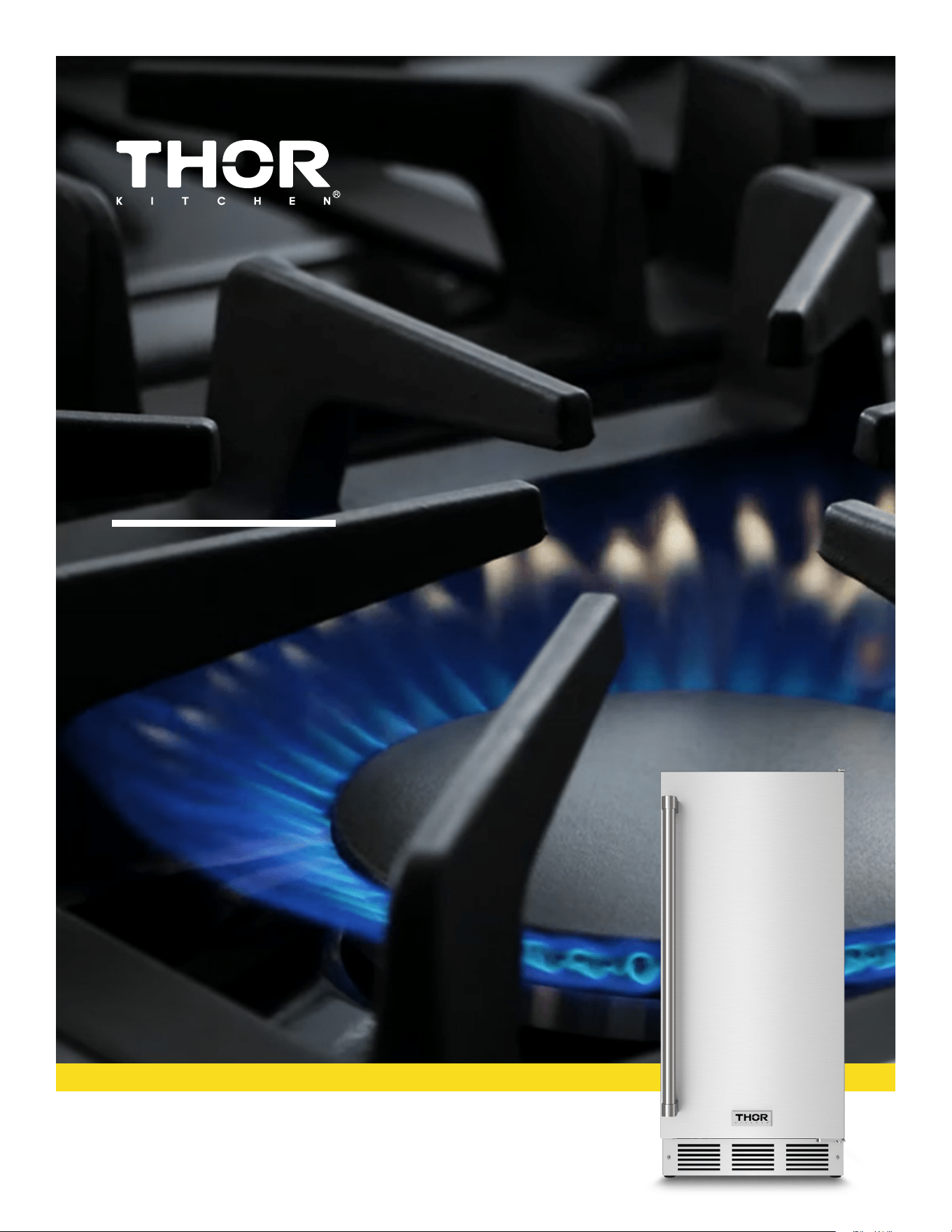
USE + CARE
MANUAL
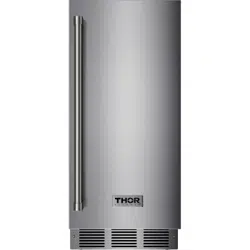
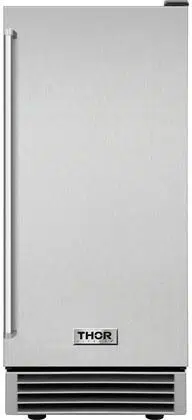
15 INCH INDOOR OUTDOOR
ICE MAKER
TIM1511
REV.072025.TIM1511
IMPORTANT SAFETY INSTRUCTIONS
California Proposition 65
Certain components in this product and its related accessories contain chemicals known to the
state of California to cause cancer, birth defects or other reproductive harm.
DANGER – Risk Of Fire Or Explosion. FLAMMABLE REFRIGERANT Used.
Do Not Use Mechanical Devices To Defrost Refrigerator. Do Not
Puncture Refrigerant Tubing.
DANGER – Risk Of Fire Or Explosion. FLAMMABLE REFRIGERANT Used.
To Be Repaired Only By Trained Service Personnel. Do Not
Puncture Refrigerant Tubing.
CAUTION – Risk Of Fire Or Explosion. FLAMMABLE REFRIGERANT Used. Consult Repair
Manual/Owner’s Guide Before Attempting To Service This Product. All Safety Precautions Must be
Followed.
CAUTION – Risk Of Fire Or Explosion. Dispose Of Properly In Accordance With The Applicable
Federal Or
Local
Regulations. FLAMMABLE REFRIGERANT Used.
CAUTION – Risk Of Fire Or Explosion Due T
o Puncture Of Refrigerant Tubing; Follow Handling
Instructions Carefully. FLAMMABLE REFRIGERANT Used.
– WARNING: Keep ventilation openings, in the appliance enclosure or in the built-in structure, clear
of obstruction.
– WARNING: Do not use mechanical devices or other means to accelerate the defrosting process,
other than those recommended by the manufacturer.
– WARNING: Do not damage the refrigerant circuit.
– WARNING: Do not operate electrical appliances inside the food storage compartments of this
appliance, except for those specifically recommended by the manufacturer.
DISPOSAL
The appliance cannot be treated as normal domestic trash but must be handed in at a
collection point for recycling electric and electronic appliances. Your contribution to the correct
disposal of this product protects the environment. Further information about the recycling of
this product can be obtained from your local municipal authority.
This appliance
is intended to be used in household and similar applications such as
–
staff kitchen areas in
shops, offices and other working environments;
–
farm houses and
by clients in
hotels, motels and
other residential type environments;
–
bed and breakfast type environments;
–
catering and similar non-retail applications.
THE MANUFACTURER DISCLAIMS ANY RESPONSIBILITY IF THE ABOVE INSTRUCTIONS ARE
NOT FOLLOWED.
1

IMPORTANT SAFETY INSTRUCTIONS···························································································1
SAFETY DEFINITIONS·····················································································································3
SAFETY PRECAUTIONS···················································································································3
SPECIFICATION································································································································· 5
OPERATING THE UNIT····················································································································6
INSTALLATION···································································································································7
BUILT-IN CABINET DIMENSIONS································································································8
CONNECTING THE WATER SUPPLY·······························································································8
FILTER INSTALLATION/REPLACEMENT··························································································9
ELECTRICAL CONNECTION··········································································································10
LEVELING THE UNIT······················································································································11
REVERSING THE DOOR···········································································································12-13
USING THE CONTROLS···········································································································13-16
PANEL DISPLAY NOTIFICATION····································································································16
FAULT ALARM AND ERROR CODES·························································································16-17
MAINTENANCE································································································································17
CLEANING AND MAINTAINING THE UNIT·····················································································17
CLEANING THE UNIT’S EXTERIOR·································································································17
CLEANING THE UNIT’S INTERIOR·································································································· 17
EXTENDED PERIODS OF NON-USE································································································ 18
TROUBLESHOOTING··················································································································19-20
WARRANTY·······································································································································21
TABLE OF CONTENTS
2
SAFETY
SAFETY DEFINITIONS
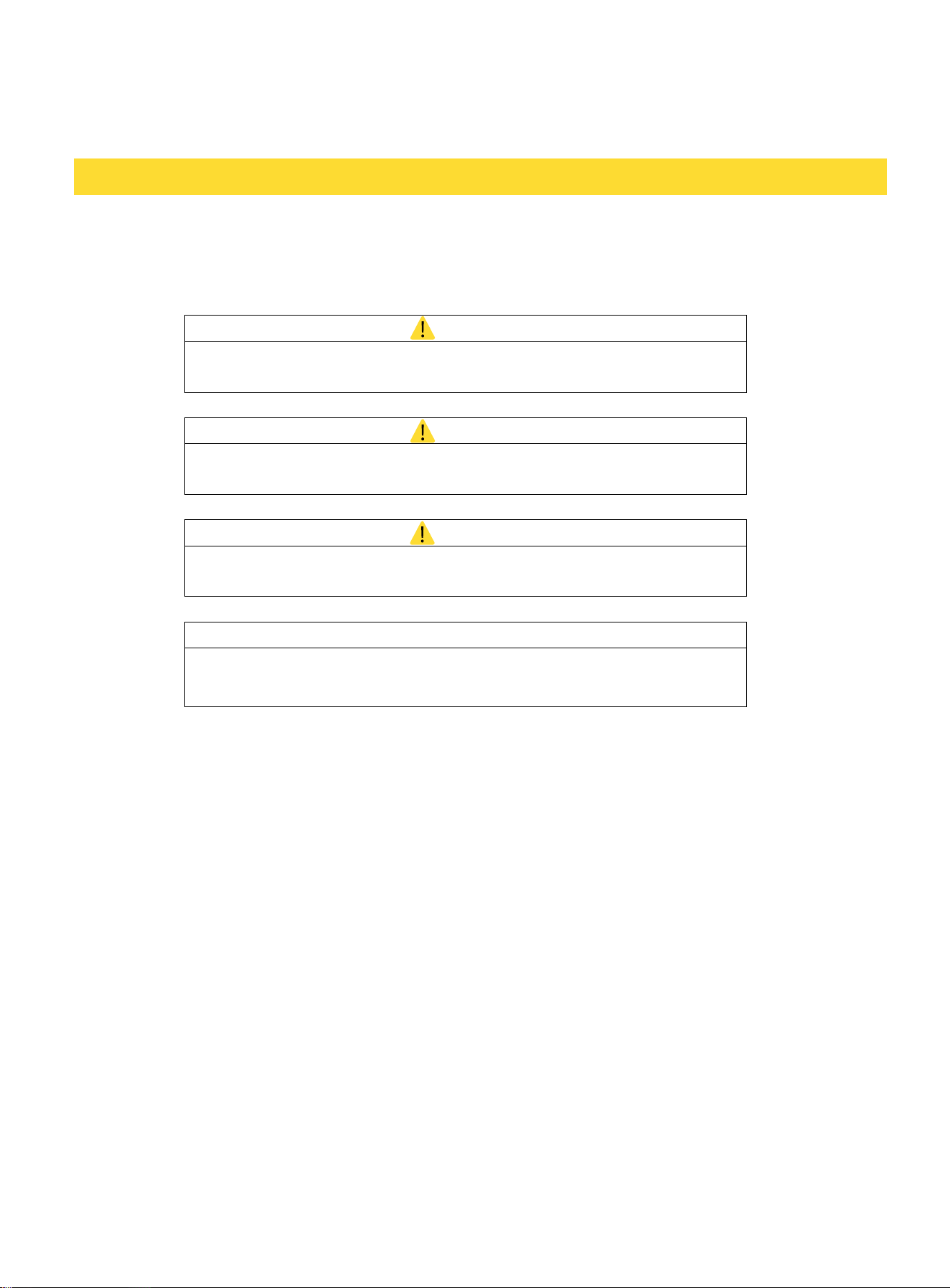
The words DANGER, WARNING, CAUTION and NOTICE are used throughout this manual to
highlight important information. Be certain that the meanings of these alerts are known to all who
operate and install the appliance.
DANGER
Indicates a hazardous situation that, if not avoided, will result in
death or serious injury.
WARNING
Indicates a hazardous situation that, if not avoided, could result in
death or serious injury.
CAUTION
Indicates a hazardous situation that, if not avoided, could result in
minor or moderate injury.
NOTICE
Indicates a situation that can cause damage to the appliance and/
or the environment or cause the appliance to operate improperly.
MOVING PRECAUTIONS
OTHER PRECAUTIONS
• To ensure proper ventilation for the appliance, keep obstructions away from the front of the unit.
SAFETY PRECAUTIONS
POWER CORD PRECAUTIONS
• Do not use the appliance if the power cord is damaged. If the power cord is damaged, have a
qualified electrician replace the power cord.
• Never lift, carry, or drag the appliance by the power cord.
• Do not connect or disconnect the electric plug when your hands are wet.
• Never unplug the appliance by pulling on the power cord. Always grip the plug firmly and pull
straight out from the outlet.
• When moving the appliance, do not turn it upside-down and do not tilt it beyond a 45-degree
angle.
• Do not move the appliance without emptying it and securing the door in the closed position.
INSTALLING PRECAUTION
• Connect to a potable water supply only.
3

• Keep fingers out of the “pinch point” areas. Clearance between the door and cabinet are
necessarily small. Be careful closing the door when children are in the area.
• Do not touch the evaporator with your hand when the appliance is operating.
• Do not attempt to repair or replace any part of your appliance unless this manual specifically
recommends it. Have a qualified technician perform all other service on the unit.
• Children 8 years of age and older and people with reduced physical, sensory or mental
capabilities or lack of experience and knowledge can use this appliance if they have been given
supervision or instruction concerning use of the appliance in a safe way and they understand the
hazards involved.
• Never allow children to operate, play with or crawl inside the appliance.
• Never allow children to clean and maintain the machine without supervision.
• Do not use the appliance other than for its intended purpose.
• Do not touch the condenser surfaces. They are sharp and can be easily damaged.
CLEANING AND MAINTENANCE PRECAUTIONS
• Never clean the appliance parts with flammable fluids. Do not store or use gasoline or other
flammable vapors and liquids in the vicinity of this appliance or any other appliances. The fumes can
create a fire hazard or explosion.
• Do not use solvent-based cleaning agents or abrasives on the interior. These cleaners may
transmit taste to the ice cubes, or damage or discolor the interior.
• If the appliance will not be used for a long time, thoroughly clean it before the next use. Carefully
follow any instructions provided for cleaning or the use of sanitizing solution. Do not leave any
solution inside the appliance after cleaning.
THE MANUFACTURER DISCLAIMS ANY RESPONSIBILITY IF THE ABOVE INSTRUCTIONS ARE NOT
FOLLOWED.
4
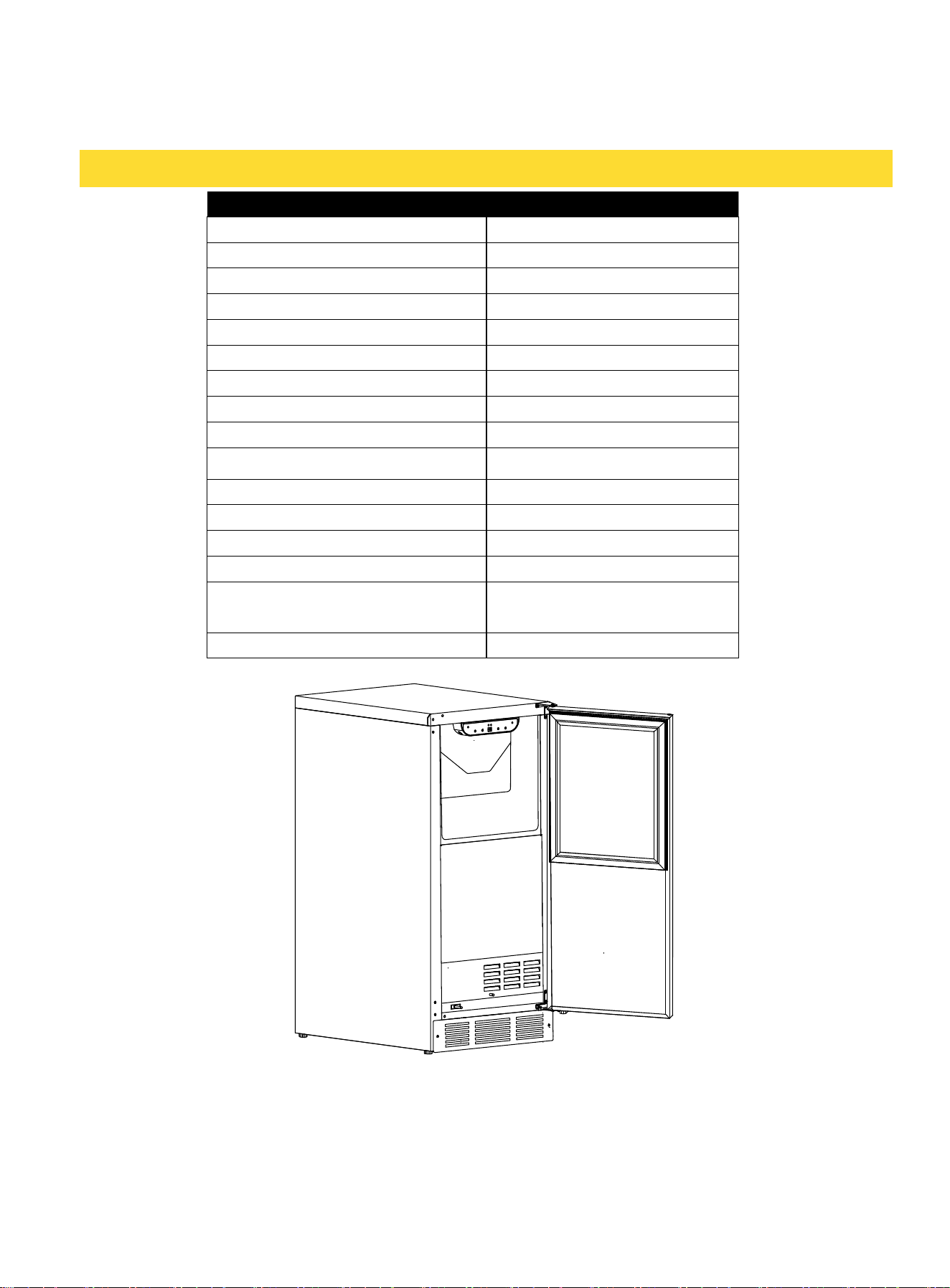
SPECIFICATION
FEATURES TIM1511
Electrical Requirements
115V/60Hz
Maximum Amp Fuse
15 amps
Indoor/Outdoor
Indoor/Outdoor *
IP Rating
IPX4
Ambient Operating Range
50~110°F(10°C~43°C)
Water Operating Range
40~90°F (4°C~32°C)
Water Pressure Operating Range
20~80psi (0.138MPa~0.55MPa)
Water Inlet Adapter
1/4" OD compression fitting
Ice Shape
Cube
Ice Production Capacity (70℉/50 ℉)
70lbs (32Kg) **
Ice Storage Capacity
26lbs (12kg)
Ice Size (L×D×H)
7/8"×7/8"×7/8"
Ice Weight
about 0.4oz(11g) per cube
Ice quantity per cycle
32
Unit Dimensions (W×D×H)
[Not Including Handle
14-7/8"×22-5/8"×32-7/ 8"
378×574×835(mm)
89.2lbs (40.5Kg)
* Within limited outdoor environment: the unit must be under the awning or the canopy and shall
not be exposed directly to rain.
* * The actual quantity of ice produced per day will vary with ambient room and water conditions.
Note: Technical data and performance information are provided for reference only and subject to
change.
Net Weight
5

OPERATING THE UNIT
IMPORTANT: ENSURING ICE FRESHNESS AND QUALITY
• Although the unit has been tested and cleaned at the factory, discard the first batch of ice cubes
due to long-term transit and storage.
• If you do not use the ice machine regularly, the manufacturer recommends emptying the ice bin
periodically to ensure ice freshness.
• The ice machine produces ice in layers resulting in a clear cube. The ice may appear wet when
first produced. Ice in the bin may develop surface frost which appears when the cube in placed in
liquid.
OTHER OPERATING TIPS
• Keep the air intake and exhaust free of dust and lint to allow free air flow. With hard water,
cleaning may have to be more frequent.
• Never touch the evaporator when the unit is running.
• Keep the door closed to reduce ice melting and to promote proper ice formation. Open the door
only when taking ice from the appliance.
• Turn on the water supply tap before switching on the ice machine. Never turn the water supply
tap off when the ice machine is working.
ICE MACHINE PRODUCTION
Square cube ice machine TIM1511 - The ice machine will continue producing ice until the ice in the
bin reaches the level indicator. Once the ice level falls below the indicator, the machine will
automatically resume ice production.
6

INSTALLATION
BEFORE USING YOUR ICE MAKER
PLUMBING AND ELECTRICAL TIPS
• A licensed plumber must install this appliance.
• This appliance must be installed with all electrical and water connections in accordance with state
and local codes.
• This unit requires a standard electrical supply properly grounded in accordance with National
Electrical Code and local codes and ordinances.
• The fuse (or circuit breaker) size should be 15 amperes for 115V.
• The manufacturer recommends that you provide a separate circuit that services only your
appliance. Use receptacles that cannot be turned off by a switch or pull chain.
• Plug the appliance into a grounded three-prong outlet. Do not remove the grounding prong, do
not use an adapter, and do not use an extension cord.
• Do not kink, pinch, or damage the power supply cord between the ice machine and wall or
cabinet.
• Before connecting the ice machine to the power source, let it stand upright for approximately 4
hours. Following this step will reduce the possibility of a malfunction in the cooling system brought
on by handling during transportation.
• Make sure to install on level surface and ensure drain line and water line are not kinked.
TIPS ON MOVING AND SETTING UP THE UNIT
• Use two or more people to move and install the appliance. Failure to do so can result in back or
other injury.
• Remove the packing materials and clean the appliance before using it.
WATER SUPPLY TIPS
• Check for leaks after connecting the water line.
• The ice machine requires a continuous water supply with a minimum pressure of 20 psi (0.138
MPa) and a static pressure not to exceed 80 psi (0.55 MPa).
• The manufacturer recommends filtering the water. A water filter helps remove taste, odors and
particles. Using softened water may result in white, mushy cubes that stick together. Avoid using
deionized water.
• Using an RO filter may reduce the water pressure below the minimum level required for the ice
machine to operate properly.
• Ensure that the water supply hose is not pinched, kinked, or damaged during installation.
RECESSED INSTALLATION
A built-in installation will allow you to install the ice machine under a counter or in a kitchen cabinet
Check to be sure you have all the following parts:
• 1 Ice Scoop
• 1 Water Filter, Model#: WFIM0211
• 1 Left Latch Mechanism Kit
• 1 Use And Care Manual
• 1 Water Line
7
if you provide the necessary clearance space around the unit. The appliance must be positioned
to allow clearance for water, drain and electrical connections in the rear of the unit.
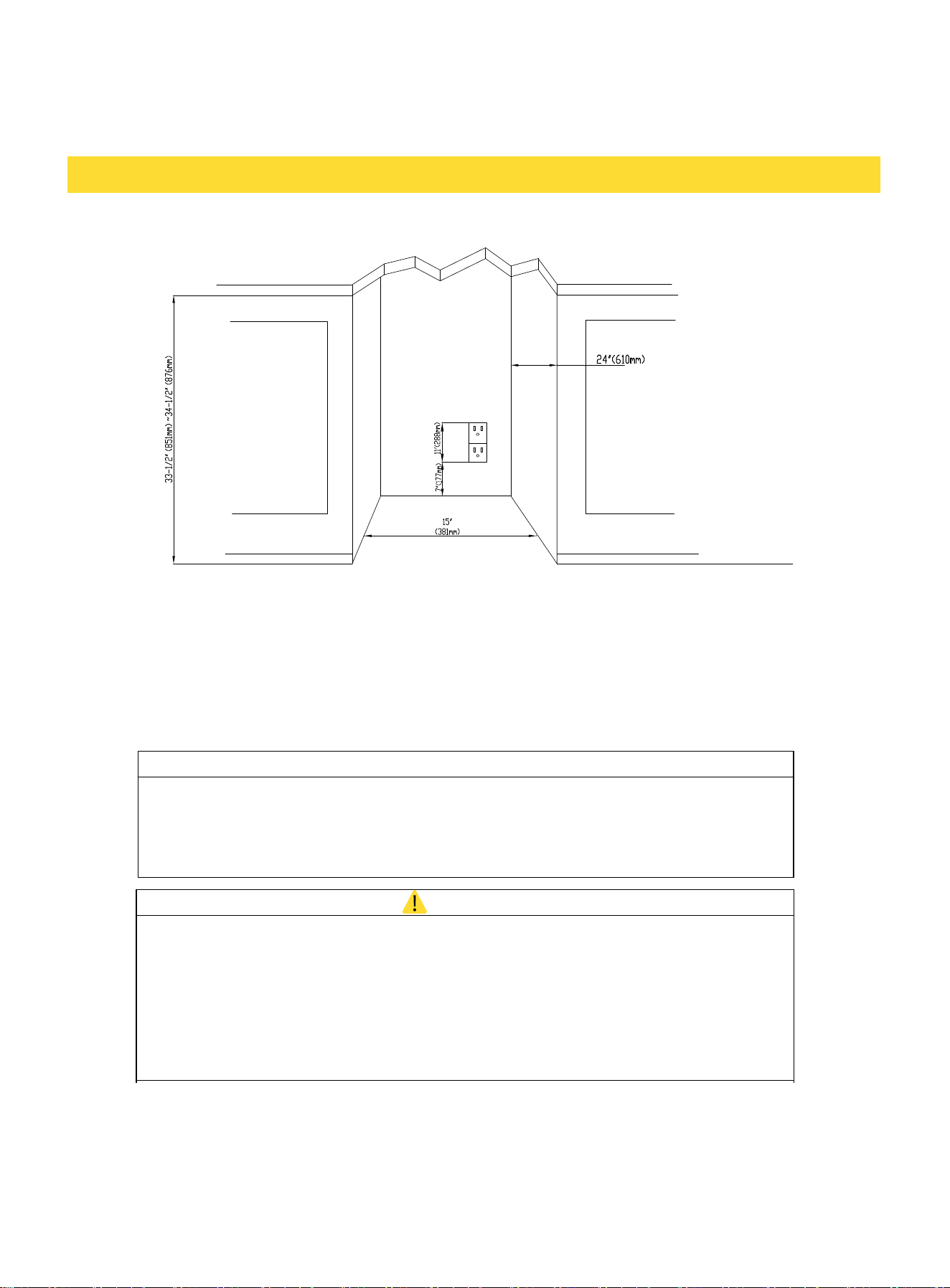
BUILT-IN CABINET DIMENSIONS
A built-in installation requires adequate clearance for a water line and electrical plug to ensure
proper operation. A built-in unit is designed for zero clearance at the top and each side of the
unit. The unit uses fan-forced condenser cooling, which requires air circulation through the lower
section of the unit.
To ensure proper service access and ventilation, the unit should not have the grill openings
covered. There are no additional requirements for venting at the top, side, or rear of the unit.
NOTICE
• Ensure that the air path for the grill remains unrestricted. Any
restriction of air flow through the grill will disrupt normal operation of the unit,
resulting in damage to components, and voids warranty.
• Connect the unit to a potable water supply only.
WARNING
Electrical Shock Hazard
Always disconnect power at the source before working on the unit. Failure to
unplug the clear ice machine could result in electrical shock or personal injury.
• Do not touch the power plug when your hands are wet.
• Never unplug the unit by pulling on the cord. Grasp the plug and pull out firmly.
CONNECTING THE WATER SUPPLY
1. Turn off the main water supply. Turn on the nearest faucet long enough to drain the water line.
2. Locate a 1/2" to 3/4" vertical cold-water pipe within 9 feet of the installation site.
8
3. Install a shut-off valve to the main water supply. If the water pipe has a plain piece of copper
tubing, attach a 1/4" O.D. compression union to the tubing and remove the nut.
4. Thread the nuts of the supplied water supply hose to the tap and water inlet valve. Access to the
water inlet valve is through the opening in the rear panel. Tighten firmly by hand, then one-half turn
with a wrench.
5. Turn on the main water supply and faucet. Check for leaks in the water supply connection.
Tighten all connections.
FILTER INSTALLATION/REPLACEMENT
The filter must be installed in accordance with manufacturer's recommended procedures and
guidelines. To reduce the risk associated with property damage due to water leakage, you must
read and follow the Installation Instructions and Use & Care Manual before installation and
product operation. For replacement, contact your local dealer or place where you purchase.
NOTICE
1. The filter must be replaced every 6 months, at the rated capacity or if a
noticeable reduction in flow occurs.
2. Before installation or replacement, always connect the filter to the water
supply separately first, and then run water for at least 5 minutes to purge
the filter until the water line is clear.
3. Insert the tube to the end of the built-in quick-connectors, and Always
check for leaks before fixing the filter to clips.
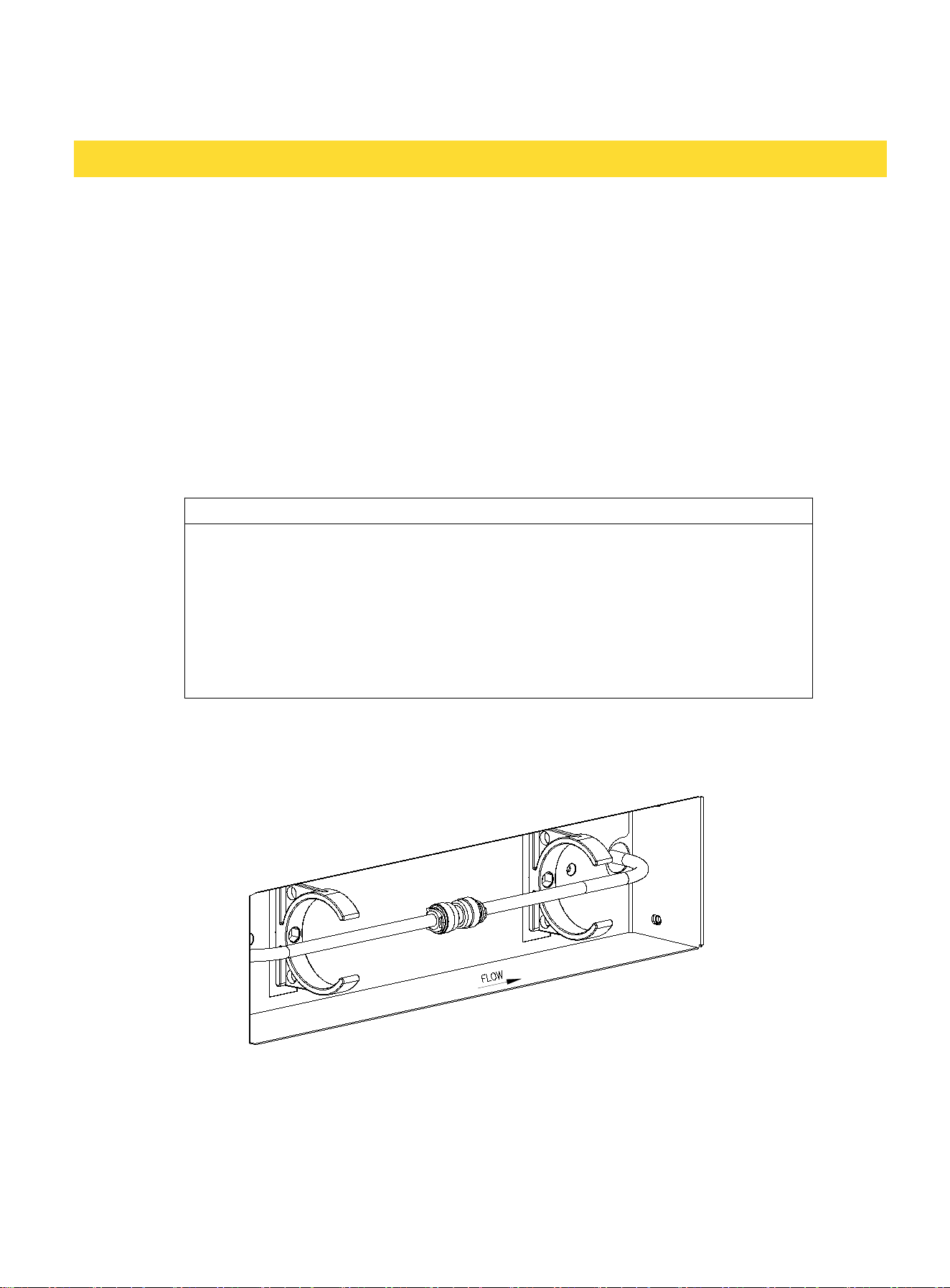
1. Locate the thumb screw in the lower front of the ice machine, unscrew to take away the filter
panel. The water tubes are being connected by a joint connector so the ice machine CAN work
without a filter.
DO NOT TURN ON THE WATER SUPPLY BEFORE THE FILTER INSTALLATION COMPLETE!
2. Take away the two clips on both ends of the joint connector, pull the tube out from it, and
then insert the tubes to the filter’s built-in 1/4" quick connectors, until the tube reaches the
bottom (approx 1/2"). Turn on the water supply to check for leaks before fixing the filter to clips.
9
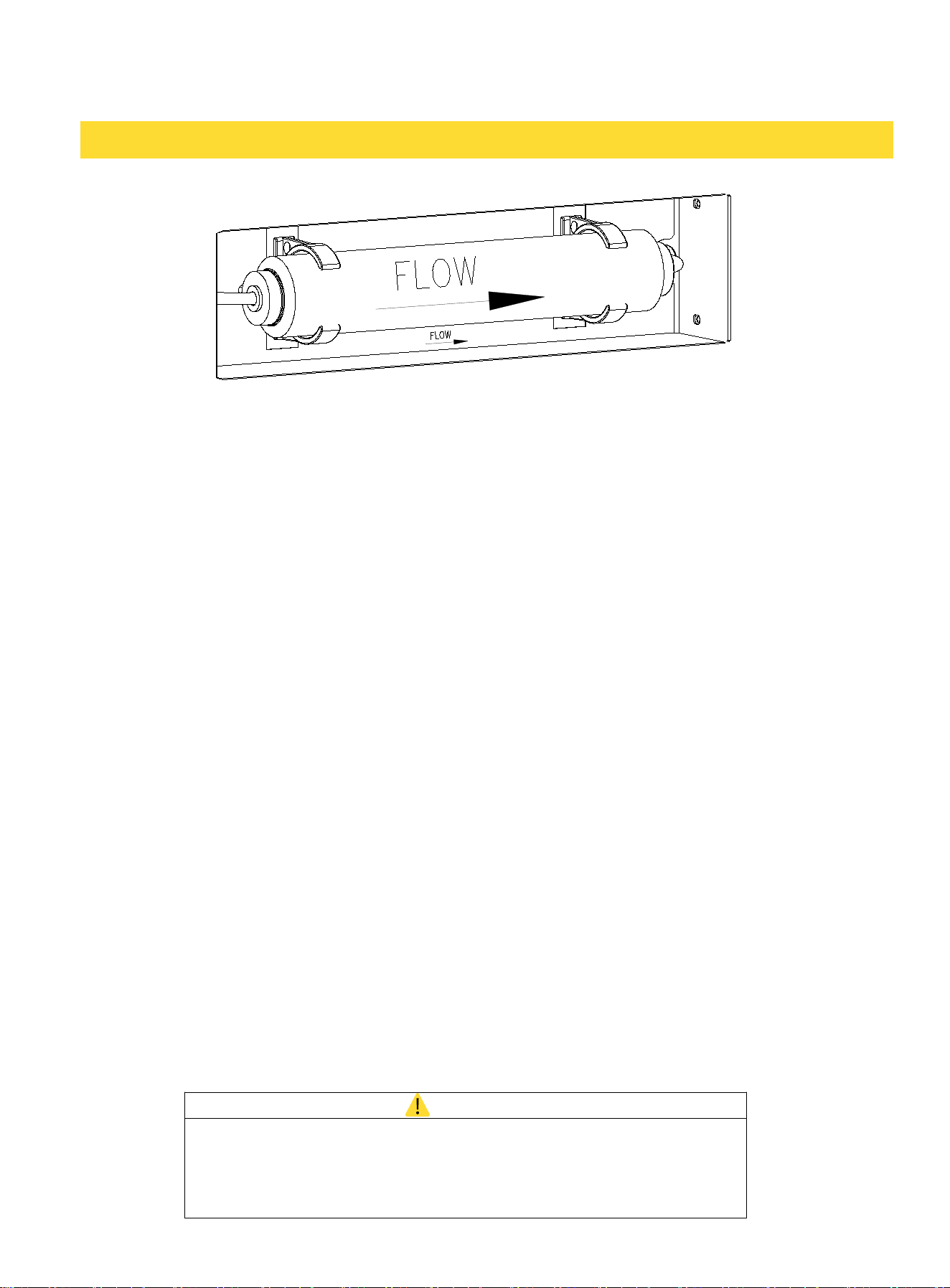
BEWARE THE FLOW DIRECTION ARROW OF THE ICE MACHINE AND THE FILTER, MAKE SURE
THEY MATCH!
3. Put the filter panel back and tight the thumb screw firmly.
ELECTRICAL CONNECTION
Do not, under any circumstances, cut or remove the third (ground) prong from the power cord.
For personal safety, you must properly ground this appliance. The power cord of this appliance
features a three-prong grounding plug that mates with a standard three-prong grounding wall
outlet to minimize the possibility of electric shock hazard from the appliance. Have a qualified
electrician check the wall outlet and circuit to make sure the outlet is properly grounded. It is your
responsibility and obligation to have a standard two-prong wall outlet replaced with a properly
grounded three-prong wall outlet.
Always plug the appliance into its own individual electrical outlet. The voltage rating of the outlet
must match the rating label on the appliance. This match provides the best performance and
prevents overloading the electrical circuits, which could cause a fire hazard from overheated wires.
Never unplug your appliance by pulling on the power cord. Always grip the plug firmly and pull
straight out from the outlet.
Repair or replace immediately all power cords that have become frayed or damaged. Do not use a
cord that shows cracks or abrasion damage along its length or at either end. When moving the
appliance, take care not to damage the power cord.
If the supply cord suffers damage, have the manufacturer, its service agent, or similarly qualified
persons replace the supply cord to avoid a hazard.
AVOIDING USE OF EXTENSION CORDS
Because of potential safety hazards under certain conditions, the manufacturer strongly
recommends that you do not use an extension cord with this appliance.
DRAIN PUMP TIPS
WARNING
Electrical Shock Hazard
Be sure the floor surfaces surrounding the appliance are dry before
plugging in and removing the power cord to the outlet to prevent
electrical shock.
10
Follow these steps to test the operation of the drain pump before final installation:
1. Check the power cord and make sure it is not plugged into the outlet.
2. Place the drain hose into a suitable container that can hold at least one gallon.
3. Pour one gallon of water into the ice storage bin.
4. Plug the power cord into a properly grounded, polarized electrical outlet.
5. The drain pump should start and pump the water into the container.
6. Unplug the power cord.
LEVELING THE UNIT
CAUTION
The unit will be significantly heavier once it is operational and fully
loaded.
Place your ice maker on a level surface that is strong enough to support the ice maker when it is
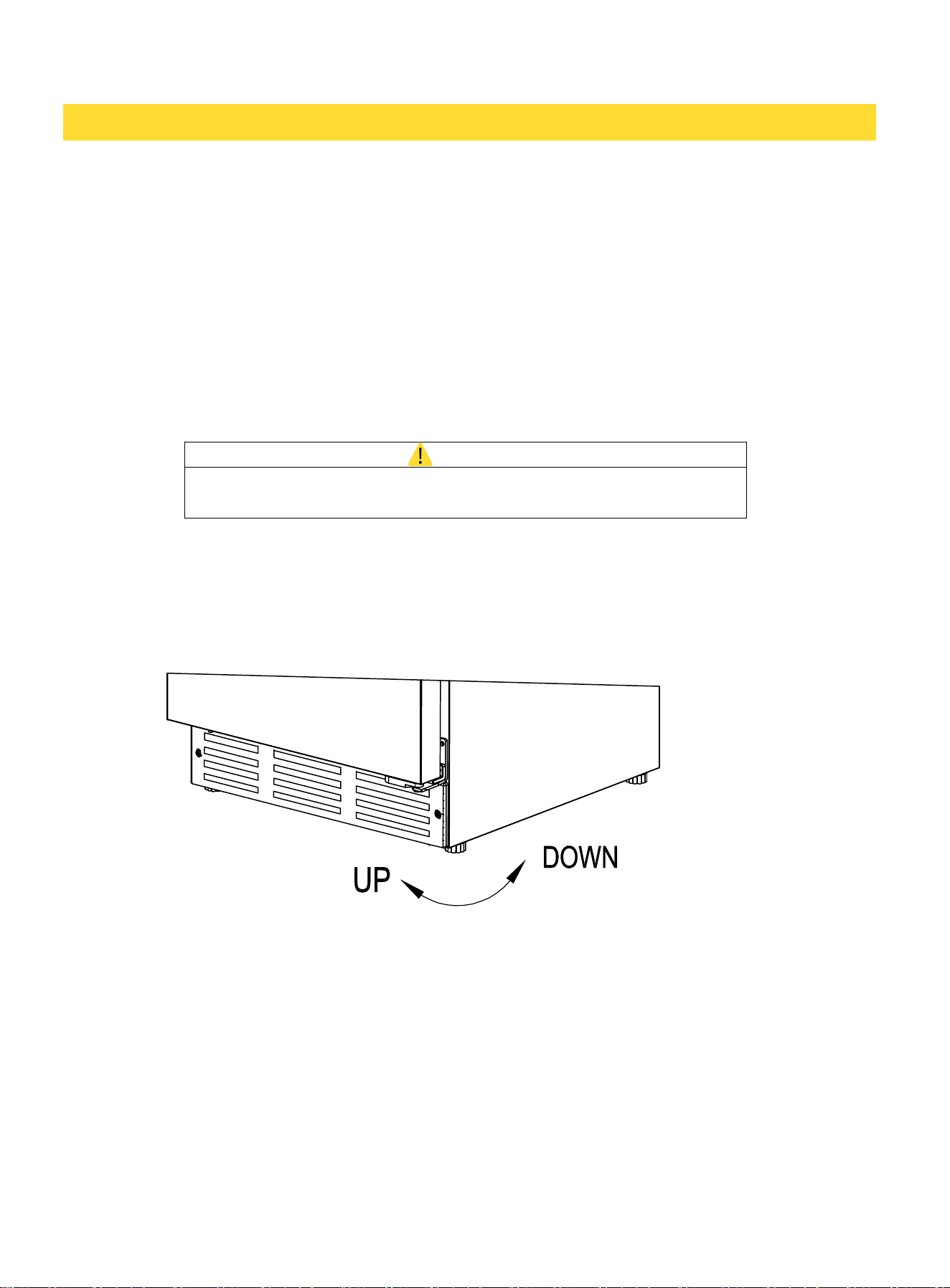
fully loaded. Level your ice maker by adjusting the legs at the front of the ice maker. If necessary,
raise or lower the unit by turning the four leveling feet on the bottom.
11
This appliance is designed with a reversible door feature, allowing the door to open from either
the left or right side. It is pre-configured for left-side opening upon delivery. If you wish to
change the door opening direction, please follow the provided instructions.
CAUTION
Before operating, check the power cord and make sure it is not
plugged into the outlet.
NOTE: THE HANDLE DOES NOT NEED TO BE REMOVED TO REVERSE THE DOOR
Tools needed: Flathead screwdriver, Phillips screwdriver
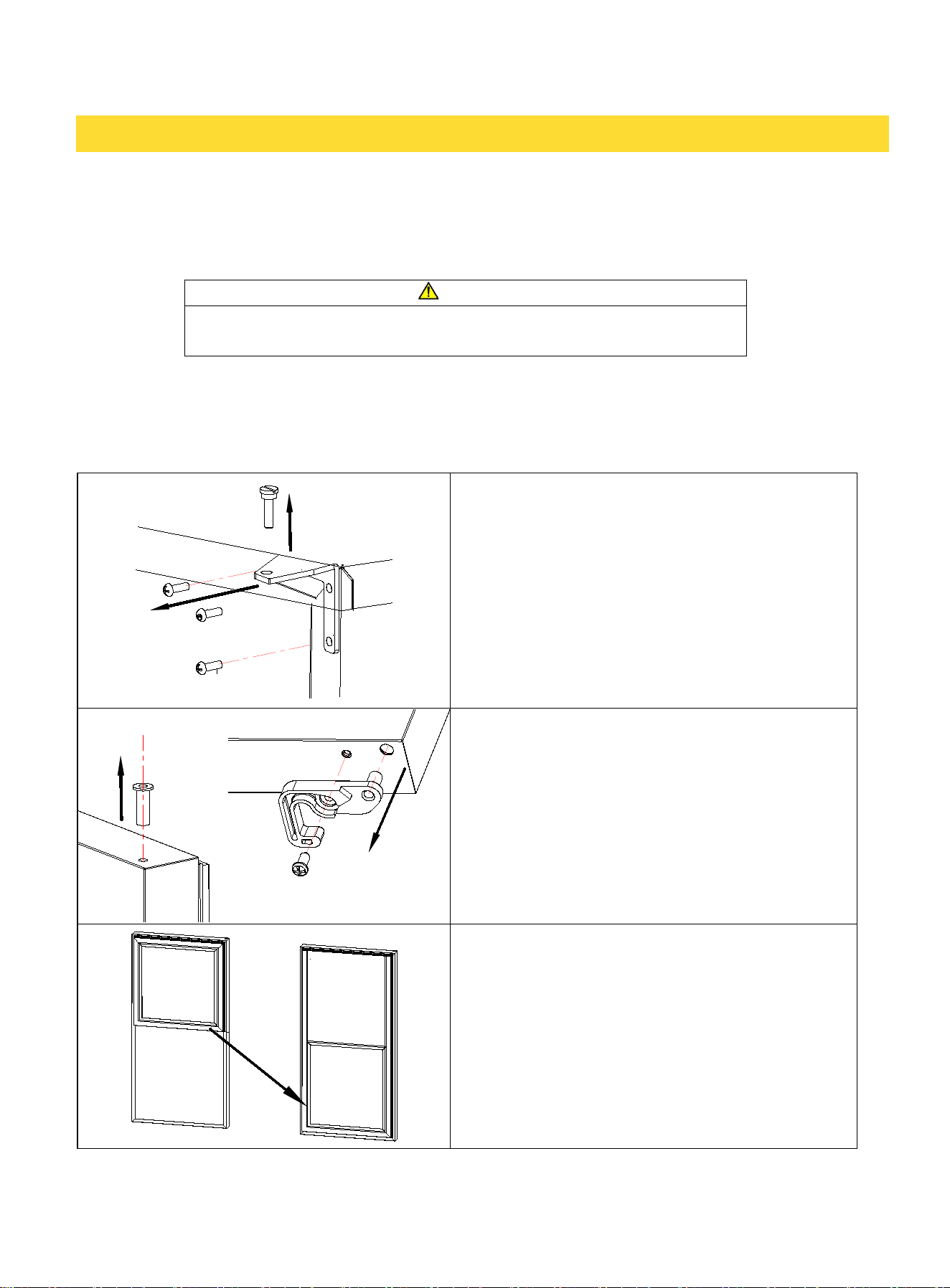
1. Use the Flathead screwdriver to unscrew the
hinge pin from the top hinge, put aside, then
should have an image to show this step.
2. To reverse the door swing, rotate the door
180°. Begin by unscrewing and removing the
right latch hook from the bottom of the door, then
remove the pin sleeve from the top of the door.
Next, insert the pin sleeve into the bottom of the
door. Locate the left latch hook in the accessory
bag and install it on the opposite side of the door.
3. Carefully peel off the entire door gasket,
starting from any corner, and remove the inserts
from the opposite side of the door liner's
mounting groove. Swap the insert positions, then
attach the door gasket to the opposite side of the
door. Finally, press the inserts into the exposed
mounting grooves to secure them in place. The
door gasket is now properly repositioned.
12
REVERSING THE DOOR
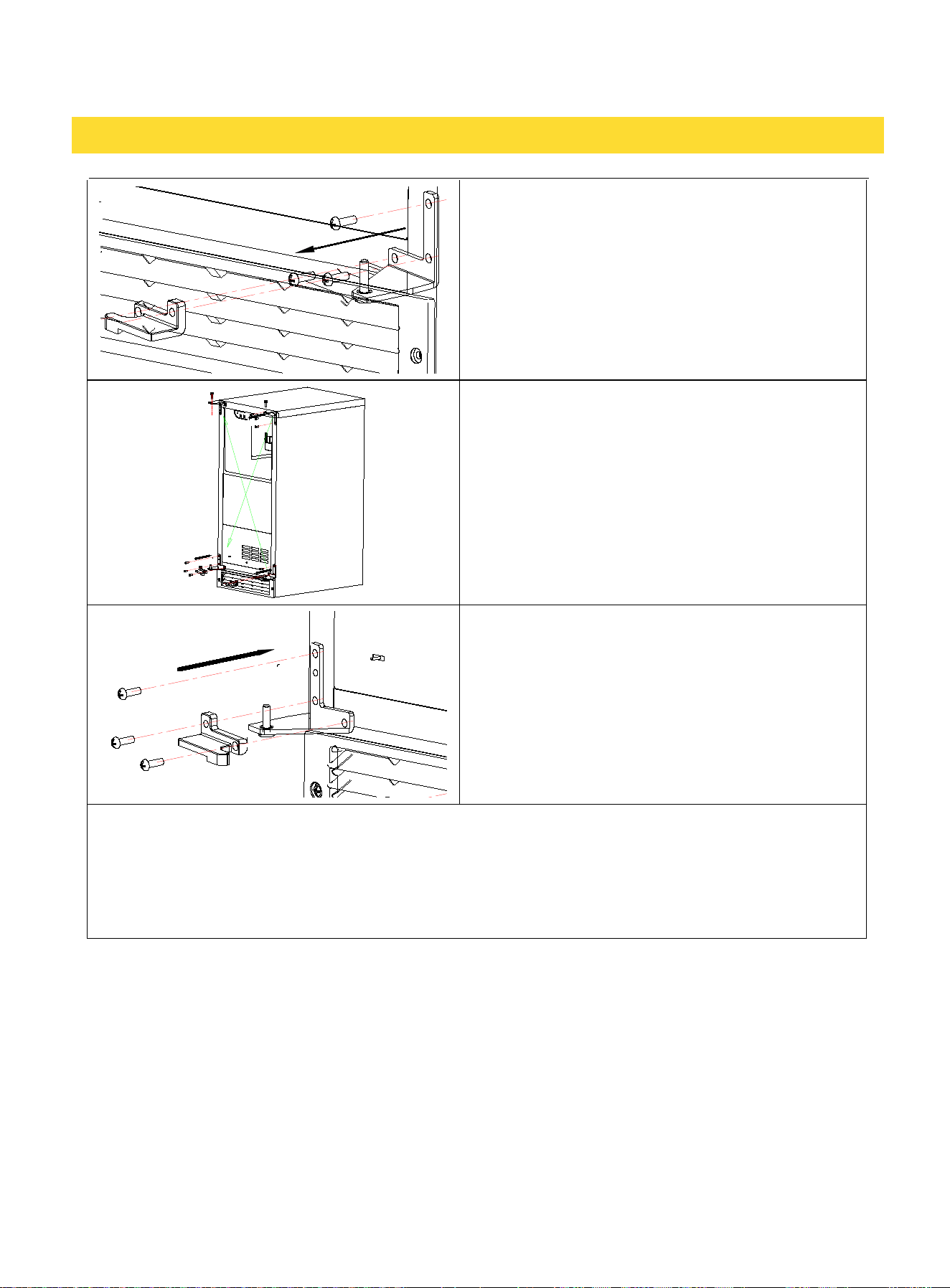
4. Use a Phillips screwdriver to remove the
bolts securing the top and bottom hinges, and
uninstall both hinges. Detach the right latch block
from the bottom hinge and retain the removed
right latch kit for future use.
5. Swap the hinge positions by installing the
bottom right hinge onto the top left of the cabinet
and the top right hinge onto the bottom left of the
cabinet. Use the plugs removed from the left side
to cover the right-side mounting holes.
6. When installing the bottom left hinge, locate
the left latch block in the accessory bag and
attach it to the bottom hinge. Additionally,
unscrew the hinge pin from the top left hinge to
prepare for door installation.
7. Align the left latch block with the bottom hinge pin and carefully insert the door. Ensure
the pin sleeve at the top of the door is properly aligned with the top hinge, then insert and
securely tighten the hinge pin. The door reversal process is now complete.
13
USING THE CONTROLS
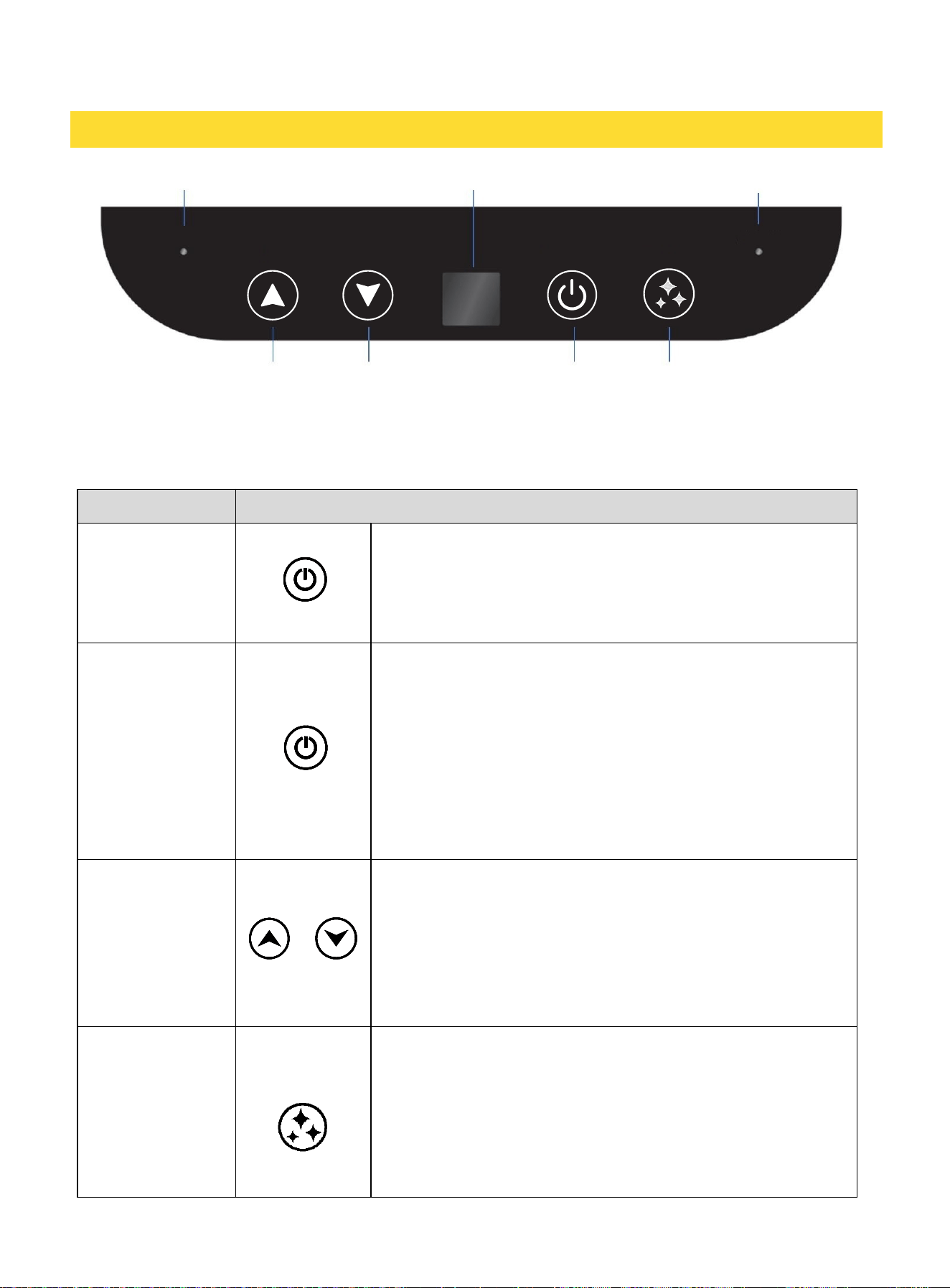
The control panel, located at the top of the interior compartment, includes a display window, 4
buttons, and 2 indicator lights.
FUNCTION OPERATING
Turn ON
Press the POWER button to turn ON the unit.
The unit will automatically start making ice and display
IC
during ice making and
BF
when the ice bin is full.
The RUN indicator light will illuminate..
Turn OFF
Press the POWER button to turn OFF the unit.
This unit will enter Standby mode and display OF.
*
If the unit is already in the process of making ice, it will
complete the current cycle before entering Standby mode.
Press and hold the POWER button for over 3 seconds to
turn OFF the unit.
*
Incomplete ice cubes may remain in the bin if the unit is
turned off while making ice.
Adjust the ice
cube size
Press and hold the UP or DOWN button for over 3
seconds to enter ICE SIZE ADJUSTING mode. Then use
the UP or DOWN button to change the settings.
Window displays
1
to
6
(min to max).
3
is the default ice
size.
The setting will be saved after 5 seconds.
Cleaning
Press and hold the CLEAN button for over 3 seconds to
turn ON/OFF the CLEANING mode.
Once cleaning begins, the window will display
CL
, and the
cleaning cycle will run for 30 minutes before exiting and
then entering Standby mode.
*This function can only be initiated in Standby mode.
14
ALARM INDICATOR
DISPLAY WINDOW
RUN INDICATOR
POWER CLEAN
UP DOWN
POWER
CLEAN
ICE CUBE SIZE
ALARM
RUN
FUNCTION OPERATING
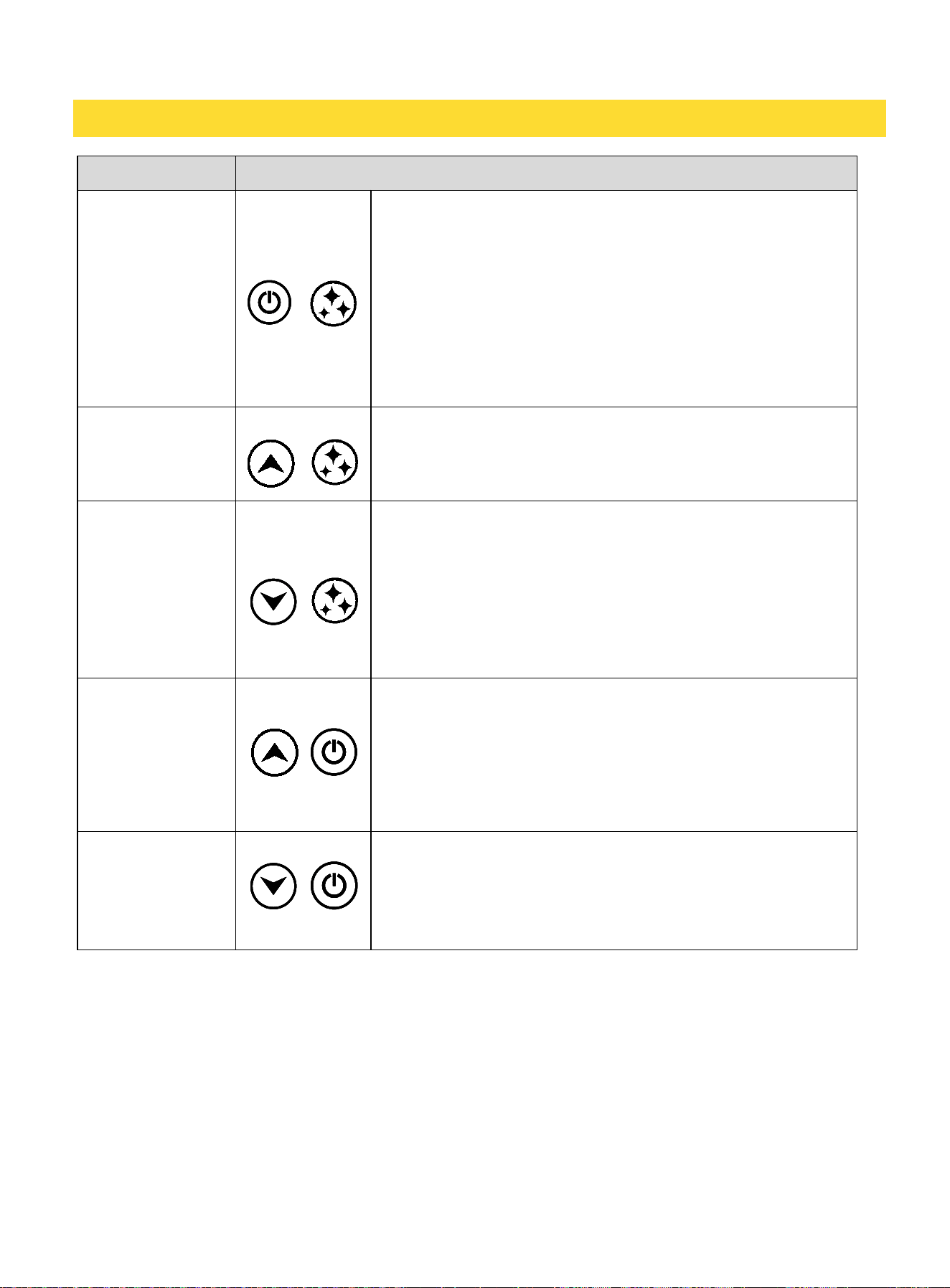
Timed Ice making
Press and hold the POWER and CLEAN buttons for over 3
seconds during Standby mode to toggle ON/OFF the
Timed Ice Making mode.
When entering the time setting, press the UP or DOWN
button to select a timer duration from1 to12 hours tfor
the ice-making cycle. The setting will automatically save
after 10 seconds, and the display will show the remaining
countdown time in hours.
*Pressing the POWER button will skip the countdown and
immediately begin the ice-making process.
Sabbath
Press and hold the UP and CLEAN buttons for over 6
seconds to toggle Sabbath mode ON/OFF.
IN SABBATH mode, the display will turn off, and audible
sounds will be disabled.
Showroom
Press and hold the DOWN and CLEAN buttons for over 6
seconds on Standby mode to toggle ON/OFF the
Showroom mode.
The indicator located at the bottom right of the display
window will illuminate.
*This mode is designed for dealer display purposes. Only
the lights and display panel will operate, while all alarms
are disabled except for the Door Ajar Alarm.
Filter Reset
Press and hold the UP and POWER buttons for over 6
seconds to reset the water filter.
The display window will flash
FD
and reset the filter
timer.
*This function can only be initiated on Standby mode. Use
only after replacing the water filter.
Firmware Version
&
System Recovery
Press and hold the DOWN and POWER buttons to display
firmware version A3.
Holding these buttons for OVER 6 seconds will reset all
settings back to default.
*The firmware
version is
subject to change.
EXPECTING NORMAL SOUNDS
Your new ice machine may produce unfamiliar sounds during operation. Hard surfaces such as
floors and walls may amplify the sounds, making them appear louder than they actually are. The
following outlines the types of sounds you may hear from the ice machine and their sources.
These sounds are normal part of regular operation:
• A pulsating or high-pitched sound from the high-efficiency compressor.
• A splashing sound from water running from the evaporator to the water reservoir.
• As each cycle ends, you may hear a gurgling sound caused by the refrigerant circulating within
the ice machine.
15
• Rattling noises may result from the flow of refrigerant, the water line, or from items stored on top
of the machine causing vibrations.
• You may hear the sound of the condenser fan forcing air over the condenser.
• During the harvest cycle, you may hear the sound of ice cubes falling into the ice bin.
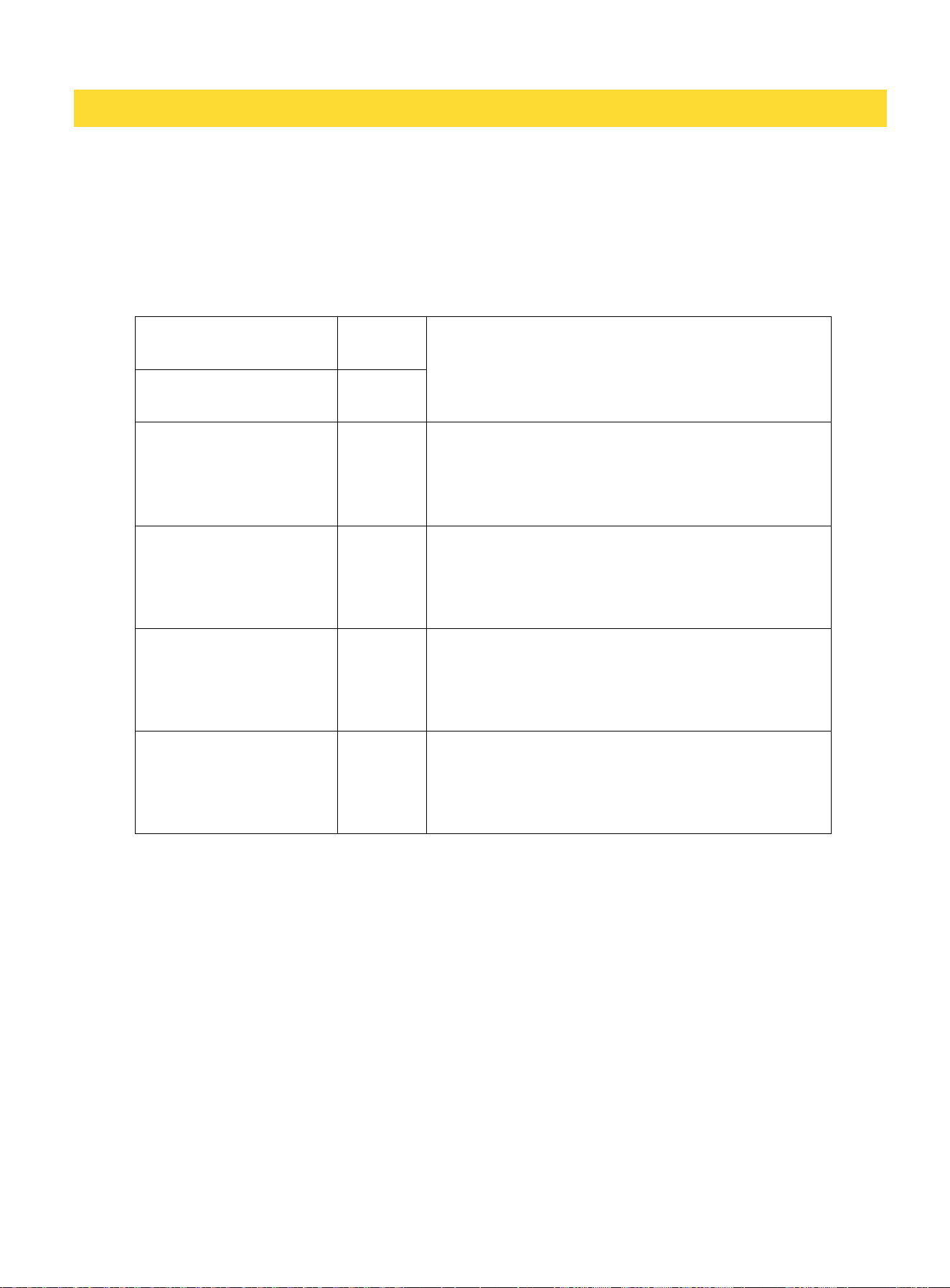
PANEL DISPLAY NOTIFICATION
Below notifications will sound the alarm except the Ice full stop.
DEALING WITH POWER FAILURE
Most power failures are corrected within a few hours and should not affect the temperature of your
ice machine if you minimize the number of times, you open the ice machine door. If the power is
going to be off for a longer period of time, take the proper steps to disconnect your appliance.
Note: During operation, the evaporator is the only component that comes cold enough to produce
ice. In the event of a power failure, only the ice-making process will be interrupted, while the ice in
the bin will gradually melt as usual.
FAULT ALARM AND ERROR CODES
When the unit detects an, an alarm will sound, the AlARM indicator will flash, and the
corresponding error code will be displayed. Please provide the displayed error code when
contacting customer service.
Self-diagnosis Pass
88
Displayed only at the beginning of the operation
process.
Filling Water
N/A
Ice Full Stop
BF
If the ice storage bin is full, the unit will
automatically stop.
Remove the ice and the unit will start making
ice after 3 minutes.
Door Ajar Alarm
dr
If the door remains open for more than 5
minutes, the display panel will flash dr with
alarm sounds. All alerts will be
cleared once
the door is closed or any button is pressed.
Clean Reminder
CL
After approximately 6 months of operation
without performing a CLEANING cycle, the
panel will flash
CL
as a
reminder.
Run a CLEANING cycle to clear the reminder.
Filter Replace Reminder
N/A
After approximately 6 months of operation, the
display panel will flash FIT as a reminder.
Replace and reset the filter to clear the
alarm.
16
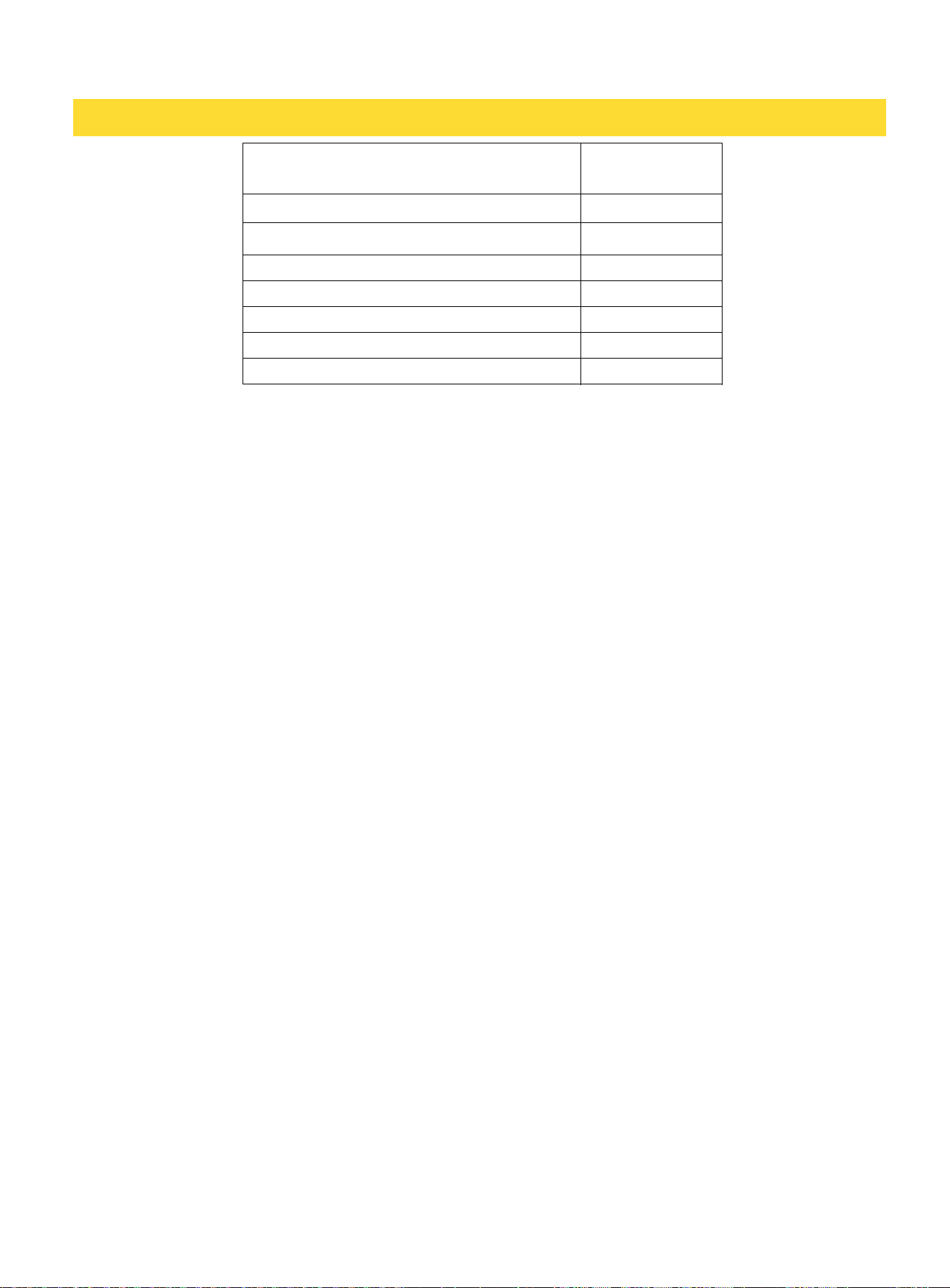
FAULT ALARM
ERROR CODES
Evaporator temperature sensor failure
E1
Condenser temperature sensor failure
E2
ICE FULL temperature sensor failure
E3
Long harvest alarm
E4
Low water alarm
E5
Drain pump failure
PU
High ambient temperature
HI
The ice machine will continue operating with the RUN indicator flashing for E1 and E2 errors, but
will completely stop functioning for all other errors.
Refer to the "TROUBLESHOOTING" section for easy self-diagnosis and potential solutions to clear
certain error codes.
MAINTENANCE
CLEANING AND MAINTAINING THE UNIT
Regular cleaning and proper maintenance are essential to maintain efficiency, optimal
performance, and extent the lifespan of the machine. The maintenance intervals listed in this
manual are based on normal conditions. You may want to shorten the intervals if you have pets or
other special considerations.
• Periodically vacuum dust and dirt from the condenser, which is located behind the grill at the
bottom front of the unit.
• Regularly inspect plumbing connections to ensure that there are no leaks.
• Disconnect the water supply hose if the ice machine will not be used for a long period of time.
• Only store ice in the ice storage bin. Storing items like wine or beer bottles is unsanitary.
CLEANING THE UNIT’S EXTERIOR
Clean the door and cabinet using a mild detergent and warm-water solution, such as 1oz. (28g) of
dishwashing liquid mixed with 2 gallons of warm water. Do not use solvent-based or abrasive
cleaners. Use a soft sponge and rinse the unit with clean water. Wipe the unit down with a
soft, clean towel to prevent water spots.
For stainless steel surfaces, use a mild-detergent, warm water, and a damp cloth. Do not
use abrasive cleaning agents.
CLEANING THE UNIT’S INTERIOR
When necessary, defrost and thoroughly clean the inside of the unit with mild soap and
water. Do not use electrical heating devices or sharp or pointed tools when defrosting the unit.
When defrosting or leaving the unit turned off, leave the door open. Leaving the door
open allows air to circulate and dry the interior, reducing the risk of mildew and preventing
damage to the mold mechanism's components.
17
EXTENDED PERIODS OF NON-USE
WARNING
Electrical Shock Hazard
Always disconnect power at the source before working on the unit.
Note: Do not winterize this unit with ANY type of anti-freeze; damage to the mold coating will
occur, invalidating product’s Limited Warranty and creating a potential health hazard.
1. Turn off the water at the main water source.
2. Disconnect the water supply line from the water inlet of the ice machine.
3. Turn off the electric supply at the main power source. Remove the power cord from the
electrical outlet.
4. Remove any remaining ice from the storage bin.
5. Press and hold the CLEAN button for 3 seconds to run a CLEAN cycle and drain all the water
from the water trough. Once the cycle is complete, turn off the unit.
6. Leave the door open to allow for air circulation to prevent mold and mildew.
7. Leave the water supply line disconnected and the power cord unplugged until ready to use.
NOTICE: Never pull on the power cord to unplug the appliance form the electrical outlet.
Firmly grasp the power cord plug and pull it straight out.
RECOMMISSIONING THE UNIT
1. Connect the water supply lines, turn on the water, check for leaks, and then restore power
to the unit.
2. Once water has filled the trough, ice making cycles will commence.
STARTING UP THE UNIT
1. Replace the filter, turn on the water, check for leaks, and then turn on power.
2. Turn on the unit by pressing the power button.
3. The water inlet valve will turn on immediately to supply water to the unit. The water pump
and compressor will turn on later (approximately 5 minutes) to initiate the ice-making
cycle. If the machine was shut-off while in the ice-harvesting cycle, make sure the ice is
harvested before starting up the unit.
4. The first harvest of ice should occur within 60 minutes of start-up.
5. Once the unit purges air from the lines, it will proceed with normal ice harvesting and
refilling cycles approximately every 40 minutes or less, under typical operating conditions.
18
TROUBLESHOOTING
Before Calling for Service:
If the unit appears to be malfunctioning, read through the “OPERATING THE UNIT” section of this
manual first. If the issue persists, check the Troubleshooting Guide below. Some of the problems
mentioned in the Troubleshooting Guide can be easily solved without a service call.
PROBLEM POSSIBLE CAUSES SOLUTIONS
• The machine won't
operate.
• The ice machine is unplugged.
• The ice machine power switch is
OFF.
• The ice storage bin is full of ice.
• Plug the ice machine in.
• Verify that the control unit is
properly programmed.
• Remove some of the ice.
• The compressor is
operating abnormally
and producing a
buzzing noise.
• The voltage is lower than
recommended.
• The water supply tap is turned off.
• The water supply pipe is not
properly connected.
• The water filter is not installed or
not installed correctly.
• Water inlet valve malfunction.
• Stop the ice machine and do
not restart until the voltage is
normal.
• Turn on the water supply tap.
• Reconnect the water supply
pipe.
• Check that the water filter is
installed correctly.
• Contact Service.
• Machine makes
ice, but at a very
slow rate.(possible
error codes HI).
• The condenser may be dirty.
• The air flow to the ice machine
may be obstructed.
• The ambient temperature and
water temperature are high, or the
unit is positioned near a heat
source.
• Clean the condenser.
• Check the installation to
ensure the air flow to the ice
maker is not blocked.
• Check the installation to
ensure the ambient temperature
is in the proper range.
• Water is leaking out
of the unit. (Possible
error codes: E4/E5)
• A few water droplets are on the
door.
• The water supply connection is
leaking.
• Incorrect filter installation.
• Ice cubes are
partially formed and
appear white at the
bottom. (Possible
error codes: E4/E5)
• There is not enough water in the
water bin.
• Under certain conditions,
humidity may condense on the
door. To reduce condensation,
consider relocating the unit or
minimizing the frequency of
door openings.
• Tighten water supply
hosefitting.
• Check that the water filter is
installed correctly.
• Check if the water supply
pressure is below 20 psi.
• Check the water supply. It may
be restricted.
• Check for a water leak at the
water trough.
19
• The water does not
flow into the machine
after startup.
(Possible error codes:
E4/E5)
PROBLEM POSSIBLE CAUSES SOLUTIONS
• Noise during
operation.
• The feet are not leveled.
• Certain sounds are normal.
• Level the feet. See “LEVELING
THE UNIT
”.
• See “
EXPECTING NORMAL
SOUNDS
”.
• The ice made is
too large and has
pieces sticking
together.
• The water temperature in the
storage tray or the ambient
temperature is too low.
• Stop the machine and reset the
ice-making cycle.
• Restart the machine after
turning it off.
• Ice-making
conditions are
correct, but no ice
is being produced.
• The refrigerant leaks and/or
the sealed system is blocked.
• Water pressure is not properly
set.
• Contact Service.
• The recommended water
pressure is 58 psi. Pressures must
not fall below 20 psi and static
pressure must not exceed 80 psi.
• The ice machine
stops unexpectedly
during the ice-
making process.
• The electricity is off.
• The room temperature is out of
the stated range.
• Reconnect the power supply line.
• Disconnect the power and allow
the ice machine to remain off until
the temperature returns to the
specified range.
• The body of the ice
machine is electrified.
• The grounding line is not
properly connected to the socket.
• Use the correct plug and outlet.
• Mineral scale
accumulates rapidly
inside the machine.
• The calcium level in the water is
too high.
• Install a water softener at the
water inlet valve to reduce mineral
buildup.
20
WARRANTY
Warranty & Service
This product has been manufactured by Thor International, 4651 E Airport Dr, Ontario, CA 91761
For Customer Service, please call (877) 288 - 8099
For the most up to date warranty and service policy, please refer to our website
WWW.THORKITCHEN.COM/WARRANTY-REGISTRATION
For in-warranty service requests, please visit our website at
WWW.THORKITCHEN.COM/SERVICE
Please Note: You must provide proof of purchase or installation date for any in-warranty
service requests
21
Warranty Registration
Made Easy.
We Stand Behind
the Quality of Our
Appliances.
Reliability and customer satisfaction are our top priorities. We offer a
solid two-year warranty on both parts and labor. Enjoy professional-grade
performance with the condence that we’ve got you covered.
01
02
03
Scan the QR Code or visit thorkitchen.
com/register-your-product.
Input your purchase and product
information and select register.
That’s it. You’re all set.
Enjoy!
WARRANTY
PARTS
Questions: [email protected]