
1.Send us an email at [email protected]
2.Scan the QR code of our Gmail account using your mobile phone to contact us immediately.
If you require warranty service, please contact our customer service
teamthrough one of the following methods:
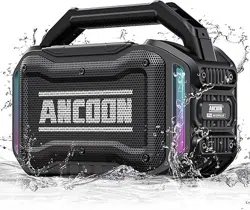
Model:
ANCOON-S01
User Manual
WIRELESS SPEAKER
Energize Your Work and Life!
https://z.wiki
Page 1
Page 2
Page 3
Page 4
Page 5
Page 6
Page 7
Page 8
Page 9
Page 10
Page 11
Page 12
Page 13
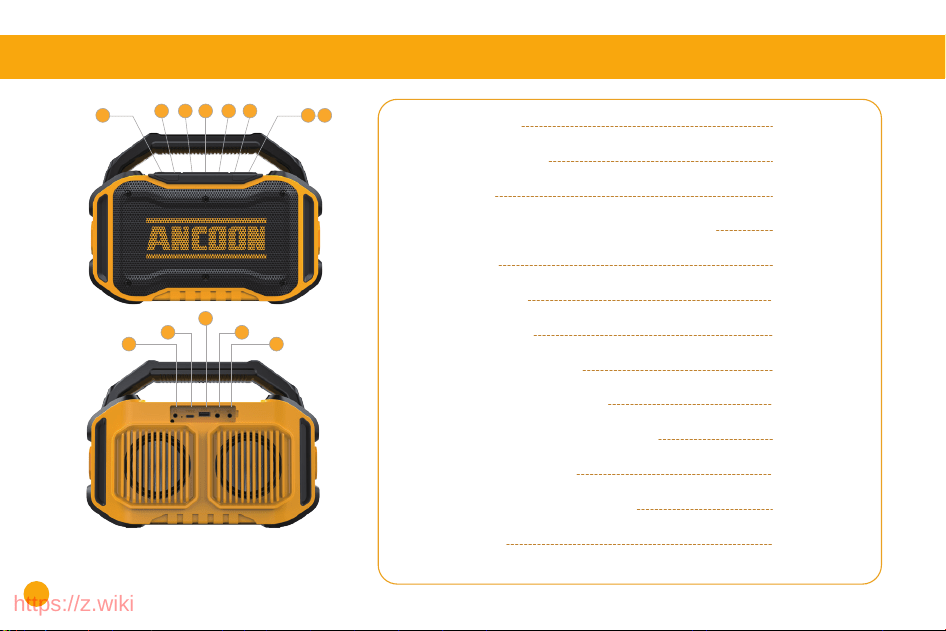
1. OVERVIEW
1. Overview
2. Power On/Off
3. Bass
4. Volume Adjustment/Song Switching
5. BT 5.3
6. TWS Mode
7. Light Mode
8. Speaker Charging
9. USB Jack & MIC Jack
10. AUX Jack & Earphone Jack
11. Button Controls
12. Parameter Specification
13. Note
6 7
10
9
8
10 9
53
2
4 4 4
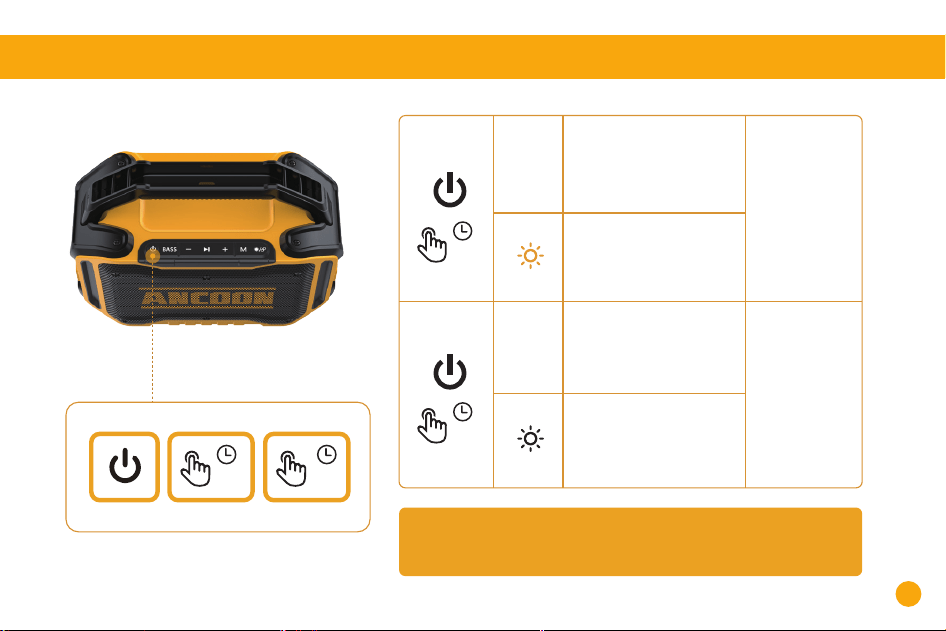
* If there is no device connected for more than 20 minutes, the speaker will
automatically turn off.
Press and hold for at
least 3 seconds -- ON
White light always on
Power on
>3S
ON
Press and hold for at
least 2 seconds -- OFF
White light off
Power off
>2S
OFF
>3S >2S
2. POWER ON/OFF
0201
https://z.wiki
Page 1
Page 2
Page 3
Page 4
Page 5
Page 6
Page 7
Page 8
Page 9
Page 10
Page 11
Page 12
Page 13
1. OVERVIEW
1. Overview
2. Power On/Off
3. Bass
4. Volume Adjustment/Song Switching
5. BT 5.3
6. TWS Mode
7. Light Mode
8. Speaker Charging
9. USB Jack & MIC Jack
10. AUX Jack & Earphone Jack
11. Button Controls
12. Parameter Specification
13. Note
6 7
10
9
8
10 9
53
2
4 4 4
* If there is no device connected for more than 20 minutes, the speaker will
automatically turn off.
Press and hold for at
least 3 seconds -- ON
White light always on
Power on
>3S
ON
Press and hold for at
least 2 seconds -- OFF
White light off
Power off
>2S
OFF
>3S >2S
2. POWER ON/OFF
0201
https://z.wiki
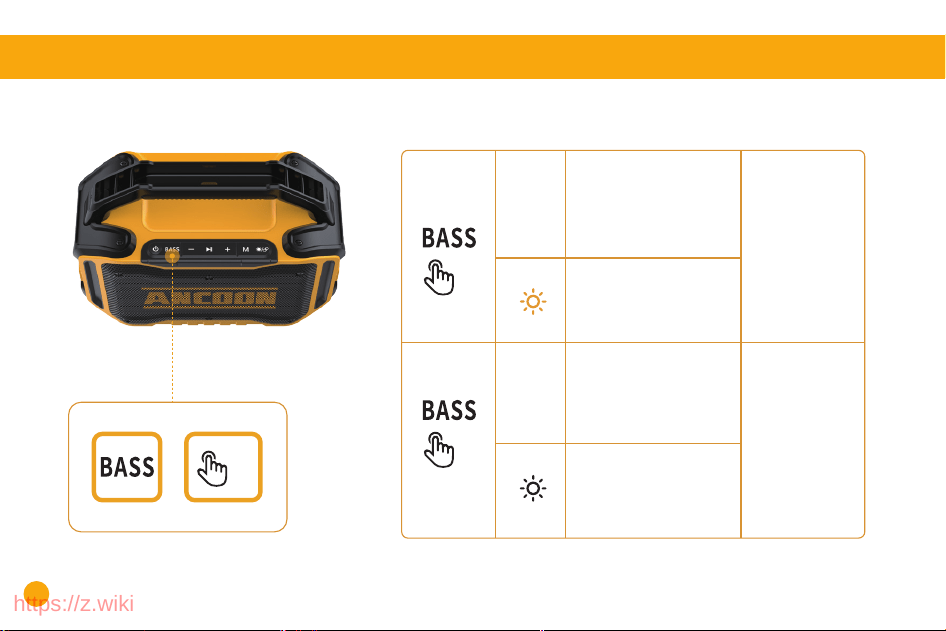
BASS mode is turned on by default when power is turned on.
Press once -- ON
White light always on
Power is
turned on
ON
Press again -- OFF
White light off
Power is
turned off
OFF
X1
X1
3. BASS
X1
>2S
Volume Control for Level 16:
Press once to increase the volume by
6.25%.
A "didi" prompt sound will be heard
when the maximum volume is reached.
Press and hold for 2 seconds to skip to
the next song.
"didi"
X1
X1
>2S
Press once to decrease the volume by
6.25%.
A "didi" prompt sound will be heard
when the minimum volume is reached.
Press and hold for 2 seconds to go back
to the previous song.
Press once to pause/play.
"didi"
X1
X1
4. VOLUME ADJUSTMENT/ SONG SWITCHING
>2S
0403
https://z.wiki
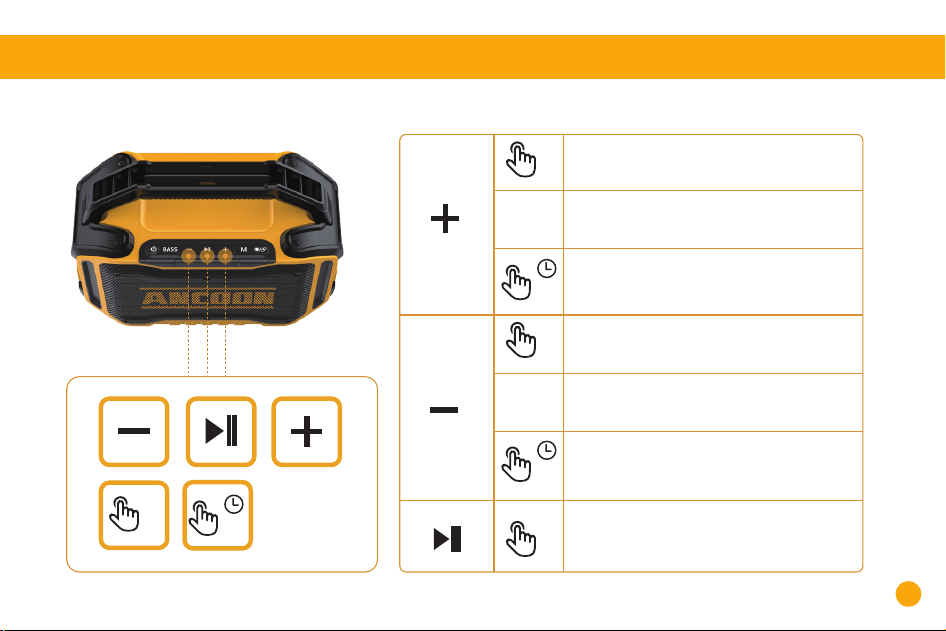
BASS mode is turned on by default when power is turned on.
Press once -- ON
White light always on
Power is
turned on
ON
Press again -- OFF
White light off
Power is
turned off
OFF
X1
X1
3. BASS
X1
>2S
Volume Control for Level 16:
Press once to increase the volume by
6.25%.
A "didi" prompt sound will be heard
when the maximum volume is reached.
Press and hold for 2 seconds to skip to
the next song.
"didi"
X1
X1
>2S
Press once to decrease the volume by
6.25%.
A "didi" prompt sound will be heard
when the minimum volume is reached.
Press and hold for 2 seconds to go back
to the previous song.
Press once to pause/play.
"didi"
X1
X1
4. VOLUME ADJUSTMENT/ SONG SWITCHING
>2S
0403
https://z.wiki
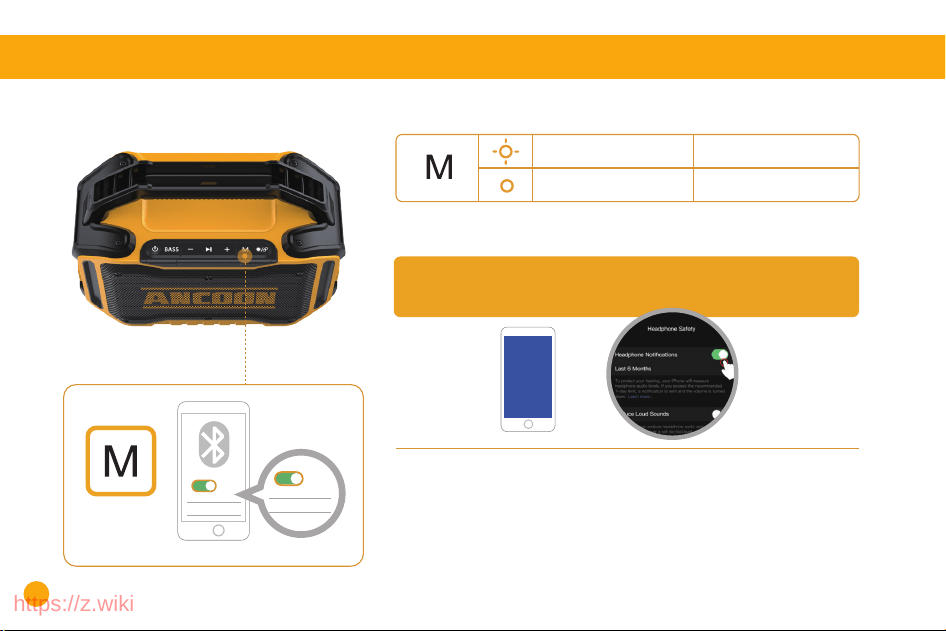
How to link a new device with Bluetooth?
Two ways to disconnect Bluetooth
Open your cell phone Bluetooth settings, search for and connect to "ANCOON-S01",
the appearance of "dididi" three sounds on behalf of the link is successful!
Disconnect the Bluetooth of the original device and use the new device to find the
Bluetooth ANCOON-S01 link.
Method 1: Turn off Bluetooth on your cell phone or computer.
Method 2: Long press the "M" button for 3 seconds, the speaker will automatically
cut off the Bluetooth signal with the connected Bluetooth.
Note: lf the BT Speaker's sound is too low, please check your device settings(Turn
off the "Reduce loud sounds" button as Picture shown).
Faster and more stable signal, Enabled by default at power on
No device connectedBlinking White light
White light always on Connected device
5. BT 5.3
ANCOON-S01
ON
ANCOON-S01
ON
ON
BT
*Note: The machine that plays the prompt tone first is the HOST, and the other is
the SLAVE.
When using a USB connection, please plug the USB into the HOST speaker to play
the music.
Play music and test whether both speakers play at the same time.
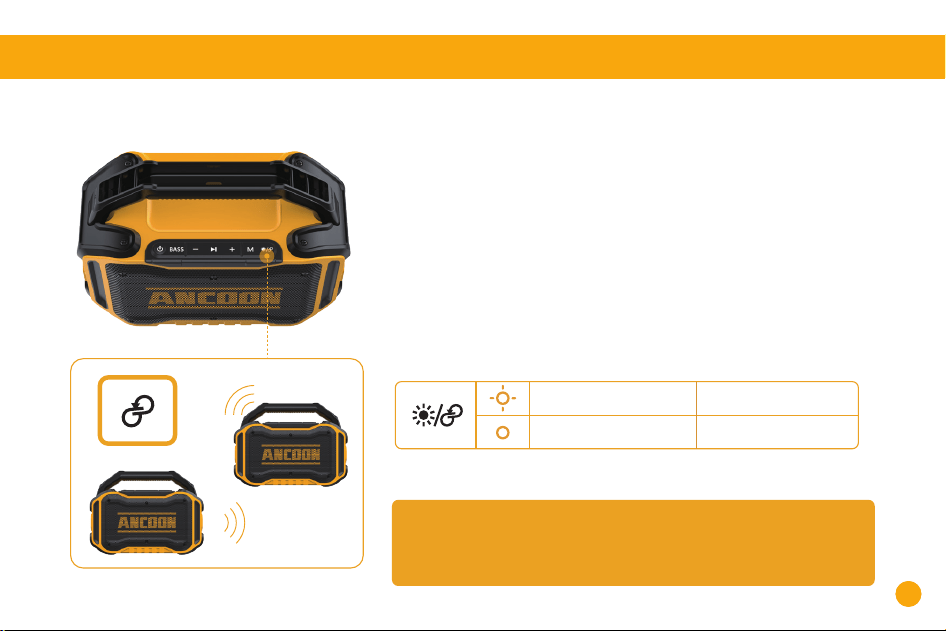
To connect the two speakers:
There will be a voice prompt indicating which speaker is the left channel and which is
the right channel when the connection is successful.
TWS light blinking No device connected
TWS light always on Connected devices
1. Turn on both speakers and keep them within 10 feet of each other.(The Bluetooth
light will blink, indicating that Bluetooth is not connected to the music device, and it
will be easier to pair TWS between the two speakers.)
6. TWS (TRUE WIRELESS STEREO) MODE
2. Press the "TWS" button 3s on both speakers, and the TWS button will start
flashing. The two speakers will start to match the connection automatically. When
you hear the tone "don", the TWS buttons of both speakers will stay lit, indicating
that the speakers are connected successfully.
3. Directly link your cell phone Bluetooth to the speaker Bluetooth device
(ANCOON-S01) signal.
060605
https://z.wiki
How to link a new device with Bluetooth?
Two ways to disconnect Bluetooth
Open your cell phone Bluetooth settings, search for and connect to "ANCOON-S01",
the appearance of "dididi" three sounds on behalf of the link is successful!
Disconnect the Bluetooth of the original device and use the new device to find the
Bluetooth ANCOON-S01 link.
Method 1: Turn off Bluetooth on your cell phone or computer.
Method 2: Long press the "M" button for 3 seconds, the speaker will automatically
cut off the Bluetooth signal with the connected Bluetooth.
Note: lf the BT Speaker's sound is too low, please check your device settings(Turn
off the "Reduce loud sounds" button as Picture shown).
Faster and more stable signal, Enabled by default at power on
No device connectedBlinking White light
White light always on Connected device
5. BT 5.3
ANCOON-S01
ON
ANCOON-S01
ON
ON
BT
*Note: The machine that plays the prompt tone first is the HOST, and the other is
the SLAVE.
When using a USB connection, please plug the USB into the HOST speaker to play
the music.
Play music and test whether both speakers play at the same time.
To connect the two speakers:
There will be a voice prompt indicating which speaker is the left channel and which is
the right channel when the connection is successful.
TWS light blinking No device connected
TWS light always on Connected devices
1. Turn on both speakers and keep them within 10 feet of each other.(The Bluetooth
light will blink, indicating that Bluetooth is not connected to the music device, and it
will be easier to pair TWS between the two speakers.)
6. TWS (TRUE WIRELESS STEREO) MODE
2. Press the "TWS" button 3s on both speakers, and the TWS button will start
flashing. The two speakers will start to match the connection automatically. When
you hear the tone "don", the TWS buttons of both speakers will stay lit, indicating
that the speakers are connected successfully.
3. Directly link your cell phone Bluetooth to the speaker Bluetooth device
(ANCOON-S01) signal.
060605
https://z.wiki
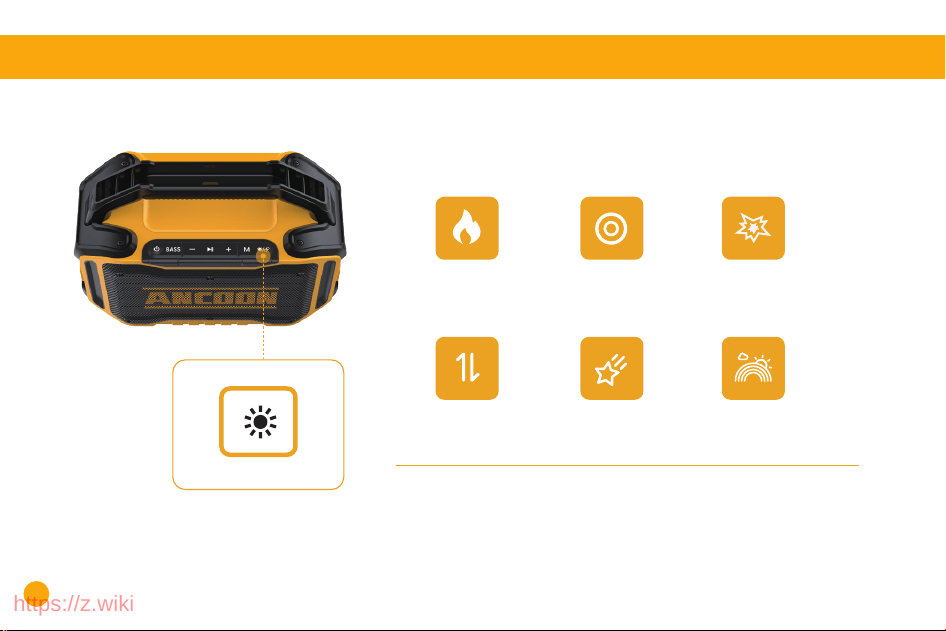
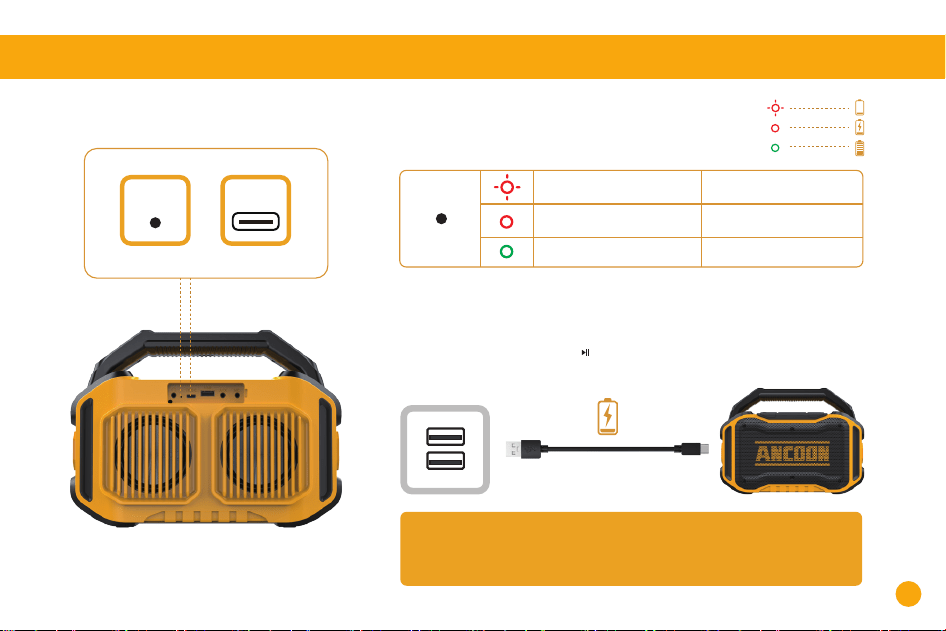
8.SPEAKER CHARGING
Type-C Jack: Used for connecting to power supplies
Tip: Please fully charge this speaker before using it for the first time,
so as to prolong the service life of the built-in battery.
Red blinking Low battery
Red is always on Charging
Green is always on Fully charged
Low battery reminder
1.When the battery level is lower than 10% the speaker will pop up a voice
low battery alert tone
2.When the battery is low, “-/ / +” on the speaker will flash together.
Type-C
Press the lighting button once to switch modes, the order of mode switching
is as follows:
Memory function: The lighting mode when you turn on the device is the same
as the lighting mode when you turned it off last time.
7. LIGHT MODE SWITCHING
6 LED MODES
Flame Breathing Flash
Wander Meteors Rainbow
0807
Charging
Indicator
https://z.wiki
8.SPEAKER CHARGING
Type-C Jack: Used for connecting to power supplies
Tip: Please fully charge this speaker before using it for the first time,
so as to prolong the service life of the built-in battery.
Red blinking Low battery
Red is always on Charging
Green is always on Fully charged
Low battery reminder
1.When the battery level is lower than 10% the speaker will pop up a voice
low battery alert tone
2.When the battery is low, “-/ / +” on the speaker will flash together.
Type-C
Press the lighting button once to switch modes, the order of mode switching
is as follows:
Memory function: The lighting mode when you turn on the device is the same
as the lighting mode when you turned it off last time.
7. LIGHT MODE SWITCHING
6 LED MODES
Flame Breathing Flash
Wander Meteors Rainbow
0807
Charging
Indicator
https://z.wiki
1009
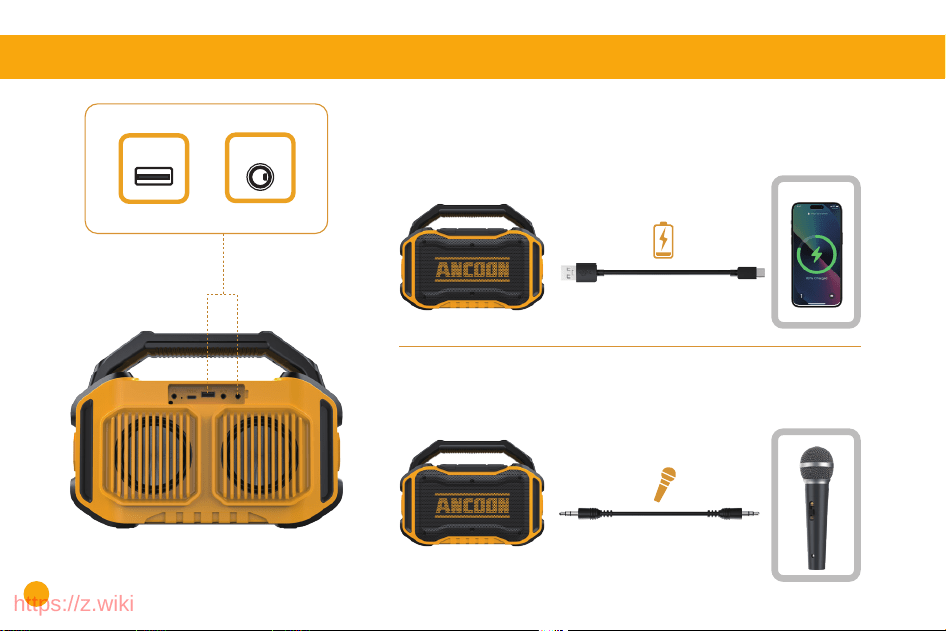
9. USB JACK & MIC JACK
Function 1.Used for audio connectivity(e.g., Flash drive)
Function 2.Charge your USB devices(e.g. cell phones)
USB Jack
USB
Plug in a wired microphone to enhance your voice and achieve a
karaoke effect.
MIC Jack
MIC
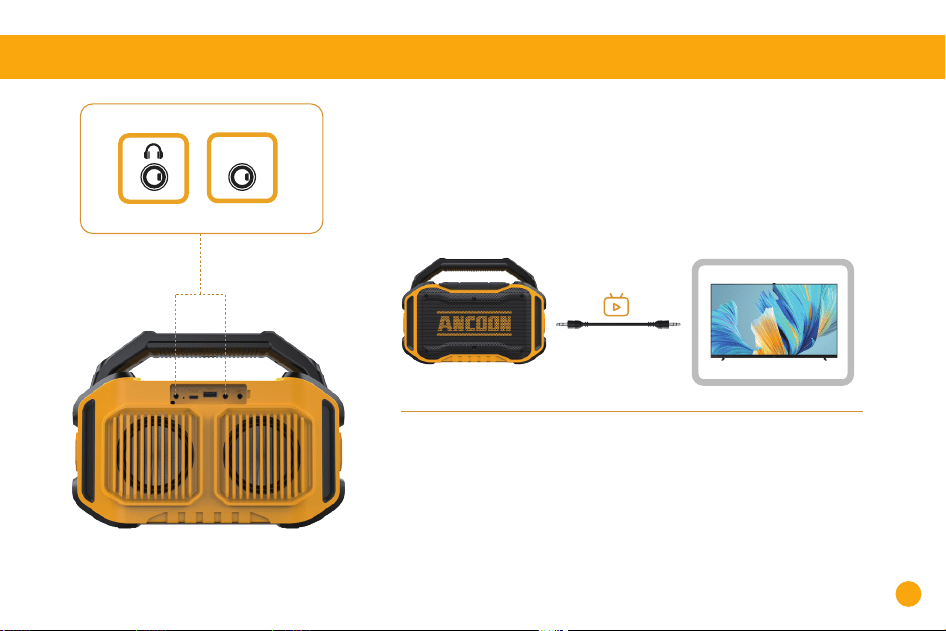
10.AUX JACK & EARPHONE JACK
For audio connections (MP3/Laptop/Computer Tablets/TV etc.)
Plug in a 3.5mm AUX cable (Included) to play audio on external devices.
When using AUX mode, audio playback will be controlled from the
connected device.
AUX Jack
AUX
Used for in-ear monitoring during singing or playing audio in
parallel with other speakers
Earphone Jack
https://z.wiki
1009
9. USB JACK & MIC JACK
Function 1.Used for audio connectivity(e.g., Flash drive)
Function 2.Charge your USB devices(e.g. cell phones)
USB Jack
USB
Plug in a wired microphone to enhance your voice and achieve a
karaoke effect.
MIC Jack
MIC
10.AUX JACK & EARPHONE JACK
For audio connections (MP3/Laptop/Computer Tablets/TV etc.)
Plug in a 3.5mm AUX cable (Included) to play audio on external devices.
When using AUX mode, audio playback will be controlled from the
connected device.
AUX Jack
AUX
Used for in-ear monitoring during singing or playing audio in
parallel with other speakers
Earphone Jack
https://z.wiki
1211
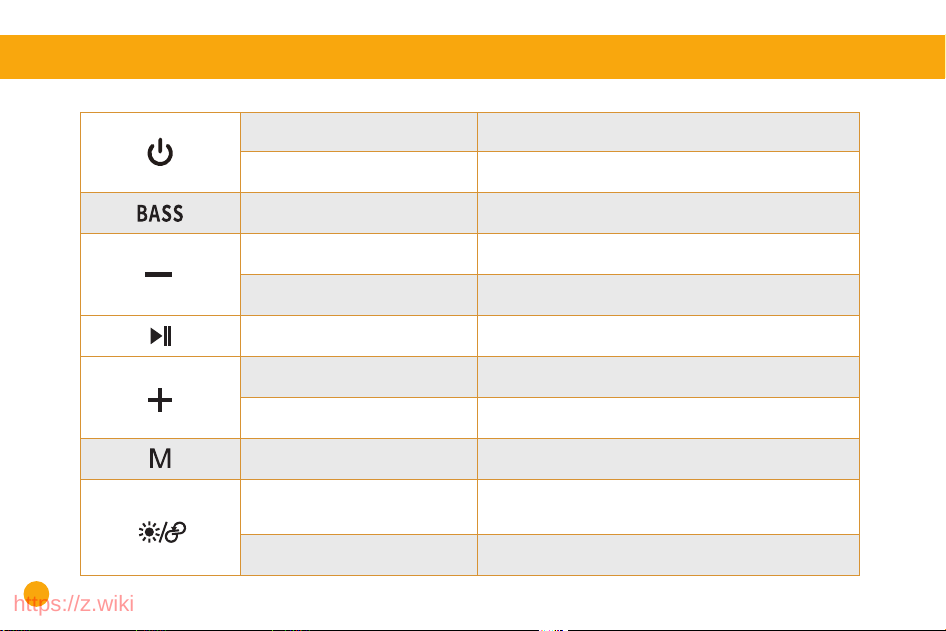
11.BUTTON CONTROLS
To turn power onPower-Press for 3 seconds
To turn power onPower-Press for 2 seconds
Press once To turn on/off Bass
Press once
Turn volume upPress once
Turn volume down
Press and hold for 2s Previous song
Press once Play/Pause
Press and hold for 2s Next song
Press once Switch BT/AUX/MIC
TWS
Lights
Press and hold both speakers for 3 seconds to
enable TWS pairing
Press and hold for 3s-enable TWS pairing
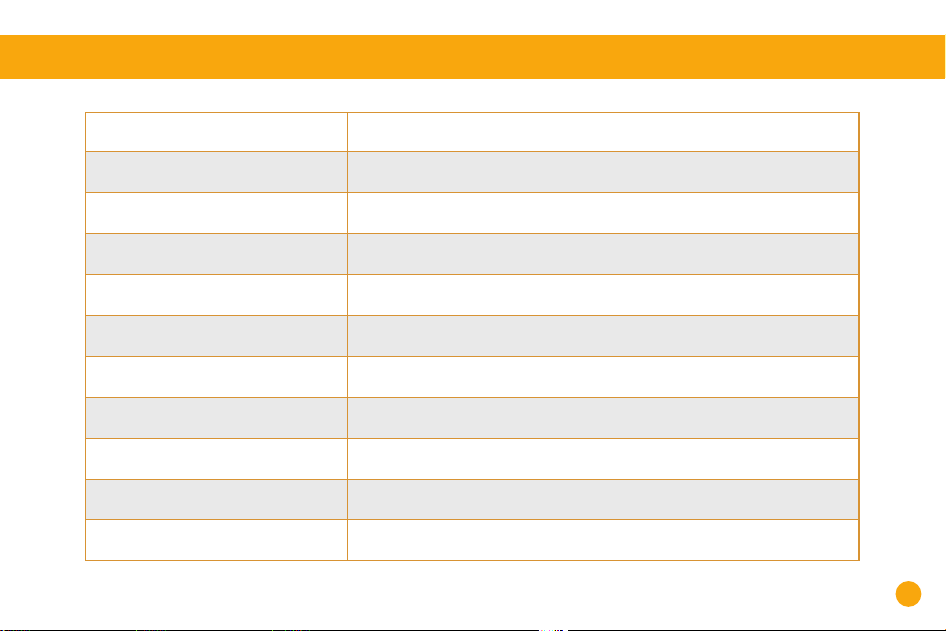
12.PARAMETER SPECIFICATION
Model:
BT Version:
BT Range:
Battery Capacity:
Charging Length:
Audio Output Power:
DC Input:
Audio Input Interface:
Frequency Range:
Music Play Time:
Waterproof level:
ANCOON-S01
BT 5.3
100 ft (no obstructions)
10000mAh
6 Hours
2 x 40W=80W
5V/2A
AUX, USB
20Hz-20KHz
Up to 20 Hours (Depending on, volume level and audio content)
IPX6
https://z.wiki
1211
11.BUTTON CONTROLS
To turn power onPower-Press for 3 seconds
To turn power onPower-Press for 2 seconds
Press once To turn on/off Bass
Press once
Turn volume upPress once
Turn volume down
Press and hold for 2s Previous song
Press once Play/Pause
Press and hold for 2s Next song
Press once Switch BT/AUX/MIC
TWS
Lights
Press and hold both speakers for 3 seconds to
enable TWS pairing
Press and hold for 3s-enable TWS pairing
12.PARAMETER SPECIFICATION
Model:
BT Version:
BT Range:
Battery Capacity:
Charging Length:
Audio Output Power:
DC Input:
Audio Input Interface:
Frequency Range:
Music Play Time:
Waterproof level:
ANCOON-S01
BT 5.3
100 ft (no obstructions)
10000mAh
6 Hours
2 x 40W=80W
5V/2A
AUX, USB
20Hz-20KHz
Up to 20 Hours (Depending on, volume level and audio content)
IPX6
https://z.wiki
ABOUT ANCOON
At ANCOON, our journey began with a simple but
passionate idea: to break the repetitive routines of work
and life and energize your everyday life. Rejecting bland
sound quality, we create loudspeakers that unleash the
passion in your heart!
1413
13.NOTE
Friendly reminder: If the speaker is not used for a long time, it is necessary to keep some
battery power stored. It is essential to fully charge it once a month.
This is to protect the battery life of your speaker, which may vary depending on usage patterns and environmental conditions.
Furthermore, do not expose the ANCOON-S01 to liquids without disconnecting the cable. Avoid submerging the ANCOON-S01
in water while charging, as this may cause permanent damage to the speaker or power source. Chemicals, salt, or foreign
substances in pools or the ocean, if not promptly cleaned after use, can damage the waterproof seals or harm the connector
surfaces in the long run. After any liquid spillage or rinsing, refrain from charging the speaker until it is completely dry and
clean. Charging while damp may result in speaker damage. (It is advisable to avoid direct water rinsing and instead use a
tissue or damp cloth for cleaning.)
When using an external adapter, ensure that the output voltage/current of the adapter does not exceed 5V/12A. This will help
maintain the proper functioning of your ANCOON-S01 speaker.
!
https://z.wiki

ABOUT ANCOON
At ANCOON, our journey began with a simple but
passionate idea: to break the repetitive routines of work
and life and energize your everyday life. Rejecting bland
sound quality, we create loudspeakers that unleash the
passion in your heart!
1413
13.NOTE
Friendly reminder: If the speaker is not used for a long time, it is necessary to keep some
battery power stored. It is essential to fully charge it once a month.
This is to protect the battery life of your speaker, which may vary depending on usage patterns and environmental conditions.
Furthermore, do not expose the ANCOON-S01 to liquids without disconnecting the cable. Avoid submerging the ANCOON-S01
in water while charging, as this may cause permanent damage to the speaker or power source. Chemicals, salt, or foreign
substances in pools or the ocean, if not promptly cleaned after use, can damage the waterproof seals or harm the connector
surfaces in the long run. After any liquid spillage or rinsing, refrain from charging the speaker until it is completely dry and
clean. Charging while damp may result in speaker damage. (It is advisable to avoid direct water rinsing and instead use a
tissue or damp cloth for cleaning.)
When using an external adapter, ensure that the output voltage/current of the adapter does not exceed 5V/12A. This will help
maintain the proper functioning of your ANCOON-S01 speaker.
!
https://z.wiki

1.Send us an email at [email protected]
2.Scan the QR code of our Gmail account using your mobile phone to contact us immediately.
If you require warranty service, please contact our customer service
teamthrough one of the following methods:
Model:
ANCOON-S01
User Manual
WIRELESS SPEAKER
Energize Your Work and Life!
https://z.wiki
