
TWO-CHANNEL POWER AMPLIFIER WITH SONARC V2
DSP 2-750 MKIII
INSTALLATION AND SUPPORT MANUAL
2
1R
1L
DSP 2-750 MKIII
IN
OUT
IN
OUT
L
R
L&R
L&R
Use Only One Type Of Input Connection
ANALOGANALOG
ANALOG
COAX
TOSLINK
TWO-CHANNEL POWER AMPLIFIER
DSP 2-750 MKIII AMPLIFIER
TABLE OF CONTENTS
2 Box Contents
2 Introduction
2 Important Safety Information
3 Product Description
3 Placement
3 Unpacking and Record Keeping
4 Front and Rear Panel Features
5 Power the Amplier
6 Speaker Connections
6 Bridging Channels
7 Volume Level Control
7 Protecting Circuitry, LEDs, and Speakers
8 Rack Ear Installation
8 Amplier Stacking
8 Sonarc SetUp
15 Specications
16 Appendix A and B
17 Troubleshooting
19 Warranty Statement
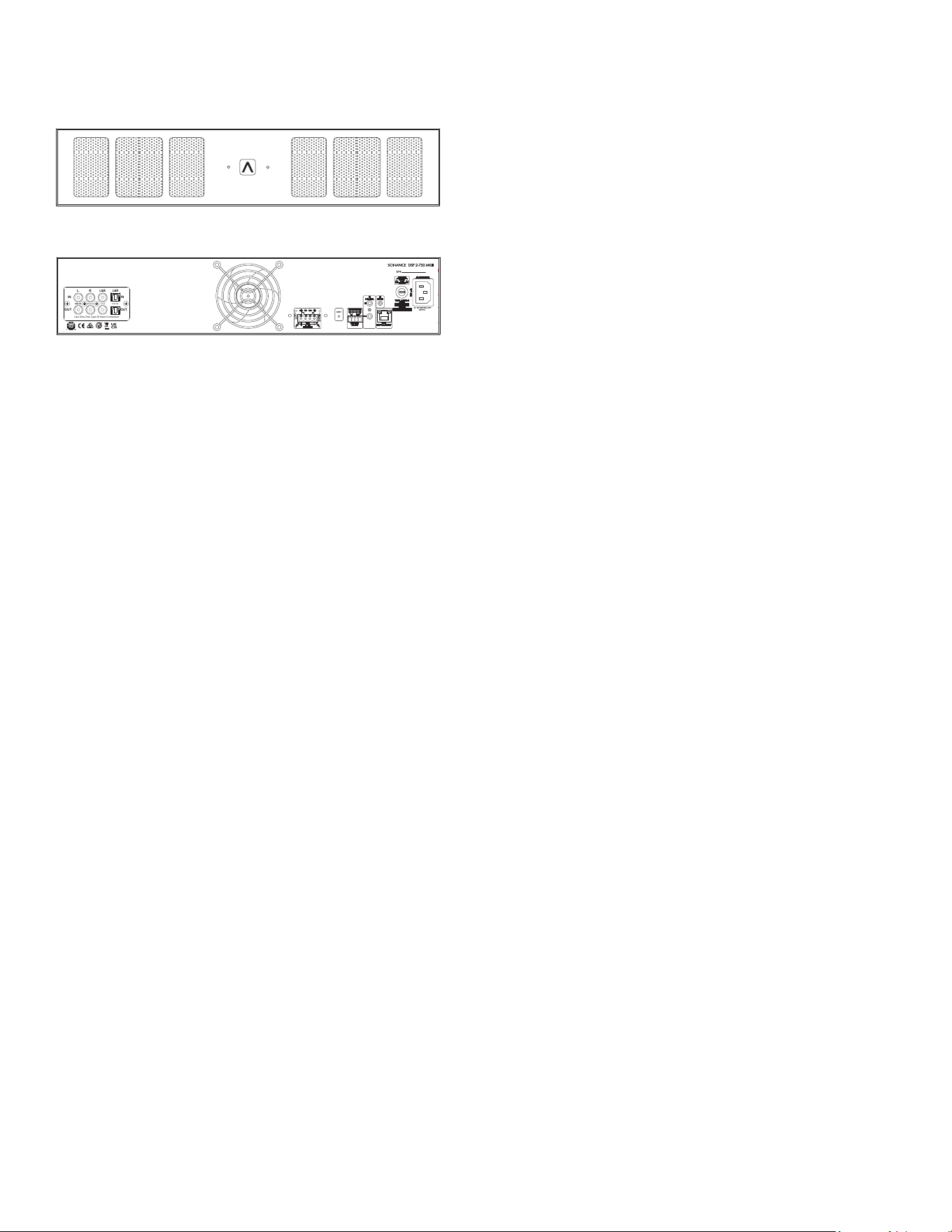
FRONT VIEW
BACK VIEW
BOX CONTENTS
(1) Quickstart Guide
(1) Network Connection Instructions
(1) Sonance DSP 2-750 MKIII Amplier
(1) IEC Power Cord
(4) Removable Amp Feet
(2) Rack Ears
INTRODUCTION
Thank you for selecting the Sonance DSP 2-750 MKIII
amplier. Sonance has over three decades of experience
in premium distributed audio amplication. The
amplier has been precision engineered to provide
maximum installation exibility, low energy consumption
and audiophile sound in a compact form factor (2RU).
Please take the time to carefully read through the
manual, study the illustrations and system diagrams.
This extra time can lead to trouble free operation and
continued musical enjoyment.
READ THIS SECTION IN ITS ENTIRETY BEFORE
ATTEMPTING USE OF THIS AMPLIFIER
IMPORTANT SAFETY INSTRUCTIONS
ALWAYS FOLLOW THESE BASIC SAFETY PRECAUTIONS
WHEN USING YOUR AMP TO REDUCE THE RISK OF
FIRE, ELECTRIC SHOCK, AND INJURY TO PEOPLE OR
OBJECTS.
1. Read all the safety and operating instructions before
operating the amplier and retain them for future
reference.
2. Adhere to all warnings and precautions listed on the
amplier and in the operating instructions.
3. Follow all operating instructions.
4. Never use the amplier next to water.
5. Use only with a cart or stand that is recommended
by the manufacturer. Move with care.
6. CAUTION: TO PREVENT ELECTRIC SHOCK, DO NOT
USE THE POLARIZED PLUG WITH AN EXTENSION
CORD, RECEPTACLE, OR OTHER OUTLETS UNLESS
THE BLADES CAN BE FULLY INSERTED TO PREVENT
BLADE EXPOSURE.
7. Ventilation: situate the amplier so that its location
does not interfere with its proper ventilation.
8. Heat: situate the amplier away from heat sources
such as radiators, stoves, etc. (including ampliers).
9. Grounding or Polarization: take precautions so that
these attributes are not defeated.
10. Power-Cord Protection: route power supply cords so
they will not be walked on or pinched by items.
11. Cleaning: use ‘canned air’ or wipe the amplier with
a soft cloth. Do not use solvents, as they may damage
the amplier.
12. Non-Use Periods: unplug the amplier’s power cord
from the outlet when the amplier will be left un-
used for a long period of time.
13. Object Entry: take care so that objects do not fall
through the opening of the enclosure.
14. Moisture: do not expose the amplier to dripping or
splashing. Do not place objects lled with liquids (ex.
vases, drinking glasses) on the amplier.

3
15. Damage Requiring Service: have the amplier
serviced by a qualied service technician when the
power cord or power supply is damaged, dropped,
the enclosure is damaged, something has spilled
into the amplier, it has been exposed to rain, or the
amplier is not operating properly.
16. Servicing: do not attempt to self service the amplier.
Contact Sonance Tech Support for servicing options.
17. Power Requirement: do not connect the Sonance
amplier to the accessory outlet of any other
component. Connection to a grounded mains power
outlet is required.
WARNING: THE POWER MAINS PLUG SERVES AS THE
AMPLIFIER’S DISCONNECT DEVICE. THE DISCONNECT
DEVICE SHALL REMAIN READILY OPERABLE DURING
OPERATION. TO ENSURE THAT THE DISCONNECT
DEVICE IS EASILY ACCESSIBLE, THE USER SHALL NOT
PLACE THE AMPLIFIER IN A CONFINED AREA DURING
OPERATION.
18. Storms: to prevent damage to components, unplug
all electronic equipment during thunderstorms.
19. Unplug by grasping the plug; do not pull on the cord.
WARNING: ANY CHANGES OR MODIFICATIONS TO
THIS UNIT NOT EXPRESSLY APPROVED BY THE PARTY
RESPONSIBLE FOR COMPLIANCE COULD VOID THE
USER’S AUTHORITY TO OPERATE THE EQUIPMENT.
NOTE: THIS EQUIPMENT HAS BEEN TESTED AND
FOUND TO COMPLY WITH THE LIMITS FOR A CLASS B
DIGITAL DEVICE, PURSUANT TO PART 15 OF THE FCC
RULES. THESE LIMITS ARE DESIGNED TO PROVIDE
REASONABLE PROTECTION AGAINST HARMFUL
INTERFERENCE IN A RESIDENTIAL INSTALLATION. THIS
EQUIPMENT GENERATES, USES, AND CAN RADIATE
RADIO FREQUENCY ENERGY AND IF NOT INSTALLED
AND USED IN ACCORDANCE WITH THE INSTRUCTIONS,
MAY CAUSE HARMFUL INTERFERENCE TO RADIO
COMMUNICATIONS. THERE IS NO GUARANTEE THAT
INTERFERENCE WILL NOT OCCUR IN A PARTICULAR
INSTALLATION. IF THIS EQUIPMENT DOES CAUSE
HARMFUL INTERFERENCE TO RADIO OR TELEVISION
RECEPTION, WHICH CAN BE DETERMINED BY
TURNING THE EQUIPMENT OFF AND ON, THE
USER IS ENCOURAGED TO TRY TO CORRECT THE
INTERFERENCE BY ONE OR MORE OF THE FOLLOWING
MEASURES:
• Connect the equipment into an outlet on a
circuit different from that to which the receiver is
connected
• Consult the dealer or technician for help
• Reorient or relocate the receiving antenna
• Increase distance between the equipment and
receiver
PRODUCT DESCRIPTION
The DSP 2-750 MKIII provides the same powerful DSP
capabilities as the rest of the DSP series, with the largest
power output capability. The amplier is rated at 500W
per channel into 8 ohm loads, 750W per channel into 4
ohm loads and 2000W per bridged pair of channels into
8 ohm loads. The internal stereo amplier modules are
audiophile grade, high-efciency Class D. The ampli-
er is congurable for stereo (4 or 8 ohm speakers) and/
or bridged operation (8 ohm speakers only). Bridged
operation is useful for higher power output applications
such as driving a passive subwoofer or an outdoor 8 ohm
satellite and subwoofer system. The DSP 2-750 MKIII has
a comprehensive protection circuit that guards against
shorted outputs, over-current, over-temperature, low AC
voltage (brownouts) and excessive AC voltage.
PLACEMENT
The DSP 2-750 MKIII features fan-assisted cooling
utilizing vents on both sides of the chassis. Ensure the
sides of the amplier have a least 3” (75mm) of clearance
to the sides of the rack or equipment cabinet to allow
for proper air ow. The amplier should be placed in
a dry, non-condensing environment with ventilation.
Locate the amplier so it is completely isolated from
temperature extremes, rain, snow, direct sunlight, and
atmospheric contaminants. Do not locate the amplier
outdoors. Any moisture related damage (such as from
condensation) is not covered by the factory warranty.
The amplier includes fan-assisted cooling, some heat
is still produced. Locate the amplier on a shelf or at
the lowest place in a rack that has good circulation of
fresh air to dissipate heat. Do not place the amplier in a
closed cabinet or closet with little ventilation as this can
reduce its service life.
UNPACKING AND RECORD KEEPING
Save the carton and packing inserts for future safe
transport in case the amplier is moved or requires
shipping for repair. Before proceeding with installation,
locate the serial number on the rear panel of the unit
and note it here for future reference:
S/N:_____________________________________________
Date of Sale:______________________________________
Dealer Name:_____________________________________
Contact Info:______________________________________
4
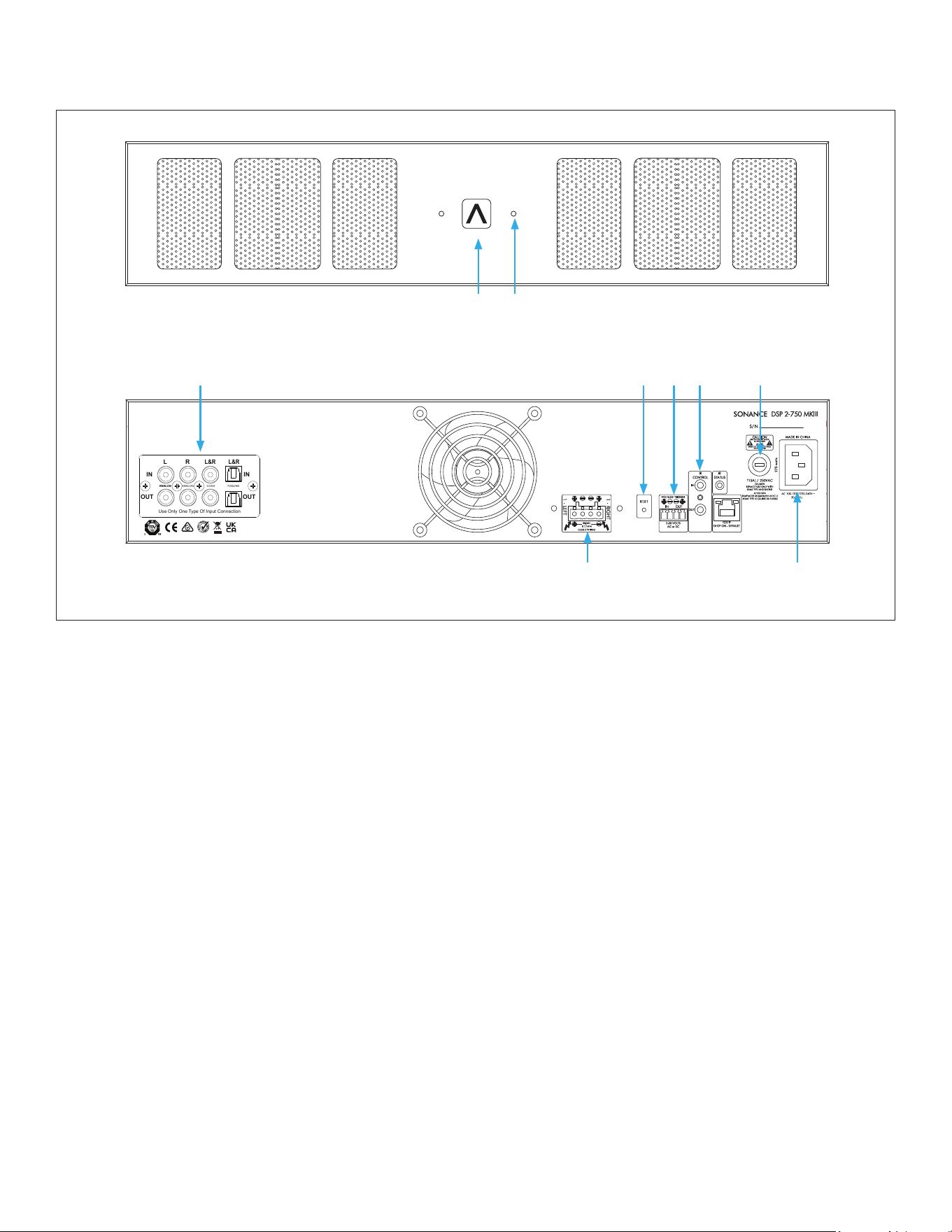
DSP 2-750 MKIII FRONT PANEL
1
R
1
L
DSP 2-750 MKIII
IN
OUT
IN
OUT
L
R
L&R
L&R
Use Only One Type Of Input Connection
ANALOGANALOG
ANALOG
COAX
TOSLINK
Figure 4: DSP 2-750 MKIII Two-Channel Power Amplifier Rear Panel
1
R
1
L
DSP 2-750 MKIII
IN
OUT
IN
OUT
L
R
L&R
L&R
Use Only One Type Of Input Connection
ANALOGANALOG
ANALOG
COAX
TOSLINK
Figure 3: DSP 2-750 MKIII Two-Channel Power Amplifier Front Panel
1 2
Rear Panel
3. Analog Input/Output Module
4. Reset Button
5. Voltage Trigger
6. IR Control Input
7. AC Fuse Holder
8. Speaker Output
9. AC Input
5
7
3
Front Panel
1. Illuminated Power Button
2. Active Audio and Protection Indicator
6
8
9
4

5
FRONT PANEL
POWER BUTTON
The power button turns the amplier on and off. The
Sonance logo power button has three settings:
• SOLID WHITE means the amplier is engaged. The
amplier has power, is turned ON and ready to
operate.
• SLIGHTLY DIMMED means the amplier is in sleep
mode.
• BLINKING WHITE means the power supply is in
thermal protection. In this situation, the channel
LEDs also illuminate red, indicating that the power
supply is in thermal protection mode.
NOTE: UPON INITIAL POWER UP, THERE WILL BE A
20-30 SECOND DELAY BEFORE SOUND IS HEARD
DURING THE BOOT UP CYLE. THE INDICATOR LEDS WILL
ILLUMINATE RED, THEN GREEN, THEN GO OUT. THIS IS
NORMAL.
INPUT/OUTPUT LIGHTS
When each channel is active:
• GREEN LED means a signal is present.
• BLINKING RED Input/Output LED indicates that the
associated channel is being over-driven.
• SOLID RED Input/Output LED indicates that the
amplier is in protect mode. While in protect mode,
the LEDs periodically light up green. This retests
output to determine if the issue is resolved. Protect
mode could be caused by a short in the wire,
amplier overheating, or other internal problem.
NOTE: WHEN ANY OF THE LEDS ARE RED, TURN THE
AMPLIFIER OFF IMMEDIATELY. DETERMINE THE CAUSE
OF THE PROBLEM BEFORE TURNING THE AMPLIFIER
BACK ON.
CAUTION: FOR CONTINUED PROTECTION AGAINST
FIRE, REPLACE THE FUSE WITH ONLY THE SAME TYPE
AND RATING.
VOLUME LEVEL CONTROL
Each channel on the amplier has volume adjustments
controlled in the SonARC software. The DSP 2-750 MKIII
amplier ships at the +0dB or moderate volume level.
REAR PANEL
LINE INPUTS/LOOP OUTPUTS
The DSP 2-750 MKIII amplier has line inputs and loop
outputs. The analog loop outputs are non-buffered. The
maximum number of ampliers that can be looped
together depends on the output capability of your source
component.
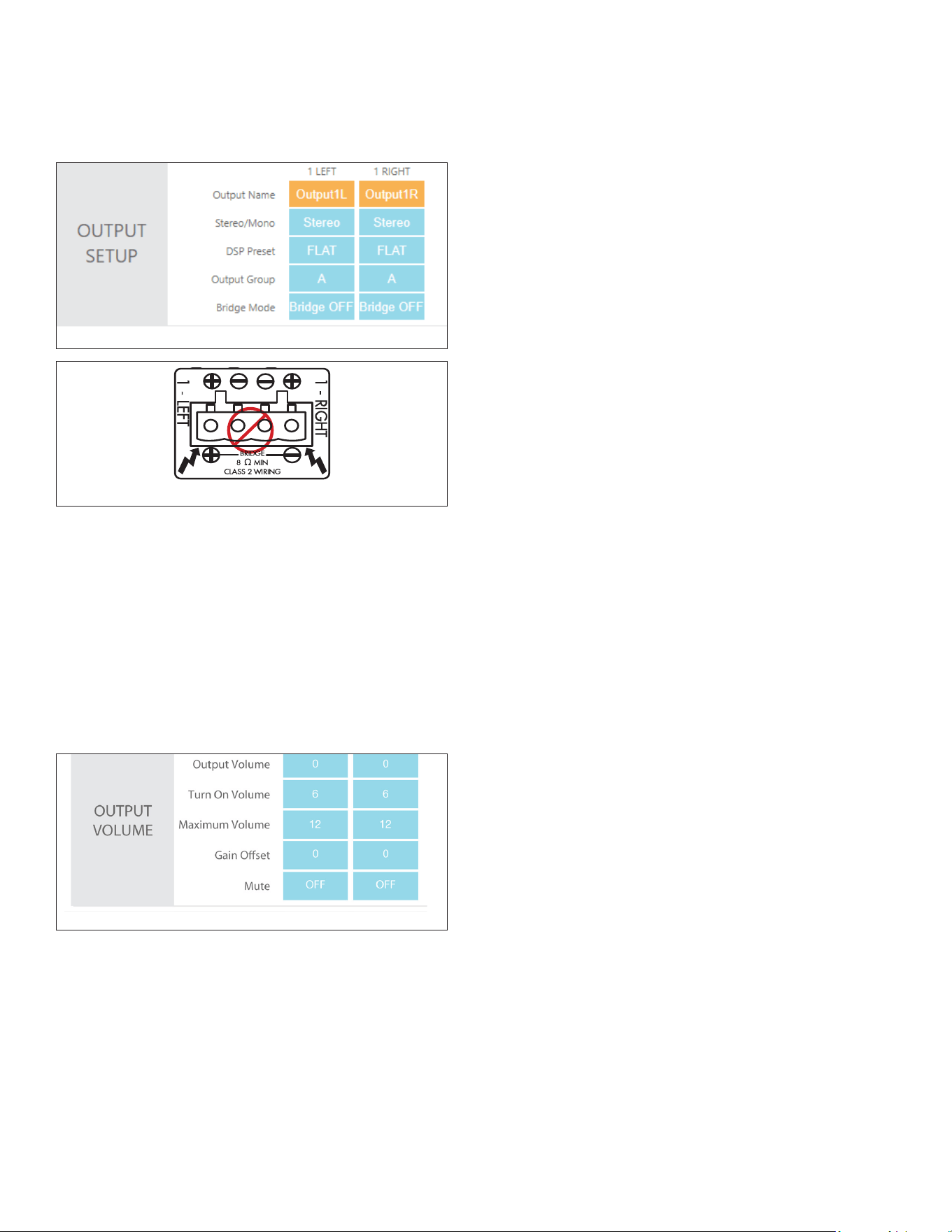
SPEAKER CONNECTIONS
The removable block connectors used on the amplier
accept up to a 12-gauge wire. Follow the connection
layout on the rear panel of the amplier. Make sure
no bare wires come in contact with the amplier
chassis. When bridging channels, use the two outside
connections on each connector. The positive wire from
the speaker should be on the left side connection and
the negative connection should be on the right side.
IP CONTROL
IP control is via the RJ-45 input. IP controls power On/Off,
volume, muting, and input source selections for either
global control or group control.
AC FUSE HOLDER
To replace the fuse, unplug the power cord from the
Power Cord Connector and use a screwdriver to remove
the fuse holder.
POWER CORD
The DSP 2-750 MKIII features a removable power cord.
Plug the female end of the power cord into the Power
Cord Connector on the amplier rear panel and plug the
male end into a grounded wall socket.
Do not plug the amplier’s power cord into a
convenience outlet on any other audio or video
component. If you need to use an extension cord, use
only a heavy duty (14 gauge or larger) extension cord to
avoid starving the amplier of the current necessary for
full operation.
POWERING THE AMPLIFIER
The DSP 2-750 MKIII features a removable IEC power
cord (see Figure 3). A 14-gauge EIA standard 120 volt
grounded power cable is included with the amplier.
Each time the amplier’s power cord is initially plugged
in and the power switch is turned ON, all channel
outputs are disconnected for approximately 9-12 seconds
and all PROTECTION LEDs illuminate briey while the
amplier boots up.
If the electrical service is subject to frequent sags, spikes
or brownouts, a power conditioner designed for use with
high delity equipment should be employed to protect
the amplier.
CAUTION: FOR CONTINUED PROTECTION AGAINST
FIRE, REPLACE THE FUSE WITH ONLY THE SAME TYPE
AND RATING.
Figure 3: IEC Power Cord Connection
IMPORTANT: DO NOT PLUG THE POWER CORD INTO
THE WALL OUTLET UNTIL ALL SYSTEM CONNECTIONS
HAVE BEEN MADE AND VERIFIED.
6
MODEL INPUT VOLTAGE
OUTPUT POWER
(SINEWAVE)
DRAW WATTS
15 AMP BREAKER
QTY OF AMPS
20 AMP BREAKER
QTY OF AMPS
DSP 2-750 MKIII
North America
SKU: 93540
International
SKU: 93541
100-120V AC
Full Power All Channels @8 ohms 1200 1 1
Full Power All Channels @4 ohms 1850 NA 1
1/8 Power All Channels @8 ohms 210 - -
1/8 Power All Channels @4 ohms 290 - -
@ Idle 37
- -
Sleep Mode 1.5
- -
Voltage or Green Audio 0.4
- -
INPUT VOLTAGE
OUTPUT POWER
(SINEWAVE)
DRAW WATTS
13 AMP BREAKER
QTY OF AMPS
20 AMP BREAKER
QTY OF AMPS
220-240V AC
Full Power All Channels @8 ohms 1200 1 2
Full Power All Channels @4 ohms 1950 1 2
1/8 Power All Channels @8 ohms 200 - -
1/8 Power All Channels @4 ohms 290 - -
@ Idle 35
- -
Sleep Mode 1.1
- -
Voltage or Green Audio 0.5
- -
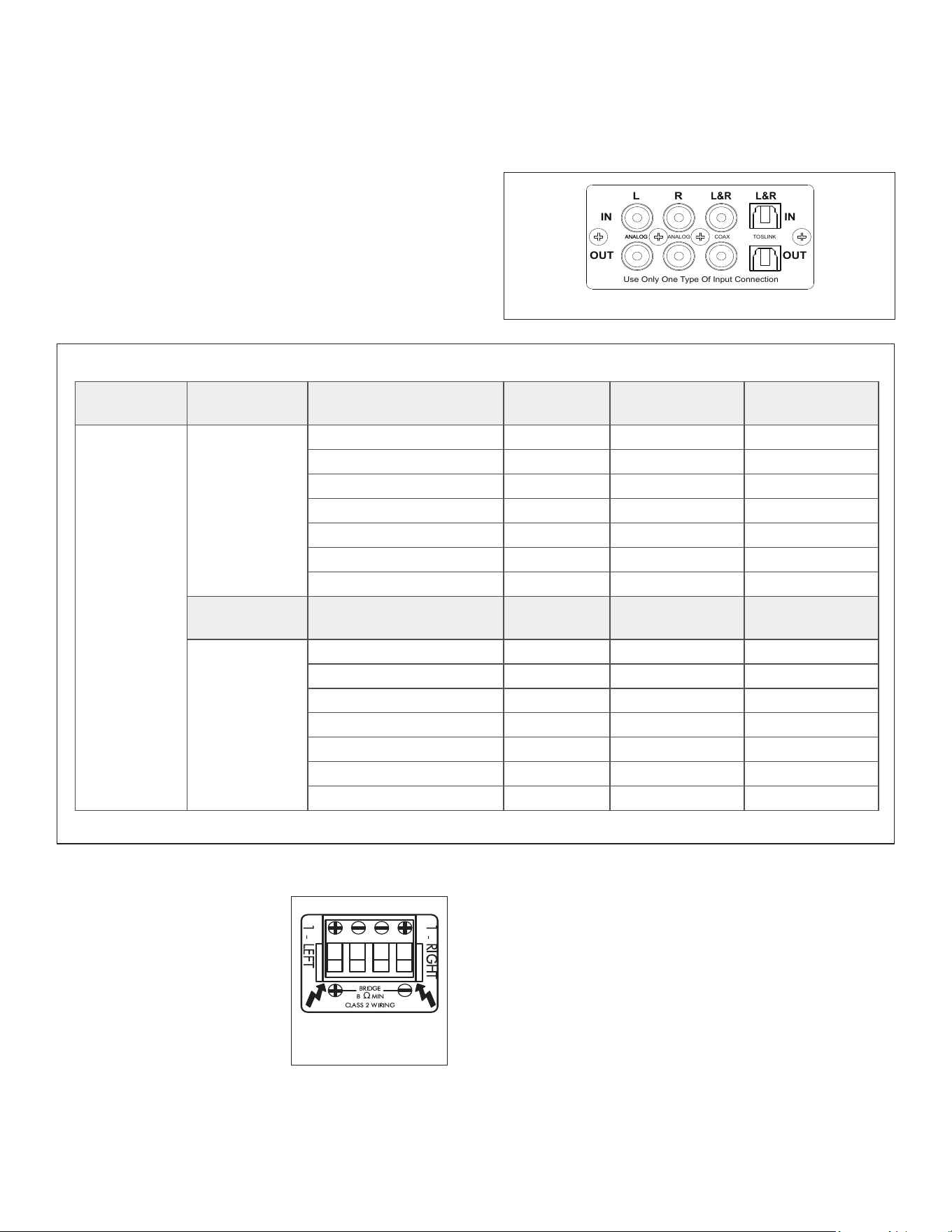
OPTION 1: PRIMARY LINE INPUTS 1-L, 1-R
Use these inputs for primary audio source.
OPTION 2: SECONDARY LINE INPUTS 2-L, 2-R
Use these inputs for a secondary audio source, paging or
a doorbell.
AMPLIFIERS POWER REQUIREMENTS:
Figure 4: DSP 2-750 MKIII Left and Right Line Inputs
Figure 5: DSP 2-750 MKIII Two-Channel Amplier Power Requirements
1
R
1
L
DSP 2-750 MKIII
IN
OUT
IN
OUT
L
R
L&R
L&R
Use Only One Type Of Input Connection
ANALOGANALOG
ANALOG
COAX
TOSLINK
Plug the female end of the power cable into the Power
Connector on the amplier’s rear panel and plug the
male end directly into a grounded 15 amp or 20 amp
wall outlet.
IMPORTANT: DO NOT PLUG THE AMPLIFIER’S POWER
CORD INTO A CONVENIENCE OUTLET ON ANY OTHER
AUDIO OR VIDEO COMPONENT
SOURCE CONNECTIONS SELECTION
There are two options when connecting audio inputs to
the DSP 2-750 MKIII amplier (see Figure 4).
For the best sound you should
use premium speaker wire that
complies with re rating codes.
Be sure to check local codes
governing wire that may be
installed within walls or ceilings.
Ampliers are stable with any
reputable brand of speaker
wire or cable. The amplier uses
speaker block connectors that
can accommodate up to 12
SPEAKER CONNECTIONS
Figure 6: Speaker
Connections
NOTE: ALWAYS CHECK LOCAL BUILDING CODES
BEFORE INSTALLING WIRE IN WALLS OR CEILINGS.
BRIDGING CHANNELS
IMPORTANT: THE MINIMUM SPEAKER IMPEDANCE FOR
BRIDGED OPERATION IS 8 OHMS. DO NOT OPERATE A
ZONE IN THE BRIDGED MODE INTO A SPEAKER THAT IS
LESS THAN 8 OHMS NOMINAL IMPEDANCE.
Use the SonARC software to Bridge Channels. On the
second page in the software under IN/OUT settings, go
to the output setup area to Bridge Mode and make your
selections with the drop-down buttons.
1. Use the left audio input when operating the
amplier’s output in bridge mode (see Figure 7).
2. Select ON in the bridge mode (see Figure 7).
3. Connect the speaker’s “+” lead to the left side of the
connector marked “+” (see Figure 8).
DSP 8-130 MKIII
1
R
2R
3R
4R
1
L
2L
3L
4L
gauge wire (see Figure 6).
7
VOLUME LEVEL CONTROL
The volume controls balance the desired sound levels per
channel. Volume can be controlled three different ways
with SonARC V2 (see Figure 9).
1. Output Volume
2. Turn On Volume
3. Maximum Volume
Output volume ranges between -70 to 12. The volume
level controls are set at +0dB by default.
Figure 9: SonARC Page In/Out Settings Output Volume
Figure 7: Bridging Channels
Figure 8: Bridging Channels
4. Connect the speaker’s “–” lead to the right side of the
connector marked “+” (see Figure 8).
5. Connect the line level audio input to the left channel
input on the amplier.
IMPORTANT: USE CAUTION WHEN SETTING VOLUME
LEVELS EITHER ON THE AMPLIFIER OR AN AUDIO
SWITCHER AS NOT TO OVERDRIVE AND POSSIBLY
DAMAGE SPEAKERS. VERIFY ALL SOURCES AS OUTPUT
VOLTAGE VARIES FROM DEVICE TO DEVICE.
PROTECTION CIRCUITRY AND LEDS
The ampliers have a multi-stage protection system to
prevent damage to your amplier and speakers.
AMPLIFIER CHANNEL PROTECTION
If a channel encounters a short-circuit or extremely low
impedance, the affected channel outputs automatically
mute. The output of the affected channel remains muted
until the fault is corrected. Only the affected channel
outputs mute; all other channels continue to operate
normally.
NOTE: IN BRIDGE MODE, THE PROTECTION CIRCUITRY
SENSES A SHORT CIRCUIT ACROSS BOTH POSITIVE
SPEAKER TERMINALS.
AMPLIFIER CHANNEL PROTECTION INDICATION
Dual-color LEDS on the front panel of the DSP 8-130 MKIII
illuminate to indicate the current operating status of each
amplier channel.
• BLINKING RED indicates that the channel is being
over driven.
• SOLID RED indicates that the amp is in protect mode.
While in protect mode the LED lights periodically light
green to retest the output to determine if the short has
been removed. Protect mode could be caused by a short
in the wire, overheating of the amplier or possibly an
internal problem with the amplier.
If the amplier senses a very low impedance or a short on
its outputs, then it mutes its output and the protection
LEDs turn red. The output remains muted until the fault is
cleared. Check the rear panel block connector for shorted
wire strands or reduce the number of speakers connected
in parallel to the amplier outputs. Sonance ampliers
are rated for a 4 ohm load or higher, such as two pair of 8
ohm speakers.
AMPLIFIER POWER SUPPLY PROTECTION
The amplier also has protection for the power supply.
If the power supply heat sink temperature exceeds the
design maximum, the protection circuit will activate,
disconnecting all channel outputs. This is indicated by a
blinking light on the front panel power switch.
IMPORTANT: OPERATING THE AMPLIFIER WITH
ONE OR MORE CHANNELS IN PROTECT MODE FOR
AN EXTENDED PERIOD OF TIME CAN DAMAGE THE
AMPLIFIER.
IMPORTANT: WHENEVER THE PROTECTION CIRCUITS
ARE TRIGGERED, UNPLUG THE AMPLIFIER’S
POWER CORD FROM THE WALL OUTLET BEFORE
TROUBLESHOOTING.
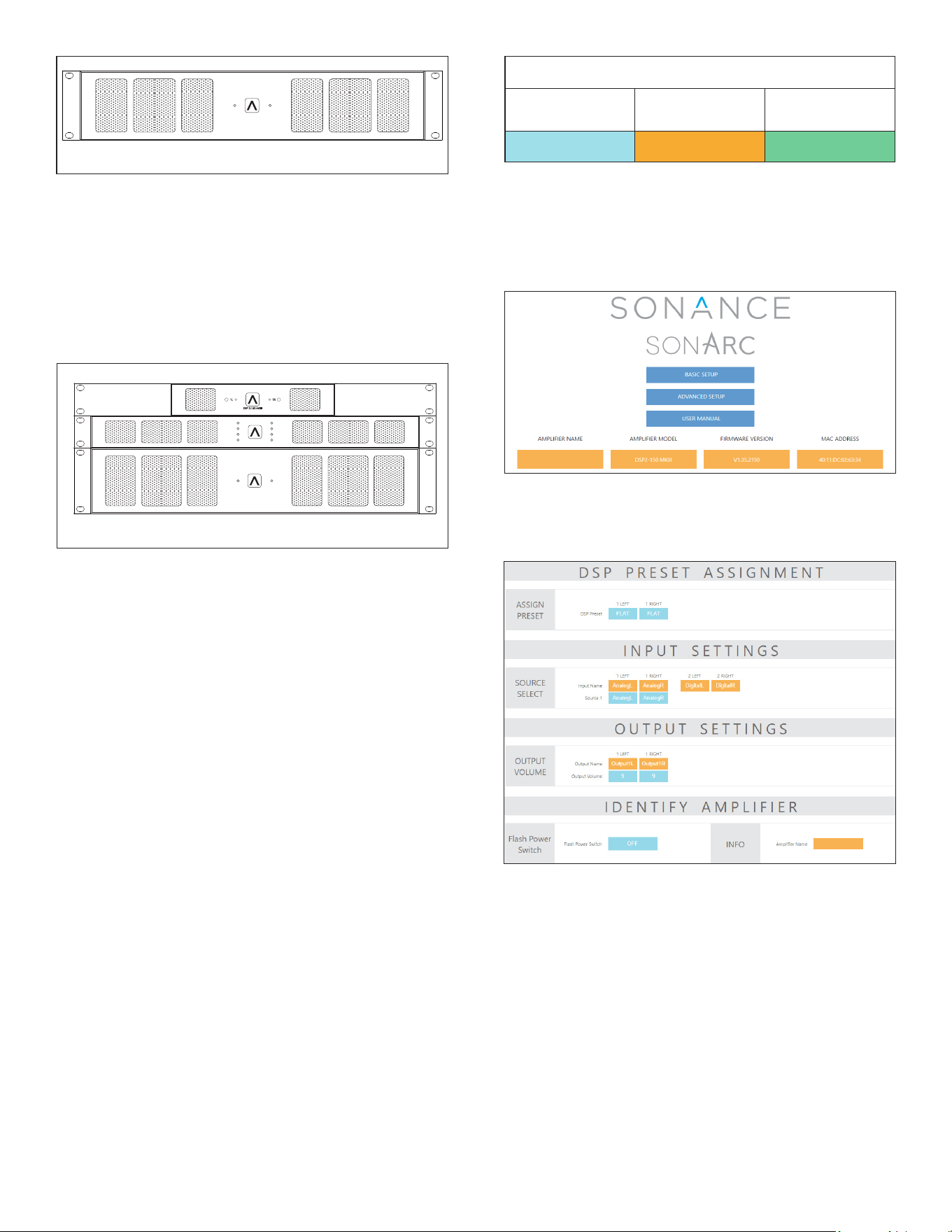
RACK EAR INSTALLATION
Accessory Rack Ears are included with the DSP 2-750
MKIII. Unscrew the four Phillips head screws (M4 x 0.7
pitch x 10mm long) found on each side of the left and
right forward section of amplier. Use these screws to
connect the included rack ears to the amplier (see
Figure 10).
8
1R1L
DSP 2-750 MKIII
Figure 10: Rack Ear Installation
AMPLIFIER STACKING
The DSP 2-750 MKIII is capable of being directly stacked
with the feet removed for use in low to moderate
output applications (see Figure 11). For high-output
applications, it is recommended to leave at least 1U space
between ampliers for increased ventilation. It is not
recommended to stack more than three ampliers high
without spacing.
1
R
1
L
DSP 2-750 MKIII
DSP 8-130 MKIII
1
R
2R
3R
4R
1
L
2L
3L
4L
Figure 11: Front View Stacked Conguration x 3
CONNECTING TO YOUR SONARC
HOMEPAGE
1. The amplier’s factory default settings has DHCP set
to ON.
2. Connect the amplier to a network with a router.
Make sure the computer and amplier are on the
same network.
3. Turn on the amplier.
4. The router issues an IP address to the amplier.
5. Use an IP scanner to determine the IP address of
the Sonance DSP amplier on the network. We
recommend Fing app for IOS, Advanced IP Scanner
for Windows devices and LanScan for macOS.
6. Network devices will show up and the amplier will
be named Sonance.
7. Open Safari or Chrome.
8. In the URL address window at the top, enter the IP
address of the Sonance DSP amplier to congure.
SONARC SOFTWARE NETWORK
CONNECTION INSTRUCTIONS
SONARC HOMEPAGE
SETUP OPTIONS
The SonARC homepage will have two options for setup:
Basic Setup and Advanced Setup. Amplier name can be
entered by the installer.
EQUIPMENT LIST
(1) Computer or Tablet
(1) Network Router with DHCP Service Enabled
(2) RJ-45 Cables (one when using wireless)
SONARC LEGEND
Toggle/Pull-Down
Menu
Free Type
Field
Single Action
Menu
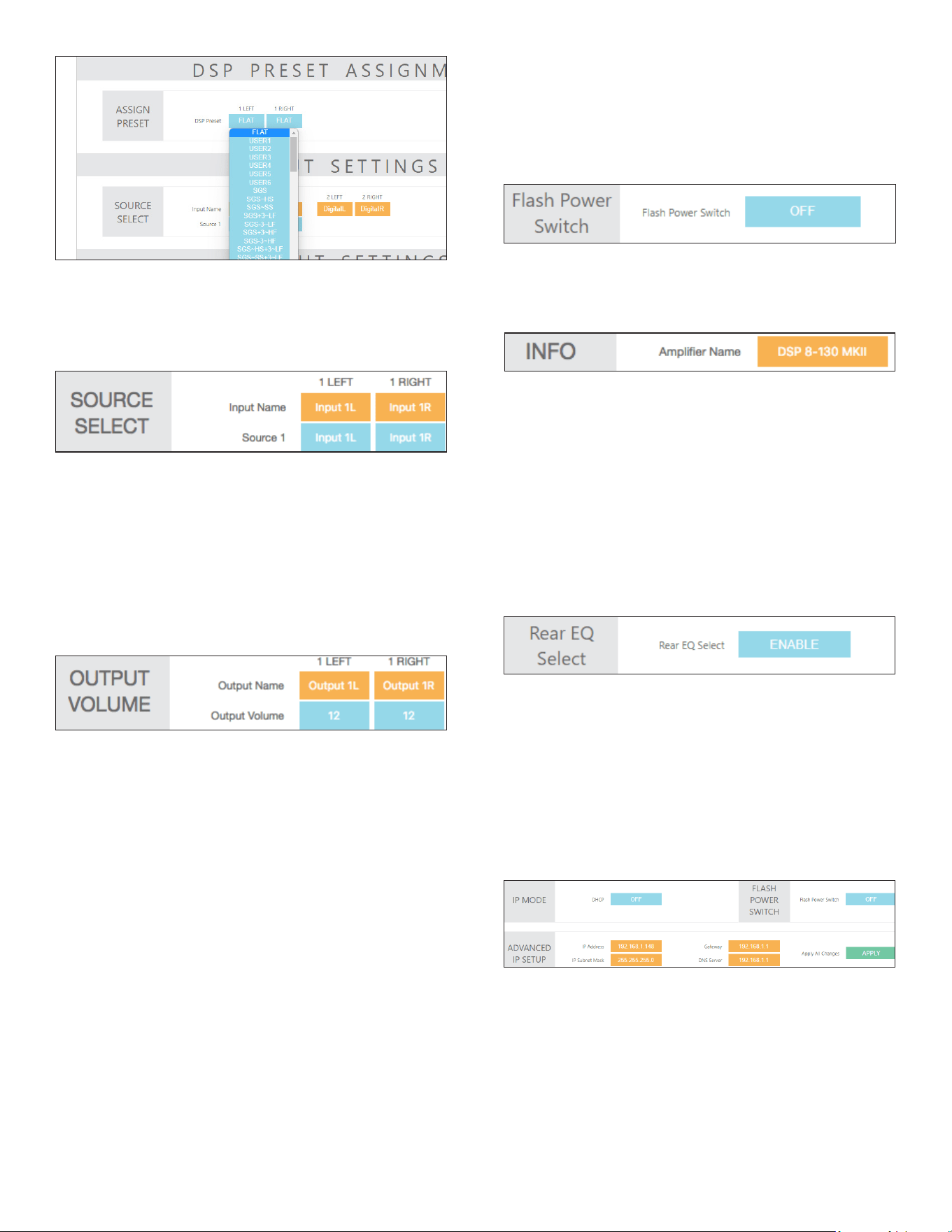
BASIC SETUP PAGE
This page is for basic setup of EQ, source and volume. To
start, click on the Basic Setup button.
DSP PRESET ASSIGNMENT
ASSIGN PRESET
Click on the individual channels to show the drop-down
menu of preset options. Once you locate the preset for
your Sonance speakers, click on the name to set the
preset. Each Sonance DSP amplier has 50 slots, with
pre-congured DSP curves for Sonance speaker models
pre-loaded. If the speaker model in your application
is not on the pre-loaded list, hundreds of DSP les
are available for download from the Sonance website.
Download the preset le for additional Sonance speaker
models at: www.sonance.com/electronics/ampliers/dsp
9
INPUT SOURCE
Pull down menu allows you to select which input you
would like to assign to the channel.
INPUT SETTINGS/SOURCE SELECT
INPUT NAME
User entered eld with a maximum of 15 characters. Use
these elds to describe the type of input connected.
OUTPUT VOLUME (BASIC SETUP)
Play music with wide dynamics and bass that will not
stress the system.
1. Start with the output volume for both 1L and 1R set
at -30.
2. Slowly increase the volume up towards 12 and listen
for any distortion or strain from the speakers. When
you hear any distortion, reduce the volume one or
two steps below this value.
3. Set this volume number for both channels. This
provides maximum system performance and
protects the speakers from being damaged by
amplier clipping and over-excursion of the woofers.
NOTE: LEFT AND RIGHT CHANNELS ARE LINKED.
OUTPUT VOLUME IS LINKED TO TURN ON VOLUME IN
BASIC SETUP.
ADVANCED SETUP PAGE
This page in SonARC allows you to make advanced
changes to the your ampliers settings and conguration.
To start click on the Advanced Setup button from your
amplier’s homepage.
GENERAL SETTINGS TAB
The Advanced Setup automatically starts out on the
General Settings tab. This tab is used to set up the
amplier with a network connection, auto on method
and other basic information.
IDENTIFY AMPLIFIER
ID AMPLIFIER MODE
When the power switch is turned ON, the power button
on the front of the amplier ashes to indicate which
amplier you are programming. This makes the amplier
easy to identify in a multiple amplier installation.
INFO
User entered eld with a maximum of 15 characters to
name the amplier. The basic setup is complete.
OUTPUT SETTINGS/OUTPUT VOLUME
OUTPUT NAME
The Output Name is a 15 character user entered eld. Use
this eld to enter the name that describe the room or
area the channel will be powering.
IP SETUP
DHCP ON/OFF
DHCP ON/OFF is the rst option in IP setup. All Sonance
DSP series ampliers ship with DHCP (Dynamic Host
Connection Protocol) ON. In most installations DHCP
should be left ON except when you are using a control
system for IP control. If you are controlling the DSP series
amplier using IP, then we suggest you turn DHCP OFF
and use a static IP address.
IP ADDRESS
The second setting in the IP Setup section is the IP
address. When DHCP is ON, the current IP address will be
displayed. To change the IP address set the DHCP to OFF.
When DHCP is turned off the IP address that the router
assigned to the amplier continues to be applied. This IP
address is a good place to start since it is not being used
by another network device. If you wish to change the IP
address, you should perform a scan of the network and
only assign an unused IP address within the range of
10
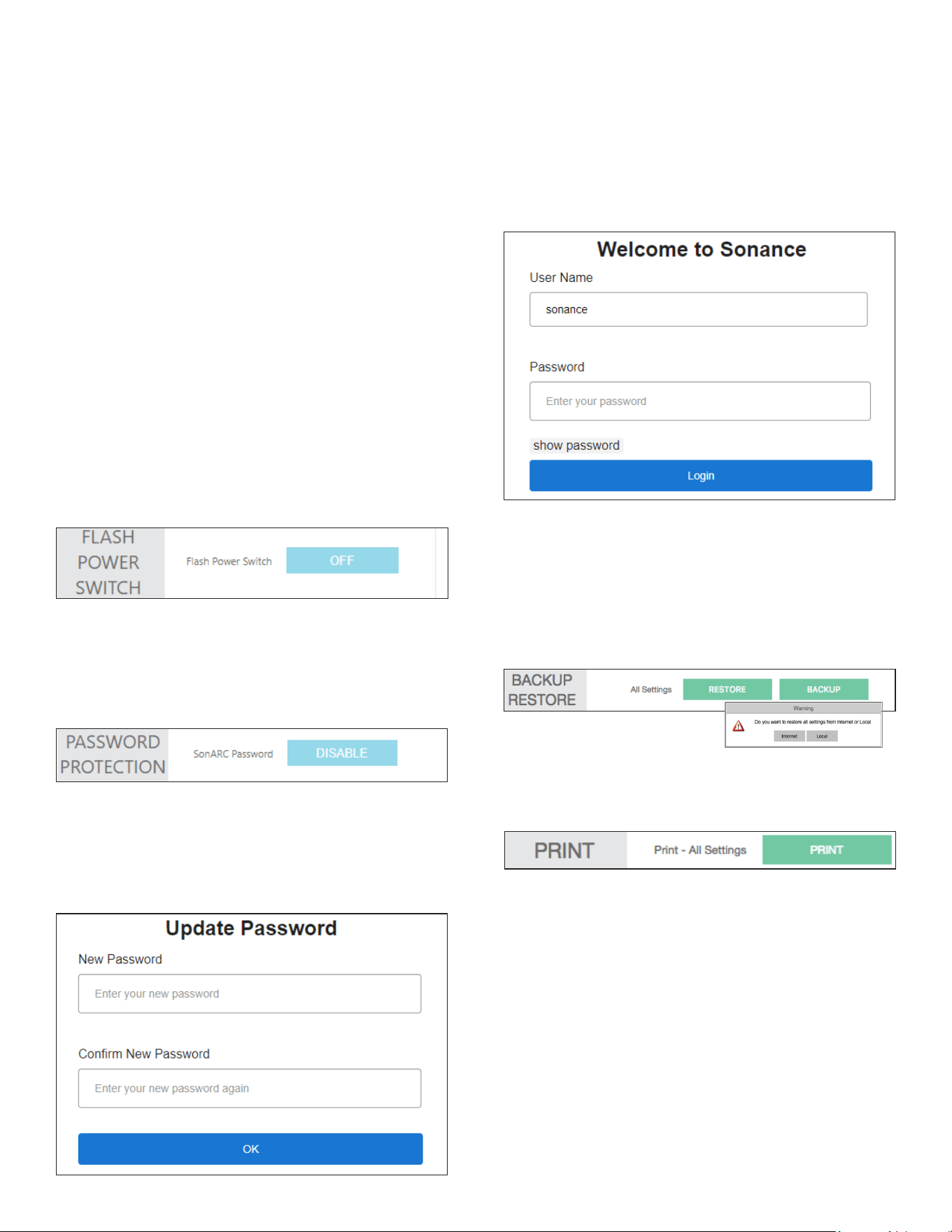
PASSWORD PROTECTION
The SonARC Interface can be protected with an
additional password. The password feature is disabled as
a factory default, but enabling and setting a password
will increase the security of the settings on the amplier.
Enabling the password will open the Update Password
page. The password requires a minimum of eight
characters. If the password requirements are not met, or
the password does not match in the conrmation box,
SonARC will show an error message.
Once a password has been set, the password screen
will appear whenever a new web connection is made.
The username will always be “sonance”. If an incorrect
password is used three times in a row, a ve minute
cooldown period will be required.
NOTE: RESETTING THE NETWORK SETTINGS OR
FACTORY RESETTING THE AMPLIFIER WILL CLEAR AND
DISABLE THE PASSWORD SETTING (SEE APPENDIX A).
BACKUP RESTORE
The green BACKUP and RESTORE buttons take all of the
settings of the amplier, including the DSP settings, and
encapsulates them into one le. This allows the transfer
of settings into another amplier of the same model with
the same rmware version. This is a proprietary le type
(.bin le), agnostic to PC or Mac.
your router. As a general rule, only change the last three
digits of the IP address in the amplier settings and only
assign numbers between two and 254. This suggestion
minimizes the chance of making the amplier
inaccessible. It is critical to type in the correct IP address.
If the wrong IP address is entered, the amplier could
become inaccessible. Make changes to the IP settings
only if you fully understand network setup.
RESETTING DHCP
If the IP address is not known and the amp is locked out,
use the DHCP reset method in Appendix A.
IP SUBNET MASK
The third setting in the IP Setup section is the IP Subnet
Mask. This is an advanced network setup function. Under
most circumstances, this eld should not need to be
edited. Changes in this eld should only be made by an
experienced network administrator.
ID AMPLIFIER MODE
When the power switch is turned ON, the power button
on the front of the amplier ashes to indicate which
amplier is being are programmed. Making the amplier
easy to identify in a multi-amp installation.
PRINT
The print button will output a complete list of all settings
for the amplier. It is always a good idea to keep a
backup hard copy of the settings for each installation.
AUTO ON, POWER SAVING, & SLEEP
MODE
Select the Auto On method you would like to use with
the blue pull-down menu. During setup it is strongly
recommended that you keep the Auto On method
set to POWER BUTTON to prevent the amplier from
shutting off. You can return at anytime to the Auto On
setting and select the nal method of Auto On for your
installation. When controlling the amplier using IP and
IR commands we suggest using the Power Button Auto
On mode. See Appendix B. Power consumption in Sleep
Mode is less than 0.5W.
AUDIO
In the Audio Auto On mode, there are three sleep mode
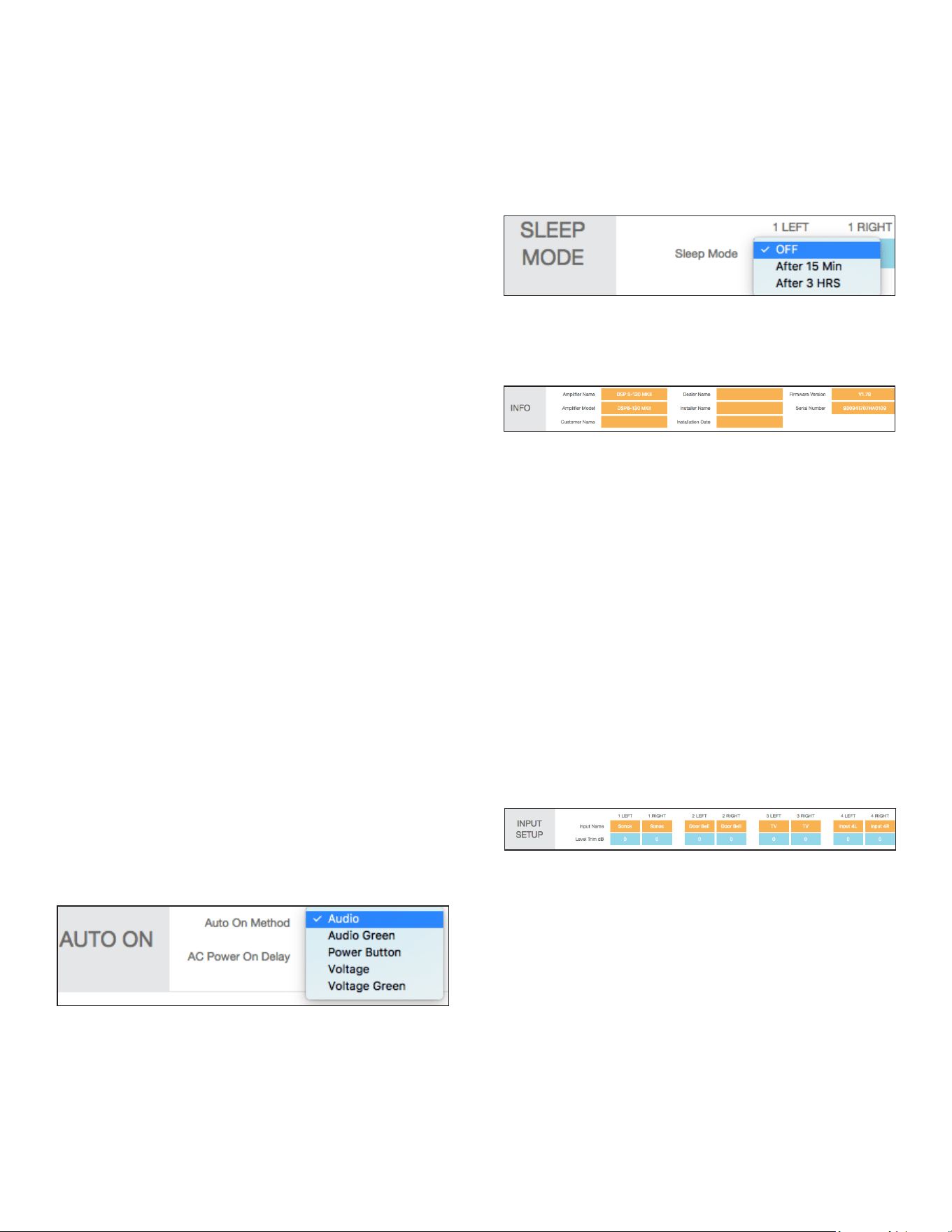
11
options (off, 15 minutes, three hours). Each channel has
an independent sleep mode setting. The sleep mode is
triggered by an audio sensing circuit on each channel of
the amplier. The minimum input sensing level is 0.5mV.
AUDIO GREEN
In the Audio Auto On mode the amplier will sleep after
15 minutes without an audio signal present on any of the
channels. When an audio signal is applied the amplier
will take approximately 9-12 seconds for the amplier
to reproduce audio after going through its power up
sequence. In the audio Auto ON mode the sleep function
is active, see sleep mode note below. This mode complies
with EU energy saving standards when the network
connection is inactive.
NOTE: WHEN AUDIO GREEN MODE IS ENABLED AND
THE AMPLIFIER IS ASLEEP, THE NETWORK INTERFACE
WILL BE DISABLED IF NO CONNECTION IS PRESENT.
IN THIS CASE, IP COMMANDS CANNOT BE RECEIVED
UNTIL THE AMPLIFIER WAKES UP FROM AN ANALOG
AUDIO INPUT.
POWER BUTTON
When sleep mode is set to OFF the channel remains
active at all times. Use the sleep mode OFF setting for
audio signals (doorbell or paging) where audio must be
reproduced immediately at any time.
VOLTAGE
Amplier will sleep immediately when the trigger
voltage has been removed. When a 3-12V DC voltage or
DC voltage is sent to the amplier, it will take six to eight
seconds for the amplier to reproduce audio after going
through its power up sequence.
VOLTAGE GREEN
Amplier will sleep immediately when the trigger
voltage has been removed. When a 3-12V DC voltage or
DC voltage is sent to the amplier it will take six to eight
seconds for the amplier to reproduce audio after going
through its power up sequence. In Voltage Green mode
the Ethernet connection is not active when the amplier
is off! This mode complies with EU energy saving
standards.
SLEEP MODE
Sleep mode allows you to select how long the amplier
will stay active after the Auto ON method ceases.
OFF MODE
When set in the OFF mode the channel will be active
at all times. Use the OFF setting for audio signals like a
doorbell or paging where audio must be reproduced
immediately at any time.
INFO
The orange blocks are installer entered data. Each eld
has a maximum of 15 characters.
IN/OUT SETTINGS TAB
The IN/OUT settings tab is used to assign the amplifer’s
input and output specications.
INPUT SETUP
INPUT NAME
The Input Name is a 15 character user entered eld. Use
this eld to enter a name that describes the type of input
connected.
INPUT TRIM dB
Pull down menu allows for input levels to be adjusted +/-
6dB. This gives you the ability to level out all your inputs
so when you switch from input to input the levels will be
equal. This can eliminate any harsh transitions between
sources with different output voltages. Select the pull-
down menu in each channel to adjust the level trim
between plus or minus 6dB in increments of 0.5dB.
AFTER 15 MINUTES MODE
When an audio signal has not been present on a channel
for 15 minutes, the channel will go to sleep.
AFTER THREE HOURS MODE
When an audio signal has not been present on a channel
for three hours, the channel will go to sleep. This mode
works well for home theater installations.
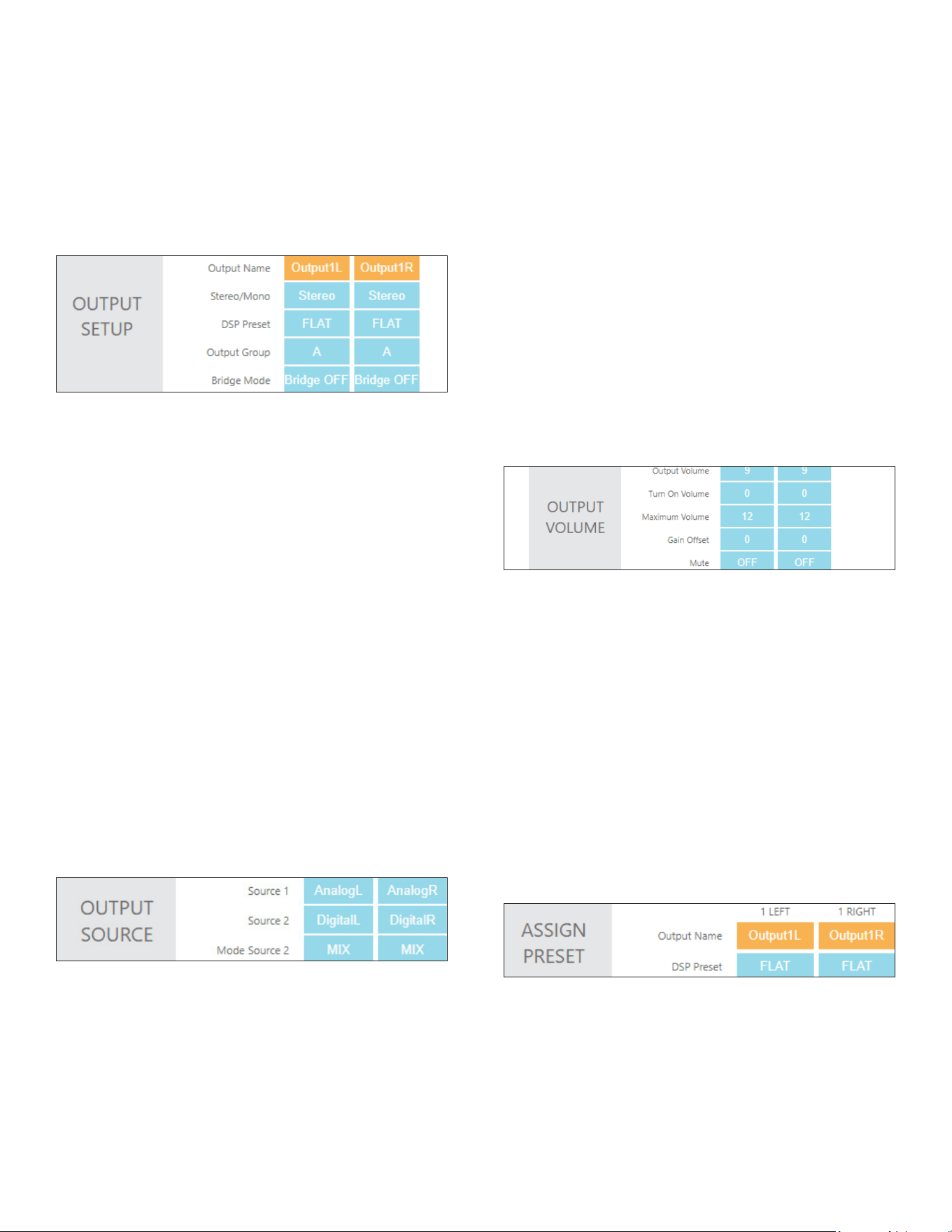
OUTPUT SETUP
OUTPUT NAME
The Output Name is a 15 character user entered eld. Use
this eld to enter a name that describes the location of
the speakers.
STEREO/MONO
Allows each channel to be set for Stereo or Mono
operation. When Mono is selected, the Left and Right of
the input selected will be combined to create Mono.
DSP PRESET
Apply any of the available Sonance DSP presets to each
channel of the amplier independently. You can apply
any open preset and then make modications on the EQ
settings page.
12
OUTPUT VOLUME
This is the main volume level control for each channel.
When channels are placed in the same output group the
levels will change simultaneously.
NOTE: FRONT PANEL VOLUME CONTROLS OVERWRITE
THIS SETTING.
TURN ON VOLUME
Determines what volume level the amplier will default
to when it is turned on. Channels placed in the same
OUTPUT SOURCE
SOURCE 1
Primary source you will direct to the speakers. Any of the
inputs available on the amplier can be selected. When
channels are in the same output group, the inputs will all
change in unison. Left inputs default to left outputs and
right inputs to right outputs.
SOURCE 2
Secondary source that based on the mode Source 2
setting described below, will either override or mix
with Source 1. This input could be used for a doorbell or
paging for example.
MODE SOURCE 2 OFF
When set to OFF, Source 2 has no effect on the operation
of the channel.
MIX
Input levels will be attenuated by 6dB, and signals will be
summed.
MUTE
When set to MUTE, Source 1 will be muted while Source
2 is active.
EQ SETTING TAB
The EQ settings tab is used to assign your DSP EQ presets
for each channel. EQ presets provide best possible
audio quality for most Sonance speakers. EQ presets are
available at:
http://www.sonance.com/electronics/ampliers/dsp.
ASSIGN PRESET
OUTPUT NAME
Can be named Output 1L and Output 1R or room names
such as Kitchen L and Kitchen R. These are a duplicate of
the output name on the IN/OUT settings page.
DSP PRESET
Select your DSP preset with the blue pull-down menu.
This will auto populate in the IN/OUT settings page.
OUTPUT GROUP
The DSP 2-750 MKIII has two output group options,
A and B. When using IP or IR to control the amplier,
commands are sent to an output group and not to a
specic channel.
BRIDGE MODE
When more power is required, two channels can be
bridged. Follow the instructions on page 6, in the
software, for connecting the wires then select Bridge ON.
output group will automatically have identical levels.
Turn on volume level is implemented when the amplier
is turned off with the power switch or goes into sleep
mode.
MAXIMUM VOLUME
IP or IR can be used to limit how loud the speakers
will play in certain areas. Output Volume and Turn
On Volume can never exceed the Maximum Volume.
Maximum Volume is the highest volume level that the
amplier will output. The output group selected does not
affect this setting.
GAIN OFFSET
Allows channels in the same output group to have
their levels adjusted independently by +/-6dB. This is an
independent setting not affected by the output group.
MUTE
Eliminates the output from the speakers. Channels
placed in the same output group will change
simultaneously.
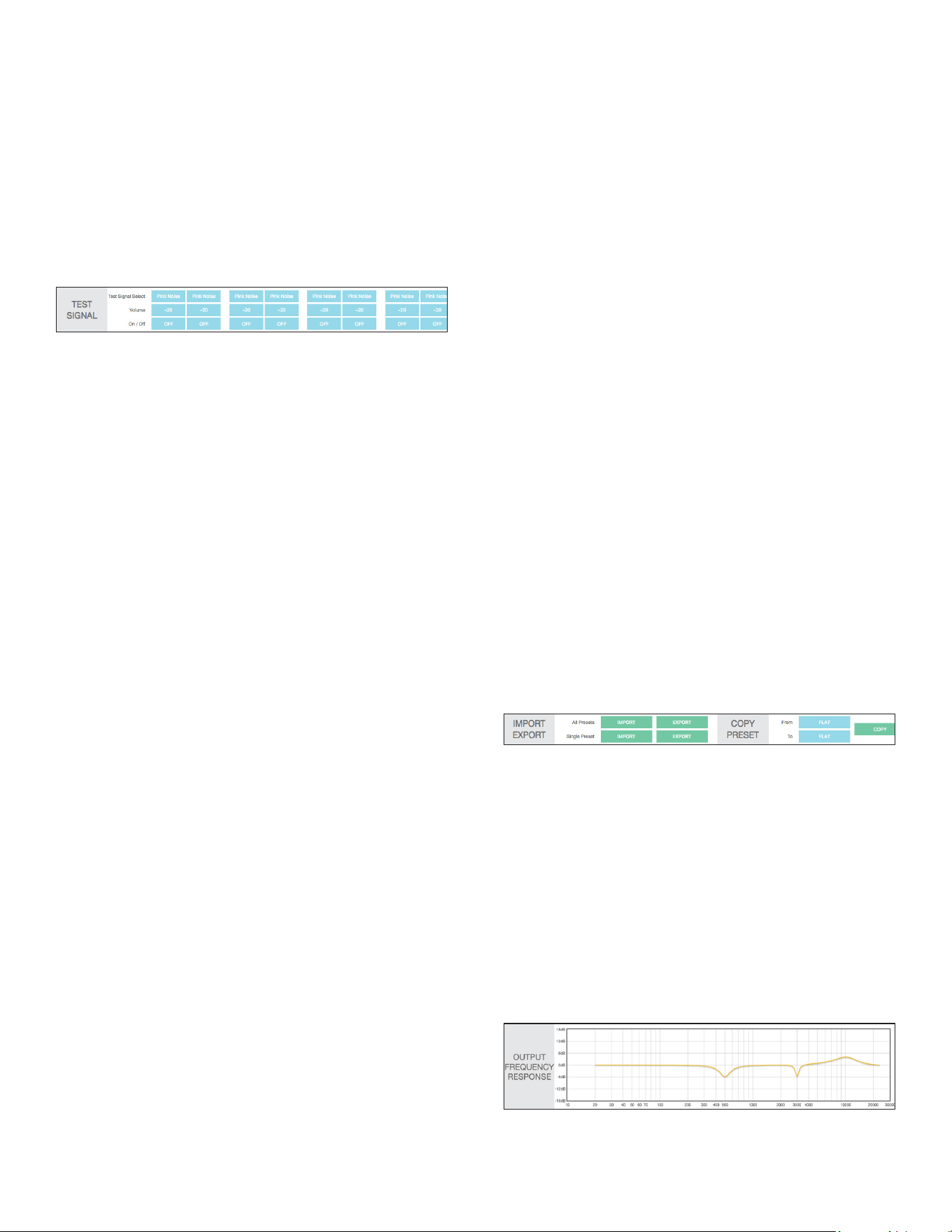
TEST SIGNAL
SonARC software includes a built in pink noise generator.
The pink noise signal can be used in conjunction with a
real time analyzer to measure speakers.
TEST SIGNAL SELECT
Pink noise or test signals fed options into line level inputs.
Use the blue pull-down menu to select between pink
noise or line level inputs as a source for the test signal.
13
DSP PRESET EDITOR
There are six additional EQ slots named User1 through
User6. These are set aside for customization and are at
by default. If these EQs are modied, it is recommended
that a backup be made using the EXPORT function
described below.
SELECT PRESET OR EDIT
Allows you to edit any of the existing presets. Select
preset to edit from the drop-down menu.
EDIT NAME
Edit the name of your preset with up to 15 characters.
DELETE SETTINGS
The reset button deletes the selected preset.
IMPORT EXPORT
ALL PRESETS
The green IMPORT EXPORT buttons allow you to save all
presets in one le. This option can be useful when setting
up multiple ampliers.
SINGLE PRESETS
The green IMPORT EXPORT buttons allow you to import
or export presets individually.
EXPORT SINGLE PRESET:
1. Use the blue pull-down menu SELECT PRESET
to edit located above the IMPORT EXPORT green
buttons.
2. SELECT THE PRESET YOU CHOOSE TO EXPORT
FROM THE PULLDOWN MENU.
Press the green EXPORT button. Depending on your web
browser, the exported le will be saved in your down-
loads folder or you will be prompted where you would
like to save the le.
IMPORT SINGLE PRESET
1. Import speaker preset to a location on your
computer. This can be accomplished by saving a DSP
preset downloaded from Sonance website.
2. Select the location you would like to store the new
preset using the SELECT PRESET TO EDIT pull-
down menu. You can save the new preset in any of
the open preset locations or you can overwrite an
existing preset you do not need.
3. Press the green IMPORT button.
4. From the pop-up menu choose local or internet.
5. You will be directed to My Computer (Windows) or
Finder (MAC).
6. Find and select the new preset you would like to
import (eqs).
7. You will be directed to a screen that says upload
successful.
8. Press “Click Here To Go Back”.
9. The preset will now be saved in the location you
selected.
NOTE: PRESETS DOWNLOADED FROM INTERNET CAN
TAKE UP TO 15 SECONDS TO DOWNLOAD.
COPY PRESET
From/To blue pull-down menus allow you to pull a preset
from one location and assign it to another location. Press
green copy button to activate.
OUTPUT FREQUENCY RESPONSE
This graph reects the changes made below.
The EQ image shows EQ4 ON at 500Hz, the Q is set to
three with a -6dB gain, creating a gradual dip in the
lower midrange.
EQ9 shows ON at 3000Hz, the Q is set to ten with a -6dB
gain, creating a sharp dip in the midrange.
EQ10 shows ON at 10000Hz, the Q is set to one with
a +4dB gain, creating a very gradual slope in the high
frequencies.
VOLUME
Select desired volume for the test signal.
ON/OFF
Toggle the test signal on and off. The pink noise signal
should not be left on for more than ten minutes to
minimize the risk of damaging the speakers.
NOTE: THE PINK NOISE GENERATOR IS AFTER THE
AUDIO SENSORY CIRCUIT SO THE AMP WILL GO TO
SLEEP DEPENDING ON THE AUTO ON MODE SELECTED.
IF THE PINK NOISE STOPS, POWER CYCLE THE AMP.
14
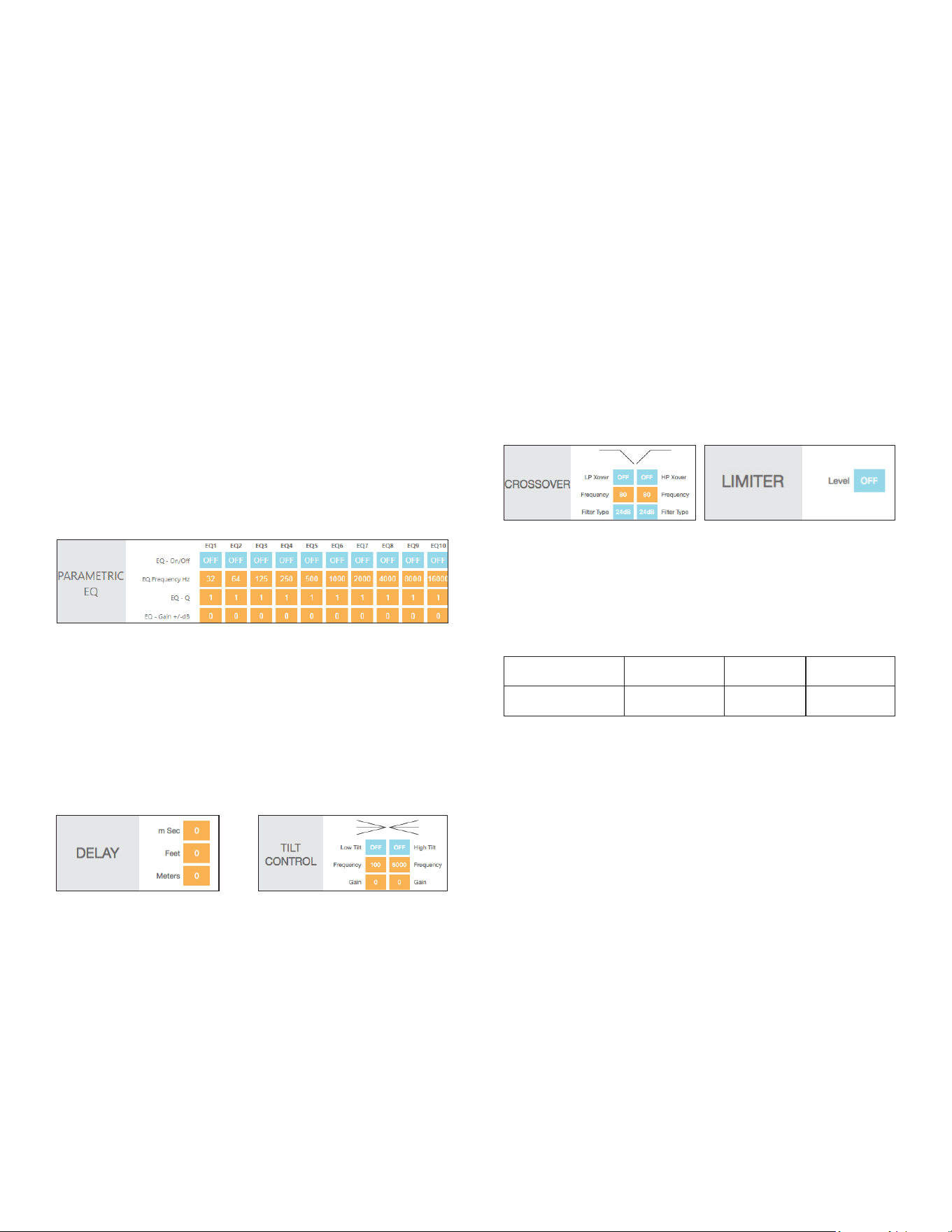
DELAY
Delay is shown in milliseconds, feet and meters. You can
make an entry in any of the three elds and the other
elds will be calculated automatically. The minimum
delay is .01 milliseconds, the maximum delay is 12
milliseconds. This function is useful when compensating
for distance between satellites and subwoofers for
instance.
TILT CONTROL
The tilt controls are very sophisticated bass and treble
control. By selecting a start frequency and level you can
ramp the bass and or treble up or down. The effect of
the tilt control is visible in the output frequency response
graph.
LOW TILT/HIGH TILT
Turns the low and high tilt controls on and off.
FREQUENCY
Enter the start frequency of the tilt in Hz. To boost the
low frequencies you would typically set the low tilt to
100Hz. To boost the high frequencies you would set the
high tilt to around 5kHz.
Careful adjustment of the EQ gain is necessary to prevent
damage to the speakers. Always increase the level as little
as possible. The rst choice should always be to reduce
the output to achieve the target frequency response.
PARAMETRIC EQ
All Sonance DSP amplier models feature a ten band
parametric EQ. Adjustments made to the EQ will be
displayed on the output frequency response graph. We
strongly suggest not adjusting the EQ without proper
measurement equipment.
EQ ON/OFF
Turns each of the ten parametric EQ lters on and off.
EQ FREQUENCY HZ
Enter the center frequency (20Hz - 20kHz) for the lter to
be adjusted.
EQ-Q
Determines the width of the adjustment range. The lower
the number the wider the bandwidth. The higher the
number the narrower the bandwidth.
EQ-GAIN +/- dB
Level of each parametric adjustment can be set +/-12dB.
LIMITER
The limiter operates as a brick wall limit on the output of
the amplier. The limiter drop-down menu has options
from zero to -6dB in 0.5dB steps. The maximum outputs
for each of the models:
DSP 2-750 MKIII No Limiter -3dB -6dB
8 ohm power 500 watts 250 watts 125 watts
GAIN
Can be set in 1dB steps +/-12dB. When setting the gain
use as little positive gain as possible to minimize the risk
of damage to the loudspeakers.
CROSSOVER
LP XOVER/HP XOVER
Turns the high and low pass crossovers on and off.
FREQUENCY
Enter any frequency between 20Hz-20kHz.
FILTER TYPE
6dB, 12dB, 18dB and 24dB per octave Butterworth lters
are available in the pull-down menu. The higher the
number the faster the speakers output will be reduced
below or above the crossover frequency. In a typical
satellite subwoofer system the crossover frequency would
be around 80-100Hz for both the high and low
pass lters.

15
DSP 2-750 MKIII SPECIFICATIONS
Number of Channels 2 (1 stereo pair)
Power Output - 8 ohms (Stereo) 500 Watts RMS per channel (all channels driven)
Power Output - 4 ohms/70V (Stereo) 750 Watts RMS per channel (all channels driven)
Power Output - 8 ohms (Bridged) 2000 Watts Peak
Power Output - 70 Volts 750 Watts RMS per Channel (both channels driven)
Frequency Response 5Hz – 50kHz, bandwidth limited
Total Harmonic Distortion 0.4% (1kHz, 500W, 8 ohms) 0.3% (1kHz, 500W, 4 ohms)
Signal to Noise Ratio >100dB (20-20kHz, A-weighted)
Input Gain 29dB
Input Sensitivity 100mV for 1 Watt Output @8 ohms
2200mV for 500 Watts Output @8 ohms
Input Impedance 20k ohms
Loop Output Impedance 600 ohms
Maximum Source Input Voltage 2.9V VAC RMS
Communication Protocol TCP/IP (RJ-45 10/100 Base T)
Power Consumption 120V AC
@8 ohms (sinewave, full power) 1200 Watts (all channels driven)
@4 ohms (sinewave, full power) 1850 Watts (all channels driven)
@8 ohms (sinewave, 1/8 power) 210 Watts (all channels driven)
@4 ohms (sinewave, 1/8 power) 290 Watts (all channels driven)
@Idle 37 Watts
@IP or IR sleep <2 Watts
@Sleep 0.4 Watts
Power Consumption 230V AC
@8 ohms (sinewave, full power) 1200 Watts (all channels driven)
@4 ohms (sinewave, full power) 1950 Watts (all channels driven)
@8 ohms (sinewave, 1/8 power) 200 Watts (all channels driven)
@4 ohms (sinewave, 1/8 power) 290 Watts (all channels driven)
@Idle 35 Watts
@IP or IR sleep <2 Watts
@Sleep 0.4 Watts
Heat Output
@8 ohms (sinewave, full power) 683 BTU/h (all channels driven)
@4 ohms (sinewave, full power) 1195 BTU/h (all channels driven)
@8 ohms (sinewave, 1/8 power) 260 BTU/h (all channels driven)
@4 ohms (sinewave, 1/8 power) 340 BTU/h (all channels driven)
AC Voltage 100-120V@60Hz, 220-240V@50Hz
AC Fuse 15A (T15AL ~ 250V)
Rack Space Requirement 2U
Dimensions w/ Feet (WxHxD) 17 1/4” x 3 7/8” x 16 13/16” (438mm x 98mm x 427mm)
Dimensions w/ Rack Ears w/o Feet (WxHxD) 19” x 3 1/2” x 16 13/16” (482mm x 88mm x 427mm)
Shipping Weight 23.3 lbs (10.6kg)

16
Dim White Power Button Amplier is plugged in and in sleep mode
Bright White Power Button Amplier is active
Power Button Blinking Amplier is in ID Amp Mode (see page 9)
Green LED Signal is present (>1.0mV) on channel
Blinking Green Signal is going above and below the active level or between songs
Blinking Red The channel is being over driven
Solid Red Amplier is in protection mode (see page 6)
Power Button Blinking Light Amplier temperature exceeds the design maximum +LED’s Blinking Red
Step 1 Press and hold the RESET button for at least three, but less than ten seconds
LED INDICATOR EXPLANATION
DHCP RESET STEP DHCP RESET STEPS
APPENDIX A
AMPLIFIER FACTORY RESET AMPLIFIER FACTORY RESET STEPS
Step 1 Press and hold the RESET button on the rear panel for more than ten seconds
Auto On Setting Sleep Mode Options Time To Music Ethernet
Audio Off Always on Always on
Audio 15 Min 10-11 sec Always on
Audio 3 Hrs 10-11 sec Always on
Auto On Setting Sleep Mode Options Time To Music Ethernet
Power Button Off Always on Always on
Power Button 15 Min 2-3 sec Always on
Power Button 3 Hrs 2-3 sec Always on
APPENDIX B
DSP 2-750 MKIII AMPLIFIER - AUTO ON/SLEEP MODE DETAILS
Auto On Setting Sleep Mode Options Time To Music Ethernet
Audio Green None 10-11 sec Turns off after 15 mins without audio
Auto On Setting Sleep Mode Options Time To Music Ethernet
Voltage None 10-11 sec Always on
Auto On Setting Sleep Mode Options Time To Music Ethernet
Voltage Green None 10-11 sec Turns off after 15 mins without voltage
if no active network connection

17
OUT OF THE BOX TROUBLESHOOTING
NO POWER: Front panel Power LED does not illuminate
when AC cord is plugged into an outlet and the amp is
switched on.
• Cause: AC cable is improperly seated either at the
back of the amp or at the AC outlet.
• Solution: Verify that both ends of the power cable are
securely seated.
• Cause: There is no AC current at the outlet.
• Solution 1: Securely insert the AC cord into another
known-working
• Solution 2: AC outlet has no power.
• Cause: A rear panel fuse is blown.
• Solution: Check the rear panel fuse and replace if
blown. If the front panel power LED still does not
illuminate, contact Sonance Technical Support for
additional instructions.
NO AUDIO
Front panel Power LED illuminates but the amp will not
pass audio.
• Cause: Current selected source is not transmitting an
audio signal into the amp.
• Solution: Verify that the source is powered on,
operating and not in a muted or paused state.
• Cause: Audio interconnect cables are not pushed-in
securely at the source, at the preamp and/or at the
amp’s input connectors.
• Solution: With the amp powered of, carefully reset
each of the RCA connections at the source, at the
preamp/zone controller.
• Cause: The line level interconnect cables are
defective.
• Solution: Substitute another interconnect cable for
the source to preamp.
• Cause: The speaker wires at either the output of
the amp or at the speaker location are not securely
connected.
• Solution: Reattach the speaker wires on the
4-terminal speaker block connectors.
• Cause: The amp’s power management option state
is not being met (amp is set to voltage trigger and is
not receiving a voltage).
• Solutions: Verify/reset the power management
option to ‘Power Button’.
• Cause: The SonARC bridging option is engaged but
the speakers are not wired properly for bridge mode.
• Solutions: Set the bridge mode to OFF. If audio
output is still unavailable, contact Sonance Technical
Support.
NO IP CONTROL
Made ethernet connection but IP control is not responding.
• Cause: Faulty ethernet cable.
• Solution: Check the rear-panel network LEDs on
the input card are ashing to indicate network
connectivity. If these LEDs are not active, replace the
Ethernet cable. If the network LEDs are active but
the DSP amp will not respond, perform the network
reset as described below and retest.
• Cause: Faulty network switch.
• Solution: Connect the amp directly to the network
router, bypassing the network switch.
• Cause: The amp’s IP address is improperly set.
• Solution: Scan the network, nd the DSP amp’s IP
address and enter it into your web browser. SonARC
setup software should populate, showing the DHCP
network address assigned to the amp by the router.
In the Advanced Settings tab in SonARC, turn-off
DHCP and set the xed IP address of your choosing.
Enter this IP address in your IP control module. Test
the system with your control devices (touchscreens,
iPhones with app, etc.). If the LEDs are still inactive
and the other network devices are working properly,
then the input card may need to be replaced,
contact Sonance Technical Support. If the network
LEDs are active but the DSP amp will not respond,
perform the network reset as described below and
retest.
NO IR CONTROL
The IR output from the control system is connected to
the ‘IR Control Input’ jack of the DSP amp with a mono-
mini cable (not a stereo mini cable) but the amp will not
respond to IR commands.
• Cause: The DSP amp does not respond to IR
commands using the mono-mini input jack.
• Solution: Test the IR sending component by plugging
a mini-emitter into its output and using the emitter
to control a local AV component (such as a DVD
player or AV receiver). Verify that the ‘IR Status’
LED near the IR Control Jack illuminates when an
IR command is sent, indicating that the amp is
receiving the signal. If the local AV component can
be controlled by the mini-emitter, then the problem
may be caused by outdated rmware. Request the
latest rmware from Sonance Technical Support.

18
FACTORY RESET
Perform a factory reset on the amplier by inserting a
small device (paper clip or #0 Phillips screw driver) into
the RESET button hole on the back panel, and pressing
the button for at least 10 seconds.
For additional support, contact Sonance Technical
Support at www.techsupport@sonance.com.
CHANNEL OUT
One channel of the amp does not have output.
• Cause: Line-level interconnect cable from the source
to the affected amp channel is loose, disconnected
or faulty.
• Solution: Verify that the interconnect cables are
properly seated at both the amp end inputs and
source end outputs. Disconnect both interconnects
on the amp end (1L and 1R input connections on
the amp). Connect the functioning channel’s cable
from the source to the non-functioning channel’s
input jack on the amp (for example, if 1L is faulty,
connect 1R’s cable to the 1L input jack and test).
Test playback to see if the speaker connected to
the non-functioning channel works. If the affected
channel is now working, the problem could be with
that channel at the source or with the interconnect
cable for the non-functioning channel. Replace the
affected channel’s interconnect cable and retest. Test
source on another audio system to conrm channel
outputs are functioning.
• Cause: Speaker wire leading out to the channel is
loose, disconnected or faulty.
• Solution: Verify proper connection of the speaker
wire at amp end and speaker end. If the channel is
still inoperative, disconnect the speaker wire from
the non-functioning channel at both the amp
end and speaker end. Connect a new, test speaker
wire from the affected amp channel output to the
speaker or to a new, test speaker. If the affected
channel is now working, the problem must be the
speaker wire; replace with a new speaker wire. If the
affected channel is still not working, the affected
channel in the amp could be defective; contact
Sonance Technical Support for next steps.
PROTECTION LEDS ARE ILLUMINATED
One or more red protection LEDs are on.
• Cause: The problem could be DC on the input of the
amplier, a short on the speaker wire going out to
the zone, or a short at the speaker itself.
• Solution: Disconnect the speaker wire from that
channel going out to the zone. If the protection
LED goes out, connect your local test speaker, turn
the amp back on and play music. If the test speaker
produces sound, then the speaker wire leading out
to the zone or at the zone speaker is shorted. If the
test speaker does not produce sound and you’ve
tried a different source on that pair of amp channels
to rule-out a defective source, then the amp requires
service; contact Sonance Technical Support for
additional instructions.

19
©2023 Sonance. All rights reserved. Sonance is a registered trademarks of Dana Innovations. Due to continuous product improvement, all features and speci-
cations are subject to change without notice. For the latest Sonance product specication information visit our website: www.sonance.com
SONANCE • 991 Calle Amanecer • San Clemente, CA 92673 USA • PHONE: (949) 492-7777 • FAX: (949) 361-5151 • Technical Support: (949) 492-7777
11.04.2023
LIMITED TWO (2) YEAR WARRANTY
Sonance warrants to the rst end-user purchaser that this Sonance-brand product (Sonance DSP 2-750 MKIII) when purchased from an
authorized Sonance Dealer/Distributor, will be free from defective workmanship and materials for the period stated below. Sonance will at
its option and expense during the warranty period, either repair the defect or replace the Product with a new or remanufactured Product
or a reasonable equivalent.
EXCLUSIONS: TO THE EXTENT PERMITTED BY LAW, THE WARRANTY SET FORTH ABOVE IS IN LIEU OF, AND EXCLUSIVE OF, ALL OTHER
WARRANTIES, EXPRESS OR IMPLIED, AND IS THE SOLE AND EXCLUSIVE WARRANTY PROVIDED BY SONANCE. ALL OTHER EXPRESS
AND IMPLIED WARRANTIES, INCLUDING THE IMPLIED WARRANTIES OF MERCHANTABILITY, IMPLIED WARRANTY OF FITNESS FOR USE,
AND IMPLIED WARRANTY OF FITNESS FOR A PARTICULAR PURPOSE ARE SPECIFICALLY EXCLUDED.
No one is authorized to make or modify any warranties on behalf of Sonance. The warranty stated above is the sole and exclusive remedy
and Sonance’s performance shall constitute full and nal satisfaction of all obligations, liabilities and claims with respect to the Product.
IN ANY EVENT, SONANCE SHALL NOT BE LIABLE FOR CONSEQUENTIAL, INCIDENTAL, ECONOMIC, PROPERTY, BODILY INJURY, OR
PERSONAL INJURY DAMAGES ARISING FROM THE PRODUCT, ANY BREACH OF THIS WARRANTY OR OTHERWISE.
This warranty statement gives you specic legal rights, and you may have other rights which vary from state to state. Some states do not
allow the exclusion of implied warranties or limitations of remedies, so the above exclusions and limitations may not apply. If your state
does not allow disclaimer of implied warranties, the duration of such implied warranties is limited to period of Sonance’s express warranty.
Your Product Model and Description: Sonance DSP 2-750 MKIII Amplier. Warranty Period for this Product: Two (2) years from the date on
the original sales receipt or invoice or other satisfactory proof of purchase.
Additional Limitations and Exclusions from Warranty Coverage: The warranty described above is non-transferable, applies only to the
initial installation of the Product, does not include installation of any repaired or replaced Product, does not include damage to allied or
associated equipment which may result for any reason from use with this Product, and does not include labor or parts caused by accident,
disaster, negligence, improper installation, misuse (e.g., overdriving the amplier or speaker, excessive heat, cold or humidity), or from
service or repair which has not been authorized by Sonance.
Obtaining Authorized Service: To qualify for the warranty, you must contact your authorized Sonance Dealer/Installer or call Sonance
Customer Service at (949) 492-7777 within the warranty period, must obtain a return merchandise number (RMA), and must deliver the
Product to Sonance shipping prepaid during the warranty period, together with the original sales receipt, or invoice or other satisfactory
proof of purchase.
Warranty Process: Please follow the troubleshooting instructions in this manual or work with your Sonance dealer to determine the exact
nature of the fault. Sonance provides a 2-Year Limited Warranty to the original owner with proof of purchase from an authorized Sonance
dealer. The warranty does not cover shipping charges back to Sonance or the use of the product in an environment or application not
approved by Sonance.
In order to initiate a warranty claim:
1. Contact Sonance Technical Support with a description of the fault, the amplier’s serial number and the date of purchase from an
authorized Sonance dealer at: technic[email protected]
2. Sonance Technical Support will follow-up and may request additional troubleshooting.
3. Once a determination has been made on the fault, Sonance Customer Service will follow-up by email. Please have a scanned copy of
your Sonance DSP 2-750 MKIII Amplier sales invoice ready to send upon request to document the amplier’s warranty status.
4. Sonance Customer Service will provide an RMA number to be included on the shipping label of the packaging. Please send the
amplier back in its original factory carton, which has been specically designed to protect the amplier during transit.
Contact us at: https://www.sonance.com/company/contact