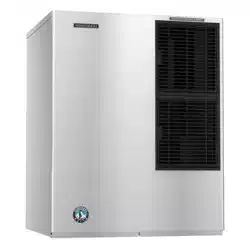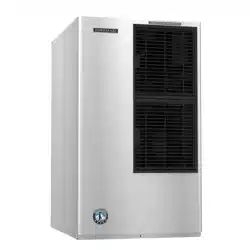
Models
KM-520MAJ-E
KM-660MAJ-E
Modular Crescent Cuber
Instruction Manual
Issued: 10-15-2021
Revised: 5-5-2022
hoshizakiamerica.com
2
WARNING
Only qualied service technicians should install and service the appliance. To
obtain the name and phone number of your local Hoshizaki Certied Service
Representative, visit www.hoshizaki.com. No installation or service should be
undertaken until the technician has thoroughly read this Instruction Manual.
Likewise, the owner/manager should not proceed to operate the appliance until the
installer has instructed them on its proper operation. Failure to install, operate, and
maintain the appliance in accordance with this manual will adversely affect safety,
performance, component life, and warranty coverage and may result in costly water
damage. Proper installation is the responsibility of the installer. Product failure or
property damage due to improper installation is not covered under warranty.
Hoshizaki provides this manual primarily to assist qualied service technicians in the
installation, maintenance, and service of the appliance.
NOTE: To expedite assistance, all correspondence/communication MUST include the
following information:
• Model Number
• Serial Number
• Complete and detailed explanation of the problem.
3
IMPORTANT
This manual should be read carefully before the appliance is installed and operated.
Read the warnings and guidelines contained in this manual carefully as they
provide essential information for the continued safe use and maintenance of the
appliance. Retain this manual for any further reference that may be necessary.
CONTENTS
Important Safety Information ................................................................................................. 4
I. Specications ...................................................................................................................... 6
A. Electrical and Refrigerant Data ..................................................................................... 6
B. Dimensions/Connections .............................................................................................. 7
II. Installation and Operating Instructions .............................................................................. 8
A. Location ........................................................................................................................ 8
B. Checks Before Installation ............................................................................................. 9
C. How to Remove Panels ................................................................................................. 9
D. Setup ........................................................................................................................... 10
E. Electrical Connection ...................................................................................................11
F. Water Supply and Drain Connections .......................................................................... 12
G. Final Checklist ............................................................................................................ 14
1. Pre-Startup ............................................................................................................. 14
2. Post-Startup ........................................................................................................... 14
H. Startup ........................................................................................................................ 15
1. Bin Control Setting ................................................................................................. 15
2. Appliance Startup and Bin Control Check ............................................................ 18
III. Maintenance ................................................................................................................... 20
A. Maintenance Schedule ................................................................................................ 20
B. Cleaning and Sanitizing Instructions ........................................................................... 21
IV. Preparing the Appliance for Periods of Non-Use ............................................................ 23
V. Disposal ........................................................................................................................... 24
VI. Warranty ........................................................................................................................ 25
4
Important Safety Information
Throughout this manual, notices appear to bring your attention to situations which could
result in death, serious injury, damage to the appliance, or damage to property.
WARNING Indicates a hazardous situation which could result in death or
serious injury.
NOTICE Indicates a situation which could result in damage to the
appliance or property.
IMPORTANT Indicates important information about the installation, use, and
care of the appliance.
WARNING
The appliance should be destined only to the use for which it has been expressly
conceived. Any other use should be considered improper and therefore dangerous.
The manufacturer cannot be held responsible for injury or damage resulting
from improper, incorrect, and unreasonable use. Failure to install, operate, and
maintain the appliance in accordance with this manual will adversely affect safety,
performance, component life, and warranty coverage and may result in costly water
damage.
To reduce the risk of death, electric shock, serious injury, or re, follow basic
precautions including the following:
• Only qualied service technicians should install and service the appliance.
• The appliance must be installed in accordance with applicable national, state, and
local codes and regulations.
• Electrical connection must meet national, state, and local electrical code
requirements. Failure to meet these code requirements could result in death,
electric shock, serious injury, re, or damage.
• The appliance requires an independent power supply of proper capacity. See the
nameplate for electrical specications. Failure to use an independent power supply
of proper capacity can result in a tripped breaker, blown fuse, damage to existing
wiring, or component failure. This could lead to heat generation or re.
• THE APPLIANCE MUST BE GROUNDED (EARTHED). Failure to properly ground
(earth) the appliance could result in death or serious injury.
• To reduce the risk of electric shock, do not touch the control switch, mode switch, or
plug with damp hands.
• This appliance is equipped with a three-prong fused grounding (earthed) plug to
reduce the risk of potential shock hazards. Corded models must be plugged into
a properly grounded (earthed), independent 3-prong wall outlet. If the outlet is
a 2-prong outlet, it is your personal responsibility to have a qualied electrician
replace it with a properly grounded (earthed), independent 3-prong wall outlet.
Do not remove the ground (earth) prong from the plug and do not use an adapter
plug. Failure to follow these instructions may result in death, electric shock, or re.
• Do not use an extension cord.
5
WARNING, continued
• Do not use an appliance with a damaged power cord. The power cord should not
be altered, jerked, bundled, weighed down, pinched, or tangled. Such actions could
result in electric shock or re. To unplug the appliance, be sure to pull the plug, not
the cord, and do not jerk the cord.
• Factory tted power cords are coloured in accordance with the following code:
Green and Yellow = Ground (Earth)
Blue = Neutral
Brown = Line
• The GREEN/YELLOW ground wire in the factory-installed power cord is connected
to the appliance. If it becomes necessary to remove or replace the power cord, be
sure to connect the power cord's ground wire.
• Do not make any alterations to the appliance. Alterations could result in electric
shock, serious injury, re, or damage.
• The appliance is not intended for use by persons (including children) with reduced
physical, sensory, or mental capabilities, or lack of experience and knowledge,
unless they have been given supervision or instruction concerning use of the
appliance by a person responsible for their safety.
• Children should be properly supervised around the appliance.
• Do not climb, stand, or hang on the appliance or allow children or animals to do so.
Serious injury could occur or the appliance could be damaged.
• Do not use combustible spray or place volatile or ammable substances near the
appliance. They might catch re.
• Keep the area around the appliance clean. Dirt, dust, or insects in the appliance
could cause harm to individuals or damage to the appliance.
NOTICE
• Follow the water supply, drain connection, and maintenance instructions carefully to
reduce the risk of costly water damage.
• In areas where water damage is a concern, install in a contained area with a oor
drain.
• Install the appliance in a location that stays above freezing. Normal operating
ambient temperature must be within 45°F to 100°F (7°C to 38°C).
• Do not leave the appliance on during extended periods of non-use, extended
absences, or in sub-freezing temperatures. To properly prepare the appliance for
these occasions, follow the instructions in "IV. Preparing the Appliance for Periods
of Non-Use."
• Do not place objects on top of the appliance.
• The dispenser unit/ice storage bin is for ice use only. Do not store anything else in
the dispenser unit/ice storage bin.
6
I. Specications
A. Electrical and Refrigerant Data
The rating label and nameplate provide electrical and refrigerant data. The rating label
can be seen by removing the front panel. The nameplate is located on the rear panel. For
certication marks, see the nameplate.
We reserve the right to make changes in specications and design without prior notice.
1. KM-520MAJ-E and KM-660MAJ-E
Single Phase
Model Number KM-520MAJ-E KM-660MAJ-E
AC Supply Voltage 230V 230V
Frequency
50 Hz 50 Hz
AMPERAGE 8.4A 8.4A
REFRIGERANT 404A .500 KG 404A .760 KG
(GWP=3922, CO2=1.96t) (GWP=3922, CO2=2.98t)
INSULATING BLOWING
GAS
HFC-FREE HFC-FREE
WEIGHT 79 KG 79 KG
CONDITIONS CLASS T CLASS T
MAXIMUM OPERATING
PRESSURE
2.88MPA 2.88MPA
LEAK TIGHTNESS TESTED
This product includes a hermetically sealed refrigeration system that contains
uorinated greenhouse gases:
R-404A (kg) GWP CO2 (t)
KM-520MAJ-E
0.500 3922 1.961
KM-660MAJ-E
7
Rear
Side
Bottom
NOTICE
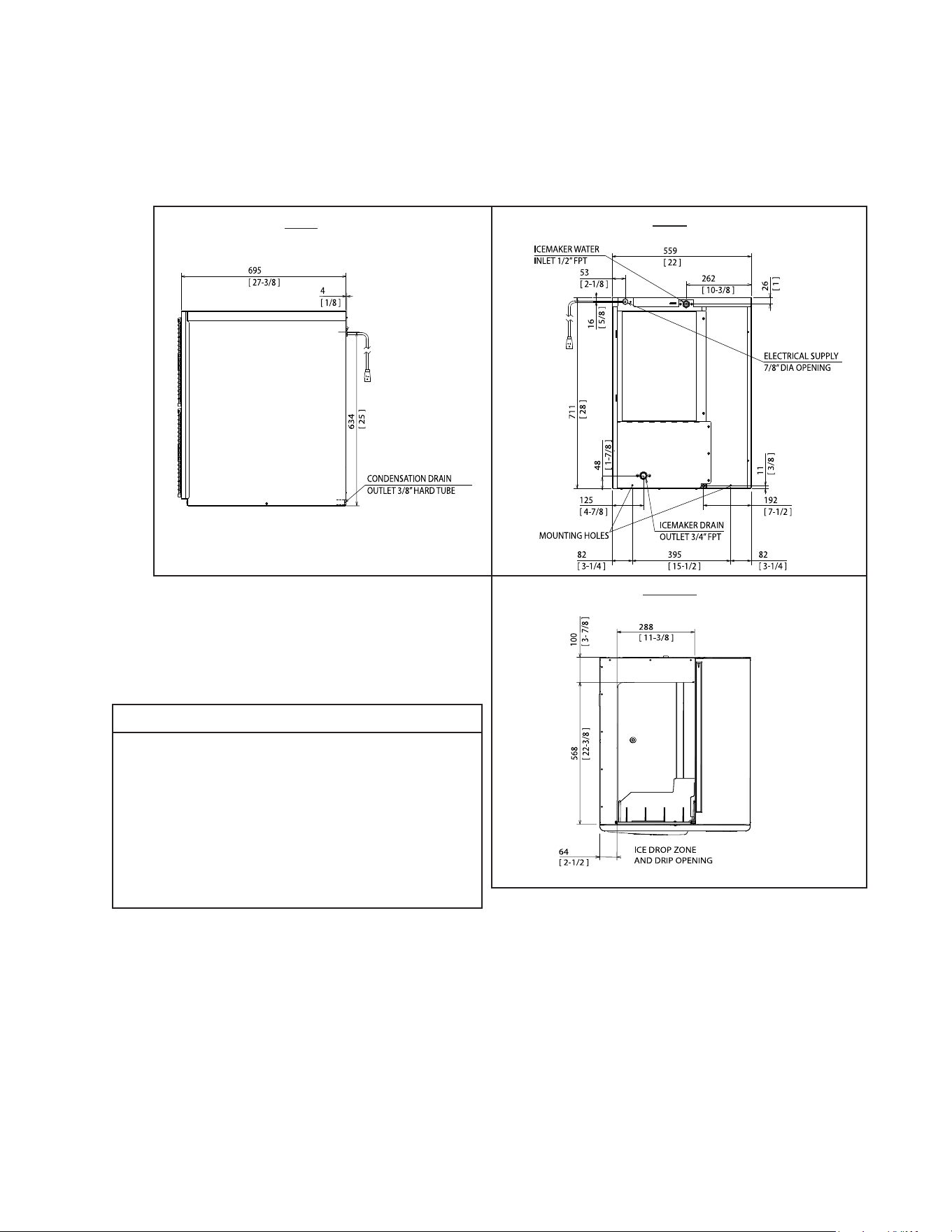
• Allow 6" (15 cm) clearance at rear,
sides, and top for proper air circulation
and ease of maintenance and/or
service should they be required.
• The storage bin opening must
match the bottom opening as in the
illustration.
B. Dimensions/Connections
1. Air-Cooled Models (MAJ-E)
Unit: mm [inches]
8
II. Installation and Operating Instructions
WARNING
• The icemaker must be installed in accordance with applicable national, state, and
local codes and regulations.
• Failure to install, operate, and maintain the icemaker in accordance with this
manual will adversely affect safety, performance, component life, and warranty
coverage and may result in costly water damage.
• CHOKING HAZARD: Ensure all components, fasteners, and thumbscrews
are securely in place after installation. Make sure that none have fallen into the
dispenser unit/ice storage bin.
A. Location
NOTICE
• The icemaker is not intended for outdoor use. Normal operating ambient
temperature must be within 45°F to 100°F (7°C to 38°C); Normal operating
water temperature must be within 45°F to 90°F (7°C to 32°C). Operation of the
icemaker, for extended periods, outside of these normal temperature ranges may
affect icemaker performance.
• The icemaker will not work at sub-freezing temperatures. To prevent damage
to the water supply line, drain the icemaker if the air temperature is going to go
below 32°F (0°C). See "IV. Preparing the Appliance for Periods of Non-Use."
• The icemaker should not be located next to ovens, grills, or other high heat producing
equipment.
• Allow 6" (15 cm) clearance at rear, sides, and top for proper air circulation and ease of
maintenance and/or service should they be required.
• The location should provide a rm and level foundation for the equipment.
9
B. Checks Before Installation
• Visually inspect the exterior of the shipping container and immediately report any
damage to the carrier. Upon opening the container, any concealed damage should also
be immediately reported to the carrier.
• Remove the shipping carton, tape, and packing material. If any are left in the icemaker,
it will not work properly.
• See the nameplate on the rear panel, and check that your voltage supplied corresponds
with the voltage specied on the nameplate.
• Remove the panels to prevent damage when installing the icemaker. See "II.C. How to
Remove Panels."
• Remove the package containing the accessories.
• Remove the protective plastic lm from the panels. If the icemaker is exposed to the sun
or to heat, remove the lm after the icemaker cools.
• Check that the refrigerant lines do not rub or touch lines or other surfaces, and that the
fan blade (if applicable) turns freely.
• Check that the compressor is snug on all mounting pads.
• The icemaker can be installed on a dispenser unit or ice storage bin. The ice storage
bins listed below are recommended.
Model Number Bin Width Recommended Hoshizaki Ice Storage Bin
KM-520MAJ-E
KM-660MAJ-E
22" or Wider B-300 Series
For further options, contact your local Hoshizaki distributor.
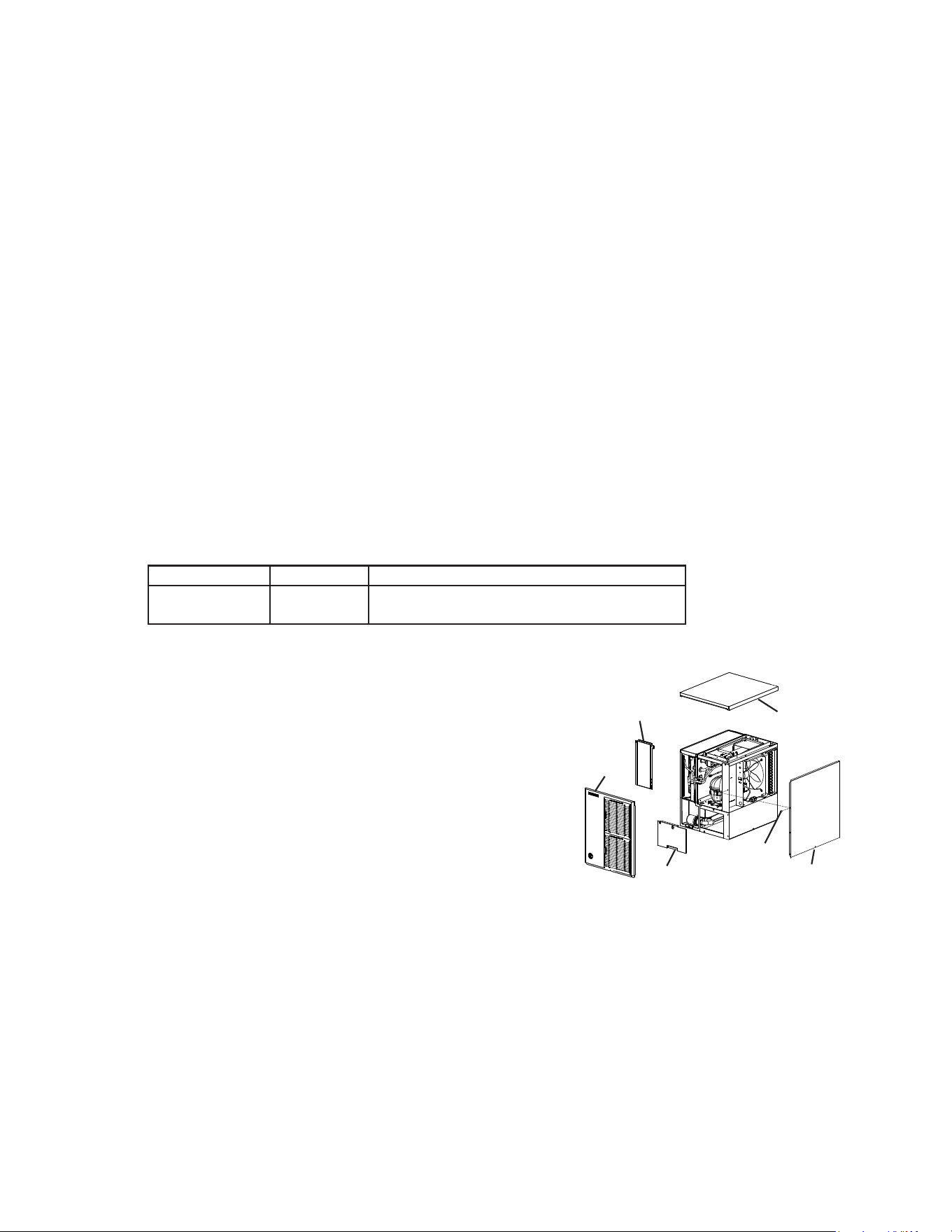
C. How to Remove Panels
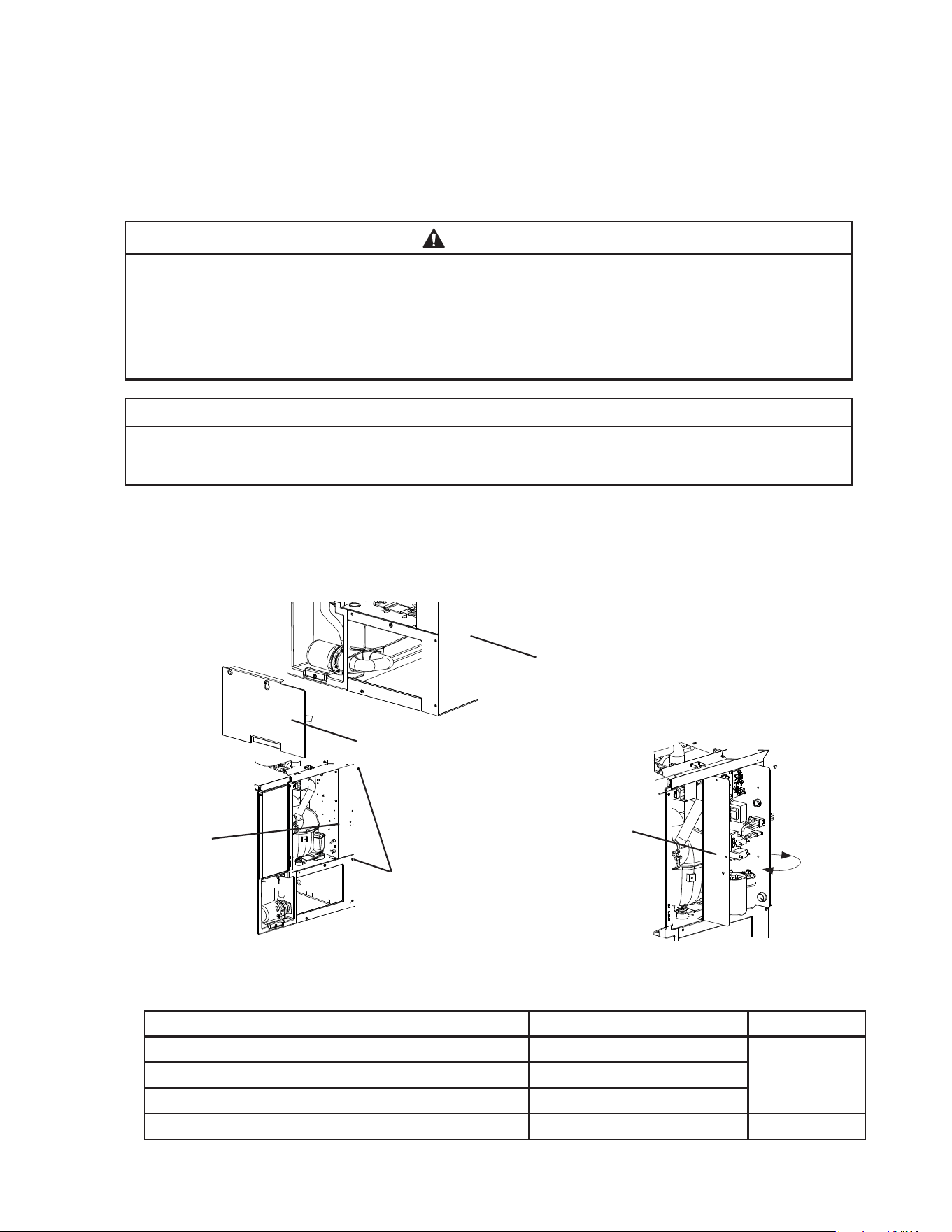
See Fig. 1
• Front Panel: Remove the screw. Lift up and
towards you.
• Top Panel: Lift up at front slightly, push rearward
and lift off.
• Right Side Panel: Remove the screw. Slide the
right front corner to the right slightly, then push
rearward and lift off.
• Front Insulation Panel: Lift up slightly and pull
towards you.
• Base Cover: Lift up slightly and pull towards you.
Fig. 1
Model Shown: KM-520MAJ-E
Top Panel
Front Insulation Panel
Front
Panel
Base Cover
Screw
Right Side Panel
10
D. Setup
1. Dispenser Unit/Ice Storage Bin and Icemaker Setup
WARNING
• The installer must ensure the dispenser unit/ice storage bin is compatible with
the icemaker, and the dispenser unit/ice storage bin and icemaker are properly
attached and secured.
• Do not allow top kits to interfere with the bin control lens sensing area or the
icemaker will not operate properly.
1) If mounting the icemaker on top of a dispenser unit, follow the dispenser unit's setup
procedure. If mounting the icemaker on top of an ice storage bin, unpack the ice storage
bin and attach the 4 adjustable legs provided (bin accessory) to the bottom of the ice
storage bin.
2) Position the dispenser unit/ice storage bin in its permanent location.
3) If required, install an adapter kit or top kit. Contact your local Hoshizaki distributor for
recommendations.
4) Level the dispenser unit/ice storage bin in both the left-to-right and front-to-rear
directions. Ifusing an ice storage bin, adjust the ice storage bin legs to level.
5) Place the icemaker on top of the dispenser unit/ice storage bin.
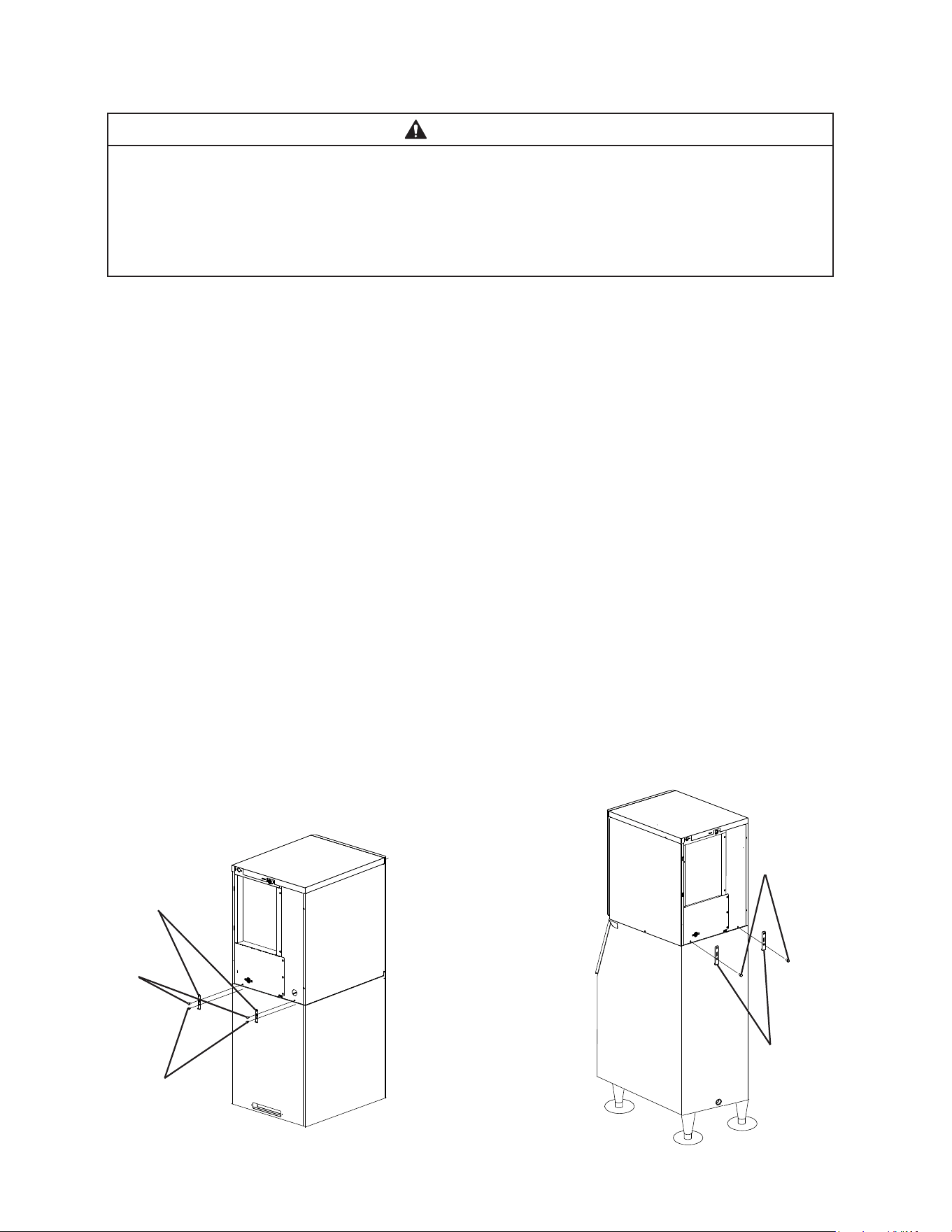
6a) Dispenser Unit: Follow the dispenser unit, adapter kit, or top kit instructions for
securing the icemaker. If no instructions are available, secure the icemaker using the
mounting brackets provided. Rotate the mounting brackets so that they t ush to the
dispenser unit. SeeFig.2a. Secure the mounting brackets to the icemaker with the bolts
provided. Secure the mounting brackets to the dispenser unit with self-tapping screws
(not provided). NOTICE! Use care to avoid damage to dispenser unit components
when attaching the mounting brackets. For dispenser unit bin control setting see
"II.H.1. Bin Control Setting."
6b) Ice Storage Bin: Follow the ice storage bin, adapter kit, or top kit instructions for
securing the icemaker. If no instructions are available, secure the icemaker using the
2mounting brackets and the bolts provided. See Fig.2b.
Fig. 2a
Fig. 2b
Icemaker
Dispenser
Unit
Self-Tapping
Screws
(Not Provided)
Bolts
Mounting
Brackets
Icemaker
Ice
Storage
Bin
Mounting
Brackets
Bolts
11
E. Electrical Connection
WARNING
• Electrical connection must meet national, state, and local electrical code
requirements. Failure to meet these code requirements could result in death,
electric shock, serious injury, re, or damage.
• This appliance requires an independent power supply of proper capacity.
See the nameplate for electrical specications. Failure to use an independent
power supply of proper capacity can result in a tripped breaker, blown fuse,
damage to existing wiring, or component failure. This could lead to heat generation
or re.
• THE APPLIANCE MUST BE GROUNDED (EARTHED). This appliance is
equipped with a three-prong fused grounding (earthed) plug to reduce the risk
of potential shock hazards. Corded models must be plugged into a properly
grounded (earthed), independent 3-prong wall outlet. If the outlet is a 2-prong
outlet, it is your personal responsibility to have a qualied electrician replace it with
a properly grounded (earthed), independent 3-prong wall outlet. Do not remove
the ground (earth) prong from the plug and do not use an adapter plug. Failure to
properly ground (earth) the appliance could result in death or serious injury.
• To reduce the risk of electric shock, do not touch the control switch, mode switch,
or plug with damp hands. Make sure the control switch is in the “OFF” position
before plugging in or unplugging the appliance.
• Do not use an extension cord.
• Do not use an appliance with a damaged power cord. The power cord should not
be altered, jerked, bundled, weighed down, pinched, or tangled. Such actions
could result in electric shock or re. To unplug the appliance, be sure to pull the
plug, not the cord, and do not jerk the cord.
• The GREEN/YELLOW ground wire in the factory-installed power cord is connected
to the appliance. If it becomes necessary to remove or replace the power cord, be
sure to connect the power cord's ground wire.
• Usually an electrical permit and services of a licensed electrician are required.
• The maximum allowable voltage variation is ±10 percent of the nameplate rating.
• Factory tted power cords are coloured in accordance with the following code:
Green and Yellow = Ground (Earth)
Light Blue = Neutral
Brown = Line
Fig. 3
12
F. Water Supply and Drain Connections
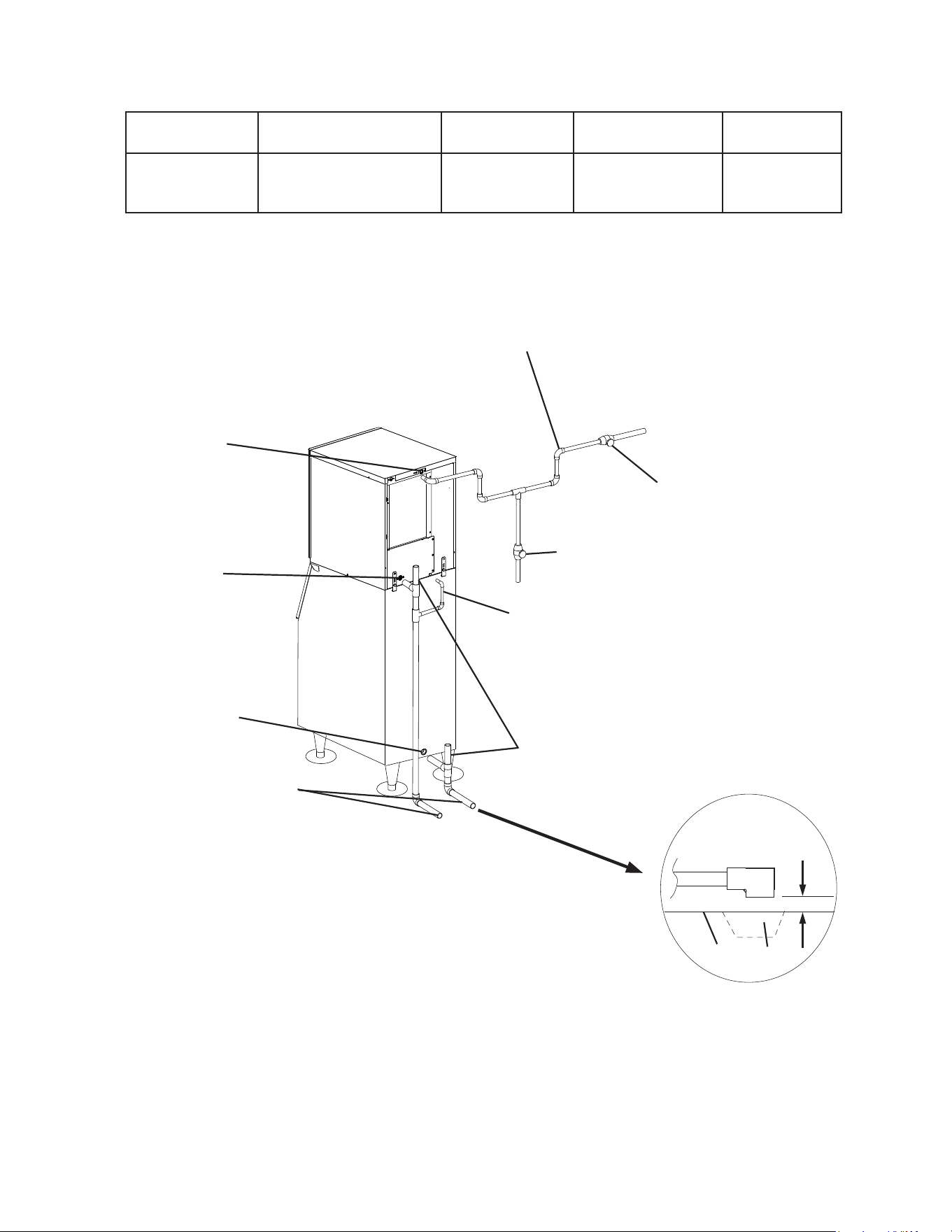
See Fig. 4
WARNING
Water supply and drain connections must be installed in accordance with applicable
national, state, and local regulations.
NOTICE
• Normal operating water temperature should be within 45°F to 90°F (7°C to
32°C). Operation of the appliance, for extended periods, outside of this normal
temperature range may affect appliance performance.
• Water supply pressure must be a minimum of 10 PSIG (.7 BAR) and a maximum
of 113PSIG (7.8 BAR). If the pressure exceeds 113 PSIG (7.8 BAR), the use of a
pressure reducing valve is required.
• To prevent damage to the appliance, do not operate the appliance when the
water supply is off, or if the pressure is below 10 PSIG (.7 BAR). Do not run the
appliance until the proper water pressure is reached.
• External lters, strainers, or softeners may be required depending on water quality.
Contact your local Hoshizaki Certied Service Representative or local Hoshizaki
distributor for recommendations.
• A plumbing permit and services of a licensed plumber may be required in some areas.
• The icemaker drain line and dispenser unit/ice storage bin drain line must be run
separately. The condensation drain line can be connected to the icemaker drain line or can
be run separately.
• Drain lines must have 1/4" fall per foot (2 cm per 1 m) on horizontal runs to get a good
ow. A vented tee connection is also required for proper ow.
• Drain lines should not be piped directly to the sewer system. An air gap of a minimum of
2vertical inches (5 cm) should be between the end of the drain pipes from the icemaker
and condensation drain, dispenser unit/ice storage bin, and water-cooled condenser
(ifapplicable) and the oor drain.
13
1. Icemaker
Icemaker Water
Supply Inlet
Minimum Icemaker
Water Supply Line Size
Icemaker Drain
Outlet
Minimum Icemaker
Drain Line Size
Condensation
Drain Outlet
1/2" Female Pipe
Thread (FPT)
1/4" Nominal ID
Copper Water Tubing or
Equivalent
3/4" Female Pipe
Thread (FPT)
3/4" Nominal
ID Hard Pipe or
Equivalent
3/8" OD Hard
Tube
• An icemaker water supply line shut-off valve and drain valve must be installed.
• Be sure there is sufficient extra water supply line and drain line for the appliance to be
pulled out for service.
Fig. 4
Model Shown:
KM-520MAJ-E
Air-Cooled and Remote Models
Icemaker
Water Supply
Inlet
1/2" FPT
Icemaker
Drain Outlet
3/4" FPT
Vent Tube
Bin Drain Outlet
3/4" FPT
Minimum 3/4" Nominal ID
Hard Pipe or Equivalent
Minimum 1/4" Nominal ID Copper
Water Tubing or Equivalent
Be sure there is sufficient
extra water supply line and
drain line for the appliance
to be pulled out for service.
Separate piping to approved
drain. Leave a 2" (5 cm)
vertical air gap between the
end of each pipe and the
drain.
2" (5 cm) air gap
Floor
Drain
Shut-Off Valve
Drain Valve
Icemaker
Condensation
Drain Outlet
3/8" OD Hard Tube
14
G. Final Checklist
1. Pre-Startup
1) Is the icemaker level?
2) Is the icemaker in a site where the ambient temperature is within 45°F to 100°F (7°C to
38°C) and the water temperature within 45°F to 90°F (7°C to 32°C) all year around?
3) Is there at least 6" (15 cm) clearance at rear, sides, and top of the icemaker?
4) Have the shipping carton, tape, and packing material been removed from the icemaker?
Is the cube guide in the correct position?
5) Have all electrical and water connections been made? Do electrical and water
connections meet applicable national, state, and local code and regulation
requirements?
6) Has the power supply voltage been checked or tested against the nameplate rating?
Has a proper ground (earth) been installed to the icemaker?
7) Are the water supply and drain lines sized as specied? Are the water supply line
shut-off valve(s) and drain valve(s) installed? Has the water supply pressure been
checked to ensure a minimum of 10 PSIG (.7 BAR) and a maximum of 113 PSIG
(7.8 BAR)?
8) Is the compressor snug on all mounting pads? Have the refrigerant lines been checked
to make sure they do not rub or touch other lines or surfaces? Has the fan blade
been checked to make sure it turns freely?
2. Post-Startup
WARNING
• CHOKING HAZARD: Ensure all components, fasteners, and thumbscrews
are securely in place after installation. Make sure that none have fallen into the
dispenser unit/ice storage bin.
• Conrm that all internal and external connections are free of leaks.
1) Has the bin control been set to the proper setting for the application?
2) Has the bin control operation been conrmed?
3) Are all components, fasteners, and thumbscrews securely in place?
4) Has the end user been given the instruction manual, and instructed on how to operate
the appliance and the importance of the recommended periodic maintenance?
5) Has the end user been given the contact information of an authorized service agent?
6) Has the warranty registration been completed and submitted to the factory?
15
H. Startup
1. Bin Control Setting
An ultrasonic sensor is used as the bin control to control the level of ice in the
dispenser unit/ice storage bin. The bin control setting must be set to match the
application to avoid possible icemaker movement, water leakage, or ice overow.
WARNING
• Improper adjustment may adversely affect safety, performance, component life,
and warranty coverage.
• On dispenser unit applications, do not increase ice level above the recommended
setting listed below. Higher ice levels could result in icemaker movement, water
leakage, or ice overow.
NOTICE
Do not allow top kits or top kit risers (if applicable) to interfere with the bin control
lens sensing area or the icemaker will not operate properly.
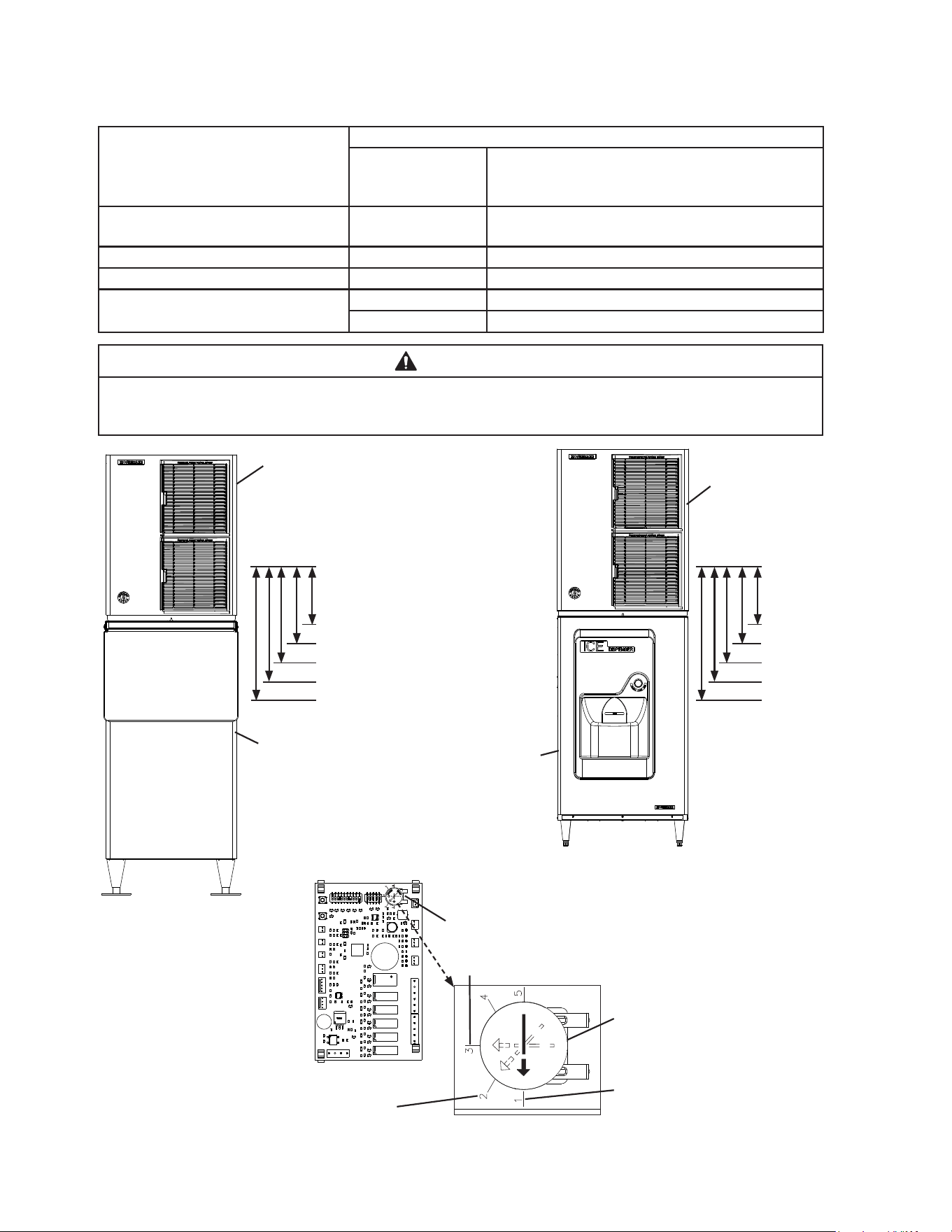
1) Make sure that the icemaker is unplugged from the electrical outlet. Remove the front,
top, and right side panels to allow access to the control board. Also remove the base
cover. See Fig. 5. Note: If front access to the control box is required, remove the control
box mounting screws, then slide the control box forward and rotate the control box for
access. See Fig. 6.
2) Conrm the correct control board bin control setting required for your application and
adjust as detailed below.
Application Bin Control Setting Reference
Standard Ice Storage Bins (Factory Default) 1
See Fig. 7Hoshizaki DB and DM Dispensers 2
Coca-Cola Freestyle
®
Dispensers 3
Non-Hoshizaki Dispensers Measurement Required See Fig. 8
Fig. 5
Icemaker
Base Cover
Control Box
Mounting Screws
Control Box
Control Box
Fig. 6
16
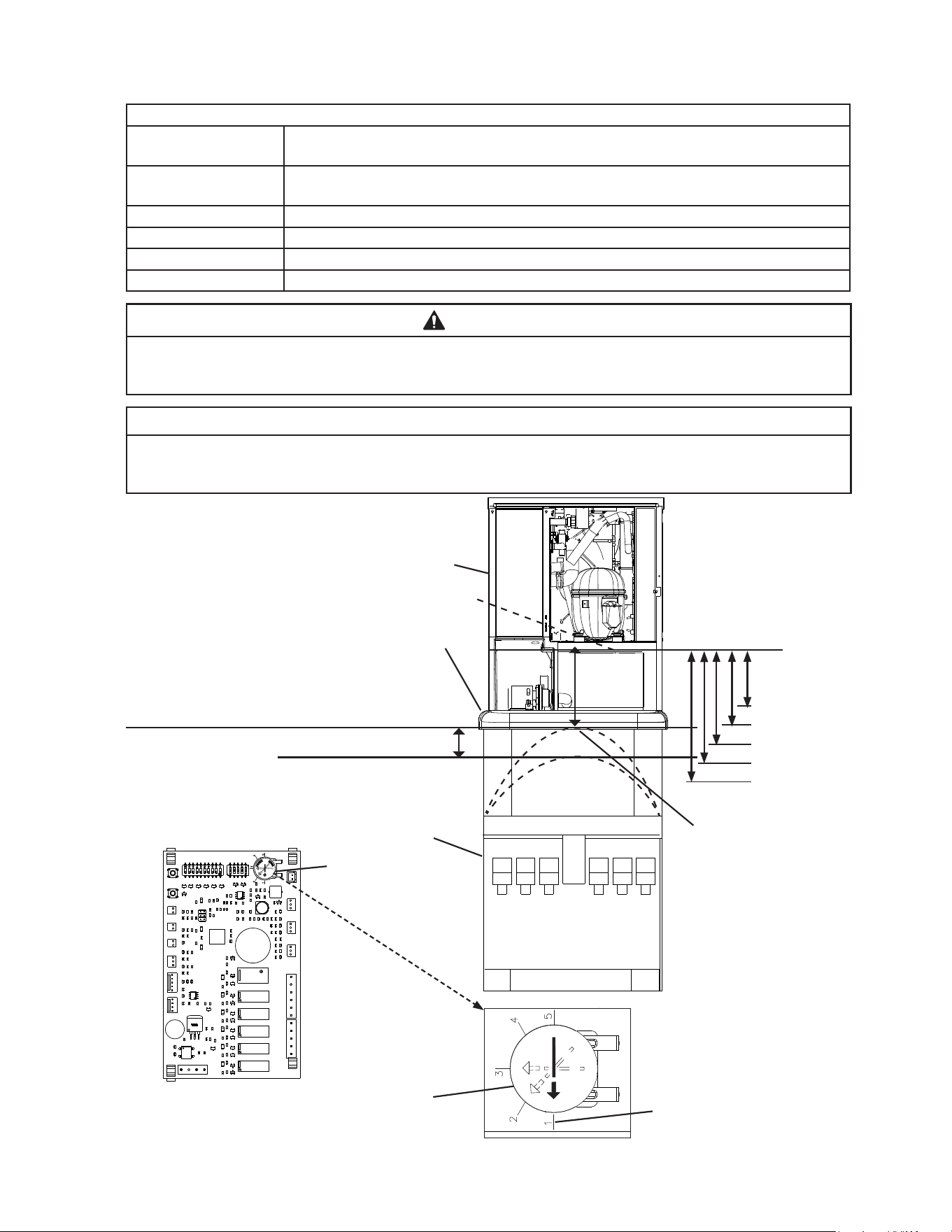
For Standard Ice Storage Bins, Hoshizaki DB and DM Dispenser Units, and
Coca-Cola Freestyle
®
Dispenser Units
Application Bin Control Ice Level Settings
Bin Control Setting
Shutdown Distance from Bin Control Lens
(Restart is 4 in. (102 mm) below shutdown
distance)
Standard Ice Storage Bins 1
(Factory Default)
254 mm (10")
Do not adjust dispensers to this setting.
Hoshizaki DB and DM Dispensers 2 305 mm (12")
Coca-Cola Freestyle
®
Dispensers 3 406 mm (16")
Optional Setting 4 508 mm (20")
5 610 mm (24")
WARNING
Conrm that the nal ice level location does not allow for icemaker movement,
water leakage, or ice overow.
Fig. 7
Control Board
Bin Control Setting
Recommended Setting for
Hoshizaki DB and DM Dispensers
Icemaker
Hoshizaki DB-200H
Dispenser Unit
Model Shown:
KM-520MAJ-E with DB-200H
Model Shown:
KM-660MAJ with B-300SF
Icemaker
Standard Ice
Storage Bin
Turn the bin control setting to
adjust to proper setting
Factory Default for Standard
Ice Storage Bins
WARNING! Do not use this
setting with dispensers.
Bin Control
Lens
Setting #1
Setting #3
Setting #4
Setting #5
Setting #2
Bin Control
Lens
Setting #1
Setting #3
Setting #4
Setting #5
Setting #2
Recommended Setting for Coca-Cola Freestyle
®
Dispensers
17
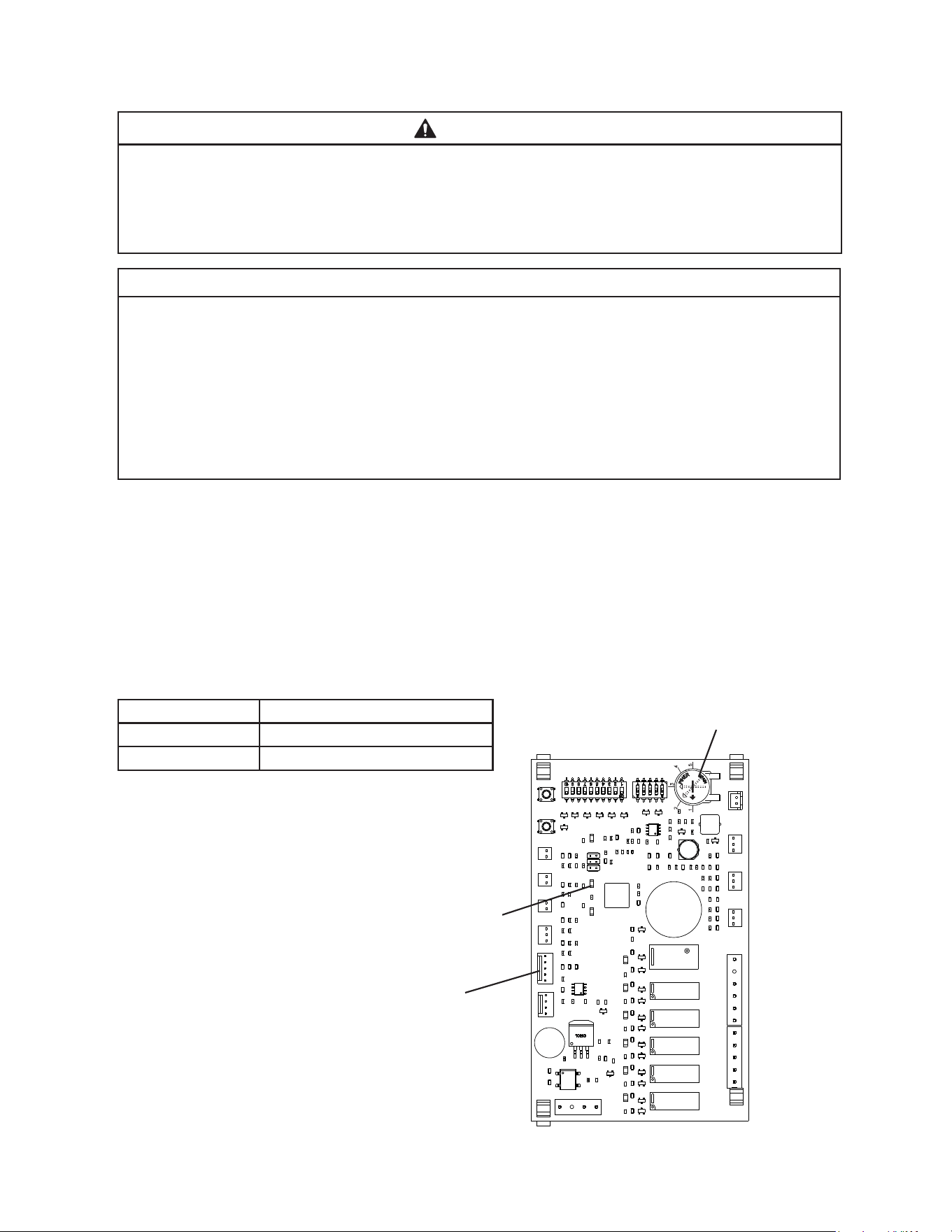
For Non-Hoshizaki Dispenser Units
Bin Control Ice Level Settings
Bin Control Setting
Shutdown Distance From Bin Control Lens
(Restart is 4 in. (102 mm) below shutdown distance)
1
(Factory Default)
Do not adjust dispensers to this setting. 254 mm (10")
2 305 mm (12")
3 406 mm (16")
4 508 mm (20")
5 610 mm (24")
WARNING
Conrm that the nal ice level location does not allow for icemaker movement,
water leakage, or ice overow.
NOTICE
The ice level must be lower than the top of the dispenser unit. Also, be sure the top
kit or top kit riser (if applicable) are clear from the bin control lens sensing area.
Fig. 8
Control Board
Bin Control Setting
Non-Hoshizaki
Dispenser Unit
Turn dial to adjust to setting
that matches Full Bin Measured
Distance (Shutdown Distance)
Factory Default for Standard
Ice Storage Bins
WARNING! Do not use this
setting with dispensers.
Maximum Full Bin Level of
Ice (Shutdown Position).
WARNING! Do not adjust
bin control setting above
this level.
Icemaker Restart Level
(4" (102 mm) below preferred
full bin level of ice)
Bin Control
Lens
Setting #1
Setting #3
Setting #4
Setting #5
Setting #2
Icemaker
Bin Control Lens
Top Kit
Full Bin Measured Distance
(Shutdown Distance)
Measure from the bottom of
the compressor base (bin
control lens) to the preferred
full bin level of ice; refer to the
dispenser instruction manual.
Set Bin Control Setting at or Below Maximum Full
Bin Level of Ice (Shutdown Position) Shown Here
18
2. Appliance Startup and Bin Control Check
WARNING
• All parts are factory-adjusted. Improper adjustements may adversely affect safety,
performance, component life, and warranty coverage.
• Make sure the appliance has been installed as outlined in this manual and that
the water supply is on.
NOTICE
• If the icemaker is turned off, wait for at least 3 minutes before restarting the
icemaker to prevent damage to the compressor.
• To prevent damage to the water pump seal, do not leave the control switch in the
"PUMP" position for extended periods when the water tank is empty.
• At startup, conrm that all internal and external connections are free of leaks.
• Do not allow top kits or top kit risers (if applicable) to interfere with the bin control
lens sensing area or the icemaker will not operate properly.
1) If not already removed, remove the front, top, and right side panels and base cover.
Make sure the bin control setting has been adjusted as outlined in "II.H.1. Bin Control
Setting."
2) Open the water supply line shut-off valve(s).
3) Conrm the control switch is in the "OFF" position, then plug the icemaker into the
electrical outlet. Move the mode switch on the control box to the "ICE" position, then
move the control switch to the "ON" position, and allow the icemaker to operate.
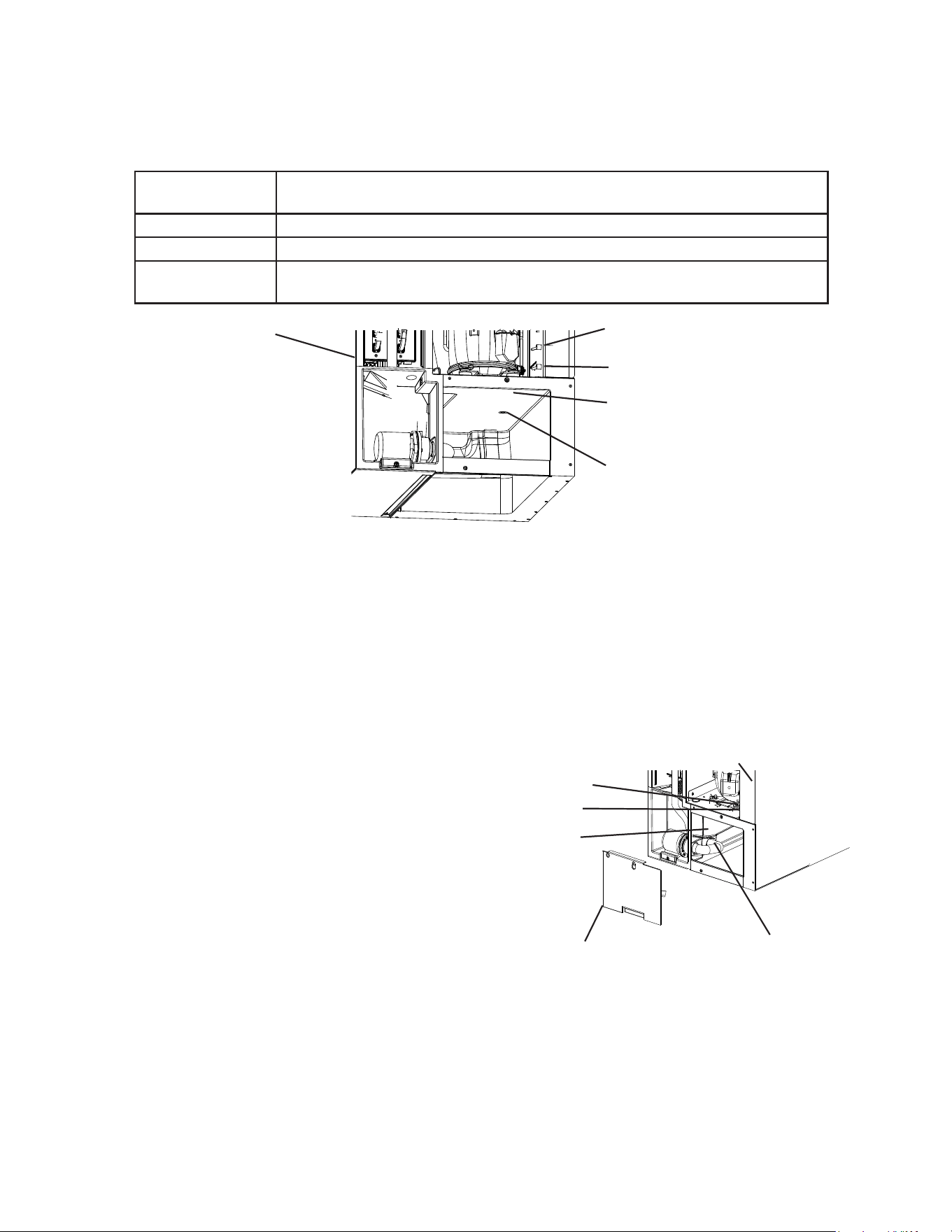
4) Conrm the control board "BIN CLS" LED is off (bin empty). See Fig. 9.
Ice Level in Bin Control Board "BIN CLS" LED
Empty OFF
Full ON
5) If the control board "BIN CLS" is on
(indicating a full bin), correct any
interference from the top kit or top kit
riser (if applicable).
Fig. 9
Control Board
BIN CLS LED
Bin Control Setting
19
6) 1 min. ll cycle begins. Place an object 5" to 7" (127 to 178 mm) away from the bin
control lens. See Fig. 10. 15 sec. later, the icemaker shuts down. Remove the object
from the bin control lens. 30 sec. later, the icemaker restarts.
For bin control shutdown times per cycle, see the table below.
Cycle at Bin
Control Activation Shutdown
1 min. Fill Cycle 15 sec. after activation.
Harvest Cycle If engaged 15 sec. or longer, at the end of harvest cycle.
Freeze Cycle 15 sec. after activation if activated at least 15 sec. before the 5-min. short cycle
protection timer terminates. Otherwise, at the end of the next harvest cycle.
7) Once the icemaker restarts, move the control switch to the "OFF" position, then unplug
the icemaker from the electrical outlet.
8) If the control box was rotated, replace the control box in its correct position and secure
with the 2 control box mounting screws.
9) Replace the base cover, right side, and top panels in their correct positions.
10) Plug the icemaker back into the electrical outlet. Move the control switch to the "ON"
position, then replace the front panel, and allow the icemaker to operate for 10 min.
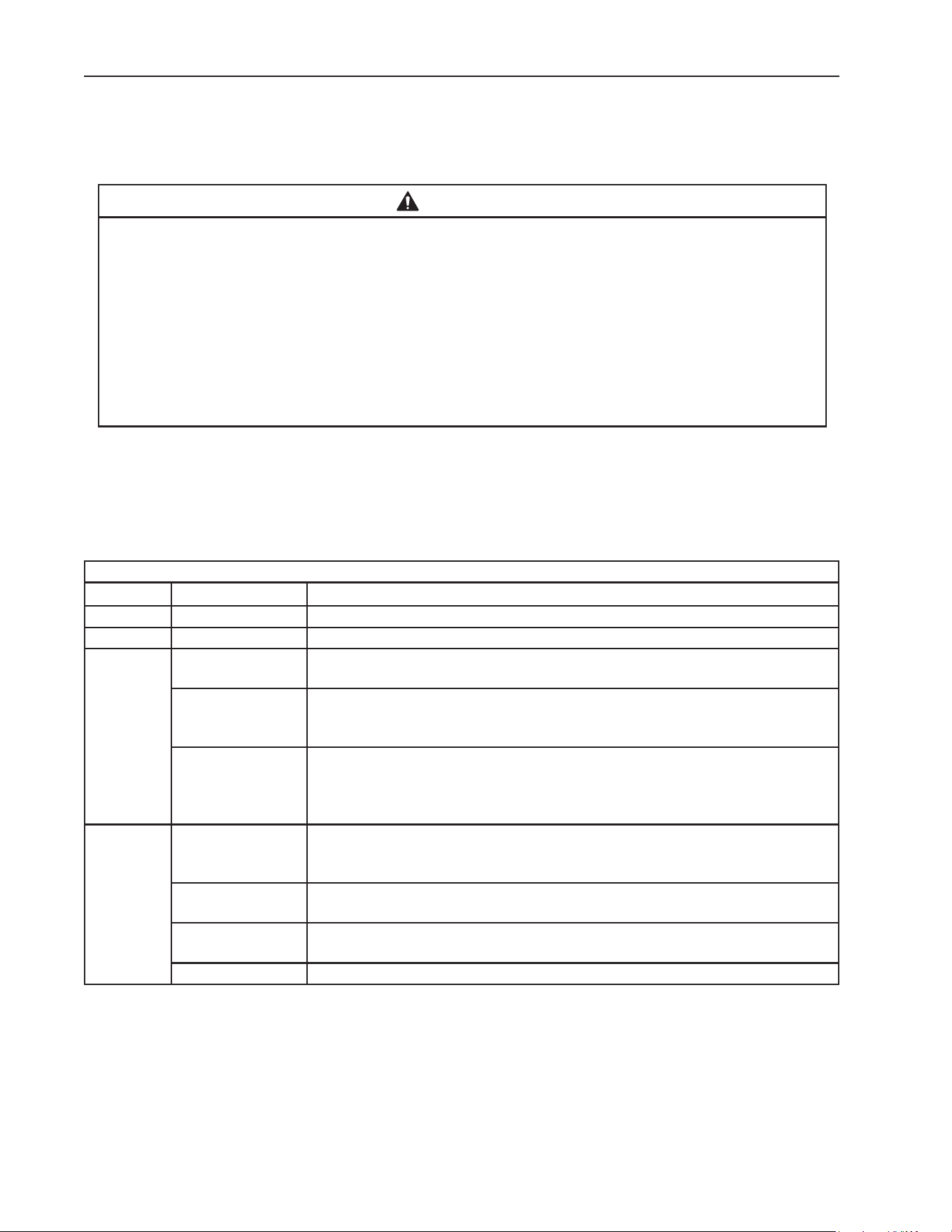
11) After 10 min., remove the front panel, then
move the control switch to the "OFF"
position.
12) Remove the base cover and disconnect
the rear pump tubing connection to drain
the water tank. See Fig. 11.
13) After the water tank has drained, reconnect the
pump tubing.
14) Clean the dispenser unit/ice storage bin
liner using a neutral cleaner. Rinse thoroughly
after cleaning.
15) Replace the base cover in its correct position. Move the control switch to the "ON"
position to start the automatic icemaking process.
16) Replace the front panel in its correct position.
17) Return to "II.G.2. Post-Startup" and complete nal checklist.
Fig. 10
Icemaker
Control Switch
Mode Switch
Compressor Base
Bin Control Lens
Fig. 11
Mode Switch
Control Switch
Base Cover
Water Tank
Disconnect This
End of Pump Tubing
to Drain Water Tank
Icemaker
20
III. Maintenance
The appliance must be maintained in accordance with the instruction manual and labels
provided. Consult with your local Hoshizaki Certied Service Representative about
maintenance service.
WARNING
• Only qualied service technicians should service the appliance.
• To reduce the risk of electric shock, do not touch the control switch, mode switch, or
plug with damp hands.
• Before servicing, move the control switch to the "OFF" position and unplug the
appliance from the electrical outlet.
• CHOKING HAZARD: Ensure all components, fasteners, and thumbscrews are
securely in place after any maintenance is done to the appliance. Make sure that
none have fallen into the dispenser unit/ice storage bin.
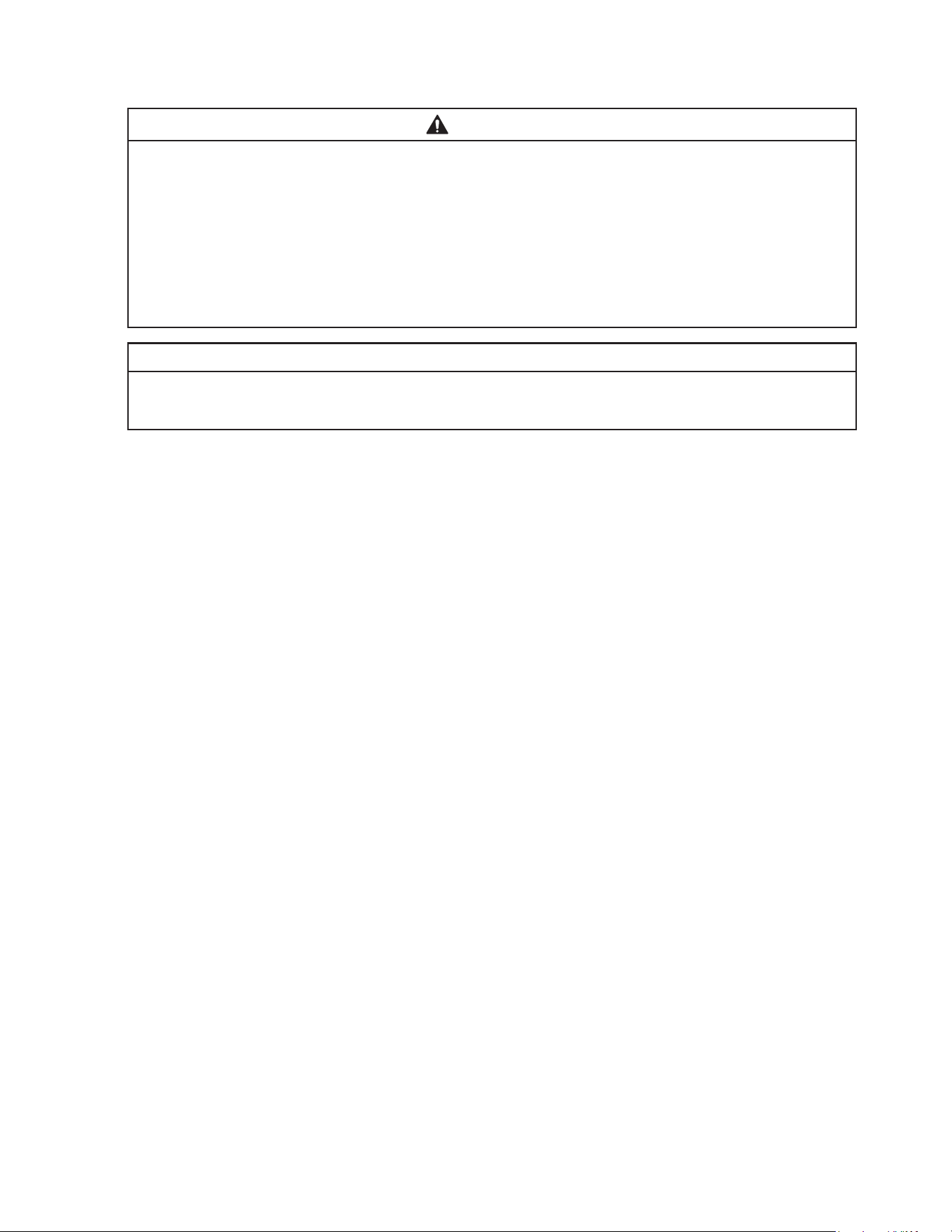
A. Maintenance Schedule
The maintenance schedule below is a guideline. More frequent maintenance may be
required depending on water quality, the appliance's environment, and local sanitation
regulations.
Maintenance Schedule
Frequency Area Task
Daily Scoop Clean the ice scoop using a neutral cleaner. Rinse thoroughly after cleaning.
Bi-Weekly Air Filters Inspect. Wash with warm water and neutral cleaner if dirty.
Monthly External Water
Filters
Check for proper pressure and change if necessary.
Icemaker Exterior Wipe down with a clean, soft cloth. Use a damp cloth containing a neutral
cleaner to wipe off oil or dirt build up. Clean any chlorine staining (rust
colored spots) using a non-abrasive cleanser.
Underside of
Icemaker and Top
Kits; Bin Door and
Snout
Wipe down with a clean cloth and warmwater.
Yearly Icemaker and
Dispenser Unit/Ice
Storage Bin
Clean and sanitize per the cleaning and sanitizing instructions provided in
this manual. See "III.B. Cleaning and Sanitizing Instructions."
Water Supply Inlet Close the icemaker water supply line shut-off valve and drain the water
system. Clean the water supply inlet screen.
Condenser Inspect. Clean if necessary by using a brush or vacuum cleaner. More
frequent cleaning may be required depending on location.
Water Hoses Inspect the water hoses and clean/replace if necessary.
21
B. Cleaning and Sanitizing Instructions
The icemaker must be cleaned and sanitized at least once a year. More frequent cleaning
and sanitizing may be required in some water conditions.
WARNING
• To prevent injury to individuals and damage to the appliance, do not use ammonia
type cleaners.
• Carefully follow any instructions provided with the bottles of cleaning and
sanitizing solution.
• Always wear liquid-proof gloves and goggles to prevent the cleaning and sanitizing
solutions from coming into contact with skin or eyes.
• Do not leave the appliance unattended when panels are off.
NOTICE
To prevent damage to the water pump seal, do not leave the control switch in the
"PUMP" position for extended periods when the water tank is empty.
Preparation
1) Remove the front panel, then move the control switch to the "OFF" position. Make sure the
mode switch is in the "ICE" position. After 3 minutes, move the control switch to the "ON"
position and replace the front panel.
2) Allow the appliance to run until the compressor energizes. Once the compressor energizes,
allow the appliance to run for an additional 3 minutes, then remove the front panel. Move
the control switch to the "OFF" position.
3) Remove all ice from the dispenser unit/ice storage bin. WARNING! If on a dispenser unit,
turn off the dispenser unit power supply after dispensing the ice.
Cleaning
4) Move the mode switch to the "CLEAN" position, then move the control switch to the "ON"
position (1 short beep occurs, then 3 seconds later 1 long beep occurs).
Replace the front panel. The water tank drains and then lls.
5) When the control board starts beeping (2 beep sequence), remove the front panel. Move
the control switch to the "OFF" position.
6) Remove the front insulation panel, then pour 10.4 . oz. (308 ml) of Hoshizaki "Scale Away"
into the water tank. Replace the front insulation panel.
7) Move the control switch to the "ON" position (1 short beep occurs, then 3 seconds later
1long beep occurs). Replace the front panel. To avoid excessive foaming in the water
tank, there is a 1minute delay before circulation begins. After approximately 30 minutes of
circulation, the icemaker performs 3 rinse cycles.
8) When the control board starts beeping (5 beep sequence), remove the front panel. Move
the control switch to the "OFF" position.
9) In bad or severe water conditions, unplug the icemaker from the electrical outlet, then
remove, clean (cleaning solution = 5 oz. Hoshizaki "Scale Away" per gallon of warm
water), rinse, and replace the cube guide, oat switch, water supply tubes, spray tubes,
and spray guides; plug the icemaker back into the electrical outlet when complete.
Otherwise, continue to step 10.

22
Sanitizing
10) Conrm the mode switch is in the "CLEAN" position, then move the control switch to the
"ON" position (1 short beep occurs, then 3 seconds later 1 long beep occurs).
Replace the front panel. The water tank drains and then lls.
11) When the control board starts beeping (2 beep sequence), remove the front panel.
Move the control switch to the "OFF" position.
12) Remove the front insulation panel, then pour 0.6 . oz. (18 ml) of an 8.25% sodium
hypochlorite solution (chlorine bleach) into the water tank. Replace the front insulation
panel.
IMPORTANT! Use regular bleach with no additives. Using a bleach with additives
causes excessive foaming during sanitizing, reducing the effectiveness of
sanitizing.
13) Move the control switch to the "ON" position (1 short beep occurs, then 3 seconds later
1long beep occurs). Replace the front panel. To avoid excessive foaming in the water
tank, there is a 1minute delay before circulation begins. After approximately 30 minutes
of circulation, the icemaker performs 3rinse cycles.
14) When the control board starts beeping (5 beep sequence), remove the front panel.
Move the control switch to the "OFF" position.
15) Clean the dispenser unit/ice storage bin liner using a neutral cleaner. Rinse thoroughly
after cleaning.
16) Move the mode switch to the "ICE" position, then move the control switch to the "ON"
position. Note: If on a dispenser unit, turn on the dispenser unit power supply.
17) Replace all panels in their correct positions.
23
IV. Preparing the Appliance for Periods of Non-Use
NOTICE
• When storing the icemaker for an extended time or in sub-freezing temperatures,
follow the instructions below to prevent damage.
• To prevent damage to the water pump seal, do not leave the control switch in the
"PUMP" position for extended periods when the water tank is empty.
When the appliance is not used for two or three days under normal conditions, it is
sufficient to move the control switch to the "OFF" position. When storing the appliance for
an extended time or in sub-freezing temperatures, follow the instructions below.
1. Remove the water from the appliance water supply line:
1) Remove the front panel.
2) Move the control switch to the "OFF" position, then unplug the icemaker from the
electrical outlet.
3) Close the icemaker water supply line shut-off valve, then open the icemaker water
supply line drain valve.
4) Allow the line to drain by gravity.
5) Attach a compressed air or carbon dioxide supply to the icemaker water supply line
drain valve.
6) Move the mode switch to the "ICE" position. Plug the icemaker back into the electrical
outlet, then move the control switch to the "ON" position.
7) Replace the front panel in its correct position.
8) Blow the icemaker water supply line out using the compressed air or carbon dioxide
supply.
9) Close the icemaker water supply line drain valve.
2. Drain the water tank:
1) Remove the front panel.
2) Move the control switch to the "OFF" position, then unplug the icemaker from the
electrical outlet.
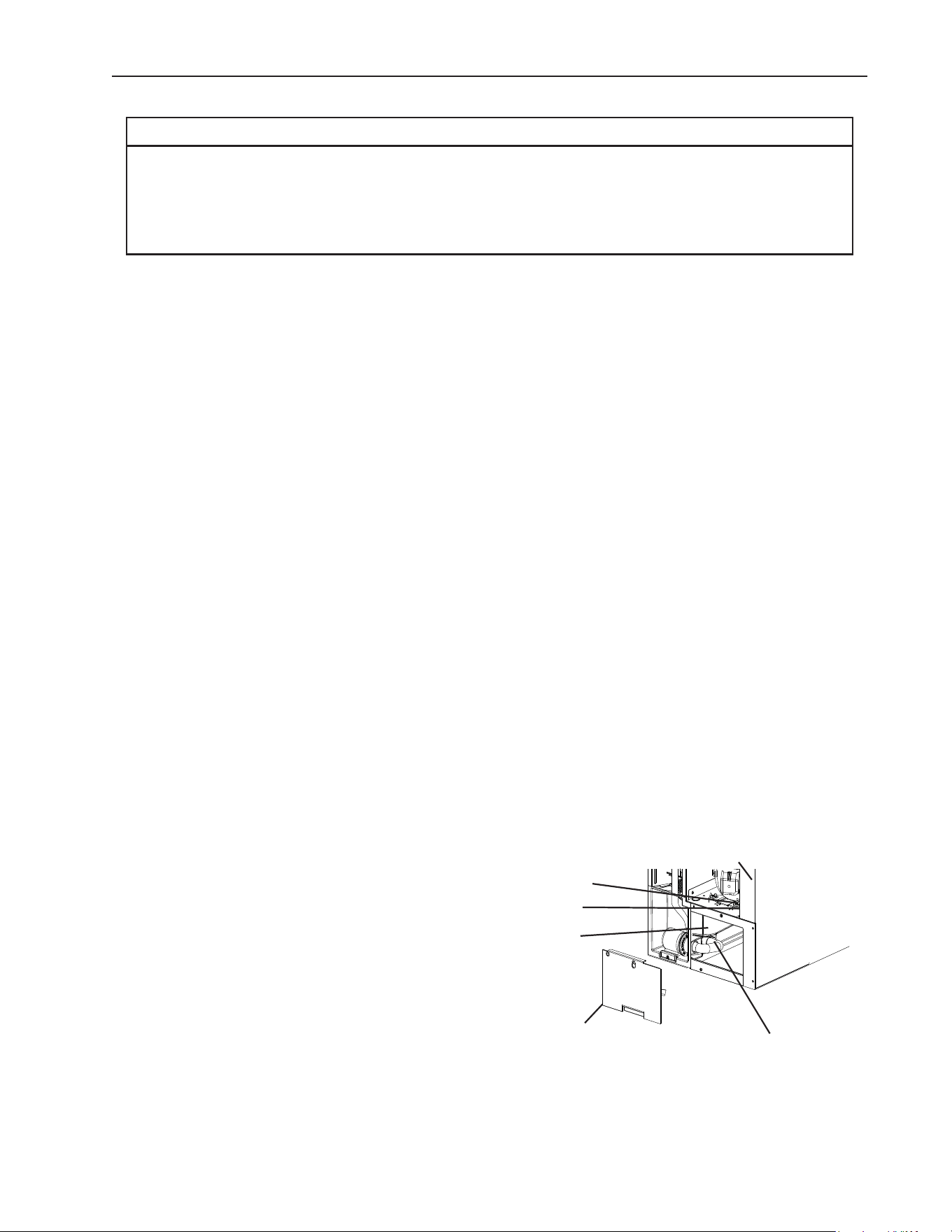
3) Remove the base cover, then disconnect
one end of the pump tubing to drain the
water tank. See Fig. 12. After the water
tank has drained, reconnect the pump
tubing.
4) Remove all ice from the dispenser unit/ice
storage bin. Clean the dispenser unit/ice
storage bin liner using a neutral cleaner.
Rinse thoroughly after cleaning.
5) Replace the base cover and the front panel
in their correct positions.
Fig. 12
Mode Switch
Control Switch
Base Cover
Water Tank
Disconnect This
End of Pump Tubing
to Drain Water Tank
Icemaker

24
V. Disposal
The appliance contains refrigerant and must be disposed of in accordance with
applicable national, state, and local codes and regulations. Refrigerant must be
recovered by properly certied service personnel.

25
VI. Warranty
Hoshizaki warrants to the original owner/user that all Hoshizaki branded products shall
be free of defects in material and/or workmanship for the duration of the “warranty
period.” The warranty shall be effective for two years from the date of installation.
Hoshizaki’s liability under the terms of the warranty are limited and shall exclude routine
servicing, cleaning, essential maintenance and/or repairs occasioned by misuse and
installations not in accordance with Hoshizaki guidelines.
Warranty repairs should be completed by an approved Hoshizaki dealer or service
agency using genuine Hoshizaki components.
To obtain full details of your warranty and approved service agency, please contact your
dealer/supplier, or the nearest Hoshizaki Service office.
26
618 Hwy. 74 South, Peachtree City, GA 30269 USA (P) 770.487.2331 (F) 770.487.3360 hoshizakiamerica.com 1A6556-012