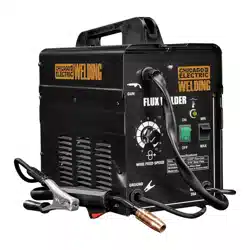
Visit our website at: http://www.harborfreight.com
Email our technical support at: [email protected]
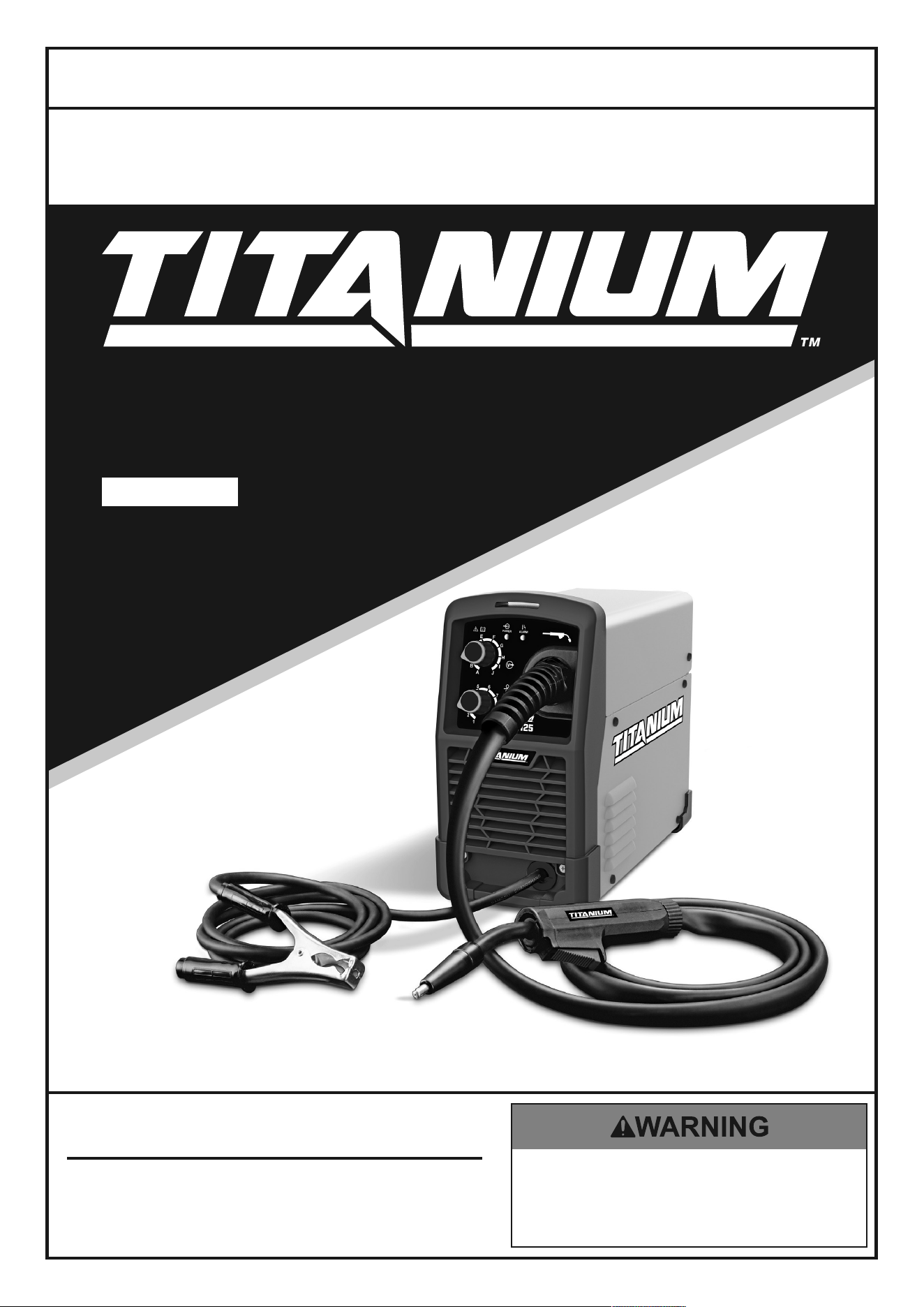
EASY- FLUX125
57861
Owner’s Manual & Safety Instructions
Save This Manual Keep this manual for the safety warnings and precautions, assembly,
operating, inspection, maintenance and cleaning procedures. Write the product’s serial number in the
back of the manual near the assembly diagram (or month and year of purchase if product has no number).
Keep this manual and the receipt in a safe and dry place for future reference. 22k
When unpacking, make sure that the product is intact
and undamaged. If any parts are missing or broken,
please call 1-888-380-0318 as soon as possible.
Copyright
©
2020 by Harbor Freight Tools
®
. All rights reserved.
No portion of this manual or any artwork contained herein may be reproduced in
any shape or form without the express written consent of Harbor Freight Tools.
Diagrams within this manual may not be drawn proportionally. Due to continuing
improvements, actual product may differ slightly from the product described herein.
Tools required for assembly and service may not be included.
Read this material before using this product.
Failure to do so can result in serious injury.
SAVE THIS MANUAL.
Page 2 For technical questions, please call 1-888-380-0318. Item 57861
SaFEty MaintEnancEBaSic WElding WElding tipSSEtup
table of contents
Safety ......................................................... 2
Specifications ............................................. 7
Setup .......................................................... 8
Basic Welding ............................................ 12
Welding Tips .............................................. 20
Maintenance .............................................. 24
Parts List and Diagram .............................. 27
Warranty .................................................... 28
WaRning SyMBOlS and dEFinitiOnS
This is the safety alert symbol. It is used to alert you to potential
personal injury hazards. Obey all safety messages that
follow this symbol to avoid possible injury or death.
Indicates a hazardous situation which, if not avoided,
will result in death or serious injury.
Indicates a hazardous situation which, if not avoided,
could result in death or serious injury.
Indicates a hazardous situation which, if not avoided,
could result in minor or moderate injury.
Addresses practices not related to personal injury.
iMpORtant SaFEty inFORMatiOn
Read all safety warnings and instructions.
Failure to follow the warnings and instructions may result in electric shock, fire and/or serious injury.
Save all warnings and instructions for future reference.
general Safety
pROtEct yourself and others. Read and understand this information.
1. Before use, read and understand
manufacturer′s instructions,
Material Safety data Sheets (MSdS′s),
employer′s safety practices, and anSi Z49.1.
2. Keep out of reach of children.
Keep children and bystanders away while operating.
3. place the welder on a stable location before use.
If it falls while plugged in, severe injury,
electric shock, or fire may result.
4. do not overreach.
Keep proper footing and balance at all times.
5. Stay alert, watch what you are doing and use
common sense when operating a welder.
do not use a welder while you are tired or under
the influence of drugs, alcohol or medication.
A moment of inattention while operating welders
may result in serious personal injury.
6. avoid unintentional starting. Make sure you are
prepared to begin work before turning on the Welder.
7. never leave the Welder unattended while
energized. Turn power off if you have to leave.
8. the warnings, precautions, and instructions
discussed in this instruction manual cannot
cover all possible conditions and situations
that may occur. It must be understood by the
operator that common sense and caution are
factors which cannot be built into this product,
but must be supplied by the operator.
Page 3For technical questions, please call 1-888-380-0318.Item 57861
SaFEtyMaintEnancE BaSic WEldingWElding tipS SEtup
Fume and gas Safety
FuMES and gaSES can be hazardous to your health.
1. Exposure to welding or cutting
exhaust fumes can increase the risk
of developing certain cancers, such as
cancer of the larynx and lung cancer.
Also, some diseases that may be linked to
exposure to welding or cutting exhaust fumes are:
• Early onset of Parkinson’s Disease
• Heart disease
• Ulcers
• Damage to the reproductive organs
• Inflammation of the small intestine or stomach
• Kidney damage
• Respiratory diseases such as
emphysema, bronchitis, or pneumonia
2. do not use near degreasing or
painting operations.
3. Keep head out of fumes.
Do not breathe exhaust fumes.
4. use enough ventilation, exhaust at arc, or
both, to keep fumes and gases from breathing
zone and general area. If engineering controls
are not feasible, use an approved respirator.
5. Work in a confined area only if it
is well-ventilated, or while wearing
an air-supplied respirator.
6. Have a recognized specialist in
industrial Hygiene or Environmental Services
check the operation and air quality
and make recommendations
for the specific welding situation.
Follow OSHA guidelines for
Permissible Exposure Limits (PEL’s) and
the American Conference of Governmental
Industrial Hygienists recommendations for
Threshold Limit Values (TLV’s) for fumes and gases.
arc Ray Safety
aRc RayS can injure eyes and burn skin.
1. Wear anSi-approved welding eye protection
featuring at least a number 10 shade lens rating.
2. Wear leather leggings, fire resistant shoes
or boots during use. Do not wear pants with
cuffs, shirts with open pockets, or any clothing
that can catch and hold molten metal or sparks.
3. Keep clothing free of grease, oil,
solvents, or any flammable substances.
Wear dry, insulating gloves and protective clothing.
4. Wear an approved head covering to protect
the head and neck. Use aprons, cape, sleeves,
shoulder covers, and bibs designed and
approved for welding and cutting procedures.
5. When welding/cutting overhead or in confined
spaces, wear flame resistant ear plugs or
ear muffs to keep sparks out of ears.
Page 4 For technical questions, please call 1-888-380-0318. Item 57861
SaFEty MaintEnancEBaSic WElding WElding tipSSEtup
Electrical Safety
ElEctRic SHOcK can Kill.
1. turn off, disconnect power, and
discharge electrode to ground before setting
down torch/electrode holder and before service.
2. do not touch energized electrical parts.
Wear dry, insulating gloves. Do not touch electrode
holder, electrode, welding torch, or welding wire with
bare hand. Do not wear wet or damaged gloves.
3. connect to grounded, gFci-protected
power supply only.
4. do not use near water or damp objects.
5. people with pacemakers should consult their
physician(s) before use. Electromagnetic fields
in close proximity to heart pacemaker could cause
pacemaker interference or pacemaker failure.
6. do not expose welders to rain or wet conditions.
Water entering a welder will increase
the risk of electric shock.
7. do not abuse the cord. never use the cord
for carrying, pulling or unplugging the welder.
Keep cord away from heat, oil, sharp edges
or moving parts. Damaged or entangled
cords increase the risk of electric shock.
8. do not use outdoors.
9. insulate yourself from the workpiece and
ground. Use nonflammable, dry insulating
material if possible, or use dry rubber mats,
dry wood or plywood, or other dry insulating
material large enough to cover your full
area of contact with the work or ground.
10. use care not to touch the welding tip to
grounded material whenever the unit is
plugged in. Electric shock, fire, or burns may
happen if appropriate precautions are not taken.
Fire Safety
aRc and HOt Slag can cause fire.
1. clear away or protect flammable objects.
Remove or make safe all combustible materials for a
radius of 35 feet (10 meters) around the work area.
Use a fire resistant material to cover
or block all open doorways, windows,
cracks, and other openings.
2. Keep aBc-type fire extinguisher near
work area and know how to use it.
3. Maintain a safe working environment.
Keep the work area well lit.
Make sure there is adequate
surrounding workspace. Keep the work area free
of obstructions, grease, oil, trash, and other debris.
4. do not operate welders in atmospheres
containing dangerously reactive or
flammable liquids, gases, vapors, or dust.
Provide adequate ventilation in work areas
to prevent accumulation of such substances.
Welders create sparks which may ignite flammable
substances or make reactive fumes toxic.
5. if working on a metal wall, ceiling, etc.,
prevent ignition of combustibles on the
other side by moving the combustibles to a
safe location. If relocation of combustibles is
not possible, designate someone to serve as
a fire watch, equipped with a fire extinguisher,
during the cutting process and for at least one
half hour after the cutting is completed.
6. do not weld or cut on materials having
a combustible coating or combustible
internal structure, as in walls or ceilings, without
an approved method for eliminating the hazard.
7. do not dispose of hot slag in containers
holding combustible materials.
8. after welding, make a thorough examination
for evidence of fire. Be aware that easily
visible smoke or flame may not be present
for some time after the fire has started.
9. do not apply heat to a container that has held
an unknown substance or a combustible
material whose contents, when heated,
can produce flammable or explosive vapors.
Clean and purge containers before applying heat.
Vent closed containers, including castings,
before preheating, welding, or cutting.
Page 5For technical questions, please call 1-888-380-0318.Item 57861
SaFEtyMaintEnancE BaSic WEldingWElding tipS SEtup
Operation Specific Safety information
1. do not use the welder if the switch does not turn
it on and off. Any welder that cannot be controlled
with the switch is dangerous and must be repaired.
2. disconnect the plug from the power
source before making any adjustments,
changing accessories, or storing welders.
Such preventive safety measures reduce the
risk of starting the welder accidentally.
3. prevent unintentional starting.
Ensure the switch is in the off-
position before connecting to power
source or moving the welder. Carrying
or energizing welders that have the
switch on invites accidents.
4. Store idle welders out of the reach of
children and do not allow persons unfamiliar
with the welder or these instructions to
operate the welder. Welders are dangerous
in the hands of untrained users.
5. use the welder and accessories in
accordance with these instructions, taking
into account the working conditions and
the work to be performed. Use of the welder
for operations different from those intended
could result in a hazardous situation.
6. do not use the welder for pipe thawing.
Service Specific Safety information
1. Maintain welders. check for misalignment or
binding of moving parts, breakage of parts
and any other condition that may affect the
welder’s operation. if damaged, have the
welder repaired before use. Many accidents
are caused by poorly maintained welders.
2. Have your welder serviced by a qualified
repair person using only identical
replacement parts. This will ensure that
the safety of the welder is maintained.
3. Maintain labels and nameplates on the Welder.
These carry important information.
If unreadable or missing, contact
Harbor Freight Tools for a replacement.
4. unplug before maintenance. Unplug the Welder
from its electrical outlet before any inspection,
maintenance, or cleaning procedures.
gas Shielded Welding - cylinder safety
cylinders can explode when damaged.
1. never weld on a pressurized or a closed cylinder.
2. never allow an electrode holder,
electrode, welding torch, or welding
wire to touch the cylinder.
3. Keep cylinders away from any electrical circuits,
including welding circuits.
4. Keep protective cap in place over the valve
except when the cylinder is in use.
5. use only correct gas shielding equipment
designed specifically for the type of welding
you will do. Maintain this equipment properly.
6. protect gas cylinders from heat, being struck,
physical damage, slag, flames, sparks, and arcs.
7. always use proper procedures
to move cylinders.
SaVE tHESE inStRuctiOnS.
Page 6 For technical questions, please call 1-888-380-0318. Item 57861
SaFEty MaintEnancEBaSic WElding WElding tipSSEtup
grounding
tO pREVEnt ElEctRic SHOcK and dEatH
FROM incORREct gROunding WiRE cOnnEctiOn:
check with a qualified electrician if you are in doubt as to whether the outlet is
properly grounded.
do not use the Welder if the power cord or plug is damaged. if damaged, have it repaired by a service
facility before use. if the plug will not fit the outlet, have a proper outlet installed by a qualified electrician,
do not use adapter plugs.
1. The green wire inside the cord is connected to
the grounding system in the Welder. The green
wire in the cord must be the only wire connected
to the Welder’s grounding system and must
never be attached to an electrically “live” terminal.
Never leave the grounding wire disconnected
or modify the Power Cord Plug in any way.
2. Make sure the tool is connected to an outlet having
the same configuration as the plug. If the tool must
be reconnected for use on a different type of electric
circuit, the reconnection should be made by qualified
service personnel; and after reconnection, the tool
should comply with all local codes and ordinances.
Extension cords
do not use an extension cord on this Welder.
Replacement cords
1. use only the supplied power cord for this
Welder or an identical replacement cord.
2. do not install a thinner or longer
cord on this Welder.
3. do not patch cords of any length
together for this item. patches may allow
moisture to penetrate the insulation,
resulting in electric shock.
Page 7For technical questions, please call 1-888-380-0318.Item 57861
SaFEtyMaintEnancE BaSic WEldingWElding tipS SEtup
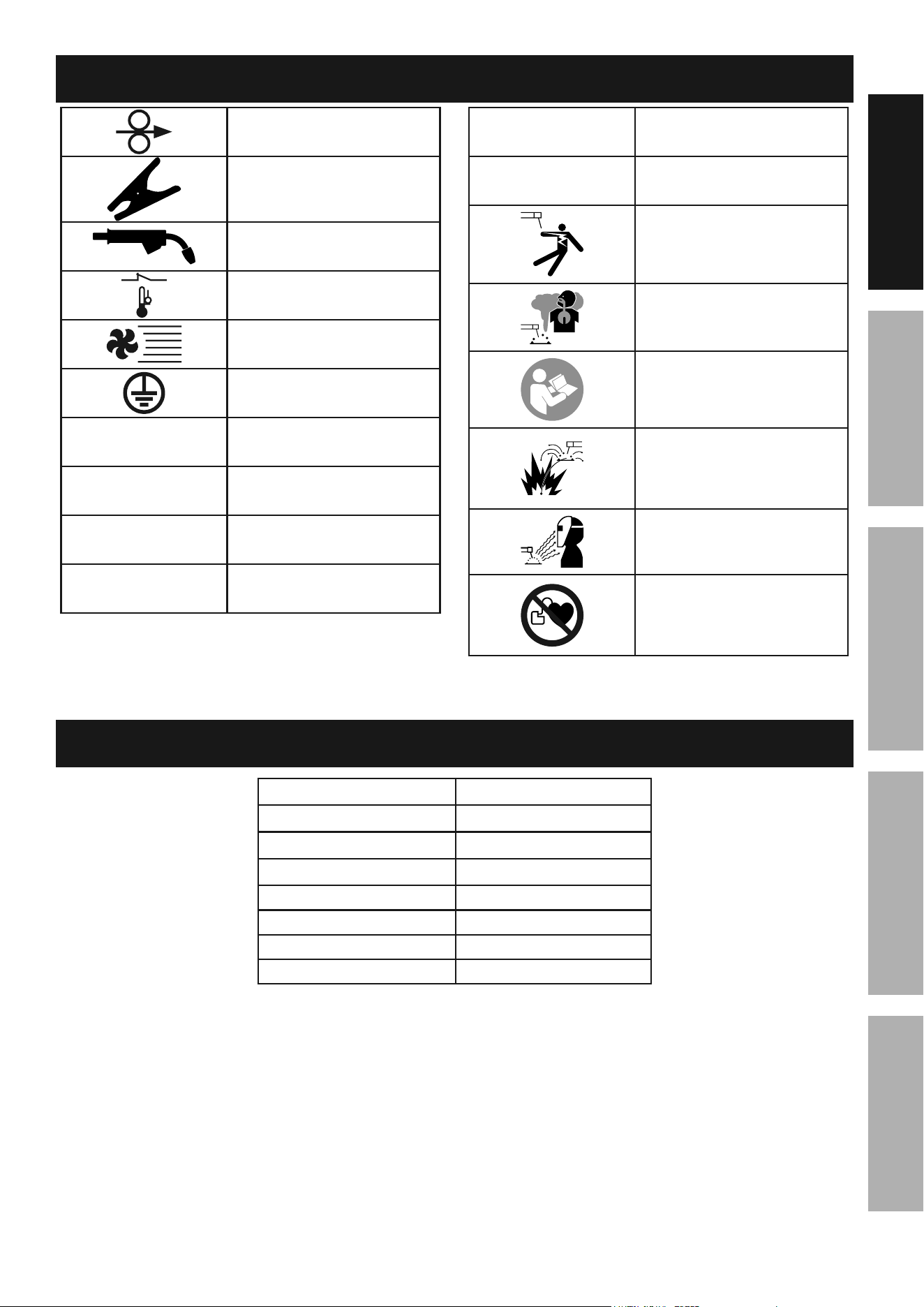
Symbology
Wire Feed (Speed)
Workpiece Ground Cable
Torch Cable
Overheat Shutdown Indicator
Cooling Fan
Housing Ground Point
Vac
Volts Alternating Current
a
Amperes
OcV
Open Circuit Voltage
KVa
Kilovolt Amperes
(Volts / 1000 * Amperes)
ipM
Inches Per Minute
aWg
American Wire Gauge
Electric Shock Hazard.
Do not touch energized parts.
Inhalation Hazard.
Keep head out of fumes
and use proper ventilation.
Read manual before
setup and/or use.
Fire Hazard.
Keep flammable materials
away during welding. Spatter
can cause accidental fires.
Arc Ray Hazard.
Wear welding helmet with
properly rated filter lens.
Pacemaker Hazard.
Welding processes may
interfere with pacemakers.
Consult doctor before use.
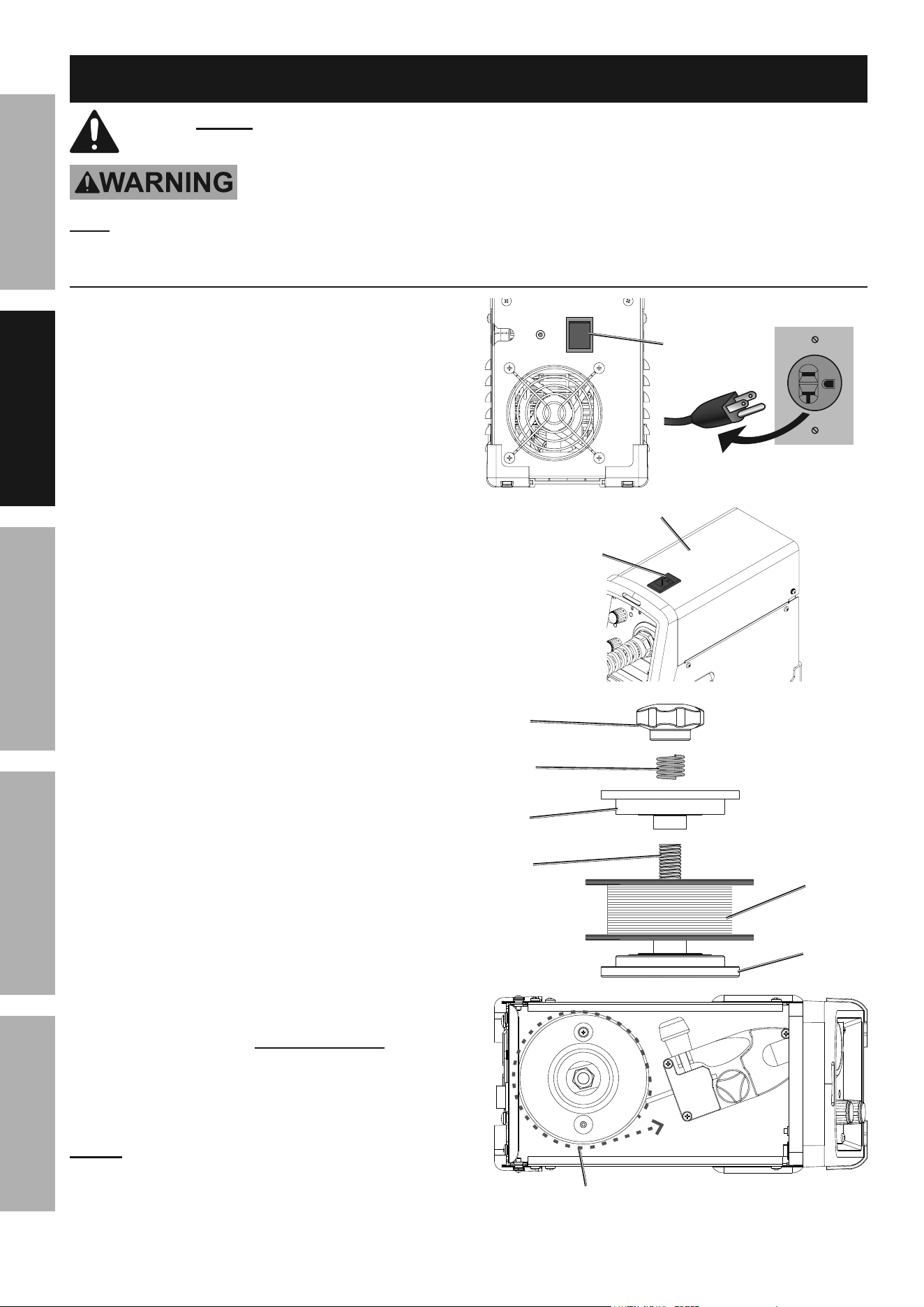
Specifications
power input 120 VAC / 60 Hz
current input 23 A
Welding current Range 30 –125 A
Rated duty cycle 30% @ 90 A
Open circuit Voltage 42 V
Wire Speed 60 – 200 IPM
Welding Wire capacity 0.030" / 0.035" Flux Cored
Wire Spool capacity 2 lb spool
Page 8 For technical questions, please call 1-888-380-0318. Item 57861
SaFEty MaintEnancEBaSic WElding WElding tipSSEtup
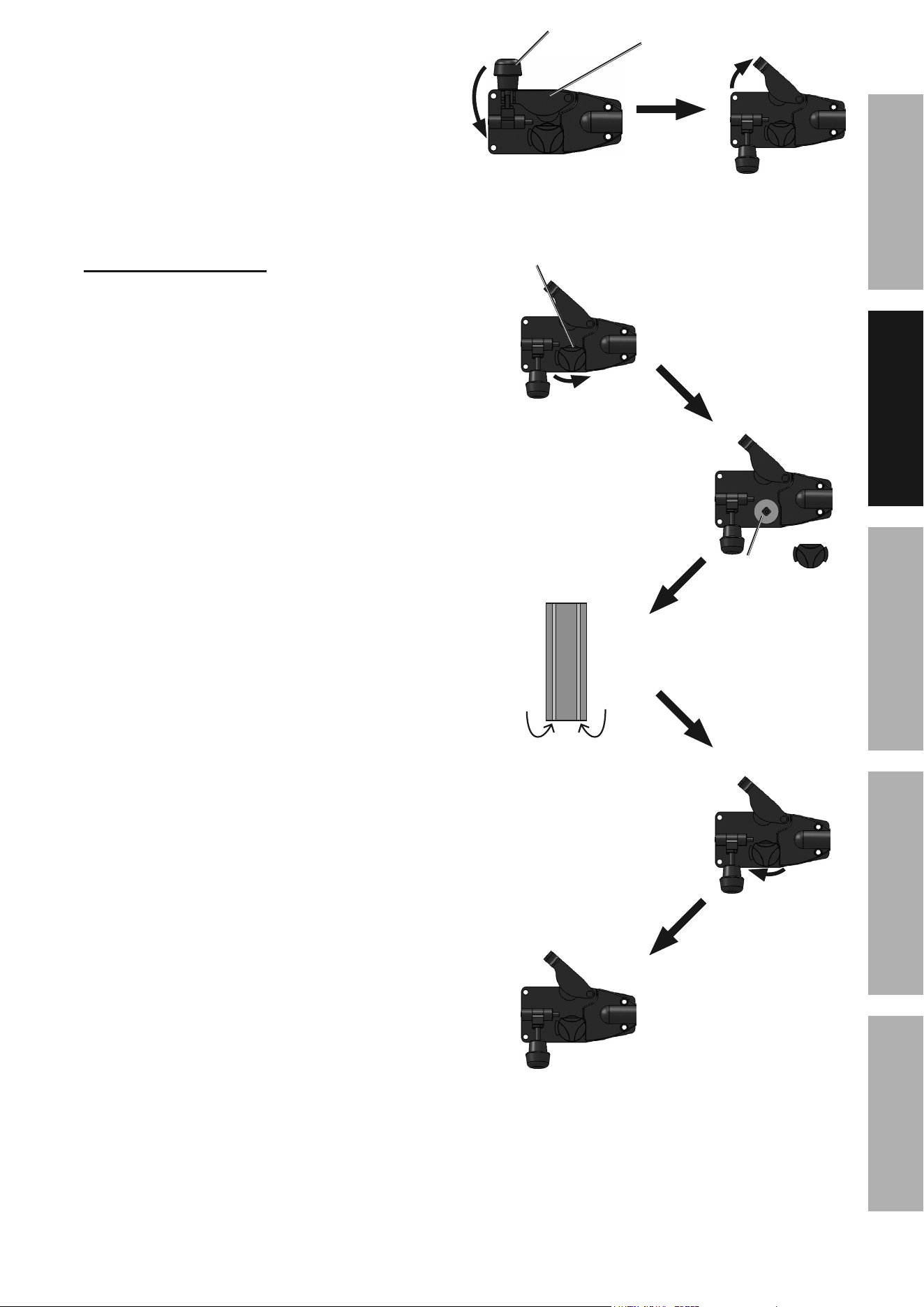
note: Wire Spool sold separately.
1. turn the power Switch OFF and unplug
the Welder before proceeding.
2. Push back on the Door Latch,
then open the Door.
3. Remove the Spool Knob, Spring, and
Spool Plate. Remove the old Spool and
all remaining wire from the liners.
4. Place the new Wire Spool over the Spool Spindle
as illustrated.
to prevent wire feed problems, set the Spool
so that it will unwind counterclockwise.
5. Replace the Spool Plate and Spring
over the Spool Spindle and secure
Spool in place with the Spool Knob.
notice: If Wire Spool can spin freely, Spool Knob is too
loose. This will cause the welding wire to unravel and
unspool which can cause tangling and feeding problems.
power
Switch
door
latch
door
Welder
Wall
Spool
Knob
Wire
Spool
Spool
plate
Spring
Spool
Spindle
Wire must unwind
in this direction
Setup
Read the EntiRE iMpORtant SaFEty inFORMatiOn section at the beginning of this manual
including all text under subheadings therein before set up or use of this product.
tO pREVEnt SERiOuS inJuRy FROM accidEntal OpERatiOn:
turn the power Switch off and unplug the Welder before setup.
note: Remove the protective foam and cardboard from the Welder before setup.
Wire Spool installation / Wire Setup
Page 9For technical questions, please call 1-888-380-0318.Item 57861
SaFEtyMaintEnancE BaSic WEldingWElding tipS SEtup
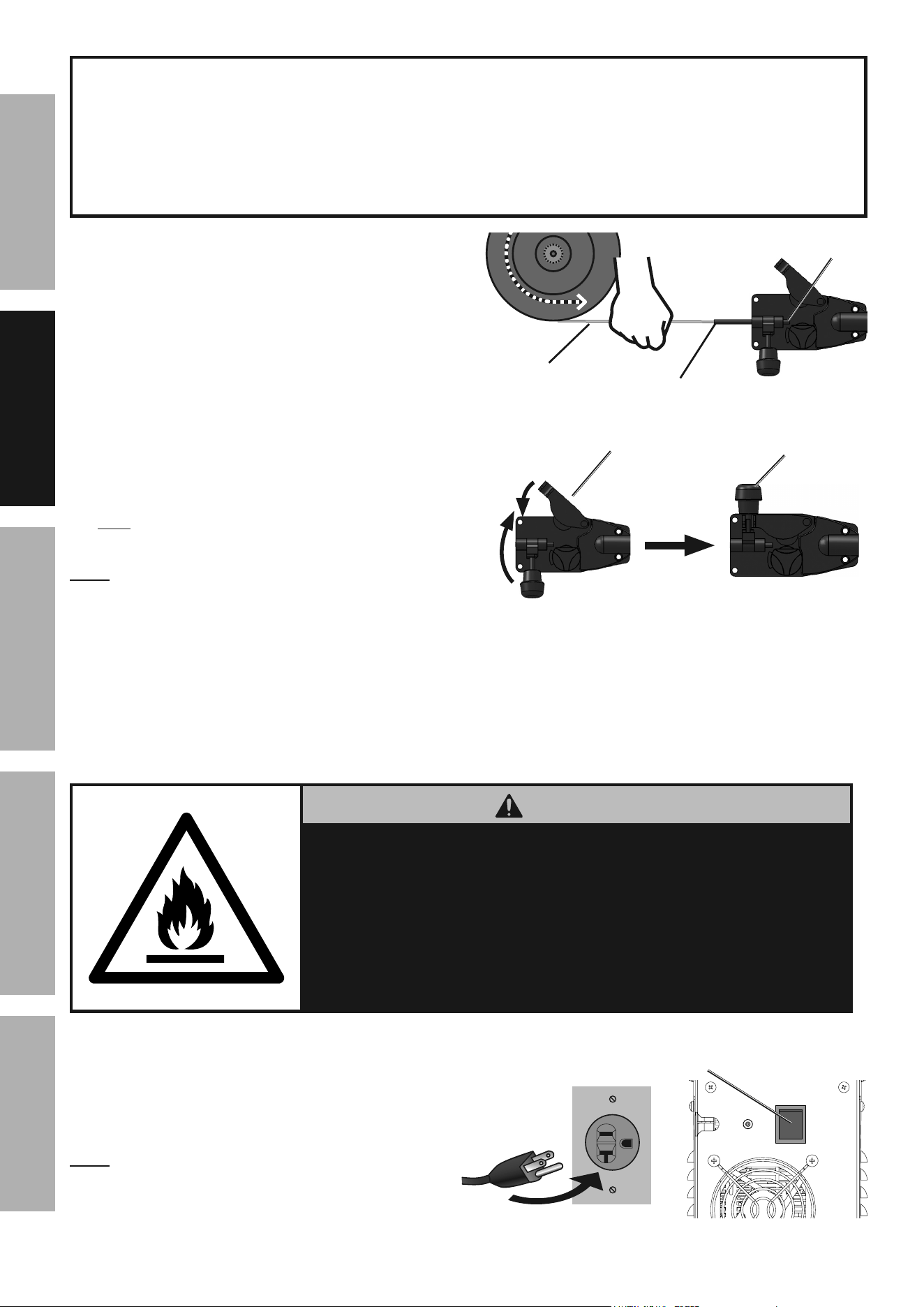
6. Turn the Feed Tensioner knob counterclockwise to
loosen it enough to pull it down to remove tension.
The spring-loaded Idler Arm will move up as shown.
7. Feed Roller instructions:
Check that the Feed Roller is turned to properly
match the wire size marked on the Wire Spool:
a. Twist the Feed Roller Knob
counterclockwise to release it.
b. Remove the Feed Roller Knob to
expose the Feed Roller.
c. Flip or replace the Feed Roller as needed
and confirm that the number showing is the
same as the wire diameter on the Spool.
d. Twist the Feed Roller Knob back into
place to secure the Feed Roller.
.030″
.030″
idler arm
Feed tensioner
.030″
Feed Roller
Knob
.030″
.030″
Feed
Roller
aa
BB
cc
dd
0.030
V-groove
0.035
V-groove
.030″
Page 10 For technical questions, please call 1-888-380-0318. Item 57861
SaFEty MaintEnancEBaSic WElding WElding tipSSEtup
iMpORtant
Securely hold onto the end of the welding wire and keep
tension on it during the following steps.
if this is not done, the welding wire will unravel and unspool
which can cause tangling and feeding problems.
8. Cut off all bent and crimped wire.
The cut end must have no burrs or
sharp edges; cut again if needed.
9. Keep tension on the wire and guide at
least 12 inches of wire into the Wire
Inlet Liner and Feed Guide.
10. Make sure the welding wire is resting in the
groove of the Feed Roller, then push the wire
Idler Arm down, and swing the Feed Tensioner
up to latch it across the tip of the arm.
After the wire is held by the Tensioner,
you may release it.
note: The tension should be 2 – 3.
Too much force on flux-cored wire will
crush it and cause feeding issues.
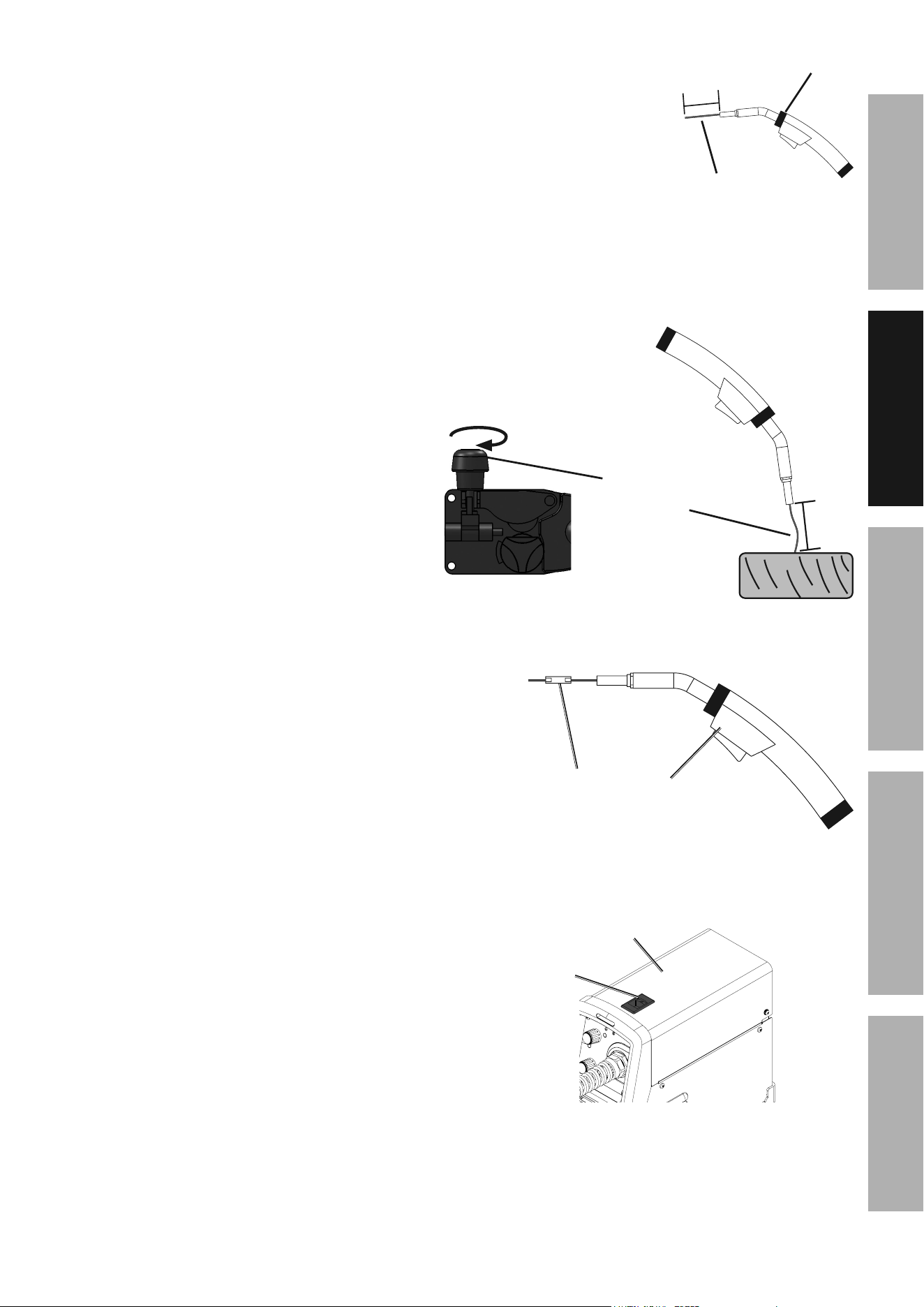
11. Unscrew the Contact Tip
counterclockwise and remove.
12. Lay the Flux Gun Cable out in a straight line so
that the welding wire moves through it easily.
Leave the cover open, so that the feed
mechanism can be observed.
WaRning
The following steps require applying power to the Welder
with the cover open.
to prevent serious injury from fire or electric shock:
1. do not touch anything, especially not the ground clamp,
with the gun or welding wire or an arc will be ignited.
2. do not touch internal Welder components
while it is plugged in.
13. Turn the Power Switch off and do not touch the
Gun’s Trigger and before connecting Power Cord:
14. Plug the Power Cord into a properly
grounded, GFCI protected 120 VAC (20
amp rated) receptacle that matches the
plug and turn the Power Switch ON.
note: The circuit must be equipped with
delayed action-type circuit breaker or fuses.
Wire Wire
SpoolSpool
Welding
Wire
HOld WiRE
SEcuREly
Feed
guide
Wire inlet
liner
.030″
.030″
.030″
idler arm
Feed tensioner
power
Switch
Page 11For technical questions, please call 1-888-380-0318.Item 57861
SaFEtyMaintEnancE BaSic WEldingWElding tipS SEtup
15. Point the Gun away from all objects.
Press and hold the Cold Feed Switch
until the wire feeds through the
end of the Gun two inches.
the wire liner may come out with the welding
wire. this is normal, just turn off the Welder
and push the wire liner back into the gun.
If the wire does not feed properly and
the Spool is stationary, turn OFF and
unplug the Welder and slightly tighten the
Feed Tensioner clockwise before retrying.
16. To check the wire’s drive tension, press and hold
Cold Feed Switch to feed the wire against a piece
of wood from 2 to 3 inches away.
If the wire stops instead of bending, unplug
the Welder, slightly tighten the Feed Tensioner
clockwise, and try again. If the wire bends from
the feed pressure, then the tension is set properly.
17. Turn OFF the Power Switch and unplug the
Power Cord from its electrical outlet.
18. Select a Contact Tip that is compatible with
the welding wire used. Slide the Contact
Tip over the wire and thread it clockwise into
the Flux Gun. Tighten the Contact Tip.
19. Slide the Nozzle onto the gun as well.
20. Cut the wire off at 1/2" from tip (1/2" stickout).
21. Close the Door. Make sure Door is securely latched.
Flux gun
Welding
Wire
2"
.030″
incrementally
increase tension
until
wire bends.
2–3"
contact
tip
Flux gun
door
latch
door
Page 12 For technical questions, please call 1-888-380-0318. Item 57861
SaFEty MaintEnancEBaSic WElding WElding tipSSEtup
Basic Welding
Read the EntiRE iMpORtant SaFEty inFORMatiOn section at the beginning of this manual
including all text under subheadings therein before welding.
tO pREVEnt SERiOuS inJuRy:
protective gear must be worn when using the Welder; minimum shade number 10 full face shield
(or welding mask), ear protection, welding gloves, sleeves and apron, niOSH-approved respirator, and fire
resistant work clothes without pockets should be worn when welding.
light from the arc can cause permanent damage to the eyes and skin.
do not breathe arc fumes.
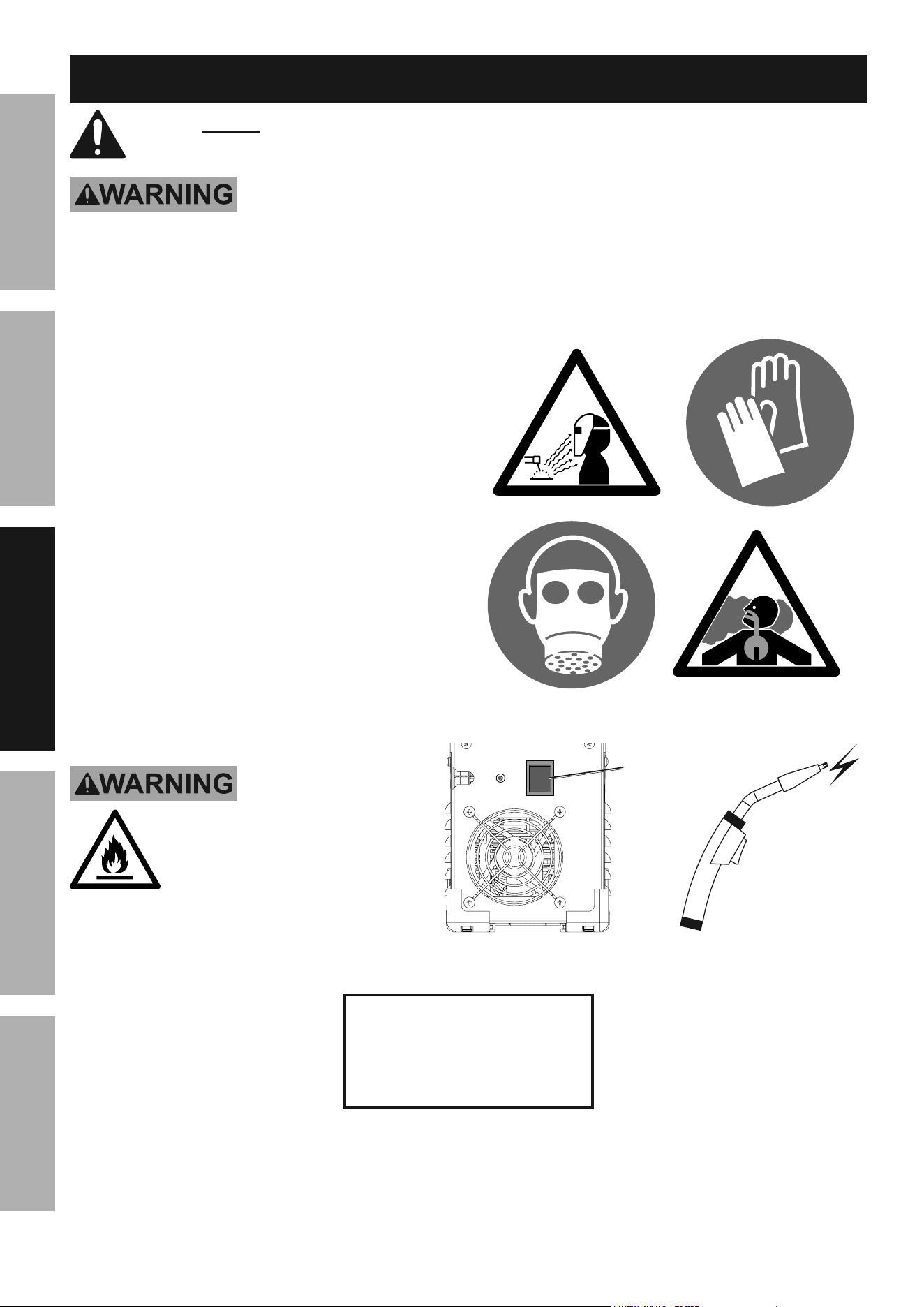
Flux-cored wire welding is used to weld mild steel
and stainless steel without shielding gas.
Good welding takes a degree of skill and experience.
Practice a few sample welds on scrap before
welding your first project. Additional practice
periods are recommended whenever you weld:
• a different thickness of material
• a different type of material
• a different type of connection
• using a different process (MIG vs. Flux)
Make practice welds on pieces of scrap to practice
technique before welding anything of value.
tO pREVEnt SERiOuS inJuRy,
FiRE and BuRnS:
Keep welding tip clear of grounded
objects whenever unit is plugged
in and turned on.
power
On
=
practice your welding
technique on scrap
pieces before welding
anything of value.
Page 13For technical questions, please call 1-888-380-0318.Item 57861
SaFEtyMaintEnancE BaSic WEldingWElding tipS SEtup
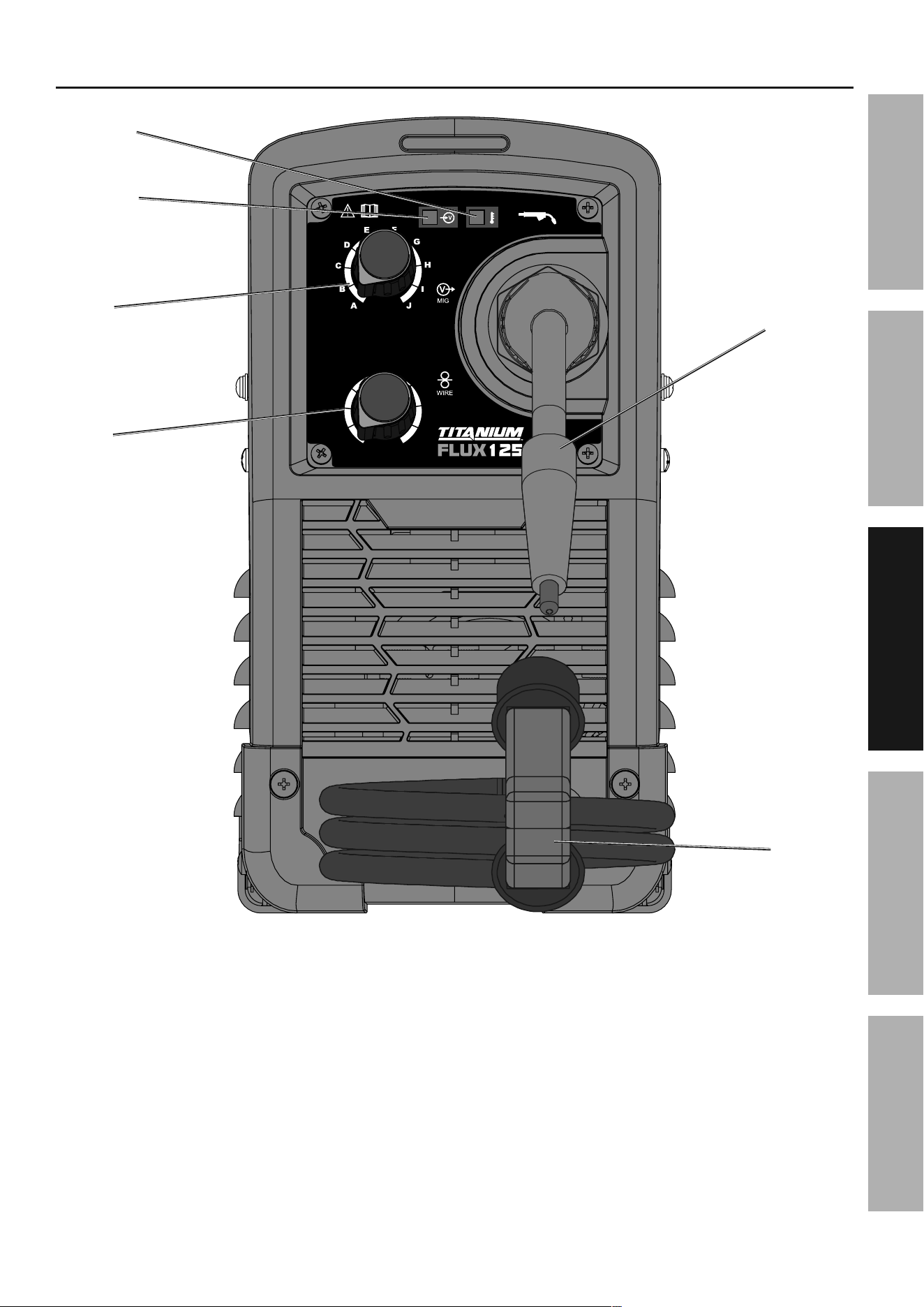
Front panel controls
Wire
Speed
Knob
Voltage
Knob
Flux gun
ground
clamp
alarm
indicator
power
indicator
1
2
3
4
5
6
7
8
9
A
B
C
D
E
F
G
H
I
J
10
Page 14 For technical questions, please call 1-888-380-0318. Item 57861
SaFEty MaintEnancEBaSic WElding WElding tipSSEtup
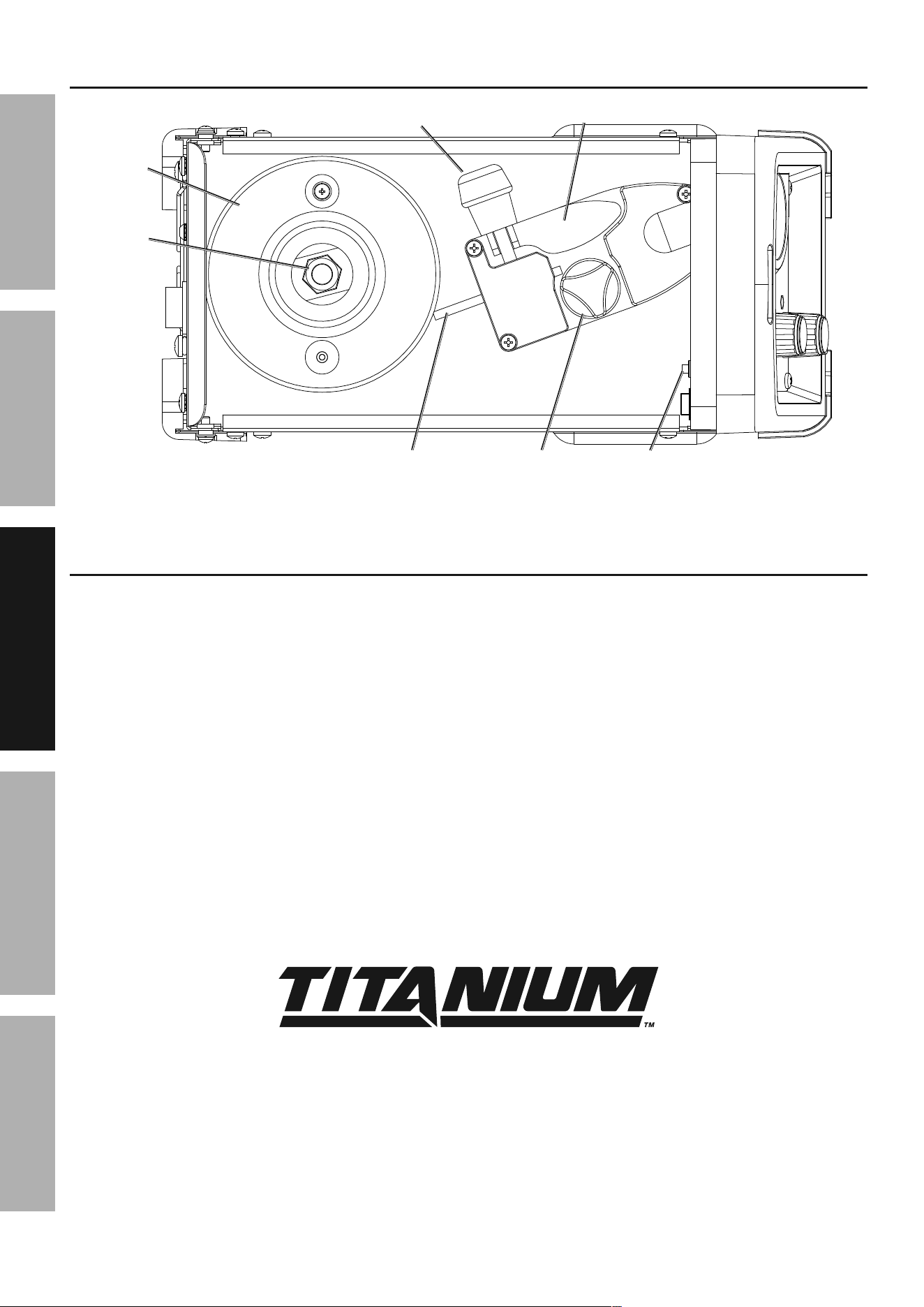
interior controls
idler arm
Wire
Spool
Spool
Knob
Feed tensioner
Wire inlet
liner
Feed
Roller Knob
cold Feed
Switch
Weld Settings
Refer to the Settings Chart on the inside of the Welder door for Flux-Cored and MIG Weld settings.
The chart is only intended to show general guidelines for different wire sizes and for different
thicknesses of material. The initial settings used at the beginning of a weld may need to be
adjusted after stopping and carefully inspecting the weld. Proper welding takes experience.
Page 15For technical questions, please call 1-888-380-0318.Item 57861
SaFEtyMaintEnancE BaSic WEldingWElding tipS SEtup
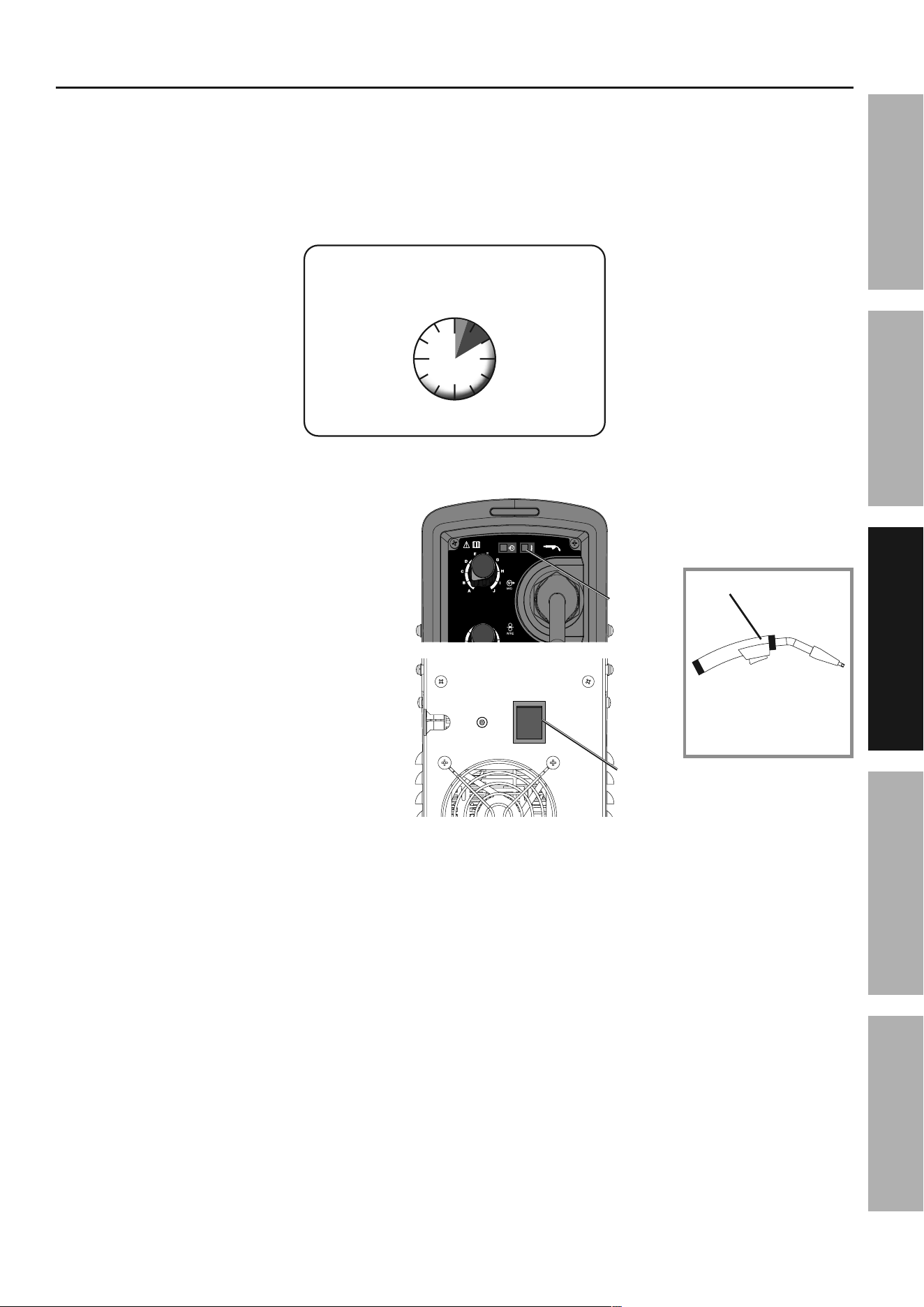
duty cycle (duration of use)
avoid damage to the Welder by not welding
for more than the prescribed duty cycle time.
The Duty Cycle defines the number of minutes, within a
10 minute period, during which a given welder can
produce a particular welding current without overheating.
For example, a welder with a 40% duty cycle at 90 A
welding current must be allowed to rest for at least
6 minutes after every 4 minutes of continuous welding.
Failure to carefully observe any duty cycle limitations
can easily over-stress a welder’s power generation
system contributing to premature welder failure.
Rated Duty Cycle
30% use at 90 a
For 10 continuous Minutes
3
Minutes
Welding
7
Minutes
Resting
This Welder has an internal thermal protection
system to help prevent this sort of over-stress.
When the Welder overheats, it automatically
shuts down and the Overload Indicator lights.
The Welder automatically returns to service
after cooling off. Should this occur, rest the
Flux Gun on an electrically non-conductive,
heat-proof surface, such as a concrete
slab, well clear of the ground clamp.
allow the Welder to cool with the
power Switch on, so that the internal
Fan will help cool the Welder.
When the Overload Indicator is no longer
lit and the Welder can be used again,
use shorter welding periods and longer
rest periods to prevent needless wear.
power
Switch
1
2
3
4
5
6
7
8
9
A
B
C
D
E
F
G
H
I
J
10
Overload
indicator
Flux gun
concrete slab
(or other heat-proof,
non-conductive surface)
Page 16 For technical questions, please call 1-888-380-0318. Item 57861
SaFEty MaintEnancEBaSic WElding WElding tipSSEtup
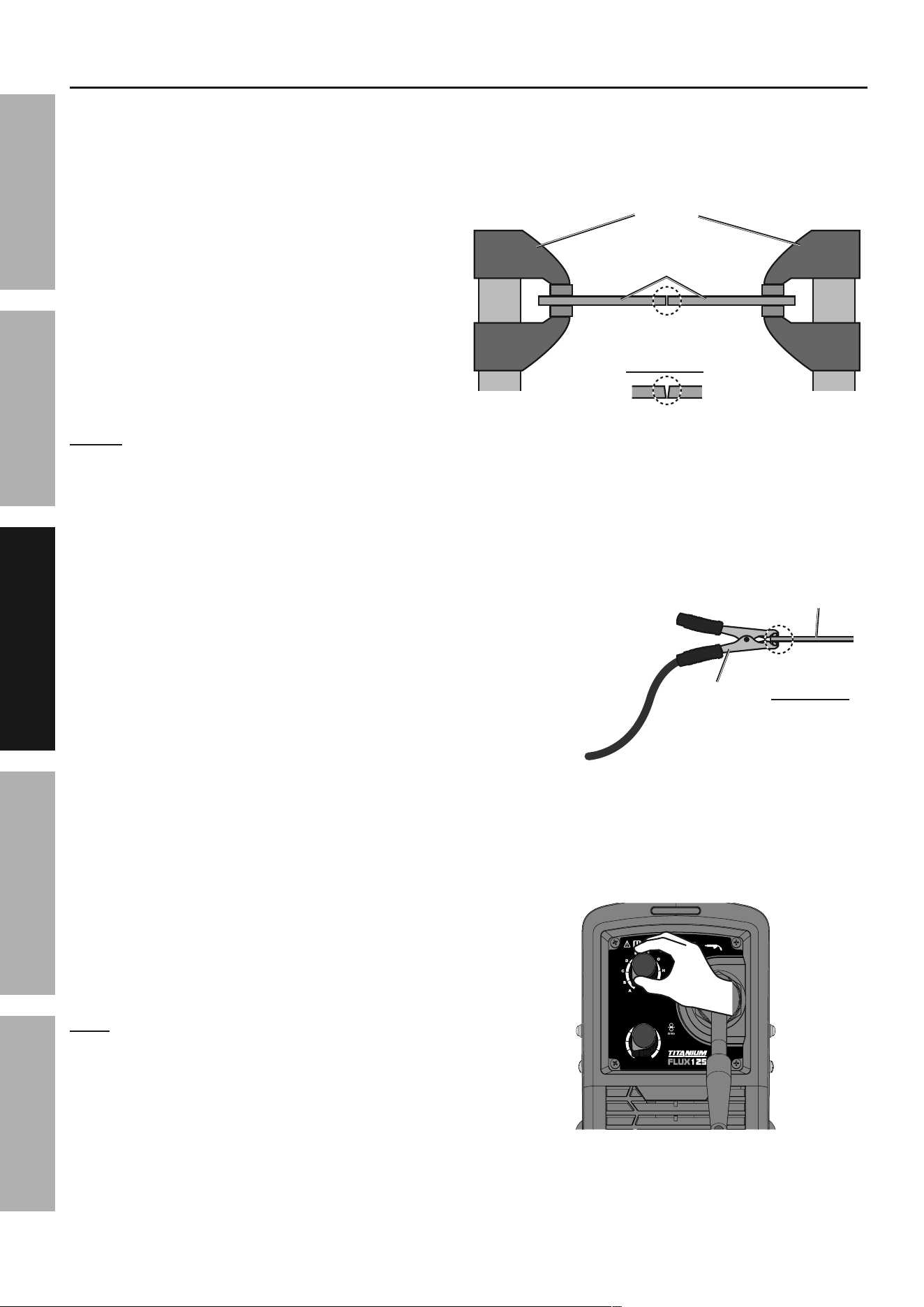
1. Make practice welds on pieces of scrap the
same thickness as your intended workpiece
to practice technique before welding anything
of value. Clean the weld surfaces thoroughly
with a wire brush or angle grinder; there
must be no rust, paint, oil, or other materials
on the weld surfaces, only bare metal.
2. Use clamps (not included) to hold the workpieces
in position so that you can concentrate on
proper welding technique. The distance
(if any) between the two workpieces must be
controlled properly to allow the weld to hold
both sides securely while allowing the weld
to penetrate fully into the joint. The edges of
thicker workpieces may need to be chamfered
(or beveled) to allow proper weld penetration.
notice: When welding equipment on a vehicle,
disconnect the vehicle battery power from both the
positive connection and the ground before welding.
This prevents damage to some vehicle electrical
systems and electronics due to the high voltage
and high frequency bursts common in welding.
3. Clamp Ground Cable to bare metal on the
workpiece near the weld area, or to metal work
bench where the workpiece is clamped.
4. Set the Wire Speed and Voltage Knobs to
the desired settings. Refer to the Settings
Chart on the inside of the Welder door.
note: The initial settings may need to be adjusted
after stopping and carefully inspecting the weld.
Proper welding takes experience.
clamps
workpieces
chamfer thick workpieces.
clean
surfaces to
bare metal.
Workpiece
ground
clamp
clean
surface to
bare metal.
1
2
3
4
5
6
7
8
9
A
B
C
D
E
F
G
H
I
J
10
Setting up the Weld
Page 17For technical questions, please call 1-888-380-0318.Item 57861
SaFEtyMaintEnancE BaSic WEldingWElding tipS SEtup
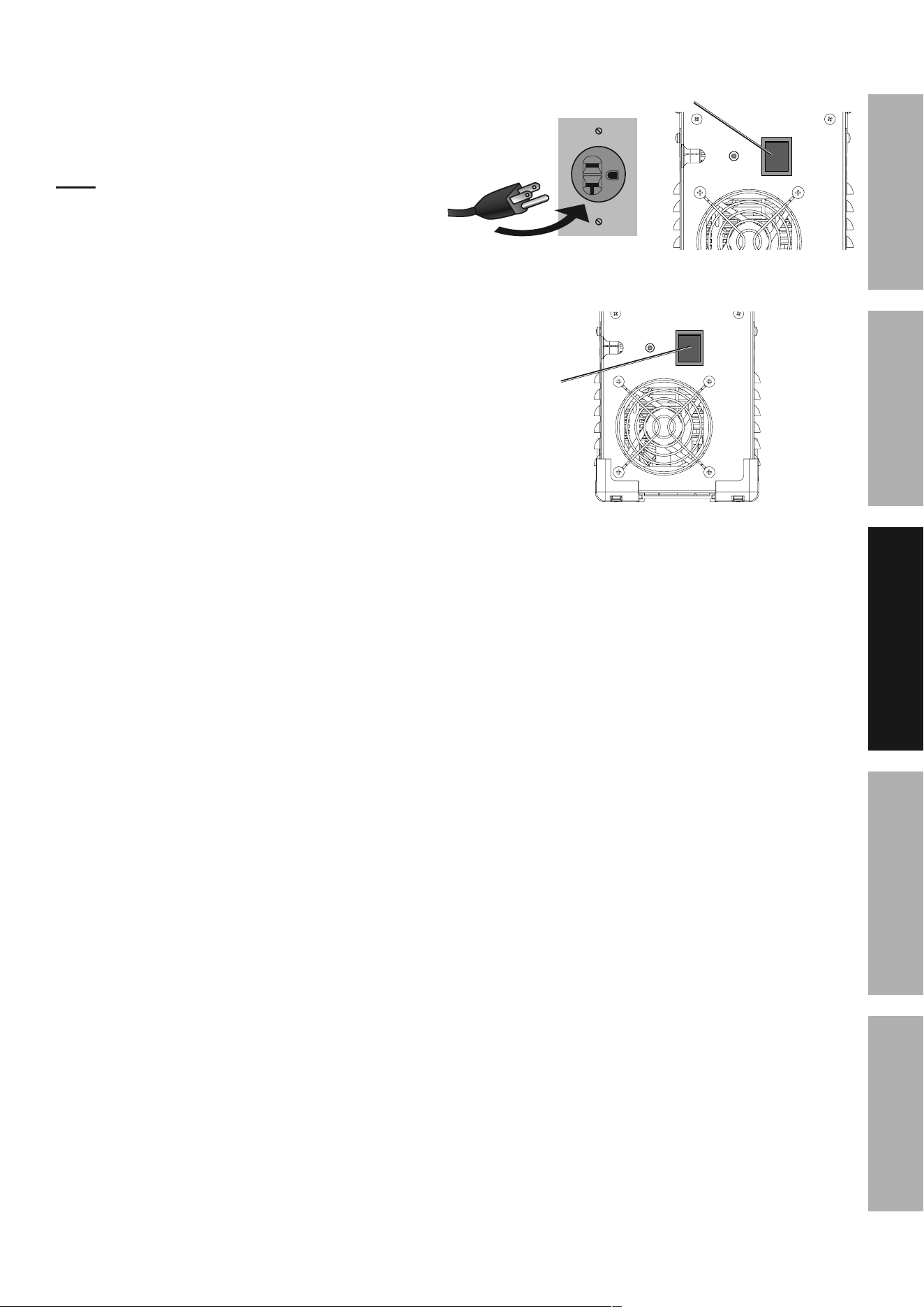
5. Turn the Power Switch off and do not touch
the Gun’s Trigger and before connecting
Power Cord: Plug the Power Cord into a
properly grounded, GFCI protected 120 VAC
(20 amp rated) receptacle that matches the
plug and turn the Power Switch ON.
note: The circuit must be equipped with
delayed action-type circuit breaker or fuses.
6. Set Flux Gun down on nonconductive,
nonflammable surface away from any grounded
objects. Turn the Power Switch ON.
power
Switch
power
Switch
Page 18 For technical questions, please call 1-888-380-0318. Item 57861
SaFEty MaintEnancEBaSic WElding WElding tipSSEtup
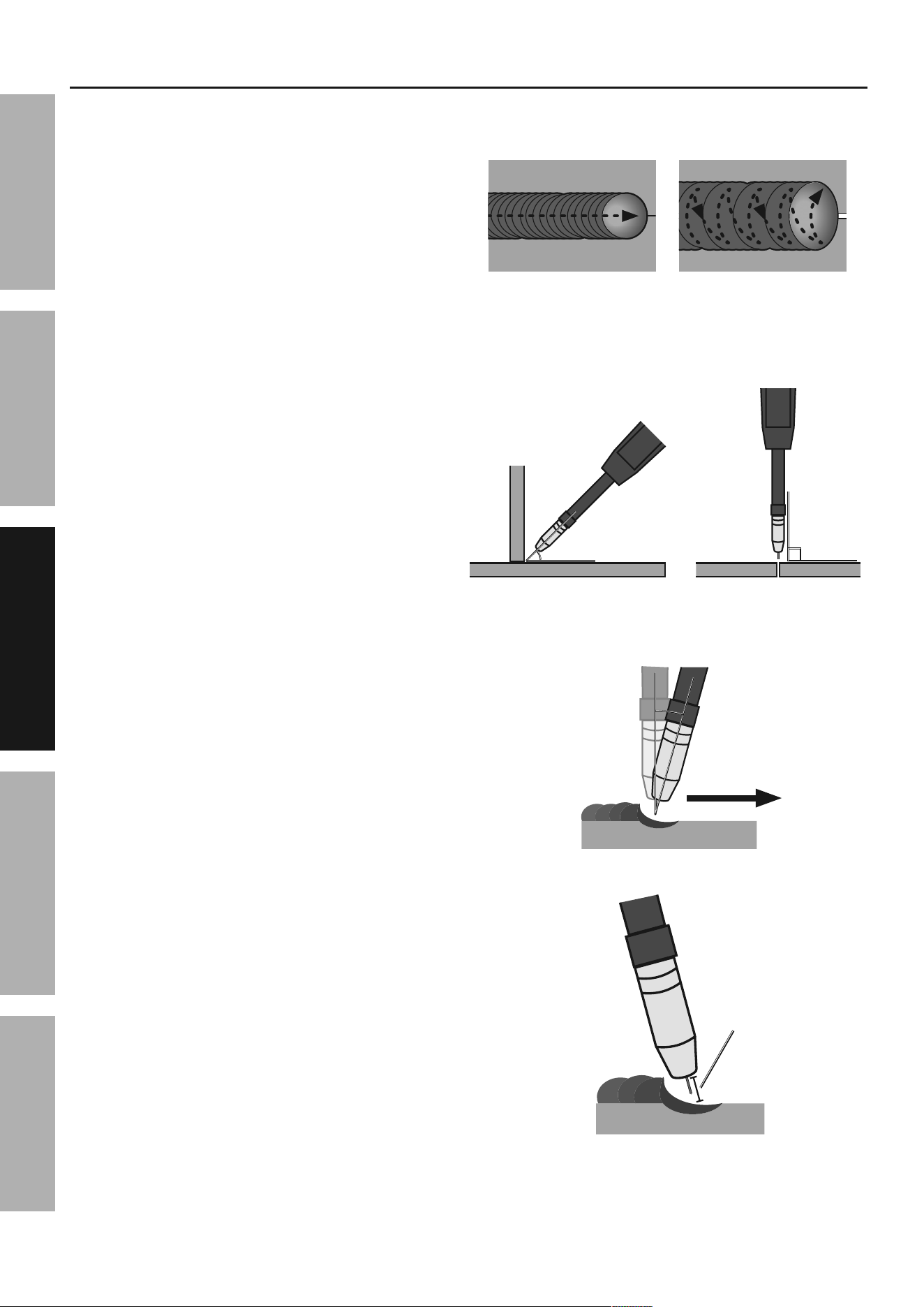
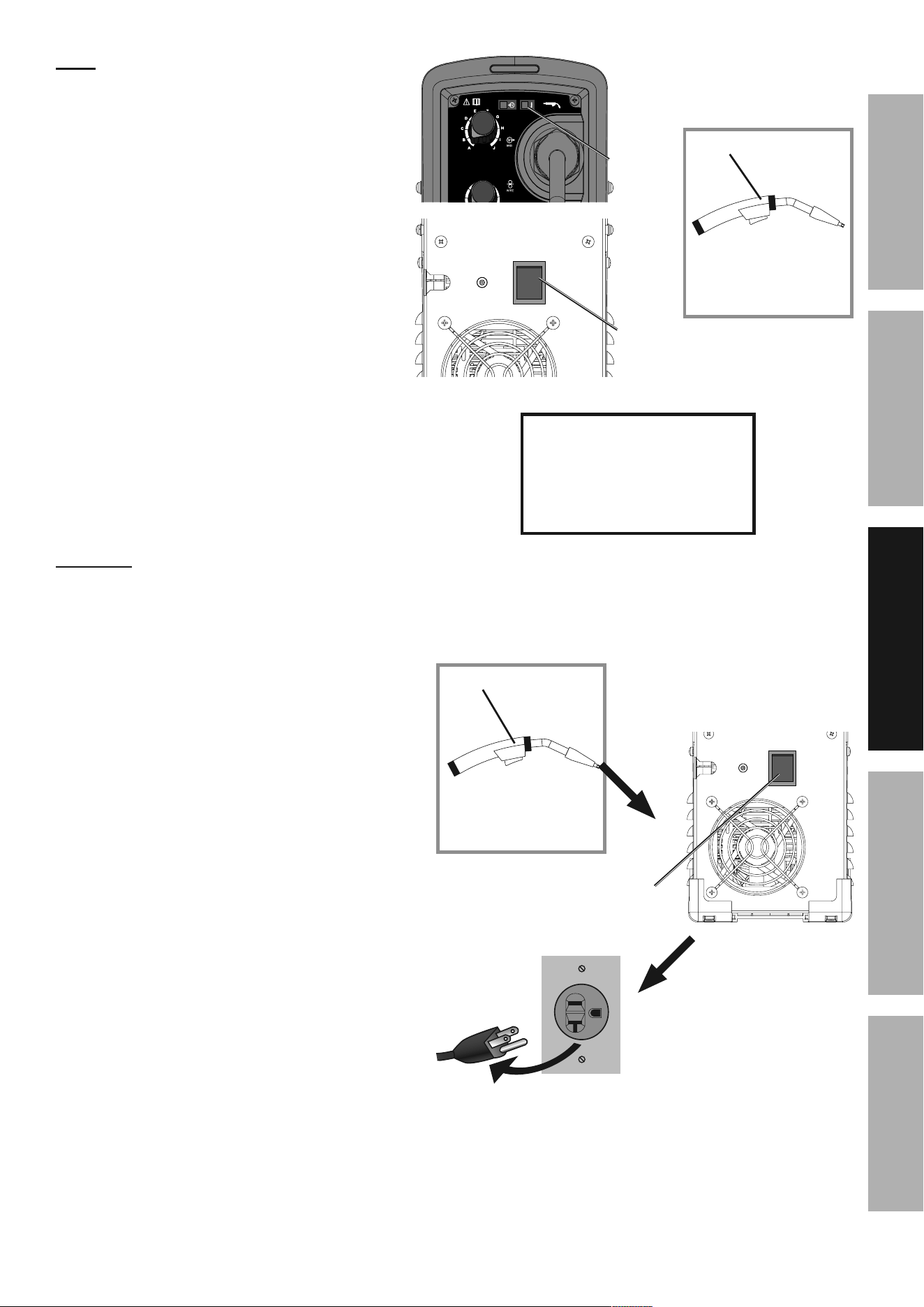
1. Press (and hold) Trigger and contact the area
to be welded with electrode wire to ignite arc.
2. For a narrow weld, you can usually draw the wire in
a steady straight line.
This is called a stringer bead.
For a wider weld, draw the wire back and forth
across the joint.
This is called a weave bead and takes
practice to perform properly.
3. Direct the welding wire straight into the joint. This
gives an angle of 90° (straight up and down)
for butt (end to end) welds, and an angle
of 45° for fillet (T-shaped) welds.
4. When using flux-cored wire, the end of the
Flux Gun should be tilted so that wire is
angled anywhere in-between straight on
and 15° in the direction you are welding.
The amount of tilt is called the drag angle.
5. The Contact Tip should remain within 1/2″
of the work surface. This distance is called
CTWD - Contact Tip to Work Distance.
stringer bead weave bead
Weld Flux gun angles,
viewed from front of weld joint.
45°
fillet weld joint
90°
butt weld joint
ctWd
(up to 1/2")
Weld
direction
drag angledrag angle
0-15°0-15°
Flux-cored Wire
Basic Welding technique
Page 19For technical questions, please call 1-888-380-0318.Item 57861
SaFEtyMaintEnancE BaSic WEldingWElding tipS SEtup
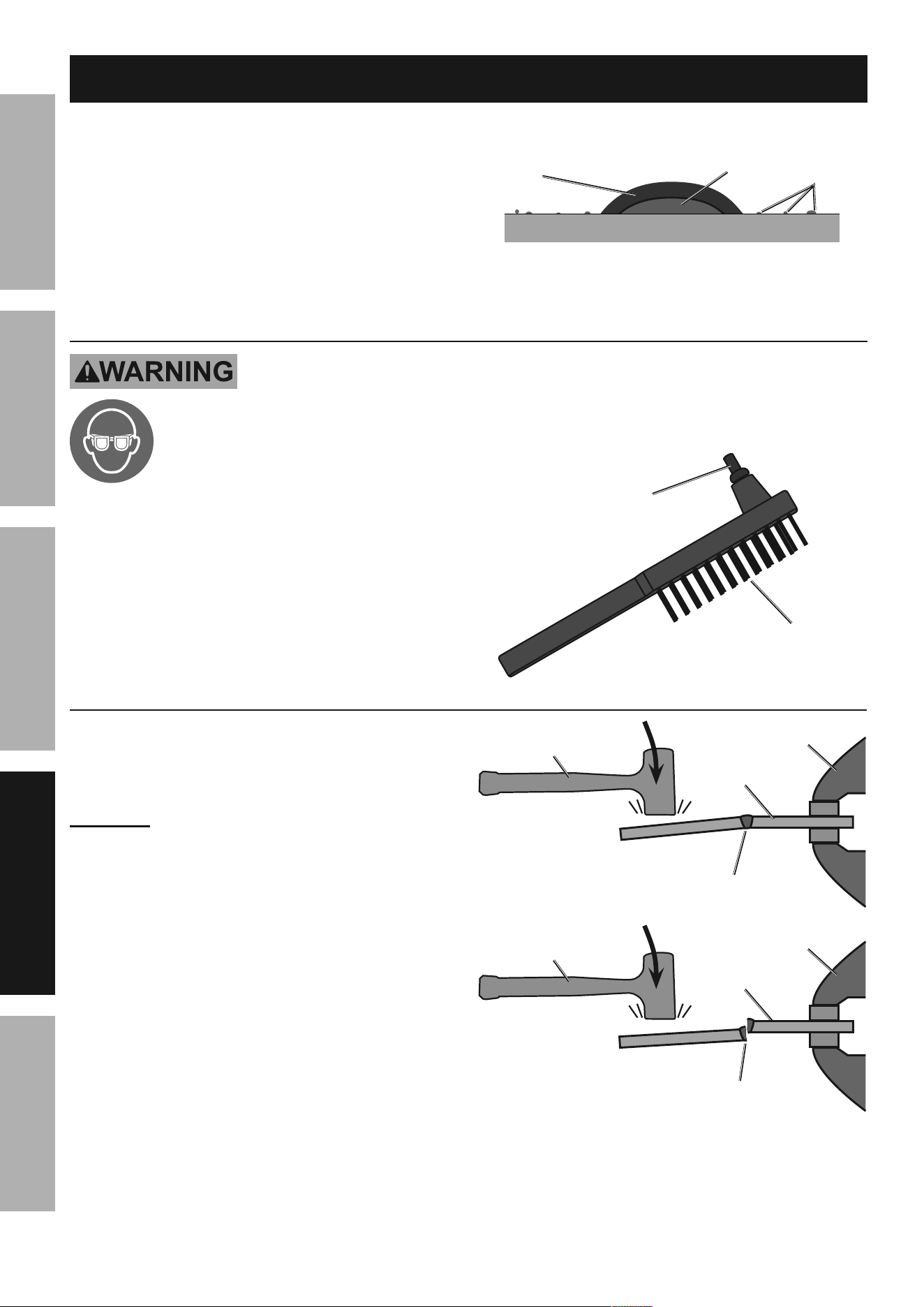
note: If Welder is used too long, the Overload
Indicator lights up and the unit automatically
shuts down. The Welder automatically returns
to service after cooling off. Should this occur,
rest the Flux Gun on an electrically non-
conductive, heat-proof surface, such as a
concrete slab, away from the ground clamp.
allow the Welder to cool with the
power Switch on, so that the internal
Fan will help cool the Welder.
When the Overload Indicator is no longer
lit and the Welder can be used again, use
shorter welding periods and longer rest
periods to help prevent needless wear.
6. After welding the test weld on a piece
of scrap for a few seconds, stop, and
check your progress. Clean, then compare
your weld’s appearance with the diagrams
and descriptions in the Welding tips section
starting on the next page. After making any
necessary adjustments, continue to weld
while carefully following the DUTY CYCLE
guidelines as explained on page 15.
cautiOn! Weld will be hot, do not touch.
7. When welding is complete, set the
Flux gun down on a heat-proof, electrically
non-conductive surface.
Turn the Power Switch OFF.
8. Allow Welder to cool down, then
unplug the Power Cord.
9. Remove Ground Clamp from workpiece
or table and disconnect Flux Gun.
10. Respool wire by clipping wire, removing
contact tip on Flux Gun, releasing Idler Arm
on Wire Feed mechanism, and rotating the
Wire Spool counterclockwise. Be sure to
securely hold wire as it is being respooled
because the end of wire has a tendency to
quickly unravel once it clears the wire feeder.
power
Switch
1
2
3
4
5
6
7
8
9
A
B
C
D
E
F
G
H
I
J
10
Overload
indicator
Flux gun
concrete slab
(or other heat-proof,
non-conductive surface)
after practice welding
for a few seconds, StOp
and examine your weld
using the guidelines
starting on the next page.
Flux gun
concrete slab
(or other heat-proof,
non-conductive surface)
power
Switch
Page 20 For technical questions, please call 1-888-380-0318. Item 57861
SaFEty MaintEnancEBaSic WElding WElding tipSSEtup
Welding tips
A good way to test welding technique is to examine a
weld’s appearance after it has cooled and the slag
has been removed. Then, better welding can be
learned by adjusting your weld technique to remedy
any problems found.
cleaning the Weld
tO pREVEnt SERiOuS inJuRy:
continue to wear anSi-approved
safety goggles and protective wear
when cleaning a weld.
Sparks or chips may fly when cleaning.
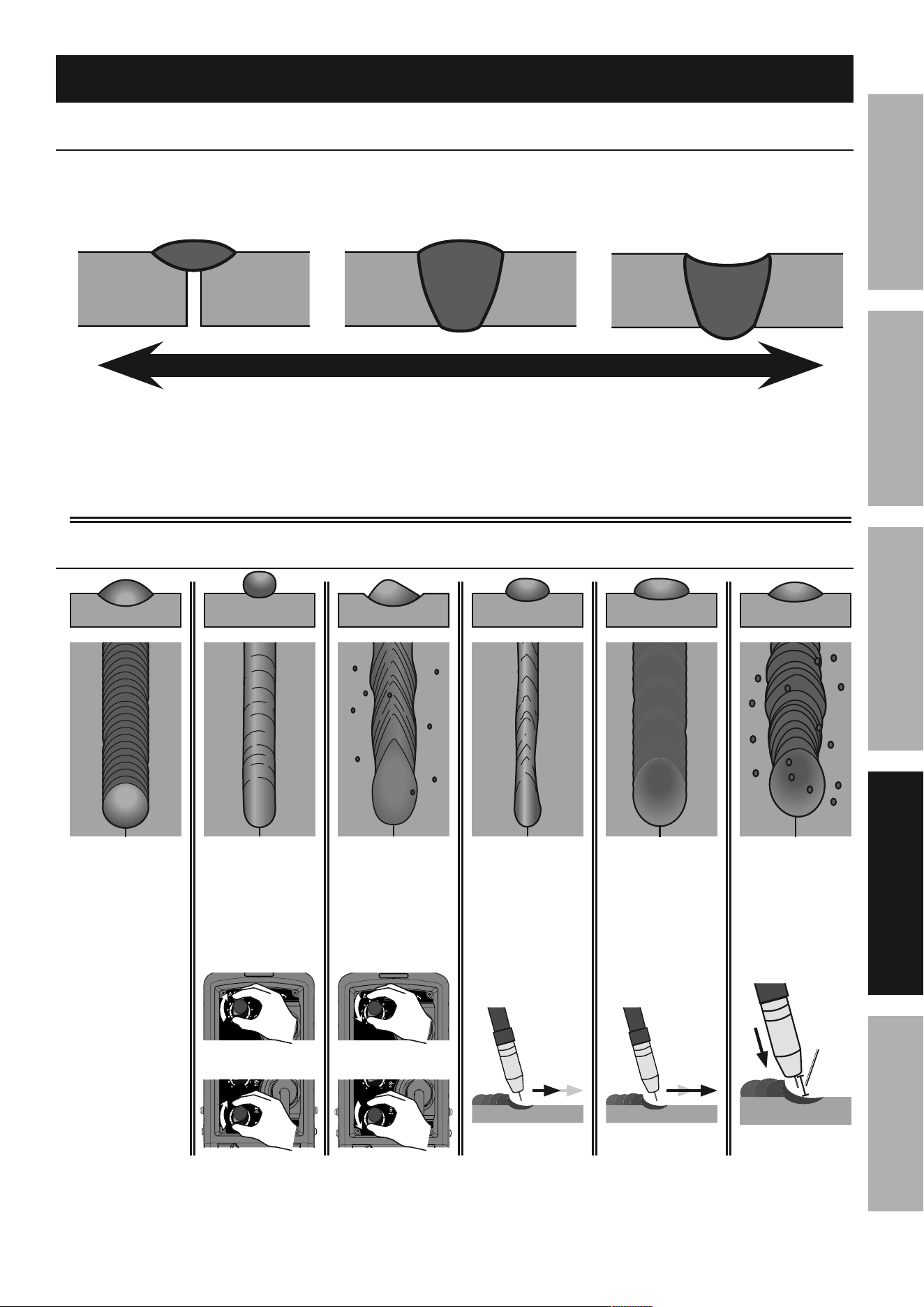
1. A weld from flux-cored wire will be
covered by slag. Use a chipping hammer
to knock this off. Be careful not to
damage the weld or base material.
2. Use a wire brush to further clean the weld
or use an angle grinder (sold separately) to
shape the weld.
Strike test
a test weld on a piEcE OF ScRap can be tested by
using the following procedure.
WEaR anSi-appROVEd SaFEty gOgglES
duRing tHiS pROcEduRE.
WaRning! tO pREVEnt SERiOuS inJuRy: this
test Will damage the weld it is performed on.
this test is Only an indicator of weld technique
and is not intended to test working welds.
1. After two scraps have been welded together and the
weld has cooled, clamp one scrap in a sturdy vise.
2. Stay clear from underneath while you strike
the opposite scrap with a heavy hammer,
preferably a dead-blow hammer.
3. A gOOd WEld will deform but not break,
as shown on top.
A pOOR WEld will be brittle and snap at the weld,
as shown on bottom.
clamp
ScRap
workpiece
gOOd WEld
bends and is not brittle
dead-blow hammer
clamp
ScRap
workpiece
pOOR WEld
snaps or cracks
dead-blow hammer
a typical flux-cored wire (FcaW) weld
before cleaning.
base metal
weld bead
slag
spatter
chipping
Hammer
Wire Brush
Page 21For technical questions, please call 1-888-380-0318.Item 57861
SaFEtyMaintEnancE BaSic WEldingWElding tipS SEtup
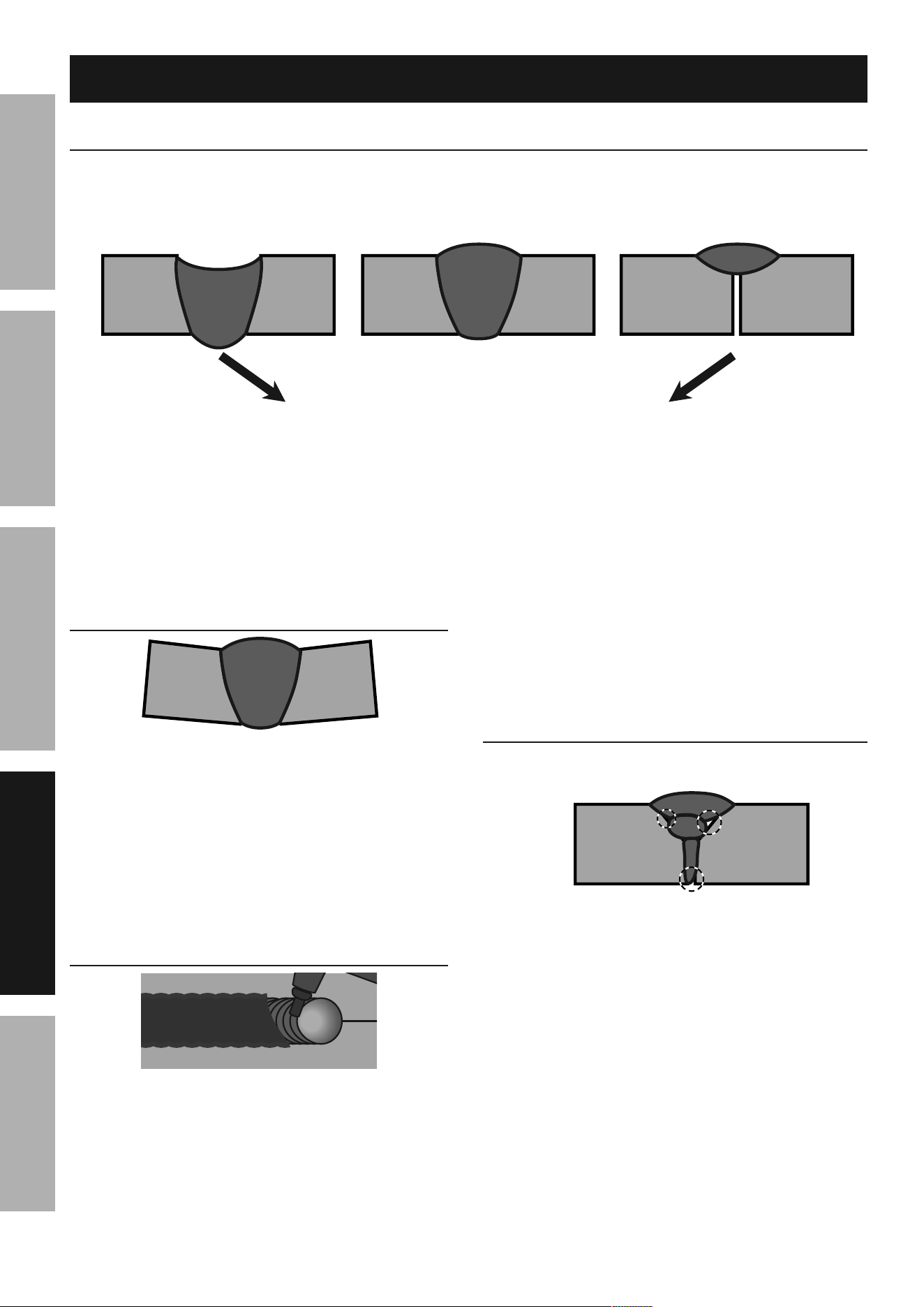
EXcESS pEnEtRatiOn OR
BuRn-tHROugH
pROpER pEnEtRatiOninadEQuatE pEnEtRatiOn
not hot enough too hotideal heat
Weld diagnosis
Workpiece Heat control / Weld penetration
good
Weld
Voltage
too low or
Wire Feed
too Slow
Voltage
too High or
Wire Feed
too Fast
travel Speed
too Fast
travel Speed
too Slow
ctWd
too long
Example Weld diagrams
How to increase workpiece heat
and increase penetration:
(to weld tHicKER workpieces properly)
How to reduce workpiece heat
and limit penetration:
(to weld tHinnER workpieces properly)
a. increase weld current
b. decrease travel speed
c. use faster wire feed
d. use shorter ctWd
a. decrease weld current
b. increase travel speed
c. use slower wire feed
d. use longer ctWd
tO cORREct:
or
tO cORREct:
or
tO cORREct:
travel
slower
tO cORREct:
travel
faster
tO cORREct:
maintain
less less
than 1/2" than 1/2"
ctWdctWd
1
2
3
4
5
6
7
8
9
A
B
C
D
E
F
G
H
I
J
10
1
2
3
4
5
6
7
8
9
A
B
C
D
E
F
G
H
I
J
10
1
2
3
4
5
6
7
8
9
A
B
C
D
E
F
G
H
I
J
10
1
2
3
4
5
6
7
8
9
A
B
C
D
E
F
G
H
I
J
10
Page 22 For technical questions, please call 1-888-380-0318. Item 57861
SaFEty MaintEnancEBaSic WElding WElding tipSSEtup
EXcESS pEnEtRatiOn OR
BuRn-tHROugH
Weld droops on top and
underneath, or falls through
entirely, making a hole.
pROpER pEnEtRatiOn
Weld is visible underneath and
bulges slightly on top.
inadEQuatE pEnEtRatiOn
Weld does not penetrate the
joint fully, just on the surface.
pOSSiBlE cauSES and SOlutiOnS
1. Workpiece overheating:
Reduce wire feed speed.
Decrease weld current.
2. travel speed too slow:
Increase travel speed and ensure
that travel speed is kept steady.
3. Excessive material at weld:
Reduce wire feed speed.
pOSSiBlE cauSES and SOlutiOnS
1. incorrect welding technique:
Maintain 1/2" or less CTWD.
Keep arc on leading edge of weld puddle.
Hold Flux Gun at proper angles.
2. insufficient weld heat:
Reduce travel speed.
Increase weld current.
3. Workpieces too thick/close:
Bevel thick workpieces, allow slight
gap, and weld in several passes.
4. insufficient weld material:
Increase wire feed speed.
PROFILE VIEWS
Weld problems
penetration (Workpiece Heat control)
Weld not adhering properly
gaps present between weld and previous bead or
between weld and workpiece. See areas below.
pOSSiBlE cauSES and SOlutiOnS
1. incorrect welding technique:
Place stringer bead at correct place in joint.
Adjust workpiece position or weld angle to permit
proper welding to bottom of piece.
Pause briefly at sides during weave bead.
Keep arc on leading edge of weld puddle.
Hold Flux Gun at proper angles.
2. insufficient weld heat:
Increase current.
Increase wire feed speed.
3. dirty workpiece:
Clean workpiece down to bare metal.
4. insufficient weld material:
Increase wire feed speed.
5. Workpiece gap too narrow:
Widen groove or increase bevel.
PROFILE
VIEW
Bend at Joint
pOSSiBlE cauSES and SOlutiOnS
1. improper clamping:
Clamp workpieces securely.
Make tack welds to hold workpieces.
2. Excessive heat:
Weld a small portion and allow to cool before
proceeding.
Increase travel speed.
Reduce wire feed speed.
PROFILE
VIEW
coat of Slag Over Weld
Slag is a necessary part of a flux-cored wire weld.
it shields the weld from impurities.
clean off the slag with a chipping Hammer
and Wire Brush after welding.
TOP
VIEW
PARTIALLY CHIPPED AWAY TO SHOW WELD
Page 23For technical questions, please call 1-888-380-0318.Item 57861
SaFEtyMaintEnancE BaSic WEldingWElding tipS SEtup
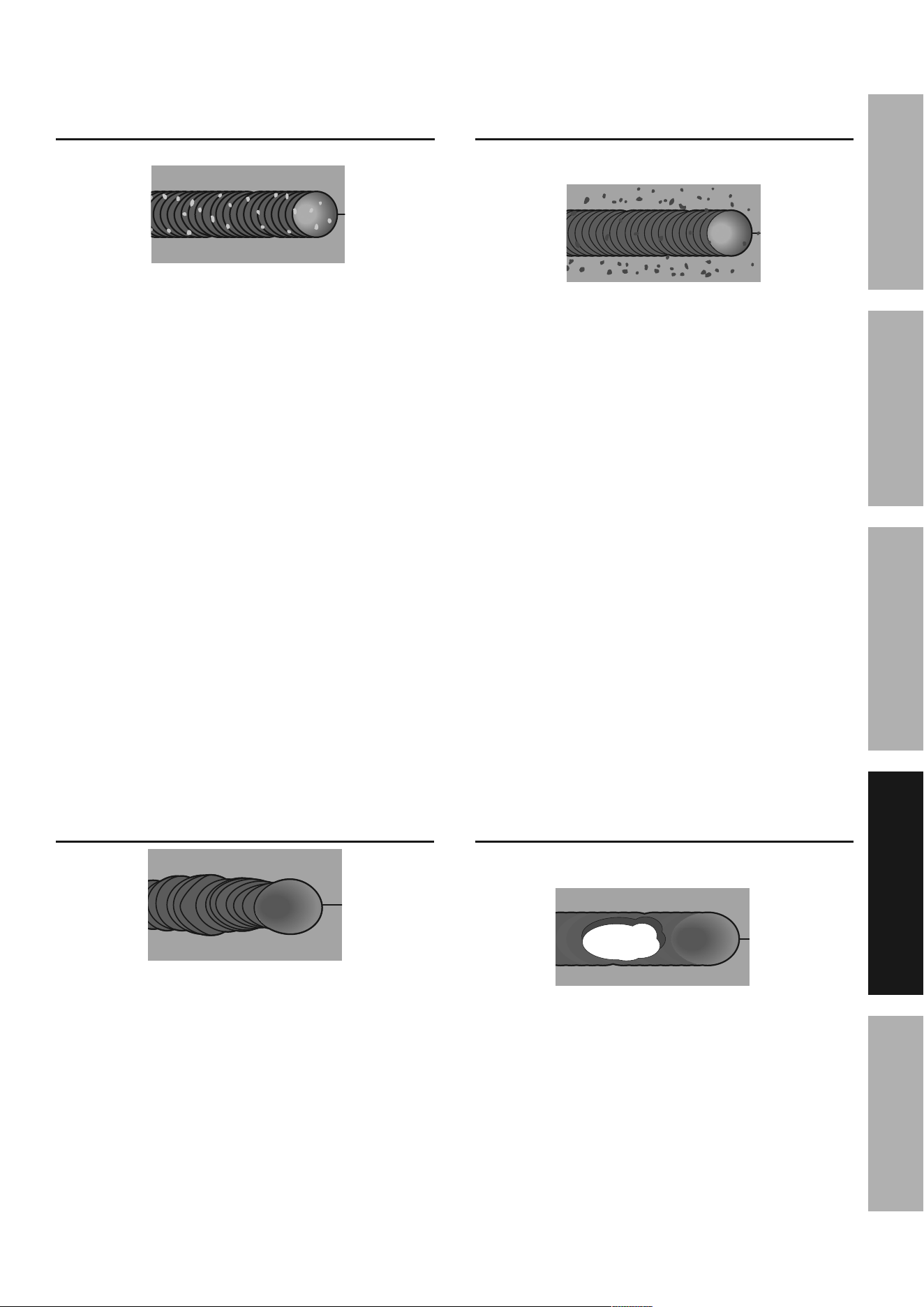
Burn-through
Base material melts away,
leaving a hole in the weld.
pOSSiBlE cauSES and SOlutiOnS
1. Workpiece overheating:
Reduce current and/or wire feed speed.
2. travel speed too slow:
Increase travel speed and ensure
that travel speed is kept steady.
3. Excessive material at weld:
Reduce wire feed speed.
TOP
VIEW
crooked/Wavy Bead
pOSSiBlE cauSES and SOlutiOnS
1. inaccurate welding:
Use two hands or rest hand on steady surface.
2. inconsistent travel speed:
Maintain steady travel speed.
3. ctWd too long:
Reduce CTWD.
TOP
VIEW
porosity
Small cavities or holes in the bead.
pOSSiBlE cauSES and SOlutiOnS
1. dirty workpiece or welding wire:
Clean workpiece down to bare metal.
Make certain that wire is clean and free
from oil, coatings, and other residues.
2. inconsistent travel speed:
Maintain steady travel speed.
3. ctWd too long:
Reduce CTWD.
TOP
VIEW
Excessive Spatter
Fine spatter is normal.
Spatter that is grainy and large is a problem.
pOSSiBlE cauSES and SOlutiOnS
1. dirty workpiece or welding wire:
Clean workpiece down to bare metal.
Make certain that wire is clean and free
from oil, coatings, and other residues.
2. Wire feeding too fast:
Reduce wire feed speed.
3. ctWd too long:
Reduce CTWD.
TOP
VIEW
Page 24 For technical questions, please call 1-888-380-0318. Item 57861
SaFEty MaintEnancEBaSic WElding WElding tipSSEtup
Maintenance
tO pREVEnt SERiOuS inJuRy, FiRE and BuRnS:
unplug the Welder, rest the Flux gun on a heat-proof, electrically non-conductive surface, and
allow all parts of the Welder to cool thoroughly before service.
1. BEFORE EacH uSE, inspect the general
condition of the Welder. Check for:
• loose hardware
• misalignment or binding of moving parts
• damaged cord / electrical wiring
• frayed or damaged cables
• cracked or broken parts
• any other condition that may
affect its safe operation.
2. Periodically, have a qualified
technician remove the Rear Panel
and use compressed air to blow
out all dust from the interior.
3. Store in a clean and dry location.
4. For optimal weld quality, clean
and inspect the contact tip before
each use, as explained below.
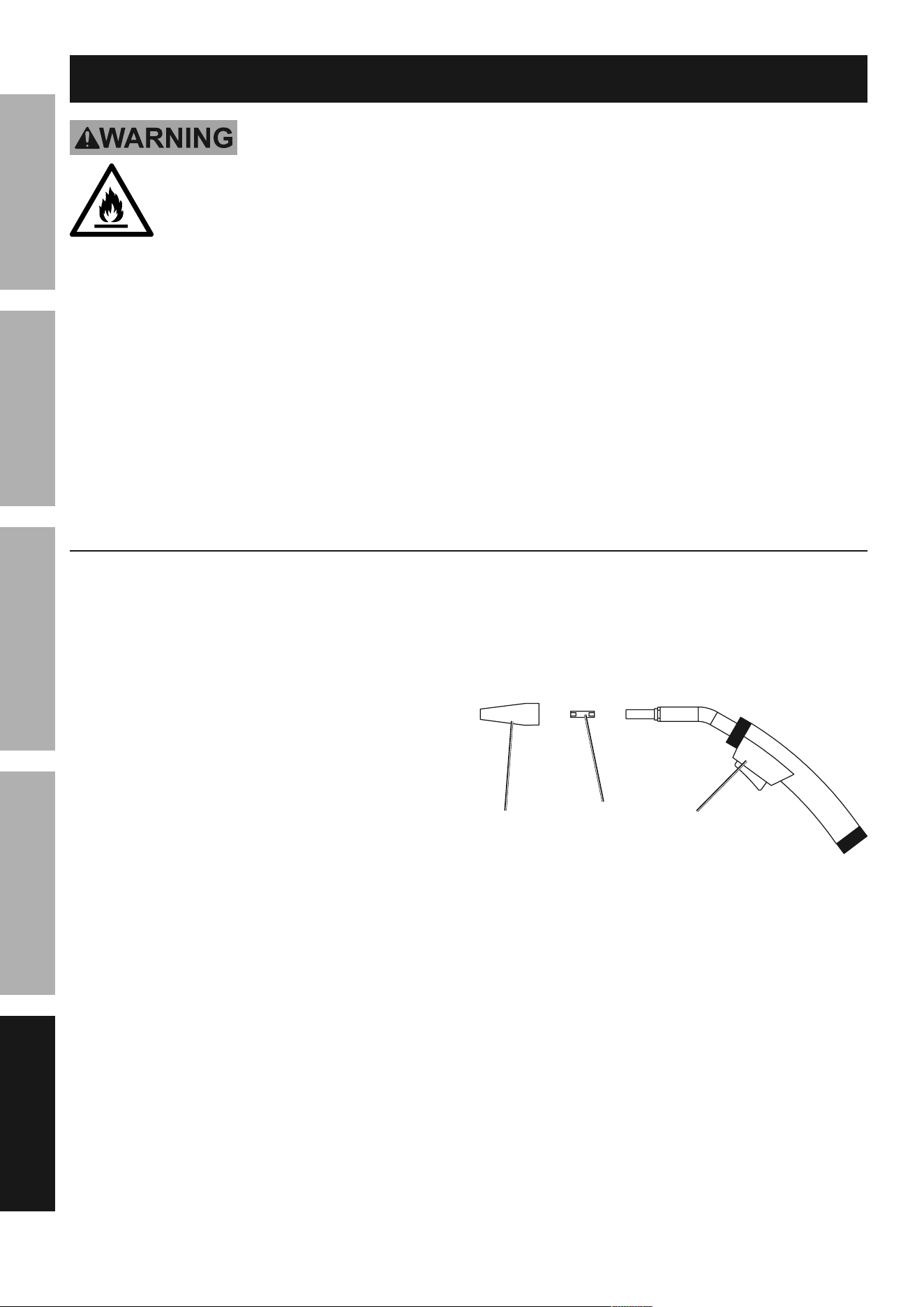
nozzle and contact tip inspection and cleaning
1. Make sure that the entire Flux gun is completely
cool and that the power cord is unplugged
from the electrical outlet before proceeding.
2. Pull the Nozzle to remove it.
3. Scrub the Nozzle clean with a wire brush.
4. Unscrew the Contact Tip counterclockwise
and slide it off the welding wire to remove.
5. Scrub the outside of the Tip clean with a wire brush.
Clean out the inside of the tip with a tip
cleaner (sold separately). Check that the Tip
is the proper type for the wire size used.
6. Examine the shape of the hole at the end of
the Contact Tip. It should be an even circle; it
should not be oblong or have any bulges in it.
7. If any problems are noted, replace the
Contact Tip. Select a new Tip of the
correct size for the welding wire used.
8. Reinstall the Tip and securely
reinstall the Nozzle as well.
contact
tip
nozzle Flux gun
Page 25For technical questions, please call 1-888-380-0318.Item 57861
SaFEtyMaintEnancE BaSic WEldingWElding tipS SEtup
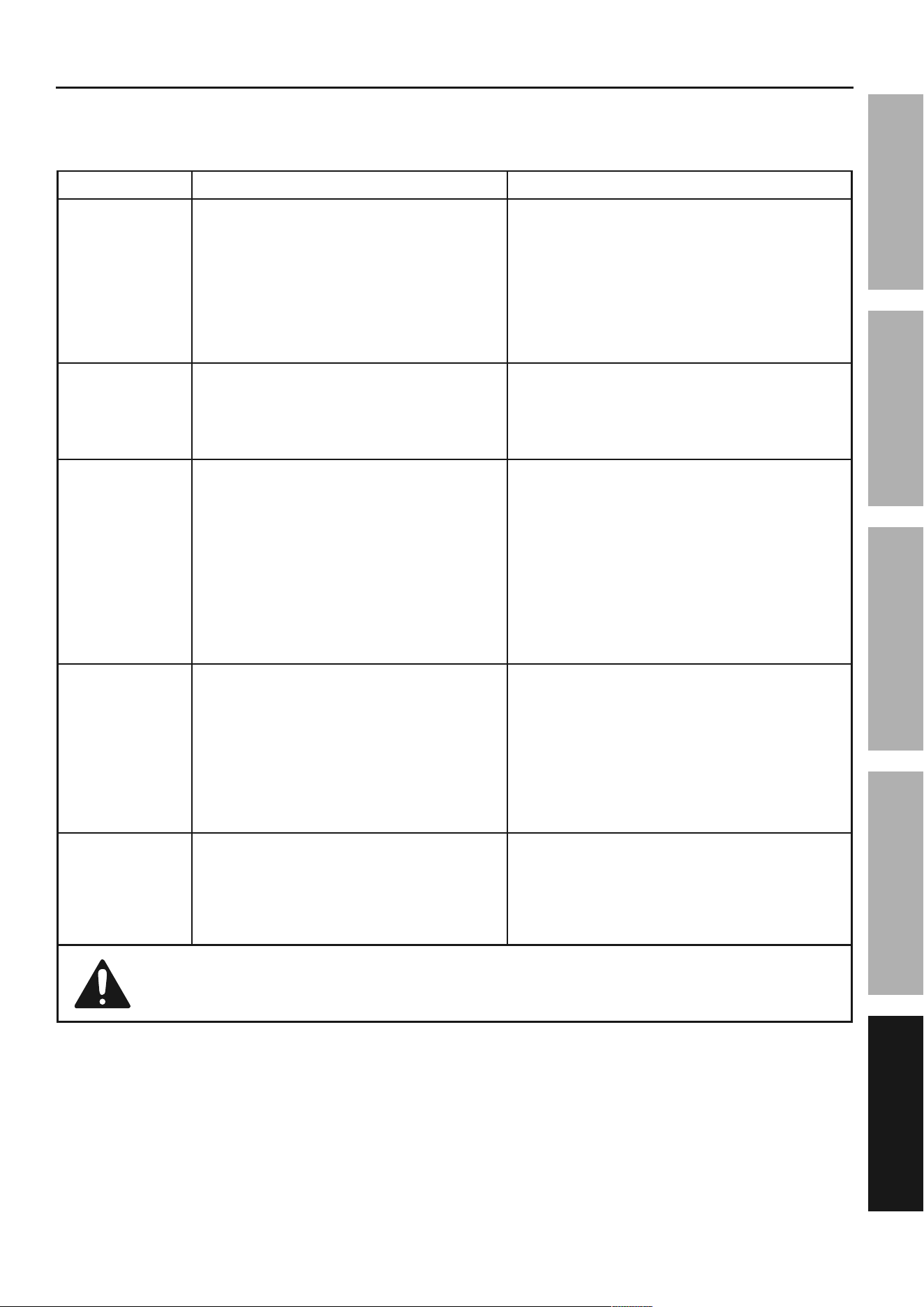
troubleshooting
iMpORtant!
Be cERtain to shut off the Welder, disconnect it from power, and discharge the Flux gun to
ground before adjusting, cleaning, or repairing the unit.
problem possible causes likely Solutions
Wire feed motor
runs but wire does
not feed properly
1. Insufficient wire feed tension.
2. Incorrect wire feed roller size.
3. Damaged Flux Gun, cable, or liner assembly.
4. Feed Tensioner is too tight.
1. Increase wire feed tension properly.
Follow step 16 on page 11.
2. Flip roller to correct size, follow the
Feed Roller instructions on page 9.
3. Have a qualified technician inspect these
parts and replace as necessary.
4. Loosen Feed Tensioner so it applies only
enough pressure to prevent continued
spinning after the Gun Trigger is released.
Wire creates a bird’s
nest during operation
1. Excess wire feed tension.
2. Incorrect Contact Tip size.
3. Damaged liner.
1. Adjust wire feed pressure properly.
Follow step 16 on page 11.
2. Replace with the proper tip for wire used.
3. Have a qualified technician inspect
and repair/replace as necessary.
Wire stops
during welding
1. Gun cable is severely bent and Wire Feed
mechanism cannot feed wire.
2. Gun liner is clogged or worn.
3. Gun liner is too small for
welding wire being used.
4. Wire is tangled on the spool.
5. Wire is not making contact with Feed Rollers.
6. Feed Roller is not making enough contact
with wire or is crushing flux-cored wire.
1. Straighten Gun cable.
2. Check gun liner for obstruction. Replace if necessary.
3. Check that gun liner is correct size for wire.
4. Check wire for cross winding or
tangled spool.
5. Check Feed Rollers and ensure correct
groove for wire diameter is being used.
6. Check Feed Tensioner and ensure it is set properly.
Welding arc
not stable
1. Wire not feeding properly.
2. Incorrect Contact Tip or liner
size or excessive wear.
3. Incorrect wire feed speed.
4. Damaged Flux Gun.
5. Poor connection with workpiece.
1. See first Troubleshooting section above.
2. Replace with the proper tip or liner size for wire used.
3. Adjust wire feed speed to achieve a more stable arc.
4. Have a qualified technician inspect
and repair/replace as necessary.
5. Check the ground clamp connection
to the workpiece and machine.
Ensure the Flux Gun is properly secured.
Weak arc strength
1. Incorrect line voltage.
2. Improper gauge or length of cord.
3. Not enough current.
1. Check the line voltage and, if insufficient, have
a licensed electrician remedy the situation.
2. Do not use an extension cord on this Welder.
Use only one of the supplied power cords for
this Welder or an identical replacement cord.
3. Switch current to proper setting for metal thickness.
Follow all safety precautions whenever diagnosing or servicing the equipment.
Page 26 For technical questions, please call 1-888-380-0318. Item 57861
SaFEty MaintEnancEBaSic WElding WElding tipSSEtup
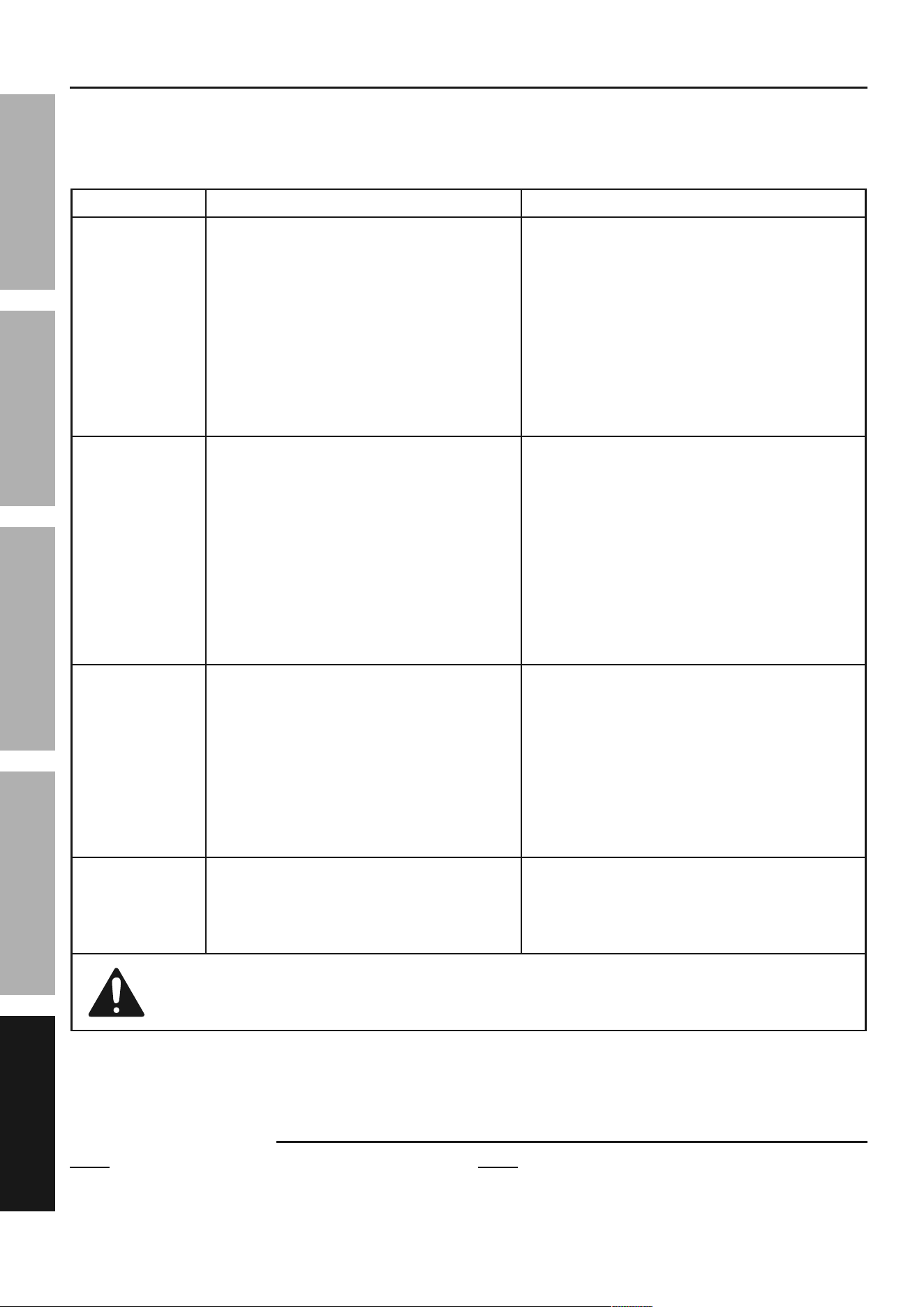
troubleshooting (continued)
iMpORtant!
Be cERtain to shut off the Welder, disconnect it from power, and discharge the Flux gun to
ground before adjusting, cleaning, or repairing the unit.
problem possible causes likely Solutions
When switched on,
Power Indicator
lights but Welder
does not function
1. Tripped thermal protection device.
2. Faulty or improperly connected Trigger.
3. Machine is in low- or
over-voltage protection.
1. If the Alarm Indicator is illuminated without an error
code, Welder has overheated and shut down. Stop
and wait with the Power Switch ON for the Welder
to cool. The Welder automatically returns to service
after cooling off. Reduce duration or frequency of
welding periods to help reduce wear on the Welder.
Refer to Duty Cycle (Duration of Use) on page 15.
2. Ensure the gun connection is properly
seated on machine. Qualified technician
must check and secure/replace Trigger.
3. If the Alarm Light is illuminated, check input voltage
and ensure it falls within the specified range. If input
voltage is correct, turn Welder off and back on.
Power ON Indicator
does not light when
switched on
1. Unit is not connected to outlet properly.
2. Outlet is unpowered.
3. Circuit supplies insufficient input voltage or
amperage.
4. Plug does not have correct rating.
5. Input Power Cord is not seated properly.
1. Verify the voltage at the outlet and
the connection to the outlet.
2. Check circuit breaker/GFCI devices;
if any are tripped, determine and
remedy cause before resetting.
3. Verify that the circuit is designed to supply the
required input voltage and amperage as detailed on
the Specifications table. If the Voltage Input/Thermal
Overload Indicator is illuminated on machine, check
the input voltage to ensure it is within specified range.
4. Make sure installed plug is correct rating.
See Specifications on page 7.
5. Ensure the input Power Cord is fully secured.
Wire feeds, but arc
does not ignite
1. Improper ground connection.
2. Improperly sized Contact Tip.
3. Excessively worn Contact Tip.
4. Dirty Contact Tip.
1. Make certain that the workpiece is contacted
properly by the Ground Clamp and that
the workpiece is properly cleaned near the
ground clamp and the welding location.
2. Verify that Contact Tip is the proper size
for welding wire. If needed, replace
Contact Tip with proper size and type.
3. Check that the hole in the tip is not
deformed or enlarged. If needed, replace
Contact Tip with proper size and type.
4. Properly clean Contact Tip.
Porosity in the
weld metal
1. Dirty workpiece.
2. Gun is being used too far away from workpiece.
3. Dirty welding wire is introducing
contamination into the weld.
1. Clean workpiece down to bare metal.
2. Check CTWD (contact tip to work
distance) for the proper procedure.
3. Make certain that welding wire is clean
and free of rust and residues.
Follow all safety precautions whenever diagnosing or servicing the equipment.
Record Serial number Here:
note: If product has no serial number, record
month and year of purchase instead.
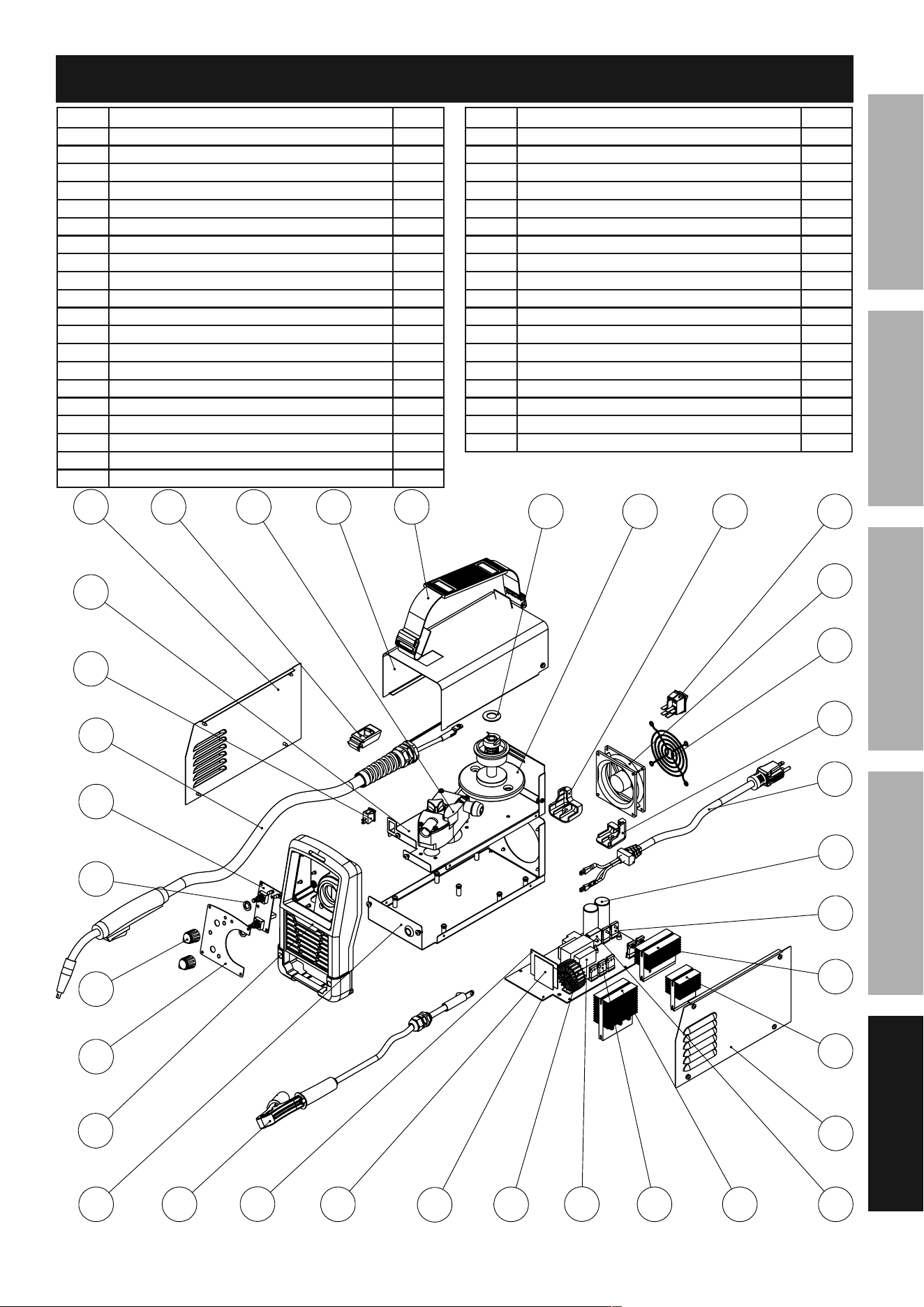
note: Some parts are listed and shown for illustration
purposes only, and are not available individually as
replacement parts. Parts may not be interchangeable.
Specify UPC 193175424419 when ordering parts.
Page 27For technical questions, please call 1-888-380-0318.Item 57861
SaFEtyMaintEnancE BaSic WEldingWElding tipS SEtup
parts list and diagram
part description Qty
1 Strap 1
2 Door Latch 1
3 Door 1
4 Wire Feed Mechanism 1
5 Spool Knob 1
6 Middle Panel 1
7 Power Switch 1
8 Cable Grommet 2
9 Power Cord 1
10 Main Control Board 1
11 Fan 1
12 Fan Cover 1
13 Right Side Panel 1
14 Left Rear Foot 1
15 Right Rear Foot 1
16 Housing 1
part description Qty
17 Front Housing 1
18 Ground Cable 1
19 Flux Gun 1
20 Knob 2
21 Front Panel 1
22 Front PCB 1
23 Torch Cable Support 1
24 Left Panel 1
25 Output Transformer 1
26 Cold Feed Switch 1
27 Contact Tip (0.030", 1 spare) 1
28 Spool Spring (not shown) 1
29 Spool Plate 1
30 Roller Knob 1
31 Wire Roller (0.030/0.035", not shown) 1
32 Nozzle 1

plEaSE REad tHE FOllOWing caREFully
THE MANUFACTURER AND/OR DISTRIBUTOR HAS PROVIDED THE PARTS LIST AND ASSEMBLY DIAGRAM
IN THIS MANUAL AS A REFERENCE TOOL ONLY. NEITHER THE MANUFACTURER OR DISTRIBUTOR
MAKES ANY REPRESENTATION OR WARRANTY OF ANY KIND TO THE BUYER THAT HE OR SHE IS
QUALIFIED TO MAKE ANY REPAIRS TO THE PRODUCT, OR THAT HE OR SHE IS QUALIFIED TO REPLACE
ANY PARTS OF THE PRODUCT. IN FACT, THE MANUFACTURER AND/OR DISTRIBUTOR EXPRESSLY
STATES THAT ALL REPAIRS AND PARTS REPLACEMENTS SHOULD BE UNDERTAKEN BY CERTIFIED AND
LICENSED TECHNICIANS, AND NOT BY THE BUYER. THE BUYER ASSUMES ALL RISK AND LIABILITY
ARISING OUT OF HIS OR HER REPAIRS TO THE ORIGINAL PRODUCT OR REPLACEMENT PARTS
THERETO, OR ARISING OUT OF HIS OR HER INSTALLATION OF REPLACEMENT PARTS THERETO.
limited 90 day Warranty
Harbor Freight Tools Co. makes every effort to assure that its products meet high quality and durability standards,
and warrants to the original purchaser that this product is free from defects in materials and workmanship for the
period of 90 days from the date of purchase. This warranty does not apply to damage due directly or indirectly,
to misuse, abuse, negligence or accidents, repairs or alterations outside our facilities, criminal activity, improper
installation, normal wear and tear, or to lack of maintenance. We shall in no event be liable for death, injuries
to persons or property, or for incidental, contingent, special or consequential damages arising from the use of
our product. Some states do not allow the exclusion or limitation of incidental or consequential damages, so the
above limitation of exclusion may not apply to you. THIS WARRANTY IS EXPRESSLY IN LIEU OF ALL OTHER
WARRANTIES, EXPRESS OR IMPLIED, INCLUDING THE WARRANTIES OF MERCHANTABILITY AND FITNESS.
To take advantage of this warranty, the product or part must be returned to us with transportation charges
prepaid. Proof of purchase date and an explanation of the complaint must accompany the merchandise.
If our inspection verifies the defect, we will either repair or replace the product at our election or we may
elect to refund the purchase price if we cannot readily and quickly provide you with a replacement. We will
return repaired products at our expense, but if we determine there is no defect, or that the defect resulted
from causes not within the scope of our warranty, then you must bear the cost of returning the product.
This warranty gives you specific legal rights and you may also have other rights which vary from state to state.
26677 agoura Road • calabasas, ca 91302 • 1-888-380-0318