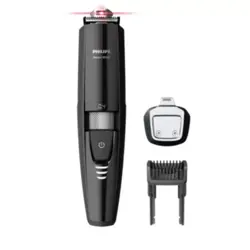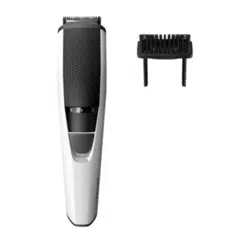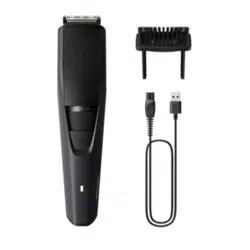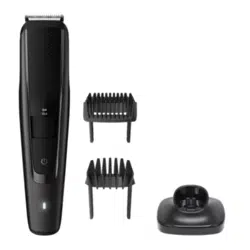
フィリッ プ ス
ヒゲトリマ ー
BT5780/15
BT7670/15
品番
©2025 Koninklijke Philips N.V.
記載されている製品名などの固有名詞は、
Koninklijke Philips N.V.
またはその 他 の
会社の商標または登録商標です。
3000.135.0850.1 (10/25)
①
必 ず お 守りくだ さ い
②
各部の名称
③
充電のしかた
④
基本的な使いかた
⑤
ヒゲの 長さを整 える
⑥
ごく短 くカットす る
⑦
お し ゃ れ ヒ ゲ を つ くる
⑧
顔 ま わりの ヒ ゲ をトリミ ン グ す る
⑨
お手入れ方法
⑩
トリマ ー の 交 換
⑪
保管時の注意
⑫
製品を廃棄するとき
⑬
故障かな
?
と思ったら
⑭
保 証とアフターサ ービス
⑮
仕様
⑯
無料修理規定
Guidance in English
目次
フィリッ プ ス
ヒゲトリマーをお買い 上げ いただき、まことにありがとうご
ざいます。長い間ご愛用いただくために、ご使用前にこの取扱説明書
をよくお読みのうえ、正しくお使いください。また、お読みになった後は、
お使いになる方がいつでも見られるところに必ず保管してください。
●製品のご確認
製品をご確認ください。
•
ここに示した注意事項は、安全に関する重要な内容ですので、必ず
守ってください。
•
誤った取扱いをしたときに想定される内容を「危険」、「警告」、「注意」
とに 区 分 けして い ます。
必 ず お 守 りくだ さ い
1
安全上のご注意
注意
•
健康面で不安のある方や、ペースメーカー等の体内埋込型医療
機器、家庭用医用電気機器を使用している場合は、使用前に
医師又は機器メーカーに確認してください。
•
充電する場合は、定格出力電圧
DC5 V,
定格出力電流
1 A
以
上 で 、タ イ プ プ レ ー ト に
PSE
マークの表示がある安全技術基準
に適 合した
USB
充 電 アダプタで 充 電してください。
• USB
充電アダプタとの接続には変換コネクタや変換ケーブルは
使用しないでください。本体の破損や火災の原因となります。
•
充電ケーブルを抜くときは、電源コード部を持たずに必ず先端の
コネクタ部を持って引き抜いてください。感電やショートして発
火 すること が あります。
•
充電時以外は、
本体から充電ケーブルを抜いてください。けが
ややけど、絶縁劣化による感電・漏電・火災の原因となります。
•
充電ケーブルは付属の専用充電ケーブルを使用してください。
また付属の充電ケーブルで他の製品を充電しないでください。
ショート、異常発熱による火災の原因になります。破損、故障し
た場合は、事故を避けるために必ずフィリップス社製の同型充
電ケーブルをお求めください。
•
電源コネクタ受部にピンやごみを付着させないでください。
感電・ショート・発火の原因になります。
•
ご使用の前にトリマーの刃やコームに異常がないことを確認
してくだ さい 。
•
トリマーの刃は強く押さえないでください。破損して皮 膚を傷つ
けることが あります。
•
本製品や部品を食器洗浄機で洗わないでください。故障や破
損 の 原 因 に なります。
•
本製品を電子レンジや
IH
調理器具の近くに保管しないでくだ
さい。故障や破損の原因になります。
•
衛生上の理由から他の人と共用しないでください。
•
トリマーやコームを乾燥させるときに、タオルやティッシュペー
パーを使用しないでください。トリマーの刃を傷めたり思わぬけ
が をすることが あります。
お買い上げのお客様へ
初めてご使用になる際は、ご使用前に充電してください。
注意
•
ご使用前に
トリマ ー
や コーム に 異 常 が な い ことを 確 認 してくださ い 。
基本的な使いかた
4
※使用後は電源を
O ff
にし、ご使用のたびに掃除をしてください。
保 証とアフターサービス
14
保証書と修理サービスについて(必ずお読みください。)
保証期間 お買い上げ日から
2
年間
対象部分
本 体 、充 電 ケ ー ブ ル( ト リ マ ー 、コ ー ム 、ヘ ア ー コ レ ク タ ー 、充 電 ス タ ン ド 、
ク リ ー ニ ン グ ブ ラ シ 、ポ ー チ を 除 く )
【補修用性能部品の保有期間】
•
補修用性能部品の保有期間は製造打ち切り後
6
年です。
•
性能部品とは、その製品の機能を維持するために必要な部品です。
【ご不明な点や修理に関するご相談は】
•
修理に関するご相談ならびにご不明な点は、フィリップスサポートセンターにお問
い 合 わ せくださ い 。
【修理を依頼されるときは】
•
修理をご依頼される前に、この取扱説明書をよくお読みいただき、再度点検くだ
さい。尚、異常のあるときはご使用を中止し、フィリップスサポートセンターにお問
い 合 わ せ くだ さい 。
【保証期間中は】
•
製品と保証書をご用意いただき、フィリップスサポートセンターにお問い合わせくだ
さい。保証の規定に従って無料修理いたします。
【保証期間が過ぎているときは】
•
修理によって商品の機能が維持できる場合は、補修用性能部品の保有期間内で
あれば、ご希望により有料で修理させていただきます。
【
海外での本製品の保証及びアフターサービスについて
】
•
本製品の保証は海外においても有効です。(同シリーズ製品の取り扱いがある国
に 限ります )
•
日本国以外のフィリップスサービス部門においても保証期間内及び保証期間の経
過後のアフターサービスを受けることができますが、この場合多少日数を要するこ
ともあります。
•
海外にてアフターサービスを受けられる場合は、現地のフィリップスサービス部門に
お問い合わせください。尚、お困りの点がございましたら下記までご連絡ください。
Philips Consumer Lifestyle Service Department P.O.Box 20100 9200 Ca Drachten
The Netherlands http://www.philips.com/support
【お客様の個人情報のお取り扱いについて】
•
お受けしましたお客様の個人情報は、株式会社フィリップス・ジャパンのホームペー
ジ
http://www.philips.co.jp/
に掲載されている「お客様の個人情報の取り扱
いについての当社の方針」に基づき適切に管理いたします。
【保証書・表面左側に付属】
•
保証書は、必ず「お買い上げ日・販売店名」等の記入をお確かめのうえ、販売店から
受け取っていただき内容をよくお読みのあと大切に保管してください。
お買い上げ日
年 月 日
お買い上げ店名
電話番号
(
)
便 利メモ
•
本製品は、ヒゲ、もみあげ、襟足をトリミングするためのもので
す。本取扱説明書に記載されている以外の目的で使用しない
でください 。
•
本体を改造しないでください。また、分解したり修理をしないで
ください。 火 災 、感 電 、け が の 原 因となります。修 理 はフィリップ
スサ ポ ートセ ン ター に お 問 い 合 わ せ くだ さ い 。
•
本体が異常に熱くなったり、異臭がしたり、充電時間が異常に
長い等の異常・故障時には、直ちに使用を中止してください。
そのまま使用すると火 災・感電・けが に至るおそれがあります。
• USB
コネクタ部 は 確 実に
USB
充 電 アダプタに 差し 込 んでくだ さ
い。スムーズに差し込みができない場 合は 無 理に押し込もうと
しないでください。火災や感電の原因になります。
•
水場や浴室での充電は絶対にしないでください。ショートや感
電 の 原 因 に なります。
•
電池が液漏れした場合は、液が目や皮膚に触れないように注
意してください。万が一目に入った時は、こすらずに水道水で
十分洗浄し医師の診察を受けてください。皮膚や衣類に付い
た場合は水道水で十分洗い流してください。
警告
部 品 の取り替 え
トリマーの刃やコームが破損・摩耗した場合は、必ずフィリップス社製の同型部
品とお取り替えください。
トリマ ー の 交 換
10
1.
トリマ ー の 刃
の中央部に親指を当てて刃
を矢印の方向に押して、
トリマ ー
を取り
外します。
2.
新しいトリマーの突起を本体の溝に合
わ せ( 図 ①) 、ト リ マ ー を 本 体 に 押 し 込 ん
で 取 り 付 け ま す( 図 ②)。
1.
トリミ ン グ の 準 備
トリミングを始める前に、必ず目の細かいクシでヒゲの流れを整えてください。
ヒゲの 長さを 整 える
5
ポイント
〈初めてご使用になる時は〉
•
初 め てトリミングをす るとき は 慎 重 に 行 ってくだ さ い 。ヒ ゲトリマー は ゆ っく
り と 、滑 ら か に 優 し く 動 か す よ う に し ま し ょ う 。
•
使い始めは最も長い設定である
20 mm
からご使用されることをおすすめ
します。
•
ヒゲはさまざまな 方 向 には えて います ので 、ヒゲの 流 れ に 逆 らってさまざま
な方 向にヒゲトリマーを動かしてください。
•
肌やヒゲが乾いている状態でのご使用をおすすめします。
1.
上 手 にトリミン グ す る に は
上 手 にトリミングするには 、お 好 み の 長さに設 定したあと、ヒゲの流れ
に逆らってヒゲトリマー本体を動かします。コーム表面が常に肌に触れ
て い る ように してくだ さ い 。
2.
ご使用後は毎回必ずお手入れをしてください
お手入れのしかたは「⑨お手入れ方法」を参照ください。
4.
電源の
On/Off
電源ボタンを一度押すと
On
、もう一度押すと
O ff
に なります。
OffOn
ごく 短 くカ ットす る
6
1.
ズームロック長さ調節ホイールを回して、
コーム の 長 さを
0.4 mm
に設定して使用
します。
ごく 短 くカ ットす る
あごヒゲや口ヒゲ、もみあげ、襟足などをごく短くカットしたい場 合は 、コームを外
して ヒ ゲトリマ ー を 使 い ま す。
注意
•
コームを外して使用する時は、トリマーの刃にふれた全ての毛がカッ
トされますのでご注意ください。
•
コームの取り外しは、必ずコームの両サイドを持って引くようにして
ください。
ポイント
•
トリマ ー の 刃
の平らな部分を肌にあてながら動かすと滑らかに動かせます。
•
輪郭部分をカットする場合は
トリマ ー の 刃
を肌に垂直にあてながら上下に
動かしてください。
2.
コームを取り外します。
(ヘアーコレクターの装 着 はオプションです。)
3.
電源を
On
にします。
On
4.
ヒ ゲトリマ ーを 軽 くカットし た い 部 分 に
あ て 、丁 寧 に 動 か し て い き ま す 。
※改良の為、仕様を予告なく変更することがあります。
※
1 BT7670/15
のみ付属 ※
2 BT5780/15
のみ付属
ヘアーコレクター
充 電 スタンド
クリー ニン グ
ブラシ
2 .
トリマ ー の 刃
は 、薄 く 仕 上 げ て あ り ま す の で 、刃 部 を 強 く 押 さ え た り 、硬 い も の
に当てないよう、ていねいに扱ってください。
5 .
直射日光の当たる場所には保管しないでください。夏場、車の中に放置しな
いでください 。
4 .
切 れ 味 が 衰 えて きたり、
トリマ ー の 刃
やコームなどの部品が破損した場合
は、使用せず必ず新しい同型部品に交換してください。
6 .
本 製 品 は 、使 用 の た び に 、掃 除 を し て く だ さ い 。
7 .
本体は防水加工をしておりますが、水や液体の中に浸けないでください。
3 .
トリマ ー の 刃
の清掃やコームの着脱は必ず電源を
Off
にして か ら 行ってく
ださい。
使用上のご注意
1 .
本体や部品のお手入れは、水またはぬるま湯で行ってください。
60
℃以上の
熱湯では洗浄しないでください。研磨パッドや研磨剤を含んだ洗剤やエアーダス
ター及びぺトロールやアセトンなどの刺激性の強い液体は使用しないでください。
Certi� cate of purchase
この保証書は、「無料修理規定」記載内容で無料修理を行うことをお約束するも
のです。お買い上げの日から下記期間中に故障が発生した場合は、フィリップス
サポートセンターにお問い合わせください。お客様にご記入いただいた個人情
報(保証書の控え)は、株式会社フィリップス・ジャパンのホームページ
http://
www.philips.co.jp/
に掲載されている「お客様の個人情報の取り扱いについ
ての当社の方針」に基づき適切に管理いたします。
•
保証書は再発行しませんので、大切に保管してください。
•
ご販売店様へ
この保証書はお客様へのアフターサービスの実施と責任を明確に
するものです。贈答品、記念品の場合も含めて必ず記入捺印してお客様にお渡
しくだ さ い 。
品名ヒゲトリマ ー
品番
BT5780/15
BT7670/15
保証期間 お買い上げ日より
2
年
対象部分
本体、充電ケーブル(トリマー、コーム、ヘアーコレクター、充電
ス タ ン ド 、ク リ ー ニ ン グ ブ ラ シ 、ポ ー チ を 除 く )
お買い上げ日
年 月 日
お客様
ご住所
〒
ご芳名
電話番号
販売店
販売店名・住所・電話番号
取扱説明書
フィリップ ス
ヒゲトリマ ー
保証書
この印刷物は再生紙を使用しております。
フィリップスでは、製品をより快適にご
使 用 い た だくた め に
製品登録をおすすめしております。
MyPhilips
では製品の保証書や購入
証明書の写真も保管でき、
万が一購入証明書を紛失された場合
にも安 心 です。
http://www.philips.co.jp/myphilips-about
URL
MyPhilips
登録のご案内
製品の使用方法や修理に関するお問い合わせ
Web
からの
お問い合わせ
このような症状の時は、故障や事故防止のため、電源を
O ff
に し 、充 電 ア ダ プ タ を コ ン セ
ントか ら 外 して 、必 ずフィリップスサ ポ ートセ ン ター に お 問 い 合 わ せください 。
ご使用の時、このような症状はありませんか?
•
本 体 にさわると時 々電 気 を 感じる。
•
こげくさい臭い がする。
•
充 電 ケ ーブルを動 かすと通 電したり、しな かったりする。
•
その他の異常、故障がある。
仕様
15
無料修理規定
16
1.
取扱説明書、本体貼付ラベル等の注意書に従った正常な使用状態で保
証期間内に故障した場合には、無料修理します。
2.
保証期間内に故障して無料修理をお受けになる場合には、フィリップス
サ ポ ート セン ター に お 問 い 合 わ せくだ さ い 。
3.
ご贈答品の修理に関するご相談は、フィリップスサポートセンターに
お 問 い 合 わ せください 。
4.
保証期間内でも次の場合には有料修理になります。
○
1
使用上の誤り及び不当な修理や改造による故障及び損傷。
○
2
お買い上げ後の輸送、移動、落下等による故障及び損傷。
○
3
火災、地震、水害、落雷、その他の天災地変、公害や異常電圧による故障及び損傷。
○
4
一般家庭以外(例えば、業務用の長時間使用)に使用された場合の故障及び損傷。
○
5
保証書の提示がない場合。
○
6
保証書にお買い上げ年月日、お客様名、販売店名の記入のない場合、或は字句を書
き換えられた場合。
※保証書は、本書に明示した条件のもとにおいて無料修理をお約束する
ものです。従って保証書を発行している者(保証責任者)、及びそれ以外
の事業者に対するお客様の法律上の権利を制限するものではありませ
ん。
保証期間経過後の修理についてご不明の場合は、フィリップスサポートセ
ンター に お 問 い 合 わ せください 。
※保証期間経過後の修理・補修用性能部品の保有期間について詳しく
は取扱説明書の保証とアフターサービスの項目をご覧ください。
※お客様にご記入いただいた個人情報(保証書の控え)は保証期間内
のサービス活動及びその後の安全点検活動のために利用させていた
だく場合がございます。ご了承ください。また個人情報は、株式会社
フ ィリ ッ プ ス・ ジ ャ パ ン の ホ ー ム ペ ー ジ
http://www.philips.co.jp/
に掲載されている「お客様の個人情報の取り扱いについての当社の方
針 」に 基 づ き適切に管理いたします。
【無料修理規定】
※改良の為、仕様を予告なく変更することがあります。
株式会社
フィリップ ス ・ ジ ャ パ ン
〒
106-0041
東京都港区麻布台
1-3-1
麻布台ヒルズ森
JP
タワー
15
階
品番
BT5780/15 BT7670/15
ハンドル 品 番
BT5780 BT7670
本体寸法
( 高 さ×幅×奥 行 )
175
×
47
×
45 mm
本体質量 約
178 g
(コーム含まず)
電源方式 充電式
定格入力
DC5 V 1 A
充電時間 約1時 間
使用時間 約
100
分 約
120
分
使用充電池 リ チ ウ ム イオ ン 充 電 池(
Li-ion
)
•
本製品は充電式電池を内蔵しています。本製品の充電、使用、保
管は
10
℃から
35
℃の環境で行ってください。火中投入、加熱、
高温での充電・使用・放置をしないでください。発熱・発火・
破裂の原因になります。また電池の寿命にも影響を及ぼします。
危険
○絵表示の例
記号は、してはいけない「禁止」を示します。図の中や近くに具体的
な禁止内容(左図の場合は分解禁止)を示します。
記号は、必ずしていただく「強制」を示します。図の中や近くに具体
的な強制内容(左図の場合は電源プラグをコンセントから抜くこと)
を示します。
記号は、「危険、警告、注意」を示します。図の中や近くに具体的な注
意内容(左図の場合は高温注意)を示します。
人が死亡または重傷を負う可能性が大きい内容。
危険
人が傷害を負う可能性および物的損害のみの発生が想定
される内容。
注意
人が死亡または重傷を負う可能性が想定される内容。
警告
○絵表示について
以上の点検により、正常な状態に戻らない場合は、
フィリッ プ ス サ ポ ート セ ン タ ー に お 問 い 合 わ せ くだ さ い 。
故 障 か な?と 思 っ た ら
13
故障かな?と思ったら、お調べください。
充電しても使用時間が極端に短い
•
トリマーの刃を掃除してください。
•
本製品が完全に止まるまで作動させてから、もう一度充電してくだ
さい。それでも改善されないときは、充電池の寿命です。
だんだん切れ味が悪くなった
•
トリマーの刃が汚れていないか確認してください。
•
トリマーの刃
が損傷または磨耗していないか確認してください。
破損または磨耗しているときは、
トリマー
を交換してください。
•
トリマーの刃に長い毛がからまっていないか確認してください
。
電源ボタンを押しても作動しない
•
充電がされていない場合は充電をしてください。
•
トリマーが動かなくなるほど汚れている場合はトリマーの刃をお
手入れしてください。
•
トリマーの刃が正しく取り付けられているか確認してください。
•
トリマーの刃が破損している場合は交換してください。
異常な音がする
•
トリマーが正しく取り付けられているか確認してください。
•
コームが正しく取り付けられているか確認してください。問題がある
場合はコームをいったん外してから、再度取り付けてください。
•
ト
リマーの刃が損傷または磨耗していないか確認してください。
損傷または磨耗しているときは、
トリマーを交換してください
。
充電できない
•
電源が
O ff
の状態になっているか確認してください。充電する際には
電源を必ず
O ff
にしてから充電してください。
•
本体の電源コネクタ受部に充電ケーブルがきちんと差し込まれてい
るか確認してください。
•
充電ケーブルが断線している場合は新しい充電ケーブルが必要
です。フィリップスサポートセンターにお問い合わせください。
•
使用している
USB
充電アダプタが適合品か確認してください。
•
充電ケーブルの接続前にコネクタ部が完全に乾いていること
を確認してください。濡れた状態で差し込むとショート・感電
の 原 因 に なります。
•
お手入れの際は必ず本体から充電ケーブルを外してください。
感電やけがをすることがあります。
•
濡れた手で充電ケーブルを抜き差ししないでください。感電や
け が をすることが あります。
•
充 電 ケ ーブルを無 理 に 曲 げ たり、 引 っ 張ったり、 ねじったり、 た
ばねたり、重い物を載せたり、挟み込んだり、加工したりしな
いでください。充電ケーブルが破損し、火災・感電の原因とな
ります。
•
トリマーの刃やコームなどの部品が破損または故障した場合
は、本製品を使用しないでください。けがの原因になります。交
換の際には必ずフィリップス社製の同型部品にお取り替えくだ
さい。
•
乳幼児の手の届くところに本製品を置かないでください。またお
子様が本製品で遊ぶことがないように監視してください。
•
補助を必要とする人(子ども含む)に使用させないでください。ま
た、お体の不自由な人だけでは使 用しないでください。
警告
保管時の注意
11
製品を保管する際には、本体及び部品を完全に自然乾燥させてから、トリマーに
コ ー ム を 取 り 付 け 、室 温
10
℃~
35
℃の場所で保管してください。ポーチは製品
の収納保管にお役立てください。
※保管時に充電ケーブルを本体に巻きつけないでください。
※直射日光の当たる場所には保管しないでください。
※夏場、車の中には放置しないでください。
2.
ヘアーコレクターの取り外しと取り付け
本体には最初からヘアーコレクターが取り付けられています。ヘアーコレ
クターを取り外 すに は 、指で ヘアーコレクターが 落ちな いように 支 えな が
ら、ヘアーコレクター側 面 にある突 起 部を親 指 で 押してヘアーコレクター
を取り外します。
ヘアーコレクターを取り付けるには、本体側面にある溝にヘアーコレク
ター内 側にあるツメを引っ掛 けてヘアーコレクターを本 体に 取り付けます。
※
ヘアーコレクターとコームを一緒に使用する場合は、最初にヘアーコレクターを本体
に取り付け、次にコームを本体に取り付けます。取り外すには、最初にコームを本体
から取り外し、次にヘアーコレクターを本体から取り外します。
本体
トリマ ー コーム
0.4 mm
~
10 mm 10.4 mm
~
20 mm
エ クストラ ワ イド
カットエ レメント
フルメタル
細 部トリマ ー
※
1
※
1
フェードコ ー ム
※
1
※
1
1 mm
~
5 mm 5 mm
~
1 mm
充 電 ケ ーブル ポーチ
本体
/
充電ケーブル
/
充電スタンド
トリマー
コーム ポーチ
ヘアーコレクター
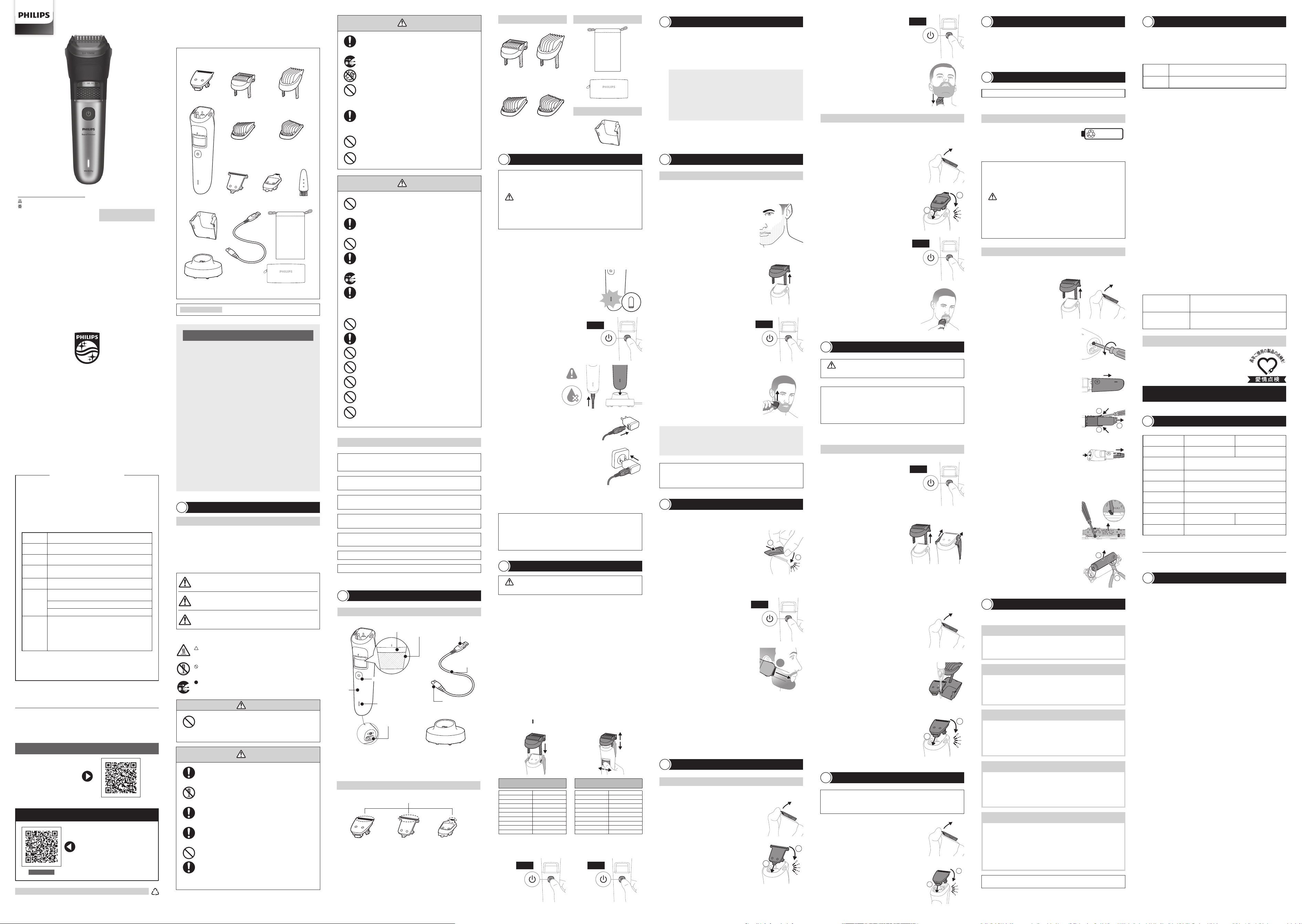
各部の名称
2
※
USB
充電アダプタは付属しておりません。充電の際は、
USB
充電アダプタ(定格出力電圧
DC5 V
、定格出力電流
1 A
以 上 で 、タ イ プ プ レ ー ト に
PSE
マークの表示がある安全技術基準
に適 合した
USB
充電アダプタ)をご準備ください。
※
1 BT7670/15
のみ付属
※
1 BT7670/15
のみ付属
※
2 BT5780/15
のみ付属
コーム
0.4 mm
~
10 mm 10.4 mm
~
20 mm
電 源 コード 部
電 源 コネクタ部
充 電 ケ ーブル
USB
コネクタ部
(
USB Type-A
)
充 電 スタンド
フェードコ ー ム
1 mm
~
5 mm
※
1
5 mm
~
1 mm
※
1
本体
充電表示
ランプ
電 源 ボタン
電源
コネクタ受 部
エ クストラ ワ イド
カットエ レメント
トリマ ー
刃
※
1
フルメタル 細 部トリマ ー
※
1
3.
長さの設定
本体上部のガイドの溝に沿ってコームを本体に取り付けます。ズーム
ロック長さ調節ホイールを回して、ヒゲの長さを設定します。ヒゲの長さ
は下の表の通りです。長さ調節目盛の設定については、長さ調節目盛
の 上 に あ る「
」に 、目 盛 を 合 わ せ て く だ さ い 。
10.4 mm
10.6 mm
10.8 mm
11 mm
11.2 mm
11.4 mm
11.6 mm
11.8 mm
12 mm
12.5 mm
13 mm
13.5 mm
14 mm
14.5 mm
15 mm
16 mm
17 mm
18 mm
19 mm
20 mm
ヒゲの長さ
(コーム
10.4
~
20 mm
)
0.4 mm
0.6 mm
0.8 mm
1 mm
1.2 mm
1.4 mm
1.6 mm
1.8 mm
2 mm
2.5 mm
3 mm
3.5 mm
4 mm
4.5 mm
5 mm
6 mm
7 mm
8 mm
9 mm
10 mm
ヒゲの長さ
(コーム
0.4
~
10 mm
)
4.
トリマ ー の 刃
の中央部に親指を当てて刃
を矢印の方向に押して、トリマーを取り
外します。
5.
取り 外 し たトリマ ーを 付 属 の クリー ニ ン
グ ブ ラ シ で 掃 除 す る か 、水 で す す ぎ ま す 。
警告
•
お手入れの際は必ず 本 体から充電ケーブルを外してください。感 電 やけが
をすることが あります。
注意
•
本体は水洗いできますが、水中に浸けないでください。
•
本製品や部品を食器洗浄機で洗わないでください。
•
本 製 品 に 潤 滑 剤 を 使 う必 要 は ありま せ ん 。
•
研 磨 パッドや 研 磨 剤を含んだ 洗 剤 、またエアーダスターは 使 用しないでください 。
•
トリマーの刃やコームを乾 燥させる時に、タオルやティッシュペーパーを使
用しないでください。刃を傷めたり思わぬけがをすることがあります。
本体のお手入れ方法
※
詰まりや損傷を防ぎ切れ味を保つため、使用後は必ずトリマーの刃とコームを掃除してください。
お手入れ方法
9
1.
掃除をする前に、電源が
O ff
になっ
て い る こ と 、ま た 充 電 ケ ー ブ ル に 接
続されていないことを確かめてくだ
さい。
Off
3.
ハンドル部は水洗いするか、もしくは乾いた布か湿らせた布で、ハンドル
部をふきます。
2.
コーム・ヘアーコレクターを取り外し、
付 属のクリーニングブラシで掃 除します。
(ヘアーコレクターを取り外す 際 には 、ヘ
アーコレクターに溜 まったヒゲ が、飛び
散 ら な い よ う に 、ゴ ミ 箱 の 上 で ヘ ア ー コ
レクターを取り外してください 。)
充電池の取り外し方
•
電源を
On
にして、完全に動作しなくなるまで充電池を放電させてから、行って
くだ さ
い。
製品を廃棄するとき
12
注意
•
製品を廃棄するとき以外は、絶対に本体を分解しないでください。
•
安全上の理由から、一度分解した本体は絶対に再使用しないでください。
•
充電池は完全に放電してから、取り外してください。また、ショートの発
生を防ぐために、作業時にはコインやヘアピン、指輪等の金属製の物体を
充電池に近づけないようにしてください。
•
作業を行う際は、目、手、指などにけがのないよう注意してください。ま
た、必ず手・本体が乾いた状態で作業を行ってください。
•
本体内部の金具は鋭いので、ご注意ください。
•
電池が液漏れした場合は、液が目や皮膚に触れないように注意してく
ださい。万が一目に入った時は、こすらずに水道水で十分洗浄し医師
の診察を受けてください。皮膚や衣服に付いた場合は水道水で十分洗
い流してください。
•
取り外した充電池は、ショートしないように両端子をテープで覆って
ください。
リチウムイオン充電池のリサイクルについて
※お客様による充電池の修理交換はできません。
本製品はリチウムイオン充電池を使用しています。
リチウムイオン充電池はリサイクル可能な貴重な
資源です。ご使用済みの製品の廃棄の際は、リチ
ウムイオン充電池を取り出してください。取り出したリチウムイオン充電池は
各自治体の廃棄方法に従い廃棄するか、リサイクル協力店にお持ちください。
Li-ion
2.
ドライバ ー を 使 って 本 体 底 部 の ね じを 外
します。
5.
本体 からモーターユニットを引き出し、
モーターユニットからバッテリーユニット
カバーを取り外します。
8.
ペンチなどの工具を使用して基板と充電
池の接続部分を切り離して充電池を取り
外します。
1
2
1
2
3
4.
⊖ドライバ ーを 使 って
2
つ のスナップフッ
ク を 開 い て 、本 体 か ら バ ッ テ リ ー ユ ニ ッ ト
カバーを引き出します。
製品を廃棄する際は、リチウムイオン充電池を取り出し、充電池を取り外した後
の製品については、各自治体の廃棄方法に従い廃棄してください。
3.
本 体 下 部 のパーツを取り外します。
1.
コ ー ム とトリマ ー を 取 り 外 し ま す 。
フルメタル 細 部トリマ ー
※
1
で 顔まわりの 輪 郭を整 える
4.
フルメタル細部トリマーを皮膚に対して
垂直に持ち、上方または下方に動かし
ます。
※
1 BT7670/15
のみ付属
ヘアーコレクターを取り付けずにフルメタル細 部トリマーを使 用 すると、顔まわり
の輪郭に細いラインや輪郭を
0.4 mm
の 長さで 作ることができます。
エ ク スト ラ ワ イドカ ットエ レ メ ント
※
1
で 顔まわりの 輪 郭を整 える
顔 ま わ り の ヒ ゲ をトリミン グ す る
8
3.
トリマーの刃が皮膚に垂直になるように、エクストラワイドカットエレメン
トをヒゲの 端 に 置きます。
1.
本 体 か らトリマ ー を 取り外 します。
(ヘアーコレクターが 本 体 についている
場 合 は 取 り 外 し て く だ さ い 。)
2.
エ ク ストラ ワ イド カ ット エ レメント を 本 体
に取り付 けます。
1
2
ヘアーコレクターを取り付け ず にエクストラワイドカットエレメントを使 用 すると、
顔まわりの輪 郭 を
0.4 mm
の 長さで 作ることができます。
4.
電源を
On
にします。
On
フェードコ ー ム
※
1
を使 用 することで、ヒゲの 長 さにグラデーションを付 けることが
で き ま す 。製 品 に は
2
つのフェードコームが付属しています。各コームで顔の片側
のヒゲを整えることができます。
お し ゃ れ ヒ ゲ を つ くる
7
5.
もう片方のフェードコームを装着し、顔の反対側をフェードヒゲスタイル
に整えます。
1.
フェードコ ー ムを
1
つ 、ト リ マ ー に 取 り 付
けます。
(ヘアーコレクターが 本 体 についている
場 合 は 、取 り 外 し て く だ さ い 。)
1
2
2.
耳 の 近 くにトリマ ー を 置 きます。
コームの短い歯が高い位置に、長い歯が低い位置になるようにします。
6.
トリマーとコームの 間 に毛 がたまら ない ように 、ストロークの合 間 に 毛 を
軽く振り落とします。
※
1 BT7670/15
のみ付属
3.
電源を
On
にします。
On
3.
電源を
On
にします。
On
1.
本 体 か らトリマ ー を 取り外 します。
(ヘアーコレクターが 本 体 についている
場 合 は 取 り 外 し て く だ さ い 。)
2.
フルメタル細部トリマーを本体に取り付
けます。
1
2
4.
トリマーを耳から口角まで一直線に
1
回 動 かし、フェードヒゲスタイル にします。
1
×
※
1 BT7670/15
のみ付属
5.
ゆっくりと上向きまたは下向きに動か
し 、顔 ま わ り の 輪 郭 を 整 え ま す 。
2
1
•
長さ調節目盛
ズームロック
長 さ 調 節 ホ イール
7.
⊖ドライバーを使ってスナップを開いて、
接続部を外し、バッテリーを含むプリント
基 板 を取り外します。
※
充電完了後、約
1
分経過すると充電表示ランプが消えます。
6.
充電中は、充電表示ランプがゆっくりと点滅します。
充電が完了したら、充電表示ランプが点灯します。
1.
充電表示ランプがオレンジ色に点滅し
たら、充電が少なくなっていますので、
本製品を充電する必要があります。
充 電 のしかた
3
※
本製品はリチウムイオン充電池を使用しているため、ご使用のたびに充電をしても充電池
の寿命に影響ありません。
※
充 電 し な が らトリミング は で きませ ん 。
注意
•
定格出力電圧
DC5 V
、定格出力電流
1 A
以 上 で 、タ イ プ プ レ ー ト に
PSE
マークの表示がある安全技術基準に適合した
USB
充 電アダプタ
で 充 電 してくださ い 。
• USB
充電アダプタとの接続には変換コネクタや変換ケーブルは使用
しな い でくださ い 。
•
水場や浴室で充電しないでください。
•
接続の前に各コネクタ部が完全に乾いていることを確認してください。
•
濡れた手で充電ケーブルを抜き差ししないでください。
•
長期間使用しない場合は、充電池が過放電や液漏れして使えなく
なること が あります。
3
~
4
カ月に一度は充電してください。
初めてお使いになるときや、長い間ご使用にならなかったとき、または充電残量
が少なくなったときは、ご使用前に充電してください。
4.
充 電 ケーブル の
USB
コネクタ部 を
USB
充 電 アダプタに 差 し 込 み ます。
※
USB
充電アダプタは同梱されていません。
5.
ご家庭のコンセントに
USB
充 電 アダプタ
の電源プラグ部を差し込みます。
クイッ ク チ ャ ー ジ
充電残量が
0
の状態で充電すると、約
5
分 間 でトリミン グ
1
回分が急速充電され
ます。
※クイックチャージ中は充電表示ランプが高速点滅します。
※
クイックチャージが完了すると通常の充電が行われます。その際、充電表示
ランプがゆっくり点 滅します。
2.
充電する際には、電源を必ず
Off
にして
くださ い 。
※
On
の状態では充電できません。
Off
3.
充電ケーブルの電源コネ
クタ部を本体の電源コネ
クタ受 部または 充 電スタ
ンド
に差し込 みます。
6.
掃除後、水気をよくきって、完全に自然
乾燥させてから、トリマーの突起を本体
の 溝 に 合 わ せ( 図 ①) 、ト リ マ ー を 本 体 に
押 し 込 ん で 取 り 付 け ま す( 図 ②)。
1
2
1
2
※
1
※
1
※
2
※
2
6.
電 源 コ ネクタ 受 部 を押 してバッテリー ユニットカ バ ー から バ ッテリー ユ
ニットを 取り 出 し ます。
※画像の製品は
BT7670/15
です。
受付時間
9
:
00
~
18
:
00
(年末年始除く)
0120
(
944
)
859
フィリップスサポートセンター
Beard trimmer
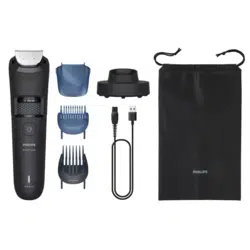
BT5780/15
BT7670/15
ENGLISH
Important safety information
Read this important information carefully before you
use the appliance and its accessories and save it for
future reference. The accessories supplied may vary for
dierent products.
Warning
- To charge the product, only use a certied safety
extra low voltage (SELV) supply unit with output
rating 5 V, ≥ 1 A. For safe charging in a moist
environment (e.g. in a bathroom), only use an IPX4
(splash-proof) supply unit. A suitable supply unit
(e.g. Philips HQ87) is available via www.philips.com/
support. If you need support nding the correct USB
supply unit, contact the Consumer Care Center in
your country (see the international warranty leaet
for contact details). Using a non-certied supply unit
may cause hazards or serious injuries.
- Keep the USB cable and the USB supply unit dry (Fig.
2).
- This appliance is waterproof (Fig. 3). It is suitable for
use in the bath or shower and for cleaning under the
tap. For safety reasons, the appliance can therefore
only be used without cord.
- This appliance can be used by children aged from 8
years and above and persons with reduced physical,
sensory or mental capabilities or lack of experience
and knowledge if they have been given supervision
or instruction concerning use of the appliance in
a safe way and understand the hazards involved.
Children shall not play with the appliance. Cleaning
and user maintenance shall not be made by children
without supervision.
- Do not modify the supply unit.
- Do not use the supply unit in or near wall sockets
that contain an electric air freshener to prevent
irreparable damage to the supply unit.
- Do not use a damaged appliance. Replace damaged
parts with new Philips parts.
- Because of hygiene, only one person should use the
appliance.
- Unplug the appliance before cleaning it with water.
- Only use cold or lukewarm water to clean the
appliance.
- Never use compressed air, scouring pads, abrasive
cleaning agents or aggressive liquids to clean the
appliance.
- Water may drip from the socket at the bottom of the
appliance when you rinse it. This is normal and not
dangerous because all electronics are enclosed in a
sealed power unit inside the appliance.
- Only use original Philips accessories or consumables.
- Charge, use and store the product at a temperature
between 10°C and 35°C.
- Keep product and batteries away from re and
do not expose them to direct sunlight or high
temperatures.
- If the product becomes abnormally hot or smelly,
changes color or if charging takes longer than usual,
stop using and charging the product and contact
Philips.
- Do not place products and their batteries in
microwave ovens or on induction cookers.
- Do not open, modify, pierce, damage or dismantle
the product or battery to prevent batteries
from heating up or releasing toxic or hazardous
substances. Do not short-circuit, overcharge or
reverse charge batteries.
- If batteries are damaged or leaking, avoid contact
with the skin or eyes. If this occurs, immediately rinse
well with water and seek medical care.
Electromagnetic elds (EMF)
This Philips appliance complies with all applicable
standards and regulations regarding exposure to
electromagnetic elds.
Introduction
Congratulations on your purchase and welcome to
Philips.
To fully benet from the support that Philips oers,
register your product at
www.philips.com/welcome.
You can nd the model number on the back of your
product.
The full model number (e.g. BT1234/56) is located on
the bottom of the packaging, your receipt or order
conrmation.
BT7670
Model
BTXXXX
10.4 - 20 mm
0.4 mm - 10 mm
1
2
3
4
5
6
7
10
9
15
8
11
12
13 14
1 mm - 5 mm 5 mm - 1 mm
BT7670
1
English
2
3
4
5
6
7
8
9
10
1
2
1
2
11
12
13
1
×
1
2
3
1
2
14
15
16
17
18
19
22
25
28
20
23
26
21
24
27
IMPORTANT TO KNOW
- Charge the appliance fully before you use it for the
rst time.
- This appliance is waterproof (Fig. 3). It is suitable for
use in the bath or shower and for cleaning under
the tap.
- For safety reasons, the appliance can only be used
without cord.
- This appliance is intended for trimming facial hair to
the desired length. Do not use the appliance to trim
body or scalp hair.
- You can use the hair collector to catch hair while
trimming. Use the hair collector with the cutting
element alone or with an adjustable comb attached
(Fig. 4).
- Switch o the appliance before removing or
attaching attachments and before cleaning.
- Clean the appliance after each use (see 'Cleaning').
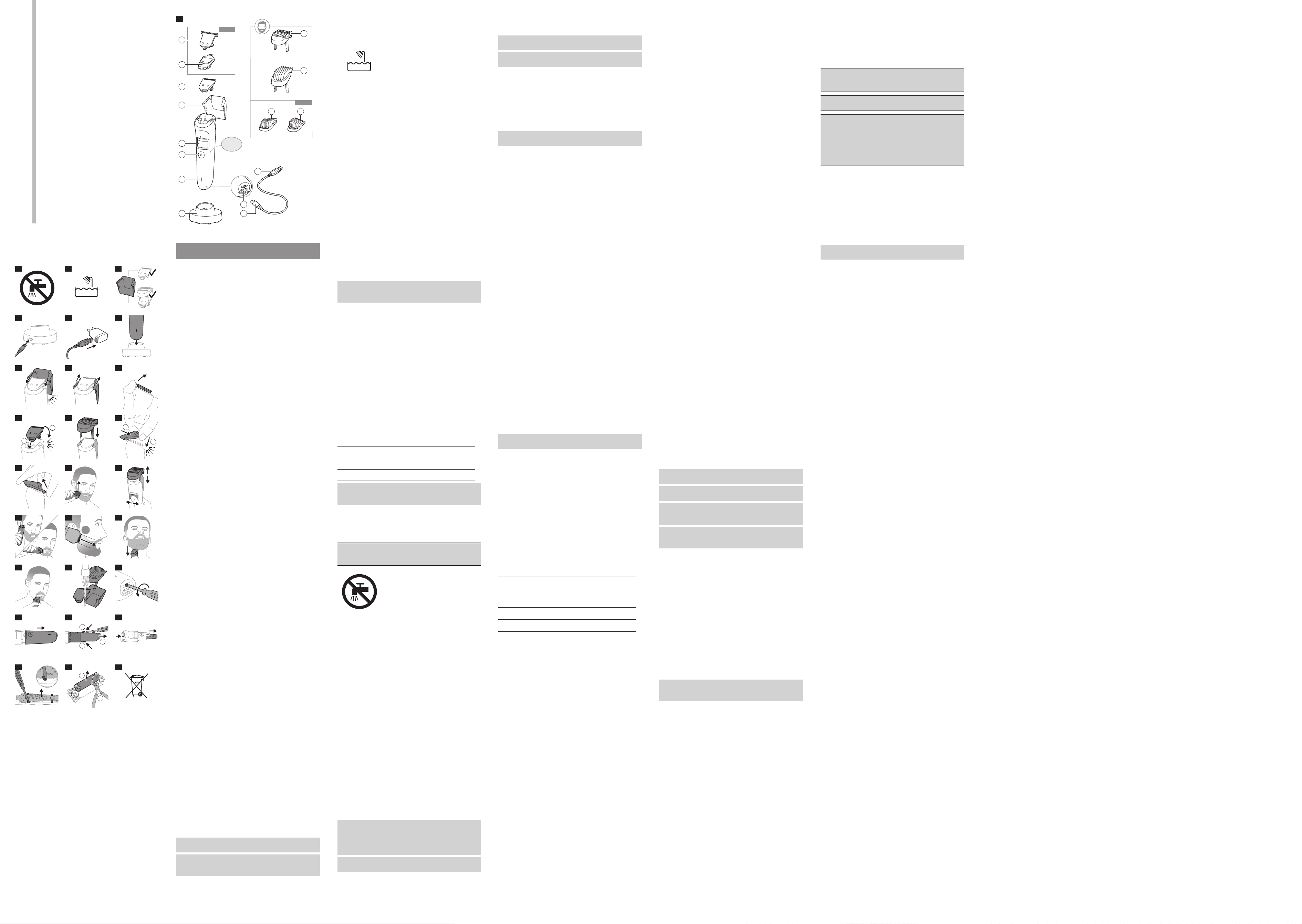
General description (Fig. 1)
1 Extra-wide cutting element (41 mm) (only with
model BT7670)
2 Precision trimmer (only with model BT7670)
3 Cutting element (32 mm)
4 Hair collector
5 Hair length setting wheel
6 On/o button
7 Battery status indicator
8 Socket for small plug
9 USB cable
Note: The USB supply unit is not provided. A suitable
USB supply unit (e.g. Philips HQ87) is available via
www.philips.com/support.
10 Charging stand
11 Adjustable trimming comb 0.4 mm – 10 mm
12 Adjustable trimming comb 10.4 mm – 20 mm
13 Fading comb 1 mm – 5 mm (only with model
BT7670)
14 Fading comb 5 mm – 1 mm (only with model
BT7670)
15 Small plug
Not shown: storage pouch, brush
Charging
- Charging or using the appliance at temperatures
below 10 °C or higher than 35 °C adversely aects
the lifespan of the battery.
- If the appliance is subjected to a major change in
temperature, pressure or humidity, let the appliance
acclimatize for 30 minutes before use.
Battery status indicator
Battery status Indicator mode
Almost empty Flashing orange light
Charging Flashing white light
Fully charged Solid white light
Note: Approx. 60 seconds after the battery is fully
charged, the battery status indicator switches o
automatically.
Charge the appliance before rst use and when the
battery status indicator shows that the battery is almost
empty. When the product appliance charged for 1 hour,
it has an operating time of up to 100 minutes (model
BT5780) or 120 minutes (model BT7670).
Warning: Keep the USB cable, the USB supply
unit and the charging stand (if provided) dry
(Fig. 2).
Charging with an USB supply unit
1 Make sure the appliance is switched o.
2 Insert the small plug of the USB cable into the socket
in the bottom of the appliance.
3 Insert the USB plug into the USB supply unit (not
provided) (Fig. 6).
4 Insert the USB supply unit into the wall socket.
5 After charging, remove the USB supply unit from
the wall socket and pull the small plug out of the
appliance.
Charging with the charging stand
1 Make sure the appliance is switched o.
2 Insert the small plug into the charging stand (Fig. 5).
3 Insert the USB plug into the USB supply unit (not
provided) (Fig. 6).
4 Insert the USB supply unit into the wall socket.
5 Put the appliance in the charging stand (Fig. 7).
6 After charging, take the appliance out of the
charging stand, remove the USB supply unit from
the wall socket, pull the USB plug out of the supply
unit and then pull the small plug out of the charging
stand.
Quick charge
After approx. 5 minutes of charging, the appliance
contains enough power for one trimming session.
Using the appliance
Always check the appliance and all accessories
before use. Do not use the appliance or any
accessory if it is damaged, as this may cause injury.
Always replace a damaged part with one of the
original type.
Because of hygiene, only one person should use the
appliance.
Changing attachments
Attaching and detaching the hair collector
If you use the hair collector together with an adjustable
trimming comb, rst attach the hair
collector and then the trimming comb. To detach, rst
remove the trimming comb and then the hair collector.
1 To attach the hair collector, align the top wings of
the hair collector with the top of the handle and
press the hair collector down until both sides click
into place (Fig. 8).
2 To detach the hair collector, place your hand around
the hair collector to prevent it from falling. Then
use your thumb to unhook one of the wings of the
hair collector and remove the hair collector from the
handle (Fig. 9).
Hold the appliance over a bin when detaching the hair
collector to avoid spilling the hairs.
Detaching and attaching cutting elements
1 To detach a cutting element, place your thumb
below the teeth of the cutting element and gently
push upwards until the cutting element comes o
the handle (Fig. 10).
2 To attach a cutting element, insert the plastic notch
at the back of the cutting element into the guiding
slot in the handle. Then gently press the teeth of
the cutting element downwards until the cutting
element clicks into place (Fig. 11).
Attaching and detaching the adjustable trimming
combs
1 To attach an adjustable trimming comb onto the
appliance, slide the comb legs straight into the
guiding grooves of the appliance until the comb
clicks into place (Fig. 12).
2 To detach an adjustable trimming comb from the
appliance, hold the comb on both sides and gently
pull it upwards o the appliance.
Attaching and detaching the fading combs
1 To attach a fading comb onto the cutting
element,slide the front part of the comb onto the
teeth and press the plastic notch at the back of the
comb downwards until it clicks into place (Fig. 13).
2 To detach a fading comb from the cutting element,
carefully push the back part of the comb o the
appliance and then slide it o the cutting element
(Fig. 14).
Switching the appliance on and o
To switch the appliance on or o, press the on/o
button once.
Trimming tips
- When trimming for the rst time, start by using the
comb with the maximum trimming length setting to
familiarize yourself with the appliance.
- Since hairs do not all grow in the same direction,
you may want to try dierent trimming positions (i.e.
upwards, downwards, or across). Practice is best for
optimum results.
When using the hair collector, hold the appliance
upwards to prevent caught hair from spilling.
- Always make smooth and gentle movements and
make sure that the surface of the comb always stays
in contact with your skin.
- When too many hairs have accumulated on the
appliance, remove the hairs before and/or during
use, for best trimming results (see 'Cleaning').
Using the hair collector
Using the hair collector is optional. Use the hair collector
to catch hair during trimming for easier cleaning
afterwards.
The hair collector is designed to catch some, but not
all the cut hairs. It is normal for some hairs to fall down
during trimming.
You can use the hair collector with the following
attachments:
Attachment Used with hair
collector
Cutting element yes
Adjustable trimming
combs
yes
Fading combs no
Precision trimmer no
Trimming without comb
Use the appliance without any comb and with or
without the hair collector to trim your beard close to the
skin, to a length of approx. 0.4mm.
1 Attach the hair collector to the appliance (optional).
2 Switch on the appliance.
3 Place the at side of the cutting element against
your skin and make strokes against the direction of
hair growth (Fig. 15).
4 Switch o and clean the appliance after each use
(see 'Cleaning').
Trimming with adjustable trimming combs
Use the adjustable trimming comb attached to the
cutting element and with or without the hair collector
to trim your beard and mustache in your preferred style.
Your appliance comes with two adjustable trimming
combs. You can choose from settings ranging from 0.4
mm to 10 mm and from 10.4 mm to 20 mm.
1 Attach the hair collector to the appliance (optional).
2 Attach the adjustable trimming comb to the
appliance (see 'Changing attachments').
3 Turn the hair length setting wheel to select the
desired hair length setting (Fig. 16). The settings on
the wheel correspond to the remaining hair length
after trimming. The selected hair length setting is
shown in the center of the wheel.
4 Switch on the appliance.
5 To trim most eectively, move the appliance against
the hair growth direction. Make sure that the surface
of the comb always stays in contact with the skin.
6 Switch o and clean the appliance after each use
(see 'Cleaning').
Edging without the hair collector
Use the appliance without any comb and without the
hair collector to trim edges and single hairs.
1 Detach any guard from the product (see 'Changing
attachments').
2 Detach the hair collector from the appliance (see
'Changing attachments').
3 Switch on the appliance.
4 Hold the cutting element perpendicular to the
skin. Make well-controlled movements to remove
unwanted hairs. Touch the hair lightly with the
trimmer (Fig. 17).
5 Switch o and clean the appliance after each use
(see 'Cleaning').
Fading hair combs (BT7670 only)
Use the cutting element with a fading comb but
without the hair collector to create a faded beard line.
The appliance comes with 2 fading combs. Each comb
can be used to trim one side of your face.
1 Attach one of the fading combs to the appliance.
2 Place the trimmer on your face close to the ear so
that the short teeth of the comb are higher and the
long teeth are lower.
3 Switch on the appliance.
4 Move the trimmer once in a straight line from the
ear to the corner of your mouth to achieve a faded
beard style (Fig. 18).
5 Attach the other fading comb to trim the other side
of your face into a faded beard style.
6 Gently shake the hairs o the appliance in between
strokes to prevent hairs from collecting between the
cutting element and the comb.
7 Switch o and clean the appliance after each use
(see 'Cleaning').
Using the extra-wide cutting element for
contouring (BT7670 only)
Use the extra-wide cutting element (41 mm) without
the hair collector to edge and contour your beard line.
1 Detach the cutting element from the product (see
'Changing attachments').
2 Attach the extra-wide cutting element to the
appliance.
3 Place the extra-wide cutting element at the edge of
your beard, with the blade perpendicular to the skin.
4 Switch on the appliance.
5 Make slow upward or downward strokes to cut
unwanted hairs (Fig. 19).
6 Switch o and clean the appliance after each use
(see 'Cleaning').
Precision trimmer (BT7670 only)
Use the precision trimmer without the hair collector to
create ne lines and contours around your facial style
close to the skin, to a length of 0.4 mm.
1 Detach the cutting element from the appliance.
2 Attach the precision trimmer to the appliance.
3 Switch on the appliance.
4 Hold the precision trimmer perpendicular to the skin
and move the trimmer upwards or downwards with
gentle pressure (Fig. 20).
5 Switch o and clean the appliance after each use
(see 'Cleaning').
Cleaning
Switch o the appliance before removing or
attaching attachments.
Only use cold or lukewarm water to clean the
appliance.
Never use scouring pads, abrasive cleaning agents or
aggressive liquids such as petrol or acetone to clean
the appliance.
Never dry the cutting element with a towel or
tissue, as they may get caught in the teeth and cause
damage.
1 Make sure that the appliance is switched o and
removed from the charging stand or power outlet.
2 First detach any comb and then remove the hair
collector, if attached to the appliance (see 'Changing
attachments'). Make sure you hold the appliance
over a bin or sink for easier clean-up.
3 Empty the hair collector into a bin. Use the cleaning
brush to remove all the hairs from the hair collector
and from the comb.
4 Clean the whole handle under the tap or wipe it
clean with a dry or moist cloth.
5 Detach the cutting element from the appliance and
clean it with a brush.
6 Rinse all the attachments under the tap (Fig. 21).
7 Rinse the hair chamber under the tap.
8 Carefully shake o excess water and let all parts air-
dry completely.
Storage
Note: Do not place or store the appliance where it can
fall or be pulled into a tub or sink, water or other liquid
while plugged in.
- Make sure that the appliance is switched o and
that the USB supply unit has been removed from the
wall socket and from the appliance.
- Do not wrap the USB cable around the appliance
when storing.
- Store the appliance, the USB cable, the USB supply
unit and all the accessories in the pouch supplied.
- Make sure that the appliance and the accessories are
dry before you place them in the pouch.
- Place the pouch in a safe, dry location, where it will
not be crushed, banged, or subject to damage.
Assistance
For all product support, please visit
www.philips.com/support.
Ordering accessories
To buy accessories or spare parts, visit
www.philips.com/parts-and-accessories or go to
your Philips dealer. You can also contact the Philips
Consumer Care Center in your country (see the
international warranty leaet for contact details).
Removal of built-in rechargeable
battery
The built-in rechargeable battery must be removed
when the appliance is discarded. Before removing the
battery, make sure that the appliance is disconnected
from the wall socket and that the battery is completely
empty.
Take any necessary safety precautions when you
handle tools to open the appliance and when
you dispose of the rechargeable battery.
When you handle batteries, make sure that your
hands, the product and the batteries are dry.
To avoid accidental short-circuiting of batteries
after removal, do not let battery terminals
come into contact with metal objects (e.g.
coins, hairpins, rings). Do not wrap batteries in
aluminum foil. Tape battery terminals or put
batteries in a plastic bag before you discard
them.
1 Unscrew the screw in the bottom of the handle (Fig.
22).
2 Separate the bottom part from the top part of the
handle (Fig. 23).
3 Use a athead screw driver to open the two snap
hooks and remove the inner tube cover (Fig. 24).
4 Pull out the inner tube (Fig. 25). Detach the motor
unit from the battery unit.
5 Use a athead screwdriver to open the snap
connections and remove the printed circuit board
(Fig. 26) including the battery.
Note: The battery is soldered to the printed circuit
board.
6 Use pliers to detach the battery from the printed
circuit board (Fig. 27). You can now dispose of the
rechargeable battery.
Recycling
- This symbol means that electrical products and
batteries shall not be disposed of with normal
household waste (Fig. 28).
- Follow your country’s rules for the separate
collection of electrical products and batteries.