
1
Versarray™ 112 Mk III
Passive Enclosure
Product Specifications
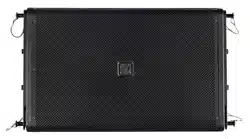
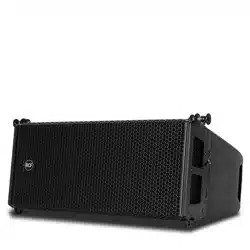
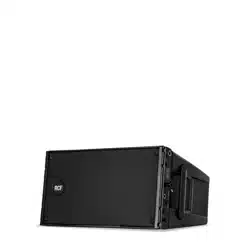
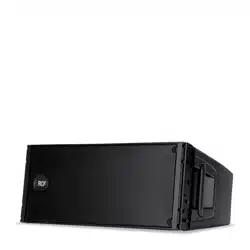
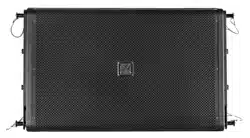
e Versarray™ 112 Mk III Passive Ribbon Tweeter Line Source Array speaker system consists of a 12” Neo Black
Widow® woofer combined with a Neodymium based Peavey RD™ 2.6 Mk III ribbon tweeter in a cabinet with a
simple, quick, yet exible rigging system. Designed to provide modular coverage of small to medium venues,
and intended for use with the companion Versarray™ Mk III Sub models, the Versarray™ 112 Mk III oers ex-
cellent versatility with a very high performance capability. e two-way system consists of the following driver
components: a 12” Black Widow® Neo series woofer with Neodymium magnet structure. Capable of over 500W
of continuous power handling (AES Std 2-1984), the woofer can handle a lot of sheer power. e high frequen-
cies are handled by two Peavey® RD™ 2.6 Mk3 ribbon tweeters utilizing a composite sandwich ribbon, a Neo-
dymium magnet system, and a low distortion CLEAR FORM™ waveguide.
Designed to be used in conjunction with a compatible DSP based loudspeaker signal processor, such as a Peavey
Digitool™, Nion® or MediaMatrix® system, with the Peavey factory settings in use, the Versarray™ 112 Mk III can
perform to modern standards of excellence, and handily exceed the competitions audible performance.
e FlyQWIK™ fully articulated hardware rigging system provides for a classic straight line-array conguration,
or a number of dierent angling options, providing easy aiming of the system. Angles between the array modules
is adjustable from 0 degrees (straight), to 15 degrees in 2.5 degree increments. Total angle possible between two
cabinets is 15 degrees.
Quick-lock pins are supplied with the rigging hardware to couple the Versarray™ 112 Mk III modules together
and lock the angles between them into place, as well as for the rigging halo and y bar congurations of a line
array. e exibility of the Versarray™ system allows the use of anywhere from 1 to 10 Versarray™ 112 Mk III
modules in conjunction with Versarray™ 218 Mk III Subs. An optional special groundstack bracket set mounts
to the Versarray 218 Mk III Sub, and allows up to three of the Versarray™ 112 Mk III ‘s to be mounted on top of
the Versarray 218 Mk III Sub, and angled upward, for use on stage in a stadium seating situation.
Features
• 2-way Bi-Amp Ribbon Line Source Array SR System
• 12” Neo Black Widow® 4” VC Woofer
• 1000 watt program, 2000 watt peak power handling
• Ribbon Tweeters with Neo magnet and composite material sandwich ribbon
• Ribbon Tweeters mounted to our proprietary CLEAR FORM™ Waveguide
• 90 H by 15 V degree coverage pattern (per one cabinet)
• Easy aiming FlyQWIK™ hardware rigging system
• Angle adjustable in 2 1/2 degree increments, from 0 to 15 degrees total angle between adjacent cabinets
• Sound Guard™ tweeter protection, series capacitor for reliability
• Inputs are two Neutrik® Speakon® 4 pin jacks in parallel
• 18 mm 13 ply Baltic Birch enclosure with steel inner brackets
• Injection molded cabinet end caps, made from high impact material.
• Hammerhead™ polyurea black nish and black powder-coated cloth lined grilles

2
Frequency Response, 1 meter on-axis,
swept-sine in anechoic environment:
100 Hz to 20 kHz (±3 dB, with
processing)
Usable Low Frequency limit, -10 dB
point: 85 Hz (with processing)
Power Handling:
Low Frequency Section: 500 W
continuous 1,000 W program 2,000 W
peak
High Frequency Section: 120 W
continuous 240 W program 480 W
peak
Sound Pressure Level, 1 Watt, 1 meter
in anechoic environment:
Low Frequency Section: 97 dB SPL,
(2.83 V input)
High Frequency Section: 101 dB SPL,
(4.0 V input for 16 ohm wiring)
Maximum Sound Pressure Level (1
meter) * :
Low Frequency Section: 124 dB SPL
continuous 130 dB SPL peak
High Frequency Section: 122 dB SPL
continuous 128 dB SPL peak
*Note: This spec is for one module at 1
meter, a line array of 6 units has much
higher output at distance due to line
source effect where SPL falls off at 3 dB
per distance doubling rather than 6 dB
Nominal Radiation Angle measured
at -6 dB point of polar response: 90
degrees Horizontal by 15 degrees
Vertical (One module only, straight line
array of more than 1 module narrows
vertical dispersion accordingly)
Transducer Complement:
Low Frequency Section: 1x 12 in.
Woofer, 1244 Neo Black Widow® 4” VC
Woofer, in a sealed box
High Frequency Section: 2x 4.75
in. Ribbon Tweeters Two RD™ 2.6
Mk III Peavey Ribbon Tweeters, on a
waveguide
Box Tuning Frequency (Sealed): Low
Frequency Section: 88 Hz
Electroacoustic Crossover Point, Peavey
Active Digital Crossover:
(Applies to VSX™, Digitool® and Nion®/
MediaMatrix® settings provided by
Peavey)
Sub – Low Frequency: 125 Hz at 24dB/
octave
Low Frequency – High Frequency:
1950 Hz at 24dB/octave
Recommended Active Crossover
Frequency Region and Slope: Sub –Low
Frequency: 125 Hz at 24dB/octave LR
Low Frequency –High Frequency: 2000
Hz at 24dB/octave LR
Impedance (Z):
Low Frequency: Nominal: 8.0 Ohms,
Minimum: 6.5 Ohms
High Frequency: Nominal: 16 Ohms,
Minimum: 13.6 Ohms
(Special Note: Ribbon tweeters
are capacitor coupled so use with
switching amps is allowed.)
Input Connections: 2x Neutrik® 4-pin
Speakon® jack
Enclosure Materials & Finish: 18 mm
13 ply Baltic Birch plywood finished
in a tough Hammerhead™ polyurea
black finish, with injection molded
end caps and horn, with a perforated
steel grille finished in black powder
coat paint and a cloth liner inside.
Inner steel frame and backing plates
for rigging hardware.
Mounting provisions: Custom array
brackets and hardware, and a custom
array angle adjustment system are
included with each module. Quick
release pins are included with each
cabinet.
Dimensions (H x W x D):
Front: 15.13 in. x 25.06 in. x 15.19 in.
384 mm x 637 mm x 386 mm
With Rigging hardware and Pins:
15.13 in. x 27.13 in. x 16.75 in.
321 mm x 689 mm x 426 mm
Net Weight: 66 Lbs. (30.0 kg)
{includes all cabinet associated
rigging hardware for each cabinet,
including quick-lock pins, etc.}
Companion Subwoofers (sold
separately): Versarray™ 218 Mk III
Sub double 18” Lo Max® woofer
subwoofer
Optional Accessories:
3 foot speaker cable, with 16 gauge 4
conductor wires with 4-pin to 4-pin
Neutrik plugs (Peavey part number
00585240); and 10mm Quick Release
Positive Lock Pins for array rigging.
Flying/Rigging Options:
Versarray™ Mk III HALO
Versarray™ Mk III FLY BAR, 6FT
LENGTH
Versarray™ Mk III SUB SUPPORT
FRAME
Versarray™ Mk III FLY BAR, 2FT
LENGTH
SPECIFICATIONS Versarray
™
112 Mk III
3
Figure B Directivity Index
Frequency [Hz]
Level [dB]
Figure C Horizontal Beam Width
Frequency [Hz]
Angle Degree
Frequency [Hz]
Figure D Vertical Beam Width
Angle Degree
Frequency [Hz]
dB SPL
Figure A Frequency Response
4
Frequency Display: Hz (1/3rd Octave)
Right
Left
Front
Back
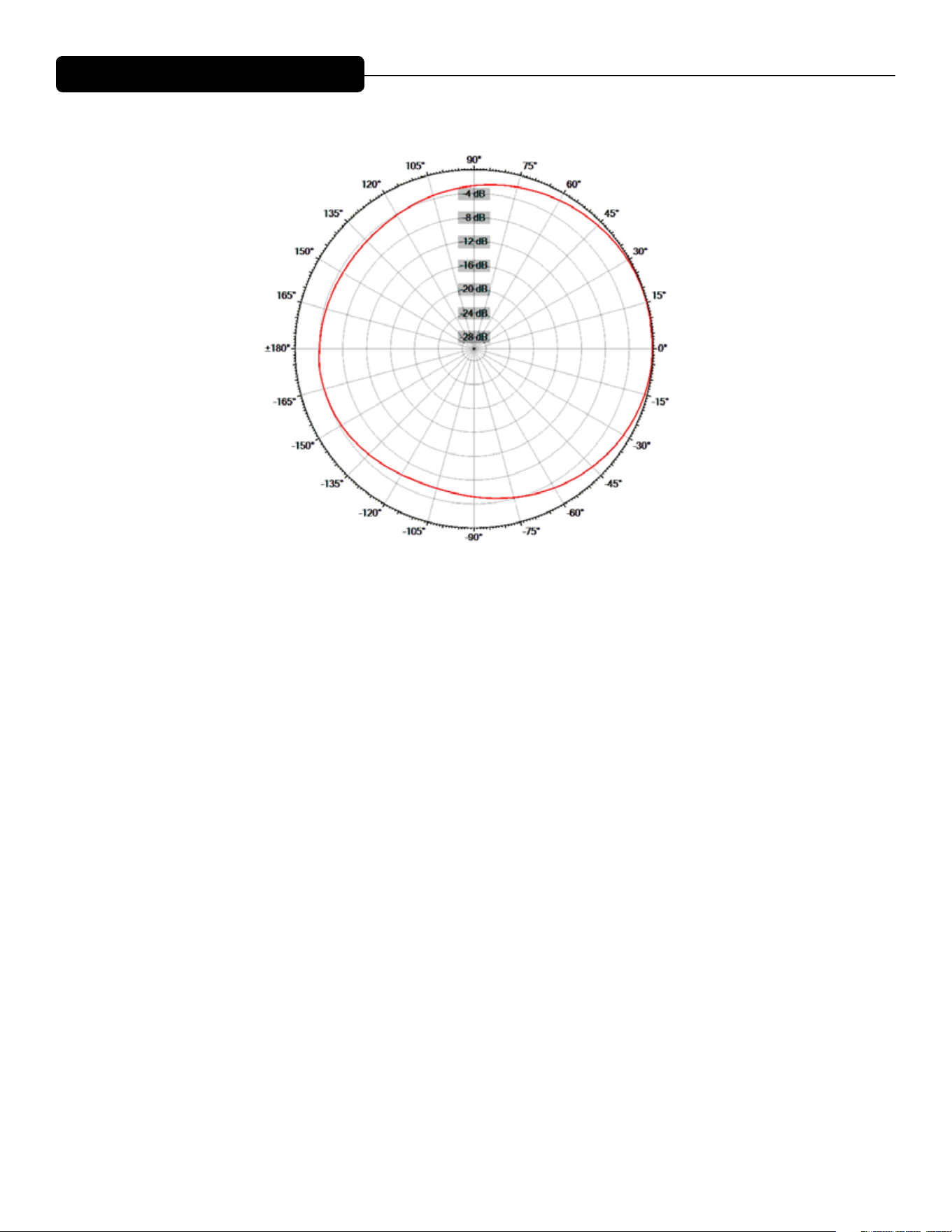
Reading the Horizontal Polar Patterns
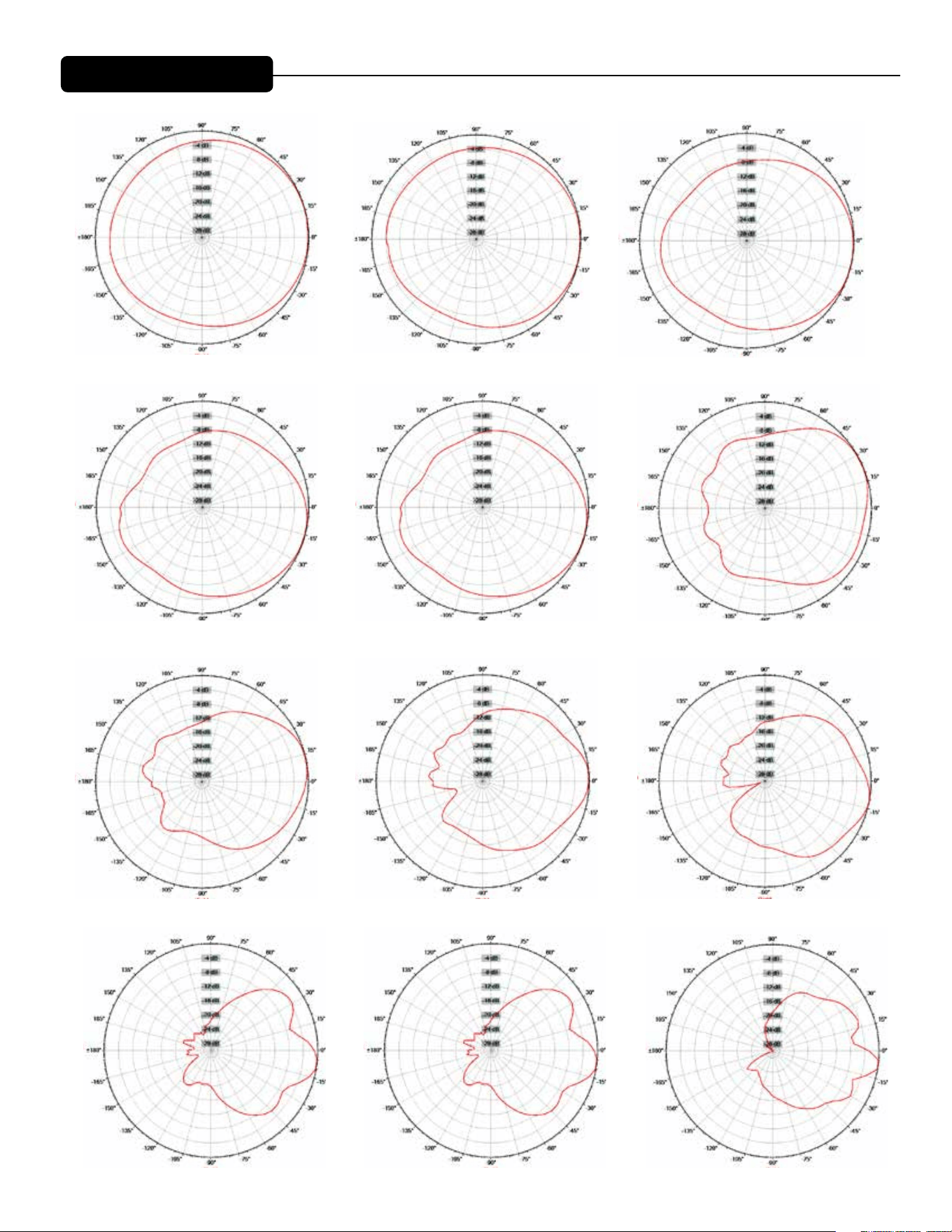
5
Frequency: 200Hz (1/3rd Octave)
Left
Right
FrontBack
Frequency: 400Hz (1/3rd Octave)
Left
Right
FrontBack
Frequency: 800Hz (1/3rd Octave)
Left
Right
FrontBack
Frequency: 1000Hz (1/3rd Octave)
Left
Right
FrontBack
Frequency: 1250Hz (1/3rd Octave)
Left
Right
FrontBack
Frequency: 500Hz (1/3rd Octave)
Left
Right
FrontBack
Frequency: 630Hz (1/3rd Octave)
Left
Right
FrontBack
Frequency: 250Hz (1/3rd Octave) Frequency: 315Hz (1/3rd Octave)
Frequency: 200Hz (1/3rd Octave)
Left
Right
FrontBack
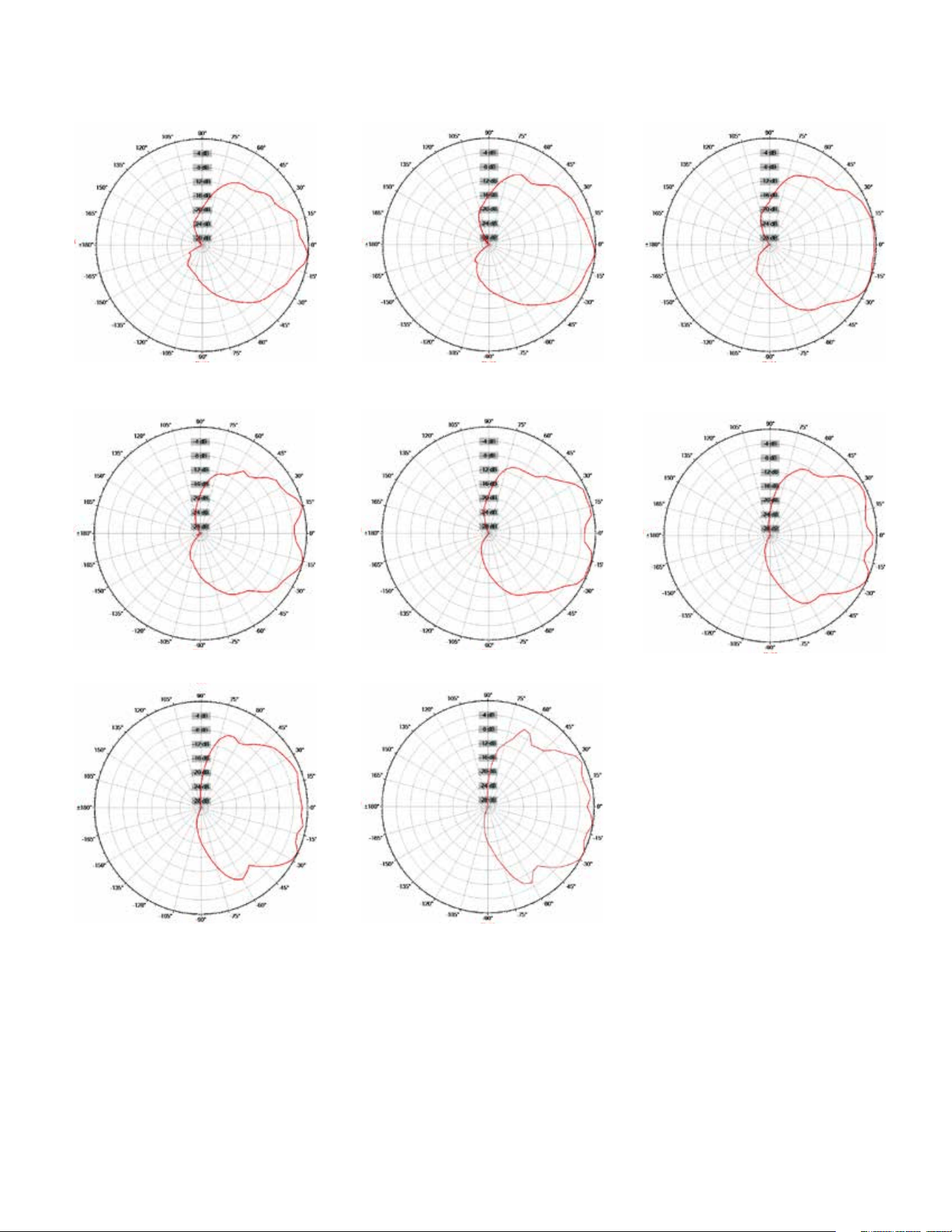
Horizontal Polar Patterns
Frequency: 1600Hz (1/3rd Octave)
Left
Right
FrontBack
Frequency: 2000Hz (1/3rd Octave)
Left
Right
FrontBack
Frequency: 2500Hz (1/3rd Octave)
Left
Right
FrontBack
6
Frequency: 3150Hz (1/3rd Octave)
Left
Right
FrontBack
Frequency: 6300Hz (1/3rd Octave)
Left
Right
FrontBack
Frequency: 12500Hz (1/3rd Octave)
Left
Right
FrontBack
Frequency: 16000Hz (1/3rd Octave)
Left
Right
FrontBack
Frequency: 8000Hz (1/3rd Octave)
Left
Right
FrontBack
Frequency: 10000Hz (1/3rd Octave)
Left
Right
FrontBack
Frequency: 4000Hz (1/3rd Octave)
Left
Right
FrontBack
Frequency: 5000Hz (1/3rd Octave)
Left
Right
FrontBack
7
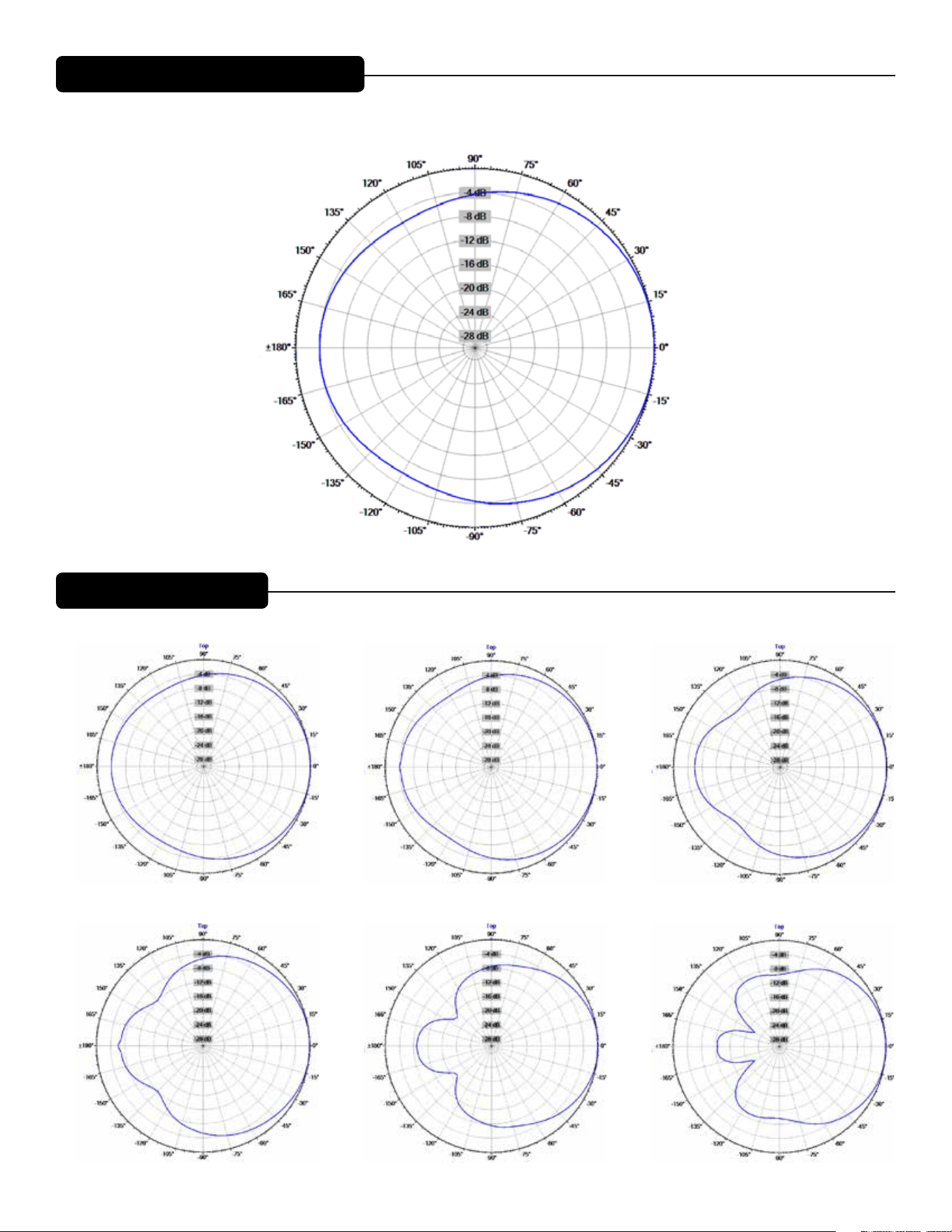
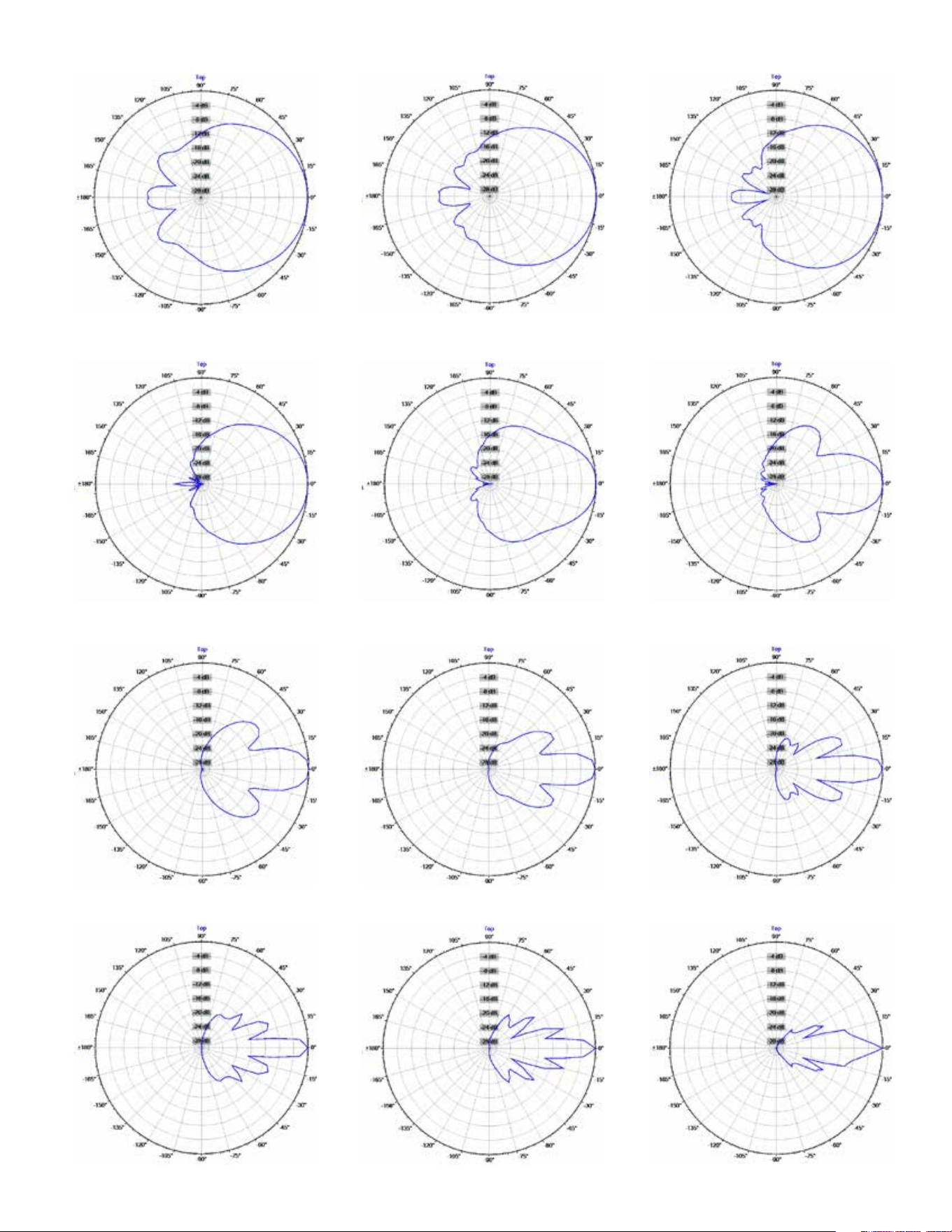
Vertical Polar Patterns
Frequency Display: Hz (1/3rd Octave)
Bottom
Top
Front
Back
Reading the Vertical Polar Patterns
Frequency: 200Hz (1/3rd Octave)
Top
Bottom
FrontBack
Frequency: 400Hz (1/3rd Octave)
Top
Bottom
FrontBack
Frequency: 500Hz (1/3rd Octave)
Top
Bottom
FrontBack
Frequency: 630Hz (1/3rd Octave)
Top
Bottom
FrontBack
Frequency: 250Hz (1/3rd Octave)
Top
Bottom
FrontBack
Frequency: 315Hz (1/3rd Octave)
Top
Bottom
FrontBack
8
Frequency: 800Hz (1/3rd Octave)
Top
Bottom
FrontBack
Frequency: 1600Hz (1/3rd Octave)
Top
Bottom
FrontBack
Frequency: 3150Hz (1/3rd Octave)
Top
Bottom
FrontBack
Frequency: 6300Hz (1/3rd Octave)
Top
Bottom
FrontBack
Frequency: 8000Hz (1/3rd Octave)
Top
Bottom
FrontBack
Frequency: 10000Hz (1/3rd Octave)
Top
Bottom
FrontBack
Frequency: 4000Hz (1/3rd Octave)
Top
Bottom
FrontBack
Frequency: 5000Hz (1/3rd Octave)
Top
Bottom
FrontBack
Frequency: 2000Hz (1/3rd Octave)
Top
Bottom
FrontBack
Frequency: 2500Hz (1/3rd Octave)
Top
Bottom
FrontBack
Frequency: 1000Hz (1/3rd Octave)
Top
Bottom
FrontBack
Frequency: 1250Hz (1/3rd Octave)
Top
Bottom
FrontBack
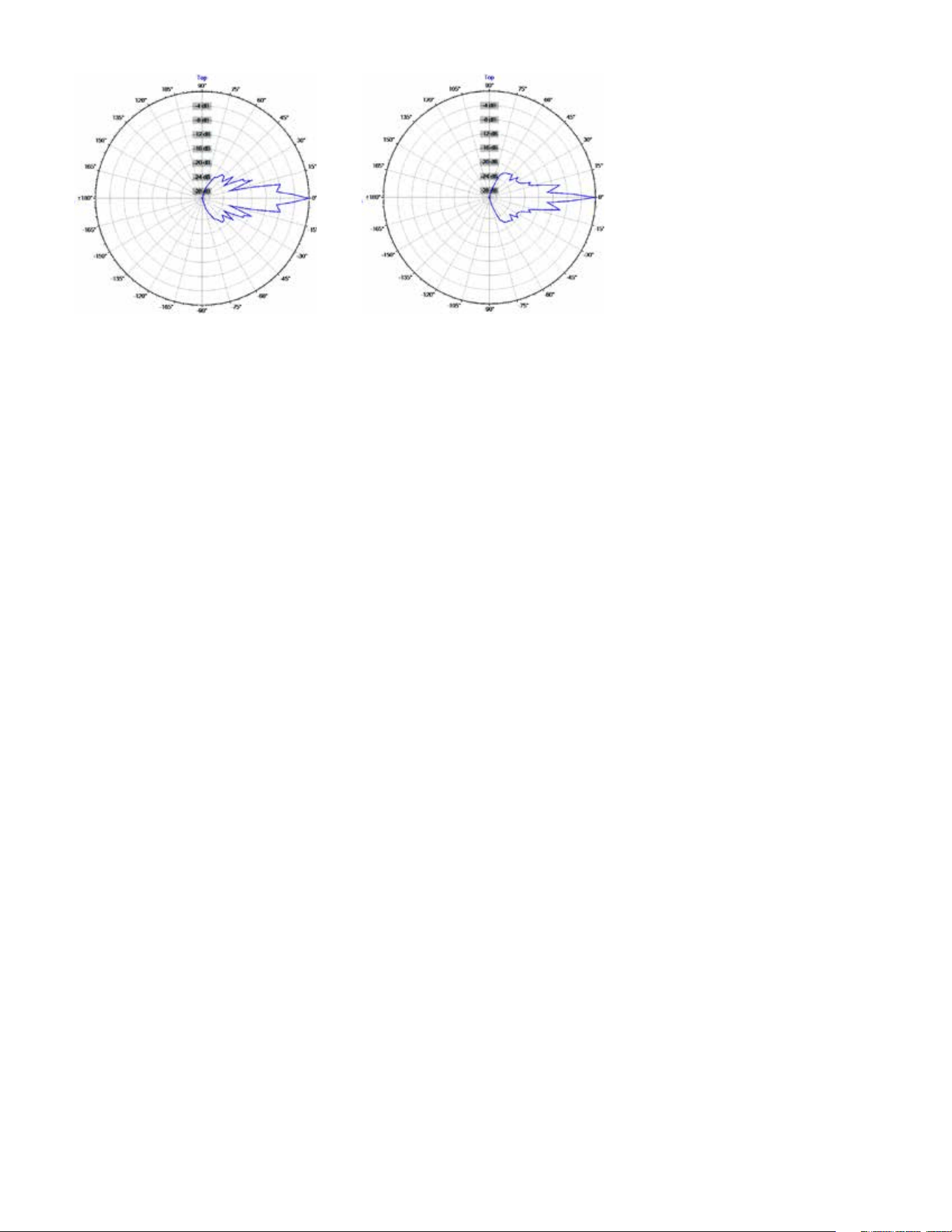
9
Frequency: 12500Hz (1/3rd Octave)
Top
Bottom
FrontBack
Frequency: 16000Hz (1/3rd Octave)
Top
Bottom
FrontBack

10
Warning! Do not feed a full-range signal to the tweeters in the Versarray™ 112 Mk III ! is could damage the
tweeters!
It is recommended that for set-up or testing purposes, a high frequency sweep starting or ending no lower than
300 Hz be used to verify that the tweeters are connected to the high frequency output of the crossover/processor.
If the wiring has been swapped, and the signal is mistakenly fed to the woofers, output will fall o signicantly
above 5 kHz. Always double-check and test your wiring before applying any music signals to the system! e rib-
bon tweeters are connected to the Neutrik® Speakon® pins 2+ and 2-, as per industry standards.
CAUTION! Ribbon Tweeters do not exhibit audible signs of distress when overloaded! It is possible to
exceed the physical and/or thermal limits by overloading the unit suddenly with excess power, even though
there are no obvious sounds of distress.
CAUTION! In order to prevent damage to the ribbon tweeters, keep the Versarray™ 112 Mk III system
away from metal lings at all times. Do not expose ribbons to blasts of air, and do not use canned air to
spray the ribbons, as this can result in damage. Do not expose ribbons to liquids or caustic fumes, and keep
away from salt spray.
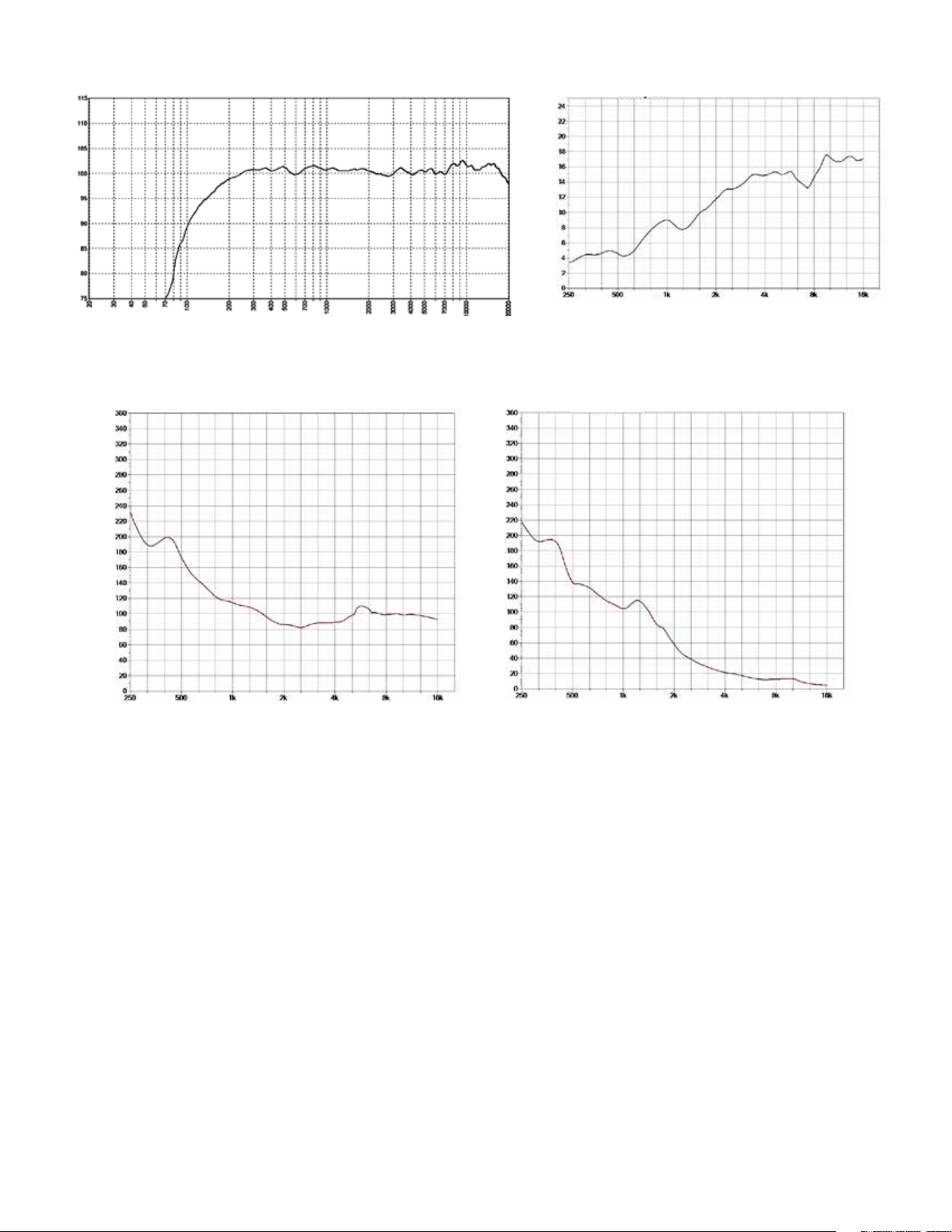
Frequency Response
is measurement is useful in determining how accurately a given unit reproduces an input signal. e frequen-
cy response of the Versarray™ 112 Mk III is measured at a distance of 1 meter using a swept-sine input signal. As
shown in Figure A, the selected drivers in the Versarray™ 112 Mk III combine to give a smooth frequency re-
sponse with the recommended signal processing.
Directivity
Beamwidth is derived from the -6 dB points from the polar plots which are measured in a whole space anechoic
environment. Q and Directivity Index are plotted for the on-axis measurement position. ese are specications
that provide a reference to the coverage characteristics of the unit. ese parameters provide insight for proper
placement and installation in the chosen environment. e blending of the components of the Versarray™ 112
Mk III and the settings on the Peavey® Digitool™ Live speaker processor (or other suitable speaker processor) and
crossed over with the Versarray™ 112 Mk III pre-sets, exhibit a desirable beamwidth and directivity (as shown in
Figures B, C and D) suitable for sound reinforcement applications.
Power Handling
ere are many dierent approaches to power handling ratings. Peavey rates this loudspeaker system’s compo-
nents power handling using the AES Standard 2-1984. Using audio band pink noise of the proper range for each
driver, with peaks of four times the RMS level, and then running the signal through the Peavey® Digitool™ Live
speaker processor and crossover (or other suitable speaker processor) with the Versarray™ 112 Mk III pre-sets,
this strenuous test signal assures the user that every portion of this system can withstand today’s high technology
music.
Ribbon Tweeter Warnings and Cautions

11
NOTE: Before you y the array, be sure to inspect the rigging and ying hardware to insure that it is mechani-
cally sound and has not been damaged, there should be no signicant distortion of the shape of the coupling
brackets, cabinet brackets, Halo or y bar, and the hardware should be checked for tightness.
is Crest loudspeaker should be suspended overhead only in accordance with the procedures and limita-
tions specied in the User’s Manual and possible manual update notices. is system should be suspended
with certied rigging hardware by an authorized rigging professional and in compliance with local, provincial or
national suspension ordinances. ALWAYS USE PROPER GRADE HARDWARE.
CAUTION: Before attempting to suspend this speaker, consult with a certied structural engineer. Speak-
er can fall from improper suspension, resulting in serious injury and property damage. Use only the cor-
rect mating hardware. All associated rigging is the responsibility of others. Maximum enclosure angle 30 degrees.
Failure to follow proper rigging specications listed in the manual may result in injury or death.
Whenever possible, in addition to the nominal primary mounting method, use a suitable safety chain or wire
rope attached to one of the other groups of y points, and rmly attached to a suitable structural member as
indicated by a certied structural engineer. CAUTION: ALWAYS USE SAFETY CHAIN OR WIRE ROPE.
IF ANY OF THE RIGGING, OR THE HALO OR FLY BAR HAS BEEN DAMAGED OR DISTORTED,
DO NOT USE, AND DO NOT FLY THE ARRAY UNTIL
THEY CAN BE REPLACED OR REPAIRED!
DO NOT USE THE PIVOT BAR OR ANGLE SLIDER BRACKET AS HANDLES TO TRANSPORT THE
CABINETS!
DO NOT TRANSPORT THE CABINETS IN ARRAY CONFIGURATION COUPLED TOGETHER,
EXCEPT WITH THE RECOMMENDED TRANSPORT CART AND IN THE STIPULATED MANNER
FOR THAT CART. TRANSPORT IN SUCH AN UNAPPROVED MANNER VOIDS THE WARRANTY, AND
THE SYSTEM WOULD BE CONSIDERED UNSAFE TO BE FLOWN AFTER SUCH AN UNAPPROVED
TRANSPORT EVENT.
Use only the correct mating hardware. All associated rigging is
the responsibility of others.
Correct use and seating of the Quick Release Push Lock Pins Used with all Versarray™ rig-
ging hardware
When using the Quick Release Positive Lock Pins, when the Quick Release Push Lock Pins are inserted, they
should be fully seated, so that the black shoulder near the end of the pin has been placed ush with the side of
the bracket, or as far in as the pin hole cavity will allow it to be inserted.
You will have to fully depress the center push-button to do this.
You should not be able to pull these pins out unless the center push-button is fully depressed.
Rigging Instructions

12
Versarray™ Mk3 Halo Use
Specic Instructions for ying and hanging the Versarray™ Mk III Halo will not be supplied. It provides and
follows industry standards for attaching rigging and y hardware, as well as providing for the currently popular
practice of hanging the array via a single hang point that can be a suitably rated chain hoist motor system.
Seek the recommendations of a certied structural engineer or an experienced rigging professional for any ques-
tions about this type of use of the Versarray™ Mk III Halo.
Instructions for maximizing the single point hang balance point options are provided in the Versarray™Mk3
Halo Owner’s Manual, due to the unique exibility the Versarray™ system provides.
13
Hanging Versarray™112 Mk III Cabinets from a Versarray™ Mk III Halo
Assuming the Halo is in position just above the cabinet/s, on a motorized hoist or manually cranked hoist, pro-
ceed as follows.
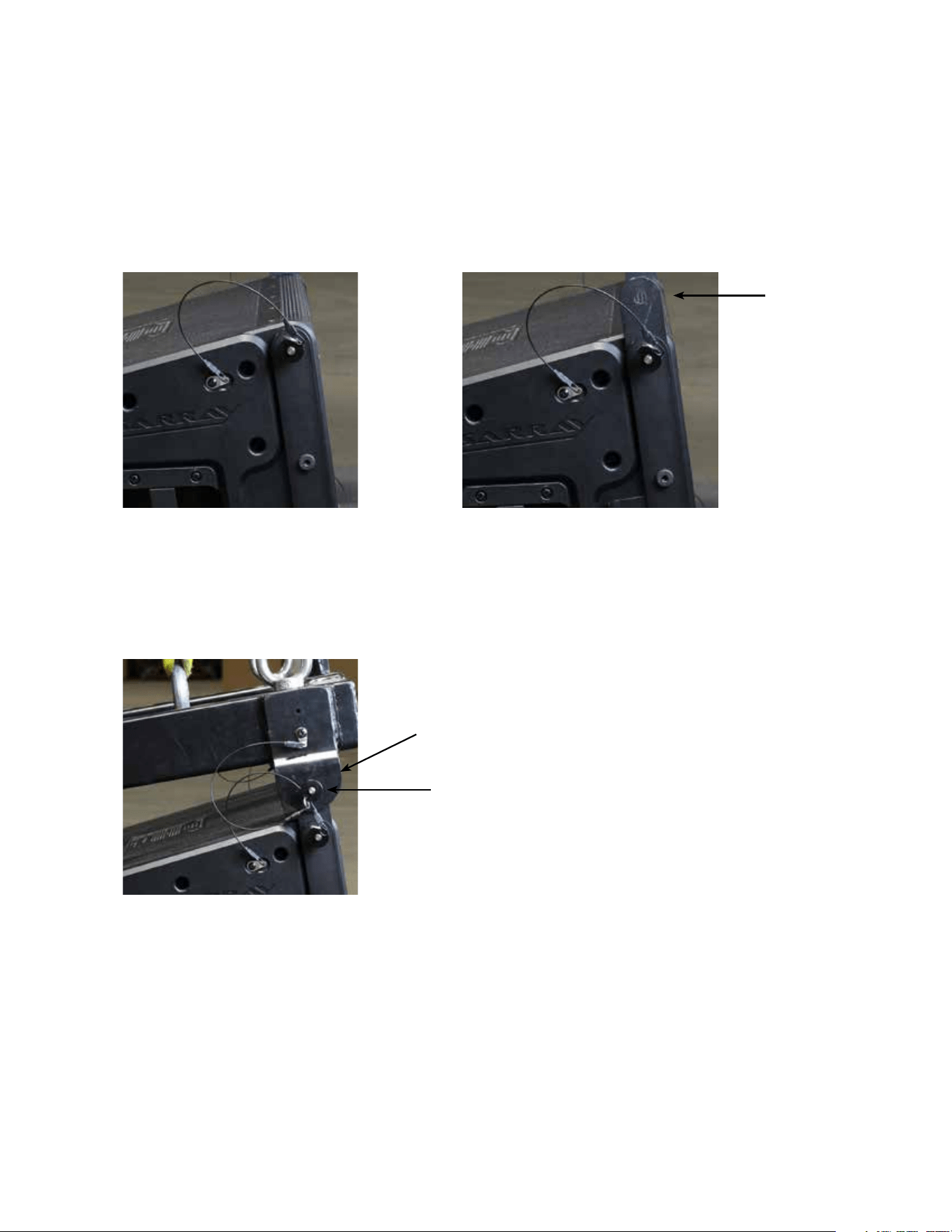
1. Remove the top front quick release lock pins, slide the front hang straps up and pin them in place using those
pins, with the front hang straps extending upward. e strap should be sticking up approximately 2.13”. Do this
for both sides. See Fig.1 and 1a.
2. Either lower the Versarray™ Mk III Halo to meet the cabinet, or raise the cabinet up to meet the Halo, with the
cabinet straps guided into mating with the Halo ears on both sides at the same time. Pin the front straps in place
using the pins from the Halo. See Fig. 2
Figure 1
Figure 2
Figure 1a
Cabinet Hang
Strap
Halo Ear
Pin
14
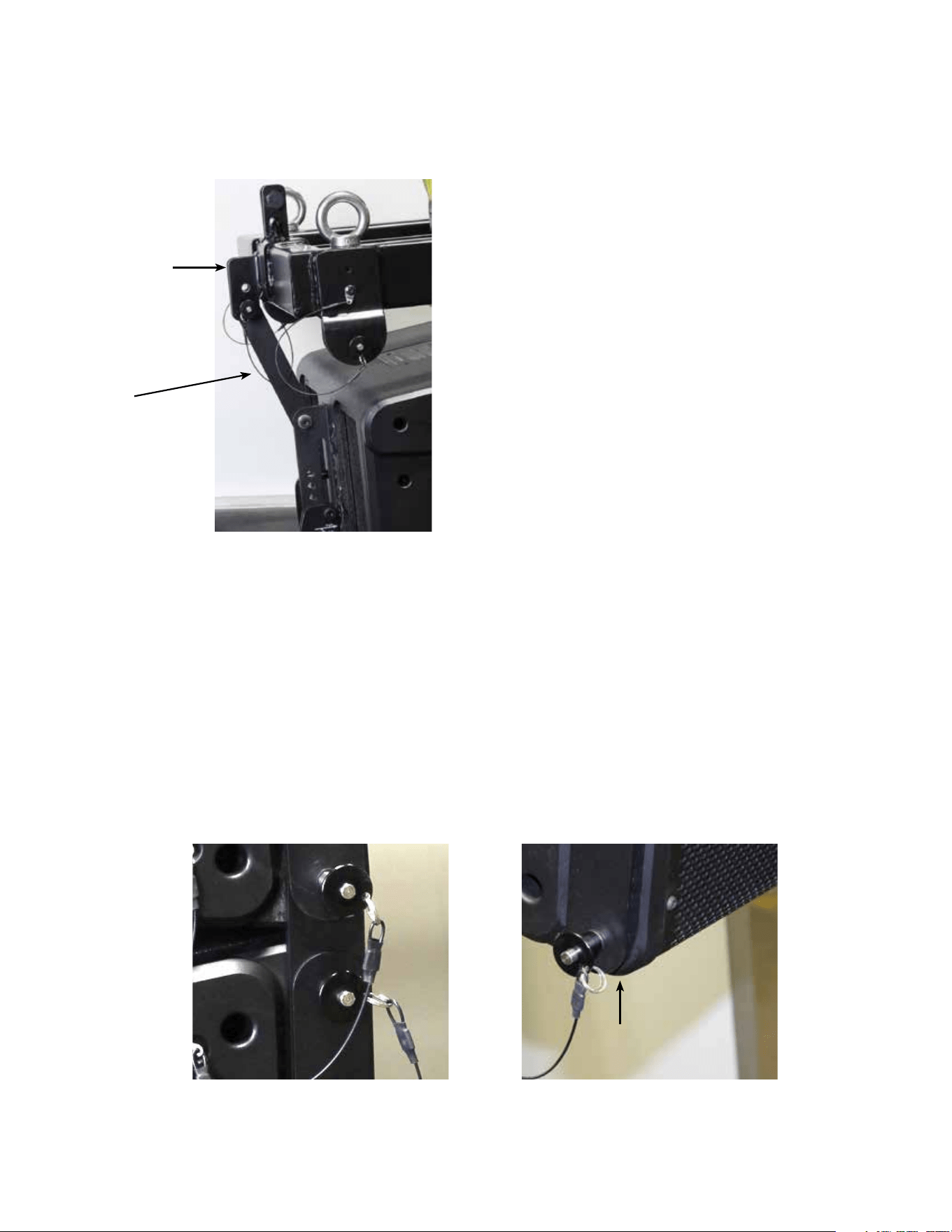
3. Remove the Pivot Bar hole pin, swing pivot bar up to mate with the center rear bottom Halo ear hole. e
bottom hole on the Halo ear provides a zero angle between the Halo and the rst cabinet, the upper hole an angle
of 5 degrees between the Halo and the rst cabinet. Pin the Pivot Bar to the desired hole using the pin from the
Halo. See Fig. 3
4. Adding the second Cabinet.
Remove the top front quick release lock pins, slide the front hang straps up and pin them in place extending up-
ward. e strap should be sticking up approximately 2.13”. Do this for both sides. See Fig.1 and 1a.
5. Either lower the Halo and rst cabinet to meet the second cabinet, or raise the second cabinet up to meet the
rst cabinet, with the second cabinet straps guided into mating with the rst cabinet bottom strap slots. Pin the
front straps in place using the pins from the rst cabinet. See Fig. 4 and 4a.
Figure 3
Figure 4 Figure 4a
Rear Bottom
Halo Ear
Pivot Bar
First cabinet Strap
Slot
15
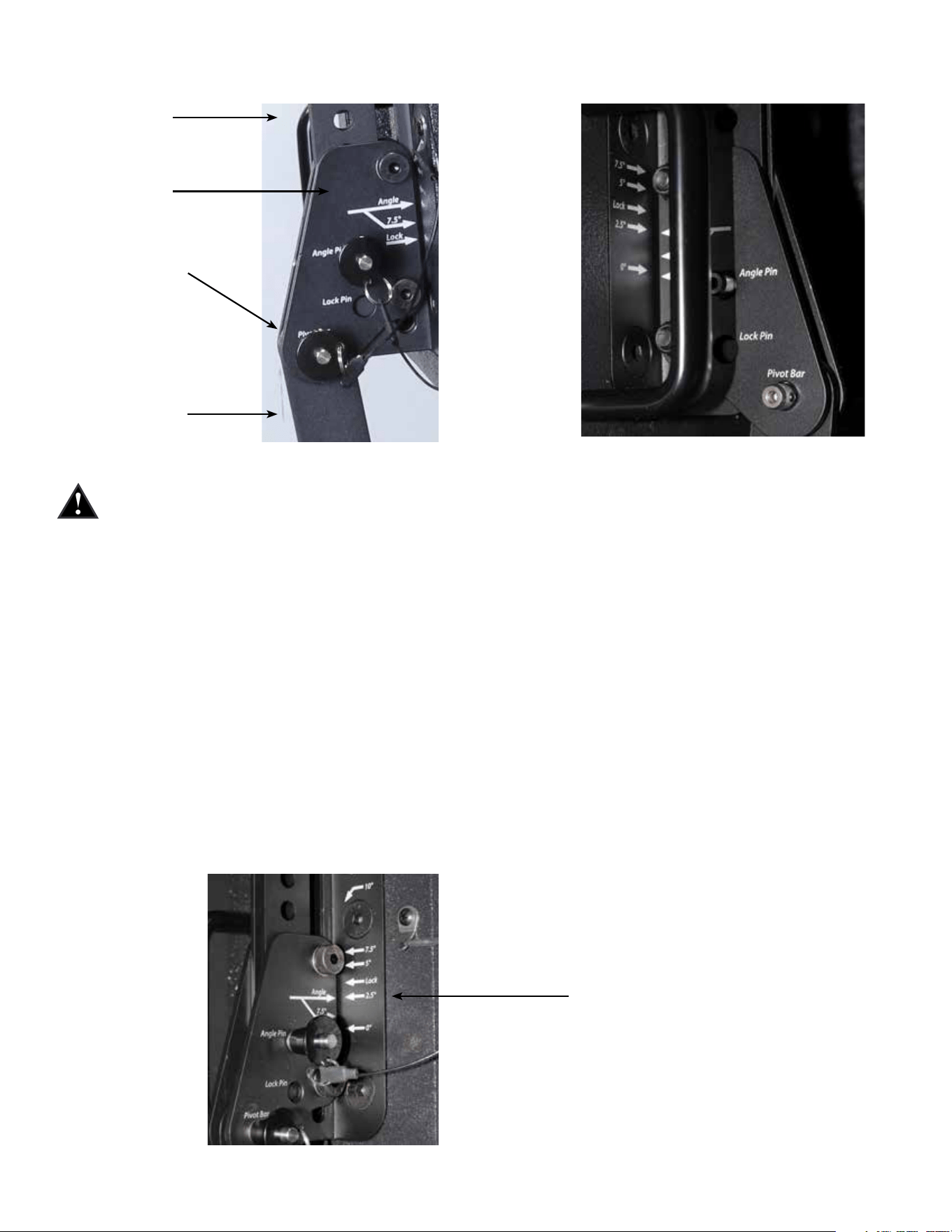
6. Remove the Pivot Bar hole pin on the second cabinet, swing pivot bar up to mate with the Pivot Bar hole of
the rst cabinet. Pin the Pivot Bar into place using the bottom rear pin on the rst cabinet. See Fig. 5 and 5a.
NOTE: Once the Pivot Bar hole pin is removed, the cabinet is free to swing through all possible angles, be
sure to keep ngers, hands and your body out of the possible path of the cabinet hardware or the cabinet
itself, to avoid injury.
With the rst cabinet rigging in the default factory Lock position, that is, with the Angle Slider bracket lined up
with it’s arrow at LOCK, lined up with the LOCK arrow on the Angle Slider Rail, the angle between the rst and
second cabinets is not at a nominal set angle, it is an intermediate setting.
e angle the cabinets are set to can be read at the Angle arrow.
7. e angle of the second cabinet can now be adjusted. To set the angle between the rst cabinet and the sec-
ond cabinet to a nominal amount, remove the Lock pin from the hole it is in, and slide the Angle Slider bracket
Angle Arrow to the desired angle as shown by the arrow labeled Angle on the Angle Slider Rail, and put a pin
from the rst cabinet (the one you removed from the Lock hole) into the Angle Pin hole on the Angle Slider
bracket.
You can set the angle between the rst cabinet and the second cabinet to be any of the following angles:
0 degrees, 2.5 degrees, 5 degrees, 7.5 degrees, 10 degrees, 12.5 degrees, and 15 degrees
As an example, see See Fig. 6, showing a set angle of 2.5 degrees.
Figure 5
Figure 6
Figure 5a Alternate View
Angle Setting 2.5 degrees
Pivot Bar Hole
of First Cabi-
Angle Slider
Bracket
Angle Slider
Rail
Pivot Bar of Sec-
ond Cabinet
16
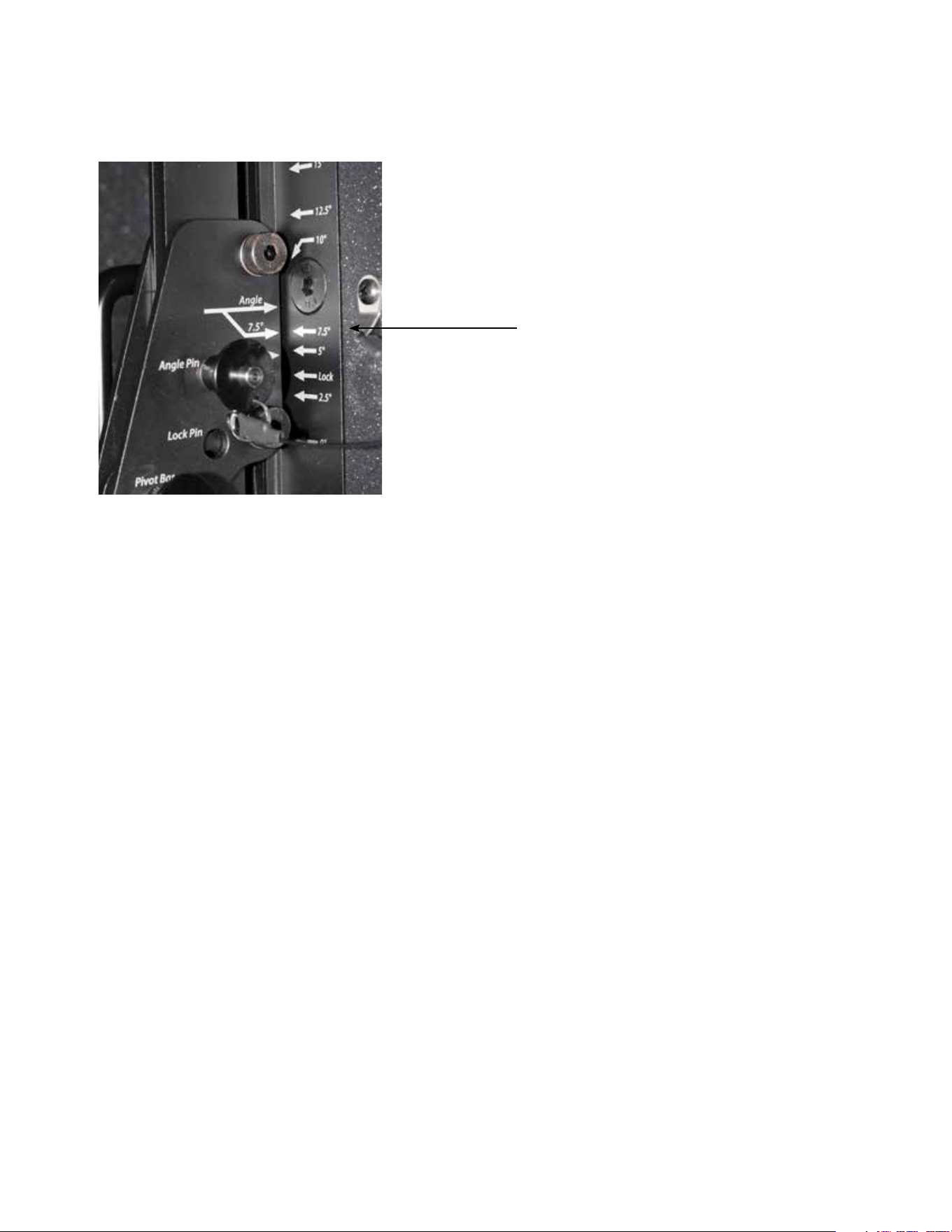
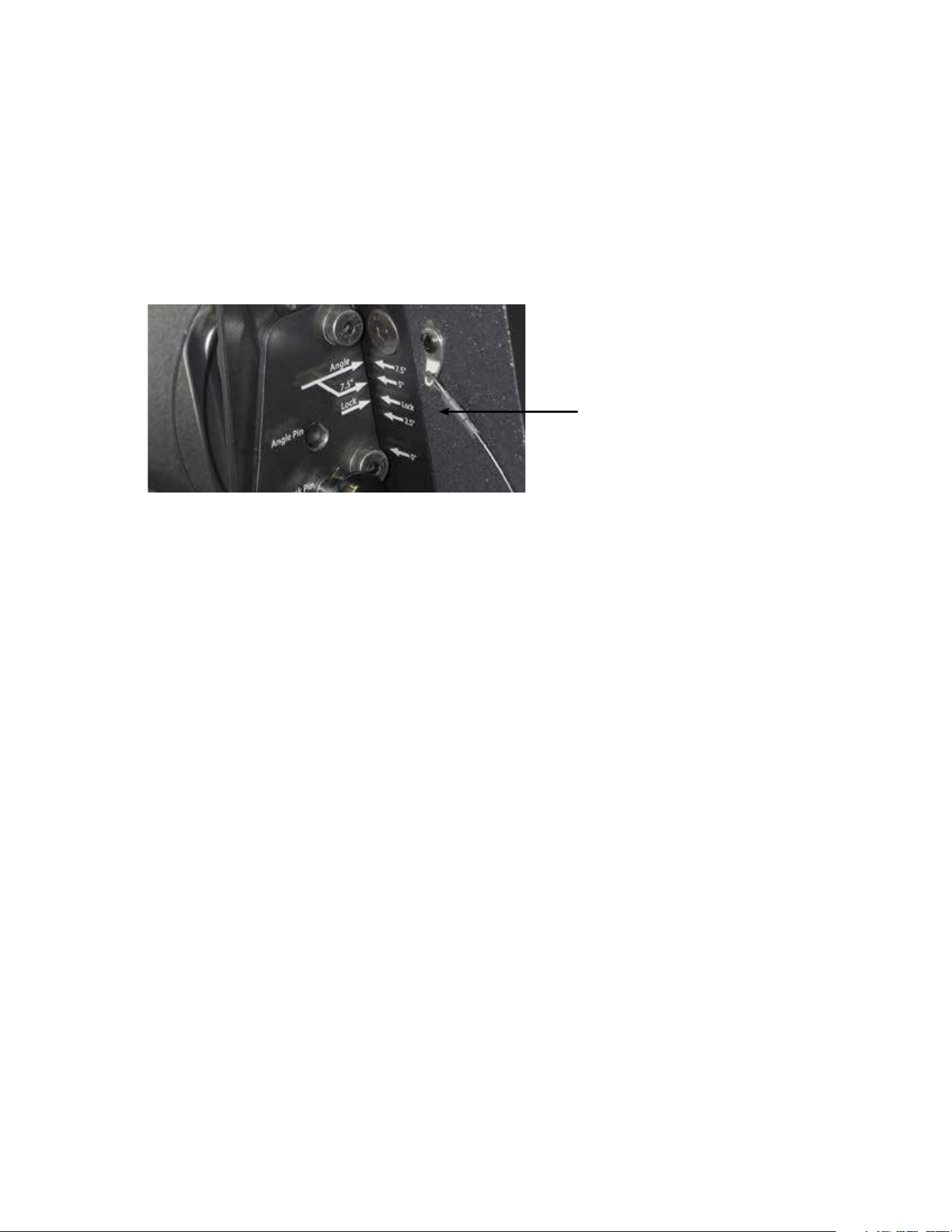
e angle for 7.5 degrees uses a dierent set of arrows, due to the hardware bolt being in the way of a correctly
located screened angle on the Angle Slider Rail using the Angle arrow on the Angle Slider bracket.
is is why there is an arrow that is an oshoot of the Primary Angle arrow on the Angle Slider bracket, just be-
low it, labeled 7.5 degrees. is is lined up with the arrow marked 7.5 degrees on the Angle Slider rail. See Fig.
7.
Adding additional cabinets follows this same basic hook-up progression, with the Angle Slider on the top cabinet
of a given pair setting the angle between those two cabinets.
NOTE: Any Versarray™ Sub cabinets that might be own in the same array o of the same Halo should be locat-
ed at the top of the array, as they have no angle adjustment capability, and can only be hung at a 0 degree angle.
Alternate Method of Setting Angles Between Cabinets
Instead of following Step 6 (Hook-up Pivot Bar) and then Step 7 (Set Angle Between Cabinets), set the angle on
the Angle Slider bracket and rail before un-pinning the Pivot Bar, and connecting it to the previous cabinet.
Each method will work, but one will be more easily implemented with one person setting up the rig, versus hav-
ing two or more people available.
Angle Setting 7.5 degrees
Figure 7
17
Dismantling an Array
To take the line array down, you simply reverse the process, and remove one cabinet at a time, placing the rig-
ging hardware into the nominal storage and transport positions.
Retract all the hang straps, and pin into place, place the Pivot Bar into the proper position to pin it into the Pivot
Bar Hole, remove the pin from the Angle Pin hole, and slide the Angle Slide bracket into the LOCK position
(LOCK arrow lined up with the other LOCK arrow), and pin into place. See Fig. 8.
Make sure that all the quick release lock pins are re-inserted into their default positions.
Cabinet hardware and rigging must be placed into the storage and transport positions, to move or transport the
cabinets individually, or the product Warranty is voided.
e only exception is use of the Crest Audio® designed transport Carts, capable of transporting 4 Versarray™ 112
Mk III while in a straight line array conguration, with all cabinets set to 0 degrees. Instructions for the proper
use of the Cart will be in the Cart Owner’s manual.
Figure 8
Lock Position

18
Processor Settings
Versarray™ 112 Mk 3 Processor Settings and MLAS™ EQ packages.
Specic Settings for a Digitool® Live or Digitool MX16/MX32 ONLY
Single VR112 Mk 3 Cabinet w/VR 218 Sub (Starting point)
Front End EQ (before the crossover section)
e input channel of the Digitool is used to aid in the overall EQ of the VR112 Mk 3. One band is used for one of
the infra-sonic lter sections, see below.
Two bands are used for static EQ of the VR 112 Mk 3 system, and three bands of EQ are then available for ad-
justing the EQ to match the varying number of cabinets, using the MLAS™ technique as explained below.
Static EQ
PEQ –1.5 dB @ 298 Hz, BW = 0.60
PEQ –3.0 dB @ 9428 Hz, BW = 0.36
Variable EQ (depends on number of cabinets, see cabinet number chart below)
PEQ –X.X dB @ 180 Hz, BW = X.X
Infrasonic Filtering: Output Channel = VR 218 Mk 3 High Pass crossover = Linkwitz-Riley 24 dB/oct. @ 23 Hz;
High Pass12 dB/oct, 20 Hz, BW=1.9
Crossover settings:
VR218 Mk3 Subwoofer to VR112 Mk3 Crossover:
Sub= 24 dB/oct. Low Pass Linkwitz-Riley 24 dB/oct. @ 120 Hz, Sub Polarity Normal
Sub EQ (in output channel):
PEQ +4.5 dB @ 38 Hz, BW= 0.7;
PEQ -3.0 dB @ 55 Hz, BW= 0.50;
PEQ -2.5 dB @ 66 Hz, BW= 0.5;
PEQ -8.5 dB @ 260 Hz, BW= 0.7
Woofer Output Channel Filters:
High Pass lter = 24 dB/oct. Bessel @ 186 Hz,
Low Pass lter = 24 dB/oct. Bessel @ 1280 Hz,
Tweeter Output Channel Filters: High Pass lter = 24 dB/oct. Bessel @ 3300 Hz
Woofer Polarity Normal, Tweeter Polarity Reversed
(Bessel Set Frequency NOT Normalized to the –3 dB point)
Special Note: ese settings have been carefully selected to provide the best performance the Versarray™ 112 Mk
3 system is capable of, and provide maximun sound quality with good reliability.
Bessel filters have a non-intuitive frequency setting compared to Linkwitz-Riley or Butterworth filters, and may
give the impression that there is a servere under-lap at the crossover frequency. This is not the case, and all fac-
tors have been taken into account, including the acoustic behavior of the drivers into the waveguide load. If you
have any concerns or questions about crossover and EQ settings, please contact Peavey Transducer Engineering.
EQ aer crossover (output channel):
Woofer EQ:

19
PEQ +4.0 dB @ 115 Hz, BW= 0.6
PEQ –6.0 dB @ 469 Hz, BW =0.60
PEQ +1.0 dB @ 620 Hz, BW = 0.40
PEQ –2.0 dB @ 786 Hz, BW = 0.50
PEQ –2.0 dB @ 1000 Hz, BW = 0.60
PEQ –3.0 dB @ 1160 Hz, BW = 2.00
PEQ –1.5 dB @ 1400 Hz, BW = 0.30
Woofer Delay = 0.103 ms
Other Output Chanel
Tweeter EQ:
PEQ –2.5 dB @ 2.26 kHz, BW = 1.12
PEQ +2.0 dB @ 2.80 kHz, BW = 0.46
PEQ –2.0 dB @ 3.45 kHz, BW = 0.30
PEQ –3.0 dB @ 4.21 kHz, BW = 0.85
PEQ –1.5 dB @ 6.00 kHz, BW = 0.30
PEQ +2.5 dB @ 7.16 kHz, BW = 0.30
PEQ +5.0 dB @ 13.90 kHz, BW = 0.80
Tweeter Delay = 0.0 ms (none)
VR112 Mk3 Multi-Cabinet MLAS™ Settings
For Peavey Digitool™ Live or MX16/MX32 ONLY
These settings provide for the EQ packages mentioned in the MLAS™ section preceding this.
There is no need to change the level of the tweeters or the Subs relative to the 12” woofers with these
settings used.
These settings are specic to the Peavey Digitool™ models, more general settings are shown after
this section.
Special Note: These settings use varying degrees of Hi-shelf EQ instead of an overall level change
for the whole tweeter band, in order to optimize the response even further than previous versions of
the Versarray system.
Mild_Angle (2.5 to 5 deg angle between cabs)
PEQ Hi-Shelf Hi-Shelf Hi-Shelf Hi-Shelf
180Hz 3850Hz 4660Hz 5500Hz 6125Hz
One Cabinet -2 dB,BW=1.4 0 0 0 0
2 Cabinets -2 dB,BW=1.4 +2 dB,BW=1.4 0 0 0
3 Cabinets -2.5dB,BW=1.4 0 +3.5dB,BW=1.4 0 0
4 Cabinets -3 dB,BW=1.47 0 +5 dB,BW=1.4 0 0
6 Cabinets -3.5dB,BW=1.6 0 0 +6 dB,BW=1.4 0
8 Cabinets -4 dB,BW=1.6 0 +6dB,BW=1.4 0 +1 dB,BW=1.4
(190 Hz)

20
More_Angled (7.5 to 10 deg angle between cabs)
PEQ Hi-Shelf Hi-Shelf Hi-Shelf Hi-Shelf
180Hz 2700Hz 3850Hz 5500Hz 6125Hz
2 Cabinets -2 dB,BW=1.4 +2.5dB,BW=1.4 0 0 0
3 Cabinets -2.5dB,BW=1.4 0 +4 dB,BW=1.4 0 0
4 Cabinets -3 dB,BW=1.47 0 +5.5dB,BW=1.4 0 0
6 Cabinets -3.5dB,BW=1.6 0 0 +6 dB,BW=1.4 +1 dB,BW=1.4
J-Line_Section (12.5 to 15 deg angle between cabs)
PEQ Hi-Shelf Hi-Shelf
180Hz 2515Hz 2220Hz
2 Cabinets -2 dB,BW=1.4 +2.5dB,BW=1.4 0
3 Cabinets -2.5dB,BW=1.4 +4.5dB,BW=1.4 0
4 Cabinets -3 dB,BW=1.47 0 +6 dB,BW=1.4
Straight-Line Section
PEQ Hi-Shelf Hi-Shelf Hi-Shelf Hi-Shelf
180Hz 3850Hz 4660Hz 5500Hz 6000Hz
2 Cabinets -2 dB,BW=1.4 +1.5dB,BW=1.4 0 0 +2 dB,BW=1.4
3 Cabinets -2.5dB,BW=1.4 +2.5dB,BW=1.4 0 0 +2 dB,BW=1.4
4 Cabinets -3 dB,BW=1.47 0 +3.5dB,BW=1.4 0 +2 dB,BW=1.4
6 Cabinets -3.5dB,BW=1.6 0 0 +4 dB,BW=1.4 +2 dB,BW=1.4
8 Cabinets -4 dB,BW=1.6 0 0 +5.5dB,BW=1.4 +2 dB,BW=1.4
(190 Hz)
Bass-Boost – General EQ on top of MLAS sections and cabinet numbers
For Versarray 112 Mk3, Bass Boost Mode
EQ bands listed below are PEQ’s
+4 dB @ 125 Hz, BW=1.6
+2 dB @ 162 Hz, BW=0.30
-2.5 dB @ 183 Hz, BW=0.90
These are on top of (or in addition to) the regular VR 112 Mk3 crossover and EQ settings, as
shown above.
These settings should only be used in conjunction with the complimentary Bass-Boost EQ on the
VR215 Pro or VR218 Mk3/Pro, never just on the VR112’s alone.
Shown below are the Bass-Boost settings for the VR-218 Mk3, which should only be used in
conjunction with the complimentary settings on the VR112’s.
For Versarray VR218 Mk 3, Bass Boost Mode
EQ bands listed below are PEQ’s

21
-3.5 dB @ 24 Hz, BW=2.0
+4 dB @ 40 Hz, BW=1.6
+4 dB @ 63 Hz, BW=1.6
+4.5 dB @ 125 Hz, BW=1.6
-2 dB @183 Hz, BW=0.70
These are on top of (or in addition to) the regular VR218 Mk3 Subwoofer
crossover and EQ settings, as detailed below:
Infrasonic Filtering:
Input Channel = HP12, 29 Hz, BW= 1.9
Output Channel = VR 218 Mk 3 High Pass crossover, Linkwitz-Riley 24 dB/oct. @ 23 Hz
OR
a single LR 36 dB/oct. high pass set to 33 Hz
Crossover settings:
VR218 Mk3 Subwoofer Crossover (to VR112 Mk3):
Sub= 24 dB/oct. Low Pass Linkwitz-Riley 24 dB/oct. @ 120 Hz,
Sub Polarity: Normal
Sub EQ (in output channel):
PEQ +4.5 dB @ 38 Hz, BW= 0.70 (Q=2.39)
PEQ -3.0 dB @ 55 Hz, BW= 0.50 (Q=2.04)
PEQ -2.5 dB @ 66 Hz, BW= 0.50 (Q=2.04)
PEQ -8.5 dB @ 260 Hz, BW= 0.70 (Q=2.39)
SPECIAL NOTE: ese settings have been carefully selected to provide the best performance the Versarray™ 112
Mk 3 system is capable of, and provide maximum sound quality with good reliability.
Bessel lters have a non-intuitive frequency setting compared to Linkwitz-Riley or Butterworth lters, and may
give the impression that there is a severe under-lap at the crossover frequency. is is not the case, and all factors
have been taken into account, including the acoustic behavior of the drivers into the waveguide load. If you have
ANY concerns or questions about crossover and EQ settings, please contact Peavey Transducer Engineering.
Limiters
(DO NOT DEPEND ON THE LIMITER ALONE to prevent damage!)
Sensible output levels and amounts of boost should be kept in mind.
DIGITOOL® Live Limiter Settings
Input Gain Block= 18 dBu
Output Gain Block= 24 dBu
Power Amp Gain set to 40X (32 dB)
Versarray™ 218: reshold: - 17.0 dB
Ratio: 20:1
Attack: 100 mS
Release: 500 mS

22
Versarray™ 112:
Woofer: reshold: - 20.0 dB
Ratio: 20:1
Attack: 60 mS
Release: 600 mS
Ribbon: reshold: - 25.0 dB
Ratio: 20:1
Attack: 10 mS
Release: 100 mS
Input Limiter: reshold: - 2 dB
Ratio: 20:1
Attack: 50 mS
Release: 500 mS
Note: e Digitool® Live references the limiter settings to 0 dBFS, or the maximum digital output levels of the
system.
e settings above provided for the Digitool® Live will also work for the Digitool® MX16 and MX32. Settings for
the NION® series can be found at the Peavey web site.
Use of Speaker Processors Other than the Digitool®, NION®, or MediaMatrix®
If using other brands of speaker processors, it is up to the user to verify that the settings used match the settings
of the provided parameters as manifest in the recommended models of Processors.
Bessel lters were used for the crossover on the Versarray™ 112 Mk 3, and these do not have a standardized -3 dB
or -6dB roll-o point, like Linkwitz-Riley or Butterworth lters do. e exact settings for use with the Digitool®
Live, MX16 and MX32 are provided, and settings for the NION® are provided at the Crest website.
General Processor Settings
Versarray™ 112 Mk 3 Processor Settings - General Settings for a Processor that uses Q Instead of
BW
Single VR112 Mk 3 Cabinet w/VR 218 Sub (Starting point)
Front End EQ (before the crossover section)
Infrasonic Filtering: Input Channel = HP12, 20 Hz, Q=0.71; Output Channel = VR 218 Mk 3 High
Pass cross over = Linkwitz-Riley 24 dB/oct. @ 23 Hz
Crossover settings:
VR218 Mk3 Subwoofer to VR112 Mk3 Crossover:
Sub= 24 dB/oct. Low Pass Linkwitz-Riley 24 dB/oct. @ 120 Hz, Sub Polarity Normal
Sub EQ (in output channel):
PEQ +4.5 dB @ 38 Hz, Q = 2.0
PEQ -3.0 dB @ 55 Hz, Q = 2.8
PEQ -2.5 dB @ 66 Hz, Q = 2.0

23
PEQ -8.5 dB @ 260 Hz, Q = 2.8
Woofer Output Channel Filters:
High Pass filter = 24 dB/oct. Bessel @ 173 Hz - 3 dB, - 6 dB at 131 Hz,
Low Pass filter = 24 dB/oct. Bessel @ 1340 Hz - 3 dB, - 6 dB at 1710 Hz
Tweeter Output Channel Filters: High Pass filter = 24 dB/oct. Bessel @ 2700 Hz - 3 dB, - 6 dB at
2100 Hz
Woofer Polarity - Normal, Tweeter Polarity - Reversed
(Bessel set frequency not always normalized to the –3 dB point, check your processors method of
the Bessel filter set point. See Bessel filter substitution guide at the end of this section.)
EQ after crossover (output channel):
Woofer EQ:
PEQ +4.0 dB @ 115 Hz, Q = 2.4
PEQ –6.0 dB @ 469 Hz, Q = 2.4
PEQ +1.0 dB @ 620 Hz, Q = 3.6
PEQ –2.5 dB @ 786 Hz, Q = 2.8
PEQ –2.0 dB @ 1000 Hz, Q = 2.4
PEQ –3.5 dB @ 1160 Hz, Q = 0.67
PEQ –1.5 dB @ 1400 Hz, Q = 4.2
PEQ –1.5 dB @ 298 Hz, Q = 2.4
Woofer Delay = 0.103 ms
Tweeter Output Chanel
Tweeter EQ:
PEQ –2.5 dB @ 2.26 kHz, Q = 1.26
PEQ +2.0 dB @ 2.80 kHz, Q = 3.2
PEQ –2.0 dB @ 3.45 kHz, Q = 4.2
PEQ –3.0 dB @ 4.21 kHz, Q = 1.7
PEQ –1.5 dB @ 6.00 kHz, Q = 4.2
PEQ +3.5 dB @ 7.16 kHz, Q = 4.2
PEQ +5.0 dB @ 13.90 kHz, Q = 1.3
PEQ –3.0 dB @ 9428 Hz, Q = 4.2
Tweeter Delay = 0.0 ms (none)

24
MLAS ™ Muilti-cabinet EQ Package Settings, Q parameters
Mild_Angle (2.5 to 5 deg angle between cabs)
PEQ Hi-Shelf Hi-Shelf Hi-Shelf Hi-Shelf
180Hz 3850Hz 4660Hz 5500Hz 6125Hz
One Cabinet -2 dB,Q=1 0 0 0 0
2 Cabinets -2 dB,Q=1 +2 dB,Q=1 0 0 0
3 Cabinets -2.5dB,Q=1 0 +3.5dB,Q=1 0 0
4 Cabinets -3 dB,Q=.94 0 +5 dB,Q=1 0 0
6 Cabinets -3.5dB,Q=.89 0 0 +6 dB,Q=1 0
8 Cabinets -4 dB,Q=.89 0 +6dB,Q=1 0 +1 dB,Q=1
(190 Hz)
More_Angled (7.5 to 10 deg angle between cabs)
PEQ Hi-Shelf Hi-Shelf Hi-Shelf Hi-Shelf
180Hz 2700Hz 3850Hz 5500Hz 6125Hz
2 Cabinets -2 dB,Q=1 +2.5dB,Q=1 0 0 0
3 Cabinets -2.5dB,Q=1 0 +4 dB,Q=1 0 0
4 Cabinets -3 dB,Q=.94 0 +5.5dB,Q=1 0 0
6 Cabinets -3.5dB,Q=.89 0 0 +6 dB,Q=1 +1 dB,Q=1
J-Line_Section (12.5 to 15 deg angle between cabs)
PEQ Hi-Shelf Hi-Shelf
180Hz 2515Hz 2220Hz
2 Cabinets -2 dB,Q=1 +2.5dB,Q=1 0
3 Cabinets -2.5dB,Q=1 +4.5dB,Q=1 0
4 Cabinets -3 dB,Q=.94 0 +6 dB,Q=1
Straight-Line Section
PEQ Hi-Shelf Hi-Shelf Hi-Shelf Hi-Shelf
180Hz 3850Hz 4660Hz 5500Hz 6000Hz
2 Cabinets -2 dB,Q=1 +1.5dB,Q=1 0 0 +2 dB,Q=1
3 Cabinets -2.5dB,Q=1 +2.5dB,Q=1 0 0 +2 dB,Q=1
4 Cabinets -3 dB,Q=.94 0 +3.5dB,Q=1 0 +2 dB,Q=1
6 Cabinets -3.5dB,Q=.89 0 0 +4 dB,Q=1 +2 dB,Q=1
8 Cabinets -4 dB,Q=.89 0 0 +5.5dB,Q=1 +2 dB,Q=1
(190 Hz)
Bass-Boost – General EQ on top of MLAS sections and cabinet numbers
For Versarray 112 Mk3
EQ bands listed below are PEQ’s
+4 dB @ 125 Hz, Q=0.89
+2 dB @ 162 Hz, Q=4.2
-2.5 dB @ 18325 Hz, Q=1.5

25
These are on top of (or in addition to) the regular VR 112 Mk3 crossover and EQ settings, as
shown above.
These settings should only be used in conjunction with the complimentary Bass-Boost EQ on the
VR215 Pro or VR218 Mk3/Pro, never just on the VR112’s alone.
Shown below are the Bass-Boost settings for the VR 218 Mk3, which should only be used in
conjunction with the complimentary settings on the VR 112’s.
For Versarray VR218 Mk 3
EQ bands listed below are PEQ’s
-3.5 dB @ 24 Hz, Q=0.67
+4 dB @ 40 Hz, Q=0.89
+4 dB @ 63 Hz, Q=0.89
+4.5 dB @ 125 Hz, Q=0.89
-2 dB @183 Hz, Q=2
These are on top of (or in addition to) the regular VR218 Mk3 Subwoofer
crossover and EQ settings, as detailed below:
Infrasonic Filtering:
Input Channel = HP12, 29 Hz, BW= 1.9
Output Channel = VR 218 Mk 3 High Pass crossover, Linkwitz-Riley 24 dB/oct. @ 23 Hz
OR
a single LR 36 dB/oct. high pass set to 33 Hz
Crossover settings:
VR218 Mk3 Subwoofer Crossover (to VR112 Mk3):
Sub= 24 dB/oct. Low Pass Linkwitz-Riley 24 dB/oct. @ 120 Hz,
Sub Polarity: Normal
Sub EQ (in output channel):
PEQ +4.5 dB @ 38 Hz, BW= 0.70 (Q=2.39)
PEQ -3.0 dB @ 55 Hz, BW= 0.50 (Q=2.04)
PEQ -2.5 dB @ 66 Hz, BW= 0.50 (Q=2.04)
PEQ -8.5 dB @ 260 Hz, BW= 0.70 (Q=2.39)
Approximate a Bessel Using a Linkwitz-Riley and a PEQ
If you have filter sections to burn, then a Bessel filter can be approximated using a LR filter
cascaded with a PEQ.
Using the -3 dB set point frequency of the Bessel high pass filter, multiply that times 0.667, and use
that number to set a Linkwitz-Riley filter at it’s -6 dB set point.
Then, add a PEQ with the following parameters:
-1.5 dB, at 0.81 times the -3 dB set point of the Bessel filter, with a BW of 2.0 (or a Q of 0.667)

26
Example:
To approximate a 24 dB/oct. Bessel high pass filter set to a -3 dB point at 2700 kHz, set a LR24 to
1.80 kHz, and a PEQ to -1.5 dB at 2187 Hz, BW=2.0 ( Q= 0.667 )
This makes the amplitude and phase come out very close to the Bessel responses.
More examples:
For a 24 dB/oct. Bessel high pass at 173 Hz, set a LR24 to 115 Hz, with a PEQ set to: -1.5 dB at
140 Hz, bw=2.0 ( Q= 0.667 )
For a 24 dB/oct. Bessel low pass at 173 Hz, set a LR24 to 346 Hz, with a PEQ set to: -1.5 dB at 213
Hz, bw=2.0 ( Q= 0.667 )
Note: Bessel set point frequency is -3 dB down point using this formula, LR set point frequency is
defined as -6 dB down point.
Limiter Settings for Processors Other Than Digitool
The drivers in the Versarray™ 112 Mk3 are professional grade and can take a lot of music power,
as well as long term thermal exposure. In setting the limiting thresholds for systems other than
the called out Digitool combined with the Crest power amps, the VR 112 Mk3 components can be
protected by observing the following limits to the drive voltages applied.
12” Neo Black Widow® woofer can handle 500W continuous per the AES Std. 2-1984, which is
conducted in free air for 2 hours. Within the cabinet and when combined with the heat from the
ribbon tweeters, this is reduced to 400W very long term (8 hours or more).
At the nominal effective impedance of the woofer over it’s operating band, this equates to a long
term drive voltage of 51.0 VAC, and a peak signal capability of 114 VAC peak when the signal has a
crest factor of 12 dB or more.
The RD™ 2.6 Mk3 ribbon tweeters can handle 60W each continuous per the AES Std. 2-1984.
Within the cabinet, and when combined with the heat from the woofer, this is reduced to 40W very
long term (8 hours or more). At the nominal effective impedance of the ribbons over their operating
band, this equates to a long term drive voltage of 33.4 VAC, and a peak signal capability of 80.8
VAC peak when the signal has a crest factor of 12 dB or more. Note that the tweeters are wired in
series for a 16 ohm load.
It is recommended that the compressor/limiter settings be adjusted so that the long term power
to the drivers does not exceed the maximum specified voltages, when those amplifier channels
are loaded with the appropriate driver, and that the peak voltages are not allowed to exceed the
recommended levels while the system is at the long term operating temperature.
We strongly recommend that a power amp be used with a peak voltage rating that is not
substantially higher than the peak voltage rating of the driver it is connected to. There will be no
further significant increase in SPL, and a much higher chance that an accident or mistake will
damage the speaker system.

27
Paralleling Versarray™ 112 Mk3 drivers on one amp channel
e ribbon tweeters impedance is set permanently to 16 ohms. In 16 ohm impedance conguration, we do not
recommend paralleling 8 cabinet’s high frequency sections together o of one amplier channel, even if the amp
is rated for 2 ohm operation. is also applies to the 12” woofers, we do not recommend paralleling 4 cabinet’s
low frequency sections together.
In general, avoid loading a 2 ohm rated amp all the way down to 2 ohms, the Versarray™ 112 Mk 3 system is
revealing enough to highlight any roughness or harshness when the amp is on the edge of it’s capabilities. We
recommend keeping the amp load above 2.6 ohms when the amp is rated for 2 ohm operation.
Versarray™ Driver Components Maximum Input Voltages
Versarray™ 218 Mk3 Subwoofer: 89 VRMS continuous, 178 VRMS peak or momentary (with proper infrasonic
and low pass lters engaged)
Versarray™ 112 Mk3 Woofer: 57 VRMS continuous, 114 VRMS peak or momentary (with proper band pass
crossover lters used)
Versarray™ 112 Mk3 Tweeters:
16 ohm impedance conguration: 40.4 VRMS continuous, 80.8 VRMS peak or momentary (with proper high
pass crossover lter used)
We strongly recommend that a power amp be used with a peak voltage rating that is not substantially higher
than the peak voltage rating of the driver it is connected to. ere will be no further signicant increase in SPL,
and a much higher chance that an accident or mistake will damage the speaker system.
CREST Power Amp Peak Output Voltages
Pro-LITE® 7.5 Maximum RMS Voltage Output – 124 volts
Pro-LITE® 5.0 Maximum RMS Voltage Output – 105 volts
Pro-LITE® 3.0 Maximum RMS Voltage Output – 71 volts
Pro-LITE® 2.0 Maximum RMS Voltage Output – 56 volts
older models
CREST Power Amp Peak Output Voltages
Pro 9200 Maximum RMS Voltage Output – 113 volts
Pro 8200 Maximum RMS Voltage Output – 90 volts
Pro 7200 Maximum RMS Voltage Output – 75 volts
Pro 5200 Maximum RMS Voltage Output – 52 volts
Recommended Crest Audio® Power Amps for Use with the Versarray™ system.
Versarray™ 218 Mk3 Subwoofer: Pro-LITE® 7.5 (One channel driving each woofer in the enclosure separately.)
Versarray™ 112 Mk3 Woofer: Pro-LITE® 5.0 (No more than 3 woofers per channel)
Versarray™ 112 Mk3 Tweeters: Pro-LITE® 3.0 (No more than 6 tweeters per channel)
Processor Setting Parameters
For processor’s that use the parameter “Q” in octaves instead of bandwidth, here is a chart to convert from BW
to Q. NOTE: Q is not as well dened as bandwidth, so some processors may have Q settings that do not exactly
correspond to the chart conversions, they may need to be set to one click higher or
lower on the device provided Q range than the chart indicates.
Bandwidth (BW) to Q Chart
BW Q .

28
0.30 4.8
0.34 4.2
0.36 4.0
0.40 3.6
0.45 3.2
0.50 2.8
0.60 2.4
0.71 2.0
0.85 1.67
0.89 1.60
0.90 1.5
0.94 1.47
1.10 1.28
1.12 1.26
1.4 1.0
2.0 0.67
Check with Crest Audio®, or visit the Crest Audio® web site at:
https://peaveycommercialaudio.com/versarray
for the latest crossover and EQ setting information
INFORMATION ON THE FLYING HARDWARE FOR THE
Versarray™ 112 Mk3 (Available Separately)
CAUTION ! Before attempting to suspend any Versarray™ Rigging Hardware with or without speakers hung
from it, consult a certied structural engineer. e Halo/Fly Bar and/or speaker array can fall from improper
suspension, resulting in serious injury and property damage. Use only the correct mating hardware. All associ-
ated rigging is the responsibility of others.
is Crest loudspeaker should be suspended overhead only in accordance with the procedures and limitations
specied in the User’s Manual and possible manual update notices. is system should be suspended with certi-
ed rigging hardware by an authorized rigging professional and in compliance with local, provincial or national
suspension ordinances.
Whenever possible, in addition to the nominal primary mounting method, use a suitable safety chain or wire
rope attached to one of the other groups of y points, and rmly attached to a suitable structural member as
indicated by a certied structural engineer. CAUTION: ALWAYS USE SAFETY CHAIN OR WIRE ROPE.
Crest Audio® Versarray™ Mk III Halo Crest FG# 03617370
Connects Versarray™ 112 and Versarray™ Pro 215 Sub speakers to overhead rigging.
Provides four M20 X 2.5mm thread forged steel eyebolts for traditional rigging on the top of the Halo; Halo cen-
ter bar has 7 single-point hang locations to balance the Halo, and an optional 2 foot y bar increases the number
of separate and distinct balance points to 29. Includes quick-lock pins to mate to the rst VR112 cabinet in a
line.
Includes the bolts for the optional 2 foot or 6 foot Fly Bar.
Specications:
Overall Dimensions, Including Pins and Eyebolts, etc. H x W x D:
11.63” X 27.44” X 20.63” (29.5 cm X 69.7 cm X 52.4 cm)

29
Halo Only Dimensions H x W x D:
11.63” X 25.50” X 20.63” (29.5 cm X 64.8 cm X 52.4 cm)
Weight: 64 lbs.
Material: All steel construction, 2” by 3” welded steel frame tubing with 3/16” wall thickness, center bar 1 / 2 ”
thick by 3” solid steel with seven 23mm rigging holes along the center of it’s length, Halo coupling mounts for
the cabinet front hang straps are dual 1/8” thick steel plates, one pair on each side.
Finish: Entire Halo is at black powder coated paint nish.
Working Load Limit: 400 kg / 881 lbs. for Ultimate Strength Design Factor of 10:1
(is meets PLASA North America criteria and typically exceeds local USA safety requirements.)
Working Load Limit: 334 kg / 734 lbs. for Ultimate Strength Design Factor of 12:1
(is is in compliance with the European Union mandated Safety Factor)
Maximum Number of Versarray™ 112 Mk3 passive cabinets: 10
Maximum Number of Versarray™ 112 Pro Powered cabinets: 10
Maximum Number of Versarray™ Pro 215 Sub cabinets: 5
(Note: VRPro 215 Sub cabinets do NOT articulate or angle, they must be hung at a zero degree angle. erefore,
we recommend that they be hung at the top of a line.)
Can y up to 5 Versarray™ Pro 215 Subs, or 10 Versarray™ 112 Mk3 or Pro 2-Ways
Maximum Combined Number of Versarray™ 112 Mk3 or Pro 2-Ways and Versarray™ Pro 215 Sub cabinets:
MIX OF SUBS VERSUS 2-Ways
Subs Two-Ways
0 10
1 8
2 6
3 4
4 2
5 0
Maximum Combined Pull-Back Angle, Two or less Subs in the hang: 30 degrees
Maximum Pull-Back Angle, more than 2 Subs in the hang: 15 degrees
NOTES:
e ultimate strength for the Versarray™ Mk3 loudspeaker system rigging hardware was determined utilizing
calibrated and certied pull tests.
More complete information on the Crest Audio® Versarray™ FlyQWIK™ Rigging System and the Mk III Halo can
be found in the unit’s Owner’s manual, or by contacting Crest Audio®.
30
Design and specications subject to change without notice.
CAUTIONS
WARNING !
IMPORTANT INFORMATION FOR STRUCTURAL ENGINEER AND RIGGING PERSONNEL.
Before you y the array, be sure to inspect the rigging and ying hardware to insure that it is mechanically sound
and has not been damaged. ere should be no signicant distortion of the shape of the Halo coupling ears,
cabinet straps, Angle Slider bracket or Rail, Pivot Bar or a y bar, and the hardware should be checked for tight-
ness.
CAUTIONS:
IF ANY OF THE BRACKETS, RAILS, CABINET STRAPS, PIVOT BAR OR THE FLY BAR HAS BEEN
DAMAGED OR DISTORTED, DO NOT USE, AND DO NOT FLY THE ARRAY UNTIL THEY CAN BE RE-
PLACED OR REPAIRED!
DO NOT USE THE PIVOT BARS AS HANDLES TO TRANSPORT THE CABINETS!
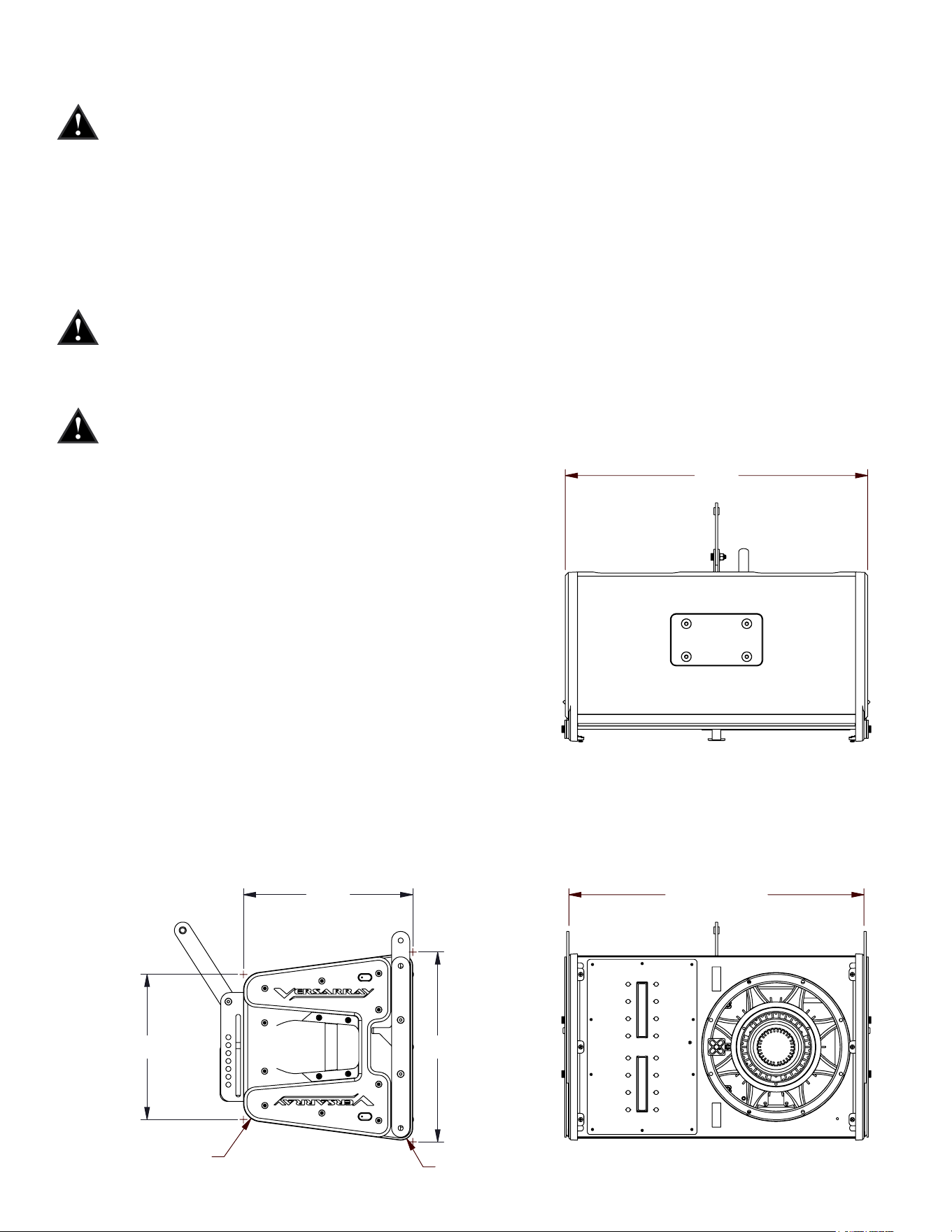
24.400
(INSIDE BRACKETS)
15.506
7.50°
.960
POI
1.140
POI
25.000
R1.500
R1.000
12.000
POI
15.686
POI
14.000
POI=POINT OF INTERSECTION
R
P1600022 VR 112 MK3 FINALB
SHEET 1 OF 1
REV.
DWG NO.
MERIDIAN, MS 39305
5022 HARTLEY PEAVEY DRIVE
PEAVEY ELECTRONICS CORP.
DESC.
FINISH:
MATERIAL:
ANGLES =
1°
.XXX =
.010 INCHES
TOLERANCES:
THE FOLLOWING APPLY:
UNLESS OTHERWISE SPECIFIED,
ENGR.
MECH.
SCALE
CHK'D
DATE
DRAWN
DATE
ECN
CHK'D
BY
ZONE
REVISION DESCRIPTION
REV
1
2
3
4
5
6
A
B
C
D
6
5
4
3
2
1
D
C
B
A
,
XXX
1:8
PEAVEY CONFIDENTIAL
31
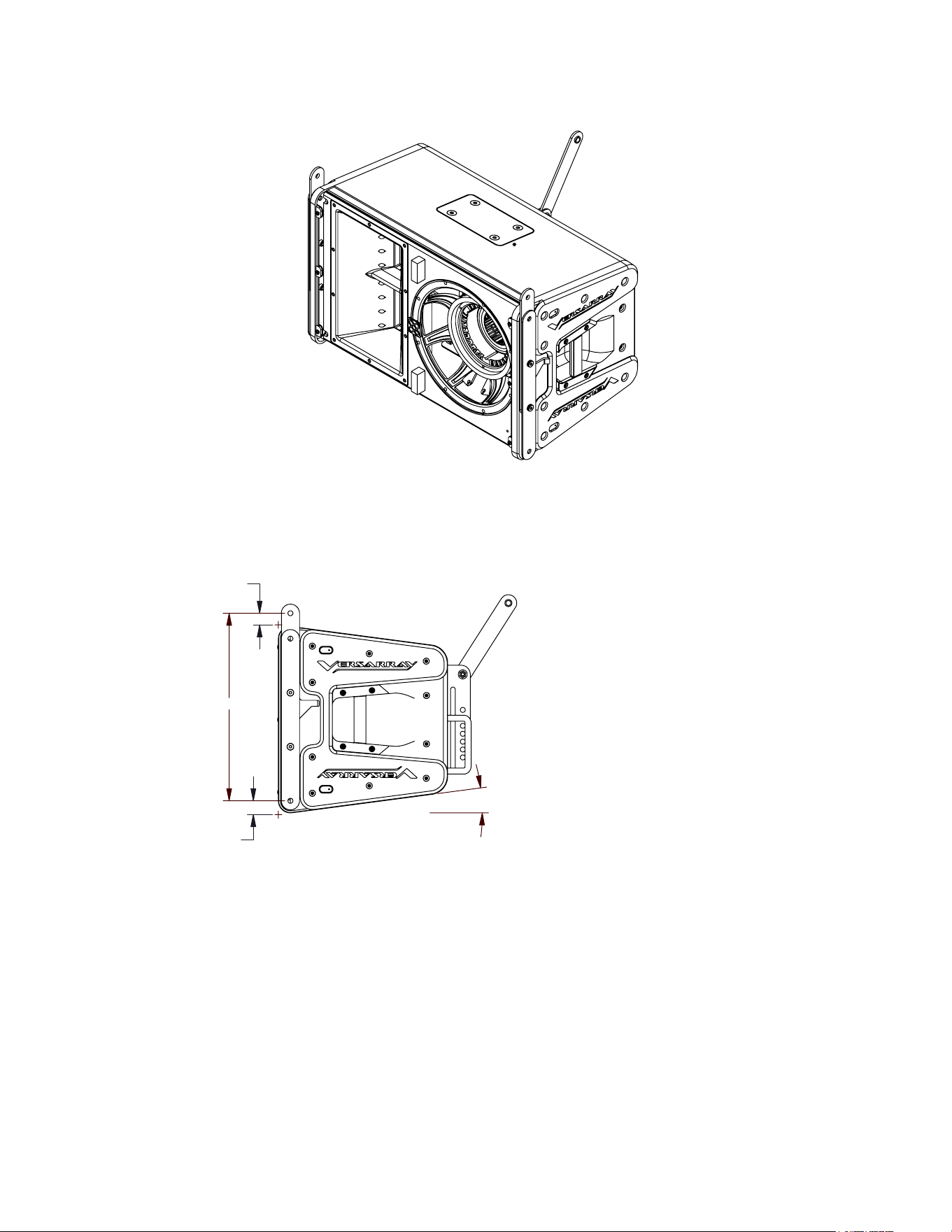
24.400
(INSIDE BRACKETS)
15.506
7.50°
.960
POI
1.140
POI
25.000
R1.500
R1.000
12.000
POI
15.686
POI
14.000
POI=POINT OF INTERSECTION
R
P1600022 VR 112 MK3 FINALB
SHEET 1 OF 1
REV.
DWG NO.
MERIDIAN, MS 39305
5022 HARTLEY PEAVEY DRIVE
PEAVEY ELECTRONICS CORP.
DESC.
FINISH:
MATERIAL:
ANGLES =
1°
.XXX =
.010 INCHES
TOLERANCES:
THE FOLLOWING APPLY:
UNLESS OTHERWISE SPECIFIED,
ENGR.
MECH.
SCALE
CHK'D
DATE
DRAWN
DATE
ECN
CHK'D
BY
ZONE
REVISION DESCRIPTION
REV
1
2
3
4
5
6
A
B
C
D
6
5
4
3
2
1
D
C
B
A
,
XXX
1:8
PEAVEY CONFIDENTIAL

32
Logo referenced in Directive 2002/96/EC Annex IV
(OJ(L)37/38,13.02.03 and defined in EN 50419: 2005
The bar is the symbol for marking of new waste and
is applied only to equipment manufactured after
13 August 2005
www.peaveycommercialaudio.com
Warranty registration and information for U.S. customers available online at
www.peaveycommercialaudio.com/warranty
or use the QR tag below
Features and specications subject to change without notice.
Crest Audio 5022 HWY 493 N. Meridian, MS 39305 (601) 483-5365 FAX (601) 486-1278