(1)
“
CH" is the switch channel button, press it 「·epeatedly, it will
display in sequence. CHl, CH2, CH3, cycle mode, CH1, CH2 ...
(2) When the cycle mode icon " σ
’
is displayed in the upper le刊
corner of the screen, it means that the device enters the cycle
mode, and the screen will switch CH 1, CH2, CH3 every 1 0
seconds.
(3)P「ess the “CH
’
button ag白in to exit the cycle mode 臼nd return
to CH1, cycle mode icon"
C
’
will disappear.
English 1
I
English 2
I
English 3
I
English 4
I
面可lish 5 I
丘内glish 6
「
一
一一
+
一一
十
一
十
一
+
一
+
一
+
一
I
� WARRANTY
Newentor®
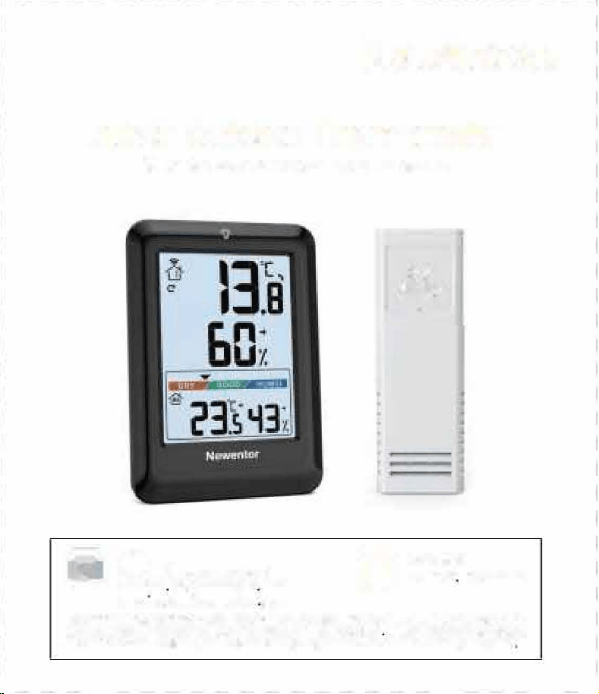
Indoor Outd。or Thermometer
(Save the Instructions for Future Refen回回)
iC
I
M
E
m
ail
1111 SI盯i[email protected]m
t二-二Y S町vice uk@newent。「cam
国芽vice.de@阳,went。rcam
。同时k
Search
·
Newenle『
New回tor Indoor odoor th阳节回附,r Is a阳nlonalpdl后t With the oorreot
gs,
tt wlll aura恒ly sh。wyour l。cal恒mperatu陀andhumidi If the用自帽anyqu田”。ns
abo u。rfunl町、笃。因也""l后througha the ab回 m旧协st。gSU间,a
。
-
1
SWITCH℃/
。
F
Press the
"
℃ff/HIST
”
butt口n to switch ℃/下,
a
e
RE/HUMID附TREND
8.1 Temperatu陀
•
Compared with the last detected temperature, If the temperature
I
rises by more than 1.8
°
F ( 1℃), the trend wlll �
•
Compared with the last detected temperature, if the temperature
drops by more than 1日下(1℃)
,
the trend will
、
•
When the tempe「ature does not change more th臼「1 1.B"F (1"C)
within 白 continuous hou『
,
the trend will呻
8.2 Humidi
•
Compared with the last detected humidity, if the humidity rises
by more than 5%, the trend will
•
Compared with the last detected humidity, if the humidity drops
by more than 5%, the trend will
、
• When the humidity does not change more than 5% within a
continuous hour, the trend will呻
English 7
TABLE OF CONTENTS
。
i
PROD
1 .2 Remote Sens。r
(I�
BUONS
1. PRODUCT APPEARANCE …
…
…
…2
1 1 Base Station
· ·自…. .. ……....…………·自… ...
2
1 2 Remote Sensor
……............………………E …….
3
2. BUONS FUNCTION
· .. · .. -.. · -.... · .. · · -...... · .. ·
4
3. CONNECT SE STATION AND SENSOR
··· ...
5
4. CYCLE MODE
.. · -.... · ...... · .. -· .. · .. -· · -.. -· · · -· ..
5
5. SENSOR PCEMENT RECOMMENDATIONS
..
6
6. /MIN
· .....................…………… ……..
6
7. SWITCH℃/下
…
4
…………………
…..………..
7
B. TEMPERATURE/HUMIDπY TREND DETECTION
· ·
7
81 Te节
par咱ture
……··町...
.........,.. ,......
..………·町
7
8 2 H
umidi
……………...……
……………………
….
7
9. ICE ALERT FUNCTI。N
..........…,,....--…..
8
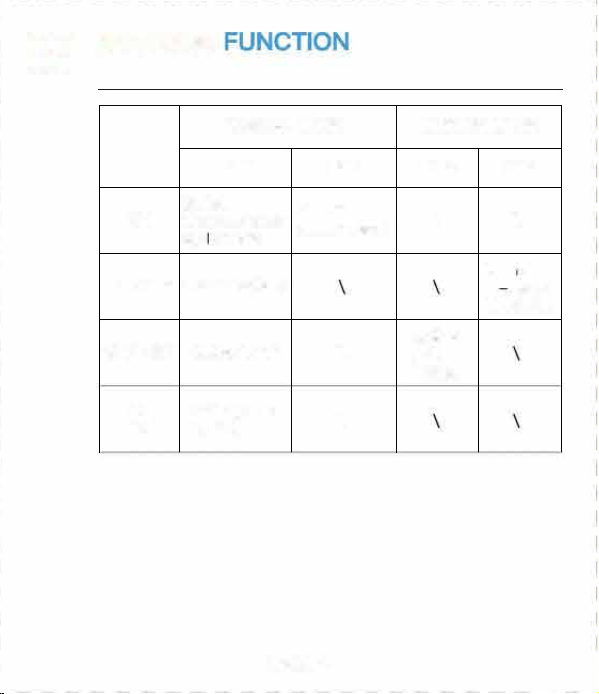
N。RMAL M。DE
MAX/MIN MODE
Pn到SS Hold Press Hold
Switch
Se日rch
CH
channels/ent町
sensor signal
\ \
cyc
l
e mode
Cle日
’
/
MAX/MIN
View MAX/MIN
『e record
MAX/MIN
24/48
℃/
°
F/HIST
Switch ℃/
°
F
\
/ALL
TIMES
-哲-
Backli目ht on
\
for 1 Os
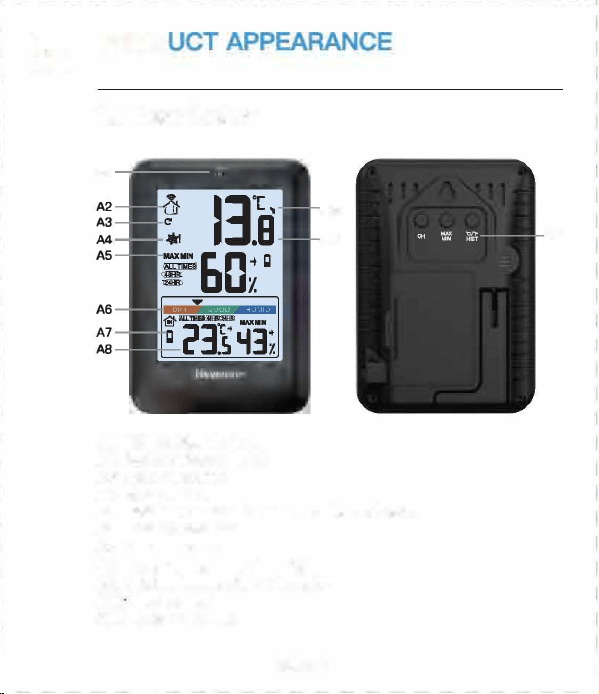
1.1 Base Station
82
iC
“
目1-
Al
B3 - f
B4
85
A10
M
A9
A11
86
10.C。MFORT INDICAT。R
11. LOW BAERY 10。N
B
--
..
..
..
.
.
.
..
..
.
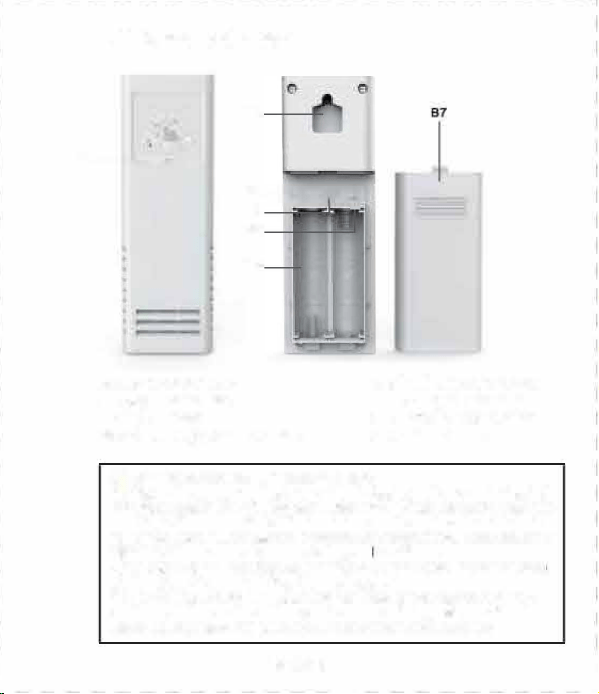
81: RF Transmit LED
82: Wall Mount Hole
B3: τ/℃ Buon
已4:C同annel 1 ,2,3 Select Bu。同
85:
“
TX
”
Bu仕凹
,
Transmit
RF Signal Manually
86: Baery c。mpament
87:Ba忧eryCove「
12.PR
。DUCT
PARAMETERS
…………………
…
9
13. FAQ
S
·
·…....
.
…
…... .…·
10
14. WARRANTY
……………………
………………..
12
A 1: 1 OS backlight butt口内
A2: Ou企door channel 1,2,3
A3:Cγcle made icon
A4: I四 alert icon
A5: /MIN回lues r ALL TIMES/ 4日HR/24HR
A6:C。mfo indicator
A7: Low baery icon
AB: Indoor temperatu「e & humidity
A9: Outdoor temperature晶humidity
A10. Trend ar『
A11: Functi。n bu。ns
A nr Placement R田mmandatlons
(1) Mount廿E『四rti国lly or a陆irU←cingwall or a明11-shaα对
b值町口n to aidsunlight and rain. Dit sunlight will make temperatL咱
read high. Remmended: 6 inch届国ow eaves 。rF归 under dk
rail ls P阳伽r创年 The ma划mum tnsml回Ion range to the怕回anan Is
32日ft/1αk节in O到air, not including wal
l
s or刊00阳.
(2)T创口id signal interence, please do not pla the se内部ror ba回
stion cl西eto a metal, TV旷ccmpl.ller, e缸,
(3)tf it
’
s a ld川nter, it'sommend创moving the国叩re阳er to
the ba田 ation as the be叩pean西 will d匈阳面
,
lting in
faster ba吐盯din and p。由ibνsho门erconr四tion d陆tan田S
09
ICE ALERT FUNCTION 门 LOW BAERY
1
3
阳
Q
S
②The data detection range on the weather channel/ APP Is the
area. Besides, airpo时wea the『 stations a「e only u口dated once 口e『
h口ur.
When the outdoqr temperature is 30.2
°
←33.8.F (
-
1℃斗℃), the
ice alert icon u聊
’
will刊ash.Below 30.02
。
F (一1.1町,the ice
alert icon
‘
啦I
"
is displayed statically.
When阳|口w batte icon
“
日
’
displays on阳町esn (indoor
battery voltage is lower than 3.6V, sens口「 battery voltage is
I owe「 than 2.5V). we need to replace the battery of the base
station/senso「 in time.
(1) When using the device for the白rst time, how long d饵S it
take to automatically calibrate?
It usually takes about 3
-
7 days.
③
If the environment near the house is comfortable(plants, c「ops,
air conditioner, etc.), it is normal for the tempe『ature of the
sens口r to be different from that on the APP.
1(1
COMFORT
I
� PRODUCT
PARAME
(2) Why Is the temperatu陪end humidity Inconsistent when the
base station and the sans。r ara placed together?
①
The size and structure of the devices are diffe「ent.In order to
get刑。re accurate readings, the device has more small holes fo『
ventilatio, while the remote sensor is usually placed in a rel吕tively
harsh envlronme时,Its holes will be smaller. At this time, the chip
envl「onment will be slightly different. Thls is possible one 口f the
reas口ns for the dif「erence.Thereto『e, the devices 〔eed learning
and calibration time. Generally, the longer it is placed, the more
自CCU「日te the temperatu「e will be.
②
If the distance between the cold source or the heat source is
different, this is also one of the reasons for the diffe「enc白,
③To compare temperature, we recommend a mercury or red
spirit(fluid) thermometer. Bi-metal(dial) and digital thermome-
ters(from other weathe「 ststio〔s) are not a good source and have
I
their own margin of error.
(4) Is the sensor waterproof?
No.
(5) The sensor cannot connect with the base station?
①Please ensu「e that the channels of the base station and sensor
are consistent.
②Please ensu陪that the se〔sor is plac回correctly and the
distance from the base station is within the connectable range
(refer to '5. SENSOR PLACEMENT RECOMMENDATIONS').
•
Indoor temperature detection range: 14.2
°
F-1 22
°
F (-9.9-50℃)
(LL.L is displayed when it is lower than 1 4.2'F /-9.9℃
,
and HH.H is
I
displayed when it is higher th自n 122'F/50℃)
•
Outdoo「 temperatu「0 detection range: -40'F什58'F(-40℃~70℃)
(LL.L is displayed when it is lower than 40
。
F / 40℃, and HH.H
is displayed when it is higher than 158
°
F/70℃)
•
Indoor I outdoo『 humidity detection range: 20% 95% (if it is
lower than 20%, It will display 20%, if it is higher than 95%, it will
I
dis口lay 95%)
• Detection period: 30 seconds
• Temperature detection accuracy
A.32
°
F-104
°
F (0℃阳40℃l accuracy 主1.B•F (1℃}
8. Other ranges accu「acy 土3.6
。
F (2℃)
•
Humidity detection accuracy
A.40%-80% accuracy ±5%
B.Other ranges ace u「acy ±8%
•B自se station battery: 3 x AAA batteries
• Remote senso「 battery: 2 x AA batteries
•
Connection dist自nee betwee「lb白se station and remote sensor:
32Bft (1 OOm) in open a「自由
English 9
English 11
Indoor humidity detection for comfort, displayed as 5 levels.
①
TOO DRY: 20% to 30%
②DRY: 31 % to 44%
③COMFORT: 45% to 65%
④
WET: 66% to 84%
⑤
TOO WET
:
85% to 95%
①
@
③
④
⑤
-,1�
T
,回丽
阳)
Why is the measur回outdoor temperature dierent from that
on the APP (local weather bureau)?
①
The Newento『 indoo广 口川door thermometer is a home version
device, its detection range is a『ound the house 日nd its d白t自 will be
I
ore accurate.
(6)Why d。因 the SC用en aut。matically switch to other channels
in turn?
If the icon •
C
• is displayed in the 〕ppe「 left corner 口f the
screen, it means that the device has entered the cycle mode,
press the "CHANNEL" button to exit the mode and return to CH1.
(Refe「 to
‘
4. CYCLE MODE
’
)
民•:1”肉”’E
English 8
English 10
03
CONNECT BASE STATION AND
SENSOR
05
SENSOR PLACEMENT
RECOMMENDATIONS
(1) p「ess the
“
CH
”
button on the base st自tion to switch the
outdoor channel in the upper left corner of the screen.
(2) Open the sensor battery cover, switch the outdoor channel to
match the base station. Such as both In CH 1.
(3) Hold the
“
CH" button fo「 3 saconds to enter the RF sign刮
目a「ch state.
(4) Inse the batte「ies fo『 the sensor, press the "TX
"
button to
transmit the RF signal.
(5) Sensor temperatu「e and humidity a「e displayed on the screen,
d口ne
(1) Mount the sensor vertically on a No内h-facing wall or a
well-shaded locati口n to avoid sunlight and rain. Direct sunlight
will make temperature read high. Recommended: 6 inches below
eaves o「 placed under deck rail is prefe『red.The maximum
transmission range t口 the base station is 328 /1 OOm in open
air, not lncludlng walls o「啊。口「s.
的To avoid signal interference, please do not place the sensor or
base station close to a metal, D「 computer, etc.
(3) If it's a cold winter, it
’
s recommended moving the sensor
close『 to t同e base station as the battery pe忖口rmance will
degrade, resulting in faster ba吐ery drain and possibly shoer
connection distances
Note:
( 1l The base station can connect up to 3 senso『s, please make
SU「e that the channels of each sensor are di宵enent.
(2) RF sensor signal inteal: CH1 =31 S, CH2=32S, CH3=33S
。叶
CYCLE MODE
0
6 MAX/MIN
(1) Press the “MAX/MIN
”
button to view the MAX/MIN.
(2) In MAX/MIN mode (the MAX/MIN icon is displ白yed on the
screen), p广ess the a℃/
'
F/HIST" button to switch 曰nd displ日y the
MAX/MIN value 口f 24HR/48HR/ALL TIMES.
(3) In MAX/MIN mode, hold
”
MAX/MIN
”
for 3 seconds to clear
and re-record historical data.
DECRATION OF CONFORMI
+ This product was manufactured in a「dance with the
ha「「nonized European stand曰rds, you will fmd the declarati口n of
conformity below.
。2014/30/EUEMC Directive
02014/53/EU月ED Directive
2011/65/EU RoHS Directive
Newento「 guarantees a 1-year wa厅anty from the date of
pu「chase.
(D口es not include damage caused by man-made damage or
improper use.)
This device complies with Pa 15 of the FCC Rules. Operation is
subject t口 the following two conditions: (1 J this device may not
cause hannful interference, and (2) this devi回must accept any
interference received, including inte「ference that may cause
undesired operation.
DISPOSAL
0
刊1e packagi『1日is made of envi『口「1「nentally friendly
mate「ials,which may be disposed through you「 local
附cycling facilities
This device has been tested and found to comply with the limits
fo「 B Class 8 digrtal device, pursu自nt to Part 15 口f the FCC Rules.
Th臼e limits are designed to provide reasonable protection
ag自Inst harmful Int白rference In a r白sldantlal Install自tlon.This
device generates, uses and can rad旧te radio frequency energy
and, if not installed and used in accordance with the inst「uctions,
may cause harmful interference to radio communications.
However, there is no guarantee that inte厅erence will not occur in
a particular installation. If this device does cause harmful
lnterfe「ence to radio 口r talevlslon reception, which can be
determined by turning the device口忏and on, the user is
encouraged to t to correct the Inteerence by 口ne o「 m口re of
the following meesu『es:
--
Reorient or rel口cate the receiving antenna.
--Increase the separation between the device and 『eceiveι
Conneot the device Into an outlet on a circuit die「ent from
that to which the r白ceiver is conn白ctad.
一Consult the dealer or an experienced radio/ technician for
help.
Changes or modications not expressly approved by the party
responsible for compliance c口uld void the user's authority to
operate the equipment.
When your device has come to the end of its life, in
the inte「est of environmental protection please do not
throw it out with your household refuse, b川 take it to
a suitable cente「 where is can be disposed of properly.
柬
All batteries must be handed In at a correction point In
yo〕广口口munity, suburb
,
口r at the netsile「, Such
b白白eri臼 can thus be disposed of in an envir口nmentally
f「iendly明y.
Manufacrurer Dor咱n Bei
i
陷Eleclr。n由 Tech们olc明VCo., Lid
O四dre皿:No.15问。回lo田
,
No.3 lndust唰苟同e, Shangsha commcnl
,
Cha吨
’
anTn.口。ngguanCi. Guang曲啕vines
r回内tor
.
,,om
English 12
English 13
(1)
“
CH" is the switch channel button, press it 「·epeatedly, it will
display in sequence. CHl, CH2, CH3, cycle mode, CH1, CH2 ...
(2) When the cycle mode icon " σ
’
is displayed in the upper le刊
corner of the screen, it means that the device enters the cycle
mode, and the screen will switch CH 1, CH2, CH3 every 1 0
seconds.
(3)P「ess the “CH
’
button ag白in to exit the cycle mode 臼nd return
to CH1, cycle mode icon"
C
’
will disappear.
English 1
I
English 2
I
English 3
I
English 4
I
面可lish 5 I
丘内glish 6
「
一
一一
+
一一
十
一
十
一
+
一
+
一
+
一
I
� WARRANTY
Newentor®
Indoor Outd。or Thermometer
(Save the Instructions for Future Refen回回)
iC
I
M
E
m
ail
1111 SI盯i[email protected]m
t二-二Y S町vice uk@newent。「cam
国芽vice.de@阳,went。rcam
。同时k
Search
·
Newenle『
New回tor Indoor odoor th阳节回附,r Is a阳nlonalpdl后t With the oorreot
gs,
tt wlll aura恒lysh。wyour l。cal恒mperatu陀and humidi If the用自帽anyqu田”。ns
abo u。rfunl町、笃。因也""l后througha the ab回 m旧协st。gSU间,a
。
-
1
SWITCH℃/
。
F
Press the
"
℃ff/HIST
”
butt口n to switch ℃/下,
a
e
RE/HUMID附TREND
8.1 Temperatu陀
•
Compared with the last detected temperature, If the temperature
I
rises by more than 1.8
°
F ( 1℃), the trend wlll �
•
Compared with the last detected temperature, if the temperature
drops by more than 1日下(1℃)
,
the trend will
、
•
When the tempe「ature does not change more th臼「1 1.B"F (1"C)
within 白 continuous hou『
,
the trend will呻
8.2 Humidi
•
Compared with the last detected humidity, if the humidity rises
by more than 5%, the trend will
•
Compared with the last detected humidity, if the humidity drops
by more than 5%, the trend will
、
• When the humidity does not change more than 5% within a
continuous hour, the trend will呻
English 7
TABLE OF CONTENTS
。
i
PROD
1 .2 Remote Sens。r
(I�
BUONS
1. PRODUCT APPEARANCE …
…
…
…2
1 1 Base Station
· ·自…. .. ……....…………·自… ...
2
1 2 Remote Sensor
……............………………E …….
3
2. BUONS FUNCTION
· .. · .. -.. · -.... · .. · · -...... · .. ·
4
3. CONNECT SE STATION AND SENSOR
··· ...
5
4. CYCLE MODE
.. · -.... · ...... · .. -· .. · .. -· · -.. -· · · -· ..
5
5. SENSOR PCEMENT RECOMMENDATIONS
..
6
6. /MIN
· .....................…………… ……..
6
7. SWITCH℃/下
…
4
…………………
…..………..
7
B. TEMPERATURE/HUMIDπY TREND DETECTION
· ·
7
81 Te节
par咱ture
……··町...
.........,.. ,......
..………·町
7
8 2 H
umidi
……………...……
……………………
….
7
9. ICE ALERT FUNCTI。N
..........…,,....--…..
8
N。RMAL M。DE
MAX/MIN MODE
Pn到SS Hold Press Hold
Switch
Se日rch
CH
channels/ent町
sensor signal
\ \
cyc
l
e mode
Cle日
’
/
MAX/MIN
View MAX/MIN
『e record
MAX/MIN
24/48
℃/
°
F/HIST
Switch ℃/
°
F
\
/ALL
TIMES
-哲-
Backli目ht on
\
for 1 Os
1.1 Base Station
82
iC
“
目1-
Al
B3 - f
B4
85
A10
M
A9
A11
86
10.C。MFORT INDICAT。R
11. LOW BAERY 10。N
B
--
..
..
..
.
.
.
..
..
.
81: RF Transmit LED
82: Wall Mount Hole
B3: τ/℃ Buon
已4:C同annel 1 ,2,3 Select Bu。同
85:
“
TX
”
Bu仕凹
,
Transmit
RF Signal Manually
86: Baery c。mpament
87:Ba忧eryCove「
12.PR
。DUCT
PARAMETERS
…………………
…
9
13. FAQ
S
·
·…....
.
…
…... .…·
10
14. WARRANTY
……………………
………………..
12
A 1: 1 OS backlight butt口内
A2: Ou企door channel 1,2,3
A3:Cγcle made icon
A4: I四 alert icon
A5: /MIN回lues r ALL TIMES/ 4日HR/24HR
A6:C。mfo indicator
A7: Low baery icon
AB: Indoor temperatu「e & humidity
A9: Outdoor temperature晶humidity
A10. Trend ar『
A11: Functi。n bu。ns
A nr Placement R田mmandatlons
(1) Mount廿E『四rti国lly or a陆irU←cingwall or a明11-shaα对
b值町口n to aidsunlight and rain. Dit sunlight will make temperatL咱
read high. Remmended: 6 inch届国ow eaves 。rF归 under dk
rail ls P阳伽r创年 The ma划mum tnsml回Ion range to the怕回anan Is
32日ft/1αk节in O到air, not including wal
l
s or刊00阳.
(2)T创口id signal interence, please do not pla the se内部ror ba回
stion cl西eto a metal, TV旷ccmpl.ller, e缸,
(3)tf it
’
s a ld川nter, it'sommend创moving the国叩re阳er to
the ba田 ation as the be叩pean西 will d匈阳面
,
lting in
faster ba吐盯din and p。由ibνsho门erconr四tion d陆tan田S
09
ICE ALERT FUNCTION 门 LOW BAERY
1
3
阳
Q
S
②The data detection range on the weather channel/ APP Is the
area. Besides, airpo时wea the『 stations a「e only u口dated once 口e『
h口ur.
When the outdoqr temperature is 30.2
°
←33.8.F (
-
1℃斗℃), the
ice alert icon u聊
’
will刊ash.Below 30.02
。
F (一1.1町,the ice
alert icon
‘
啦I
"
is displayed statically.
When阳|口w batte icon
“
日
’
displays on阳町esn (indoor
battery voltage is lower than 3.6V, sens口「 battery voltage is
I owe「 than 2.5V). we need to replace the battery of the base
station/senso「 in time.
(1) When using the device for the白rst time, how long d饵S it
take to automatically calibrate?
It usually takes about 3
-
7 days.
③
If the environment near the house is comfortable(plants, c「ops,
air conditioner, etc.), it is normal for the tempe『ature of the
sens口r to be different from that on the APP.
1(1
COMFORT
I
� PRODUCT
PARAME
(2) Why Is the temperatu陪end humidity Inconsistent when the
base station and the sans。r ara placed together?
①
The size and structure of the devices are diffe「ent.In order to
get刑。re accurate readings, the device has more small holes fo『
ventilatio, while the remote sensor is usually placed in a rel吕tively
harsh envlronme时,Its holes will be smaller. At this time, the chip
envl「onment will be slightly different. Thls is possible one 口f the
reas口ns for the dif「erence.Thereto『e, the devices 〔eed learning
and calibration time. Generally, the longer it is placed, the more
自CCU「日te the temperatu「e will be.
②
If the distance between the cold source or the heat source is
different, this is also one of the reasons for the diffe「enc白,
③To compare temperature, we recommend a mercury or red
spirit(fluid) thermometer. Bi-metal(dial) and digital thermome-
ters(from other weathe「 ststio〔s) are not a good source and have
I
their own margin of error.
(4) Is the sensor waterproof?
No.
(5) The sensor cannot connect with the base station?
①Please ensu「e that the channels of the base station and sensor
are consistent.
②Please ensu陪that the se〔sor is plac回correctly and the
distance from the base station is within the connectable range
(refer to '5. SENSOR PLACEMENT RECOMMENDATIONS').
•
Indoor temperature detection range: 14.2
°
F-1 22
°
F (-9.9-50℃)
(LL.L is displayed when it is lower than 1 4.2'F /-9.9℃
,
and HH.H is
I
displayed when it is higher th自n 122'F/50℃)
•
Outdoo「 temperatu「0 detection range: -40'F什58'F(-40℃~70℃)
(LL.L is displayed when it is lower than 40
。
F / 40℃, and HH.H
is displayed when it is higher than 158
°
F/70℃)
•
Indoor I outdoo『 humidity detection range: 20% 95% (if it is
lower than 20%, It will display 20%, if it is higher than 95%, it will
I
dis口lay 95%)
• Detection period: 30 seconds
• Temperature detection accuracy
A.32
°
F-104
°
F (0℃阳40℃l accuracy 主1.B•F (1℃}
8. Other ranges accu「acy 土3.6
。
F (2℃)
•
Humidity detection accuracy
A.40%-80% accuracy ±5%
B.Other ranges ace u「acy ±8%
•B自se station battery: 3 x AAA batteries
• Remote senso「 battery: 2 x AA batteries
•
Connection dist自nee betwee「lb白se station and remote sensor:
32Bft (1 OOm) in open a「自由
English 9
English 11
Indoor humidity detection for comfort, displayed as 5 levels.
①
TOO DRY: 20% to 30%
②DRY: 31 % to 44%
③COMFORT: 45% to 65%
④
WET: 66% to 84%
⑤
TOO WET
:
85% to 95%
①
@
③
④
⑤
-,1�
T
,回丽
阳)
Why is the measur回outdoor temperature dierent from that
on the APP (local weather bureau)?
①
The Newento『 indoo广 口川door thermometer is a home version
device, its detection range is a『ound the house 日nd its d白t自 will be
I
ore accurate.
(6)Why d。因 the SC用en aut。matically switch to other channels
in turn?
If the icon •
C
• is displayed in the 〕ppe「 left corner 口f the
screen, it means that the device has entered the cycle mode,
press the "CHANNEL" button to exit the mode and return to CH1.
(Refe「 to
‘
4. CYCLE MODE
’
)
民•:1”肉”’E
English 8
English 10
03
CONNECT BASE STATION AND
SENSOR
05
SENSOR PLACEMENT
RECOMMENDATIONS
(1) p「ess the
“
CH
”
button on the base st自tion to switch the
outdoor channel in the upper left corner of the screen.
(2) Open the sensor battery cover, switch the outdoor channel to
match the base station. Such as both In CH 1.
(3) Hold the
“
CH" button fo「 3 saconds to enter the RF sign刮
目a「ch state.
(4) Inse the batte「ies fo『 the sensor, press the "TX
"
button to
transmit the RF signal.
(5) Sensor temperatu「e and humidity a「e displayed on the screen,
d口ne
(1) Mount the sensor vertically on a No内h-facing wall or a
well-shaded locati口n to avoid sunlight and rain. Direct sunlight
will make temperature read high. Recommended: 6 inches below
eaves o「 placed under deck rail is prefe『red.The maximum
transmission range t口 the base station is 328 /1 OOm in open
air, not lncludlng walls o「啊。口「s.
的To avoid signal interference, please do not place the sensor or
base station close to a metal, D「 computer, etc.
(3) If it's a cold winter, it
’
s recommended moving the sensor
close『 to t同e base station as the battery pe忖口rmance will
degrade, resulting in faster ba吐ery drain and possibly shoer
connection distances
Note:
( 1l The base station can connect up to 3 senso『s, please make
SU「e that the channels of each sensor are di宵enent.
(2) RF sensor signal inteal: CH1 =31 S, CH2=32S, CH3=33S
。叶
CYCLE MODE
0
6 MAX/MIN
(1) Press the “MAX/MIN
”
button to view the MAX/MIN.
(2) In MAX/MIN mode (the MAX/MIN icon is displ白yed on the
screen), p广ess the a℃/
'
F/HIST" button to switch 曰nd displ日y the
MAX/MIN value 口f 24HR/48HR/ALL TIMES.
(3) In MAX/MIN mode, hold
”
MAX/MIN
”
for 3 seconds to clear
and re-record historical data.
DECRATION OF CONFORMI
+ This product was manufactured in a「dance with the
ha「「nonized European stand曰rds, you will fmd the declarati口n of
conformity below.
。2014/30/EUEMC Directive
02014/53/EU月ED Directive
2011/65/EU RoHS Directive
Newento「 guarantees a 1-year wa厅anty from the date of
pu「chase.
(D口es not include damage caused by man-made damage or
improper use.)
This device complies with Pa 15 of the FCC Rules. Operation is
subject t口 the following two conditions: (1 J this device may not
cause hannful interference, and (2) this devi回must accept any
interference received, including inte「ference that may cause
undesired operation.
DISPOSAL
0
刊1e packagi『1日is made of envi『口「1「nentally friendly
mate「ials,which may be disposed through you「 local
附cycling facilities
This device has been tested and found to comply with the limits
fo「 B Class 8 digrtal device, pursu自nt to Part 15 口f the FCC Rules.
Th臼e limits are designed to provide reasonable protection
ag自Inst harmful Int白rference In a r白sldantlal Install自tlon.This
device generates, uses and can rad旧te radio frequency energy
and, if not installed and used in accordance with the inst「uctions,
may cause harmful interference to radio communications.
However, there is no guarantee that inte厅erence will not occur in
a particular installation. If this device does cause harmful
lnterfe「ence to radio 口r talevlslon reception, which can be
determined by turning the device口忏and on, the user is
encouraged to t to correct the Inteerence by 口ne o「 m口re of
the following meesu『es:
--
Reorient or rel口cate the receiving antenna.
--Increase the separation between the device and 『eceiveι
Conneot the device Into an outlet on a circuit die「ent from
that to which the r白ceiver is conn白ctad.
一Consult the dealer or an experienced radio/ technician for
help.
Changes or modications not expressly approved by the party
responsible for compliance c口uld void the user's authority to
operate the equipment.
When your device has come to the end of its life, in
the inte「est of environmental protection please do not
throw it out with your household refuse, b川 take it to
a suitable cente「 where is can be disposed of properly.
柬
All batteries must be handed In at a correction point In
yo〕广口口munity, suburb
,
口r at the netsile「, Such
b白白eri臼 can thus be disposed of in an envir口nmentally
f「iendly明y.
Manufacrurer Dor咱n Bei
i
陷Eleclr。n由 Tech们olc明VCo., Lid
O四dre皿:No.15问。回lo田
,
No.3 lndust唰苟同e, Shangsha commcnl
,
Cha吨
’
anTn.口。ngguanCi. Guang曲啕vines
r回内tor
.
,,om
English 12
English 13
(1)
“
CH" is the switch channel button, press it 「·epeatedly, it will
display in sequence. CHl, CH2, CH3, cycle mode, CH1, CH2 ...
(2) When the cycle mode icon " σ
’
is displayed in the upper le刊
corner of the screen, it means that the device enters the cycle
mode, and the screen will switch CH 1, CH2, CH3 every 1 0
seconds.
(3)P「ess the “CH
’
button ag白in to exit the cycle mode 臼nd return
to CH1, cycle mode icon"
C
’
will disappear.
English 1
I
English 2
I
English 3
I
English 4
I
面可lish 5 I
丘内glish 6
「
一
一一
+
一一
十
一
十
一
+
一
+
一
+
一
I
� WARRANTY
Newentor®
Indoor Outd。or Thermometer
(Save the Instructions for Future Refen回回)
iC
I
M
E
m
ail
1111 SI盯i[email protected]m
t二-二Y S町vice uk@newent。「cam
国芽vice.de@阳,went。rcam
。同时k
Search
·
Newenle『
New回tor Indoor odoor th阳节回附,r Is a阳nlonalpdl后t With the oorreot
gs,
tt wlll aura恒lysh。wyour l。cal恒mperatu陀and humidi If the用自帽anyqu田”。ns
abo u。rfunl町、笃。因也""l后througha the ab回 m旧协st。gSU间,a
。
-
1
SWITCH℃/
。
F
Press the
"
℃ff/HIST
”
butt口n to switch ℃/下,
a
e
RE/HUMID附TREND
8.1 Temperatu陀
•
Compared with the last detected temperature, If the temperature
I
rises by more than 1.8
°
F ( 1℃), the trend wlll �
•
Compared with the last detected temperature, if the temperature
drops by more than 1日下(1℃)
,
the trend will
、
•
When the tempe「ature does not change more th臼「1 1.B"F (1"C)
within 白 continuous hou『
,
the trend will呻
8.2 Humidi
•
Compared with the last detected humidity, if the humidity rises
by more than 5%, the trend will
•
Compared with the last detected humidity, if the humidity drops
by more than 5%, the trend will
、
• When the humidity does not change more than 5% within a
continuous hour, the trend will呻
English 7
TABLE OF CONTENTS
。
i
PROD
1 .2 Remote Sens。r
(I�
BUONS
1. PRODUCT APPEARANCE …
…
…
…2
1 1 Base Station
· ·自…. .. ……....…………·自… ...
2
1 2 Remote Sensor
……............………………E …….
3
2. BUONS FUNCTION
· .. · .. -.. · -.... · .. · · -...... · .. ·
4
3. CONNECT SE STATION AND SENSOR
··· ...
5
4. CYCLE MODE
.. · -.... · ...... · .. -· .. · .. -· · -.. -· · · -· ..
5
5. SENSOR PCEMENT RECOMMENDATIONS
..
6
6. /MIN
· .....................…………… ……..
6
7. SWITCH℃/下
…
4
…………………
…..………..
7
B. TEMPERATURE/HUMIDπY TREND DETECTION
· ·
7
81 Te节
par咱ture
……··町...
.........,.. ,......
..………·町
7
8 2 H
umidi
……………...……
……………………
….
7
9. ICE ALERT FUNCTI。N
..........…,,....--…..
8
N。RMAL M。DE
MAX/MIN MODE
Pn到SS Hold Press Hold
Switch
Se日rch
CH
channels/ent町
sensor signal
\ \
cyc
l
e mode
Cle日
’
/
MAX/MIN
View MAX/MIN
『e record
MAX/MIN
24/48
℃/
°
F/HIST
Switch ℃/
°
F
\
/ALL
TIMES
-哲-
Backli目ht on
\
for 1 Os
1.1 Base Station
82
iC
“
目1-
Al
B3 - f
B4
85
A10
M
A9
A11
86
10.C。MFORT INDICAT。R
11. LOW BAERY 10。N
B
--
..
..
..
.
.
.
..
..
.
81: RF Transmit LED
82: Wall Mount Hole
B3: τ/℃ Buon
已4:C同annel 1 ,2,3 Select Bu。同
85:
“
TX
”
Bu仕凹
,
Transmit
RF Signal Manually
86: Baery c。mpament
87:Ba忧eryCove「
12.PR
。DUCT
PARAMETERS
…………………
…
9
13. FAQ
S
·
·…....
.
…
…... .…·
10
14. WARRANTY
……………………
………………..
12
A 1: 1 OS backlight butt口内
A2: Ou企door channel 1,2,3
A3:Cγcle made icon
A4: I四 alert icon
A5: /MIN回lues r ALL TIMES/ 4日HR/24HR
A6:C。mfo indicator
A7: Low baery icon
AB: Indoor temperatu「e & humidity
A9: Outdoor temperature晶humidity
A10. Trend ar『
A11: Functi。n bu。ns
A nr Placement R田mmandatlons
(1) Mount廿E『四rti国lly or a陆irU←cingwall or a明11-shaα对
b值町口n to aidsunlight and rain. Dit sunlight will make temperatL咱
read high. Remmended: 6 inch届国ow eaves 。rF归 under dk
rail ls P阳伽r创年 The ma划mum tnsml回Ion range to the怕回anan Is
32日ft/1αk节in O到air, not including wal
l
s or刊00阳.
(2)T创口id signal interence, please do not pla the se内部ror ba回
stion cl西eto a metal, TV旷ccmpl.ller, e缸,
(3)tf it
’
s a ld川nter, it'sommend创moving the国叩re阳er to
the ba田 ation as the be叩pean西 will d匈阳面
,
lting in
faster ba吐盯din and p。由ibνsho门erconr四tion d陆tan田S
09
ICE ALERT FUNCTION 门 LOW BAERY
1
3
阳
Q
S
②The data detection range on the weather channel/ APP Is the
area. Besides, airpo时wea the『 stations a「e only u口dated once 口e『
h口ur.
When the outdoqr temperature is 30.2
°
←33.8.F (
-
1℃斗℃), the
ice alert icon u聊
’
will刊ash.Below 30.02
。
F (一1.1町,the ice
alert icon
‘
啦I
"
is displayed statically.
When阳|口w batte icon
“
日
’
displays on阳町esn (indoor
battery voltage is lower than 3.6V, sens口「 battery voltage is
I owe「 than 2.5V). we need to replace the battery of the base
station/senso「 in time.
(1) When using the device for the白rst time, how long d饵S it
take to automatically calibrate?
It usually takes about 3
-
7 days.
③
If the environment near the house is comfortable(plants, c「ops,
air conditioner, etc.), it is normal for the tempe『ature of the
sens口r to be different from that on the APP.
1(1
COMFORT
I
� PRODUCT
PARAME
(2) Why Is the temperatu陪end humidity Inconsistent when the
base station and the sans。r ara placed together?
①
The size and structure of the devices are diffe「ent.In order to
get刑。re accurate readings, the device has more small holes fo『
ventilatio, while the remote sensor is usually placed in a rel吕tively
harsh envlronme时,Its holes will be smaller. At this time, the chip
envl「onment will be slightly different. Thls is possible one 口f the
reas口ns for the dif「erence.Thereto『e, the devices 〔eed learning
and calibration time. Generally, the longer it is placed, the more
自CCU「日te the temperatu「e will be.
②
If the distance between the cold source or the heat source is
different, this is also one of the reasons for the diffe「enc白,
③To compare temperature, we recommend a mercury or red
spirit(fluid) thermometer. Bi-metal(dial) and digital thermome-
ters(from other weathe「 ststio〔s) are not a good source and have
I
their own margin of error.
(4) Is the sensor waterproof?
No.
(5) The sensor cannot connect with the base station?
①Please ensu「e that the channels of the base station and sensor
are consistent.
②Please ensu陪that the se〔sor is plac回correctly and the
distance from the base station is within the connectable range
(refer to '5. SENSOR PLACEMENT RECOMMENDATIONS').
•
Indoor temperature detection range: 14.2
°
F-1 22
°
F (-9.9-50℃)
(LL.L is displayed when it is lower than 1 4.2'F /-9.9℃
,
and HH.H is
I
displayed when it is higher th自n 122'F/50℃)
•
Outdoo「 temperatu「0 detection range: -40'F什58'F(-40℃~70℃)
(LL.L is displayed when it is lower than 40
。
F / 40℃, and HH.H
is displayed when it is higher than 158
°
F/70℃)
•
Indoor I outdoo『 humidity detection range: 20% 95% (if it is
lower than 20%, It will display 20%, if it is higher than 95%, it will
I
dis口lay 95%)
• Detection period: 30 seconds
• Temperature detection accuracy
A.32
°
F-104
°
F (0℃阳40℃l accuracy 主1.B•F (1℃}
8. Other ranges accu「acy 土3.6
。
F (2℃)
•
Humidity detection accuracy
A.40%-80% accuracy ±5%
B.Other ranges ace u「acy ±8%
•B自se station battery: 3 x AAA batteries
• Remote senso「 battery: 2 x AA batteries
•
Connection dist自nee betwee「lb白se station and remote sensor:
32Bft (1 OOm) in open a「自由
English 9
English 11
Indoor humidity detection for comfort, displayed as 5 levels.
①
TOO DRY: 20% to 30%
②DRY: 31 % to 44%
③COMFORT: 45% to 65%
④
WET: 66% to 84%
⑤
TOO WET
:
85% to 95%
①
@
③
④
⑤
-,1�
T
,回丽
阳)
Why is the measur回outdoor temperature dierent from that
on the APP (local weather bureau)?
①
The Newento『 indoo广 口川door thermometer is a home version
device, its detection range is a『ound the house 日nd its d白t自 will be
I
ore accurate.
(6)Why d。因 the SC用en aut。matically switch to other channels
in turn?
If the icon •
C
• is displayed in the 〕ppe「 left corner 口f the
screen, it means that the device has entered the cycle mode,
press the "CHANNEL" button to exit the mode and return to CH1.
(Refe「 to
‘
4. CYCLE MODE
’
)
民•:1”肉”’E
English 8
English 10
03
CONNECT BASE STATION AND
SENSOR
05
SENSOR PLACEMENT
RECOMMENDATIONS
(1) p「ess the
“
CH
”
button on the base st自tion to switch the
outdoor channel in the upper left corner of the screen.
(2) Open the sensor battery cover, switch the outdoor channel to
match the base station. Such as both In CH 1.
(3) Hold the
“
CH" button fo「 3 saconds to enter the RF sign刮
目a「ch state.
(4) Inse the batte「ies fo『 the sensor, press the "TX
"
button to
transmit the RF signal.
(5) Sensor temperatu「e and humidity a「e displayed on the screen,
d口ne
(1) Mount the sensor vertically on a No内h-facing wall or a
well-shaded locati口n to avoid sunlight and rain. Direct sunlight
will make temperature read high. Recommended: 6 inches below
eaves o「 placed under deck rail is prefe『red.The maximum
transmission range t口 the base station is 328 /1 OOm in open
air, not lncludlng walls o「啊。口「s.
的To avoid signal interference, please do not place the sensor or
base station close to a metal, D「 computer, etc.
(3) If it's a cold winter, it
’
s recommended moving the sensor
close『 to t同e base station as the battery pe忖口rmance will
degrade, resulting in faster ba吐ery drain and possibly shoer
connection distances
Note:
( 1l The base station can connect up to 3 senso『s, please make
SU「e that the channels of each sensor are di宵enent.
(2) RF sensor signal inteal: CH1 =31 S, CH2=32S, CH3=33S
。叶
CYCLE MODE
0
6 MAX/MIN
(1) Press the “MAX/MIN
”
button to view the MAX/MIN.
(2) In MAX/MIN mode (the MAX/MIN icon is displ白yed on the
screen), p广ess the a℃/
'
F/HIST" button to switch 曰nd displ日y the
MAX/MIN value 口f 24HR/48HR/ALL TIMES.
(3) In MAX/MIN mode, hold
”
MAX/MIN
”
for 3 seconds to clear
and re-record historical data.
DECRATION OF CONFORMI
+ This product was manufactured in a「dance with the
ha「「nonized European stand曰rds, you will fmd the declarati口n of
conformity below.
。2014/30/EUEMC Directive
02014/53/EU月ED Directive
2011/65/EU RoHS Directive
Newento「 guarantees a 1-year wa厅anty from the date of
pu「chase.
(D口es not include damage caused by man-made damage or
improper use.)
This device complies with Pa 15 of the FCC Rules. Operation is
subject t口 the following two conditions: (1 J this device may not
cause hannful interference, and (2) this devi回must accept any
interference received, including inte「ference that may cause
undesired operation.
DISPOSAL
0
刊1e packagi『1日is made of envi『口「1「nentally friendly
mate「ials,which may be disposed through you「 local
附cycling facilities
This device has been tested and found to comply with the limits
fo「 B Class 8 digrtal device, pursu自nt to Part 15 口f the FCC Rules.
Th臼e limits are designed to provide reasonable protection
ag自Inst harmful Int白rference In a r白sldantlal Install自tlon.This
device generates, uses and can rad旧te radio frequency energy
and, if not installed and used in accordance with the inst「uctions,
may cause harmful interference to radio communications.
However, there is no guarantee that inte厅erence will not occur in
a particular installation. If this device does cause harmful
lnterfe「ence to radio 口r talevlslon reception, which can be
determined by turning the device口忏and on, the user is
encouraged to t to correct the Inteerence by 口ne o「 m口re of
the following meesu『es:
--
Reorient or rel口cate the receiving antenna.
--Increase the separation between the device and 『eceiveι
Conneot the device Into an outlet on a circuit die「ent from
that to which the r白ceiver is conn白ctad.
一Consult the dealer or an experienced radio/ technician for
help.
Changes or modications not expressly approved by the party
responsible for compliance c口uld void the user's authority to
operate the equipment.
When your device has come to the end of its life, in
the inte「est of environmental protection please do not
throw it out with your household refuse, b川 take it to
a suitable cente「 where is can be disposed of properly.
柬
All batteries must be handed In at a correction point In
yo〕广口口munity, suburb
,
口r at the netsile「, Such
b白白eri臼 can thus be disposed of in an envir口nmentally
f「iendly明y.
Manufacrurer Dor咱n Bei
i
陷Eleclr。n由 Tech们olc明VCo., Lid
O四dre皿:No.15问。回lo田
,
No.3 lndust唰苟同e, Shangsha commcnl
,
Cha吨
’
anTn.口。ngguanCi. Guang曲啕vines
r回内tor
.
,,om
English 12
English 13
(1)
“
CH" is the switch channel button, press it 「·epeatedly, it will
display in sequence. CHl, CH2, CH3, cycle mode, CH1, CH2 ...
(2) When the cycle mode icon " σ
’
is displayed in the upper le刊
corner of the screen, it means that the device enters the cycle
mode, and the screen will switch CH 1, CH2, CH3 every 1 0
seconds.
(3)P「ess the “CH
’
button ag白in to exit the cycle mode 臼nd return
to CH1, cycle mode icon"
C
’
will disappear.
English 1
I
English 2
I
English 3
I
English 4
I
面可lish 5 I
丘内glish 6
「
一
一一
+
一一
十
一
十
一
+
一
+
一
+
一
I
� WARRANTY
Newentor®
Indoor Outd。or Thermometer
(Save the Instructions for Future Refen回回)
iC
I
M
E
m
ail
1111 SI盯i[email protected]m
t二-二Y S町vice uk@newent。「cam
国芽vice.de@阳,went。rcam
。同时k
Search
·
Newenle『
New回tor Indoor odoor th阳节回附,r Is a阳nlonalpdl后t With the oorreot
gs,
tt wlll aura恒lysh。wyour l。cal恒mperatu陀and humidi If the用自帽anyqu田”。ns
abo u。rfunl町、笃。因也""l后througha the ab回 m旧协st。gSU间,a
。
-
1
SWITCH℃/
。
F
Press the
"
℃ff/HIST
”
butt口n to switch ℃/下,
a
e
RE/HUMID附TREND
8.1 Temperatu陀
•
Compared with the last detected temperature, If the temperature
I
rises by more than 1.8
°
F ( 1℃), the trend wlll �
•
Compared with the last detected temperature, if the temperature
drops by more than 1日下(1℃)
,
the trend will
、
•
When the tempe「ature does not change more th臼「1 1.B"F (1"C)
within 白 continuous hou『
,
the trend will呻
8.2 Humidi
•
Compared with the last detected humidity, if the humidity rises
by more than 5%, the trend will
•
Compared with the last detected humidity, if the humidity drops
by more than 5%, the trend will
、
• When the humidity does not change more than 5% within a
continuous hour, the trend will呻
English 7
TABLE OF CONTENTS
。
i
PROD
1 .2 Remote Sens。r
(I�
BUONS
1. PRODUCT APPEARANCE …
…
…
…2
1 1 Base Station
· ·自…. .. ……....…………·自… ...
2
1 2 Remote Sensor
……............………………E …….
3
2. BUONS FUNCTION
· .. · .. -.. · -.... · .. · · -...... · .. ·
4
3. CONNECT SE STATION AND SENSOR
··· ...
5
4. CYCLE MODE
.. · -.... · ...... · .. -· .. · .. -· · -.. -· · · -· ..
5
5. SENSOR PCEMENT RECOMMENDATIONS
..
6
6. /MIN
· .....................…………… ……..
6
7. SWITCH℃/下
…
4
…………………
…..………..
7
B. TEMPERATURE/HUMIDπY TREND DETECTION
· ·
7
81 Te节
par咱ture
……··町...
.........,.. ,......
..………·町
7
8 2 H
umidi
……………...……
……………………
….
7
9. ICE ALERT FUNCTI。N
..........…,,....--…..
8
N。RMAL M。DE
MAX/MIN MODE
Pn到SS Hold Press Hold
Switch
Se日rch
CH
channels/ent町
sensor signal
\ \
cyc
l
e mode
Cle日
’
/
MAX/MIN
View MAX/MIN
『e record
MAX/MIN
24/48
℃/
°
F/HIST
Switch ℃/
°
F
\
/ALL
TIMES
-哲-
Backli目ht on
\
for 1 Os
1.1 Base Station
82
iC
“
目1-
Al
B3 - f
B4
85
A10
M
A9
A11
86
10.C。MFORT INDICAT。R
11. LOW BAERY 10。N
B
--
..
..
..
.
.
.
..
..
.
81: RF Transmit LED
82: Wall Mount Hole
B3: τ/℃ Buon
已4:C同annel 1 ,2,3 Select Bu。同
85:
“
TX
”
Bu仕凹
,
Transmit
RF Signal Manually
86: Baery c。mpament
87:Ba忧eryCove「
12.PR
。DUCT
PARAMETERS
…………………
…
9
13. FAQ
S
·
·…....
.
…
…... .…·
10
14. WARRANTY
……………………
………………..
12
A 1: 1 OS backlight butt口内
A2: Ou企door channel 1,2,3
A3:Cγcle made icon
A4: I四 alert icon
A5: /MIN回lues r ALL TIMES/ 4日HR/24HR
A6:C。mfo indicator
A7: Low baery icon
AB: Indoor temperatu「e & humidity
A9: Outdoor temperature晶humidity
A10. Trend ar『
A11: Functi。n bu。ns
A nr Placement R田mmandatlons
(1) Mount廿E『四rti国lly or a陆irU←cingwall or a明11-shaα对
b值町口n to aidsunlight and rain. Dit sunlight will make temperatL咱
read high. Remmended: 6 inch届国ow eaves 。rF归 under dk
rail ls P阳伽r创年 The ma划mum tnsml回Ion range to the怕回anan Is
32日ft/1αk节in O到air, not including wal
l
s or刊00阳.
(2)T创口id signal interence, please do not pla the se内部ror ba回
stion cl西eto a metal, TV旷ccmpl.ller, e缸,
(3)tf it
’
s a ld川nter, it'sommend创moving the国叩re阳er to
the ba田 ation as the be叩pean西 will d匈阳面
,
lting in
faster ba吐盯din and p。由ibνsho门erconr四tion d陆tan田S
09
ICE ALERT FUNCTION 门 LOW BAERY
1
3
阳
Q
S
②The data detection range on the weather channel/ APP Is the
area. Besides, airpo时wea the『 stations a「e only u口dated once 口e『
h口ur.
When the outdoqr temperature is 30.2
°
←33.8.F (
-
1℃斗℃), the
ice alert icon u聊
’
will刊ash.Below 30.02
。
F (一1.1町,the ice
alert icon
‘
啦I
"
is displayed statically.
When阳|口w batte icon
“
日
’
displays on阳町esn (indoor
battery voltage is lower than 3.6V, sens口「 battery voltage is
I owe「 than 2.5V). we need to replace the battery of the base
station/senso「 in time.
(1) When using the device for the白rst time, how long d饵S it
take to automatically calibrate?
It usually takes about 3
-
7 days.
③
If the environment near the house is comfortable(plants, c「ops,
air conditioner, etc.), it is normal for the tempe『ature of the
sens口r to be different from that on the APP.
1(1
COMFORT
I
� PRODUCT
PARAME
(2) Why Is the temperatu陪end humidity Inconsistent when the
base station and the sans。r ara placed together?
①
The size and structure of the devices are diffe「ent.In order to
get刑。re accurate readings, the device has more small holes fo『
ventilatio, while the remote sensor is usually placed in a rel吕tively
harsh envlronme时,Its holes will be smaller. At this time, the chip
envl「onment will be slightly different. Thls is possible one 口f the
reas口ns for the dif「erence.Thereto『e, the devices 〔eed learning
and calibration time. Generally, the longer it is placed, the more
自CCU「日te the temperatu「e will be.
②
If the distance between the cold source or the heat source is
different, this is also one of the reasons for the diffe「enc白,
③To compare temperature, we recommend a mercury or red
spirit(fluid) thermometer. Bi-metal(dial) and digital thermome-
ters(from other weathe「 ststio〔s) are not a good source and have
I
their own margin of error.
(4) Is the sensor waterproof?
No.
(5) The sensor cannot connect with the base station?
①Please ensu「e that the channels of the base station and sensor
are consistent.
②Please ensu陪that the se〔sor is plac回correctly and the
distance from the base station is within the connectable range
(refer to '5. SENSOR PLACEMENT RECOMMENDATIONS').
•
Indoor temperature detection range: 14.2
°
F-1 22
°
F (-9.9-50℃)
(LL.L is displayed when it is lower than 1 4.2'F /-9.9℃
,
and HH.H is
I
displayed when it is higher th自n 122'F/50℃)
•
Outdoo「 temperatu「0 detection range: -40'F什58'F(-40℃~70℃)
(LL.L is displayed when it is lower than 40
。
F / 40℃, and HH.H
is displayed when it is higher than 158
°
F/70℃)
•
Indoor I outdoo『 humidity detection range: 20% 95% (if it is
lower than 20%, It will display 20%, if it is higher than 95%, it will
I
dis口lay 95%)
• Detection period: 30 seconds
• Temperature detection accuracy
A.32
°
F-104
°
F (0℃阳40℃l accuracy 主1.B•F (1℃}
8. Other ranges accu「acy 土3.6
。
F (2℃)
•
Humidity detection accuracy
A.40%-80% accuracy ±5%
B.Other ranges ace u「acy ±8%
•B自se station battery: 3 x AAA batteries
• Remote senso「 battery: 2 x AA batteries
•
Connection dist自nee betwee「lb白se station and remote sensor:
32Bft (1 OOm) in open a「自由
English 9
English 11
Indoor humidity detection for comfort, displayed as 5 levels.
①
TOO DRY: 20% to 30%
②DRY: 31 % to 44%
③COMFORT: 45% to 65%
④
WET: 66% to 84%
⑤
TOO WET
:
85% to 95%
①
@
③
④
⑤
-,1�
T
,回丽
阳)
Why is the measur回outdoor temperature dierent from that
on the APP (local weather bureau)?
①
The Newento『 indoo广 口川door thermometer is a home version
device, its detection range is a『ound the house 日nd its d白t自 will be
I
ore accurate.
(6)Why d。因 the SC用en aut。matically switch to other channels
in turn?
If the icon •
C
• is displayed in the 〕ppe「 left corner 口f the
screen, it means that the device has entered the cycle mode,
press the "CHANNEL" button to exit the mode and return to CH1.
(Refe「 to
‘
4. CYCLE MODE
’
)
民•:1”肉”’E
English 8
English 10
03
CONNECT BASE STATION AND
SENSOR
05
SENSOR PLACEMENT
RECOMMENDATIONS
(1) p「ess the
“
CH
”
button on the base st自tion to switch the
outdoor channel in the upper left corner of the screen.
(2) Open the sensor battery cover, switch the outdoor channel to
match the base station. Such as both In CH 1.
(3) Hold the
“
CH" button fo「 3 saconds to enter the RF sign刮
目a「ch state.
(4) Inse the batte「ies fo『 the sensor, press the "TX
"
button to
transmit the RF signal.
(5) Sensor temperatu「e and humidity a「e displayed on the screen,
d口ne
(1) Mount the sensor vertically on a No内h-facing wall or a
well-shaded locati口n to avoid sunlight and rain. Direct sunlight
will make temperature read high. Recommended: 6 inches below
eaves o「 placed under deck rail is prefe『red.The maximum
transmission range t口 the base station is 328 /1 OOm in open
air, not lncludlng walls o「啊。口「s.
的To avoid signal interference, please do not place the sensor or
base station close to a metal, D「 computer, etc.
(3) If it's a cold winter, it
’
s recommended moving the sensor
close『 to t同e base station as the battery pe忖口rmance will
degrade, resulting in faster ba吐ery drain and possibly shoer
connection distances
Note:
( 1l The base station can connect up to 3 senso『s, please make
SU「e that the channels of each sensor are di宵enent.
(2) RF sensor signal inteal: CH1 =31 S, CH2=32S, CH3=33S
。叶
CYCLE MODE
0
6 MAX/MIN
(1) Press the “MAX/MIN
”
button to view the MAX/MIN.
(2) In MAX/MIN mode (the MAX/MIN icon is displ白yed on the
screen), p广ess the a℃/
'
F/HIST" button to switch 曰nd displ日y the
MAX/MIN value 口f 24HR/48HR/ALL TIMES.
(3) In MAX/MIN mode, hold
”
MAX/MIN
”
for 3 seconds to clear
and re-record historical data.
DECRATION OF CONFORMI
+ This product was manufactured in a「dance with the
ha「「nonized European stand曰rds, you will fmd the declarati口n of
conformity below.
。2014/30/EUEMC Directive
02014/53/EU月ED Directive
2011/65/EU RoHS Directive
Newento「 guarantees a 1-year wa厅anty from the date of
pu「chase.
(D口es not include damage caused by man-made damage or
improper use.)
This device complies with Pa 15 of the FCC Rules. Operation is
subject t口 the following two conditions: (1 J this device may not
cause hannful interference, and (2) this devi回must accept any
interference received, including inte「ference that may cause
undesired operation.
DISPOSAL
0
刊1e packagi『1日is made of envi『口「1「nentally friendly
mate「ials,which may be disposed through you「 local
附cycling facilities
This device has been tested and found to comply with the limits
fo「 B Class 8 digrtal device, pursu自nt to Part 15 口f the FCC Rules.
Th臼e limits are designed to provide reasonable protection
ag自Inst harmful Int白rference In a r白sldantlal Install自tlon.This
device generates, uses and can rad旧te radio frequency energy
and, if not installed and used in accordance with the inst「uctions,
may cause harmful interference to radio communications.
However, there is no guarantee that inte厅erence will not occur in
a particular installation. If this device does cause harmful
lnterfe「ence to radio 口r talevlslon reception, which can be
determined by turning the device口忏and on, the user is
encouraged to t to correct the Inteerence by 口ne o「 m口re of
the following meesu『es:
--
Reorient or rel口cate the receiving antenna.
--Increase the separation between the device and 『eceiveι
Conneot the device Into an outlet on a circuit die「ent from
that to which the r白ceiver is conn白ctad.
一Consult the dealer or an experienced radio/ technician for
help.
Changes or modications not expressly approved by the party
responsible for compliance c口uld void the user's authority to
operate the equipment.
When your device has come to the end of its life, in
the inte「est of environmental protection please do not
throw it out with your household refuse, b川 take it to
a suitable cente「 where is can be disposed of properly.
柬
All batteries must be handed In at a correction point In
yo〕广口口munity, suburb
,
口r at the netsile「, Such
b白白eri臼 can thus be disposed of in an envir口nmentally
f「iendly明y.
Manufacrurer Dor咱n Bei
i
陷Eleclr。n由 Tech们olc明VCo., Lid
O四dre皿:No.15问。回lo田
,
No.3 lndust唰苟同e, Shangsha commcnl
,
Cha吨
’
anTn.口。ngguanCi. Guang曲啕vines
r回内tor
.
,,om
English 12
English 13
(1)
“
CH" is the switch channel button, press it 「·epeatedly, it will
display in sequence. CHl, CH2, CH3, cycle mode, CH1, CH2 ...
(2) When the cycle mode icon " σ
’
is displayed in the upper le刊
corner of the screen, it means that the device enters the cycle
mode, and the screen will switch CH 1, CH2, CH3 every 1 0
seconds.
(3)P「ess the “CH
’
button ag白in to exit the cycle mode 臼nd return
to CH1, cycle mode icon"
C
’
will disappear.
English 1
I
English 2
I
English 3
I
English 4
I
面可lish 5 I
丘内glish 6
「
一
一一
+
一一
十
一
十
一
+
一
+
一
+
一
I
� WARRANTY
Newentor®
Indoor Outd。or Thermometer
(Save the Instructions for Future Refen回回)
iC
I
M
E
m
ail
1111 SI盯i[email protected]m
t二-二Y S町vice uk@newent。「cam
国芽vice.de@阳,went。rcam
。同时k
Search
·
Newenle『
New回tor Indoor odoor th阳节回附,r Is a阳nlonalpdl后t With the oorreot
gs,
tt wlll aura恒lysh。wyour l。cal恒mperatu陀and humidi If the用自帽anyqu田”。ns
abo u。rfunl町、笃。因也""l后througha the ab回 m旧协st。gSU间,a
。
-
1
SWITCH℃/
。
F
Press the
"
℃ff/HIST
”
butt口n to switch ℃/下,
a
e
RE/HUMID附TREND
8.1 Temperatu陀
•
Compared with the last detected temperature, If the temperature
I
rises by more than 1.8
°
F ( 1℃), the trend wlll �
•
Compared with the last detected temperature, if the temperature
drops by more than 1日下(1℃)
,
the trend will
、
•
When the tempe「ature does not change more th臼「1 1.B"F (1"C)
within 白 continuous hou『
,
the trend will呻
8.2 Humidi
•
Compared with the last detected humidity, if the humidity rises
by more than 5%, the trend will
•
Compared with the last detected humidity, if the humidity drops
by more than 5%, the trend will
、
• When the humidity does not change more than 5% within a
continuous hour, the trend will呻
English 7
TABLE OF CONTENTS
。
i
PROD
1 .2 Remote Sens。r
(I�
BUONS
1. PRODUCT APPEARANCE …
…
…
…2
1 1 Base Station
· ·自…. .. ……....…………·自… ...
2
1 2 Remote Sensor
……............………………E …….
3
2. BUONS FUNCTION
· .. · .. -.. · -.... · .. · · -...... · .. ·
4
3. CONNECT SE STATION AND SENSOR
··· ...
5
4. CYCLE MODE
.. · -.... · ...... · .. -· .. · .. -· · -.. -· · · -· ..
5
5. SENSOR PCEMENT RECOMMENDATIONS
..
6
6. /MIN
· .....................…………… ……..
6
7. SWITCH℃/下
…
4
…………………
…..………..
7
B. TEMPERATURE/HUMIDπY TREND DETECTION
· ·
7
81 Te节
par咱ture
……··町...
.........,.. ,......
..………·町
7
8 2 H
umidi
……………...……
……………………
….
7
9. ICE ALERT FUNCTI。N
..........…,,....--…..
8
N。RMAL M。DE
MAX/MIN MODE
Pn到SS Hold Press Hold
Switch
Se日rch
CH
channels/ent町
sensor signal
\ \
cyc
l
e mode
Cle日
’
/
MAX/MIN
View MAX/MIN
『e record
MAX/MIN
24/48
℃/
°
F/HIST
Switch ℃/
°
F
\
/ALL
TIMES
-哲-
Backli目ht on
\
for 1 Os
1.1 Base Station
82
iC
“
目1-
Al
B3 - f
B4
85
A10
M
A9
A11
86
10.C。MFORT INDICAT。R
11. LOW BAERY 10。N
B
--
..
..
..
.
.
.
..
..
.
81: RF Transmit LED
82: Wall Mount Hole
B3: τ/℃ Buon
已4:C同annel 1 ,2,3 Select Bu。同
85:
“
TX
”
Bu仕凹
,
Transmit
RF Signal Manually
86: Baery c。mpament
87:Ba忧eryCove「
12.PR
。DUCT
PARAMETERS
…………………
…
9
13. FAQ
S
·
·…....
.
…
…... .…·
10
14. WARRANTY
……………………
………………..
12
A 1: 1 OS backlight butt口内
A2: Ou企door channel 1,2,3
A3:Cγcle made icon
A4: I四 alert icon
A5: /MIN回lues r ALL TIMES/ 4日HR/24HR
A6:C。mfo indicator
A7: Low baery icon
AB: Indoor temperatu「e & humidity
A9: Outdoor temperature晶humidity
A10. Trend ar『
A11: Functi。n bu。ns
A nr Placement R田mmandatlons
(1) Mount廿E『四rti国lly or a陆irU←cingwall or a明11-shaα对
b值町口n to aidsunlight and rain. Dit sunlight will make temperatL咱
read high. Remmended: 6 inch届国ow eaves 。rF归 under dk
rail ls P阳伽r创年 The ma划mum tnsml回Ion range to the怕回anan Is
32日ft/1αk节in O到air, not including wal
l
s or刊00阳.
(2)T创口id signal interence, please do not pla the se内部ror ba回
stion cl西eto a metal, TV旷ccmpl.ller, e缸,
(3)tf it
’
s a ld川nter, it'sommend创moving the国叩re阳er to
the ba田 ation as the be叩pean西 will d匈阳面
,
lting in
faster ba吐盯din and p。由ibνsho门erconr四tion d陆tan田S
09
ICE ALERT FUNCTION 门 LOW BAERY
1
3
阳
Q
S
②The data detection range on the weather channel/ APP Is the
area. Besides, airpo时wea the『 stations a「e only u口dated once 口e『
h口ur.
When the outdoqr temperature is 30.2
°
←33.8.F (
-
1℃斗℃), the
ice alert icon u聊
’
will刊ash.Below 30.02
。
F (一1.1町,the ice
alert icon
‘
啦I
"
is displayed statically.
When阳|口w batte icon
“
日
’
displays on阳町esn (indoor
battery voltage is lower than 3.6V, sens口「 battery voltage is
I owe「 than 2.5V). we need to replace the battery of the base
station/senso「 in time.
(1) When using the device for the白rst time, how long d饵S it
take to automatically calibrate?
It usually takes about 3
-
7 days.
③
If the environment near the house is comfortable(plants, c「ops,
air conditioner, etc.), it is normal for the tempe『ature of the
sens口r to be different from that on the APP.
1(1
COMFORT
I
� PRODUCT
PARAME
(2) Why Is the temperatu陪end humidity Inconsistent when the
base station and the sans。r ara placed together?
①
The size and structure of the devices are diffe「ent.In order to
get刑。re accurate readings, the device has more small holes fo『
ventilatio, while the remote sensor is usually placed in a rel吕tively
harsh envlronme时,Its holes will be smaller. At this time, the chip
envl「onment will be slightly different. Thls is possible one 口f the
reas口ns for the dif「erence.Thereto『e, the devices 〔eed learning
and calibration time. Generally, the longer it is placed, the more
自CCU「日te the temperatu「e will be.
②
If the distance between the cold source or the heat source is
different, this is also one of the reasons for the diffe「enc白,
③To compare temperature, we recommend a mercury or red
spirit(fluid) thermometer. Bi-metal(dial) and digital thermome-
ters(from other weathe「 ststio〔s) are not a good source and have
I
their own margin of error.
(4) Is the sensor waterproof?
No.
(5) The sensor cannot connect with the base station?
①Please ensu「e that the channels of the base station and sensor
are consistent.
②Please ensu陪that the se〔sor is plac回correctly and the
distance from the base station is within the connectable range
(refer to '5. SENSOR PLACEMENT RECOMMENDATIONS').
•
Indoor temperature detection range: 14.2
°
F-1 22
°
F (-9.9-50℃)
(LL.L is displayed when it is lower than 1 4.2'F /-9.9℃
,
and HH.H is
I
displayed when it is higher th自n 122'F/50℃)
•
Outdoo「 temperatu「0 detection range: -40'F什58'F(-40℃~70℃)
(LL.L is displayed when it is lower than 40
。
F / 40℃, and HH.H
is displayed when it is higher than 158
°
F/70℃)
•
Indoor I outdoo『 humidity detection range: 20% 95% (if it is
lower than 20%, It will display 20%, if it is higher than 95%, it will
I
dis口lay 95%)
• Detection period: 30 seconds
• Temperature detection accuracy
A.32
°
F-104
°
F (0℃阳40℃l accuracy 主1.B•F (1℃}
8. Other ranges accu「acy 土3.6
。
F (2℃)
•
Humidity detection accuracy
A.40%-80% accuracy ±5%
B.Other ranges ace u「acy ±8%
•B自se station battery: 3 x AAA batteries
• Remote senso「 battery: 2 x AA batteries
•
Connection dist自nee betwee「lb白se station and remote sensor:
32Bft (1 OOm) in open a「自由
English 9
English 11
Indoor humidity detection for comfort, displayed as 5 levels.
①
TOO DRY: 20% to 30%
②DRY: 31 % to 44%
③COMFORT: 45% to 65%
④
WET: 66% to 84%
⑤
TOO WET
:
85% to 95%
①
@
③
④
⑤
-,1�
T
,回丽
阳)
Why is the measur回outdoor temperature dierent from that
on the APP (local weather bureau)?
①
The Newento『 indoo广 口川door thermometer is a home version
device, its detection range is a『ound the house 日nd its d白t自 will be
I
ore accurate.
(6)Why d。因 the SC用en aut。matically switch to other channels
in turn?
If the icon •
C
• is displayed in the 〕ppe「 left corner 口f the
screen, it means that the device has entered the cycle mode,
press the "CHANNEL" button to exit the mode and return to CH1.
(Refe「 to
‘
4. CYCLE MODE
’
)
民•:1”肉”’E
English 8
English 10
03
CONNECT BASE STATION AND
SENSOR
05
SENSOR PLACEMENT
RECOMMENDATIONS
(1) p「ess the
“
CH
”
button on the base st自tion to switch the
outdoor channel in the upper left corner of the screen.
(2) Open the sensor battery cover, switch the outdoor channel to
match the base station. Such as both In CH 1.
(3) Hold the
“
CH" button fo「 3 saconds to enter the RF sign刮
目a「ch state.
(4) Inse the batte「ies fo『 the sensor, press the "TX
"
button to
transmit the RF signal.
(5) Sensor temperatu「e and humidity a「e displayed on the screen,
d口ne
(1) Mount the sensor vertically on a No内h-facing wall or a
well-shaded locati口n to avoid sunlight and rain. Direct sunlight
will make temperature read high. Recommended: 6 inches below
eaves o「 placed under deck rail is prefe『red.The maximum
transmission range t口 the base station is 328 /1 OOm in open
air, not lncludlng walls o「啊。口「s.
的To avoid signal interference, please do not place the sensor or
base station close to a metal, D「 computer, etc.
(3) If it's a cold winter, it
’
s recommended moving the sensor
close『 to t同e base station as the battery pe忖口rmance will
degrade, resulting in faster ba吐ery drain and possibly shoer
connection distances
Note:
( 1l The base station can connect up to 3 senso『s, please make
SU「e that the channels of each sensor are di宵enent.
(2) RF sensor signal inteal: CH1 =31 S, CH2=32S, CH3=33S
。叶
CYCLE MODE
0
6 MAX/MIN
(1) Press the “MAX/MIN
”
button to view the MAX/MIN.
(2) In MAX/MIN mode (the MAX/MIN icon is displ白yed on the
screen), p广ess the a℃/
'
F/HIST" button to switch 曰nd displ日y the
MAX/MIN value 口f 24HR/48HR/ALL TIMES.
(3) In MAX/MIN mode, hold
”
MAX/MIN
”
for 3 seconds to clear
and re-record historical data.
DECRATION OF CONFORMI
+ This product was manufactured in a「dance with the
ha「「nonized European stand曰rds, you will fmd the declarati口n of
conformity below.
。2014/30/EUEMC Directive
02014/53/EU月ED Directive
2011/65/EU RoHS Directive
Newento「 guarantees a 1-year wa厅anty from the date of
pu「chase.
(D口es not include damage caused by man-made damage or
improper use.)
This device complies with Pa 15 of the FCC Rules. Operation is
subject t口 the following two conditions: (1 J this device may not
cause hannful interference, and (2) this devi回must accept any
interference received, including inte「ference that may cause
undesired operation.
DISPOSAL
0
刊1e packagi『1日is made of envi『口「1「nentally friendly
mate「ials,which may be disposed through you「 local
附cycling facilities
This device has been tested and found to comply with the limits
fo「 B Class 8 digrtal device, pursu自nt to Part 15 口f the FCC Rules.
Th臼e limits are designed to provide reasonable protection
ag自Inst harmful Int白rference In a r白sldantlal Install自tlon.This
device generates, uses and can rad旧te radio frequency energy
and, if not installed and used in accordance with the inst「uctions,
may cause harmful interference to radio communications.
However, there is no guarantee that inte厅erence will not occur in
a particular installation. If this device does cause harmful
lnterfe「ence to radio 口r talevlslon reception, which can be
determined by turning the device口忏and on, the user is
encouraged to t to correct the Inteerence by 口ne o「 m口re of
the following meesu『es:
--
Reorient or rel口cate the receiving antenna.
--Increase the separation between the device and 『eceiveι
Conneot the device Into an outlet on a circuit die「ent from
that to which the r白ceiver is conn白ctad.
一Consult the dealer or an experienced radio/ technician for
help.
Changes or modications not expressly approved by the party
responsible for compliance c口uld void the user's authority to
operate the equipment.
When your device has come to the end of its life, in
the inte「est of environmental protection please do not
throw it out with your household refuse, b川 take it to
a suitable cente「 where is can be disposed of properly.
柬
All batteries must be handed In at a correction point In
yo〕广口口munity, suburb
,
口r at the netsile「, Such
b白白eri臼 can thus be disposed of in an envir口nmentally
f「iendly明y.
Manufacrurer Dor咱n Bei
i
陷Eleclr。n由 Tech们olc明VCo., Lid
O四dre皿:No.15问。回lo田
,
No.3 lndust唰苟同e, Shangsha commcnl
,
Cha吨
’
anTn.口。ngguanCi. Guang曲啕vines
r回内tor
.
,,om
English 12
English 13

(1)
“
CH" is the switch channel button, press it 「·epeatedly, it will
display in sequence. CHl, CH2, CH3, cycle mode, CH1, CH2 ...
(2) When the cycle mode icon " σ
’
is displayed in the upper le刊
corner of the screen, it means that the device enters the cycle
mode, and the screen will switch CH 1, CH2, CH3 every 1 0
seconds.
(3)P「ess the “CH
’
button ag白in to exit the cycle mode 臼nd return
to CH1, cycle mode icon"
C
’
will disappear.
English 1
I
English 2
I
English 3
I
English 4
I
面可lish 5 I
丘内glish 6
「
一
一一
+
一一
十
一
十
一
+
一
+
一
+
一
I
� WARRANTY
Newentor®
Indoor Outd。or Thermometer
(Save the Instructions for Future Refen回回)
iC
I
M
E
m
ail
1111 SI盯i[email protected]m
t二-二Y S町vice uk@newent。「cam
国芽vice.de@阳,went。rcam
。同时k
Search
·
Newenle『
New回tor Indoor odoor th阳节回附,r Is a阳nlonalpdl后t With the oorreot
gs,
tt wlll aura恒lysh。wyour l。cal恒mperatu陀and humidi If the用自帽anyqu田”。ns
abo u。rfunl町、笃。因也""l后througha the ab回 m旧协st。gSU间,a
。
-
1
SWITCH℃/
。
F
Press the
"
℃ff/HIST
”
butt口n to switch ℃/下,
a
e
RE/HUMID附TREND
8.1 Temperatu陀
•
Compared with the last detected temperature, If the temperature
I
rises by more than 1.8
°
F ( 1℃), the trend wlll �
•
Compared with the last detected temperature, if the temperature
drops by more than 1日下(1℃)
,
the trend will
、
•
When the tempe「ature does not change more th臼「1 1.B"F (1"C)
within 白 continuous hou『
,
the trend will呻
8.2 Humidi
•
Compared with the last detected humidity, if the humidity rises
by more than 5%, the trend will
•
Compared with the last detected humidity, if the humidity drops
by more than 5%, the trend will
、
• When the humidity does not change more than 5% within a
continuous hour, the trend will呻
English 7
TABLE OF CONTENTS
。
i
PROD
1 .2 Remote Sens。r
(I�
BUONS
1. PRODUCT APPEARANCE …
…
…
…2
1 1 Base Station
· ·自…. .. ……....…………·自… ...
2
1 2 Remote Sensor
……............………………E …….
3
2. BUONS FUNCTION
· .. · .. -.. · -.... · .. · · -...... · .. ·
4
3. CONNECT SE STATION AND SENSOR
··· ...
5
4. CYCLE MODE
.. · -.... · ...... · .. -· .. · .. -· · -.. -· · · -· ..
5
5. SENSOR PCEMENT RECOMMENDATIONS
..
6
6. /MIN
· .....................…………… ……..
6
7. SWITCH℃/下
…
4
…………………
…..………..
7
B. TEMPERATURE/HUMIDπY TREND DETECTION
· ·
7
81 Te节
par咱ture
……··町...
.........,.. ,......
..………·町
7
8 2 H
umidi
……………...……
……………………
….
7
9. ICE ALERT FUNCTI。N
..........…,,....--…..
8
N。RMAL M。DE
MAX/MIN MODE
Pn到SS Hold Press Hold
Switch
Se日rch
CH
channels/ent町
sensor signal
\ \
cyc
l
e mode
Cle日
’
/
MAX/MIN
View MAX/MIN
『e record
MAX/MIN
24/48
℃/
°
F/HIST
Switch ℃/
°
F
\
/ALL
TIMES
-哲-
Backli目ht on
\
for 1 Os
1.1 Base Station
82
iC
“
目1-
Al
B3 - f
B4
85
A10
M
A9
A11
86
10.C。MFORT INDICAT。R
11. LOW BAERY 10。N
B
--
..
..
..
.
.
.
..
..
.
81: RF Transmit LED
82: Wall Mount Hole
B3: τ/℃ Buon
已4:C同annel 1 ,2,3 Select Bu。同
85:
“
TX
”
Bu仕凹
,
Transmit
RF Signal Manually
86: Baery c。mpament
87:Ba忧eryCove「
12.PR
。DUCT
PARAMETERS
…………………
…
9
13. FAQ
S
·
·…....
.
…
…... .…·
10
14. WARRANTY
……………………
………………..
12
A 1: 1 OS backlight butt口内
A2: Ou企door channel 1,2,3
A3:Cγcle made icon
A4: I四 alert icon
A5: /MIN回lues r ALL TIMES/ 4日HR/24HR
A6:C。mfo indicator
A7: Low baery icon
AB: Indoor temperatu「e & humidity
A9: Outdoor temperature晶humidity
A10. Trend ar『
A11: Functi。n bu。ns
A nr Placement R田mmandatlons
(1) Mount廿E『四rti国lly or a陆irU←cingwall or a明11-shaα对
b值町口n to aidsunlight and rain. Dit sunlight will make temperatL咱
read high. Remmended: 6 inch届国ow eaves 。rF归 under dk
rail ls P阳伽r创年 The ma划mum tnsml回Ion range to the怕回anan Is
32日ft/1αk节in O到air, not including wal
l
s or刊00阳.
(2)T创口id signal interence, please do not pla the se内部ror ba回
stion cl西eto a metal, TV旷ccmpl.ller, e缸,
(3)tf it
’
s a ld川nter, it'sommend创moving the国叩re阳er to
the ba田 ation as the be叩pean西 will d匈阳面
,
lting in
faster ba吐盯din and p。由ibνsho门erconr四tion d陆tan田S
09
ICE ALERT FUNCTION 门 LOW BAERY
1
3
阳
Q
S
②The data detection range on the weather channel/ APP Is the
area. Besides, airpo时wea the『 stations a「e only u口dated once 口e『
h口ur.
When the outdoqr temperature is 30.2
°
←33.8.F (
-
1℃斗℃), the
ice alert icon u聊
’
will刊ash.Below 30.02
。
F (一1.1町,the ice
alert icon
‘
啦I
"
is displayed statically.
When阳|口w batte icon
“
日
’
displays on阳町esn (indoor
battery voltage is lower than 3.6V, sens口「 battery voltage is
I owe「 than 2.5V). we need to replace the battery of the base
station/senso「 in time.
(1) When using the device for the白rst time, how long d饵S it
take to automatically calibrate?
It usually takes about 3
-
7 days.
③
If the environment near the house is comfortable(plants, c「ops,
air conditioner, etc.), it is normal for the tempe『ature of the
sens口r to be different from that on the APP.
1(1
COMFORT
I
� PRODUCT
PARAME
(2) Why Is the temperatu陪end humidity Inconsistent when the
base station and the sans。r ara placed together?
①
The size and structure of the devices are diffe「ent.In order to
get刑。re accurate readings, the device has more small holes fo『
ventilatio, while the remote sensor is usually placed in a rel吕tively
harsh envlronme时,Its holes will be smaller. At this time, the chip
envl「onment will be slightly different. Thls is possible one 口f the
reas口ns for the dif「erence.Thereto『e, the devices 〔eed learning
and calibration time. Generally, the longer it is placed, the more
自CCU「日te the temperatu「e will be.
②
If the distance between the cold source or the heat source is
different, this is also one of the reasons for the diffe「enc白,
③To compare temperature, we recommend a mercury or red
spirit(fluid) thermometer. Bi-metal(dial) and digital thermome-
ters(from other weathe「 ststio〔s) are not a good source and have
I
their own margin of error.
(4) Is the sensor waterproof?
No.
(5) The sensor cannot connect with the base station?
①Please ensu「e that the channels of the base station and sensor
are consistent.
②Please ensu陪that the se〔sor is plac回correctly and the
distance from the base station is within the connectable range
(refer to '5. SENSOR PLACEMENT RECOMMENDATIONS').
•
Indoor temperature detection range: 14.2
°
F-1 22
°
F (-9.9-50℃)
(LL.L is displayed when it is lower than 1 4.2'F /-9.9℃
,
and HH.H is
I
displayed when it is higher th自n 122'F/50℃)
•
Outdoo「 temperatu「0 detection range: -40'F什58'F(-40℃~70℃)
(LL.L is displayed when it is lower than 40
。
F / 40℃, and HH.H
is displayed when it is higher than 158
°
F/70℃)
•
Indoor I outdoo『 humidity detection range: 20% 95% (if it is
lower than 20%, It will display 20%, if it is higher than 95%, it will
I
dis口lay 95%)
• Detection period: 30 seconds
• Temperature detection accuracy
A.32
°
F-104
°
F (0℃阳40℃l accuracy 主1.B•F (1℃}
8. Other ranges accu「acy 土3.6
。
F (2℃)
•
Humidity detection accuracy
A.40%-80% accuracy ±5%
B.Other ranges ace u「acy ±8%
•B自se station battery: 3 x AAA batteries
• Remote senso「 battery: 2 x AA batteries
•
Connection dist自nee betwee「lb白se station and remote sensor:
32Bft (1 OOm) in open a「自由
English 9
English 11
Indoor humidity detection for comfort, displayed as 5 levels.
①
TOO DRY: 20% to 30%
②DRY: 31 % to 44%
③COMFORT: 45% to 65%
④
WET: 66% to 84%
⑤
TOO WET
:
85% to 95%
①
@
③
④
⑤
-,1�
T
,回丽
阳)
Why is the measur回outdoor temperature dierent from that
on the APP (local weather bureau)?
①
The Newento『 indoo广 口川door thermometer is a home version
device, its detection range is a『ound the house 日nd its d白t自 will be
I
ore accurate.
(6)Why d。因 the SC用en aut。matically switch to other channels
in turn?
If the icon •
C
• is displayed in the 〕ppe「 left corner 口f the
screen, it means that the device has entered the cycle mode,
press the "CHANNEL" button to exit the mode and return to CH1.
(Refe「 to
‘
4. CYCLE MODE
’
)
民•:1”肉”’E
English 8
English 10
03
CONNECT BASE STATION AND
SENSOR
05
SENSOR PLACEMENT
RECOMMENDATIONS
(1) p「ess the
“
CH
”
button on the base st自tion to switch the
outdoor channel in the upper left corner of the screen.
(2) Open the sensor battery cover, switch the outdoor channel to
match the base station. Such as both In CH 1.
(3) Hold the
“
CH" button fo「 3 saconds to enter the RF sign刮
目a「ch state.
(4) Inse the batte「ies fo『 the sensor, press the "TX
"
button to
transmit the RF signal.
(5) Sensor temperatu「e and humidity a「e displayed on the screen,
d口ne
(1) Mount the sensor vertically on a No内h-facing wall or a
well-shaded locati口n to avoid sunlight and rain. Direct sunlight
will make temperature read high. Recommended: 6 inches below
eaves o「 placed under deck rail is prefe『red.The maximum
transmission range t口 the base station is 328 /1 OOm in open
air, not lncludlng walls o「啊。口「s.
的To avoid signal interference, please do not place the sensor or
base station close to a metal, D「 computer, etc.
(3) If it's a cold winter, it
’
s recommended moving the sensor
close『 to t同e base station as the battery pe忖口rmance will
degrade, resulting in faster ba吐ery drain and possibly shoer
connection distances
Note:
( 1l The base station can connect up to 3 senso『s, please make
SU「e that the channels of each sensor are di宵enent.
(2) RF sensor signal inteal: CH1 =31 S, CH2=32S, CH3=33S
。叶
CYCLE MODE
0
6 MAX/MIN
(1) Press the “MAX/MIN
”
button to view the MAX/MIN.
(2) In MAX/MIN mode (the MAX/MIN icon is displ白yed on the
screen), p广ess the a℃/
'
F/HIST" button to switch 曰nd displ日y the
MAX/MIN value 口f 24HR/48HR/ALL TIMES.
(3) In MAX/MIN mode, hold
”
MAX/MIN
”
for 3 seconds to clear
and re-record historical data.
DECRATION OF CONFORMI
+ This product was manufactured in a「dance with the
ha「「nonized European stand曰rds, you will fmd the declarati口n of
conformity below.
。2014/30/EUEMC Directive
02014/53/EU月ED Directive
2011/65/EU RoHS Directive
Newento「 guarantees a 1-year wa厅anty from the date of
pu「chase.
(D口es not include damage caused by man-made damage or
improper use.)
This device complies with Pa 15 of the FCC Rules. Operation is
subject t口 the following two conditions: (1 J this device may not
cause hannful interference, and (2) this devi回must accept any
interference received, including inte「ference that may cause
undesired operation.
DISPOSAL
0
刊1e packagi『1日is made of envi『口「1「nentally friendly
mate「ials,which may be disposed through you「 local
附cycling facilities
This device has been tested and found to comply with the limits
fo「 B Class 8 digrtal device, pursu自nt to Part 15 口f the FCC Rules.
Th臼e limits are designed to provide reasonable protection
ag自Inst harmful Int白rference In a r白sldantlal Install自tlon.This
device generates, uses and can rad旧te radio frequency energy
and, if not installed and used in accordance with the inst「uctions,
may cause harmful interference to radio communications.
However, there is no guarantee that inte厅erence will not occur in
a particular installation. If this device does cause harmful
lnterfe「ence to radio 口r talevlslon reception, which can be
determined by turning the device口忏and on, the user is
encouraged to t to correct the Inteerence by 口ne o「 m口re of
the following meesu『es:
--
Reorient or rel口cate the receiving antenna.
--Increase the separation between the device and 『eceiveι
Conneot the device Into an outlet on a circuit die「ent from
that to which the r白ceiver is conn白ctad.
一Consult the dealer or an experienced radio/ technician for
help.
Changes or modications not expressly approved by the party
responsible for compliance c口uld void the user's authority to
operate the equipment.
When your device has come to the end of its life, in
the inte「est of environmental protection please do not
throw it out with your household refuse, b川 take it to
a suitable cente「 where is can be disposed of properly.
柬
All batteries must be handed In at a correction point In
yo〕广口口munity, suburb
,
口r at the netsile「, Such
b白白eri臼 can thus be disposed of in an envir口nmentally
f「iendly明y.
Manufacrurer Dor咱n Bei
i
陷Eleclr。n由 Tech们olc明VCo., Lid
O四dre皿:No.15问。回lo田
,
No.3 lndust唰苟同e, Shangsha commcnl
,
Cha吨
’
anTn.口。ngguanCi. Guang曲啕vines
r回内tor
.
,,om
English 12
English 13

(1)
“
CH" is the switch channel button, press it 「·epeatedly, it will
display in sequence. CHl, CH2, CH3, cycle mode, CH1, CH2 ...
(2) When the cycle mode icon " σ
’
is displayed in the upper le刊
corner of the screen, it means that the device enters the cycle
mode, and the screen will switch CH 1, CH2, CH3 every 1 0
seconds.
(3)P「ess the “CH
’
button ag白in to exit the cycle mode 臼nd return
to CH1, cycle mode icon"
C
’
will disappear.
English 1
I
English 2
I
English 3
I
English 4
I
面可lish 5 I
丘内glish 6
「
一
一一
+
一一
十
一
十
一
+
一
+
一
+
一
I
� WARRANTY
Newentor®
Indoor Outd。or Thermometer
(Save the Instructions for Future Refen回回)
iC
I
M
E
m
ail
1111 SI盯i[email protected]m
t二-二Y S町vice uk@newent。「cam
国芽vice.de@阳,went。rcam
。同时k
Search
·
Newenle『
New回tor Indoor odoor th阳节回附,r Is a阳nlonalpdl后t With the oorreot
gs,
tt wlll aura恒lysh。wyour l。cal恒mperatu陀and humidi If the用自帽anyqu田”。ns
abo u。rfunl町、笃。因也""l后througha the ab回 m旧协st。gSU间,a
。
-
1
SWITCH℃/
。
F
Press the
"
℃ff/HIST
”
butt口n to switch ℃/下,
a
e
RE/HUMID附TREND
8.1 Temperatu陀
•
Compared with the last detected temperature, If the temperature
I
rises by more than 1.8
°
F ( 1℃), the trend wlll �
•
Compared with the last detected temperature, if the temperature
drops by more than 1日下(1℃)
,
the trend will
、
•
When the tempe「ature does not change more th臼「1 1.B"F (1"C)
within 白 continuous hou『
,
the trend will呻
8.2 Humidi
•
Compared with the last detected humidity, if the humidity rises
by more than 5%, the trend will
•
Compared with the last detected humidity, if the humidity drops
by more than 5%, the trend will
、
• When the humidity does not change more than 5% within a
continuous hour, the trend will呻
English 7
TABLE OF CONTENTS
。
i
PROD
1 .2 Remote Sens。r
(I�
BUONS
1. PRODUCT APPEARANCE …
…
…
…2
1 1 Base Station
· ·自…. .. ……....…………·自… ...
2
1 2 Remote Sensor
……............………………E …….
3
2. BUONS FUNCTION
· .. · .. -.. · -.... · .. · · -...... · .. ·
4
3. CONNECT SE STATION AND SENSOR
··· ...
5
4. CYCLE MODE
.. · -.... · ...... · .. -· .. · .. -· · -.. -· · · -· ..
5
5. SENSOR PCEMENT RECOMMENDATIONS
..
6
6. /MIN
· .....................…………… ……..
6
7. SWITCH℃/下
…
4
…………………
…..………..
7
B. TEMPERATURE/HUMIDπY TREND DETECTION
· ·
7
81 Te节
par咱ture
……··町...
.........,.. ,......
..………·町
7
8 2 H
umidi
……………...……
……………………
….
7
9. ICE ALERT FUNCTI。N
..........…,,....--…..
8
N。RMAL M。DE
MAX/MIN MODE
Pn到SS Hold Press Hold
Switch
Se日rch
CH
channels/ent町
sensor signal
\ \
cyc
l
e mode
Cle日
’
/
MAX/MIN
View MAX/MIN
『e record
MAX/MIN
24/48
℃/
°
F/HIST
Switch ℃/
°
F
\
/ALL
TIMES
-哲-
Backli目ht on
\
for 1 Os
1.1 Base Station
82
iC
“
目1-
Al
B3 - f
B4
85
A10
M
A9
A11
86
10.C。MFORT INDICAT。R
11. LOW BAERY 10。N
B
--
..
..
..
.
.
.
..
..
.
81: RF Transmit LED
82: Wall Mount Hole
B3: τ/℃ Buon
已4:C同annel 1 ,2,3 Select Bu。同
85:
“
TX
”
Bu仕凹
,
Transmit
RF Signal Manually
86: Baery c。mpament
87:Ba忧eryCove「
12.PR
。DUCT
PARAMETERS
…………………
…
9
13. FAQ
S
·
·…....
.
…
…... .…·
10
14. WARRANTY
……………………
………………..
12
A 1: 1 OS backlight butt口内
A2: Ou企door channel 1,2,3
A3:Cγcle made icon
A4: I四 alert icon
A5: /MIN回lues r ALL TIMES/ 4日HR/24HR
A6:C。mfo indicator
A7: Low baery icon
AB: Indoor temperatu「e & humidity
A9: Outdoor temperature晶humidity
A10. Trend ar『
A11: Functi。n bu。ns
A nr Placement R田mmandatlons
(1) Mount廿E『四rti国lly or a陆irU←cingwall or a明11-shaα对
b值町口n to aidsunlight and rain. Dit sunlight will make temperatL咱
read high. Remmended: 6 inch届国ow eaves 。rF归 under dk
rail ls P阳伽r创年 The ma划mum tnsml回Ion range to the怕回anan Is
32日ft/1αk节in O到air, not including wal
l
s or刊00阳.
(2)T创口id signal interence, please do not pla the se内部ror ba回
stion cl西eto a metal, TV旷ccmpl.ller, e缸,
(3)tf it
’
s a ld川nter, it'sommend创moving the国叩re阳er to
the ba田 ation as the be叩pean西 will d匈阳面
,
lting in
faster ba吐盯din and p。由ibνsho门erconr四tion d陆tan田S
09
ICE ALERT FUNCTION 门 LOW BAERY
1
3
阳
Q
S
②The data detection range on the weather channel/ APP Is the
area. Besides, airpo时wea the『 stations a「e only u口dated once 口e『
h口ur.
When the outdoqr temperature is 30.2
°
←33.8.F (
-
1℃斗℃), the
ice alert icon u聊
’
will刊ash.Below 30.02
。
F (一1.1町,the ice
alert icon
‘
啦I
"
is displayed statically.
When阳|口w batte icon
“
日
’
displays on阳町esn (indoor
battery voltage is lower than 3.6V, sens口「 battery voltage is
I owe「 than 2.5V). we need to replace the battery of the base
station/senso「 in time.
(1) When using the device for the白rst time, how long d饵S it
take to automatically calibrate?
It usually takes about 3
-
7 days.
③
If the environment near the house is comfortable(plants, c「ops,
air conditioner, etc.), it is normal for the tempe『ature of the
sens口r to be different from that on the APP.
1(1
COMFORT
I
� PRODUCT
PARAME
(2) Why Is the temperatu陪end humidity Inconsistent when the
base station and the sans。r ara placed together?
①
The size and structure of the devices are diffe「ent.In order to
get刑。re accurate readings, the device has more small holes fo『
ventilatio, while the remote sensor is usually placed in a rel吕tively
harsh envlronme时,Its holes will be smaller. At this time, the chip
envl「onment will be slightly different. Thls is possible one 口f the
reas口ns for the dif「erence.Thereto『e, the devices 〔eed learning
and calibration time. Generally, the longer it is placed, the more
自CCU「日te the temperatu「e will be.
②
If the distance between the cold source or the heat source is
different, this is also one of the reasons for the diffe「enc白,
③To compare temperature, we recommend a mercury or red
spirit(fluid) thermometer. Bi-metal(dial) and digital thermome-
ters(from other weathe「 ststio〔s) are not a good source and have
I
their own margin of error.
(4) Is the sensor waterproof?
No.
(5) The sensor cannot connect with the base station?
①Please ensu「e that the channels of the base station and sensor
are consistent.
②Please ensu陪that the se〔sor is plac回correctly and the
distance from the base station is within the connectable range
(refer to '5. SENSOR PLACEMENT RECOMMENDATIONS').
•
Indoor temperature detection range: 14.2
°
F-1 22
°
F (-9.9-50℃)
(LL.L is displayed when it is lower than 1 4.2'F /-9.9℃
,
and HH.H is
I
displayed when it is higher th自n 122'F/50℃)
•
Outdoo「 temperatu「0 detection range: -40'F什58'F(-40℃~70℃)
(LL.L is displayed when it is lower than 40
。
F / 40℃, and HH.H
is displayed when it is higher than 158
°
F/70℃)
•
Indoor I outdoo『 humidity detection range: 20% 95% (if it is
lower than 20%, It will display 20%, if it is higher than 95%, it will
I
dis口lay 95%)
• Detection period: 30 seconds
• Temperature detection accuracy
A.32
°
F-104
°
F (0℃阳40℃l accuracy 主1.B•F (1℃}
8. Other ranges accu「acy 土3.6
。
F (2℃)
•
Humidity detection accuracy
A.40%-80% accuracy ±5%
B.Other ranges ace u「acy ±8%
•B自se station battery: 3 x AAA batteries
• Remote senso「 battery: 2 x AA batteries
•
Connection dist自nee betwee「lb白se station and remote sensor:
32Bft (1 OOm) in open a「自由
English 9
English 11
Indoor humidity detection for comfort, displayed as 5 levels.
①
TOO DRY: 20% to 30%
②DRY: 31 % to 44%
③COMFORT: 45% to 65%
④
WET: 66% to 84%
⑤
TOO WET
:
85% to 95%
①
@
③
④
⑤
-,1�
T
,回丽
阳)
Why is the measur回outdoor temperature dierent from that
on the APP (local weather bureau)?
①
The Newento『 indoo广 口川door thermometer is a home version
device, its detection range is a『ound the house 日nd its d白t自 will be
I
ore accurate.
(6)Why d。因 the SC用en aut。matically switch to other channels
in turn?
If the icon •
C
• is displayed in the 〕ppe「 left corner 口f the
screen, it means that the device has entered the cycle mode,
press the "CHANNEL" button to exit the mode and return to CH1.
(Refe「 to
‘
4. CYCLE MODE
’
)
民•:1”肉”’E
English 8
English 10
03
CONNECT BASE STATION AND
SENSOR
05
SENSOR PLACEMENT
RECOMMENDATIONS
(1) p「ess the
“
CH
”
button on the base st自tion to switch the
outdoor channel in the upper left corner of the screen.
(2) Open the sensor battery cover, switch the outdoor channel to
match the base station. Such as both In CH 1.
(3) Hold the
“
CH" button fo「 3 saconds to enter the RF sign刮
目a「ch state.
(4) Inse the batte「ies fo『 the sensor, press the "TX
"
button to
transmit the RF signal.
(5) Sensor temperatu「e and humidity a「e displayed on the screen,
d口ne
(1) Mount the sensor vertically on a No内h-facing wall or a
well-shaded locati口n to avoid sunlight and rain. Direct sunlight
will make temperature read high. Recommended: 6 inches below
eaves o「 placed under deck rail is prefe『red.The maximum
transmission range t口 the base station is 328 /1 OOm in open
air, not lncludlng walls o「啊。口「s.
的To avoid signal interference, please do not place the sensor or
base station close to a metal, D「 computer, etc.
(3) If it's a cold winter, it
’
s recommended moving the sensor
close『 to t同e base station as the battery pe忖口rmance will
degrade, resulting in faster ba吐ery drain and possibly shoer
connection distances
Note:
( 1l The base station can connect up to 3 senso『s, please make
SU「e that the channels of each sensor are di宵enent.
(2) RF sensor signal inteal: CH1 =31 S, CH2=32S, CH3=33S
。叶
CYCLE MODE
0
6 MAX/MIN
(1) Press the “MAX/MIN
”
button to view the MAX/MIN.
(2) In MAX/MIN mode (the MAX/MIN icon is displ白yed on the
screen), p广ess the a℃/
'
F/HIST" button to switch 曰nd displ日y the
MAX/MIN value 口f 24HR/48HR/ALL TIMES.
(3) In MAX/MIN mode, hold
”
MAX/MIN
”
for 3 seconds to clear
and re-record historical data.
DECRATION OF CONFORMI
+ This product was manufactured in a「dance with the
ha「「nonized European stand曰rds, you will fmd the declarati口n of
conformity below.
。2014/30/EUEMC Directive
02014/53/EU月ED Directive
2011/65/EU RoHS Directive
Newento「 guarantees a 1-year wa厅anty from the date of
pu「chase.
(D口es not include damage caused by man-made damage or
improper use.)
This device complies with Pa 15 of the FCC Rules. Operation is
subject t口 the following two conditions: (1 J this device may not
cause hannful interference, and (2) this devi回must accept any
interference received, including inte「ference that may cause
undesired operation.
DISPOSAL
0
刊1e packagi『1日is made of envi『口「1「nentally friendly
mate「ials,which may be disposed through you「 local
附cycling facilities
This device has been tested and found to comply with the limits
fo「 B Class 8 digrtal device, pursu自nt to Part 15 口f the FCC Rules.
Th臼e limits are designed to provide reasonable protection
ag自Inst harmful Int白rference In a r白sldantlal Install自tlon.This
device generates, uses and can rad旧te radio frequency energy
and, if not installed and used in accordance with the inst「uctions,
may cause harmful interference to radio communications.
However, there is no guarantee that inte厅erence will not occur in
a particular installation. If this device does cause harmful
lnterfe「ence to radio 口r talevlslon reception, which can be
determined by turning the device口忏and on, the user is
encouraged to t to correct the Inteerence by 口ne o「 m口re of
the following meesu『es:
--
Reorient or rel口cate the receiving antenna.
--Increase the separation between the device and 『eceiveι
Conneot the device Into an outlet on a circuit die「ent from
that to which the r白ceiver is conn白ctad.
一Consult the dealer or an experienced radio/ technician for
help.
Changes or modications not expressly approved by the party
responsible for compliance c口uld void the user's authority to
operate the equipment.
When your device has come to the end of its life, in
the inte「est of environmental protection please do not
throw it out with your household refuse, b川 take it to
a suitable cente「 where is can be disposed of properly.
柬
All batteries must be handed In at a correction point In
yo〕广口口munity, suburb
,
口r at the netsile「, Such
b白白eri臼 can thus be disposed of in an envir口nmentally
f「iendly明y.
Manufacrurer Dor咱n Bei
i
陷Eleclr。n由 Tech们olc明VCo., Lid
O四dre皿:No.15问。回lo田
,
No.3 lndust唰苟同e, Shangsha commcnl
,
Cha吨
’
anTn.口。ngguanCi. Guang曲啕vines
r回内tor
.
,,om
English 12
English 13

(1)
“
CH" is the switch channel button, press it 「·epeatedly, it will
display in sequence. CHl, CH2, CH3, cycle mode, CH1, CH2 ...
(2) When the cycle mode icon " σ
’
is displayed in the upper le刊
corner of the screen, it means that the device enters the cycle
mode, and the screen will switch CH 1, CH2, CH3 every 1 0
seconds.
(3)P「ess the “CH
’
button ag白in to exit the cycle mode 臼nd return
to CH1, cycle mode icon"
C
’
will disappear.
English 1
I
English 2
I
English 3
I
English 4
I
面可lish 5 I
丘内glish 6
「
一
一一
+
一一
十
一
十
一
+
一
+
一
+
一
I
� WARRANTY
Newentor®
Indoor Outd。or Thermometer
(Save the Instructions for Future Refen回回)
iC
I
M
E
m
ail
1111 SI盯i[email protected]m
t二-二Y S町vice uk@newent。「cam
国芽vice.de@阳,went。rcam
。同时k
Search
·
Newenle『
New回tor Indoor odoor th阳节回附,r Is a阳nlonalpdl后t With the oorreot
gs,
tt wlll aura恒lysh。wyour l。cal恒mperatu陀and humidi If the用自帽anyqu田”。ns
abo u。rfunl町、笃。因也""l后througha the ab回 m旧协st。gSU间,a
。
-
1
SWITCH℃/
。
F
Press the
"
℃ff/HIST
”
butt口n to switch ℃/下,
a
e
RE/HUMID附TREND
8.1 Temperatu陀
•
Compared with the last detected temperature, If the temperature
I
rises by more than 1.8
°
F ( 1℃), the trend wlll �
•
Compared with the last detected temperature, if the temperature
drops by more than 1日下(1℃)
,
the trend will
、
•
When the tempe「ature does not change more th臼「1 1.B"F (1"C)
within 白 continuous hou『
,
the trend will呻
8.2 Humidi
•
Compared with the last detected humidity, if the humidity rises
by more than 5%, the trend will
•
Compared with the last detected humidity, if the humidity drops
by more than 5%, the trend will
、
• When the humidity does not change more than 5% within a
continuous hour, the trend will呻
English 7
TABLE OF CONTENTS
。
i
PROD
1 .2 Remote Sens。r
(I�
BUONS
1. PRODUCT APPEARANCE …
…
…
…2
1 1 Base Station
· ·自…. .. ……....…………·自… ...
2
1 2 Remote Sensor
……............………………E …….
3
2. BUONS FUNCTION
· .. · .. -.. · -.... · .. · · -...... · .. ·
4
3. CONNECT SE STATION AND SENSOR
··· ...
5
4. CYCLE MODE
.. · -.... · ...... · .. -· .. · .. -· · -.. -· · · -· ..
5
5. SENSOR PCEMENT RECOMMENDATIONS
..
6
6. /MIN
· .....................…………… ……..
6
7. SWITCH℃/下
…
4
…………………
…..………..
7
B. TEMPERATURE/HUMIDπY TREND DETECTION
· ·
7
81 Te节
par咱ture
……··町...
.........,.. ,......
..………·町
7
8 2 H
umidi
……………...……
……………………
….
7
9. ICE ALERT FUNCTI。N
..........…,,....--…..
8
N。RMAL M。DE
MAX/MIN MODE
Pn到SS Hold Press Hold
Switch
Se日rch
CH
channels/ent町
sensor signal
\ \
cyc
l
e mode
Cle日
’
/
MAX/MIN
View MAX/MIN
『e record
MAX/MIN
24/48
℃/
°
F/HIST
Switch ℃/
°
F
\
/ALL
TIMES
-哲-
Backli目ht on
\
for 1 Os
1.1 Base Station
82
iC
“
目1-
Al
B3 - f
B4
85
A10
M
A9
A11
86
10.C。MFORT INDICAT。R
11. LOW BAERY 10。N
B
--
..
..
..
.
.
.
..
..
.
81: RF Transmit LED
82: Wall Mount Hole
B3: τ/℃ Buon
已4:C同annel 1 ,2,3 Select Bu。同
85:
“
TX
”
Bu仕凹
,
Transmit
RF Signal Manually
86: Baery c。mpament
87:Ba忧eryCove「
12.PR
。DUCT
PARAMETERS
…………………
…
9
13. FAQ
S
·
·…....
.
…
…... .…·
10
14. WARRANTY
……………………
………………..
12
A 1: 1 OS backlight butt口内
A2: Ou企door channel 1,2,3
A3:Cγcle made icon
A4: I四 alert icon
A5: /MIN回lues r ALL TIMES/ 4日HR/24HR
A6:C。mfo indicator
A7: Low baery icon
AB: Indoor temperatu「e & humidity
A9: Outdoor temperature晶humidity
A10. Trend ar『
A11: Functi。n bu。ns
A nr Placement R田mmandatlons
(1) Mount廿E『四rti国lly or a陆irU←cingwall or a明11-shaα对
b值町口n to aidsunlight and rain. Dit sunlight will make temperatL咱
read high. Remmended: 6 inch届国ow eaves 。rF归 under dk
rail ls P阳伽r创年 The ma划mum tnsml回Ion range to the怕回anan Is
32日ft/1αk节in O到air, not including wal
l
s or刊00阳.
(2)T创口id signal interence, please do not pla the se内部ror ba回
stion cl西eto a metal, TV旷ccmpl.ller, e缸,
(3)tf it
’
s a ld川nter, it'sommend创moving the国叩re阳er to
the ba田 ation as the be叩pean西 will d匈阳面
,
lting in
faster ba吐盯din and p。由ibνsho门erconr四tion d陆tan田S
09
ICE ALERT FUNCTION 门 LOW BAERY
1
3
阳
Q
S
②The data detection range on the weather channel/ APP Is the
area. Besides, airpo时wea the『 stations a「e only u口dated once 口e『
h口ur.
When the outdoqr temperature is 30.2
°
←33.8.F (
-
1℃斗℃), the
ice alert icon u聊
’
will刊ash.Below 30.02
。
F (一1.1町,the ice
alert icon
‘
啦I
"
is displayed statically.
When阳|口w batte icon
“
日
’
displays on阳町esn (indoor
battery voltage is lower than 3.6V, sens口「 battery voltage is
I owe「 than 2.5V). we need to replace the battery of the base
station/senso「 in time.
(1) When using the device for the白rst time, how long d饵S it
take to automatically calibrate?
It usually takes about 3
-
7 days.
③
If the environment near the house is comfortable(plants, c「ops,
air conditioner, etc.), it is normal for the tempe『ature of the
sens口r to be different from that on the APP.
1(1
COMFORT
I
� PRODUCT
PARAME
(2) Why Is the temperatu陪end humidity Inconsistent when the
base station and the sans。r ara placed together?
①
The size and structure of the devices are diffe「ent.In order to
get刑。re accurate readings, the device has more small holes fo『
ventilatio, while the remote sensor is usually placed in a rel吕tively
harsh envlronme时,Its holes will be smaller. At this time, the chip
envl「onment will be slightly different. Thls is possible one 口f the
reas口ns for the dif「erence.Thereto『e, the devices 〔eed learning
and calibration time. Generally, the longer it is placed, the more
自CCU「日te the temperatu「e will be.
②
If the distance between the cold source or the heat source is
different, this is also one of the reasons for the diffe「enc白,
③To compare temperature, we recommend a mercury or red
spirit(fluid) thermometer. Bi-metal(dial) and digital thermome-
ters(from other weathe「 ststio〔s) are not a good source and have
I
their own margin of error.
(4) Is the sensor waterproof?
No.
(5) The sensor cannot connect with the base station?
①Please ensu「e that the channels of the base station and sensor
are consistent.
②Please ensu陪that the se〔sor is plac回correctly and the
distance from the base station is within the connectable range
(refer to '5. SENSOR PLACEMENT RECOMMENDATIONS').
•
Indoor temperature detection range: 14.2
°
F-1 22
°
F (-9.9-50℃)
(LL.L is displayed when it is lower than 1 4.2'F /-9.9℃
,
and HH.H is
I
displayed when it is higher th自n 122'F/50℃)
•
Outdoo「 temperatu「0 detection range: -40'F什58'F(-40℃~70℃)
(LL.L is displayed when it is lower than 40
。
F / 40℃, and HH.H
is displayed when it is higher than 158
°
F/70℃)
•
Indoor I outdoo『 humidity detection range: 20% 95% (if it is
lower than 20%, It will display 20%, if it is higher than 95%, it will
I
dis口lay 95%)
• Detection period: 30 seconds
• Temperature detection accuracy
A.32
°
F-104
°
F (0℃阳40℃l accuracy 主1.B•F (1℃}
8. Other ranges accu「acy 土3.6
。
F (2℃)
•
Humidity detection accuracy
A.40%-80% accuracy ±5%
B.Other ranges ace u「acy ±8%
•B自se station battery: 3 x AAA batteries
• Remote senso「 battery: 2 x AA batteries
•
Connection dist自nee betwee「lb白se station and remote sensor:
32Bft (1 OOm) in open a「自由
English 9
English 11
Indoor humidity detection for comfort, displayed as 5 levels.
①
TOO DRY: 20% to 30%
②DRY: 31 % to 44%
③COMFORT: 45% to 65%
④
WET: 66% to 84%
⑤
TOO WET
:
85% to 95%
①
@
③
④
⑤
-,1�
T
,回丽
阳)
Why is the measur回outdoor temperature dierent from that
on the APP (local weather bureau)?
①
The Newento『 indoo广 口川door thermometer is a home version
device, its detection range is a『ound the house 日nd its d白t自 will be
I
ore accurate.
(6)Why d。因 the SC用en aut。matically switch to other channels
in turn?
If the icon •
C
• is displayed in the 〕ppe「 left corner 口f the
screen, it means that the device has entered the cycle mode,
press the "CHANNEL" button to exit the mode and return to CH1.
(Refe「 to
‘
4. CYCLE MODE
’
)
民•:1”肉”’E
English 8
English 10
03
CONNECT BASE STATION AND
SENSOR
05
SENSOR PLACEMENT
RECOMMENDATIONS
(1) p「ess the
“
CH
”
button on the base st自tion to switch the
outdoor channel in the upper left corner of the screen.
(2) Open the sensor battery cover, switch the outdoor channel to
match the base station. Such as both In CH 1.
(3) Hold the
“
CH" button fo「 3 saconds to enter the RF sign刮
目a「ch state.
(4) Inse the batte「ies fo『 the sensor, press the "TX
"
button to
transmit the RF signal.
(5) Sensor temperatu「e and humidity a「e displayed on the screen,
d口ne
(1) Mount the sensor vertically on a No内h-facing wall or a
well-shaded locati口n to avoid sunlight and rain. Direct sunlight
will make temperature read high. Recommended: 6 inches below
eaves o「 placed under deck rail is prefe『red.The maximum
transmission range t口 the base station is 328 /1 OOm in open
air, not lncludlng walls o「啊。口「s.
的To avoid signal interference, please do not place the sensor or
base station close to a metal, D「 computer, etc.
(3) If it's a cold winter, it
’
s recommended moving the sensor
close『 to t同e base station as the battery pe忖口rmance will
degrade, resulting in faster ba吐ery drain and possibly shoer
connection distances
Note:
( 1l The base station can connect up to 3 senso『s, please make
SU「e that the channels of each sensor are di宵enent.
(2) RF sensor signal inteal: CH1 =31 S, CH2=32S, CH3=33S
。叶
CYCLE MODE
0
6 MAX/MIN
(1) Press the “MAX/MIN
”
button to view the MAX/MIN.
(2) In MAX/MIN mode (the MAX/MIN icon is displ白yed on the
screen), p广ess the a℃/
'
F/HIST" button to switch 曰nd displ日y the
MAX/MIN value 口f 24HR/48HR/ALL TIMES.
(3) In MAX/MIN mode, hold
”
MAX/MIN
”
for 3 seconds to clear
and re-record historical data.
DECRATION OF CONFORMI
+ This product was manufactured in a「dance with the
ha「「nonized European stand曰rds, you will fmd the declarati口n of
conformity below.
。2014/30/EUEMC Directive
02014/53/EU月ED Directive
2011/65/EU RoHS Directive
Newento「 guarantees a 1-year wa厅anty from the date of
pu「chase.
(D口es not include damage caused by man-made damage or
improper use.)
This device complies with Pa 15 of the FCC Rules. Operation is
subject t口 the following two conditions: (1 J this device may not
cause hannful interference, and (2) this devi回must accept any
interference received, including inte「ference that may cause
undesired operation.
DISPOSAL
0
刊1e packagi『1日is made of envi『口「1「nentally friendly
mate「ials,which may be disposed through you「 local
附cycling facilities
This device has been tested and found to comply with the limits
fo「 B Class 8 digrtal device, pursu自nt to Part 15 口f the FCC Rules.
Th臼e limits are designed to provide reasonable protection
ag自Inst harmful Int白rference In a r白sldantlal Install自tlon.This
device generates, uses and can rad旧te radio frequency energy
and, if not installed and used in accordance with the inst「uctions,
may cause harmful interference to radio communications.
However, there is no guarantee that inte厅erence will not occur in
a particular installation. If this device does cause harmful
lnterfe「ence to radio 口r talevlslon reception, which can be
determined by turning the device口忏and on, the user is
encouraged to t to correct the Inteerence by 口ne o「 m口re of
the following meesu『es:
--
Reorient or rel口cate the receiving antenna.
--Increase the separation between the device and 『eceiveι
Conneot the device Into an outlet on a circuit die「ent from
that to which the r白ceiver is conn白ctad.
一Consult the dealer or an experienced radio/ technician for
help.
Changes or modications not expressly approved by the party
responsible for compliance c口uld void the user's authority to
operate the equipment.
When your device has come to the end of its life, in
the inte「est of environmental protection please do not
throw it out with your household refuse, b川 take it to
a suitable cente「 where is can be disposed of properly.
柬
All batteries must be handed In at a correction point In
yo〕广口口munity, suburb
,
口r at the netsile「, Such
b白白eri臼 can thus be disposed of in an envir口nmentally
f「iendly明y.
Manufacrurer Dor咱n Bei
i
陷Eleclr。n由 Tech们olc明VCo., Lid
O四dre皿:No.15问。回lo田
,
No.3 lndust唰苟同e, Shangsha commcnl
,
Cha吨
’
anTn.口。ngguanCi. Guang曲啕vines
r回内tor
.
,,om
English 12
English 13
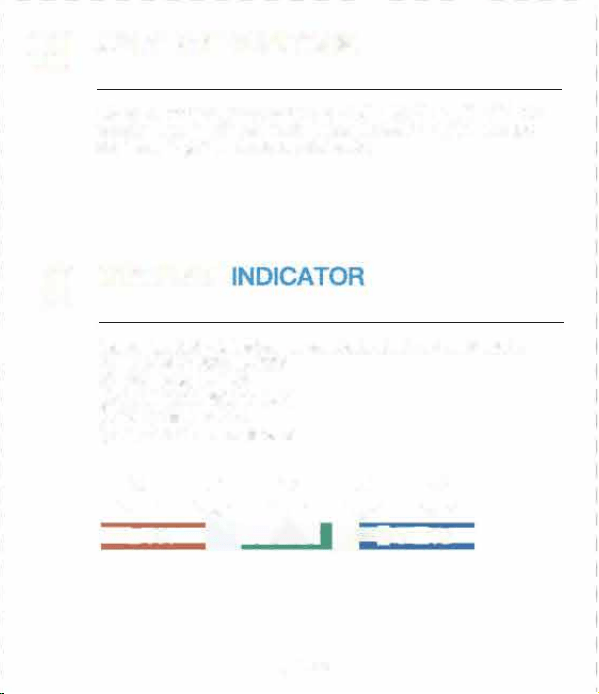
(1)
“
CH" is the switch channel button, press it 「·epeatedly, it will
display in sequence. CHl, CH2, CH3, cycle mode, CH1, CH2 ...
(2) When the cycle mode icon " σ
’
is displayed in the upper le刊
corner of the screen, it means that the device enters the cycle
mode, and the screen will switch CH 1, CH2, CH3 every 1 0
seconds.
(3)P「ess the “CH
’
button ag白in to exit the cycle mode 臼nd return
to CH1, cycle mode icon"
C
’
will disappear.
English 1
I
English 2
I
English 3
I
English 4
I
面可lish 5 I
丘内glish 6
「
一
一一
+
一一
十
一
十
一
+
一
+
一
+
一
I
� WARRANTY
Newentor®
Indoor Outd。or Thermometer
(Save the Instructions for Future Refen回回)
iC
I
M
E
m
ail
1111 SI盯i[email protected]m
t二-二Y S町vice uk@newent。「cam
国芽vice.de@阳,went。rcam
。同时k
Search
·
Newenle『
New回tor Indoor odoor th阳节回附,r Is a阳nlonalpdl后t With the oorreot
gs,
tt wlll aura恒lysh。wyour l。cal恒mperatu陀and humidi If the用自帽anyqu田”。ns
abo u。rfunl町、笃。因也""l后througha the ab回 m旧协st。gSU间,a
。
-
1
SWITCH℃/
。
F
Press the
"
℃ff/HIST
”
butt口n to switch ℃/下,
a
e
RE/HUMID附TREND
8.1 Temperatu陀
•
Compared with the last detected temperature, If the temperature
I
rises by more than 1.8
°
F ( 1℃), the trend wlll �
•
Compared with the last detected temperature, if the temperature
drops by more than 1日下(1℃)
,
the trend will
、
•
When the tempe「ature does not change more th臼「1 1.B"F (1"C)
within 白 continuous hou『
,
the trend will呻
8.2 Humidi
•
Compared with the last detected humidity, if the humidity rises
by more than 5%, the trend will
•
Compared with the last detected humidity, if the humidity drops
by more than 5%, the trend will
、
• When the humidity does not change more than 5% within a
continuous hour, the trend will呻
English 7
TABLE OF CONTENTS
。
i
PROD
1 .2 Remote Sens。r
(I�
BUONS
1. PRODUCT APPEARANCE …
…
…
…2
1 1 Base Station
· ·自…. .. ……....…………·自… ...
2
1 2 Remote Sensor
……............………………E …….
3
2. BUONS FUNCTION
· .. · .. -.. · -.... · .. · · -...... · .. ·
4
3. CONNECT SE STATION AND SENSOR
··· ...
5
4. CYCLE MODE
.. · -.... · ...... · .. -· .. · .. -· · -.. -· · · -· ..
5
5. SENSOR PCEMENT RECOMMENDATIONS
..
6
6. /MIN
· .....................…………… ……..
6
7. SWITCH℃/下
…
4
…………………
…..………..
7
B. TEMPERATURE/HUMIDπY TREND DETECTION
· ·
7
81 Te节
par咱ture
……··町...
.........,.. ,......
..………·町
7
8 2 H
umidi
……………...……
……………………
….
7
9. ICE ALERT FUNCTI。N
..........…,,....--…..
8
N。RMAL M。DE
MAX/MIN MODE
Pn到SS Hold Press Hold
Switch
Se日rch
CH
channels/ent町
sensor signal
\ \
cyc
l
e mode
Cle日
’
/
MAX/MIN
View MAX/MIN
『e record
MAX/MIN
24/48
℃/
°
F/HIST
Switch ℃/
°
F
\
/ALL
TIMES
-哲-
Backli目ht on
\
for 1 Os
1.1 Base Station
82
iC
“
目1-
Al
B3 - f
B4
85
A10
M
A9
A11
86
10.C。MFORT INDICAT。R
11. LOW BAERY 10。N
B
--
..
..
..
.
.
.
..
..
.
81: RF Transmit LED
82: Wall Mount Hole
B3: τ/℃ Buon
已4:C同annel 1 ,2,3 Select Bu。同
85:
“
TX
”
Bu仕凹
,
Transmit
RF Signal Manually
86: Baery c。mpament
87:Ba忧eryCove「
12.PR
。DUCT
PARAMETERS
…………………
…
9
13. FAQ
S
·
·…....
.
…
…... .…·
10
14. WARRANTY
……………………
………………..
12
A 1: 1 OS backlight butt口内
A2: Ou企door channel 1,2,3
A3:Cγcle made icon
A4: I四 alert icon
A5: /MIN回lues r ALL TIMES/ 4日HR/24HR
A6:C。mfo indicator
A7: Low baery icon
AB: Indoor temperatu「e & humidity
A9: Outdoor temperature晶humidity
A10. Trend ar『
A11: Functi。n bu。ns
A nr Placement R田mmandatlons
(1) Mount廿E『四rti国lly or a陆irU←cingwall or a明11-shaα对
b值町口n to aidsunlight and rain. Dit sunlight will make temperatL咱
read high. Remmended: 6 inch届国ow eaves 。rF归 under dk
rail ls P阳伽r创年 The ma划mum tnsml回Ion range to the怕回anan Is
32日ft/1αk节in O到air, not including wal
l
s or刊00阳.
(2)T创口id signal interence, please do not pla the se内部ror ba回
stion cl西eto a metal, TV旷ccmpl.ller, e缸,
(3)tf it
’
s a ld川nter, it'sommend创moving the国叩re阳er to
the ba田 ation as the be叩pean西 will d匈阳面
,
lting in
faster ba吐盯din and p。由ibνsho门erconr四tion d陆tan田S
09
ICE ALERT FUNCTION 门 LOW BAERY
1
3
阳
Q
S
②The data detection range on the weather channel/ APP Is the
area. Besides, airpo时wea the『 stations a「e only u口dated once 口e『
h口ur.
When the outdoqr temperature is 30.2
°
←33.8.F (
-
1℃斗℃), the
ice alert icon u聊
’
will刊ash.Below 30.02
。
F (一1.1町,the ice
alert icon
‘
啦I
"
is displayed statically.
When阳|口w batte icon
“
日
’
displays on阳町esn (indoor
battery voltage is lower than 3.6V, sens口「 battery voltage is
I owe「 than 2.5V). we need to replace the battery of the base
station/senso「 in time.
(1) When using the device for the白rst time, how long d饵S it
take to automatically calibrate?
It usually takes about 3
-
7 days.
③
If the environment near the house is comfortable(plants, c「ops,
air conditioner, etc.), it is normal for the tempe『ature of the
sens口r to be different from that on the APP.
1(1
COMFORT
I
� PRODUCT
PARAME
(2) Why Is the temperatu陪end humidity Inconsistent when the
base station and the sans。r ara placed together?
①
The size and structure of the devices are diffe「ent.In order to
get刑。re accurate readings, the device has more small holes fo『
ventilatio, while the remote sensor is usually placed in a rel吕tively
harsh envlronme时,Its holes will be smaller. At this time, the chip
envl「onment will be slightly different. Thls is possible one 口f the
reas口ns for the dif「erence.Thereto『e, the devices 〔eed learning
and calibration time. Generally, the longer it is placed, the more
自CCU「日te the temperatu「e will be.
②
If the distance between the cold source or the heat source is
different, this is also one of the reasons for the diffe「enc白,
③To compare temperature, we recommend a mercury or red
spirit(fluid) thermometer. Bi-metal(dial) and digital thermome-
ters(from other weathe「 ststio〔s) are not a good source and have
I
their own margin of error.
(4) Is the sensor waterproof?
No.
(5) The sensor cannot connect with the base station?
①Please ensu「e that the channels of the base station and sensor
are consistent.
②Please ensu陪that the se〔sor is plac回correctly and the
distance from the base station is within the connectable range
(refer to '5. SENSOR PLACEMENT RECOMMENDATIONS').
•
Indoor temperature detection range: 14.2
°
F-1 22
°
F (-9.9-50℃)
(LL.L is displayed when it is lower than 1 4.2'F /-9.9℃
,
and HH.H is
I
displayed when it is higher th自n 122'F/50℃)
•
Outdoo「 temperatu「0 detection range: -40'F什58'F(-40℃~70℃)
(LL.L is displayed when it is lower than 40
。
F / 40℃, and HH.H
is displayed when it is higher than 158
°
F/70℃)
•
Indoor I outdoo『 humidity detection range: 20% 95% (if it is
lower than 20%, It will display 20%, if it is higher than 95%, it will
I
dis口lay 95%)
• Detection period: 30 seconds
• Temperature detection accuracy
A.32
°
F-104
°
F (0℃阳40℃l accuracy 主1.B•F (1℃}
8. Other ranges accu「acy 土3.6
。
F (2℃)
•
Humidity detection accuracy
A.40%-80% accuracy ±5%
B.Other ranges ace u「acy ±8%
•B自se station battery: 3 x AAA batteries
• Remote senso「 battery: 2 x AA batteries
•
Connection dist自nee betwee「lb白se station and remote sensor:
32Bft (1 OOm) in open a「自由
English 9
English 11
Indoor humidity detection for comfort, displayed as 5 levels.
①
TOO DRY: 20% to 30%
②DRY: 31 % to 44%
③COMFORT: 45% to 65%
④
WET: 66% to 84%
⑤
TOO WET
:
85% to 95%
①
@
③
④
⑤
-,1�
T
,回丽
阳)
Why is the measur回outdoor temperature dierent from that
on the APP (local weather bureau)?
①
The Newento『 indoo广 口川door thermometer is a home version
device, its detection range is a『ound the house 日nd its d白t自 will be
I
ore accurate.
(6)Why d。因 the SC用en aut。matically switch to other channels
in turn?
If the icon •
C
• is displayed in the 〕ppe「 left corner 口f the
screen, it means that the device has entered the cycle mode,
press the "CHANNEL" button to exit the mode and return to CH1.
(Refe「 to
‘
4. CYCLE MODE
’
)
民•:1”肉”’E
English 8
English 10
03
CONNECT BASE STATION AND
SENSOR
05
SENSOR PLACEMENT
RECOMMENDATIONS
(1) p「ess the
“
CH
”
button on the base st自tion to switch the
outdoor channel in the upper left corner of the screen.
(2) Open the sensor battery cover, switch the outdoor channel to
match the base station. Such as both In CH 1.
(3) Hold the
“
CH" button fo「 3 saconds to enter the RF sign刮
目a「ch state.
(4) Inse the batte「ies fo『 the sensor, press the "TX
"
button to
transmit the RF signal.
(5) Sensor temperatu「e and humidity a「e displayed on the screen,
d口ne
(1) Mount the sensor vertically on a No内h-facing wall or a
well-shaded locati口n to avoid sunlight and rain. Direct sunlight
will make temperature read high. Recommended: 6 inches below
eaves o「 placed under deck rail is prefe『red.The maximum
transmission range t口 the base station is 328 /1 OOm in open
air, not lncludlng walls o「啊。口「s.
的To avoid signal interference, please do not place the sensor or
base station close to a metal, D「 computer, etc.
(3) If it's a cold winter, it
’
s recommended moving the sensor
close『 to t同e base station as the battery pe忖口rmance will
degrade, resulting in faster ba吐ery drain and possibly shoer
connection distances
Note:
( 1l The base station can connect up to 3 senso『s, please make
SU「e that the channels of each sensor are di宵enent.
(2) RF sensor signal inteal: CH1 =31 S, CH2=32S, CH3=33S
。叶
CYCLE MODE
0
6 MAX/MIN
(1) Press the “MAX/MIN
”
button to view the MAX/MIN.
(2) In MAX/MIN mode (the MAX/MIN icon is displ白yed on the
screen), p广ess the a℃/
'
F/HIST" button to switch 曰nd displ日y the
MAX/MIN value 口f 24HR/48HR/ALL TIMES.
(3) In MAX/MIN mode, hold
”
MAX/MIN
”
for 3 seconds to clear
and re-record historical data.
DECRATION OF CONFORMI
+ This product was manufactured in a「dance with the
ha「「nonized European stand曰rds, you will fmd the declarati口n of
conformity below.
。2014/30/EUEMC Directive
02014/53/EU月ED Directive
2011/65/EU RoHS Directive
Newento「 guarantees a 1-year wa厅anty from the date of
pu「chase.
(D口es not include damage caused by man-made damage or
improper use.)
This device complies with Pa 15 of the FCC Rules. Operation is
subject t口 the following two conditions: (1 J this device may not
cause hannful interference, and (2) this devi回must accept any
interference received, including inte「ference that may cause
undesired operation.
DISPOSAL
0
刊1e packagi『1日is made of envi『口「1「nentally friendly
mate「ials,which may be disposed through you「 local
附cycling facilities
This device has been tested and found to comply with the limits
fo「 B Class 8 digrtal device, pursu自nt to Part 15 口f the FCC Rules.
Th臼e limits are designed to provide reasonable protection
ag自Inst harmful Int白rference In a r白sldantlal Install自tlon.This
device generates, uses and can rad旧te radio frequency energy
and, if not installed and used in accordance with the inst「uctions,
may cause harmful interference to radio communications.
However, there is no guarantee that inte厅erence will not occur in
a particular installation. If this device does cause harmful
lnterfe「ence to radio 口r talevlslon reception, which can be
determined by turning the device口忏and on, the user is
encouraged to t to correct the Inteerence by 口ne o「 m口re of
the following meesu『es:
--
Reorient or rel口cate the receiving antenna.
--Increase the separation between the device and 『eceiveι
Conneot the device Into an outlet on a circuit die「ent from
that to which the r白ceiver is conn白ctad.
一Consult the dealer or an experienced radio/ technician for
help.
Changes or modications not expressly approved by the party
responsible for compliance c口uld void the user's authority to
operate the equipment.
When your device has come to the end of its life, in
the inte「est of environmental protection please do not
throw it out with your household refuse, b川 take it to
a suitable cente「 where is can be disposed of properly.
柬
All batteries must be handed In at a correction point In
yo〕广口口munity, suburb
,
口r at the netsile「, Such
b白白eri臼 can thus be disposed of in an envir口nmentally
f「iendly明y.
Manufacrurer Dor咱n Bei
i
陷Eleclr。n由 Tech们olc明VCo., Lid
O四dre皿:No.15问。回lo田
,
No.3 lndust唰苟同e, Shangsha commcnl
,
Cha吨
’
anTn.口。ngguanCi. Guang曲啕vines
r回内tor
.
,,om
English 12
English 13

(1)
“
CH" is the switch channel button, press it 「·epeatedly, it will
display in sequence. CHl, CH2, CH3, cycle mode, CH1, CH2 ...
(2) When the cycle mode icon " σ
’
is displayed in the upper le刊
corner of the screen, it means that the device enters the cycle
mode, and the screen will switch CH 1, CH2, CH3 every 1 0
seconds.
(3)P「ess the “CH
’
button ag白in to exit the cycle mode 臼nd return
to CH1, cycle mode icon"
C
’
will disappear.
English 1
I
English 2
I
English 3
I
English 4
I
面可lish 5 I
丘内glish 6
「
一
一一
+
一一
十
一
十
一
+
一
+
一
+
一
I
� WARRANTY
Newentor®
Indoor Outd。or Thermometer
(Save the Instructions for Future Refen回回)
iC
I
M
E
m
ail
1111 SI盯i[email protected]m
t二-二Y S町vice uk@newent。「cam
国芽vice.de@阳,went。rcam
。同时k
Search
·
Newenle『
New回tor Indoor odoor th阳节回附,r Is a阳nlonalpdl后t With the oorreot
gs,
tt wlll aura恒lysh。wyour l。cal恒mperatu陀and humidi If the用自帽anyqu田”。ns
abo u。rfunl町、笃。因也""l后througha the ab回 m旧协st。gSU间,a
。
-
1
SWITCH℃/
。
F
Press the
"
℃ff/HIST
”
butt口n to switch ℃/下,
a
e
RE/HUMID附TREND
8.1 Temperatu陀
•
Compared with the last detected temperature, If the temperature
I
rises by more than 1.8
°
F ( 1℃), the trend wlll �
•
Compared with the last detected temperature, if the temperature
drops by more than 1日下(1℃)
,
the trend will
、
•
When the tempe「ature does not change more th臼「1 1.B"F (1"C)
within 白 continuous hou『
,
the trend will呻
8.2 Humidi
•
Compared with the last detected humidity, if the humidity rises
by more than 5%, the trend will
•
Compared with the last detected humidity, if the humidity drops
by more than 5%, the trend will
、
• When the humidity does not change more than 5% within a
continuous hour, the trend will呻
English 7
TABLE OF CONTENTS
。
i
PROD
1 .2 Remote Sens。r
(I�
BUONS
1. PRODUCT APPEARANCE …
…
…
…2
1 1 Base Station
· ·自…. .. ……....…………·自… ...
2
1 2 Remote Sensor
……............………………E …….
3
2. BUONS FUNCTION
· .. · .. -.. · -.... · .. · · -...... · .. ·
4
3. CONNECT SE STATION AND SENSOR
··· ...
5
4. CYCLE MODE
.. · -.... · ...... · .. -· .. · .. -· · -.. -· · · -· ..
5
5. SENSOR PCEMENT RECOMMENDATIONS
..
6
6. /MIN
· .....................…………… ……..
6
7. SWITCH℃/下
…
4
…………………
…..………..
7
B. TEMPERATURE/HUMIDπY TREND DETECTION
· ·
7
81 Te节
par咱ture
……··町...
.........,.. ,......
..………·町
7
8 2 H
umidi
……………...……
……………………
….
7
9. ICE ALERT FUNCTI。N
..........…,,....--…..
8
N。RMAL M。DE
MAX/MIN MODE
Pn到SS Hold Press Hold
Switch
Se日rch
CH
channels/ent町
sensor signal
\ \
cyc
l
e mode
Cle日
’
/
MAX/MIN
View MAX/MIN
『e record
MAX/MIN
24/48
℃/
°
F/HIST
Switch ℃/
°
F
\
/ALL
TIMES
-哲-
Backli目ht on
\
for 1 Os
1.1 Base Station
82
iC
“
目1-
Al
B3 - f
B4
85
A10
M
A9
A11
86
10.C。MFORT INDICAT。R
11. LOW BAERY 10。N
B
--
..
..
..
.
.
.
..
..
.
81: RF Transmit LED
82: Wall Mount Hole
B3: τ/℃ Buon
已4:C同annel 1 ,2,3 Select Bu。同
85:
“
TX
”
Bu仕凹
,
Transmit
RF Signal Manually
86: Baery c。mpament
87:Ba忧eryCove「
12.PR
。DUCT
PARAMETERS
…………………
…
9
13. FAQ
S
·
·…....
.
…
…... .…·
10
14. WARRANTY
……………………
………………..
12
A 1: 1 OS backlight butt口内
A2: Ou企door channel 1,2,3
A3:Cγcle made icon
A4: I四 alert icon
A5: /MIN回lues r ALL TIMES/ 4日HR/24HR
A6:C。mfo indicator
A7: Low baery icon
AB: Indoor temperatu「e & humidity
A9: Outdoor temperature晶humidity
A10. Trend ar『
A11: Functi。n bu。ns
A nr Placement R田mmandatlons
(1) Mount廿E『四rti国lly or a陆irU←cingwall or a明11-shaα对
b值町口n to aidsunlight and rain. Dit sunlight will make temperatL咱
read high. Remmended: 6 inch届国ow eaves 。rF归 under dk
rail ls P阳伽r创年 The ma划mum tnsml回Ion range to the怕回anan Is
32日ft/1αk节in O到air, not including wal
l
s or刊00阳.
(2)T创口id signal interence, please do not pla the se内部ror ba回
stion cl西eto a metal, TV旷ccmpl.ller, e缸,
(3)tf it
’
s a ld川nter, it'sommend创moving the国叩re阳er to
the ba田 ation as the be叩pean西 will d匈阳面
,
lting in
faster ba吐盯din and p。由ibνsho门erconr四tion d陆tan田S
09
ICE ALERT FUNCTION 门 LOW BAERY
1
3
阳
Q
S
②The data detection range on the weather channel/ APP Is the
area. Besides, airpo时wea the『 stations a「e only u口dated once 口e『
h口ur.
When the outdoqr temperature is 30.2
°
←33.8.F (
-
1℃斗℃), the
ice alert icon u聊
’
will刊ash.Below 30.02
。
F (一1.1町,the ice
alert icon
‘
啦I
"
is displayed statically.
When阳|口w batte icon
“
日
’
displays on阳町esn (indoor
battery voltage is lower than 3.6V, sens口「 battery voltage is
I owe「 than 2.5V). we need to replace the battery of the base
station/senso「 in time.
(1) When using the device for the白rst time, how long d饵S it
take to automatically calibrate?
It usually takes about 3
-
7 days.
③
If the environment near the house is comfortable(plants, c「ops,
air conditioner, etc.), it is normal for the tempe『ature of the
sens口r to be different from that on the APP.
1(1
COMFORT
I
� PRODUCT
PARAME
(2) Why Is the temperatu陪end humidity Inconsistent when the
base station and the sans。r ara placed together?
①
The size and structure of the devices are diffe「ent.In order to
get刑。re accurate readings, the device has more small holes fo『
ventilatio, while the remote sensor is usually placed in a rel吕tively
harsh envlronme时,Its holes will be smaller. At this time, the chip
envl「onment will be slightly different. Thls is possible one 口f the
reas口ns for the dif「erence.Thereto『e, the devices 〔eed learning
and calibration time. Generally, the longer it is placed, the more
自CCU「日te the temperatu「e will be.
②
If the distance between the cold source or the heat source is
different, this is also one of the reasons for the diffe「enc白,
③To compare temperature, we recommend a mercury or red
spirit(fluid) thermometer. Bi-metal(dial) and digital thermome-
ters(from other weathe「 ststio〔s) are not a good source and have
I
their own margin of error.
(4) Is the sensor waterproof?
No.
(5) The sensor cannot connect with the base station?
①Please ensu「e that the channels of the base station and sensor
are consistent.
②Please ensu陪that the se〔sor is plac回correctly and the
distance from the base station is within the connectable range
(refer to '5. SENSOR PLACEMENT RECOMMENDATIONS').
•
Indoor temperature detection range: 14.2
°
F-1 22
°
F (-9.9-50℃)
(LL.L is displayed when it is lower than 1 4.2'F /-9.9℃
,
and HH.H is
I
displayed when it is higher th自n 122'F/50℃)
•
Outdoo「 temperatu「0 detection range: -40'F什58'F(-40℃~70℃)
(LL.L is displayed when it is lower than 40
。
F / 40℃, and HH.H
is displayed when it is higher than 158
°
F/70℃)
•
Indoor I outdoo『 humidity detection range: 20% 95% (if it is
lower than 20%, It will display 20%, if it is higher than 95%, it will
I
dis口lay 95%)
• Detection period: 30 seconds
• Temperature detection accuracy
A.32
°
F-104
°
F (0℃阳40℃l accuracy 主1.B•F (1℃}
8. Other ranges accu「acy 土3.6
。
F (2℃)
•
Humidity detection accuracy
A.40%-80% accuracy ±5%
B.Other ranges ace u「acy ±8%
•B自se station battery: 3 x AAA batteries
• Remote senso「 battery: 2 x AA batteries
•
Connection dist自nee betwee「lb白se station and remote sensor:
32Bft (1 OOm) in open a「自由
English 9
English 11
Indoor humidity detection for comfort, displayed as 5 levels.
①
TOO DRY: 20% to 30%
②DRY: 31 % to 44%
③COMFORT: 45% to 65%
④
WET: 66% to 84%
⑤
TOO WET
:
85% to 95%
①
@
③
④
⑤
-,1�
T
,回丽
阳)
Why is the measur回outdoor temperature dierent from that
on the APP (local weather bureau)?
①
The Newento『 indoo广 口川door thermometer is a home version
device, its detection range is a『ound the house 日nd its d白t自 will be
I
ore accurate.
(6)Why d。因 the SC用en aut。matically switch to other channels
in turn?
If the icon •
C
• is displayed in the 〕ppe「 left corner 口f the
screen, it means that the device has entered the cycle mode,
press the "CHANNEL" button to exit the mode and return to CH1.
(Refe「 to
‘
4. CYCLE MODE
’
)
民•:1”肉”’E
English 8
English 10
03
CONNECT BASE STATION AND
SENSOR
05
SENSOR PLACEMENT
RECOMMENDATIONS
(1) p「ess the
“
CH
”
button on the base st自tion to switch the
outdoor channel in the upper left corner of the screen.
(2) Open the sensor battery cover, switch the outdoor channel to
match the base station. Such as both In CH 1.
(3) Hold the
“
CH" button fo「 3 saconds to enter the RF sign刮
目a「ch state.
(4) Inse the batte「ies fo『 the sensor, press the "TX
"
button to
transmit the RF signal.
(5) Sensor temperatu「e and humidity a「e displayed on the screen,
d口ne
(1) Mount the sensor vertically on a No内h-facing wall or a
well-shaded locati口n to avoid sunlight and rain. Direct sunlight
will make temperature read high. Recommended: 6 inches below
eaves o「 placed under deck rail is prefe『red.The maximum
transmission range t口 the base station is 328 /1 OOm in open
air, not lncludlng walls o「啊。口「s.
的To avoid signal interference, please do not place the sensor or
base station close to a metal, D「 computer, etc.
(3) If it's a cold winter, it
’
s recommended moving the sensor
close『 to t同e base station as the battery pe忖口rmance will
degrade, resulting in faster ba吐ery drain and possibly shoer
connection distances
Note:
( 1l The base station can connect up to 3 senso『s, please make
SU「e that the channels of each sensor are di宵enent.
(2) RF sensor signal inteal: CH1 =31 S, CH2=32S, CH3=33S
。叶
CYCLE MODE
0
6 MAX/MIN
(1) Press the “MAX/MIN
”
button to view the MAX/MIN.
(2) In MAX/MIN mode (the MAX/MIN icon is displ白yed on the
screen), p广ess the a℃/
'
F/HIST" button to switch 曰nd displ日y the
MAX/MIN value 口f 24HR/48HR/ALL TIMES.
(3) In MAX/MIN mode, hold
”
MAX/MIN
”
for 3 seconds to clear
and re-record historical data.
DECRATION OF CONFORMI
+ This product was manufactured in a「dance with the
ha「「nonized European stand曰rds, you will fmd the declarati口n of
conformity below.
。2014/30/EUEMC Directive
02014/53/EU月ED Directive
2011/65/EU RoHS Directive
Newento「 guarantees a 1-year wa厅anty from the date of
pu「chase.
(D口es not include damage caused by man-made damage or
improper use.)
This device complies with Pa 15 of the FCC Rules. Operation is
subject t口 the following two conditions: (1 J this device may not
cause hannful interference, and (2) this devi回must accept any
interference received, including inte「ference that may cause
undesired operation.
DISPOSAL
0
刊1e packagi『1日is made of envi『口「1「nentally friendly
mate「ials,which may be disposed through you「 local
附cycling facilities
This device has been tested and found to comply with the limits
fo「 B Class 8 digrtal device, pursu自nt to Part 15 口f the FCC Rules.
Th臼e limits are designed to provide reasonable protection
ag自Inst harmful Int白rference In a r白sldantlal Install自tlon.This
device generates, uses and can rad旧te radio frequency energy
and, if not installed and used in accordance with the inst「uctions,
may cause harmful interference to radio communications.
However, there is no guarantee that inte厅erence will not occur in
a particular installation. If this device does cause harmful
lnterfe「ence to radio 口r talevlslon reception, which can be
determined by turning the device口忏and on, the user is
encouraged to t to correct the Inteerence by 口ne o「 m口re of
the following meesu『es:
--
Reorient or rel口cate the receiving antenna.
--Increase the separation between the device and 『eceiveι
Conneot the device Into an outlet on a circuit die「ent from
that to which the r白ceiver is conn白ctad.
一Consult the dealer or an experienced radio/ technician for
help.
Changes or modications not expressly approved by the party
responsible for compliance c口uld void the user's authority to
operate the equipment.
When your device has come to the end of its life, in
the inte「est of environmental protection please do not
throw it out with your household refuse, b川 take it to
a suitable cente「 where is can be disposed of properly.
柬
All batteries must be handed In at a correction point In
yo〕广口口munity, suburb
,
口r at the netsile「, Such
b白白eri臼 can thus be disposed of in an envir口nmentally
f「iendly明y.
Manufacrurer Dor咱n Bei
i
陷Eleclr。n由 Tech们olc明VCo., Lid
O四dre皿:No.15问。回lo田
,
No.3 lndust唰苟同e, Shangsha commcnl
,
Cha吨
’
anTn.口。ngguanCi. Guang曲啕vines
r回内tor
.
,,om
English 12
English 13

(1)
“
CH" is the switch channel button, press it 「·epeatedly, it will
display in sequence. CHl, CH2, CH3, cycle mode, CH1, CH2 ...
(2) When the cycle mode icon " σ
’
is displayed in the upper le刊
corner of the screen, it means that the device enters the cycle
mode, and the screen will switch CH 1, CH2, CH3 every 1 0
seconds.
(3)P「ess the “CH
’
button ag白in to exit the cycle mode 臼nd return
to CH1, cycle mode icon"
C
’
will disappear.
English 1
I
English 2
I
English 3
I
English 4
I
面可lish 5 I
丘内glish 6
「
一
一一
+
一一
十
一
十
一
+
一
+
一
+
一
I
� WARRANTY
Newentor®
Indoor Outd。or Thermometer
(Save the Instructions for Future Refen回回)
iC
I
M
E
m
ail
1111 SI盯i[email protected]m
t二-二Y S町vice uk@newent。「cam
国芽vice.de@阳,went。rcam
。同时k
Search
·
Newenle『
New回tor Indoor odoor th阳节回附,r Is a阳nlonalpdl后t With the oorreot
gs,
tt wlll aura恒lysh。wyour l。cal恒mperatu陀and humidi If the用自帽anyqu田”。ns
abo u。rfunl町、笃。因也""l后througha the ab回 m旧协st。gSU间,a
。
-
1
SWITCH℃/
。
F
Press the
"
℃ff/HIST
”
butt口n to switch ℃/下,
a
e
RE/HUMID附TREND
8.1 Temperatu陀
•
Compared with the last detected temperature, If the temperature
I
rises by more than 1.8
°
F ( 1℃), the trend wlll �
•
Compared with the last detected temperature, if the temperature
drops by more than 1日下(1℃)
,
the trend will
、
•
When the tempe「ature does not change more th臼「1 1.B"F (1"C)
within 白 continuous hou『
,
the trend will呻
8.2 Humidi
•
Compared with the last detected humidity, if the humidity rises
by more than 5%, the trend will
•
Compared with the last detected humidity, if the humidity drops
by more than 5%, the trend will
、
• When the humidity does not change more than 5% within a
continuous hour, the trend will呻
English 7
TABLE OF CONTENTS
。
i
PROD
1 .2 Remote Sens。r
(I�
BUONS
1. PRODUCT APPEARANCE …
…
…
…2
1 1 Base Station
· ·自…. .. ……....…………·自… ...
2
1 2 Remote Sensor
……............………………E …….
3
2. BUONS FUNCTION
· .. · .. -.. · -.... · .. · · -...... · .. ·
4
3. CONNECT SE STATION AND SENSOR
··· ...
5
4. CYCLE MODE
.. · -.... · ...... · .. -· .. · .. -· · -.. -· · · -· ..
5
5. SENSOR PCEMENT RECOMMENDATIONS
..
6
6. /MIN
· .....................…………… ……..
6
7. SWITCH℃/下
…
4
…………………
…..………..
7
B. TEMPERATURE/HUMIDπY TREND DETECTION
· ·
7
81 Te节
par咱ture
……··町...
.........,.. ,......
..………·町
7
8 2 H
umidi
……………...……
……………………
….
7
9. ICE ALERT FUNCTI。N
..........…,,....--…..
8
N。RMAL M。DE
MAX/MIN MODE
Pn到SS Hold Press Hold
Switch
Se日rch
CH
channels/ent町
sensor signal
\ \
cyc
l
e mode
Cle日
’
/
MAX/MIN
View MAX/MIN
『e record
MAX/MIN
24/48
℃/
°
F/HIST
Switch ℃/
°
F
\
/ALL
TIMES
-哲-
Backli目ht on
\
for 1 Os
1.1 Base Station
82
iC
“
目1-
Al
B3 - f
B4
85
A10
M
A9
A11
86
10.C。MFORT INDICAT。R
11. LOW BAERY 10。N
B
--
..
..
..
.
.
.
..
..
.
81: RF Transmit LED
82: Wall Mount Hole
B3: τ/℃ Buon
已4:C同annel 1 ,2,3 Select Bu。同
85:
“
TX
”
Bu仕凹
,
Transmit
RF Signal Manually
86: Baery c。mpament
87:Ba忧eryCove「
12.PR
。DUCT
PARAMETERS
…………………
…
9
13. FAQ
S
·
·…....
.
…
…... .…·
10
14. WARRANTY
……………………
………………..
12
A 1: 1 OS backlight butt口内
A2: Ou企door channel 1,2,3
A3:Cγcle made icon
A4: I四 alert icon
A5: /MIN回lues r ALL TIMES/ 4日HR/24HR
A6:C。mfo indicator
A7: Low baery icon
AB: Indoor temperatu「e & humidity
A9: Outdoor temperature晶humidity
A10. Trend ar『
A11: Functi。n bu。ns
A nr Placement R田mmandatlons
(1) Mount廿E『四rti国lly or a陆irU←cingwall or a明11-shaα对
b值町口n to aidsunlight and rain. Dit sunlight will make temperatL咱
read high. Remmended: 6 inch届国ow eaves 。rF归 under dk
rail ls P阳伽r创年 The ma划mum tnsml回Ion range to the怕回anan Is
32日ft/1αk节in O到air, not including wal
l
s or刊00阳.
(2)T创口id signal interence, please do not pla the se内部ror ba回
stion cl西eto a metal, TV旷ccmpl.ller, e缸,
(3)tf it
’
s a ld川nter, it'sommend创moving the国叩re阳er to
the ba田 ation as the be叩pean西 will d匈阳面
,
lting in
faster ba吐盯din and p。由ibνsho门erconr四tion d陆tan田S
09
ICE ALERT FUNCTION 门 LOW BAERY
1
3
阳
Q
S
②The data detection range on the weather channel/ APP Is the
area. Besides, airpo时wea the『 stations a「e only u口dated once 口e『
h口ur.
When the outdoqr temperature is 30.2
°
←33.8.F (
-
1℃斗℃), the
ice alert icon u聊
’
will刊ash.Below 30.02
。
F (一1.1町,the ice
alert icon
‘
啦I
"
is displayed statically.
When阳|口w batte icon
“
日
’
displays on阳町esn (indoor
battery voltage is lower than 3.6V, sens口「 battery voltage is
I owe「 than 2.5V). we need to replace the battery of the base
station/senso「 in time.
(1) When using the device for the白rst time, how long d饵S it
take to automatically calibrate?
It usually takes about 3
-
7 days.
③
If the environment near the house is comfortable(plants, c「ops,
air conditioner, etc.), it is normal for the tempe『ature of the
sens口r to be different from that on the APP.
1(1
COMFORT
I
� PRODUCT
PARAME
(2) Why Is the temperatu陪end humidity Inconsistent when the
base station and the sans。r ara placed together?
①
The size and structure of the devices are diffe「ent.In order to
get刑。re accurate readings, the device has more small holes fo『
ventilatio, while the remote sensor is usually placed in a rel吕tively
harsh envlronme时,Its holes will be smaller. At this time, the chip
envl「onment will be slightly different. Thls is possible one 口f the
reas口ns for the dif「erence.Thereto『e, the devices 〔eed learning
and calibration time. Generally, the longer it is placed, the more
自CCU「日te the temperatu「e will be.
②
If the distance between the cold source or the heat source is
different, this is also one of the reasons for the diffe「enc白,
③To compare temperature, we recommend a mercury or red
spirit(fluid) thermometer. Bi-metal(dial) and digital thermome-
ters(from other weathe「 ststio〔s) are not a good source and have
I
their own margin of error.
(4) Is the sensor waterproof?
No.
(5) The sensor cannot connect with the base station?
①Please ensu「e that the channels of the base station and sensor
are consistent.
②Please ensu陪that the se〔sor is plac回correctly and the
distance from the base station is within the connectable range
(refer to '5. SENSOR PLACEMENT RECOMMENDATIONS').
•
Indoor temperature detection range: 14.2
°
F-1 22
°
F (-9.9-50℃)
(LL.L is displayed when it is lower than 1 4.2'F /-9.9℃
,
and HH.H is
I
displayed when it is higher th自n 122'F/50℃)
•
Outdoo「 temperatu「0 detection range: -40'F什58'F(-40℃~70℃)
(LL.L is displayed when it is lower than 40
。
F / 40℃, and HH.H
is displayed when it is higher than 158
°
F/70℃)
•
Indoor I outdoo『 humidity detection range: 20% 95% (if it is
lower than 20%, It will display 20%, if it is higher than 95%, it will
I
dis口lay 95%)
• Detection period: 30 seconds
• Temperature detection accuracy
A.32
°
F-104
°
F (0℃阳40℃l accuracy 主1.B•F (1℃}
8. Other ranges accu「acy 土3.6
。
F (2℃)
•
Humidity detection accuracy
A.40%-80% accuracy ±5%
B.Other ranges ace u「acy ±8%
•B自se station battery: 3 x AAA batteries
• Remote senso「 battery: 2 x AA batteries
•
Connection dist自nee betwee「lb白se station and remote sensor:
32Bft (1 OOm) in open a「自由
English 9
English 11
Indoor humidity detection for comfort, displayed as 5 levels.
①
TOO DRY: 20% to 30%
②DRY: 31 % to 44%
③COMFORT: 45% to 65%
④
WET: 66% to 84%
⑤
TOO WET
:
85% to 95%
①
@
③
④
⑤
-,1�
T
,回丽
阳)
Why is the measur回outdoor temperature dierent from that
on the APP (local weather bureau)?
①
The Newento『 indoo广 口川door thermometer is a home version
device, its detection range is a『ound the house 日nd its d白t自 will be
I
ore accurate.
(6)Why d。因 the SC用en aut。matically switch to other channels
in turn?
If the icon •
C
• is displayed in the 〕ppe「 left corner 口f the
screen, it means that the device has entered the cycle mode,
press the "CHANNEL" button to exit the mode and return to CH1.
(Refe「 to
‘
4. CYCLE MODE
’
)
民•:1”肉”’E
English 8
English 10
03
CONNECT BASE STATION AND
SENSOR
05
SENSOR PLACEMENT
RECOMMENDATIONS
(1) p「ess the
“
CH
”
button on the base st自tion to switch the
outdoor channel in the upper left corner of the screen.
(2) Open the sensor battery cover, switch the outdoor channel to
match the base station. Such as both In CH 1.
(3) Hold the
“
CH" button fo「 3 saconds to enter the RF sign刮
目a「ch state.
(4) Inse the batte「ies fo『 the sensor, press the "TX
"
button to
transmit the RF signal.
(5) Sensor temperatu「e and humidity a「e displayed on the screen,
d口ne
(1) Mount the sensor vertically on a No内h-facing wall or a
well-shaded locati口n to avoid sunlight and rain. Direct sunlight
will make temperature read high. Recommended: 6 inches below
eaves o「 placed under deck rail is prefe『red.The maximum
transmission range t口 the base station is 328 /1 OOm in open
air, not lncludlng walls o「啊。口「s.
的To avoid signal interference, please do not place the sensor or
base station close to a metal, D「 computer, etc.
(3) If it's a cold winter, it
’
s recommended moving the sensor
close『 to t同e base station as the battery pe忖口rmance will
degrade, resulting in faster ba吐ery drain and possibly shoer
connection distances
Note:
( 1l The base station can connect up to 3 senso『s, please make
SU「e that the channels of each sensor are di宵enent.
(2) RF sensor signal inteal: CH1 =31 S, CH2=32S, CH3=33S
。叶
CYCLE MODE
0
6 MAX/MIN
(1) Press the “MAX/MIN
”
button to view the MAX/MIN.
(2) In MAX/MIN mode (the MAX/MIN icon is displ白yed on the
screen), p广ess the a℃/
'
F/HIST" button to switch 曰nd displ日y the
MAX/MIN value 口f 24HR/48HR/ALL TIMES.
(3) In MAX/MIN mode, hold
”
MAX/MIN
”
for 3 seconds to clear
and re-record historical data.
DECRATION OF CONFORMI
+ This product was manufactured in a「dance with the
ha「「nonized European stand曰rds, you will fmd the declarati口n of
conformity below.
。2014/30/EUEMC Directive
02014/53/EU月ED Directive
2011/65/EU RoHS Directive
Newento「 guarantees a 1-year wa厅anty from the date of
pu「chase.
(D口es not include damage caused by man-made damage or
improper use.)
This device complies with Pa 15 of the FCC Rules. Operation is
subject t口 the following two conditions: (1 J this device may not
cause hannful interference, and (2) this devi回must accept any
interference received, including inte「ference that may cause
undesired operation.
DISPOSAL
0
刊1e packagi『1日is made of envi『口「1「nentally friendly
mate「ials,which may be disposed through you「 local
附cycling facilities
This device has been tested and found to comply with the limits
fo「 B Class 8 digrtal device, pursu自nt to Part 15 口f the FCC Rules.
Th臼e limits are designed to provide reasonable protection
ag自Inst harmful Int白rference In a r白sldantlal Install自tlon.This
device generates, uses and can rad旧te radio frequency energy
and, if not installed and used in accordance with the inst「uctions,
may cause harmful interference to radio communications.
However, there is no guarantee that inte厅erence will not occur in
a particular installation. If this device does cause harmful
lnterfe「ence to radio 口r talevlslon reception, which can be
determined by turning the device口忏and on, the user is
encouraged to t to correct the Inteerence by 口ne o「 m口re of
the following meesu『es:
--
Reorient or rel口cate the receiving antenna.
--Increase the separation between the device and 『eceiveι
Conneot the device Into an outlet on a circuit die「ent from
that to which the r白ceiver is conn白ctad.
一Consult the dealer or an experienced radio/ technician for
help.
Changes or modications not expressly approved by the party
responsible for compliance c口uld void the user's authority to
operate the equipment.
When your device has come to the end of its life, in
the inte「est of environmental protection please do not
throw it out with your household refuse, b川 take it to
a suitable cente「 where is can be disposed of properly.
柬
All batteries must be handed In at a correction point In
yo〕广口口munity, suburb
,
口r at the netsile「, Such
b白白eri臼 can thus be disposed of in an envir口nmentally
f「iendly明y.
Manufacrurer Dor咱n Bei
i
陷Eleclr。n由 Tech们olc明VCo., Lid
O四dre皿:No.15问。回lo田
,
No.3 lndust唰苟同e, Shangsha commcnl
,
Cha吨
’
anTn.口。ngguanCi. Guang曲啕vines
r回内tor
.
,,om
English 12
English 13

(1)
“
CH" is the switch channel button, press it 「·epeatedly, it will
display in sequence. CHl, CH2, CH3, cycle mode, CH1, CH2 ...
(2) When the cycle mode icon " σ
’
is displayed in the upper le刊
corner of the screen, it means that the device enters the cycle
mode, and the screen will switch CH 1, CH2, CH3 every 1 0
seconds.
(3)P「ess the “CH
’
button ag白in to exit the cycle mode 臼nd return
to CH1, cycle mode icon"
C
’
will disappear.
English 1
I
English 2
I
English 3
I
English 4
I
面可lish 5 I
丘内glish 6
「
一
一一
+
一一
十
一
十
一
+
一
+
一
+
一
I
� WARRANTY
Newentor®
Indoor Outd。or Thermometer
(Save the Instructions for Future Refen回回)
iC
I
M
E
m
ail
1111 SI盯i[email protected]m
t二-二Y S町vice uk@newent。「cam
国芽vice.de@阳,went。rcam
。同时k
Search
·
Newenle『
New回tor Indoor odoor th阳节回附,r Is a阳nlonalpdl后t With the oorreot
gs,
tt wlll aura恒lysh。wyour l。cal恒mperatu陀and humidi If the用自帽anyqu田”。ns
abo u。rfunl町、笃。因也""l后througha the ab回 m旧协st。gSU间,a
。
-
1
SWITCH℃/
。
F
Press the
"
℃ff/HIST
”
butt口n to switch ℃/下,
a
e
RE/HUMID附TREND
8.1 Temperatu陀
•
Compared with the last detected temperature, If the temperature
I
rises by more than 1.8
°
F ( 1℃), the trend wlll �
•
Compared with the last detected temperature, if the temperature
drops by more than 1日下(1℃)
,
the trend will
、
•
When the tempe「ature does not change more th臼「1 1.B"F (1"C)
within 白 continuous hou『
,
the trend will呻
8.2 Humidi
•
Compared with the last detected humidity, if the humidity rises
by more than 5%, the trend will
•
Compared with the last detected humidity, if the humidity drops
by more than 5%, the trend will
、
• When the humidity does not change more than 5% within a
continuous hour, the trend will呻
English 7
TABLE OF CONTENTS
。
i
PROD
1 .2 Remote Sens。r
(I�
BUONS
1. PRODUCT APPEARANCE …
…
…
…2
1 1 Base Station
· ·自…. .. ……....…………·自… ...
2
1 2 Remote Sensor
……............………………E …….
3
2. BUONS FUNCTION
· .. · .. -.. · -.... · .. · · -...... · .. ·
4
3. CONNECT SE STATION AND SENSOR
··· ...
5
4. CYCLE MODE
.. · -.... · ...... · .. -· .. · .. -· · -.. -· · · -· ..
5
5. SENSOR PCEMENT RECOMMENDATIONS
..
6
6. /MIN
· .....................…………… ……..
6
7. SWITCH℃/下
…
4
…………………
…..………..
7
B. TEMPERATURE/HUMIDπY TREND DETECTION
· ·
7
81 Te节
par咱ture
……··町...
.........,.. ,......
..………·町
7
8 2 H
umidi
……………...……
……………………
….
7
9. ICE ALERT FUNCTI。N
..........…,,....--…..
8
N。RMAL M。DE
MAX/MIN MODE
Pn到SS Hold Press Hold
Switch
Se日rch
CH
channels/ent町
sensor signal
\ \
cyc
l
e mode
Cle日
’
/
MAX/MIN
View MAX/MIN
『e record
MAX/MIN
24/48
℃/
°
F/HIST
Switch ℃/
°
F
\
/ALL
TIMES
-哲-
Backli目ht on
\
for 1 Os
1.1 Base Station
82
iC
“
目1-
Al
B3 - f
B4
85
A10
M
A9
A11
86
10.C。MFORT INDICAT。R
11. LOW BAERY 10。N
B
--
..
..
..
.
.
.
..
..
.
81: RF Transmit LED
82: Wall Mount Hole
B3: τ/℃ Buon
已4:C同annel 1 ,2,3 Select Bu。同
85:
“
TX
”
Bu仕凹
,
Transmit
RF Signal Manually
86: Baery c。mpament
87:Ba忧eryCove「
12.PR
。DUCT
PARAMETERS
…………………
…
9
13. FAQ
S
·
·…....
.
…
…... .…·
10
14. WARRANTY
……………………
………………..
12
A 1: 1 OS backlight butt口内
A2: Ou企door channel 1,2,3
A3:Cγcle made icon
A4: I四 alert icon
A5: /MIN回lues r ALL TIMES/ 4日HR/24HR
A6:C。mfo indicator
A7: Low baery icon
AB: Indoor temperatu「e & humidity
A9: Outdoor temperature晶humidity
A10. Trend ar『
A11: Functi。n bu。ns
A nr Placement R田mmandatlons
(1) Mount廿E『四rti国lly or a陆irU←cingwall or a明11-shaα对
b值町口n to aidsunlight and rain. Dit sunlight will make temperatL咱
read high. Remmended: 6 inch届国ow eaves 。rF归 under dk
rail ls P阳伽r创年 The ma划mum tnsml回Ion range to the怕回anan Is
32日ft/1αk节in O到air, not including wal
l
s or刊00阳.
(2)T创口id signal interence, please do not pla the se内部ror ba回
stion cl西eto a metal, TV旷ccmpl.ller, e缸,
(3)tf it
’
s a ld川nter, it'sommend创moving the国叩re阳er to
the ba田 ation as the be叩pean西 will d匈阳面
,
lting in
faster ba吐盯din and p。由ibνsho门erconr四tion d陆tan田S
09
ICE ALERT FUNCTION 门 LOW BAERY
1
3
阳
Q
S
②The data detection range on the weather channel/ APP Is the
area. Besides, airpo时wea the『 stations a「e only u口dated once 口e『
h口ur.
When the outdoqr temperature is 30.2
°
←33.8.F (
-
1℃斗℃), the
ice alert icon u聊
’
will刊ash.Below 30.02
。
F (一1.1町,the ice
alert icon
‘
啦I
"
is displayed statically.
When阳|口w batte icon
“
日
’
displays on阳町esn (indoor
battery voltage is lower than 3.6V, sens口「 battery voltage is
I owe「 than 2.5V). we need to replace the battery of the base
station/senso「 in time.
(1) When using the device for the白rst time, how long d饵S it
take to automatically calibrate?
It usually takes about 3
-
7 days.
③
If the environment near the house is comfortable(plants, c「ops,
air conditioner, etc.), it is normal for the tempe『ature of the
sens口r to be different from that on the APP.
1(1
COMFORT
I
� PRODUCT
PARAME
(2) Why Is the temperatu陪end humidity Inconsistent when the
base station and the sans。r ara placed together?
①
The size and structure of the devices are diffe「ent.In order to
get刑。re accurate readings, the device has more small holes fo『
ventilatio, while the remote sensor is usually placed in a rel吕tively
harsh envlronme时,Its holes will be smaller. At this time, the chip
envl「onment will be slightly different. Thls is possible one 口f the
reas口ns for the dif「erence.Thereto『e, the devices 〔eed learning
and calibration time. Generally, the longer it is placed, the more
自CCU「日te the temperatu「e will be.
②
If the distance between the cold source or the heat source is
different, this is also one of the reasons for the diffe「enc白,
③To compare temperature, we recommend a mercury or red
spirit(fluid) thermometer. Bi-metal(dial) and digital thermome-
ters(from other weathe「 ststio〔s) are not a good source and have
I
their own margin of error.
(4) Is the sensor waterproof?
No.
(5) The sensor cannot connect with the base station?
①Please ensu「e that the channels of the base station and sensor
are consistent.
②Please ensu陪that the se〔sor is plac回correctly and the
distance from the base station is within the connectable range
(refer to '5. SENSOR PLACEMENT RECOMMENDATIONS').
•
Indoor temperature detection range: 14.2
°
F-1 22
°
F (-9.9-50℃)
(LL.L is displayed when it is lower than 1 4.2'F /-9.9℃
,
and HH.H is
I
displayed when it is higher th自n 122'F/50℃)
•
Outdoo「 temperatu「0 detection range: -40'F什58'F(-40℃~70℃)
(LL.L is displayed when it is lower than 40
。
F / 40℃, and HH.H
is displayed when it is higher than 158
°
F/70℃)
•
Indoor I outdoo『 humidity detection range: 20% 95% (if it is
lower than 20%, It will display 20%, if it is higher than 95%, it will
I
dis口lay 95%)
• Detection period: 30 seconds
• Temperature detection accuracy
A.32
°
F-104
°
F (0℃阳40℃l accuracy 主1.B•F (1℃}
8. Other ranges accu「acy 土3.6
。
F (2℃)
•
Humidity detection accuracy
A.40%-80% accuracy ±5%
B.Other ranges ace u「acy ±8%
•B自se station battery: 3 x AAA batteries
• Remote senso「 battery: 2 x AA batteries
•
Connection dist自nee betwee「lb白se station and remote sensor:
32Bft (1 OOm) in open a「自由
English 9
English 11
Indoor humidity detection for comfort, displayed as 5 levels.
①
TOO DRY: 20% to 30%
②DRY: 31 % to 44%
③COMFORT: 45% to 65%
④
WET: 66% to 84%
⑤
TOO WET
:
85% to 95%
①
@
③
④
⑤
-,1�
T
,回丽
阳)
Why is the measur回outdoor temperature dierent from that
on the APP (local weather bureau)?
①
The Newento『 indoo广 口川door thermometer is a home version
device, its detection range is a『ound the house 日nd its d白t自 will be
I
ore accurate.
(6)Why d。因 the SC用en aut。matically switch to other channels
in turn?
If the icon •
C
• is displayed in the 〕ppe「 left corner 口f the
screen, it means that the device has entered the cycle mode,
press the "CHANNEL" button to exit the mode and return to CH1.
(Refe「 to
‘
4. CYCLE MODE
’
)
民•:1”肉”’E
English 8
English 10
03
CONNECT BASE STATION AND
SENSOR
05
SENSOR PLACEMENT
RECOMMENDATIONS
(1) p「ess the
“
CH
”
button on the base st自tion to switch the
outdoor channel in the upper left corner of the screen.
(2) Open the sensor battery cover, switch the outdoor channel to
match the base station. Such as both In CH 1.
(3) Hold the
“
CH" button fo「 3 saconds to enter the RF sign刮
目a「ch state.
(4) Inse the batte「ies fo『 the sensor, press the "TX
"
button to
transmit the RF signal.
(5) Sensor temperatu「e and humidity a「e displayed on the screen,
d口ne
(1) Mount the sensor vertically on a No内h-facing wall or a
well-shaded locati口n to avoid sunlight and rain. Direct sunlight
will make temperature read high. Recommended: 6 inches below
eaves o「 placed under deck rail is prefe『red.The maximum
transmission range t口 the base station is 328 /1 OOm in open
air, not lncludlng walls o「啊。口「s.
的To avoid signal interference, please do not place the sensor or
base station close to a metal, D「 computer, etc.
(3) If it's a cold winter, it
’
s recommended moving the sensor
close『 to t同e base station as the battery pe忖口rmance will
degrade, resulting in faster ba吐ery drain and possibly shoer
connection distances
Note:
( 1l The base station can connect up to 3 senso『s, please make
SU「e that the channels of each sensor are di宵enent.
(2) RF sensor signal inteal: CH1 =31 S, CH2=32S, CH3=33S
。叶
CYCLE MODE
0
6 MAX/MIN
(1) Press the “MAX/MIN
”
button to view the MAX/MIN.
(2) In MAX/MIN mode (the MAX/MIN icon is displ白yed on the
screen), p广ess the a℃/
'
F/HIST" button to switch 曰nd displ日y the
MAX/MIN value 口f 24HR/48HR/ALL TIMES.
(3) In MAX/MIN mode, hold
”
MAX/MIN
”
for 3 seconds to clear
and re-record historical data.
DECRATION OF CONFORMI
+ This product was manufactured in a「dance with the
ha「「nonized European stand曰rds, you will fmd the declarati口n of
conformity below.
。2014/30/EUEMC Directive
02014/53/EU月ED Directive
2011/65/EU RoHS Directive
Newento「 guarantees a 1-year wa厅anty from the date of
pu「chase.
(D口es not include damage caused by man-made damage or
improper use.)
This device complies with Pa 15 of the FCC Rules. Operation is
subject t口 the following two conditions: (1 J this device may not
cause hannful interference, and (2) this devi回must accept any
interference received, including inte「ference that may cause
undesired operation.
DISPOSAL
0
刊1e packagi『1日is made of envi『口「1「nentally friendly
mate「ials,which may be disposed through you「 local
附cycling facilities
This device has been tested and found to comply with the limits
fo「 B Class 8 digrtal device, pursu自nt to Part 15 口f the FCC Rules.
Th臼e limits are designed to provide reasonable protection
ag自Inst harmful Int白rference In a r白sldantlal Install自tlon.This
device generates, uses and can rad旧te radio frequency energy
and, if not installed and used in accordance with the inst「uctions,
may cause harmful interference to radio communications.
However, there is no guarantee that inte厅erence will not occur in
a particular installation. If this device does cause harmful
lnterfe「ence to radio 口r talevlslon reception, which can be
determined by turning the device口忏and on, the user is
encouraged to t to correct the Inteerence by 口ne o「 m口re of
the following meesu『es:
--
Reorient or rel口cate the receiving antenna.
--Increase the separation between the device and 『eceiveι
Conneot the device Into an outlet on a circuit die「ent from
that to which the r白ceiver is conn白ctad.
一Consult the dealer or an experienced radio/ technician for
help.
Changes or modications not expressly approved by the party
responsible for compliance c口uld void the user's authority to
operate the equipment.
When your device has come to the end of its life, in
the inte「est of environmental protection please do not
throw it out with your household refuse, b川 take it to
a suitable cente「 where is can be disposed of properly.
柬
All batteries must be handed In at a correction point In
yo〕广口口munity, suburb
,
口r at the netsile「, Such
b白白eri臼 can thus be disposed of in an envir口nmentally
f「iendly明y.
Manufacrurer Dor咱n Bei
i
陷Eleclr。n由 Tech们olc明VCo., Lid
O四dre皿:No.15问。回lo田
,
No.3 lndust唰苟同e, Shangsha commcnl
,
Cha吨
’
anTn.口。ngguanCi. Guang曲啕vines
r回内tor
.
,,om
English 12
English 13

(1)
“
CH" is the switch channel button, press it 「·epeatedly, it will
display in sequence. CHl, CH2, CH3, cycle mode, CH1, CH2 ...
(2) When the cycle mode icon " σ
’
is displayed in the upper le刊
corner of the screen, it means that the device enters the cycle
mode, and the screen will switch CH 1, CH2, CH3 every 1 0
seconds.
(3)P「ess the “CH
’
button ag白in to exit the cycle mode 臼nd return
to CH1, cycle mode icon"
C
’
will disappear.
English 1
I
English 2
I
English 3
I
English 4
I
面可lish 5 I
丘内glish 6
「
一
一一
+
一一
十
一
十
一
+
一
+
一
+
一
I
� WARRANTY
Newentor®
Indoor Outd。or Thermometer
(Save the Instructions for Future Refen回回)
iC
I
M
E
m
ail
1111 SI盯i[email protected]m
t二-二Y S町vice uk@newent。「cam
国芽vice.de@阳,went。rcam
。同时k
Search
·
Newenle『
New回tor Indoor odoor th阳节回附,r Is a阳nlonalpdl后t With the oorreot
gs,
tt wlll aura恒lysh。wyour l。cal恒mperatu陀and humidi If the用自帽anyqu田”。ns
abo u。rfunl町、笃。因也""l后througha the ab回 m旧协st。gSU间,a
。
-
1
SWITCH℃/
。
F
Press the
"
℃ff/HIST
”
butt口n to switch ℃/下,
a
e
RE/HUMID附TREND
8.1 Temperatu陀
•
Compared with the last detected temperature, If the temperature
I
rises by more than 1.8
°
F ( 1℃), the trend wlll �
•
Compared with the last detected temperature, if the temperature
drops by more than 1日下(1℃)
,
the trend will
、
•
When the tempe「ature does not change more th臼「1 1.B"F (1"C)
within 白 continuous hou『
,
the trend will呻
8.2 Humidi
•
Compared with the last detected humidity, if the humidity rises
by more than 5%, the trend will
•
Compared with the last detected humidity, if the humidity drops
by more than 5%, the trend will
、
• When the humidity does not change more than 5% within a
continuous hour, the trend will呻
English 7
TABLE OF CONTENTS
。
i
PROD
1 .2 Remote Sens。r
(I�
BUONS
1. PRODUCT APPEARANCE …
…
…
…2
1 1 Base Station
· ·自…. .. ……....…………·自… ...
2
1 2 Remote Sensor
……............………………E …….
3
2. BUONS FUNCTION
· .. · .. -.. · -.... · .. · · -...... · .. ·
4
3. CONNECT SE STATION AND SENSOR
··· ...
5
4. CYCLE MODE
.. · -.... · ...... · .. -· .. · .. -· · -.. -· · · -· ..
5
5. SENSOR PCEMENT RECOMMENDATIONS
..
6
6. /MIN
· .....................…………… ……..
6
7. SWITCH℃/下
…
4
…………………
…..………..
7
B. TEMPERATURE/HUMIDπY TREND DETECTION
· ·
7
81 Te节
par咱ture
……··町...
.........,.. ,......
..………·町
7
8 2 H
umidi
……………...……
……………………
….
7
9. ICE ALERT FUNCTI。N
..........…,,....--…..
8
N。RMAL M。DE
MAX/MIN MODE
Pn到SS Hold Press Hold
Switch
Se日rch
CH
channels/ent町
sensor signal
\ \
cyc
l
e mode
Cle日
’
/
MAX/MIN
View MAX/MIN
『e record
MAX/MIN
24/48
℃/
°
F/HIST
Switch ℃/
°
F
\
/ALL
TIMES
-哲-
Backli目ht on
\
for 1 Os
1.1 Base Station
82
iC
“
目1-
Al
B3 - f
B4
85
A10
M
A9
A11
86
10.C。MFORT INDICAT。R
11. LOW BAERY 10。N
B
--
..
..
..
.
.
.
..
..
.
81: RF Transmit LED
82: Wall Mount Hole
B3: τ/℃ Buon
已4:C同annel 1 ,2,3 Select Bu。同
85:
“
TX
”
Bu仕凹
,
Transmit
RF Signal Manually
86: Baery c。mpament
87:Ba忧eryCove「
12.PR
。DUCT
PARAMETERS
…………………
…
9
13. FAQ
S
·
·…....
.
…
…... .…·
10
14. WARRANTY
……………………
………………..
12
A 1: 1 OS backlight butt口内
A2: Ou企door channel 1,2,3
A3:Cγcle made icon
A4: I四 alert icon
A5: /MIN回lues r ALL TIMES/ 4日HR/24HR
A6:C。mfo indicator
A7: Low baery icon
AB: Indoor temperatu「e & humidity
A9: Outdoor temperature晶humidity
A10. Trend ar『
A11: Functi。n bu。ns
A nr Placement R田mmandatlons
(1) Mount廿E『四rti国lly or a陆irU←cingwall or a明11-shaα对
b值町口n to aidsunlight and rain. Dit sunlight will make temperatL咱
read high. Remmended: 6 inch届国ow eaves 。rF归 under dk
rail ls P阳伽r创年 The ma划mum tnsml回Ion range to the怕回anan Is
32日ft/1αk节in O到air, not including wal
l
s or刊00阳.
(2)T创口id signal interence, please do not pla the se内部ror ba回
stion cl西eto a metal, TV旷ccmpl.ller, e缸,
(3)tf it
’
s a ld川nter, it'sommend创moving the国叩re阳er to
the ba田 ation as the be叩pean西 will d匈阳面
,
lting in
faster ba吐盯din and p。由ibνsho门erconr四tion d陆tan田S
09
ICE ALERT FUNCTION 门 LOW BAERY
1
3
阳
Q
S
②The data detection range on the weather channel/ APP Is the
area. Besides, airpo时wea the『 stations a「e only u口dated once 口e『
h口ur.
When the outdoqr temperature is 30.2
°
←33.8.F (
-
1℃斗℃), the
ice alert icon u聊
’
will刊ash.Below 30.02
。
F (一1.1町,the ice
alert icon
‘
啦I
"
is displayed statically.
When阳|口w batte icon
“
日
’
displays on阳町esn (indoor
battery voltage is lower than 3.6V, sens口「 battery voltage is
I owe「 than 2.5V). we need to replace the battery of the base
station/senso「 in time.
(1) When using the device for the白rst time, how long d饵S it
take to automatically calibrate?
It usually takes about 3
-
7 days.
③
If the environment near the house is comfortable(plants, c「ops,
air conditioner, etc.), it is normal for the tempe『ature of the
sens口r to be different from that on the APP.
1(1
COMFORT
I
� PRODUCT
PARAME
(2) Why Is the temperatu陪end humidity Inconsistent when the
base station and the sans。r ara placed together?
①
The size and structure of the devices are diffe「ent.In order to
get刑。re accurate readings, the device has more small holes fo『
ventilatio, while the remote sensor is usually placed in a rel吕tively
harsh envlronme时,Its holes will be smaller. At this time, the chip
envl「onment will be slightly different. Thls is possible one 口f the
reas口ns for the dif「erence.Thereto『e, the devices 〔eed learning
and calibration time. Generally, the longer it is placed, the more
自CCU「日te the temperatu「e will be.
②
If the distance between the cold source or the heat source is
different, this is also one of the reasons for the diffe「enc白,
③To compare temperature, we recommend a mercury or red
spirit(fluid) thermometer. Bi-metal(dial) and digital thermome-
ters(from other weathe「 ststio〔s) are not a good source and have
I
their own margin of error.
(4) Is the sensor waterproof?
No.
(5) The sensor cannot connect with the base station?
①Please ensu「e that the channels of the base station and sensor
are consistent.
②Please ensu陪that the se〔sor is plac回correctly and the
distance from the base station is within the connectable range
(refer to '5. SENSOR PLACEMENT RECOMMENDATIONS').
•
Indoor temperature detection range: 14.2
°
F-1 22
°
F (-9.9-50℃)
(LL.L is displayed when it is lower than 1 4.2'F /-9.9℃
,
and HH.H is
I
displayed when it is higher th自n 122'F/50℃)
•
Outdoo「 temperatu「0 detection range: -40'F什58'F(-40℃~70℃)
(LL.L is displayed when it is lower than 40
。
F / 40℃, and HH.H
is displayed when it is higher than 158
°
F/70℃)
•
Indoor I outdoo『 humidity detection range: 20% 95% (if it is
lower than 20%, It will display 20%, if it is higher than 95%, it will
I
dis口lay 95%)
• Detection period: 30 seconds
• Temperature detection accuracy
A.32
°
F-104
°
F (0℃阳40℃l accuracy 主1.B•F (1℃}
8. Other ranges accu「acy 土3.6
。
F (2℃)
•
Humidity detection accuracy
A.40%-80% accuracy ±5%
B.Other ranges ace u「acy ±8%
•B自se station battery: 3 x AAA batteries
• Remote senso「 battery: 2 x AA batteries
•
Connection dist自nee betwee「lb白se station and remote sensor:
32Bft (1 OOm) in open a「自由
English 9
English 11
Indoor humidity detection for comfort, displayed as 5 levels.
①
TOO DRY: 20% to 30%
②DRY: 31 % to 44%
③COMFORT: 45% to 65%
④
WET: 66% to 84%
⑤
TOO WET
:
85% to 95%
①
@
③
④
⑤
-,1�
T
,回丽
阳)
Why is the measur回outdoor temperature dierent from that
on the APP (local weather bureau)?
①
The Newento『 indoo广 口川door thermometer is a home version
device, its detection range is a『ound the house 日nd its d白t自 will be
I
ore accurate.
(6)Why d。因 the SC用en aut。matically switch to other channels
in turn?
If the icon •
C
• is displayed in the 〕ppe「 left corner 口f the
screen, it means that the device has entered the cycle mode,
press the "CHANNEL" button to exit the mode and return to CH1.
(Refe「 to
‘
4. CYCLE MODE
’
)
民•:1”肉”’E
English 8
English 10
03
CONNECT BASE STATION AND
SENSOR
05
SENSOR PLACEMENT
RECOMMENDATIONS
(1) p「ess the
“
CH
”
button on the base st自tion to switch the
outdoor channel in the upper left corner of the screen.
(2) Open the sensor battery cover, switch the outdoor channel to
match the base station. Such as both In CH 1.
(3) Hold the
“
CH" button fo「 3 saconds to enter the RF sign刮
目a「ch state.
(4) Inse the batte「ies fo『 the sensor, press the "TX
"
button to
transmit the RF signal.
(5) Sensor temperatu「e and humidity a「e displayed on the screen,
d口ne
(1) Mount the sensor vertically on a No内h-facing wall or a
well-shaded locati口n to avoid sunlight and rain. Direct sunlight
will make temperature read high. Recommended: 6 inches below
eaves o「 placed under deck rail is prefe『red.The maximum
transmission range t口 the base station is 328 /1 OOm in open
air, not lncludlng walls o「啊。口「s.
的To avoid signal interference, please do not place the sensor or
base station close to a metal, D「 computer, etc.
(3) If it's a cold winter, it
’
s recommended moving the sensor
close『 to t同e base station as the battery pe忖口rmance will
degrade, resulting in faster ba吐ery drain and possibly shoer
connection distances
Note:
( 1l The base station can connect up to 3 senso『s, please make
SU「e that the channels of each sensor are di宵enent.
(2) RF sensor signal inteal: CH1 =31 S, CH2=32S, CH3=33S
。叶
CYCLE MODE
0
6 MAX/MIN
(1) Press the “MAX/MIN
”
button to view the MAX/MIN.
(2) In MAX/MIN mode (the MAX/MIN icon is displ白yed on the
screen), p广ess the a℃/
'
F/HIST" button to switch 曰nd displ日y the
MAX/MIN value 口f 24HR/48HR/ALL TIMES.
(3) In MAX/MIN mode, hold
”
MAX/MIN
”
for 3 seconds to clear
and re-record historical data.
DECRATION OF CONFORMI
+ This product was manufactured in a「dance with the
ha「「nonized European stand曰rds, you will fmd the declarati口n of
conformity below.
。2014/30/EUEMC Directive
02014/53/EU月ED Directive
2011/65/EU RoHS Directive
Newento「 guarantees a 1-year wa厅anty from the date of
pu「chase.
(D口es not include damage caused by man-made damage or
improper use.)
This device complies with Pa 15 of the FCC Rules. Operation is
subject t口 the following two conditions: (1 J this device may not
cause hannful interference, and (2) this devi回must accept any
interference received, including inte「ference that may cause
undesired operation.
DISPOSAL
0
刊1e packagi『1日is made of envi『口「1「nentally friendly
mate「ials,which may be disposed through you「 local
附cycling facilities
This device has been tested and found to comply with the limits
fo「 B Class 8 digrtal device, pursu自nt to Part 15 口f the FCC Rules.
Th臼e limits are designed to provide reasonable protection
ag自Inst harmful Int白rference In a r白sldantlal Install自tlon.This
device generates, uses and can rad旧te radio frequency energy
and, if not installed and used in accordance with the inst「uctions,
may cause harmful interference to radio communications.
However, there is no guarantee that inte厅erence will not occur in
a particular installation. If this device does cause harmful
lnterfe「ence to radio 口r talevlslon reception, which can be
determined by turning the device口忏and on, the user is
encouraged to t to correct the Inteerence by 口ne o「 m口re of
the following meesu『es:
--
Reorient or rel口cate the receiving antenna.
--Increase the separation between the device and 『eceiveι
Conneot the device Into an outlet on a circuit die「ent from
that to which the r白ceiver is conn白ctad.
一Consult the dealer or an experienced radio/ technician for
help.
Changes or modications not expressly approved by the party
responsible for compliance c口uld void the user's authority to
operate the equipment.
When your device has come to the end of its life, in
the inte「est of environmental protection please do not
throw it out with your household refuse, b川 take it to
a suitable cente「 where is can be disposed of properly.
柬
All batteries must be handed In at a correction point In
yo〕广口口munity, suburb
,
口r at the netsile「, Such
b白白eri臼 can thus be disposed of in an envir口nmentally
f「iendly明y.
Manufacrurer Dor咱n Bei
i
陷Eleclr。n由 Tech们olc明VCo., Lid
O四dre皿:No.15问。回lo田
,
No.3 lndust唰苟同e, Shangsha commcnl
,
Cha吨
’
anTn.口。ngguanCi. Guang曲啕vines
r回内tor
.
,,om
English 12
English 13

(1)
“
CH" is the switch channel button, press it 「·epeatedly, it will
display in sequence. CHl, CH2, CH3, cycle mode, CH1, CH2 ...
(2) When the cycle mode icon " σ
’
is displayed in the upper le刊
corner of the screen, it means that the device enters the cycle
mode, and the screen will switch CH 1, CH2, CH3 every 1 0
seconds.
(3)P「ess the “CH
’
button ag白in to exit the cycle mode 臼nd return
to CH1, cycle mode icon"
C
’
will disappear.
English 1
I
English 2
I
English 3
I
English 4
I
面可lish 5 I
丘内glish 6
「
一
一一
+
一一
十
一
十
一
+
一
+
一
+
一
I
� WARRANTY
Newentor®
Indoor Outd。or Thermometer
(Save the Instructions for Future Refen回回)
iC
I
M
E
m
ail
1111 SI盯i[email protected]m
t二-二Y S町vice uk@newent。「cam
国芽vice.de@阳,went。rcam
。同时k
Search
·
Newenle『
New回tor Indoor odoor th阳节回附,r Is a阳nlonalpdl后t With the oorreot
gs,
tt wlll aura恒lysh。wyour l。cal恒mperatu陀and humidi If the用自帽anyqu田”。ns
abo u。rfunl町、笃。因也""l后througha the ab回 m旧协st。gSU间,a
。
-
1
SWITCH℃/
。
F
Press the
"
℃ff/HIST
”
butt口n to switch ℃/下,
a
e
RE/HUMID附TREND
8.1 Temperatu陀
•
Compared with the last detected temperature, If the temperature
I
rises by more than 1.8
°
F ( 1℃), the trend wlll �
•
Compared with the last detected temperature, if the temperature
drops by more than 1日下(1℃)
,
the trend will
、
•
When the tempe「ature does not change more th臼「1 1.B"F (1"C)
within 白 continuous hou『
,
the trend will呻
8.2 Humidi
•
Compared with the last detected humidity, if the humidity rises
by more than 5%, the trend will
•
Compared with the last detected humidity, if the humidity drops
by more than 5%, the trend will
、
• When the humidity does not change more than 5% within a
continuous hour, the trend will呻
English 7
TABLE OF CONTENTS
。
i
PROD
1 .2 Remote Sens。r
(I�
BUONS
1. PRODUCT APPEARANCE …
…
…
…2
1 1 Base Station
· ·自…. .. ……....…………·自… ...
2
1 2 Remote Sensor
……............………………E …….
3
2. BUONS FUNCTION
· .. · .. -.. · -.... · .. · · -...... · .. ·
4
3. CONNECT SE STATION AND SENSOR
··· ...
5
4. CYCLE MODE
.. · -.... · ...... · .. -· .. · .. -· · -.. -· · · -· ..
5
5. SENSOR PCEMENT RECOMMENDATIONS
..
6
6. /MIN
· .....................…………… ……..
6
7. SWITCH℃/下
…
4
…………………
…..………..
7
B. TEMPERATURE/HUMIDπY TREND DETECTION
· ·
7
81 Te节
par咱ture
……··町...
.........,.. ,......
..………·町
7
8 2 H
umidi
……………...……
……………………
….
7
9. ICE ALERT FUNCTI。N
..........…,,....--…..
8
N。RMAL M。DE
MAX/MIN MODE
Pn到SS Hold Press Hold
Switch
Se日rch
CH
channels/ent町
sensor signal
\ \
cyc
l
e mode
Cle日
’
/
MAX/MIN
View MAX/MIN
『e record
MAX/MIN
24/48
℃/
°
F/HIST
Switch ℃/
°
F
\
/ALL
TIMES
-哲-
Backli目ht on
\
for 1 Os
1.1 Base Station
82
iC
“
目1-
Al
B3 - f
B4
85
A10
M
A9
A11
86
10.C。MFORT INDICAT。R
11. LOW BAERY 10。N
B
--
..
..
..
.
.
.
..
..
.
81: RF Transmit LED
82: Wall Mount Hole
B3: τ/℃ Buon
已4:C同annel 1 ,2,3 Select Bu。同
85:
“
TX
”
Bu仕凹
,
Transmit
RF Signal Manually
86: Baery c。mpament
87:Ba忧eryCove「
12.PR
。DUCT
PARAMETERS
…………………
…
9
13. FAQ
S
·
·…....
.
…
…... .…·
10
14. WARRANTY
……………………
………………..
12
A 1: 1 OS backlight butt口内
A2: Ou企door channel 1,2,3
A3:Cγcle made icon
A4: I四 alert icon
A5: /MIN回lues r ALL TIMES/ 4日HR/24HR
A6:C。mfo indicator
A7: Low baery icon
AB: Indoor temperatu「e & humidity
A9: Outdoor temperature晶humidity
A10. Trend ar『
A11: Functi。n bu。ns
A nr Placement R田mmandatlons
(1) Mount廿E『四rti国lly or a陆irU←cingwall or a明11-shaα对
b值町口n to aidsunlight and rain. Dit sunlight will make temperatL咱
read high. Remmended: 6 inch届国ow eaves 。rF归 under dk
rail ls P阳伽r创年 The ma划mum tnsml回Ion range to the怕回anan Is
32日ft/1αk节in O到air, not including wal
l
s or刊00阳.
(2)T创口id signal interence, please do not pla the se内部ror ba回
stion cl西eto a metal, TV旷ccmpl.ller, e缸,
(3)tf it
’
s a ld川nter, it'sommend创moving the国叩re阳er to
the ba田 ation as the be叩pean西 will d匈阳面
,
lting in
faster ba吐盯din and p。由ibνsho门erconr四tion d陆tan田S
09
ICE ALERT FUNCTION 门 LOW BAERY
1
3
阳
Q
S
②The data detection range on the weather channel/ APP Is the
area. Besides, airpo时wea the『 stations a「e only u口dated once 口e『
h口ur.
When the outdoqr temperature is 30.2
°
←33.8.F (
-
1℃斗℃), the
ice alert icon u聊
’
will刊ash.Below 30.02
。
F (一1.1町,the ice
alert icon
‘
啦I
"
is displayed statically.
When阳|口w batte icon
“
日
’
displays on阳町esn (indoor
battery voltage is lower than 3.6V, sens口「 battery voltage is
I owe「 than 2.5V). we need to replace the battery of the base
station/senso「 in time.
(1) When using the device for the白rst time, how long d饵S it
take to automatically calibrate?
It usually takes about 3
-
7 days.
③
If the environment near the house is comfortable(plants, c「ops,
air conditioner, etc.), it is normal for the tempe『ature of the
sens口r to be different from that on the APP.
1(1
COMFORT
I
� PRODUCT
PARAME
(2) Why Is the temperatu陪end humidity Inconsistent when the
base station and the sans。r ara placed together?
①
The size and structure of the devices are diffe「ent.In order to
get刑。re accurate readings, the device has more small holes fo『
ventilatio, while the remote sensor is usually placed in a rel吕tively
harsh envlronme时,Its holes will be smaller. At this time, the chip
envl「onment will be slightly different. Thls is possible one 口f the
reas口ns for the dif「erence.Thereto『e, the devices 〔eed learning
and calibration time. Generally, the longer it is placed, the more
自CCU「日te the temperatu「e will be.
②
If the distance between the cold source or the heat source is
different, this is also one of the reasons for the diffe「enc白,
③To compare temperature, we recommend a mercury or red
spirit(fluid) thermometer. Bi-metal(dial) and digital thermome-
ters(from other weathe「 ststio〔s) are not a good source and have
I
their own margin of error.
(4) Is the sensor waterproof?
No.
(5) The sensor cannot connect with the base station?
①Please ensu「e that the channels of the base station and sensor
are consistent.
②Please ensu陪that the se〔sor is plac回correctly and the
distance from the base station is within the connectable range
(refer to '5. SENSOR PLACEMENT RECOMMENDATIONS').
•
Indoor temperature detection range: 14.2
°
F-1 22
°
F (-9.9-50℃)
(LL.L is displayed when it is lower than 1 4.2'F /-9.9℃
,
and HH.H is
I
displayed when it is higher th自n 122'F/50℃)
•
Outdoo「 temperatu「0 detection range: -40'F什58'F(-40℃~70℃)
(LL.L is displayed when it is lower than 40
。
F / 40℃, and HH.H
is displayed when it is higher than 158
°
F/70℃)
•
Indoor I outdoo『 humidity detection range: 20% 95% (if it is
lower than 20%, It will display 20%, if it is higher than 95%, it will
I
dis口lay 95%)
• Detection period: 30 seconds
• Temperature detection accuracy
A.32
°
F-104
°
F (0℃阳40℃l accuracy 主1.B•F (1℃}
8. Other ranges accu「acy 土3.6
。
F (2℃)
•
Humidity detection accuracy
A.40%-80% accuracy ±5%
B.Other ranges ace u「acy ±8%
•B自se station battery: 3 x AAA batteries
• Remote senso「 battery: 2 x AA batteries
•
Connection dist自nee betwee「lb白se station and remote sensor:
32Bft (1 OOm) in open a「自由
English 9
English 11
Indoor humidity detection for comfort, displayed as 5 levels.
①
TOO DRY: 20% to 30%
②DRY: 31 % to 44%
③COMFORT: 45% to 65%
④
WET: 66% to 84%
⑤
TOO WET
:
85% to 95%
①
@
③
④
⑤
-,1�
T
,回丽
阳)
Why is the measur回outdoor temperature dierent from that
on the APP (local weather bureau)?
①
The Newento『 indoo广 口川door thermometer is a home version
device, its detection range is a『ound the house 日nd its d白t自 will be
I
ore accurate.
(6)Why d。因 the SC用en aut。matically switch to other channels
in turn?
If the icon •
C
• is displayed in the 〕ppe「 left corner 口f the
screen, it means that the device has entered the cycle mode,
press the "CHANNEL" button to exit the mode and return to CH1.
(Refe「 to
‘
4. CYCLE MODE
’
)
民•:1”肉”’E
English 8
English 10
03
CONNECT BASE STATION AND
SENSOR
05
SENSOR PLACEMENT
RECOMMENDATIONS
(1) p「ess the
“
CH
”
button on the base st自tion to switch the
outdoor channel in the upper left corner of the screen.
(2) Open the sensor battery cover, switch the outdoor channel to
match the base station. Such as both In CH 1.
(3) Hold the
“
CH" button fo「 3 saconds to enter the RF sign刮
目a「ch state.
(4) Inse the batte「ies fo『 the sensor, press the "TX
"
button to
transmit the RF signal.
(5) Sensor temperatu「e and humidity a「e displayed on the screen,
d口ne
(1) Mount the sensor vertically on a No内h-facing wall or a
well-shaded locati口n to avoid sunlight and rain. Direct sunlight
will make temperature read high. Recommended: 6 inches below
eaves o「 placed under deck rail is prefe『red.The maximum
transmission range t口 the base station is 328 /1 OOm in open
air, not lncludlng walls o「啊。口「s.
的To avoid signal interference, please do not place the sensor or
base station close to a metal, D「 computer, etc.
(3) If it's a cold winter, it
’
s recommended moving the sensor
close『 to t同e base station as the battery pe忖口rmance will
degrade, resulting in faster ba吐ery drain and possibly shoer
connection distances
Note:
( 1l The base station can connect up to 3 senso『s, please make
SU「e that the channels of each sensor are di宵enent.
(2) RF sensor signal inteal: CH1 =31 S, CH2=32S, CH3=33S
。叶
CYCLE MODE
0
6 MAX/MIN
(1) Press the “MAX/MIN
”
button to view the MAX/MIN.
(2) In MAX/MIN mode (the MAX/MIN icon is displ白yed on the
screen), p广ess the a℃/
'
F/HIST" button to switch 曰nd displ日y the
MAX/MIN value 口f 24HR/48HR/ALL TIMES.
(3) In MAX/MIN mode, hold
”
MAX/MIN
”
for 3 seconds to clear
and re-record historical data.
DECRATION OF CONFORMI
+ This product was manufactured in a「dance with the
ha「「nonized European stand曰rds, you will fmd the declarati口n of
conformity below.
。2014/30/EUEMC Directive
02014/53/EU月ED Directive
2011/65/EU RoHS Directive
Newento「 guarantees a 1-year wa厅anty from the date of
pu「chase.
(D口es not include damage caused by man-made damage or
improper use.)
This device complies with Pa 15 of the FCC Rules. Operation is
subject t口 the following two conditions: (1 J this device may not
cause hannful interference, and (2) this devi回must accept any
interference received, including inte「ference that may cause
undesired operation.
DISPOSAL
0
刊1e packagi『1日is made of envi『口「1「nentally friendly
mate「ials,which may be disposed through you「 local
附cycling facilities
This device has been tested and found to comply with the limits
fo「 B Class 8 digrtal device, pursu自nt to Part 15 口f the FCC Rules.
Th臼e limits are designed to provide reasonable protection
ag自Inst harmful Int白rference In a r白sldantlal Install自tlon.This
device generates, uses and can rad旧te radio frequency energy
and, if not installed and used in accordance with the inst「uctions,
may cause harmful interference to radio communications.
However, there is no guarantee that inte厅erence will not occur in
a particular installation. If this device does cause harmful
lnterfe「ence to radio 口r talevlslon reception, which can be
determined by turning the device口忏and on, the user is
encouraged to t to correct the Inteerence by 口ne o「 m口re of
the following meesu『es:
--
Reorient or rel口cate the receiving antenna.
--Increase the separation between the device and 『eceiveι
Conneot the device Into an outlet on a circuit die「ent from
that to which the r白ceiver is conn白ctad.
一Consult the dealer or an experienced radio/ technician for
help.
Changes or modications not expressly approved by the party
responsible for compliance c口uld void the user's authority to
operate the equipment.
When your device has come to the end of its life, in
the inte「est of environmental protection please do not
throw it out with your household refuse, b川 take it to
a suitable cente「 where is can be disposed of properly.
柬
All batteries must be handed In at a correction point In
yo〕广口口munity, suburb
,
口r at the netsile「, Such
b白白eri臼 can thus be disposed of in an envir口nmentally
f「iendly明y.
Manufacrurer Dor咱n Bei
i
陷Eleclr。n由 Tech们olc明VCo., Lid
O四dre皿:No.15问。回lo田
,
No.3 lndust唰苟同e, Shangsha commcnl
,
Cha吨
’
anTn.口。ngguanCi. Guang曲啕vines
r回内tor
.
,,om
English 12
English 13
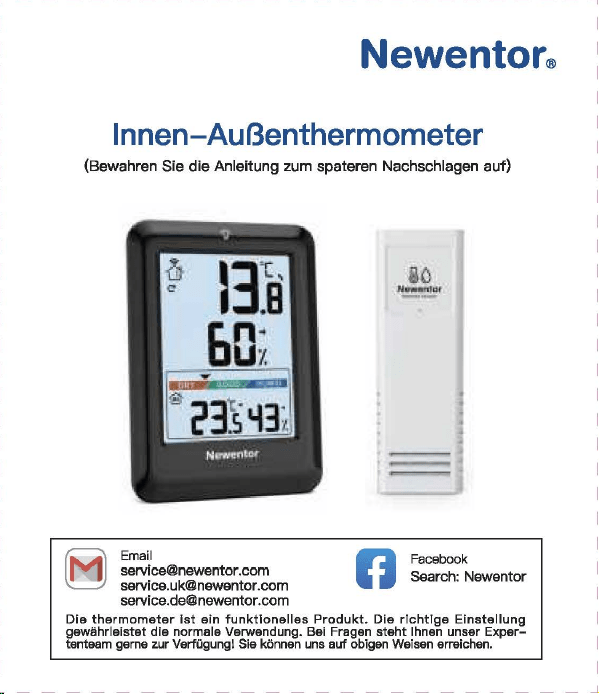
Newentor®
lnnen-AuBentherm
(Bew
自h
陪
n
Sie die Anleitung zum
spate
用
n
Nachschlagen auf)
‘。
”圃’叫时
INHAL
TSVERZEICHNIS
1.
。
PTIK
DER
WETTERSTATI
。
N
.............
.
.....
2
1 1
Basisstat,o
门…………..
'………······……….. 2
1 2
AusSE
到自
nsor
………………...………...…………
3
2.
FUNKTIONEN
DER
TASTEN
......
· ..
·……..
4
3.
BASISSTATION
LIND
SENSOR
VERBINDEN
· · · · 5
4.
ZYKLUSMODUS
5
。
i
OPTIK DER
WE
甘
ERS
1.2 AuBensensor
(I~
FUN
盯刷
EN
DER
TA
町
EN
BASISSTATION
UND
SENSOR
VERBINDEN
。
5
EMPFEHLUNGEN ZUR
SENSORPLA TZIERUNG
(1)
Platzieren Sie den Sensor
verti
阳
l
an einer nach Norden
gerichteten Wand oder an einem
gut
schattigen Ort, um
Sonnenlicht und Regen zu vermeiden.
Es
wird bevorzugt, es
15
cm
unter
dem Dach zu platzieren.
D
旧
maximale
Reichweite zur
Basisstation
betragt
328
FuB/100
m im
Fr
eien
,口
hne
Wande
口
der
B
凸
den.
(2)
Um
Signals
!凸
n.mgen
zu
vermeiden
,口
latzieren
Sie den
Sens
口
r
oder
die
Basisstation nicht in
de
「
Nahe
von Metall,
Fernsehe
「,
Computer usw.
(3)
Wen
n
es
drauBen kalt ist, wird empfohlen, den
Sense
『
naher
an die
Basisstati
口
n
zu
bringen, da die
Batte
rieleistung abnimmt,
was zu elner schnelleren Batterleentladung und
moglicherwelse
kOrzeren
Ve
「
bindungsentfemungen
fOhrt
06
MAX/MIN
(1)D
『
Ocken
Sis die ,,MAX/MIN"- Taste,
um
die MAX/MIN
anzuze1gen
(2)
Drucken Sie im MAX/MIN-Modus (das MAX/MIN-Symbol wird
auf
Display angezeigt)
die
Taste
”℃/
"F/HIST
飞
um
den
MAX/M
I
N-Wert
von
24
Std./48
Std./ALLE ZEIT umzuschalten
und anzuzeigen.
(3)
Halten Sie im
MAX/MIN-Modus
,,MAX/MIN"
3 Sekunden,
um
historische Daten zu
I
口
sch
en.
(1)
.CH
“- Taste
ist
die Taste zum Umschalten des Kanals. DrOcken
Sie mehrmals, es wird nacheinander angezeigt: CH1, CH2, CH3,
Zyklusmodus, CH1, CH2
...
(2)
Wenn das
Kanalzyklussymbol
”。“
a
u
f
Dlspl
自y
angezelgt wlrd,
bsdeutet dies, dass das
Gerat In den Zyklusmodus wechsslt, und
die
Kiinale CH1, CH2, CH3 alle 1 O Sekunden umschaltet
we
「
den.
(3)
Drucken Sie die ”
CH"
Taste im Zyklusmodus, um den
Zyklus
『
nodus
zu verlassen und zu
CH1
zuruckzukehren.
Deutsch 1
I Deutsch 2 I
D
剧
tsch3
I
D
剧
tsch
4 I Deutsch 5 I Deutsch 6
「
一一一一一一一一一一一一一一一一一一一一一一一
+
一一一一一一一一一一一一一一一一一一一一一一一
十
一一一一一一一一一一一一一一一一一一一一一一一
十
一一一一一一一一一一一一一一一一一一一一一一一
+
一一一一一一一一一一一一一一一一一一一一一一一
+
一一一一一一一一一一一一一一一一一一一一一一一
+
一一一一一一一一一一一一一一一一一一一一一一一-
iMJ
Email
I
I
、,
,|
目芽
飞-
二
7
国
回
vice.de@newent
口
r
com
。
问
k
Searcl
、:
Newento
『
Dia
thermo 阿
1eter
ist
eln
funktlonelles Produkt.
Die
rlchtlae Elnstelluna
gewiihrleistet
die
normale
Ve
『
wendung.
日
ei
Fragen
steht
Ihnen
unser
Exper~
tentoom
gerne
zur
Vert
,啕
ungl
S
旧
konnen
uns
euf
obigen
We,sen
srreichen.
a-1
℃/。
F
WECHSELN
DrOcken Sle die
Taste
,,℃/宇/
HIST
“,
um
zwlschs
n
℃/'
F
zu
wechsaln.
0
日
TEMPER
町
UR-/
FEUCHTIGKEITSTRENDERKENNUNG
8.1
Temperatur
• Wenn
die
Temperatu
「
im
Ve
「
gleich
zur zul
etzt
erfassten
T
白
mperatur
Ube
「
1
℃(才,
8τ
)
anstel
gt,
wlrd der Trend •
」
·
angezei
gt
• Wann
dis
Tsmperatur im Vergleich zur zul
stzt
0
厅
asst
en
Temper
自
M
um mehr als
1
℃(
1,8'FJ
酬
t,
wird der
Trend
,、“
angezei
gt
• Wenn sich die Temperatur innerhalb einer ununterbrochenen
Stunde
nicht
um
mehr als
1
℃(
1
,白。
F
)晶
ndert,
wird
der
Trend
”·+“
angezeigt
8.2
Feuchtigkeit
• Wenn
die
Luftfeuchtigkeit im Verglei
ch
zur zuletzt erfassten
Tempe
「
atu
『
um
mehr als 5 % anstelgt, wird
der
Trend
”,“
angezeigt
• Wenn
die
Luftfeuchtigkeit im Verglei
ch
zur zuletzt erfassten
Tempe
「
atur
um
mehr als 5 % abfiillt, wird der
Trend
,、“
angezeigt
• Wenn sich die
」
u
ftf
euchtigke
i
t
innerhalb
eine「
unun
t
erbro
chenen Stunde
um
nicht mehr als 5 % andert, wird
der
Trend
’~
" angezeigt
Deutsch 7
5.
EMPFEHLUNGEN
ZUR
SENSORPL.ATZIERUNG
··
6
6.
MAX/MIN
…………………..
6
7.
℃
iFWECHSELN
……………………………..
7
8.
TEMPERATUR-/FEUCHTIGKEπ
町
RENDERKENNUNG
8.
1
T
,刷、
par
咱
tur
叮’’
7
4
’
. . . . . . . . . . . . . . . . . . . . .
日
.2
Feuchtigke
it
9.
EISWARNUNG
8
10.
K1
。
MFORTANZEIGE
…………………………..
8
11.
NIEDRIGER
BATIERIESTAND
·· · ·· · …
..
....
.
..
9
12.PR
。
DUKTSPEZIFIKATION
……………………
9
13.
FRAGEN
LIND
ANTWORTEN
·····
····
···
··…
1
口
14.
GARANTIE
· · · · · ·
·………·
· 12
09
EISWARNUNG
Wenn
die
AuBentemperatur
-1
℃什℃(
30,2
'
F啕
33,8°F)
bet
「自由,
bllnkt
des Elsalarms
nb
口
l
”囔
l
".
Unte
「
1.1
℃{
30.02'F)
-
wl
「
d
das
Eisw
自『『
1symb
。
l
”输
I
" statisch angezeigt
.
1(1
KOMFORTANZEIG
(
ZU
TROCKEN: 20% bis
30%
( TROCKEN:
31
% bis
44%
( KOMFORT: 45% bis
65%
( NASS:
66%
bis
84%
(
ZU
NA
臼
85%
bis
95%
…
E
町··
圈
•et.•1111
噩
噩
Deutsch 8
NORMAi.ER MODUS
MAX/MIN
MODUS
Ha
比回
E
Dri
』
cken
H
自
lten
Drue
ken
CH
Kanale
W0(_
才
lSeln
Sensorslgnal
/Zyklusmodus empfangen
自
U什
U
侮
n
MAX/MIN
MAX/MIN
\
MAX/MIN
anzeigen
loschen
℃
fF
24
Std./48
℃/'
F/HIST
wechseln
Std./Alla \
Zeit
-哲-
Belel
」
chtung
fur
10
\ \
Sekunden
an
1.1 Basisstation
82
j(l
吧?已时
目
1
-
Al
81:
Signal
LED
82
:’
Wandhaken
83:
'F
/℃
已
4:
Kanal-Schiebschalter
85
:“TX"-
T
回国,
Funksignal
menuell
ii
胁
rtregen
86:Ba
甘
erlefach
白天
Ba
忧
e
r
iefachabdeckung
B3
一-
- r
B4
85
A10
MMMMMMm
A9
A11
M
阐
MMM 闹
86
A 1: 1 OS-Hintergrundbeleuchtungstaste
A2,
Kanai
1,2,3
A3:
Zyk
lusm
创
us-Symbol
A4:
Eiswarnung
Symbol
A5:M
阻-
und
Minwerte [24
std./
48 Std./ Alie Zeit)
A6:
Komfortanzeige
A7:
Niedriger
B
副剧团,
tand
AB:
lnnentemperatur
und
Luftfeuchtigkeit
A9:Au
日
entemperatur
un
d -Luftfeuchtigkeit
A 1 0.
Trend
- pfeil
A 11: Funktlonstasten
A
Ernp
旬
hlun
伊
n
zur
部
nsorplatzierung
(
1)
Platzieren
Sie
den
Sens
口
r
verti
阳|丽的市咱
ch
N
口
rd
町
gerichte
t
en
Wa
们
d
oder
an
ei
nem
gc
此
schattigE
引
Ort,
um
Sonn
四
licht
u
门
d
R
啕
er
zu
咽
rmelden.
Es
wlrd
bev
,白雪
ugt
,自
15
cm
unter
dem
Dach
zu
platzleren.
Die
m
缸
imale
Reichv.'3
ite
zur
臼
S
阳阳
lion
betr
首
gt328
FuB/100 m
im
Frelen
,出
ne
Wande
oder
日创
en
.
(2
)
Um
S
i
g
呻剧。阳咱
en
zu
ve
『
meide
n
,
platz
阳回
Sie
den
Sensor
oder
die
Bas
惚饱
tion
nicht
in
d
旷
Nal
回
von
M
拥
II,
Fem
倒喻,
Com
pl119r
usw.
(3
)
Wenn
回归
uBen
kelt
M
』
wird
刷刷、
le
门,
d
时
Sensor
门也
er
en
die
Basisstation
剖
lringe
叫
da
die
Batt
回
ele
i
stu
咱
abnimmt,
was
zu
einer
schne
ll
eren
Batterieentlad.Jng
unc
moglicherweise
kO
日:
erenVe
巾
Ind
ung:
ntfemungen
白
hrt
川
NIEDRIGER
BATTERIESTAND
13
FRAGEN UND ANTWO
②
De
「
Datene
「
fassungsbereich
auf
dem
Wette
毗
anal/
APP
ist
der
Bereich. AuBerdsm werden
Flughafenwette
「时
ationen
n
u
「
einmal
pro
Stunde aktualisiert.
( Wenn die Umgebung in
der
Nahe des Hauses angenehm ist
(Pflanzen, Getreide, Klimaanlage usw.),
ist
es
no
『
mal,
dass die
Temperatur des Sensors
v
口
n
der
白
uf
der
APP abweicht.
Wenn das Symbol
•
g
“自川
I
splay
叫
eze
阳
wlrd
(lnnenbatter-
lespannung
1st
nled
「
lgs
「
als
3,6
V, Sensorbatterlespannung
1st
nied
「iger
自
Is
2,5 V), mussen
wir
die
Batte
「
ie
der
Basissta
一
tion/des
Sensors rechtzeit ig
e
「
setzen.
(
1)
Wie lange
dauert
die
automatische
Kallbrierun
日,
wenn
Sie
das
Gerat zum ersten
Mal
verwenden?
Es dauert
normalerwelse
3-
7
Tags
I~
PRODUK s
[2)Wa
『
um
stimmen
Temperatur
und
Luftfeuohtigkeit
nioht
ilberein,
w
哩
nn
die
Basisstation und
der
Sensor zusemmen
platzlert
werden?
( GroBe und Aufbau der
Ge
「昌te
sind unterschiedlich. Um
ge
< auere Messwerte zu erha I ten, hat
die
Basisstati
口【
meh
r
kleine
L
凸
cher
fur
die
BelOftung,
w
,且
hrend
der
AuBensensor
n
口
r
malerweise
in
eine
「
relativ
rauen Umgebung platzi
ert
wird, seine
L
凸
oher
we
「
den
kleiner sein. Die Chipumgebung wird
etwas
ande
「
s
sein.
Dies
ist
m
凸
glicherweise
ei
n
er
der GrOnde
fur
den Unterschied
Dahe
「
benot
i
gen
die
Gerate
Le
『
n-
und
Ka
l
ibrie
「
ungszeit.
Im
Allgemeinen
ist
die Temperatur
umso
日
enaue
r
,
je langer es
platzle
内
wlrd.
( Wenn
de
r Abstand zwischen
der
KEiltequelle oder
der
Wiirmequelle unterschiedlich
isl,
ist
dies auch ein
er
der
Gr
臼
nde
fOr
den Unterschied
(
Um
die
Temperatur zu
ve
咱
leichen,
emp
fehlen
wir
ein
Quecksilber-
oder
rotes Spiritus(FIOssigkeits)-Thermometer.
Bimetall-
{Zifferblatt) und digitale
Thermomete
「(
v
口
n
曰
nde
「
en
Marken) sind keine
gute
Quella und haben
ih
『
e
eigene
Fehle
「
quote.
(4)
1st
der
Sensor wasserdioht?
Nein.
(5
)口
er
Sensor
kann slch
nlcht
mlt
der
Basisstation verblnden?
(
Bitte
stellen Sie
siche
「,
dass
die
Kanale von Basisstation und
Sen
so
「
ubereinstimmen.
(
Bitte
stellen Sie
siche
「,
dass
der
Sensor
richtig
p
l
a
恒
ie
时
ist
und
die
Entfe
「
nung
van
der
Basisstation innerhalb
des
Verbindungs-
bereichs
liegt
(siehe ”
5.
Empfehlungen
zu
「
Sensorplatzie
「
ung
“).
• lnnentemperaturmessbereich:
-9,9
℃-
50
℃(
14,2
'冉
122°F)
(LL.L
wird angezeigt, wenn sie un
ter
-9,9
℃/
14,2'F
liegt, und HH.H
wird
angezei
饵,
wenn
sie
Ober
50
℃/
122
°
F
liegt)
• AuBentemperaturmessbereich:
-40
℃叮
O
℃(-
40'F
叫
58
'
F)
•
lnnen-
und AuBenluftfeuchtlgkeltsberelch:
20
% - 95 % (bel
wanlge
「 els
20
%
wl
「
d
20 % angezelgt ,
bsl
mehr als 95 % wlrd
95
% angezei
gt)
•
Zeitr
白um
des
Signalempf
自
ngs:
30
Sekunden
• Genauigkeit
de
『
Temperatu
「「
nessung
:主
1
℃(
1,B'F)
• Genauigkeit
der
Feuchtigkeitsmessung:
±5%
• Batterie
der
Basisstation: 3 x AAA-Batterien
• Batterie des
AuGensenso
「
s:
2 x
M-Batterien
•Ve
「
bindungsentfernung
zwischen Basisstation und AuBensen-
sor:
328ft
( 1
OOm)
im
offenen
Be
「
eich
(6)
Warum
wechselt
der
Kanai
immer
wieder
aut
。
matisch?
Wen
[ das Symbol ” C · oben links angezeigt
wi
时,
bedeutet
dies,
dass
das
Ge
「
at
In
den Zyklusmodus
eingetrete
门
ist.
D
『
Ocken
Sie
d
悟,
CH
“-
Taste,
um
den
M
口
dus
zu verlassen und zu
CH1
zuruckzukeh
「
e
『1.
(S
iehe ,,4.
Zyklusm
。
dus")
Deutsch 9
阳)
Warum
untarschaidat
sfch
dia
gamassana AuBantamparatur
von
der
auf
der
APP (lokales We1teramt)?
( Die Wetterstatlon
ist
ei
n Heimgerat, dessen Erfassungsbereich
sich
um
das Haus herum befmdat und seine Datan ganauer sind.
Deutsch
10
Deutsch
11
Achten Sie darauf, die
Senso
「
en
in
de
「
folgenden
Reihenfolge
anzuschlieBen, da
sonst
die Verbindung fehlschlagen kann.
(1)
Drucken Sie die
..
CH
“-
Taste,
um
den Kanai
zu
wechseln.
(2)0
汗
nan
Sia die
Ba
忧
erleabdec
阳
ng
des Sensors, schalten Sia
den Sensorkanal
entsp
「
achend
der Baslsstatlon um. Wle belde In
CH1.
(3)
Halten Sie
die
..
CH
筐
Taste
3 Sekunden, um in den HF
Sig
〔自|
suchm口
dus
Z
】
wechsel
『
l.
(4)
Drucken Sie
sofort
die •
TX
飞
Taste
em AuBenssensor.
(5)
Die
飞
Nerte
werden
auf
Display angezei
gt,
fe
「
tig.
Hlnweis:
(1)
Die Basisstation kann bis
zu
3 Sensoren verbinden,
bitte
stellen Sie sicher, dass
die
Kanale
de
「
einzelnen
Sensoren
unterschiedlich sind.
(2)
Aktualisierungszyklus:
CH1
= 31s, CH2 = 32s,
CH3
= 33s
。叶
ZYKLUSMODUS
|叶
GARAN
TIE
• Das Gerat wurde gemaB strengen Qualltatsrichtlinien hergestellt
und vor
de
「
Auslieferung
sorgfaltig
gep
广
Oft.
•
Newe
「
1tor
verp
「icht,
d
自
SS
die
Ge
「
an
t
iezeit
des Gerats
1
飞
Jah
「
·es-Ga
「白「
1tie
ab Kaufdatum
betr
画
gt.
KONFORMIT.ATSERKL.ARUNG
Diese
Funkwetterstati
口
n
en1sp
「 ich
t
den
Grundanforde
「
ungen
und
den andaren alnschlagigan
V
口
rschrlften
dar Rlchtllnle
2014/53/EU.
Mit
d
回
em
Symbol gekennzeichnete Pradukte
e
斤
口
lien
alle
日
eltenden
Gemeinschaftsvorschriften des
Europais
旧
hen
Wirtschaftsraums.
Ober den folgenden Link konnen Sie die vollstiindige
Konformi
世-
serklarung direkt
a
时
unse
陪
r
offlziellen Newentcr-Website
he
「
unter
l
aden:
wwwnAW
自
nt
口
r
cnm/n,anAsld
自-
rlAc:larati
口
n
-口,
f-,xmfnrmilv-f.lRnF
ENTSORGUNGSHINWEISE
〕更阳…
e
……
du
厅
e
「
1
门
icht
Obe
「
den
n口
「
「
n
自
le
「
1H
白
usmull
ents
口「
gt
we
「
de
n
.
Nach
de
『
Richtlinie
2012/19
I
EU
muss das
Ge
「
at
am Ende
seine
「
Lebenscaue
「 ein
町
sac
h
gerechte
『
1
- Entsorgung zugefuhrt werden. Die im
Ger
白
t
enthaltenen
We
内
sachen
响
rden
recycelt und um eine Belastung der
Umwelt zu vermeiden. Bringen
Sie
das Altgeriit
zu
einer
Sammels·
恒
l
i
e
fO
「
Elektroschrott
口
der
einem Recyclinghof.
En
町
·ernen
Sie vor der Entsorgung die Batterien aus dem
Ge
「昌
t
und
ents
口「
·gen
Sie d iese getrennt.
Batterien
geh
凸
ren
nicht in den Hausmull. Jeder
Ve
「
bra1
』
cher
ist
ge
随时
ic
h
ve
巾啊
ichtet,
Batterien und
Akkus bsi einer Sammelstells seiner Gemeinde, seines
Kralses
ode
「
Im
Hande
l
自
bzugeban.
Damlt konnen alle
Batterien und Akkus
umweltgen:
记
ht
entsorgt
we
「·den
.
Deuti
到
ch
12
〕更协
ads
t
offhalti
Sy
「
nbol
und
che
『
nische
『、
Sy
「
nbole
「
1
(Pb
fu
「
Blei)
阴阳
nnzelchn
白
t
W
白
I
tare I
nformatl
口
nen
erhalten
SI
白
von
lhrem ortllchen Entsorgungsuntemehmen oder lhrer
。「
11ichen
Beh
凸「de
,咂
E
口tso
『
gen
Sle die Verpackung
m
巾
nreln.
Entsorgen
画’,.
Sia
Ka
巾
n
und Pappa als Altpapier und Follen der
咽.
.,.
We
「
tstoffsammlu
『
1g.
HAFTUNGSAUSSCHLOSSE
Der Hersteller behiilt sich das Recht
vo
「,
die
Produktspeziflka-
tionen zu
andern.
Hersteller und Lieferant sind
nicht
verantwortlich
fur
St凸「
unge
n
,
bei denen
St
凸
rungen
auftreten.
Manufac
阳帽,:由
:,nggυanBe,j
陷日
ec
tron
ic
Technology
Co.,
Ltd
Offl
四
Addre
四. No
.
15
月
0
啕
i
Ro
回
,
N
。
3
Indus
trial
Zo
睛,
E
川
sn
gs
ha
G
。
m m
川
ity.
Chang'a
n T
。阳,
Dongguan
City
.
Gu
a
啕由咱忏
ovi
n
回
www.r
回回晴内
tor.com
Deutsch 13
Newentor®
lnnen-AuBentherm
(Bew
自h
陪
n
Sie die Anleitung zum
spate
用
n
Nachschlagen auf)
‘。
”圃’叫时
INHAL
TSVERZEICHNIS
1.
。
PTIK
DER
WETTERSTATI
。
N
.............
.
.....
2
1 1
Basisstat,o
门…………..
'………······……….. 2
1 2
AusSE
到自
nsor
………………...………...…………
3
2.
FUNKTIONEN
DER
TASTEN
......
· ..
·……..
4
3.
BASISSTATION
LIND
SENSOR
VERBINDEN
· · · · 5
4.
ZYKLUSMODUS
5
。
i
OPTIK DER
WE
甘
ERS
1.2 AuBensensor
(I~
FUN
盯刷
EN
DER
TA
町
EN
BASISSTATION
UND
SENSOR
VERBINDEN
。
5
EMPFEHLUNGEN ZUR
SENSORPLA TZIERUNG
(1)
Platzieren Sie den Sensor
verti
阳
l
an einer nach Norden
gerichteten Wand oder an einem
gut
schattigen Ort, um
Sonnenlicht und Regen zu vermeiden.
Es
wird bevorzugt, es
15
cm
unter
dem Dach zu platzieren.
D
旧
maximale
Reichweite zur
Basisstation
betragt
328
FuB/100
m im
Fr
eien
,口
hne
Wande
口
der
B
凸
den.
(2)
Um
Signals
!凸
n.mgen
zu
vermeiden
,口
latzieren
Sie den
Sens
口
r
oder
die
Basisstation nicht in
de
「
Nahe
von Metall,
Fernsehe
「,
Computer usw.
(3)
Wen
n
es
drauBen kalt ist, wird empfohlen, den
Sense
『
naher
an die
Basisstati
口
n
zu
bringen, da die
Batte
rieleistung abnimmt,
was zu elner schnelleren Batterleentladung und
moglicherwelse
kOrzeren
Ve
「
bindungsentfemungen
fOhrt
06
MAX/MIN
(1)D
『
Ocken
Sis die ,,MAX/MIN"- Taste,
um
die MAX/MIN
anzuze1gen
(2)
Drucken Sie im MAX/MIN-Modus (das MAX/MIN-Symbol wird
auf
Display angezeigt)
die
Taste
”℃/
"F/HIST
飞
um
den
MAX/M
I
N-Wert
von
24
Std./48
Std./ALLE ZEIT umzuschalten
und anzuzeigen.
(3)
Halten Sie im
MAX/MIN-Modus
,,MAX/MIN"
3 Sekunden,
um
historische Daten zu
I
口
sch
en.
(1)
.CH
“- Taste
ist
die Taste zum Umschalten des Kanals. DrOcken
Sie mehrmals, es wird nacheinander angezeigt: CH1, CH2, CH3,
Zyklusmodus, CH1, CH2
...
(2)
Wenn das
Kanalzyklussymbol
”。“
a
u
f
Dlspl
自y
angezelgt wlrd,
bsdeutet dies, dass das
Gerat In den Zyklusmodus wechsslt, und
die
Kiinale CH1, CH2, CH3 alle 1 O Sekunden umschaltet
we
「
den.
(3)
Drucken Sie die ”
CH"
Taste im Zyklusmodus, um den
Zyklus
『
nodus
zu verlassen und zu
CH1
zuruckzukehren.
Deutsch 1
I Deutsch 2 I
D
剧
tsch3
I
D
剧
tsch
4 I Deutsch 5 I Deutsch 6
「
一一一一一一一一一一一一一一一一一一一一一一一
+
一一一一一一一一一一一一一一一一一一一一一一一
十
一一一一一一一一一一一一一一一一一一一一一一一
十
一一一一一一一一一一一一一一一一一一一一一一一
+
一一一一一一一一一一一一一一一一一一一一一一一
+
一一一一一一一一一一一一一一一一一一一一一一一
+
一一一一一一一一一一一一一一一一一一一一一一一-
iMJ
Email
I
I
、,
,|
目芽
飞-
二
7
国
回
vice.de@newent
口
r
com
。
问
k
Searcl
、:
Newento
『
Dia
thermo 阿
1eter
ist
eln
funktlonelles Produkt.
Die
rlchtlae Elnstelluna
gewiihrleistet
die
normale
Ve
『
wendung.
日
ei
Fragen
steht
Ihnen
unser
Exper~
tentoom
gerne
zur
Vert
,啕
ungl
S
旧
konnen
uns
euf
obigen
We,sen
srreichen.
a-1
℃/。
F
WECHSELN
DrOcken Sle die
Taste
,,℃/宇/
HIST
“,
um
zwlschs
n
℃/'
F
zu
wechsaln.
0
日
TEMPER
町
UR-/
FEUCHTIGKEITSTRENDERKENNUNG
8.1
Temperatur
• Wenn
die
Temperatu
「
im
Ve
「
gleich
zur zul
etzt
erfassten
T
白
mperatur
Ube
「
1
℃(才,
8τ
)
anstel
gt,
wlrd der Trend •
」
·
angezei
gt
• Wann
dis
Tsmperatur im Vergleich zur zul
stzt
0
厅
asst
en
Temper
自
M
um mehr als
1
℃(
1,8'FJ
酬
t,
wird der
Trend
,、“
angezei
gt
• Wenn sich die Temperatur innerhalb einer ununterbrochenen
Stunde
nicht
um
mehr als
1
℃(
1
,白。
F
)晶
ndert,
wird
der
Trend
”·+“
angezeigt
8.2
Feuchtigkeit
• Wenn
die
Luftfeuchtigkeit im Verglei
ch
zur zuletzt erfassten
Tempe
「
atu
『
um
mehr als 5 % anstelgt, wird
der
Trend
”,“
angezeigt
• Wenn
die
Luftfeuchtigkeit im Verglei
ch
zur zuletzt erfassten
Tempe
「
atur
um
mehr als 5 % abfiillt, wird der
Trend
,、“
angezeigt
• Wenn sich die
」
u
ftf
euchtigke
i
t
innerhalb
eine「
unun
t
erbro
chenen Stunde
um
nicht mehr als 5 % andert, wird
der
Trend
’~
" angezeigt
Deutsch 7
5.
EMPFEHLUNGEN
ZUR
SENSORPL.ATZIERUNG
··
6
6.
MAX/MIN
…………………..
6
7.
℃
iFWECHSELN
……………………………..
7
8.
TEMPERATUR-/FEUCHTIGKEπ
町
RENDERKENNUNG
8.
1
T
,刷、
par
咱
tur
叮’’
7
4
’
. . . . . . . . . . . . . . . . . . . . .
日
.2
Feuchtigke
it
9.
EISWARNUNG
8
10.
K1
。
MFORTANZEIGE
…………………………..
8
11.
NIEDRIGER
BATIERIESTAND
·· · ·· · …
..
....
.
..
9
12.PR
。
DUKTSPEZIFIKATION
……………………
9
13.
FRAGEN
LIND
ANTWORTEN
·····
····
···
··…
1
口
14.
GARANTIE
· · · · · ·
·………·
· 12
09
EISWARNUNG
Wenn
die
AuBentemperatur
-1
℃什℃(
30,2
'
F啕
33,8°F)
bet
「自由,
bllnkt
des Elsalarms
nb
口
l
”囔
l
".
Unte
「
1.1
℃{
30.02'F)
-
wl
「
d
das
Eisw
自『『
1symb
。
l
”输
I
" statisch angezeigt
.
1(1
KOMFORTANZEIG
(
ZU
TROCKEN: 20% bis
30%
( TROCKEN:
31
% bis
44%
( KOMFORT: 45% bis
65%
( NASS:
66%
bis
84%
(
ZU
NA
臼
85%
bis
95%
…
E
町··
圈
•et.•1111
噩
噩
Deutsch 8
NORMAi.ER MODUS
MAX/MIN
MODUS
Ha
比回
E
Dri
』
cken
H
自
lten
Drue
ken
CH
Kanale
W0(_
才
lSeln
Sensorslgnal
/Zyklusmodus empfangen
自
U什
U
侮
n
MAX/MIN
MAX/MIN
\
MAX/MIN
anzeigen
loschen
℃
fF
24
Std./48
℃/'
F/HIST
wechseln
Std./Alla \
Zeit
-哲-
Belel
」
chtung
fur
10
\ \
Sekunden
an
1.1 Basisstation
82
j(l
吧?已时
目
1
-
Al
81:
Signal
LED
82
:’
Wandhaken
83:
'F
/℃
已
4:
Kanal-Schiebschalter
85
:“TX"-
T
回国,
Funksignal
menuell
ii
胁
rtregen
86:Ba
甘
erlefach
白天
Ba
忧
e
r
iefachabdeckung
B3
一-
- r
B4
85
A10
MMMMMMm
A9
A11
M
阐
MMM 闹
86
A 1: 1 OS-Hintergrundbeleuchtungstaste
A2,
Kanai
1,2,3
A3:
Zyk
lusm
创
us-Symbol
A4:
Eiswarnung
Symbol
A5:M
阻-
und
Minwerte [24
std./
48 Std./ Alie Zeit)
A6:
Komfortanzeige
A7:
Niedriger
B
副剧团,
tand
AB:
lnnentemperatur
und
Luftfeuchtigkeit
A9:Au
日
entemperatur
un
d -Luftfeuchtigkeit
A 1 0.
Trend
- pfeil
A 11: Funktlonstasten
A
Ernp
旬
hlun
伊
n
zur
部
nsorplatzierung
(
1)
Platzieren
Sie
den
Sens
口
r
verti
阳|丽的市咱
ch
N
口
rd
町
gerichte
t
en
Wa
们
d
oder
an
ei
nem
gc
此
schattigE
引
Ort,
um
Sonn
四
licht
u
门
d
R
啕
er
zu
咽
rmelden.
Es
wlrd
bev
,白雪
ugt
,自
15
cm
unter
dem
Dach
zu
platzleren.
Die
m
缸
imale
Reichv.'3
ite
zur
臼
S
阳阳
lion
betr
首
gt328
FuB/100 m
im
Frelen
,出
ne
Wande
oder
日创
en
.
(2
)
Um
S
i
g
呻剧。阳咱
en
zu
ve
『
meide
n
,
platz
阳回
Sie
den
Sensor
oder
die
Bas
惚饱
tion
nicht
in
d
旷
Nal
回
von
M
拥
II,
Fem
倒喻,
Com
pl119r
usw.
(3
)
Wenn
回归
uBen
kelt
M
』
wird
刷刷、
le
门,
d
时
Sensor
门也
er
en
die
Basisstation
剖
lringe
叫
da
die
Batt
回
ele
i
stu
咱
abnimmt,
was
zu
einer
schne
ll
eren
Batterieentlad.Jng
unc
moglicherweise
kO
日:
erenVe
巾
Ind
ung:
ntfemungen
白
hrt
川
NIEDRIGER
BATTERIESTAND
13
FRAGEN UND ANTWO
②
De
「
Datene
「
fassungsbereich
auf
dem
Wette
毗
anal/
APP
ist
der
Bereich. AuBerdsm werden
Flughafenwette
「时
ationen
n
u
「
einmal
pro
Stunde aktualisiert.
( Wenn die Umgebung in
der
Nahe des Hauses angenehm ist
(Pflanzen, Getreide, Klimaanlage usw.),
ist
es
no
『
mal,
dass die
Temperatur des Sensors
v
口
n
der
白
uf
der
APP abweicht.
Wenn das Symbol
•
g
“自川
I
splay
叫
eze
阳
wlrd
(lnnenbatter-
lespannung
1st
nled
「
lgs
「
als
3,6
V, Sensorbatterlespannung
1st
nied
「iger
自
Is
2,5 V), mussen
wir
die
Batte
「
ie
der
Basissta
一
tion/des
Sensors rechtzeit ig
e
「
setzen.
(
1)
Wie lange
dauert
die
automatische
Kallbrierun
日,
wenn
Sie
das
Gerat zum ersten
Mal
verwenden?
Es dauert
normalerwelse
3-
7
Tags
I~
PRODUK s
[2)Wa
『
um
stimmen
Temperatur
und
Luftfeuohtigkeit
nioht
ilberein,
w
哩
nn
die
Basisstation und
der
Sensor zusemmen
platzlert
werden?
( GroBe und Aufbau der
Ge
「昌te
sind unterschiedlich. Um
ge
< auere Messwerte zu erha I ten, hat
die
Basisstati
口【
meh
r
kleine
L
凸
cher
fur
die
BelOftung,
w
,且
hrend
der
AuBensensor
n
口
r
malerweise
in
eine
「
relativ
rauen Umgebung platzi
ert
wird, seine
L
凸
oher
we
「
den
kleiner sein. Die Chipumgebung wird
etwas
ande
「
s
sein.
Dies
ist
m
凸
glicherweise
ei
n
er
der GrOnde
fur
den Unterschied
Dahe
「
benot
i
gen
die
Gerate
Le
『
n-
und
Ka
l
ibrie
「
ungszeit.
Im
Allgemeinen
ist
die Temperatur
umso
日
enaue
r
,
je langer es
platzle
内
wlrd.
( Wenn
de
r Abstand zwischen
der
KEiltequelle oder
der
Wiirmequelle unterschiedlich
isl,
ist
dies auch ein
er
der
Gr
臼
nde
fOr
den Unterschied
(
Um
die
Temperatur zu
ve
咱
leichen,
emp
fehlen
wir
ein
Quecksilber-
oder
rotes Spiritus(FIOssigkeits)-Thermometer.
Bimetall-
{Zifferblatt) und digitale
Thermomete
「(
v
口
n
曰
nde
「
en
Marken) sind keine
gute
Quella und haben
ih
『
e
eigene
Fehle
「
quote.
(4)
1st
der
Sensor wasserdioht?
Nein.
(5
)口
er
Sensor
kann slch
nlcht
mlt
der
Basisstation verblnden?
(
Bitte
stellen Sie
siche
「,
dass
die
Kanale von Basisstation und
Sen
so
「
ubereinstimmen.
(
Bitte
stellen Sie
siche
「,
dass
der
Sensor
richtig
p
l
a
恒
ie
时
ist
und
die
Entfe
「
nung
van
der
Basisstation innerhalb
des
Verbindungs-
bereichs
liegt
(siehe ”
5.
Empfehlungen
zu
「
Sensorplatzie
「
ung
“).
• lnnentemperaturmessbereich:
-9,9
℃-
50
℃(
14,2
'冉
122°F)
(LL.L
wird angezeigt, wenn sie un
ter
-9,9
℃/
14,2'F
liegt, und HH.H
wird
angezei
饵,
wenn
sie
Ober
50
℃/
122
°
F
liegt)
• AuBentemperaturmessbereich:
-40
℃叮
O
℃(-
40'F
叫
58
'
F)
•
lnnen-
und AuBenluftfeuchtlgkeltsberelch:
20
% - 95 % (bel
wanlge
「 els
20
%
wl
「
d
20 % angezelgt ,
bsl
mehr als 95 % wlrd
95
% angezei
gt)
•
Zeitr
白um
des
Signalempf
自
ngs:
30
Sekunden
• Genauigkeit
de
『
Temperatu
「「
nessung
:主
1
℃(
1,B'F)
• Genauigkeit
der
Feuchtigkeitsmessung:
±5%
• Batterie
der
Basisstation: 3 x AAA-Batterien
• Batterie des
AuGensenso
「
s:
2 x
M-Batterien
•Ve
「
bindungsentfernung
zwischen Basisstation und AuBensen-
sor:
328ft
( 1
OOm)
im
offenen
Be
「
eich
(6)
Warum
wechselt
der
Kanai
immer
wieder
aut
。
matisch?
Wen
[ das Symbol ” C · oben links angezeigt
wi
时,
bedeutet
dies,
dass
das
Ge
「
at
In
den Zyklusmodus
eingetrete
门
ist.
D
『
Ocken
Sie
d
悟,
CH
“-
Taste,
um
den
M
口
dus
zu verlassen und zu
CH1
zuruckzukeh
「
e
『1.
(S
iehe ,,4.
Zyklusm
。
dus")
Deutsch 9
阳)
Warum
untarschaidat
sfch
dia
gamassana AuBantamparatur
von
der
auf
der
APP (lokales We1teramt)?
( Die Wetterstatlon
ist
ei
n Heimgerat, dessen Erfassungsbereich
sich
um
das Haus herum befmdat und seine Datan ganauer sind.
Deutsch
10
Deutsch
11
Achten Sie darauf, die
Senso
「
en
in
de
「
folgenden
Reihenfolge
anzuschlieBen, da
sonst
die Verbindung fehlschlagen kann.
(1)
Drucken Sie die
..
CH
“-
Taste,
um
den Kanai
zu
wechseln.
(2)0
汗
nan
Sia die
Ba
忧
erleabdec
阳
ng
des Sensors, schalten Sia
den Sensorkanal
entsp
「
achend
der Baslsstatlon um. Wle belde In
CH1.
(3)
Halten Sie
die
..
CH
筐
Taste
3 Sekunden, um in den HF
Sig
〔自|
suchm口
dus
Z
】
wechsel
『
l.
(4)
Drucken Sie
sofort
die •
TX
飞
Taste
em AuBenssensor.
(5)
Die
飞
Nerte
werden
auf
Display angezei
gt,
fe
「
tig.
Hlnweis:
(1)
Die Basisstation kann bis
zu
3 Sensoren verbinden,
bitte
stellen Sie sicher, dass
die
Kanale
de
「
einzelnen
Sensoren
unterschiedlich sind.
(2)
Aktualisierungszyklus:
CH1
= 31s, CH2 = 32s,
CH3
= 33s
。叶
ZYKLUSMODUS
|叶
GARAN
TIE
• Das Gerat wurde gemaB strengen Qualltatsrichtlinien hergestellt
und vor
de
「
Auslieferung
sorgfaltig
gep
广
Oft.
•
Newe
「
1tor
verp
「icht,
d
自
SS
die
Ge
「
an
t
iezeit
des Gerats
1
飞
Jah
「
·es-Ga
「白「
1tie
ab Kaufdatum
betr
画
gt.
KONFORMIT.ATSERKL.ARUNG
Diese
Funkwetterstati
口
n
en1sp
「 ich
t
den
Grundanforde
「
ungen
und
den andaren alnschlagigan
V
口
rschrlften
dar Rlchtllnle
2014/53/EU.
Mit
d
回
em
Symbol gekennzeichnete Pradukte
e
斤
口
lien
alle
日
eltenden
Gemeinschaftsvorschriften des
Europais
旧
hen
Wirtschaftsraums.
Ober den folgenden Link konnen Sie die vollstiindige
Konformi
世-
serklarung direkt
a
时
unse
陪
r
offlziellen Newentcr-Website
he
「
unter
l
aden:
wwwnAW
自
nt
口
r
cnm/n,anAsld
自-
rlAc:larati
口
n
-口,
f-,xmfnrmilv-f.lRnF
ENTSORGUNGSHINWEISE
〕更阳…
e
……
du
厅
e
「
1
门
icht
Obe
「
den
n口
「
「
n
自
le
「
1H
白
usmull
ents
口「
gt
we
「
de
n
.
Nach
de
『
Richtlinie
2012/19
I
EU
muss das
Ge
「
at
am Ende
seine
「
Lebenscaue
「 ein
町
sac
h
gerechte
『
1
- Entsorgung zugefuhrt werden. Die im
Ger
白
t
enthaltenen
We
内
sachen
响
rden
recycelt und um eine Belastung der
Umwelt zu vermeiden. Bringen
Sie
das Altgeriit
zu
einer
Sammels·
恒
l
i
e
fO
「
Elektroschrott
口
der
einem Recyclinghof.
En
町
·ernen
Sie vor der Entsorgung die Batterien aus dem
Ge
「昌
t
und
ents
口「
·gen
Sie d iese getrennt.
Batterien
geh
凸
ren
nicht in den Hausmull. Jeder
Ve
「
bra1
』
cher
ist
ge
随时
ic
h
ve
巾啊
ichtet,
Batterien und
Akkus bsi einer Sammelstells seiner Gemeinde, seines
Kralses
ode
「
Im
Hande
l
自
bzugeban.
Damlt konnen alle
Batterien und Akkus
umweltgen:
记
ht
entsorgt
we
「·den
.
Deuti
到
ch
12
〕更协
ads
t
offhalti
Sy
「
nbol
und
che
『
nische
『、
Sy
「
nbole
「
1
(Pb
fu
「
Blei)
阴阳
nnzelchn
白
t
W
白
I
tare I
nformatl
口
nen
erhalten
SI
白
von
lhrem ortllchen Entsorgungsuntemehmen oder lhrer
。「
11ichen
Beh
凸「de
,咂
E
口tso
『
gen
Sle die Verpackung
m
巾
nreln.
Entsorgen
画’,.
Sia
Ka
巾
n
und Pappa als Altpapier und Follen der
咽.
.,.
We
「
tstoffsammlu
『
1g.
HAFTUNGSAUSSCHLOSSE
Der Hersteller behiilt sich das Recht
vo
「,
die
Produktspeziflka-
tionen zu
andern.
Hersteller und Lieferant sind
nicht
verantwortlich
fur
St凸「
unge
n
,
bei denen
St
凸
rungen
auftreten.
Manufac
阳帽,:由
:,nggυanBe,j
陷日
ec
tron
ic
Technology
Co.,
Ltd
Offl
四
Addre
四. No
.
15
月
0
啕
i
Ro
回
,
N
。
3
Indus
trial
Zo
睛,
E
川
sn
gs
ha
G
。
m m
川
ity.
Chang'a
n T
。阳,
Dongguan
City
.
Gu
a
啕由咱忏
ovi
n
回
www.r
回回晴内
tor.com
Deutsch 13
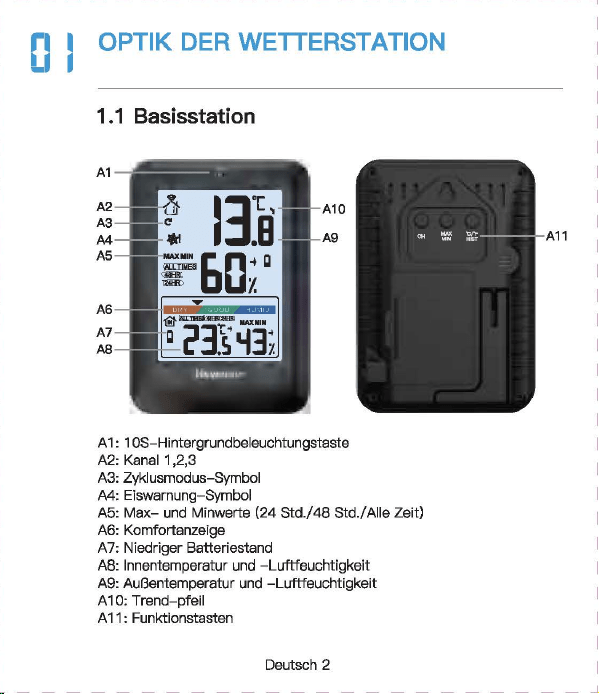
Newentor®
lnnen-AuBentherm
(Bew
自h
陪
n
Sie die Anleitung zum
spate
用
n
Nachschlagen auf)
‘。
”圃’叫时
INHAL
TSVERZEICHNIS
1.
。
PTIK
DER
WETTERSTATI
。
N
.............
.
.....
2
1 1
Basisstat,o
门…………..
'………······……….. 2
1 2
AusSE
到自
nsor
………………...………...…………
3
2.
FUNKTIONEN
DER
TASTEN
......
· ..
·……..
4
3.
BASISSTATION
LIND
SENSOR
VERBINDEN
· · · · 5
4.
ZYKLUSMODUS
5
。
i
OPTIK DER
WE
甘
ERS
1.2 AuBensensor
(I~
FUN
盯刷
EN
DER
TA
町
EN
BASISSTATION
UND
SENSOR
VERBINDEN
。
5
EMPFEHLUNGEN ZUR
SENSORPLA TZIERUNG
(1)
Platzieren Sie den Sensor
verti
阳
l
an einer nach Norden
gerichteten Wand oder an einem
gut
schattigen Ort, um
Sonnenlicht und Regen zu vermeiden.
Es
wird bevorzugt, es
15
cm
unter
dem Dach zu platzieren.
D
旧
maximale
Reichweite zur
Basisstation
betragt
328
FuB/100
m im
Fr
eien
,口
hne
Wande
口
der
B
凸
den.
(2)
Um
Signals
!凸
n.mgen
zu
vermeiden
,口
latzieren
Sie den
Sens
口
r
oder
die
Basisstation nicht in
de
「
Nahe
von Metall,
Fernsehe
「,
Computer usw.
(3)
Wen
n
es
drauBen kalt ist, wird empfohlen, den
Sense
『
naher
an die
Basisstati
口
n
zu
bringen, da die
Batte
rieleistung abnimmt,
was zu elner schnelleren Batterleentladung und
moglicherwelse
kOrzeren
Ve
「
bindungsentfemungen
fOhrt
06
MAX/MIN
(1)D
『
Ocken
Sis die ,,MAX/MIN"- Taste,
um
die MAX/MIN
anzuze1gen
(2)
Drucken Sie im MAX/MIN-Modus (das MAX/MIN-Symbol wird
auf
Display angezeigt)
die
Taste
”℃/
"F/HIST
飞
um
den
MAX/M
I
N-Wert
von
24
Std./48
Std./ALLE ZEIT umzuschalten
und anzuzeigen.
(3)
Halten Sie im
MAX/MIN-Modus
,,MAX/MIN"
3 Sekunden,
um
historische Daten zu
I
口
sch
en.
(1)
.CH
“- Taste
ist
die Taste zum Umschalten des Kanals. DrOcken
Sie mehrmals, es wird nacheinander angezeigt: CH1, CH2, CH3,
Zyklusmodus, CH1, CH2
...
(2)
Wenn das
Kanalzyklussymbol
”。“
a
u
f
Dlspl
自y
angezelgt wlrd,
bsdeutet dies, dass das
Gerat In den Zyklusmodus wechsslt, und
die
Kiinale CH1, CH2, CH3 alle 1 O Sekunden umschaltet
we
「
den.
(3)
Drucken Sie die ”
CH"
Taste im Zyklusmodus, um den
Zyklus
『
nodus
zu verlassen und zu
CH1
zuruckzukehren.
Deutsch 1
I Deutsch 2 I
D
剧
tsch3
I
D
剧
tsch
4 I Deutsch 5 I Deutsch 6
「
一一一一一一一一一一一一一一一一一一一一一一一
+
一一一一一一一一一一一一一一一一一一一一一一一
十
一一一一一一一一一一一一一一一一一一一一一一一
十
一一一一一一一一一一一一一一一一一一一一一一一
+
一一一一一一一一一一一一一一一一一一一一一一一
+
一一一一一一一一一一一一一一一一一一一一一一一
+
一一一一一一一一一一一一一一一一一一一一一一一-
iMJ
Email
I
I
、,
,|
目芽
飞-
二
7
国
回
vice.de@newent
口
r
com
。
问
k
Searcl
、:
Newento
『
Dia
thermo 阿
1eter
ist
eln
funktlonelles Produkt.
Die
rlchtlae Elnstelluna
gewiihrleistet
die
normale
Ve
『
wendung.
日
ei
Fragen
steht
Ihnen
unser
Exper~
tentoom
gerne
zur
Vert
,啕
ungl
S
旧
konnen
uns
euf
obigen
We,sen
srreichen.
a-1
℃/。
F
WECHSELN
DrOcken Sle die
Taste
,,℃/宇/
HIST
“,
um
zwlschs
n
℃/'
F
zu
wechsaln.
0
日
TEMPER
町
UR-/
FEUCHTIGKEITSTRENDERKENNUNG
8.1
Temperatur
• Wenn
die
Temperatu
「
im
Ve
「
gleich
zur zul
etzt
erfassten
T
白
mperatur
Ube
「
1
℃(才,
8τ
)
anstel
gt,
wlrd der Trend •
」
·
angezei
gt
• Wann
dis
Tsmperatur im Vergleich zur zul
stzt
0
厅
asst
en
Temper
自
M
um mehr als
1
℃(
1,8'FJ
酬
t,
wird der
Trend
,、“
angezei
gt
• Wenn sich die Temperatur innerhalb einer ununterbrochenen
Stunde
nicht
um
mehr als
1
℃(
1
,白。
F
)晶
ndert,
wird
der
Trend
”·+“
angezeigt
8.2
Feuchtigkeit
• Wenn
die
Luftfeuchtigkeit im Verglei
ch
zur zuletzt erfassten
Tempe
「
atu
『
um
mehr als 5 % anstelgt, wird
der
Trend
”,“
angezeigt
• Wenn
die
Luftfeuchtigkeit im Verglei
ch
zur zuletzt erfassten
Tempe
「
atur
um
mehr als 5 % abfiillt, wird der
Trend
,、“
angezeigt
• Wenn sich die
」
u
ftf
euchtigke
i
t
innerhalb
eine「
unun
t
erbro
chenen Stunde
um
nicht mehr als 5 % andert, wird
der
Trend
’~
" angezeigt
Deutsch 7
5.
EMPFEHLUNGEN
ZUR
SENSORPL.ATZIERUNG
··
6
6.
MAX/MIN
…………………..
6
7.
℃
iFWECHSELN
……………………………..
7
8.
TEMPERATUR-/FEUCHTIGKEπ
町
RENDERKENNUNG
8.
1
T
,刷、
par
咱
tur
叮’’
7
4
’
. . . . . . . . . . . . . . . . . . . . .
日
.2
Feuchtigke
it
9.
EISWARNUNG
8
10.
K1
。
MFORTANZEIGE
…………………………..
8
11.
NIEDRIGER
BATIERIESTAND
·· · ·· · …
..
....
.
..
9
12.PR
。
DUKTSPEZIFIKATION
……………………
9
13.
FRAGEN
LIND
ANTWORTEN
·····
····
···
··…
1
口
14.
GARANTIE
· · · · · ·
·………·
· 12
09
EISWARNUNG
Wenn
die
AuBentemperatur
-1
℃什℃(
30,2
'
F啕
33,8°F)
bet
「自由,
bllnkt
des Elsalarms
nb
口
l
”囔
l
".
Unte
「
1.1
℃{
30.02'F)
-
wl
「
d
das
Eisw
自『『
1symb
。
l
”输
I
" statisch angezeigt
.
1(1
KOMFORTANZEIG
(
ZU
TROCKEN: 20% bis
30%
( TROCKEN:
31
% bis
44%
( KOMFORT: 45% bis
65%
( NASS:
66%
bis
84%
(
ZU
NA
臼
85%
bis
95%
…
E
町··
圈
•et.•1111
噩
噩
Deutsch 8
NORMAi.ER MODUS
MAX/MIN
MODUS
Ha
比回
E
Dri
』
cken
H
自
lten
Drue
ken
CH
Kanale
W0(_
才
lSeln
Sensorslgnal
/Zyklusmodus empfangen
自
U什
U
侮
n
MAX/MIN
MAX/MIN
\
MAX/MIN
anzeigen
loschen
℃
fF
24
Std./48
℃/'
F/HIST
wechseln
Std./Alla \
Zeit
-哲-
Belel
」
chtung
fur
10
\ \
Sekunden
an
1.1 Basisstation
82
j(l
吧?已时
目
1
-
Al
81:
Signal
LED
82
:’
Wandhaken
83:
'F
/℃
已
4:
Kanal-Schiebschalter
85
:“TX"-
T
回国,
Funksignal
menuell
ii
胁
rtregen
86:Ba
甘
erlefach
白天
Ba
忧
e
r
iefachabdeckung
B3
一-
- r
B4
85
A10
MMMMMMm
A9
A11
M
阐
MMM 闹
86
A 1: 1 OS-Hintergrundbeleuchtungstaste
A2,
Kanai
1,2,3
A3:
Zyk
lusm
创
us-Symbol
A4:
Eiswarnung
Symbol
A5:M
阻-
und
Minwerte [24
std./
48 Std./ Alie Zeit)
A6:
Komfortanzeige
A7:
Niedriger
B
副剧团,
tand
AB:
lnnentemperatur
und
Luftfeuchtigkeit
A9:Au
日
entemperatur
un
d -Luftfeuchtigkeit
A 1 0.
Trend
- pfeil
A 11: Funktlonstasten
A
Ernp
旬
hlun
伊
n
zur
部
nsorplatzierung
(
1)
Platzieren
Sie
den
Sens
口
r
verti
阳|丽的市咱
ch
N
口
rd
町
gerichte
t
en
Wa
们
d
oder
an
ei
nem
gc
此
schattigE
引
Ort,
um
Sonn
四
licht
u
门
d
R
啕
er
zu
咽
rmelden.
Es
wlrd
bev
,白雪
ugt
,自
15
cm
unter
dem
Dach
zu
platzleren.
Die
m
缸
imale
Reichv.'3
ite
zur
臼
S
阳阳
lion
betr
首
gt328
FuB/100 m
im
Frelen
,出
ne
Wande
oder
日创
en
.
(2
)
Um
S
i
g
呻剧。阳咱
en
zu
ve
『
meide
n
,
platz
阳回
Sie
den
Sensor
oder
die
Bas
惚饱
tion
nicht
in
d
旷
Nal
回
von
M
拥
II,
Fem
倒喻,
Com
pl119r
usw.
(3
)
Wenn
回归
uBen
kelt
M
』
wird
刷刷、
le
门,
d
时
Sensor
门也
er
en
die
Basisstation
剖
lringe
叫
da
die
Batt
回
ele
i
stu
咱
abnimmt,
was
zu
einer
schne
ll
eren
Batterieentlad.Jng
unc
moglicherweise
kO
日:
erenVe
巾
Ind
ung:
ntfemungen
白
hrt
川
NIEDRIGER
BATTERIESTAND
13
FRAGEN UND ANTWO
②
De
「
Datene
「
fassungsbereich
auf
dem
Wette
毗
anal/
APP
ist
der
Bereich. AuBerdsm werden
Flughafenwette
「时
ationen
n
u
「
einmal
pro
Stunde aktualisiert.
( Wenn die Umgebung in
der
Nahe des Hauses angenehm ist
(Pflanzen, Getreide, Klimaanlage usw.),
ist
es
no
『
mal,
dass die
Temperatur des Sensors
v
口
n
der
白
uf
der
APP abweicht.
Wenn das Symbol
•
g
“自川
I
splay
叫
eze
阳
wlrd
(lnnenbatter-
lespannung
1st
nled
「
lgs
「
als
3,6
V, Sensorbatterlespannung
1st
nied
「iger
自
Is
2,5 V), mussen
wir
die
Batte
「
ie
der
Basissta
一
tion/des
Sensors rechtzeit ig
e
「
setzen.
(
1)
Wie lange
dauert
die
automatische
Kallbrierun
日,
wenn
Sie
das
Gerat zum ersten
Mal
verwenden?
Es dauert
normalerwelse
3-
7
Tags
I~
PRODUK s
[2)Wa
『
um
stimmen
Temperatur
und
Luftfeuohtigkeit
nioht
ilberein,
w
哩
nn
die
Basisstation und
der
Sensor zusemmen
platzlert
werden?
( GroBe und Aufbau der
Ge
「昌te
sind unterschiedlich. Um
ge
< auere Messwerte zu erha I ten, hat
die
Basisstati
口【
meh
r
kleine
L
凸
cher
fur
die
BelOftung,
w
,且
hrend
der
AuBensensor
n
口
r
malerweise
in
eine
「
relativ
rauen Umgebung platzi
ert
wird, seine
L
凸
oher
we
「
den
kleiner sein. Die Chipumgebung wird
etwas
ande
「
s
sein.
Dies
ist
m
凸
glicherweise
ei
n
er
der GrOnde
fur
den Unterschied
Dahe
「
benot
i
gen
die
Gerate
Le
『
n-
und
Ka
l
ibrie
「
ungszeit.
Im
Allgemeinen
ist
die Temperatur
umso
日
enaue
r
,
je langer es
platzle
内
wlrd.
( Wenn
de
r Abstand zwischen
der
KEiltequelle oder
der
Wiirmequelle unterschiedlich
isl,
ist
dies auch ein
er
der
Gr
臼
nde
fOr
den Unterschied
(
Um
die
Temperatur zu
ve
咱
leichen,
emp
fehlen
wir
ein
Quecksilber-
oder
rotes Spiritus(FIOssigkeits)-Thermometer.
Bimetall-
{Zifferblatt) und digitale
Thermomete
「(
v
口
n
曰
nde
「
en
Marken) sind keine
gute
Quella und haben
ih
『
e
eigene
Fehle
「
quote.
(4)
1st
der
Sensor wasserdioht?
Nein.
(5
)口
er
Sensor
kann slch
nlcht
mlt
der
Basisstation verblnden?
(
Bitte
stellen Sie
siche
「,
dass
die
Kanale von Basisstation und
Sen
so
「
ubereinstimmen.
(
Bitte
stellen Sie
siche
「,
dass
der
Sensor
richtig
p
l
a
恒
ie
时
ist
und
die
Entfe
「
nung
van
der
Basisstation innerhalb
des
Verbindungs-
bereichs
liegt
(siehe ”
5.
Empfehlungen
zu
「
Sensorplatzie
「
ung
“).
• lnnentemperaturmessbereich:
-9,9
℃-
50
℃(
14,2
'冉
122°F)
(LL.L
wird angezeigt, wenn sie un
ter
-9,9
℃/
14,2'F
liegt, und HH.H
wird
angezei
饵,
wenn
sie
Ober
50
℃/
122
°
F
liegt)
• AuBentemperaturmessbereich:
-40
℃叮
O
℃(-
40'F
叫
58
'
F)
•
lnnen-
und AuBenluftfeuchtlgkeltsberelch:
20
% - 95 % (bel
wanlge
「 els
20
%
wl
「
d
20 % angezelgt ,
bsl
mehr als 95 % wlrd
95
% angezei
gt)
•
Zeitr
白um
des
Signalempf
自
ngs:
30
Sekunden
• Genauigkeit
de
『
Temperatu
「「
nessung
:主
1
℃(
1,B'F)
• Genauigkeit
der
Feuchtigkeitsmessung:
±5%
• Batterie
der
Basisstation: 3 x AAA-Batterien
• Batterie des
AuGensenso
「
s:
2 x
M-Batterien
•Ve
「
bindungsentfernung
zwischen Basisstation und AuBensen-
sor:
328ft
( 1
OOm)
im
offenen
Be
「
eich
(6)
Warum
wechselt
der
Kanai
immer
wieder
aut
。
matisch?
Wen
[ das Symbol ” C · oben links angezeigt
wi
时,
bedeutet
dies,
dass
das
Ge
「
at
In
den Zyklusmodus
eingetrete
门
ist.
D
『
Ocken
Sie
d
悟,
CH
“-
Taste,
um
den
M
口
dus
zu verlassen und zu
CH1
zuruckzukeh
「
e
『1.
(S
iehe ,,4.
Zyklusm
。
dus")
Deutsch 9
阳)
Warum
untarschaidat
sfch
dia
gamassana AuBantamparatur
von
der
auf
der
APP (lokales We1teramt)?
( Die Wetterstatlon
ist
ei
n Heimgerat, dessen Erfassungsbereich
sich
um
das Haus herum befmdat und seine Datan ganauer sind.
Deutsch
10
Deutsch
11
Achten Sie darauf, die
Senso
「
en
in
de
「
folgenden
Reihenfolge
anzuschlieBen, da
sonst
die Verbindung fehlschlagen kann.
(1)
Drucken Sie die
..
CH
“-
Taste,
um
den Kanai
zu
wechseln.
(2)0
汗
nan
Sia die
Ba
忧
erleabdec
阳
ng
des Sensors, schalten Sia
den Sensorkanal
entsp
「
achend
der Baslsstatlon um. Wle belde In
CH1.
(3)
Halten Sie
die
..
CH
筐
Taste
3 Sekunden, um in den HF
Sig
〔自|
suchm口
dus
Z
】
wechsel
『
l.
(4)
Drucken Sie
sofort
die •
TX
飞
Taste
em AuBenssensor.
(5)
Die
飞
Nerte
werden
auf
Display angezei
gt,
fe
「
tig.
Hlnweis:
(1)
Die Basisstation kann bis
zu
3 Sensoren verbinden,
bitte
stellen Sie sicher, dass
die
Kanale
de
「
einzelnen
Sensoren
unterschiedlich sind.
(2)
Aktualisierungszyklus:
CH1
= 31s, CH2 = 32s,
CH3
= 33s
。叶
ZYKLUSMODUS
|叶
GARAN
TIE
• Das Gerat wurde gemaB strengen Qualltatsrichtlinien hergestellt
und vor
de
「
Auslieferung
sorgfaltig
gep
广
Oft.
•
Newe
「
1tor
verp
「icht,
d
自
SS
die
Ge
「
an
t
iezeit
des Gerats
1
飞
Jah
「
·es-Ga
「白「
1tie
ab Kaufdatum
betr
画
gt.
KONFORMIT.ATSERKL.ARUNG
Diese
Funkwetterstati
口
n
en1sp
「 ich
t
den
Grundanforde
「
ungen
und
den andaren alnschlagigan
V
口
rschrlften
dar Rlchtllnle
2014/53/EU.
Mit
d
回
em
Symbol gekennzeichnete Pradukte
e
斤
口
lien
alle
日
eltenden
Gemeinschaftsvorschriften des
Europais
旧
hen
Wirtschaftsraums.
Ober den folgenden Link konnen Sie die vollstiindige
Konformi
世-
serklarung direkt
a
时
unse
陪
r
offlziellen Newentcr-Website
he
「
unter
l
aden:
wwwnAW
自
nt
口
r
cnm/n,anAsld
自-
rlAc:larati
口
n
-口,
f-,xmfnrmilv-f.lRnF
ENTSORGUNGSHINWEISE
〕更阳…
e
……
du
厅
e
「
1
门
icht
Obe
「
den
n口
「
「
n
自
le
「
1H
白
usmull
ents
口「
gt
we
「
de
n
.
Nach
de
『
Richtlinie
2012/19
I
EU
muss das
Ge
「
at
am Ende
seine
「
Lebenscaue
「 ein
町
sac
h
gerechte
『
1
- Entsorgung zugefuhrt werden. Die im
Ger
白
t
enthaltenen
We
内
sachen
响
rden
recycelt und um eine Belastung der
Umwelt zu vermeiden. Bringen
Sie
das Altgeriit
zu
einer
Sammels·
恒
l
i
e
fO
「
Elektroschrott
口
der
einem Recyclinghof.
En
町
·ernen
Sie vor der Entsorgung die Batterien aus dem
Ge
「昌
t
und
ents
口「
·gen
Sie d iese getrennt.
Batterien
geh
凸
ren
nicht in den Hausmull. Jeder
Ve
「
bra1
』
cher
ist
ge
随时
ic
h
ve
巾啊
ichtet,
Batterien und
Akkus bsi einer Sammelstells seiner Gemeinde, seines
Kralses
ode
「
Im
Hande
l
自
bzugeban.
Damlt konnen alle
Batterien und Akkus
umweltgen:
记
ht
entsorgt
we
「·den
.
Deuti
到
ch
12
〕更协
ads
t
offhalti
Sy
「
nbol
und
che
『
nische
『、
Sy
「
nbole
「
1
(Pb
fu
「
Blei)
阴阳
nnzelchn
白
t
W
白
I
tare I
nformatl
口
nen
erhalten
SI
白
von
lhrem ortllchen Entsorgungsuntemehmen oder lhrer
。「
11ichen
Beh
凸「de
,咂
E
口tso
『
gen
Sle die Verpackung
m
巾
nreln.
Entsorgen
画’,.
Sia
Ka
巾
n
und Pappa als Altpapier und Follen der
咽.
.,.
We
「
tstoffsammlu
『
1g.
HAFTUNGSAUSSCHLOSSE
Der Hersteller behiilt sich das Recht
vo
「,
die
Produktspeziflka-
tionen zu
andern.
Hersteller und Lieferant sind
nicht
verantwortlich
fur
St凸「
unge
n
,
bei denen
St
凸
rungen
auftreten.
Manufac
阳帽,:由
:,nggυanBe,j
陷日
ec
tron
ic
Technology
Co.,
Ltd
Offl
四
Addre
四. No
.
15
月
0
啕
i
Ro
回
,
N
。
3
Indus
trial
Zo
睛,
E
川
sn
gs
ha
G
。
m m
川
ity.
Chang'a
n T
。阳,
Dongguan
City
.
Gu
a
啕由咱忏
ovi
n
回
www.r
回回晴内
tor.com
Deutsch 13
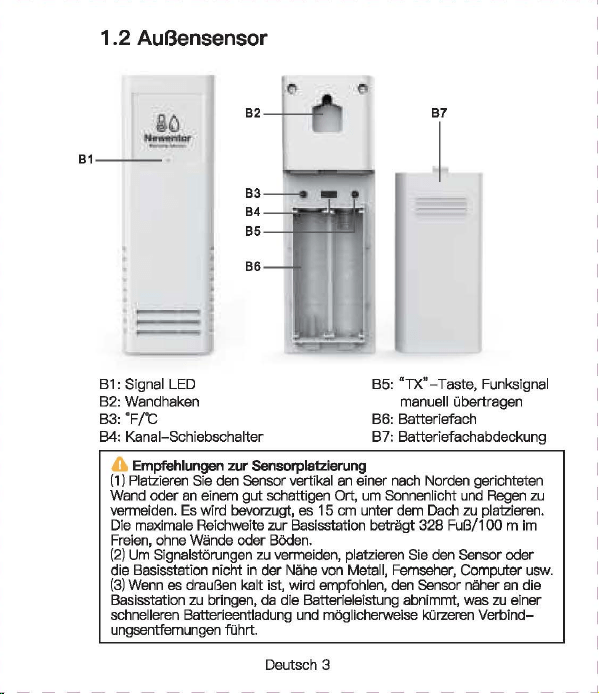
Newentor®
lnnen-AuBentherm
(Bew
自h
陪
n
Sie die Anleitung zum
spate
用
n
Nachschlagen auf)
‘。
”圃’叫时
INHAL
TSVERZEICHNIS
1.
。
PTIK
DER
WETTERSTATI
。
N
.............
.
.....
2
1 1
Basisstat,o
门…………..
'………······……….. 2
1 2
AusSE
到自
nsor
………………...………...…………
3
2.
FUNKTIONEN
DER
TASTEN
......
· ..
·……..
4
3.
BASISSTATION
LIND
SENSOR
VERBINDEN
· · · · 5
4.
ZYKLUSMODUS
5
。
i
OPTIK DER
WE
甘
ERS
1.2 AuBensensor
(I~
FUN
盯刷
EN
DER
TA
町
EN
BASISSTATION
UND
SENSOR
VERBINDEN
。
5
EMPFEHLUNGEN ZUR
SENSORPLA TZIERUNG
(1)
Platzieren Sie den Sensor
verti
阳
l
an einer nach Norden
gerichteten Wand oder an einem
gut
schattigen Ort, um
Sonnenlicht und Regen zu vermeiden.
Es
wird bevorzugt, es
15
cm
unter
dem Dach zu platzieren.
D
旧
maximale
Reichweite zur
Basisstation
betragt
328
FuB/100
m im
Fr
eien
,口
hne
Wande
口
der
B
凸
den.
(2)
Um
Signals
!凸
n.mgen
zu
vermeiden
,口
latzieren
Sie den
Sens
口
r
oder
die
Basisstation nicht in
de
「
Nahe
von Metall,
Fernsehe
「,
Computer usw.
(3)
Wen
n
es
drauBen kalt ist, wird empfohlen, den
Sense
『
naher
an die
Basisstati
口
n
zu
bringen, da die
Batte
rieleistung abnimmt,
was zu elner schnelleren Batterleentladung und
moglicherwelse
kOrzeren
Ve
「
bindungsentfemungen
fOhrt
06
MAX/MIN
(1)D
『
Ocken
Sis die ,,MAX/MIN"- Taste,
um
die MAX/MIN
anzuze1gen
(2)
Drucken Sie im MAX/MIN-Modus (das MAX/MIN-Symbol wird
auf
Display angezeigt)
die
Taste
”℃/
"F/HIST
飞
um
den
MAX/M
I
N-Wert
von
24
Std./48
Std./ALLE ZEIT umzuschalten
und anzuzeigen.
(3)
Halten Sie im
MAX/MIN-Modus
,,MAX/MIN"
3 Sekunden,
um
historische Daten zu
I
口
sch
en.
(1)
.CH
“- Taste
ist
die Taste zum Umschalten des Kanals. DrOcken
Sie mehrmals, es wird nacheinander angezeigt: CH1, CH2, CH3,
Zyklusmodus, CH1, CH2
...
(2)
Wenn das
Kanalzyklussymbol
”。“
a
u
f
Dlspl
自y
angezelgt wlrd,
bsdeutet dies, dass das
Gerat In den Zyklusmodus wechsslt, und
die
Kiinale CH1, CH2, CH3 alle 1 O Sekunden umschaltet
we
「
den.
(3)
Drucken Sie die ”
CH"
Taste im Zyklusmodus, um den
Zyklus
『
nodus
zu verlassen und zu
CH1
zuruckzukehren.
Deutsch 1
I Deutsch 2 I
D
剧
tsch3
I
D
剧
tsch
4 I Deutsch 5 I Deutsch 6
「
一一一一一一一一一一一一一一一一一一一一一一一
+
一一一一一一一一一一一一一一一一一一一一一一一
十
一一一一一一一一一一一一一一一一一一一一一一一
十
一一一一一一一一一一一一一一一一一一一一一一一
+
一一一一一一一一一一一一一一一一一一一一一一一
+
一一一一一一一一一一一一一一一一一一一一一一一
+
一一一一一一一一一一一一一一一一一一一一一一一-
iMJ
Email
I
I
、,
,|
目芽
飞-
二
7
国
回
vice.de@newent
口
r
com
。
问
k
Searcl
、:
Newento
『
Dia
thermo 阿
1eter
ist
eln
funktlonelles Produkt.
Die
rlchtlae Elnstelluna
gewiihrleistet
die
normale
Ve
『
wendung.
日
ei
Fragen
steht
Ihnen
unser
Exper~
tentoom
gerne
zur
Vert
,啕
ungl
S
旧
konnen
uns
euf
obigen
We,sen
srreichen.
a-1
℃/。
F
WECHSELN
DrOcken Sle die
Taste
,,℃/宇/
HIST
“,
um
zwlschs
n
℃/'
F
zu
wechsaln.
0
日
TEMPER
町
UR-/
FEUCHTIGKEITSTRENDERKENNUNG
8.1
Temperatur
• Wenn
die
Temperatu
「
im
Ve
「
gleich
zur zul
etzt
erfassten
T
白
mperatur
Ube
「
1
℃(才,
8τ
)
anstel
gt,
wlrd der Trend •
」
·
angezei
gt
• Wann
dis
Tsmperatur im Vergleich zur zul
stzt
0
厅
asst
en
Temper
自
M
um mehr als
1
℃(
1,8'FJ
酬
t,
wird der
Trend
,、“
angezei
gt
• Wenn sich die Temperatur innerhalb einer ununterbrochenen
Stunde
nicht
um
mehr als
1
℃(
1
,白。
F
)晶
ndert,
wird
der
Trend
”·+“
angezeigt
8.2
Feuchtigkeit
• Wenn
die
Luftfeuchtigkeit im Verglei
ch
zur zuletzt erfassten
Tempe
「
atu
『
um
mehr als 5 % anstelgt, wird
der
Trend
”,“
angezeigt
• Wenn
die
Luftfeuchtigkeit im Verglei
ch
zur zuletzt erfassten
Tempe
「
atur
um
mehr als 5 % abfiillt, wird der
Trend
,、“
angezeigt
• Wenn sich die
」
u
ftf
euchtigke
i
t
innerhalb
eine「
unun
t
erbro
chenen Stunde
um
nicht mehr als 5 % andert, wird
der
Trend
’~
" angezeigt
Deutsch 7
5.
EMPFEHLUNGEN
ZUR
SENSORPL.ATZIERUNG
··
6
6.
MAX/MIN
…………………..
6
7.
℃
iFWECHSELN
……………………………..
7
8.
TEMPERATUR-/FEUCHTIGKEπ
町
RENDERKENNUNG
8.
1
T
,刷、
par
咱
tur
叮’’
7
4
’
. . . . . . . . . . . . . . . . . . . . .
日
.2
Feuchtigke
it
9.
EISWARNUNG
8
10.
K1
。
MFORTANZEIGE
…………………………..
8
11.
NIEDRIGER
BATIERIESTAND
·· · ·· · …
..
....
.
..
9
12.PR
。
DUKTSPEZIFIKATION
……………………
9
13.
FRAGEN
LIND
ANTWORTEN
·····
····
···
··…
1
口
14.
GARANTIE
· · · · · ·
·………·
· 12
09
EISWARNUNG
Wenn
die
AuBentemperatur
-1
℃什℃(
30,2
'
F啕
33,8°F)
bet
「自由,
bllnkt
des Elsalarms
nb
口
l
”囔
l
".
Unte
「
1.1
℃{
30.02'F)
-
wl
「
d
das
Eisw
自『『
1symb
。
l
”输
I
" statisch angezeigt
.
1(1
KOMFORTANZEIG
(
ZU
TROCKEN: 20% bis
30%
( TROCKEN:
31
% bis
44%
( KOMFORT: 45% bis
65%
( NASS:
66%
bis
84%
(
ZU
NA
臼
85%
bis
95%
…
E
町··
圈
•et.•1111
噩
噩
Deutsch 8
NORMAi.ER MODUS
MAX/MIN
MODUS
Ha
比回
E
Dri
』
cken
H
自
lten
Drue
ken
CH
Kanale
W0(_
才
lSeln
Sensorslgnal
/Zyklusmodus empfangen
自
U什
U
侮
n
MAX/MIN
MAX/MIN
\
MAX/MIN
anzeigen
loschen
℃
fF
24
Std./48
℃/'
F/HIST
wechseln
Std./Alla \
Zeit
-哲-
Belel
」
chtung
fur
10
\ \
Sekunden
an
1.1 Basisstation
82
j(l
吧?已时
目
1
-
Al
81:
Signal
LED
82
:’
Wandhaken
83:
'F
/℃
已
4:
Kanal-Schiebschalter
85
:“TX"-
T
回国,
Funksignal
menuell
ii
胁
rtregen
86:Ba
甘
erlefach
白天
Ba
忧
e
r
iefachabdeckung
B3
一-
- r
B4
85
A10
MMMMMMm
A9
A11
M
阐
MMM 闹
86
A 1: 1 OS-Hintergrundbeleuchtungstaste
A2,
Kanai
1,2,3
A3:
Zyk
lusm
创
us-Symbol
A4:
Eiswarnung
Symbol
A5:M
阻-
und
Minwerte [24
std./
48 Std./ Alie Zeit)
A6:
Komfortanzeige
A7:
Niedriger
B
副剧团,
tand
AB:
lnnentemperatur
und
Luftfeuchtigkeit
A9:Au
日
entemperatur
un
d -Luftfeuchtigkeit
A 1 0.
Trend
- pfeil
A 11: Funktlonstasten
A
Ernp
旬
hlun
伊
n
zur
部
nsorplatzierung
(
1)
Platzieren
Sie
den
Sens
口
r
verti
阳|丽的市咱
ch
N
口
rd
町
gerichte
t
en
Wa
们
d
oder
an
ei
nem
gc
此
schattigE
引
Ort,
um
Sonn
四
licht
u
门
d
R
啕
er
zu
咽
rmelden.
Es
wlrd
bev
,白雪
ugt
,自
15
cm
unter
dem
Dach
zu
platzleren.
Die
m
缸
imale
Reichv.'3
ite
zur
臼
S
阳阳
lion
betr
首
gt328
FuB/100 m
im
Frelen
,出
ne
Wande
oder
日创
en
.
(2
)
Um
S
i
g
呻剧。阳咱
en
zu
ve
『
meide
n
,
platz
阳回
Sie
den
Sensor
oder
die
Bas
惚饱
tion
nicht
in
d
旷
Nal
回
von
M
拥
II,
Fem
倒喻,
Com
pl119r
usw.
(3
)
Wenn
回归
uBen
kelt
M
』
wird
刷刷、
le
门,
d
时
Sensor
门也
er
en
die
Basisstation
剖
lringe
叫
da
die
Batt
回
ele
i
stu
咱
abnimmt,
was
zu
einer
schne
ll
eren
Batterieentlad.Jng
unc
moglicherweise
kO
日:
erenVe
巾
Ind
ung:
ntfemungen
白
hrt
川
NIEDRIGER
BATTERIESTAND
13
FRAGEN UND ANTWO
②
De
「
Datene
「
fassungsbereich
auf
dem
Wette
毗
anal/
APP
ist
der
Bereich. AuBerdsm werden
Flughafenwette
「时
ationen
n
u
「
einmal
pro
Stunde aktualisiert.
( Wenn die Umgebung in
der
Nahe des Hauses angenehm ist
(Pflanzen, Getreide, Klimaanlage usw.),
ist
es
no
『
mal,
dass die
Temperatur des Sensors
v
口
n
der
白
uf
der
APP abweicht.
Wenn das Symbol
•
g
“自川
I
splay
叫
eze
阳
wlrd
(lnnenbatter-
lespannung
1st
nled
「
lgs
「
als
3,6
V, Sensorbatterlespannung
1st
nied
「iger
自
Is
2,5 V), mussen
wir
die
Batte
「
ie
der
Basissta
一
tion/des
Sensors rechtzeit ig
e
「
setzen.
(
1)
Wie lange
dauert
die
automatische
Kallbrierun
日,
wenn
Sie
das
Gerat zum ersten
Mal
verwenden?
Es dauert
normalerwelse
3-
7
Tags
I~
PRODUK s
[2)Wa
『
um
stimmen
Temperatur
und
Luftfeuohtigkeit
nioht
ilberein,
w
哩
nn
die
Basisstation und
der
Sensor zusemmen
platzlert
werden?
( GroBe und Aufbau der
Ge
「昌te
sind unterschiedlich. Um
ge
< auere Messwerte zu erha I ten, hat
die
Basisstati
口【
meh
r
kleine
L
凸
cher
fur
die
BelOftung,
w
,且
hrend
der
AuBensensor
n
口
r
malerweise
in
eine
「
relativ
rauen Umgebung platzi
ert
wird, seine
L
凸
oher
we
「
den
kleiner sein. Die Chipumgebung wird
etwas
ande
「
s
sein.
Dies
ist
m
凸
glicherweise
ei
n
er
der GrOnde
fur
den Unterschied
Dahe
「
benot
i
gen
die
Gerate
Le
『
n-
und
Ka
l
ibrie
「
ungszeit.
Im
Allgemeinen
ist
die Temperatur
umso
日
enaue
r
,
je langer es
platzle
内
wlrd.
( Wenn
de
r Abstand zwischen
der
KEiltequelle oder
der
Wiirmequelle unterschiedlich
isl,
ist
dies auch ein
er
der
Gr
臼
nde
fOr
den Unterschied
(
Um
die
Temperatur zu
ve
咱
leichen,
emp
fehlen
wir
ein
Quecksilber-
oder
rotes Spiritus(FIOssigkeits)-Thermometer.
Bimetall-
{Zifferblatt) und digitale
Thermomete
「(
v
口
n
曰
nde
「
en
Marken) sind keine
gute
Quella und haben
ih
『
e
eigene
Fehle
「
quote.
(4)
1st
der
Sensor wasserdioht?
Nein.
(5
)口
er
Sensor
kann slch
nlcht
mlt
der
Basisstation verblnden?
(
Bitte
stellen Sie
siche
「,
dass
die
Kanale von Basisstation und
Sen
so
「
ubereinstimmen.
(
Bitte
stellen Sie
siche
「,
dass
der
Sensor
richtig
p
l
a
恒
ie
时
ist
und
die
Entfe
「
nung
van
der
Basisstation innerhalb
des
Verbindungs-
bereichs
liegt
(siehe ”
5.
Empfehlungen
zu
「
Sensorplatzie
「
ung
“).
• lnnentemperaturmessbereich:
-9,9
℃-
50
℃(
14,2
'冉
122°F)
(LL.L
wird angezeigt, wenn sie un
ter
-9,9
℃/
14,2'F
liegt, und HH.H
wird
angezei
饵,
wenn
sie
Ober
50
℃/
122
°
F
liegt)
• AuBentemperaturmessbereich:
-40
℃叮
O
℃(-
40'F
叫
58
'
F)
•
lnnen-
und AuBenluftfeuchtlgkeltsberelch:
20
% - 95 % (bel
wanlge
「 els
20
%
wl
「
d
20 % angezelgt ,
bsl
mehr als 95 % wlrd
95
% angezei
gt)
•
Zeitr
白um
des
Signalempf
自
ngs:
30
Sekunden
• Genauigkeit
de
『
Temperatu
「「
nessung
:主
1
℃(
1,B'F)
• Genauigkeit
der
Feuchtigkeitsmessung:
±5%
• Batterie
der
Basisstation: 3 x AAA-Batterien
• Batterie des
AuGensenso
「
s:
2 x
M-Batterien
•Ve
「
bindungsentfernung
zwischen Basisstation und AuBensen-
sor:
328ft
( 1
OOm)
im
offenen
Be
「
eich
(6)
Warum
wechselt
der
Kanai
immer
wieder
aut
。
matisch?
Wen
[ das Symbol ” C · oben links angezeigt
wi
时,
bedeutet
dies,
dass
das
Ge
「
at
In
den Zyklusmodus
eingetrete
门
ist.
D
『
Ocken
Sie
d
悟,
CH
“-
Taste,
um
den
M
口
dus
zu verlassen und zu
CH1
zuruckzukeh
「
e
『1.
(S
iehe ,,4.
Zyklusm
。
dus")
Deutsch 9
阳)
Warum
untarschaidat
sfch
dia
gamassana AuBantamparatur
von
der
auf
der
APP (lokales We1teramt)?
( Die Wetterstatlon
ist
ei
n Heimgerat, dessen Erfassungsbereich
sich
um
das Haus herum befmdat und seine Datan ganauer sind.
Deutsch
10
Deutsch
11
Achten Sie darauf, die
Senso
「
en
in
de
「
folgenden
Reihenfolge
anzuschlieBen, da
sonst
die Verbindung fehlschlagen kann.
(1)
Drucken Sie die
..
CH
“-
Taste,
um
den Kanai
zu
wechseln.
(2)0
汗
nan
Sia die
Ba
忧
erleabdec
阳
ng
des Sensors, schalten Sia
den Sensorkanal
entsp
「
achend
der Baslsstatlon um. Wle belde In
CH1.
(3)
Halten Sie
die
..
CH
筐
Taste
3 Sekunden, um in den HF
Sig
〔自|
suchm口
dus
Z
】
wechsel
『
l.
(4)
Drucken Sie
sofort
die •
TX
飞
Taste
em AuBenssensor.
(5)
Die
飞
Nerte
werden
auf
Display angezei
gt,
fe
「
tig.
Hlnweis:
(1)
Die Basisstation kann bis
zu
3 Sensoren verbinden,
bitte
stellen Sie sicher, dass
die
Kanale
de
「
einzelnen
Sensoren
unterschiedlich sind.
(2)
Aktualisierungszyklus:
CH1
= 31s, CH2 = 32s,
CH3
= 33s
。叶
ZYKLUSMODUS
|叶
GARAN
TIE
• Das Gerat wurde gemaB strengen Qualltatsrichtlinien hergestellt
und vor
de
「
Auslieferung
sorgfaltig
gep
广
Oft.
•
Newe
「
1tor
verp
「icht,
d
自
SS
die
Ge
「
an
t
iezeit
des Gerats
1
飞
Jah
「
·es-Ga
「白「
1tie
ab Kaufdatum
betr
画
gt.
KONFORMIT.ATSERKL.ARUNG
Diese
Funkwetterstati
口
n
en1sp
「 ich
t
den
Grundanforde
「
ungen
und
den andaren alnschlagigan
V
口
rschrlften
dar Rlchtllnle
2014/53/EU.
Mit
d
回
em
Symbol gekennzeichnete Pradukte
e
斤
口
lien
alle
日
eltenden
Gemeinschaftsvorschriften des
Europais
旧
hen
Wirtschaftsraums.
Ober den folgenden Link konnen Sie die vollstiindige
Konformi
世-
serklarung direkt
a
时
unse
陪
r
offlziellen Newentcr-Website
he
「
unter
l
aden:
wwwnAW
自
nt
口
r
cnm/n,anAsld
自-
rlAc:larati
口
n
-口,
f-,xmfnrmilv-f.lRnF
ENTSORGUNGSHINWEISE
〕更阳…
e
……
du
厅
e
「
1
门
icht
Obe
「
den
n口
「
「
n
自
le
「
1H
白
usmull
ents
口「
gt
we
「
de
n
.
Nach
de
『
Richtlinie
2012/19
I
EU
muss das
Ge
「
at
am Ende
seine
「
Lebenscaue
「 ein
町
sac
h
gerechte
『
1
- Entsorgung zugefuhrt werden. Die im
Ger
白
t
enthaltenen
We
内
sachen
响
rden
recycelt und um eine Belastung der
Umwelt zu vermeiden. Bringen
Sie
das Altgeriit
zu
einer
Sammels·
恒
l
i
e
fO
「
Elektroschrott
口
der
einem Recyclinghof.
En
町
·ernen
Sie vor der Entsorgung die Batterien aus dem
Ge
「昌
t
und
ents
口「
·gen
Sie d iese getrennt.
Batterien
geh
凸
ren
nicht in den Hausmull. Jeder
Ve
「
bra1
』
cher
ist
ge
随时
ic
h
ve
巾啊
ichtet,
Batterien und
Akkus bsi einer Sammelstells seiner Gemeinde, seines
Kralses
ode
「
Im
Hande
l
自
bzugeban.
Damlt konnen alle
Batterien und Akkus
umweltgen:
记
ht
entsorgt
we
「·den
.
Deuti
到
ch
12
〕更协
ads
t
offhalti
Sy
「
nbol
und
che
『
nische
『、
Sy
「
nbole
「
1
(Pb
fu
「
Blei)
阴阳
nnzelchn
白
t
W
白
I
tare I
nformatl
口
nen
erhalten
SI
白
von
lhrem ortllchen Entsorgungsuntemehmen oder lhrer
。「
11ichen
Beh
凸「de
,咂
E
口tso
『
gen
Sle die Verpackung
m
巾
nreln.
Entsorgen
画’,.
Sia
Ka
巾
n
und Pappa als Altpapier und Follen der
咽.
.,.
We
「
tstoffsammlu
『
1g.
HAFTUNGSAUSSCHLOSSE
Der Hersteller behiilt sich das Recht
vo
「,
die
Produktspeziflka-
tionen zu
andern.
Hersteller und Lieferant sind
nicht
verantwortlich
fur
St凸「
unge
n
,
bei denen
St
凸
rungen
auftreten.
Manufac
阳帽,:由
:,nggυanBe,j
陷日
ec
tron
ic
Technology
Co.,
Ltd
Offl
四
Addre
四. No
.
15
月
0
啕
i
Ro
回
,
N
。
3
Indus
trial
Zo
睛,
E
川
sn
gs
ha
G
。
m m
川
ity.
Chang'a
n T
。阳,
Dongguan
City
.
Gu
a
啕由咱忏
ovi
n
回
www.r
回回晴内
tor.com
Deutsch 13
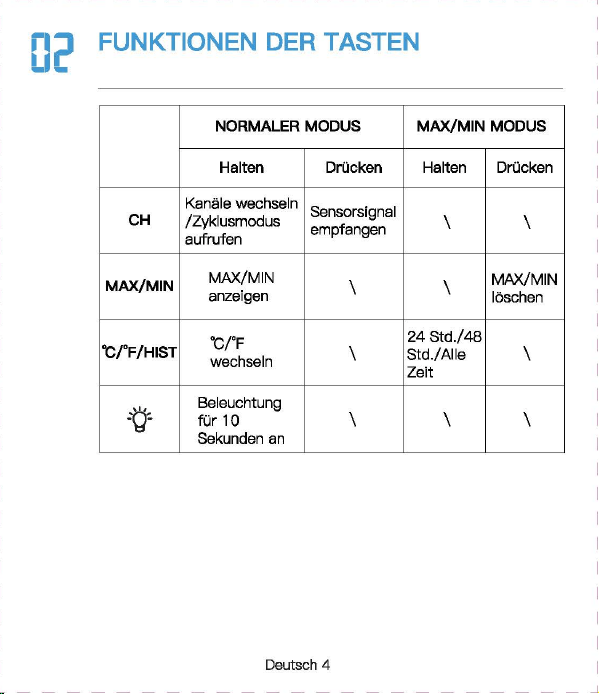
Newentor®
lnnen-AuBentherm
(Bew
自h
陪
n
Sie die Anleitung zum
spate
用
n
Nachschlagen auf)
‘。
”圃’叫时
INHAL
TSVERZEICHNIS
1.
。
PTIK
DER
WETTERSTATI
。
N
.............
.
.....
2
1 1
Basisstat,o
门…………..
'………······……….. 2
1 2
AusSE
到自
nsor
………………...………...…………
3
2.
FUNKTIONEN
DER
TASTEN
......
· ..
·……..
4
3.
BASISSTATION
LIND
SENSOR
VERBINDEN
· · · · 5
4.
ZYKLUSMODUS
5
。
i
OPTIK DER
WE
甘
ERS
1.2 AuBensensor
(I~
FUN
盯刷
EN
DER
TA
町
EN
BASISSTATION
UND
SENSOR
VERBINDEN
。
5
EMPFEHLUNGEN ZUR
SENSORPLA TZIERUNG
(1)
Platzieren Sie den Sensor
verti
阳
l
an einer nach Norden
gerichteten Wand oder an einem
gut
schattigen Ort, um
Sonnenlicht und Regen zu vermeiden.
Es
wird bevorzugt, es
15
cm
unter
dem Dach zu platzieren.
D
旧
maximale
Reichweite zur
Basisstation
betragt
328
FuB/100
m im
Fr
eien
,口
hne
Wande
口
der
B
凸
den.
(2)
Um
Signals
!凸
n.mgen
zu
vermeiden
,口
latzieren
Sie den
Sens
口
r
oder
die
Basisstation nicht in
de
「
Nahe
von Metall,
Fernsehe
「,
Computer usw.
(3)
Wen
n
es
drauBen kalt ist, wird empfohlen, den
Sense
『
naher
an die
Basisstati
口
n
zu
bringen, da die
Batte
rieleistung abnimmt,
was zu elner schnelleren Batterleentladung und
moglicherwelse
kOrzeren
Ve
「
bindungsentfemungen
fOhrt
06
MAX/MIN
(1)D
『
Ocken
Sis die ,,MAX/MIN"- Taste,
um
die MAX/MIN
anzuze1gen
(2)
Drucken Sie im MAX/MIN-Modus (das MAX/MIN-Symbol wird
auf
Display angezeigt)
die
Taste
”℃/
"F/HIST
飞
um
den
MAX/M
I
N-Wert
von
24
Std./48
Std./ALLE ZEIT umzuschalten
und anzuzeigen.
(3)
Halten Sie im
MAX/MIN-Modus
,,MAX/MIN"
3 Sekunden,
um
historische Daten zu
I
口
sch
en.
(1)
.CH
“- Taste
ist
die Taste zum Umschalten des Kanals. DrOcken
Sie mehrmals, es wird nacheinander angezeigt: CH1, CH2, CH3,
Zyklusmodus, CH1, CH2
...
(2)
Wenn das
Kanalzyklussymbol
”。“
a
u
f
Dlspl
自y
angezelgt wlrd,
bsdeutet dies, dass das
Gerat In den Zyklusmodus wechsslt, und
die
Kiinale CH1, CH2, CH3 alle 1 O Sekunden umschaltet
we
「
den.
(3)
Drucken Sie die ”
CH"
Taste im Zyklusmodus, um den
Zyklus
『
nodus
zu verlassen und zu
CH1
zuruckzukehren.
Deutsch 1
I Deutsch 2 I
D
剧
tsch3
I
D
剧
tsch
4 I Deutsch 5 I Deutsch 6
「
一一一一一一一一一一一一一一一一一一一一一一一
+
一一一一一一一一一一一一一一一一一一一一一一一
十
一一一一一一一一一一一一一一一一一一一一一一一
十
一一一一一一一一一一一一一一一一一一一一一一一
+
一一一一一一一一一一一一一一一一一一一一一一一
+
一一一一一一一一一一一一一一一一一一一一一一一
+
一一一一一一一一一一一一一一一一一一一一一一一-
iMJ
Email
I
I
、,
,|
目芽
飞-
二
7
国
回
vice.de@newent
口
r
com
。
问
k
Searcl
、:
Newento
『
Dia
thermo 阿
1eter
ist
eln
funktlonelles Produkt.
Die
rlchtlae Elnstelluna
gewiihrleistet
die
normale
Ve
『
wendung.
日
ei
Fragen
steht
Ihnen
unser
Exper~
tentoom
gerne
zur
Vert
,啕
ungl
S
旧
konnen
uns
euf
obigen
We,sen
srreichen.
a-1
℃/。
F
WECHSELN
DrOcken Sle die
Taste
,,℃/宇/
HIST
“,
um
zwlschs
n
℃/'
F
zu
wechsaln.
0
日
TEMPER
町
UR-/
FEUCHTIGKEITSTRENDERKENNUNG
8.1
Temperatur
• Wenn
die
Temperatu
「
im
Ve
「
gleich
zur zul
etzt
erfassten
T
白
mperatur
Ube
「
1
℃(才,
8τ
)
anstel
gt,
wlrd der Trend •
」
·
angezei
gt
• Wann
dis
Tsmperatur im Vergleich zur zul
stzt
0
厅
asst
en
Temper
自
M
um mehr als
1
℃(
1,8'FJ
酬
t,
wird der
Trend
,、“
angezei
gt
• Wenn sich die Temperatur innerhalb einer ununterbrochenen
Stunde
nicht
um
mehr als
1
℃(
1
,白。
F
)晶
ndert,
wird
der
Trend
”·+“
angezeigt
8.2
Feuchtigkeit
• Wenn
die
Luftfeuchtigkeit im Verglei
ch
zur zuletzt erfassten
Tempe
「
atu
『
um
mehr als 5 % anstelgt, wird
der
Trend
”,“
angezeigt
• Wenn
die
Luftfeuchtigkeit im Verglei
ch
zur zuletzt erfassten
Tempe
「
atur
um
mehr als 5 % abfiillt, wird der
Trend
,、“
angezeigt
• Wenn sich die
」
u
ftf
euchtigke
i
t
innerhalb
eine「
unun
t
erbro
chenen Stunde
um
nicht mehr als 5 % andert, wird
der
Trend
’~
" angezeigt
Deutsch 7
5.
EMPFEHLUNGEN
ZUR
SENSORPL.ATZIERUNG
··
6
6.
MAX/MIN
…………………..
6
7.
℃
iFWECHSELN
……………………………..
7
8.
TEMPERATUR-/FEUCHTIGKEπ
町
RENDERKENNUNG
8.
1
T
,刷、
par
咱
tur
叮’’
7
4
’
. . . . . . . . . . . . . . . . . . . . .
日
.2
Feuchtigke
it
9.
EISWARNUNG
8
10.
K1
。
MFORTANZEIGE
…………………………..
8
11.
NIEDRIGER
BATIERIESTAND
·· · ·· · …
..
....
.
..
9
12.PR
。
DUKTSPEZIFIKATION
……………………
9
13.
FRAGEN
LIND
ANTWORTEN
·····
····
···
··…
1
口
14.
GARANTIE
· · · · · ·
·………·
· 12
09
EISWARNUNG
Wenn
die
AuBentemperatur
-1
℃什℃(
30,2
'
F啕
33,8°F)
bet
「自由,
bllnkt
des Elsalarms
nb
口
l
”囔
l
".
Unte
「
1.1
℃{
30.02'F)
-
wl
「
d
das
Eisw
自『『
1symb
。
l
”输
I
" statisch angezeigt
.
1(1
KOMFORTANZEIG
(
ZU
TROCKEN: 20% bis
30%
( TROCKEN:
31
% bis
44%
( KOMFORT: 45% bis
65%
( NASS:
66%
bis
84%
(
ZU
NA
臼
85%
bis
95%
…
E
町··
圈
•et.•1111
噩
噩
Deutsch 8
NORMAi.ER MODUS
MAX/MIN
MODUS
Ha
比回
E
Dri
』
cken
H
自
lten
Drue
ken
CH
Kanale
W0(_
才
lSeln
Sensorslgnal
/Zyklusmodus empfangen
自
U什
U
侮
n
MAX/MIN
MAX/MIN
\
MAX/MIN
anzeigen
loschen
℃
fF
24
Std./48
℃/'
F/HIST
wechseln
Std./Alla \
Zeit
-哲-
Belel
」
chtung
fur
10
\ \
Sekunden
an
1.1 Basisstation
82
j(l
吧?已时
目
1
-
Al
81:
Signal
LED
82
:’
Wandhaken
83:
'F
/℃
已
4:
Kanal-Schiebschalter
85
:“TX"-
T
回国,
Funksignal
menuell
ii
胁
rtregen
86:Ba
甘
erlefach
白天
Ba
忧
e
r
iefachabdeckung
B3
一-
- r
B4
85
A10
MMMMMMm
A9
A11
M
阐
MMM 闹
86
A 1: 1 OS-Hintergrundbeleuchtungstaste
A2,
Kanai
1,2,3
A3:
Zyk
lusm
创
us-Symbol
A4:
Eiswarnung
Symbol
A5:M
阻-
und
Minwerte [24
std./
48 Std./ Alie Zeit)
A6:
Komfortanzeige
A7:
Niedriger
B
副剧团,
tand
AB:
lnnentemperatur
und
Luftfeuchtigkeit
A9:Au
日
entemperatur
un
d -Luftfeuchtigkeit
A 1 0.
Trend
- pfeil
A 11: Funktlonstasten
A
Ernp
旬
hlun
伊
n
zur
部
nsorplatzierung
(
1)
Platzieren
Sie
den
Sens
口
r
verti
阳|丽的市咱
ch
N
口
rd
町
gerichte
t
en
Wa
们
d
oder
an
ei
nem
gc
此
schattigE
引
Ort,
um
Sonn
四
licht
u
门
d
R
啕
er
zu
咽
rmelden.
Es
wlrd
bev
,白雪
ugt
,自
15
cm
unter
dem
Dach
zu
platzleren.
Die
m
缸
imale
Reichv.'3
ite
zur
臼
S
阳阳
lion
betr
首
gt328
FuB/100 m
im
Frelen
,出
ne
Wande
oder
日创
en
.
(2
)
Um
S
i
g
呻剧。阳咱
en
zu
ve
『
meide
n
,
platz
阳回
Sie
den
Sensor
oder
die
Bas
惚饱
tion
nicht
in
d
旷
Nal
回
von
M
拥
II,
Fem
倒喻,
Com
pl119r
usw.
(3
)
Wenn
回归
uBen
kelt
M
』
wird
刷刷、
le
门,
d
时
Sensor
门也
er
en
die
Basisstation
剖
lringe
叫
da
die
Batt
回
ele
i
stu
咱
abnimmt,
was
zu
einer
schne
ll
eren
Batterieentlad.Jng
unc
moglicherweise
kO
日:
erenVe
巾
Ind
ung:
ntfemungen
白
hrt
川
NIEDRIGER
BATTERIESTAND
13
FRAGEN UND ANTWO
②
De
「
Datene
「
fassungsbereich
auf
dem
Wette
毗
anal/
APP
ist
der
Bereich. AuBerdsm werden
Flughafenwette
「时
ationen
n
u
「
einmal
pro
Stunde aktualisiert.
( Wenn die Umgebung in
der
Nahe des Hauses angenehm ist
(Pflanzen, Getreide, Klimaanlage usw.),
ist
es
no
『
mal,
dass die
Temperatur des Sensors
v
口
n
der
白
uf
der
APP abweicht.
Wenn das Symbol
•
g
“自川
I
splay
叫
eze
阳
wlrd
(lnnenbatter-
lespannung
1st
nled
「
lgs
「
als
3,6
V, Sensorbatterlespannung
1st
nied
「iger
自
Is
2,5 V), mussen
wir
die
Batte
「
ie
der
Basissta
一
tion/des
Sensors rechtzeit ig
e
「
setzen.
(
1)
Wie lange
dauert
die
automatische
Kallbrierun
日,
wenn
Sie
das
Gerat zum ersten
Mal
verwenden?
Es dauert
normalerwelse
3-
7
Tags
I~
PRODUK s
[2)Wa
『
um
stimmen
Temperatur
und
Luftfeuohtigkeit
nioht
ilberein,
w
哩
nn
die
Basisstation und
der
Sensor zusemmen
platzlert
werden?
( GroBe und Aufbau der
Ge
「昌te
sind unterschiedlich. Um
ge
< auere Messwerte zu erha I ten, hat
die
Basisstati
口【
meh
r
kleine
L
凸
cher
fur
die
BelOftung,
w
,且
hrend
der
AuBensensor
n
口
r
malerweise
in
eine
「
relativ
rauen Umgebung platzi
ert
wird, seine
L
凸
oher
we
「
den
kleiner sein. Die Chipumgebung wird
etwas
ande
「
s
sein.
Dies
ist
m
凸
glicherweise
ei
n
er
der GrOnde
fur
den Unterschied
Dahe
「
benot
i
gen
die
Gerate
Le
『
n-
und
Ka
l
ibrie
「
ungszeit.
Im
Allgemeinen
ist
die Temperatur
umso
日
enaue
r
,
je langer es
platzle
内
wlrd.
( Wenn
de
r Abstand zwischen
der
KEiltequelle oder
der
Wiirmequelle unterschiedlich
isl,
ist
dies auch ein
er
der
Gr
臼
nde
fOr
den Unterschied
(
Um
die
Temperatur zu
ve
咱
leichen,
emp
fehlen
wir
ein
Quecksilber-
oder
rotes Spiritus(FIOssigkeits)-Thermometer.
Bimetall-
{Zifferblatt) und digitale
Thermomete
「(
v
口
n
曰
nde
「
en
Marken) sind keine
gute
Quella und haben
ih
『
e
eigene
Fehle
「
quote.
(4)
1st
der
Sensor wasserdioht?
Nein.
(5
)口
er
Sensor
kann slch
nlcht
mlt
der
Basisstation verblnden?
(
Bitte
stellen Sie
siche
「,
dass
die
Kanale von Basisstation und
Sen
so
「
ubereinstimmen.
(
Bitte
stellen Sie
siche
「,
dass
der
Sensor
richtig
p
l
a
恒
ie
时
ist
und
die
Entfe
「
nung
van
der
Basisstation innerhalb
des
Verbindungs-
bereichs
liegt
(siehe ”
5.
Empfehlungen
zu
「
Sensorplatzie
「
ung
“).
• lnnentemperaturmessbereich:
-9,9
℃-
50
℃(
14,2
'冉
122°F)
(LL.L
wird angezeigt, wenn sie un
ter
-9,9
℃/
14,2'F
liegt, und HH.H
wird
angezei
饵,
wenn
sie
Ober
50
℃/
122
°
F
liegt)
• AuBentemperaturmessbereich:
-40
℃叮
O
℃(-
40'F
叫
58
'
F)
•
lnnen-
und AuBenluftfeuchtlgkeltsberelch:
20
% - 95 % (bel
wanlge
「 els
20
%
wl
「
d
20 % angezelgt ,
bsl
mehr als 95 % wlrd
95
% angezei
gt)
•
Zeitr
白um
des
Signalempf
自
ngs:
30
Sekunden
• Genauigkeit
de
『
Temperatu
「「
nessung
:主
1
℃(
1,B'F)
• Genauigkeit
der
Feuchtigkeitsmessung:
±5%
• Batterie
der
Basisstation: 3 x AAA-Batterien
• Batterie des
AuGensenso
「
s:
2 x
M-Batterien
•Ve
「
bindungsentfernung
zwischen Basisstation und AuBensen-
sor:
328ft
( 1
OOm)
im
offenen
Be
「
eich
(6)
Warum
wechselt
der
Kanai
immer
wieder
aut
。
matisch?
Wen
[ das Symbol ” C · oben links angezeigt
wi
时,
bedeutet
dies,
dass
das
Ge
「
at
In
den Zyklusmodus
eingetrete
门
ist.
D
『
Ocken
Sie
d
悟,
CH
“-
Taste,
um
den
M
口
dus
zu verlassen und zu
CH1
zuruckzukeh
「
e
『1.
(S
iehe ,,4.
Zyklusm
。
dus")
Deutsch 9
阳)
Warum
untarschaidat
sfch
dia
gamassana AuBantamparatur
von
der
auf
der
APP (lokales We1teramt)?
( Die Wetterstatlon
ist
ei
n Heimgerat, dessen Erfassungsbereich
sich
um
das Haus herum befmdat und seine Datan ganauer sind.
Deutsch
10
Deutsch
11
Achten Sie darauf, die
Senso
「
en
in
de
「
folgenden
Reihenfolge
anzuschlieBen, da
sonst
die Verbindung fehlschlagen kann.
(1)
Drucken Sie die
..
CH
“-
Taste,
um
den Kanai
zu
wechseln.
(2)0
汗
nan
Sia die
Ba
忧
erleabdec
阳
ng
des Sensors, schalten Sia
den Sensorkanal
entsp
「
achend
der Baslsstatlon um. Wle belde In
CH1.
(3)
Halten Sie
die
..
CH
筐
Taste
3 Sekunden, um in den HF
Sig
〔自|
suchm口
dus
Z
】
wechsel
『
l.
(4)
Drucken Sie
sofort
die •
TX
飞
Taste
em AuBenssensor.
(5)
Die
飞
Nerte
werden
auf
Display angezei
gt,
fe
「
tig.
Hlnweis:
(1)
Die Basisstation kann bis
zu
3 Sensoren verbinden,
bitte
stellen Sie sicher, dass
die
Kanale
de
「
einzelnen
Sensoren
unterschiedlich sind.
(2)
Aktualisierungszyklus:
CH1
= 31s, CH2 = 32s,
CH3
= 33s
。叶
ZYKLUSMODUS
|叶
GARAN
TIE
• Das Gerat wurde gemaB strengen Qualltatsrichtlinien hergestellt
und vor
de
「
Auslieferung
sorgfaltig
gep
广
Oft.
•
Newe
「
1tor
verp
「icht,
d
自
SS
die
Ge
「
an
t
iezeit
des Gerats
1
飞
Jah
「
·es-Ga
「白「
1tie
ab Kaufdatum
betr
画
gt.
KONFORMIT.ATSERKL.ARUNG
Diese
Funkwetterstati
口
n
en1sp
「 ich
t
den
Grundanforde
「
ungen
und
den andaren alnschlagigan
V
口
rschrlften
dar Rlchtllnle
2014/53/EU.
Mit
d
回
em
Symbol gekennzeichnete Pradukte
e
斤
口
lien
alle
日
eltenden
Gemeinschaftsvorschriften des
Europais
旧
hen
Wirtschaftsraums.
Ober den folgenden Link konnen Sie die vollstiindige
Konformi
世-
serklarung direkt
a
时
unse
陪
r
offlziellen Newentcr-Website
he
「
unter
l
aden:
wwwnAW
自
nt
口
r
cnm/n,anAsld
自-
rlAc:larati
口
n
-口,
f-,xmfnrmilv-f.lRnF
ENTSORGUNGSHINWEISE
〕更阳…
e
……
du
厅
e
「
1
门
icht
Obe
「
den
n口
「
「
n
自
le
「
1H
白
usmull
ents
口「
gt
we
「
de
n
.
Nach
de
『
Richtlinie
2012/19
I
EU
muss das
Ge
「
at
am Ende
seine
「
Lebenscaue
「 ein
町
sac
h
gerechte
『
1
- Entsorgung zugefuhrt werden. Die im
Ger
白
t
enthaltenen
We
内
sachen
响
rden
recycelt und um eine Belastung der
Umwelt zu vermeiden. Bringen
Sie
das Altgeriit
zu
einer
Sammels·
恒
l
i
e
fO
「
Elektroschrott
口
der
einem Recyclinghof.
En
町
·ernen
Sie vor der Entsorgung die Batterien aus dem
Ge
「昌
t
und
ents
口「
·gen
Sie d iese getrennt.
Batterien
geh
凸
ren
nicht in den Hausmull. Jeder
Ve
「
bra1
』
cher
ist
ge
随时
ic
h
ve
巾啊
ichtet,
Batterien und
Akkus bsi einer Sammelstells seiner Gemeinde, seines
Kralses
ode
「
Im
Hande
l
自
bzugeban.
Damlt konnen alle
Batterien und Akkus
umweltgen:
记
ht
entsorgt
we
「·den
.
Deuti
到
ch
12
〕更协
ads
t
offhalti
Sy
「
nbol
und
che
『
nische
『、
Sy
「
nbole
「
1
(Pb
fu
「
Blei)
阴阳
nnzelchn
白
t
W
白
I
tare I
nformatl
口
nen
erhalten
SI
白
von
lhrem ortllchen Entsorgungsuntemehmen oder lhrer
。「
11ichen
Beh
凸「de
,咂
E
口tso
『
gen
Sle die Verpackung
m
巾
nreln.
Entsorgen
画’,.
Sia
Ka
巾
n
und Pappa als Altpapier und Follen der
咽.
.,.
We
「
tstoffsammlu
『
1g.
HAFTUNGSAUSSCHLOSSE
Der Hersteller behiilt sich das Recht
vo
「,
die
Produktspeziflka-
tionen zu
andern.
Hersteller und Lieferant sind
nicht
verantwortlich
fur
St凸「
unge
n
,
bei denen
St
凸
rungen
auftreten.
Manufac
阳帽,:由
:,nggυanBe,j
陷日
ec
tron
ic
Technology
Co.,
Ltd
Offl
四
Addre
四. No
.
15
月
0
啕
i
Ro
回
,
N
。
3
Indus
trial
Zo
睛,
E
川
sn
gs
ha
G
。
m m
川
ity.
Chang'a
n T
。阳,
Dongguan
City
.
Gu
a
啕由咱忏
ovi
n
回
www.r
回回晴内
tor.com
Deutsch 13
Newentor®
lnnen-AuBentherm
(Bew
自h
陪
n
Sie die Anleitung zum
spate
用
n
Nachschlagen auf)
‘。
”圃’叫时
INHAL
TSVERZEICHNIS
1.
。
PTIK
DER
WETTERSTATI
。
N
.............
.
.....
2
1 1
Basisstat,o
门…………..
'………······……….. 2
1 2
AusSE
到自
nsor
………………...………...…………
3
2.
FUNKTIONEN
DER
TASTEN
......
· ..
·……..
4
3.
BASISSTATION
LIND
SENSOR
VERBINDEN
· · · · 5
4.
ZYKLUSMODUS
5
。
i
OPTIK DER
WE
甘
ERS
1.2 AuBensensor
(I~
FUN
盯刷
EN
DER
TA
町
EN
BASISSTATION
UND
SENSOR
VERBINDEN
。
5
EMPFEHLUNGEN ZUR
SENSORPLA TZIERUNG
(1)
Platzieren Sie den Sensor
verti
阳
l
an einer nach Norden
gerichteten Wand oder an einem
gut
schattigen Ort, um
Sonnenlicht und Regen zu vermeiden.
Es
wird bevorzugt, es
15
cm
unter
dem Dach zu platzieren.
D
旧
maximale
Reichweite zur
Basisstation
betragt
328
FuB/100
m im
Fr
eien
,口
hne
Wande
口
der
B
凸
den.
(2)
Um
Signals
!凸
n.mgen
zu
vermeiden
,口
latzieren
Sie den
Sens
口
r
oder
die
Basisstation nicht in
de
「
Nahe
von Metall,
Fernsehe
「,
Computer usw.
(3)
Wen
n
es
drauBen kalt ist, wird empfohlen, den
Sense
『
naher
an die
Basisstati
口
n
zu
bringen, da die
Batte
rieleistung abnimmt,
was zu elner schnelleren Batterleentladung und
moglicherwelse
kOrzeren
Ve
「
bindungsentfemungen
fOhrt
06
MAX/MIN
(1)D
『
Ocken
Sis die ,,MAX/MIN"- Taste,
um
die MAX/MIN
anzuze1gen
(2)
Drucken Sie im MAX/MIN-Modus (das MAX/MIN-Symbol wird
auf
Display angezeigt)
die
Taste
”℃/
"F/HIST
飞
um
den
MAX/M
I
N-Wert
von
24
Std./48
Std./ALLE ZEIT umzuschalten
und anzuzeigen.
(3)
Halten Sie im
MAX/MIN-Modus
,,MAX/MIN"
3 Sekunden,
um
historische Daten zu
I
口
sch
en.
(1)
.CH
“- Taste
ist
die Taste zum Umschalten des Kanals. DrOcken
Sie mehrmals, es wird nacheinander angezeigt: CH1, CH2, CH3,
Zyklusmodus, CH1, CH2
...
(2)
Wenn das
Kanalzyklussymbol
”。“
a
u
f
Dlspl
自y
angezelgt wlrd,
bsdeutet dies, dass das
Gerat In den Zyklusmodus wechsslt, und
die
Kiinale CH1, CH2, CH3 alle 1 O Sekunden umschaltet
we
「
den.
(3)
Drucken Sie die ”
CH"
Taste im Zyklusmodus, um den
Zyklus
『
nodus
zu verlassen und zu
CH1
zuruckzukehren.
Deutsch 1
I Deutsch 2 I
D
剧
tsch3
I
D
剧
tsch
4 I Deutsch 5 I Deutsch 6
「
一一一一一一一一一一一一一一一一一一一一一一一
+
一一一一一一一一一一一一一一一一一一一一一一一
十
一一一一一一一一一一一一一一一一一一一一一一一
十
一一一一一一一一一一一一一一一一一一一一一一一
+
一一一一一一一一一一一一一一一一一一一一一一一
+
一一一一一一一一一一一一一一一一一一一一一一一
+
一一一一一一一一一一一一一一一一一一一一一一一-
iMJ
Email
I
I
、,
,|
目芽
飞-
二
7
国
回
vice.de@newent
口
r
com
。
问
k
Searcl
、:
Newento
『
Dia
thermo 阿
1eter
ist
eln
funktlonelles Produkt.
Die
rlchtlae Elnstelluna
gewiihrleistet
die
normale
Ve
『
wendung.
日
ei
Fragen
steht
Ihnen
unser
Exper~
tentoom
gerne
zur
Vert
,啕
ungl
S
旧
konnen
uns
euf
obigen
We,sen
srreichen.
a-1
℃/。
F
WECHSELN
DrOcken Sle die
Taste
,,℃/宇/
HIST
“,
um
zwlschs
n
℃/'
F
zu
wechsaln.
0
日
TEMPER
町
UR-/
FEUCHTIGKEITSTRENDERKENNUNG
8.1
Temperatur
• Wenn
die
Temperatu
「
im
Ve
「
gleich
zur zul
etzt
erfassten
T
白
mperatur
Ube
「
1
℃(才,
8τ
)
anstel
gt,
wlrd der Trend •
」
·
angezei
gt
• Wann
dis
Tsmperatur im Vergleich zur zul
stzt
0
厅
asst
en
Temper
自
M
um mehr als
1
℃(
1,8'FJ
酬
t,
wird der
Trend
,、“
angezei
gt
• Wenn sich die Temperatur innerhalb einer ununterbrochenen
Stunde
nicht
um
mehr als
1
℃(
1
,白。
F
)晶
ndert,
wird
der
Trend
”·+“
angezeigt
8.2
Feuchtigkeit
• Wenn
die
Luftfeuchtigkeit im Verglei
ch
zur zuletzt erfassten
Tempe
「
atu
『
um
mehr als 5 % anstelgt, wird
der
Trend
”,“
angezeigt
• Wenn
die
Luftfeuchtigkeit im Verglei
ch
zur zuletzt erfassten
Tempe
「
atur
um
mehr als 5 % abfiillt, wird der
Trend
,、“
angezeigt
• Wenn sich die
」
u
ftf
euchtigke
i
t
innerhalb
eine「
unun
t
erbro
chenen Stunde
um
nicht mehr als 5 % andert, wird
der
Trend
’~
" angezeigt
Deutsch 7
5.
EMPFEHLUNGEN
ZUR
SENSORPL.ATZIERUNG
··
6
6.
MAX/MIN
…………………..
6
7.
℃
iFWECHSELN
……………………………..
7
8.
TEMPERATUR-/FEUCHTIGKEπ
町
RENDERKENNUNG
8.
1
T
,刷、
par
咱
tur
叮’’
7
4
’
. . . . . . . . . . . . . . . . . . . . .
日
.2
Feuchtigke
it
9.
EISWARNUNG
8
10.
K1
。
MFORTANZEIGE
…………………………..
8
11.
NIEDRIGER
BATIERIESTAND
·· · ·· · …
..
....
.
..
9
12.PR
。
DUKTSPEZIFIKATION
……………………
9
13.
FRAGEN
LIND
ANTWORTEN
·····
····
···
··…
1
口
14.
GARANTIE
· · · · · ·
·………·
· 12
09
EISWARNUNG
Wenn
die
AuBentemperatur
-1
℃什℃(
30,2
'
F啕
33,8°F)
bet
「自由,
bllnkt
des Elsalarms
nb
口
l
”囔
l
".
Unte
「
1.1
℃{
30.02'F)
-
wl
「
d
das
Eisw
自『『
1symb
。
l
”输
I
" statisch angezeigt
.
1(1
KOMFORTANZEIG
(
ZU
TROCKEN: 20% bis
30%
( TROCKEN:
31
% bis
44%
( KOMFORT: 45% bis
65%
( NASS:
66%
bis
84%
(
ZU
NA
臼
85%
bis
95%
…
E
町··
圈
•et.•1111
噩
噩
Deutsch 8
NORMAi.ER MODUS
MAX/MIN
MODUS
Ha
比回
E
Dri
』
cken
H
自
lten
Drue
ken
CH
Kanale
W0(_
才
lSeln
Sensorslgnal
/Zyklusmodus empfangen
自
U什
U
侮
n
MAX/MIN
MAX/MIN
\
MAX/MIN
anzeigen
loschen
℃
fF
24
Std./48
℃/'
F/HIST
wechseln
Std./Alla \
Zeit
-哲-
Belel
」
chtung
fur
10
\ \
Sekunden
an
1.1 Basisstation
82
j(l
吧?已时
目
1
-
Al
81:
Signal
LED
82
:’
Wandhaken
83:
'F
/℃
已
4:
Kanal-Schiebschalter
85
:“TX"-
T
回国,
Funksignal
menuell
ii
胁
rtregen
86:Ba
甘
erlefach
白天
Ba
忧
e
r
iefachabdeckung
B3
一-
- r
B4
85
A10
MMMMMMm
A9
A11
M
阐
MMM 闹
86
A 1: 1 OS-Hintergrundbeleuchtungstaste
A2,
Kanai
1,2,3
A3:
Zyk
lusm
创
us-Symbol
A4:
Eiswarnung
Symbol
A5:M
阻-
und
Minwerte [24
std./
48 Std./ Alie Zeit)
A6:
Komfortanzeige
A7:
Niedriger
B
副剧团,
tand
AB:
lnnentemperatur
und
Luftfeuchtigkeit
A9:Au
日
entemperatur
un
d -Luftfeuchtigkeit
A 1 0.
Trend
- pfeil
A 11: Funktlonstasten
A
Ernp
旬
hlun
伊
n
zur
部
nsorplatzierung
(
1)
Platzieren
Sie
den
Sens
口
r
verti
阳|丽的市咱
ch
N
口
rd
町
gerichte
t
en
Wa
们
d
oder
an
ei
nem
gc
此
schattigE
引
Ort,
um
Sonn
四
licht
u
门
d
R
啕
er
zu
咽
rmelden.
Es
wlrd
bev
,白雪
ugt
,自
15
cm
unter
dem
Dach
zu
platzleren.
Die
m
缸
imale
Reichv.'3
ite
zur
臼
S
阳阳
lion
betr
首
gt328
FuB/100 m
im
Frelen
,出
ne
Wande
oder
日创
en
.
(2
)
Um
S
i
g
呻剧。阳咱
en
zu
ve
『
meide
n
,
platz
阳回
Sie
den
Sensor
oder
die
Bas
惚饱
tion
nicht
in
d
旷
Nal
回
von
M
拥
II,
Fem
倒喻,
Com
pl119r
usw.
(3
)
Wenn
回归
uBen
kelt
M
』
wird
刷刷、
le
门,
d
时
Sensor
门也
er
en
die
Basisstation
剖
lringe
叫
da
die
Batt
回
ele
i
stu
咱
abnimmt,
was
zu
einer
schne
ll
eren
Batterieentlad.Jng
unc
moglicherweise
kO
日:
erenVe
巾
Ind
ung:
ntfemungen
白
hrt
川
NIEDRIGER
BATTERIESTAND
13
FRAGEN UND ANTWO
②
De
「
Datene
「
fassungsbereich
auf
dem
Wette
毗
anal/
APP
ist
der
Bereich. AuBerdsm werden
Flughafenwette
「时
ationen
n
u
「
einmal
pro
Stunde aktualisiert.
( Wenn die Umgebung in
der
Nahe des Hauses angenehm ist
(Pflanzen, Getreide, Klimaanlage usw.),
ist
es
no
『
mal,
dass die
Temperatur des Sensors
v
口
n
der
白
uf
der
APP abweicht.
Wenn das Symbol
•
g
“自川
I
splay
叫
eze
阳
wlrd
(lnnenbatter-
lespannung
1st
nled
「
lgs
「
als
3,6
V, Sensorbatterlespannung
1st
nied
「iger
自
Is
2,5 V), mussen
wir
die
Batte
「
ie
der
Basissta
一
tion/des
Sensors rechtzeit ig
e
「
setzen.
(
1)
Wie lange
dauert
die
automatische
Kallbrierun
日,
wenn
Sie
das
Gerat zum ersten
Mal
verwenden?
Es dauert
normalerwelse
3-
7
Tags
I~
PRODUK s
[2)Wa
『
um
stimmen
Temperatur
und
Luftfeuohtigkeit
nioht
ilberein,
w
哩
nn
die
Basisstation und
der
Sensor zusemmen
platzlert
werden?
( GroBe und Aufbau der
Ge
「昌te
sind unterschiedlich. Um
ge
< auere Messwerte zu erha I ten, hat
die
Basisstati
口【
meh
r
kleine
L
凸
cher
fur
die
BelOftung,
w
,且
hrend
der
AuBensensor
n
口
r
malerweise
in
eine
「
relativ
rauen Umgebung platzi
ert
wird, seine
L
凸
oher
we
「
den
kleiner sein. Die Chipumgebung wird
etwas
ande
「
s
sein.
Dies
ist
m
凸
glicherweise
ei
n
er
der GrOnde
fur
den Unterschied
Dahe
「
benot
i
gen
die
Gerate
Le
『
n-
und
Ka
l
ibrie
「
ungszeit.
Im
Allgemeinen
ist
die Temperatur
umso
日
enaue
r
,
je langer es
platzle
内
wlrd.
( Wenn
de
r Abstand zwischen
der
KEiltequelle oder
der
Wiirmequelle unterschiedlich
isl,
ist
dies auch ein
er
der
Gr
臼
nde
fOr
den Unterschied
(
Um
die
Temperatur zu
ve
咱
leichen,
emp
fehlen
wir
ein
Quecksilber-
oder
rotes Spiritus(FIOssigkeits)-Thermometer.
Bimetall-
{Zifferblatt) und digitale
Thermomete
「(
v
口
n
曰
nde
「
en
Marken) sind keine
gute
Quella und haben
ih
『
e
eigene
Fehle
「
quote.
(4)
1st
der
Sensor wasserdioht?
Nein.
(5
)口
er
Sensor
kann slch
nlcht
mlt
der
Basisstation verblnden?
(
Bitte
stellen Sie
siche
「,
dass
die
Kanale von Basisstation und
Sen
so
「
ubereinstimmen.
(
Bitte
stellen Sie
siche
「,
dass
der
Sensor
richtig
p
l
a
恒
ie
时
ist
und
die
Entfe
「
nung
van
der
Basisstation innerhalb
des
Verbindungs-
bereichs
liegt
(siehe ”
5.
Empfehlungen
zu
「
Sensorplatzie
「
ung
“).
• lnnentemperaturmessbereich:
-9,9
℃-
50
℃(
14,2
'冉
122°F)
(LL.L
wird angezeigt, wenn sie un
ter
-9,9
℃/
14,2'F
liegt, und HH.H
wird
angezei
饵,
wenn
sie
Ober
50
℃/
122
°
F
liegt)
• AuBentemperaturmessbereich:
-40
℃叮
O
℃(-
40'F
叫
58
'
F)
•
lnnen-
und AuBenluftfeuchtlgkeltsberelch:
20
% - 95 % (bel
wanlge
「 els
20
%
wl
「
d
20 % angezelgt ,
bsl
mehr als 95 % wlrd
95
% angezei
gt)
•
Zeitr
白um
des
Signalempf
自
ngs:
30
Sekunden
• Genauigkeit
de
『
Temperatu
「「
nessung
:主
1
℃(
1,B'F)
• Genauigkeit
der
Feuchtigkeitsmessung:
±5%
• Batterie
der
Basisstation: 3 x AAA-Batterien
• Batterie des
AuGensenso
「
s:
2 x
M-Batterien
•Ve
「
bindungsentfernung
zwischen Basisstation und AuBensen-
sor:
328ft
( 1
OOm)
im
offenen
Be
「
eich
(6)
Warum
wechselt
der
Kanai
immer
wieder
aut
。
matisch?
Wen
[ das Symbol ” C · oben links angezeigt
wi
时,
bedeutet
dies,
dass
das
Ge
「
at
In
den Zyklusmodus
eingetrete
门
ist.
D
『
Ocken
Sie
d
悟,
CH
“-
Taste,
um
den
M
口
dus
zu verlassen und zu
CH1
zuruckzukeh
「
e
『1.
(S
iehe ,,4.
Zyklusm
。
dus")
Deutsch 9
阳)
Warum
untarschaidat
sfch
dia
gamassana AuBantamparatur
von
der
auf
der
APP (lokales We1teramt)?
( Die Wetterstatlon
ist
ei
n Heimgerat, dessen Erfassungsbereich
sich
um
das Haus herum befmdat und seine Datan ganauer sind.
Deutsch
10
Deutsch
11
Achten Sie darauf, die
Senso
「
en
in
de
「
folgenden
Reihenfolge
anzuschlieBen, da
sonst
die Verbindung fehlschlagen kann.
(1)
Drucken Sie die
..
CH
“-
Taste,
um
den Kanai
zu
wechseln.
(2)0
汗
nan
Sia die
Ba
忧
erleabdec
阳
ng
des Sensors, schalten Sia
den Sensorkanal
entsp
「
achend
der Baslsstatlon um. Wle belde In
CH1.
(3)
Halten Sie
die
..
CH
筐
Taste
3 Sekunden, um in den HF
Sig
〔自|
suchm口
dus
Z
】
wechsel
『
l.
(4)
Drucken Sie
sofort
die •
TX
飞
Taste
em AuBenssensor.
(5)
Die
飞
Nerte
werden
auf
Display angezei
gt,
fe
「
tig.
Hlnweis:
(1)
Die Basisstation kann bis
zu
3 Sensoren verbinden,
bitte
stellen Sie sicher, dass
die
Kanale
de
「
einzelnen
Sensoren
unterschiedlich sind.
(2)
Aktualisierungszyklus:
CH1
= 31s, CH2 = 32s,
CH3
= 33s
。叶
ZYKLUSMODUS
|叶
GARAN
TIE
• Das Gerat wurde gemaB strengen Qualltatsrichtlinien hergestellt
und vor
de
「
Auslieferung
sorgfaltig
gep
广
Oft.
•
Newe
「
1tor
verp
「icht,
d
自
SS
die
Ge
「
an
t
iezeit
des Gerats
1
飞
Jah
「
·es-Ga
「白「
1tie
ab Kaufdatum
betr
画
gt.
KONFORMIT.ATSERKL.ARUNG
Diese
Funkwetterstati
口
n
en1sp
「 ich
t
den
Grundanforde
「
ungen
und
den andaren alnschlagigan
V
口
rschrlften
dar Rlchtllnle
2014/53/EU.
Mit
d
回
em
Symbol gekennzeichnete Pradukte
e
斤
口
lien
alle
日
eltenden
Gemeinschaftsvorschriften des
Europais
旧
hen
Wirtschaftsraums.
Ober den folgenden Link konnen Sie die vollstiindige
Konformi
世-
serklarung direkt
a
时
unse
陪
r
offlziellen Newentcr-Website
he
「
unter
l
aden:
wwwnAW
自
nt
口
r
cnm/n,anAsld
自-
rlAc:larati
口
n
-口,
f-,xmfnrmilv-f.lRnF
ENTSORGUNGSHINWEISE
〕更阳…
e
……
du
厅
e
「
1
门
icht
Obe
「
den
n口
「
「
n
自
le
「
1H
白
usmull
ents
口「
gt
we
「
de
n
.
Nach
de
『
Richtlinie
2012/19
I
EU
muss das
Ge
「
at
am Ende
seine
「
Lebenscaue
「 ein
町
sac
h
gerechte
『
1
- Entsorgung zugefuhrt werden. Die im
Ger
白
t
enthaltenen
We
内
sachen
响
rden
recycelt und um eine Belastung der
Umwelt zu vermeiden. Bringen
Sie
das Altgeriit
zu
einer
Sammels·
恒
l
i
e
fO
「
Elektroschrott
口
der
einem Recyclinghof.
En
町
·ernen
Sie vor der Entsorgung die Batterien aus dem
Ge
「昌
t
und
ents
口「
·gen
Sie d iese getrennt.
Batterien
geh
凸
ren
nicht in den Hausmull. Jeder
Ve
「
bra1
』
cher
ist
ge
随时
ic
h
ve
巾啊
ichtet,
Batterien und
Akkus bsi einer Sammelstells seiner Gemeinde, seines
Kralses
ode
「
Im
Hande
l
自
bzugeban.
Damlt konnen alle
Batterien und Akkus
umweltgen:
记
ht
entsorgt
we
「·den
.
Deuti
到
ch
12
〕更协
ads
t
offhalti
Sy
「
nbol
und
che
『
nische
『、
Sy
「
nbole
「
1
(Pb
fu
「
Blei)
阴阳
nnzelchn
白
t
W
白
I
tare I
nformatl
口
nen
erhalten
SI
白
von
lhrem ortllchen Entsorgungsuntemehmen oder lhrer
。「
11ichen
Beh
凸「de
,咂
E
口tso
『
gen
Sle die Verpackung
m
巾
nreln.
Entsorgen
画’,.
Sia
Ka
巾
n
und Pappa als Altpapier und Follen der
咽.
.,.
We
「
tstoffsammlu
『
1g.
HAFTUNGSAUSSCHLOSSE
Der Hersteller behiilt sich das Recht
vo
「,
die
Produktspeziflka-
tionen zu
andern.
Hersteller und Lieferant sind
nicht
verantwortlich
fur
St凸「
unge
n
,
bei denen
St
凸
rungen
auftreten.
Manufac
阳帽,:由
:,nggυanBe,j
陷日
ec
tron
ic
Technology
Co.,
Ltd
Offl
四
Addre
四. No
.
15
月
0
啕
i
Ro
回
,
N
。
3
Indus
trial
Zo
睛,
E
川
sn
gs
ha
G
。
m m
川
ity.
Chang'a
n T
。阳,
Dongguan
City
.
Gu
a
啕由咱忏
ovi
n
回
www.r
回回晴内
tor.com
Deutsch 13
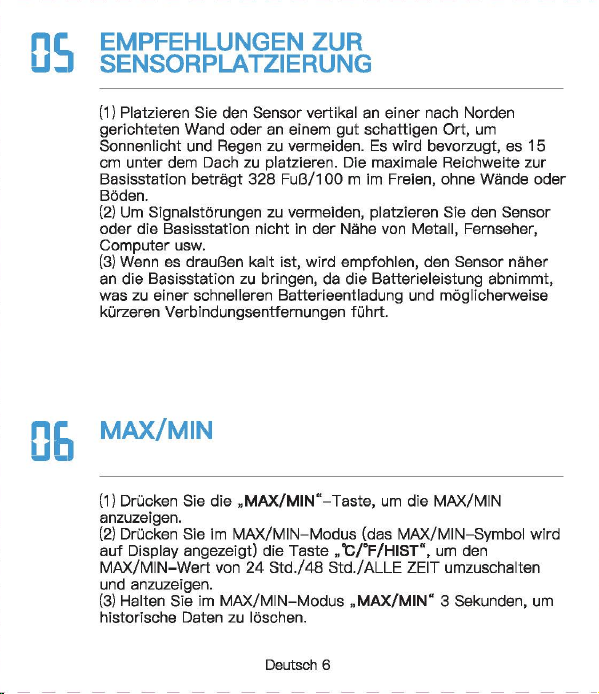
Newentor®
lnnen-AuBentherm
(Bew
自h
陪
n
Sie die Anleitung zum
spate
用
n
Nachschlagen auf)
‘。
”圃’叫时
INHAL
TSVERZEICHNIS
1.
。
PTIK
DER
WETTERSTATI
。
N
.............
.
.....
2
1 1
Basisstat,o
门…………..
'………······……….. 2
1 2
AusSE
到自
nsor
………………...………...…………
3
2.
FUNKTIONEN
DER
TASTEN
......
· ..
·……..
4
3.
BASISSTATION
LIND
SENSOR
VERBINDEN
· · · · 5
4.
ZYKLUSMODUS
5
。
i
OPTIK DER
WE
甘
ERS
1.2 AuBensensor
(I~
FUN
盯刷
EN
DER
TA
町
EN
BASISSTATION
UND
SENSOR
VERBINDEN
。
5
EMPFEHLUNGEN ZUR
SENSORPLA TZIERUNG
(1)
Platzieren Sie den Sensor
verti
阳
l
an einer nach Norden
gerichteten Wand oder an einem
gut
schattigen Ort, um
Sonnenlicht und Regen zu vermeiden.
Es
wird bevorzugt, es
15
cm
unter
dem Dach zu platzieren.
D
旧
maximale
Reichweite zur
Basisstation
betragt
328
FuB/100
m im
Fr
eien
,口
hne
Wande
口
der
B
凸
den.
(2)
Um
Signals
!凸
n.mgen
zu
vermeiden
,口
latzieren
Sie den
Sens
口
r
oder
die
Basisstation nicht in
de
「
Nahe
von Metall,
Fernsehe
「,
Computer usw.
(3)
Wen
n
es
drauBen kalt ist, wird empfohlen, den
Sense
『
naher
an die
Basisstati
口
n
zu
bringen, da die
Batte
rieleistung abnimmt,
was zu elner schnelleren Batterleentladung und
moglicherwelse
kOrzeren
Ve
「
bindungsentfemungen
fOhrt
06
MAX/MIN
(1)D
『
Ocken
Sis die ,,MAX/MIN"- Taste,
um
die MAX/MIN
anzuze1gen
(2)
Drucken Sie im MAX/MIN-Modus (das MAX/MIN-Symbol wird
auf
Display angezeigt)
die
Taste
”℃/
"F/HIST
飞
um
den
MAX/M
I
N-Wert
von
24
Std./48
Std./ALLE ZEIT umzuschalten
und anzuzeigen.
(3)
Halten Sie im
MAX/MIN-Modus
,,MAX/MIN"
3 Sekunden,
um
historische Daten zu
I
口
sch
en.
(1)
.CH
“- Taste
ist
die Taste zum Umschalten des Kanals. DrOcken
Sie mehrmals, es wird nacheinander angezeigt: CH1, CH2, CH3,
Zyklusmodus, CH1, CH2
...
(2)
Wenn das
Kanalzyklussymbol
”。“
a
u
f
Dlspl
自y
angezelgt wlrd,
bsdeutet dies, dass das
Gerat In den Zyklusmodus wechsslt, und
die
Kiinale CH1, CH2, CH3 alle 1 O Sekunden umschaltet
we
「
den.
(3)
Drucken Sie die ”
CH"
Taste im Zyklusmodus, um den
Zyklus
『
nodus
zu verlassen und zu
CH1
zuruckzukehren.
Deutsch 1
I Deutsch 2 I
D
剧
tsch3
I
D
剧
tsch
4 I Deutsch 5 I Deutsch 6
「
一一一一一一一一一一一一一一一一一一一一一一一
+
一一一一一一一一一一一一一一一一一一一一一一一
十
一一一一一一一一一一一一一一一一一一一一一一一
十
一一一一一一一一一一一一一一一一一一一一一一一
+
一一一一一一一一一一一一一一一一一一一一一一一
+
一一一一一一一一一一一一一一一一一一一一一一一
+
一一一一一一一一一一一一一一一一一一一一一一一-
iMJ
Email
I
I
、,
,|
目芽
飞-
二
7
国
回
vice.de@newent
口
r
com
。
问
k
Searcl
、:
Newento
『
Dia
thermo 阿
1eter
ist
eln
funktlonelles Produkt.
Die
rlchtlae Elnstelluna
gewiihrleistet
die
normale
Ve
『
wendung.
日
ei
Fragen
steht
Ihnen
unser
Exper~
tentoom
gerne
zur
Vert
,啕
ungl
S
旧
konnen
uns
euf
obigen
We,sen
srreichen.
a-1
℃/。
F
WECHSELN
DrOcken Sle die
Taste
,,℃/宇/
HIST
“,
um
zwlschs
n
℃/'
F
zu
wechsaln.
0
日
TEMPER
町
UR-/
FEUCHTIGKEITSTRENDERKENNUNG
8.1
Temperatur
• Wenn
die
Temperatu
「
im
Ve
「
gleich
zur zul
etzt
erfassten
T
白
mperatur
Ube
「
1
℃(才,
8τ
)
anstel
gt,
wlrd der Trend •
」
·
angezei
gt
• Wann
dis
Tsmperatur im Vergleich zur zul
stzt
0
厅
asst
en
Temper
自
M
um mehr als
1
℃(
1,8'FJ
酬
t,
wird der
Trend
,、“
angezei
gt
• Wenn sich die Temperatur innerhalb einer ununterbrochenen
Stunde
nicht
um
mehr als
1
℃(
1
,白。
F
)晶
ndert,
wird
der
Trend
”·+“
angezeigt
8.2
Feuchtigkeit
• Wenn
die
Luftfeuchtigkeit im Verglei
ch
zur zuletzt erfassten
Tempe
「
atu
『
um
mehr als 5 % anstelgt, wird
der
Trend
”,“
angezeigt
• Wenn
die
Luftfeuchtigkeit im Verglei
ch
zur zuletzt erfassten
Tempe
「
atur
um
mehr als 5 % abfiillt, wird der
Trend
,、“
angezeigt
• Wenn sich die
」
u
ftf
euchtigke
i
t
innerhalb
eine「
unun
t
erbro
chenen Stunde
um
nicht mehr als 5 % andert, wird
der
Trend
’~
" angezeigt
Deutsch 7
5.
EMPFEHLUNGEN
ZUR
SENSORPL.ATZIERUNG
··
6
6.
MAX/MIN
…………………..
6
7.
℃
iFWECHSELN
……………………………..
7
8.
TEMPERATUR-/FEUCHTIGKEπ
町
RENDERKENNUNG
8.
1
T
,刷、
par
咱
tur
叮’’
7
4
’
. . . . . . . . . . . . . . . . . . . . .
日
.2
Feuchtigke
it
9.
EISWARNUNG
8
10.
K1
。
MFORTANZEIGE
…………………………..
8
11.
NIEDRIGER
BATIERIESTAND
·· · ·· · …
..
....
.
..
9
12.PR
。
DUKTSPEZIFIKATION
……………………
9
13.
FRAGEN
LIND
ANTWORTEN
·····
····
···
··…
1
口
14.
GARANTIE
· · · · · ·
·………·
· 12
09
EISWARNUNG
Wenn
die
AuBentemperatur
-1
℃什℃(
30,2
'
F啕
33,8°F)
bet
「自由,
bllnkt
des Elsalarms
nb
口
l
”囔
l
".
Unte
「
1.1
℃{
30.02'F)
-
wl
「
d
das
Eisw
自『『
1symb
。
l
”输
I
" statisch angezeigt
.
1(1
KOMFORTANZEIG
(
ZU
TROCKEN: 20% bis
30%
( TROCKEN:
31
% bis
44%
( KOMFORT: 45% bis
65%
( NASS:
66%
bis
84%
(
ZU
NA
臼
85%
bis
95%
…
E
町··
圈
•et.•1111
噩
噩
Deutsch 8
NORMAi.ER MODUS
MAX/MIN
MODUS
Ha
比回
E
Dri
』
cken
H
自
lten
Drue
ken
CH
Kanale
W0(_
才
lSeln
Sensorslgnal
/Zyklusmodus empfangen
自
U什
U
侮
n
MAX/MIN
MAX/MIN
\
MAX/MIN
anzeigen
loschen
℃
fF
24
Std./48
℃/'
F/HIST
wechseln
Std./Alla \
Zeit
-哲-
Belel
」
chtung
fur
10
\ \
Sekunden
an
1.1 Basisstation
82
j(l
吧?已时
目
1
-
Al
81:
Signal
LED
82
:’
Wandhaken
83:
'F
/℃
已
4:
Kanal-Schiebschalter
85
:“TX"-
T
回国,
Funksignal
menuell
ii
胁
rtregen
86:Ba
甘
erlefach
白天
Ba
忧
e
r
iefachabdeckung
B3
一-
- r
B4
85
A10
MMMMMMm
A9
A11
M
阐
MMM 闹
86
A 1: 1 OS-Hintergrundbeleuchtungstaste
A2,
Kanai
1,2,3
A3:
Zyk
lusm
创
us-Symbol
A4:
Eiswarnung
Symbol
A5:M
阻-
und
Minwerte [24
std./
48 Std./ Alie Zeit)
A6:
Komfortanzeige
A7:
Niedriger
B
副剧团,
tand
AB:
lnnentemperatur
und
Luftfeuchtigkeit
A9:Au
日
entemperatur
un
d -Luftfeuchtigkeit
A 1 0.
Trend
- pfeil
A 11: Funktlonstasten
A
Ernp
旬
hlun
伊
n
zur
部
nsorplatzierung
(
1)
Platzieren
Sie
den
Sens
口
r
verti
阳|丽的市咱
ch
N
口
rd
町
gerichte
t
en
Wa
们
d
oder
an
ei
nem
gc
此
schattigE
引
Ort,
um
Sonn
四
licht
u
门
d
R
啕
er
zu
咽
rmelden.
Es
wlrd
bev
,白雪
ugt
,自
15
cm
unter
dem
Dach
zu
platzleren.
Die
m
缸
imale
Reichv.'3
ite
zur
臼
S
阳阳
lion
betr
首
gt328
FuB/100 m
im
Frelen
,出
ne
Wande
oder
日创
en
.
(2
)
Um
S
i
g
呻剧。阳咱
en
zu
ve
『
meide
n
,
platz
阳回
Sie
den
Sensor
oder
die
Bas
惚饱
tion
nicht
in
d
旷
Nal
回
von
M
拥
II,
Fem
倒喻,
Com
pl119r
usw.
(3
)
Wenn
回归
uBen
kelt
M
』
wird
刷刷、
le
门,
d
时
Sensor
门也
er
en
die
Basisstation
剖
lringe
叫
da
die
Batt
回
ele
i
stu
咱
abnimmt,
was
zu
einer
schne
ll
eren
Batterieentlad.Jng
unc
moglicherweise
kO
日:
erenVe
巾
Ind
ung:
ntfemungen
白
hrt
川
NIEDRIGER
BATTERIESTAND
13
FRAGEN UND ANTWO
②
De
「
Datene
「
fassungsbereich
auf
dem
Wette
毗
anal/
APP
ist
der
Bereich. AuBerdsm werden
Flughafenwette
「时
ationen
n
u
「
einmal
pro
Stunde aktualisiert.
( Wenn die Umgebung in
der
Nahe des Hauses angenehm ist
(Pflanzen, Getreide, Klimaanlage usw.),
ist
es
no
『
mal,
dass die
Temperatur des Sensors
v
口
n
der
白
uf
der
APP abweicht.
Wenn das Symbol
•
g
“自川
I
splay
叫
eze
阳
wlrd
(lnnenbatter-
lespannung
1st
nled
「
lgs
「
als
3,6
V, Sensorbatterlespannung
1st
nied
「iger
自
Is
2,5 V), mussen
wir
die
Batte
「
ie
der
Basissta
一
tion/des
Sensors rechtzeit ig
e
「
setzen.
(
1)
Wie lange
dauert
die
automatische
Kallbrierun
日,
wenn
Sie
das
Gerat zum ersten
Mal
verwenden?
Es dauert
normalerwelse
3-
7
Tags
I~
PRODUK s
[2)Wa
『
um
stimmen
Temperatur
und
Luftfeuohtigkeit
nioht
ilberein,
w
哩
nn
die
Basisstation und
der
Sensor zusemmen
platzlert
werden?
( GroBe und Aufbau der
Ge
「昌te
sind unterschiedlich. Um
ge
< auere Messwerte zu erha I ten, hat
die
Basisstati
口【
meh
r
kleine
L
凸
cher
fur
die
BelOftung,
w
,且
hrend
der
AuBensensor
n
口
r
malerweise
in
eine
「
relativ
rauen Umgebung platzi
ert
wird, seine
L
凸
oher
we
「
den
kleiner sein. Die Chipumgebung wird
etwas
ande
「
s
sein.
Dies
ist
m
凸
glicherweise
ei
n
er
der GrOnde
fur
den Unterschied
Dahe
「
benot
i
gen
die
Gerate
Le
『
n-
und
Ka
l
ibrie
「
ungszeit.
Im
Allgemeinen
ist
die Temperatur
umso
日
enaue
r
,
je langer es
platzle
内
wlrd.
( Wenn
de
r Abstand zwischen
der
KEiltequelle oder
der
Wiirmequelle unterschiedlich
isl,
ist
dies auch ein
er
der
Gr
臼
nde
fOr
den Unterschied
(
Um
die
Temperatur zu
ve
咱
leichen,
emp
fehlen
wir
ein
Quecksilber-
oder
rotes Spiritus(FIOssigkeits)-Thermometer.
Bimetall-
{Zifferblatt) und digitale
Thermomete
「(
v
口
n
曰
nde
「
en
Marken) sind keine
gute
Quella und haben
ih
『
e
eigene
Fehle
「
quote.
(4)
1st
der
Sensor wasserdioht?
Nein.
(5
)口
er
Sensor
kann slch
nlcht
mlt
der
Basisstation verblnden?
(
Bitte
stellen Sie
siche
「,
dass
die
Kanale von Basisstation und
Sen
so
「
ubereinstimmen.
(
Bitte
stellen Sie
siche
「,
dass
der
Sensor
richtig
p
l
a
恒
ie
时
ist
und
die
Entfe
「
nung
van
der
Basisstation innerhalb
des
Verbindungs-
bereichs
liegt
(siehe ”
5.
Empfehlungen
zu
「
Sensorplatzie
「
ung
“).
• lnnentemperaturmessbereich:
-9,9
℃-
50
℃(
14,2
'冉
122°F)
(LL.L
wird angezeigt, wenn sie un
ter
-9,9
℃/
14,2'F
liegt, und HH.H
wird
angezei
饵,
wenn
sie
Ober
50
℃/
122
°
F
liegt)
• AuBentemperaturmessbereich:
-40
℃叮
O
℃(-
40'F
叫
58
'
F)
•
lnnen-
und AuBenluftfeuchtlgkeltsberelch:
20
% - 95 % (bel
wanlge
「 els
20
%
wl
「
d
20 % angezelgt ,
bsl
mehr als 95 % wlrd
95
% angezei
gt)
•
Zeitr
白um
des
Signalempf
自
ngs:
30
Sekunden
• Genauigkeit
de
『
Temperatu
「「
nessung
:主
1
℃(
1,B'F)
• Genauigkeit
der
Feuchtigkeitsmessung:
±5%
• Batterie
der
Basisstation: 3 x AAA-Batterien
• Batterie des
AuGensenso
「
s:
2 x
M-Batterien
•Ve
「
bindungsentfernung
zwischen Basisstation und AuBensen-
sor:
328ft
( 1
OOm)
im
offenen
Be
「
eich
(6)
Warum
wechselt
der
Kanai
immer
wieder
aut
。
matisch?
Wen
[ das Symbol ” C · oben links angezeigt
wi
时,
bedeutet
dies,
dass
das
Ge
「
at
In
den Zyklusmodus
eingetrete
门
ist.
D
『
Ocken
Sie
d
悟,
CH
“-
Taste,
um
den
M
口
dus
zu verlassen und zu
CH1
zuruckzukeh
「
e
『1.
(S
iehe ,,4.
Zyklusm
。
dus")
Deutsch 9
阳)
Warum
untarschaidat
sfch
dia
gamassana AuBantamparatur
von
der
auf
der
APP (lokales We1teramt)?
( Die Wetterstatlon
ist
ei
n Heimgerat, dessen Erfassungsbereich
sich
um
das Haus herum befmdat und seine Datan ganauer sind.
Deutsch
10
Deutsch
11
Achten Sie darauf, die
Senso
「
en
in
de
「
folgenden
Reihenfolge
anzuschlieBen, da
sonst
die Verbindung fehlschlagen kann.
(1)
Drucken Sie die
..
CH
“-
Taste,
um
den Kanai
zu
wechseln.
(2)0
汗
nan
Sia die
Ba
忧
erleabdec
阳
ng
des Sensors, schalten Sia
den Sensorkanal
entsp
「
achend
der Baslsstatlon um. Wle belde In
CH1.
(3)
Halten Sie
die
..
CH
筐
Taste
3 Sekunden, um in den HF
Sig
〔自|
suchm口
dus
Z
】
wechsel
『
l.
(4)
Drucken Sie
sofort
die •
TX
飞
Taste
em AuBenssensor.
(5)
Die
飞
Nerte
werden
auf
Display angezei
gt,
fe
「
tig.
Hlnweis:
(1)
Die Basisstation kann bis
zu
3 Sensoren verbinden,
bitte
stellen Sie sicher, dass
die
Kanale
de
「
einzelnen
Sensoren
unterschiedlich sind.
(2)
Aktualisierungszyklus:
CH1
= 31s, CH2 = 32s,
CH3
= 33s
。叶
ZYKLUSMODUS
|叶
GARAN
TIE
• Das Gerat wurde gemaB strengen Qualltatsrichtlinien hergestellt
und vor
de
「
Auslieferung
sorgfaltig
gep
广
Oft.
•
Newe
「
1tor
verp
「icht,
d
自
SS
die
Ge
「
an
t
iezeit
des Gerats
1
飞
Jah
「
·es-Ga
「白「
1tie
ab Kaufdatum
betr
画
gt.
KONFORMIT.ATSERKL.ARUNG
Diese
Funkwetterstati
口
n
en1sp
「 ich
t
den
Grundanforde
「
ungen
und
den andaren alnschlagigan
V
口
rschrlften
dar Rlchtllnle
2014/53/EU.
Mit
d
回
em
Symbol gekennzeichnete Pradukte
e
斤
口
lien
alle
日
eltenden
Gemeinschaftsvorschriften des
Europais
旧
hen
Wirtschaftsraums.
Ober den folgenden Link konnen Sie die vollstiindige
Konformi
世-
serklarung direkt
a
时
unse
陪
r
offlziellen Newentcr-Website
he
「
unter
l
aden:
wwwnAW
自
nt
口
r
cnm/n,anAsld
自-
rlAc:larati
口
n
-口,
f-,xmfnrmilv-f.lRnF
ENTSORGUNGSHINWEISE
〕更阳…
e
……
du
厅
e
「
1
门
icht
Obe
「
den
n口
「
「
n
自
le
「
1H
白
usmull
ents
口「
gt
we
「
de
n
.
Nach
de
『
Richtlinie
2012/19
I
EU
muss das
Ge
「
at
am Ende
seine
「
Lebenscaue
「 ein
町
sac
h
gerechte
『
1
- Entsorgung zugefuhrt werden. Die im
Ger
白
t
enthaltenen
We
内
sachen
响
rden
recycelt und um eine Belastung der
Umwelt zu vermeiden. Bringen
Sie
das Altgeriit
zu
einer
Sammels·
恒
l
i
e
fO
「
Elektroschrott
口
der
einem Recyclinghof.
En
町
·ernen
Sie vor der Entsorgung die Batterien aus dem
Ge
「昌
t
und
ents
口「
·gen
Sie d iese getrennt.
Batterien
geh
凸
ren
nicht in den Hausmull. Jeder
Ve
「
bra1
』
cher
ist
ge
随时
ic
h
ve
巾啊
ichtet,
Batterien und
Akkus bsi einer Sammelstells seiner Gemeinde, seines
Kralses
ode
「
Im
Hande
l
自
bzugeban.
Damlt konnen alle
Batterien und Akkus
umweltgen:
记
ht
entsorgt
we
「·den
.
Deuti
到
ch
12
〕更协
ads
t
offhalti
Sy
「
nbol
und
che
『
nische
『、
Sy
「
nbole
「
1
(Pb
fu
「
Blei)
阴阳
nnzelchn
白
t
W
白
I
tare I
nformatl
口
nen
erhalten
SI
白
von
lhrem ortllchen Entsorgungsuntemehmen oder lhrer
。「
11ichen
Beh
凸「de
,咂
E
口tso
『
gen
Sle die Verpackung
m
巾
nreln.
Entsorgen
画’,.
Sia
Ka
巾
n
und Pappa als Altpapier und Follen der
咽.
.,.
We
「
tstoffsammlu
『
1g.
HAFTUNGSAUSSCHLOSSE
Der Hersteller behiilt sich das Recht
vo
「,
die
Produktspeziflka-
tionen zu
andern.
Hersteller und Lieferant sind
nicht
verantwortlich
fur
St凸「
unge
n
,
bei denen
St
凸
rungen
auftreten.
Manufac
阳帽,:由
:,nggυanBe,j
陷日
ec
tron
ic
Technology
Co.,
Ltd
Offl
四
Addre
四. No
.
15
月
0
啕
i
Ro
回
,
N
。
3
Indus
trial
Zo
睛,
E
川
sn
gs
ha
G
。
m m
川
ity.
Chang'a
n T
。阳,
Dongguan
City
.
Gu
a
啕由咱忏
ovi
n
回
www.r
回回晴内
tor.com
Deutsch 13
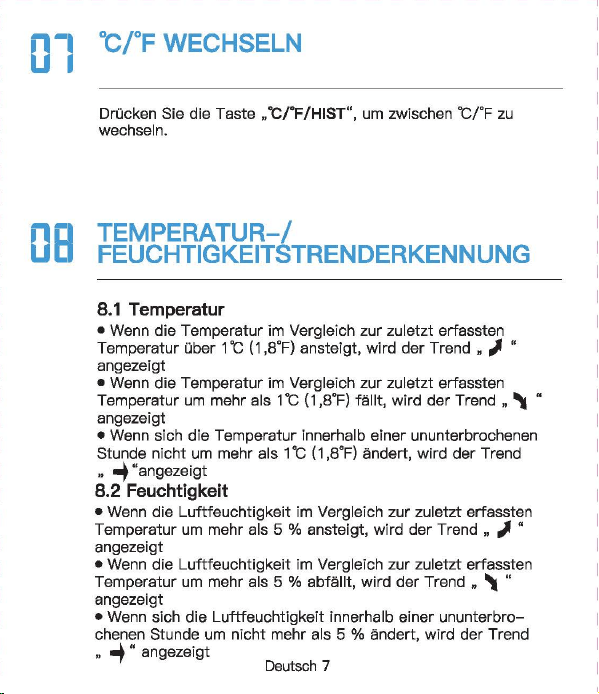
Newentor®
lnnen-AuBentherm
(Bew
自h
陪
n
Sie die Anleitung zum
spate
用
n
Nachschlagen auf)
‘。
”圃’叫时
INHAL
TSVERZEICHNIS
1.
。
PTIK
DER
WETTERSTATI
。
N
.............
.
.....
2
1 1
Basisstat,o
门…………..
'………······……….. 2
1 2
AusSE
到自
nsor
………………...………...…………
3
2.
FUNKTIONEN
DER
TASTEN
......
· ..
·……..
4
3.
BASISSTATION
LIND
SENSOR
VERBINDEN
· · · · 5
4.
ZYKLUSMODUS
5
。
i
OPTIK DER
WE
甘
ERS
1.2 AuBensensor
(I~
FUN
盯刷
EN
DER
TA
町
EN
BASISSTATION
UND
SENSOR
VERBINDEN
。
5
EMPFEHLUNGEN ZUR
SENSORPLA TZIERUNG
(1)
Platzieren Sie den Sensor
verti
阳
l
an einer nach Norden
gerichteten Wand oder an einem
gut
schattigen Ort, um
Sonnenlicht und Regen zu vermeiden.
Es
wird bevorzugt, es
15
cm
unter
dem Dach zu platzieren.
D
旧
maximale
Reichweite zur
Basisstation
betragt
328
FuB/100
m im
Fr
eien
,口
hne
Wande
口
der
B
凸
den.
(2)
Um
Signals
!凸
n.mgen
zu
vermeiden
,口
latzieren
Sie den
Sens
口
r
oder
die
Basisstation nicht in
de
「
Nahe
von Metall,
Fernsehe
「,
Computer usw.
(3)
Wen
n
es
drauBen kalt ist, wird empfohlen, den
Sense
『
naher
an die
Basisstati
口
n
zu
bringen, da die
Batte
rieleistung abnimmt,
was zu elner schnelleren Batterleentladung und
moglicherwelse
kOrzeren
Ve
「
bindungsentfemungen
fOhrt
06
MAX/MIN
(1)D
『
Ocken
Sis die ,,MAX/MIN"- Taste,
um
die MAX/MIN
anzuze1gen
(2)
Drucken Sie im MAX/MIN-Modus (das MAX/MIN-Symbol wird
auf
Display angezeigt)
die
Taste
”℃/
"F/HIST
飞
um
den
MAX/M
I
N-Wert
von
24
Std./48
Std./ALLE ZEIT umzuschalten
und anzuzeigen.
(3)
Halten Sie im
MAX/MIN-Modus
,,MAX/MIN"
3 Sekunden,
um
historische Daten zu
I
口
sch
en.
(1)
.CH
“- Taste
ist
die Taste zum Umschalten des Kanals. DrOcken
Sie mehrmals, es wird nacheinander angezeigt: CH1, CH2, CH3,
Zyklusmodus, CH1, CH2
...
(2)
Wenn das
Kanalzyklussymbol
”。“
a
u
f
Dlspl
自y
angezelgt wlrd,
bsdeutet dies, dass das
Gerat In den Zyklusmodus wechsslt, und
die
Kiinale CH1, CH2, CH3 alle 1 O Sekunden umschaltet
we
「
den.
(3)
Drucken Sie die ”
CH"
Taste im Zyklusmodus, um den
Zyklus
『
nodus
zu verlassen und zu
CH1
zuruckzukehren.
Deutsch 1
I Deutsch 2 I
D
剧
tsch3
I
D
剧
tsch
4 I Deutsch 5 I Deutsch 6
「
一一一一一一一一一一一一一一一一一一一一一一一
+
一一一一一一一一一一一一一一一一一一一一一一一
十
一一一一一一一一一一一一一一一一一一一一一一一
十
一一一一一一一一一一一一一一一一一一一一一一一
+
一一一一一一一一一一一一一一一一一一一一一一一
+
一一一一一一一一一一一一一一一一一一一一一一一
+
一一一一一一一一一一一一一一一一一一一一一一一-
iMJ
Email
I
I
、,
,|
目芽
飞-
二
7
国
回
vice.de@newent
口
r
com
。
问
k
Searcl
、:
Newento
『
Dia
thermo 阿
1eter
ist
eln
funktlonelles Produkt.
Die
rlchtlae Elnstelluna
gewiihrleistet
die
normale
Ve
『
wendung.
日
ei
Fragen
steht
Ihnen
unser
Exper~
tentoom
gerne
zur
Vert
,啕
ungl
S
旧
konnen
uns
euf
obigen
We,sen
srreichen.
a-1
℃/。
F
WECHSELN
DrOcken Sle die
Taste
,,℃/宇/
HIST
“,
um
zwlschs
n
℃/'
F
zu
wechsaln.
0
日
TEMPER
町
UR-/
FEUCHTIGKEITSTRENDERKENNUNG
8.1
Temperatur
• Wenn
die
Temperatu
「
im
Ve
「
gleich
zur zul
etzt
erfassten
T
白
mperatur
Ube
「
1
℃(才,
8τ
)
anstel
gt,
wlrd der Trend •
」
·
angezei
gt
• Wann
dis
Tsmperatur im Vergleich zur zul
stzt
0
厅
asst
en
Temper
自
M
um mehr als
1
℃(
1,8'FJ
酬
t,
wird der
Trend
,、“
angezei
gt
• Wenn sich die Temperatur innerhalb einer ununterbrochenen
Stunde
nicht
um
mehr als
1
℃(
1
,白。
F
)晶
ndert,
wird
der
Trend
”·+“
angezeigt
8.2
Feuchtigkeit
• Wenn
die
Luftfeuchtigkeit im Verglei
ch
zur zuletzt erfassten
Tempe
「
atu
『
um
mehr als 5 % anstelgt, wird
der
Trend
”,“
angezeigt
• Wenn
die
Luftfeuchtigkeit im Verglei
ch
zur zuletzt erfassten
Tempe
「
atur
um
mehr als 5 % abfiillt, wird der
Trend
,、“
angezeigt
• Wenn sich die
」
u
ftf
euchtigke
i
t
innerhalb
eine「
unun
t
erbro
chenen Stunde
um
nicht mehr als 5 % andert, wird
der
Trend
’~
" angezeigt
Deutsch 7
5.
EMPFEHLUNGEN
ZUR
SENSORPL.ATZIERUNG
··
6
6.
MAX/MIN
…………………..
6
7.
℃
iFWECHSELN
……………………………..
7
8.
TEMPERATUR-/FEUCHTIGKEπ
町
RENDERKENNUNG
8.
1
T
,刷、
par
咱
tur
叮’’
7
4
’
. . . . . . . . . . . . . . . . . . . . .
日
.2
Feuchtigke
it
9.
EISWARNUNG
8
10.
K1
。
MFORTANZEIGE
…………………………..
8
11.
NIEDRIGER
BATIERIESTAND
·· · ·· · …
..
....
.
..
9
12.PR
。
DUKTSPEZIFIKATION
……………………
9
13.
FRAGEN
LIND
ANTWORTEN
·····
····
···
··…
1
口
14.
GARANTIE
· · · · · ·
·………·
· 12
09
EISWARNUNG
Wenn
die
AuBentemperatur
-1
℃什℃(
30,2
'
F啕
33,8°F)
bet
「自由,
bllnkt
des Elsalarms
nb
口
l
”囔
l
".
Unte
「
1.1
℃{
30.02'F)
-
wl
「
d
das
Eisw
自『『
1symb
。
l
”输
I
" statisch angezeigt
.
1(1
KOMFORTANZEIG
(
ZU
TROCKEN: 20% bis
30%
( TROCKEN:
31
% bis
44%
( KOMFORT: 45% bis
65%
( NASS:
66%
bis
84%
(
ZU
NA
臼
85%
bis
95%
…
E
町··
圈
•et.•1111
噩
噩
Deutsch 8
NORMAi.ER MODUS
MAX/MIN
MODUS
Ha
比回
E
Dri
』
cken
H
自
lten
Drue
ken
CH
Kanale
W0(_
才
lSeln
Sensorslgnal
/Zyklusmodus empfangen
自
U什
U
侮
n
MAX/MIN
MAX/MIN
\
MAX/MIN
anzeigen
loschen
℃
fF
24
Std./48
℃/'
F/HIST
wechseln
Std./Alla \
Zeit
-哲-
Belel
」
chtung
fur
10
\ \
Sekunden
an
1.1 Basisstation
82
j(l
吧?已时
目
1
-
Al
81:
Signal
LED
82
:’
Wandhaken
83:
'F
/℃
已
4:
Kanal-Schiebschalter
85
:“TX"-
T
回国,
Funksignal
menuell
ii
胁
rtregen
86:Ba
甘
erlefach
白天
Ba
忧
e
r
iefachabdeckung
B3
一-
- r
B4
85
A10
MMMMMMm
A9
A11
M
阐
MMM 闹
86
A 1: 1 OS-Hintergrundbeleuchtungstaste
A2,
Kanai
1,2,3
A3:
Zyk
lusm
创
us-Symbol
A4:
Eiswarnung
Symbol
A5:M
阻-
und
Minwerte [24
std./
48 Std./ Alie Zeit)
A6:
Komfortanzeige
A7:
Niedriger
B
副剧团,
tand
AB:
lnnentemperatur
und
Luftfeuchtigkeit
A9:Au
日
entemperatur
un
d -Luftfeuchtigkeit
A 1 0.
Trend
- pfeil
A 11: Funktlonstasten
A
Ernp
旬
hlun
伊
n
zur
部
nsorplatzierung
(
1)
Platzieren
Sie
den
Sens
口
r
verti
阳|丽的市咱
ch
N
口
rd
町
gerichte
t
en
Wa
们
d
oder
an
ei
nem
gc
此
schattigE
引
Ort,
um
Sonn
四
licht
u
门
d
R
啕
er
zu
咽
rmelden.
Es
wlrd
bev
,白雪
ugt
,自
15
cm
unter
dem
Dach
zu
platzleren.
Die
m
缸
imale
Reichv.'3
ite
zur
臼
S
阳阳
lion
betr
首
gt328
FuB/100 m
im
Frelen
,出
ne
Wande
oder
日创
en
.
(2
)
Um
S
i
g
呻剧。阳咱
en
zu
ve
『
meide
n
,
platz
阳回
Sie
den
Sensor
oder
die
Bas
惚饱
tion
nicht
in
d
旷
Nal
回
von
M
拥
II,
Fem
倒喻,
Com
pl119r
usw.
(3
)
Wenn
回归
uBen
kelt
M
』
wird
刷刷、
le
门,
d
时
Sensor
门也
er
en
die
Basisstation
剖
lringe
叫
da
die
Batt
回
ele
i
stu
咱
abnimmt,
was
zu
einer
schne
ll
eren
Batterieentlad.Jng
unc
moglicherweise
kO
日:
erenVe
巾
Ind
ung:
ntfemungen
白
hrt
川
NIEDRIGER
BATTERIESTAND
13
FRAGEN UND ANTWO
②
De
「
Datene
「
fassungsbereich
auf
dem
Wette
毗
anal/
APP
ist
der
Bereich. AuBerdsm werden
Flughafenwette
「时
ationen
n
u
「
einmal
pro
Stunde aktualisiert.
( Wenn die Umgebung in
der
Nahe des Hauses angenehm ist
(Pflanzen, Getreide, Klimaanlage usw.),
ist
es
no
『
mal,
dass die
Temperatur des Sensors
v
口
n
der
白
uf
der
APP abweicht.
Wenn das Symbol
•
g
“自川
I
splay
叫
eze
阳
wlrd
(lnnenbatter-
lespannung
1st
nled
「
lgs
「
als
3,6
V, Sensorbatterlespannung
1st
nied
「iger
自
Is
2,5 V), mussen
wir
die
Batte
「
ie
der
Basissta
一
tion/des
Sensors rechtzeit ig
e
「
setzen.
(
1)
Wie lange
dauert
die
automatische
Kallbrierun
日,
wenn
Sie
das
Gerat zum ersten
Mal
verwenden?
Es dauert
normalerwelse
3-
7
Tags
I~
PRODUK s
[2)Wa
『
um
stimmen
Temperatur
und
Luftfeuohtigkeit
nioht
ilberein,
w
哩
nn
die
Basisstation und
der
Sensor zusemmen
platzlert
werden?
( GroBe und Aufbau der
Ge
「昌te
sind unterschiedlich. Um
ge
< auere Messwerte zu erha I ten, hat
die
Basisstati
口【
meh
r
kleine
L
凸
cher
fur
die
BelOftung,
w
,且
hrend
der
AuBensensor
n
口
r
malerweise
in
eine
「
relativ
rauen Umgebung platzi
ert
wird, seine
L
凸
oher
we
「
den
kleiner sein. Die Chipumgebung wird
etwas
ande
「
s
sein.
Dies
ist
m
凸
glicherweise
ei
n
er
der GrOnde
fur
den Unterschied
Dahe
「
benot
i
gen
die
Gerate
Le
『
n-
und
Ka
l
ibrie
「
ungszeit.
Im
Allgemeinen
ist
die Temperatur
umso
日
enaue
r
,
je langer es
platzle
内
wlrd.
( Wenn
de
r Abstand zwischen
der
KEiltequelle oder
der
Wiirmequelle unterschiedlich
isl,
ist
dies auch ein
er
der
Gr
臼
nde
fOr
den Unterschied
(
Um
die
Temperatur zu
ve
咱
leichen,
emp
fehlen
wir
ein
Quecksilber-
oder
rotes Spiritus(FIOssigkeits)-Thermometer.
Bimetall-
{Zifferblatt) und digitale
Thermomete
「(
v
口
n
曰
nde
「
en
Marken) sind keine
gute
Quella und haben
ih
『
e
eigene
Fehle
「
quote.
(4)
1st
der
Sensor wasserdioht?
Nein.
(5
)口
er
Sensor
kann slch
nlcht
mlt
der
Basisstation verblnden?
(
Bitte
stellen Sie
siche
「,
dass
die
Kanale von Basisstation und
Sen
so
「
ubereinstimmen.
(
Bitte
stellen Sie
siche
「,
dass
der
Sensor
richtig
p
l
a
恒
ie
时
ist
und
die
Entfe
「
nung
van
der
Basisstation innerhalb
des
Verbindungs-
bereichs
liegt
(siehe ”
5.
Empfehlungen
zu
「
Sensorplatzie
「
ung
“).
• lnnentemperaturmessbereich:
-9,9
℃-
50
℃(
14,2
'冉
122°F)
(LL.L
wird angezeigt, wenn sie un
ter
-9,9
℃/
14,2'F
liegt, und HH.H
wird
angezei
饵,
wenn
sie
Ober
50
℃/
122
°
F
liegt)
• AuBentemperaturmessbereich:
-40
℃叮
O
℃(-
40'F
叫
58
'
F)
•
lnnen-
und AuBenluftfeuchtlgkeltsberelch:
20
% - 95 % (bel
wanlge
「 els
20
%
wl
「
d
20 % angezelgt ,
bsl
mehr als 95 % wlrd
95
% angezei
gt)
•
Zeitr
白um
des
Signalempf
自
ngs:
30
Sekunden
• Genauigkeit
de
『
Temperatu
「「
nessung
:主
1
℃(
1,B'F)
• Genauigkeit
der
Feuchtigkeitsmessung:
±5%
• Batterie
der
Basisstation: 3 x AAA-Batterien
• Batterie des
AuGensenso
「
s:
2 x
M-Batterien
•Ve
「
bindungsentfernung
zwischen Basisstation und AuBensen-
sor:
328ft
( 1
OOm)
im
offenen
Be
「
eich
(6)
Warum
wechselt
der
Kanai
immer
wieder
aut
。
matisch?
Wen
[ das Symbol ” C · oben links angezeigt
wi
时,
bedeutet
dies,
dass
das
Ge
「
at
In
den Zyklusmodus
eingetrete
门
ist.
D
『
Ocken
Sie
d
悟,
CH
“-
Taste,
um
den
M
口
dus
zu verlassen und zu
CH1
zuruckzukeh
「
e
『1.
(S
iehe ,,4.
Zyklusm
。
dus")
Deutsch 9
阳)
Warum
untarschaidat
sfch
dia
gamassana AuBantamparatur
von
der
auf
der
APP (lokales We1teramt)?
( Die Wetterstatlon
ist
ei
n Heimgerat, dessen Erfassungsbereich
sich
um
das Haus herum befmdat und seine Datan ganauer sind.
Deutsch
10
Deutsch
11
Achten Sie darauf, die
Senso
「
en
in
de
「
folgenden
Reihenfolge
anzuschlieBen, da
sonst
die Verbindung fehlschlagen kann.
(1)
Drucken Sie die
..
CH
“-
Taste,
um
den Kanai
zu
wechseln.
(2)0
汗
nan
Sia die
Ba
忧
erleabdec
阳
ng
des Sensors, schalten Sia
den Sensorkanal
entsp
「
achend
der Baslsstatlon um. Wle belde In
CH1.
(3)
Halten Sie
die
..
CH
筐
Taste
3 Sekunden, um in den HF
Sig
〔自|
suchm口
dus
Z
】
wechsel
『
l.
(4)
Drucken Sie
sofort
die •
TX
飞
Taste
em AuBenssensor.
(5)
Die
飞
Nerte
werden
auf
Display angezei
gt,
fe
「
tig.
Hlnweis:
(1)
Die Basisstation kann bis
zu
3 Sensoren verbinden,
bitte
stellen Sie sicher, dass
die
Kanale
de
「
einzelnen
Sensoren
unterschiedlich sind.
(2)
Aktualisierungszyklus:
CH1
= 31s, CH2 = 32s,
CH3
= 33s
。叶
ZYKLUSMODUS
|叶
GARAN
TIE
• Das Gerat wurde gemaB strengen Qualltatsrichtlinien hergestellt
und vor
de
「
Auslieferung
sorgfaltig
gep
广
Oft.
•
Newe
「
1tor
verp
「icht,
d
自
SS
die
Ge
「
an
t
iezeit
des Gerats
1
飞
Jah
「
·es-Ga
「白「
1tie
ab Kaufdatum
betr
画
gt.
KONFORMIT.ATSERKL.ARUNG
Diese
Funkwetterstati
口
n
en1sp
「 ich
t
den
Grundanforde
「
ungen
und
den andaren alnschlagigan
V
口
rschrlften
dar Rlchtllnle
2014/53/EU.
Mit
d
回
em
Symbol gekennzeichnete Pradukte
e
斤
口
lien
alle
日
eltenden
Gemeinschaftsvorschriften des
Europais
旧
hen
Wirtschaftsraums.
Ober den folgenden Link konnen Sie die vollstiindige
Konformi
世-
serklarung direkt
a
时
unse
陪
r
offlziellen Newentcr-Website
he
「
unter
l
aden:
wwwnAW
自
nt
口
r
cnm/n,anAsld
自-
rlAc:larati
口
n
-口,
f-,xmfnrmilv-f.lRnF
ENTSORGUNGSHINWEISE
〕更阳…
e
……
du
厅
e
「
1
门
icht
Obe
「
den
n口
「
「
n
自
le
「
1H
白
usmull
ents
口「
gt
we
「
de
n
.
Nach
de
『
Richtlinie
2012/19
I
EU
muss das
Ge
「
at
am Ende
seine
「
Lebenscaue
「 ein
町
sac
h
gerechte
『
1
- Entsorgung zugefuhrt werden. Die im
Ger
白
t
enthaltenen
We
内
sachen
响
rden
recycelt und um eine Belastung der
Umwelt zu vermeiden. Bringen
Sie
das Altgeriit
zu
einer
Sammels·
恒
l
i
e
fO
「
Elektroschrott
口
der
einem Recyclinghof.
En
町
·ernen
Sie vor der Entsorgung die Batterien aus dem
Ge
「昌
t
und
ents
口「
·gen
Sie d iese getrennt.
Batterien
geh
凸
ren
nicht in den Hausmull. Jeder
Ve
「
bra1
』
cher
ist
ge
随时
ic
h
ve
巾啊
ichtet,
Batterien und
Akkus bsi einer Sammelstells seiner Gemeinde, seines
Kralses
ode
「
Im
Hande
l
自
bzugeban.
Damlt konnen alle
Batterien und Akkus
umweltgen:
记
ht
entsorgt
we
「·den
.
Deuti
到
ch
12
〕更协
ads
t
offhalti
Sy
「
nbol
und
che
『
nische
『、
Sy
「
nbole
「
1
(Pb
fu
「
Blei)
阴阳
nnzelchn
白
t
W
白
I
tare I
nformatl
口
nen
erhalten
SI
白
von
lhrem ortllchen Entsorgungsuntemehmen oder lhrer
。「
11ichen
Beh
凸「de
,咂
E
口tso
『
gen
Sle die Verpackung
m
巾
nreln.
Entsorgen
画’,.
Sia
Ka
巾
n
und Pappa als Altpapier und Follen der
咽.
.,.
We
「
tstoffsammlu
『
1g.
HAFTUNGSAUSSCHLOSSE
Der Hersteller behiilt sich das Recht
vo
「,
die
Produktspeziflka-
tionen zu
andern.
Hersteller und Lieferant sind
nicht
verantwortlich
fur
St凸「
unge
n
,
bei denen
St
凸
rungen
auftreten.
Manufac
阳帽,:由
:,nggυanBe,j
陷日
ec
tron
ic
Technology
Co.,
Ltd
Offl
四
Addre
四. No
.
15
月
0
啕
i
Ro
回
,
N
。
3
Indus
trial
Zo
睛,
E
川
sn
gs
ha
G
。
m m
川
ity.
Chang'a
n T
。阳,
Dongguan
City
.
Gu
a
啕由咱忏
ovi
n
回
www.r
回回晴内
tor.com
Deutsch 13
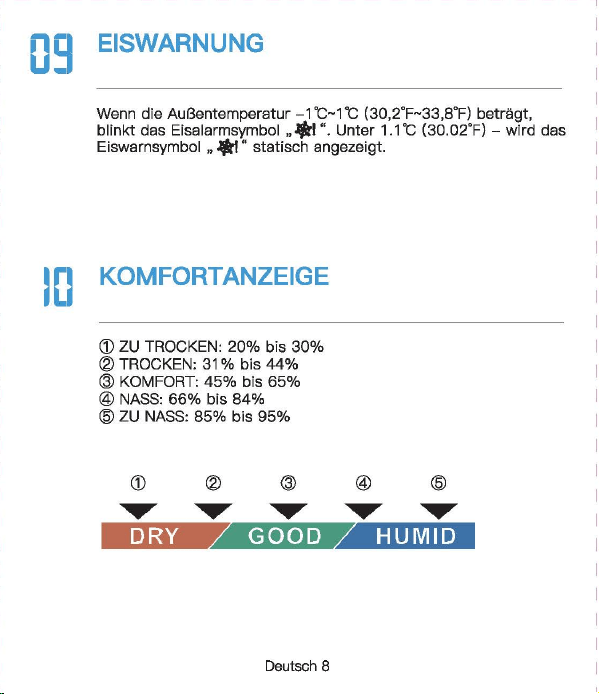
Newentor®
lnnen-AuBentherm
(Bew
自h
陪
n
Sie die Anleitung zum
spate
用
n
Nachschlagen auf)
‘。
”圃’叫时
INHAL
TSVERZEICHNIS
1.
。
PTIK
DER
WETTERSTATI
。
N
.............
.
.....
2
1 1
Basisstat,o
门…………..
'………······……….. 2
1 2
AusSE
到自
nsor
………………...………...…………
3
2.
FUNKTIONEN
DER
TASTEN
......
· ..
·……..
4
3.
BASISSTATION
LIND
SENSOR
VERBINDEN
· · · · 5
4.
ZYKLUSMODUS
5
。
i
OPTIK DER
WE
甘
ERS
1.2 AuBensensor
(I~
FUN
盯刷
EN
DER
TA
町
EN
BASISSTATION
UND
SENSOR
VERBINDEN
。
5
EMPFEHLUNGEN ZUR
SENSORPLA TZIERUNG
(1)
Platzieren Sie den Sensor
verti
阳
l
an einer nach Norden
gerichteten Wand oder an einem
gut
schattigen Ort, um
Sonnenlicht und Regen zu vermeiden.
Es
wird bevorzugt, es
15
cm
unter
dem Dach zu platzieren.
D
旧
maximale
Reichweite zur
Basisstation
betragt
328
FuB/100
m im
Fr
eien
,口
hne
Wande
口
der
B
凸
den.
(2)
Um
Signals
!凸
n.mgen
zu
vermeiden
,口
latzieren
Sie den
Sens
口
r
oder
die
Basisstation nicht in
de
「
Nahe
von Metall,
Fernsehe
「,
Computer usw.
(3)
Wen
n
es
drauBen kalt ist, wird empfohlen, den
Sense
『
naher
an die
Basisstati
口
n
zu
bringen, da die
Batte
rieleistung abnimmt,
was zu elner schnelleren Batterleentladung und
moglicherwelse
kOrzeren
Ve
「
bindungsentfemungen
fOhrt
06
MAX/MIN
(1)D
『
Ocken
Sis die ,,MAX/MIN"- Taste,
um
die MAX/MIN
anzuze1gen
(2)
Drucken Sie im MAX/MIN-Modus (das MAX/MIN-Symbol wird
auf
Display angezeigt)
die
Taste
”℃/
"F/HIST
飞
um
den
MAX/M
I
N-Wert
von
24
Std./48
Std./ALLE ZEIT umzuschalten
und anzuzeigen.
(3)
Halten Sie im
MAX/MIN-Modus
,,MAX/MIN"
3 Sekunden,
um
historische Daten zu
I
口
sch
en.
(1)
.CH
“- Taste
ist
die Taste zum Umschalten des Kanals. DrOcken
Sie mehrmals, es wird nacheinander angezeigt: CH1, CH2, CH3,
Zyklusmodus, CH1, CH2
...
(2)
Wenn das
Kanalzyklussymbol
”。“
a
u
f
Dlspl
自y
angezelgt wlrd,
bsdeutet dies, dass das
Gerat In den Zyklusmodus wechsslt, und
die
Kiinale CH1, CH2, CH3 alle 1 O Sekunden umschaltet
we
「
den.
(3)
Drucken Sie die ”
CH"
Taste im Zyklusmodus, um den
Zyklus
『
nodus
zu verlassen und zu
CH1
zuruckzukehren.
Deutsch 1
I Deutsch 2 I
D
剧
tsch3
I
D
剧
tsch
4 I Deutsch 5 I Deutsch 6
「
一一一一一一一一一一一一一一一一一一一一一一一
+
一一一一一一一一一一一一一一一一一一一一一一一
十
一一一一一一一一一一一一一一一一一一一一一一一
十
一一一一一一一一一一一一一一一一一一一一一一一
+
一一一一一一一一一一一一一一一一一一一一一一一
+
一一一一一一一一一一一一一一一一一一一一一一一
+
一一一一一一一一一一一一一一一一一一一一一一一-
iMJ
Email
I
I
、,
,|
目芽
飞-
二
7
国
回
vice.de@newent
口
r
com
。
问
k
Searcl
、:
Newento
『
Dia
thermo 阿
1eter
ist
eln
funktlonelles Produkt.
Die
rlchtlae Elnstelluna
gewiihrleistet
die
normale
Ve
『
wendung.
日
ei
Fragen
steht
Ihnen
unser
Exper~
tentoom
gerne
zur
Vert
,啕
ungl
S
旧
konnen
uns
euf
obigen
We,sen
srreichen.
a-1
℃/。
F
WECHSELN
DrOcken Sle die
Taste
,,℃/宇/
HIST
“,
um
zwlschs
n
℃/'
F
zu
wechsaln.
0
日
TEMPER
町
UR-/
FEUCHTIGKEITSTRENDERKENNUNG
8.1
Temperatur
• Wenn
die
Temperatu
「
im
Ve
「
gleich
zur zul
etzt
erfassten
T
白
mperatur
Ube
「
1
℃(才,
8τ
)
anstel
gt,
wlrd der Trend •
」
·
angezei
gt
• Wann
dis
Tsmperatur im Vergleich zur zul
stzt
0
厅
asst
en
Temper
自
M
um mehr als
1
℃(
1,8'FJ
酬
t,
wird der
Trend
,、“
angezei
gt
• Wenn sich die Temperatur innerhalb einer ununterbrochenen
Stunde
nicht
um
mehr als
1
℃(
1
,白。
F
)晶
ndert,
wird
der
Trend
”·+“
angezeigt
8.2
Feuchtigkeit
• Wenn
die
Luftfeuchtigkeit im Verglei
ch
zur zuletzt erfassten
Tempe
「
atu
『
um
mehr als 5 % anstelgt, wird
der
Trend
”,“
angezeigt
• Wenn
die
Luftfeuchtigkeit im Verglei
ch
zur zuletzt erfassten
Tempe
「
atur
um
mehr als 5 % abfiillt, wird der
Trend
,、“
angezeigt
• Wenn sich die
」
u
ftf
euchtigke
i
t
innerhalb
eine「
unun
t
erbro
chenen Stunde
um
nicht mehr als 5 % andert, wird
der
Trend
’~
" angezeigt
Deutsch 7
5.
EMPFEHLUNGEN
ZUR
SENSORPL.ATZIERUNG
··
6
6.
MAX/MIN
…………………..
6
7.
℃
iFWECHSELN
……………………………..
7
8.
TEMPERATUR-/FEUCHTIGKEπ
町
RENDERKENNUNG
8.
1
T
,刷、
par
咱
tur
叮’’
7
4
’
. . . . . . . . . . . . . . . . . . . . .
日
.2
Feuchtigke
it
9.
EISWARNUNG
8
10.
K1
。
MFORTANZEIGE
…………………………..
8
11.
NIEDRIGER
BATIERIESTAND
·· · ·· · …
..
....
.
..
9
12.PR
。
DUKTSPEZIFIKATION
……………………
9
13.
FRAGEN
LIND
ANTWORTEN
·····
····
···
··…
1
口
14.
GARANTIE
· · · · · ·
·………·
· 12
09
EISWARNUNG
Wenn
die
AuBentemperatur
-1
℃什℃(
30,2
'
F啕
33,8°F)
bet
「自由,
bllnkt
des Elsalarms
nb
口
l
”囔
l
".
Unte
「
1.1
℃{
30.02'F)
-
wl
「
d
das
Eisw
自『『
1symb
。
l
”输
I
" statisch angezeigt
.
1(1
KOMFORTANZEIG
(
ZU
TROCKEN: 20% bis
30%
( TROCKEN:
31
% bis
44%
( KOMFORT: 45% bis
65%
( NASS:
66%
bis
84%
(
ZU
NA
臼
85%
bis
95%
…
E
町··
圈
•et.•1111
噩
噩
Deutsch 8
NORMAi.ER MODUS
MAX/MIN
MODUS
Ha
比回
E
Dri
』
cken
H
自
lten
Drue
ken
CH
Kanale
W0(_
才
lSeln
Sensorslgnal
/Zyklusmodus empfangen
自
U什
U
侮
n
MAX/MIN
MAX/MIN
\
MAX/MIN
anzeigen
loschen
℃
fF
24
Std./48
℃/'
F/HIST
wechseln
Std./Alla \
Zeit
-哲-
Belel
」
chtung
fur
10
\ \
Sekunden
an
1.1 Basisstation
82
j(l
吧?已时
目
1
-
Al
81:
Signal
LED
82
:’
Wandhaken
83:
'F
/℃
已
4:
Kanal-Schiebschalter
85
:“TX"-
T
回国,
Funksignal
menuell
ii
胁
rtregen
86:Ba
甘
erlefach
白天
Ba
忧
e
r
iefachabdeckung
B3
一-
- r
B4
85
A10
MMMMMMm
A9
A11
M
阐
MMM 闹
86
A 1: 1 OS-Hintergrundbeleuchtungstaste
A2,
Kanai
1,2,3
A3:
Zyk
lusm
创
us-Symbol
A4:
Eiswarnung
Symbol
A5:M
阻-
und
Minwerte [24
std./
48 Std./ Alie Zeit)
A6:
Komfortanzeige
A7:
Niedriger
B
副剧团,
tand
AB:
lnnentemperatur
und
Luftfeuchtigkeit
A9:Au
日
entemperatur
un
d -Luftfeuchtigkeit
A 1 0.
Trend
- pfeil
A 11: Funktlonstasten
A
Ernp
旬
hlun
伊
n
zur
部
nsorplatzierung
(
1)
Platzieren
Sie
den
Sens
口
r
verti
阳|丽的市咱
ch
N
口
rd
町
gerichte
t
en
Wa
们
d
oder
an
ei
nem
gc
此
schattigE
引
Ort,
um
Sonn
四
licht
u
门
d
R
啕
er
zu
咽
rmelden.
Es
wlrd
bev
,白雪
ugt
,自
15
cm
unter
dem
Dach
zu
platzleren.
Die
m
缸
imale
Reichv.'3
ite
zur
臼
S
阳阳
lion
betr
首
gt328
FuB/100 m
im
Frelen
,出
ne
Wande
oder
日创
en
.
(2
)
Um
S
i
g
呻剧。阳咱
en
zu
ve
『
meide
n
,
platz
阳回
Sie
den
Sensor
oder
die
Bas
惚饱
tion
nicht
in
d
旷
Nal
回
von
M
拥
II,
Fem
倒喻,
Com
pl119r
usw.
(3
)
Wenn
回归
uBen
kelt
M
』
wird
刷刷、
le
门,
d
时
Sensor
门也
er
en
die
Basisstation
剖
lringe
叫
da
die
Batt
回
ele
i
stu
咱
abnimmt,
was
zu
einer
schne
ll
eren
Batterieentlad.Jng
unc
moglicherweise
kO
日:
erenVe
巾
Ind
ung:
ntfemungen
白
hrt
川
NIEDRIGER
BATTERIESTAND
13
FRAGEN UND ANTWO
②
De
「
Datene
「
fassungsbereich
auf
dem
Wette
毗
anal/
APP
ist
der
Bereich. AuBerdsm werden
Flughafenwette
「时
ationen
n
u
「
einmal
pro
Stunde aktualisiert.
( Wenn die Umgebung in
der
Nahe des Hauses angenehm ist
(Pflanzen, Getreide, Klimaanlage usw.),
ist
es
no
『
mal,
dass die
Temperatur des Sensors
v
口
n
der
白
uf
der
APP abweicht.
Wenn das Symbol
•
g
“自川
I
splay
叫
eze
阳
wlrd
(lnnenbatter-
lespannung
1st
nled
「
lgs
「
als
3,6
V, Sensorbatterlespannung
1st
nied
「iger
自
Is
2,5 V), mussen
wir
die
Batte
「
ie
der
Basissta
一
tion/des
Sensors rechtzeit ig
e
「
setzen.
(
1)
Wie lange
dauert
die
automatische
Kallbrierun
日,
wenn
Sie
das
Gerat zum ersten
Mal
verwenden?
Es dauert
normalerwelse
3-
7
Tags
I~
PRODUK s
[2)Wa
『
um
stimmen
Temperatur
und
Luftfeuohtigkeit
nioht
ilberein,
w
哩
nn
die
Basisstation und
der
Sensor zusemmen
platzlert
werden?
( GroBe und Aufbau der
Ge
「昌te
sind unterschiedlich. Um
ge
< auere Messwerte zu erha I ten, hat
die
Basisstati
口【
meh
r
kleine
L
凸
cher
fur
die
BelOftung,
w
,且
hrend
der
AuBensensor
n
口
r
malerweise
in
eine
「
relativ
rauen Umgebung platzi
ert
wird, seine
L
凸
oher
we
「
den
kleiner sein. Die Chipumgebung wird
etwas
ande
「
s
sein.
Dies
ist
m
凸
glicherweise
ei
n
er
der GrOnde
fur
den Unterschied
Dahe
「
benot
i
gen
die
Gerate
Le
『
n-
und
Ka
l
ibrie
「
ungszeit.
Im
Allgemeinen
ist
die Temperatur
umso
日
enaue
r
,
je langer es
platzle
内
wlrd.
( Wenn
de
r Abstand zwischen
der
KEiltequelle oder
der
Wiirmequelle unterschiedlich
isl,
ist
dies auch ein
er
der
Gr
臼
nde
fOr
den Unterschied
(
Um
die
Temperatur zu
ve
咱
leichen,
emp
fehlen
wir
ein
Quecksilber-
oder
rotes Spiritus(FIOssigkeits)-Thermometer.
Bimetall-
{Zifferblatt) und digitale
Thermomete
「(
v
口
n
曰
nde
「
en
Marken) sind keine
gute
Quella und haben
ih
『
e
eigene
Fehle
「
quote.
(4)
1st
der
Sensor wasserdioht?
Nein.
(5
)口
er
Sensor
kann slch
nlcht
mlt
der
Basisstation verblnden?
(
Bitte
stellen Sie
siche
「,
dass
die
Kanale von Basisstation und
Sen
so
「
ubereinstimmen.
(
Bitte
stellen Sie
siche
「,
dass
der
Sensor
richtig
p
l
a
恒
ie
时
ist
und
die
Entfe
「
nung
van
der
Basisstation innerhalb
des
Verbindungs-
bereichs
liegt
(siehe ”
5.
Empfehlungen
zu
「
Sensorplatzie
「
ung
“).
• lnnentemperaturmessbereich:
-9,9
℃-
50
℃(
14,2
'冉
122°F)
(LL.L
wird angezeigt, wenn sie un
ter
-9,9
℃/
14,2'F
liegt, und HH.H
wird
angezei
饵,
wenn
sie
Ober
50
℃/
122
°
F
liegt)
• AuBentemperaturmessbereich:
-40
℃叮
O
℃(-
40'F
叫
58
'
F)
•
lnnen-
und AuBenluftfeuchtlgkeltsberelch:
20
% - 95 % (bel
wanlge
「 els
20
%
wl
「
d
20 % angezelgt ,
bsl
mehr als 95 % wlrd
95
% angezei
gt)
•
Zeitr
白um
des
Signalempf
自
ngs:
30
Sekunden
• Genauigkeit
de
『
Temperatu
「「
nessung
:主
1
℃(
1,B'F)
• Genauigkeit
der
Feuchtigkeitsmessung:
±5%
• Batterie
der
Basisstation: 3 x AAA-Batterien
• Batterie des
AuGensenso
「
s:
2 x
M-Batterien
•Ve
「
bindungsentfernung
zwischen Basisstation und AuBensen-
sor:
328ft
( 1
OOm)
im
offenen
Be
「
eich
(6)
Warum
wechselt
der
Kanai
immer
wieder
aut
。
matisch?
Wen
[ das Symbol ” C · oben links angezeigt
wi
时,
bedeutet
dies,
dass
das
Ge
「
at
In
den Zyklusmodus
eingetrete
门
ist.
D
『
Ocken
Sie
d
悟,
CH
“-
Taste,
um
den
M
口
dus
zu verlassen und zu
CH1
zuruckzukeh
「
e
『1.
(S
iehe ,,4.
Zyklusm
。
dus")
Deutsch 9
阳)
Warum
untarschaidat
sfch
dia
gamassana AuBantamparatur
von
der
auf
der
APP (lokales We1teramt)?
( Die Wetterstatlon
ist
ei
n Heimgerat, dessen Erfassungsbereich
sich
um
das Haus herum befmdat und seine Datan ganauer sind.
Deutsch
10
Deutsch
11
Achten Sie darauf, die
Senso
「
en
in
de
「
folgenden
Reihenfolge
anzuschlieBen, da
sonst
die Verbindung fehlschlagen kann.
(1)
Drucken Sie die
..
CH
“-
Taste,
um
den Kanai
zu
wechseln.
(2)0
汗
nan
Sia die
Ba
忧
erleabdec
阳
ng
des Sensors, schalten Sia
den Sensorkanal
entsp
「
achend
der Baslsstatlon um. Wle belde In
CH1.
(3)
Halten Sie
die
..
CH
筐
Taste
3 Sekunden, um in den HF
Sig
〔自|
suchm口
dus
Z
】
wechsel
『
l.
(4)
Drucken Sie
sofort
die •
TX
飞
Taste
em AuBenssensor.
(5)
Die
飞
Nerte
werden
auf
Display angezei
gt,
fe
「
tig.
Hlnweis:
(1)
Die Basisstation kann bis
zu
3 Sensoren verbinden,
bitte
stellen Sie sicher, dass
die
Kanale
de
「
einzelnen
Sensoren
unterschiedlich sind.
(2)
Aktualisierungszyklus:
CH1
= 31s, CH2 = 32s,
CH3
= 33s
。叶
ZYKLUSMODUS
|叶
GARAN
TIE
• Das Gerat wurde gemaB strengen Qualltatsrichtlinien hergestellt
und vor
de
「
Auslieferung
sorgfaltig
gep
广
Oft.
•
Newe
「
1tor
verp
「icht,
d
自
SS
die
Ge
「
an
t
iezeit
des Gerats
1
飞
Jah
「
·es-Ga
「白「
1tie
ab Kaufdatum
betr
画
gt.
KONFORMIT.ATSERKL.ARUNG
Diese
Funkwetterstati
口
n
en1sp
「 ich
t
den
Grundanforde
「
ungen
und
den andaren alnschlagigan
V
口
rschrlften
dar Rlchtllnle
2014/53/EU.
Mit
d
回
em
Symbol gekennzeichnete Pradukte
e
斤
口
lien
alle
日
eltenden
Gemeinschaftsvorschriften des
Europais
旧
hen
Wirtschaftsraums.
Ober den folgenden Link konnen Sie die vollstiindige
Konformi
世-
serklarung direkt
a
时
unse
陪
r
offlziellen Newentcr-Website
he
「
unter
l
aden:
wwwnAW
自
nt
口
r
cnm/n,anAsld
自-
rlAc:larati
口
n
-口,
f-,xmfnrmilv-f.lRnF
ENTSORGUNGSHINWEISE
〕更阳…
e
……
du
厅
e
「
1
门
icht
Obe
「
den
n口
「
「
n
自
le
「
1H
白
usmull
ents
口「
gt
we
「
de
n
.
Nach
de
『
Richtlinie
2012/19
I
EU
muss das
Ge
「
at
am Ende
seine
「
Lebenscaue
「 ein
町
sac
h
gerechte
『
1
- Entsorgung zugefuhrt werden. Die im
Ger
白
t
enthaltenen
We
内
sachen
响
rden
recycelt und um eine Belastung der
Umwelt zu vermeiden. Bringen
Sie
das Altgeriit
zu
einer
Sammels·
恒
l
i
e
fO
「
Elektroschrott
口
der
einem Recyclinghof.
En
町
·ernen
Sie vor der Entsorgung die Batterien aus dem
Ge
「昌
t
und
ents
口「
·gen
Sie d iese getrennt.
Batterien
geh
凸
ren
nicht in den Hausmull. Jeder
Ve
「
bra1
』
cher
ist
ge
随时
ic
h
ve
巾啊
ichtet,
Batterien und
Akkus bsi einer Sammelstells seiner Gemeinde, seines
Kralses
ode
「
Im
Hande
l
自
bzugeban.
Damlt konnen alle
Batterien und Akkus
umweltgen:
记
ht
entsorgt
we
「·den
.
Deuti
到
ch
12
〕更协
ads
t
offhalti
Sy
「
nbol
und
che
『
nische
『、
Sy
「
nbole
「
1
(Pb
fu
「
Blei)
阴阳
nnzelchn
白
t
W
白
I
tare I
nformatl
口
nen
erhalten
SI
白
von
lhrem ortllchen Entsorgungsuntemehmen oder lhrer
。「
11ichen
Beh
凸「de
,咂
E
口tso
『
gen
Sle die Verpackung
m
巾
nreln.
Entsorgen
画’,.
Sia
Ka
巾
n
und Pappa als Altpapier und Follen der
咽.
.,.
We
「
tstoffsammlu
『
1g.
HAFTUNGSAUSSCHLOSSE
Der Hersteller behiilt sich das Recht
vo
「,
die
Produktspeziflka-
tionen zu
andern.
Hersteller und Lieferant sind
nicht
verantwortlich
fur
St凸「
unge
n
,
bei denen
St
凸
rungen
auftreten.
Manufac
阳帽,:由
:,nggυanBe,j
陷日
ec
tron
ic
Technology
Co.,
Ltd
Offl
四
Addre
四. No
.
15
月
0
啕
i
Ro
回
,
N
。
3
Indus
trial
Zo
睛,
E
川
sn
gs
ha
G
。
m m
川
ity.
Chang'a
n T
。阳,
Dongguan
City
.
Gu
a
啕由咱忏
ovi
n
回
www.r
回回晴内
tor.com
Deutsch 13
Newentor®
lnnen-AuBentherm
(Bew
自h
陪
n
Sie die Anleitung zum
spate
用
n
Nachschlagen auf)
‘。
”圃’叫时
INHAL
TSVERZEICHNIS
1.
。
PTIK
DER
WETTERSTATI
。
N
.............
.
.....
2
1 1
Basisstat,o
门…………..
'………······……….. 2
1 2
AusSE
到自
nsor
………………...………...…………
3
2.
FUNKTIONEN
DER
TASTEN
......
· ..
·……..
4
3.
BASISSTATION
LIND
SENSOR
VERBINDEN
· · · · 5
4.
ZYKLUSMODUS
5
。
i
OPTIK DER
WE
甘
ERS
1.2 AuBensensor
(I~
FUN
盯刷
EN
DER
TA
町
EN
BASISSTATION
UND
SENSOR
VERBINDEN
。
5
EMPFEHLUNGEN ZUR
SENSORPLA TZIERUNG
(1)
Platzieren Sie den Sensor
verti
阳
l
an einer nach Norden
gerichteten Wand oder an einem
gut
schattigen Ort, um
Sonnenlicht und Regen zu vermeiden.
Es
wird bevorzugt, es
15
cm
unter
dem Dach zu platzieren.
D
旧
maximale
Reichweite zur
Basisstation
betragt
328
FuB/100
m im
Fr
eien
,口
hne
Wande
口
der
B
凸
den.
(2)
Um
Signals
!凸
n.mgen
zu
vermeiden
,口
latzieren
Sie den
Sens
口
r
oder
die
Basisstation nicht in
de
「
Nahe
von Metall,
Fernsehe
「,
Computer usw.
(3)
Wen
n
es
drauBen kalt ist, wird empfohlen, den
Sense
『
naher
an die
Basisstati
口
n
zu
bringen, da die
Batte
rieleistung abnimmt,
was zu elner schnelleren Batterleentladung und
moglicherwelse
kOrzeren
Ve
「
bindungsentfemungen
fOhrt
06
MAX/MIN
(1)D
『
Ocken
Sis die ,,MAX/MIN"- Taste,
um
die MAX/MIN
anzuze1gen
(2)
Drucken Sie im MAX/MIN-Modus (das MAX/MIN-Symbol wird
auf
Display angezeigt)
die
Taste
”℃/
"F/HIST
飞
um
den
MAX/M
I
N-Wert
von
24
Std./48
Std./ALLE ZEIT umzuschalten
und anzuzeigen.
(3)
Halten Sie im
MAX/MIN-Modus
,,MAX/MIN"
3 Sekunden,
um
historische Daten zu
I
口
sch
en.
(1)
.CH
“- Taste
ist
die Taste zum Umschalten des Kanals. DrOcken
Sie mehrmals, es wird nacheinander angezeigt: CH1, CH2, CH3,
Zyklusmodus, CH1, CH2
...
(2)
Wenn das
Kanalzyklussymbol
”。“
a
u
f
Dlspl
自y
angezelgt wlrd,
bsdeutet dies, dass das
Gerat In den Zyklusmodus wechsslt, und
die
Kiinale CH1, CH2, CH3 alle 1 O Sekunden umschaltet
we
「
den.
(3)
Drucken Sie die ”
CH"
Taste im Zyklusmodus, um den
Zyklus
『
nodus
zu verlassen und zu
CH1
zuruckzukehren.
Deutsch 1
I Deutsch 2 I
D
剧
tsch3
I
D
剧
tsch
4 I Deutsch 5 I Deutsch 6
「
一一一一一一一一一一一一一一一一一一一一一一一
+
一一一一一一一一一一一一一一一一一一一一一一一
十
一一一一一一一一一一一一一一一一一一一一一一一
十
一一一一一一一一一一一一一一一一一一一一一一一
+
一一一一一一一一一一一一一一一一一一一一一一一
+
一一一一一一一一一一一一一一一一一一一一一一一
+
一一一一一一一一一一一一一一一一一一一一一一一-
iMJ
Email
I
I
、,
,|
目芽
飞-
二
7
国
回
vice.de@newent
口
r
com
。
问
k
Searcl
、:
Newento
『
Dia
thermo 阿
1eter
ist
eln
funktlonelles Produkt.
Die
rlchtlae Elnstelluna
gewiihrleistet
die
normale
Ve
『
wendung.
日
ei
Fragen
steht
Ihnen
unser
Exper~
tentoom
gerne
zur
Vert
,啕
ungl
S
旧
konnen
uns
euf
obigen
We,sen
srreichen.
a-1
℃/。
F
WECHSELN
DrOcken Sle die
Taste
,,℃/宇/
HIST
“,
um
zwlschs
n
℃/'
F
zu
wechsaln.
0
日
TEMPER
町
UR-/
FEUCHTIGKEITSTRENDERKENNUNG
8.1
Temperatur
• Wenn
die
Temperatu
「
im
Ve
「
gleich
zur zul
etzt
erfassten
T
白
mperatur
Ube
「
1
℃(才,
8τ
)
anstel
gt,
wlrd der Trend •
」
·
angezei
gt
• Wann
dis
Tsmperatur im Vergleich zur zul
stzt
0
厅
asst
en
Temper
自
M
um mehr als
1
℃(
1,8'FJ
酬
t,
wird der
Trend
,、“
angezei
gt
• Wenn sich die Temperatur innerhalb einer ununterbrochenen
Stunde
nicht
um
mehr als
1
℃(
1
,白。
F
)晶
ndert,
wird
der
Trend
”·+“
angezeigt
8.2
Feuchtigkeit
• Wenn
die
Luftfeuchtigkeit im Verglei
ch
zur zuletzt erfassten
Tempe
「
atu
『
um
mehr als 5 % anstelgt, wird
der
Trend
”,“
angezeigt
• Wenn
die
Luftfeuchtigkeit im Verglei
ch
zur zuletzt erfassten
Tempe
「
atur
um
mehr als 5 % abfiillt, wird der
Trend
,、“
angezeigt
• Wenn sich die
」
u
ftf
euchtigke
i
t
innerhalb
eine「
unun
t
erbro
chenen Stunde
um
nicht mehr als 5 % andert, wird
der
Trend
’~
" angezeigt
Deutsch 7
5.
EMPFEHLUNGEN
ZUR
SENSORPL.ATZIERUNG
··
6
6.
MAX/MIN
…………………..
6
7.
℃
iFWECHSELN
……………………………..
7
8.
TEMPERATUR-/FEUCHTIGKEπ
町
RENDERKENNUNG
8.
1
T
,刷、
par
咱
tur
叮’’
7
4
’
. . . . . . . . . . . . . . . . . . . . .
日
.2
Feuchtigke
it
9.
EISWARNUNG
8
10.
K1
。
MFORTANZEIGE
…………………………..
8
11.
NIEDRIGER
BATIERIESTAND
·· · ·· · …
..
....
.
..
9
12.PR
。
DUKTSPEZIFIKATION
……………………
9
13.
FRAGEN
LIND
ANTWORTEN
·····
····
···
··…
1
口
14.
GARANTIE
· · · · · ·
·………·
· 12
09
EISWARNUNG
Wenn
die
AuBentemperatur
-1
℃什℃(
30,2
'
F啕
33,8°F)
bet
「自由,
bllnkt
des Elsalarms
nb
口
l
”囔
l
".
Unte
「
1.1
℃{
30.02'F)
-
wl
「
d
das
Eisw
自『『
1symb
。
l
”输
I
" statisch angezeigt
.
1(1
KOMFORTANZEIG
(
ZU
TROCKEN: 20% bis
30%
( TROCKEN:
31
% bis
44%
( KOMFORT: 45% bis
65%
( NASS:
66%
bis
84%
(
ZU
NA
臼
85%
bis
95%
…
E
町··
圈
•et.•1111
噩
噩
Deutsch 8
NORMAi.ER MODUS
MAX/MIN
MODUS
Ha
比回
E
Dri
』
cken
H
自
lten
Drue
ken
CH
Kanale
W0(_
才
lSeln
Sensorslgnal
/Zyklusmodus empfangen
自
U什
U
侮
n
MAX/MIN
MAX/MIN
\
MAX/MIN
anzeigen
loschen
℃
fF
24
Std./48
℃/'
F/HIST
wechseln
Std./Alla \
Zeit
-哲-
Belel
」
chtung
fur
10
\ \
Sekunden
an
1.1 Basisstation
82
j(l
吧?已时
目
1
-
Al
81:
Signal
LED
82
:’
Wandhaken
83:
'F
/℃
已
4:
Kanal-Schiebschalter
85
:“TX"-
T
回国,
Funksignal
menuell
ii
胁
rtregen
86:Ba
甘
erlefach
白天
Ba
忧
e
r
iefachabdeckung
B3
一-
- r
B4
85
A10
MMMMMMm
A9
A11
M
阐
MMM 闹
86
A 1: 1 OS-Hintergrundbeleuchtungstaste
A2,
Kanai
1,2,3
A3:
Zyk
lusm
创
us-Symbol
A4:
Eiswarnung
Symbol
A5:M
阻-
und
Minwerte [24
std./
48 Std./ Alie Zeit)
A6:
Komfortanzeige
A7:
Niedriger
B
副剧团,
tand
AB:
lnnentemperatur
und
Luftfeuchtigkeit
A9:Au
日
entemperatur
un
d -Luftfeuchtigkeit
A 1 0.
Trend
- pfeil
A 11: Funktlonstasten
A
Ernp
旬
hlun
伊
n
zur
部
nsorplatzierung
(
1)
Platzieren
Sie
den
Sens
口
r
verti
阳|丽的市咱
ch
N
口
rd
町
gerichte
t
en
Wa
们
d
oder
an
ei
nem
gc
此
schattigE
引
Ort,
um
Sonn
四
licht
u
门
d
R
啕
er
zu
咽
rmelden.
Es
wlrd
bev
,白雪
ugt
,自
15
cm
unter
dem
Dach
zu
platzleren.
Die
m
缸
imale
Reichv.'3
ite
zur
臼
S
阳阳
lion
betr
首
gt328
FuB/100 m
im
Frelen
,出
ne
Wande
oder
日创
en
.
(2
)
Um
S
i
g
呻剧。阳咱
en
zu
ve
『
meide
n
,
platz
阳回
Sie
den
Sensor
oder
die
Bas
惚饱
tion
nicht
in
d
旷
Nal
回
von
M
拥
II,
Fem
倒喻,
Com
pl119r
usw.
(3
)
Wenn
回归
uBen
kelt
M
』
wird
刷刷、
le
门,
d
时
Sensor
门也
er
en
die
Basisstation
剖
lringe
叫
da
die
Batt
回
ele
i
stu
咱
abnimmt,
was
zu
einer
schne
ll
eren
Batterieentlad.Jng
unc
moglicherweise
kO
日:
erenVe
巾
Ind
ung:
ntfemungen
白
hrt
川
NIEDRIGER
BATTERIESTAND
13
FRAGEN UND ANTWO
②
De
「
Datene
「
fassungsbereich
auf
dem
Wette
毗
anal/
APP
ist
der
Bereich. AuBerdsm werden
Flughafenwette
「时
ationen
n
u
「
einmal
pro
Stunde aktualisiert.
( Wenn die Umgebung in
der
Nahe des Hauses angenehm ist
(Pflanzen, Getreide, Klimaanlage usw.),
ist
es
no
『
mal,
dass die
Temperatur des Sensors
v
口
n
der
白
uf
der
APP abweicht.
Wenn das Symbol
•
g
“自川
I
splay
叫
eze
阳
wlrd
(lnnenbatter-
lespannung
1st
nled
「
lgs
「
als
3,6
V, Sensorbatterlespannung
1st
nied
「iger
自
Is
2,5 V), mussen
wir
die
Batte
「
ie
der
Basissta
一
tion/des
Sensors rechtzeit ig
e
「
setzen.
(
1)
Wie lange
dauert
die
automatische
Kallbrierun
日,
wenn
Sie
das
Gerat zum ersten
Mal
verwenden?
Es dauert
normalerwelse
3-
7
Tags
I~
PRODUK s
[2)Wa
『
um
stimmen
Temperatur
und
Luftfeuohtigkeit
nioht
ilberein,
w
哩
nn
die
Basisstation und
der
Sensor zusemmen
platzlert
werden?
( GroBe und Aufbau der
Ge
「昌te
sind unterschiedlich. Um
ge
< auere Messwerte zu erha I ten, hat
die
Basisstati
口【
meh
r
kleine
L
凸
cher
fur
die
BelOftung,
w
,且
hrend
der
AuBensensor
n
口
r
malerweise
in
eine
「
relativ
rauen Umgebung platzi
ert
wird, seine
L
凸
oher
we
「
den
kleiner sein. Die Chipumgebung wird
etwas
ande
「
s
sein.
Dies
ist
m
凸
glicherweise
ei
n
er
der GrOnde
fur
den Unterschied
Dahe
「
benot
i
gen
die
Gerate
Le
『
n-
und
Ka
l
ibrie
「
ungszeit.
Im
Allgemeinen
ist
die Temperatur
umso
日
enaue
r
,
je langer es
platzle
内
wlrd.
( Wenn
de
r Abstand zwischen
der
KEiltequelle oder
der
Wiirmequelle unterschiedlich
isl,
ist
dies auch ein
er
der
Gr
臼
nde
fOr
den Unterschied
(
Um
die
Temperatur zu
ve
咱
leichen,
emp
fehlen
wir
ein
Quecksilber-
oder
rotes Spiritus(FIOssigkeits)-Thermometer.
Bimetall-
{Zifferblatt) und digitale
Thermomete
「(
v
口
n
曰
nde
「
en
Marken) sind keine
gute
Quella und haben
ih
『
e
eigene
Fehle
「
quote.
(4)
1st
der
Sensor wasserdioht?
Nein.
(5
)口
er
Sensor
kann slch
nlcht
mlt
der
Basisstation verblnden?
(
Bitte
stellen Sie
siche
「,
dass
die
Kanale von Basisstation und
Sen
so
「
ubereinstimmen.
(
Bitte
stellen Sie
siche
「,
dass
der
Sensor
richtig
p
l
a
恒
ie
时
ist
und
die
Entfe
「
nung
van
der
Basisstation innerhalb
des
Verbindungs-
bereichs
liegt
(siehe ”
5.
Empfehlungen
zu
「
Sensorplatzie
「
ung
“).
• lnnentemperaturmessbereich:
-9,9
℃-
50
℃(
14,2
'冉
122°F)
(LL.L
wird angezeigt, wenn sie un
ter
-9,9
℃/
14,2'F
liegt, und HH.H
wird
angezei
饵,
wenn
sie
Ober
50
℃/
122
°
F
liegt)
• AuBentemperaturmessbereich:
-40
℃叮
O
℃(-
40'F
叫
58
'
F)
•
lnnen-
und AuBenluftfeuchtlgkeltsberelch:
20
% - 95 % (bel
wanlge
「 els
20
%
wl
「
d
20 % angezelgt ,
bsl
mehr als 95 % wlrd
95
% angezei
gt)
•
Zeitr
白um
des
Signalempf
自
ngs:
30
Sekunden
• Genauigkeit
de
『
Temperatu
「「
nessung
:主
1
℃(
1,B'F)
• Genauigkeit
der
Feuchtigkeitsmessung:
±5%
• Batterie
der
Basisstation: 3 x AAA-Batterien
• Batterie des
AuGensenso
「
s:
2 x
M-Batterien
•Ve
「
bindungsentfernung
zwischen Basisstation und AuBensen-
sor:
328ft
( 1
OOm)
im
offenen
Be
「
eich
(6)
Warum
wechselt
der
Kanai
immer
wieder
aut
。
matisch?
Wen
[ das Symbol ” C · oben links angezeigt
wi
时,
bedeutet
dies,
dass
das
Ge
「
at
In
den Zyklusmodus
eingetrete
门
ist.
D
『
Ocken
Sie
d
悟,
CH
“-
Taste,
um
den
M
口
dus
zu verlassen und zu
CH1
zuruckzukeh
「
e
『1.
(S
iehe ,,4.
Zyklusm
。
dus")
Deutsch 9
阳)
Warum
untarschaidat
sfch
dia
gamassana AuBantamparatur
von
der
auf
der
APP (lokales We1teramt)?
( Die Wetterstatlon
ist
ei
n Heimgerat, dessen Erfassungsbereich
sich
um
das Haus herum befmdat und seine Datan ganauer sind.
Deutsch
10
Deutsch
11
Achten Sie darauf, die
Senso
「
en
in
de
「
folgenden
Reihenfolge
anzuschlieBen, da
sonst
die Verbindung fehlschlagen kann.
(1)
Drucken Sie die
..
CH
“-
Taste,
um
den Kanai
zu
wechseln.
(2)0
汗
nan
Sia die
Ba
忧
erleabdec
阳
ng
des Sensors, schalten Sia
den Sensorkanal
entsp
「
achend
der Baslsstatlon um. Wle belde In
CH1.
(3)
Halten Sie
die
..
CH
筐
Taste
3 Sekunden, um in den HF
Sig
〔自|
suchm口
dus
Z
】
wechsel
『
l.
(4)
Drucken Sie
sofort
die •
TX
飞
Taste
em AuBenssensor.
(5)
Die
飞
Nerte
werden
auf
Display angezei
gt,
fe
「
tig.
Hlnweis:
(1)
Die Basisstation kann bis
zu
3 Sensoren verbinden,
bitte
stellen Sie sicher, dass
die
Kanale
de
「
einzelnen
Sensoren
unterschiedlich sind.
(2)
Aktualisierungszyklus:
CH1
= 31s, CH2 = 32s,
CH3
= 33s
。叶
ZYKLUSMODUS
|叶
GARAN
TIE
• Das Gerat wurde gemaB strengen Qualltatsrichtlinien hergestellt
und vor
de
「
Auslieferung
sorgfaltig
gep
广
Oft.
•
Newe
「
1tor
verp
「icht,
d
自
SS
die
Ge
「
an
t
iezeit
des Gerats
1
飞
Jah
「
·es-Ga
「白「
1tie
ab Kaufdatum
betr
画
gt.
KONFORMIT.ATSERKL.ARUNG
Diese
Funkwetterstati
口
n
en1sp
「 ich
t
den
Grundanforde
「
ungen
und
den andaren alnschlagigan
V
口
rschrlften
dar Rlchtllnle
2014/53/EU.
Mit
d
回
em
Symbol gekennzeichnete Pradukte
e
斤
口
lien
alle
日
eltenden
Gemeinschaftsvorschriften des
Europais
旧
hen
Wirtschaftsraums.
Ober den folgenden Link konnen Sie die vollstiindige
Konformi
世-
serklarung direkt
a
时
unse
陪
r
offlziellen Newentcr-Website
he
「
unter
l
aden:
wwwnAW
自
nt
口
r
cnm/n,anAsld
自-
rlAc:larati
口
n
-口,
f-,xmfnrmilv-f.lRnF
ENTSORGUNGSHINWEISE
〕更阳…
e
……
du
厅
e
「
1
门
icht
Obe
「
den
n口
「
「
n
自
le
「
1H
白
usmull
ents
口「
gt
we
「
de
n
.
Nach
de
『
Richtlinie
2012/19
I
EU
muss das
Ge
「
at
am Ende
seine
「
Lebenscaue
「 ein
町
sac
h
gerechte
『
1
- Entsorgung zugefuhrt werden. Die im
Ger
白
t
enthaltenen
We
内
sachen
响
rden
recycelt und um eine Belastung der
Umwelt zu vermeiden. Bringen
Sie
das Altgeriit
zu
einer
Sammels·
恒
l
i
e
fO
「
Elektroschrott
口
der
einem Recyclinghof.
En
町
·ernen
Sie vor der Entsorgung die Batterien aus dem
Ge
「昌
t
und
ents
口「
·gen
Sie d iese getrennt.
Batterien
geh
凸
ren
nicht in den Hausmull. Jeder
Ve
「
bra1
』
cher
ist
ge
随时
ic
h
ve
巾啊
ichtet,
Batterien und
Akkus bsi einer Sammelstells seiner Gemeinde, seines
Kralses
ode
「
Im
Hande
l
自
bzugeban.
Damlt konnen alle
Batterien und Akkus
umweltgen:
记
ht
entsorgt
we
「·den
.
Deuti
到
ch
12
〕更协
ads
t
offhalti
Sy
「
nbol
und
che
『
nische
『、
Sy
「
nbole
「
1
(Pb
fu
「
Blei)
阴阳
nnzelchn
白
t
W
白
I
tare I
nformatl
口
nen
erhalten
SI
白
von
lhrem ortllchen Entsorgungsuntemehmen oder lhrer
。「
11ichen
Beh
凸「de
,咂
E
口tso
『
gen
Sle die Verpackung
m
巾
nreln.
Entsorgen
画’,.
Sia
Ka
巾
n
und Pappa als Altpapier und Follen der
咽.
.,.
We
「
tstoffsammlu
『
1g.
HAFTUNGSAUSSCHLOSSE
Der Hersteller behiilt sich das Recht
vo
「,
die
Produktspeziflka-
tionen zu
andern.
Hersteller und Lieferant sind
nicht
verantwortlich
fur
St凸「
unge
n
,
bei denen
St
凸
rungen
auftreten.
Manufac
阳帽,:由
:,nggυanBe,j
陷日
ec
tron
ic
Technology
Co.,
Ltd
Offl
四
Addre
四. No
.
15
月
0
啕
i
Ro
回
,
N
。
3
Indus
trial
Zo
睛,
E
川
sn
gs
ha
G
。
m m
川
ity.
Chang'a
n T
。阳,
Dongguan
City
.
Gu
a
啕由咱忏
ovi
n
回
www.r
回回晴内
tor.com
Deutsch 13
Newentor®
lnnen-AuBentherm
(Bew
自h
陪
n
Sie die Anleitung zum
spate
用
n
Nachschlagen auf)
‘。
”圃’叫时
INHAL
TSVERZEICHNIS
1.
。
PTIK
DER
WETTERSTATI
。
N
.............
.
.....
2
1 1
Basisstat,o
门…………..
'………······……….. 2
1 2
AusSE
到自
nsor
………………...………...…………
3
2.
FUNKTIONEN
DER
TASTEN
......
· ..
·……..
4
3.
BASISSTATION
LIND
SENSOR
VERBINDEN
· · · · 5
4.
ZYKLUSMODUS
5
。
i
OPTIK DER
WE
甘
ERS
1.2 AuBensensor
(I~
FUN
盯刷
EN
DER
TA
町
EN
BASISSTATION
UND
SENSOR
VERBINDEN
。
5
EMPFEHLUNGEN ZUR
SENSORPLA TZIERUNG
(1)
Platzieren Sie den Sensor
verti
阳
l
an einer nach Norden
gerichteten Wand oder an einem
gut
schattigen Ort, um
Sonnenlicht und Regen zu vermeiden.
Es
wird bevorzugt, es
15
cm
unter
dem Dach zu platzieren.
D
旧
maximale
Reichweite zur
Basisstation
betragt
328
FuB/100
m im
Fr
eien
,口
hne
Wande
口
der
B
凸
den.
(2)
Um
Signals
!凸
n.mgen
zu
vermeiden
,口
latzieren
Sie den
Sens
口
r
oder
die
Basisstation nicht in
de
「
Nahe
von Metall,
Fernsehe
「,
Computer usw.
(3)
Wen
n
es
drauBen kalt ist, wird empfohlen, den
Sense
『
naher
an die
Basisstati
口
n
zu
bringen, da die
Batte
rieleistung abnimmt,
was zu elner schnelleren Batterleentladung und
moglicherwelse
kOrzeren
Ve
「
bindungsentfemungen
fOhrt
06
MAX/MIN
(1)D
『
Ocken
Sis die ,,MAX/MIN"- Taste,
um
die MAX/MIN
anzuze1gen
(2)
Drucken Sie im MAX/MIN-Modus (das MAX/MIN-Symbol wird
auf
Display angezeigt)
die
Taste
”℃/
"F/HIST
飞
um
den
MAX/M
I
N-Wert
von
24
Std./48
Std./ALLE ZEIT umzuschalten
und anzuzeigen.
(3)
Halten Sie im
MAX/MIN-Modus
,,MAX/MIN"
3 Sekunden,
um
historische Daten zu
I
口
sch
en.
(1)
.CH
“- Taste
ist
die Taste zum Umschalten des Kanals. DrOcken
Sie mehrmals, es wird nacheinander angezeigt: CH1, CH2, CH3,
Zyklusmodus, CH1, CH2
...
(2)
Wenn das
Kanalzyklussymbol
”。“
a
u
f
Dlspl
自y
angezelgt wlrd,
bsdeutet dies, dass das
Gerat In den Zyklusmodus wechsslt, und
die
Kiinale CH1, CH2, CH3 alle 1 O Sekunden umschaltet
we
「
den.
(3)
Drucken Sie die ”
CH"
Taste im Zyklusmodus, um den
Zyklus
『
nodus
zu verlassen und zu
CH1
zuruckzukehren.
Deutsch 1
I Deutsch 2 I
D
剧
tsch3
I
D
剧
tsch
4 I Deutsch 5 I Deutsch 6
「
一一一一一一一一一一一一一一一一一一一一一一一
+
一一一一一一一一一一一一一一一一一一一一一一一
十
一一一一一一一一一一一一一一一一一一一一一一一
十
一一一一一一一一一一一一一一一一一一一一一一一
+
一一一一一一一一一一一一一一一一一一一一一一一
+
一一一一一一一一一一一一一一一一一一一一一一一
+
一一一一一一一一一一一一一一一一一一一一一一一-
iMJ
Email
I
I
、,
,|
目芽
飞-
二
7
国
回
vice.de@newent
口
r
com
。
问
k
Searcl
、:
Newento
『
Dia
thermo 阿
1eter
ist
eln
funktlonelles Produkt.
Die
rlchtlae Elnstelluna
gewiihrleistet
die
normale
Ve
『
wendung.
日
ei
Fragen
steht
Ihnen
unser
Exper~
tentoom
gerne
zur
Vert
,啕
ungl
S
旧
konnen
uns
euf
obigen
We,sen
srreichen.
a-1
℃/。
F
WECHSELN
DrOcken Sle die
Taste
,,℃/宇/
HIST
“,
um
zwlschs
n
℃/'
F
zu
wechsaln.
0
日
TEMPER
町
UR-/
FEUCHTIGKEITSTRENDERKENNUNG
8.1
Temperatur
• Wenn
die
Temperatu
「
im
Ve
「
gleich
zur zul
etzt
erfassten
T
白
mperatur
Ube
「
1
℃(才,
8τ
)
anstel
gt,
wlrd der Trend •
」
·
angezei
gt
• Wann
dis
Tsmperatur im Vergleich zur zul
stzt
0
厅
asst
en
Temper
自
M
um mehr als
1
℃(
1,8'FJ
酬
t,
wird der
Trend
,、“
angezei
gt
• Wenn sich die Temperatur innerhalb einer ununterbrochenen
Stunde
nicht
um
mehr als
1
℃(
1
,白。
F
)晶
ndert,
wird
der
Trend
”·+“
angezeigt
8.2
Feuchtigkeit
• Wenn
die
Luftfeuchtigkeit im Verglei
ch
zur zuletzt erfassten
Tempe
「
atu
『
um
mehr als 5 % anstelgt, wird
der
Trend
”,“
angezeigt
• Wenn
die
Luftfeuchtigkeit im Verglei
ch
zur zuletzt erfassten
Tempe
「
atur
um
mehr als 5 % abfiillt, wird der
Trend
,、“
angezeigt
• Wenn sich die
」
u
ftf
euchtigke
i
t
innerhalb
eine「
unun
t
erbro
chenen Stunde
um
nicht mehr als 5 % andert, wird
der
Trend
’~
" angezeigt
Deutsch 7
5.
EMPFEHLUNGEN
ZUR
SENSORPL.ATZIERUNG
··
6
6.
MAX/MIN
…………………..
6
7.
℃
iFWECHSELN
……………………………..
7
8.
TEMPERATUR-/FEUCHTIGKEπ
町
RENDERKENNUNG
8.
1
T
,刷、
par
咱
tur
叮’’
7
4
’
. . . . . . . . . . . . . . . . . . . . .
日
.2
Feuchtigke
it
9.
EISWARNUNG
8
10.
K1
。
MFORTANZEIGE
…………………………..
8
11.
NIEDRIGER
BATIERIESTAND
·· · ·· · …
..
....
.
..
9
12.PR
。
DUKTSPEZIFIKATION
……………………
9
13.
FRAGEN
LIND
ANTWORTEN
·····
····
···
··…
1
口
14.
GARANTIE
· · · · · ·
·………·
· 12
09
EISWARNUNG
Wenn
die
AuBentemperatur
-1
℃什℃(
30,2
'
F啕
33,8°F)
bet
「自由,
bllnkt
des Elsalarms
nb
口
l
”囔
l
".
Unte
「
1.1
℃{
30.02'F)
-
wl
「
d
das
Eisw
自『『
1symb
。
l
”输
I
" statisch angezeigt
.
1(1
KOMFORTANZEIG
(
ZU
TROCKEN: 20% bis
30%
( TROCKEN:
31
% bis
44%
( KOMFORT: 45% bis
65%
( NASS:
66%
bis
84%
(
ZU
NA
臼
85%
bis
95%
…
E
町··
圈
•et.•1111
噩
噩
Deutsch 8
NORMAi.ER MODUS
MAX/MIN
MODUS
Ha
比回
E
Dri
』
cken
H
自
lten
Drue
ken
CH
Kanale
W0(_
才
lSeln
Sensorslgnal
/Zyklusmodus empfangen
自
U什
U
侮
n
MAX/MIN
MAX/MIN
\
MAX/MIN
anzeigen
loschen
℃
fF
24
Std./48
℃/'
F/HIST
wechseln
Std./Alla \
Zeit
-哲-
Belel
」
chtung
fur
10
\ \
Sekunden
an
1.1 Basisstation
82
j(l
吧?已时
目
1
-
Al
81:
Signal
LED
82
:’
Wandhaken
83:
'F
/℃
已
4:
Kanal-Schiebschalter
85
:“TX"-
T
回国,
Funksignal
menuell
ii
胁
rtregen
86:Ba
甘
erlefach
白天
Ba
忧
e
r
iefachabdeckung
B3
一-
- r
B4
85
A10
MMMMMMm
A9
A11
M
阐
MMM 闹
86
A 1: 1 OS-Hintergrundbeleuchtungstaste
A2,
Kanai
1,2,3
A3:
Zyk
lusm
创
us-Symbol
A4:
Eiswarnung
Symbol
A5:M
阻-
und
Minwerte [24
std./
48 Std./ Alie Zeit)
A6:
Komfortanzeige
A7:
Niedriger
B
副剧团,
tand
AB:
lnnentemperatur
und
Luftfeuchtigkeit
A9:Au
日
entemperatur
un
d -Luftfeuchtigkeit
A 1 0.
Trend
- pfeil
A 11: Funktlonstasten
A
Ernp
旬
hlun
伊
n
zur
部
nsorplatzierung
(
1)
Platzieren
Sie
den
Sens
口
r
verti
阳|丽的市咱
ch
N
口
rd
町
gerichte
t
en
Wa
们
d
oder
an
ei
nem
gc
此
schattigE
引
Ort,
um
Sonn
四
licht
u
门
d
R
啕
er
zu
咽
rmelden.
Es
wlrd
bev
,白雪
ugt
,自
15
cm
unter
dem
Dach
zu
platzleren.
Die
m
缸
imale
Reichv.'3
ite
zur
臼
S
阳阳
lion
betr
首
gt328
FuB/100 m
im
Frelen
,出
ne
Wande
oder
日创
en
.
(2
)
Um
S
i
g
呻剧。阳咱
en
zu
ve
『
meide
n
,
platz
阳回
Sie
den
Sensor
oder
die
Bas
惚饱
tion
nicht
in
d
旷
Nal
回
von
M
拥
II,
Fem
倒喻,
Com
pl119r
usw.
(3
)
Wenn
回归
uBen
kelt
M
』
wird
刷刷、
le
门,
d
时
Sensor
门也
er
en
die
Basisstation
剖
lringe
叫
da
die
Batt
回
ele
i
stu
咱
abnimmt,
was
zu
einer
schne
ll
eren
Batterieentlad.Jng
unc
moglicherweise
kO
日:
erenVe
巾
Ind
ung:
ntfemungen
白
hrt
川
NIEDRIGER
BATTERIESTAND
13
FRAGEN UND ANTWO
②
De
「
Datene
「
fassungsbereich
auf
dem
Wette
毗
anal/
APP
ist
der
Bereich. AuBerdsm werden
Flughafenwette
「时
ationen
n
u
「
einmal
pro
Stunde aktualisiert.
( Wenn die Umgebung in
der
Nahe des Hauses angenehm ist
(Pflanzen, Getreide, Klimaanlage usw.),
ist
es
no
『
mal,
dass die
Temperatur des Sensors
v
口
n
der
白
uf
der
APP abweicht.
Wenn das Symbol
•
g
“自川
I
splay
叫
eze
阳
wlrd
(lnnenbatter-
lespannung
1st
nled
「
lgs
「
als
3,6
V, Sensorbatterlespannung
1st
nied
「iger
自
Is
2,5 V), mussen
wir
die
Batte
「
ie
der
Basissta
一
tion/des
Sensors rechtzeit ig
e
「
setzen.
(
1)
Wie lange
dauert
die
automatische
Kallbrierun
日,
wenn
Sie
das
Gerat zum ersten
Mal
verwenden?
Es dauert
normalerwelse
3-
7
Tags
I~
PRODUK s
[2)Wa
『
um
stimmen
Temperatur
und
Luftfeuohtigkeit
nioht
ilberein,
w
哩
nn
die
Basisstation und
der
Sensor zusemmen
platzlert
werden?
( GroBe und Aufbau der
Ge
「昌te
sind unterschiedlich. Um
ge
< auere Messwerte zu erha I ten, hat
die
Basisstati
口【
meh
r
kleine
L
凸
cher
fur
die
BelOftung,
w
,且
hrend
der
AuBensensor
n
口
r
malerweise
in
eine
「
relativ
rauen Umgebung platzi
ert
wird, seine
L
凸
oher
we
「
den
kleiner sein. Die Chipumgebung wird
etwas
ande
「
s
sein.
Dies
ist
m
凸
glicherweise
ei
n
er
der GrOnde
fur
den Unterschied
Dahe
「
benot
i
gen
die
Gerate
Le
『
n-
und
Ka
l
ibrie
「
ungszeit.
Im
Allgemeinen
ist
die Temperatur
umso
日
enaue
r
,
je langer es
platzle
内
wlrd.
( Wenn
de
r Abstand zwischen
der
KEiltequelle oder
der
Wiirmequelle unterschiedlich
isl,
ist
dies auch ein
er
der
Gr
臼
nde
fOr
den Unterschied
(
Um
die
Temperatur zu
ve
咱
leichen,
emp
fehlen
wir
ein
Quecksilber-
oder
rotes Spiritus(FIOssigkeits)-Thermometer.
Bimetall-
{Zifferblatt) und digitale
Thermomete
「(
v
口
n
曰
nde
「
en
Marken) sind keine
gute
Quella und haben
ih
『
e
eigene
Fehle
「
quote.
(4)
1st
der
Sensor wasserdioht?
Nein.
(5
)口
er
Sensor
kann slch
nlcht
mlt
der
Basisstation verblnden?
(
Bitte
stellen Sie
siche
「,
dass
die
Kanale von Basisstation und
Sen
so
「
ubereinstimmen.
(
Bitte
stellen Sie
siche
「,
dass
der
Sensor
richtig
p
l
a
恒
ie
时
ist
und
die
Entfe
「
nung
van
der
Basisstation innerhalb
des
Verbindungs-
bereichs
liegt
(siehe ”
5.
Empfehlungen
zu
「
Sensorplatzie
「
ung
“).
• lnnentemperaturmessbereich:
-9,9
℃-
50
℃(
14,2
'冉
122°F)
(LL.L
wird angezeigt, wenn sie un
ter
-9,9
℃/
14,2'F
liegt, und HH.H
wird
angezei
饵,
wenn
sie
Ober
50
℃/
122
°
F
liegt)
• AuBentemperaturmessbereich:
-40
℃叮
O
℃(-
40'F
叫
58
'
F)
•
lnnen-
und AuBenluftfeuchtlgkeltsberelch:
20
% - 95 % (bel
wanlge
「 els
20
%
wl
「
d
20 % angezelgt ,
bsl
mehr als 95 % wlrd
95
% angezei
gt)
•
Zeitr
白um
des
Signalempf
自
ngs:
30
Sekunden
• Genauigkeit
de
『
Temperatu
「「
nessung
:主
1
℃(
1,B'F)
• Genauigkeit
der
Feuchtigkeitsmessung:
±5%
• Batterie
der
Basisstation: 3 x AAA-Batterien
• Batterie des
AuGensenso
「
s:
2 x
M-Batterien
•Ve
「
bindungsentfernung
zwischen Basisstation und AuBensen-
sor:
328ft
( 1
OOm)
im
offenen
Be
「
eich
(6)
Warum
wechselt
der
Kanai
immer
wieder
aut
。
matisch?
Wen
[ das Symbol ” C · oben links angezeigt
wi
时,
bedeutet
dies,
dass
das
Ge
「
at
In
den Zyklusmodus
eingetrete
门
ist.
D
『
Ocken
Sie
d
悟,
CH
“-
Taste,
um
den
M
口
dus
zu verlassen und zu
CH1
zuruckzukeh
「
e
『1.
(S
iehe ,,4.
Zyklusm
。
dus")
Deutsch 9
阳)
Warum
untarschaidat
sfch
dia
gamassana AuBantamparatur
von
der
auf
der
APP (lokales We1teramt)?
( Die Wetterstatlon
ist
ei
n Heimgerat, dessen Erfassungsbereich
sich
um
das Haus herum befmdat und seine Datan ganauer sind.
Deutsch
10
Deutsch
11
Achten Sie darauf, die
Senso
「
en
in
de
「
folgenden
Reihenfolge
anzuschlieBen, da
sonst
die Verbindung fehlschlagen kann.
(1)
Drucken Sie die
..
CH
“-
Taste,
um
den Kanai
zu
wechseln.
(2)0
汗
nan
Sia die
Ba
忧
erleabdec
阳
ng
des Sensors, schalten Sia
den Sensorkanal
entsp
「
achend
der Baslsstatlon um. Wle belde In
CH1.
(3)
Halten Sie
die
..
CH
筐
Taste
3 Sekunden, um in den HF
Sig
〔自|
suchm口
dus
Z
】
wechsel
『
l.
(4)
Drucken Sie
sofort
die •
TX
飞
Taste
em AuBenssensor.
(5)
Die
飞
Nerte
werden
auf
Display angezei
gt,
fe
「
tig.
Hlnweis:
(1)
Die Basisstation kann bis
zu
3 Sensoren verbinden,
bitte
stellen Sie sicher, dass
die
Kanale
de
「
einzelnen
Sensoren
unterschiedlich sind.
(2)
Aktualisierungszyklus:
CH1
= 31s, CH2 = 32s,
CH3
= 33s
。叶
ZYKLUSMODUS
|叶
GARAN
TIE
• Das Gerat wurde gemaB strengen Qualltatsrichtlinien hergestellt
und vor
de
「
Auslieferung
sorgfaltig
gep
广
Oft.
•
Newe
「
1tor
verp
「icht,
d
自
SS
die
Ge
「
an
t
iezeit
des Gerats
1
飞
Jah
「
·es-Ga
「白「
1tie
ab Kaufdatum
betr
画
gt.
KONFORMIT.ATSERKL.ARUNG
Diese
Funkwetterstati
口
n
en1sp
「 ich
t
den
Grundanforde
「
ungen
und
den andaren alnschlagigan
V
口
rschrlften
dar Rlchtllnle
2014/53/EU.
Mit
d
回
em
Symbol gekennzeichnete Pradukte
e
斤
口
lien
alle
日
eltenden
Gemeinschaftsvorschriften des
Europais
旧
hen
Wirtschaftsraums.
Ober den folgenden Link konnen Sie die vollstiindige
Konformi
世-
serklarung direkt
a
时
unse
陪
r
offlziellen Newentcr-Website
he
「
unter
l
aden:
wwwnAW
自
nt
口
r
cnm/n,anAsld
自-
rlAc:larati
口
n
-口,
f-,xmfnrmilv-f.lRnF
ENTSORGUNGSHINWEISE
〕更阳…
e
……
du
厅
e
「
1
门
icht
Obe
「
den
n口
「
「
n
自
le
「
1H
白
usmull
ents
口「
gt
we
「
de
n
.
Nach
de
『
Richtlinie
2012/19
I
EU
muss das
Ge
「
at
am Ende
seine
「
Lebenscaue
「 ein
町
sac
h
gerechte
『
1
- Entsorgung zugefuhrt werden. Die im
Ger
白
t
enthaltenen
We
内
sachen
响
rden
recycelt und um eine Belastung der
Umwelt zu vermeiden. Bringen
Sie
das Altgeriit
zu
einer
Sammels·
恒
l
i
e
fO
「
Elektroschrott
口
der
einem Recyclinghof.
En
町
·ernen
Sie vor der Entsorgung die Batterien aus dem
Ge
「昌
t
und
ents
口「
·gen
Sie d iese getrennt.
Batterien
geh
凸
ren
nicht in den Hausmull. Jeder
Ve
「
bra1
』
cher
ist
ge
随时
ic
h
ve
巾啊
ichtet,
Batterien und
Akkus bsi einer Sammelstells seiner Gemeinde, seines
Kralses
ode
「
Im
Hande
l
自
bzugeban.
Damlt konnen alle
Batterien und Akkus
umweltgen:
记
ht
entsorgt
we
「·den
.
Deuti
到
ch
12
〕更协
ads
t
offhalti
Sy
「
nbol
und
che
『
nische
『、
Sy
「
nbole
「
1
(Pb
fu
「
Blei)
阴阳
nnzelchn
白
t
W
白
I
tare I
nformatl
口
nen
erhalten
SI
白
von
lhrem ortllchen Entsorgungsuntemehmen oder lhrer
。「
11ichen
Beh
凸「de
,咂
E
口tso
『
gen
Sle die Verpackung
m
巾
nreln.
Entsorgen
画’,.
Sia
Ka
巾
n
und Pappa als Altpapier und Follen der
咽.
.,.
We
「
tstoffsammlu
『
1g.
HAFTUNGSAUSSCHLOSSE
Der Hersteller behiilt sich das Recht
vo
「,
die
Produktspeziflka-
tionen zu
andern.
Hersteller und Lieferant sind
nicht
verantwortlich
fur
St凸「
unge
n
,
bei denen
St
凸
rungen
auftreten.
Manufac
阳帽,:由
:,nggυanBe,j
陷日
ec
tron
ic
Technology
Co.,
Ltd
Offl
四
Addre
四. No
.
15
月
0
啕
i
Ro
回
,
N
。
3
Indus
trial
Zo
睛,
E
川
sn
gs
ha
G
。
m m
川
ity.
Chang'a
n T
。阳,
Dongguan
City
.
Gu
a
啕由咱忏
ovi
n
回
www.r
回回晴内
tor.com
Deutsch 13
Newentor®
lnnen-AuBentherm
(Bew
自h
陪
n
Sie die Anleitung zum
spate
用
n
Nachschlagen auf)
‘。
”圃’叫时
INHAL
TSVERZEICHNIS
1.
。
PTIK
DER
WETTERSTATI
。
N
.............
.
.....
2
1 1
Basisstat,o
门…………..
'………······……….. 2
1 2
AusSE
到自
nsor
………………...………...…………
3
2.
FUNKTIONEN
DER
TASTEN
......
· ..
·……..
4
3.
BASISSTATION
LIND
SENSOR
VERBINDEN
· · · · 5
4.
ZYKLUSMODUS
5
。
i
OPTIK DER
WE
甘
ERS
1.2 AuBensensor
(I~
FUN
盯刷
EN
DER
TA
町
EN
BASISSTATION
UND
SENSOR
VERBINDEN
。
5
EMPFEHLUNGEN ZUR
SENSORPLA TZIERUNG
(1)
Platzieren Sie den Sensor
verti
阳
l
an einer nach Norden
gerichteten Wand oder an einem
gut
schattigen Ort, um
Sonnenlicht und Regen zu vermeiden.
Es
wird bevorzugt, es
15
cm
unter
dem Dach zu platzieren.
D
旧
maximale
Reichweite zur
Basisstation
betragt
328
FuB/100
m im
Fr
eien
,口
hne
Wande
口
der
B
凸
den.
(2)
Um
Signals
!凸
n.mgen
zu
vermeiden
,口
latzieren
Sie den
Sens
口
r
oder
die
Basisstation nicht in
de
「
Nahe
von Metall,
Fernsehe
「,
Computer usw.
(3)
Wen
n
es
drauBen kalt ist, wird empfohlen, den
Sense
『
naher
an die
Basisstati
口
n
zu
bringen, da die
Batte
rieleistung abnimmt,
was zu elner schnelleren Batterleentladung und
moglicherwelse
kOrzeren
Ve
「
bindungsentfemungen
fOhrt
06
MAX/MIN
(1)D
『
Ocken
Sis die ,,MAX/MIN"- Taste,
um
die MAX/MIN
anzuze1gen
(2)
Drucken Sie im MAX/MIN-Modus (das MAX/MIN-Symbol wird
auf
Display angezeigt)
die
Taste
”℃/
"F/HIST
飞
um
den
MAX/M
I
N-Wert
von
24
Std./48
Std./ALLE ZEIT umzuschalten
und anzuzeigen.
(3)
Halten Sie im
MAX/MIN-Modus
,,MAX/MIN"
3 Sekunden,
um
historische Daten zu
I
口
sch
en.
(1)
.CH
“- Taste
ist
die Taste zum Umschalten des Kanals. DrOcken
Sie mehrmals, es wird nacheinander angezeigt: CH1, CH2, CH3,
Zyklusmodus, CH1, CH2
...
(2)
Wenn das
Kanalzyklussymbol
”。“
a
u
f
Dlspl
自y
angezelgt wlrd,
bsdeutet dies, dass das
Gerat In den Zyklusmodus wechsslt, und
die
Kiinale CH1, CH2, CH3 alle 1 O Sekunden umschaltet
we
「
den.
(3)
Drucken Sie die ”
CH"
Taste im Zyklusmodus, um den
Zyklus
『
nodus
zu verlassen und zu
CH1
zuruckzukehren.
Deutsch 1
I Deutsch 2 I
D
剧
tsch3
I
D
剧
tsch
4 I Deutsch 5 I Deutsch 6
「
一一一一一一一一一一一一一一一一一一一一一一一
+
一一一一一一一一一一一一一一一一一一一一一一一
十
一一一一一一一一一一一一一一一一一一一一一一一
十
一一一一一一一一一一一一一一一一一一一一一一一
+
一一一一一一一一一一一一一一一一一一一一一一一
+
一一一一一一一一一一一一一一一一一一一一一一一
+
一一一一一一一一一一一一一一一一一一一一一一一-
iMJ
Email
I
I
、,
,|
目芽
飞-
二
7
国
回
vice.de@newent
口
r
com
。
问
k
Searcl
、:
Newento
『
Dia
thermo 阿
1eter
ist
eln
funktlonelles Produkt.
Die
rlchtlae Elnstelluna
gewiihrleistet
die
normale
Ve
『
wendung.
日
ei
Fragen
steht
Ihnen
unser
Exper~
tentoom
gerne
zur
Vert
,啕
ungl
S
旧
konnen
uns
euf
obigen
We,sen
srreichen.
a-1
℃/。
F
WECHSELN
DrOcken Sle die
Taste
,,℃/宇/
HIST
“,
um
zwlschs
n
℃/'
F
zu
wechsaln.
0
日
TEMPER
町
UR-/
FEUCHTIGKEITSTRENDERKENNUNG
8.1
Temperatur
• Wenn
die
Temperatu
「
im
Ve
「
gleich
zur zul
etzt
erfassten
T
白
mperatur
Ube
「
1
℃(才,
8τ
)
anstel
gt,
wlrd der Trend •
」
·
angezei
gt
• Wann
dis
Tsmperatur im Vergleich zur zul
stzt
0
厅
asst
en
Temper
自
M
um mehr als
1
℃(
1,8'FJ
酬
t,
wird der
Trend
,、“
angezei
gt
• Wenn sich die Temperatur innerhalb einer ununterbrochenen
Stunde
nicht
um
mehr als
1
℃(
1
,白。
F
)晶
ndert,
wird
der
Trend
”·+“
angezeigt
8.2
Feuchtigkeit
• Wenn
die
Luftfeuchtigkeit im Verglei
ch
zur zuletzt erfassten
Tempe
「
atu
『
um
mehr als 5 % anstelgt, wird
der
Trend
”,“
angezeigt
• Wenn
die
Luftfeuchtigkeit im Verglei
ch
zur zuletzt erfassten
Tempe
「
atur
um
mehr als 5 % abfiillt, wird der
Trend
,、“
angezeigt
• Wenn sich die
」
u
ftf
euchtigke
i
t
innerhalb
eine「
unun
t
erbro
chenen Stunde
um
nicht mehr als 5 % andert, wird
der
Trend
’~
" angezeigt
Deutsch 7
5.
EMPFEHLUNGEN
ZUR
SENSORPL.ATZIERUNG
··
6
6.
MAX/MIN
…………………..
6
7.
℃
iFWECHSELN
……………………………..
7
8.
TEMPERATUR-/FEUCHTIGKEπ
町
RENDERKENNUNG
8.
1
T
,刷、
par
咱
tur
叮’’
7
4
’
. . . . . . . . . . . . . . . . . . . . .
日
.2
Feuchtigke
it
9.
EISWARNUNG
8
10.
K1
。
MFORTANZEIGE
…………………………..
8
11.
NIEDRIGER
BATIERIESTAND
·· · ·· · …
..
....
.
..
9
12.PR
。
DUKTSPEZIFIKATION
……………………
9
13.
FRAGEN
LIND
ANTWORTEN
·····
····
···
··…
1
口
14.
GARANTIE
· · · · · ·
·………·
· 12
09
EISWARNUNG
Wenn
die
AuBentemperatur
-1
℃什℃(
30,2
'
F啕
33,8°F)
bet
「自由,
bllnkt
des Elsalarms
nb
口
l
”囔
l
".
Unte
「
1.1
℃{
30.02'F)
-
wl
「
d
das
Eisw
自『『
1symb
。
l
”输
I
" statisch angezeigt
.
1(1
KOMFORTANZEIG
(
ZU
TROCKEN: 20% bis
30%
( TROCKEN:
31
% bis
44%
( KOMFORT: 45% bis
65%
( NASS:
66%
bis
84%
(
ZU
NA
臼
85%
bis
95%
…
E
町··
圈
•et.•1111
噩
噩
Deutsch 8
NORMAi.ER MODUS
MAX/MIN
MODUS
Ha
比回
E
Dri
』
cken
H
自
lten
Drue
ken
CH
Kanale
W0(_
才
lSeln
Sensorslgnal
/Zyklusmodus empfangen
自
U什
U
侮
n
MAX/MIN
MAX/MIN
\
MAX/MIN
anzeigen
loschen
℃
fF
24
Std./48
℃/'
F/HIST
wechseln
Std./Alla \
Zeit
-哲-
Belel
」
chtung
fur
10
\ \
Sekunden
an
1.1 Basisstation
82
j(l
吧?已时
目
1
-
Al
81:
Signal
LED
82
:’
Wandhaken
83:
'F
/℃
已
4:
Kanal-Schiebschalter
85
:“TX"-
T
回国,
Funksignal
menuell
ii
胁
rtregen
86:Ba
甘
erlefach
白天
Ba
忧
e
r
iefachabdeckung
B3
一-
- r
B4
85
A10
MMMMMMm
A9
A11
M
阐
MMM 闹
86
A 1: 1 OS-Hintergrundbeleuchtungstaste
A2,
Kanai
1,2,3
A3:
Zyk
lusm
创
us-Symbol
A4:
Eiswarnung
Symbol
A5:M
阻-
und
Minwerte [24
std./
48 Std./ Alie Zeit)
A6:
Komfortanzeige
A7:
Niedriger
B
副剧团,
tand
AB:
lnnentemperatur
und
Luftfeuchtigkeit
A9:Au
日
entemperatur
un
d -Luftfeuchtigkeit
A 1 0.
Trend
- pfeil
A 11: Funktlonstasten
A
Ernp
旬
hlun
伊
n
zur
部
nsorplatzierung
(
1)
Platzieren
Sie
den
Sens
口
r
verti
阳|丽的市咱
ch
N
口
rd
町
gerichte
t
en
Wa
们
d
oder
an
ei
nem
gc
此
schattigE
引
Ort,
um
Sonn
四
licht
u
门
d
R
啕
er
zu
咽
rmelden.
Es
wlrd
bev
,白雪
ugt
,自
15
cm
unter
dem
Dach
zu
platzleren.
Die
m
缸
imale
Reichv.'3
ite
zur
臼
S
阳阳
lion
betr
首
gt328
FuB/100 m
im
Frelen
,出
ne
Wande
oder
日创
en
.
(2
)
Um
S
i
g
呻剧。阳咱
en
zu
ve
『
meide
n
,
platz
阳回
Sie
den
Sensor
oder
die
Bas
惚饱
tion
nicht
in
d
旷
Nal
回
von
M
拥
II,
Fem
倒喻,
Com
pl119r
usw.
(3
)
Wenn
回归
uBen
kelt
M
』
wird
刷刷、
le
门,
d
时
Sensor
门也
er
en
die
Basisstation
剖
lringe
叫
da
die
Batt
回
ele
i
stu
咱
abnimmt,
was
zu
einer
schne
ll
eren
Batterieentlad.Jng
unc
moglicherweise
kO
日:
erenVe
巾
Ind
ung:
ntfemungen
白
hrt
川
NIEDRIGER
BATTERIESTAND
13
FRAGEN UND ANTWO
②
De
「
Datene
「
fassungsbereich
auf
dem
Wette
毗
anal/
APP
ist
der
Bereich. AuBerdsm werden
Flughafenwette
「时
ationen
n
u
「
einmal
pro
Stunde aktualisiert.
( Wenn die Umgebung in
der
Nahe des Hauses angenehm ist
(Pflanzen, Getreide, Klimaanlage usw.),
ist
es
no
『
mal,
dass die
Temperatur des Sensors
v
口
n
der
白
uf
der
APP abweicht.
Wenn das Symbol
•
g
“自川
I
splay
叫
eze
阳
wlrd
(lnnenbatter-
lespannung
1st
nled
「
lgs
「
als
3,6
V, Sensorbatterlespannung
1st
nied
「iger
自
Is
2,5 V), mussen
wir
die
Batte
「
ie
der
Basissta
一
tion/des
Sensors rechtzeit ig
e
「
setzen.
(
1)
Wie lange
dauert
die
automatische
Kallbrierun
日,
wenn
Sie
das
Gerat zum ersten
Mal
verwenden?
Es dauert
normalerwelse
3-
7
Tags
I~
PRODUK s
[2)Wa
『
um
stimmen
Temperatur
und
Luftfeuohtigkeit
nioht
ilberein,
w
哩
nn
die
Basisstation und
der
Sensor zusemmen
platzlert
werden?
( GroBe und Aufbau der
Ge
「昌te
sind unterschiedlich. Um
ge
< auere Messwerte zu erha I ten, hat
die
Basisstati
口【
meh
r
kleine
L
凸
cher
fur
die
BelOftung,
w
,且
hrend
der
AuBensensor
n
口
r
malerweise
in
eine
「
relativ
rauen Umgebung platzi
ert
wird, seine
L
凸
oher
we
「
den
kleiner sein. Die Chipumgebung wird
etwas
ande
「
s
sein.
Dies
ist
m
凸
glicherweise
ei
n
er
der GrOnde
fur
den Unterschied
Dahe
「
benot
i
gen
die
Gerate
Le
『
n-
und
Ka
l
ibrie
「
ungszeit.
Im
Allgemeinen
ist
die Temperatur
umso
日
enaue
r
,
je langer es
platzle
内
wlrd.
( Wenn
de
r Abstand zwischen
der
KEiltequelle oder
der
Wiirmequelle unterschiedlich
isl,
ist
dies auch ein
er
der
Gr
臼
nde
fOr
den Unterschied
(
Um
die
Temperatur zu
ve
咱
leichen,
emp
fehlen
wir
ein
Quecksilber-
oder
rotes Spiritus(FIOssigkeits)-Thermometer.
Bimetall-
{Zifferblatt) und digitale
Thermomete
「(
v
口
n
曰
nde
「
en
Marken) sind keine
gute
Quella und haben
ih
『
e
eigene
Fehle
「
quote.
(4)
1st
der
Sensor wasserdioht?
Nein.
(5
)口
er
Sensor
kann slch
nlcht
mlt
der
Basisstation verblnden?
(
Bitte
stellen Sie
siche
「,
dass
die
Kanale von Basisstation und
Sen
so
「
ubereinstimmen.
(
Bitte
stellen Sie
siche
「,
dass
der
Sensor
richtig
p
l
a
恒
ie
时
ist
und
die
Entfe
「
nung
van
der
Basisstation innerhalb
des
Verbindungs-
bereichs
liegt
(siehe ”
5.
Empfehlungen
zu
「
Sensorplatzie
「
ung
“).
• lnnentemperaturmessbereich:
-9,9
℃-
50
℃(
14,2
'冉
122°F)
(LL.L
wird angezeigt, wenn sie un
ter
-9,9
℃/
14,2'F
liegt, und HH.H
wird
angezei
饵,
wenn
sie
Ober
50
℃/
122
°
F
liegt)
• AuBentemperaturmessbereich:
-40
℃叮
O
℃(-
40'F
叫
58
'
F)
•
lnnen-
und AuBenluftfeuchtlgkeltsberelch:
20
% - 95 % (bel
wanlge
「 els
20
%
wl
「
d
20 % angezelgt ,
bsl
mehr als 95 % wlrd
95
% angezei
gt)
•
Zeitr
白um
des
Signalempf
自
ngs:
30
Sekunden
• Genauigkeit
de
『
Temperatu
「「
nessung
:主
1
℃(
1,B'F)
• Genauigkeit
der
Feuchtigkeitsmessung:
±5%
• Batterie
der
Basisstation: 3 x AAA-Batterien
• Batterie des
AuGensenso
「
s:
2 x
M-Batterien
•Ve
「
bindungsentfernung
zwischen Basisstation und AuBensen-
sor:
328ft
( 1
OOm)
im
offenen
Be
「
eich
(6)
Warum
wechselt
der
Kanai
immer
wieder
aut
。
matisch?
Wen
[ das Symbol ” C · oben links angezeigt
wi
时,
bedeutet
dies,
dass
das
Ge
「
at
In
den Zyklusmodus
eingetrete
门
ist.
D
『
Ocken
Sie
d
悟,
CH
“-
Taste,
um
den
M
口
dus
zu verlassen und zu
CH1
zuruckzukeh
「
e
『1.
(S
iehe ,,4.
Zyklusm
。
dus")
Deutsch 9
阳)
Warum
untarschaidat
sfch
dia
gamassana AuBantamparatur
von
der
auf
der
APP (lokales We1teramt)?
( Die Wetterstatlon
ist
ei
n Heimgerat, dessen Erfassungsbereich
sich
um
das Haus herum befmdat und seine Datan ganauer sind.
Deutsch
10
Deutsch
11
Achten Sie darauf, die
Senso
「
en
in
de
「
folgenden
Reihenfolge
anzuschlieBen, da
sonst
die Verbindung fehlschlagen kann.
(1)
Drucken Sie die
..
CH
“-
Taste,
um
den Kanai
zu
wechseln.
(2)0
汗
nan
Sia die
Ba
忧
erleabdec
阳
ng
des Sensors, schalten Sia
den Sensorkanal
entsp
「
achend
der Baslsstatlon um. Wle belde In
CH1.
(3)
Halten Sie
die
..
CH
筐
Taste
3 Sekunden, um in den HF
Sig
〔自|
suchm口
dus
Z
】
wechsel
『
l.
(4)
Drucken Sie
sofort
die •
TX
飞
Taste
em AuBenssensor.
(5)
Die
飞
Nerte
werden
auf
Display angezei
gt,
fe
「
tig.
Hlnweis:
(1)
Die Basisstation kann bis
zu
3 Sensoren verbinden,
bitte
stellen Sie sicher, dass
die
Kanale
de
「
einzelnen
Sensoren
unterschiedlich sind.
(2)
Aktualisierungszyklus:
CH1
= 31s, CH2 = 32s,
CH3
= 33s
。叶
ZYKLUSMODUS
|叶
GARAN
TIE
• Das Gerat wurde gemaB strengen Qualltatsrichtlinien hergestellt
und vor
de
「
Auslieferung
sorgfaltig
gep
广
Oft.
•
Newe
「
1tor
verp
「icht,
d
自
SS
die
Ge
「
an
t
iezeit
des Gerats
1
飞
Jah
「
·es-Ga
「白「
1tie
ab Kaufdatum
betr
画
gt.
KONFORMIT.ATSERKL.ARUNG
Diese
Funkwetterstati
口
n
en1sp
「 ich
t
den
Grundanforde
「
ungen
und
den andaren alnschlagigan
V
口
rschrlften
dar Rlchtllnle
2014/53/EU.
Mit
d
回
em
Symbol gekennzeichnete Pradukte
e
斤
口
lien
alle
日
eltenden
Gemeinschaftsvorschriften des
Europais
旧
hen
Wirtschaftsraums.
Ober den folgenden Link konnen Sie die vollstiindige
Konformi
世-
serklarung direkt
a
时
unse
陪
r
offlziellen Newentcr-Website
he
「
unter
l
aden:
wwwnAW
自
nt
口
r
cnm/n,anAsld
自-
rlAc:larati
口
n
-口,
f-,xmfnrmilv-f.lRnF
ENTSORGUNGSHINWEISE
〕更阳…
e
……
du
厅
e
「
1
门
icht
Obe
「
den
n口
「
「
n
自
le
「
1H
白
usmull
ents
口「
gt
we
「
de
n
.
Nach
de
『
Richtlinie
2012/19
I
EU
muss das
Ge
「
at
am Ende
seine
「
Lebenscaue
「 ein
町
sac
h
gerechte
『
1
- Entsorgung zugefuhrt werden. Die im
Ger
白
t
enthaltenen
We
内
sachen
响
rden
recycelt und um eine Belastung der
Umwelt zu vermeiden. Bringen
Sie
das Altgeriit
zu
einer
Sammels·
恒
l
i
e
fO
「
Elektroschrott
口
der
einem Recyclinghof.
En
町
·ernen
Sie vor der Entsorgung die Batterien aus dem
Ge
「昌
t
und
ents
口「
·gen
Sie d iese getrennt.
Batterien
geh
凸
ren
nicht in den Hausmull. Jeder
Ve
「
bra1
』
cher
ist
ge
随时
ic
h
ve
巾啊
ichtet,
Batterien und
Akkus bsi einer Sammelstells seiner Gemeinde, seines
Kralses
ode
「
Im
Hande
l
自
bzugeban.
Damlt konnen alle
Batterien und Akkus
umweltgen:
记
ht
entsorgt
we
「·den
.
Deuti
到
ch
12
〕更协
ads
t
offhalti
Sy
「
nbol
und
che
『
nische
『、
Sy
「
nbole
「
1
(Pb
fu
「
Blei)
阴阳
nnzelchn
白
t
W
白
I
tare I
nformatl
口
nen
erhalten
SI
白
von
lhrem ortllchen Entsorgungsuntemehmen oder lhrer
。「
11ichen
Beh
凸「de
,咂
E
口tso
『
gen
Sle die Verpackung
m
巾
nreln.
Entsorgen
画’,.
Sia
Ka
巾
n
und Pappa als Altpapier und Follen der
咽.
.,.
We
「
tstoffsammlu
『
1g.
HAFTUNGSAUSSCHLOSSE
Der Hersteller behiilt sich das Recht
vo
「,
die
Produktspeziflka-
tionen zu
andern.
Hersteller und Lieferant sind
nicht
verantwortlich
fur
St凸「
unge
n
,
bei denen
St
凸
rungen
auftreten.
Manufac
阳帽,:由
:,nggυanBe,j
陷日
ec
tron
ic
Technology
Co.,
Ltd
Offl
四
Addre
四. No
.
15
月
0
啕
i
Ro
回
,
N
。
3
Indus
trial
Zo
睛,
E
川
sn
gs
ha
G
。
m m
川
ity.
Chang'a
n T
。阳,
Dongguan
City
.
Gu
a
啕由咱忏
ovi
n
回
www.r
回回晴内
tor.com
Deutsch 13
Newentor®
lnnen-AuBentherm
(Bew
自h
陪
n
Sie die Anleitung zum
spate
用
n
Nachschlagen auf)
‘。
”圃’叫时
INHAL
TSVERZEICHNIS
1.
。
PTIK
DER
WETTERSTATI
。
N
.............
.
.....
2
1 1
Basisstat,o
门…………..
'………······……….. 2
1 2
AusSE
到自
nsor
………………...………...…………
3
2.
FUNKTIONEN
DER
TASTEN
......
· ..
·……..
4
3.
BASISSTATION
LIND
SENSOR
VERBINDEN
· · · · 5
4.
ZYKLUSMODUS
5
。
i
OPTIK DER
WE
甘
ERS
1.2 AuBensensor
(I~
FUN
盯刷
EN
DER
TA
町
EN
BASISSTATION
UND
SENSOR
VERBINDEN
。
5
EMPFEHLUNGEN ZUR
SENSORPLA TZIERUNG
(1)
Platzieren Sie den Sensor
verti
阳
l
an einer nach Norden
gerichteten Wand oder an einem
gut
schattigen Ort, um
Sonnenlicht und Regen zu vermeiden.
Es
wird bevorzugt, es
15
cm
unter
dem Dach zu platzieren.
D
旧
maximale
Reichweite zur
Basisstation
betragt
328
FuB/100
m im
Fr
eien
,口
hne
Wande
口
der
B
凸
den.
(2)
Um
Signals
!凸
n.mgen
zu
vermeiden
,口
latzieren
Sie den
Sens
口
r
oder
die
Basisstation nicht in
de
「
Nahe
von Metall,
Fernsehe
「,
Computer usw.
(3)
Wen
n
es
drauBen kalt ist, wird empfohlen, den
Sense
『
naher
an die
Basisstati
口
n
zu
bringen, da die
Batte
rieleistung abnimmt,
was zu elner schnelleren Batterleentladung und
moglicherwelse
kOrzeren
Ve
「
bindungsentfemungen
fOhrt
06
MAX/MIN
(1)D
『
Ocken
Sis die ,,MAX/MIN"- Taste,
um
die MAX/MIN
anzuze1gen
(2)
Drucken Sie im MAX/MIN-Modus (das MAX/MIN-Symbol wird
auf
Display angezeigt)
die
Taste
”℃/
"F/HIST
飞
um
den
MAX/M
I
N-Wert
von
24
Std./48
Std./ALLE ZEIT umzuschalten
und anzuzeigen.
(3)
Halten Sie im
MAX/MIN-Modus
,,MAX/MIN"
3 Sekunden,
um
historische Daten zu
I
口
sch
en.
(1)
.CH
“- Taste
ist
die Taste zum Umschalten des Kanals. DrOcken
Sie mehrmals, es wird nacheinander angezeigt: CH1, CH2, CH3,
Zyklusmodus, CH1, CH2
...
(2)
Wenn das
Kanalzyklussymbol
”。“
a
u
f
Dlspl
自y
angezelgt wlrd,
bsdeutet dies, dass das
Gerat In den Zyklusmodus wechsslt, und
die
Kiinale CH1, CH2, CH3 alle 1 O Sekunden umschaltet
we
「
den.
(3)
Drucken Sie die ”
CH"
Taste im Zyklusmodus, um den
Zyklus
『
nodus
zu verlassen und zu
CH1
zuruckzukehren.
Deutsch 1
I Deutsch 2 I
D
剧
tsch3
I
D
剧
tsch
4 I Deutsch 5 I Deutsch 6
「
一一一一一一一一一一一一一一一一一一一一一一一
+
一一一一一一一一一一一一一一一一一一一一一一一
十
一一一一一一一一一一一一一一一一一一一一一一一
十
一一一一一一一一一一一一一一一一一一一一一一一
+
一一一一一一一一一一一一一一一一一一一一一一一
+
一一一一一一一一一一一一一一一一一一一一一一一
+
一一一一一一一一一一一一一一一一一一一一一一一-
iMJ
Email
I
I
、,
,|
目芽
飞-
二
7
国
回
vice.de@newent
口
r
com
。
问
k
Searcl
、:
Newento
『
Dia
thermo 阿
1eter
ist
eln
funktlonelles Produkt.
Die
rlchtlae Elnstelluna
gewiihrleistet
die
normale
Ve
『
wendung.
日
ei
Fragen
steht
Ihnen
unser
Exper~
tentoom
gerne
zur
Vert
,啕
ungl
S
旧
konnen
uns
euf
obigen
We,sen
srreichen.
a-1
℃/。
F
WECHSELN
DrOcken Sle die
Taste
,,℃/宇/
HIST
“,
um
zwlschs
n
℃/'
F
zu
wechsaln.
0
日
TEMPER
町
UR-/
FEUCHTIGKEITSTRENDERKENNUNG
8.1
Temperatur
• Wenn
die
Temperatu
「
im
Ve
「
gleich
zur zul
etzt
erfassten
T
白
mperatur
Ube
「
1
℃(才,
8τ
)
anstel
gt,
wlrd der Trend •
」
·
angezei
gt
• Wann
dis
Tsmperatur im Vergleich zur zul
stzt
0
厅
asst
en
Temper
自
M
um mehr als
1
℃(
1,8'FJ
酬
t,
wird der
Trend
,、“
angezei
gt
• Wenn sich die Temperatur innerhalb einer ununterbrochenen
Stunde
nicht
um
mehr als
1
℃(
1
,白。
F
)晶
ndert,
wird
der
Trend
”·+“
angezeigt
8.2
Feuchtigkeit
• Wenn
die
Luftfeuchtigkeit im Verglei
ch
zur zuletzt erfassten
Tempe
「
atu
『
um
mehr als 5 % anstelgt, wird
der
Trend
”,“
angezeigt
• Wenn
die
Luftfeuchtigkeit im Verglei
ch
zur zuletzt erfassten
Tempe
「
atur
um
mehr als 5 % abfiillt, wird der
Trend
,、“
angezeigt
• Wenn sich die
」
u
ftf
euchtigke
i
t
innerhalb
eine「
unun
t
erbro
chenen Stunde
um
nicht mehr als 5 % andert, wird
der
Trend
’~
" angezeigt
Deutsch 7
5.
EMPFEHLUNGEN
ZUR
SENSORPL.ATZIERUNG
··
6
6.
MAX/MIN
…………………..
6
7.
℃
iFWECHSELN
……………………………..
7
8.
TEMPERATUR-/FEUCHTIGKEπ
町
RENDERKENNUNG
8.
1
T
,刷、
par
咱
tur
叮’’
7
4
’
. . . . . . . . . . . . . . . . . . . . .
日
.2
Feuchtigke
it
9.
EISWARNUNG
8
10.
K1
。
MFORTANZEIGE
…………………………..
8
11.
NIEDRIGER
BATIERIESTAND
·· · ·· · …
..
....
.
..
9
12.PR
。
DUKTSPEZIFIKATION
……………………
9
13.
FRAGEN
LIND
ANTWORTEN
·····
····
···
··…
1
口
14.
GARANTIE
· · · · · ·
·………·
· 12
09
EISWARNUNG
Wenn
die
AuBentemperatur
-1
℃什℃(
30,2
'
F啕
33,8°F)
bet
「自由,
bllnkt
des Elsalarms
nb
口
l
”囔
l
".
Unte
「
1.1
℃{
30.02'F)
-
wl
「
d
das
Eisw
自『『
1symb
。
l
”输
I
" statisch angezeigt
.
1(1
KOMFORTANZEIG
(
ZU
TROCKEN: 20% bis
30%
( TROCKEN:
31
% bis
44%
( KOMFORT: 45% bis
65%
( NASS:
66%
bis
84%
(
ZU
NA
臼
85%
bis
95%
…
E
町··
圈
•et.•1111
噩
噩
Deutsch 8
NORMAi.ER MODUS
MAX/MIN
MODUS
Ha
比回
E
Dri
』
cken
H
自
lten
Drue
ken
CH
Kanale
W0(_
才
lSeln
Sensorslgnal
/Zyklusmodus empfangen
自
U什
U
侮
n
MAX/MIN
MAX/MIN
\
MAX/MIN
anzeigen
loschen
℃
fF
24
Std./48
℃/'
F/HIST
wechseln
Std./Alla \
Zeit
-哲-
Belel
」
chtung
fur
10
\ \
Sekunden
an
1.1 Basisstation
82
j(l
吧?已时
目
1
-
Al
81:
Signal
LED
82
:’
Wandhaken
83:
'F
/℃
已
4:
Kanal-Schiebschalter
85
:“TX"-
T
回国,
Funksignal
menuell
ii
胁
rtregen
86:Ba
甘
erlefach
白天
Ba
忧
e
r
iefachabdeckung
B3
一-
- r
B4
85
A10
MMMMMMm
A9
A11
M
阐
MMM 闹
86
A 1: 1 OS-Hintergrundbeleuchtungstaste
A2,
Kanai
1,2,3
A3:
Zyk
lusm
创
us-Symbol
A4:
Eiswarnung
Symbol
A5:M
阻-
und
Minwerte [24
std./
48 Std./ Alie Zeit)
A6:
Komfortanzeige
A7:
Niedriger
B
副剧团,
tand
AB:
lnnentemperatur
und
Luftfeuchtigkeit
A9:Au
日
entemperatur
un
d -Luftfeuchtigkeit
A 1 0.
Trend
- pfeil
A 11: Funktlonstasten
A
Ernp
旬
hlun
伊
n
zur
部
nsorplatzierung
(
1)
Platzieren
Sie
den
Sens
口
r
verti
阳|丽的市咱
ch
N
口
rd
町
gerichte
t
en
Wa
们
d
oder
an
ei
nem
gc
此
schattigE
引
Ort,
um
Sonn
四
licht
u
门
d
R
啕
er
zu
咽
rmelden.
Es
wlrd
bev
,白雪
ugt
,自
15
cm
unter
dem
Dach
zu
platzleren.
Die
m
缸
imale
Reichv.'3
ite
zur
臼
S
阳阳
lion
betr
首
gt328
FuB/100 m
im
Frelen
,出
ne
Wande
oder
日创
en
.
(2
)
Um
S
i
g
呻剧。阳咱
en
zu
ve
『
meide
n
,
platz
阳回
Sie
den
Sensor
oder
die
Bas
惚饱
tion
nicht
in
d
旷
Nal
回
von
M
拥
II,
Fem
倒喻,
Com
pl119r
usw.
(3
)
Wenn
回归
uBen
kelt
M
』
wird
刷刷、
le
门,
d
时
Sensor
门也
er
en
die
Basisstation
剖
lringe
叫
da
die
Batt
回
ele
i
stu
咱
abnimmt,
was
zu
einer
schne
ll
eren
Batterieentlad.Jng
unc
moglicherweise
kO
日:
erenVe
巾
Ind
ung:
ntfemungen
白
hrt
川
NIEDRIGER
BATTERIESTAND
13
FRAGEN UND ANTWO
②
De
「
Datene
「
fassungsbereich
auf
dem
Wette
毗
anal/
APP
ist
der
Bereich. AuBerdsm werden
Flughafenwette
「时
ationen
n
u
「
einmal
pro
Stunde aktualisiert.
( Wenn die Umgebung in
der
Nahe des Hauses angenehm ist
(Pflanzen, Getreide, Klimaanlage usw.),
ist
es
no
『
mal,
dass die
Temperatur des Sensors
v
口
n
der
白
uf
der
APP abweicht.
Wenn das Symbol
•
g
“自川
I
splay
叫
eze
阳
wlrd
(lnnenbatter-
lespannung
1st
nled
「
lgs
「
als
3,6
V, Sensorbatterlespannung
1st
nied
「iger
自
Is
2,5 V), mussen
wir
die
Batte
「
ie
der
Basissta
一
tion/des
Sensors rechtzeit ig
e
「
setzen.
(
1)
Wie lange
dauert
die
automatische
Kallbrierun
日,
wenn
Sie
das
Gerat zum ersten
Mal
verwenden?
Es dauert
normalerwelse
3-
7
Tags
I~
PRODUK s
[2)Wa
『
um
stimmen
Temperatur
und
Luftfeuohtigkeit
nioht
ilberein,
w
哩
nn
die
Basisstation und
der
Sensor zusemmen
platzlert
werden?
( GroBe und Aufbau der
Ge
「昌te
sind unterschiedlich. Um
ge
< auere Messwerte zu erha I ten, hat
die
Basisstati
口【
meh
r
kleine
L
凸
cher
fur
die
BelOftung,
w
,且
hrend
der
AuBensensor
n
口
r
malerweise
in
eine
「
relativ
rauen Umgebung platzi
ert
wird, seine
L
凸
oher
we
「
den
kleiner sein. Die Chipumgebung wird
etwas
ande
「
s
sein.
Dies
ist
m
凸
glicherweise
ei
n
er
der GrOnde
fur
den Unterschied
Dahe
「
benot
i
gen
die
Gerate
Le
『
n-
und
Ka
l
ibrie
「
ungszeit.
Im
Allgemeinen
ist
die Temperatur
umso
日
enaue
r
,
je langer es
platzle
内
wlrd.
( Wenn
de
r Abstand zwischen
der
KEiltequelle oder
der
Wiirmequelle unterschiedlich
isl,
ist
dies auch ein
er
der
Gr
臼
nde
fOr
den Unterschied
(
Um
die
Temperatur zu
ve
咱
leichen,
emp
fehlen
wir
ein
Quecksilber-
oder
rotes Spiritus(FIOssigkeits)-Thermometer.
Bimetall-
{Zifferblatt) und digitale
Thermomete
「(
v
口
n
曰
nde
「
en
Marken) sind keine
gute
Quella und haben
ih
『
e
eigene
Fehle
「
quote.
(4)
1st
der
Sensor wasserdioht?
Nein.
(5
)口
er
Sensor
kann slch
nlcht
mlt
der
Basisstation verblnden?
(
Bitte
stellen Sie
siche
「,
dass
die
Kanale von Basisstation und
Sen
so
「
ubereinstimmen.
(
Bitte
stellen Sie
siche
「,
dass
der
Sensor
richtig
p
l
a
恒
ie
时
ist
und
die
Entfe
「
nung
van
der
Basisstation innerhalb
des
Verbindungs-
bereichs
liegt
(siehe ”
5.
Empfehlungen
zu
「
Sensorplatzie
「
ung
“).
• lnnentemperaturmessbereich:
-9,9
℃-
50
℃(
14,2
'冉
122°F)
(LL.L
wird angezeigt, wenn sie un
ter
-9,9
℃/
14,2'F
liegt, und HH.H
wird
angezei
饵,
wenn
sie
Ober
50
℃/
122
°
F
liegt)
• AuBentemperaturmessbereich:
-40
℃叮
O
℃(-
40'F
叫
58
'
F)
•
lnnen-
und AuBenluftfeuchtlgkeltsberelch:
20
% - 95 % (bel
wanlge
「 els
20
%
wl
「
d
20 % angezelgt ,
bsl
mehr als 95 % wlrd
95
% angezei
gt)
•
Zeitr
白um
des
Signalempf
自
ngs:
30
Sekunden
• Genauigkeit
de
『
Temperatu
「「
nessung
:主
1
℃(
1,B'F)
• Genauigkeit
der
Feuchtigkeitsmessung:
±5%
• Batterie
der
Basisstation: 3 x AAA-Batterien
• Batterie des
AuGensenso
「
s:
2 x
M-Batterien
•Ve
「
bindungsentfernung
zwischen Basisstation und AuBensen-
sor:
328ft
( 1
OOm)
im
offenen
Be
「
eich
(6)
Warum
wechselt
der
Kanai
immer
wieder
aut
。
matisch?
Wen
[ das Symbol ” C · oben links angezeigt
wi
时,
bedeutet
dies,
dass
das
Ge
「
at
In
den Zyklusmodus
eingetrete
门
ist.
D
『
Ocken
Sie
d
悟,
CH
“-
Taste,
um
den
M
口
dus
zu verlassen und zu
CH1
zuruckzukeh
「
e
『1.
(S
iehe ,,4.
Zyklusm
。
dus")
Deutsch 9
阳)
Warum
untarschaidat
sfch
dia
gamassana AuBantamparatur
von
der
auf
der
APP (lokales We1teramt)?
( Die Wetterstatlon
ist
ei
n Heimgerat, dessen Erfassungsbereich
sich
um
das Haus herum befmdat und seine Datan ganauer sind.
Deutsch
10
Deutsch
11
Achten Sie darauf, die
Senso
「
en
in
de
「
folgenden
Reihenfolge
anzuschlieBen, da
sonst
die Verbindung fehlschlagen kann.
(1)
Drucken Sie die
..
CH
“-
Taste,
um
den Kanai
zu
wechseln.
(2)0
汗
nan
Sia die
Ba
忧
erleabdec
阳
ng
des Sensors, schalten Sia
den Sensorkanal
entsp
「
achend
der Baslsstatlon um. Wle belde In
CH1.
(3)
Halten Sie
die
..
CH
筐
Taste
3 Sekunden, um in den HF
Sig
〔自|
suchm口
dus
Z
】
wechsel
『
l.
(4)
Drucken Sie
sofort
die •
TX
飞
Taste
em AuBenssensor.
(5)
Die
飞
Nerte
werden
auf
Display angezei
gt,
fe
「
tig.
Hlnweis:
(1)
Die Basisstation kann bis
zu
3 Sensoren verbinden,
bitte
stellen Sie sicher, dass
die
Kanale
de
「
einzelnen
Sensoren
unterschiedlich sind.
(2)
Aktualisierungszyklus:
CH1
= 31s, CH2 = 32s,
CH3
= 33s
。叶
ZYKLUSMODUS
|叶
GARAN
TIE
• Das Gerat wurde gemaB strengen Qualltatsrichtlinien hergestellt
und vor
de
「
Auslieferung
sorgfaltig
gep
广
Oft.
•
Newe
「
1tor
verp
「icht,
d
自
SS
die
Ge
「
an
t
iezeit
des Gerats
1
飞
Jah
「
·es-Ga
「白「
1tie
ab Kaufdatum
betr
画
gt.
KONFORMIT.ATSERKL.ARUNG
Diese
Funkwetterstati
口
n
en1sp
「 ich
t
den
Grundanforde
「
ungen
und
den andaren alnschlagigan
V
口
rschrlften
dar Rlchtllnle
2014/53/EU.
Mit
d
回
em
Symbol gekennzeichnete Pradukte
e
斤
口
lien
alle
日
eltenden
Gemeinschaftsvorschriften des
Europais
旧
hen
Wirtschaftsraums.
Ober den folgenden Link konnen Sie die vollstiindige
Konformi
世-
serklarung direkt
a
时
unse
陪
r
offlziellen Newentcr-Website
he
「
unter
l
aden:
wwwnAW
自
nt
口
r
cnm/n,anAsld
自-
rlAc:larati
口
n
-口,
f-,xmfnrmilv-f.lRnF
ENTSORGUNGSHINWEISE
〕更阳…
e
……
du
厅
e
「
1
门
icht
Obe
「
den
n口
「
「
n
自
le
「
1H
白
usmull
ents
口「
gt
we
「
de
n
.
Nach
de
『
Richtlinie
2012/19
I
EU
muss das
Ge
「
at
am Ende
seine
「
Lebenscaue
「 ein
町
sac
h
gerechte
『
1
- Entsorgung zugefuhrt werden. Die im
Ger
白
t
enthaltenen
We
内
sachen
响
rden
recycelt und um eine Belastung der
Umwelt zu vermeiden. Bringen
Sie
das Altgeriit
zu
einer
Sammels·
恒
l
i
e
fO
「
Elektroschrott
口
der
einem Recyclinghof.
En
町
·ernen
Sie vor der Entsorgung die Batterien aus dem
Ge
「昌
t
und
ents
口「
·gen
Sie d iese getrennt.
Batterien
geh
凸
ren
nicht in den Hausmull. Jeder
Ve
「
bra1
』
cher
ist
ge
随时
ic
h
ve
巾啊
ichtet,
Batterien und
Akkus bsi einer Sammelstells seiner Gemeinde, seines
Kralses
ode
「
Im
Hande
l
自
bzugeban.
Damlt konnen alle
Batterien und Akkus
umweltgen:
记
ht
entsorgt
we
「·den
.
Deuti
到
ch
12
〕更协
ads
t
offhalti
Sy
「
nbol
und
che
『
nische
『、
Sy
「
nbole
「
1
(Pb
fu
「
Blei)
阴阳
nnzelchn
白
t
W
白
I
tare I
nformatl
口
nen
erhalten
SI
白
von
lhrem ortllchen Entsorgungsuntemehmen oder lhrer
。「
11ichen
Beh
凸「de
,咂
E
口tso
『
gen
Sle die Verpackung
m
巾
nreln.
Entsorgen
画’,.
Sia
Ka
巾
n
und Pappa als Altpapier und Follen der
咽.
.,.
We
「
tstoffsammlu
『
1g.
HAFTUNGSAUSSCHLOSSE
Der Hersteller behiilt sich das Recht
vo
「,
die
Produktspeziflka-
tionen zu
andern.
Hersteller und Lieferant sind
nicht
verantwortlich
fur
St凸「
unge
n
,
bei denen
St
凸
rungen
auftreten.
Manufac
阳帽,:由
:,nggυanBe,j
陷日
ec
tron
ic
Technology
Co.,
Ltd
Offl
四
Addre
四. No
.
15
月
0
啕
i
Ro
回
,
N
。
3
Indus
trial
Zo
睛,
E
川
sn
gs
ha
G
。
m m
川
ity.
Chang'a
n T
。阳,
Dongguan
City
.
Gu
a
啕由咱忏
ovi
n
回
www.r
回回晴内
tor.com
Deutsch 13
Newentor®
lnnen-AuBentherm
(Bew
自h
陪
n
Sie die Anleitung zum
spate
用
n
Nachschlagen auf)
‘。
”圃’叫时
INHAL
TSVERZEICHNIS
1.
。
PTIK
DER
WETTERSTATI
。
N
.............
.
.....
2
1 1
Basisstat,o
门…………..
'………······……….. 2
1 2
AusSE
到自
nsor
………………...………...…………
3
2.
FUNKTIONEN
DER
TASTEN
......
· ..
·……..
4
3.
BASISSTATION
LIND
SENSOR
VERBINDEN
· · · · 5
4.
ZYKLUSMODUS
5
。
i
OPTIK DER
WE
甘
ERS
1.2 AuBensensor
(I~
FUN
盯刷
EN
DER
TA
町
EN
BASISSTATION
UND
SENSOR
VERBINDEN
。
5
EMPFEHLUNGEN ZUR
SENSORPLA TZIERUNG
(1)
Platzieren Sie den Sensor
verti
阳
l
an einer nach Norden
gerichteten Wand oder an einem
gut
schattigen Ort, um
Sonnenlicht und Regen zu vermeiden.
Es
wird bevorzugt, es
15
cm
unter
dem Dach zu platzieren.
D
旧
maximale
Reichweite zur
Basisstation
betragt
328
FuB/100
m im
Fr
eien
,口
hne
Wande
口
der
B
凸
den.
(2)
Um
Signals
!凸
n.mgen
zu
vermeiden
,口
latzieren
Sie den
Sens
口
r
oder
die
Basisstation nicht in
de
「
Nahe
von Metall,
Fernsehe
「,
Computer usw.
(3)
Wen
n
es
drauBen kalt ist, wird empfohlen, den
Sense
『
naher
an die
Basisstati
口
n
zu
bringen, da die
Batte
rieleistung abnimmt,
was zu elner schnelleren Batterleentladung und
moglicherwelse
kOrzeren
Ve
「
bindungsentfemungen
fOhrt
06
MAX/MIN
(1)D
『
Ocken
Sis die ,,MAX/MIN"- Taste,
um
die MAX/MIN
anzuze1gen
(2)
Drucken Sie im MAX/MIN-Modus (das MAX/MIN-Symbol wird
auf
Display angezeigt)
die
Taste
”℃/
"F/HIST
飞
um
den
MAX/M
I
N-Wert
von
24
Std./48
Std./ALLE ZEIT umzuschalten
und anzuzeigen.
(3)
Halten Sie im
MAX/MIN-Modus
,,MAX/MIN"
3 Sekunden,
um
historische Daten zu
I
口
sch
en.
(1)
.CH
“- Taste
ist
die Taste zum Umschalten des Kanals. DrOcken
Sie mehrmals, es wird nacheinander angezeigt: CH1, CH2, CH3,
Zyklusmodus, CH1, CH2
...
(2)
Wenn das
Kanalzyklussymbol
”。“
a
u
f
Dlspl
自y
angezelgt wlrd,
bsdeutet dies, dass das
Gerat In den Zyklusmodus wechsslt, und
die
Kiinale CH1, CH2, CH3 alle 1 O Sekunden umschaltet
we
「
den.
(3)
Drucken Sie die ”
CH"
Taste im Zyklusmodus, um den
Zyklus
『
nodus
zu verlassen und zu
CH1
zuruckzukehren.
Deutsch 1
I Deutsch 2 I
D
剧
tsch3
I
D
剧
tsch
4 I Deutsch 5 I Deutsch 6
「
一一一一一一一一一一一一一一一一一一一一一一一
+
一一一一一一一一一一一一一一一一一一一一一一一
十
一一一一一一一一一一一一一一一一一一一一一一一
十
一一一一一一一一一一一一一一一一一一一一一一一
+
一一一一一一一一一一一一一一一一一一一一一一一
+
一一一一一一一一一一一一一一一一一一一一一一一
+
一一一一一一一一一一一一一一一一一一一一一一一-
iMJ
Email
I
I
、,
,|
目芽
飞-
二
7
国
回
vice.de@newent
口
r
com
。
问
k
Searcl
、:
Newento
『
Dia
thermo 阿
1eter
ist
eln
funktlonelles Produkt.
Die
rlchtlae Elnstelluna
gewiihrleistet
die
normale
Ve
『
wendung.
日
ei
Fragen
steht
Ihnen
unser
Exper~
tentoom
gerne
zur
Vert
,啕
ungl
S
旧
konnen
uns
euf
obigen
We,sen
srreichen.
a-1
℃/。
F
WECHSELN
DrOcken Sle die
Taste
,,℃/宇/
HIST
“,
um
zwlschs
n
℃/'
F
zu
wechsaln.
0
日
TEMPER
町
UR-/
FEUCHTIGKEITSTRENDERKENNUNG
8.1
Temperatur
• Wenn
die
Temperatu
「
im
Ve
「
gleich
zur zul
etzt
erfassten
T
白
mperatur
Ube
「
1
℃(才,
8τ
)
anstel
gt,
wlrd der Trend •
」
·
angezei
gt
• Wann
dis
Tsmperatur im Vergleich zur zul
stzt
0
厅
asst
en
Temper
自
M
um mehr als
1
℃(
1,8'FJ
酬
t,
wird der
Trend
,、“
angezei
gt
• Wenn sich die Temperatur innerhalb einer ununterbrochenen
Stunde
nicht
um
mehr als
1
℃(
1
,白。
F
)晶
ndert,
wird
der
Trend
”·+“
angezeigt
8.2
Feuchtigkeit
• Wenn
die
Luftfeuchtigkeit im Verglei
ch
zur zuletzt erfassten
Tempe
「
atu
『
um
mehr als 5 % anstelgt, wird
der
Trend
”,“
angezeigt
• Wenn
die
Luftfeuchtigkeit im Verglei
ch
zur zuletzt erfassten
Tempe
「
atur
um
mehr als 5 % abfiillt, wird der
Trend
,、“
angezeigt
• Wenn sich die
」
u
ftf
euchtigke
i
t
innerhalb
eine「
unun
t
erbro
chenen Stunde
um
nicht mehr als 5 % andert, wird
der
Trend
’~
" angezeigt
Deutsch 7
5.
EMPFEHLUNGEN
ZUR
SENSORPL.ATZIERUNG
··
6
6.
MAX/MIN
…………………..
6
7.
℃
iFWECHSELN
……………………………..
7
8.
TEMPERATUR-/FEUCHTIGKEπ
町
RENDERKENNUNG
8.
1
T
,刷、
par
咱
tur
叮’’
7
4
’
. . . . . . . . . . . . . . . . . . . . .
日
.2
Feuchtigke
it
9.
EISWARNUNG
8
10.
K1
。
MFORTANZEIGE
…………………………..
8
11.
NIEDRIGER
BATIERIESTAND
·· · ·· · …
..
....
.
..
9
12.PR
。
DUKTSPEZIFIKATION
……………………
9
13.
FRAGEN
LIND
ANTWORTEN
·····
····
···
··…
1
口
14.
GARANTIE
· · · · · ·
·………·
· 12
09
EISWARNUNG
Wenn
die
AuBentemperatur
-1
℃什℃(
30,2
'
F啕
33,8°F)
bet
「自由,
bllnkt
des Elsalarms
nb
口
l
”囔
l
".
Unte
「
1.1
℃{
30.02'F)
-
wl
「
d
das
Eisw
自『『
1symb
。
l
”输
I
" statisch angezeigt
.
1(1
KOMFORTANZEIG
(
ZU
TROCKEN: 20% bis
30%
( TROCKEN:
31
% bis
44%
( KOMFORT: 45% bis
65%
( NASS:
66%
bis
84%
(
ZU
NA
臼
85%
bis
95%
…
E
町··
圈
•et.•1111
噩
噩
Deutsch 8
NORMAi.ER MODUS
MAX/MIN
MODUS
Ha
比回
E
Dri
』
cken
H
自
lten
Drue
ken
CH
Kanale
W0(_
才
lSeln
Sensorslgnal
/Zyklusmodus empfangen
自
U什
U
侮
n
MAX/MIN
MAX/MIN
\
MAX/MIN
anzeigen
loschen
℃
fF
24
Std./48
℃/'
F/HIST
wechseln
Std./Alla \
Zeit
-哲-
Belel
」
chtung
fur
10
\ \
Sekunden
an
1.1 Basisstation
82
j(l
吧?已时
目
1
-
Al
81:
Signal
LED
82
:’
Wandhaken
83:
'F
/℃
已
4:
Kanal-Schiebschalter
85
:“TX"-
T
回国,
Funksignal
menuell
ii
胁
rtregen
86:Ba
甘
erlefach
白天
Ba
忧
e
r
iefachabdeckung
B3
一-
- r
B4
85
A10
MMMMMMm
A9
A11
M
阐
MMM 闹
86
A 1: 1 OS-Hintergrundbeleuchtungstaste
A2,
Kanai
1,2,3
A3:
Zyk
lusm
创
us-Symbol
A4:
Eiswarnung
Symbol
A5:M
阻-
und
Minwerte [24
std./
48 Std./ Alie Zeit)
A6:
Komfortanzeige
A7:
Niedriger
B
副剧团,
tand
AB:
lnnentemperatur
und
Luftfeuchtigkeit
A9:Au
日
entemperatur
un
d -Luftfeuchtigkeit
A 1 0.
Trend
- pfeil
A 11: Funktlonstasten
A
Ernp
旬
hlun
伊
n
zur
部
nsorplatzierung
(
1)
Platzieren
Sie
den
Sens
口
r
verti
阳|丽的市咱
ch
N
口
rd
町
gerichte
t
en
Wa
们
d
oder
an
ei
nem
gc
此
schattigE
引
Ort,
um
Sonn
四
licht
u
门
d
R
啕
er
zu
咽
rmelden.
Es
wlrd
bev
,白雪
ugt
,自
15
cm
unter
dem
Dach
zu
platzleren.
Die
m
缸
imale
Reichv.'3
ite
zur
臼
S
阳阳
lion
betr
首
gt328
FuB/100 m
im
Frelen
,出
ne
Wande
oder
日创
en
.
(2
)
Um
S
i
g
呻剧。阳咱
en
zu
ve
『
meide
n
,
platz
阳回
Sie
den
Sensor
oder
die
Bas
惚饱
tion
nicht
in
d
旷
Nal
回
von
M
拥
II,
Fem
倒喻,
Com
pl119r
usw.
(3
)
Wenn
回归
uBen
kelt
M
』
wird
刷刷、
le
门,
d
时
Sensor
门也
er
en
die
Basisstation
剖
lringe
叫
da
die
Batt
回
ele
i
stu
咱
abnimmt,
was
zu
einer
schne
ll
eren
Batterieentlad.Jng
unc
moglicherweise
kO
日:
erenVe
巾
Ind
ung:
ntfemungen
白
hrt
川
NIEDRIGER
BATTERIESTAND
13
FRAGEN UND ANTWO
②
De
「
Datene
「
fassungsbereich
auf
dem
Wette
毗
anal/
APP
ist
der
Bereich. AuBerdsm werden
Flughafenwette
「时
ationen
n
u
「
einmal
pro
Stunde aktualisiert.
( Wenn die Umgebung in
der
Nahe des Hauses angenehm ist
(Pflanzen, Getreide, Klimaanlage usw.),
ist
es
no
『
mal,
dass die
Temperatur des Sensors
v
口
n
der
白
uf
der
APP abweicht.
Wenn das Symbol
•
g
“自川
I
splay
叫
eze
阳
wlrd
(lnnenbatter-
lespannung
1st
nled
「
lgs
「
als
3,6
V, Sensorbatterlespannung
1st
nied
「iger
自
Is
2,5 V), mussen
wir
die
Batte
「
ie
der
Basissta
一
tion/des
Sensors rechtzeit ig
e
「
setzen.
(
1)
Wie lange
dauert
die
automatische
Kallbrierun
日,
wenn
Sie
das
Gerat zum ersten
Mal
verwenden?
Es dauert
normalerwelse
3-
7
Tags
I~
PRODUK s
[2)Wa
『
um
stimmen
Temperatur
und
Luftfeuohtigkeit
nioht
ilberein,
w
哩
nn
die
Basisstation und
der
Sensor zusemmen
platzlert
werden?
( GroBe und Aufbau der
Ge
「昌te
sind unterschiedlich. Um
ge
< auere Messwerte zu erha I ten, hat
die
Basisstati
口【
meh
r
kleine
L
凸
cher
fur
die
BelOftung,
w
,且
hrend
der
AuBensensor
n
口
r
malerweise
in
eine
「
relativ
rauen Umgebung platzi
ert
wird, seine
L
凸
oher
we
「
den
kleiner sein. Die Chipumgebung wird
etwas
ande
「
s
sein.
Dies
ist
m
凸
glicherweise
ei
n
er
der GrOnde
fur
den Unterschied
Dahe
「
benot
i
gen
die
Gerate
Le
『
n-
und
Ka
l
ibrie
「
ungszeit.
Im
Allgemeinen
ist
die Temperatur
umso
日
enaue
r
,
je langer es
platzle
内
wlrd.
( Wenn
de
r Abstand zwischen
der
KEiltequelle oder
der
Wiirmequelle unterschiedlich
isl,
ist
dies auch ein
er
der
Gr
臼
nde
fOr
den Unterschied
(
Um
die
Temperatur zu
ve
咱
leichen,
emp
fehlen
wir
ein
Quecksilber-
oder
rotes Spiritus(FIOssigkeits)-Thermometer.
Bimetall-
{Zifferblatt) und digitale
Thermomete
「(
v
口
n
曰
nde
「
en
Marken) sind keine
gute
Quella und haben
ih
『
e
eigene
Fehle
「
quote.
(4)
1st
der
Sensor wasserdioht?
Nein.
(5
)口
er
Sensor
kann slch
nlcht
mlt
der
Basisstation verblnden?
(
Bitte
stellen Sie
siche
「,
dass
die
Kanale von Basisstation und
Sen
so
「
ubereinstimmen.
(
Bitte
stellen Sie
siche
「,
dass
der
Sensor
richtig
p
l
a
恒
ie
时
ist
und
die
Entfe
「
nung
van
der
Basisstation innerhalb
des
Verbindungs-
bereichs
liegt
(siehe ”
5.
Empfehlungen
zu
「
Sensorplatzie
「
ung
“).
• lnnentemperaturmessbereich:
-9,9
℃-
50
℃(
14,2
'冉
122°F)
(LL.L
wird angezeigt, wenn sie un
ter
-9,9
℃/
14,2'F
liegt, und HH.H
wird
angezei
饵,
wenn
sie
Ober
50
℃/
122
°
F
liegt)
• AuBentemperaturmessbereich:
-40
℃叮
O
℃(-
40'F
叫
58
'
F)
•
lnnen-
und AuBenluftfeuchtlgkeltsberelch:
20
% - 95 % (bel
wanlge
「 els
20
%
wl
「
d
20 % angezelgt ,
bsl
mehr als 95 % wlrd
95
% angezei
gt)
•
Zeitr
白um
des
Signalempf
自
ngs:
30
Sekunden
• Genauigkeit
de
『
Temperatu
「「
nessung
:主
1
℃(
1,B'F)
• Genauigkeit
der
Feuchtigkeitsmessung:
±5%
• Batterie
der
Basisstation: 3 x AAA-Batterien
• Batterie des
AuGensenso
「
s:
2 x
M-Batterien
•Ve
「
bindungsentfernung
zwischen Basisstation und AuBensen-
sor:
328ft
( 1
OOm)
im
offenen
Be
「
eich
(6)
Warum
wechselt
der
Kanai
immer
wieder
aut
。
matisch?
Wen
[ das Symbol ” C · oben links angezeigt
wi
时,
bedeutet
dies,
dass
das
Ge
「
at
In
den Zyklusmodus
eingetrete
门
ist.
D
『
Ocken
Sie
d
悟,
CH
“-
Taste,
um
den
M
口
dus
zu verlassen und zu
CH1
zuruckzukeh
「
e
『1.
(S
iehe ,,4.
Zyklusm
。
dus")
Deutsch 9
阳)
Warum
untarschaidat
sfch
dia
gamassana AuBantamparatur
von
der
auf
der
APP (lokales We1teramt)?
( Die Wetterstatlon
ist
ei
n Heimgerat, dessen Erfassungsbereich
sich
um
das Haus herum befmdat und seine Datan ganauer sind.
Deutsch
10
Deutsch
11
Achten Sie darauf, die
Senso
「
en
in
de
「
folgenden
Reihenfolge
anzuschlieBen, da
sonst
die Verbindung fehlschlagen kann.
(1)
Drucken Sie die
..
CH
“-
Taste,
um
den Kanai
zu
wechseln.
(2)0
汗
nan
Sia die
Ba
忧
erleabdec
阳
ng
des Sensors, schalten Sia
den Sensorkanal
entsp
「
achend
der Baslsstatlon um. Wle belde In
CH1.
(3)
Halten Sie
die
..
CH
筐
Taste
3 Sekunden, um in den HF
Sig
〔自|
suchm口
dus
Z
】
wechsel
『
l.
(4)
Drucken Sie
sofort
die •
TX
飞
Taste
em AuBenssensor.
(5)
Die
飞
Nerte
werden
auf
Display angezei
gt,
fe
「
tig.
Hlnweis:
(1)
Die Basisstation kann bis
zu
3 Sensoren verbinden,
bitte
stellen Sie sicher, dass
die
Kanale
de
「
einzelnen
Sensoren
unterschiedlich sind.
(2)
Aktualisierungszyklus:
CH1
= 31s, CH2 = 32s,
CH3
= 33s
。叶
ZYKLUSMODUS
|叶
GARAN
TIE
• Das Gerat wurde gemaB strengen Qualltatsrichtlinien hergestellt
und vor
de
「
Auslieferung
sorgfaltig
gep
广
Oft.
•
Newe
「
1tor
verp
「icht,
d
自
SS
die
Ge
「
an
t
iezeit
des Gerats
1
飞
Jah
「
·es-Ga
「白「
1tie
ab Kaufdatum
betr
画
gt.
KONFORMIT.ATSERKL.ARUNG
Diese
Funkwetterstati
口
n
en1sp
「 ich
t
den
Grundanforde
「
ungen
und
den andaren alnschlagigan
V
口
rschrlften
dar Rlchtllnle
2014/53/EU.
Mit
d
回
em
Symbol gekennzeichnete Pradukte
e
斤
口
lien
alle
日
eltenden
Gemeinschaftsvorschriften des
Europais
旧
hen
Wirtschaftsraums.
Ober den folgenden Link konnen Sie die vollstiindige
Konformi
世-
serklarung direkt
a
时
unse
陪
r
offlziellen Newentcr-Website
he
「
unter
l
aden:
wwwnAW
自
nt
口
r
cnm/n,anAsld
自-
rlAc:larati
口
n
-口,
f-,xmfnrmilv-f.lRnF
ENTSORGUNGSHINWEISE
〕更阳…
e
……
du
厅
e
「
1
门
icht
Obe
「
den
n口
「
「
n
自
le
「
1H
白
usmull
ents
口「
gt
we
「
de
n
.
Nach
de
『
Richtlinie
2012/19
I
EU
muss das
Ge
「
at
am Ende
seine
「
Lebenscaue
「 ein
町
sac
h
gerechte
『
1
- Entsorgung zugefuhrt werden. Die im
Ger
白
t
enthaltenen
We
内
sachen
响
rden
recycelt und um eine Belastung der
Umwelt zu vermeiden. Bringen
Sie
das Altgeriit
zu
einer
Sammels·
恒
l
i
e
fO
「
Elektroschrott
口
der
einem Recyclinghof.
En
町
·ernen
Sie vor der Entsorgung die Batterien aus dem
Ge
「昌
t
und
ents
口「
·gen
Sie d iese getrennt.
Batterien
geh
凸
ren
nicht in den Hausmull. Jeder
Ve
「
bra1
』
cher
ist
ge
随时
ic
h
ve
巾啊
ichtet,
Batterien und
Akkus bsi einer Sammelstells seiner Gemeinde, seines
Kralses
ode
「
Im
Hande
l
自
bzugeban.
Damlt konnen alle
Batterien und Akkus
umweltgen:
记
ht
entsorgt
we
「·den
.
Deuti
到
ch
12
〕更协
ads
t
offhalti
Sy
「
nbol
und
che
『
nische
『、
Sy
「
nbole
「
1
(Pb
fu
「
Blei)
阴阳
nnzelchn
白
t
W
白
I
tare I
nformatl
口
nen
erhalten
SI
白
von
lhrem ortllchen Entsorgungsuntemehmen oder lhrer
。「
11ichen
Beh
凸「de
,咂
E
口tso
『
gen
Sle die Verpackung
m
巾
nreln.
Entsorgen
画’,.
Sia
Ka
巾
n
und Pappa als Altpapier und Follen der
咽.
.,.
We
「
tstoffsammlu
『
1g.
HAFTUNGSAUSSCHLOSSE
Der Hersteller behiilt sich das Recht
vo
「,
die
Produktspeziflka-
tionen zu
andern.
Hersteller und Lieferant sind
nicht
verantwortlich
fur
St凸「
unge
n
,
bei denen
St
凸
rungen
auftreten.
Manufac
阳帽,:由
:,nggυanBe,j
陷日
ec
tron
ic
Technology
Co.,
Ltd
Offl
四
Addre
四. No
.
15
月
0
啕
i
Ro
回
,
N
。
3
Indus
trial
Zo
睛,
E
川
sn
gs
ha
G
。
m m
川
ity.
Chang'a
n T
。阳,
Dongguan
City
.
Gu
a
啕由咱忏
ovi
n
回
www.r
回回晴内
tor.com
Deutsch 13