Email:support@euhomy.com
Facebook:@Euhomy.Official
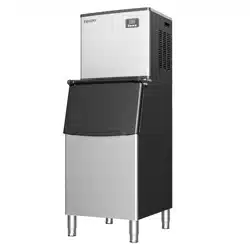
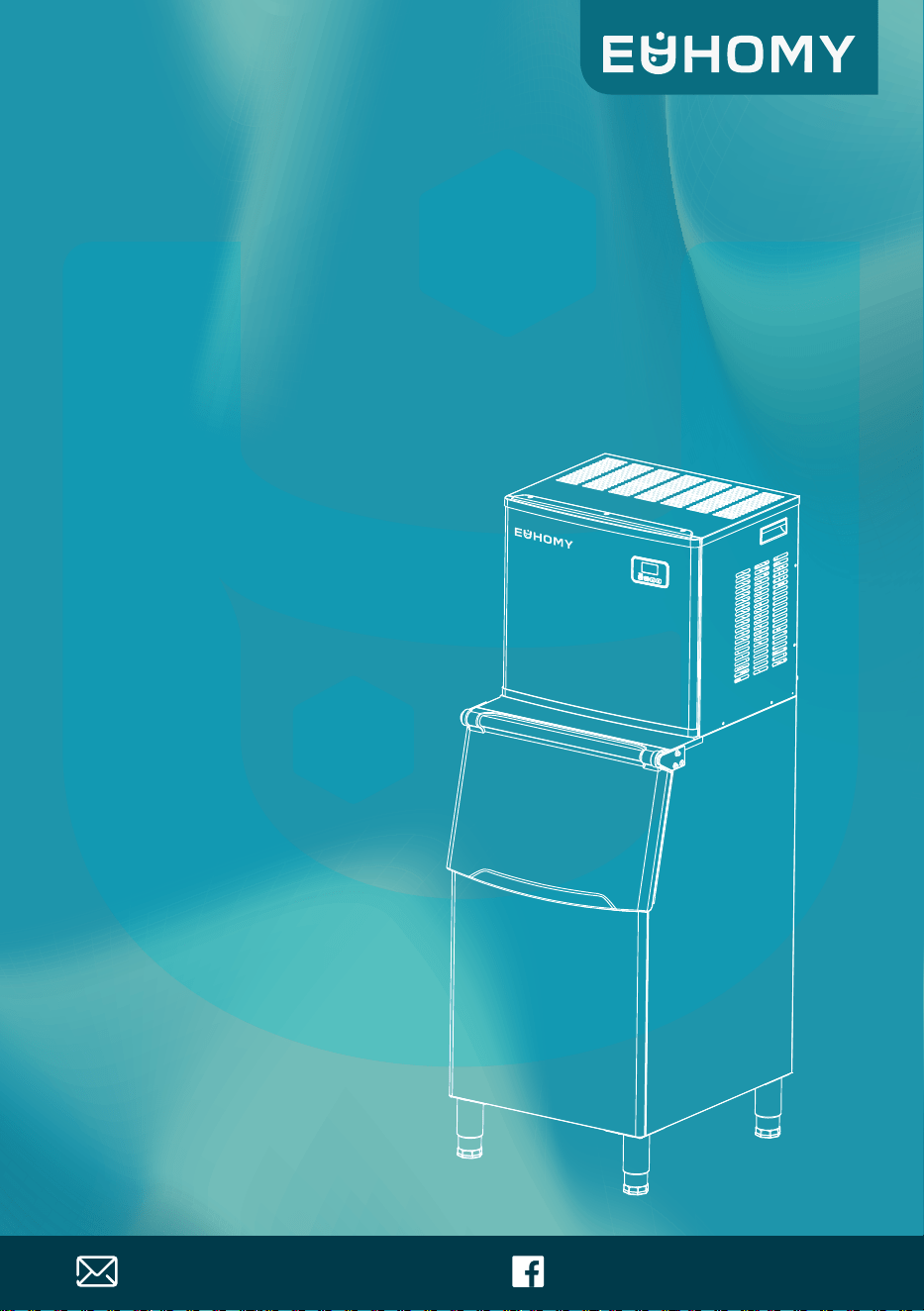
Commercial ice machine
Instruction Manua
SKU:CIM-02
l


Congratulations
Dear Customer:
Welcome to the Euhomy family. Thank you for purchasing one of our products.
Our goal is to provide you with superior service. If there is anything missing from or wrong with
your order, or if you have any questions about using our ice maker, PLEASE contact us.
Email: [email protected]
Facebook: @Euhomy.Official
The Euhomy team is available 24/7 to address your questions, comments, and concerns. Your
satisfaction is our ultimate goal. We want to make everything right so you'll share your positive
experience with other shoppers on Amazon.
If you experience any problems, please send an email to [email protected].
Our mission:
* To be the most trusted appliance brand.
* To create practical, compact appliances that better your life.
Be sure to register at
www.euhomy.com/register
for updates, warranty, and other relevant information.

Contents
07-09
10-11
02-04
05-06
12-15
16-17
18-19
Important Safety Instructions
Specifications
Installation Instructions
Unpacking Your Ice Maker
Electrical Requirements And Connections
Operating Your Unit
Wiring Diagram
20-24
Cleaning And Maintenance
Normal Troubleshooting
25-26
01
Warranty 27
Important Safety Instructions
When using electrical appliances, basic safety precautions should be followed to
reduce the risk of fire, electric shock, and injury to persons or property. Read all
instructions before using any appliance.
Use this appliance only for its intended purpose as described in this owner's manual.
This ice maker must be properly installed in accordance with the installation instructions before it
is used.
This unit must be positioned so that the plug is accessible. Do not run the cord over carpeting or
other heat insulators. Do not cover the cord. Keep the cord away from traffic areas. Do not
submerge the cord in water. No other appliance should be plugged into the same outlet. Be sure
that the plug is fully inserted into the receptacle.
We do not recommend the use of an extension cord as it may overheat and cause a fire. If you
must use an extension cord, use a size 14AWG minimum, rated no less than 1875 W.
If the supply cord is damaged, it must be replaced by the manufacturer, its service agent, or a
similarly qualified person in order to prevent a hazard.
Disconnect the power cord from the electrical socket if the ice maker will not be used for a long
time.
Remove the power cord or disconnect it from the electrical socket before cleaning or servicing the
appliance.
Never unplug the unit by pulling on the power cord. Always grasp the plug firmly and pull it
straight out from the outlet.
Do not use your unit outdoors. Keep the unit out of direct sunlight. Be sure that there is at least 2
inches of space between the back of your unit and the wall. Do not block the front of the unit.
Keep the vents clear of obstructions.
Do not tip over the unit. Doing so will cause abnormal noises, make the ice cubes irregular in size,
and—most seriously—cause water leakage from the unit.
If the unit is brought in from outside in cold weather, give it a few hours to warm up to room
temperature before plugging it in.
Do not use liquids other than water to make ice cubes.
Do not clean your ice maker with flammable fluids. The fumes can create a fire hazard or explosion.
NOTE:
If for any reason this product requires service, we strongly recommend that a
certified technician perform the service.
02

Important Safety Instructions
Do not damage the refrigerant circuit.
WARNING:
This appliance is not intended for use by persons (including children) with reduced
physical, sensory, or mental capabilities, or lack of experience and knowledge, unless they have
been given supervision or instruction concerning use of the appliance by a person responsible for
their safety.
WARNING:
Children should be supervised to ensure they do not play with the appliance.
WARNING:
This appliance must be grounded. Use a 110–120V/60Hz grounded power supply.
WARNING:
Do not store explosive substances, such as aerosol cans with a flammable propellant, in this
appliance.
WARNING:
This appliance is intended to be used in household and similar applications, such as staff kitchen
areas in shops, offices, and other working environments;
farmhouses; in hotels, motels, and other residential-type environments; bed-and-breakfasts
and similar environments; and catering and similar non-retail applications.
WARNING:
Risk of Fire or Explosion. Flammable Refrigerant Used. Do Not Use Mechanical Devices
to Defrost Ice Maker. Do Not Puncture Refrigerant Tubing.
Risk of Fire or Explosion. Flammable Refrigerant Used. To Be Repaired
Only by Trained Service Personnel. Do Not Puncture Refrigerant Tubing.
DANGER:
DANGER:
03
Important Safety Instructions
Risk of Fire or Explosion. Flammable Refrigerant Used. Consult Repair Manual/Owner's Guide
Before Attempting to Install or Service This Product. All Safety Precautions Must Be Followed.
CAUTION:
Risk of Fire or Explosion. Dispose of Property in Accordance With Federal or Local
Regulations. Flammable Refrigerant Used.
CAUTION:
Risk of Fire or Explosion Due to Puncture of Refrigerant Tubing. Follow Handling Instructions
Carefully. Flammable Refrigerant Used.
CAUTION:
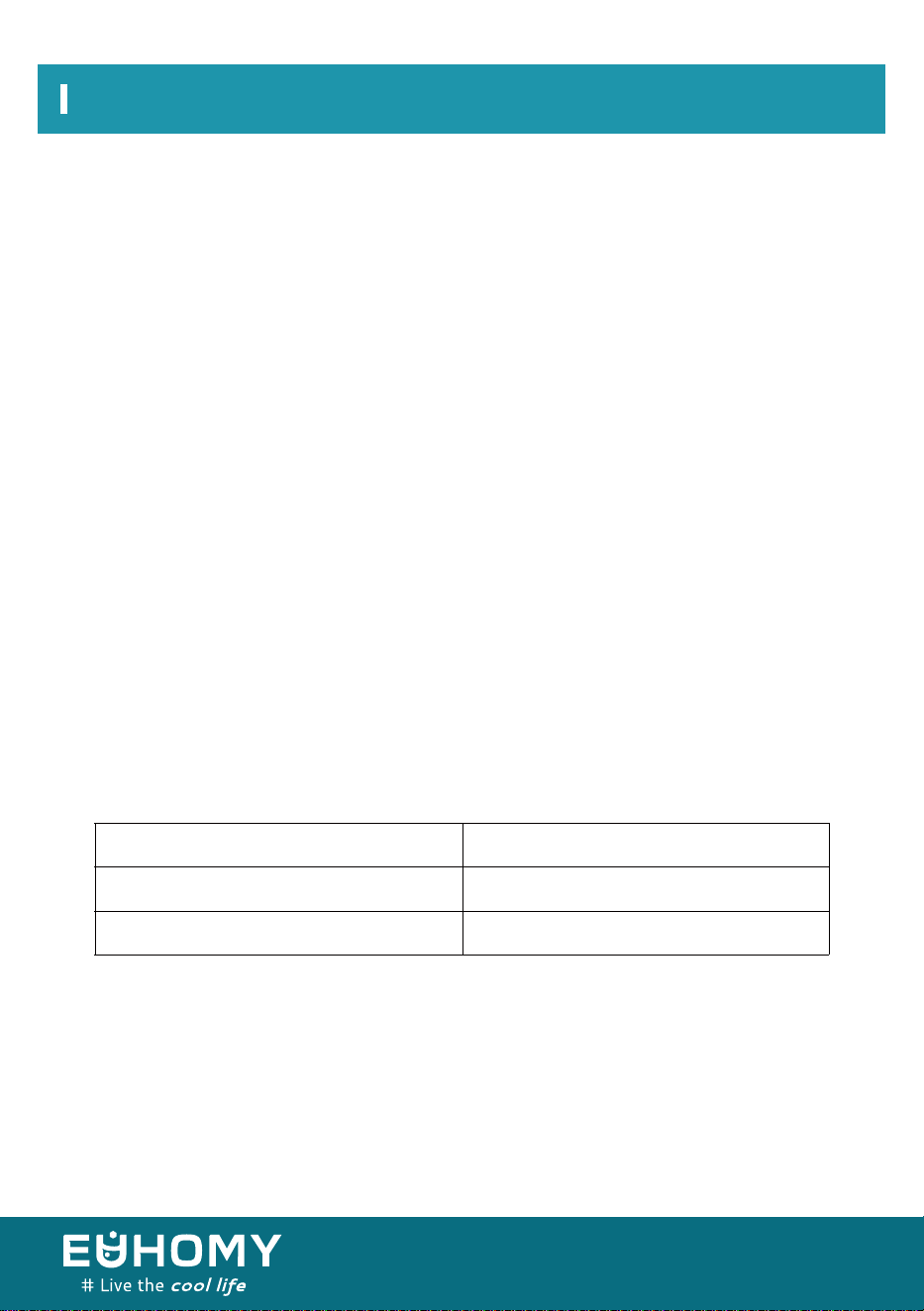
The wires in the power cord are colored in accordance with the following code:
To prevent a hazard due to instability of the appliance, it must be placed on a flat, even surface.
IMPORTANT:
The ice maker should be installed in accordance with the safety standard for refrigeration systems,
ASHRAE 1 5.The ice maker shall not be installed in corridors or hallways of public buildings.
If the unit needs maintenance or repairs, the service shall be performed by factory-authorized
service personnel with like parts to minimize the risk of possible ignition due to incorrect parts or
improper service.
Green, or green with a yellow stripe
White
Black
Grounding
Neutral
Live
04
Specifications
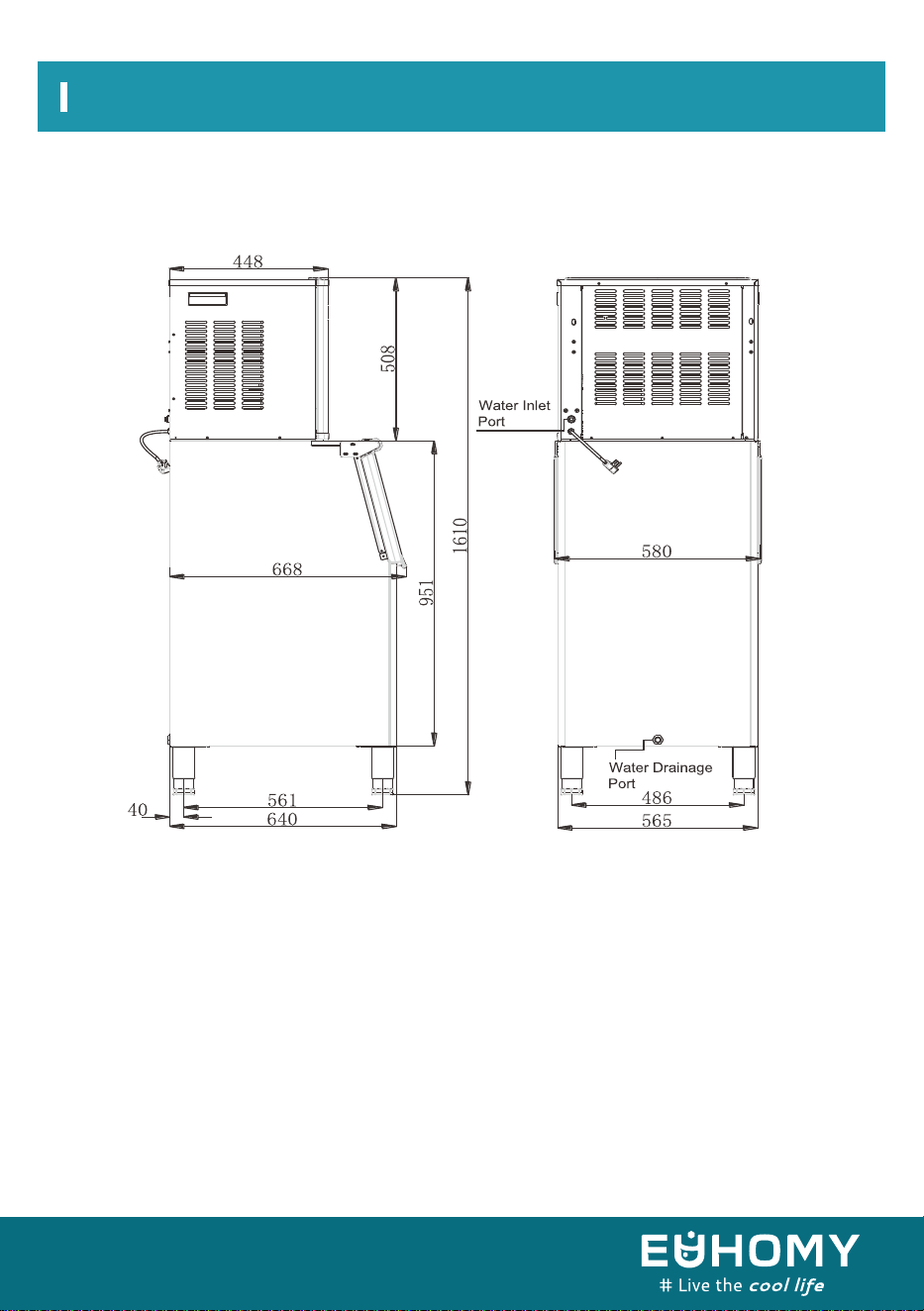
1)Dimensions/connections
05
Specifications
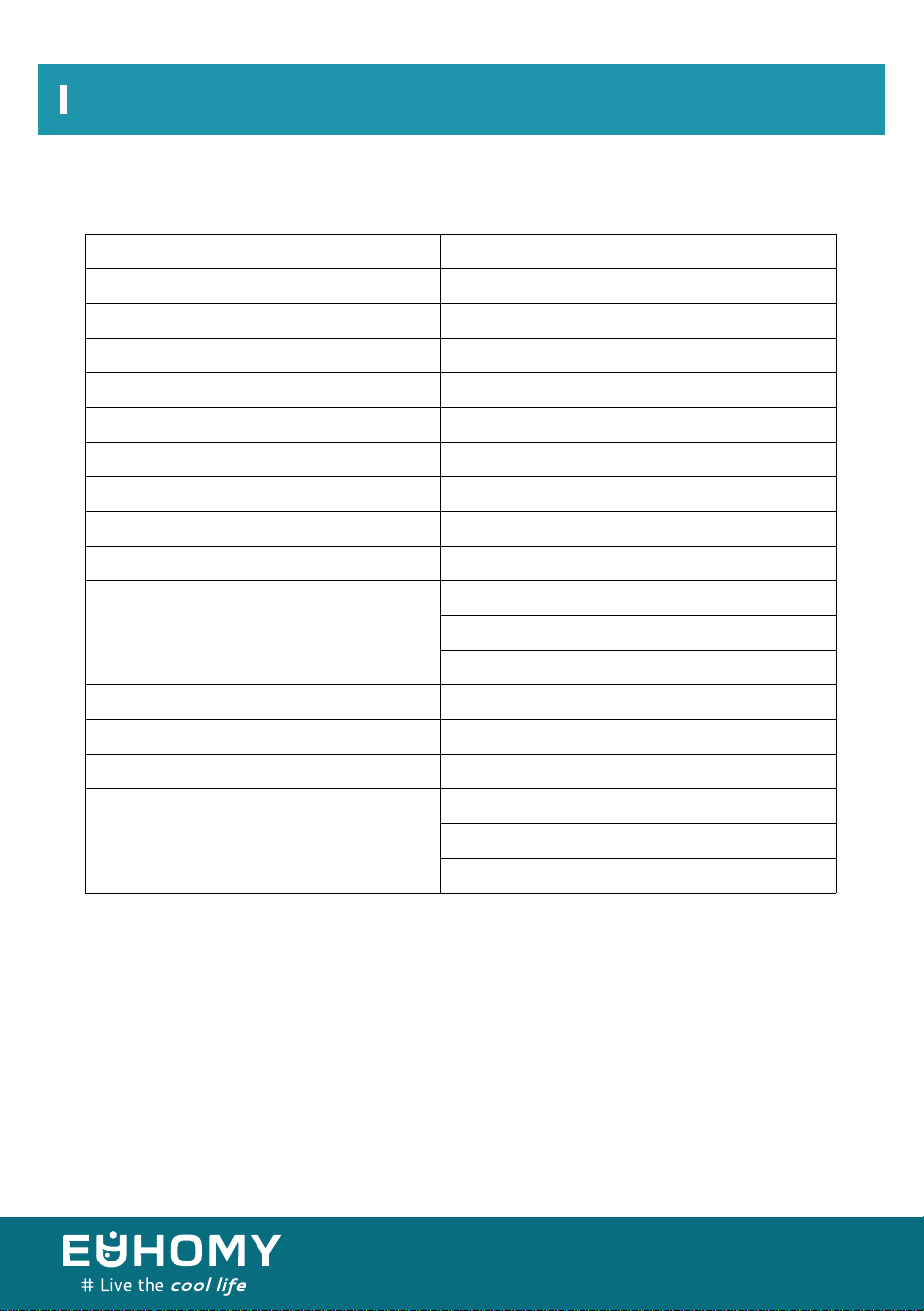
2) Rating
* TESTED AT 70 °F ROOM TEMPERATURE AND 50 °F WATER TEMPERATURE.
SKU
Power Supply
Climate Class
Electrical - protection Class
Ice-making Rating
Ice -making Capacity
Refrigerant Charge
Net Weight
Vesicant
Unit Dimensions(W×d×h)
Connection
Water Consumption
Max Ice - storage Capacity
Accessories
Running Conditions*
CIM -02
Single-phase,110-120v/60hz
10-40℃
I
9.7 a
190kg/24hr
R290 3.88 oz/110 g
C
5H
Ice Maker 81lb Ice Bin 62lbs
10
668×580×1,610mm
Power Cord—16AWG
Water Supply—9.52mm Diameter
Drain— Φ16 Sylphon Bellows (Rear)
210 l/24hr
90kg
Shovel, Installation Kits, 4 Adjustable Feet
Room Temp: 50-110°f
Water Temp: 41-95°f
Water-supply Pressure: 0.04-0.6mpa
06
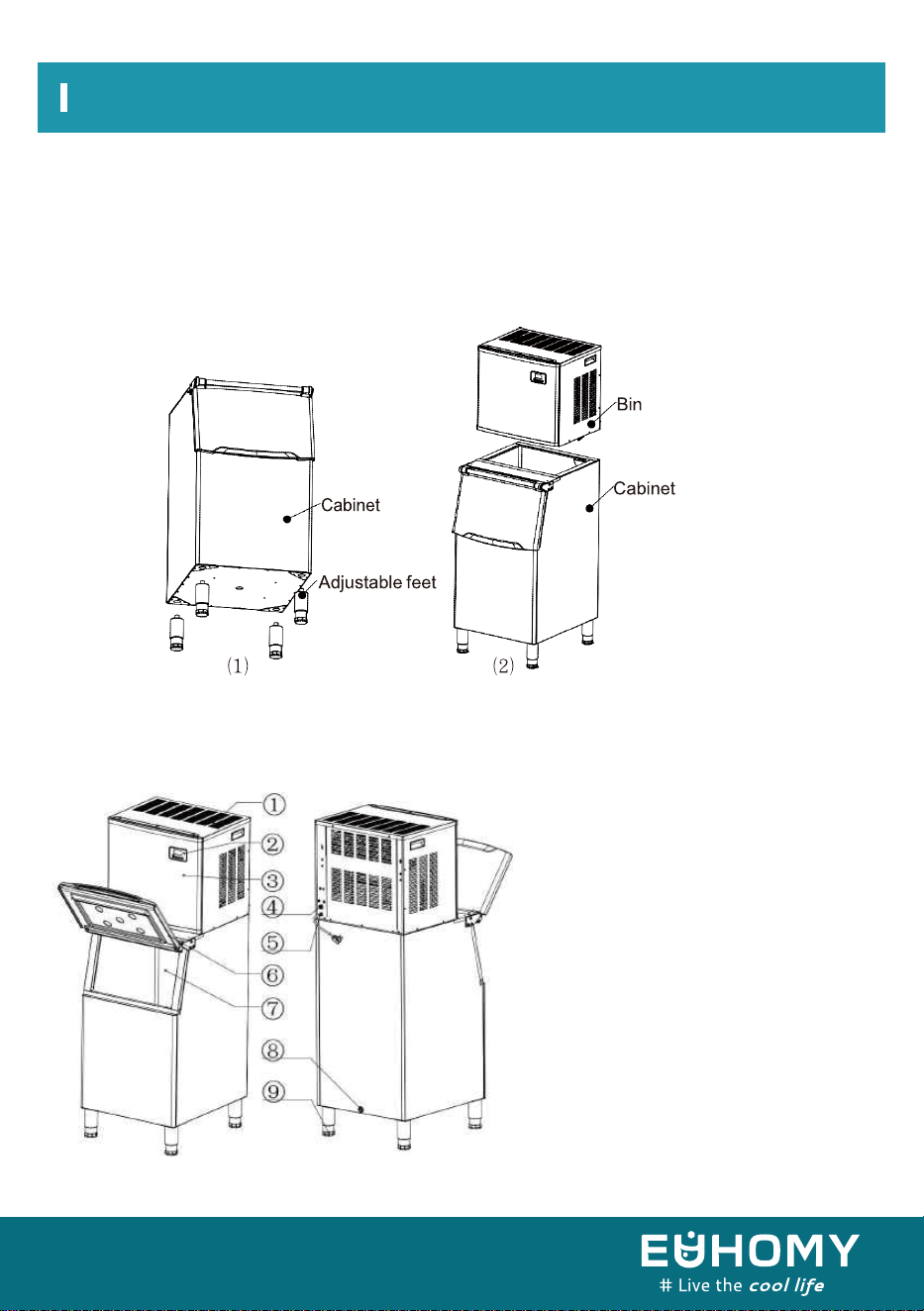
Installation Instructions
1. Screw the 4 adjustable feet into the bottom of the ice cabinet. (Note: The feet should be
hand-tight and not too loose.)
2. Put the ice cabinet on the floor. Set the bin on top of the ice cabinet. (Note: The bin should be
firmly in place after completing the installation.)
1. Top vents (to ensure smooth
air flow and allow hot air to
escape when making ice)
2. Control panel
3. Front panel
4. Outlet tube connection (water inlet)
5. Power cord
6. Door
7.Ice-machine liner
8. Drain (Remove the white drain
pipe from the packaging.)
9. Adjustable feet
Main machine assembly
About The Machine
I. Body
07
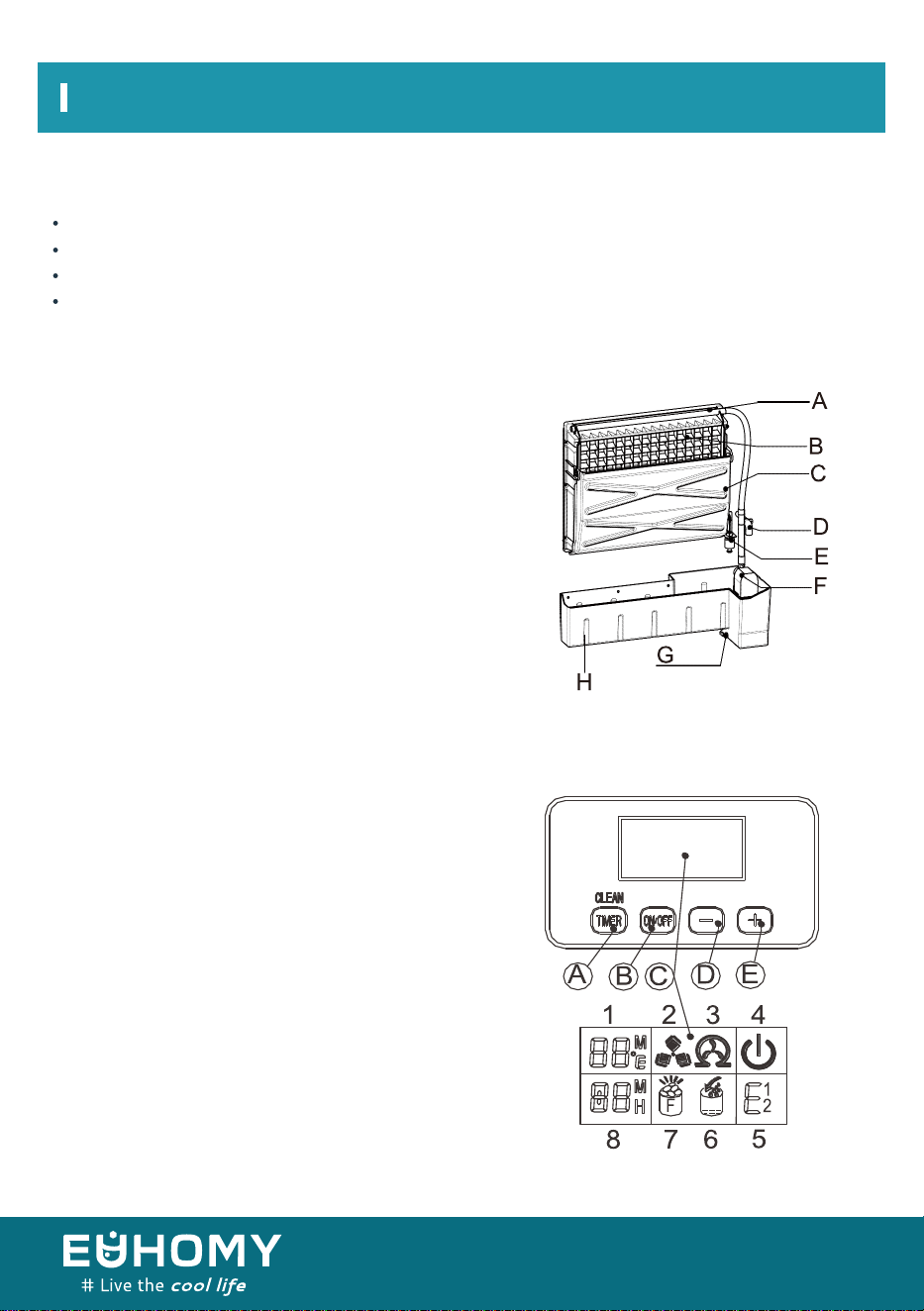
Installation Instructions
Water drain pipe, white, 3 meters
Quick connector for water faucet
Water supply pipe, white, 5 m long and 9.52 mm in diameter
Adjustable feet (x4)
A. Distribution pipe
(Water flows through small holes when making ice.)
B. Evaporator
C. Ice-full sensor
D. Water supply pipe
E. Level switch
F. Pump for water circulation
G. Drain plug for water tank
H. Water tank
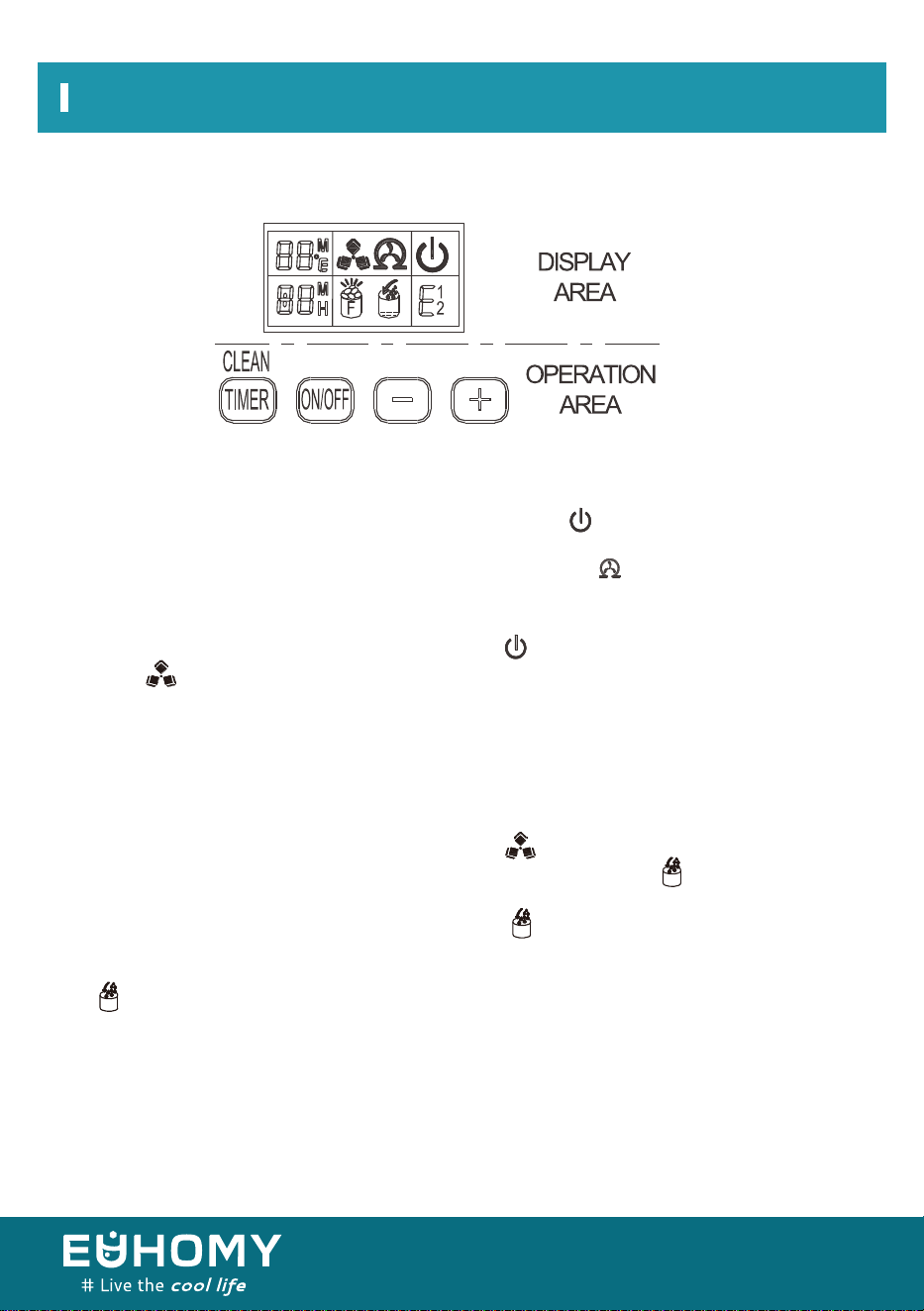
A. TIMER/CLEAN:
Quickly press this button once. The machine is set for
timing; if you press and hold the button
for more than 5 seconds, the machine will enter the
automatic cleaning program.
B. ON/OFF:
When the machine is making ice, press and hold the
button for more than 5 seconds, the machine will be
forced to enter the state of deicing.
When the machine automatically enters the cleaning
state after the machine is turned on, press the "Timer
Cleaning" button alone.
Exit the cleaning state and start ice making.
Accessories
II. Mechanism
III. Operation panel
08

Installation Instructions
C. LCD display area
D&E. + and – buttons:
Use to adjust the length of the ice-making cycle. The default setting is 0. Pressing + or – increases
or decreases the cycle in 1-minute increments, respectively. Additionally, use these buttons to set
the timer. The default setting is 0. Pressing + or – increases or decreases the time in 1-hour
increments, respectively.
1. Ambient temperature display and ice-making countdown display: “M” indicates the ice-making
countdown time, and “F” indicates the ambient temperature.
2. Ice-making and deicing symbol display: A rotating symbol indicates that the machine is making
ice, whereas a flashing symbol indicates deicing.
3. Automatic self-cleaning symbol display
4. On/off symbol display
5. Error code display: “E1” means the temperature sensor is damaged, whereas “E2” indicates an
ice-making anomaly or a refrigerant leakage.
6. Water intake and water shortage display: A flashing arrow indicates that the machine is filling.
When the whole symbol is lit, this indicates that the machine is low on water.
7. Ice-full alarm: The machine will start making ice again when you take out the ice.
8. Setting display: “H” indicates the time for regular startup or shutdown, whereas “M” indicates
the ice-making time setting.
09

Unpacking Your Ice Maker
1. Remove the exterior and interior packaging. Check that all accessories (listed below) are
included and contact our customer service department if anything is missing.
a.Instruction manual
b.Ice scoop
c.White water-inlet pipe
d.L-shaped 3-point quick-connector to 3-point plug
e.Adjustable feet (4 ea.)
f.4-way to 3-way water pipe quick-connector
2. Remove the tape used to secure the door, inner cabinet, ice scoop, etc. Gently clean the
inner cabinet and ice scoop with a wet cloth.
3. Put the ice maker on a flat, level floor, out of direct sunlight and away from sources of
heat (e.g., stove, furnace, radiator). Be sure that there is at least an 8-inch gap between the
air vent and any other objects, and at least 2 inches between each side and the wall.
4. After unpacking the ice maker, allow 4 hours for the refrigerant fluid to settle before
Unpacking Your Ice Maker
10
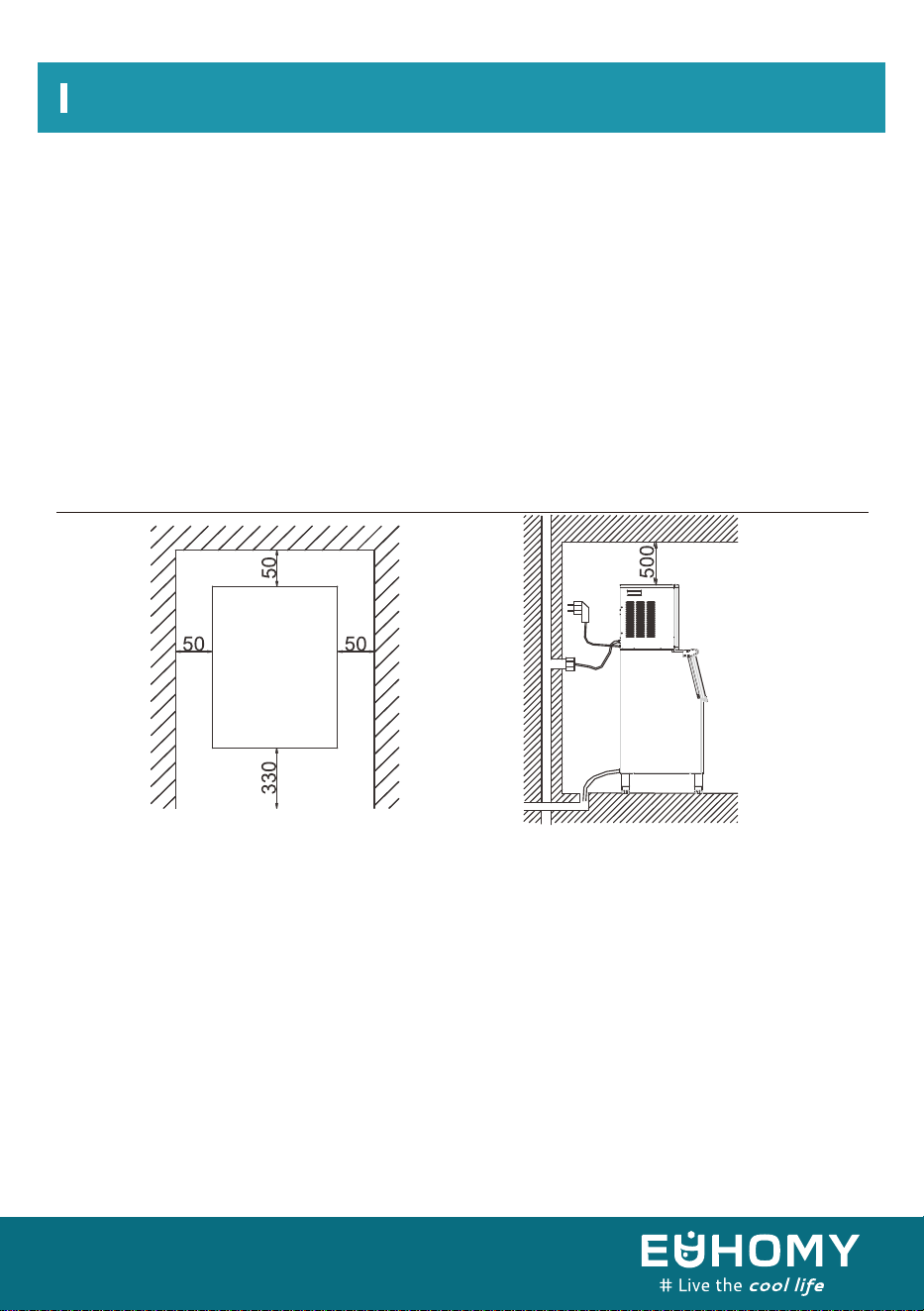
Unpacking Your Ice Maker
a) This unit is not for outdoor use. Ensure the proper room temperature and inlet
water temperature according to the above specification table. Otherwise, ice making will be
affected.
b) This unit should not be located near any heat source.
c) The unit must be installed so that it will remain stable and not shake or be bumped. Place
the unit on a flat, level floor.
d) There must be at least a 2-inch clearance in back for connections and a 13-inch clearance
in front to open the door and maintain good air circulation.
e) Do not put anything on the top of the ice maker.
To ensure proper ventilation for your ice maker, the top of the unit must be completely
unobstructed (at least 500mm of free space). Allow at least 50mm of clearance at rear and
50mm at sides for proper air circulation. The installation should allow the ice maker to be
pulled forward for servicing if necessary. When installing the ice maker, follow the
recommended spacing dimensions shown above. Place electrical and water supplies and
drain fixtures in the recommended locations as shown.
Choose a well-ventilated area with an ambient temperature between 50 °F and 90 °F. This
unit MUST be installed in an area protected from the elements (wind, rain, water spray, etc.).
The ice maker requires a continuous water supply at a pressure of 1-8 bar as required
according to the above specification table. The temperature of the water feeding into the
ice maker should be between 41 °F and 77 °F for proper operation.
nstallation clearancetop
view ( 1 : 10 ) (mm)
Side view (mm)
11
Electrical Requirements And Connections
Warning: This Unit Must Be Grounded.
Before you move your ice maker into its final location, it is important to be sure you have the
proper electrical connection.
It is recommended that a separate circuit serving only your ice maker be available. Use a
receptacle that cannot be turned off by a switch or pull chain. If the supply cord or plug must
be replaced, it should be done by a qualified service engineer.
This appliance requires a standard 110–120V, 60Hz electrical outlet with good grounding
means.
For your personal safety, this appliance must be properly grounded. The unit is equipped with
a power cord featuring a grounding plug. To minimize possible shock hazard, the cord must
be plugged into a mating grounding-type wall receptacle, grounded in accordance with the
National Electrical Code and local codes and ordinances. If a mating wall receptacle is not
available, it is the personal responsibility of the customer to have a properly grounded wall
receptacle installed by a qualified electrician.
Electrical Requirements And Connections
Recommended grounding method
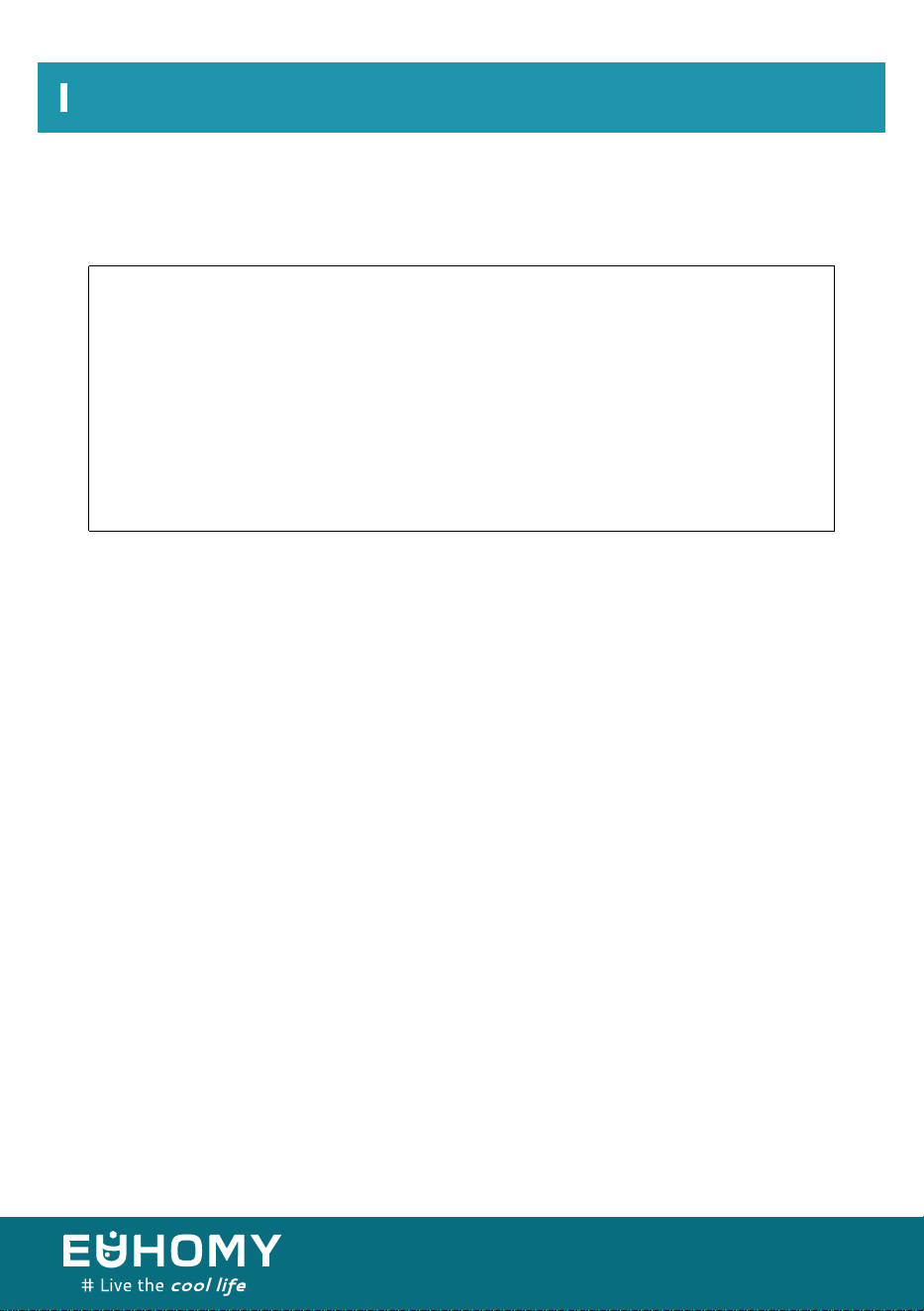
Electrical Shock Hazard
Plug into a grounded wall outlet.
Never remove the grounding prong.
Use a separate power supply or receptacle.
Never use an adapter.
Never use an extension cord.
Failure to follow these instructions can result in death,fire,or electrical shock.
12
Before using your ice maker, it is strongly recommended to clean it thoroughly.
1. Open the door to the ice bin.
2. Clean the interior of the bin with diluted detergent, warm water, and a soft cloth.
3. Repeatedly clean the interior until it is fully clean. We suggest that you discard the ice cubes
made in the first ice-making cycle after cleaning.
4. The outside of the ice maker should be cleaned regularly with a mild detergent solution and
warm water.
5. Dry the interior and exterior with a clean, soft cloth.
Important: Be sure to use the new hose sets supplied with the appliance to connect to the water
supply. Old hose sets should not be reused.
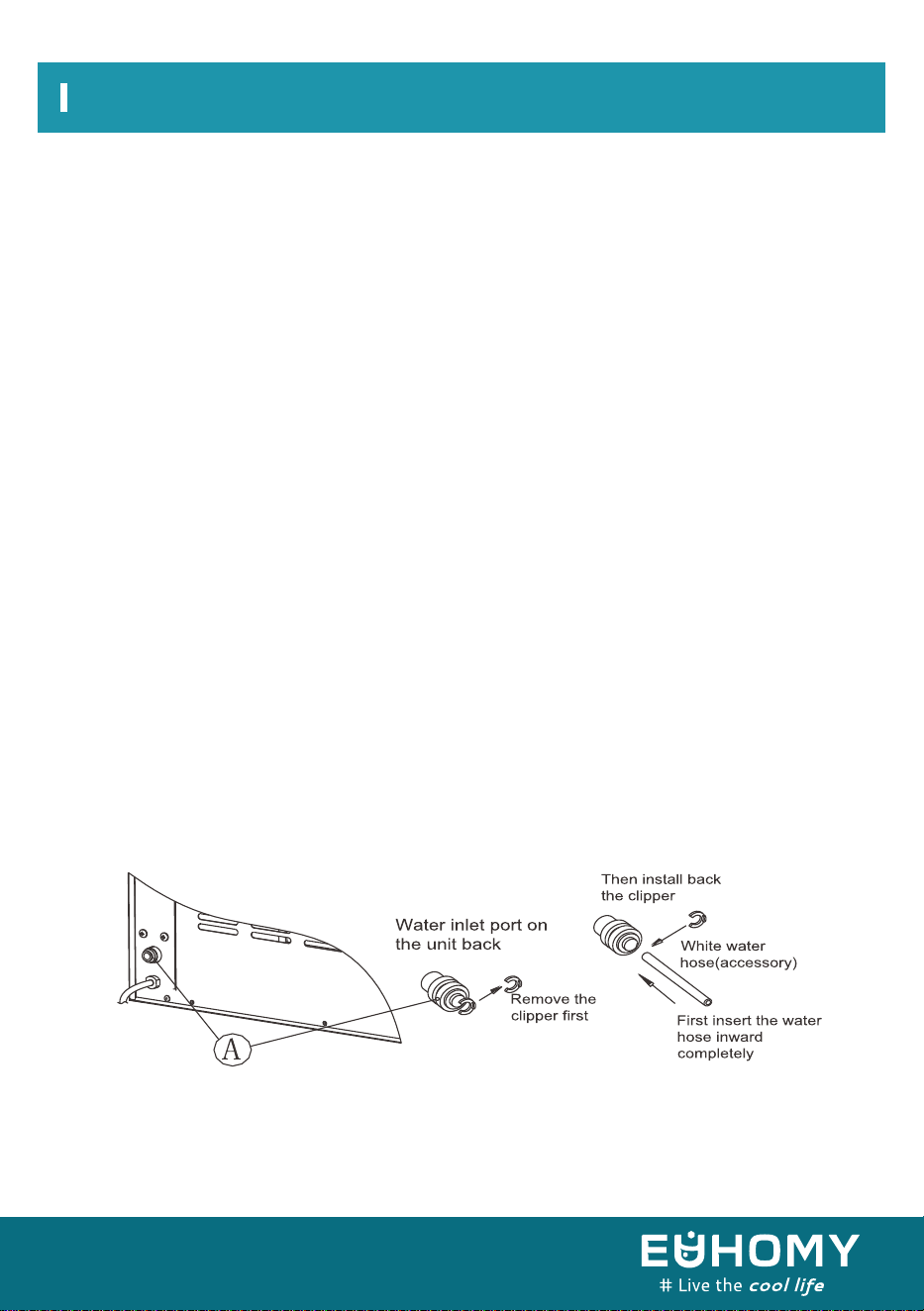
Step 1: Remove the tape from the water-inlet port for the water supply (indicated by “A” in the
following illustration) located at the unit back. Then, press out the circle.
Step 2: Insert one end of the white water hose into the water inlet port and push the hose inward
completely. Reattach the clip. This completes the water-hose connection.
1. Connect the water-supply hose to the unit.
Cleaning Your Ice Maker Before First Use
Water Connection For Your Ice Maker
Electrical Requirements And Connections
Unit back view STEP 1: Remove tape. Step 2: Insert water hose
completely. Then reattach clip
13
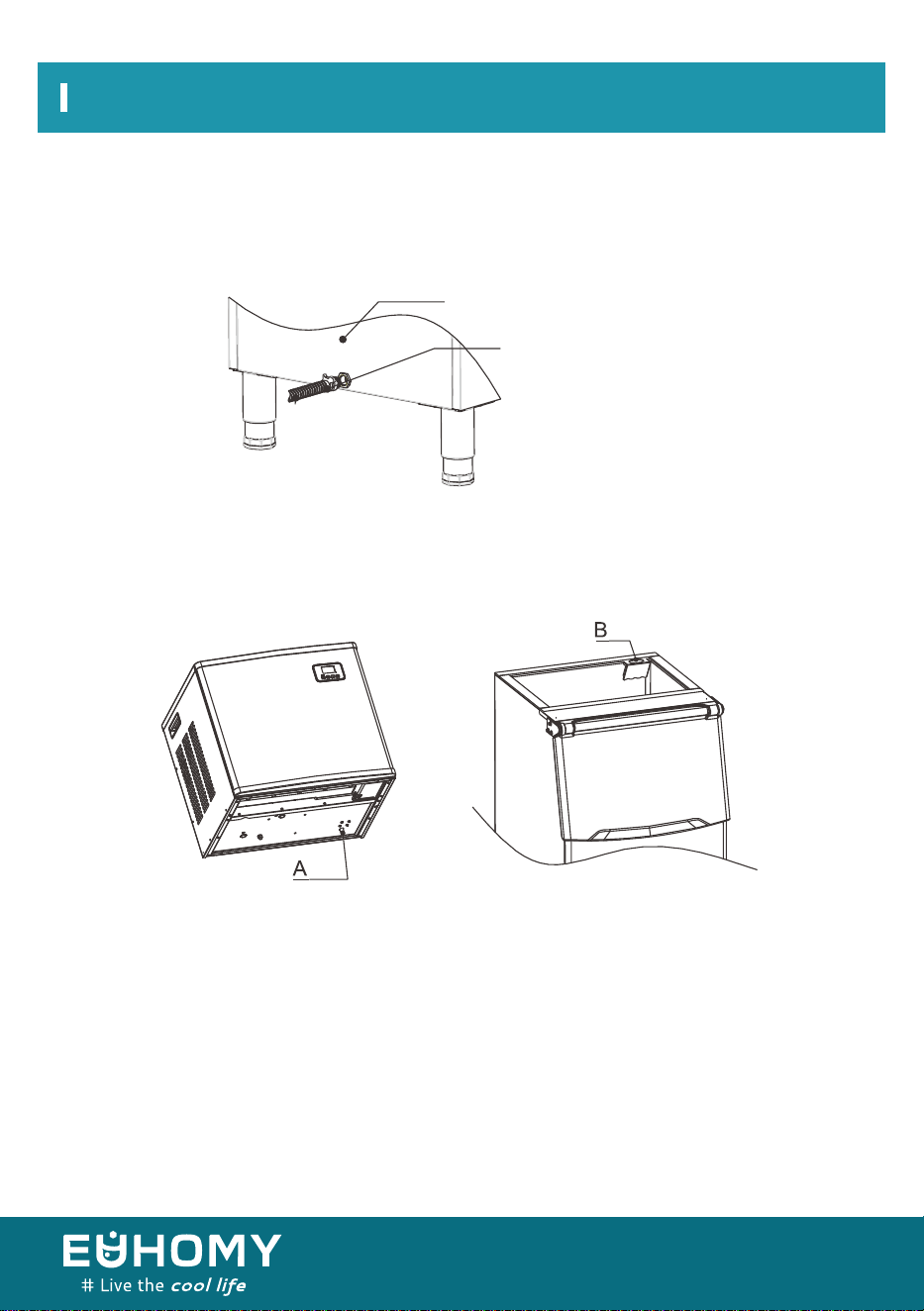
Screw the white drainpipe assembly into the drainage port of the ice bin. Connect the other
end of the drainpipe assembly to the sewer pipe.
When the mechanism is placed on the cabinet, the drain (position A, shown below) of the
mechanism needs to be connected with the hole of the drain baffle on the cabinet (position B,
shown below).
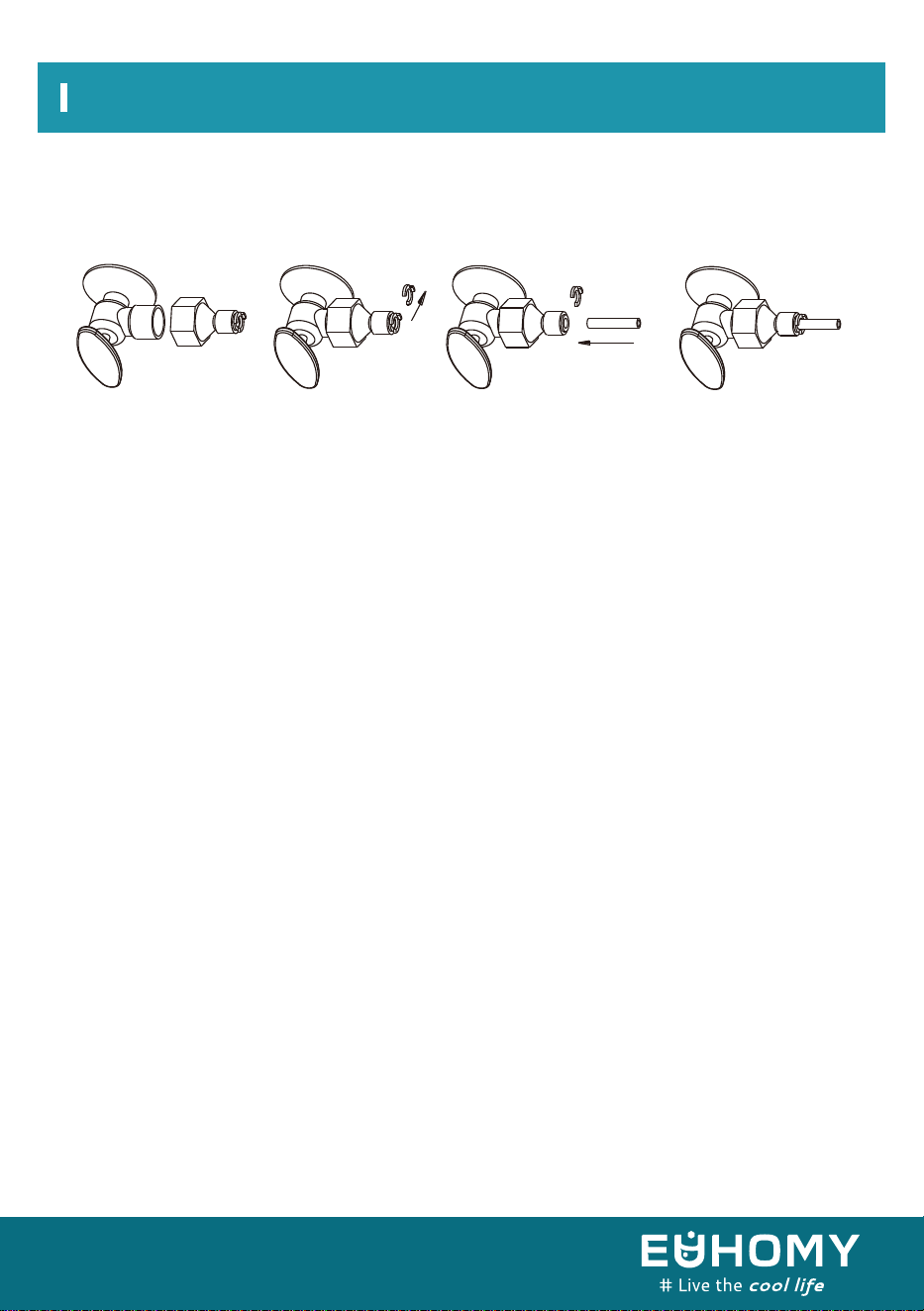
First, screw the supplied water quick-connector onto a water faucet. Then, remove the clip from
the water quick-connector. Next, insert the other end of the water hose into this quick-connec-
tor port completely. Finally, reattach the clip.
Electrical Requirements And Connections
2. Connect the water drain pipe.
3. Connect the ice maker to the drain of the ice bin.
4. Connect the water hose to the faucet of the main water supply.
Important: The water pressure at the main water supply system must be at
least 0.04–0.6 MPa.
drainpipe
ice bin
14
Electrical Requirements And Connections
STEP 1: Attach
quick-connector to
water faucet
STEP 2: Remove the
clipper
STEP 3: Insert water
hose completely
STEP 4: Reattach clip
Remove
the clipper
Push
inwards
15
Control panel and display area diagram
1. Turn on the ice machine: Plug in the unit. The power symbol will flash. Press the “ON/OFF”
button. The external water pipe will add water to the tank through the solenoid valve. The machine
will start to self-clean after the water is tank is full. The symbol “ ” will rotate on the display.
After draining for 50 seconds, the machine will automatically refill the tank and self-clean again.
To cancel the cleaning process, press the “TIMER/CLEAN” button.
After cleaning, the machine will start to make ice. The “ ” symbol will stay on, and the ice-mak-
ing symbol will rotate. The current ambient temperature will be displayed at the top left of the
display window. After a few minutes, a flashing number will appear in the ambient temperature
display area. For example, “10M” means there is 10 minutes remaining in the ice-making cycle.
When the machine is used for the first time or has been shut down for more than 24
hours, the automatic cleaning program will run upon startup. The cleaning program will
also run after every 20 batches of ice.
2. After each ice-making cycle, the ice-making symbol flashes. The external water pipe will
add water to the tank through the solenoid water valve. The arrow on the symbol flashes in
the process of adding water to the standard water level of the tank. The unit will then enter the
next ice-making cycle. When the water tank is full, the symbol lights up and the machine
stops working.
When the water tank is on/off, the water cannot reach the standard water level of the water tank.
The symbol will be on and the machine will stop working. When the water level is low, the
machine needs to be restarted; otherwise, it will wait for about 15 minutes and turn on automati-
cally.
Note: Each ice making cycle takes approximately 11 to 20 minutes, depending on the ambient
temperature and the temperature of the water being added.
Especially for the first time, the ice-making cycle will be longer because of the higher water
temperature in the tank. However, the ice-making cycle will not exceed 30 minutes.
Making ice
Operating Your Unit
16
Operating Your Unit
3. Adjust the ice thickness: The number in the bottom left of the display window is the setting of
the ice-making time (default is 0). Press “+” to increase the time in 1-minute increments for
thicker ice.
Press “-” to decrease the time in 1-minute increments for thinner ice. Note: The time you set
changes only the next ice-making cycle. Restarting the machine resets the default to “0”.
4. When the “ ” symbol lights up, the machine will stop working. It will work again after you
take out the ice.
5. Shut down the unit: During the ice-making process, press the “ON/OFF” button to shut
down the unit and put it in Standby mode. If you press “ON/OFF” longer than 5 seconds during
ice-making, the unit automatically enters the deicing process. This function can help remove the
ice from the ice plate. Press “ON/OFF” again to shut down the machine.
6. Timing setting: Setting range = 1-24 hours
When the unit is running, you can program the timer to schedule the shutdown.
When the unit is on Standby, you can program the unit to turn on ON-TIMER.
How to set the timing
Press the TIMER button. The default timing time shows in the display window as "1H." Press ”+“
or ”–“ to increase or decrease the timing as desired in 1-hour increments. When adjusting the
time, the "H" will flash. After 5 seconds of inactivity, the "H" will become steady, indicating that
the timer has been set.
In Standby mode, “5H” on the display means the unit will start automatically after 5 hours. In
ice-making mode, “5H” means the machine will shut down automatically after 5 hours. The "H" in
the display screen indicates that the machine currently has a timing function, and the number will
count down to zero. At that point, the timing ends, and the machine enters the mode you need.
How to cancel the timing
When the unit has a timer set (the display window will display XX H), press “TIMER” to cancel the
timer. The timer is canceled after the number on the screen and "H" turn off.
When the unit has a timer set, the display area in the lower left corner will display the set time and
the ice-making setting time. The display content will switch every 5 seconds.
7.Automatic self-cleaning program
Turn on the ice machine: Plug in the power cord. The power symbol “ ” will flash. Press
“ON/OFF” to let the tank start filling. The machine will start to self-clean after the water is high
enough. The symbol “ ” will revolve on the display. The countdown area will display “90M.”
Canceling the self-cleaning program: It takes about 90 minutes to complete one self-cleaning
cycle. When the cycle is over, the system will turn off automatically. You can also press the
“ON/OFF” button on the control panel to cancel the self-cleaning program by force.
17
You will hear a swooshing sound when the water valve opens to fill the water tank for each
cycle.
Rattling noises may come from the flow of the refrigerant or the water line. Items stored on
top of the ice maker can also make noises.
The high-efficiency compressor may make a pulsating or high-pitched sound.
Water running from the water tank to the evaporator plate, and vice versa, may make a
splashing sound.
As each cycle ends, you may hear a gurgling sound due to the refrigerant flowing in your ice
maker.
You may hear air being forced over the condenser by the condenser fan. During the harvest
cycle, you may hear ice cubes falling into the ice storage bin.
When you first start the ice maker, you may hear water running continuously. The ice maker
is programmed to run a rinse cycle before it begins to make ice.
18
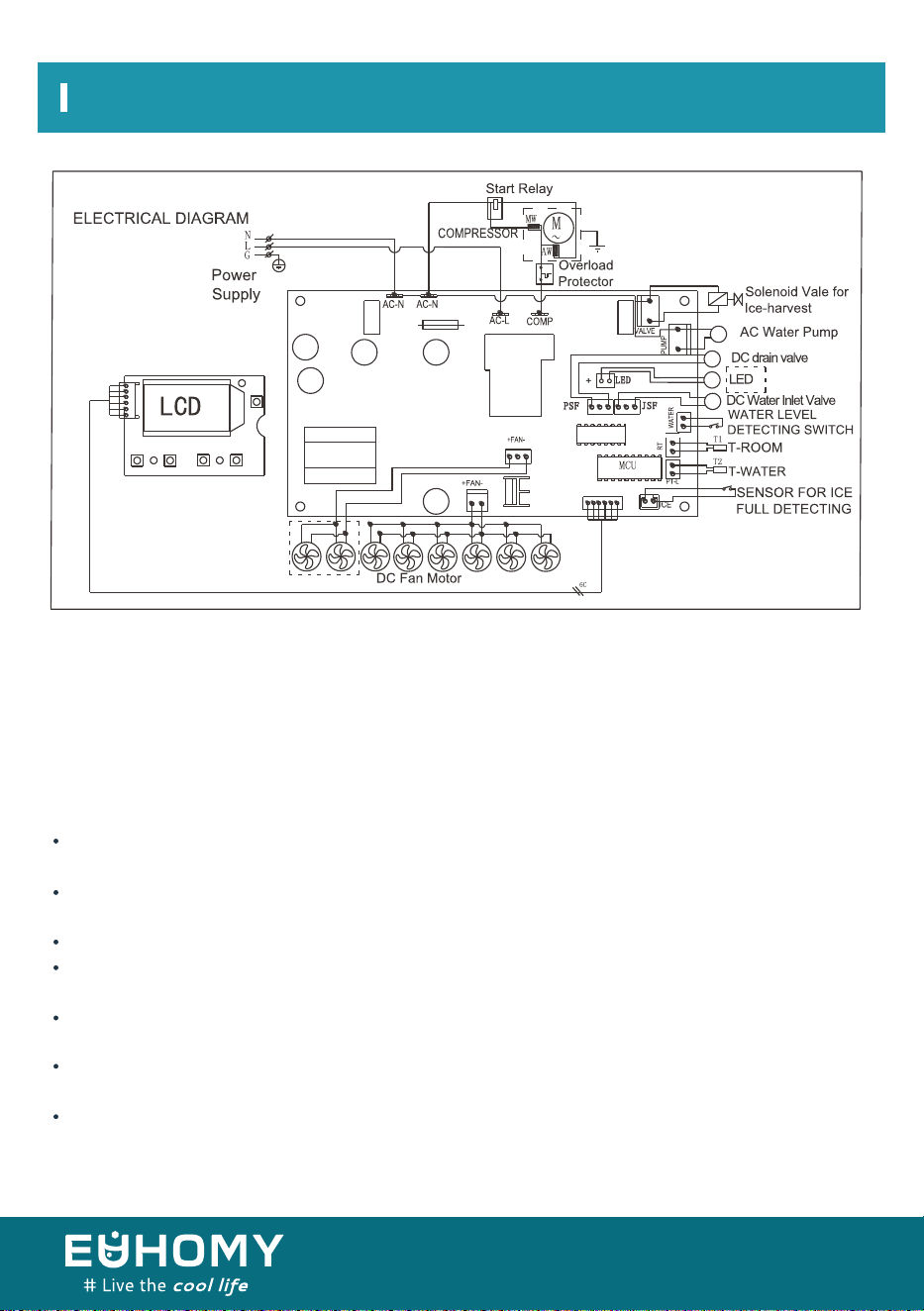
Wiring Diagram
Your new ice maker may make unfamiliar sounds. Most of these sounds are normal. Hard surfaces
such as flooring, walls, and cabinets can make the sounds seem louder than they actually are. The
following describes the kinds of sounds that might be new to you and what may be making them.
Normal Sounds
Note: Not all models feature the fans pictured inside the dotted lines.
19
Wiring Diagram
Preparing the Ice Maker for Long Storage
If the ice maker will not be used for a long time or is to be moved to another place, it is necessary
to drain out all of the water in the system.
1. Ensure that all ice cubes have been ejected from the evaporator of the ice maker.
2. Turn off the unit and unplug the power cord.
3. Shut off the water at the main water supply.
4. Disconnect the water-supply hose from the water-inlet valve.
5. Pull out the water-drainage cap of the water tank to drain out the water in the water tank.
When all of the water has been drained out, re-place the water-drainage cap in the water tank.
6. Drain out all of the water from the water-drainage port located at unit back.
7. Disconnect the water-drainage pipe to the main drain pipeline or floor drain.
8. Drop the door open to allow for circulation and prevent mold and mildew.
9. Leave the water-supply hose and power cord disconnected until ready to reuse.
10. Dry the interior and wipe the exterior of the unit.
11. Put a plastic bag over the unit to protect it from dust and dirt.
NOTE:
20
Cleaning And Maintenance
WARNING:
Exterior Cleaning
Never keep anything in the ice-storage bin other than ice. Objects such as wine and beer bottles
are unsanitary, and their labels may slip off and obstruct the drain pipe.
The door and cabinet may be cleaned with a solution of mild detergent and warm water (such as 1
ounce of dishwashing liquid mixed with 2 gallons of warm water). Do not use solvent-based or
abrasive cleaners. Use a soft sponge and rinse with clean water. Wipe with a soft, clean towel to
prevent water spotting.
NOTICE: Stain steel models can discolor when exposed to chlorine gas (such as in areas with hot
tubs or swimming pools) or moisture. Although such discoloration is normal, the unit should be
cleaned promptly after such exposure. Clean stainless steel models with a cloth dampened with a
solution of mild detergent and warm water. Never use abrasive cleaning agents.
Before carrying out any cleaning or maintenance operations (with the exception of the self-clean-
ing program), unplug the ice maker from the main power supply.
Do not use any alcohol or fumes for cleaning/sanitization of the ice maker. To do so may cause
cracks in the plastic parts.
Ask a trained service person to check and clean the condenser at least once a year to keep the unit
working properly.
This appliance must be cleaned by use of a water jet.
Periodic cleaning and proper maintenance will ensure the efficiency, top performance, sanitation,
and long life of the machine. The maintenance intervals listed are based on normal conditions. You
may want to shorten the intervals if you have pets, the unit is used outdoors, or there are other
special considerations.
CAUTION
If the ice maker has been left unused for a long time, clean it thoroughly before the next use.
Carefully follow any
instructions provided for cleaning and the use of sanitizing solution. Do not leave any solution
inside the ice maker after cleaning.
21
Interior Cleaning
For Ice Storage Bin
The ice storage bin should be sanitized occasionally. Clean the bin before the ice maker is used for
the first time or reused after an extended period of disuse. It is usually convenient to sanitize the
bin after the ice-making system has been cleaned, when the storage bin is empty.
1. Disconnect power to the unit.
2. Open the door and, with a clean cloth, wipe down the interior with a sanitizing solution made of
1 ounce of household bleach or chlorine and 2 gallons of hot water (95–115 °F).
3. Rinse thoroughly with clear water. The wastewater will drain out through the drainpipe.
4. Reconnect power to the unit.
The ice scoop should be washed regularly. Wash it just like any other food container.
WARNING:
DO NOT use solvent cleaning agents or abrasives on the interior.
These cleaners may transmit taste to the ice cubes, or damage
or discolor the interior.
Cleaning And Maintenance
Parts Cleaning
Periodically clean the main system of your ice maker.
1. Repeat the above steps to clean the water tank and other inner parts of the unit.
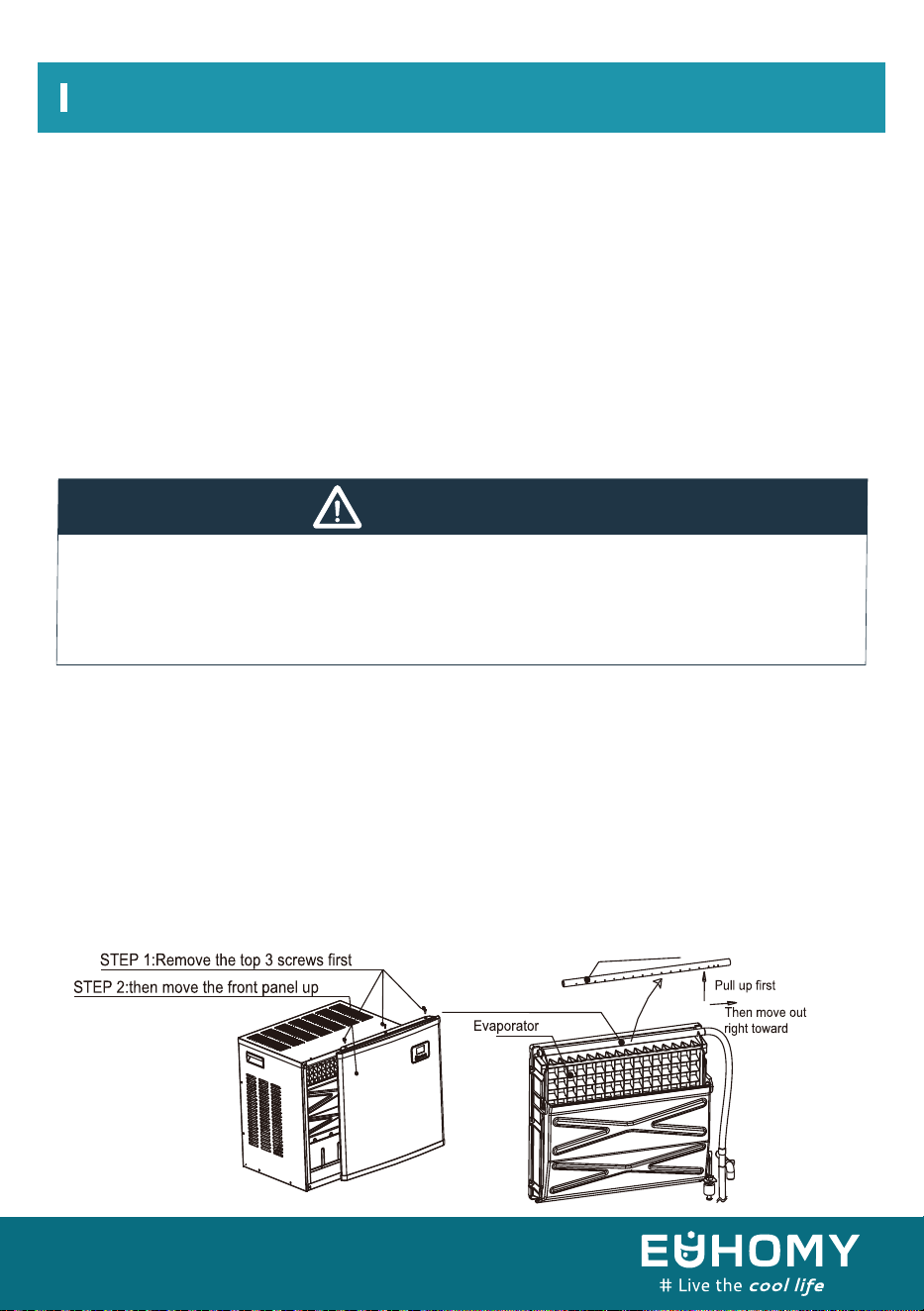
2. If the compressor and the water pump are running normally but little or no water is flowing out
of the water-dividing pipe, power off the unit and remove the front panel. Remove the pipe and
clean it carefully. Unclog each tiny hole (displayed in the following illustration) with a pin or
needle. Then, reinstall the pipe in its original location.
Water-dividing pipe
Water-dividing pipe
22
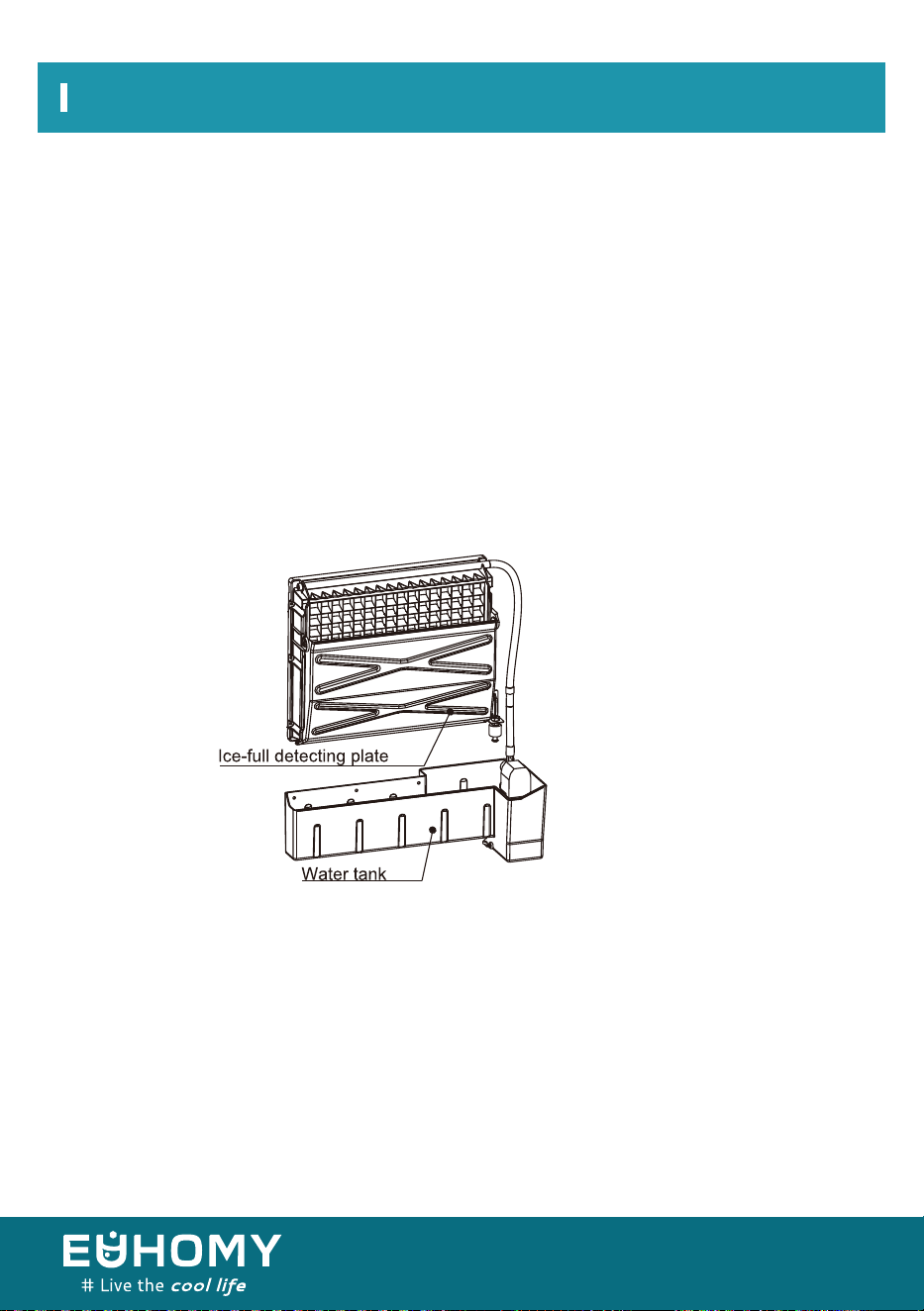
4. For the water tank and ice-full detecting plate
It is critical to clean the water tank and the ice-full detecting plate to keep your ice cubes sanitary.
Put a mixture of neutral cleaner and water into a clean spray bottle. Then, spray all the inner
surfaces of the tank and the ice-full detecting plate. Wipe these surfaces as well as possible with
a clean cloth. Then, spray the surfaces with clean water, wiping with a dry, clean cloth. Drain the
cleaning water out of the water tank by pulling out the water drainage cap of the water tank.
When all of the dirty water has been drained out, re-place the drainage cap in the water
tank.
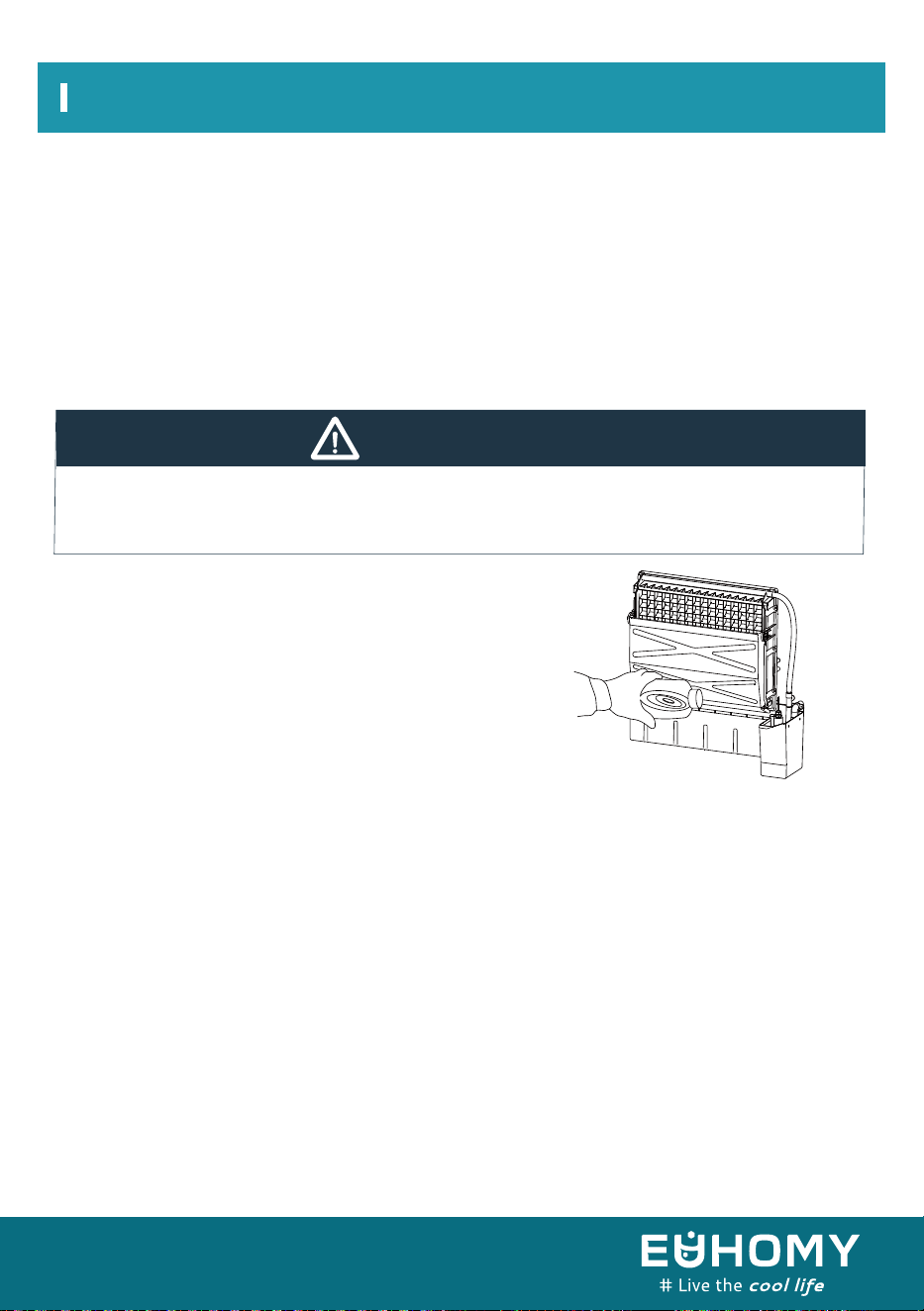
3. When there are ice cubes stuck to the surface of the evaporator, do not use any tools to remove
the ice by force. Instead, press the “ON/OFF” button for more than 5 seconds. The unit will
enter the defrosting mode. After some time, the ice cubes will fall away from the evaporator.
When this happens, you can turn off the unit and unplug the power cord to clean the surface of
the evaporator.
Cleaning And Maintenance
Ice Making Assembly System Cleaning by Using Nu-Calgon Nickel-Safe
Ice Machine Cleaner
Minerals that are removed from the water during the freezing cycle will eventually form a hard,
scaly deposit in the water system. Cleaning the system regularly helps remove the mineral scale
buildup. How often you need to clean the system depends upon how hard your water is. With hard
water of 4 to 5 grains per liter, you may need to clean the system as often as every 6 months.
Suggestion: After cleaning the interior parts and reinstalling them to their respective
positions, be sure to discard the first batch of ice made.
23
WARNING:
Wear rubber gloves and safety goggles (and/or a face shield) when handing ice-machine
cleaner or sanitizer.
1.Turn off the ice maker. Keep the ice maker connected to the water supply and drainpipe, but
shut off the faucet of the main water supply.
2. Open the door and scoop out all of the ice cubes. Either discard them or save them
in an ice chest or cooler.
3. Remove the front panel of the ice maker.
4. Make the cleaning solution. In a plastic or stainless steel container with more than 1 gallon
capacity, mix 14 ounces Nu-Calgon Nickel-Safe Ice Machine Cleaner with 1 gallon warm
water (about 120 °F- 140 °F). Then divide the solution equally into two large pitchers or cups.
Try to keep the cleaning solution as warm as possible.
Cleaning And Maintenance
5. Check to be sure that the water-drainage cap of the
water tank has been installed properly in the slot of the
tank wall. Then, pour half of your prepared cleaning
solution into the water tank. Let the solution stand for
about 5 minutes.
6. Power on the ice maker. Then, press the “TIMER/CLEAN” button on the control panel for more
than 5 seconds to enter the self-cleaning program. The machine will start to self-clean after the
water is full. The symbol will revolve on the LCD display. The self-cleaning program takes 90
minutes (displayed on the timer) and will then automatically stop.
Press the “TIMER/CLEAN” button again to cancel the cleaning.
7. After the self-cleaning procedure is completed, pull out the water-drainage cap to manually
drain the water tank. Drain the cleaning solution down to the lower ice-storage bin. Shake the unit
slightly to drain out all of the cleaning solution completely. Rinse the tank with clean water. Then
reinsert the water-drainage cap in the water tank.
8. Repeat steps 5 through 8 to clean the ice-making assembly system again.
24
WARNING:
The ice-machine cleaner contains acids.
DO NOT use or mix cleaner or cleaning solution with any other solvent-based cleaning
products.
Use rubber gloves to protect hands. Carefully read the material safety instructions on the
container of the ice-machine cleaner.
DISCARD the first batch of ice made after cleaning.
Cleaning And Maintenance
Cleaning Suggestions
1) DAILY CLEANING
The ice scoop and door and the should be cleaned at the end of every day. Rinse the scoop and
wipe both sides of the door with a clean cloth.
2) SEMIMONTHLY CLEANING
The ice scoop, ice bin, water tank, ice-full detecting plate, and evaporator surface are to be cleaned
semimonthly according to the interior-cleaning program.
3) SEMIANNUAL CLEANING
All components and surfaces exposed to water or ice (i.e., ice-storage bin, water tank, door,
evaporator, water pump, silicone tube, water-dividing pipe) should be cleaned with Nu-Calgon
Nickel-Safe Ice-machine Cleaner every 6 months by a service technician according to the
ice making assembly system cleaning program.
9. Following the above procedure to clean the tank.
10. After the self-cleaning program finishes, you can return to the regular ice-making mode.
Be sure to discard the first batch of ice cubes.
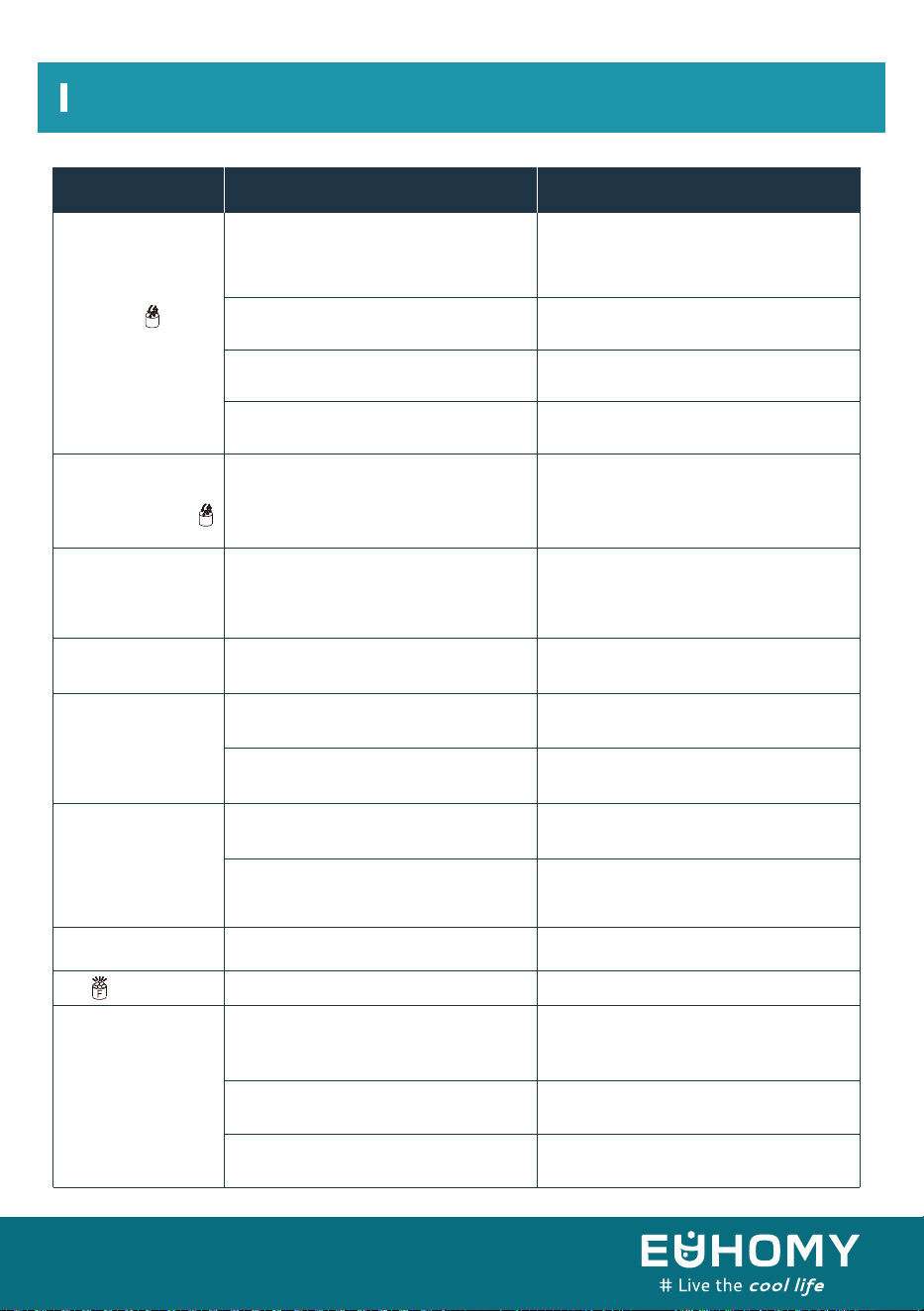
Normal Troubleshooting
The whole “ ”
symbol is always on.
The water pump is
working but no water
flows out of the
water-dividing pipe.
Ice cubes are cloudy.
Ice cube shape is
irregular.
Ice cubes are too
small/thin.
Ice cubes are too
large/thick.
The“ ”indicator is on.
Ice-making cycle runs
but makes no ice.
The unit enters the
ice-making process,but
no water flows in the
unit, and the whole “ ”
symbol is on.
No water supply
NFloating ball of the water level-detecting
switch is blocked and cannot rise.
Water flows out from the water tank.
Water flows out from the water-drainage
cap of thewater tank.
Water-supply hose has broken down.
Water flows too slowly.
The little holes in the water
dividing pipe are blocked.
Water quality is poor.
Water quality is poor.
Water tank is dirty.
Holes in the water-dividing pipe are
blocked.
Ambient temperature is too high.
Air circulation around the unit is
insufficient.
Ambient temperature is too low.
The ice-storage bin is full.
The ambient temperature or water
temperature in water tank is too high.
Refrigerant is leaking.
Cooling system tube is clogged
Move the unit to a cooler place or
increase the time of each ice-making cycle
Make sure there is more than 200mm of
space between the back of the unit and any
wall or other object.
Reduce the time of each ice-making cycle.
Remove the ice cubes.
Move the unit to a place with a temperature
lower than 90 °F. Add cooler water to the
tank.
Consult a technical serviceperson for
maintenance.
Consult a technical serviceperson for
maintenance.
Check the main water-supply pressure. Check
the water-supply hose for blockages. Increase
the water pressure or clean the hose as
necessary.
Carefully clean the little holes with a pin or
needle.
Change the water supply, or use a water filter
to soften or filter the water.
Clean the water tank and refill it with fresh
water.
Clean the water-dividing pipe, making sure all
9 holes are unclogged.
Check the main water-supply pressure. Check
the water-supply hose for blockages.
Increase the water pressure or clean the hose
as necessary.
Clean the water tank and the water
level-detecting switch.
Place the unit on a level surface, not on a
slope.
Pull out the water -drainage cap and rein-
stall it properly in the slot of the water tank.
Problem Possible Cause Solution
25
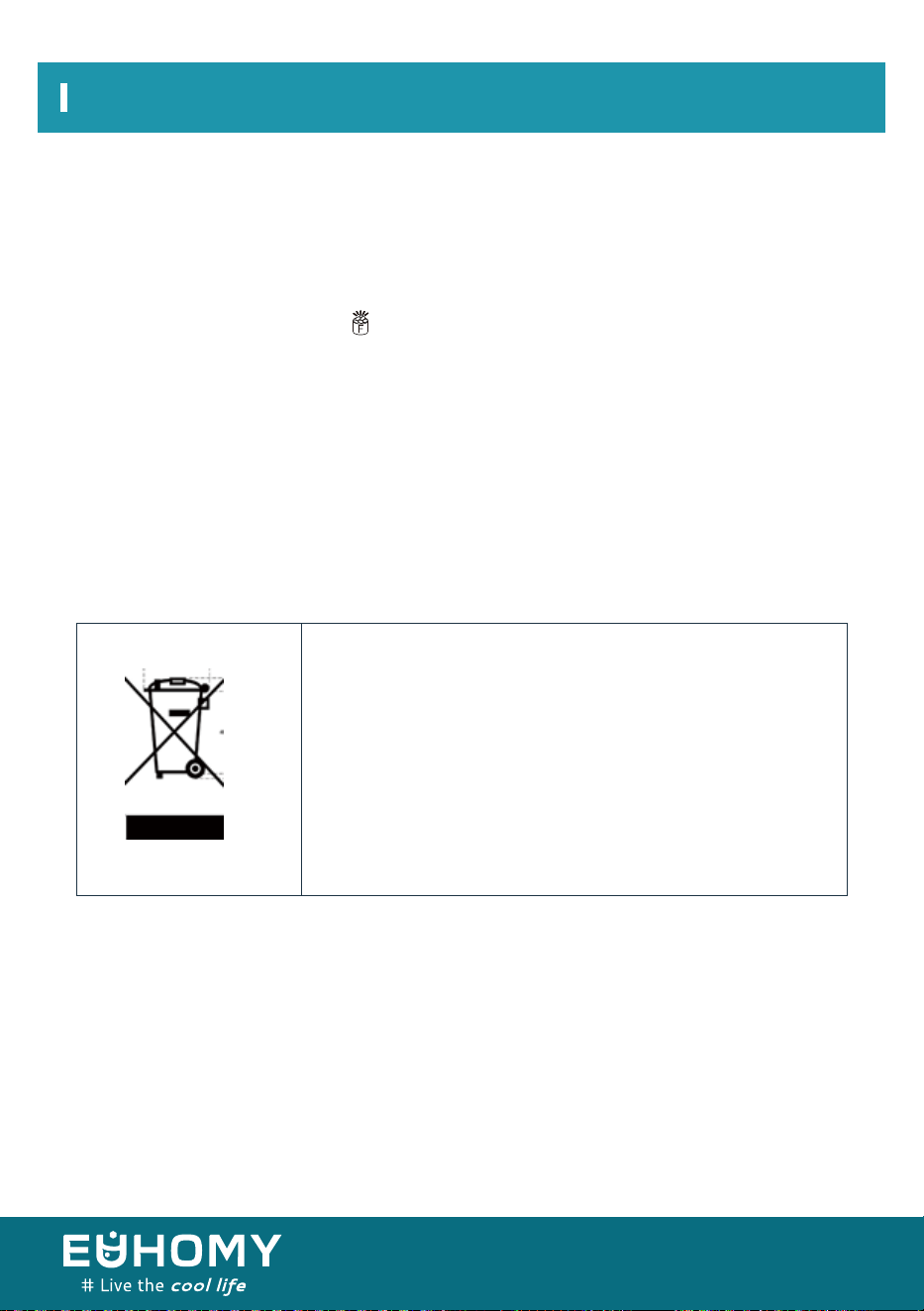
Normal Troubleshooting
Error Indicator
Correct disposal of this product
a) Temperature sensor breakdown: “E1” is displayed.
b) No ice or refrigerant leakage: “E2” is displayed.
c) Magnetic control switch cutoff: “ ” light will be on when plugging in or just turning on the
unit. And it Disengage after open circuit.
d) During the ice-making process, press the “ON/OFF” button for more than 5 seconds to start the
ice-harvesting program. After the ice-harvesting program, the machine will start the ice-making
process.
This symbol indicates that this product should not be
disposed of with regular household waste in the U.S. To
prevent possible harm to the environment or to human health
from uncontrolled waste disposal, recycle the item responsi-
bly to promote the sustainable reuse of material resources.
To return your used device, please use the return and
collection systems or contact the retailer where the product
was purchased. They can accept this product for environ-
mentally safe recycling.
26
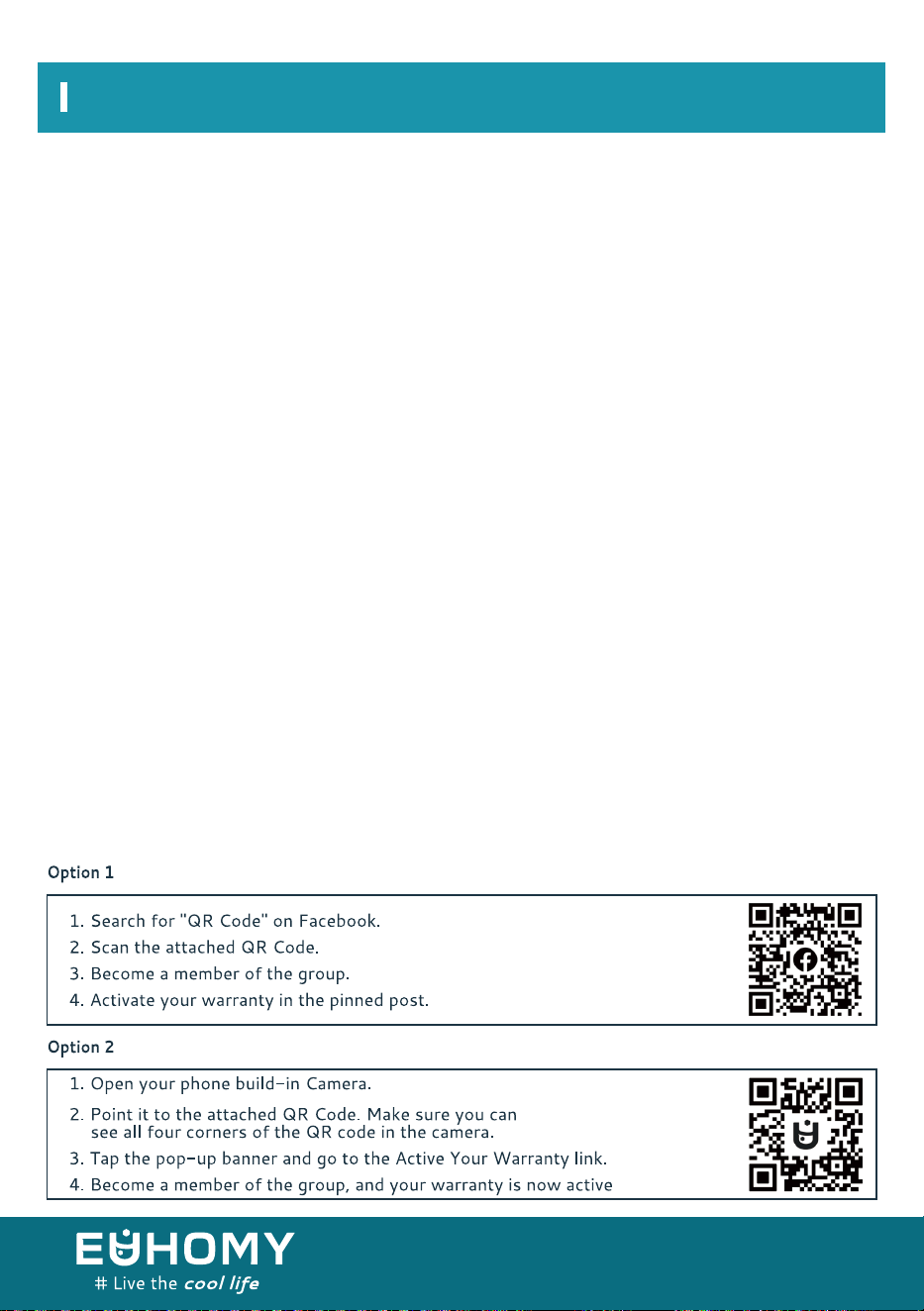
27
Euhomy offers a limited 1-year warranty (“ warranty period" ) on all of our products purchased new
and unused from Euhomy company, with an original proof of purchase and where a defect has arisen,
wholly or substantially, as a result of faulty manufacture, parts or workmanship during the warranty
pe9od. The warranty does not apply where damage is caused by other factors, including without
limitation:
The Euhomy warranty covers all costs related to restoring the proven defective product through
repair or replacement of any defective part and necessary labor so that it conforms to its original
specifications. A replacement product may be provided instead of repairing a defective product.
Euhomy' s exclusive obligation under this warranty is limited to such repair or replacement. A receipt
indicating the purchase date is requied for any claim, so please keep all receipts in a safe place.
Although greatly appreciated, the product registration is not required to activate any warranty and
product registration does not eliminate the need for the original proof of purchase.The warranty
becomes void if attmpts at repair are made by non-authorized third parties and/or if spare parts,
other than those provided by Euhomy, are used.
You may also arrange for service after the warranty expires at an additional cost. These are our
general terms for warranty service, but we always urge our customers to reach out to us with any
issue, regardless of warranty terms. If you have an issue with a Euhomy product, please contact us
([email protected]), and we will do our best to resolve it for you.
(a)normal wear and tear;
(b)abuse, mishandling, accident, or failure to follow operating instructions;
(c)exposure to liquid or infiltration of foreign particles;
(d)servicing or modifications of the product other than by Euhomy;
(e)commercial or non-household use.
Warranty


Email:support@euhomy.com
Facebook:@Euhomy.Official