Owner’s Manual & Safety Instructions
Save This Manual Keep this manual for the safety warnings and precautions, assembly,
operating, inspection, maintenance and cleaning procedures. Write the product’s serial number in the
back of the manual near the assembly diagram (or month and year of purchase if product has no number).
Keep this manual and the receipt in a safe and dry place for future reference. 25a
When unpacking, make sure that the product is intact
and undamaged. If any parts are missing or broken,
please call 1‑800‑444‑3353 as soon as possible.
Copyright
©
2024 by Harbor Freight Tools
®
. All rights reserved.
No portion of this manual or any artwork contained herein may be reproduced in
any shape or form without the express written consent of Harbor Freight Tools.
Diagrams within this manual may not be drawn proportionally. Due to continuing
improvements, actual product may differ slightly from the product described herein.
Tools required for assembly and service may not be included.
read this material before using this product.
Failure to do so can result in serious injury.
SaVe tHiS ManuaL.
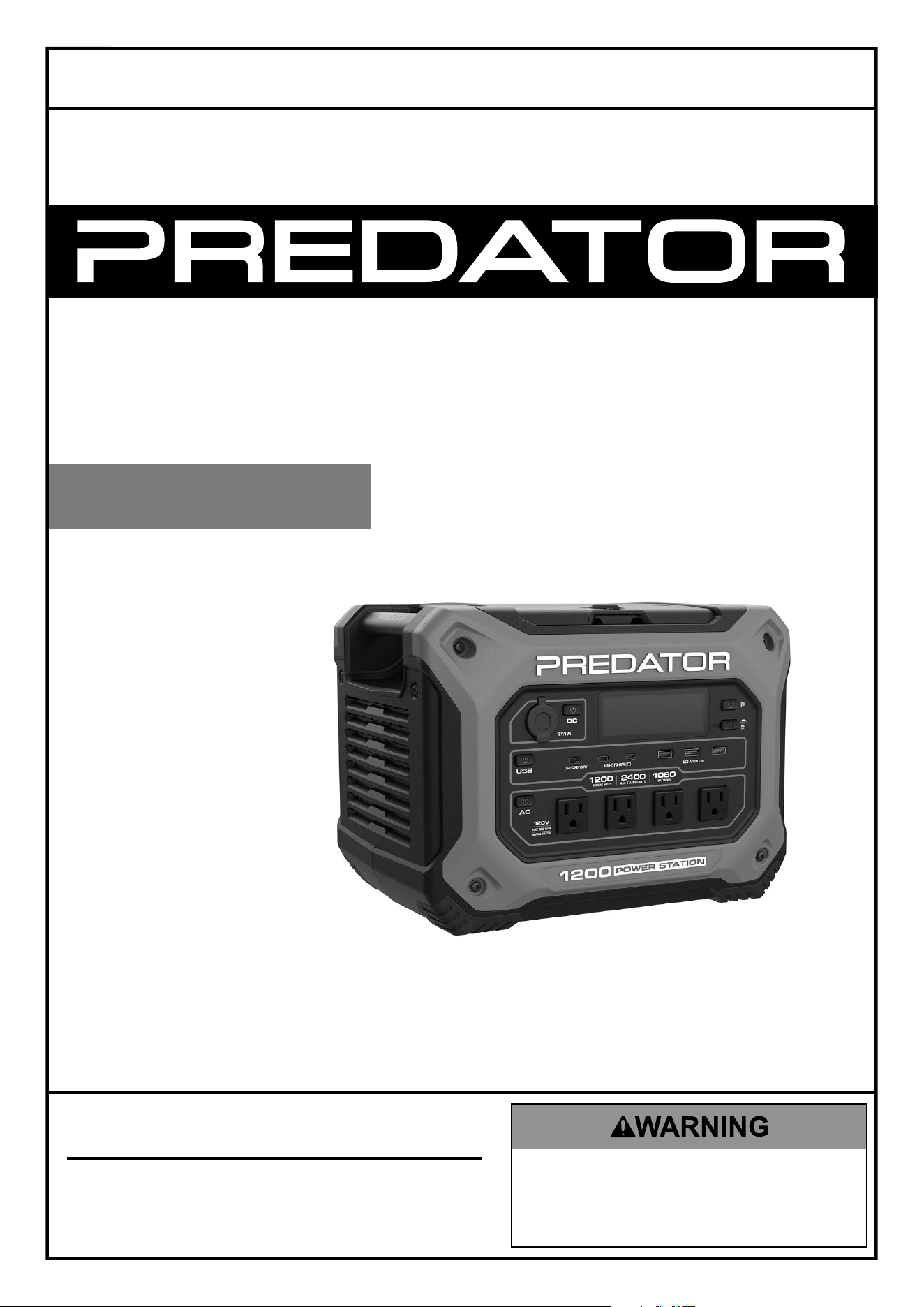
1200W PORTABLE
POWER
STATION
1200 RUNNING WATTS
2400 MAX STARTING WATTS
1060 WATT HOUR CAPACITY
Visit our website at: https://www.harborfreight.com
email our technical support at: [email protected]
70081
Fully charge
before first
use or voids
warranty.
tM
Page 2 For technical questions, please call 1-800-444-3353. 70081
SaFety OperatiOn MaintenanceSetup
table of contents
Safety ......................................................... 3
Specifications ............................................. 5
Setup .......................................................... 6
Operation .................................................... 8
Maintenance .............................................. 11
Troubleshooting ......................................... 12
Parts List and Diagram .............................. 14
Warranties ................................................. 16
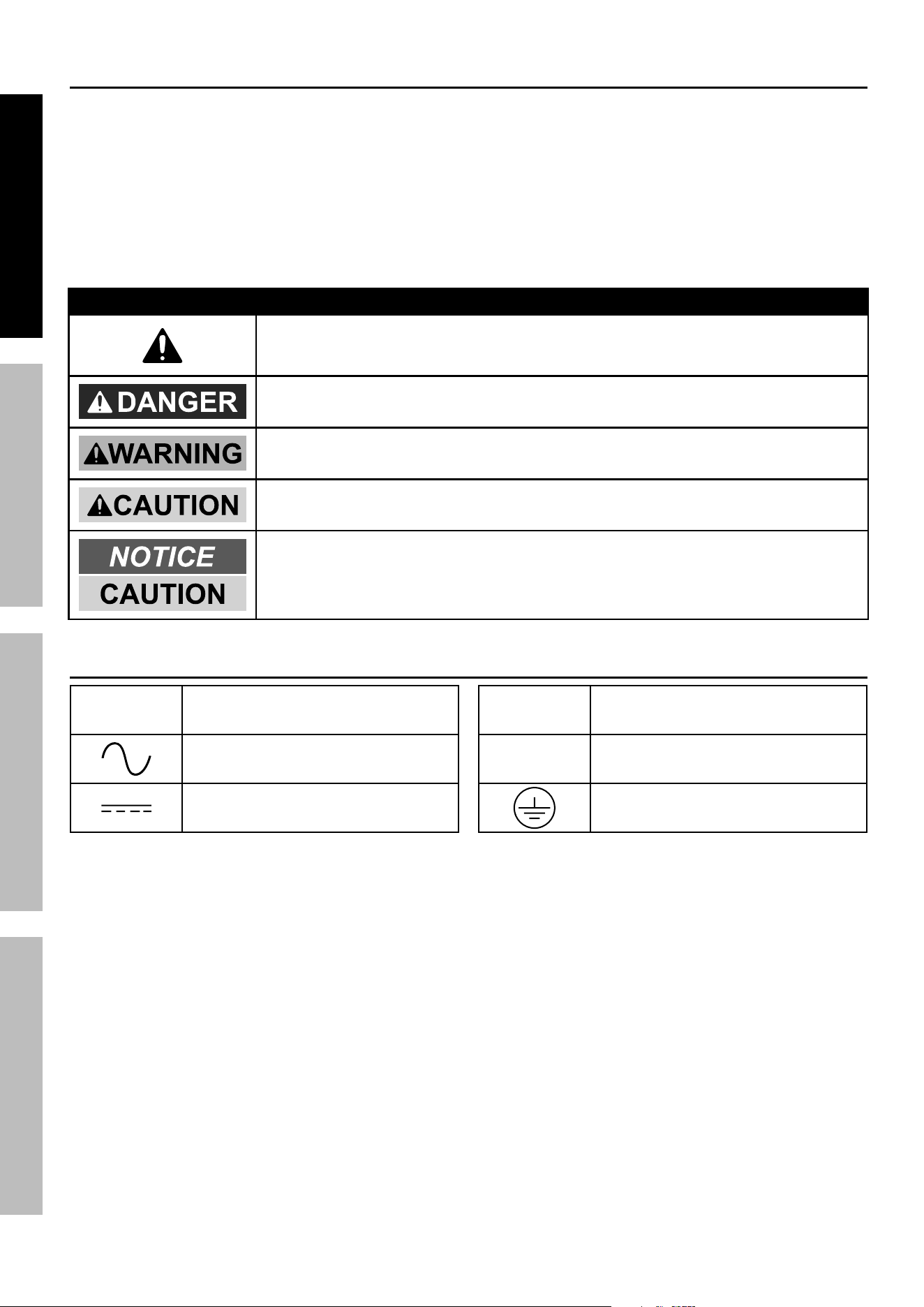
WarninG SyMBOLS anD DeFinitiOnS
This is the safety alert symbol. It is used to alert you to potential
personal injury hazards. Obey all safety messages that
follow this symbol to avoid possible injury or death.
Indicates a hazardous situation which, if not avoided,
will result in death or serious injury.
Indicates a hazardous situation which, if not avoided,
could result in death or serious injury.
Indicates a hazardous situation which, if not avoided,
could result in minor or moderate injury.
Addresses practices not related to personal injury.
Symbology
Vac
Volts Alternating Current
Alternating Current Supply
Direct Current Supply
a
Amperes
Ø
Phase
Equipment Grounding Conductor
Page 3For technical questions, please call 1-800-444-3353.70081
SaFetyOperatiOnMaintenance Setup
iMpOrtant SaFety inStructiOnS
SaVe tHeSe inStructiOnS–
this manual contains important instructions that shall be followed
during installation and maintenance of the power Station.
iMprOper inStaLLatiOn Or uSe can reSuLt in SeriOuS inJury, prOperty DaMaGe, Or DeatH.
Setup precautions
1. DO nOt inStaLL tHiS pOWer StatiOn intO
a BuiLDinG’S eLectricaL SySteM.
this power Station is a portable unit.
it is not designed to be safely used in
a building’s electrical system and has
not been evaluated to meet building
wiring codes. improper application may
create a fire or electric shock hazard.
2. To allow proper cooling, use in well‑ventilated area
and do not cover ventilation openings or cooling fins.
3. Do not store the Power Station in a location
colder than 32° F. The Power Station will not
operate when cold as a safety feature.
4. Do not use in a marine application.
This Power Station is not intended to withstand the
highly corrosive conditions in marine applications
and would quickly be rendered inoperable or unsafe.
5. Keep Power Station dry and clean. Do not
expose to rain, snow, spray, bilge water or dust.
6. Use cables that are thick enough. The more
power (amps) or the longer the cables, the thicker
they need to be to prevent overheating and fire.
7. Do not use in a closed area near vented lead‑
acid batteries. Vented lead‑acid batteries
release explosive hydrogen gas that can
be ignited by the Power Station.
8. If using solar panel to charge unit, read solar
panel manufacturer’s warnings and instructions.
WarninG! to prevent serious injury
and property damage: Do not exceed the
maximum specified input voltage for Power
Station when using solar panel to charge.
9. This product is not a toy.
Keep it out of reach of children.
10. People with pacemakers should consult their
physician(s) before use. Electromagnetic fields in
close proximity to heart pacemaker could cause
pacemaker interference or pacemaker failure.
11. Do not leave unit in extreme hot or cold
conditions, such as inside a vehicle.
12. Do not cover or stack items on Power Station.
13. Only use recommended accessories and
solar panels for charging this unit.
14. Do not charge unit from a vehicle with
electrical system greater than 12‑volt.
15. The warnings, precautions, and instructions
discussed in this instruction manual cannot cover all
possible conditions and situations that may occur.
It must be understood by the operator that
common sense and caution are factors
which cannot be built into this product,
but must be supplied by the operator.
Operating precautions
1. Inspect supply connections before use to ensure
they are tight and that insulation is not damaged.
2. Some rechargeable devices can damage the
Power Station. Check the temperature of the device
several times when it is charging. If the device
becomes extremely hot or causes the Power Station
to shut down; turn the power off, remove the device,
and do not use with the Power Station again.
3. Check for breakage of parts and any other condition
that may affect the Power Station’s operation.
If damaged, have it repaired before use.
4. Do not attempt to power a device, or combination
of devices, that will require more than the rated
output of this Power Station. This may damage
the Power Station or the attached devices.
5. Be aware that appliances will normally
draw more than their rated current.
Page 4 For technical questions, please call 1-800-444-3353. 70081
SaFety OperatiOn MaintenanceSetup
6. Some fans with synchronous motors may
slightly increase in speed when powered
by the Power Station. This is not harmful
to the fan or to the Power Station.
7. The Power Station will shut off automatically if
unused. It will shut off after 1 hour for AC or DC
output modes, or after 2 hours for USB output mode.
note: The auto‑shutdown feature will
deactivate when AC charger is connected.
8. The Power Station will consume some power
from the battery while on, even without loads
attached. Turn Power Station off after use.
9. Extension Cord ‑ Make sure your extension cord is
in good condition. When using an extension cord, be
sure to use one heavy enough to carry the current
your product will draw. An undersized extension
cord will cause a drop in line voltage resulting in loss
of power and overheating.
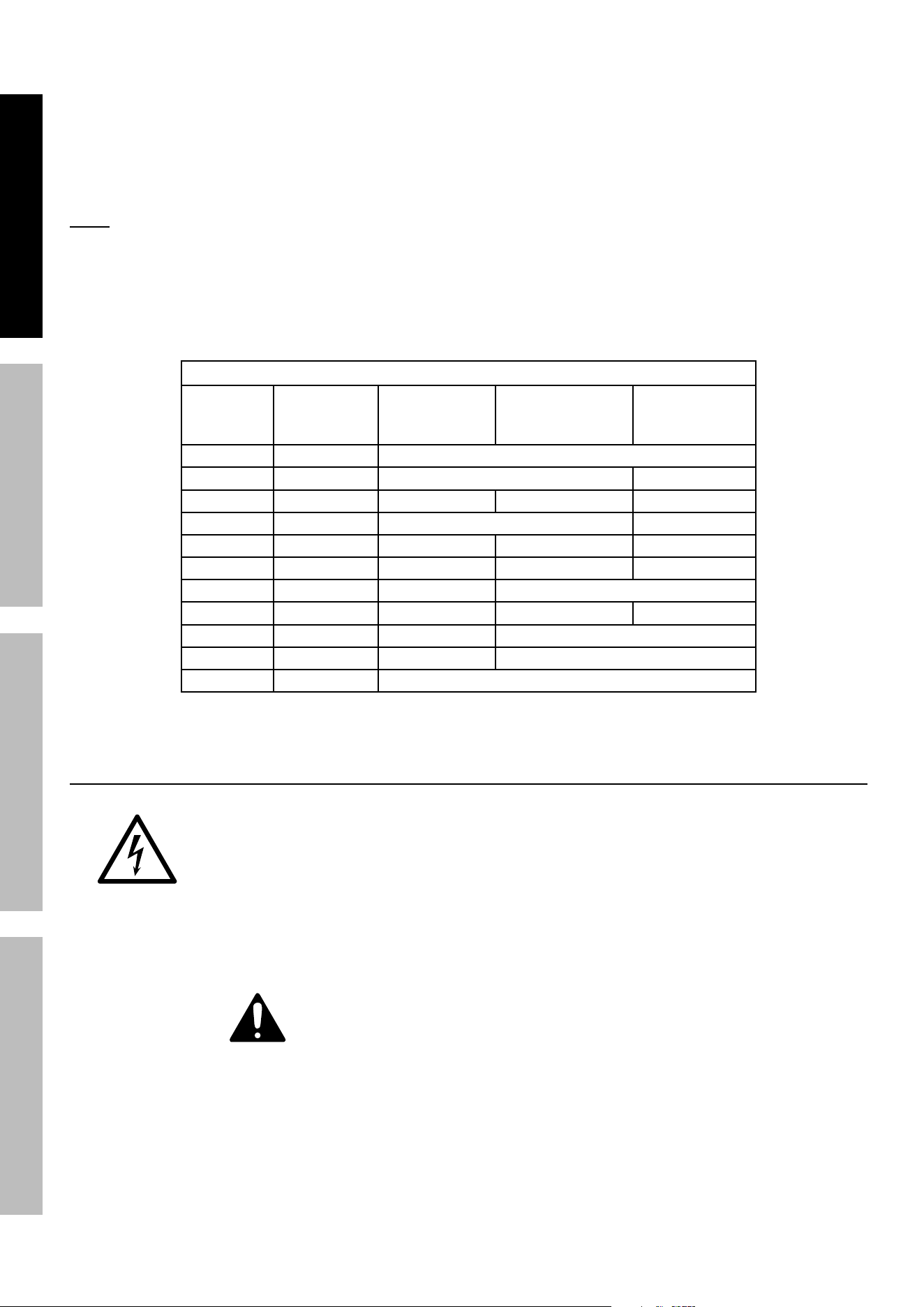
The table below shows the correct cord size to use
depending on cord length and nameplate ampere
rating. If in doubt, use the next heavier gauge.
The smaller the gauge number, the heavier the cord.
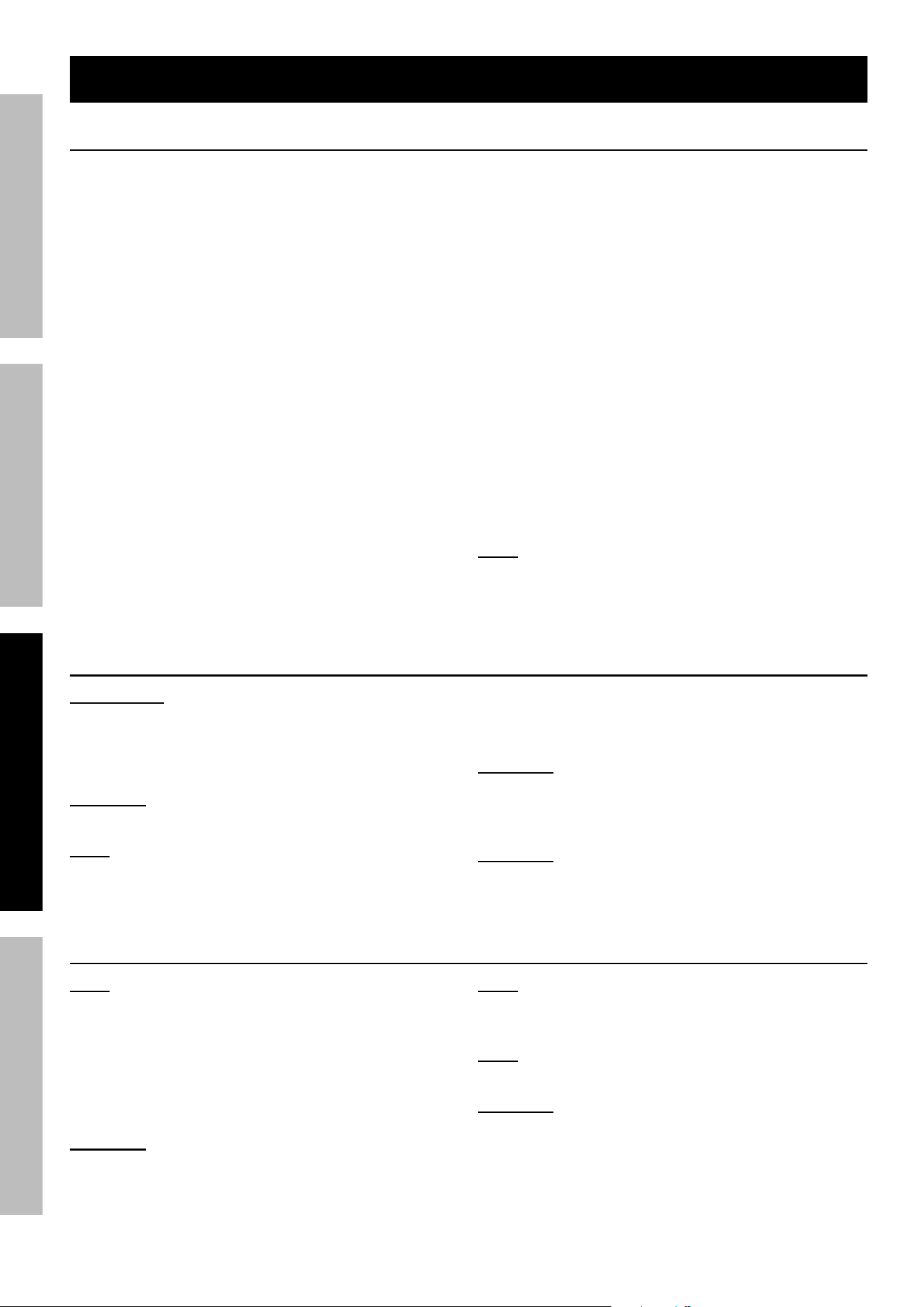
recOMMenDeD MiniMuM Wire GauGe FOr eXtenSiOn cOrDS
current
(aMpS)
Load @
120V
(WattS)
0 ~ 50 ft 50 ~ 75 ft 75 ~ 100 ft
2 240 18 AWG
4 480 18 AWG 16 AWG
6 720 18 AWG 16 AWG 14 AWG
8 960 16 AWG 12 AWG
10 1200 16 AWG 14 AWG 12 AWG
15 1800 14 AWG 12 AWG 10 AWG
20 2400 12 AWG 10 AWG
25 3000 12 AWG 10 AWG 8 AWG
30 3600 10 AWG 8 AWG
35 4200 8 AWG 6 AWG
40 4800 6 AWG
Service precautions
1. DO nOt Open HOuSinG.
Contains no user‑serviceable parts.
internal parts may be electrified,
even with power Station off and
power disconnected.
2. Maintain labels and nameplates on the
Power Station. These carry important safety
information. If unreadable or missing, contact
Harbor Freight Tools for a replacement.
3. Have your Power Station serviced by a
qualified repair person using only identical
replacement parts. This will ensure that the
safety of the Power Station is maintained.
4. Avoid battery deep discharge by charging the Power
Station every 3 to 6 months.
SaVe tHeSe inStructiOnS.
Page 5For technical questions, please call 1-800-444-3353.70081
SaFetyOperatiOnMaintenance Setup
Specifications
Output
Waveform: Pure Sine Wave
1
AC: (4x) 120V, 10A, 60Hz
1200W Running, 2400W Starting
USB‑A: (3x) 5V, 2.4A
USB‑C: (1x) PD 100W, (2x) PD 60W
(5V/9V/12V/15V/20V)
Car Output Port: 12VDC, 10A, 120W Max
Input
AC (Charge only): 120V, 60Hz, 800W, 6.7A Max
AC (EPS only): 120V, 60Hz, 1200W, 10A Max
AC (Charge + EPS): 120V, 60Hz,
1750W, 14.5A Max
DC CAR or Solar: 12~17VDC, 9A Max
DC Solar: 17~50VDC, 25A, 400W Max
Solar Input
Controller
MPPT
Estimated Charge
time to 100%
AC: 1.6 Hours
Solar: 3 Hours @ 400W input
Car: 10.5 Hours
Battery
LiFePO4 (Lithium Iron Phosphate)
25.6V, 1059.8 Wh
Operating
Temperature
Charging: 0‑40°C (32‑104°F)
Discharging: ‑10‑40°C (14‑104°F)
Pass‑Through
Charging
Yes
EPS (Emergency
Power Supply)
Yes‑within 15 mS
Weight 33.5 lbs.
Accessories
AC Charging Cable
Car Charging Cable
Anderson‑to‑MC4 Solar Cable
note: Battery charge level, wire length and other factors will affect performance.
1
THD ‑ < 3%
Changes or modifications not expressly approved by Harbor Freight Tools
could void the user’s authority to operate the equipment.
This equipment has been tested and found to comply with the limits for a Class B digital device, pursuant to part
15 of the FCC Rules. These limits are designed to provide reasonable protection against harmful interference
in a residential installation. This equipment generates, uses and can radiate radio frequency energy and, if not
installed and used in accordance with the instructions, may cause harmful interference to radio communications.
However, there is no guarantee that interference will not occur in a particular installation. If this equipment does
cause harmful interference to radio or television reception, which can be determined by turning the equipment
off and on, the user is encouraged to try to correct the interference by one or more of the following measures:
—Reorient or relocate the receiving antenna.
—Increase the separation between the equipment and receiver.
—Connect the equipment into an outlet on a circuit different from that to which the receiver is connected.
—Consult the dealer or an experienced radio/TV technician for help.
Page 6 For technical questions, please call 1-800-444-3353. 70081
SaFety OperatiOn MaintenanceSetup
*Setup
read the entire iMpOrtant SaFety inFOrMatiOn section at the beginning of this document
including all text under subheadings therein before set up or use of this product.
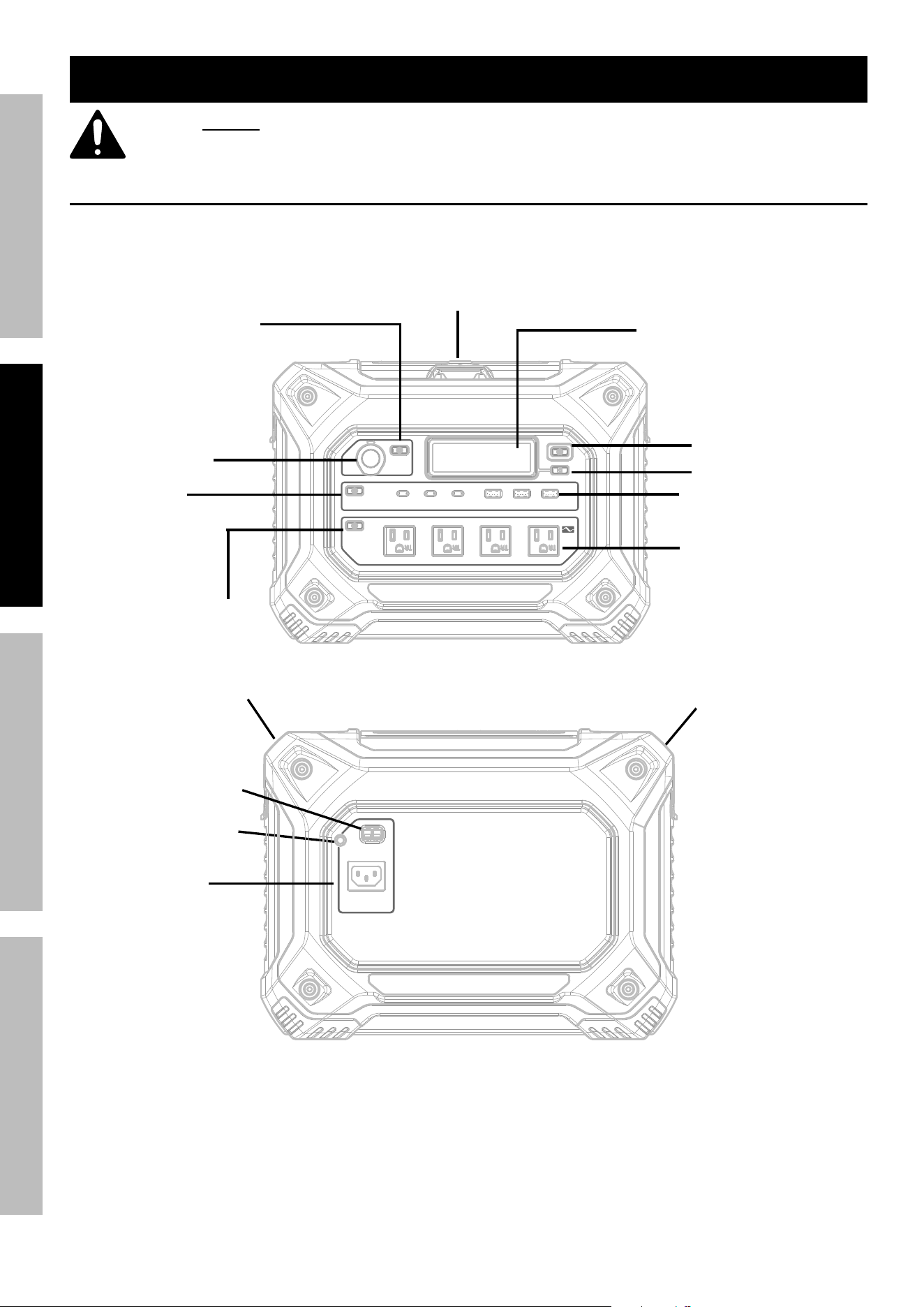
components and controls
carry Handle
ac input circuit
Breaker
USB-C PD100W
USB-C PD60W 2X USB-A 5V 2.4A 3X
DC 10~30V 400W MAX
AC 15A 1800W MAX
P
R
E
S
S
T
O
R
E
S
E
T
car Output port
12V-120W
uSB
Output On/Off/
reset Button
ac Output On/Off/
reset Button
ac Output 120V (x4)
uSB Output ports:
uSB-a (3x), uSB-c (3x)
Main power On/
Off Button
Storage cubby
Locking/
unlocking Knob
LcD DisplayOn/
Off Button
LcD Display
carry Handle
car port On/Off/
reset Button
car/Solar
charging input
(anderson pa45)
ac and epS input
Page 7For technical questions, please call 1-800-444-3353.70081
SaFetyOperatiOnMaintenance Setup
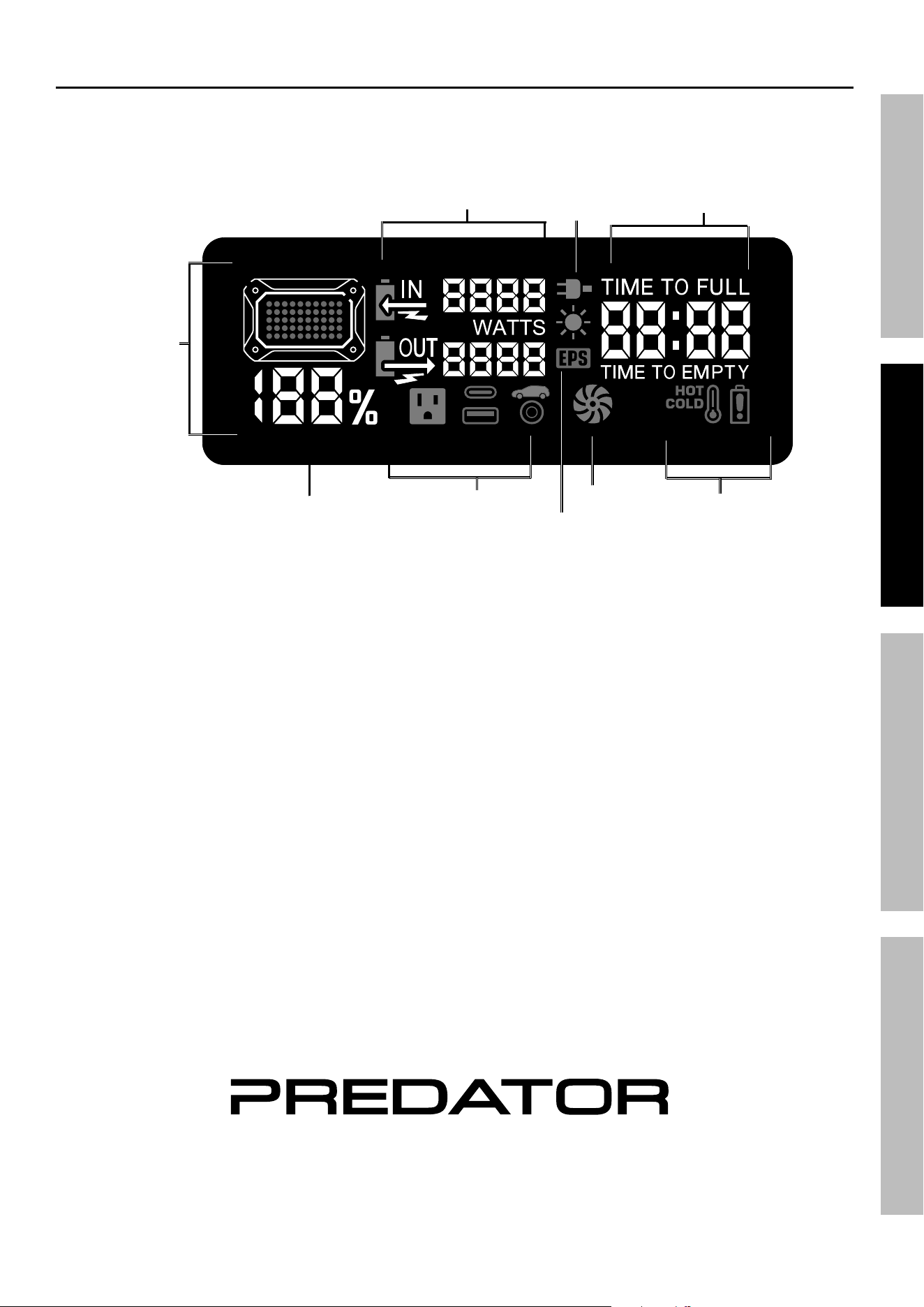
LcD Display
tM
Battery
capacity
indicator
Output Status
Fan
Status
System
notifications
remaining time
to Full Or empty Battery
inputs:
ac
Solar/car
input/Output
power Meters
epS
Mode
Status
Battery
capacity
charge
percentage
Page 8 For technical questions, please call 1-800-444-3353. 70081
SaFety OperatiOn MaintenanceSetup
Operating instructions
precautions
1. Inspect supply connections before use to ensure
they are tight and that insulation is not damaged.
2. Some rechargeable devices can damage the
Power Station. Check the temperature of the device
several times when it is charging. If the device
becomes extremely hot or causes the Power Station
to shut down; turn the power off, remove the device,
and do not use with the Power Station again.
3. Check for breakage of parts and any other condition
that may affect the Power Station’s operation.
If damaged, have it repaired before use.
4. Do not attempt to power a device, or combination
of devices, that will require more than the rated
output of this Power Station. This may damage
the Power Station or the attached devices.
5. Be aware that appliances will normally
draw more than their rated current.
6. Some fans with synchronous motors may
slightly increase in speed when powered
by the Power Station. This is not harmful
to the fan or to the Power Station.
7. Place the Power Station on a dry, level,
non‑flammable, stable surface. Make
sure the Power Station has adequate
ventilation and is not in direct sunlight.
8. The Power Station will consume some
power while on, even without loads attached.
Turn Power Station off after use.
9. The Power Station has a number of shut‑
down points for the safety of the operator, the
Power Station, and the devices being used with it.
The unit will shut down if any of the following occur:
a. AC or Solar input exceeds
maximum rated voltage.
b. Output power rises higher than
rated power of Power Station.
c. Internal Power Station temperature
exceeds acceptable range.
note: Even though this Power Station has built‑in
mechanisms to minimize damage,
the above situations should be avoided because
they can still damage the Power Station.
charging the power Station
iMpOrtant: Fully charge power
Station before first use.
1. Connect AC, Car or Solar charging
cord into back of unit.
cautiOn! to prevent personal injury and property
damage: Use provided 14AWG AC Charge Cable only.
note: AC and DC (Solar or Car) charging
sources may be used simultaneously.
2. The LCD display is programmed to stay ON
during charging cycle. Press LCD button to turn
if off. (This will not affect charging process.)
cautiOn! to prevent personal injury and
property damage: When using Car charger, only
charge from a vehicle with 12V electrical system.
Do not charge this unit from a 24V vehicle.
cautiOn! to prevent personal injury and
property damage: Charge Power Station with
vehicle running to prevent draining vehicle battery.
epS (emergency power Supply)
note: When standalone power mode is on (No AC
input) the AC receptacle’s ground is isolated from
Neutral (Neutral Floating). When the Power Station
is connected to the grid system, the AC receptacle’s
ground bonds to Neutral under EPS mode.
1. Connect AC Input and turn on AC output to pass
the AC input directly to the AC receptacles.
cautiOn! to prevent personal injury and
property damage: Do not exceed 1200W
when connecting load to AC Output.
note: When AC input removed from grid,
the power station will automatically switch to
Standalone Power Mode within 15mS.
note: If the battery requires charging the AC
input will indicate “Charge+EPS” on the LCD.
cautiOn! to prevent personal injury and
property damage: Do not connect Power Supply
to high uninterrupted power requirements.
Page 9For technical questions, please call 1-800-444-3353.70081
SaFetyOperatiOnMaintenance Setup
powering Devices
note: Devices can be run while
Power Station is charging.
1. Press the LCD Power Button to turn on the
display. The display will also turn on when
any of the On/Off buttons are pressed.
note: During use/discharge the display is programmed
to stay ON for 2 minutes, then go dark automatically.
To override, press and hold LCD button for 3 seconds
until a “chirp” is heard and LCD flashes twice.
2. Press the appropriate On/Off button(s)
for the desired charging port(s).
3. Plug appropriate cable(s) into the Power Station.
4. Turn the device(s) on, one at a time.
If an overload indicator illuminates (see
Troubleshooting on page 12), turn off the
device(s). Unplug the device(s) from the
Power Station. Check the wattage of the
devices; if there were multiple devices plugged
in, discontinue use of one or more. If a single
device triggered the overload indicator, it is not
appropriate for use with the Power Station.
nOte: Some rechargeable devices may
damage the Power Station or the device(s).
When first using a rechargeable device,
check the Power Station’s temperature for
the first ten minutes.
If it becomes abnormally hot or shuts down,
do not use the device with the Power Station.
5. When the AC output is not in use, turn it off using
the AC On/Off button to preserve battery charge.
6. The Power Station will shut off automatically if
unused. It will shut off after 1 hour for AC or DC
output modes, or after 2 hours for USB output mode.
7. When battery capacity reaches 5%, the battery
icon will flicker. When battery reaches 0%, the
Power Station will beep three times, then shut down.
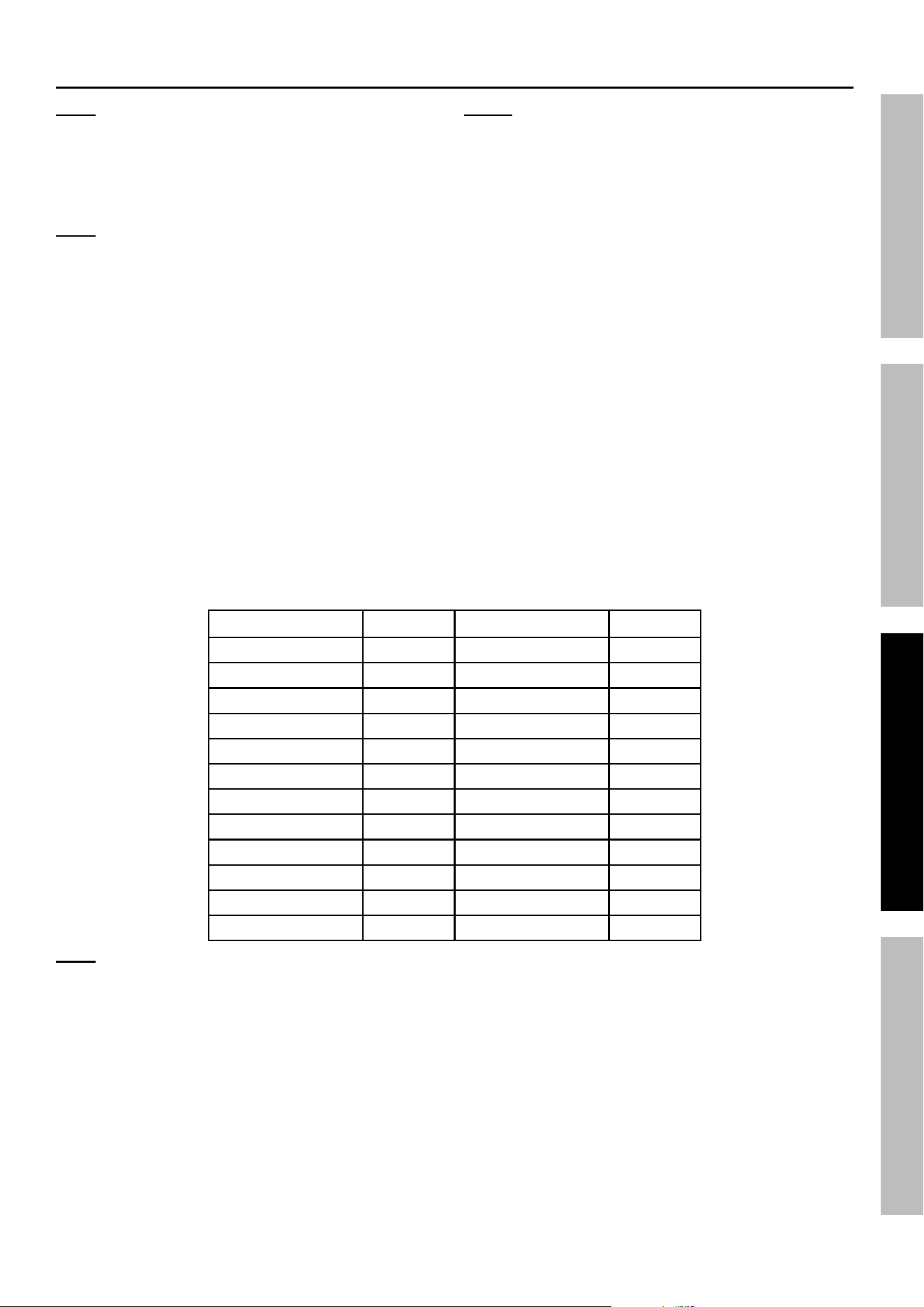
typical Device power consumption
product Wattage product Wattage
Laptop 50 Laser Printer 400
Stereo 200 Food Processor 400
Mixer 200 Reciprocating Saw 600
Table Fan 200 AC (5,000 BTU) 700
TV‑VCR 250 Vacuum 750
Plug‑in computer 250 Chest Freezer 800
Small Refrigerator 350 Coffee Maker 1000
Jigsaw 350 Iron 1050
Belt Sander 350 Mini Microwave 1200
3/8" Drill 350 Hair Dryer 1200
Blender 350 Slow Cooker 250
CPAP 65 Full Refrigerator 700
note: the above chart is intended as a general guideline only; actual device wattage requirements
may vary. check device manufacturer’s specifications before connecting to power Station.
Page 10 For technical questions, please call 1-800-444-3353. 70081
SaFety OperatiOn MaintenanceSetup
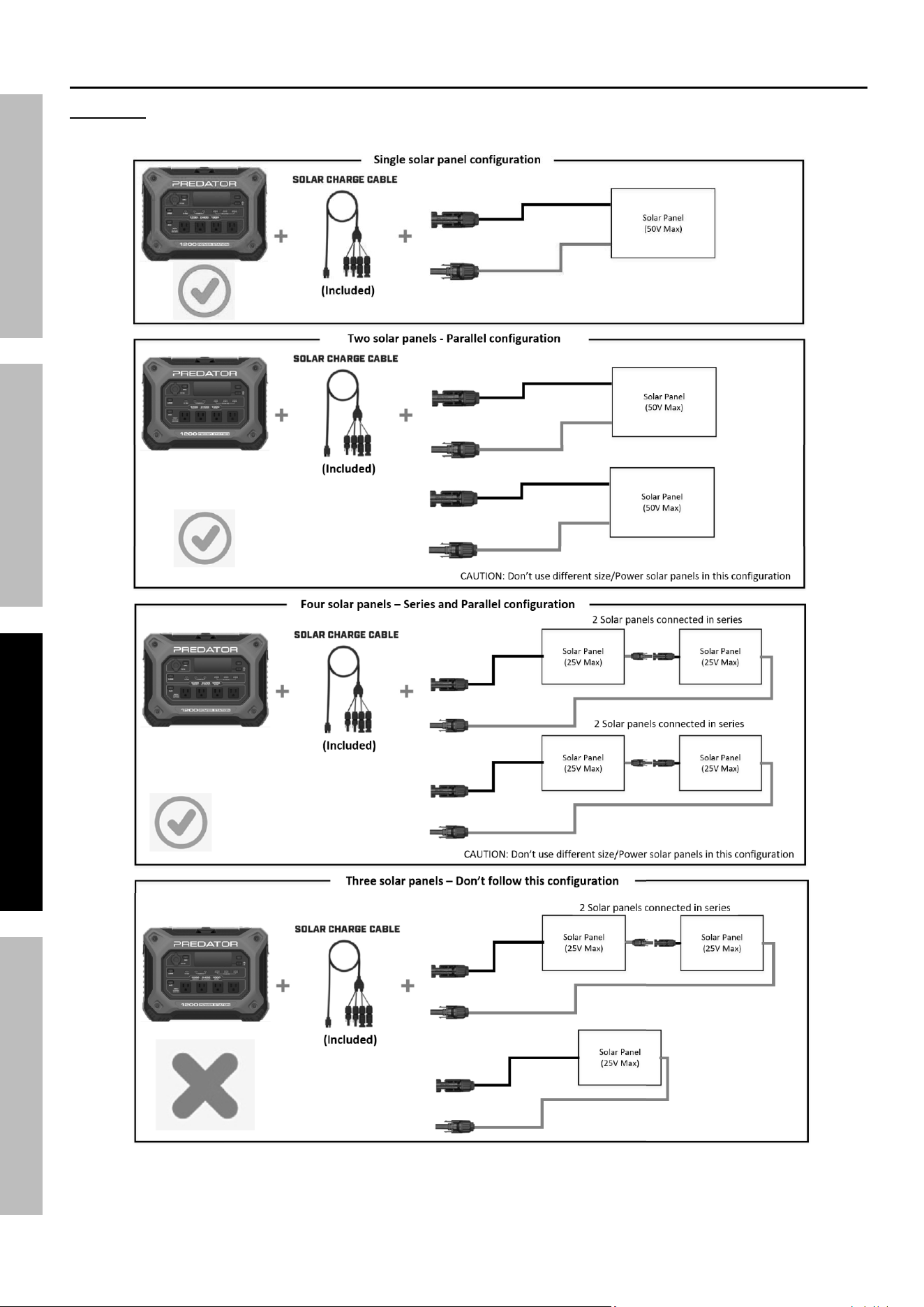
cautiOn! to prevent personal injury and property damage: Do not connect more than 50VDC to the Power
Station When using solar panels. When more then one solar panel is connected ensure they are identical.
An example of a wrong connec�on method
Solar charging connection Guide
Page 11For technical questions, please call 1-800-444-3353.70081
SaFetyOperatiOnMaintenance Setup
Maintenance and Servicing
procedures not specifically explained in this manual
must be performed only by a qualified technician.
tO preVent SeriOuS inJury FrOM eLectric SHOcK:
Disconnect power Station from power source before performing any inspection,
maintenance, or cleaning procedures.
tO preVent SeriOuS inJury FrOM pOWer StatiOn FaiLure:
Do not use damaged power Station. if abnormal noise, vibration, or
heating occurs, have the problem corrected before further use.
Wear splash-resistant anSi-approved safety goggles and
electrically insulated gloves while working near batteries.
1. BeFOre eacH uSe, inspect the general condition
of the Power Station. Check for:
• loose hardware,
• damaged cord/electrical wiring,
• cracked or broken parts, and
• any other condition that may
affect its safe operation.
2. aFter uSe, clean external surfaces of
the Power Station with clean, dry cloth.
3. DO nOt Open HOuSinG.
Contains no user‑serviceable parts.
internal parts may be electrified,
even with power Station off and
power disconnected.
4. Do not expose Power Station to rain or
other liquids, or extreme temperatures.
5. The Power Station must be fully charged before
first use, and recharged within 7 days after use.
Then fully recharge every 3 to 6 months.
6. Internal electronic components must be
disposed of properly or recycled.
Page 12 For technical questions, please call 1-800-444-3353. 70081
SaFety OperatiOn MaintenanceSetup
troubleshooting
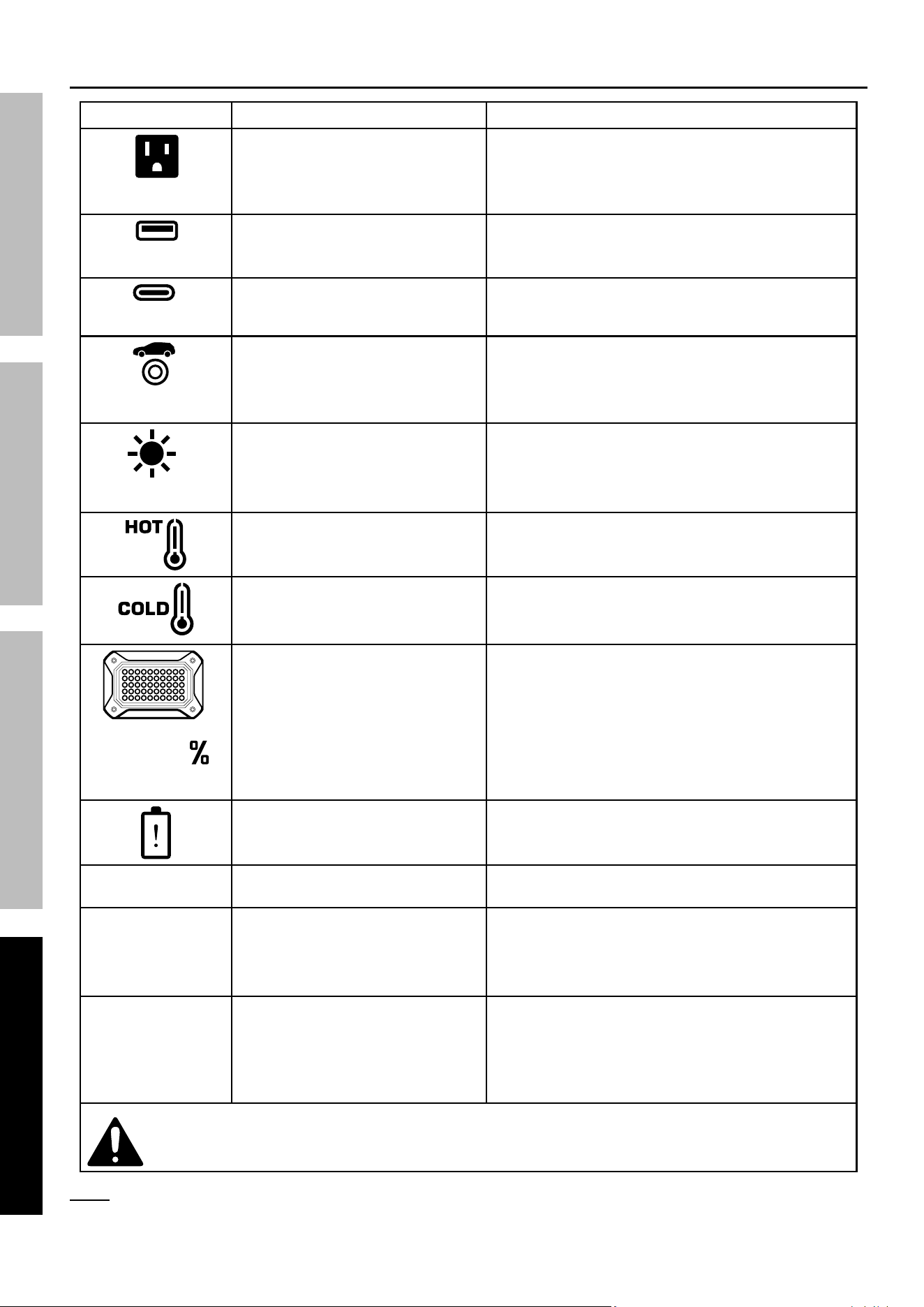
problem explanation probable Solutions
Icon flicker
AC Output overload Check connected devices and wires.
Press AC button to reset.
Icon flicker
USB‑A overload Check connected devices and wires.
Press USB button to reset.
Icon flicker
Type‑C overload Check connected devices and wires.
Press USB button to reset.
Icon flicker
Car Output overload Check connected devices and wires.
Press Car Output button to reset.
Icon flicker
Input DC charge (Solar) overload Check solar setup; make sure input
voltage is within specified range.
High temperature Allow unit to cool. Unit will automatically reset once
operating temperature is reached. Avoid exposure
to direct sun; allow sufficient air flow around unit.
Low temperature Move unit to area with proper temperature.
Unit will automatically reset once
operating temperature is reached.
Icon flicker
Power Station battery at 5%. Charge unit soon.
System/battery pack protection System fault, or out‑of‑range temperatures. If unit
fails to auto‑reset, contact customer service.
Unit beeps 3 times
and shuts down.
Battery discharged. Charge battery.
No output voltage. 1. Output (AC/USB/Car)
is not turned on.
2. Power Station battery is low.
3. Cords not connected properly.
1. Turn on desired output.
2. Charge Power Station battery.
3. Check and secure connections.
Could not
drive load.
1. The AWG of the wire is too low.
2. Start power of device exceeds
rated power of Power Station.
3. Battery capacity too low to
support starting power.
1. Use appropriately‑sized cable connections.
2. Reduce load, or change devices.
3. Charge battery.
Follow all safety precautions whenever diagnosing or servicing the power Station.
Disconnect power supply before service.
note: If error codes displayed on digital screen (E:01‑E12), please call customer service 1‑800‑444‑3353.

Page 13For technical questions, please call 1-800-444-3353.70081
SaFetyOperatiOnMaintenance Setup
pLeaSe reaD tHe FOLLOWinG careFuLLy
THE MANUFACTURER AND/OR DISTRIBUTOR HAS PROVIDED THE PARTS LIST AND ASSEMBLY DIAGRAM
IN THIS MANUAL AS A REFERENCE TOOL ONLY. NEITHER THE MANUFACTURER OR DISTRIBUTOR
MAKES ANY REPRESENTATION OR WARRANTY OF ANY KIND TO THE BUYER THAT HE OR SHE IS
QUALIFIED TO MAKE ANY REPAIRS TO THE PRODUCT, OR THAT HE OR SHE IS QUALIFIED TO REPLACE
ANY PARTS OF THE PRODUCT. IN FACT, THE MANUFACTURER AND/OR DISTRIBUTOR EXPRESSLY
STATES THAT ALL REPAIRS AND PARTS REPLACEMENTS SHOULD BE UNDERTAKEN BY CERTIFIED AND
LICENSED TECHNICIANS, AND NOT BY THE BUYER. THE BUYER ASSUMES ALL RISK AND LIABILITY
ARISING OUT OF HIS OR HER REPAIRS TO THE ORIGINAL PRODUCT OR REPLACEMENT PARTS
THERETO, OR ARISING OUT OF HIS OR HER INSTALLATION OF REPLACEMENT PARTS THERETO.
Page 14 For technical questions, please call 1-800-444-3353. 70081
SaFety OperatiOn MaintenanceSetup
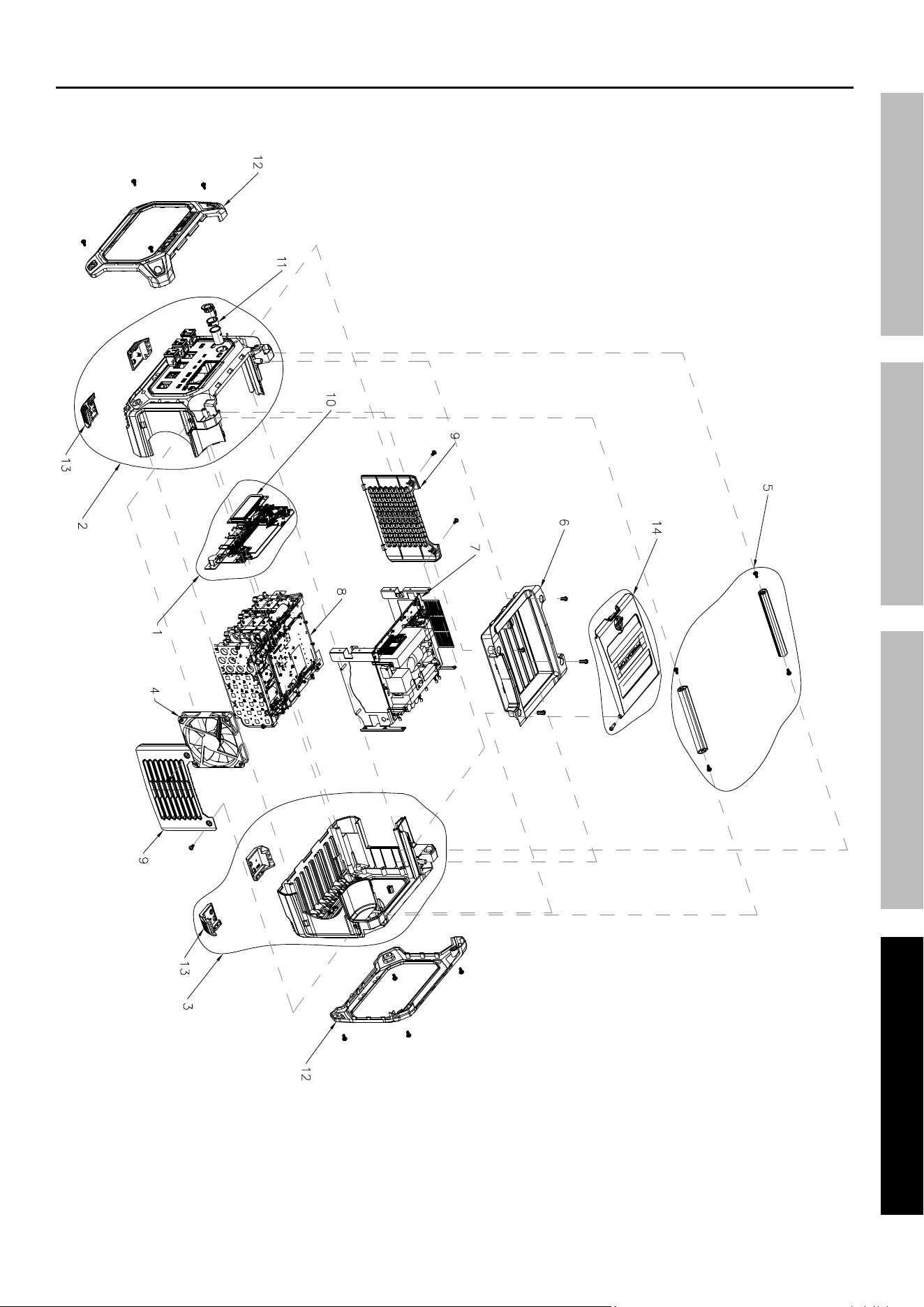
parts List and assembly Diagram
parts List
part Description Qty
1 PCBA Module 1
2 Front Housing Assembly 1
3 Rear Housing Assembly 1
4 Fan 1
5 Handle Assembly 1
6 Upper Cover Assembly 1
7 Inverter Module 1
8 Battery Pack 1
9 Side Cover 2
10 LCD Screen 1
11 Car Port Assembly 1
12 Decorative Cover 2
13 Foot Pad 4
14 Upper Cover 1
record product’s Serial number Here:
note: If product has no serial number, record month and year of purchase instead.
note: Internal parts are not user‑serviceable. Some parts are listed and shown for illustration purposes
only, and are not available individually as replacement parts. Reference UPC 193175488688.
Page 15For technical questions, please call 1-800-444-3353.70081
SaFetyOperatiOnMaintenance Setup
assembly Diagram

26677 agoura road • calabasas, ca 91302 • 1-800-444-3353
tM
5-year LiMiteD Warranty
This PREDATOR product is warranted to the original purchaser to be free from defects in materials and workmanship
for a period of five (5) years beginning on the date of purchase. To obtain warranty service, visit your local Harbor
Freight retail store. Warranty registration is not required. The product or part must be returned to us with proof of
purchase (e.g. in‑store receipt or packing slip/invoice) and may require shipment by purchaser to a service center
at purchaser’s expense. If our inspection verifies a covered defect in materials or workmanship during the warranty
period, we will, at our option, repair or replace the defective product. We will return repaired products within a
reasonable time at our expense, but if we determine that there is no defect, or that the defect resulted from causes
not within the scope of our warranty, then we will return the product to you if you pay return shipping costs.
This warranty does not cover any failure or damage that we determine is due directly or indirectly to normal
wear and tear, misuse, use not for the intended purpose or not in accordance with the product manual, abuse,
accident, rental, modification or alteration, unauthorized disassembly or repair, improper installation, neglect,
exposure to liquids or extreme temperatures, lack of maintenance (including failure to follow all operating and
maintenance instructions), or any other failure not arising from defective materials or workmanship. Fraudulent
returns or claims will be denied. The repair or replacement described in this warranty shall be your sole and
exclusive remedy. THIS WARRANTY IS EXCLUSIVE AND IN LIEU OF ALL OTHER EXPRESS WARRANTIES,
WRITTEN OR ORAL, AND ANY IMPLIED WARRANTIES ARE DISCLAIMED TO THE EXTENT PERMITTED
BY LAW AND OTHERWISE LIMITED TO THE DURATION OF THE EXPRESS WARRANTY HEREIN. HARBOR
FREIGHT SHALL NOT BE LIABLE UNDER ANY CIRCUMSTANCES FOR ANY INCIDENTAL, INDIRECT,
SPECIAL, CONSEQUENTIAL, OR PUNITIVE DAMAGES OR COSTS ARISING FROM THIS WARRANTY
OR THE USE OF THIS PRODUCT. SOME STATES DO NOT ALLOW LIMITATIONS ON HOW LONG AN
IMPLIED WARRANTY LASTS OR THE EXCLUSION OR LIMITATION OF INCIDENTAL OR CONSEQUENTIAL
DAMAGES, SO THESE LIMITATIONS MAY NOT APPLY TO YOU. THIS WARRANTY GIVES YOU SPECIFIC
LEGAL RIGHTS, AND YOU MAY ALSO HAVE OTHER RIGHTS WHICH VARY FROM STATE TO STATE.