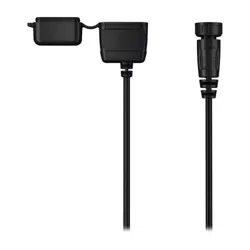
VOICE CONTROL USB BUNDLE
INSTALLATION INSTRUCTIONS
Connecting the Device
WARNING
You can permanently damage your ears and lose hearing if you listen to the device, earbuds, or headphones
at high volume. If you experience ringing in your ears or muffled speech, stop listening and have your hearing
checked.
1 Turn off the Garmin
®
chartplotter.
2 Insert the Bluetooth
®
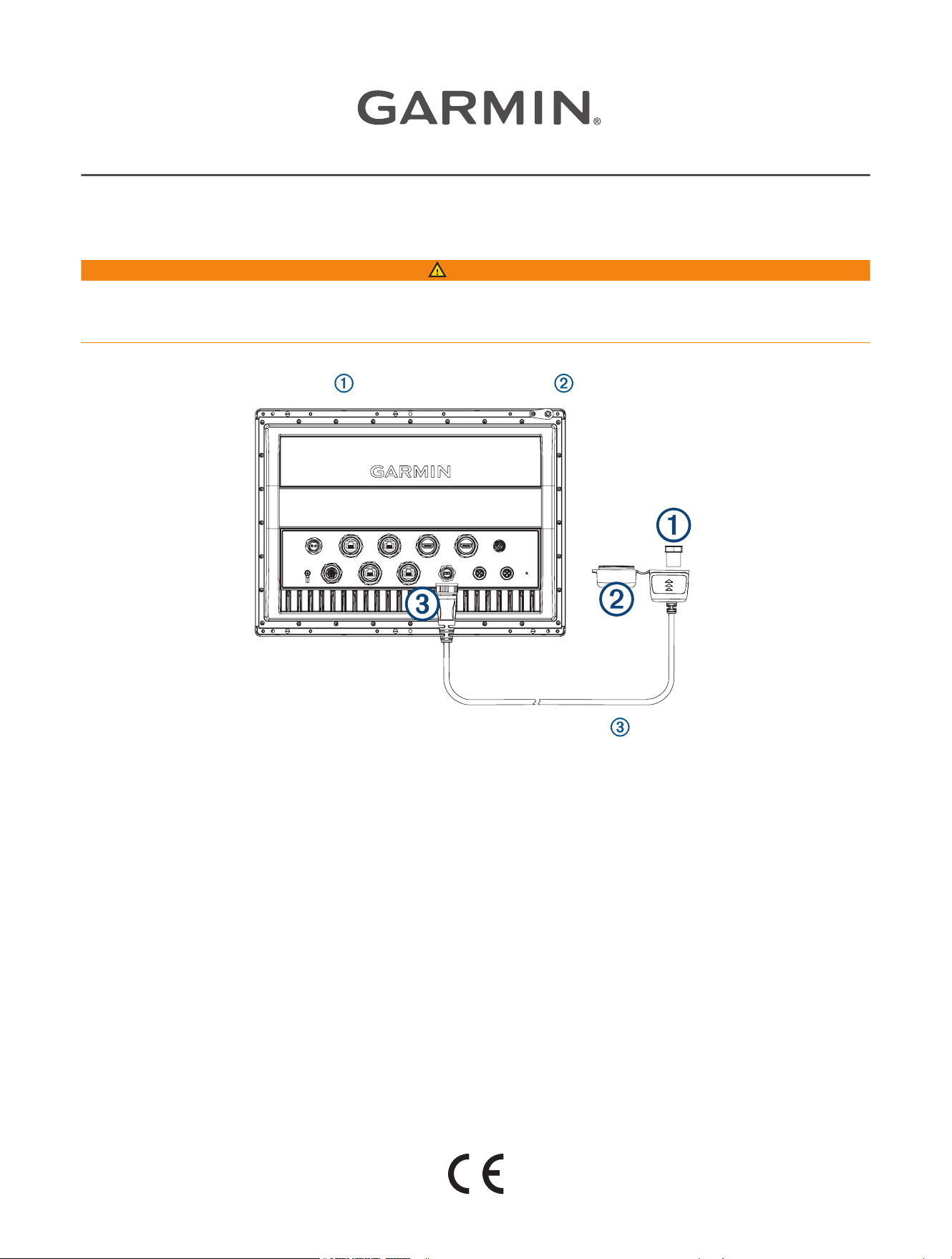
USB device into the included USB cable and close the weather cap.
3 Screw the USB cable into the micro USB port on the Garmin chartplotter .
4 Route the cable and secure the end containing the Bluetooth USB device.
NOTE: The Bluetooth USB device requires a minimally obstructed line of sight to maintain a strong
connection with a headset. Avoid placing the USB device directly behind the chartplotter or other potential
sources of interference such as metal panels.
5 Test the connection strength with the Bluetooth USB device and paired headset in their respective intended
location and orientation, and relocate the device if needed.
Changing the Voice Control Language on a Garmin Chartplotter
You must enable voice control on your Garmin chartplotter to use the Voice Control USB Bundle.
1 On the chartplotter home screen, select Settings > System > Sounds and Display > Voice Control.
2 Select Voice Control > Voice Language.
3 Select the voice control language.
NOTE: The voice control language can be different than the text language.
GUID-CA004AE0-F559-4982-B6FD-C3ADA7CC9D2B v2September 2022

Supported Headsets
The Voice Control USB module supports headsets and speakers with the following specifications:
• Bluetooth hands-free profile version 1.6 or higher
• mSBC audio codec (16 kHZ)
NOTE: Headset manufacturers often list these as "HD Voice" or "Wideband Speech" headsets.
A list of supported headsets is available at support.garmin.com/marine/.
Pairing a Wireless Headset with a Garmin Chartplotter
1 On the chartplotter, select Settings > Communications > Wireless Devices > Headsets.
2 Select Search for Devices.
3 Enable pairing mode on your headset according to the manufacturer's instructions.
The name of your headset appears on the chartplotter after it is detected.
4 Select the name of your headset.
5 Select Connect.
NOTE: Only one headset can be paired at a time.
Your headset appears on the chartplotter as Paired and Connected.
Using a Wireless Headset with a Garmin Chartplotter
Before using a wireless headset for voice control, make sure the volume on your headset is sufficient to hear
voice responses.
1 Say OK Garmin.
2 Say a command (Chartplotter Voice Commands, page3).
The chartplotter completes the action or provides a voice response.
2

Chartplotter Voice Commands
The voice command system is designed to detect natural speech. This is a list of commonly used voice
commands, but the device does not require these exact phrases (other than OK Garmin). You can try saying
variations of these commands in a way that is natural to you.
Voice Wake Word Function
OK Garmin Wakes up the chartplotter to listen for voice commands
Device and Screen Functions
Voice Command Function
Show Navigation Chart Opens the navigation chart screen
Show Fishing Chart Opens the fishing chart screen
Show Radar Opens the radar screen
Show Sonar Opens the sonar screen
Zoom In Zooms in
Zoom Out Zooms out
Raise Brightness Raises the display brightness
Lower Brightness Lowers the display brightness
Automatic Brightness Enables automatic display brightness adjustment
Sleep Display Puts the display to sleep
Wake Display Wakes the display
Show Traditional Sonar Opens the traditional sonar screen
Show Clear View Opens the Garmin ClearVü
™
sonar screen
Show Side View Opens the Garmin SideVü
™
sonar screen
Show Live Scope Opens the LiveScope
™
screen
Beeper Off Disables the chartplotter beeper
Beeper On Enables the chartplotter beeper
Lock Screen Locks the chartplotter screen
Unlock Screen Unlocks the chartplotter screen
Home Screen Opens the home screen
Screenshot Captures a screenshot
Vessel Functions
Voice Command Function
What's the Fuel Level Replies with the present fuel level
What's the Engine Temperature Replies with the present engine temperature
What's the System Unit Voltage Replies with the present system unit voltage
3
Navigation Functions
Voice Command Function
Clear Active Track Clears all active track information
What's the Distance to the Next Waypoint Replies with the distance to next set waypoint
Media Functions
Voice Command Function
Show Media Player Opens the media player
Play Music Plays the presently selected media
Pause Music Pauses the presently selected media
Resume Resumes playing the presently selected media
Previous Track Returns to the previous track
Next Track Skips to the next track
Mute Mutes the media volume
Unmute Unmutes the media volume
Lower Volume Lowers the media volume
Raise Volume Raises the media volume
Weather and Condition Functions
Voice Command Function
What is the water temperature? Replies with the present water temperature
What is the air temperature? Replies with the present air temperature
What is the wind speed? Replies with the present wind speed
What is the wind direction? Replies with the present wind direction
When is sunrise? Replies with the sunrise time for the present location
When is sunset? Replies with the sunset time for the present location
Tell me the Tide Info Replies with the present tide information
What time is it? Replies with the present time
What's the Depth Replies with the water depth at the present location
4

Radar Functions
Voice Command Function
Enable echo trail Enables the echo trail
Disable echo trail Disables the echo trail
Clear echo trail Clears the echo trail
Increase radar gain Increases the radar gain
Decrease radar gain Decreases the radar gain
Increase radar range Increases the radar range
Decrease radar range Decreases the radar range
Specifications
Water rating IEC 60529 IPX5
1
Operating temperature range From -10 to 50°C (from 14 to 122°F)
Storage temperature range From -20 to 60°C (from -4 to 140°F)
Compass-safe distance 2.54cm (1in.)
Wireless frequency and protocol 2402 to 2480 MHz, Bluetooth 5.0
Output power (max.) 8.5 dBm
© 2022 Garmin Ltd. or its subsidiaries
Garmin
®
and the Garmin logo are trademarks of Garmin Ltd. or its subsidiaries, registered in the USA and other countries. These trademarks may not be used without the
express permission of Garmin.
1
The device withstands projected water exposure from any direction (such as rain).
5

© 2022 Garmin Ltd. or its subsidiaries
support.garmin.com
