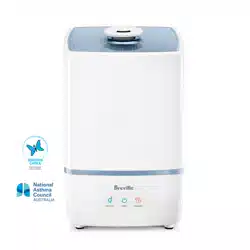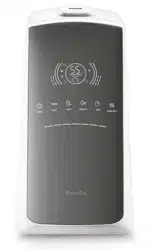
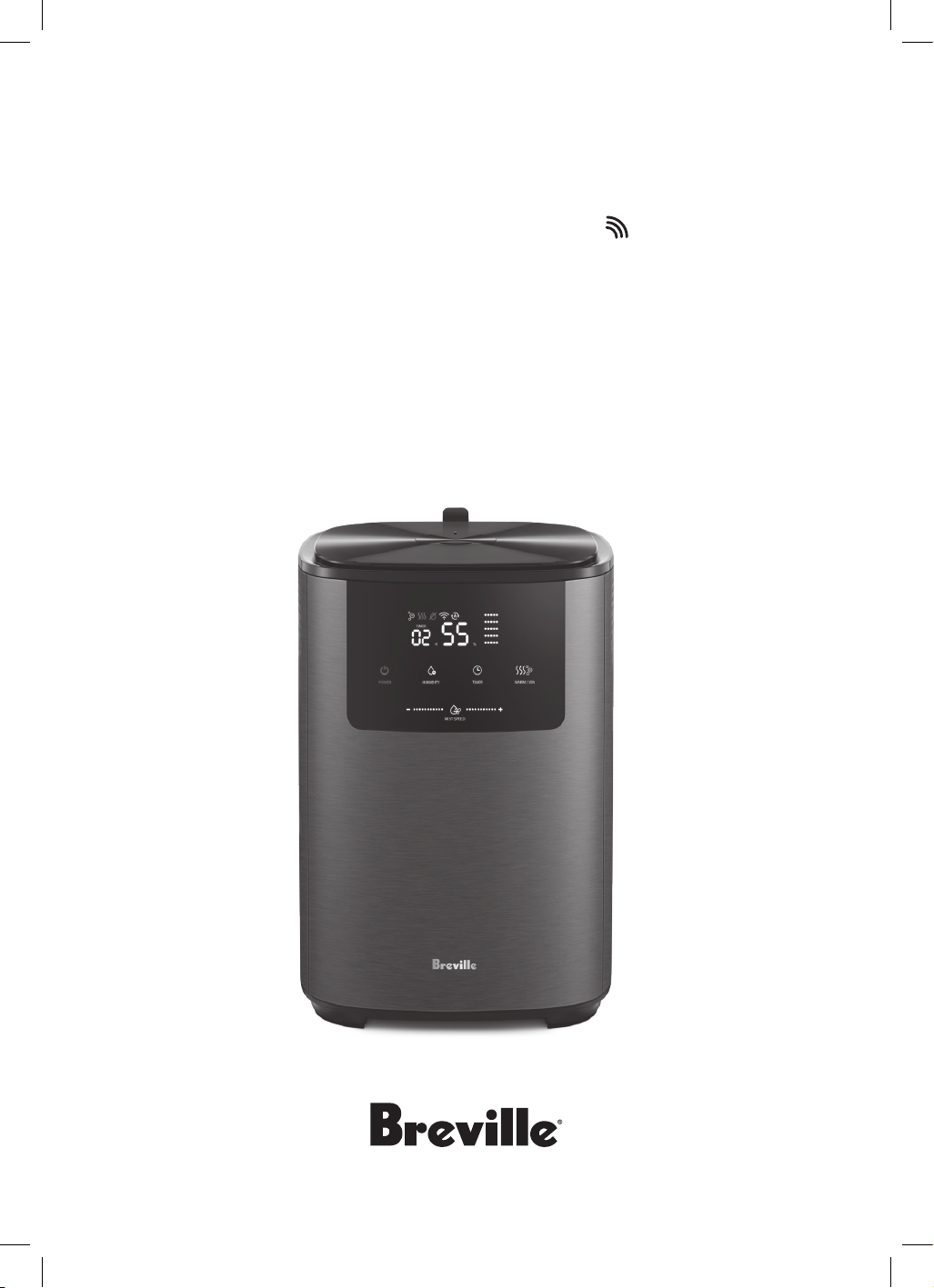
the Smart Mist Top
TM
Connect
Humidifier
Instruction Book - LAH508

2
BREVILLE
RECOMMENDS
SAFETY FIRST
At Breville we are very safety
conscious. We design and
manufacture consumer
products with the safety of you,
our valued customer, foremost
in mind. In addition, we ask that
you exercise a degree of care
and adhere to the following
precautions.
SPECIFICATIONS
Product Dimensions
(HxWxL mm)
335 x 224 x 224mm
For room size 20 to 40m²
Noise level (Max) 35dBA
Power Consumption 110W
Weight 2.8kg
Water Capacity 4.5L
Evaporation Rate Warm mist
450ml/h +/-50ml/h
OS Compatibility Android
®
5.0 or later and
iOS 9.0 or later
NOTE
Not compatible with Google Home,
Amazon Alexa or other similar
voice-assisted appliances.
IMPORTANT
SAFEGUARDS
READ ALL
INSTRUCTIONS BEFORE
USE AND SAVE FOR
FUTURE REFERENCE
• Carefully read all instructions
before operating the
humidifier for the first time
and save for future reference.
• Remove and safely discard
any packaging material and
promotional labels before
using the humidifier for
the first time.
2 Breville Recommends Safety First
8 Components
9 Control Panel
10 Features
10 Assembly
12 Functions
17 Wi-Fi Connectivity
& Voice Assistants
21 Care, Cleaning & Storage
24 Troubleshooting
Contents

3
• To eliminate a choking
hazard for young children,
remove and safely discard the
protective cover fitted to the
power plug of this humidifier.
• When unpacking the
humidifier, check to see you
have received all the items
listed in the parts list before
discarding the packaging.
• Always ensure the humidifier
is properly assembled before
use. Follow the instructions
provided in this book.
• Always operate the
humidifier on a stable surface.
Ensure that the surface is
level, clean and free of water
and other substances.
• Do not operate the humidifier
on an incline plane. Do not
move while the humidifier is
switched on.
• Do not place the humidifier
near the edge of a bench or
table during operation.
• Do not place the humidifier
on a rug, carpet, wooden
flooring, or any other surface
that may be damaged by
exposure to water or moisture.
It is recommended that a
waterproof mat or pad is
placed under the humidifier.
• Do not operate the humidifier
on a sink drain board.
• Do not locate the humidifier
directly below or close to a
mains electricity
supply socket.
• Do not use the humidifier
without water in
the water tank.
• Do not use the humidifier
unless it has been cleaned
according to instructions.
• Mist may not be visible in
certain conditions (impacted
by light, background colour,
etc.) or at lowest setting.
• Suitable for use in dry
locations only. Do not use
outdoors or on wet surfaces.
Do not use in bathrooms,
laundry areas or similar
indoor locations.
• Room ventilation is required if
condensation becomes visible
on windows, walls or floor.
• Never place the humidifier
where it may fall into a bath or
other water container. Do not
use or store where it may get
wet or in the immediate
surroundings of a bath, a
shower, or a swimming pool.

4
• Do not use in areas where
petrol, paint, or flammable
liquids are used or stored or
where there are vapours
present. Do not use in
conjunction with or directly
next to an air freshener or
similar products.
• Do not spray any flammable
materials such as insecticides
or fragrance around
the humidifier.
• Do not use this humidifier
when you have used indoor
smoke-type repellents or in
places with oily residue,
burning incense or
chemical fumes.
• Do not pour water into any
openings except for the water
tank. Do not allow water to
enter the air outlets on top of
the humidifier.
• When filling or refilling, only
fill the water tank with cold tap
water or distilled water. Do not
use ground water or hot water.
• Always switch the humidifier
off and then unplug from the
power outlet:
- Before filling or emptying
the water tank.
- Before cleaning and
maintenance, unless
otherwise specified in
this booklet.
- Immediately after use.
• Always use clean tap or
distilled water to prevent
clogging and damage to
the transducer.
• Do not put any substance
other than water in the water
tank. Do not add fragrance or
any chemical substance into
the water. Use only water (tap,
purified, mineral, any sort of
portable water). If other
additives are used, the plastic
material and the membrane
may become discoloured
and/or damaged.
• Water in the water tank is not
suitable for drinking. Do not
drink this water, and do not
use it to feed animals or water
the plants. When you empty
the water tank, pour the water
in the water tank down a drain.
• Do not use the humidifier in a
room with major temperature
changes as this may cause
condensation inside
the humidifier.
• If not using the humidifier for
a long time, clean and dry the
water tank before storage.
• Clean the water tank
every week.

5
• Always disconnect the
humidifier from the power
supply and empty the water
tank before moving. Always
carry the humidifier upright.
• It is important to check the
humidity of your ambient air
regularly. Intensive
continuous operation can
cause the ambient air to
become excessively humid.
• A comfortable humidity level
is considered to be between
40%RH to 60%RH.
• Never use the humidifier
underneath a cover such as a
blanket, pillow, etc.
• Never plug in or switch on
the humidifier without filling
the removable water tank
with water and correctly
replacing the tank onto the
base of the humidifier.
• Do not remove the mist
nozzle during operation.
• Position the humidifier so
that the mist nozzle is not
directed towards objects or a
wall as the immediate vicinity
of the air humidifier may
become damp.
• The humidifier is not
intended to be operated by
means of an external timer or
separate remote-control
system or any other device
that switches the humidifier
on automatically.
• Do not use chemicals, steel
wool, metal scouring pad or
abrasive cleaners to clean the
outside of the humidifier
housing as these can
damaged the housing of
the humidifier.
• Cleaning procedures must be
routinely followed to ensure
that the humidifier continues
to operate efficiently.
• Empty any remaining water
from the water tank and water
inlet basin when the
humidifier is not in use.
• You may optionally add drops
of essential/scented oils to the
aroma tray. This will emit a
pleasant odour into the
surrounding area.
• The air humidifier transducer
is highly sensitive. Do not
touch the transducer with
bare fingers or scrape it with
any metal tools, as it may
reduce the mist output
permanently.
• Keep the humidifier clean.
Follow the cleaning
instructions provided
in this book.

6
IMPORTANT
SAFEGUARDS FOR ALL
ELECTRICAL
APPLIANCES
• Fully unwind the power
cord before use.
• Connect only to a 230V or
240V power outlet.
• Do not let the power cord
hang over the edge of a bench
or table, touch hot surfaces or
become knotted.
• To protect against electric
shock, do not immerse the
power cord, power plug or
appliance in water or any
other liquid or allow moisture
to come in contact with the
part, unless it is
• recommended in the cleaning
instructions.
• The appliance is not intended
for use by persons (including
children) with reduced
physical, sensory or mental
capabilities, or lack of
experience and knowledge,
unless they have been given
supervision or instruction
concerning use of the
appliance by a person
responsible for their safety.
• Children should be
supervised to ensure that they
do not play with
the appliance.
• It is recommended to
regularly inspect the
appliance. To avoid a hazard,
do not use the appliance if
power cord, power plug or
appliance becomes damaged
in any way. Return the entire
appliance to the nearest
authorized Breville Service
Centre for examination
and/or repair.
• Any maintenance other than
cleaning should be performed
at an authorised Breville
Service Centre.
• This appliance is for
household use only. Do not
use this appliance for
anything other than its
intended use. Do not use in
moving vehicles or boats. Do
not use outdoors. Misuse may
cause injury.

7
FOR HOUSEHOLD USE ONLY
SAVE THESE INSTRUCTIONS
• The installation of a residual
current device (safety switch)
is recommended to provide
additional safety protection
when using electrical
appliances. It is advisable that
a safety switch with a rated
residual operating current not
exceeding 30mA be installed
in the electrical circuit
supplying the appliance. See
your electrician for
professional advice.
• During electrical storms, the
appliance should be
disconnected from the power
source at the wall socket to
prevent any electrical surges
that may arise during the
storm and which may
inadvertently cause damage
to the appliance and its
electronic componentry.
• Always turn the appliance to
the off position, switch off at
the power outlet and unplug
at the power outlet when the
appliance is not in use.
• Before cleaning, always turn
the appliance to the off
position, switch off at the
power outlet, unplug at the
power outlet and remove the
power cord, if detachable,
from the appliance and allow
all parts to cool.
• Do not place this appliance
on or near a heat source, such
as hot plate, oven or heaters.
• Position the appliance at a
minimum distance of 20cm
away from walls, curtains and
other heat or steam sensitive
materials and provide
adequate space above and on
all sides for air circulation.
WARNING
To avoid electric shock, do not
connect the plug to the power
outlet when hands are wet.
8
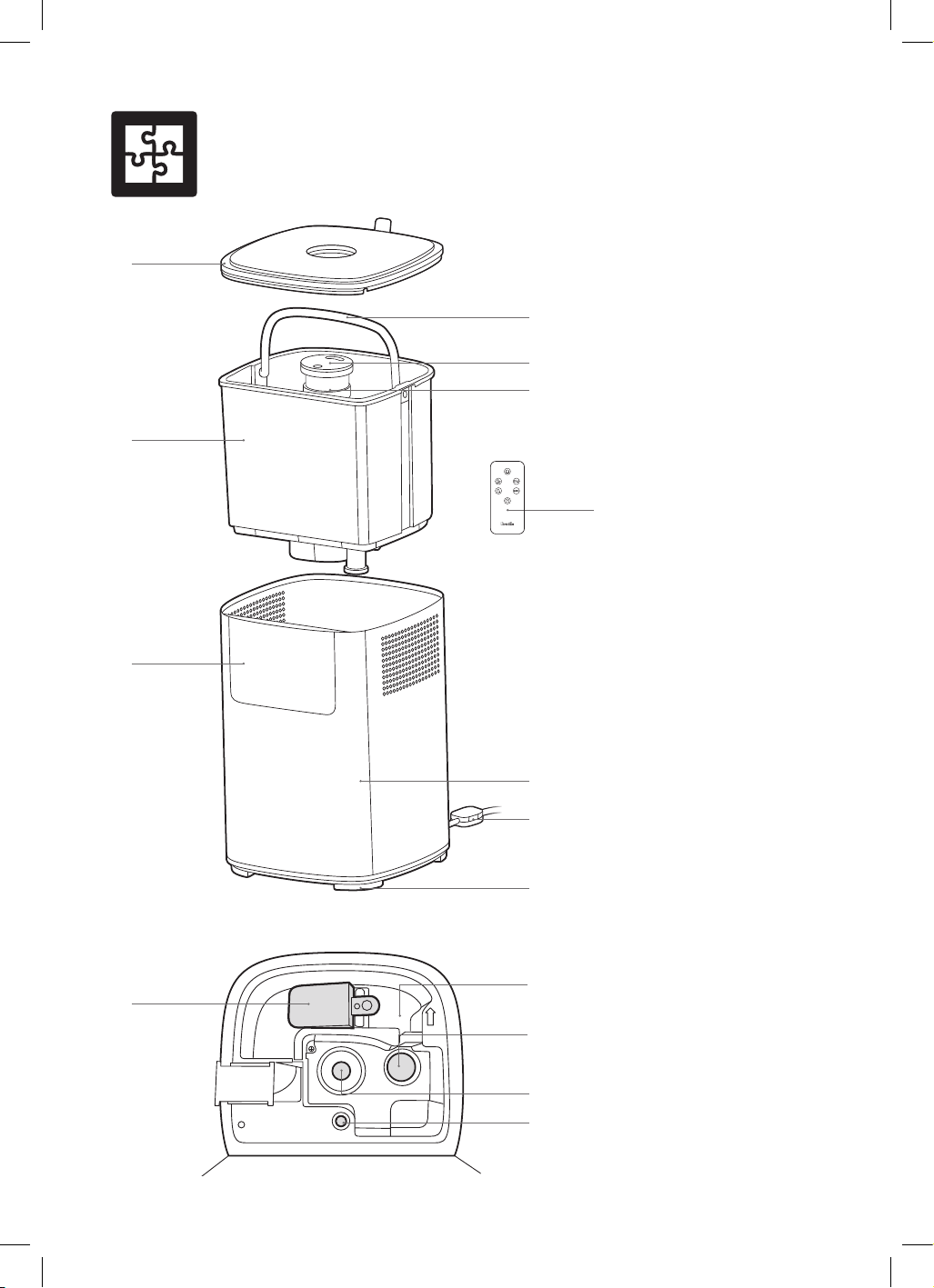
Components
A. Top Cover
B. Water Tank Handle
C. Mist Nozzle
D. Mist Guide
E. Removable Water Tank
F. Control Panel
G. Body
H. Sensor
I. Non-slip Feet
J. Remote Control
K. Water Buoy
L. Water Inlet Basin
M. Heating Plate
N. Transducer
O. Mood Light
NOT PICTURED
Aroma Tray & Felt Pad
Water Purification Filter
Power Cord and Plug
A
B
C
D
I
O
J
G
H
E
F
K
L
M
N
9
TIMER
˚C
˚F
H
%
POWER
MIST SPEED
HUMIDITY
TIMER WARM / ION
A B C
E
D
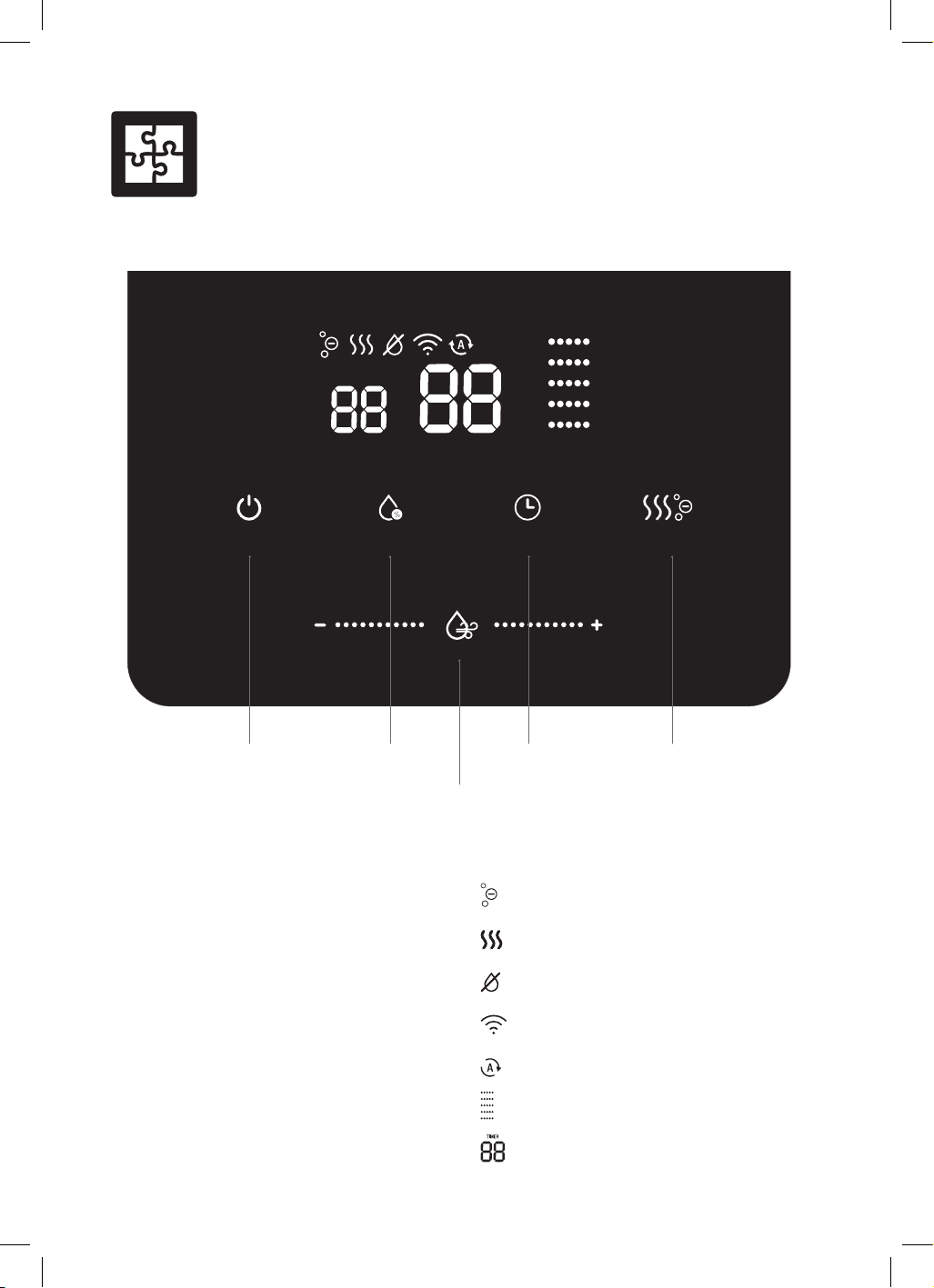
Control Panel
A. Power On/Off and Wi-Fi
B. Humidity and Night Mode
C. Timer
D. Warm/Ion and Mood Light
E. Mist Level Control
Scroll left or right to change
the mist level.
DISPLAY SCREEN ICONS
ION
Warm Mist
Water Tank Empty
Wi-Fi
Full Auto
Mist Intensity Levels 1-5
12 Hour Timer
10
WHAT IS A HUMIDIFIER?
Your Breville humidifier will assist in keeping a
comfortable and healthy environment at home
by artificially adding water vapour (moisture)
to the surrounding atmosphere. It may assist
with common winter symptoms such as dry
skin, dry throat, cracked or dry lips, dry nasal
cavity, and itchy eyes, as well as some sinus
and respiratory issues.
HOW DOES A HUMIDIFIER WORK?
Your Breville humidifier uses a high-frequency
oscillator to break water into tiny water
particles. The ventilation system then blows
these water particles into the dry air in the form
of a mist where it evaporates to increase the
relative humidity.
WHAT IS RELATIVE HUMIDITY?
Relative humidity (RH) is the amount of water
vapour in the air and it is commonly expressed
as a percentage of the maximum amount of
water vapour that the air can hold at a given
temperature. Every environment has a different
humidity level. A standard comfortable level is
considered to be between 40-60%RH.
Features
Assembly
BEFORE FIRST USE
1. Before using your humidifier for the first
time, remove all packaging material and
promotional labels.
2. Check for any missing or damaged parts as
per the components list.
3. Clean all parts according to the Care,
Cleaning & Storage section.
4. Place the humidifier on a flat surface that
will not be damaged by exposure to water
or moisture.
IMPORTANT
It is recommended that a waterproof mat or
pad is placed under the humidifier when in use.
5. Remove the cover from the top of the
humidifier and set aside.
6. Using the water tank handle, lift and remove
the water tank from the humidifier body.
7. Ensure the water purification filter is fitted
properly to the water tank.
NOTE
The water purification filter is attached to the
water tank. Ensure both are properly fitted
before using the humidifier.
8. Fill the water tank up to the ‘MAX’ text
outlined inside the water tank.
IMPORTANT
Only fill the water tank with cold tap or
distilled water. Do not use ground water
or hot water.
9. Use the water tank handle to gently
lower the water tank back into the
humidifier body
11
BEFORE FIRST USE
•
Remove and safely discard any packaging
material or promotional labels attached to
your purifier fan heater and filter. Check for
any missing or damaged parts as per the
components list.
•
Remove the filter from the purifier fan heater
(see REPLACING THE FILTER on page 19)
and take it out of the plastic bag. Then re-
insert the filter into the purifier fan heater.
•
Select a flat and level location for the
purifier fan heater
•
For proper air flow, locate the unit at least
20cm from any wall or furniture.
•
Ensure the air inlet and outlets are not
blocked before use.
•
Ensure the filter has been fitted correctly as
per the instructions in this book.
•
Plug the power plug into a 230V or 240V
power outlet and turn on the power outlet.
WARNING
Remove the filter packaging before first use.
IMPORTANT
When moving the purifier fan heater, always
lift the unit using two hands and set down
gently on a flat and level surface.
10. Ensure the mist nozzle is fitted correctly on
the mist guide of the water tank. If tilted,
lightly push the mist nozzle back onto
the mist guide.
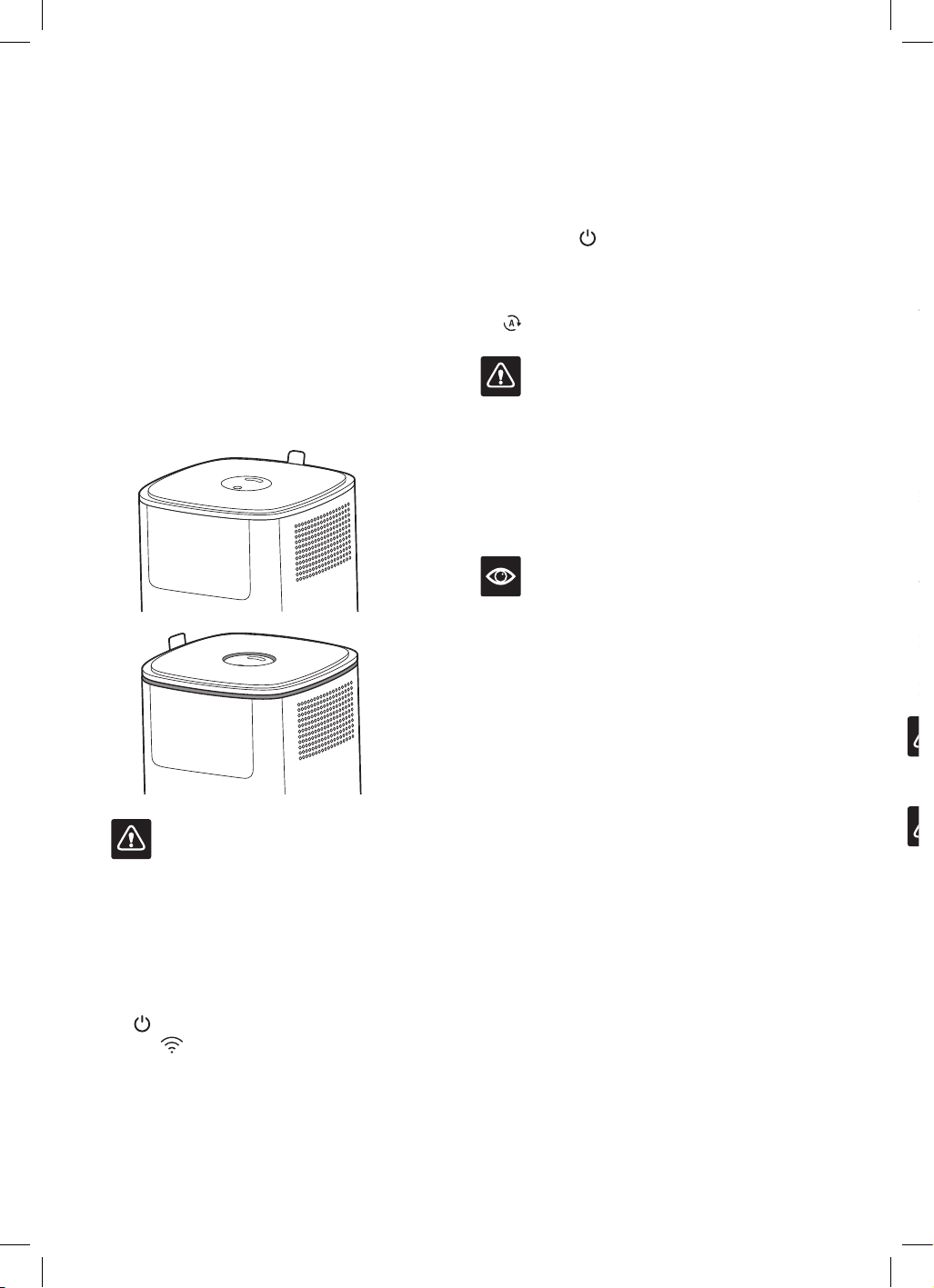
11. Replace the top cover back on the water
tank, ensuring the tab sits in the top back
of the humidifier. The top cover should sit
flat and the mist nozzle should be flat to
the top cover when correctly positioned on
the humidifier.
✔
✘
IMPORTANT
Ensure the top cover sits flat on the top of the
humidifier. If the mist nozzle sits higher or
lower than the top cover when in operation,
condensation will build on the top cover and
around the humidifier.
12. Connect the power plug to a 230V or 240V
power outlet and switch the outlet on. The
POWER symbol will illuminate red and
the
WI-FI icon will flash. The humidifier
is now in Standby mode.
13. Touch the
POWER symbol to activate
the control panel and display screen. The
humidifier is now switched on and will
automatically begin operation in
FULL AUTO mode.
IMPORTANT
Water may remain in the water inlet basin
even though the water tank may be empty.
However, once the water in the tank and/or
basin is too low to keep the humidifier running,
the humidifier will stop working. Refill the tank
with water. Do not use the humidifier without
water in the water tank.
NOTE
Take care when removing the water tank from
the body after use as residual water may drip.
12
• To override the RH level touch the
HUMIDITY/NIGHT symbol. This will switch
the mode to ADJUSTABLE HUMIDITY.
OPERATING YOUR HUMIDIFIER
NOTE
When connected to the power outlet and
turned on for the first time, the humidifier
will operate for one minute in order to sense
the ambient conditions, and then will enter
FULL AUTO mode.
FULL AUTO MODE
• FULL AUTO mode is the default setting for
the humidifier when the unit is turned on
from the power outlet. FULL AUTO mode
can also be manually selected.
• The Timer, Night mode, Warm Mist and
ION features can be used with this setting.
You do not need to adjust Humidity and Mist
Intensity level in FULL AUTO mode.
1. Touch the
HUMIDITY/NIGHT symbol
on the control panel until ‘AU’ illuminates.
Once FULL AUTO mode is set, the
FULL AUTO icon, will illuminate on the
display screen.
2. FULL AUTO mode automatically adjusts
the mist intensity to regulate the humidity
level between 30-65%RH based on the
temperature within the room.
NOTE
• FULL AUTO mode is not recommended
where room temperatures reach above 30°C.
• The mist intensity level will not illuminate as
it will automatically modulate to achieve the
desired humidity level.
YOUR BREVILLE HUMIDIFIER
• The humidifier comes with a memory feature.
When turned on from Standby mode, it will
start on the settings used previously.
• The control panel lights will dim after
approximately 30 seconds if not touched.
Touch the
POWER symbol once, where the
control symbols are located to wake up the
screen, then select any function.
• The Timer, Night mode, Warm mist and ION
features can be used in any mode.
• The humidifier will check the humidity level
once every minute.
• The room temperature and humidity will
alternate on the display screen approximately
every 10 seconds when in operation on all
modes except adjustable humidity mode.
• Manual adjustment of the Mist intensity
control bar will exit any programmed
settings, except ADJUSTABLE SPEED and
manual setting.
• Touch and hold the WARM MIST symbol
to turn off the mood light in the water tank.
Repeat to turn back on.
• When empty, the
WATER TANK EMPTY
icon will illuminate and the humidifier will
automatically turn off.
SENSAIR SYSTEM™ LIVE
COMFORT CONTROL
• Your Breville Smart Mist Top™ Connect
Humidifier has a sensor to detect changes
to humidity and temperature in the
surrounding area.
• On FULL AUTO and ADJUSTABLE
SPEED modes, the SensAir System™
will automatically keep the humidity
in the “Comfort Zone” by setting the
appropriate level of relative humidity,
depending on ambient air temperature for
maximum comfort.
Functions
13
3. The humidifier will continue to monitor
and regulate as required to maintain the
comfort zone, adjusting the mist intensity.
Once the comfort zone has been achieved,
the humidifier will stop the mist intensity
automatically and will then operate
again if the humidity level falls below the
comfort zone.
4. If the Timer has not been programmed, the
humidifier will continue to operate in FULL
AUTO mode until turned off manually,
programmed to another mode or when the
water tank is empty.
NOTE
The room temperature shown on the display
screen is taken only within the vicinity of the
sensor and may be influenced by positioning,
airflow and other environmental factors. Actual
room temperature may vary slightly.
SEMI-AUTO MODES
This humidifier can achieve 2 semi-
auto modes: ADJUSTABLE SPEED and
ADJUSTABLE HUMIDITY modes.
• In ADJUSTABLE SPEED mode, the
humidifier automatically keeps the humidity
in the comfort zone with the SensAir
System™ while the mist intensity can be
manually selected.
• In ADJUSTABLE HUMIDITY mode, the
humidifier automatically adjusts the mist
intensity to maintain a pre-selected relative
humidity level.
• ADJUSTABLE SPEED and ADJUSTABLE
HUMIDITY can only be accessed when the
humidifier is on FULL AUTO mode.
• The Timer, Night mode, Warm Mist and ION
features can be used with these modes.
ADJUSTABLE HUMIDITY
To program ADJUSTABLE HUMIDITY,
touch the
HUMIDITY/NIGHT symbol
on the control panel repeatedly to cycle
through until the desired RH flashes on the
display screen. The RH number will flash 3
times then illuminate. The
FULL AUTO
icon will illuminate and the % icon will
flash continuously during this setting. The
humidifier will start automatically if the room
humidity is lower than the selected humidity. If
the room humidity is higher than the selected
humidity, ‘HI’ will display on the display screen,
and mist will not be released.
NOTE
The humidity level can be selected in 5%
increments between 30% and 90%.
The mist intensity level will not illuminate as
it will automatically modulate to achieve the
desired humidity level.
Once the chosen relative humidity has been
reached, the mist will stop releasing and will
automatically restart once the humidity level
falls below the set humidity.
ADJUSTABLE SPEED
To program ADJUSTABLE SPEED,
touch or slide your finger along the
MIST LEVEL
CONTROL bar on the control panel to change
the mist intensity as desired. The mist intensity
level will display and the on the right-hand
side of the display screen, the mist intensity
level will illuminate. The humidifier will start
automatically if the room humidity is lower
than the comfort zone.
If the ideal relative humidity is higher than the
ideal humidity in the “Comfort Zone” , ‘HI’ will
display on the display screen and adjustable
speed cannot be programmed.
NOTE
The mist intensity level can be selected from
LOW (1) to HIGH (5).
The room temperature and relative humidity
will alternate on the display screen every 10
seconds when in operation.
Once the ideal relative humidity has been
reached, the mist release will stop operating
automatically and will restart once the
humidity level falls below the set humidity for
the room temperature.
14
IMPORTANT
All operating modes will be cancelled if the
water tank runs empty. The humidifier will
automatically shut off when there is insufficient
water to operate.
MANUAL MODE
The humidity level and mist intensity can be
manually set in a number of ways.
To set MANUAL mode
• From ADJUSTABLE HUMIDITY,
touch or slide your finger along the
MIST LEVEL
CONTROL bar on the control panel to
change the mist intensity as desired.
• From ADJUSTABLE SPEED, touch the
HUMIDITY/NIGHT symbol on the control
panel repeatedly to cycle through until the
desired RH flashes on the display screen.
NOTE
Both mist intensity and the humidity can be set
together on Manual mode.
The mist intensity levels can be manually
selected between Low (1) to High (5).
The humidity level can be manually selected
between 30% and 90%RH.
The Timer, Night mode, Warm Mist and ION
features can be used with this setting.
The mist intensity will stop when the humidity
level has been reached. The display will
alternate between the word ‘Hi’, the current
temperature and the current humidity level.
If the humidity in the room is higher than
the selected humidity, ‘HI’ will display on
the display screen and the user cannot enter
Manual mode. To enter Manual mode, the user
must select a humidity level that is higher than
the room humidity.
NIGHT MODE
• In NIGHT mode, the humidifier turns off the
lights, except the blue mood light found in
the water tank.
• Night mode can be selected in all modes.
• The Timer feature and Warm Mist feature can
be used with this setting.
1. Touch and hold the
HUMIDITY/NIGHT
symbol on the control panel. All the lights
will turn off, except the mood light in the
water tank, and the
POWER symbol will
flash slowly.
NOTE
Turn off the mood light manually before setting
Night mode if not needed. Touch and hold the
WARM MIST/ION symbol to turn off the
mood light in the water tank.
To reactivate the mood light, touch and hold the
WARM MIST/ION symbol. The mood light
will illuminate.
2. Touch the
POWER symbol to reactivate
the control panel. The control panel lights
will illuminate and the humidifier is ready to
be adjusted. Once the mode is adjusted, the
control panel will dim back into Night mode.
3. To cancel night mode, touch and hold the
HUMIDITY/NIGHT symbol again for
3 seconds. The control panel lights will
illuminate and the humidifier will continue to
operate in the chosen mode.
TIMER
This humidifier has a Timer feature that
will turn the humidifier off after a chosen
number of hours.
1. Touch the
TIMER symbol on the control
panel repeatedly to cycle through 1 to 12
hours. The set time, current relative humidity
and the temperature will alternate on the
display screen.
2. When the desired number of hours is
displayed, it will flash 3 times before starting
the countdown.
3. The Timer will begin to count down in 1-hour
increments. The humidifier will automatically
turn off once the chosen time has elapsed.
4. To cancel this feature, touch and hold
the
TIMER symbol until ‘TIMER’ and
the number of hours disappear from the
display screen.
15
WARM MIST AND ION
WARM MIST
• This humidifier has a WARM MIST feature.
A small internal heating plate will heat the
water to create a warm vapour.
• WARM MIST can be activated on its own, or
together with ION, in all modes.
• WARM MIST can operate automatically
in all modes.
ION
• This humidifier has an ION feature. ION is
generated and released in the mist. The ION
will then catch and hold DUST particles in
the air, helping to purify the air in the process.
• ION can be activated on its own, or together
with WARM MIST, in all modes.
• ION can operate automatically in all modes.
1. Touch the
WARM MIST/ION symbol
on the control panel to turn on warm mist.
The
WARM MIST icon will illuminate
on the display screen and warm mist will
emit from the mist nozzle gradually within
10-15 minutes.
NOTE
Warm mist will start after the water has time
to heat. The time will vary depending on
factors such as the temperature of the water
in the tank.
2. Touch the
WARM MIST/ION symbol
again. The
ION icon will illuminate on
the display screen and ION will emit from
the mist nozzle through the mist.
3. To turn WARM MIST off, but keep ION on,
touch the
WARM MIST/ION symbol
again. The <Insert WARM MIST icon here>
WARM MIST icon will stop illuminating
on the display screen, while the
ION icon
will remain illuminated. ION will continue
to emit from the mist nozzle.
4. To turn ION off, touch the
symbol
again. The
ION icon will stop
illuminating on the display screen. Both
WARM MIST and ION are now off.
AROMA TRAY
• Press the aroma tray on the side of the
humidifier and it will click out of the unit.
• Add 2–3 drops of essential oil (not included)
directly to the pad in the aroma tray.
• Push the aroma tray back into the humidifier
until it clicks into place.
• Turn the humidifier on and the aroma will
start emitting automatically with the mist.
Increase the mist intensity as desired.
WARNING
Never add essential oil directly to the water
tank, the water inlet basin or any other part of
the humidifier except the aroma tray felt pad.
Do not use more than 2–3 drops of oil on the
aroma tray felt pad at any one time. Only add
more oil when the aroma in the surrounding air
has dissipated.
AUTO SHUT-OFF
• Once the water in the water tank and water
inlet basin is too low to keep the machine
running, the
WATER TANK EMPTY icon
will illuminate red on the display, 3 beeps will
sound and the humidifier will stop working.
The
POWER symbol will turn red and stay
illuminated.
• Fill the water tank, turn the humidifier on and
program the desired mode.
• To recommence, turn the humidifier off at
the power outlet, fill the tank and reprogram.
The
WATER TANK EMPTY icon will stop
illuminating and the humidifier will start.
• If night mode is activated, the humidifier
will not beep when the
WATER TANK
EMPTY icon illuminates.
IMPORTANT
All operating modes will be cancelled if the
water tank runs empty. The humidifier will
automatically shut off when there is insufficient
water to operate.
16
USING THE REMOTE CONTROL
The humidifier comes equipped with a remote
control which can be used to operate many
functions on the humidifier.
NOTE
On first use, remove the transparent plastic
protector that separates the Lithium battery
from the connectors.
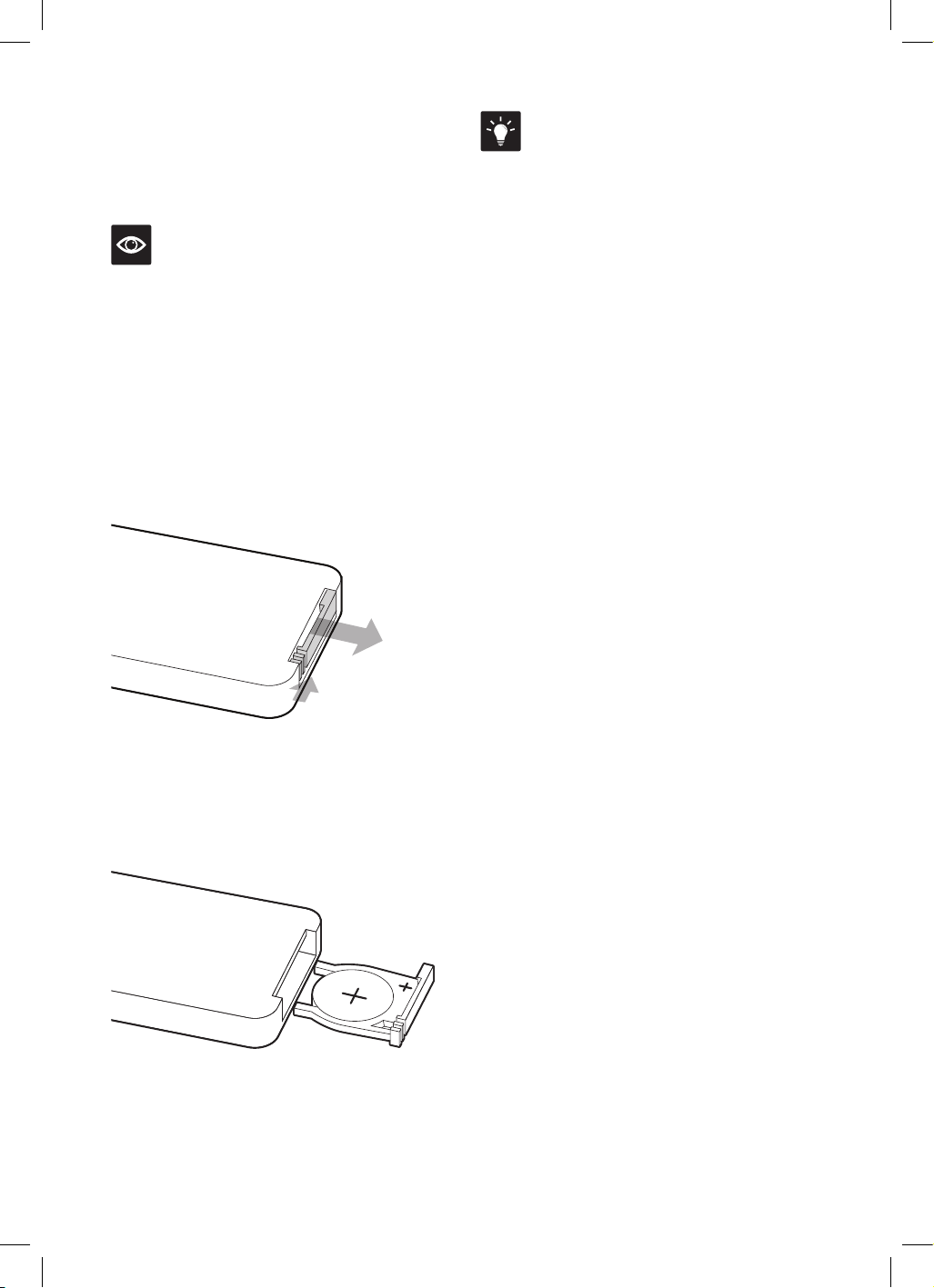
• A CR2025 3V Lithium battery is provided
with the remote. When it is time to
replace the battery, open the battery
compartment at the back of the remote,
pushing the small arched groove to the
right and simultaneously pulling out the
battery compartment cover by pushing the
rectangular groove.
• Insert the battery, paying attention to
the polarity (+ and -). Reinsert the battery
compartment into the remote control
ensuring that the + symbol is facing upwards
when inserted. Make sure the battery
compartment is correctly secured.
• To use the remote control, point it at the
display screen on the humidifier and used
within five meters.
HINT
When correctly inserted, the text on the battery
will be facing the bottom of the remote and the
compartment is fitted correctly when it slides
in all the way.
WARNING FOR BUTTON BATTERIES
KEEP OUT OF REACH OF CHILDREN
• Swallowing may lead to serious injury
in as little as 2 hours or death, due to
chemical burns and potential perforation of
the oesophagus.
• If you suspect your child has swallowed or
inserted a button battery immediately call the
24-hour Poisons information Centre on 13 11
26 for fast, expert advice.
• Examine devices and make sure the battery
compartment is correctly secured, e.g. that
the screw or other mechanical fastener
is tightened. Do not use if compartment
is not secure.
• Dispose of used button batteries
immediately and safely. Flat batteries can still
be dangerous.
• Tell others about the risks associated with
button batteries and how to keep their
children safe.
17
Wi-Fi
Connectivity
The Smart Mist Top™ Connect Humidifier
can offer remote operation by using a home
Wi-Fi connection and the Breville Home
Connect™ app downloaded to a compatible
mobile phone. through the Google Play store
or Apple App store.
To go straight to the appropriate app store,
scan the QR code below.
For instructions on how to use the app, scan the
QR code below, refer to the Quick Start Guide
that can be found in the box or go to
tinyurl.com/HomeConnectQuickStart.
NOTE
The Breville Home Connect™ app is compatible
with mobile phones running Android
®
5.0 or
later and iOS devices 9.0 or later.
NOTE
To control the humidifier using the app, the
humidifier must be plugged into an active
power outlet and switched on at the power
outlet. If the humidifier is switched OFF at the
power outlet or disconnected from the power
outlet, then the app cannot connect to the
humidifier via the network.
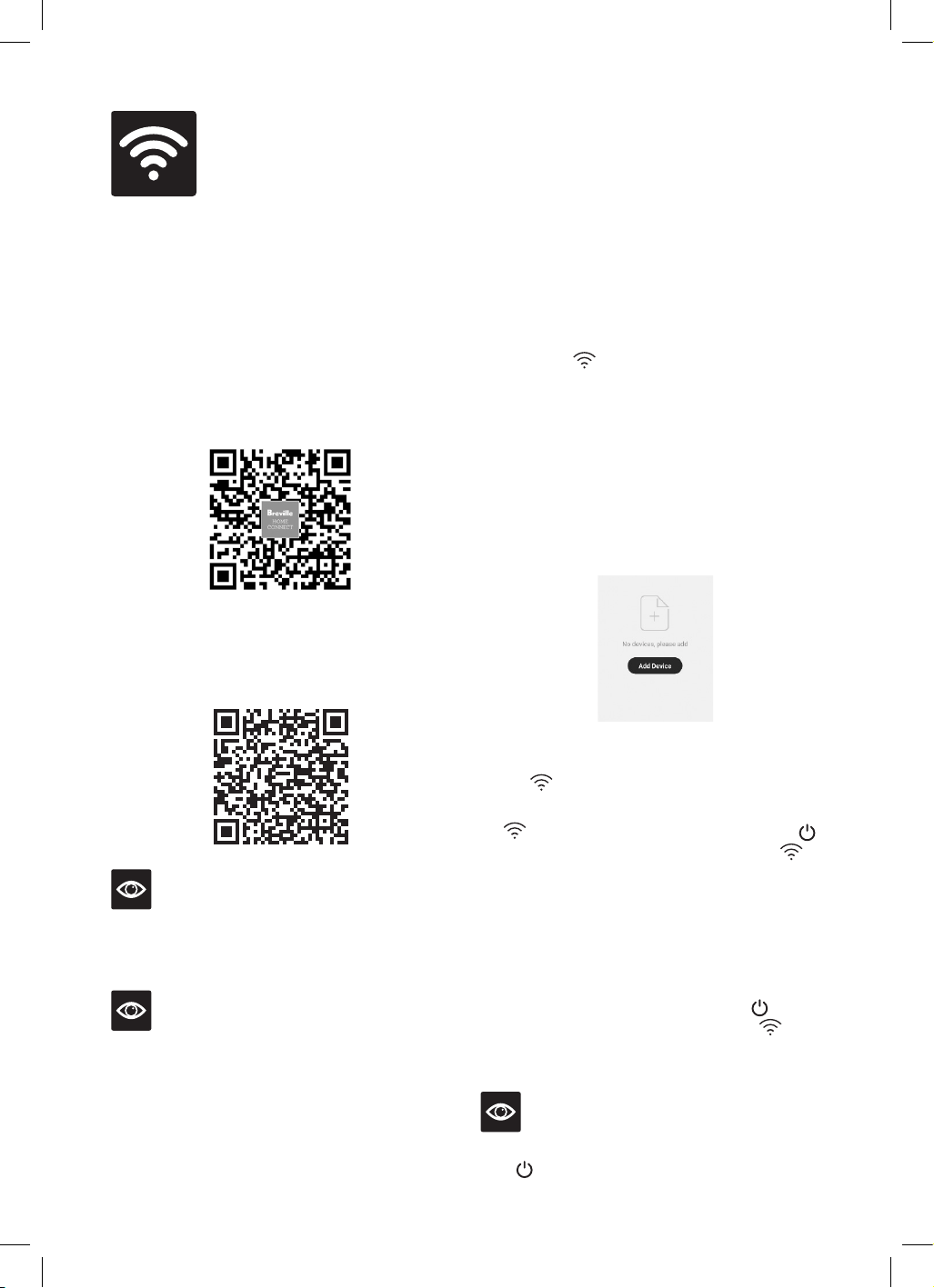
CONNECT YOUR HUMIDIFIER TO
WI-FI
1. Ensure the mobile device is connected to a
home Wi-Fi network.
2. The humidifier must be on standby mode.
Once the
icon flashes rapidly on the
display screen, the humidifier is ready
to connect.
3. Log into your Breville Home Connect™ app
account and stay on the “Home” page. To add
the humidifier to the list, touch ‘Add Device’
or the symbol found in the top right-hand
corner of the screen. Follow the prompts in
the app to scan the device (recommended) or
connect in manual EZ mode (default).
4. If the connection is successful, the humidifier
will appear in the main page of the app and
the
icon on the humidifier will illuminate.
5. If the connection is not successful, the
icon will flash slowly. Touch and hold
for 3 seconds until 1 beep sounds. The
icon will flash rapidly, and the humidifier
is ready to connect to the app through
EZ Mode again.
6. If EZ mode failed to connect, follow the
prompts in the app to automatically begin
AP mode (manual mode). To connect
through AP mode, touch and hold
for
5 seconds until 2 beeps sound. The
icon
will flash slowly. Follow the prompts in the
app to connect in manual AP mode.
NOTE
To return to EZ mode from AP mode, touch and
hold
for 3 seconds.
18
Voice
Assistants
The Breville Smart Mist Top™ Connect comes with the added feature of voice assistance, allowing
you to control your humidifier using your voice by linking your Breville Home Connect™ app with
Amazon Alexa and Google Home/Assistant.
For instructions on how to link your Breville Home Connect™ app account with either Amazon
Alexa or Google Home/Assistant refer to the instructions on www.Breville.com or follow
instructions found in the Breville Home Connect™ app under Me > Third-Party Voice Services >
View more ways to link.
IMPORTANT NOTE
The recommended voice commands to operate the appliance's functions differ between Amazon
Alexa and Google Home/Assistant as listed. Variations of these commands may also be
recognised, however, if a command fails, check against the recommended voice command.
NOTE
To control the humidifier using the Amazon Alexa or Google Home/Assistant app, the humidifier
must be plugged in to an active power outlet and on standby mode.
VOICE CONTROL WITH AMAZON ALEXA
Before you can voice control your Breville Smart Mist Top™ Connect with Amazon Alexa, you need
to link the Breville Home Connect™ account to the Amazon Alexa app as per the instructions.
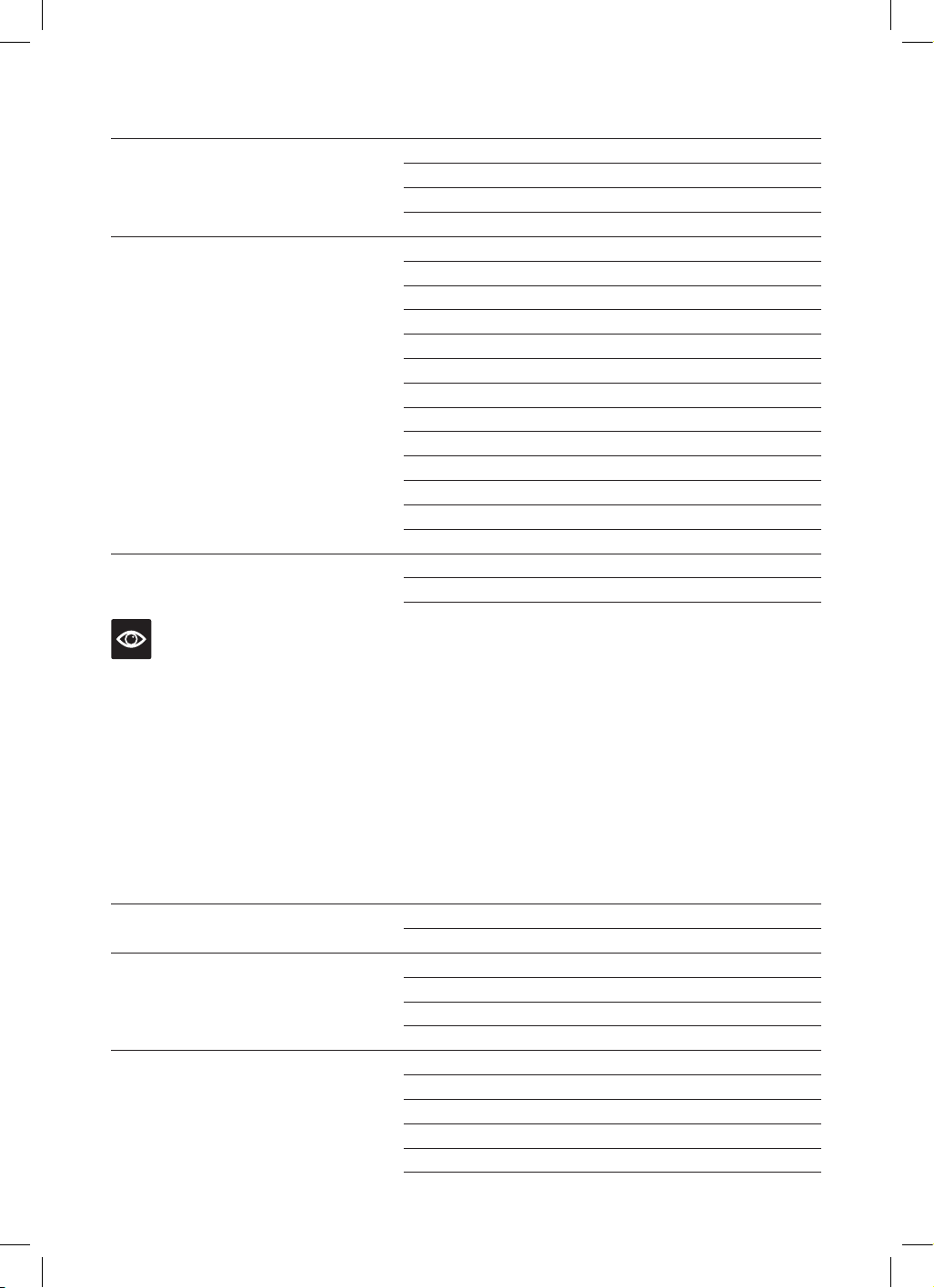
Amazon Alexa Recommended Voice Commands for the Breville Smart Mist Top™ Connect
Supported Settings Amazon Alexa Voice Commands
Power
Turn on DEVICENAME
Turn off DEVICENAME
Mode
Set DEVICENAME on manual
Set DEVICENAME on auto
Set DEVICENAME on adjustable speed
Set DEVICENAME on adjustable humidity
Mist Spray Level
Change DEVICENAME spray level to one
Change DEVICENAME spray level to two
Change DEVICENAME spray level to three
Change DEVICENAME spray level to four
Change DEVICENAME spray level to five
Night Mode/Mood Light
Turn on light on the DEVICENAME
Turn DEVICENAME light on
Turn off light on the DEVICENAME
Turn DEVICENAME light off
19
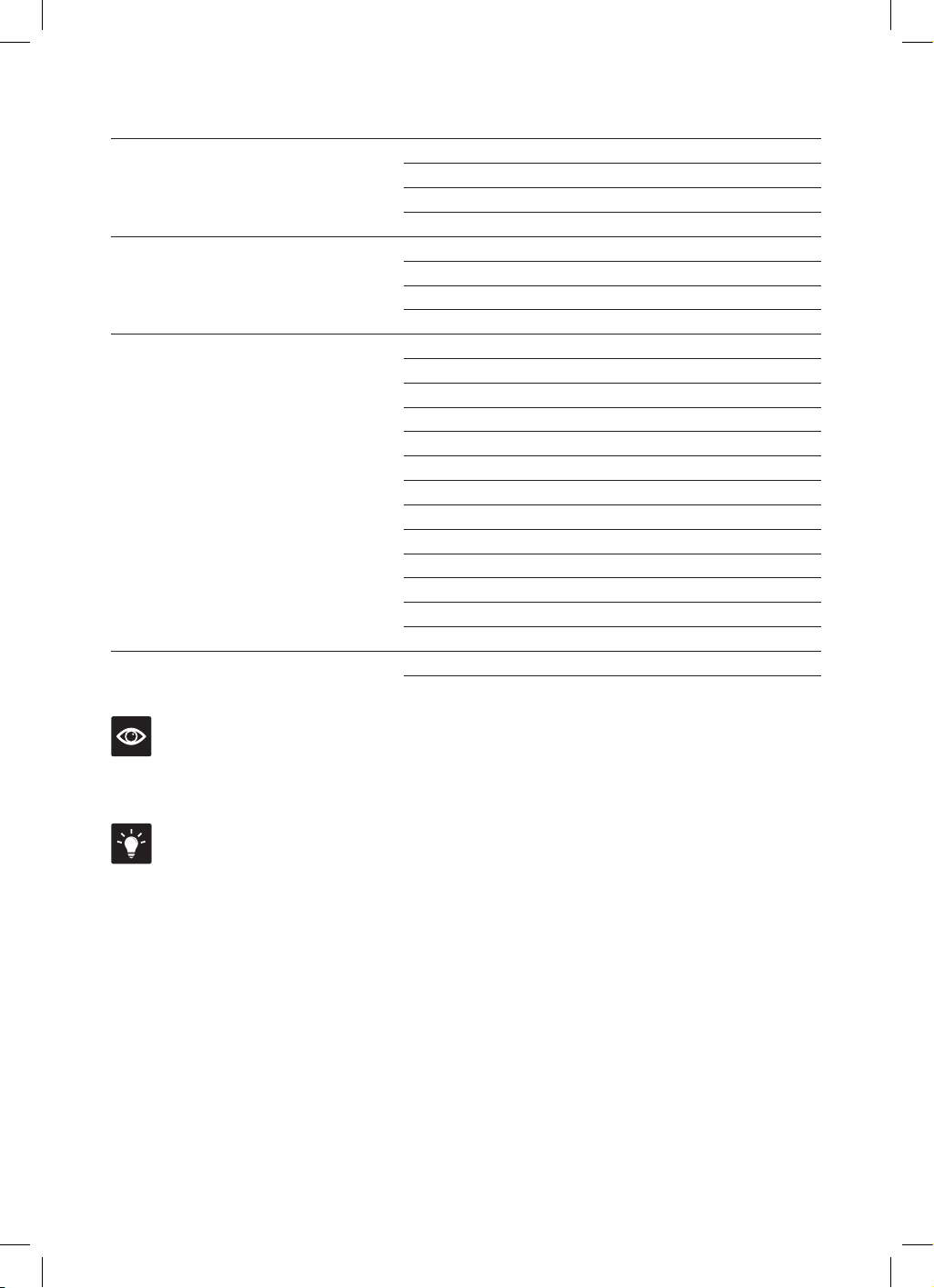
Supported Settings Amazon Alexa Voice Commands
Warm Mist
Turn on heat on the DEVICENAME
Turn DEVICENAME heat on
Turn off heat on the DEVICENAME
Turn DEVICENAME heat off
Humidity Level (30-90%)
Set DEVICENAME humidity to 30
Set DEVICENAME humidity to 35
Set DEVICENAME humidity to 40
Set DEVICENAME humidity to 45
Set DEVICENAME humidity to 50
Set DEVICENAME humidity to 55
Set DEVICENAME humidity to 60
Set DEVICENAME humidity to 65
Set DEVICENAME humidity to 70
Set DEVICENAME humidity to 75
Set DEVICENAME humidity to 80
Set DEVICENAME humidity to 85
Set DEVICENAME humidity to 90
ION (IONIZER)
Turn DEVICENAME ionizer on
Turn DEVICENAME ionizer off
NOTE
Currently, Amazon Alexa does not support the following settings:
• Timer.
VOICE CONTROL WITH GOOGLE HOME/ASSISTANT:
Before you can voice control your Breville Smart Mist Top™ Connect with Google Home/Assistant,
you need to link the Breville Home Connect™ account to the Google Home/Assistant app as per
instructions.
Google Home/Assistant Recommended Voice Commands for the Breville Smart Mist Top™ Connect
Supported Settings Google Home/Assistant Voice Commands
Power
Turn on DEVICENAME
Turn off DEVICENAME
Mode
Set DEVICENAME on manual
Set DEVICENAME on auto
Set DEVICENAME on adjustable speed
Set DEVICENAME on adjustable humidity
Mist Spray Level
Change DEVICENAME spray level to one
Change DEVICENAME spray level to two
Change DEVICENAME spray level to three
Change DEVICENAME spray level to four
Change DEVICENAME spray level to five
20
Supported Settings Google Home/Assistant Voice Commands
Night Mode/Mood Light
Turn on light for DEVICENAME
Turn DEVICENAME light on
Turn off light for DEVICENAME
Turn DEVICENAME light off
Warm Mist
Turn on heat for the DEVICENAME
Turn DEVICENAME heat on
Turn off heat for the DEVICENAME
Turn DEVICENAME heat off
Humidity Level (30-90%)
Set DEVICENAME humidity to 30 percent
Set DEVICENAME humidity to 35 percent
Set DEVICENAME humidity to 40 percent
Set DEVICENAME humidity to 45 percent
Set DEVICENAME humidity to 50 percent
Set DEVICENAME humidity to 55 percent
Set DEVICENAME humidity to 60 percent
Set DEVICENAME humidity to 65 percent
Set DEVICENAME humidity to 70 percent
Set DEVICENAME humidity to 75 percent
Set DEVICENAME humidity to 80 percent
Set DEVICENAME humidity to 85 percent
Set DEVICENAME humidity to 90 percent
ION (IONIZER)
Turn DEVICENAME ionizer on
Turn DEVICENAME ionizer off
NOTE
Currently, Google Home/Assistant does not support the following settings:
• Timer.
TIPS for Amazon Alexa and Google Home/Assistant
• Configure your Amazon Alexa or Google Home/Assistant compatible devices with the "Amazon
Alexa" or “Google Home/Assistant” app if using, or simply download onto your phone.
• You will find your device listed as the Breville product name in your Breville Home Connect™
app account. Tap on the device in the app to rename your device for more convenient voice
commands, e.g. “Humidifier Living Room” or give it a name, e.g. "Kenny".
• Training your voice assistant - Voice Match- Teach your assistant to recognise your voice. This
isn’t training it to understand English, but rather to recognise your voice as belonging to you. You
can do this by going to the Settings menu in the voice assistant app on your mobile device.
• Routines - Amazon Alexa and Google Home/Assistant allow you to combine multiple actions
in one voice command, to create a Routine, tap on the ‘Routines’ option via settings and follow
the steps.
• Ensure the primary language is set to English (United States) for all apps.
21
Care, Cleaning
& Storage
Before cleaning, ensure the power is switched
off and then remove the power plug from the
power outlet.
BREVILLE RECOMMENDS
• Only use cold water or distilled water in
the water tank.
• Change the water often to keep it fresh.
• Clean the transducer, water tank and water
basin at a minimum of once every week when
in constant use.
• Use a small brush or a cotton swab to assist
with cleaning the transducer and basin.
Never use metal or sharp objects.
• After cleaning, ensure all parts are completely
dry before using the humidifier.
NOTE
Clean the whole humidifier and make sure that
all parts are dried completely. Do not immerse
the unit in water. Clean the transducer, water
tank and basin at least once a week.
IMPORTANT
If you do not use the humidifier for a long time,
clean and dry the water tank and the water
purification filter, and all parts before storage.
WARNING
Do not use chemicals, steel wool, metal
scouring pad or abrasive cleaners to clean the
outside of the humidifier housing as these may
damage the humidifier.
IMPORTANT
Cleaning procedures must be routinely
followed to ensure that the humidifier
continues to operate efficiently. Do not use
the humidifier unless it has been cleaned
according to instructions.
TO CLEAN EXTERNAL PARTS
• Use a clean, dry cloth to clean all external
surfaces of the humidifier.
• A soft, slightly-damp cloth may be used to
wipe the external housing of the humidifier if
more thorough cleaning is required. Never use
chemical substances or scourers as this could
damage the housing and the control panel.
• Dry thoroughly before storing or using
the humidifier.
TO CLEAN INTERNAL PARTS
In cases when the water is hard (where water
contains too much calcium and magnesium),
leave heavy scale on the surface of the water
basin, transducer and inner surface of the water
tank. Scale, or calcification, on the surface of
transducer will reduce the reliability of the
unit. To clean internal parts of the humidifier,
create a cleaning solution of 1-part vinegar to
1-part water.
WATER TANK
• It is important to clean the water tank regularly
and ensure it is dry before reassembling and
using the humidifier.
• To clean, create a vinegar and water solution
enough to fill the tank about half way. Swish
the solution around for a minute, then fill the
rest of the tank up with tap water. Leave to sit
for 1–2 hours, or even overnight.
• Empty and rinse well with clean water.
NOTE
To assist with emptying all the water from the
water tank, it may help to slightly shake the tank
over a sink or drain.
22
MIST NOZZLE
• If the mist output is reducing due to
calcification, turn the top cover over and
immerse the nozzle in a vessel filled with
vinegar and water solution and soak for at
least 10 minutes.
• Rinse with clean or distilled water and
allow to dry.
WATER INLET BASIN
• The water inlet basin includes the water
reservoir in the base of the unit that also
houses the transducer and the heating plate.
• Clean the water basin with a soft cloth. If
there is excess film or calcification on the
surface, then soak the cloth with the vinegar
and water solution and repeat the process.
• If there is film or calcification in any of
the depressions along the basin, drop a
bit of vinegar and water solution into the
depression and lightly clean it with a brush or
a cotton swab.
• Rinse with clean or distilled water and
allow to dry.
OPTIONAL CLEANING SOLUTION
FOR CALCIFICATION ISSUES
• If a build-up of calcification on the transducer
or heating plate occurs and cannot be
removed with a simple vinegar and water
solution, use a de-calcifying agent or
citric acid.
STRICTLY FOLLOW THE
INSTRUCTIONS ON THE PACKAGING
FOR THESE CLEANING PRODUCTS.
• Brush off any scale deposits from the
transducer and heating plate surfaces using
the brush or a cotton swab.
• Rinse with clean or distilled water and
allow to dry.
WARNING
Never use sharp or solid objects to clean
the transducer and heating plate. Avoid
touching the transducer and heating plate with
your fingers.
NOTE
The heating plate in the base of the humidifier
will lose its stainless steel finish over time – this
is normal. It is still recommended to de-calcify
as per instructions noting that cleaning may
not bring it back to its original shine.
WATER PURIFICATION FILTER
It is recommended that you clean the water
purification filter every time you clean the
humidifier, especially if in frequent use. If
the filter is cleaned regularly and as per
instructions, it should last for the life of
the humidifier.
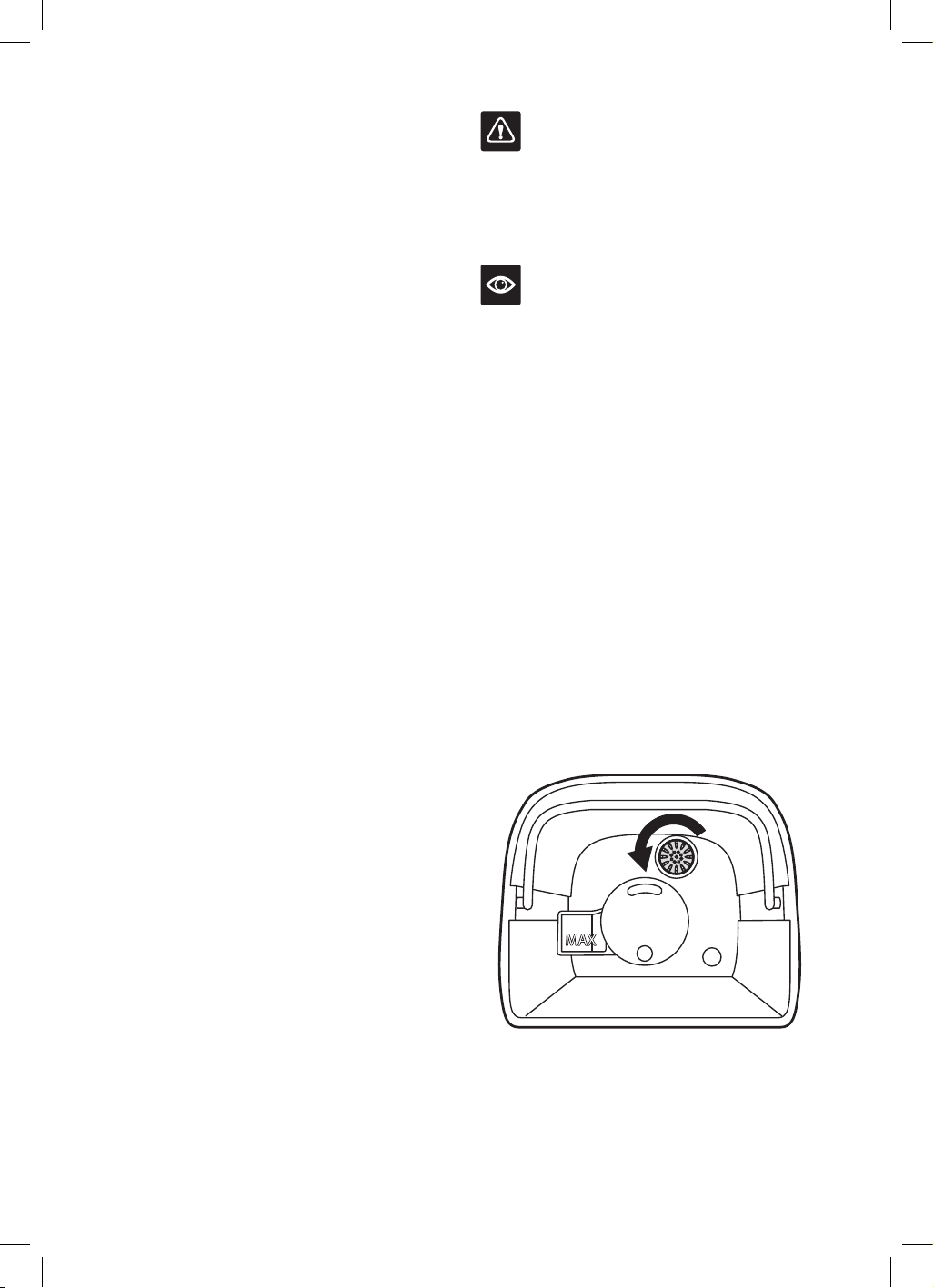
1. Remove the cover from the top of the
humidifier and set aside.
2. Using the handle, remove the water tank
from the humidifier.
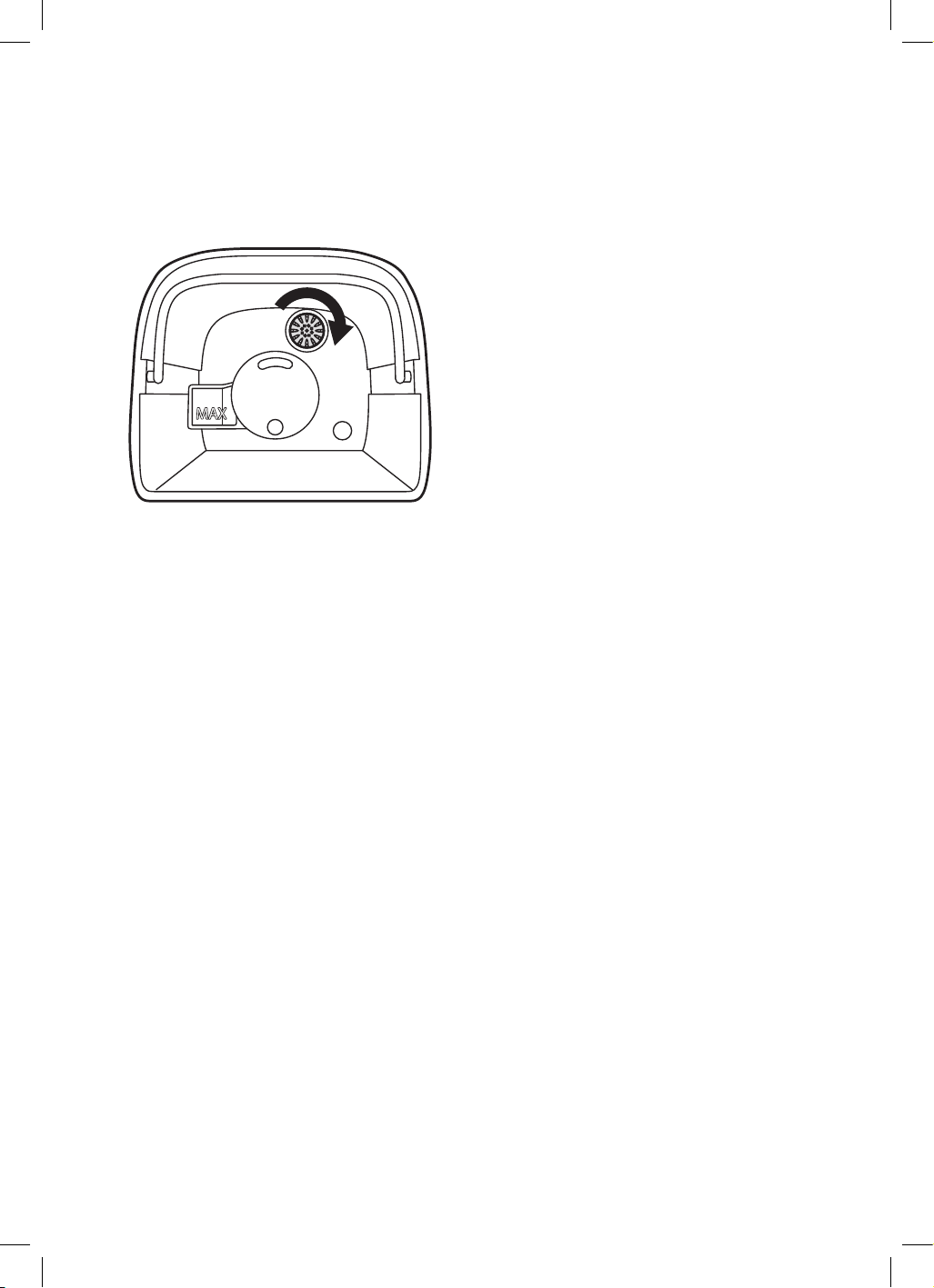
3. The water purification filter is connected to
the water tank base. Unscrew the filter from
the base to clean.
4. Dip the filter cartridge in a vinegar and
water solution for about 10 minutes before
thoroughly rinsing with clean water.
Alternatively, rinse the filter under running
tap water for a minute.
23
5. Once clean, place the filter in direct sunlight
and allow to dry for at least an hour.
6. Reconnect the filter to the base of the
water tank, then screw the filter onto
the water tank.
7. Use the water tank handle to carefully lower
the tank into the humidifier.
8. Place the top cover on top of the water tank.
STORAGE
• Never store the humidifier with water
in the unit.
• Clean as per instructions and make sure that
all parts are dry before storing.
• Allow the water tank and water inlet basin
time to dry thoroughly before storing
the humidifier.
• Keep the humidifier in a dry cool place.
• Do not place anything on top of the humidifier.
24
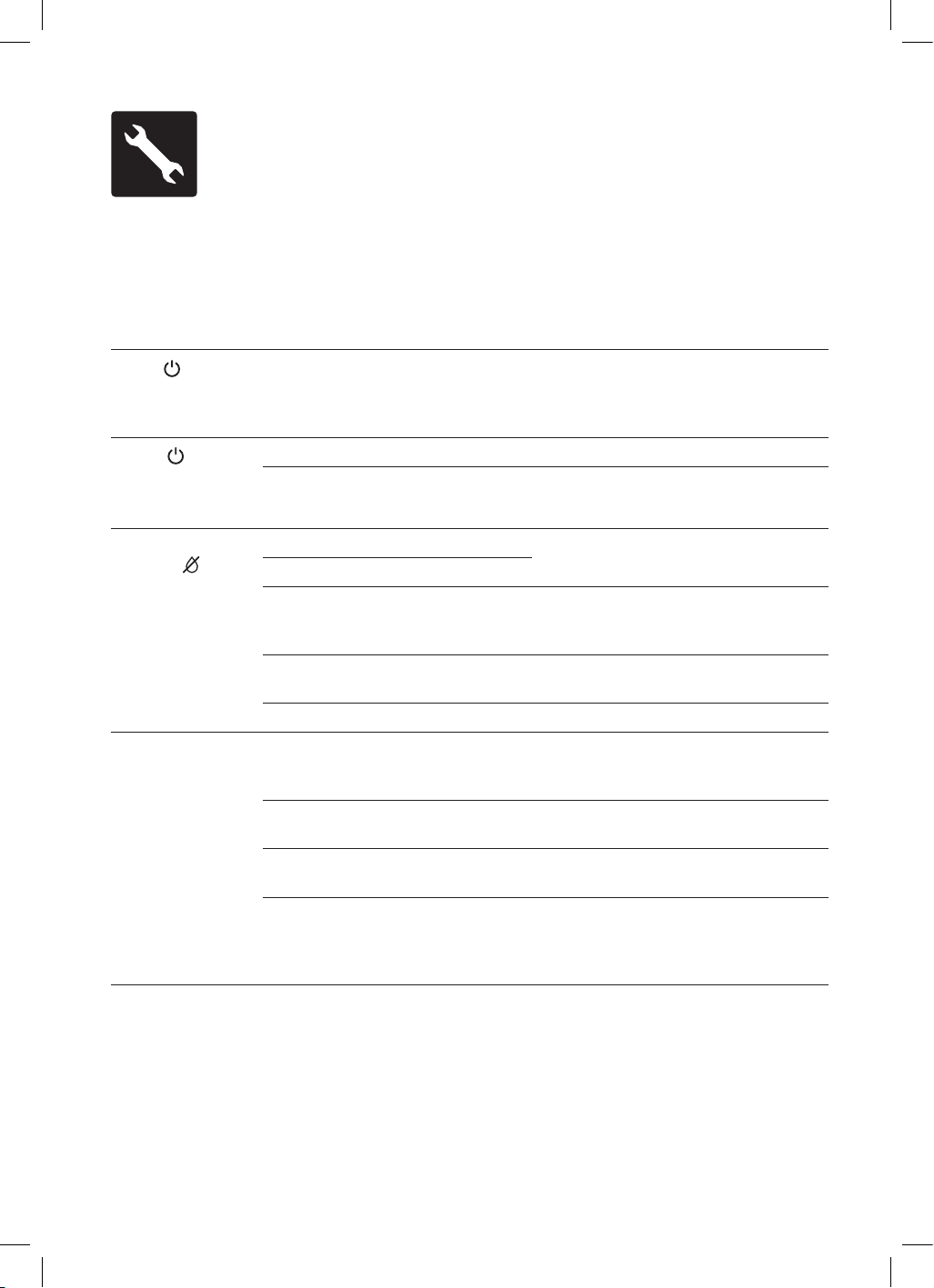
Troubleshooting
TROUBLESHOOTING GUIDE
Before carrying out any of the following service checks, unplug the unit from the mains.
PROBLEM POSSIBLE CAUSES WHAT TO DO
Power
red light is
off or does not work.
•
Humidifier is not plugged into
the power outlet, the plug may be
loose or the power outlet is not
switched on.
•
Check the power cord is connected to a
power outlet and turned on.
Power
red light
is on when switched
on, but no mist
comes out.
•
Humidifier is not turned on.
•
Press the power button to turn on.
•
The target humidity has
been reached.
•
Increase the target humidity or
change mode.
Water tank empty
indicator
light
is on.
•
No water in the water tank.
•
Refill the water tank and wait at
least 1 minute.
•
The water level is low.
•
The water level required has not
yet reached the vaporization
compartment.
•
Wait at least 1 minute.
•
The water tank isn’t
positioned correctly.
•
Check the positioning of tank in
the housing.
•
The humidifier isn’t on a flat surface.
•
Check the positioning of the humidifier.
The mist has a
strange odour.
•
When the humidifier is first used,
there may be some residual odour
that should dissipate.
•
This is normal for first use. If the
smell does not dissipate, check water
quality as below.
•
Water in the tank may be dirty
or stagnant.
•
Clean the water tank and refill with fresh,
clean water.
•
Mineral scale has built up in the
water inlet basin.
•
Clean as per instructions.
•
Essential oil.
•
If using the aroma feature, check that
the essential oil used is not the cause
of the odour and/or too much oil
has been added.

25
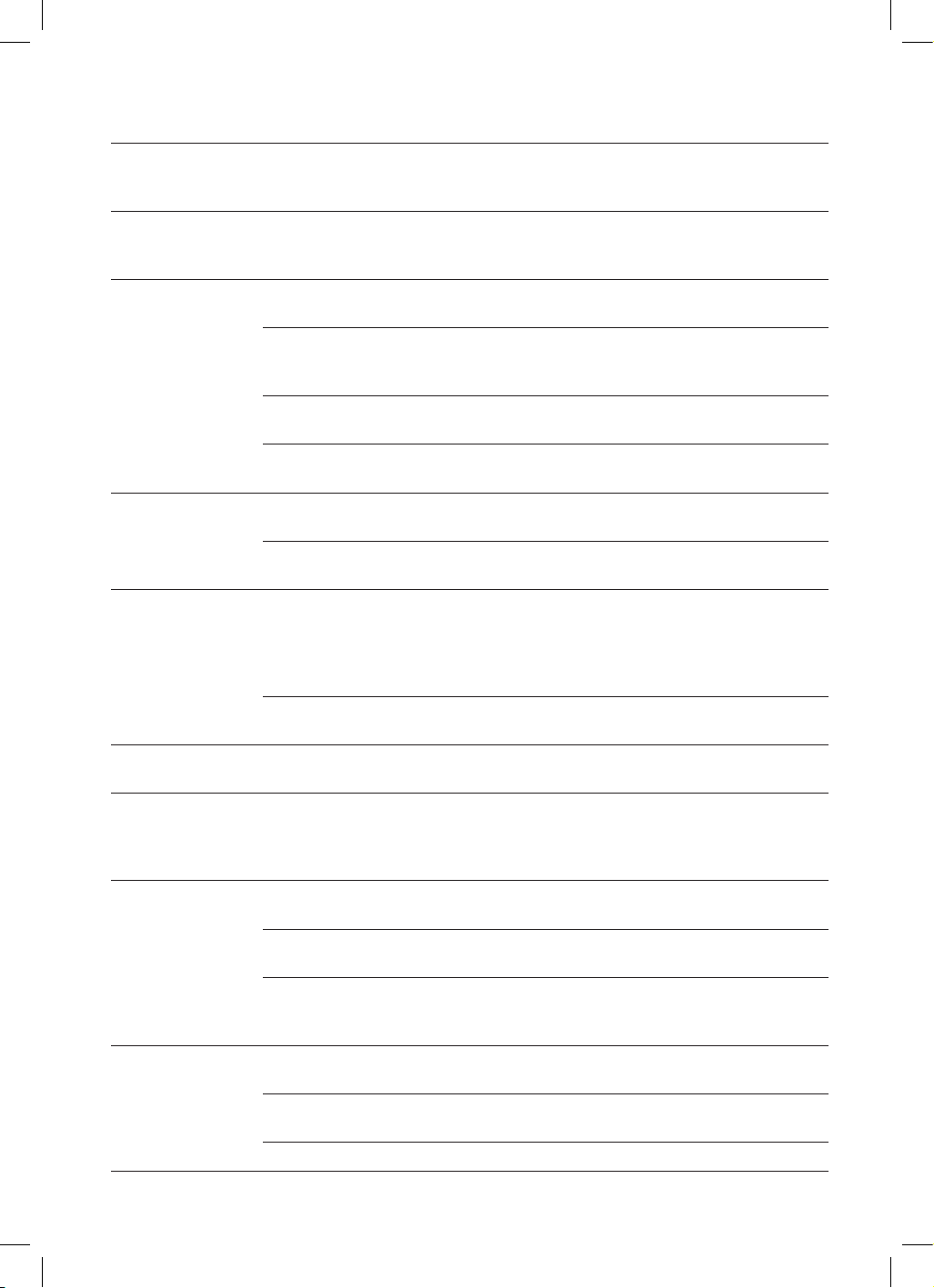
PROBLEM POSSIBLE CAUSES WHAT TO DO
Abnormal noise.
•
Vibration in the water basin because
the water level is too low.
•
Fill the water tank with clean water.
•
Humidifier is on an unstable surface.
•
Move the humidifier to a stable
flat surface.
•
Water tank is positioned incorrectly.
•
Turn off and unplug the humidifier,
then align the water tank cover with its
respective opening in the inner chamber.
•
Humidifier is malfunctioning.
•
Switch the unit off and contact the
Breville Customer Service Centre.
The humidification
capacity is too low.
•
There is natural or artificial air
replacement in the room which will
interfere with the increase of %RH.
•
Check if doors and windows are closed.
•
Check if there is no air conditioning
working in the room.
•
The air inlet grids and nozzle
could be blocked.
•
Remove any blocking items from the
grids and the nozzle.
•
Too much scale in the water basin.
•
Clean transducer.
•
The humidity selected rate is too low.
•
Increase mist output speed.
•
Increase humidity setting rate.
•
Water is too dirty or water kept too
long in the tank.
•
Clean water tank, change to fresh
clear water.
The ambient
humidity is too
high.
•
Humidifier is working in
Manual mode.
•
Change the mode.
•
The humidity target is too high.
•
Select a lower %RH number.
•
Room is not well-ventilated.
•
Open a window to ensure proper air flow
for the humidifier, or move the humidifier
to a more well-ventilated room.
•
Excess water from the water tank has
spilled while filling the water tank or
replacing the water tank back into
the housing.
•
Wipe off excess water from the top and
bottom of the housing before replacing
the water tank.
Condensation in the
room.
•
The room temperature is too low.
•
Increase heat in the room up.
The mist suddenly
stops.
•
Programmed timer period
has run out.
•
Turn the humidifier back on.
•
The water empty indicator is on.
•
Refill the water tank.
•
The target humidity level is reached.
•
No action required.
Adjustable Speed is
not operating
•
The room humidity is higher than
the selected humidity.
•
Over-ride the set program.
Does not operate,
and 'EF' displays on
the display screen
•
The water tank basin has too
much water.
•
Remove the filled water tank, then
remove the excessive water from the
water basin. Return the filled water tank
and try again.
26
PROBLEM POSSIBLE CAUSES WHAT TO DO
Does not operate,
and ‘EO’ displays on
the display screen
•
A disconnection between the water
sensor internal wiring.
•
Switch the unit off and contact the
Breville Customer Service Centre.
Does not operate,
and ‘E1’ displays on
the display screen
•
The connection on the water
sensor is loose.
•
Switch the unit off and contact the
Breville Customer Service Centre.
Incorrect relative
humidity level is
displayed.
•
The room is larger than the effective
range of the humidifier.
•
Move the humidifier to a room which is
within the recommended room size.
•
Moisture has built up inside of the
humidity sensor.
•
Turn off the humidifier and allow the
humidity sensor to completely air dry
before resuming use.
•
The nozzle is facing the direction of
the humidity sensor.
•
Turn the nozzle so it is facing away from
the humidity sensor.
•
Humidity sensor is broken
or defective.
•
Switch the unit off and contact the
Breville Customer Service Centre.
Control panel does
not work.
•
Hands are too wet when operating
control panel.
•
Keep hands dry while operating the
control panel.
•
Humidifier has malfunctioned.
•
Switch the unit off and contact the
Breville Customer Service Centre.
White dust
appears around the
humidifier.
•
Water being used has a high
mineral content.
•
Use distilled water with the humidifier.
If distilled water is not available, use
purified or filtered water. Clean the
water tank at least once a week as per
instructions in this book.
•
Humidifier was not properly cleaned
after last use.
•
Clean the humidifier as per instructions
in this book.
Mist is coming out
from the base.
•
The water tank isn’t positioned
correctly in the housing.
•
Check the positioning of tank.
Mist fog coming out
from around nozzle
or water is leaking
from the lid.
•
The nozzle is not correctly fitted.
•
Reposition the cover and check if the
nozzle is plugged in correctly.
The warm mist
function does not
produce warm mist.
•
The humidifier is still warming up.
•
Wait a few minutes before
checking again.
•
The mist is too fine to
feel the warmth.
•
Increase the mist level.
•
The room temperature is too
cold and the mist may cool down
too quickly.
•
Increase the mist level and heat the room.
Remote control is
not working.
•
Remote control is out of range of
the humidifier.
•
Use the remote control within 5m of
the humidifier.
•
The plastic tab is still in.
•
Remove the plastic tab from the battery
compartment.
•
Battery needs to be changed.
•
Replace the battery.

27
TROUBLESHOOTING GUIDE FOR AMAZON ALEXA
AND GOOGLE HOME/ASSISTANT
PROBLEM WHAT TO DO
Why is Amazon
Alexa or Google
Home/Assistant not
responding to my
voice commands.
•
Check the internet connection.
•
Restart your device & mobile phone.
•
Restart your modem and router.
•
Make sure your Amazon Alexa or Google-enabled device or mobile phone is in
Wi-Fi range.
•
When you are giving a command to Amazon Alexa or Google Home/Assistant
make sure you are clear and there is no unwanted noise in the background.
•
While the voice assistant is always on in the background, only an activation
phrase will allow for the voice assistant to start. registering the commands
being relayed. The activation phrase depends on the application being used; For
Amazon Alexa, use “Alexa”, while “OK Google” is for Google Home/Assistant.
•
Ensure your voice is clear and distinct to allow the assistant to accurately record
and process the command.
•
Ask direct questions. Refer to the commands list for recommended commands.
If the problem is not listed, please contact Breville Customer Service Centre (see back cover for contact details)

Australian Customers
Phone: 1300 139 798
Web: www.breville.com
New Zealand Customers
Phone:
0800 273 845
Web: www.breville.com
Breville Customer Service Centre
Breville, the Breville logo, Master Every Moment, SensAir System, Smart Mist Top
and Breville Home Connect are trademarks of Breville Pty. Ltd. A.B.N. 98 000 092 928.
Copyright Breville Pty. Ltd. 2021
All other brands may be trademarks of their respective owners.
Due to continued product improvement, the products illustrated/photographed in this booklet
may vary slightly from the actual product.
LAH508 ANZ D21