User Manual
Version 1.4

Table of Contents
Get started 5
What's in the box 5
Charge your tracker 5
Set up with your phone 6
See your data in the Fitbit app 7
Wear Alta 8
Put on your band 8
Wrist choice and handedness 10
Change the band 10
Remove a band 10
Attach a new band 11
Basics 13
Navigate Alta 13
Tap your tracker 13
Check battery level 14
Change the clock face 14
Care for Alta 15
Notifications 16
Set up notifications 16
See incoming notifications 16
Timekeeping 18
Set an alarm 18
Activity Tracking 19
See your stats 19
Track a daily activity goal 19
Choose a goal 19
Track your hourly activity 20
Track your sleep 20
2

Set a sleep goal 20
Set a bedtime reminder 21
Learn about your sleep habits 21
Track your exercise automatically 21
Share your activity 21
Update Alta 22
Troubleshooting 23
General Info and Specifications 24
Sensors 24
Materials 24
Wireless technology 24
Haptic feedback 24
Battery 24
Memory 25
Display 25
Band size 25
Environmental conditions 26
Learn more 26
Return policy and warranty 26
Regulatory & Safety Notices 27
USA:Federal Communications Commission(FCC) statement 27
Canada:Industry Canada (IC)statement 28
European Union (EU) 28
Australia and New Zealand 29
China 30
Wireless sync dongle 30
Alta 31
Japan 31
Mexico 31
Morocco 32
Oman 32
Philippines 32
Serbia 32
3

Get started
Welcome to Fitbit Alta, a customizable fitness tracker that’s as versatile as your
personal style. Take a moment to review our complete safety information at
fitbit.com/safety.
What's in the box
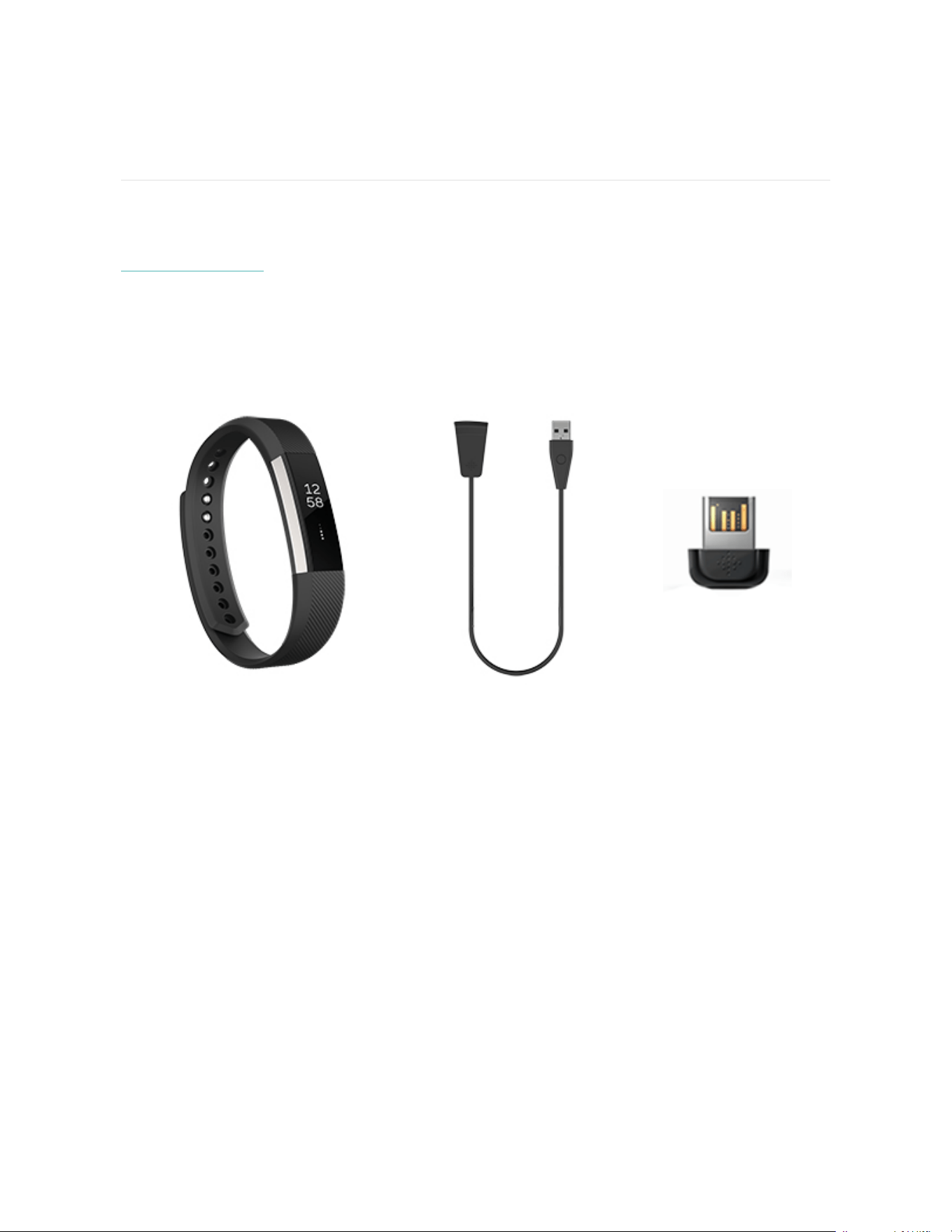
Your Alta box includes:
Tracker Charging cable Wireless sync dongle
The detachable bands on Alta come in a variety of colors and materials, sold
separately.
Charge your tracker
A fully-charged Alta has a battery life of up to 5 days. Battery life and charge cycles
vary with use and other factors; actual results will vary.
To charge Alta:
5
1. Plug the charging cable into the USB port on your computer, or a UL-certified
USB wall charger, or another low-energy charging device.
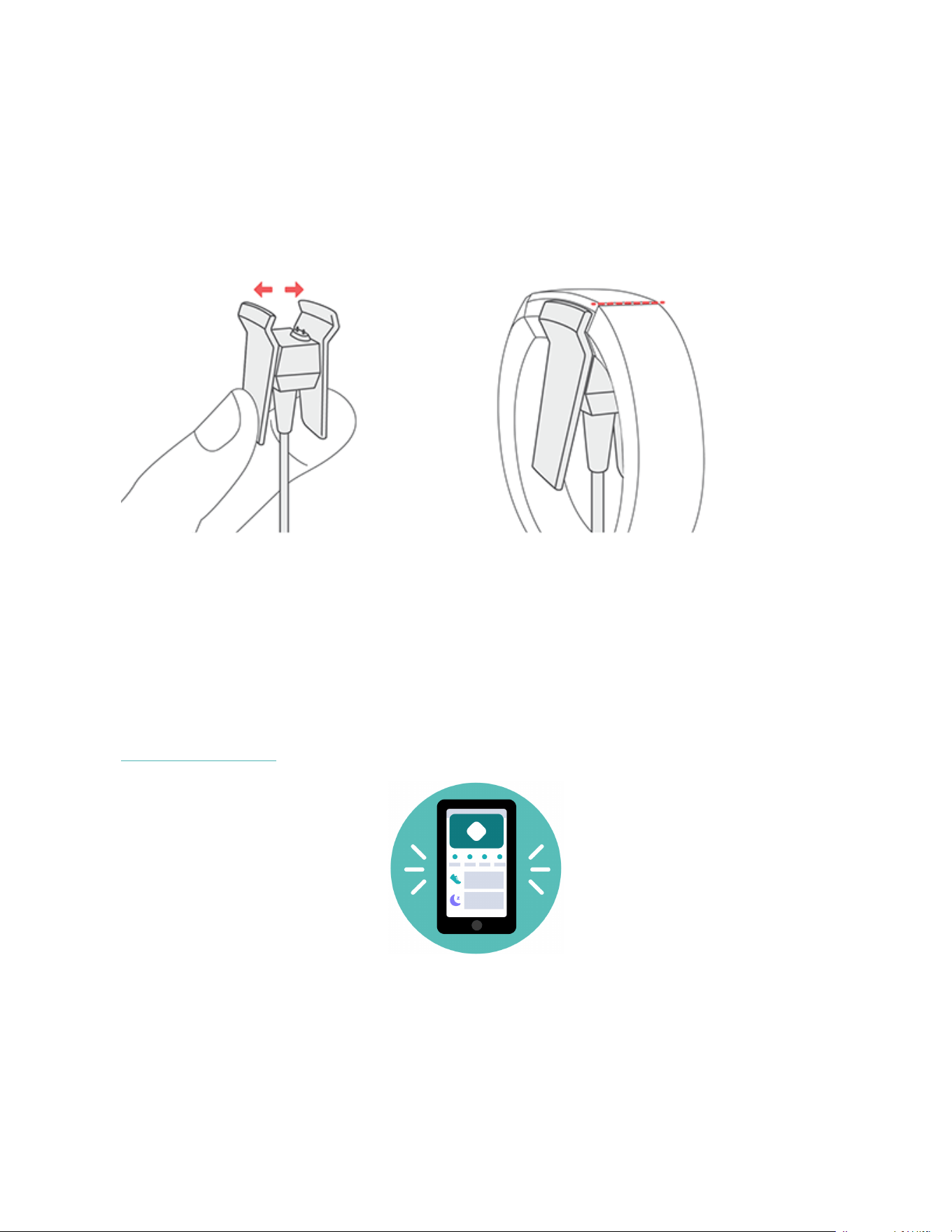
2. Clip the other end of the charger into the port on the back of Alta. The pins of
the charging cable must be lined up with the charging port on Alta and
securely locked into place. You'll know the connection is secure when the
tracker vibrates and you see a battery icon on the screen.
Charging fully takes up to 2 hours. While the tracker charges, tap it to check the
battery level. A fully charged tracker shows a solid battery icon.
Set up with your phone
Set up Alta with the Fitbit app for iPhones and iPads or Android phones. The Fitbit
app is compatible with most popular phones and tablets. For more information, see
fitbit.com/devices.
To get started:
6

1. Download the Fitbit app:
l
Apple App Store for iPhones
l
Google Play Store for Android phones
2. Install the app, and open it.
l
If you already have a Fitbit account, log in to your account > tap the
Today tab > your profile picture > Set Up a Device.
l
If you don't have a Fitbit account, tap Join Fitbit to be guided through a
series of questions to create a Fitbit account.
3. Continue to follow the on-screen instructions to connect Alta to your account.
When you're done with setup, read through the guide to learn more about your new
tracker and then explore the Fitbit app.
For more information, see help.fitbit.com.
See your data in the Fitbit app
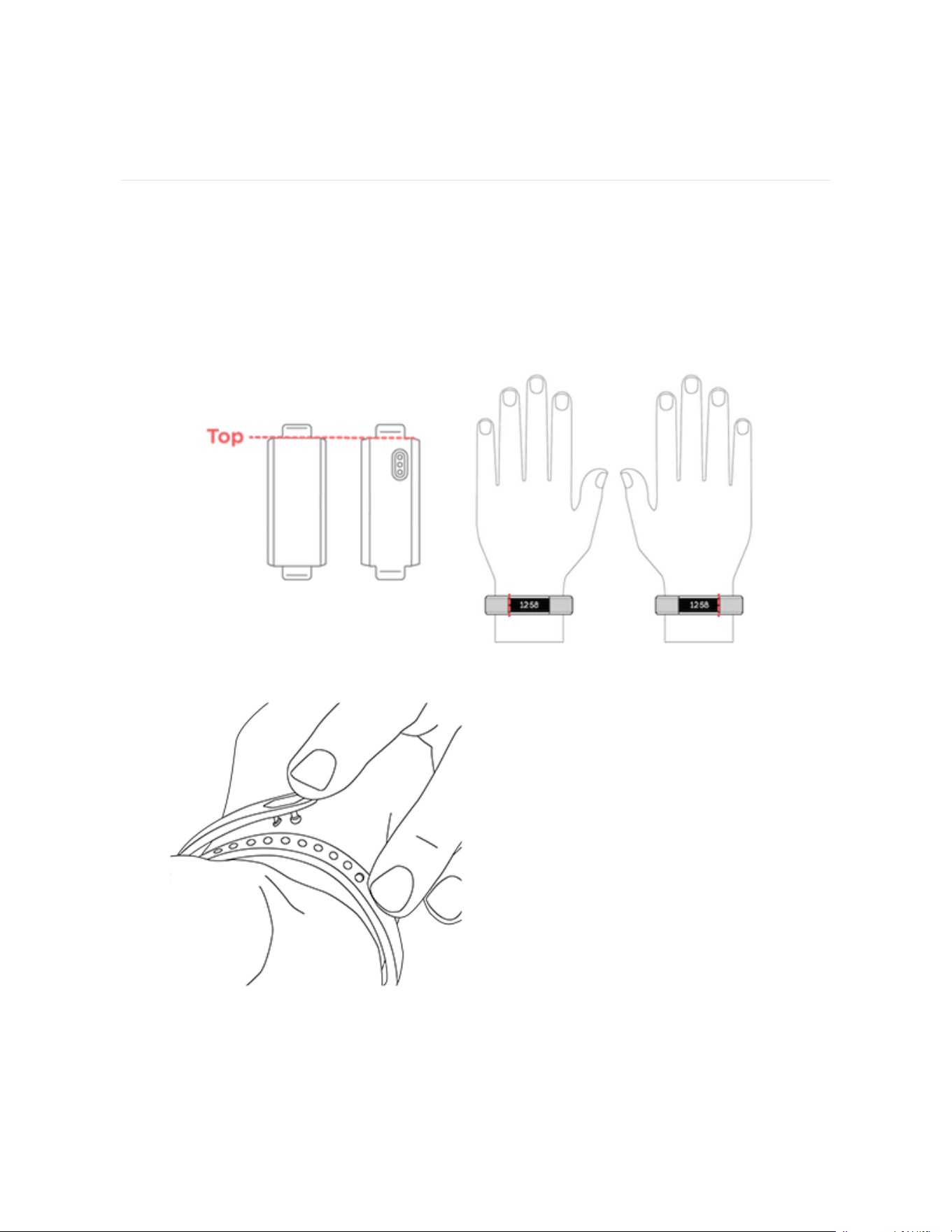
Open the Fitbit app on your phone to view your activity and sleep data, log food
and water, participate in challenges, and more.
7
Wear Alta
PlaceAlta around your wrist. If you purchased another band, see the instructions in
"Change the band" on page10.
Put on your band
1. Put on the band so the top of the tracker is on the outside or top of your wrist.
2. Align both ends of the band so they are directly overlapping each other with
the clasp over the two holes that best fit your wrist.
8
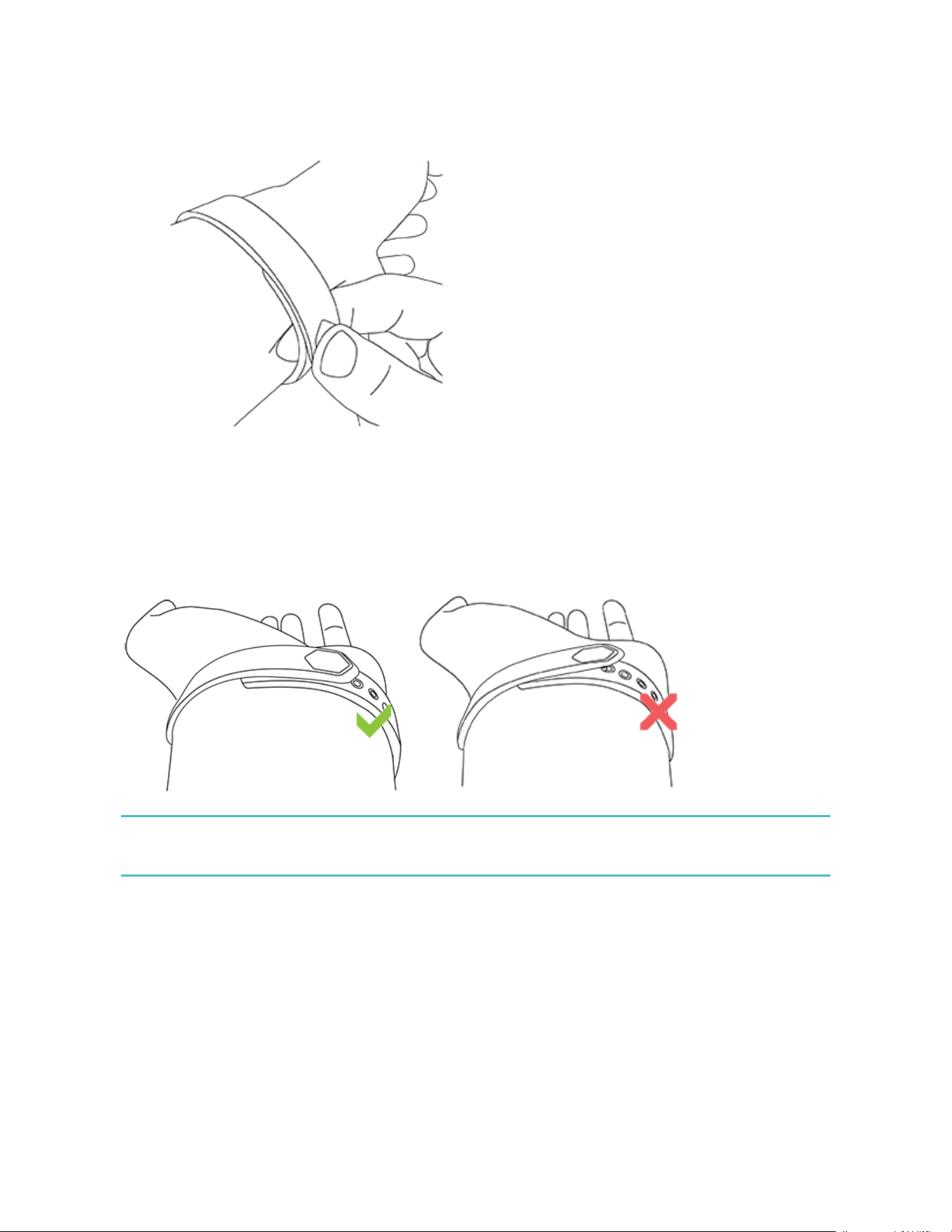
3. Squeeze both the clasp and the band between your thumb and forefinger until
you hear a click.
You’ll know your Alta band is securely fastened if both ends of the band are fully
inserted.
NOTE: If you’re having trouble, try securing the band off your wrist to get a feel for
how it securely clasps and then try again on your wrist.
9
Wrist choice and handedness
For greater accuracy, you must specify which wrist you wear Alta on, and which
hand you consider dominant. Your dominant hand is the one you use for writing and
eating. To start, Wrist Placement is set to Left and Handedness is set to Right.
Change either setting in the Fitbit app:
From the Today tab in the Fitbit app, tap your profile picture >Alta tile >Wrist
Placement or Handedness.
Change the band
The wristband has two separate bands (top and bottom) that you can swap with
accessory bands sold separately.
Remove a band
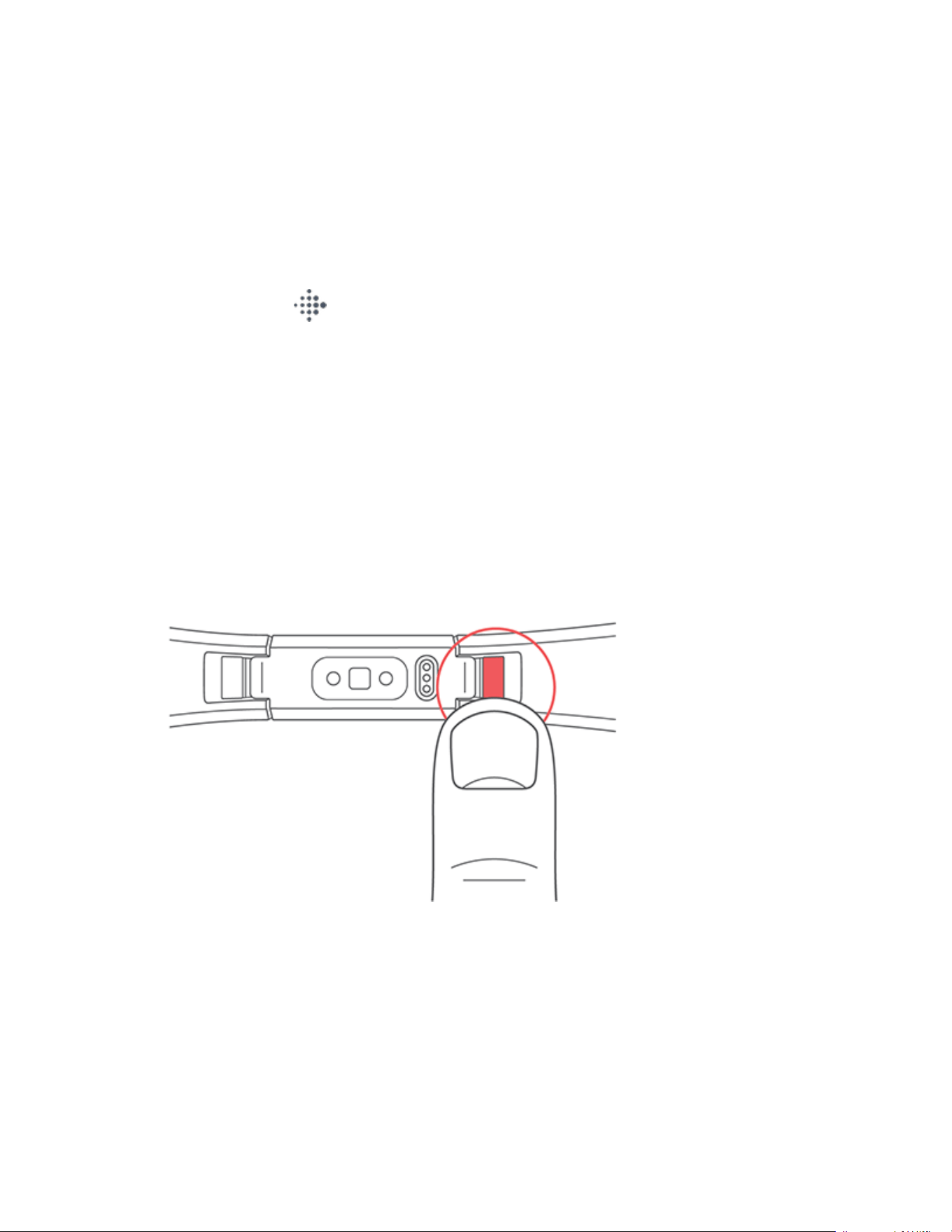
1. Turn over Alta and find the band latches.
2. To release the latch, press down on the flat button on the band.
10
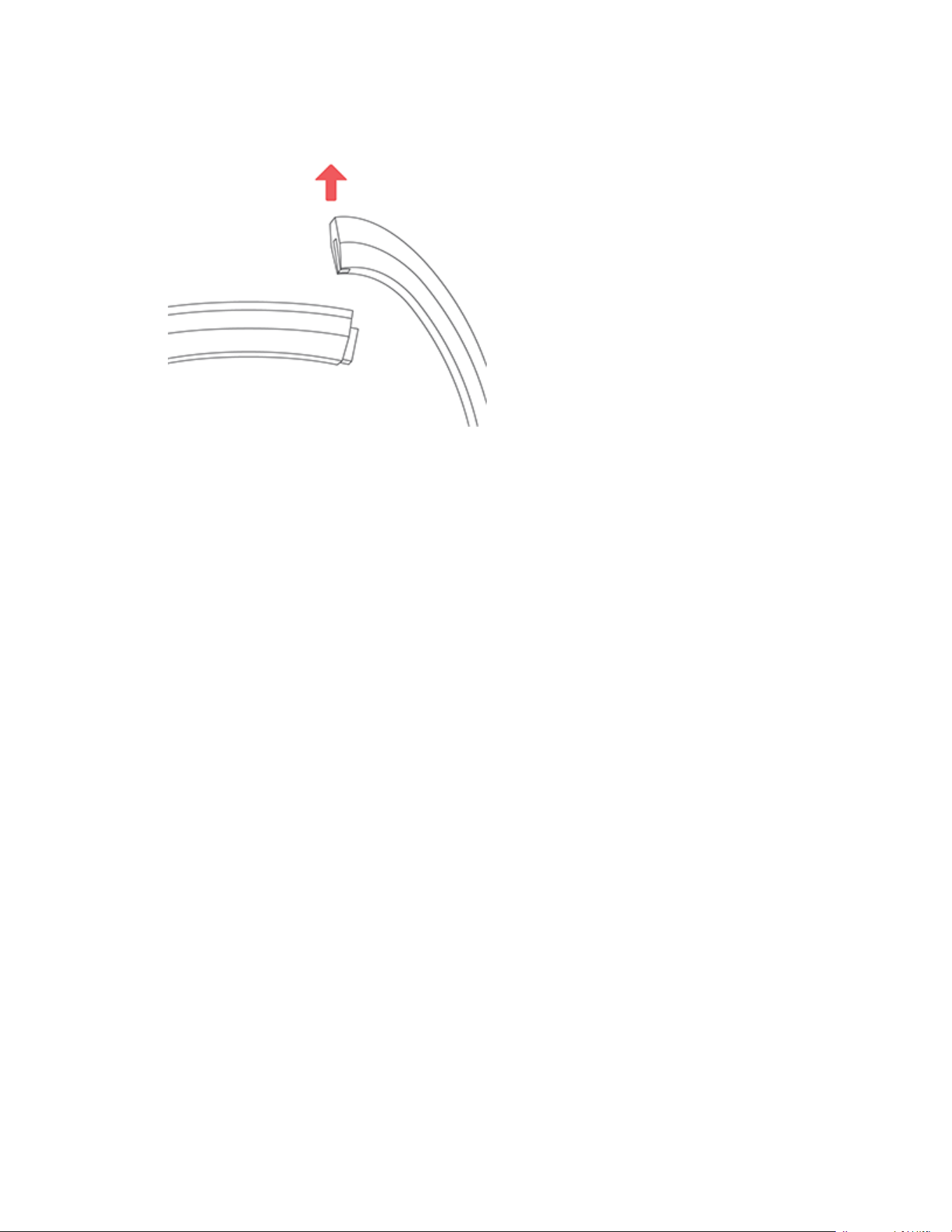
3. Slide the band up from the tracker to release it.
4. Repeat on the other side.
If you’re having trouble removing the band or if it feels stuck, gently move the band
back and forth to release it.
Attach a new band
Before you attach a new wristband, first identify the top and bottom bands. The top
band has a clasp on it and should be attached on the side closest to the charging
port. The bottom band has notches in it.
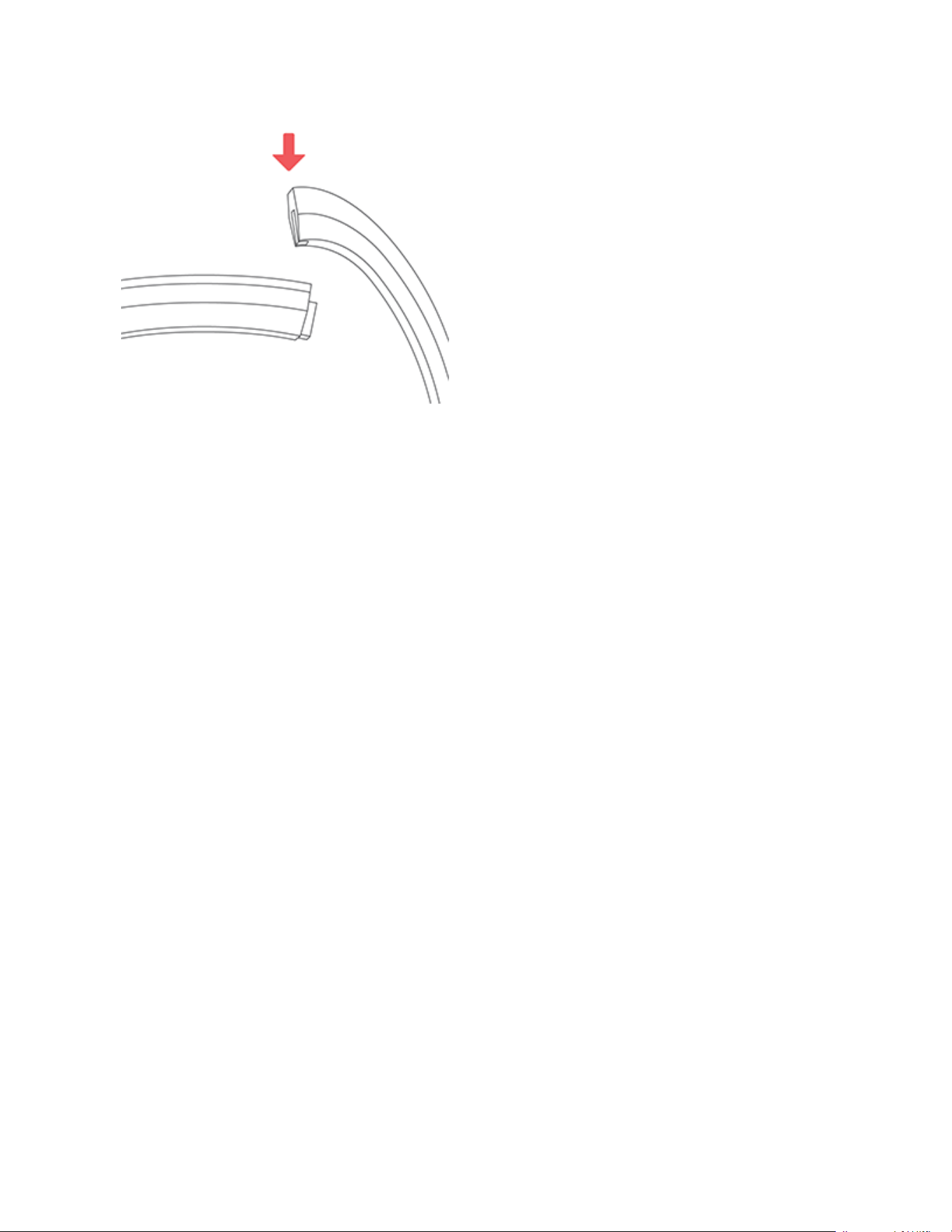
To attach a new band, slide it down on the end of the tracker until you feel it snap
into place.
11
12
Basics
Learn how best to navigate, check the battery level, and care for your tracker.
Navigate Alta
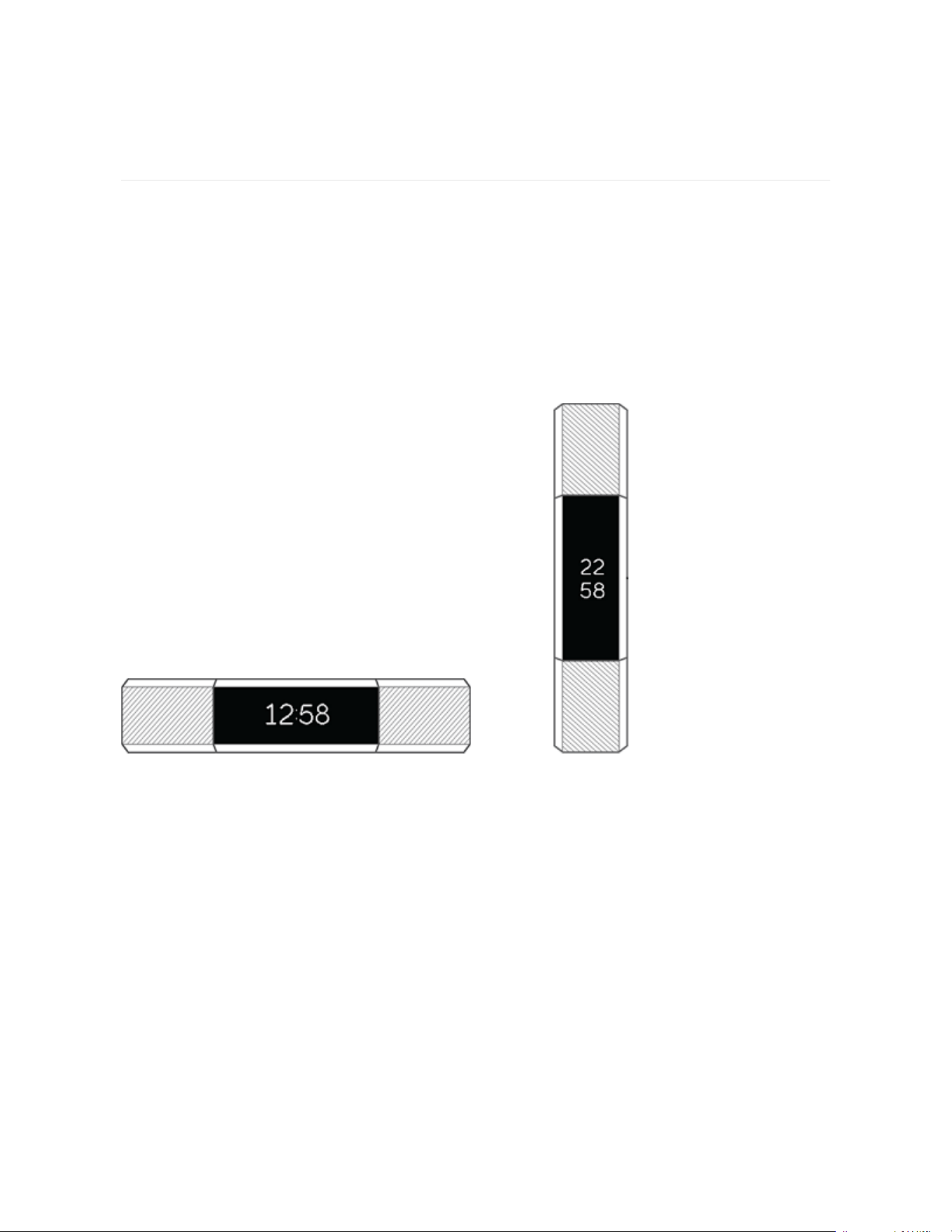
Alta has an OLED tap display that can be oriented horizontally or vertically. You can
choose from several clock faces, each with a unique design. Single-tap the display
to flip through your stats.
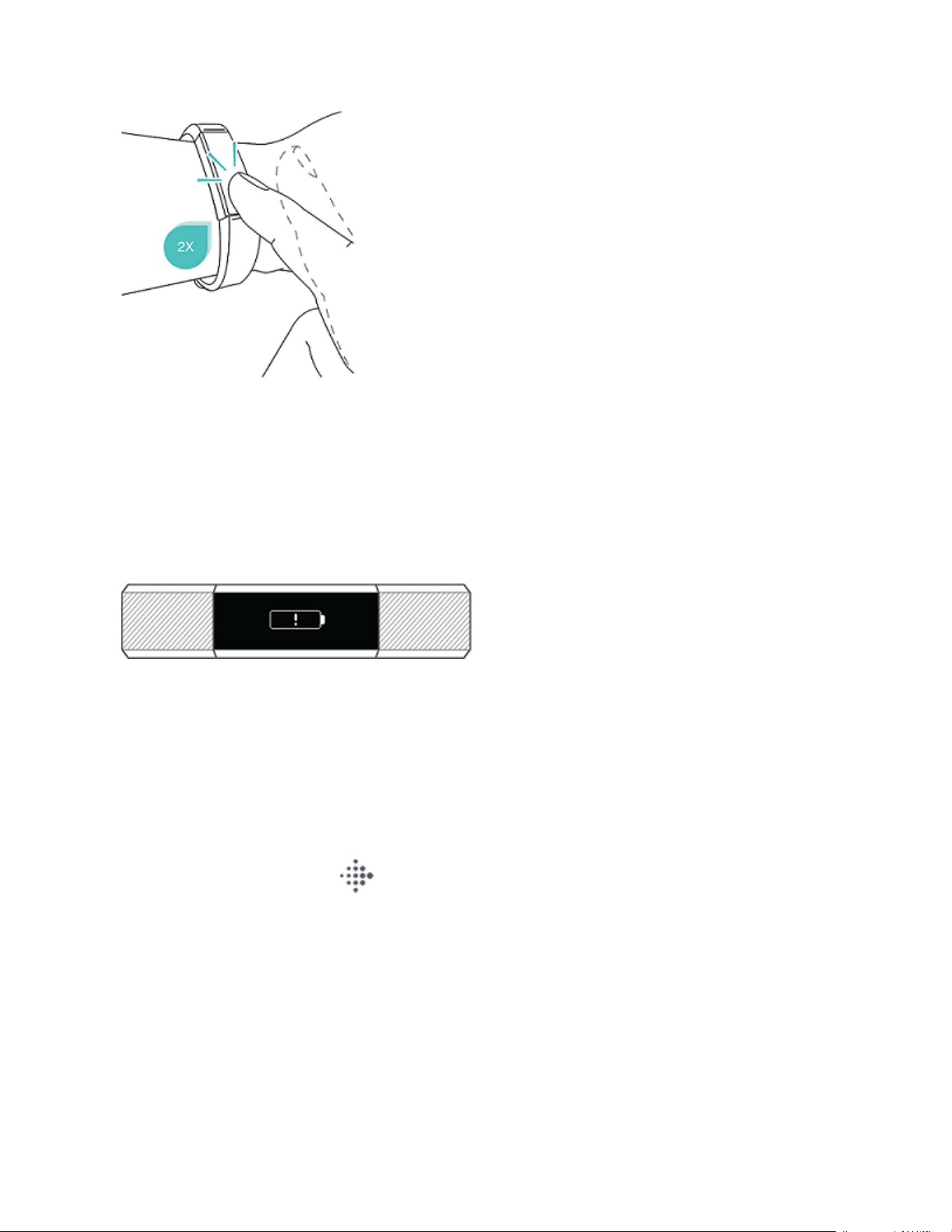
When you’re not using Alta the display is dimmed. To wake it up:
l
Double-tap your tracker.
l
Turn your wrist towards you. This behavior, known as Quick View, can be
turned off in your tracker settings.
Tap your tracker
For best results, tap your tracker where the screen meets the band.
13
Check battery level
If your battery is low, when you wake up your Alta you’ll see a low battery icon after
a few seconds. If you see a critical battery icon you’ll be unable to navigate to any of
the tracker screens until you charge your tracker. Your tracker continues to track
your activity until your battery runs out.
You can check your battery level at any time on the battery screen. To see the
battery screen you must turn on the battery menu item in the Fitbit app.
Change the clock face
Alta comes with several clock faces. To change your clock face:
1.
From the Today tab in the Fitbit app, tap your profile picture > Alta tile.
2. Tap Clock Display.
3. Swipe left and right to browse the available clock faces. Tap Choose to switch
to the selected clock face.
14

Notifications
Alta can show call, text, and calendar notifications from your phone to keep you
informed. Keep your tracker within 30 feet of your phone to receive notifications.
Set up notifications
Check that Bluetooth on your phone is on and that your phone can receive
notifications (often under Settings >Notifications). Then set up notifications:
1.
From the Today tab in the Fitbit app, tap your profile picture >Alta tile.
2. Tap Notifications.
3. Follow the on-screen instructions to pair your tracker if you haven't already.
Call, text, and calendar notifications are turned on automatically.
Note that if you have an iPhone, Alta shows notifications from all calendars synced
to the Calendar app. If you have an Android phone, Alta shows calendar
notifications from the calendar app you choose during setup.
For more information, see help.fitbit.com.
See incoming notifications
When your phone and Alta are within range, a notification causes the tracker to
vibrate and the notification to appear on the display. If the display is off, turn your
wrist towards you or double-tap to wake it up. The notification is only visible for one
minute.
l
Phone calls—the name or number of the caller scrolls 3 times.
16
l
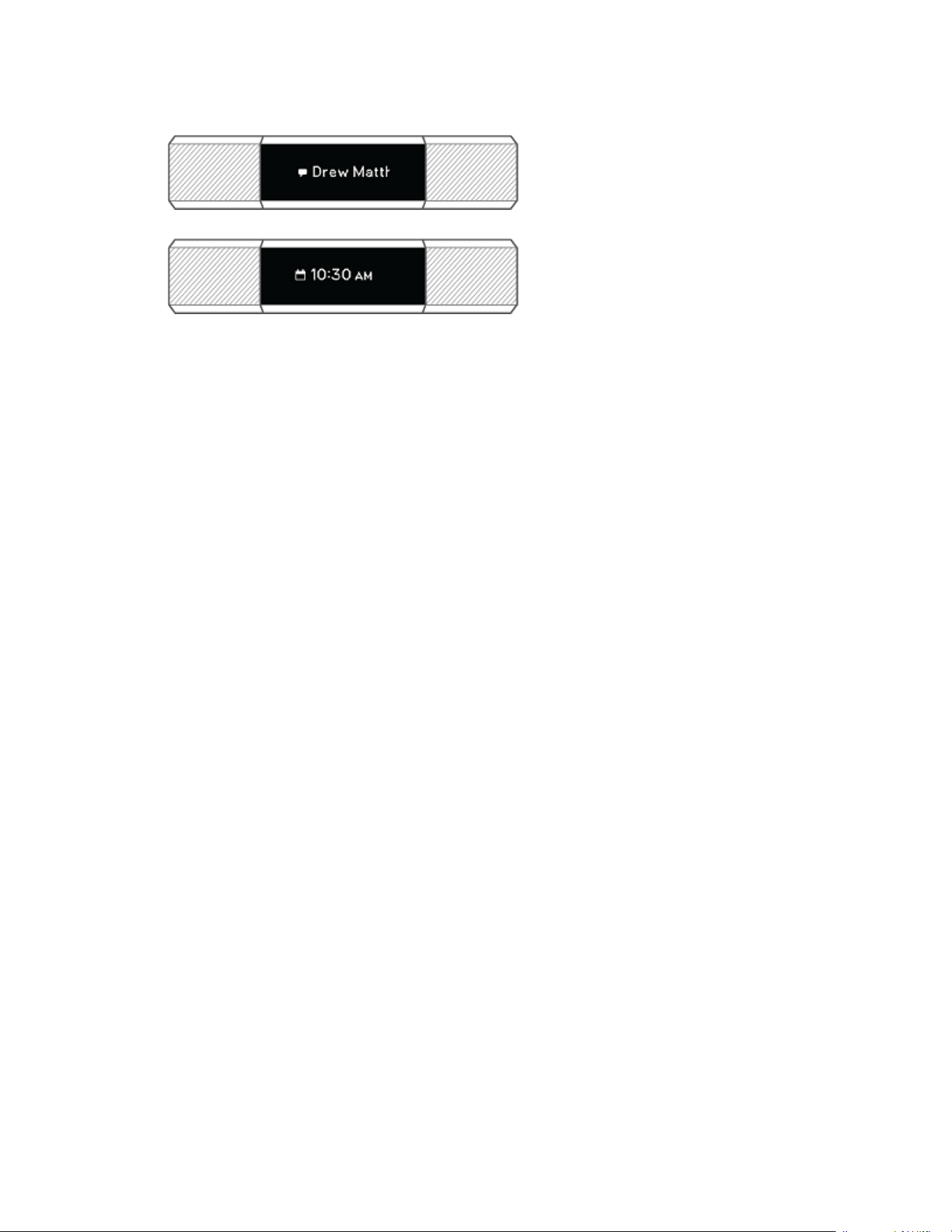
Text messages—the sender's name and message scroll once.
l
Calendar alerts—the time and name of the event scroll once.
Note: Your device shows the first 40 characters of the notification. Check your
phone for the full message.
17

Timekeeping
Alarms vibrate to wake or alert you at a time you set. Set up to 8 alarms to occur
once or on multiple days of the week.
Set an alarm
Alta vibrates to wake or alert you with an alarm. Set and delete alarms in the Fitbit
app. When the alarm goes off, double-tap the tracker to dismiss it.
For more information, see help.fitbit.com.
18

Activity Tracking
Alta continuously tracks a variety of stats whenever you wear it. Data automatically
syncs when in range of the Fitbit app throughout the day.
See your stats
From the clock face, tap the screen to see your daily stats:
l
Steps taken
l
Distance covered
l
Calories burned
l
Active minutes
Find your complete history and other information detected by your tracker, such as
sleep data, in the Fitbit app.
Track a daily activity goal
Alta tracks your progress toward a daily activity goal of your choice. When you
reach your goal, your tracker vibrates and shows a celebration.
Choose a goal
Set a goal to help you get started on your health and fitness journey. To begin, your
goal is 10,000 steps per day. Choose to increase or decrease the number of steps,
or to change your goal to distance or calories burned.
For more information, see help.fitbit.com.
19
Track your hourly activity
Alta helps you stay active throughout the day by keeping track of when you're
stationary and reminding you to move.
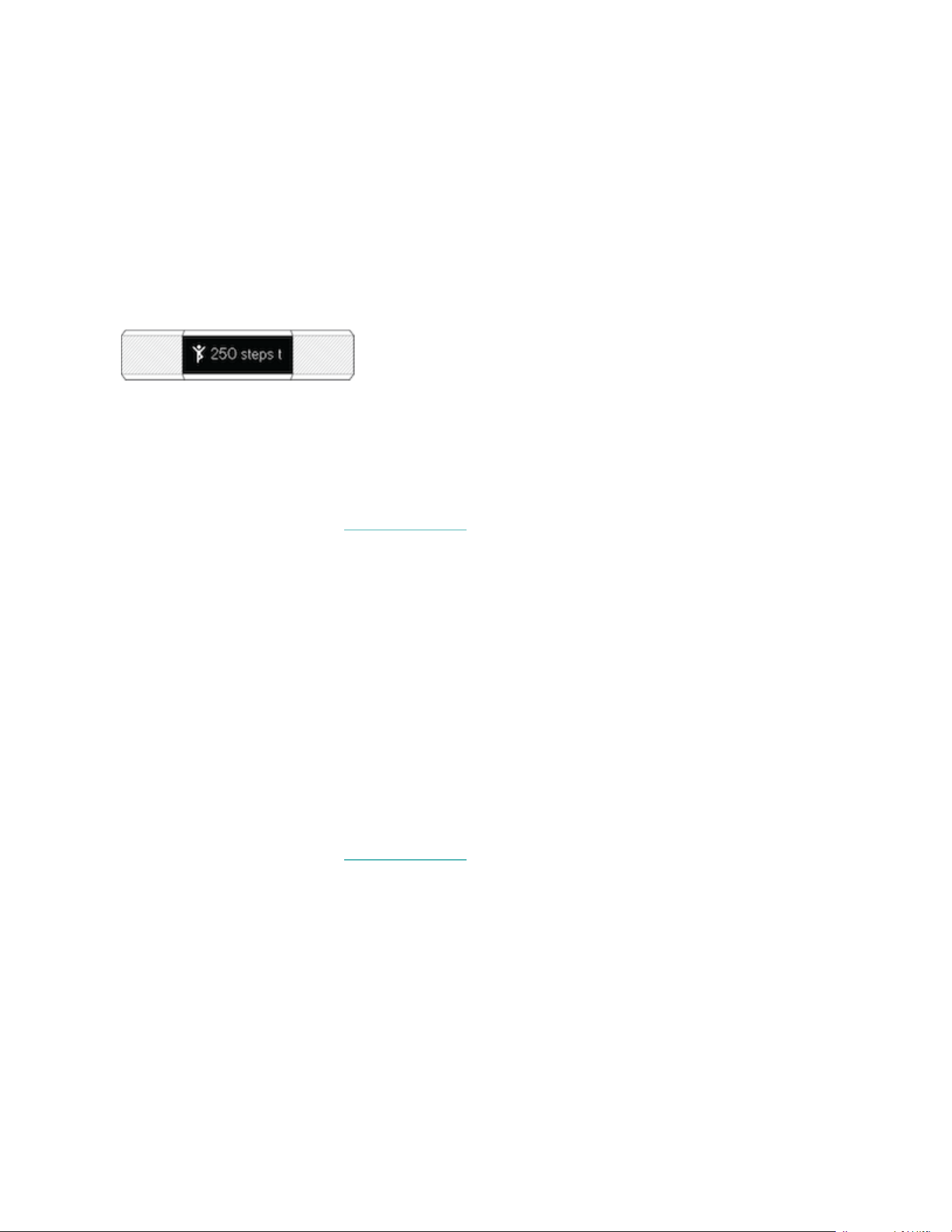
Reminders nudge you to walk at least 250 steps each hour. You feel a vibration and
see a reminder on your screen at 10 minutes before the hour if you haven't walked
250 steps.
When you meet the 250-step goal after receiving the reminder, you feel a second
vibration and see a celebration.
Turn on reminders to move in the Fitbit app.
For more information, see help.fitbit.com.
Track your sleep
Wear Alta to bed to automatically track your time asleep and movement during the
night to help you understand your sleep patterns. To see your sleep stats, sync your
tracker when you wake up and check the app.
Set a sleep goal
To start, you have a sleep goal of 8 hours of sleep per night. Customize this goal to
meet your needs.
For more information, see help.fitbit.com.
20

Set a bedtime reminder
The Fitbit app can recommend consistent bedtimes and wake times to help you
improve the consistency of your sleep cycle. Turn on bedtime reminders to be
reminded nightly when it's time to start getting ready for bed.
For more information, see help.fitbit.com.
Learn about your sleep habits
Alta tracks several sleep metrics including when you go to bed, how long you're
asleep, and how long you spend awake or restless. Track your sleep with Alta and
check the Fitbit app to see your sleep patterns.
For more information, see help.fitbit.com.
Track your exercise automatically
Alta automatically recognizes and records many high-movement activities which
are at least 15 minutes long. Sync your device to see basic stats about your activity
in your exercise history.
For more information, including how to change the minimum duration before an
activity is tracked, see help.fitbit.com.
Share your activity
After you complete a workout, sync your tracker with the Fitbit app to share your
stats with friends and family.
For more information, see help.fitbit.com.
21

Update Alta
Update your tracker to get the latest feature enhancements and product updates.
When an update is available, a notification appears in the Fitbit app. After you start
the update, a progress bar appears on Alta and in the Fitbit app until the update is
complete. Keep your tracker and phone close to each other during the update.
Note: Updating Alta takes several minutes and may be demanding on the battery.
We recommend plugging your tracker into the charger before starting the update.
For more information, see help.fitbit.com.
22

Troubleshooting
If you experience any of the following issues, restart your tracker:
l
Won't sync
l
Won't track steps or other data
l
Won't respond to taps
To restart your tracker:
1. Plug the charging cable into the USB port on your computer or a UL-certified
USB wall charger.
2. Clip the other end of the charging cable to the port on the back of the tracker.
The pins on the charging cable must lock securely with the port. You’ll know
the connection is secure when the tracker vibrates and you see a battery icon
on your tracker’s display. The battery icon disappears after three seconds.
3. Press the button on your charging cable 3 times within 8 seconds, briefly
pausing between presses. The button is on the end of the charging cable that
is plugged into the computer. When you see the Fitbit logo and the tracker
vibrates, this means the tracker has restarted.
After your tracker restarts you can unplug it from the charging cable and put it back
on.
For more information or to contact Customer Support, see help.fitbit.com.
23

General Info and Specifications
Sensors
Fitbit Alta contains the following sensors and motors:
l
A MEMS 3-axis accelerometer, which tracks motion patterns
l
A vibration motor
Materials
The band that comes with Alta is made of a flexible, durable elastomer material
similar to that used in many sports watches. It does not contain latex. Accessory
bands are available in genuine leather and stainless steel.
The clasp and housing on Alta are made of surgical-grade stainless steel. While all
stainless steel contains traces of nickel and can cause an allergic reaction in
someone with nickel sensitivity, the amount of nickel in all Fitbit products meets the
European Union's stringent Nickel Directive.
Wireless technology
Alta contains a Bluetooth 4.0 radio transceiver.
Haptic feedback
Alta contains a vibration motor for alarms, goals, notifications, and reminders.
Battery
Alta contains a rechargeable lithium-polymer battery.
24
Memory
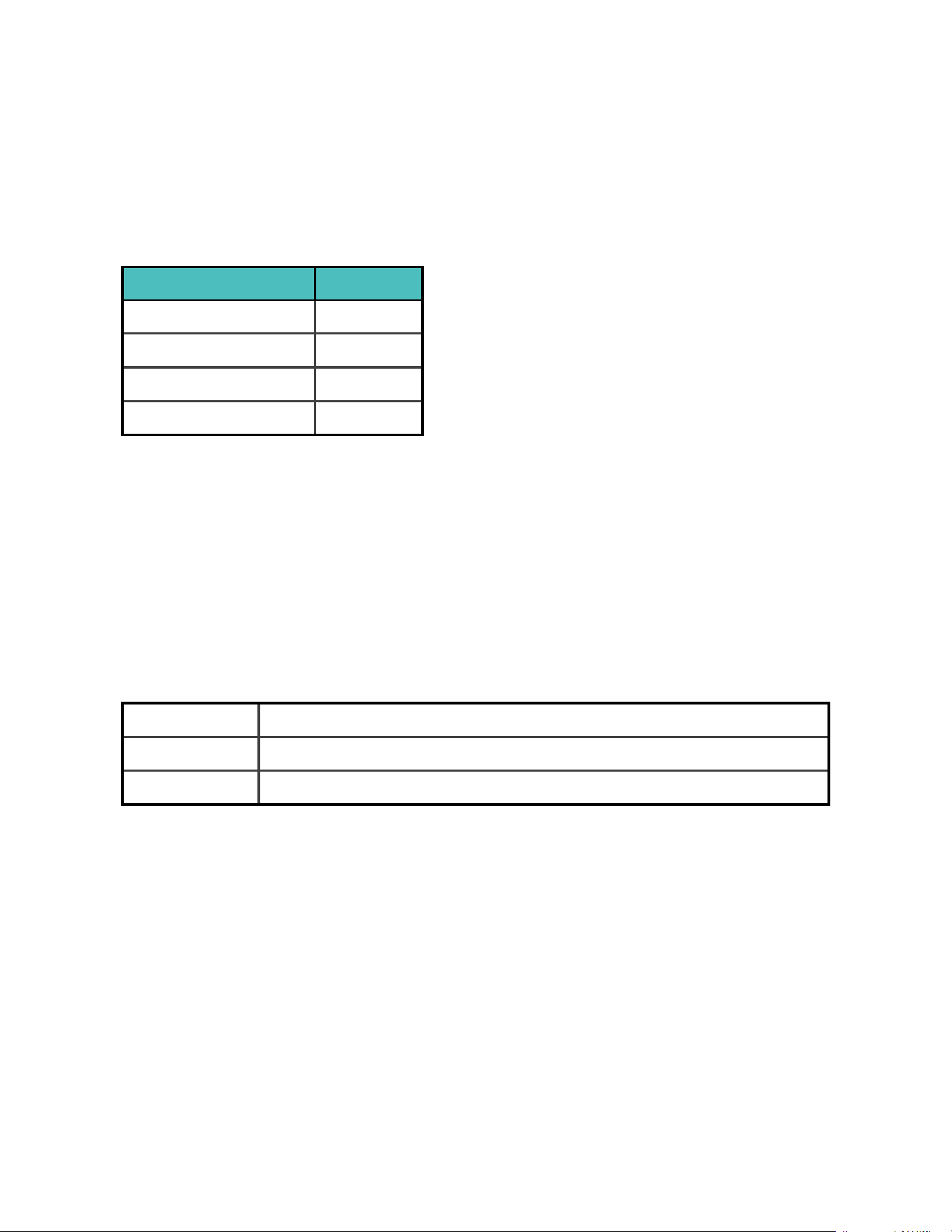
Refer to the following table for information on how long Alta stores stats and data
in between the times when it syncs. Stored data consists of steps, distance, calories
burned, active minutes, sleep, and stationary vs. active hours.
Type of data Days stored
Minute-by-minute stats 5
Sleep data 7
SmartTrack data 2
Summary totals 30
Display
Alta has an OLEDtap display.
Band size
Band sizes are shown below. Note that accessory wristbands sold separately may
vary slightly.
Small band Fits a wrist between 5.5 - 6.7 inches (140 mm - 170 mm)in circumference
Large band Fits a wrist between 6.7 - 8.1 inches (170 mm - 206 mm)in circumference
Extra large band Fits a wrist between 8.1 - 9.3 inches (206 mm - 236 mm) in circumference
25
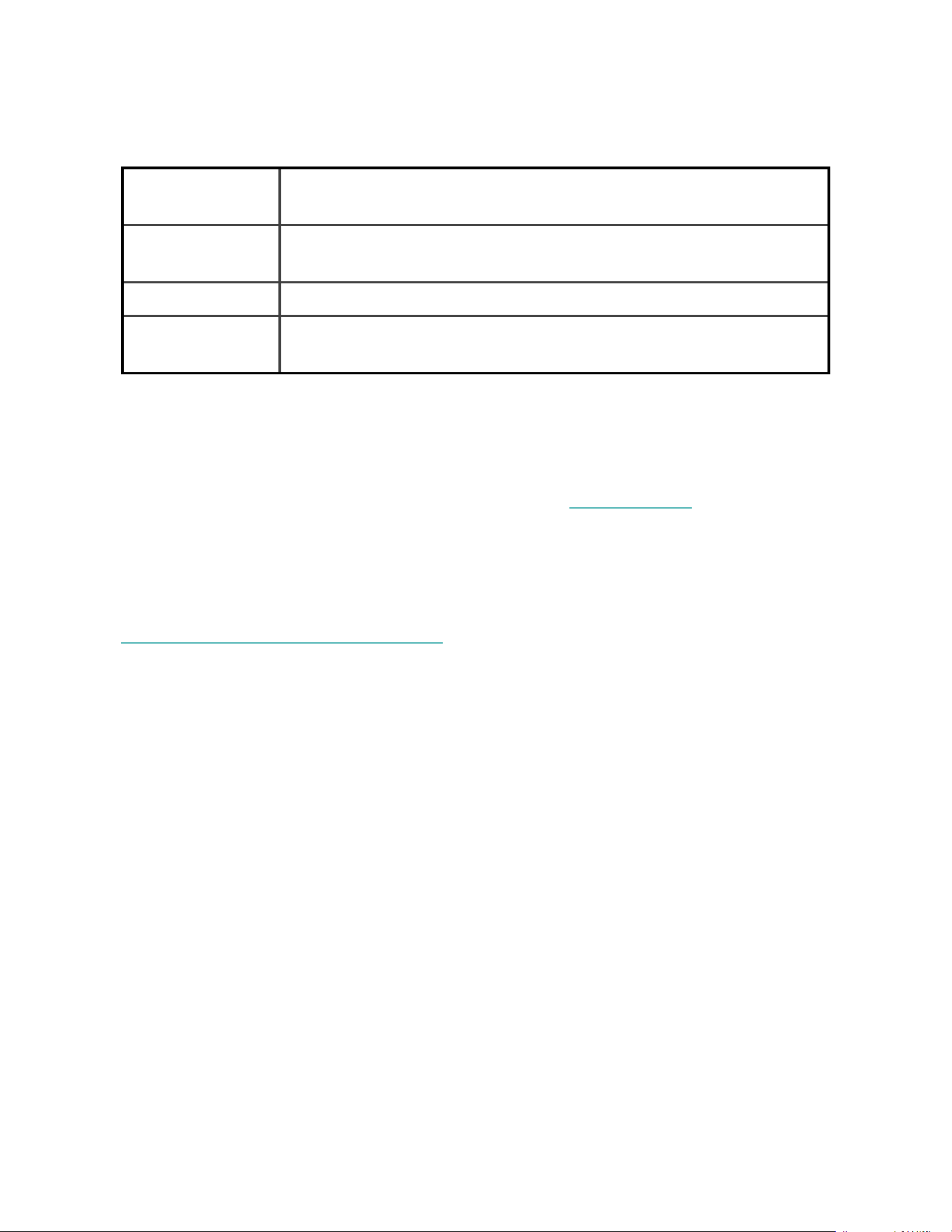
Environmental conditions
Operating
Temperature
14° to 113° F
(-10° to 45° C)
Non-operating
Temperature
-4° to 140° F
(-20° to 60° C)
Water Resistance Splash proof. Do not shower or swim with the device.
Maximum
Operating Altitude
30,000 feet
(9,144 m)
Learn more
To learn more about your tracker, how to track your progress in the Fitbit app, and
how to build healthy habits with Fitbit Premium, visit help.fitbit.com.
Return policy and warranty
Find warranty information and the fitbit.com return policy at
fitbit.com/legal/returns-and-warranty.
26

Regulatory & Safety Notices
Model Name: FB406
USA:Federal Communications Commission(FCC)
statement
This device complies with Part 15 of the FCC Rules.
Operation is subject to the following two conditions:
1. This device may not cause harmful interference and
2. This device must accept any interference, including interference that may
cause undesired operation of the device.
FCC Warning
Changes or modifications not expressly approved by the party responsible for
compliance could void the user’s authority to operate the equipment.
Note: This equipment has been tested and found to comply with the limits for a
Class B digital device, pursuant to part 15 of the FCC Rules. These limits are
designed to provide reasonable protection against harmful interference in a
residential installation. This equipment generates, uses and can radiate radio
frequency energy and, if not installed and used in accordance with the instructions,
may cause harmful interference to radio communications. However, there is no
guarantee that interference will not occur in a particular installation. If this
equipment does cause harmful interference to radio or television reception, which
can be determined by turning the equipment off and on, the user is encouraged to
try to correct the interference by one or more of the following measures:
l
Reorient or relocate the receiving antenna.
l
Increase the separation between the equipment and receiver.
l
Connect the equipment into an outlet on a circuit different from that to which
the receiver is connected.
l
Consult the dealer or an experienced radio/TV technician for help.
27

This device meets the FCC and IC requirements for RF exposure in public or
uncontrolled environments.
FCCID:XRAFB406
Canada:Industry Canada (IC)statement
This device meets the IC requirements for RF exposure in public or uncontrolled
environments.
Cet appareil est conforme aux conditions de la IC en matière de RF dans des
environnements publics ou incontrôlée
IC Notice to Users English/French in accordance with current issue of RSS GEN:
This device complies with Industry Canada license exempt RSS standard(s).
Operation is subject to the following two conditions:
1. This device may not cause interference, and
2. This device must accept any interference, including interference that may
cause undesired operation of the device.
Cet appareil est conforme avec Industrie Canada RSS standard exempts de licence
(s). Son utilisation est soumise à Les deux conditions suivantes:
1. Cet appareil ne peut pas provoquer d’interférences et
2. Cet appareil doit accepter Toute interférence, y compris les interférences qui
peuvent causer un mauvais fonctionnement du dispositif
CAN ICES-3 (B)/NMB-3(B)
IC ID: 8542A-FB406
European Union (EU)
Simplified EU Declaration of Conformity
28
Hereby, Fitbit, Inc. declares that the radio equipment type Model FB406 is in
compliance with Directive 2014/53/EU. The full text of the EU declaration of
conformity is available at the following internet address: www.fitbit.com/safety
Vereinfachte EU-Konformitätserklärung
Fitbit, Inc. erklärt hiermit, dass die Funkgerättypen Modell FB406 die Richtlinie
2014/53/EU erfüllen. Der vollständige Wortlaut der EU-Konformitätserklärungen
kann unter folgender Internetadresse abgerufen werden: www.fitbit.com/safety
Declaración UE de Conformidad simplificada
Por la presente, Fitbit, Inc. declara que el tipo de dispositivo de radio Modelo FB406
cumple con la Directiva 2014/53/UE. El texto completo de la declaración de
conformidad de la UE está disponible en la siguiente dirección de Internet:
www.fitbit.com/safety
Déclaration UE de conformité simplifiée
Fitbit, Inc. déclare par la présente que les modèles d’appareils radio FB406 sont
conformes à la Directive2014/53/UE. Les déclarations UE de conformité sont
disponibles dans leur intégralité sur le site suivant: www.fitbit.com/safety
Dichiarazione di conformità UE semplificata
Fitbit, Inc. dichiara che il tipo di apparecchiatura radio Modello FB406 è conforme
alla Direttiva 2014/53/UE. Il testo completo della dichiarazione di conformità UE è
disponibile al seguente indirizzo Internet: www.fitbit.com/safety
Australia and New Zealand
R-NZ
29
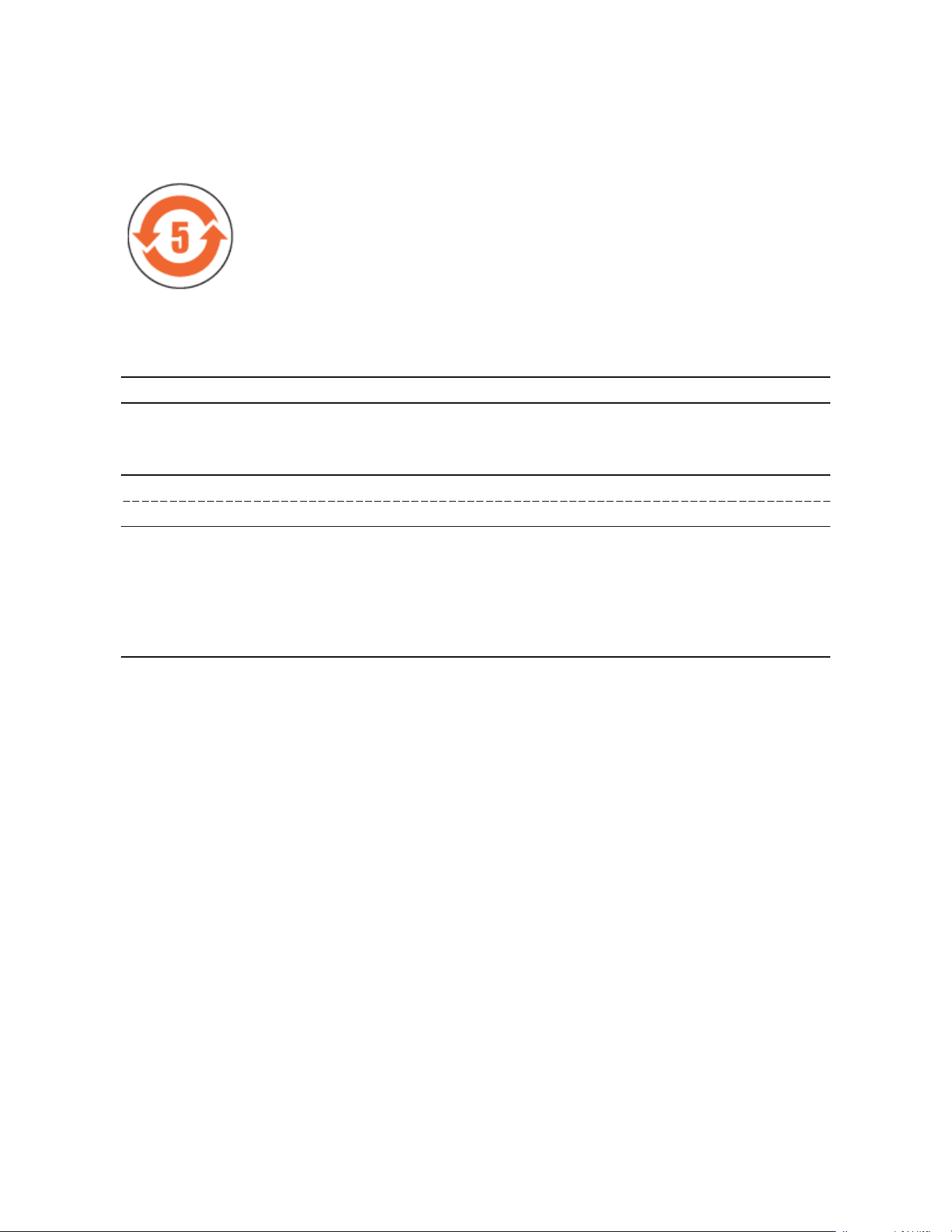
China
Wireless sync dongle
部件名称
有毒和危险品 Don
Dongle Model
FB406
铅
(Pb)
水银
(Hg)
镉
(Cd)
六价铬
(Cr(VI))
多溴化苯
(PBB)
多溴化二苯
醚
(PBDE)
表带和表扣 O O O O O O
电子 X O O O O O
本表格依据 SJ/T 11364 的规定编制
O = 表示该有害物质在该部件所有均质材料中的含量均在 GB/T 26572规定的限量要求以下
X = 表示该有害物质至少在该部件的某一均质材料中的含量超出 GB/T 26572规定的限量要
求
30
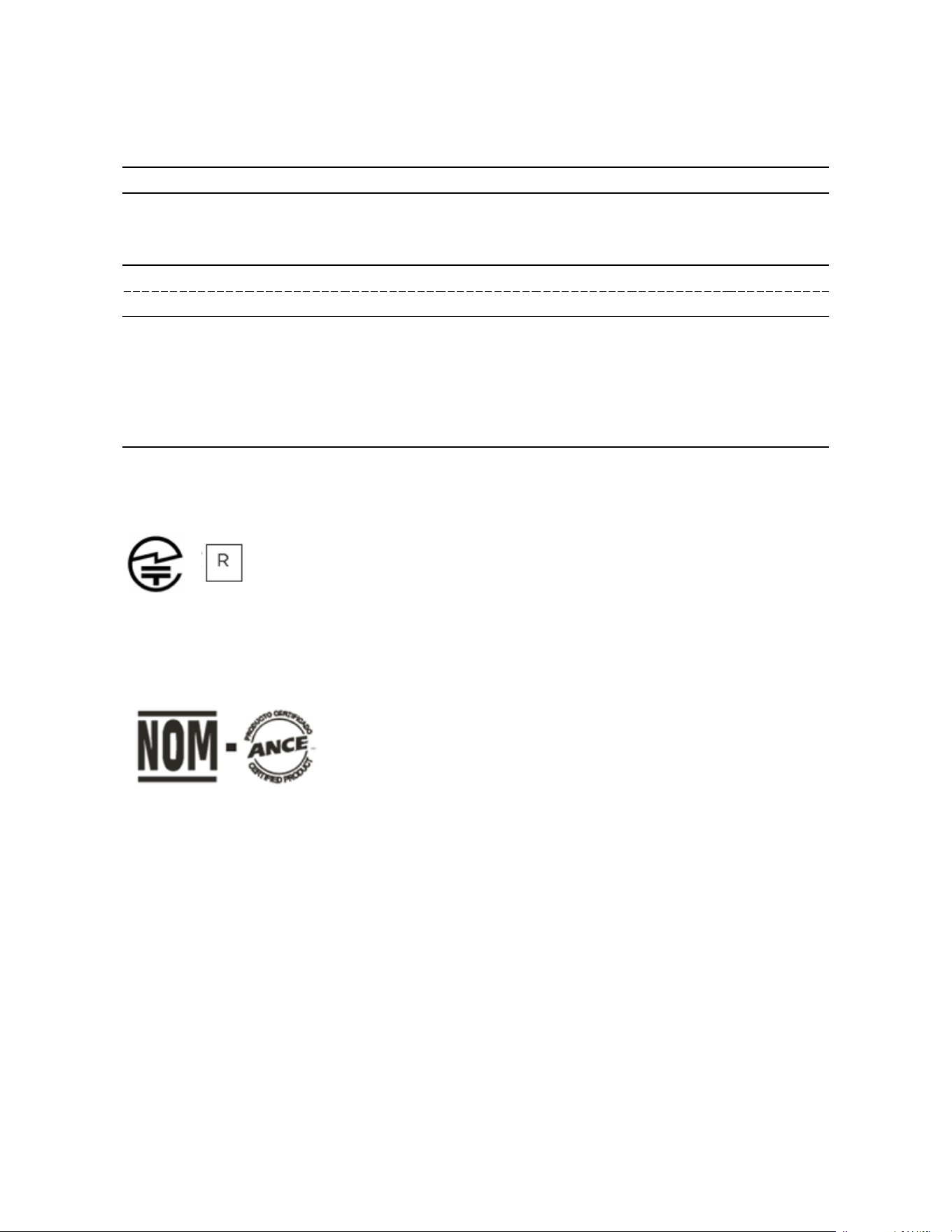
Alta
部件名称
有毒和危险品
Alta Model
FB406
铅
(Pb)
水银
(Hg)
镉
(Cd)
六价铬
(Cr(VI))
多溴化苯
(PBB)
多溴化二苯
醚
(PBDE)
表带和表扣 O O O O O O
电子 X O O O O O
本表格依据 SJ/T 11364 的规定编制
O = 表示该有害物质在该部件所有均质材料中的含量均在 GB/T 26572规定的限量要求以下
X = 表示该有害物质至少在该部件的某一均质材料中的含量超出 GB/T 26572规定的限量要
求
Japan
201-152821
Mexico
IFETEL: RCPFIFB15-2258
31
Morocco
AGREE PAR L’ANRT MAROC
Numéro d’agrément: MR 16117 ANRT 2018
Date d’agrément: 26/3/2018
Oman
OMAN-TRA/TA-R/3029/16
Philippines
NTC
Type Accepted
No:ESD-1612272C
Serbia
И005 016
32
Singapore
Complies
with IDA
Standards
DA00006A
South Africa
TA-2015/2353
APPROVED
33
South Korea
클래스 B 장치 (가정 사용을위한 방송 통신 기기) : EMC 등록 주로 가정용 (B 급)으로하고, 모든
지역에서 사용할 수 있습니다 얻을이 장치.
-. 사용 주파수 (Used frequency): 2402 MHz-2480 MHz
-. 채널수 (The number of channels): 40
-. 공중선전계강도 (Antenna power): -7.4 dBi
-. 변조방식 (Type of the
modulation):
GFSK
-. 출력 (Output power): 3.6dBm
-. 안테나 종류 (Type of Antenna) Monopole Antenna (Stamped metal)
-. 작동 온도 범위(Operating
Temperature Range):
-10C ~ 50C
-. 동작 전압 (Operating voltage): DC 3.7V
KCCapproval information
1) 장비 이름 Equipment name:
저전력 무선 장치 (무선 데이터 통신의 무선 장 치)
Low power radio equipment (wireless devices
of wireless data communications)
2) 모델 이름 Model name: FB406
3) 인증서 번호 Certificate number : MSIP-CMM-XRA-FB406
4) 회사 이름 Company Name : Fitbit, Inc.
5)제조업 자 Manufacturer: Fitbit, Inc. / 중국(China)
6) 제조 일자 Manufactured Date: 201_
Taiwan
Wireless sync dongle
CCAJ15LP1150T4
34

Alta
CCAJ15LP6230T1
注意!
依據 低功率電波輻射性電機管理辦法
第十二條 經型式認證合格之低功率射頻電機,非經許可,公司、商號或使用者均不得擅
自變更頻率、加大 功 率 或 變 更 原 設 計 之 特 性 及 功 能
第十四條
低功率射頻電機之使用不得影響飛航安全及干擾合法通信;經發現有干擾現象時,應 立
即停用,並改善至 無 干 擾 時 方 得 繼 續 使 用 。
前項合法通信,指 依 電 信 法 規 定 作 業 之 無 線 電 通 信 。
低功率射頻電機須忍受合法通信或工業、科 學 及 醫 療 用電波輻射性電機設備之干擾。
Translation:
Low power warning:
According to the management method of low power radio wave radiating motor.
Article 12
Low-power RF motors that have passed the type certification are not allowed to
change the frequency, increase the power or change the characteristics and
functions of the original design without permission.
Without permission, any company, firm or user shall not alter the frequency,
increase the power, or change the characteristics and functions of the original
design of the certified lower power frequency electric machinery.
Article 14
35
The use of low-power RF motors shall not affect flight safety and interfere with
legal communications; if interference is found, it shall be immediately deactivated
and improved until no interference is required.
Legal communication in the preceding paragraph refers to radio communications
operating in accordance with the provisions of the Telecommunications Act. Low-
power RF motors must withstand interference from legitimate communications or
radiological electrical equipment for industrial, scientific, and medical use.
The application of low power frequency electric machineries shall not affect the
navigation safety nor interfere a legal communication, if an interference is found,
the service will be suspended until improvement is made and the interference no
longer exists. The foregoing legal communication refers to the wireless
telecommunication operated according to the telecommunications laws and
regulations. The low power frequency electric machinery should be able to tolerate
the interference of the electric wave radiation electric machineries and equipment
for legal communications or industrial and scientific applications.
United Arab Emirates
TRA
REGISTERED
NO:
ER442211/16
DEALERNO:
35294/14
Safety Statement
This equipment has been tested to comply with safety certification in accordance
with the specifications of EN Standard: EN60950-1:2006 + A11:2009 + A1:2010 +
36

A12:2011 + A2:2013.
37

©2020 Fitbit, Inc. All rights reserved. Fitbit and the Fitbit logo are trademarks
or registered trademarks of Fitbit in the US and other countries. A more
complete list of Fitbit trademarks can be found at
http://www.fitbit.com/legal/trademark-list. Third-party trademarks
mentioned are the property of their respective owners.