User Manual

1
Table of Contents
1 Your mobile �������������������������������������������������������������������������������������������������� 3
1.1 Phone overview .............................................................................. 3
1.2 Gengstarted................................................................................ 7
1.3 Homescreen .................................................................................11
2 QuickDialBuon �������������������������������������������������������������������������������������12
2.1 AcvateQuickDialBuon ........................................................ 12
2.2 Assignaquickdialnumber ........................................................12
2.3 Howtocallthequickdialnumber ...........................................13
3 Phone call ��������������������������������������������������������������������������������������������������� 14
3.1 Makingacall .................................................................................14
3.2 Answeringorrejecngacall .....................................................15
3.3 Hangupacall ...............................................................................16
4 Contacts ������������������������������������������������������������������������������������������������������ 17
4.1 Addacontact ................................................................................17
4.2 Viewacontact .............................................................................. 18
4.3 Editacontact ................................................................................19
4.4 Shareacontact ............................................................................. 19
4.5 Deletecontacts ............................................................................19
4.6 Availableopons .......................................................................... 20
5 Messages ���������������������������������������������������������������������������������������������������� 21
5.1 Sendingatextmessage ..............................................................21
5.2 Sendingamulmediamessage ................................................. 23
6 Email ������������������������������������������������������������������������������������������������������������ 24
6.1 SetupEmail ...................................................................................24
6.2 SendEmail .....................................................................................24

2
7 Applicaon ������������������������������������������������������������������������������������������������� 25
7.1 Gallery ............................................................................................25
7.2 Music ..............................................................................................26
7.3 Camera ...........................................................................................27
7.4 Internet ...........................................................................................28
7.5 Calendar .........................................................................................29
7.6 Clock ...............................................................................................30
7.7 Note ................................................................................................32
7.8 Ulies ...........................................................................................32
7.9 FileManager..................................................................................34
7.10 Video ............................................................................................... 34
7.11 FMRadio ........................................................................................ 35
8 Sengs �������������������������������������������������������������������������������������������������������� 36
8.1 Network&Connecvity ............................................................36
8.2 Personalizaon .............................................................................38
8.3 Privacy&Security ........................................................................ 41
8.4 Storage ...........................................................................................41
8.5 Device .............................................................................................42
8.6 Account ..........................................................................................44
9 Troubleshoong ���������������������������������������������������������������������������������������� 46
10 Specicaons ��������������������������������������������������������������������������������������������� 51
11 Safety and use ������������������������������������������������������������������������������������������� 53
3
1
Your mobile
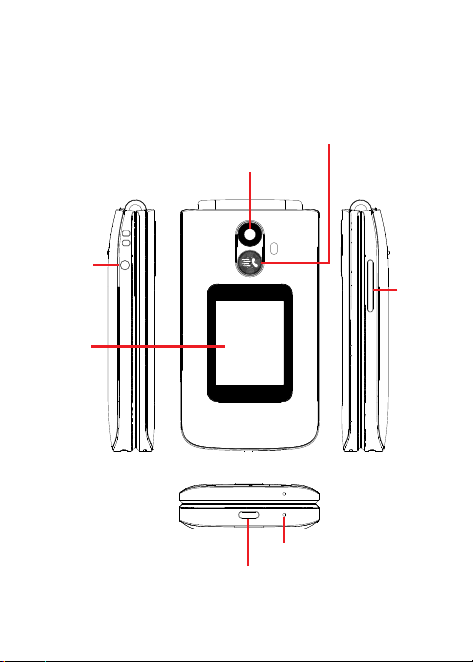
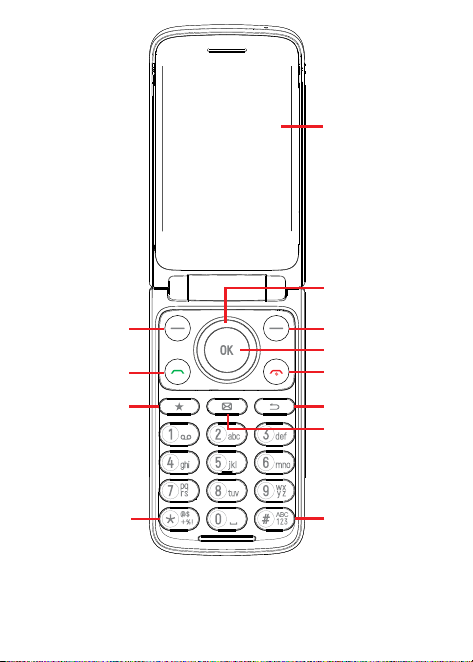
1�1 Phone overview
Camera
Volume
Key
Microphone
USB-CChargingPort
External
Display
3.5mm
headphone
jack
QuickDialBuon
4
InternalDisplay
NavigaonKey
(up,down,le,
right)
RightSoKey
CenterSoKey
End/PowerKey
Back/DeleteKey
Messageskey
LeSoKey
CallKey
FavoritesKey
Symbolskey
Textinputkey
5
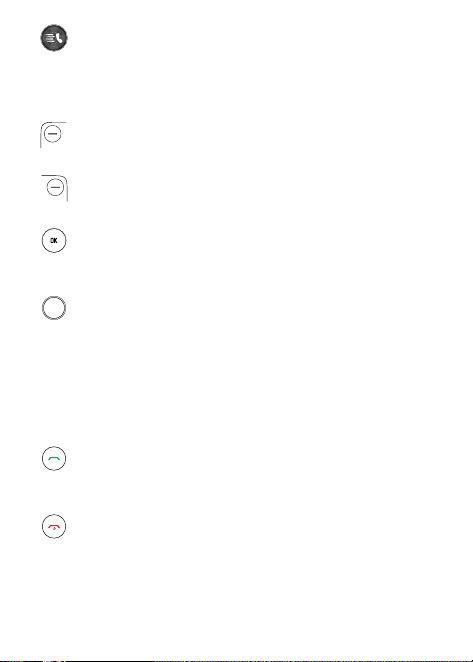
QuickDialBuon
• Aersetandacvated,press3mesquicklytocallthe
assignedcontact.
Forsengsandacvaoninformaon,pleasereferto
the“
2QuickDialBuon
”.
LeSoKey
• FromHomescreen,presstoaccessNocaons
RightSoKey
• FromHomescreen,presstoaccessContacts
CenterSoKey
• Conrmanopononthescreen
• Press:accessapplist(fromtheHomescreen)
NavigaonKey
• Menuseleconmovesup,down,right,andle
• Navigate up:accessQuicksengs
• Navigate down:accessKaiWeather
• Navigatele:quickaccesstoKaiStore,Internet,
YouTube,andGoogleMaps
• Navigate right:accessCamera
CallKey
• Answer/makeacall
• Press:entercalllog(fromtheHomescreen)
End/PowerKey
• Press:endacall,movebackwardsthroughMenus,return
toHomescreen
• Pressandhold:poweron/oorrestart
6
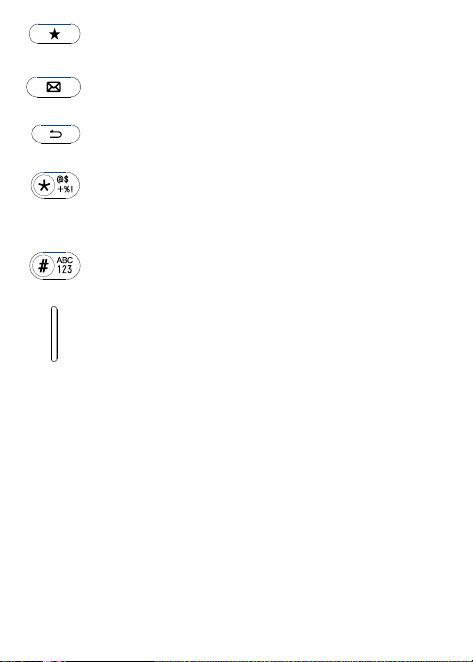
Favorites key
• AccessFavoriteContactsfromanyscreen
Messages key
• AccessMessagesfromanyscreen
Back/delete key
• Backtothelastscreenordeletetext
Symbols key
• Insertvarioussymbolsorspecialcharactersintext
edingmode
Text input key
• Repeatpresstoswitchbetweendierentmethods
VolumeKeys
• Incallmode,adjusttheearpieceorheadsetvolume
• InMusic/Video/Streamingmode,adjuststhemedia
volume
• Ingeneralmode,adjuststheringtonevolume
• Mutestheringtoneofanincomingcall
7
1�2 Gengstarted
Set up
MicroSD
TM
cardsmaybepurchasedseparately.
NOTE:
Powerothedevicebeforeopeningthebackcovertoinstalla
microSD
TM
orreplacetheNANOSIMcard.
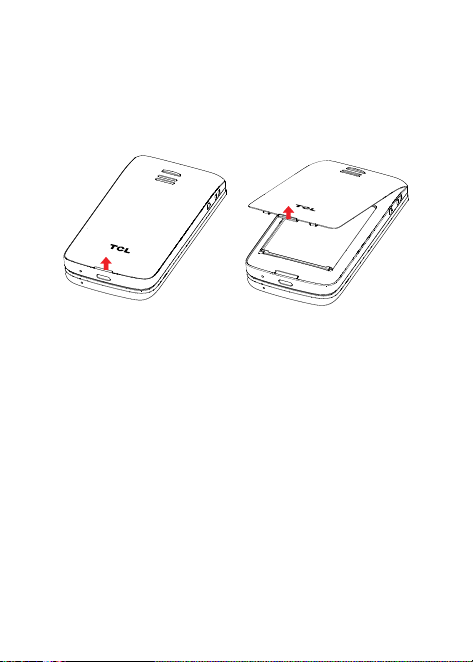
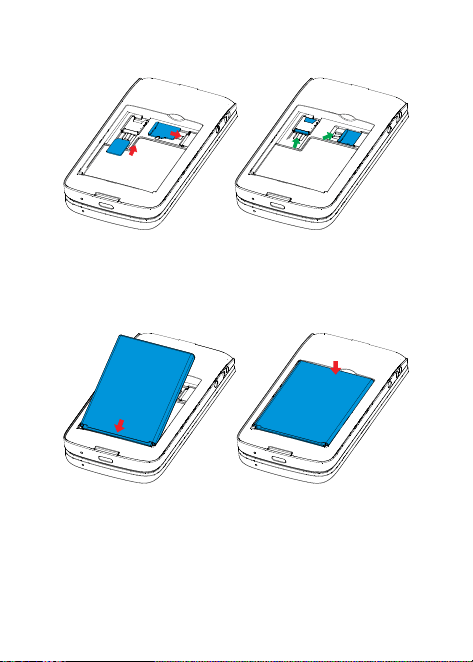
Step 1�
Withthedevicefacingdown,removethebackcoverbyusing
yourngernailtocarefullylithecoverfromthedevicebody.
Step 2�
Removethebaeryusingyourngernailtolifromthetopright
corner.
8
Step 3�
ToinsertSIMcardormicroSD
TM
card,pushtheSIMcardor
microSD
TM
cardintothecardslotwiththegold-coloredcontactsfacing
down.
ToremovetheSIMcardormicroSD
TM
card,pressdownonthesmall
plasctab,thenslideoutthecard.Donotuseforceoranysharpobjects.
Step 4�
Re-installthebaerybyaligningthegoldcontactpointsofthe
baerywiththegoldcontactpointsofthedevice.Itonlytsoneway.
Pressdowntosnapinplace.
Step 5�
Carefullyalignthebackcoverwithtabsandpressintoplace.It
onlytsonedirecon.
9
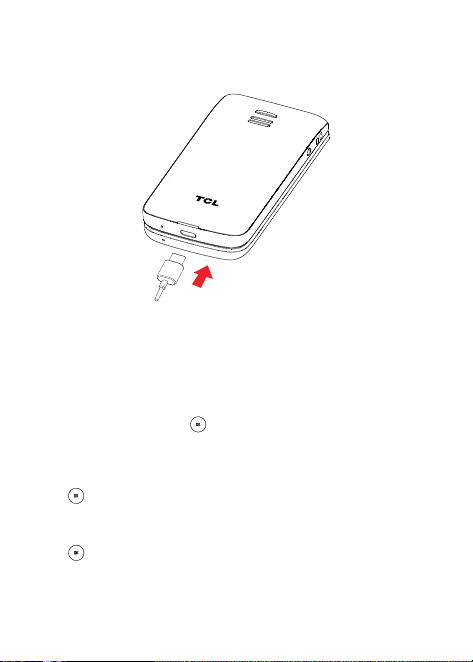
Step 6�
Chargeyourphonefullybeforeturningitonandstarngtheset
upprocess.Insertthesmallendofthechargingcableintothecharger
portonthephone.Inserttheotherendofthecableintoyourwall
chargerandplugitintoawalloutlet.
WARNING:
Onlyusethechargerandcablesuppliedwiththephone.
Usingincompablechargersortamperingwiththechargingportcould
damageyourphoneandvoidthewarranty.
Toopmizeyourbaerylife,youmaydothefollowing
• Lower screen brightness: From the Home screen, press
the Center So Key
> Sengs > Personalizaon >
Display > Brightness. Lower the brightness by pressing le on the
NavigaonKey.
• ChangeScreenTimeout:FromtheHomescreen,presstheCenterSo
Key
>Sengs >Personalizaon>Display>ScreenTimeout >
15seconds.
• EnablePowerSavingMode:FromtheHomescreen,pressCenterSo
Key
>Sengs >Device>Baery>PowerSavingMode>ON
orTurnonAutomacally.
10
Power on your phone
PressandholdtheEnd/PowerKey unlthephonepowerson.
Setupyourphonefortherstme
• Selectthephone'slanguage,thenpresstheCenterSoKey
togo
tothenextstep.
• SelectanavailableWi-Finetwork,thenpresstheCenterSoKey
togotothenextstep.
• SelectandsetAccessibilityopons,thenpresstheRightSoKey
whendone.PresstheLeSoKey toskip.
• Finally,presstheCenterSoKey
toentertheHomescreen.
Note: Even if no SIM card is installed, your phone will sll power on
andyouwillbeabletoconnecttoaWi-Finetworkandusesomeofthe
phone'sfeatures.
Poweroyourphone
PressandholdtheEnd/PowerKey unlthephonedisplays:Power
OandRestart,thenpresstheCenterSoKey toconrmpowero.
11
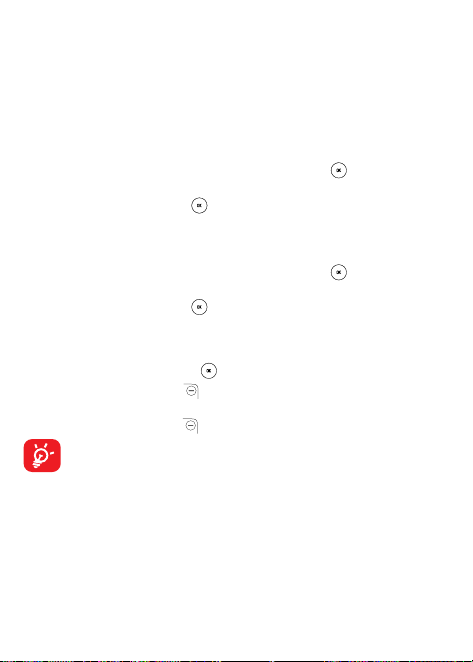
1�3 Home screen
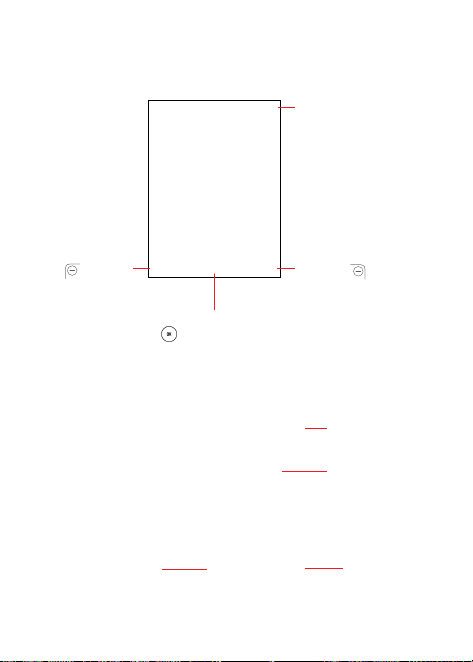
Internal screen
Status bar
• Status/Nocaon
indicators
PresstheLe S o
Key
toshow
Nocaons
PresstheCenterSoKey
toenterallapplist
PresstheRight
SoKey to
enterContacts
External screen
Baerylevel
Time
Date
Nocaon
quanty
12
2
QuickDialBuon
TheQuickDialBuononthefrontofthedeviceallowsyoueasyaccess
tocontactapredeterminednumber.
2�1 AcvateQuickDialBuon
1.FromtheHomescreen,presstheCenterSoKey >Sengs >
Device>Assistance>Acvaon.
2.PresstheCenterSoKey
andselectOntoacvate.
2�2 Assign a quick dial number
1.FromtheHomescreen,presstheCenterSoKey >Sengs >
Device > Assistance > Number > Empty.
2.PresstheCenterSoKey
toconrmadd:
• SelectManualtoaddnamesandnumbersmanually.
•SelectContactstoaddacontactfromtheContactslist.
•PresstheCenterSoKey
toconrm.
3.PresstheRightSoKey
toeditordelete.
4.Anotherwaytoadd:Onthecontactslistscreen,selectacontactthen
presstheRightSoKey
> Set as quick dial toadd.
Onlyonequickdialcontactisallowedatame.Ifthecontactis
savedontheSIMcard,theQuickDialfunconwillbedisabled
when the SIM card is removed and will be automacally
restoredaerSIMcardisinsertedback.

13
2�3 How to call the quick dial number
Once the Quick Dial Buon has been set and acvated, press the
QuickDialBuon3mesquicklytocalltheassignednumber.
TousetheQuickDialBuon,youmustrstacvatethefuncon
andstorethenumbertoyourContacts.
WhentheQuickDialBuonisacvated,thecallwillbeplacedinhands-
freemodewith the loud speakeron.Donot hold the device nearyour
ear when the hands-free mode is in use because the volume may be
extremelyloud.
14
3
Phone call
3�1 Making a call
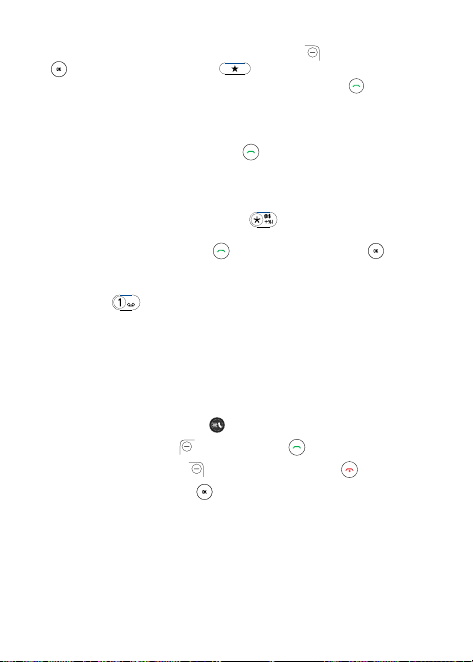
Dialthedesirednumberthenpressthe Call Key orthe CenterSo
Key
tomakethecall.PresstheBack/DeleteKey todeletethe
incorrectdigits.PresstheRightSoKey displaymoreOpons.
PresstheLe
SoKey to
enterContacts
PresstheCenter
SoKey tocall
theenterednumber
PresstheRightSo
Key todisplay
more Opons
PresstheRightSoKey
todisplaymoreOpons:
• Add to exisng contact: Add the entered number to replace the
exisngcontactnumber.
• Create new contact:Createanewcontactwiththeenterednumber.
Make a call from your call log
Fromthe Homescreen,presstheCall Key
,orpresstheCenterSo
Key > Call Logtoaccessthecalllogandchoosethecontactyouwant
todial,presstheCallKey ortheCenterSoKey twicetomake
thecall.
15
Make a call from Contacts
FromtheHomescreen,presstheRightSoKey
,presstheCenterSo
Key > Contacts,orpressthe toenterFavoritecontactsmenu.
Choosethecontactyouwanttodial,presstheCallKey tocall.
Making an emergency call
Ifyourphonehasnetworkcoverage,dialtheemergencyservicesnumber
inyourregionandpresstheCallKey
tomakeanemergencycall.This
worksevenwithoutaSIMcardandwithouttypingthePINcode.
Makeaninternaonalcall
Todialaninternaonalnumber,press
twicetoenter“+”inthedial
screen,entertheinternaonalcountryprexfollowedbythefullphone
number,thenpresstheCallKey ortheCenterSoKey tocall.
Calling your voicemail
(1)
Pressandhold tocallvoicemail.
3�2 Answeringorrejecngacall
Ifthedeviceisclosed,youwillgetapreviewofanincomingcallonthe
externalscreen.Youcanacceptthecallbyippingthedeviceopenand
begintalkingimmediately.Otherwise,duringanincomingcall:
• PresstheQuickDialBuon
toanswerthecallwithspeakerON.
• PresstheLeSoKey
ortheCallKey toanswer.
• PresstheRightSoKey
ortheEnd/PowerKey toreject.
• PresstheCenterSoKey
toignorewithmessage.
• Tomute the ringtonevolumeofanincomingcall,presstheVolume
Up/DownKey.
(1)
Contactyournetworkoperatortocheckserviceavailability.

16
3�3 Hang up a call
Duringacall:
• OpentheipandpresstheEnd/PowerKey
toendthecall.
• Opentheipandclosetheiptoendthecall.
17
4
Contacts ���������������������������������
Contactsenablesquickandeasyaccesstothecontactyouwantto
reach.
• PresstheRightSoKey
fromtheHomescreentoenterContacts.
• PresstheCenterSoKey
fromtheHomescreenandselect
Contacts
toentercontactlist.
• PresstheFavoriteContactsKey
fromtheHomescreento
accessFavoritecontacts.
4�1 Add a contact
Onthecontactslistscreen,presstheLeSoKey toaccessNew
Contacttocreateandinputthecontactinformaon.
Whennished,presstheCenterSoKey tosave.
18
4�2 View a contact
Onthecontactslistscreen,usetheNavigaonKeytoselectacontact,
thenpresstheCenterSoKey toaccessthedetailscreen.
Press the Le So Key
to send an SMS/MMS to the contact you
selected.
PresstheCenterSoKey
tocallthecontact.
PresstheRightSoKey
toaccessOpons:
• Set as quick dial:SetthecontactastheQuickDialBuonnumber.
• Add as Favorite
(1)
: Add the contact as a Favorite number. Access
Favoritecontactsbypressing fromanyscreen,orfromContacts >
Favorite contacts.
• Edit:Editthecontact.
• Speed dial:UsetheNavigaonKeytoselect2-9,presstheCenterSo
Key
toconrm.Aerset,ontheHomescreen,pressandholdthe
2-9screenkeystodialthedenedcontacts.
• Share:SharethecontactviaBluetooth/Messages/Email.
• Delete: Deletethecontact.
• Find duplicate contacts: PresstheCenterSoKey
tondduplicate
contacts.
• Block this number:PresstheCenterSoKey
toshowConrmaon
informaon,onceconrmed,presstheRightSoKey toBlock.
(1)
ForContactsstoredtoPhonememoryonly.
19
4�3 Edit a contact
Onthecontactslistscreen,usetheNavigaonKeytoselectacontact,
andpresstheCenterSoKey toviewthecontactdetailinformaon.
PresstheRightSoKey toaccessOpons,andthenselectEdit.
Whennished,presstheCenterSoKey tosave.
4�4 Share a contact
Youcanshareasinglecontactwithothersbysendingthecontact'svCard
tothemviaEmail,Messages,orBluetooth.
Onthecontactslistscreen,usetheNavigaonKeyto selectacontact,
thenpresstheRightSoKey
toaccessOpons,andthenselectShare.
4�5 Delete contacts
Onthecontactslistscreen,usetheNavigaonKeytoselectacontact,
presstheRightSoKey toaccessOpons>Delete,andthenpress
theRightSoKey todelete.

20
4�6 Availableopons
Fromthecontactslist,presstheRightSoKey toshowmoreopons.
Sengs
• Memory:StorecontactstoPhone,SIM,orPhoneandSIM.
• Sort contacts:Contactssortedbyrst/lastname.
• Set speed dial contacts: Assign contacts to the 2-9 keys for quick
calling.Pressandholdthekeytoplacethecall.
• Set ICE contacts:Addvecontactsformaking“InCaseofEmergency”
calls.
• Create Group: Press the CenterSo Key
to enter a new group
name,presstheRightSoKey tosave.Fromthecontactslist,press
Group>theCenterSoKey >theLeSoKey toaddcontacts
tothegroup.
• Block Contacts:PresstheCenterSoKey
andtheLeSoKey
toaddblockednumber,presstheRightSoKey
tosave.
• Import contacts: Import contacts from memory card, Gmail, and
outlook.
• Export contacts:ExportcontactstomemorycardandBluetooth.
• Add Account:Contacts,data,orotherinformaoncanbesynchronized
from mulple accounts, depending on the applicaons installed on
yourphone.
21
5
Messages �������������������������������
Usethemessagingfeaturetosendandreceivetext(SMS)and
mulmedia(MMS)messages.
5�1 Sending a text message
FromtheHomescreen,presstheMessageKey orpressthe
CenterSoKey
andselectMessages .
• PresstheLeSoKey
towriteanewmessage.
• EnterthephonenumberoftherecipientintheTobarorpressthe
LeSoKey
toaddrecipients.
• UsetheNavigaonKeytogototheMessage bartoenterthetextof
themessage.
• Repeatpress
Keytoswitchbetweenthedierentinput
methods.
• Press
Keytoselectsymbols.
• PresstheRightSoKey
toenteropons.
• PresstheCenterSoKey
tosendtextmessages.
22
Inpungtext
Therearedierentwaystoentertexttocreatecontacts,writeemailsor
sendmessages.
Youmaychoosefromthedierentinputmethodsbypressingthe
keyandalternatebetween:
• Abc(sentence case),abc(lowercase),orABC (capslockcase):With
thismodeyoumustpresseachkeymulplemestocreateeachleer.
Forexample,an‘s’iscreatedbypressingthe‘7’keyfourmes,an‘e’is
createdbypressing‘3’twice,andsoon.
• 123:Thismodegeneratesonlynumbers.Youmaytype‘1’bypressing
the‘1’keyjustonce,‘2’bypressing‘2’andsoon.SwitchbacktoABC,
Abc,abc or Predicvemodetoconnuewringwords.
• Predicve:Predicvetextmode isafeaturethatallowsyoutotype
faster, as the phone tries to predict what you are wring. To type
“Hello”:pressthe“4”keyonce,pressthe“3”keyonce,pressthe“5”
keyonce,pressthe“5”keyonce,thenpressthe“6”keyonce.
Asyoutype,wordsuggesonswillappearattheboomofthescreen.
Ifyouseethewordyouaretryingtotype,selectitwiththeNavigaon
KeyandpresstheCenterSoKey
.
• Symbols:This funcon providespunctuaonand special characters.
Symbolsmaybeaccessedbypressingthe
keyaswell.Findthe
right symbol by pressing right or leon the NavigaonKey.When
thecursorhighlightsasymbolyouwanttoadd,presstheCenterSo
Key toselectit.
Ifyouwanttodeletethealreadytypedleersorsymbols,pressthe
Back/DeleteKey
to deletethem one by oneorlong press to
deleteallatonce.

23
5�2 Sendingamulmediamessage
MMS enables you to send video clips, images, photos, contacts and
soundstoothercompablephonesandemailaddressesbypressingthe
RightSoKey fromthe textmessagesscreentoenterOponsand
thenselecngAddaachment.
AnSMSwillbeconvertedtoMMSautomacallywhenmediales(image,
video,audio,etc.)areaachedoremailaddressesareadded.
AnSMSofmorethan160characterswillbechargedasseveral
SMS. Specic leers (accent)will also increase the size of the
SMS.ThismaycausemulpleSMStobesenttoyourrecipient.

24
6
Email ���������������������������������������
6�1 Set up Email
AccessEmailbypressingtheCenterSoKey fromtheHomescreen
andselectEmail
.
An email wizard will guide you through the steps to set up an email
account,presstheRightSoKey
toconnue.
• Entertheemailaddressoftheaccountyouwanttosetup.
• PresstheRightSoKey
toaccessNext,enterthepasswordofthe
accountand presstheRightSoKey .You maybe promptedto
manuallysetupyouremailaccount.
• Toaddanotheremailaccount,youcanpresstheRightSoKey
to
accessOpons>Sengs,thenselectAdd.
6�2 Send Email
• Pressthe LeSoKey to composeanewemailfrom the Inbox
screen.
• Enterrecipient(s)emailaddress(es)intheTo eld.Ifyouwanttoadd
newrecipient(s),pressDownontheNavigaonkeytoswitchtothe
Subject eld to conrm the entered address, then press Up on the
NavigaonkeytothereturntotheToeldagaintoaddmore.
• Typethesubjectandthecontentofthemessage.
• Ifnecessary,presstheRightSoKey
toaddanotherrecipient(s)as
Cc/Bccortoaddanaachmenttothemessage.
• Ifyoudonotwanttosendthemailrightaway,youcanpresstheRight
SoKey
andselectSaveasdra.
• Finally,presstheLeSoKey
tosend.
25
7
Applicaon �����������������������������������
7�1 Gallery �����������������������������������������������������������������
Galleryprovidesyouwithone locaontoviewandorganizeallofyour
savedphotosandvideos.Italsooersaddionalphotoopons.
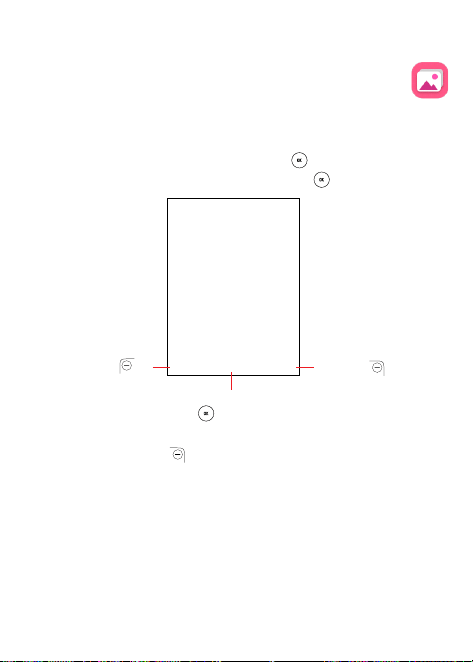
ToaccessGallery,presstheCenterSoKey
fromtheHomescreen,
selectGallery
andpresstheCenterSoKey .
PresstheLe
SoKey to
accessFavorites
PresstheCenterSo
Key toselectthe
photo
PresstheRight
SoKey to
more Opons
PresstheRightSoKey
toaccessoponsbelow:
• Delete:Deletetheselectedphoto.
• Edit: Adjustexposurevalue,rotatethephoto,crop,addlters,and
auto-correcon.
• Add to favorites/Remove from favorites: Add/Removetheselected
phototo/fromtheFavoriteslist.
• Share:SharethephotoviaBluetooth,MessagesandEmail.
• SelectMulple:Selectmulplephotostodeleteorshare.

26
• File Info: Displayname,size,type,datetaken,resoluonandpath.
• Sort and Group: Sortphotobydateandmeorgroupthembydate.
Individualphotoviewopons
PresstheLeSoKey tozoomin/out.
Whenpreviewingan individualimageinGalleryapp,theoponsabove
arealsoavailablebypressingthe RightSoKey
withtheaddional
oponbelow:
• Set as: SetthephotoasWallpaperorImageforanexisngcontact.
7�2 Music �������������������������������������������������������������������
UseMusic toplaymusic lesstoredonyourphone.Musiclescanbe
downloadedfromyourcomputertoyourphoneusingaUSBcable.
ToaccessMusic, presstheCenter SoKey
fromtheHomescreen,
selectMusic
andpresstheCenterSoKey .

27
7�3 Camera ����������������������������������������������������������������
YourmobilephonefeaturesCameraandVideototakephotosandshoot
videos.
Access the camera
ToaccessCamera,pressNavigate rightfromtheHomescreen.Orpress
CenterSoKey
> Camera >Select.
Take a picture
Posion the object or landscape in the screen, and press the Center
SoKey
totakethephoto.Photoswillbeautomacallysavedtothe
Galleryapp.
Aertakingthephoto,presstheLeSoKey
topreview.
Zoom in/out
PressupanddownontheNavigaonKeytozoomlensinandout.
Opons
PresstheRightSoKey
to:
• Flash:Selecttoturnashauto/on/o.
• CameraResoluon:SelecttheresoluonasHigh,Standard,orLow.
• Self Timer: Set the me a photo is taken aer pressing the Center
SoKey
.
• Grid:Addgridlinestophotoscreentohelptakebeerphotosbyusing
gridlinestoalignphotoimage.
• Gallery:SelectGo to Gallerytoviewphotospreviouslytaken.
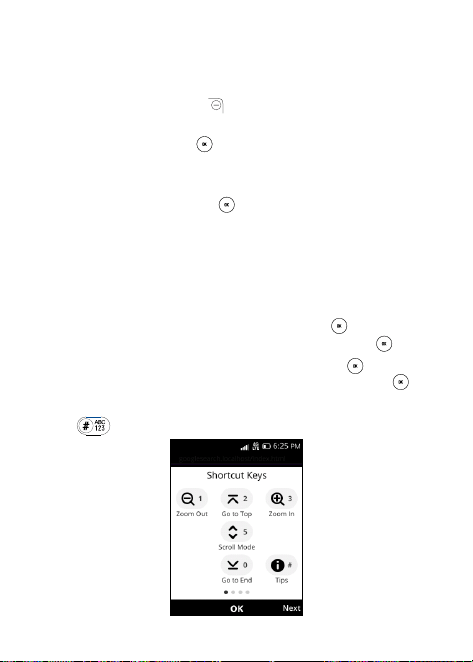
• Modes:SelecttoswitchbetweenPhotoandVideomode.
28
Camcorder
To shoot a video
• UsetheNavigaonKeytochangethecameramodetovideomode,
orpresstheRightSoKey
toaccessOpons>Modestoswitch
toVideomode.
• PresstheCenterSoKey
torecordavideo.
• Zoom in/out:PressupanddownontheNavigaonKeytozoomlens
inandout.
• Press the Center So Key
to end recording. Videos will be
automacallysavedtotheVideoapp.
7�4 Internet����������������������������������������������������������������
UseInternettonavigatetheWeb.
• To access Internet, press the Center So Key
from the Home
screen,selectInternet
andpresstheCenterSoKey .
• To search the internet, pressthe Center So Key
to access the
searchbar,enterthewebsiteandpresstheCenterSoKey
.
• UsetheNavigaonkeytomovecursoronthescreen.
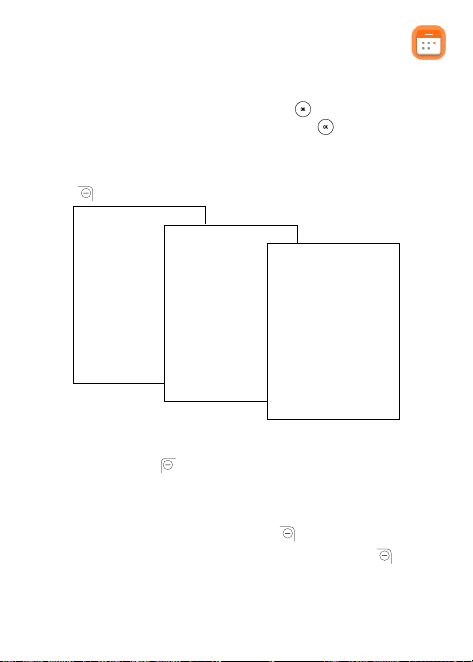
• Press
toviewpsfortheshortcutkeys.
29
7�5 Calendar ��������������������������������������������������������������
UseCalendar,tokeeptrackofimportantmeengs,appointments,etc.
ToaccessCalendar,presstheCenterSoKey
fromtheHomescreen,
selectCalendar
andpresstheCenterSoKey .
View Calendar
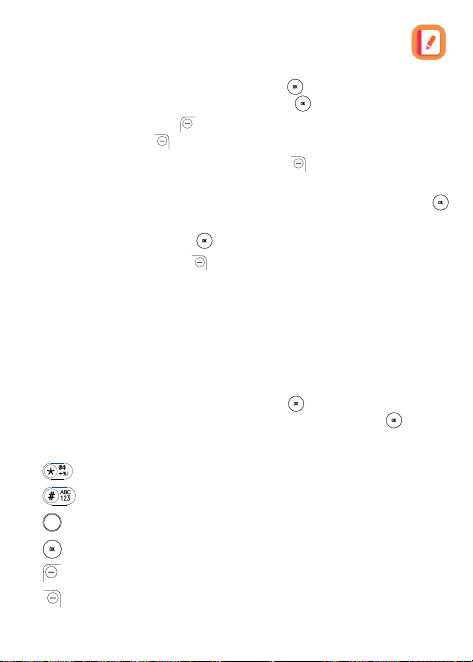
YoucandisplaytheCalendarinDay,Week,Monthview.PresstheRight
SoKey
tochangeyourCalendarview.
Create New Event
PresstheLeSoKey
toaddneweventsfromanyCalendarview.
• Fillinneweventinformaon.
• Ifitisawhole-dayevent,youcanselectAll-day Event.
• Whennished,presstheRightSoKey
tosave.
Moreopons areavailablebypressingtheRightSo Key
fromthe
Calendarmainscreen:

30
• Day/Week/Month View: Chooseyourfavoritecalendarview.
• Go to date: Togotowhateverdateyouwant.
• Search: Searchscheduledevents.
• Calendar to Display:TodisplayPhoneCalendarornot.
• Sengs:TosetaseriesofCalendarsengs.
Event reminder
Ifareminderissetforanevent,theupcomingeventiconwillappearon
thestatusbarasanocaonwhentheremindermearrives.
7�6 Clock ��������������������������������������������������������������������
YourmobilephonefeaturesaClockappwithAlarm,TimerandStopwatch.
ToaccessClock, press the CenterSoKey
fromthe Home screen,
selectClock
andpresstheCenterSoKey .
To set an alarm
FromtheAlarmscreen,presstheLeSoKey toaddanewalarm.The
followingoponswillappear:
• Time:Setthealarmme.
• Repeat:Selectthedaysyouwantyouralarmacve.
• Sound: Selectasoundforthealarm.
• Vibrate: Acvatevibraon.
• Alarm name: Enteranameforthealarm.
• PresstheRightSoKey
tosave.
PresstheRightSoKey
toaccessOpons>TurnOn/O,andpress
theCenterSoKey toturnonorotheselectedalarm.
PresstheCenterSoKey
toedittheselectedalarmfromtheAlarm
screen.

31
MoreoponsareavailableforsavedalarmsbypressingtheRightSoKey
fromtheAlarmscreen:
• Delete: Deleteselectedalarm.
• Sengs: Set snoozeduraon, alarm volume, vibrate, and sound for
theselectedalarm.
Tosetthemer
FromtheAlarm screen,press Rightonthe Navigaonkeyto enterthe
Timerscreen.
PresstheCenterSoKey
andtheNavigaonkeytoedithour,minute
andsecond.
Whennished,presstheCenterSoKey
tostarttheTimer.
WhentheTimerisongoing:
• PresstheCenterSoKey
topause/resumetheTimer.
• PresstheRightSoKey
toadd1minute.
• PresstheLeSoKey
toresettheTimer.
WhentheTimerisreset,presstheRightSoKey
toenterSengs,
allowingyoutosetsnoozeduraon,alarmvolume,vibrate,andsound.
To set the stopwatch
FromtheTimerscreen,pressRightontheNavigaonkeytoenterthe
Stopwatchscreen.
PresstheCenterSoKey
tostarttheStopwatch.
WhentheStopwatchisongoing:
• PresstheRightSoKey
torecordthelap.
• PresstheCenterSoKey
topause/resumetheme.
• PresstheLeSoKey
toresetthestopwatchandclearlapmes.
32
7�7 Note ���������������������������������������������������������������������
To access Note, press the CenterSo Key from the Home screen,
selectNote
andpresstheCenterSoKey .
• PresstheLeSoKey
toaddnote,entercontentsandthenpress
theRightSoKey toSave.
• Onthenotelist,presstheRightSoKey
toaccessOpons,such
asdelete,share,selectmulple,search,sortby.
UsetheNavigaonkeytoselectthenote,presstheCenterSoKey
toviewdetails.
• PresstheCenterSoKey
toedit.
• PresstheRightSoKey
toaccessOponstodeleteorsharethe
noteviaMessages,Email,orBluetooth.
7�8 Ulies ����������������������������������������������������������������
7�8�1 Calculator �����������������������������������������������������������������
Toaccessthisapp,presstheCenterSoKey fromtheHomescreen,
selectUlies>Calculator
andpresstheCenterSoKey .
• 0-9key:inputnumbers
•
:.
•
:+/-
•
:+,-,x,÷
•
:=
•
:Clearonce
•
:ClearAll

33
7�8�2 ToDo �����������������������������������������������������������������������������������
To access To D o , pressthe CenterSo Key from the Home screen,
selectUlies>ToDo
andpresstheCenterSoKey .
• PresstheLeSoKey
toaddanewtasklist,enterlistnamethen
presstheRightSoKeytoCreate�
• PresstheCenterSoKey
toselectatasklist,thenpresstheLe
SoKey toaddatask,entertasknamethenpresstheRightSo
Key toSave.
• Press the Right So Key
to access Opons to Edit, Delete, or
Deletethetask.
• Selectatask,presstheCenterSoKey
toCHECK/UNCHECKthe
task.
7�8�3 Recorder ����������������������������������������������������������������������������
ToaccessRecorder,presstheCenterSoKey fromtheHomescreen,
selectRecorder
andpresstheCenterSoKey .
• PresstheLeSoKey
thenpresstheCenterSoKey tostart/
pauserecording,presstheRightSoKey when Done.
• UsetheNavigaonKeytoselecttherecording,andpresstheCenter
SoKey
toplay.
• PresstheRightSoKey
toaccessOpons,suchasdelete,share,
selectmulple,rename,saveasringtone,savetomusiclibrary,select
Sengstosetrecordingsize.

34
7�9 File Manager ������������������������������������������������������
Toaccessthisapp,presstheCenterSoKey fromtheHomescreen,
selectFile manager
andpresstheCenterSoKey .
File Managerdisplaysall data stored on the phone and the microSD
TM
card, including applicaons, media les downloaded from Browser or
otherlocaons;videos,picturesoraudiosyouhavecaptured;otherdata
transferredviaBluetooth,USBcable,etc.
Whenyoutransfer an applicaonfroma PC toyour phone/microSD
TM
card,youonlycanlocatetheapplicaonusingFile Manager.Youwillnot
beabletoinstallitonyourphone.
File Manager allows you to perform and be really ecient with the
followingcommonoperaons:create(sub)folder,openfolder/le,view,
rename,cut,copy,delete,play,share,etc.
7�10 Video ��������������������������������������������������������������������
Videoactsasamediaplayerforyoutoviewvideos.
ToaccessVideo,presstheCenterSoKey
fromtheHomescreen,
selectVideo
andpresstheCenterSoKey .
• PresstheLeSoKey
toenterCameratotakeavideo.
• UsetheNavigaonKeytoselectavideo,presstheCenterSoKey
toplaythevideo.
• PresstheRightSoKey
toaccessOpons,suchasshare,le
info,delete,selectmulple.

35
7�11 FM Radio�������������������������������������������������������������
Yourphoneisequippedwitharadio
(1)
withRDS
(2)
funconality.Youcan
use the applicaon as a tradional radio with saved channels or with
parallelvisualinformaonrelatedtotheradioprogramonthedisplayif
youtunetostaonsthatoerVisualRadioservice.
To access this funcon, press the Center SoKey
fromthe Home
screenandselectFM Radio
.
(1) Thequalityoftheradiodependsonthecoverageoftheradiostaonin
thatparculararea.
(2) Dependingonyournetworkoperatorandmarket.

36
8
Sengs ����������������������������������
ToaccessQuickSengs,pressNavigateupfromtheHomescreen.
ToaccessthefullSengsmenu,pressCenterSoKey
> Sengs >
Select.
8�1 Network&Connecvity
Airplane Mode
When Airplane Mode is on, all wireless connecons are disabled
simultaneously,includingWi-FiandBluetooth.
Cellular network & Data
Carrier
PresstheCenterSoKey
toselectthecarrierautomacally.Default
isOn.
DataConnecon
Ifyoudonotneedtotransmitdataonallmobilenetworks,turnoData
Connecon to avoidincurring signicant charges fordata use on local
operatormobilenetworks,parcularlyifyoudonothaveamobiledata
agreement.
Data counter
PresstheCenterSoKey
viewdatausage,setdatalimitandwarning.
Data roaming
Ifyoudon’tneedtotransmitdataonotheroperators’mobilenetworks,
disableDataroamingtoavoidincurringsignicantroamingcharges.

37
APNSengs
• PresstheLeSoKey
toaddnewAPN.
• EntertherequiredAPNinformaon,whennished,presstheRight
SoKey
tosave.
Wi-Fi
Wi-Fi will allow you to surf the internet without using your mobile
networkwheninrangeofawirelessnetwork.ToaccessWi-Fi,openthe
sengstoconguretheaccesspointandconnectyourphone.Beadvised
thatyoumayneedtoenterapasswordifapplicable.
Bluetooth
Bluetooth allows your phone to exchange data (videos, images, music,
etc.)withotherBluetoothdeviceswithinaclose rangesuchas another
phone,computer,printer,headset,carkit,etc.
Geolocaon
KaiOSusesGPS,andaddionalsupplementalinformaonsuchasWi-Fi
andcellularnetworkstoapproximateyourlocaon.
Locaon datamay beused byKaiOS and service providers to improve
accuracyandcoverageofthelocaondatabases.
CallingSengs
Thismenuoersarangeofessenalfeaturestocustomizeandmanage
callpreferences.Youcanenablecallwaingtoanswermulplecalls
simultaneously,displaycallerIDstoidenfyincomingcalls,setupcall
forwardingtoredirectincomingcalls,implementcallbarringtoblock
specicnumbersorcalltypes,etc.

38
Fixed Dialing Numbers
FixedDialingNumber(FDN)isaSIMservicemode,whereoutgoingcalls
arerestrictedtoasetofphonenumbers.Thesenumbersareaddedtothe
FDNlist.ThemostcommonpraccalapplicaonofFDNisforparentsto
restrictthephonenumberstowhichtheirchildrencandial.Forsecurity
reasons,you’llbepromptedtoenableFDNbyenteringSIMPIN2whichis
usuallyacquiredfromyourserviceproviderorSIMmaker.
Internet sharing
Internet sharing allows you to shareyour device›s internet connecon
with other devices. With mobile hotspot, you can create a portable
Wi-Fi network using your phone›s cellular data, enabling other devices
to connect and access the internet. USB tethering, on the otherhand,
involvesconnecngaphonetoanotherdeviceviaaUSBcabletoshare
theinternetconnecon.
Wireless Emergency Alerts
Youcanenableordisablethetypesofemergencyalertsyouwish
toreceiveonyourdevice,chooseaddionlanguageandplayWEA
ringtone.
8�2 Personalizaon
Sound
Volume
PressCenterSoKey
tosetvolumeforMedia,Ringtones&Alerts
andAlarm.
Tones
PressCenterSoKey
tomanagetones.

39
Other Sounds
PressCenterSoKey
toenable/disablethesoundforDialpadand
Camera.
Display
Wallpaper
PressCenterSoKey
toselectwallpaperfromGallery,Camera,or
Wallpaper.
Brightness
PressNavigaterightandNavigateletosetthelevelofbrightness.
Large Text
PressCenterSoKey
toenable/disablelargetext.
Screen Timeout
PressCenterSoKey
tosetscreenmeout.
Sub-screen clock
PressCenterSoKey
toselectSuperdigitalclock,Digitalclock,or
Analogclock.
Baerypercentage
PressCenterSoKey
toenable/disablebaerypercentagedisplayed
inthestatusbar.
Search
Search Engine
PressCenterSoKey
toselectsearchengine.
SearchSuggesons
PressCenterSoKey
toenable/disablesearchsuggesons.

40
Nocaons
Show on Lock Screen
PressCenterSoKey
toenable/disablenocaonsshownonlock
screen.
Show content on Lock Screen
PressCenterSoKey
toenable/disablecontentshownonlock
screen.
AppNocaons
PressCenterSoKey
tomanageindividualappnocaons.Enable/
disablenocaonsforCalendar,E-Mail,Messages,andotherapps.
Date&me
Youcanadjustsengstoyourlocalmezone,choosebetween12-hour
and24-hourclockformats,andselecttoshoworhidetheclockonthe
Homescreen.
Language
PressCenterSoKey toselectthelanguageyouwant.
Input methods
PressCenterSoKey toselectinputlanguages.
Flipdenion
PressCenterSoKey toenable/disableOpentoanswercallandClose
togotohome.Bothareenabledbydefault.

41
8�3 Privacy & Security
Screen lock
Screen lock allows you to set a 4-digit password which protects your
phonefromintrusions.Onceenabled,youwillbepromptedtoenterthe
4-digitcodewhenthephoneispoweredonaerbeingo,aerscreen
meout,andeachmeopeningtheip.
SIM Security
ASIMPINpreventsaccesstotheSIMcardmobiledatanetworks.When
it'senabled,anydevicecontainingtheSIMcardwillrequestthePINupon
restart.ASIMPINis notthesame asthelockcodeusedtounlock the
device.
App permissions
PressCenterSoKey tosetpermissionsforapps,includingCamera,
KaiWeather,andMaps.
Do Not Track
Press Center So Key to set whether you want to be tracked by
websitesandapps.
AboutKaiOS
ViewinformaonaboutKaiOS.

42
8�4 Storage
USB storage
EnablingUSBstorageallowsanothercomputerordeviceconnectedusing
USBtoaccesslesonthisphone.
Internal storage
Usethesesengstomonitoravailablespaceonyourphone.
8�5 Device
DeviceInformaon
ThiscontainsinformaonrangingfromPhonenumber,Sowareversion,
Hardware Revision, Plaorm version, Bluetooth address, Build number
andetc.
Device reset
PressCenterSoKey toselect.Deviceresetwill restorethephone
tofactorycondion.Personalizedsengsanddatawillbedeletedfrom
thedevice.
Downloads
PressCenterSoKey toviewdownloads.
Baery
PressCentersokey toviewcurrentbaerypercentagelevelandset
PowerSavingMode.

43
TurningPowerSavingModeonwillturnothephone'sdata,Bluetooth
andGeolocaonconnecontoextendbaerylife.
You can adjust power use via the screen brightness or screen meout
sengsintheDisplayscreen.
Accessibility
Invert Colors
PressCenterSoKey
toturnon/ocolorinversion.
Backlight
PressCenterSoKey
toturnon/obacklight.
Large Text
Enablelargetexttoenlargethescreentext.
Capons
Press Center So Key
to acvate/deacvate capons for phone
screen.
Readout
PressCenterSoKey
toturnon/oreadout.
Mono Audio
PressCenterSoKey
toturnon/omonoaudio.
Volume Balance
PressNavigateRightandNavigateLetosetvolumebalancevalue.
KeypadVibraon
PressCenterSoKey
toturnon/okeypadvibraon.

44
HearingAidCompability(HAC)
Hearingaidmodecanbeusedbypeoplewhoaredeaf,havepoorhearing
or speech impairments. Aer connecng the phone and hearing aid
device,callsarelinkedtoarelayservice,whichconvertsincomingspeech
totextforthe personusingthehearing aidandconvertsoutgoingtext
fromthehearingaiddevicetoaspokenvoiceforthepersonontheother
endoftheconversaon.
Real Time Text (RTT)
PressCenterSoKey
tototurnon/oRTTandselectpreference.
TTY (Teletypewriter)
TheTTYallowsuserswithhearingorspeechimpairmentstocommunicate
throughtext.
Quick Dial
PressCenterSoKey to acvate/deacvateQuickDialand setthe
numberforitmanuallyorfromContacts.
Regulatory & Safety
PressCenterSoKey toviewproductinformaonsuch as Product
model, Manufacturer name, IMEI, CU reference, Bluetooth Declaraon
ID,etc.
SowareUpdate
ToaccessSowareupdates,followthestepsbelow:
• ConnectyourdevicetoaWi-Finetworkandmakesureithasastrong
dataconnecon.
• Ensure your baery is fully charged before starng the soware
update.Yourdevice’scurrentbaerylevelcanbefoundonyourdevice
underSengs>Baery.

45
• From the Home screen, press the Center So Key
and select
Sengs>Device>Sowareupdate>Checkforupdates.
• Whenthereisanewmandatorysowareupdateversionavailable,the
phonewillstartdownloadingautomacally,thenpresstheRightSo
Key
toselectInstalltoupdateyoursystem.
8�6 Account
KaiOSAccount
TocreateaKaiOSaccount,presstheCenterSoKey fromtheHome
screenandselectSengs>Account>KaiOSaccount.
Create Account
• SelectCreate AccountandpresstheCenterSoKey
toconrm.
• ReadAboutKaiOSAccountandpresstheRightSoKey
toAccept.
• Enter Account Name, Password, Conrm password, then press the
RightSoKey
togoNext�
• Fillintheyearofbirth, select the gender,thenpresstheRightSo
Key
togoNext.
• Prompt "Account Created". A conrmaon email is sent, and you
shouldverifyandacvateyouraccount.Onceconrmed,youcanlog
inwithyouremailanduseitforpasswordretrieval.
• PresstheRightSoKey
when Done.
• JumptotheKaioOSAccountinterface.
• Signinwithemail.
An-The
An-thecanonlybeenabledaerloggingintoyourKaiOSAccount.

46
9
Troubleshoong
Beforecontacngtheservicecenter,followtheinstruconsbelow:
• Youareadvisedtofullychargethebaeryforopmaloperaon.
• Avoidstoringlargeamountsofdatainyourphoneasthismayaect
itsperformance.
• UsetheFOTA(FirmwareOverTheAir)Upgradetooltoupdate
yourphone’ssoware.ToaccessSowareupdate,pressSengs >
Device > SowareUpdate> Check for updates.
• To set your phone to factory default, access Sengs > Device >
Deviceinformaon> Reset Phone > Reset .Allyourphonedatawill
belostpermanently.Itisstronglyadvisedtofullybackupyourphone
beforereseng.
Thefollowingarethemostaskedquesons:
My phone has not responded for several minutes
• RestartyourphonebypressingandholdingtheEnd/PowerKey
.
Myphoneturnsobyitself
• Checkthatyourscreenislockedwhenyouarenotusingyourphone,
and make sure theEnd/Power Key
is not mis-contacteddue to
unlockedscreen.
• Checkthebaerychargelevel.
My phone cannot charge properly
• Make sure that your baery is not completely discharged; if the
baerypowerhasbeenemptyforalongme,itmaytakearound20
minutestodisplaythebaerychargerindicatoronthescreen.
• Makesurechargingiscarriedoutundernormalcondions:0°C(32°F)
to40°C(104°F).
• Whenabroad,checkthatthevoltageinputiscompable.
My phone cannot connect to a network or “No service” is displayed
• Tryconnecnginanotherlocaon.
• Verifythenetworkcoveragewithyourserviceprovider.

47
• CheckwithyourserviceproviderthatyourSIMcardisvalid.
• Tryselecngtheavailablenetwork(s)manually.
• Tryconnecngatalatermeifthenetworkisoverloaded.
My phone cannot connect to the Internet
• Check that the IMEI number (press *#06#) is the same as the one
printedonyourwarrantycardorbox.
• Make sure that the internet access service of your SIM card is
available.
• Checkyourphone’sInternetconnecngsengs.
• Makesureyouareinaplacewithnetworkcoverage.
• Tryconnecngatalatermeoranotherlocaon.
Invalid SIM card
• MakesuretheSIMcardhasbeencorrectlyinserted(see“1.2Geng
started”).
• MakesurethechiponyourSIMcardisnotdamagedorscratched.
• MakesuretheserviceofyourSIMcardisavailable.
Unable to make outgoing calls
• MakesureyouhavedialedavalidnumberandhavepressedtheCall
Key
.
• Forinternaonalcalls,checkthecountryandareacodes.
• Makesureyourphoneisconnectedtoanetwork,andthenetworkis
notoverloadedorunavailable.
• Checkyoursubscriponstatuswithyourserviceprovider(credit,SIM
cardvalid,etc.).
• Makesureyouhavenotbarredoutgoingcalls.
• Makesurethatyourphoneisnotinairplanemode.
Unable to receive incoming calls
• Make sure your phone is switched on and connected to a network
(checkforoverloadedorunavailablenetwork).
• Checkyoursubscriponstatuswithyourserviceprovider(credit,SIM
cardvalid,etc.).
• Makesureyouhavenotforwardedincomingcalls.

48
• Makesurethatyouhavenotbarredcertaincalls.
• Makesurethatyourphoneisnotinairplanemode.
The caller’s name/number does not appear when a call is received
• Check that you have subscribed to this service with your service
provider.
• Yourcallerhasconcealedhis/hernameornumber.
Icannotndmycontacts
• MakesureyourSIMcardisnotbroken.
• MakesureyourSIMcardisinsertedproperly.
• ImportallcontactsstoredinSIMcardtophone.
The sound quality of the calls is poor
• YoucanadjustthevolumeduringacallbypressingtheVolume Up/
Downkey.
• Checkthenetworkstrength
.
• Makesurethatthereceiver,connector,orspeakeronyourphoneis
clean.
I am unable to use the features described in the manual
• Checkwithyourserviceprovidertomakesurethatyoursubscripon
includesthisservice.
• MakesurethisfeaturedoesnotrequireanTCLaccessory.
WhenIselectanumberfrommycontacts,thenumbercannotbedialed
• Makesurethatyouhavecorrectlyrecordedthenumberinyourle.
• Makesurethatyou haveselectedthecountryprex when callinga
foreigncountry.
I am unable to add a contact in my contacts
• MakesurethatyourSIMcardcontactsarenotfull;deletesomeles
orsavethelesinthephonecontacts.
My callers are unable to leave messages on my voicemail
• Contactyourserviceprovidertocheckserviceavailability.

49
I cannot access my voicemail
• Make sure your service provider’s voicemail number is correctly
enteredin“Voicemailnumber”.
• Trylaterifthenetworkisbusy.
I am unable to send and receive MMS
• Checkyourphonememoryavailabilityasitmightbefull.
• Contactyourserviceprovidertocheckserviceavailabilityandcheck
MMSparameters.
• Verify the server center number or your MMS prole with your
serviceprovider.
• Theservercentermaybeswamped,tryagainlater.
SIM card PIN locked
• Contact your service provider to obtain the PUK code (Personal
UnblockingKey).
Iamunabletodownloadnewles
• Makesurethereissucientphonememoryforyourdownload.
• Checkyoursubscriponstatuswithyourserviceprovider.
The phone cannot be detected by others via Bluetooth
• Make sure that Bluetooth isturnedon and your phone isvisibleto
otherusers.
• Make sure that the two phones are within Bluetooth’s detecon
range.
Howtomakeyourbaerylastlonger
• Makesureyoufollowthecompletechargeme(maximum2.5hours).
• Aer a paral charge, the baery level indicator may not be exact.
Waitforatleast20minutesaerremovingthechargertoobtainan
exactindicaon.
• Switchothebacklightuponrequest.
• Extendthee-mailauto-checkintervalforaslongaspossible.
• Exit background-running applicaonsif they are not being used for
alongme.
• DeacvateBluetooth,Wi-Fi,orGPSwhennotinuse.

50
Thephonewillbecome warm following prolongedcalls,gameplaying,
internetsurngorrunningothercomplexapplicaons.
• ThisheangisanormalconsequenceoftheCPUhandlingexcessive
data. Ending above acons will make your phone return to normal
temperatures.

51
10
Specicaons
Plaorm:
• QCTQM215
OS:
• KaiOS
Memory:
• 16GBROM+1GBRAM
Dimensions (LxWxT):
• 107.1x59.4x19.85mm
Weight:
• 143.5g
Display:
• QVGA240x320@60Hz
Network:
• 2G-GSM:850/900/1800/1900
• 3G-WCDMA:B1/B2/B4/B5/B8
• 4G-FDDLTE:B2/B4/B5/B12/B13/B25/B26/B66/B71
• 4G-TDDLTE:B41/B41(HPUE)
Connecvity:
• Bluetooth4.2
• 802.11b,802.11g,802.11n,2.4GHz
• 3.5mmaudiojack
• TypeC
Camera:
• RearCamera:5MP

52
Audio & Video supported formats:
• AACLC,AAC+,eAAC,aacPlusv1,AAC+v2,eAAC+,aacPlusv2,
AMR-NB,AMR-WB,MP3,Vorbis,PCM
• H.263,h.264AVC,VP8,VP9,Theora.
Baery:
• Capacity:1850mAh
Expansion Slot:
• microSD™memorycard,soldseparately
(capacityupto512GB)
Sensors:
• Hallswitch
Note: Specicaonsaresubjecttochangewithoutpriornoce.

53
11
Safety and use
We recommend that you read this chapter carefully before using your
phone. The manufacturer disclaims any liability for damage, which
may result as a consequence of improper use or use contrary to the
instruconscontainedherein.
TRAFFIC SAFETY:
Given that studies show that using a phone while driving a vehicle
constutes a real risk, even when the hands-free kit is used (car kit,
headset, etc.), drivers are requested to refrain from using their phone
whenthevehicleis not parked.Checkthe lawsandregulaonsonthe
use of wireless phones and their accessories in the areas where you
drive.Alwaysobeythem.Theuseofthesedevicesmaybeprohibitedor
restrictedincertainareas.
CONDITIONS OF USE:
• Youareadvisedtoswitchothephonefrommetometoopmize
itsperformance.
• Remember toabidebylocal authorityrulesofmobile phone use on
aircras.
• Ifyourphoneisaunibodydevice,wherethebackcoverandbaery
arenotremovable, disassemblingthephonewillvoidyourwarranty.
Disassembling the phone can cause bodily injury if the baery is
punctured.
• Always handleyour phonewithcareandkeepit in a cleananddust-free
place.

54
• Do not allow your phone to be exposed to adverse weather or
environmentalcondions,suchasmoisture,humidity,rain,inltraon
of liquids, dust, sea air, etc. The manufacturer’s recommended
operangtemperaturerangeis-10°C(14°F)to+45°C(113°F).Atover
45°C(113°F),thelegibilityofthephone’sdisplaymaybetemporarily
impaired.
• Donotopen,dismantle,oraempttorepairyourphoneyourself.
• Donotdrop,throw,orbendyourphone.
• Use only baeries, baery chargers, and accessories which are
recommendedbyTCLCommunicaonLtd.,anditsaliatesandwhich
arecompablewithyourphonemodel.TCLCommunicaonLtd.,and
itsaliatesdisclaimanyliabilityfordamagecausedbytheuseofother
chargersorbaeries.
• Your phone should not be disposed ofin a municipal waste. Please
checklocalregulaonsfordisposalofelectronicproducts.
• Remember to make backup copies or keep a wrien record of all
importantinformaonstoredonyourphone.
• Somepeoplemaysuerepilepcseizuresorblackoutswhenexposed
to ashing lights, or when playing video games. These seizures or
blackouts may occur even if a person has never experienced them
before.Ifyouhaveexperiencedseizuresorblackouts,orifyouhavea
familyhistoryof such occurrences, please consultyour doctor before
playingvideogamesonyourphoneorenablingaashing-lightsfeature
onyourphone.
• Parents should monitortheirchildren’suseofvideo gamesorother
features that incorporate ashing lights on the phones. All persons
should disconnue use and consulta doctor if any of the following
symptoms occur: convulsion, eye or muscle twitching, loss of
awareness,orientaon,ormovements.

55
PRIVACY:
Please note thatyou must respect the lawsand regulaons in forcein
yourjurisdicon or other jurisdicon(s)where you will use your phone
regarding taking photographs and recording sounds with your phone.
Pursuant to such laws and regulaons, it may be strictly forbidden to
takephotographsand/ortorecordthevoicesofotherpeopleoranyof
theirpersonalaributes,andreproduceordistributethem,asthismaybe
consideredtobeaninvasionofprivacy.Itistheuser›ssoleresponsibility
toensurethatpriorauthorizaonhasbeenobtained,ifnecessary,inorder
torecord private orcondenalconversaons ortakea photographof
another person; the manufacturer, the seller or vendor of your phone
(includingthecarrier)disclaimanyliabilitywhichmayresultfromimproper
useofthephone.
Pleasenotethatwhenusinganaccessorysomeofyourpersonaldatamay
besharedwiththemaindevice.Itisyourown responsibilitytoprotect
your own personal data, not to share with it with any unauthorized
devices or third party devices connected to yours. For products with
Wi-Fifeatures,onlyconnecttotrustedWi-Finetworks.Alsowhenusing
yourproductasahotspot(whereavailable),usenetworksecurity.These
precauonswill help prevent unauthorized accesstoyourdevice.Your
productcan store personal informaoninvarious locaons including a
SIMcard,memorycard,andbuilt-inmemory.Besuretoremoveorclear
all personal informaon before you recycle, return, or give away your
product.Chooseyourapps andupdatescarefully,andonlyinstallthem
fromtrustedlocaons.Someappscanimpactyourproduct’sperformance
and/orhaveaccesstoprivateinformaonincludingaccountdetails,call
data,locaondetailsandnetworkresources.
Note that any data shared with TCL Communicaon Ltd. is stored
in accordance with applicable data protecon legislaon. For these
purposesTCLCommunicaonLtd.implementsandmaintainsappropriate
technical and organizaonal measures to protect all personal data, for
exampleagainstunauthorizedorunlawfulprocessingandaccidentalloss,
destrucon or damage, whereby the measures shall provide a level of
securitythatisappropriatewithregardto:
• thetechnicalpossibiliesavailable;

56
• thecostsforimplemenngthemeasures;
• therisksinvolvedwiththeprocessingofthepersonaldata;and
• thesensivityofthepersonaldataprocessed.
BATTERY:
Inaccordancewithairregulaons,thebaeryofyourproductisnotfully
charged.Pleasechargeitrst.
-Donotaempttoopenthebaery(duetotheriskoftoxicfumesand
burns).
-Donotaempttoejectorreplacethebaery.
-Donotpuncture,disassemble,orcauseashortcircuitinabaery.
-Donotaempttoopenorpuncturethebackcover.
-Donotburnordisposeofausedbaeryorphoneinhouseholdrubbish
or store it at temperatures above 60°C (140°F), this can result in an
explosionortheleakageofammableliquidorgas.Similarly,subjecng
the baery to extremely low air pressure may result in an explosion
or the leakage of ammable liquid or gas. Only use the baery for
the purpose for which itwas designed and recommended.Never use
damagedbaeries.
This symbol on your phone, the baery, and the accessories
meansthattheseproductsmustbetakentocolleconpointsat
theendoftheirlife:
• Municipal waste disposal centers with specic bins for
thesetypesofequipment.
• Colleconbinsatpointsofsale.
Theywillthenberecycled,prevenngsubstancesbeingdisposedofinthe
environment,sothattheircomponentscanbereused.
In European Union countries:
Thesecolleconpointsareaccessiblefreeofcharge.
Allproductswiththissignmustbebroughttothesecolleconpoints.

57
Innon-EuropeanUnionjurisdicons:
Itemsofequipmentwiththissymbolarenottobethrownintoordinary
binsifyourjurisdiconoryourregionhassuitablerecyclingandcollecon
facilies;insteadtheyaretobetakentocolleconpointsforthemtobe
recycled.
IntheUnitedStatesyoumaylearnmoreaboutCTIA’sRecyclingProgram
athp://www.gowirelessgogreen.org/
CAUTION: RISK OF EXPLOSION IF BATTERY IS REPLACED BY AN
INCORRECT TYPE. DISPOSE OF USED BATTERIES ACCORDING TO
THEINSTRUCTIONS.
CHARGERS:
HomeA.C./Travelchargerswilloperatewithinthetemperaturerangeof:
0°C(32°F)to40°C(104°F).
The chargers designed foryour phone meet the standard for safetyof
informaon technology equipment and oce equipment use. Due to
dierent applicable electrical specicaons, a chargeryoupurchasedin
onejurisdiconmaynotworkinanotherjurisdicon.Theyshouldbeused
forthepurposeofchargingonly.
Characteriscsofpowersupply(dependingonthecountry):
Travelcharger:Input:100-240V,50/60Hz,0.2A
Output:5V,1A
Baery:Lithium1850mAhtyp
ElectronicInformaon
FormoreinformaononElectronicRecycling:
1)Visit TCL Electronic Recycling Program website at hps://www.tcl.
com/us/en/mobile/accessibility-compliance/tcl-mobile-electronic-
recycling-program.html,or
2)CallTCLUSACustomerSupportat1-855-224-4228.

58
BaeryRecycling(USA&Canada):
TCLpartnerswithCall2Recycle®tooerasafeandconvenientbaery
recycling program. For more informaon on our Baery Recycling
Program, please visit the USA and Canada website at hps://www.
tcl.com/us/en/mobile/accessibility-compliance/tcl-mobile-battery-
recycling-program.html

59
Radio waves
THIS PHONE MEETS THE GOVERNMENT’S REQUIREMENTS FOR
EXPOSURETORADIOWAVES.
Your phone is a radio transmier and receiver. It is designed and
manufacturednot to exceed the emission limits for exposure to radio-
frequency(RF)energy.Theselimitsarepartofcomprehensiveguidelines
andestablishpermiedlevelsofRFenergyforthegeneralpopulaon.The
guidelinesarebasedonstandardsthatweredevelopedbyindependent
scienc organizaons through periodic and thorough evaluaon of
scienc studies. These guidelines include a substanal safety margin
designedtoensurethesafetyofallpersons,regardlessofageandhealth.
Theexposurestandardforphonesemploysaunitofmeasurementknown
as the Specic Absorpon Rate, or SAR. The SAR limit set by public
authoriessuchasthe FederalCommunicaonsCommissionof theUS
Government(FCC),orbyInnovaon,ScienceandEconomicDevelopment
Canada(ISEDC),is1.6W/kgaveragedover1gramofbodyssue.Tests
forSARareconductedusingstandardoperangposionswiththephone
transming at its highest cered power level in all tested frequency
bands.
This device is complied with SAR for general populaon /uncontrolled
exposure limits in ANSI/IEEE C95.1-1992 and had been tested in
accordancewiththemeasurementmethodsandproceduresspeciedin
IEEE1528.
TheFCChasgrantedan EquipmentAuthorizaonforthismodelphone
withallreportedSARlevelsevaluatedasincompliancewiththeFCCRF
exposureguidelines.SARinformaononthismodelphoneisonlewith
theFCCandcanbefoundundertheDisplayGrantseconofwww.fcc.
gov/oet/ea/fccidaersearchingonFCCID:2ACCJH178

60
Although the SAR is determined at the highest cered power level,
the actual SAR level of the phone while operang can be well below
the maximumvalue.This is because the phone is designed to operate
atmulplepowerlevels so as to use only the powerrequired to reach
the network. In general, the closer you are to a wireless base staon
antenna,thelowerthepoweroutputofthephone.Beforeaphonemodel
isavailableforsaletothepublic,compliancewithnaonalregulaonsand
standardsmustbeshown.
The highest SAR value for this model phone when tested is
1.36W/Kgforuseattheearand0.94W/Kgforuseclosetothebody.
WhiletheremaybedierencesbetweentheSARlevelsofvariousphones
andatvariousposions,theyall meet the governmentrequirementfor
RFexposure.
Forbody-wornoperaon,thephonemeetsFCCRFexposureguidelines
providedthatitisusedwith anon-metallicaccessorywiththe handset
atleast15mmfromthebody.Useofotheraccessoriesmaynotensure
compliancewithFCCRFexposureguidelines.
Addional informaon on SAR can be found on the Cellular
Telecommunicaons&InternetAssociaon(CTIA)Website:hp://www.
ca.org/
TheWorldHealthOrganizaon(WHO)considersthatpresentscienc
informaondoes not indicate the need forany special precauonsfor
use of phones. If individuals are concerned, they may choose to limit
theirownortheirchildren’sRFexposurebylimingthelengthofcalls,or
using“hands-free”devicestokeepphonesawayfromtheheadandbody.
Addional WHO informaon about electromagnec elds and public
healthisavailableonthefollowingwebsite:hp://www.who.int/peh-emf.

61
Note:Thisequipmenthasbeentestedandfoundtocomplywiththelimits
foraClassBdigitaldevicepursuanttopart15oftheFCCRules.These
limits are designed to provide reasonable protecon against harmful
interferenceinaresidenalinstallaon.Thisequipmentgenerates,uses
and can radiate radio frequency energy and, if not installed and used
in accordancewith the instrucons, may cause harmful interference to
radiocommunicaons.However,thereisnoguaranteethatinterference
to radio or television recepon, which can be determined by turning
theequipmentoandon,theuserisencouragedto try to correct the
interferencebyoneormoreofthefollowingmeasures:
• Reorientorrelocatethereceivingantenna.
• Increasetheseparaonbetweentheequipmentandreceiver.
• Connecttheequipmentintoanoutletonacircuitdierentfromthat
towhichthereceiverisconnected.
• Consultthedealeroranexperiencedradio/TVtechnicianforhelp.
Changesormodicaonsnotexpresslyapprovedbythepartyresponsible
forcompliancecouldvoidtheuser’sauthoritytooperatetheequipment.
Forthereceiverdevicesassociatedwiththeoperaonofalicensedradio
service(e.g.FMbroadcast),theybearthefollowingstatement:
ThisphonecomplieswithPart15oftheFCCRules.
Operaonissubjecttothefollowingtwocondions:
• Thisdevicemaynotcauseharmfulinterference.
• This device must accept any interference received, including
interferencethatmaycauseundesiredoperaon.
Yourphone is equippedwitha built-in antenna.For opmal operaon,
youshouldavoidtouchingitordegradingit.
Asmobiledevicesoerarangeoffuncons,theycanbeusedinposions
other than against your ear. In such circumstances the device will be
compliantwiththeguidelineswhenusedwithaheadsetorusbdatacable.
Ifyouareusinganotheraccessoryensurethatwhateverproductisused
isfreeofanymetalandthatitposionsthephoneatleast15mmaway
fromthebody.

62
Licenses
microSDLogoisatrademarkofSD-3C,LLC.
TheBluetoothwordmarkandlogosareownedbythe
BluetoothSIG,Inc.andanyuseofsuchmarksbyTCL
CommunicaonLtd.anditsaliatesisunderlicence.Other
trademarksandtradenamesarethoseoftheirrespecve
owners.
TCLT435WSBluetoothDeclaraonIDD054291
TheWi-FiLogoisacercaonmarkoftheWi-Fi
Alliance.
Google,theGooglelogo,Android,theAndroidlogo,Google
Search
TM
,GoogleMaps
TM
,Gmail
TM
,YouTubeandGoogle
PlayStorearetrademarksofGoogleInc.
The Android robot is reproduced or modied from work created
and shared by Google and used according to terms described
in the Creave Commons 3.0 Aribuon License (the text will
appear when you touch Google legal in Sengs > System > About
phone>Legalinformaon)
(1)
.
You have purchased a product which uses the open source (hp://
opensource.org/) programsmtd,msdosfs,netlter/iptablesandinitrdin
object code and other open source programs licensed under the GNU
GeneralPublicLicenceandApacheLicence.
You may download the source codes from hps://sourceforge.net/
projects/tcl-mobile/les/. The provision of the source code is free of
chargefromtheinternet.
(1) Maynotbeavailableinallcountries.

63
HearingAidCompability(HAC)
This device is hearing aid-compable as determined by ANSI C63.19-
2019 and waiver DA-23-914. The lowest conversaonal gain is 17.78
dBwithahearing-aid,and23.11dBwithoutahearing-aid,usingtelecoil
couplingcapability.
AhandsetthatdemonstratescompliancetoANSIC63.19-2011shallbe
ratedinaccordancewithsecon20.19(b)(2)(i)MandTrangs.The2019
ANSI C63.19 standard does not use this rang system nordo anytest
standardsexistforanywirelesstechnologiesthattransmitabove6GHz.
Therefore,5GNRmmWavefrequencybandscannotbetested.Instead,
thisstandardusestheconversaonalgainsforthedevice’shearingaid
compablecapabilies.
This device has been tested and cered for usewithhearing aids for
some ofthewirelesstechnologiesthat it uses. However, there maybe
somenewerwirelesstechnologiesusedinthisphonethathavenotbeen
testedyetforusewithhearing aids. It is important totrythedierent
features ofthisphone thoroughlyand indierent locaons, usingyour
hearingaidorcochlearimplant,todetermineifyouhearanyinterfering
noise. Consultyour service providerorthe manufacturerof this phone
forinformaononhearingaidcompability.Ifyouhavequesonsabout
returnorexchangepolicies,consultyourserviceproviderorretailer.

64
Generalinformaon
• Website:www.tcl.com
• Call support: 1-855-224-4228(USandCanada)
• Web support: hps://support.tcl.com/contact-us (email only for
mobileproducts)
• Manufacturer: TCL Communicaon Ltd. (address:5/F, Building 22E,
22 Science Park EastAvenue, HongKongScience Park, Shan, NT,
HongKong)
Electronic labeling path:TouchSengs>System > Regulatory & safety
orpress*#07#tondmoreinformaonaboutlabeling
(1)
,suchasFCCID.
An electronic version of the device user guide is available in English
and other languages (according to availability) on our website:
www.tcl.com
Downloadlesforyourdeviceat:
hps://support.tcl.com/us-mobile-product-downloads
Warranty
For informaon on warranty of your device, visit the USA website at
hps://www.tcl.com/us/en/mobile/warranty
Proteconagainstthe
(2)
YourphoneisidenedbyanIMEI(phoneserialnumber)shownonthe
packaginglabelandinthephone’smemory.Werecommendthatyounote
thenumbertherstmeyouuseyourphonebyentering*#06#andkeep
itinasafeplace.Itmayberequestedbythepoliceoryourcarrierifyour
phoneisstolen.Thisnumberallowsyourphonetobeblockedprevenng
athirdpersonfromusingit,evenwithadierentSIMcard.
(1) This may vary depending on country.
(2) Contactyourserviceprovidertocheckserviceavailability.

65
Disclaimer
Theremay be certain dierences between the user manual descripon
and the phone’s operaon, depending on the sowarerelease ofyour
phoneorspeciccarrierservices.
TCL Communicaon Ltd. shall not be held legally responsible for
such dierences, if any, nor for their potenal consequences, which
responsibilityshallbebornebythecarrierexclusively.
WARNINGCancerandReproducveHarm
www.P65Warnings.ca.gov
TCLCommunicaonLtd.reserves
therighttoaltermaterial
ortechnicalspecicaon
withoutpriornoce.