USER GUIDE
True Wireless Earphones
Hybrid Active Noise Cancelling Earbuds
USER GUIDE
True Wireless Earphones
Hybrid Active Noise Cancelling Earbuds

Language Guide
English1
日本語19
Deutsch10
PRODUCT
PARAMETERS
Bluetooth version
Bluetooth range
Input
Over-voltage protection
Speaker
Noise reduction
Acoustic code
Power display
Battery capacity
Playtime
(varies by volume level
and content)
Model name
70% volume, ANC OFF: Up to 11 hours
(Total 40 hours with the charging case)
70% volume, ANC ON: Up to 8 hours
(Total 30 hours with the charging case)
55mAh x 2 (earbuds), 370mAh (charging case)
SuperEQ Q2 Pro
5.2
10m/33ft
5V
YES
12mm Dynamic
(FF+FB) x 2
SBC, AAC
IOS
ENEN
1
PRODUCT
DESCRIPTION
1
2
3
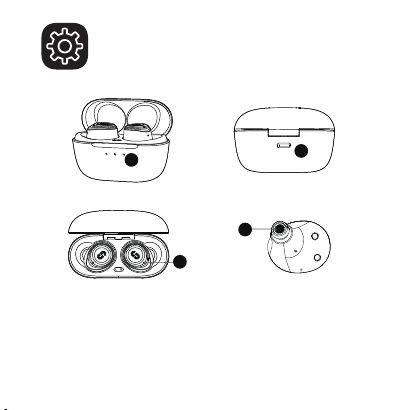
1. Indicator light 2. Type-C charging port
3. Microphone 4. Microphone
2
4
2
3
4
1
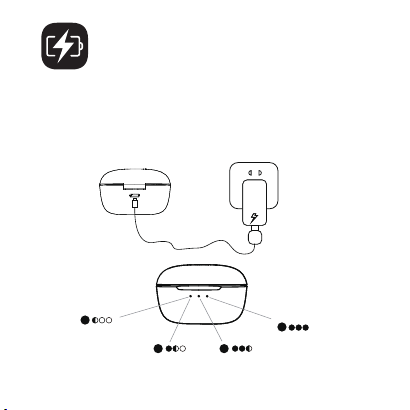
Fully charge both the earbuds and the charging case before
the first use. The 3 LED indicators are lit when fully charged.
Note: Please remove the insulating film on the earbuds when using
it for the first time, otherwise it will not be able to charge.
CHARGING
0%-30%
30%-70% 70%-99%
100%
3
1
43
2
LMs
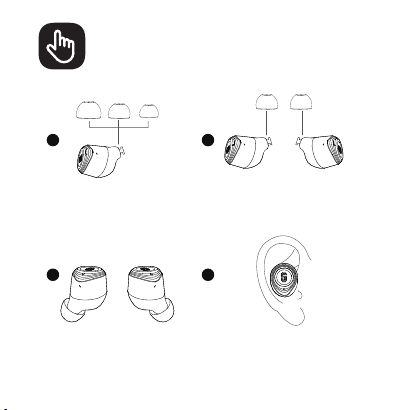
WEARING
Choose the eartips that
fit your ears best
Install the eartips
on the earbuds
Install the eartips
Insert the earbuds into the inner
canal of your ears and turn gently
until you find the most
comfortable and secure position
4
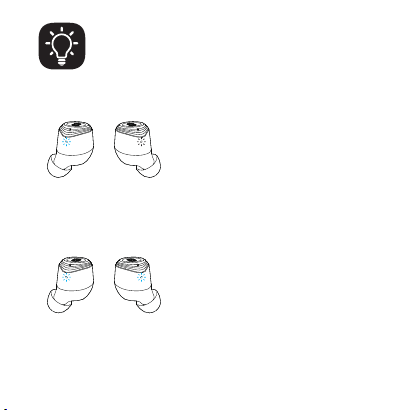
1. The two earbuds have been
paired with each other (normal):
the main earbud flashes
alternately blue and white and the
second earbud flashes white every
5 seconds.
2. The two earbuds lose their pairing:
The two earbuds flash alternately
blue and white.
5
LED DISPLAY
ON
OFF
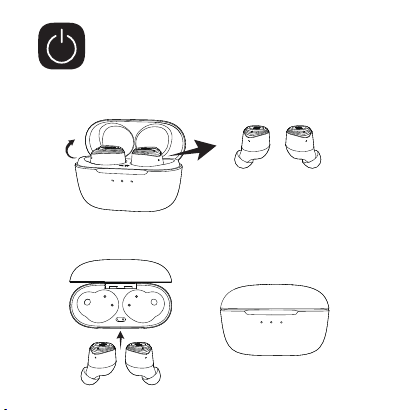
POWERING ON/OFF
Open the charging case, the earbuds will automatically
power on.
To power off, place the earbuds in the charging case
and close it.
6
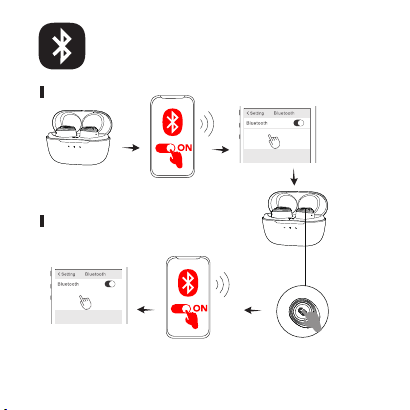
SuperEQ Q2 Pro
SuperEQ Q2 Pro
Device 1
Device 2
BLUETOOTH PARING
Disconnect the
Bluetooth connection
with the previous device
Open the
charging case
Select
“SuperEQ Q2
Pro” on your
device’s
Bluetooth list
to connect
Select “SuperEQ Q2
Pro” on your device’s
Bluetooth list to
connect
Turn on the Bluetooth
of device 1
Turn on the
Bluetooth of
device 2
Place the
earbuds in
the charging
case and
leave
the case
open
Pairing with another device
First pairing
7
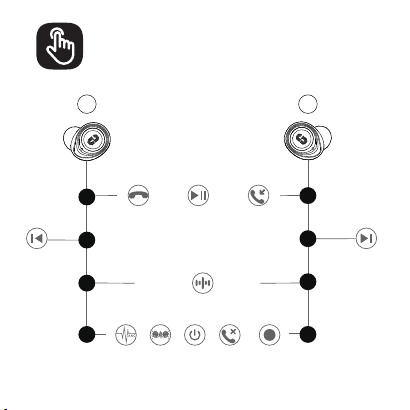
CONTROLS
L
R
1X
2X
3X
2S
1X
2X
3X
2S
Answer a call
End a call
Reject
a call
Voice assistant
Play / Pause
Previous track Next track
Trans-
parency
ANC
ON
Normal
8
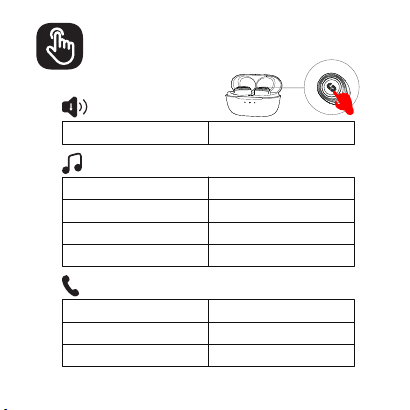
CONTROLS
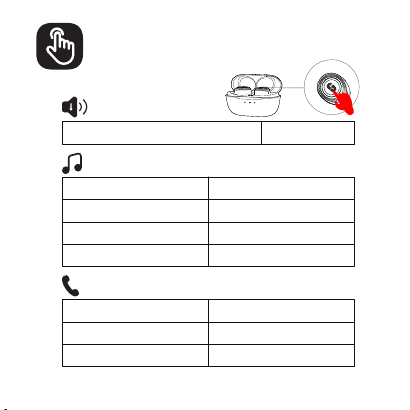
Normal/Transparency/ANC ON Long Press(L/R)
Voice assistant Press 3 times(L/R)
Play / Pause Press once (L/R)
Previous track Press twice (L)
Next track Press twice (R)
Answer a call Press once (L/R)
End a call Press once (L/R)
Reject a call Long Press(L/R)
9
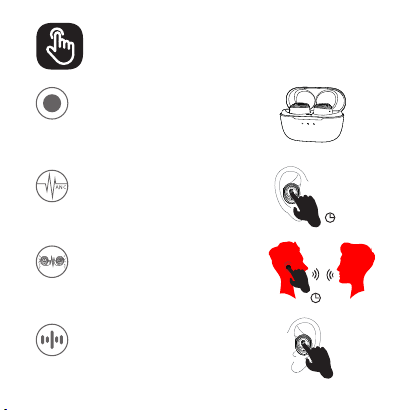
CONTROLS
ANC Mode
Reduce the low-frequency ambient
noises, press and hold(L/R) to start
the ANC mode.
2″
Transparency Mode
Chat with people without taking off
your earbuds, press and hold (L/R)
to start the Transparency mode.
2″
x3
Voice Assistant
Press 3 times(L/R)to Activate Siri or
other voice assistant software.
Normal Mode
It's the normal mode when you turn
on the earbuds at the first time, and
it will turn off if you do not connect
it to any Bluetooth device in 3 minutes.
10
11
IMPORTANT
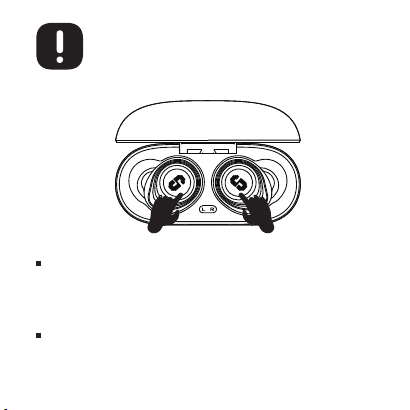
Please try to reset the SuperEQ Q2 Pro and restore the
factory default if you face any difficulties:
Place both the 2 earbuds into the charging case.Quickly tap 5
times in both ears at the same frequency.The blue LED flashes
and resets successfully.
If the right and left earbuds disconnect with each other:
Please click the left earbud three times to send the pairing
instruction to the right earbud, and the pairing will be successful
again.
TECHNISCHE DATEN
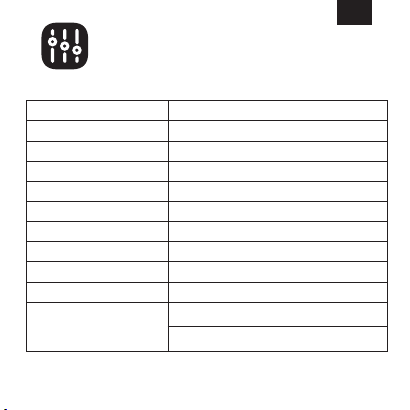
Bluetooth-Version
Bluetooth-Reichweite
Nenneingang
Überspannungsschutz
Lautsprecher
Geräuschunterdrückung
Akustikcode
Leistungsanzeige
Akkukapazität
Spielzeit
(je nach Lautstärke und Inhalt)
Modell
70% Lautstärke, ANC OFF: Bis zu 11 Stunden
(Insgesamt 40 Stunden mit Ladekoffer)
70% Lautstärke, ANC ON: Bis zu 8 Stunden
(Insgesamt 30 Stunden mit Ladekoffer)
55mAh x 2 (Ohrhörer), 370mAh (Ladekoffer)
SuperEQ Q2 Pro
5.2
10m
5V
YES
12 mm dynamisch
(FF+FB) x 2
SBC, AAC
IOS
DE
12
PRODUKT
1
2
3
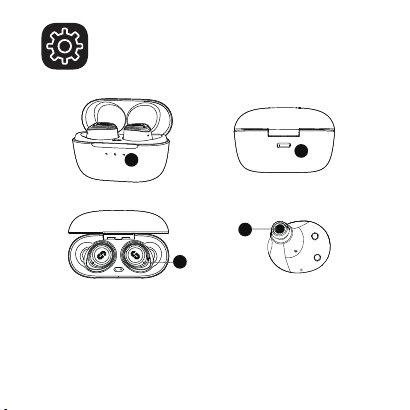
1. LED Anzeige 2. Type-C Ladeanschluss
3. Mikrofon 3. Mikrofon
13
4
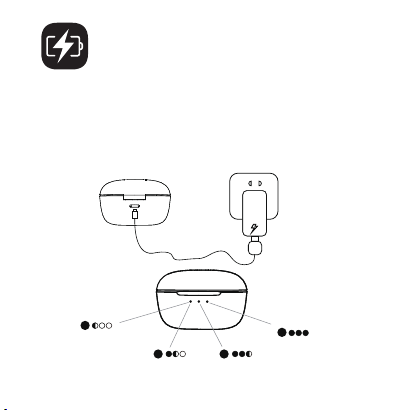
Laden Sie beide Ohrhörer und das Ladeetui vor der ersten
Verwendung vollständig auf. Nach einer vollständigen Ladung
leuchten die 3 LEDs immer.
Hinweis: Bitte entfernen Sie vor dem ersten Gebrauch die Isolierfolie
der Ohrhörer, da die Ohrhörer sonst nicht geladen werden
können.
LADEVORGANG
2
3
4
1
0%-30%
30%-70% 70%-99%
100%
14
1
43
2
LMs
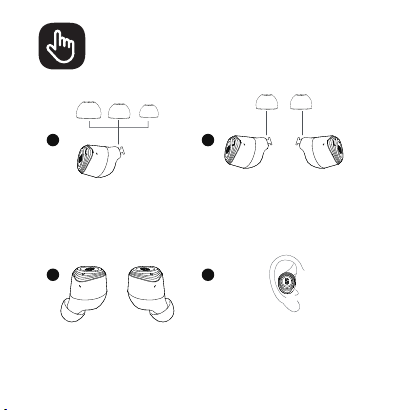
DAS TRAGEN
Entfernen Sie das
Original und wählen Sie
die am besten
geeigneten Ohrstöpsel.
Bringen Sie die Ohrstöpsel
an den Ohrhörern an.
Perfekt installiert.
Setzen Sie die Ohrhörer jeweils in
den inneren Gehörgang ein und
drehen Sie sie vorsichtig, bis Sie
die bequemste und sicherste
Position gefunden haben.
15
LED ANZEIGE
16
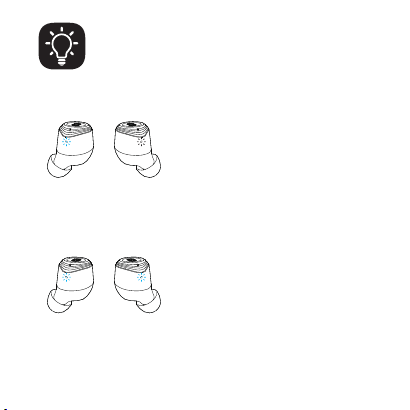
1. Die beiden Ohrhörer wurden
miteinander gekoppelt (normal):
Der Hauptkopfhörer blinkt
abwechselnd blau und weiß und
der zweite Ohrhörer blinkt alle 5
Sekunden weiß.
2. Die beiden Ohrhörer verlieren die
Kopplung: Die beiden Ohrhörer
blinken abwechselnd blau und weiß.
ON
OFF
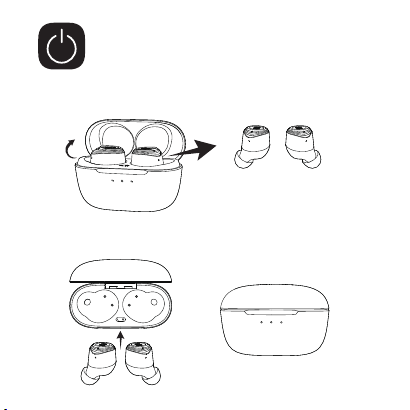
EIN-/AUSSCHALTEN
Öffnen Sie den Ladekoffer. Die Ohrhörer schalten sich
dann automatisch ein.
Um das Gerät auszuschalten, legen Sie die Ohrhörer
in das Ladeetui und schließen Sie es.
17
SuperEQ Q2 Pro
SuperEQ Q2 Pro
Gerät 1
Gerät 2
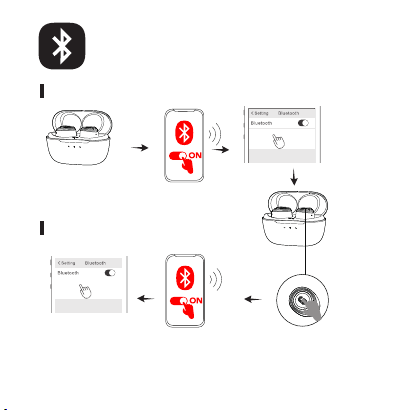
BLUETOOTH
KOPPLUNG
Trennen Sie die
Bluetooth-Verbindung mit
dem vorherigen Gerät
Öffnen Sie den
Ladekoffer
Wählen Sie
„SuperEQ Q2
Pro“ in der
Blue-
tooth-Liste
Wählen Sie „SuperEQ
Q2 Pro“ in der
Bluetooth-Liste des zu
verbindenden Geräts
Schalten Sie das
Bluetooth des Geräts ein
Schalten Sie
das Bluetooth
von Gerät 2 ein
Legen Sie
die Ohrhörer
zurück in
den
Ladekoffer
Kopplung zum ersten Mal
Kopplung mit einem anderen Gerät
18
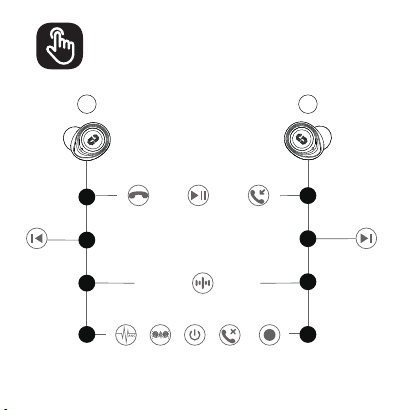
FUNKTIONSWEISE
19
L
R
1X
2X
3X
2S
1X
2X
3X
2S
Einen Anruf
annehmen
Einen Anruf
beenden
Einen Anruf
ablehnen
Sprachassistent
Wiedergabe /
Pause
Vorheriger Titel Nächster Titel
Trans-
parenz
ANC-
Modus
ON
Normal
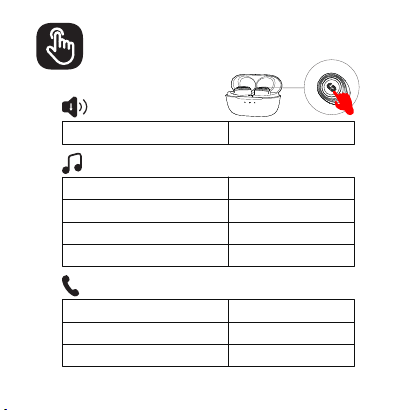
FUNKTIONSWEISE
20
Normal/Transparenz/ANC-Modus Lange drücken (L/R)
Sprachassistent Klicken Sie dreimal (L/R)
Wiedergabe/ Pause Klicken Sie einmal(L/R)
Vorheriger Titel Klicken Sie zweimal (L)
Nächster Titel Klicken Sie zweimal (R)
Einen Anruf annehmen Klicken Sie einmal(L/R)
Einen Anruf beende Klicken Sie einmal(L/R)
Einen Anruf ablehnen Lange drücken (L/R)
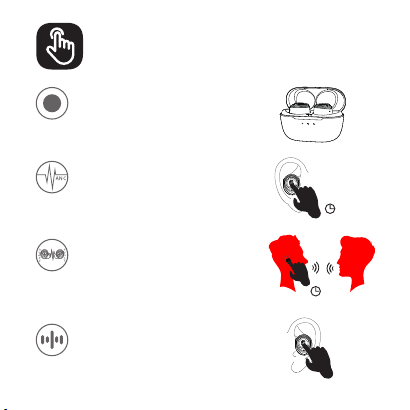
FUNKTIONSWEISE
21
ANC Modus
Um die niederfrequenten Geräusche
der Umgebung zu reduzieren, halten
Sie lange (L/R) gedrückt, um den
ANC-Modus zu aktivieren.
2″
Transparenz Modus
Um mit Personen in der Nähe zu
sprechen, ohne die Kopfhörer
abzunehmen, halten Sie lange (L/R)
gedrückt, den Transparenz Modus zu
aktivieren.
2″
x3
Sprachassistent
Klicken Sie dreimal (L/R), um einen
Sprachassistenten wie Siri zu starten.
Normaler Modus
Der Standardmodus ist Normalmodus,
im Normalmodus wird es ohne
Verbindung für 3 Minuten
heruntergefahren.
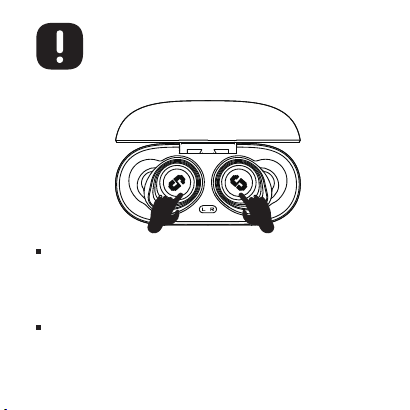
22
WICHTIGE HINWEISE
Wenn Sie bei der Verwendung von SuperEQ Q2 Pro auf
Schwierigkeiten stoßen, führen Sie die folgenden Schritte aus, um
die Ohrhörer auf die Werkseinstellungen zurückzusetzen:
Legen Sie die beiden Ohrhörer richtig in die Ladebox, tippen Sie 5 Mal
schnell auf die 2 Ohrhörer mit der gleichen Frequenz, das blaue Licht
blinkt und der Reset ist erfolgreich.
Wenn der linke und der rechte Ohrhörer des SuperEQ Q2 Pro die
Kopplung verlieren:
Bitte klicken Sie dreimal auf den linken Ohrhörer, um die Pairing-Anweis-
ung an den rechten Ohrhörer zu senden, und die Kopplung wird erneut
erfolgreich sein.
製品の仕様
Bluetoothバージョン
Bluetooth動作範囲
入力
過電圧保護
スピーカー直径
騒音低減
対応コーデック
残量表示
バッテリー容量
再生可能時間
(音量やコンテンツにより異なる)
製品名
55mAhx2(イヤホン),370mAh(充電ケース)
SuperEQQ2Pro
5.2
10メートル
5V---0.35A
はい
12mm
(FF+FB)x2
SBC/AAC
IOS
70%のボリューム、ANCオフ:最長11時間
(充電ケース込みで合計40時間)
70%のボリューム、ANCオン:最長8時間
(充電ケース込みで合計30時間)
JP
23
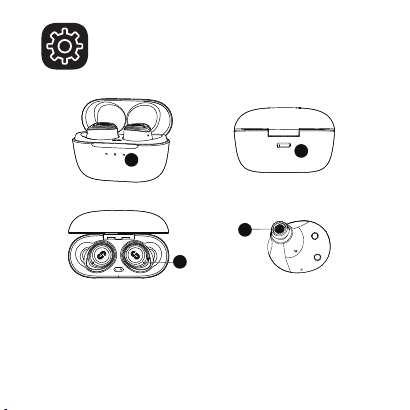
製品詳細
1
2
3
1.LEDインジケーター2.Type-c充電ポート
3.マイク4.マイク
24
4
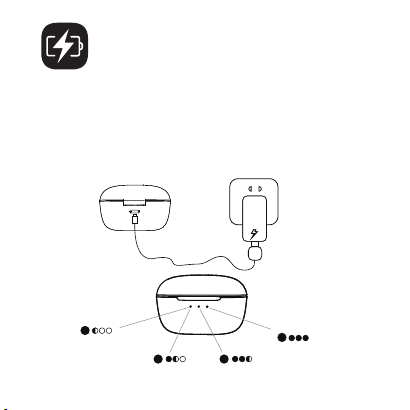
2
3
4
1
初めてご使用になる前に、両方のイヤホンと充電ケ
ースを満充電にしてください。
ご注意:初めて使用する際は、イヤホンの絶縁フィルムを剥がし
てください、そうしないと充電できません。
充電
0%-30%
30%-70%70%-99%
100%
25
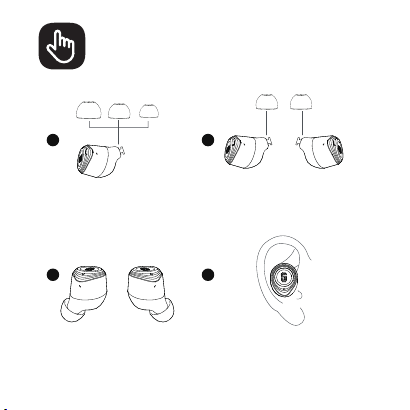
1
43
2
LMs
装着
耳のサイズに合うイヤーチ
ップを選択します。
イヤーチップをイヤフォンに
取り付けます。
イヤーチップを固定します。
イヤホンを耳の奥までしっかりは
め込み、最適な位置に来るように
ゆっくりとひねって固定します。
26
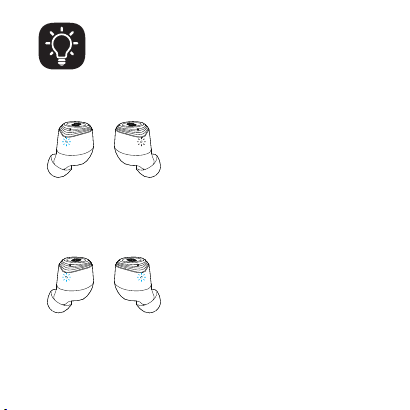
ライト表示
27
1.2つのヘッドフォンがペアリングされて
いる(正常):メインヘッドセットの青と白
が交互に点滅し、セカンダリヘッドセット
は5秒ごとに白の光が点滅する
2.2台のヘッドセットがペアリング状態を
失った:両方のヘッドセットのLEDが青と
白に交互に点滅します。
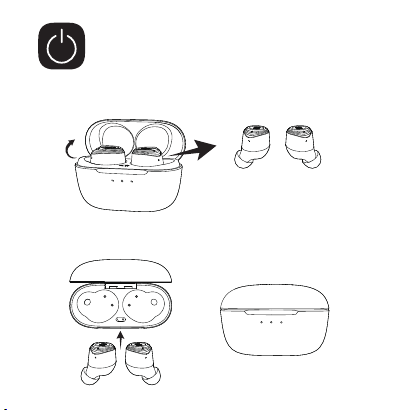
ON
OFF
電源オン/オフ
充電ケースを開くと、両方のイヤホンの電源が自動的に
オンになります。
充電ケースに両方のイヤホンを戻し、ケースを閉じると、
イヤホンの電源は自動的にオフになります。
28
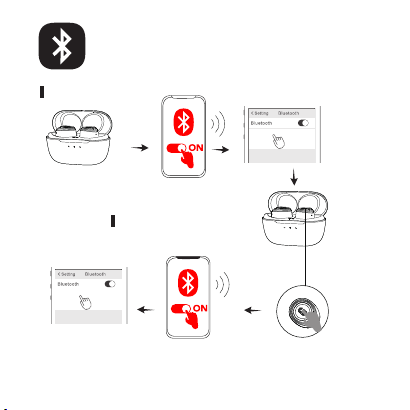
SuperEQ Q2 Pro
SuperEQ Q2 Pro
使用の機器1
使用の機器2
Bluetoothペアリング
前のデバイスとの
Bluetooth接続を切断
します。
充電ケースを開き
ます。
ご使用の機器1
のBluetooth設
定画面で「
SuperEQQ2
Pro」を選択し接
続してください。
ご使用の機器2の
Bluetooth設定画面で「
SuperEQQ2Pro」を選択
し接続してください。
別の機器とのペアリ
ング
イヤホンとペアリング
する端末のBluetooth
設 定を有 効(オン)に
します。
29
充電ケースに
両方のイヤホ
ンを戻します。
別の機器とのペアリング
最初のペアリング
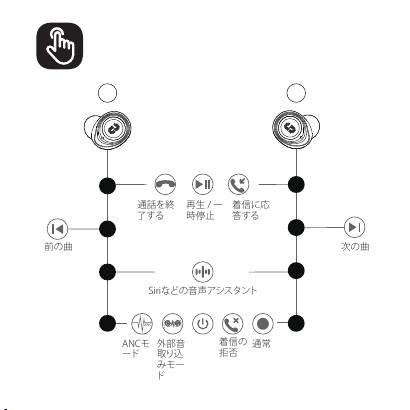
操作方法
30
L
R
1X
2X
3X
2S
1X
2X
3X
2S
通話を終
了する
着信の
拒否
Siriなどの音声アシスタント
再生/一
時停止
着信に応
答する
前の曲
次の曲
外部音
取り込
みモー
ド
ANCモ
ード
ON
通常
操作方法
31
通常/外部音取り込みモード/ANCモードON長押し(左/右)
Siriなどの音声アシスタント3回押す
再生/一時停止1回押す(左/右)
前の曲2回押す(左)
次の曲2回押す(右)
着信に応答する着信する時、1回押す(左/右)
通話を終了する通話する時、1回押す(左/右)
着信の拒否着信する時、長押し(左/右)
操作方法
32
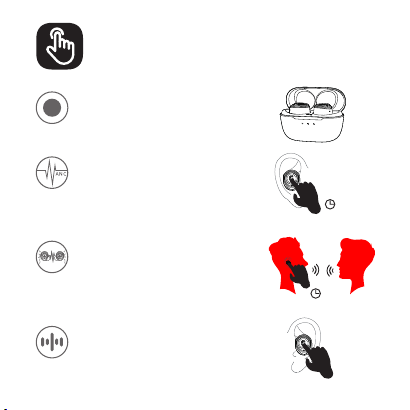
ANCモード
周囲の低周波ノイズを低減するには、
3秒間(L / R)押し続けてANCモードを
開始します。
2″
2″
x3
Siriなどの音声アシスタント
3回押(左/右)し続けて音声アシスタン
トを開始します。
通常モード
デフォルトの通常モード、通常モードで3分間
接続せずにシャットダウンします。
外部音取り込みモード
イヤホンをつけたまま周りの人と話す
には、3秒間(L/R)押し続けて外部音
取り込みモードを開始します。
ご注意
33
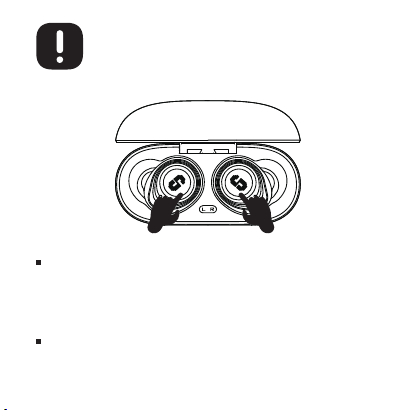
SuperEQQ2Proの使用中に問題が発生した場合は、以下の手順に従ってヘッドセ
ットを工場出荷時の設定にリセットしてください:
2つのイヤホンを充電ボックスに正しく入れ、左右のイヤホンのタッチパッドを同
じ周波数で5回すばやくタップします。青いライトが点滅した後、リセットは成功し
ます。
SuperEQQ2Proの左右のイヤホンがペアリングを失った場合:
左耳をトリプルクリックしてペアリングの指示を右耳に送信すると、ペアリングが
再び成功します。
214-115100
保証書
Eingeschränkte Garantie
私たちのカスタマーサービスチームはいつでもお手伝いします。連絡先は次
のとおり:
グローバル:+85269403848(月曜日から金曜日の午前9時から午後6時30分、UTC+8HKT)