
January 2017
© 2017 Fluke Corporation. All rights reserved. Specifications are subject to change without notice.
All product names are trademarks of their respective companies.
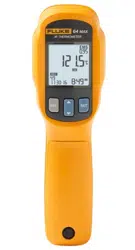
64 Max
IR Thermometer
Users Manual
1.888.610.7664 sales@GlobalTestSupply.com
Fluke-Direct.com

LIMITED WARRANTY AND LIMITATION OF LIABILITY
This Fluke product will be free from defects in material and workmanship for three
years from the date of purchase. This warranty does not cover fuses, disposable
batteries, or damage from accident, neglect, misuse, alteration, contamination, or
abnormal conditions of operation or handling. Resellers are not authorized to
extend any other warranty on Fluke’s behalf. To obtain service during the warranty
period, contact your nearest Fluke authorized service center to obtain return
authorization information, then send the product to that Service Center with a
description of the problem.
THIS WARRANTY IS YOUR ONLY REMEDY. NO OTHER WARRANTIES, SUCH
AS FITNESS FOR A PARTICULAR PURPOSE, ARE EXPRESSED OR IMPLIED.
FLUKE IS NOT LIABLE FOR ANY SPECIAL, INDIRECT, INCIDENTAL OR
CONSEQUENTIAL DAMAGES OR LOSSES, ARISING FROM ANY CAUSE OR
THEORY. Since some states or countries do not allow the exclusion or limitation of
an implied warranty or of incidental or consequential damages, this limitation of
liability may not apply to you.
11/99
1.888.610.7664 sales@GlobalTestSupply.com
Fluke-Direct.com

i
Table of Contents
Title Page
Introduction ................................................................................................................. 1
How to Contact Fluke ................................................................................................. 1
Safety Information ...................................................................................................... 2
Features ..................................................................................................................... 5
Overview..................................................................................................................... 6
Settings Menu ........................................................................................................ 6
Basic Features ....................................................................................................... 10
Advanced Features ................................................................................................ 12
EMS setting ........................................................................................................ 12
ALARM ............................................................................................................... 13
Select MAX/MIN/AVG/DIF .................................................................................. 14
SAVE and Review the Records .......................................................................... 16
Lock the Measurement ....................................................................................... 19
Trigger Lock ....................................................................................................... 19
Auto Capture ...................................................................................................... 20
Set Temperature Units ....................................................................................... 22
1.888.610.7664 sales@GlobalTestSupply.com
Fluke-Direct.com

64 Max
Users Manual
ii
Set Date and Time ............................................................................................. 23
Aiming and Measurement .......................................................................................... 24
Maintenance ............................................................................................................... 27
Change the Battery ................................................................................................ 27
Clean the Product .................................................................................................. 27
Specifications ............................................................................................................. 29
Safety ..................................................................................................................... 30
Electromagnetic Compatibility ................................................................................ 31
1.888.610.7664 sales@GlobalTestSupply.com
Fluke-Direct.com

1
Introduction
The Fluke 64 Max IR Thermometer (the Product) can determine the surface temperature by
measuring the amount of infrared energy radiated by the target’s surface.
Warning
Read all safety information before you use the Product.
1.888.610.7664 sales@GlobalTestSupply.com
Fluke-Direct.com

64 Max
Users Manual
2
Safety Information
A Warning identifies conditions and procedures that are dangerous to the user. A Caution
identifies conditions and procedures that can cause damage to the Product or the equipment
under test.
Table 1 lists the symbols used on the Product and in this manual.
Warning
To prevent eye damage and personal injury:
• Read all safety Information before you use the Product.
• Do not use the Product if it operates incorrectly.
• Use the Product only as specified, or the protection supplied by the
Product can be compromised.
• Before you use the Product, inspect the case. Do not use the Product if it
appears damaged. Look for cracks or missing plastic.
1.888.610.7664 sales@GlobalTestSupply.com
Fluke-Direct.com

IR Thermometer
Safety Information
3
• See emissivity information for actual temperatures. Reflective objects
result in lower than actual temperature measurements. These objects
pose a burn hazard.
• Do not look directly into the laser with optical tools (for example,
binoculars, telescopes, microscopes). Optical tools can focus the laser
and be dangerous to the eye.
• Do not look into the laser. Do not point laser directly at persons or
animals or indirectly off reflective surfaces.
• Replace the batteries when the low battery indicator shows to prevent
incorrect measurements.
• Do not use the Product around explosive gas, vapor, or in damp or wet
environments.
• Use the Product only as specified or hazardous laser radiation exposure
can occur.
1.888.610.7664 sales@GlobalTestSupply.com
Fluke-Direct.com
64 Max
Users Manual
4
Table 1. Symbols
Symbol Meaning Symbol Meaning
WARNING. RISK OF DANGER.
Warning. Laser.
Consult user documentation.
Conforms to European
Union directives.
Conforms to relevant Australian EMC standards.
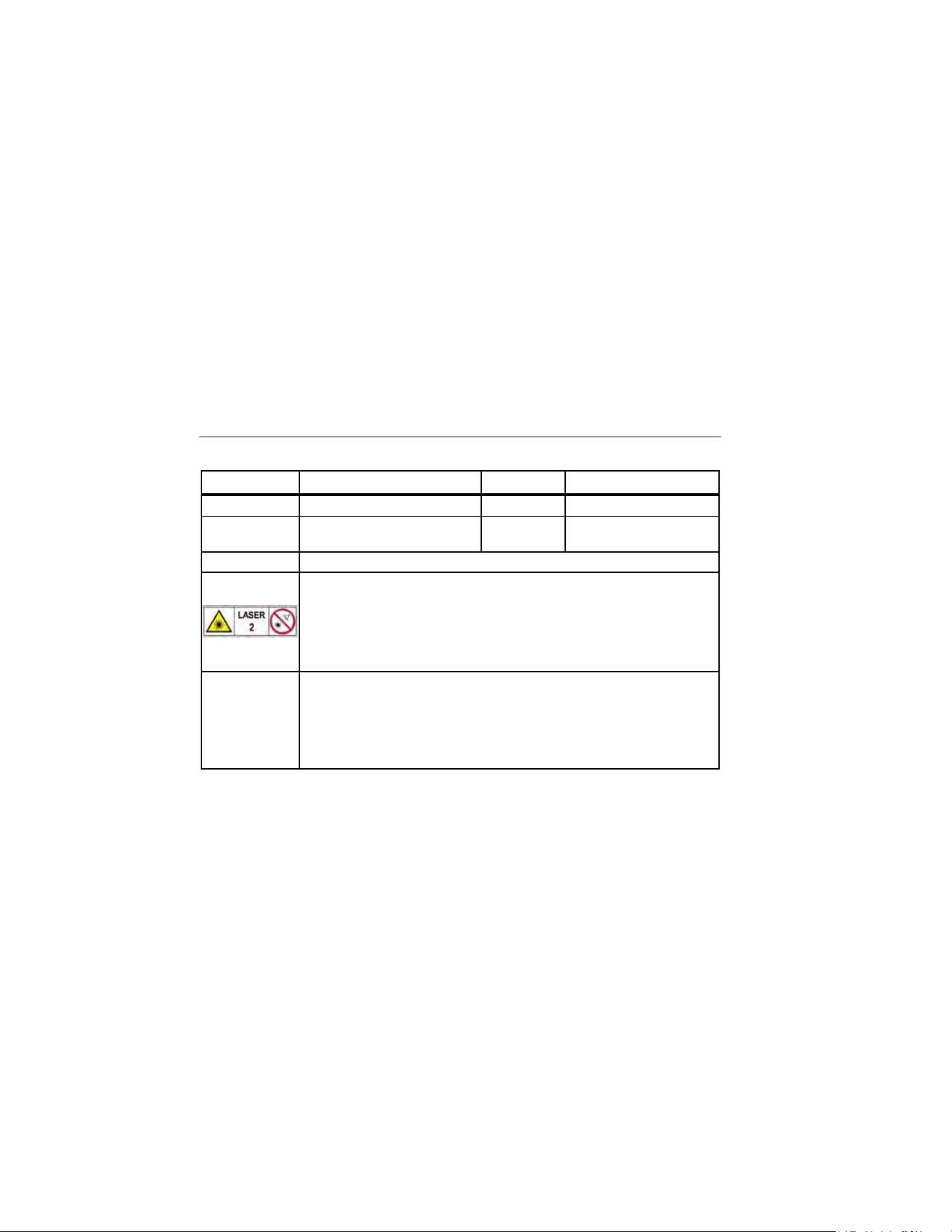
Indicates a Class 2 laser. DO NOT STARE INTO BEAM The following
text may appear with the symbol on the product label: “IEC/EN 60825-1
Complies with 21 CFR 1040.10 and 1040.11 except for deviations
pursuant to Laser Notice 50, dated June 24, 2007.” In addition, the
following pattern on the label will indicate wavelength and optical power:
λ = xxxnm, x.xxmW
This product complies with the WEEE Directive marking requirements. The
affixed label indicates that you must not discard this electrical/electronic
product in domestic household waste. Product Category: With reference to
the equipment types in the WEEE Directive Annex I, this product is
classed as category 9 "Monitoring and Control Instrumentation" product.
Do not dispose of this product as unsorted municipal waste.
1.888.610.7664 sales@GlobalTestSupply.com
Fluke-Direct.com

IR Thermometer
Features
5
Features
The Product features:
• Single-spot laser sighting
• Backlight display
• Lighting LED
• Current temperature plus MAX, MIN,
DIF, AVG temperature displays
• 1 AA battery
• Adjustable emissivity
• Auto off
• Printed 64 Max Instructions
• 24-hour clock
• Appointment measurement
• Monitoring measurement
• Ambient alarm
• Lower battery alarm
• IP54
• 3 meter drop
• Last reading Hold (7 seconds)
• High and low alarm
• Data storage and review
• Trigger lock
• Trigger protection
1.888.610.7664 sales@GlobalTestSupply.com
Fluke-Direct.com

64 Max
Users Manual
6
Overview
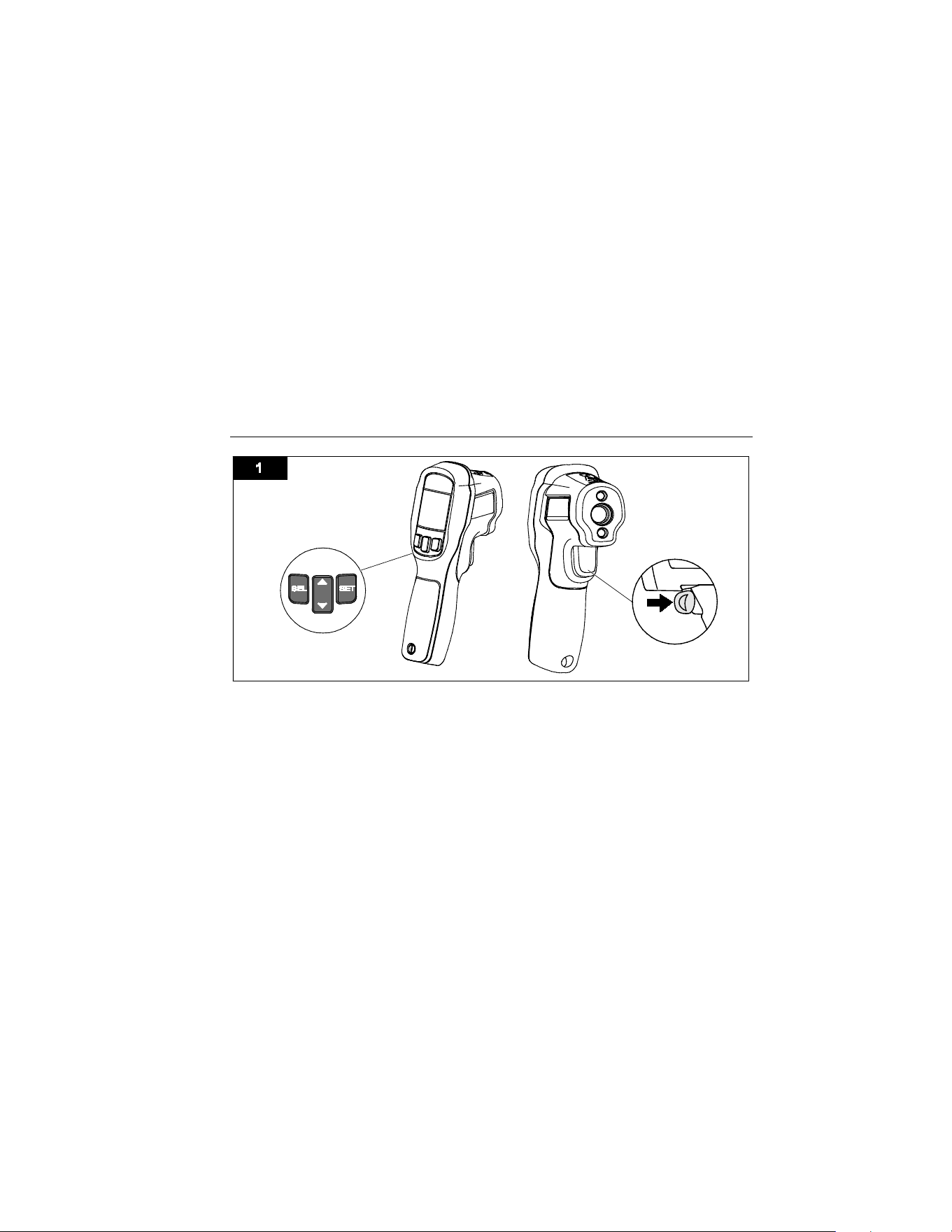
To turn on the Product, pull the trigger. The Product has a two-level menu. Use the menu to
select features, turn on or turn off Product features, or for more detailed configurations. For a
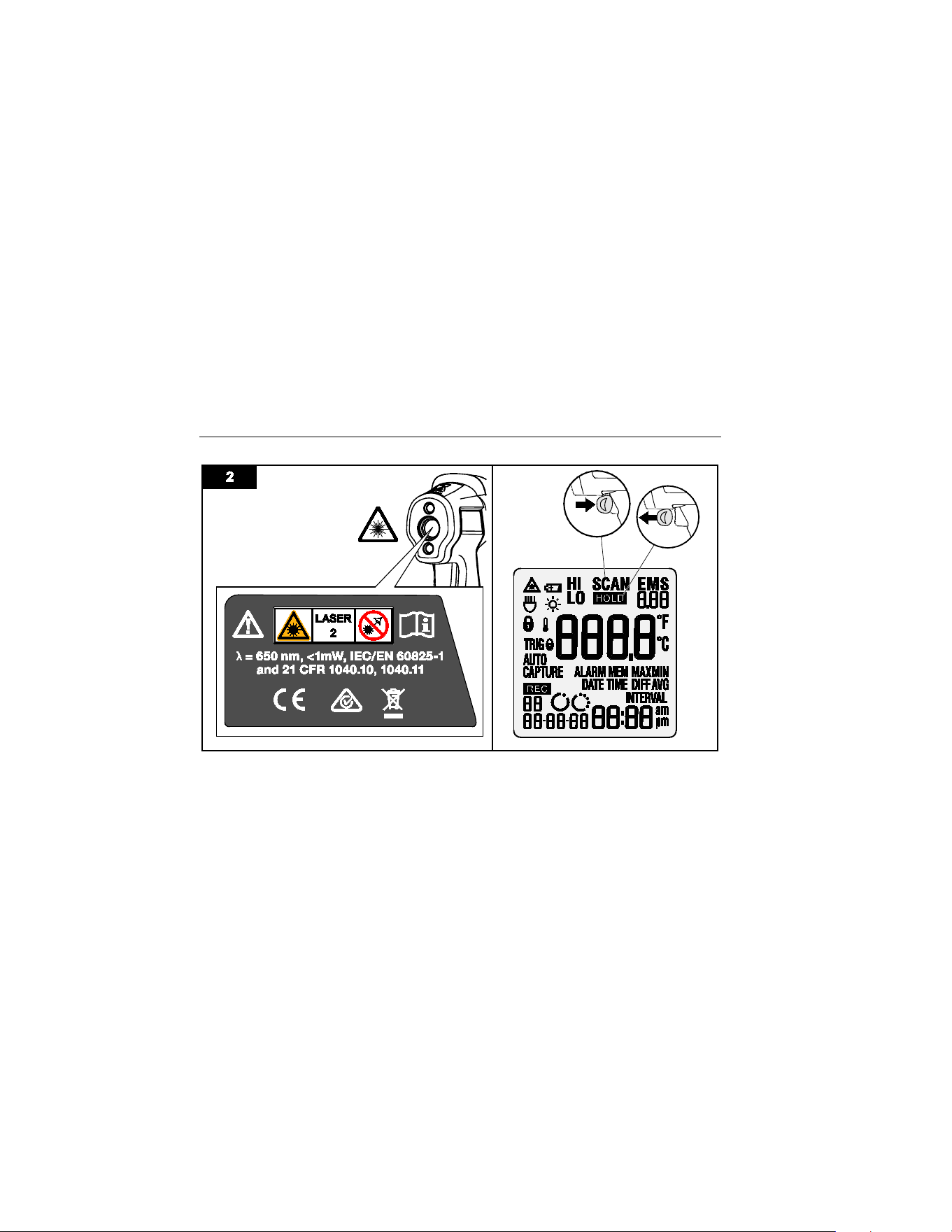
full view of the Product, see Figure 1. For a view of the laser and LCD (display), see Figure 2.
Settings Menu
To put the Product into HOLD status, pull and release the trigger. shows on the
display. When the Product is in HOLD status, push the SEL button once to enter the first-level
settings. Top-level settings include:
• L (Light)
• (Backlight)
• (Laser)
• ALARM (, HI, and LO)
• EMS (Emissivity)
• MAX/MIN/DIFF/AVG
• R(Record)
1.888.610.7664 sales@GlobalTestSupply.com
Fluke-Direct.com
IR Thermometer
Overview
7
iba02.eps
1.888.610.7664 sales@GlobalTestSupply.com
Fluke-Direct.com
64 Max
Users Manual
8
iba01.eps
1.888.610.7664 sales@GlobalTestSupply.com
Fluke-Direct.com

IR Thermometer
Overview
9
When the Product is in HOLD status, push and hold SEL for >3 seconds to enter the second-
level menu. Second-level menu settings include:
• TRIG L (Trigger Lock)
•
L (Lock)
• AUTO CAPTURE (TIME)
• AUTO CAPTURE (INTERVAL)
• DATE
• TIME
• TEMPERATURE UNIT
From either menu, push SEL to step through each feature. The last push goes back to HOLD
status.
To set a feature or parameter, pull the trigger to save the option and return to HOLD status.
1.888.610.7664 sales@GlobalTestSupply.com
Fluke-Direct.com

64 Max
Users Manual
10
Basic Features
These settings are either on or off:
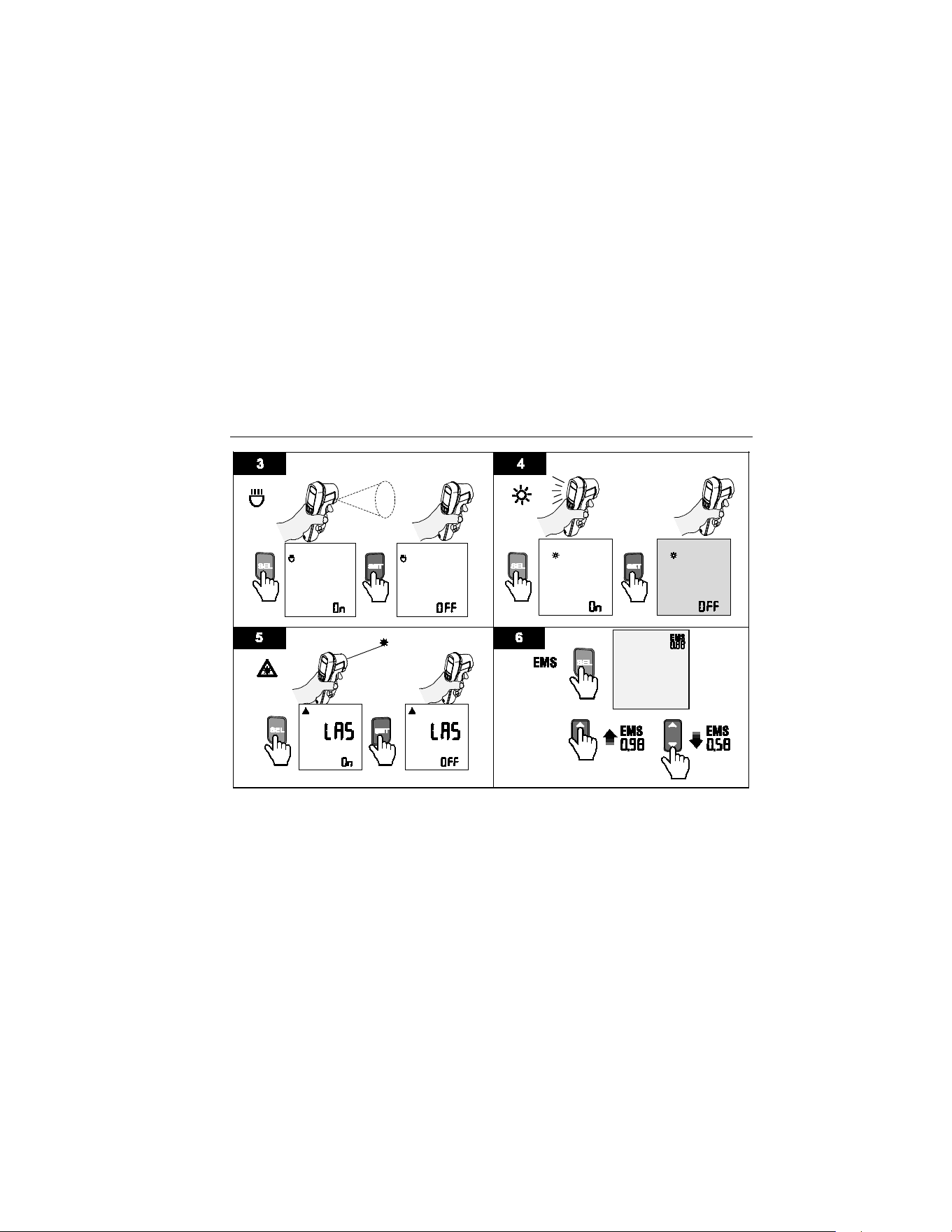
• L (Light) See Figure 3.
• (Backlight) See Figure 4.
• (Laser) See Figure 5.
• (Lock)
• TRIG L (Trigger Lock)
To change these settings:
1. When the Product is in HOLD status, push SEL to enter the first or second-level menu.
2. Push SEL several times until the feature shows on the display.
3. Push the SET button to change the ON or OFF status.
4. Push SEL several times or pull the trigger to quit the process and return to HOLD status.
Note
The Product laser is for aiming purposes only. The laser turns off when you release
the trigger.
1.888.610.7664 sales@GlobalTestSupply.com
Fluke-Direct.com
IR Thermometer
Overview
11
iba14.eps
1.888.610.7664 sales@GlobalTestSupply.com
Fluke-Direct.com

64 Max
Users Manual
12
Advanced Features
Advanced features are listed below.
EMS setting
Make measurements with the correct EMS value to ensure accuracy.
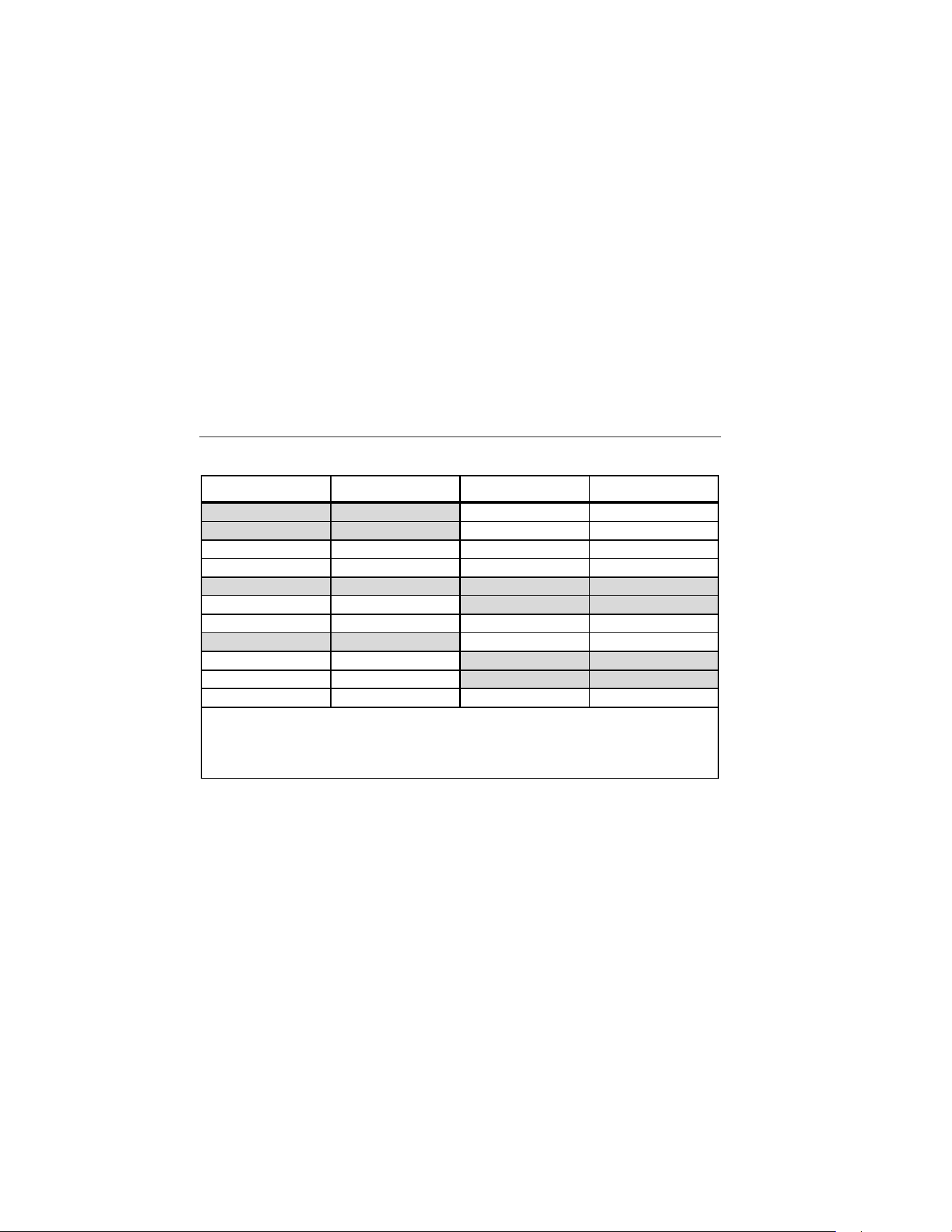
To adjust the EMS value: (See Figure 6 and Table 2)
1. In HOLD status, push SEL several times until EMS and its value are shown in the upper-
right corner.
2. Push or to adjust the EMS value as necessary.
3. Push SEL several times or pull the trigger to quit the process and return to HOLD status.
1.888.610.7664 sales@GlobalTestSupply.com
Fluke-Direct.com

IR Thermometer
Overview
13
ALARM
The alarm icon (ALARM) flashes to indicate an alarm condition.
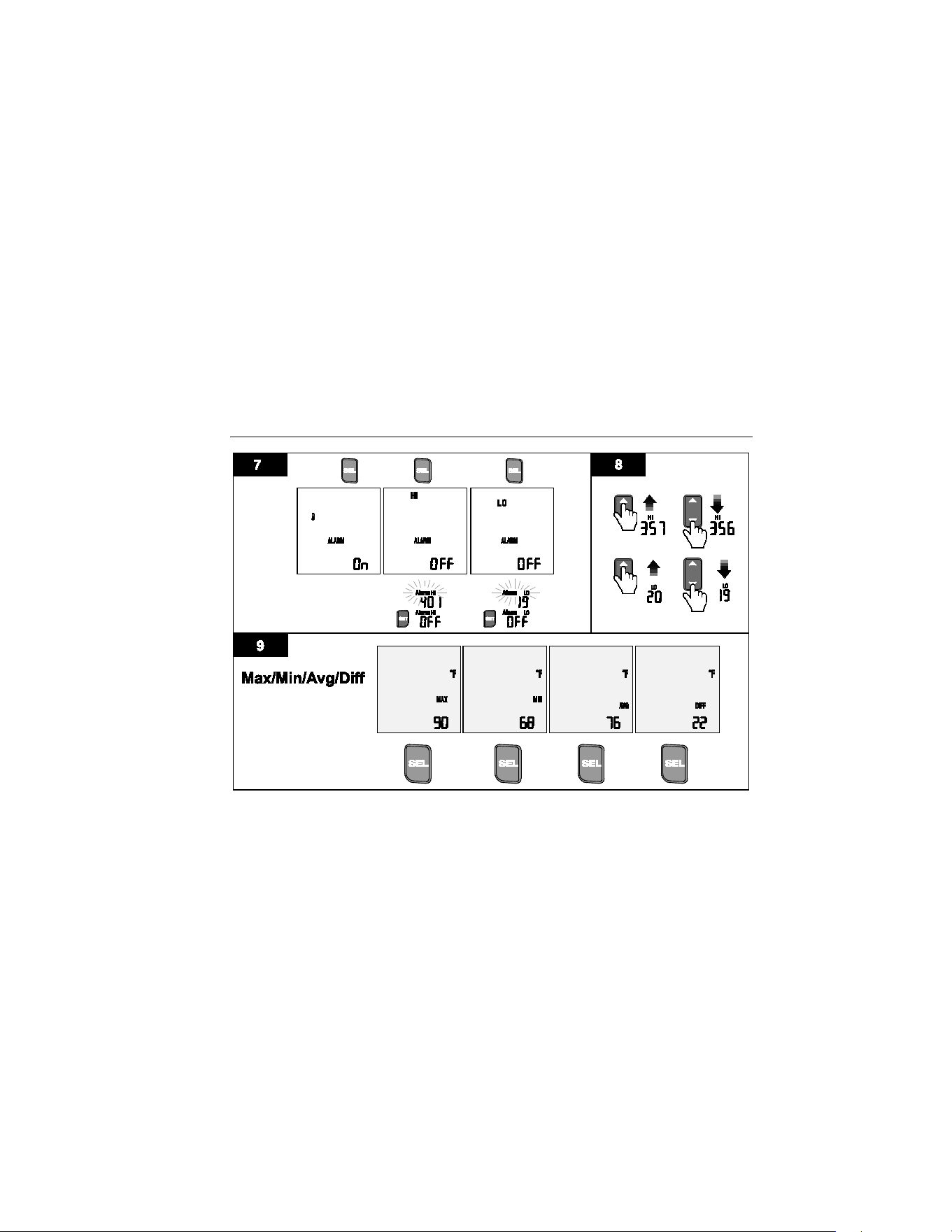
To set the alarm (see Figures 7 and 8):
1. In HOLD status, push SEL several times until ALARM shows on the display.
2. The ambient temperature icon () shows on the display. Push SET to turn it on or off.
When it is on, the icon flashes when the Product detects ambient temperature drifts to
the higher or lower extremes of the ambient temperature range. In this condition, the
readings do not reflect actual temperature and should not be trusted.
3. Push SEL to change to a high or low alarm (the display shows “HI” or “LO”).
4. Push SET to turn the alarm feature On or OFF. When the HI / LO alarm is on, the alarm
value shows in the lower right of the display.
5. Push or to change the setting value as necessary (see Figure 7).
6. Push SEL several times or pull the trigger to quit the process and return to HOLD status.
1.888.610.7664 sales@GlobalTestSupply.com
Fluke-Direct.com

64 Max
Users Manual
14
Select MAX/MIN/AVG/DIF
To select MAX, MIN, AVG, or DIF, see Figure 9:
1. In HOLD status, push SEL until MAX (MIN/AVG/DIF) shows.
2. Push SET to select MAX, MIN, AVG, or DIF.
3. Push SEL several times or pull the trigger to exit the setup. The feature selected is
shown on the display.
Note
You can select only one of MAX, MIN, AVG, or DIF.
1.888.610.7664 sales@GlobalTestSupply.com
Fluke-Direct.com
IR Thermometer
Overview
15
iba15.eps
1.888.610.7664 sales@GlobalTestSupply.com
Fluke-Direct.com

64 Max
Users Manual
16
SAVE and Review the Records
To save readings:
1. Pull the trigger to take a measurement.
2. Release the trigger to stop the measurement and go back to HOLD status.
3. Push SET to save the reading.
R and a two-digit number below it shows on the display for approximately 1 second
and then disappears. This means that the reading has been saved into memory at the
two-digit location. The Product also saves a time and date stamp and the EMS value.
To review saved readings:
1. In HOLD status, push SEL
to step through the first level menu until
Rshows on the
display. The latest record shows on the display. The record includes the reading, EMS
value, and the date and time stamp.
2. Push or to review each record. A two-digit number below
Rshows the current
record number (from 01 to 99).
1.888.610.7664 sales@GlobalTestSupply.com
Fluke-Direct.com

IR Thermometer
Overview
17
Note
You cannot save a reading if the memory is full. If you push SET to save a new
reading when the memory is full, the last record flashes twice to remind you that the
memory is full, and the reading is not saved.
To delete a single saved reading:
• In record review status, push and hold SET for approximately 3 seconds. The reading
flashes once and is deleted.
After the deletion, all remaining records move one position forward. For example, if the
deleted record was in position “08”, then the record on “09” becomes the new “08”
record.
To delete all saved readings:
• In record review status, push and hold SET for approximately 10 seconds. At 3 seconds,
the display flashes to warn that all data will be lost. Continue to push SET to delete all
the records. To cancel this operation, release SET before you reach 10 seconds.
Once all records are deleted, the record count returns to “00”.
1.888.610.7664 sales@GlobalTestSupply.com
Fluke-Direct.com
64 Max
Users Manual
18
Table 2. Nominal Surface Emissivity
Material Value Material Value
Default**** 0.95 Glass 0.85
Aluminum*
0.30
Iron*
0.70
Asbestos
0.95
Lead*
0.50
Asphalt
0.95
Oil
0.94
Brass*
0.50
Paint
0.93
Ceramic
0.95
Plastic**
0.95
Concrete
0.95
Rubber
0.95
Copper*
0.60
Sand
0.90
Food-Frozen
0.90
Steel*
0.80
Food-Hot
0.93
Water
0.93
Wood
0.94
* Oxidized
** Opaque, over 20 mils
*** Natural
**** Factory Setting
1.888.610.7664 sales@GlobalTestSupply.com
Fluke-Direct.com

IR Thermometer
Overview
19
Lock the Measurement
Use this feature to take continuous readings automatically without the need to pull the trigger.
To use the lock feature:
1. In HOLD status, push SEL for approximately 3 seconds to enter in the second level
menu.
shows on the display.
2. Push SET to enable the lock feature. The product exits the setup and starts to
continually measure.
3. Push SET or pull the trigger to stop the measurement as necessary. The Product returns
to setup status.
Trigger Lock
This feature conserves battery power when the Product is stored. For example, if the Product
is stored inside a toolbox so that the trigger is pulled for >10 minutes, the Product turns itself
off to save the battery. To use this feature:
1. In HOLD status, push SEL for approximately 3 seconds to enter the second-level menu.
2. Push SEL until TRIG L shows on the display.
3. Push SET to switch the feature on or off.
4. Push SEL several times or pull the trigger to return to HOLD status.
1.888.610.7664 sales@GlobalTestSupply.com
Fluke-Direct.com

64 Max
Users Manual
20
Auto Capture
Use this feature to make a measurement at a specific time (within 24 hours) or to make
repeated measurements (Interval monitoring).
For a one-time measurement: The Product automatically wakes up at the specified time,
makes a measurement, and saves the reading. Once the reading is saved, the feature turns
off. To make a one-time measurement:
1. In HOLD status, push SEL >3 seconds to enter the second-level menu.
2. Push SEL until AUTO CAPTURE and TIME show on the display.
3. Push SET to switch the feature on or off.
4. When it is on, push or to adjust the time.
5. Push SEL several times or pull the trigger to exit the setup.
Note
• When the Auto Capture feature is on, AUTO CAPTURE shows on the
display when the Product is in SCAN and HOLD status.
• If the memory is full (all 99 positions of data storage are occupied), you
cannot turn on this feature.
1.888.610.7664 sales@GlobalTestSupply.com
Fluke-Direct.com

IR Thermometer
Overview
21
For Interval monitoring: The Product counts down from the time interval, wakes up
automatically and makes a measurement, and then saves the reading. The Product then goes
to sleep, restarts the count down and repeats the process. The feature automatically turns off
when the memory is full or you turn off the feature. To make repeated measurements at a
specified interval:
1. In HOLD status, push SEL for >3 seconds to enter in the second-level menu.
2. Push SEL until AUTO CAPTURE and INTERVAL show on the display.
3. Push SET to switch the feature on or off.
4. When the feature is on, push or to adjust the displayed value as necessary. The
displayed value is the start value of the countdown counter.
5. Push SEL several times or pull the trigger to exit the setup.
Note
• If the Interval monitoring feature is turned on when Auto Capture is
already on, both features work together. The automatic measurement will
be at the time set for Auto Capture. This allows the user to select the
specified time to start the Interval monitoring measurement.
1.888.610.7664 sales@GlobalTestSupply.com
Fluke-Direct.com

64 Max
Users Manual
22
• If the memory is full, the feature cannot be switched ON.
• When the feature is on, AUTO CAPTURE shows on the display when the
Product is in SCAN and HOLD status.
• When records are saved into memory, the new data will be saved starting
from the first empty memory location until all 99 positions are used.
Set Temperature Units
To set the temperature units:
1. In HOLD status, push the SEL button for >3 seconds to enter the second-level menu.
2. Push SEL several times until °F or °C shows on the display.
3. Push SET to toggle the units.
4. Push SEL or pull the trigger to accept the format.
1.888.610.7664 sales@GlobalTestSupply.com
Fluke-Direct.com

IR Thermometer
Overview
23
Set Date and Time
To set the Date and Time:
1. In HOLD status, push the SEL button for >3 seconds to enter the second-level menu.
2. Push SEL several times until DATE shows on the display.
3. Push SET to toggle the year formats.
4. Push SEL to accept the format and start the date adjustment.
5. The active item flashes, push or to adjust the value and then push SEL to move to
the next item.
6. When the date is complete, push SEL until TIME shows on the display.
7. Push SET to toggle a 12 hour or 24 hour display.
8. Push SEL to accept the time format and start the time adjustment.
9. The active item flashes, push or to adjust the value and then push SEL to move to
the next item.
10. Push SEL or pull the trigger to exit the setup.
1.888.610.7664 sales@GlobalTestSupply.com
Fluke-Direct.com
64 Max
Users Manual
24
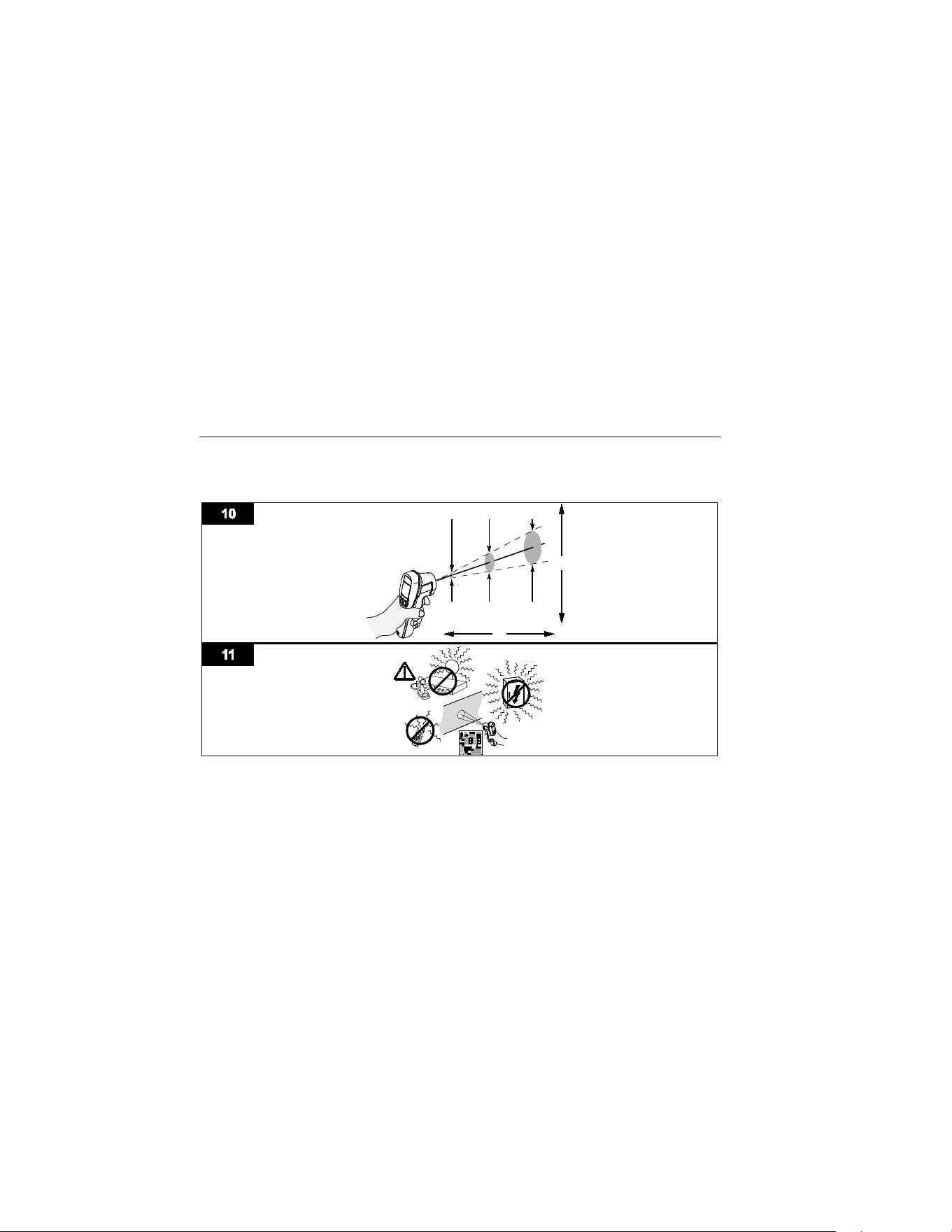
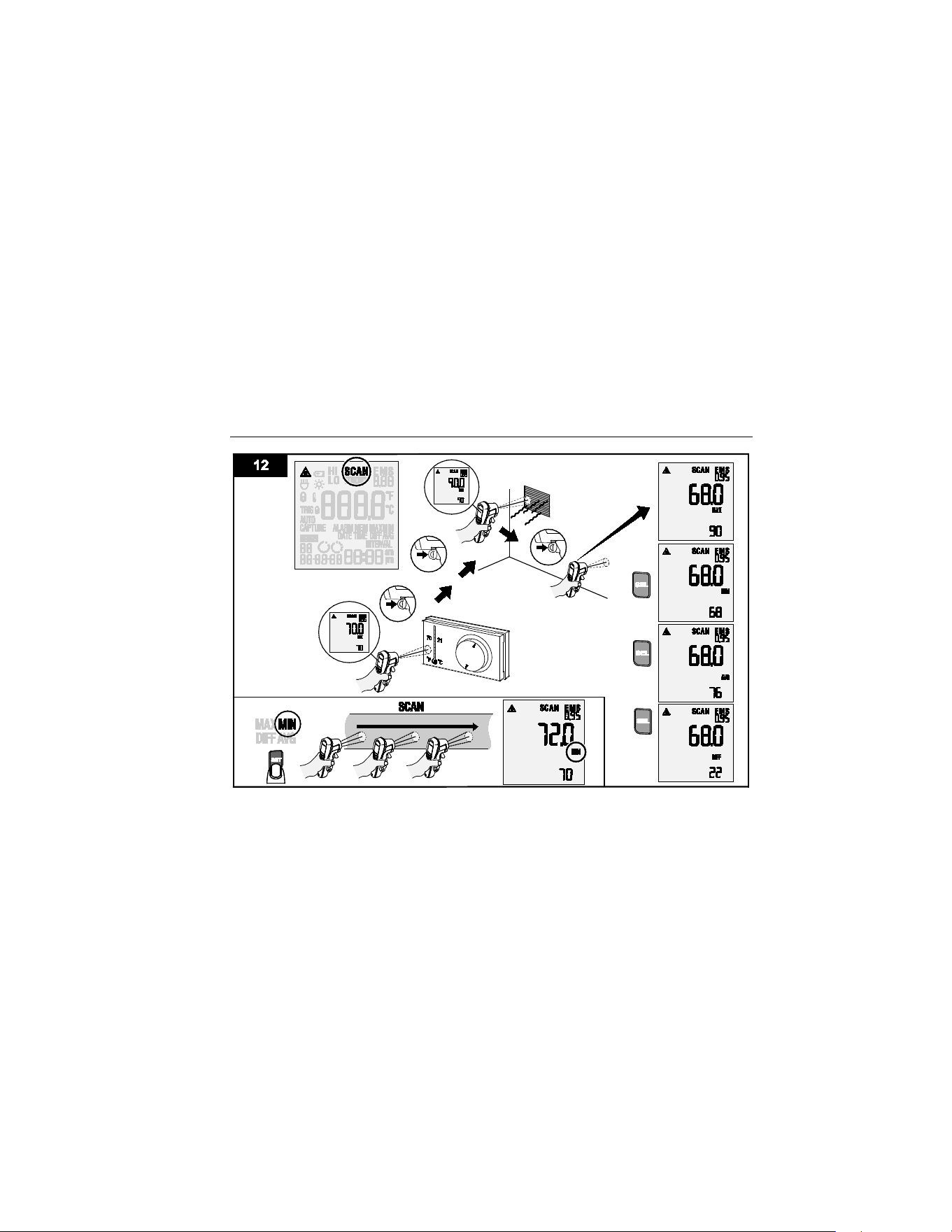
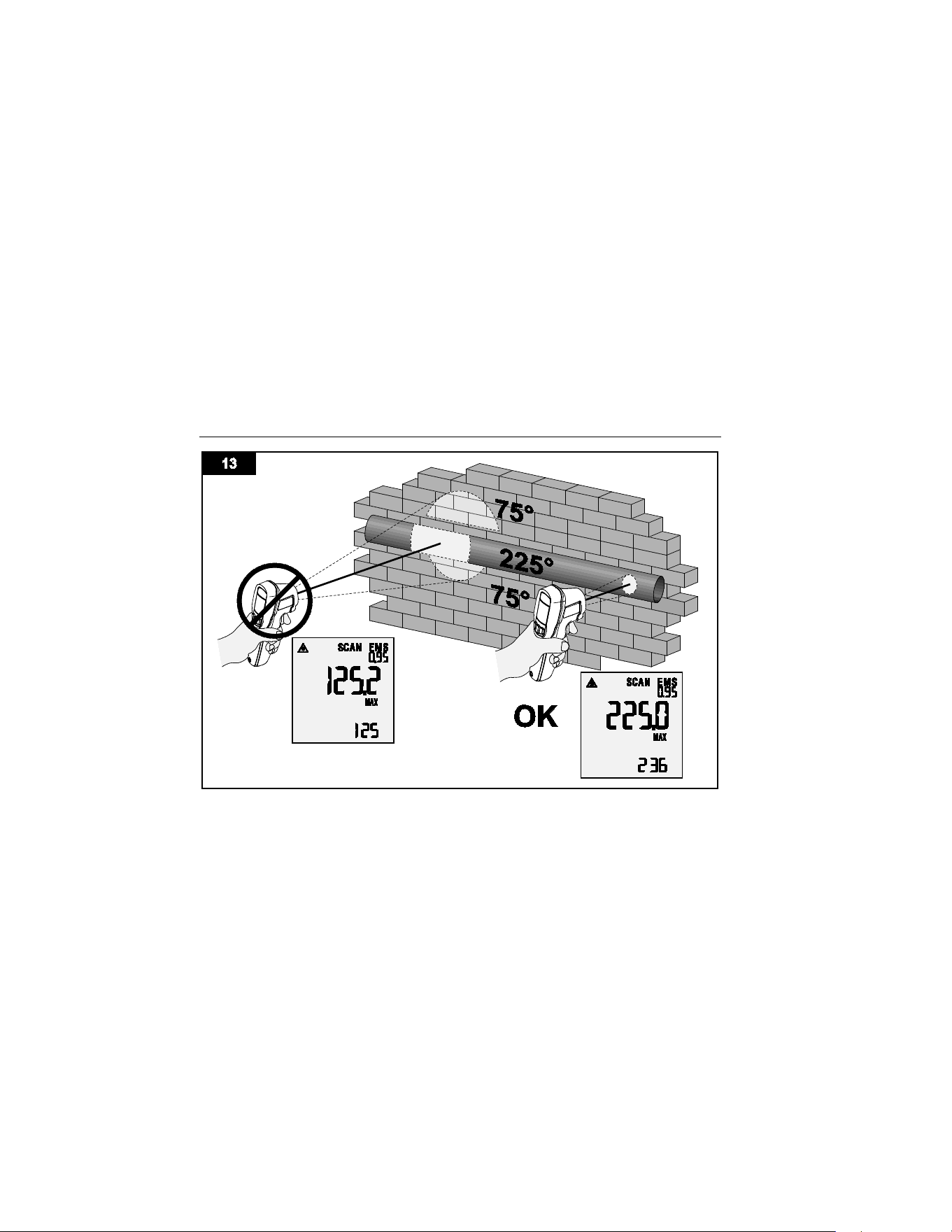
Aiming and Measurement
Figures 10 through 13 show how to aim and take measurements with the Product.
iba17.eps
1.888.610.7664 sales@GlobalTestSupply.com
Fluke-Direct.com
IR Thermometer
Aiming and Measurement
25
iba03.eps
1.888.610.7664 sales@GlobalTestSupply.com
Fluke-Direct.com
64 Max
Users Manual
26
gtt04.eps
1.888.610.7664 sales@GlobalTestSupply.com
Fluke-Direct.com

IR Thermometer
Maintenance
27
Maintenance
Caution
To avoid damage to the Product, do not leave the thermometer on or near
objects of high temperature.
Change the Battery
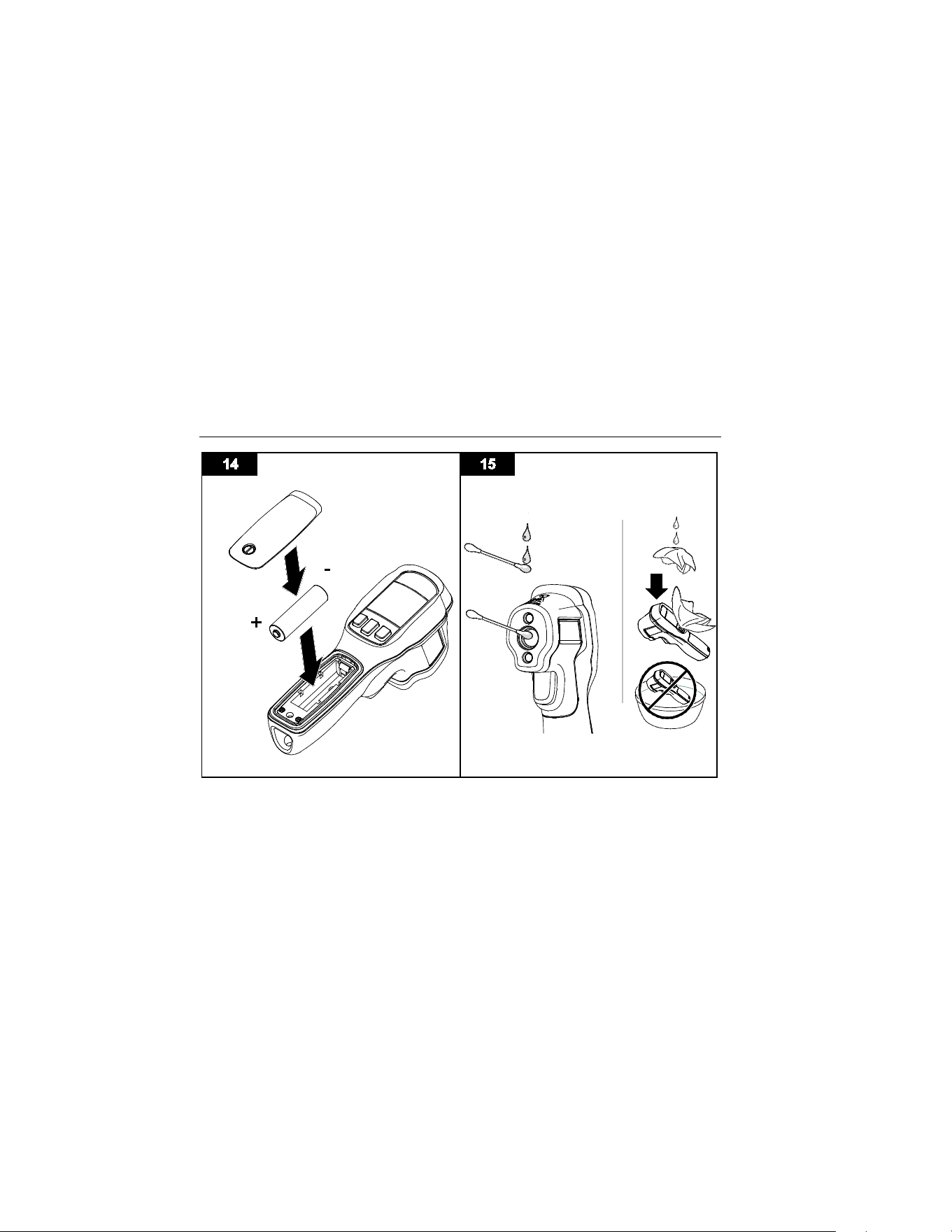
To install or change the AA IEC LR06 battery, open the battery compartment and replace the
battery as shown in Figure 14.
Note
To prevent the loss of the set date, time, and status of appointment and monitoring,
remove and insert a new battery when the Product is in sleep mode and complete
the operation within 10 seconds.
Clean the Product
Use soap and water on a damp sponge or soft cloth to clean the Product case. Carefully wipe
the lens surface with a moist cotton swab. The swab may be moistened with water. See
Figure 15.
1.888.610.7664 sales@GlobalTestSupply.com
Fluke-Direct.com
64 Max
Users Manual
28
gtt13.eps
1.888.610.7664 sales@GlobalTestSupply.com
Fluke-Direct.com

IR Thermometer
Specifications
29
Specifications
Temperature Range
-30
°
C to +600
°
C
Accuracy
(Calibration geometry with ambient
temperature 23 °C ±2 °C)
≥
0
°
C:
±
1
°
C or
±
1 % of reading, whichever is
greater
≥ -10 °C to <0 °C: ±2 °C
< -10
°
C:
±
3
°
C
Response Time (95 %)
<500 ms (95 % of reading)
Spectral Response 8 microns to 14 microns
Emissivity
0.10 to 1.00
Temperature Coefficient
±0.1 °C/°C or ±0.1 %/°C of reading (whichever is
greater)
Optical Resolution
20:1
(calculated at 90 % energy)
Display Resolution
0.1
°
C
Repeatability (% of reading)
±
0.5 % of reading or
±
0.5
°
C, whichever is greater
Power
1 AA IEC LR06 Battery
Battery Life 30 hours with laser and backlight on
1.888.610.7664 sales@GlobalTestSupply.com
Fluke-Direct.com

64 Max
Users Manual
30
Weight 255 g
Size
175 x 85 x 75 mm
Operating Temperature
0 °C to 50 °C
Storage Temperature
-20
°
C to +60
°
C, (without battery)
Operating Humidity
Non Condensing (≤10 °C)
≤90 % RH (at 10 °C to 30 °C)
≤75 % RH (at 30 °C to 40 °C)
≤45 % RH (at 40 °C to 50 °C)
Operating Altitude
2000 meters above mean sea level
Storage Altitude
12 000 meters above mean sea level
Safety
General
IEC 61010-1: Pollution Degree 2
Laser
IEC 60825-1: Class 2, 650 nm, <1 mW
Ingress Protection
IEC 60529: IP54
1.888.610.7664 sales@GlobalTestSupply.com
Fluke-Direct.com

IR Thermometer
Specifications
31
Electromagnetic Compatibility
International ........... IEC 61326-1: Portable; IEC 61326-2-2; CISPR 11: Group 1, Class A
Group 1: Equipment has intentionally generated and/or uses conductively-coupled radio
frequency energy that is necessary for the internal function of the equipment itself.
Class A: Equipment is suitable for use in all establishments other than domestic and those
directly connected to a low-voltage power supply network that supplies buildings used for
domestic purposes. There may be potential difficulties in ensuring electromagnetic
compatibility in other environments due to conducted and radiated disturbances.
Caution: This equipment is not intended for use in residential environments and may not
provide adequate protection to radio reception in such environments.
Korea (KCC) .......... Class A Equipment (Industrial Broadcasting & Communication Equipment)
Class A: Equipment meets requirements for industrial electromagnetic wave equipment and
the seller or user should take notice of it. This equipment is intended for use in business
environments and not to be used in homes.
USA (FCC) ............. 47 CFR 15 subpart B. This product is considered an exempt device per
clause 15.103.
1.888.610.7664 sales@GlobalTestSupply.com
Fluke-Direct.com