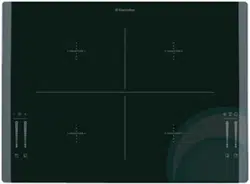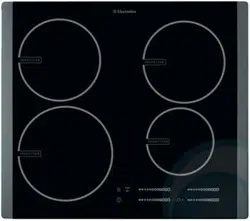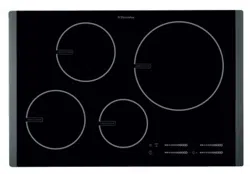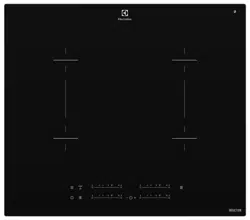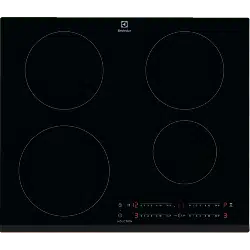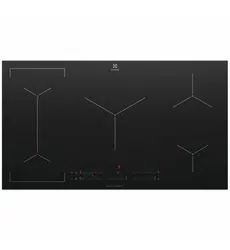
Installation & User manualInduction hob
EHI635BE, EHI645BE, EHI745BE,
EHI955BE, EHI977BE

2 electrolux.com.au
CONGRATULATIONS
Thank you for purchasing an Electrolux cooktop.
You’ve chosen a product that brings with it decades
of professional experience and innovation. Ingenious
and stylish, it has been designed with you in mind.
So whenever you use it, you can be safe in the
knowledge that you’ll get great results every time.
Welcome to Electrolux.
BEFORE USING YOUR APPLIANCE
Check for any damage or marks. If you find the appliance
damaged or marked you must report it within 7 days to
claim for damages under the manufacturers warranty.
Before you use the appliance, we recommend that you
read through the whole user manual which provides the
description of the product and its functions. To avoid
the risks that are always present when you use a gas
appliance, it is important that the product is installed
correctly and that you read the safety instructions carefully
to avoid misuse and hazards.
For future reference, please store this booklet in a
safe place.
This appliance complies with the requirements of
Australian Standard AS 4551 & AS/NZS 60335.2.6.
CONDITIONS OF USE
This appliance is intended to be used in household
and similar applications such as:
• Staff kitchen areas in shops, offices and
other working environments
• Farm houses
• By clients in hotel/motel rooms and other
residential type environments
• Bed and breakfast type environments.
BEFORE YOU CALL
Please ensure you read the instruction manual fully before
you call for service, or a full service fee could be applicable.
Record model and serial number here:
Model number: ____________________________________
Serial number: _____________________________________
CONTENTS
Safety information ....................................................3
Product description ..................................................5
Operating instructions ............................................12
Helpful hints and tips ..............................................21
Care and cleaning ..................................................26
Troubleshooting ......................................................27
Installation ..............................................................29
Technical information .............................................30
Environment ...........................................................31
Notes ......................................................................32
Warranty .................................................................33
SYMBOLS
WARNING!
This symbol indicates information concerning your
personal safety.
CAUTION!
This symbol indicates information on how to avoid
damaging the appliance.
IMPORTANT!
This symbol indicates tips and information about
use of the appliance.
ENVIRONMENT!
This symbol indicates tips and information about
economical and ecological use of the appliance.
IMPORTANT INFORMATION THAT MAY
IMPACT YOUR MANUFACTURER’S WARRANTY
Adherence to the directions for use in this manual
is extremely important for health and safety. Failure
to strictly adhere to the requirements in this manual
may result in personal injury, property damage and
affect your ability to make a claim under the Electrolux
manufacturer’s warranty provided with your product.
Products must be used, installed and operated in
accordance with this manual. You may not be able to
claim on the Electrolux manufacturer’s warranty in the
event that your product fault is due to failure to adhere
this manual.

3
• The bottom of the appliance can get hot. We
recommend to install a non-combustible separation
panel under the appliance to prevent access to the
bottom.
Use
WARNING!
Risk of injury, burns or electric shock.
• Use this appliance in a household environment.
• Do not change the specification of this appliance.
• Do not use an external timer or a separate remote-
control system to operate the appliance.
• Do not let the appliance stay unattended during
operation.
• Do not operate the appliance with wet hands or when it
has contact with water.
• Do not put cutlery or saucepan lids on the cooking
zones. They can become hot.
• Set the cooking zone to “off” after each use. Do not rely
on the pan detector.
• Do not use the appliance as a work surface or as a
storage surface.
• If there is a crack on the surface, disconnect power
supply to prevent the electrical shock.
• Users with a pacemaker must keep a distance of
minimum 30cm from the induction cooking zones
when the appliance is in operation.
WARNING!
Risk of fire or explosion.
• Fats and oil when heated can release flammable
vapours. Keep flames or heated objects away from fats
and oils when you cook with them.
• The vapours that very hot oil releases can cause
spontaneous combustion.
• Used oil, that can contain food remnants, can
cause fire at a lower temperature than oil used for
Please read the user manual carefully and store in a handy
place for later reference. Pass the user manual on to
possible new owners of the appliance.
Read the following carefully to avoid damage or injury.
NOTE: You must read these warnings carefully
before installing or using the appliance. If you need
assistance, contact your Customer Care Department.
The manufacturer will not accept liability, should these
instructions or any other safety instructions incorporated in
this book be ignored.
Children and vulnerable people safety
WARNING!
Risk of suffocation, injury or permanent disability.
• Do not let children or persons with reduced physical,
sensory, mental functions or lack of experience use the
appliance. They must have supervision or instruction
for the operation of the appliance by a person who is
responsible for their safety.
• Do not let children play with the appliance.
• Keep all packaging away from children.
• Keep children and pets away from the appliance
when it operates or when it cools down. Accessible
parts are hot.
• If the appliance has a child safety device, we
recommend that you activate it.
Installation
WARNING!
Only a qualified person must install this appliance.
• Remove all the packaging.
• Do not install or use a damaged appliance.
• Obey the installation instruction supplied with
the appliance.
• Keep the minimum distance from the other appliances
and units.
• Always be careful when you move the appliance
because it is heavy. Always wear safety gloves.
• Seal the cut surfaces with a sealant to prevent moisture
causing swelling.
• Protect the bottom of the appliance from steam and
moisture.
• Do not install the appliance adjacent to a door or under
a window. This prevents hot cookware to fall from the
appliance when the door or the window is opened.
• If the appliance is installed above drawers make sure
that the space, between the bottom of the appliance
and the upper drawer, is sufficient for air circulation.
SAFETY INFORMATION

4 electrolux.com.au
SAFETY INFORMATION
the first time.
• Do not put flammable products or items that are wet
with flammable products in, near or on the appliance.
• Do not try to extinguish a fire with water. Disconnect
the appliance and cover the flame with a lid or a fire
blanket.
WARNING!
Risk of damage to the appliance.
• The glass ceramic can be damaged by objects falling
onto it.
• The edge of the glass ceramic can be damaged by
being knocked by the cookware.
• Cookware made of cast iron, cast aluminium or with
damaged bottoms can scratch the glass ceramic if
pushed across the surface.
• Before spillage can become burnt on to the cooking
surface, remove it with a damp cloth.
• To avoid damaging cookware and glass ceramics, do
not allow saucepans or frying pans to boil dry.
• Do not use the cooking zones with empty cookware or
without cookware.
• Do not let cookware boil dry to prevent damage to
cookware and the ceramic glass.
• Do not cover the parts of the appliance with
aluminium foil.
NOTE: Damage including broken glass or scratches
caused by misuse outlined above is not covered under
warranty.
Care and cleaning
WARNING!
Risk of damage to the appliance.
• Regularly clean the appliance to prevent the
deterioration of the surface material.
• Do not use water spray and steam to clean the
appliance.
• Clean the appliance with a moist soft cloth. Only use
neutral detergents. Do not use abrasive products,
abrasive cleaning pads, solvents or metal objects.
Disposal
WARNING!
Risk of injury or suffocation.
• Disconnect the appliance from the mains supply.
• Cut off the mains cable and discard it.
5
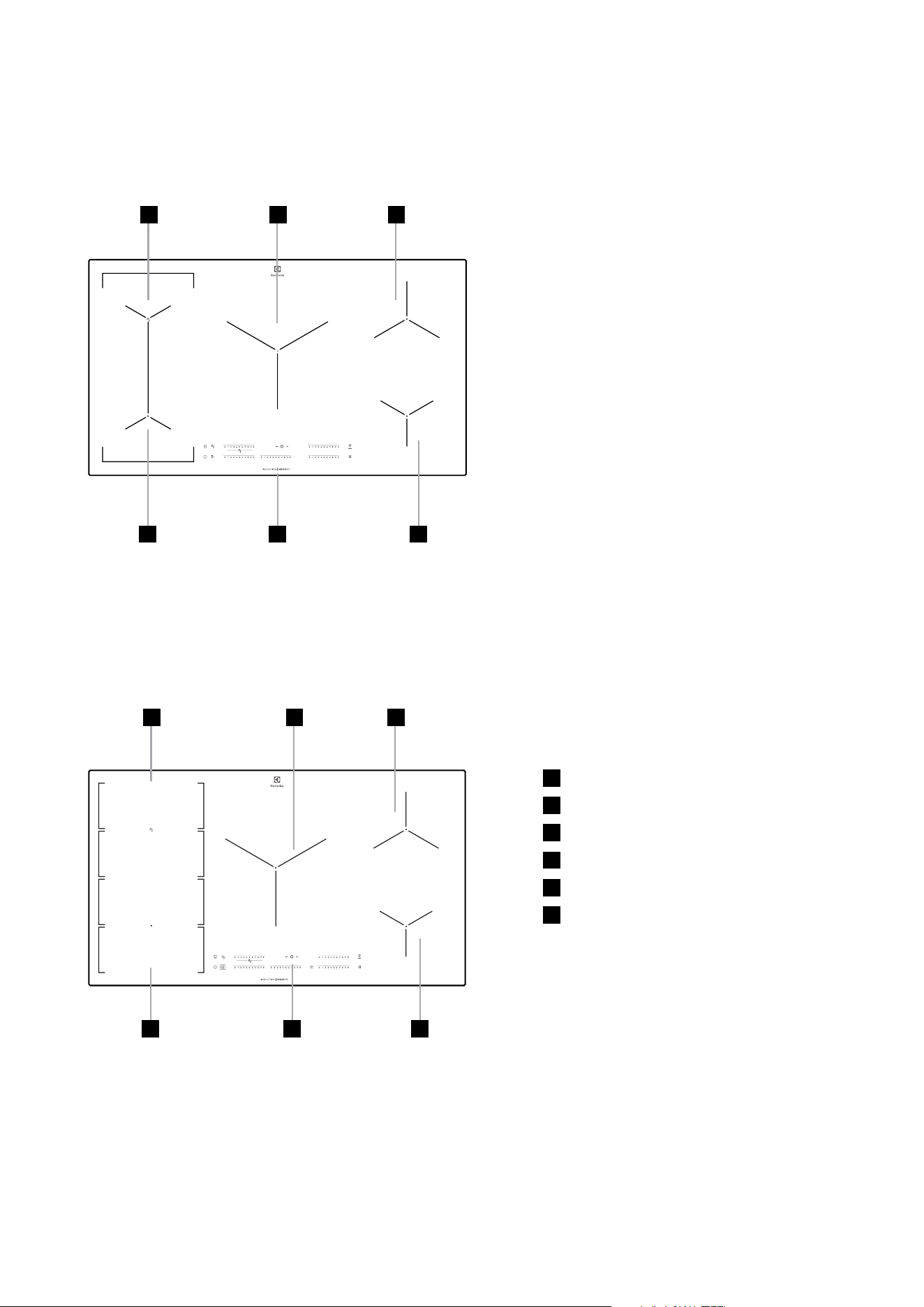
PRODUCT DESCRIPTION
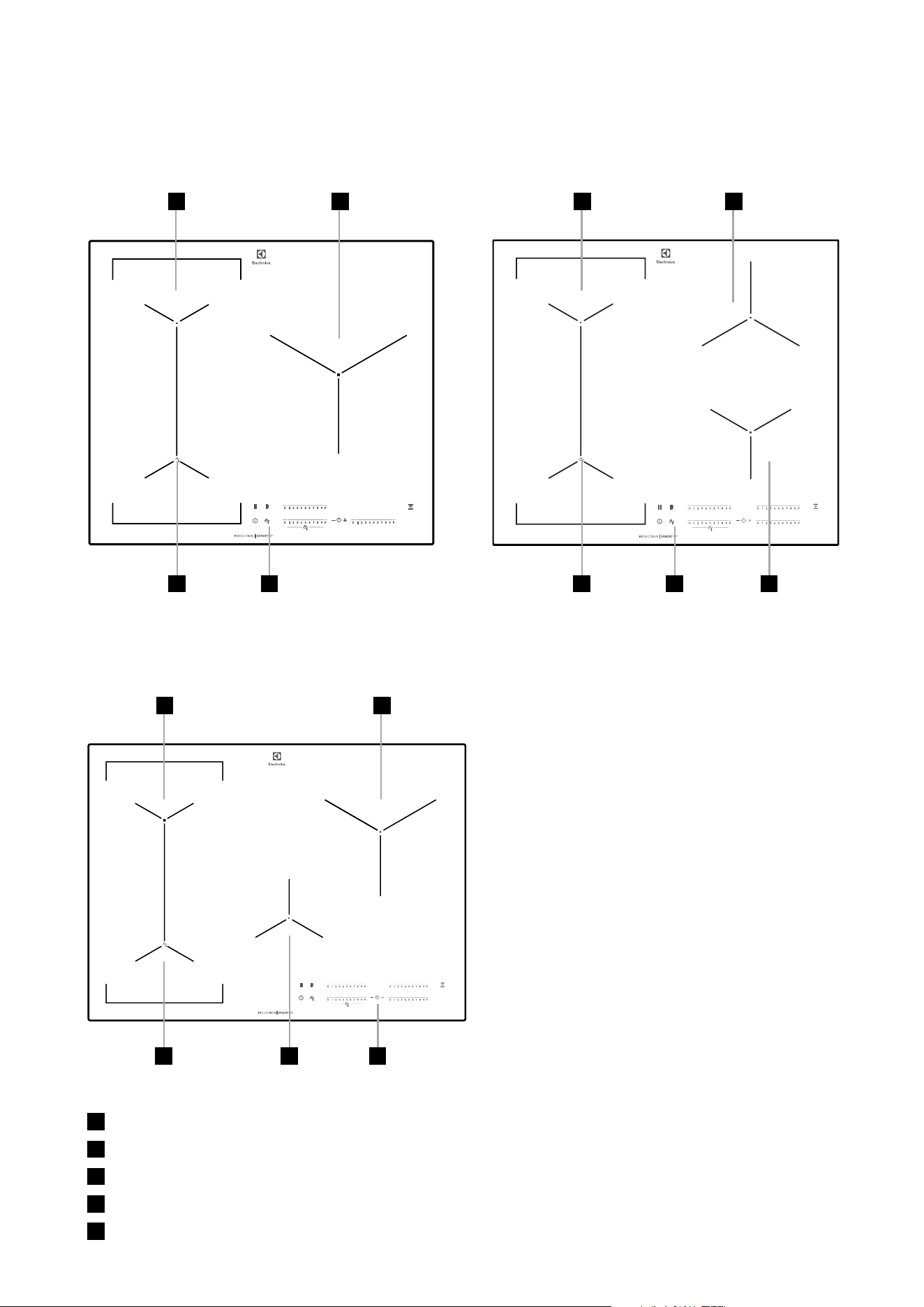
EHI635BE EHI645BE
EHI745BE
1
Induction cooking zone
2
Induction cooking zone
3
Induction cooking zone
4
Control panel
5
Induction cooking zone
11
1 2
2 2
33
3 5 4
44 5
6 electrolux.com.au
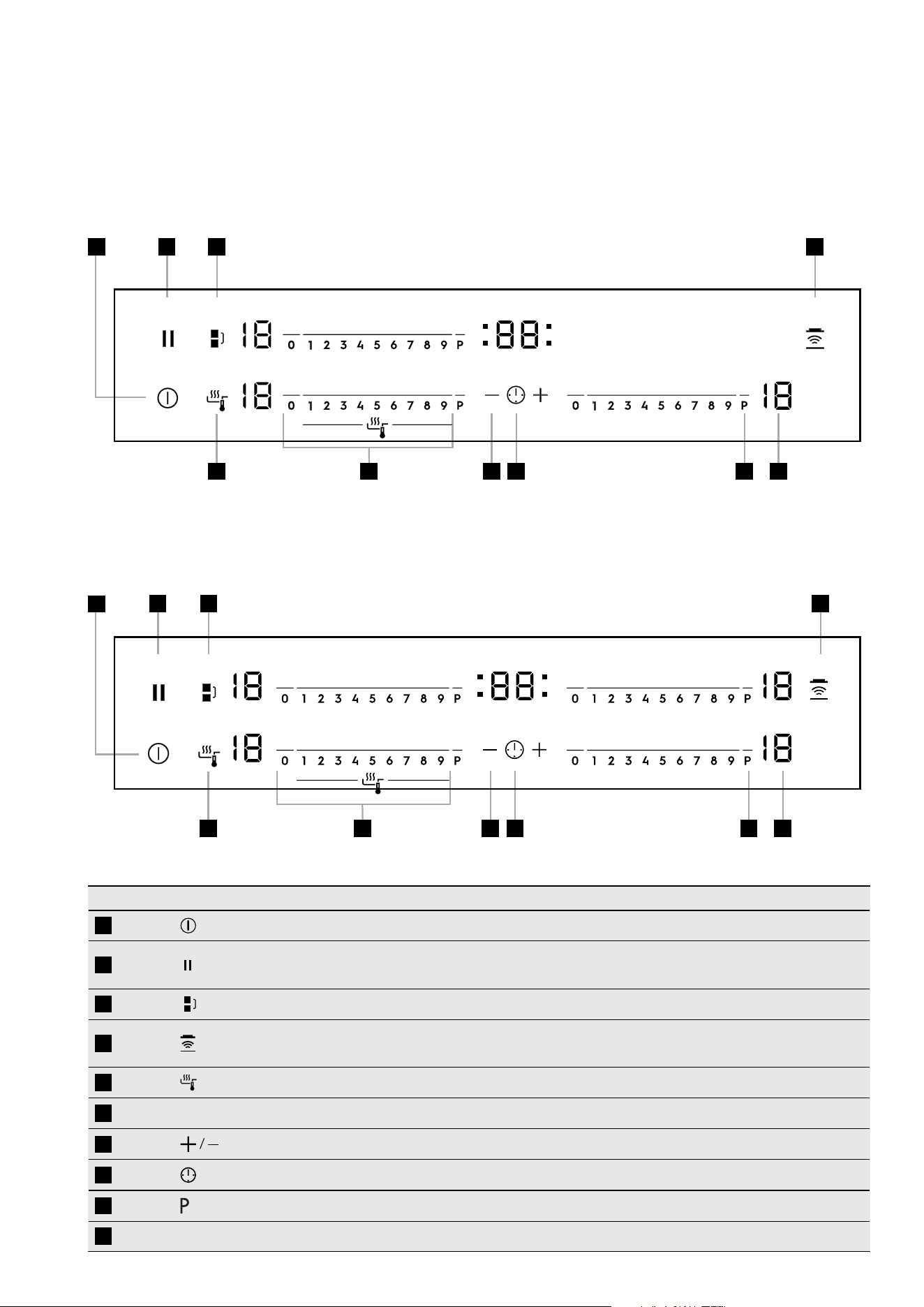
EHI977BE
EHI955BE
PRODUCT DESCRIPTION (CONTINUED)
1
Induction cooking zone
2
Induction cooking zone
3
Induction cooking zone
4
Induction cooking zone
5
Control panel
6
Induction cooking zone
1 32
1 3
4
4 5
5 6
6
2
7
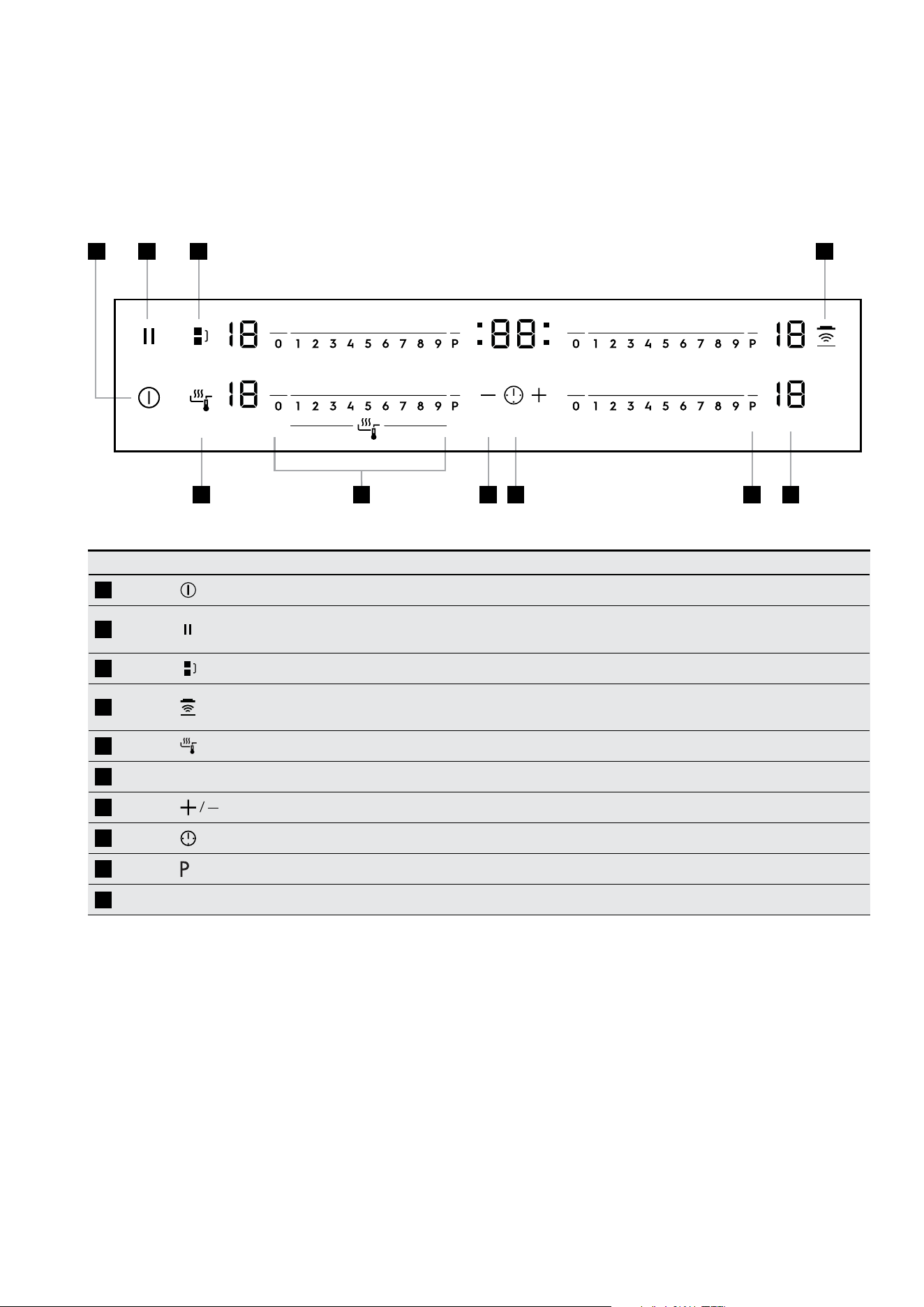
Control panel layouts
Sensor field Function
1
To activate and deactivate the appliance
2
To lock / unlock the control panel
Sets all operating zones to a keep warm setting
3
To activate the Bridge function
4
To activate and deactivate the manual mode of the
Hob2Hood function.
5
To activate the Sensefry function
6
Control bar To set a heat setting
7
To increase or decrease the time
8
To set the timer function
9
To activate the Power function
10
A heat setting display To show the heat setting
1
1 2
2
3 4
3 4
5
5 7
7
8
8
9
9
10
10
6
6
EHI635BE
EHI645BE
8 electrolux.com.au
PRODUCT DESCRIPTION (CONTINUED)
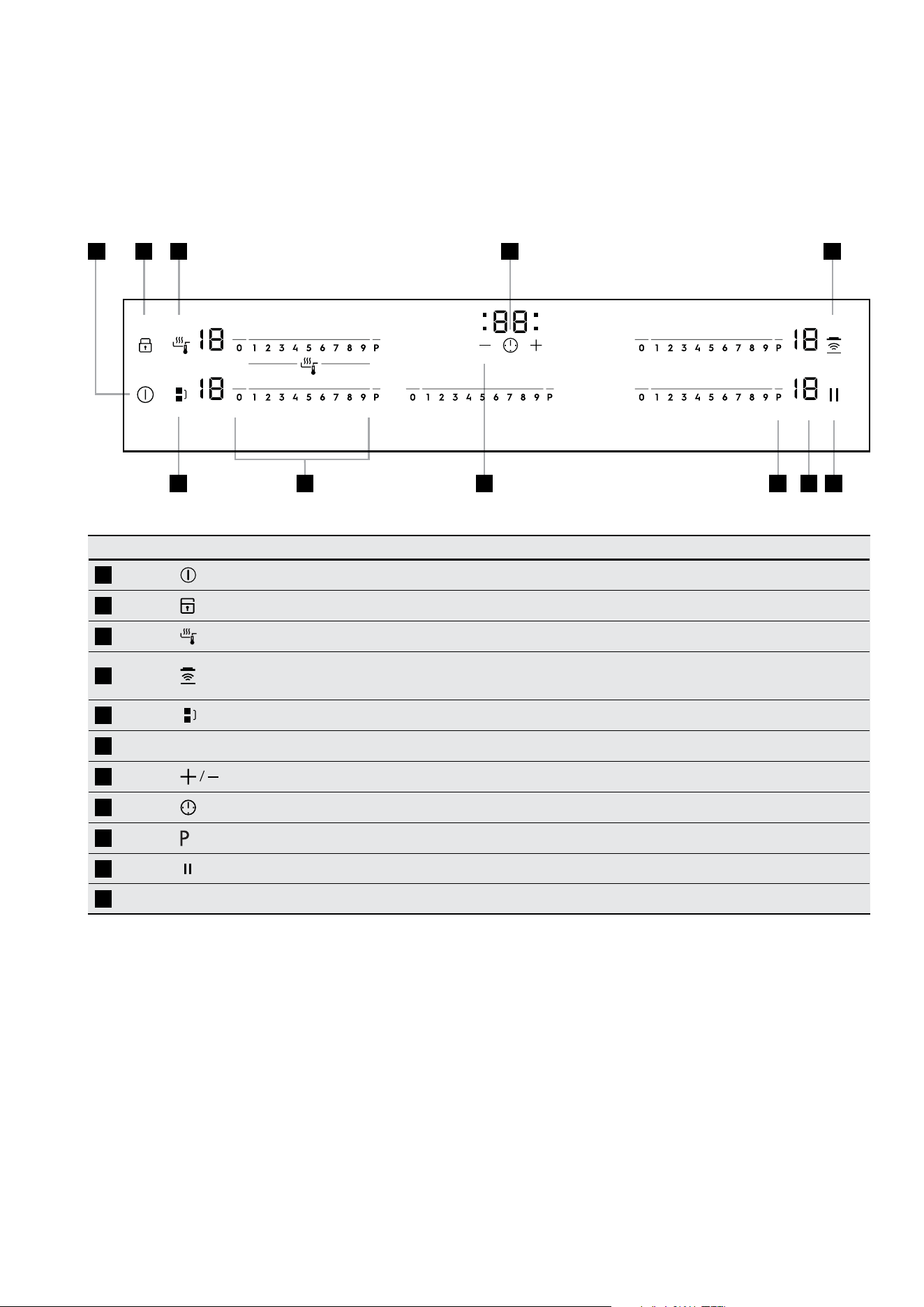
Control panel layouts
EHI745BE
Sensor field Function
1
To activate and deactivate the appliance
2
To lock / unlock the control panel
Sets all operating zones to a keep warm setting
3
To activate the Bridge function
4
To activate and deactivate the manual mode of the
Hob2Hood function.
5
To activate the Sensefry function
6
Control bar To set a heat setting
7
To increase or decrease the time
8
To set the timer function
9
To activate the Power function
10
A heat setting display To show the heat setting
1 2 3
5
4
97 8 106
9
Control panel layouts
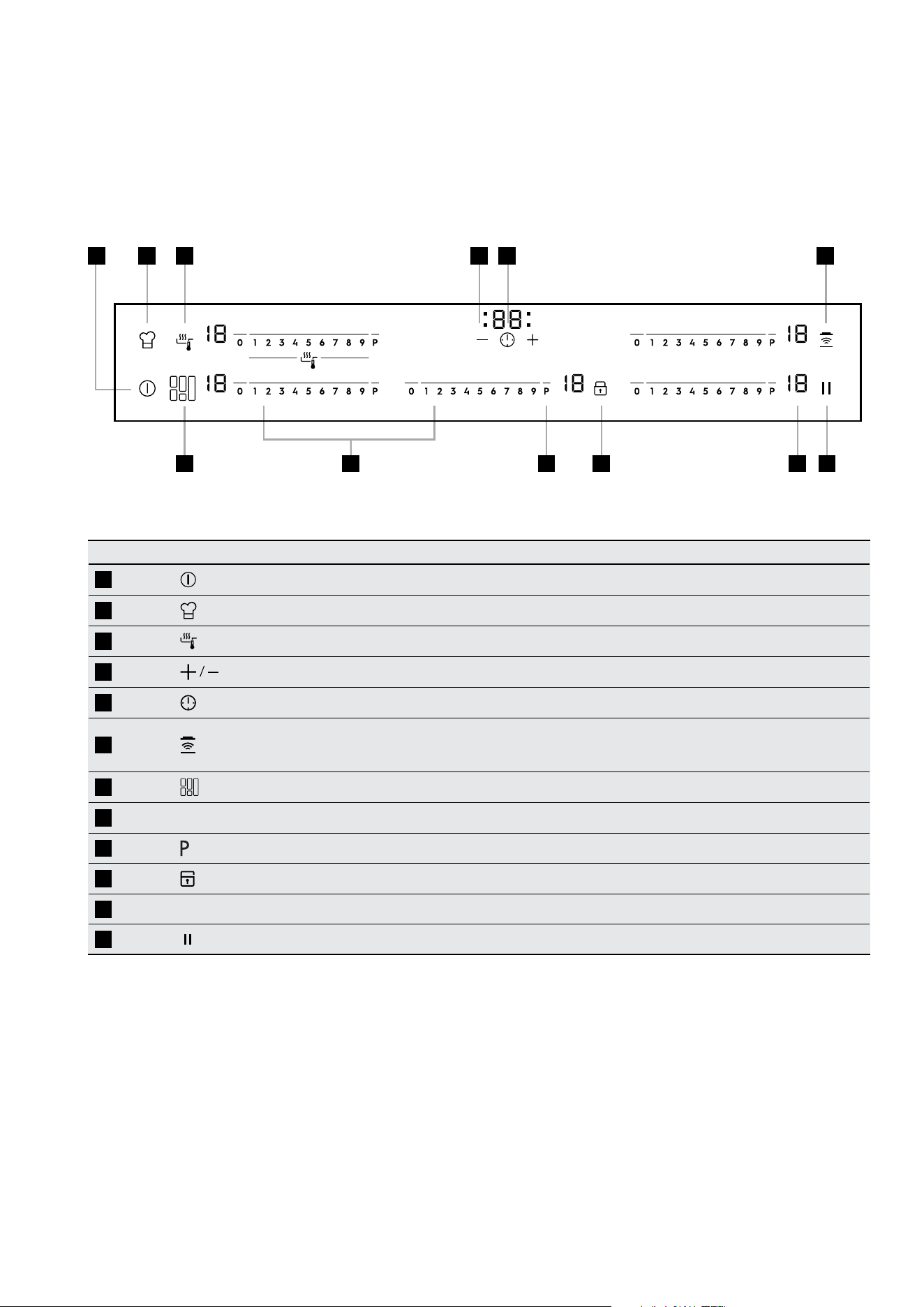
EHI955BE
Sensor field Function
1
To activate and deactivate the appliance
2
To lock / unlock the control panel
3
To activate the Sensefry function
4
To activate and deactivate the manual mode of the
Hob2Hood function.
5
To activate the Bridge function
6
Control bar To set a heat setting
7
To increase or decrease the time
8
To set the timer function
9
To activate the Power function
10
Sets all operating zones to a keep warm setting
11
A heat setting display To show the heat setting
1 2 3 48
5
7 9 1011
6
10 electrolux.com.au
PRODUCT DESCRIPTION (CONTINUED)
Control panel layouts
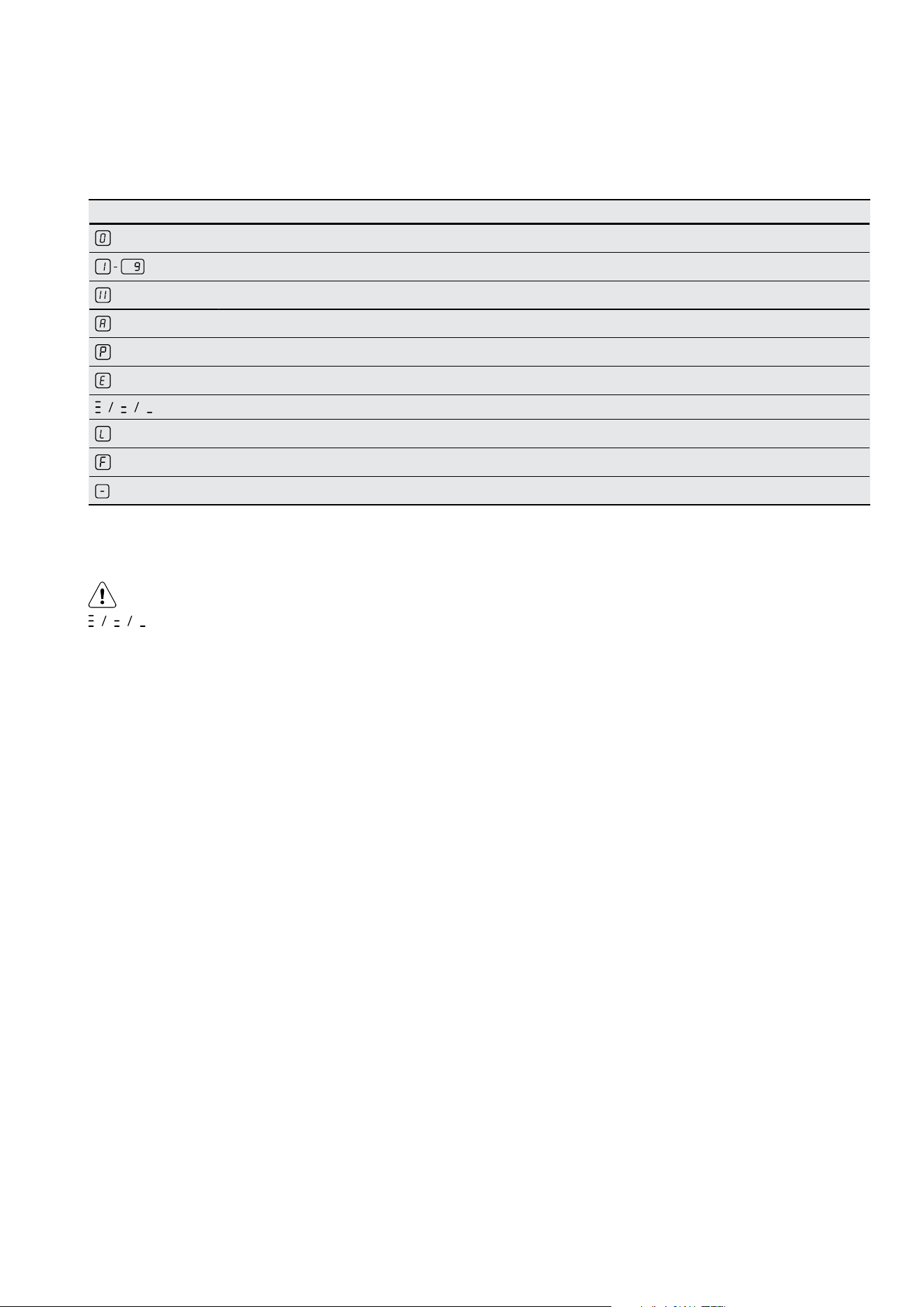
EHI977BE
Sensor field Function
1
To activate and deactivate the appliance
2
To activate the chef function
3
To activate the Sensefry function
4
To increase or decrease the time
5
To set the timer function
6
To activate and deactivate the manual mode of the
Hob
2
Hood function.
7
To switch between the modes of the function
8
Control bar To set a heat setting
9
To activate the Power function
10
To lock / unlock the control panel
11
A heat setting display To show the heat setting
12
Sets all operating zones to a keep warm setting
1 2 3
7
4 5 6
109 12118
11
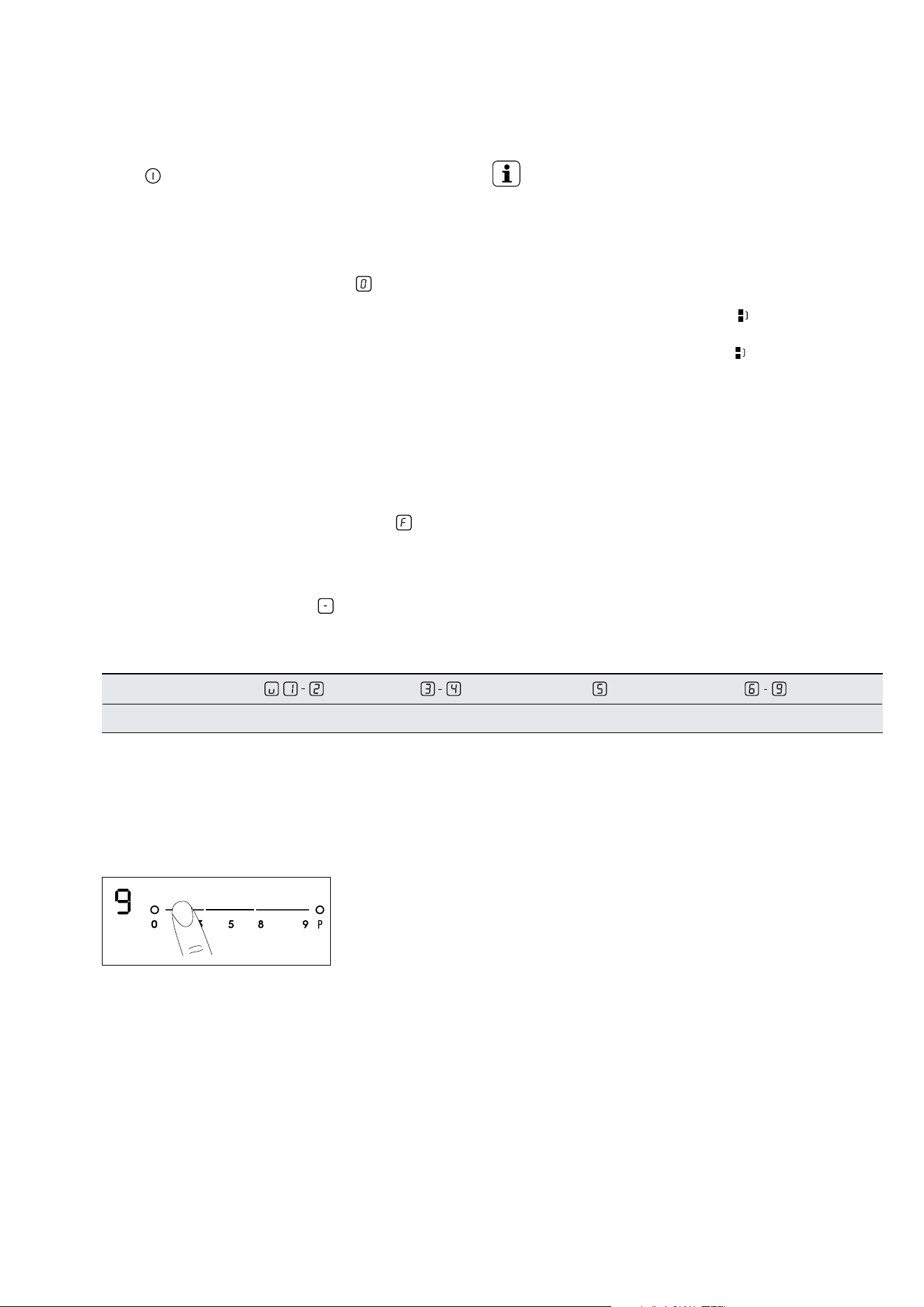
Display Description
The cooking zone is deactivated
The cooking zone operates
Sets all operating zones to a keep warm setting
The automatic heat up function operates
Power function operates
+ digit
There is a malfunction
OptiHeat Control (3 step Residual heat indicator) : continue cook / stay warm / residual heat
Lock / The child safety function operates
Not correct cookware or too small or no cookware on the cooking zone
The automatic switch off function operates
Heat setting displays
OptiHeat control (3 step residual heat indicator)
WARNING!
Risk of burns from residual heat!
OptiHeat Control shows the level of the residual heat.
The induction cooking zones make the heat necessary
for cooking directly in the bottom of the cookware. The
glass ceramic is hot from the heat of the cookware.
12 electrolux.com.au
OPERATING INSTRUCTIONS
On and off
Touch
for 1 second to activate or deactivate the
appliance.
Automatic switch off
The function deactivates the appliance automatically if:
• All cooking zones are deactivated (
).
• You do not set the heat setting after you activate the
appliance.
• You spill something or put something on the control
panel for more than 10 seconds, (a pan, a cloth, etc).
An acoustic signal sounds after some time and the
appliance deactivates. Remove the object or clean the
control panel.
• The appliance becomes too hot (e.g. when a
saucepan boils dry). Before you use the appliance
again, wait for the cooking zone to cool down.
• You use incorrect cookware. The symbol
comes
on and the cooking zone deactivates automatically
after 2 minutes.
• You do not deactivate a cooking zone or change the
heat setting. After some time
comes on and the
appliance deactivates. See the table below.
Automatic switch off times
Heat setting
Stops after 6 hours 5 hours 4 hours 1.5 hours
The heat setting
Touch the control bar at the heat setting. Change to the
left or the right, if it is necessary. Do not release before you
have a correct heat setting. The display shows the heat
setting.
Bridge function
IMPORTANT!
Use the Bridge Function with the
Infinite Plancha accessory
1)
.
The Bridge Function connects the two left side cooking
zones under the accessory and they operate as one.
First set the heat setting for one of the cooking zones.
To activate the Bridge Function, touch
To set or change
the heat setting, touch one of the control sensors. To
deactivate the Bridge Function, touch The cooking
zones operate independently.
13
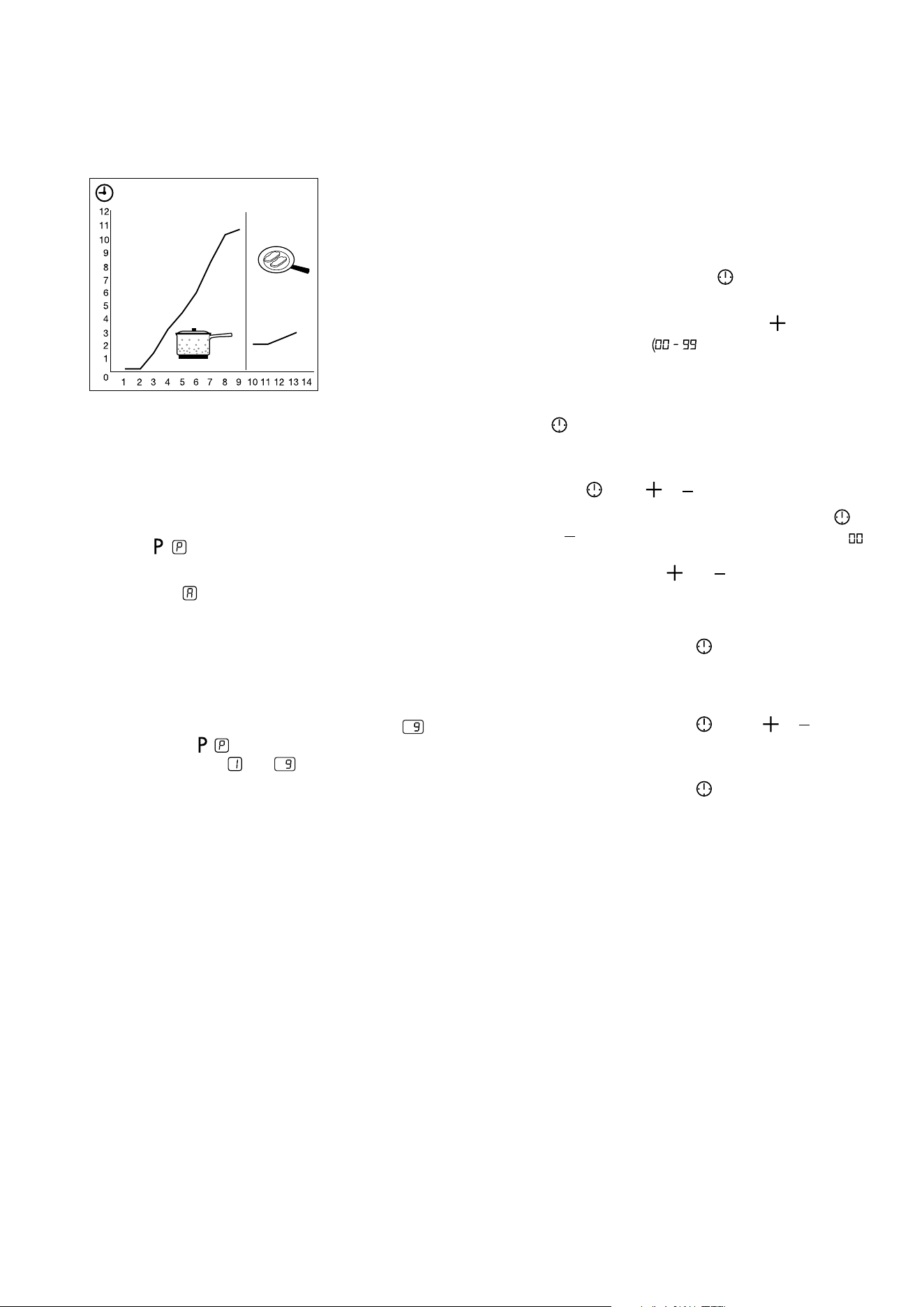
Automatic heat up
You can get a necessary heat setting in a shorter time
if you activate the Automatic Heat Up function. This
function sets the highest heat setting for some time (see
the graphic), and then decreases to the necessary heat
setting. To start the Automatic Heat Up function for a
cooking zone:
1. Touch
( comes on in the display).
2. Immediately touch the necessary heat setting. After
3 seconds
comes on in the display. To stop the
function change the heat setting.
Switching on and off the power function
The Power function makes more power available to the
induction cooking zones. The Power function is activated
for 5 minutes at most. After that the induction cooking
zone automatically switches back to heat setting
. To
switch on, touch , comes on. To switch off, touch a
heat setting between and .
Count down timer
Use the Count Down Timer to set how long the cooking
zone operates for one cooking session. Set the Count
Down Timer after the selection of the cooking zone.
You can set the heat setting before or after you set the
timer.
• To set the cooking zone: touch
again and again until
the indicator of the required cooking zone comes on.
• Starting the Count Down Timer: touch
of the
timer to set the time minutes). When the
indicator of the cooking zone flashes slower, the
time counts down.
• Checking the remaining time: select the cooking zone
with
. The indicator of the cooking zone flashes
faster. Display shows the remaining time.
• Changing the Count Down Timer: select the cooking
zone with
touch or .
• Stopping the timer: select the cooking zone with
.
Touch . The remaining time counts backwards to .
The indicator of the cooking zone goes out. To switch
off you can also touch and
at the same time.
• When the time elapses, the sound operates and 00
flashes. The cooking zone switches off.
• Stopping the sound: touch
.
Minute minder
You can use the timer as a Minute Minder while cooking
zones are not operating. Touch
. Touch or
of the
timer to select the time. When the time elapses, the sound
operates and 00 flashes.
• Stopping the sound: touch
.
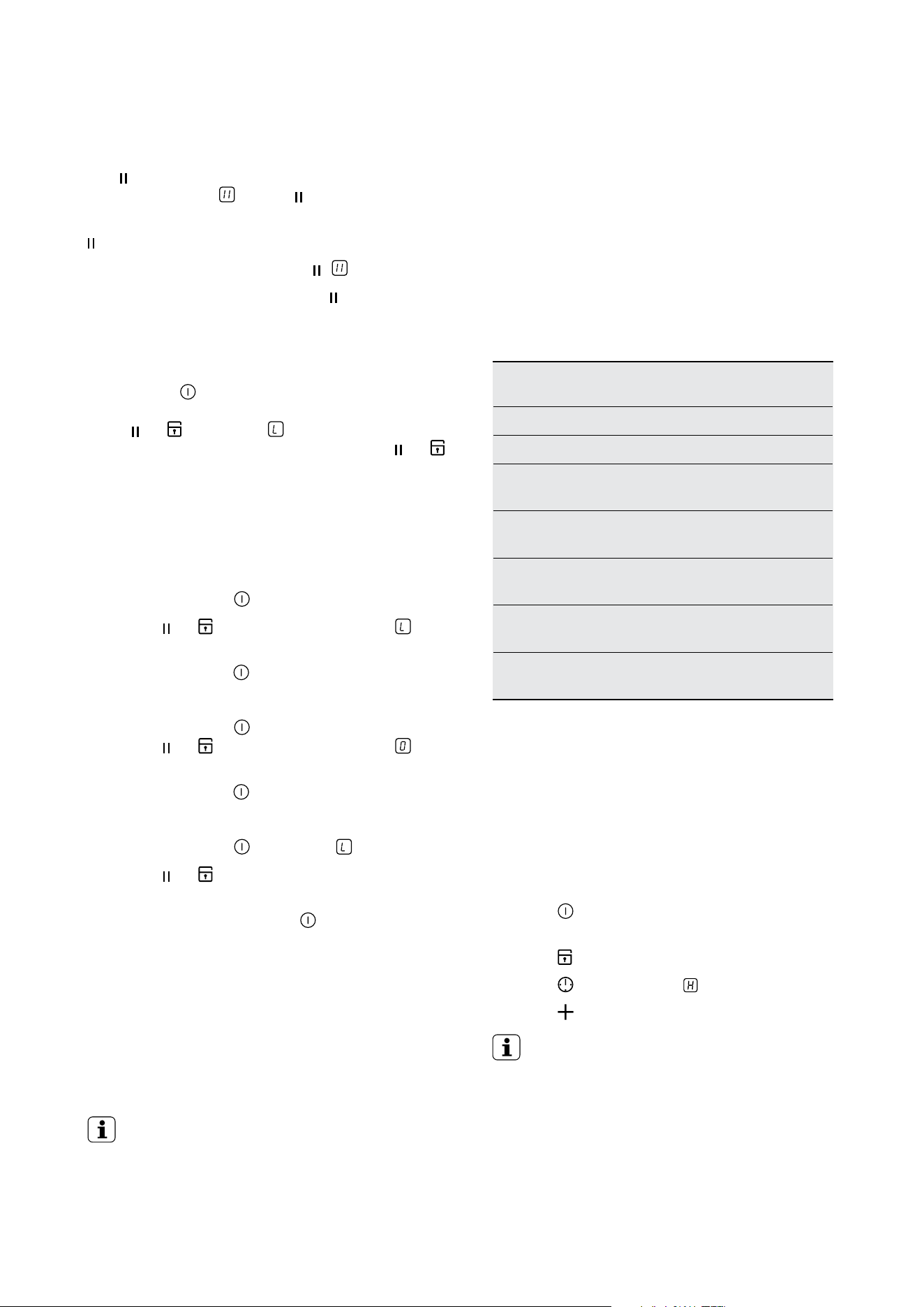
14 electrolux.com.au
OPERATING INSTRUCTIONS (CONTINUED)
Keep warm
The
function sets all cooking zones that operate to the
lowest heat setting ( ). When operates, you cannot
change the heat setting.
does not stop the timer function.
• To activate this function touch
. comes on.
• To deactivate this function touch
. The heat setting
that you set before comes on.
Lock
When the cooking zones operate, you can lock the control
panel, but not
. It prevents an accidental change of the
heat setting. First set the heat setting. To start this function
touch or . The symbol comes on for 4 seconds.
The Timer stays on. To stop this function touch or .
The heat setting that you set before comes on. When you
stop the appliance, you also stop this function.
The child safety device
This function prevents an accidental operation of the hob.
Starting the child safety device:
• Start the hob with
. Do not set the heat settings.
• Touch
or for 4 seconds. The symbol
comes on.
• Stop the hob with
.
Switching off the child safety device:
• Start the hob with
. Do not set the heat settings.
Touch or for 4 seconds. The symbol
comes on.
• Stop the hob with
.
Overriding the child safety device for one cooking session:
• Start the hob with
. The symbol comes on.
• Touch
or for 4 seconds. Set the heat setting in
less than 10 seconds. You can operate the hob.
• When you stop the hob with
, the child safety device
operates again.
Hob²Hood
This is an advanced automatic function which connects
the hob to a special hood. Both the hob and the hood
have an infra-red signal communicator. Speed of the fan
is defined automatically on basis of mode setting and
temperature of the hottest cookware on the hob. You can
also operate the fan from the hob manually.
IMPORTANT!
For most of the hoods the remote system is
originally deactivated. Activate it before you use
the function. For more information refer to hood
user manual.
Operating the function automatically
The default automatic mode from the factory is H5. You can
change the automatic mode by following the instructions
below. When you activate the hob the hood will adjust the
fan speed automatically. Please note the below table is a
guide, the fan speed varies depending on the temperature
measured on the cooking zones of the cooktop which can
be affected by the heat setting(s) selected as well as the size
and volume of what you are cooking.
Automatic modes
Automatic
light
Boiling Frying
Mode H0 Off Off Off
Mode H1 On Off Off
Mode H2 On
Fan speed
1
Fan speed
1
Mode H3 On Off
Fan speed
1
Mode H4 On
Fan speed
1
Fan speed
1
Mode H5 On
Fan speed
1
Fan speed
2
Mode H6 On
Fan speed
2
Fan speed
3
1. The hob detects the boiling process and activates fan
speed in accordance with automatic mode.
2. The hob detects the frying process and activates fan
speed in accordance with automatic mode.
3. This mode activates the fan and the light and does not
rely on the temperature.
Changing the automatic mode
1. Deactivate the appliance.
2. Touch
for 3 seconds. The display comes on and
goes off
3. Touch
for 3 seconds.
4. Touch
a few times until comes on.
5. Touch
of the Timer to select an automatic mode.
IMPORTANT!
To operate the hood directly on the hood panel
deactivate the automatic mode of the function.
When you finish cooking and deactivate the hob,
the hood fan may still operate for a certain period
of time. After that time the system deactivates the
fan automatically and prevents you from accidental
activation of the fan for the next 30 seconds.
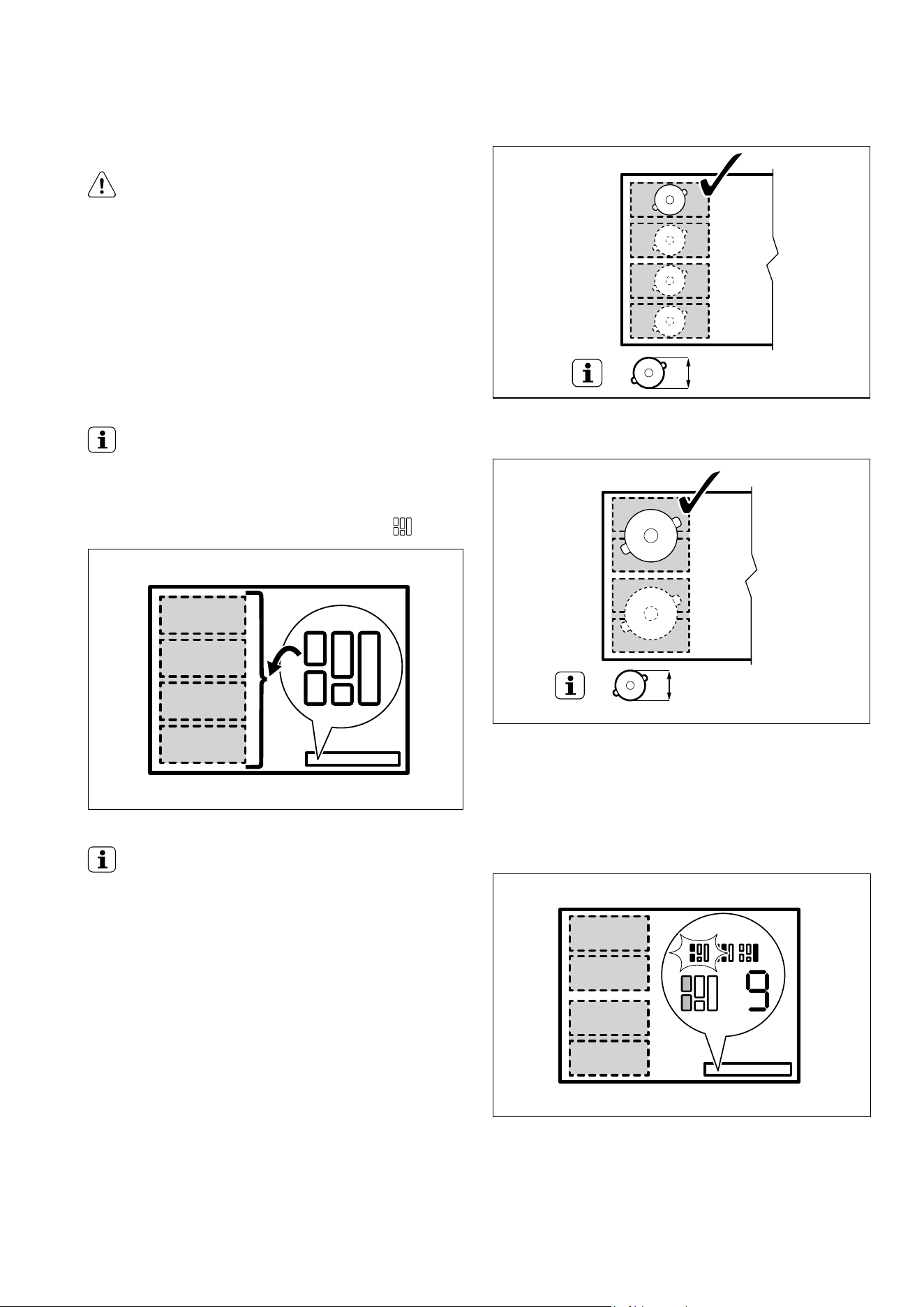
15
Flexible Induction Cooking Area
WARNING!
Refer to Safety chapters.
FlexiBridge function
The flexible induction cooking area consists of four
sections. The sections can be combined into two cooking
zones with different size, or into one large cooking area.
You choose the combination of the sections by choosing
the mode applicable to the size of the cookware you
want to use. There are three modes: Standard (activated
automatically when you activate the hob), Big Bridge and
Max Bridge.
IMPORTANT!
To set the heat settings, use the two left side control bars.
Switching between the modes
To switch between the modes use sensor field:
IMPORTANT!
When you switch between the modes the heat setting is
set back to 0.
Diameter and position of the cookware
Choose the mode applicable to the size and the shape
of the cookware. The cookware should cover the
selected area as much as possible. Place the cookware
centrally on the selected area!
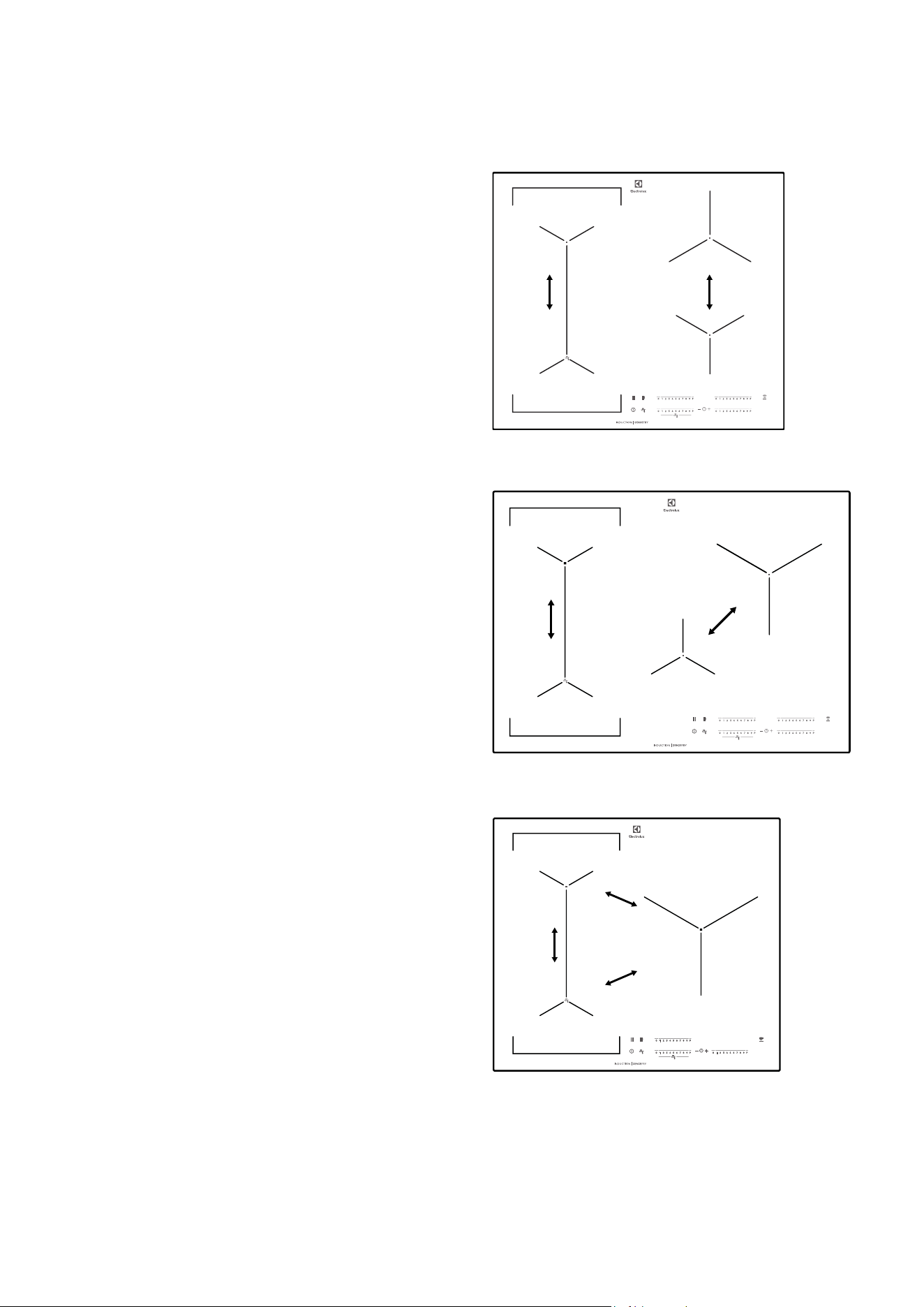
Place any cookware with bottom diameter smaller than
160 mm centrally on a single section.
100-160mm
Place any cookware with bottom diameter larger than
160 mm centrally between two sections.
> 160 mm
FlexiBridge standard mode
This mode is active when you activate the hob. It connects
the sections into two separate cooking zones. You can set
the heat setting for each zone separately. Use two left side
control bars.
16 electrolux.com.au
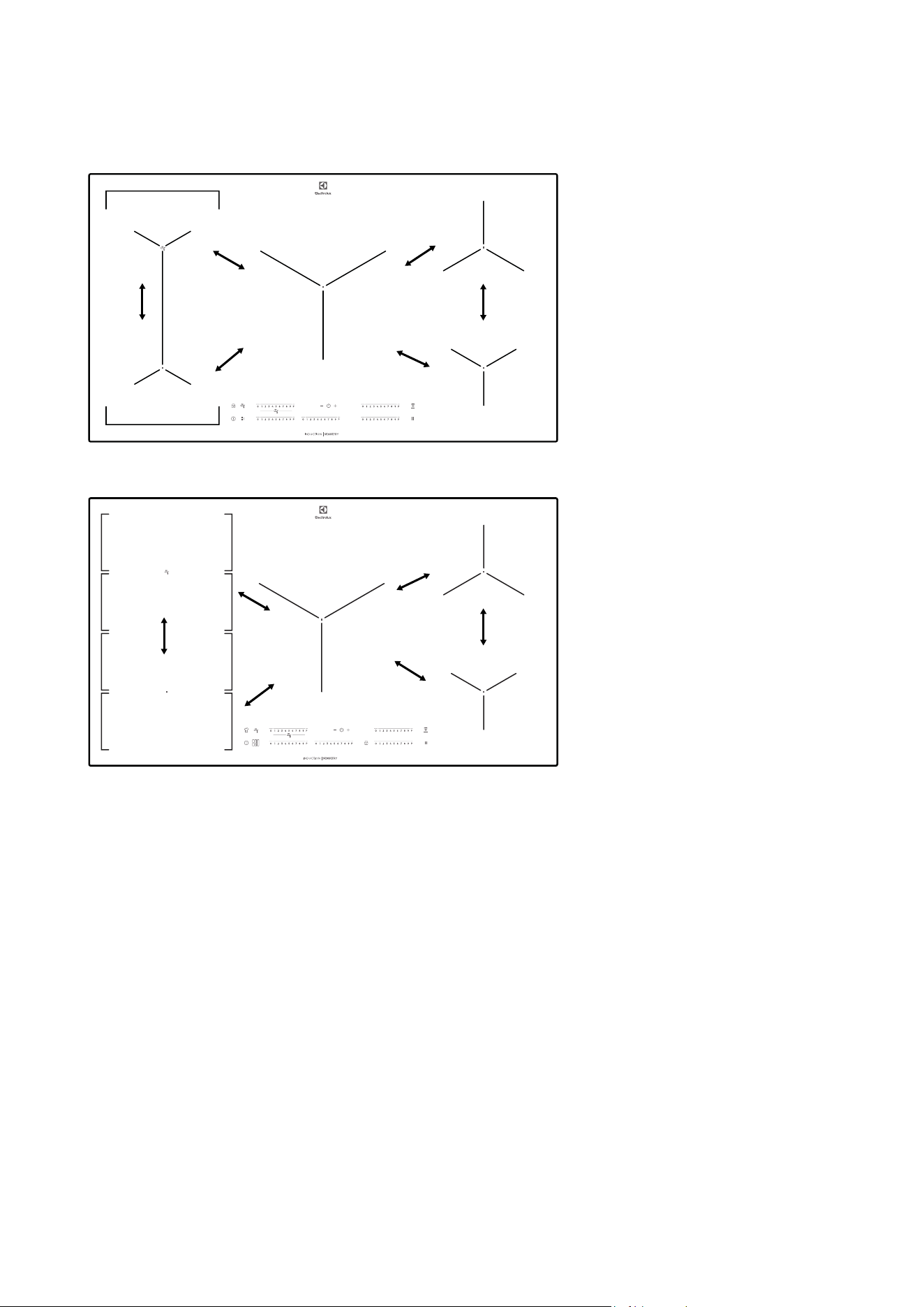
Power management
All cooking zones are connected to one phase.
See the illustrations.
• The function activates when the total electricity
loading of the cooking zones exceeds maximum
electricity loading of the phase.
• The function divides the power between cooking
zones.
• The function decreases the power of the other
cooking zones.
• The heat setting display of the reduced zones
alternates between the chosen heat setting and
the reduced heat setting. After some time the heat
setting display of the reduced zones stays on the
reduced heat setting.
Power management with Power limitation
The power management divides the power between
two cooking zones in a pair (see the illustration).
The power function increases the power to the maximum
level for one cooking zone in the pair. The power in the
second cooking zone automatically decreases. The heat
setting display for the reduced zone changes between
two levels. Only for EHI645BE/EHI745BE
The power management divides the power in all cooking
zones (see the illustration). The power function increases
the power to the maximum level for one cooking zone.
The power in the first active cooking zone automatically
decreases. The heat setting display for the reduced zone
changes between two levels.
Only for EHI635BE/EHI955BE/EHI977BE
EHI645BE
EHI745BE
EHI635BE
OPERATING INSTRUCTIONS (CONTINUED)
17
EHI955BE
EHI977BE
18 electrolux.com.au
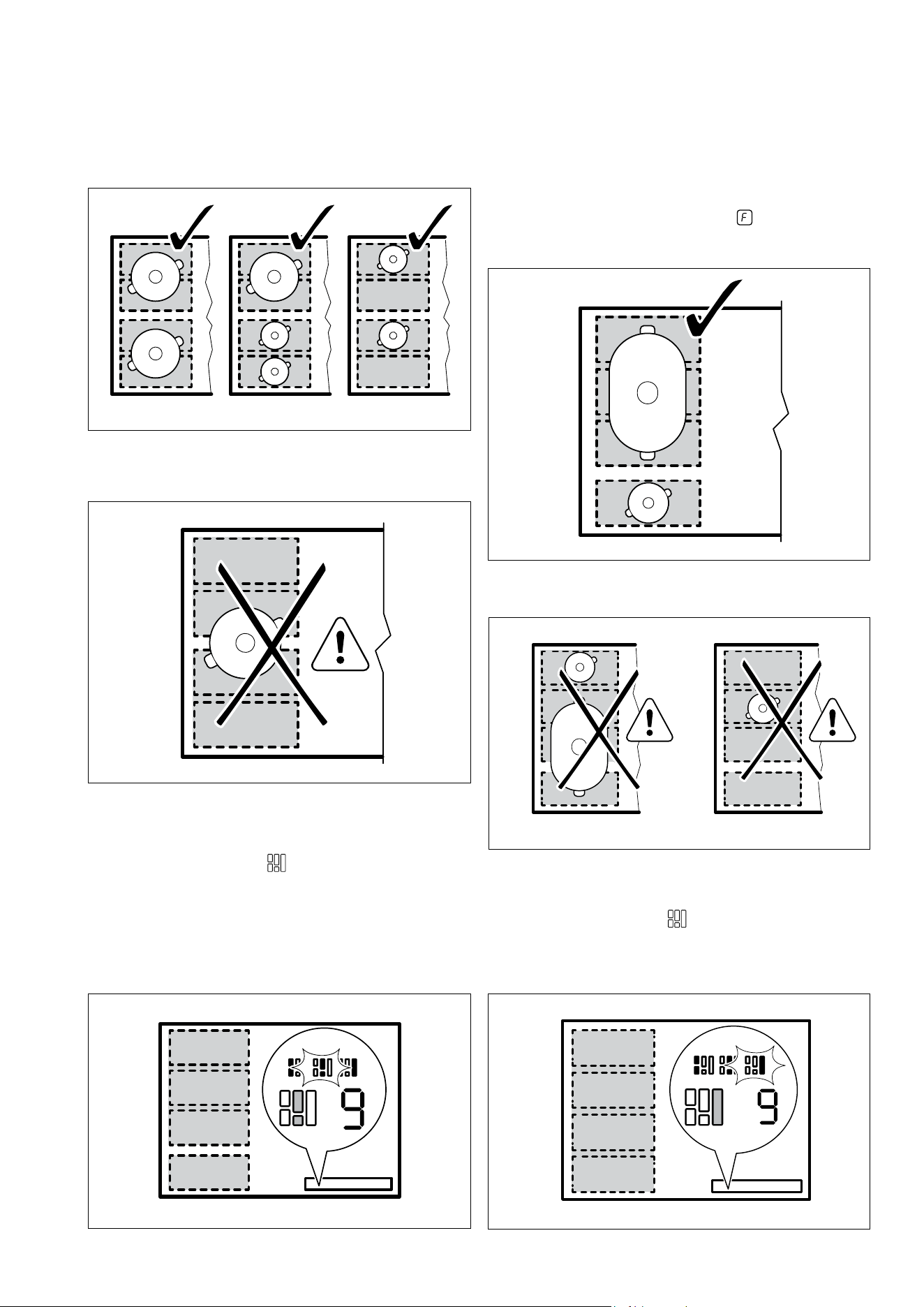
Correct cookware position:
Incorrect cookware position:
FlexiBridge big bridge mode
To activate the mode press
until you see the correct
mode indicator. This mode connects three rear sections
into one cooking zone. The one front section is not
connected and operates as a separate cooking zone. You
can set the heat setting for each zone separately. Use two
left side control bars.
OPERATING INSTRUCTIONS (CONTINUED)
Correct cookware position:
To use this mode you have to place the cookware on the
three connected sections. If you use cookware smaller
than two sections the display shows
and after 2
minutes the zone switches off.
Incorrect cookware position:
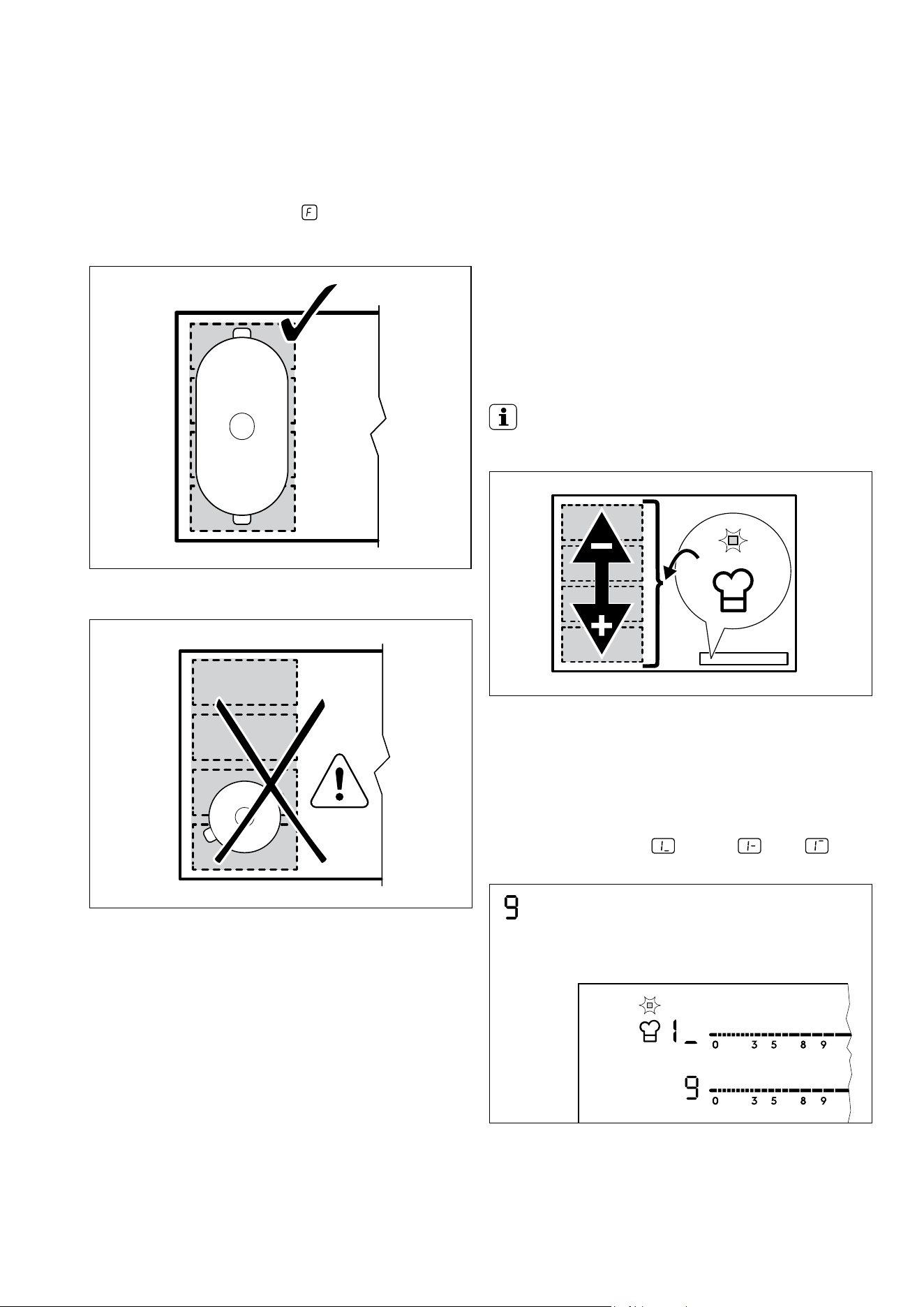
FlexiBridge max bridge mode
To activate the mode press
until you see the correct
mode indicator. This mode connects all sections into one
cooking zone. To set the heat setting use one of the left
side control bars.
19
Correct cookware position:
To use this mode you have to place the cookware on the
four connected sections. If you use cookware smaller than
three sections the display shows
and after 2 minutes
the zone switches off.
Incorrect cookware position:
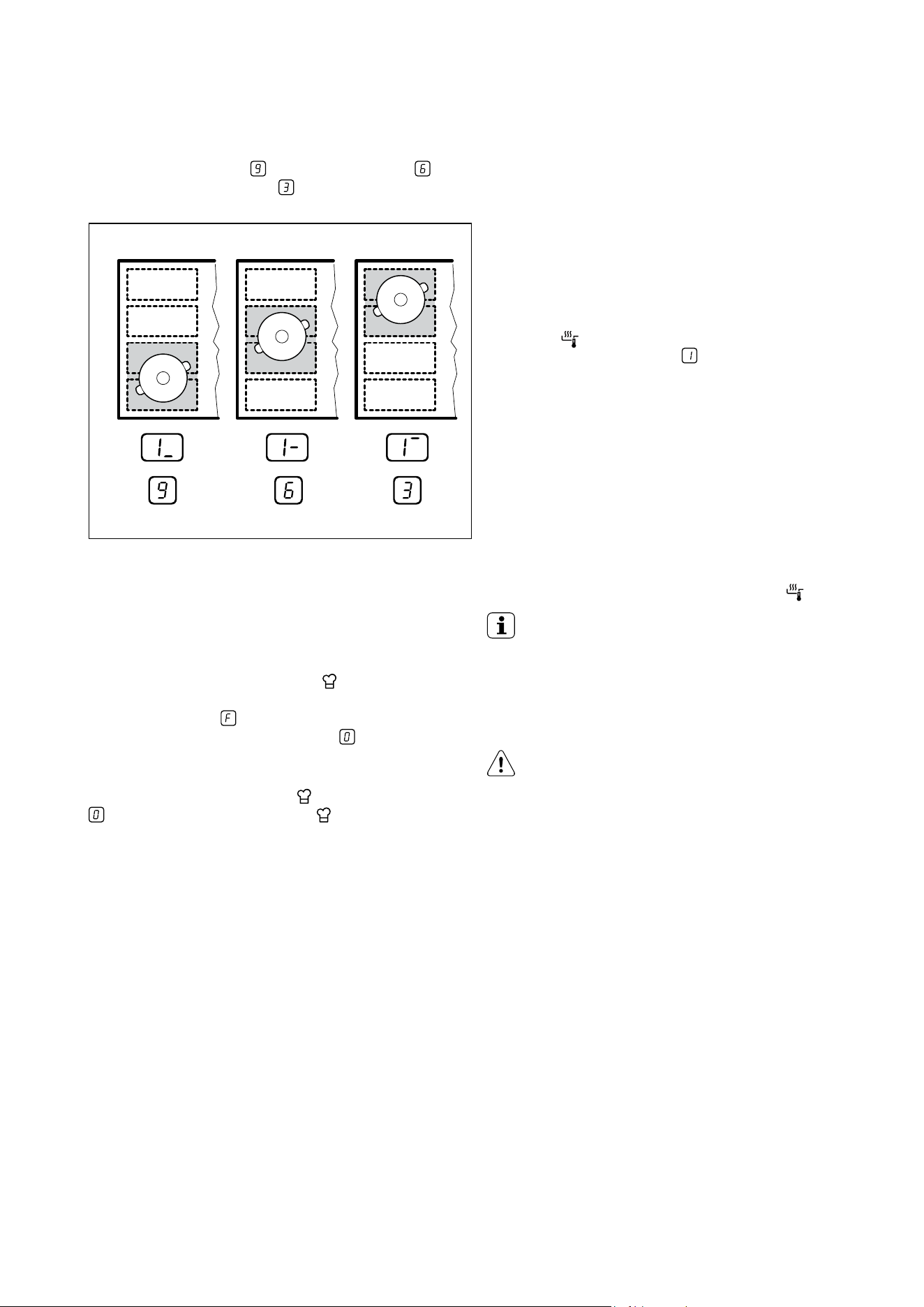
Powerslide Function
This function allows you to adjust the temperature by
moving the cookware to a different position on the
induction cooking area.
The function divides the induction cooking area into
three areas with different heat settings. The hob senses
the position of the cookware and sets the heat setting
corresponding with the position. You can place the
cookware in the front, middle or rear position. If you
place the cookware in the front you get the highest heat
setting. You can decrease the heat setting by moving the
cookware in the middle or to the rear position.
IMPORTANT!
Use only one pot when you operate the function.
General information
• 160 mm is the minimum bottom diameter of the
cookware for this function.
• Heat setting display for the left rear control bar
shows the position of the cookware on the induction
cooking area. Front
, middle , rear .
• Heat setting display for the left front control bar
shows the heat setting. To change the heat
setting use left front control bar.
20 electrolux.com.au
OPERATING INSTRUCTIONS (CONTINUED)
• When you activate the function for the first time you
will get heat setting for the front position, for
the middle position and for the rear position.
You can change the heat settings for each position
separately. The hob will remember your heat settings
next time you activate the function.
Activating the function
To activate the function place the cookware in the correct
position on the cooking area. Touch
. The indicator above
the symbol comes on. If you do not place the cookware
on the cooking area comes on and after 2 minutes the
flexible induction cooking area is set to .
Deactivating the function
To deactivate the function touch
or set the heat setting to
. The indicator above the symbol goes off.
SenseFry function
This function lets you set a heat setting level to fry
your food. The hob keeps the selected temperature
automatically while frying. Once the heat setting level is set,
no manual temperature adjustment is necessary.
To activate the function:
1. Put an empty pan on the left front cooking zone.
Do not use a lid while using the function.
2. Press
. The indicator above the symbol comes on.
The heat setting is set to .
3. Set the best heat setting for the food you want to fry.
Refer to the table in Hints and tips chapter.
The indicators above the symbol start to flash slowly.
The zone is heating up.
4. Wait until the pan reaches the temperature you set.
A signal sounds. All indicators above the symbol
are on.
5. Put the food and some fat on the pan.
To deactivate the function:
Touch 0 of the left front cooking zone or touch
.
IMPORTANT
You can set the function for the left front cooking
zone of the hob. Only for EHI635BE/EHI645BE/
EHI745BE.
You can set the function for the left rear cooking
zone of the hob only for EHI955BE/EHI977BE
CAUTION!
Use laminated pans only with low heat setting
level to prevent overheating and damage of
the cookware.
21
HELPFUL HINTS AND TIPS
Operating the fan speed manually
You can also operate the function manually. To do
that touch
when the hob is active. This deactivates
automatic operation of the function and allows you
to change the fan speed manually. When you press
you raise the fan speed by one. When you reach an
intensive level and press again you will set fan speed
to 0 which deactivates the hood fan. To start the fan
again with fan speed 1 touch .
IMPORTANT!
To activate automatic operation of the function,
deactivate the hob and activate it again.
Activating the light
You can set the hob to activate the light automatically
whenever you activate the hob. To do so set the
automatic mode to H1 – H6.
IMPORTANT!
The light on the hood deactivates 2 minutes after
deactivating the hob.
IMPORTANT
INDUCTION COOKING ZONES
For induction cooking zones a strong electro-magnetic
field creates the heat in the cookware very quickly.
Cookware for induction cooking zones
WARNING!
Use the induction cooking zones with correct
cookware.
Cookware material:
• correct: cast iron, steel, enamelled steel, stainless steel,
the bottom made of multi-layer (with ‘induction-ready’
mark from the manufacturer).
• not correct: aluminium, copper, brass, glass,
ceramic, porcelain.
Cookware is correct for an induction hob if:
• some water boils very quickly on a zone set to the
highest heat setting.
• a magnet pulls on to the bottom of the cookware.
Cookware is correct for an induction hob if:
Find the right cookware
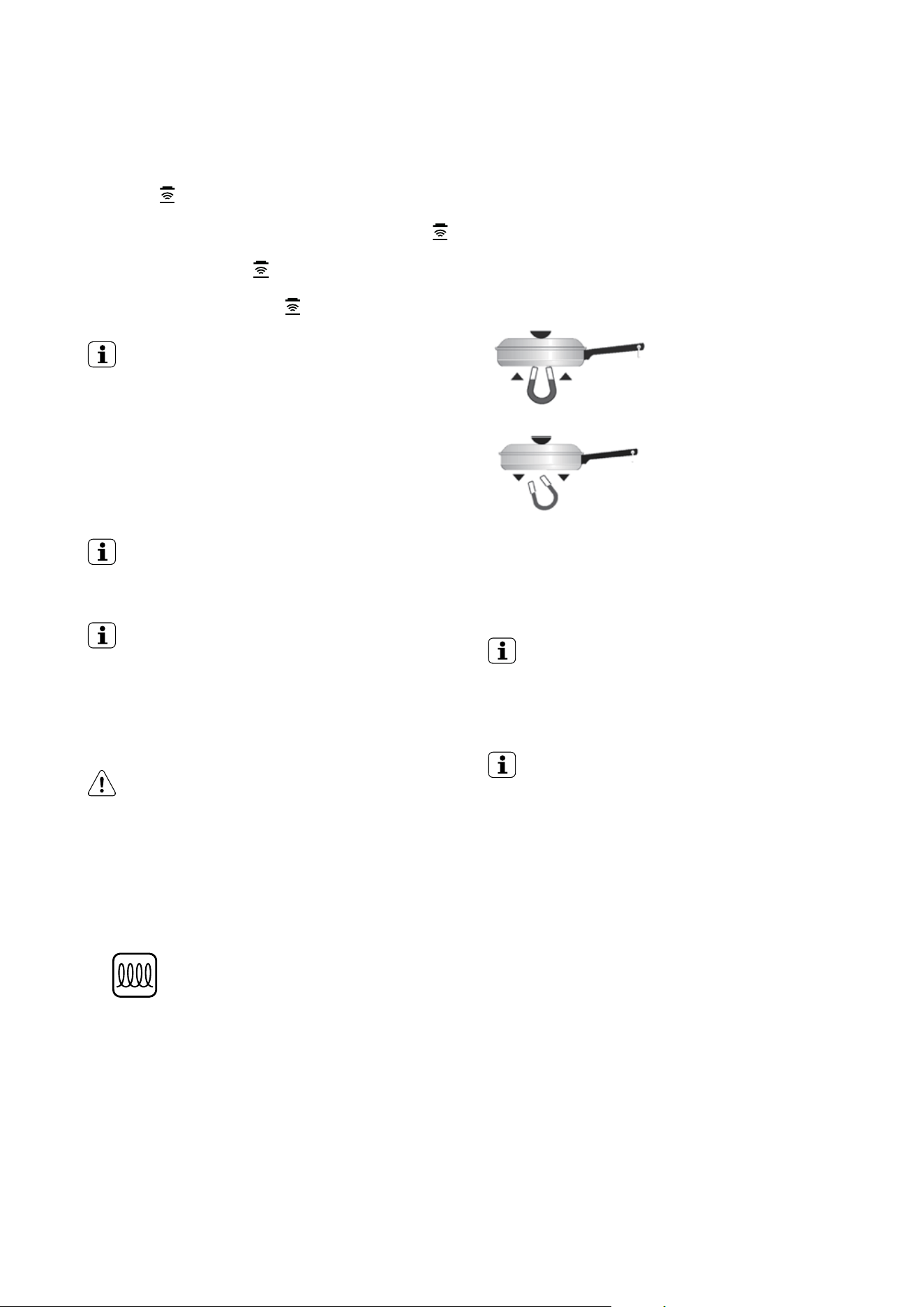
Only magnetic pots and pans work with induction.
Check to see if your cookware is compatible:
Place a magnet on the bottom of your pot or pan - if it
clings firmly, the cookware will work with your cooktop.
Choose the right size pot or pan for the right
cooking zone.
MAGNET STICKS
Cookware base material has
good magnetic
characteristics.
MAGNET FALLS
Cookware base material is
non-magnetic.
• some water boils very quickly on a zone set to the
highest heat setting.
• a magnet pulls on to the bottom of the cookware.
IMPORTANT!
The bottom of the cookware must be as thick and
flat as possible.
Use of the cooking zones
IMPORTANT!
Put the cookware on the cross which is on the surface
that you cook. Cover the cross fully. The magnetic part of
the bottom of the cookware must be 125mm minimum.
Induction cooking zones adapt to the dimension of the
bottom of the cookware automatically. You can cook
with the large cookware on two cooking zones at the
same time.
22 electrolux.com.au
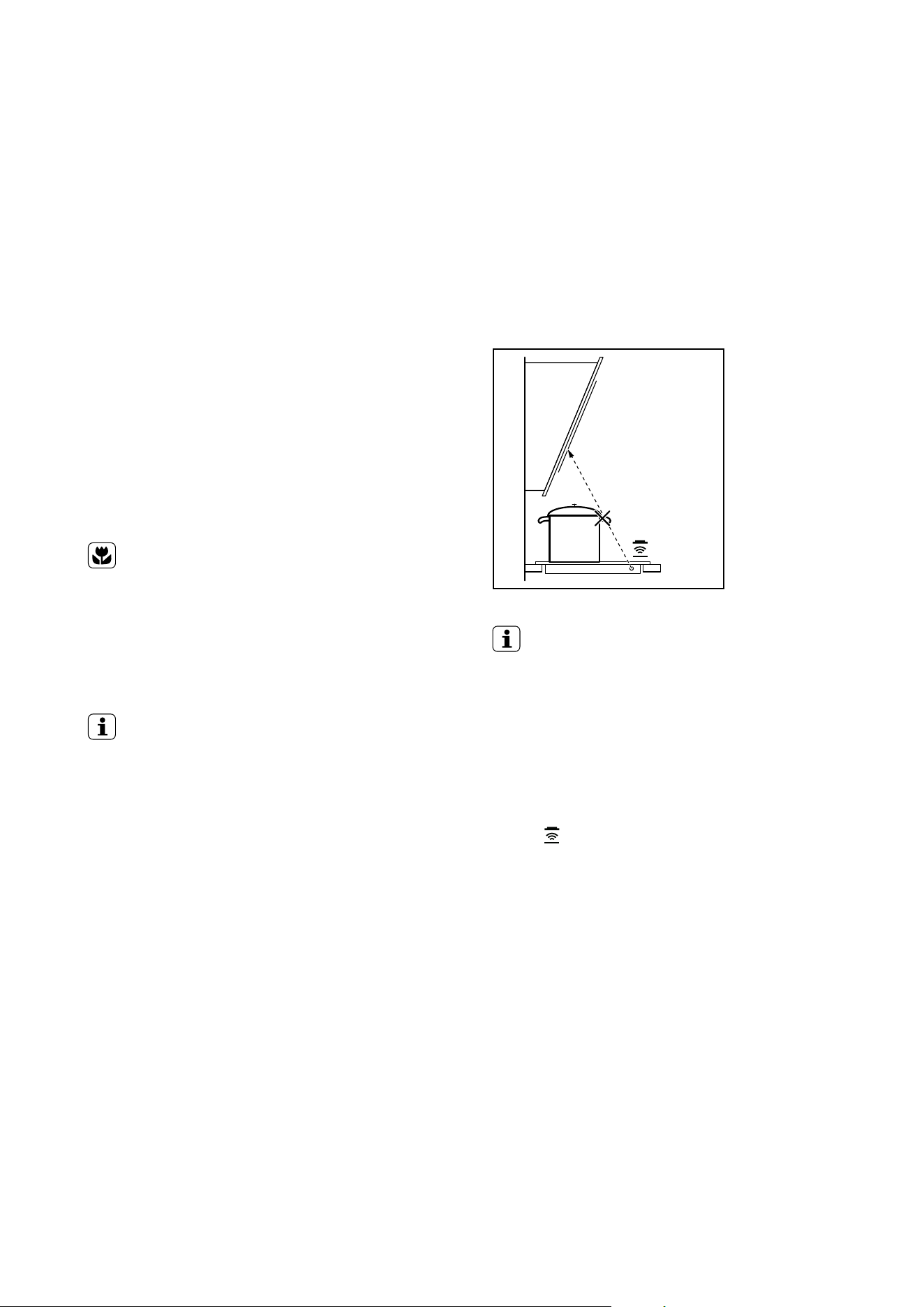
Hints and Tips for Hob²Hood function
When you operate the hob with Hob
2
Hood function:
• Protect the hood panel from direct sunlight.
• Do not spot halogen light on the hood panel.
• Do not cover the hob panel.
• Do not interrupt the signal between the hob and the
hood (for example with a hand or a cookware handle).
(Hood in the picture is only an example).
IMPORTANT!
It may happen that other remote controlled
appliances may block the signal. To avoid it do not
operate the remote of the appliance and the hob at
the same time.
Rangehoods with the Hob²Hood function
To find the full range of rangehoods which work with this
function refer to our consumer website. The Electrolux
rangehoods that work with this function must have the
symbol
HELPFUL HINTS AND TIPS (CONTINUED)
The noises during operation
If you can hear:
• crack noise: cookware is made of different materials
(Sandwich construction).
• whistle sound: you are using one or more cooking
zones with high power levels and the cookware is
made of different materials (Sandwich construction).
• humming: you are using high power levels.
• clicking: electric switching is occuring.
• hissing, buzzing: the fan is operating.
The noises are normal and do not refer to any defects.
If unfamiliar with induction units please first compare the
operating sounds of a demonstration model at your retailer
before calling service. If a service call is placed and the
sounds are normal you will be charged for the visit.
Energy saving
ENVIRONMENT
HOW TO SAVE ENERGY
• If it is possible, always put the lids on the cookware.
• Put cookware on a cooking zone before you start it.
• Use the residual heat to keep the food warm or
to melt it.
IMPORTANT!
THE COOKING ZONE EFFICIENCY
The cooking zone efficiency is related to the diameter of
the cookware. The cookware with a smaller diameter than
the minimum receives only a part of the power generated
by the cooking zone. For the minimum diameters see the
Technical data chapter.
23
Heat
setting
Use to: Time Hints Nominal
power
consumption
1
Keep cooked foods warm as required Cover 3%
1-2 Hollandaise sauce, melt: butter,
chocolate, gelatine
5 - 25 min Mix occasionally 3-8%
1-2 Solidify: fluffy omelettes,
baked eggs
10 - 40 min Cook with a lid on 3-8%
3 Simmer rice and milk based
dishes, heating up
ready-cooked meals
25 - 50 min Add at least twice as much
liquid as rice, stir milk dishes
part way through
8-13%
4 Steam vegetables, fish, meat 20 - 45 min Add some tablespoons of
liquid
13-18%
5 Steam potatoes 20 - 60 min Use max. 1⁄4 L water for 750 g
of potatoes
18-25%
5 Cook larger quantities of food,
stews and soups
60 - 150 min Up to 3 L liquid plus
ingredients
18-25%
6-7 Gentle fry: escalope,
veal cordon bleu, cutlets,
rissoles, sausages, liver, roux,
eggs, pancakes, doughnuts
as necessary Turn halfway through 25-45%
7-8 Heavy fry, hash browns, loin
steaks, steaks
5 - 15 min Turn halfway through 45-64%
9 Boil large quantities of water,
cook pasta, sear meat (goulash,
pot roast), deep fry chips
100%
Boil large quantities of water.
Power management is activated.
Examples of cooking applications
The relation between the heat setting and the cooking
zone consumption of power is not linear. When you
increase the heat setting it is not proportional to the
increase of the cooking zone consumption of power.
It means that the cooking zone with the medium heat
setting uses less than a half of its power.
IMPORTANT
The data in the table is for guidance only.
Information on acrylamides
Important! According to the newest scientific knowledge,
if you brown food (especially food that contains starch),
acrylamides can pose a health risk. Thus, we recommend
that you cook at the lowest temperatures and do not
brown food too much.
The Power function is suitable for heating large quantities of water.

24 electrolux.com.au
HELPFUL HINTS AND TIPS (CONTINUED)
Hints and Tips for Sensefry function
To achieve the best results with the function:
• Start the function when the hob is cold (no manual
heat up of the cookware is necessary).
• Use cookware made of stainless steel with
sandwich bottom.
• Do not use cookware with embossment at the
center of the bottom.
Examples of cooking applications for the function
The data in the tables shows examples of food for
each heat setting level. The amount, thickness, quality
and temperature ( i.e. frozen ) of the food have an
influence on the correct heat setting level. Choose the
heat setting level and adjustment that are the best for
your cooking habits and pans.
Eggs heat setting level Heat setting level
Omlette, fried eggs 1 - 3
Scrambled eggs 4 - 6
Fish Heat setting level
Filet of fish, fish fingers, seafood 4 - 6
Meat Heat setting level
Cutlet, chicken breast, turkey breast 1 - 3
Hamburger, meatball 2 - 4
Escalope, filet, steak medium / well done, fried
sausages, minced meat
4 - 6
Steak rare 7 - 9
Vegetables Heat setting level
Fried potatoes, raw 1 - 3
Fried potatoes patty 4 - 6
Vegetables 4 - 6
25
IMPORTANT!
Different sizes of pans can cause different heat
up times. Heavy pans store more heat than the
light pans but take more time to heat up.
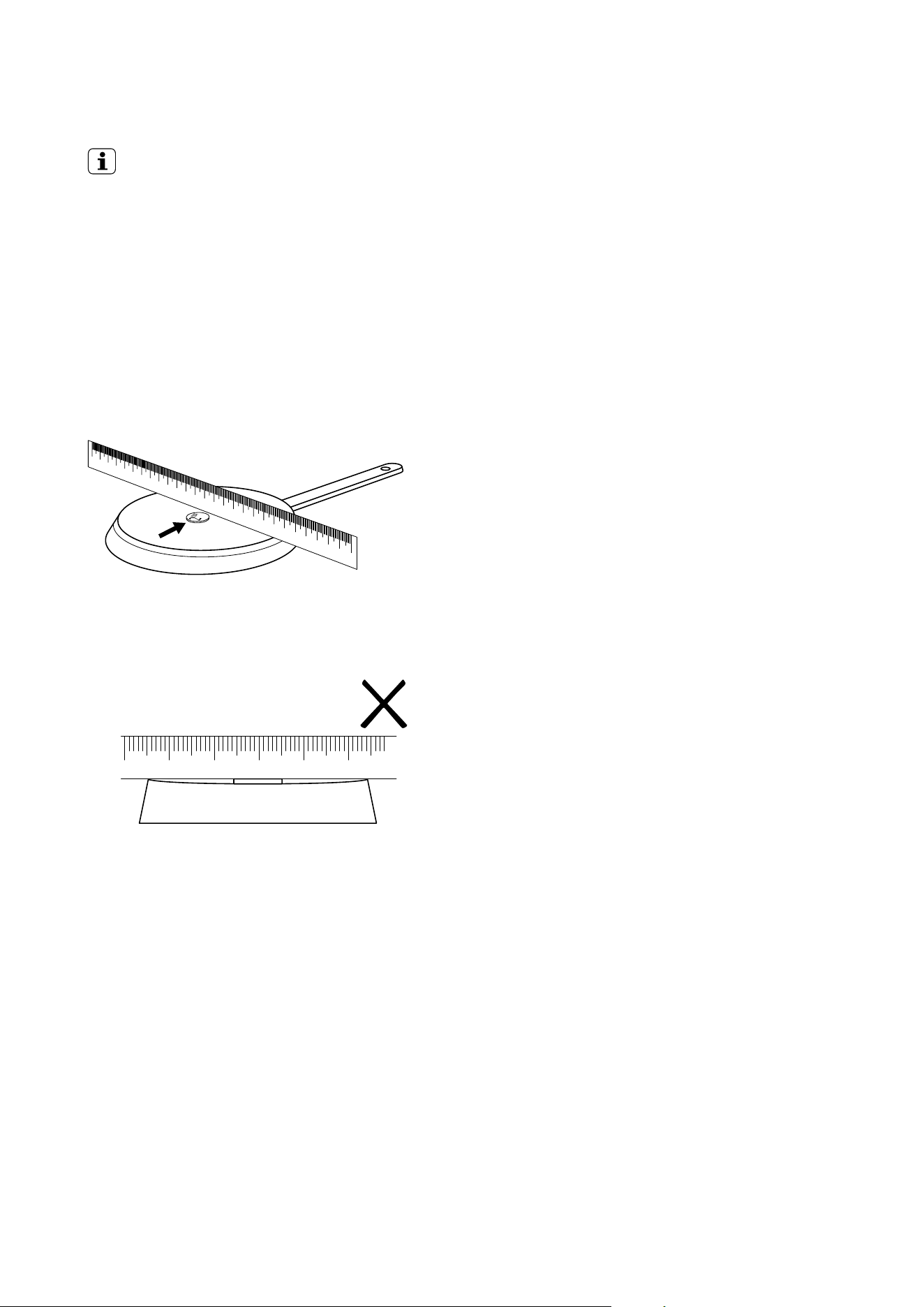
Correct pans for Fry Assist function
Use only pans with flat bottom. To check if
the pan is correct:
1. Put your pan upside down.
2. Put a ruler on the bottom of the pan.
3. Try to put a 5 cent coin or something with
similar thickness between the ruler and base
of the pan
a. The pan is incorrect if you can put the coin between
the ruler and the pan.
26 electrolux.com.au
CARE AND CLEANING
Clean the appliance after each use.
Always use cookware with clean bottom.
IMPORTANT
Scratches or dark stains on the glass ceramic have no
effect on how the appliance operates.
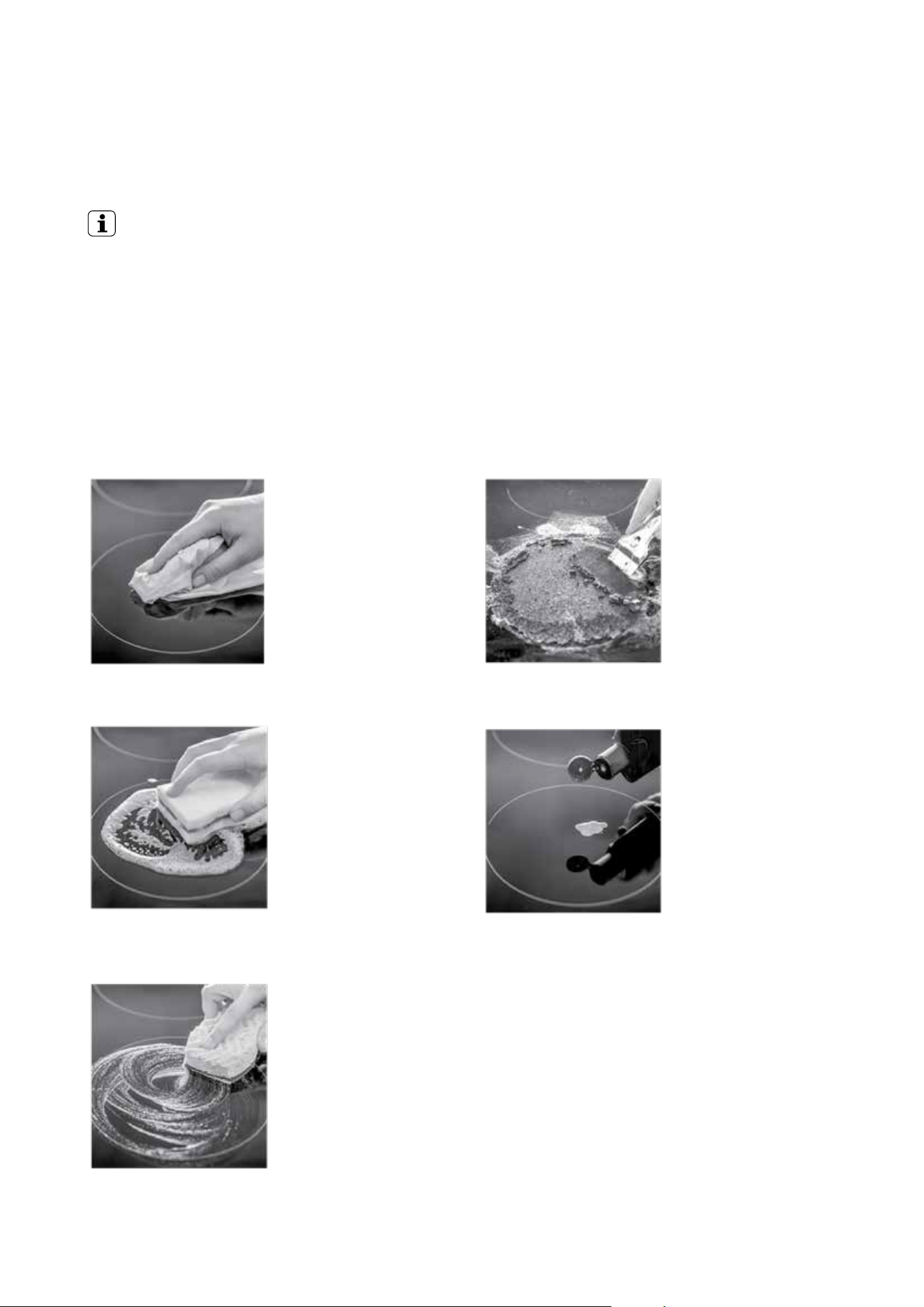
To remove the dirt
1. Remove immediately: melted plastic, plastic foil,
and food with sugar. If not, the residue can cause
damage to the appliance. Use a cooktop scraper that
is specially designed for use on ceramic glass. Put the
scraper on the glass surface at an acute angle and
move the blade on the surface.
2. Remove after the appliance is sufficiently cool:
limescale rings, water rings, fat, stains, shiny metallic
discolourations. Use a special cleaning agent for glass
ceramic or stainless steel.
3. Clean the appliance with a moist cloth and some
detergent.
4. At the end rub the appliance dry with a clean cloth.
If the deposit is
minimal, simply wipe
off with a dry cloth.
If the deposit is more
important, clean off
with a moist, soapy
sponge and rinse off.
If the deposit does not
clean off easily, use a
non-abrasive scratch
pad and a specially
adapted glass-ceramic
cleaning product
If the deposit does not
clean off with any of
the above mentioned
methods, use a
razor blade scraper,
specially designed
for glass-ceramic
cooktops.
Having successfully
cleaned the cooktop,
apply a glass ceramic
cooktop conditioner
which will protect the
cooktop surface against
any future stains, with a
dry cloth or equivalent.

27
TROUBLESHOOTING
Problem Possible cause Remedy
Red rings, limescale or water
rings, shiny metallic or other
discolouration, scratches/
shadows, bubbles or other
miscellaneous marks or stains on
ceramic glass cooktop surface.
Cooktop surface has not been cleaned
correctly. Cleaning/ maintenance of the
cooktop surface is not covered under
warranty. If a service call is placed to
clean the cooktop you will be charged for
the visit.
Use a ceramic glass cleaner such
as Cerapol.
Pitting of ceramic glass surface. Spillovers of liquid with high sugar
content.
These types of spills must be removed
immediately with a special scraper for the
glass. If not permanent damage to the
cooktop glass can occur which is not
covered under warranty.
You cannot activate the
appliance or operate it.
• You touched 2 or more sensor fields at
the same time.
• The keep warm function operates.
• There is water or fat stains on the
control panel.
Activate the appliance again and set the
heat setting in less than 10 seconds.
Touch only one sensor field.
Refer to the chapter “Operating
instructions”
Clean the control panel.
An acoustic signal sounds and
the appliance deactivates. An
acoustic signal sounds when
the appliance is deactivated.
You put something on one or more
sensor fields.
Remove the object from the sensor
fields.
The appliance deactivates. You put something on the sensor field. Remove the object from the sensor field.
The residual heat indicator does
not come on.
The cooking zone is not hot because it
operated only for a short time.
If the cooking zone operated sufficiently
long to be hot, speak to the service
centre.
The Automatic Heat Up function
does not operate.
The cooking zone is hot.
The highest heat setting is set.
Let the cooking zone become sufficiently
cool.
The highest heat setting has the same
power as the Automatic Heat Up function.
The heat setting changes
between two levels.
The Power management is activated. Refer to “Power management”.
Hob
2
Hood function does
not work
Object interrupting signal between hob
and the hood, or object covering the
control panel
Move items obstructing signal or covering
control panel
TROUBLESHOOTING
28 electrolux.com.au
TROUBLESHOOTING
If you tried the above solutions and cannot repair the
problem, speak to your dealer or the customer service
centre. Give the data from the rating plate and an error
message that comes on.
Make sure you operated the appliance correctly. If not the
servicing by a customer service technician or dealer will
not be free of charge, also during the warranty period.
The instructions about the customer service and
conditions of guarantee are in the guarantee booklet.
The sensor fields
become hot.
The cookware is too large or you put it
too near to the controls.
Put large cookware on the rear cooking zones if
necessary.
There is no signal
when you touch the
panel sensor fields.
The signals are deactivated. Activate the signals
(refer to “OffSound control”).
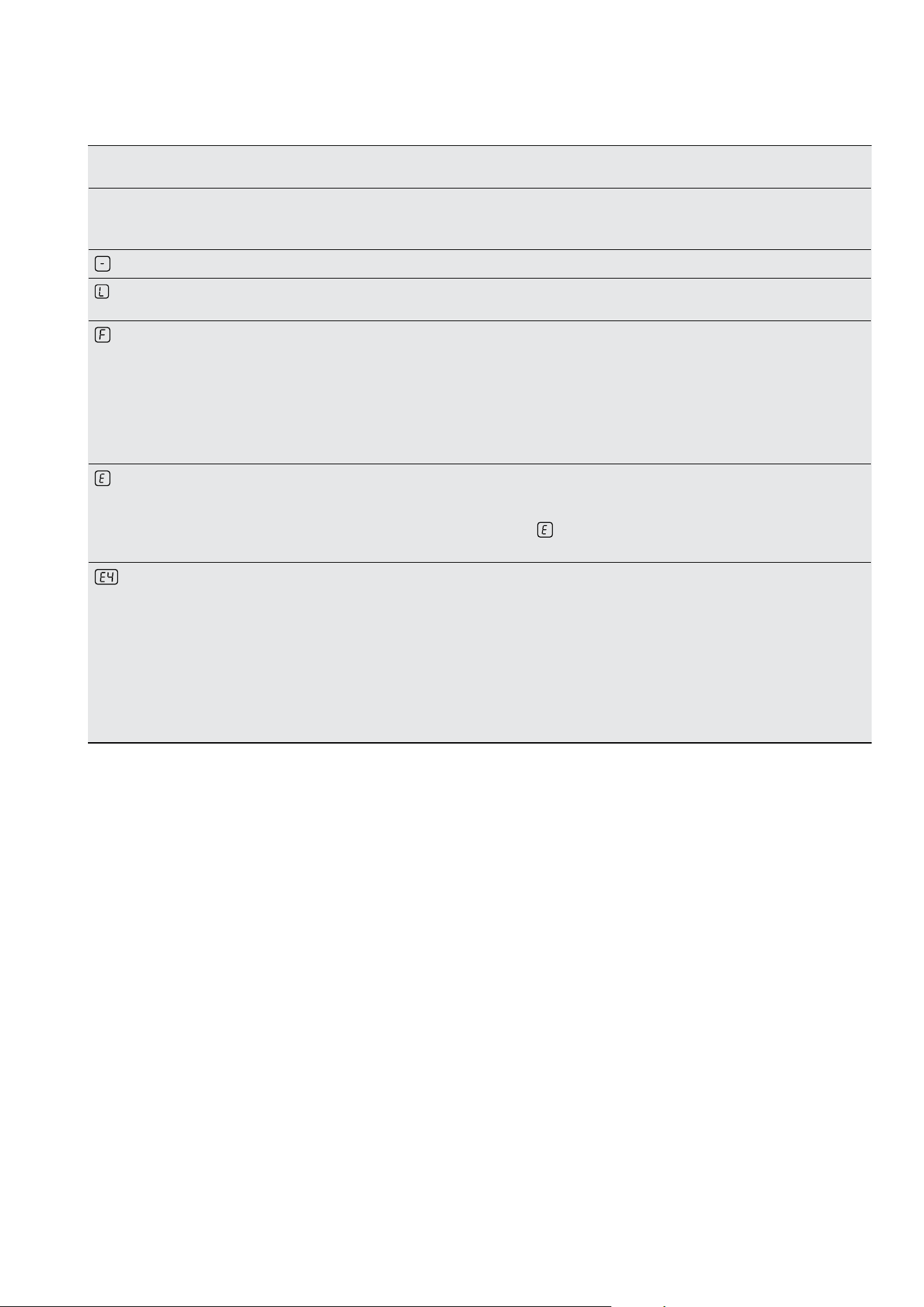
comes on
The automatic switch-off operates. Deactivate the appliance and activate it again.
comes on
The Child Safety Device or the Lock
function operates.
Refer to the chapter “Operating instructions”.
comes on
• No cookware on the cooking zone.
• Incorrect cookware.
• The diameter of the bottom of the
cookware is too small for the cooking
zone.
• The cookware do not cover the cross.
Put cookware on the cooking zone.
Use the correct cookware.
Use larger diameter cookware.
Cover the cross fully.
and number comes
on
There is an error in the appliance. Disconnect the appliance from the electrical supply
for some time. Disconnect the fuse from the
electrical system of the house. Connect it again. If
comes on again, speak to the customer service
centre.
comes on
There is an error in the appliance,
because either the cookware boils dry
or you’ve used incorrect cookware.
Overheating protection for cooking zone
operates. The automatic switch-off
operates.
Deactivate the appliance. Remove the hot
cookware. After approximately 30 seconds,
activate the cooking zone again. If the cookware
was the problem, the error message goes out of
the display, but the residual heat indicator can stay.
Let the cookware become sufficiently cool and
refer to “Cookware for the induction cooking zone”
to see if your cookware is compatible with the
appliance.
29
WARNING!
Refer to “Safety information” chapter.
IMPORTANT
BEFORE INSTALLATION
Before the installation of the appliance, record the
information below from the rating plate. The rating plate is
on the bottom of the appliance casing.
Model
PNC
Serial number
Built-in appliances
Only use the built-in appliances after you assemble the
appliance into correct built-in units and work surfaces that
align to the standards.
Connection cable
• Use the correct mains cable of type H05BB-F Tmax
90°C (or higher) 3 x 4mm
2
with an all-pole 32A breaker.
• The earth cord (green/yellow cable) must be 2cm longer
than phase and neutral cable (blue and brown cables).
INSTALLATION
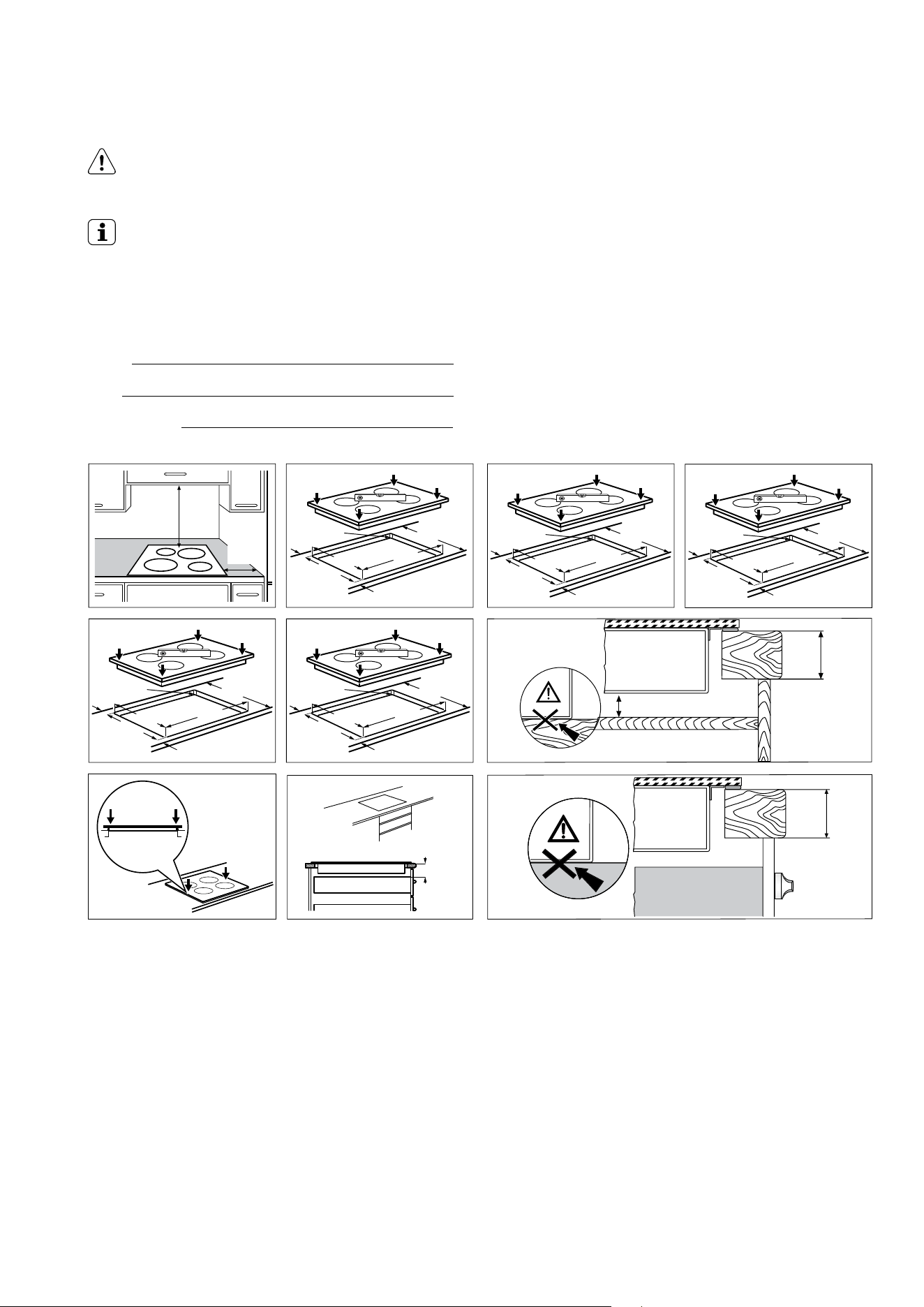
*Note: The clearance must meet or exceed the minimum recommended for both the rangehood and cooktop.
Refer to the rangehood installation manual.
min.
60mm
=
=
=
=
=
=
=
=
=
=
R 5mm
R 5mm
520mm 520mm
490
+1
mm
490
+1
mm
560
+1
mm
560
+1
mm
min.
500mm*
min.
50mm
EHI635BE EHI645BE
R 5mm
520mm
EHI745BE
490
+1
mm
680
+1
mm
R 5mm
520mm
EHI955BE
490
+1
mm
880
+1
mm
R 5mm
520mm
EHI977BE
490
+1
mm
880
+1
mm
min.
25mm
min. 8 mm
min.
25 mm

30 electrolux.com.au
Model.
Ser.Nr.
ELECTROLUX
Cooking
zone
Nominal Power
(Max heat setting) (W)
Power Function
activated (W)
Power function maximum
duration (min)
Minimum
cookware
diameter (mm)
Right front 1800 W
3500 W
2800 W
5200 W
5
5
145-245
245-280
Left rear 2300 W 3200 W 10 125-210
Left front 2300 W 3200 W 10 125-210
Cooking
zone
Nominal Power
(Max heat setting) (W)
Power Function
activated (W)
Power function maximum
duration (min)
Minimum
cookware
diameter (mm)
Right front 140 0 W 2500 W 4 125-145
Right rear 1800 W 2800 W 10 145-180
Left front 2300 W 3200 W 10 125-210
Left rear 2300 W 3200 W 10 125-210
Cooking
zone
Nominal Power
(Max heat setting) (W)
Power Function
activated (W)
Power function maximum
duration (min)
Minimum
cookware
diameter (mm)
Right front 140 0 W 2500 W 4 125-145
Right rear 2300 W 3600 W 10 180-240
Left front 2300 W 3200 W 10 125-210
Left rear 2300 W 3200 W 10 125-210
TECHNICAL INFORMATION
EHI635BE Induction 7.4kW
EHI645BE Induction 7.4kW
EHI745BE Induction 7.4kW
Voltage (volts) 220-240
Cycles (Hz) 50-60

31
The power of the cooking zones can be different in some
small ranges from the data in the table. It changes with the
material and dimensions of the cookware.
ENVIRONMENT
Recycle the materials with the symbol
.
Put the packaging in applicable containers to recycle
it. Help protect the environment and human health
by recycling electrical and electronic appliance waste
correctly. Do not dispose appliances marked with the
symbol
with the household waste. Return the product to
your local recycling facility or contact your municipal office.
Cooking zone Nominal Power
(Max heat setting) (W)
Power Function
activated (W)
Power function
maximum
duration (min)
Minimum
cookware
diameter (mm)
Middle front 1800 W
3500 W
2800 W
5200 W
5
5
145-245
245-280
Right front 140 0 W 2500 W 4 125-145
Right rear 1800 W 2800 W 10 145-180
Left front 2300 W 3200 W 10 125-210
Left rear 2300 W 3200 W 10 125-210
Cooking zone Nominal Power
(Max heat setting) (W)
Power Function
activated (W)
Power function
maximum
duration (min)
Minimum
cookware
diameter (mm)
Middle front 1800 W
3500 W
2800 W
5200 W
5
5
145-245
245-280
Right front 140 0 W 2500 W 4 125-145
Right rear 1800 W 2800 W 10 145-180
Flexible induction
cooking area
2300 W 3400 W 10 Minimum 100
EHI955BE Induction 7.4kW
EHI977BE Induction 7.4kW

32 electrolux.com.au
NOTES

33
NOTES

34 electrolux.com.au
NOTES

35
This document sets out the terms and conditions of the product
warranties for Electrolux Appliances. It is an important document.
Please keep it with your proof of purchase documents in a safe place
for future reference should there be a manufacturing defect in your
Appliance. This warranty is in addition to other rights you may have
under the Australian Consumer Law.
1. In this warranty:
(a) ‘ACL’ or ‘Australian Consumer Law’ means Schedule 2 to the
Competition and Consumer Act 2010;
(b) ‘Appliance’ means any Electrolux product purchased by you and
accompanied by this document;
(c) ‘ASC’ means Electrolux’s authorised serviced centres;
(d) ‘Electrolux’ is the brand controlled by Electrolux Home Products Pty
Ltd of 163 O’Riordan Street, Mascot NSW 2020, ABN 51 004 762
341 in respect of Appliances purchased in Australia and Electrolux
(NZ) Limited (collectively “Electrolux”) of 3-5 Niall Burgess Road, Mount
Wellington, in respect of Appliances purchased in New Zealand;
(e) ‘WarrantyPeriod’meanstheperiodspeciedinclause3ofthis
warranty;
(f) ‘you’ means the purchaser of the Appliance not having purchased
the Appliance for re-sale, and ‘your’ has a corresponding meaning.
2. Application: This warranty only applies to new Appliances, purchased
and used in Australia or New Zealand and is in addition to (and does not
exclude, restrict, or modify in any way) other rights and remedies under
a law to which the Appliances or services relate, including any non-
excludable statutory guarantees in Australia and New Zealand.
3. Warranty Period: Subject to these terms and conditions, this warranty
continues in Australia for a period of 24 months and in New Zealand
for a period of 24 months, following the date of original purchase of the
Appliance.
4. Repair or replace warranty: During the Warranty Period, Electrolux
or its ASC will, at no extra charge if your Appliance is readily accessible
for service, without special equipment and subject to these terms and
conditions, repair or replace any parts which it considers to be defective.
Electrolux may, in its absolute discretion, choose whether the remedy
oeredforavalidwarrantyclaimisrepairorreplacement.Electroluxorits
ASC may use refurbished parts to repair your Appliance. You agree that
any replaced Appliances or parts become the property of Electrolux.
5. Travel and transportation costs: Subject to clause 7, Electrolux will
bear the reasonable cost of transportation, travel and delivery of the
Appliance to and from Electrolux or its ASC. Travel and transportation
will be arranged by Electrolux as part of any valid warranty claim.
6. Proof of purchase is required before you can make a claim under this
warranty.
7. Exclusions: You may not make a claim under this warranty unless
the defect claimed is due to faulty or defective parts or workmanship.
This warranty does not cover:
(a) lightglobes,batteries,ltersorsimilarperishableparts;
(b) parts and Appliances not supplied by Electrolux;
(c) cosmeticdamagewhichdoesnotaecttheoperationofthe
Appliance;
(d) damage to the Appliance caused by:
(i) negligence or accident;
(ii) misuse or abuse, including failure to properly maintain or service;
(iii) improper, negligent or faulty servicing or repair works done by
anyone other than an Electrolux authorised repairer or ASC;
(iv) normal wear and tear;
(v) power surges, electrical storm damage or incorrect power supply;
(vi) incomplete or improper installation;
(vii) incorrect, improper or inappropriate operation;
(viii) insect or vermin infestation;
(ix) failure to comply with any additional instructions supplied with
the Appliance;
In addition, Electrolux is not liable under this warranty if:
(a) the Appliance has been, or Electrolux reasonably believes that the
Appliance has been, used for purposes other than those for which
the Appliance was intended, including where the Appliance has
been used for any non-domestic purpose;
(b) theApplianceismodiedwithoutauthorityfromElectroluxinwriting;
(c) the Appliance’s serial number or warranty seal has been removed
or defaced
8. How to claim under this warranty: To enquire about claiming under
this warranty, please follow these steps:
(a) carefully check the operating instructions, user manual and the terms
of this warranty;
(b) have the model and serial number of the Appliance available;
(c) have the proof of purchase (e.g. an invoice) available;
(d) telephone the numbers shown below.
9. Australia: For Appliances and services provided by Electrolux in
Australia: Electrolux goods come with guarantees that cannot be
excluded under the Australian Consumer Law. You are entitled to a
replacement or refund for a major failure and for compensation for any
other reasonably foreseeable loss or damage. You are also entitled to
have the Appliance repaired or replaced if the Appliance fails to be of
acceptable quality and the failure does not amount to a major failure.
‘Acceptable quality’ and ‘major failure’ have the same meaning as
referred to in the ACL.
10. New Zealand: For Appliances and services provided by Electrolux
in New Zealand, the Appliances come with a guarantee by Electrolux
pursuant to the provisions of the Consumer Guarantees Act, the Sale
of Goods Act and the Fair Trading Act. Where the Appliance was
purchased in New Zealand for commercial purposes the Consumer
Guarantee Act does not apply.
11.Condentiality: You accept that if you make a warranty claim, Electrolux
and its agents including ASC may exchange information in relation to you
to enable Electrolux to meet its obligations under this warranty.
Warranty
FOR SALES IN AUSTRALIA AND NEW ZEALAND
APPLIANCE: ELECTROLUX BUILT-IN OVENS, COOKTOPS,
FREESTANDING COOKER AND WARMING DRAWER
ECook_Warr_Jul19
Important Notice
Before calling for service, please ensure that the steps listed in clause 8 above have been followed.
AUSTRALIA
FOR SERVICE
ortondtheaddressofyournearest
authorised service centre in Australia
PLEASE CALL 13 13 49
For the cost of a local call
FOR SPARE PARTS
ortondtheaddressofyournearest
spare parts centre in Australia
PLEASE CALL 13 13 50
For the cost of a local call
NEW ZEALAND
FOR SERVICE
ortondtheaddressofyournearest
authorised service centre in New Zealand
PLEASE CALL 0800 10 66 10
FOR SPARE PARTS
ortondtheaddressofyournearest
spare parts centre in New Zealand
PLEASE CALL 0800 10 66 20
shop.electrolux.com.au
Electrolux Home Products Australia
telephone: 1300 363 640
fax: 1800 350 067
email: customercare@electrolux.com.au
web: electrolux.com.au
Electrolux Home Products New Zealand
telephone: 0800 436 245
fax: 0800 225 088
email: customercare@electrolux.co.nz
web: electrolux.co.nz
To add a touch of
professional inspiration
to your home, visit
electrolux.com.au
or electrolux.co.nz
electrolux.com.au
or electrolux.co.nz
P/No. ANC A22211202 Rev.A
© 2021 Electrolux Home Products Pty Ltd.
EMAN_Induction_Hobs_Sep21