Hi! Let’s get started.
55/65/75/85A300W
REGISTER NOW
See inside for details &
protect your purchase
*The stands are sold separately
Product Replacement
Free 1-time replacement if product cannot be fixed.
TCL Parts & Service
Genuine TCL parts & factory certified service.
No Deductible
$0 out of pocket expense.
Pixel Repair and Burn-In Coverage
Don’t let shadow xels prevent you from clear viewing.
Accidental Damage Protection
Coverage for drops, breaks and spills starts after 30 days.
Complimentary Remove & Reinstall
Don’t risk it-we’ll remove and reinstall televisions 65” and larger.
Lost Your Remote?
No problem! We’ll replace your remote, so you never have to
leave your couch. One time only.
Priority Service
Free shipping and rapid turn-around time.
Extended Manufacturer Coverage
Extended parts & labor coverage for manufacturer defects.
PROTECT PROTECT PLUS
Thank you for choosing TCL. We want your ownership experience to bring you as much joy as the
you purchase during registration. Add a TCL Protection Plan within your first 30 days of ownership
to receive the best value and we won’t let anything get in the way of your viewing pleasure.
Add a TCL Protection Plan when you register your
product and be covered from life’s mishaps
Benefits & Description
Up To 4 Years
3-5 Days
3-5 Days
Up To 4 Years
Text a photo of the
camera icon to 71403
TEXT TO REGISTER
Or register online at register.tcl.com
Need help? Visit photoregister.com/help or text HELP to 71403
Register and protect your purchase
TCLNXTFRMTV
DO NOT RETURN TO STORE
TCL SUPPORT:
support.tcl.com
1-877-854-0181
contact us first
with any questions
WE ARE
READY TO
HELP
TAKE CARE WHEN
REMOVING THE TV
1
WARNING
To reduce the risk of fire or electric shock, do
not expose this product to rain or moisture.
This product should not be exposed to dripping
or splashing. No objects filled with liquids, such
as vases, should be placed on the apparatus.
WARNING
The TV is unstable if it is not properly attached to
the base or mounted to the wall. Please follow the
base or wall mounting instructions provided in the
User’s Guide to ensure your safety.
Warning: The batteries should not be exposed to excessive heat, such as prolonged direct
Model No.
Purchase Date
Serial No.
Dealer/Address/Phone
Important Information
sunlight, open flame, or fire of any kind. Refer to the identification/rating label located on the back
panel of your product for its proper operating voltage.
Cable TV Installer:
This reminder is provided to call your attention to Article 820-40 of the National
Electrical Code (Section 54 of the Canadian Electrical Code, Part 1) which provides guidelines for proper
grounding and, in particular, specifies that the cable ground should be connected to the grounding system
of the building as close to the point of cable entry as practical.
Important:
This television is a table model and is designed to sit on a firm, flat surface. Do not place
the TV on soft carpeting or on a similar surface as this may cause the ventilation slots located on
the bottom of the unit to be blocked and may result in reduced product lifespan from overheating.
To assure adequate ventilation for this product, maintain a spacing of one (1) inch from the top and
side of the TV receiver and two (2) inches from the rear of the TV receiver and other surfaces.
Make sure the TV stand or base you use is of adequate size and strength to prevent the TV from
damage the TV. Refer to the Important Safety Instructions on the next page.
The Power button on this TV and your remote control puts the TV into a very low-power standby
mode but will not completely turn the power o . In order to completely shut the power o , you will
need to disconnect the power cord from the outlet. The mains plug/appliance coupler is used to
completely turn o the device. If you prefer to completely turn o the device, you should install
the
TV in a manner that allows you to disconnect the power cord when desired.
Product Information
Keep your sales receipt to obtain warranty parts and service and for proof of purchase. Attach it here
and record the serial and model numbers in case you need them. These numbers are located on
the
product.
Warning: Changes or modifications to this unit not expressly approved by the party responsible for
compliance could void the user’s authority to operate the equipment. Keep the apparatus at least
8
inches away from the human body.
Caution: To reduce the risk of electric shock, do not remove cover (or back). No user serviceable parts inside.
Refer servicing to qualified service personnel.
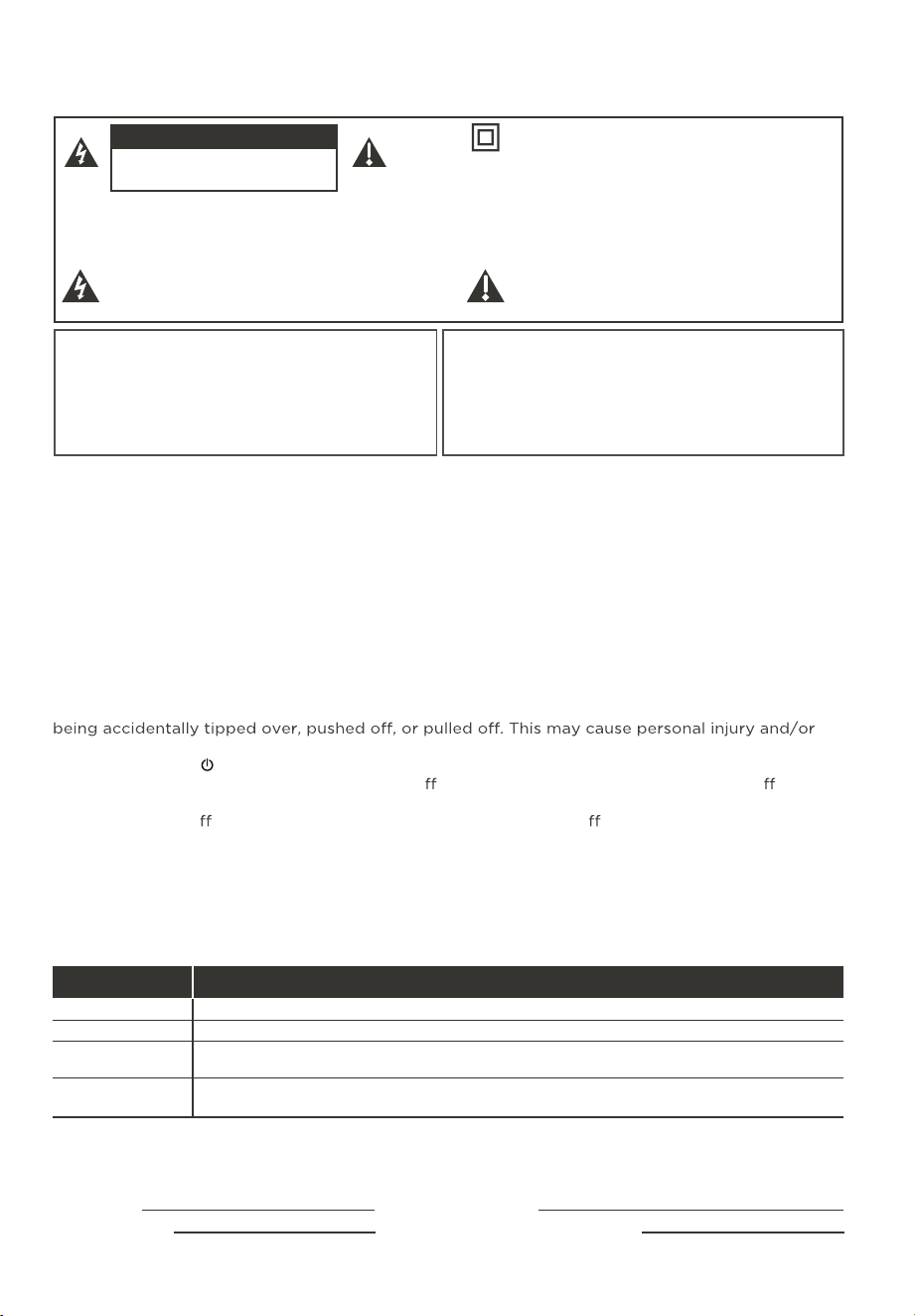
This symbol indicates “dangerous voltage”
inside the product that presents a risk of
electric shock or personal injury.
This symbol indicates important instructions
accompanying the product.
This symbol indicates that this product incorporates
double insulation between hazardous main voltage
and user accessible parts. When servicing, use only
identical replacement parts.
CAUTION: Neutral fusing. Disconnect mains before servicing.
CAUTION
RISK OF ELECTRIC SHOCK.
DO NOT OPEN.
For the best viewing experience, remove the energy guide label from the TV front panel or TV screen
before use.
Input Signal Compatibility
480p, 720p/60Hz, 1080p/24/30/50/60/120/144*/240Hz,
1440p/60/120/144Hz*, 2160p/24/30/50/60/120/144Hz*
480i
480i, 480p, 720p, 1080i (NTSC, ATSC, and QAM formats)
HDMI 1 & 2
480p, 720p/60Hz, 1080p/24/30/50/60Hz,
1440p/50/60Hz, 2160p/24/30/50/60Hz
HDMI 3 & 4
Composite Video
Antenna/Cable
*
144Hz is only supported when VRR (Variable Refresh Rate) is enabled.
2
Important Safety Instructions
1. Read these instructions.
2. Keep these instructions.
3. Heed all warnings.
4. Follow all instructions.
5. Do not use this apparatus near water.
6. Clean only with a dry cloth.
7. Do not block any ventilation openings. Install in accordance with the manufacturer’s instructions.
8. Do not install near any heat sources such as radiators, heat registers, stoves, or other apparatus (including
amplifiers) that produce heat.
9. Protect the power cord from being walked on or pinched particularly at plugs, convenience receptacles,
and the point where they exit from the apparatus.
10. WARNING: Please refer the information on exterior bottom enclosure for electrical and safety information
before installing or operating the apparatus.
11. WARNING: The main plug is used to disconnect the device and should remain readily operable.
12. When not in use, tie up the power cordset with a cable tie or with something similar. It should not be
near sharp edges as it may cause abrasion of the power cordset. When put into use again, please make
sure the power cordset is not damaged. If any damage is found, please use a replacement power cord
specified by the manufacturer or that is identical to the original one.
13. No open flame sources, such as lit candles, should be placed on, under, or near the apparatus.
14.
Unplug this apparatus during lightning storms or when unused for long periods of time.
15. Only use attachments/accessories specified by the manufacturer.
16. Use only with the cart, stand, tripod, bracket, or table specified by the manufacturer,
or sold with the apparatus. When a cart is used, use caution when moving the
cart/apparatus combination to avoid any injury.
17. Refer all servicing to qualified service personnel. Servicing is required when the apparatus has been
damaged in any way, such as power-supply cord or plug is damaged, liquid has been spilled or objects
have fallen into the apparatus, the apparatus has been exposed to rain or moisture, does not operate
normally, or has been dropped.
18. For safe operation of the apparatus, please follow these installation requirements:
Keep at least 2 inches of ventilation space between the rear cover of the apparatus and the wall.
Keep at least 1 inch of ventilation space between the apparatus and all other surfaces. Do not allow
any of the apparatus’ ventilation openings to be blocked by objects that might obstruct them, such
as newspapers, curtains, table-cloths or any other objects. Do not expose the apparatus to any external
heat sources. Do not place any heat sources such as candles, lamps, etc. on the apparatus. Do not expose
the device to high levels of humidity or to any possible sources of moisture. When disposing of used
batteries
from the remote control, consult local regulations regarding proper disposal.
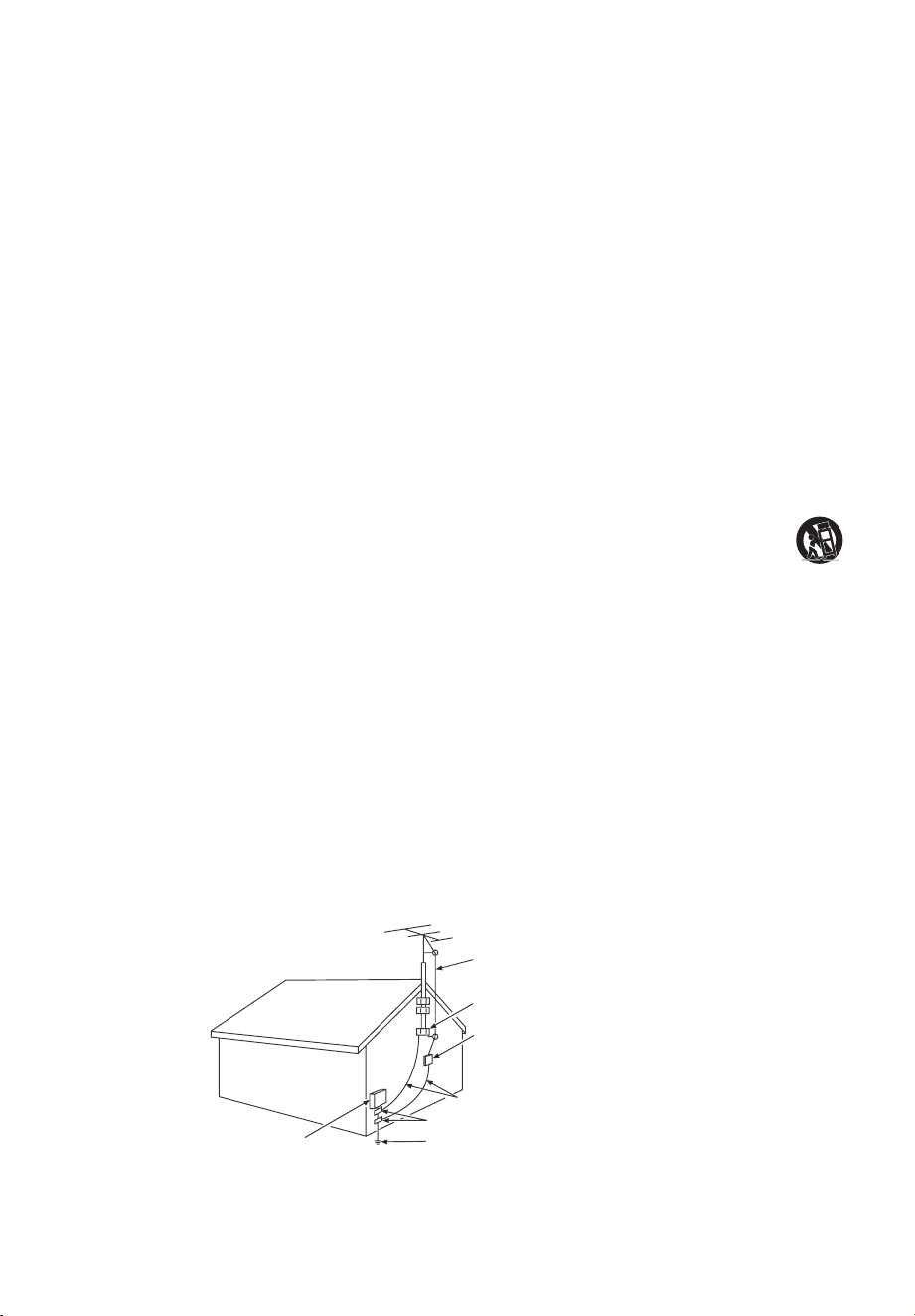
19. If an outside antenna or cable system is connected to the product, be sure the antenna or cable system
is grounded so as to provide some protection against voltage surges and built-up static charges. Section
810 of the National Electrical Code, ANSI/NFPA No. 70-2011 (Section 54 of Canadian Electrical Code,
Part 1) provides information with respect to proper grounding of the mast and supporting structure,
grounding of the lead in wire to an antenna-discharge unit, size of grounding conductors, location of
antenna discharge unit, connection to grounding electrodes, and requirements for the grounding electrode.
See following example:
ANTENNA LEAD IN WIRE
GROUND CLAMP
ANTENNA DISCHARGE UNIT
(NEC SECTION 810-20)
GROUND CLAMPS
GROUNDING CONDUCTORS
(NEC SECTION 810-21)
ELECTRIC SERVICE
EQUIPMENT
POWER SERVICE GROUNDING
ELECTRODE SYSTEM (NEC ART
250, PART H)
3
FCC Information
This equipment has been tested and found to comply with the limits for a Class B digital device, pursuant to
Part 15 of the FCC Rules. These limits are designed to provide reasonable protection against harmful interference
in a residential installation. This equipment generates, uses, and can radiate radio frequency energy and, if not
installed and used in accordance with the instructions, may cause harmful interference to radio communications.
However, there is no guarantee that interference will not occur in a particular installation. If this equipment does
cause harmful interference to radio or television reception, which can be determined by turning the equipment o
and on, the user is encouraged to try to correct the interference by one or more of the following measures:
Reorient or relocate the receiving antenna.
Increase the separation between the equipment and receiver.
Connect the equipment into an outlet on a circuit dierent from that to which the receiver is connected.
Consult the dealer or an experienced radio/TV technician for help.
This Class B digital apparatus complies with Canadian ICES-003.
The series, include models (55/65/75/85A300W)
This device complies with part 15 of the FCC Rules. Operation is subject to the following two conditions:
(1) This device may not cause harmful interference, and
(2) this device must accept any interference received, including interference that may cause
undesired operation.
Supplier Name: TTE Technology, Inc. (dba TCL North America)
Supplier Address: 189 Technology Drive, Irvine, CA 92618, USA
Supplier phone number and internet contact information: 1-877-854-0181 support.tcl.com
ELECTRONICS & PACKAGING RECYCLING INFORMATION
locations in your area, please visit the “Electronics Recycling” area of the TCL website at www.tcl.com.
Click on our convenient interactive map to quickly locate a solution in your community. TCL encourages
consumers to always look for a recycling or reuse alternative to discarding televisions and other electronics,
Look for convenient How2Recycle® labels on the product box for help preparing your new TV packaging for
recycling. These labels show important information identifying the various types of packaging material included
with your new TV along with easy-to-understand recycling instructions.
The terms HDMI, HDMI High-Definition Multimedia Interface, HDMI Trade Dress
and the HDMI Logos are trademarks or registered trademarks of HDMI Licensing
Administrator, Inc.
Do not use packaging bags in cribs, beds, carriages, or playpens.
Battery CAUTION & Disposal Information
1. For best results, use alkaline-type batteries.
2. Do not mix Alkaline, Standard (Carbon-Zinc), or Rechargeable (Nickel Cadmium or Nickel Metal
Hydride) batteries.
3.
Always replace depleted batteries with two same brand-new batteries from the same manufacturer.
Never use damaged batteries.
4. Do not use Rechargeable (Nickel Cadmium or Nickel Metal Hydride) batteries.
5. Install only new batteries of the same type in your product. There is a risk of fire or explosion if the
battery is replaced by an incorrect type.
6. Do not mix old and new batteries.
7.
8. Batteries should not be exposed to extremely low air pressure as it may result in an explosion or the
leakage of flammable liquid or gas.
Batteries should not be exposed to excessive heat, such as prolonged direct sunlight, open flame,
or fire of any kind as it may result in an explosion, or leakage of flammable liquid, or gas.
9. Failure to insert batteries in the correct polarity, as indicated in the battery compartment, may shorten
the life of the batteries or cause batteries to leak.
10. Batteries should be recycled or disposed of as per state and local guidelines. Do not dispose of batteries
in a fire, hot oven, or mechanically crushing or cutting a battery, which may result in an explosion.
For DTS patents, see http://patents.dts.com. Manufactured under license
from DTS, Inc. or DTS Licensing Limited. DTS, DTS:X, Virtual:X, and the
DTS:X logo are registered trademarks or trademarks of DTS, Inc. in the
United States and other countries. © 2021 DTS, Inc. ALL RIGHTS RESERVED.
Dolby, Dolby Vision, Dolby Vision IQ, Dolby Atmos, Dolby Audio and the
double-D symbol are trademarks of Dolby Laboratories Licensing Corporation.
Manufactured under license from Dolby Laboratories. Confidential unpublished
works. Copyright © 1992–2024 Dolby Laboratories. All rights reserved.
4
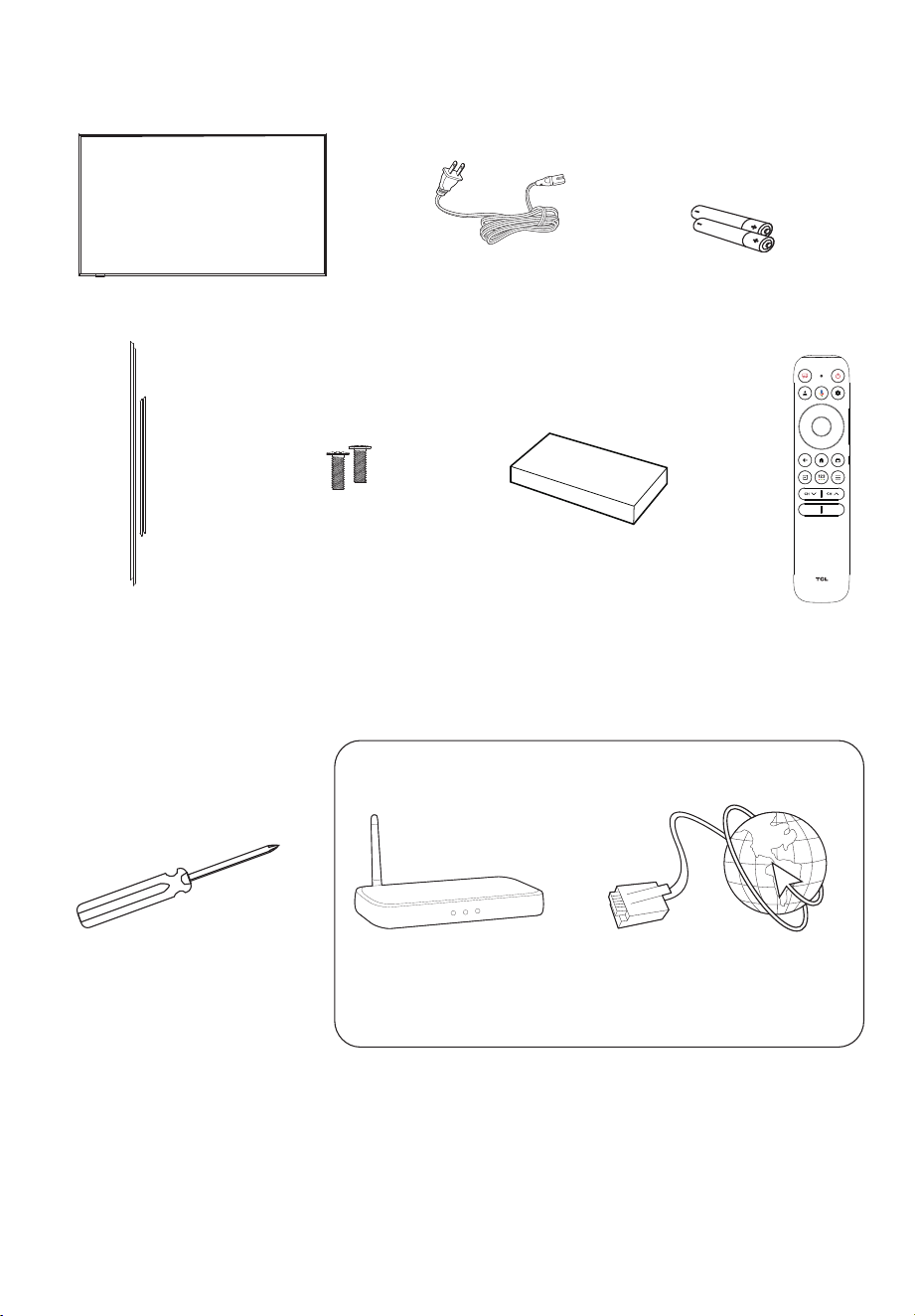
What’s in the box
TV remote
What you need
Phillips head
screwdriver
For additional support, please visit support.tcl.com
Make the most of your TV
Router + Internet Connection
(needed for streaming)
TCL TV
2 x AAA batteries
for remote
Power cable
Wall mount bracket4 x Magnetic bezels
2 x Magnetic
bezel screws
M2.5X7mm
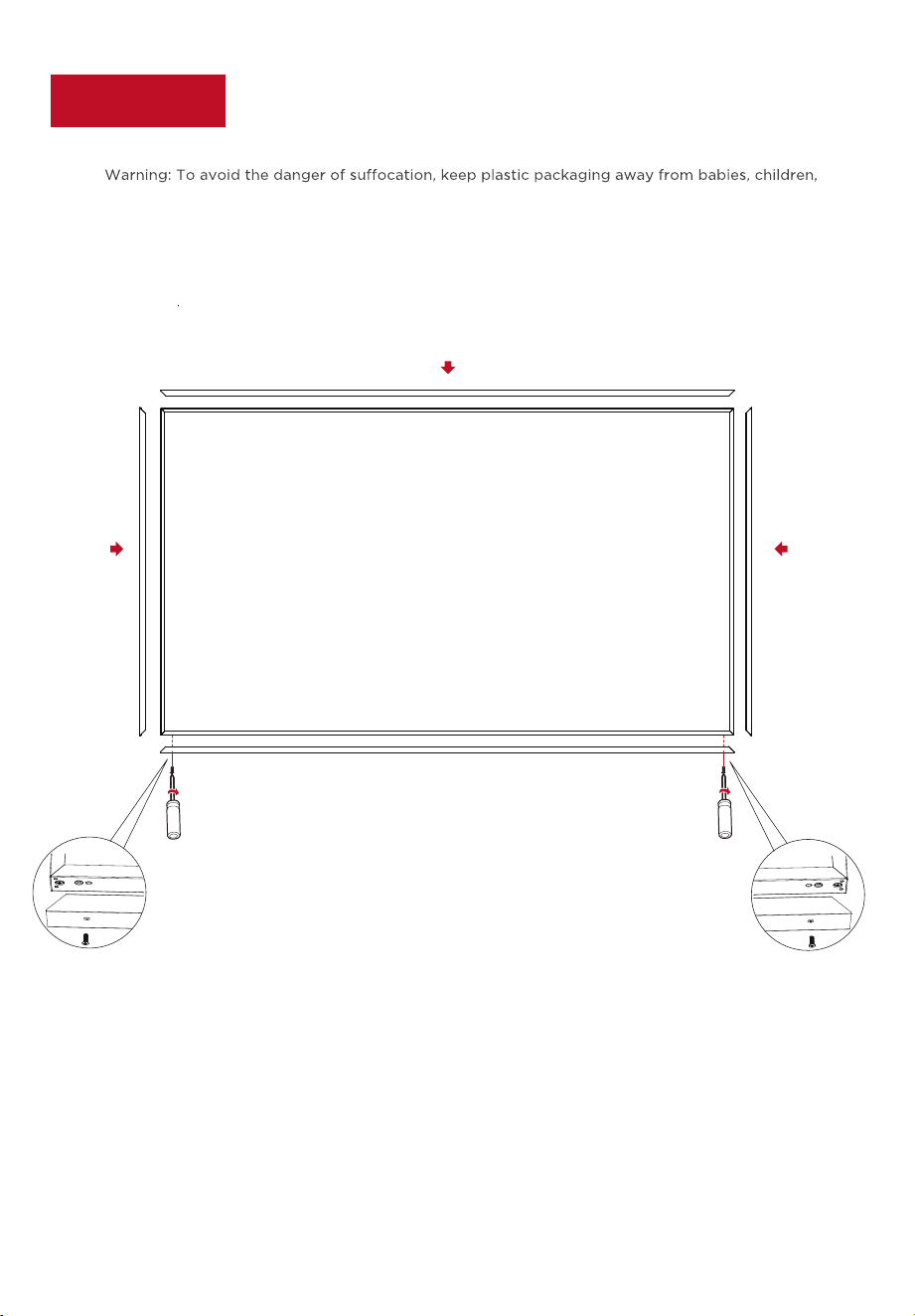
Step 1 Set up your TV
Remove your TV from the box
To use the decorative bezels
Be careful, it’s heavy!
Ready for the step-by-step? You’re only minutes away from TV bliss!
and pets. Do not use packaging bags in cribs, beds, carriages, or playpens.
① ①
② ②
③
Note: Before moving the TV, remove the magnetic decorative bezels first to avoid any falling.
5
6
In this step, we’ll make sure all systems are a GO!
Connect your power cable to the TV, then plug it into the wall outlet.
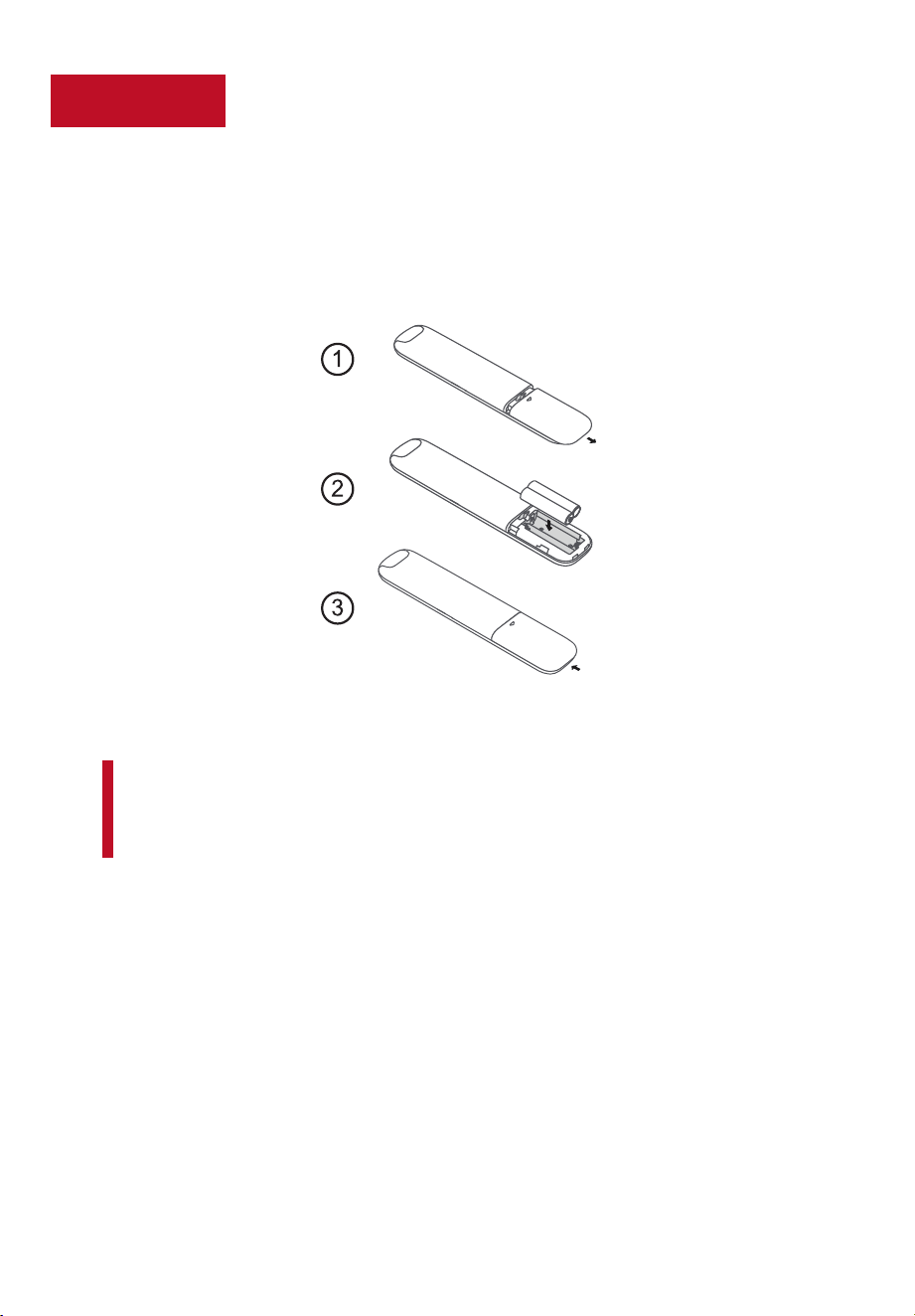
Power Tip! Always replace depleted batteries with two same brand-new batteries from the same
manufacturer. Never use damaged batteries.
If your remote gets warm/hot during use, discontinue use and contact customer support immediately
at support.tcl.com.
Review the Battery CAUTION & Disposal Information on page 3.
Power your TV remote by inserting the included batteries.
Step 2 Power up
If applicable, connect external devices by referencing port label and
descriptions on Page 8.
Insert batteries in the correct polarity as
indicated in the battery compartment.
7
remoteGrab yourStep 3
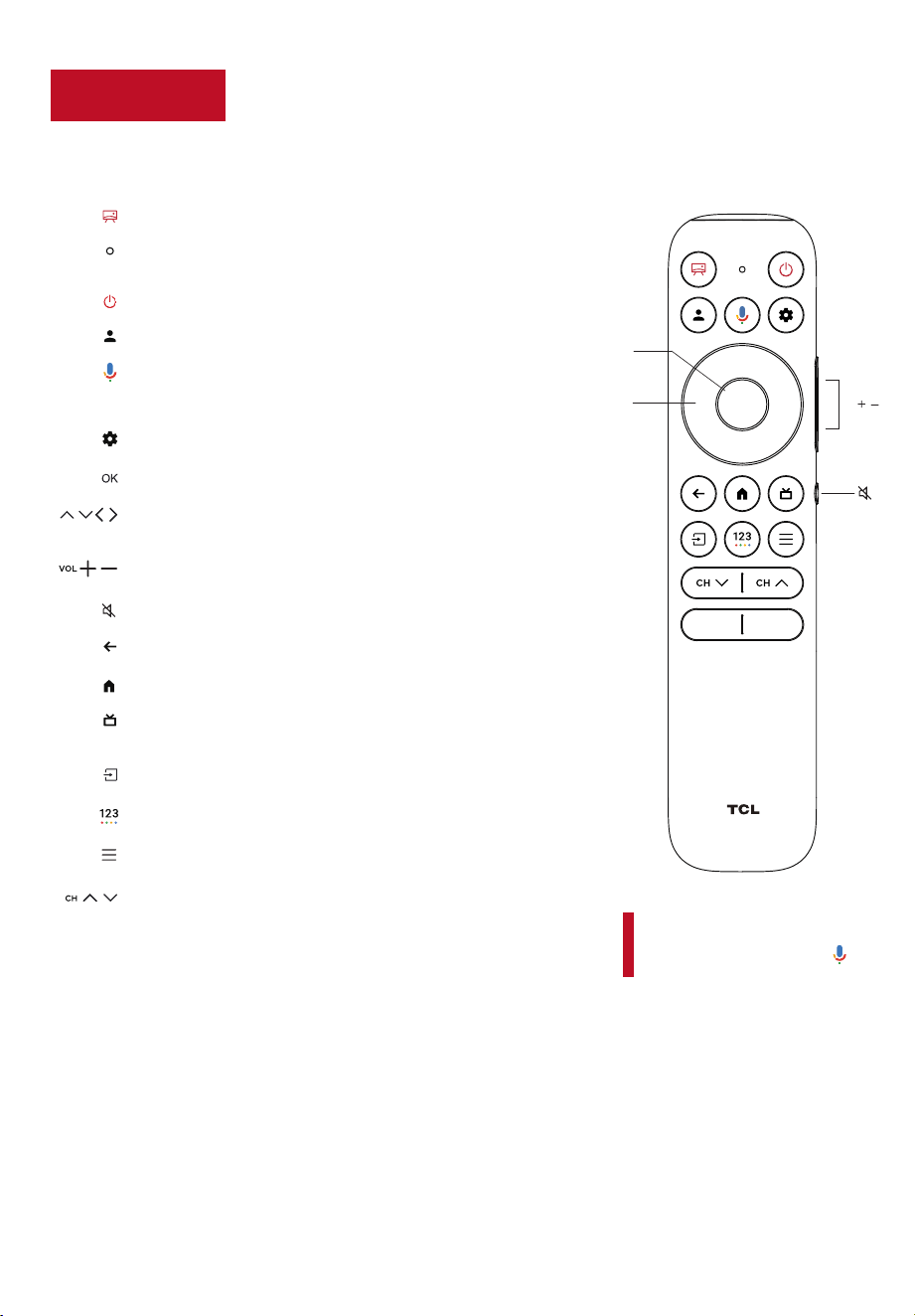
The TV remote should feel right at home in your hand. We designed it to
be
incredibly intuitive for watching TV and navigating on-screen menus.
Tip! Follow the on-screen guide
to pair the remote control with
the TV when pressing the
button for the first time.
A
GOOGLE ASSISTANT BUTTON
Press to activate the
remote’s Google Assistant microphone. Search content
through your voice by holding down the button.
POWER Turn TV on and o
PROFILE SELECTOR Switch profile
SETTINGS To display the dashboard menu
OK BUTTON To confirm an entry or selection
BACK
Return to previous screen
HOME
To access the TV homepage
REMOTE MICROPHONE Talk to the remote microphone
after pressing the Google Assistant button
ART MODE To access artistic mode setting.
CIRCULAR D-PAD
Navigation direction buttons
(Up/Down/Left/Right)
/
/ /
LIVE GUIDE
Open the Live TV Electronic Programming
Guide (EPG)
VOLUME
Raise and lower volume
CHANNEL To change channels
QUICK SETTINGS
Open the quick menu
MUTE
Press the button to mute the sound
VIRTUAL KEYBOARD
To display the on-screen keyboard
/
/
A
INPUT To select input source and display the quick panel
Circular
D-Pad
OK
VOL /
Note:
For the better user experience, please press and hold the
“HOME” and “OK” buttons on your remote at the same time
to pair the remote control.
Step 4
8
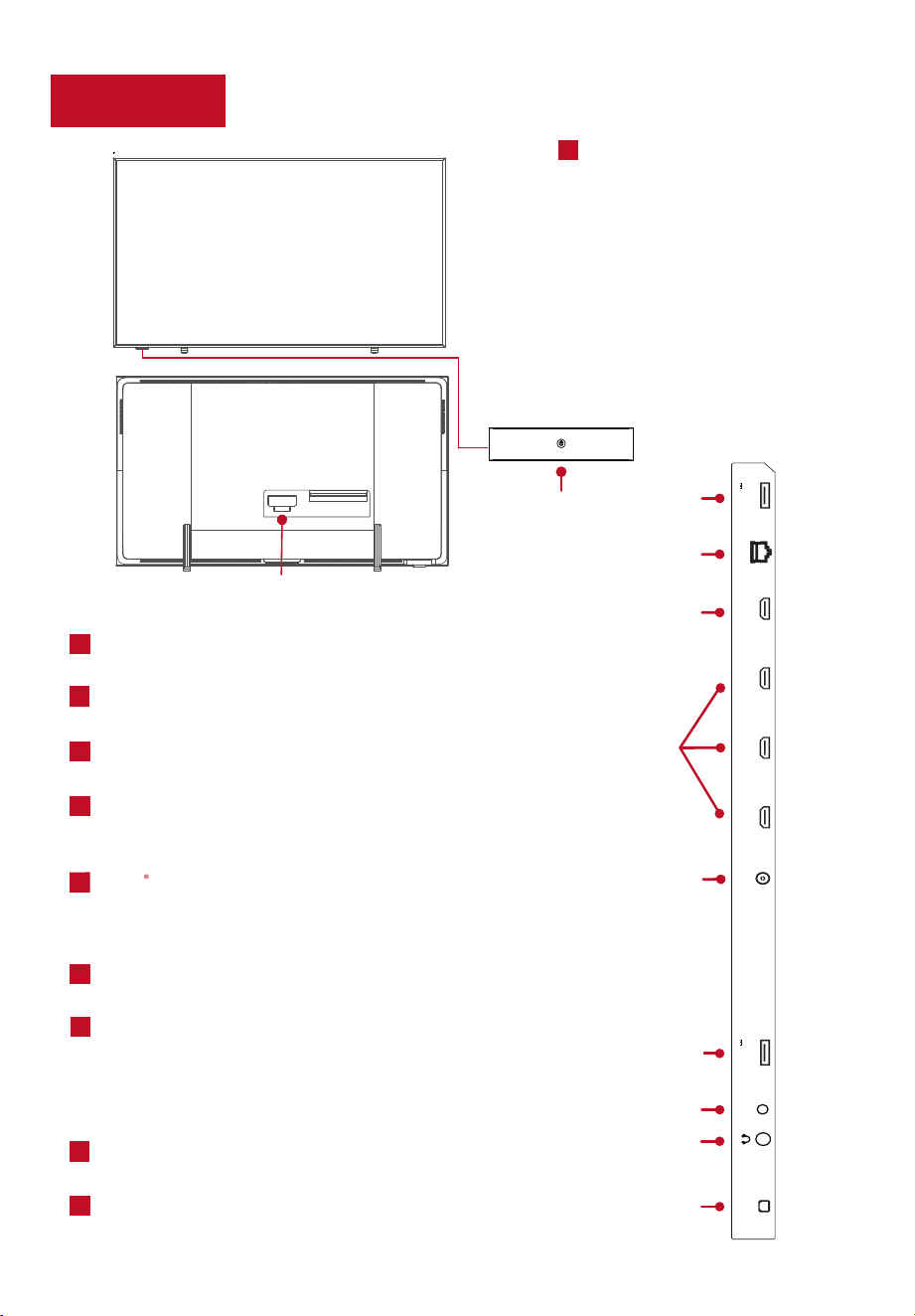
Get to know your TV
TV FRONT
TV BACK
D
LAN Connect using a lan cable to your home
network router or switch.
HDMI (e)ARC PORT Connect HDMI eARC/ARC
(audio return channel) capable audio devices like
sound bars or AV receivers.
E
PORT
Highest quality audio/video
connection. Connect cable box, Blu-ray player,
gaming console, or other devices to your TV
using HDMI cables.
HDMI
USB PORT Connect a USB device to access
photos, music and movies.
ANTENNA/CABLE IN
Connect an outdoor VHF/
UHF antenna or Cable TV feed.
OPTICAL (DIGITAL AUDIO OUT) Connect an
optical cable to an external digital audio system.
The AV Input can be used to connect older devices
that use analog audio/video outputs. Compatible
adapter (not included) connects to the RCA cable
(video - yellow and audio - white and red) that you
normally use to connect to that device.
AV IN adapter AV Input (analog audio/video).
HEADPHONE OUT Connect headphones or
other external speakers.
C
F
G
H
I
J
TV SIDE
B
C
H
I
J
F
C
D
G
E/F
TV BOTTOM
A
LAN
HDMI 1(e)ARC
(4K@144Hz)
HDMI 2(SERVICE)
(4K@144Hz)
CABLE/ANT
AUDIO OUT
(OPTICAL)
HDMI 3
(4K@60Hz)
HDMI 4
(4K@60Hz)
USB 3.0
5V 0.9A MAX
USB 2.0
5V
0.5A MAX
AV IN
adapter
IR RECEIVER
Receives signal from
the TV remote.
STATUS LIGHT
Glows when the
TV is in standby.
A
POWER PORT Connect your TV
to the power
source with the
included power cable.
B
POWER and OPTIONS BUTTON
Press the button to turn the TV
on/o, or select the menu.
*The stands are sold separately
*The IR receiver/indicator is adjustable to a high or
low position. When using with the magnetic bezel
installed, adjust the IR receiver/indicator to the
low position.
lt is normal for the multi-functional set shaking
slightly when pressing it.
Step 5
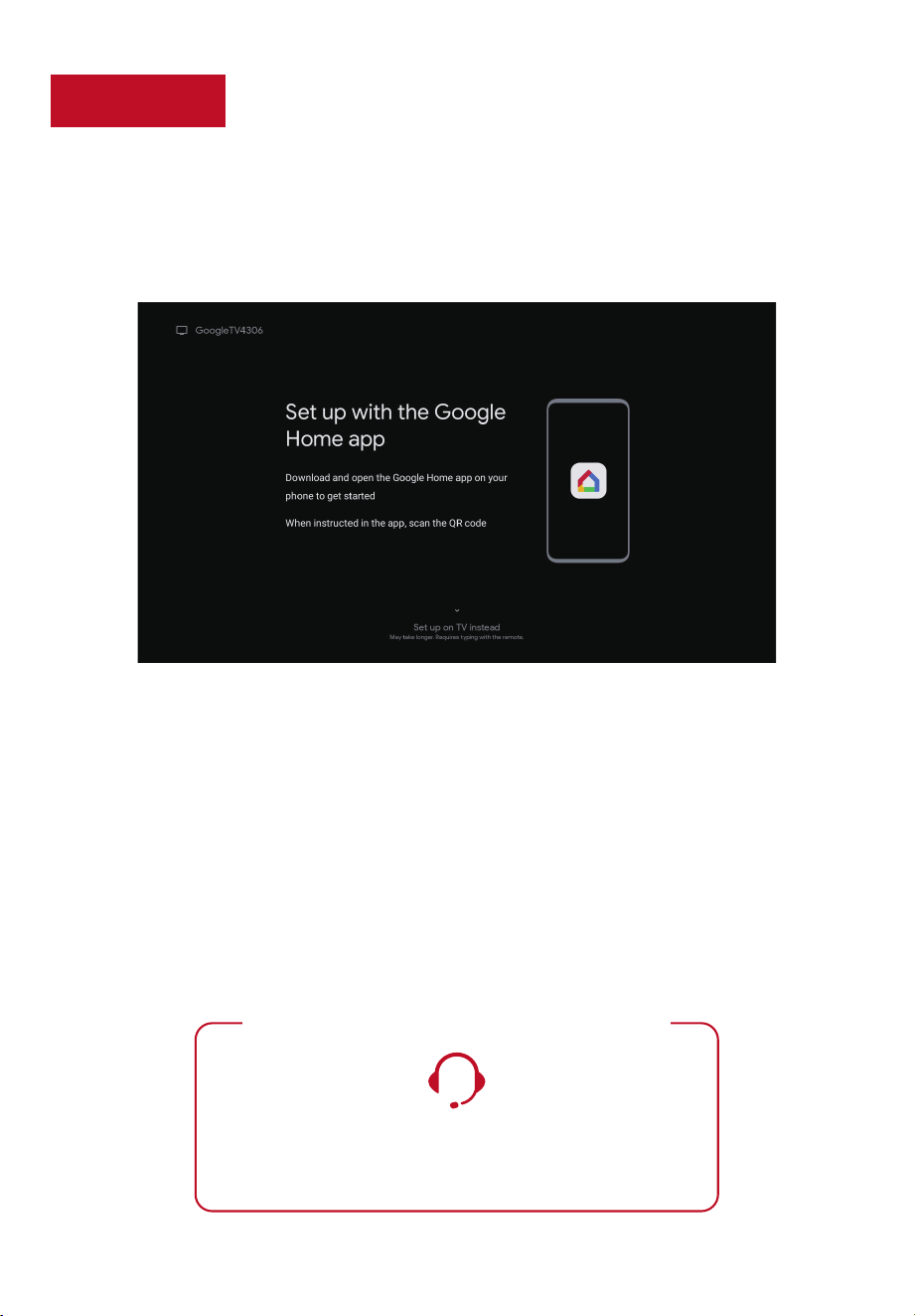
Complete guided setup
It’s the final stretch-hurray!
Let’s Connect
Once your language has been selected, you can quickly set up the TV using the Google Home app
on an Android or iOS phone.
Or you can follow the easy on-screen instructions to setup your TV. If you aren’t ready to
connect your TV to a wireless network, you can still use it as a regular TV.
To enjoy all smart features and services on your TCL TV with Google TV™, a Google Account,
a TCL account, and a reliable broadband internet connection are required.
And setup is done... Congratulations!
Continue using the remote to personalize your Home screen, streaming apps line-up, stream movies,
and so much more.
TCL SUPPORT:
support.tcl.com
1-877-854-0181
contact us first with any questions
WE ARE READY TO HELP
9
TV interface may vary and is subject to change.
The model number shown will vary depending on your TCL Google TV model number.
Key things to know:
A paid subscription or other payments may be required for some streaming apps. Streaming apps
availability are subject to change and vary by country.

10
TCL North America Limited Warranty
New Products (Commercial Use)
For how long after your purchase:
One (1) year from date of purchase or delivery for parts and labor for non-commercial use.
New Products (Non-Commercial Use)
For how long after your purchase:
What we will do
How to get service
All New TCL Product Models including LCD/LED Televisions, Sound Bars, and Appliances including Window
Air Conditioners, Portable and Through-The-Wall Air Conditioners, Dehumidifiers, Air Purifiers, and Robot
Vacuums (each individually referred to as a “Product” or “Unit”, and together referred to as the “Products”).
What your warranty covers: Defects in materials or workmanship to the original owner of this TCL Product when
purchased as new from an Authorized Dealer of TCL brand Products in the United States and packaged with this
warranty statement.
Six (6) months from date of purchase or delivery for parts and labor for commercial use.
Commercial use includes, but is not limited to, the use of this Product in a commercial or business
environment, the use of this Product in an institution or for institutional purposes, or other commercial
purposes including rental purposes.
At TCL’s discretion, (1) pay an Authorized TCL Service Center for both labor charges and parts to repair your
Product, or (2) replace your Product with a new or refurbished/remanufactured equivalent value Product. The
decision to repair or replace will be made solely by TCL. See section entitled “How to get service.”
Before submitting a request for warranty service, please visit support.tcl.com for helpful FAQs and additional
troubleshooting suggestions.
To get warranty service, contact TCL Customer Support by visiting support.tcl.com/contact-us. Please have
your Product type, model number, serial number, and ZIP code ready. Troubleshooting and prior approval
from a TCL representative MUST occur before sending in your Product to a TCL Service Center.
A representative must troubleshoot your problem over the telephone, via chat, or through e-mail before
receiving service. If it is determined that your Unit requires service, the service
location will be at the sole
discretion of TCL based upon the Limited Warranty Statement.
At the sole discretion of TCL, television screen sizes 43-inches and smaller will either be repaired at an
Authorized TCL Service Center or directly exchanged for a new or refurbished/re-certified Unit. At the sole
discretion of TCL, television screen sizes 44-inches or larger will either be repaired or directly exchanged for
a new or refurbished/re-certified Unit at an Authorized TCL Service Center or in-home. At the sole discretion
of TCL, Sound Bars, and Appliances including Window Air Conditioners, Portable and Through-The-Wall Air
Conditioners, Dehumidifiers, Air Purifiers, and Robot Vacuums will either be repaired or directly exchanged for
a new or refurbished/re-certified Unit at an Authorized TCL Service Center or in-home. In the event of a
service visit where the on-site technician, in his-her sole discretion, deems the home or property conditions to
be hazardous and/or unsafe, TCL reserves the right to cancel or re-schedule the service visit, or opt for an
exchange of the in-warranty Unit for a refurbished/re-certified Unit in lieu of the in-home service visit.
TCL is not responsible for transportation costs for warranty coverage, including but not limited to Unit repair
or replacement, to the Authorized TCL Service Center or TCL-designated address. However, TCL will pay for
return shipping to a United States address only. TCL will provide instructions for packaging and
shipping the
Unit to the Authorized TCL Service Center or TCL-designated address. Units that are improperly packed and
damaged during shipping are not covered under your limited Product warranty.
Proof of purchase in the form of a bill of sale or receipted invoice from an Authorized Dealer which is evidence
that the Product is within the warranty period must be presented to obtain warranty service.
In the event that a Unit is to be replaced, a picture of the back of the Unit showing the model and serial number
and picture of the Product issue itself may be required.
PRE-AUTHORIZATION MUST BE OBTAINED BEFORE (1) SENDING ANY PRODUCT TO AN AUTHORIZED TCL
SERVICE CENTER, OR (2) OBTAINING ANY IN-HOME REPAIR/REPLACEMENT/RENTAL SERVICES.
11
TCL North America Limited Warranty
What your warranty does not cover
LIMITATION OF WARRANTY
How State Law relates to this warranty
If you purchased your Unit outside of the United States or seek warranty service coverage outside of the
United States, this warranty does not apply. Contact your dealer for warranty information.
Service calls which do not involve defective materials or workmanship are not covered by this limited
warranty. Costs of such service calls are the sole responsibility of the purchaser.
THE WARRANTY STATED ABOVE IS THE ONLY WARRANTY APPLICABLE TO THIS PRODUCT. NO VERBAL
OR WRITTEN INFORMATION GIVEN BY TTE TECHNOLOGY, INC. DBA TCL NORTH AMERICA, ITS AGENTS
OR EMPLOYEES SHALL CREATE A GUARANTY OR IN ANY WAY INCREASE OR MODIFY THE SCOPE OF
THIS WARRANTY.
REPAIR OR REPLACEMENT AS PROVIDED UNDER THIS WARRANTY IS THE EXCLUSIVE REMEDY OF THE
CONSUMER. TTE TECHNOLOGY, INC. DBA TCL NORTH AMERICA SHALL NOT BE LIABLE FOR SPECIAL,
INCIDENTAL, OR CONSEQUENTIAL DAMAGES RESULTING FROM THE USE OF THIS PRODUCT OR ARISING
OUT OF ANY BREACH OF ANY EXPRESS OR IMPLIED WARRANTY ON THIS PRODUCT. THIS DISCLAIMER
OF WARRANTIES AND LIMITED WARRANTY ARE GOVERNED BY THE LAWS OF THE STATE OF
CALIFORNIA. EXCEPT TO THE EXTENT PROHIBITED BY APPLICABLE LAW, ANY IMPLIED WARRANTY OF
MERCHANTABILITY OR FITNESS FOR A PARTICULAR PURPOSE ON THIS PRODUCT IS LIMITED TO THE
APPLICABLE WARRANTY AND WARRANTY PERIOD SET FORTH ABOVE. THIS WARRANTY IS SUBJECT TO
CHANGE WITHOUT NOTICE. PLEASE VISIT WWW.TCL.COM TO VIEW THE MOST CURRENT VERSION.
Some states may not allow the exclusion or limitation of incidental or consequential damages, or limitations
on how long an implied warranty lasts, so the above limitations or exclusions may not apply to you.
This warranty gives you specific legal rights, and you also may have other rights that vary from state to state.
A Unit sold in “As-Is”, “Used”, “Factory Reconditioned”, “Factory Re-Certified”, or “Refurbished”, condition or
with faults.
Damage caused by transportation or handling, including damage during shipment from a Retailer (please
contact your Retailer for assistance).
Extended Service Plans purchased from Retailers. Please contact your Retailer for assistance.
Customer instruction. (Your Owner’s Manual describes how to install, adjust, and operate your Unit. Any
additional information should be obtained from your Authorized Dealer).
Service calls to your home for delivery or pick-up, installation, instruction, replacement of house fuses,
connection of house wiring or plumbing, or to correct unauthorized repairs.
Installation and related adjustments, or damage resulting from installation.
Damage resulting from non-approved installation or repair methods.
Failure of the Product to perform due to signal reception problems not caused by your Unit, or due to power
failures or interruptions, or inadequate electrical service.
Damage from misuse, abuse, neglect, insects, normal wear and tear, cosmetic damage, mishandling, faulty
installation, inadequate electrical wiring, or power line surges.
Damage caused by operating the Product in a corrosive or wet atmosphere.
Markings or images on the television’s panel resulting from viewing fixed images (including but not limited to
certain 4:3 images on wide screen televisions, or data or images in fixed screen locations from banners, video
games, or certain broadcast networks).
Units that have original factory serial numbers that are unreadable or missing, or that have been changed,
defaced, or altered in any manner.
Batteries.
A television that has been modified or incorporated into other Products, or that has had the serial number
removed or altered.
Use of accessories or components that are not compatible with this Product.
A Unit purchased or serviced outside of the United States.
Costs of shipping the Unit to the Authorized TCL Service Center or TCL-designated address. TCL will pay for
return shipping to the customer to a United States address only.
Acts of nature or God (as illustrative examples and for the avoidance of doubt, such acts of nature or God
include but are not limited to damage caused by earthquakes, fires, lightning, or flood
whether caused by
nature or humans).
Special, incidental, or consequential damages.
12
Broadcasting & Operating Environment
Broadcasting system US System NTSC-M
ATSC standard (8VSB), QAM
Receiving Channels VHF2-13
UHF14-69
CATV 14-36 (A)-(W)
37-59 (AA)-(WW)
60-85 (AAA)-(ZZZ)
86-94 (86)-(94)95-99 (A-5)-(A-1)
100-135 (100)-(135)
01 (4A)
Tuner type Frequency synthesized
Operating Temperature 5°C to 35°C (41°F to 95°F)
Operating Humidity 20% to 80%, non-condensing
Storage Temperature -15°C to 45°C (5°F to 113°F)
Storage Humidity 10% to 90%, non-condensing

13
Troubleshooting
Cannot connect to wireless network (WiFi)
•
Select the correct wireless network name and verify the password entered (case sensitive).
•
Relocate the router from objects that interfere with performance (cordless phones, baby monitors, etc.).
•
Reboot the router by disconnecting the power for more than 2 minutes and reconnect.
Having trouble completing the guided setup? Don’t worry, it’s usually an easy fix.
Problems connecting my cable
box or antenna through a coax cable
If not available, then:
•
For best performance, use the HDMI connection.
•
Make sure the cable connections to the TV and your device are securely fastened.
•
Select cable or antenna input.
•
Select the channel scan menu and follow the on-screen instructions to perform a full channel scan.
remote code for programming my Universal or Cable box remote control?
What is the
•
Please visit https://go.tcl.com/codes
How to use voice control through the remote control?
•
In Google TV mode, press and hold the “HOME” and “OK” buttons on your remote at the same time.
•
Keep your remote within 3 ft. of your TV during the pairing process.
•
Then, when the TV display shows that the Google Assistant is ready –
speak towards the remote
microphone by holding down the Google Assistant button to
ask a question or try a suggestion.
How do I turn Text-to-Speech (TTS) on or o?
•
Select “Settings” from the home screen.
•
Select “System”.
•
Select “Accessibility”.
•
Select “TalkBack”.
•
For more information visit: https://go.tcl.com/tts-atv
•
Select “Enable” and press OK to turn it on or o.
How to update Parental Control password
•
Select “Settings” from the home screen.
•
Select “System”.
•
Select “Parental Controls” to set up or change your personal password.
•
You can set up your personal password anytime.
•
If you forget your personal password, you can use 0423 to reset.
Notes:
1-877-854-0181
support.tcl.com
Learn more at TCL.com or visit your favorite retailer.
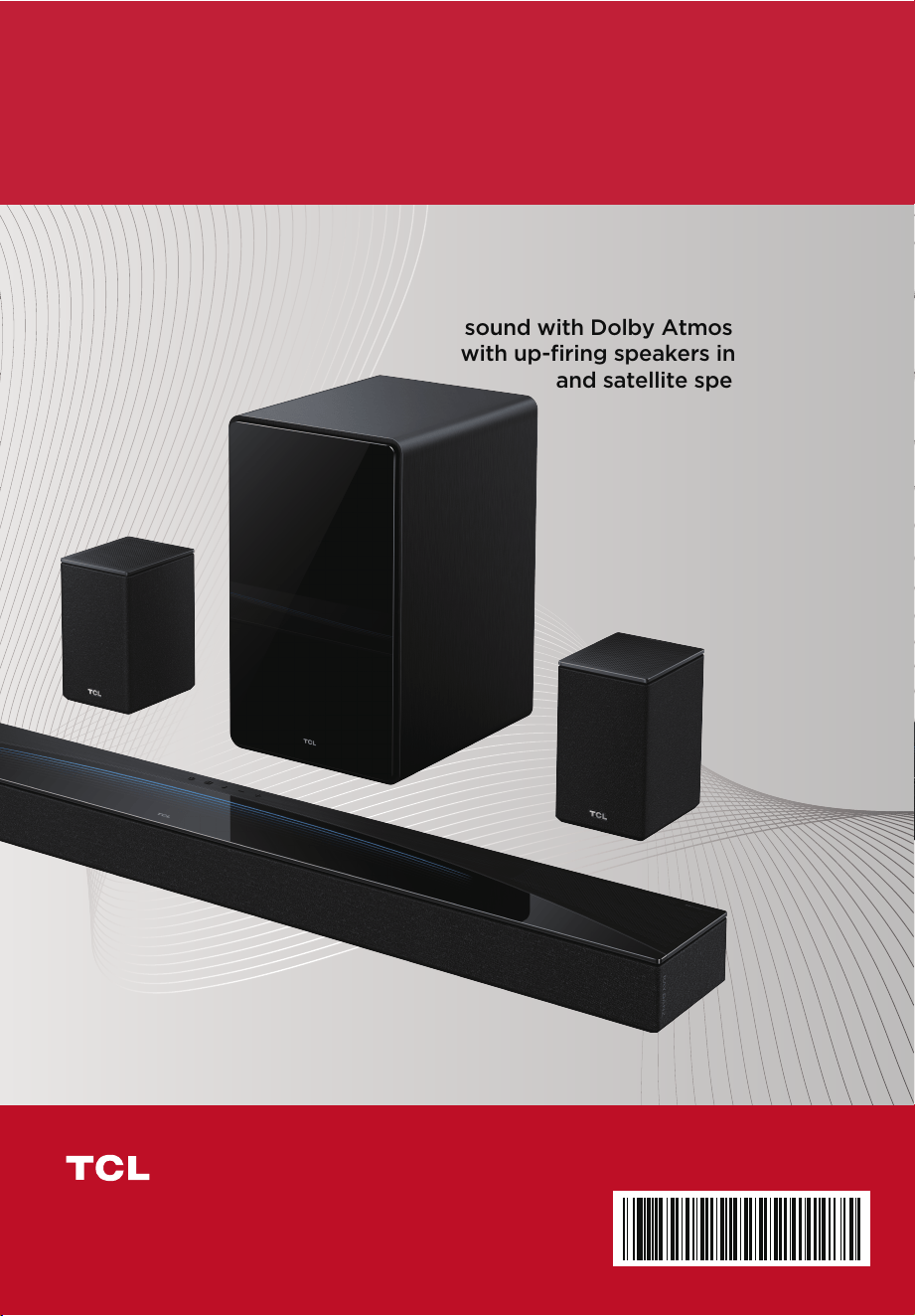
Oering an all new immersive 7.1.4
surround experience, enjoy superior
sound with Dolby Atmos® and DTS:X™
with up-firing speakers in the soundbar
and satellite speakers
Home Theater, Made Simple.
Complete your Home Theater Experience with a TCL Sound Bar!
Copyright © 2023 by TCL. All rights reserved.
TCL and the TCL Logo are owned by TCL Corporation and
under license to TCL North America. Other brand and product
names are the trademarks or registered trademarks of their
respective owners.
TCL North America
189 Technology Drive, Irvine, CA 92618, USA
Part No.: J0104-000333
Q85H
