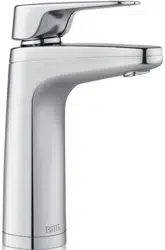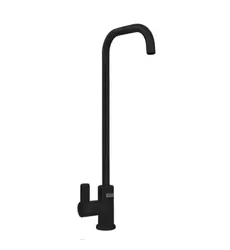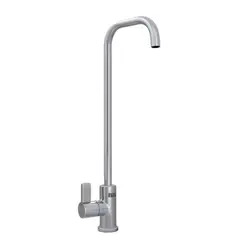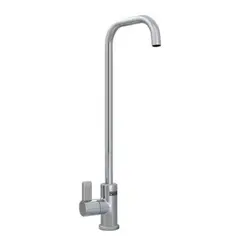
Billi Home BCS
Dispenser Options: XL, AL
(925100)
Home
User Guide
32
CONTENTS
Contents 2
Warnings and Important Information 3
General Maintenance 4
Dispenser Care 4
Cupboard Ventilation Requirements 4
R290 REFRIGERANT WARNINGS 5
CO
2
WARNINGS 6
Features 7
Multi-Function Touch Display 7
Display Lock 7
Safety Timeout 7
Childproof Safety Lock 7
Water Delivery Temperatures 7
Maximum Boiling Water Temperature 7
Tea and Coffee Setpoints 7
Energy Saving Modes 8
Time Switch Mode 8
Standby Mode 8
Override Off Mode 8
Locked Off Mode 8
Dispenser Features 8
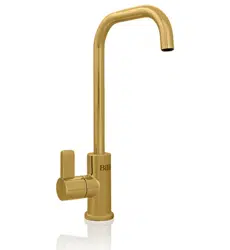
XL Dispenser 8
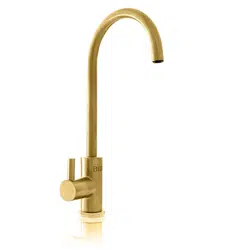
All-in-One Mixer Tap 8
XL Dispenser Icons 9
All-in-One Mixer Tap Icons 9
Set Up Instructions 10
Main Status Bar 10
Additional Status 10
Setting Time and Date 11
Setting Water Delivery Temperatures 11
Operating Modes and Safety Settings 11
Billi Filter Cartridges 11
Filter Settings 11
Filter Change Reminders 12
Replacement of Filter Cartridges 12
Filter Removal and Replacement Instructions 13
CO
2
Cylinder Removal 14
CO
2
Cylinder Installation 15
Service Support 16
Warnings and Important Information
- For continued safety of this appliance, it must be installed, operated, and maintained in accordance with the manufacturer’s instructions.
- Your appliance should be installed by the manufacturer, a service agent, or any other suitably qualified tradesperson.
- For correct operation of this appliance it is essential to observe the instructions as outlined in this booklet.
- Do not use this appliance with water that is microbiologically unsafe or with water of unknown quality without adequate disinfection before
or after the system. Systems certified for cyst reduction may be used on disinfected water that may contain filterable cysts.
- Filter replacement must be performed at intervals of not more than 12 months.
- Use this appliance only as directed in these instructions and only for its designed purpose.
- This appliance is not intended for use by persons (including children) with reduced physical, sensory or mental capabilities, or persons
with lack of experience and knowledge, unless they are supervised or have been given instruction concerning use by a person responsible
for their safety.
- This appliance is not to be installed in an area where a water jet could be used.
- Children should be supervised to ensure that they do not play with the appliance.
- DANGER: The operation of the internal thermal cut-out indicates a possibly dangerous situation. Do not reset the thermal cut-out until the
appliance has been serviced by a suitably qualified person.
- WARNING: Do not connect any restrictor, pressure relief device or non-return valve to the vent pipe of this appliance.
- WARNING: When positioning the appliance ensure the power supply cord is not trapped or damaged.
- WARNING: Do not install the appliance using a power board, double power adaptor or any other similar device. The appliance is to be
plugged directly into a suitably protected and rated power point.
- WARNING: If the power supply cord is damaged, it must be replaced by the manufacturer, its service agent, or similarly qualified persons.
The appliance is not to be used until the power supply cord is repaired.
- WARNING: Avoid spillages of any kind on all electrical connectors.
- WARNING: Potential injury can result from misuse.
- WARNING: Internal surfaces adjacent to and directly in contact with the heating element are subject to residual heat after use.
- Only Billi hose and tube kits as supplied with the appliance are to be used. Old or other manufacturer’s hose and tube kits should not
be used.
- WARNING: This appliance may deliver water at high temperature. Refer to the plumbing code of Australia (PCA), local requirements and
installation instructions to determine if additional temperature control is required.
- WARNING: Installation shall conform to the plumbing code of Australia (PCA) or relevant local requirements.
- If the appliance is installed in a location where the ambient air temperature could fall below 4°C, do not turn off power to the appliance to
prevent malfunction. This safeguard does not offer protection to connecting pipework and fittings external to the appliance.
- The appliance is designed to operate in an ambient air temperature range of 5°C to 30°C.
- Turn off power to the appliance by unplugging the power cord from the connected power point. Only do so after the inlet water supply has
been turned off.
- The appliance is intended to be used in household and similar applications such as:
• Staff kitchen areas in shops, offices, and other working environments.
• By clients in hotels, motels, and other residential type environments.
• Bed and breakfast type environments.
• Catering and similar applications.
- Please note maximum inlet water pressure is 1000kPa.
32
CONTENTS
Contents 2
Warnings and Important Information 3
General Maintenance 4
Dispenser Care 4
Cupboard Ventilation Requirements 4
R290 REFRIGERANT WARNINGS 5
CO
2
WARNINGS 6
Features 7
Multi-Function Touch Display 7
Display Lock 7
Safety Timeout 7
Childproof Safety Lock 7
Water Delivery Temperatures 7
Maximum Boiling Water Temperature 7
Tea and Coffee Setpoints 7
Energy Saving Modes 8
Time Switch Mode 8
Standby Mode 8
Override Off Mode 8
Locked Off Mode 8
Dispenser Features 8
XL Dispenser 8
All-in-One Mixer Tap 8
XL Dispenser Icons 9
All-in-One Mixer Tap Icons 9
Set Up Instructions 10
Main Status Bar 10
Additional Status 10
Setting Time and Date 11
Setting Water Delivery Temperatures 11
Operating Modes and Safety Settings 11
Billi Filter Cartridges 11
Filter Settings 11
Filter Change Reminders 12
Replacement of Filter Cartridges 12
Filter Removal and Replacement Instructions 13
CO
2
Cylinder Removal 14
CO
2
Cylinder Installation 15
Service Support 16
Warnings and Important Information
- For continued safety of this appliance, it must be installed, operated, and maintained in accordance with the manufacturer’s instructions.
- Your appliance should be installed by the manufacturer, a service agent, or any other suitably qualified tradesperson.
- For correct operation of this appliance it is essential to observe the instructions as outlined in this booklet.
- Do not use this appliance with water that is microbiologically unsafe or with water of unknown quality without adequate disinfection before
or after the system. Systems certified for cyst reduction may be used on disinfected water that may contain filterable cysts.
- Filter replacement must be performed at intervals of not more than 12 months.
- Use this appliance only as directed in these instructions and only for its designed purpose.
- This appliance is not intended for use by persons (including children) with reduced physical, sensory or mental capabilities, or persons
with lack of experience and knowledge, unless they are supervised or have been given instruction concerning use by a person responsible
for their safety.
- This appliance is not to be installed in an area where a water jet could be used.
- Children should be supervised to ensure that they do not play with the appliance.
- DANGER: The operation of the internal thermal cut-out indicates a possibly dangerous situation. Do not reset the thermal cut-out until the
appliance has been serviced by a suitably qualified person.
- WARNING: Do not connect any restrictor, pressure relief device or non-return valve to the vent pipe of this appliance.
- WARNING: When positioning the appliance ensure the power supply cord is not trapped or damaged.
- WARNING: Do not install the appliance using a power board, double power adaptor or any other similar device. The appliance is to be
plugged directly into a suitably protected and rated power point.
- WARNING: If the power supply cord is damaged, it must be replaced by the manufacturer, its service agent, or similarly qualified persons.
The appliance is not to be used until the power supply cord is repaired.
- WARNING: Avoid spillages of any kind on all electrical connectors.
- WARNING: Potential injury can result from misuse.
- WARNING: Internal surfaces adjacent to and directly in contact with the heating element are subject to residual heat after use.
- Only Billi hose and tube kits as supplied with the appliance are to be used. Old or other manufacturer’s hose and tube kits should not
be used.
- WARNING: This appliance may deliver water at high temperature. Refer to the plumbing code of Australia (PCA), local requirements and
installation instructions to determine if additional temperature control is required.
- WARNING: Installation shall conform to the plumbing code of Australia (PCA) or relevant local requirements.
- If the appliance is installed in a location where the ambient air temperature could fall below 4°C, do not turn off power to the appliance to
prevent malfunction. This safeguard does not offer protection to connecting pipework and fittings external to the appliance.
- The appliance is designed to operate in an ambient air temperature range of 5°C to 30°C.
- Turn off power to the appliance by unplugging the power cord from the connected power point. Only do so after the inlet water supply has
been turned off.
- The appliance is intended to be used in household and similar applications such as:
• Staff kitchen areas in shops, offices, and other working environments.
• By clients in hotels, motels, and other residential type environments.
• Bed and breakfast type environments.
• Catering and similar applications.
- Please note maximum inlet water pressure is 1000kPa.
54
R290 REFRIGERANT WARNINGS
NOTE: This appliance uses 0.055 kilograms of R290 flammable refrigerant in a sealed system. The following must be observed for
your safety.
- This appliance contains a small quantity of R290 refrigerant, which is environmentally friendly but flammable. It does not damage the
ozone layer, nor does it contribute to the greenhouse effect.
- During transportation and installation, ensure that the tubing of the refrigerant circuit is not trapped or damaged.
- Leaking refrigerant can ignite or cause irritation and permanent damage to the eyes or respiratory system.
- In the event of any damage or if a leak does occur:
• Immediately isolate and disconnect the appliance from mains power.
• Avoid exposure to open flame or any device which could cause ignition via a spark or similar.
- Vacate and thoroughly ventilate the room in which the appliance is located for several minutes.
- Contact and notify Customer Support for necessary actions and advice.
- The room in which the appliance is installed must have a size of at least 1 cubic metre per 0.08 kilograms of R290 refrigerant. The
refrigerant quantity contained in this appliance is listed above in kilograms and also listed on the rating plate affixed to the appliance.
- Keep ventilation openings in the appliance enclosure or built-in structure clear of obstruction.
- It is hazardous for anyone other than an authorised service person to carry out servicing or repairs to this appliance. In some
jurisdictions the authorised person must hold a Gas Work Authorisation for hydrocarbon refrigerant before carrying out works that
involve the removal of covers.
WARNING
The environment and personal safety must be considered when disposing of this appliance. Please ensure the appliance is taken to a recycle
centre for safe recycling. DO NOT dispose of this appliance in landfill as the refrigerant gas contained in this appliance is flammable.
DISPOSAL
Superseded equipment holds residual recovery value and forms part of Billi’s Global Greentag certified cradle to cradle philosophy.
An environmentally friendly method of disposal will ensure that valuable raw materials can be recovered and used again.
The refrigerant used in your appliance requires special disposal procedures. Up to date information for disposing of your old appliance and
packaging from the new one can be obtained from your local council office.
Warnings and Important Information cont.
Boiling water is dangerous and can cause severe burns, particularly with young children. Boiling water must always be handled with caution.
Use this appliance only as directed in these instructions and only for the purpose for which it has been designed.
Your Billi Home BCS is designed to be safe and practical. In an environment with young children, it is recommended that the boiling water
safety switch is activated.
In addition, the following safety features have also been included:
- Ergonomic levers.
- Levers/touch activations located safely away from water outlets.
- Dispenser remains cool to touch during regular use.
- Childproof safety switch.
- User settable maximum boiling water temperatures.
General Maintenance
Your Billi Home BCS has been designed to require minimal maintenance other than replacement of filter cartridges.
During each filter change, check all water connection and fittings for signs of leakage, all tubing for any signs of damage and in the cupboard
area around the base of unit for any signs of moisture.
There are no user serviceable components inside the appliance aside from the user replaceable filter cartridge. The appliance is only to be
opened by a suitably qualified person such as a representative from the manufacturer.
Dispenser Care
Proper care of Billi electronic dispensers is crucial to prevent premature wear of surface finishes and to ensure reliable dispense operation.
Avoid using abrasive cleaners on any external surfaces of the dispenser. Wipe clean only using a damp cloth. Use of a non-solvent, non-
smearing cleaner such as Windex is recommended. DO NOT pour water directly over the dispenser.
Cupboard Ventilation Requirements
Your Billi Home BCS appliance requires no cupboard ventilation, however a small air gap of 10mm around each side of the appliance is
recommended.
Care should be taken when installing the appliance and when using the cupboard space to avoid stretching or damaging pipework and power
cords associated with the appliance. Always ensure that access to the power point and the inlet water supply tap is not restricted.
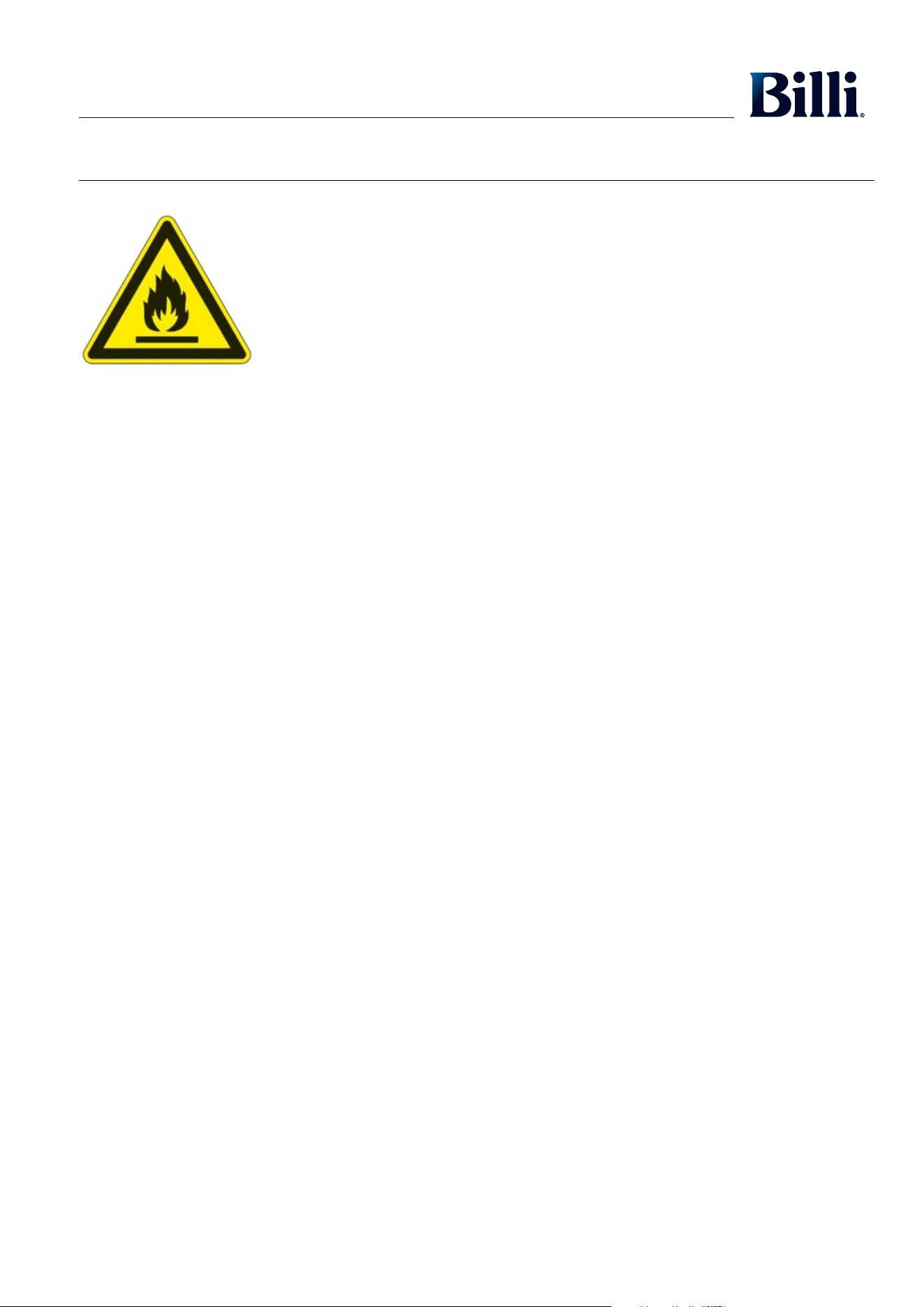
WARNING:
RISK OF FIRE/FLAMMABLE MATERIALS
Book a service call
Filtration & service
Warranty registration
Technical support
54
R290 REFRIGERANT WARNINGS
NOTE: This appliance uses 0.055 kilograms of R290 flammable refrigerant in a sealed system. The following must be observed for
your safety.
- This appliance contains a small quantity of R290 refrigerant, which is environmentally friendly but flammable. It does not damage the
ozone layer, nor does it contribute to the greenhouse effect.
- During transportation and installation, ensure that the tubing of the refrigerant circuit is not trapped or damaged.
- Leaking refrigerant can ignite or cause irritation and permanent damage to the eyes or respiratory system.
- In the event of any damage or if a leak does occur:
• Immediately isolate and disconnect the appliance from mains power.
• Avoid exposure to open flame or any device which could cause ignition via a spark or similar.
- Vacate and thoroughly ventilate the room in which the appliance is located for several minutes.
- Contact and notify Customer Support for necessary actions and advice.
- The room in which the appliance is installed must have a size of at least 1 cubic metre per 0.08 kilograms of R290 refrigerant. The
refrigerant quantity contained in this appliance is listed above in kilograms and also listed on the rating plate affixed to the appliance.
- Keep ventilation openings in the appliance enclosure or built-in structure clear of obstruction.
- It is hazardous for anyone other than an authorised service person to carry out servicing or repairs to this appliance. In some
jurisdictions the authorised person must hold a Gas Work Authorisation for hydrocarbon refrigerant before carrying out works that
involve the removal of covers.
WARNING
The environment and personal safety must be considered when disposing of this appliance. Please ensure the appliance is taken to a recycle
centre for safe recycling. DO NOT dispose of this appliance in landfill as the refrigerant gas contained in this appliance is flammable.
DISPOSAL
Superseded equipment holds residual recovery value and forms part of Billi’s Global Greentag certified cradle to cradle philosophy.
An environmentally friendly method of disposal will ensure that valuable raw materials can be recovered and used again.
The refrigerant used in your appliance requires special disposal procedures. Up to date information for disposing of your old appliance and
packaging from the new one can be obtained from your local council office.
Warnings and Important Information cont.
Boiling water is dangerous and can cause severe burns, particularly with young children. Boiling water must always be handled with caution.
Use this appliance only as directed in these instructions and only for the purpose for which it has been designed.
Your Billi Home BCS is designed to be safe and practical. In an environment with young children, it is recommended that the boiling water
safety switch is activated.
In addition, the following safety features have also been included:
- Ergonomic levers.
- Levers/touch activations located safely away from water outlets.
- Dispenser remains cool to touch during regular use.
- Childproof safety switch.
- User settable maximum boiling water temperatures.
General Maintenance
Your Billi Home BCS has been designed to require minimal maintenance other than replacement of filter cartridges.
During each filter change, check all water connection and fittings for signs of leakage, all tubing for any signs of damage and in the cupboard
area around the base of unit for any signs of moisture.
There are no user serviceable components inside the appliance aside from the user replaceable filter cartridge. The appliance is only to be
opened by a suitably qualified person such as a representative from the manufacturer.
Dispenser Care
Proper care of Billi electronic dispensers is crucial to prevent premature wear of surface finishes and to ensure reliable dispense operation.
Avoid using abrasive cleaners on any external surfaces of the dispenser. Wipe clean only using a damp cloth. Use of a non-solvent, non-
smearing cleaner such as Windex is recommended. DO NOT pour water directly over the dispenser.
Cupboard Ventilation Requirements
Your Billi Home BCS appliance requires no cupboard ventilation, however a small air gap of 10mm around each side of the appliance is
recommended.
Care should be taken when installing the appliance and when using the cupboard space to avoid stretching or damaging pipework and power
cords associated with the appliance. Always ensure that access to the power point and the inlet water supply tap is not restricted.
WARNING:
RISK OF FIRE/FLAMMABLE MATERIALS
Book a service call
Filtration & service
Warranty registration
Technical support
76
CO2 WARNINGS
NOTE: This appliance requires the use of CO
2
stored in a pressurised cylinder for correct operation.
For more information about CO
2
, please refer to the Material Safety Data Sheet included with the CO
2
cylinder.
Installation of this device by Billi service technicians is recommended and is available by contacting Billi directly via telephone or
website below:
Web: www.billi.com.au
Phone: 1800 812 321
DISPOSAL
Superseded equipment holds residual recovery value and forms part of Billi’s Global Greentag certified cradle to cradle philosophy.
An environmentally friendly method of disposal will ensure that valuable raw materials can be recovered and used again.
The CO
2
cylinder requires special disposal procedures. Up to date information for disposal can be obtained from your local council office.
WARNING:
CO
2
Features
Multi-Function Touch Display
Your Billi Home BCS incorporates a multi-function touch display for ease of setup and use.
The display will automatically go into a sleep mode after a period of non-use. To wake simply touch anywhere on the display.
Display Lock
This feature automatically locks the display after a period of non-use, preventing settings from being changed by unauthorised persons.
The Home Screen remains visible when locked, however no screen input functions will operate.
To unlock touch anywhere on the Home Screen to go to the Billi Landing Screen, then press the hidden button on the top right corner of the
Billi Landing Screen.
This feature can be switched on upon request.
Safety Timeout
Your Billi Home BCS incorporates a Safety Timeout to prevent uncontrolled delivery of water.
Water delivery is stopped automatically after a set time interval and can be restarted by releasing then re-pressing the dispenser lever
or button.
Default timeout periods as below:
Hot water: 20 seconds
Chilled water: 60 seconds
Sparkling water: 15 seconds
Childproof Safety Lock
Your Billi Home BCS is fitted with a childproof safety lock to protect against accidental dispensing of boiling water and the risk of burns.
When switched on, dispense boiling water by momentarily pressing the lock button then pressing the boiling lever or button. The safety lock
will automatically re-activate after a period of non-use.
This feature can also be set to permanently on upon request. Refer to page 11 to setup.
Water Delivery Temperatures
Boiling, chilled and sparkling water temperatures can be adjusted to suit individual preferences.
When large quantities of boiling water are dispensed, your Billi Home BCS OmniOne may require a short period of time to recharge. When
this occurs, boiling water dispense will temporarily be blocked until sufficiently recharged.
Default temperatures as below: Temperature ranges as below:
Boiling water: 97°C Boiling water: 60°C - 98°C
Chilled and sparkling water: 6°C Chilled and sparkling water: 4°C – 20°C
Maximum Boiling Water Temperature
Your Billi Home BCS incorporates a safety feature that limits the maximum boiling water temperature to protect against burns when installed
in high-risk environments.
When switched on, the maximum boiling water temperature is set to 70°C by default, and can be adjusted between the range of 60°C
and 75°C.
This feature can be easily toggled on and off, and can also be set to permanently on upon request. Refer to page 11 to setup.
Tea and Coffee Setpoints
Your Billi Home BCS comes with tea and coffee presets to allow for simple adjustment of boiling water temperature to best suit your
usage preferences.
When tea or coffee is selected, the set boiling water temperature is automatically adjusted to the preset. Boiling water is set to the following
temperatures by default when selected:
Tea: 85°C
Coffee: 92°C
If desired, both presets can be adjusted between a range of 70°C - 98°C to best suit your preferences. Refer to page 11 to setup.
76
CO2 WARNINGS
NOTE: This appliance requires the use of CO
2
stored in a pressurised cylinder for correct operation.
For more information about CO
2
, please refer to the Material Safety Data Sheet included with the CO
2
cylinder.
Installation of this device by Billi service technicians is recommended and is available by contacting Billi directly via telephone or
website below:
Web: www.billi.com.au
Phone: 1800 812 321
DISPOSAL
Superseded equipment holds residual recovery value and forms part of Billi’s Global Greentag certified cradle to cradle philosophy.
An environmentally friendly method of disposal will ensure that valuable raw materials can be recovered and used again.
The CO
2
cylinder requires special disposal procedures. Up to date information for disposal can be obtained from your local council office.
WARNING:
CO
2
Features
Multi-Function Touch Display
Your Billi Home BCS incorporates a multi-function touch display for ease of setup and use.
The display will automatically go into a sleep mode after a period of non-use. To wake simply touch anywhere on the display.
Display Lock
This feature automatically locks the display after a period of non-use, preventing settings from being changed by unauthorised persons.
The Home Screen remains visible when locked, however no screen input functions will operate.
To unlock touch anywhere on the Home Screen to go to the Billi Landing Screen, then press the hidden button on the top right corner of the
Billi Landing Screen.
This feature can be switched on upon request.
Safety Timeout
Your Billi Home BCS incorporates a Safety Timeout to prevent uncontrolled delivery of water.
Water delivery is stopped automatically after a set time interval and can be restarted by releasing then re-pressing the dispenser lever
or button.
Default timeout periods as below:
Hot water: 20 seconds
Chilled water: 60 seconds
Sparkling water: 15 seconds
Childproof Safety Lock
Your Billi Home BCS is fitted with a childproof safety lock to protect against accidental dispensing of boiling water and the risk of burns.
When switched on, dispense boiling water by momentarily pressing the lock button then pressing the boiling lever or button. The safety lock
will automatically re-activate after a period of non-use.
This feature can also be set to permanently on upon request. Refer to page 11 to setup.
Water Delivery Temperatures
Boiling, chilled and sparkling water temperatures can be adjusted to suit individual preferences.
When large quantities of boiling water are dispensed, your Billi Home BCS OmniOne may require a short period of time to recharge. When
this occurs, boiling water dispense will temporarily be blocked until sufficiently recharged.
Default temperatures as below: Temperature ranges as below:
Boiling water: 97°C Boiling water: 60°C - 98°C
Chilled and sparkling water: 6°C Chilled and sparkling water: 4°C – 20°C
Maximum Boiling Water Temperature
Your Billi Home BCS incorporates a safety feature that limits the maximum boiling water temperature to protect against burns when installed
in high-risk environments.
When switched on, the maximum boiling water temperature is set to 70°C by default, and can be adjusted between the range of 60°C
and 75°C.
This feature can be easily toggled on and off, and can also be set to permanently on upon request. Refer to page 11 to setup.
Tea and Coffee Setpoints
Your Billi Home BCS comes with tea and coffee presets to allow for simple adjustment of boiling water temperature to best suit your
usage preferences.
When tea or coffee is selected, the set boiling water temperature is automatically adjusted to the preset. Boiling water is set to the following
temperatures by default when selected:
Tea: 85°C
Coffee: 92°C
If desired, both presets can be adjusted between a range of 70°C - 98°C to best suit your preferences. Refer to page 11 to setup.
98
Dispenser Features
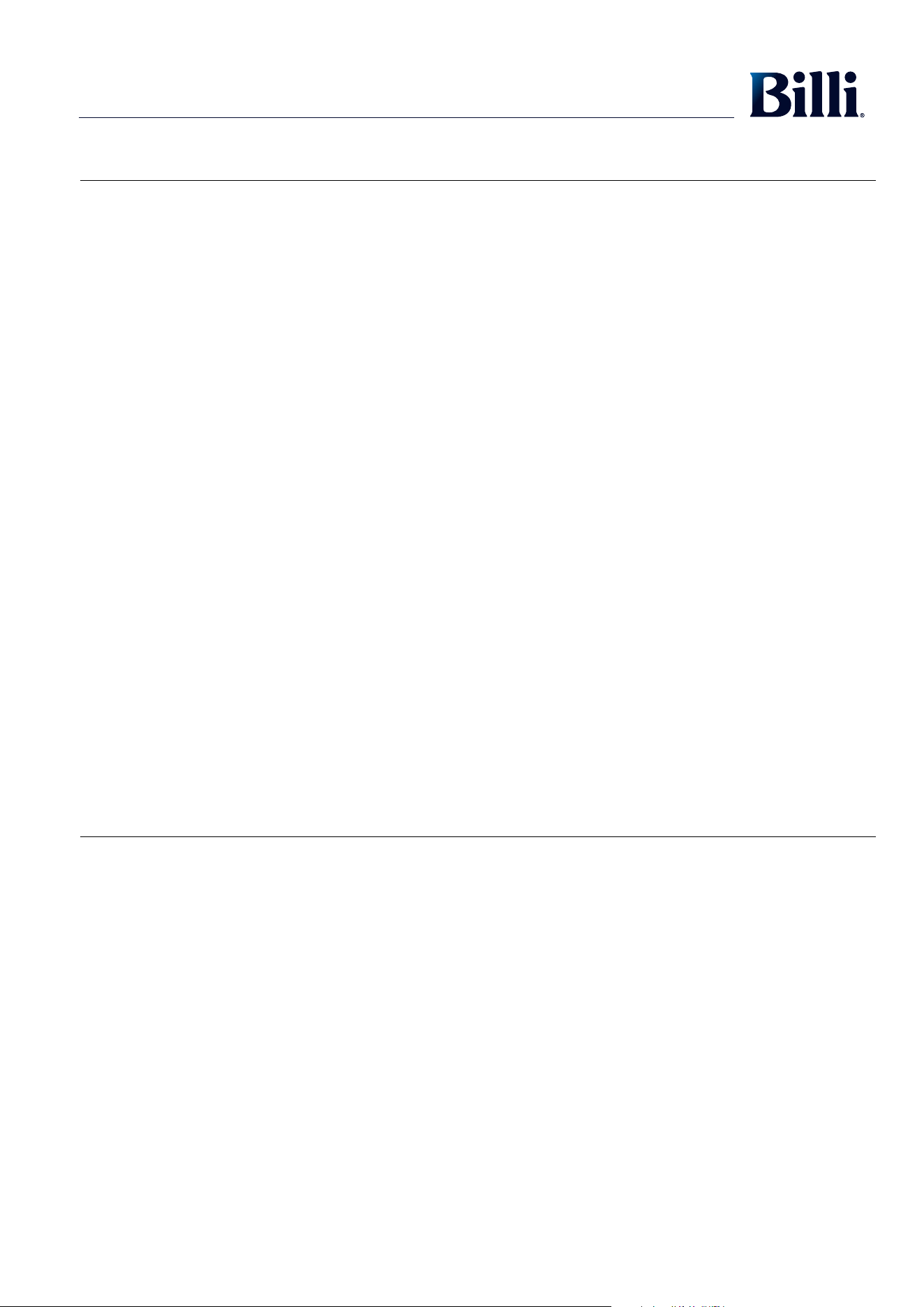
XL Dispenser Icons
Orange Dot
Flashes when filter change is due. On constant when filter change is overdue.
Red Lock Illuminated
Childproof Safety Lock is on. To unlock press the indent on the back of the tap.
Green Lightning Bolt Illuminated
Time switch feature on.
Green Moon & Stars Illuminated
Energy saving mode activated due to the standby feature.
Time switch mode can be used with the standby mode, therefore both indicators can
illuminate simultaneously
Red Dot
Flashes when heating up to temperature. On constant when boiling water is ready.
Switches off when energy saving modes are activated. Flashes yellow when unit goes
into fault.
Blue Dot
Flashes when chilling. On constant when chilled water is ready. Switches off when
energy saving modes are activated. Flashes yellow when unit goes into fault.
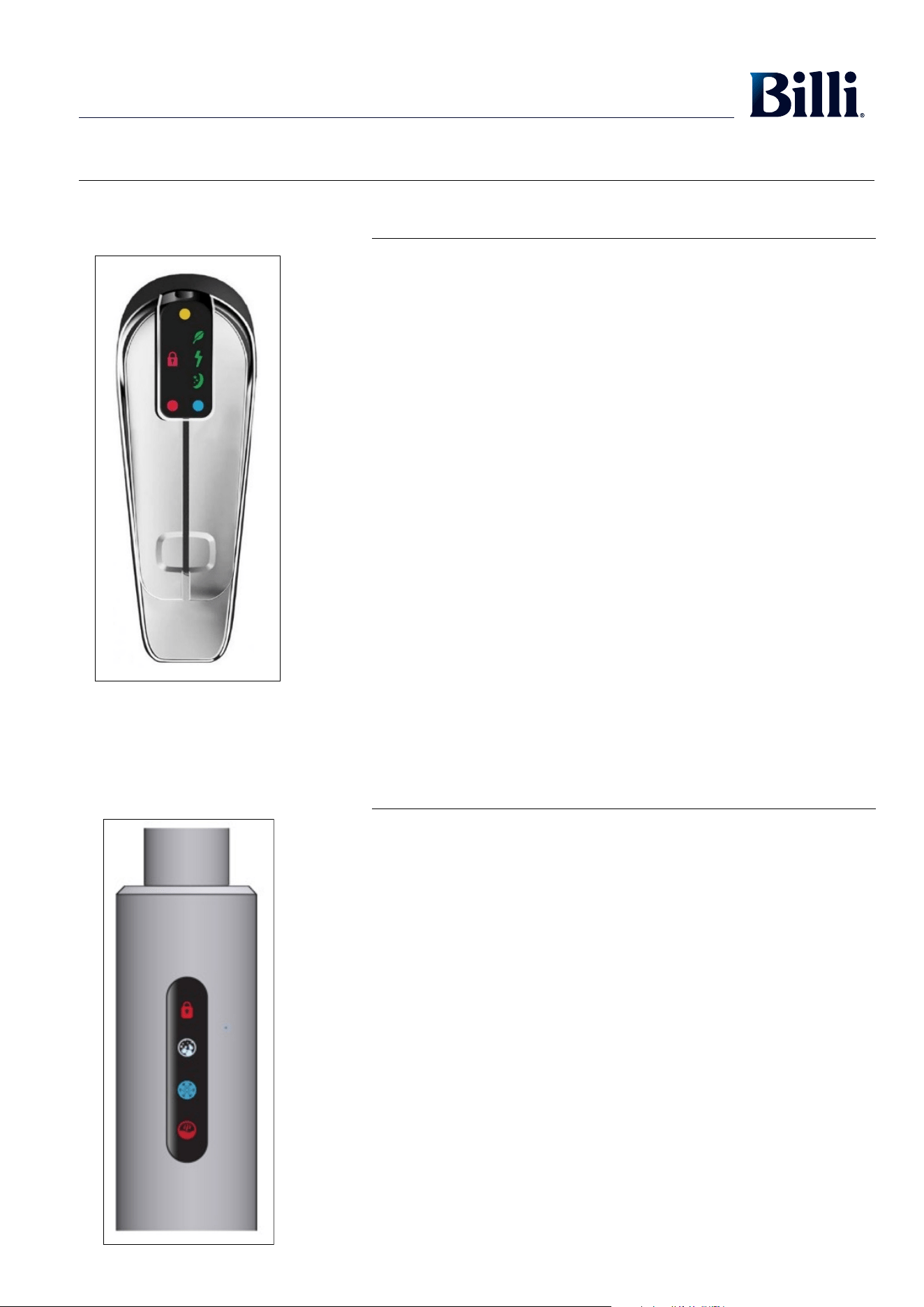
All-in-One Mixer Tap Icons
Red Lock Illuminated
Childproof Safety Lock is on. To unlock press the red lock icon. Lock turns green
when unlocked.
White Sparkling Icon
On constant when sparkling water is ready.
Flashes yellow when filter change is due. On constant when filter change is overdue.
Blue Chilled Icon
Flashes when chilling. On constant when chilled water is ready. Switches off when
energy saving mode is activated by either the standby feature or the time switch feature.
Flashes yellow when unit goes into fault.
Red Boiling Icon
Flashes when heating up to temperature. On constant when boiling water is ready.
Switches off when energy saving mode is activated by either the standby feature or the
time switch feature. Flashes yellow when unit goes into fault.
XL Dispenser Icons
All-in-one Mixer Tap Icons
Energy Saving Modes
Your Billi Home BCS features various energy saving modes that can be activated to reduce energy consumption during periods of non-use.
These modes can be customised to best suit your usage patterns and requirements, and can all be used in conjunction with each other.
When energy saving modes are activated, boiling water temperature is permitted to drop to 80°C, and chilled and sparkling water
temperature is permitted to rise to 15°C.
If boiling water temperature has been set to lower than 80°C, the set temperature will simply be maintained when energy saving mode
is activated.
Refer to page 11 for more information.
Time Switch Mode
When switched on, an energy saving mode will automatically activate and de-activate at selected times and days.
Boiling water cannot be dispensed when the energy saving mode is activated. Chilled water and sparkling water can continue to
be dispensed.
Standby Mode
When switched on, an energy saving mode will automatically activate after a period of non-use. This period can be customised to best
suit your usage patterns.
A touch of either dispenser lever or button de-activates the energy saving mode and the Billi Home BCS resumes its normal operating mode.
Override Off Mode
When selected, an energy saving mode will immediately be activated for a period of 2 hours, after which the Billi Home BCS will return to its
normal operating mode.
Boiling water cannot be dispensed when override off mode is activated. Chilled water and sparkling water can however continue to
be dispensed.
Locked Off Mode
When selected, an energy saving mode will immediately be activated for an indefinite period. The Billi Home BCS will only return to its
normal operating mode when locked off is manually deselected.
Boiling water cannot be dispensed when locked off mode is activated. Chilled water and sparkling water can however continue to
be dispensed.
Dispenser Features
XL Dispenser
The XL dispenser is simply operated with position-sensitive levers.
The red dot on the left indicates the boiling water lever and the blue dot on the right indicates the chilled water lever. Simultaneously use
both levers to dispense sparkling water.
Both levers can either be lifted or depressed. When lifted, the levers will latch for continuous delivery until released with a light press.
The XL dispenser incorporates a swivel function, allowing the dispenser to be swung 45 ° in either direction if more sink space is required.
A central position stop provides position location during usage. To enable the swivel feature, the locking piece needs to be removed as per the
dispenser installation instructions.
All-in-One Mixer Tap
The All-in-One mixer tap incorporates both filtered and mains mixer water functionality in one tap.
Filtered water dispense is operated with capacitive touch buttons on the left side of the tap. Red, blue, and white buttons indicate boiling,
chilled, and sparkling water dispense.
Buttons can be pressed and held for momentary dispensing or double tapped for continuous delivery until stopped by pressing either of the
boiling, chilled or sparkling buttons.
Mains mixer water is operated using the mixer lever on the right side of the tap.
98
Dispenser Features
XL Dispenser Icons
Orange Dot
Flashes when filter change is due. On constant when filter change is overdue.
Red Lock Illuminated
Childproof Safety Lock is on. To unlock press the indent on the back of the tap.
Green Lightning Bolt Illuminated
Time switch feature on.
Green Moon & Stars Illuminated
Energy saving mode activated due to the standby feature.
Time switch mode can be used with the standby mode, therefore both indicators can
illuminate simultaneously
Red Dot
Flashes when heating up to temperature. On constant when boiling water is ready.
Switches off when energy saving modes are activated. Flashes yellow when unit goes
into fault.
Blue Dot
Flashes when chilling. On constant when chilled water is ready. Switches off when
energy saving modes are activated. Flashes yellow when unit goes into fault.
All-in-One Mixer Tap Icons
Red Lock Illuminated
Childproof Safety Lock is on. To unlock press the red lock icon. Lock turns green
when unlocked.
White Sparkling Icon
On constant when sparkling water is ready.
Flashes yellow when filter change is due. On constant when filter change is overdue.
Blue Chilled Icon
Flashes when chilling. On constant when chilled water is ready. Switches off when
energy saving mode is activated by either the standby feature or the time switch feature.
Flashes yellow when unit goes into fault.
Red Boiling Icon
Flashes when heating up to temperature. On constant when boiling water is ready.
Switches off when energy saving mode is activated by either the standby feature or the
time switch feature. Flashes yellow when unit goes into fault.
XL Dispenser Icons
All-in-one Mixer Tap Icons
Energy Saving Modes
Your Billi Home BCS features various energy saving modes that can be activated to reduce energy consumption during periods of non-use.
These modes can be customised to best suit your usage patterns and requirements, and can all be used in conjunction with each other.
When energy saving modes are activated, boiling water temperature is permitted to drop to 80°C, and chilled and sparkling water
temperature is permitted to rise to 15°C.
If boiling water temperature has been set to lower than 80°C, the set temperature will simply be maintained when energy saving mode
is activated.
Refer to page 11 for more information.
Time Switch Mode
When switched on, an energy saving mode will automatically activate and de-activate at selected times and days.
Boiling water cannot be dispensed when the energy saving mode is activated. Chilled water and sparkling water can continue to
be dispensed.
Standby Mode
When switched on, an energy saving mode will automatically activate after a period of non-use. This period can be customised to best
suit your usage patterns.
A touch of either dispenser lever or button de-activates the energy saving mode and the Billi Home BCS resumes its normal operating mode.
Override Off Mode
When selected, an energy saving mode will immediately be activated for a period of 2 hours, after which the Billi Home BCS will return to its
normal operating mode.
Boiling water cannot be dispensed when override off mode is activated. Chilled water and sparkling water can however continue to
be dispensed.
Locked Off Mode
When selected, an energy saving mode will immediately be activated for an indefinite period. The Billi Home BCS will only return to its
normal operating mode when locked off is manually deselected.
Boiling water cannot be dispensed when locked off mode is activated. Chilled water and sparkling water can however continue to
be dispensed.
Dispenser Features
XL Dispenser
The XL dispenser is simply operated with position-sensitive levers.
The red dot on the left indicates the boiling water lever and the blue dot on the right indicates the chilled water lever. Simultaneously use
both levers to dispense sparkling water.
Both levers can either be lifted or depressed. When lifted, the levers will latch for continuous delivery until released with a light press.
The XL dispenser incorporates a swivel function, allowing the dispenser to be swung 45 ° in either direction if more sink space is required.
A central position stop provides position location during usage. To enable the swivel feature, the locking piece needs to be removed as per the
dispenser installation instructions.
All-in-One Mixer Tap
The All-in-One mixer tap incorporates both filtered and mains mixer water functionality in one tap.
Filtered water dispense is operated with capacitive touch buttons on the left side of the tap. Red, blue, and white buttons indicate boiling,
chilled, and sparkling water dispense.
Buttons can be pressed and held for momentary dispensing or double tapped for continuous delivery until stopped by pressing either of the
boiling, chilled or sparkling buttons.
Mains mixer water is operated using the mixer lever on the right side of the tap.
1110
Set Up Instructions
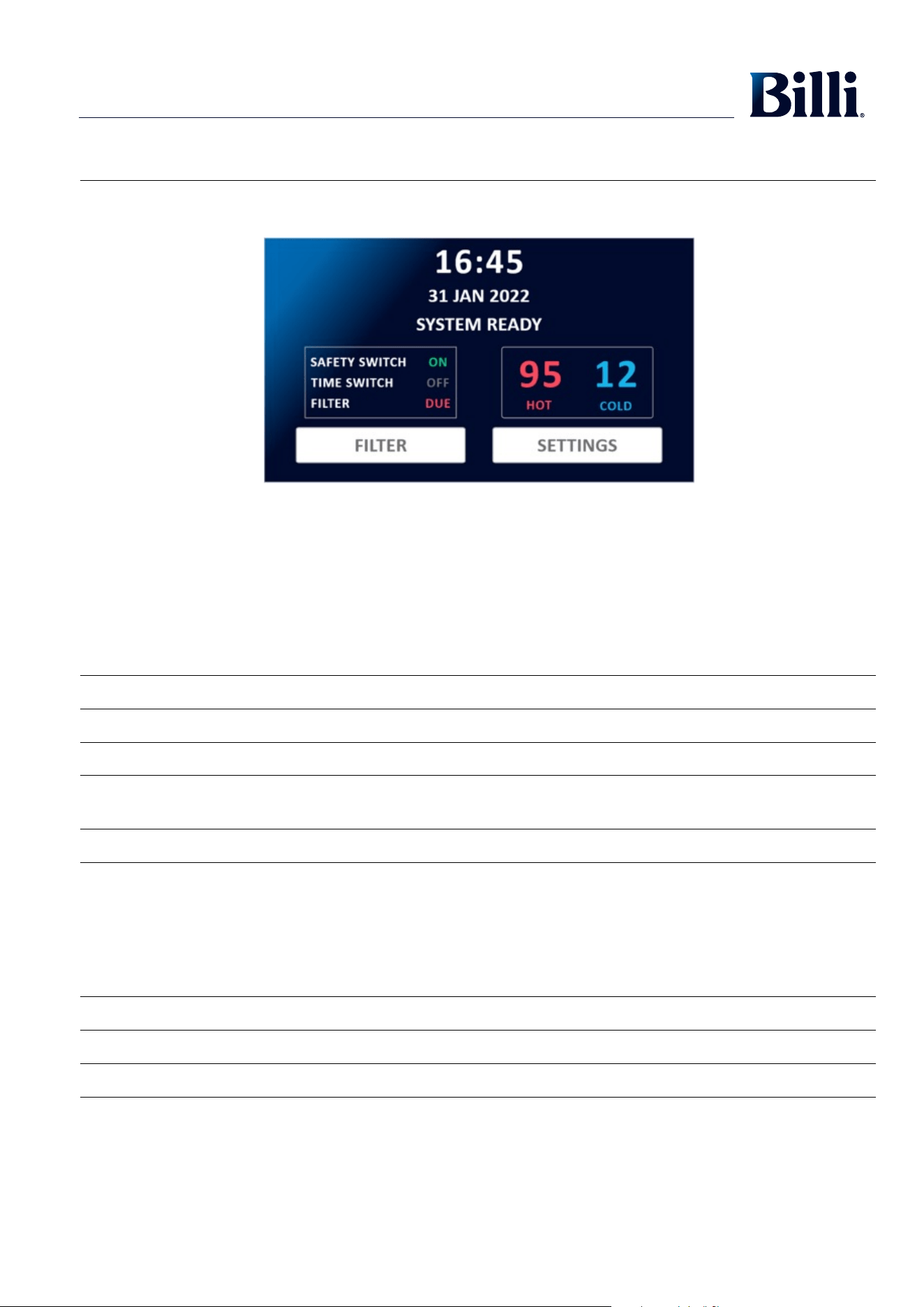
Main Status Bar:
Current status may be displayed as follows:
SYSTEM READY Indicates the Billi Home BCS is ready for use
OVERRIDE OFF Indicates override off mode has been activated
LOCKED OFF Indicates locked off mode has been activated
STANDBY MODE Indicates standby mode has been switched on and the OmniOne is currently in energy saving mode.
Also displayed when time switch mode automatically triggers the OmniOne to move to energy saving mode
FAULT Indicates fault description if the Billi Home BCS is currently in a fault
Additional Status’:
Current status may be displayed as follows in the additional status box:
SAFETY SWITCH ON/OFF – Indicates when childproof safety lock mode has been switched on or off
TIME SWITCH ON/OFF – Indicates if time switch mode is on or off.
FILTER OK/DUE SOON/DUE/OVERDUE - Indicates filter status
Setting Time and Date
The Home Screen shows the current date and time. It is important that this is correctly set on installation for correct functionality of your
Billi Home BCS.
Time and date can be set on the Set Time & Date Screen, accessed by pressing the time or date on the Home Screen.
Press to adjust the time and date. Press then to save changes and return to the Home Screen.
Setting Water Delivery Temperatures
Current water delivery temperatures are displayed live on the Home Screen.
Water delivery temperatures can be set using the Set Temperature Screen, accessed by pressing either the boiling or chilled water
temperatures on the Home Screen.
Chilled and sparkling water temperatures are set simultaneously via the chilled water temperature setting.
Press to adjust temperature.
Press or set boiling water temperature to the tea or coffee preset.
Once changes have been made, press then to return to the Home Screen.
If extra hot water is required, can be selected to momentarily bring water to 100°C.
Default boiling water temp: 97°C
Default chilled and sparkling water temp: 6°C
Boiling water range: 60°C - 98°C
Chilled and sparkling water range: 4°C – 20°C
For optimal system performance, 6°C is the lowest recommended set temperature for chilled and sparkling water.
Operating Modes and Safety Settings
Operating and safety settings can be set from the Mode Select Screens. These are accessed from the Settings Screen, which is accessed by
pressing the button from the Home Screen.
Once changes have been made, press then to return to the Home Screen.
Billi Filter Cartridges
All Billi Home BCS models feature the Billi swing-change filtration system, allowing for quick and easy filter change. The OmniOne is fitted
with a single carbon filter that utilises BWT’s unique Fibron X® technology. This technology features a graded density profile, ensuring
maximum performance and capacity, and provides superior drinking water quality, consistent filter life and peace of mind.
Use only Billi genuine filters designed for this system. All drinking water systems should be flushed after a period of non-use. Your
Billi Home BCS has an automatic flushing cycle which is switched on by default to flush the system for 90 seconds after 48 hours of non-use.
Alternatively, before use, run chilled water continuously until water flow stops to flush the system.
If required, the filter can also be manually flushed by pressing the button on the Filter Screen, which is accessed by
pressing the button on the Home Screen.
Filter Settings
Filter settings can be set from the Filter Settings Screens which are accessed from the Settings Screen.
Once changes have been made, press then to return to the Home Screen.
These settings can also be locked from changes upon request.
Home Screen
SET
SET
SET
SET
SETTINGS
TEA COFFEE
HOME
HOME
HOME
HOME
FLUSH FILTER
FILTER
QUICK
BOIL
1110
Set Up Instructions
Main Status Bar:
Current status may be displayed as follows:
SYSTEM READY Indicates the Billi Home BCS is ready for use
OVERRIDE OFF Indicates override off mode has been activated
LOCKED OFF Indicates locked off mode has been activated
STANDBY MODE Indicates standby mode has been switched on and the OmniOne is currently in energy saving mode.
Also displayed when time switch mode automatically triggers the OmniOne to move to energy saving mode
FAULT Indicates fault description if the Billi Home BCS is currently in a fault
Additional Status’:
Current status may be displayed as follows in the additional status box:
SAFETY SWITCH ON/OFF – Indicates when childproof safety lock mode has been switched on or off
TIME SWITCH ON/OFF – Indicates if time switch mode is on or off.
FILTER OK/DUE SOON/DUE/OVERDUE - Indicates filter status
Setting Time and Date
The Home Screen shows the current date and time. It is important that this is correctly set on installation for correct functionality of your
Billi Home BCS.
Time and date can be set on the Set Time & Date Screen, accessed by pressing the time or date on the Home Screen.
Press to adjust the time and date. Press then to save changes and return to the Home Screen.
Setting Water Delivery Temperatures
Current water delivery temperatures are displayed live on the Home Screen.
Water delivery temperatures can be set using the Set Temperature Screen, accessed by pressing either the boiling or chilled water
temperatures on the Home Screen.
Chilled and sparkling water temperatures are set simultaneously via the chilled water temperature setting.
Press to adjust temperature.
Press or set boiling water temperature to the tea or coffee preset.
Once changes have been made, press then to return to the Home Screen.
If extra hot water is required, can be selected to momentarily bring water to 100°C.
Default boiling water temp: 97°C
Default chilled and sparkling water temp: 6°C
Boiling water range: 60°C - 98°C
Chilled and sparkling water range: 4°C – 20°C
For optimal system performance, 6°C is the lowest recommended set temperature for chilled and sparkling water.
Operating Modes and Safety Settings
Operating and safety settings can be set from the Mode Select Screens. These are accessed from the Settings Screen, which is accessed by
pressing the button from the Home Screen.
Once changes have been made, press then to return to the Home Screen.
Billi Filter Cartridges
All Billi Home BCS models feature the Billi swing-change filtration system, allowing for quick and easy filter change. The OmniOne is fitted
with a single carbon filter that utilises BWT’s unique Fibron X® technology. This technology features a graded density profile, ensuring
maximum performance and capacity, and provides superior drinking water quality, consistent filter life and peace of mind.
Use only Billi genuine filters designed for this system. All drinking water systems should be flushed after a period of non-use. Your
Billi Home BCS has an automatic flushing cycle which is switched on by default to flush the system for 90 seconds after 48 hours of non-use.
Alternatively, before use, run chilled water continuously until water flow stops to flush the system.
If required, the filter can also be manually flushed by pressing the button on the Filter Screen, which is accessed by
pressing the button on the Home Screen.
Filter Settings
Filter settings can be set from the Filter Settings Screens which are accessed from the Settings Screen.
Once changes have been made, press then to return to the Home Screen.
These settings can also be locked from changes upon request.
Home Screen
SET
SET
SET
SET
SETTINGS
TEA COFFEE
HOME
HOME
HOME
HOME
FLUSH FILTER
FILTER
QUICK
BOIL
1312
Billi Filter Cartridges cont.
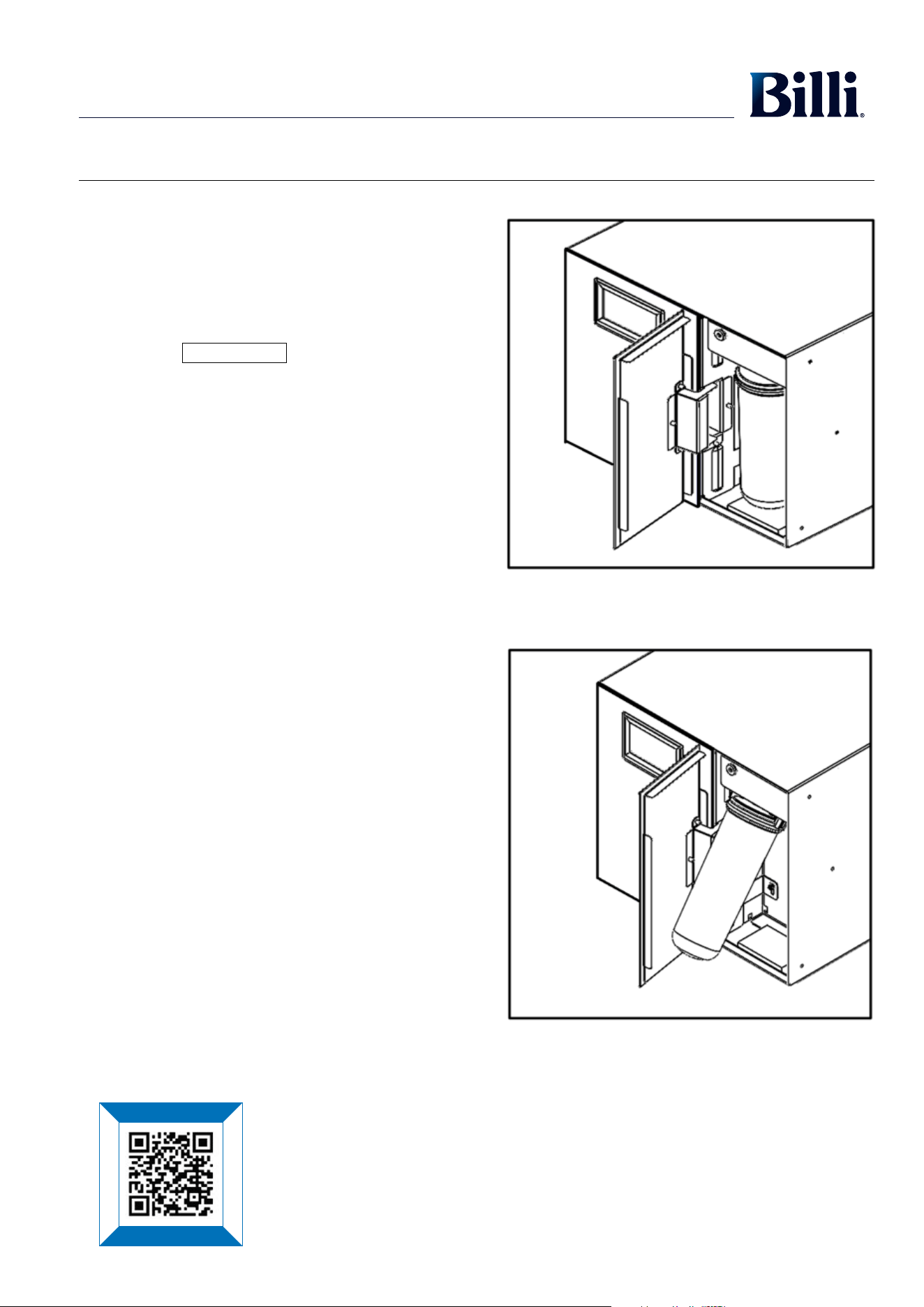
Filter Removal and Replacement Instructions
Important note: Please ensure you remove the foam packing under
the filter before installing.
1. Pull the filter cover edge where it’s marked
“OPEN HERE” to open the filter cover (see Diagram 1).
2. Press the button in the Filter Screen.
3. Wait a few seconds to allow the filter to de-pressurise.
4. Remove the filter (and filter bypass insert if required)
(see Diagram 2).
a. Hold old the bottom of the filter (or the filter bypass
insert) and pull towards you slowly to hinge the bottom
out. The top of the filter is a hinged cradle assembly and
should stop after approximately 30 degrees of travel.
b. Carefully pull the down in the direction it is tilted until it
pops out.
5. If water spills in the tray at the base of the filter, soak it up
with a cloth or sponge.
6. Fit the new filter by pushing right up into the cradle and
pushing the base of the filter back in until it locks into place.
7. The system will now begin an automatic flush cycle and will
display “FLUSHING FILTERS” in the Main Status Bar.
Dispenser lights will also flash.
8. Check for any leaks from around the filter, hosing or
pipework.
9. Close the filter cover.
10. Once the dispenser lights stop flashing and “SYSTEM
READY” is displayed in the Main Status Bar your system is
ready to use.
Diagram 1
Diagram 2
Billi Filter Cartridges cont.
Filter Change Reminders
The Billi Home BCS filter change due monitor operates by counting the number of cups dispensed and number of days elapsed until a pre-set
level is reached. The pre-set level is dependent on the type of filter installed.
The following filter change reminders and warnings are displayed in the Filter Status section of the Home Screen.
Due Soon:
Manually settable filter reminder. By default it is set to remind 3 months prior to the pre-set number of days elapsing. It can be set from
the Filter Settings Screens.
Due:
1 month prior to the pre-set number of days elapsing.
Overdue:
The pre-set number of cups or days elapsed has been reached. When this occurs water can no longer be dispensed from the Billi
OmniOne until the filter is replaced.
Filter status indicator lights will also flash as outlined in the Dispenser Icons sections.
Water filters installed in areas with higher levels of turbidity (cloudiness/sediment) will experience a reduced service life. The flow from the
chilled water outlet will decrease as the filters become blocked. It may be necessary to change filters before a filter becomes overdue. The
Due Soon reminder can be set for this purpose to better suit your installation environment.
Standard 5 micron-rated filters generally have a longer service life than premium sub-micron-rated filters.
If particularly dirty water is noticed coming through the water supply (e.g. from other tapware), as sometimes occurs following repairs to
local water mains, immediately turn your Billi Home BCS off at the power source and shut water supply to the system if possible. This will
help prevent premature blocking of the filter cartridges.
Replacement of Filter Cartridges
Periodic replacement of your Billi Home BCS ’s filter cartridge is necessary to maintain the sparkling cleanliness and purity of your
drinking water.
A replacement filter change service is available. To arrange, contact the Billi Service centre on 1800 812 321 or at www.billi.com.au.
If you wish to install the replacement filter cartridge yourself, filters can be purchased online at www.billi.com.au or through a certified agent
which will provide genuine Billi replacement filter cartridges.
To assist with the replacement of your Billi Home BCS filter cartridge, a series of graphic instruction screens below will guide you through the
required steps. Once the new filter has been installed and the filter flush cycle is complete, check for any water leakage around the system.
Take particular care to ensure the area around the water leakage sensor is dry, located on the lower left hand side of the bulkhead behind
the filter. If you have any questions or concerns during the filter change process, simply contact Billi’s experienced technical assistance team
at 1800 812 321 or at www.billi.com.au.
CHANGE FILTER
Please scan the QR code to re-order filters or CO
2
.
Book a service call
Filtration & service
Warranty registration
Technical support
1312
Billi Filter Cartridges cont.
Filter Removal and Replacement Instructions
Important note: Please ensure you remove the foam packing under
the filter before installing.
1. Pull the filter cover edge where it’s marked
“OPEN HERE” to open the filter cover (see Diagram 1).
2. Press the button in the Filter Screen.
3. Wait a few seconds to allow the filter to de-pressurise.
4. Remove the filter (and filter bypass insert if required)
(see Diagram 2).
a. Hold old the bottom of the filter (or the filter bypass
insert) and pull towards you slowly to hinge the bottom
out. The top of the filter is a hinged cradle assembly and
should stop after approximately 30 degrees of travel.
b. Carefully pull the down in the direction it is tilted until it
pops out.
5. If water spills in the tray at the base of the filter, soak it up
with a cloth or sponge.
6. Fit the new filter by pushing right up into the cradle and
pushing the base of the filter back in until it locks into place.
7. The system will now begin an automatic flush cycle and will
display “FLUSHING FILTERS” in the Main Status Bar.
Dispenser lights will also flash.
8. Check for any leaks from around the filter, hosing or
pipework.
9. Close the filter cover.
10. Once the dispenser lights stop flashing and “SYSTEM
READY” is displayed in the Main Status Bar your system is
ready to use.
Diagram 1
Diagram 2
Billi Filter Cartridges cont.
Filter Change Reminders
The Billi Home BCS filter change due monitor operates by counting the number of cups dispensed and number of days elapsed until a pre-set
level is reached. The pre-set level is dependent on the type of filter installed.
The following filter change reminders and warnings are displayed in the Filter Status section of the Home Screen.
Due Soon:
Manually settable filter reminder. By default it is set to remind 3 months prior to the pre-set number of days elapsing. It can be set from
the Filter Settings Screens.
Due:
1 month prior to the pre-set number of days elapsing.
Overdue:
The pre-set number of cups or days elapsed has been reached. When this occurs water can no longer be dispensed from the Billi
OmniOne until the filter is replaced.
Filter status indicator lights will also flash as outlined in the Dispenser Icons sections.
Water filters installed in areas with higher levels of turbidity (cloudiness/sediment) will experience a reduced service life. The flow from the
chilled water outlet will decrease as the filters become blocked. It may be necessary to change filters before a filter becomes overdue. The
Due Soon reminder can be set for this purpose to better suit your installation environment.
Standard 5 micron-rated filters generally have a longer service life than premium sub-micron-rated filters.
If particularly dirty water is noticed coming through the water supply (e.g. from other tapware), as sometimes occurs following repairs to
local water mains, immediately turn your Billi Home BCS off at the power source and shut water supply to the system if possible. This will
help prevent premature blocking of the filter cartridges.
Replacement of Filter Cartridges
Periodic replacement of your Billi Home BCS ’s filter cartridge is necessary to maintain the sparkling cleanliness and purity of your
drinking water.
A replacement filter change service is available. To arrange, contact the Billi Service centre on 1800 812 321 or at www.billi.com.au.
If you wish to install the replacement filter cartridge yourself, filters can be purchased online at www.billi.com.au or through a certified agent
which will provide genuine Billi replacement filter cartridges.
To assist with the replacement of your Billi Home BCS filter cartridge, a series of graphic instruction screens below will guide you through the
required steps. Once the new filter has been installed and the filter flush cycle is complete, check for any water leakage around the system.
Take particular care to ensure the area around the water leakage sensor is dry, located on the lower left hand side of the bulkhead behind
the filter. If you have any questions or concerns during the filter change process, simply contact Billi’s experienced technical assistance team
at 1800 812 321 or at www.billi.com.au.
CHANGE FILTER
Please scan the QR code to re-order filters or CO
2
.
Book a service call
Filtration & service
Warranty registration
Technical support
1514
CO
2
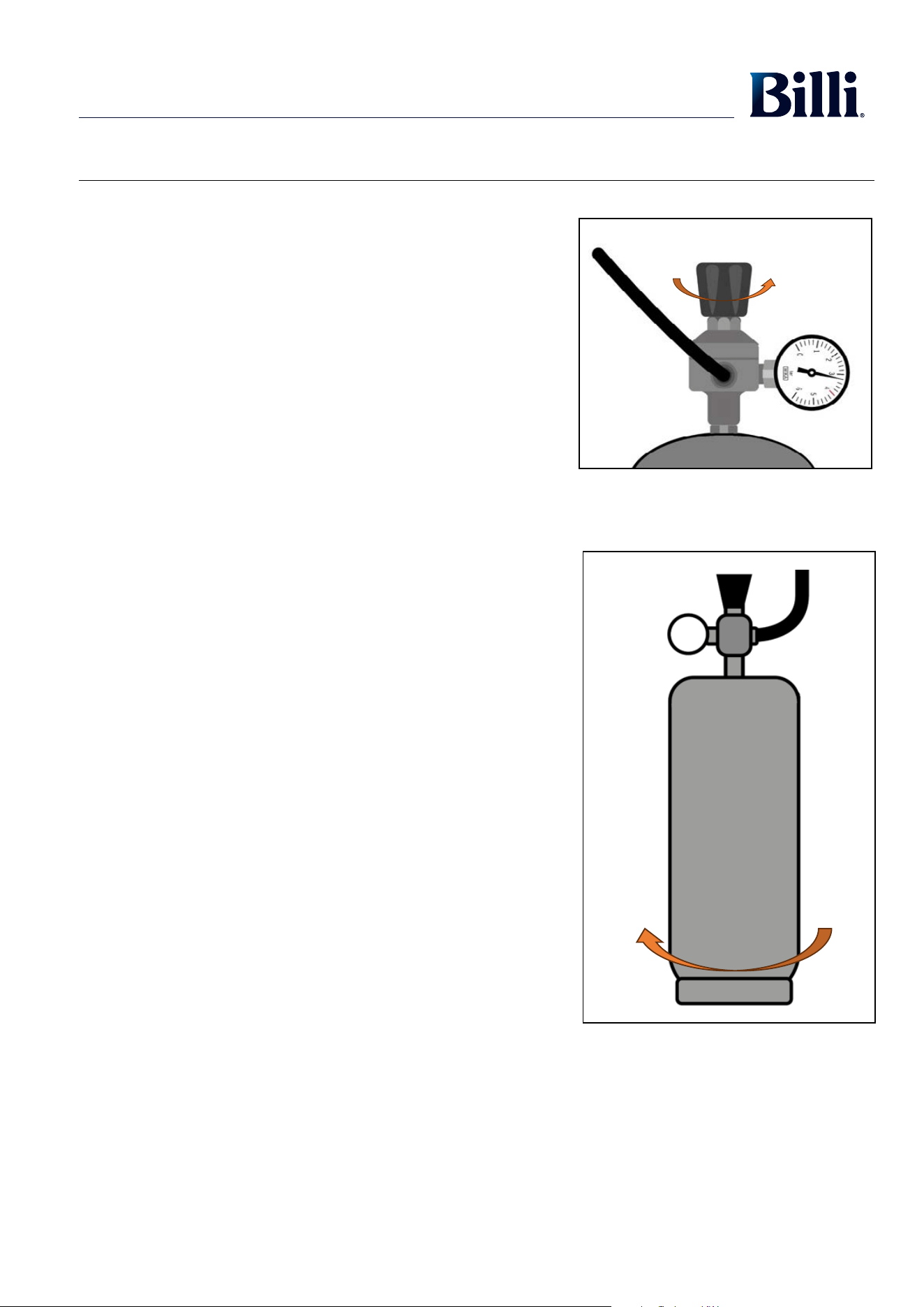
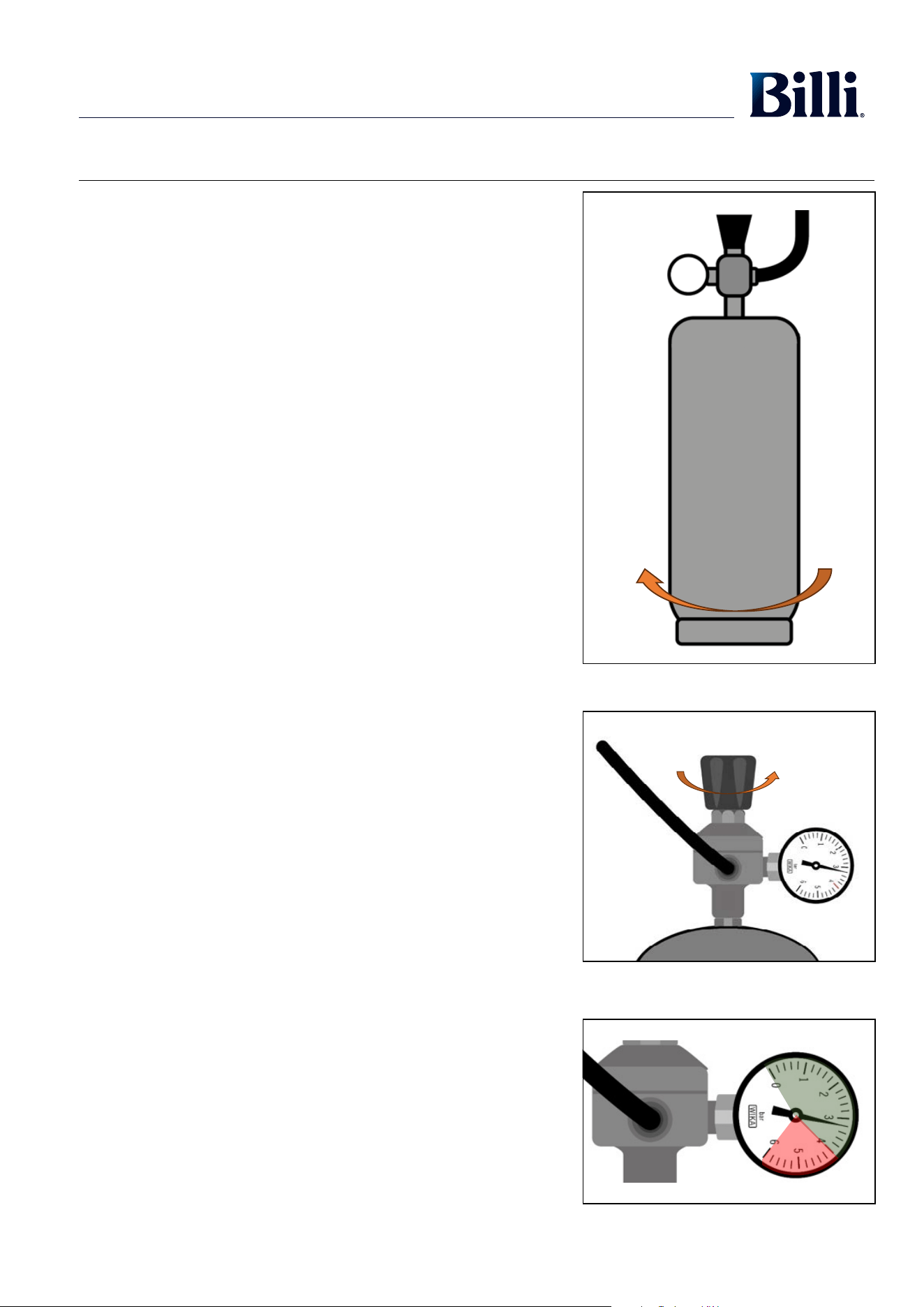
Cylinder InstallationCO2 Cylinder Removal
1. Ensure all connections between the regulator and Billi Home BCS
are secure.
2. Position the regulator on top of the replacement CO
2
cylinder.
3. On Billi provided cylinders hold the regulator and rotate the CO
2
cylinder anti-clockwise to tighten. (See Diagram 5)
• CO
2
will escape while tightening. Continue to turn the cylinder to
form a seal with the regulator.
• Avoid breathing air containing high levels of CO
2
or contact with the
cold escaping gas as per the Material Safety Data Sheet included
with the CO
2
cylinder.
4. Open the CO
2
regulator. On Billi provided regulators do so by turning
the black knob clockwise (direction of “+” arrow). (See Diagram 6).
• Set the pressure to around 3 bar.
• Tubes and connections may settle when the pressure is turned on.
5. Check CO
2
cylinder and connections for leaks using soapy water to
test for bubbles.
6. Turn on power to the Billi Home BCS.
7. Purge the system by toggling on the CO
2
Purge function on the Unit
Setup 2 Screen (accessed from the Settings Screen).
• Water may flow from the dispenser.
• Wait until the function automatically toggles off.
• This is to purge the system of any air that may have entered during
the process, which is detrimental to water carbonation levels.
8. Increase the pressure to set your level of carbonation.
• Initial set pressure may vary once the Billi Home BCS is running.
You may need to adjust the regulator once the system has
stabilised.
9. Wait for the chilled and sparkling water temperature to reach set
values before commencing use.
WARNING:
Do not set the CO
2
pressure above 4 bar. (See Diagram 7)
1. Turn off CO
2
regulator. On Billi provided regulators this
is done by turning the black knob anti-clockwise (direction of
“–“ arrow) until it stops. (See Diagram 3).
2. Drain any remaining pressure by toggling on the CO
2
Purge
function on the Unit Setup 2 Screen (accessed from the
Settings Screen).
• Water will flow from the dispenser.
• Wait until the function automatically toggles off or until
water stops flowing.
• Repeat the process if water is still flowing when the
function automatically toggles off.
3. Check CO
2
pressure gauge on the regulator shows pressure
below 1 bar.
• An internal pump may automatically turn on during step
2 and 3. Nothing needs to be done in response.
• Under normal circumstances 2 purge cycles should bring
the pressure below 1 bar.
4. Turn off power to the Billi Home BCS.
5. Remove cylinder. On Billi provided cylinders hold the
regulator and rotate the cylinder clockwise to remove.
(See Diagram 4)
• If the bottle is not completely empty a small amount of
CO
2
may escape while you are turning the bottle.
• The bottle will self-seal prior to fully detaching from the
regulator.
• Avoid breathing air containing high levels of CO
2
or
contact with the cold escaping gas as per the Material
Safety Data Sheet included with the CO
2
cylinder.
Diagram 4
Diagram 3
Diagram 5
Diagram 6
Diagram 7
+ -
+ -
1514
CO
2
Cylinder InstallationCO2 Cylinder Removal
1. Ensure all connections between the regulator and Billi Home BCS
are secure.
2. Position the regulator on top of the replacement CO
2
cylinder.
3. On Billi provided cylinders hold the regulator and rotate the CO
2
cylinder anti-clockwise to tighten. (See Diagram 5)
• CO
2
will escape while tightening. Continue to turn the cylinder to
form a seal with the regulator.
• Avoid breathing air containing high levels of CO
2
or contact with the
cold escaping gas as per the Material Safety Data Sheet included
with the CO
2
cylinder.
4. Open the CO
2
regulator. On Billi provided regulators do so by turning
the black knob clockwise (direction of “+” arrow). (See Diagram 6).
• Set the pressure to around 3 bar.
• Tubes and connections may settle when the pressure is turned on.
5. Check CO
2
cylinder and connections for leaks using soapy water to
test for bubbles.
6. Turn on power to the Billi Home BCS.
7. Purge the system by toggling on the CO
2
Purge function on the Unit
Setup 2 Screen (accessed from the Settings Screen).
• Water may flow from the dispenser.
• Wait until the function automatically toggles off.
• This is to purge the system of any air that may have entered during
the process, which is detrimental to water carbonation levels.
8. Increase the pressure to set your level of carbonation.
• Initial set pressure may vary once the Billi Home BCS is running.
You may need to adjust the regulator once the system has
stabilised.
9. Wait for the chilled and sparkling water temperature to reach set
values before commencing use.
WARNING:
Do not set the CO
2
pressure above 4 bar. (See Diagram 7)
1. Turn off CO
2
regulator. On Billi provided regulators this
is done by turning the black knob anti-clockwise (direction of
“–“ arrow) until it stops. (See Diagram 3).
2. Drain any remaining pressure by toggling on the CO
2
Purge
function on the Unit Setup 2 Screen (accessed from the
Settings Screen).
• Water will flow from the dispenser.
• Wait until the function automatically toggles off or until
water stops flowing.
• Repeat the process if water is still flowing when the
function automatically toggles off.
3. Check CO
2
pressure gauge on the regulator shows pressure
below 1 bar.
• An internal pump may automatically turn on during step
2 and 3. Nothing needs to be done in response.
• Under normal circumstances 2 purge cycles should bring
the pressure below 1 bar.
4. Turn off power to the Billi Home BCS.
5. Remove cylinder. On Billi provided cylinders hold the
regulator and rotate the cylinder clockwise to remove.
(See Diagram 4)
• If the bottle is not completely empty a small amount of
CO
2
may escape while you are turning the bottle.
• The bottle will self-seal prior to fully detaching from the
regulator.
• Avoid breathing air containing high levels of CO
2
or
contact with the cold escaping gas as per the Material
Safety Data Sheet included with the CO
2
cylinder.
Diagram 4
Diagram 3
Diagram 5
Diagram 6
Diagram 7
+ -
+ -
16
Service Support
Your Billi Home BCS incorporates a fault detection and diagnosis system. Should a fault occur, a message will be displayed on the Main
Status Bar describing the fault. Pressing the HELP button will advise you of any checks that can be performed.
If a service call needs to be logged, note the message displayed and report this when booking the call. This will assist the technician in
coming prepared to rectify the problem.
Designed and manufactured in Australia.
Billi® is a registered trademark of Billi Australia Pty Ltd. B All rights reserved. © Copyright protected.
Billi Australia Pty Ltd has a policy of continual improvement, all details are subject to change without notice. All goods are sold subject to our published terms and conditions.
6714_BILLI_USER GUIDE - Billi Home BCS_COMMERCIAL_0823 601208 REV01
CONTACT DETAILS:
Please scan the QR code for all support information.
Billi Australia Pty Ltd
42 Lucknow Crescent, Thomastown Victoria 3074 Australia
Telephone 1800 812 321
www.billi.com.au
Book a service call
Filtration & service
Warranty registration
Technical support