

AboutthisDocument
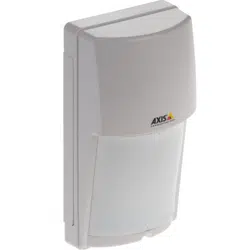
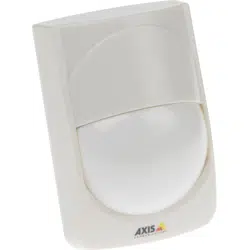
ThismanualisintendedforadministratorsandusersofAXIST8331PIR
MotionDetectorSeries.Itincludesinstructionsforusingandmanaging
theproductonyournetwork.Laterversionsofthisdocumentwillbe
postedatwww.axis.com
LegalConsiderations
Videoandaudiosurveillancecanberegulatedbylawsthatvaryfrom
countrytocountry.Checkthelawsinyourlocalregionbeforeusing
thisproductforsurveillancepurposes.
Liability
Everycarehasbeentakeninthepreparationofthisdocument.Please
informyourlocalAxisofceofanyinaccuraciesoromissions.Axis
CommunicationsABcannotbeheldresponsibleforanytechnicalor
typographicalerrorsandreservestherighttomakechangestothe
productandmanualswithoutpriornotice.AxisCommunicationsAB
makesnowarrantyofanykindwithregardtothematerialcontained
withinthisdocument,including,butnotlimitedto,theimplied
warrantiesofmerchantabilityandtnessforaparticularpurpose.Axis
CommunicationsABshallnotbeliablenorresponsibleforincidentalor
consequentialdamagesinconnectionwiththefurnishing,performance
oruseofthismaterial.Thisproductisonlytobeusedforitsintended
purpose.
IntellectualPropertyRights
AxisABhasintellectualpropertyrightsrelatingtotechnologyembodied
intheproductdescribedinthisdocument.Inparticular,andwithout
limitation,theseintellectualpropertyrightsmayincludeoneormore
ofthepatentslistedatwww.axis.com/patent.htmandoneormore
additionalpatentsorpendingpatentapplicationsintheUSandother
countries.
EquipmentModications
Thisequipmentmustbeinstalledandusedinstrictaccordancewiththe
instructionsgivenintheuserdocumentation.Thisequipmentcontains
nouser-serviceablecomponents.Unauthorizedequipmentchangesor
modicationswillinvalidateallapplicableregulatorycertications
andapprovals.
TrademarkAcknowledgments
AXISCOMMUNICATIONS,AXIS,ETRAX,ARTPECandVAPIXare
registeredtrademarksortrademarkapplicationsofAxisABinvarious
jurisdictions.Allothercompanynamesandproductsaretrademarksor
registeredtrademarksoftheirrespectivecompanies.
DisposalandRecycling
Whenthisproducthasreachedtheendofitsusefullife,disposeof
itaccordingtolocallawsandregulations.Forinformationabout
yournearestdesignatedcollectionpoint,contactyourlocalauthority
responsibleforwastedisposal.Inaccordancewithlocallegislation,
penaltiesmaybeapplicableforincorrectdisposalofthiswaste.
Europe
Thissymbolmeansthattheproductshallnotbedisposedof
togetherwithhouseholdorcommercialwaste.Directive2012/19/EU
onwasteelectricalandelectronicequipment(WEEE)isapplicablein
theEuropeanUnionmemberstates.Topreventpotentialharmto
humanhealthandtheenvironment,theproductmustbedisposed
ofinanapprovedandenvironmentallysaferecyclingprocess.For
informationaboutyournearestdesignatedcollectionpoint,contact
yourlocalauthorityresponsibleforwastedisposal.Businessesshould
contacttheproductsupplierforinformationabouthowtodispose
ofthisproductcorrectly.
ThisproductcomplieswiththerequirementsofDirective2011/65/EUon
therestrictionoftheuseofcertainhazardoussubstancesinelectrical
andelectronicequipment(RoHS).
China
Thisproductcomplieswiththerequirementsofthelegislative
actAdministrationontheControlofPollutionCausedbyElectronic
InformationProducts(ACPEIP).
ContactInformation
AxisCommunicationsAB
Emdalavägen14
22369Lund
Sweden
Tel:+46462721800
Fax:+4646136130
www.axis.com
Support
Shouldyourequireanytechnicalassistance,pleasecontactyourAxis
reseller.Ifyourquestionscannotbeansweredimmediately,your
resellerwillforwardyourqueriesthroughtheappropriatechannelsto
ensurearapidresponse.IfyouareconnectedtotheInternet,youcan:
•ndanswerstoresolvedproblemsintheFAQdatabase.Search
byproduct,category,orphrase
•reportproblemstoAxissupportstaffbyloggingintoyourprivate
supportarea
•chatwithAxissupportstaff
•visitAxisSupportatwww.axis.com/techsup/
LearnMore!
VisitAxislearningcenterwww.axis.com/academy/forusefultrainings,
webinars,tutorialsandguides.

AXIST8331PIRMotionDetectorSeries
TableofContents
Functions..................................................4
I/OandEventConguration.......................................4
WalkTest......................................................4
MaskingStrips..................................................5
Day/NightModeAdjustment......................................5
LEDswitch.....................................................5
PulseCountSwitch..............................................5
SensitivitySwitch...............................................6
DetectionAreaAdjustment........................................6
VMDandPIR...................................................6
ReferenceMaterial..........................................8
HardwareOverview..............................................8
AXIST8331PIRMotionDetectorSeriesGraphs.......................9
AXIST8331PIRMotionDetectorSeriesTerminalConnections............10
AXIST8331PIRMotionDetectorSeriesSchematics....................11
3

AXIST8331PIRMotionDetectorSeries
Functions
Functions
I/OandEventConguration
BelowtextappliestobothAXIST8331andAXIST8331-E.
ThissectioncontainsinformationofI/OcongurationandEventsontheCamera.Formoreinformationandspecicationsaboutthe
productsI/OandEventfunctionalityseetheproductsUserManualavailableonwww.axis.com
I/OPortConguration
1.GotoSetup–SystemOptions–Ports&Devices–I/OPorts
2.Setport1toInput(default)
3.SetNormalstateistoGroundedcircuit
4.PressSave
Note
•Iftheportisusedinanevent,itisnotpossibletoswitchbetweenInputandOutputuntiltheeventischangedorremoved.
•ItisonlypossibletomanuallysetInputorOutputifthecameraprovidestwoormorecongurableI/Oports.
EventConguration
1.GototheEventssetuppageandselectActionRules.
2.SelectAdd.
3.TypeinanamefortheActionRule.
4.SelectInputSignalfromtheTriggerdrop-downlist.
-SelectDigitalInputPortfromthedrop-downlistbelow.
-Select1or2fromthedrop-downlistbelow.
-MakesureActive:issettoYes.
5.SelectavaluefromtheScheduledrop-downlist(Alwaysisselectedbydefault)ormanuallysetavaluebyselect
Newschedule.
6.SelectanactionfromtheTypedrop-downlist.
7.PressOKinordertosavetheActionRule
TheActionRulewillnowbeinthelistofActionRules.
WalkTest
ItisrecommendedtoperformawalktestafterinstallationtoconrmthatthePIRsensorisworkingproperly.
Beforethetest,makesurethePIRsensorisconguredasbelow:
•SetthephotocelltoDAY(defaultsetting).
•SetthePulsecountswitchtoTEST.
•SettheLEDswitchtoON(defaultsetting).ThisappliestoAXIST8331only.
Afterthewarmupperiodiscompleted(approximately60s),conductawalktestbymovinginthedetectionzoneofthePIRsensor.
TheLEDlightswhenthePIRsensordetectsamovingobject.
4

AXIST8331PIRMotionDetectorSeries
Functions
Afterthetest,congurethePIRsensorasbelow:
•Setthephotocellaccordingtotheenvironment,DAYisthedefaultsettingandisrecommendedformostapplications.
•SetthePulsecountswitchto2.
•SettheLEDswitchtoONorOFF.SeeLEDswitchonpage5formoreinformationabouttheLED.Thisappliesto
AXIST8331only.
MaskingStrips
BelowtextappliestoAXIST8331–Eonly.
Unwanteddetectionzonescanbeeliminatedbymaskingthelenswithprovidedmaskingstrips.
1.Removethecover.
2.Applythemaskingstriptothezonesthatshouldbeexcluded.
e
f
f
d
c
b
a
b
c
d
e
e
f
f
d
c
b
a
b
c
d
e
a
b
b
c
c
d
d
e
e
a
b
c
cd
e
f
Day/NightModeAdjustment
BelowtextappliestoAXIST8331–Eonly.
TheDay/NightModeswitchcanbeusedtoadjustthedetectoraccordingtothebrightnessofthesurroundingarea.
ForbestperformanceitisrecommendedtosetthedialtoDAY(defaultsetting).
Tohavethedetectorbegintofunctiononlyafterithasbecomedark,turnthedialgraduallytotheNIGHTside.
ForpositionoftheDay/NightModeswitch,seeHardwareOverviewonpage8
NIGHT DAY
LEDswitch
BelowtextappliestoAXIST8331only.
ForAXIST8331itispossibletosettheLEDswitchtoOFF/ON.BydefaulttheswitchissettoON.WheninthismodetheLEDwilllit
whentriggered.WhensettoOFFtheLEDwillnotbelitwhentriggered.
ForpositionoftheLEDswitch,seeHardwareOverviewonpage8
PulseCountSwitch
BelowtextappliestobothAXIST8331andAXIST8331-E.
5
AXIST8331PIRMotionDetectorSeries
Functions
ThePulseCountswitchcanbesetintwodifferentmodes,2orTEST.Mode2isthedefaultmodeandisrecommendedtouse.
TESTisonlyusedwhenperformingawalktest.
ForpositionofthePulseCountswitch,seeHardwareOverviewonpage8
SensitivitySwitch
TheSensitivityswitchcanbeusedtoadjustthesensitivityofthedetector.Therearethreedifferentmodes.
•M(Medium)Thisisthedefaultpositionandcanbeusedfornormalapplications.
•H(High)Usethiswhentheapplicationrequireshighsensitivity.WhenusingAXIST8331–EinPetAlleyAreamode,itis
recommendedtosetthesensitivitymodetoH.
•L(Low)Usethisinapplicationsthatmaybeunstable.
ForpositionoftheSensitivityswitch,seeHardwareOverviewonpage8
DetectionAreaAdjustment
BelowtextappliestoAXIST8331–Eonly.
ForAXIST8331–Eitispossibletosetthedetectionarea.Therearetwodifferentmodes.
•Multi-LevelArea.Thisisthedefaultmodeandisapplicabletonormalapplications.
•PetAlleyArea.Thismodeprovidesahorizontaldetectionpatternwithnodeclinationofzones,allowingpetstomove
throughthearea.
Note
IdealmountingheightforPetAlleyAreais1.2mto1.5m.
SeeAXIST8331PIRMotionDetectorSeriesGraphsonpage9forgraphsofMulti-LevelAreaandPetAlleyArea.
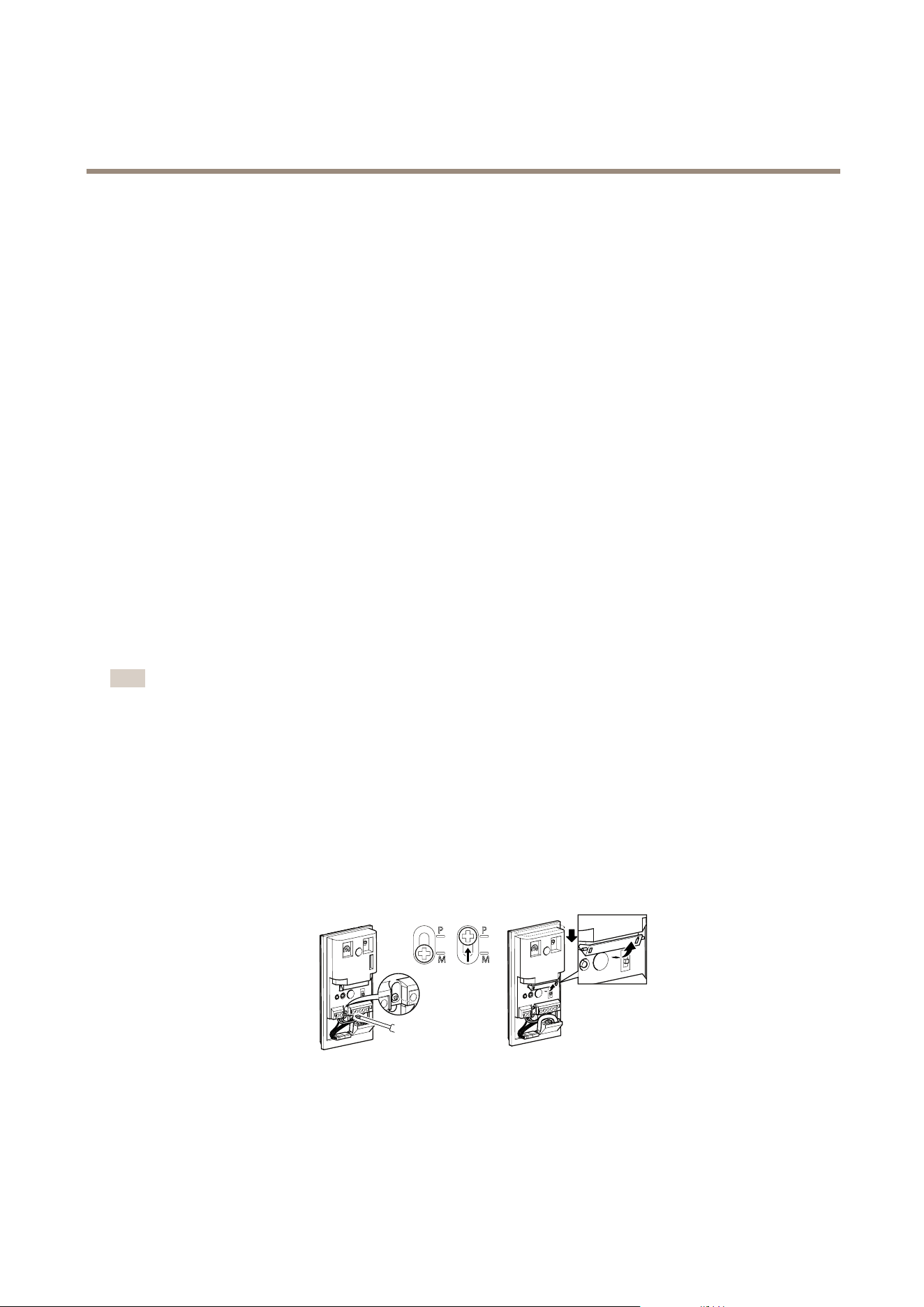
SeeHardwareOverviewonpage8forpositionoftheDetectionAreascrewandthemirror.
SeebelowforhowtoswitchtoPetAlleyAreamode.
1.Carefullyloosentheadjustmentscrew.
2.SlidethecoverdownandfastenthescrewatthePposition.
3.Flipthemirrortotheupperposition.
VMDandPIR
AXISVideoMotionDetection(VMD)isanapplicationforAxiscameraproducts.VMDcanbeusedtogetherwiththePIRsensor.The
applicationdetectsmovingobjectswithinapredenedareaofinterest,makingitpossibletoautomaticallytriggeranevent.
6

AXIST8331PIRMotionDetectorSeries
Functions
Note
TheVMDdetectionareaandthePIRsensorsdetectionpatternarenotsynchronizedbydefault.VMDdetectionareacanbe
setinauserinterface.ThedetectionpatternforAXIST8331–Ecanbemodiedbyusingthesuppliedmaskingstrips.
FormoreinformationaboutAXISVideoMotionDetection,seetheproductsUserManualavailableonwww.axis.com
7
AXIST8331PIRMotionDetectorSeries
ReferenceMaterial
ReferenceMaterial
HardwareOverview
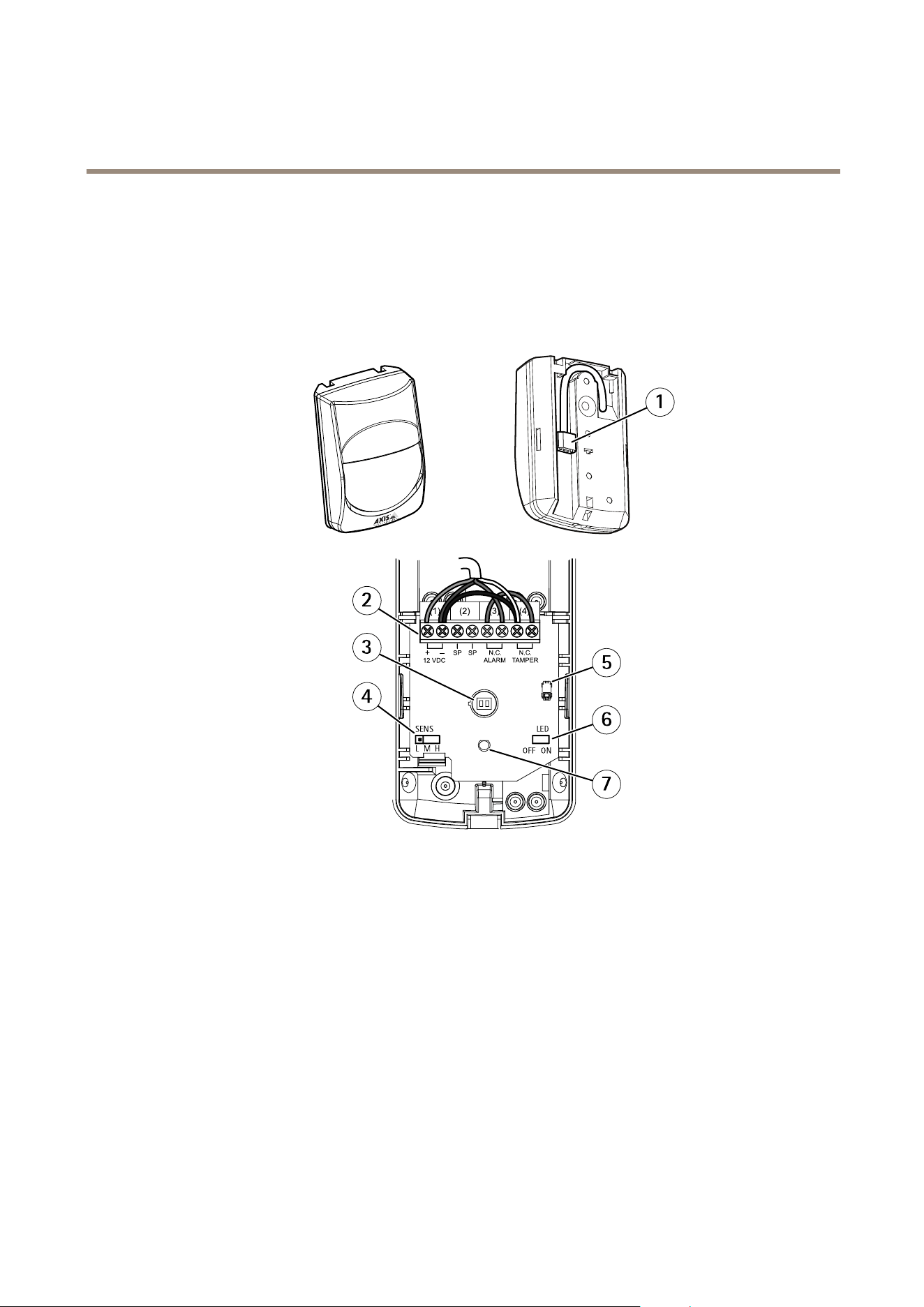
AXIST8331
1
SENS
L M H
OFF ON
LED
4
3
2
6
7
5
1
I/Ointerface
2
Terminals
3
PIRsensor(donottouch)
4
Sensitivityswitch
5
Tamperswitch
6
LEDswitch
7
LED
AXIST8331–E
8
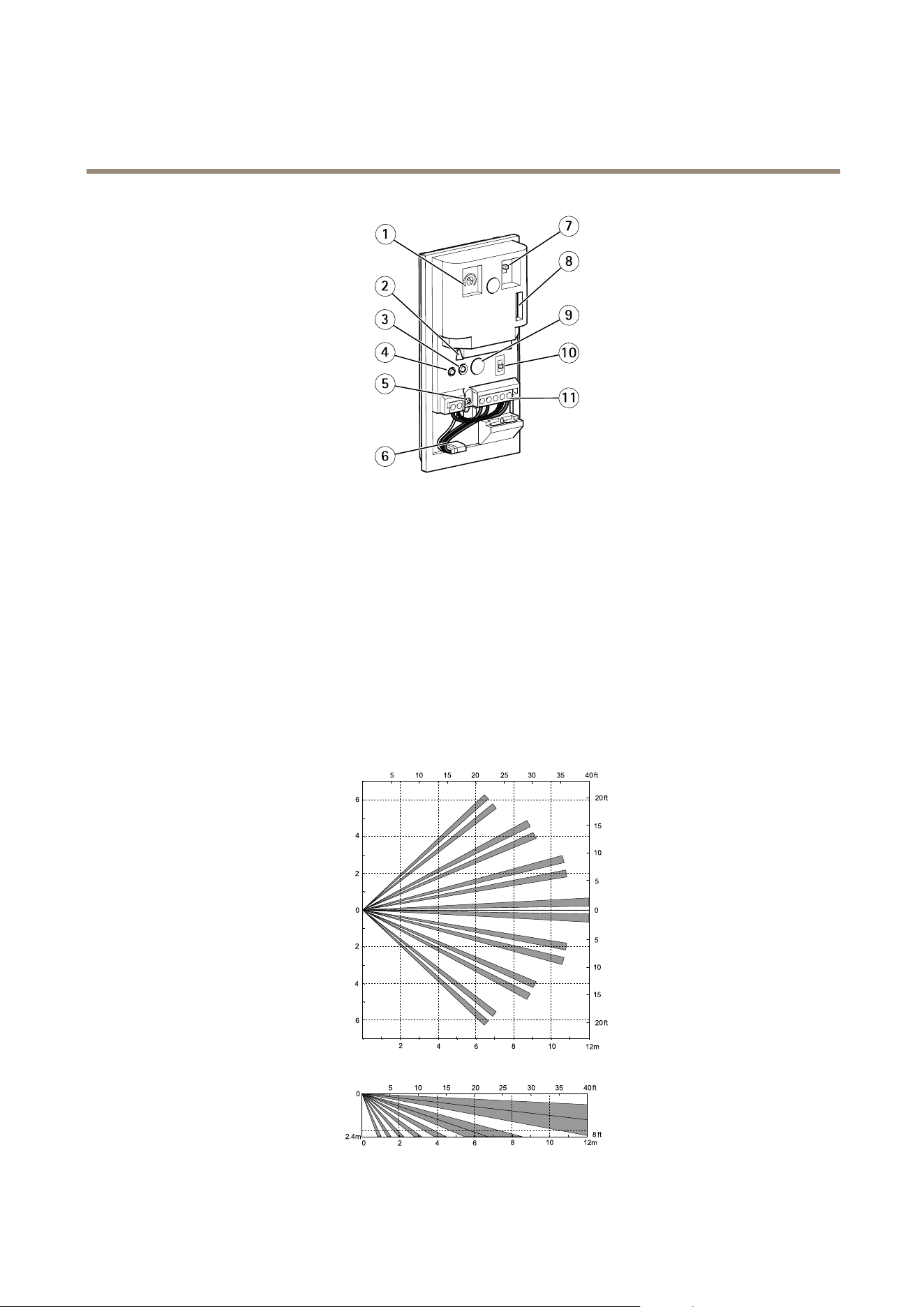
AXIST8331PIRMotionDetectorSeries
ReferenceMaterial
7
10
9
11
3
2
4
5
1
6
8
1
Day/Nightmodeadjustment
2
Mirror
3
Photocell
4
LED
5
Detectionareaadjustmentscrew
6
I/Ointerface
7
Pulsecountswitch
8
Tamperswitch
9
PIRsensor(donottouch)
10
Sensitivityswitch
11
Terminals
AXIST8331PIRMotionDetectorSeriesGraphs
AXIST8331graph
9
AXIST8331PIRMotionDetectorSeries
ReferenceMaterial
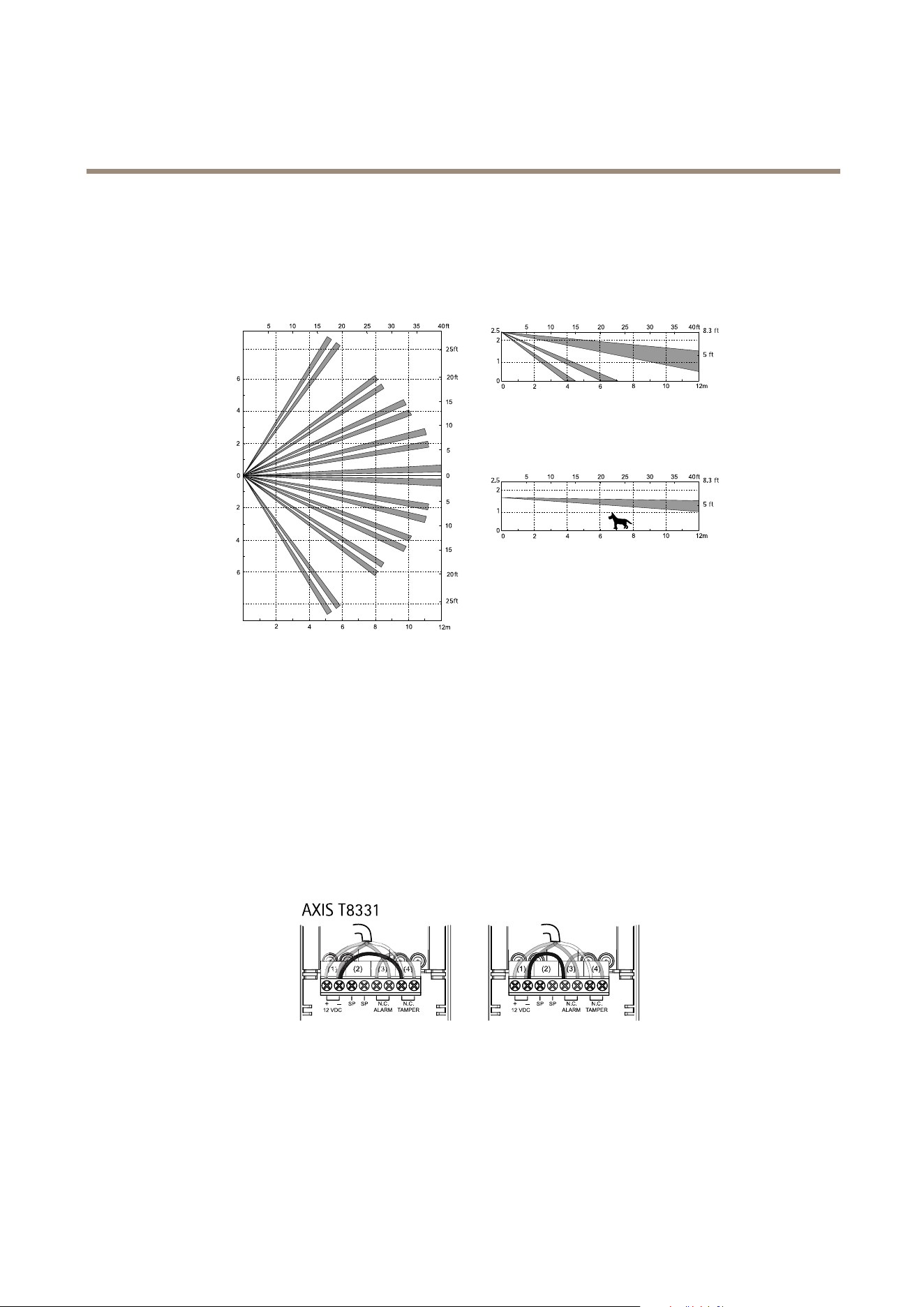
Thelargegraphaboveshowsatopviewofthedetectionzones.
ThesmallgraphaboveshowsasideviewofthedetectionzoneswhenthePIRsensorismountedonaheightof2.4m.Idealmounting
heightisbetween1.5mto2.4m.
AXIST8331–Egraph
1
2
2.5
8.3 ft
5 ft
1
2
2.5
8.3 ft
5 ft
Thelargegraphaboveshowsatopviewofthedetectionzones.
Thesmallgraphsaboveshowsasideviewofthedetectionzones.Multi-levelareaandPetalleyarea.
AXIST8331PIRMotionDetectorSeriesTerminalConnections
AXIST8331
BelowareimagesoftheterminalconnectionforAXIST8331.
Theleftimageshowsthedefaultconnectionwithtamperandalarmtogether.
Therightimageshowsaconnectionwithtamperandalarmseparated.Thisconnectionrequiresacamerawithatleasttwo
congurableI/Oports.
AXIS T8331
Forpositionoftheterminals,seeHardwareOverviewonpage8
AXIST8331–E
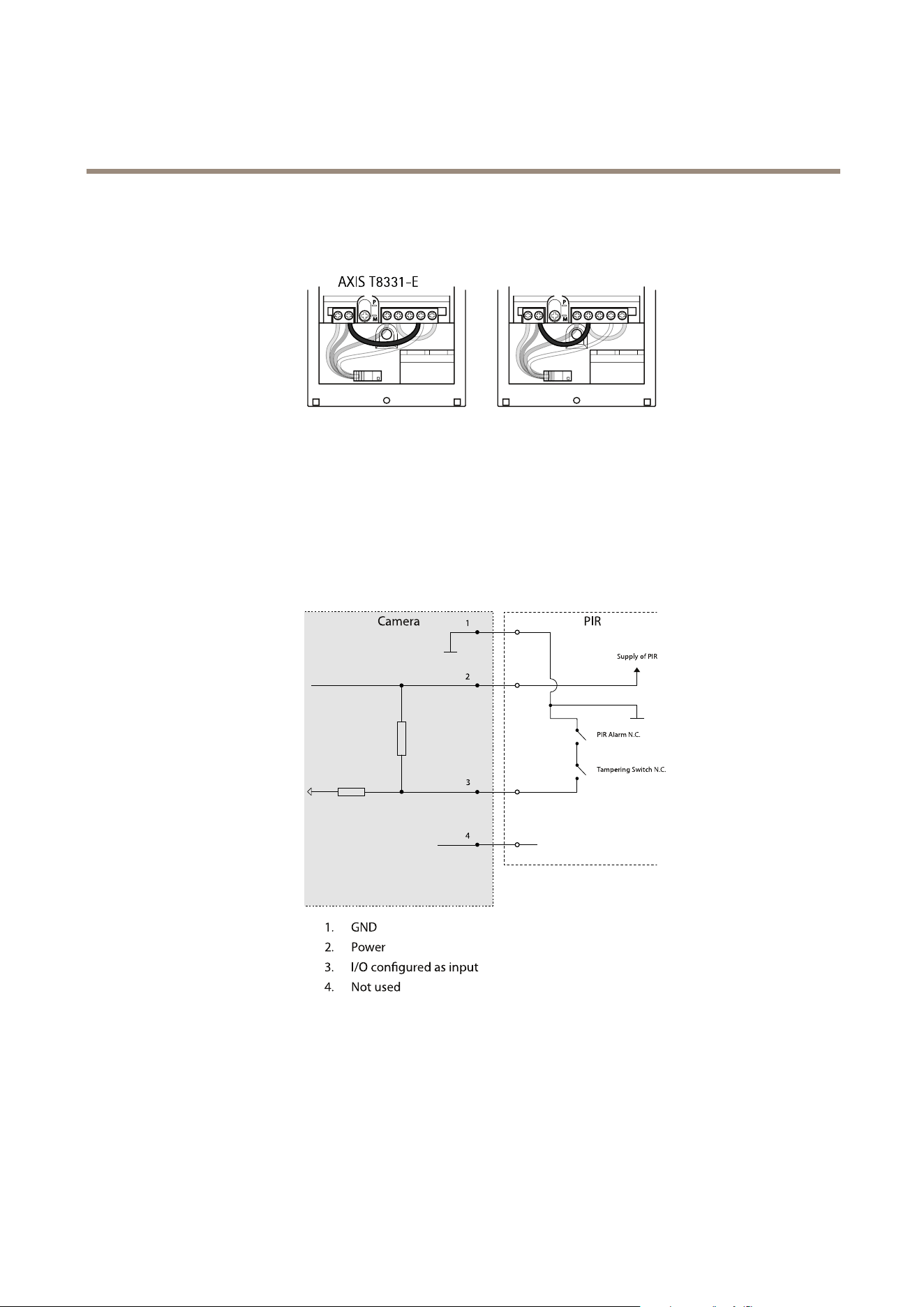
BelowareimagesoftheterminalconnectionforAXIST8331–E.
Theleftimageshowsthedefaultconnectionwithtamperandalarmtogether.
10
AXIST8331PIRMotionDetectorSeries
ReferenceMaterial
Therightimageshowsaconnectionwithtamperandalarmseparated.Thisconnectionrequiresacamerawithatleasttwo
congurableI/Oports.
AXIS T8331-E
Forpositionoftheterminals,seeHardwareOverviewonpage8
AXIST8331PIRMotionDetectorSeriesSchematics
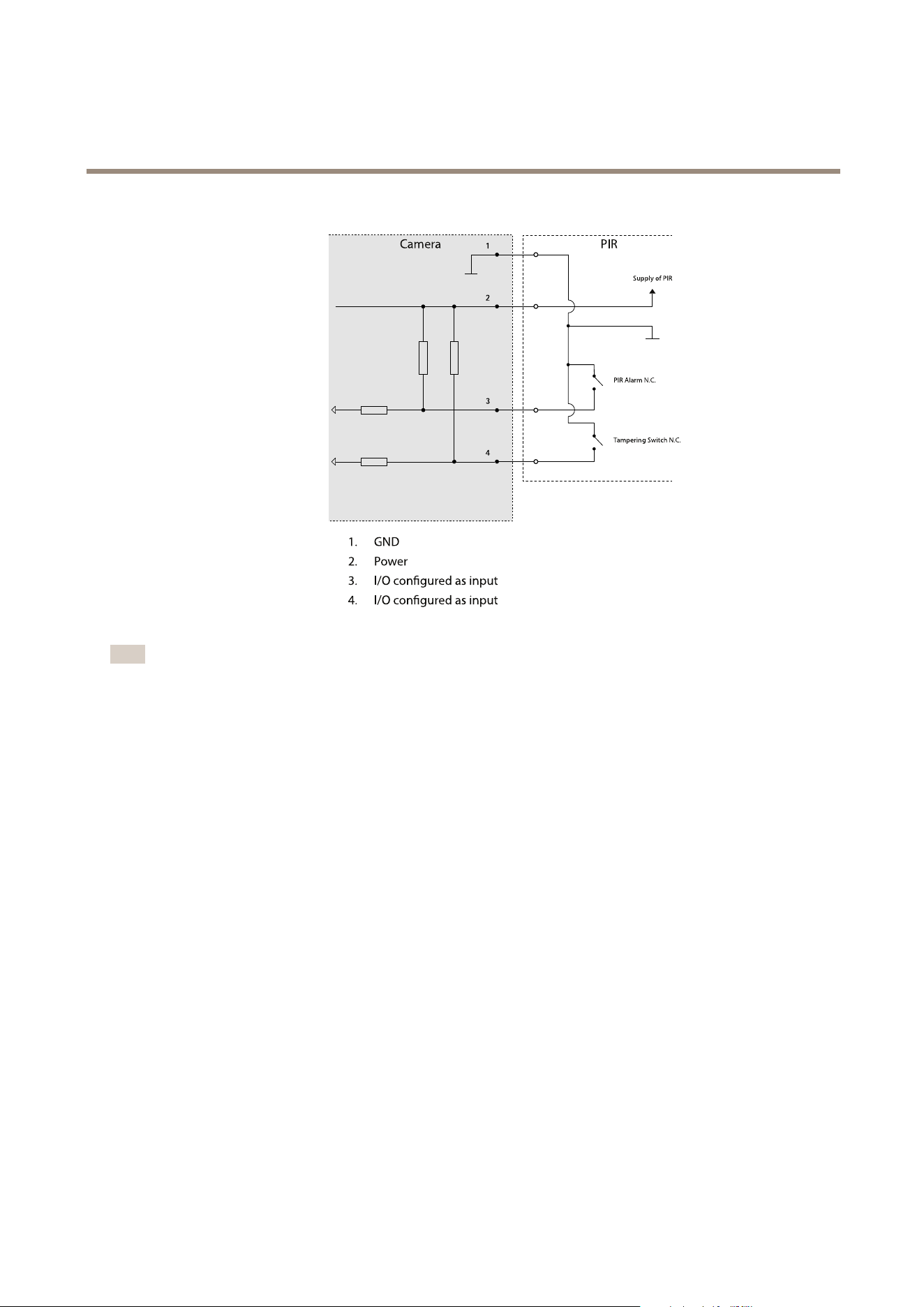
BelowisaschematicshowingtheconnectionwithacameraandthePIRsensor.Thisisthedefaultconnectionwithtamperand
alarmtogether(Pin3).Pin1GND,Pin2Power,Pin4notused.
1
2
3
4
PIRCamera
1. GND
2. Power
3. I/O con gured as input
4. Not use d
Sup ply of PIR
PIR Alarm N.C.
Tampering Switch N.C.
BelowisaschematicshowingtheconnectionwithacameraandthePIRsensor.Inthisconnectiontamperandalarmareseparated.
Pin3alarm,Pin4tamper.Pin1GND,Pin2Power.
11
AXIST8331PIRMotionDetectorSeries
ReferenceMaterial
1
2
3
4
PIRCamera
1. GND
2. Power
3. I/O con gured as input
4. I/O con gured as input
Sup ply of PIR
PIR Alarm N.C.
Tampering Switch N.C.
Note
•ThisconnectionrequiresacamerawithatleasttwocongurableI/Oports.
•Thisconnectionrequireschangesintheterminal,seeAXIST8331PIRMotionDetectorSeriesTerminalConnectionsonpage10
12

UserManualVer.M1.13
AXIST8331PIRMotionDetectorSeries
Date:November2015
©AxisCommunicationsAB,2015
PartNo.1518265