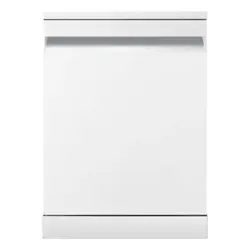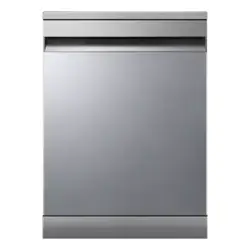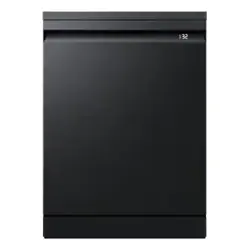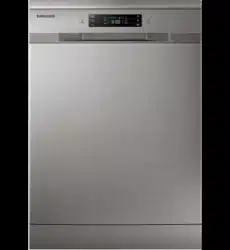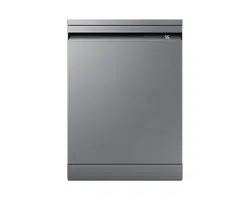
Dishwasher
User manual
DW60**7***** Series
DW60BG750FSL_SA_DD68-00250K-02_EN.indd 1 2023-08-23 11:04:37
English2
Contents
Contents
Safety information 4
What you need to know about safety instructions 4
Important safety symbols 4
Important safety precautions 5
Instructions when using your dishwasher 7
Instructions for protecting your children 8
Instructions for installing your dishwasher 8
Installation 11
Installation requirements 13
Built-in installation under the sink (For Free Standing model) 15
Cut-out dimension 15
Step-by-step installation 16
SmartThings (Applicable models only) 28
Open Source Announcement 31
Before you start 32
Dishwasher at a glance 32
Unsuitable items for the dishwasher 33
Basic use of racks 34
Detergent compartment 38
Rinse aid reservoir 40
Settings 41
Operations 42
Control panel 42
Cycle overview 44
Simple steps to start 46
Delay Start 46
Maintenance 47
Cleaning 47
Cleaning the drain pump 51
Long-term care 51
Troubleshooting 52
Checkpoints 52
Information codes 55
DW60BG750FSL_SA_DD68-00250K-02_EN.indd 2 2023-08-23 11:04:37
English4
Safety information
Safety information
Congratulations on your new Samsung dishwasher. This manual contains important
information on the installation, use and care of your appliance. Please take time to read
this manual to take full advantage of your dishwasher’s many benets and features.
What you need to know about safety instructions
Please read this manual thoroughly to ensure that you know how to safely and efciently
operate the extensive features and functions of your new appliance and retain it at a safe
place near the appliance for your future reference. Use this appliance only for its intended
purpose as described in this user manual.
Warning and important safety instructions in this manual do not cover all possible
conditions and situations that may occur. It is your responsibility to use common sense,
caution, and care when installing, maintaining, and operating your dishwasher.
Because the following operating instructions cover various models, the characteristics
of your dishwasher may differ slightly from those described in this manual and not all
warning signs may be applicable. If you have any questions or concerns, contact your
nearest service center or nd help and information online at www.samsung.com.
Important safety symbols
What the icons and signs in this user manual mean:
WARNING
Hazards or unsafe practices that may result in severe personal injury, death and/or
property damage.
CAUTION
Hazards or unsafe practices that may result in personal injury and/or property damage.
NOTE
Indicates that a risk of personal injury or material damage exists.
These warning symbols are here to prevent injury to you and others. Please follow them
explicitly.
Keep these instructions in a safe place and ensure that new users are familiar with the
content. Pass them on to any future owner.
DW60BG750FSL_SA_DD68-00250K-02_EN.indd 4 2023-08-23 11:04:38
English 5
Safety information
Important safety precautions
To reduce the risk of re, electric shock, or injury
to persons when using your appliance, follow basic
precautions, including the following:
1. This appliance is not to be used by persons (including
children) with reduced physical, sensory or mental
capabilities, or lack of experience and knowledge,
unless they have been given supervision or
instruction concerning use of the appliance by a
person responsible for their safety.
2. This appliance can be used by children aged from 8
years and above and persons with reduced physical,
sensory or mental capabilities or lack of experience
and knowledge if they have been given supervision
or instruction concerning use of the appliance in
a safe way and understand the hazards involved.
Children shall not play with the appliance. Cleaning
and user maintenance shall not be made by children
without supervision.
3. Children should be supervised to ensure that they do
not play with the appliance.
4. If the supply cord is damaged, it must be replaced
by the manufacturer, its service agent or similarly
qualied persons in order to avoid a hazard.
5. The new hose-sets supplied with the appliance are to
be used on installation and old hose-sets should not
be reused.
DW60BG750FSL_SA_DD68-00250K-02_EN.indd 5 2023-08-23 11:04:38
English6
Safety information
Safety information
6. For appliances with ventilation openings in the base,
a carpet must not obstruct the openings.
7. Children of less than 3 years should be kept away
from appliance unless continuously supervised.
8. CAUTION: In order to avoid a hazard due to
inadvertent resetting of the thermal cut-out, this
appliance must not be supplied through an external
switching device, such as a timer, or connected to a
circuit that is regularly switched on and off by the
utility.
9. WARNING: Knives and other utensils with sharp
points must be loaded in the basket with their points
down or placed in a horizontal position.
This appliance is solely intended to be used in
household and similar applications such as:
• Staff kitchen areas in shops, ofces and other working
environments;
• Farm houses;
• Clients in hotels, motels and other residential type
environments;
• Bed and breakfast type environments.
DW60BG750FSL_SA_DD68-00250K-02_EN.indd 6 2023-08-23 11:04:38
English 7
Safety information
Instructions when using your dishwasher
This dishwasher is not designed for commercial use. It is intended for use in domestic
households and in similar working and residential environments such as:
• Shops
• Ofces and showrooms
and by residents in establishments such as:
• Hostels and guest houses.
It must only be used as a domestic appliance as specied in this user manual, for cleaning
domestic crockery and cutlery. Any other usage is not supported by the manufacturer and
could be dangerous.
The manufacturer cannot be held liable for damage resulting from incorrect or improper
use or operation.
Do not use solvents in the dishwasher. Danger of explosion.
Do not inhale or ingest dishwasher detergent. Dishwasher detergents contain irritant or
corrosive ingredients which can cause burning in the nose, mouth and throat if swallowed,
or inhibit breathing. Consult a doctor immediately if detergent has been swallowed or
inhaled.
Avoid leaving the door open unnecessarily, as you could trip over it.
Do not sit or lean on the opened door. This could cause the dishwasher to tip and get
damaged, and you could get injured.
Only use detergent and rinse aid formulated for domestic dishwashers. Do not use
washing-up liquid.
Do not use any strong acid cleaning agent.
Do not ll the rinse aid reservoir with powder or liquid detergent. This will cause serious
damage to the reservoir.
Inadvertently lling the salt reservoir with powder or liquid dishwasher detergent will
damage the water softener. Make sure to use the correct packet of dishwasher salt when
lling the salt reservoir.
Please only use special coarse grained dishwasher salt for reactivation, as other salts may
contain insoluble additives which can impair the functioning of the softener.
In an appliance with a cutlery basket (depending on model), cutlery is cleaned and dried
better if placed efciently the basket with the handles downwards. However, to avoid the
risk of injury, place knives and forks etc. with the handles upwards.
Plastic items which cannot withstand being washed in hot water, such as disposable plastic
containers, or plastic cutlery and crockery should not be cleaned in the dishwasher. The
high temperatures in the dishwasher may cause them to melt or lose shape.
On models with Delay Start function, make sure that the dispenser is dry before adding
detergent. Wipe dry if necessary. Detergent will clog if poured into a damp dispenser and
may not be thoroughly dispersed.
Knives and other utensils with sharp points must be loaded in the basket with their points
down or placed in a horizontal position.
DW60BG750FSL_SA_DD68-00250K-02_EN.indd 7 2023-08-23 11:04:38
English8
Safety information
Safety information
Instructions for protecting your children
This appliance is not a toy! To avoid the risk of injury, keep children well away and do
not allow them to play in or around the dishwasher or to use the controls. They will not
understand the potential dangers posed by it. They should be supervised whenever
you are working in the kitchen. There is also a danger that children playing might shut
themselves in the dishwasher.
This appliance can be used by children aged from 8 years and above and persons with
reduced physical, sensory or mental capabilities or lack of experience and knowledge if
they have been given supervision or instruction concerning use of the appliance in a safe
way and understand the hazards involved. Children shall not play with the appliance.
Cleaning and user maintenance shall not be made by children without supervision.
Older children may only use the dishwasher when its operation has been clearly explained
to them and they are able to use it safely, recognising the dangers of misuse.
KEEP CHILDREN AWAY FROM DETERGENTS!
Dishwasher detergents contain irritant and corrosive ingredients which can cause burning
in the mouth, nose and throat if swallowed, or inhibit breathing.
Keep children away from the dishwasher when the door is open. There could still be
detergent residues in the cabinet.
Consult a doctor immediately if your child has swallowed or inhaled detergent.
Instructions for installing your dishwasher
Before setting up the appliance, check it for any externally visible damage. Under no
circumstances should you use a damaged appliance. A damaged appliance could be
dangerous.
The dishwasher must only be plugged into the electricity supply via a suitable switched
socket. The electrical socket must be easily accessible after the dishwasher is installed
so that it can be disconnected from the electricity supply at any time. (Refer to the
“Dishwasher at a glance” section on page 32.)
There must be no electrical sockets behind the dishwasher. Danger of overheating and re
risk if the dishwasher were to be pushed up against a plug.
The dishwasher must not be installed under a hob. The high radiant temperatures which
are sometimes generated by a hob could damage the dishwasher. For the same reason it
should not be installed next to open res or other appliances which give off heat, such as
heaters etc.
Do not connect the dishwasher to the mains supply until it has been fully installed and any
adjustment has been made to the door springs.
Before connecting the appliance, check that the connection data on the data plate (voltage
and connected load) match the mains electricity supply. If in any doubt, consult a qualied
electrician.
DW60BG750FSL_SA_DD68-00250K-02_EN.indd 8 2023-08-23 11:04:38
English 9
Safety information
The electrical safety of this appliance can only be guaranteed when continuity is complete
between it and an effective grounding system. It is most important that this basic safety
requirement is present and regularly tested and where there is any doubt the electrical
system in the house should be checked by a qualied electrician.
The manufacturer cannot be held liable for the consequences of an inadequate grounding
system (e.g. electric shock).
Do not connect the appliance to the mains electricity supply by a multi-socket unit or an
extension lead. These do not guarantee the required safety of the appliance (e.g. danger of
overheating).
This appliance may only be installed in mobile installations such as ships if a risk
assessment of the installation has been carried out by a suitably qualied engineer.
The plastic housing of the water connection contains an electrical component. The housing
must not be submerged in water.
There are electrical wires in the hose of Aqua-Stop. Never cut the water inlet hose, even if
it is too long.
Installation, maintenance and repairs may only be carried out by a suitably qualied and
competent person in strict accordance with current national and local safety regulations.
Repairs and other work by unqualied persons can be dangerous. The manufacturer cannot
be held liable for unauthorised work.
The integrated waterproof system offers protection from water damage, provided the
following conditions are met:
• The dishwasher is correctly installed and plumbed in.
• The dishwasher is properly maintained and parts are replaced where it can be seen that
this is necessary.
• The stopcock / supply valve has been turned off when the appliance is not used for a
longer period of time (e.g. during holidays).
• The waterproof system will work even if the appliance is switched off. However, the
appliance must remain connected to the electricity supply.
A damaged appliance can be dangerous. If the dishwasher gets damaged, switch it off at
the mains and call your dealer or the service department.
Unauthorised repairs could result in unforeseen dangers for the user, for which the
manufacturer cannot accept liability. Repairs should only be undertaken by an approved
service technician.
Faulty components must only be replaced by original spare parts. Only when these parts
are tted can the safety of the appliance can be guaranteed.
Always disconnect the dishwasher from the electrical supply for maintenance work (switch
off at the wall socket and remove the plug).
If the connection cable is damaged it must be replaced with a special cable, available from
the manufacturer. For safety reasons, this must only be tted by the service department or
an authorised service technician.
DW60BG750FSL_SA_DD68-00250K-02_EN.indd 9 2023-08-23 11:04:38
English10
Safety information
Safety information
In countries where there are areas which may be subject to infestation by cockroaches or
other vermin, pay particular attention to keeping the appliance and its surroundings in a
clean condition at all times. Any damage which may be caused by cockroaches or other
vermin will not be covered by the guarantee.
In the event of a fault or for cleaning purposes, the appliance is only completely isolated
from the electricity supply when:
• it is switched off at the wall socket and the plug is withdrawn, or
• it is switched off at the mains, or
• the mains fuse is disconnected, or
• the screw-out fuse is removed (in countries where this is applicable).
Do not make any alterations to the appliance, unless authorised to do so by the
manufacturer.
Never open the casing/housing of the appliance. Tempering with electrical connections or
components and mechanical parts is highly dangerous and can cause operational faults or
electric shock.
While the appliance is under guarantee, repairs should only be undertaken by a service
technician authorised by the manufacturer. Otherwise the guarantee will be invalidated.
When installing the product, make sure there is space at the top, left, right and back of the
product to ensure proper ventilation. If there is insufcient space between the product and
the sink, it may damage the sink or allow mold to grow.
Make sure that your dishwasher’s hardness level setting is correct as your area.
Please consult www.samsung.com/support for more information about materials and
repair.
DW60BG750FSL_SA_DD68-00250K-02_EN.indd 10 2023-08-23 11:04:38
English 11
Installation
Installation
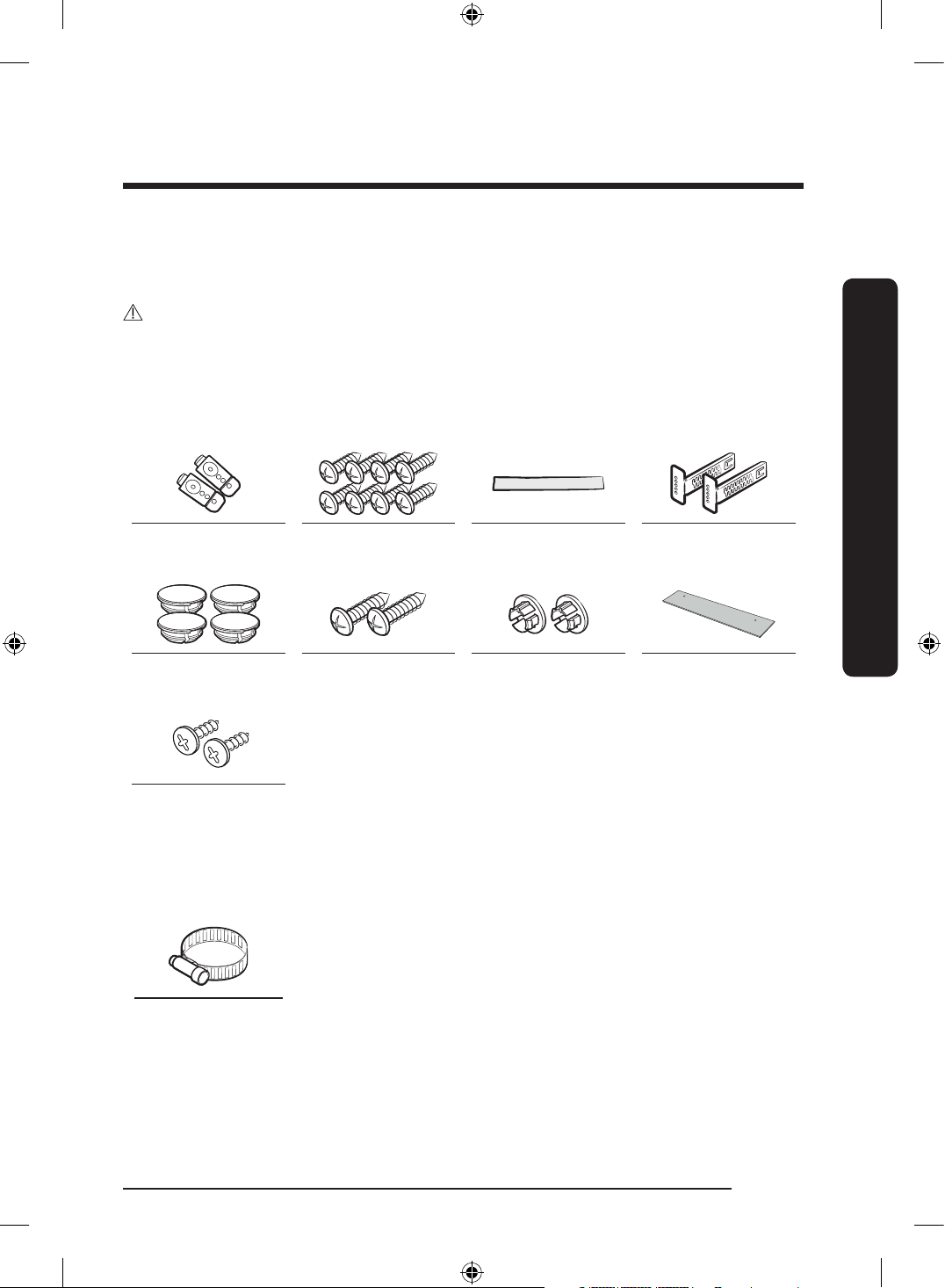
What’s included
Make sure all the parts are included in the product package. If you have a question about
the dishwasher or the parts, contact a local Samsung customer centre or your retailer. The
actual appearance of the dishwasher may differ, depending on your model and country.
CAUTION
After unpacking the dishwasher, keep packaging materials out of children’s reach to ensure
their safety.
Installation kit (provided)
BU (Built Under) models
Top brackets (2 ea) Ø4 X 12 screws
(8 ea)
Protective sticker Kick plate brackets
(2 ea)
Plastic caps (4 ea) 2 screws (for the
bespoke door)
2 plastic caps (for
the bespoke door)
Kick plate
Ø4 X 8 screws
(2 ea, for the kick
plate)
Installation kit (not provided)
Hose clamp
DW60BG750FSL_SA_DD68-00250K-02_EN.indd 11 2023-08-23 11:04:39
English12
Installation
Installation
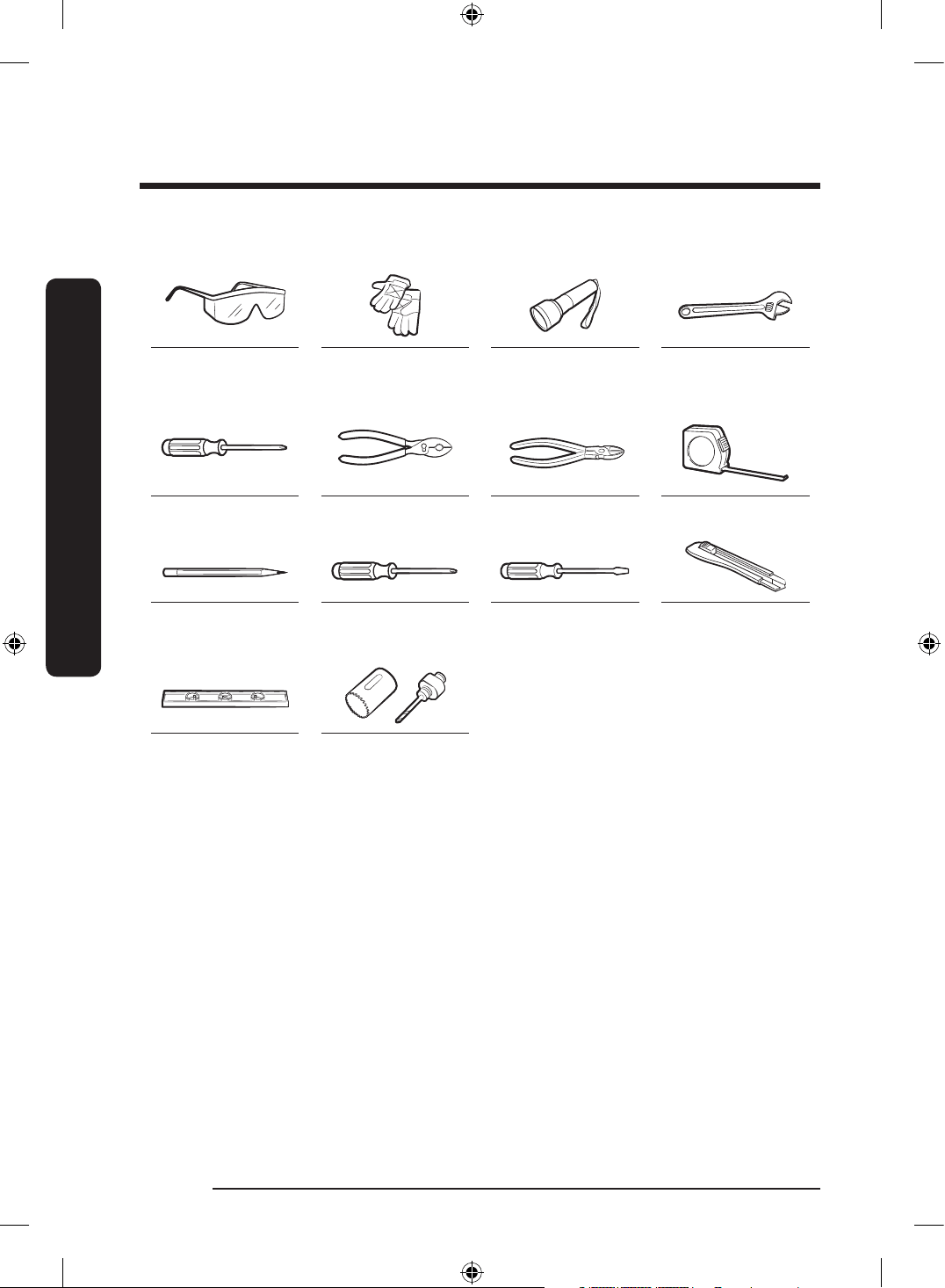
Tools required (not provided)
Safety glasses Gloves Flashlight Wrench (22 mm)
for the front foot
Torx T20 Pliers Nipper Tape measure
Pencil Phillips screwdriver Flat head
screwdriver
Cutting knife
Level Hole saw
(80-100 mm)
DW60BG750FSL_SA_DD68-00250K-02_EN.indd 12 2023-08-23 11:04:39
English 13
Installation
Installation requirements
To prevent a risk of re, electric shock, or
personal injury, all wiring and grounding
must be done by a qualied technician.
Power supply
• An individual 220-240 V
~
, 50 Hz
branch circuit that is dedicated to the
dishwasher.
• Power outlet with a maximum allowable
current of 16 A (maximum 11 A for the
dishwasher)
WARNING
• Do not use an extension cord.
• Use only the power plug that comes
with the dishwasher.
• After installation is complete, make sure
the power plug is not bent or damaged.
Grounding
For permanent grounding, the dishwasher
must be properly grounded to a grounded
metal or permanent wiring system. The
grounding conductor must be run with
the circuit conductors and then connected
to the grounding terminal or lead on the
dishwasher.
WARNING
• Do not connect the ground wire to
plastic plumbing, gas lines, or hot water
pipes. Improperly connected grounding
conductors may cause electric shock.
• Do not modify the power plug of the
dishwasher. If the power plug does
not t the outlet, have a proper outlet
installed by a qualied electrician.
Water supply
• The water supply line must support
water pressures between 0.05 and
0.8 MPa.
• Water temperatures must be lower than
60 °C.
• The stopcock / supply valve with a 3/4”
male thread must be installed for the
water supply connection.
To reduce a risk of leaks:
• Make sure water taps are easily
accessible.
• Turn the water supply valve off when
the dishwasher is not in use.
• Check for any leaks at the water hose
ttings on a regular basis.
• To stop any leak, seal the water line
connections and joints using Teon tape
or sealing compound.
Aqua Stop
The Aqua Stop is an electrical component
that is designed to prevent water leaks. The
Aqua Stop is attached to the water hose
and automatically cuts off the water ow in
the event of damage to the hose.
CAUTION
• Handle the Aqua Stop with care.
• Do not kink or twist the water hose
connected to the Aqua Stop. If the Aqua
Stop is damaged, shut off the water taps
and unplug the power plug immediately.
Then, contact a local Samsung customer
centre or a qualied technician.
DW60BG750FSL_SA_DD68-00250K-02_EN.indd 13 2023-08-23 11:04:39
English14
Installation
Installation
Drain
If you are using a drain system dedicated
to the dishwasher, connect the drain hose
to a drain system that is between 30 cm
and 70 cm off the ground. Connecting the
drain hose to a drain system more than
80 cm off the ground can cause the drained
water to ow backward.
Flooring
For safety, the dishwasher must be
installed on a solidly constructed oor.
Wooden oors may need to be reinforced
to minimise vibrations. Avoid installing
on carpet or soft tile. Carpeting and soft
tile may cause vibrations and may cause
your dishwasher to move slightly while
operating.
WARNING
Do not install the dishwasher on a poorly
supported structure.
• Make sure the dishwasher is level using
the height adjustable feet.
• When leveling is complete, check if the
door opens and closes properly.
Ambient temperature
Do not install the dishwasher in an area
exposed to freezing temperatures. The
dishwasher always retains some water in
the water valve, pump, and hose. If the
water freezes in the dishwasher or hoses,
it may damage the dishwasher and its
components.
Test run
After installing the dishwasher, run the
Express cycle to make sure the dishwasher
is installed correctly.
Final check
1. Remove all foam, paper packaging,
and unnecessary parts from inside the
dishwasher.
2. Turn the power circuit breaker on.
3. Open the water supply valve to supply
water to the dishwasher.
4. Plug in and turn the dishwasher on.
Then, select and run the Express cycle.
5. Check if the dishwasher turns on
normally and if there are any water
leaks while the dishwasher is operating.
Make sure to check for water leaks on
both ends of the water line and the
drain hose connector.
DW60BG750FSL_SA_DD68-00250K-02_EN.indd 14 2023-08-23 11:04:40
English 15
Installation
Built-in installation under the sink (For Free Standing model)
You can install the dishwasher under the sink. To do this, follow the instructions below.
WARNING
Samsung Electronics is not responsible for any product failure or damage that may arise
from your installation of the free-standing model under the sink.
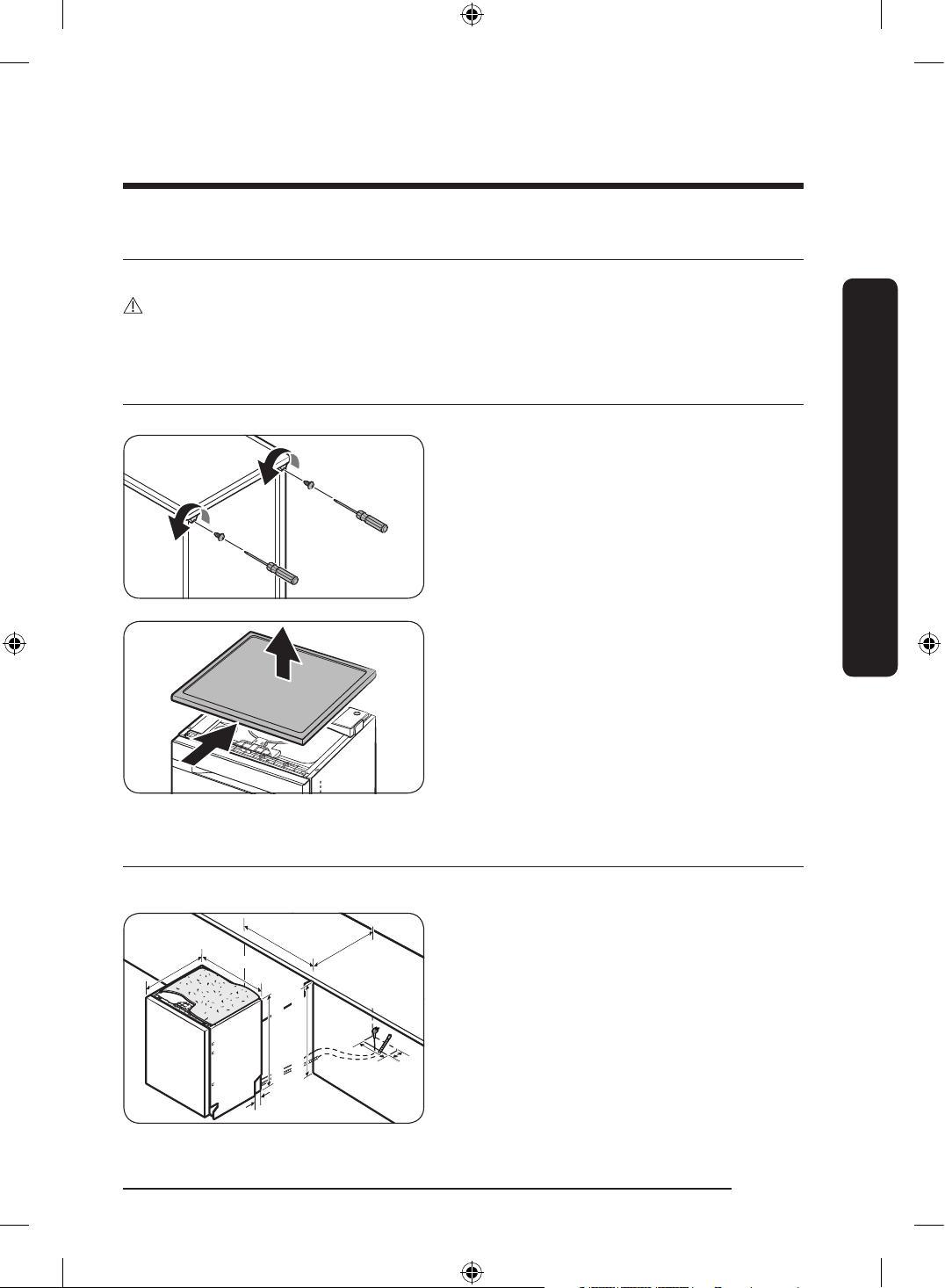
Preparation
1. Remove the 2 screws from the
top corners on the rear side of the
dishwasher.
2. Slide the worktop of the dishwasher to
the rear and lift up to remove it.
3. Refer to the next section and install the
dishwasher under the sink.
Cut-out dimension
There may be a difference depending on the model.
572
595
100
600
575
815
~
860 mm
820
~
865 mm
50
55
DW60BG750FSL_SA_DD68-00250K-02_EN.indd 15 2023-08-23 11:04:40
English16
Installation
Installation
Step-by-step installation
The installation procedure may differ depending on the model.
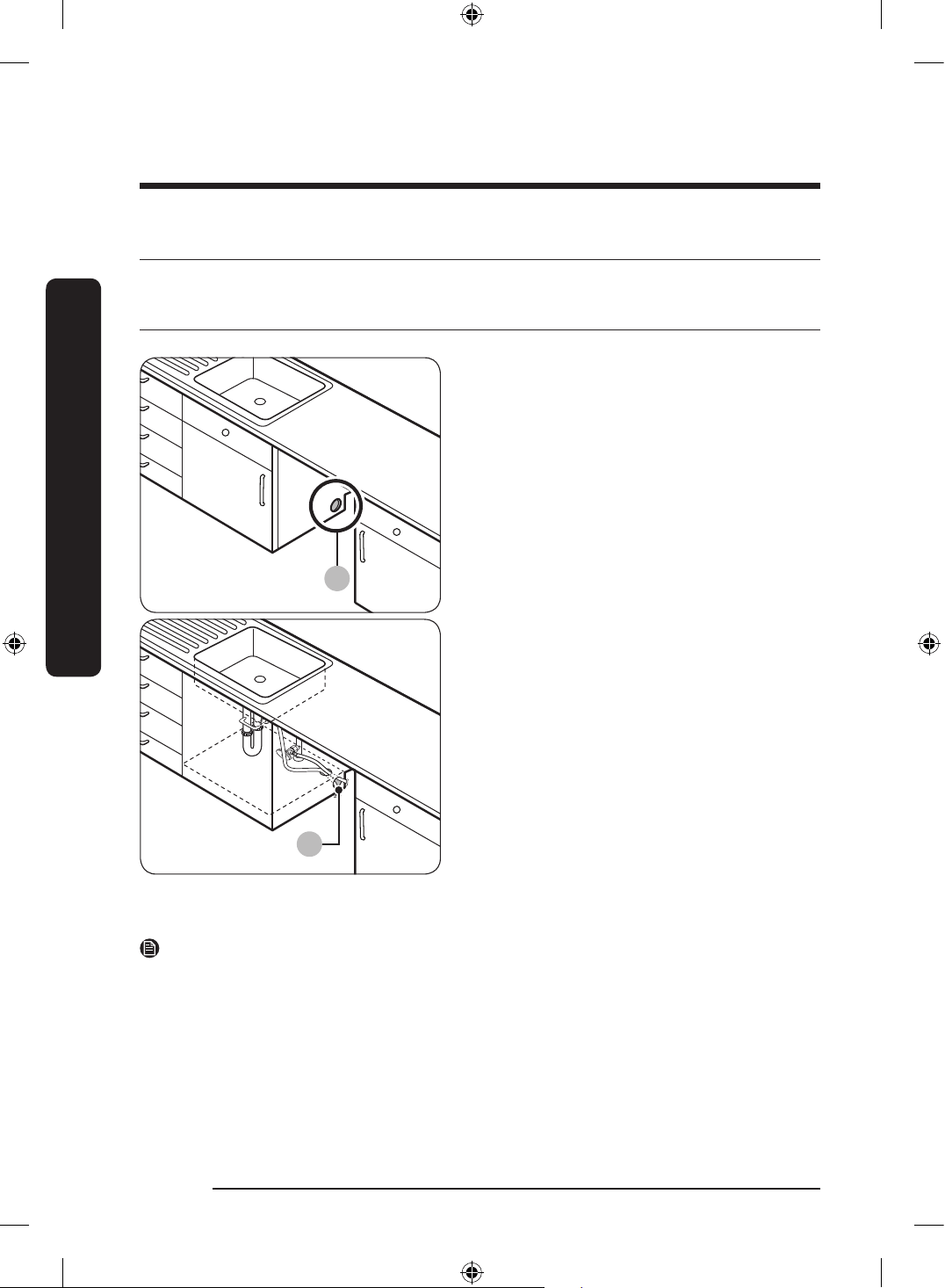
STEP 1 Select a location
A
B
Select a location that meets the following
conditions.
• The location must have a solid oor
that can support the weight of the
dishwasher.
• The location must be near a sink with
easy access to the water supply, drain
system, and electrical outlet.
• The location must let you load dishes
into the dishwasher easily.
• The location must have sufcient space
for the dishwasher door to open easily
and provide enough space between the
dishwasher and the cabinet sides.
• The rear wall must be free of
obstructions.
Installation in a new location
If you install the dishwasher in a new
location, follow these instructions before
installing the dishwasher.
1. Using a hole saw, cut a hole into the side
of the cabinet that holds the sink (A).
2. If the base inside the sink cabinet is
raised above the kitchen oor and is
higher than the connections on the
dishwasher, make a hole in the base
inside the cabinet and in the cabinet
side (B).
NOTE
• If you are replacing an old dishwasher, check the existing connections for compatibility
with the new dishwasher and replace the connections as needed.
• You may need to cut a hole in the opposite side of the cabinet according to the location
of the electrical outlet.
DW60BG750FSL_SA_DD68-00250K-02_EN.indd 16 2023-08-23 11:04:40
English 17
Installation
STEP 2 Check the water line
• The water line pressure must be between 0.05 and 0.8 MPa.
• Make sure that the water temperature does not exceed 60 °C. Hot water over 60 °C may
cause the dishwasher to malfunction.
• Make sure that the water supply valve is turned off before connecting the water supply
line to the dishwasher.
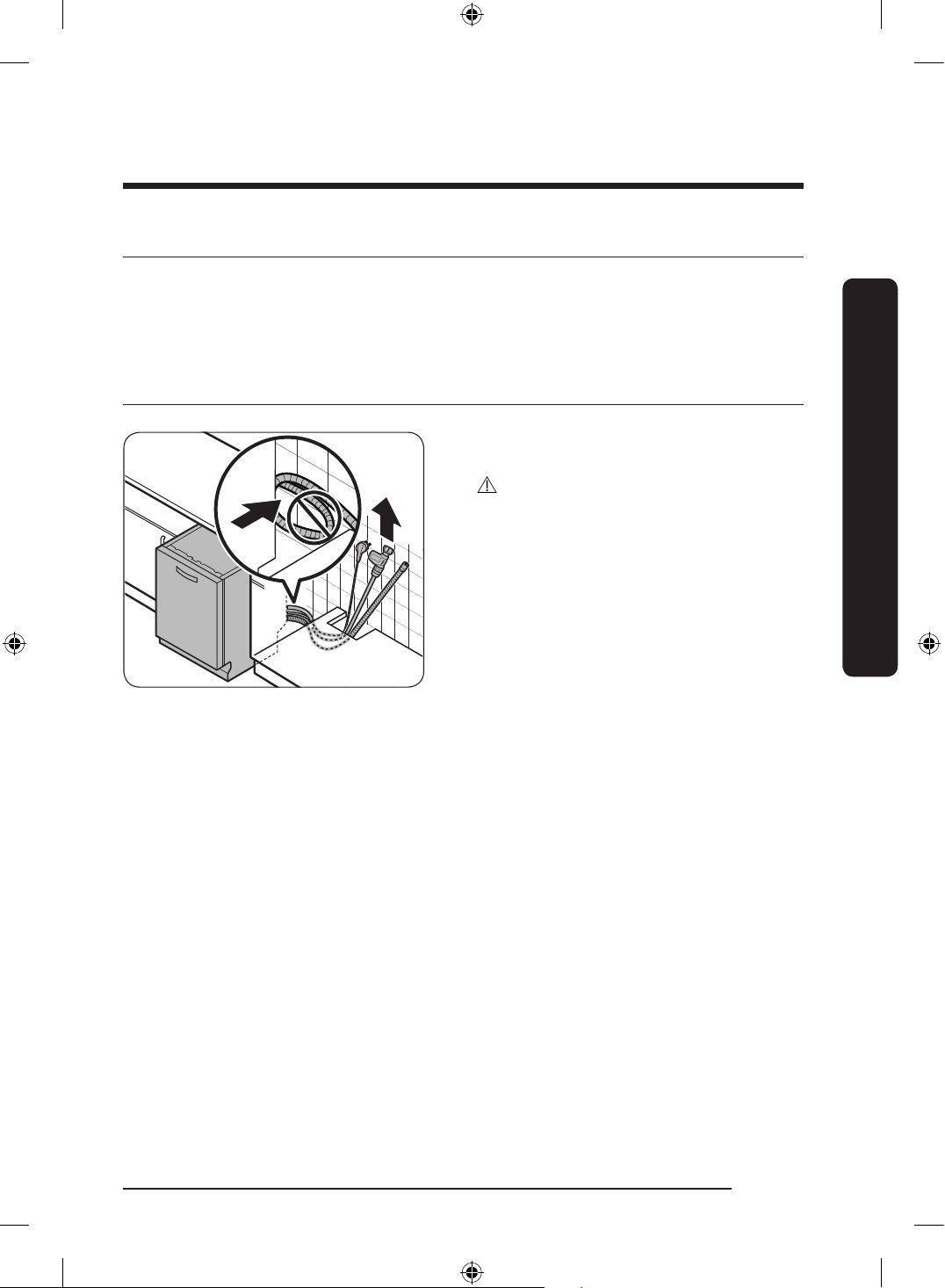
STEP 3 Arrange the hoses
Pull the power plug, the water hose, and
the drain hose through the sink hole.
CAUTION
• Use caution not to kink or step on the
power plug or the hoses.
• Do not remove the brown paper on the
back of the dishwasher. The paper is
used to keep the rear side clean against
the wall.
DW60BG750FSL_SA_DD68-00250K-02_EN.indd 17 2023-08-23 11:04:40
English18
Installation
Installation
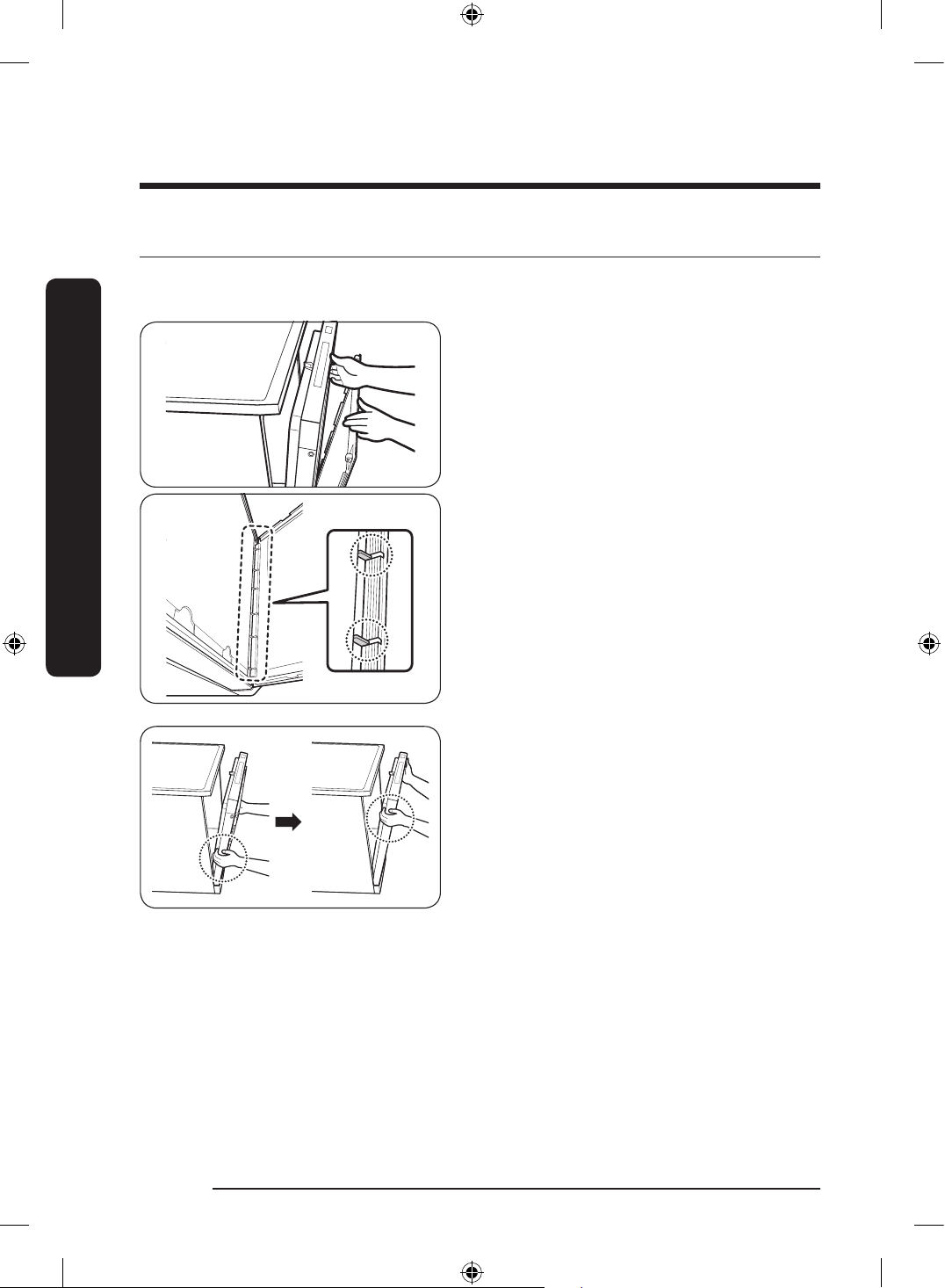
STEP 4 Install the custom panel
FS (Bespoke, DW60*B750F**) / BU (Bespoke, DW60**B750U**) models
1. Open the door and t the custom panel
in the front bottom of the door.
Make sure that the ribs of the panel t
into the corresponding holes (totaling 6)
of the door.
2. While holding the door and the custom
panel with both hands, press the panel
evenly from bottom to top to lock into
the dishwasher.
DW60BG750FSL_SA_DD68-00250K-02_EN.indd 18 2023-08-23 11:04:41
English 19
Installation
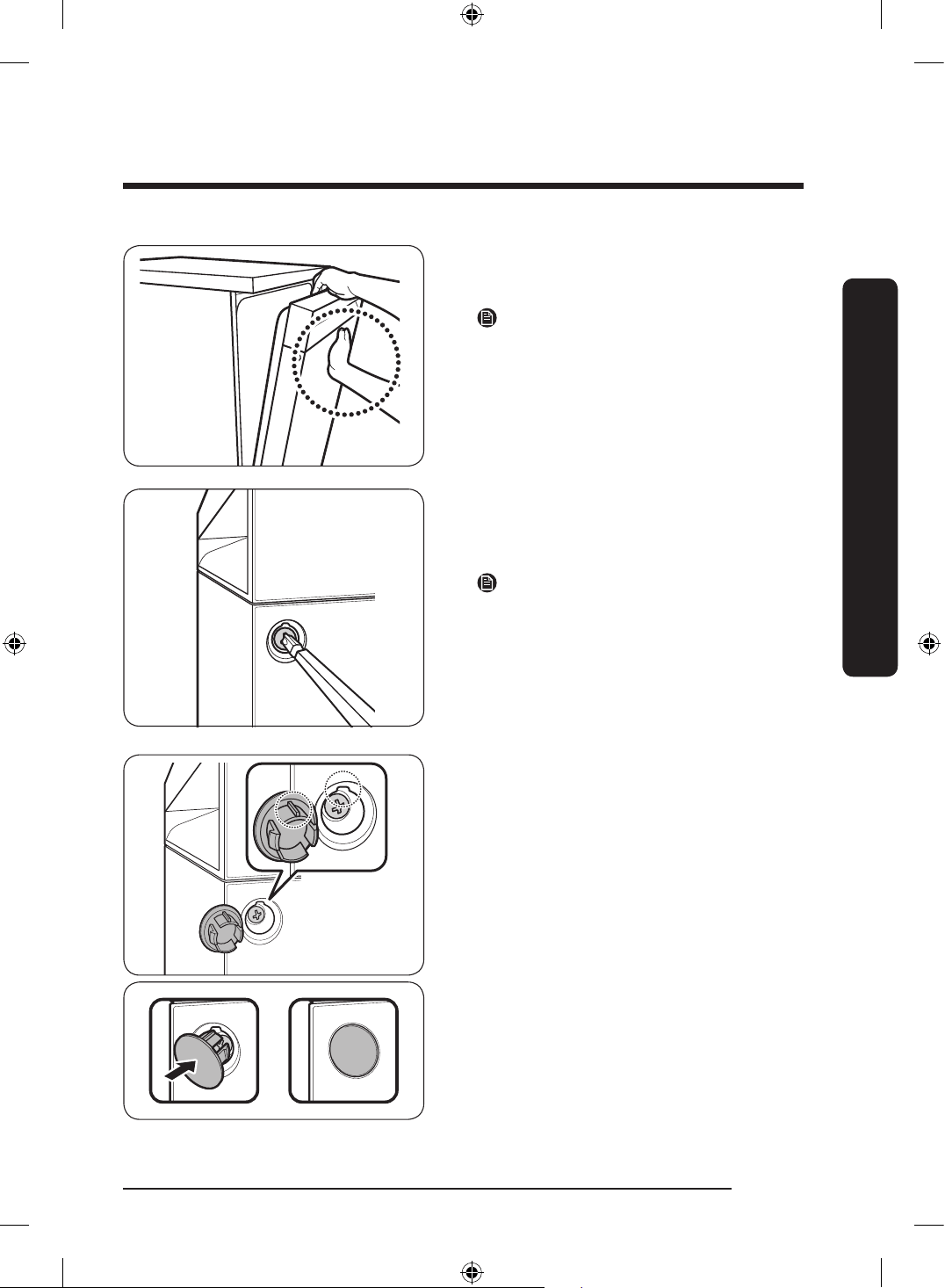
3. When both sides of the panel lock into
place, press the top center of the custom
panel to secure it to the top of the door.
NOTE
• Make sure that the custom panel ts in
the dishwasher properly.
• If the gap between the dishwasher and
the custom panel is below 2 mm, proper
installation is done. For 2 mm or more,
remove the custom panel and try again.
4. Unpack the caps and screws (two for
each) included in the product package.
5. Tighten the screws on either side of the
dishwasher.
NOTE
When tightening the screw on either side,
make sure to check the gap between either
side as the custom door may lean in either
side.
6. Insert the caps on either side. Make sure
the rib of the cap ts in the hole of the
dishwasher in the right direction.
DW60BG750FSL_SA_DD68-00250K-02_EN.indd 19 2023-08-23 11:04:41
English20
Installation
Installation
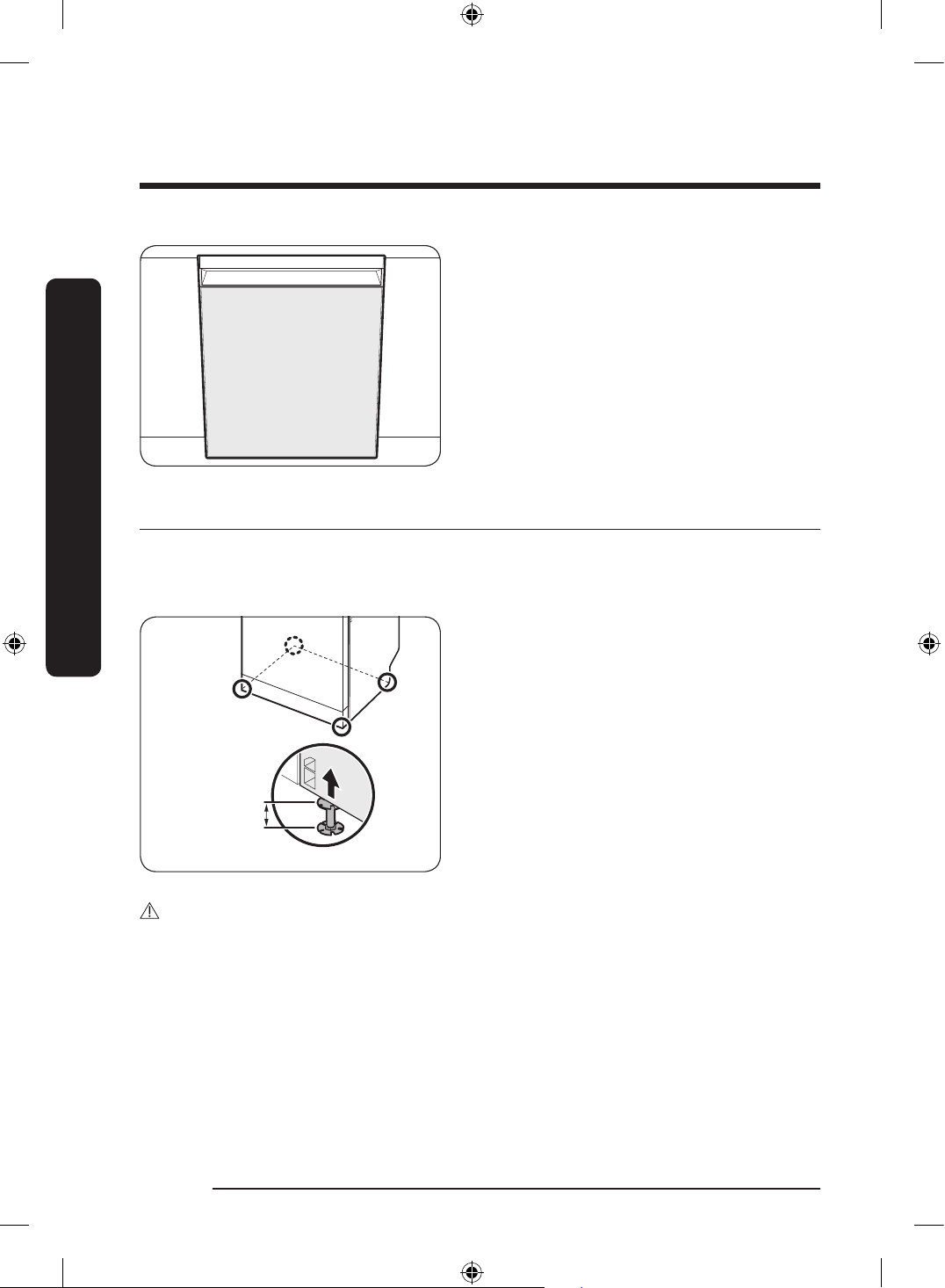
7. This is the completion of mounting the
custom panel.
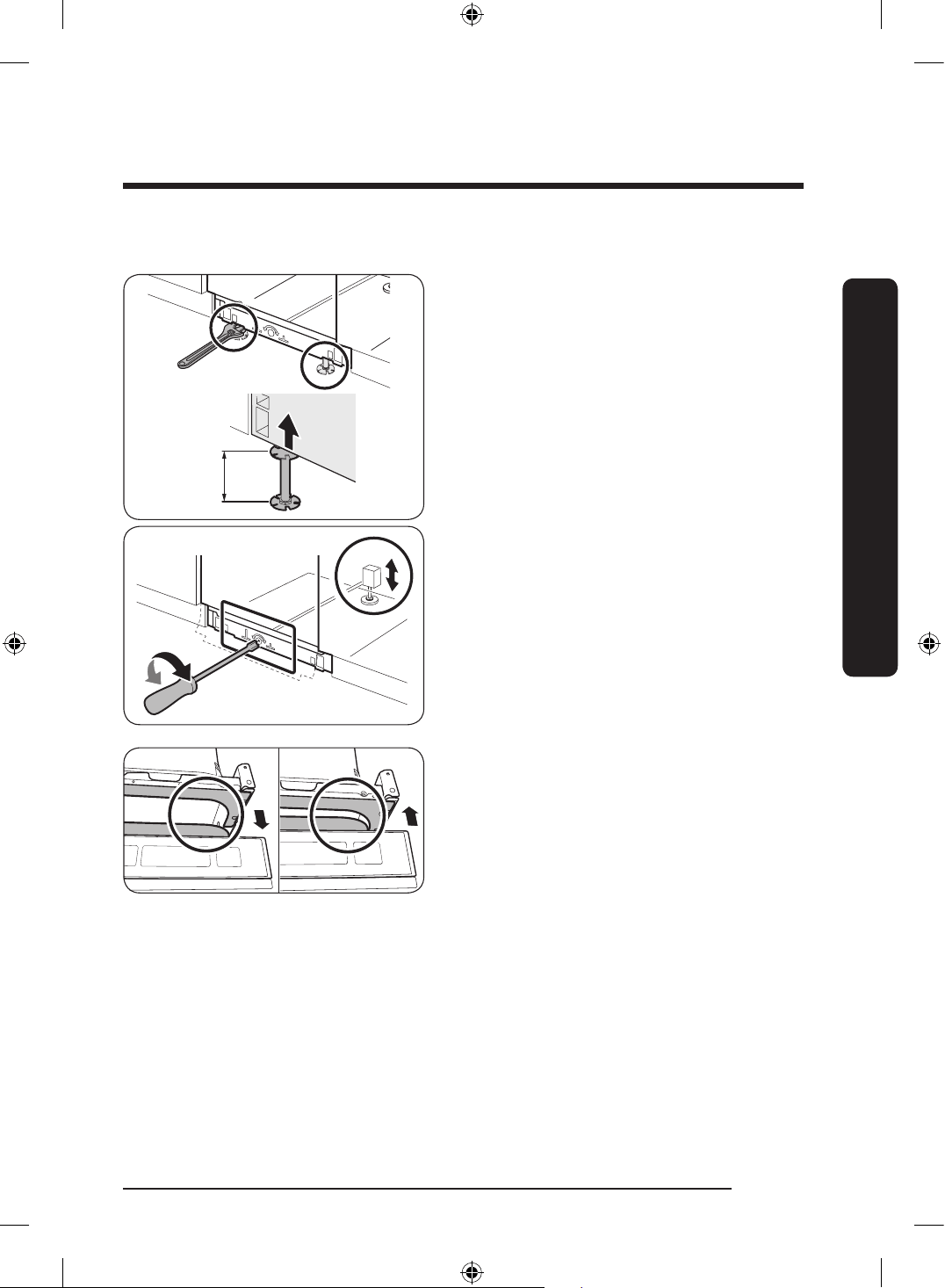
STEP 5 Level the dishwasher
You can adjust the height of the dishwasher up to 45 mm using the levelling legs.
FS (Bespoke, DW60*B750F**) models
0-45 mm
1. While slightly lifting the front or rear
(or both in turns) of the dishwasher, turn
the levelling legs to adjust the height.
2. When complete, use the leveler to make
sure the dishwasher is level.
3. Insert the dishwasher under the sink
and make sure to secure at least
4 mm space between the top of the
dishwasher and the bottom of the sink
plate.
CAUTION
Do not arrange the power cable of the dishwasher using a metallic cable tie.
DW60BG750FSL_SA_DD68-00250K-02_EN.indd 20 2023-08-23 11:04:41
English 21
Installation
BU (Built Under) models
0-45 mm
You can adjust the height of the dishwasher
to level it. Note that in these steps, the
dishwasher is currently inserted halfway.
1. Use the level to check if the dishwasher
is level.
2. To adjust the front height, use a 22 mm
wrench.
• To lower the height, turn the foot
counter clockwise.
• To raise the height, turn the foot
clockwise.
3. To adjust the rear height, insert the Torx
T20 screwdriver in the bottom center of
the dishwasher.
• To lower the height, turn the
screwdriver clockwise.
• To raise the height, turn the screwdriver
counter clockwise.
4. When levelling is complete, check if the
door opens and closes properly.
DW60BG750FSL_SA_DD68-00250K-02_EN.indd 21 2023-08-23 11:04:41
English22
Installation
Installation
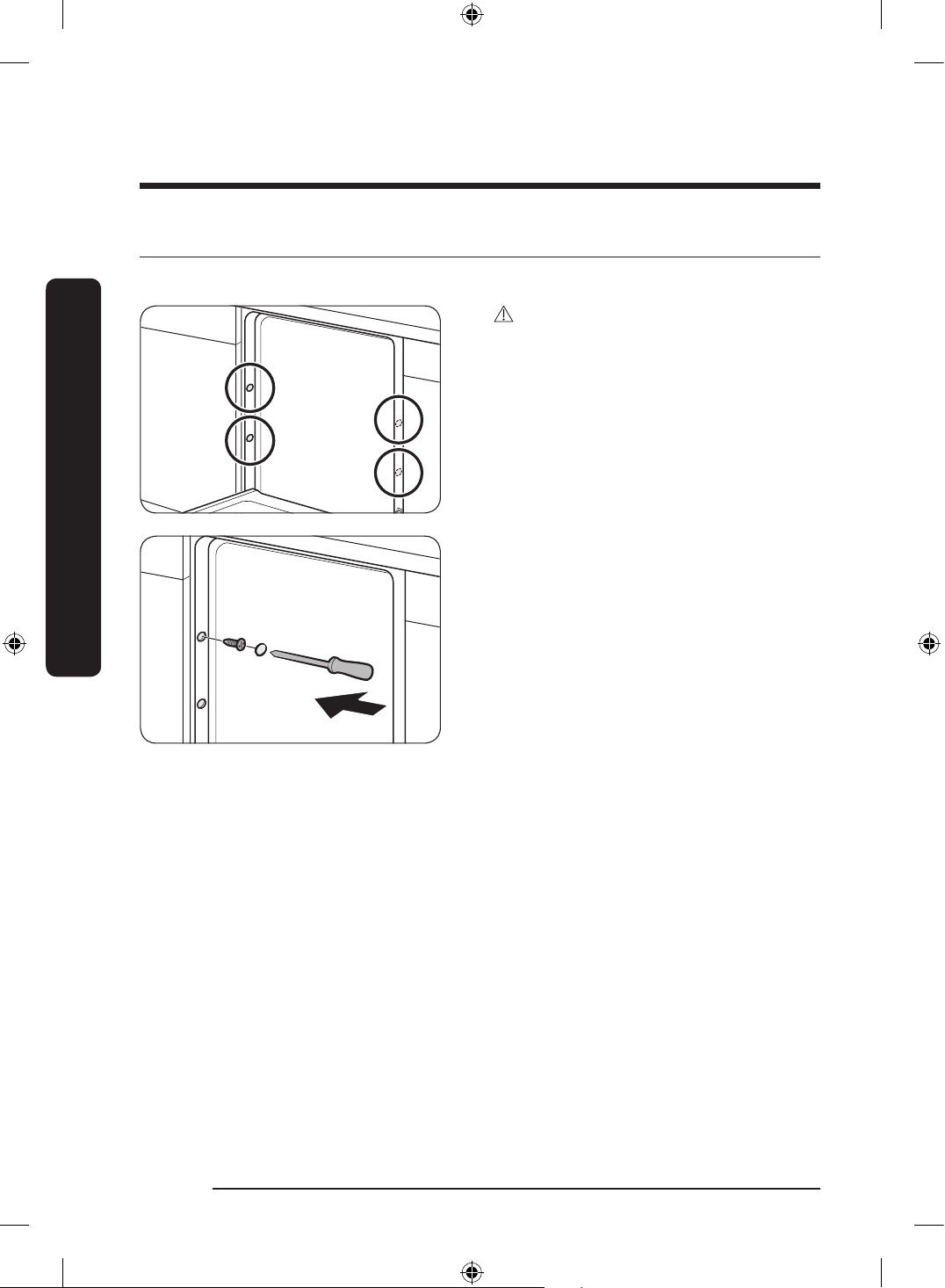
STEP 6 Secure the dishwasher (applicable models only)
You can drill the side holes to secure the dishwasher to the cabinet sides.
CAUTION
If the plastic cap is not assembled, water
may leak and cause a re or electric shock.
1. Tighten the 4 screws (Ø4 X 12) to the
4 places (marked on the illustration).
2. Insert the provided plastic caps to the
4 places where screws are fastened.
3. Connect the water hose, but do not
open the water tap until installation is
complete.
DW60BG750FSL_SA_DD68-00250K-02_EN.indd 22 2023-08-23 11:04:42
English 23
Installation
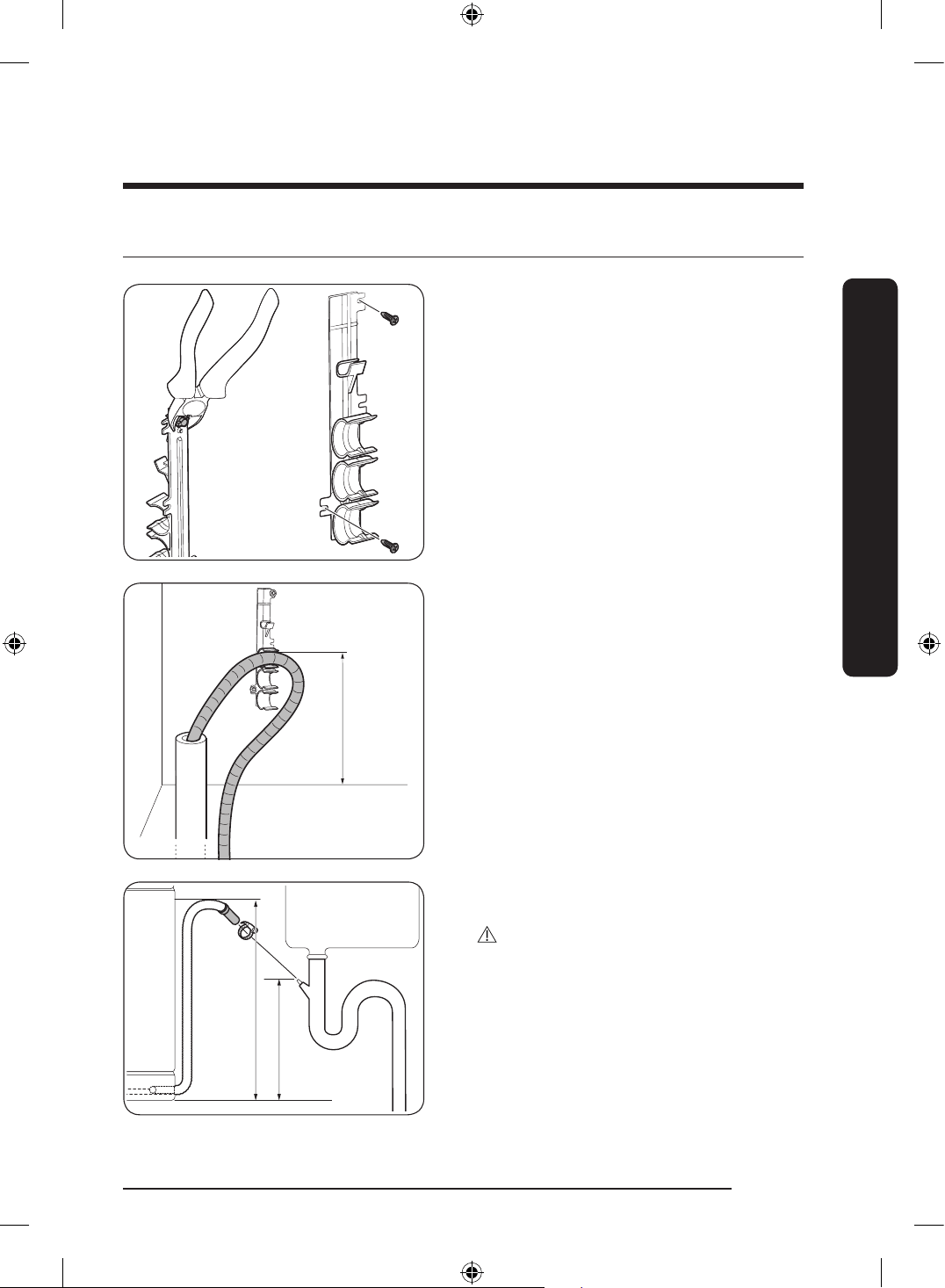
STEP 7 Connect the drain hose
1. Detach the hose holder from the
dishwasher, and then cut off the
protruding part from the holder as
shown.
2. Fix the holder to a wall by tightening
the 2 screws (Ø4 X 12).
Max. 80 cm
3. Insert the drain hose into the holder so
that the drain hose is positioned 30 cm
to 80 cm from the bottom.
Max. 80 cm
Min. 30 cm
4. Connect the drain hose to the drain
outlet.
CAUTION
• Install the drain system properly so that
the drain hose does not come out of the
drain outlet in the draining process.
• Make sure that the drain hose, supply
hose, and power cord is not kinked or
folded.
DW60BG750FSL_SA_DD68-00250K-02_EN.indd 23 2023-08-23 11:04:42
English24
Installation
Installation
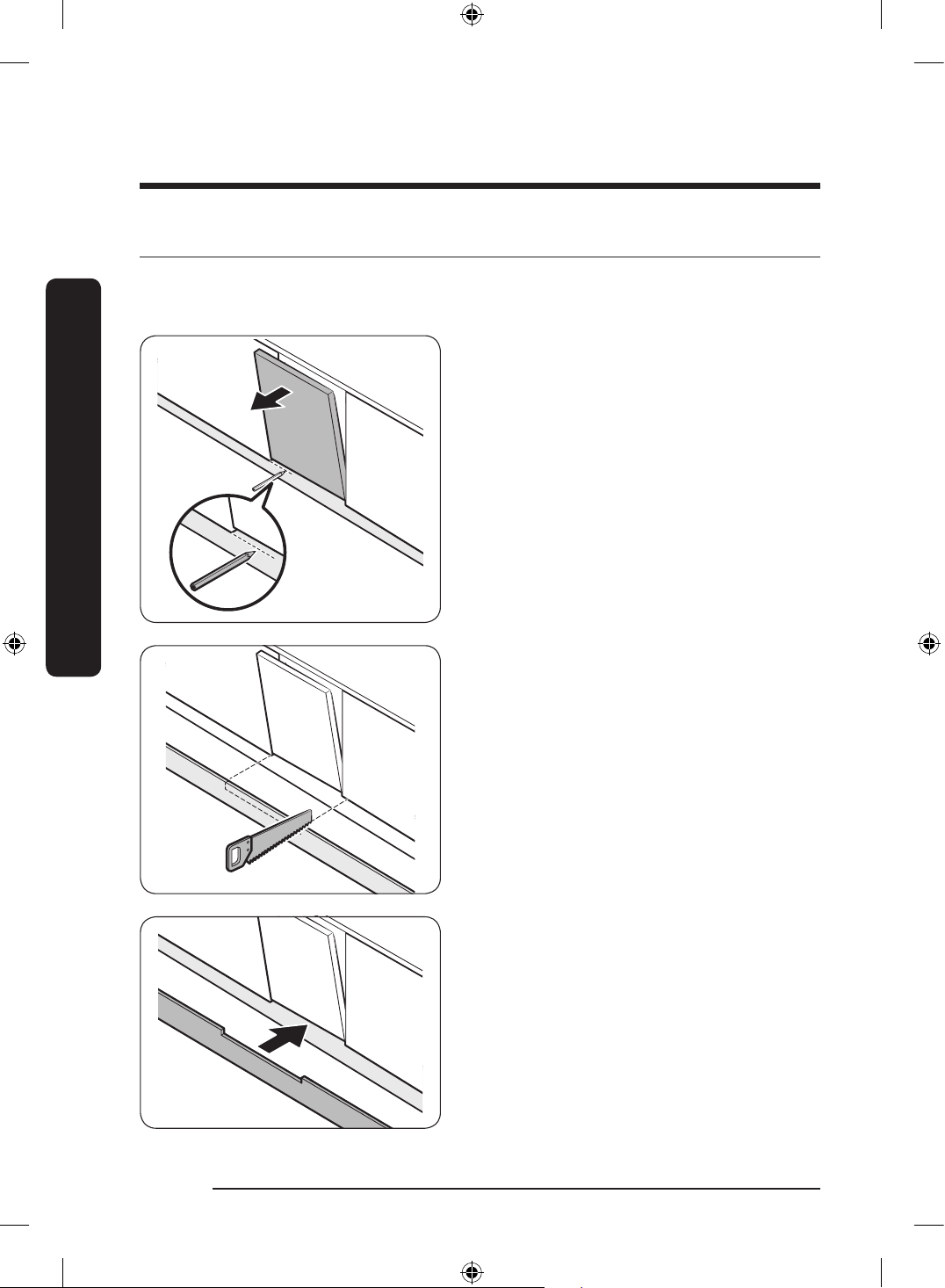
STEP 8 Attach the skirting board (applicable models only)
You can attach the skirting board according to the model or installation conditions.
Skirting board
1. Put the skirting board on the bottom of
the dishwasher.
2. Open the door of the dishwasher, and
draw a baseline on the skirting board
where it interferes with the door.
3. Follow the baseline and cut the skirting
board using a saw.
4. Attach the cut skirting board to the
bottom of the dishwasher. Make sure the
board does not interfere with the door
of the dishwasher.
DW60BG750FSL_SA_DD68-00250K-02_EN.indd 24 2023-08-23 11:04:42
English 25
Installation
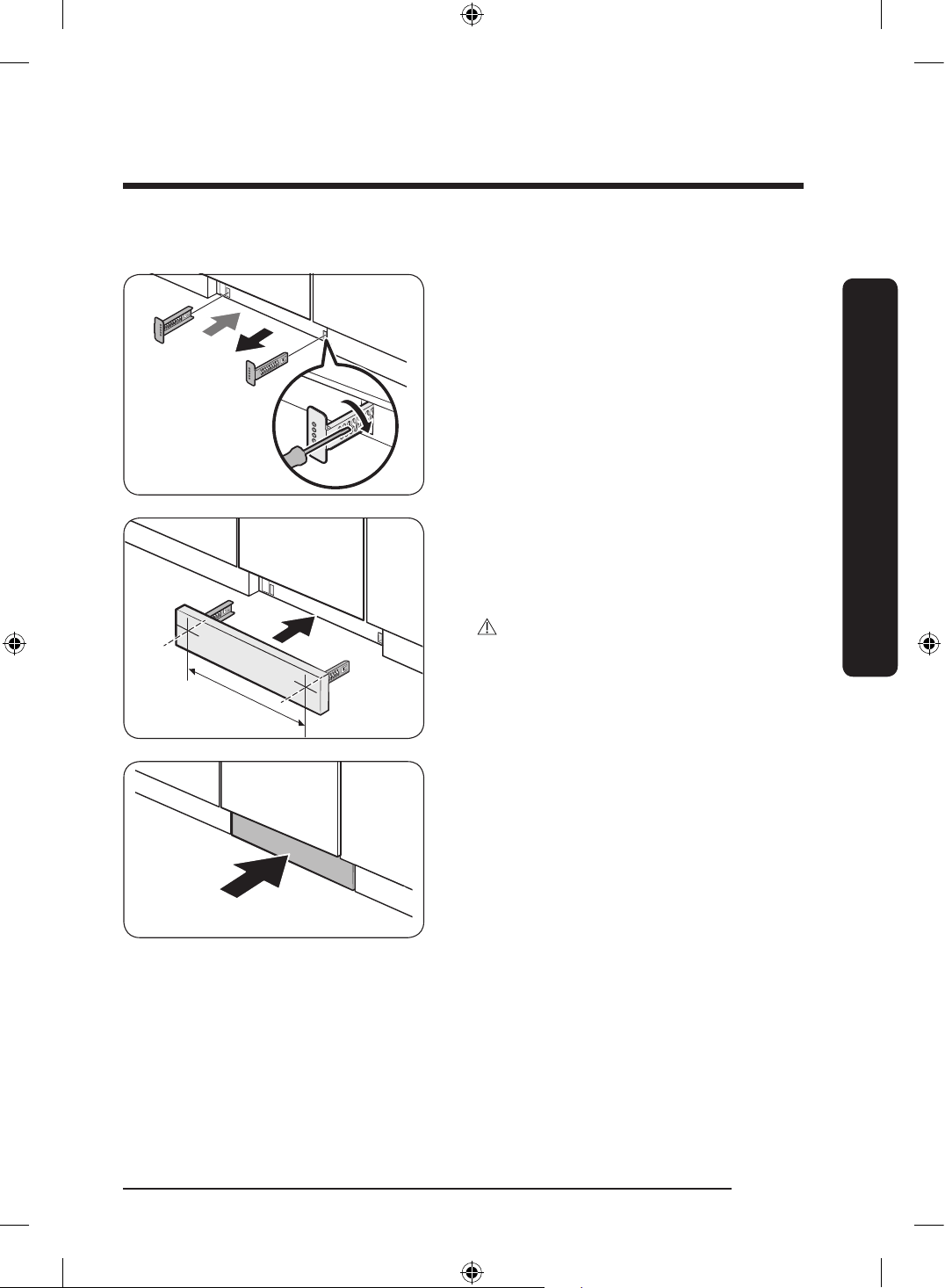
Pre-cut skirting board (applicable models only)
1. Insert the provided brackets to the
bottom of the dishwasher. Turn them
into position.
• See the gure on the left for the correct
attaching sequence and place of the
brackets.
449
2. Insert the pre-cut skirting board into
the brackets rst, and then tighten the
screws to x the board. See the gure
on the left and make sure the brackets
are positioned in the correct place.
CAUTION
Make sure the skirting board does not
interfere with the dishwasher’s door
opening and closing.
3. Push the skirting board with the
brackets into the bottom of the
dishwasher as shown.
DW60BG750FSL_SA_DD68-00250K-02_EN.indd 25 2023-08-23 11:04:42
English26
Installation
Installation
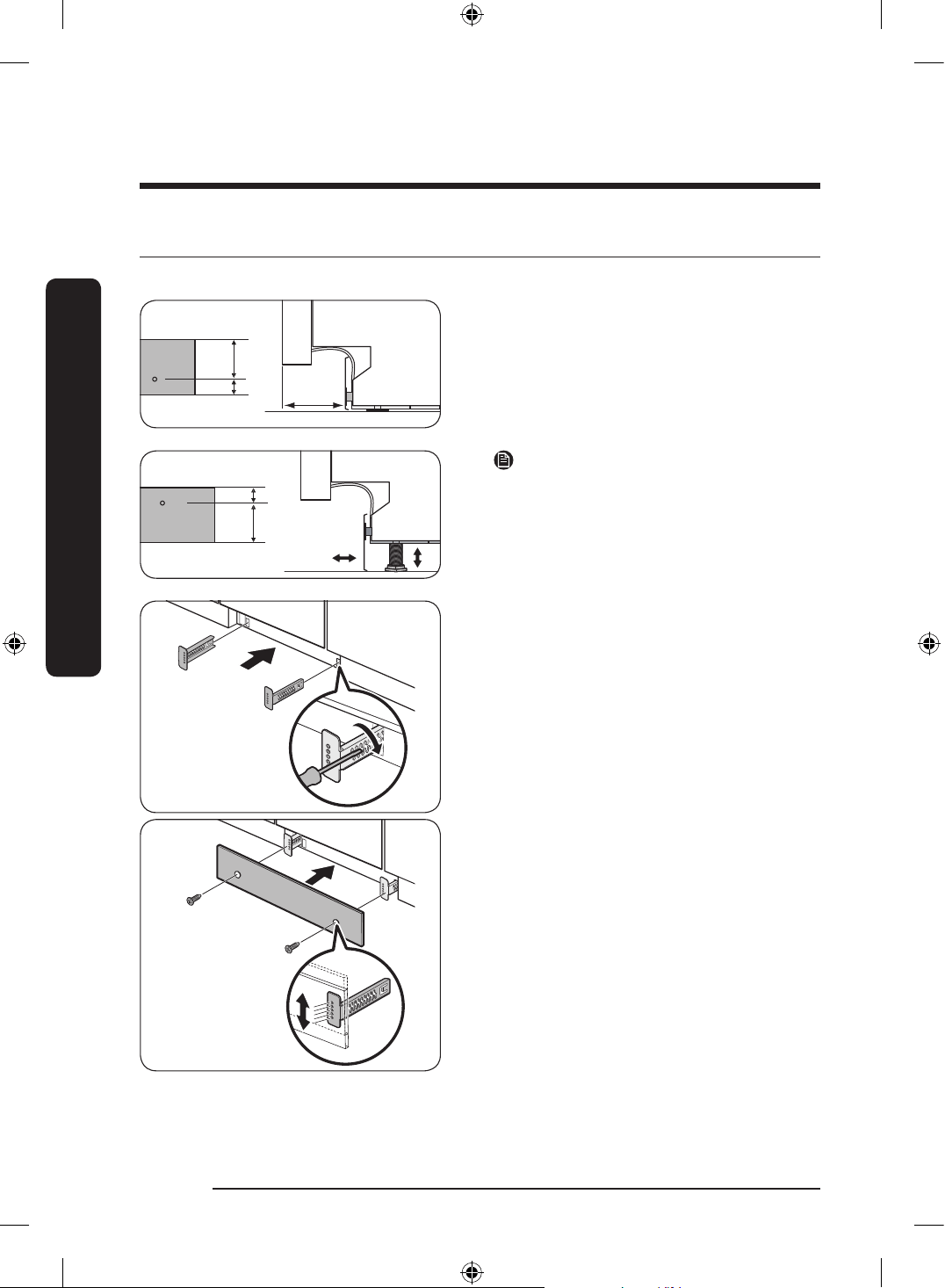
STEP 9 Kick plate (applicable models only)
If you want to install the kick plate, follow these steps.
small
Big
Big
Small
Install over
109 mm
1. Turn the front feet of the dishwasher to
adjust the height so that the kick plate
ts in.
Big
Small
NOTE
If the dishwasher is raised by adjusting the
feet, turn the kick plate upside down so
that the kick plate ts in.
2. Attach the kick plate to the dishwasher
using the kick plate brackets. Make sure
the kick plate brackets are in the correct
direction. See the gure for details.
DW60BG750FSL_SA_DD68-00250K-02_EN.indd 26 2023-08-23 11:04:43
English 27
Installation
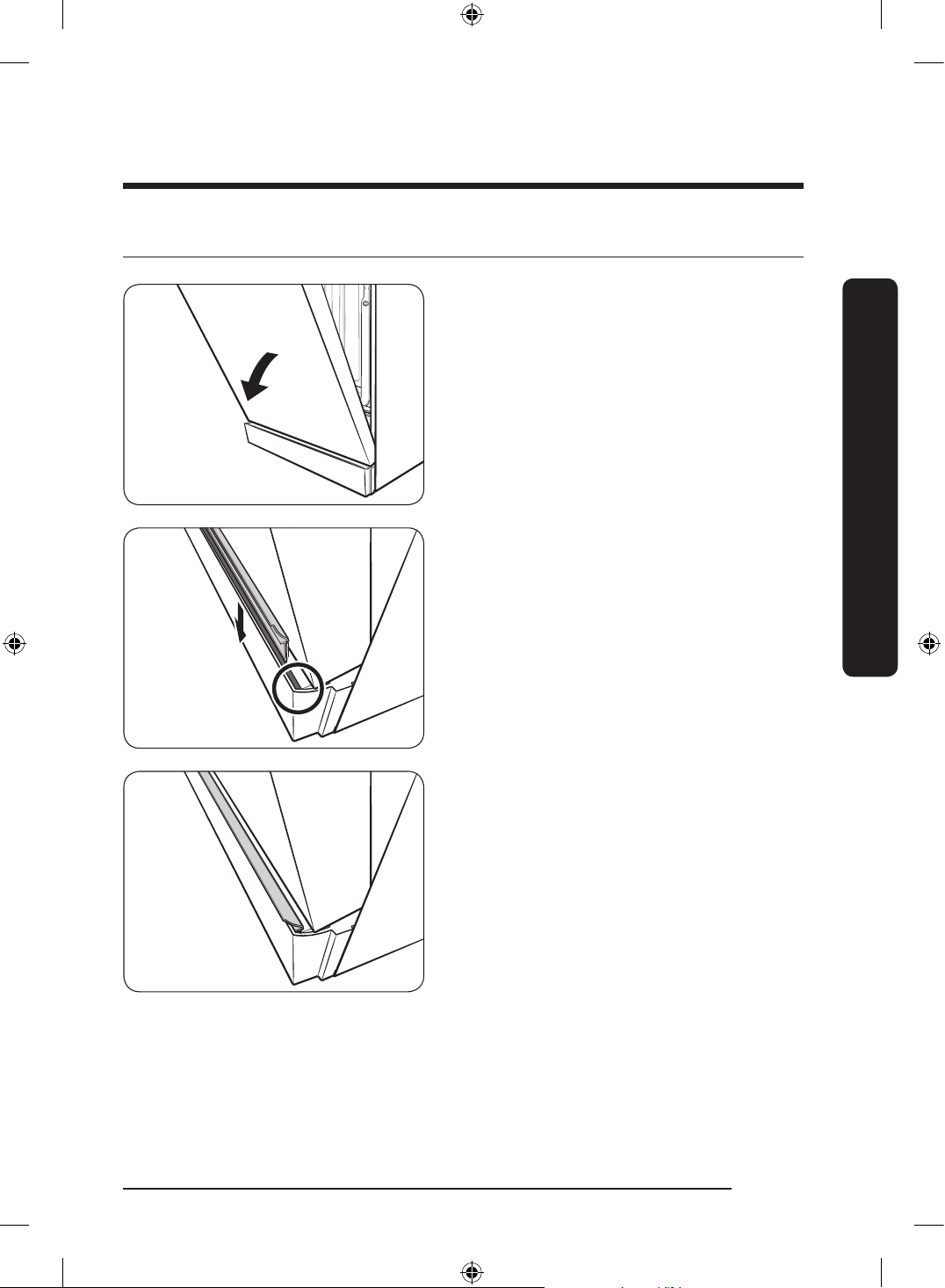
STEP 10 Attach the trim (applicable models only)
1. Open the door halfway down.
2. Remove the adhesive rear tape of the
trim. Then, insert the trim in the lower
groove of the dishwasher.
3. This is how the trim looks after
attachment.
DW60BG750FSL_SA_DD68-00250K-02_EN.indd 27 2023-08-23 11:04:43
English28
Installation
Installation
SmartThings (Applicable models only)
Wi-Fi connection
On your smartphone, go to Settings and connect to your home Wi-Fi network.
Download
On an app market (Google Play Store, Apple App Store, Samsung Galaxy Apps), nd the
SmartThings app with a search term of “SmartThings”. Download and install the app on
your device.
NOTE
• The SmartThings app is designed for Android 8.0 or later, IOS 13.0 or later.
• For improved performance, the SmartThings app is subject to change without notice, or
discontinued support according to the manufacturer’s policy.
Log in
You must rst log into SmartThings with your Samsung account. To create a new Samsung
account, follow the instructions on the app. You don’t need a separate app to create your
account.
NOTE
If you have a Samsung account, use the account to log in. A registered Samsung
smartphone user automatically logs in.
To register your device to SmartThings
1. Make sure your smartphone is connected to a wireless network.
2. Run SmartThings on your smartphone. IPhone users are required to provide the login
information each time they access the app.
3. When a message of “A new device is found.”, select Add.
4. If no message appears, select + and select your dishwasher in a list of devices available.
If your dishwasher is not listed, select Device Type > Specic Device Model, and then
add your dishwasher manually.
5. Follow the on screen instructions to complete the connection process for your
dishwasher. Press and hold Smart Control for more than 5 seconds until the “AP”
message appears on the display. Your dishwasher will be registered with the app.
6. When the process is complete, your dishwasher will appear in the list of devices on
your SmartThings App.
7. Tap the dishwasher icon to open the dishwasher page.
8. When a network connection is established, the Wi-Fi icon lights up on your dishwasher.
DW60BG750FSL_SA_DD68-00250K-02_EN.indd 28 2023-08-23 11:04:44
English 29
Installation
Dishwasher app
Integrated control: You can monitor and control your dishwasher both at home and on the
go.
• Select the dishwasher icon on SmartThings. The dishwasher page appears.
• Check the operation status or notications related to your dishwasher, and change
options or settings if necessary.
NOTE
• This device is designed for household use only (Class B), and can be used in all
residential areas.
• This device may cause wireless interference, and neither the manufacturer or the
installer of this device can provide a safety measure of any kind.
• Recommended encryption methods are WPA/TKIP and WPA2/AES. Newly developed
Wi-Fi protocols or unapproved Wi-Fi protocols are not supported.
• The reception sensitivity of a wireless network may be affected by surrounding wireless
environments.
• If your Internet provider has registered the MAC address of your PC or the modem
module for permanent use, your Samsung dishwasher fails to connect to the Internet. If
this is the case, contact your Internet provider.
• The Internet rewall may interrupt your Internet connection. If this happens, contact
your Internet provider.
• If Internet failure continues after following the measurement of your Internet provider,
contact a local Samsung retailer or service centre.
• For installing wired and wireless routers, refer to the user manual of the router you use.
• Samsung dishwasher supports the Wi-Fi 2.4 GHz protocols.
• Samsung dishwasher supports the IEEE802.11 b/g/n (2.4 GHz), Soft-AP protocols.
(IEEE802.11n is recommended)
• An unapproved wired/wireless router may fail to connect to Samsung dishwasher.
• The SmartThings app is available on Android devices with OS 8.0 or higher and iOS
devices with iOS 13 or higher. The app is optimised for Samsung smartphones (Galaxy S
and Note series).
• Some functions of the app may operate differently on third-party devices.
• The app is subject to change without notice for improved performance.
• In addition, further updates on the app or the function in the app may stop due to
usability and security reasons, even if updates are currently supported on your OS.
• Your device uses non-harmonised frequency and is intended for use in all European
countries. The WLAN can be operated in the EU without restriction indoors, but cannot
be operated outdoors in France.
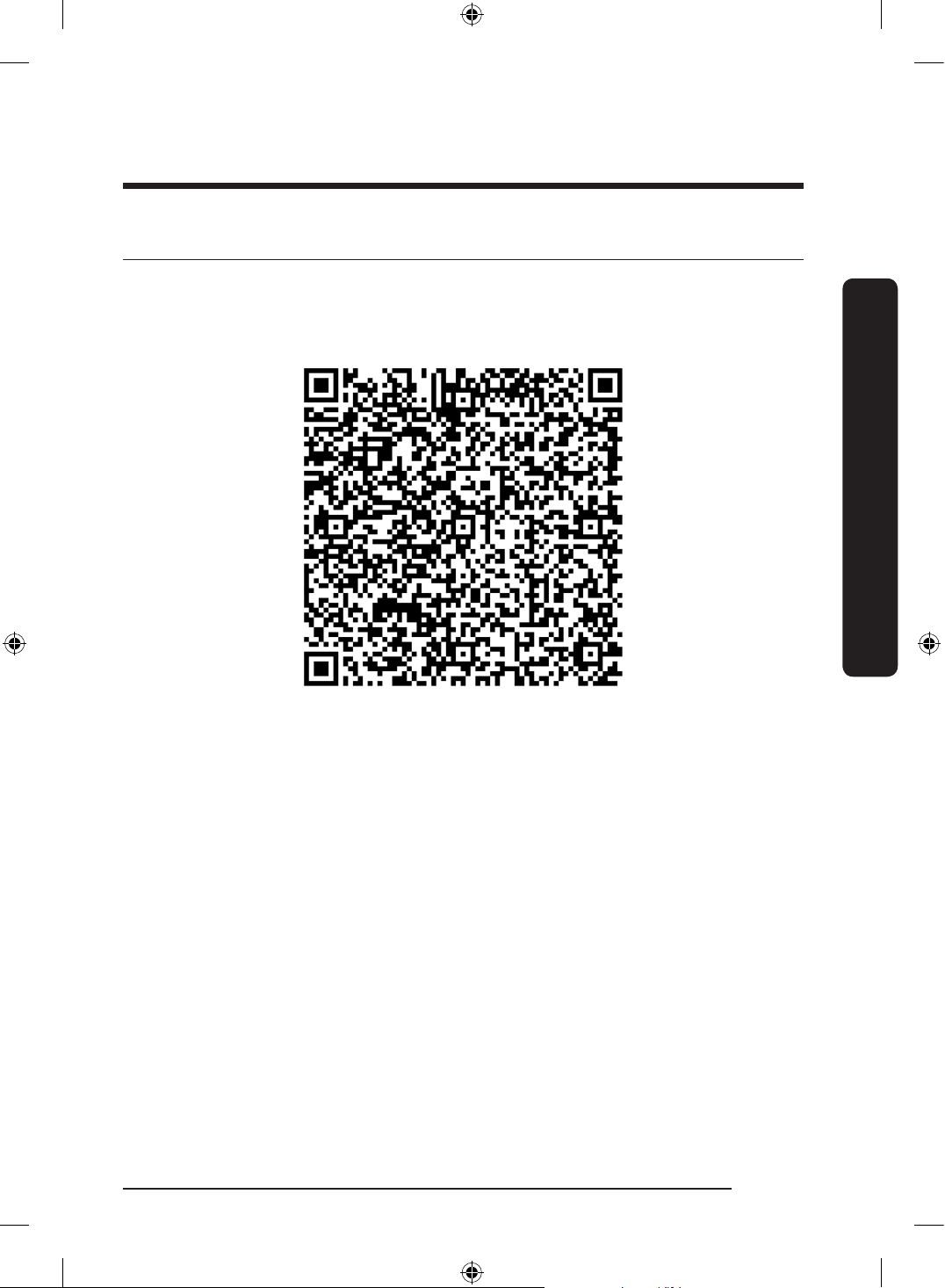
• You can easily install the SmartThings app or use the product with your smartphone by
scanning the QR code on the attached label.
• Hereby, Samsung Electronics, declares that the radio equipment type appliance is in
compliance with Directive 2014/53/EU. The full text of the EU declaration of conformity
is available at the following internet address: The ofcial Declaration of conformity may
be found at http://www.samsung.com, go to Support > Search Product Support and enter
the model name.
DW60BG750FSL_SA_DD68-00250K-02_EN.indd 29 2023-08-23 11:04:44
English30
Installation
Installation
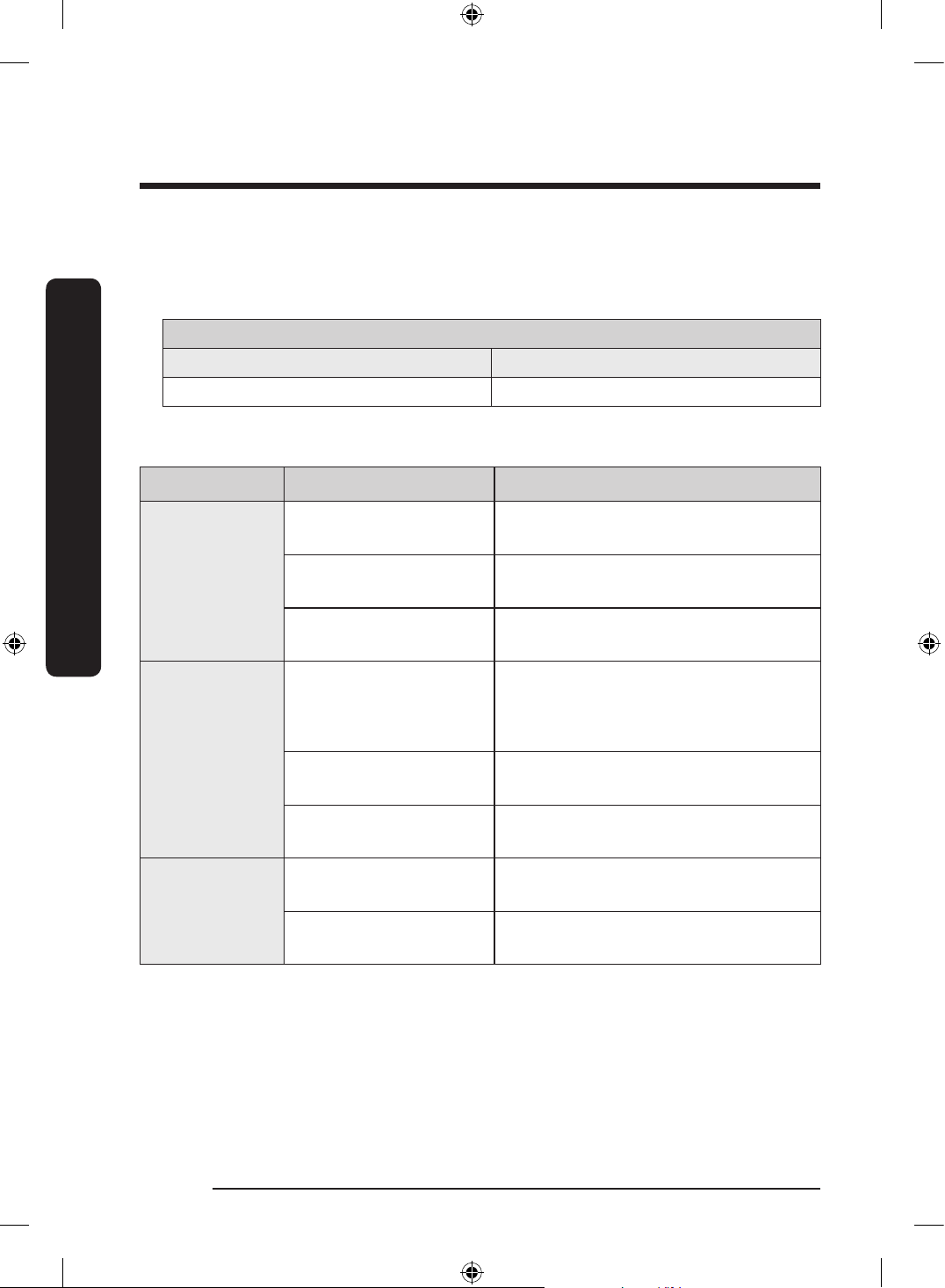
• The overall standby power consumption is 2.0 W in which all network ports stay in “on”
condition.
- Data determined according to standard EN 50564 and Regulation (EC) No
1275/2008
Wi-Fi
Frequuency range Transmitter power (Max)
2412 MHz - 2472 MHz 20 dBm
SmartThings
Category Checkpoint Description
Monitoring
Washing status
You can check the current cycle and its
options, and the remaining cycle time.
Smart Control
The Smart Control status is shown for the
dishwasher.
Energy monitoring
Use this to monitor the energy
consumption status.
Control
Start/Pause/Cancel
Select a cycle and necessary options, and
then select Start/Pause/Cancel to start
an operation, to stop temporarily, or to
cancel the current operation.
My Favorite
Add frequently used cycles and options
to My Favorite for later use.
Delay Start
Set Delay Start to start the cycle at a
scheduled time (up to 24 hours).
Notication
Cycle completed
Noties you the current cycle is
complete.
Detergent
Noties you if the dishwasher is out of
salt or rinse aid.
DW60BG750FSL_SA_DD68-00250K-02_EN.indd 30 2023-08-23 11:04:44
English 31
Installation
Open Source Announcement
The software included in this product contains open source software.
The following URL http://opensource.samsung.com/opensource/SMART_TP1_0/seq/0 leads
to open source license information as related to this product.
DW60BG750FSL_SA_DD68-00250K-02_EN.indd 31 2023-08-23 11:04:44
English32
Before you start
Before you start
Follow these instructions carefully to ensure proper installation of the dishwasher and to
prevent accidents when washing dishes.
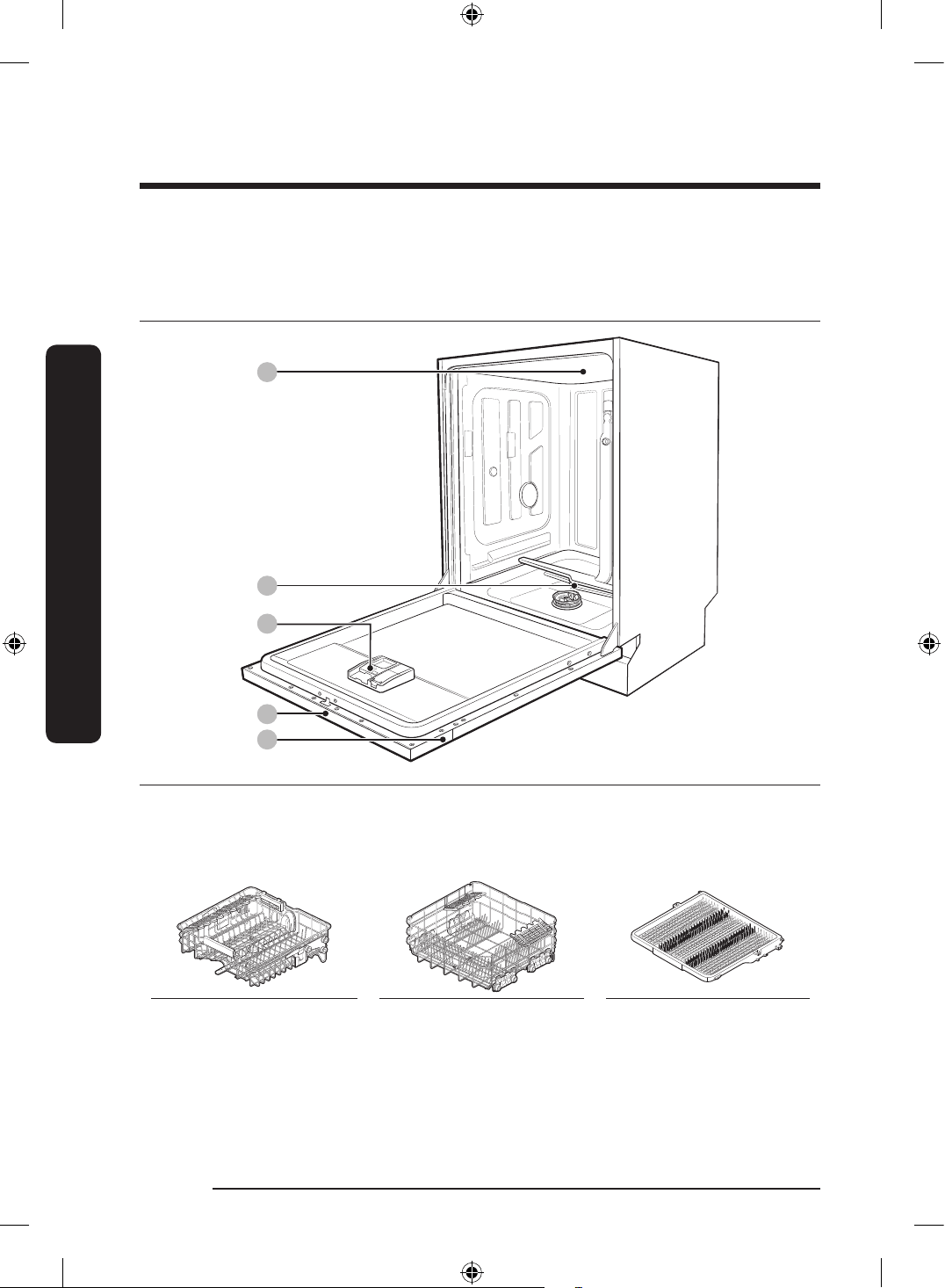
Dishwasher at a glance
02
04
05
03
01
01 Top nozzle 02 Lower nozzle 03 Dispenser
04 Control panel 05 Door
Upper rack Lower rack Cutlery rack
DW60BG750FSL_SA_DD68-00250K-02_EN.indd 32 2023-08-23 11:04:45
English 33
Before you start
CAUTION
• Do not wash items that are covered with ash, sand, wax, lubricating grease, or paint.
These materials will damage the dishwasher. Ash does not dissolve and will spread
inside the dishwasher.
• Remove food remains such as bones, fruit seeds, etc. and waste such as toothpicks,
paper napkins, etc. from your dishes. Food remains and waste can make noise, cause the
dishwasher to malfunction, and damage your dishes and dishwasher.
Unsuitable items for the dishwasher
WARNING
Wash only items such as glass, porcelain, and cutlery which the manufacturer declares as
dishwasher safe. Do not wash aluminium (e.g. grease lters). The dishwasher may damage
aluminium, or in extreme cases, cause a severe chemical reaction.
Do not wash the following items in the dishwasher.
• Copper, brass, tin, ivory, and aluminium items or items with adhesive
• Non-heat resistant plastics
• Craft items, antiques, valuable vases, and decorative glassware
• Pottery or glazed-ceramic items
• Wooden cutlery and crockery or items with wooden parts
• Delicate glassware or glassware containing lead crystal. Clouding may occur on the
glassware after frequent washing.
NOTE
Silverware that has contacted foods containing sulphur may become discoloured. Food
with sulphuric content include egg yolks, onions, mayonnaise, mustard, sh, sh brine, and
marinades.
DW60BG750FSL_SA_DD68-00250K-02_EN.indd 33 2023-08-23 11:04:45
English34
Before you start
Before you start
Basic use of racks
Height adjustment
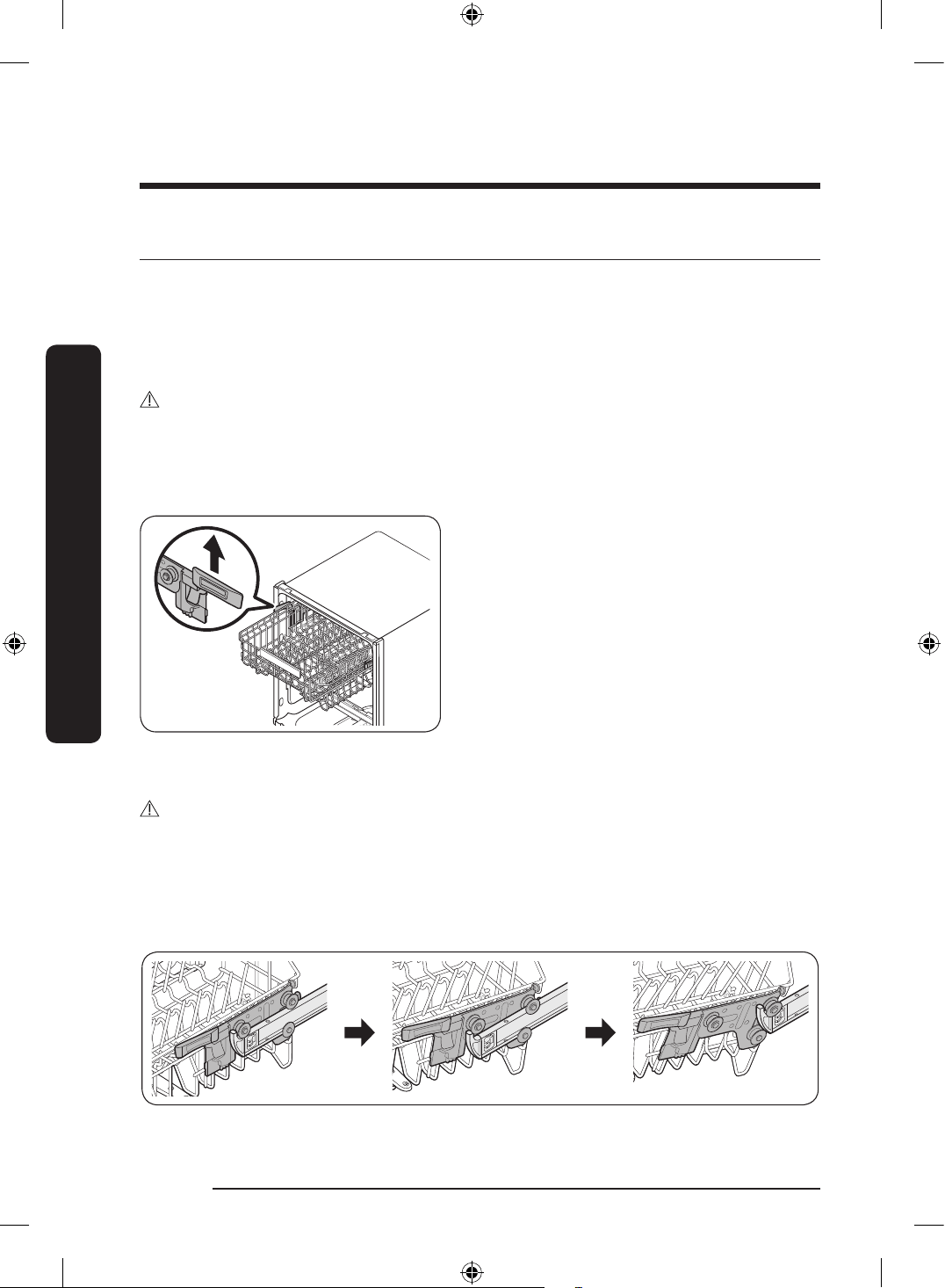
You can adjust the height of the upper rack so that the lower rack can accommodate larger
sized dishes. Depending on the height of the upper rack, the lower rack can accommodate
plates up to 30 cm in diameter, and the upper rack can accommodate plates up to 18 cm
(with Cutlery rack) or 25 cm (without Cutlery rack) in diameter.
CAUTION
• Adjust the height of the upper rack before loading dishes into the rack. Adjusting the
rack after loading the dishes may damage the dishes.
• Make sure to hold both handles when adjusting, or the dishwasher door may not close
properly.
• To raise the upper rack, pull the upper
rack upwards. The adjustable handle will
latch, and the upper rack will raise.
• To lower the upper rack, hold both the
adjustable handles located at the left
and right sides of the upper rack, and
then evenly press down.
Upper rack removal
CAUTION
• Do not operate the dishwasher without the upper rack. Otherwise, noises occur and the
dishwasher does not operate properly.
• Because the upper rack is removable, insert the upper rack properly to ensure the
dishwasher operates normally.
Pull the upper rack to the front until it is fully extended, and then lift it slightly to remove.
See the following gures.
DW60BG750FSL_SA_DD68-00250K-02_EN.indd 34 2023-08-23 11:04:45
English 35
Before you start
Loading dishes
Lower rack
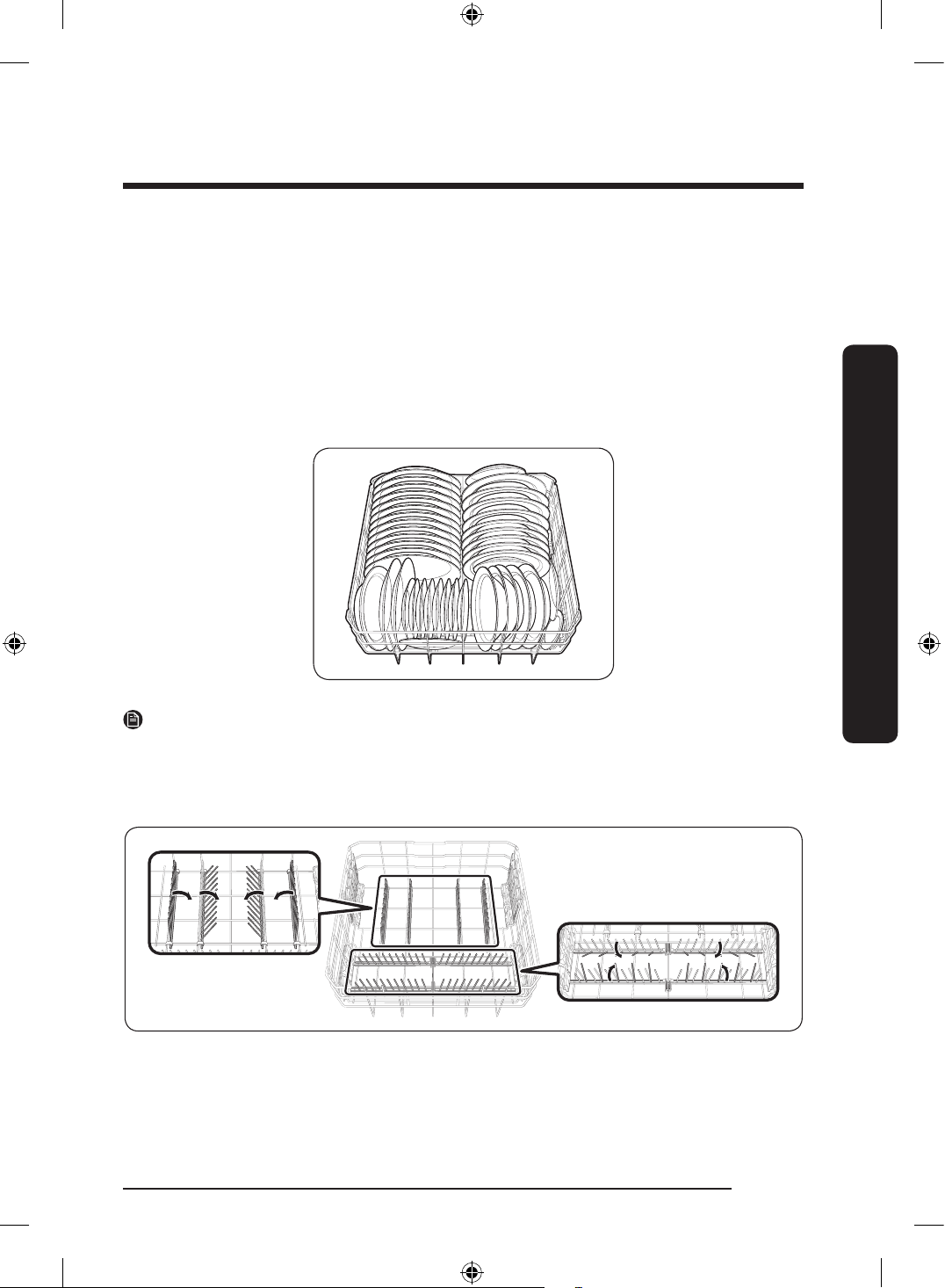
We recommend that you place large items, that are difcult to clean (such as pots, pans,
lids, serving dishes and bowls), in to the lower rack.
It is preferable to place serving dishes and lids on the side of the racks in order to avoid
blocking the rotation of the upper nozzle. Pots, serving bowls, etc. must always be placed
top down.
Deep pots should be slanted to allow water to ow out.
The lower rack features folding tines to easily load larger pots and pans.
NOTE
Long items, serving cutlery, salad servers and big knives should be placed on the shelf so
that they do not obstruct the rotation of the nozzles.
Using the folding tines
For better stacking of pots and pans, the tines can be folded down as show in the gure.
DW60BG750FSL_SA_DD68-00250K-02_EN.indd 35 2023-08-23 11:04:46
English36
Before you start
Before you start
Upper rack
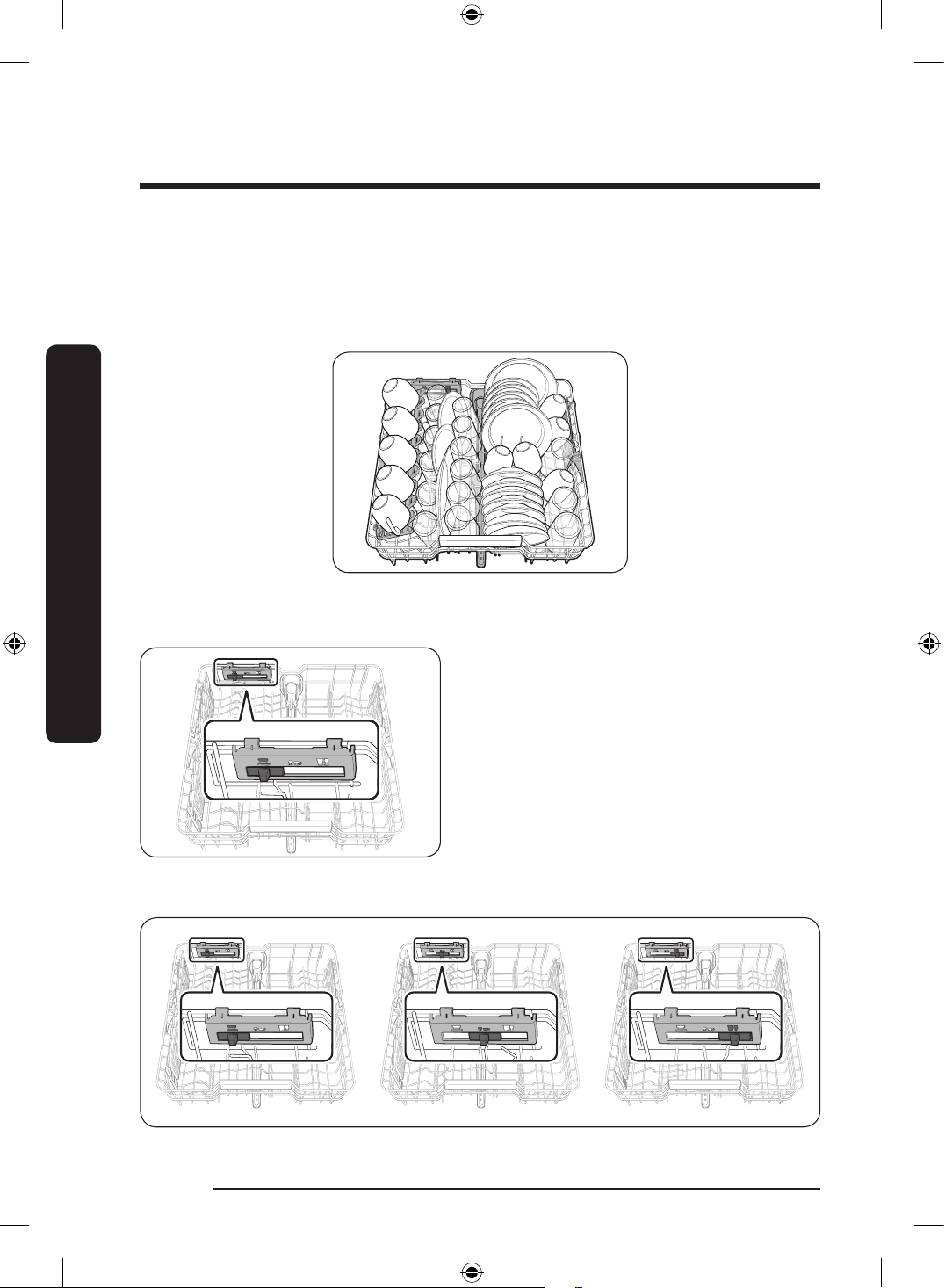
The upper rack is designed to hold more delicate and lighter dishware such as glasses,
coffee and tea cups and saucers, as well as plates, small bowls (as long as they are not too
dirty). Position the dishes and cookware so that they will not get moved by the spray of
water. Always place glasses, cups & bowls upside down.
Guide Tines
Upper rack
You can load dishes into the central rack in
various ways by changing the guide tines.
If the guide button is moved to the right,
you can load standard wine glasses. If the
guide button is in the middle, you can load
shorter wine or brandy glasses. If the guide
button is on the left, you can load bowls
and plates.
DW60BG750FSL_SA_DD68-00250K-02_EN.indd 36 2023-08-23 11:04:47
English 37
Before you start
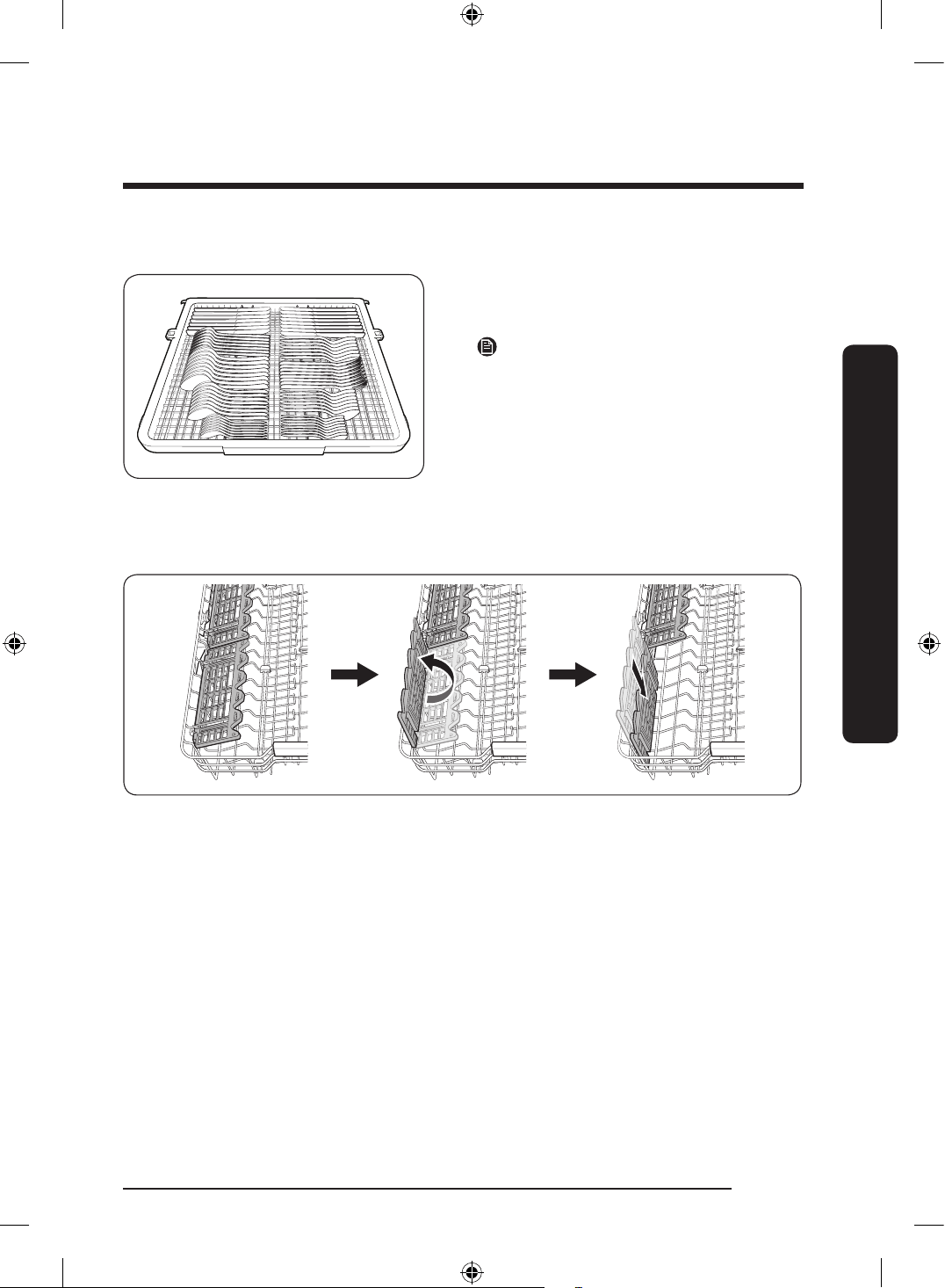
Cutlery rack
The cutlery rack is best for atware and
cooking or serving utensils. Use the cutlery
rack to organize atware or utensils.
NOTE
The cutlery rack can be removed if you
need more space on the upper rack to clean
larger items.
Using the glass support
The glass support is especially suited for wine glasses. Hang wine glasses onto the pegs of
the glass support. Fold the glass support back when it is not being used.
DW60BG750FSL_SA_DD68-00250K-02_EN.indd 37 2023-08-23 11:04:48
English38
Before you start
Before you start
Detergent compartment
All dishwasher cycles require detergent in the detergent compartment. Apply detergent as
recommended for the selected cycle to ensure best performance.
WARNING
• Do not place dishwasher detergent in your mouth. Avoid breathing in detergent
fumes. Dishwasher detergent contains irritants and caustic chemicals that can induce
respiratory conditions. If you have consumed dishwasher detergent or inhaled
detergent fumes, seek medical attention immediately.
• Keep dishwasher detergent out of children’s reach.
CAUTION
Use dishwasher detergent only. Other types of detergent produce excessive foam, which
may decrease the dishwasher’s performance or cause it to malfunction.
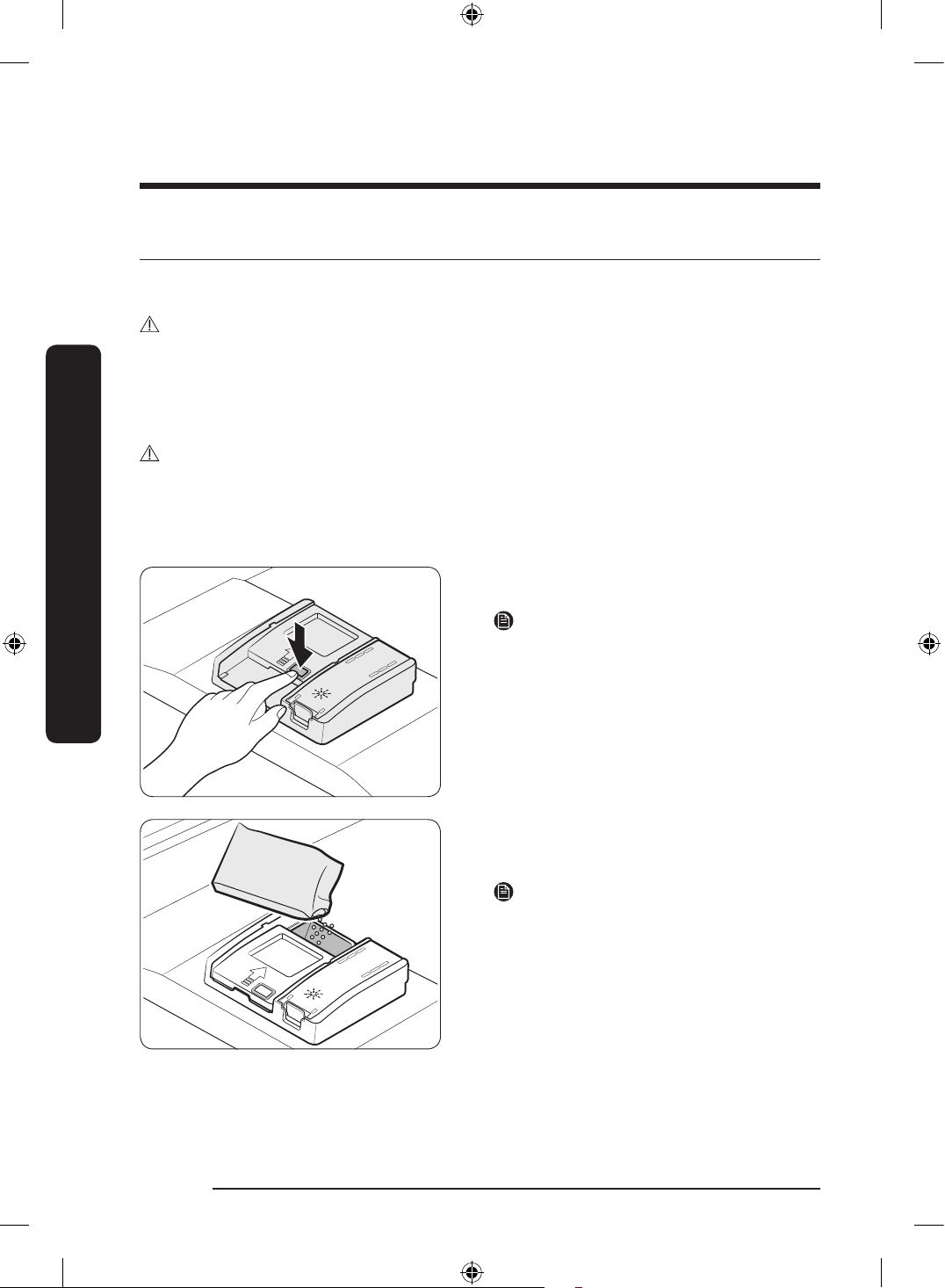
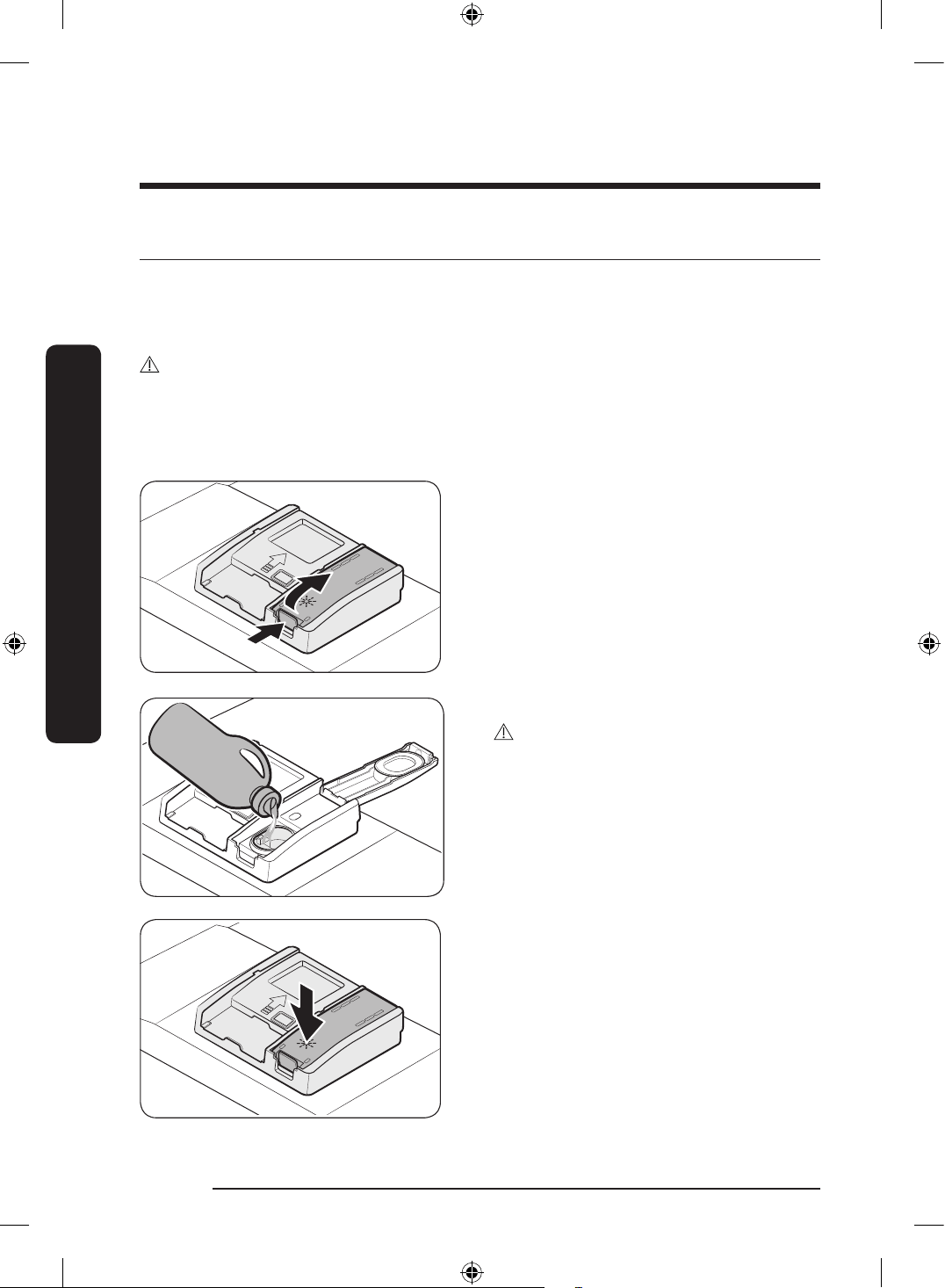
Filling the detergent
1. Open the detergent dispenser cap by
pressing the detergent dispenser catch.
NOTE
The cap remains open at the end of a cycle.
2. Add the recommended amount of
detergent to the main wash detergent
compartment.
NOTE
There is no separate button that is specic
to using tablet detergents.
DW60BG750FSL_SA_DD68-00250K-02_EN.indd 38 2023-08-23 11:04:49
English 39
Before you start
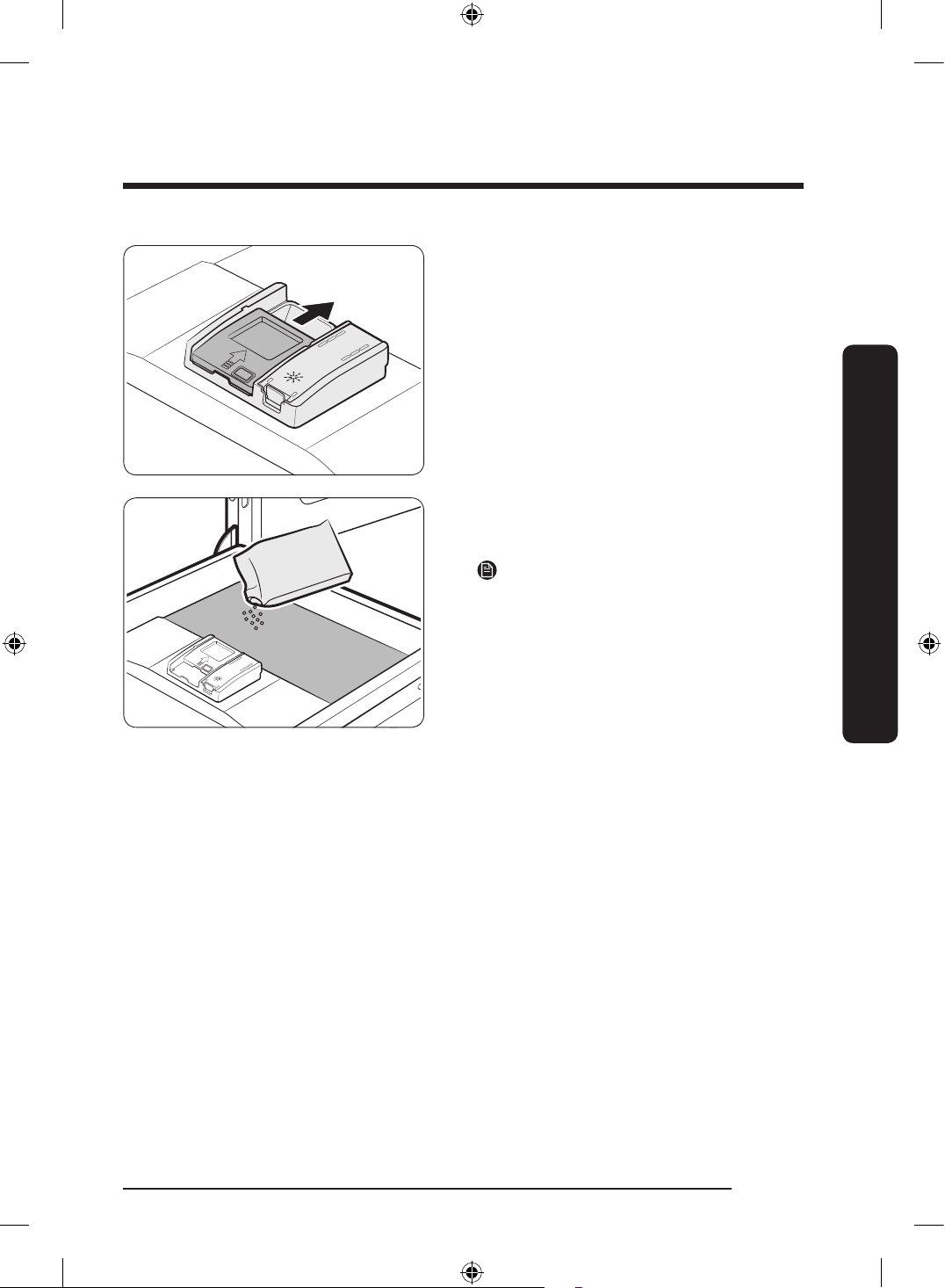
3. Close the lid by sliding it up.
4. If the items are heavily soiled, pour a
small amount of detergent onto the door
for better cleaning results.
NOTE
The additional detergent will activate
during the pre-wash process.
The cover opens automatically to dispense the detergent during the wash.
DW60BG750FSL_SA_DD68-00250K-02_EN.indd 39 2023-08-23 11:04:49
English40
Before you start
Before you start
Rinse aid reservoir
Rinse aid improves the drying performance of the dishwasher. When the Rinse Rell
indicator lights up on the control panel, rell with rinse aid. Only use liquid rinse aid.
Powdered rinse aid will clog the reservoir opening and cause the dishwasher to
malfunction.
CAUTION
• Do not apply any type of detergent to the rinse aid reservoir.
• Do not excessively ll the reservoir. Excessive rinse aid may overow during a cycle.
Filling the rinse aid
1. Open the rinse aid reservoir cap.
2. Fill the rinse aid reservoir with rinse aid.
CAUTION
Do not ll the reservoir above the full level
indicator. Excess rinse aid can overow
during the wash cycle.
3. Close the rinse aid reservoir cap.
DW60BG750FSL_SA_DD68-00250K-02_EN.indd 40 2023-08-23 11:04:49
English 41
Before you start
Settings
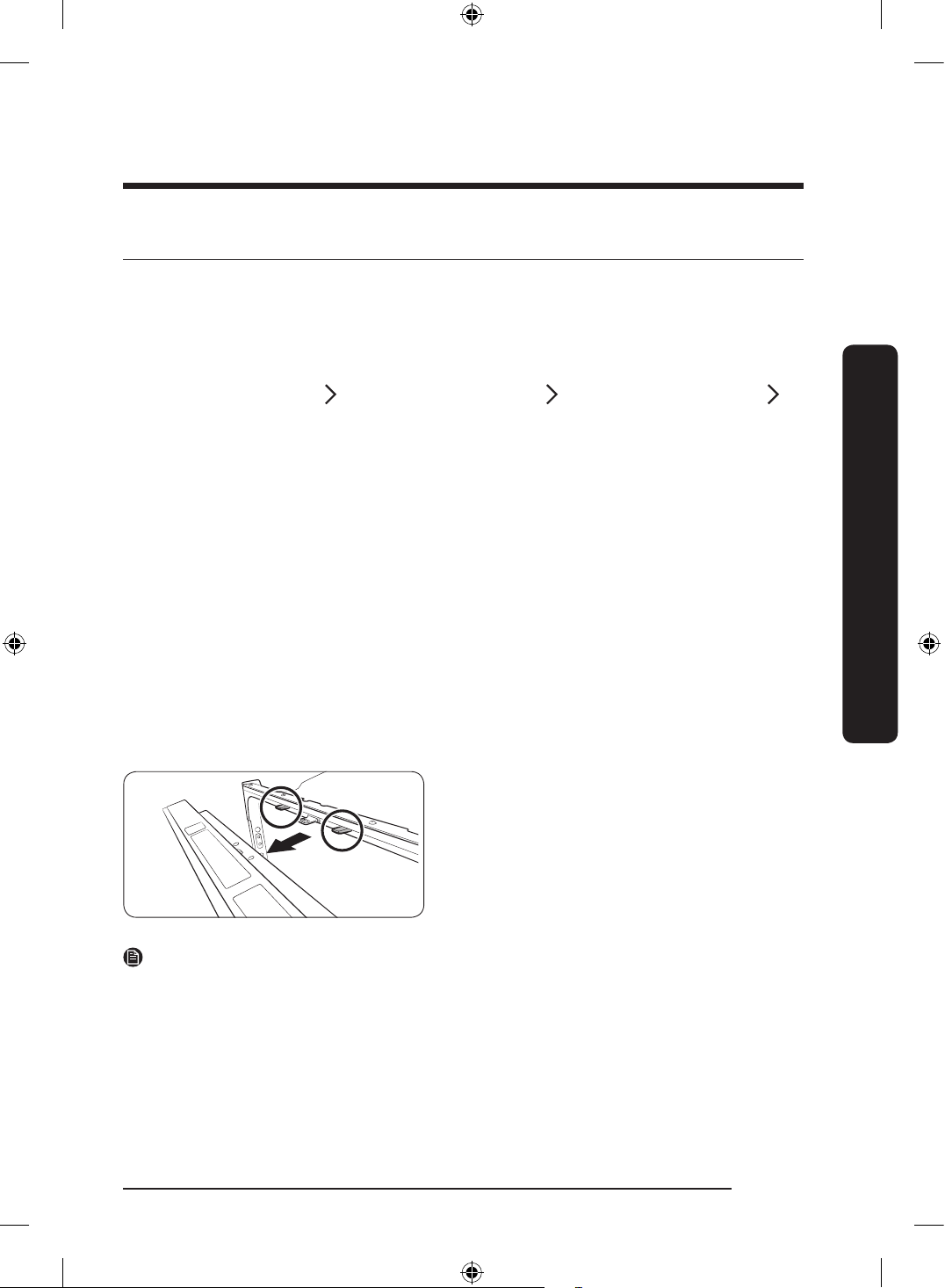
You can change the Sound, Brightness, Dose per Rinse and Auto door to your preference.
To change the settings, press the Hygiene Plus and Delay Start buttons simultaneously for
3 seconds.
Press Hygiene Plus to navigate through sub menus, and press Delay Start to conrm your
changes.
Sound
U1/U0
Brightness*
b0-b5
Dose per Rinse
F0-F6
Auto Release Dry
A1/A0
After setting is nished, press Power button or Hygiene Plus and Delay Start button.
Sound
Press Hygiene Plus until ‘U1’ or ‘U0’ is displayed. To mute the dishwasher, select ‘U0’, and
then press Delay Start. To unmute, select ‘U1’, and then press Delay Start.
Brightness (Applicable models only)
Press Hygiene Plus until ‘b0 - b5’ is displayed. The higher the number, the brighter the
display. Select a number, and then press Delay Start.
Dose per Rinse
Press Hygiene Plus until ‘F0 - F6’ is displayed. Select a rinse aid level from Level 0 to
Level 6 (default: F4), and then press Delay Start.
Auto Release Dry
To improve drying performance, the door
opens automatically in the drying process.
‘0’ will be displayed when the current cycle
is complete.
Press Hygiene Plus until ‘A1’ or ‘A0’ is
displayed to enter Auto Release Dry mode.
Then, press Delay Start to enable (A1) or
disable (A0) the Auto Release Dry function.
NOTE
• Once the door opens in Auto Release Dry mode, the door cannot be closed manually for
the next 2 minutes.
• Disabling Auto Release Dry mode can affect the drying results. Enable Auto Release Dry
for better results.
To cancel your changes
To cancel any of the settings during the process, press Power to turn the dishwasher off.
Then, try again.
DW60BG750FSL_SA_DD68-00250K-02_EN.indd 41 2023-08-23 11:04:49
English42
Operations
Operations
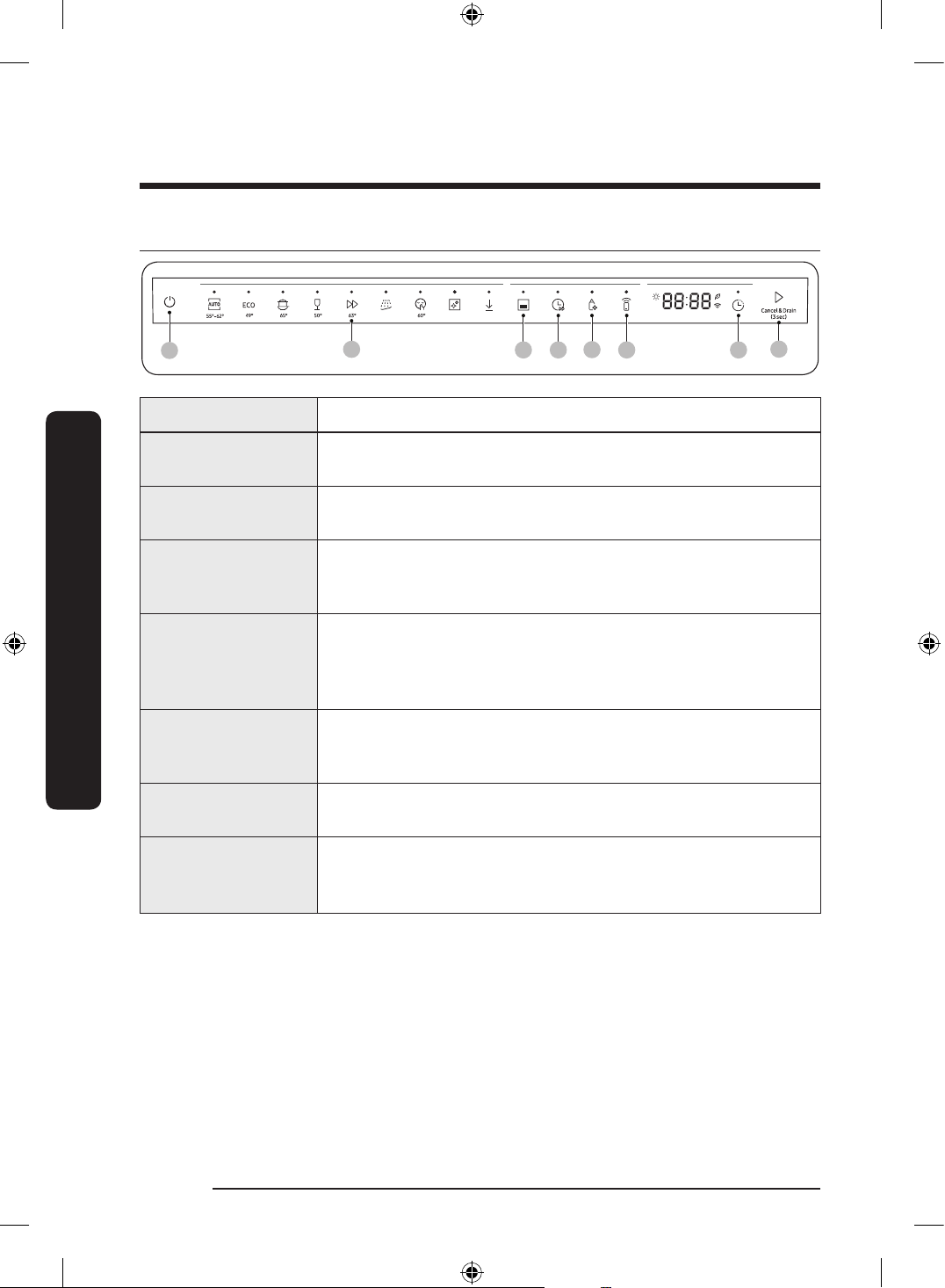
Control panel
01
02
03 04 06
05
07
08
01 Power Press to turn the dishwasher on or off.
02 Cycle
Press to select a desired wash cycle. For more information, see
the “Cycle overview” section on page 44.
03 Half Load
Press to wash items using only the lower rack. This is not
available with Machine Care, Baby Care and Pre wash cycles.
04 Speed Booster
Select this option to reduce the cycle time. This is available only
with the AUTO, ECO, Intensive, Delicate, Extra Silence,
Pots and Pans and Delicate cycles.
05 Hygiene Plus
Press to increase the water temperature up to 75 °C in the nal
rinse process for high temperature sanitization.
This option is not available with Delicate, Express, Machine Care,
Plastic, Baby Care and Pre wash cycles.
06 Smart Control
You can check product operation remotely by using
Smart Control. For more details, see the separate manual
included with the product.
07 Delay Start
You can delay the cycle starting time up to 24 hours. For more
information, see the “Delay Start” section on page 46.
08 START
(Cancel & Drain)
Press START to start operation. Make sure the door is closed.
Cancel & Drain: To cancel the current cycle and drain the
dishwasher, press and hold START for 3 seconds.
DW60BG750FSL_SA_DD68-00250K-02_EN.indd 42 2023-08-23 11:04:50
English 43
Operations
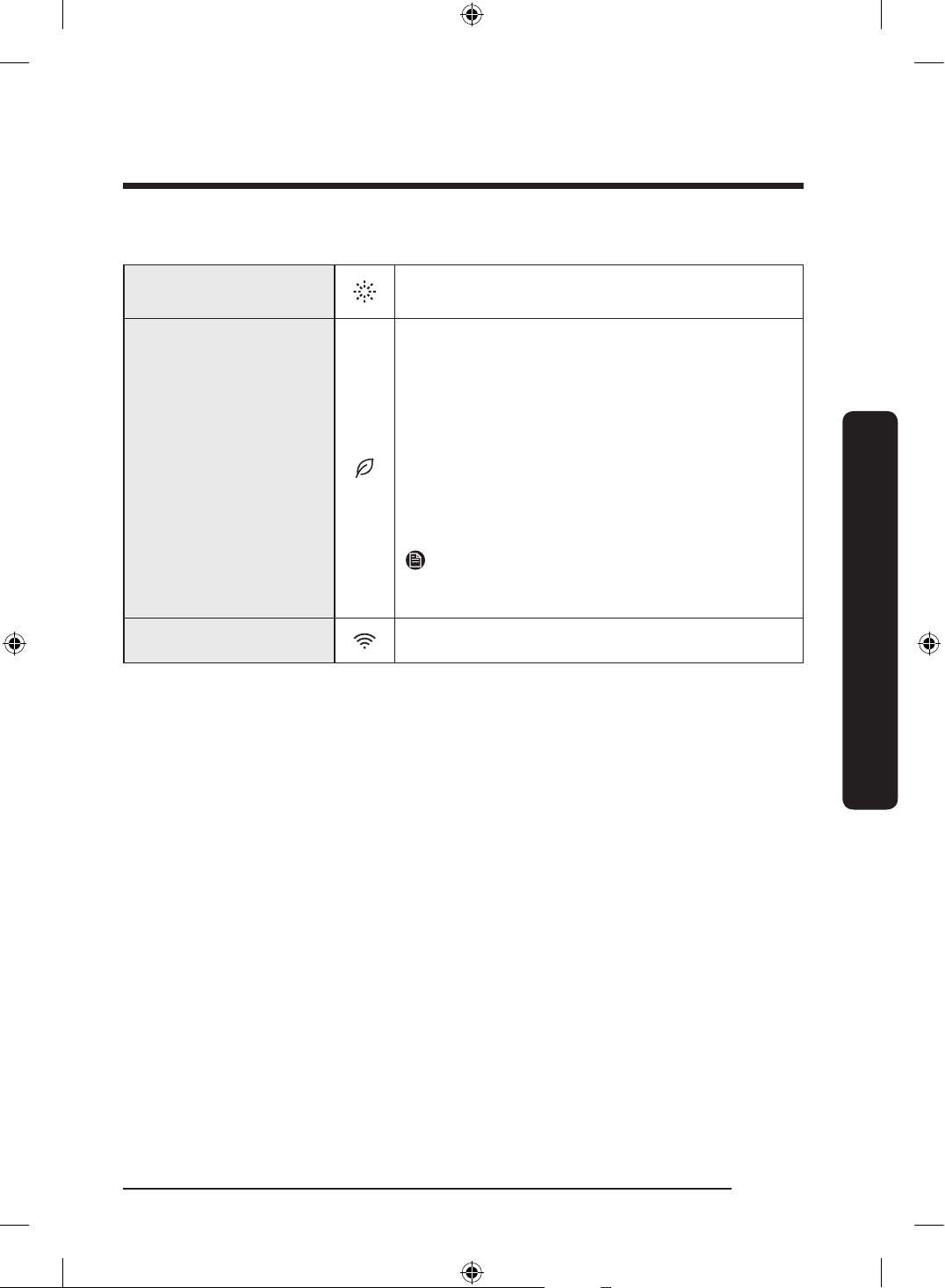
Indicators
Rinse Rell indicator
Lights up when the dishwasher runs out of rinse
aid.
AI Saving mode indicator
• AI Energy mode becomes active when the
SmartThings app allows it to be enabled.
• With the AI Energy mode enabled, the indicator
turns on if an AI Energy mode compatible cycle
is selected.
• Not all cycles are available with this
mode. The indicator turns off if an AI Energy mode
incompatible cycle is selected.
• AI Energy mode helps reduce power
consumption. However, it takes a longer cycle
time.
NOTE
AI Energy mode will be supported on different
schedule for each country from Jan 2023.
Wi-Fi indicator Lights up if Wi-Fi is activated.
DW60BG750FSL_SA_DD68-00250K-02_EN.indd 43 2023-08-23 11:04:50
English44
Operations
Operations
Cycle overview
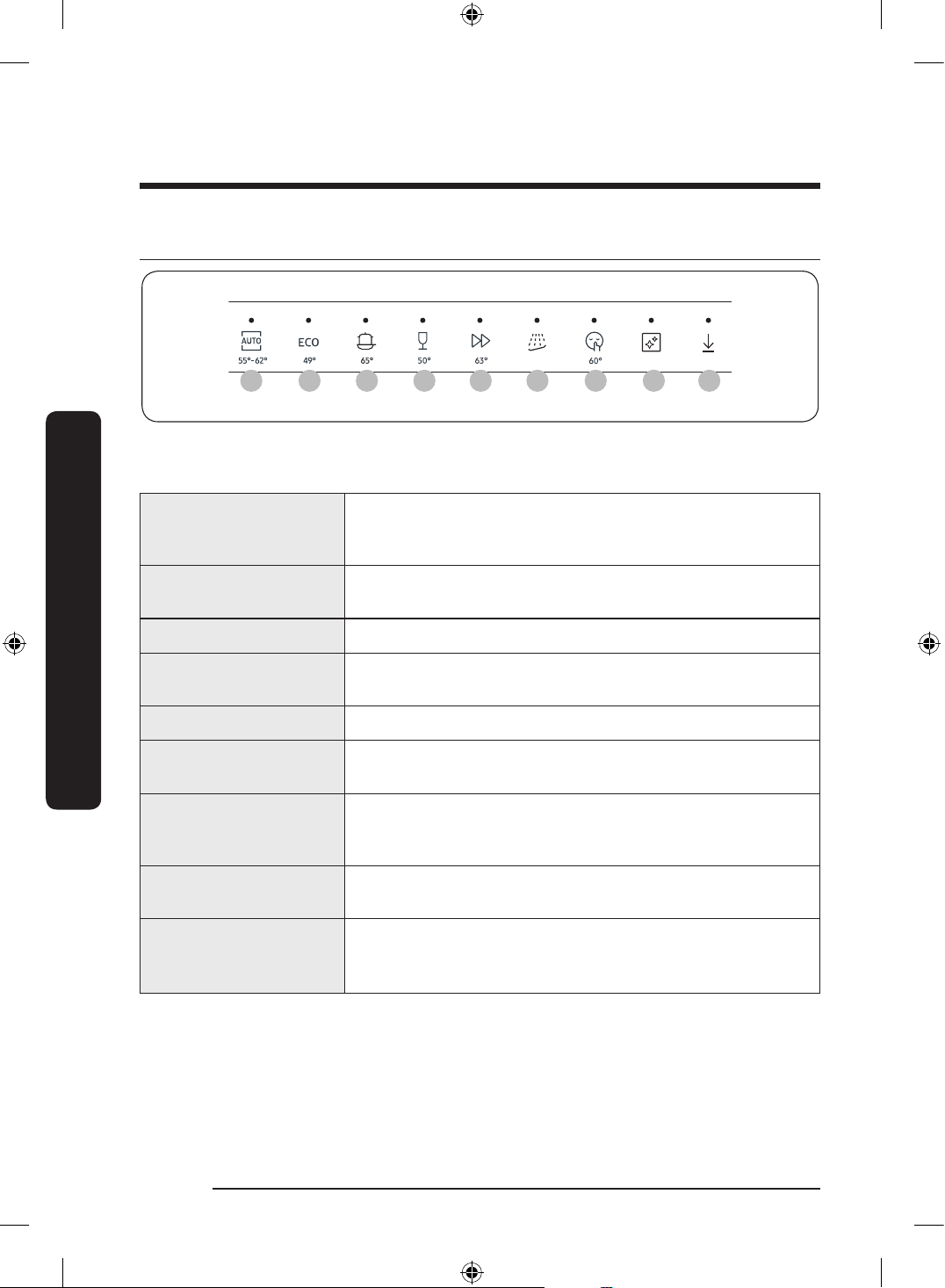
01 02 03 04 05 06 07
08 09
*
The temperature under the buttons indicates the highest water temperature during the cycle.
The highest water temperature during the cycle may differ depending on the model.
01 AUTO
This cycle detects the level of soil and automatically initiates
the optimal cycle, which is appropriate for all levels of soiled
items.
02 ECO*
This cycle reduces power and water consumption, which is
appropriate for normally soiled items.
03 Intensive Select this cycle for heavily soiled items.
04 Delicate
Select this cycle for lightly soiled, fragile items such as
glasses. Hygiene Plus option is not available in this cycle.
05 Express Daily using items, with short cycle time.
06 Pre Wash
Cold water rinse for removing dirt before running another
program.
07 Extra Silence
Select this cycle for more smooth and quiet washing. This
cycle washes a little bit slower, but creates 2 decibels less
noise than the ECO program.
08 Machine Care
Select this cycle to clean the inside of the dishwasher. Make
sure the dishwasher is empty.
09 Download Course
Based on the Plastic course, you can download the following
additional courses:
• Plastic, Baby Care and Pots and Pans courses
* The values for the ECO program have been obtained following the test standard AS/
NZS:2007. The values given for the other programs are indicative only.
DW60BG750FSL_SA_DD68-00250K-02_EN.indd 44 2023-08-23 11:04:50
English 45
Operations
Download Course (Applicable models only)
You can download and use courses other than those provided by default through your
smartphone.
1. Press the Power button.
2. Select Download Course.
3. Select the downloadable course you want to use in your smartphone app.
Pots and Pans, Plastic and Baby Care courses are available.
- When you download via the smartphone app, you can keep using your saved
courses.
4. Press the START button and close the dishwasher door.
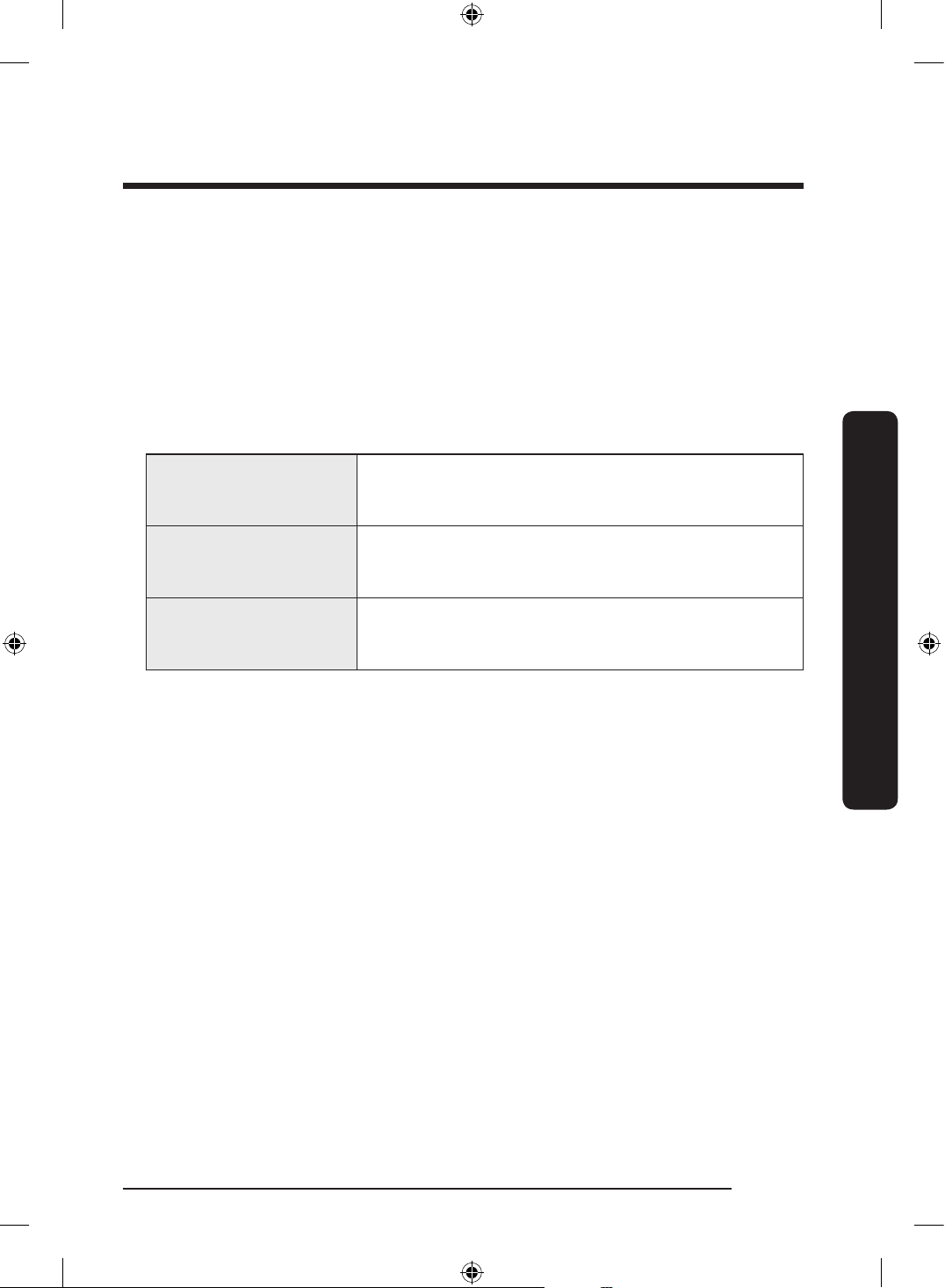
Pots and Pans
Choose to wash pots and pans. This course uses hotter
water and higher pressure than a standard course for
focused cleaning of pot and pans.
Plastic
This course is used when washing plastic dishes. It
washes plastic at a safer temperature (60 °C) and dries
them better.
Baby Care
Suitable for rinsing/drying dishes at a high temperature
of 75 °C. This course is not designed for detergent or
rinse. Do not use any of them.
DW60BG750FSL_SA_DD68-00250K-02_EN.indd 45 2023-08-23 11:04:50
English46
Operations
Operations
Simple steps to start
1. Open the door, and then load the dishwasher. Make sure to remove food remains and
waste on the dishes.
2. Apply detergent to the detergent dispenser. For better results, add rinse aids.
3. Press Power, and then select a cycle with necessary options (Half load, Speed Booster,
Hygiene Plus, and Delay Start). Some options may not be available depends on the
cycle.
4. Press START, and then close the door. The dishwasher starts the cycle after draining for
a few seconds.
NOTE
• To change the cycle after it has started, press and hold START for 3 seconds to cancel
the cycle. Then, select a new cycle.
• The default cycle is ECO.
• To resume after you have opened the door to stop the dishwasher while operating,
simply close the door.
Delay Start
You can delay the cycle starting time up to 24 hours in 1-hour increments. To increase the
delay time, press Delay Start. The hour displayed indicates the time at which the cycle will
start.
1. Open the door, and then load the dishwasher.
2. Press Delay Start to change the time in 1-hour increments.
- If you press and hold the button, the time will increase until you release the button.
3. Press START, and then close the door.
NOTE
To change the delay time once the dishwasher has started, press Power and restart the
dishwasher.
DW60BG750FSL_SA_DD68-00250K-02_EN.indd 46 2023-08-23 11:04:50
English 47
Maintenance
Maintenance
Cleaning
Keep the dishwasher clean to improve performance, reduce unnecessary repairs, and
lengthen the lifecycle.
Exterior
Clean spills on the surface of the dishwasher immediately. Use a soft, damp cloth on the
control panel to gently wipe away spills and dust.
CAUTION
• Do not use benzene, wax, thinner, chlorine bleach, alcohol, or other chemical substances.
These materials may discolour the surface of the dishwasher and cause stains.
• The dishwasher has electric parts inside. Do not spray water directly onto the
dishwasher. Protect electrical components from water.
• For a stainless-steel door panel, use a stainless steel cleaner for home appliances and a
clean, soft cloth.
Interior
Clean the interior of the dishwasher on a regular basis to remove any dirt or food particles.
Wipe inside the dishwasher and inside the door with a wet dishcloth.
CAUTION
• Do not remove the front seal (the long rubber seal enclosing the opening of the
dishwasher). The seal keeps the inner side of the dishwasher sealed.
• Use a damp cloth to remove lime scale or grease deposits inside the dishwasher.
Alternatively, apply some detergent, and then run an empty cycle using the highest
rinse temperature.
Nozzles
To prevent the nozzles from being clogged or if the nozzles are clogged, remove and clean
each nozzle. Use caution when removing the nozzles as they may break.
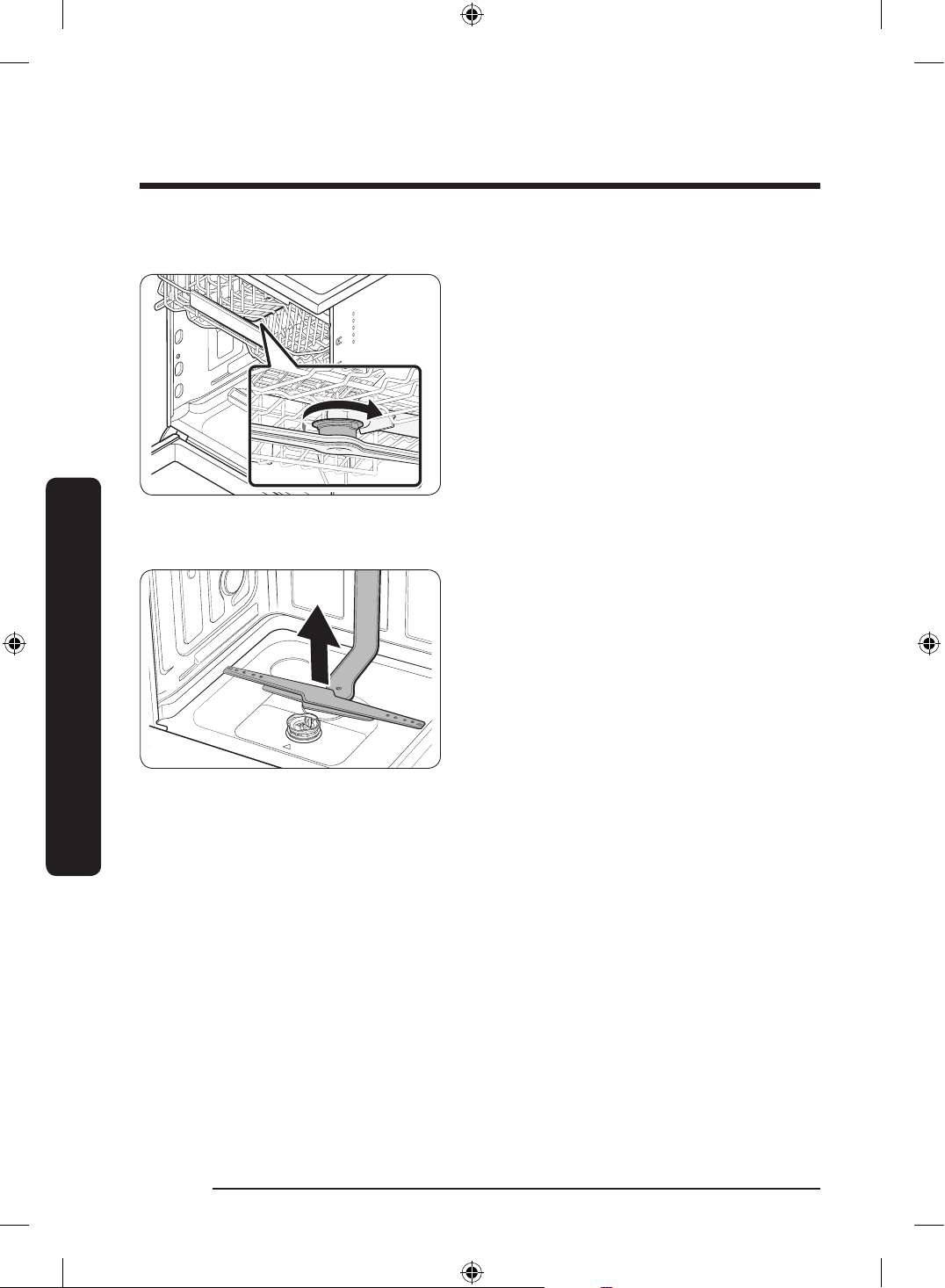
Top nozzle
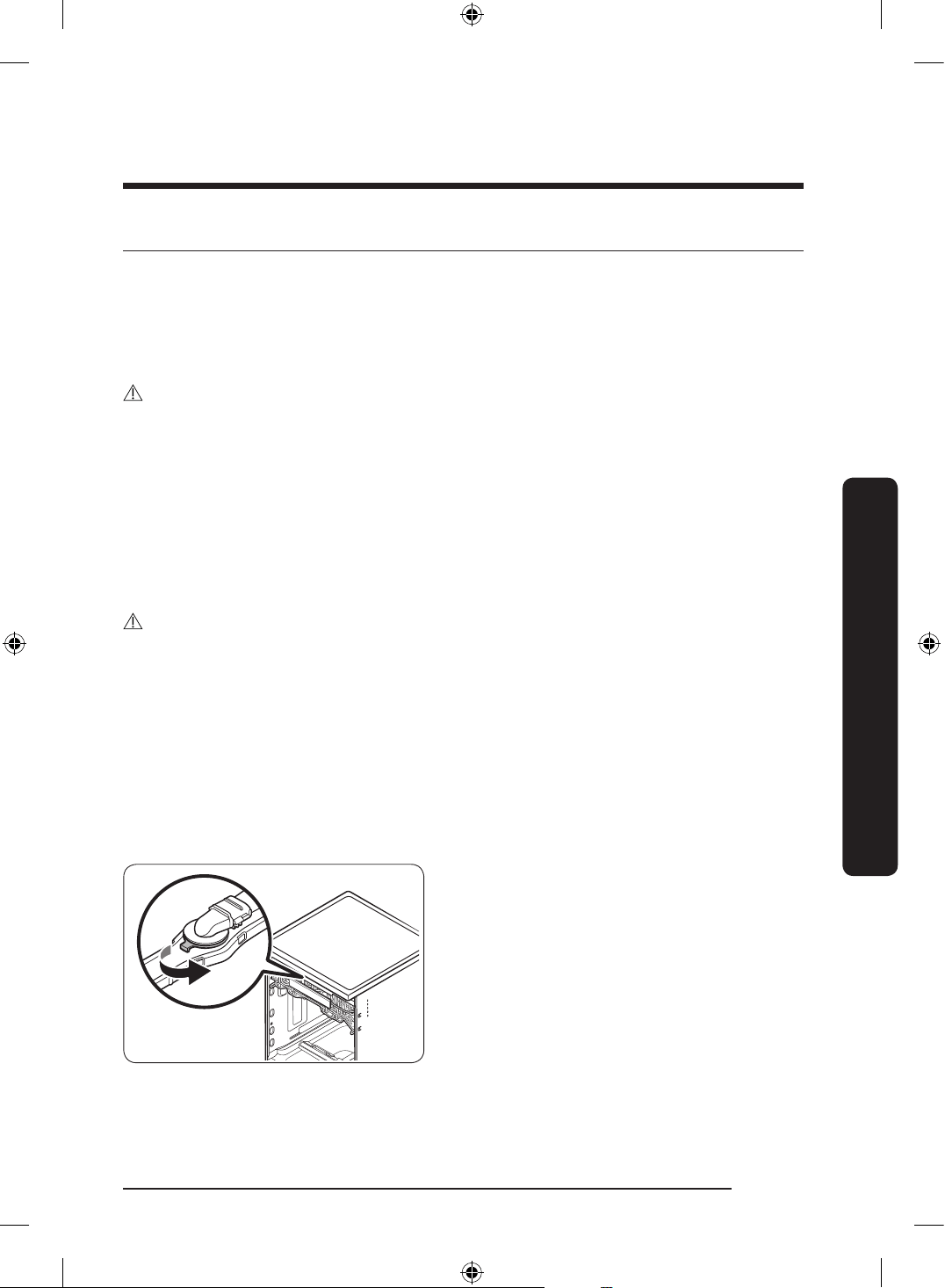
1. Open the door, and then pull out the
upper rack. The top nozzle is visible on
the top.
2. Turn counter clockwise and remove the
nozzle cap, and then remove the nozzle.
3. Unclog and clean the nozzle.
4. Reinsert the nozzle, and then tighten the
cap clockwise.
5. Rotate the nozzle by hand to make sure
the nozzle is engaged correctly.
DW60BG750FSL_SA_DD68-00250K-02_EN.indd 47 2023-08-23 11:04:50
English48
Maintenance
Maintenance
Upper nozzle
1. Open the door, and then pull out the
upper rack to reveal the upper nozzle.
2. Loosen and remove the nut, and then
remove the nozzle.
3. Unclog and clean the nozzle.
4. Reinsert the nozzle, and then tighten the
nut by hand.
5. Rotate the nozzle by hand to make sure
the nozzle is engaged correctly.
Lower nozzle
1. Open the door, and then pull out the
lower rack. The lower nozzle is visible
on the bottom.
2. Unclog and clean the nozzle.
3. Reinsert the nozzle.
4. Rotate the nozzle by hand to make sure
the nozzle is engaged correctly.
Internal Cleaning
We recommend internal cleaning every month. You can use the Machine Care cycle or the
Intensive cycle without putting in dishes.
If your tap water is hard, you can prevent limescale inside the dishwasher by adding citric
acid to the detergent when operating the dishwasher.
DW60BG750FSL_SA_DD68-00250K-02_EN.indd 48 2023-08-23 11:04:51
English 49
Maintenance
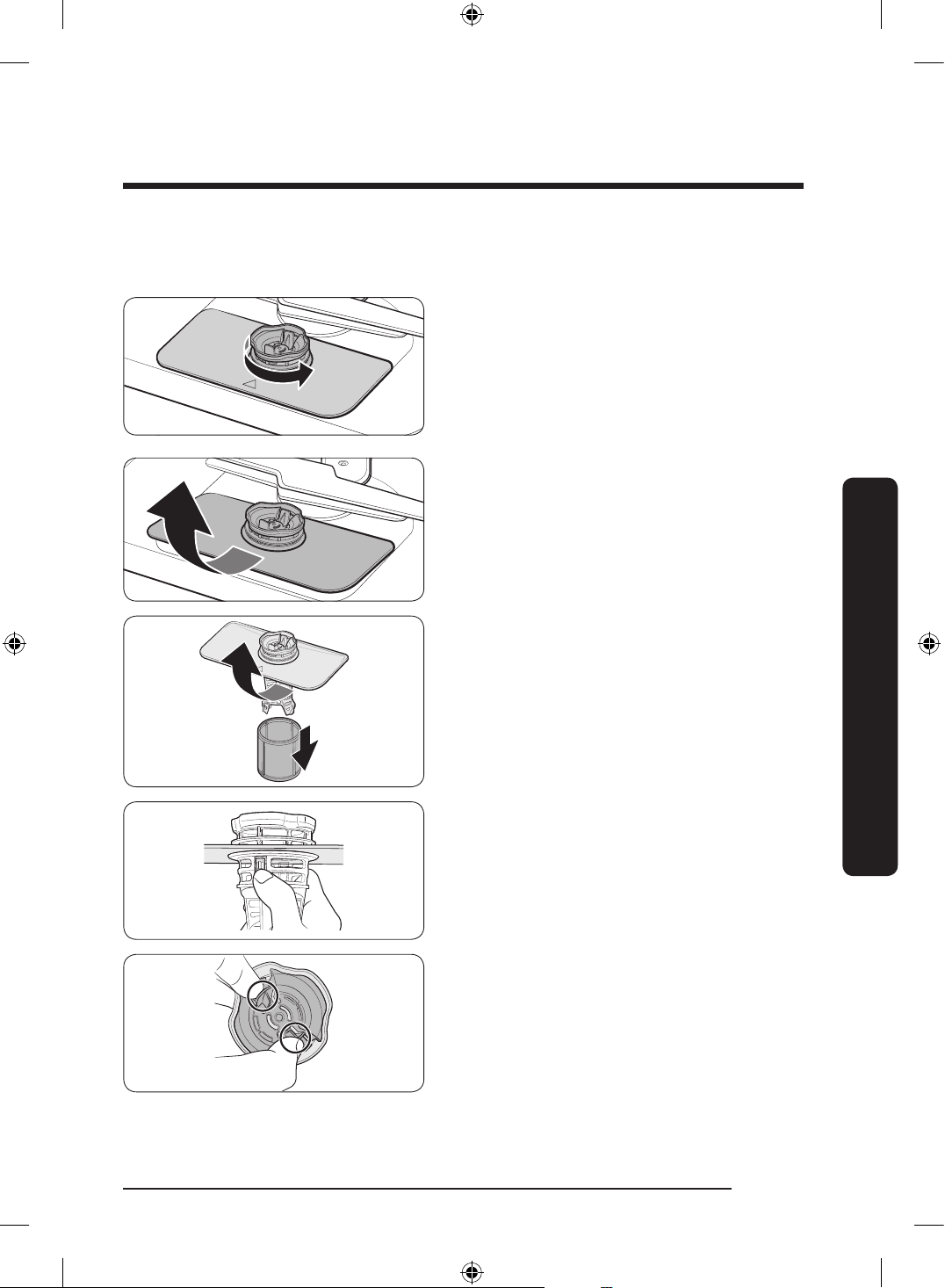
Filter
We recommend cleaning the lter every month.
1. Open the door, and then remove the
lower rack rst.
2. Turn the lter handle counterclockwise
to unlock the Coarse lter.
3. Remove the Coarse lter, and then the
cylindrical micro lter underneath.
DW60BG750FSL_SA_DD68-00250K-02_EN.indd 49 2023-08-23 11:04:51
English50
Maintenance
Maintenance
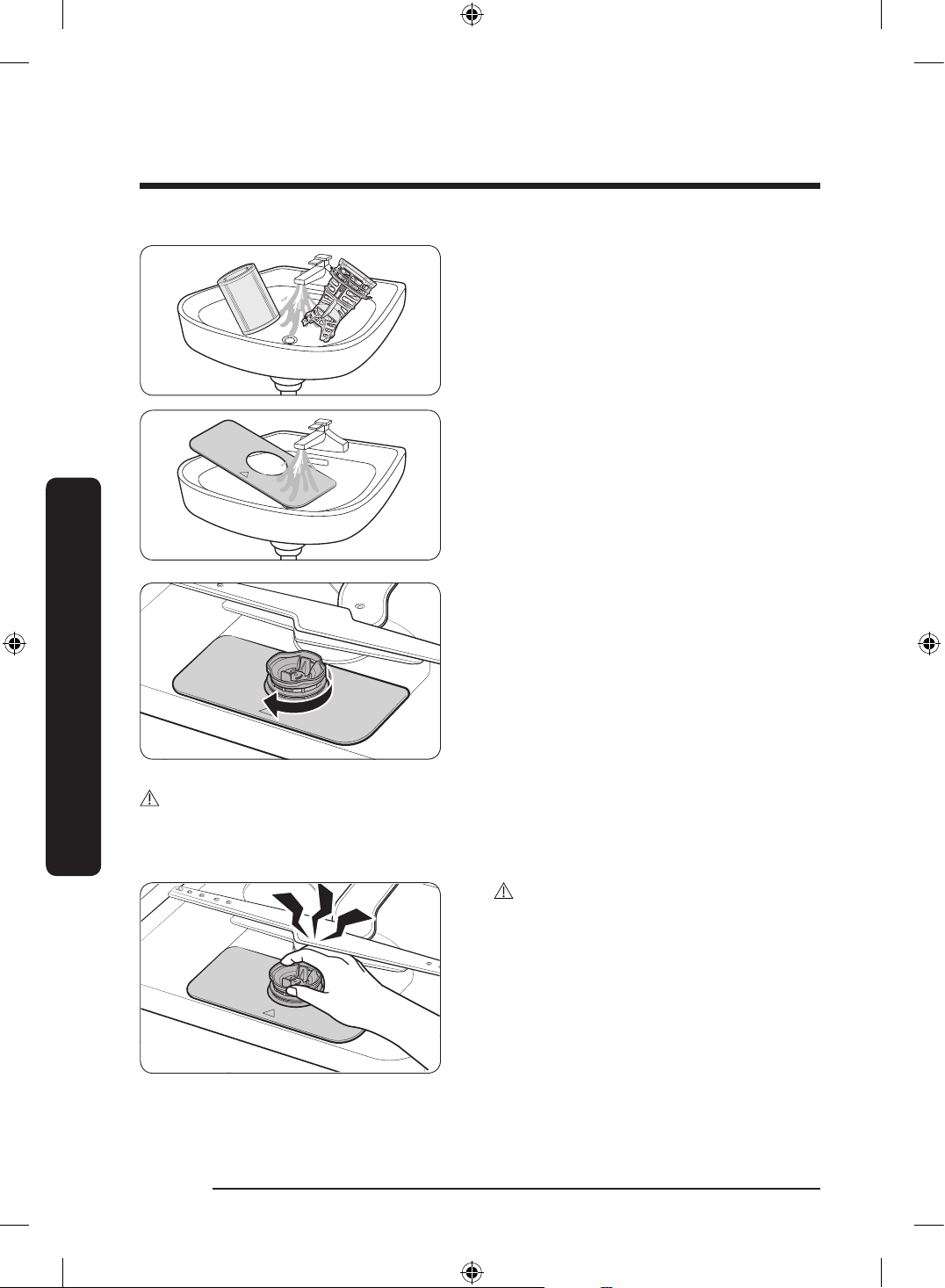
4. Remove any dirt and impurities from
the micro lter and the Coarse lter.
5. Rinse both lters with running water,
and then dry well.
6. Reinsert the lter, and then the Coarse
lter.
7. Turn the lter handle clockwise to lock.
CAUTION
Make sure the Coarse lter is closed properly. A loose cover can reduce the ltering
performance.
CAUTION
When removing the lter, the hand can
caught between the rotor and lter.
DW60BG750FSL_SA_DD68-00250K-02_EN.indd 50 2023-08-23 11:04:51
English 51
Maintenance
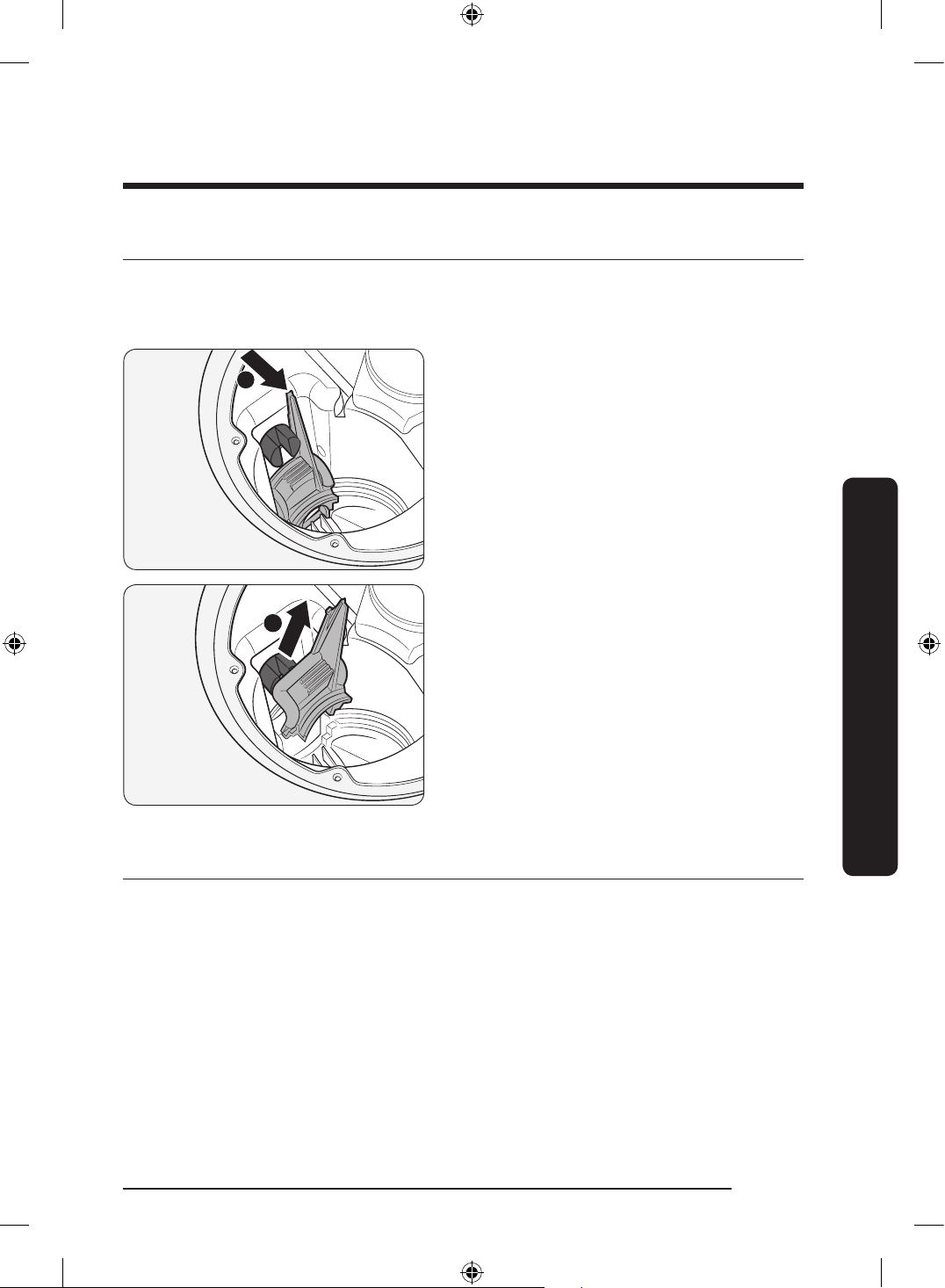
Cleaning the drain pump
If the dishwasher fails to drain (5C is displayed) because the drain pump is clogged with a
foreign matter or there is an abnormal noise coming from the drain pump, you must unclog
and clean the drain pump as instructed below.
1
2
1. Remove the lower rack.
2. See the “Filter” section to remove the
cylindrical micro lter.
3. Remove any moisture from the lter
using a sponge.
4. Remove the drain-pump cover by
pushing its handle in the direction of the
arrow (1), and then pulling up (2).
5. Check the impeller to see if it’s in good
condition. Then, remove any foreign
matter from the pump.
6. Reinsert the drain-pump cover and then
press down until you hear a click.
Long-term care
If you will not use the dishwasher for an extended period of time, rst drain the unit
completely, and then disconnect the water hose. Shut off the water supply valve and the
circuit breaker. Water remaining in the hoses or the internal components can damage the
dishwasher.
DW60BG750FSL_SA_DD68-00250K-02_EN.indd 51 2023-08-23 11:04:52
English52
Troubleshooting
Troubleshooting
Checkpoints
If you encounter an issue with the dishwasher, rst check the table below and try the
suggestions.
Following the repair by a non-authorized service provider, self-repair or non-professional
repair of the product, Samsung is not liable for any damage to the product, any injury or
any other product safety issue caused by any attempt to repair the product which does
not carefully follow these repair and maintenance instructions. Any damage to the product
caused by an attempt to repair the product by any person other than a Samsung certied
service provider will not be covered by the warranty.
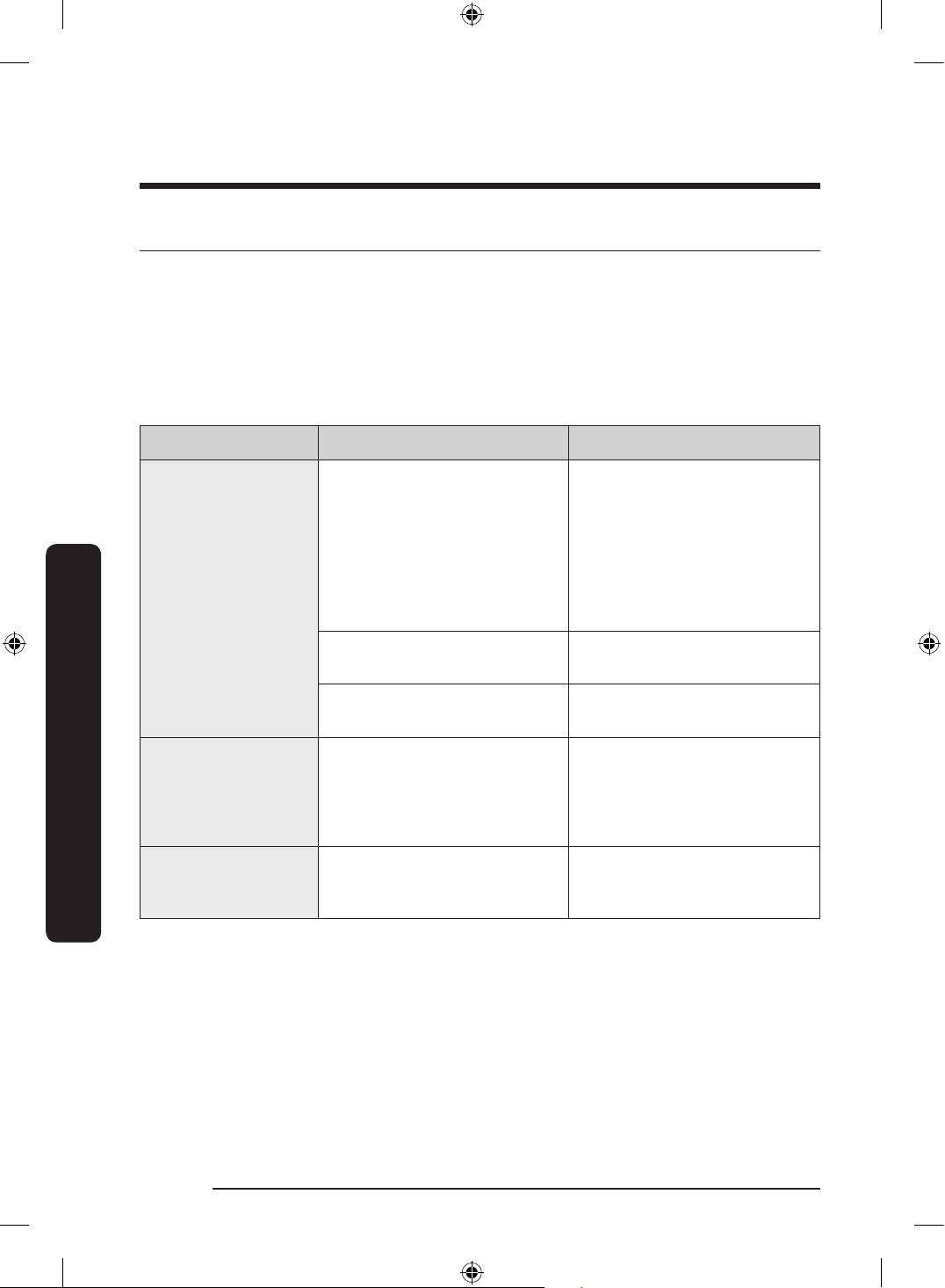
Symptom Possible cause Action
The dishwasher does
not start.
The door is not completely
closed.
• Make sure the door is
latched and completely
closed.
• Make sure the upper rack
is properly joined with the
nozzle.
• Make sure the upper rack is
properly assembled.
The power cord is not
connected.
• Connect the power cord.
Water is not being supplied.
• Make sure the water supply
valve is open.
The dishwasher has
bad odours.
Water remains from the
previous cycle.
• With the dishwasher empty,
add detergent, and then run
the Express cycle. This is
available only on applicable
models.
Water remains in the
dishwasher after a
cycle has nished.
The drain hose is folded or
clogged.
• Straighten and unclog the
hose.
DW60BG750FSL_SA_DD68-00250K-02_EN.indd 52 2023-08-23 11:04:52
English 53
Troubleshooting
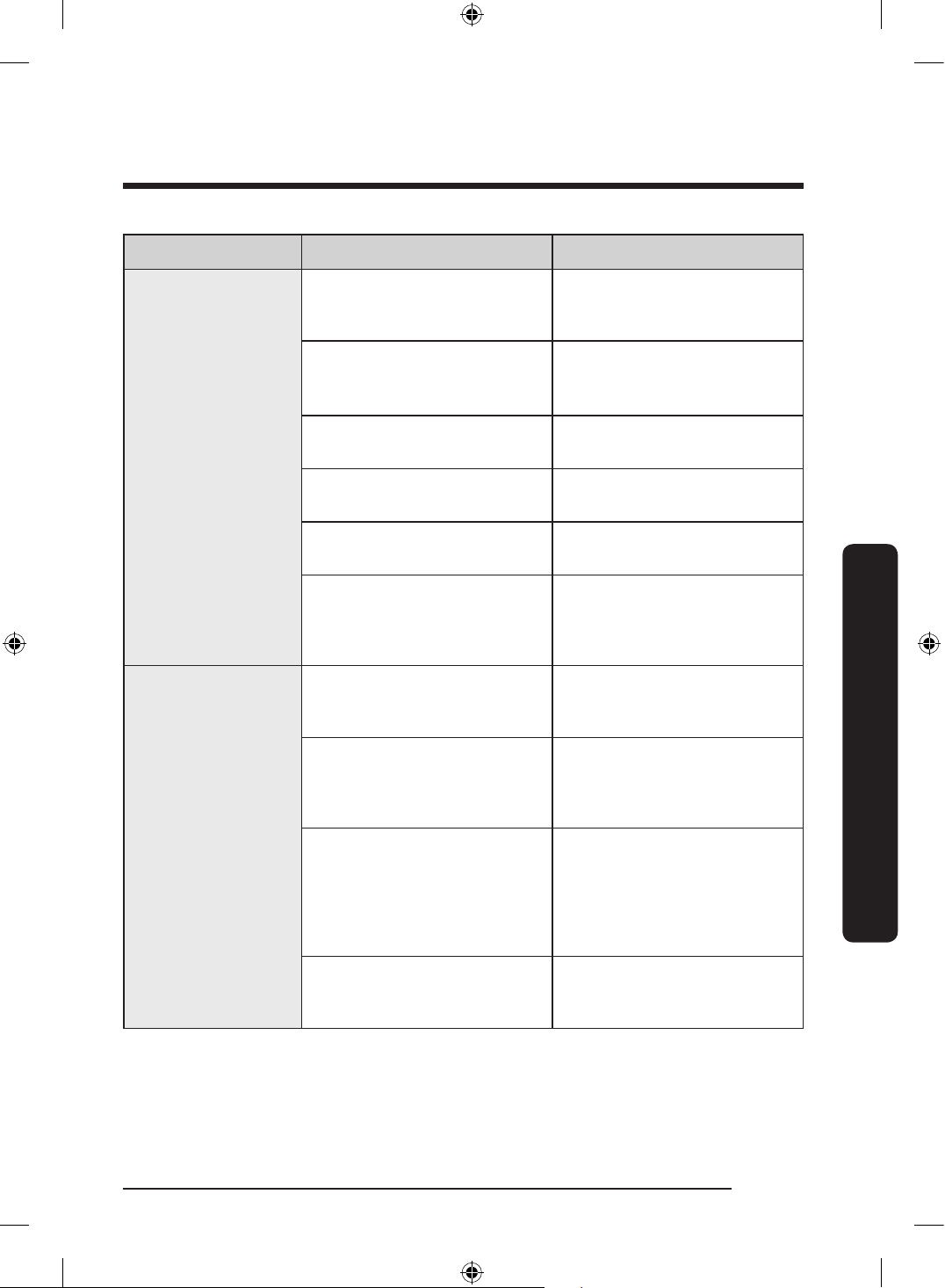
Symptom Possible cause Action
Food remains on
dishes.
An incorrect cycle was
selected.
• Select a cycle according to
the soil level of the dishes
as instructed in this manual.
The lters are clogged or not
correctly fastened.
• Clean the lters.
• Make sure the lters are
correctly fastened.
An insufcient amount of
detergent was used.
• Use the correct amount of
detergent for each load.
The water pressure is low.
• Make sure the pressure is
between 0.05-0.8 Mpa.
The nozzles are clogged.
• Clean and unclog the
nozzles.
Dishes improperly loaded or
overloaded.
• Arrange the dishes so
they do not interfere with
the nozzles and/or the
detergent dispenser.
Dishes are not dried
well.
There is no rinse aid in the
dispenser, or not enough rinse
aid was used.
• Add rinse aid.
• Check the rinse aid settings.
Too many dishes are loaded.
• Overloading may reduce
the drying performance.
Load your dishes as
recommended.
Glasses and cups spilled water
onto other dishes while being
unloaded.
• Empty the lower rack
rst, and then the upper
rack. This will avoid water
dripping from the upper
rack onto the dishes in the
lower rack.
Multiple detergent tablets were
used without selecting the
Hygiene Plus option.
• Select the Hygiene Plus
option or use rinse aid.
DW60BG750FSL_SA_DD68-00250K-02_EN.indd 53 2023-08-23 11:04:52
English54
Troubleshooting
Troubleshooting
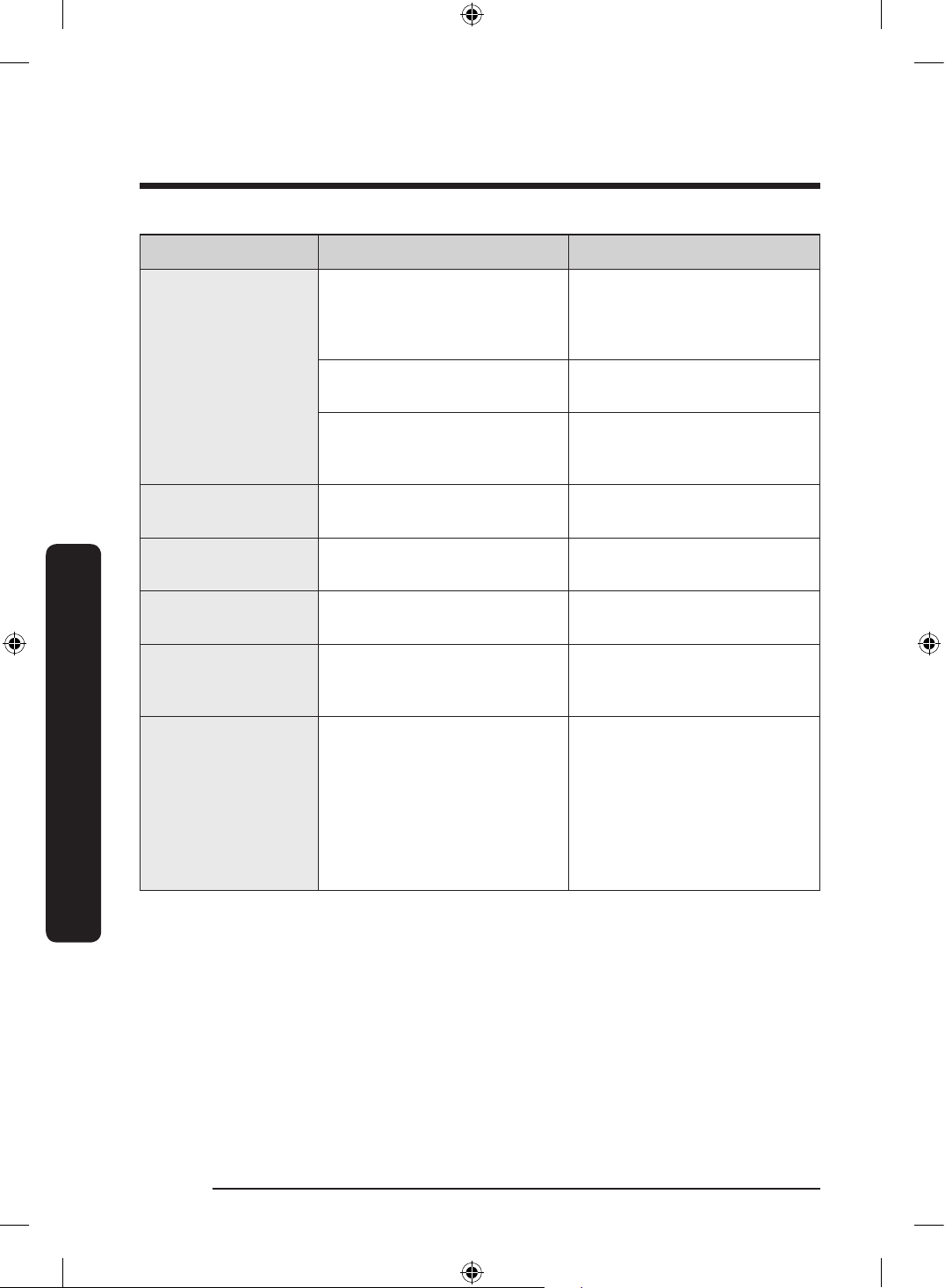
Symptom Possible cause Action
The dishwasher is
too noisy.
The dishwasher makes a sound
when the dispenser cover is
open and the drain pump is
operating.
• This is normal.
The dishwasher is not level.
• Make sure the dishwasher
is level.
The nozzle bumps against the
dishes, creating a chopping
sound.
• Rearrange the dishes.
Yellow or brown lm
remains on dishes.
Coffee and tea soils.
• Use a cycle with a higher
temperature.
Indicators do not
light up.
The power cord is not
connected.
• Check power supply is
present.
The nozzles do not
rotate smoothly.
The nozzles are clogged with
food particles.
• Clean the nozzles.
Air bubbles and
scratch marks are on
the control panel.
Air gets into the protective
lm, causing EPS marks to
remain.
• Remove the protective lm
from the control panel.
The dishwasher
bubbles up and the
foam remains too
much on the front.
This may occur:
• If using generic kitchen
detergent.
• If loading a dish that
generic kitchen detergent
has been applied to.
• If inputting more than
required water.
• Turn the dishwasher off and
remove the bubbles.
• If the dishwasher bubbles
up severely, wait until the
foam subsides. Then, run
the Cancel & Drain cycle
followed by the Pre Wash
process 2-3 times.
DW60BG750FSL_SA_DD68-00250K-02_EN.indd 54 2023-08-23 11:04:52
English 55
Troubleshooting
Information codes
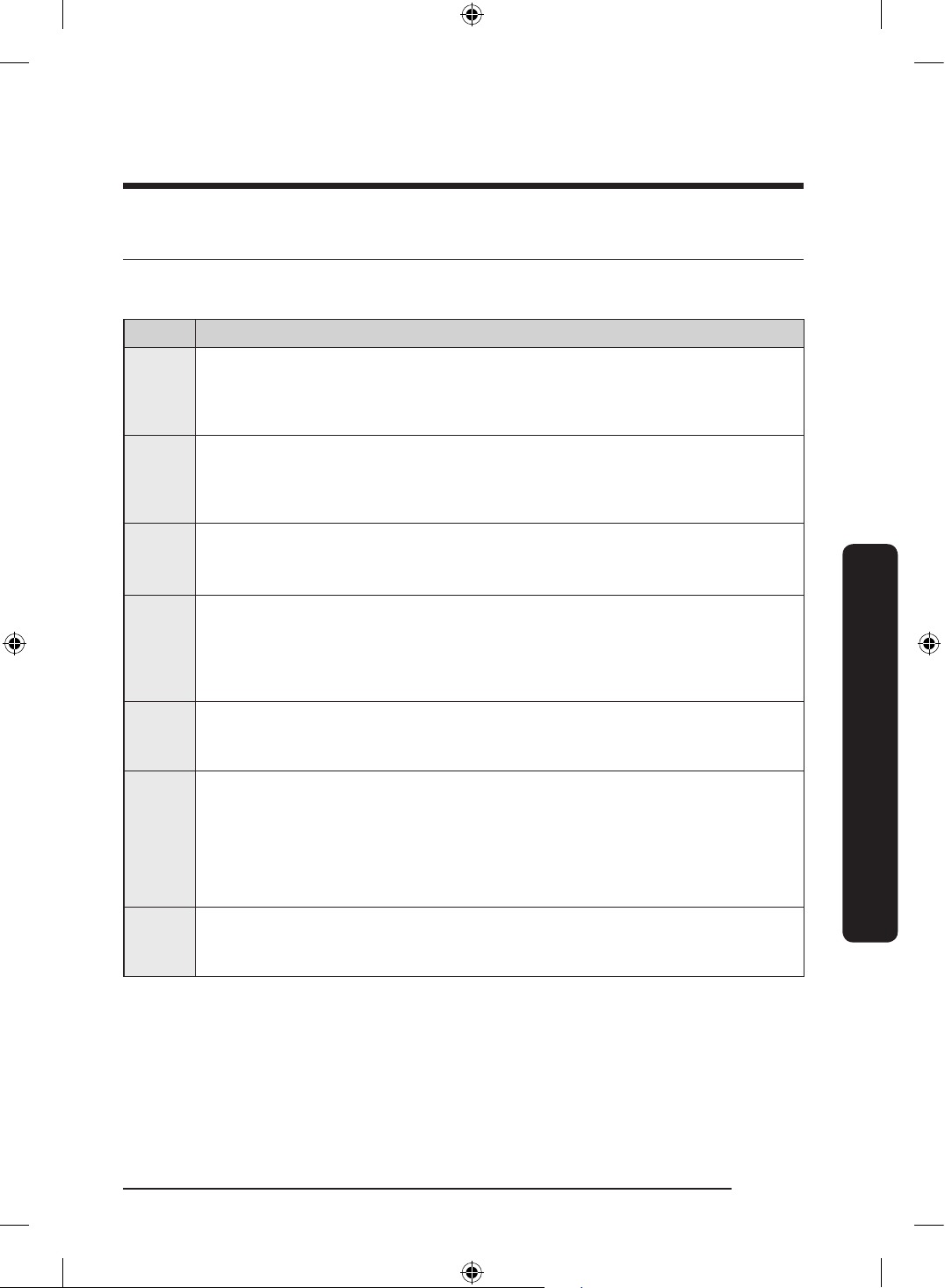
If the dishwasher fails to operate, you may see an information code on the display. Check
the table below and try the suggestions.
Code Action
LC
Leakage check
• Close the water supply valve. Go to your home’s circuit breaker panel, and
set the dishwasher’s circuit breaker switch to off. Contact the installer to
repair. If the issue continues, contact a local Samsung service center.
4C
Water supply check
• Check if the water supply valve is closed, if the water supply is suspended,
or if the water inlet valve or line is frozen or clogged by foreign particles. If
the issue continues, contact a local Samsung service center.
AC
PCB communication check
• Abnormal communication between the main PCB and the sub PCB.
• If the problem continues, contact an authorised Samsung service center.
HC
High temperature heating check
• Functional check. With the dishwasher empty, add detergent, and then run
a cycle. If the issue continues, go to your home’s circuit breaker panel, and
set the dishwasher’s circuit breaker switch to off. Contact a Samsung service
center.
3C
Washing pump check
• Abnormal working with washing pump. If the issue continues, contact a local
Samsung service center.
1C
Low-water level check
• Check if the lter is clogged.
• Make sure to use dishwasher detergent.
• Make sure that the dishes are loaded evenly.
• Turn the dishwasher off and turn it on again. Then, try again.
• If the problem continues, contact a local Samsung service center.
5C
Drain pump check
• Check drain pump and drain pipe. If it is jammed, clean it. If the issue
continues, contact a local Samsung service center.
DW60BG750FSL_SA_DD68-00250K-02_EN.indd 55 2023-08-23 11:04:52
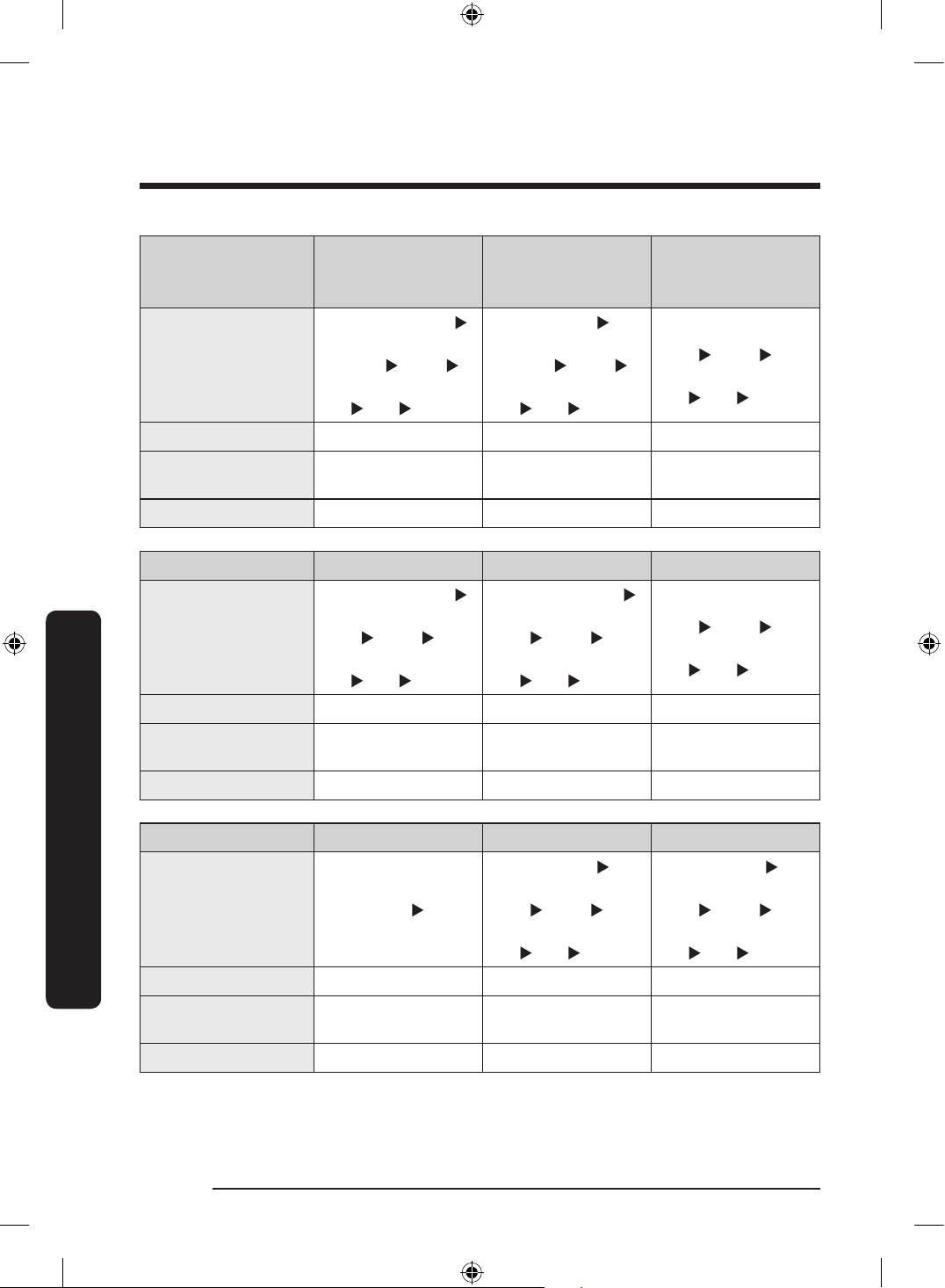
English56
Cycle chart
Cycle chart
Cycle AUTO
AUTO
(DW60*G750S**)
(DW60**750U**)
ECO
Cycle sequence
Pre wash (45 °C)
Main wash (55-
60 °C) Rinse
Hot Rinse (53-58 °C)
Dry End
Pre wash
Main wash (50-
62 °C) Rinse
Hot Rinse (58-61 °C)
Dry End
Main wash (49 °C)
Rinse
Hot Rinse (35 °C)
Dry End
Water consumption (L)
12.5-15.2 9.8-11.5 11.1
Energy consumption
(kWh)
0.88–1.28 0.83-1.18 0.66
Cycle time (min.) 104-151 77-143 225
Cycle Intensive Delicate Express
Cycle sequence
Pre wash (45 °C)
Main wash (65 °C)
Rinse
Hot Rinse (63 °C)
Dry End
Pre wash (40 °C)
Main wash (50 °C)
Rinse
Hot Rinse (50 °C)
Dry End
Main wash (63 °C)
Rinse
Hot Rinse (57 °C)
Dry End
Water consumption (L)
15.75 11.95 9.8
Energy consumption
(kWh)
1.48 0.83 1.05
Cycle time (min.) 176 113 78
Cycle Pre Wash Machine Care Extra Silence
Cycle sequence Pre wash End
Pre wash
Main wash (70 °C)
Rinse
Hot Rinse (70 °C)
Dry End
Pre wash
Main wash (60 °C)
Rinse
Hot Rinse (55 °C)
Dry End
Water consumption (L)
4 12.9 13.6
Energy consumption
(kWh)
0.05 1.4 1.13
Cycle time (min.) 24 136 259
DW60BG750FSL_SA_DD68-00250K-02_EN.indd 56 2023-08-23 11:04:52
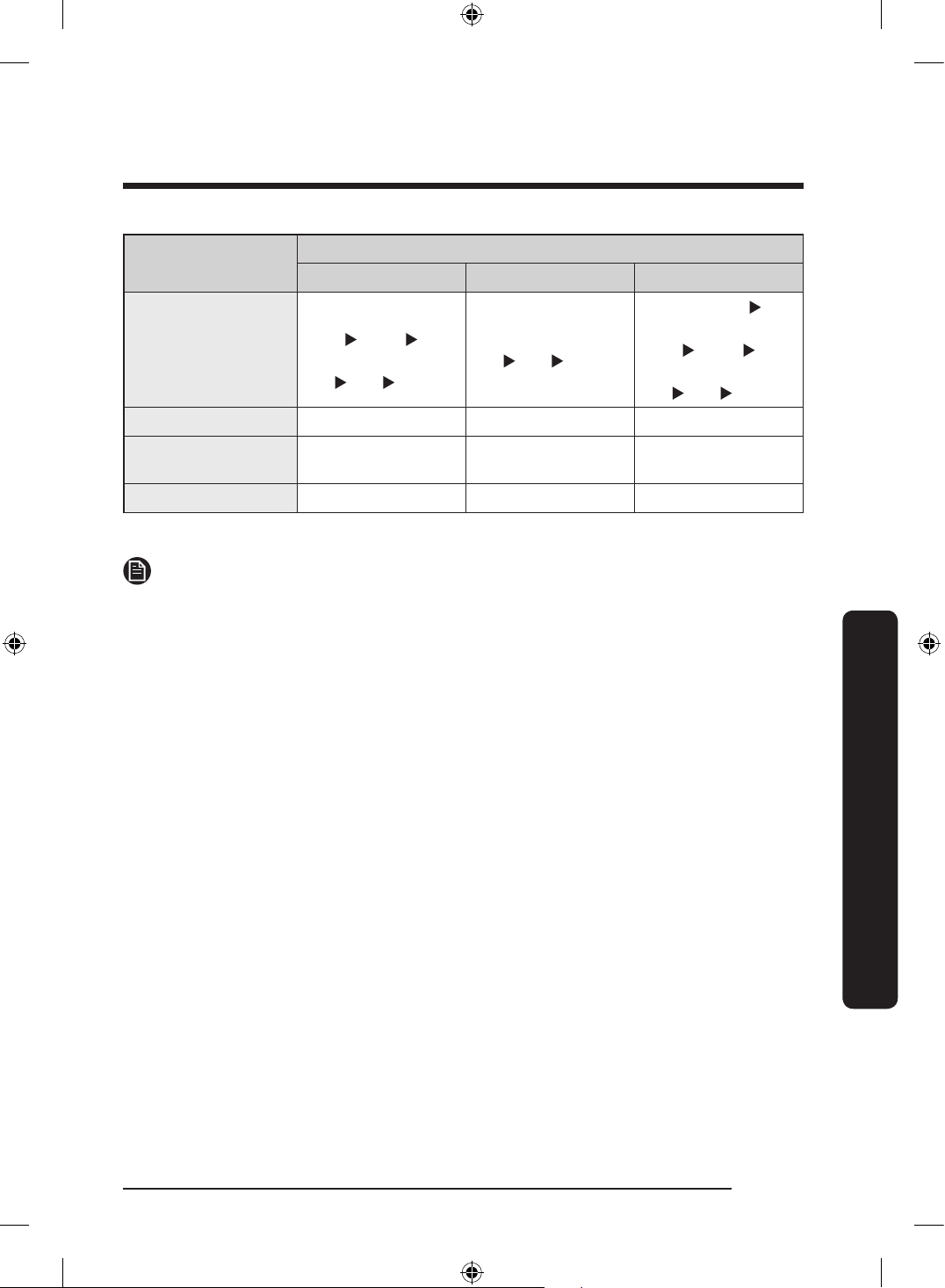
English 57
Cycle chart
Cycle
Download Cycle
Plastic Baby Care Pots and Pans
Cycle sequence
Main wash (60 °C)
Rinse
Hot Rinse (60 °C)
Dry End
Hot Rinse (75 °C)
Dry End
Pre wash
Main wash (68 °C)
Rinse
Hot Rinse (68 °C)
Dry End
Water consumption (L)
12.9 4.5 15.5
Energy consumption
(kWh)
1.13 1 1.53
Cycle time (min.) 93 68 147
* Pre Wash: This cycle does not activate the Auto Door function nor the drying process.
NOTE
• The cycle time depends on the options you have added, and the pressure and
temperature of the supplied water.
• The power consumption depends on the water temperature and/or load.
• Energy values for courses were calculated under standardized testing conditions.
DW60BG750FSL_SA_DD68-00250K-02_EN.indd 57 2023-08-23 11:04:52
English58
Appendix
Appendix
Transportation/relocation
Make sure the dishwasher is empty with no loose parts. First, drain the dishwasher as
follows.
1. Open the door, and then turn the dishwasher on.
2. Select and run the ECO cycle.
3. Press START, and then close the door.
4. When the cycle is nished, open the door after 5 seconds.
5. Press and hold START for 3 seconds to drain water.
6. Close the door.
7. When the draining process is complete, open the door.
8. Turn the dishwasher off, and then shut the water valve off.
9. Disconnect the both the water hose and the drain hose.
CAUTION
Do not shake or sway the dishwasher while moving it. Residual water may drip from the
dishwasher.
Protection against frost
If you leave the dishwasher in a place with a risk of frost for an extended time, make sure
to empty the dishwasher. For details, see the “Transportation/relocation” section.
Disposing the dishwasher and helping the environment
Your dishwasher is manufactured from recyclable materials. If you decide to dispose of it,
please observe your local waste disposal regulations. Cut off the power cord so that the
appliance cannot be connected to a power source.
Remove the door so that animals and children cannot get trapped inside the appliance.
DW60BG750FSL_SA_DD68-00250K-02_EN.indd 58 2023-08-23 11:04:52
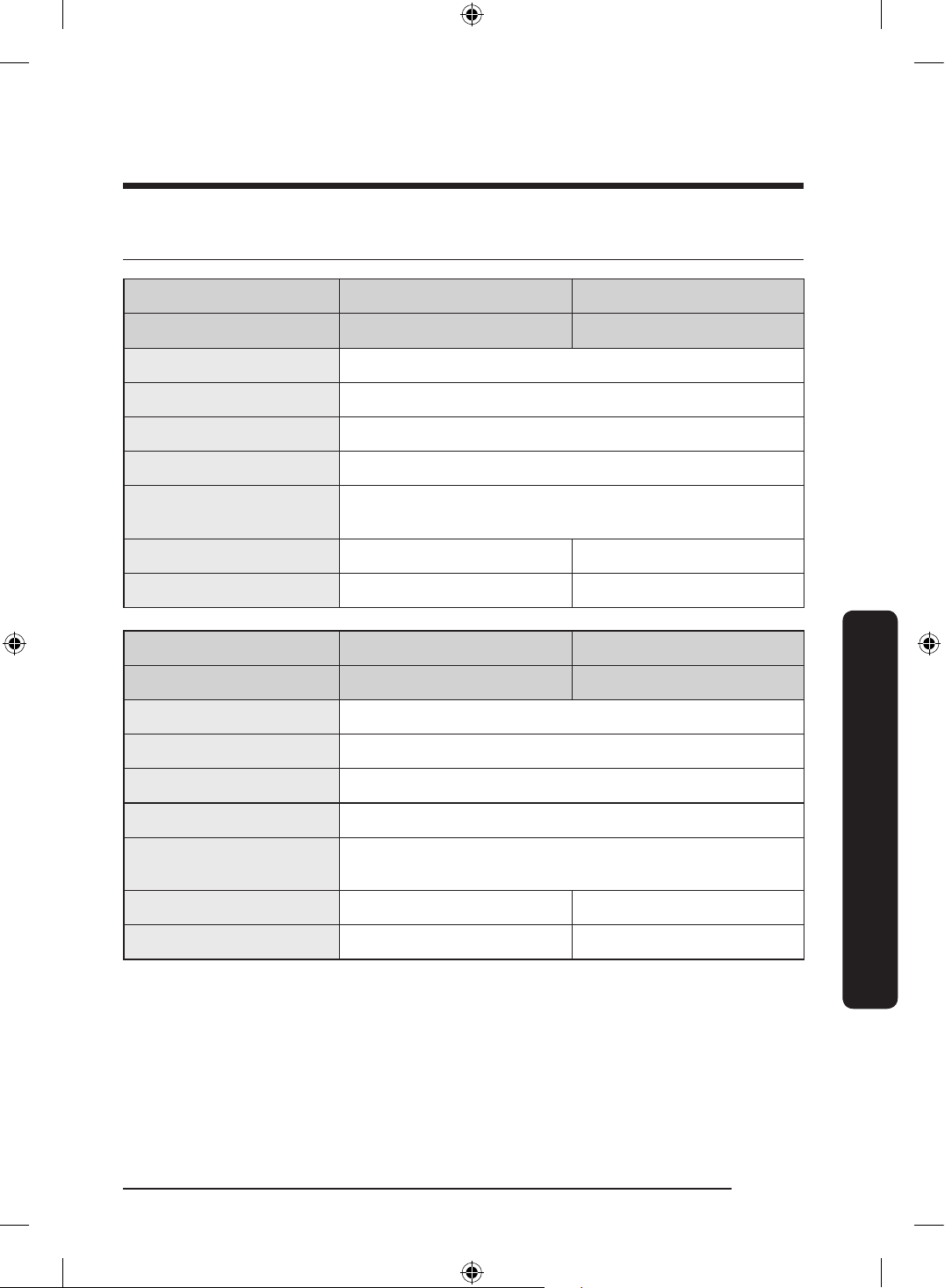
English 59
Appendix
Specications
Model DW60*B750F** DW60*G750F**
Type Free Standing (Bespoke) Free Standing
Power 220-240 V
~
, 50 Hz
Water pressure 0.05-0.8 MPa
Wash capacity 15 Place settings
Rated power 2000-2300 W
Dimension
(Width x Depth x Height)
598 x 600 x 845 mm
Weight (Unpacked) 52.0 kg 54.5 kg
Weight (Packed) 55.0 kg 58.5 kg
Model DW60*G750S** DW60**750U**
Type Semi Built-in Built under
Power 220-240 V
~
, 50 Hz
Water pressure 0.05-0.8 MPa
Wash capacity 15 Place settings
Rated power 2000-2300 W
Dimension
(Width x Depth x Height)
595 x 572 x 815 mm
Weight (Unpacked) 40.5 kg 41 kg
Weight (Packed) 44.0 kg 44.5 kg
DW60BG750FSL_SA_DD68-00250K-02_EN.indd 59 2023-08-23 11:04:52
English60
For standard test
For standard test
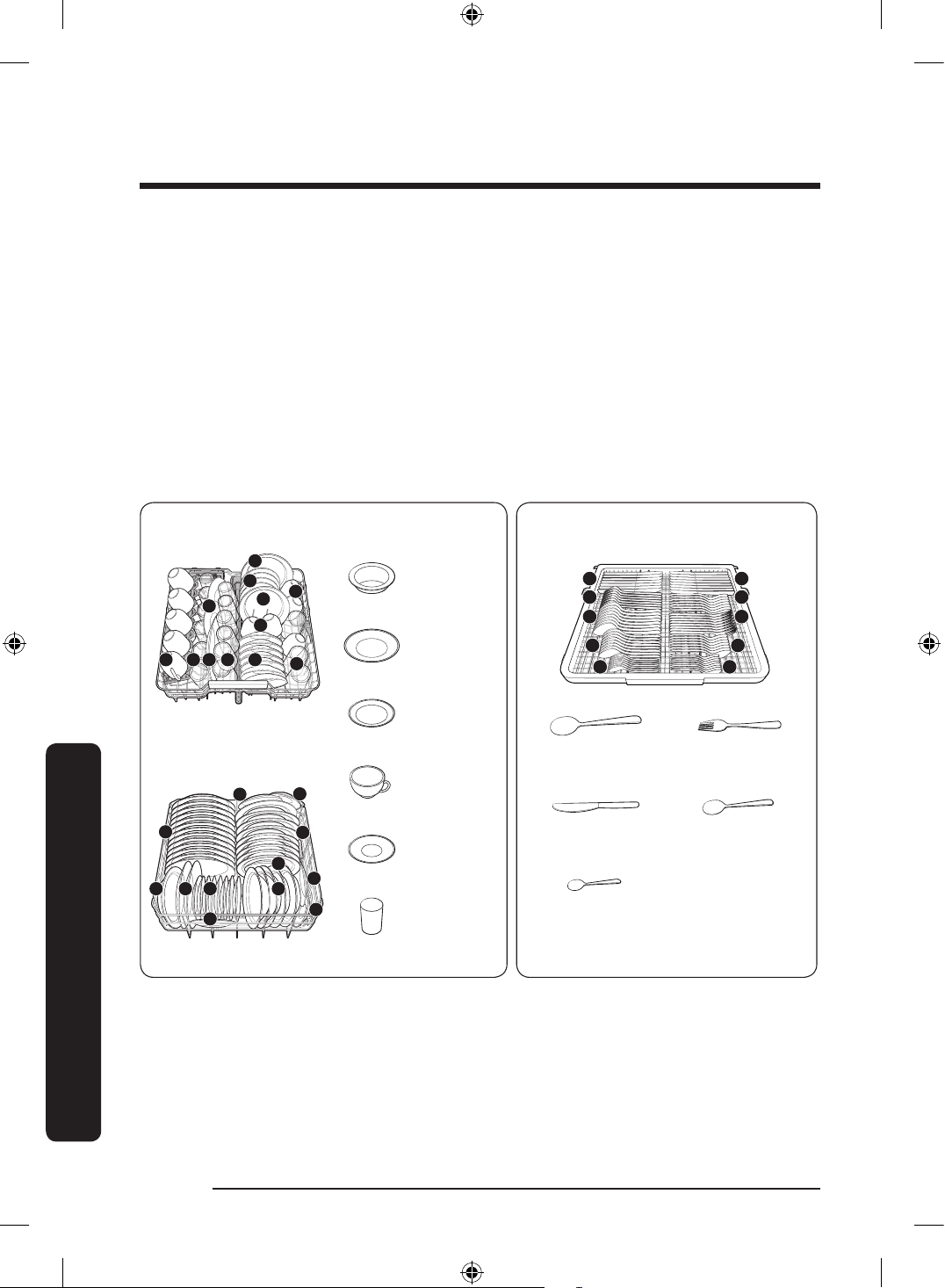
The information for comparability test in accordance with AS/NZS:2007, as follows:
The diagrams below show the proper way to load the baskets based on the Australian/
New Zealand Standards (AS/NZS:2007).
• Washing capacity: 15 place settings
• Test standard: AS/NZS:2007
• Position of upper basket: to lower position
• Wash cycle: ECO
• Additional options: None
• Dose per Rinse setting: F6
• Dosage of the standard detergent: Pre/wash 5 g + main-wash 23 g
• For the arrangement of the items, refer below gures
• Drying condition: Auto Door Open (More than 110 mm)
1. Soup
plate
2. Dinner
plate
3. Dessert
dish
4. Cup
5. Saucer
6. Glass
Upper rack
4
4
5
6
5
3
3
56364
Lower rack
1
2
2 3
3
1
3
5
5
3
1
3
1. Soup spoon 2. Fork
3. Knife 4. Dessert spoon
5. Tea spoon
Cutlery rack
3
2
1
4
5 5
3
1
2
4
DW60BG750FSL_SA_DD68-00250K-02_EN.indd 60 2023-08-23 11:04:54
Memo
DW60BG750FSL_SA_DD68-00250K-02_EN.indd 61 2023-08-23 11:04:54
Memo
DW60BG750FSL_SA_DD68-00250K-02_EN.indd 62 2023-08-23 11:04:54
Memo
DW60BG750FSL_SA_DD68-00250K-02_EN.indd 63 2023-08-23 11:04:54
DD68-00250K-02
QUESTIONS OR COMMENTS?
COUNTRY CALL OR VISIT US ONLINE AT
AUSTRALIA 1300 362 603 www.samsung.com/au/support
NEW ZEALAND 0800 726 786 www.samsung.com/nz/support
DW60BG750FSL_SA_DD68-00250K-02_EN.indd 64 2023-08-23 11:04:54