
OFF CV OFF CV
OFF CV
CH1
00.000V
0.0000A
00.000W
CH3
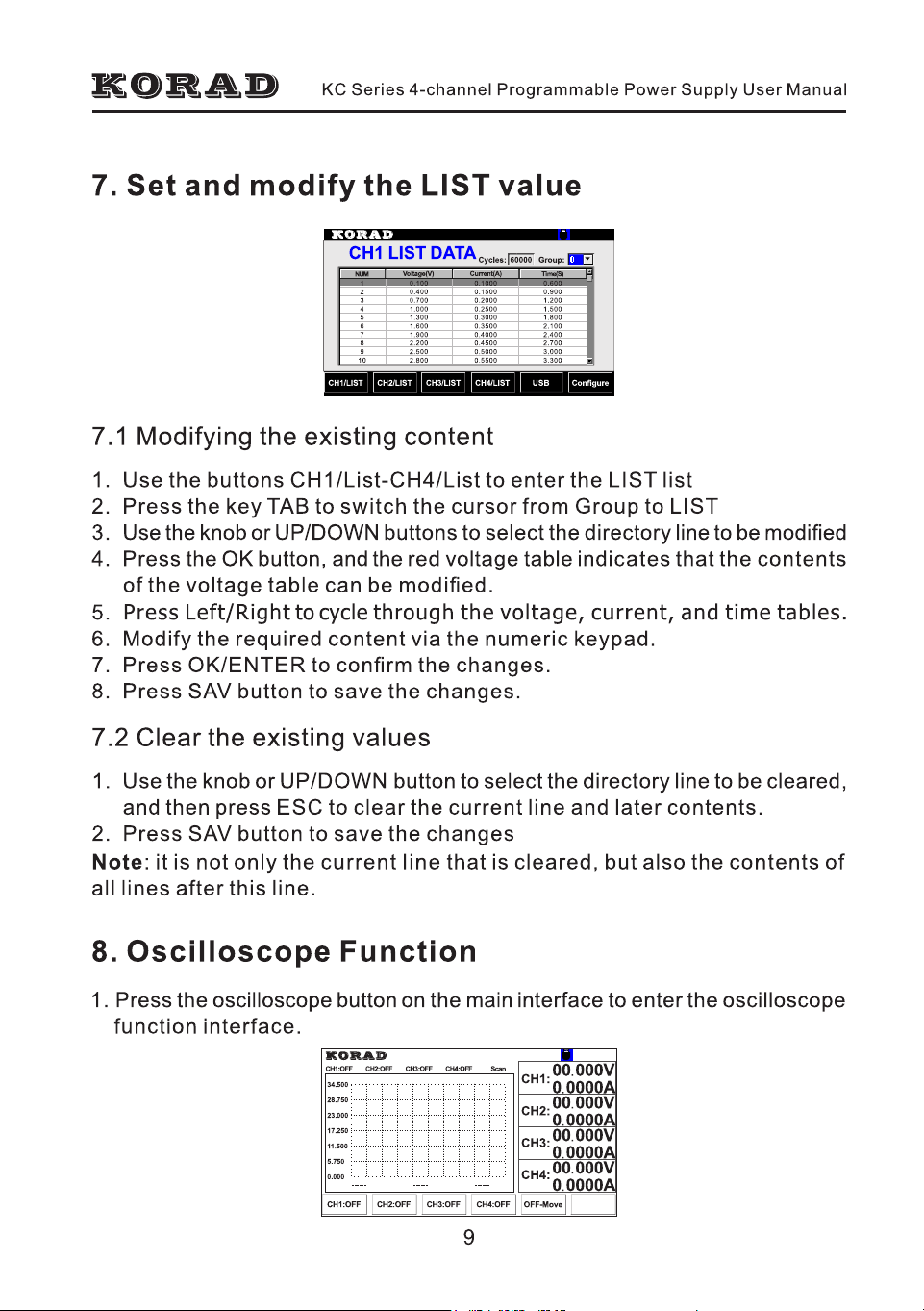
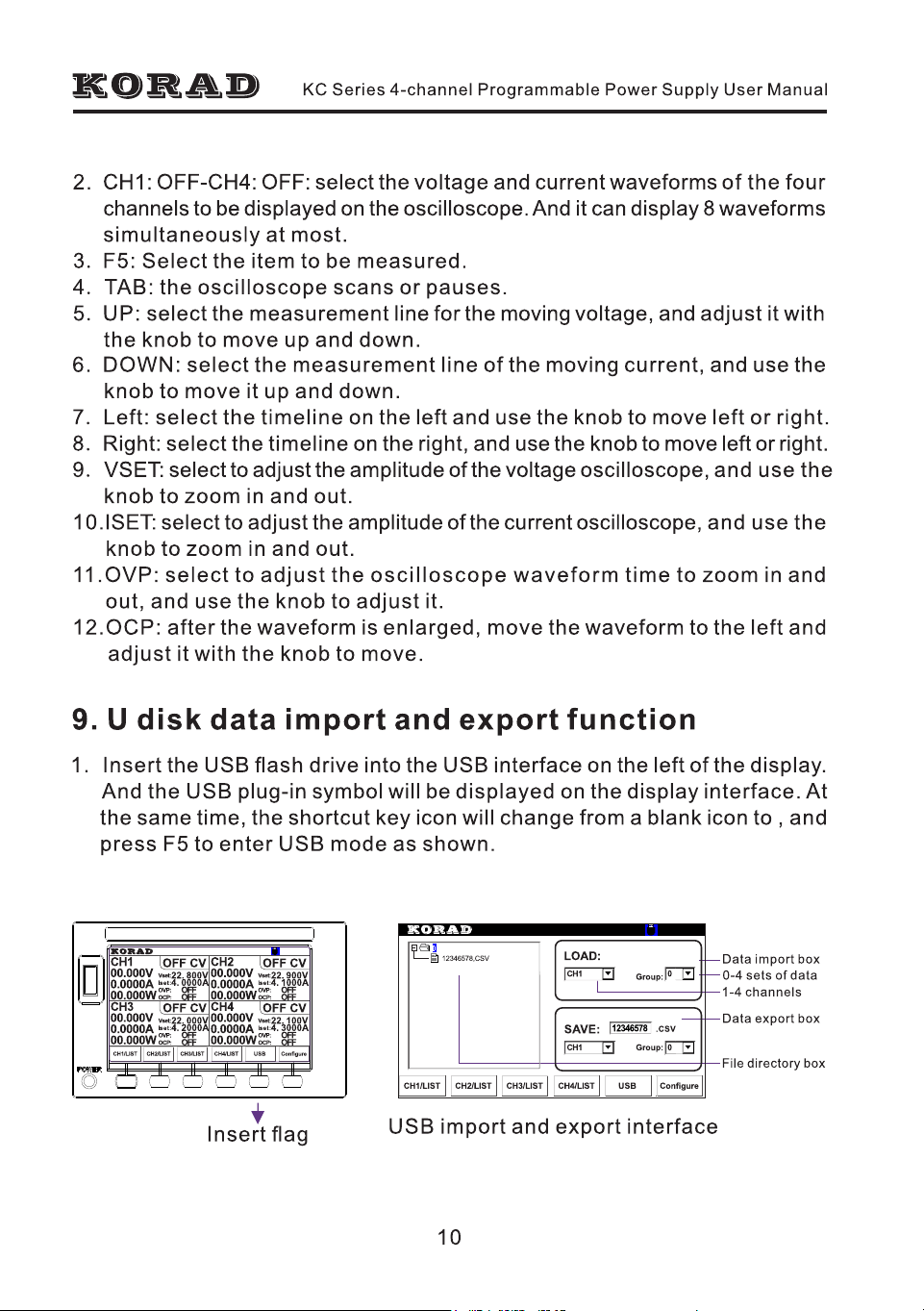
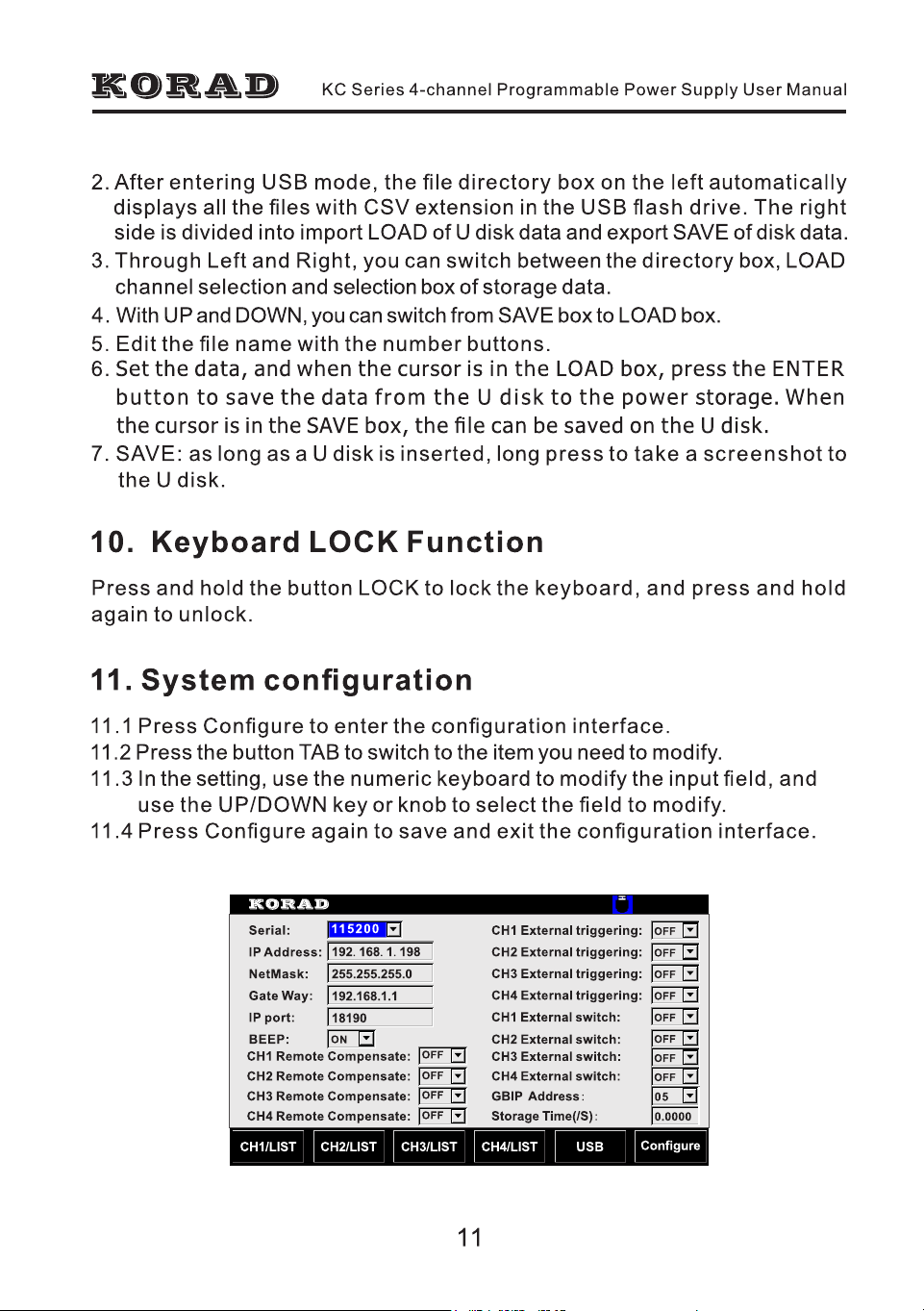
00.000V
0.0000A
00.000W
CH2
00.000V
0.0000A
00.000W
CH4
00.000V
0.0000A
00.000W
Vset:
Iset :
OVP:
OCP:
22. 900V
4. 1000A
OFF
OFF
Vset:
Iset :
OVP:
OCP:
22. 100V
4. 3000A
OFF
OFF
Vset:
Iset :
OVP:
OCP:
22. 000V
4. 2000A
OFF
OFF
OFF CV
Vset:
Iset :
OVP:
OCP:
22. 800V
4. 0000A
OFF
OFF
CH2/LISTCH1/LIST CH3/LIST CH4/LIST USB Configure
OFF CV OFF CV
OFF CV
CH1
00.000V
0.0000A
00.000W
CH3
00.000V
0.0000A
00.000W
CH2
00.000V
0.0000A
00.000W
CH4
00.000V
0.0000A
00.000W
Vset:
Iset :
OVP:
OCP:
22. 900V
4. 1000A
OFF
OFF
Vset:
Iset :
OVP:
OCP:
22. 100V
4. 3000A
OFF
OFF
Vset:
Iset :
OVP:
OCP:
22. 000V
4. 2000A
OFF
OFF
OFF CV
Vset:
Iset :
OVP:
OCP:
22. 800V
4. 0000A
OFF
OFF
CH2/LISTCH1/LIST CH3/LIST CH4/LIST USB Configure
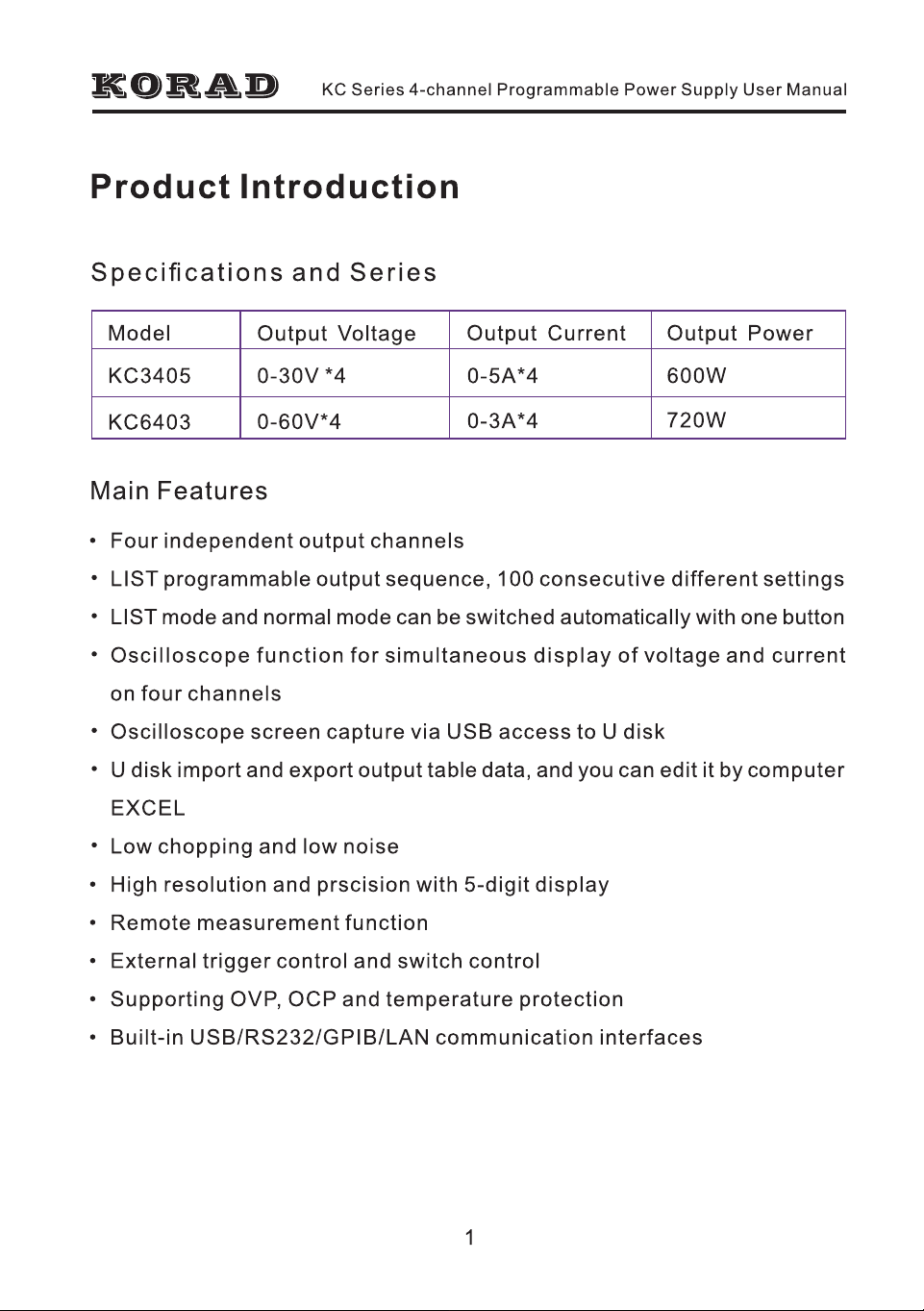
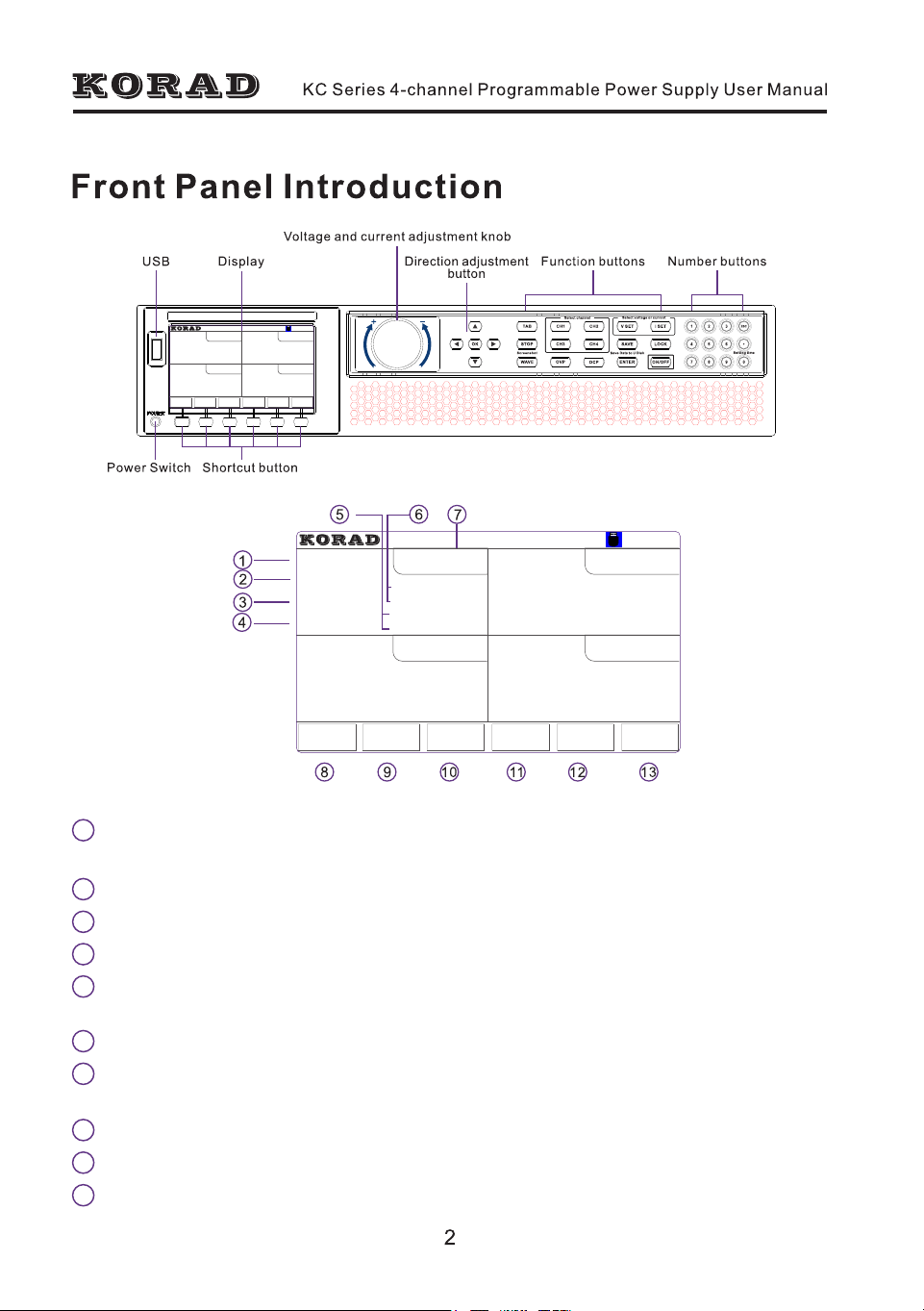
CH1 channel indication, refers to the constant output mode of the channel.
When entering the output mode of dynamic LIST, it becomes LIST-1.
1
Output voltage indication, refers to the actual output voltage value of CH1.
2
Output current indication, refers to the actual output current value of CH1.
3
Output power indication, fefers to the actual output power value on CH1.
4
OVP and OCP setting and switch status, when OCP and OVP are OFF, it
shows OFF while it indicates the set value when OVP and OCP are ON.
5
CH1 set value of voltage and current.
6
Output ON/OFF indication, and constant voltage and constant current mode
indication of channel output.
7
CH1 constant output and button indication of dynamic LIST output.
8
9
CH2 constant output and button indication of dynamic LIST output.
10
CH3 constant output and button indication of dynamic LIST output.
1
1
11
CH4 constant output and button indication of dynamic LIST output.
13
System configuration and button indication of function configuration.
2
3
12
USB flash disk insertion indication. When the USB flash disk is inserted,
the logo will appear as a USB font.
4
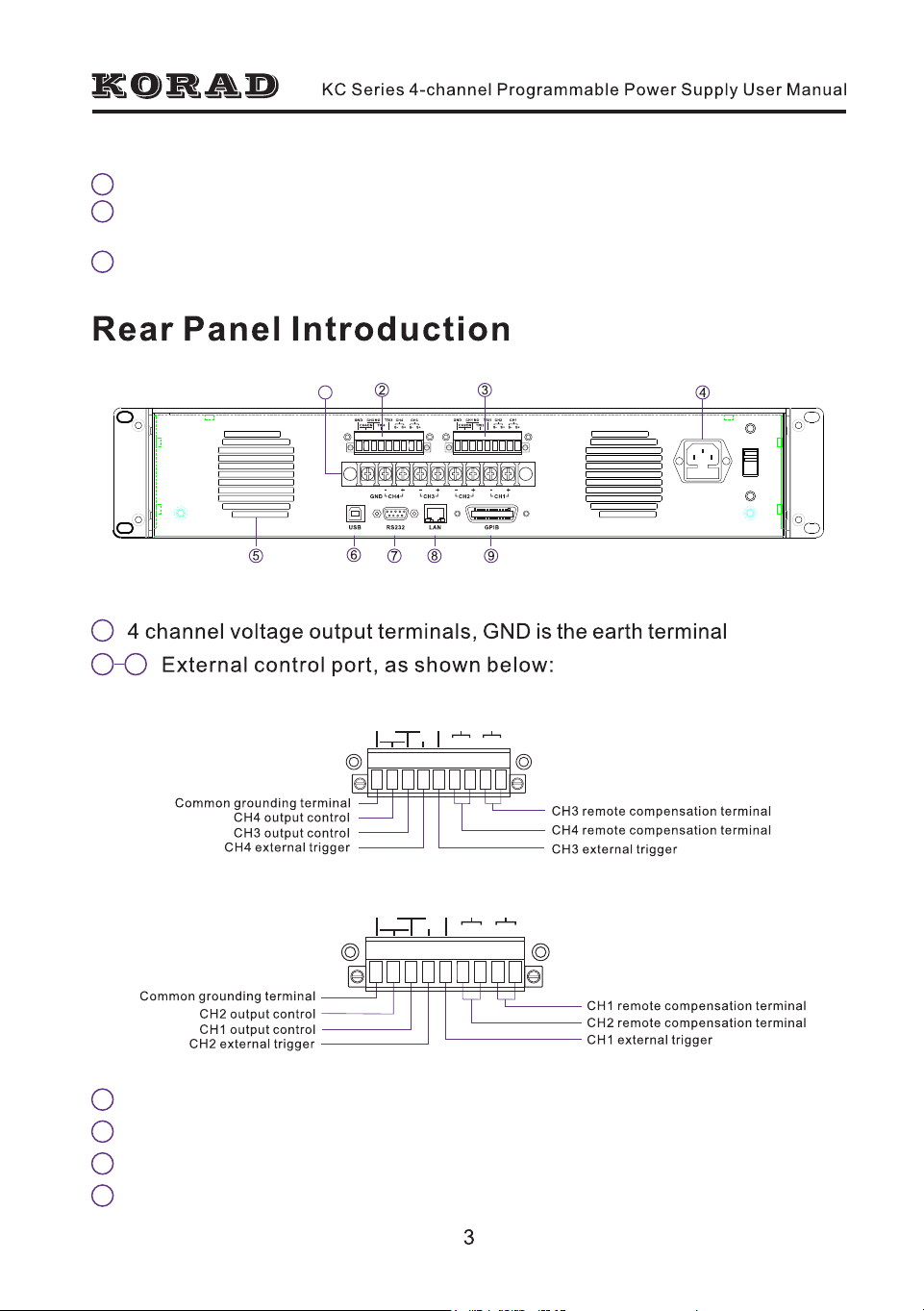
AC power input port
5
Vent
6
USB communication port
7
RS232 communication port
CH3
S- S+
CH4
S-
S+
TRI3
TRI4
CH3 NO
CH4O N
GND
CH1
S- S+
CH2
S-
S+
TRI1
TRI2
CH1 NO
CH2ON
GND
CH1 Port discharge:
CH2 Port discharge:
CH3 Port discharge:
CH4 Port discharge:
CH2/LISTCH1/LIST CH3/LIST CH4/LIST USB
Configure
ON
ON
ON
ON
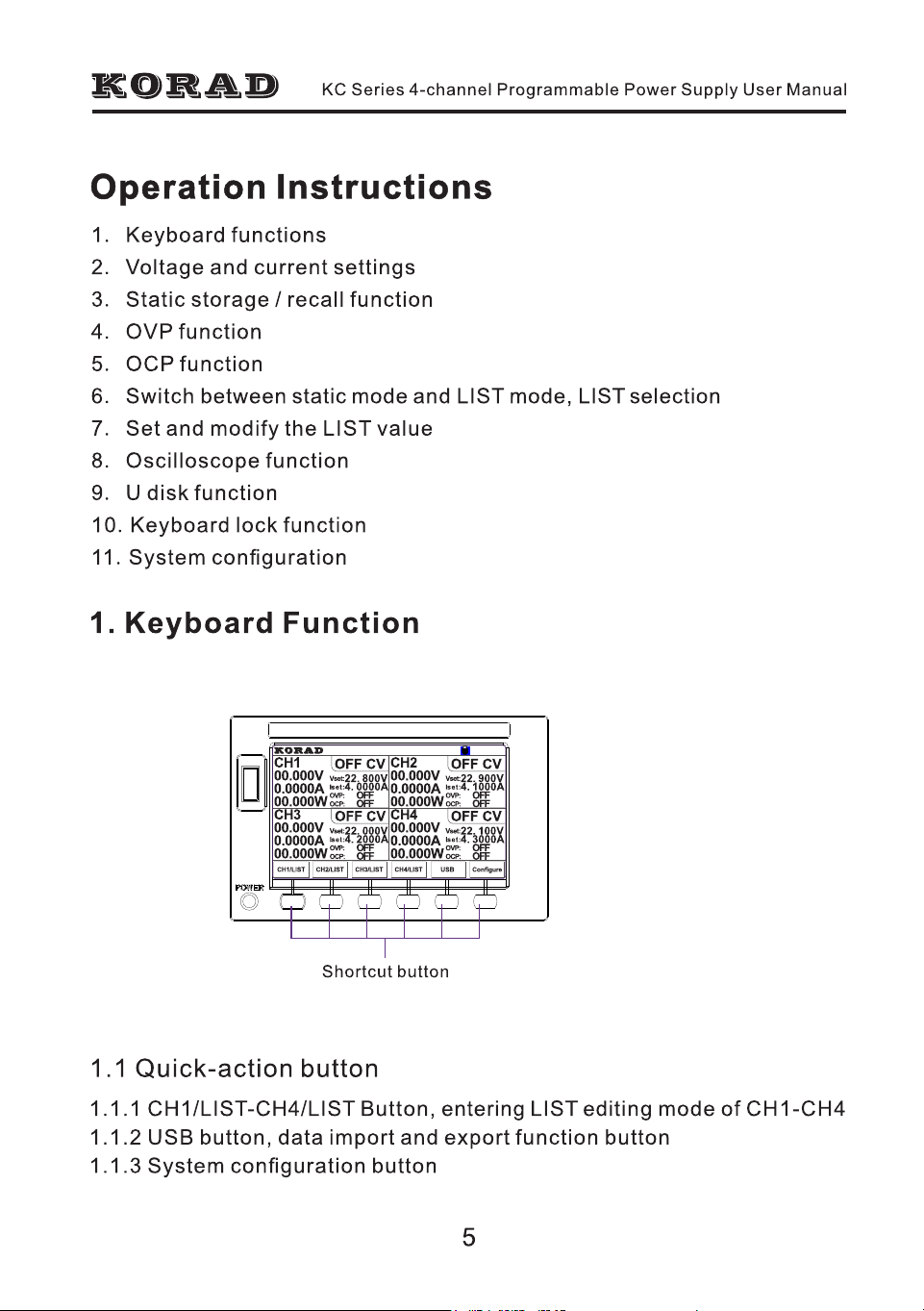
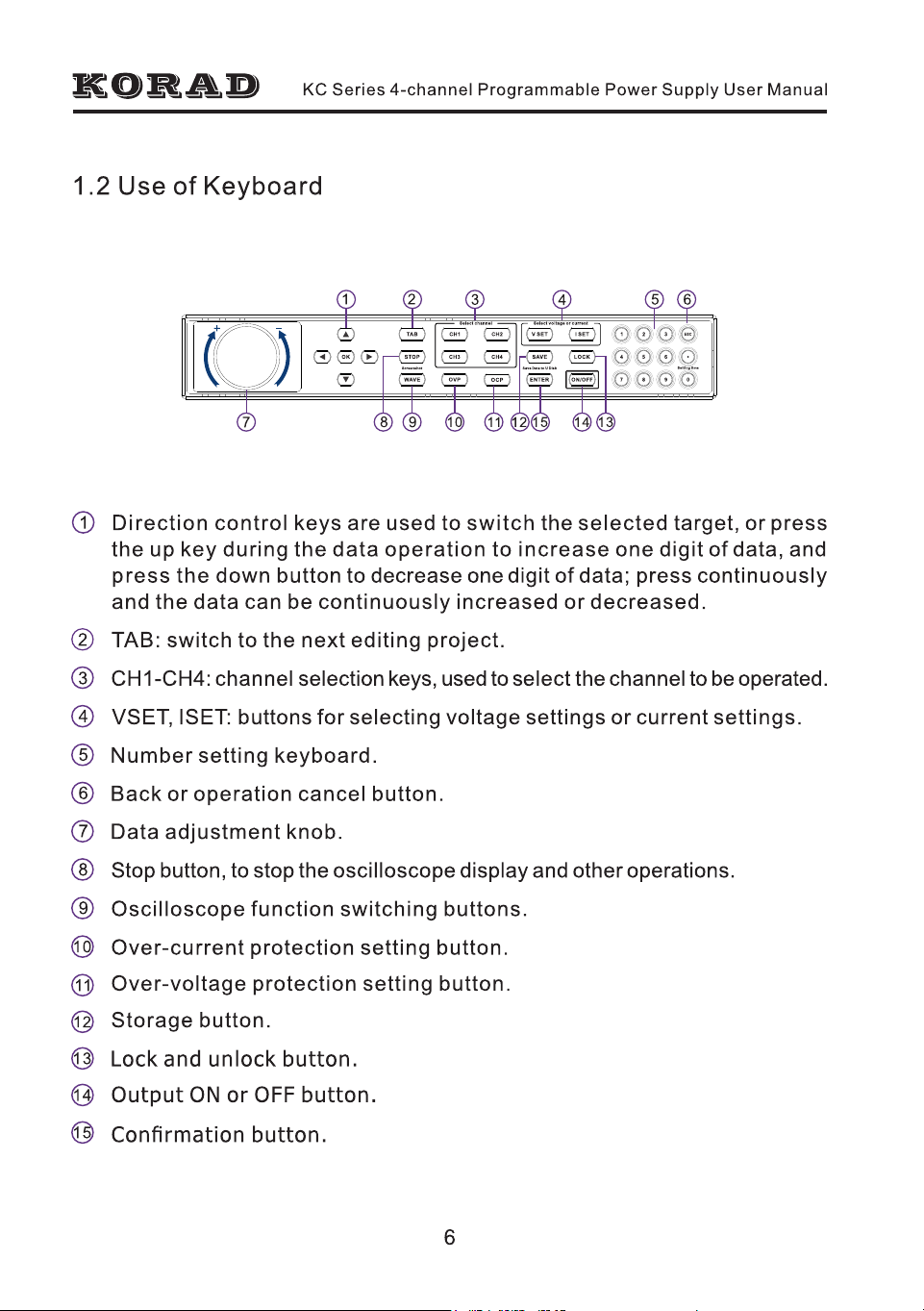
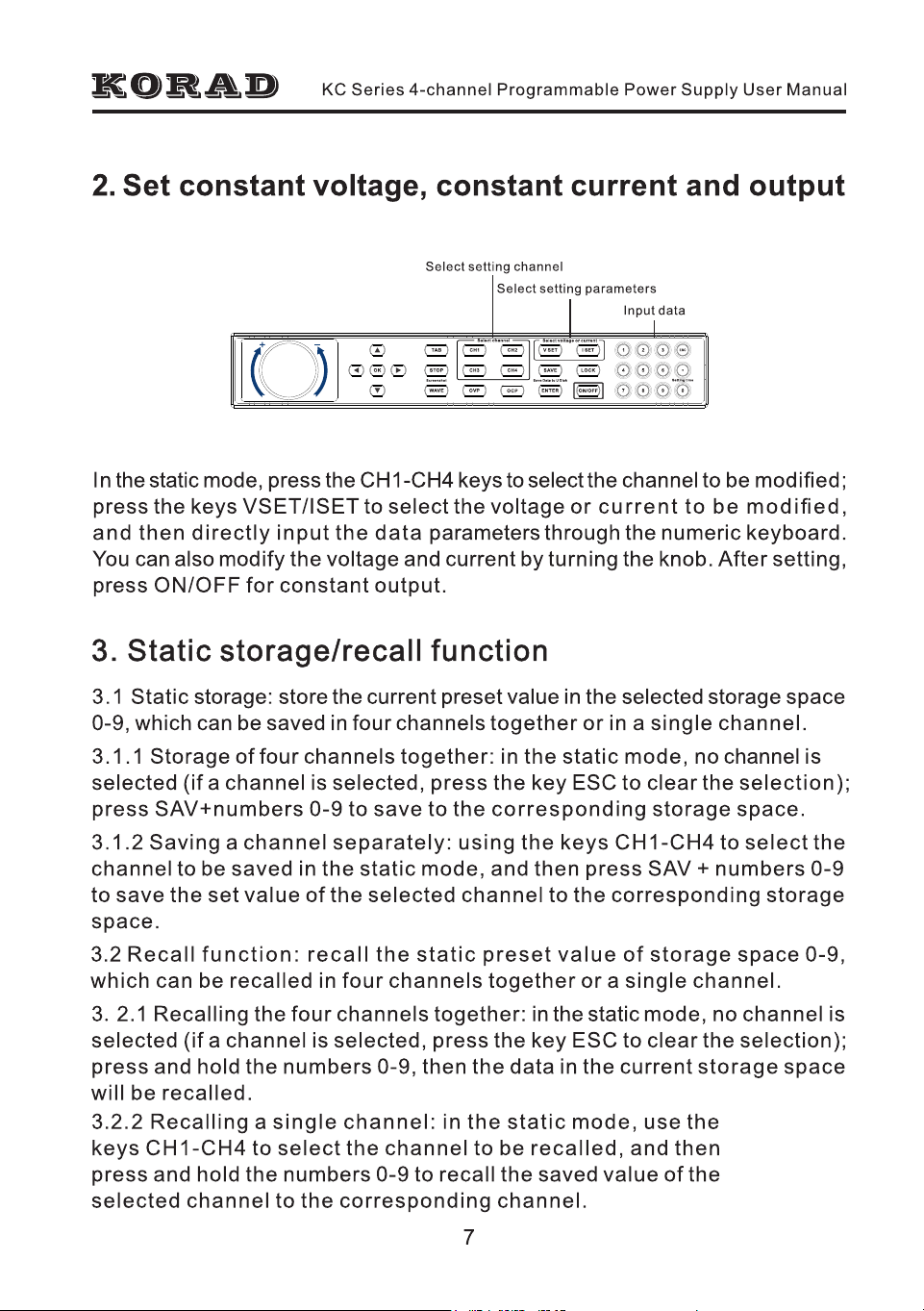
1
1
11
CH4 constant output and button indication of dynamic LIST output.
13
System configuration and button indication of function configuration.
2
3
12
USB flash disk insertion indication. When the USB flash disk is inserted,
the logo will appear as a USB font.
4
AC power input port
5
Vent
6
USB communication port
7
RS232 communication port
CH3
S- S+
CH4
S-
S+
TRI3
TRI4
CH3 NO
CH4O N
GND
CH1
S- S+
CH2
S-
S+
TRI1
TRI2
CH1 NO
CH2ON
GND
CH1 Port discharge:
CH2 Port discharge:
CH3 Port discharge:
CH4 Port discharge:
CH2/LISTCH1/LIST CH3/LIST CH4/LIST USB
Configure
ON
ON
ON
ON
OFF CV OFF CV
OFF CV
CH1
00.000V
0.0000A
00.000W
CH3
00.000V
0.0000A
00.000W
CH2
00.000V
0.0000A
00.000W
CH4
00.000V
0.0000A
00.000W
Vset:
Iset :
OVP:
OCP:
22. 900V
4. 1000A
OFF
OFF
Vset:
Iset :
OVP:
OCP:
22. 100V
4. 3000A
OFF
OFF
Vset:
Iset :
OVP:
OCP:
22. 000V
4. 2000A
OFF
OFF
OFF CV
Vset:
Iset :
OVP:
OCP:
22. 800V
4. 0000A
OFF
OFF
CH2/LISTCH1/LIST CH3/LIST CH4/LIST USB Configure
OFF CV OFF CV
OFF CV
CH1
00.000V
0.0000A
00.000W
CH3
00.000V
0.0000A
00.000W
CH2
00.000V
0.0000A
00.000W
CH4
00.000V
0.0000A
00.000W
Vset:
Iset :
OVP:
OCP:
22. 900V
4. 1000A
OFF
OFF
Vset:
Iset :
OVP:
OCP:
22. 100V
4. 3000A
OFF
OFF
Vset:
Iset :
OVP:
OCP:
22. 000V
4. 2000A
OFF
OFF
OFF CV
Vset:
Iset :
OVP:
OCP:
22. 800V
4. 0000A
OFF
OFF
CH2/LISTCH1/LIST CH3/LIST CH4/LIST USB Configure
CH1 channel indication, refers to the constant output mode of the channel.
When entering the output mode of dynamic LIST, it becomes LIST-1.
1
Output voltage indication, refers to the actual output voltage value of CH1.
2
Output current indication, refers to the actual output current value of CH1.
3
Output power indication, fefers to the actual output power value on CH1.
4
OVP and OCP setting and switch status, when OCP and OVP are OFF, it
shows OFF while it indicates the set value when OVP and OCP are ON.
5
CH1 set value of voltage and current.
6
Output ON/OFF indication, and constant voltage and constant current mode
indication of channel output.
7
CH1 constant output and button indication of dynamic LIST output.
8
9
CH2 constant output and button indication of dynamic LIST output.
10
CH3 constant output and button indication of dynamic LIST output.