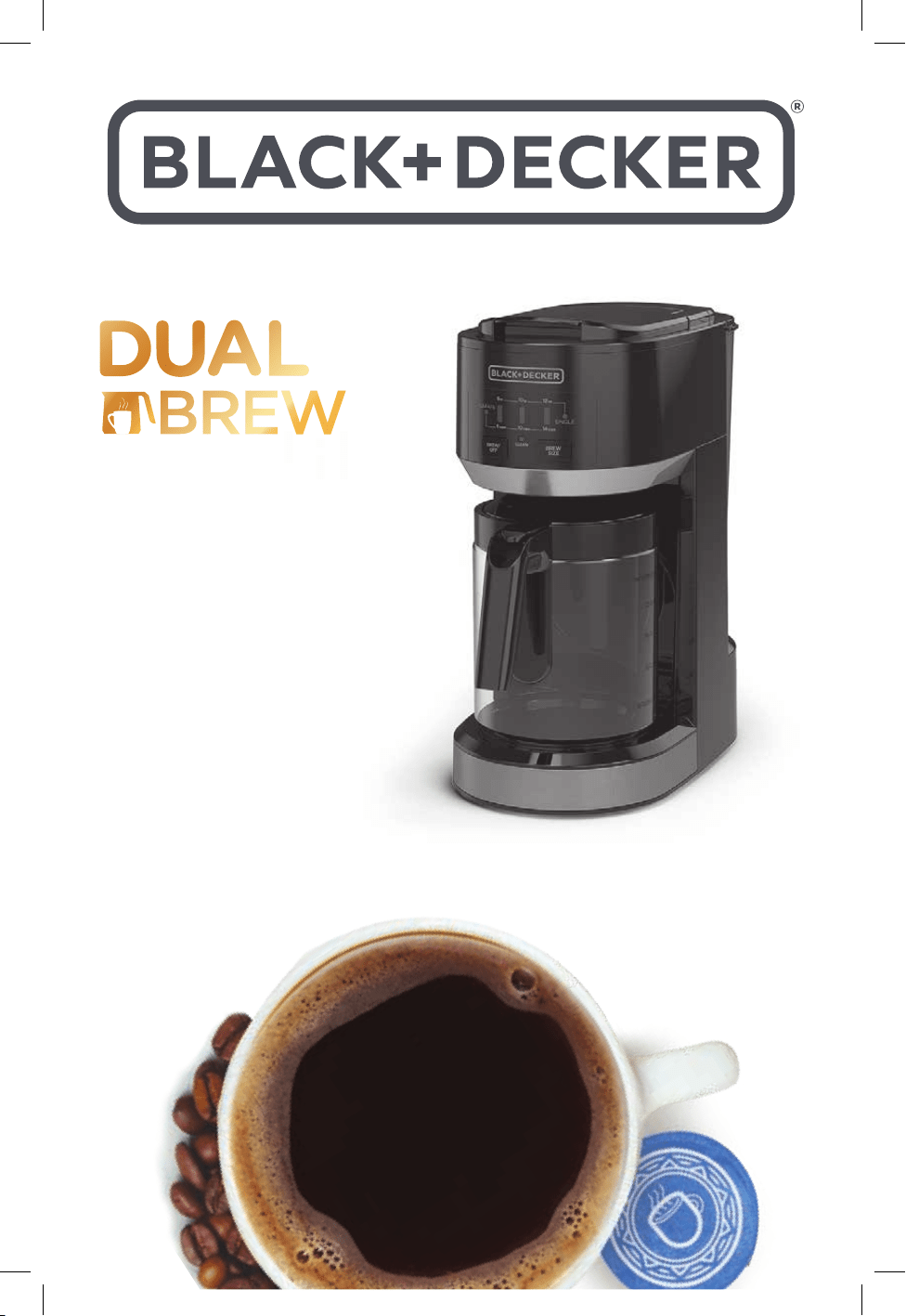
COFFEEMAKER
SS0441-0BD
14-cup & single serve coffeemaker
SS0441-0BD_30186_E_IB_A.indd 1SS0441-0BD_30186_E_IB_A.indd 1 10/24/23 4:49 PM10/24/23 4:49 PM

2
Should you have any questions or concerns with your new product,
please call our Customer Service Line at 1-800-231-9786 (US and
Canada). Please do not return to the store.
Thank you for your purchase!
www.prodprotect.com/blackanddecker
www.BlackAndDeckerAppliances.com
SS0441-0BD_30186_E_IB_A.indd 2SS0441-0BD_30186_E_IB_A.indd 2 10/24/23 4:49 PM10/24/23 4:49 PM

3
• Read all instructions prior to use.
• Do not touch hot surfaces. Use handles or knobs.
• To protect against fire, electrical shock and
injury to persons, do not immerse cord, plugs or
appliance in any liquids.
• Close supervision is necessary when any appliance
is used by or near children.
• Turn off and unplug appliance from outlet when
not in use and before cleaning.
• Allow appliance to cool before cleaning and
adding or removing parts.
• Do not operate any appliance with a damaged cord
or plug, or after the appliance malfunctions or has
been damaged in any manner. Contact consumer
support at the number listed in this manual.
• The use of accessory attachments that have
not been recommended by the appliance
manufacturer may result in fire, electric shock or
injury to persons.
• Do not use outdoors.
• Do not let cord hang over edge of table or counter,
or touch hot surfaces.
• Do not place appliance on or near a hot gas or
electric burner, or in a heated oven.
• To disconnect, turn the unit OFF, then remove plug
from wall outlet.
• Do not use this appliance for anything other than
its intended use.
• Keep lid on the carafe when in use.
• Scalding and/or burns may occur if either the
carafe or single-serve filter basket lid is removed
or unit cover is opened during the brewing cycle.
• The unit’s carafe is designed for use only with this
appliance. It must never be used on a range top.
• Do not set a hot carafe on a wet or cold surface.
• Do not use a cracked carafe or a carafe having a
loose or weakened handle.
• Do not clean carafe with harsh cleansers, steel
wool or other abrasive material.
• This appliance is not intended for use by persons
(including children) with reduced physical, sensory
or mental capabilities, or lack of experience
and knowledge, unless they have been given
supervision or instruction concerning use of the
appliance by a person responsible for their safety.
• Children should be supervised to ensure that they
do not play with the appliance.
CAUTION: 2 piercing nozzles puncture the pod. To
avoid risk of injury, do not place your fingers in the
single serve housing.
CAUTION: There is extremely hot water in the single
serve pod adapter during brew process. To avoid risk
of injury, do not lift the single serve lid during the
brewing process.
CAUTION: Please always keep the brewer in its
upright position to avoid potential injury and/or
damage to your brewer.
Please Read and Save this Use and Care Book.
IMPORTANT SAFEGUARDS.
When using electrical appliances, basic safety precautions should always be followed to
reduce the risk of fire, electric shock, and/or injury, including the following:
POLARIZED PLUG (120V models only)
This appliance has a polarized plug (one blade is
wider than the other). To reduce the risk of electric
shock, this plug is intended to t into a polarized
outlet only one way. If the plug does not t fully
into the outlet, reverse the plug. If it still does not
t, contact a qualied electrician. Do not attempt to
modify the plug in any way.
TAMPER-RESISTANT SCREW
Warning: This appliance is equipped with a tamper-
resistant screw to prevent removal of the outer
cover. To reduce the risk of re or electric shock, do
not attempt to remove the outer cover. There are no
user-serviceable parts inside. Repair should be done
only by authorized service personnel.
ELECTRICAL CORD
1. A short power-supply cord is provided to reduce
the risk resulting from becoming entangled in or
tripping over a longer cord.
2. Extension cords may be used if care is exercised
in their use.
3. If a long detachable extension cord is used:
a) The marked electrical rating of the power cord
or extension cord should be at least as great as the
electrical rating of the appliance.
b) If the appliance is of the grounded type, the exten-
sion cord should be a grounding-type 3-wire cord.
c) The cord should be arranged so that it will not
drape over the countertop or tabletop where it can
be pulled on by children or tripped over.
Note: If the power cord is damaged, please contact
the warranty department listed in these instructions.
SAVE THESE INSTRUCTIONS.
This product is for household use only.
SS0441-0BD_30186_E_IB_A.indd 3SS0441-0BD_30186_E_IB_A.indd 3 10/24/23 4:49 PM10/24/23 4:49 PM
4
CONTENTS
Important Safeguards ............................................... 3
Table of Contents .................................................. 4
Getting to know your coffee maker .................................... 5
Getting to know your coffee maker controls............................. 6
Features and Benefits ............................................... 7
Quick Tips ........................................................ 8
Before Brewing .................................................... 8
Brewing a Carafe ................................................... 9
Brewing Single Serve – Pods .........................................10
Brewing Single Serve – Ground Coffee .................................11
Care and Cleaning ..................................................12
Troubleshooting ...................................................14
Warranty and Customer Service Information ............................16
WELCOME!
Congratulations on your purchase of a Black+Decker™ coffee maker! We have
developed this guide to ensure optimal product performance for your complete
satisfaction. Save this use and care manual and be sure to register your
appliance online at www.prodprotect.com/applica.
SAVE THESE INSTRUCTIONS.
This product is for household use only.
WARNING
RISK OF FIRE OR ELECTRIC SHOCK. DO NOT OPEN.
The lightning symbol refers to “dangerous voltage”; the exclamation symbol refers
to maintenance instructions. See below.
Warning: To reduce the risk of fire or electric shock, do not remove the cover of the
coeemaker. There are no user-serviceable parts inside. Repair should be done by
authorized service personnel only.
SS0441-0BD_30186_E_IB_A.indd 4SS0441-0BD_30186_E_IB_A.indd 4 10/24/23 4:49 PM10/24/23 4:49 PM
5
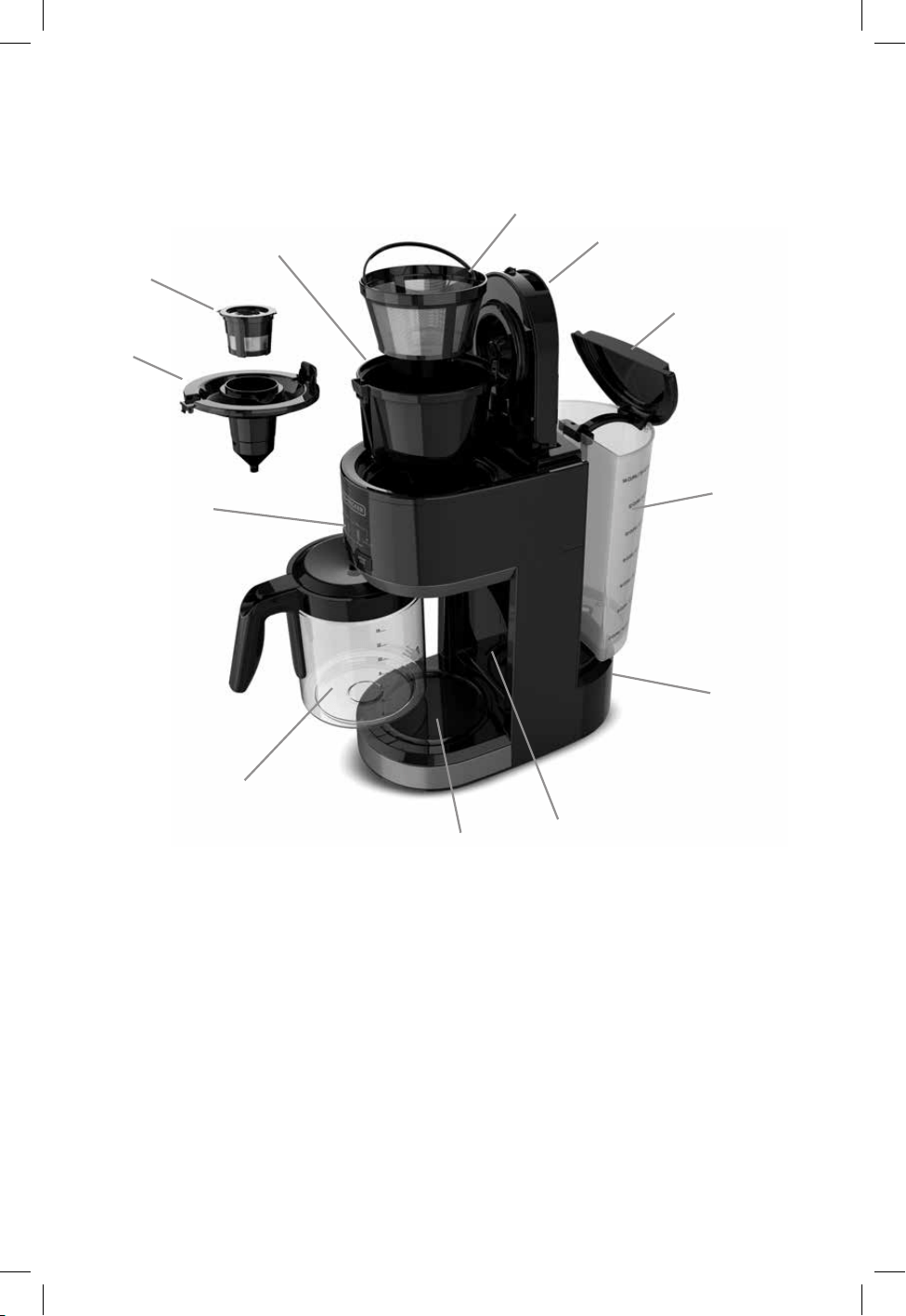
GETTING TO KNOW YOUR COFFEE MAKER
1. Lid
2. Permanent filter
3. Removable filter holder
4. Reusable single serve ground coffee filter
5. Single serve Pod adapter
6. LED control panel
7. Perfect Pour™ 14-cup glass carafe
8. Nonstick keep hot carafe plate
9. Hinged cup rest
10. Hidden cord storage
11. 70 oz. Removable water reservoir
12. Water reservoir lid
*Product image may vary slightly
from actual product appearance.
1
2
3
12
11
10
9
8
4
5
6
7
SS0441-0BD_30186_E_IB_A.indd 5SS0441-0BD_30186_E_IB_A.indd 5 10/24/23 4:49 PM10/24/23 4:49 PM
6
CARAFE
SINGLE
BREW
SIZE
BREW/
OFF
8
oz 10oz 12oz
10cups6cups 14cups
CLEAN
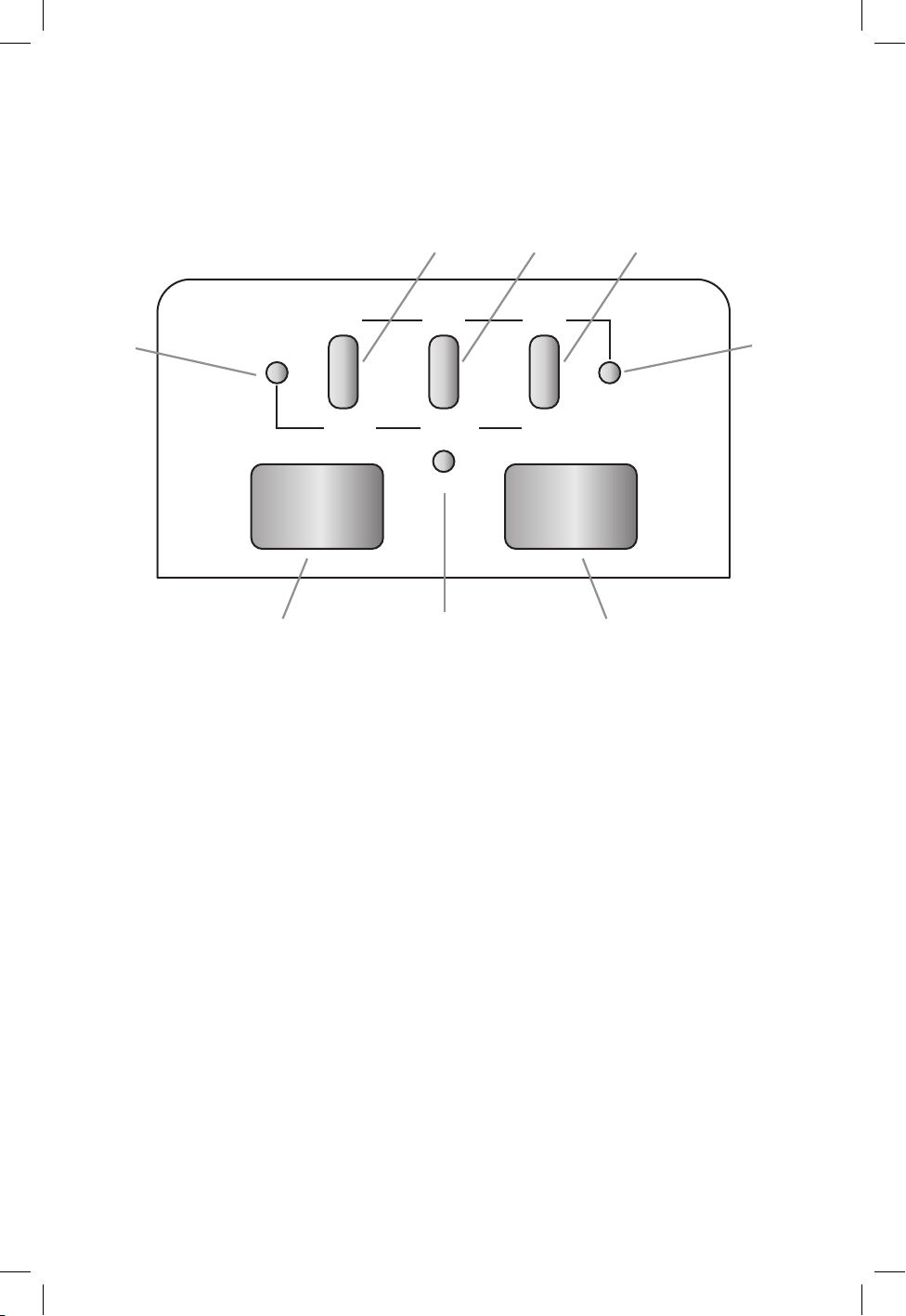
GETTING TO KNOW YOUR COFFEE MAKER
CONTROLS
1. BREW ON/OFF button
2. BREW SIZE selector button
3. SINGLE serve LED indicator
4. CARAFE brew/Keep Warm LED Indicator
5. 8 oz / 6 cups LED Indicator
6. 10 oz / 10 cups LED Indicator
7. 12 oz / 14 cups LED Indicator
8. Clean LED Indicator
1
8
2
3
4
5 6 7
SS0441-0BD_30186_E_IB_A.indd 6SS0441-0BD_30186_E_IB_A.indd 6 10/24/23 4:49 PM10/24/23 4:49 PM

7
FEATURES AND BENEFITS
Space Savings Multi Brew
Brew single serve coffee pods,
ground coffee, or a full 14-cup
carafe with one machine.
Standby Mode
Press any button, insert or remove
a coffee pod, open the lid, or raise
or lower the cup rest to wake the
machine. After 2 minutes of being
inactive, the machine goes into
“standby” mode.
70 oz. Removable Water Reservoir
It’s easy ll and easy clean. The
removable reservoir holds 70 oz.
of water and is used to brew both
single serve and full carafe.
FULL CARAFE
Perfect Pour™ Spout
Specially designed to eliminate
dripping, the Perfect Pour™ spout
keeps your counters clean.
Permanent filter
The reusable lter reduces waste
with no need for paper lters.
Sneak-A-Cup™ Feature
Stop the ow of coffee into your
carafe for a no-mess ll-up at any time.
Replace the carafe within 20 seconds
to prevent brew basket overow.
Auto-Shuto
For your peace of mind, the coffee
maker will automatically shut off
2 hours after the brew cycle is
complete.
SINGLE SERVE
Customize Your Size
Choose your favorite brew size: 8,
10, or 12 ounces.
Single Serve Pod Adapter
Insert this adapter to brew your
favorite single serve Pod coffee
with ease
Reusable Single Serve
Ground Coee Filter
To brew your favorite ground
coffee, scoop coffee grounds
directly into this washable lter.
Auto-Shuto
For your peace of mind, the coffee
maker will automatically shut off
after the brew cycle is complete.
5. 8 oz / 6 cups LED Indicator
6. 10 oz / 10 cups LED Indicator
7. 12 oz / 14 cups LED Indicator
8. Clean LED Indicator
SS0441-0BD_30186_E_IB_A.indd 7SS0441-0BD_30186_E_IB_A.indd 7 10/24/23 4:49 PM10/24/23 4:49 PM
8
1. Press the BREW/OFF button at any time to start or stop a brew cycle.
2. When brewing single serve, ensure that the water reservoir is filled to the
minimum level.
3. Never return an empty carafe to the warming plate if the warming plate is still
warm.
4. Never rinse your carafe with cold water, as a sudden change in temperature
from hot to cold could result in a cracked carafe.
QUICK TIPS
BEFORE BREWING
1. Register your product at www.prodprotect.com/blackanddecker.
2. Carefully unpack your coffeemaker, removing all packaging materials, labels,
stickers and the plastic band around the power plug.
3. Thoroughly clean your coffeemaker according to the basic cleaning instructions
found in the Care and Cleaning section of this manual.
4. Prior to brewing your first pot of coffee, run a 10 cup brew cycle with cold
water only, without ground coffee or a paper filter. When all the water has
brewed into the carafe, switch the coffee maker off and allow the coffee maker
to cool for 15 minutes. Discard the water from the carafe and rinse.
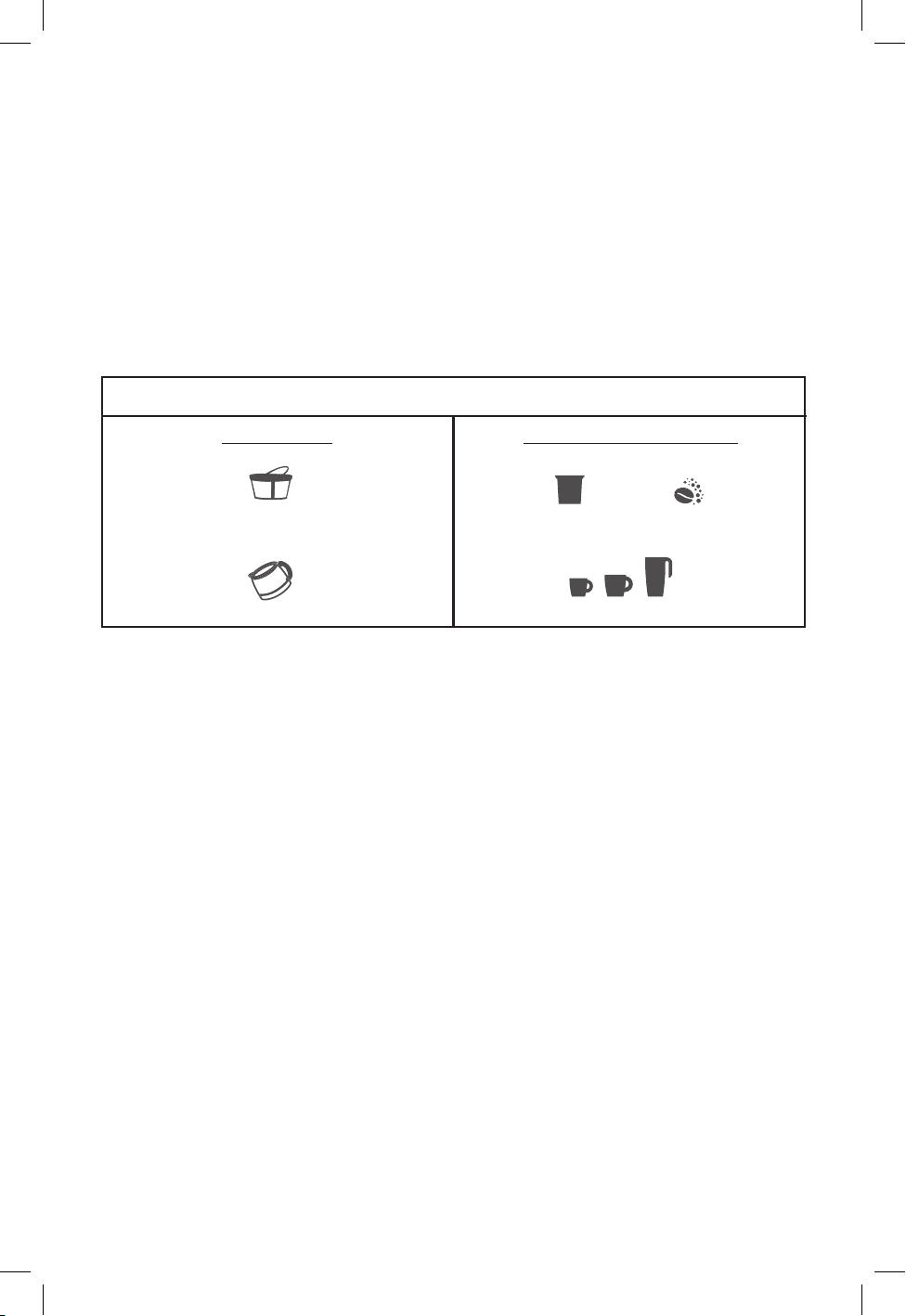
TWO WAYS TO BREW
CARAFE
Brew up to 14 Cups
Permanent lter
+
Select desired carafe size
SINGLE SERVE
Brew Directly Into Mug
OR
+
Select mug size
8 10 12 oz.
6, 10, or 14 cups
SS0441-0BD_30186_E_IB_A.indd 8SS0441-0BD_30186_E_IB_A.indd 8 10/24/23 4:49 PM10/24/23 4:49 PM
9
BREWING A CARAFE
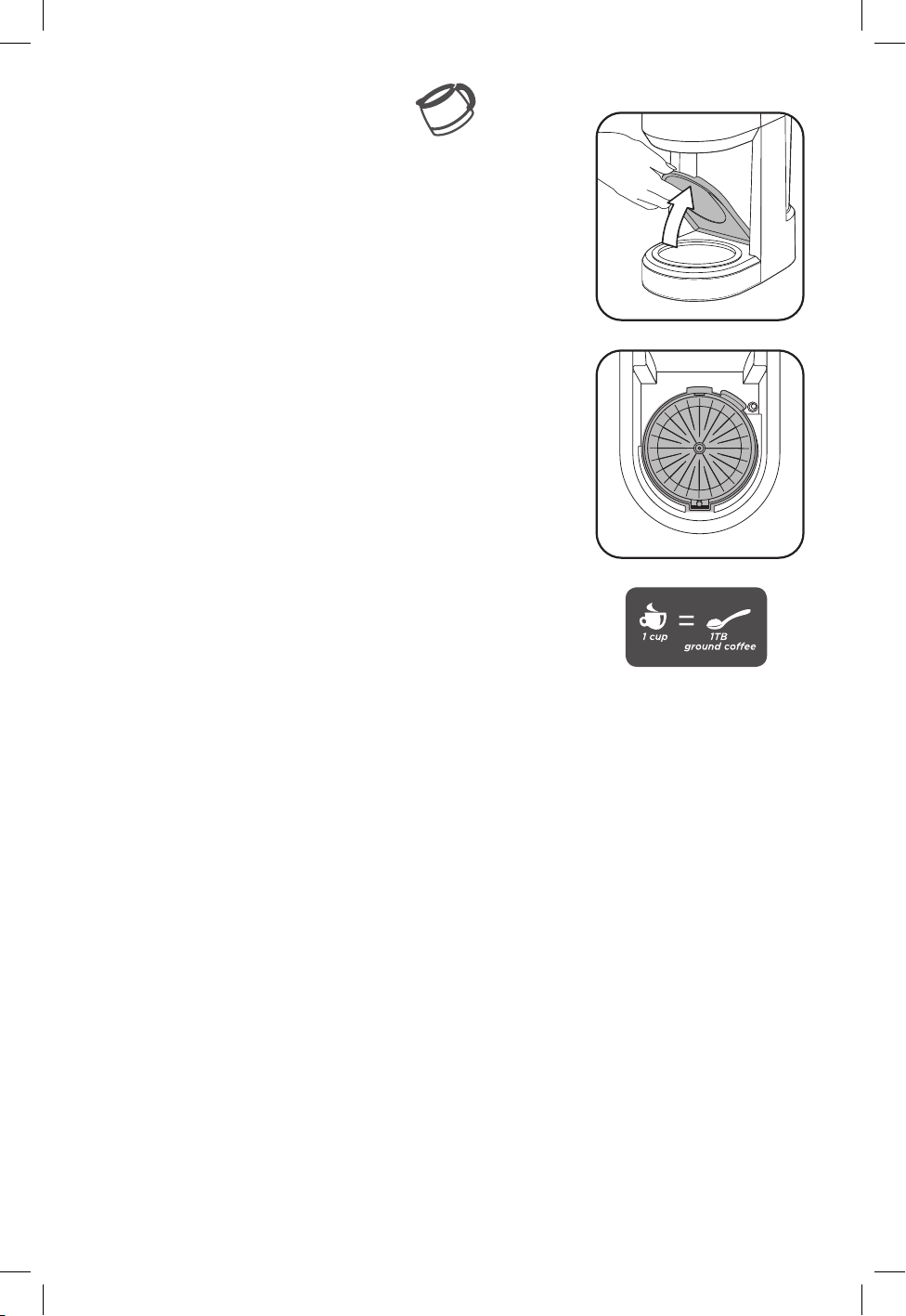
IMPORTANT: The hinged cup rest must be in the “up”
position for this function (A). Once the cup rest is in the
“up” position, the cup size indicator will flash and the
carafe indicator will illuminate blue.
1. Make sure your
coffee maker
is plugged in.
2. Fill water reservoir with desired amount of water. The
MAX line represents a full carafe of coffee. Do not fill
reservoir past this MAX line.
3. Open the hinged lid.
4. Use the included permanent filter or insert a
preformed paper filter into the filter holder.
IMPORTANT: It is extremely important that the remov
-
able filter holder is properly set in place (B). This will
ensure that your coffee maker operates correctly.
5. Add one tablespoon of ground coffee per cup, or to
taste.
6. Ensure brew basket is secured in place and close filter
basket lid.
7. Place carafe on carafe plate with lid closed. Coffee may
run over if carafe lid is not correctly in place.
8. Select your desired size, then press the BREW/OFF
button
once to begin the brew cycle. The cup size indicator light
will stop flashing and the CARAFE indicator light will
illuminate bright blue.
9. While brewing, the Sneak-A-Cup™ feature stops coffee flow
out of the unit, allowing you to pour a cup of coffee before the
brew cycle finishes. Always return the carafe on to the carafe
plate within 20 seconds to prevent coffee overflow.
10. The “keep hot carafe plate” will remain on for two hours
and the CARAFE indicator light will be red during these
two hours. After this time it will automatically shut off.
11. When coffee grounds are cool, carefully remove and
dispose of the used grounds and paper filter.
B
A
SS0441-0BD_30186_E_IB_A.indd 9SS0441-0BD_30186_E_IB_A.indd 9 10/24/23 4:49 PM10/24/23 4:49 PM
10
BREWING SINGLE SERVE—PODS
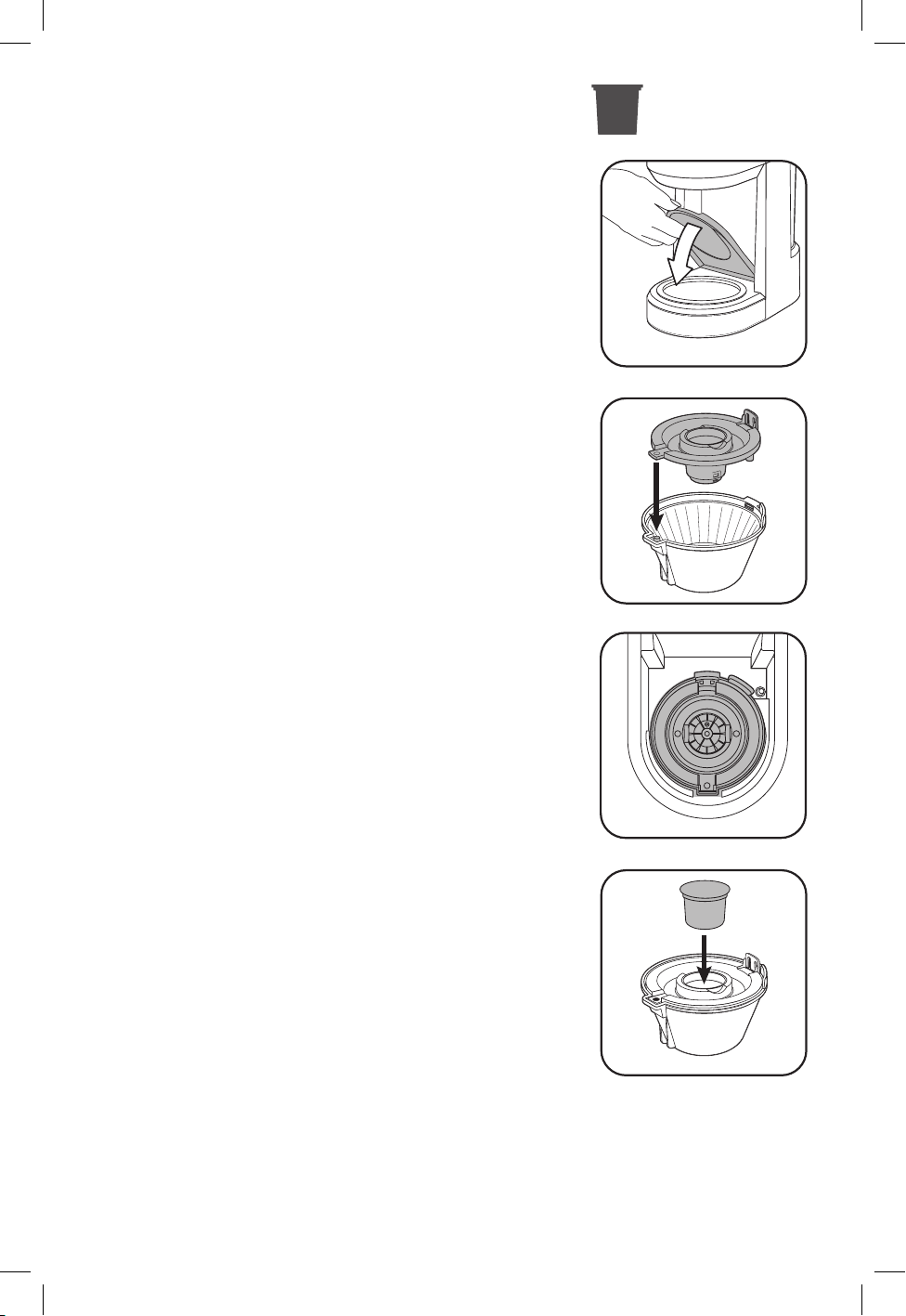
IMPORTANT: For the pod coffee system to work, the cup
rest must be in the down postion (C).
1. Make sure your
coffee maker
is plugged in.
2. Ensure the water reservoir is filled with a minimum
of 20 ounces of water. Do not fill reservoir past the
MAX fill line.
3. Open the hinged lid.
IMPORTANT: When brewing prepackaged coffee
pods, use only the pod holder. Do not use the
removable mesh filter in the unit when using the pod
function.
4. Ensure the pod holder is installed properly in the
removable filter holder. The tab on the pod holder
should align with the groove on the filter holder (D).
5. Place the filter holder assembly into the coffee
maker unit, taking care to align the tabs properly
(E). Press down until you hear a click.
6. Insert a coffee pod of your choice into the pod
adapter (F). For stronger coffee or when filling higher
capacity mugs, select the 8, 10, or 12 ounce setting
and brew twice using two separate pods.
7. Push the lid down firmly until it locks into place. This
will puncture the coffee pod and keep the filter basket
lid from opening during brewing.
8. Place your mug on the cup rest.
9. Select your desired size, then press the BREW/OFF
button once to begin the brew cycle. The cup size
indicator light will stop flashing and the SINGLE
indicator light will illuminate bright blue.
WARNING: To avoid risk of personal injury or damage
to property, do not remove the mug from the coffee
maker until the brewing cycle is complete, and the unit
is shut off. Never lift the lid during the brewing cycle as
scalding may occur.
10. Once the brewing cycle is complete, the coffee maker
will automatically shut off.
11. When cooled, carefully remove and dispose of the
used pod.
WARNING: The carafe plate will be hot after single serve brewing. Allow the
machine to cool before touching the cup rest or carafe plate.
C
D
F
E
SS0441-0BD_30186_E_IB_A.indd 10SS0441-0BD_30186_E_IB_A.indd 10 10/24/23 4:49 PM10/24/23 4:49 PM
11
BREWING SINGLE SERVE—GROUND COFFEE
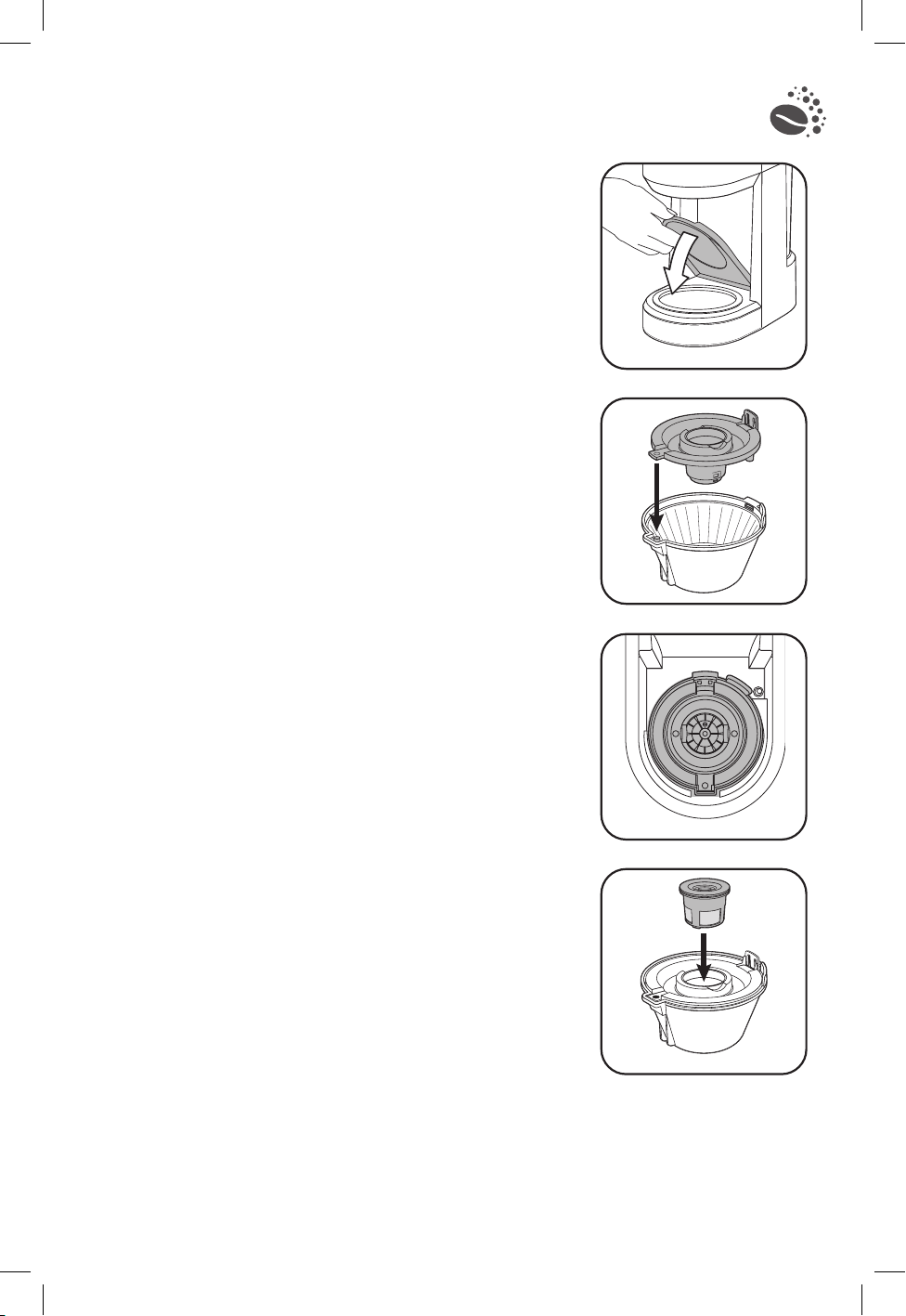
IMPORTANT: For the pod coffee system to work, the cup
rest must be in the down postion (G).
1. Make sure your
coffee maker
is plugged in.
2. Ensure the water reservoir is filled with a minimum
of 20 ounces of water. Do not fill reservoir past the
MAX fill line.
3. Open the hinged lid.
4. Ensure the pod holder is installed properly in the
removable filter holder. The tab on the pod holder
should align with the groove on the filter holder (H).
5. Place the filter holder assembly into the coffee
maker unit, taking care to align the tabs properly
(I). Press down until you hear a click.
6. Fill the reusable single serve filter with your desired
amount of coffee grounds, one tablespoon per
brewed cup or to taste.
7. Close reusable filter lid and place it into the ground
coffee adapter (J).
8. Push the lid down until it locks in place. This will
ensure the filter basket lid does not lift open during
brewing.
9. Place your mug on the cup rest.
10. To start the brew cycle, press your choice of brew
size.
11. Once the brewing cycle is complete, the coffee maker
will automatically shut off.
12. When cooled, carefully dispose of the used grounds
and wash the reusable filter for future use.
WARNING: The carafe plate will be hot after single
serve brewing. Allow the machine to cool before
touching the cup rest or carafe plate.
G
H
I
J
SS0441-0BD_30186_E_IB_A.indd 11SS0441-0BD_30186_E_IB_A.indd 11 10/24/23 4:49 PM10/24/23 4:49 PM
12
CARE AND CLEANING
Basic Cleaning
Follow the directions below to clean your coffee maker after each use.
1. Ensure your coffeemaker is unplugged and cool.
2. Open hinged lid.
3. If remaining, throw away the used paper filter and coffee grounds. Remove the
filter holder.
4. If remaining, discard used pod or coffee grounds. Remove any adapters from
inside the filter basket.
5. Wipe the outside of the coffeemaker, power cord, carafe plate and inside of the
filter basket lid with a soft, damp cloth.
6. Wash each removable piece of your
coffee maker
according to the chart
below. Rinse and dry all removable components before replacing into the unit.
Note:
Do not use abrasive cleansers or scouring pads on this product. Never
immerse the coffeemaker in water.
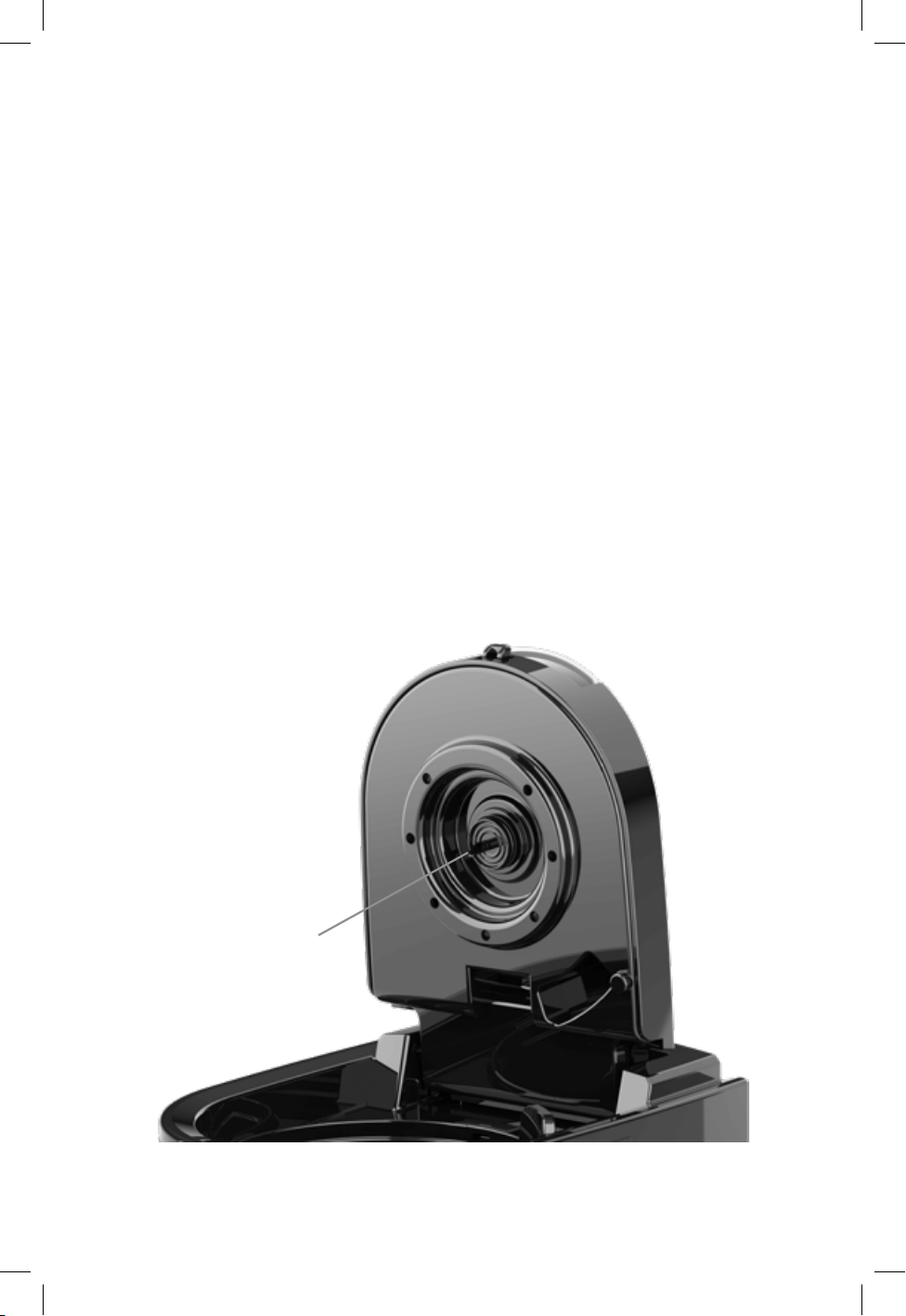
7. Check the brewing needle (A) for buildup before each use. If the brewing needle is
clogged, use a needle, paper clip, or similar tool to remove excessive buildup from
the hole in the brewing needle.
A
SS0441-0BD_30186_E_IB_A.indd 12SS0441-0BD_30186_E_IB_A.indd 12 10/24/23 4:49 PM10/24/23 4:49 PM

13
COFFEEMAKER PART CLEANING INSTRUCTIONS
Housing
Carafe Plate
Power Cord
Single serve pod coee adapter
Wipe with a soft, damp cloth.
Brew Basket
Glass Carafe Lid
Glass Carafe
Reusable single serve filter
Removable filter holder
Wash by hand in warm soapy water,
or in the dishwasher (top rack only).
Descaling
The appliance should be cleaned/descaled after approximately 1–2 months of use or when
the clean LED indicator illuminates. The clean LED is a warning and will not affect the
appliance, but failure to regularly descale your appliance will impact performance and could
lead to irreversible damage. In areas with hard water, it may be necessary to descale more
frequently or run multiple descaling cycles.
To simplify cleaning, your appliance is equipped with an auto-clean function. To use
the auto-clean function:
1. Prepare the descaling solution by combining 6 cups of white vinegar and 6 cups of cold water.
2. Fill the water reservoir with the cleaning solution. Place the carafe on the warming plate.
3. Press and hold the Brew/Off Button for 4 seconds.
4. The appliance will stop and start during the cleaning process. The cleaning process takes
approximately 45minutes. When the water reservoir is empty, the cycle will stop and the
cleaning LED indicator will darken.
5. When the cleaning process is complete, discard the water in the Carafe.
6. After descaling, rinse the appliance: Run two 10-cup brew cycles with cold water only without
ground coffee or a paper filter (see the “Brewing a Carafe” section). When all the water has
been brewed into the carafe, discard the water in the carafe. Then, run two 10-oz single-serve
brew cycles with cold water only (see the “Brewing Single-Serve Pods” section). When all the
water has brewed into the carafe, switch the coffee maker off and allow the coffee maker to
cool for 15minutes. Discard the water from the carafe and rinse.
SS0441-0BD_30186_E_IB_A.indd 13SS0441-0BD_30186_E_IB_A.indd 13 10/24/23 4:49 PM10/24/23 4:49 PM
14
TROUBLESHOOTING
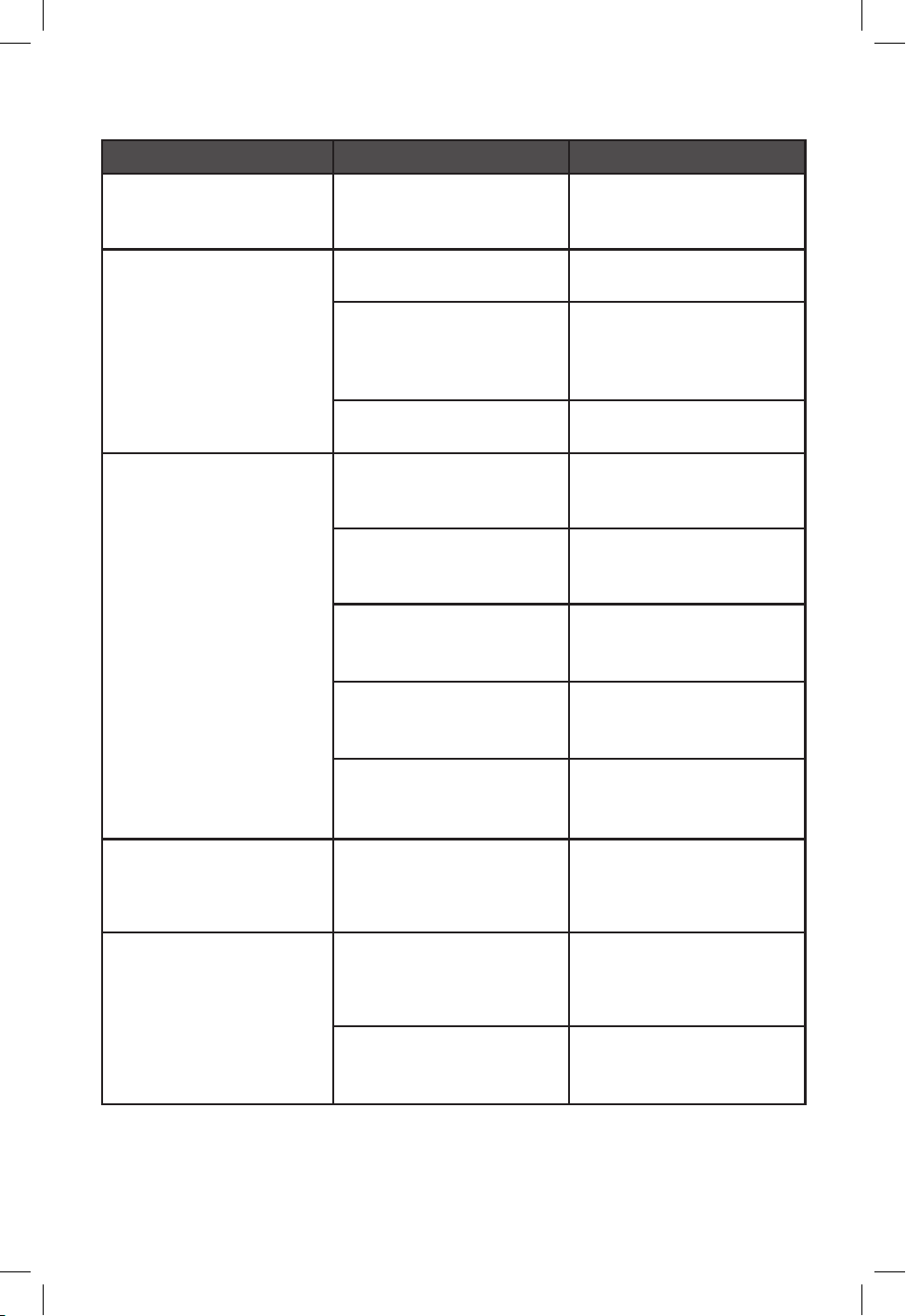
PROBLEM POSSIBLE CAUSE SOLUTION
Coeemaker will
not turn on.
Unit is unplugged. Make sure appliance is
plugged into a working
outlet.
Coeemaker will not
brew.
Lid is not closed. Ensure lid is fully
closed.
Cup rest is not in the
correct position.
Ensure cup rest is in
correct position (up for
carafe, down for single
serve.
Brewing inserts are
placed incorrectly.
Ensure inserts are
positioned correctly.
Coeemaker is leaking.
Water reservoir may be
overlled.
Ensure water reservoir
is not lled beyond the
MAX line.
Water reservoir may
not be seated correctly.
Ensure water reservoir
is correctly positioned
on the unit.
Carafe lid may not be
correctly placed on
carafe.
Make sure carafe lid is
placed straight onto
the carafe.
Carafe may not be
correctly placed on the
carafe plate.
Place carafe securely and
squarely onto the carafe
plate.
Travel mug lid may still
be on travel mug.
Ensure lid is removed
from travel mug before
brewing.
Coeemaker brews
more slowly than usual
or less coee than
expected.
The coffeemaker needs
cleaning.
Follow the instructions
in the descaling
section.
The brew basket
overflows.
Excessive amount of
ground coffee used.
Reduce the amount
of coffee used to
eliminate brew basket
overows.
Coffeemaker needs
cleaning.
Follow the instructions
in the descaling
section.
SS0441-0BD_30186_E_IB_A.indd 14SS0441-0BD_30186_E_IB_A.indd 14 10/24/23 4:49 PM10/24/23 4:49 PM
15
TROUBLESHOOTING
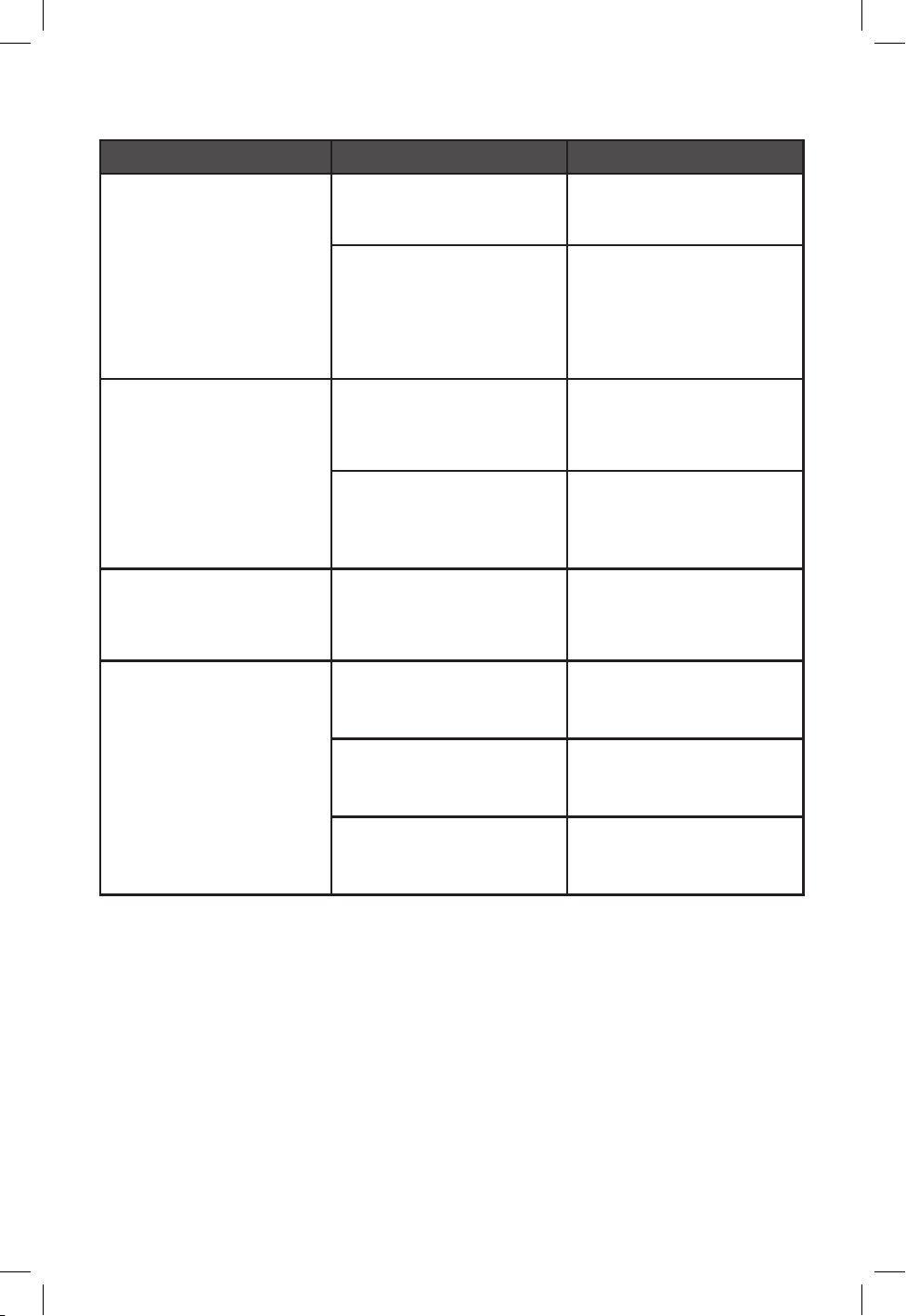
PROBLEM POSSIBLE CAUSE SOLUTION
Coee sediment in
brewed cup of coee.
Coffee grounds are too
ne for brew basket.
Use paper lter or a
more coarse ground
coffee.
Paper lter not opened
or properly placed in
brew basket.
Rinse brew basket and
re-insert paper lter
into brew basket so
edges remain pressed
against the sides of the
basket.
Coee leaks onto base.
The carafe has been
removed for longer
than 20 seconds during
a brew cycle.
Make sure to replace
the carafe within 20
seconds during the
brewing cycle.
The coffee cup or mug
was removed before
brewing was complete.
Wait until brew is
complete and dripping
stops before removing
your mug.
A partial carafe of
coee brews.
Water reservoir was
not lled to the MAX
line when the brew
cycle started.
Ensure the water
reservoir is lled to
the MAX line prior to
brewing a full carafe.
Coee tastes weaker
than preferred.
Too much water used
for a single pod coffee
brew.
Brew 2 coffee pods
into your mug. Choose
a small brew volume.
Not enough ground
coffee used.
Increase the volume
of coffee grounds in
permanent lter.
The coffeemaker needs
cleaning.
Follow the instructions
in the descaling
section.
If additional assistance is needed,
please contact our consumer service team at
1-800-231-9786.
SS0441-0BD_30186_E_IB_A.indd 15SS0441-0BD_30186_E_IB_A.indd 15 10/24/23 4:49 PM10/24/23 4:49 PM

16
WARRANTY AND CUSTOMER
SERVICE INFORMATION
Two-Year Limited Warranty
(Applies only in the United States and Canada)
For service, repair or any questions regarding your appliance, call the
appropriate 800 number listed within this section. Please DO NOT return
the product to the place of purchase. Also, please DO NOT mail product
back to manufacturer, nor bring it to a service center. You may also want to
consult the website listed on the cover of the manual.
What does it cover?
• Any defect in material or workmanship provided; however, Empower Brands,
LLC’s liability will not exceed the purchase price of product.
For how long?
• Two years from the date of original purchase with proof of purchase.
What will we do to help you?
• Provide you with a reasonably similar replacement product that is either new or
factory refurbished.
How do you get service?
• Save your receipt as proof of date of sale.
• Visit the online service website at www.prodprotect.com/blackanddecker, or call
toll-free 1-800-465-6070, for general warranty service.
• If you need parts or accessories, please call 1-800-738-0245.
How does state law relate to this warranty?
This warranty gives you specic legal rights. You may also have other rights that
vary from state to state or province to province.
What does your warranty not cover?
• Damage from commercial use
• Damage from misuse, abuse or neglect
• Products that have been modied in any way
• Products used or serviced outside the country of purchase
• Glass parts and other accessory items that are packed with the unit
• Shipping and handling costs associated with the replacement of the unit
• Consequential or incidental damages (Please note, however, that some
states do not allow the exclusion or limitation of consequential or incidental
damages, so this limitation may not apply to you.)
Are there additional warranty exclusions?
• This warranty shall not be valid where it is contrary to U.S. and other applicable
laws, or where the warranty would be prohibited under any economic sanctions,
export control laws, embargos, or other restrictive trade measures enforced
by the United States or other applicable jurisdictions. This includes, without
limitation, any warranty claims implicating parties from, or otherwise located in,
Cuba, Iran, North Korea, Syria and the disputed Crimea region.
SS0441-0BD_30186_E_IB_A.indd 16SS0441-0BD_30186_E_IB_A.indd 16 10/24/23 4:49 PM10/24/23 4:49 PM

17
SS0441-0BD_30186_E_IB_A.indd 17SS0441-0BD_30186_E_IB_A.indd 17 10/24/23 4:49 PM10/24/23 4:49 PM

SS0441-0BD_30186_E_IB_A.indd 18SS0441-0BD_30186_E_IB_A.indd 18 10/24/23 4:49 PM10/24/23 4:49 PM

SS0441-0BD – 1200W 120 V ~ 60 Hz
Please do not throw this product away with normal household waste. If possible, take it to an official
collection point in your area that recycles this type of product. Thank you for considering the environment.
BLACK+DECKER® and the BLACK+DECKER® logos are trademarks of The Black & Decker Corporation,
used under license by Empower Brands, LLC, a subsidiary of Spectrum Brands, Inc. for its manufacturing
and sale of this product. All rights reserved. All other marks are trademarks of Empower Brands, LLC.
SS0441-0BD_30186_E_IB_A.indd 19SS0441-0BD_30186_E_IB_A.indd 19 10/24/23 4:49 PM10/24/23 4:49 PM
20
T22-XXXXXXX-A
30186 E
www.BlackAndDeckerAppliances.com
© 2023 Empower Brands, LLC. All rights reserved.
Empower Brands, LLC, Middleton, WI 53562 10/2023
PERFECT POUR™ and SNEAK-A-CUP™ are
trademarks of Empower Brands, LLC.
Made in China.
SS0441-0BD_30186_E_IB_A.indd 20SS0441-0BD_30186_E_IB_A.indd 20 10/24/23 4:49 PM10/24/23 4:49 PM