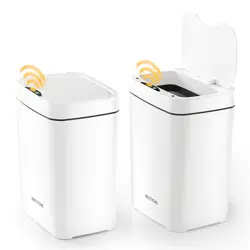

Smart Trash Can Instruction Manual
Please read this instruction carefully before use,
and please keep it properly for future
Precautions Product List
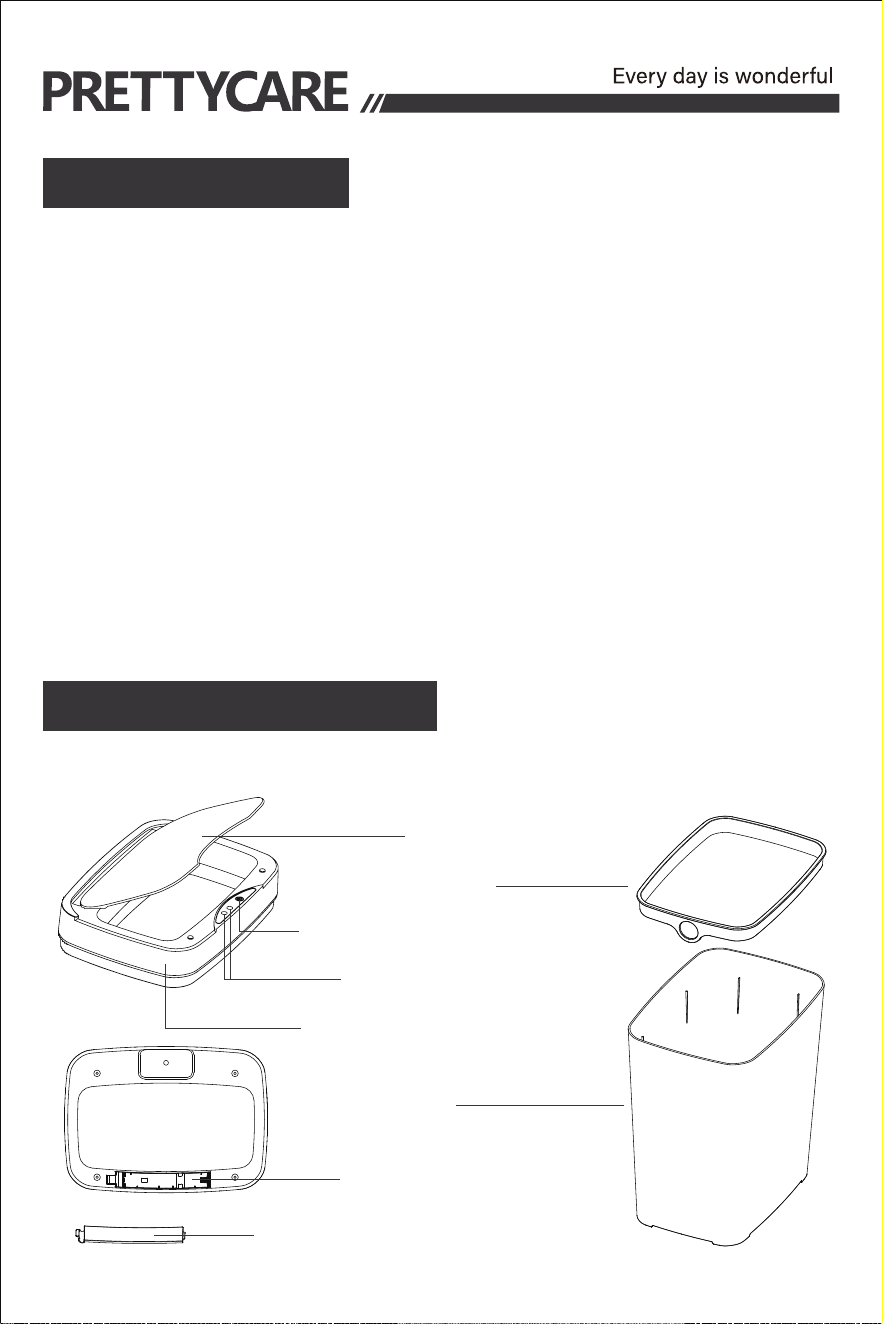
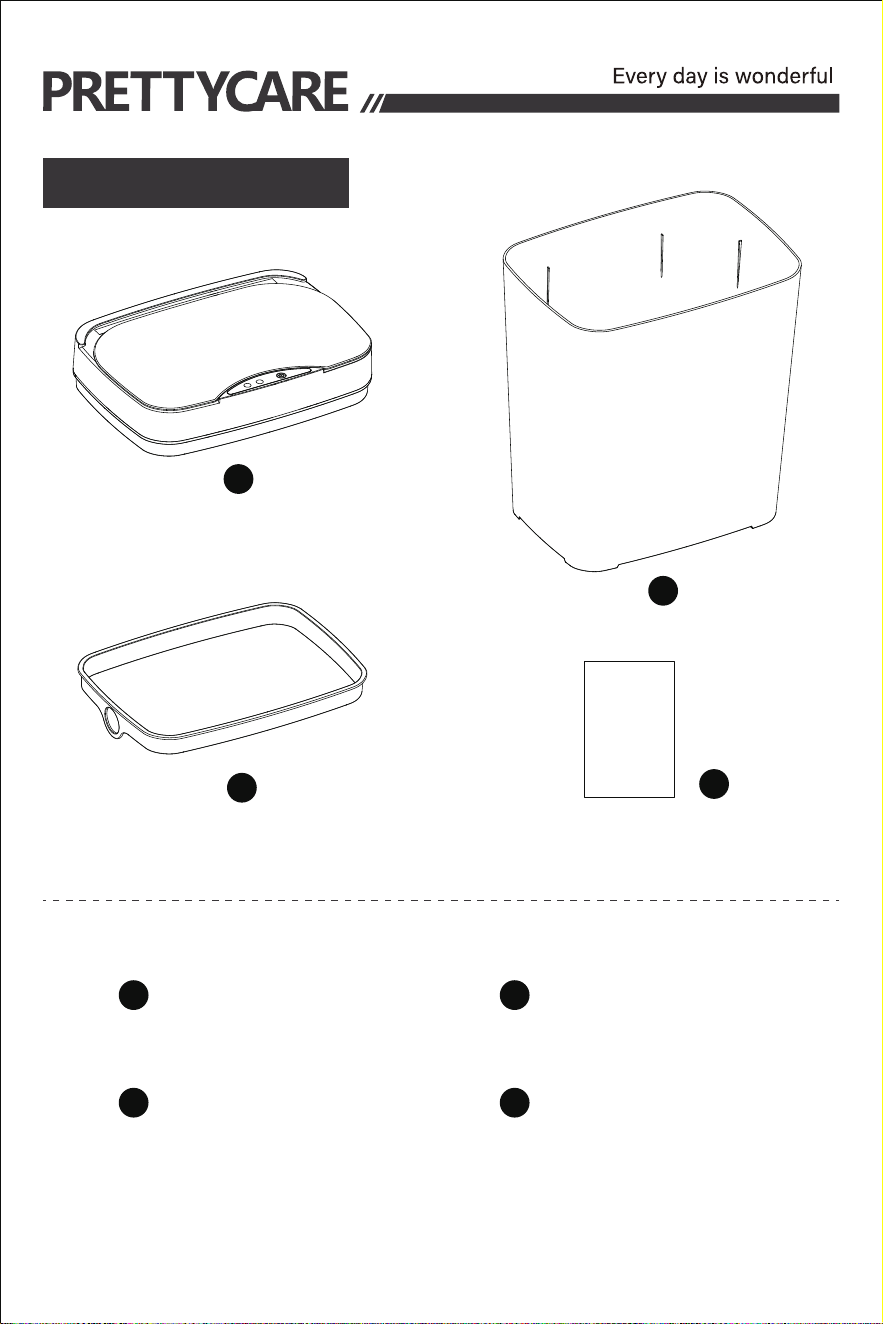
Product Structure
Lid
Fixing Ring
Smart trash can lid* 2 Can* 2
Fixing ring* 2 Product Manual* 1
Switch/Indicator light
Sensing Area
Electronic Part Shell
Can
Battery Case
Battery Compartment Cover
The main body of this product contains electronic components,
including precision parts.
1.Water Avoidance: Do not rinse the electronic part directly with
water to prevent damage or short circuits to internal circuits. Wipe
the electronic part shell clean with a wrung wet cloth.
2.Touch Buttons: Avoid allowing foreign matter to adhere to the
touch buttons as it may affect functionality. Use a soft cloth to wipe
the touch screen area to prevent scratches. If not used for an
extended period, press and hold the power-off button to turn off the
product.
1
1
2
2
3
3
4
4
Smart Trash Can Instruction Manual
Please read this instruction carefully before use,
and please keep it properly for future
Precautions Product List
Product Structure
Lid
Fixing Ring
Smart trash can lid* 2 Can* 2
Fixing ring* 2 Product Manual* 1
Switch/Indicator light
Sensing Area
Electronic Part Shell
Can
Battery Case
Battery Compartment Cover
The main body of this product contains electronic components,
including precision parts.
1.Water Avoidance: Do not rinse the electronic part directly with
water to prevent damage or short circuits to internal circuits. Wipe
the electronic part shell clean with a wrung wet cloth.
2.Touch Buttons: Avoid allowing foreign matter to adhere to the
touch buttons as it may affect functionality. Use a soft cloth to wipe
the touch screen area to prevent scratches. If not used for an
extended period, press and hold the power-off button to turn off the
product.
1
1
2
2
3
3
4
4
Smart Trash Can Instruction Manual
Please read this instruction carefully before use,
and please keep it properly for future
Precautions Product List
Product Structure
Lid
Fixing Ring
Smart trash can lid* 2 Can* 2
Fixing ring* 2 Product Manual* 1
Switch/Indicator light
Sensing Area
Electronic Part Shell
Can
Battery Case
Battery Compartment Cover
The main body of this product contains electronic components,
including precision parts.
1.Water Avoidance: Do not rinse the electronic part directly with
water to prevent damage or short circuits to internal circuits. Wipe
the electronic part shell clean with a wrung wet cloth.
2.Touch Buttons: Avoid allowing foreign matter to adhere to the
touch buttons as it may affect functionality. Use a soft cloth to wipe
the touch screen area to prevent scratches. If not used for an
extended period, press and hold the power-off button to turn off the
product.
1
1
2
2
3
3
4
4

INSTRUCTIONS FOR USE
PAY ATTENTION ! ! !
Troubleshooting
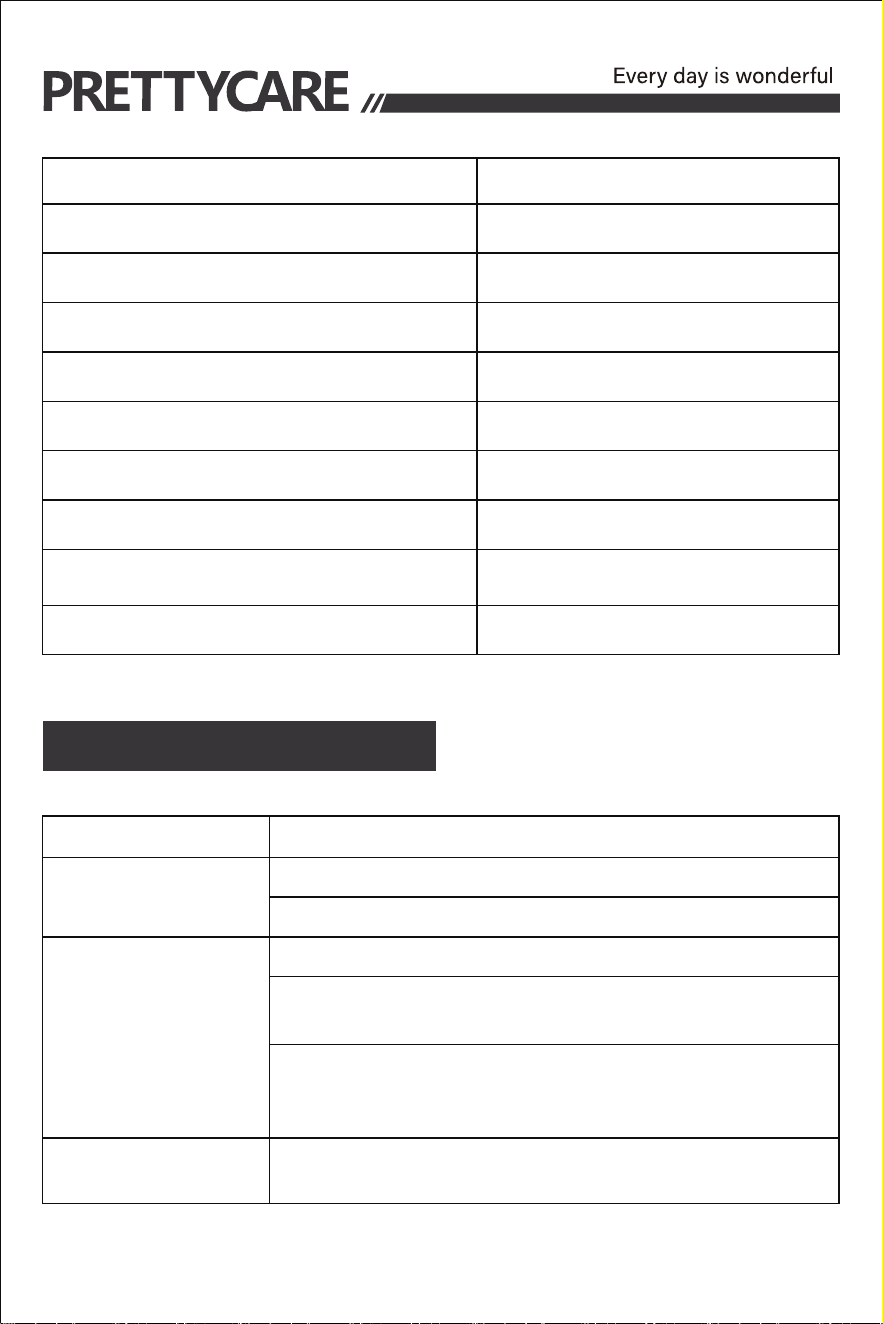
Product parameters
PRODUCT NAME
MODEL
MATERIAL
CAPACITY
SIZE
COLOR
BATTERY
BATTERY LIFE
APPLICABLE BAG CAPACITY
ERRORS SOLUTIONS
Lid does not open
Press the power button to make sure the power is on.
Lid does not close
Red LED
flashes slowly
If you encounter product problems that we have not mentioned, please contact
our customer service in time and we will solve it for you within 24 hours
Battery power is low. Replace the batteries.
Check if the batteries are placed correctly
Press the ”Open/Close” button to close the trash can.
Check to see if there are any objects within the
sensor area. If there are, remove them
Wipe the sensor with a dry cloth to ensure that the
sensor is clean and that there is no excess moisture
on it.
SMART TRASH CAN
GC01
PP
3.6gal
9.8* 7*12.2in
WHITE+BLACK
AA*2(NOT INCLUDED)
30-60days(Depends on
frequency of use)
≥4gal(NOT INCLUDED)
1.On/off key: Press and hold for 1.5 seconds to turn on (the indicator
light flashes blue for 3 seconds). Press and hold again for 1.5 sec-
onds to turn off (the indicator light flashes red for 3 seconds)
5.Switch Function: Short press the switch, and the lid will stay open,
the blue light stays on for five seconds and then goes out to save
power. Short press the switch again, and the lid will close,restoring
1.If there is an object blocking the sensing area within 23.6in, the lid
will remain closed. The blue indicator light will not work until the
obstructing object is removed, and then it will resume normal opera-
tion.
2.When the battery power is low, the red light will flash slowly when
the lid is opened, indicating that the battery power is about to be
exhausted.Replace the batteries.
4.Battery Box: This product requires two AA batteries to start the
smart sensing operation.
3.Vibration Device: Use your foot or an object to lightly kick the can,
and the motor will work normally to open the lid. The lid will automati-
cally close after 5 seconds.
2.Sensing Area: If any object or hand comes within 11.8in of the
sensing area of this product, the lid will automatically open, and the
blue light will flash slowly. After 5 seconds, the lid will automatically
close.
the sensing function.
Walmart
PRETTYCARE
INSTRUCTIONS FOR USE
PAY ATTENTION ! ! !
Troubleshooting
Product parameters
PRODUCT NAME
MODEL
MATERIAL
CAPACITY
SIZE
COLOR
BATTERY
BATTERY LIFE
APPLICABLE BAG CAPACITY
ERRORS SOLUTIONS
Lid does not open
Press the power button to make sure the power is on.
Lid does not close
Red LED
flashes slowly
If you encounter product problems that we have not mentioned, please contact
our customer service in time and we will solve it for you within 24 hours
Battery power is low. Replace the batteries.
Check if the batteries are placed correctly
Press the ”Open/Close” button to close the trash can.
Check to see if there are any objects within the
sensor area. If there are, remove them
Wipe the sensor with a dry cloth to ensure that the
sensor is clean and that there is no excess moisture
on it.
SMART TRASH CAN
GC01
PP
3.6gal
9.8* 7*12.2in
WHITE+BLACK
AA*2(NOT INCLUDED)
30-60days(Depends on
frequency of use)
≥4gal(NOT INCLUDED)
1.On/off key: Press and hold for 1.5 seconds to turn on (the indicator
light flashes blue for 3 seconds). Press and hold again for 1.5 sec-
onds to turn off (the indicator light flashes red for 3 seconds)
5.Switch Function: Short press the switch, and the lid will stay open,
the blue light stays on for five seconds and then goes out to save
power. Short press the switch again, and the lid will close,restoring
1.If there is an object blocking the sensing area within 23.6in, the lid
will remain closed. The blue indicator light will not work until the
obstructing object is removed, and then it will resume normal opera-
tion.
2.When the battery power is low, the red light will flash slowly when
the lid is opened, indicating that the battery power is about to be
exhausted.Replace the batteries.
4.Battery Box: This product requires two AA batteries to start the
smart sensing operation.
3.Vibration Device: Use your foot or an object to lightly kick the can,
and the motor will work normally to open the lid. The lid will automati-
cally close after 5 seconds.
2.Sensing Area: If any object or hand comes within 11.8in of the
sensing area of this product, the lid will automatically open, and the
blue light will flash slowly. After 5 seconds, the lid will automatically
close.
the sensing function.
Walmart
PRETTYCARE

INSTRUCTIONS FOR USE
PAY ATTENTION ! ! !
Troubleshooting
Product parameters
PRODUCT NAME
MODEL
MATERIAL
CAPACITY
SIZE
COLOR
BATTERY
BATTERY LIFE
APPLICABLE BAG CAPACITY
ERRORS SOLUTIONS
Lid does not open
Press the power button to make sure the power is on.
Lid does not close
Red LED
flashes slowly
If you encounter product problems that we have not mentioned, please contact
our customer service in time and we will solve it for you within 24 hours
Battery power is low. Replace the batteries.
Check if the batteries are placed correctly
Press the ”Open/Close” button to close the trash can.
Check to see if there are any objects within the
sensor area. If there are, remove them
Wipe the sensor with a dry cloth to ensure that the
sensor is clean and that there is no excess moisture
on it.
SMART TRASH CAN
GC01
PP
3.6gal
9.8* 7*12.2in
WHITE+BLACK
AA*2(NOT INCLUDED)
30-60days(Depends on
frequency of use)
≥4gal(NOT INCLUDED)
1.On/off key: Press and hold for 1.5 seconds to turn on (the indicator
light flashes blue for 3 seconds). Press and hold again for 1.5 sec-
onds to turn off (the indicator light flashes red for 3 seconds)
5.Switch Function: Short press the switch, and the lid will stay open,
the blue light stays on for five seconds and then goes out to save
power. Short press the switch again, and the lid will close,restoring
1.If there is an object blocking the sensing area within 23.6in, the lid
will remain closed. The blue indicator light will not work until the
obstructing object is removed, and then it will resume normal opera-
tion.
2.When the battery power is low, the red light will flash slowly when
the lid is opened, indicating that the battery power is about to be
exhausted.Replace the batteries.
4.Battery Box: This product requires two AA batteries to start the
smart sensing operation.
3.Vibration Device: Use your foot or an object to lightly kick the can,
and the motor will work normally to open the lid. The lid will automati-
cally close after 5 seconds.
2.Sensing Area: If any object or hand comes within 11.8in of the
sensing area of this product, the lid will automatically open, and the
blue light will flash slowly. After 5 seconds, the lid will automatically
close.
the sensing function.
Walmart
PRETTYCARE