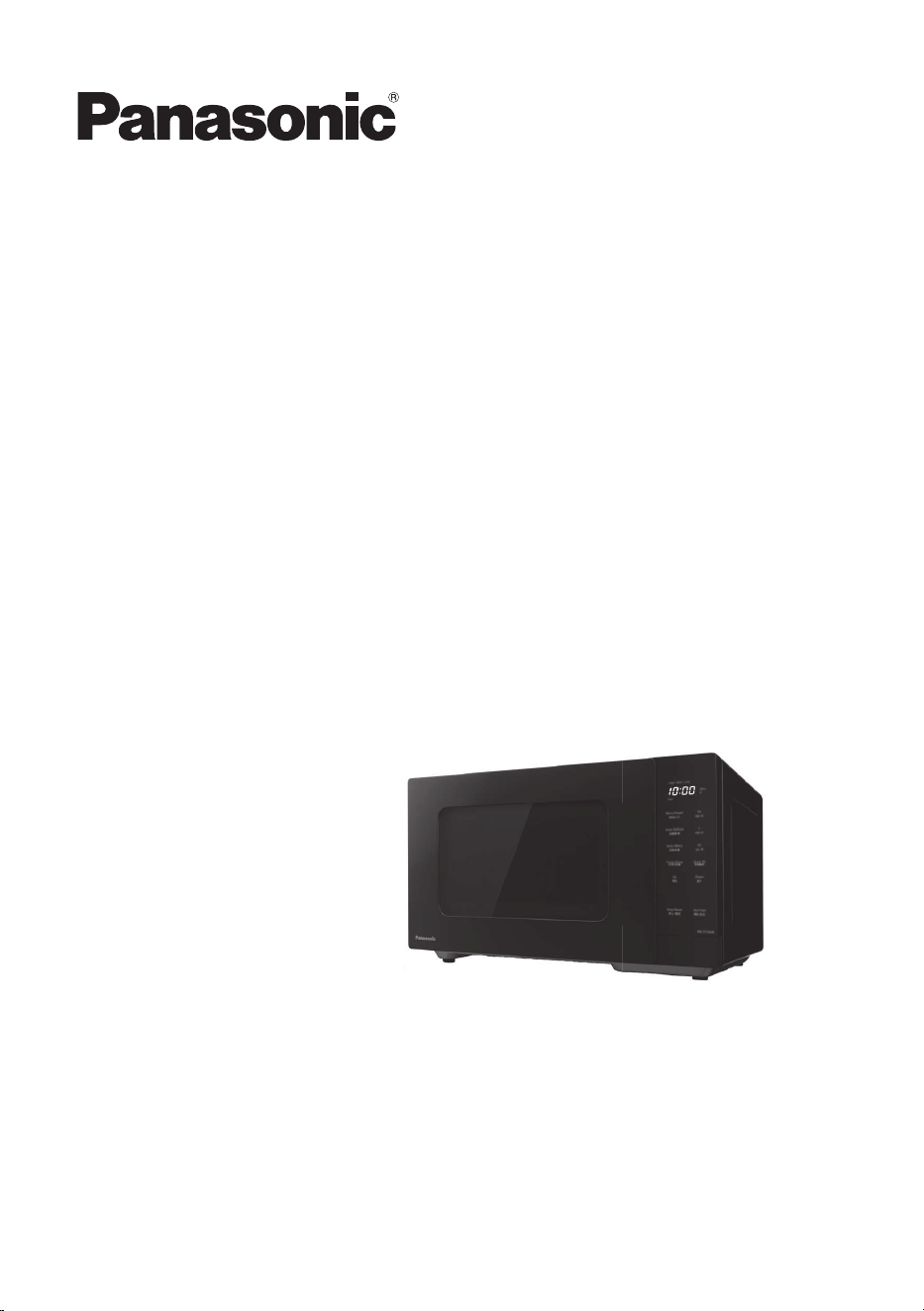
Operating Instructions
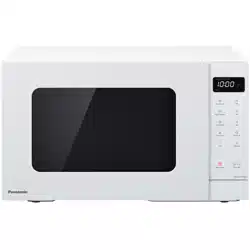
Microwave Oven
Household Use Only
ModelNo.NN-ST34NW/B
NN-ST34NB
We are glad you have chosen to purchase a PANASONIC microwave oven. Before
operating this oven, please read these instructions carefully and completely, and
keep them for further reference.
If you have never used a microwave oven before, you will realise that a microwave
oven uses a totally different method of converting energy into heat. This requires an
understanding of what exactly happens to food when placed in the oven. This is
explained in the following pages.
After reading the introductory chapter, I am sure you will be able to master the basic
technique and thereby develop a rm understanding of your new oven.
Start experimenting now, and enjoy the rst class results you will achieve by using
your new microwave oven.
Panasonic Australia Pty Ltd
1 Innovation Road
Macquarie Park
NSW 2113
PANASONIC NZ LTD
CUSTOMER CARE CENTRE
18 Sir Woolf Fisher Drive
Highbrook, Auckland 2013
Private Bag 14911
Panmure, Auckland
Phone: (09) 272-0178
Fax: (09) 272-0134
Email:
Website:
www.panasonic.co.nz/support
The serial number of this product may
be found on the identication label. You
should note the model number and
serial number of this oven in the space
provided and retain this book as a
permanent record of your purchase for
future reference.
MODEL NUMBER
SERIAL NUMBER
DATE OF PURCHASE

1
Thank you for purchasing a Panasonic appliance.
Important Safety Instructions:
Before operating this oven, please read these instructions and precautions
carefully and keep for future reference.
Contents
Important safety instructions........................................... 2
General guidelines.......................................................... 7
Containers to use ........................................................... 9
Parts of your oven .........................................................11
Control panel ................................................................ 12
Setting the clock ........................................................... 13
Child safety lock ........................................................... 13
Microwave cooking and defrosting ............................... 14
Multi-stage cooking....................................................... 16
Quick 30 feature .......................................................... 17
Add time feature ........................................................... 17
Using the timer ............................................................. 18
Auto programmes ......................................................... 20
Auto defrost .............................................................. 20
Auto menu ................................................................ 22
Cooking and reheating guidelines ................................ 25
Questions and answers ................................................ 26
Care of your oven ......................................................... 27
Specications ............................................................... 28
Panasonic Warranty (Australia) .................................... 29
Panasonic Warranty (New Zealand) ............................. 31

2
WARNING
1. The door seals and seal areas
should be cleaned with a damp
cloth.
The appliance should be
inspected for damage to the
door seals and door seal areas
and if these areas are damaged
the appliance should not be
operated until it has been
repaired by a service technician
trained by the manufacturer.
2. Liquids and other foods must
not be heated in sealed
containers since they are liable
to explode.
3. WHEN YOUR OVEN
REQUIRES SERVICING, call
your local Panasonic engineer
(Customer Support). It is
hazardous for anyone other
than a competent person to
carry out any service or repair
operation which involves the
removal of a cover which gives
protection against exposure to
microwave energy.
CAUTION
1. Do not attempt to tamper with
or make any adjustments or
repairs to the door, control
panel housing, safety interlock
switches or any other part of
the oven. Do not remove the
outer panel from the oven
which gives protection against
exposure to microwave energy.
Repairs should only be done by
a qualied service person.
2. Do not operate this appliance if
it has a damaged CORD OR
PLUG, if it is not working
properly, or if it has been
damaged or dropped. It is
dangerous for anyone other
than a service technician
trained by the manufacturer to
perform repair service.
3. If the supply cord is damaged, it
must be replaced by the
manufacturer, its service agent
or similarly qualied person in
order to avoid a hazard.
4.
This appliance is not intended for
use by persons (including children)
with reduced physical, sensory or
mental capabilities, or lack of
experience and knowledge unless
they have been given supervision
or instruction concerning use of the
appliance by a person responsible
for their safety.
Children should be supervised to
ensure that they do not play with
the appliance.
5. The microwave oven is
intended for heating food and
beverages. Drying of food,
newspaper or clothing and
heating of warming pads,
slippers, sponges, damp cloth
and similar may lead to risk of
injury, ignition or re.
6. Before use, check that utensils/
containers are suitable for use
in microwave ovens.
7. The oven will only operate with
the door closed.
8. When the oven is not being
used, do not store any objects
other than oven accessories
inside the oven in case it is
accidentally turned on.
Important safety instructions

3
9. The appliance shall not be
operated WITHOUT FOOD IN
THE OVEN.
Operation in this manner may
damage the appliance.
10. If smoke or a re occurs in the
oven, press Stop/Reset and
leave the door closed in order
to stie any ames.
Disconnect the power cord, or
shut off the power at the fuse or
the circuit breaker panel.
11. The oven lamp must be
replaced by a service
technician trained by the
manufacturer. Do not attempt to
remove the outer casing from
the oven.
Installation
Examine your microwave oven
Unpack the oven, remove all
packing material, and examine the
oven for any damage such as dents,
broken door latches or cracks in the
door. If you nd any damage, notify
your dealer immediately. Do not
install a damaged microwave oven.
Earthing Instructions
IMPORTANT: THIS UNIT HAS TO
BE PROPERLY EARTHED FOR
PERSONAL SAFETY.
If your AC outlet is not earthed, it is
the personal responsibility of the
customer to have it replaced with a
properly earthed wall socket.
Operation Voltage
The voltage has to be the same as
specied on the label on the oven. If a
higher voltage than specied is used,
it may cause a re or other damages.
WE CERTIFY THAT THIS
MICROWAVE OVEN HAS BEEN
INSPECTED AND COMPLIES
WITH THE REQUIREMENTS OF
REGULATION 3,
SUBCLAUSE(2), OF THE
MICROWAVE OVENS
REGULATIONS 1982.
(This statement applicable only to
New Zealand.)
Placement of the oven
This appliance is intended to be
used in household and similar
applications such as:
• staff kitchen areas in shops, ofces
and other working environments;
• farm houses;
• by clients in hotels, motels and
other residential environments;
• bed and breakfast type environments.
1. Place the oven on a at and
stable surface, more than
85 cm above the oor.
The appliance is freestanding
type and shall not be placed in
a cabinet.
2. When this oven is installed, it
should be easy to isolate the
appliance from the electricity
supply by pulling out the plug or
operating a circuit breaker.
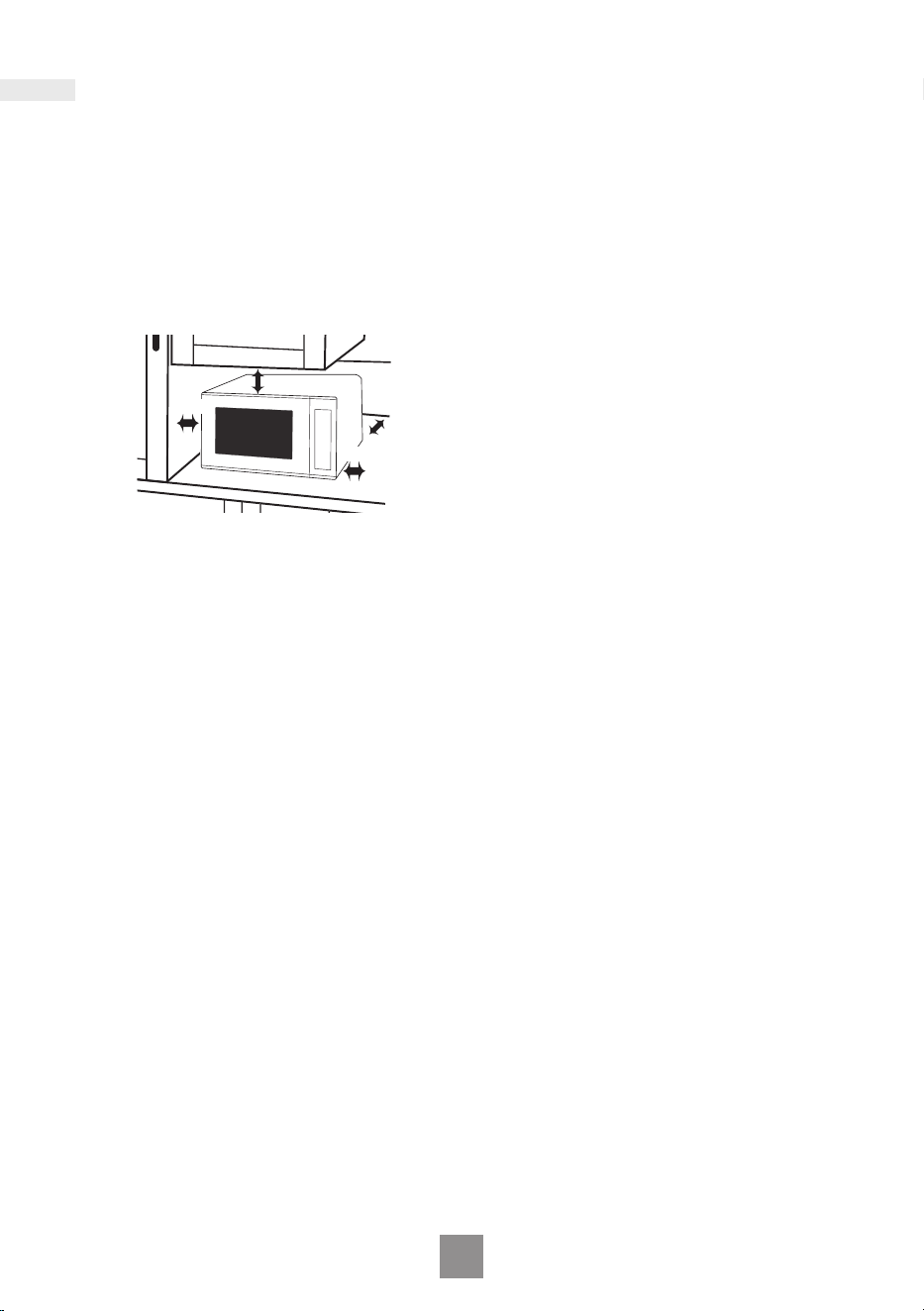
3. For proper operation, ensure a
sufcient air circulation for the
oven.
4
Important safety instructions
Counter-top use:
a.
Allow 15 cm of space on the
top of the oven, 10 cm at the
back and on 5 cm both sides.
b. If one side of the oven is
placed ush to a wall, the
other side or top must not be
blocked.
10 cm
15 cm
5 cm
5 cm
counter top
4. Do not place this oven near an
electric or gas cooker range.
5. The feet should not be
removed.
6. This oven is only for household
usage. Do not use outdoors.
7. Avoid using the microwave
oven in high humidity.
8. The power cord should not
touch the outside of the oven.
Keep the cord away from hot
surfaces. Do not let the cord
hang over the edge of a table or
work top. Do not immerse the
cord, plug or oven in water.
9. Do not block the air vents. If
these openings are blocked
during operation the oven may
overheat. In this case the oven
is protected by a thermal safety
device and resumes operation
only after cooling down.
10. When it becomes necessary to
replace the oven light, please
consult your dealer.
Accessories
The oven comes equipped with a
variety of accessories. Always
follow the directions given for use
of the accessories.
Roller ring
QQ
Do not remove the roller ring
from the cavity oor.
QQ
The roller ring and the oven oor
should be cleaned frequently to
prevent noise and build-up of
remaining food.
QQ
The roller ring must always be
used for cooking together with
the glass tray.
QQ
If you accidentally remove the
roller ring, place the roller ring
gently into the hole in the centre
of the oven and locate it on the
spindle beneath.
Flat processing is applied on the
spindle to rmly hold the roller
ring during operation.
Glass tray
QQ
Always operate the oven with the
roller ring and glass tray in place.
QQ
Only use the glass tray
specically designed for this
oven. Do not substitute with any
other glass tray.
QQ
If the glass tray is hot, let it cool
before cleaning or placing in
water.
QQ
The glass tray can turn in either
direction.
QQ
If the food or cooking vessel on
the glass tray touches the oven
walls and stops the tray rotating,
the tray will automatically rotate
in the opposite direction. This is
normal. Open oven door,
reposition the food and restart.

5
QQ
Do not cook foods directly on the
glass tray. Always place food in a
microwave safe dish.
QQ
While cooking, the glass tray may
vibrate. This will not affect
cooking performance.
Important
If the recommended cooking time
is exceeded, the food will be
spoiled and in extreme
circumstances could catch re
and possibly damage the interior
of the oven.
Short cooking time
As microwave cooking time is
much shorter than other cooking
methods, it is essential that
recommended cooking time is not
exceeded without rst checking the
food.
Factors that may affect cooking
time are: preferred degree of
cooking, starting temperature,
altitude, volume, size and shape of
foods and utensils used. As you
become familiar with the oven, you
will be able to adjust these factors.
It is better to undercook rather than
overcook foods. If food is
undercooked, it can always be
returned to the oven for further
cooking. If food is overcooked,
nothing can be done. Always start
with minimum cooking time.
Small quantities of food
Take care when heating small
quantities of food as these can
easily burn, dry out or catch re if
cooked too long. Always set short
cooking time and check the food
frequently.
Foods low in moisture
Take care when heating foods low
in moisture, e.g. bread items,
chocolate, popcorn, biscuits and
pastries. These can easily burn,
dry out or catch on re if cooked
too long. We do not recommend
heating foods low in moisture such
as popcorn or bread.
This oven has been developed for
food use only.
We do not recommend to use for
heating non food items such as
wheat bags or hot water bottles.
Reheating
It is essential that reheated food is
served “piping hot”.
Remove the food from the oven
and check that it is “piping hot”, i.e.
steam is being emitted from all
parts and all sauce is bubbling.
(You may choose to check the food
has reached 72 °C with a food
thermometer – but remember do
not use this thermometer inside the
microwave.)
For foods that cannot be stirred,
e.g. lasagne, shepherds pie, the
centre should be cut with a knife to
test it is well heated through. Even if
a manufacturer’s packet instructions
have been followed always check
the food is piping hot before serving
and if in doubt return your food to
the oven for further heating.
Standing time
Standing time refers to the period
at the end of cooking or reheating
when food is left before being
eaten, i.e. it is a rest time which
allows the heat in the food to
continue to conduct to the centre,
thus eliminating cold spots.

6
Important safety instructions
Lids
Always remove the lids of jars and
containers and takeaway food
containers before you microwave
the food. If the lid remains, then
steam and pressure might build up
inside and cause an explosion
even after the microwave cooking
has stopped.
Babies bottles and food jars
When reheating babies bottles
always remove top and teat. Liquid
at the top of the bottle will be much
hotter than that at the bottom and
must be shaken thoroughly before
checking the temperature. This
should be carried out before
consumption to avoid burns. See
page 25.
Boiled eggs
Eggs in their shell and whole
hard-boiled eggs should not be
heated in microwave ovens since
they may explode even after
microwave heating has ended.
Foods with skins
Potatoes, apples, egg yolk, whole
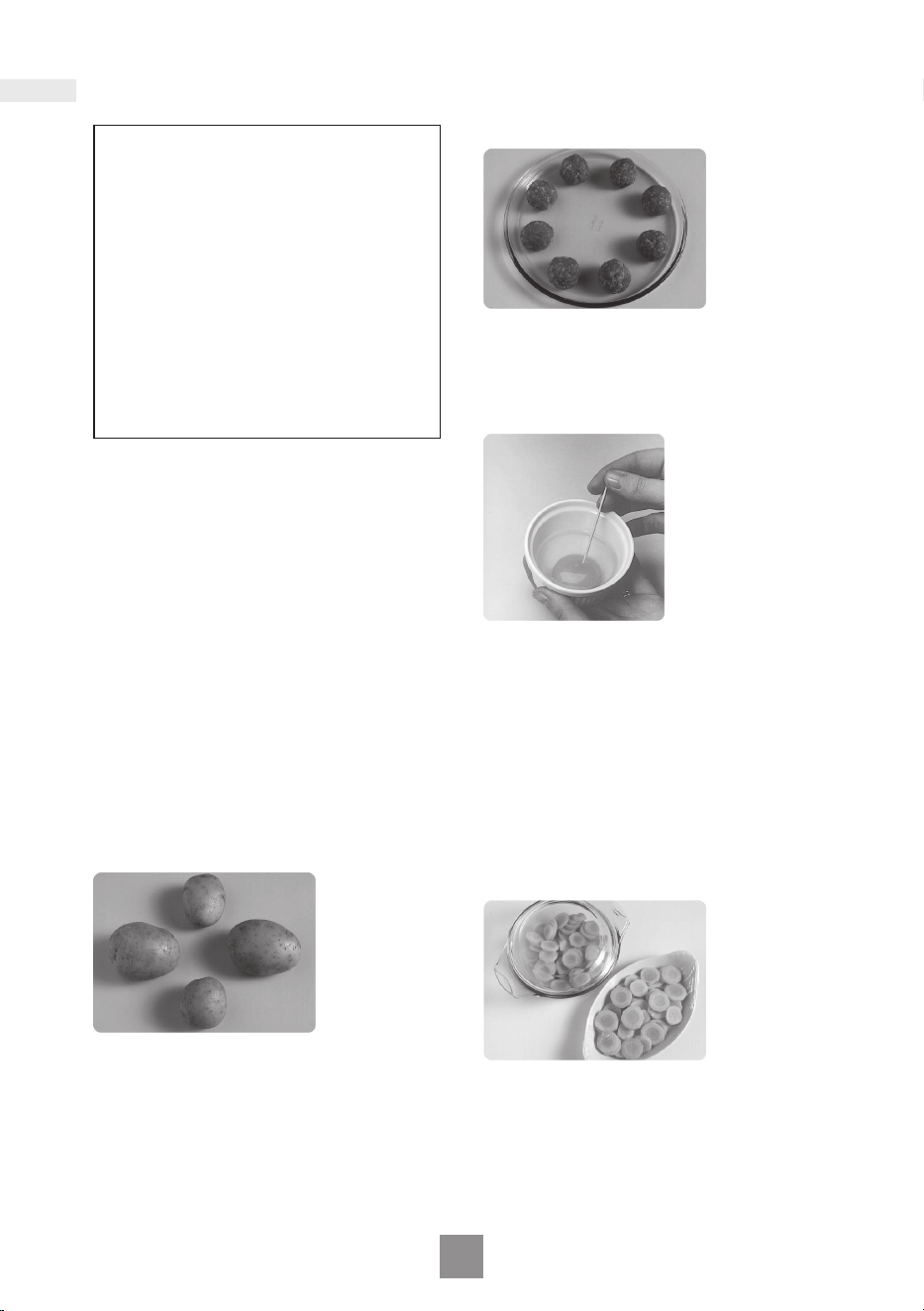
vegetables and sausages are
examples of food with non porous
skins. These must be pierced using
a fork before cooking to prevent
bursting.
Paper and plastic
When heating food in plastic or paper
containers, keep an eye on the oven
due to the possibility of ignition. Do
not use wire twist-ties with roasting
bags as arcing will occur.
Do not use re-cycled paper products,
e.g. Kitchen roll unless they say they
are specically designed for use in a
microwave oven. These products
contain impurities which may cause
sparks and/or res when used.
Liquids
Microwave heating of beverages
can result in delayed eruptive
boiling, therefore care should be
taken when handling the container.
To prevent the possibility of sudden
boil the following steps should be
taken:
a) Avoid using straight-sided
containers with narrow necks.
b) Do not overheat.
c) Stir the liquid before placing the
container in the oven and again
halfway through the heating
time.
d) After heating, allow to stand in
the oven for a short time, stirring
again before carefully removing
the container.
Deep fat frying
Do not attempt to deep fat fry in
your oven.
Arcing
Arcing may occur accidentally if a
metal container has been used or
the incorrect weight of food is used.
Arcing is ashes of blue light seen
in the microwave oven. If this
occurs, stop the machine
immediately. If the oven is left
unattended and this continues it
can damage the machine.
Meat thermometer
Use a meat thermometer to check the
degree of cooking of joints and poultry
only when meat has been removed
from the microwave. If undercooked,
return to the oven and cook for a few
more minutes at the recommended
power level. Do not leave a
conventional meat thermometer in the
oven when microwaving.
7
General guidelines
CLEANING
As microwaves work on food
particles, keep your oven clean at all
times. Stubborn spots of food can be
removed by using a microwave spray
cleaner, sprayed onto a soft cloth.
Always wipe the oven dry after
cleaning.
Refer to “Care of your oven” on page
27 for details on cleaning.
The warranty only applies if the
product has been used in accordance
with the operating instructions under
normal use and reasonable care.
STANDING TIME
Dense foods e.g. meat, jacket potatoes
and cakes, require standing time
(inside or outside of the oven) after
cooking, to allow heat to nish
conducting to the centre of the food to
cook through completely. Wrap meat
joints and jacket potatoes in aluminium
foil while standing. Meat joints need
approx. 10–15 minutes, jacket potatoes
5 minutes. Other foods such as plated
meals, vegetables, sh etc. require
2–5 minutes standing. If food is not
cooked after standing time, return to
the oven and cook for additional time.
After defrosting food, standing time
should also be allowed.
QUANTITY
Small quantities cook faster than large
quantities, and small meals will reheat
more quickly than large portions.
SPACING
Foods cook more quickly and evenly if
spaced apart. NEVER pile foods on top
of each other.
PIERCING
The skin or membrane on some foods
will cause steam to build up during
cooking.
These foods must be pierced or a strip
of skin should be peeled off before
cooking to allow the steam to escape.
Eggs, potatoes, apples, sausages etc,
will all need to be pierced before
cooking. DO NOT ATTEMPT TO BOIL
EGGS IN THEIR SHELLS.
COVERING
Cover foods with microwave cling lm
or a lid. Cover sh, vegetables,
casseroles, soups. Do not cover cakes,
sauces, jacket potatoes or pastry
items.
8
General guidelines
MOISTURE CONTENT
Many fresh foods e.g. vegetables and
fruit, vary in their moisture content
throughout the season. For this reason
cooking time may have to be adjusted.
Dry ingredients e.g. rice, pasta, can dry
out during storage so cooking time may
differ.
DENSITY
Porous airy foods heat more quickly
than dense heavy foods.
SHAPE
Even shapes cook evenly. Food cooks
better by microwave when in a round
container rather than square.
STARTING TEMPERATURE
The colder the food, the longer it takes
to heat up. Food from a fridge takes
longer to reheat than food at room
temperature.
LIQUIDS
All liquids must be STIRRED BEFORE,
DURING AND AFTER heating. Water
must be stirred before and during
heating, to avoid eruption.
Do not heat liquids that have previously
been boiled. DO NOT OVERHEAT.
TURNING AND STIRRING
Some foods require stirring during
cooking. Meat and poultry should be
turned after half of the cooking time.
ARRANGING
Individual foods e.g. chicken portions
or chops, should be placed on a dish
so that the thicker parts are towards
the outside.
CHECKING FOOD
It is essential that food is checked
during and after a recommended
cooking time, even if an AUTO
PROGRAMME has been used (just as
you would check food cooked in a
conventional oven). Return the food to
the oven for further cooking if
necessary.
DISH SIZE
Follow the dish sizes given in the
recipes, as these affect the cooking
and reheating times.
A quantity of food spread in a bigger
dish cooks and reheats faster.
CLING FILM
Cling lm helps keep the food moist
and the trapped steam assists in
speeding up cooking time. Pierce
before cooking to allow excess steam
to escape. Always take care when
removing cling lm from a dish as the
build-up of steam will be very hot.
9
Containers to use
Choosing the correct container is a very important factor in deciding the success or
failure of your cooking.
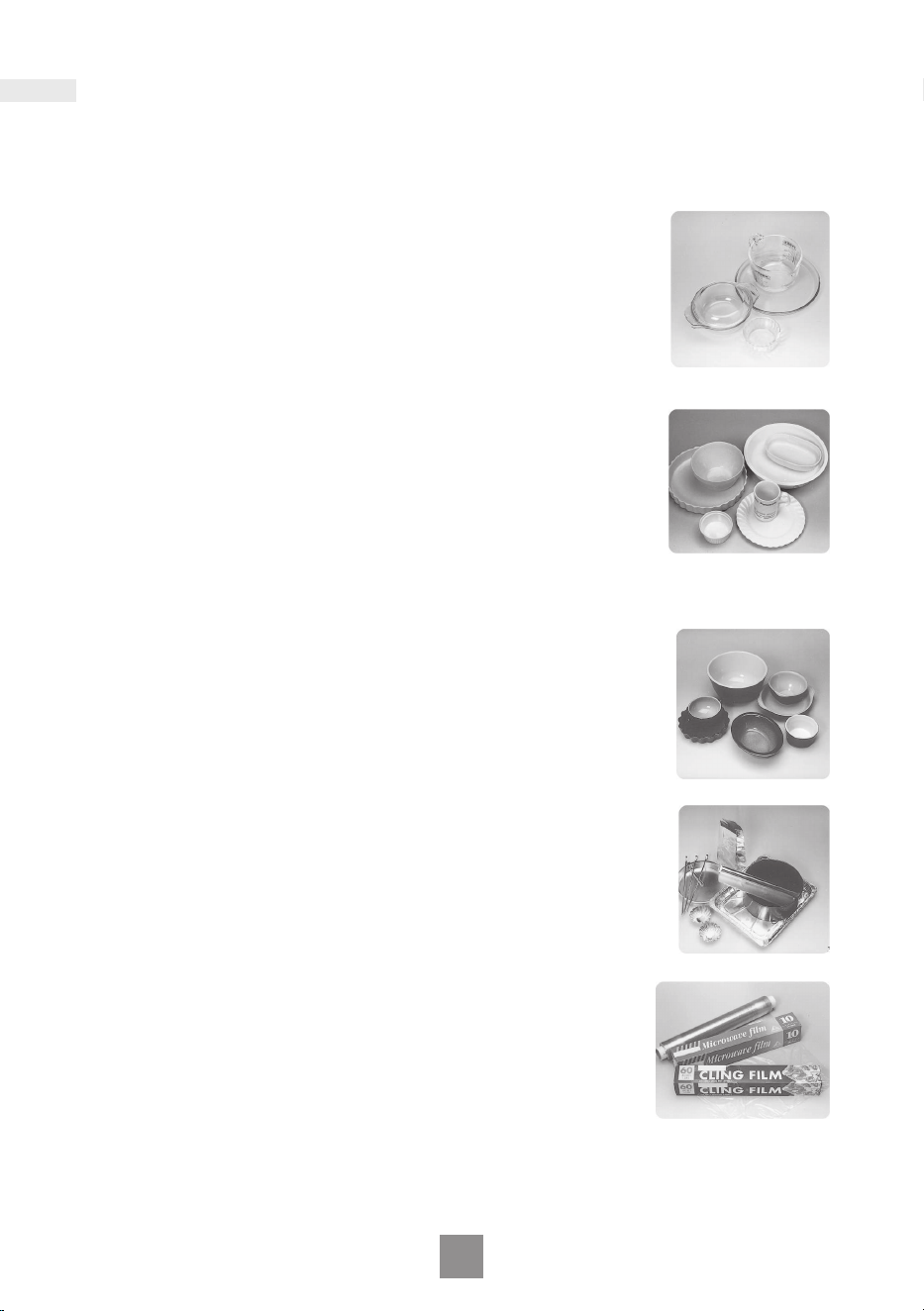
OVEN GLASS
Glass that is heat resistant e.g. Pyrex
®
, is ideal, and can be
used.
Do not use glass which may crack due to the heat from the
food. Do not use lead crystal which may crack or arc.
CHINA AND CERAMIC
Glazed china plates, saucers, bowls, mugs and cups can be
used if they are heat resistant.
Porcelain and ceramic are also ideal. Fine bone china should
only be used for reheating for short period of time, otherwise
the change in temperature may crack the dish or craze the
nish. Do not use dishes with a metal rim or pattern. Do not use
jugs or mugs with glued handles, since the glue can melt in a
microwave.
POTTERY, EARTHENWARE, STONEWARE
Only use if completely glazed. Do not use if partially glazed or
unglazed, as they are able to absorb water which will absorb
microwave energy, making the container very hot and slowing
down the cooking of food.
FOIL/METAL CONTAINERS
NEVER ATTEMPT TO COOK IN FOIL OR METAL containers –
the microwaves cannot pass through and the food will not heat
evenly – this may also damage your oven. Use wooden kebab
sticks instead of metal skewers.
CLING FILM
Use microwave cling lm to cover food that is to be reheated,
or cooked, ON MICROWAVE ONLY taking care to avoid the
lm being in direct contact with the food.
10
Containers to use
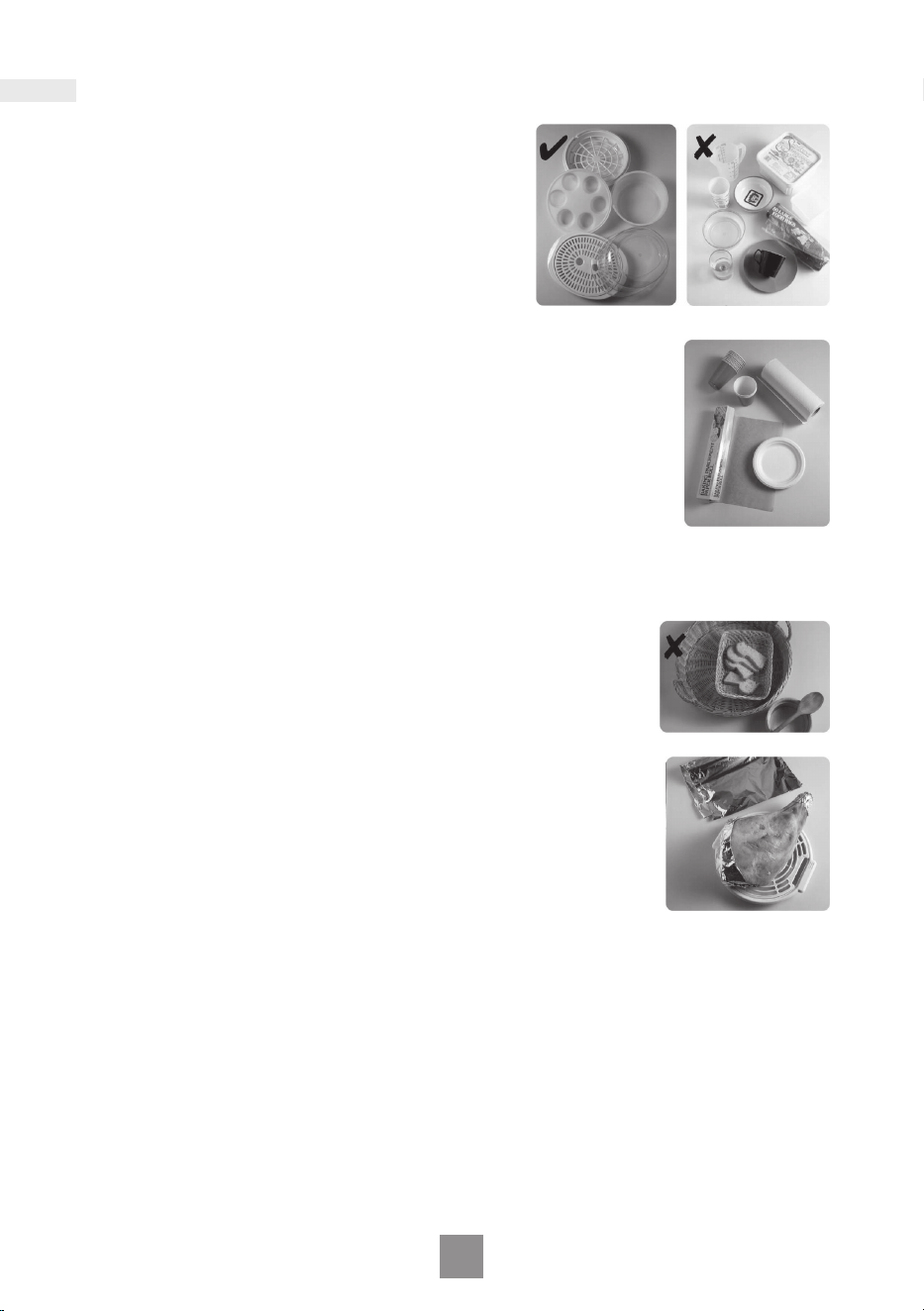
PLASTIC
Many plastic containers are designed for
microwave use. Only use containers if they are
designed for microwave use. Do not use
Melamine as it will scorch. Do not use plastic for
cooking foods high in sugar or fat or foods that
require long cooking time e.g. brown rice. Never
cook in margarine containers or yogurt pots, as
these will melt with the heat from the food.
PAPER
Plain white kitchen paper (kitchen towel) can be used for
covering blind pastry cases and for covering bacon to
prevent splattering ONLY USE FOR SHORT COOKING
TIME. NEVER RE-USE A PIECE OF KITCHEN TOWEL.
Avoid kitchen paper containing manmade bers. Check
that branded re-cycled kitchen towel is recommended for
microwave use. Do not use waxed or plastic coated cups
as the nish may melt in the oven. Greaseproof paper can
be used to line the base of dishes and to cover fatty foods.
White paper plates can be used for SHORT REHEATING
TIMES, ON MICROWAVE ONLY.
WICKER, WOOD, STRAW BASKETS
Do not use these items in your microwave. With
continued use and with prolonged exposure they will
crack and could ignite.
ALUMINIUM FOIL
Small amounts of smooth aluminium foil can be used to
SHIELD joints of meat during defrosting. As the microwaves
cannot pass through the foil this prevents the shielded parts
from overcooking or overdefrosting.
The foil must not touch the sides or roof of the oven, as this
may cause arching and damage your oven.
ROASTING BAGS
These are useful when slit up one side to tent a joint of meat
when roasting by power and time. DO NOT USE THE METAL
TWISTS SUPPLIED.
11
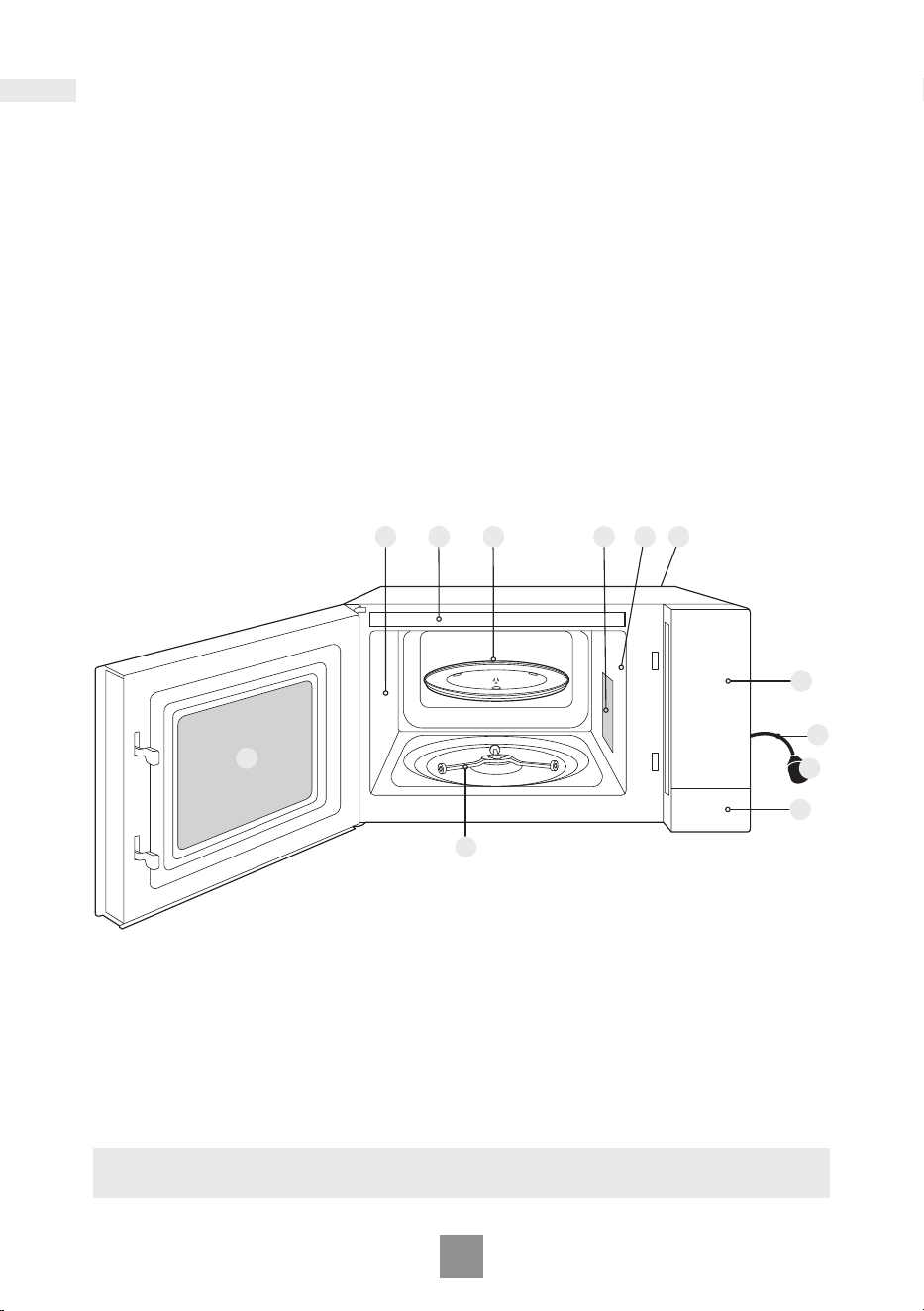
1. Door Release Button
Press to open the door. Opening
the door during cooking will stop
the cooking process without
cancelling the programme. It is
quite safe to open the door at any
time during a cooking programme
and there is no risk of microwave
exposure. Cooking resumes after
the door is closed and Start/Set is
pressed.
2. Oven window
3. Air vent
4. Microwave feed guide
(Do not remove.)
5. External air vents
6. Control panel
7. Power supply cord
8. Plug
9. Glass tray
10. Roller ring
11. Menu label
Parts of your oven
Note
This illustration is for reference only.
Identication and caution labels are attached on the oven.
2
911
10
3
6
8
4 3 5
7
1
12
7
10
2
3
4
6
8
9
1
5
• Your control panel may have
differences in appearance, but the
words on the pads and functionality
will be the same.
Beep sound
When a pad is pressed correctly a
beep will be heard. If a pad is pressed
and no beep is heard, the unit has not
or cannot accept the instruction. The
oven will beep twice between
programmed stages. At the end of any
complete programme, the oven will
beep 5 times.
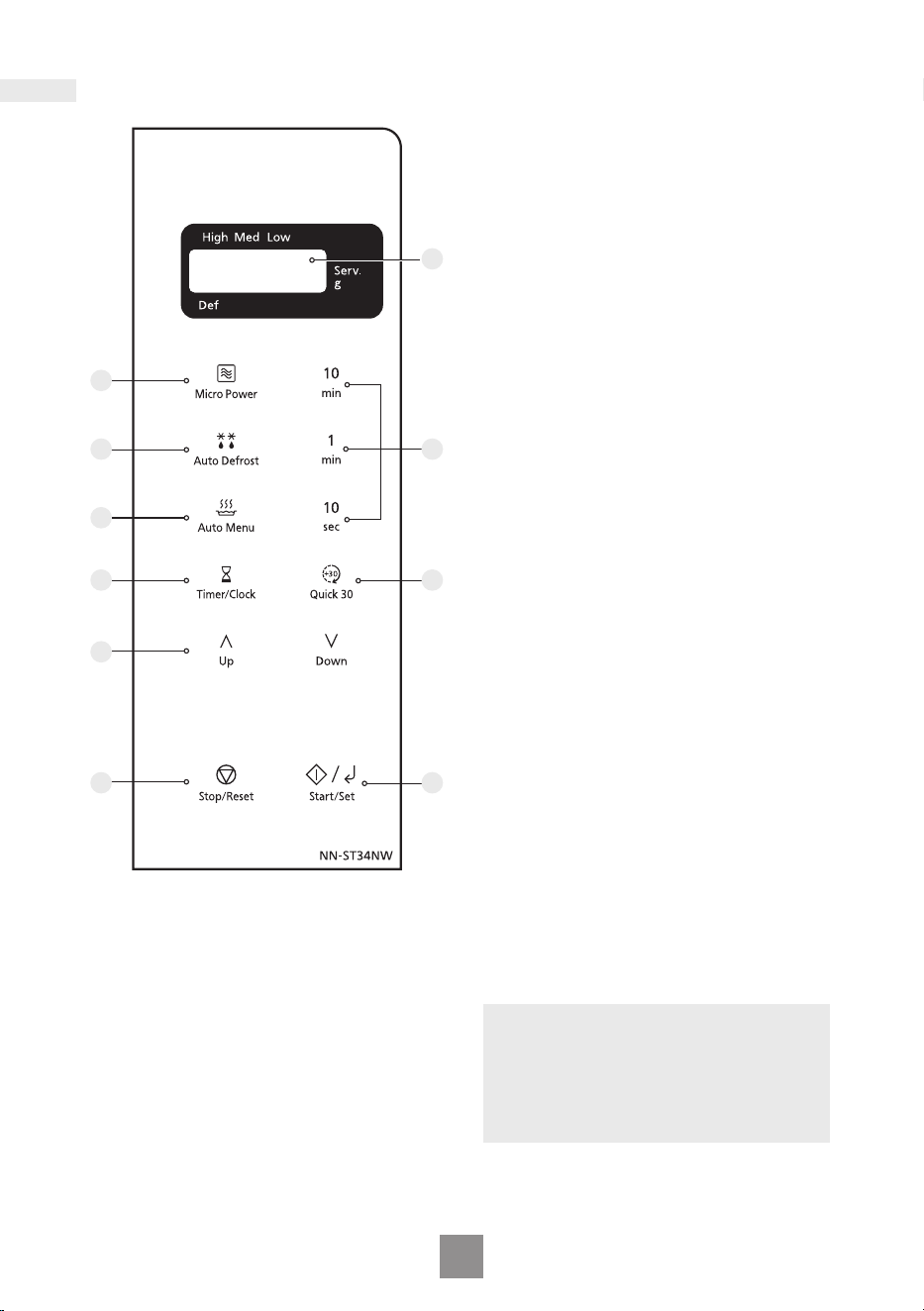
1 Display window
2 Micro Power pad
3 Auto Defrost pad
4 Auto Menu pad
5 Time pads
6 Timer/Clock pad
7 Quick 30 pad
8 Up/Down pads
9 Stop/Reset pad
Before Cooking
One press clears your instructions.
During Cooking
One press temporarily stops the
cooking process. Another press
cancels all your instructions and a
dot or the time of day will appear in
the display.
10 Start/Set pad
One press allows oven to begin
operation. If door is opened or
Stop/Reset is pressed once during
oven operation, Start/Set must be
pressed again to restart oven.
Note
If Start/Set is not pressed for
6 minutes after cooking programme
setting, the oven will automatically
cancel the cooking programme. The
display will revert back to clock or dot.
Control panel
13
Setting the clock
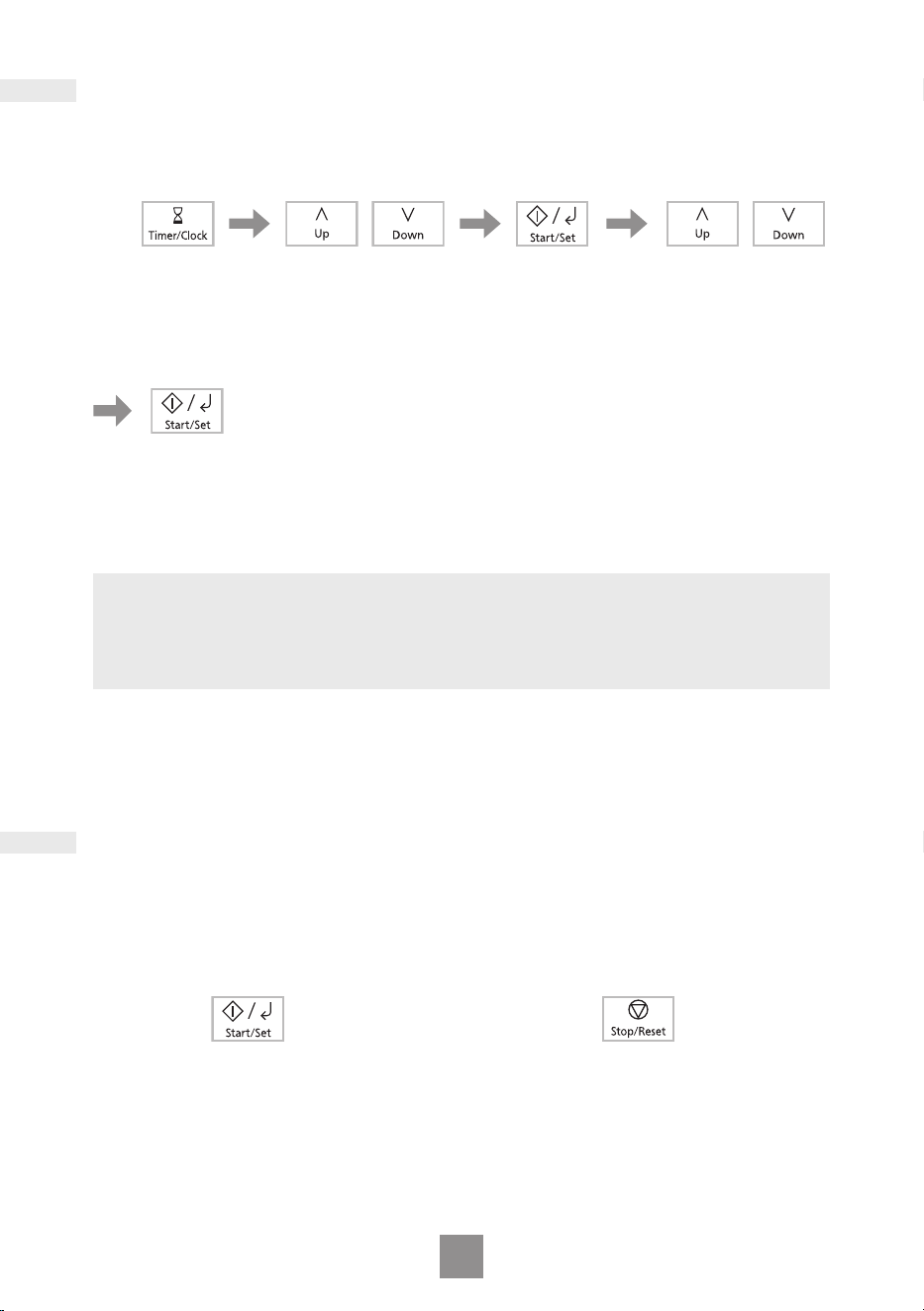
When the oven is plugged in for the rst time, “88.88” appears in display.
Press Start/Set.
Time of day is now
locked into the
display.
Press Timer/Clock
twice.
Hour starts to blink.
Press Up/Down
to set hours.
Press Start/Set.
Minute starts to
blink.
Press Up/Down
to set minutes.
Notes
1. To reset the clock, repeat the whole step above.
2. The clock will keep the time of day as long as the oven is plugged in and
electricity is supplied.
3. This is a 12 hour clock.
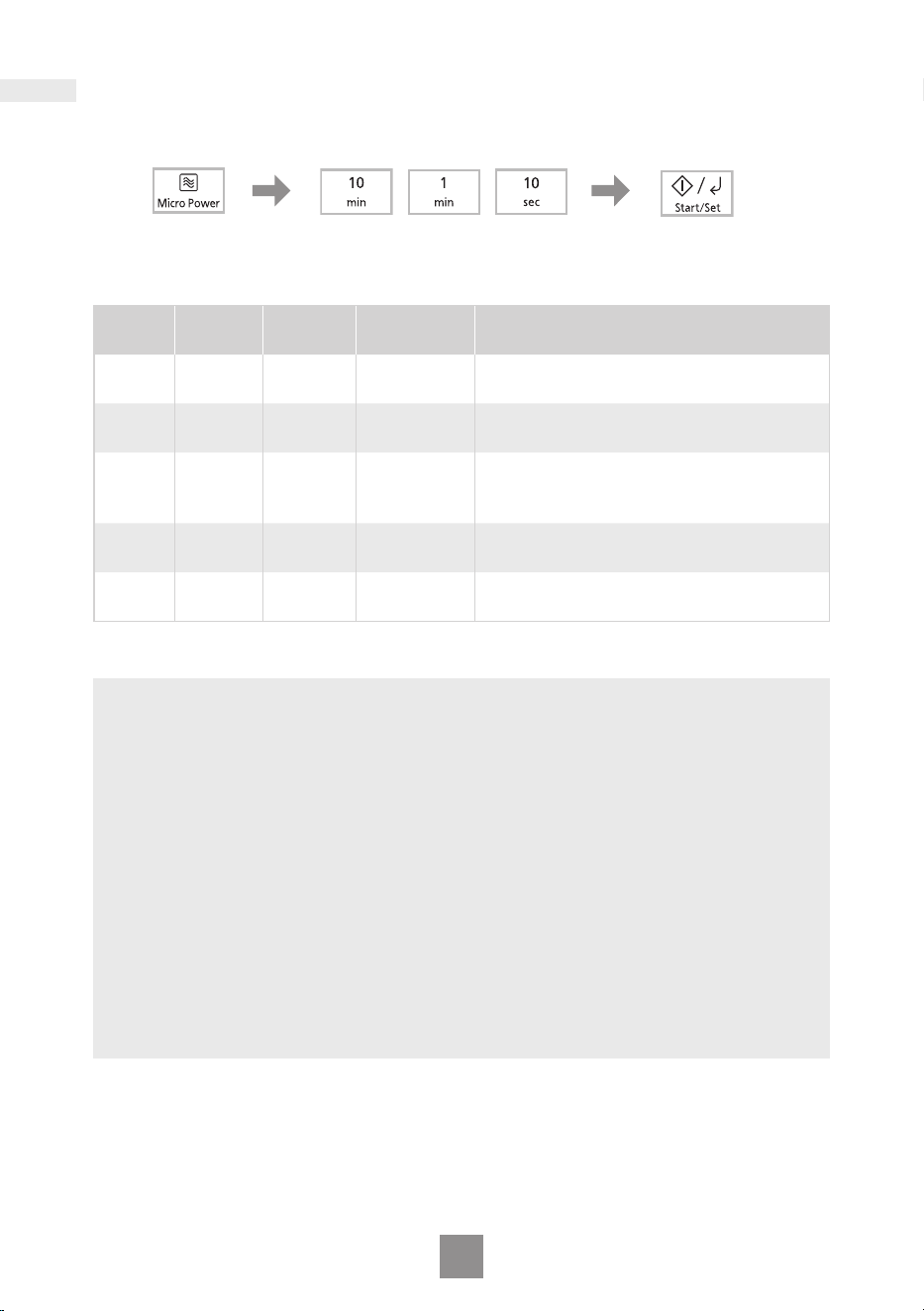
Press Start/Set 3 times within
10 seconds.
The clock will disappear. Actual time
will not be lost. “Child” is indicated in
the display.
To Set:
To Cancel:
Press Stop/Reset 3 times within
10 seconds.
The clock will reappear in the display.
Child safety lock
This feature will make the oven controls inoperable; however, the door can be
opened. Child safety lock can be set when the display shows a dot or the
time.
14
Microwave cooking and defrosting
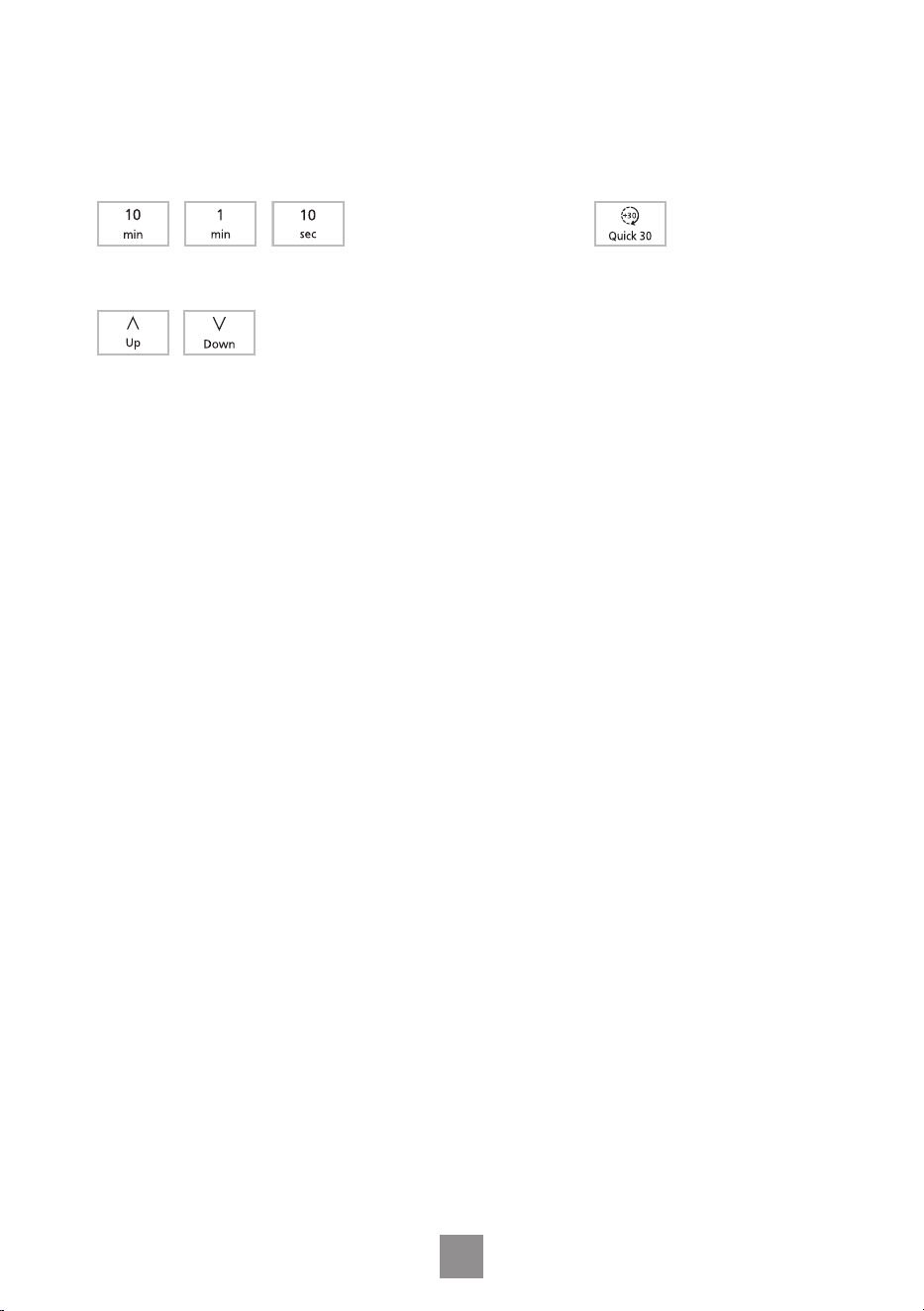
The glass tray must always be in position when using the oven.
Press Micro Power
to select the desired
power level.
Set the cooking time.
Refer to “Setting the cook
time/timer time” on page 15.
Press Start/Set.
The time counts down
in the display.
Press
Power
Level
Wattage
Max. time
available
Example of Use
once High 900 W 30 minutes
Boil water. Cook fresh fruit,
vegetables, rice, pasta and noodles.
twice
Med-
high
500 W
99 minutes
50 seconds
Cook poultry, meat, cakes and
desserts. Heat milk.
3 times Medium 400 W
99 minutes
50 seconds
Cook eggs, cheeses, sh, pot roasts,
casseroles and meat loaves. Melt
chocolate.
4 times Defrost 200 W
99 minutes
50 seconds
Thaw foods.
5 times Low 100 W
99 minutes
50 seconds
Keep cooked foods warm, simmer
slowly.
Notes
1. The oven will automatically work on High microwave power if a cooking time is
entered without the power level previously being selected.
2. While cooking, the glass tray may vibrate. This will not affect cooking
performance.
3. For MULTI-STAGE COOKING, refer to page 16.
4. STANDING TIME can be programmed after microwave power and time setting.
Refer to page 18.
5. DO NOT cook with any metal accessory in the oven.
6. Always check the food during defrosting by opening the door then restarting. It
is not necessary to cover food during defrosting. To ensure an even result, stir,
turn or separate several times during defrosting. For large joints and poultry,
turn halfway through defrosting and protect ends and tips with aluminium foil.
Refer to Defrosting guidelines on page 21 for details.
7. When the microwave oven is operated at High microwave power for long time,
the microwave oven automatically adjust the power to protect the components
of the microwave oven.
15
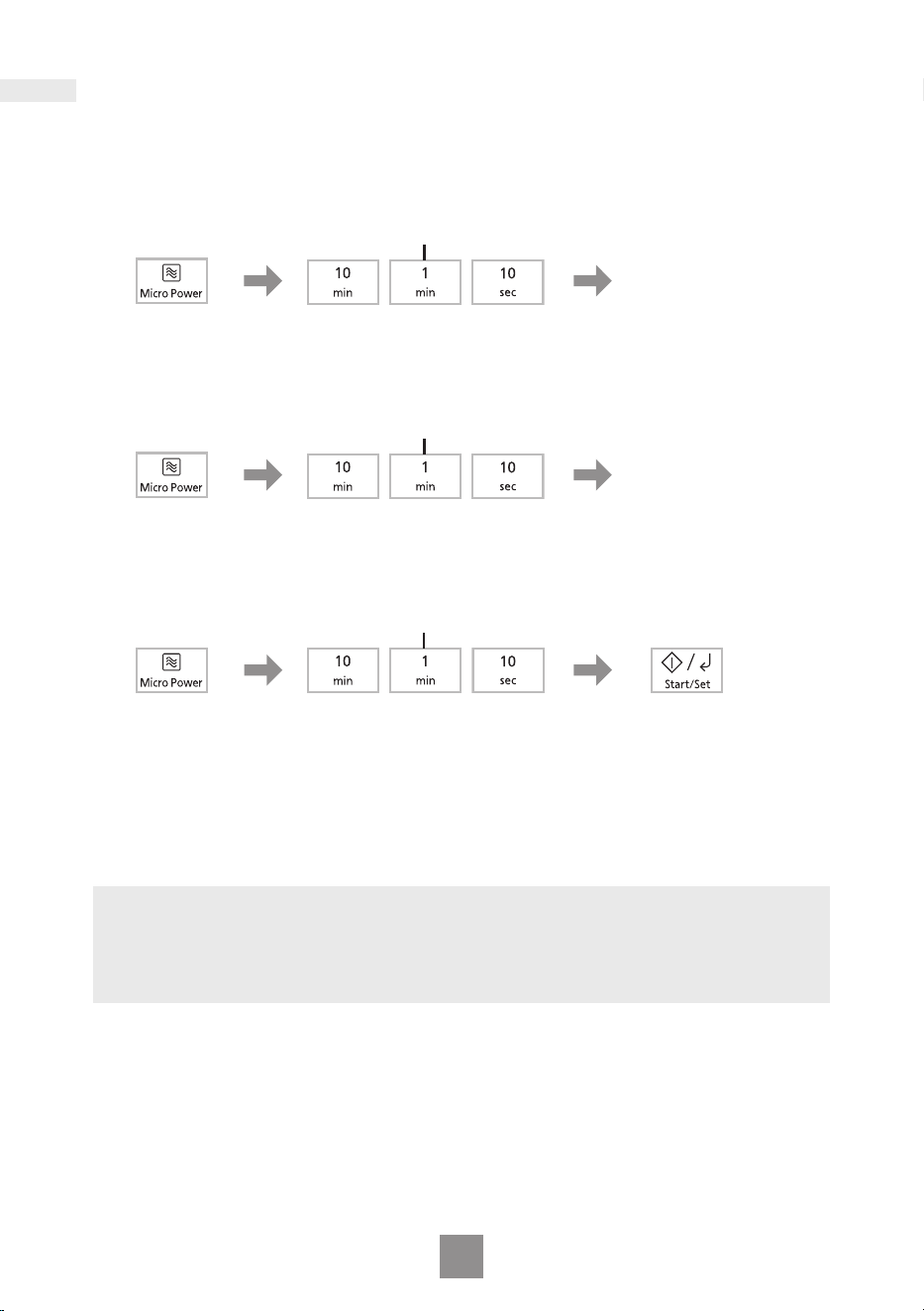
Setting the cook time/timer time
When you set the cook time or the timer time, use following keys according to your
needs.
Press each Time pad repeatedly according
to the time value you want to set.
Press Quick 30 to set cooking time
in 30 seconds increments.
After you enter a time value with each Time pad or Quick 30,
you can adjust the time values with the Up/Down pads.
16
Multi-stage cooking
This feature allows you to programme up to 3 stages of cooking continuously.
Example: To continually set High power for 2 minutes, Medium power for 3 minutes
and Low power for 2 minutes.
Press Micro
Power once to
select High
power.
Set the cooking time*.
Press twice.
Press Micro
Power twice to
select Medium
power.
Set the cooking time*.
Press 3 times.
Press Micro
Power 4 times to
select Low
power.
Press Start/Set.
The time for the rst
stage counts down in
the display.
Set the cooking time*.
Press twice.
* Refer to “Setting the cook time/timer time” on page 15.
Notes
1. AUTO PROGRAMMES cannot be used with MULTI-STAGE COOKING.
2. When operating, 2 beeps will sound between each stage, and 5 beeps will
sound after all stages have nished.
3. High MICROWAVE power can be set only once in MULTI-STAGE COOKING.
17
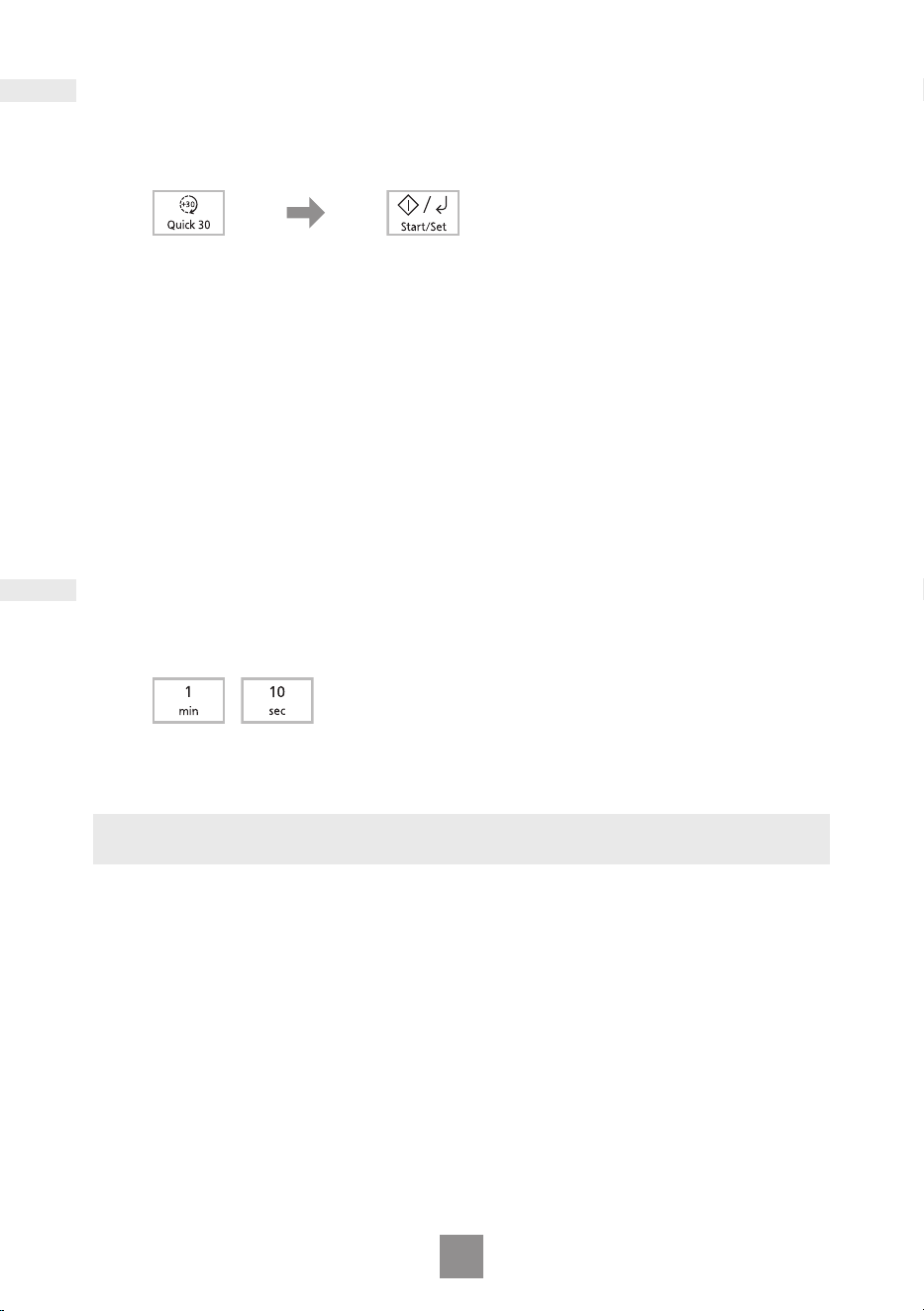
Quick 30 feature
This feature allows you to set cooking time in 30 seconds increments up to
5 minutes at High power.
Press Quick 30 until
the desired cooking
time appears in the
display.
Press Start/Set.
The time counts
down in the
display.
Add time feature
This feature allows you to add cooking time during cooking.
During cooking, press 1 min or 10 sec.
Cooking time will be added up to 5 minutes.
Note
ADD TIME feature is not available for AUTO PROGRAMMES.
18
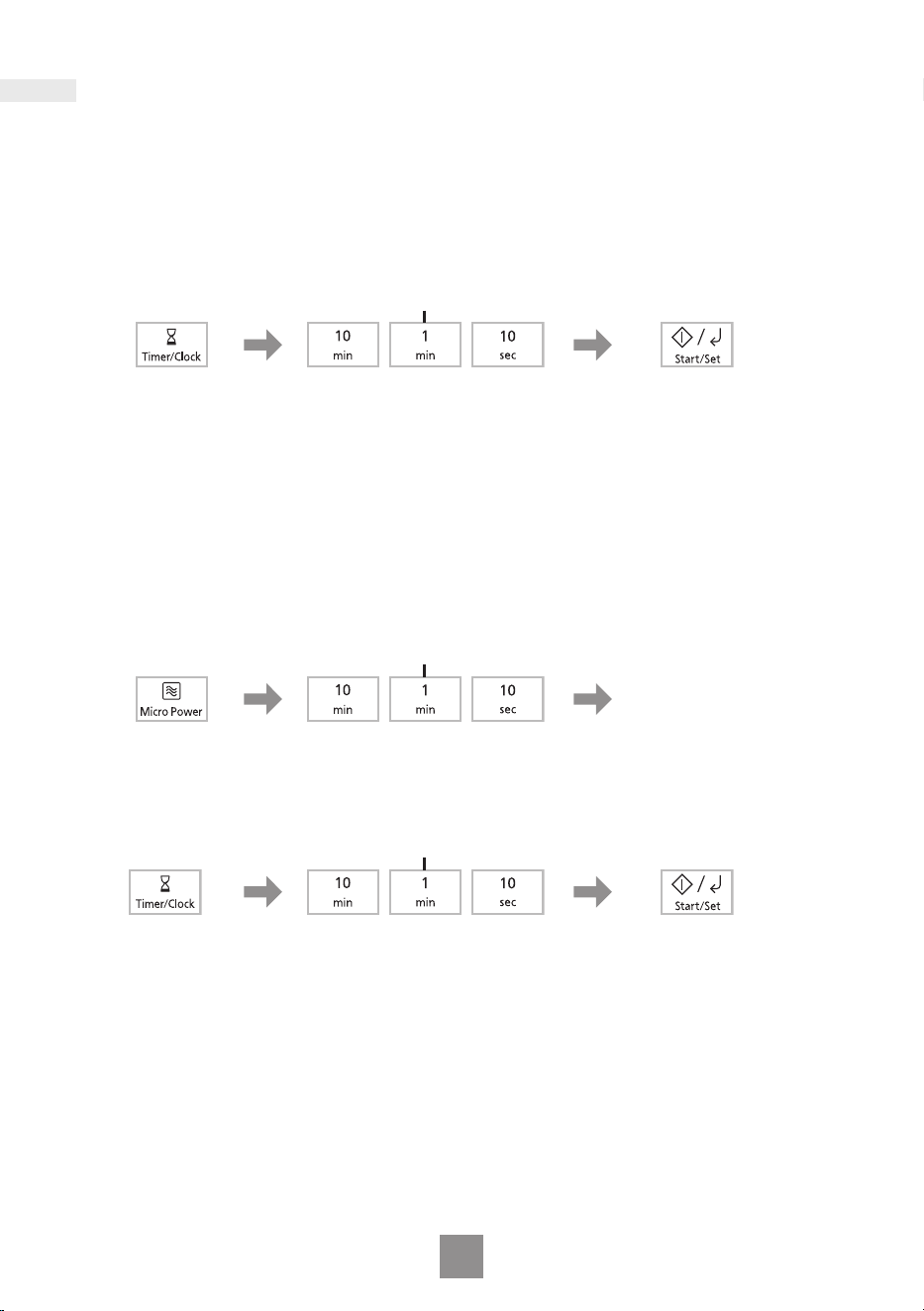
Using the timer
This feature operates as a KITCHEN TIMER or allows you to programme the
STANDING TIME/DELAY START.
Kitchen timer
Example: To count 5 minutes.
Press Timer/
Clock.
Press Start/Set.
The time counts
down without the
oven operating.
Set the desired time*.
(up to 99 minutes 50 seconds)
Press 5 times.
* Refer to “Setting the cook time/timer time” on page 15.
Standing time
Example: To stand for 5 minutes after cooking at Medium power for 3 minutes.
Press Micro
Power 3 times
to select
Medium power.
Set the desired cooking
time*.
Press 3 times.
Press Timer/
Clock.
Press Start/Set.
Cooking starts.
After cooking,
standing time will
count down without
operation.
Set the desired standing
time*.
(up to 99 minutes 50 seconds)
Press 5 times.
* Refer to “Setting the cook time/timer time” on page 15.
19
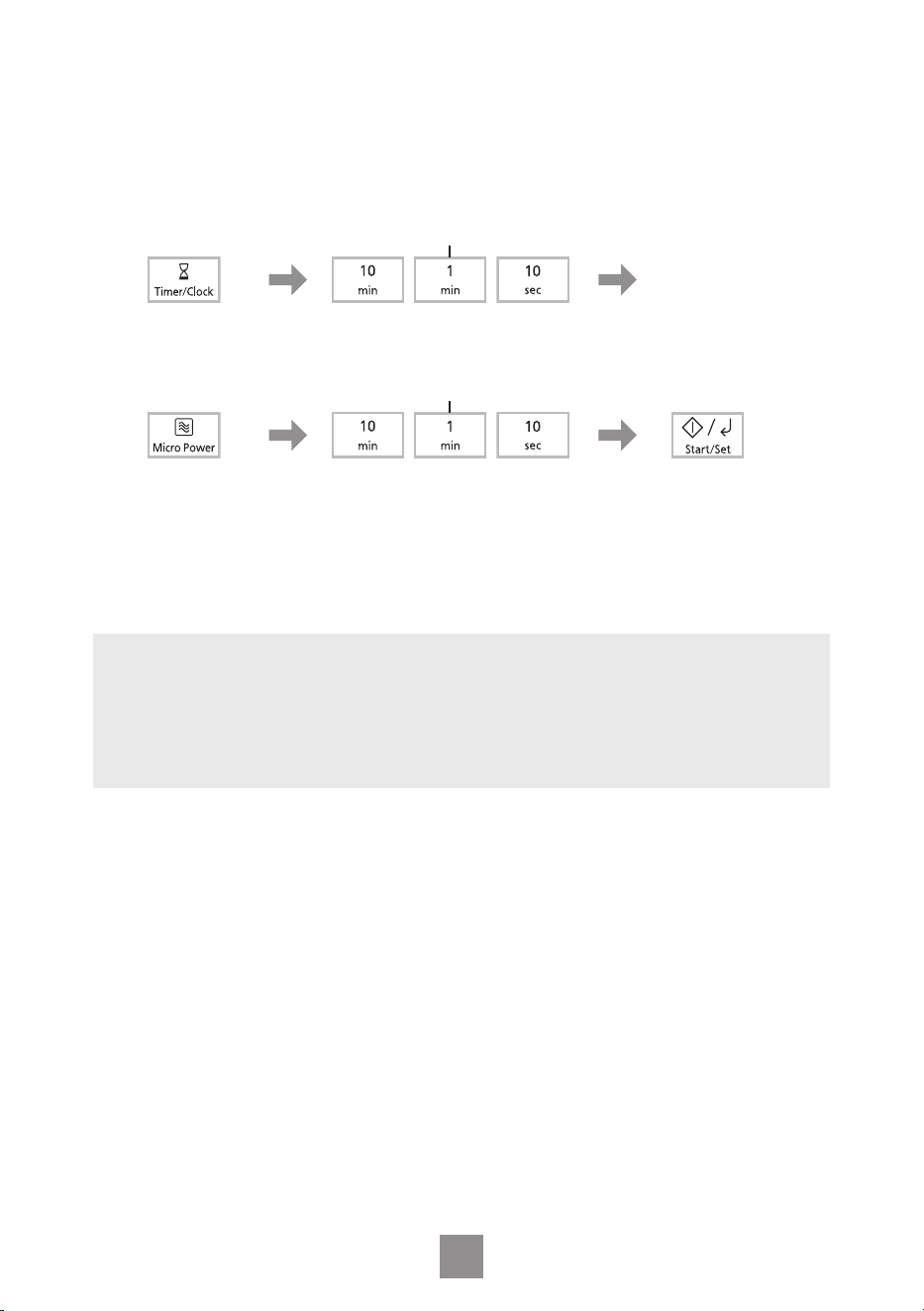
Delay start
Example: To start cooking at Medium power for 3 minutes after 5 minutes of
standing time.
Press Timer/
Clock.
Set the desired delay time*.
(up to 99 minutes 50 seconds)
Press 5 times.
Set the desired cooking
time*.
Press Micro Power
3 times to select
Medium power.
Press 3 times.
Press Start/Set.
Delayed time counts
down, then cooking
will start.
* Refer to “Setting the cook time/timer time” on page 15.
Notes
1. MULTI-STAGE COOKING can be programmed including STANDING TIME or
DELAY START.
2. Even if the oven door is opened during KITCHEN TIMER, STANDING TIME or
DELAY START, the time in the display window will continue to count down.
3. STANDING TIME/DELAY START cannot be programmed before/after any
AUTO PROGRAMME.
20
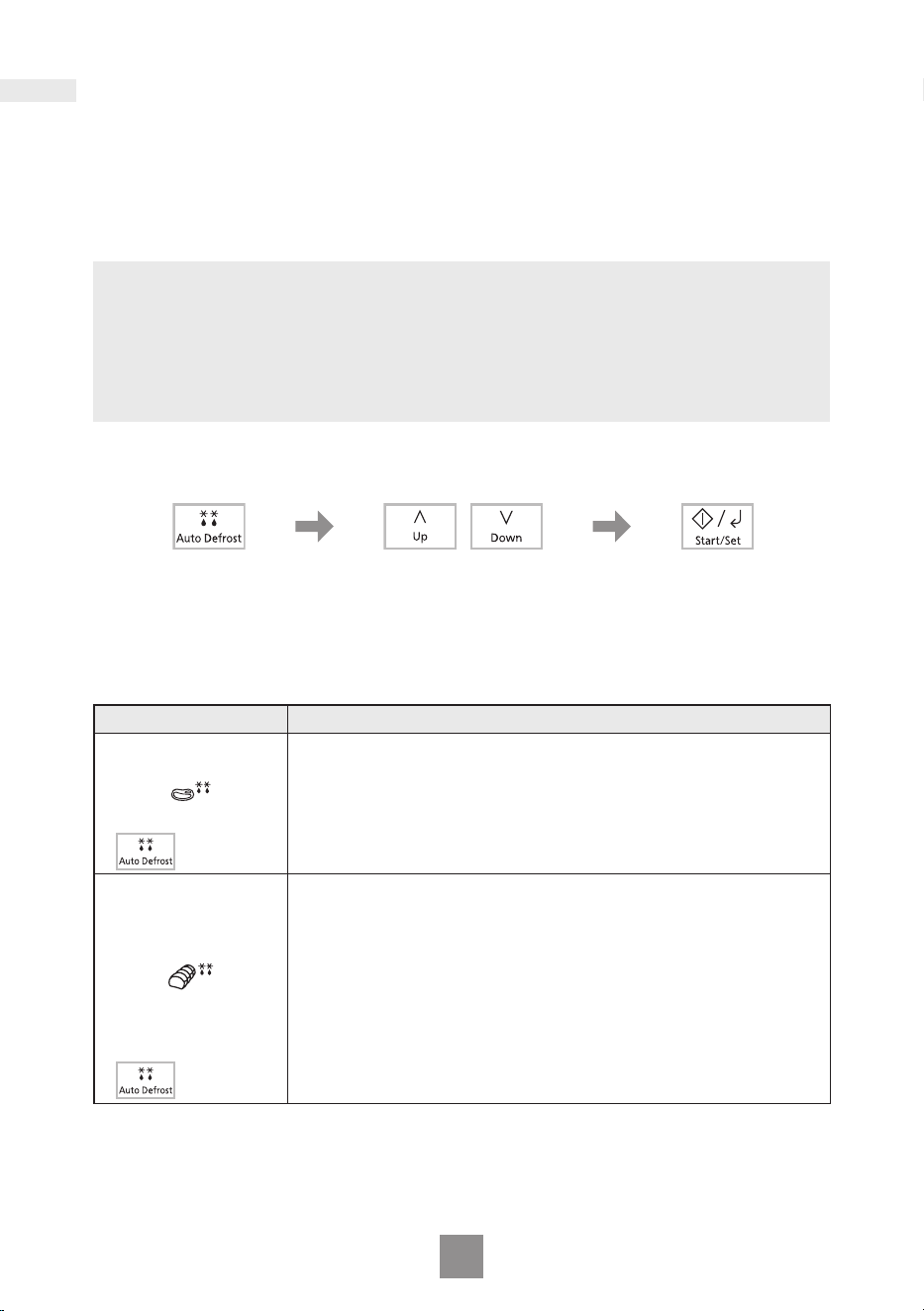
With this feature you can defrost/reheat/cook food according to the weight.
Select the category and set the weight of the food. The weight is programmed
in grams. The oven determines MICROWAVE power level and cooking time
automatically. For quick selection, the weight starts from the most commonly
used weight for each category. Do not include the weight of any added water
or the container weight.
Notes
1. Always operate the oven with the roller ring and glass tray in place.
2. The AUTO PROGRAMMES must ONLY be used for foods described.
3. Only defrost/cook foods within the weight ranges described.
4. Always weigh the food rather than relying on the package information.
5. Most foods benet from a STANDING TIME. After cooking with an AUTO
PROGRAMME, allow heat to continue conducting to the centre.
Auto defrost
Press Start/Set.
Remember to stir
or turn the food
during defrosting.
Set the weight of the
frozen food.
The weight counts up/
down in 10 g increments.
Select the desired Auto
Defrost programme.
The AUTO PROGRAMME
number appears in the
display.
Programme Instructions
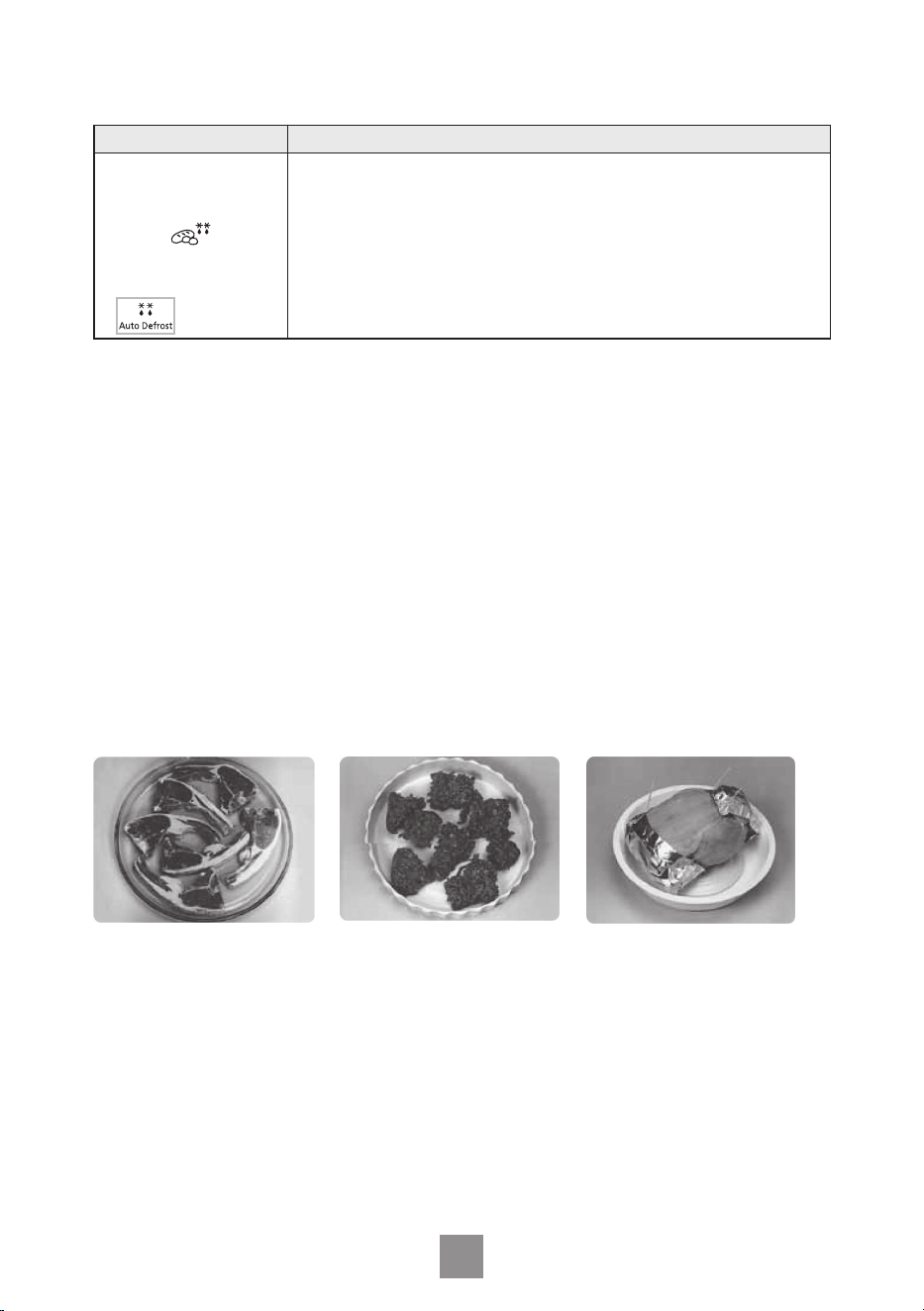
1. Small Pieces
Weight: 200 - 1000 g
For defrosting small pieces of meat, escallop, sausages,
minced meat, steak, chops, sh llets (each 100 g to 400 g).
Press Auto Defrost once. Set the weight of the food and
press Start/Set. Turn and shield at beeps. Allow to stand for
15 to 30 minutes.
1 press
2. Big Piece
Weight: 600 - 1600 g
For defrosting big piece of meat, whole chicken, meat joint.
Press Auto Defrost twice. Set the weight of the food and
press Start/Set. Whole chicken and meat joint will require
shielding during defrosting. Protect wings, breast and fat
with smooth pieces of aluminium foil secured with cocktail
sticks. Do not allow the foil to touch the walls of the oven.
Standing time of 1 to 2 hours should be allowed before
cooking, so that the centre of the food thaws out. Turn and
shield at beeps.
2 presses
Auto programmes
21
Programme Instructions
3. Bread/Cake
Weight: 100 - 600 g
For defrosting bread (whole, slices, rolls) and cakes. Cream
cakes and iced cakes are unsuitable for this programme.
Place the bread or cake on a large plate or shallow dish.
Press Auto Defrost 3 times. Set the weight of the food and
press Start/Set. Turn at beeps. Allow bread to stand for 10
(white light bread) to 30 minutes (dense rye bread). Cut
large loaves in half during standing time.
3 presses
Defrosting guidelines
For best results:
1. Place foods in a suitable container. Meat joints and chicken should be placed on
an upturned saucer.
2. Check food during defrosting, as foods vary in their defrosting speed.
3. It is not necessary to cover the whole food (see point 6).
4. Always turn or stir the food especially when the oven “beeps”. Protect ends and
tips with aluminium foil to avoid overcooking if necessary (see point 6).
5. Minced meat, chops and other small items should be broken up or separated
and placed in a single layer.
6. Shielding prevents food from cooking. It is essential when defrosting chicken
and joints of meat.
The outside thaws out rst, so protect wings/breast and fat with smooth pieces
of aluminium foil secured with cocktail sticks.
7. Allow standing time so that the centre of the food thaws out (minimum of 1 hour
for joints of meat and whole chicken).
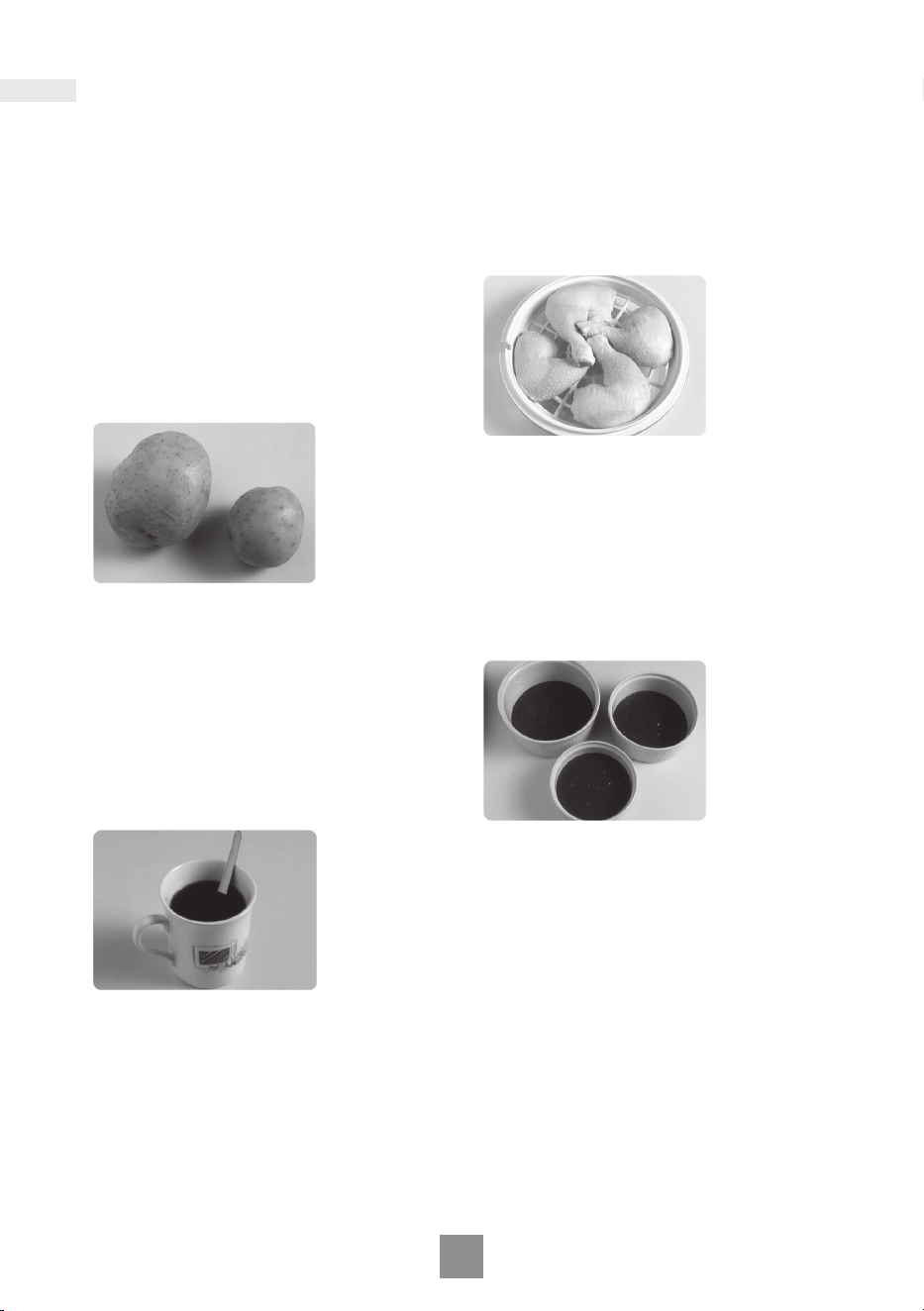
Arrange food in a single
layer.
Turn or break up food as
soon as possible.
Shield chicken and joints
of meat.
22
Auto programmes
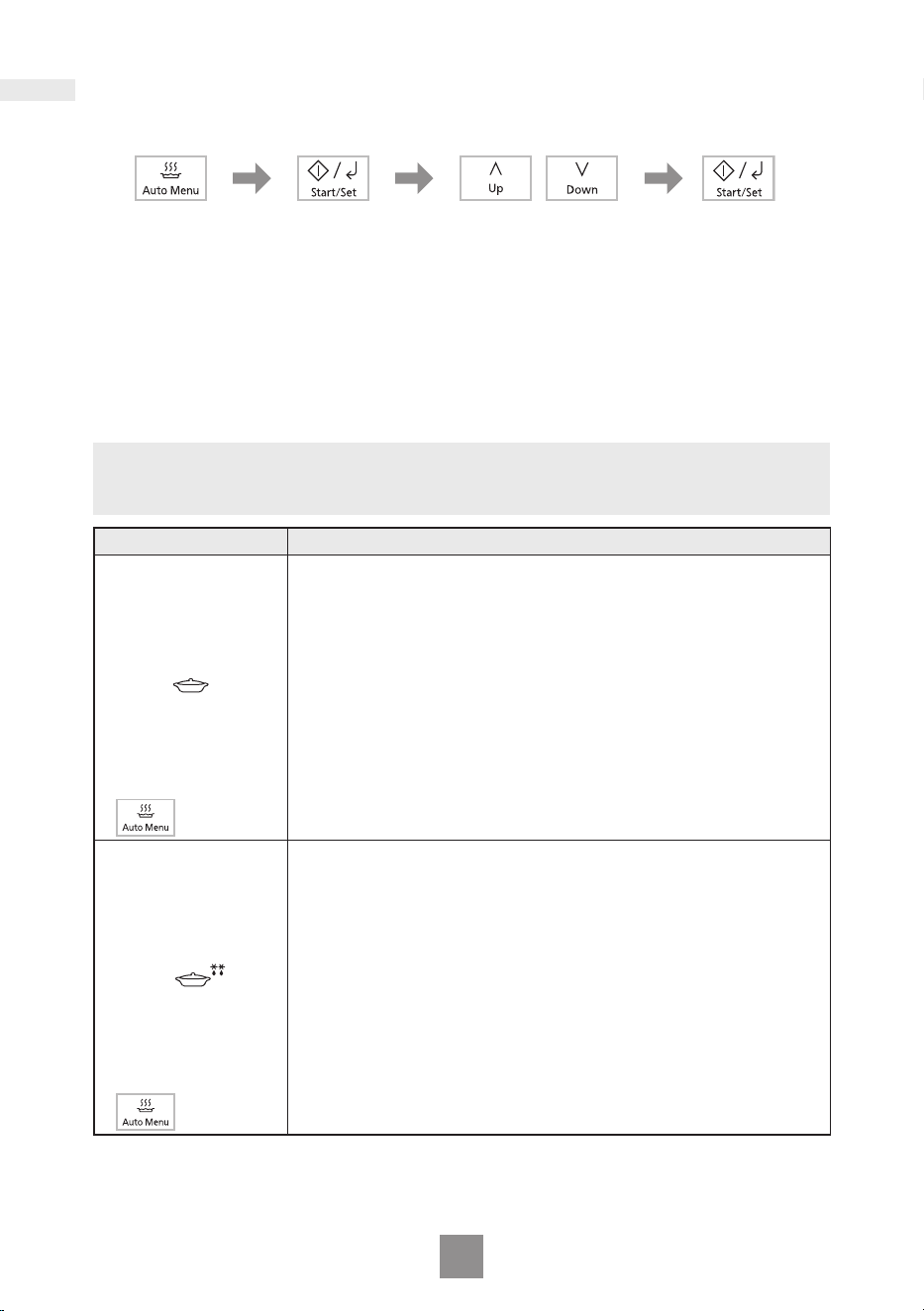
Auto menu
Press Start/Set.
The time counts
down in the
display.
Press Start/Set
to conrm the
setting.
Set the weight of
the food.
The weight counts
up/down in 10 g
increments.
Select the desired
Auto Menu
programme*.
The AUTO
PROGRAMME
number appears in
the display.
* After press the Auto Menu pad, you can also use the Up/Down pads to select the
Auto Menu programme.
Note
As some variations may occur in food, check that food is thoroughly cooked and
piping hot before serving.
Programme Instructions
1. Chilled Meal
Weight: 200 - 800 g
For reheating a pre-cooked meal. All foods must be pre-
cooked. Foods should be at refrigerator temperature approx.
+5 °C. Reheat in container as purchased. Follow
manufacture's directions for preparation. If transferring food
to a dish, cover with pierced cling lm. Place container on
glass tray. Press Auto Menu once and press Start/Set. Set
the weight of the food and press Start/Set. Stir at beeps. Stir
again at end of programme and allow a few minutes
standing time. Large pieces of meat/sh in a thin sauce may
require longer cooking. This programme is not suitable for
starchy foods such as rice, noodles or potatoes. Meals in
irregular bowl shaped containers may need longer cooking.
1 press
2. Frozen Meal
Weight: 300 - 600 g
For reheating a frozen pre-cooked meal. All foods must be
pre-cooked and frozen (-18 °C). Reheat in container as
purchased. Follow manufacture's directions for preparation. If
transferring food to a dish, cover with pierced cling lm. Place
container on glass tray. Press Auto Menu twice and press
Start/Set. Set the weight of the food and press Start/Set. Stir
at beeps and cut the blocks into pieces. Stir again at end of
programme and allow a few minutes standing time. Large
pieces of meat/sh in a thin sauce may require longer
cooking. This programme is not suitable for starchy foods
such as rice, noodles or potatoes. Meals in irregular bowl
shaped containers may need longer cooking.
2 presses
23
Programme Instructions
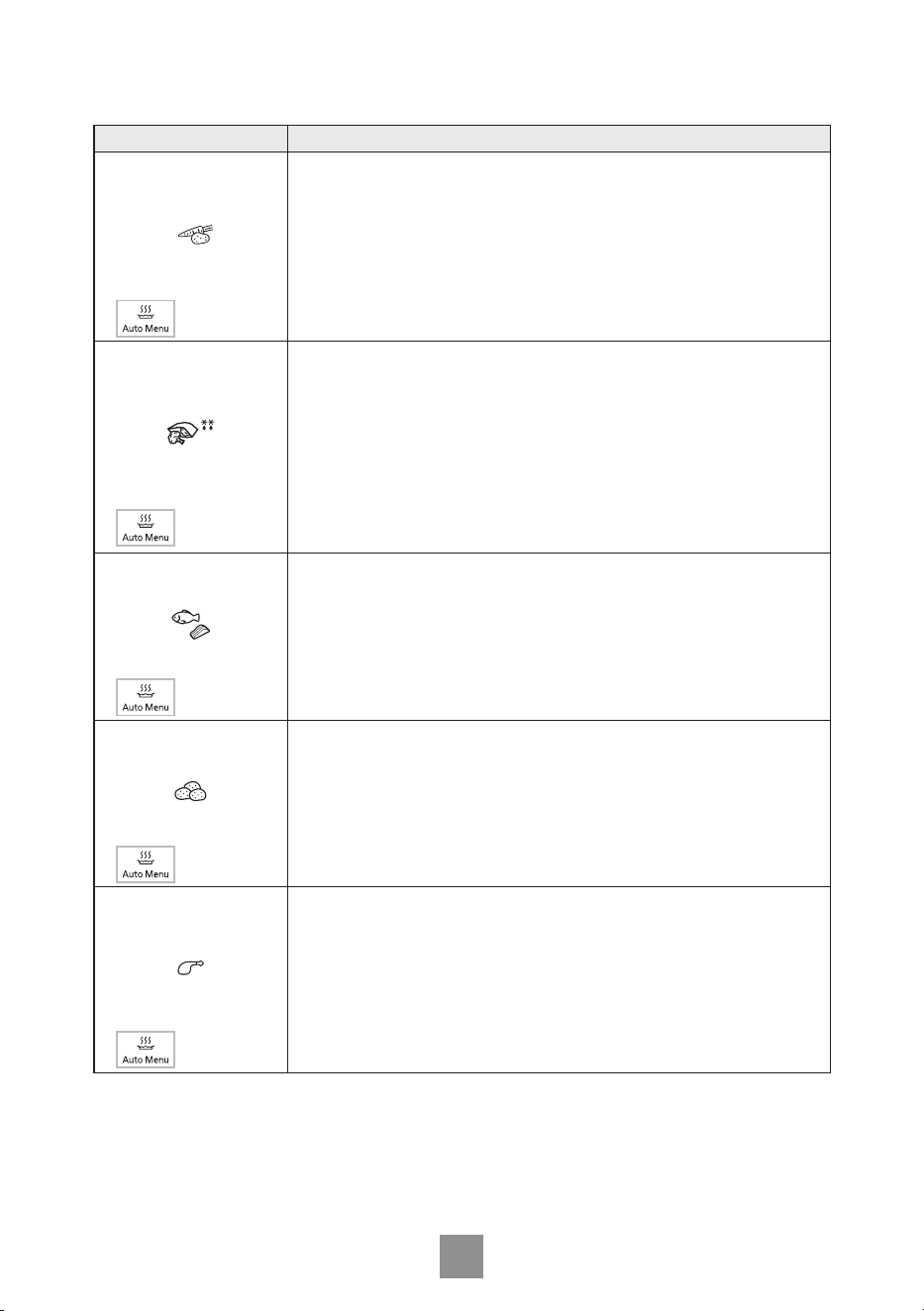
3. Fresh Vegetables
Weight: 100 - 800 g
For cooking fresh vegetables like carrots, broccoli,
cauliower and green beans. Place prepared vegetables in
a suitable sized container. Sprinkle with 1 tbsp water per
100 g vegetables. Cover with cling lm. Pierce cling lm with
a knife once in the centre and 4 times around the edge.
Press Auto Menu 3 times and press Start/Set. Set the
weight of the food and press Start/Set. Stir at beeps.
3 presses
4.
Frozen Vegetables
Weight: 100 - 800 g
For all types of frozen vegetables, like frozen peas,
sweetcorn or mixed vegetables. Place prepared vegetables
into a suitable size microwave safe casserole and add
2-6 tbsp of water if desired. Cover with a well tting lid. Place
the casserole on glass tray. Press Auto Menu 4 times and
press Start/Set. Set the weight of the food and press Start/
Set. Stir at beeps. At the end of cooking, let it covered and
stand for 3 to 5 minutes.
4 presses
5. Fresh Fish
Weight: 200 - 700 g
For cooking fresh sh lets and steaks. Place in a suitable
sized container. Add 1-3 tbsp liquid. Cover with cling lm.
Pierce cling lm once in the centre and 4 times around the
edge. Press Auto Menu 5 times and press Start/Set. Set the
weight of the food and press Start/Set. Allow a few minutes
standing time.
5 presses
6. Potatoes
Weight: 200 - 600 g
For cooking potatoes. Pare potatoes well and cut into even
size pieces. Place in a suitable size microwave safe
casserole and add 1-3 tbsp of water. Cover with lid or cling
lm. Place the casserole on glass tray. Press Auto Menu
6 times and press Start/Set. Set the weight of the food and
press Start/Set. Stir at beeps.
6 presses
7. Chicken
Weight: 200 - 800 g
For cooking chicken pieces such as wings, drumsticks,
thighs, half breasts etc. Pierce the chicken pieces well with
fork before cooking. Place prepared chicken pieces in a
suitable size microwave safe dish. Add 1-5 tbsp oil if desired.
Cover with cling lm pierced twice. Place the dish on glass
tray. Press Auto Menu 7 times and press Start/Set. Set the
weight of the food and press Start/Set. Turn at beeps.
7 presses
24
Programme Instructions
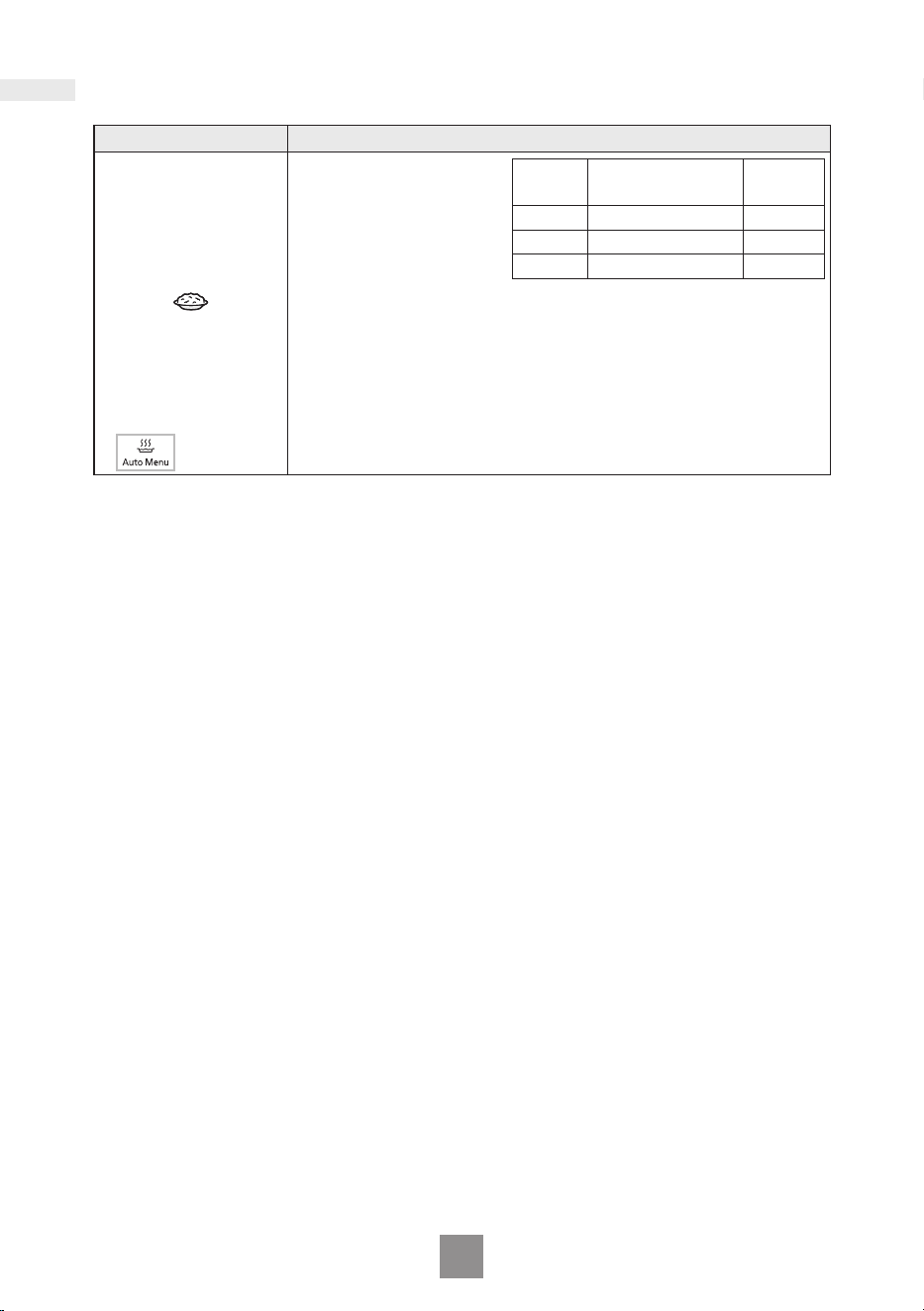
8. Casserole Rice
Weight: 100 - 300 g
For cooking white rice including short grain, long grain,
jasmine rice and basmati rice. Place rice in a suitable size
microwave safe casserole. Add recommended water listed
above. Allow at least
1
⁄2 depth of volume for evaporation to
prevent boiling over. Cover with lid. Place the casserole on
glass tray. Press Auto Menu 8 times and press Start/Set. Set
the weight of the food and press Start/Set. Stand 5 minutes
after cooking.
8 presses
Rice
Recommended
Water
Dish
Size
100 g 150 ml 3 litre
200 g 300 ml 3 litre
300 g 450 ml 3 litre
Auto programmes
25
Cooking and reheating guidelines
Most foods reheat very quickly in your oven by HIGH power. Meals can be brought
back to serving temperature in just minutes.
Always check food is piping hot and return to oven if necessary.
As a general rule, always cover wet foods, e.g. soups, casseroles and plated meals.
Do not cover dry foods e.g. bread rolls, mince pies, sausage rolls, etc.
Remember when cooking or reheating any food that it should be stirred or turned
wherever possible. This ensures even cooking or reheating on the outside and in
the centre.
MINCE PIES - CAUTION
REMEMBER even if the pastry is cold to the touch, the
lling will be piping hot and will warm the pastry through.
Take care not to overheat otherwise burning can occur
due to the high fat and sugar content of the lling. Check
the temperature of the lling before consuming to avoid
burning your mouth.
PUDDINGS AND LIQUIDS - CAUTION
Puddings and other foods high in fats or sugar, e.g. jam,
mince pies, must not be over heated. These foods must
never be left unattended as with over cooking these
foods can ignite. Take great care when reheating these
items.
Do not leave unattended.
Do not add extra alcohol.
BABIES BOTTLES - CAUTION
Milk or formula MUST be shaken thoroughly before
heating and again at the end and tested carefully before
feeding a baby.
For 200-240 ml of milk from fridge temperature, remove
top and teat. Heat on HIGH power for 30–50 sec.
CHECK CAREFULLY BEFORE FEED.
For 90 ml of milk from fridge temperature, remove top
and teat. Heat on HIGH power for 15–20 sec.
CHECK CAREFULLY BEFORE FEED.
N.B. Liquid at top of bottle will be much hotter than at
bottom.
The bottle must be shaken thoroughly and tested before
use.
WE DO NOT RECOMMEND THAT YOU USE YOUR
MICROWAVE TO STERILISE BABIES’ BOTTLES.
If you have a special microwave steriliser, we urge
extreme caution, due to the low quantity of water involved.
It is vital to follow the manufacturers instructions implicitly.
PLATED MEALS
Everyone’s appetite
varies and reheat times
depend on meal
contents. Dense items
e.g. mashed potato,
should be spread out
well.
If a lot of gravy is
added, extra time may
be required.
Place denser items to
the outside of the plate.
Between 2–4 min. on
HIGH power will reheat
an average portion. Do
not stack meals.
CANNED FOODS
Remove foods from
can and place in a
suitable dish before
heating.
SOUPS
Use a bowl and stir
before heating and at
least once through
reheat time and again
at the end.
CASSEROLES
Stir halfway through
and again at the end of
heating.

26
Questions and answers
Q: Why won’t my oven turn on?
A: When the oven does not turn on,
check the following:
1. Is the oven plugged in securely?
Remove the plug from the outlet,
wait 10 seconds and reinsert.
2. Check the circuit breaker and the
fuse.
Reset the circuit breaker or replace
the fuse if it is tripped or blown.
3. If the circuit breaker or fuse is all
right, plug another appliance into
the outlet. If the other appliance
works, there probably is a problem
with the oven. If the other appliance
does not work, there probably is a
problem with the outlet.
If it seems that there is a problem
with the oven, contact an
authorised Service Centre.
Q: My oven causes interference
with my TV. Is this normal?
A: Some radio and TV interference
might occur when you cook with the
oven. This interference is similar to
the interference caused by small
appliances such as mixers,
vacuums, blow dryers, etc. It does
not indicate a problem with your
oven.
Q: Sometimes warm air comes from
the oven vents. Why?
A: The heat given off from the cooking
food warms the air in the oven
cavity. This warmed air is carried
out of the oven by the air ow
pattern in the oven. There are no
microwaves in the air. The oven
vents should never be blocked
during cooking.
Q: Can I use a conventional oven
thermometer in the oven?
A: The metal in some thermometers
may cause arcing in your oven and
should not be used in a microwave
oven.
Q: The oven won’t accept my
programme. Why?
A: The oven is designed not to accept
an incorrect programme. For
example, the oven will not accept a
4th stage.

27
Care of your oven
1. The oven should be unplugged
before cleaning.
2. Clean the inside of the oven, door
seals and door seal areas regularly.
When food splatters or spilled
liquids adhere to the oven walls,
door seals and door seal areas
wipe off with a damp cloth. Mild
detergent may be used if they get
very dirty. The use of harsh
detergent or abrasive is not
recommended. Avoid cleaning the
microwave feed guide area situated
on the right hand side of the cavity
wall.
DO NOT USE COMMERCIAL
OVEN CLEANERS.
3. Do not use harsh, abrasive
cleaners or sharp metal scrapers to
clean the oven door glass since
they can scratch the surface, which
may result in shattering the glass.
4. The outside oven surface should be
cleaned with a damp cloth. To
prevent damage to the operating
parts inside the oven, water should
not be allowed to seep into the
ventilation openings.
5. If the Control Panel becomes dirty,
clean it with a soft cloth. Do not use
harsh detergents or abrasives on
the Control Panel. When cleaning
the Control Panel leave the oven
door open to prevent the oven from
accidentally turning on. After
cleaning press Stop/Reset to clear
display window.
6. If steam accumulates inside or
around the outside of the oven
door, wipe with a soft cloth. This
may occur when the oven is
operated under high humidity
conditions and in no way indicates
a malfunction of the unit.
7. It is occasionally necessary to
remove the glass tray for cleaning.
Wash the tray in warm soapy water
or in a dishwasher.
8. The roller ring and oven cavity oor
should be cleaned regularly to
avoid excessive noise. Simply wipe
the bottom surface of the oven with
mild detergent and hot water then
dry with a clean cloth. The roller
ring may be washed in mild soapy
water. Cooking vapours collect
during repeated use but in no way
affect the bottom surface or roller
ring wheels. Do not remove the
roller ring from the cavity oor for
cleaning.
9. A steam cleaner is not to be used
for cleaning.
10. This oven should only be serviced
by qualied personnel. For
maintenance and repair of the oven
contact the nearest authorised
dealer.
11. Failure to maintain the oven in a
clean condition could lead to
deterioration of surfaces that could
affect the life of the appliance and
possibly result in a hazardous
situation.
12. Keep air vents clean at all times.
Check that no dust or other material
is blocking any of the air vents on
the top, bottom or rear of the oven.
If air vents become blocked this
could cause overheating which
would affect the operation of the
oven and possibly result in a
hazardous situation.
28
Specifications
Power Source 230-240 V 50 Hz
Power Consumption
5.4-6.1 A 1300-1400 W
Output 900 W (IEC-60705)
Outside Dimensions
469 (W) × 380 (D) × 280 (H) mm
Oven Cavity Dimensions
329 (W) × 326 (D) × 236 (H) mm
Overall Cavity Volume 25 L
Glass Tray Diameter 288 mm
Operating Frequency
2450 MHz
Net Weight 12 kg
• Weight and Dimensions shown are approximate.
• Specications subject to change without notice.
• As for the voltage requirement, the production month, country and serial number,
please refer to the identication label on the microwave oven.

29
Panasonic Warranty (Australia)
Home Appliance 12 Month Warranty from Date of Purchase
1. Subject to the conditions of this warranty Panasonic or it’s Authorised Service
Centre will perform necessary service on the product without charge for parts or
labour, if in the opinion of Panasonic, the product is found to be faulty within the
warranty period. For Line Communications products (i.e. Cordless Phones, etc)
the genuine battery(s) has a 3 month warranty.
2. This warranty only applies to Panasonic products purchased in Australia and
sold by Panasonic Australia or its Authorised Distributors or Dealers and only
where the products are used and serviced within Australia or it’s territories.
Warranty cover only applies to service carried out by a Panasonic Authorised
Service Centre and only if valid proof of purchase is presented when warranty
service is requested.
3. This warranty only applies if the product has been installed and used in
accordance with the manufacturer’s recommendations (as noted in the
operating instructions) under normal use and reasonable care (in the opinion of
Panasonic). The warranty covers normal domestic use only (also Clip & Trim
Professional use) and does not cover damage, malfunction or failure resulting
from use of incorrect voltages, incorrect installation, accident, misuse, neglect,
build-up of dirt or dust, abuse, maladjustment of customer controls, mains
supply problems, thunderstorm activity, infestation by insects or vermin,
tampering or repair by unauthorised persons (including unauthorised
alterations), exposure to abnormally corrosive conditions or any foreign object or
matter having entered the product.
4. This warranty does not cover the following items unless the fault or defect
existed at the time of purchase:
(a) Cabinet Parts
(b) Microwave Oven cook plates.
(c) User replaceable Batteries from wear and tear in normal use
(d) Kneader mounting shaft unit and Heads, Cutters, Foils, Blades and other
accessories.
(e) Noise or vibration that is considered normal
5. To claim warranty service, when required, you should:
• Telephone Panasonic’s Customer Care Centre on 132600 or visit our website
referred to below and use the Service Centre Locator for the name/address of
the nearest Authorised Service Centre.
• Send or take the product to a Panasonic Authorised Service Centre together
with your proof of purchase receipt as a proof of purchase date. Please note
that freight and insurance to and/or from your nearest Authorised Service
Centre must be arranged by you.
6. The warranties hereby conferred do not extend to, and exclude, any costs
associated with the installation, de-installation or re-installation of a product,
including costs related to the mounting, de-mounting or remounting of any
screen, (and any other ancillary activities), delivery, handling, freighting,
transportation or insurance of the product or any part thereof or replacement of
and do not extend to, and exclude, any damage or loss occurring by reason of,
during, associated with, or related to such installation, de-installation, re-
installation or transit.

30
Panasonic Authorised Service Centres are located in major metropolitan areas and
most regional centres of Australia, however, coverage will vary dependant on
product. For advice on exact Authorised Service Centre locations for your product,
please telephone our Customer Care Centre on 132600 or visit our website and use
the Service Centre Locator.
In addition to your rights under this warranty, Panasonic products come with
consumer guarantees that cannot be excluded under the Australian Consumer Law.
If there is a major failure with the product, you can reject the product and elect to
have a refund or to have the product replaced or if you wish you may elect to keep
the goods and be compensated for the drop in value of the goods. You are also
entitled to have the product repaired or replaced if the product fails to be of
acceptable quality and the failure does not amount to a major failure.
If there is a major failure in regard to the product which cannot be remedied then
you must notify us within a reasonable period by contacting the Panasonic
Customer Care Centre. If the failure in the product is not a major failure then
Panasonic may choose to repair or replace the product and will do so in a
reasonable period of time from receiving notice from you.
THIS WARRANTY CARD AND THE PURCHASE DOCKET
(OR SIMILAR PROOF OF PURCHASE)
SHOULD BE RETAINED BY THE CUSTOMER AT ALL TIMES
If you require assistance regarding warranty conditions or any other enquiries,
please visit the Panasonic Australia website www.panasonic.com.au or contact
by phone on 132 600
If phoning in, please ensure you have your operating instructions available.
Panasonic Australia Pty. Limited
ACN 001 592 187 ABN 83 001 592 187
1 Innovation Road, Macquarie Park NSW 2113
www.panasonic.com.au
PR0-031-F01 Issue: 5.0 01-01-2011

31
Panasonic Warranty (New Zealand)
Built In Kitchen Appliance 24 Month from Date of Purchase
Home Appliance 24 Month Warranty from Date of Purchase
1. Subject to the conditions of this warranty Panasonic or it’s Authorised Service
Centre will perform necessary service on the product without charge for parts or
labour, if in the opinion of Panasonic, the product is found to be faulty within the
warranty period. For Line Communications products (i.e. Cordless Phones, etc)
the genuine battery(s) has a 3 month warranty.
2. This warranty only applies to Panasonic products purchased in New Zealand
and sold by Panasonic New Zealand or its authorised Distributors or Dealers
and only where the products are used and serviced within New Zealand or it’s
territories. Warranty cover only applies to service carried out by a Panasonic
Authorised Service Centre and only if valid proof of purchase is presented when
warranty service is requested.
3. This warranty only applies if the product has been installed and used in
accordance with the manufacture’s recommendations (as noted in the operating
instructions) under normal use and reasonable care (in the opinion of
Panasonic). The warranty covers normal domestic use only (also Clip & Trim
Professional use) and does not cover damage, malfunction or failure resulting
from use of incorrect voltages, incorrect installation, accident, misuse, neglect,
build-up of dirt or dust, abuse, maladjustment of customer controls, mains
supply problems, thunderstorm activity, infestation by insects or vermin,
tampering or repair by unauthorised persons (including unauthorised
alterations), exposure to abnormally corrosive conditions or any foreign object or
matter having entered the product.
4. This warranty does not cover the following items unless the fault or defect
existed at the time of purchase:
(a) Cabinet Parts
(b) Microwave Oven cook plates
(c) User replaceable Batteries from wear and tear in normal use
(d) Kneader mounting shaft unit and Heads, Cutters, Foils, Blades and other
accessories
(e) Noise or vibration that is considered normal
(f) Correcting the installation (e.g. removal of transit bolts, levelling and locking
feet)
(g) Damage caused by water pressure exceeding 1MPa
(h) Water on oor due to incorrect loading, excessive suds, foreign matter on
door seals
(i) Blocked pumps and removal lters, removal of foreign objects from the
machine (e.g. bra wires, bread tags, nails, screws, coins, grit etc.)
(j) Replaceable lint lters
(k) Damage to surfaces caused by liquid or solid spillages, impact or lack of
maintenance & cleaning products other than that reccomended in the
operating instructions
(l) Consumables (light bulbs, lters)

32
5. To claim warranty service, when required, you should:
• Telephone Panasonic’s Customer Care Centre on 09 272 0178 or visit our
website referred to below and use the Service Centre Locator for the name/
address of the nearest Authorised Service Centre.
• Send or take the product to a Panasonic Authorised Service Centre together
with your proof of purchase receipt as a proof of purchase date. Please note
that freight and insurance to and / or from your nearest Authorised Service
Centre must be arranged by you.
6. The warranties hereby conferred do not extend to, and exclude, any costs
associated with the installation, de-installation or re-installation of a product,
including costs related to the mounting , de-mounting or remounting of any
screen, (and any other ancillary activities), delivery, handling, freighting,
transportation, or insurance of the product or any part thereof or replacement of
and do not extend to , and exclude, any damage or loss occurring by any reason
of, during, associated with, or related to such installation, de-installation,
re-installation or transit.
Panasonic Authorised Service Centres are located in major metropolitan areas and
most regional centres of New Zealand, however, coverage will vary dependant on
product. For advice on exact Authorised Service Centre locations for your product,
please telephone our customer Care Centre on 09 272 0178 or visit our website
and use the Service Centre locator.
Unless otherwise specied to the consumer the benets conferred by this express
warranty are additional to all other conditions, warranties, guarantees, rights and
remedies expressed or implied by the Consumer Guarantees Act of New Zealand
and all other obligations and liabilities on the part of the manufacturer or supplier
and nothing contained herein shall restrict or modify such rights, remedies,
obligations and liabilities.
THIS WARRANTY CARD AND THE PURCHASE DOCKET
(OR SIMILAR PROOF OF PURCHASE)
SHOULD BE RETAINED BY THE CUSTOMER AT ALL TIMES
If you require assistance regarding warranty conditions or any other enquiries,
please visit the Panasonic New Zealand website www.panasonic.co.nz or
contact by phone on 09 272 0178
If phoning in, please ensure you have your operating instructions available.
Panasonic New Zealand Customer Care Centre
Phone: 09 272 0178
Fax: 09 272 0129
Email: [email protected]
Website: www.panasonic.co.nz/support


Panasonic Corporation
Website: https://www.panasonic.com
© Panasonic Corporation 2022
PN:
F0622-0
Printed in China