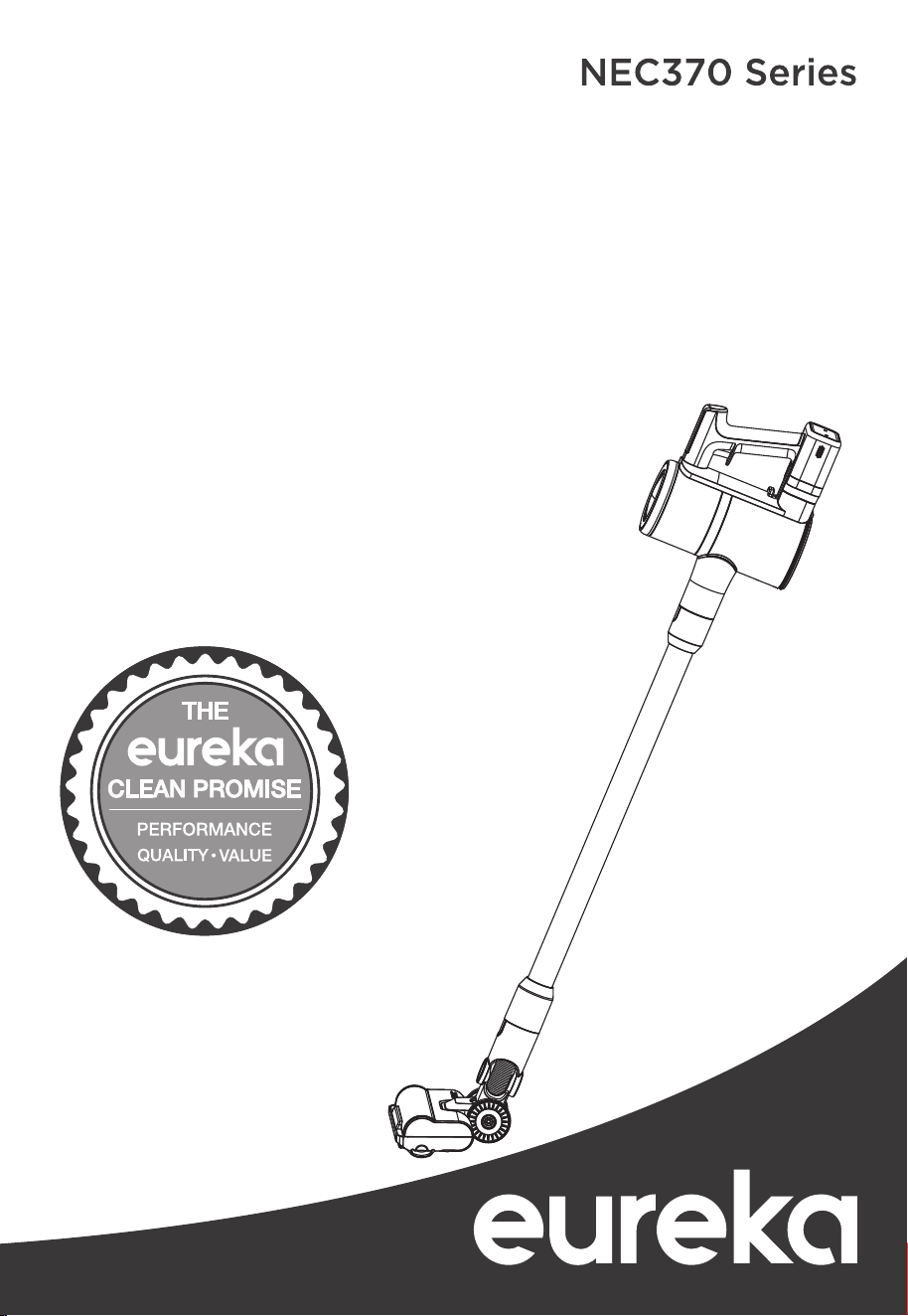
www.eureka.com
1
Thank you for purchasing your new Eureka vacuum!
Important instructions
For easy assembly, please take a few moments
Cordless Stick Vacuum Cleaner
to read this owner’s guide.
If you have questions about your new vacuum,
please contact our customer service HELPLINE
at 1-800-282-2886.
We’re here to help!
Household use only
www.eureka.com
Owner’s Guide
Contents
Important safeguards. . . . . . . . . . . . . . . . . . . . . . . . . . . . . . . . . . . . . . . . . . . . . . . . 3
What comes in the box ...............................................4
Charging instructions ... ... ... ... ... .................................5
Assembly and preparation before use . ..................................6
How to operate your vacuum cleaner . . . ...............................7-8
How to maintain your vacuum cleaner ................................9-10
Problem solving . . . . . . . . . ..........................................11
The Eureka limited warranty. . . .......................................12
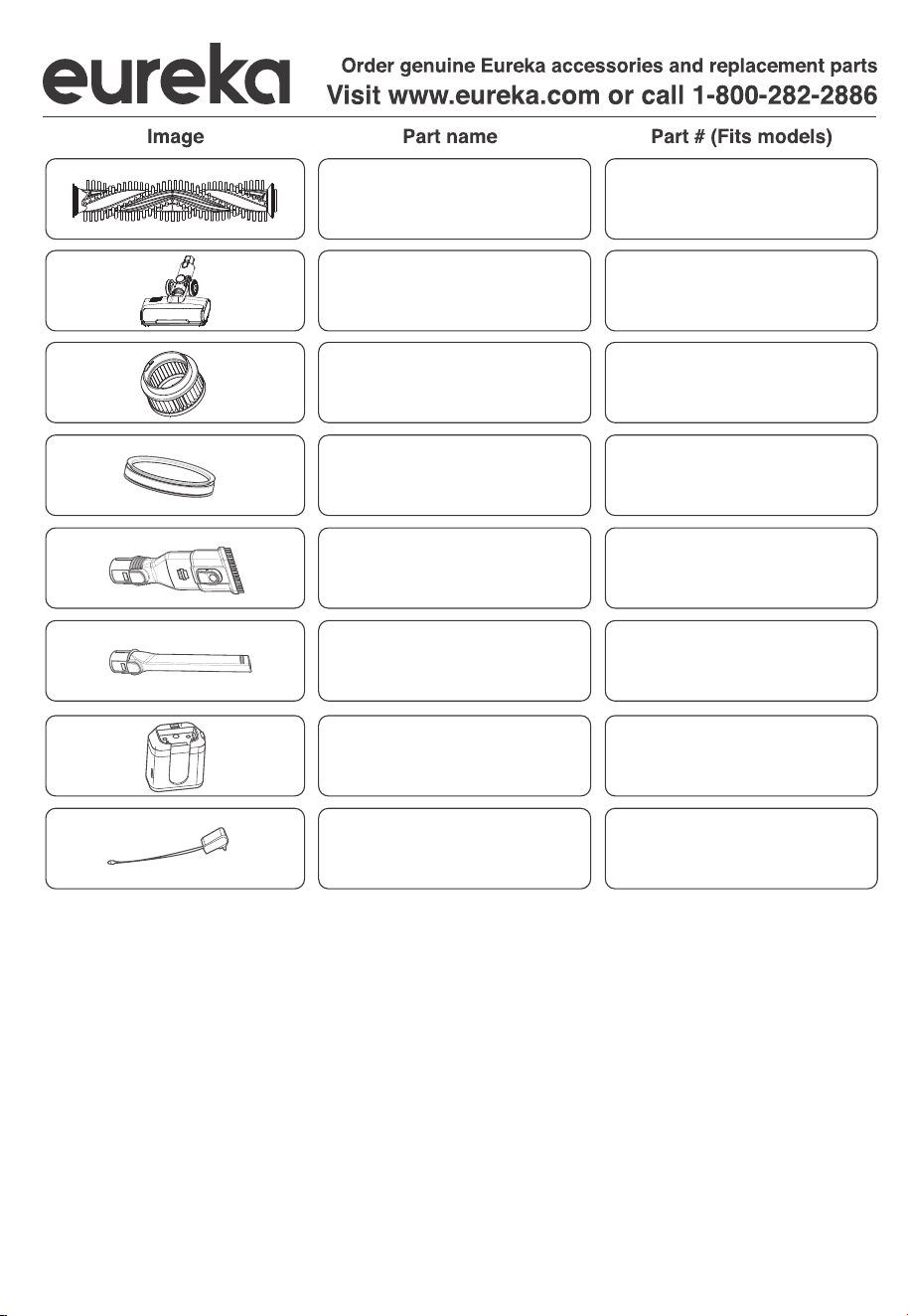
How to order replacement parts .......................................13
!
Follow caution information wherever you see this symbol.
Keep this information
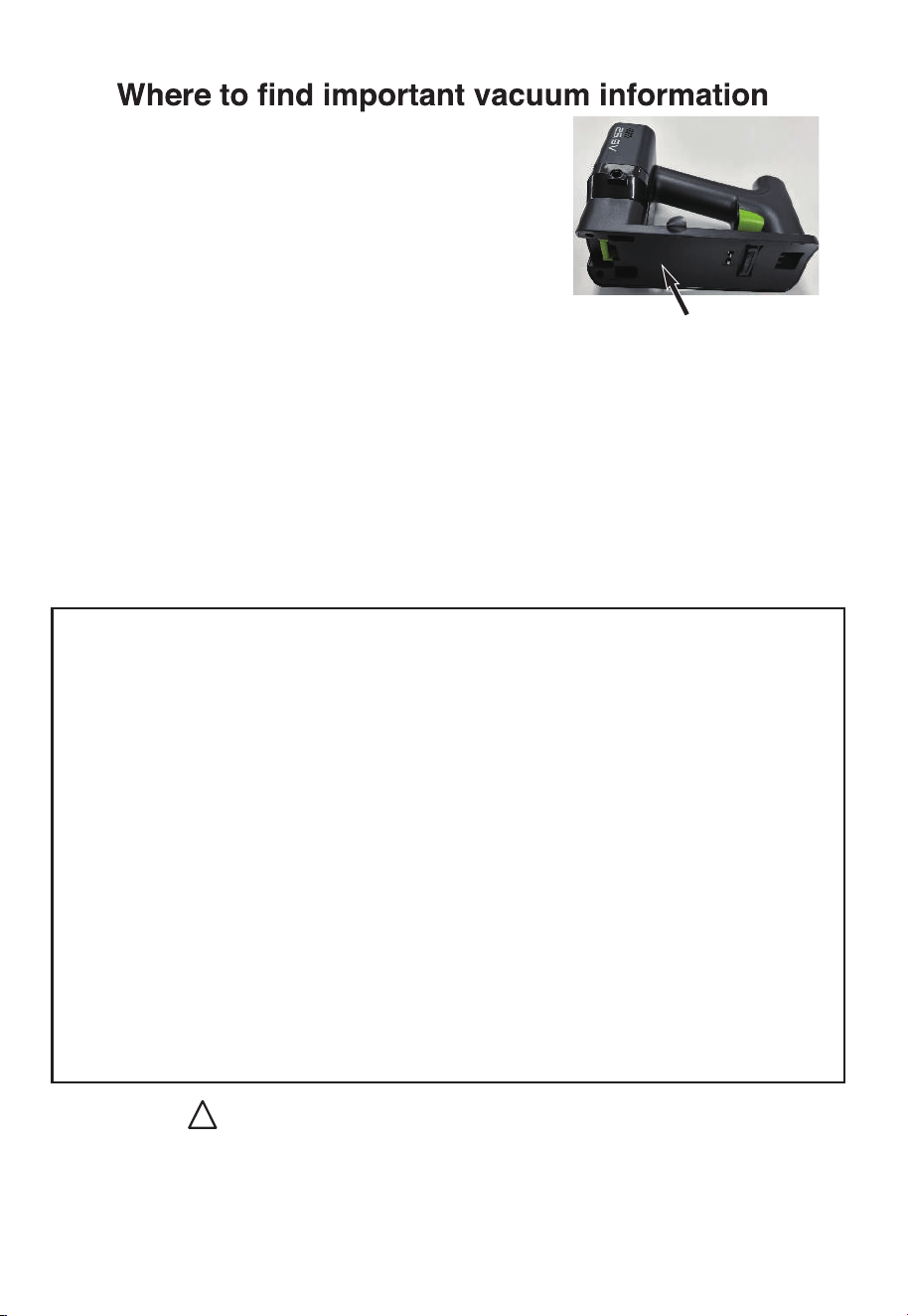
Write the model, type and serial number here:
Date of purchase (keep your receipt) ______________
Model number and type _________________________
Serial number ________________________________
Please refer to step 1 for ASSEMBLY AND
PREPARATION BEFORE USE to take the unit apart and find these numbers on the label.
Refer to these numbers when ordering parts and accessories, or if service is needed.
This Owner’s Guide provides important instructions
to prolong the life of your Eureka vacuum cleaner
Registration: To register your product visit www.eureka.com and click on the ‘Register Your Product’
link in the bottom of this page.
Inspection: Carefully unpack and inspect your new Eureka vacuum cleaner for shipping damage.
Each unit is tested and thoroughly inspected before shipping. For instructions regarding any
shipping damage, call the Eureka Customer Service HELPLINE at 1-800-282-2886 immediately.
2
Eureka Customer Service HELPLINE 1-800-282-2886

IMPORTANT SAFEGUARDS
When using an electrical appliance, basic precautions should always be followed, including the following:
READ ALL INSTRUCTIONS BEFORE USING THIS VACUUM CLEANER
www.eureka.com
3
WARNING - To reduce the risk of fire, electric shock, or injury:
1. Do not use outdoors or on wet surfaces.
2. Do not allow to be used as a toy. Close attention is necessary when used by or near children, pets or plants.
3. Use only as described in this manual. Use only manufacturer’s recommended attachments.
4. Do not use with damaged cord or charger. If appliance is not working as it should, has been dropped, damaged, left
outdoors, or dropped into water, return it to a service center.
5. Do not pull or carry by cord, use cord as a handle, close a door on cord, or pull cord around sharp edges or corners.
Do not run appliance over cord. Keep cord away from heated surfaces.
6. Do not unplug by pulling on cord. To unplug, grasp the charger, not the cord.
7. Do not handle charger, including charger plug, and charger terminals with wet hands.
8. Do not put any object into openings. Do not use with any opening blocked; keep free of dust, lint, hair, and anything
that may reduce air flow.
9. Keep hair, loose clothing, fingers, and all parts of body away from openings and moving parts.
10. Use extra care when cleaning on stairs.
11. Do not use to pick up flammable or combustible liquids, such as gasoline, or use in areas where they may be
present.
12. Do not pick up anything that is burning or smoking, such as cigarettes, matches, or hot ashes.
13. Do not use without dust container and filter.
14. Prevent unintentional starting. Ensure the switch is in the off-position before connecting to battery pack, picking up
or carrying the appliance. Carrying the appliance with your finger on the switch or energizing appliance that have the
switch on invites accidents.
15. Disconnect the battery pack from the appliance before making any adjustments, changing accessories, or storing
appliance. Such preventive safety measures reduce the risk of starting the appliance accidentally.
16. Recharge only with the charger specified by the manufacturer. A charger that is suitable for one type of battery pack
may create a risk of fire when used with another battery pack.
17. Use appliances only with specifically designated battery packs. Use of any other battery packs may create a risk of
injury and fire.
18. When battery pack is not in use, keep it away from other metal objects, like paper clips, coins, keys, nails, screws or
other small metal objects, that can make a connection from one terminal to another. Shorting the battery terminals
together may cause burns or a fire.
19. Under abusive conditions, liquid may be ejected from the battery; avoid contact. If contact accidentally occurs, flush
with water. If liquid contacts eyes, additionally seek medical help. Liquid ejected from the battery may cause irritation or
burns.
20. Do not use a battery pack or appliance that is damaged or modified. Damaged or modified batteries may exhibit
unpredictable behavior resulting in fire, explosion or risk of injury.
21. Do not expose a battery pack or appliance to fire or excessive temperature. Exposure to fire or temperature above
130°C may cause explosion.
22. Follow all charging instructions and do not charge the battery pack or appliance outside of the temperature range
specified in the instructions. Charging improperly or at temperatures outside of the specified range may damage the
battery and increase the risk of fire.
23. Have servicing performed by a qualified repair person using only identical replacement parts. This will ensure that
the safety of the product is maintained.
24. Do not modify or attempt to repair the appliance or the battery pack except as indicated in the instructions for use
and care.
25. The appliance should be stored, used and charged at a temperature range 40°F~104°F.
SAVE THESE INSTRUCTIONS
RISK OF INJURY. BRUSH MAY START UNEXPECTEDLY. DISCONNECT
MOTORIZED FLOOR NOZZLE BEFORE CLEANING OR SERVICING.
Household use only.
4
Eureka Customer Service HELPLINE 1-800-282-2886
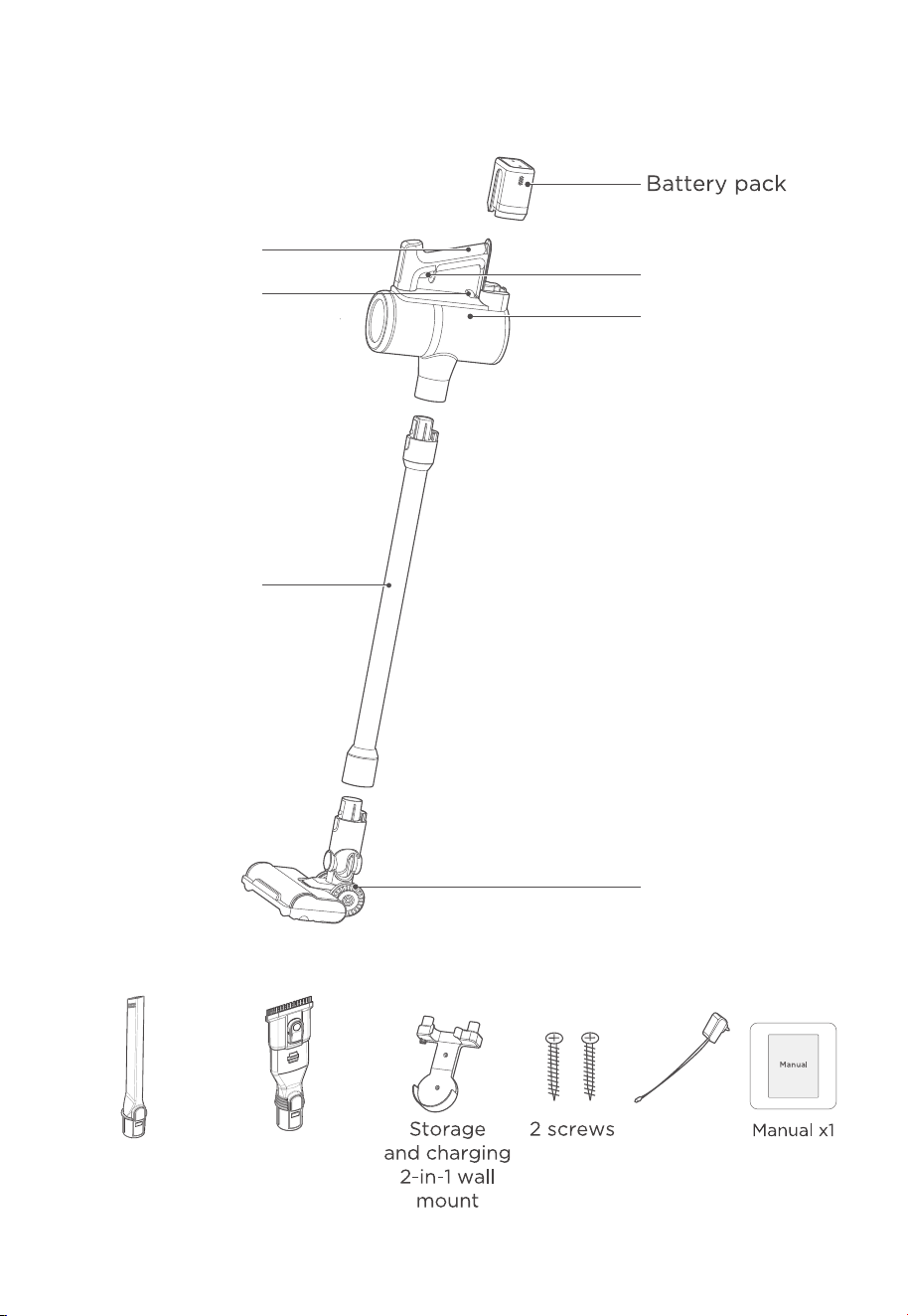
What comes in the box
Charger
On/o trigger
Hand vacuum
Wand
Dust cup
release button
Handle
Motorized
nozzle
List of accessories
Crevice Tool 2-in-1 Furniture
Brush
www.eureka.com
5
Charging instructions
CAUTION
1. In order to avoid blocking the air duct, please clean up large pieces of garbage in the area
(such as large pieces of paper and packaging film etc).
2. Do not use and store the battery in an environment below 40°F~104°F.
3. When you dispose of this product, please remove the battery from the machine.
4. lt is strictly forbidden to modify the machine, accessories, adapter or battery
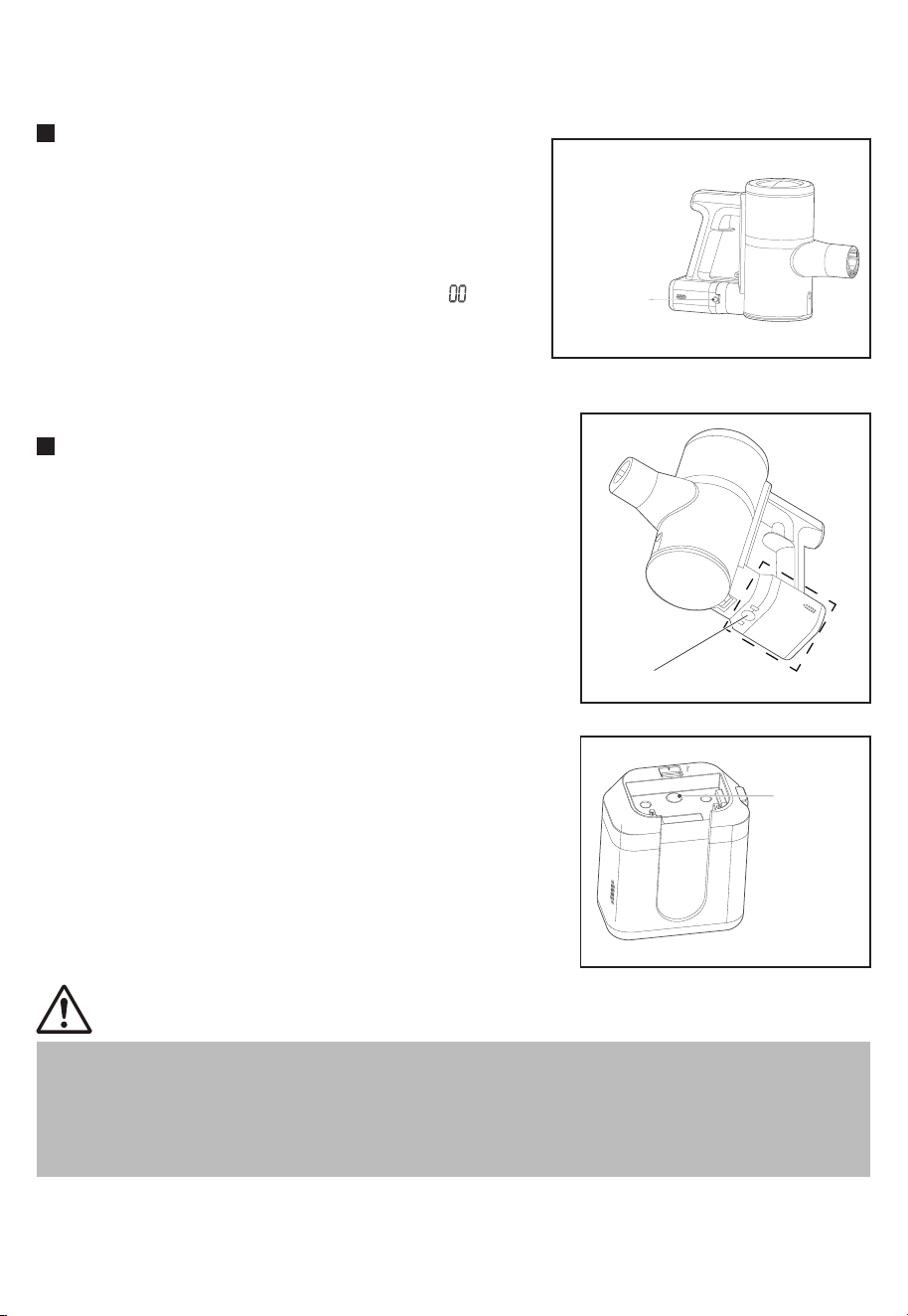
1. When you use this product for the first time, the battery
will not be fully charged. You need to plug in the power
adapter to fully charge the battery before it can be used.
The charging time is about 4-5 hours.
2. When the product power is running low, the battery
power indicator flashes to remind. LED display
3. Over time as the battery is used and charged, it will
begin to take longer to charge the battery, indicating
that the battery is nearing the end of its life.
Charging on the handvac
Charging
port
The battery pack can be charged separately.
1. Press the battery pack button, then pull out the battery
pack.
2. Connect the charger on the battery. The battery
charging indicator flashes to indicate that it is charging.
When the battery is fully charged, the blue indicator will
turn o.
Directly charging on the battery
Charging
indicator
Battery pack button
6
Eureka Customer Service HELPLINE 1-800-282-2886
Assembly and preparation before use
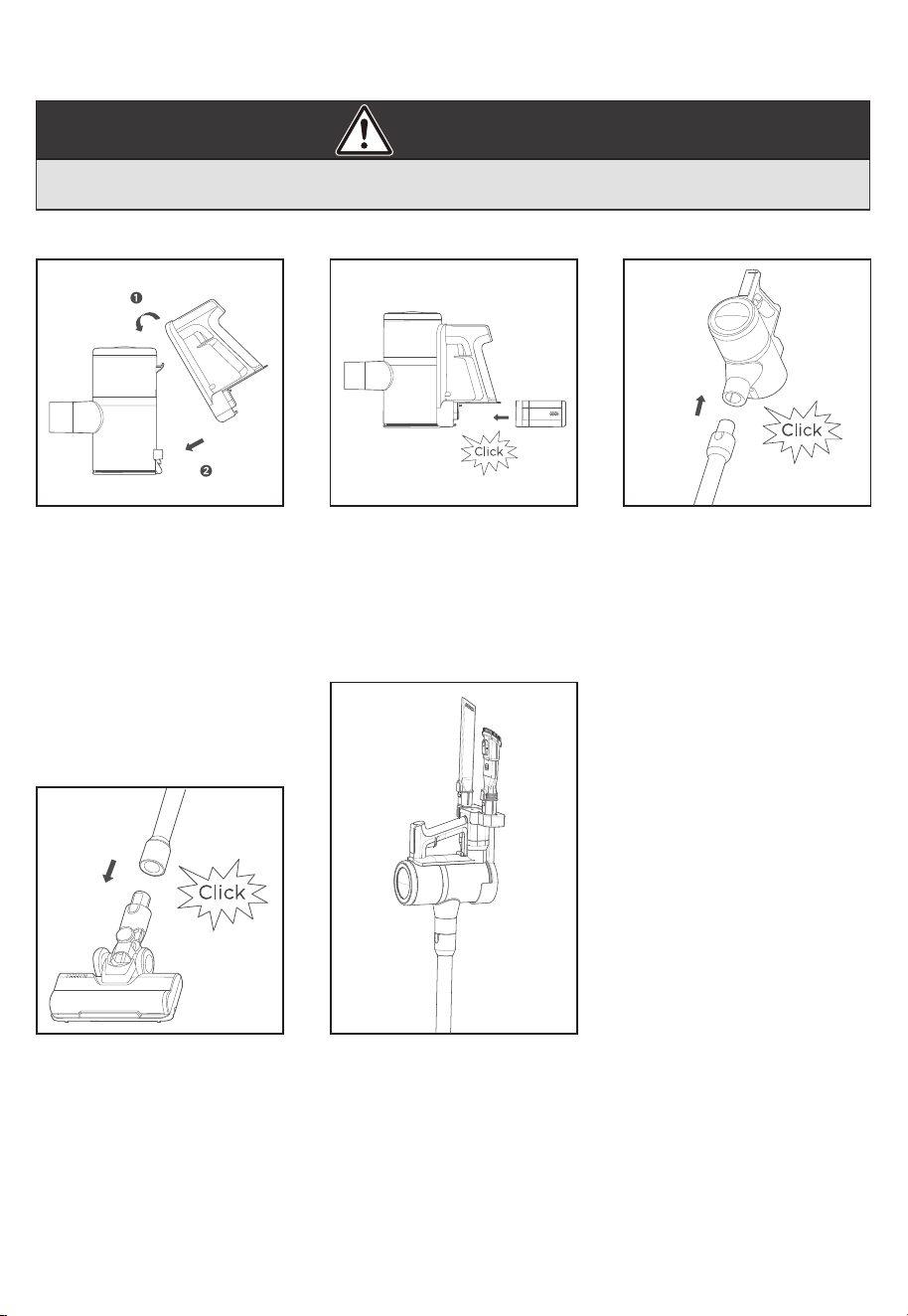
1. Installation of handle
Fasten the upper lock first,
and then install the handle
component.
2. Installation of battery pack
Insert the battery pack into
the bottom of the machine
until you hear a “click”
sound.
3. Connection of wand
When installing the wand
component, insert the
plug end of the wand
into the socket of the
handheld component until
you hear a "click" sound.
CAUTION
Moving parts! Always turn o hand vacuum before attaching accessories.
4. Connection of motorized
nozzle
Insert the wand
component into the
motorized nozzle until you
hear a "click" sound.
5. Storage of the machine
The rear of the hand vac is
inserted into the wall mount
and is to hang vertically as
shown. Accessories are also
stored on the wall mount.
www.eureka.com
7
CAUTION
Never operating vacuum cleaner without all filters, filter screen and dust
cup in proper position.
How to operate your vacuum cleaner
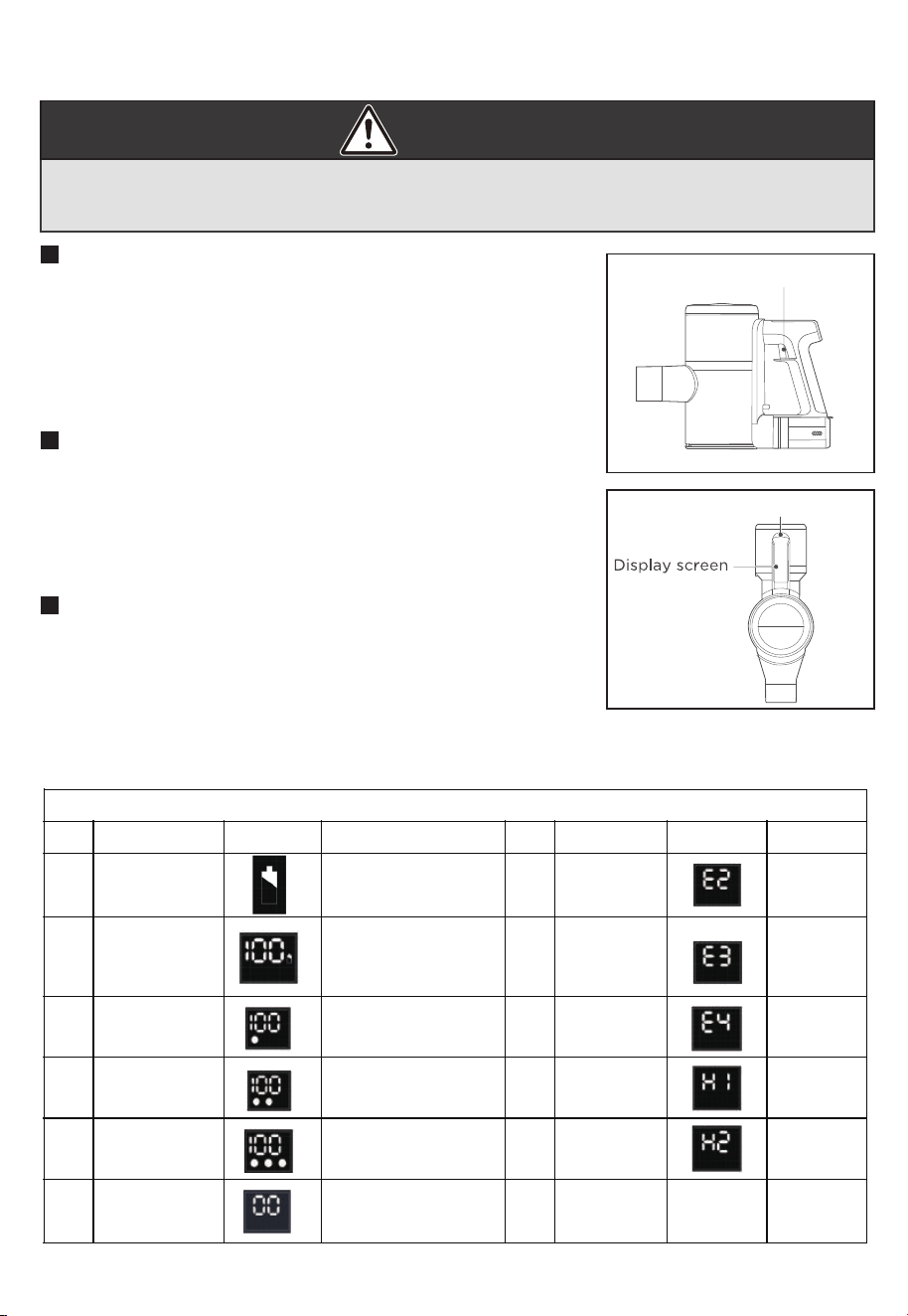
This vacuum cleaner has 2 buttons that you will use during
operation. One is an on/o trigger which turns the unit on
and o. The second is a mode button which will allow you to
choose the level of suction you wish to use during your
cleaning cycle. Battery level and suction levels will be
indicated on the display screen when the unit is turned on.
User Control Buttons:
On/o Trigger
Squeeze the trigger once and let go. The machine will turn
on. The default when the machine turns on is medium suction.
This is sucient to clean standard hard floors.
Squeeze the ON/OFF trigger once to shut down the machine
and stop cleaning.
Start and Shut Down
Touch the suction level control once at startup to change the
suction level to HIGH. Touch the button again to change it to
LOW suction. Touch it again to change it to MEDIUM suction.
The levels of suction will be indicated on the display as shown
below by 1, 2 or 3 dots. 1 = LOW suction. 2 = MEDIUM suction.
3 = HIGH suction. “100” is the battery level indicator and does
not correlate to suction level.
Suction Level Control
Suction Level Control
LED Display Status
Condition LED Status Remark Condition LED Status Remark
1 Charging display Charging icon blinking
Show a bright dot
Show two dots lit
Show three dots lit Show H2
and go o
in 20 seconds
6 Over
discharge
requires
Show 00
and go o
in 3s
2 Full display
3 Low suction
discharge state
4 Medium suction
discharge state
5 High suction
discharge state
11 Motor failure/
Motor not
connected
Display 100 charging icon
stop blinking.
It went out after six
seconds
7 Battery pack
8 Motor
overcurrent
Show E3
Show E4
Show H1
9 Charging
anomaly
10 Rolling brush
anomaly
error
Show E2
How to operate your vacuum cleaner
CAUTION
Moving parts! Always turn o hand vacuum before attaching accessories.
8
Eureka Customer Service HELPLINE 1-800-282-2886
Use the Accessories
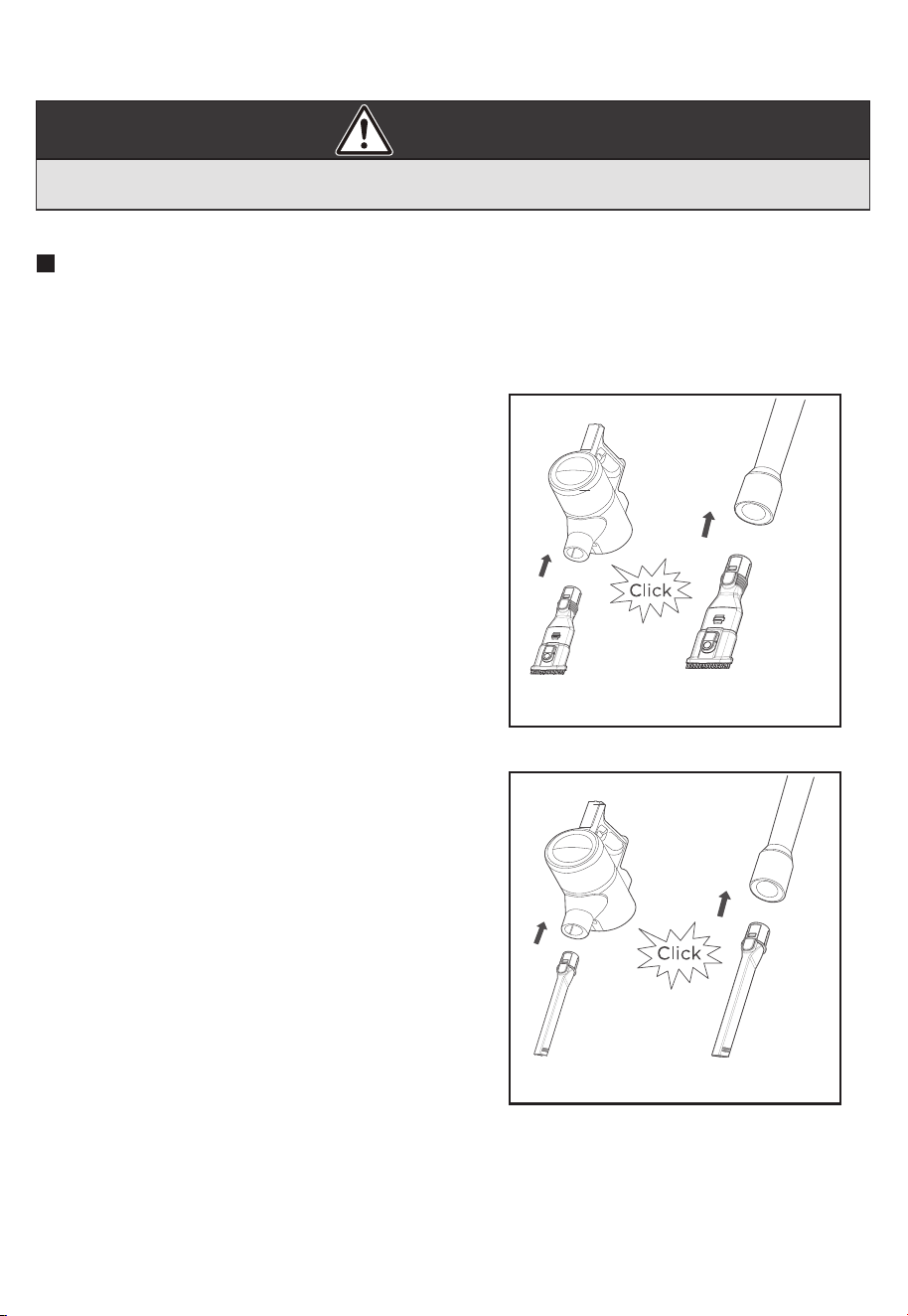
1. Connect the accessories per the instructions in the quick assembly section above. You can
connect the accessories directly to the hand vacuum or you can connect them to the wand.
There will be a click when the accessory is securely attached.
2. The 2-in-1 furniture brush can be used to
clean in hard to reach areas, behind items
on tables and to dust hard surfaces and
furniture.
3. The crevice tool can be used to clean in
tight spaces, crevices, between cushions and
inside the motor vehicle.
www.eureka.com
9
How to maintain your vacuum cleaner
CAUTION
To maintain the suction power of the vacuum cleaner, please clean up
the dust regularly
Dust Cup Disassembly and Cleaning
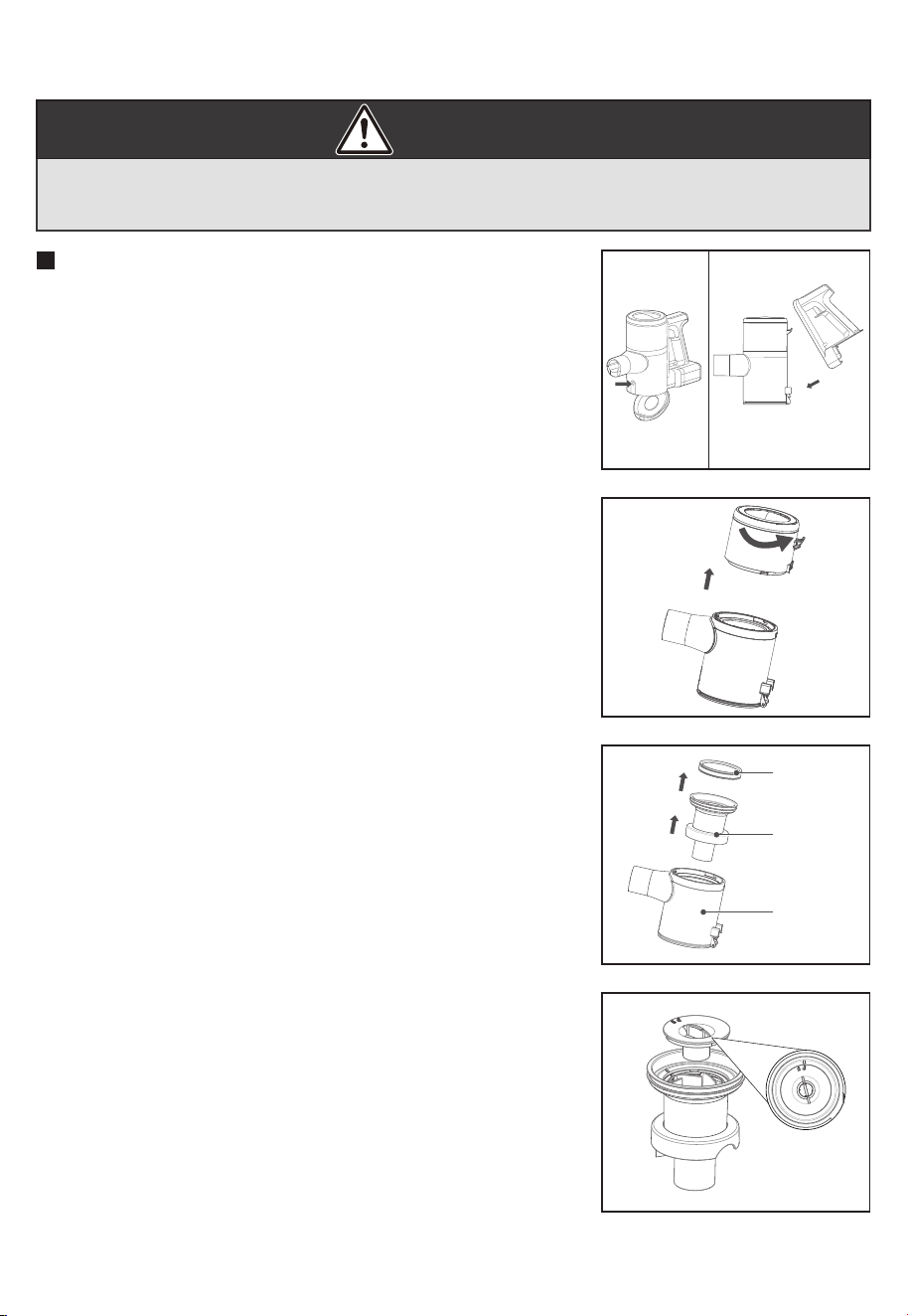
1.Press the dust cup empty button to pour out the dust.
2.Press the dust cup release button to remove the handle
component.
3.Rotate the motor cover component to remove the dust
cup component.
4.Remove the filter cotton from the cyclone cone, and then
take out cyclone cone from the dust cup component.
5. Rotate and lift up the plastic cover, take out the cyclone
for cleaning.
Filter
cotton
Cyclone
cone
Dust cup
CAUTION
Making sure vacuum cleaner is turned o and not plugged into a power
source.
10
Eureka Customer Service HELPLINE 1-800-282-2886
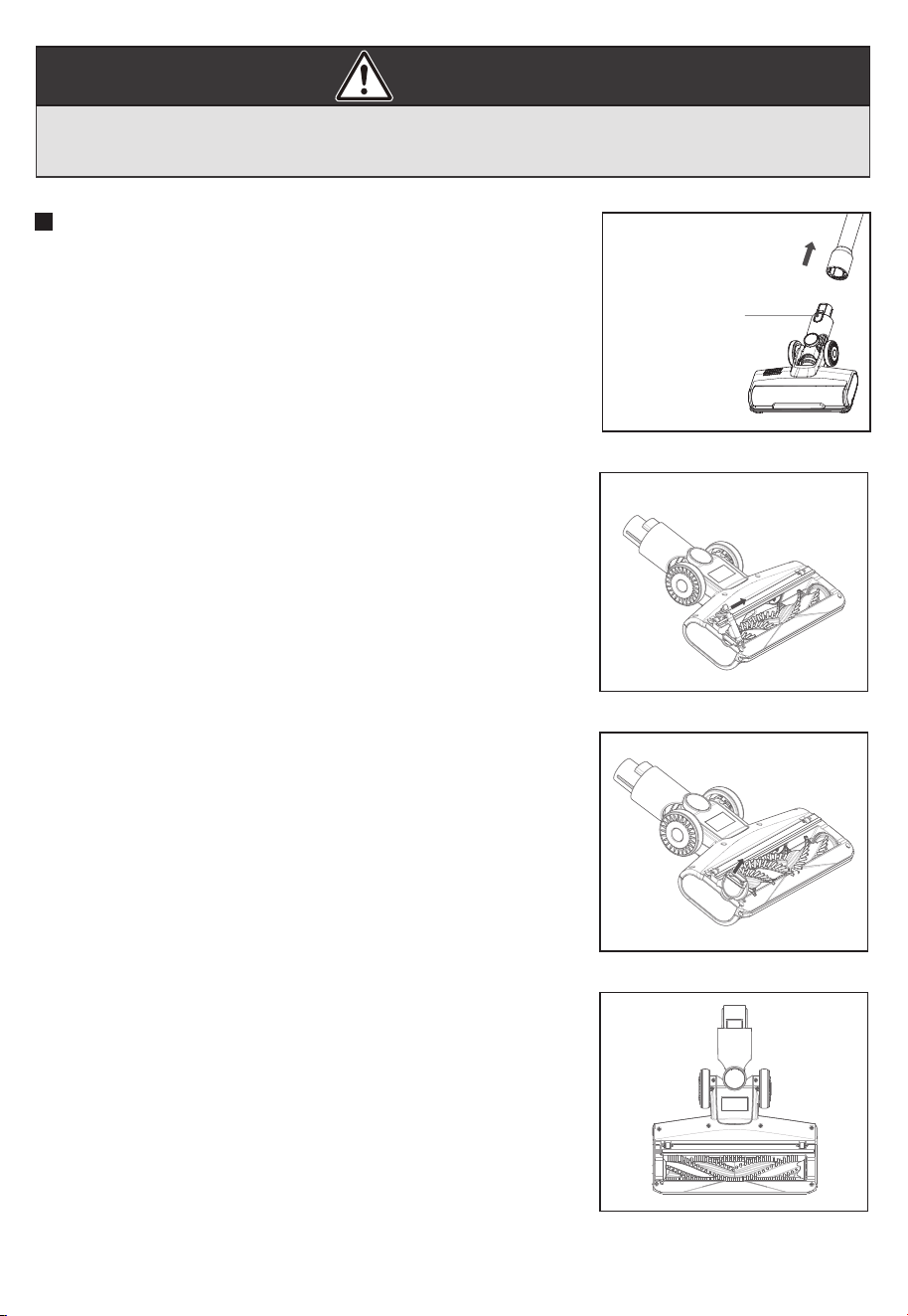
2. Remove the brush roller lock as shown to remove the brush
roller.
3. Take out the brush roller from the slot and then clean it up.
4. After cleaning or replacement, assemble in the reverse order
of disassembly and reset the lock of brush roller.
1. Press the button to release the motorized nozzle.
Accessories Cleaning and Maintenance
Motorized nozzle
disassembly button
www.eureka.com
11
Problem Solving
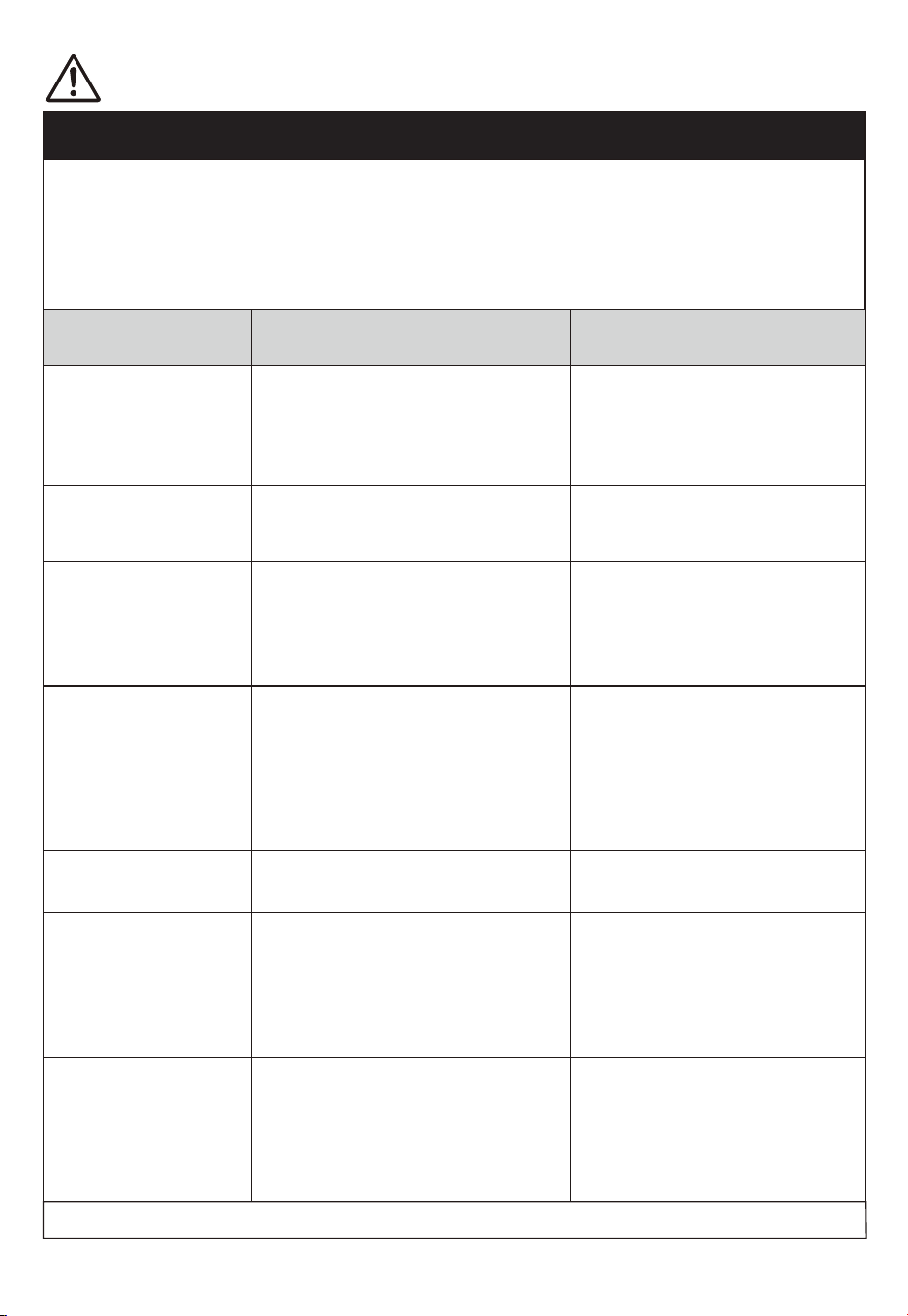
Problem Possible causes Solution
Reduced suction power
of product.
1. Filter cotton is full of dust.
2. Dust cup is full of dust.
3. Debris obstructing air duct flow.
1. Clean filter cotton, see P9.
2. Clean the dust cup thoroughly,
see P9.
3. Remove the debris and clean the
air duct, see P10.
Short usage time of the
whole machine.
1. Battery is not fully charged.
2. Battery aging.
1. Fully charge the whole machine.
2. The battery is a consumable
item, contact after-sales service
or customer service to purchase
a new battery pack.
The display shows "H2".
1.The handle and the body assembly
are not installed in place.
2. Filter cotton is covered with dust.
3. The dust cup is full of dust.
4. Debris obstructing air duct flow.
1. Install the handle and the body
assembly in place according to the
instructions.
2. Clean the filter cotton see P9.
3. Clean the dust cup see P9.
4. Remove the debris and clean the
air duct see P10.
The display shows "E2".
The battery cell is damaged, Chip or
internal components damaged.
Contact after-sales service to
replace the new battery package.
The display shows "E3".
1. Overcurrent due to water ingress in
the motor.
2. Motor aging.
1. As the machine is not waterproof,
please avoid sucking water into the
unit, and make sure the body is dry
before use.
2. Contact after-sales service for
repairs.
1. Charging on the handvac,
the display shows "E4".
2. Directly charging on the
battery, the battery pack,
the battery charging
indicator flashes frequently.
(flashing 5 times per second).
Wrong adapter used. 1. Will use the correct adapter
2. Contact after-sales service.
Other faults that cannot be handled, please contact the local after-sales service network.
The display shows "H1". The brush is blocked and the motor
safety mechanism is activated.
Remove the brush assembly and
make sure nothing is blocking the
brush roller, see P10.
NOTICE: Thermal cut-off
This vacuum cleaner has a special thermostat that protects the vacuum cleaner in case of motor
overheating. If the vacuum suddenly shuts off, proceed as follows:
1) Check the vacuum for a possible source of overheating such as a full dust cup, blocked wand or
clogged filters. lf these conditions are found, fix them and wait at least 30 minutes before attempting to
use the vacuum again.
2) After the 30 minute period, press the power button. lf the vacuum still does not work, call the Eureka
Customer Service HELPLINE at 1-800-282-2886.
Make sure vacuum cleaner is turned o and charging plug is disconnected.

12
Eureka Customer Service HELPLINE 1-800-282-2886
The Eureka 12-month limited battery
warranty
Midea America Corp. ("Eureka"), subject to the terms and conditions herein,
warrants this Battery Module to be free from defects in material
and workmanship for a term of one year from the date of original purchase
when used in accordance with the Eureka operating and maintenance
instructions and under normal household usage. This warranty is granted
only to the original purchaser and members of immediate household, and
is applicable only to original purchases from Eureka authorized resellers.
What Eureka will do:
Eureka will, at its option, repair or replace a defective Battery Module or
battery part that is covered by this warranty. Repairs may be performed
using new or refurbished parts that meet or exceed Eureka specifications
for new parts. If Eureka elects to replace the Battery Module, the
replacement may be a reconditioned unit. Depending on availability of
products, Eureka reserves the right to provide you with a replacement
product that is the same or similar, or substitute equivalent of the original
product. As a matter of warranty policy, Eureka will not refund the
consumer's purchase price.
This warranty does not cover:
• Normal wear and tear of the Battery Module and battery parts that require
replacement under normal use.
• Damages or malfunctions resulting from: improper or unreasonable
use or maintenance, abuse, negligence, failure to follow instructions
contained in any written materials that accompany the product,
deterioration by reason of excess moisture, corrosive atmosphere,
lightning, power surges, connections to improper voltage supply,
unauthorized alteration, or other external causes such as extremes in
temperature or humidity, modifications, scratches or discoloration,
accidents, misuse, or acts of God. This warranty also does not cover
damage resulting from repair or attempted repair by anyone other than
Eureka or an authorized Eureka Warranty Station. This warranty is not
applicable to any product that has been altered or on which the serial
number has been defaced, modified or removed. Altering, erasing, or
forging any proof-of-purchase documents voids any applicable product
warranty.
Obtaining warranty service:
To obtain warranty service you must contact the Eureka Service Team,
toll free, at 1-800-282-2886 or email [email protected],
to discuss the warranty claim and procedures to be followed. All warranty
claims must include submission of proof-of-purchase documentation, For
additional information, you may also visit www.eureka.com.
Shipping charges:
You will be responsible for any initial shipping and insurance charges if
the defective product(s) must be shipped for warranty service or warranty
evaluation; however, Eureka or a Eureka Authorized Warranty Station will
pay the return shipping charges if repairs are covered by the warranty.
When returning parts for repair, you must include the model, type and
serial number located on the rating plate. If any product submitted for
warranty service is found to be ineligible, an estimate of repair cost will
be furnished and the repair performed only if requested by the owner and
upon receipt of payment or acceptable arrangements for payment.
Further limitations and exclusions:
Any warranty that may be implied in connection with your purchase or use
of the Battery Module, including any warranty of Merchantability or any
warranty of Fitness For A Particular Purpose is limited to the duration of
this limited warranty. Some states do not allow limitations on how long an
implied warranty lasts, so the above limitations may not apply to you.
Your relief for the breach of this warranty is limited to the relief expressly
provided above. In no event shall the manufacturer be liable for any
consequential or incidental damages you may incur in connection with
your purchase or use of the Battery Module. Some states do not allow
the exclusion or limitation of incidental or consequential damages, so the
above limitation or exclusion may not apply to you.
This warranty gives you specific legal rights. You may also have other
rights, which may vary by state.
The Eureka 2- year limited warranty
Midea America Corp. ("Eureka"), subject to the terms and conditions herein,
warrants this vacuum cleaner to be free from defects in material and
workmanship for a term of two years from the date of original purchase
when used in accordance with the Eureka operating and maintenance
instructions and under normal household usage. This warranty is granted
only to the original purchaser and members of immediate household, and is
applicable only to original purchases from Eureka authorized resellers.
What Eureka will do:
Eureka will, at its option, repair or replace a defective vacuum or vacuum
part that is covered by this warranty. Repairs may be performed using new
or refurbished parts that meet or exceed Eureka specifications for new parts.
If Eureka elects to replace the vacuum, the replacement may be a
reconditioned unit. Depending on availability of products, Eureka reserves
the right to provide you with a replacement product that is the same or
similar, or substitute equivalent of the original product. As a matter of
warranty policy, Eureka will not refund the consumer's purchase price.
This warranty does not cover:
• Battery module and battery components. The battery module and it’s
components are covered by a separate one-year limited battery warranty.
•Normal wear and tear of the vacuum and vacuum parts that require
replacement under normal use such as disposable dust bags, filters, drive
belts, light bulbs, brush-roll, bristles, impellers and cleaning.
• Damages or malfunctions resulting from: improper or unreasonable use
or maintenance, abuse, negligence, failure to follow instructions contained
in any written materials that accompany the product, deterioration by
reason of excess moisture, corrosive atmosphere, lightning, power
surges, connections to improper voltage supply, unauthorized alteration,
or other external causes such as extremes in temperature or humidity,
modifications, scratches or discoloration, accidents, misuse, or acts of
God. This warranty also does not cover damage resulting from repair or
attempted repair by anyone other than Eureka or an authorized Eureka
Warranty Station. This warranty is not applicable to any product that has
been altered or on which the serial number has been defaced, modified or
removed. Altering, erasing, or forging any proof-of-purchase documents
voids any applicable product warranty.
Obtaining warranty service:
To obtain warranty service you must contact the Eureka Service Team,
toll free, at 1-800-282 -2886 or email [email protected],
to discuss the warranty claim and procedures to be followed. All warranty
claims must include submission of proof- of-purchase documentation. For
additional information, you may also visit www.eureka.com.
Shipping charges:
You will be responsible for any initial shipping and insurance charges if
the defective product(s) must be shipped for warranty service or warranty
evaluation; however, Eureka or a Eureka Authorized Warranty Station will
pay the return shipping charges if repairs are covered by the warranty.
When returning parts for repair, you must include the model, type and serial
number located on the rating plate. If any product submitted for warranty
service is found to be ineligible, an estimate of repair cost will be furnished
and the repair performed only if requested by the owner and upon receipt
of payment or acceptable arrangements for payment.
Further limitations and exclusions:
Any warranty that may be implied in connection with your purchase or use
of the vacuum, including any warranty of Merchantability or any warranty
of Fitness For A Particular Purpose is limited to the duration of this limited
warranty. Some states do not allow limitations on how long an implied
warranty lasts, so the above limitations may not apply to you.
Your relief for the breach of this warranty is limited to the relief expressly
provided above. In no event shall the manufacturer be liable for any
consequential or incidental damages you may incur in connection with your
purchase or use of the vacuum. Some states do not allow the exclusion or
limitation of incidental or consequential damages, so the above limitation
or exclusion may not apply to you. This warranty gives you specific legal
rights. You may also have other rights, which may vary by state.
300 Kimball Drive Parsippany, NJ 07054 USA
www.eureka.com
13
12175000A43522
12175000A43521
12175000098747
Brush roller
HEPA Filter
12175000098756Filter cotton
12175000A435202-in-1 Furniture brush
12175000A43519Crevice tool
Motorized nozzle
with brush roller
12175000A43527Battery pack
12175000A43524Charger
14
Eureka Customer Service HELPLINE 1-800-282-2886
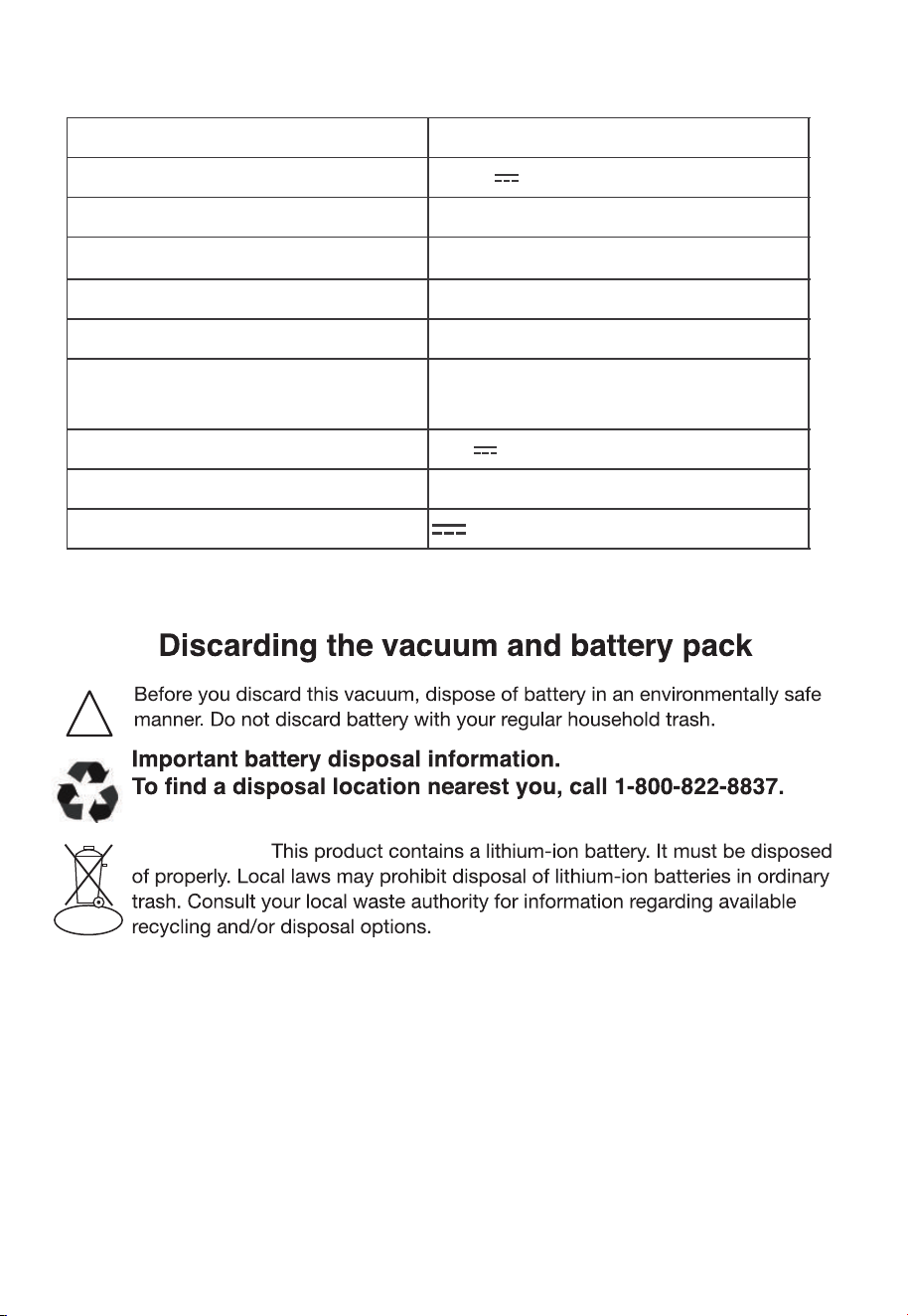
Technical Parameter
Model
NEC370GR
Rated Voltage 25.9V
Rated Power 300W
Battery Capacity 2000mAh
Battery Model HD006
Adapter Model
CZH015300050USWQ/QX15WG300050U
Adapter Rated Input
100V-240V~ 50/60Hz 0.5A /
100V-240V~ 50/60Hz 0.3A
Adapter Rated Output 30V 500mA
40 °F - 104 °FCharging Am bient Tem perature
Direct current
!
Li-ion
To preserve natural resources, please recycle or dispose of expired battery
pack properly.