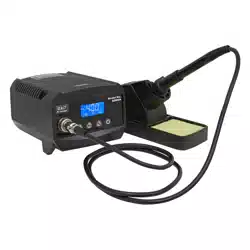
48W SOLDERING STATION
MODEL NO: SD008
Thank you for purchasing a Sealey product. Manufactured to a high standard, this product will, if used according to these
instructions, and properly maintained, give you years of trouble free performance.
IMPORTANT: PLEASE READ THESE INSTRUCTIONS CAREFULLY. NOTE THE SAFE OPERATIONAL REQUIREMENTS, WARNINGS & CAUTIONS. USE
THE PRODUCT CORRECTLY AND WITH CARE FOR THE PURPOSE FOR WHICH IT IS INTENDED. FAILURE TO DO SO MAY CAUSE DAMAGE AND/OR
PERSONAL INJURY AND WILL INVALIDATE THE WARRANTY. KEEP THESE INSTRUCTIONS SAFE FOR FUTURE USE.
1. SAFETY
1.1. ELECTRICAL SAFETY
WARNING! It is the responsibility of the owner and the operator to read, understand and comply with the following:
You must check all electrical products, before use, to ensure that they are safe. You must inspect power cables, plugs, sockets
and any other connectors for wear or damage. You must ensure that the risk of electric shock is minimised by the installation of
appropriate safety devices. A Residual Current Circuit Breaker (RCCB) should be incorporated in the main distribution board. You
must also read and understand the following instructions concerning electrical safety.
9 Ensure that cables are always protected against short circuit and overload.
9 Regularly inspect power supply cables and plugs for wear or damage and check all connections
to ensure that none are loose.
9 Ensure that the voltage marked on the appliance matches the power supply to be
usedandthattheplugisttedwiththecorrectfuse-seefuseratingatright.
8 DO NOT use worn or damaged cables, plugs or connectors. Have any faulty item repaired or
replaced immediately by a competent electrician.
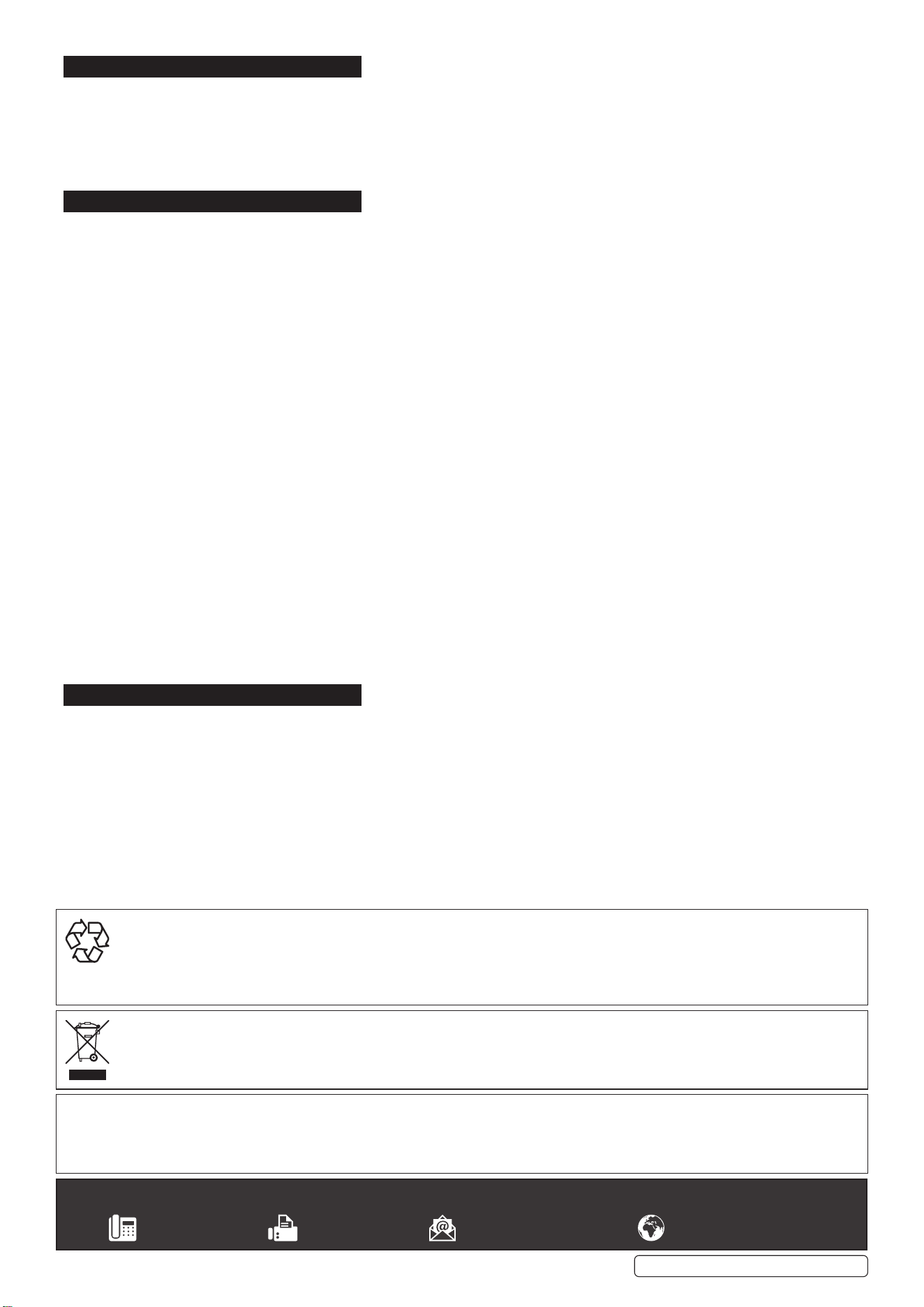
9 It is recommended that this device is wired directly to a fused isolator switch. If, however, a plug
istted,thefollowingapplies:
9 Fit a new plug according to the following instructions (UK only).
a) Connect the GREEN/YELLOW earth wire to the earth terminal ‘E’.
b) Connect the BROWN live wire to the live terminal ‘L’.
c) Connect the BLUE neutral wire to the neutral terminal ‘N’.
d) After wiring, check that there are no bare wires, that all wires have been correctly connected,
that the cable restraint is tight.
1.2. GENERAL SAFETY
WARNING! Ensure Health & Safety, local authority, and general workshop practice regulations are adhered to when using this
equipment.
9 Familiarise yourself with the application, limitations and potential hazards of the soldering station.
9 Replace or repair damaged parts. Use genuine parts only. Unauthorised parts may be dangerous and will invalidate the warranty.
9 Locate soldering station in a suitable working area, keep area clean and tidy and free from unrelated materials.
9 Keep the work area clean, uncluttered and ensure there is adequate lighting.
9 Keep the soldering iron clean for best and safest performance.
9 Ensuretherearenoammableorcombustiblematerialsneartheworkarea.
9 Wear approved safety eye protection (standard spectacles are not adequate).
9 Wear appropriate protective clothing.
9 Ensure the workpiece is adequately held before operating the soldering iron.
9 Always replace the soldering iron in its holder when not in use.
9 Remove excess solder from the soldering iron by wiping the tip on a damp, natural sponge; not by abrupt force.
8 DO NOT attempt to remove excess solder from the soldering iron by shaking it. Hot solder may become airborne and land on skin
causing burns and blisters.
8 DO NOT allow children or pets into the area where the soldering is taking place.
8 DO NOT attempt to cool the soldering iron with water.
NOTE: This appliance can be used by children aged from 8 years and above and persons with reduced physical, sensory or mental
capabilities or lack of experience and knowledge if they have been given supervision or instruction concerning use of the appliance
in a safe way and understand the hazards involved. Children shall not play with the appliance. Cleaning and user maintenance shall
not be made by children without supervision.
2. INTRODUCTION
48WSolderingstationwithrapidheatup.Variabletemperaturecontrol.Maintainstemperaturesbetween160-480°C.Suppliedwithametal
soldering iron stand, tip sponge, replaceable tip.
Recommended fuse rating
3 Amp
SD008 Issue 2 (3) 05/09/2022
Original Language Version
© Jack Sealey Limited
Refer to
instructions
Indoor use only
Hot surfaces
3. SPECIFICATION
MODEL NO: ............................................................... SD008
Electrical Plug Type: ................................................3-PinBS
Frequency: .....................................................................50Hz
Heating Element Voltage: .........................................230V AC
Power: .............................................................................48W
Temperature Range ...........................160-480°C(320-896°F)
4. OPERATION
4.1. Unpack the soldering station and check all parts. Damaged parts must not be put into operation.
4.2. Put the holding rack for the soldering iron sideways in the soldering station, wet the cleaning sponge in the sponge rack with water.
4.3. Put the soldering iron in the holding rack.
4.4. Place the soldering station on a solid and dry surface.
4.5. Connect the mains supply and turn on the soldering station by using the power switch (I=ON/0=OFF).When turned on, the
power switch is lit.
4.6. Always put the soldering iron on the holding rack when it is heating up or during breaks from soldering.
4.7. Make sure the workbench for soldering is clean.
4.8. Only use solder for electronics. Acidic solder can damage the soldering tip or the work piece.
4.9. Regulate the desired temperature of the soldering iron with the adjusting knob.
4.10. Thecolour-codedareasareequaltofollowingtemperatures:
Yellow≥160°C
LightOrange180°Cto350°C
DeepOrange350°Cto450°C
Red≥550°C
4.11. Lower the temperature during breaks, this saves energy and extends the durability of the soldering tip.
4.12. Wait for about 10 minutes until the soldering tip reaches the setting temperature, test the temperature by touching the soldering tip
with solder. If the solder melts away easily, start soldering.
4.13. Tinthehotsolderingtipwithsolder;wipeoexcessivesolderonthewetcleaningsponge.
4.14. Heatuptheto-be-solderedpartwiththesolderingtipandaddsolder.
4.15. Wait for the hot solder to cool down.
4.16. Clean the soldering tip on the wet sponge after each soldering.
4.17. Afterthesolderingisdone,putbackthesolderingironintherackandturnothesolderingStationatthemainswitch.
4.18. DO NOTleothesolderingtip,oritwillbedamaged.
4.19. Never touch the hot soldering tip.
4.20. Let the soldering iron cool down after use.
4.21. The soldering iron should not be dunked into water.
4.22. During breaks, the soldering iron must be placed in the holding rack.
5. MAINTENANCE
5.1. This tool must be placed on its stand when not in use.
5.2. Ifthesupplycordisdamaged,itmustbereplacedbythemanufactureroritsserviceagentorasimilarlyqualiedpersoninorderto
avoid hazards.
5.3. GENERAL CLEANING
5.3.1. The outer case of the iron or station may be cleaned with a damp cloth using small amounts of liquid detergent Never submerse the
unit in liquid or allow any liquid to enter the housing. Never use solvent to clean the case.
Sealey Group, Kempson Way, Suffolk Business Park, Bury St Edmunds, Suffolk. IP32 7AR
01284 757500 01284 703534 sales@sealey.co.uk www.sealey.co.uk
ENVIRONMENT PROTECTION
Recycle unwanted materials instead of disposing of them as waste. All tools, accessories and packaging should be sorted, taken to
a recycling centre and disposed of in a manner which is compatible with the environment. When the product becomes completely
unserviceable and requires disposal, drain any fluids (if applicable) into approved containers and dispose of the product and fluids
according to local regulations.
WEEE REGULATIONS
Dispose of this product at the end of its working life in compliance with the EU Directive on Waste Electrical and Electronic Equipment
(WEEE). When the product is no longer required, it must be disposed of in an environmentally protective way. Contact your local solid
waste authority for recycling information.
Note: It is our policy to continually improve products and as such we reserve the right to alter data, specifications and component parts without prior
notice.
Important: No Liability is accepted for incorrect use of this product.
Warranty: Guarantee is 12 months from purchase date, proof of which is required for any claim.
SD008 Issue 2 (3) 05/09/2022
Original Language Version
© Jack Sealey Limited