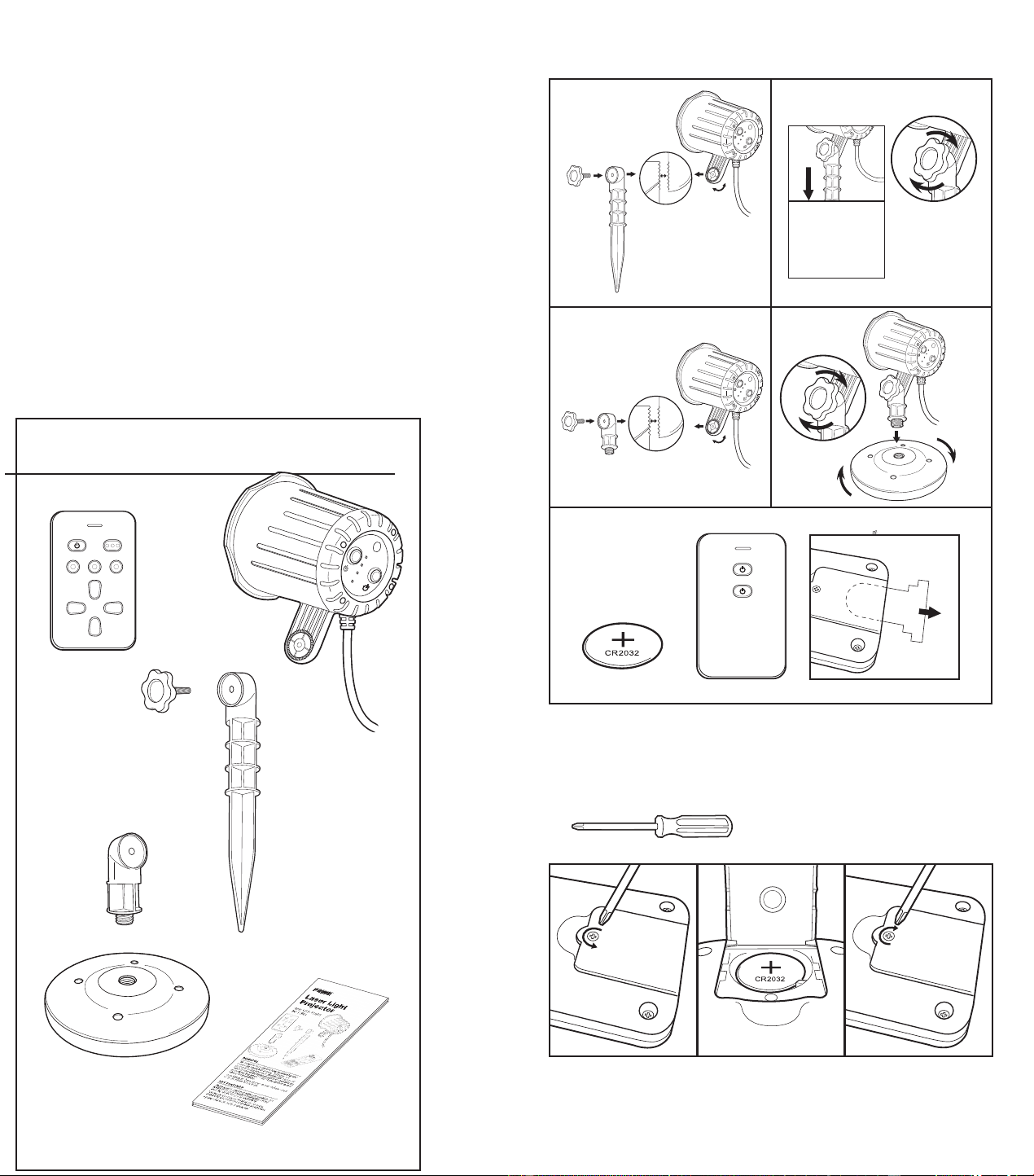
1 Laser Light Projector
1 Ground Stake
1 ground stake knob
1 Remote Control (3V CR2032 Battery Included)
2 Piece Indoor stand
1 Instruction Manual
PROGRAMMING INSTRUCTIONS
WARNING
This product contains a built-in heater to
protect the laser diodes (light source) from
freezing. The heater must continue to
receive power even when the light is turned
off. Failure to maintain the electrical power to
this product when temperatures drop below
32°F can cause permanent failure of the
laser diodes.
It may take up to 10 minutes after the laser
has been turned on for it to achieve full
brightness.
Plug the laser into an outdoor rated
GFCI receptacle.
NOTE: When you first plug in the laser
• The default settings are:
• Light Color: Red & Green Mode
• Timer: 6 hours
• The laser light color may be
adjusted/set from the button on
the laser housing.
• The time setting may be changed by
pressing Xthe X Xsbutton don dthed laser
body
1. The laser will automatically turn on
at dusk each day and run for the
time programmed. It may take up to
10 minutes before the laser reaches
full brightness.
a. IMPORTANT NOTE: Once you
have plugged in the laser to start
using it, do not unplug it until
done using it in that location.
2. There are 3 different color display
options to choose from: RED &
GREEN (default), GREEN ONLY or
RED ONLY.
a. RED & GREEN MODE
i. As mentioned, when the laser
is first plugged into an outlet,
this is the default setting.
iii.
ii. RED & GREEN Mode
To manually select this mode, press the button
on the base of the laser until the laser projects red &
green light. The laser must run through a full timer
cycle, (one night's use) for the color mode you selected
to be saved to repeat the next night. The color mode
will automatically be saved even when the button
on the remote control is used to manually turn off the
laser.
b. GREEN MODE
turns on at dusk.
ENGLISH FRONT-PAGE 1
©2017 Prime Wire & Cable, Inc. • City of Industry, CA 91789 • Service (888) 445-9955 • www.primewirecable.com
i. To manually select this mode,
press the button on the
base of the laser until
the laser
projects green light.
The laser
must run through a
full timer
cycle, (one night's use) for the
color mode you
selected to be
saved to repeat
the next night.
The color mode
will
automatically be saved
even
when the button on the
remote control is used to
manually turn off the laser
c. RED MODE
i. To manually select this mode,
press the button on the
base of the laser until the laser
projects red light. The laser
must run through a full timer
cycle, (one night's use) for the
color mode you selected to be
saved to repeat the next night.
The color mode will
automatically be saved even
when the button on the
remote control is used to
manually turn off the laser.
ci. POWER OFF
i.
ii.
To turn off the laser using the
remote control, press the
button. The laser will
automatically turn on again the next
evening at dusk in the last color
and timer modes.
To turn off the laser manually,
press the button until the laser
turns OFF. The laser will
automatically turn on again the next
evening at dusk in the
last color
mode programmed.
Each Box Con
tains:
2hrs
4hrs
6hrs
8hrs
2h
4h 6h
8h
x1
x1
x1
x1
x1
x1
x1
Battery Replacement:
Required Tool:
Small Phillips Screwdriver (not included)
Getting Started / Getting Started / Getting Started
2hrs
4hrs
6hrs
8hrs
2hrs
4hrs
6hrs
8hrs
3V CR2032
Battery Included
Battery Included
Battery Included
1
2
3 4
2hrs
4hrs
6hrs
8hrs
Transmitter
TXCC17
manual

1 Laser Light Projector
1 Ground Stake
1 ground stake knob
1 Remote Control (3V CR2032 Battery Included)
2 Piece Indoor stand
1 Instruction Manual
PROGRAMMING INSTRUCTIONS
WARNING
This product contains a built-in heater to
protect the laser diodes (light source) from
freezing. The heater must continue to
receive power even when the light is turned
off. Failure to maintain the electrical power to
this product when temperatures drop below
32°F can cause permanent failure of the
laser diodes.
It may take up to 10 minutes after the laser
has been turned on for it to achieve full
brightness.
Plug the laser into an outdoor rated
GFCI receptacle.
NOTE: When you first plug in the laser
• The default settings are:
• Light Color: Red & Green Mode
• Timer: 6 hours
• The laser light color may be
adjusted/set from the button on
the laser housing.
• The time setting may be changed by
pressing Xthe X Xsbutton don dthed laser
body
1. The laser will automatically turn on
at dusk each day and run for the
time programmed. It may take up to
10 minutes before the laser reaches
full brightness.
a. IMPORTANT NOTE: Once you
have plugged in the laser to start
using it, do not unplug it until
done using it in that location.
2. There are 3 different color display
options to choose from: RED &
GREEN (default), GREEN ONLY or
RED ONLY.
a. RED & GREEN MODE
i. As mentioned, when the laser
is first plugged into an outlet,
this is the default setting.
iii.
ii. RED & GREEN Mode
To manually select this mode, press the button
on the base of the laser until the laser projects red &
green light. The laser must run through a full timer
cycle, (one night's use) for the color mode you selected
to be saved to repeat the next night. The color mode
will automatically be saved even when the button
on the remote control is used to manually turn off the
laser.
b. GREEN MODE
turns on at dusk.
ENGLISH FRONT-PAGE 1
©2017 Prime Wire & Cable, Inc. • City of Industry, CA 91789 • Service (888) 445-9955 • www.primewirecable.com
i. To manually select this mode,
press the button on the
base of the laser until
the laser
projects green light.
The laser
must run through a
full timer
cycle, (one night's use) for the
color mode you
selected to be
saved to repeat
the next night.
The color mode
will
automatically be saved
even
when the button on the
remote control is used to
manually turn off the laser
c. RED MODE
i. To manually select this mode,
press the button on the
base of the laser until the laser
projects red light. The laser
must run through a full timer
cycle, (one night's use) for the
color mode you selected to be
saved to repeat the next night.
The color mode will
automatically be saved even
when the button on the
remote control is used to
manually turn off the laser.
ci. POWER OFF
i.
ii.
To turn off the laser using the
remote control, press the
button. The laser will
automatically turn on again the next
evening at dusk in the last color
and timer modes.
To turn off the laser manually,
press the button until the laser
turns OFF. The laser will
automatically turn on again the next
evening at dusk in the
last color
mode programmed.
Each Box Con
tains:
2hrs
4hrs
6hrs
8hrs
2h
4h 6h
8h
x1
x1
x1
x1
x1
x1
x1
Battery Replacement:
Required Tool:
Small Phillips Screwdriver (not included)
Getting Started / Getting Started / Getting Started
2hrs
4hrs
6hrs
8hrs
2hrs
4hrs
6hrs
8hrs
3V CR2032
Battery Included
Battery Included
Battery Included
1
2
3 4
2hrs
4hrs
6hrs
8hrs
Transmitter
TXCC17
manual

SAFETY INFORMATION
HELPFUL TIPS
• The Laser Light Projector safely operates in
temperatures from -26°C up to 32°C (-15°F up to 90°F).
It has a built-in heater and fan to help it maintain
an optimal operating temperature. For these features to
work properly, the Laser Light Projector must be
plugged in at all times. In temperatures below 13°C
(55°F) please allow up to 10 minutes for the laser to
achieve full brightness.
• Do not at any time shine the Laser Light Projector
directly into anyone’s eyes or your own.
• Do not place the laser in such a position that it will shine
into cars or low flying aircraft.
• Do not place the laser in shaded areas away from direct
sunlight. In order for the photosensor feature to work,
the laser must detect sunlight and dusk to automatically
turn on each day.
TROUBLESHOOTING
Problem:
Laser Light Projector is too dim.
Possible Cause:
The outside temperature is too cold
Corrective Action:
Allow the Laser Light Projector up to 10 minutes to brighten
to full intensity.
Problem:
Laser Light Projector does not turn on at all.
Possible Causes:
• The outside temperature is too cold.
• The outlet the unit is plugged into is not working.
Corrective Action:
• Occasionally, if it is very cold, the Laser Light Projector
will appear to be off for a few minutes before slowly
turning on. Allow the Laser Light Projector up to 10
minutes to warm up to operating temperature.
• Check outlet to ensure flow of electricity:
1. If plugged directly into a GFCI receptacle, press the
“reset” button. If there is no “reset” button on the
outlet but a sticker stating that it is GFCI protected,
find the nearest GFCI receptacle in the house or in
another area outside and press the “reset” button to
ensure that it is activated so power may flow to the
outlet where the Laser Light Projector is getting its
power.
2. Check the circuit breaker in the main electrical panel
to ensure that the breaker is set and has not been
tripped. If it has tripped, unplug the Laser Light
Projector then reset the breaker before trying again.
Problem:
The remote control doesn’t work.
BATTERY INFORMATION
WARNING: This product contains a button cell battery. If
swallowed, it could cause severe injury or death in just 2
hours. Seek medical attention immediately.
Batteries may explode or leak, and cause burns or injury if
disposed in fire, mixed with a different battery type,
inserted backwards, or disassembled.
Check with your local solid waste authority or recycling
center for detailed information for proper button cell battery
disposal.
The remote control included with this laser light projector
requires a 3V CR2032 button cell battery. To replace spent
batteries, use a Phillips screwdriver to unscrew the battery
compartment cover on the backside of the remote control.
The screw loosens when turning it counterclockwise
(Fig. 5). To open the plastic battery compartment cover,
twist the battery compartment cover counterclockwise with
a coin or other flat tool, aligning the arrow on the cover to
the UNLOCKED symbol (Fig. 6). Remove the plastic cover
over the button cell battery. Make sure the negative side (-)
of the battery faces inward and the positive side (+) faces
outward (Fig. 7). Align the arrow on the cover with the
UNLOCKED symbol on the outside of the remote control.
Twist the battery compartment cover to the right with a
coin or other flat tool to align the arrow with the LOCKED
symbol. Place the screw back into the designated
compartment. Use the Phillips screwdriver, and twist
clockwise to close the battery compartment (Fig. 8).
This device is for use with a 110 - 125VAC power source.
120V AC/60 Hz
• Do not use with an external remote control, timer or light
switch, as the laser contains a heating element for
operation in low temperatures that needs power at all
times
.
• Do not connect your Laser Light Projector to a dimmer
at any time as this may damage the laser itself.
• At no point should you shine the laser directly into
anyone’s eyes.
• When operating this device in unsupervised, accessible
areas, it is recommended that up-close access to the
Laser Light Projector is restricted or prevented.
• Do not stare into the laser light source.
• Do not shine the laser into any moving vehicles or low
flying aircraft.
• Do not attempt to disassemble the Laser Light Projector
as there are no user-serviceable components.
ENGLISH BACK-PAGE 1
©2017 Prime Wire & Cable, Inc. • City of Industry, CA 91789 • Service (888) 445-9955 • www.primewirecable.com
c. To manually select the timer setting, press the
button on the base of the laser until the
indicator light next to the desired time setting is
illuminated.
4. The laser projector can receive signals from the remote
control up to 24.38m (80ft) away. The distance may vary
depending on line of sight (such as sending the signal
through a wall) between the laser and the remote
control.
5. To operate properly, and to prolong the life of your laser
projector, the laser must not be disconnected from
the power source even when it has been turned off,
until you are ready to stop using it at the end of the event
or season. Store it in a cool, dry place when not in use.
IMPORTANT NOTE: Be sure to read all of the safety
information, cautions, helpful tips and trouble-shooting
sections of this manual before using this laser projector.
Possible Cause:
• The remote control is not synced to the laser projector.
• The distance between the remote control and the laser
is too far or the view is impeded.
• Battery is weak or spent.
Corrective Action:
• Move closer to the laser when using the remote control.
The range and response will be impeded if the signal is
going through solid objects like walls, doors, trees or
heavy furniture.
• Replace the battery in the remote control with a new
3V CR2032 battery. Follow the steps outlined in
step 6 of the set-up instructions.
To sync the remote control to the laser:
a. Turn OFF and unplug the laser from its power
source. Remove the battery from the battery
compartment by following the instructions outlined in
step 6 of the set-up instructions in this manual. Press
any button on the remote twice to discharge the
battery.
b. Plug the laser back to its power source. Place the
battery into the battery compartment following the
instructions outlined in tstep 6 of the set-up
instructions of this manual. Press any button on the
remote. This will automatically begin syncing the
remote to the laser. The blue LED on the remote will
blink continuously while syncing. The remote will be
synced and ready for use when the LED on the
remote stops blinking.
c. If you cannot sync the remote control after
following the steps above, contact Prime’s customer
service at (888) 445-9955, toll-free between 8:00AM
and 4:00PM Pacific Time Zone.
• Unplug and store in a cool dry place when not in use.
• Read and follow all instructions on the product and/or
operating instructions provided with the product.
• Before using or reusing, inspect the product carefully.
Do not use the Laser Light Projector if there are any
cracks in the lens or the housing, cuts or frayed areas in
the power supply cord or connection of the cord to the
plug, broken plug blades or any other damage that
could be deemed a safety hazard.
• Do not directly cover the Laser Light Projector while in
use (such as cloth, paper or any material not part of the
product that would prevent heat dissipation or be a fire
hazard).
• Do not hang ornaments or other objects from the cord
or the Laser Light Projector.
• Do not mount or place near gas or electric heaters,
fireplaces, candles or other similar heat sources.
• Keep away from children and pets.
WARNING: CHOKING HAZARD
The components packaged with the laser
light projector contain small parts.
Keep out of reach of children.
CAUTION
Use of this product other than specified in the instruction
manual or on the box may cause harm to yourself or
others and may result in unfavorable results when using
your Laser Light Projector.
This laser projector is certified as a class 3R/llla laser
product to the requirements of the US Federal Laser
Product Performance Standard (FLPPS) contained in the
regulations in 21 CFR Subchapter J. Class 3R/llla laser
products can be hazardous when directly viewed.
Avoid direct viewing of Class 3R/llla laser energy. For
reference, the FLPPS requirements for demonstration
laser products like laser pointers are limited to Class
3R/llla levels of laser energy. This product uses diffractive
optics to scatter the beam energy. This scattering effect
causes the energy concentration to drop below the
exposure limits for momentary or accidental viewing at a
relatively short distance from the laser aperture. As similar
with all bright light sources, when operating this device in
unsupervised general public areas, it is recommended that
up close access to the Laser Light Projector be restricted
or prevented.
This laser display device incorporates a Class 3R/llla laser
system which, by itself, may be hazardous. However, this
laser display device incorporates a protective housing and
diffractive holographic optics in the machine design to
prevent exposure or human access to laser radiation
during operation or maintenance above the Class 3R/llla
limits. Each individual laser beam power is under 1mW
which is less than a standard laser pointer.
UNDER NO CIRCUMSTANCE shall attempts be made to
open protective housing or operate the device if the
aperture windows are damaged. Opening the Laser light
Projector housing voids any safety agency certifications
(cETLus, FCC, FDA)
SAFETY INFORMATION
HELPFUL TIPS
• The Laser Light Projector safely operates in
temperatures from -26°C up to 32°C (-15°F up to 90°F).
It has a built-in heater and fan to help it maintain
an optimal operating temperature. For these features to
work properly, the Laser Light Projector must be
plugged in at all times. In temperatures below 13°C
(55°F) please allow up to 10 minutes for the laser to
achieve full brightness.
• Do not at any time shine the Laser Light Projector
directly into anyone’s eyes or your own.
• Do not place the laser in such a position that it will shine
into cars or low flying aircraft.
• Do not place the laser in shaded areas away from direct
sunlight. In order for the photosensor feature to work,
the laser must detect sunlight and dusk to automatically
turn on each day.
TROUBLESHOOTING
Problem:
Laser Light Projector is too dim.
Possible Cause:
The outside temperature is too cold
Corrective Action:
Allow the Laser Light Projector up to 10 minutes to brighten
to full intensity.
Problem:
Laser Light Projector does not turn on at all.
Possible Causes:
• The outside temperature is too cold.
• The outlet the unit is plugged into is not working.
Corrective Action:
• Occasionally, if it is very cold, the Laser Light Projector
will appear to be off for a few minutes before slowly
turning on. Allow the Laser Light Projector up to 10
minutes to warm up to operating temperature.
• Check outlet to ensure flow of electricity:
1. If plugged directly into a GFCI receptacle, press the
“reset” button. If there is no “reset” button on the
outlet but a sticker stating that it is GFCI protected,
find the nearest GFCI receptacle in the house or in
another area outside and press the “reset” button to
ensure that it is activated so power may flow to the
outlet where the Laser Light Projector is getting its
power.
2. Check the circuit breaker in the main electrical panel
to ensure that the breaker is set and has not been
tripped. If it has tripped, unplug the Laser Light
Projector then reset the breaker before trying again.
Problem:
The remote control doesn’t work.
BATTERY INFORMATION
WARNING: This product contains a button cell battery. If
swallowed, it could cause severe injury or death in just 2
hours. Seek medical attention immediately.
Batteries may explode or leak, and cause burns or injury if
disposed in fire, mixed with a different battery type,
inserted backwards, or disassembled.
Check with your local solid waste authority or recycling
center for detailed information for proper button cell battery
disposal.
The remote control included with this laser light projector
requires a 3V CR2032 button cell battery. To replace spent
batteries, use a Phillips screwdriver to unscrew the battery
compartment cover on the backside of the remote control.
The screw loosens when turning it counterclockwise
(Fig. 5). To open the plastic battery compartment cover,
twist the battery compartment cover counterclockwise with
a coin or other flat tool, aligning the arrow on the cover to
the UNLOCKED symbol (Fig. 6). Remove the plastic cover
over the button cell battery. Make sure the negative side (-)
of the battery faces inward and the positive side (+) faces
outward (Fig. 7). Align the arrow on the cover with the
UNLOCKED symbol on the outside of the remote control.
Twist the battery compartment cover to the right with a
coin or other flat tool to align the arrow with the LOCKED
symbol. Place the screw back into the designated
compartment. Use the Phillips screwdriver, and twist
clockwise to close the battery compartment (Fig. 8).
This device is for use with a 110 - 125VAC power source.
120V AC/60 Hz
• Do not use with an external remote control, timer or light
switch, as the laser contains a heating element for
operation in low temperatures that needs power at all
times
.
• Do not connect your Laser Light Projector to a dimmer
at any time as this may damage the laser itself.
• At no point should you shine the laser directly into
anyone’s eyes.
• When operating this device in unsupervised, accessible
areas, it is recommended that up-close access to the
Laser Light Projector is restricted or prevented.
• Do not stare into the laser light source.
• Do not shine the laser into any moving vehicles or low
flying aircraft.
• Do not attempt to disassemble the Laser Light Projector
as there are no user-serviceable components.
ENGLISH BACK-PAGE 1
©2017 Prime Wire & Cable, Inc. • City of Industry, CA 91789 • Service (888) 445-9955 • www.primewirecable.com
c. To manually select the timer setting, press the
button on the base of the laser until the
indicator light next to the desired time setting is
illuminated.
4. The laser projector can receive signals from the remote
control up to 24.38m (80ft) away. The distance may vary
depending on line of sight (such as sending the signal
through a wall) between the laser and the remote
control.
5. To operate properly, and to prolong the life of your laser
projector, the laser must not be disconnected from
the power source even when it has been turned off,
until you are ready to stop using it at the end of the event
or season. Store it in a cool, dry place when not in use.
IMPORTANT NOTE: Be sure to read all of the safety
information, cautions, helpful tips and trouble-shooting
sections of this manual before using this laser projector.
Possible Cause:
• The remote control is not synced to the laser projector.
• The distance between the remote control and the laser
is too far or the view is impeded.
• Battery is weak or spent.
Corrective Action:
• Move closer to the laser when using the remote control.
The range and response will be impeded if the signal is
going through solid objects like walls, doors, trees or
heavy furniture.
• Replace the battery in the remote control with a new
3V CR2032 battery. Follow the steps outlined in
step 6 of the set-up instructions.
To sync the remote control to the laser:
a. Turn OFF and unplug the laser from its power
source. Remove the battery from the battery
compartment by following the instructions outlined in
step 6 of the set-up instructions in this manual. Press
any button on the remote twice to discharge the
battery.
b. Plug the laser back to its power source. Place the
battery into the battery compartment following the
instructions outlined in tstep 6 of the set-up
instructions of this manual. Press any button on the
remote. This will automatically begin syncing the
remote to the laser. The blue LED on the remote will
blink continuously while syncing. The remote will be
synced and ready for use when the LED on the
remote stops blinking.
c. If you cannot sync the remote control after
following the steps above, contact Prime’s customer
service at (888) 445-9955, toll-free between 8:00AM
and 4:00PM Pacific Time Zone.
• Unplug and store in a cool dry place when not in use.
• Read and follow all instructions on the product and/or
operating instructions provided with the product.
• Before using or reusing, inspect the product carefully.
Do not use the Laser Light Projector if there are any
cracks in the lens or the housing, cuts or frayed areas in
the power supply cord or connection of the cord to the
plug, broken plug blades or any other damage that
could be deemed a safety hazard.
• Do not directly cover the Laser Light Projector while in
use (such as cloth, paper or any material not part of the
product that would prevent heat dissipation or be a fire
hazard).
• Do not hang ornaments or other objects from the cord
or the Laser Light Projector.
• Do not mount or place near gas or electric heaters,
fireplaces, candles or other similar heat sources.
• Keep away from children and pets.
WARNING: CHOKING HAZARD
The components packaged with the laser
light projector contain small parts.
Keep out of reach of children.
CAUTION
Use of this product other than specified in the instruction
manual or on the box may cause harm to yourself or
others and may result in unfavorable results when using
your Laser Light Projector.
This laser projector is certified as a class 3R/llla laser
product to the requirements of the US Federal Laser
Product Performance Standard (FLPPS) contained in the
regulations in 21 CFR Subchapter J. Class 3R/llla laser
products can be hazardous when directly viewed.
Avoid direct viewing of Class 3R/llla laser energy. For
reference, the FLPPS requirements for demonstration
laser products like laser pointers are limited to Class
3R/llla levels of laser energy. This product uses diffractive
optics to scatter the beam energy. This scattering effect
causes the energy concentration to drop below the
exposure limits for momentary or accidental viewing at a
relatively short distance from the laser aperture. As similar
with all bright light sources, when operating this device in
unsupervised general public areas, it is recommended that
up close access to the Laser Light Projector be restricted
or prevented.
This laser display device incorporates a Class 3R/llla laser
system which, by itself, may be hazardous. However, this
laser display device incorporates a protective housing and
diffractive holographic optics in the machine design to
prevent exposure or human access to laser radiation
during operation or maintenance above the Class 3R/llla
limits. Each individual laser beam power is under 1mW
which is less than a standard laser pointer.
UNDER NO CIRCUMSTANCE shall attempts be made to
open protective housing or operate the device if the
aperture windows are damaged. Opening the Laser light
Projector housing voids any safety agency certifications
(cETLus, FCC, FDA)
ENGLISH FRONT- PAGE 2
©2017
Prime Wire & Cable, Inc. • City of Industry, CA 91789 • Service (888) 445-9955 • www.primewirecable.com
FAA AND TRANSPORT CANADA
LASER SAFETY INITIATIVE
Aiming a laser at an aircraft is a serious safety risk and
violates federal law. Lasers can cause temporary visual
impairment for pilots who are trying to fly safely to their
destinations and may be carrying hundreds of passengers.
The FAA and Transport Canada are working with federal,
state, and local law enforcement agencies to pursue civil and
criminal penalties against individuals who purposely aim a
laser at an aircraft.
FCC REGULATORY STATEMENT
WARNING: Changes or modifications to this unit not
expressly approved by the party responsible for
compliance could void the user authority to operate the
equipment.
This device complies with part 15 of the FCC rules.
Operation is subject to the following two conditions:
1. This device may not cause harmful interference, and
2. This device must accept any interference received,
including interference that may cause undesired
operation.
Notes: This equipment has been tested and found to
comply with the limits for a Class B digital device, pursuant
to Part 15 of the FCC Rules. These limits are designed to
provide reasonable protection against harmful interference
in a residential installation. This equipment generates,
uses and can radiate radio frequency energy and, if not
installed and used in accordance with the instructions, may
cause harmful interference to radio communications.
However, there is no guarantee that interference will not
occur in a particular installation. If this equipment does
cause harmful interference to radio or television reception,
which can be determined by turning the equipment off and
on, the user is encouraged to try to correct the interference
by one or more of the following measures:
1. Reorient or relocate the receiving antenna.
2. Increase the separation between the equipment and
receiver.
3. Connect the equipment into an outlet on a circuit
different from that to which the receiver is connected.
4. Consult the dealer or an experienced radio/TV
technician for help.
IC REGULATORY STATEMENT
Under Industry Canada regulations, this radio transmitter
may only operate using an antenna of a type and
maximum (or lesser) gain approved for the transmitter by
Industry Canada. To reduce potential radio interference to
other users, the antenna type and its gain should be so
chosen that the equivalent isotropically radiated power
(e.i.r.p.) is not more than that necessary for successful
communication.
This device complies with Industry Canada licence-exempt
RSS standard(s). Operation is subject to the following two
conditions: (1) this device may not cause interference, and
(2) this device must accept any interference, including
interference that may cause undesired operation of the
device.
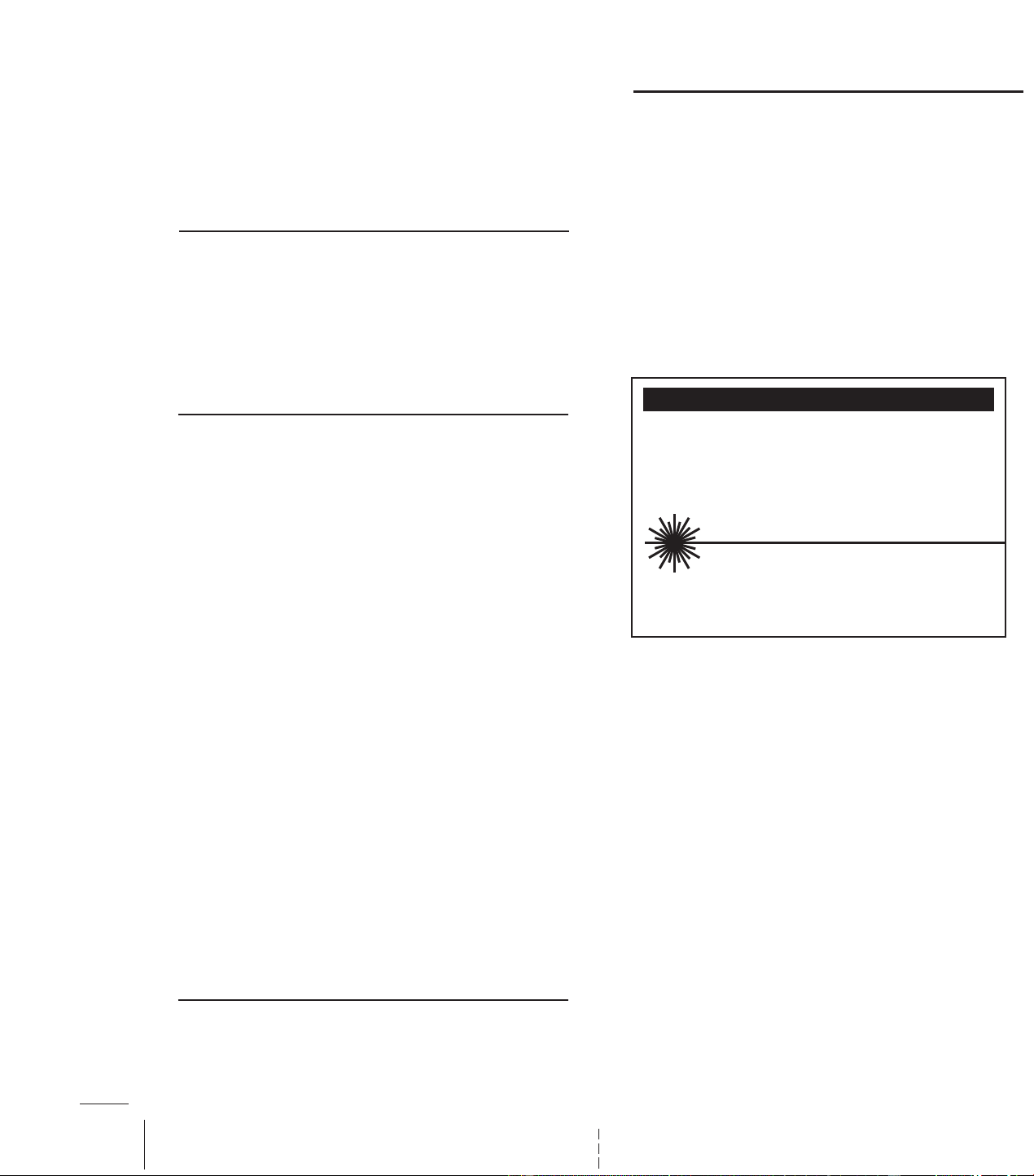
CAUTION / ATTENTION / PRECAUCIÓN
LASER RADIATION. DO NOT STARE INTO BEAM OR VIEW DIRECTLY WITH OPTICAL
INSTRUMENTS. LASER RADIATION WHEN OPEN AND INTERLOCK DEFEATED.
RAYONNEMENT LASER NE PAS FIXER LE FAISCEAU NI REGARDER DIRECTEMENT
AVEC DES INSTRUMENTS OPTIQUES RAYONNEMENT LASER EN CAS
D'OUVERTURE ET DE DISPOSITIF DE VERROUILLAGE DÉFAIT.
RADIACIÓN LÁSER. NO MIRE FIJAMENTE EL HAZ NI LO OBSERVE
DIRECTAMENTE CON INSTRUMENTOS ÓPTICOS. RADIACIÓN LÁSER
CUANDO ESTÁ ABIERTO Y EL INTERBLOQUEO ESTÁ DESACTIVADO.
532-635nm Max Output <3mW CLASS IIIa LASER PRODUCT
This product complies with 21 CFR 1040.10 and 1040.11
Sortie max. 532-635nm <3mW PRODUIT LASER CLASSE IIIa
Ce produit est conforme au 21 CFR 1040.10 et 1040.11
Salida máx. de <3mW a 532-635 nm PRODUCTO LÁSER CLASE IIIa.
Este producto cumple con 21 CFR 1040.10 y 1040.11
Use of this product other than specified in the instruction
manual or on the box may cause harm to yourself or
others and may result in unfavorable results when using
your Laser Light Projector.
This laser projector is certified as a class 3R/llla laser
product to the requirements of the US Federal Laser
Product Performance Standard (FLPPS) contained in the
regulations in 21 CFR Subchapter J. Class 3R/llla laser
products can be hazardous when directly viewed.
Avoid direct viewing of Class 3R/llla laser energy. For
reference, the FLPPS requirements for demonstration
laser products like laser pointers are limited to Class
3R/llla levels of laser energy. This product uses diffractive
optics to scatter the beam energy. This scattering effect
causes the energy concentration to drop below the
exposure limits for momentary or accidental viewing at a
relatively short distance from the laser aperture. As similar
with all bright light sources, when operating this device in
unsupervised general public areas, it is recommended that
up close access to the Laser Light Projector be restricted
or prevented.
This laser display device incorporates a Class 3R/llla laser
system which, by itself, may be hazardous. However, this
laser display device incorporates a protective housing and
diffractive holographic optics in the machine design to
prevent exposure or human access to laser radiation
during operation or maintenance above the Class 3R/llla
limits. Each individual laser beam power is under 1mW
which is less than a standard laser pointer.
UNDER NO CIRCUMSTANCE shall attempts be made to
open protective housing or operate the device if the
aperture windows are damaged. Opening the Laser light
Projector housing voids any safety agency certifications
(cETLus, FCC, FDA)