合格证
QC PASS
无线领夹麦克风系统
Wireless Lavalier Microphone System
使用手册
Instruction Manual
WEC-S Kit1/WEC-S Kit2
GODOX Photo Equipment Co., Ltd.
Add.: Building 2,Yaochuan Industrial Zone, Tangwei Community, Fuhai Street, Bao'an
District, Shenzhen 518103, China Tel: +86-755-29609320(8062)
Fax: +86-755-25723423 E-mail: godox@godox.com
深圳市神牛摄影器材有限公司
地址: 深圳市宝安区福海街道塘尾社区耀川工业区厂房2栋 电话: 0755-29609320
(8062) 传真: 0755-25723423 邮箱: godox@godox.com
www.godox.com
Made in China 705-WECSK2-00
神牛影音微信公众号
Godox Audio Wechat
Official Account
海外社媒平台及资讯
Overseas Of ficial
Accounts & Updates

前 言
感谢购买神牛产品!
欢迎使用神牛相机版无线领夹麦克风系统WEC-S Kit1和WEC-S Kit2套装。本产品体积
小、续航长,利用2.4GHz波段传输音频信号,适用于利用索尼相机的直播、采访、亲子
教学、短视频、户外拍摄等多种场景。
使用本产品之前,请仔细阅读说明书,以便正确操作及使用。
警 告
麦克风是精密设备。请勿使其掉落或受到撞击,以避免发生故障。
请勿私自拆卸、改装或尝试维修本产品。产品如出现故障须由本公司或授权的维修人
员进行检查维修。
请保持干燥,请勿用湿手握持本产品,亦不可将产品浸入水中或暴露于雨中。
请勿将本产品存放在阳光直射的地方、加热装置附近或者炎热、潮湿或多尘的地方。
请勿让儿童接触本产品,以避免发生意外。
请勿在易燃易爆环境中使用。在这些场合下,请注意相关警告标识。
请勿放置在超过50度的高温环境中。
请仔细阅读并遵守由厂商提供的警告或指示。
主要特点:
全球通用频段2.4GHz无线技术;
无线距离最远可达200米(视距);
无损音质,一键降噪;
输出音量调节,单声道/立体声自由切换;
支持数字/模拟两种音频模式;
接收器可做麦克风单独收音;
内置锂电池支持USB-C/充电盒充电;
•
•
•
•
•
•
•
01 02

前 言
感谢购买神牛产品!
欢迎使用神牛相机版无线领夹麦克风系统WEC-S Kit1和WEC-S Kit2套装。本产品体积
小、续航长,利用2.4GHz波段传输音频信号,适用于利用索尼相机的直播、采访、亲子
教学、短视频、户外拍摄等多种场景。
使用本产品之前,请仔细阅读说明书,以便正确操作及使用。
警 告
麦克风是精密设备。请勿使其掉落或受到撞击,以避免发生故障。
请勿私自拆卸、改装或尝试维修本产品。产品如出现故障须由本公司或授权的维修人
员进行检查维修。
请保持干燥,请勿用湿手握持本产品,亦不可将产品浸入水中或暴露于雨中。
请勿将本产品存放在阳光直射的地方、加热装置附近或者炎热、潮湿或多尘的地方。
请勿让儿童接触本产品,以避免发生意外。
请勿在易燃易爆环境中使用。在这些场合下,请注意相关警告标识。
请勿放置在超过50度的高温环境中。
请仔细阅读并遵守由厂商提供的警告或指示。
主要特点:
全球通用频段2.4GHz无线技术;
无线距离最远可达200米(视距);
无损音质,一键降噪;
输出音量调节,单声道/立体声自由切换;
支持数字/模拟两种音频模式;
接收器可做麦克风单独收音;
内置锂电池支持USB-C/充电盒充电;
•
•
•
•
•
•
•
01 02
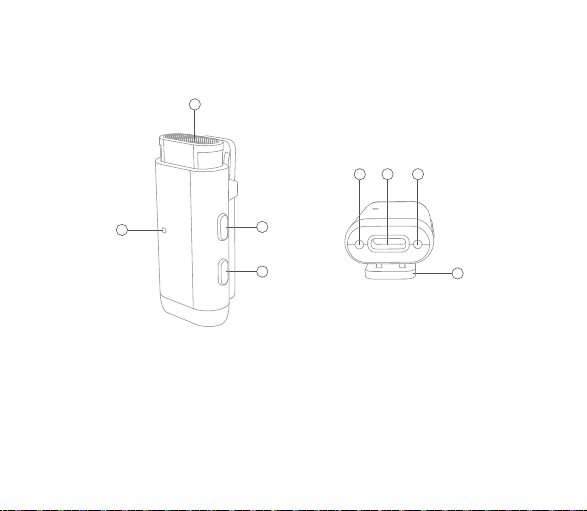
产品结构
发射器
电源键
配对/降噪键
内置麦克风
背夹
1.
2.
3.
4.
指示灯
USB-C充电口
充电触点
5.
6.
7.
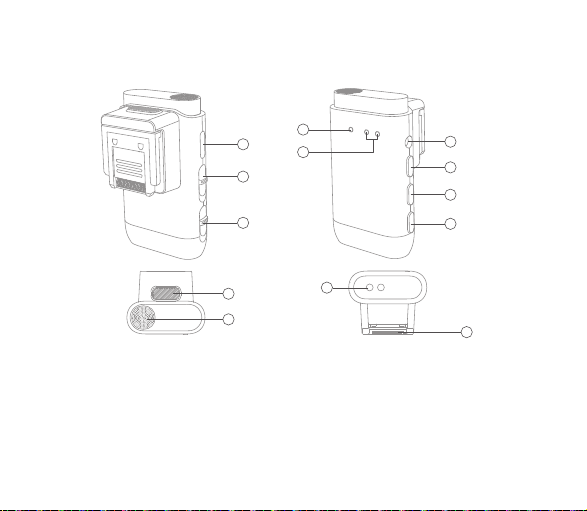
数字/模拟音频切换键
接收器麦克风开关键
USB-C接口
3.5mm音频输出接口
电源键
1.
2.
3.
4.
5.
配对/音量+键
模式/音量-键
热靴
充电触点
6.
7.
8.
9.
热靴拆卸键
内置麦克风
热靴连接指示灯
配对指示灯
10.
11.
12.
13.
2
1
4
767
5
接收器
4
5
6
7
8
2
3
1
10
11
9
3
03 04
13
12
产品结构
发射器
电源键
配对/降噪键
内置麦克风
背夹
1.
2.
3.
4.
指示灯
USB-C充电口
充电触点
5.
6.
7.
数字/模拟音频切换键
接收器麦克风开关键
USB-C接口
3.5mm音频输出接口
电源键
1.
2.
3.
4.
5.
配对/音量+键
模式/音量-键
热靴
充电触点
6.
7.
8.
9.
热靴拆卸键
内置麦克风
热靴连接指示灯
配对指示灯
10.
11.
12.
13.
2
1
4
767
5
接收器
4
5
6
7
8
2
3
1
10
11
9
3
03 04
13
12
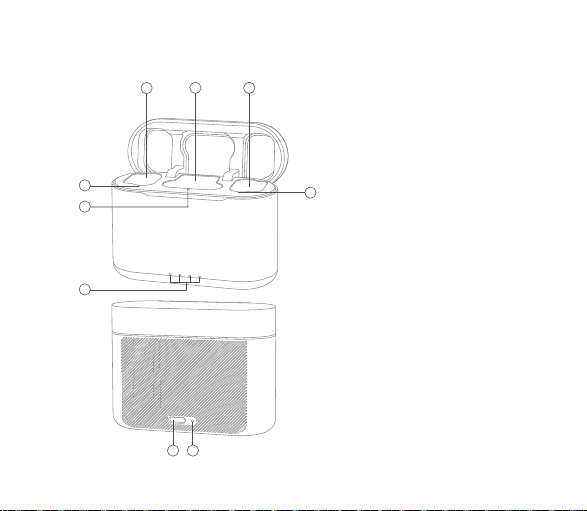
发射器凹槽
接收器凹槽
盒内状态指示灯
充电盒电量指示灯
USB-C 充电口
复位孔
1.
2.
3.
4.
5.
6.
充电盒
3
4
3
3
12
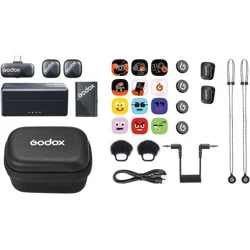
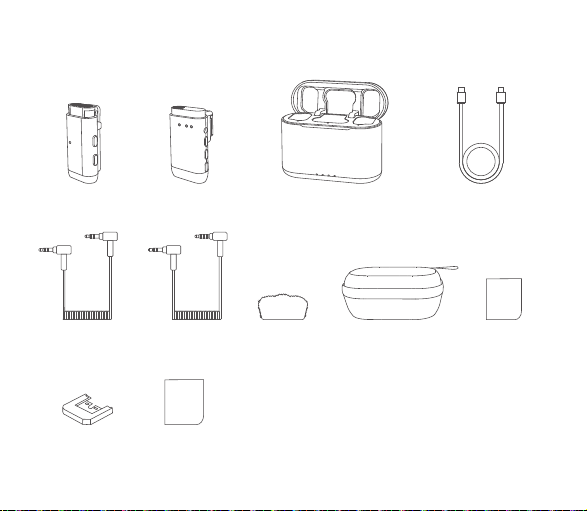
包装清单
发射器 ×1 接收器 ×1
充电盒 ×1
USB-A转USB-C数据线 ×1
3.5mm TRS 转 TRS
音频线
×1
3.5mm TRS 转 TRRS
音频线
×1
防风兔毛 ×1
收纳盒 ×1 说明书 ×1
热靴保护套 ×1 快速指引卡 ×1
1
05 06
65
发射器凹槽
接收器凹槽
盒内状态指示灯
充电盒电量指示灯
USB-C 充电口
复位孔
1.
2.
3.
4.
5.
6.
充电盒
3
4
3
3
12
包装清单
发射器 ×1 接收器 ×1
充电盒 ×1
USB-A转USB-C数据线 ×1
3.5mm TRS 转 TRS
音频线
×1
3.5mm TRS 转 TRRS
音频线
×1
防风兔毛 ×1
收纳盒 ×1 说明书 ×1
热靴保护套 ×1 快速指引卡 ×1
1
05 06
65
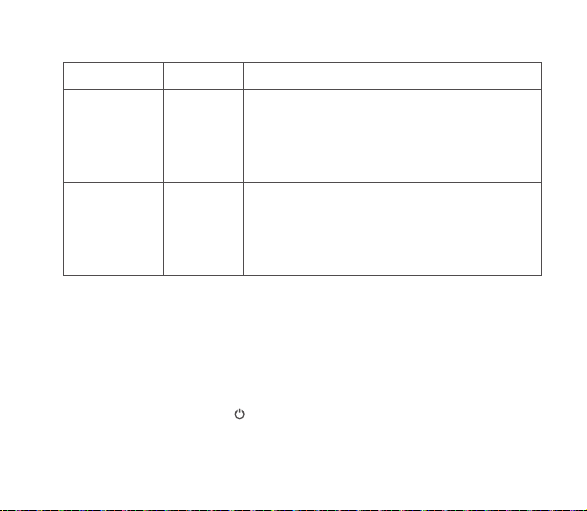
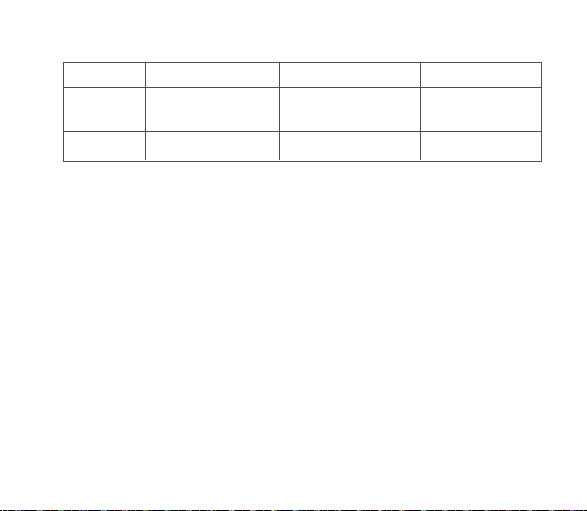
名称
无线领夹麦克
风系统
无线领夹麦克
风系统
型号
WEC-S
Kit1
WEC-S
Kit2
标配物品
发射器×1、接收器×1、USB-A转USB-C数据线×1、
防风兔毛×2、3.5mm TRS转TRS音频线×1、
3.5mm TRS转TRRS音频线×1、收纳盒×1、
热靴保护套×1、说明书×1、快速指引卡×1
发射器×2、接收器×1、充电盒×1、USB-A转USB-C数
据线×1、防风兔毛×3、3.5mm TRS转TRS音频线×1、
3.5mm TRS转TRRS音频线×1、收纳盒×1、说明书×1、
快速指引卡×1
温馨提示:说明书中的图片均为示意图,仅供参考。由于产品不断更新与升级,产品实物与图片可能存在差异,请以实物
为准。
使用说明
1.1 操作说明
长按发射器和接收器的电源键< >3s可实现开/关机。将机器从充电盒取出,自动开
机;放入充电盒,则会自动关机。
1.开关机
注:若发射器和接收器开机后超过5分钟未配对成功,会自动关机。
1.2 指示灯说明
2.1 操作说明
长按发射器的配对/降噪键< >以及接收器的配对/音量+键< >2s进入配
对状态,连接成功退出配对状态,未连接成功10s后退出配对状态。
2. 配对
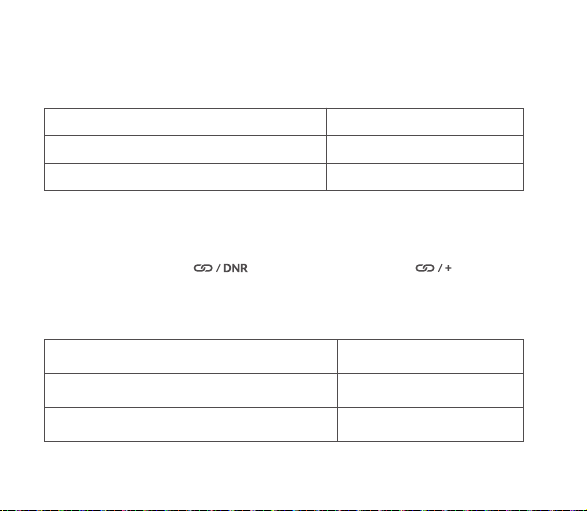
指示灯状态 意义
发射器绿色闪烁(亮0.5s/灭0.5s) 开机未配对
接收器两个指示灯绿色闪烁(亮0.5s/灭0.5s) 开机未配对
07 08
2.2 指示灯说明
指示灯状态 意义
发射器绿色快闪(亮0.25s/灭0.25s) 正在配对
配对成功
发射器绿色长亮
名称
无线领夹麦克
风系统
无线领夹麦克
风系统
型号
WEC-S
Kit1
WEC-S
Kit2
标配物品
发射器×1、接收器×1、USB-A转USB-C数据线×1、
防风兔毛×2、3.5mm TRS转TRS音频线×1、
3.5mm TRS转TRRS音频线×1、收纳盒×1、
热靴保护套×1、说明书×1、快速指引卡×1
发射器×2、接收器×1、充电盒×1、USB-A转USB-C数
据线×1、防风兔毛×3、3.5mm TRS转TRS音频线×1、
3.5mm TRS转TRRS音频线×1、收纳盒×1、说明书×1、
快速指引卡×1
温馨提示:说明书中的图片均为示意图,仅供参考。由于产品不断更新与升级,产品实物与图片可能存在差异,请以实物
为准。
使用说明
1.1 操作说明
长按发射器和接收器的电源键< >3s可实现开/关机。将机器从充电盒取出,自动开
机;放入充电盒,则会自动关机。
1.开关机
注:若发射器和接收器开机后超过5分钟未配对成功,会自动关机。
1.2 指示灯说明
2.1 操作说明
长按发射器的配对/降噪键< >以及接收器的配对/音量+键< >2s进入配
对状态,连接成功退出配对状态,未连接成功10s后退出配对状态。
2. 配对
指示灯状态 意义
发射器绿色闪烁(亮0.5s/灭0.5s) 开机未配对
接收器两个指示灯绿色闪烁(亮0.5s/灭0.5s) 开机未配对
07 08
2.2 指示灯说明
指示灯状态 意义
发射器绿色快闪(亮0.25s/灭0.25s) 正在配对
配对成功
发射器绿色长亮
3.2 指示灯说明
指示灯状态 意义
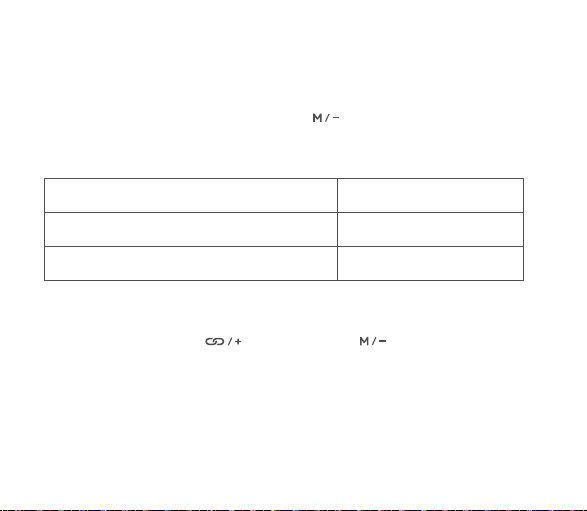
发射器橙色长亮 开启降噪
3.1 操作说明
短按发射器的配对/降噪键< >可开启或关闭降噪功能。一拖二状态下一个发射
器打开降噪功能,另外一个发射器也会同步打开,关闭亦同理。
3. 降噪
4.1 操作说明
默认为单声道模式,长按接收器的模式/音量-键< >5s可切换为立体声模式。
4. 单声道/立体声模式切换
09 10
短按接收器的配对/音量+键< >或模式/音量-键< >可按高中低三个档位调
节输出音量,首次开机默认音量中间档位。
5. 输出音量调节
4.2 指示灯说明
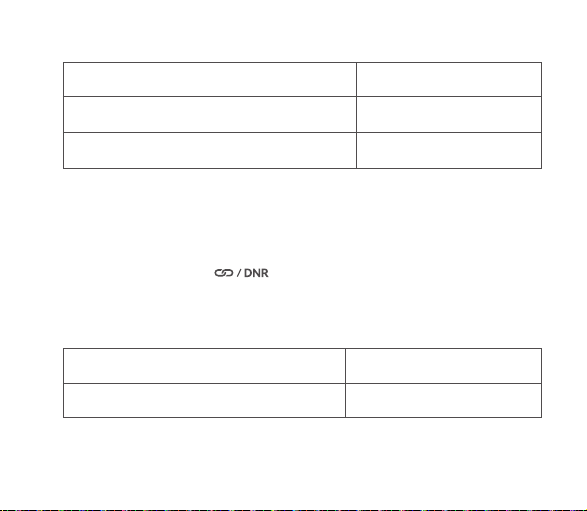
指示灯状态 意义
接收器绿色长亮 单声道模式
立体声模式
接收器蓝色长亮
接收器两个指示灯绿色快闪(亮0.25s/灭0.25s) 正在配对
接收器TX1绿色长亮;TX2熄灭 一个发射器与接收器配对成功
接收器两个指示灯绿色长亮 两个发射器与接收器配对成功
注:两个发射器与接收器配对成功后,如果其中一个发射机关机,对应的TX1/TX2指示灯会在30秒后熄灭。
3.2 指示灯说明
指示灯状态 意义
发射器橙色长亮 开启降噪
3.1 操作说明
短按发射器的配对/降噪键< >可开启或关闭降噪功能。一拖二状态下一个发射
器打开降噪功能,另外一个发射器也会同步打开,关闭亦同理。
3. 降噪
4.1 操作说明
默认为单声道模式,长按接收器的模式/音量-键< >5s可切换为立体声模式。
4. 单声道/立体声模式切换
09 10
短按接收器的配对/音量+键< >或模式/音量-键< >可按高中低三个档位调
节输出音量,首次开机默认音量中间档位。
5. 输出音量调节
4.2 指示灯说明
指示灯状态 意义
接收器绿色长亮 单声道模式
立体声模式
接收器蓝色长亮
接收器两个指示灯绿色快闪(亮0.25s/灭0.25s) 正在配对
接收器TX1绿色长亮;TX2熄灭 一个发射器与接收器配对成功
接收器两个指示灯绿色长亮 两个发射器与接收器配对成功
注:两个发射器与接收器配对成功后,如果其中一个发射机关机,对应的TX1/TX2指示灯会在30秒后熄灭。

8.1 USB-C充电
将发射器和接收器通过USB-A转USB-C数据线连接电源即可为产品充电。
8. 充电
滑动接收器麦克风开关键< >,开启或关闭接收器麦克风,开启后接收器可单
独收音。
7. 接收器单独收音
11 12
滑动数字/模拟音频切换键< >,可切换至数字音频或模拟音频模式。
“DIGITAL”表示数字音频,“ANALOG”表示模拟音频。
6. 数字/模拟音频切换
注:请勿在录制过程中切换,以免收录音频出现问题。
指示灯状态 意义
发射器和接收器白色闪烁 充电中
充满电
发射器红色闪烁(亮0.5s/灭0.5s) 发射器电量低于10%
接收器TX1红色长亮;TX2显示正常 接收器未低电量,TX1低电量,
TX2未低电量
接收器TX1显示正常;TX2红色长亮 接收器未低电量,TX1未低电量,
TX2低电量
接收器TX1/TX2红色长亮 接收器未低电量,TX1低电量,
TX2低电量
发射器和接收器白色长亮
接收器低电量
接收器TX1/TX2红色闪烁(亮0.5s/灭0.5s)

8.1 USB-C充电
将发射器和接收器通过USB-A转USB-C数据线连接电源即可为产品充电。
8. 充电
滑动接收器麦克风开关键< >,开启或关闭接收器麦克风,开启后接收器可单
独收音。
7. 接收器单独收音
11 12
滑动数字/模拟音频切换键< >,可切换至数字音频或模拟音频模式。
“DIGITAL”表示数字音频,“ANALOG”表示模拟音频。
6. 数字/模拟音频切换
注:请勿在录制过程中切换,以免收录音频出现问题。
指示灯状态 意义
发射器和接收器白色闪烁 充电中
充满电
发射器红色闪烁(亮0.5s/灭0.5s) 发射器电量低于10%
接收器TX1红色长亮;TX2显示正常 接收器未低电量,TX1低电量,
TX2未低电量
接收器TX1显示正常;TX2红色长亮 接收器未低电量,TX1未低电量,
TX2低电量
接收器TX1/TX2红色长亮 接收器未低电量,TX1低电量,
TX2低电量
发射器和接收器白色长亮
接收器低电量
接收器TX1/TX2红色闪烁(亮0.5s/灭0.5s)
安装说明
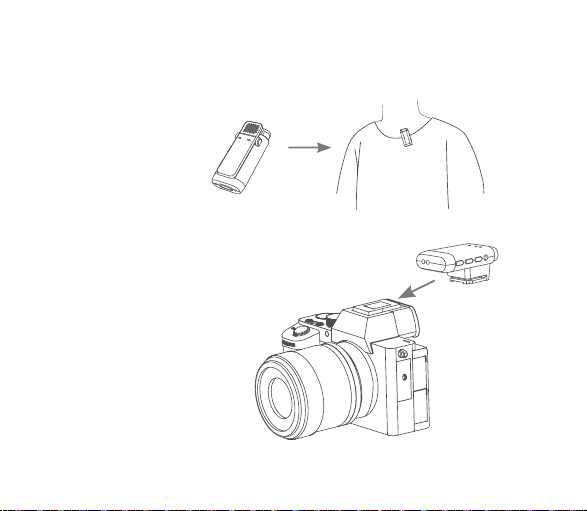
将发射器利用背夹佩戴在衣领处。
接收器可通过热靴直接连接索尼相
机,连接成功后热靴连接指示灯会
亮起。拆卸时只需按下热靴拆卸
键,然后拔出接收器即可。
13 14
指示灯状态 意义
盒内状态指示灯白色闪烁 发射器/接收器充电中
开盖后四个充电盒电量指示灯全部熄灭 充电盒电量0%,自动关机
发射器/接收器充满电
四个充电盒电量指示灯白色长亮 充电盒电量100%
开盖后从左往右前三个充电盒电量指示灯白色长亮,
最后一个熄灭
充电盒电量75%
开盖后从左往右前两个充电盒电量指示灯白色长亮,
后两个熄灭
充电盒电量50%
开盖后从左往右第一个充电盒电量指示灯白色长亮,
后三个熄灭
充电盒电量25%
盒内状态指示灯白色长亮
充电盒电量低,请及时充电
开盖后从左往右第一个充电盒电量指示灯白色闪烁,
后三个熄灭
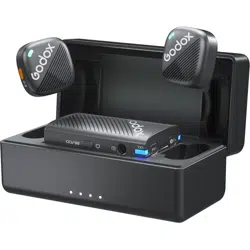
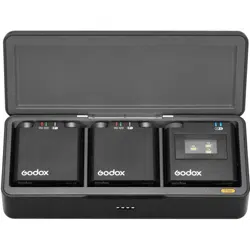
将发射器/接收器放入充电盒内充电时,首先会检测发射器/接收器是否插入对应凹槽内,
顶针接触到充电触点后,盒内对应的状态指示灯会亮起,然后检测发射器/接收器是否为
满电状态,如果不满电则开始充电直至充满。开盖后,盒内状态指示灯与充电盒电量指示
灯会同时亮起,分别显示盒内发射器/接收器与充电盒自身的电量状态。
8.2 充电盒充电
充电盒自身充电时四个充电盒电量指示灯递增式白色闪烁,充满后保持长亮。
安装说明
将发射器利用背夹佩戴在衣领处。
接收器可通过热靴直接连接索尼相
机,连接成功后热靴连接指示灯会
亮起。拆卸时只需按下热靴拆卸
键,然后拔出接收器即可。
13 14
指示灯状态 意义
盒内状态指示灯白色闪烁 发射器/接收器充电中
开盖后四个充电盒电量指示灯全部熄灭 充电盒电量0%,自动关机
发射器/接收器充满电
四个充电盒电量指示灯白色长亮 充电盒电量100%
开盖后从左往右前三个充电盒电量指示灯白色长亮,
最后一个熄灭
充电盒电量75%
开盖后从左往右前两个充电盒电量指示灯白色长亮,
后两个熄灭
充电盒电量50%
开盖后从左往右第一个充电盒电量指示灯白色长亮,
后三个熄灭
充电盒电量25%
盒内状态指示灯白色长亮
充电盒电量低,请及时充电
开盖后从左往右第一个充电盒电量指示灯白色闪烁,
后三个熄灭
将发射器/接收器放入充电盒内充电时,首先会检测发射器/接收器是否插入对应凹槽内,
顶针接触到充电触点后,盒内对应的状态指示灯会亮起,然后检测发射器/接收器是否为
满电状态,如果不满电则开始充电直至充满。开盖后,盒内状态指示灯与充电盒电量指示
灯会同时亮起,分别显示盒内发射器/接收器与充电盒自身的电量状态。
8.2 充电盒充电
充电盒自身充电时四个充电盒电量指示灯递增式白色闪烁,充满后保持长亮。
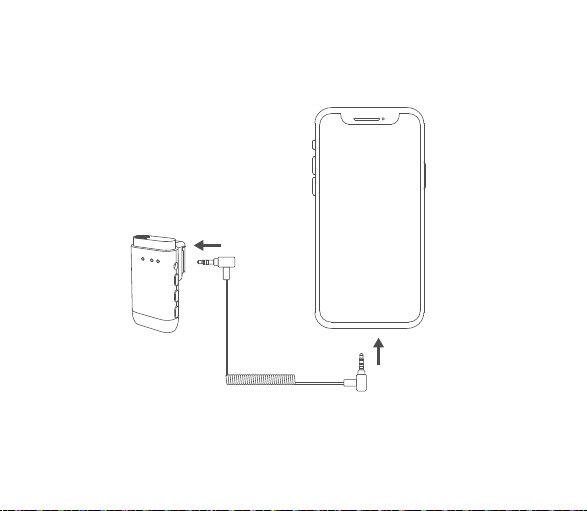
或通过3.5mm TRS转TRRS音频线连接接收器的3.5mm音频输出接口与手机的3.5mm耳机
孔,亦可搭配手机使用。
名称 发射器
型号 WEC TX
传输类型 2.4GHz数字跳频系统
拾音模式 全向型
频率范围 20Hz-20KHz
最大SPL 110dB
动态范围 86dB
最大无线距离 200米(视距)
锂电池参数 3.7V 140mAh,
0.518Wh
USB-C输入 5V 160mA
续航时间 约8小时
充电时间 约2小时
接收器 充电盒
WEC SRX WEC-CS
2.4GHz数字跳频系统 /
/ /
/ /
/ /
/ /
/
3.8V 200mAh,
0.76Wh
3.7V 1400mAh,
5.18Wh
5V 200mA 5V 1.3A
约8小时 大约可为三台机器充
电两次
约2小时 约2小时
规格参数
15 16
或通过3.5mm TRS转TRRS音频线连接接收器的3.5mm音频输出接口与手机的3.5mm耳机
孔,亦可搭配手机使用。
名称 发射器
型号 WEC TX
传输类型 2.4GHz数字跳频系统
拾音模式 全向型
频率范围 20Hz-20KHz
最大SPL 110dB
动态范围 86dB
最大无线距离 200米(视距)
锂电池参数 3.7V 140mAh,
0.518Wh
USB-C输入 5V 160mA
续航时间 约8小时
充电时间 约2小时
接收器 充电盒
WEC SRX WEC-CS
2.4GHz数字跳频系统 /
/ /
/ /
/ /
/ /
/
3.8V 200mAh,
0.76Wh
3.7V 1400mAh,
5.18Wh
5V 200mA 5V 1.3A
约8小时 大约可为三台机器充
电两次
约2小时 约2小时
规格参数
15 16
工作环境温度 -10~50℃
尺寸 48mm×22mm×16mm
净重≈ 12g
-10~50℃ -10~50℃
52mm x 24mm x 30mm 63mm×85mm×36mm
19g 87g
规格参数如有变更,恕不另行通知。
维护保养
避免跌落:如果受到强烈碰撞或振动,设备可能会发生故障。
保持干燥:本产品是非防水产品,如果将其浸入水中或放置于高湿度的环境中将可能发生
故障。内部构造生锈可能会导致无法修理的损害。
避免温度骤变:温度的突变,诸如在寒冷天进出温暖的大楼将可能会使产品内部结露。为
避免结露,请将本产品事先装入手提袋或塑料包内,以防温度突变。
远离强磁场:无线电广播发射机等设备产生的强静电或强磁场可能会干扰本产品正常工
作。
如有技术更改,恕不另行通知。
Foreword
Thank you for purchasing!
WEC-S Kit1 and WEC-S Kit2 are the latest wireless lavalier microphone systems designed for
Sony cameras. With the characteristics of compact and poable, long duration of use, as well as
2.4GHz wireless transmission, it’s quite suitable for live streaming, inteiew, family lecturing,
sho video recording, outdoor shooting, etc.
Please read this manual carefully before using to make sure the correct operation and exe the
optimum function.
Main Feature
Globally universal 2.4GHz wireless transmission technology.
The maximum wireless transmission distance up to 200m (sight distance).
Clear and stable sound quality with denoise function.
Output volume adjustment and switchable mono/stereo mode.
Suppo digital and analog audio mode.
Receiver is workable as an individual microphone.
Built-in lithium batte suppo charging through USB-C cable or charging case.
•
•
•
•
•
•
•
17 18

工作环境温度 -10~50℃
尺寸 48mm×22mm×16mm
净重≈ 12g
-10~50℃ -10~50℃
52mm x 24mm x 30mm 63mm×85mm×36mm
19g 87g
规格参数如有变更,恕不另行通知。
维护保养
避免跌落:如果受到强烈碰撞或振动,设备可能会发生故障。
保持干燥:本产品是非防水产品,如果将其浸入水中或放置于高湿度的环境中将可能发生
故障。内部构造生锈可能会导致无法修理的损害。
避免温度骤变:温度的突变,诸如在寒冷天进出温暖的大楼将可能会使产品内部结露。为
避免结露,请将本产品事先装入手提袋或塑料包内,以防温度突变。
远离强磁场:无线电广播发射机等设备产生的强静电或强磁场可能会干扰本产品正常工
作。
如有技术更改,恕不另行通知。
Foreword
Thank you for purchasing!
WEC-S Kit1 and WEC-S Kit2 are the latest wireless lavalier microphone systems designed for
Sony cameras. With the characteristics of compact and poable, long duration of use, as well as
2.4GHz wireless transmission, it’s quite suitable for live streaming, inteiew, family lecturing,
sho video recording, outdoor shooting, etc.
Please read this manual carefully before using to make sure the correct operation and exe the
optimum function.
Main Feature
Globally universal 2.4GHz wireless transmission technology.
The maximum wireless transmission distance up to 200m (sight distance).
Clear and stable sound quality with denoise function.
Output volume adjustment and switchable mono/stereo mode.
Suppo digital and analog audio mode.
Receiver is workable as an individual microphone.
Built-in lithium batte suppo charging through USB-C cable or charging case.
•
•
•
•
•
•
•
17 18

Warning
This product is high-precision instrument, please avoid falling, collision or pounding.
Do not disassemble. Should repairs become necessa, this product must be sent to our
Company or an authorized maintenance center.
Always keep this product d. Do not use in rain or damp conditions.
Do not leave or store this product in the environment of direct sunlight, near heating
devices, or in hot, humid or dusty.
Keep out of reach of children.
Do not use in ammable and explosive environments. Pay attention to the relevant warning
signs.
Do not leave or store the product if the ambient temperature reads over 50℃.
Please read carefully and follow the warnings or instructions provided by the manufacturer.
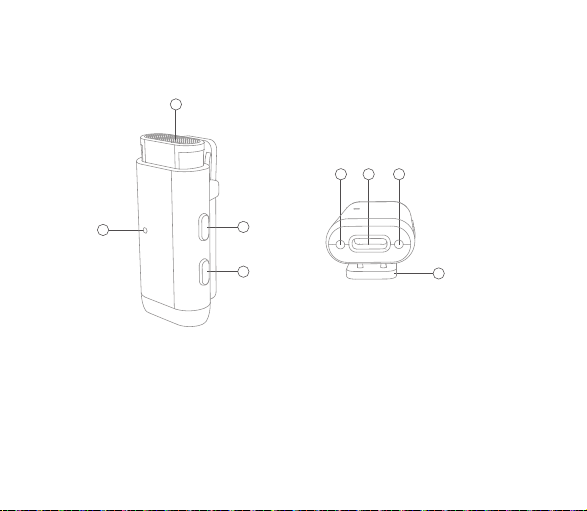
Structure of Product
Transmitter
Power Switch Button
Pairing/Denoise Button
Built-in Microphone
Back Clip
1.
2.
3.
4.
Indicator
USB-C Charging Po
Charging Points
5.
6.
7.
2
1
4
7
6
7
5
3
19 20
Warning
This product is high-precision instrument, please avoid falling, collision or pounding.
Do not disassemble. Should repairs become necessa, this product must be sent to our
Company or an authorized maintenance center.
Always keep this product d. Do not use in rain or damp conditions.
Do not leave or store this product in the environment of direct sunlight, near heating
devices, or in hot, humid or dusty.
Keep out of reach of children.
Do not use in ammable and explosive environments. Pay attention to the relevant warning
signs.
Do not leave or store the product if the ambient temperature reads over 50℃.
Please read carefully and follow the warnings or instructions provided by the manufacturer.
Structure of Product
Transmitter
Power Switch Button
Pairing/Denoise Button
Built-in Microphone
Back Clip
1.
2.
3.
4.
Indicator
USB-C Charging Po
Charging Points
5.
6.
7.
2
1
4
7
6
7
5
3
19 20
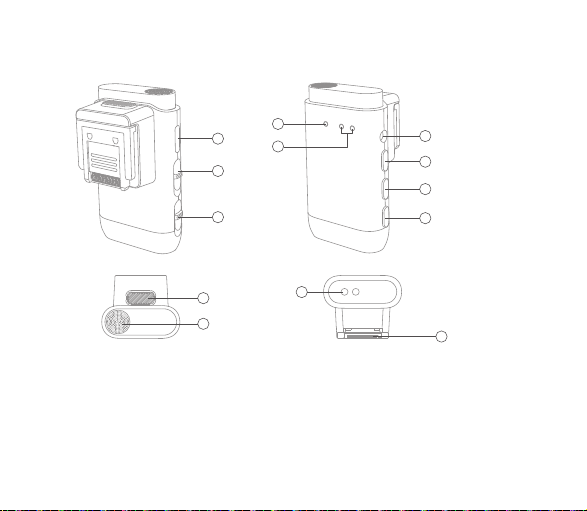
Receiver
Digital/Analog Audio Mode Switch Button
Receiver’s Mic Switch Button
USB-C Po
3.5mm Audio Output Po
Power Switch Button
1.
2.
3.
4.
5.
Pairing/Volume + Button
Mode/ Volume - Button
Hot Shoe
Charging Points
6.
7.
8.
9.
Hot Shoe Detaching Button
Built-in Microphone
Hot Shoe Connecting Indicator
Pairing Indicator
10.
11.
12.
13.
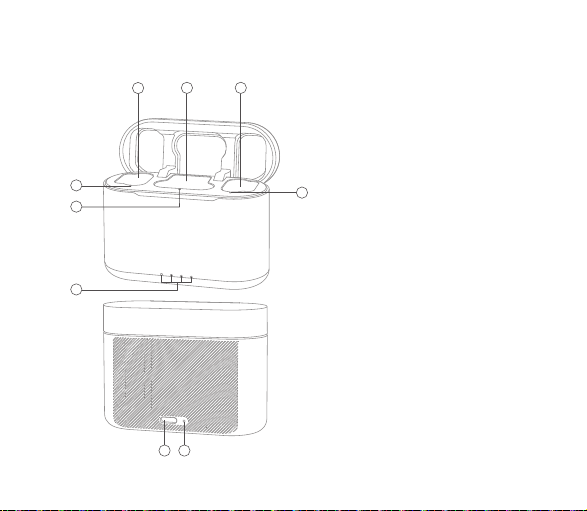
Transmitter’s Slot
Receiver’s Slot
Internal Status Indicator
External Charging Indicator
USB-C Charging Po
Reset Hole
1.
2.
3.
4.
5.
6.
Charging Case
21 22
4
5
6
7
8
2
3
1
10
11
9
13
12
3
4
3
3
12
1
65
Receiver
Digital/Analog Audio Mode Switch Button
Receiver’s Mic Switch Button
USB-C Po
3.5mm Audio Output Po
Power Switch Button
1.
2.
3.
4.
5.
Pairing/Volume + Button
Mode/ Volume - Button
Hot Shoe
Charging Points
6.
7.
8.
9.
Hot Shoe Detaching Button
Built-in Microphone
Hot Shoe Connecting Indicator
Pairing Indicator
10.
11.
12.
13.
Transmitter’s Slot
Receiver’s Slot
Internal Status Indicator
External Charging Indicator
USB-C Charging Po
Reset Hole
1.
2.
3.
4.
5.
6.
Charging Case
21 22
4
5
6
7
8
2
3
1
10
11
9
13
12
3
4
3
3
12
1
65

What’s Inside
Product Name
Wireless Lavalier
Microphone
System
Wireless Lavalier
Microphone
System
Model
WEC-S
Kit1
WEC-S
Kit2
Package List
Transmitter ×1, Receiver ×1, USB-A to USB-C Data
Cable ×1, Fur Windscreen ×2, 3.5mm TRS-TRS
Audio Cable ×1, 3.5mm TRS-TRRS Audio Cable ×1,
Storage Box ×1, Hot Shoe Cover ×1,
Instruction Manual ×1, Quick Sta Guide ×1
Transmitter ×2, Receiver ×1, Charging Case ×1,
USB-A to USB-C Data Cable ×1, Fur Windscreen ×3,
3.5mm TRS-TRS Audio Cable ×1, 3.5mm TRS-TRRS
Audio Cable x1, Storage Box ×1, Instruction Manual ×1,
Quick Sta Guide ×1
Note: Due to continuous updates and upgrades of the products, there may be dierences between the actual products
and the pictures. Therefore, the pictures are for reference only, products to prevail in kind.
23 24
Transmitter ×1 Receiver ×1
Charging Case ×1
USB-A to USB-C Data
Cable ×1
3.5mm TRS-TRS
Audio Cable ×1
3.5mm TRS-TRRS
Audio Cable ×1
Fur Windscreen ×1
Storage Box ×1 Instruction Manual ×1
Hot Shoe Cover ×1 Quick Sta Guide ×1

What’s Inside
Product Name
Wireless Lavalier
Microphone
System
Wireless Lavalier
Microphone
System
Model
WEC-S
Kit1
WEC-S
Kit2
Package List
Transmitter ×1, Receiver ×1, USB-A to USB-C Data
Cable ×1, Fur Windscreen ×2, 3.5mm TRS-TRS
Audio Cable ×1, 3.5mm TRS-TRRS Audio Cable ×1,
Storage Box ×1, Hot Shoe Cover ×1,
Instruction Manual ×1, Quick Sta Guide ×1
Transmitter ×2, Receiver ×1, Charging Case ×1,
USB-A to USB-C Data Cable ×1, Fur Windscreen ×3,
3.5mm TRS-TRS Audio Cable ×1, 3.5mm TRS-TRRS
Audio Cable x1, Storage Box ×1, Instruction Manual ×1,
Quick Sta Guide ×1
Note: Due to continuous updates and upgrades of the products, there may be dierences between the actual products
and the pictures. Therefore, the pictures are for reference only, products to prevail in kind.
23 24
Transmitter ×1 Receiver ×1
Charging Case ×1
USB-A to USB-C Data
Cable ×1
3.5mm TRS-TRS
Audio Cable ×1
3.5mm TRS-TRRS
Audio Cable ×1
Fur Windscreen ×1
Storage Box ×1 Instruction Manual ×1
Hot Shoe Cover ×1 Quick Sta Guide ×1

Note: The transmitter and receiver will be turned o if they stay unpaired in 5min after powered on.
Instructions for Use
1.1 Operating Instructions
Press and hold the power switch button< >for 3s to turn on or o the transmitter and
receiver. Take out the devices from the charging case, they will boot up automatically, while
put them into the charging case, they will be turned o.
1. Power Switch
2.1 Operating Instructions
Press and hold the pairing/denoise button< >of transmitter and pairing/volume +
button< >of receiver for 2s to pairing them. They will exit pairing status once paired,
while exit after 10s if unpaired.
2. Pairing
1.2 Indicator Instructions
Indicator Status Meaning
Indicator of transmitter ashes green eve 0.5s Unpaired after powered on
Both indicators of receiver ash green eve 0.5s Unpaired after powered on
2.2 Indicator Instructions
Indicator Status Meaning
Indicator of transmitter ashes green rapidly eve 0.25s Pairing status
Paired
Both indicators of receiver ash green rapidly eve 0.25s Pairing status
TX1 indicator of receiver is constant on green, TX2
indicator of receiver is o
One transmitter and one
receiver are paired
Both indicators of receiver are constant on green
Two transmitters and one
receiver are paired
Indicator of transmitter is constant on green
25 26
Note: If two transmitters are paired with the receiver but one of which is turned o later, then its corresponding
TX1/TX2 indicator will be o in 30s.

Note: The transmitter and receiver will be turned o if they stay unpaired in 5min after powered on.
Instructions for Use
1.1 Operating Instructions
Press and hold the power switch button< >for 3s to turn on or o the transmitter and
receiver. Take out the devices from the charging case, they will boot up automatically, while
put them into the charging case, they will be turned o.
1. Power Switch
2.1 Operating Instructions
Press and hold the pairing/denoise button< >of transmitter and pairing/volume +
button< >of receiver for 2s to pairing them. They will exit pairing status once paired,
while exit after 10s if unpaired.
2. Pairing
1.2 Indicator Instructions
Indicator Status Meaning
Indicator of transmitter ashes green eve 0.5s Unpaired after powered on
Both indicators of receiver ash green eve 0.5s Unpaired after powered on
2.2 Indicator Instructions
Indicator Status Meaning
Indicator of transmitter ashes green rapidly eve 0.25s Pairing status
Paired
Both indicators of receiver ash green rapidly eve 0.25s Pairing status
TX1 indicator of receiver is constant on green, TX2
indicator of receiver is o
One transmitter and one
receiver are paired
Both indicators of receiver are constant on green
Two transmitters and one
receiver are paired
Indicator of transmitter is constant on green
25 26
Note: If two transmitters are paired with the receiver but one of which is turned o later, then its corresponding
TX1/TX2 indicator will be o in 30s.

3.1 Operating Instructions
Press the pairing/denoise button< >of transmitter to turn on or o the denoise
function. When the denoise function of one transmitter in WEC-S Kit2 is turned on, the other
transmitter will be turned on simultaneously, and the same applies when the denoise
function is turned o.
3. Denoise
3.2 Indicator Instructions
Indicator Status Meaning
Indicator of transmitter is constant on orange Denoise function is on
4.1 Operating Instructions
The sound track mode is mono by default, press and hold the mode/volume – button< >of
receiver for 5s can switch to stereo mode.
4. Mono/Stereo Mode Switch
4.2 Indicator Instructions
Indicator Status Meaning
Both indicators of receiver are constant on green Mono mode
Stereo mode
Both indicators of receiver are constant on blue
Press and hold the pairing/volume + button< >or mode/volume – button< >of
receiver can adjust the output volume in 3 levels (high, medium and low). The volume is the
medium level by default after rst boot.
5. Output Volume Adjustment
Slide the digital/analog audio mode switch button < > can switch to digital
audio mode or analog audio mode.
6. Digital/Analog Audio Mode Switch
Slide the receiver’s mic switch button < > to turn on or turn o the receiver’s mic, the
receiver is workable as a microphone to record individually when it’s turned on.
7. Receiver’s Mic
27 28
Note: Please do not switch during recording to avoid problems with the recorded audio.

3.1 Operating Instructions
Press the pairing/denoise button< >of transmitter to turn on or o the denoise
function. When the denoise function of one transmitter in WEC-S Kit2 is turned on, the other
transmitter will be turned on simultaneously, and the same applies when the denoise
function is turned o.
3. Denoise
3.2 Indicator Instructions
Indicator Status Meaning
Indicator of transmitter is constant on orange Denoise function is on
4.1 Operating Instructions
The sound track mode is mono by default, press and hold the mode/volume – button< >of
receiver for 5s can switch to stereo mode.
4. Mono/Stereo Mode Switch
4.2 Indicator Instructions
Indicator Status Meaning
Both indicators of receiver are constant on green Mono mode
Stereo mode
Both indicators of receiver are constant on blue
Press and hold the pairing/volume + button< >or mode/volume – button< >of
receiver can adjust the output volume in 3 levels (high, medium and low). The volume is the
medium level by default after rst boot.
5. Output Volume Adjustment
Slide the digital/analog audio mode switch button < > can switch to digital
audio mode or analog audio mode.
6. Digital/Analog Audio Mode Switch
Slide the receiver’s mic switch button < > to turn on or turn o the receiver’s mic, the
receiver is workable as a microphone to record individually when it’s turned on.
7. Receiver’s Mic
27 28
Note: Please do not switch during recording to avoid problems with the recorded audio.

8.1 Charging through USB-A to USB-C Cable
The transmitter and receiver can be charged after connecting to power source through
USB-A to USB-C cable.
8. Charging
Put the transmitter/receiver into the charging case, the case will rst detect whether the
transmitter/receiver is correctly inseed into the corresponding slot, the corresponding internal
status indicator will light up if the pins inside touched the charging points of the transmitter/
receiver. Then it will detect whether the transmitter/receiver is fully charged, if not, it will sta
charging until it’s fully charged. The internal status indicators and external charging indicators will
light up at the same time to show the batte level of the transmitter/receiver and the charging
case itself if the charging case lid is open.
When charging the case itself, the four external charging indicators will ash white incrementally,
and be constant on white after the charging case is fully charged.
8.2 Charging Through Charging Case
Indicator Status Meaning
Indicators of transmitter and receiver ash white Charging
Fully charged
Indicator of transmitter ashes red eve 0.5s Batte level of transmitter is below
10%
TX1 indicator of receiver is constant on red,
TX2 indicator of receiver displays normally
Batte levels of receiver and
transmitter TX2 are normal, while
batte level of transmitter TX1
is below 10%
Indicators of transmitter and receiver are
constant on white
TX1 indicator of receiver displays normally,
TX2 indicator of receiver is constant on red
Batte levels of receiver and
transmitter TX1 are normal, while
batte level of transmitter TX2 is
below 10%
TX1 and TX2 indicators of receiver are constant
on red
Batte level of receiver is normal,
while batte levels of transmitter
TX1 and TX2 are below 10%
TX1 and TX2 indicators of receiver ash red eve
0.5s
Batte level of receiver is below 10%
29 30

8.1 Charging through USB-A to USB-C Cable
The transmitter and receiver can be charged after connecting to power source through
USB-A to USB-C cable.
8. Charging
Put the transmitter/receiver into the charging case, the case will rst detect whether the
transmitter/receiver is correctly inseed into the corresponding slot, the corresponding internal
status indicator will light up if the pins inside touched the charging points of the transmitter/
receiver. Then it will detect whether the transmitter/receiver is fully charged, if not, it will sta
charging until it’s fully charged. The internal status indicators and external charging indicators will
light up at the same time to show the batte level of the transmitter/receiver and the charging
case itself if the charging case lid is open.
When charging the case itself, the four external charging indicators will ash white incrementally,
and be constant on white after the charging case is fully charged.
8.2 Charging Through Charging Case
Indicator Status Meaning
Indicators of transmitter and receiver ash white Charging
Fully charged
Indicator of transmitter ashes red eve 0.5s Batte level of transmitter is below
10%
TX1 indicator of receiver is constant on red,
TX2 indicator of receiver displays normally
Batte levels of receiver and
transmitter TX2 are normal, while
batte level of transmitter TX1
is below 10%
Indicators of transmitter and receiver are
constant on white
TX1 indicator of receiver displays normally,
TX2 indicator of receiver is constant on red
Batte levels of receiver and
transmitter TX1 are normal, while
batte level of transmitter TX2 is
below 10%
TX1 and TX2 indicators of receiver are constant
on red
Batte level of receiver is normal,
while batte levels of transmitter
TX1 and TX2 are below 10%
TX1 and TX2 indicators of receiver ash red eve
0.5s
Batte level of receiver is below 10%
29 30

Instructions for Installation
Clip the transmitter to the collar with its back clip.
Clip the receiver to Sony camera
directly through the hot shoe, the
hot shoe connecting indicator will
light up after connection. Push the
hot shoe detaching button and
pull out the receiver to detach it
from the camera.
31 32
Indicator Status Meaning
Internal status indicator ashes white The transmitter/receiver being charged
Four charging indicators are all o after the lid is
open
Charging case batte level is 0%, it will
automatically turn o
Internal status indicator is constant on white The transmitter/receiver is fully charged
Four external charging indicators are constant on white
Charging case batte level is 100%
The rst three external charging indicators from left
to right are constant on white after the lid is open,
while the last one is o
Charging case batte level is 75%
The rst two external charging indicators from left
to right are constant on white after the lid is open,
while the other two are o
Charging case batte level is 50%
The rst external charging indicator from left to right
is constant on white after the lid is open, while the
last three are o
Charging case batte level is 25%
The rst external charging indicator from left to right
ashes white after the lid is open, while the last
three are o
Charging case batte level is low,
please charge in time

Instructions for Installation
Clip the transmitter to the collar with its back clip.
Clip the receiver to Sony camera
directly through the hot shoe, the
hot shoe connecting indicator will
light up after connection. Push the
hot shoe detaching button and
pull out the receiver to detach it
from the camera.
31 32
Indicator Status Meaning
Internal status indicator ashes white The transmitter/receiver being charged
Four charging indicators are all o after the lid is
open
Charging case batte level is 0%, it will
automatically turn o
Internal status indicator is constant on white The transmitter/receiver is fully charged
Four external charging indicators are constant on white
Charging case batte level is 100%
The rst three external charging indicators from left
to right are constant on white after the lid is open,
while the last one is o
Charging case batte level is 75%
The rst two external charging indicators from left
to right are constant on white after the lid is open,
while the other two are o
Charging case batte level is 50%
The rst external charging indicator from left to right
is constant on white after the lid is open, while the
last three are o
Charging case batte level is 25%
The rst external charging indicator from left to right
ashes white after the lid is open, while the last
three are o
Charging case batte level is low,
please charge in time

Connect the 3.5mm audio output po of receiver to the 3.5mm earphone jack po of
smaphone with the 3.5mm TRS-TRRS audio cable.
Name Transmitter
Model WEC TX
Transmission
Type
2.4GHz Frequency
Hopping System
Pickup Pattern Omnidirectional
Frequency
Range
20Hz-20KHz
Max. SPL 110dB
Dynamic
Range
86dB
Max. Wireless
Distance
200m (sight distance)
Lithium Batte
Parameters
USB-C Input
Working Time Approx. 8h
Receiver Charging Case
WEC SRX WEC-CS
2.4GHz Frequency
Hopping System
/
/ /
/ /
/ /
/ /
/
Approx. 8h Charge 3 devices for
about twice
3.7V 140mAh,
0.518Wh
5V 160mA
3.8V 200mAh,
0.76Wh
5V 200mA
3.7V 1400mAh,
5.18Wh
5V 1.3A
Technical Data
33 34

Connect the 3.5mm audio output po of receiver to the 3.5mm earphone jack po of
smaphone with the 3.5mm TRS-TRRS audio cable.
Name Transmitter
Model WEC TX
Transmission
Type
2.4GHz Frequency
Hopping System
Pickup Pattern Omnidirectional
Frequency
Range
20Hz-20KHz
Max. SPL 110dB
Dynamic
Range
86dB
Max. Wireless
Distance
200m (sight distance)
Lithium Batte
Parameters
USB-C Input
Working Time Approx. 8h
Receiver Charging Case
WEC SRX WEC-CS
2.4GHz Frequency
Hopping System
/
/ /
/ /
/ /
/ /
/
Approx. 8h Charge 3 devices for
about twice
3.7V 140mAh,
0.518Wh
5V 160mA
3.8V 200mAh,
0.76Wh
5V 200mA
3.7V 1400mAh,
5.18Wh
5V 1.3A
Technical Data
33 34

Working
Environment
Temperature
-10~50℃
Dimension
Net Weight≈ 12g
-10~50℃ -10~50℃
19g 87g
Charging Time Approx. 2h Approx. 2h Approx. 2h
1.89"×0.87"×0.63" 2.05"×0.94"×1.18" 2.48"×3.35"×1.42"
Specications and data may subject to changes without notice.
Maintenance
Avoid falling. Strong collision or vibration may malfunction the device.
Keep d. This product is not water-proof. Malfunction, rust, and corrosion may occur and go
beyond repair if soaked in water or exposed to high humidity.
Avoid sudden temperature changes. Condensation happens in sudden temperature changes
such as the circumstance when taking the product out of a building with higher temperature to
outside in winter. Please put the product in a handbag or plastic bag beforehand.
Keep away from strong magnetic eld. The strong static or magnetic eld produced by
devices such as radio transmitters leads to malfunction.
Specications and data may subject to changes without notice.
FCC Statement
This device complies with pa 15 of the FCC Rules. Operation is subject to the following two
conditions:
(1) This device may not cause harmful inteerence, and
(2) this device must accept any inteerence received, including inteerence that may cause
undesired operation.
Any Changes or modications not expressly approved by the pay responsible for compliance
could void the user's authority to operate the equipment.
Note: This equipment has been tested and found to comply with the limits for a Class B digital
device, pursuant to pa 15 of the FCC Rules. These limits are designed to provide reasonable
protection against harmful inteerence in a residential installation. This equipment generates
uses and can radiate radio frequency energy and, if not installed and used in accordance with
the instructions, may cause harmful inteerence to radio communications. However, there is no
guarantee that inteerence will not occur in a paicular installation. If this equipment does
cause harmful inteerence to radio or television reception, which can be determined by turning
the equipment o and on, the user is encouraged to t to correct the inteerence by one or
more of the following measures:
35 36

Working
Environment
Temperature
-10~50℃
Dimension
Net Weight≈ 12g
-10~50℃ -10~50℃
19g 87g
Charging Time Approx. 2h Approx. 2h Approx. 2h
1.89"×0.87"×0.63" 2.05"×0.94"×1.18" 2.48"×3.35"×1.42"
Specications and data may subject to changes without notice.
Maintenance
Avoid falling. Strong collision or vibration may malfunction the device.
Keep d. This product is not water-proof. Malfunction, rust, and corrosion may occur and go
beyond repair if soaked in water or exposed to high humidity.
Avoid sudden temperature changes. Condensation happens in sudden temperature changes
such as the circumstance when taking the product out of a building with higher temperature to
outside in winter. Please put the product in a handbag or plastic bag beforehand.
Keep away from strong magnetic eld. The strong static or magnetic eld produced by
devices such as radio transmitters leads to malfunction.
Specications and data may subject to changes without notice.
FCC Statement
This device complies with pa 15 of the FCC Rules. Operation is subject to the following two
conditions:
(1) This device may not cause harmful inteerence, and
(2) this device must accept any inteerence received, including inteerence that may cause
undesired operation.
Any Changes or modications not expressly approved by the pay responsible for compliance
could void the user's authority to operate the equipment.
Note: This equipment has been tested and found to comply with the limits for a Class B digital
device, pursuant to pa 15 of the FCC Rules. These limits are designed to provide reasonable
protection against harmful inteerence in a residential installation. This equipment generates
uses and can radiate radio frequency energy and, if not installed and used in accordance with
the instructions, may cause harmful inteerence to radio communications. However, there is no
guarantee that inteerence will not occur in a paicular installation. If this equipment does
cause harmful inteerence to radio or television reception, which can be determined by turning
the equipment o and on, the user is encouraged to t to correct the inteerence by one or
more of the following measures:
35 36

-Reorient or relocate the receiving antenna.
-Increase the separation between the equipment and receiver.
-Connect the equipment into an outlet on a circuit dierent from that to which the receiver is
connected.
-Consult the dealer or an experienced radio/TV technician for help.
The device has been evaluated to meet general RF exposure requirement.
The device can be used in poable exposure condition without restriction.
Warning
Operating frequency:2402MHz – 2480MHz (WEC TX/WEC SRX)
Maximum EIRP Power:0.73dBm (WEC TX)/ -7.69dBm (WEC SRX)
Declaration of Conformity
GODOX Photo Equipment Co.,Ltd. hereby declares that this equipment are in compliance with
the essential requirements and other relevant provisions of Directive 2014/53/EU. In
accordance with Aicle 10(2) and Aicle 10(10), this product is allowed to be used in all
EU member states.
For more information of DoC, Please click this web link:
The device complies with RF specications when the device used at 0mm from your body.
https://www.godox.com/eu-declaration-of-conformity
FCCID:2ABYN099
Model: WEC TX
Type-C Input: 5V 160mA
Li-ion Batte: 3.7V 140mAh, 0.518Wh
R-R-gdx-WECT X
Marking Information
37 38
MadeinC hina
210-218543
R210-229883
MadeinChina
R-R-gdx-WEC SKit2
Model: WEC SRX
Li-ion Bat te: 3.8V, 200mAh, 0.76Wh
Inpu t: 5V 200mA F CC ID: 2ABYN115

-Reorient or relocate the receiving antenna.
-Increase the separation between the equipment and receiver.
-Connect the equipment into an outlet on a circuit dierent from that to which the receiver is
connected.
-Consult the dealer or an experienced radio/TV technician for help.
The device has been evaluated to meet general RF exposure requirement.
The device can be used in poable exposure condition without restriction.
Warning
Operating frequency:2402MHz – 2480MHz (WEC TX/WEC SRX)
Maximum EIRP Power:0.73dBm (WEC TX)/ -7.69dBm (WEC SRX)
Declaration of Conformity
GODOX Photo Equipment Co.,Ltd. hereby declares that this equipment are in compliance with
the essential requirements and other relevant provisions of Directive 2014/53/EU. In
accordance with Aicle 10(2) and Aicle 10(10), this product is allowed to be used in all
EU member states.
For more information of DoC, Please click this web link:
The device complies with RF specications when the device used at 0mm from your body.
https://www.godox.com/eu-declaration-of-conformity
FCCID:2ABYN099
Model: WEC TX
Type-C Input: 5V 160mA
Li-ion Batte: 3.7V 140mAh, 0.518Wh
R-R-gdx-WECT X
Marking Information
37 38
MadeinC hina
210-218543
R210-229883
MadeinChina
R-R-gdx-WEC SKit2
Model: WEC SRX
Li-ion Bat te: 3.8V, 200mAh, 0.76Wh
Inpu t: 5V 200mA F CC ID: 2ABYN115

本文件适用于相关《产品保修信息》( 见后面说明 ) 所列产品,其他非属此范围的产品或部件 ( 如促销
品、赠品及其他出厂后附加的部件等 ) 不在此保修承诺内。
产品信息
尊敬的用户,本保修卡是申请保修服务的重要凭证,请您配合销售商填写并妥善保管,谢谢!
产品保修
产品信息
用户信息
销售商信息
备注
型号
姓名
通信地址
名称
联系电话
通信地址
销售日期
产品条码
联系电话
注:此表应由销售商盖章确认。
要保修服务,您可直接与产品销售商或授权服务机构联系,也可拨打神牛产品售后服务电话,与我们
联系,由我们的服务人员为您安排服务。申请保修时,您应提供有效的保修卡作为保修凭证,方可获得
保修。如您不能提供有效的保修卡,则在我们可确认产品或部件属于保修范围的情况下,也可以为您
提供保修 , 但这不作为我们的义务。
如何获得保修服务
产品及部件的相应保修期按相关的《产品保修信息》执行。保修期自产品首次购买日起算,购买日以购
买产品时保修卡登记日期为准。
保修期
如产品存在下列情况,本文件项下的保证和服务将不适用 ① 产品或部件超过相应保修期;② 错误
或不适当使用、维护或 保管导致的故障或损坏,如:不当搬运;非按产品合理预期用途使用;不当
插拨外接设备;跌落或外力挤压;接触或暴露于不适当温度、溶剂、酸碱、水浸或潮湿环境;③ 由非
神牛授权机构或人员安装、修理、更改、添加或拆卸造成的故障或损坏;④ 产品或部件原有识别信息
被修改变更或除去;⑤ 无有效保修卡;⑥ 使用非合法授权、非标准或非公开发行的软件造成的故障
或损坏;⑦ 因不可抗力或意外事件造成的故障或损坏;⑧ 其他非因产品本身质量问题导致的故障
或损坏。遇上述情况,您应向相关责任方寻求解决,神牛对此不承担任何责任。因非在保修期或保修
范围内的部件、附件或软件导致产品不能正常使用的,不是保修范围内的故障。产品使用过程中正常
的脱色,磨损和消耗,不是保修范围内的故障。
不适用保修的情况

本文件适用于相关《产品保修信息》( 见后面说明 ) 所列产品,其他非属此范围的产品或部件 ( 如促销
品、赠品及其他出厂后附加的部件等 ) 不在此保修承诺内。
产品信息
尊敬的用户,本保修卡是申请保修服务的重要凭证,请您配合销售商填写并妥善保管,谢谢!
产品保修
产品信息
用户信息
销售商信息
备注
型号
姓名
通信地址
名称
联系电话
通信地址
销售日期
产品条码
联系电话
注:此表应由销售商盖章确认。
要保修服务,您可直接与产品销售商或授权服务机构联系,也可拨打神牛产品售后服务电话,与我们
联系,由我们的服务人员为您安排服务。申请保修时,您应提供有效的保修卡作为保修凭证,方可获得
保修。如您不能提供有效的保修卡,则在我们可确认产品或部件属于保修范围的情况下,也可以为您
提供保修 , 但这不作为我们的义务。
如何获得保修服务
产品及部件的相应保修期按相关的《产品保修信息》执行。保修期自产品首次购买日起算,购买日以购
买产品时保修卡登记日期为准。
保修期
如产品存在下列情况,本文件项下的保证和服务将不适用 ① 产品或部件超过相应保修期;② 错误
或不适当使用、维护或 保管导致的故障或损坏,如:不当搬运;非按产品合理预期用途使用;不当
插拨外接设备;跌落或外力挤压;接触或暴露于不适当温度、溶剂、酸碱、水浸或潮湿环境;③ 由非
神牛授权机构或人员安装、修理、更改、添加或拆卸造成的故障或损坏;④ 产品或部件原有识别信息
被修改变更或除去;⑤ 无有效保修卡;⑥ 使用非合法授权、非标准或非公开发行的软件造成的故障
或损坏;⑦ 因不可抗力或意外事件造成的故障或损坏;⑧ 其他非因产品本身质量问题导致的故障
或损坏。遇上述情况,您应向相关责任方寻求解决,神牛对此不承担任何责任。因非在保修期或保修
范围内的部件、附件或软件导致产品不能正常使用的,不是保修范围内的故障。产品使用过程中正常
的脱色,磨损和消耗,不是保修范围内的故障。
不适用保修的情况

产品保修和服务支持信息
产品的保修期和服务类型按以下《产品保修信息》执行:
神牛产品售后服务电话 0755-29609320-8062
产品类别 选件名称
电路板 客户送修
电池
充电器等带电性能的部件
客户送修
客户送修
无保修
12
12
无
3
部件
其他
如电池盒、防风棉、防风毛罩、
锁紧装置、手提绳、扎带、魔术贴、
领夹、便携袋、包装等
保修期(月)
保修服务类型
Dear customers, as this warranty card is an impoant ceicate to apply for our maintenance
seice, please ll in the following form in coordination with the seller and safe-keep it. Thank
you!
Warranty
The document applies to the products listed on the Product Maintenance lnformation (see
below for fuher information). Other products or accessories (e.g. promotional items,giveaways
and additional accessories attached,etc.) are not included in this warranty scope.
Applicable Products
Product Information
Customer Information
Seller Information
Note
Model
Name
Address
Name
Contact Number
Address
Date of Sale
Product Code Number
Contact Number
Note: This form shall be sealed by the seller.

产品保修和服务支持信息
产品的保修期和服务类型按以下《产品保修信息》执行:
神牛产品售后服务电话 0755-29609320-8062
产品类别 选件名称
电路板 客户送修
电池
充电器等带电性能的部件
客户送修
客户送修
无保修
12
12
无
3
部件
其他
如电池盒、防风棉、防风毛罩、
锁紧装置、手提绳、扎带、魔术贴、
领夹、便携袋、包装等
保修期(月)
保修服务类型
Dear customers, as this warranty card is an impoant ceicate to apply for our maintenance
seice, please ll in the following form in coordination with the seller and safe-keep it. Thank
you!
Warranty
The document applies to the products listed on the Product Maintenance lnformation (see
below for fuher information). Other products or accessories (e.g. promotional items,giveaways
and additional accessories attached,etc.) are not included in this warranty scope.
Applicable Products
Product Information
Customer Information
Seller Information
Note
Model
Name
Address
Name
Contact Number
Address
Date of Sale
Product Code Number
Contact Number
Note: This form shall be sealed by the seller.

The warranty period and seice types of products are implemented according to the following
Product Maintenance Information:
Maintenance and Seice Suppo Information
Godox After-sale Seice Call 0755-29609320-8062
Product Main Body Customer sends the product
to designated site
Customer sends the product
to designated site
Customer sends the product
to designated site
Batte
Charger, Electrical Pas etc.
Without warranty
12
12
No
3
Pas
Other
Items
Batte Case, Windscreen Foam,
Wind Cap, Locking Device,
Lanyard, Tie, Velcro Tape,
Clip, Bag, Package etc.
Product
Type
Name Maintenance
Period(month)
Warranty Seice Type
The guarantee and seice oered by this document are not applicable in the following cases:
①. The product or accesso has expired its warranty period; ②. Breakage or damage
caused by inappropriate usage, maintenance or preseation, such as improper packing,
improper usage, improper plugging in/out external equipment, falling o or squeezing by
external force, contacting or exposing to the improper temperature, solvent, acid, base,
ooding and damp environments, etc; ③. Breakage or damage caused by non-authorized
institution or sta in the process of installation, maintenance, alternation, addition and
detachment; ④. The original identifying information of product or accesso is modied,
alternated, or removed; ⑤. No valid warranty card; ⑥. Breakage or damage caused by using
illegally authorized, nonstandard or non-public released software; ⑦. Breakage or damage
caused by force majeure or accident; ⑧. Breakage or damage that could not be attributed to
Inapplicable Cases
The warranty period of products and accessories isimplemented according to the relevant
Product Maintenance Information. The warranty period is calculated from the day(purchase
date) when the product is bought for the rst time,and the purchase date is considered as the
date registered onthe warranty card when buying the product.
Warranty Period
If maintenance seice is needed, you can directly contact the product distributor or authorized
seice institutions. You can also contact the Godox after-sale seice call and we will oer you
seice. When applying for maintenance seice, you should provide valid warranty card. If you
cannot provide valid warranty card, we may oer you maintenance seice once conrmed that
the product or accesso is involved in the maintenance scope, but that shall not be considered
as our obligation.
How to Get the Maintenance Seice
the product itself. Once met these situations above, you should seek solutions from the related
responsible paies and Godox assumes no responsibility. The damage caused by pas,
accessories and software that beyond the warranty period or scope is not included in our
maintenance scope. The normal discoloration, abrasion and consumption are not the breakage
within the maintenance scope.

The warranty period and seice types of products are implemented according to the following
Product Maintenance Information:
Maintenance and Seice Suppo Information
Godox After-sale Seice Call 0755-29609320-8062
Product Main Body Customer sends the product
to designated site
Customer sends the product
to designated site
Customer sends the product
to designated site
Batte
Charger, Electrical Pas etc.
Without warranty
12
12
No
3
Pas
Other
Items
Batte Case, Windscreen Foam,
Wind Cap, Locking Device,
Lanyard, Tie, Velcro Tape,
Clip, Bag, Package etc.
Product
Type
Name Maintenance
Period(month)
Warranty Seice Type
The guarantee and seice oered by this document are not applicable in the following cases:
①. The product or accesso has expired its warranty period; ②. Breakage or damage
caused by inappropriate usage, maintenance or preseation, such as improper packing,
improper usage, improper plugging in/out external equipment, falling o or squeezing by
external force, contacting or exposing to the improper temperature, solvent, acid, base,
ooding and damp environments, etc; ③. Breakage or damage caused by non-authorized
institution or sta in the process of installation, maintenance, alternation, addition and
detachment; ④. The original identifying information of product or accesso is modied,
alternated, or removed; ⑤. No valid warranty card; ⑥. Breakage or damage caused by using
illegally authorized, nonstandard or non-public released software; ⑦. Breakage or damage
caused by force majeure or accident; ⑧. Breakage or damage that could not be attributed to
Inapplicable Cases
The warranty period of products and accessories isimplemented according to the relevant
Product Maintenance Information. The warranty period is calculated from the day(purchase
date) when the product is bought for the rst time,and the purchase date is considered as the
date registered onthe warranty card when buying the product.
Warranty Period
If maintenance seice is needed, you can directly contact the product distributor or authorized
seice institutions. You can also contact the Godox after-sale seice call and we will oer you
seice. When applying for maintenance seice, you should provide valid warranty card. If you
cannot provide valid warranty card, we may oer you maintenance seice once conrmed that
the product or accesso is involved in the maintenance scope, but that shall not be considered
as our obligation.
How to Get the Maintenance Seice
the product itself. Once met these situations above, you should seek solutions from the related
responsible paies and Godox assumes no responsibility. The damage caused by pas,
accessories and software that beyond the warranty period or scope is not included in our
maintenance scope. The normal discoloration, abrasion and consumption are not the breakage
within the maintenance scope.

合格证
QC PASS
无线领夹麦克风系统
Wireless Lavalier Microphone System
使用手册
Instruction Manual
WEC-S Kit1/WEC-S Kit2
GODOX Photo Equipment Co., Ltd.
Add.: Building 2,Yaochuan Industrial Zone, Tangwei Community, Fuhai Street, Bao'an
District, Shenzhen 518103, China Tel: +86-755-29609320(8062)
Fax: +86-755-25723423 E-mail: godox@godox.com
深圳市神牛摄影器材有限公司
地址: 深圳市宝安区福海街道塘尾社区耀川工业区厂房2栋 电话: 0755-29609320
(8062) 传真: 0755-25723423 邮箱: [email protected]
www.godox.com
Made in China 705-WECSK2-00
神牛影音微信公众号
Godox Audio Wechat
Official Account
海外社媒平台及资讯
Overseas Of ficial
Accounts & Updates