OWNER'S MANUAL
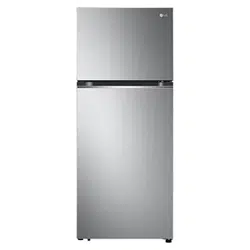
TOP FREEZER
REFRIGERATOR
Read this owner's manual thoroughly before operating the
appliance and keep it handy for reference at all times.
ENGLISH
LT11C2000* / LT13C2000*
MFL71817235
Rev.02_092523
www.lg.com
Copyright © 2023 LG Electronics Inc. All Rights Reserved.
Scan to see the online manual.
TABLE OF CONTENTS
2
3 IMPORTANT SAFETY
INSTRUCTIONS
3 READ ALL INSTRUCTIONS BEFORE USE
3WARNING
6CAUTION
7 PRODUCT OVERVIEW
7 Product Features
9 INSTALLATION
9 Before Installing
9 Choosing the Proper Location
10 Leveling
11 Turning on the Power
12 OPERATION
12 Before Use
13 Control Panel
14 Water Dispenser
16 Storing Food
17 Refrigerator Shelves
18 Icemaker
18 Ice Tray
19 Door Bins
20 SMART FUNCTIONS
20 LG ThinQ Application
20 Smart Diagnosis
TM
Feature
21 MAINTENANCE
21 Cleaning
22 TROUBLESHOOTING
22 Before Calling for Service
26 LIMITED WARRANTY
26 USA
30 CANADA
3IMPORTANT SAFETY INSTRUCTIONS
ENGLISH
IMPORTANT SAFETY INSTRUCTIONS
READ ALL INSTRUCTIONS BEFORE USE
Safety Messages
Your safety and the safety of others are very important.
We have provided many important safety messages in this manual and on your appliance. Always read and
follow all safety messages.
All safety messages will tell you what the potential hazard is, tell you how to reduce the chance of injury,
and tell you what may happen if the instructions are not followed.
WARNING
WARNING
• To reduce the risk of explosion, fire, death, electric shock, scalding or injury to persons when using this
product, follow basic precautions, including the following:
Installation
• To reduce the risk of injury to persons, adhere to all industry recommended safety procedures including
the use of long-sleeved gloves and safety glasses.
• Never attempt to operate this appliance if it is damaged, malfunctioning, partially disassembled, or has
missing or broken parts, including a damaged cord or plug.
• Only connect this product to a dedicated grounded electrical outlet rated for use with this product (115
V, 60 Hz, AC only). It is the user’s responsibility to replace a standard 2-prong wall outlet with a standard
3-prong wall outlet.
• Do not use an outlet that can be turned off with a switch. Do not use an extension cord.
• The appliance must be positioned for easy access to a power source.
• When moving the refrigerator, be careful not to roll over or damage the power cord.
• Contact an authorized service center when installing or relocating the refrigerator.
• Do not, under any circumstances, cut or remove the third (ground) prong from the power cord.
• Keep packing materials out of the reach of children. Packaging material can be dangerous for children.
There is a risk of suffocation.
• Do not install the refrigerator in a damp or dusty place where insulation on electrical parts may
deteriorate.
• Do not place the refrigerator in direct sunlight or expose it to the heat from heating appliances such as
stoves or heaters.
This is the safety alert symbol.
This symbol alerts you to potential hazards that can kill or injure you and others. All safety messages
will follow the safety alert symbol and either the word WARNING or CAUTION.
These words mean:
WARNING
You may be killed or seriously injured if you do not follow instructions.
CAUTION
You may be injured or cause damage to the product if you do not follow instructions.
4 IMPORTANT SAFETY INSTRUCTIONS
• Do not bend or pinch the power cord excessively or place heavy objects on it.
• When positioning the appliance, ensure the supply cord is not trapped or damaged.
• Do not locate multiple portable socket-outlets or portable power supplies at the rear of the appliance.
Operation
• This appliance is intended to be used in household and similar applications such as:
- staff kitchen areas in shops, offices and other working environments;
- farm houses and by clients in hotels, motels and other residential type environments;
- bed and breakfast type environments;
- catering and similar non-retail applications.
• This appliance is not intended for use by persons (including children) with reduced physical, sensory or
mental capabilities, or lack of experience and knowledge, unless they have been given supervision or
instruction concerning use of the appliance by a person responsible for their safety.
• This product is not to be used for special purposes such as the storage of medicine or test materials or
for use on ships, etc.
• DO NOT allow children to climb, stand, or hang on the refrigerator doors or on the shelves in the
refrigerator. They could damage the refrigerator and seriously injure themselves.
• Do not allow children to climb into the refrigerator. They could be trapped and suffocated.
• Children should be supervised to ensure that they do not play with the refrigerator.
• Keep fingers out of pinch point areas; clearances between the doors and cabinets are necessarily small.
Be careful opening or closing doors or drawers when children or others are nearby.
• Stand far enough away when opening doors or drawers to avoid hitting and injuring your feet.
• Do not touch frozen food or the metal parts in the freezer compartment with wet or damp hands. Doing
so may cause frostbite.
• Do not refreeze frozen food that has thawed completely. Doing so may result in a serious health hazard.
• Do not use an adapter plug or plug the power plug into a multi-outlet extension cord.
• If the supply cord is damaged, it must be replaced by the manufacturer or its service agent or a similarly
qualified person in order to avoid a hazard.
• Do not operate the refrigerator or touch the power cord with wet hands.
• Do not modify or extend the power cord.
• Do not use an uncertified power outlet. Do not plug the appliance into a damaged wall outlet.
• Do not put hands, feet or other objects into the air vents or bottom of the refrigerator. Doing so could
result in personal injury or electric shock.
• In the event of a gas leak (propane/LPG), ensure the area is adequately ventilated and contact an
authorized service center before resuming use. Do not touch the refrigerator or power cord of the
refrigerator.
• Disconnect the power cord immediately and contact an authorized service center if there is a strange
noise, odor, or smoke coming from the appliance.
• Do not use any fuse (such as copper, steel wire, etc.) other than a standard fuse.
• Do not put animals inside the appliance.
• Do not place heavy or fragile objects, liquid filled containers, combustible substances, or flammable
objects (such as candles and lamps) on the appliance.
• If connected to a circuit protected by fuses, use time delay fuse.
• Keep ventilation openings, in the appliance enclosure or in the built-in structure, clear of obstruction.
• Do not use mechanical devices or other means to accelerate the defrosting process, other than those
recommended by the manufacturer.
5IMPORTANT SAFETY INSTRUCTIONS
ENGLISH
• Do not use electrical appliances inside the food storage compartments of the appliance, unless they are
of the type recommended by the manufacturer.
• Do not store explosive substances such as aerosol cans with a flammable propellant in this appliance.
• Do not damage the refrigerant circuit.
• This appliance incorporates an earth connection for functional purposes.
• Connect to potable water supply only.
- If connected to a water supply, connect to a potable water supply only.
• Fill with potable water only.
- If using an icemaker or dispenser water tank, make sure to fill it with potable water only.
Maintenance
• Do not use a hair dryer to dry the inside of the refrigerator.
• Do not light a candle to remove odors in the refrigerator.
• In the event of a refrigerant leak, move flammable objects away from the refrigerator. Ensure the area is
adequately ventilated and contact an authorized service center.
• Keep flammable materials and vapors, such as gasoline, away from the refrigerator.
• Unplug the power plug before cleaning or repairing the refrigerator.
• The refrigerator compartment lights are interior LED lighting, and service should be performed by a
qualified technician.
• Unplug the power plug immediately in the event of a blackout or thunderstorm.
• Turn the power off if water or dust penetrates into the refrigerator. Call a service agent.
• Do not store glass containers or soda in the freezer compartment. Contents may expand when frozen,
break the container and cause injury.
• Do not store, disassemble or repair the appliance yourself or allow unqualified personnel to do so.
Disposal
• Risk of child entrapment. Junked or abandoned refrigerators are dangerous, even if they are sitting for
only a few days. When disposing of the refrigerator, remove the packing materials from the door or take
off the doors but leave the shelves in place so that children may not easily climb inside.
• If disposing of a refrigerator, make sure the refrigerant and insulation foam are removed for proper
disposal by a qualified servicer. If you release the refrigerant or throw away the insulation foam, you
may be fined or imprisoned in accordance with the relevant environmental law. Insulation foam contains
flammable blowing gas.
• When discarding the appliance, remove the door gasket while leaving the shelves and bins in place, and
keep children away from the appliance.
Grounding Instructions
• Improper connection of the equipment-grounding conductor can result in a risk of electric shock. Check
with a qualified electrician or service personnel if you are in doubt whether the appliance is properly
grounded. Do not modify the plug provided with the appliance; if it will not fit the outlet, have a proper
outlet installed by a qualified electrician.
• Have a certified electrician check the wall outlet and wiring for proper grounding.
• Never unplug the appliance by pulling on the power cord. Always grip the plug firmly and pull straight
out from the outlet. Failure to do so may damage the power cord, resulting in a risk of fire and electric
shock.
6 IMPORTANT SAFETY INSTRUCTIONS
SAVE THESE INSTRUCTIONS
Risk of Fire and Flammable Materials
CAUTION
CAUTION
• To reduce the risk of minor or moderate injury to persons, malfunction, or damage to the product or
property when using this product, follow basic precautions, including the following:
Installation
• Do not install the refrigerator where there may be a danger of the unit falling.
• The refrigerator must be properly installed in accordance with the Installation Instructions.
• This appliance does not require changes in installation or use based on altitude.
Operation
• Do not use aerosols near the refrigerator.
• This appliance is intended to be used only in domestic and similar applications.
• Do not strike or apply excessive force to any glass surface. Do not touch glass surfaces if they are
cracked or broken. You may be injured.
• Do not overfill or pack items too tightly into door bins. Doing so may cause damage to the bin or
personal injury if items are removed with excessive force.
Maintenance
• Do not use strong detergents like wax or thinners for cleaning. Clean with a soft cloth.
• Remove foreign objects (such as dust and water) off the prongs of the power plug and contact areas. Do
not use a wet or damp cloth when cleaning the plug.
• Do not spray water directly on the inside or outside of the refrigerator.
• Do not clean glass shelves or covers with warm water when they are cold. They may break if exposed to
sudden temperature changes.
This symbol alerts you to flammable materials that can ignite and cause a fire if you do not
take care.
This appliance contains a small amount of isobutane refrigerant (R600a), which is combustible.
When transporting and installing the appliance, care should be taken to ensure that no parts
of the refrigerating circuit are damaged. Refrigerant squirting out of the pipes could ignite or
cause an eye injury. If a leak is detected, avoid any naked flames or potential sources of
ignition and air out the room in which the appliance is standing for several minutes.
In order to avoid the creation of a flammable gas air mixture if a leak in the refrigerating
circuit occurs, the size of the room in which the appliance may be sited depends on the
amount of refrigerant used. The room must be 10.8 square feet (1 square meter) in size for
every 8g of R600a refrigerant inside the appliance. The amount of refrigerant in your
particular appliance is shown on the identification plate inside the appliance. Never start up an
appliance showing any signs of damage. If in doubt, consult your dealer.
7PRODUCT OVERVIEW
ENGLISH
PRODUCT OVERVIEW
Product Features
The images in this guide may be different from the actual components and accessories, which are subject
to change by the manufacturer without prior notice for product improvement purposes.
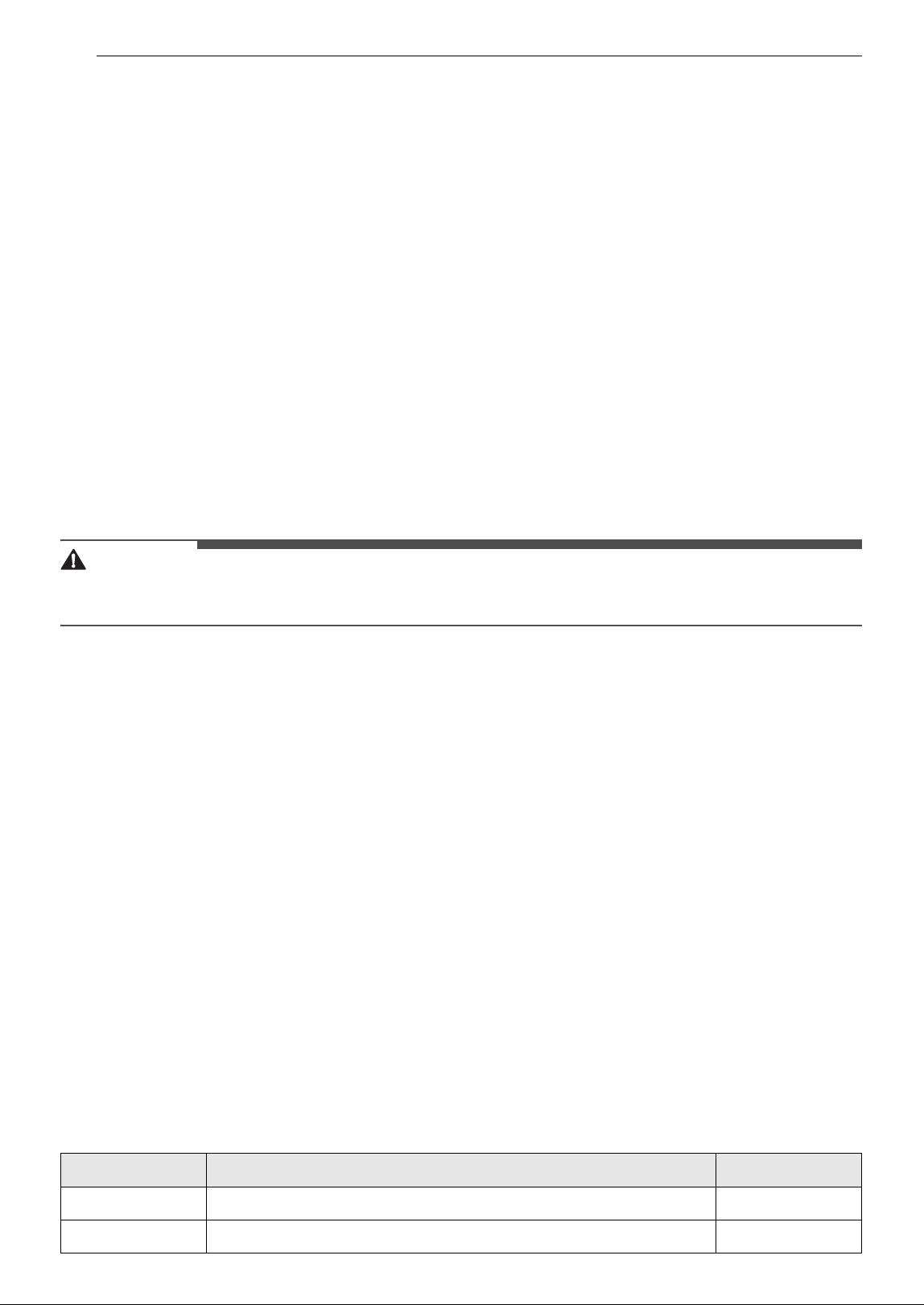
Interior
† This feature is only available on some models.
a Control Panel
†
Sets the refrigerator temperature.
b Water Dispenser
†
c Freezer Shelf
Use to store frozen foods such as meat, fish and ice cream.
d Movable Icemaker
†
Manually produces and stores ice.
• Slide the icemaker along the shelf to the desired position.
e Freezer Temperature Controller
†
This controller regulates the airflow to the upper compartment.
f Ice Tray
†
Manually produces ice.
g Freezer Door Bin
Store small packaged frozen food or frequently used foods.
h Automatic Icemaker
†
Produces ice automatically.
8 PRODUCT OVERVIEW
i Air filter
†
Reduces odors inside the refrigerator compartment.
j Fresh Room
†
Stores food items at a colder temperature than a regular refrigerator area.
k Pull Out Tray
†
l Refrigerator Temperature Control Panel
†
Sets the refrigerator temperature.
m Door Cooling
†
Cold air comes out to keep the refrigerator door bins cool.
n Refrigerator Shelf
Stores refrigerated foods and fresh foods.
Store foods with higher moisture content at the front of the shelf.
The shelf height can be adjusted by inserting the shelf in another groove at a different height.
o Bottom Shelf
Stores refrigerated foods and fresh foods.
CAUTION
• Do not store any items at the front of the bottom shelf. The items may fall and cause an injury or
appliance damage.
p Refrigerator Drawer
Stores fruits and vegetables.
q Water Dispenser Tank
†
Supplies water to the dispenser. On non-plumbed models, this is filled manually. Fill with potable water
only.
r Door Bin
†
Stores chilled food, drinks, or condiments.
s Movable Egg Tray
Conveniently stores eggs or other small items.
• Do not use the egg tray in the freezer. To keep eggs fresh longer, do not store them on the top shelf
of the refrigerator or in the vegetable drawer.
t LED Lamp
†
The LED lamps inside the appliance light up when you open the door.
Product Specifications
The appearance and specifications listed in this manual may vary due to constant product improvements.
Electrical requirements: 115 V, 60 Hz
Model Description Net weight
LT11C2000* Standard-depth, top freezer refrigerator 128 lb (58 kg)
LT13C2000* Standard-depth, top freezer refrigerator 143 lb (65 kg)
9INSTALLATION
ENGLISH
INSTALLATION
Before Installing
Unpacking the Refrigerator
WARNING
• Use two or more people to move and install the
refrigerator. Failure to do so can result in back
injury or other injury.
• The refrigerator is heavy. Protect the floor when
moving the refrigerator for cleaning or service.
Always pull the refrigerator straight out when
moving it. Do not wiggle or walk the refrigerator
when trying to move it, as floor damage could
occur.
• Keep flammable materials and vapors, such as
gasoline, away from the refrigerator. Failure to
do so can result in fire, explosion, or death.
NOTE
• Remove tape and any temporary labels from
your refrigerator before using. Do not remove
any warning labels, the model and serial number
label, or the Tech Sheet that is located under the
front of the refrigerator.
• To remove any remaining tape or glue, rub the
area briskly with your thumb. Tape or glue
residue can also be easily removed by rubbing a
small amount of liquid dish soap over the
adhesive with your fingers. Wipe with warm
water and dry.
• Do not use sharp instruments, rubbing alcohol,
flammable fluids, or abrasive cleaners to remove
tape or glue. These products can damage the
surface of the refrigerator.
• Reinstall or adjust shelves as needed.
Refrigerator shelves are installed in the shipping
position. Reinstall shelves according to your
individual storage needs.
Choosing the Proper
Location
Electricity
Use an individual, grounded outlet:115 Volts, 60
Hz, AC, 15 amps minimum.
WARNING
• Do not overload house wiring and cause a fire
hazard by plugging in multiple appliances in the
same outlet with the refrigerator.
• To reduce the risk of electric shock, do not install
the refrigerator in a wet or damp area.
Flooring
To avoid noise and vibration, the unit must be
installed and leveled on a solidly constructed floor.
If required, adjust the leveling legs to compensate
for the unevenness of the floor.
NOTE
• Installing on carpeting, soft tile surfaces, a
platform or weakly supported structure is not
recommended.
Ambient Temperature
Install this appliance in an area where the
temperature is between 55 °F (13 °C) and 110 °F
(43 °C).
If the temperature around the appliance is too low
or high, cooling ability may be adversely affected.
The internal temperatures could be affected by the
location of the appliance, the ambient
temperature, the frequency of door opening and
other factors.
10 INSTALLATION
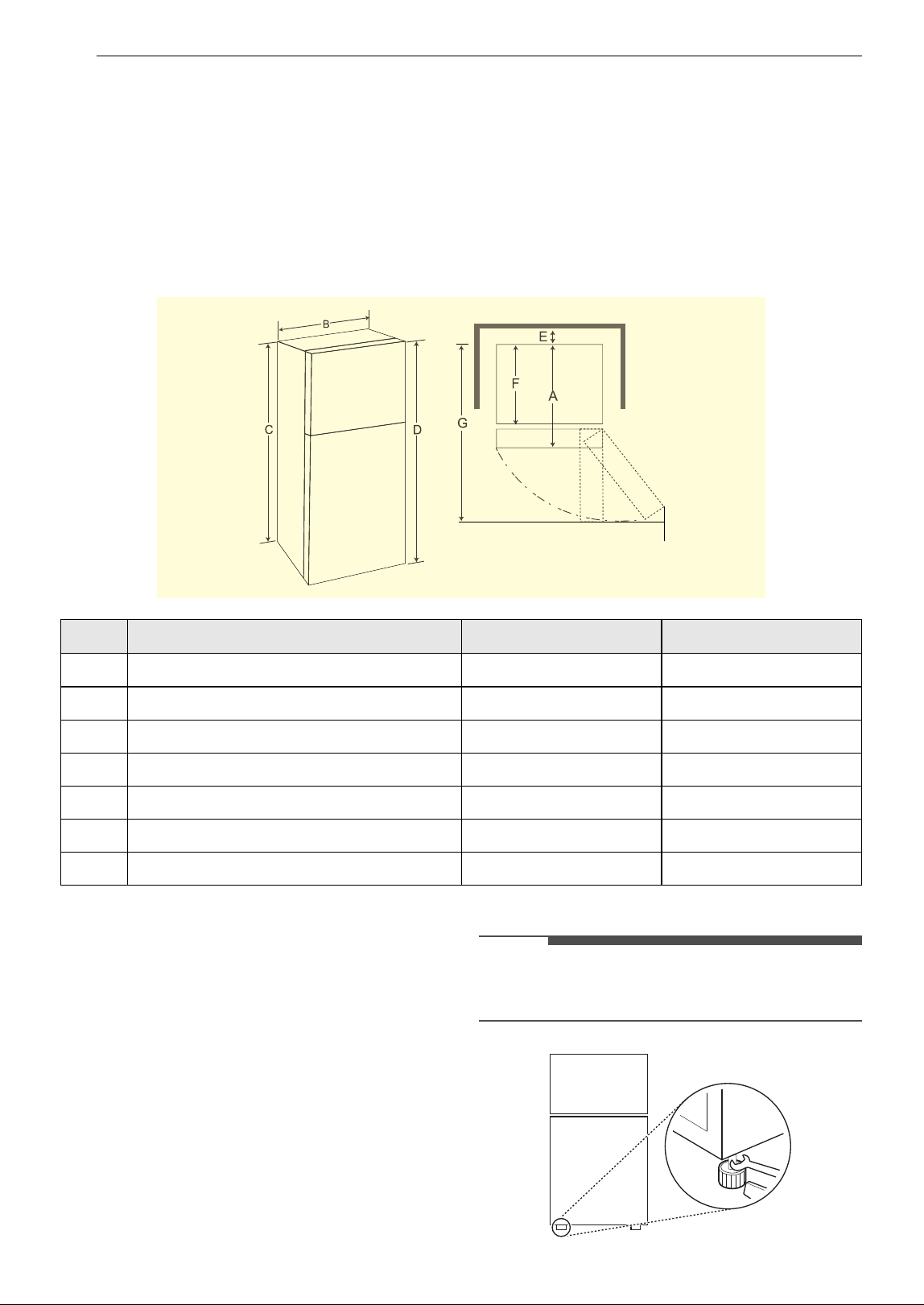
Dimensions and Clearances
• Check the dimensions of the appliance and the installation path to ensure there is sufficient room to
move the refrigerator through doors or narrow openings.
• The installation location chosen for the refrigerator should allow space behind the unit for connections
and airflow and space in front to open the doors and drawers.
• Too small of a distance from adjacent items may result in lowered freezing capability and increased
electricity consumption charges. Allow at least 2 inches (50 mm) between the back of the refrigerator
and the wall.
• Remember to allow enough room in front of the refrigerator to fully open the doors.
Leveling
Leveling the Refrigerator
The refrigerator has two front leveling legs. Adjust
the legs to alter the tilt from front-to-back or side-
to side. If the refrigerator seems unsteady or the
doors do not close easily, adjust the refrigerator’s
tilt, using the instructions below:
1 Turn the leveling leg to the left to raise that
side of the refrigerator or to the right to lower
it. It may take several turns of the leveling leg
to adjust the tilt of the refrigerator.
NOTE
• A flare nut wrench works best, but an open-end
wrench will suffice. Do not over-tighten.
- Dimensions/Clearances LT11C2000* LT13C2000*
A Depth without Handle 28" (710 mm) 26 3/4" (680 mm)
B Width 23 5/8" (600 mm) 27 1/2" (700 mm)
C Height to Top of Case 63 5/8" (1616 mm) 66 3/4" (1697 mm)
D Height to Top of Hinge 64 5/8" (1640 mm) 67 3/4" (1720 mm)
E Back Clearance 2" (50 mm) 2" (50 mm)
F Depth without Door 24 5/8" (624 mm) 22 3/4" (579 mm)
G Depth (Total with Door Open 90°) 49 3/8" (1253 mm) 51 1/2" (1309 mm)
11INSTALLATION
ENGLISH
2 Open both doors, and check to make sure
that they close easily. If the doors do not close
easily, tilt the refrigerator slightly more to the
rear by turning both leveling legs to the left. It
may take several more turns, and be sure to
turn both leveling legs the same amount.
Turning on the Power
• After installing, plug the refrigerator’s power
cord into a 3-prong grounded outlet and push
the refrigerator into the final position.
CAUTION
• Connect to a rated power outlet.
• Have a certified electrician check the wall outlet
and wiring for proper grounding.
• Do not damage or cut off the ground terminal of
the power plug.
Position the Refrigerator
• Arrange the coil of tubing so that it does not
vibrate against the back of the refrigerator or
against the wall. Push the refrigerator back
toward the wall.
12 OPERATION
OPERATION
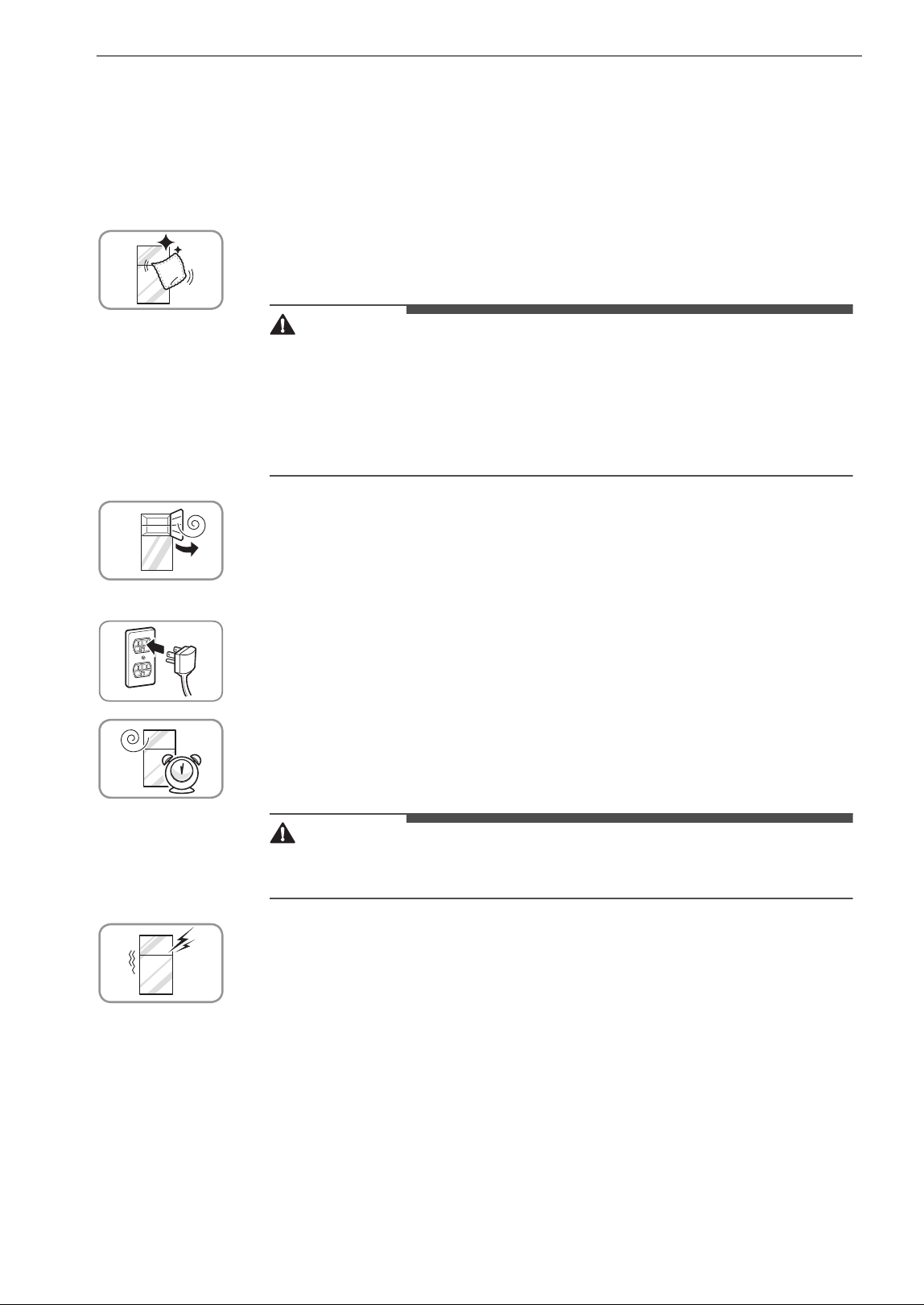
Before Use
Checklist
Clean the refrigerator.
Clean the refrigerator thoroughly and wipe off all dust accumulated during
shipping.
CAUTION
• Do not scratch the refrigerator with a sharp object or use a detergent that
contains alcohol, a flammable liquid, or an abrasive when removing any
tape or adhesive from the refrigerator. Remove adhesive residue by wiping
it off with your thumb or dish detergent.
• Do not peel off the model or serial number label or the technical
information on the rear surface of the refrigerator.
Open refrigerator doors and freezer drawers to ventilate the
interior.
The inside of the refrigerator may smell like plastic at first. Remove any
adhesive tape from inside the refrigerator, and open the refrigerator doors
and the freezer drawers for ventilation.
Connect the power supply.
Check if the power supply is connected before use.
Wait for the refrigerator to cool.
Allow the refrigerator to run for at least two to three hours before putting
food in it. Check the flow of cold air in the freezer compartment to ensure
proper cooling.
CAUTION
• Putting food in the refrigerator before it has cooled could cause the food to
spoil or a bad odor to remain inside the refrigerator.
The refrigerator makes a loud noise after initial operation.
This is normal. The volume will decrease as the temperature decreases.
13OPERATION
ENGLISH
Control Panel
Depending on the model, some of the following functions may not be available.
The actual control panel may differ from model to model.
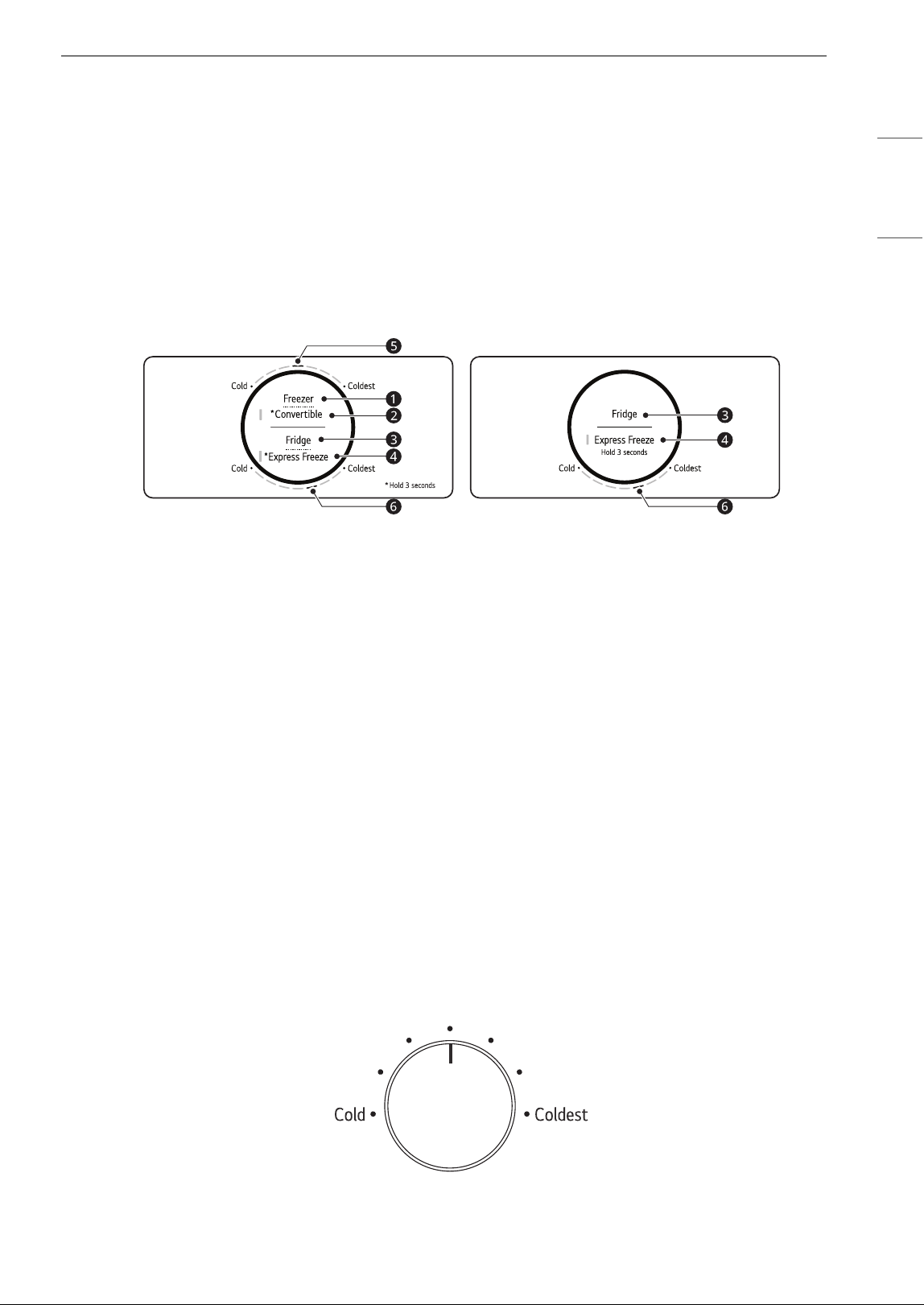
Control Panel and Functions
† This control panel is only available on some models.
Control Panel 1: Inside the Refrigerator
†
Type A
a Freezer
Press this button repeatedly to select a desired temperature between Cold and Coldest.
• The default freezer temperature is
e.
b Convertible
You can set the freezer temperature to the same range as the refrigerator temperature.
• Press this button for 3 seconds. When the left LED lights up, press the Fridge button repeatedly to
select a desired temperature between Cold and Coldest.
• Press this button for 3 seconds to disable the Convertible function and turn the LED off.
c Fridge
Press this button repeatedly to select the desired temperature between Cold and Coldest.
• The default refrigerator temperature is
f.
d Express Freeze
This function can quickly freeze a large amount of ice or frozen food.
• The function is enabled and disabled in turn each time you press the button for 3 seconds.
• The function automatically terminates after a specific period has passed.
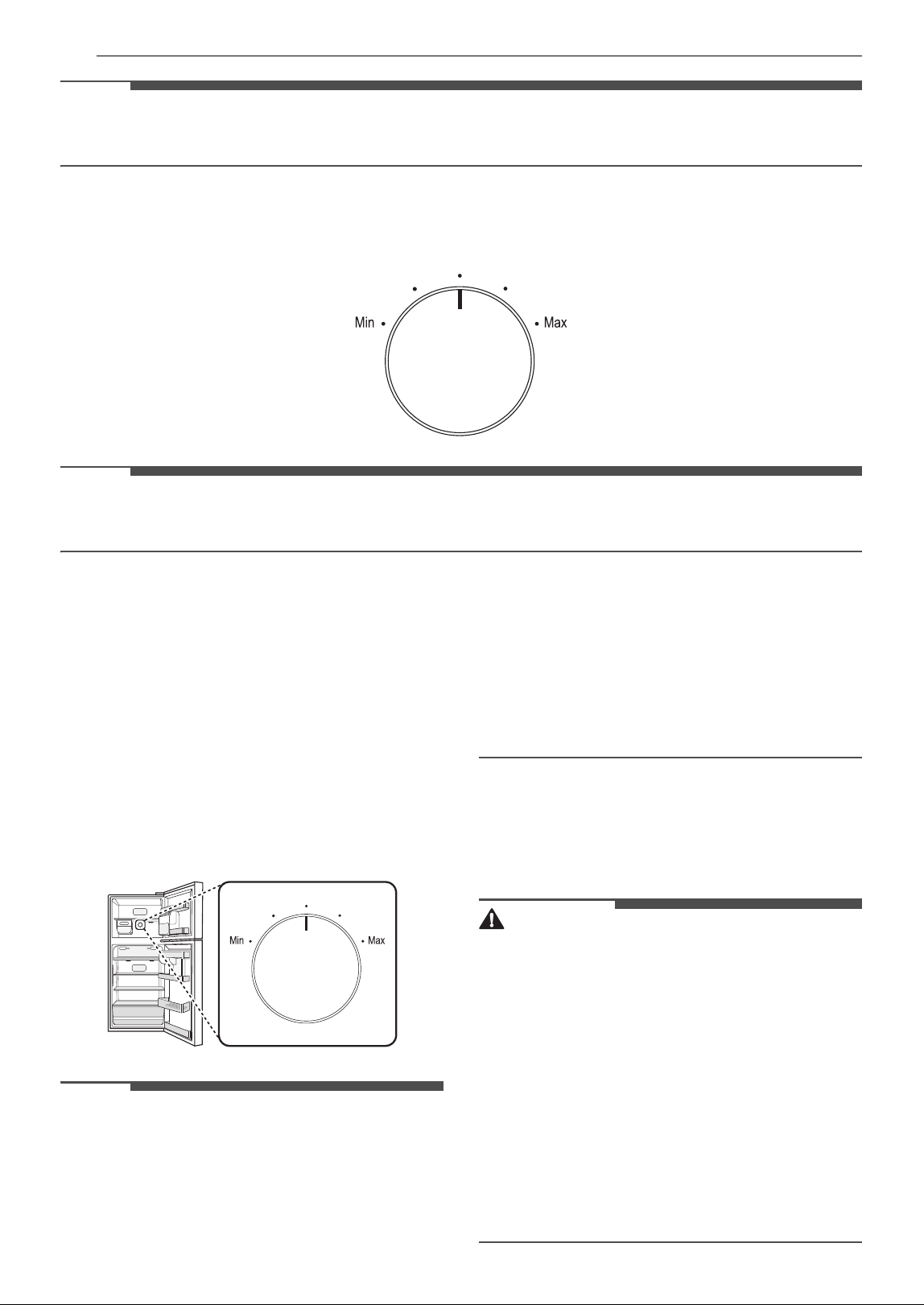
Type B
Turn the dial to select the desired temperature between Cold and Coldest.
14 OPERATION
NOTE
• For optimal food preservation, change the default temperature one level at a time, waiting 24 hours
between changes to allow the temperature to stabilize.
Control Panel 2: Inside the Freezer
†
Turn the dial to select the desired temperature between Min and Max.
NOTE
• For optimal food preservation, change the default temperature one level at a time, waiting 24 hours
between changes to allow the temperature to stabilize.
Setting the Freezer Temperature
Level (1-5)
The temperature can be adjusted from level 1 to
level 5. Level 3 is recommended.
• You can lower the temperature by turning the
controller to the right and raise the temperature
by turning the controller to the left.
• Setting the controller at level 4-5 will maintain a
low temperature in the freezer. When the quick
freezing is finished (level 5), set the controller
back to the recommended level.
NOTE
• For optimal food preservation, change the
default temperature one level at a time, waiting
24 hours between changes to allow the
temperature to stabilize.
• Wait until 2 or 3 hours have passed after
plugging in the appliance before storing food in
the appliance.
• The internal temperatures could be affected by
the location of the appliance, the ambient
temperature, the frequency of door opening and
other factors.
Water Dispenser
Before Using the Water Dispenser
CAUTION
• Do not hang on to or place heavy objects on the
refrigerator’s dispenser.
• Keep children away from the dispenser. Children
may play with or damage the controls.
• Dispense and throw away 2.5 gallons of water
(flush for approximately 5 minutes) after
installation. Do not dispense the entire 2.5 gallon
amount continuously. Press and release the
dispenser pad for cycles of 30 seconds ON and
60 seconds OFF. This is also necessary if the
refrigerator has not been used for a long time.
• If water dispenses unexpectedly, turn off the
water supply and contact an LG Electronics
Customer Information Center.
15OPERATION
ENGLISH
NOTE
• Some dripping may occur after dispensing. Hold
a cup beneath the dispenser for a few seconds
after dispensing to catch all of the drops.
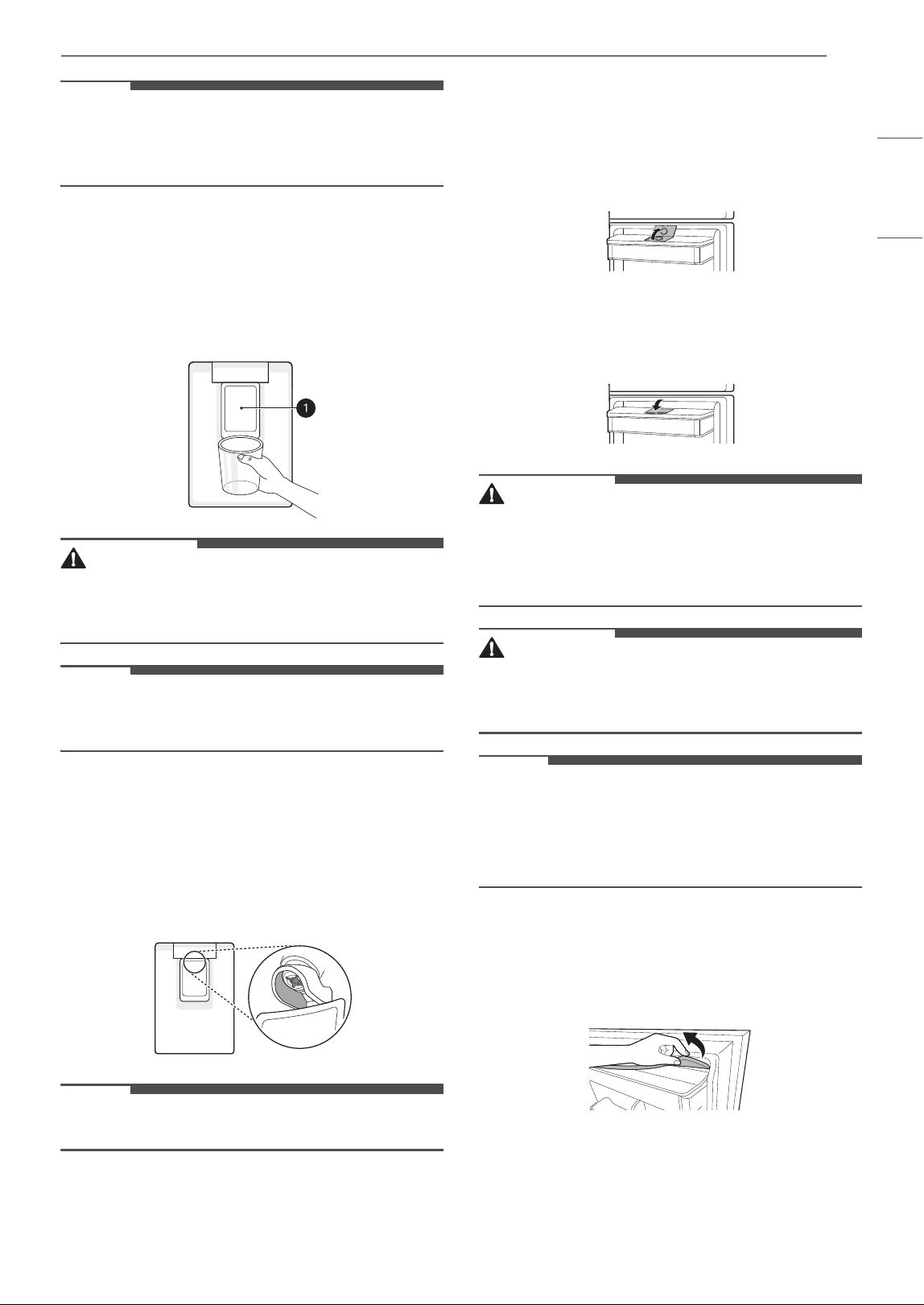
Using the Dispenser
You can dispense water by pressing the lever.
•Press the paddle
a of the water dispenser to get
cold water.
CAUTION
• Keep children away from the dispenser to
prevent children playing with or damaging the
controls.
NOTE
• If the opening of the cup is small, water may
splash out of the glass or miss it completely.
Cleaning the Dispenser
• Wipe the entire area with a damp cloth. The
dispenser may become wet easily due to spilled
water.
• Wipe the dispenser outlet frequently with a clean
cloth as it may get dirty easily.
NOTE
• Lint from a cloth may adhere to the outlet.
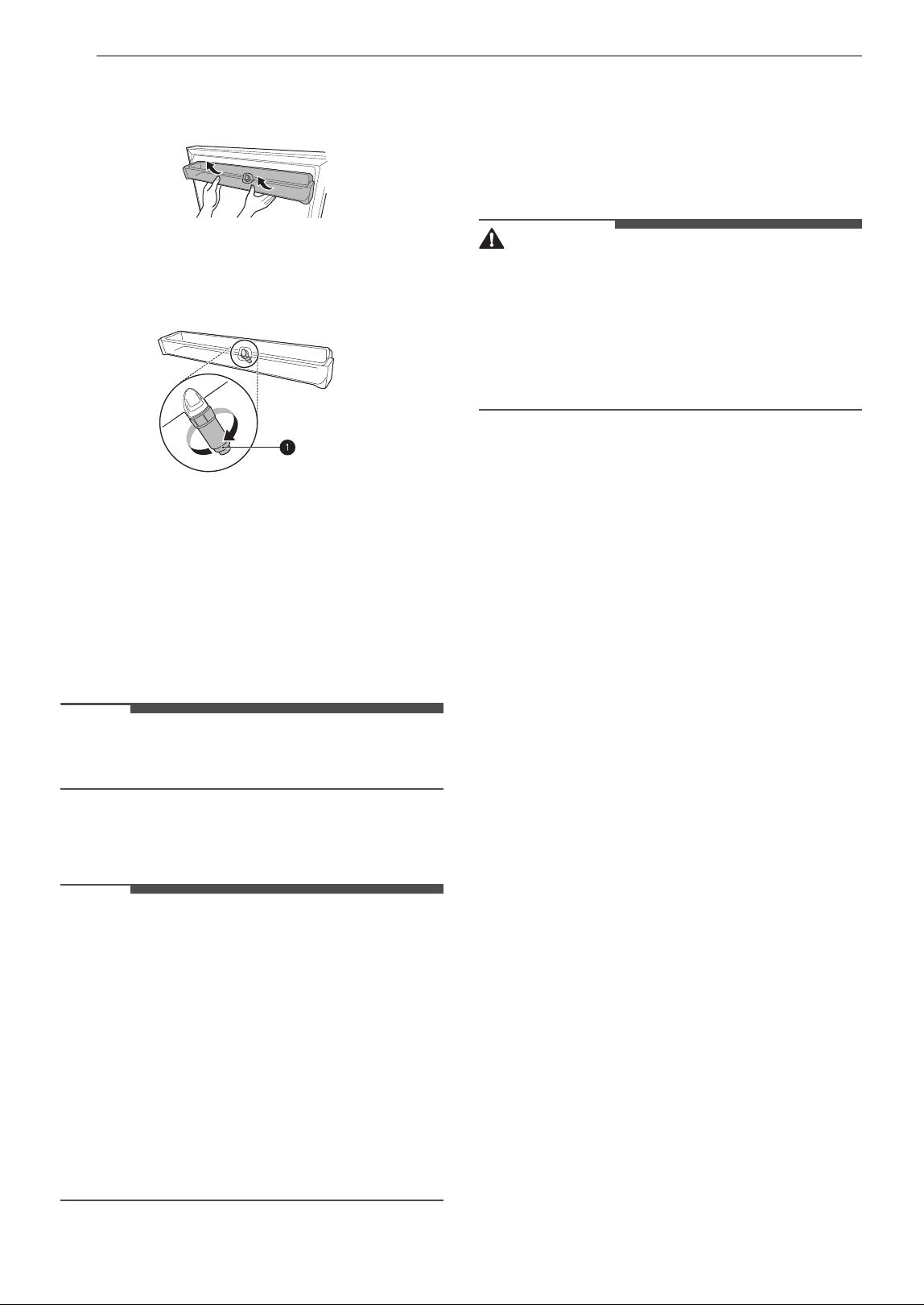
Filling the Water Tank
The water tank holds the water which is to be
dispensed.
1 Open the cap on the top of the water tank.
2 Fill the water tank with potable water and
close the cap.
WARNING
• Fill with potable water only. Do not fill the water
tank with beverages or hot water.
• Children should not be allowed near the water
tank.
CAUTION
• Do not apply excessive force or impact when
removing or assembling the water dispenser
tank.
NOTE
• The water tank should be washed before filling it
with potable water.
• If water does not come out, fill the water tank
with potable water.
Cleaning the Water Tank
1 Remove the water tank cover.
2 Empty the water tank.
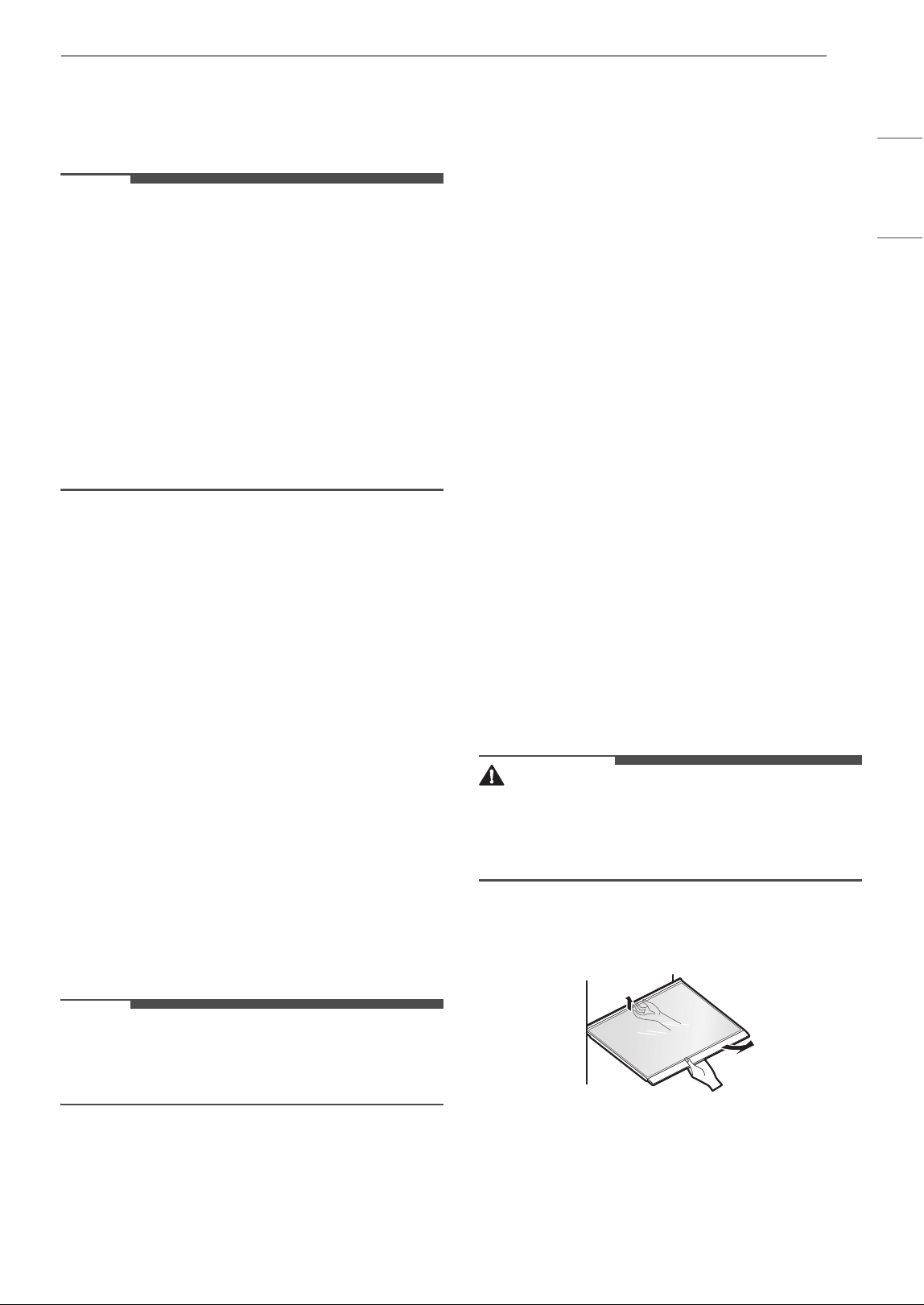
16 OPERATION
3 Hold the water tank with both hands and pull
it up.
4 Remove the water valve a in the water tank
by turning it clockwise.
5 Clean the water tank and the water valve in
running water. Wipe the inside and outside of
the water tank and the refrigerator door with
a clean cloth.
6 Mount the water tank in the reverse order of
the removal process.
NOTE
• Clean water tanks if they have not been used for
48 hours.
Storing Food
NOTE
• If you are leaving home for a short period, like a
short vacation, the refrigerator should be left on.
Refrigerated foods that are able to be frozen will
stay preserved longer if stored in the freezer.
• If you are leaving the refrigerator turned off for
an extended period, remove all food and unplug
the power cord. Clean the interior, and leave the
door open to prevent fungi from growing in the
refrigerator.
• If doors are opened or closed too often, warm
air may penetrate the refrigerator and raise its
temperature. This can increase the running costs
of the unit.
Food Storage Tips
Wrap or store food in the refrigerator in airtight
and moisture-proof material unless otherwise
noted. This prevents food odor and taste transfer
throughout the refrigerator. For dated products,
check date code to ensure freshness.
CAUTION
• Do not overfill or pack items too tightly into door
bins. Doing so may cause damage to the bin or
personal injury if items are removed with
excessive force.
• Do not store glass containers in the freezer.
Contents may expand when frozen, break the
container and cause injury.
How to Store Food
• Butter or Margarine
- Keep opened butter in covered dish or closed
compartment. When storing an extra supply,
wrap in freezer packaging and freeze.
•Cheese
- Store in original wrapping until used. Once
opened, rewrap tightly in plastic wrap or
aluminum foil.
•Milk
- Wipe milk cartons. For coldest milk, place
containers on an interior shelf.
• Eggs
- Store in original carton on interior shelf, not on
door shelf.
• Fruit
- Do not wash or hull fruit until it is ready to be
used. Sort and keep fruit in original container
in a crisper, or store in completely closed
paper bag on refrigerator shelf.
• Leafy Vegetables
- Remove store wrapping, trim or tear off
bruised and discolored areas, wash in cold
water, and drain. Place in plastic bag or plastic
container and store in crisper.
• Vegetables with skins (carrots, peppers)
- Place in plastic bags or plastic container and
store in crisper.
•Fish
- Freeze fresh fish and shellfish if they are not
being eaten the same day purchased. Eating
fresh fish and shellfish the same day
purchased is recommended.
17OPERATION
ENGLISH
•Leftovers
- Cover leftovers with plastic wrap or aluminum
foil, or store in plastic containers with tight
lids.
NOTE
• Do not store food with high moisture content
towards the top of the refrigerator. The moisture
could come into direct contact with the cold air
and freeze.
• Wash food before storing it in the refrigerator.
Vegetables should be washed, and food
packaging should be wiped down to prevent
adjacent foods from being contaminated.
• If the refrigerator is kept in a hot and humid
place, frequent opening of the door or storing a
lot of vegetables in the refrigerator may cause
condensation to form. Wipe off the
condensation with a clean cloth or a paper towel.
Storing Frozen Food
Check a freezer guide or a reliable cookbook for
further information about preparing food for
freezing or food storage times.
Freezing
Your freezer will not quick-freeze a large quantity
of food. Do not put more unfrozen food into the
freezer than will freeze within 24 hours (no more
than 2 to 3 pounds of food per cubic foot of freezer
space). Leave enough space in the freezer for air to
circulate around packages. Be careful to leave
enough room at the front so the door can close
tightly.
Storage times will vary according to the quality
and type of food, the type of packaging or wrap
used (how airtight and moisture-proof) and the
storage temperature. Ice crystals inside a sealed
package are normal. This simply means that
moisture in the food and air inside the package
have condensed, creating ice crystals.
NOTE
• Allow hot foods to cool at room temperature for
30 minutes, and then package and freeze.
Cooling hot foods before freezing saves energy.
Packaging
Successful freezing depends on correct packaging.
When you close and seal the package, it must not
allow air or moisture in or out. If it does, you could
have food odor and taste transfer throughout the
refrigerator and could also dry out frozen food.
Packaging Recommendations
• Rigid plastic containers with tight-fitting lids
• Straight-sided canning/freezing jars
• Heavy-duty aluminum foil
• Plastic-coated paper
• Non-permeable plastic wraps
• Specified freezer-grade self-sealing plastic bags
Follow package or container instructions for
proper freezing methods.
Do not use
• Bread wrappers
• Non-polyethylene plastic containers
• Containers without tight lids
• Wax paper or wax-coated freezer wrap
• Thin, semi-permeable wrap
Refrigerator Shelves
The shelves in the refrigerator are adjustable to
meet individual storage needs.
Adjusting the shelves to fit items of different
heights will make finding the exact item you want
easier.
Detaching/Assembling Shelves
CAUTION
• Do not clean glass shelves with warm water
while they are cold. Shelves may break if
exposed to sudden temperature changes or
impact.
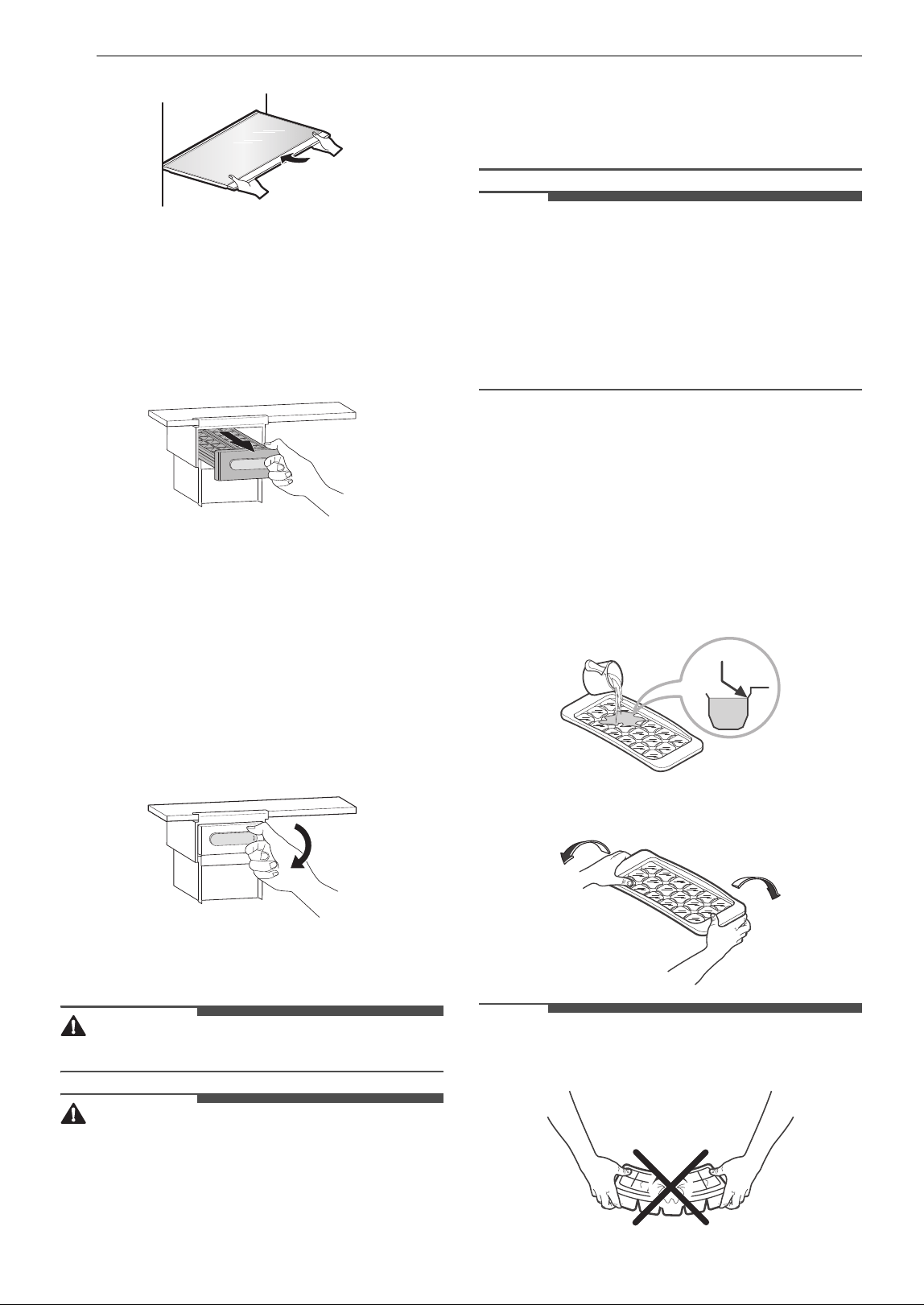
1 To detach, lift the rear of the shelf and pull it
out.
2 To assemble, slide the shelf into the guides
until it stops.
18 OPERATION
Icemaker
Using the Movable Icemaker
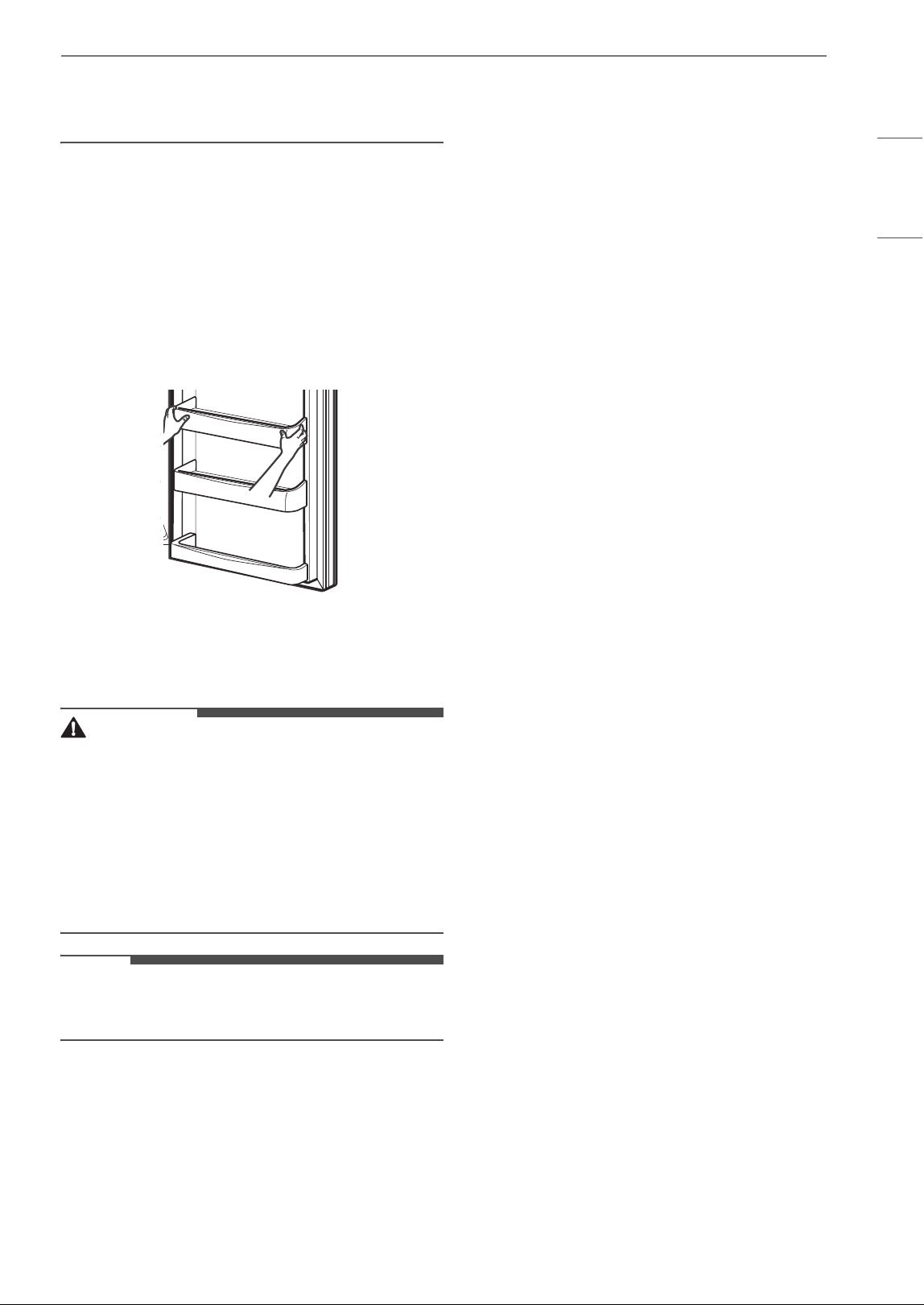
1 Pull out the ice tray from the Icemaker.
2 Fill the ice tray with water up to the marked
water line.
3 Slide the ice tray back to its original position.
4 Once the ice has been made, hold the lever of
the ice tray and turn it clockwise to release the
ice cubes.
5 Hold the handle of the ice bin to pull it out.
WARNING
• Fill with potable water only.
CAUTION
• Be careful not to spill water when pushing the
ice tray.
• Be careful not to twist the ice tray with force as it
can be broken.
• If you open and close the freezer door
frequently, it may take longer for water to be
frozen.
• Do not fill the ice bin with water.
NOTE
• You can remove the ice maker to create more
space inside the freezer compartment if you do
not use it.
• If the ice tray is overfilled, the ice cubes may stick
together and be difficult to remove.
• Ice can be removed more easily by pouring
water on the ice tray.
Ice Tray
This feature is only available on some models.
Using the Ice Tray
1 Pour potable water to the level indicated in
the picture. Do not overfill with water or the
ice cubes will be difficult to remove.
2 Twist the ice tray to remove the ice cubes.
NOTE
• Do not bend the ice tray. Doing so may damage
the tray.
19OPERATION
ENGLISH
• To remove ice cubes easily, pour water on the
back of the tray or soak it in water before
removing ice cubes.
Door Bins
Detaching/Assembling Door Bins
The door bins are removable for easy cleaning and
adjustment.
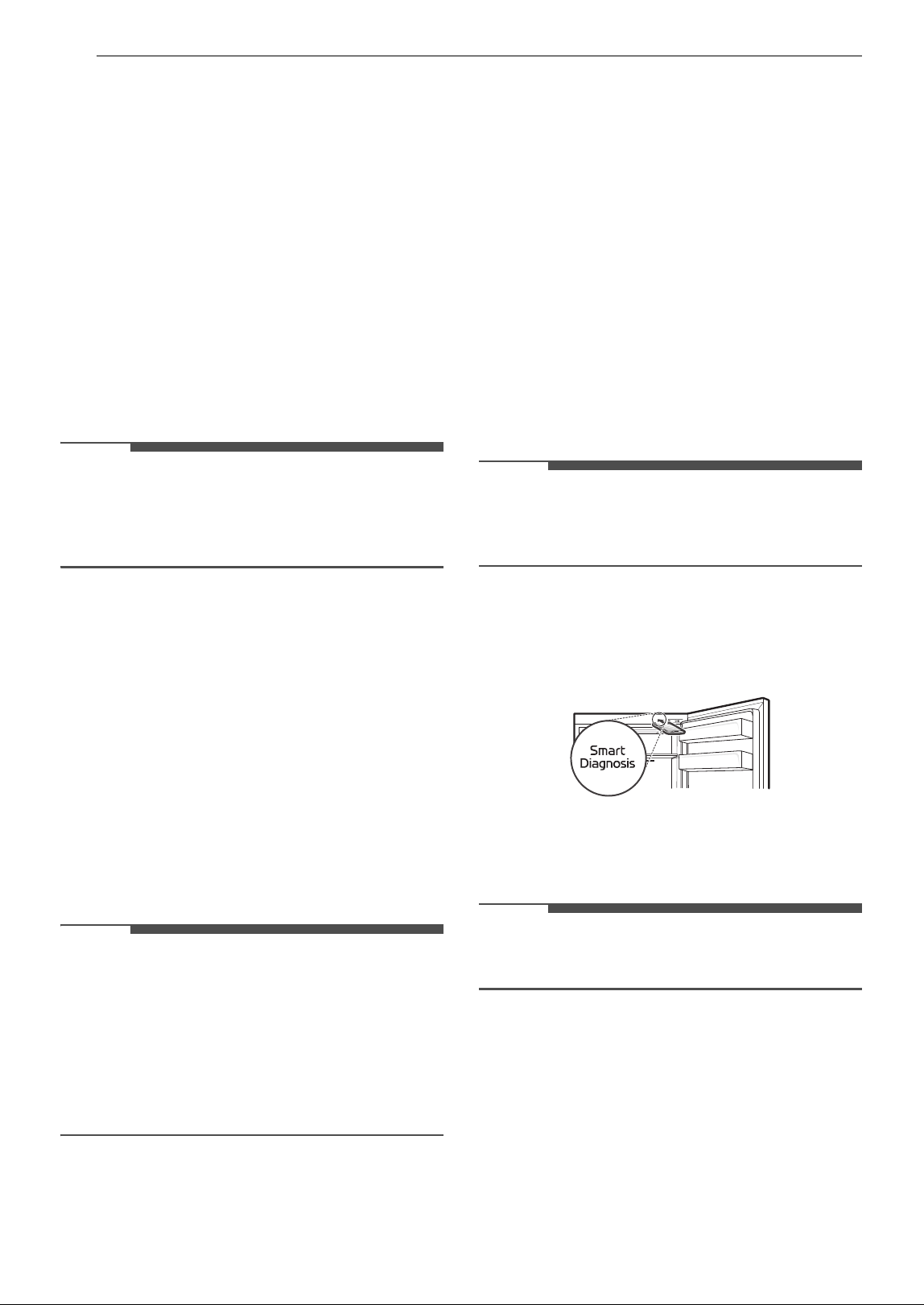
1 To remove the bin, simply lift the bin up and
pull straight out.
2 To assemble the bin, slide it in above the
desired support and push down until it snaps
into place.
CAUTION
• Regularly detach and wash the storage bins and
shelves; they can become easily contaminated
by food.
• Empty the bin before removing it.
• Do not apply excessive force while detaching or
assembling the storage bins.
• Do not use the dishwasher to clean the storage
bins and shelves.
NOTE
• Some bins may vary in appearance and will only
fit in one location.
20 SMART FUNCTIONS
SMART FUNCTIONS
LG ThinQ Application
This feature is only available on models with the c
or
d logo.
The LG ThinQ application allows you to
communicate with the appliance using a
smartphone.
LG ThinQ Application Feature
Smart Diagnosis
TM
This function provides useful information for
diagnosing and solving issues with the appliance
based on the pattern of use.
NOTE
• This information is current at the time of
publication. The application is subject to change
for product improvement purposes without
notice to users.
Installing the LG ThinQ Application
Search for the LG ThinQ application from the
Google Play Store or Apple App Store on a
smartphone. Follow instructions to download and
install the application.
Smart Diagnosis
TM
Feature
This feature is only available on models with the c
or d logo.
Use this feature to help you diagnose and solve
problems with your appliance.
NOTE
• For reasons not attributable to LGE’s negligence,
the service may not operate due to external
factors such as, but not limited to, Wi-Fi
unavailability, Wi-Fi disconnection, local app
store policy, or app unavailability.
• The feature may be subject to change without
prior notice and may have a different form
depending on where you are located.
Using Audible Diagnosis to
Diagnose Issues
Follow the instructions below to use the audible
diagnosis method.
• Launch the LG ThinQ application and select the
Smart Diagnosis feature in the menu. Follow
the instructions for audible diagnosis provided
in the LG ThinQ application.
1 Open the refrigerator door.
2 Close and open the refrigerator door 5 times
within 8 seconds.
NOTE
• If you do not close and open the door 5 times
within 8 seconds, the time will be reset. Then you
have to close and open the door 5 times again.
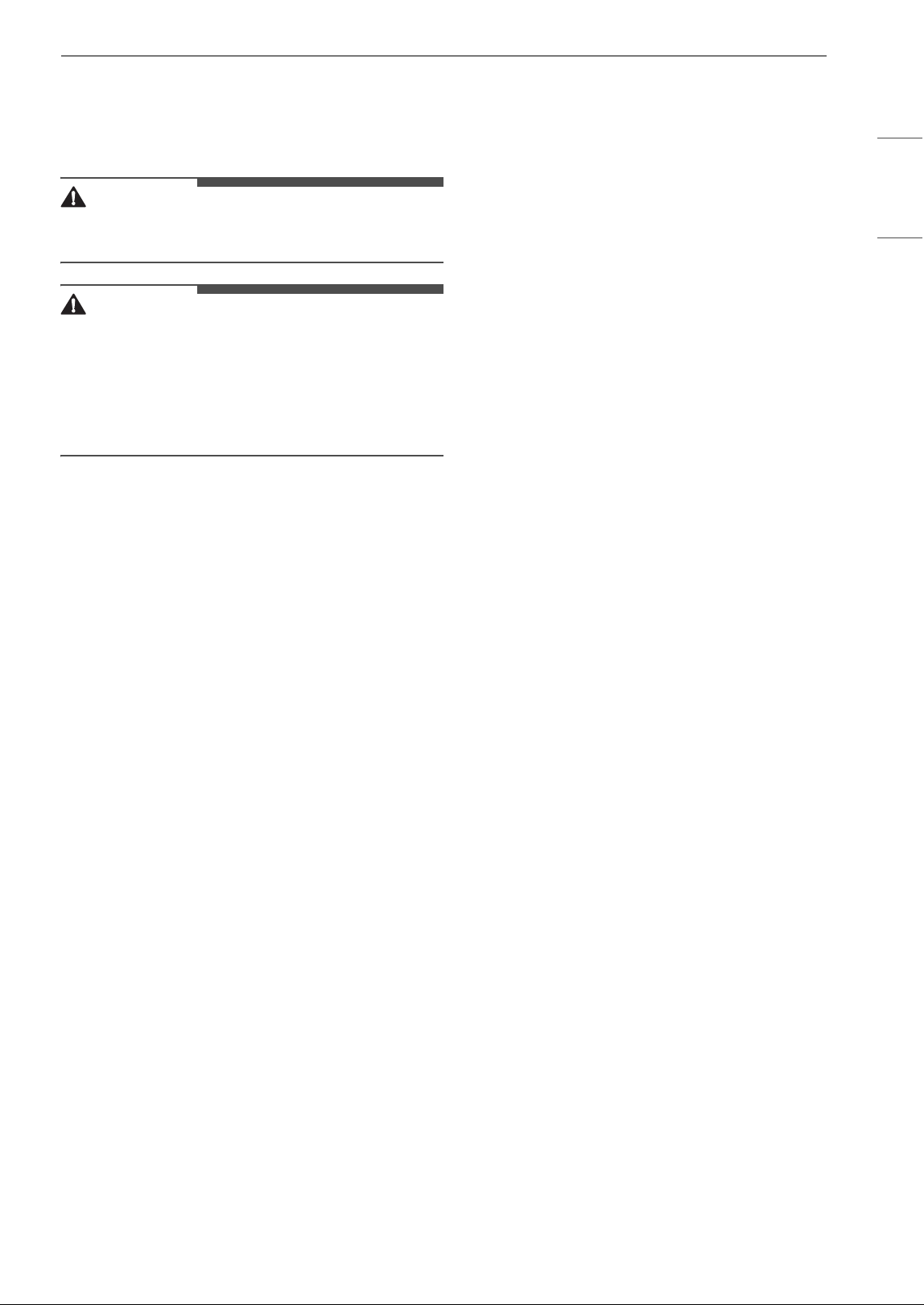
3 When the buzzer sounds 4 times, open the
freezer door and hold the phone near the
speaker outlet.
4 After the data transfer is complete, the
diagnosis is displayed in the application.
NOTE
• For best results, do not move the phone while
the tones are being transmitted.
21MAINTENANCE
ENGLISH
MAINTENANCE
Cleaning
WARNING
• Use non-flammable cleaner. Failure to do so can
result in fire, explosion, or death.
CAUTION
• Do not use an abrasive cloth or sponge when
cleaning the interior and exterior of the
refrigerator.
• Do not place your hand on the bottom surface of
the refrigerator when opening and closing the
doors.
General Cleaning Tips
• Both the refrigerator and freezer sections
defrost automatically; however, clean both
sections once a month to prevent odors.
• Wipe up spills immediately.
• Unplug the refrigerator or disconnect power
before cleaning.
• Remove all removable parts, such as shelves.
• Use a clean sponge or soft cloth and a mild
detergent in warm water. Do not use abrasive or
harsh cleaners.
• Hand wash, rinse and dry all surfaces
thoroughly.
Exterior
For products with black stainless steel exterior,
spray glass cleaner on a clean microfiber cloth and
rub in direction of grain. Do not spray glass
cleaner directly at the display panel. Do not use
harsh or abrasive cleaners.
For products with a standard stainless steel
exterior, use a damp microfiber cloth and rub in
the direction of the grain. Dry with a paper towel
to avoid streaks. For stubborn stains and
fingerprints, use a few drops of liquid dish soap in
water, and rinse with hot water before drying. Do
not use abrasive or harsh cleaners.
Inside Walls
• Allow freezer to warm up so the cloth will not
stick.
To help remove odors, wash the inside of the
refrigerator with a mixture of baking soda and
warm water. Mix 2 tablespoons of baking soda to 1
quart of water (26 g soda to 1 liter water.) Be sure
the baking soda is completely dissolved so it does
not scratch the surfaces of the refrigerator.
Door Liners and Gaskets
Use a clean sponge or soft cloth and a mild
detergent in warm water. Do not use cleaning
waxes, concentrated detergents, bleaches, or
cleaners containing petroleum on plastic
refrigerator parts.
Plastic Parts (Covers and Panels)
Use a clean sponge or soft cloth and a mild
detergent in warm water. Do not use glass
cleaners, abrasive cleansers, or flammable fluids.
These can scratch or damage the material.
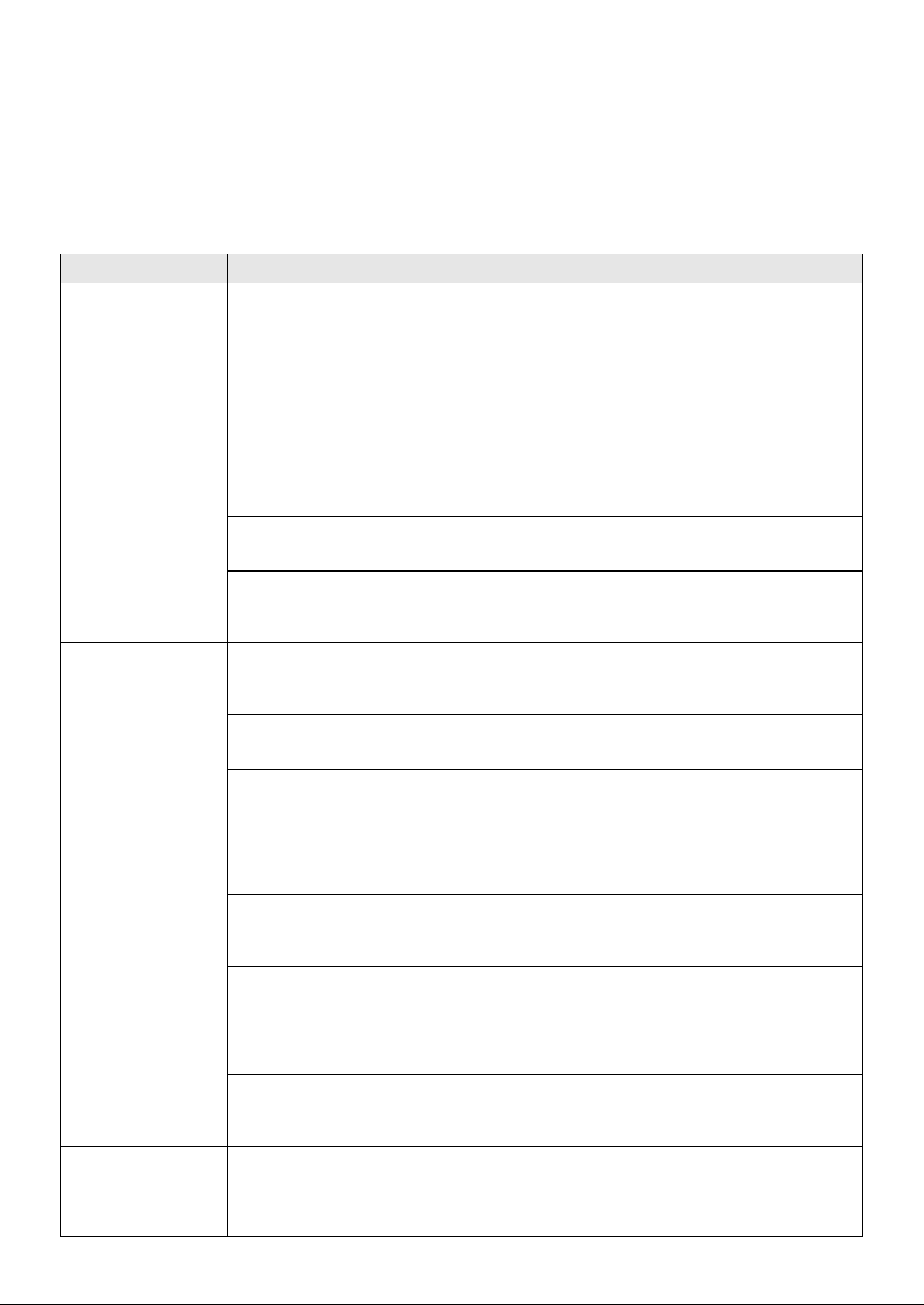
22 TROUBLESHOOTING
TROUBLESHOOTING
Before Calling for Service
Review this section before calling for service; doing so will save you both time and money.
Cooling
Problem Possible Cause & Solution
Refrigerator is not
cooling or has no
power.
The refrigerator control is set to OFF (some models).
• Turn the control ON. Refer to the Control Panel section for proper temperature settings.
Refrigerator is set to Demo Mode (some models).
• Demo Mode allows the lights and control display to work normally while disabling cooling,
to save energy while the refrigerator is on the showroom floor. See the FAQs section of
this manual for instructions on how to disable Demo Mode.
Refrigerator is in the defrost cycle.
• During the defrost cycle, the temperature of each compartment may rise slightly. Wait 30
minutes and confirm the proper temperature has been restored once the defrost cycle has
completed.
Refrigerator was recently installed.
• It may take up to 24 hours for each compartment to reach the desired temperature.
Refrigerator was recently relocated.
• If the refrigerator was stored for a long period of time or moved on its side, it is necessary
for the refrigerator to stand upright for 24 hours before connecting it to power.
Cooling system runs
too much.
Refrigerator is replacing an older model.
• Modern refrigerators require more operating time but use less energy due to more
efficient technology.
Refrigerator was recently plugged in or power restored.
• The refrigerator will take up to 24 hours to cool completely.
The door is opened often or a large amount of food / hot food was added.
• Adding food and opening the door warms the refrigerator, requiring the compressor to
run longer in order to cool the refrigerator back down. In order to conserve energy, try to
get everything you need out of the refrigerator at once, keep food organized so it is easy
to find, and close the door as soon as the food is removed. (Refer to the Food Storage
Guide.)
Doors are not closed completely.
• Firmly push the doors shut. If they will not shut all the way, see the "Doors will not close
correctly or pop open" section in Troubleshooting.
Refrigerator is installed in a hot location.
• The compressor will run longer under warm conditions. At normal room temperatures (70
°F or 21 °C) expect your compressor to run about 40 % to 80 % of the time. Under warmer
conditions, expect it to run even more often. The refrigerator should not be operated
above 110 °F (43 °C).
Condenser / back cover is clogged.
• Use a vacuum cleaner with an attachment to clean the condenser cover and vents. Do not
remove the panel covering the condenser coil area.
Interior moisture
buildup.
Doors are opened often or for long periods of time.
• When the doors are opened often or for long periods of time, warm, humid air enters the
compartment. This raises the temperature and moisture level within the compartment. To
lessen the effect, reduce the frequency and duration of door openings.
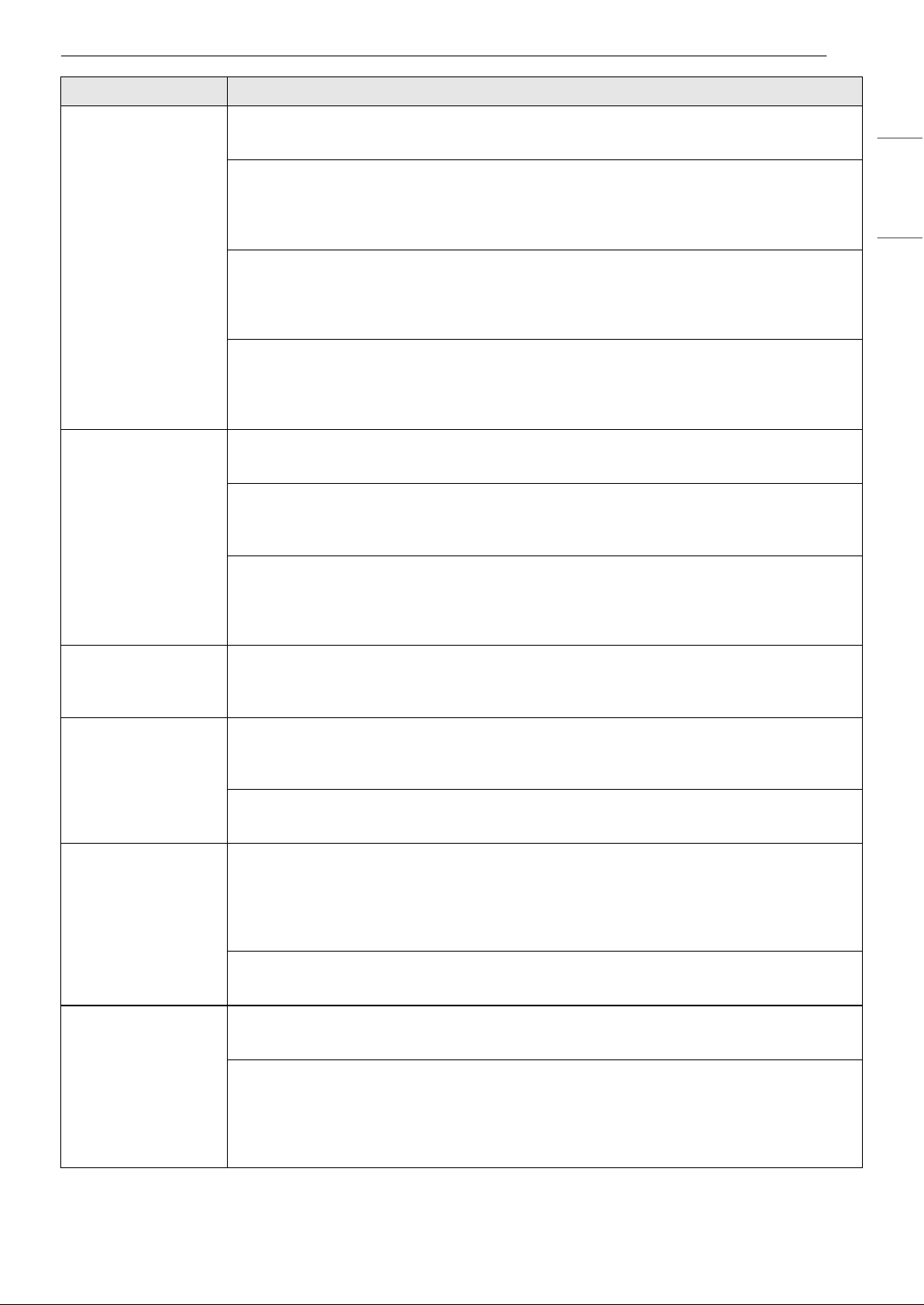
23TROUBLESHOOTING
ENGLISH
Interior moisture
buildup.
Doors are not closed correctly.
• See the "Doors will not close correctly or pop open" section.
Weather is humid.
• Humid weather allows additional moisture to enter the compartments when the doors are
opened leading to condensation or frost. Maintaining a reasonable level of humidity in the
home will help to control the amount of moisture that can enter the compartments.
Defrost cycle recently completed.
• During the defrost cycle, the temperature of each compartment may rise slightly and
condensation may form on the back wall. Wait 30 minutes and confirm that the proper
temperature has been restored once the defrost cycle has completed.
Food is not packaged correctly.
• Food stored uncovered or unwrapped, and damp containers can lead to moisture
accumulation within each compartment. Wipe all containers dry and store food in sealed
packaging to prevent condensation and frost.
Food is freezing in
the refrigerator
compartment.
Food with high water content was placed near an air vent.
• Rearrange items with high water content away from air vents.
Refrigerator temperature control is set incorrectly.
• If the temperature is too cold, adjust the control one increment at a time and wait for the
temperature to stabilize. Refer to the Control Panel section for more information.
Refrigerator is installed in a cold location.
• When the refrigerator is operated in temperature below 41 °F (5 °C), food can freeze in the
refrigerator compartment. The refrigerator should not be operated in temperature below
55 °F (13 °C).
Refrigerator or
Freezer section is too
cold.
Incorrect temperature control settings.
• If the temperature is too cold, adjust the control one increment at a time and wait for the
temperature to stabilize. Refer to the Control Panel for more information.
Frost or ice crystals
form on frozen food
(inside of sealed
package).
Condensation from food with a high water content has frozen inside of the food
package.
• This is normal for food items with a high water content.
Food has been left in the freezer for a long period of time.
• Do not store food items with high water content in the freezer for a long period of time.
Frost or ice crystals
form on frozen food
(outside of package).
Door is opened frequently or for long periods of time.
• When the doors are opened often or for long periods of time, warm, humid air enters the
compartment. This raises the temperature and moisture level within the compartment.
Increased moisture will lead to frost and condensation. To lessen the effect, reduce the
frequency and duration of door openings.
Door is not closing properly.
• Refer to the "Doors will not close correctly or pop open" section in the Troubleshooting.
Refrigerator or
Freezer section is too
warm.
Refrigerator was recently installed.
• It may take up to 24 hours for each compartment to reach the desired temperature.
The air vents are blocked. Cold air circulates from the freezer to the fresh food section
and back again through air vents in the wall dividing the two sections.
• Locate air vents by using your hand to sense airflow and move all packages that block
vents and restrict airflow. Rearrange items to allow air to flow throughout the
compartment.
Problem Possible Cause & Solution
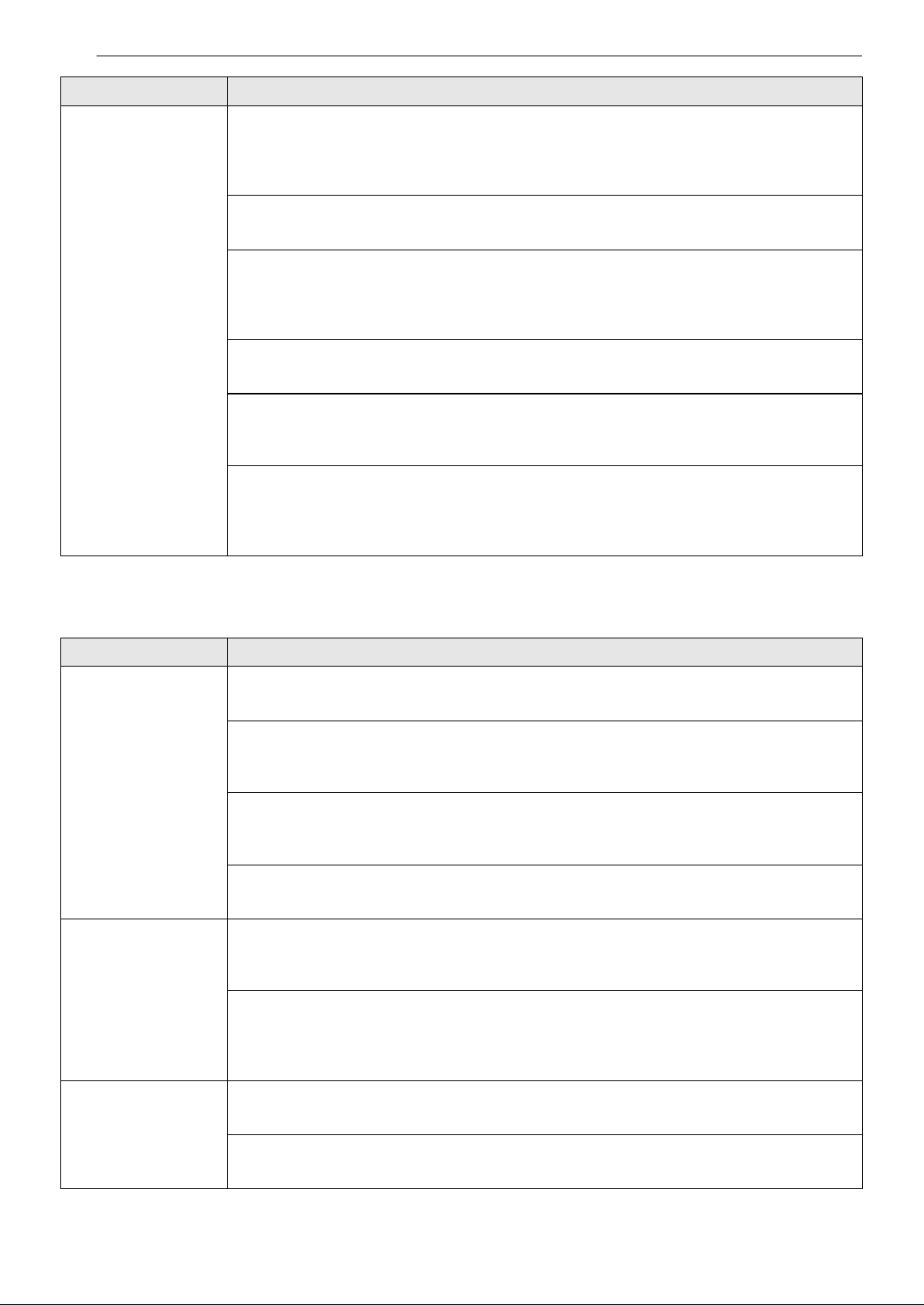
24 TROUBLESHOOTING
Parts & Features
Refrigerator or
Freezer section is too
warm.
Doors are opened often or for long periods of time.
• When the doors are opened often or for long periods of time, warm, humid air enters the
compartment. This raises the temperature and moisture level within the compartment. To
lessen the effect, reduce the frequency and duration of door openings.
Unit is installed in a hot location.
• The refrigerator should not be operated in temperatures above 110 °F (43 °C).
A large amount of food or hot food was added to either compartment.
• Adding food warms the compartment requiring the cooling system to run. Allowing hot
food to cool to room temperature before putting it in the refrigerator will reduce this
effect.
Doors are not closed correctly.
• See the "Doors will not close correctly or pop open" section in the Troubleshooting.
Temperature control is not set correctly.
• If the temperature is too warm, adjust the control one increment at a time and wait for the
temperature to stabilize.
Defrost cycle has recently completed.
• During the defrost cycle, the temperature of each compartment may rise slightly and
condensation may form on the back wall. Wait 30 minutes and confirm the proper
temperature has been restored once the defrost cycle has completed.
Problem Possible Cause & Solution
Doors will not close
correctly or pop
open.
Food packages are blocking the door open.
• Rearrange food containers to clear the door and door shelves.
Ice bin, crisper cover, pans, shelves, door bins, or baskets are out of position.
• Push bins all the way in and put crisper cover, pans, shelves and baskets into their correct
positions. See the Operation section for more information.
The doors were removed during product installation and not properly replaced.
• Remove and replace the doors according to the Removing and Replacing Refrigerator
Handles and Doors section.
Refrigerator is not leveled properly.
• See Door Alignment in the Refrigeration Installation section to level refrigerator.
Doors are difficult to
open.
The gaskets are dirty or sticky.
• Clean the gaskets and the surfaces that they touch. Rub a thin coat of appliance polish or
kitchen wax on the gaskets after cleaning.
Door was recently closed.
• When you open the door, warmer air enters the refrigerator. As the warm air cools, it can
create a vacuum. If the door is hard to open, wait one minute to allow the air pressure to
equalize, then see if it opens more easily.
Refrigerator wobbles
or seems unstable
Leveling legs are not adjusted properly.
• Refer to the Leveling section.
Floor is not level.
• It may be necessary to add shims under the leveling legs or rollers to complete installation.
Problem Possible Cause & Solution
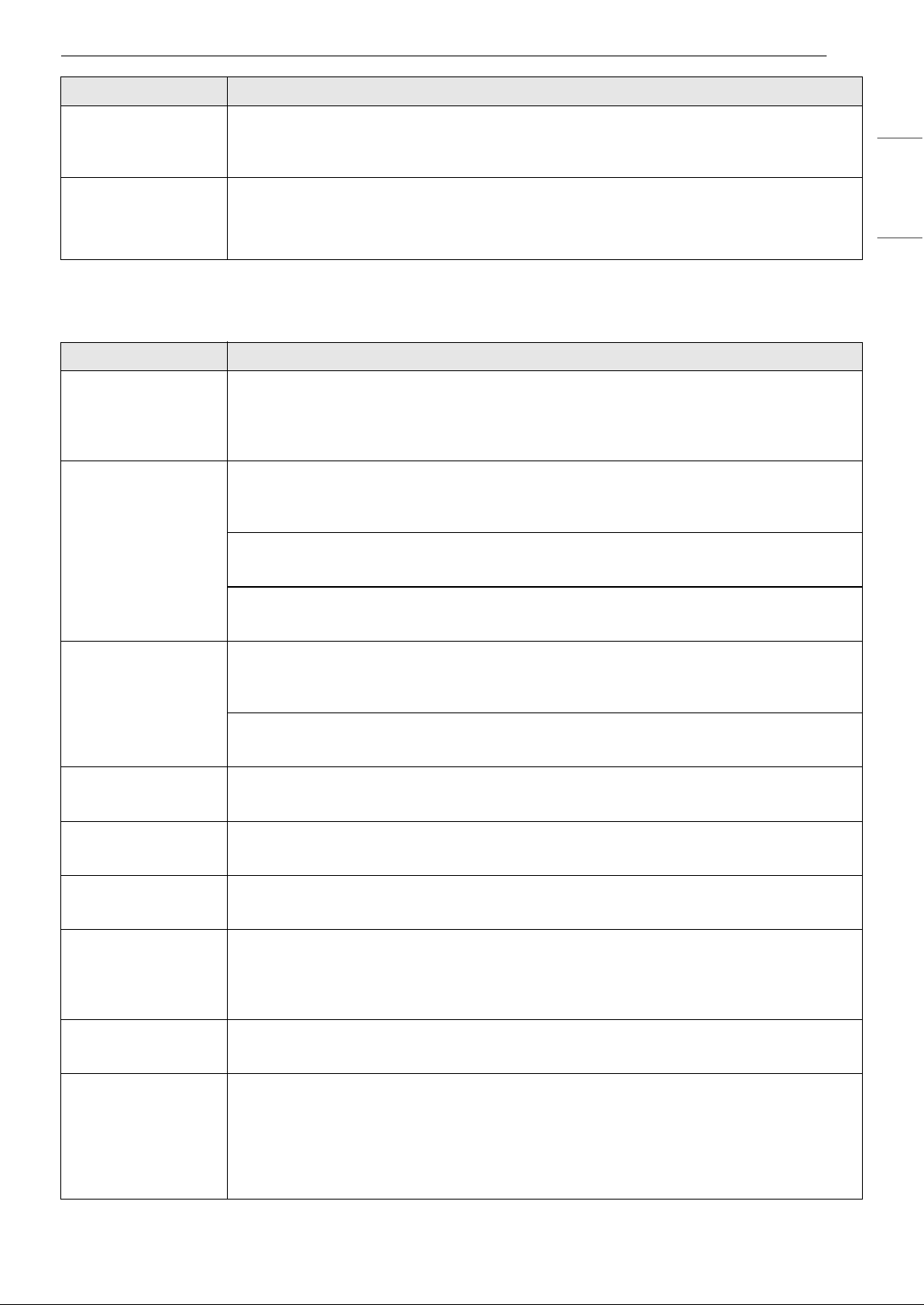
25TROUBLESHOOTING
ENGLISH
Noises
Lights do not work. LED interior lighting failure.
• The refrigerator compartment lamp is LED interior lighting, and service should be
performed by a qualified technician.
The interior of the
refrigerator is
covered with dust or
soot.
The refrigerator is located near a fire source, such as a fireplace, chimney, or candle.
• Make sure that the refrigerator is not located near a fire source, such as a fireplace,
chimney or candle.
Problem Possible Cause & Solution
Clicking The defrost control will click when the automatic defrost cycle begins and ends. The
thermostat control (or refrigerator control on some models) will also click when cycling
on and off.
• Normal Operation
Rattling Rattling noises may come from the flow of refrigerant, the water line on the back of
the unit, or items stored on top of or around the refrigerator.
• Normal Operation
Refrigerator is not resting solidly on the floor.
• Floor is weak or uneven or leveling legs need to be adjusted. See the Leveling section.
Refrigerator with linear compressor was jarred while running.
• Normal Operation
Whooshing Evaporator fan motor is circulating air through the refrigerator and freezer
compartments.
• Normal Operation
Air is being forced over the condenser by the condenser fan.
• Normal Operation
Gurgling Refrigerant flowing through the cooling system.
• Normal Operation
Popping Contraction and expansion of the inside walls due to changes in temperature.
• Normal Operation
Sizzling Water dripping on the defrost heater during a defrost cycle.
• Normal Operation
Vibrating If the side or back of the refrigerator is touching a cabinet or wall, some of the normal
vibrations may make an audible sound.
• To eliminate the noise, make sure that the sides and back cannot vibrate against any wall
or cabinet.
Dripping Water running into the drain pan during the defrost cycle.
• Normal Operation
Pulsating or high-
pitched sound
Your refrigerator is designed to run more efficiently to keep your food items at the
desired temperature. The high efficiency compressor may cause your new refrigerator
to run longer than your old one, but it is still more energy efficient than previous
models. While the refrigerator is running, it is normal to hear a pulsating or high-
pitched sound.
• Normal Operation
Problem Possible Cause & Solution
26 LIMITED WARRANTY
LIMITED WARRANTY
USA
TERMS AND CONDITIONS
ARBITRATION NOTICE: THIS LIMITED WARRANTY CONTAINS AN ARBITRATION PROVISION THAT
REQUIRES YOU AND LG ELECTRONICS (“LG”) TO RESOLVE DISPUTES BY BINDING ARBITRATION
INSTEAD OF IN COURT, UNLESS YOU CHOOSE TO OPT OUT. IN ARBITRATION, CLASS ACTIONS AND
JURY TRIALS ARE NOT PERMITTED. PLEASE SEE THE SECTION TITLED “PROCEDURE FOR RESOLVING
DISPUTES” BELOW.
Should your LG Refrigerator ("Product") fail due to a defect in materials or workmanship under normal and
proper use, during the warranty period set forth below, LG will, at its option, repair or replace the Product.
This limited warranty is valid only to the original retail purchaser of the Product ("You") and applies only
when purchased lawfully and used within the United States including U.S. Territories.
• Replacement Products and parts are warranted for the remaining portion of the original warranty period
or ninety (90) days, whichever is greater.
• Replacement Products and parts may be new, reconditioned, refurbished, or otherwise factory
remanufactured.
• Replaced Product or part(s) will be the property of LG.
• Proof of original retail purchase specifying the Product model and date of purchase is required to obtain
warranty service under this limited warranty.
EXCEPT TO THE EXTENT PROHIBITED BY APPLICABLE LAW, ANY IMPLIED WARRANTY OF
MERCHANTABILITY OR FITNESS FOR A PARTICULAR PURPOSE ON THE PRODUCT IS LIMITED IN
DURATION TO THE DURATION OF THE ABOVE LIMITED WARRANTY. UNDER NO CIRCUMSTANCES
SHALL LG OR ITS U.S. DISTRIBUTORS/DEALERS BE LIABLE FOR ANY INDIRECT, INCIDENTAL,
CONSEQUENTIAL, SPECIAL, OR PUNITIVE DAMAGES, INCLUDING, WITHOUT LIMITATION, LOST
GOODWILL, LOST REVENUES OR PROFITS, WORK STOPPAGE, IMPAIRMENT OF OTHER GOODS, COST OF
REMOVAL AND REINSTALLATION OF THE PRODUCT, LOSS OF USE, OR ANY OTHER DAMAGES WHETHER
BASED IN CONTRACT, TORT, OR OTHERWISE. LG’S TOTAL LIABILITY, IF ANY, SHALL NOT EXCEED THE
PURCHASE PRICE PAID BY YOU FOR THE PRODUCT.
SOME STATES DO NOT ALLOW THE EXCLUSION OR LIMITATION OF INCIDENTAL OR CONSEQUENTIAL
DAMAGES OR LIMITATIONS ON HOW LONG AN IMPLIED WARRANTY LASTS, SO THE ABOVE
EXCLUSIONS OR LIMITATIONS MAY NOT APPLY TO YOU. THIS LIMITED WARRANTY GIVES YOU
SPECIFIC LEGAL RIGHTS AND YOU MAY ALSO HAVE OTHER RIGHTS THAT VARY FROM STATE TO STATE.
THIS LIMITED WARRANTY DOES NOT COVER:
• Service trips to deliver, pick up, or install, educate how to operate, correct wiring, or correct
unauthorized repairs.
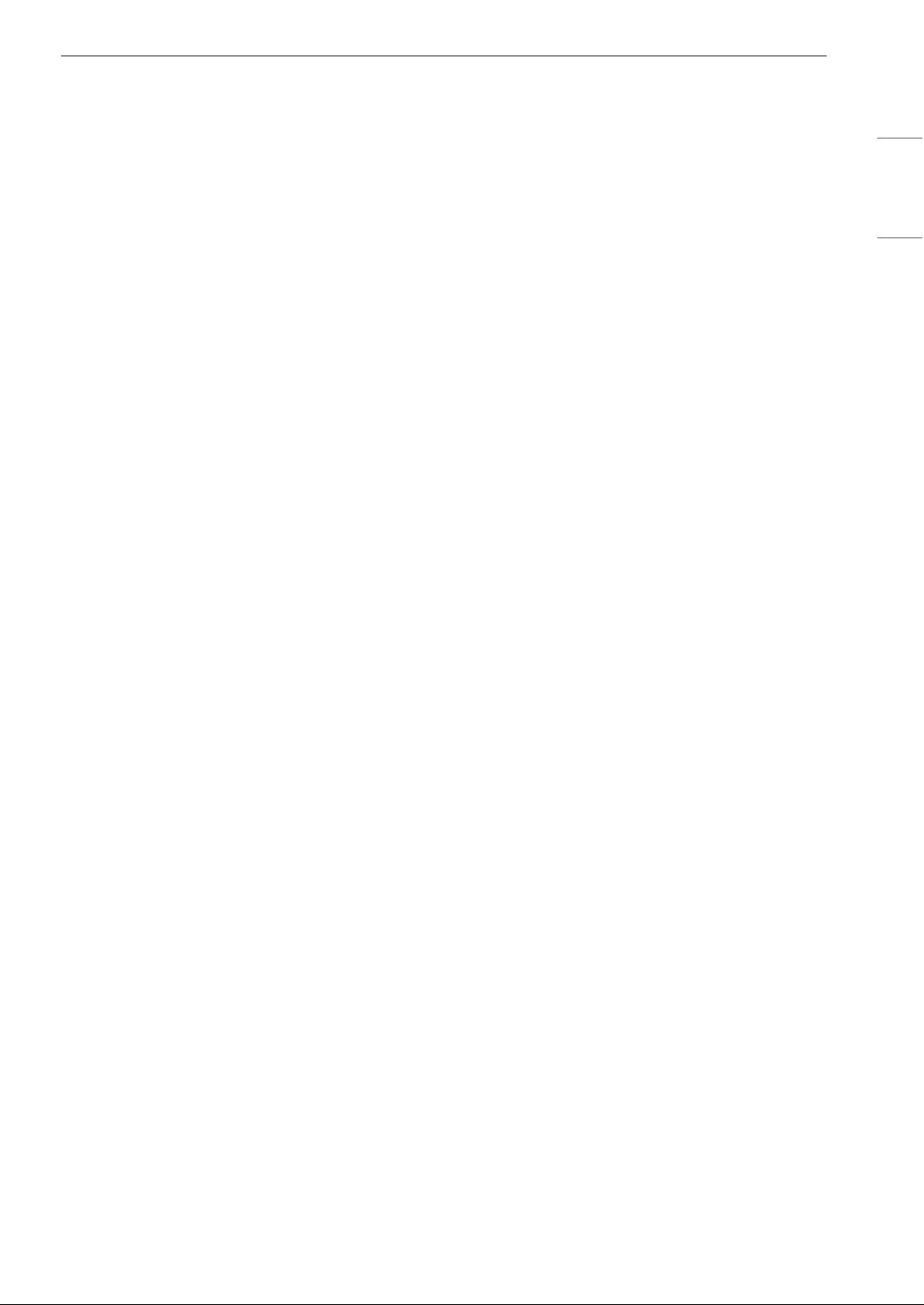
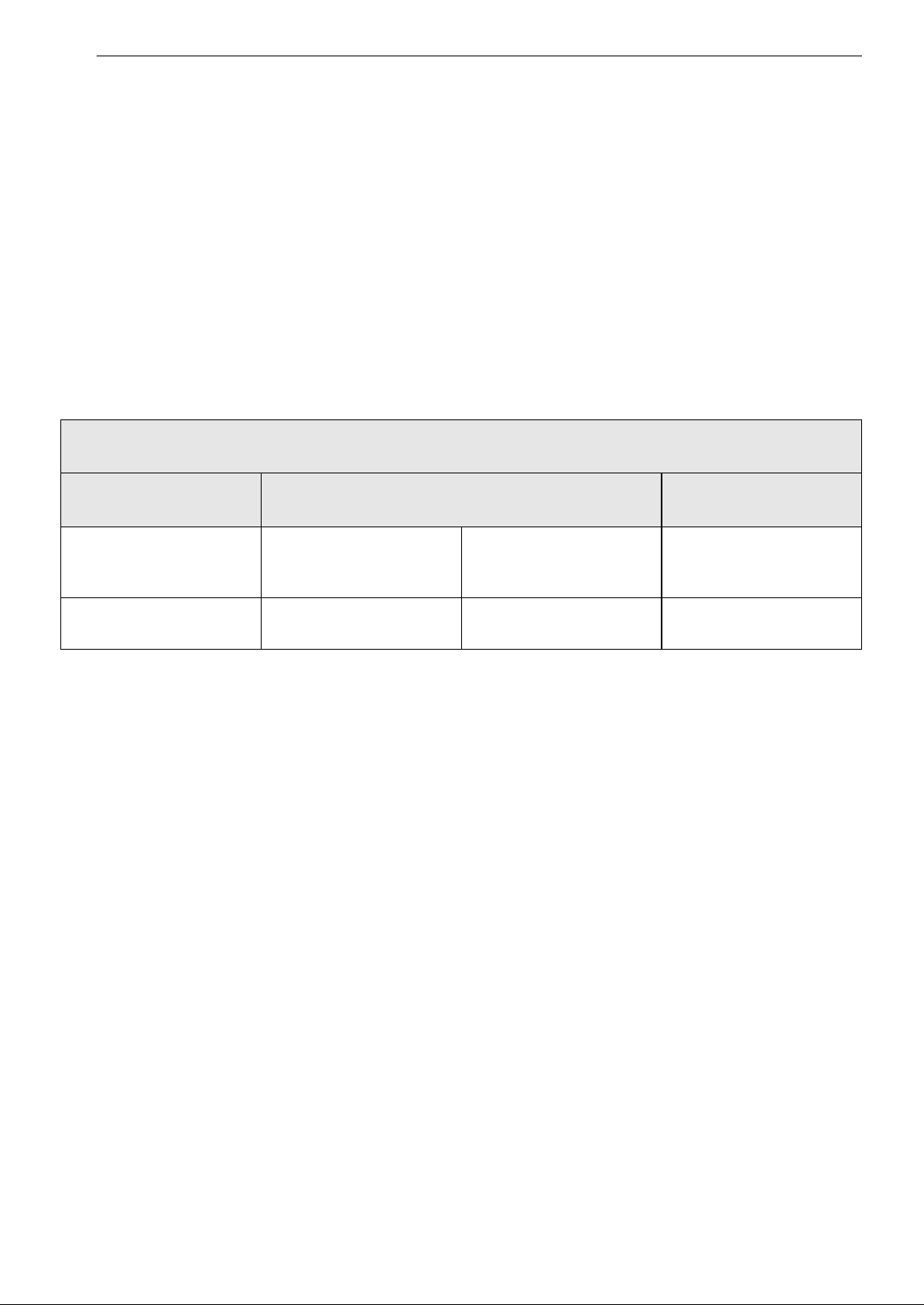
WARRANTY PERIOD
Refrigerator/Freezer
Sealed System
(Condenser, Dryer,
Connecting Tube and
Evaporator)
Compressor
One (1) year from the
date of original retail
purchase
Five (5) years from the
date of original retail
purchase
Five (5) years from the
date of original retail
purchase
Linear / Inverter
Compressor Only : Parts
Only for years 6-10 from
the date of original retail
purchase (You will be
charged for labor.)
Parts and Labor (internal/
functional parts only)
Parts and Labor Parts and Labor
27LIMITED WARRANTY
ENGLISH
• Damage or failure of the Product to perform during power failures and interrupted or inadequate
electrical service.
• Damage or failure of the Product caused by leaky or broken water pipes, frozen water pipes, restricted
drain lines, inadequate or interrupted water supply or inadequate supply of air.
• Damage or failure of the Product resulting from operating the Product in a corrosive atmosphere or
contrary to the Product owner’s manual.
• Damage or failure of the Product caused by accidents, pests and vermin, lightning, wind, fire, floods, acts
of nature, or any other causes beyond the control of LG.
• Damage or failure of the Product caused by unauthorized modification or alteration, or if the Product is
used for other than the intended purpose, or any water leakage where the Product was not properly
installed.
• Damage or failure of the Product caused by incorrect electrical current, voltage, or plumbing codes.
• Damage or failure of the Product caused by transportation, storage, and/or handling, including
scratches, dents, chips, and/or other damage to the finish of the Product, unless such damage is
reported within one (1) week of delivery.
• Damage or failure of the Product resulting from misuse, abuse, improper installation, repair, or
maintenance. Improper repair includes the use of parts not authorized by LG. Improper installation or
maintenance includes installation or maintenance contrary to the Product owner’s manual.
• Damage or failure of the Product caused by the use of parts, components, accessories, consumable
cleaning products, or any other products or services that were not authorized by LG.
• Damage or missing items to any display or open box Product.
• Refurbished Product or any Product sold “As Is”, “Where Is”, “With all Faults”, or similar disclaimer.
• Products with original serial numbers that have been removed, altered, or cannot be readily determined.
• Increases in utility costs and additional utility expenses.
• Any noises associated with normal operation.
• Products used for other than normal and proper household use (e.g., commercial or industrial use) or
contrary to the Product owner’s manual.
• Costs associated with removal and reinstallation of the Product for repairs, or the removal and
reinstallation of the Product if it is installed in an inaccessible location or not installed in accordance with
the Product Owner's manual.
• Accessories, removable components, or consumable parts (e.g. Shelves, door bins, drawers, water/air
filters, racks, light bulbs, batteries, etc., as applicable), except for internal/functional parts covered under
this limited warranty.
The cost of repair or replacement under these excluded circumstances shall be borne by You.
TO OBTAIN WARRANTY SERVICE AND ADDITIONAL INFORMATION
Call 1-800-243-0000 and select the appropriate option from the menu.
Or visit our website at http://www.lg.com
Or by mail: LG Electronics Customer Service P.O. Box 240007 Huntsville, AL 35813 ATTN: CIC
PROCEDURE FOR RESOLVING DISPUTES:
ALL DISPUTES BETWEEN YOU AND LG ARISING OUT OF OR RELATING IN ANY WAY TO THIS LIMITED
WARRANTY OR THE PRODUCT SHALL BE RESOLVED EXCLUSIVELY THROUGH BINDING ARBITRATION, AND
NOT IN A COURT OF GENERAL JURISDICTION. BINDING ARBITRATION MEANS THAT YOU AND LG ARE EACH
WAIVING THE RIGHT TO A JURY TRIAL AND TO BRING OR PARTICIPATE IN A CLASS ACTION.
Definitions. For the purposes of this section, references to “LG” mean LG Electronics U.S.A., Inc., its
parents, subsidiaries and affiliates, and each of their officers, directors, employees, agents, beneficiaries,
predecessors in interest, successors, assigns and suppliers; references to “dispute” or “claim” shall include
any dispute, claim or controversy of any kind whatsoever (whether based in contract, tort, statute,
regulation, ordinance, fraud, misrepresentation or any other legal or equitable theory) arising out of or
relating in any way to the sale, condition or performance of the product or this Limited Warranty.
28 LIMITED WARRANTY
Notice of Dispute. In the event you intend to commence an arbitration proceeding, you must first notify
LG in writing at least 30 days in advance of initiating the arbitration by sending a letter to LG at LG
Electronics, USA, Inc. Attn: Legal Department- Arbitration 111 Sylvan Avenue, Englewood Cliffs, NJ 07632.
You and LG agree to engage in good faith discussions in an attempt to amicably resolve your claim. The
notice must provide your name, address, and telephone number; identify the product that is the subject of
the claim; and describe the nature of the claim and the relief being sought. If you and LG are unable to
resolve the dispute within 30 days, either party may proceed to file a claim for arbitration.
Agreement to Binding Arbitration and Class Action Waiver. Upon failure to resolve the dispute during
the 30 day period after sending written notice to LG, you and LG agree to resolve any claims between us
only by binding arbitration on an individual basis, unless you opt out as provided below. Any dispute
between you and LG shall not be combined or consolidated with a dispute involving any other person’s or
entity’s product or claim. More specifically, without limitation of the foregoing, any dispute between you
and LG shall not under any circumstances proceed as part of a class or representative action. Instead of
arbitration, either party may bring an individual action in small claims court, but that small claims court
action may not be brought on a class or representative basis.
Arbitration Rules and Procedures. To begin arbitration of a claim, either you or LG must make a written
demand for arbitration. The arbitration will be administered by the American Arbitration Association
(“AAA”) and will be conducted before a single arbitrator under the AAA’s Consumer Arbitration Rules that
are in effect at the time the arbitration is initiated (referred to as the “AAA Rules”) and under the
procedures set forth in this section. The AAA Rules are available online at www.adr.org/consumer. Send a
copy of your written demand for arbitration, as well as a copy of this provision, to the AAA in the manner
described in the AAA Rules. You must also send a copy of your written demand to LG at LG Electronics,
USA, Inc. Attn: Legal Department- Arbitration 111 Sylvan Avenue, Englewood Cliffs, NJ 07632. If there is a
conflict between the AAA Rules and the rules set forth in this section, the rules set forth in this section will
govern. This arbitration provision is governed by the Federal Arbitration Act. Judgment may be entered on
the arbitrator’s award in any court of competent jurisdiction. All issues are for the arbitrator to decide,
except that issues relating to the scope and enforceability of the arbitration provision and to the
arbitrability of the dispute are for the court to decide. The arbitrator is bound by the terms of this
provision.
Governing Law. The law of the state of your residence shall govern this Limited Warranty and any
disputes between us except to the extent that such law is preempted by or inconsistent with applicable
federal law.
Fees/Costs. You do not need to pay any fee to begin an arbitration. Upon receipt of your written demand
for arbitration, LG will promptly pay all arbitration filing fees to the AAA unless you seek more than $25,000
in damages, in which case the payment of these fees will be governed by the AAA Rules. Except as
otherwise provided for herein, LG will pay all AAA filing, administration and arbitrator fees for any
arbitration initiated in accordance with the AAA Rules and this arbitration provision. If you prevail in the
arbitration, LG will pay your attorneys’ fees and expenses as long as they are reasonable, by considering
factors including, but not limited to, the purchase amount and claim amount. Notwithstanding the
foregoing, if applicable law allows for an award of reasonable attorneys’ fees and expenses, an arbitrator
can award them to the same extent that a court would. If the arbitrator finds either the substance of your
claim or the relief sought in the demand is frivolous or brought for an improper purpose (as measured by
the standards set forth in Federal Rule of Civil Procedure 11(b)), then the payment of all arbitration fees will
be governed by the AAA Rules. In such a situation, you agree to reimburse LG for all monies previously
disbursed by it that are otherwise your obligation to pay under the AAA Rules. Except as otherwise
provided for, LG waives any rights it may have to seek attorneys’ fees and expenses from you if LG prevails
in the arbitration.
Hearings and Location. If your claim is for $25,000 or less, you may choose to have the arbitration
conducted solely on the basis of (1) documents submitted to the arbitrator, (2) through a telephonic
hearing, or (3) by an in-person hearing as established by the AAA Rules. If your claim exceeds $25,000, the
right to a hearing will be determined by the AAA Rules. Any in-person arbitration hearings will be held at a
location within the federal judicial district in which you reside unless we both agree to another location or
we agree to a telephonic arbitration.
Opt Out. You may opt out of this dispute resolution procedure. If you opt out, neither you nor LG can
require the other to participate in an arbitration proceeding. To opt out, you must send notice to LG no
later than 30 calendar days from the date of the first consumer purchaser’s purchase of the product by
either: (i) sending an e-mail to opto[email protected], with the subject line: “Arbitration Opt Out” or (ii) calling 1-
29LIMITED WARRANTY
ENGLISH
800-980-2973. You must include in the opt out e-mail or provide by telephone: (a) your name and address;
(b) the date on which the product was purchased; (c) the product model name or model number; and (d)
the serial number (the serial number can be found (i) on the product; or (ii) online by accessing https://
www.lg.com/us/support/repair-service/schedule-repair-continued and clicking on “Find My Model & Serial
Number”).
You may only opt out of the dispute resolution procedure in the manner described above (that is, by e-mail
or telephone); no other form of notice will be effective to opt out of this dispute resolution procedure.
Opting out of this dispute resolution procedure will not affect the coverage of the Limited Warranty in any
way, and you will continue to enjoy the full benefits of the Limited Warranty. If you keep this product and
do not opt out, then you accept all terms and conditions of the arbitration provision described above.
30 LIMITED WARRANTY
CANADA
TERMS AND CONDITIONS
ARBITRATION NOTICE: THIS LIMITED WARRANTY CONTAINS AN ARBITRATION PROVISION THAT
REQUIRES YOU AND LG TO RESOLVE DISPUTES BY BINDING ARBITRATION INSTEAD OF IN COURT,
UNLESS THE LAWS OF YOUR PROVINCE OR TERRITORY DO NOT PERMIT THAT, OR, IN OTHER
JURISDICTIONS, IF YOU CHOOSE TO OPT OUT. IN ARBITRATION, CLASS ACTIONS AND JURY TRIALS
ARE NOT PERMITTED. PLEASE SEE THE SECTION TITLED “PROCEDURE FOR RESOLVING DISPUTES”
BELOW.
Should your LG Refrigerator ("Product") fail due to a defect in materials or workmanship under normal and
proper use, during the warranty period set forth below, LG Electronics Canada, Inc. ("LGECI") will, at its
option, repair, replace or pro rate the Product upon receipt of proof of the original retail purchase. This
limited warranty is valid only to the original retail purchaser of the Product and applies only to a Product
distributed, purchased from an authorized retailer and used within Canada, as determined at the sole
discretion of LGECI.
• Replacement products and parts are warranted for the remaining portion of the original warranty period
or ninety (90) days, whichever is greater.
• Replacement products and parts may be new, reconditioned, refurbished, or otherwise factory
remanufactured, all at the sole discretion of LGECI.
• Proof of original retail purchase specifying the Product model and date of purchase is required to obtain
warranty service under this Limited Warranty.
LGECI’S SOLE LIABILITY IS LIMITED TO THE LIMITED WARRANTY SET OUT ABOVE. EXCEPT AS
EXPRESSLY PROVIDED ABOVE, LGECI MAKES NO, AND HEREBY DISCLAIMS, ALL OTHER WARRANTIES
AND CONDITIONS RESPECTING THE PRODUCT, WHETHER EXPRESS OR IMPLIED, INCLUDING BUT NOT
LIMITED TO, ANY IMPLIED WARRANTY OR CONDITION OF MERCHANTABILITY OR FITNESS FOR A
PARTICULAR PURPOSE, AND NO REPRESENTATIONS SHALL BE BINDING ON LGECI. LGECI DOES NOT
AUTHORIZE ANY PERSON TO CREATE OR ASSUME FOR IT ANY OTHER WARRANTY OBLIGATION OR
LIABILITY IN CONNECTION WITH THE PRODUCT. TO THE EXTENT THAT ANY WARRANTY OR
CONDITION IS IMPLIED BY LAW, IT IS LIMITED TO THE WARRANTY PERIOD SET OUT ABOVE. UNDER
NO CIRCUMSTANCES SHALL LGECI, THE MANUFACTURER OR DISTRIBUTOR OF THE PRODUCT, BE
LIABLE FOR ANY INCIDENTAL, CONSEQUENTIAL, SPECIAL, DIRECT, INDIRECT, PUNITIVE OR
EXEMPLARY DAMAGES, INCLUDING, WITHOUT LIMITATION, LOSS OF GOODWILL, LOST PROFITS, LOSS
OF ANTICIPATED PROFITS, LOST REVENUE, LOSS OF USE, OR ANY OTHER DAMAGE, WHETHER ARISING
DIRECTLY OR INDIRECTLY FROM ANY CONTRACTUAL BREACH, FUNDAMENTAL BREACH, TORT OR
OTHERWISE, OR FROM ANY ACTS OR OMISSIONS. LGECI’S TOTAL LIABILITY, IF ANY, SHALL NOT
EXCEED THE PURCHASE PRICE PAID BY YOU FOR THE PRODUCT.
This Limited Warranty gives you specific legal rights. You may also have other rights that vary from
province to province depending on applicable provincial laws. Any term of this Limited Warranty that
negates or varies any implied condition or warranty under provincial law is severable where it conflicts
with such provincial law without affecting the remainder of this warranty’s terms.
WARRANTY PERIOD (Note: If the original date of purchase cannot be verified, the warranty will
begin sixty (60) days from the date of manufacture)
Refrigerator
Sealed System (Condenser, Dryer, Connecting
Tube and Evaporator)
Linear / Inverter
Compressor
One (1) year from the
date of original retail
purchase
One (1) year from the
date of original retail
purchase
Seven (7) years from the
date of original retail
purchase
Ten (10) years from the
date of original retail
purchase
Parts and Labor (internal/
functional parts only)
Parts and Labor Parts only (Consumer will
be charged for labor)
Part only (Consumer will
be charged for labor)
31LIMITED WARRANTY
ENGLISH
THIS LIMITED WARRANTY DOES NOT COVER:
• Service trips to i) deliver, pick up, or install or; educate on how to operate the Product; ii) correct wiring or
plumbing; or iii) correct unauthorized repairs or installations of the Product;
• Damage or failure of the Product to perform during power failures and interrupted or inadequate
electrical service;
• Damage or failure caused by leaky or broken water pipes, frozen water pipes, restricted drain lines,
inadequate or interrupted water supply or inadequate supply of air;
• Damage or failure resulting from operating the Product in a corrosive atmosphere or contrary to the
instructions outlined in the Product’s owner’s manual;
• Damage or failure to the Product caused by accidents, pests and vermin, lightning, wind, fire, floods, acts
of God, or any other causes beyond the control of LGECI or the manufacturer;
• Damage or failure resulting from misuse, abuse, improper installation, repair, or maintenance of the
Product. Improper repair includes use of parts not authorized or specified by LGECI. Improper
installation or maintenance includes installation or maintenance contrary to the Product’s owner’s
manual;.
• Damage or failure caused by unauthorized modification or alteration of the Product, or if used for other
than the intended household purpose/use of the Product, or damage or failure resulting from any water
leakage due to improper installation of the Product;
• Damage or failure caused by incorrect electrical current, voltage or plumbing codes;
• Damage or failure caused by use that is other than normal household use, including, without limitation,
commercial or industrial use, including use in commercial offices or recreational facilities, or as
otherwise outlined in the Product’s owner’s manual;
• Damage or failure caused by the use of any accessories, components or cleaning products, including,
without limitation, water filters, that are not approved/authorized by LGECI;
• Replacement of the water filter cartridge due to water pressure that is outside the specified operating
range or due to excessive sediment in the water supply;
• Damage or failure caused by transportation and handling, including scratches, dents, chips and/or other
damage to the finish of the Product, unless such damage results from defects in materials or
workmanship and is reported to LGECI within one (1) week of delivery of the Products;
• Damage or missing items to any display, open box, refurbished or discounted Product;
• Refurbished Product or any Product sold “As Is”, “Where Is”, “With all Faults”, or any similar disclaimer;
• Products with original serial numbers that have been removed, altered or cannot be readily determined
at the discretion of LGECI;
• Increases in utility costs and additional utility expenses in any way associated with the Product;
• Any noises associated with normal operation of the Product;
• Replacement of light bulbs, filters, fuses or any other consumable parts;
• Replacement of any part that was not originally included with the Product;
• Costs associated with removal and/or reinstallation of the Product for repairs; and
• Shelves, door bins, drawers, handle and accessories to the Product, except for internal/functional parts
covered under this Limited Warranty.
• Coverage for "in Home" repairs, for products in-warranty, will be provided if the Product is within a 150
km radius from the nearest authorized service center (ASC), as determined by LG Canada. If your Product
is located outside a 150 km radius from a ASC, as determined by LG Canada, it will be your responsibility
to bring the Product, at your sole expense, to the ASC for in-warranty repair.
All costs and expenses associated with the above excluded circumstances, listed under the heading,
This Limited Warranty Does Not Cover, shall be borne by the consumer.
TO OBTAIN WARRANTY SERVICE AND ADDITIONAL INFORMATION, PLEASE CALL OR VISIT OUR WEBSITE:
Call 1-888-542-2623 and select the appropriate option from the menu, or visit our website at http://
www.lg.com
32 LIMITED WARRANTY
PROCEDURE FOR RESOLVING DISPUTES:
EXCEPT WHERE PROHIBITED AT LAW, ALL DISPUTES BETWEEN YOU AND LG ARISING OUT OF OR RELATING
IN ANY WAY TO THIS LIMITED WARRANTY OR THE PRODUCT SHALL BE RESOLVED EXCLUSIVELY THROUGH
BINDING ARBITRATION, AND NOT IN A COURT OF GENERAL JURISDICTION. EXCEPT WHERE PROHIBITED
AT LAW, YOU AND LG BOTH IRREVOCABLY AGREE TO WAIVE THE RIGHT TO A JURY TRIAL AND TO BRING
OR PARTICIPATE IN A CLASS ACTION.
Definitions. For the purposes of this section, references to “LG” mean LG Electronics Canada, Inc., its
parents, subsidiaries and affiliates, and each of their officers, directors, employees, agents, beneficiaries,
predecessors in interest, successors, assigns and suppliers; references to “dispute” or “claim” shall include
any dispute, claim or controversy of any kind whatsoever (whether based in contract, tort, statute,
regulation, ordinance, fraud, misrepresentation or any other legal or equitable theory) arising out of or
relating in any way to the sale, condition or performance of the product or this Limited Warranty.
Notice of Dispute. In the event you intend to commence an arbitration proceeding, you must first notify
LG in writing at least 30 days in advance of initiating the arbitration by sending a letter to LGECI Legal
Team at 20 Norelco Drive, North York, Ontario, Canada M9L 2X6 (the “Notice of Dispute”). You and LG
agree to engage in good faith discussions in an attempt to amicably resolve your claim. The notice must
provide your name, address, and telephone number; identify the product that is the subject of the claim;
and describe the nature of the claim and the relief being sought. If you and LG are unable to resolve the
dispute within 30 days of LG’s receipt of the Notice of Dispute, the dispute shall be resolved by binding
arbitration in accordance with the procedure set out herein. You and LG both agree that, during the
arbitration proceeding, the terms (including any amount) of any settlement offer made by either you or LG
will not be disclosed to the arbitrator until the arbitrator determines the dispute.
Agreement to Binding Arbitration and Class Action Waiver. Upon failure to resolve the dispute during
the 30 day period after LG’s receipt of the Notice of Dispute, you and LG agree to resolve any claims
between you and LG only by binding arbitration on an individual basis, unless you opt out as provided
below, or you reside in a jurisdiction that prevents full application of this clause in the circumstances of the
claims at issue (in which case if you are a consumer, this clause will only apply if you expressly agree to the
arbitration). To the extent permitted by applicable law, any dispute between you and LG shall not be
combined or consolidated with a dispute involving any other person’s or entity’s product or claim. More
specifically, without limitation of the foregoing, except to the extent such a prohibition is not permitted at
law, any dispute between you and LG shall not under any circumstances proceed as part of a class or
representative action. Instead of arbitration, either party may bring an individual action in small claims
court, but that small claims court action may not be brought on a class or representative basis except to
the extent this prohibition is not permitted at law in your province or territory of jurisdiction as it relates to
the claims at issue between you and LG.
Arbitration Rules and Procedures. To begin arbitration of a claim, either you or LG must make a written
demand for arbitration. The arbitration will be private and confidential, and conducted on a simplified and
expedited basis before a single arbitrator chosen by the parties under the provincial or territorial
commercial arbitration law and rules of the province or territory of your residence. You must also send a
copy of your written demand to LG at LG Electronics, Canada, Inc., Attn: Legal Department- Arbitration, 20
Norelco Drive, North York, Ontario M9L 2X6. This arbitration provision is governed by your applicable
provincial or territorial commercial arbitration legislation. Judgment may be entered on the arbitrator’s
award in any court of competent jurisdiction. All issues are for the arbitrator to decide, except that, issues
relating to the scope and enforceability of the arbitration provision and to the arbitrability of the dispute
are for the court to decide. The arbitrator is bound by the terms of this provision.
Governing Law. The law of the province or territory of your purchase shall govern this Limited Warranty
and any disputes between you and LG except to the extent that such law is preempted by or inconsistent
with applicable federal or provincial/territorial law. Should arbitration not be permitted for any claim,
action, dispute or controversy between you and LG, you and LG attorn to the exclusive jurisdiction of the
courts of the province or territory of your purchase for the resolution of the claim, action, dispute or
controversy between you and LG.
Fees/Costs. You do not need to pay any fee to begin an arbitration. Upon receipt of your written demand
for arbitration, LG will promptly pay all arbitration filing fees unless you seek more than $25,000 in
damages, in which case the payment of these fees will be governed by the applicable arbitration rules.
Except as otherwise provided for herein, LG will pay all filing, administration and arbitrator fees for any
arbitration initiated in accordance with the applicable arbitration rules and this arbitration provision. If you
prevail in the arbitration, LG will pay your attorneys’ fees and expenses as long as they are reasonable, by
33LIMITED WARRANTY
ENGLISH
considering factors including, but not limited to, the purchase amount and claim amount. Notwithstanding
the foregoing, if applicable law allows for an award of reasonable attorneys’ fees and expenses, an
arbitrator can award them to the same extent that a court would. If the arbitrator finds either the
substance of your claim or the relief sought in the demand is frivolous or brought for an improper purpose
(as measured by the applicable laws), then the payment of all arbitration fees will be governed by the
applicable arbitration rules. In such a situation, you agree to reimburse LG for all monies previously
disbursed by it that are otherwise your obligation to pay under the applicable arbitration rules. Except as
otherwise provided for, LG waives any rights it may have to seek attorneys’ fees and expenses from you if
LG prevails in the arbitration.
Hearings and Location. If your claim is for $25,000 or less, you may choose to have the arbitration
conducted solely (1) on the basis of documents submitted to the arbitrator, (2) through a telephonic
hearing, or (3) by an in-person hearing as established by the applicable arbitration rules. If your claim
exceeds $25,000, the right to a hearing will be determined by the applicable arbitration rules. Any in-
person arbitration hearings will be held at the nearest, most mutually-convenient arbitration location
available within the province or territory in which you reside unless you and LG both agree to another
location or agree to a telephonic arbitration.
Severability and Waiver. If any portion of this Limited Warranty (including these arbitration procedures)
is unenforceable, the remaining provisions will continue in full force and effect to the maximum extent
permitted by applicable law. Should LG fail to enforce strict performance of any provision of this Limited
Warranty (including these arbitration procedures), it does not mean that LG intends to waive or has waived
any provision or part of this Limited Warranty.
Opt Out. You may opt out of this dispute resolution procedure. If you opt out, neither you nor LG can
require the other to participate in an arbitration proceeding. To opt out, you must send notice to LG no
later than 30 calendar days from the date of the first consumer purchaser’s purchase of the product by
either (i) sending an e-mail to [email protected], with the subject line: “Arbitration Opt Out;” or (ii) calling 1-
800-980-2973. You must include in the opt out e-mail or provide by telephone: (a) your name and address;
(b) the date on which the product was purchased; (c) the product model name or model number; and (d)
the serial number (the serial number can be found (i) on the product; or (ii) online by accessing https://
www.lg.com/ca_en/support/repair-service/schedule-repair and clicking on “Find My Model & Serial
Number”).
In the event that you “Opt Out”, the law of the province or territory of your residence shall govern this
Limited Warranty and any disputes between you and LG except to the extent that such law is preempted
by or inconsistent with applicable federal or provincial/territorial law. Should arbitration not be permitted
for any claim, action, dispute or controversy between you and LG, you and LG agree to attorn to the
exclusive jurisdiction of the courts of the province or territory of your residence for the resolution of the
claim, action, dispute or controversy between you and LG.
You may only opt out of the dispute resolution procedure in the manner described above (that is, by e-mail
or telephone); no other form of notice will be effective to opt out of this dispute resolution procedure.
Opting out of this dispute resolution procedure will not affect the coverage of the Limited Warranty in any
way, and you will continue to enjoy the full benefits of the Limited Warranty. If you keep this product and
do not opt out, then you accept all terms and conditions of the arbitration provision described above.
Conflict of Terms. In the event of a conflict or inconsistency between the terms of this Limited Warranty
and the End User License Agreement (“EULA”) in regards to dispute resolution, the terms of this Limited
Warranty shall control and govern the rights and obligations of the parties and shall take precedence over
the EULA.
34 Memo
35Memo
LG Customer Information Center
Register your product Online!
www.lg.com
For inquiries or comments,
visit www.lg.com or call:
1-800-243-0000
U.S.A.
1-888-542-2623
CANADA