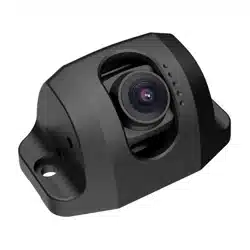

Low Illumina�on BSD
Vehicle-Mounted Camera
User Manual
UD32639B-A

© 2023 Hangzhou Hikvision Digital Technology Co., Ltd. All rights
reserved.
This Manual is the property of Hangzhou Hikvision Digital
Technology Co., Ltd. or its aliates (hereina�er referred to as
"Hikvision"), and it cannot be reproduced, changed, translated, or
distributed, par�ally or wholly, by any means, without the prior
wri�en permission of Hikvision. Unless otherwise expressly stated
herein, Hikvision does not make any warran�es, guarantees or
representa�ons, express or implied, regarding to the Manual, any
informa�on contained herein.
About this Manual
The Manual includes instruc�ons for using and managing the
Product. Pictures, charts, images and all other informa�on
hereina�er are for descrip�on and explana�on only. The
informa�on contained in the Manual is subject to change, without
no�ce, due to rmware updates or other reasons.
Please use this Manual with the guidance and assistance of
professionals trained in suppor�ng the Product.
Trademarks Acknowledgement
and other Hikvision’s trademarks and logos are the
proper�es of Hikvision in various jurisdic�ons.
Other trademarks and logos men�oned are the proper�es of
their respec�ve owners.
LEGAL DISCLAIMER
TO THE MAXIMUM EXTENT PERMITTED BY APPLICABLE LAW, THIS
MANUAL AND THE PRODUCT DESCRIBED, WITH ITS HARDWARE,
SOFTWARE AND FIRMWARE, ARE PROVIDED “AS IS” AND “WITH
ALL FAULTS AND ERRORS”. HIKVISION MAKES NO WARRANTIES,
EXPRESS OR IMPLIED, INCLUDING WITHOUT LIMITATION,
MERCHANTABILITY, SATISFACTORY QUALITY, OR FITNESS FOR A
PARTICULAR PURPOSE. THE USE OF THE PRODUCT BY YOU IS AT
YOUR OWN RISK. IN NO EVENT WILL HIKVISION BE LIABLE TO YOU
FOR ANY SPECIAL, CONSEQUENTIAL, INCIDENTAL, OR INDIRECT
DAMAGES, INCLUDING, AMONG OTHERS, DAMAGES FOR LOSS OF
BUSINESS PROFITS, BUSINESS INTERRUPTION, OR LOSS OF DATA,
CORRUPTION OF SYSTEMS, OR LOSS OF DOCUMENTATION,
WHETHER BASED ON BREACH OF CONTRACT, TORT (INCLUDING
NEGLIGENCE), PRODUCT LIABILITY, OR OTHERWISE, IN
CONNECTION WITH THE USE OF THE PRODUCT, EVEN IF HIKVISION
HAS BEEN ADVISED OF THE POSSIBILITY OF SUCH DAMAGES OR
LOSS.
YOU ACKNOWLEDGE THAT THE NATURE OF INTERNET PROVIDES
FOR INHERENT SECURITY RISKS, AND HIKVISION SHALL NOT TAKE
ANY RESPONSIBILITIES FOR ABNORMAL OPERATION, PRIVACY
LEAKAGE OR OTHER DAMAGES RESULTING FROM CYBER-ATTACK,
HACKER ATTACK, VIRUS INSPECTION, OR OTHER INTERNET
SECURITY RISKS; HOWEVER, HIKVISION WILL PROVIDE TIMELY
TECHNICAL SUPPORT IF REQUIRED.
YOU AGREE TO USE THIS PRODUCT IN COMPLIANCE WITH ALL
APPLICABLE LAWS, AND YOU ARE SOLELY RESPONSIBLE FOR
ENSURING THAT YOUR USE CONFORMS TO THE APPLICABLE LAW.
ESPECIALLY, YOU ARE RESPONSIBLE, FOR USING THIS PRODUCT IN
A MANNER THAT DOES NOT INFRINGE ON THE RIGHTS OF THIRD
PARTIES, INCLUDING WITHOUT LIMITATION, RIGHTS OF PUBLICITY,
INTELLECTUAL PROPERTY RIGHTS, OR DATA PROTECTION AND
OTHER PRIVACY RIGHTS. YOU SHALL NOT USE THIS PRODUCT FOR
ANY PROHIBITED END-USES, INCLUDING THE DEVELOPMENT OR
PRODUCTION OF WEAPONS OF MASS DESTRUCTION, THE
DEVELOPMENT OR PRODUCTION OF CHEMICAL OR BIOLOGICAL
WEAPONS, ANY ACTIVITIES IN THE CONTEXT RELATED TO ANY
NUCLEAR EXPLOSIVE OR UNSAFE NUCLEAR FUEL-CYCLE, OR IN
SUPPORT OF HUMAN RIGHTS ABUSES.
IN THE EVENT OF ANY CONFLICTS BETWEEN THIS MANUAL AND
THE APPLICABLE LAW, THE LATER PREVAILS.
1

Regulatory Informa�on
FCC Informa�on
FCC compliance: This equipment has been tested and found to
comply with the limits for a digital device, pursuant to part 15 of
the FCC Rules. These limits are designed to provide reasonable
protec�on against harmful interference when the equipment is
operated in a commercial environment. This equipment generates,
uses, and can radiate radio frequency energy and, if not installed
and used in accordance with the instruc�on manual, may cause
harmful interference to radio communica�ons. Opera�on of this
equipment in a residen�al area is likely to cause harmful
interference in which case the user will be required to correct the
interference at his own expense.
FCC Condi�ons
This device complies with part 15 of the FCC Rules. Opera�on is
subject to the following two condi�ons:
1. This device may not cause harmful interference.
2. This device must accept any interference received, including
interference that may cause undesired opera�on
EU Conformity Statement
This product and - if applicable - the supplied
accessories too are marked with "CE" and comply
therefore with the applicable harmonized European
standards listed under the Low Voltage Direc�ve
2014/35/EC, the EMC Direc�ve 2014/30/EC, the RoHS
Direc�ve 2011/65/EU.
2012/19/EU (WEEE direc�ve): Products marked with this
symbol cannot be disposed of as unsorted municipal
waste in the European Union. For proper recycling,
return this product to your local supplier upon the
purchase of equivalent new equipment, or dispose of it
at designated collec�on points. For more informa�on
see: www.recyclethis.info.
2006/66/EC (ba�ery direc�ve): This product contains a
ba�ery that cannot be disposed of as unsorted
municipal waste in the European Union. See the product
documenta�on for specic ba�ery informa�on. The
ba�ery is marked with this symbol, which may include
le�ering to indicate cadmium (Cd), lead (Pb), or mercury
(Hg). For proper recycling, return the ba�ery to your
supplier or to a designated collec�on point. For more
informa�on see: www.recyclethis.info.
Industry Canada ICES-003 Compliance
This device meets the CAN ICES-3 (A)/NMB-3(A) standards
requirements.
2
The symbols that may be found in this document are dened as
follows.
Descrip�on
Provides addi�onal informa�on to
emphasize or supplement important points
of the main text.
Indicates important opra�ons or poten�al
hazardous situa�on that could result in
damage or property loss.
Keep the camera away from liquid while in use.
Do not drop the camera or subject it to physical shock.
Do not touch senor modules with ngers. If cleaning is necessary, use
clean cloth with a bit of ethanol and wipe it gently. If the camera will not
be used for an extended period, replace the lens cap to protect the
sensor from dirt.
To avoid heat accumula�on, good ven�la�on is required for opera�ng
environment.
Do not aim the camera at the sun or extra bright places. Blooming or
smearing may occur otherwise (which is not a malfunc�on), and aect
the endurance of sensor at the same �me.
The sensor may be burned out by a laser beam, so when any laser
equipment is in using, make sure that the surface of sensor will not be
exposed to the laser beam.
Do not place the camera in extremely hot, cold, dusty or damp loca�ons,
and do not expose it to high electromagne�c radia�on.
While in delivery, the camera shall be packed in its original packing, or
packing of the same texture.
If the product does not work properly, contact your dealer or the
nearest service center. Never a�empt to disassemble the camera by
yourself. (We shall not assume any responsibility for problems caused
by unauthorized repair or maintenance.)
These instruc�ons are intended to ensure that user can use the
product correctly to avoid danger or property loss. Before using,
please read the manual carefully and keep it properly for further
reference.
Indicates a hazard with a high level of risk,
which if not avoided, will result in death or
serious injury.
Indicates a poten�ally hazardous situa�on,
which if not avoided, could result in
equipment damage, data loss, performance
degrada�on, or unexpected results.
In the use of the product, you must be in strict compliance with the
electrical safety regula�ons of the na�on and region. Input voltage should
meet both the SELV (Safety Extra Low Voltage) and the Limited Power
Source with AC 24V or DC 12V according to the IEC60950-1 standard.
Refer to technical specica�ons for detailed informa�on.
Foreword
Symbol Conven�ons
Symbol
NOTE
CAUTION
WARNING
DANGER
Safety Instruc�on
3
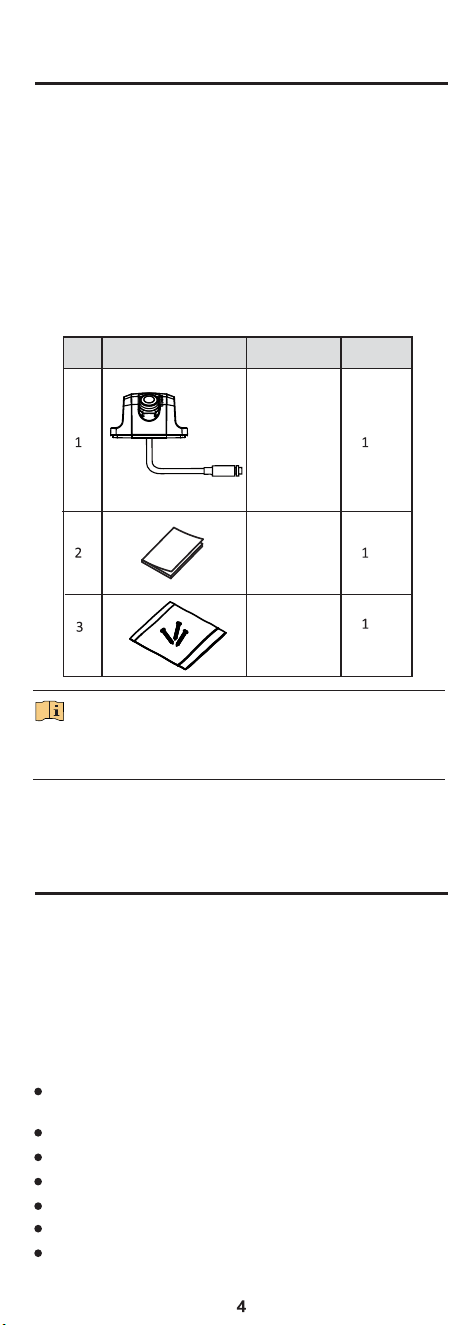
Before unboxing, please check whether the package is intact.
Unbox and refer to the list to make sure that all the assembly
parts are included.
If there is no problem, the device is ready for installa�on.
The packing list of the vehicle-mounted camera is shown
below.
Table 1-1 Packing List
No.
Picture for Illustra�on
Name
Quan�ty
Camera
Screw Pack
The assembly parts may vary according to dierent camera models.
Refer to the actual device for details.
2.1 Product Features
This series of camera adopts new genera�on sensor with high
sensi�vity and advanced circuit design technology. It features
high resolu�on, low image distor�on and low noise, etc., which
makes it suitable for surveillance system and image processing
system.
The main features are as follows:
High resolu�on image (up to 1080p)
Low illumina�on, 0.01 Lux @(F1.2, AGC ON)
Auto white balance
Supports IP68, IP69 water-proof
Supports IK10
Adapts shock-proof design and avia�on plug
NOTE
1 Package Check
1.1 Before You Begin
1.2 Packing List
User Manual
2 Introduc�on
High performance CMOS sensor for accurate capture of
moving subjects
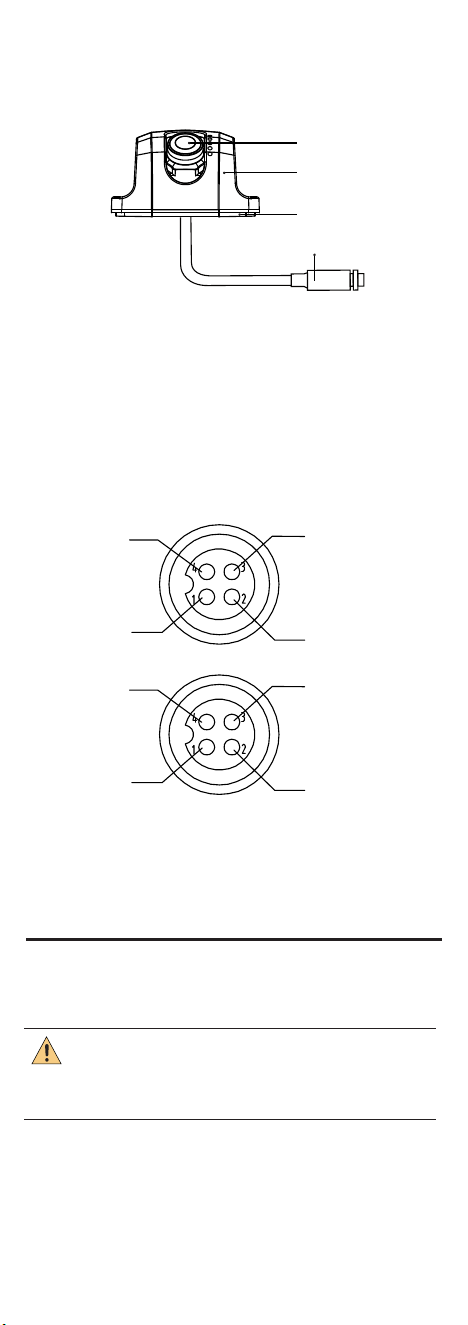
2.2 Overview
2.2.1 Overview of Camera
Figure 2-1 Overview
Video
Power Ground
Normally Closed
Normally Closed
Power Ground
Power Supply
Power Supply
Video
Avia�on Plug Interface
Cable A
Cable B
2.2.2 Cables
Figure 2-2 Interfaces of Avia�on Plug
The camera is designed with an avia�on plug to ensure shock-
proof, as shown below. Make sure your cable matches with the
plug.
It supports 9V to 16 V DC power supply.
Lens
Camera Body
Rubber Blanket
Cable
CAUTION
3 Installation
Before you start, please make sure that the device in the package
is in good condi�on and all the assembly parts are included.
Make sure the part, which is used to install the camera, is strong
enough to withstand four �mes the weight of the camera and the
moun�ng.
5
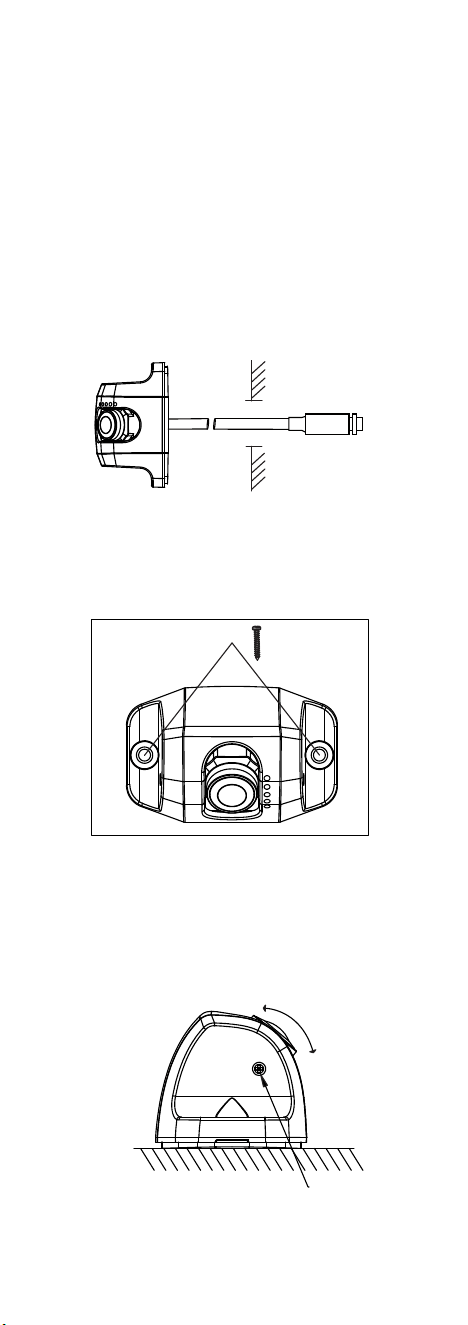
Step 1
Figure 3-1 Install the Camera in Vehicle
Set Screw
Choose a suitable moun�ng loca�on to ensure the
camera catches the driver properly.
Step 2 Pre-drill holes in the center of the moun�ng loca�on. The
hole diameter is determined according to the size of the
wire harness, so that the wire harness can be passed
through the car. (If the structure of this sec�on is a side
outlet, there is no need to punch holes and go directly to
step 4).
Step 3 Install the camera to a proper moun�ng place. Insert the
cable through the cable hole in the vehicle.
Step 4 Fix the camera with screws to make sure it is secured.
Adjust the camera to a desired angle to make sure it
catches the driver properly. Fix the camera angle with
screws using a hex screwdriver to complete installa�on.
Step 5
Figure 3-3 Adjust and Fix the Camera Angle
6
Set Screws × 2
Figure 3-2 Fix with Srews