6
MONTHS
EXTENDED
WARRANTY
ON REGISTRATION
1
YEAR
WARRANTY
ON PRODUCT
WATT
2000
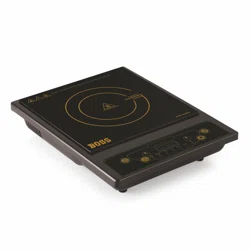
B-537

Thank you for starng this journey with BOSS. As a brand, BOSS was never
just about technology, but about the meaning that technology adds to your
lives. Our products are designed around you so that you may be able to live a
fuller and more empowered life. We hope you have a truly rewarding
experience with BOSS.
Dear Customer,
Cheers!
Your inputs and feedback are valuable to us, given we are on a quest of
making life beer for our family members spread all over the country.
PRODUCT FEATURES
Cool Touch Surface ü
Auto-Shut off ü
Indian Cooking Menu's 8
Polished Glass ü
Aluminum Wire ü
Auto Pan Detecon ü
Manual Timer ü
Fast Heang ü
Manual Pre-Set ü
Temperature Range: 80℃ - 270 ℃ ü
TECHNICAL SPECIFICATIONS
Features
Inducon Stove Mode(s)
B-537
Rated Voltage & Frequency (VAC/Hz) 230/50
Current (Amps) 8.0
Power Consumpon (Was) 2000
Parameters
Inducon Stove Mode(s)
B-537
Given technical details are for informaon only, do not try to service your
Inducon Stove by yourself, unl & unless you are instructed or trained doing so.
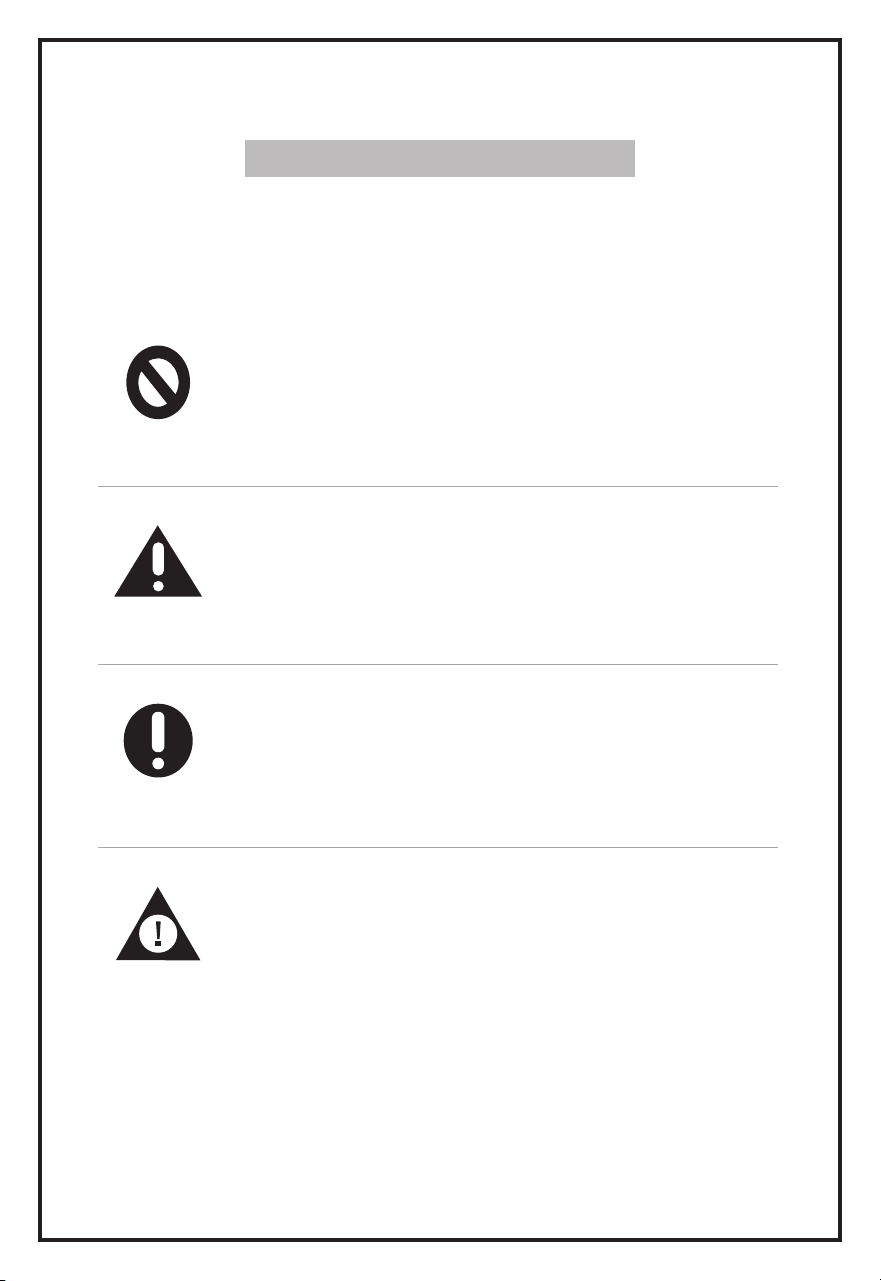
INSTRUCTION SYMBOLS
Meaning of Safety Instrucon Symbols
This symbol indicates prohibited maer and those behaviours
are forbidden. Non-compliance with the instrucons may result
in product damages or endanger the personal safety of the users
Prohibition Symbol
Behaviour must be strictly executed in line with the operaon
requirements. Non-compliance with the instrucons may result
in product damages or endanger the personal safety of the users.
Warning Symbol
This symbol indicates maer where specific cauons to be kept
in mind and those points shall be specially noted.
Caution Symbol
This symbol indicates maer to pay aenon to and these
behaviours shall be specially noted. Due precauons are needed
or minor or moderate injuries or damages of the product will be
caused.
Note Symbol

MAINTENANCE
Caring Your Inducon Cooktop 06
Troubleshoong 7-8
USAGE INSTRUCTIONS
Before First Use 03
Operang Your Inducon Cooktop 03
Control Panel Operaon 04
Geng to Know Your Cooking Modes 05
KNOW YOUR PRODUCT
Product Descripon 02
SAFETY INSTRUCTIONS
Important Safety Instrucons 01
Warning 01
CONTENTS
SAFETY INSTRUCTIONS
Important Safety Instrucons
• To protect against fire, electric shock or injury, do not place cord, plug or appliance in water or
any other liquid.
• Do not place the appliance on or near a hot Gas/ Electric Burner/ in a Microwave/Heated
Oven.
• Do not use for other than intended use. This appliance is intended for household use only, not
for Commercial or Industrial use. Use for anything other than intended will void the Warrant.
• To avoid an electrical overload, do not operate another high-waage appliance on the same
power socket.
• Before using the appliance , check for any damage. If there is any damage, do not use the
appliance and immediately contact Retailer/ Shopkeeper.
• Do not operate the appliance with a damaged cord/ plug or is dropped and damaged in any
manner. If the product requires aenon within the Warranty period, call the Customer Care
number.
• Do not let Cord hang over edge of table or touch hot surfaces.
• Do not install the product in an area prone to combusble gas leaks, grease or metal dust.
• This appliance is not intended to be used by the people including children with reduced
physical, sensory or mental capabilies or a lack of experience and knowledge unless they
have been given supervision or instrucons concerning the use of appliance by a person
responsible for their safety.
• To protect against electric shock, always unplug from Outlet when not in use and before
cleaning. To disconnect, remove the plug from Outlet. Do not yank on Cord as it may damage
Cord and eventually cause electric shock.
• To avoid burns/cuts/risk of personal injury, use extreme cauon while handling the appliance.
• The use of an accessory aachment not approved by the manufacturer may result in fire,
electric shock or injury.
• Avoid contact with pets, plants and insects when the appliance is in operaon.
WARNING
• Ensure that the Inducon Pan is kept away from children’s reach.
• Avoid contact with pets, plants and insects when the appliance is in operaon.
• Do not keep the unit on an unstable surface when it is in use.
• Ensure that the proper fitment of body on the base before operang.
• Do not move the unit when a pot/pan is on it.
• Do not install the product in an area prone to combusble gas leaks, grease, or metal dust.
• Do not install the product where it is exposed to direct Sunlight and in a place where
flammable substances like Gasoline, Propane, Paint Thinner, etc. are stored.
For your safety the informaon in this manual must be followed to minimize the risk of fire
or explosion, electric shock or to prevent property damage, personal injury or loss of life.
Electric Shock Hazard - If the supply Cord is damaged DO NOT USE. Any repairs to the product
must be carried out by qualified electrical person only or the product must be disposed.
1
1
2
3
4
5
6
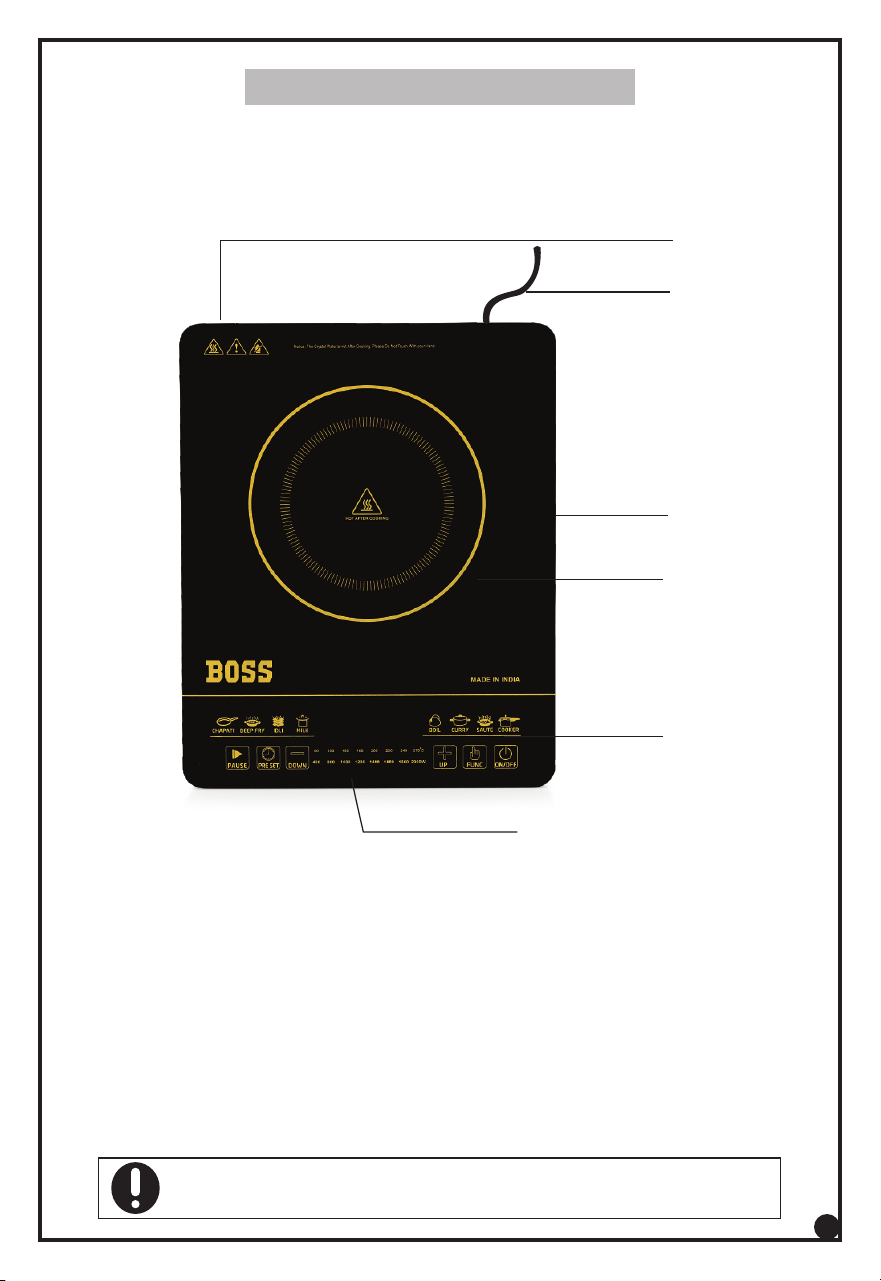
1. Air Vent
2. Power Cord
3. Crystal Plate
4. Cooking Area
5. Control Panel
6. 7 Segment Display
The picture is for reference only, please refer to the real product as standard. Aachments &
accessories may vary depending upon model you have purchased.
2
KNOW YOUR PRODUCT
USAGE INSTRUCTIONS
• Before First Use
prevent overheang.
• Always place for Cookware on the cooking zone during cooking.
• Make sure you use Cookware of the correct type and sizes as shown below
• Remove the packing materials from the Inducon Stove
• Place the appliance on a dry, stable and levelled surface.
• Make sure there is at least 10cm free space around the appliance to
Note: Steel or cast iron, enameled iron, stainless steel, flat-boom
Pans /Pot with diameter from 12 to 20 cm.
• Operang Your Inducon Stove
• To stop cooking press “Power” buon and plug out to shut off power supply.
• Insert the plug into 220 ~240 V in 10A-16A special jack, power pilot lamp
flashes Inducon Stove in ready standby condion.
• Press Funcon buon to select different cooking funcons, sengs and
adjustments.
• Place suitable utensils in the center of the top plate.
3
USAGE INSTRUCTIONS
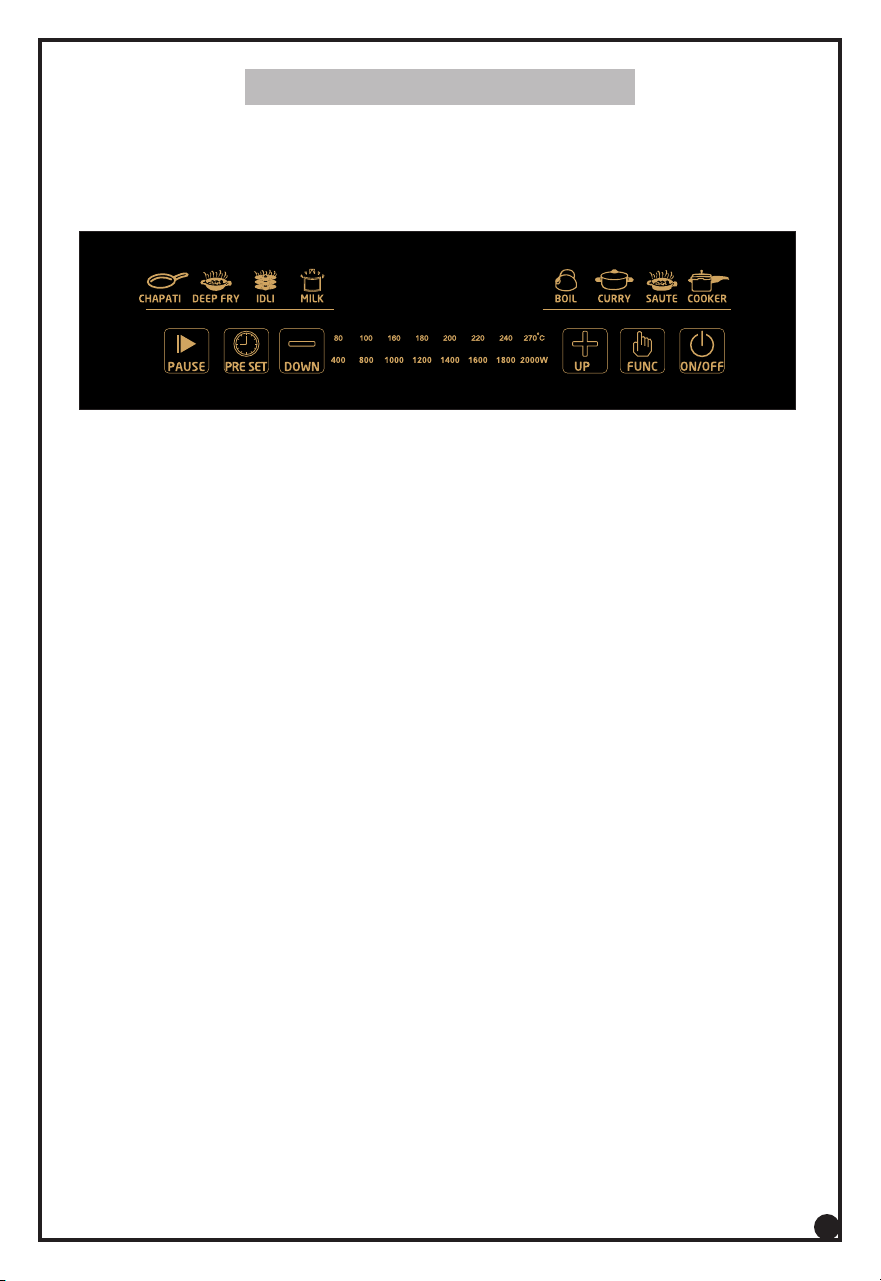
Control Panel Operaon
Control Panel
Aer the device has been turned on, use the selectors switch to select the propriate
funcon for your cooking. You can also choose from a selecon of pre-set funcons.
1. Funcons : Chapa, Deep fry, Boil, curry, Saute, cooker, milk, Idli.
Press cooking funcon buon, the relave pilot lamp lighng, unit enters this menu
cooking funcons.
2. Up Adjust Buon : “Up/ Increase”
Aer manual cooking funcon selected, press “+” can increase power or
temperature to higher level
During mer seng, press “+” case increase cooking me.
The mer funcon is used to set the OFF mer for the cooking menus. The cooking
me range is 4 hours maximum.
Aer manual cooking funcon selected, press “-” can decrease Power or
Temperature to lower level.
During mer seng, press “-” case decreases cooking me. .
4. Timer funcon :
3. Down Adjust Buon : “Down / Reduce “
4
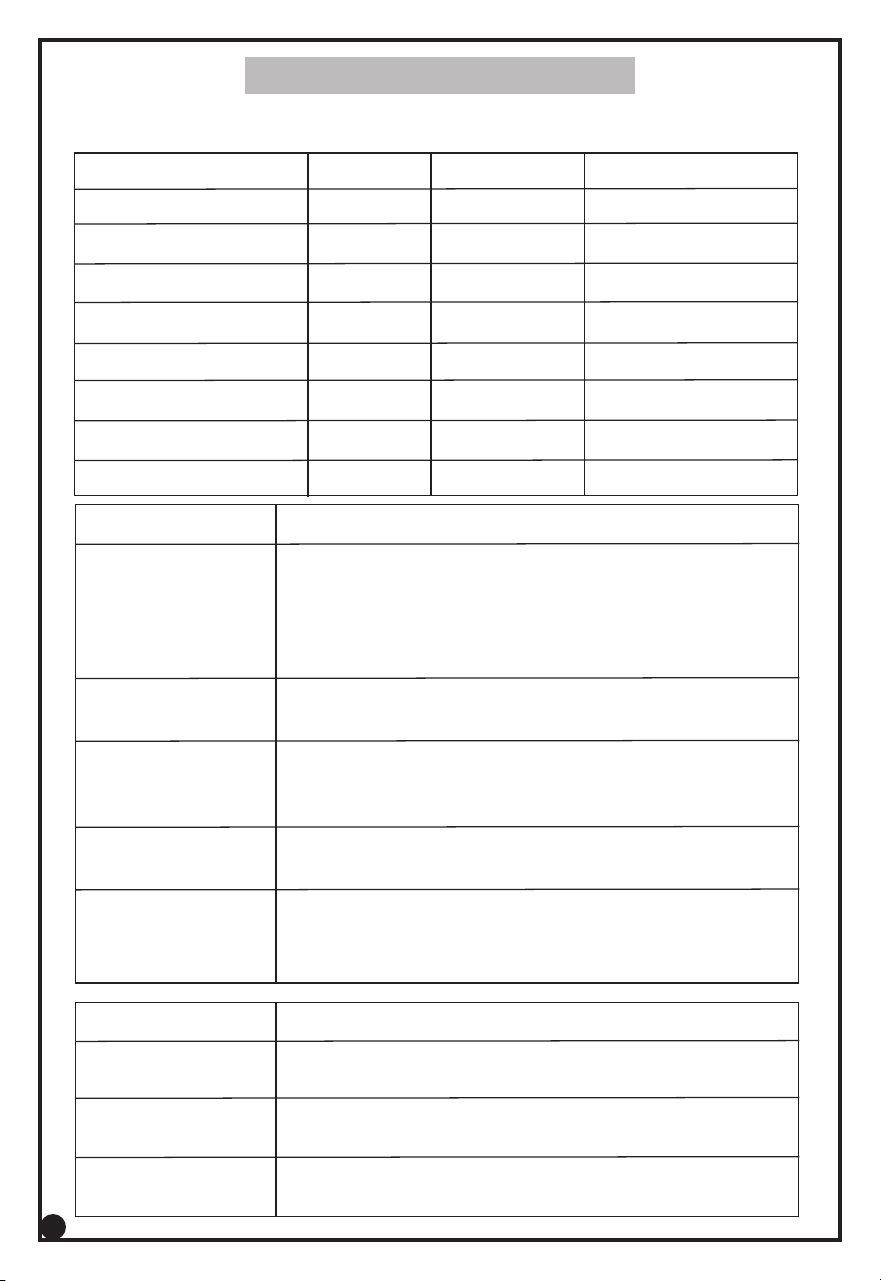
Saute This mode is used for making all recipe. The power cannot be
adjusted manually in this mode.
Funcon Usage
Idli This mode can be used to cook food on a flat inducon type
vessel. The power cannot be adjusted manually in this mode.
Chapa This mode is used for making chapa on a flat inducon type
tawa. The power cannot be adjusted manually in this mode .
USAGE INSTRUCTIONS
Geng to Know Your Cooking Modes
Refer to below table for more details of different cooking modes.
Deep Fry This mode is applicable for high temperature cooking
and typically used for deep frying. The temperature can
be adjusted by +/- buon.
Funcon Observaon
Milk Tea This mode is used for boiling Milk. The temperature
cannot be adjusted manually in this mode . The power
cannot be adjusted manually in this mode .
The max temperature seng for this mode is 270
Cooker This mode is applicable for cooking food . . The power
cannot be adjusted manually in this mode.
Boil This mode is used for boiling Water. The power cannot
be adjusted manually in this mode.
Curry This mode is applicable for cooking food with high
Heang. The power can be adjusted by +/- buon.
The max temperature seng for this mode is 1800W.
Idli 1600 120 Mins 0.01-24:00
Milk 80 20 Mins 0.01-24:00
Funcon Display Adjustment Timer / Preset Timer
Saute 1000 120 Mins 0.01-24:00
Cooker 1600 60 Mins 0.01-24:00
Boil 2000 15 Mins 0.01-24:00
Curry 2000 120 Mins 0.01-4:00
Chapa 1000 120 mins 0.01-4:00
Deep Fry 160 120 Mins 0.01-24:00
5
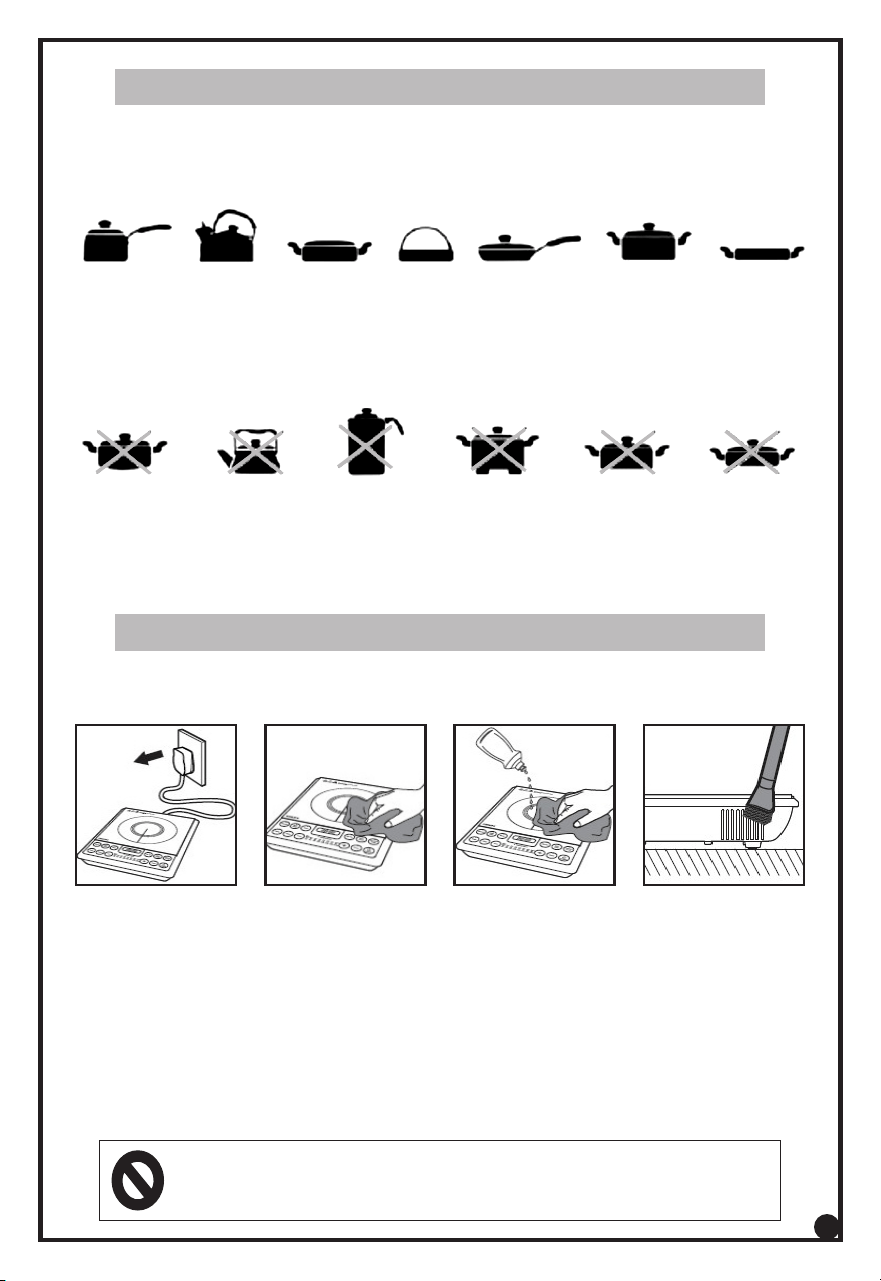
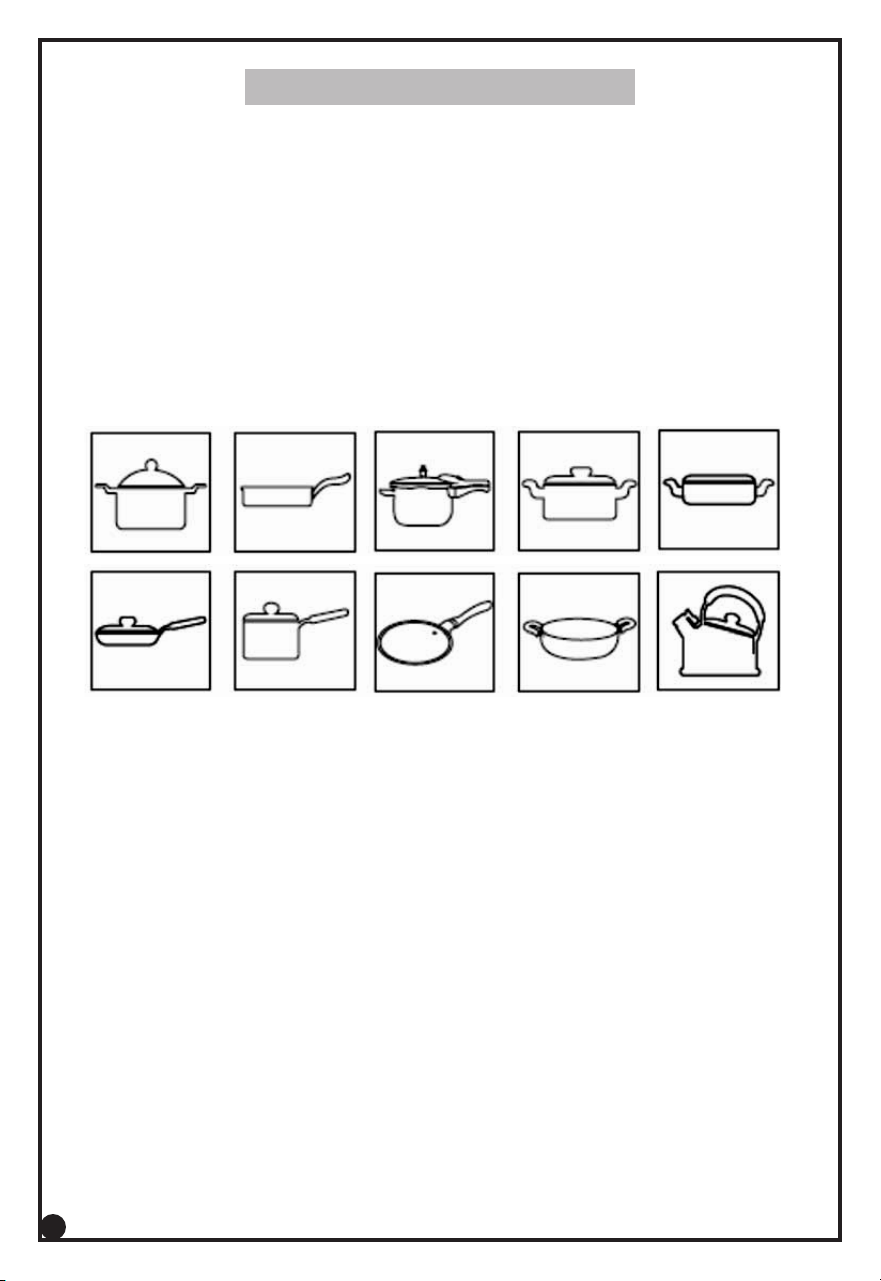
USABLE and NON-USABLE COOKING UTENSILS
Usable Pans
Steel or cast-Iron Enameled Iron, Stainless Steel, Flat boom Pans / Pots with
diameter 12 to 20 cm.
Non-Usable Pans
Heat Resistant glass, Ceramic Container, Copper, Aluminum pans /pots.
Rounded boom pans/pots with boom measuring less than 12cm.
Enameled
Iron Pot
Iron Enameled
Iron Pot
Cast Iron
Pan
Iron
Pot
Deep-Fry
Pan
Stainless Steel
Pot
Iron
Plate
6
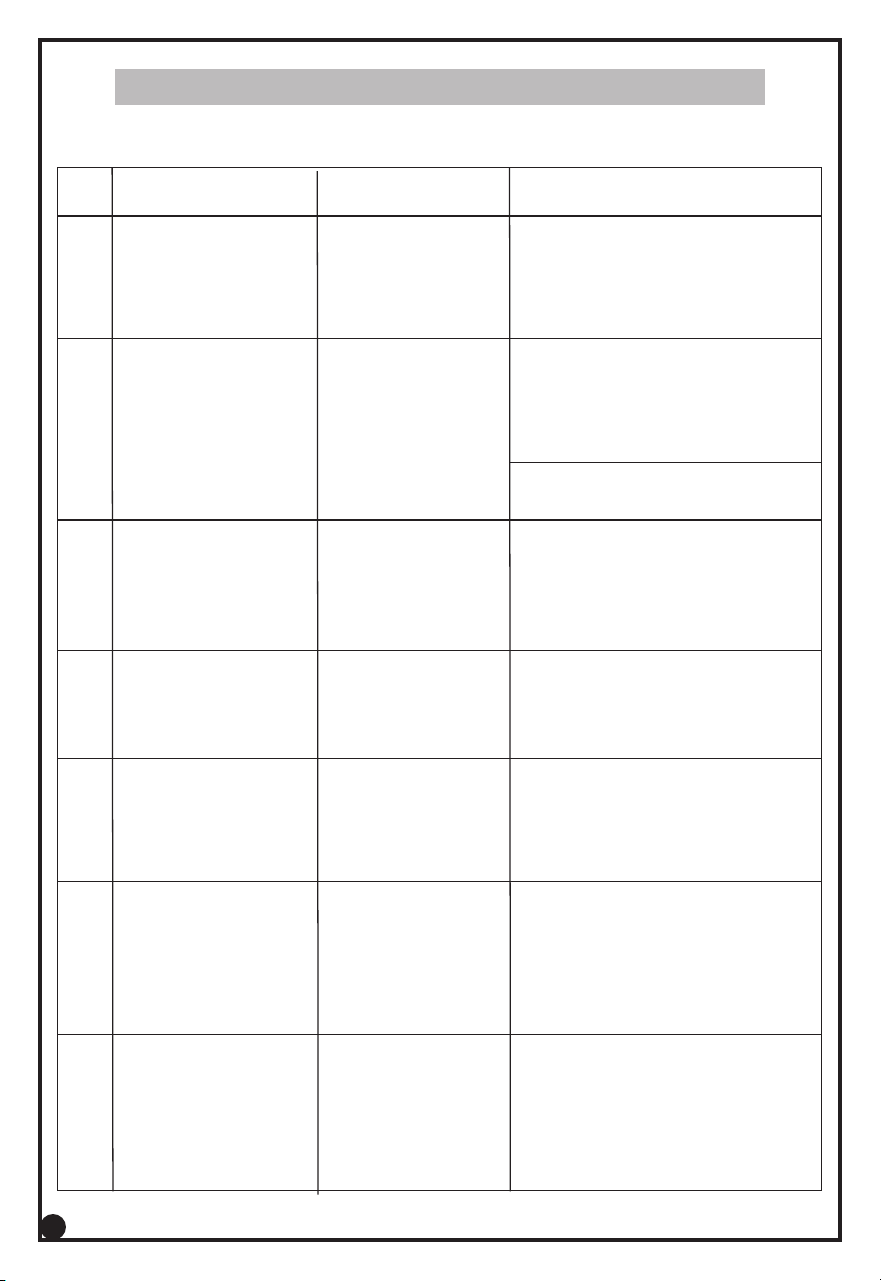
• Abrasive cleaning agent is not required and should be avoided to prevent damage of
polish surface.
• Remove the Plug from power outlet and let the appliance completely cool down
before cleaning.
• Clean your Inducon Stove periodically to help maintain its new appearance over the
years. Use only a so & lint-free cloth to avoid scratching the finish. Do not use water
when cleaning. This could possibly cause an electric shock.
1. Use of any kind of alcohol, acetone, gasoline, abrasive cleaning agents, etc. to clean the
plasc components is prohibited.
2. Do not use hard brushes or metal objects for cleaning.
MAINTENANCE
Rounded
Boom
Pot
Aluminum
Copper Pot
Boom
Measuring
less than 12cm
Pot with
Stands
Ceramic
Pot
Heat Resistant
Glass Pot
Caring Your Inducon Cooktop
Troubleshoong
S/N
Problem
Cause Soluon
The On/Off buon
does not respond.
Connecon
problem.
Check if the Inducon Stove
is connected to the mains
and if the plugs are inserted
firmly into the wall socket.
1
The appliance
beeps connuously
and then stop
working.
May have put
unsuitable
Cookware on the
cooking plate or
wrong material
Cookware.
Make sure the Cookware is made of
steel, iron or aluminium with stainless
steel cladding base and has a base
diameter larger than 12 cm
2
The Cookware
does not heat up
to the required
temperature.
Boom of the
Cookware
may not be flat.
Always use Cookware with
flat boom. If the problem
sll exists, then take it to
Authorized Service Centre.
3
The appliance
stops working
suddenly.
Temperature of
the Cookware
is too high.
Always Cookware should
be cooled before using on
the appliance.
4
The appliance
does not Switch
from one preset
mode to another.
Mal funcon
of the appliance.
Need to Switch Off the
appliance and restart again.
5
The cooking
temperature of the
preset modes are
too high or too low.
May be wrong
entry of program
in preset mode.
You may Switch to the manual
mode for beer control of
temperature, you may also
adjust the cooking temperature
in these Modes: Curry/Deep Fry
6
The Fan works but
the appliance has
not started working.
You may have not
pressed cooking
mode aer you
have pressed the
On/Off buon.
If cooking buon is not pressed
within 1 minute aer Power
On the appliance will Switch
Off and fan will connue to work.
7
MAINTENANCE
7
You may have placed the Cookware
outside of the cooking zone.
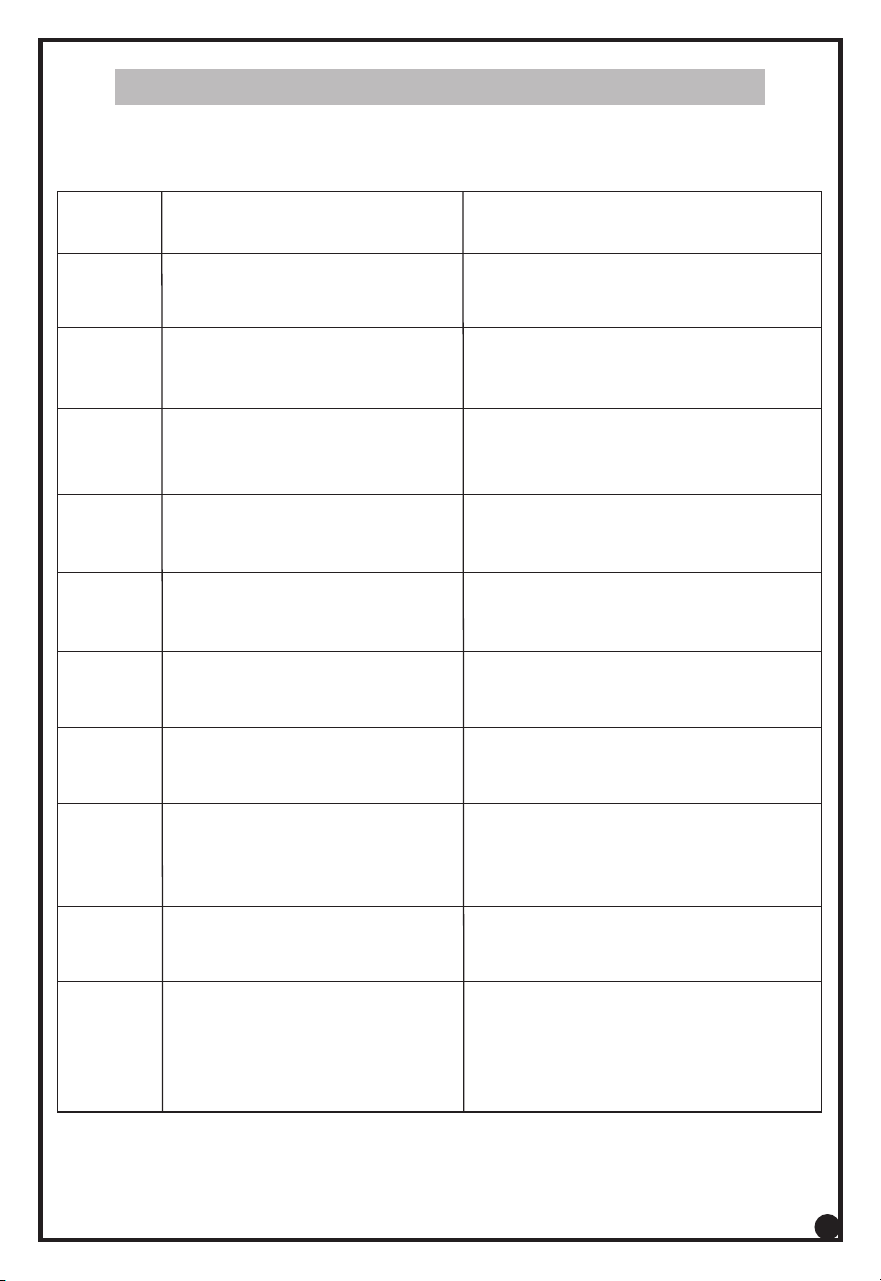
Troubleshoong – Error Codes
E1
Abnormal Supply voltage
Voltage too low.
Check power supply, Power ON aer
power supply is back to normal
Trouble
Code
Possible
Reasons
Soluons
E0
No Pot/Pan on the plate
Non usable pans on the plate.
Put suitable cooking utensils on
the plate.
E2
Abnormal Supply voltage
Voltage too high.
Check power supply, Power ON aer
power supply is back to normal.
E3
Glass Temperature
sensor open.
Do not use the appliance & call
Service Centre
E4
Glass Temperature
sensor Short
Do not use the appliance & call
Service Centre
E5 Temperature sensor
under IGBT Open
Do not use the appliance & call
Service Centre
E6
Temperature sensor
under IGBT Short
Do not use the appliance & call
Service Centre
E7
Fan Failure Air intake /
Exhaust vent blocked.
Do not use the appliance & call
Service Centre Clean the vent aer
the unit cools down then can restart
E8
Hardware or internal
connecon issue
Do not use the appliance
& call Service Centre
E9
Plate surface temperature
too high Empty Pot/Pan
heang leads to too
high temperature
Please wait for some minutes
unl the unit cools down
Please check Pot/Pan
8
MAINTENANCE