
ENGLISH
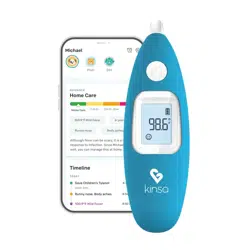
Kinsa Smart Ear Thermometer
TM
Instructions For Use
Thank you for purchasing the Kinsa Smart Ear
Thermometer™, a professionally accurate instrument for
fast and easy temperature taking in the ear. Please read
these instructions carefully to ensure accurate
temperatures and safe operation.
Your Kinsa Smart Ear Thermometer is designed for use with
or without a mobile device. For the full experience including
features such as symptom tracking and fever guidance,
download the Kinsa app on the iTunes or Google Play store
and connect your thermometer to your mobile device.
To see the full list of supported devices, see
kinsahealth.com/devices.
1
Feel Better.
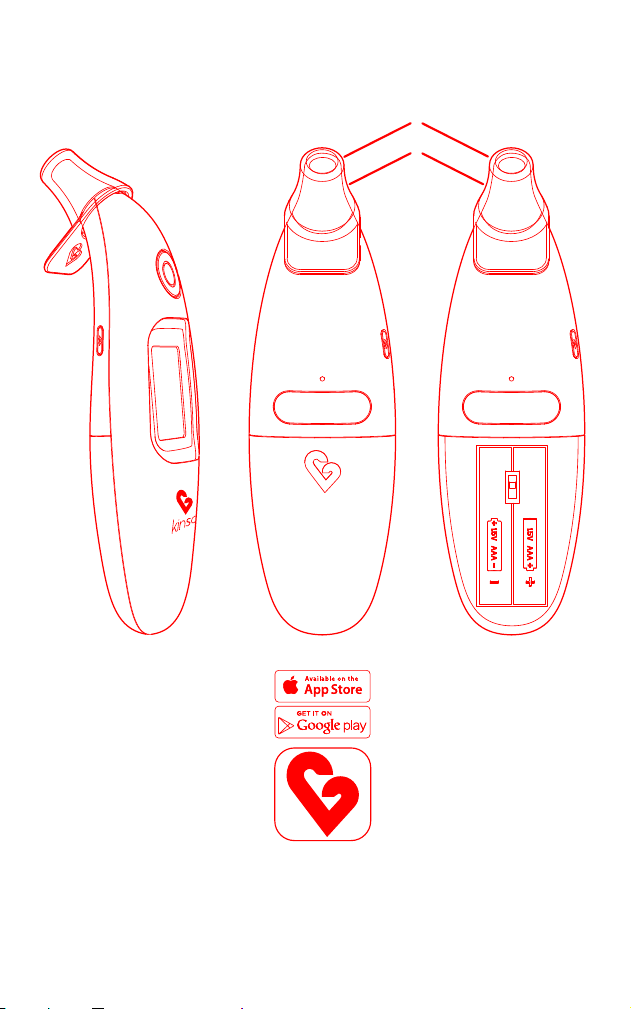
Product Description
A
B
C
D
E
F
G
H
I
Power On/Start button
Probe
Probe tip
Display
Bluetooth pairing button
Battery door
°C/°F switch
Protective cap
Kinsa mobile app
A
H
B
C
D
EE E
G
F
I
2

ENGLISH
Indications For Use
The Kinsa Smart Ear Thermometer is intended to measure the human body temperature
in the ear. This device is reusable for clinical or home use on both adults and children.
Warnings And Precautions
This thermometer functions with most Apple and Android mobile devices. Please see
kinsahealth.com/devices for the full list of supported devices.
Clean the probe before and after use.
Never use the thermometer for purposes other than body temperature measurement.
Please follow the safety precautions when using on children.
The operating ambient temperature range for this thermometer is 60.8 °F~95 °F (16 °C~35 °C).
Do not expose the thermometer to temperature extremes:
(below -13 °F / -25 °C or over 131 °F / 55 °C) or excessive humidity (>85% RH).
Use of this thermometer is not intended as a substitute for consultation with your physician.
High, prolonged fever requires medical attention. Be sure to contact your physician.
The thermometer is water resistant, not waterproof. Never dip the thermometer into
water or other liquids. Do not boil the probe. For cleaning and disinfecting, please see
Cleaning and Storage.
Keep out of reach of unattended children. Do not allow children to walk or run while
taking a temperature.
Features of your Kinsa Smart Ear Thermometer
Fast 1 second reading.
Meets ASTM & ISO standards for professional accuracy.
Gentle and easy to use in the ear.
No probe covers needed.
Conveniently displays in °F or °C.
Water resistant, for safe cleaning.
Use with or without your mobile device. Connects via Bluetooth Low Energy.
Additional Smart functionality available through Kinsa app.
Body Temperature
Temperature readings vary from person to person, by age, time of day, and by site of
measurement. For example, core body temperature often decreases with age. The
best method to determine your own normal temperature is to use the thermometer
when you are feeling well. Record your temperature twice a day (early morning and late
afternoon) using the Kinsa app. Take the average of the two temperatures. This is
considered your normal body temperature. Any variation from it may indicate some
sort of illness and you should consult your physician.
Why Measure in the Ear?
Ear temperatures accurately reflect core body temperature, since the ear drum shares
a blood supply with the temperature control center in the brain: the hypothalamus.
1
The Kinsa Smart Ear Thermometer monitors the infrared heat radiated from the
eardrum and surrounding tissue and detects once an accurate temperature
measurement has been taken.
•
•
•
•
•
•
•
•
•
•
•
•
•
•
•
•
•
•
1 Netter H F, Atlas of Human Anatomy, Novartis Medical Education, East Hanover, NJ, 1997, pp 63, 95.
3

To Set Up Your Thermometer For First Time Use
Open the battery door
F
. Use the °C/°F switch
G
to select the temperature
scale for your display.
Insert two AAA batteries (included) into the thermometer. Snap battery
door into place.
Enable Bluetooth on your mobile device.
Download the Kinsa app from the iTunes App Store or Google Play. The app
can also be downloaded by going directly to kinsahealth.com/download.
Please see kinsahealth.com/devices for the full list of supported devices.
Launch the Kinsa app. (The app will be on your Home screen or in your
Apps folder depending on type of mobile device.)
Tap Set Up Now for your model of Ear thermometer, then follow the
prompts to install your thermometer.
Your thermometer is now successfully connected to your mobile device.
For future temperature readings, open the Kinsa app to automatically sync
readings to your mobile device and assign to individual family members,
add notes or symptoms/medications, and see fever guidance.
To Set Up Your Thermometer with Another Mobile Device
On the original phone, disable Bluetooth (until you get the new device
paired with the Ear)
Reset the thermometer by first pressing and holding the small white
Bluetooth button
E
on the left side of the thermometer.
Next press and hold the large round power button
A
located above the
LCD screen.
Keep holding both buttons
A
+
E
down for 5-7 seconds until the screen
resets. The screen will start flashing, beep, and then display the Bluetooth
icon at the top.
Follow the prompts in the app to pair.
Your thermometer is now successfully connected to your new
mobile device(s).
1.
2.
3.
4.
5.
6.
1.
2.
3.
4.
5.
6.
7.
4

ENGLISH
Taking a Temperature
Tap the Power/Start button
A
to turn on the thermometer. You will hear a
beep when the thermometer is ready to take a temperature.
During an internal self-check, the display shows all segments. The
thermometer will be ready for temperature taking when the screen
shows three dashes.
Fit the probe snuggly into the ear canal then push and release the
Power/Start button.
For infants under the age of 1, gently tug the ear straight back to
straighten the ear canal and ensure an accurate temperature reading.
For children over the age of 1 and adults, gently tug the ear straight up
and back.
A beep will indicate when the temperature measurement is successfully
completed. Temperature readings typically take 1 second.
The temperature reading will be shown on the illuminated display. A smiley
face will indicate a low, medium, or high temperature.
The thermometer will automatically turn off after 30 seconds of inactivity.
The display will briefly flash OFF and it will go blank.
NOTE: Always take measurements in the same ear since temperature readings may
differ from the right and left ear.
Kinsa recommends taking your temperature three times in the same ear and using the
highest of those readings. This is especially important if you meet the following criteria:
Children under three with a compromised immune system
Individuals unfamiliar with this thermometer
1.
2.
3.
4.
5.
1
2
a.
b.
5

Understanding Your Thermometer Display
DISPLAY
Bluetooth icon,
blinking
Phone with
comment icon,
blinking
Battery icon,
one section
Battery icon,
empty, blinking
ERR
HI / LO
SITUATION
No mobile device paired
Thermometer has
stored temperatures or
messages to send to app
Battery is low but
thermometer will still
operate correctly
Battery is critically low
and may not operate
correctly
Ambient temperature is
not within allowed
operating range
(59-
104 °F or 15-40 °C)
Temperature taken is not
within typical human
temperature range
(93.2-108 °F or 34-42.2 °C)
HI = too high
LO = too low
SOLUTION
Download the Kinsa app & enable
Bluetooth on your mobile device.
Turn on the thermometer while the app is
open and follow pairing instructions.
Open Kinsa app.
Insert new batteries.
Insert new batteries.
Allow the thermometer to remain for 30
minutes where temperature is within
ambient range.
Make sure the probe tip and lens are
clean. Make sure the thermometer is
properly inserted. Then, take a new
temperature.
If you continue to encounter an error,
contact Kinsa Customer Support.
Changing The Temperature Scale
If you wish to change the temperature scale of your thermometer:
Open the battery door
F
Remove batteries
Use the °C/°F switch
G
to select the temperature
scale for your display
Replace batteries and battery door
NOTE: temperature scale in app can be changed within app settings.
1.
2.
3.
4.
F
G
6

ENGLISH
93.2 °F ~ 109.4 °F
60.8 °F ~ 95 °F
0.1 °F or °C
MAXIMUM LABORATORY ERROR
±
0.4 °F
±
0.5 °F
–13 °F ~ +131 °F (–25 °C ~ +55 °C)
up to 85% RH (non-condensing)
Two AAA batteries
Approx 2 years
Bluetooth Low Energy v4.0
Displayed temperature range:
Operating ambient temperature range:
Display resolution:
ACCURACY FOR PATIENT TEMPERATURE RANGE
95.9 °F – 107.6 °F (35.5 °C – 42 °C):
Outside this range:
LONG TERM STORAGE RANGES
Temperature:
Humidity:
OTHER
Battery type:
Battery life:
Bluetooth:
(34 °C ~ 43 °C)
(16 °C ~ 35 °C)
(
±
0.2 °C)
(
±
0.3 °C)
Cleaning And Storage
To ensure your Smart Ear thermometer is recording accurate
temperatures, it is very important to keep the probe sensor tip clean.
To clean the probe tip, gently wipe it with a cotton swab or soft cloth
moistened with alcohol. Gently circle the alcohol wipe around the
inner sensor area at the tip of the Smart Ear. Be sure to clean the
inner flat surface of the sensor - not just the rim. Never submerge
your Kinsa or put it in boiling water or a dishwasher.
Keep the protective cap snapped onto the top of the thermometer when not in use to
protect the tip from damage.
Replacing The Batteries
The thermometer is supplied with two AAA
batteries. To ensure accurate temperatures,
replace batteries when they are low. A low battery
will be indicated on the display with a flashing icon.
Open the battery door
F
. Remove old batteries and
replace with new batteries, making sure the poles are
in the right direction. Snap battery door into place.
To protect the environment, dispose of the product and empty batteries at
your retail store or at appropriate collection sites according to national or
local regulations.
Calibration
This thermometer is initially calibrated at the time of manufacture. If this thermometer
is used according to the use instructions, periodic re-adjustment is not required. If at
any time you question the accuracy of temperature measurements, please contact
Customer Support.
Product Specifications
F
7

© Copyright 2018 Kinsa, Inc.
For patents: kinsahealth.com/patents
This thermometer conforms to the following standards:
ASTM Standard E 1965-98:2009 Standard Specification for Infrared Thermometers for Intermittent
Determination of Patient Temperature
EN 12470-5: 2003 «Clinical thermometers» – Part 5: Performance of infrared ear thermometers (with
maximum device)
IEC/EN 60601-1: 3/96 «Medical electrical equipment» – Part 1: General requirements for safety
IEC/EN 60601-1-2:2014 «Medical electrical equipment» – Part 1-2: General requirements for safety -
electromagnetic disturbances and electromagnetic emissions
IEC 60601-1-11:2010 «Medical electrical equipment» - Part 1-11: General requirements for basic safety
and essential performance - Requirements for medical electrical equipment and medical electrical
systems used in the home healthcare environment
FCC Rules - This device complies with part 15 of FCC rules. Operation is subject to the following two
conditions; (1) This device may not cause harmful interference, and (2) this device must accept any
interference received, including interference that may cause undesired operation.
Manufactured By:
Kinsa, Inc
535 Mission Street, 18th Fl
San Francisco, CA 94105
www.kinsahealth.com
Customer Support: [email protected]
Limited Warranty:
Kinsa, Inc warrants this product against any defects that are due to faulty material or
workmanship for a period of one year from the original date of consumer purchase or
receipt as a gift. This warranty applies when used for normal household use in
accordance with the Instructions for Use and excludes the battery and damage to the
product resulting from accident or misuse. This product is not warranted when used in
a professional environment.
In no event shall Kinsa, Inc be liable for any special, incidental, indirect, or consequential
damages in connection with the purchase or use of this product or costs over the
original cost of the product.
If the product should not perform to specifications within the warranty period, please
contact Customer Support.
Explanation of Symbols
0120
8
L-10252 Rev AA
A-10240
• Do not mix alkaline, standard or rechargeable batteries.
• Changes or modifications not expressly approved by the party responsible for
compliance could void the user’s authority to operate this device.
Consult instructions for use
Temperature limitation
Humidity limitation
Manufacturer batch code
Catalogue number
Non-sterile
Product contains no latex
Type BF applied part
Do not use if product is
broken, damaged, or open