OWNERS MANUAL
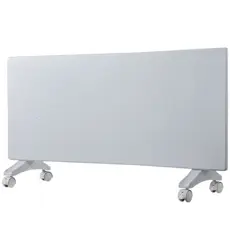
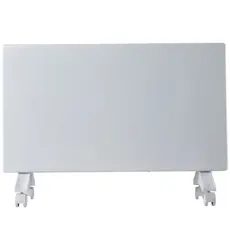
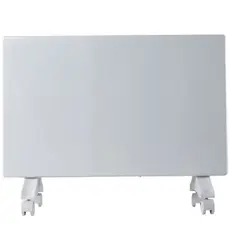
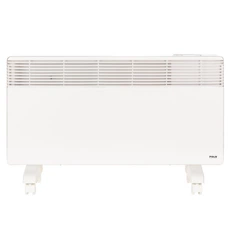
WALL -MOUNTED ROOM HEATER
IMPORTANT
CUSTOMER INFORMATION:
(Please read more about this unique safety feature on the page 4)
THIS HEATER WILL NOT TURN
ON UNLESS MOUNTED ON A WALL
Economical
Ultra-safe
Healthy
Effective
Silent
Stylish
Simple
United States Patent: 8,477,176
AMERICAN
OWNED AND BUILT
TABLE OF CONTENTS
Models Covered by this Manual............2
If You Need Help..........................................................2
Features and Benefits..............................................2
Important Instructions............................................2
Installation Instructions..........................................3
Operating Instructions ...........................................3
Installing Locking Bar for
Permanent Attachment........................................4
Hardwiring Instructions..........................................4
Envi & Envi Max Operating Instructions.......6
Smart Envi & Smart EnviMAX
Quick Start Guide ......................................................6
Smart Envi & Smart EnviMAX
Operating Instructions............................................7
Care & Maintenance Instructions ....................9
Troubleshooting.........................................................9
Specifications & Certifications..........................10
Warranty & Contact Info.........................................11
Manufacturer’s Contact Information...........11
Check Latest Version
Save these instructions
We are here to help you with any questions you might have. Before you call for help though, please read this manual as it
contains instructions to help you to install, operate and maintain your heater properly. If you still need help please call the Envi Help desk in
the USA/Canada Toll Free @ (800) 807-0107 or if calling from outside the USA call +1 (281) 516-1577.
1. Read all instructions before installing or using this heater.
2. Extreme caution is necessary when any heater is used by or near children or
invalids, or when the heater is left operating and unattended.
3. Do not operate any heater after it malfunctions. Disconnect power at
service panel and have heater inspected by a reputable electrician
before reusing.
4. For plug-in heaters, to disconnect, push power button to turn heater off
(the power indicator light will turn off), then remove plug from outlet.
Pull firmly on the plug, do not unplug by pulling on the cord.
5. Connect to properly grounded outlets only.
6. For hardwired heaters, to disconnect, turn controls to off, and turn off
power to heater circuit at main disconnect panel (or operate internal
disconnect switch if provided).
7. Do not insert or allow foreign objects to enter any ventilation or exhaust
opening as this may cause an electric shock or fire, or damage the heater.
8. To prevent a possible fire, do not block air intakes or exhaust in any
manner.
9. A heater has hot or arcing parts inside. Do not use in areas where
gasoline, paint, explosive and/or flammable liquids are used or stored.
Keep unit away from heated surfaces and open flames.
When using electrical appliances, basic precautions should always
be followed to reduce the risk of fire, electric shock, and injury to
persons, including the following:
10. Use this heater only as described in this manual. Any other use not
recommended by the manufacturer may cause fire, electric shock,
or injury to persons.
11. Use only for the intended household or office uses as described in
this manual. Any other use not recommended by the
manufacturer may cause fire, electric shock, or injury to persons.
The use of non-recommended attachments sold by unauthorized
dealers may cause hazards.
12. Do not use outdoors.
13. This heater is intended for use as a WALL MOUNTED heater only.
Failure to properly secure the heater to a flat, level and vertical
wall may result in heater malfunction and/or property damage.
14. This heater will not operate (will not power on) unless it is attached
to a wall using the supplied wall mounting clips which engage the
internal “wall-sens” safety switch.
15. DO NOT attempt to repair or replace any electrical or mechanical
part on this unit. Doing so will void your warranty. The inside of
the unit contains no user serviceable parts. Qualified personnel
should perform all servicing only.
• American owned & built with 3 year warranty (USA )
• ISO 9001 Quality Certification.
• Patented, efficient “Stack Convection” technology
• Adjustable temperature control with simple operation.
• Wall-Sens
TM
technology, safety cut off feature.
• Internal safety locking screw feature locks heater to wall using
provided allen key tool.
• Convenient cordset storage inside the heater.
• Turn down the central heat thermostat and use envi heaters where
needed – to save on heating bills.
• Environmentally friendly - low power consumption.
• Eliminates hot and cold spots where central heat is ineffective.
• Ultra safe – cool to the touch (90
o
F/32
o
C) can remain in use,
unattended 24/7.
• Healthy – won’t blow dust and allergens around the room or
dry out the air.
• Totally silent fanless technology.
• Auto-dimming power light for dark bedrooms.
• Easy installation – no drill required for mounting to wall.
• Slim – space saving design, only 3.1in (7.9cm) thin.
• Long life – no moving parts, crack resistance surface
• 120 volt and 220 volt hardwired models available.
THANK YOU FOR CHOOSING THE ENVI HEATER
Please take a few moments to thoroughly read the instructions and familiarize yourself with all the operational aspects, installation and care of
your new Envi Heater. For your own records, please attach a copy of your sales receipt to this manual. Also, write the store name/location, date,
and serial number in the warranty section on the page 11.
Models Covered by This Manual
Features & Benefits
Important Instructions
Missing parts?
Have questions or need help?
(PLEASE DO NOT RETURN TO RETAIL STORE BEFORE YOU CALL THE ENVI HELP DESK)
HEATER WILL NOT OPERATE UNLESS WALL MOUNTED
page 2
Model Type 500 W / 120 V Models
LE5012P –
LE5022D
LE5022N
LE5012D
LE5012N
500 W / 220 V Models
EM1012P
EM1012D
EM1012N
SM1012P
SM1012D
–
SM1022D
1000 W / 120 V Models
–
EM1022D
EM1022N
1000 W / 220 V Models
Plug-In with Thermostat
Hardwired with Thermostat
Hardwired No Thermostat
–
SE5022D
SE5012P
SE5012D
Smart Plugin
Smart Hardwired
WHAT IS IN THE BOX
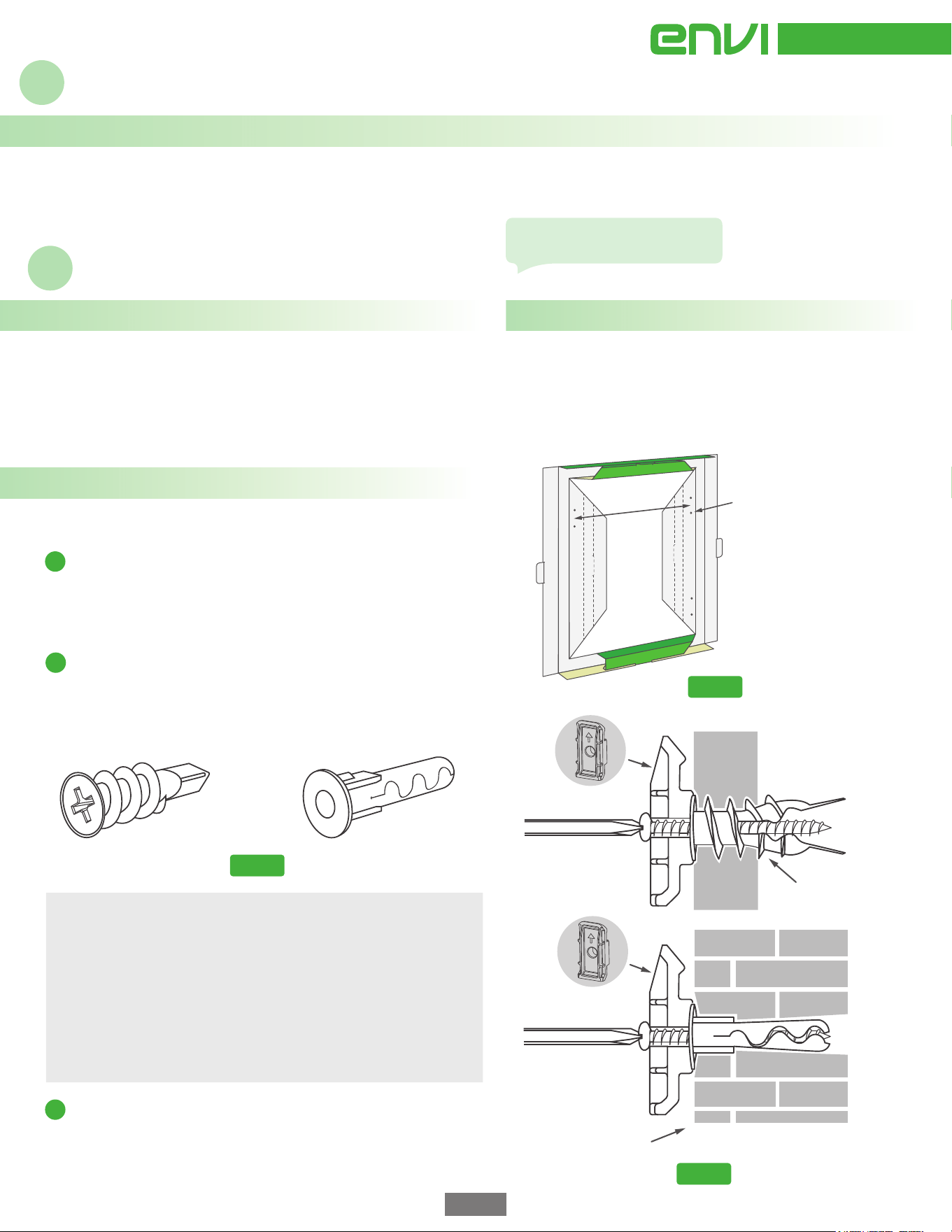
WALL MOUNTING
• Envi Wall Mounted Heater
• Owners Manual
• 2 x Mounting Clips
• 2 x Drywall Anchors / 2 x Masonry Anchors
• 2 x #8 Mounting Screws
Important Mounting Tips
HOW IT WORKS
1) The right hand side of the heater must be securely and firmly
pushed down on the clip to engage the “wall-sens” power cut-off
switch inside the heater. Align this side of the heater first, to ensure
the switch is activated. For uneven walls, a thin washer can be used to
widen the gap behind this clip to help seat the heater properly.
2) The heater can be mounted at other heights besides 6" or 8". To do
this, measure where you want the bottom of the heater to be on the
wall and then measure up an additional 13" (33cm) and mark your
screw locations.
Unwrap and flatten the sides of the packaging insert frame (mounting
template) and stand the template on the floor. The sides of the template
have pre-punched holes to mark the heater mounting height for either
6” or 8” (15 or 20cm) from the bottom of the heater to the floor. Choose
either mounting height, and mark two hole locations on the wall. (see
Fig. 1). The top two hole locations are for the mounting clips.
Remove the heater, mounting kit, and packaging insert frame from the
box. Keep the packaging materials for future use.
1
Mounting clip
hole location (both sides)
Choose bottom of heater
height as 6" or 8"
(15 or 20cm)
Drywall anchor
Masonry wall anchor
Mounting for masonry
Mounting
for drywall
17.75”
45cm
Screw the anchors (Fig. 2) into wall at the marked locations. The
distance from the top screws to the floor should be approx. 19" to 21"
(48cm to 53cm). If a stud is in the way, do not use the drywall anchor
supplied, just drive supplied mounting screw directly into the stud. For
masonry walls, use the masonry wall anchors provided and drill a
4.5mm (3/16inch) hole using a masonry drill bit (not supplied).
Fig. 2
Fig. 1
Fig. 3
2
Screw the two mounting clips (with arrow pointing upward) into the
top two anchor locations and secure firmly to the wall anchors using
the provided screws. (see Fig. 3). DO NOT overtighten. There should
be a gap behind the mounting clip to hang the heater.
3
The Envi Heater is designed with innovative “Stack Convection Technology”
that effectively heats a room with minimal energy. The Envi’s inner
chamber simulates “stacks” of varying height, which boost airflow through
the heater to achieve maximum efficiency. The end result is enhanced
airflow at safe air temperatures, all without the use of a fan. The Envi
heater will provide consistent, comfortable, silent heat without drying out
the air or leaving cold spots in the room.
OVERHEAT SAFETY FEATURE
This heater is equipped with an overheat safety feature. When the
heater’s internal components reach a certain temperature that could
cause overheating and a possible fire, the heater will automatically
shut off . To reset the heater, unplug the heater power cord from the
electrical outlet for 10 minutes. After 10 minutes, plug the heater into
the electrical outlet and turn on using the heater’s on/off switch
located on the front of the unit.
Operating Instructions
Installation Instructions
• Locking Bar Screw and 3/32" Hex Allen Key Tool
• Knockout Hole Grommet (hardwired models only)
• Wall Anchor Marking Template. Template holes are marked
on the unfolded edges of the packaging insert frame.
page 3
New heater smell is normal and
will disipate in a couple of hours.
For additional information
visit www.eheat.com
Congratulations, you have now permanently mounted your Envi Heater!
1
2
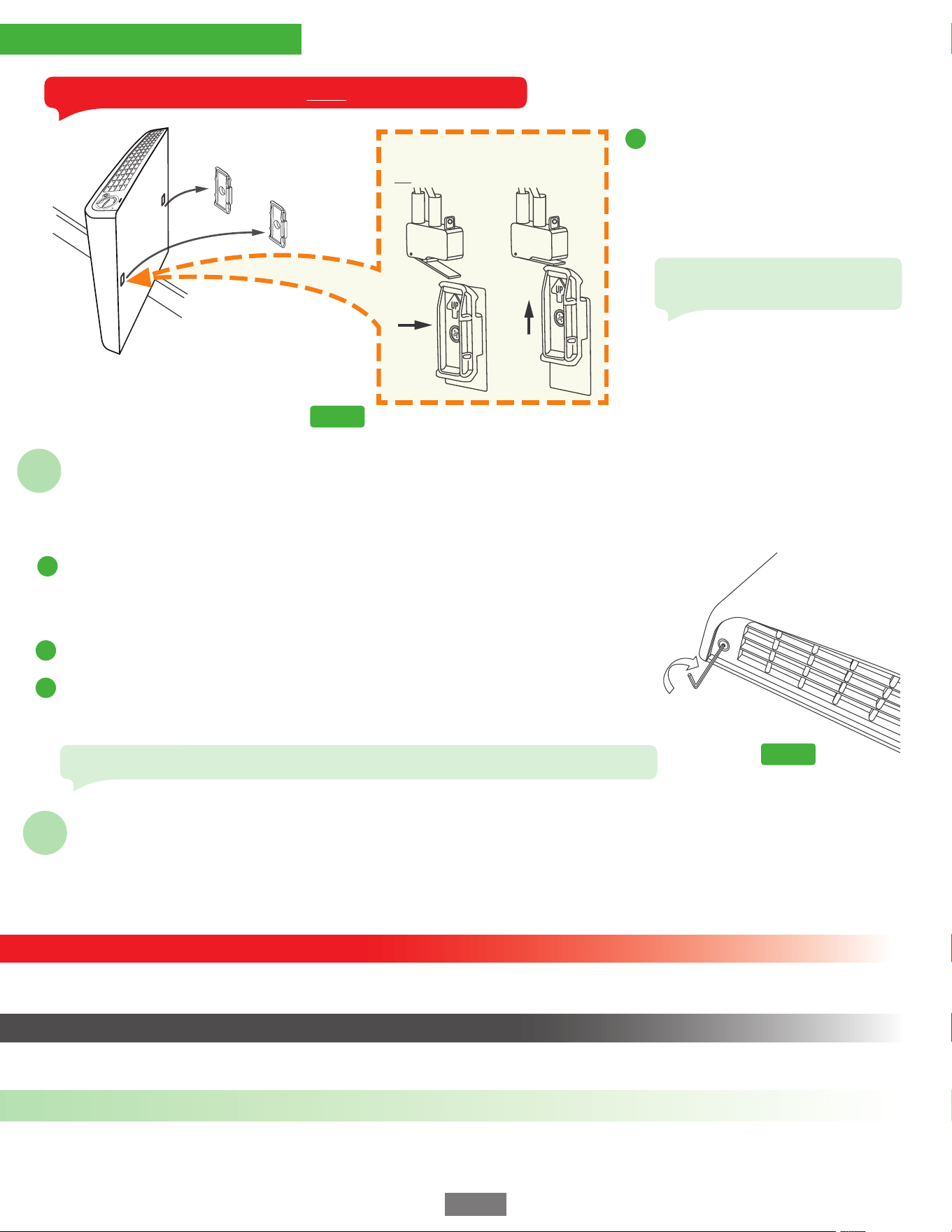
Envi Wall-Mounted Heaters have an additional method to permanently attach the heater to the wall. A locking bar mechanism is built in the heater,
which is engaged by screwing an external locking screw into the bottom of the heater vent. The locking screw and Hex/Allen Key are both provided in
the mounting kit.
The Envi Heater is available in some regions as a hardwired model and can be hardwired direct to a main supply, branch circuit or it can be
hardwired to a line voltage external thermostat of the same voltage as the heater (eg. 120v) or to an external switch or timer. Consult the instructions
for each of these control devices for specific wiring instructions. The Envi Heater can also be wired as multiple heaters on the same circuit or
controller. Please consult a certified electrician and ensure that all electrical work is done in accordance with applicable electrical and building codes.
Installing the Locking Bar Screw (Fig. 5) BEFORE YOU MOUNT THE HEATER TO THE WALL. Take the
locking bar screw out of the mounting kit and while the heater is laying flat, use the Hex/Allen key
provided to pre-install the screw in the hole at the left hand side of the bottom vent (Fig 5). Twist the
locking screw in about 3/8 of an inch but make sure you do not screw it in too far as it will obstruct the
mounting holes at the back of the heater and prevent secure mounting.
Mount the Heater. Attach the heater to the wall by following the rest of the mounting instructions
on previous page.
3
Tighten Locking Screw (Fig 5) Follow the rest of the mounting instructions to ensure the heater is
properly seated on the mounting clips and then tighten the locking screw to fix the heater to the wall.
DO NOT USE A POWER TOOL! DO NOT OVERTIGHTEN, just turn the screw until the locking bar presses
gently up against the left hand mounting clip inside the heater.
Hardwiring Instructions
Installing Locking Bar for Permanent Attachment
Economical. Safe. Simple.
page 4
HEATER WON’T TURN ON IF NOT WALL MOUNTED!
RED POWER
LIGHT NOT ON?
Fig. 4
Note: make sure you pre-install the
locking bar screw before you mount the
heater. (See Fig. 5 below). Install heater
on mounting clips (align right side first)
and make sure to press down firmly on
the heater to ensure a secure fit. You
will hear it “snap” into place. (Figure 4
on the left)
Check recessed wall
switch at rear of heater is engaged.
4
Fig. 5
Wall Clips
(screwed into wall)
Hardwired heaters must be connected to the correct voltage circuit according to its model designation, ie. (LE5012, EM1012 etc = 120 volts; LE5022,
EM1022 etc = 220 volts). Disconnect the power supply before making wiring connections to prevent electrical shock and equipment damage.
To prevent short circuits and electrical shocks turn the power off at the main electrical panel before attempting the hardwiring installation or
any repairs. If the internal power cable (cordset) is damaged it must be replaced by the manufacturer.
CAUTION
NOTE
WIRING SCHEMATIC
NOTE: The following wiring schematic is for a single Envi Heater installation to the applicable ac main supply circuit and assumes that the there are
no external controls being wired to the heater.
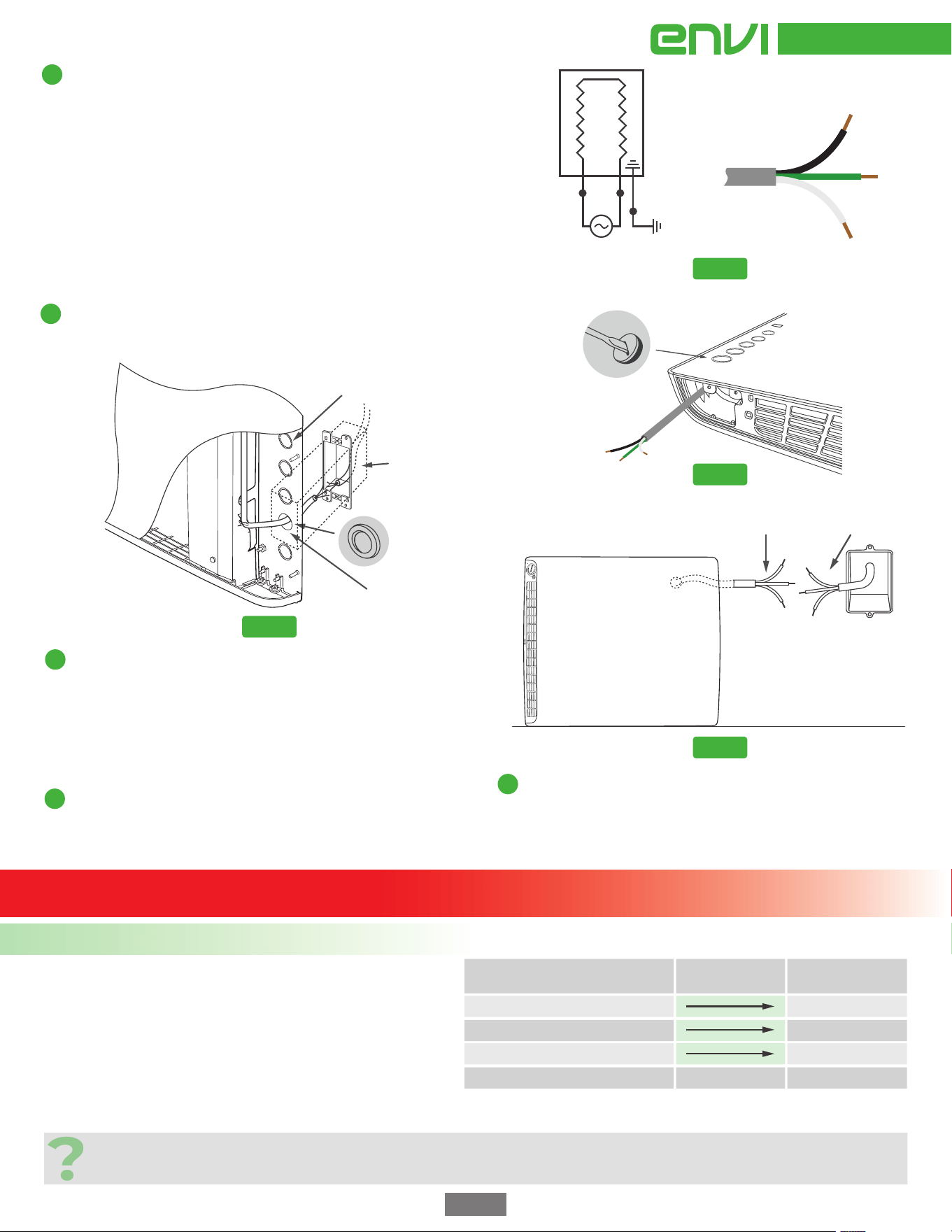
Fig. 6
1
Determine the best wall mounting location of the Envi Heater in a room. If the
proper electrical wiring and wall box already exists at a suitable height on the
wall, then choose a suitable knock-out hole on the back of the heater (5 holes
to choose from) and position the heater on the wall so that the knockout hole
lines up with the electrical wall box. Refer to Fig. 8 for more details.
If new heater circuit wiring and wall box is to be installed, then it is best to
mount the heater first and then determine the corresponding location on
the wall for the new electrical wiring wall box. When installing a new wall
box, ensure it is at a proper location on the wall to allow the heater to
remain at 6” to 8” (15cm to 20cm) or so above the finished floor level.
Turn the power OFF at the main electrical panel to the heater circuit. Run the
electrical wiring and secure it properly to the electrical box per applicable
electrical and building codes. (NOTE: Although the Envi Heater has a low
amperage draw, the electrical code requires a minimum supply wire gauge
to be used usually 12g, so make sure you check first.)
2
Mount the Envi Heater using the two mounting clips per the “Wall Mounting
Instructions” (see page 4) contained herein to ensure that the heater is at the proper
location on the wall and that the knockout hole is aligned with the supply wiring.
3
Remove the Envi Heater from the wall to prep for the hardwiring
steps. Pull the cordset through the knockout hole using pliers and
install the supplied protection grommet. Strip wires to expose 5/8" of
copper on all 3 of the cordset wires (see Fig. 8).
Install the bottom door supplied in mounting kit. Rotate and lay the
heater on the ground so that the bottom right corner is facing up and
the back of the heater is facing the wall (see Fig. 9). Connect the heater
wires L1 (live) , L2 (neutral) and G (ground) to the corresponding
supply wires in the wall box per the wiring schematic above.
4
Push as much of the connected wiring/nuts deep inside the wall box opening
until the heater is sitting flush with no wiring trapped between the heater
and the wall. Carefully lift the heater back onto the wall mounting clips that
were installed earlier. Re-mount the Envi Heater to the wall, ensuring all
three mounting screws are used and the Locking screw is tightened.
5
Turn the power ON at the main electrical panel to the heater
circuit. Check that there are no obvious problems with the
hardwiring to the heater (such as crackling noises, sparks or
smoke) and if everything is okay, turn on the power to the heater
by pressing the on/off button. If the wiring has been performed
correctly, then the power indicator light will glow red.
ONLY CONNECT 120V SUPPLY TO 120V ENVI HEATERS.
IF YOU’RE NOT SURE IF YOU HAVE 120V OR 220V AVAILABLE DO NOT PROCEED!
G
L1
L2
Envi Heater
(hardwired
models only)
GROUND
WIRE
SUPPLY
VOLTAGE
(See the note on the left.)
Black (L1)
(Live Wire)
White (L2)
(Neutral Wire)
Green
(Ground Wire)
page 5
Fig. 7
Knock-out Holes
1.5in (3.8cm) apart
(Twist to remove)
Hardwired
Cordset
Fig. 8
Supply wiring
Pull hardwire
cordset through hole
Knockout holes
(Choose best one
and remove)
Cutaway of
front panel
Ensure wall box right hand edge
is installed as close to the right hand
edge of the knockout hole as possible.
Hardwire
cordset
2”x4”
Wall box
Install
grommet in hole
Fig. 9
Rotate heater and lay on its left side front
facing out to prepare for joining the wires
Cordset wiring
Supply wiring
2”x4” Electrical
wall box
220V (4 WIRE) BASIC HARDWIRING GUIDE FOR USA HARDWIRED MODELS
Did you know? 220 volt supply (known as 240 volts in the USA) comes into a home from an outside transformer on two separate wires (legs) which
have opposite phases or polarity. The electrical current alternates on one leg from +110 volts to 0 volts and alternates from -110 volts to 0 volts on
the other leg (wire). The overall difference between the two legs when connected is 220 volts. So, now you know where 220/240 volts comes from!
Please note that this is a very basic and “rough guide” and may not apply
to every situation. The terms “110 volt” and “220 volt” are synonymous
with 120 volt and 240 volt, respectively. When a customer encounters
existing 220 volt four wire supply wiring, there could be more than one
way these wires might be configured, however, the usual 220 volt
arrangement is as follows. Typically 220 volt, 4 wire supply wiring has a
black wire and a red wire, each of which are 110 volt live legs. Sometimes
these are two black wires. There will sometimes be a white wire which is
usually a neutral wire, used to power 110 volt devices (do not assume this
though, because it could be a thermostat leg or another ground wire).
Lastly, there should be a green or bare copper wire is usually the ground
wire. Be very careful and never assume!
?
220 VOLT SUPPLY WIRING (CONNECT TO) ENVI HEATER
CORDSET WIRES
Black Wire (Live 110 volts)
Red or 2
nd
Black Wire (Live 110 volts)
Green or bare copper wire
White Wire (Not needed, cap this off)
Black Wire
White Wire
Green Wire
WALL-SENS
TM
SAFETY FEATURE
In addition to the overheat safety cut-off, the Envi Heater is equipped with an additional layer of safety to
give you greater peace of mind. Wall-Sens
TM
technology means that in the event that the Envi heater is ever
removed from the wall, power will be immediately cut to the heater. This of course means that the heater
will not work if it is simply removed from its packaging and plugged into a wall outlet. It must be mounted
properly (safely) and then plugged in (or hardwired) in order for it to be begin to heat.
ELECTRICAL GROUNDING
Plug-in models of the Envi Heater are for use on standard electrical circuits (eg. 120v for USA/Canada). The
cord has a three-blade grounding plug. An adapter can be obtained at most hardware or electrical stores for
connecting three-blade grounding type plugs to two-slot receptacles. The grounding lug extending from the
adapter must be connected to a permanent ground such as a properly grounded outlet box. The adapter
should not be used if a three-slot grounded receptacle is available.
DO NOT DEFEAT THE SAFETY PURPOSE OF THE GROUNDED PLUG.
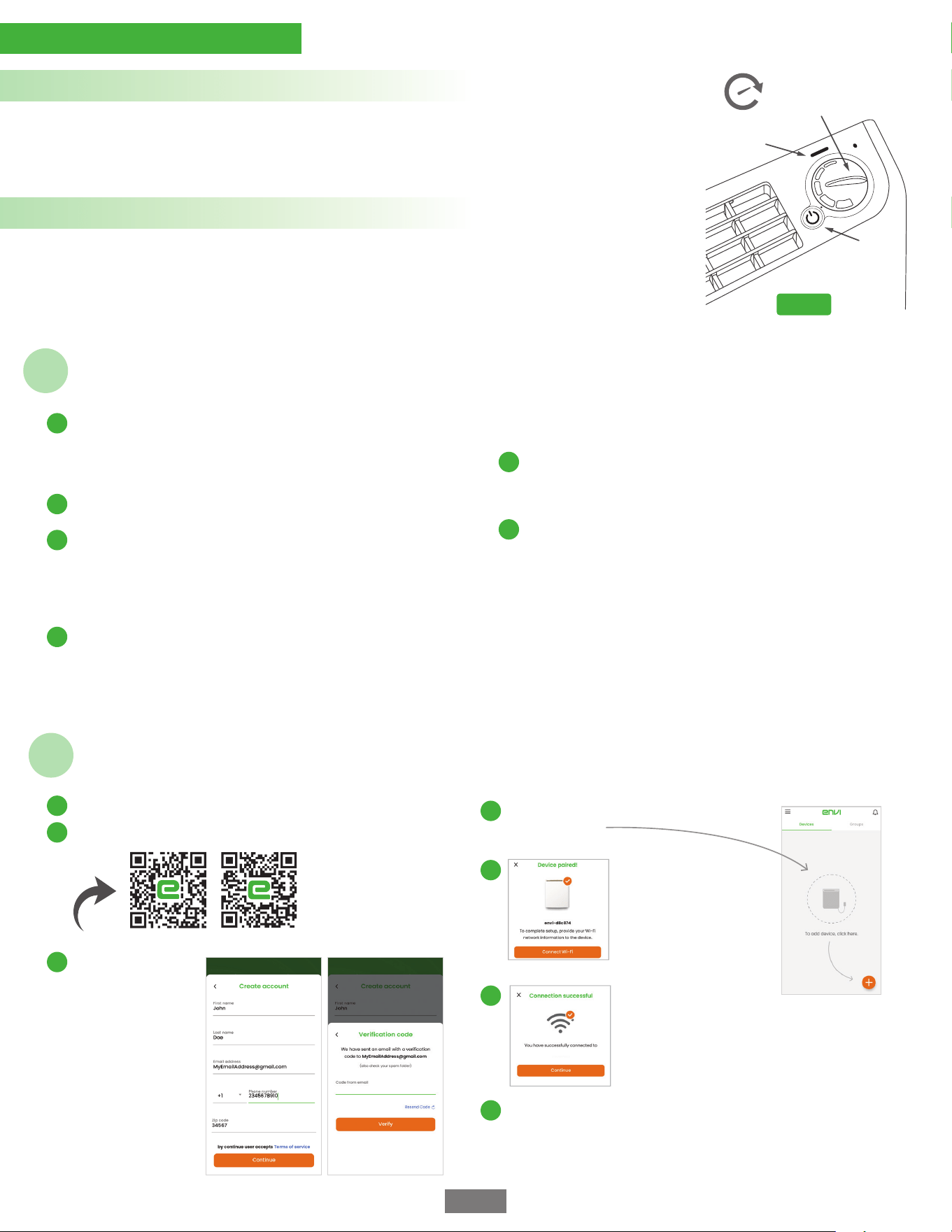
On/Off
Button
Power Light
Turn Thermostat Dial
clockwise to increase
room temperature
Economical. Safe. Simple.
Fig. 10
Envi & Envi Max Operating Instructions
Install the heater on a firm, level wall and plug the power cord into a
grounded power outlet (or hardwire if applicable). The heater will only
operate when it is properly attached to the mounting clips. Be sure to
mount in upright position with the thermostat dial and power button
at the top of the heater.
1
Once the heater is connected, press the front on/off power button
and the POWER INDICATION LIGHT will glow red. (Fig. 10)
2
The Envi Heater is equipped with a built-in thermostat which is
adjusted with a dial at the top of the heater. Adjust the room
temperature by turning the thermostat dial CLOCKWISE to increase
the room temperature. If the area becomes too warm, rotate
thermostat dial COUNTER-CLOCKWISE until the temperature is
more comfortable. (Fig. 10)
3
Once you have chosen the desired setting, the thermostat will
maintain a constant temperature.
NOTE: Models with no thermostat have no temperature control and
will stay on until the heater is powered off by either an external switch
or external thermostat.
NOTE: For models hardwired to an external thermostat, the
built-in heater thermostat should be left on the hottest setting.
4
The heater is equipped with an innovative auto dimming feature
that dims the power light in a darkened room to help light
sleepers. The heater automatically detects when the light level in
a room drops and then dims the power light.
5
The plug-in cordset of the Envi Heater can be stored inside the
bottom access door. Determine how much cordset you require to
extend out of the heater. Remove the heater from the wall, and
remove the bottom access door. Carefully push the excess
cordset inside the heater (use a wooden ruler or similar) and
replace the bottom access door. Re-install the heater to the wall
and plug-in the cordset to continue using your heater. For more
information please visit the installation web page of
www.eheat.com
6
page 6
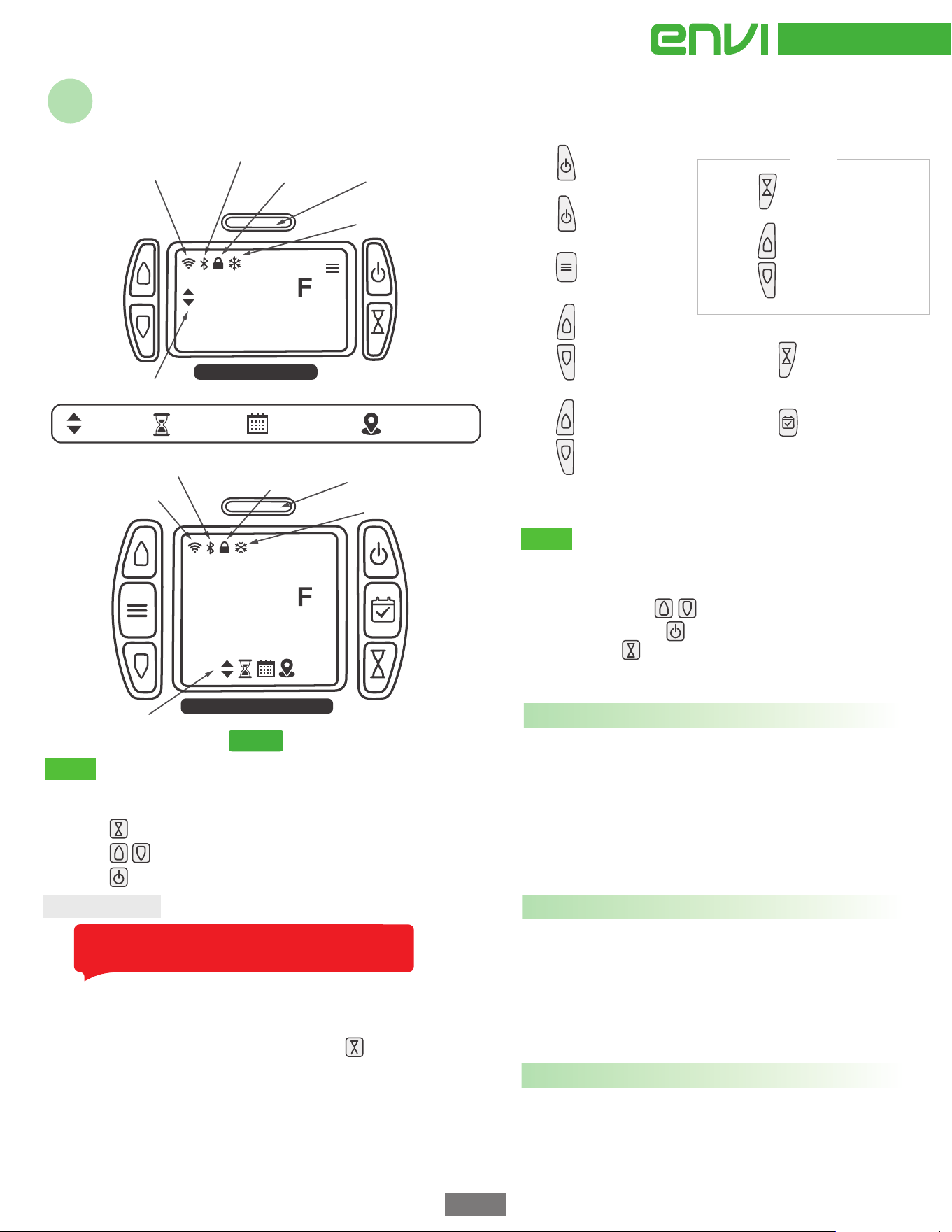
Install your heater, plug it in and turn it on.
Follow the prompts
to create an account.
Input the security
code from the
verification email.
Download and install the Envi Smart Heater app on your phone.
Smart Envi & Smart EnviMAX Quick Start Guide
Android Apple
From the app home screen click the plus sign
to add a heater.
Congratulations, your heater is paired with your phone
and connected to the Internet, to be operated by you,
anywhere in the world!
Your Home Wi-Fi
Follow the prompts
until you see "Ready to
connect", You can now
connect your heater to
your WiFI.
Next, follow the prompts
to connect your heater to
the Internet using your
wifi until you see
"Connection Successful".
1
2
3
4
5
6
7
Note: heater must be left powered on in order for
scheduling to work. The schedule does not turn the
heater on.
page 7
Timer automatically shuts off the heater after the desired
amount of time.
Use the built-in scheduler to control your room temperature.
Set it to save power while you’re away and turn up the heat to
have your room nice and cozy by the time you get home.
The menu gives you access to less used options
and controls.
When in the menu use to navigate through options
and change settings, use to advance and to save setting
changes and use to go back and to cancel setting changes.
To activate the schedule mode press and hold for 3
seconds, heater will now follow the programmed schedule.
Schedule can be programmed in the main menu, see main
menu options below.
Auto brightness allows the display to change brightness
automatically based on room illumination level. You can enable
or disable this feature.
*The Envi Smart App allows you to easily create and switch
between more flexible schedules. If you pair your Smart Envi
with your phone, the more limited on-board schedule is
disabled and schedules can be created on your phone.
Change brightness allows you to select the desired display
brightness. This setting only applies when auto brightness is
disabled.
Timeout turns the display off automatically after 3 minutes of
inactivity. You can enable or disable this feature.
Timer
Menu
Display: Change display settings.
Menu items are as follows:
Schedule mode
Press to set timer
Press to start timer
Press to change time in 30 minute increments
On/off: turn night light on or off.
Timer on/off: turn timer on or off.
Set Duration: set how long timer should run.
Set Temperature: set the temperature you want the heater to
maintain during the timer operation.
Auto brightness allows the night light to change brightness
automatically based on room illumination level. You can enable
or disable this feature.
Change brightness allows you to select the desired night light
brightness. This setting only applies when auto brightness is
disabled.
Night Light: Change nightlight settings
Timer: Change timer settings
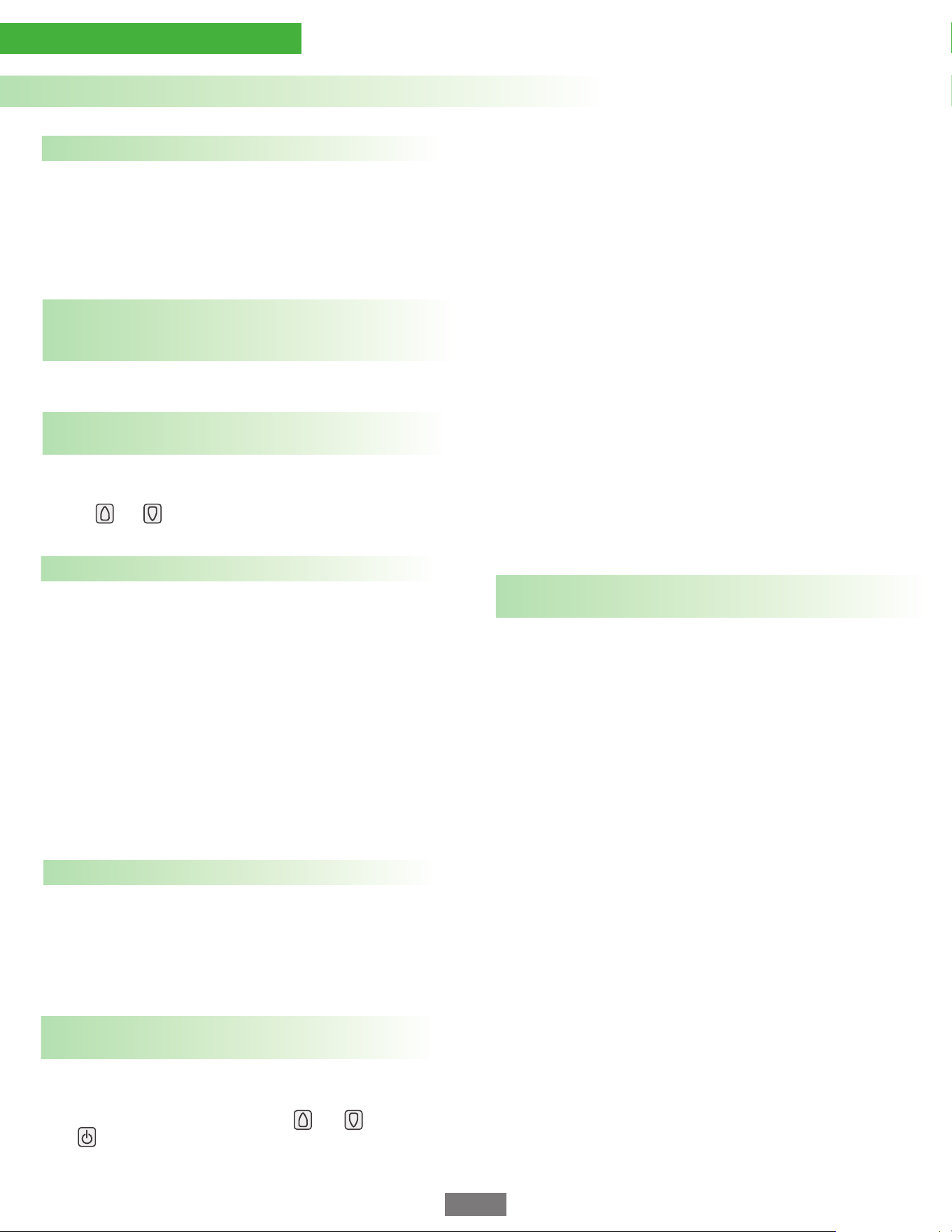
Wi-Fi status
Mode Display
Mode Display
Auto Mode Timer Mode Schedule Mode
GeoFence Mode
Up button
Up button
Power/Menu
button
Menu
button
Power
button
Schedule
button
Timer/Mode
button
Timer/Mode
button
Down button
Down
button
Bluetooth On (Ready to pair)
Child Lock On Power Light
Freeze Protect On
Smart Envi & Smart EnviMAX Operating Instructions
Fig. 11
Press
Press
to power on
Hold
down for
3 seconds
for Menu
to access
menu
Press
Smart
EnviMAX
Press
Smart
EnviMAX
to set Timer
TIMER
to change the
Timer in 30-minute
increments.
to raise set
Temperature
Press
Press
to lower set
Temperature
both for 3 seconds
to enable and disable
Child Lock
down for 3 seconds
to enable
Schedule Mode
Press
Hold
Hold
to enable
Schedule Mode
Freeze Protect On
Wi-Fi status
Bluetooth On (Ready to pair)
SMART ENVI DISPLAY
SMART ENVI MAX DISPLAY
Child Lock On
Power Light
o
o
Set 5-1-1 Schedule: Creates the schedule. When creating the
schedule, you cycle between settings using and and then
press to edit that setting.
Setting a schedule:
The best way to program your heater to follow a schedule is
using our free smart-phone app. However, if you do not wish to
use the app, you can program a schedule directly on the heater.
To program a schedule:
Select “Program 5-1-1” schedule in the menu.
Screen will show “M-F” and “wake”,
The time will be flashing, use the (up button) and (down
button) to select the time you want to apply the wake setting
during the work week, click the (power button) to set the
time.
Now the temperature will flash, use the (up button) and
(down button) to select the temperature you want to set at
the wake time during the work week, click the (power
button) to set this temperature.
Repeat this process for the “leave”, “return”, and “sleep”
times for M-F, and then selecting times and temperatures
for Saturday and then Sunday. When this is complete press
(power button) to save the schedule.
At any time while setting the schedule you can use the (timer
button) to go back to the previous step.
Child lock can also be enabled and disabled by holding down
both the and for 3 seconds.
The heater is equipped with an innovative auto dimming feature that
dims the power light in a darkened room to help light sleepers. The
heater automatically detects when the light level in a room drops and
then dims the power light.
The plug-in cordset of the Envi heater can be stored inside the bottom
access door. Determine how much cordset you require to extend out
of the heater. Remove the heater from the wall, and remove the
bottom access door. Carefully push the excess cordset inside the
heater (use a wooden ruler or similar) and replace the bottom access
door. Re-install the heater to the wall and plug-in the cordset to
continue using your heater. For more information please visit the
installation web page of www.eheat.com
Economical. Safe. Simple.
Smart Envi & Smart EnviMAX Operating Instructions Continued
page 8
Change network allows you to switch your heater to a new wifi
network (requires phone and app).
Enable or disable this feature.
Enable this feature
Device IP address: allows you to see your heater’s IP address
if it is connected to a network.
Wi-Fi signal: Displays the strength of Wi-Fi signal from the
router.
Auto brightness allows the display to change brightness
automatically based on room illumination level. You can enable
or disable this feature.
On/Off Schedule: activate or deactivate schedule mode.
Set time: set the current time.
Set day: Set the current day of the week.
Set Daylight savings: Turn daylight savings time on/off.
Set Timezone: Specify which time zone your heater is operating in.
Change brightness allows you to select the desired display
brightness. This setting only applies when auto brightness is
disabled.
Power light: Change settings for the red power light
Set Schedule: Allows you to create and turn on/off
the on-board schedule
Set Time/Day: Set the internal clock on your heater,
this is necessary if schedule is to operate properly.
Network: Network settings and information
Firmware version displays current firmware version.
Factory Reset: Reset your heater to its original
settings. This will unpair your heater and remove it
from your account.
Device Calibration: Your heater’s temperature sensor is
calibrated at the factory and should not require
adjustment, however if you feel your heater is reading
too low or too high, you can use this setting to adjust the
calibration.
Temperature unit: Select between temperatures
displayed in °F and °C.
About: Displays your device ID. This is the default name of your
heater in the app and what you will see when the app detects a
heater when pairing.
Device Settings: View and modify device settings
Freeze Protect: Protects your room from freezing
temperatures by automatically turning on the heater
if room temperature falls below 40
o
F (5
o
C)
Child Lock: Protect your heater from unintended
changes by locking out the buttons on the heater
If the heater will not operate, please check the following
before calling for help with technical questions:
The number one trouble shooting tip is to check that the internal,
electrical safety switch (Wall-Sens
TM
) is being engaged. The heater
WILL NOT OPERATE AT ALL if this switch is not engaged. This
problem occurs when the right hand side of the heater is not pushed
down far enough between the gap between the wall and the
mounting clip. The mounting clip can become squished if it is
screwed in too hard. Uneven walls can also cause the same
mounting/wall switch problems.
1
Check if the power cord is plugged into an electrical outlet and the
heater is set to ON by confirming the light on the front of the panel
is lit. If not, plug in the heater and press the on/off power switch.
2
If the heater has been hardwired, consult an electrician to check
that all connections have been made correctly. Make sure that you
hardwire the correct voltage. Many people do not understand how
to work with 220 volt wiring. Always triple check the voltage and the
model heater that was purchased as this is a common mistake and
can lead to heater malfunction and pose a serious safety risk.
3
Check if there is electricity to the circuit by checking to make sure
the breaker in the breaker box is in the “on” position.
4
Troubleshooting
page 9
The 500 watt Envi heaters are designed to heat rooms up to 150 ft
2
in size (14m
2
) and the 1000 watt heaters are designed to heat up to
350 ft
2
(28m
2
). Of course, this will vary depending on a number of
factors, including outdoor temperature, room insulation, room
draftiness, room objects, etc.
OPTIMAL OPERATING CONDITIONS
For optimal performance in a room, close all doors for first time
use. You may have to leave your 500 watt heater on for several
hours to enable the room to reach equilibrium temperature while
the heat builds gradually. This will allow the room to reach
equilibrium temperature while the heat is gradually building up.
1
For optimal performance, mount the heater on an interior wall with
the bottom of the heater 6” to 8” (15 to 20cm) from the floor. For
smaller rooms this can be increased with little detriment, however
try to keep the bottom of the heater a maximum of 18” (46cm) from
the floor.
2
3
To save energy and to reduce your heating bills, place the heater
in a room or area that needs extra heat instead of raising the
thermostat on your central heating system. This heater will
function very well as both a sole source of heat or as an
additional heating source that can easily maintain the
temperature in most rooms and attached bathrooms if the
correct number of Envi heaters are installed. There is no need to
increase the heat in the entire house when you only need
comfort in the room in which you are currently located.
4
We highly recommend that our customers weatherize their homes
or offices to further reduce their heating bills. Simple tasks such as
replacing weather stripping around doors and windows, caulking
doors and window seams, sealing attics and basements properly,
and adding more insulation to your walls and ceiling will help
further to reduce heating costs.
5
CLEANING
Unplug the unit and let it cool completely.
1
Do not immerse the heater in water.
5
Wait until the unit is completely dry before using again.
6
Some customers, over a long period of time may experience
"dirty marks" on the wall above the heater. This can be caused
by candles or dust being drawn into the heater and passed out
the top. Over time this may leave dirty marks above the
heater. The wall is not damaged and can easily be washed
using appropriate cleaning products such as a magic eraser
sponge.
7
To remove dust from the Envi heater, use a soft cloth on the
exterior and use a compressed air can to blow dust through
the top vent of the heater out the bottom.
2
To remove marks or stains from the heater, the front outer shell
can be cleaned with a soft, damp cloth. You may use a mild
detergent if necessary. After cleaning, dry the unit with a soft cloth.
CAUTION: Do not let liquid enter the heater.
3
Do not use alcohol, acetone based cleaners, gasoline, abrasive
powders, furniture polish, or abrasive or rough cloths or brushes
to clean the front of the heater. This may cause damage or
deterioration to the surface.
4
Care & Maintenance Instructions
To get the most out of your Envi Heater, please follow these helpful hints:
Store the heater in a cool, dry location when not in use. However, the Envi Heater is a slim, attractive wall mounted heater than can be left mounted
on the wall – all year round!
STORAGE
Economical. Safe. Simple.
SAFETY LISTINGS
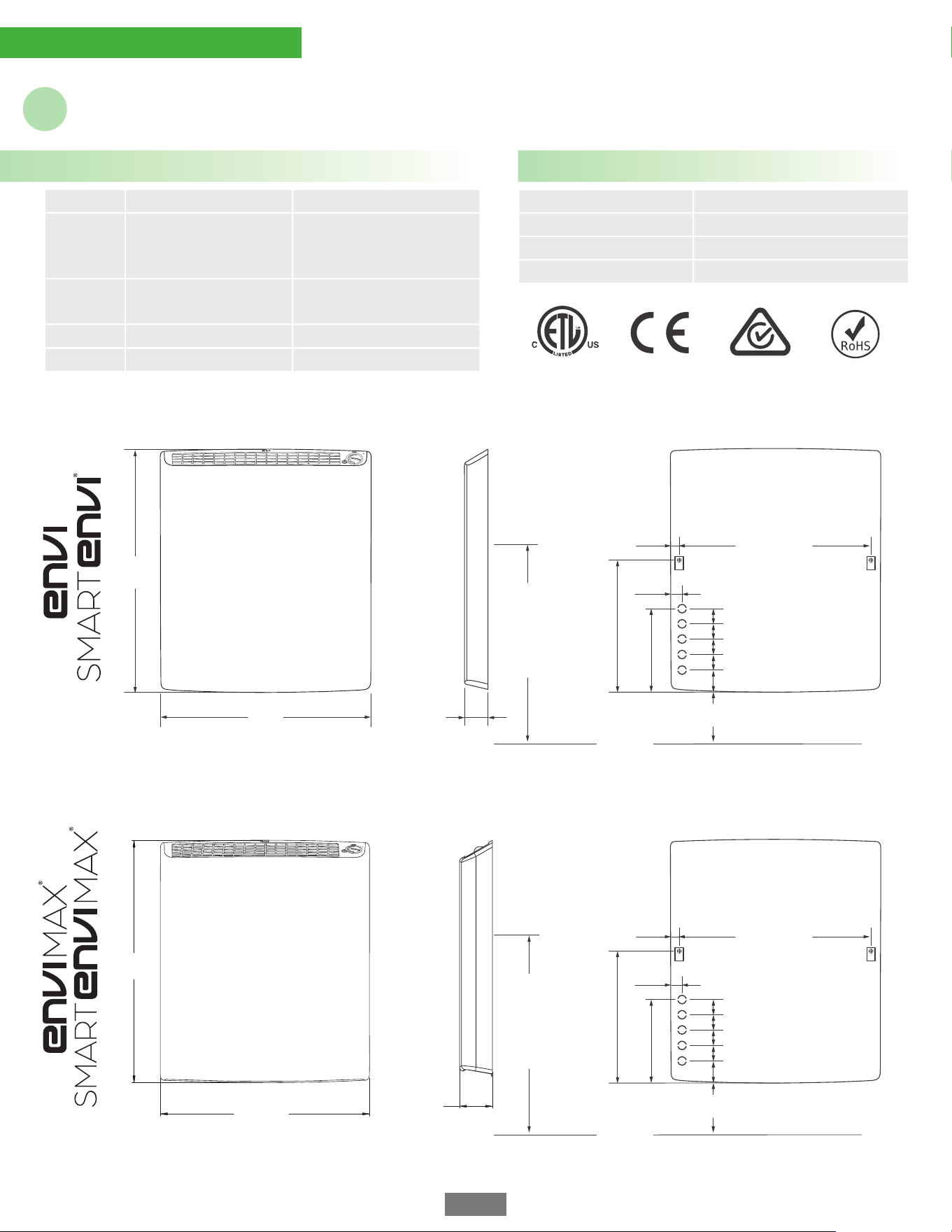
PRODUCT SPECIFICATIONS
Specifications & Certifications
Power Rating:
500 Watts (All Models)
Net Weight:
10 lbs (4.5 kg)
Packaged Wt:
12 lbs (5.5 kg)
Conforms to UL Std: UL 2021
Cert. to CAN/CSA Std: C22.2 No. 46
Conforms to IEC Std: 60335-1 & 60335-2-30
Conforms to AS/NZS:
60335.1 & 60335.2.30
Unit Size:
19.3in W x 2.2in D x 22.2in H
(49.0cm W x 5.6cm D x 56.4cm H)
Volt & Amp
Rating:
LE5012P/D/N Models = 4.17A @ 120V
LE5022D/N Models = 2.27A @ 220V
SE5012P/D Models = 4.17A @ 120V
SE5022D Model = 2.27A @ 220V
1000 Watts (All Models)
12.3 lbs (5.6 kg)
14.5 lbs (6.6 kg)
19.3in W x 3.1in D x 22.2in H
(49.0cm W x 7.9cm D x 56.4cm H)
EM1012P/D/N Models = 8.33A @ 120V
EM1022D/N Models = 4.54A @ 220V
SM1012P/D Models = 8.33A @ 120V
SM1022D Models = 4.54A @ 220V
Front view Right side view Back view
(49.0cm)
19.3"
(56.4cm)
22.2"
(7.9cm)
3.1"
Floor line
Front view Right side view Back view
6” to 8”
Recommended Height Above Floor
0.94”
1.125”
8.41”
12.75”
2.2”
(5.6cm)
1.5”
1.5”
1.5”
1.5”
2.375”
Mounting Screw Centers
17.75” (45cm)
Mounting
Centers
approx.
19” (48cm)
to 21” (53cm)
from floor
22.2”
(56.4cm)
19.3”
(49.0cm)
Floor line
6” to 8”
Recommended Height Above Floor
0.94”
1.125”
8.41”
12.75”
1.5”
1.5”
1.5”
1.5”
2.375”
Mounting Screw Centers
17.75” (45cm)
Mounting
Centers
approx.
19” (48cm)
to 21” (53cm)
from floor
®
page 10
The Envi Heater is in compliance with the requirements of The Life Safety Code, NFPA 101 (2012), section 19.7.8. The Envi Heater is a fixed wall heater
(not portable) and operates with low surface temperatures and is thus suitable for commercial use in Elderly Care, Childcare, corporate and
government facilities. The Envi Heater is also compliant for California Title 24 use in Residential New Construction, Alterations and Additions. Contact
the manufacturer for more information if needed.
Houston, TX, United States of America
eheat, Inc.
1. The manufacturer warrants the accompanying Envi Heater to be free of defects in material and workmanship for the applications specified in its
operation instructions for a period of THREE (3) years from the date of original purchase in the United States of America and Canada. If the unit
exhibits a defect in normal use, the manufacturer will, at its option, either repair or replace it, free of charge within a reasonable time after the unit is
returned during the warranty period.
2. As a condition to any warranty service obligation, the consumer must present a copy of the original purchase invoice.
3. THESE WARRANTIES DO NOT APPLY FOR:
• Damage, accidental or otherwise, to the unit while in the possession of a consumer not caused by a defect in material or workmanship.
• Damage caused by improper installation or connection to incorrect supply voltage.
• Damage caused by consumer misuse, tampering, or failure to follow the care and special handling provisions in the instructions.
• Damage to the finish of the case, or other appearance parts caused by wear.
• Damage caused by repairs or alterations of the unit by anyone other than those authorized by the Manufacturer.
• Freight and Insurance cost for the warranty service.
4. ALL WARRANTIES, INCLUDING ANY IMPLIED WARRANTY OF MERCHANT ABILITY ARE LIMITED TO A THREE-YEAR DURATION OF THIS EXPRESS
LIMITED WARRANTY. THE MANUFACTURER DISCLAIMS ANY LIABILITY FOR CONSEQUENTIAL OR INCIDENTAL DAMAGES AND IN NO EVENT SHALL THE
MANUFACTURERS LIABILITY EXCEED THE RETAIL VALUE OF THE UNIT FOR BREACH OF ANY WRITTEN OR IMPLIED WARRANTY WITH RESPECT TO THIS
UNIT.
5. Note: This warranty does not renew or extend with a replacement product. All warranties are from the date of the original product purchase.
6. This warranty covers only new products purchased from our authorized dealers or retailers. It does not cover used, salvaged, or refurbished
products.
7. As some states do not allow the limitation or exclusion of incidental or consequential damages, or do not allow limitation on implied warranties,
the above limitations and exclusions may not apply to you. This warranty gives you specific legal rights, and you may also have other rights that vary
from state to state.
COMMERCIAL FIRE SAFETY COMPLIANCE & CALIFORNIA TITLE 24 CERTIFICATION
THREE YEAR LIMITED WARRANTY
REGISTRATION DETAILS
Warranty & Contact Info
Manufacturer’s Contact Information
Store Name:
Location:
Date Purchased:
Serial # (on back):
page 11

© 2024 eheat, Inc.
Toll Free 800-807-0107 www.eheat.com