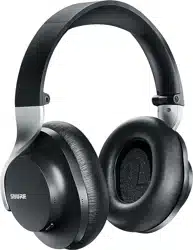
AONIC 50
Wireless Headphones
The Shure AONIC 50 Wireless Noise-cancelling Headphones user guide (Model: SBH2350).
Version: 1.6 (2022-B)

Shure Incorporated
2/17
Table of Contents
AONIC 50 Wireless Headphones 3
Bluetooth® Pairing 3
Multipoint pairing 3
Using the Buttons 3
LED indicator 5
ShurePlus PLAY Mobile Listening App 5
General Description 5
Environment mode 6
Active noise cancellation 6
Create Custom Presets 7
Adjusting EQ 8
Preset Modes 9
Updating the Firmware for Shure AONIC products 9
Cable connections 11
Care and Maintenance 11
Frequently Asked Questions - FAQ 11
Storage 12
Accessories 12
Furnished Accessories 12
Replacement Parts 12
Specifications 12
SAFETY PRECAUTIONS 13
WARNING FOR ALL EARPHONES! 14
SAFETY PRECAUTIONS 14
WARNING 14
CAUTION 14
IMPORTANT SAFETY INSTRUCTIONS 14
For Products That Use Bluetooth 15
CAUTION 15
WARNING 15
Certifications 16
LIMITED WARRANTY 16

Shure Incorporated
3/17
1.
2.
1.
2.
3.
4.
5.
1.
2.
3.
4.
5.
6.
7.
8.
9.
10.
11.
12.
AONIC 50
Wireless Headphones
Bluetooth Pairing
Headphones automatically enter pairing mode when you power them on the first time or when they have not been previously
paired with this audio source.
From your audio source, select "Shure 50."
When successfully paired, you hear "Connected".
Headphones automatically pair with previously paired devices when you power them on. After a few seconds you will hear
“Connected”.
Manual pairing
Turn off the headphones.
Press and hold the power button for 6 seconds.
When you hear "Bluetooth pairing mode," release the button.
From your audio source, select "Shure 50."
When successfully paired, you hear "Connected".
Note: If the pairing fails on the first attempt, repeat the process from the beginning.
To customize the listening features with your device, download the free ShurePlus PLAY app for iOS and Android.
Multipoint pairing
AONIC 50 headphones support Bluetooth multipoint pairing which enables the headphones to be connected to two devices at
the same time. AONIC 50 will remain connected to both devices and receive inputs alternately.
If you are having difficulty with your AONIC 50 headphones and multipoint pairing, follow these steps:
Clear the AONIC 50's paired devices list (PDL) from the PLAY app
Clear the AONIC 50 from any previously paired devices
Power off the AONIC 50 headphones
Press and hold the AONIC 50 power button for 6 seconds
When you hear "Bluetooth pairing mode," release the button
Select "Shure 50" on the cellular phone
When successfully paired, you hear "Connected"
Disable Bluetooth on your cellular phone
Power off the AONIC 50 headphones
Press and hold the AONIC 50 power button for 6 seconds to enter Bluetooth pairing mode again
Connect to other device
TurnonBluetoothonthefirstcellularphoneandselect“Shure50”insettings
You will not hear a "Connected" prompt but you will see that the headphones are connected to both of the devices.
®
™

Shure Incorporated
4/17
1.
2.
1.
2.
Using the Buttons
Power button
Power on Press and hold, 2 seconds
Power off Press and hold, 2 seconds
Pair Bluetooth
Turn off the headphones
Press and hold, 6 seconds
Check battery status Double press (audible status notification)
Reset paired devices list
Turn off the headphones and plug into a charger
Press and hold, 7 seconds
Center button
Play/Pause Press once
Next track Double press
Previous track Triple press
Answer/End a call Press once
Decline a call Press and hold, 2 seconds
Activate voice assistant Press and hold, 2 seconds
Side buttons
Volume up Press +
Volume down Press -

Shure Incorporated
5/17
1.
2.
•
•
•
Environment mode/ANC switch
Environment mode Push switch up
Active Noise Cancellation Push switch down
Hardware reset
If the buttons do not respond to repeated presses, you can perform a hardware reset to force a power off.
Press the +, -, and power buttons simultaneously to immediately power off the headphones. This does not reset any
values you may have changed.
Power on the headphones.
LED indicator
Bluetooth pairing Alternating red and blue
Bluetooth connected Blue for 2 seconds, then off
Bluetooth connection lost Slow blinking blue
Low battery Slow blinking red
Charging Red
ShurePlus PLAY Mobile Listening App
General Description
The ShurePlus PLAY Mobile Listening App is a high-resolution music player with advanced EQ controls. Play uncompressed
audio files with your iOS or Android mobile device using the music tab. Use built-in Shure EQ presets to customize the sound,
orcreateyourownEQpresetsinthesettingstab.UnlockenvironmentmodeandANCfeaturesbyconnectingtoShurewire
less and True Wireless products in the device tab.
Features
Import and play multiple, high-resolution and standard file types
Customize presets with the parametric graphic EQ
Adjust your volume with the full-screen fader

Shure Incorporated
6/17
•
•
•
•
Create playlists and organize your music library by playlist, artist, album title, song title, genre, or composer
Quickly dial in your sound with EQ preset modes for a variety of listening situations.
Environment mode
Environment mode allows you to accentuate the ambient noise around you. This is especially useful when you want to listen to
music or are on a phone call, yet you still want to be aware of the sounds around you.
To use environment mode, push the vertical switch on the back of the right earcup to the up position.
In the ShurePlus PLAY app, you can adjust the environment mode across ten levels:
Active noise cancellation
Active Noise Cancellation (ANC) allows you to suppress some or all of the noise around you. This is especially useful when
travelling where road noise in a car, bus, or train, or jet noise in an airplane can force you to increase the volume.
To use ANC, push the vertical switch on the back of the right earcup to the down position.
In the ShurePlus PLAY app, you can adjust the ANC between two levels:
Max
Normal

Shure Incorporated
7/17
1.
2.
◦
◦
◦
3.
1.
2.
3.
4.
5.
6.
Create Custom Presets
Add new preset
Scroll down to tap Add New Preset or tap Manual. New presets start out flat.
Adjust your frequency, gain, and bandwidth parameters. There are three ways to adjust your equalizer.
Tap the values to type in a specific number.
Tap the - or + to adjust in larger increments.
Tap and drag the numbered circles for bigger changes.
Tap Save to name and save your new custom preset. Custom presets will show up after the list of Shure presets.
Duplicate a Preset
You can duplicate both Shure and custom presets. Duplicating a preset is convenient if you like the way a preset sounds but
you want to make and keep adjustments to the sound.
Start by selecting an already existing preset.
Tap the More Options 3 dots and select Duplicate.
Scroll down to find your duplicate preset in the list of custom presets.
Tap the More Options 3 dots and select Edit.
Adjust your frequency, gain, and bandwidth parameters. Type in a specific number. Tap - or +toadjustinsmallincre
ments. Or manually tap and drag the numbered circles for larger changes.
Tap Save to save your new custom preset.

Shure Incorporated
8/17
1.
2.
3.
1.
2.
3.
Adjusting EQ
Select and adjust frequency, gain, and bandwidth in the equalizer.
Equalization Explained
The 4-band parametric equalizer is used to adjust the volume of independent, adjustable frequency ranges, to precisely shape
the frequency response. The equalizer can be bypassed for a flat frequency response.
Frequency Select the center frequency of the filter to cut/boost.
Gain Adjusts the level for a specific filter.
Bandwidth or Q Adjusts the range of frequencies affected by the filter. The value is represented in octaves.
Commonly used EQ Adjustments
Treble boost for improved speech intelligibility: Add a high shelf filter to boost frequencies greater than 1 kHz by 3-6 dB
Ambient HVAC noise reduction: Add a low cut filter to attenuate frequencies below 200 Hz
Reduce flutter echoes and sibilance: Identify the specific frequency range that "excites" the room:
Set a narrow Q value
Increasethegaintobetween+10and+15dB,andthenexperimentwithfrequenciesbetween1kHzand6kHztopin
point the range of flutter echoes or sibilance
Reduce the gain at the identified frequency (start between -3 and -6 dB) to minimize the unwanted room sound
Reduce hollow, resonant room sound: Identify the specific frequency range that "excites" the room and lower it:
Set a narrow Q value
Increase the gain to between +10 and +15 dB, and then experiment with frequencies between 300 Hz and 900 Hz to
pinpoint the resonant frequency
Reduce the gain at the identified frequency (start between -3 and -6 dB) to minimize the unwanted room sound

Shure Incorporated
9/17
1.
2.
3.
◦
◦
4.
5.
Preset Modes
Use presets to quickly access commonly used listening scenarios. Seven selectable 4-band presets optimize settings for gain,
equalization, and compression. Play a song and find the preset that you think suits the song best, and then adjust levels as
needed.
Preset Application
Bass Boost Increase low frequencies
Bass Cut Decrease low frequencies
Treble Boost Increase high frequencies
Treble Cut Decrease high frequencies
Vocal Boost Increase vocal clarity by emphasizing the vocal range
De-ess Decrease vocal hiss/ sibilance in speech
Loudness
Clarity for listening at low volume. Both the bass and treble frequencies are boosted to make
the overall sound feel louder.
Updating the Firmware for Shure AONIC products
Take advantage of additional features and design enhancements by updating the firmware on your AONIC product. To check
for firmware updates, connect the AONIC product to a device running the ShurePlus PLAY app, available for Android and iOS.
Follow these steps for a successful firmware update
Enable Airplane mode on your mobile device.
Turn on Bluetooth and pair the AONIC product to your device.
Attention: Android users, check settings to ensure that both adapters are connected to your device.
Open the ShurePlus PLAY app and select the Device tab.
IMPORTANT: Ensure that both earphones or adapters are paired with the device and in close range (for applicable
products).
If both earphones or adapters do not automatically connect, tap the music tab and then tap back into the device tab.
When an update is available, a green dot will appear next to Firmware Update in the device settings menu.
Tap the caret icon and follow the onscreen step-by-step instructions. The progress bar displays progress percentage for
both adapters; it is a single process.

Shure Incorporated
10/17
6.
◦
◦
◦
7.
Afterasuccessfulupdate,the“UpdateCompleted”confirmationscreenappears.
Do not power off the AONIC product until the update completes.
Do not put the adapters back into the case during firmware update. It will cancel the update.
Note: If the update fails on the first attempt, be sure to quit the app completely before attempting again. You may
needtoforcequittheapptoconfirmthatitisn’trunninginthebackground.Wait5minutesbeforeopeningtheapp
and attempting again. Check the list below for tips on a successful update.
ConfirmthenewfirmwareversionasdisplayedintheAboutmenu(Devicescreen>…>About>FirmwareVersion).

Shure Incorporated
11/17
•
•
•
•
•
•
•
•
◦
◦
•
Tips to ensure a reliable update
Ensure that the mobile device and your AONIC product are powered on and near to one another.
Using the product or mobile device while downloading may slow or cancel the update process.
Update requires a minimum battery charge of 50% on your mobile device and on the AONIC product.
Approximate download time for headphones and earphones is up to 30 minutes.
Do not exit the PLAY app and ensure that your screen is on.
Do not update in areas with high volume mobile or WiFi wireless activity, like a plane or train station. This interference can
significantly slow down or cancel the update process.
Ensure that your mobile device is using the most current operating system (OS).
Contact Shure Service and Repair if you experience any issues.
Cable connections
The headphones can also use two different cables to access audio instead of using the wireless feature:
USB-C:
Charge the headphones
Connect to digital audio
3.5 mm audio cable: Connect to an analog audio port
Care and Maintenance
To clean the headphones, use a soft, damp cloth.
CAUTION: Do not use cleansers that contain solvents. Keep liquid and foreign objects out of the driver openings.

Shure Incorporated
12/17
Frequently Asked Questions - FAQ
For more information, or to view other Frequently Asked Questions, visit the Shure FAQ.
Storage
Store headphones in protective case when not in use.
Accessories
Furnished Accessories
REPL SBH2350 CASE ONLY RPH-SBH2350-CASE
REPL USB-C to USB-A CABLE 1M RPH-CABLE-USB
REPL 2.5-3.5MM CABLE 1.5M RPH-CABLE-AUDIO
Replacement Parts
SBH2350 REPLACEMENT EARPADS (BLACK) SBH2350-BK-PADS
SBH2350 REPLACEMENT EARPADS (DARK BROWN) SBH2350-BR-PADS
Specifications
Model/Model:
SBH2350
Transducer Type
Dynamic, Neodymium magnet

Shure Incorporated
13/17
Driver Size
50mm
Frequency Response
20to22,000Hz
Sensitivity
@ 1 kHz
97.5dB/mW
Impedance
@ 1 kHz
39Ω
Maximum Input Power
100mW
Weight
334g(11.8oz.)
Operating Temperature
0°C to 45°C (32°F to 113°F)
Storage Temperature
-10°C to 45°C (14°F to 113°F)
Antenna Type
Internal Monopole
Gain
+2.05 dBi
Operating Frequency
2402MHz2480MHz
Modulation Type
FHSS
RF Output Power
+4dBm(EIRP)
Supported Codecs
aptX, aptX HD, aptX Low Latency, SBC, AAC, LDAC

Shure Incorporated
14/17
•
•
•
•
•
•
•
•
•
1.
2.
SAFETY PRECAUTIONS
Before using this product, please read and save the enclosed warnings and safety instructions.
WARNING FOR ALL EARPHONES!
Use,clean,andmaintainearphonesaccordingtomanufacturer’sinstructions.
SAFETY PRECAUTIONS
Thepossibleresultsofincorrectusearemarkedbyoneofthetwosymbols—"WARNING"and"CAUTION"—dependingonthe
imminence of the danger and the severity of the damage.
WARNING:Ignoringthesewarningsmaycausesevereinjuryordeathasaresultofincorrectop
eration.
CAUTION: Ignoring these cautions may cause moderate injury or property damage as a result of
incorrect operation.
WARNING
If water or other foreign objects enter the inside of the device, fire or electric shock may result.
Do not attempt to modify this product. Doing so could result in personal injury and/or product failure.
Do not use when a failure to hear your surroundings could be dangerous, such as while driving, or when biking, walking,
or jogging where traffic is present and accidents could occur.
Keepthisproductanditsaccessoriesoutofreachofchildren.Handlingorusebychildrenmayposeariskofdeathorse
rious injury. Contains small parts and cords that may pose risk of choking or strangulation.
Stop using the earphones and consult a medical professional if you experience irritation, excessive wax buildup, or other
discomfort.
CAUTION
Never disassemble or modify the device, as failures may result.
Do not subject to extreme force and do not pull on the cable or failures may result.
Keep the earphone dry and avoid exposure to extreme temperatures and humidity.
If you are currently receiving ear treatment, consult your physician before using this device.
High sound pressure
Hearing damage risk
To prevent possible hearing damage, do not listen at high volume levels for long periods.
IMPORTANT SAFETY INSTRUCTIONS
READ these instructions.
KEEP these instructions.

Shure Incorporated
15/17
3.
4.
5.
6.
7.
8.
9.
10.
11.
•
•
•
•
•
•
•
•
•
•
•
•
•
•
•
•
HEED all warnings.
FOLLOW all instructions.
DO NOT use this apparatus near water.
CLEAN ONLY with dry cloth.
DONOTblockanyventilationopenings.Installinaccordancewiththemanufacturer’sinstructions.
DONOTinstallnearanyheatsourcessuchasradiators,heatregisters,stoves,orotherapparatus(includingampli
fiers) that produce heat.
PROTECT the power cord from being walked on or pinched, particularly at plugs, convenience receptacles, and the
point where they exit from the apparatus.
ONLY USE attachments/accessories specified by the manufacturer.
UNPLUG this apparatus during lightning storms or when unused for long periods of time.
For Products That Use Bluetooth
WARNING
Follow instructions from manufacturer.
Product battery may explode or release toxic materials. Risk of fire or burns. Do not open, crush, modify, disassemble,
heat above 140°F (60°C), or incinerate.
Attention should be drawn to the environmental aspects of battery disposal.
Product shall not be exposed to excessive heat such as sunshine, fire, or the like.
Do NOT make unauthorized alterations to this product.
CAUTION
Follow applicable laws regarding mobile phone and headphone use while driving.
Thisproductcontainsmagneticmaterial.Consultyourphysicianonwhetherthismightaffectyourimplantablemedicalde
vice.
Batteries (battery pack or batteries installed) shall not be exposed to excessive heat such as sunshine, fire or the like
Batteries (battery pack or batteries installed) shall not be crushed or cut
Batteries (battery pack or batteries installed) shall not be subjected to extremely low air pressure
Risk of fire or explosion if the battery is replaced by an incorrect type
CAUTION
Never disassemble or modify the device, as failures may result.
Do not subject to extreme force and do not pull on the cable or failures may result.
Keep the product dry and avoid exposure to extreme temperatures and humidity.
WARNING
If water or other foreign objects enter the inside of the device, fire or electric shock may result.
Do not attempt to modify this product. Doing so could result in personal injury and/or product failure.
Note: Battery replacement to be performed only by Shure authorized service personnel.
Changes or modifications not expressly approved by the party responsible for compliance could void the user's authority to operate the equipment.
Note: Testingisbasedontheuseofsuppliedandrecommendedcabletypes.Theuseofotherthanshielded(screened)cabletypesmaydegradeEMCper
formance.
低功率射頻器材技術規範
取得審驗證明之低功率射頻器材,非經核准,公司、商號或使用者均不得擅
自變更頻率、加大功率或變更原設計之特性及功能。低功率射頻器材之使用

Shure Incorporated
16/17
不得影響飛航安全及干擾合法通信;經發現有干擾現象時,應立即停用,並
改善至無干擾時方得繼續使用。前述合法通信,指依電信管理法規定作業之
無線電通信。低功率射頻器材須忍受合法通信或工業、科學及醫療用電波輻
射性電機設備之干擾。
Certifications
Visit http://www.shure.com/earphones for the latest regulatory and compliance information.
Note: Testingisbasedontheuseofsuppliedandrecommendedcabletypes.Theuseofotherthanshielded(screened)cabletypesmaydegradeEMCper
formance.
This product meets the Essential Requirements of all relevant European directives and is eligible for CE marking.
CE Notice: Hereby, Shure Incorporated declares that this product with CE Marking has been determined to be in compliance
with European Union requirements. The full text of the EU declaration of conformity is available at the following site: https://
www.shure.com/en-EU/support/declarations-of-conformity.
Authorized European representative:
Shure Europe GmbH
Department: Global Compliance
Jakob-Dieffenbacher-Str. 12
75031 Eppingen, Germany
Phone: +49-7262-92 49 0
Fax: +49-7262-92 49 11 4
Email: [email protected]
LIMITED WARRANTY
ShureIncorporated(“Shure”)herebywarrantstotheoriginalconsumerpurchaseronlythat,exceptasotherwisespecifiedbe
low, this product will be free in normal use of any defects in materials and workmanship for a period of two (2) years from the
consumer’soriginaldateofpurchasedirectlyfromShureorfromaShureauthorizedreseller.
Any rechargeable batteries contained in or packaged with this product are so warranted for a period of one (1) year from the
consumer’soriginaldateofpurchase.However,rechargeablebatteriesareconsumableandtheircapacitywillbereducedover
time based on temperature, amount of time in storage, charging cycles, and other factors; hence reduction in battery capacity
does not constitute a defect in material or workmanship.
At its sole option, Shure will repair or replace the defective product and promptly return it to you. In order for this warranty to be
valid,theconsumermust,atthetimetheproductisreturned,provideproofofpurchaseintheformoftheoriginalpurchasere
ceiptdirectlyfromShureorfromaShureauthorizedreseller.IfShureelectstoreplacethedefectiveproduct,thenShurere
serves the right to replace the defective product with another product of the same model or a model of at least comparable
qualityandfeaturesinShure’ssoledetermination.
If you believe this product is defective within the warranty period, carefully repack the unit, insure it and return it with proof of
purchase, postage prepaid, to Shure Incorporated, Attention: Service Department, at the address below.
Outside of the United States, return the product to your dealer or Authorized Service Center. Addresses are listed on
www.Shure.com or can be obtained by contacting Shure at the address listed below.
This warranty is not transferable. This warranty does not apply in cases of abuse or misuse of the product, use contrary to
Shure’sinstruction,ordinarywearandtear,anactofGod,negligentuse,purchasefromapartyotherthanShureoraShure
authorized reseller, unauthorized repair, or modification of the product.

Shure Incorporated
17/17
ALLIMPLIEDWARRANTIESOFMERCHANTABILITYORFITNESSFORAPARTICULARPURPOSEAREHEREBYDIS
CLAIMED TO THE EXTENT PERMITTED UNDER APPLICABLE LAWS AND, TO THE EXTENT NOT PERMITTED, ARE
HEREBY LIMITED TO THE DURATION AND TERMS OF THIS WARRANTY. SHURE ALSO HEREBY DISCLAIMS ALL
LIABILITY FOR INCIDENTAL, SPECIAL, OR CONSEQUENTIAL DAMAGES.
Somestatesdonotallowlimitationsonhowlonganimpliedwarrantylasts,ortheexclusionorlimitationofincidentalorconse
quential damages, so the above limitation may not apply to you. This warranty gives you specific legal rights, and you may
have other rights which vary from state to state.
This warranty does not restrict the rights of the consumer mandated under applicable laws.
THISWARRANTYSUPERSEDESALLOTHERWARRANTIESTHATAREASSOCIATEDORINCLUDEDWITHTHISPROD
UCT, EXCEPT THAT ANY SOFTWARE CONTAINED IN OR PACKAGED WITH THIS PRODUCT IS EXCLUDED FROM THIS
WARRANTYANDINSTEADSHALLBECOVEREDBYTHEWARRANTY,IFANY,PROVIDEDINSHURE’SENDUSERLI
CENSE AGREEMENT ACCOMPANYING SUCH SOFTWARE.
