POOL SENSOR
Model: LTV-POOLv2
DC: 062124
Page | 4
WARRANTY INFO
La Crosse Technology Ltd. provides a 1-year limited-time warranty on this product relating to
manufacturing defects in materials & workmanship. Per the Song-Beverly Act, in the state of
California, the warranty on this item becomes effective on the date of delivery. La Crosse Technology,
Ltd, 2830 S. 26th St., La Crosse, WI 54601
For Full Warranty Details, Visit: www.lacrossetechnology.com/pages/warranty
Patents: www.lacrossetechnology.com/pages/patents
FCC STATEMENT
This equipment has been tested and found to comply with the limits for a Class B digital device,
pursuant to part 15 of the FCC Rules. These limits are designed to provide reasonable protection
against harmful interference in a residential installation. This equipment generates, uses and can
radiate radio frequency energy and, if not installed and used in accordance with the instructions,
may cause harmful interference to radio communications. However, there is no guarantee
that interference will not occur in a particular installation. If this equipment does cause harmful
interference to radio or television reception, which can be determined by turning the equipment
o and on, the user is encouraged to try to correct the interference by one or more of the following
measures:
Reorient or relocate the receiving antenna.
Increase the separation between the equipment and receiver.
Connect the equipment into an outlet on a circuit dierent from that to which the receiver is
connected.
Consult the dealer or an experienced radio/TV technician for help.
is device complies with Part 15 of the FCC Rules. Operation is subject to the following two conditions:
(1) is device may not cause harmful interference, and
(2) is device must accept any interference received, including interference that may cause undesired
operation.
Caution!
Any changes or modications not expressly approved by the party responsible for compliance could void the
user’s authority to operate the equipment.
All rights reserved. This manual may not be reproduced in any form, even in part, or duplicated
or processed using electronic, mechanical or chemical process without the written permission of
the publisher. This booklet may contain errors or misprints. The information it contains is regularly
checked and corrections are included in subsequent editions. We disclaim any responsibility for any
technical error or printing error, or their consequences. All trademarks and patents are recognized.
The manufacturer is not responsible for any radio or TV interference caused by unauthorized
changes or modifications to this equipment. Such changes or modifications could void the user
authority to operate the equipment.
WARNING: This product can expose you to chemicals including acrylonitrile,
1, 3-butadiene, and styrene, which are known to the State of California to cause
cancer and birth defects or other reproductive harm.
For more information go to: www.P65Warnings.ca.gov
POWER UP
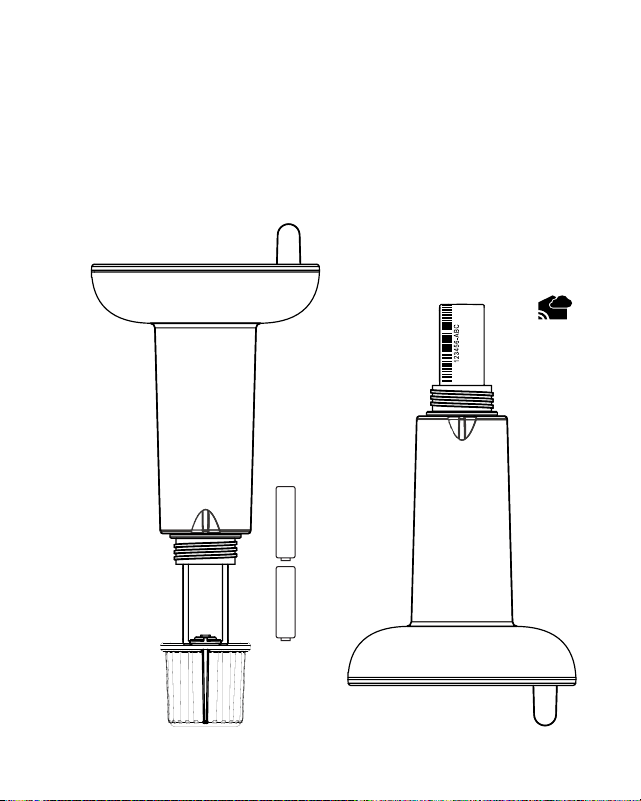
1. Twist the Battery Cover left to remove.
2. Slide the Battery Compartment out. Insert 2 “AA” batteries into
the Battery Compartment.
3. Securely reattach the Battery Cover, ensuring the lines meet to
prevent water from entering.
SPECIFICATIONS
Temperature Range: 50°F to 122°F (Fahrenheit only)
Transmission Range: Over 400 ft. (121.92 meters) RF 915MHz (open air)
Transmission Interval: About every 60 seconds (samples every 30 seconds)
Power: 2-AA IEC LR6 batteries (not included)
Battery Life: 24 + months
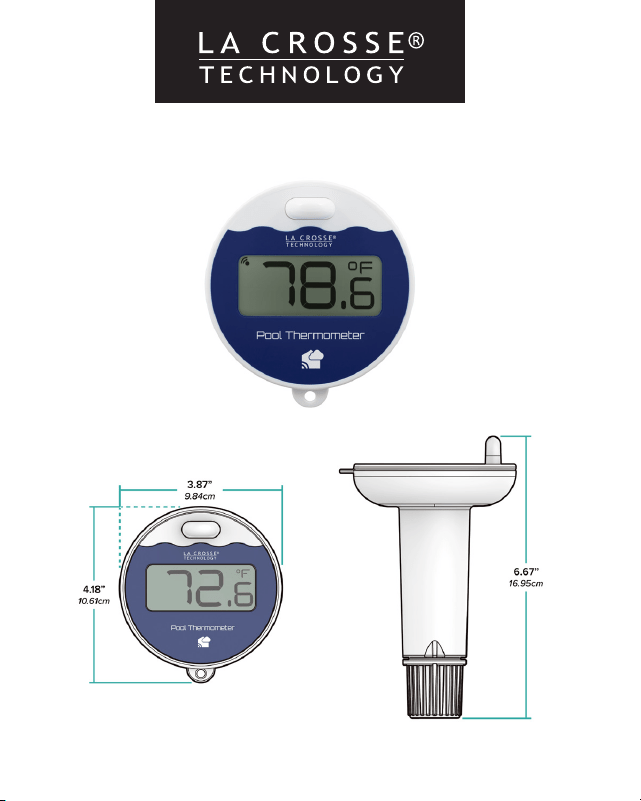
Dimensions: 6.67‘’ L x 3.87’’ W x 4.18’’ H (16.95cm L x 9.84cm W x 10.61cm H)
Page | 2 Page | 3
Pool Sensor
LTV-POOLv2
AA
+
-
AA
+
-
Battery
Compartment
(Slides Out)
Battery Cover
Antenna
CONNECT TO LA CROSSE VIEW™ APP
If you already own a La Crosse View connected display, you can use
your La Crosse View app to monitor your Pool Sensor’s readings, as
well as set temperature alerts right on your phone.
1. Open your La Crosse View app and select ADD DEVICES from the
main menu.
2. Scan the Bar Code or type in the Device ID on the side of
the Battery Compartment.
3. Give the device a Name and Location, and press Save. Within the
next few minutes you should begin seeing your Pool Sensor’s data
within your app.
La Crosse View
Device ID
CARE + MAINTENANCE
•
Do not mix old and new batteries.
•
Do not mix Alkaline, Lithium, standard, or rechargeable batteries.
•
Always purchase the correct size and grade of battery most suitable for
intended use.
•
Clean the battery contacts and also those of the device prior to battery
installation.
•
Ensure the batteries have with correct polarity (+ / -).
•
Remove batteries from equipment that will not to be used for an extended
period.
•
Promptly remove expired batteries.
Please see your specific Weather Station manual for instructions to read
the Pool Sensor in the Extra Sensor Area of the Weather Station.
POOL READING ON WEATHER STATION
POWER UP
1. Twist the Battery Cover left to remove.
2. Slide the Battery Compartment out. Insert 2 “AA” batteries into
the Battery Compartment.
3. Securely reattach the Battery Cover, ensuring the lines meet to
prevent water from entering.
SPECIFICATIONS
Temperature Range: 50°F to 122°F (Fahrenheit only)
Transmission Range: Over 400 ft. (121.92 meters) RF 915MHz (open air)
Transmission Interval: About every 60 seconds (samples every 30 seconds)
Power: 2-AA IEC LR6 batteries (not included)
Battery Life: 24 + months
Dimensions: 6.67‘’ L x 3.87’’ W x 4.18’’ H (16.95cm L x 9.84cm W x 10.61cm H)
Page | 2 Page | 3
Pool Sensor
LTV-POOLv2
AA
+
-
AA
+
-
Battery
Compartment
(Slides Out)
Battery Cover
Antenna
CONNECT TO LA CROSSE VIEW™ APP
If you already own a La Crosse View connected display, you can use
your La Crosse View app to monitor your Pool Sensor’s readings, as
well as set temperature alerts right on your phone.
1. Open your La Crosse View app and select ADD DEVICES from the
main menu.
2. Scan the Bar Code or type in the Device ID on the side of
the Battery Compartment.
3. Give the device a Name and Location, and press Save. Within the
next few minutes you should begin seeing your Pool Sensor’s data
within your app.
La Crosse View
Device ID
CARE + MAINTENANCE
•
Do not mix old and new batteries.
•
Do not mix Alkaline, Lithium, standard, or rechargeable batteries.
•
Always purchase the correct size and grade of battery most suitable for
intended use.
•
Clean the battery contacts and also those of the device prior to battery
installation.
•
Ensure the batteries have with correct polarity (+ / -).
•
Remove batteries from equipment that will not to be used for an extended
period.
•
Promptly remove expired batteries.
Please see your specific Weather Station manual for instructions to read
the Pool Sensor in the Extra Sensor Area of the Weather Station.
POOL READING ON WEATHER STATION

POOL SENSOR
Model: LTV-POOLv2
DC: 062124
Page | 4
WARRANTY INFO
La Crosse Technology Ltd. provides a 1-year limited-time warranty on this product relating to
manufacturing defects in materials & workmanship. Per the Song-Beverly Act, in the state of
California, the warranty on this item becomes effective on the date of delivery. La Crosse Technology,
Ltd, 2830 S. 26th St., La Crosse, WI 54601
For Full Warranty Details, Visit: www.lacrossetechnology.com/pages/warranty
Patents: www.lacrossetechnology.com/pages/patents
FCC STATEMENT
This equipment has been tested and found to comply with the limits for a Class B digital device,
pursuant to part 15 of the FCC Rules. These limits are designed to provide reasonable protection
against harmful interference in a residential installation. This equipment generates, uses and can
radiate radio frequency energy and, if not installed and used in accordance with the instructions,
may cause harmful interference to radio communications. However, there is no guarantee
that interference will not occur in a particular installation. If this equipment does cause harmful
interference to radio or television reception, which can be determined by turning the equipment
o and on, the user is encouraged to try to correct the interference by one or more of the following
measures:
Reorient or relocate the receiving antenna.
Increase the separation between the equipment and receiver.
Connect the equipment into an outlet on a circuit dierent from that to which the receiver is
connected.
Consult the dealer or an experienced radio/TV technician for help.
is device complies with Part 15 of the FCC Rules. Operation is subject to the following two conditions:
(1) is device may not cause harmful interference, and
(2) is device must accept any interference received, including interference that may cause undesired
operation.
Caution!
Any changes or modications not expressly approved by the party responsible for compliance could void the
user’s authority to operate the equipment.
All rights reserved. This manual may not be reproduced in any form, even in part, or duplicated
or processed using electronic, mechanical or chemical process without the written permission of
the publisher. This booklet may contain errors or misprints. The information it contains is regularly
checked and corrections are included in subsequent editions. We disclaim any responsibility for any
technical error or printing error, or their consequences. All trademarks and patents are recognized.
The manufacturer is not responsible for any radio or TV interference caused by unauthorized
changes or modifications to this equipment. Such changes or modifications could void the user
authority to operate the equipment.
WARNING: This product can expose you to chemicals including acrylonitrile,
1, 3-butadiene, and styrene, which are known to the State of California to cause
cancer and birth defects or other reproductive harm.
For more information go to: www.P65Warnings.ca.gov