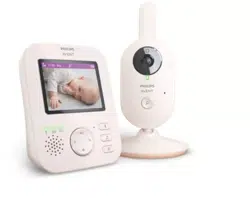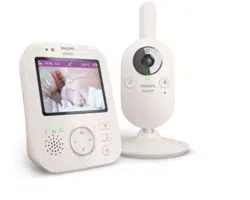
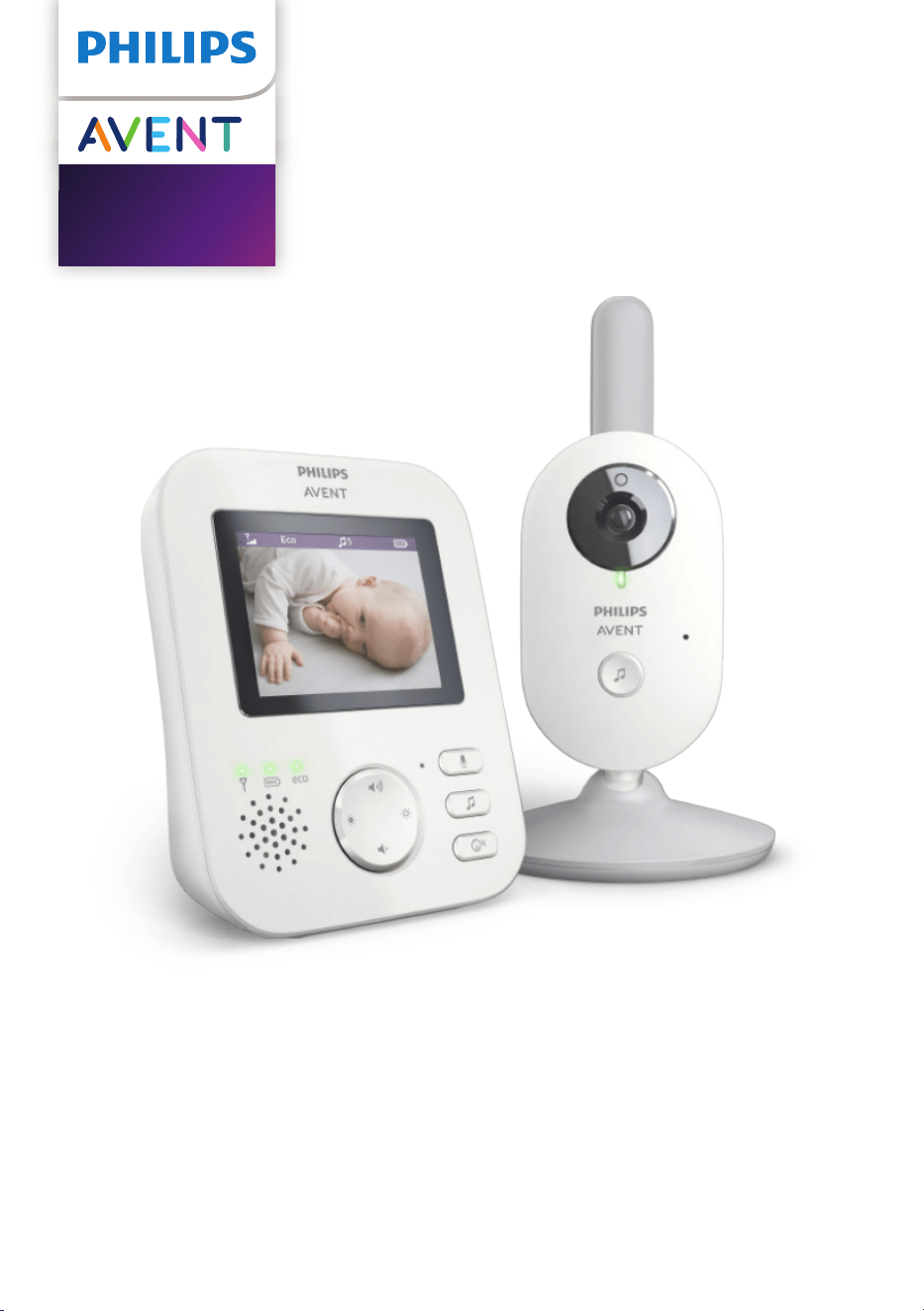
SCD831
SCD833
SCD835
User manual

Table of contents
Introduction ����������������������������������������������������������������������������������������������������������������������� 4
General description ���������������������������������������������������������������������������������������������������������� 4
Important safety information ��������������������������������������������������������������������������������������� 5
IMPORTANT ��������������������������������������������������������������������������������������������������������������������������� 5
Preparing for use �������������������������������������������������������������������������������������������������������������� 8
Baby unit��������������������������������������������������������������������������������������������������������������������������������� 8
Parent unit ����������������������������������������������������������������������������������������������������������������������������� 8
Using the baby monitor �������������������������������������������������������������������������������������������������� 9
Linking parent unit and baby unit ����������������������������������������������������������������������������������� 9
Positioning the baby monitor �����������������������������������������������������������������������������������������11
Operating range ����������������������������������������������������������������������������������������������������������������� 12
Features and settings ����������������������������������������������������������������������������������������������������� 13
Volume ����������������������������������������������������������������������������������������������������������������������������������13
Brightness �����������������������������������������������������������������������������������������������������������������������������13
Modes �����������������������������������������������������������������������������������������������������������������������������������14
Lullabies �������������������������������������������������������������������������������������������������������������������������������� 17
Talk-back �������������������������������������������������������������������������������������������������������������������������������19
Sensitivity �����������������������������������������������������������������������������������������������������������������������������19
Belt clip����������������������������������������������������������������������������������������������������������������������������������20
Cleaning and maintenance ������������������������������������������������������������������������������������������ 21
Storage ������������������������������������������������������������������������������������������������������������������������������ 22
Ordering accessories ������������������������������������������������������������������������������������������������������ 22
Recycling ��������������������������������������������������������������������������������������������������������������������������� 22
Disposal of your old product and battery ���������������������������������������������������������������� 23
Environmental information ��������������������������������������������������������������������������������������������� 23
Remove the integrated battery �������������������������������������������������������������������������������������� 23
Warranty and support ��������������������������������������������������������������������������������������������������� 24
Frequently asked questions �����������������������������������������������������������������������������������������24
Wall mount ����������������������������������������������������������������������������������������������������������������������31
1
16
2
3
4
5
13
14
12
11
6
9 1087
17
18
22
20
19
21
23
25
24
15

- 4 -
Introduction
Congratulations on your purchase and welcome to Philips Avent! To fully
benet from the support that Philips Avent oers, register your product at
www.philips.com/welcome�
The Philips Avent video babymonitor provides you with round-the-clock
support and it allows you to see your baby day and night from anywhere
in the house� The latest digital technology guarantees clear sound and the
clearest image of your baby� This gives you an additional sense of security
without entering your baby’s room and disturbing its sleep�
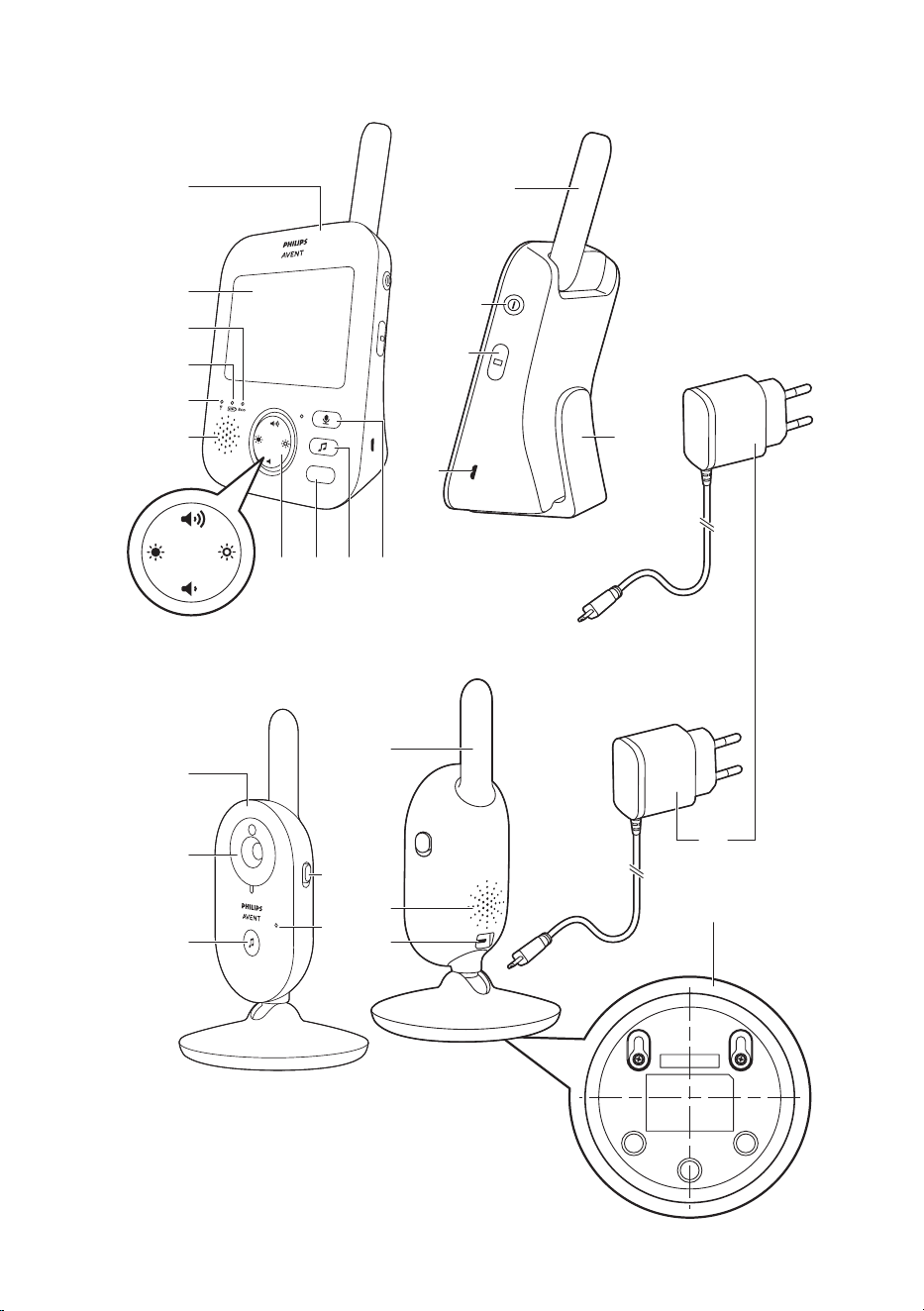
General description
1 Parent unit
2 Display
3 ECO light
4 Battery status light
5 Link light
6 Speaker
7 Control button (menu navigation/volume/brightness)
8 Sensitivity button
9 Lullaby button
10 Talk-back button
11 Socket for small plug
12 Mode button
13 On/o button
14 Antenna
15 Belt clip
16 Baby unit
17 Camera
18 Lullaby on/o button
19 Microphone
20 On/o slide
21 Antenna
22 Speaker
23 Socket for small plug
24 Wall mounting holes
25 Adapter(2x)
- 5 -
Important safety information
Read this important information carefully before you use the appliance
and save it for future reference�
IMPORTANT
This baby monitor is intended as an aid. It is not a substitute for
responsible and proper adult supervision and should not be used as
such.
Never leave your baby alone in your home� Always make sure there is
someone present to look after the baby and take care of its needs�
Disclaimer
Please note that you use this baby monitor at your own risk� Koninklijke
Philips N�V� and its subsidiary companies are not responsible for the
operation of this baby monitor or your use of it and therefore do not
accept any liability in connection with your use of this baby monitor�
Danger
- Never immerse any part of the baby monitor in water or any other
liquid� Do not place the appliance where water or any other liquid can
drip or splash onto it� Never use the baby monitor in moist places or
close to water�
- Never put any object on top of the baby monitor and do not cover
it� Do not block any ventilation openings� Install according to the
manufacturer’s instructions�
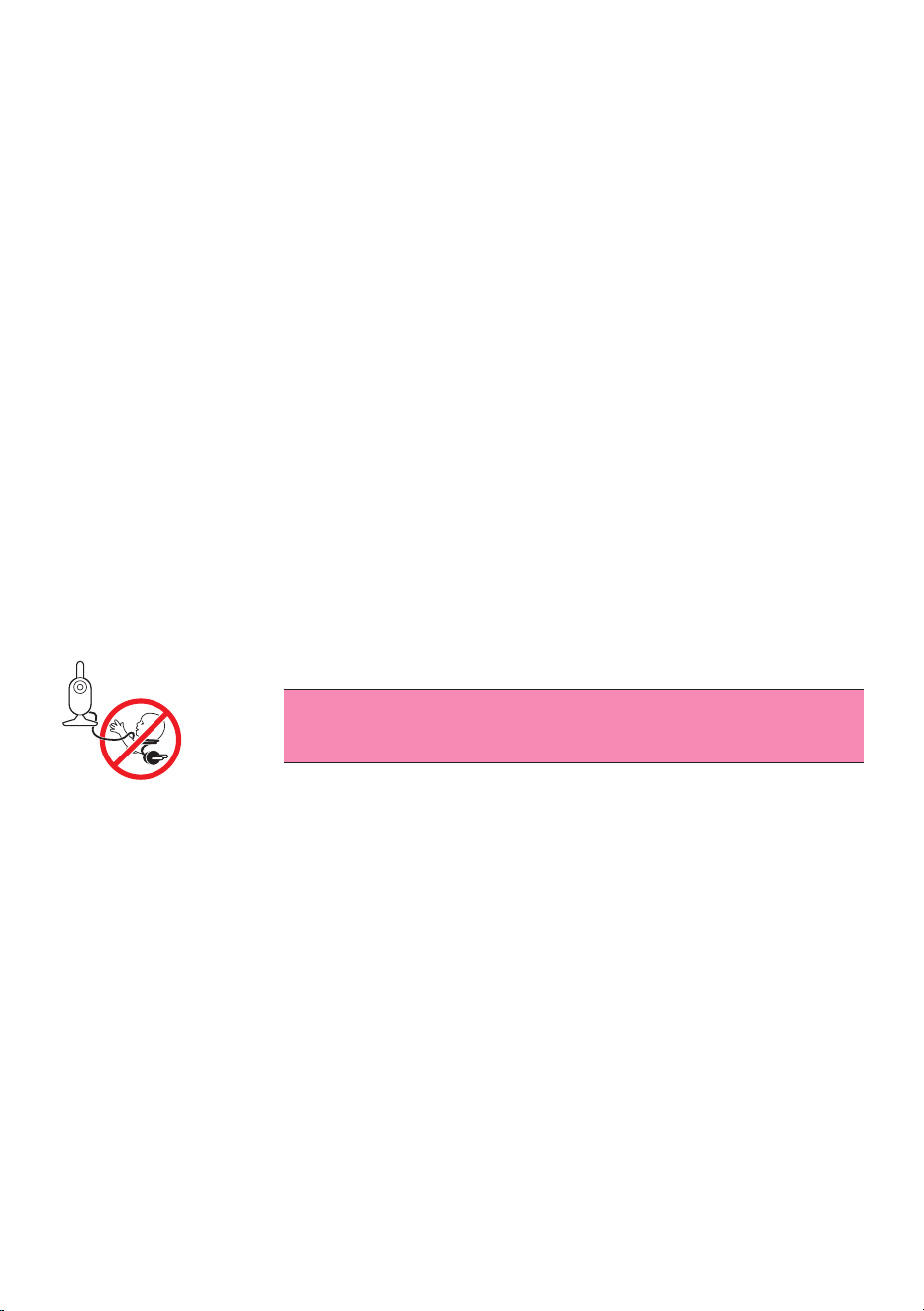
Warning: Strangulation Hazard—Children have STRANGLED
in cords. Keep this cord out of the reach of children (more
than 3 ft (0.9 m) away). Do not remove this tag.
Warning
- Check if the voltage indicated on the adapter corresponds to the local
mains voltage before you connect the appliance�
- Do not modify or cut o any part of the adapter and its cord, as this
causes a hazardous situation�
- Only use the adapter supplied�
- If the adapter is damaged, always have it replaced with one of the
original type in order to avoid a hazard�
- This appliance can be used by children aged from 8 years and above
and persons with reduced physical, sensory or mental capabilities or
lack of experience and knowledge if they have been given supervision
or instruction concerning use of the appliance in a safe way and
understand the hazards involved� Children shall not play with the
appliance� Cleaning and user maintenance shall not be made by
children without supervision�
- Protect the mains cord from being walked on or pinched particularly
at plugs, convenience receptacles, and the point where they exit from
the appliance�

- 6 -
- Make sure that you place the baby monitor in such a way that its cord
does not obstruct a doorway or passage� If you place the baby monitor
on a table or low cabinet, do not let the mains cord hang over the
edge of the table or cabinet� Make sure the cord does not lie on the
oor where it presents a tripping hazard.
- Keep the packaging materials (plastic bags, cardboard buers, etc.)
out of the reach of children, as they are not a toy.
- To prevent electric shock, do not open the housing of the baby unit or
parent unit�
Battery safety instructions
- Only use this product for its intended purpose and follow the general
and battery safety instructions as described in this user manual� Any
misuse can cause electric shock, burns, re and other hazards or
injuries�
- To charge the battery, only use the detachable supply unit* provided
with the product. Do not use an extension cord.
- Charge, use and store the product at a temperature between 0 °C and
40°C.
- Always unplug the product when it is fully charged�
- Do not burn products and their batteries and do not expose them to
direct sunlight or to high temperatures (e�g� in hot cars or near hot
stoves). Batteries may explode if overheated.
- If the product becomes abnormally hot, gives o an abnormal smell,
changes color or if charging takes much longer than usual, stop using
and charging the product and contact your local Philips dealer�
- Do not place products and their batteries in microwave ovens or on
induction cookers�
- This product contains a rechargeable battery that is non-replaceable�
Do not open the product to replace the rechargeable battery�
- When you handle batteries, make sure that your hands, the product
and the batteries are dry�
- To prevent batteries from heating up or releasing toxic or hazardous
substances, do not modify, pierce or damage products and batteries
and do not disassemble, short-circuit, overcharge or reverse charge
batteries�
- To avoid accidental short-circuiting of batteries after removal, do not
let battery terminals come into contact with metal object (e.g. coins,
hairpins, rings). Do not wrap batteries in aluminium foil. Tape battery
terminals or put batteries in a plastic bag before you discard them�
- If batteries are damaged or leaking, avoid contact with the skin or eye.
If this occurs, immediately rinse well with water and seek medical care.

- 7 -
Caution
- Use the appliance at a temperature between 0 °C and 40 °C.
- Do not install the appliance near any heat sources such as radiators,
heat registers, stoves or other apparatus (including ampliers) that
produce heat�
- Make sure that your hands are dry when you handle adapters, plugs
and the mains cord�
- All required markings on the baby unit, parent unitand power adapter
are located on the bottom of the baby unit, parent unit and power
adapter�
Declaration of conformity
Hereby, Philips Electronics Hong Kong Limited declares that this product
is in compliance with the essential requirements and other relevant
provisions of Directive 2014/53/EU� A copy of the EC Declaration of
Conformity (DoC) is available online at www.philips.com/support�
Compliance with EMF
This product complies with all applicable standards and regulations
regarding exposure to electromagnetic elds.
- 8 -
Preparing for use
Baby unit
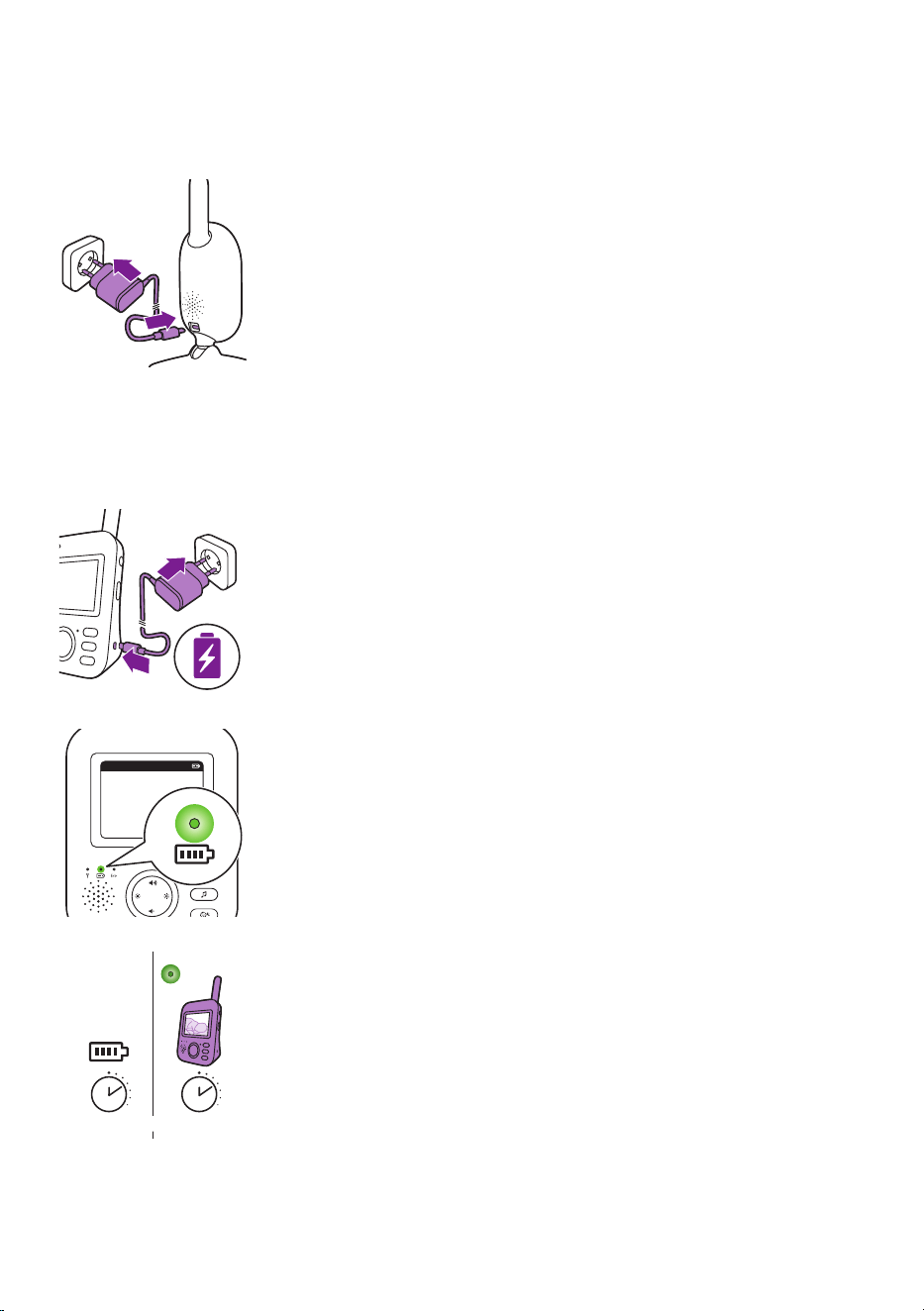
Put the power adapter in the baby unit and the adapter in the wall socket�
Parent unit
The parent unit runs ona built-in rechargeable Li-ion battery.
Follow the below steps to charge the parent unit:
Put the power adapter in the parent unit and put the adapter in the wall
socket�
The battery status light turns orange to indicate that the appliance is
charging�
When the battery is fully charged, thebattery statusindicator lights up
green continuously�
When you charge the parent unit for 3 hours, it can be used cordlessly for
approx. 10 hours in ECO mode.
If the parent unit is switched on during charging, charging takes
approximately twice as long.
20°CEco
1
eco
10 hr=3 hr
- 9 -
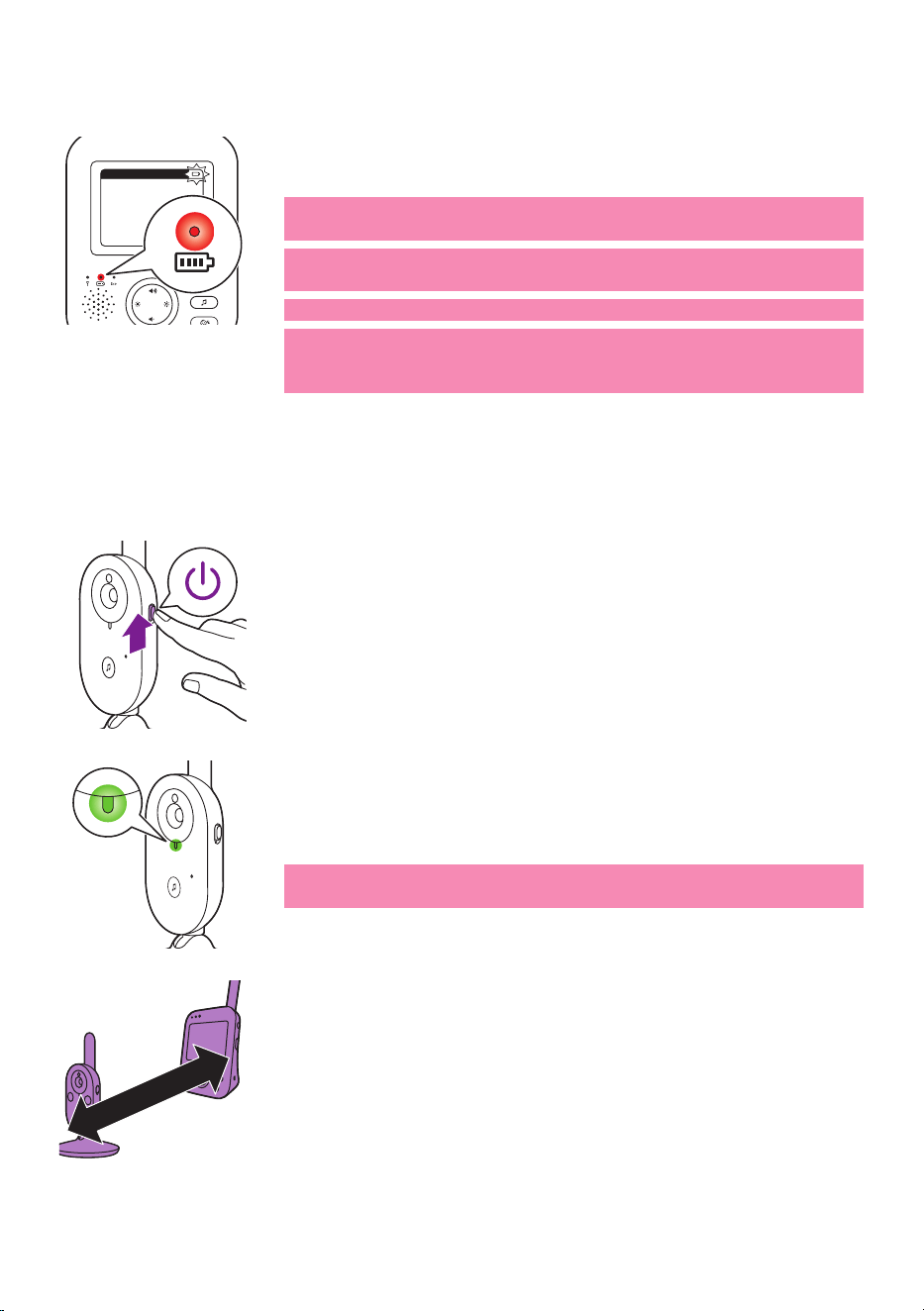
When the rechargeable battery of the parent unit is almost empty, the
battery status light turnsred and the parent unit beeps.
If the battery is completely empty and the parent unit it not connected
to the mains, the parent unit automatically switches o and loses contact
with the baby unit�
Note: The built in rechargeable battery cannot be removed from the
product�
Note: The battery gradually and very slowly discharges, even when the
parent unit is switched o.
Tip: To save battery, switch o the parent unit when you do not use it.
Note: We advise you to keep the parent unit connected to the mains
during the whole night� If the battery of the parent unit runs low
during the night, the parent unit beeps and this may wake you up.
Using the baby monitor
Linking parent unit and baby unit
1 Push the on/o slide on the baby unit upwards to the ON position.
2 When the baby unit is on, the power-on light on the baby unit lights
up green�
Note: The power-on light on the baby unit always lights up green,
even when there is no connection with the parent unit�
3 Make sure that the parent unit and the baby unit are at least
2.5meters/ 8.2 feet away from each otherto avoid acoustic feedback.
20°CEco
1
>2.5m/8.2ft
- 10 -
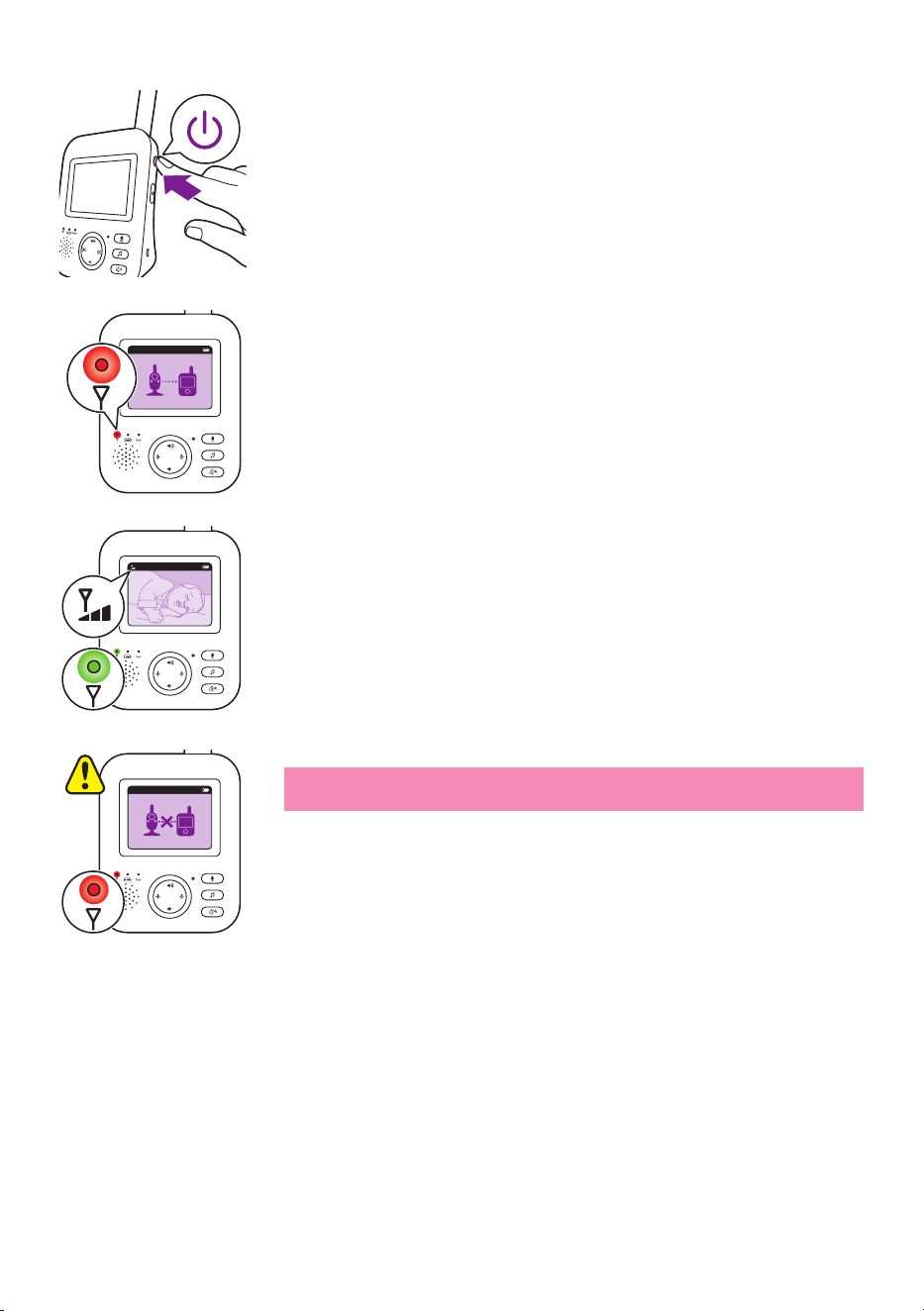
4 Press the on/o button on the parent unit for 1 second to switch on
the parent unit�
- The display goes on, the linking image appears on the display and
the link light lights up red� The parent unit starts to search for the
baby unit�
- When the parent unit and baby unit are linked, the link light lights
up green on the parent unit and one or more bars appear on the
display�
Note: It takes less than 10 seconds to establish the link between the
parent unit and the baby unit�
When thebaby unit is turned o, the parent unit will show the out of
range image� Make sure that the baby unit is switched on�
- If no connection has been established, the link light turns red, the
parent unit beeps three short beeps every 20 seconds and the out-
of-range image appears on the display�
20°CEco
1
20°CEco
1
20°CEco
1
- 11 -
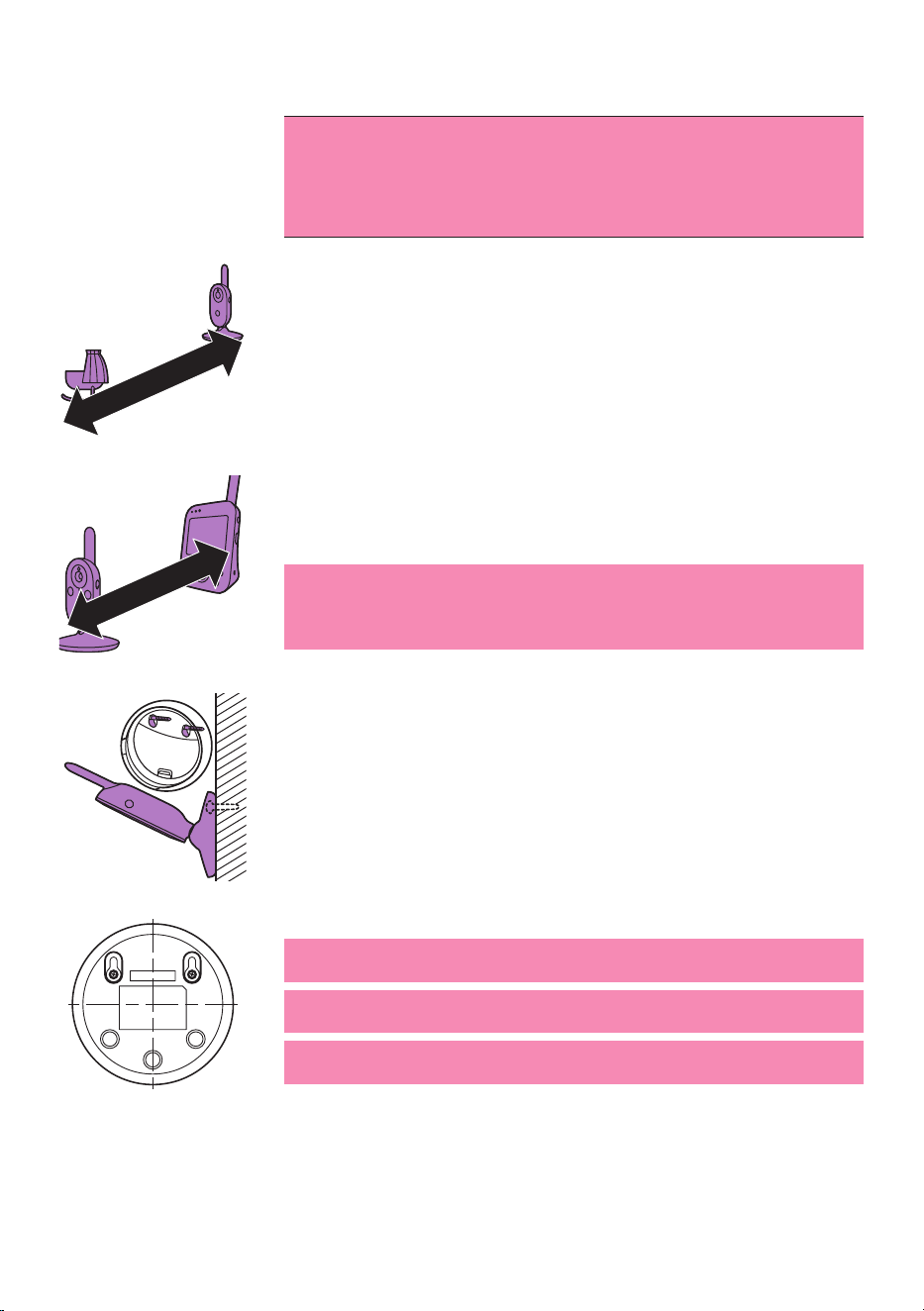
Positioning the baby monitor
Warning: The cord of the baby unit presents a potential
strangulation hazard. Make sure that the baby unit and its
cord are at least 1 meter / 3.5feet away from your baby.
Never place the baby monitor inside the baby’s bed or
playpen.
1 For optimal sound detection, make sure that the baby unit is no
further than 1�5 meter/ 5 feet away from the baby� Make sure that the
baby unit is at least 1 meter/ 3�5 feet away from the baby because of
potential strangulation hazard�
2 Place the parent unit within the operating range of the baby unit�
Make sure it is at least 2�5 meters / 8�2 feet away from the baby unit to
avoid acoustic feedback�
Note: If you use a cordless phone, wireless video, Wi-Fi network,
microwave oven or Bluetooth on 2.4GHz and you experience
interference on either the parent unit or baby unit, move the parent
unit until there is no more interference�
3 There are two ways to position the baby unit
a Place the baby unit on a stable, level and horizontal surface.
b Mount the baby unit to the wall with screws�
Tip: The wall mount template (see 'Wall mount') to mount the baby
unit to the wall can be found at the end of this user manual�
Tip: Use the provided template to mark the exact location of the screw
holes on the wall�
Tip: Position the baby unit at a higher level to get a good overview of
the baby’s bed or playpen�
>1-1.5m/3.5 -5ft
>2.5m/8.2ft
- 12 -
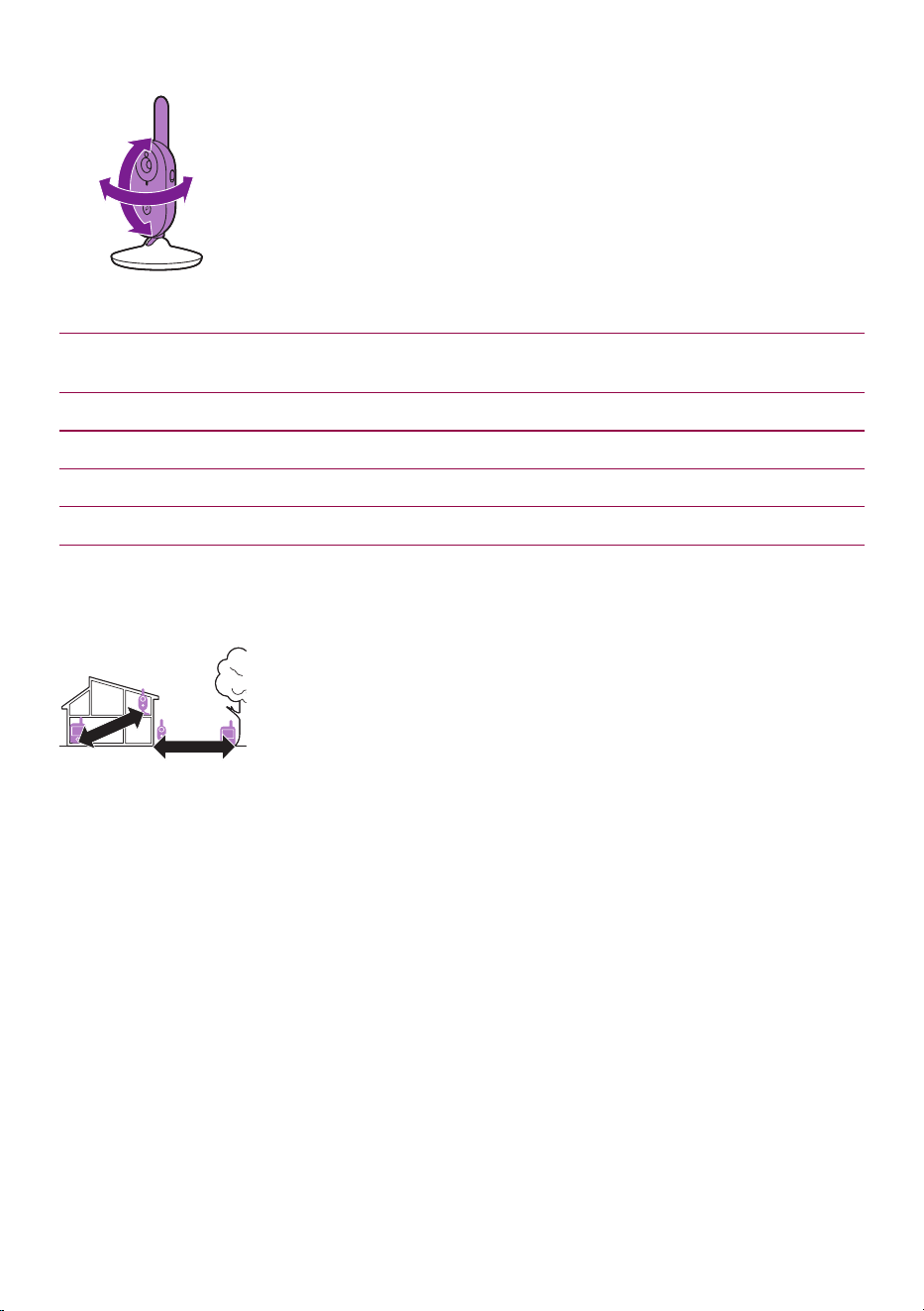
4 Adjust the baby unit in a way that ensures the best visibility of your
baby� The baby unit can be rotated to position it in the desired way�
Dry materials Material thickness Loss of range
Wood, plaster, cardboard, glass (without
metal, wires or lead)
< 30cm (12in) 0-10%
Brick, plywood < 30cm (12in) 5-35%
Reinforced concrete < 30cm (12in) 30-100%
Metal grilles or bars < 1cm (0.4in) 90-100%
Metal or aluminium sheets < 1cm (0.4in) 100%
Operating range
The operating range is up to 50 meters/ 165 feet indoors and
300meters/985 feet outdoors. The operating range of the baby monitor
varies depending on the surroundings and factors that cause interference�
Wet and moist materials cause so much interference that the range loss is
up to 100%.
<300m/985ft
<50m/165ft
- 13 -
Features and settings
Volume
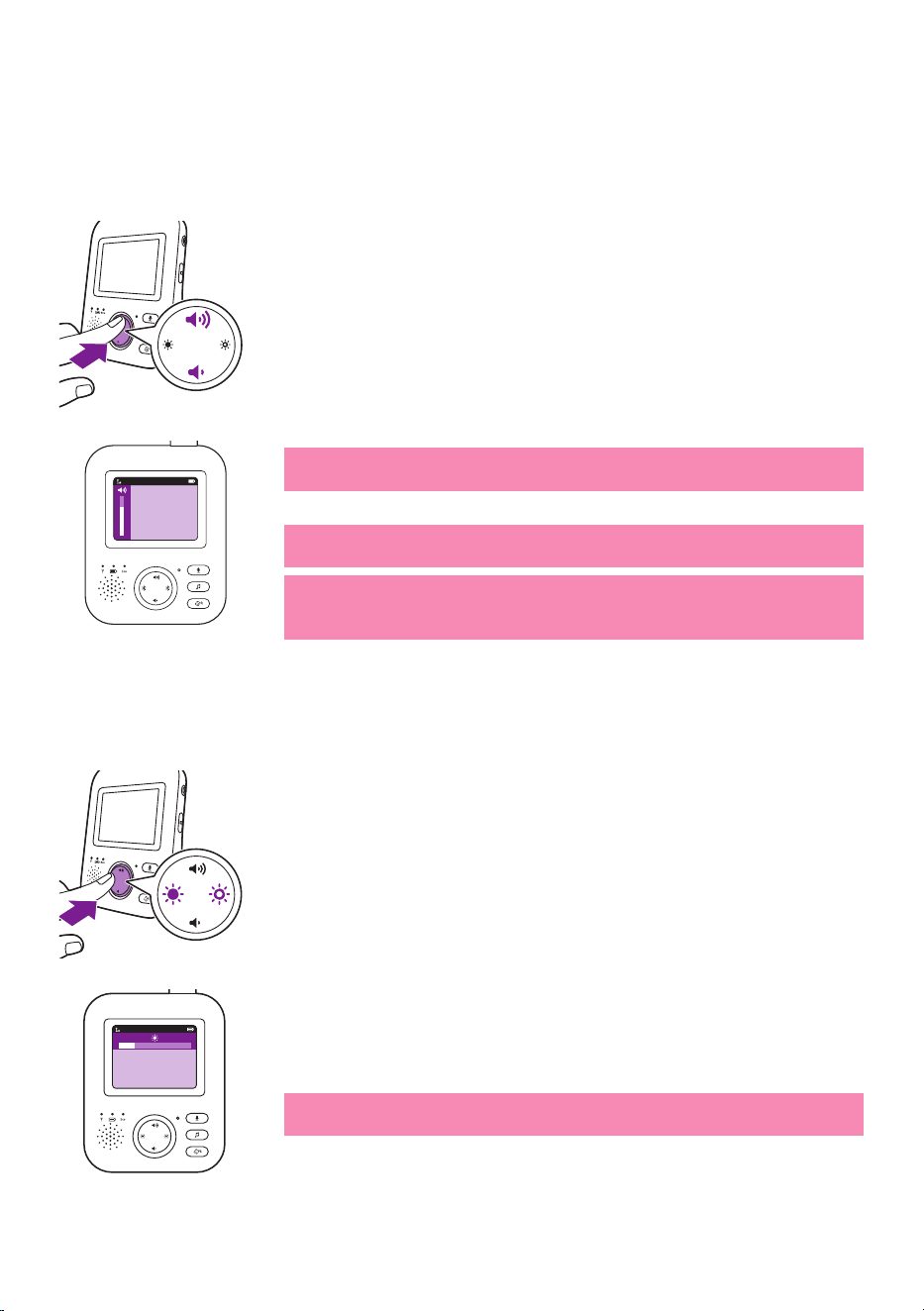
You can adjust the speaker volume of the parent unit to the level you
prefer�
1 Press the top or bottom part of the control button to adjust the
volume�
Tip: Make sure that the volume is adapted to the current conditions�
Under noisy conditions, the vibration alert can be turned on as well.
The volume bar appears on the display to show the selected volume�
Note: If the volume is set to a high level, the parent unit consumes
more power�
Note: When the volume bar is at its minimum, the volume is muted.
The parent unit shows a mute icon in the status bar and you will only
receive alerts and video from the parent unit�
Brightness
You can adjust the display brightness of the parent unit to the level you
prefer�
1 Press the left or right part of the control button to adjust the
brightness of the display of the parent unit�
The brightness bar appears on the display to show the selected display
brightness�
Note: If the brightness is set to a high level, the parent unit consumes
more power�
20°C
1
20°C
1
- 14 -
Modes
This baby monitor has four dierent modes that allows you to choose
how you want to look after your baby: VIDEO, AUDIO, VOX and ECO.
With the baby monitor on, you can switch between these 4 dierent
modes by pressing the mode button on the side of the parent unit�
The display shows the selected mode� The selected mode is also indicated
in the status bar. When turning on the device, the mode that was last
used will be active�
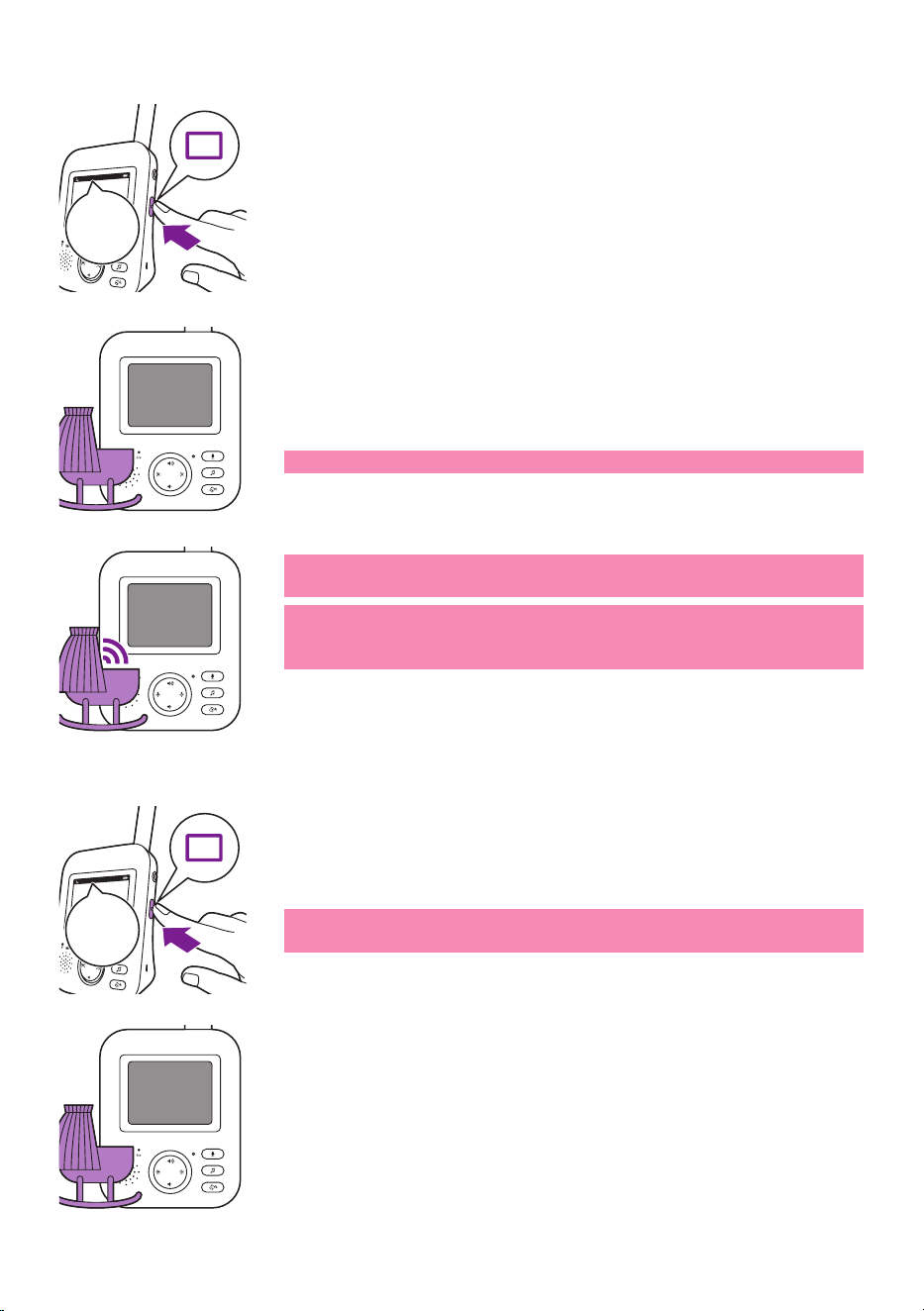
VIDEO mode
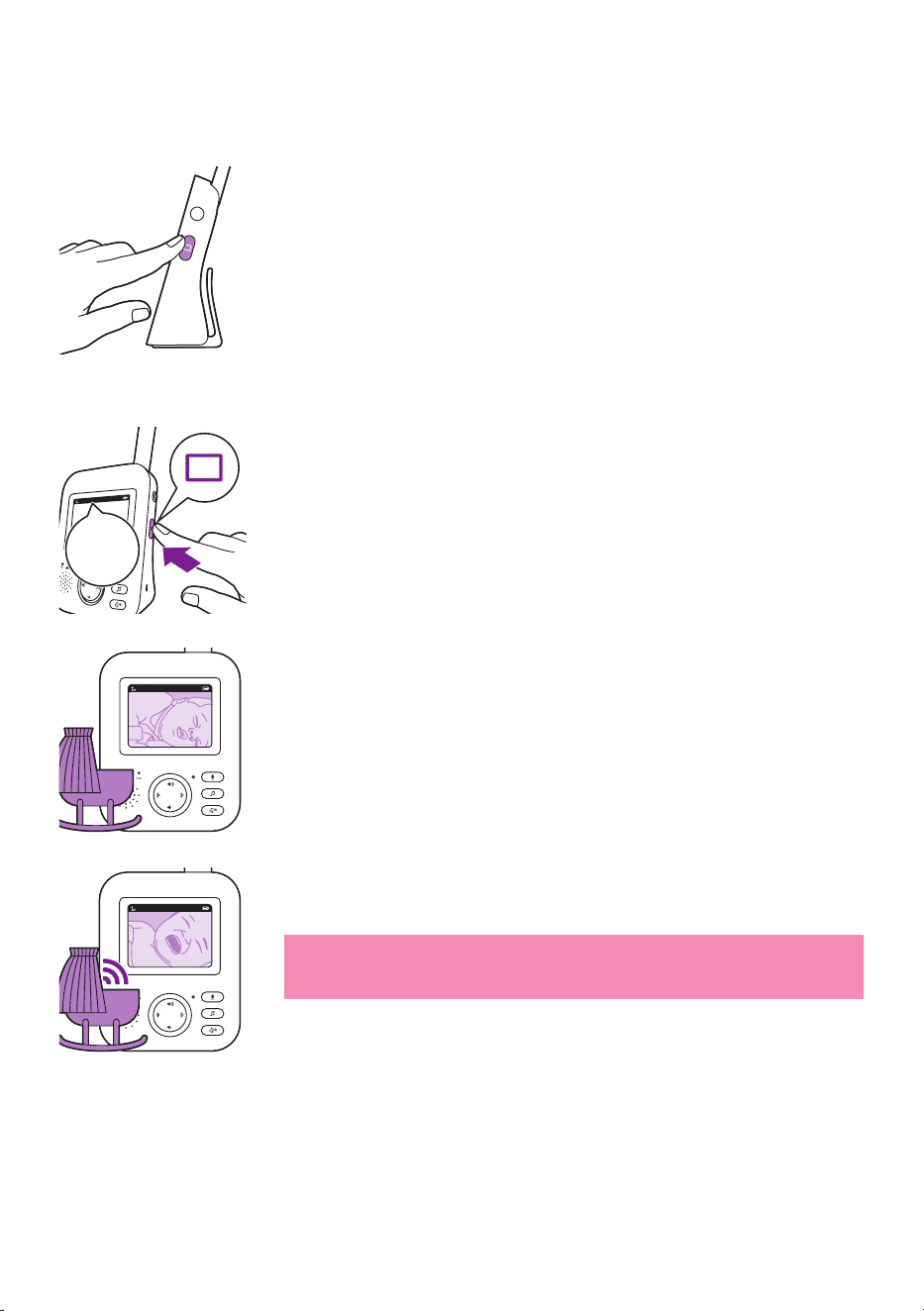
Press the mode button on the side of the parent unit to select theVIDEO
mode�
When the VIDEO mode is activated, the screen is always on, so you can
see your baby� All sounds are directly transmitted to the parent unit�
Note: Set the sensitivity level to 'very high' to have continuous sound
on the parent unit� Please see the Sensitivity level chapter for more
information�
VIDEO
VIDEO
20°C
1
VIDEO
20°C
1
VIDEO
- 15 -
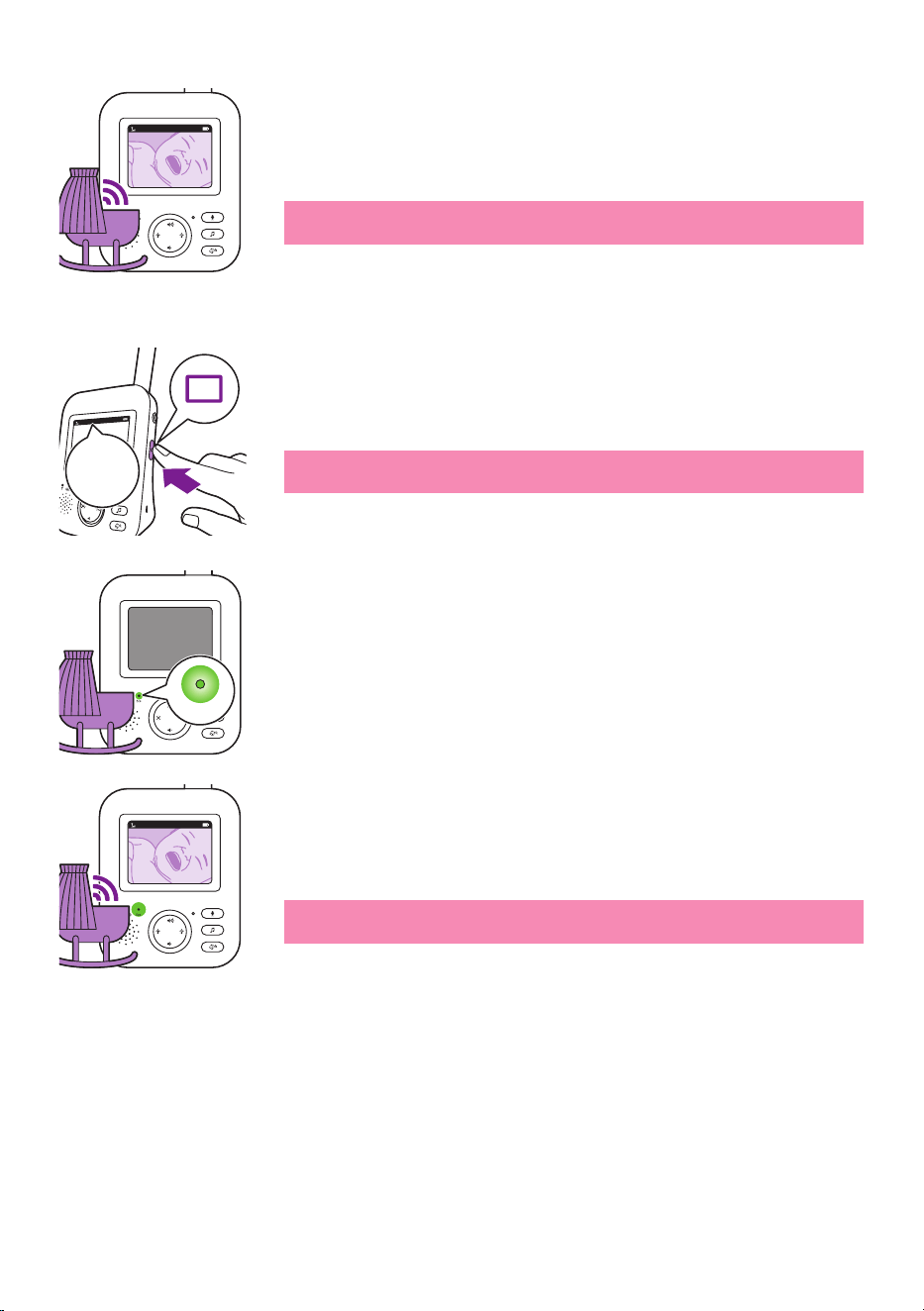
AUDIO mode
1 Press the mode button on the side of the parent unit to switch to
AUDIO mode�
When the AUDIO mode is activated, the display of the parent unit
switches o. After 3 seconds the display will completely turn o and
the status bar will disappear�
Note: The status bar is not visible when the display is o.
Note: The link light shows that the parent unit is still on and connected
to the baby unit�
Note: Set the sensitivity level to 'very high' to have continuous sound
on the parent unit� Please see the Sensitivity level chapter for more
information�
All sounds are constantly transmitted to the parent unit� If your baby
cries, the display of the parent unit is still o, but the sounds detected
by thebaby unitare transmitted to the parent unit.
VOX mode
1 Press the mode button on the side of the parent unit to switch to VOX
mode�
Note: When the display is on, the selected mode is shown in the status
bar. The status baris not visible when the display is o.
When the VOX mode is activated, the display and sound of the parent
unit switch o, if there is no sound detected for 20 seconds.
AUDIO
AUDIO
20°C
1
AUDIO
20°C
1
AUDIO
VOX
VOX
20°C
1
AUDIO
- 16 -
Whensound is picked up by the baby unit, the displayand sound of
the parent unit switch on immediately.The sounds are transmitted to
the parent unit�
Note: The minimum sound level to activate sound and display is
dened by the sensitivity setting.
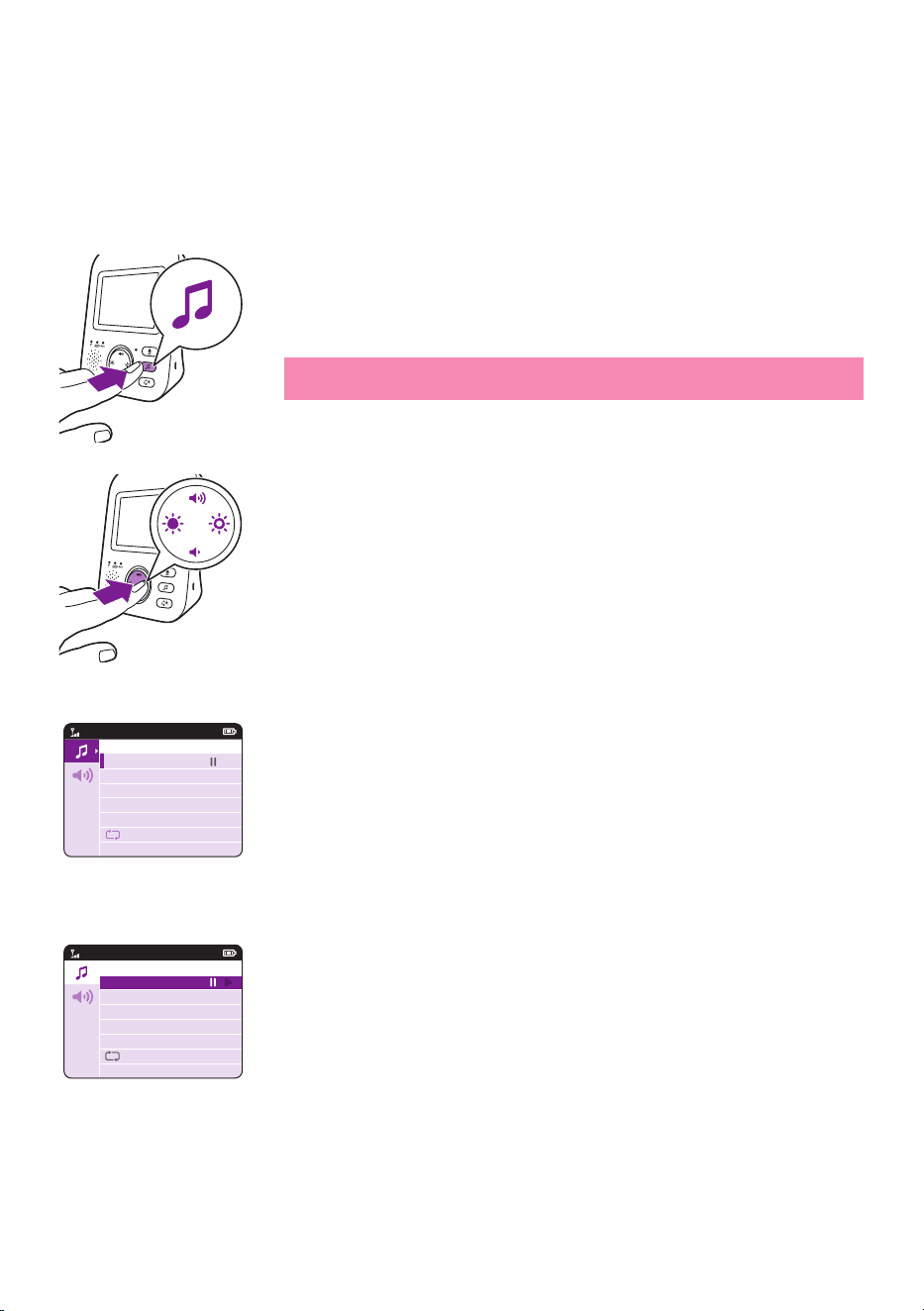
ECO mode
1 Press the mode button on the side of the parent unit to switch to ECO
mode�
Note: When the display is on, the selected mode will be visible in the
status bar. The status bar is not visible when the display is o.
When the ECO mode is activated the display and sound of the parent
unit switch o when no sound is detected for 20 seconds. TheECO
light lights up green to indicate that the ECO mode is activated� During
ECO mode the display and sound transmissions are turned o.
Whensound is picked up by the baby unit, the displayand sound of
the parent unit switch on immediately.The sounds are transmitted to
the parent unit�
Note: The minimum sound level to activate sound and display is
dened by the sensitivity setting.
20°C
1
VOX
ECO
ECO
20°C
1
ECO
ECO
20°C
1
ECO
- 17 -
Lullabies
You can activate the lullaby feature either from the parent unit or from
the baby unit�
To activate the lullaby feature from the parent unit, follow the
instructions below:
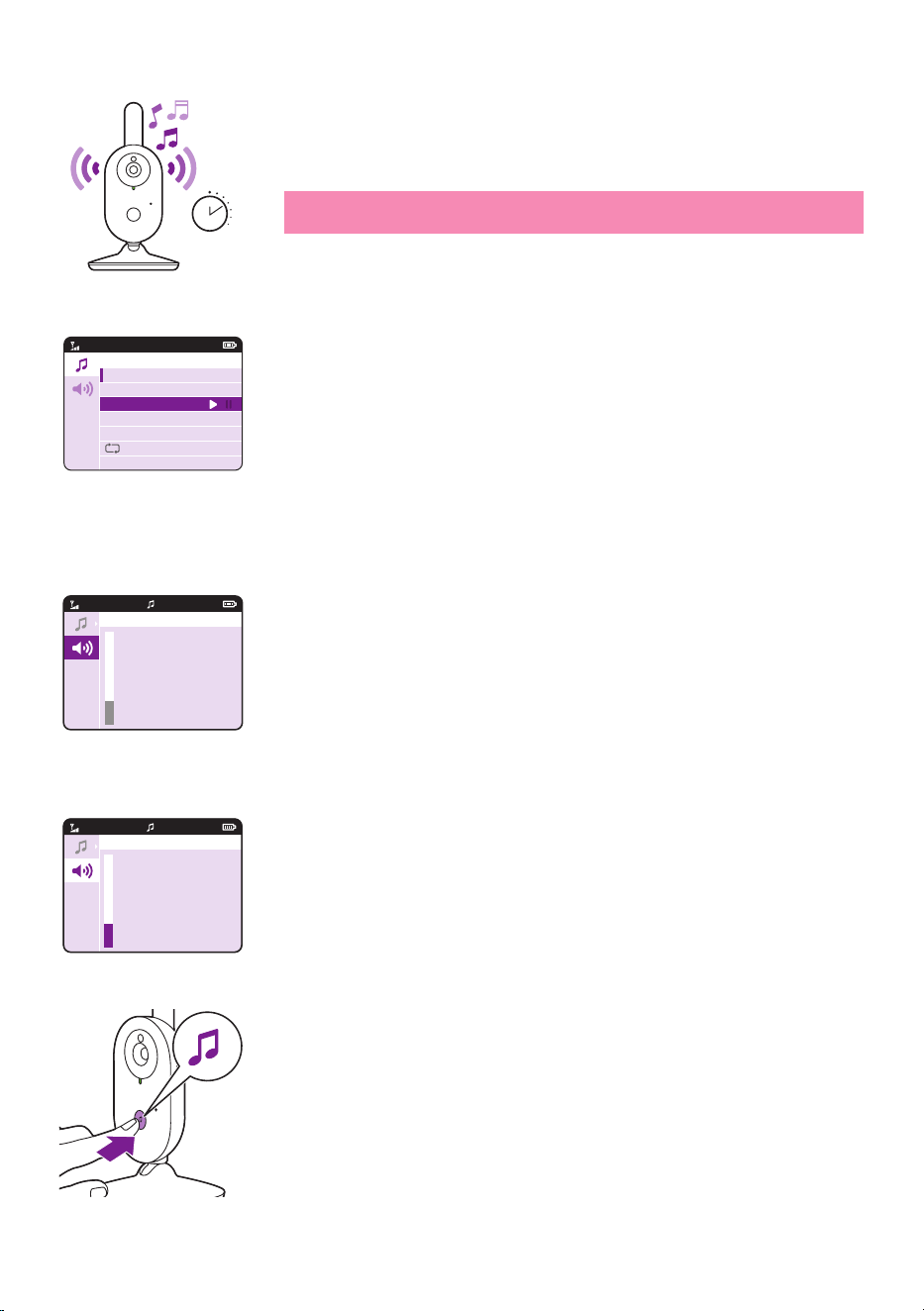
Lullaby selection
1 Press the lullaby button on the parent unit to open the menu for
lullabies�
Note: Pressing the lullaby button while the lullaby menu is already
open, will close the menu.
2 Press the right part of the control button to enter the list of lullabies�
3 Press the top or bottom part of the control button to scroll through
the list of lullabies�
4 Press the right part of the control button to play a specic lullaby.
If you want to pause the lullaby, press the right side of the control
button again�
5 The status barof the parent unit shows the number of lullabies
thatare being played and repeated.
Lullaby Songs
1 Rock-a-Bye Baby
2 Twinkle, Twinkle
3 Hush, Little Baby
4 Brahm’s Lullaby
5 Golden Slumbers
Lullaby Songs
1 Rock-a-Bye Baby
2 Twinkle, Twinkle
3 Hush, Little Baby
4 Brahm’s Lullaby
5 Golden Slumbers
- 18 -
The lullaby starts to play on the baby unit and it is repeated
continuously for approximately 15 minutes.
Tip: To repeat all songs that are available, select the last option in the
list�
6 To select another lullaby, scroll up or down with thecontrol button
to select another song from the list.Press the right part of the control
button to start the selected song�
7 To stop the lullaby, press the lullaby button on the parent unit and
pause the song that is currently playing by pressing the right part of
the control button one more time�
Lullaby volume
1 Press the lullaby button and then press the bottom of the control
button to select the volume options of thelullaby menu. Press the
right part of the control button to access the lullaby volume levels�
2 Press the top or bottom part of the control button to adjust the
volume�
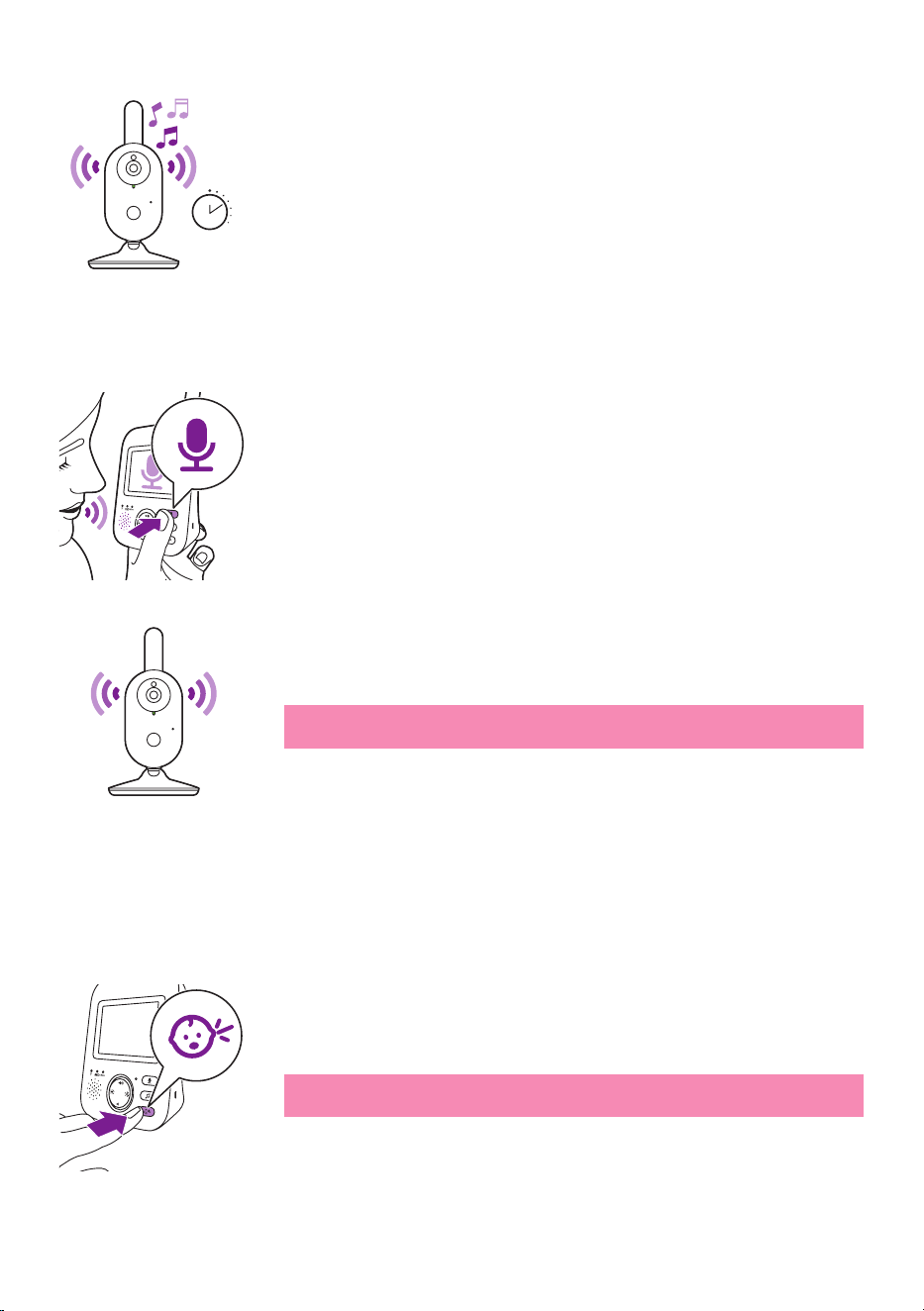
To activate the lullaby feature from the baby unit, press the lullaby on/
o button on the baby unit.
15 min
Lullaby Songs
1 Rock-a-Bye Baby
2 Twinkle, Twinkle
3 Hush, Little Baby
4 Brahm’s Lullaby
5 Golden Slumbers
20°C
1
Lullaby Volume
VIDEO
20°C
1
Lullaby Volume
VIDEO
- 19 -
The latest lullaby selected on the parent unit starts to play on the baby
unit and is repeated continuously for approximately 15 minutes.
To stop the lullaby on the baby unit, press the lullaby on/o button on
the baby unit�
Talk-back
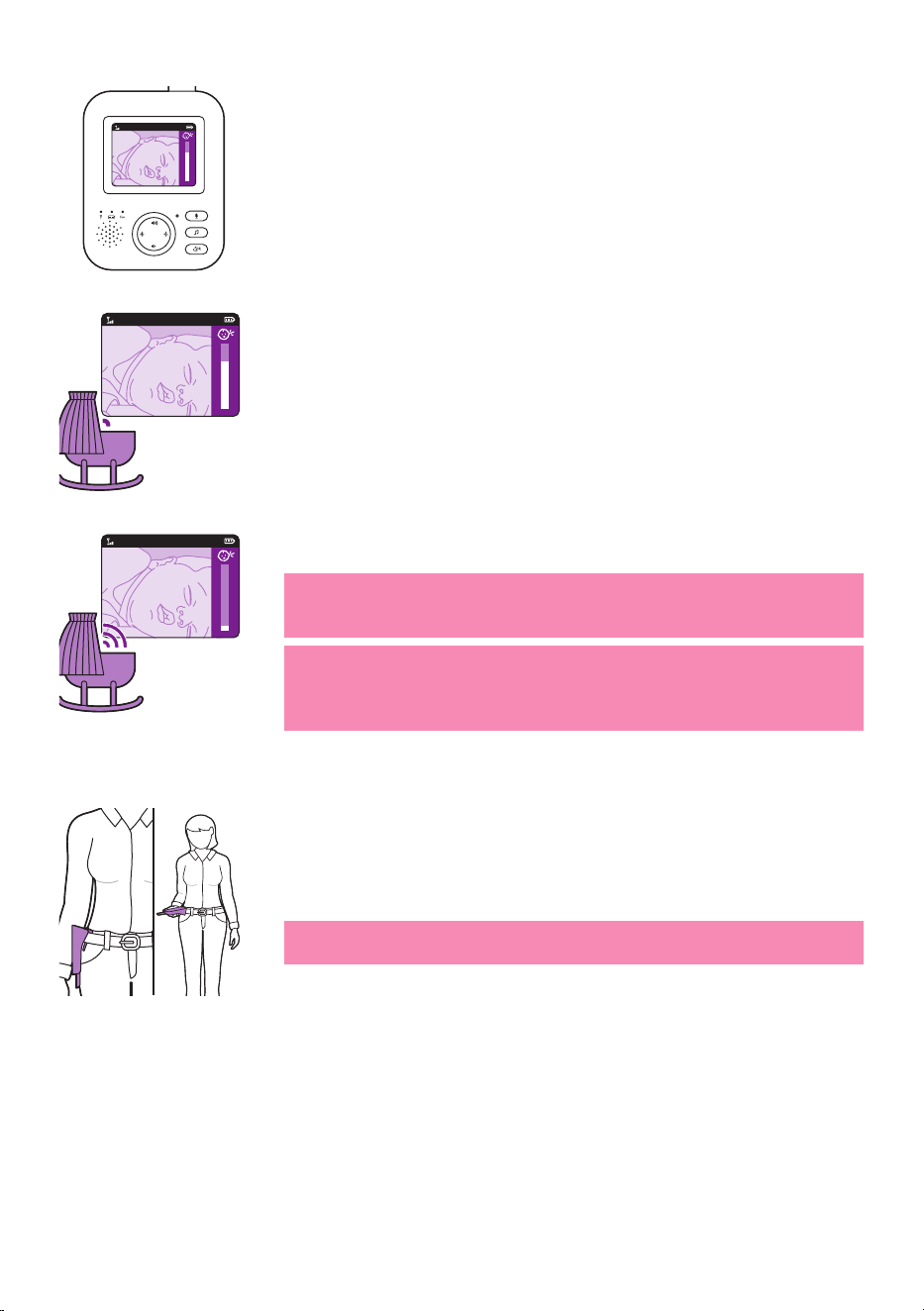
You can use the talk-back button on the parent unit to talk to your baby�
1 Press and hold the talk-back button on the parent unit�
2 Talk clearly into the microphoneat the front of the parent unit from a
distance between 15-30cm /0�5-1ft�
As long as the talk-back button is pressed, there is an open sound
connection to the baby unit� The display of the parent unit shows the
talk-back icon, indicating the active connection.
3 Release the talk-back button when you have nished talking.
Note: As long as the talk-back button is pressed, theparent
unitcannot process sounds coming from the baby unit.
Sensitivity
The sensitivity level of the baby unit denes what you hear through
the parent unit. When the level is set high, you will hear many sounds,
including soft background sounds. When the sensitivity level is set low,
you will hear only the louder sounds�
1 Press the sensitivity button to access the sensitivity levels�
Note: When pressing the sensitivity button again, you will leave the
menu�
15 min
- 20 -
2 Press the top or bottom part of the control button to select the desired
sensitivity level�
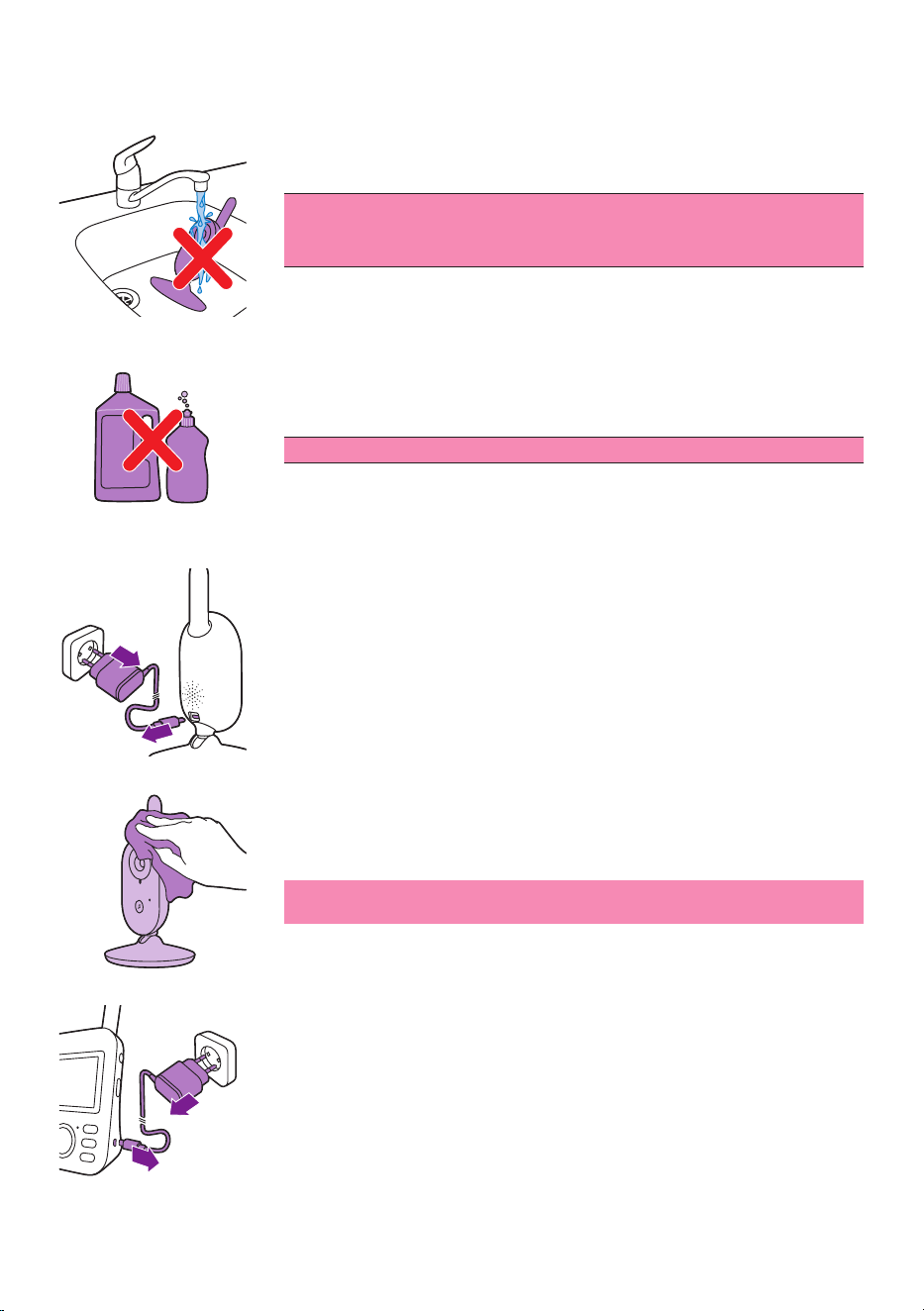
If your baby only makes soft sounds, the sensitivity of the baby unit
needs to be set to a high sensitivitylevel on the parent unit.
The louder your baby sounds, the lower the sensitivity can be set on
the parent unit�
Note: In AUDIO and VIDEO mode, you will have continuous sound
when the sensitivity level is on 'very high'. Otherwise, low sounds will
be muted�
Tip: The sensitivity level can be adjusted so you will always hear your
baby without the disruption of other sounds� When there is a lot of
background noise, turn the sensitivity lower so you will not hear these
sounds through the parent unit�
Belt clip
You can take the parent unit with you inside and outside the house by
attaching the parent unit to your belt or waistband with the belt clip� This
allows you to monitor your baby while you are moving around�
Note: The display is now turned upside down, which allows you to see
your baby on the screen by simply lifting up the parent unit�
20°C
1
20°C
1
20°C
1
- 21 -
Cleaning and maintenance
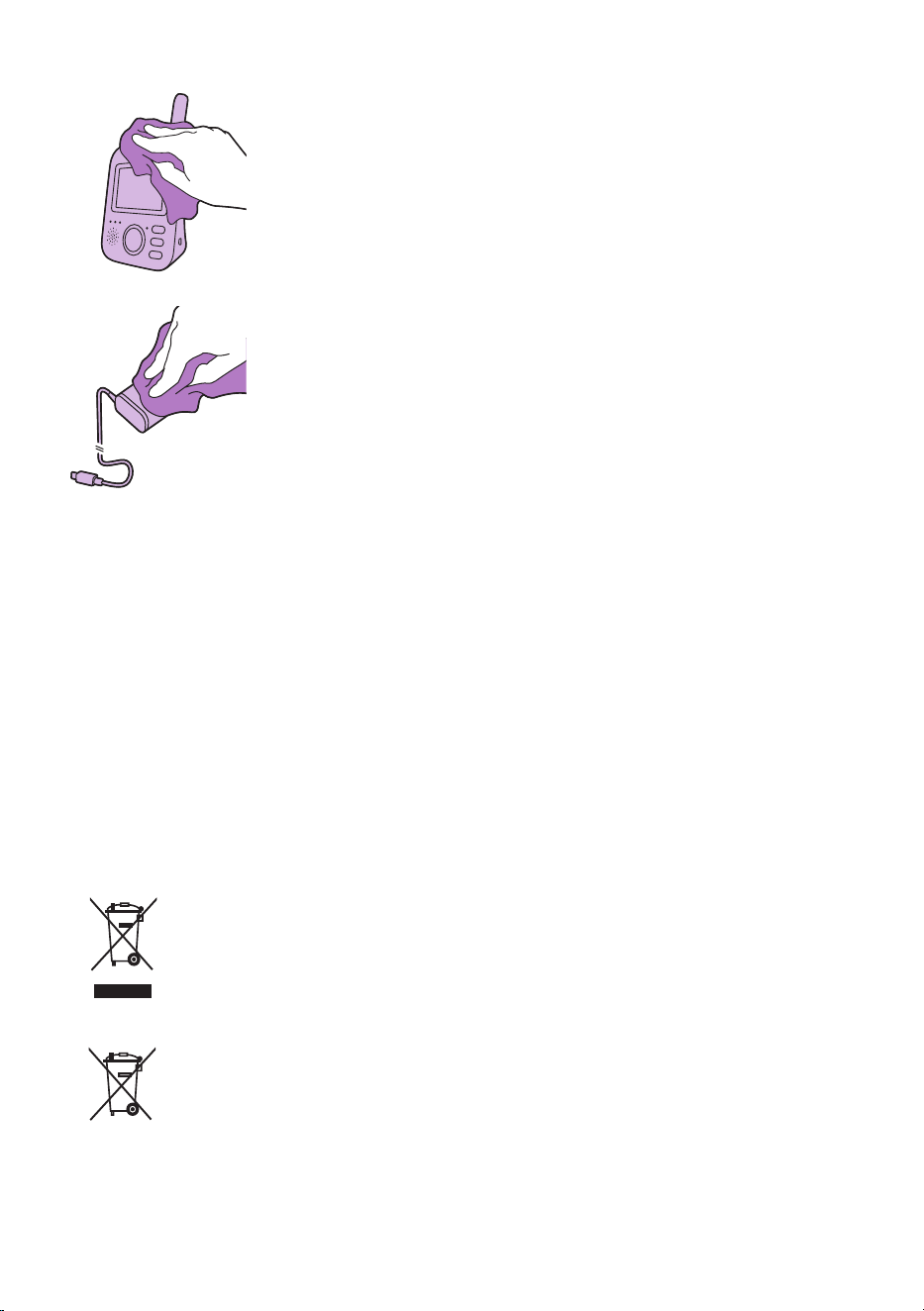
Warning: Do not immerse the parent unit, baby unit and
power adapters in water and do not clean them under the
tap.
Warning: Do not use cleaning sprays or liquid cleaners.
1 Switch o the baby unit, remove the power adapter from the baby
unit and remove the power adapter from the wall socket�
2 Clean the baby unit with a dry cloth�
Note: Fingerprints or dirt on the lens of the baby unit may aect the
camera’s performance. Avoid touching the lens with your ngers.
3 Switch o the parent unit, remove the power adapter from the parent
unit and remove the power adapter from the wall socket�
- 22 -
4 Clean the parent unit with a dry cloth�
5 Clean the adapters with a dry cloth�
Storage
When you are not going to use the baby monitor fora long time, store
the parent unit, the baby unit and the adapters in a cool and dry place.
Ordering accessories
To buy accessories or spare parts, visit www.philips.com/parts-and-
accessories or go to your Philips dealer� You can also contact the Philips
Consumer Care Center in your country (see the international warranty
leaet for contact details).
Recycling
- This symbol means that this product shall not be disposed of with
normal household waste (2012/19/EU)�
- This symbol means that this product contains a built-in rechargeable
battery which shall not be disposed of with normal household waste
(2006/66/EC). Please take your product to an ocial collection
point or a Philips service center to have a professional remove the
rechargeable battery�
- Follow your country’s rules for the separate collection of electrical and
electronic products and rechargeable batteries� Correct disposal helps
prevent negative consequences for the environment and human health�

- 23 -
Disposal of your old product and battery
Your product is designed and manufactured with high quality materials
and components, which can be recycled and reused.
This symbol on a product means that the product is covered by European
Directive 2012/19/EU�
This symbol means that the product contains a built-in rechargeable
battery covered by European Directive 2006/66/EC which cannot be
disposed of with normal household waste� We strongly advise you to
take your product to an ocial collection point or a Philips service center
to have a professional remove the rechargeable battery� Inform yourself
about the local separate collection system for electrical and electronic
products and rechargeable batteries� Follow local rules and never dispose
of the product and rechargeable batteries with normal household waste�
Correct disposal of old products and rechargeable batteries helps prevent
negative consequences for the environment and human health� If there
is no collection/recycling system for electronic products in your country,
you can protect the environment by removing and recycling the battery
before disposing the headphones�
Make sure the headset is disconnected from the charging case before
removing the battery�
Environmental information
All unnecessary packaging has been omitted� We have tried to make
the packaging easy to separate into two materials: cardboard (box and
polyethylene (bags, protective foam sheet).
Your system consists of materials which can be recycled and reused
if disassembled by a specialized company� Please observe the local
regulations regarding the disposal of packaging materials, exhausted
batteries and old equipment�
Remove the integrated battery
Note: We strongly advise you to have a professional remove the
rechargeable battery�
Only remove the rechargeable battery when you discard the appliance�
Make sure the battery is completely empty when you remove it� Only the
parent unit includes a battery�
Procedure:
1 Remove the 2 rubber feet at the bottom of the parent unit�
2 Remove the 2 screws that are now visible at the bottom of the parent
unit�
3 Put the antenna in upward position and remove the screw in the back
housing that is now visible�
4 Remove the back housing from the front housing by forcing a
screwdriver in between them� For newer versions manufactured after
August 2020*, there are 2 more screws underneath the rating label.
Tear out the rating label, remove the screws, release the belt clip and
slide open the battery compartment door�
5 Disconnect the battery connector cable (black-white-red cable)�

- 24 -
6 Remove the 4 screws from the battery holder� No screws for new
versions manufactured after August 2020�
7 Remove the battery�
*The production date code DDMMYY is located underneath the belt clip,
above the 2 rubber feet�
If there is no collection/recycling system for electronic products in your
country, you can protect the environment by removing and recycling the
battery before disposing the product�
Make sure the product is disconnected from the charging case before
removing the battery�
Warranty and support
If you need information or support, please visit www.philips.com/
support or read the international warranty leaet.
Frequently asked questions
This chapter summarizes the most common problems you could
encounter with the appliance� If you are unable to solve the problem
with the information below, visit www.philips.com/support for a list of
frequently asked questions or contact the Consumer Care Center in your
country�
HOW TO USE / CONNECTING THE UNITS
Question Answer
Why does the power-on
light of the baby unit not
go on when I switch on
the unit?
Perhaps the baby unit is not connected to the mains� Connect the baby
unit to the mains. Then set the on/o switch of the baby unit upwards to
the ON position to establish connection with the parent unit�
Why doesn't the parent
unit charge when I plug
it in?
Perhaps the adapter is not plugged in properly� Make sure the adapter is
plugged into the wall socket properly�
The parent unit may already be fully charged� The battery status light will
be green when the battery is fully charged and the device is connected to
the mains power�
Why doesn’t the baby
unit charge when I plug
it in?
The baby unit does not have a charging function� The baby unit only
works when it isconnected to themains.

- 25 -
HOW TO USE / CONNECTING THE UNITS
Why can’t I establish a
connection?
Why is the connection
lost every now and then?
Why are there sound
interruptions?
The baby unit and the parent unit are probably close to the outer limits
of the operating range or there is interference from other 2.4 GHz
wireless devices. Try a dierent location, decrease the distance between
the units or switch o other 2.4 GHz wireless devices (laptops, mobile
phones, microwaves, etc) . It can take up to 10 seconds before the
connection between the units is reestablished�
If the signal is lost, then the parent unit will make a beeping sound
(3 quick beeps every 20 seconds)�
The baby and parent unit might be too close to each other, keep them at
least 1�5 meters/ 5 feet away from each other to prevent interference�
What happens during a
power failure?
As the parent unit works on a rechargeable battery, the parent unit
continues to work if the battery is suciently charged. However, the
baby unit stops working because it has no rechargeable battery and only
works on a mains power� The parent unit will give a beeping sound to
indicate that the link with the baby unit is lost�
When mains power is restored, the connection between the parent unit
and the baby unit will automatically be established�
Why can the charging
time of the parent unit
exceed 3 hours?
The parent unit may be switched on during charging. Switch o the
parent unit during charging to reduce the charging time� When the
display of the parent unit is constantly on, charging of the parent unit will
take more time�
Perhaps temperature has exceeded the charging tolerance that could
potentially cut o the charging circuit as a safety protection mechanism.
To resume charging, move the charging station away from any heat
sources such as radiators, heat registers, stove or other appliances
(including ampliers) that produce heat.
Why do I need to keep
the baby unit and its cord
at least 1 meter/ 3�5 feet
away from my baby?
To avoid strangulation with the cord and for optimal sound detection,
always place the baby unit and its cord at least 1 meter / 3�5 feet away
from the baby�

- 26 -
HOW TO USE / CONNECTING THE UNITS
What is the dierence
between the various user
modes on the parent
unit: Video, Audio, VOX
and ECO?
See below list for an explanation on the available modes on your baby
monitor�
* Video mode: the screen and sound of the parent unit are always on.
* Audio mode: only audio will be activated. The display of the parent
unit switches o when AUDIO mode is activated. The link light shows
that the parent unit is still on and connected to the baby unit� All normal
correspondence with the baby unit is possible via the talk back, lullaby
and sensitivity buttons�
* VOX mode: The display and sound of the parent unit switch o if there
is no sound detected for 20 seconds (or not enough sound above the
sensitivity setting)� Both display and sound will be activated immediately
when your baby cries and the sensitivity threshold is passed� When the
sound drops below the sound threshold, the video will remain active for
20seconds. When one of the control buttons is pressed (brightness or
volume), the device shall display video for roughly 5 seconds. Also the
lullaby menu is accessible�
* ECO mode: The display and sound of the parent unit switch o
when no sound is detected for 20 seconds� Eco Mode reduces power
consumption during quiet times while keeping you connected to your
baby� In ECO mode the ECO LED light is green and the device will operate
on a dierent connection modus. In ECO mode the parent unit uses the
2 seconds ping mechanism to check the connection with the baby unit
instead of a continuous radio frequency connection� Therefore the Baby
Unit will also consume less energy in ECO mode�
How can I reset the
parent unit?
You can reset the parent unit by simultaneously press the "power on/
o button" and the round "navigation down button" at the front of the
parent unit for about 1 second. The parent unit will switch o. In order
to turn the parent unit back on, press the "power on/o button". Specic
user information stored in the memory of the parent unit such as user
mode, brightness settings, volume, lullaby selection, zoom selection and
vibration settings will not be lost�

- 27 -
INDICATIONS ON THE PARENT UNIT
Question Answer
The battery LED on the
parent unit turns red�
What should I do?
The battery power is low� If you do not connect the parent unit to
the mains power when the battery LED has turned red and starts to
make a beeping sound, the unit will stop working after approximately
60minutes.
Switch to lower brightness and/or volume to save battery consumption
and connect the parent unit to the mains with the power adapter� (see
chapter ‘Preparing for use’)�
Why does the parent unit
beep?
Your baby monitor beeps in a certain way to tell you what the problem is�
1 beep: parent unit is switched o.
1 beep, every 20 seconds for the rst 3 minutes, after that, every minute:
parent unit is low in battery�
3 quick beeps every 20 seconds: connection between parent and baby
unit is lost, link icon is shown on the parent unit's screen and the link
connection button is red�
What does the battery
LED colour (green,
orange, red) or no
burning LED mean for the
status of my battery?
When the parent unit is connected to the mains power the color of the
battery light will show:
* Green: battery is full.
* Orange: battery is charging.
When the parent unit is not connected to the mains power the color of
the battery light will show:
* Red: battery is almost empty (<10%).
* No burning LED: parent unit is not connected to the mains.

- 28 -
NOISE/SOUND
Question Answer
Why does the parent
unitand/or baby unit
produce a high-pitched
noise?
The parent unit and baby unit may be too close to each other� Make sure
the parent unit and the baby unit are at least 2�5 meters / 8�2 feet away
from each other�
The volume of the parent unit may be set too high� Decrease the volume
of the parent unit�
For causes of a beeping sound from the parent unit, see the FAQ "Why
does the parent unit beep?"
How can I mute the
sound?
Mute the device by pressing the bottom part of the control button� When
the volume bar on the screen is completely empty, the volume is muted.
Why don’t I hear a
sound?Why can’t I hear
my baby cry? Why do I
experience only partial
sound transmission but
not all?
The volume of the parent unit may be set too low or may be switched o.
Press the top part on the control button to increase the volume level�
Perhaps the parent unit is muted, unmute the device by pressing the top
part of the control button and adjust the volume�
The sensitivity is set too low, adjust the sensitivity in the parent unit's
menu to a higher level�
The baby unit may be too far away from your baby� Make sure the
baby unit is not further than 1�5 meters/ 5 feet away from your baby
for optimal sound detection� Closer than 1 meter /3�5 feet increases
strangulation hazard�
Why does the parent unit
react too quickly to other
sounds than my baby
makes?
The baby unit also picks up other sounds than those of your baby� Move
the baby unit closer to the baby (but observe the minimum distance of
1meter/ 3.5 feet).
The sensitivity level may be set too high� When your baby makes soft
sounds, the sensitivity has to be higher. However, the louder your baby
sounds, the lower the sensitivity level can be set. You can change the
sensitivity of your baby monitor on the parent unit's menu�
Why does the parent unit
make a buzzing sound?
Interference may occur when the parent unit is out of range of the baby
unit� Interference may also occur if there are too many walls or ceilings
between the parent unit and the baby unit or when other 2.4 GHz
wireless devices are switched on (e.g. microwave, Wi-Fi router).
Put the parent unit in a dierent place, closer to the baby unit, or switch
o other wireless devices.
If this answer does not help you, check the other FAQ on " Why does the
parent unit and/or baby unit produce a high-pitched noise?"
How long will the lullaby
song be played by the
baby unit?
Once you select a lullaby, it will be continuously repeated for
approximately 15 minutes. In case you want to play all songs that are
available, select the last option in the lullaby list.

- 29 -
NOISE/SOUND
How can I increase the
volume of the lullaby?
You can adjust the volume of the lullaby on the parent unit, not on the
baby unit� Press the lullaby button on the parent unit to open the lullaby
menu and adjust the volume�
OPERATING TIME / RANGE
Question Answer
Why does my baby
monitor manage a much
smaller distance than
specied in this user
manual?
The specied operating range of 300 meters /985 feet is only valid
outdoors in open air and in the line of sight� Depending on the
surroundings and other disturbing factors, the operating range may be
smaller (see also table in chapter on positioning of parent and baby unit)�
Inside your house, the operating range is up to 50 meters/165 feet,
which is also limited by the number and type of walls and/or ceilings
between the parent unit and the baby unit�
The operating time of the
parent unit is supposed
to be up to10hours. Why
is the operating time of
my parent unit shorter?
The video brightness of the parent unit may be set too high, which
causes the parent unit to consume a lot of energy� Decrease the
brightness of the parent unit�
The parent unit consumes a lot of energy when the video display is
switched on continuously. Activate the AUDIO, VOX or ECO mode in the
parent unit's menu to increase the operating time (see chapter ‘Features’,
sections 'AUDIO mode', ‘VOX mode' or ' ECO mode' ).
The volume of the parent unit may be set too high, which causes the
parent unit to consume a lot of energy� Decrease the volume of the
parent unit�
As any other rechargeable electronic device, the battery capacity
decreases after a long period of usage�
VIDEO DISPLAY
Question Answer
Why do I get interference
on the parent unit? Why
does the video display on
the parent unit icker?
Interference may occur when the parent unit is out of range of the baby
unit� Interference may also occur if there are too many walls or ceilings
between the parent unit and the baby unit or when other 2.4 GHz
wireless devices are switched on (e.g. microwave, Wi-Fi router).
Perhaps you have more than 2 sets of baby monitors and interference
may occur. Keep these 2 baby units away from each other, ideally in
separate rooms�
Put the parent unit in a dierent place, closer to the baby unit, or switch
o other wireless devices.
The rechargeable battery of the parent unit may need to be charged�

- 30 -
VIDEO DISPLAY
Why isn’t there any
image on the video
display while the linklight
is green?
The parent unit may be in the AUDIO, VOX or ECO mode. Press the mode
button on the right side of the parent unit to switch modes (see 'Modes')�
Why isn't the image on
the video display clear?
The display brightness may be set too low� Increase the display brightness
on the parent unit using the control button in the centre�
Perhaps the lens of the baby unit is dirty� Clean the lens with a dry cloth�
The baby unit may be too far away from your baby� Make sure the
baby unit is not further than 1�5 meters / 5 feet away from your baby
for optimal video quality� Closer than 1 meter / 3�5 feet increases
strangulation hazard�
General information
Rechargeable Li-ion battery
FHSS frequency band 2.4GHz.
Maximum radio-frequency power: <=20dBm
Supply unit:
Model: ASSA105E-050100 (EU plug) or
ASSA105B-050100 (UK plug)
Input: 100-240V 50/60Hz ~0�35A
Output: 5�0V 1.0A, 5.0W
Average active eciency: >=73.62%
No-load power consumption (W): 0�1W
- 31 -
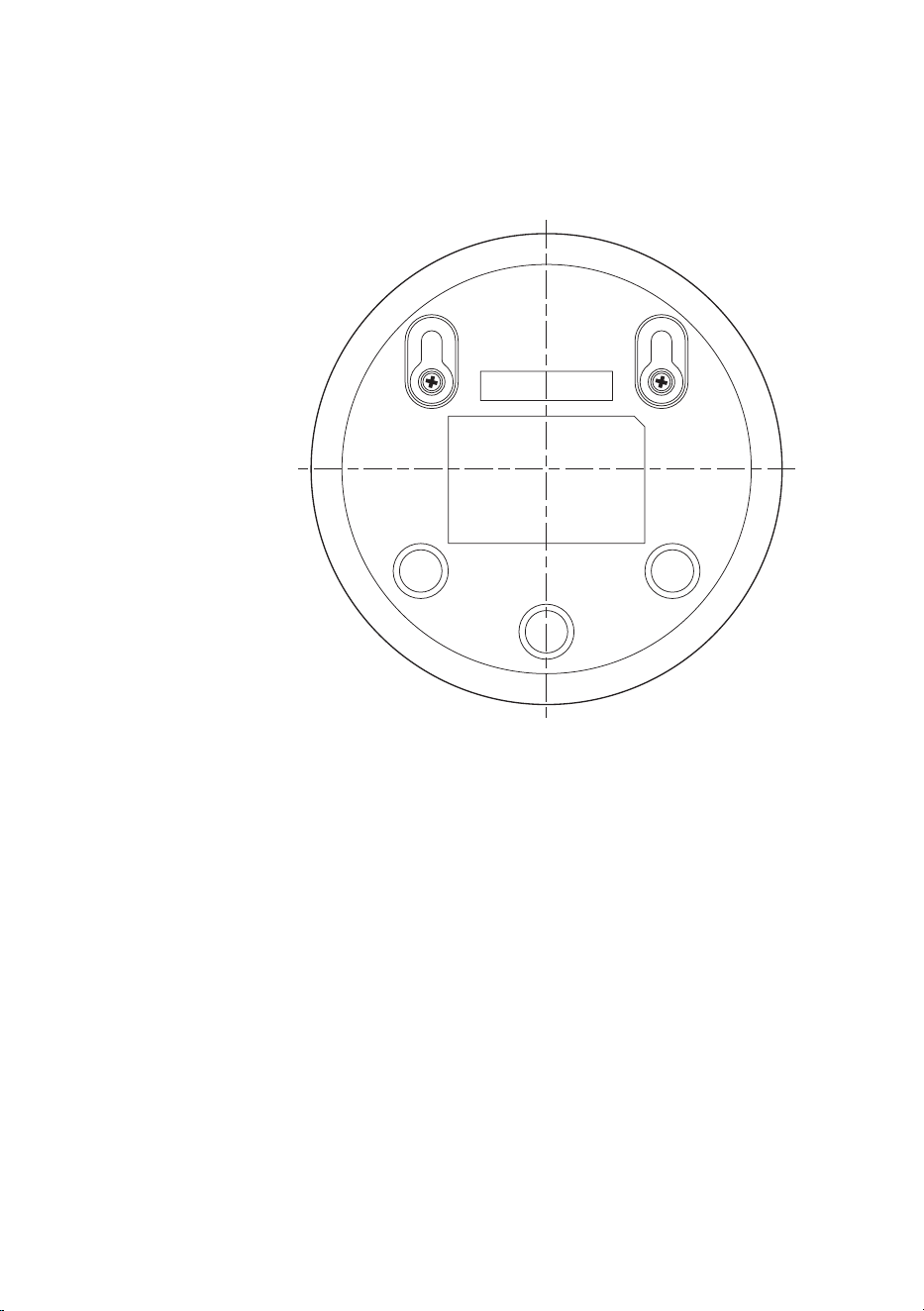
Wall mount
Printing instructions:
Print this page in scale 100% and use the template to accurately mark the
position of the holes for the screws on the wall�

© 2022 Koninklijke Philips N.V.
All rights reserved.
15/03/2022