The 2N TELEKOMUNIKACE a.s. is a Czech manufacturer and supplier of
telecommunications equipment.
The product family developed by 2N TELEKOMUNIKACE a.s. includes GSM gateways,
private branch exchanges (PBX), and door and lift communicators. 2N
TELEKOMUNIKACE a.s. has been ranked among the Czech top companies for years
and represented a symbol of stability and prosperity on the telecommunications
market for almost two decades. At present, we export our products into over 120
countries worldwide and have exclusive distributors on all continents.
2N is a registered trademark of 2N TELEKOMUNIKACE a.s. Any product and/or other
®
names mentioned herein are registered trademarks and/or trademarks or brands
protected by law.
2N TELEKOMUNIKACE a.s. administers the FAQ database to help you quickly find
information and to answer your questions about 2N products and services. On www.
faq.2n.cz you can find information regarding products adjustment and instructions for
optimum use and procedures „What to do if...".
2N TELEKOMUNIKACE a.s. hereby declares that the 2N product complies with all
basic requirements and other relevant provisions of the 1999/5/EC directive. For the
full wording of the Declaration of Conformity see the CD-ROM (if enclosed) or our
website at www.2n.cz.
The 2N TELEKOMUNIKACE a.s. is the holder of the ISO 9001:2009 certificate. All
development, production and distribution processes of the company are managed by
this standard and guarantee a high quality, technical level and professional aspect of
all our products.
2N TELEKOMUNIKACE a.s., www.2n.cz 3/233
Content:
1. Product Overview
1.1 Components and Associated Products
1.2 Terms and Symbols
2. Description and Installation
2.1 Before You Start
2.2 Mechanical Installation
2.2.1 One Module Box
2.2.2 Two Modules Boxes
2.2.3 More Two Modules Boxes
2.2.4 Three Modules Box
2.2.5 More Than Three Modules Boxes
2.2.6 Tamper and I/O Module
2.2.7 Module dimensions
2.2.8 Příklad instalace montážní desky
2.3 Electric Installation
2.4 Extending Module Connection
2.5 Completion
3. Function and Use
3.1 Configuration
3.2 Intercom Control as Viewed by External User
3.3 Touch Display Intercom Control As Viewed by External User
3.4 Intercom Control as Viewed by Internal User
3.5 Maintenance
3.6 Downloads
4. Technical Parameters
5. Supplementary Information
5.1 Troubleshooting
5.2 Directives, Laws and Regulations
5.3 General Instructions and Cautions


2N TELEKOMUNIKACE a.s., www.2n.cz 5/233
Basic Features
2N LTE Verso
®
is an elegant and reliable LTE intercom equipped with lots of useful
functions, which are not quite common in this category of devices. A mobile LTE
connection makes it possible to install devices where no LAN cable connection is
available. The My2N portal helps make calls to mobile phones and appropriate 2N
Thanks to SIP support and compatibility with devices without complex configuration.
major brands of PBX manufacturers, it can benefit from using VoIP networks. 2N LTE
®
can be used as a door or special purpose intercom for office buildings, Verso
residential areas and other applications.
2N LTE Verso
®
is a modular system: the user determines its configuration according
to the needs of the particular installation. Unlike other intercoms,
is not delivered as a compact unit. After choosing the installation 2N LTE Verso
®
mode and particular modules, the user gets separate parts to be assembled using the
plug&play connections. This approach allows for unique individual combinations and
also leaves space for adding of additional modules later on.
Wide angle HD camera – allows the tenant to see the calling person on his or her
videophone or PC screen in high resolution. The camera itself is hidden behind a
darkened glass, so it is not visible. The intercom is equipped with night vision, which
automatically selects the night/day mode according to light.
Quick dial buttons – there are 146 quick dial buttons in total in multiple button
modules. For each button, up to three separate phone numbers plus substitute users
can be defined, which ensures that the called user is reached whenever needed. The
buttons are backlit with a clear mechanical response. The nametag surface is scratch
resistant.
Keypad – is a keypad module that allows the user to use the intercom as a code lock
and dial a phone number or phonebook position of the called user.
RFID card reader – the card reader module brings the access control functionality
according to the RFID card or keyfob. With the advanced features, other functions can
be RFID card controlled too.
Electric lock control – as part of the access system, the electrical lock can be
controlled by a code entered on the keypad or the called phone, with the RFID card,
via a PC application, etc. When necessary, more electrical outputs can be added.
Numerous parameters allow for a wide spectrum of applications.

2N TELEKOMUNIKACE a.s., www.2n.cz 6/233
Robustness – is designed as a vandal resistant intercom, which 2N LTE Verso
®
withstands mechanical or weather conditions with no need to purchase extra
accessories.
Audio quality – using the automatic echo cancelling system, full duplex
communication is available at any time.
2N LTE Verso installation
®
– simply assemble the modules, insert a SIM card and
connect a power supply. The modules are plug&play, so you do not have to configure
them manually. The intercom is fed from a 12V power supply.
2N LTE Verso configuration
®
– use a PC equipped with any Internet browser.
2N TELEKOMUNIKACE a.s., www.2n.cz 7/233
Advantages of Use
Easy connection via LTE data network without LAN cabling
Elegant design
Weather resistant
Various modes of installation (flush, surface, plasterboard)
Sensitive microphone and loud speaker
Both-way audio communication – acoustic echo cancellation
Integrated colour HD camera with wide-angle lense and hidden night vision
Selectable number of quick dial buttons with nametags and backlight
Optional numeric keypad with backlight
Option to have multiple modules of the same kind – for example, card reader for
both entering and leaving the building
Integrated switches of electric locks with wide setting options
Optional integrated RFID card reader module
12 V DC power supply
Configuration using web interface
VoIP standard SIP 2.0 support
10 000 Phone Book positions
20 user time profiles
Video codecs (H.263, H.263+, H.264, MPEG-4, MJPEG)
Audio codecs (G.711, G.729, G.722, L16/16kHz)
HTTP server for configuration
SNTP client for time synchronisation
SMTP client for email sending, Picture to Email feature
TFTP/HTTP client for automated firmware and configuration upgrade and
update
2N TELEKOMUNIKACE a.s., www.2n.cz 8/233
1.1 Components and Associated Products
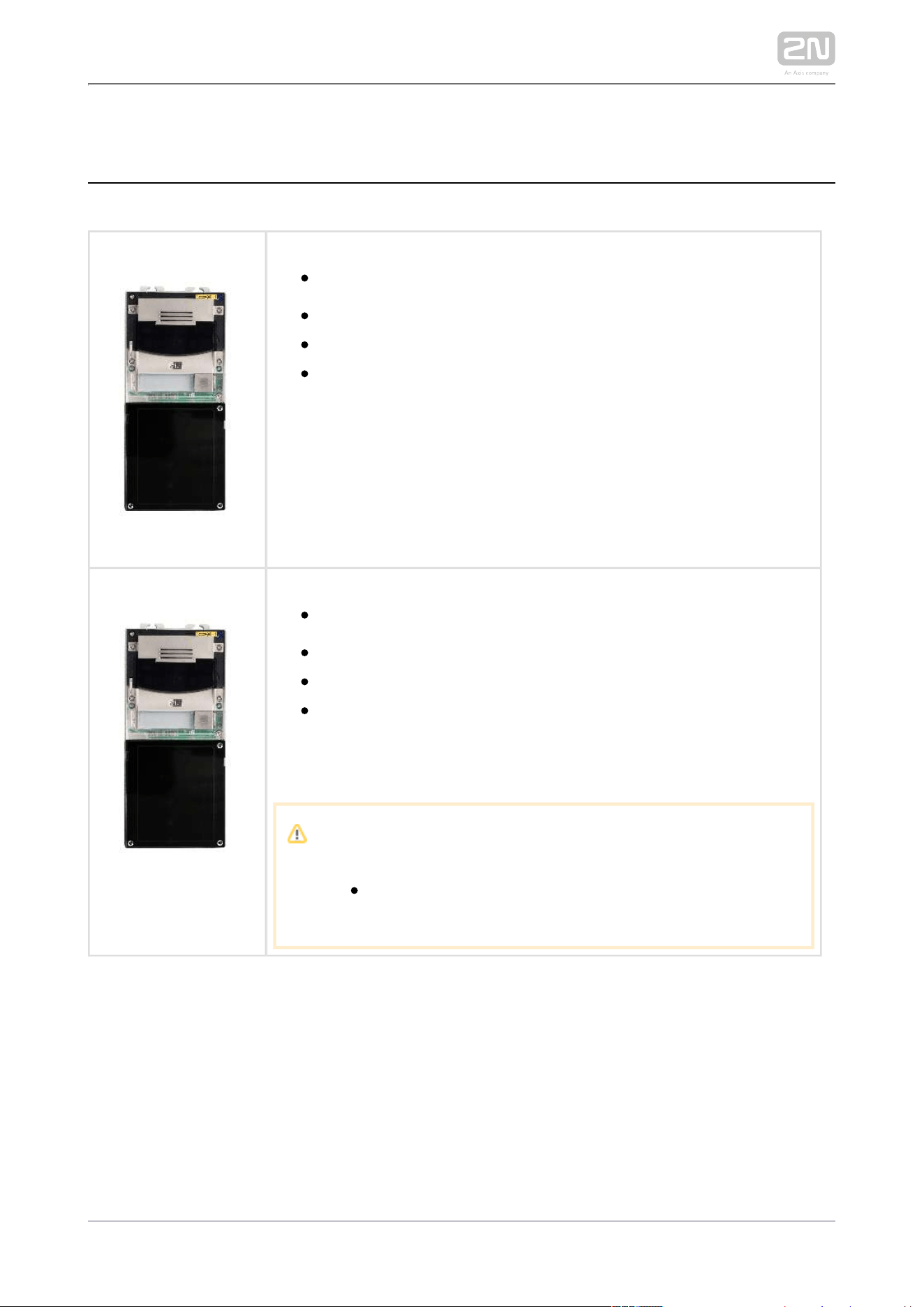
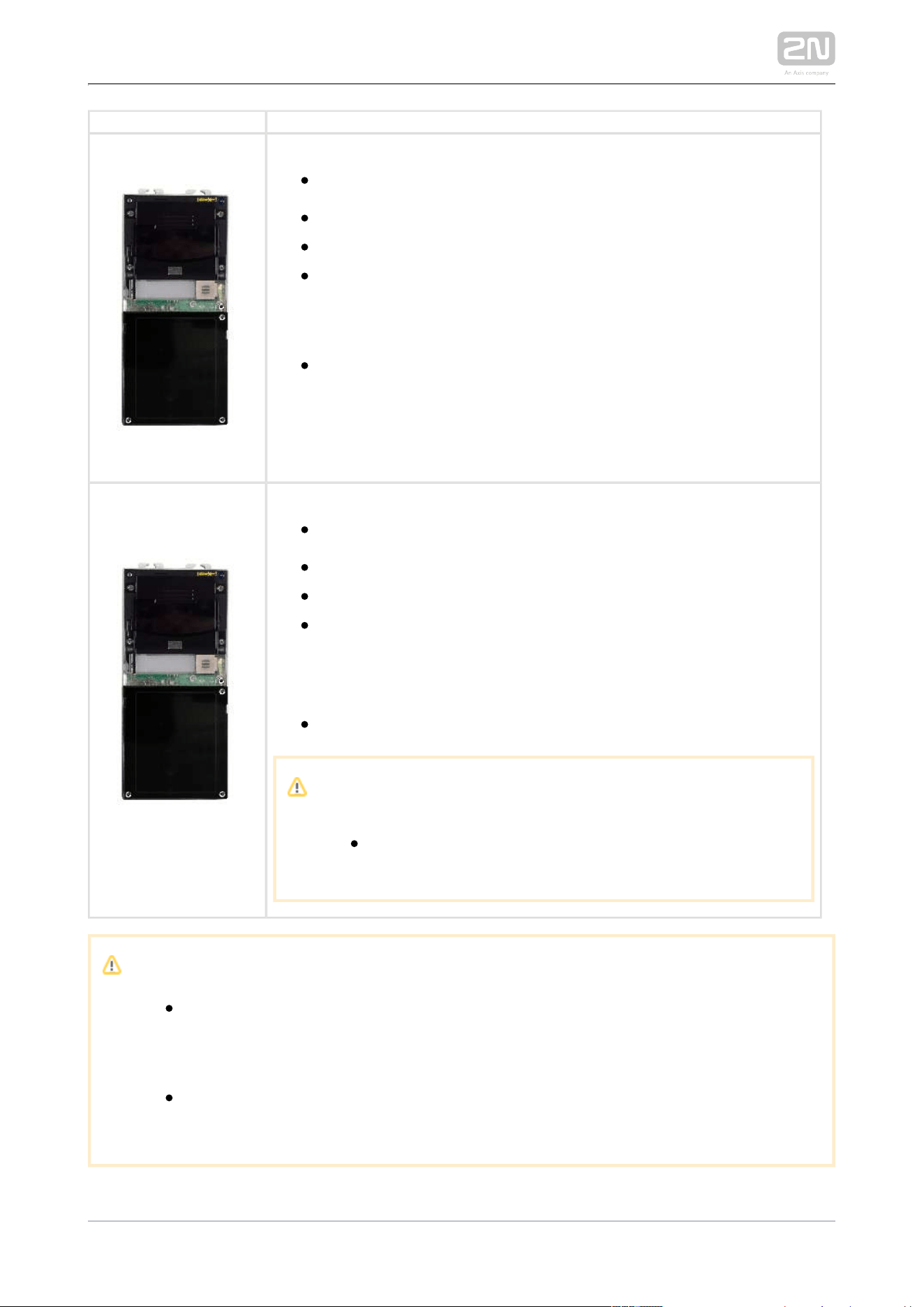
Part No. 9155401CB-EMain Units
Part No. 9155401C-E
Main unit LTE Verso
®
European LTE support only
HD camera
There may be just one main unit in every installation. The main
unit installation requires two frame/box positions one of which is
left for additional installation of a module or internal antenna
stuck to a plastic blind.
Part No. 9155401C-U1
Main unit LTE Verso
®
US LTE support only
HD camera
There may be just one main unit in every installation. The main
unit installation requires two frame/box positions one of which is
left for additional installation of a module or internal antenna
stuck to a plastic blind.
Caution
LTE Verso
®
supports T-Mobile and AT&T for the US.
2N TELEKOMUNIKACE a.s., www.2n.cz 9/233
Part No. 9155401CB-E
Main unit LTE Verso
®
European LTE support only
HD camera
There may be just one main unit in every installation. The main
unit installation requires two frame/box positions one of which is
left for additional installation of a module or internal antenna
stuck to a plastic blind.
Exposure to direct sunlight is not recommended.
Part No. 9155401CB-
U1
Main unit LTE Verso
®
US LTE support only
HD camera
There may be just one main unit in every installation. The main
unit installation requires two frame/box positions one of which is
left for additional installation of a module or internal antenna
stuck to a plastic blind.
Exposure to direct sunlight is not recommended.
Caution
LTE Verso
®
supports T-Mobile and AT&T for the US.
Caution
There may be just one main unit (with/without a camera) in every
installation. The main unit installation requires two frame/box positions
one of which is left for additional installation of a module or internal
antenna stuck to a plastic blind.
One blind module with a stuck LTE antenna is supplied with the main
unit.
External Antennas
2N TELEKOMUNIKACE a.s., www.2n.cz 10/233
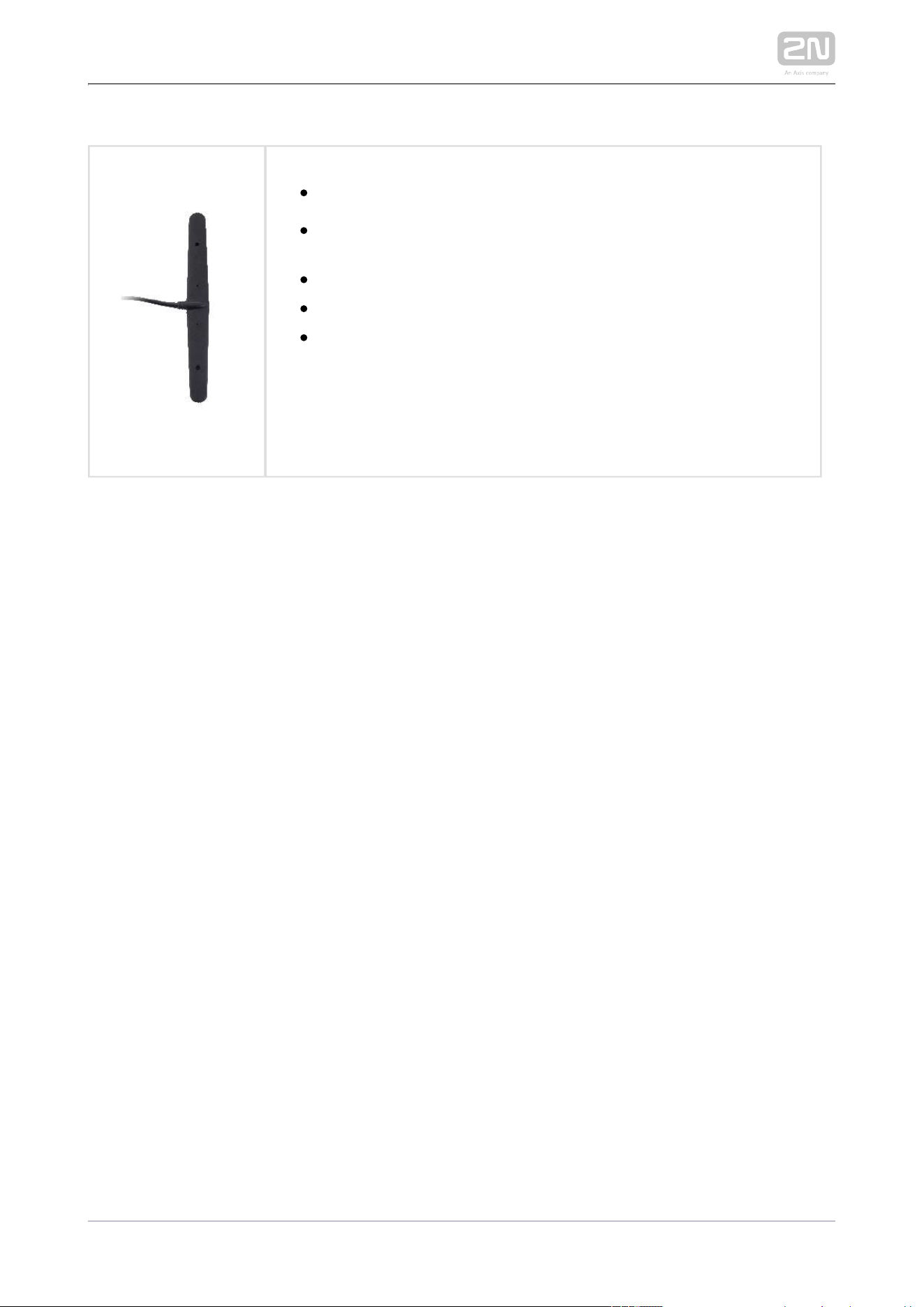
External Antennas
Part No. 9155048
2N LTE Verso
®
– external antenna
optional accessories for weak signals with an internal antenna in a
blind
suitable for all LTE networks
Gain: 4.1 dB
Cable length: 2m

2N TELEKOMUNIKACE a.s., www.2n.cz 11/233
Frames
91550112N Part No.
Axis Part No. 01278-001
Flush mounting frame, 1 module
9155011B2N Part No.
Axis Part No. 01279-001
Flush mounting frame, 1 module
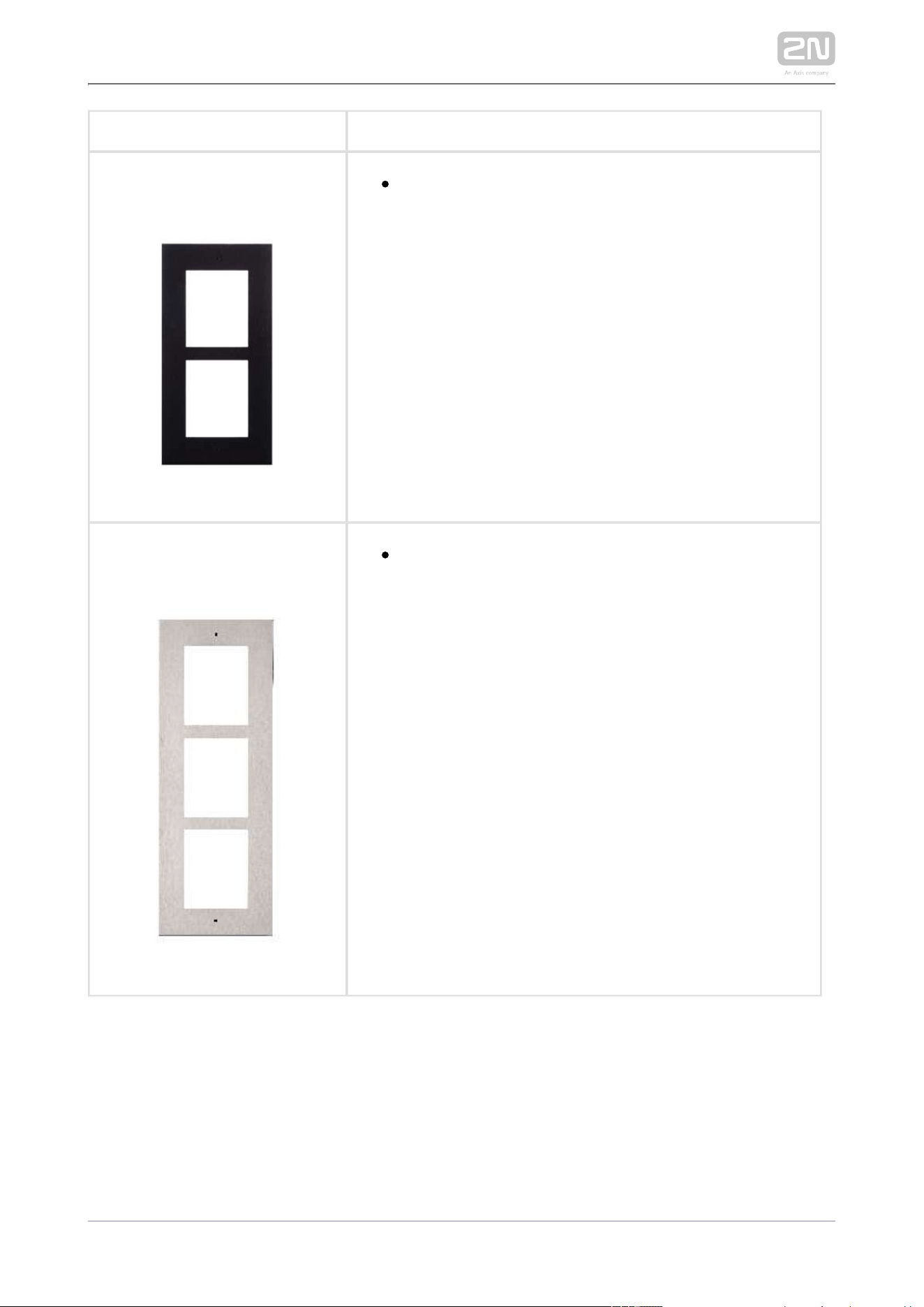
91550122N Part No.
Axis Part No. 01281-001
Flush mounting frame, 2 modules
2N TELEKOMUNIKACE a.s., www.2n.cz 12/233
9155012BPart No.
Flush mounting frame, 2 modules
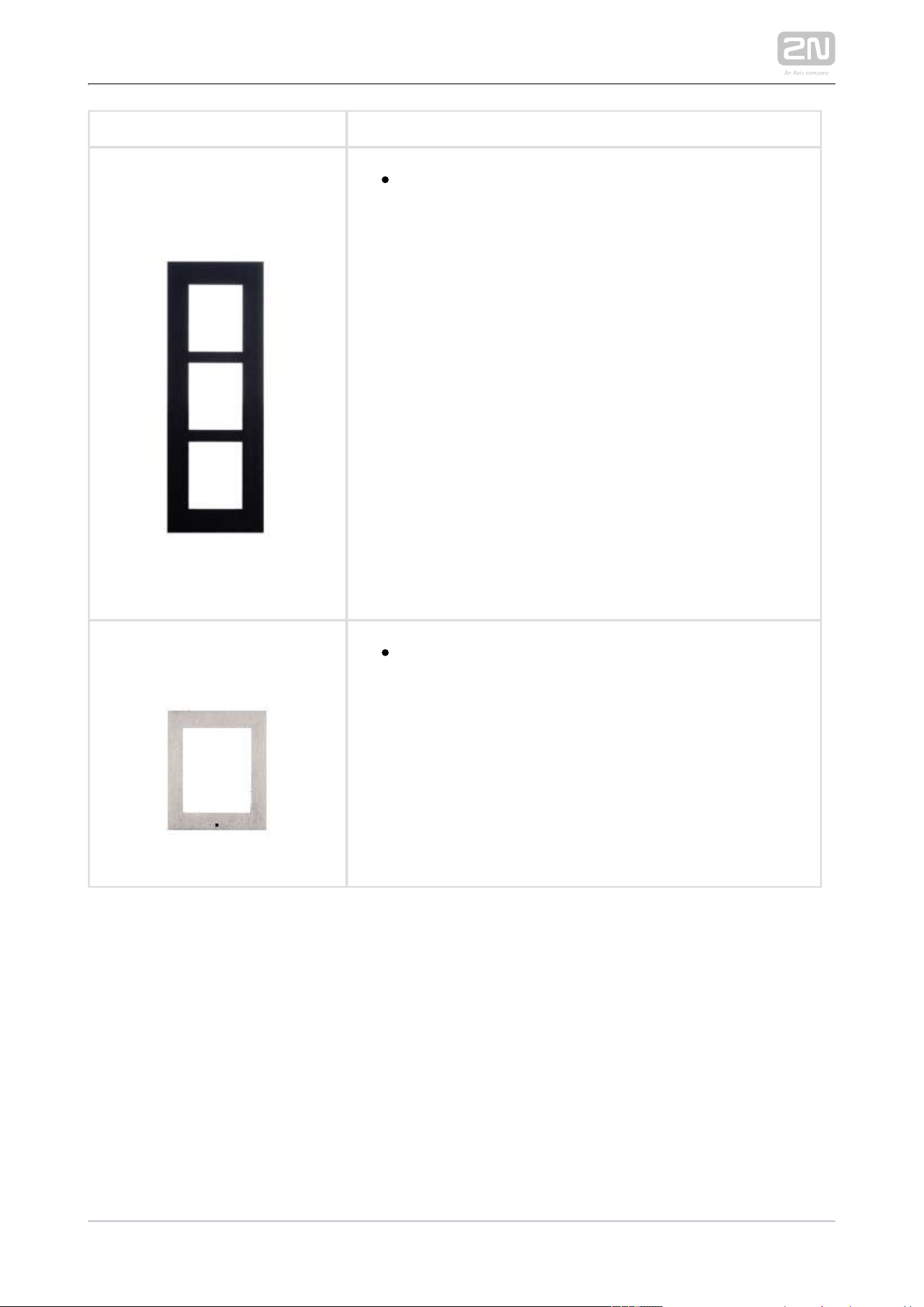
Part No. 9155013
Flush mounting frame, 3 modules
2N TELEKOMUNIKACE a.s., www.2n.cz 13/233
Part No. 9155013B
Flush mounting frame, 3 modules
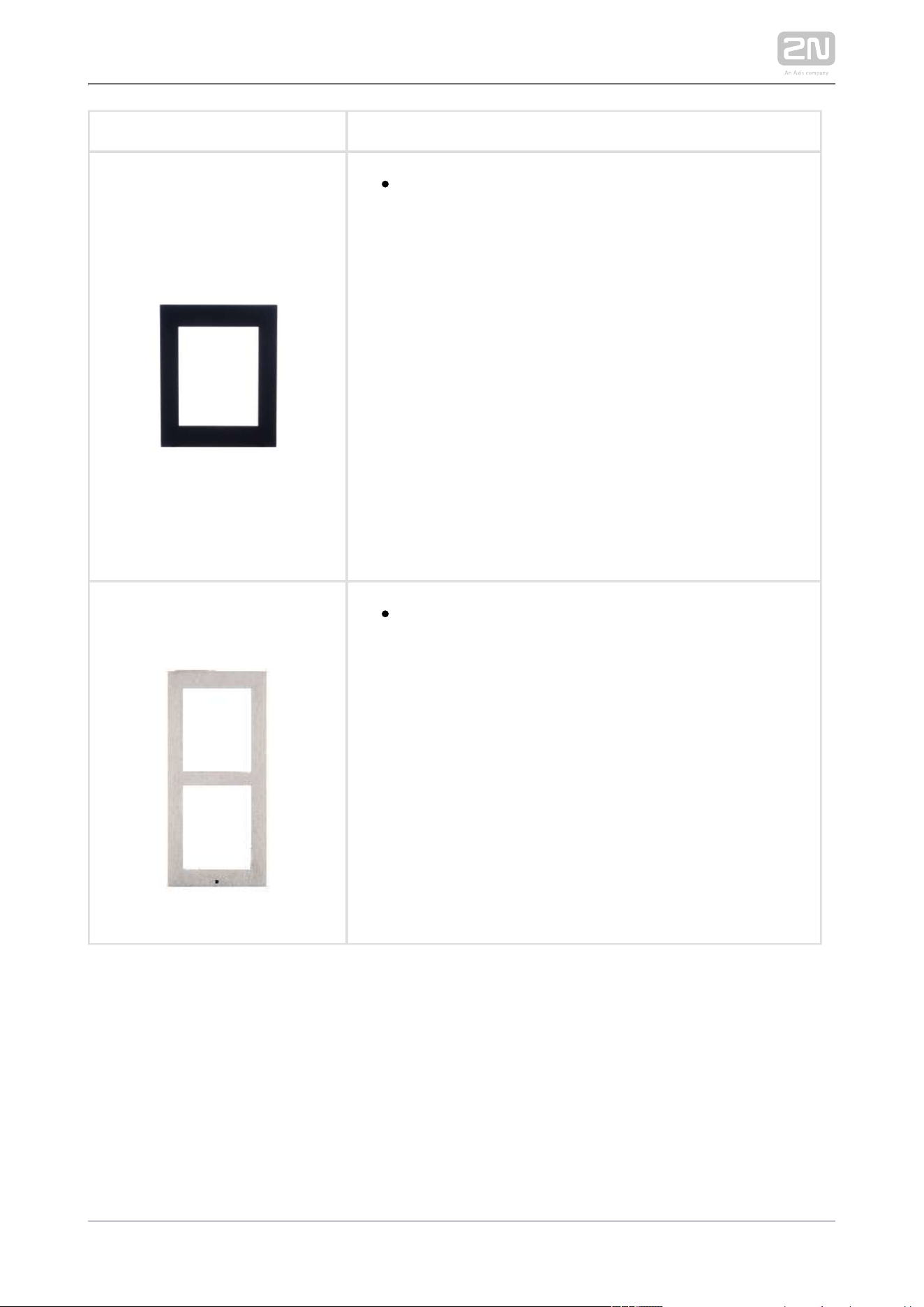
9155021Part No.
Surface mounting frame, 1 module
2N TELEKOMUNIKACE a.s., www.2n.cz 14/233
9155021BPart No.
Surface mounting frame, 1 module
9155022Part No.
Surface mounting box, 2 modules

2N TELEKOMUNIKACE a.s., www.2n.cz 15/233
9155022BPart No.
Surface mounting box, 2 modules
9155023Part No.
Surface mounting box, 3 modules

2N TELEKOMUNIKACE a.s., www.2n.cz 16/233
9155023BPart No.
Surface mounting box, 3 modules
Tip
The 1-module frame is used when another module is added to the
existing installation or when the module is mounted to an extended
interconnecting cable for an outgoing reader, for example.
Tip
Be sure to order the covering frame for the flush or plasterboard
mounting box together with the flush mounting box
1-module frame (Part No. ) – 1-module flush mounting box 9155011
(Part No. ) 9155014
2-module frame (Part No. ) – 2-module flush mounting box 9155012
(Part No. ) 9155015
3-module frame (Part No. ) – 3-module flush mounting box 9155013
(Part No. ) 9155016
2N TELEKOMUNIKACE a.s., www.2n.cz 17/233
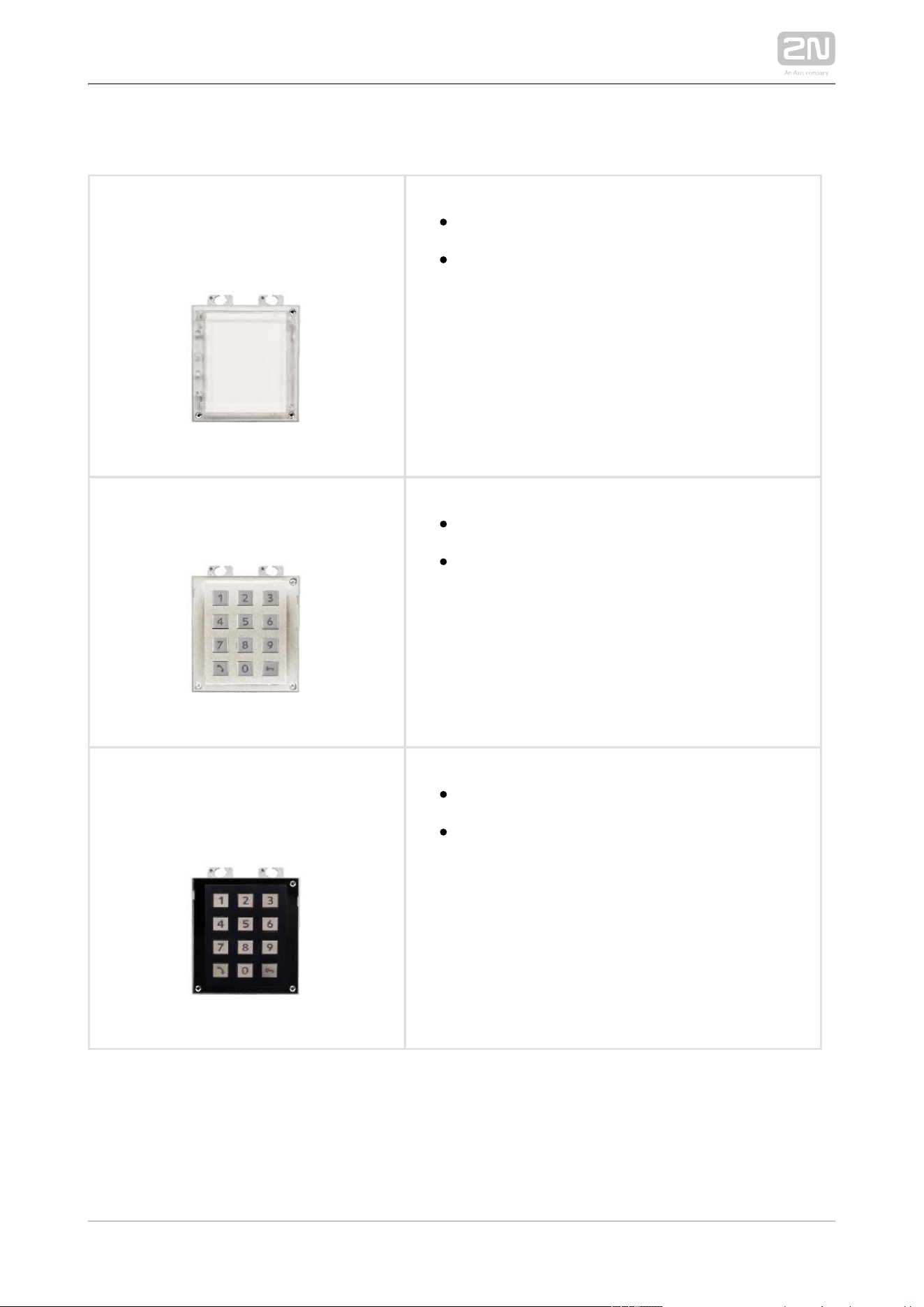
Extending Modules
2N Part No. 9155030
Axis Part. No. 01252-001
2N IP/LTE Verso
®
– Infopanel
The Infopanel module helps you place such
information into the intercom installation as
house number, opening hours and similar data.
The Infopanel backlight is software controlled.
2N Part No. 9155031
Axis Part No. 01253-001
2N IP/LTE Verso
®
– Keypad
The numeric keypad module helps you dial
users via their phonebook positions or phone
numbers, control the lock and use other code-
accessible functions. The keypad digits and
symbols are backlit.
2N Part No. 9155031B
Axis Part No. 01254-001
2N IP/LTE Verso
®
– Keypad
The numeric keypad module helps you dial
users via their phonebook positions or phone
numbers, control the lock and use other code-
accessible functions. The keypad digits and
symbols are backlit.

2N TELEKOMUNIKACE a.s., www.2n.cz 18/233
2N Part No. 9155047
Axis Part No. 01277-001
2N IP/LTE Verso
®
– Touch keypad
The numeric touch keypad module helps you
dial users via their phonebook positions or
phone numbers, control the lock and use other
code-accessible functions. The keypad digits
and symbols are backlit.
2N Part No. 9155032
Axis Part No. 01255-001
2N IP/LTE Verso
®
– RFID reader, 125 kHz
The card reader module provides you with
access control via contactless cards or
keyfobs. The module supports the 125 kHz
EM4xxx cards.
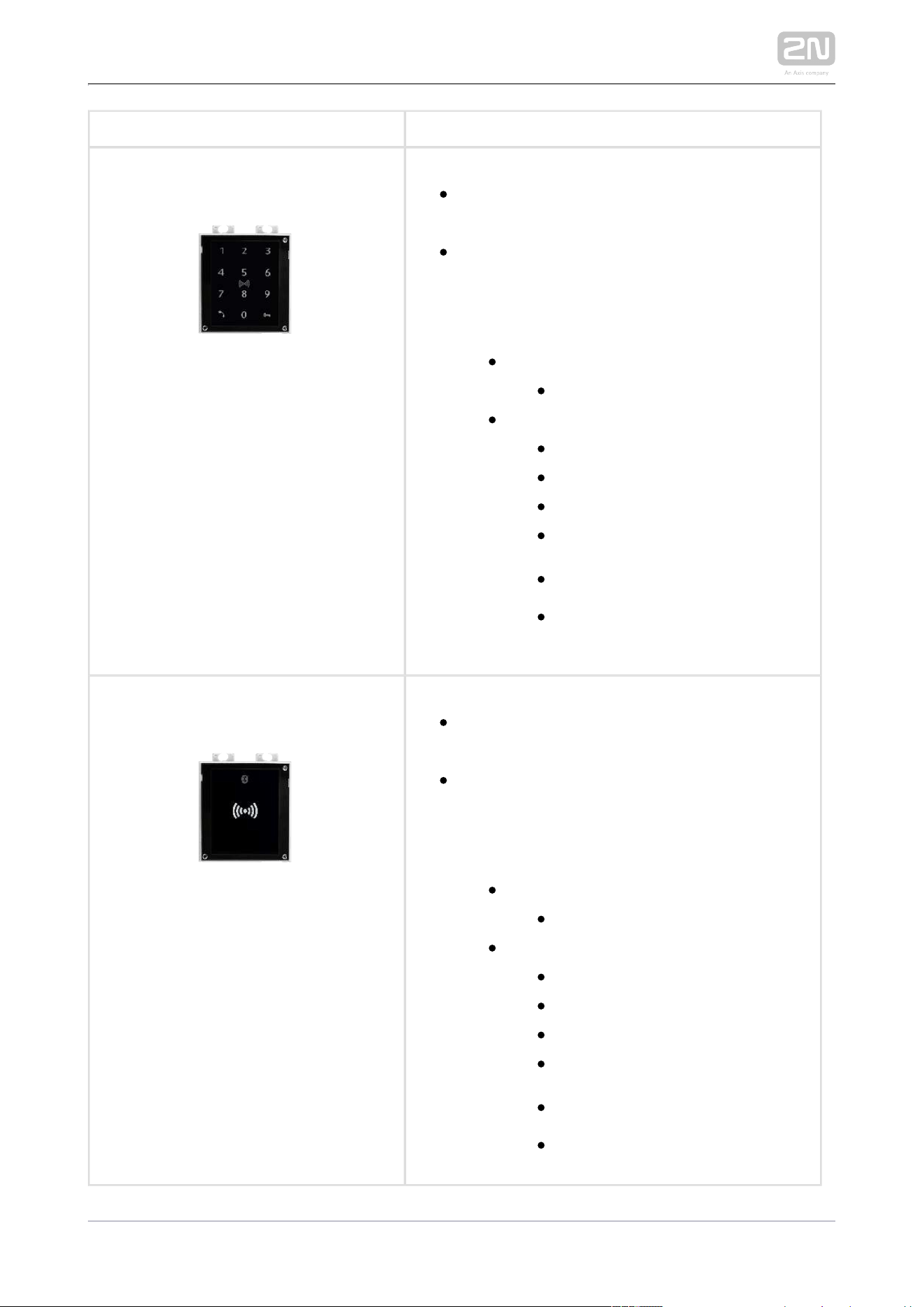
Part No. 9155081
2N IP/LTE Verso
®
– Touch keypad & RFID
reader 125kHz, 13.56MHz, NFC
The touch keypad and card reader module
provides you with access control via
contactless cards or keyfobs. The module
supports the following 125 kHz and 13.56 MHz
cards or other carriers (only card serial number
is read):
125 kHz
EM4xxx
13.56 MHz
ISO14443A (Mifare, DESFire)
PicoPass (HID iClass)
FeliCa
ST SR(IX)
2N Mobile Key
®

2N TELEKOMUNIKACE a.s., www.2n.cz 19/233
Part No. 9155082
2N IP/LTE Verso
®
– Bluetooth & RFID reader
125kHz, 13.56MHz, NFC
The bluetooth and card reader module
provides you with access control via
contactless cards or keyfobs. The module
supports the following 125 kHz and 13.56 MHz
cards or other carriers (only card serial number
is read):
125 kHz
EM4xxx
13.56 MHz
ISO14443A (Mifare, DESFire)
PicoPass (HID iClass)
FeliCa
ST SR(IX)
2N Mobile Key
®
2N TELEKOMUNIKACE a.s., www.2n.cz 20/233
Part No. 9155083
2N IP/LTE Verso
®
– Touch keypad & RFID
reader 125kHz, secured 13.56MHz, NFC
The touch keypad card reader module provides
you with access control via contactless cards
or keyfobs. The module supports the following
125 kHz and 13.56 MHz cards or other carriers
(only card serial number is read):
125 kHz
EM4xxx
13.56 MHz
ISO14443A (Mifare, DESFire)
PicoPass (HID iClass)
FeliCa
ST SR(IX)
2N Mobile Key
®
HID SE (Seos, iClass SE, Mifare
SE)
Part No. 9155084
2N IP/LTE Verso
®
– Bluetooth & RFID reader
125kHz, secured 13.56MHz, NFC
The bluetooth card reader module provides
you with access control via contactless cards
or keyfobs. The module supports the following
125 kHz and 13.56 MHz cards or other carriers
(only card serial number is read):
125 kHz
EM4xxx
13.56 MHz
ISO14443A (Mifare, DESFire)
PicoPass (HID iClass)
FeliCa
ST SR(IX)
2N Mobile Key
®
HID SE (Seos, iClass SE, Mifare
SE)

2N TELEKOMUNIKACE a.s., www.2n.cz 21/233
Part No. 9137422E
2N IP/LTE external Bluetooth reader (USB interface)
®
An external Bluetooth reader connecting to your
computer via USB.
It can be used to pair new users who want to use their
SmartPhones and 2N Mobile Key application for
®
access to controlled areas.
A USB driver is required for the external reader to
work properly.
2N Part No. 9155034
Axis Part No. 01257-001
2N IP/LTE Verso
®
– I/O
The module provides logical inputs and
outputs for sensor integration or door control.
The module is installed under another module, i.
e. needs no separate position.
Inputs and outputs
RELAY1 – RELAY1 terminals with
accessible 30 V / 1 A AC/DC NO/NC
contact
RELAY2 – RELAY2 terminals with
accessible 30 V / 1 A AC/DC NO/NC
contact
IN1 – IN1 terminals for input in passive/
active mode (−30 V to +30 V DC)
OFF = open OR U > 1.5 V
IN
ON = closed contact OR U < 1.5 V
IN
IN2 – IN2 terminals for input in passive
/active mode (−30 V to +30 V DC)
OFF = open OR U > 1.5 V
IN
ON = closed contact OR U < 1.5 V
IN
TAMPER – Tamper switch (9155038)
input
2N TELEKOMUNIKACE a.s., www.2n.cz 22/233
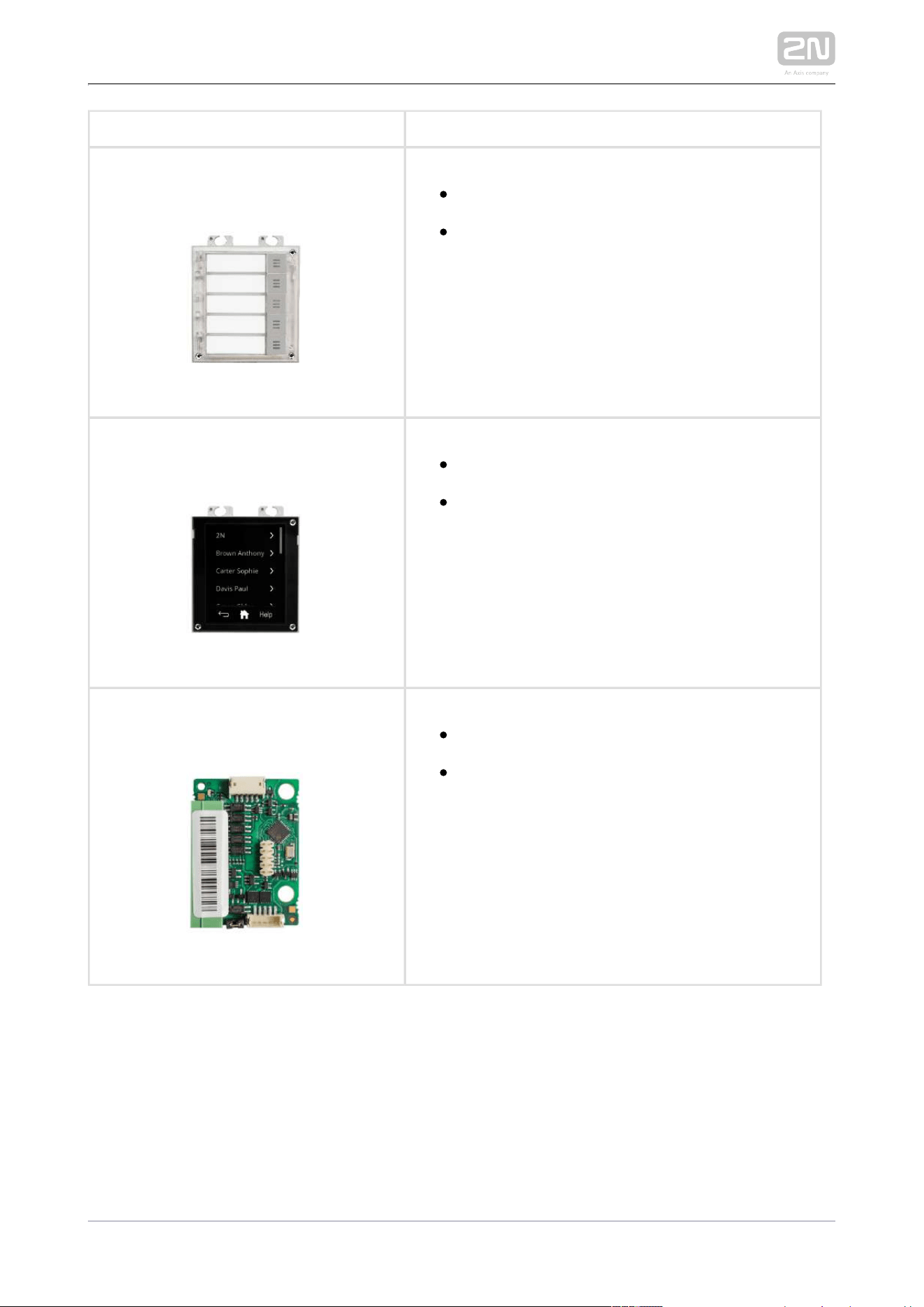
2N Part No. 9155035
Axis Part No. 01258-001
2N IP/LTE Verso
®
– 5 buttons
A module with 5 mechanical quick dial buttons.
The buttons are backlit and can include
nametags.
2N Part No. 9155036
Axis Part No. 01275-001
– Touch display2N IP/LTE Verso
®
The touchscreen module allows visitors to dial
users in a smartphone-like way. It features a
structured phonebook and a keypad.
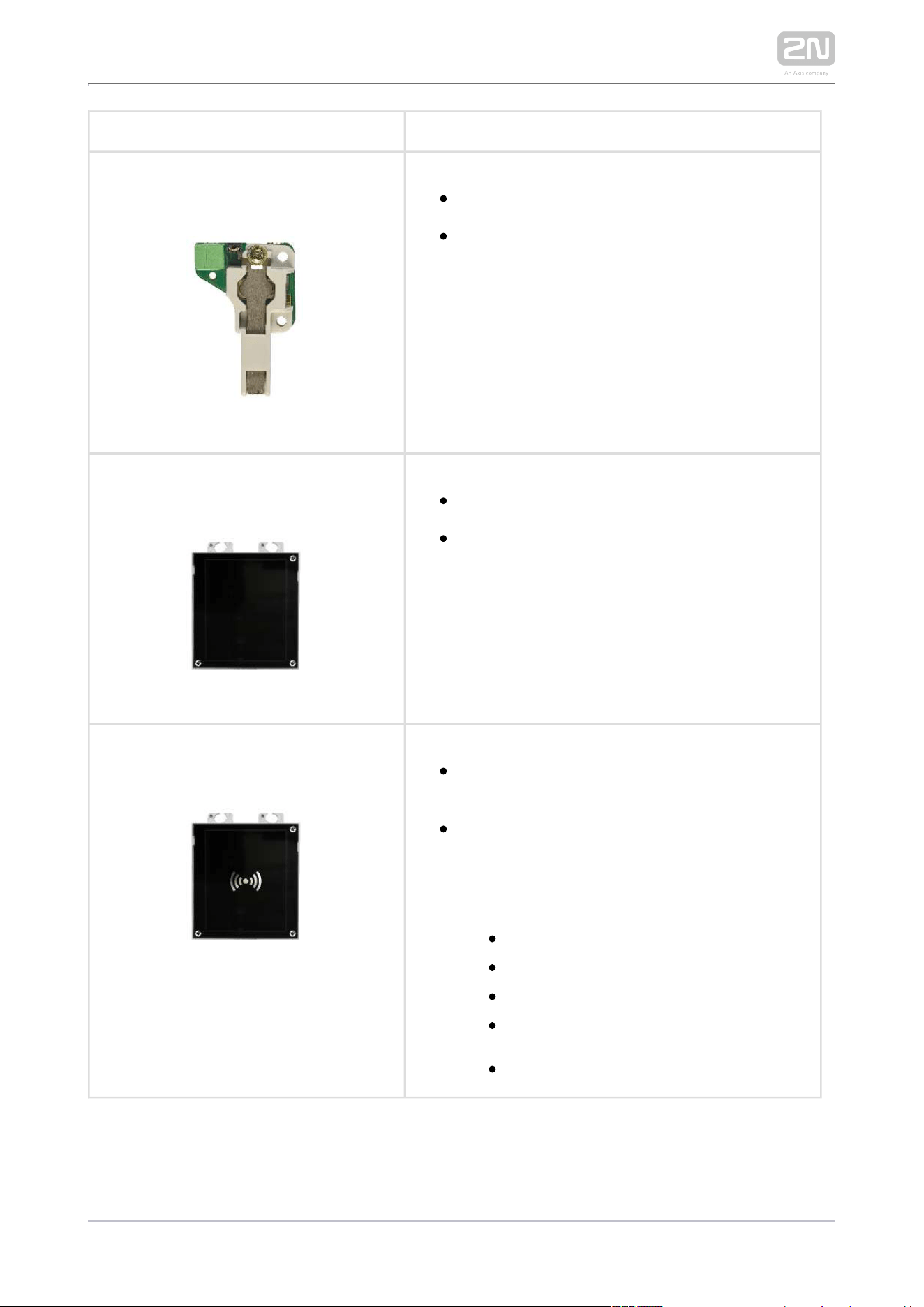
2N Part No. 9155037
Axis Part No. 01259-001
2N IP/LTE Verso
®
– Wiegand
The module helps you interconnect your
system with other systems via the Wiegand
interface. The module is installed under another
module, i.e. needs no separate position.
2N TELEKOMUNIKACE a.s., www.2n.cz 23/233
2N Part No. 9155038
Axis Part No. 01260-001
2N IP/LTE Verso
®
– Tamper switch
The module secures your system against
tampering by detecting intercom opening or
top frame removing. The module is installed on
a special place and needs no separate position.
2N Part No. 9155039
Axis Part No. 01261-001
2N IP/LTE Verso
®
– Blind Panel
One blind panel module is supplied with the
main unit.
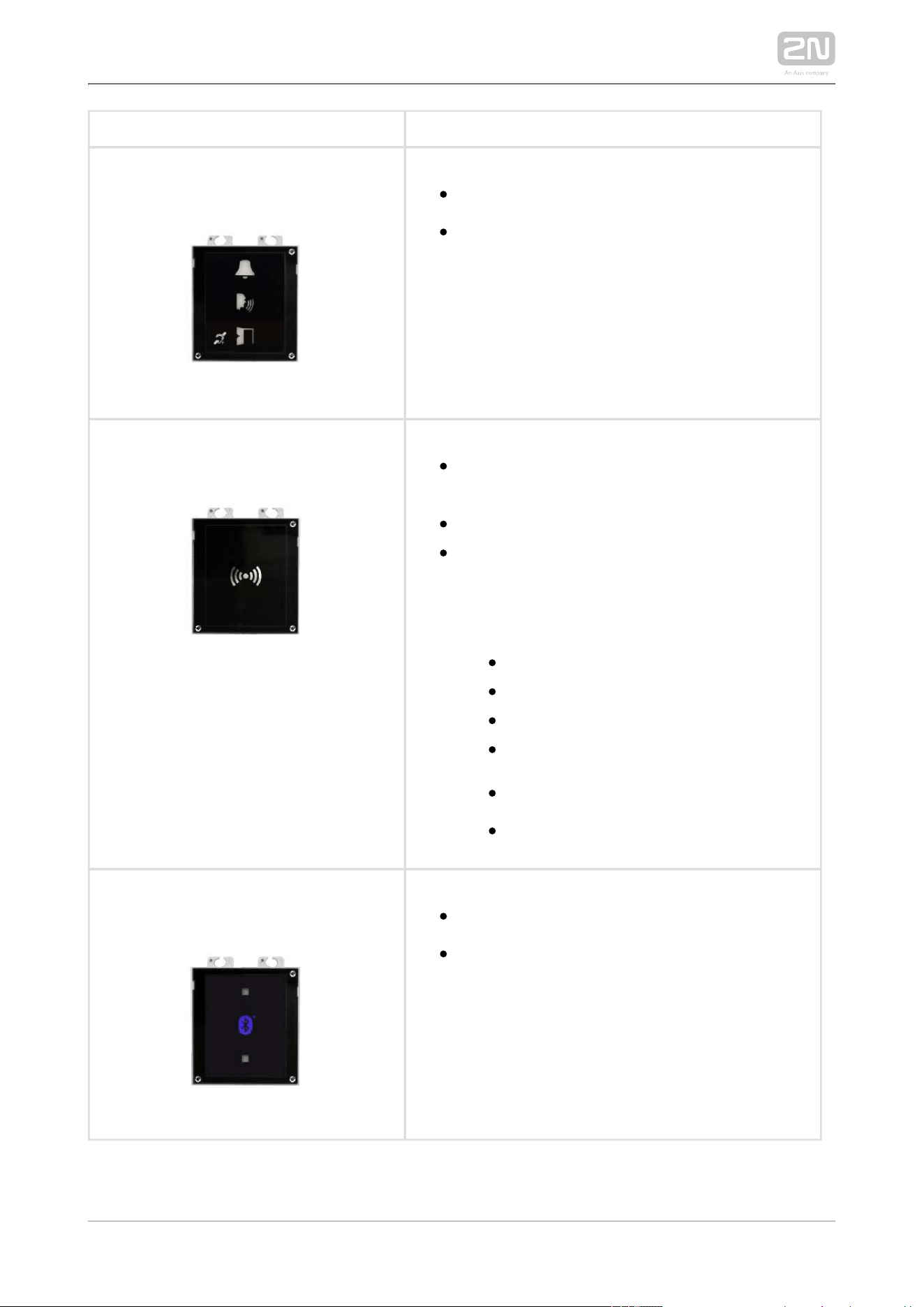
2N Part No. 9155040
Axis Part No. 01262-001
2N IP/LTE Verso
®
– RFID reader NFC support,
13.56 MHz
The card reader module provides you with
access control via contactless cards or
keyfobs. The module supports the following
13.56 MHz cards or other carriers (only card
serial number is read):
ISO14443A (Mifare, DESFire)
PicoPass (HID iClass)
FeliCa
ST SR(IX)
2N Mobile Key
®
2N TELEKOMUNIKACE a.s., www.2n.cz 24/233
Part No. 9155041
Axis Part No. 01263-001
2N IP/LTE Verso
®
– Induction loop
The induction loop module is used to transmit
an audio signal directly into a hearing aid via a
magnetic field.
2N Part No. 9155086
Axis Part No. 01264-001
2N IP/LTE Verso
®
– Secured RFID card reader
NFC support, 13.56 MHz
Compatible with firmware 2.13 and higher
The card reader module provides you with
access control via contactless cards or
keyfobs. The module supports the following
13.56 MHz cards or other carriers (optionally
card serial number or PAC ID is read):
ISO14443A (Mifare, DESFire)
PicoPass (HID iClass)
FeliCa
ST SR(IX)
2N Mobile Key
®
HID SE (Seos, iClass SE, Mifare SE)
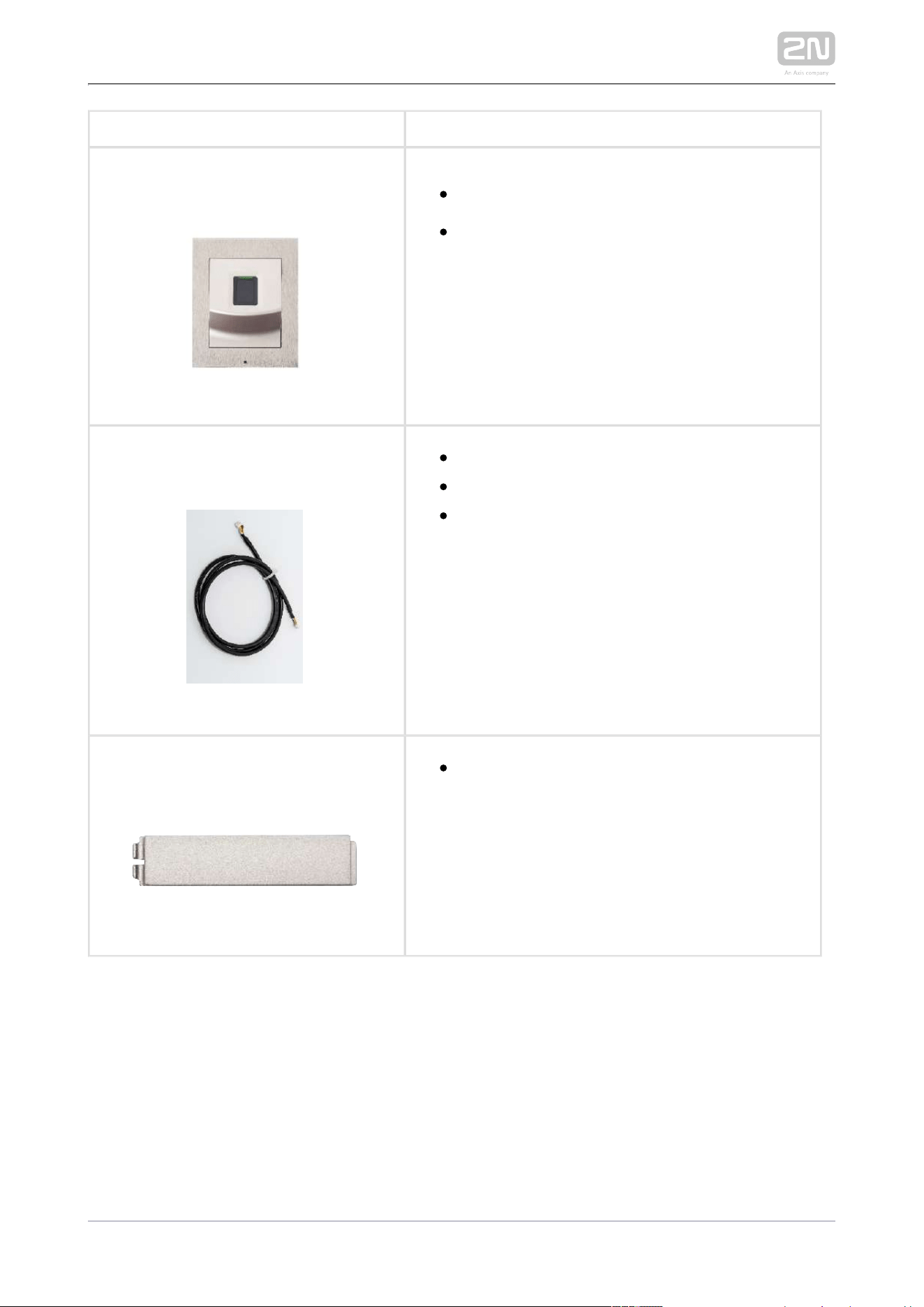
2N Part No. 9155046
Axis Part No. 01266-001
2N IP/LTE Verso
®
– Bluetooth reader
The Bluetooth reader is used for reading users'
secure IDs from Android and iOS SmartPhone
applications.
2N TELEKOMUNIKACE a.s., www.2n.cz 25/233
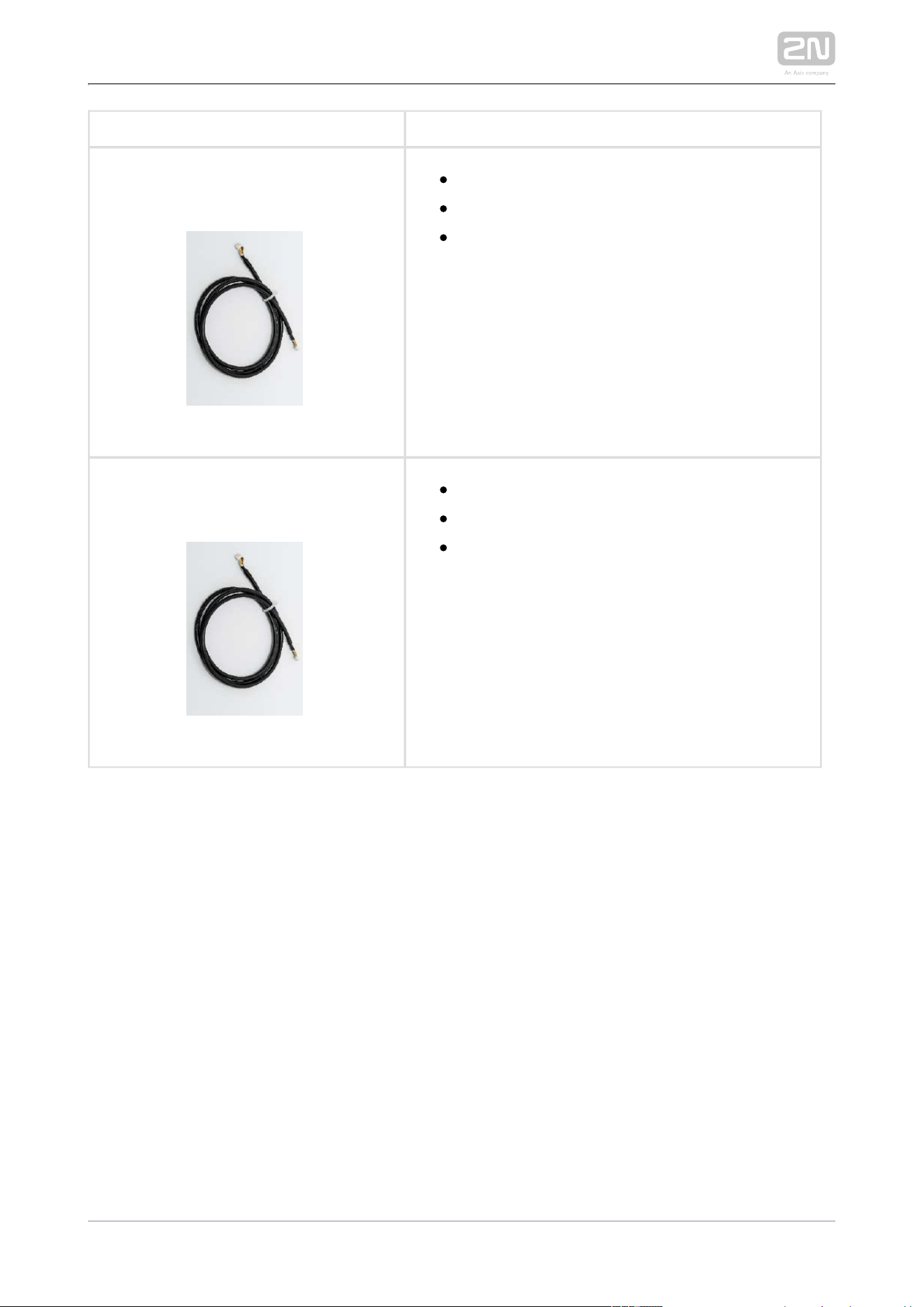
2N Part No. 9155045
Axis Part No. 01276-001
2N IP/LTE Verso
®
– Fingerprint reader
The Fingerprint reader is used for verification
of human fingers for access control and
intercom control.
2N Part No. 9155050
Axis Part No. 01267-001
1 m extension cable
Only one extension cable is allowed.
Maximum bus length is 7 m.
2N Part. No. 9155051
Axis Part No. 01270-001
Blind button
2N TELEKOMUNIKACE a.s., www.2n.cz 26/233
2N Part No. 9155054
Axis Part No. 01268-001
3 m extension cable
Only one extension cable is allowed.
Maximum bus length is 7 m.
2N Part No. 9155055
Axis Part No. 01269-001
5 m extension cable
Only one extension cable is allowed.
Maximum bus length is 7 m.
2N TELEKOMUNIKACE a.s., www.2n.cz 27/233
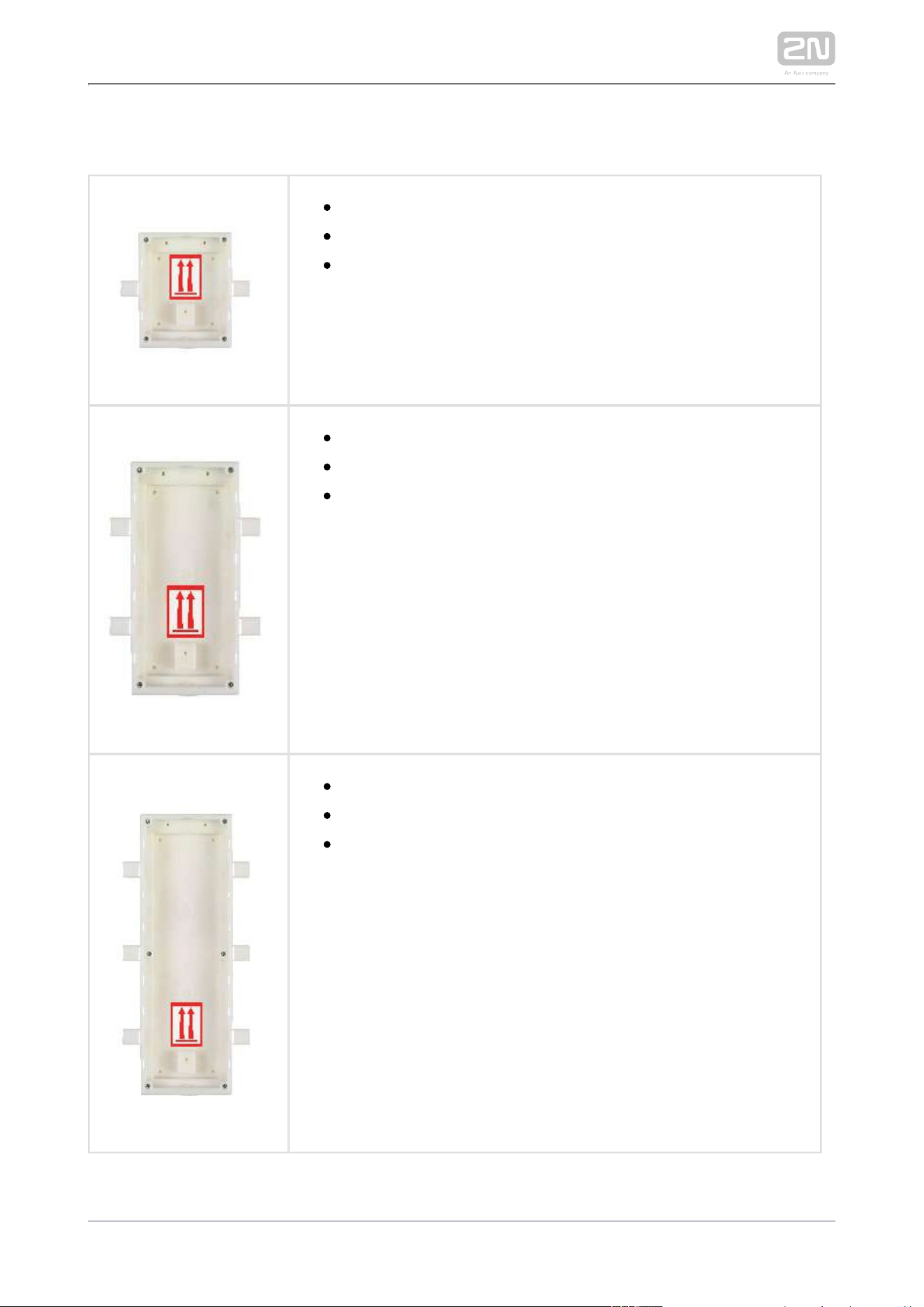
Mounting Accessories
9155014Part No.
Flush mounting box
1 module
Designed for flush or plasterboard mounting of 1-module sets
and delivered including accessories for multiple box assemblies
9155015Part No.
Flush mounting box
2 modules
Designed for flush or plasterboard mounting of 2-module sets
and delivered including accessories for multiple box assemblies
Part No. 9155016
Flush mounting box
3 modules
Designed for flush or plasterboard mounting of 3-module sets
and delivered including accessories for multiple box assemblies
2N TELEKOMUNIKACE a.s., www.2n.cz 28/233
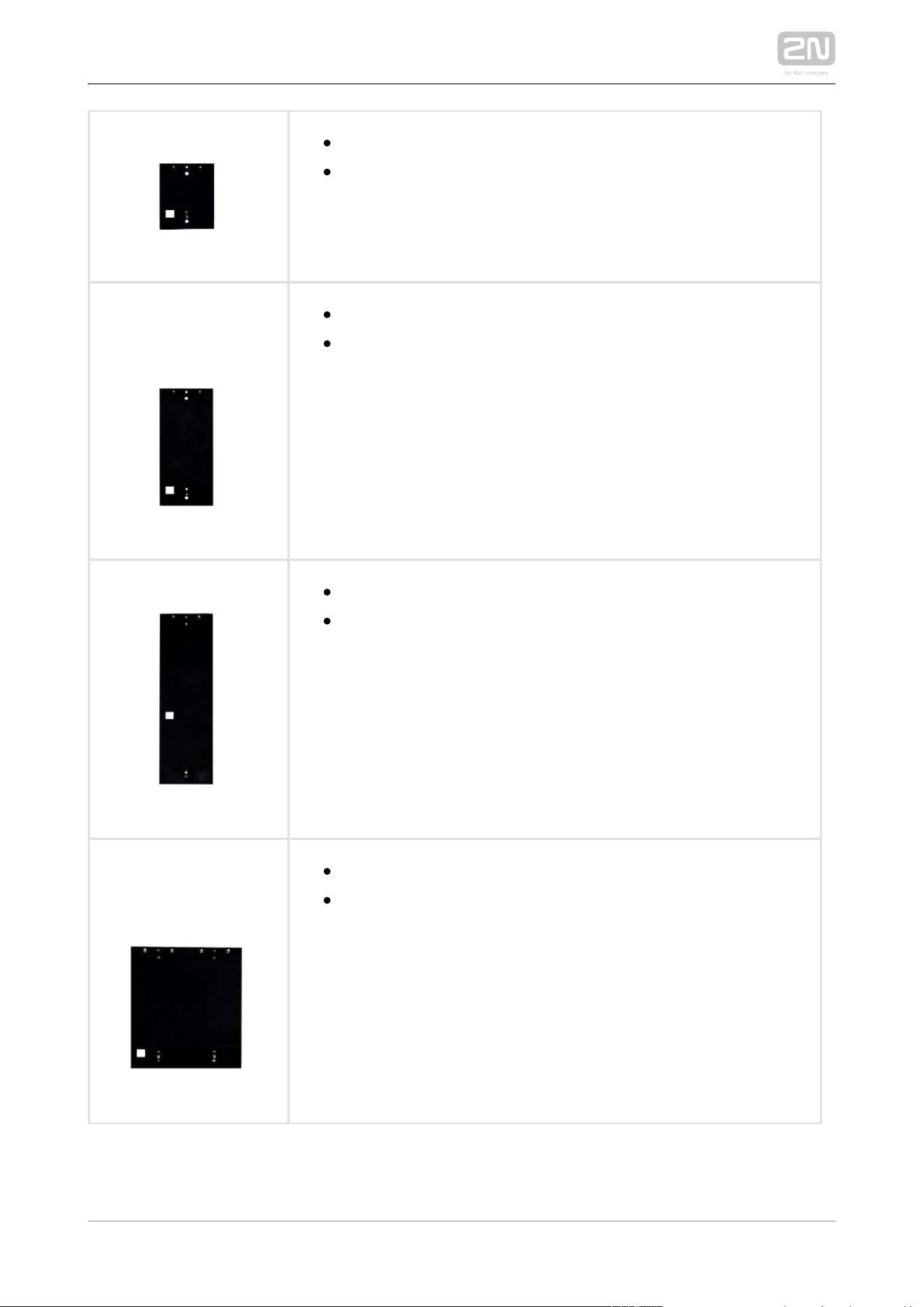
Part No. 9155061
Backplate, 1 module
For glass or uneven surface installations
Part No. 9155062
Backplate, 2 modules
For glass or uneven surface installations
Part No. 9155063
Backplate, 3 modules
For glass or uneven surface installations
Part No. 9155064
Backplate, 2 (w) x 2 (h) modules
For glass or uneven surface installations
2N TELEKOMUNIKACE a.s., www.2n.cz 29/233
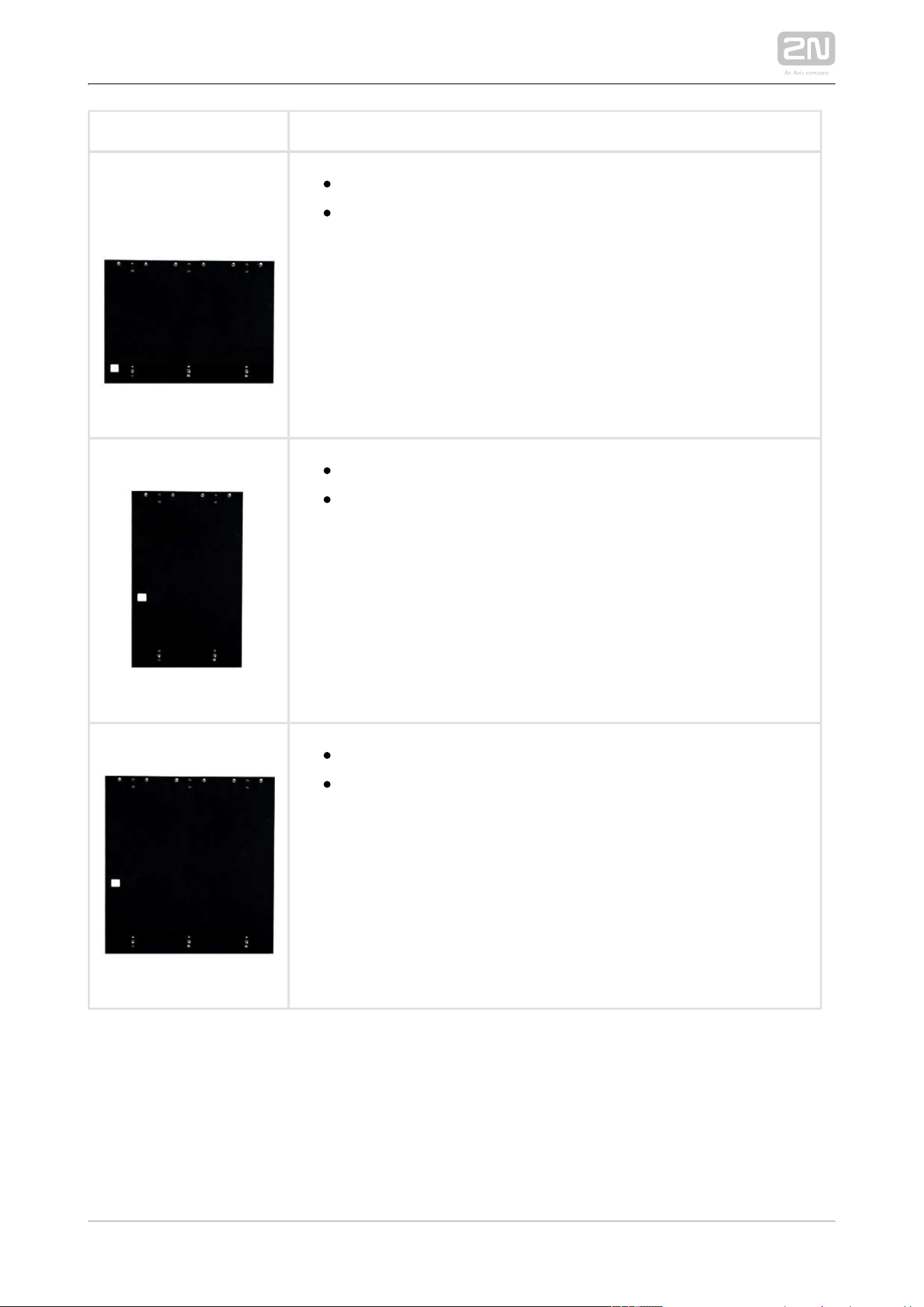
Part No. 9155065
Backplate, 3 (w) x 2 (h) modules
For glass or uneven surface installations
Part No. 9155066
Backplate, 2 (w) x 3 (h) modules
For glass or uneven surface installations
Part No. 9155067
Backplate, 3 (w) x 3 (h) modules
For glass or uneven surface installations

2N TELEKOMUNIKACE a.s., www.2n.cz 30/233
Part No. 91555072
Wedge backplate
25 gradient mounting backplate°
Choose the proper frame and, if necessary, mounting box type depending on your
particular installation needs. is designed for outdoor 2N LTE Verso
®
2N LTE Verso
®
applications and requires no additional roof.

2N TELEKOMUNIKACE a.s., www.2n.cz 31/233
Internal Units and Accessories
Part Numbers:
91378365
91378366
2N Indoor Touch
®
– black
WiFi version (latter Part No.)
2N Indoor Touch
®
, an elegant internal touch panel, is
suitable for all the . You can 2N IP/LTE intercoms
display and start conversation with the person
standing at the door, unlock the door or turn on the
entrance hall light.
Part No. 91378382
2N Indoor Touch
®
desk stand – black
Part Numbers:
91378365WH
91378366WH
2N Indoor Touch
®
– white
WiFi version (the latter Part No.)
2N
®
Indoor Touch, an elegant internal touch panel, is
suitable for all the . You can 2N IP/LTE intercoms
display and start conversation with the person
standing at the door, unlock the door or turn on the
entrance hall light.

2N TELEKOMUNIKACE a.s., www.2n.cz 32/233
Part No. 91378382W
2N Indoor Touch
®
desk stand – white
VoIP Phones
91378357Part No.
Grandstream GXV3240 VoIP video telephone
GXV3240 is the successor to the popular GXV3140 model,
which allows comfortable video calls in the IP network.
Touchscreen and keypad control.
91378358Part No.
Grandstream GXV3275 VoIP telephone
GXV3275 is the successor to the popular GXV3175 model,
which allows comfortable video calls in the IP network.
Touchscreen control.
2N TELEKOMUNIKACE a.s., www.2n.cz 33/233
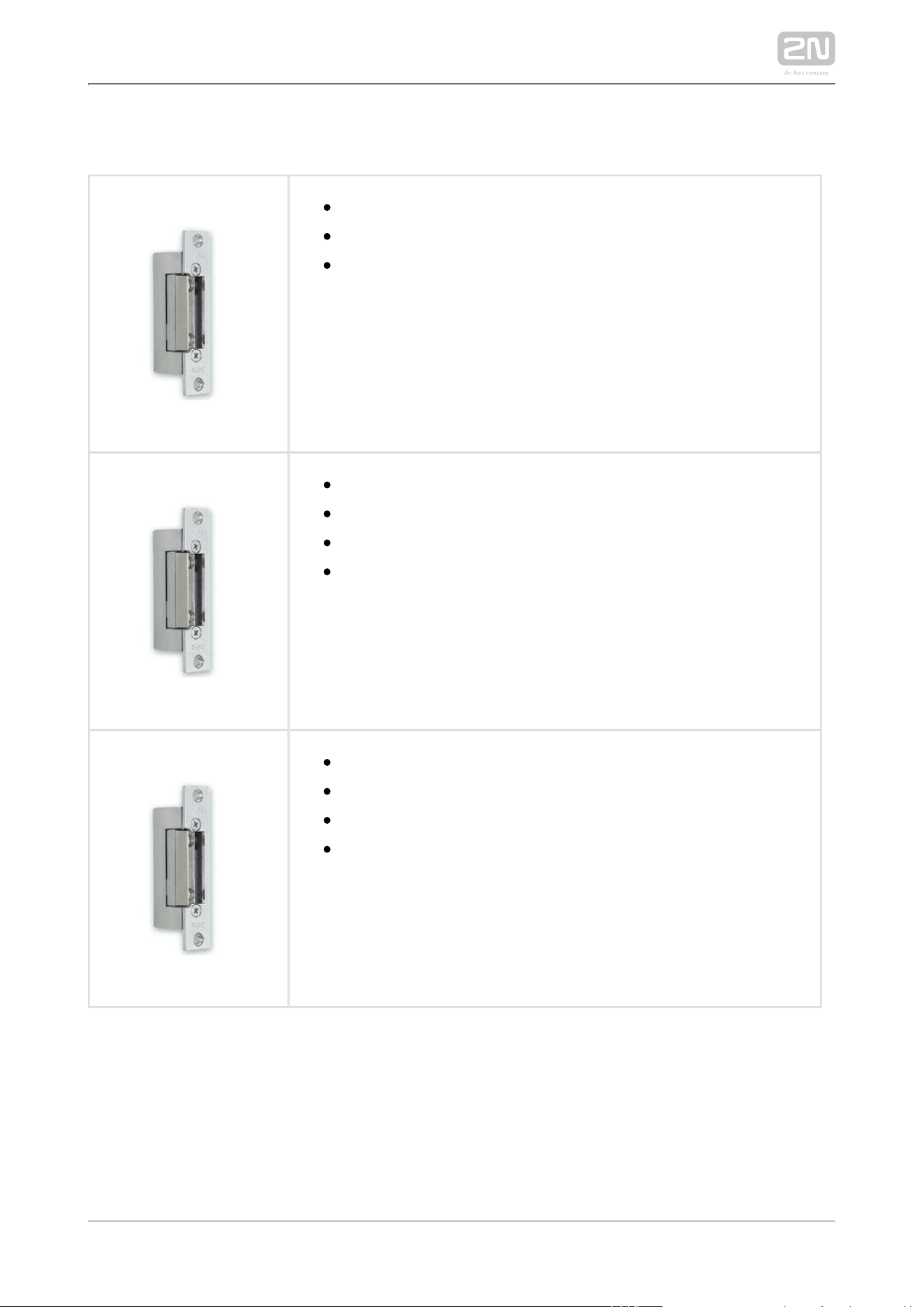
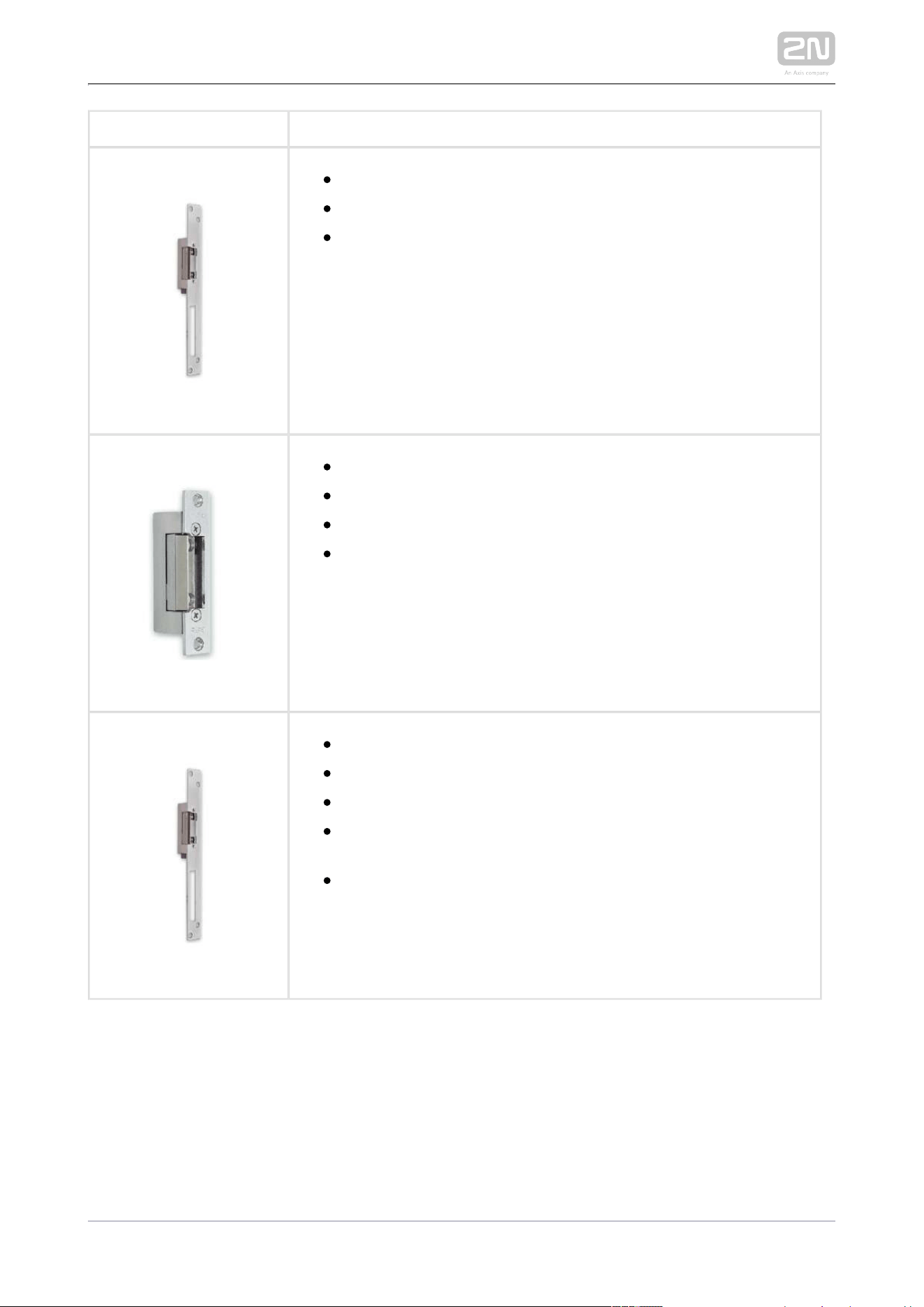
Electric Locks
932071EPart No.
BEFO 11211
12 V / 230 mA DC
Low consumption
932081EPart No.
BEFO 11221 with momentum pin
12 V / 230 mA DC
Low consumption
A short electrical pulse is sufficient to unlock and open the
door. The lock then remains open until someone closes the
door.
932091EPart No.
BEFO 11211MB with mechanical blocking
12 V / 230 mA DC
Low consumption
Enables to close or open the lock mechanically. Once opened,
the lock remains so all the time. Once closed, the lock behaves
as a standard electrical lock.
2N TELEKOMUNIKACE a.s., www.2n.cz 34/233
Part No. 932061E
BEFO 211211 door signalling, low consumption
12 V / 230 mA
A regular lock with a built-in contact to indicate whether the
door is open or closed.
Part No. 932072E
BEFO 31211
fail-safe
12 V / 170 mA DC
The fail-safe lock is closed when electricity is switched on.
When electricity is interrupted, the lock is opened.
Part No. 932062E
BEFO 321211
fail-safe, door signalling
12 V / 170 mA
The fail-safe lock is closed when electricity is switched on.
When electricity is interrupted, the lock is opened.
It contains a built-in contact to indicate whether the door is
open or closed.

2N TELEKOMUNIKACE a.s., www.2n.cz 36/233
Power Supply
91341481EPart No.
Stabilised 12 V / 2 A power supply needs to be used where no PoE
is available.
932928Part No.
For 12 V AC external power supply of the lock.
2N TELEKOMUNIKACE a.s., www.2n.cz 37/233
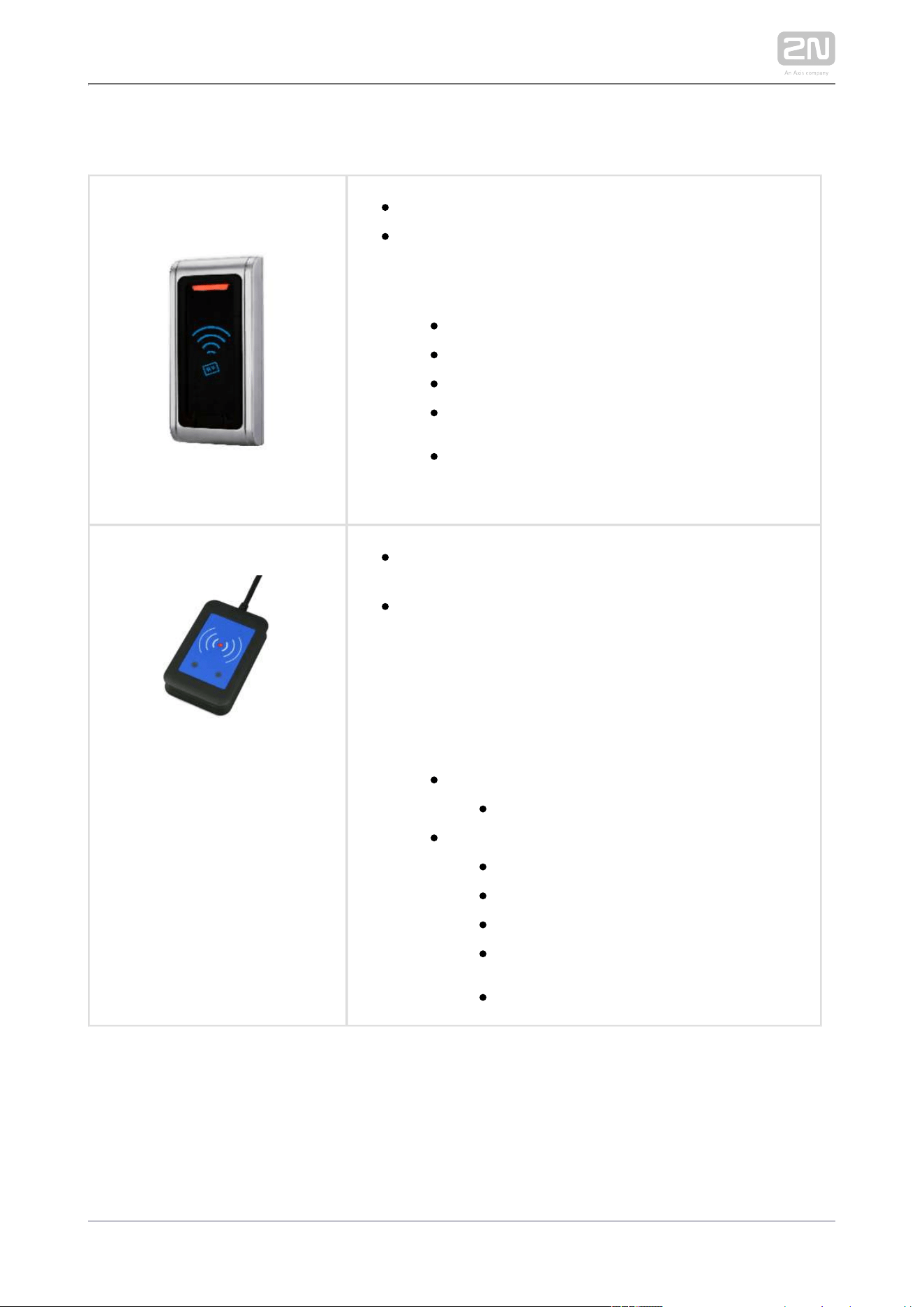
13 MHz RFID
Part No. 9159031
External 13.56 MHz Mifare RFID card reader, Wiegand
Secondary reader for connection to an internal reader.
Allows for card entry control from both sides of the
door. IP68 cover, also suitable for exteriors. Reads
cards:
ISO14443A (Mifare, DESFire)
PicoPass (HID iClass)
FeliCa
ST SR(IX)
2N Mobile Key
®
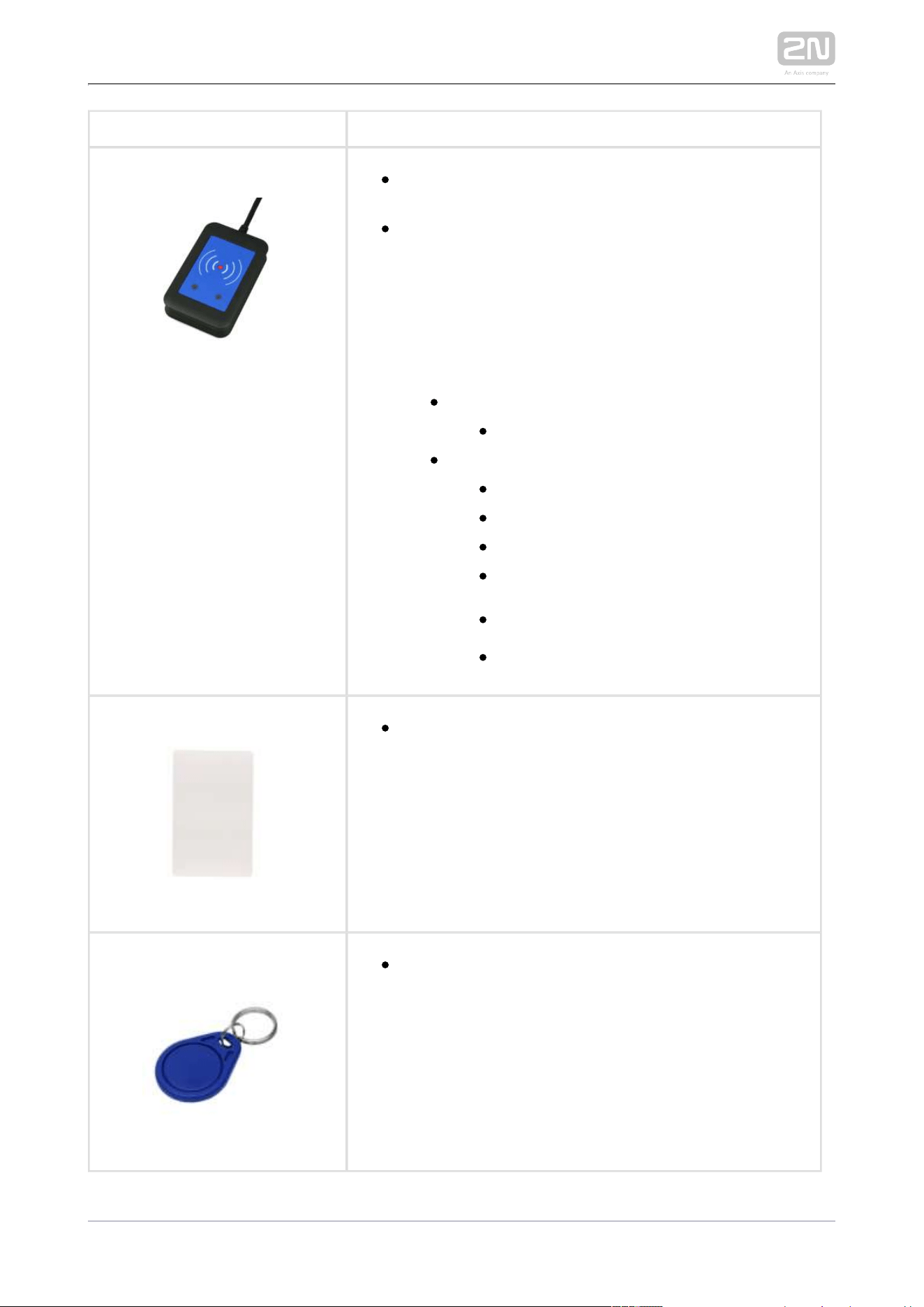
Part No. 9137421E
Ext. RFID Reader 13.56 MHz, 125 kHz + NFC/HCE (USB
interface)
External RFID card reader for connection to PC using a
USB interface. Suitable for system administration and
adding 13.56 MHz, 125 kHz cards and Android platform
devices supporting NFC/HCE using 2N IP intercom
web interface or the 2N Access Commander
®
application. It reads the same types of cards and
devices as card readers in :2N IP intercoms
125 kHz
EM4xxx
13.56 MHz
ISO14443A (Mifare, DESFire)
PicoPass (HID iClass)
FeliCa
ST SR(IX)
2N Mobile Key
®
2N TELEKOMUNIKACE a.s., www.2n.cz 38/233
Part No. 9137424E
Ext. secured RFID Reader 13.56 MHz, 125 kHz + NFC
/HCE (USB interface)
External secured RFID card reader for connection to
PC using a USB interface. Suitable for system
administration and adding 13.56 MHz, 125 kHz cards
and Android platform devices supporting NFC/HCE
using web interface or the 2N IP intercom 2N Access
®
application. It reads the same types of Commander
cards and devices as card readers in :2N IPintercoms
125 kHz
EM4xxx
13.56 MHz
ISO14443A (Mifare, DESFire)
PicoPass (HID iClass)
FeliCa
ST SR(IX)
2N Mobile Key
®
HID SE (Seos, iClass SE, Mifare SE)
9134173Part No.
Mifare Classic 1k RFID card, 13.56 MHz
Part No. 9134174
Mifare Classic 1k RFID fob, 13.56 MHz
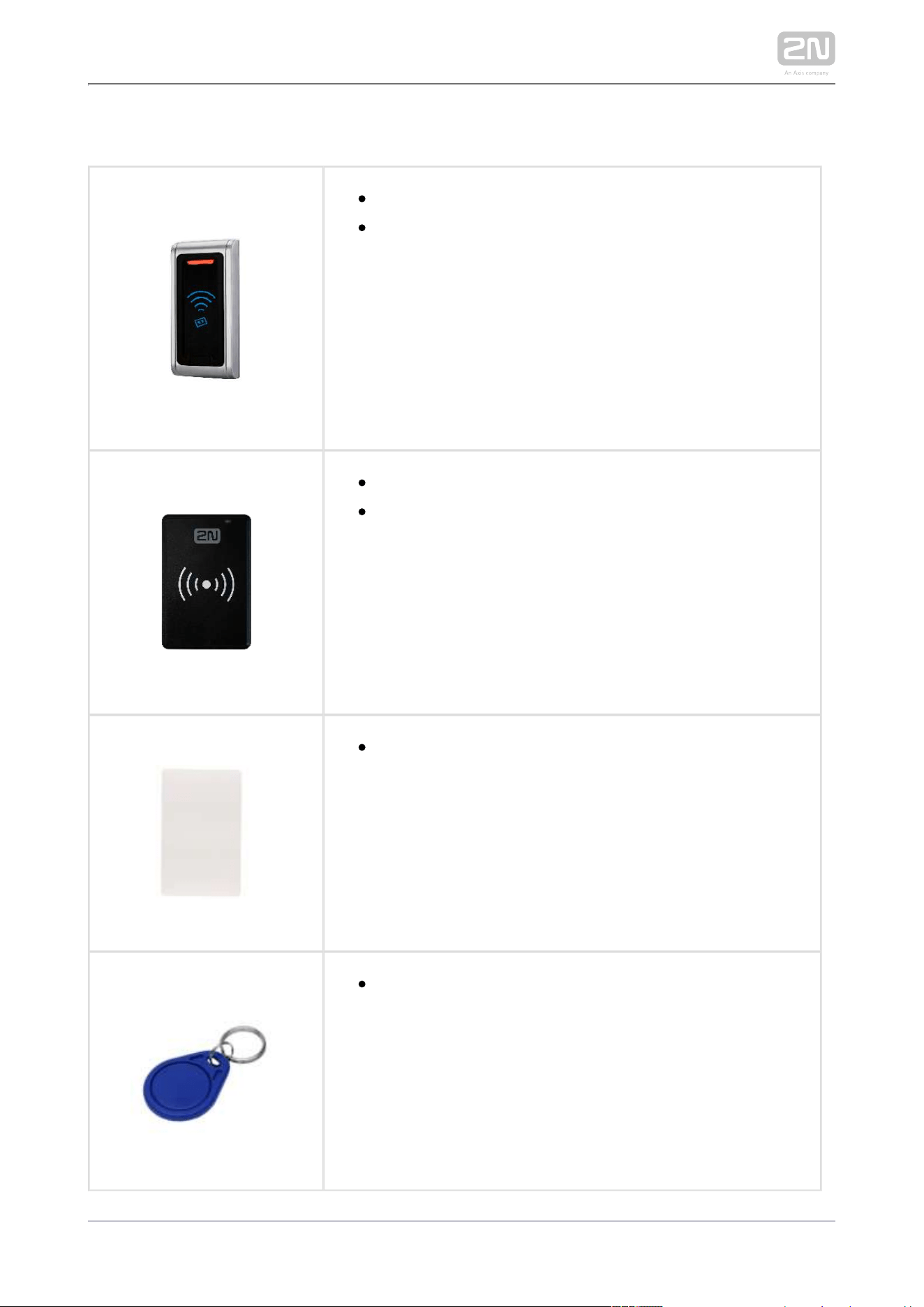
2N TELEKOMUNIKACE a.s., www.2n.cz 39/233
125 kHz RFID
Part No. 9159030
External 125 kHz RFID card reader
Secondary reader for connection to an internal reader.
Allows for card entry control from both sides of the door.
IP67 cover, also suitable for exteriors. Reads EM4xxx
cards.
9137420EPart No.
USB RFID card reader, 125 kHz
External RFID card reader for PC connection via a USB
interface. Suitable for system management and addition
of EM41xx cards via the PC 2N Access Commander
®
application.
9134165EPart No.
EM4100 RFID card, 125 kHz
9134166EPart No.
EM4100 RFID fob, 125 kHz

2N TELEKOMUNIKACE a.s., www.2n.cz 40/233
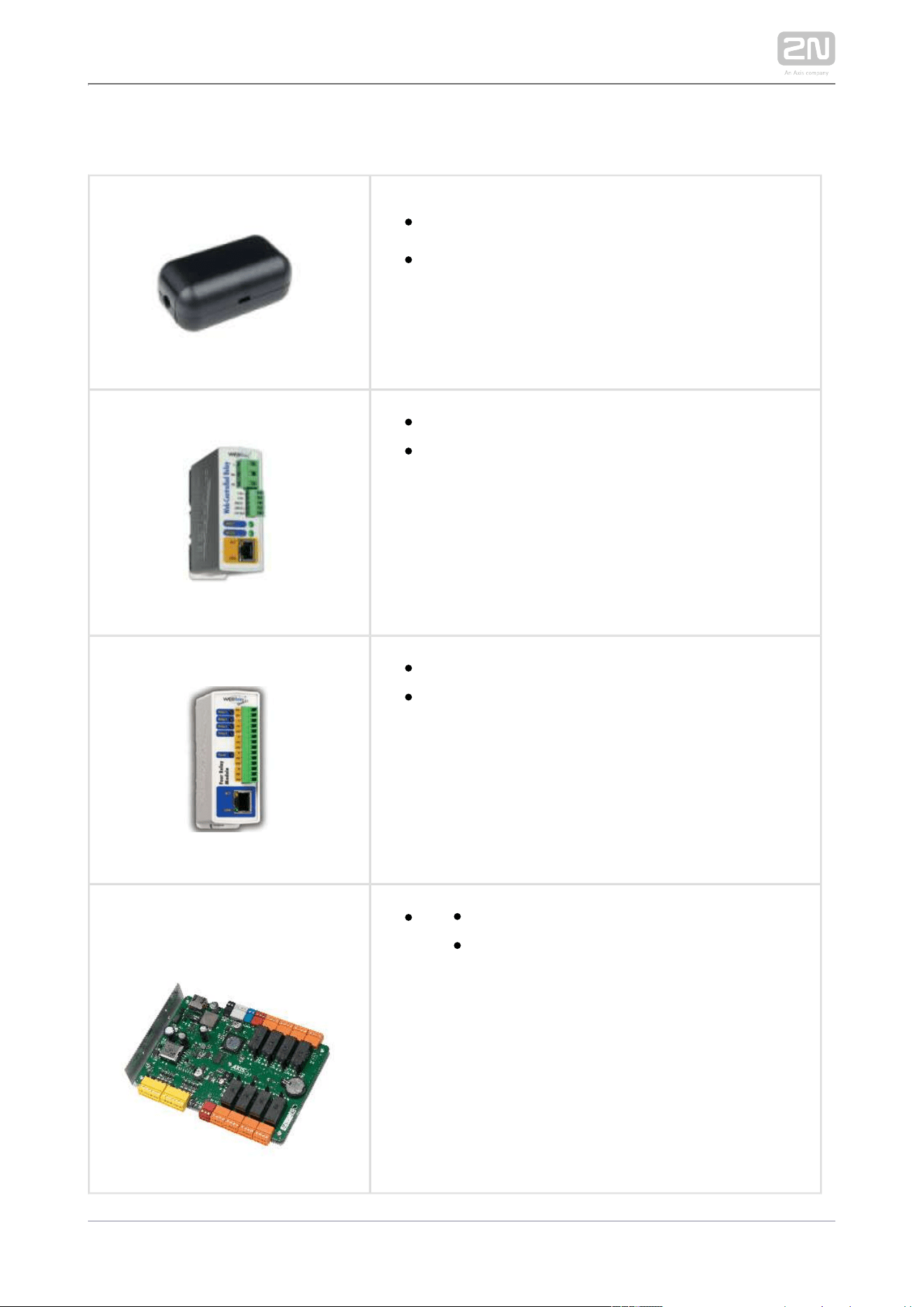
Biometry
Part No. 9137423E
2N IP intercom
®
- external fingerprint reader (USB interface)
2N TELEKOMUNIKACE a.s., www.2n.cz 41/233
External Switches
9159010Part No.
2N
®
Security Relay
A handy add-on that significantly enhances door
entry security as it prevents tampering with the
intercom and forced lock opening. To be installed
between the intercom and lock, powered by the
intercom.
9137410EPart No.
External IP relay – 1 output
Standalone IP device which can be controlled by
the HTTP which 2N IP/LTE intercom commands,
can thus control devices over an unlimited distance.
9137411EPart No.
External IP relay – 4 outputs, PoE
t Standalone IP device which can be controlled by
he HTTP which can 2N IP/LTE intercom commands,
thus control devices over an unlimited distance.
91605012N Part No.
Axis Part No. 0820-001
AXIS A9188 Network I/O relay module
Lift control relay module for up to 8 floors

2N TELEKOMUNIKACE a.s., www.2n.cz 42/233
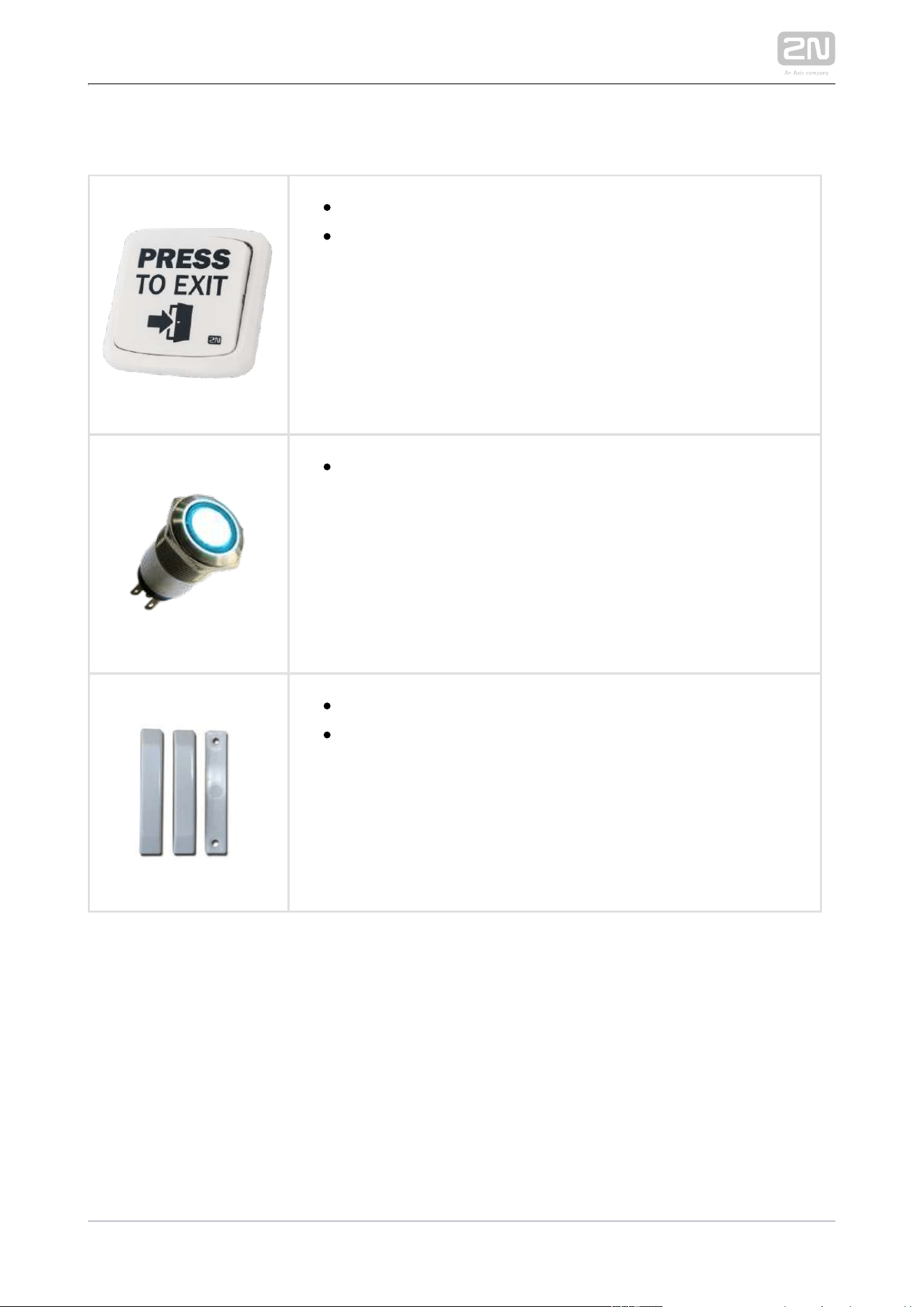
Induction Loop
2N Part No. 9155043
Axis Part No. 01265-001
Induction loop module – antenna
External antenna boosts the range of usability of the induction
loop so that a hearing impaired user with a telecoil hearing aid
can receive the audio signal in a wider area. It has to be used
with . A 40 cm long interconnecting cable is Part No. 9155041
included.
Dimensions: 233 (W) x 233 (H) mm
Tip
FAQ: Induction loop – How to connect it with 2N IP/LTE intercom
2N TELEKOMUNIKACE a.s., www.2n.cz 43/233
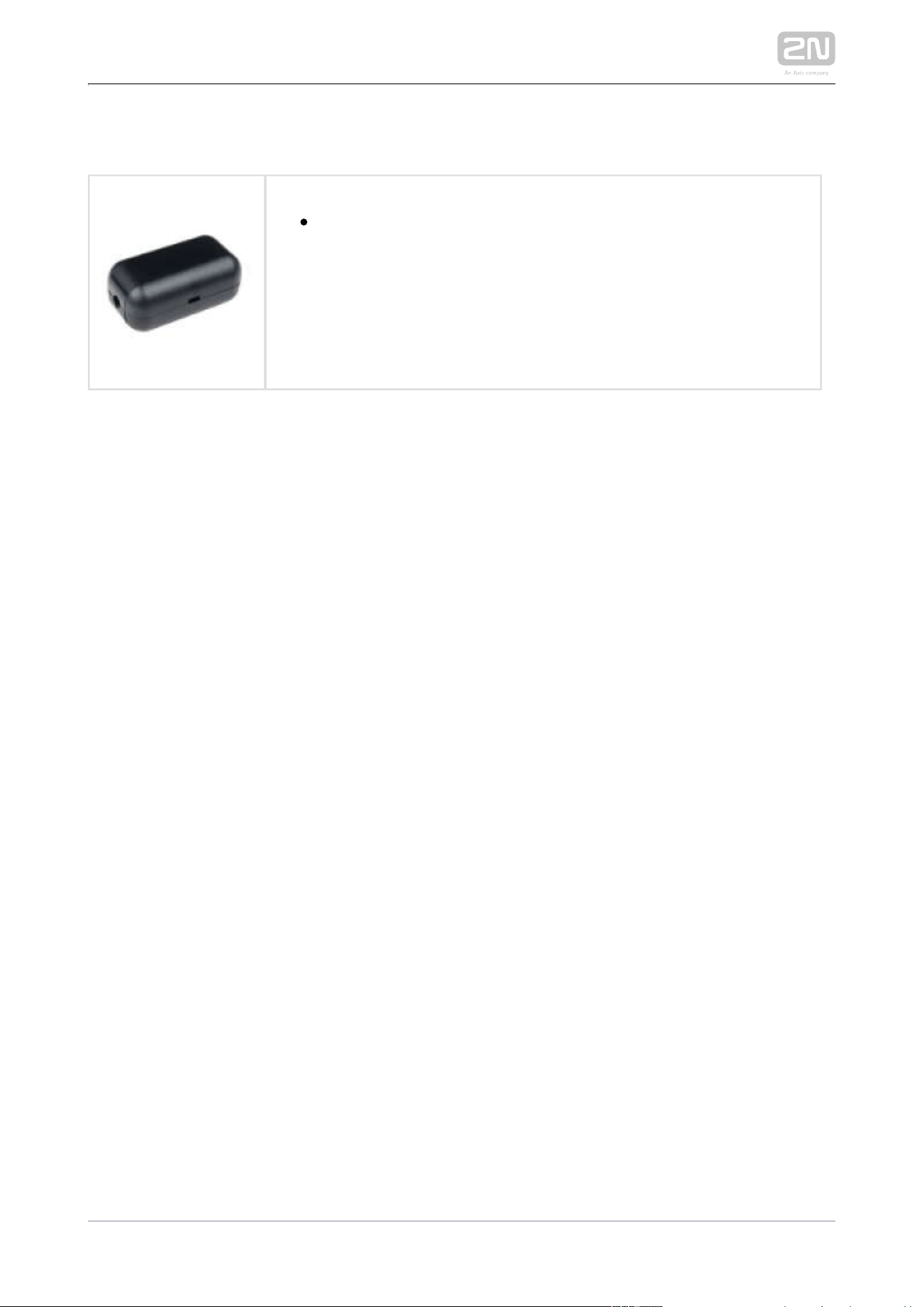
Sensors and switches
Part No. 9159013
Exit button
Connection button to a logic input for opening a door inside a
building.
Part No. 9154004
Water-proof metal button
Part No. 9159012
Magnetic door contact
Door installation set that enables the door opening status to be
ascertained. Used where the intercom is used for door
protection, to detect open door or door violation.
2N TELEKOMUNIKACE a.s., www.2n.cz 44/233
Additional Modules
Part No. 9159011
The 2N
®
Wiegand Isolator is designed for galvanic isolation of
two devices separately power supplied and interconnected via the
Wiegand bus. The 2N
®
protects the Wiegand Isolator
interconnected devices against communication errors and/or
damage.

2N TELEKOMUNIKACE a.s., www.2n.cz 45/233
License
2N Part No.
9137905
Axis Part No.
01376-001
Enhanced Audio
2N Part No.
9137906
Axis Part No.
01377-001
Enhanced Video
2N Part No.
9137907
Axis Part No.
01378-001
Enhanced Integration
2N Part No.
9137908
Axis Part No.
01379-001
Enhanced Security
2N Part No.
9137909
Axis Part No.
01380-001
Gold
2N Part No.
9137910
Axis Part No.
01381-001
InformaCast
2N Part No.
9137915
Axis Part No.
01382-001
NFC
2N TELEKOMUNIKACE a.s., www.2n.cz 47/233
1.2 Terms and Symbols
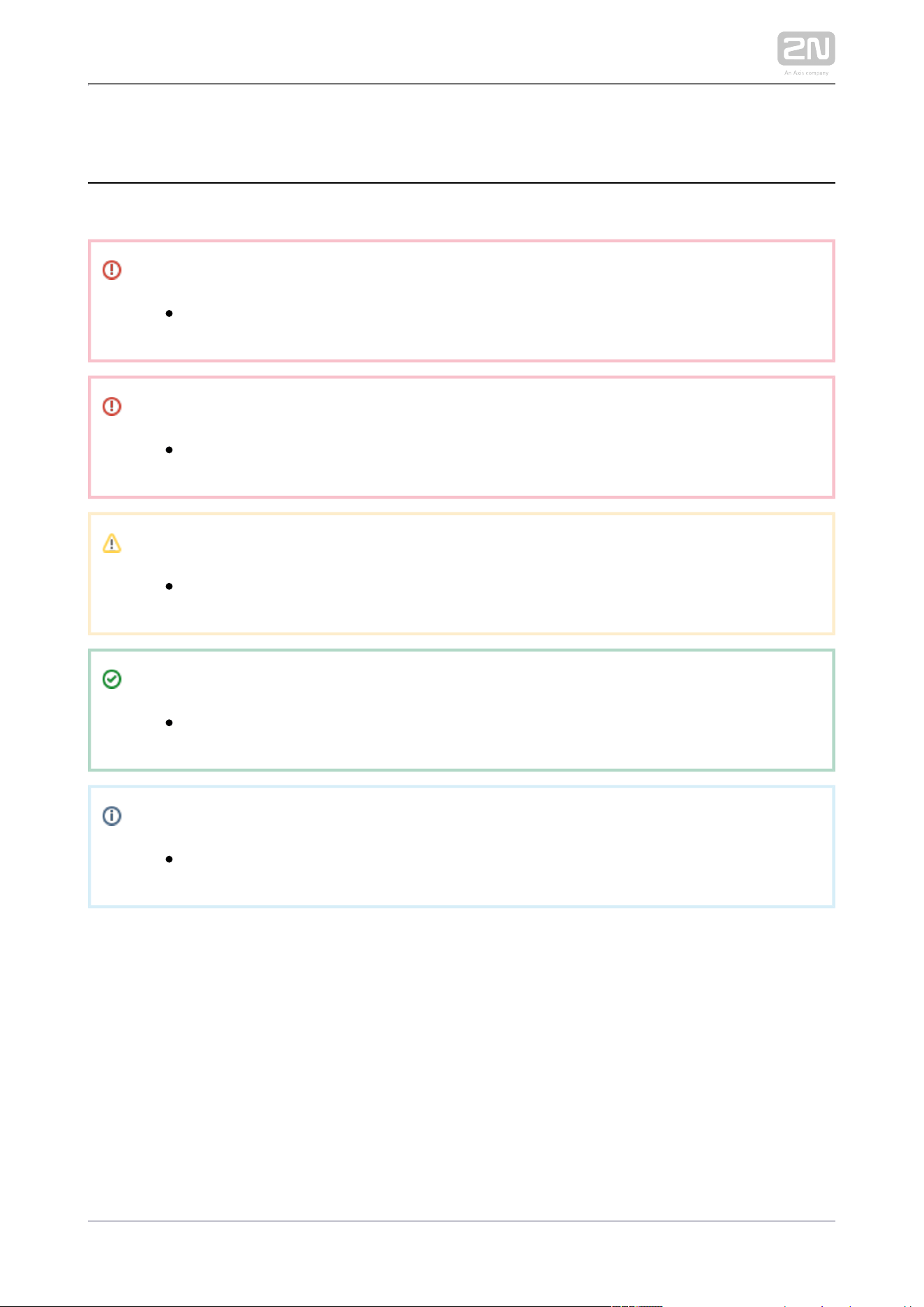
The following symbols and pictograms are used in the manual:
Safety
Always abide by this information to prevent persons from injury.
Warning
Always abide by this information to prevent damage to the device.
Caution
Important information for system functionality.
Tip
Useful information for quick and efficient functionality.
Note
Routines or advice for efficient use of the device.


2N TELEKOMUNIKACE a.s., www.2n.cz 49/233
2.1 Before You Start
Product Completeness Check
Before you start please check whether the contents of the package of your new
complies with the following list.2N LTE Verso
®
1x 2N LTE Verso
®

2N TELEKOMUNIKACE a.s., www.2n.cz 50/233
2.2 Mechanical Installation
Mounting Types Overview
Refer to the table below for a list of mounting types and necessary components. You
can assemble multiple units in all mounting types.
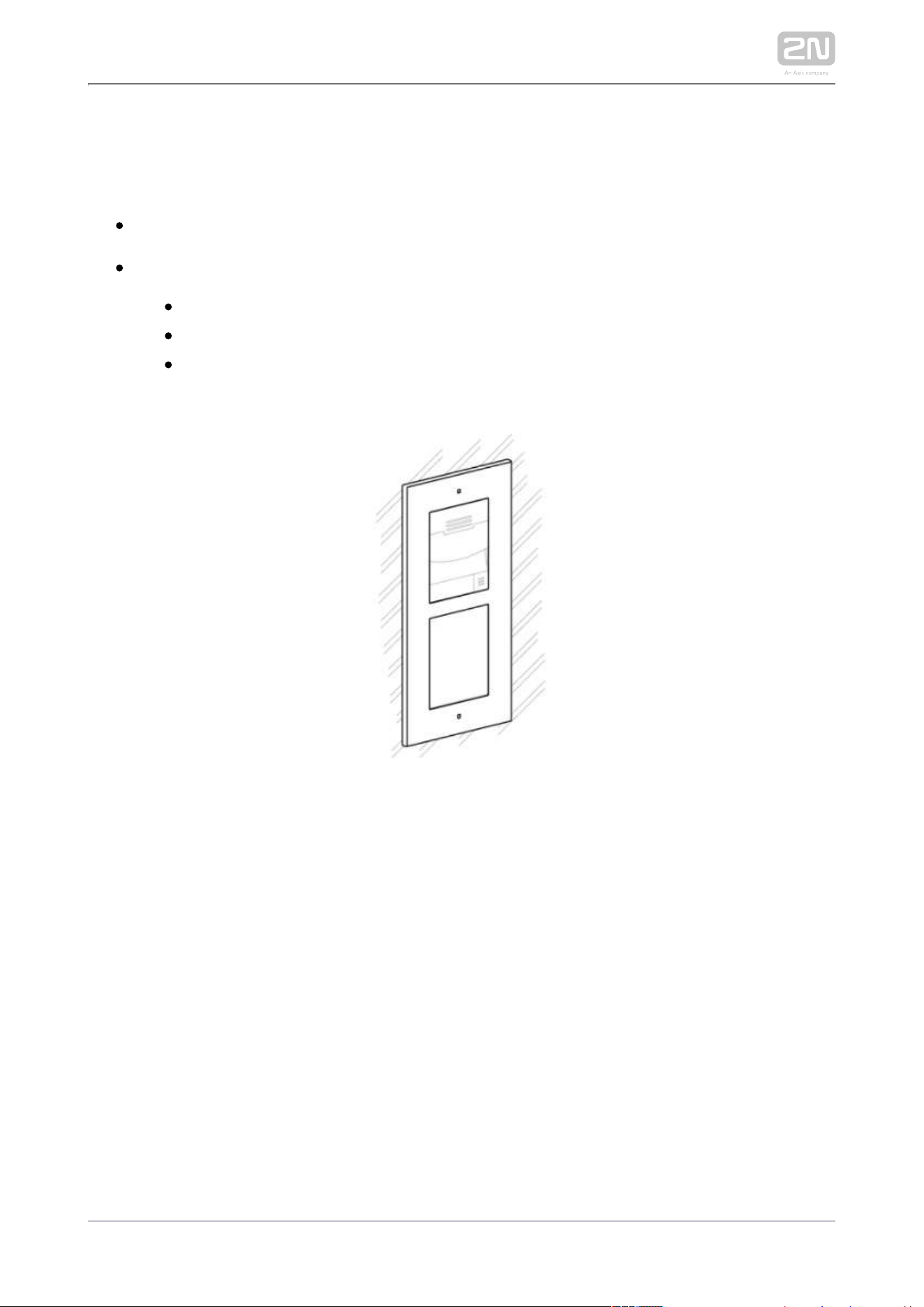
Flush mounting – classic bricks
incl. hollow bricks, thermally insulated walls, etc.
What you need for mounting:
a properly cut hole as instructed in the box package
Plaster, mounting glue, mounting foam or mortar as necessary
2N IP/LTE Verso
®
, flush mounting boxes and frames
1x module: box Part No. , frame Part No.9155014 9155011
2x modules: box Part No. , frame Part No. 9155015 9155012
3x modules: box Part No. , frame Part No. 9155016 9155013
2N TELEKOMUNIKACE a.s., www.2n.cz 51/233
Flush mounting – plasterboard
What you need for mounting:
a properly cut hole as instructed in the box package
2N IP/LTE Verso
®
, flush mounting boxes and frames
1x module: box Part No. , frame Part No. 9155014 9155011
2x modules: box Part No. , frame Part No. 9155015 9155012
3x modules: box Part No. , frame Part No. 9155016 9155013

2N TELEKOMUNIKACE a.s., www.2n.cz 52/233
Surface mounting
concrete and steel structures, entry barrier columns, interior, etc.
What you need for mounting:
2N IP/LTE Verso
®
plus the respective frames
1x module: frame Part No. 9155021
2x modules: frame Part No. 9155022
3x modules: frame Part No. 9155023
For not flat surface use according to the module number backplate Part No –9155061
.9155067
2N TELEKOMUNIKACE a.s., www.2n.cz 53/233
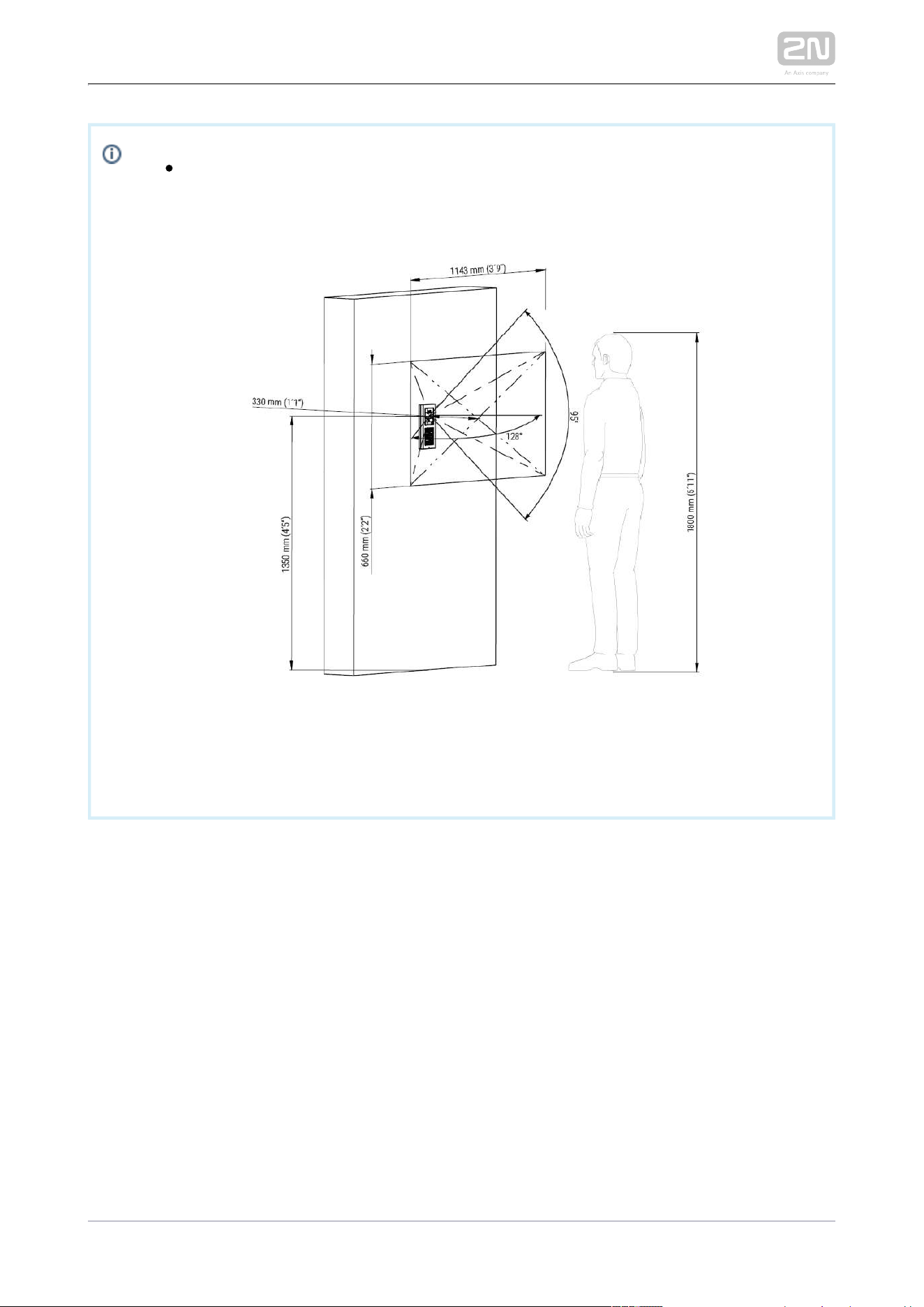
The recommended standard installation height is 1350 mm from the
ground to the device camera level. The installation height may vary
depending on the device use.
2N TELEKOMUNIKACE a.s., www.2n.cz 54/233
Caution
The warranty does not apply to the product defects and failures arisen
as a result of improper mounting (in contradiction herewith). The
manufacturer is neither liable for damage caused by theft within an area
that is accessible after the attached electric lock is switched. The
product is not designed as a burglar protection device except when
used in combination with a standard lock, which has the security
function.
When the proper mounting instructions are not met, water might get in
and destroy the electronics. It is because the communicator circuits are
under continuous voltage and water infiltration causes an electro-
chemical reaction. The manufacturer’s warranty shall be void for
products damaged in this way!
Do not remove the plastic film on the seal inside the frame, otherwise
water may leak and damage the electronic components.
General Mounting Principles
Tip
Select flush mounting where possible to make your product elegant
looking, more vandal resistant and more secure.
You are advised to buy the flush mounting boxes in advance and
commission your building company to do the masonry for you. This
approach helps you put your intercom exactly in the vertical position.

2N TELEKOMUNIKACE a.s., www.2n.cz 55/233
Caution
Make sure that the diameter of the dowel holes is accurate to avoid
falling out of the dowels! Use the mounting glue to secure the dowels if
necessary.
Make sure that the depth of the dowel holes is accurate!
Do not use low-quality dowels to avoid their pulling out of the wall!
Having removed the front panel, make sure that no dirt gets inside the
product (especially onto the sealing surface).
Never turn to align the box assembly after mounting. Make 2N IP Verso
®
sure that the flush mounting boxes have been installed accurately.
Check the plasterboard wall and room interior pressure values. If the
difference between the values is too great (as a result, e.g., of
overpressure ventilation), separate the intercom using, for example, the
mounting box enclosed and seal the cable passage to avoid speaker
damage.
Surface mounting may cause problems on places exposed to potential
vandalism (such as public garages, etc.). In this case, use steel anchoring
elements instead of the dowels and screws included in the delivery.
Make sure that the installation surface is perfectly flat with the maximum
inequality of 0.5 mm. (e.g. boards, glass, cut stone, etc). If this is not the
case, use a flush mounting backplate – , or level Part No 9155061 9155067
the wall surface.
Always use an installation backplate for uneven installation surfaces.
While flush mounting, make sure that the box is installed properly, i.e.
with the box frame on the wall surface. There are snap-off protrusions
on both sides of the flush mounting box to facilitate positioning. Make
sure that the frame is placed precisely onto the flush mounting box off
the wall to provide effective sealing and avoid water penetration into the
intercom. Refer to the pictorial instructions inside the flush mounting
box package.
Any intentional mechanical damage (drilling, main unit tampering, etc.)
results in a loss of warranty.
2N TELEKOMUNIKACE a.s., www.2n.cz 56/233
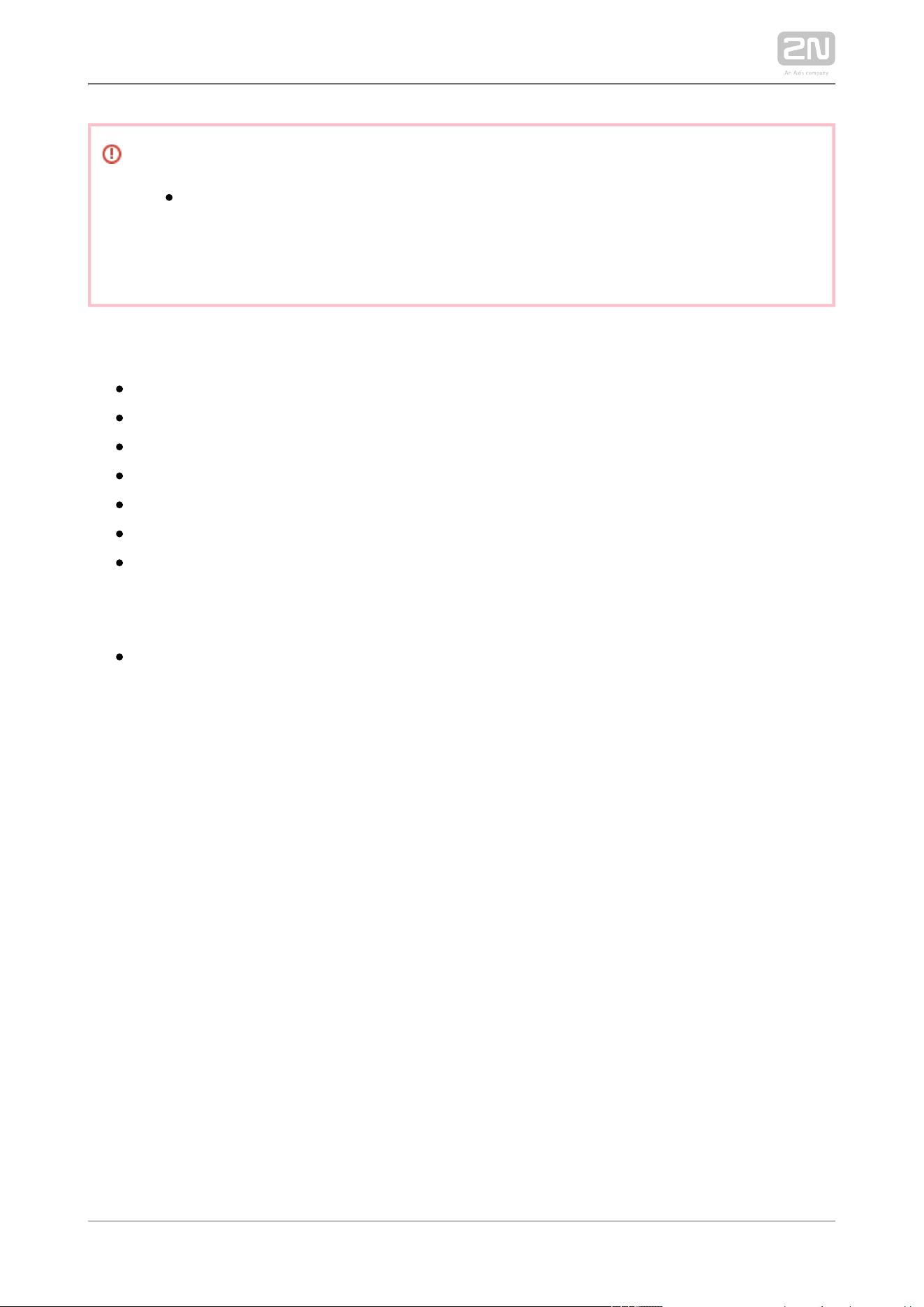
Warning!
It is forbidden to use silicone or any other sealing material on the
marked and hatched places.
2N TELEKOMUNIKACE a.s., www.2n.cz 57/233
Safety
Eliminate the risk of personal injury! Surface mounting is not
recommended for narrow passages or places where people's attention is
distracted by something else. The manufacturer shall not be liable for
injuries in such cases!
Module Installation
2.2.1 One Module Box
2.2.2 Two Modules Box
2.2.3 More Two Module Boxes
2.2.4 Three Modules Boxes
2.2.5 More Than Three Modules Boxes
2.2.6 Tamper and I/O Modules
2.2.7 Module dimension
Instalace příslušenství pro montáž
2.2.8 Instalace montážní desky
2N TELEKOMUNIKACE a.s., www.2n.cz 58/233
2.2.1 One Module Box
Caution
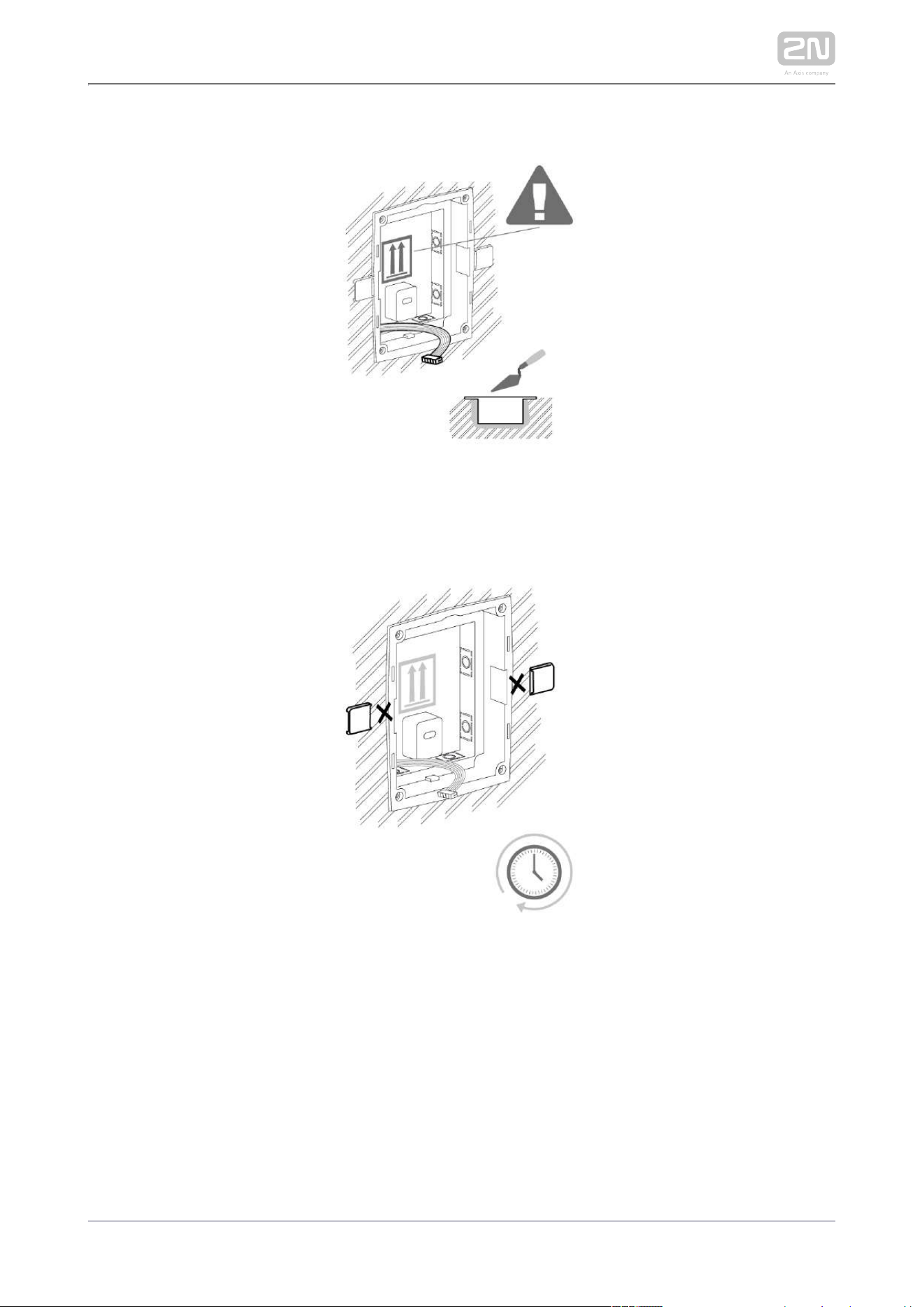
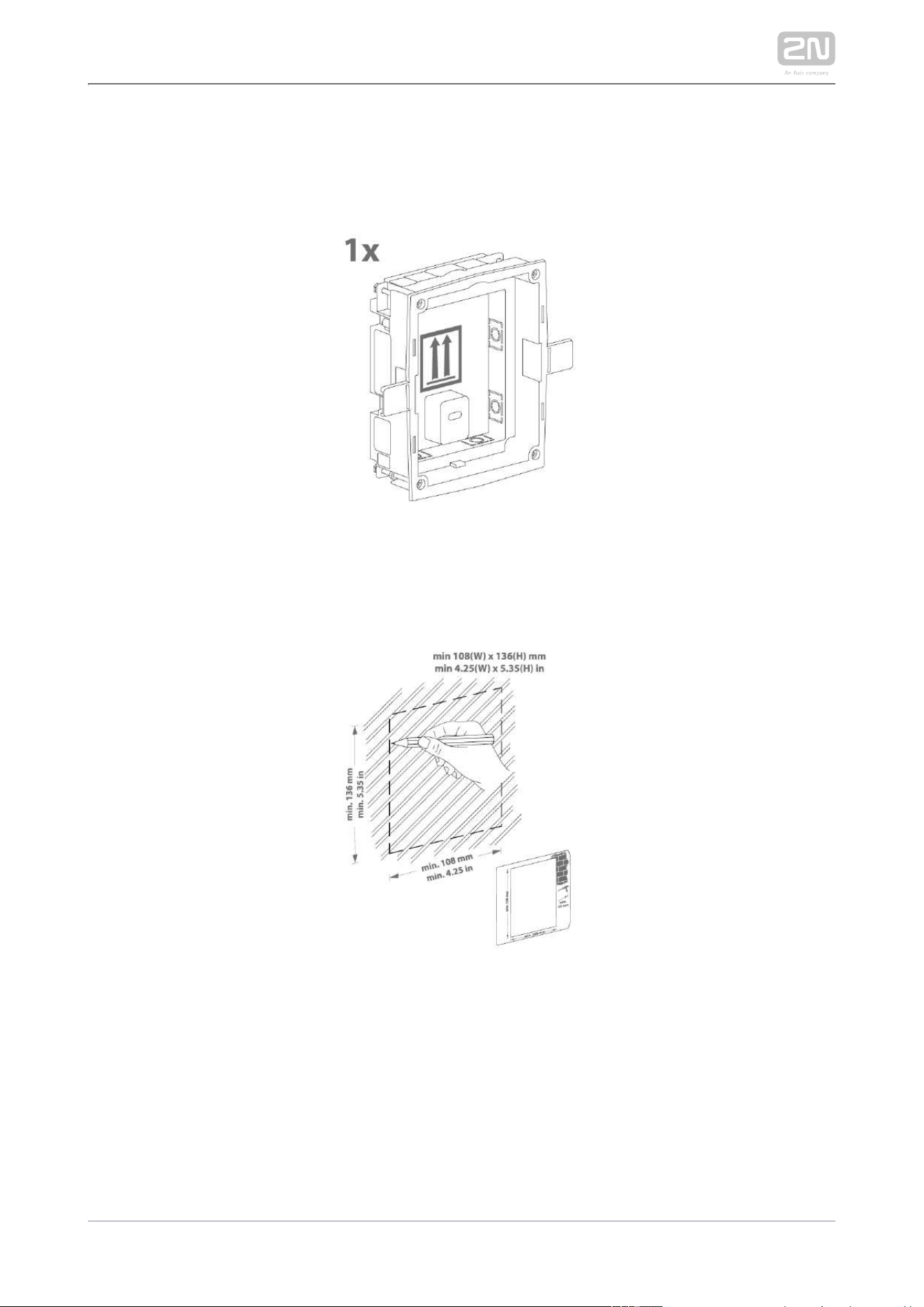
The one-module box is designed for stand-alone installations of
extending modules such as departure readers. A two-module box is
required for the main unit installation.
Flush mounting box mounting – classic bricks

2N TELEKOMUNIKACE a.s., www.2n.cz 59/233
2N TELEKOMUNIKACE a.s., www.2n.cz 60/233

2N TELEKOMUNIKACE a.s., www.2n.cz 61/233
2N TELEKOMUNIKACE a.s., www.2n.cz 62/233
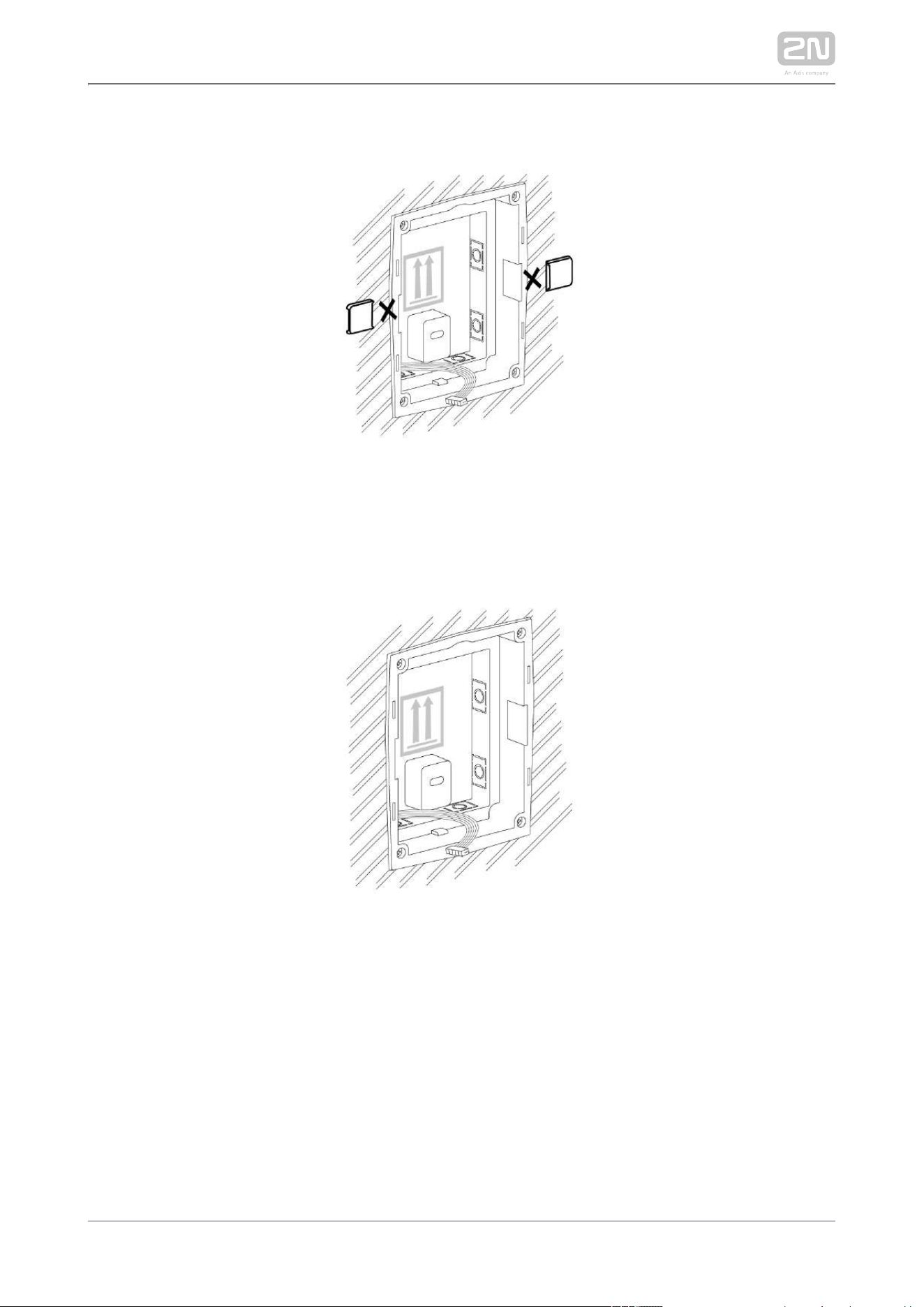
Flush mounting box mounting – plasterboard

2N TELEKOMUNIKACE a.s., www.2n.cz 63/233
2N TELEKOMUNIKACE a.s., www.2n.cz 64/233

2N TELEKOMUNIKACE a.s., www.2n.cz 65/233
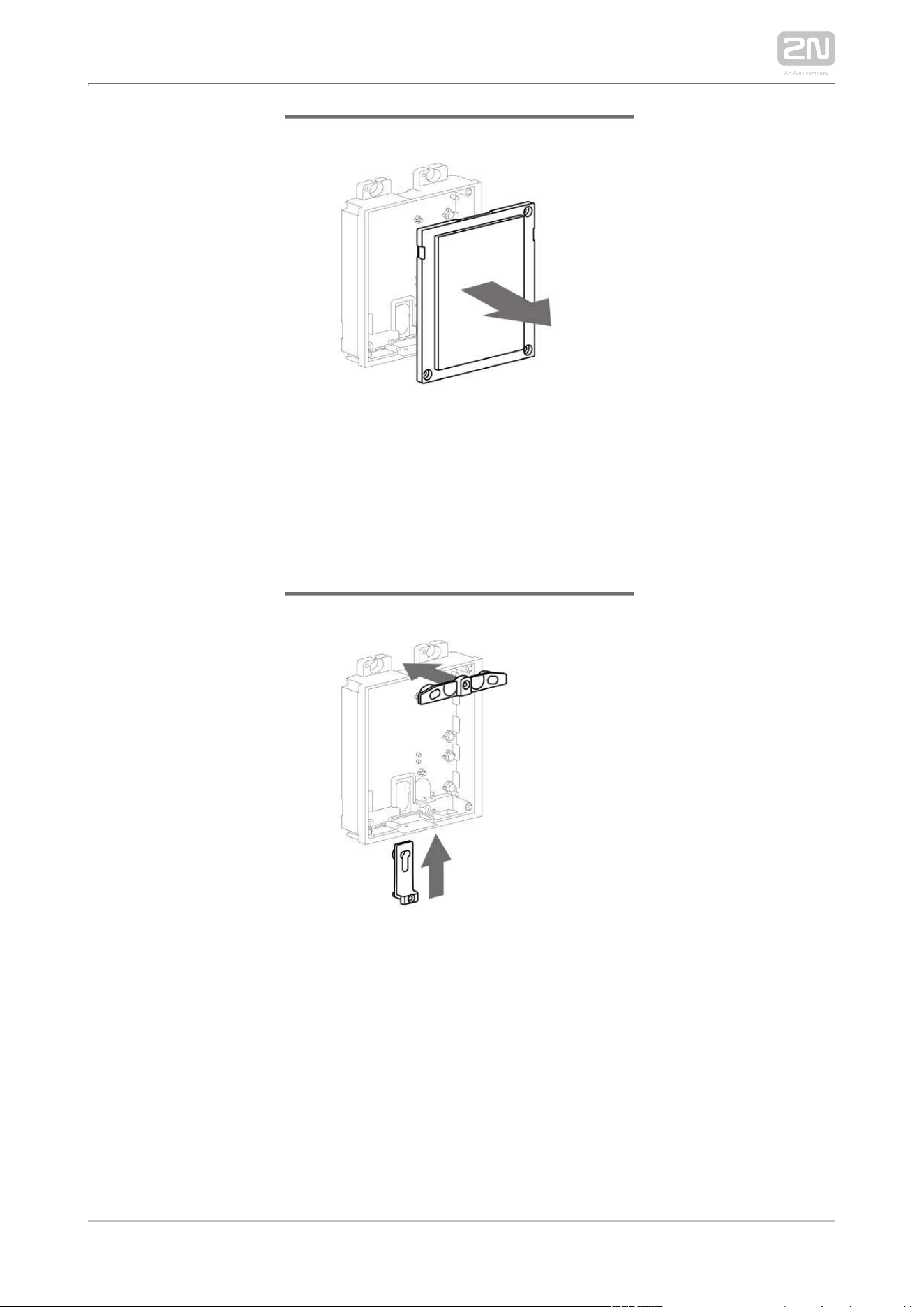
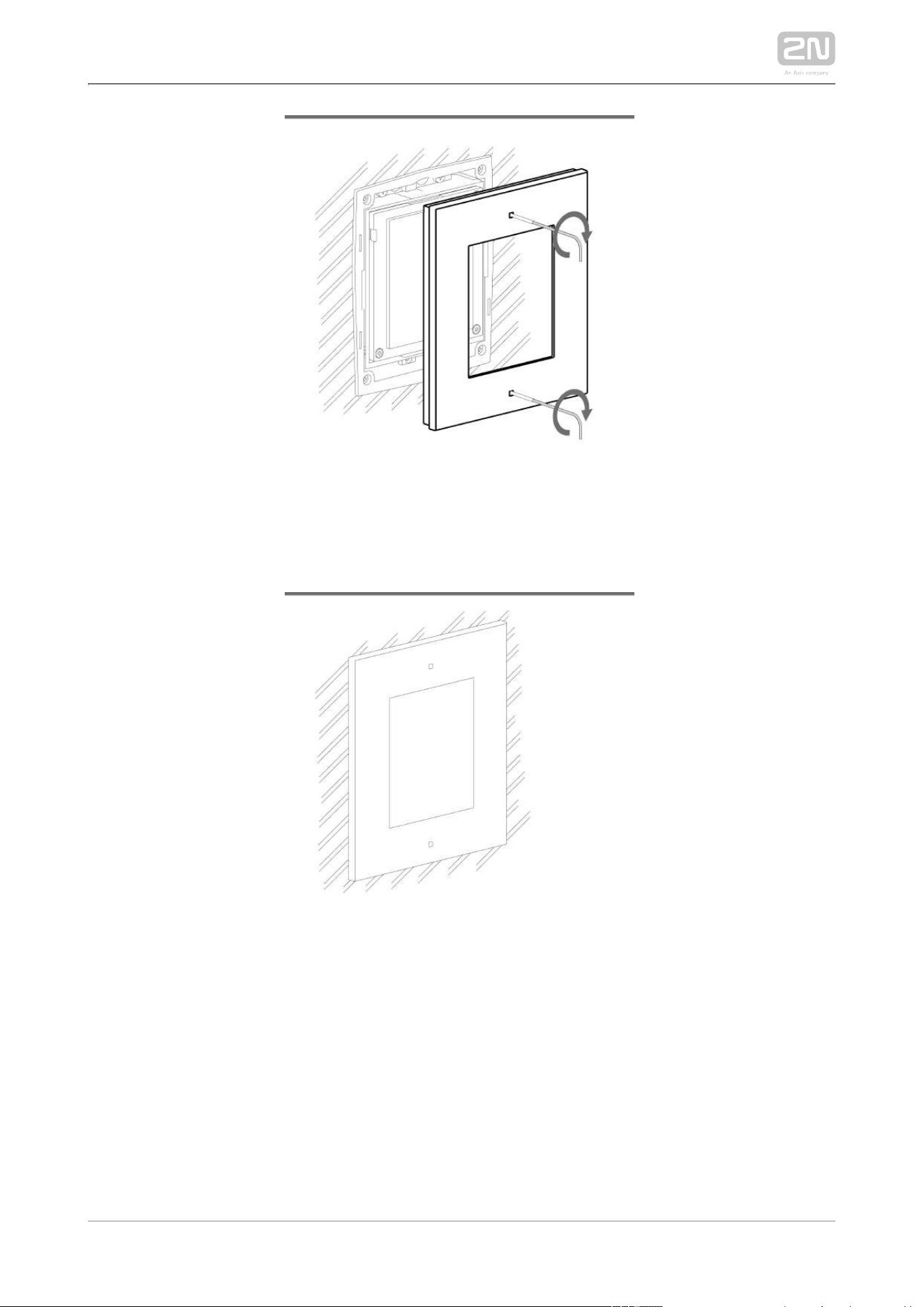
Flush module mounting
2N TELEKOMUNIKACE a.s., www.2n.cz 66/233

2N TELEKOMUNIKACE a.s., www.2n.cz 67/233

2N TELEKOMUNIKACE a.s., www.2n.cz 68/233
2N TELEKOMUNIKACE a.s., www.2n.cz 69/233

2N TELEKOMUNIKACE a.s., www.2n.cz 70/233
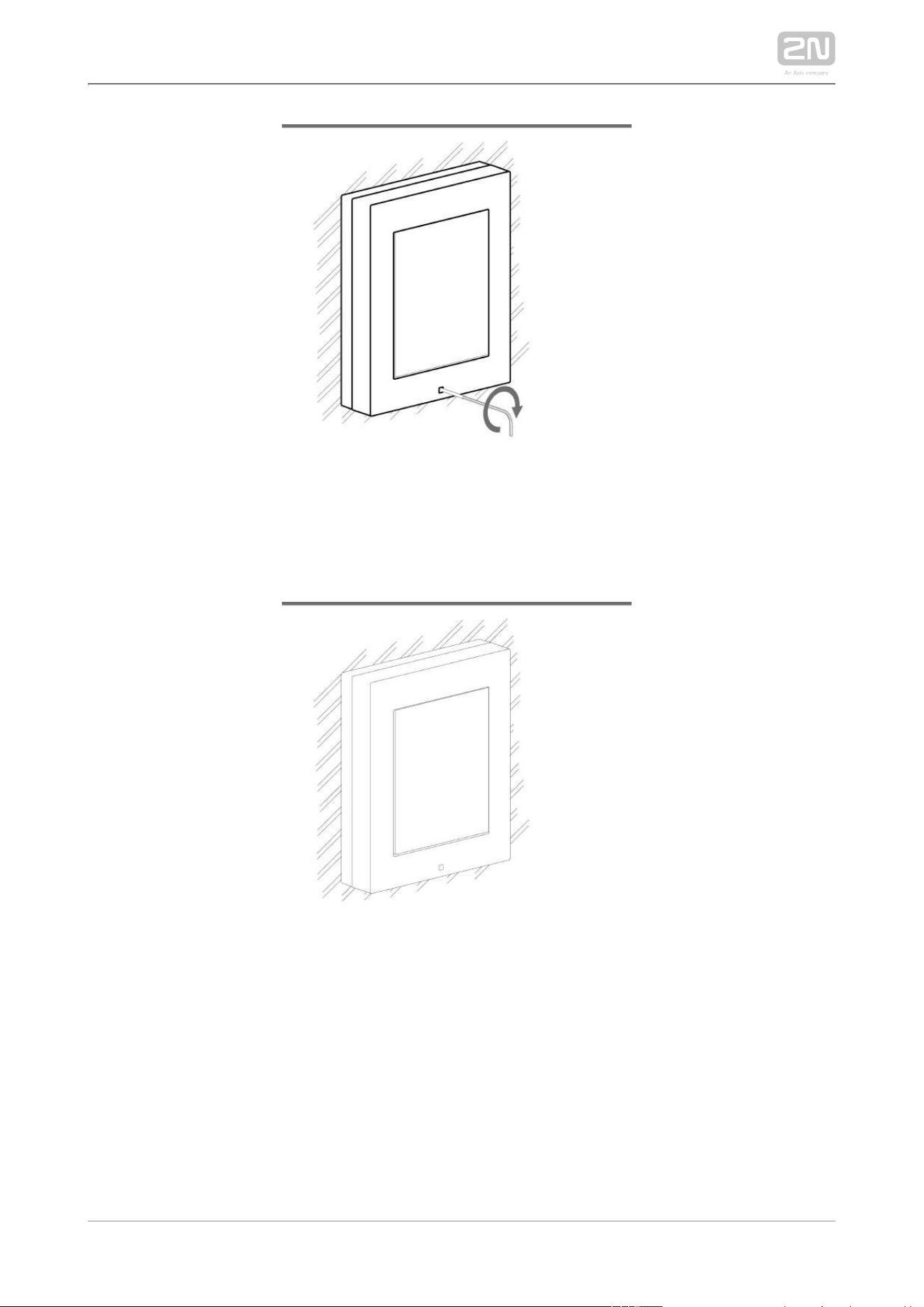
Surface module mounting

2N TELEKOMUNIKACE a.s., www.2n.cz 71/233

2N TELEKOMUNIKACE a.s., www.2n.cz 72/233

2N TELEKOMUNIKACE a.s., www.2n.cz 73/233
2N TELEKOMUNIKACE a.s., www.2n.cz 74/233

2N TELEKOMUNIKACE a.s., www.2n.cz 75/233
2.2.2 Two Modules Boxes
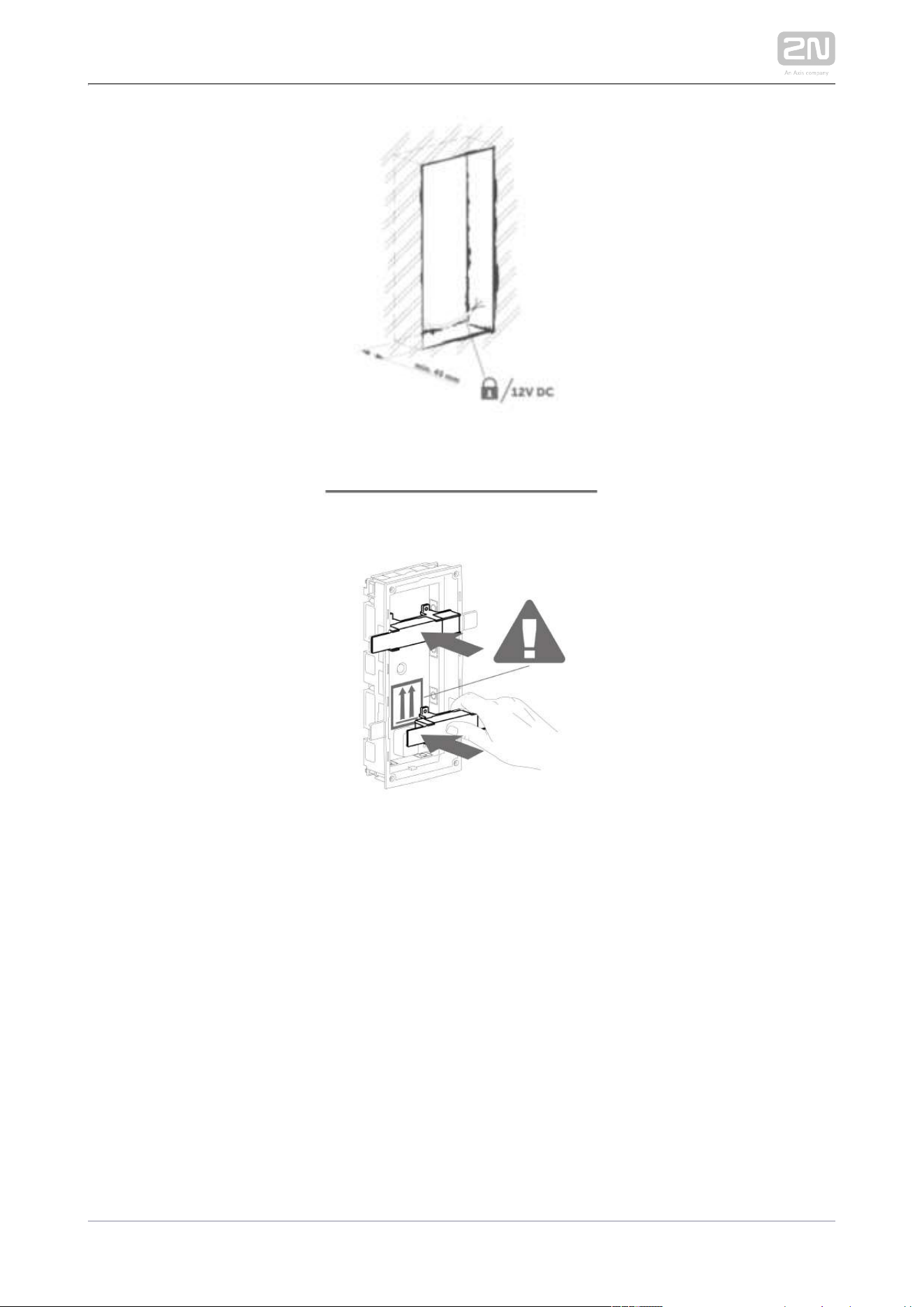
Flush mounting box mounting – classic bricks
2N TELEKOMUNIKACE a.s., www.2n.cz 76/233

2N TELEKOMUNIKACE a.s., www.2n.cz 77/233

2N TELEKOMUNIKACE a.s., www.2n.cz 78/233

2N TELEKOMUNIKACE a.s., www.2n.cz 79/233
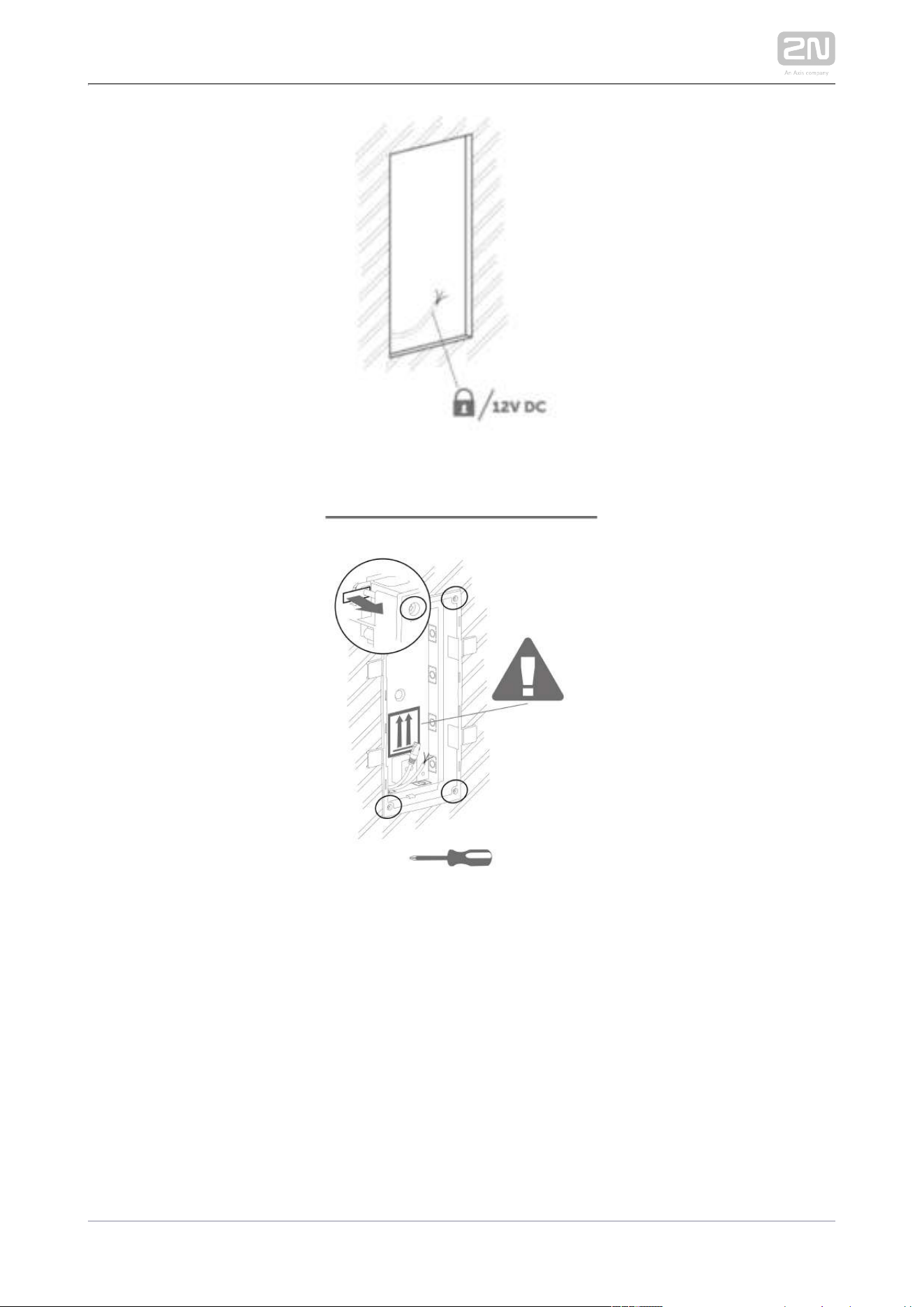
Flush mounting box mounting – plasterboard
2N TELEKOMUNIKACE a.s., www.2n.cz 80/233

2N TELEKOMUNIKACE a.s., www.2n.cz 81/233

2N TELEKOMUNIKACE a.s., www.2n.cz 82/233
Flush module mounting
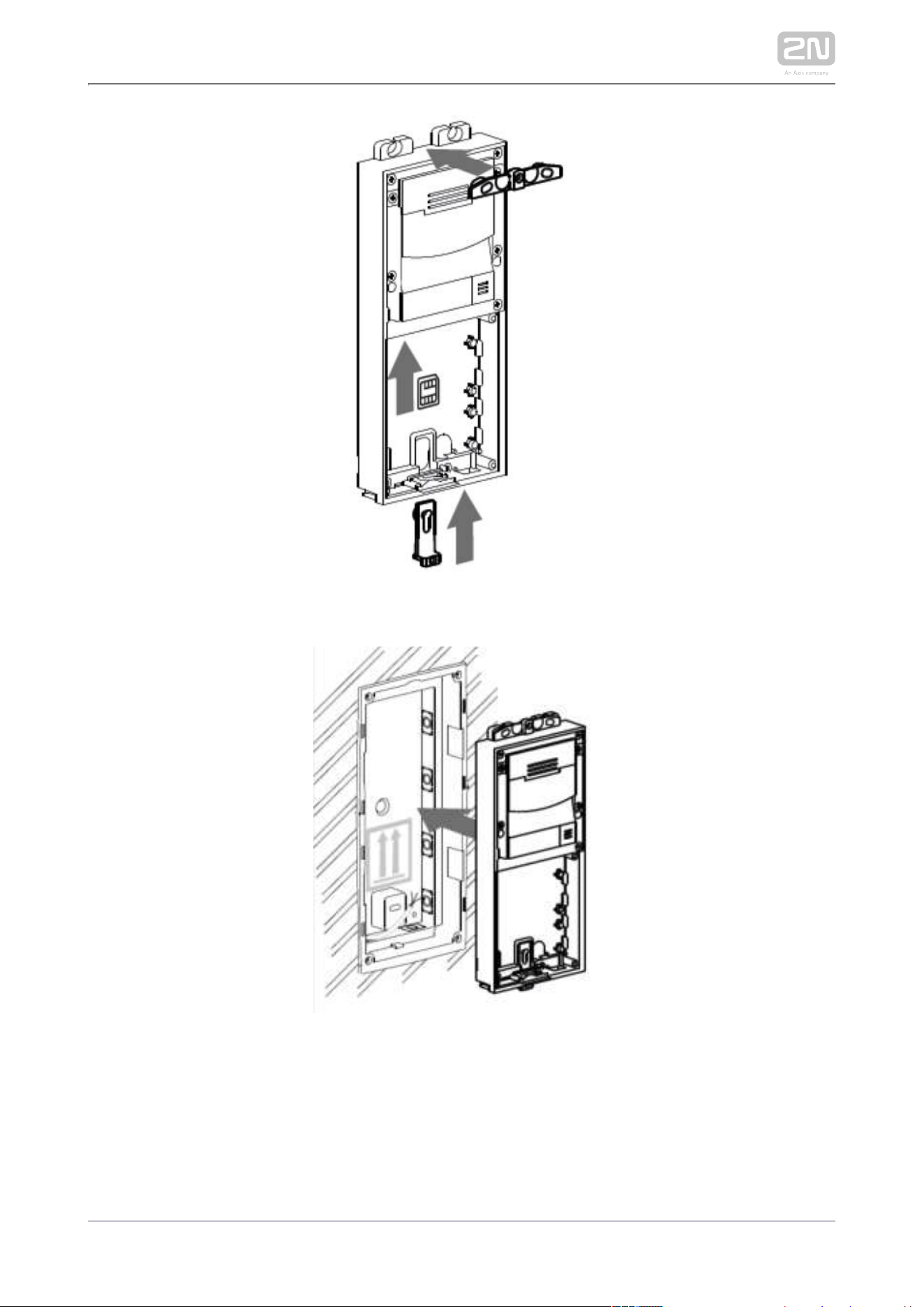
2N TELEKOMUNIKACE a.s., www.2n.cz 83/233

2N TELEKOMUNIKACE a.s., www.2n.cz 84/233
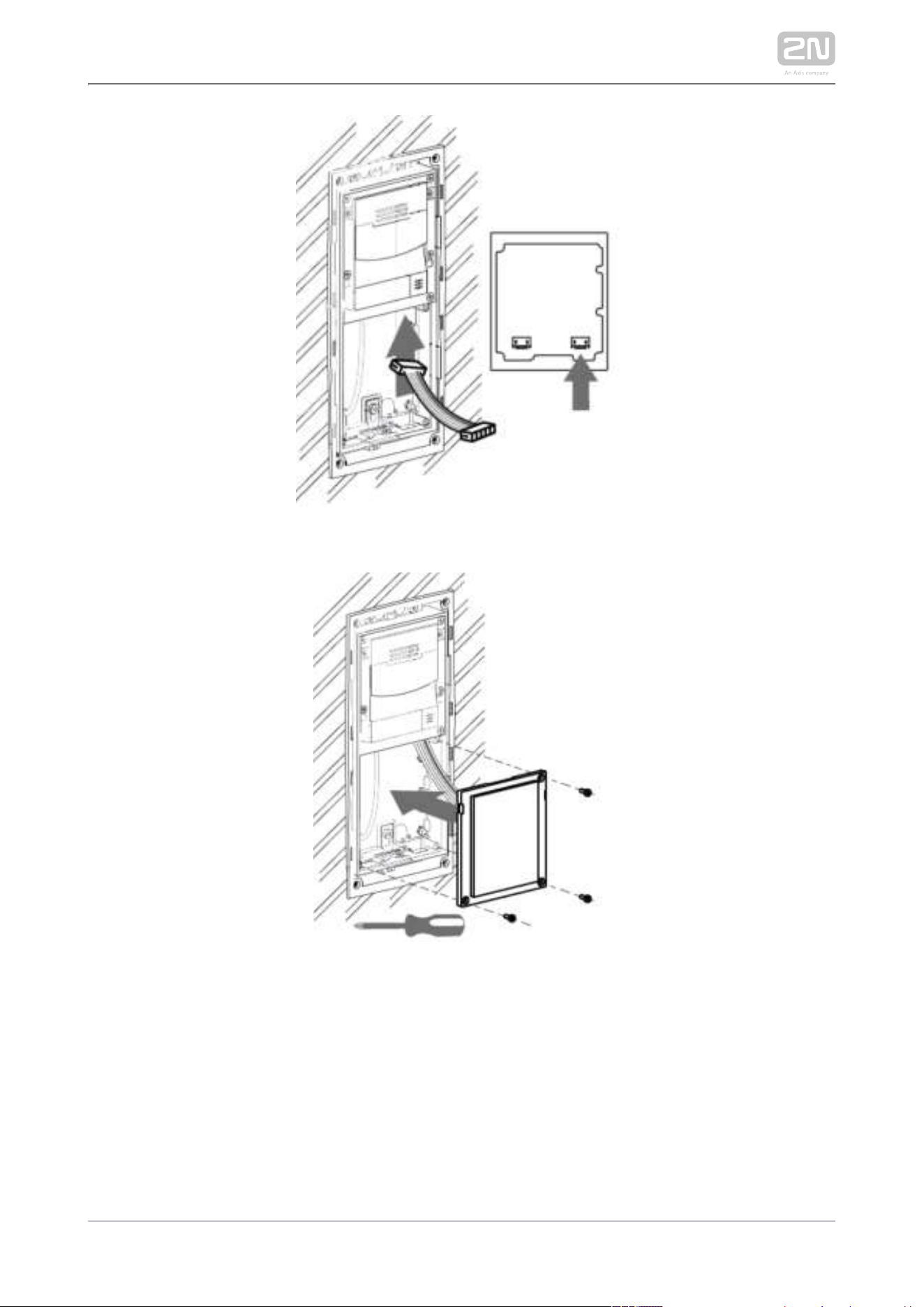
2N TELEKOMUNIKACE a.s., www.2n.cz 85/233

2N TELEKOMUNIKACE a.s., www.2n.cz 86/233

2N TELEKOMUNIKACE a.s., www.2n.cz 87/233
Surface module mounting

2N TELEKOMUNIKACE a.s., www.2n.cz 88/233

2N TELEKOMUNIKACE a.s., www.2n.cz 89/233
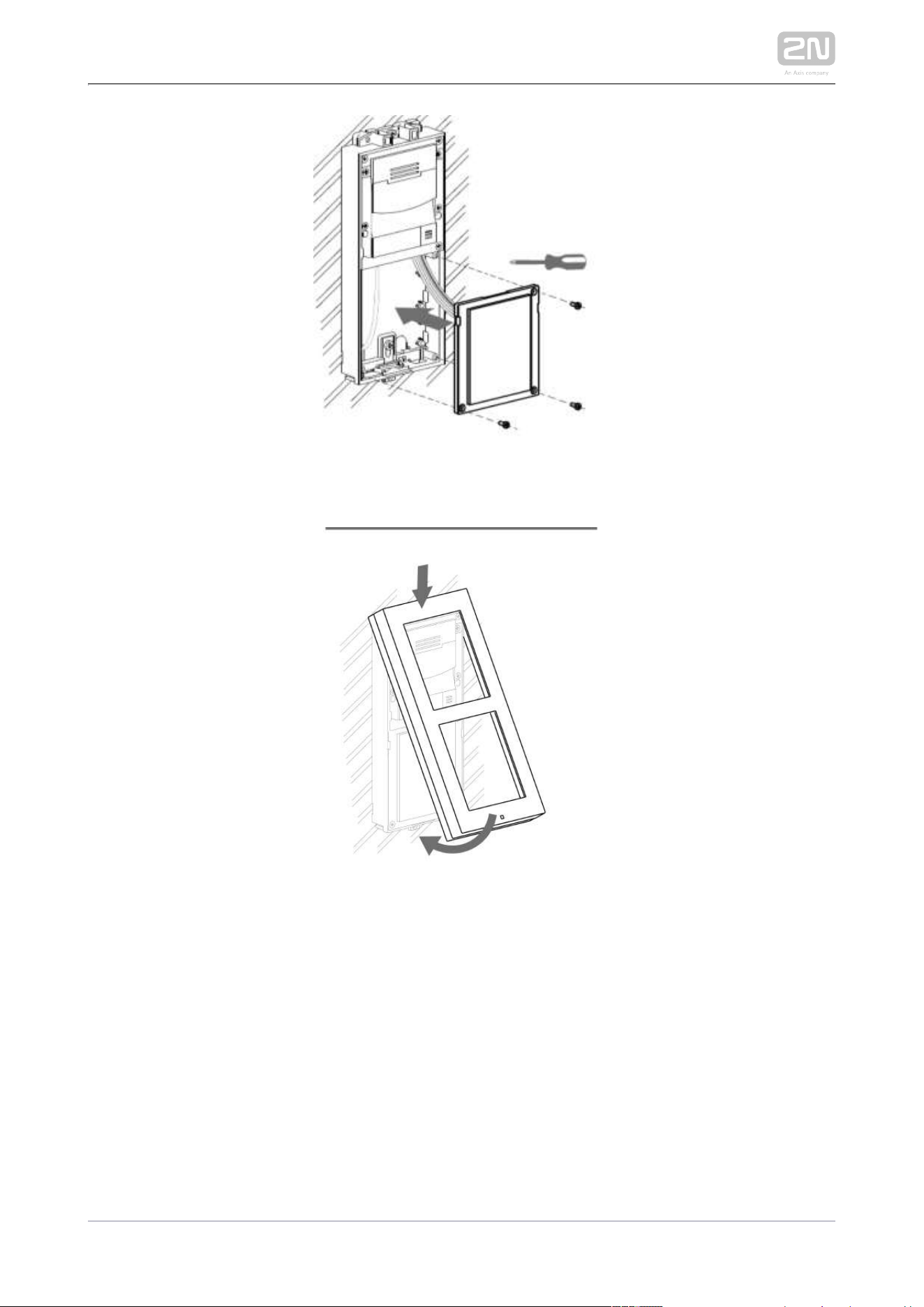
2N TELEKOMUNIKACE a.s., www.2n.cz 90/233

2N TELEKOMUNIKACE a.s., www.2n.cz 91/233

2N TELEKOMUNIKACE a.s., www.2n.cz 92/233
2.2.3 More Two Modules Boxes
Flush mounting box mounting – classics bricks

2N TELEKOMUNIKACE a.s., www.2n.cz 93/233

2N TELEKOMUNIKACE a.s., www.2n.cz 94/233
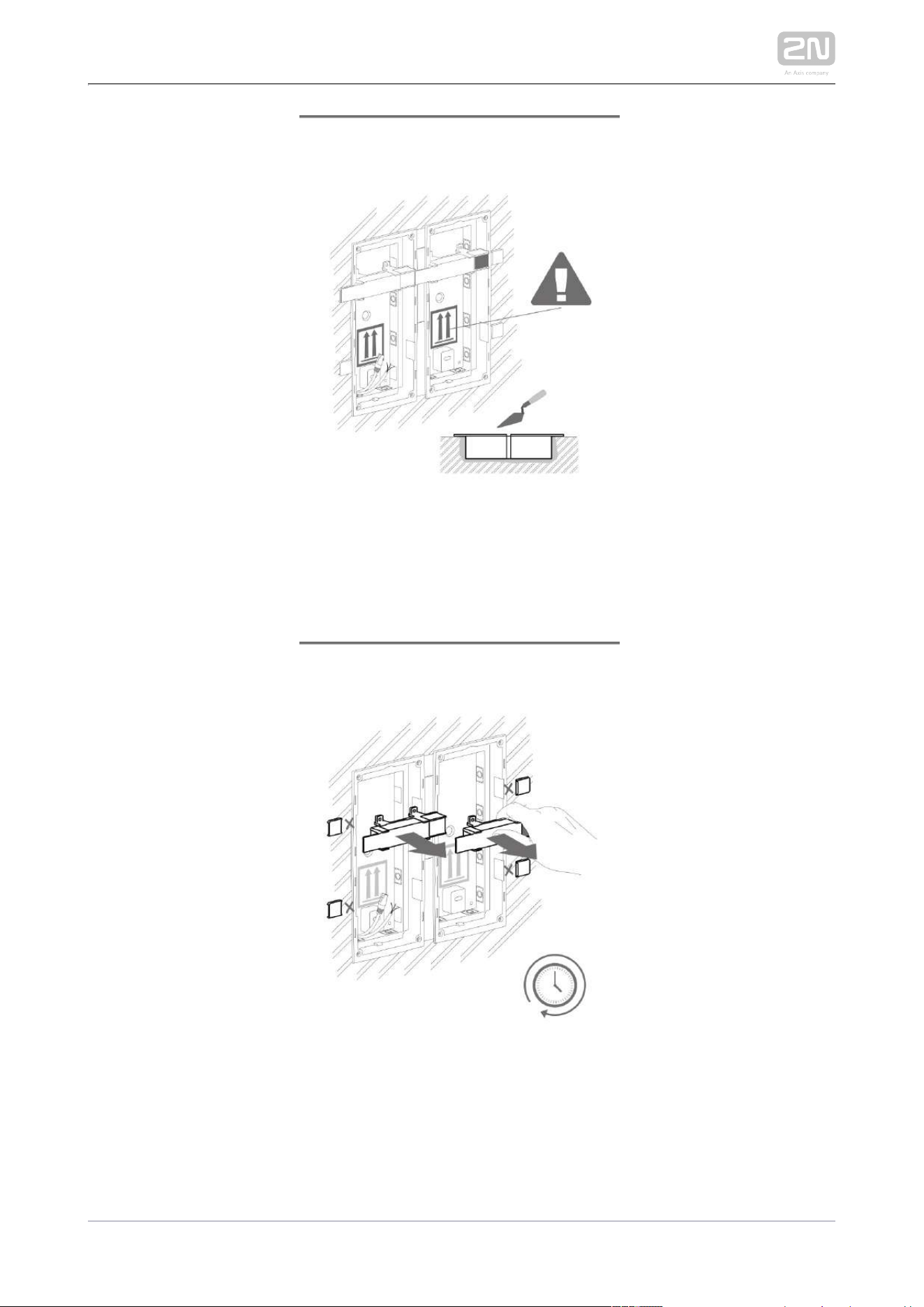
2N TELEKOMUNIKACE a.s., www.2n.cz 95/233

2N TELEKOMUNIKACE a.s., www.2n.cz 96/233
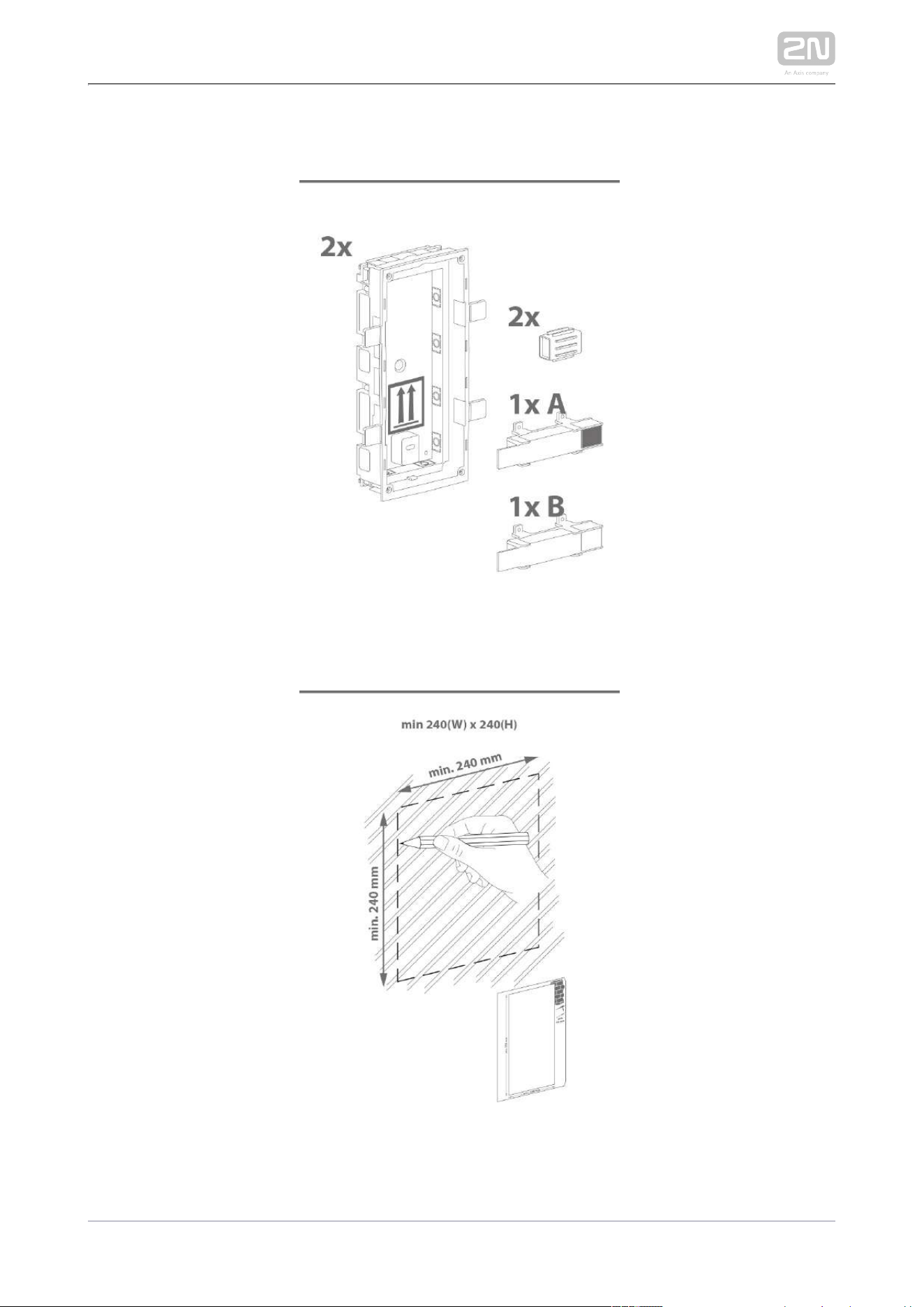
2N TELEKOMUNIKACE a.s., www.2n.cz 97/233
Flush mounting box mounting – plasterboard

2N TELEKOMUNIKACE a.s., www.2n.cz 98/233
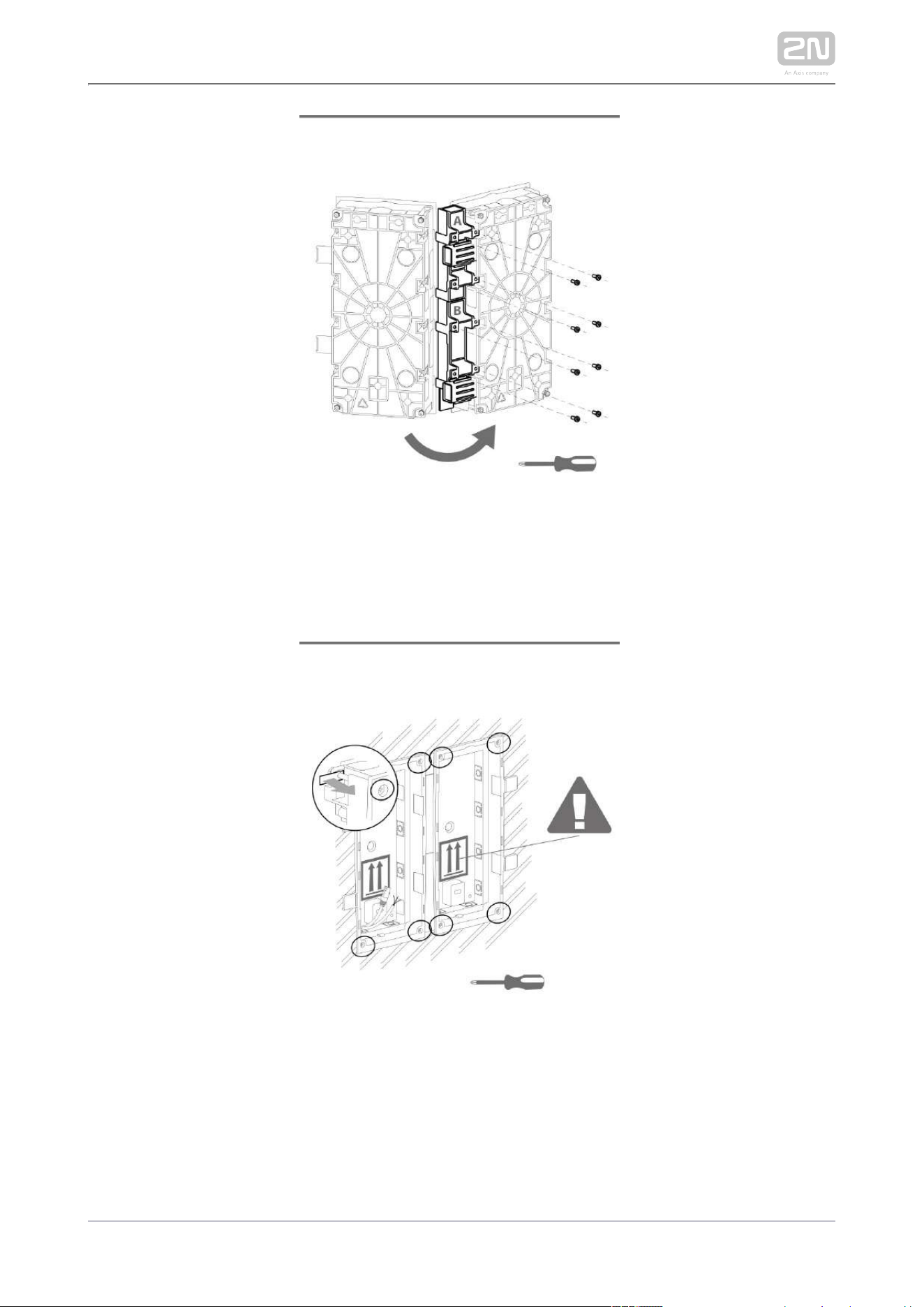
2N TELEKOMUNIKACE a.s., www.2n.cz 99/233
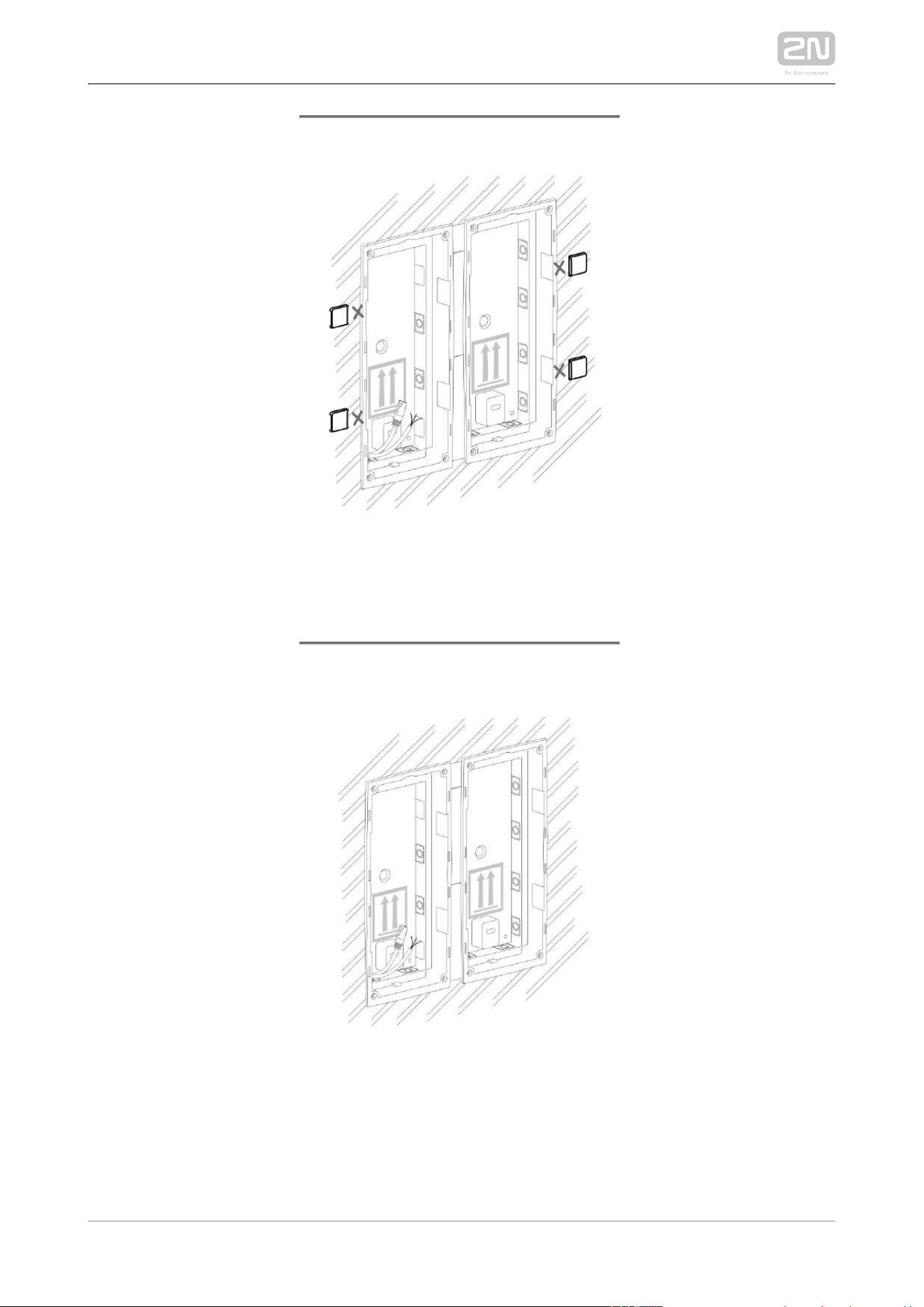
2N TELEKOMUNIKACE a.s., www.2n.cz 100/233

2N TELEKOMUNIKACE a.s., www.2n.cz 101/233
Flush module mounting
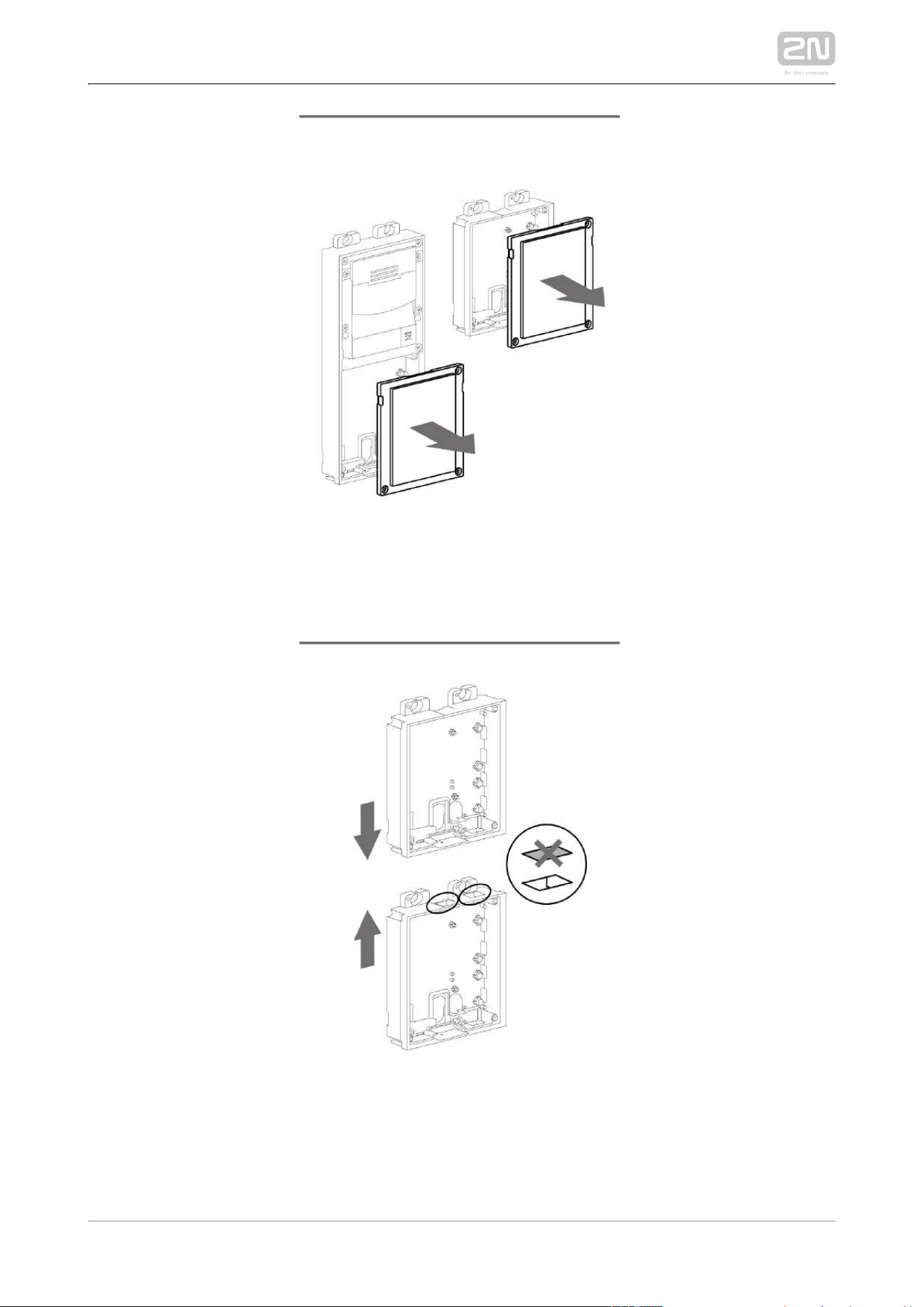
2N TELEKOMUNIKACE a.s., www.2n.cz 102/233
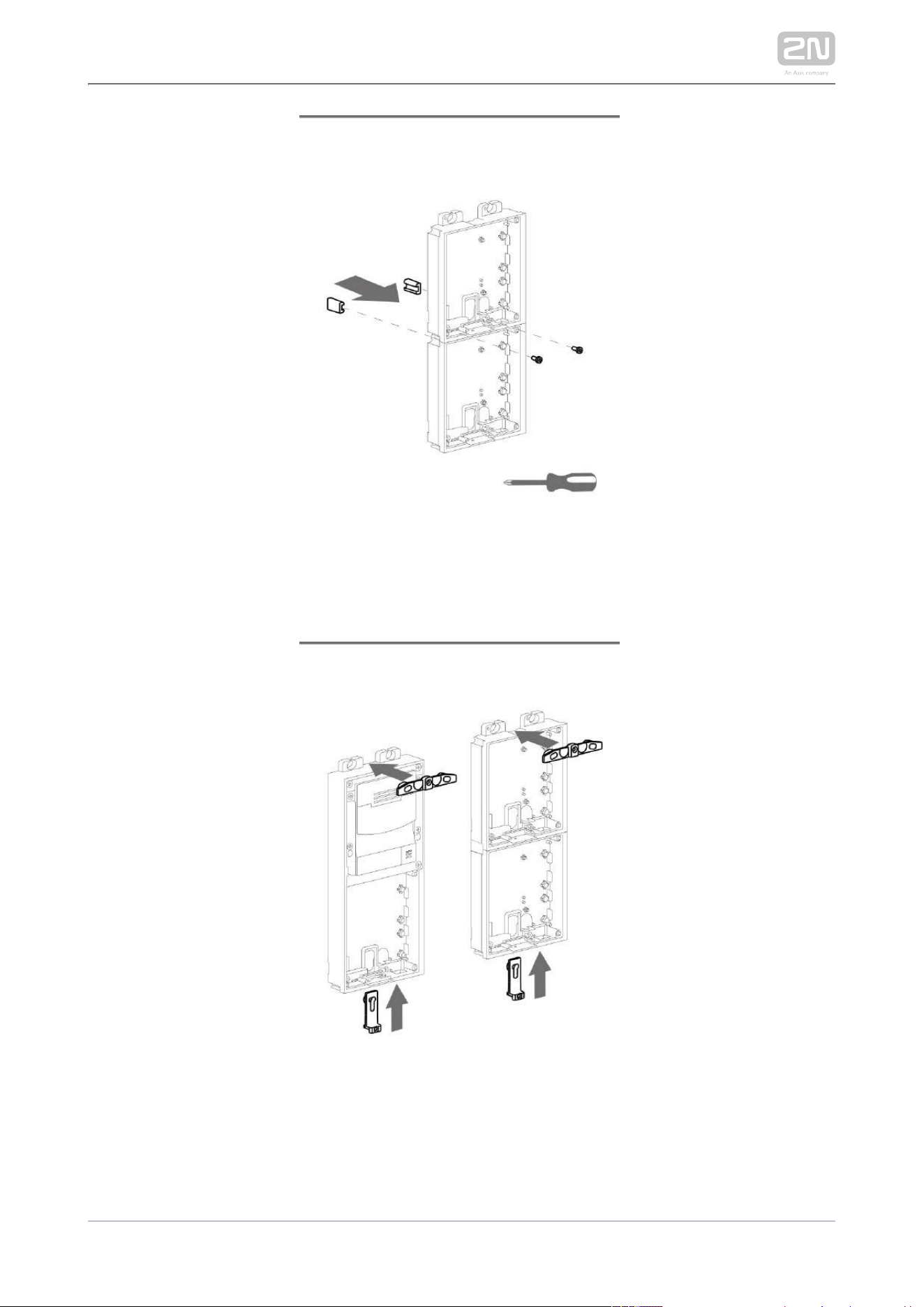
2N TELEKOMUNIKACE a.s., www.2n.cz 103/233

2N TELEKOMUNIKACE a.s., www.2n.cz 104/233

2N TELEKOMUNIKACE a.s., www.2n.cz 105/233

2N TELEKOMUNIKACE a.s., www.2n.cz 106/233
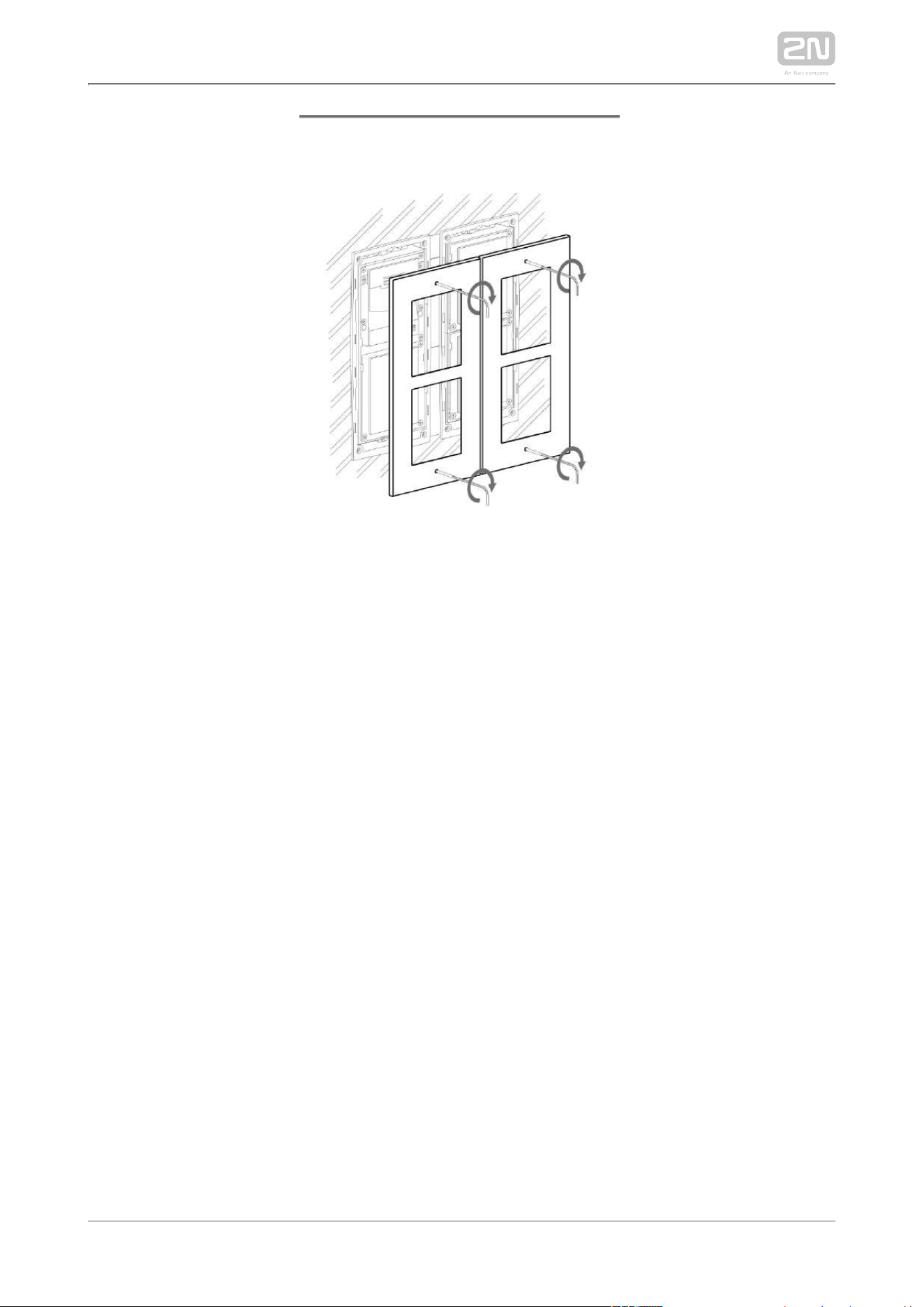
2N TELEKOMUNIKACE a.s., www.2n.cz 107/233
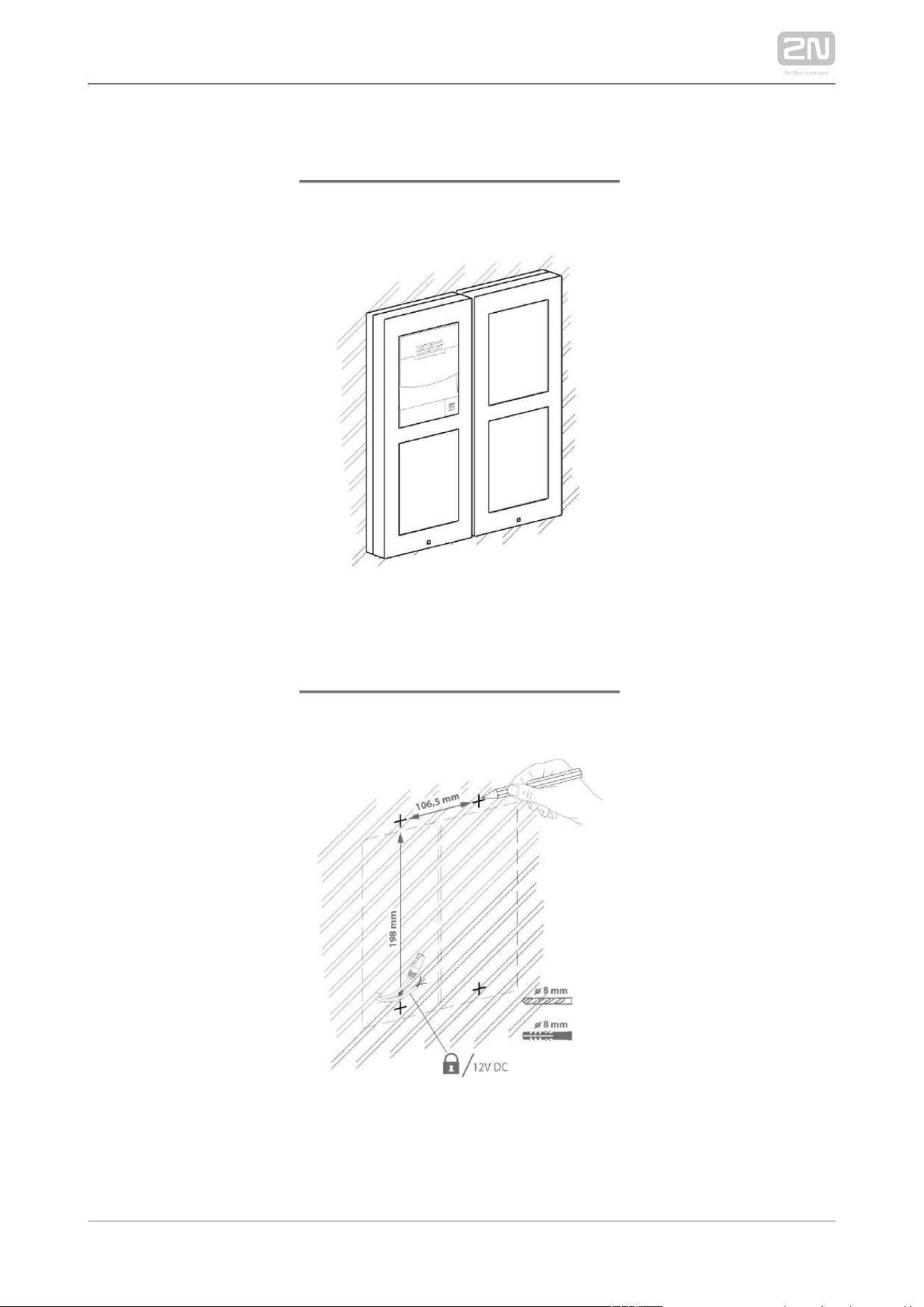
2N TELEKOMUNIKACE a.s., www.2n.cz 108/233
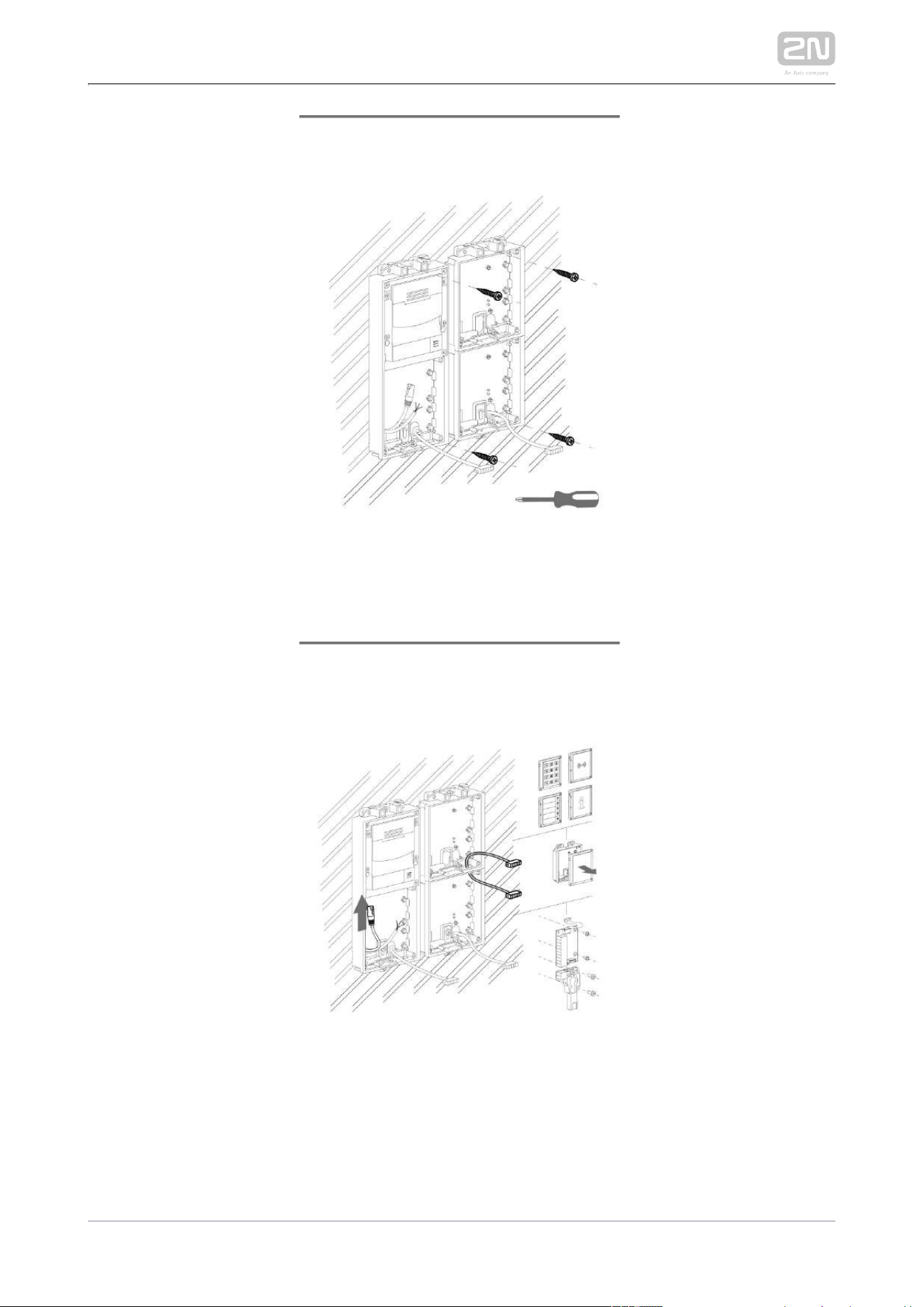
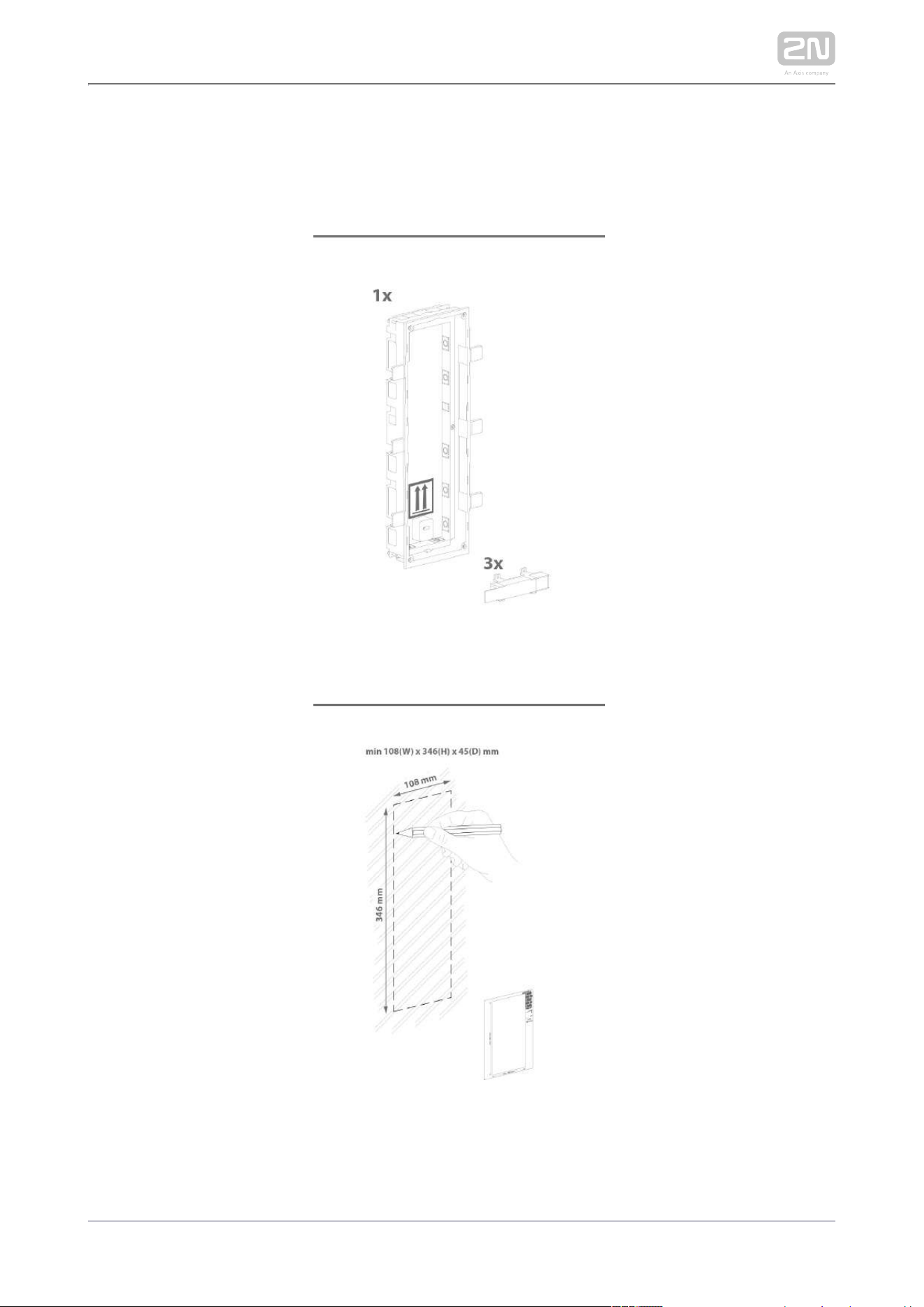
Surface module mounting

2N TELEKOMUNIKACE a.s., www.2n.cz 109/233
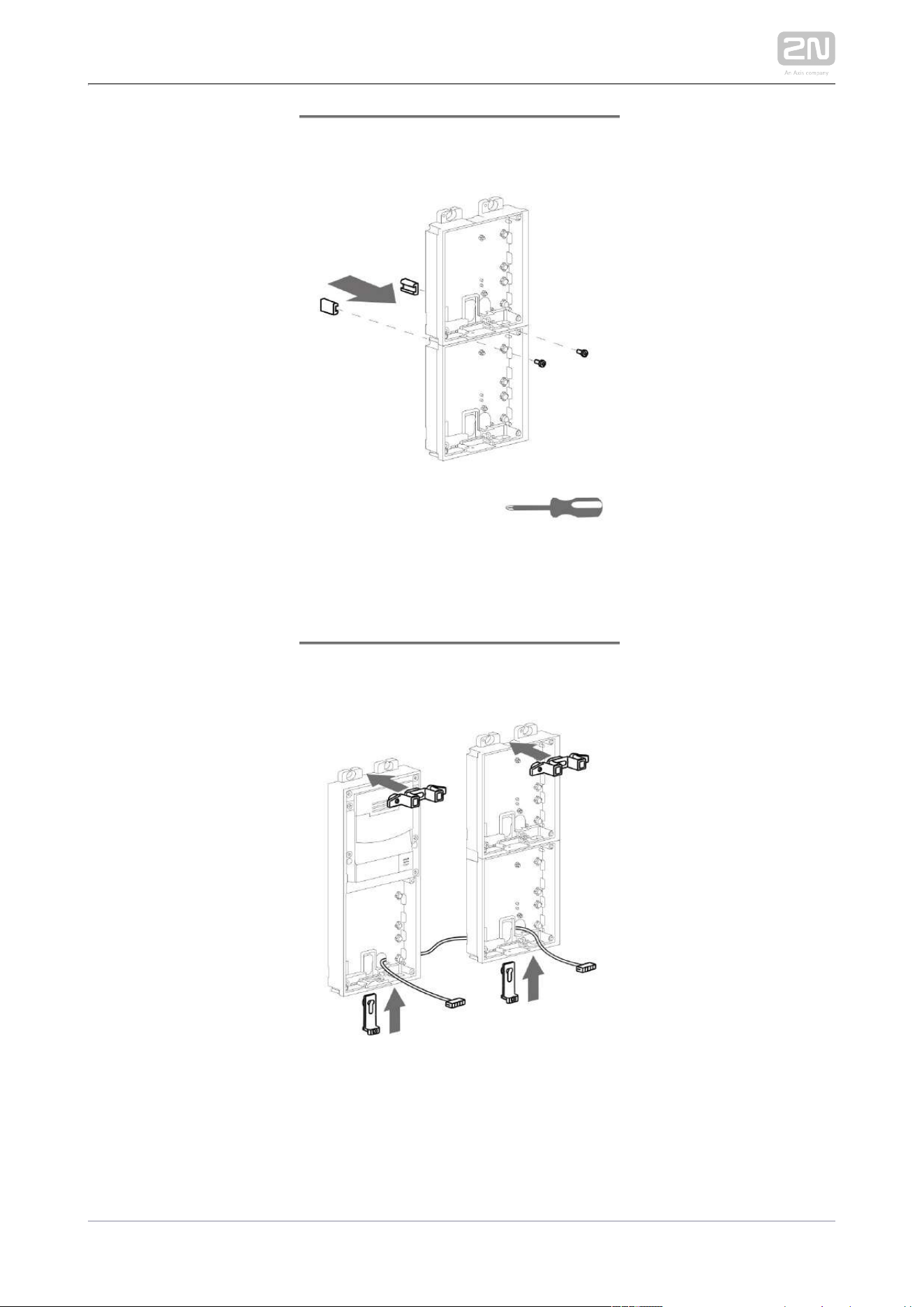
2N TELEKOMUNIKACE a.s., www.2n.cz 110/233
2N TELEKOMUNIKACE a.s., www.2n.cz 111/233

2N TELEKOMUNIKACE a.s., www.2n.cz 112/233

2N TELEKOMUNIKACE a.s., www.2n.cz 113/233
2N TELEKOMUNIKACE a.s., www.2n.cz 114/233
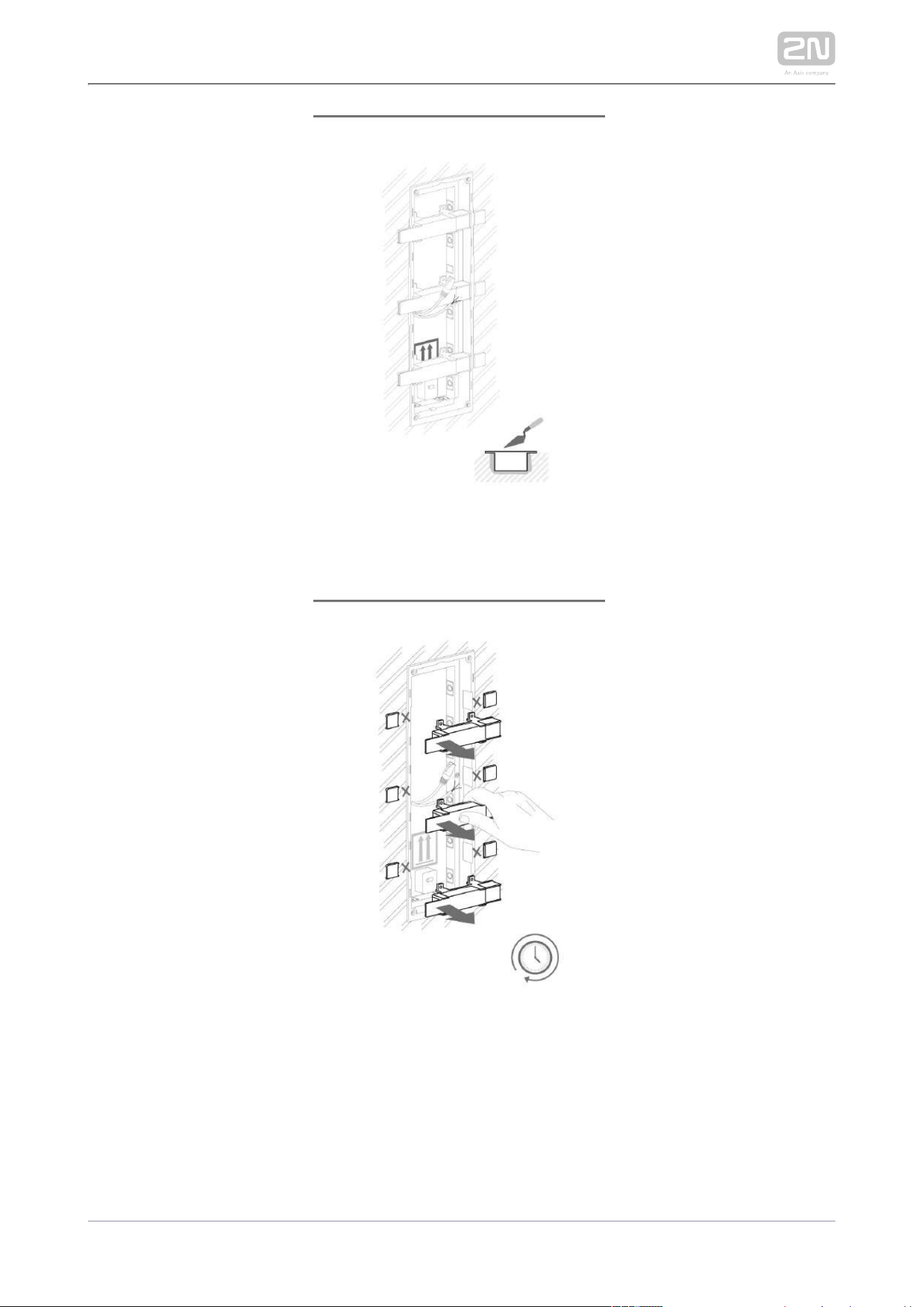
2.2.4 Three Modules Box
Flush mounting box mounting – classics bricks

2N TELEKOMUNIKACE a.s., www.2n.cz 115/233
2N TELEKOMUNIKACE a.s., www.2n.cz 116/233

2N TELEKOMUNIKACE a.s., www.2n.cz 117/233

2N TELEKOMUNIKACE a.s., www.2n.cz 118/233
Flush mounting box mounting – plasterboard

2N TELEKOMUNIKACE a.s., www.2n.cz 119/233

2N TELEKOMUNIKACE a.s., www.2n.cz 120/233

2N TELEKOMUNIKACE a.s., www.2n.cz 121/233
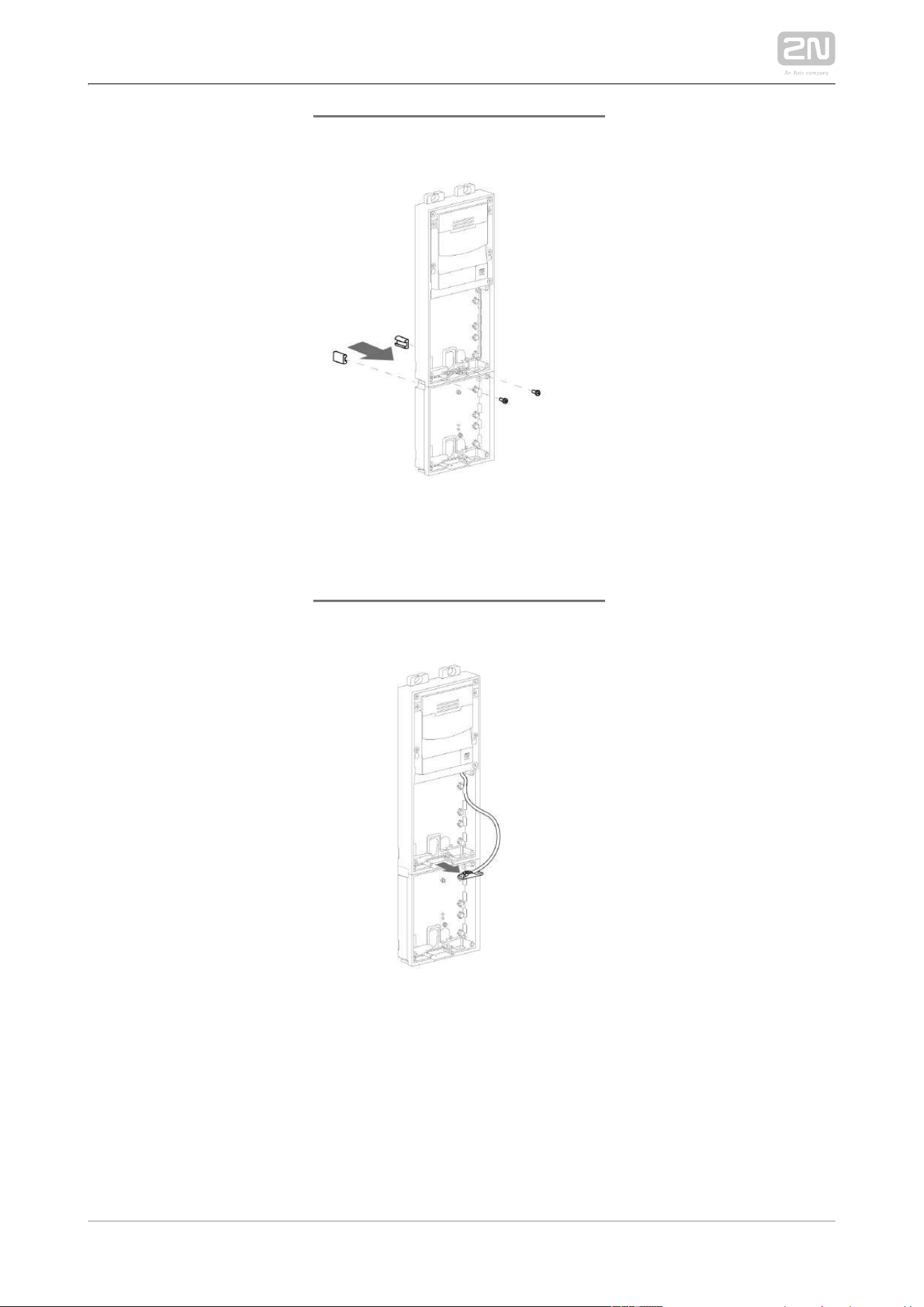
Flush module mounting

2N TELEKOMUNIKACE a.s., www.2n.cz 122/233
2N TELEKOMUNIKACE a.s., www.2n.cz 123/233
2N TELEKOMUNIKACE a.s., www.2n.cz 124/233

2N TELEKOMUNIKACE a.s., www.2n.cz 125/233
2N TELEKOMUNIKACE a.s., www.2n.cz 126/233

2N TELEKOMUNIKACE a.s., www.2n.cz 127/233
2N TELEKOMUNIKACE a.s., www.2n.cz 128/233
Surface module mounting

2N TELEKOMUNIKACE a.s., www.2n.cz 129/233
2N TELEKOMUNIKACE a.s., www.2n.cz 130/233

2N TELEKOMUNIKACE a.s., www.2n.cz 131/233

2N TELEKOMUNIKACE a.s., www.2n.cz 132/233

2N TELEKOMUNIKACE a.s., www.2n.cz 133/233

2N TELEKOMUNIKACE a.s., www.2n.cz 134/233

2N TELEKOMUNIKACE a.s., www.2n.cz 135/233
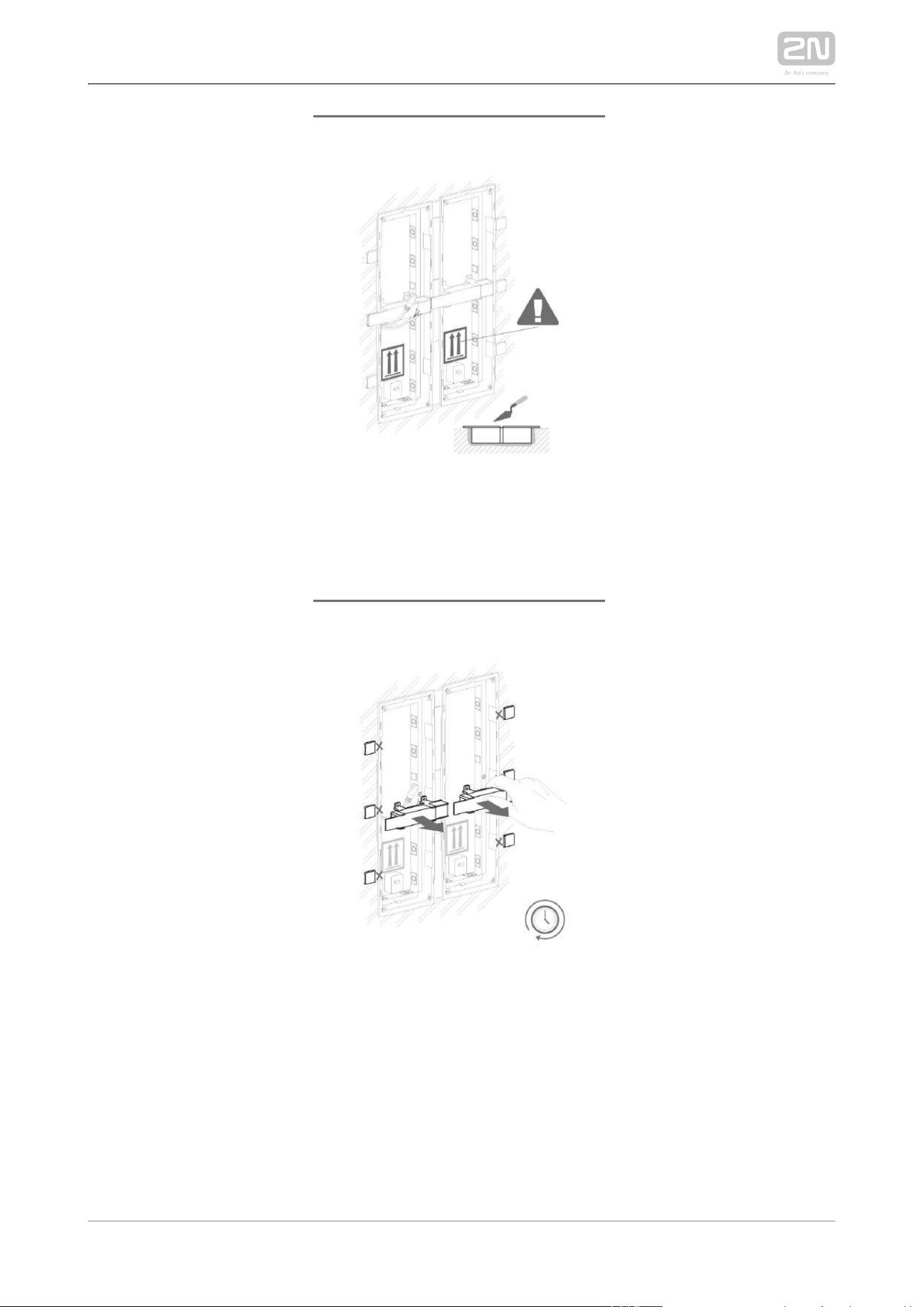
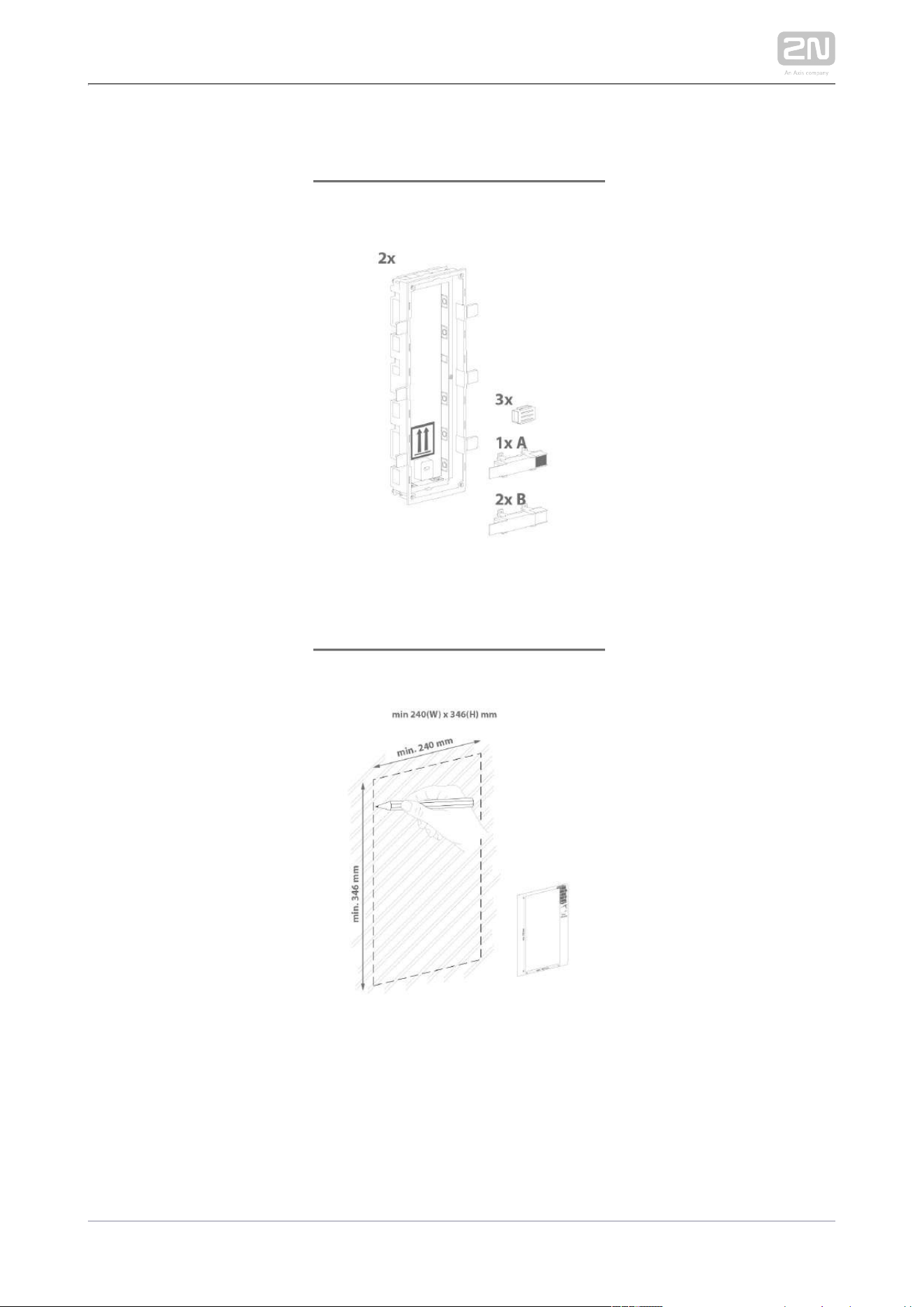
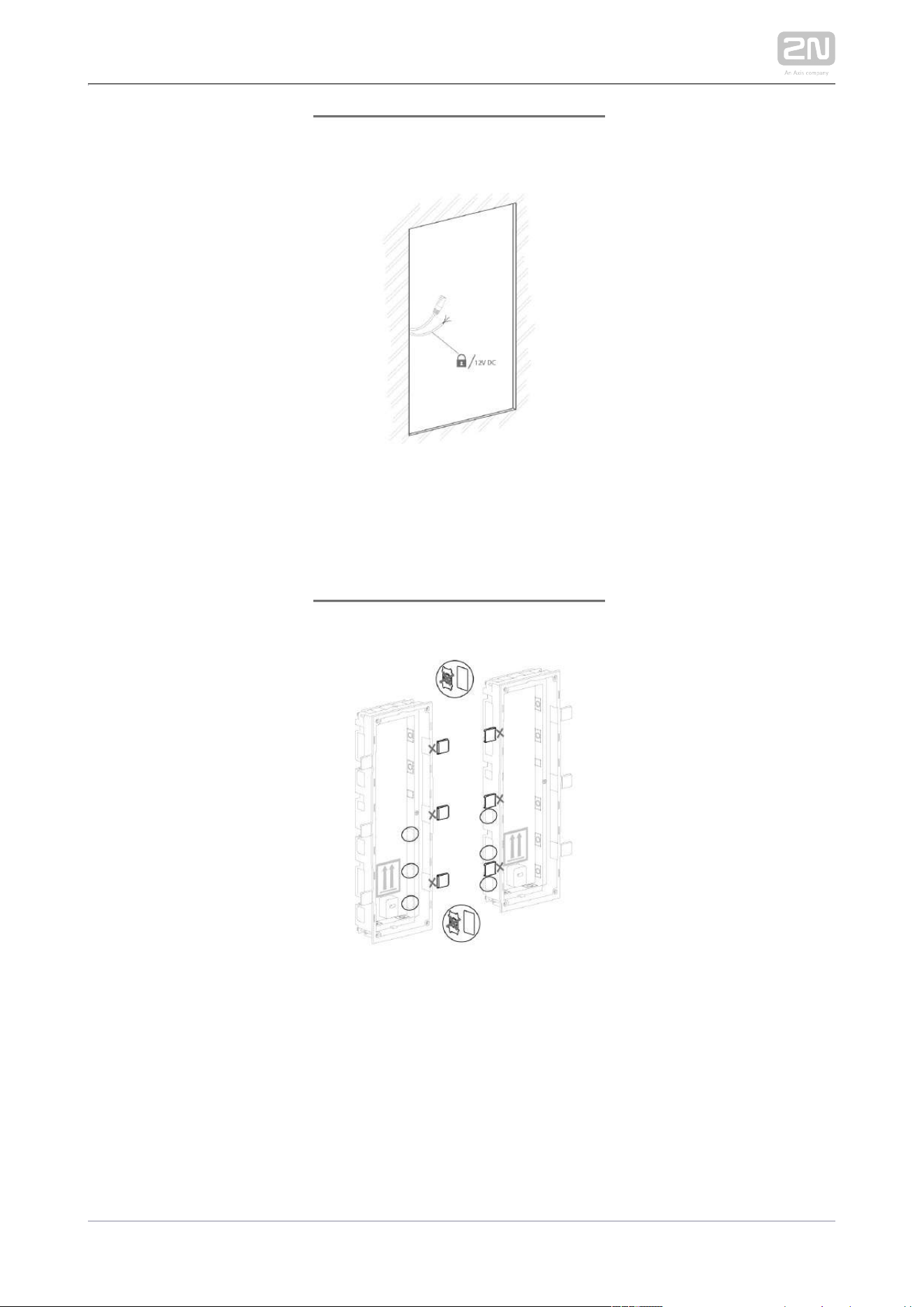
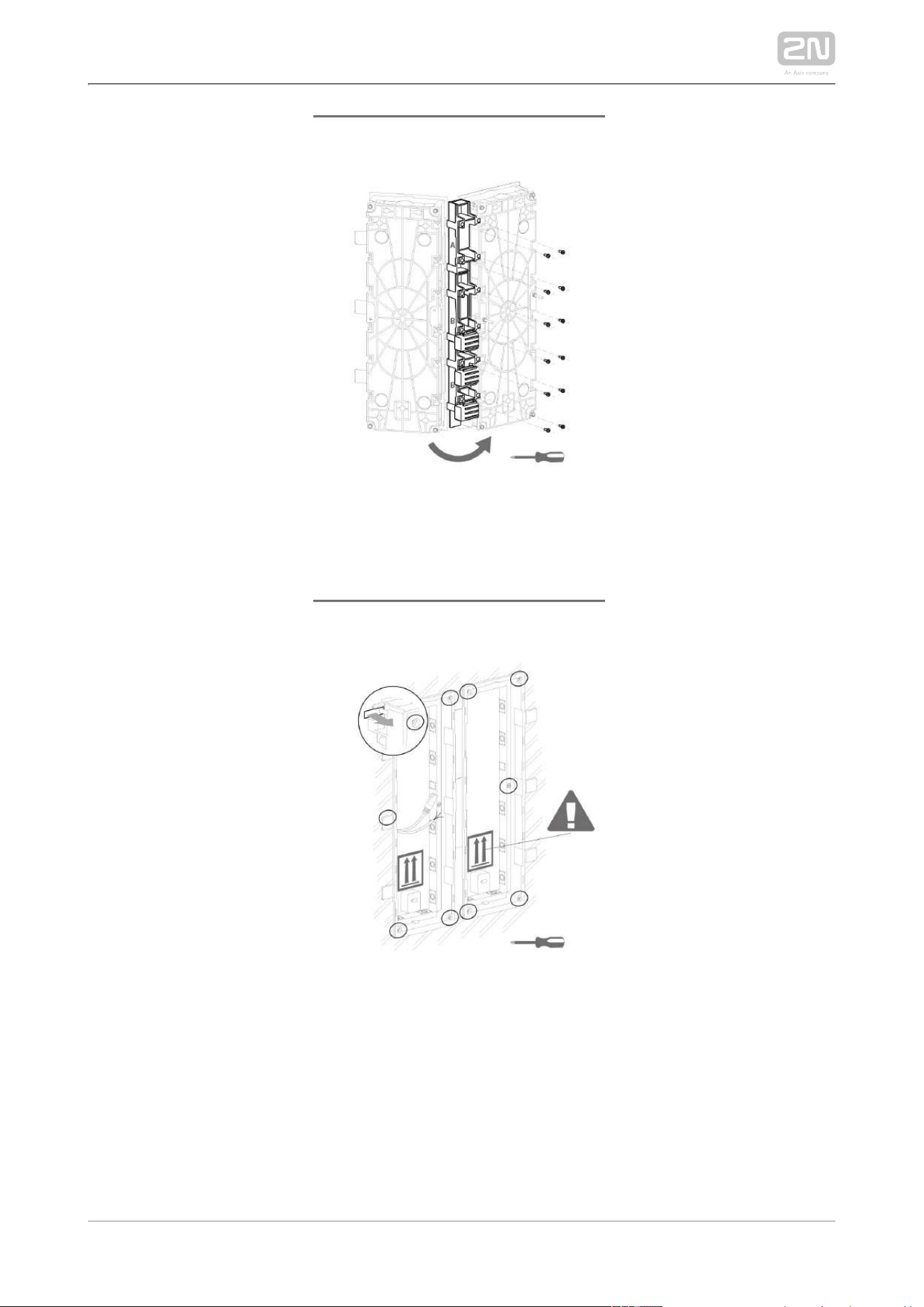
2.2.5 More Than Three Modules Boxes
Flush mounting box mounting – classics bricks

2N TELEKOMUNIKACE a.s., www.2n.cz 136/233

2N TELEKOMUNIKACE a.s., www.2n.cz 137/233
2N TELEKOMUNIKACE a.s., www.2n.cz 138/233

2N TELEKOMUNIKACE a.s., www.2n.cz 139/233
2N TELEKOMUNIKACE a.s., www.2n.cz 140/233
Flush mounting box mounting – plasterboard
2N TELEKOMUNIKACE a.s., www.2n.cz 141/233
2N TELEKOMUNIKACE a.s., www.2n.cz 142/233

2N TELEKOMUNIKACE a.s., www.2n.cz 143/233

2N TELEKOMUNIKACE a.s., www.2n.cz 144/233
Flush module mounting
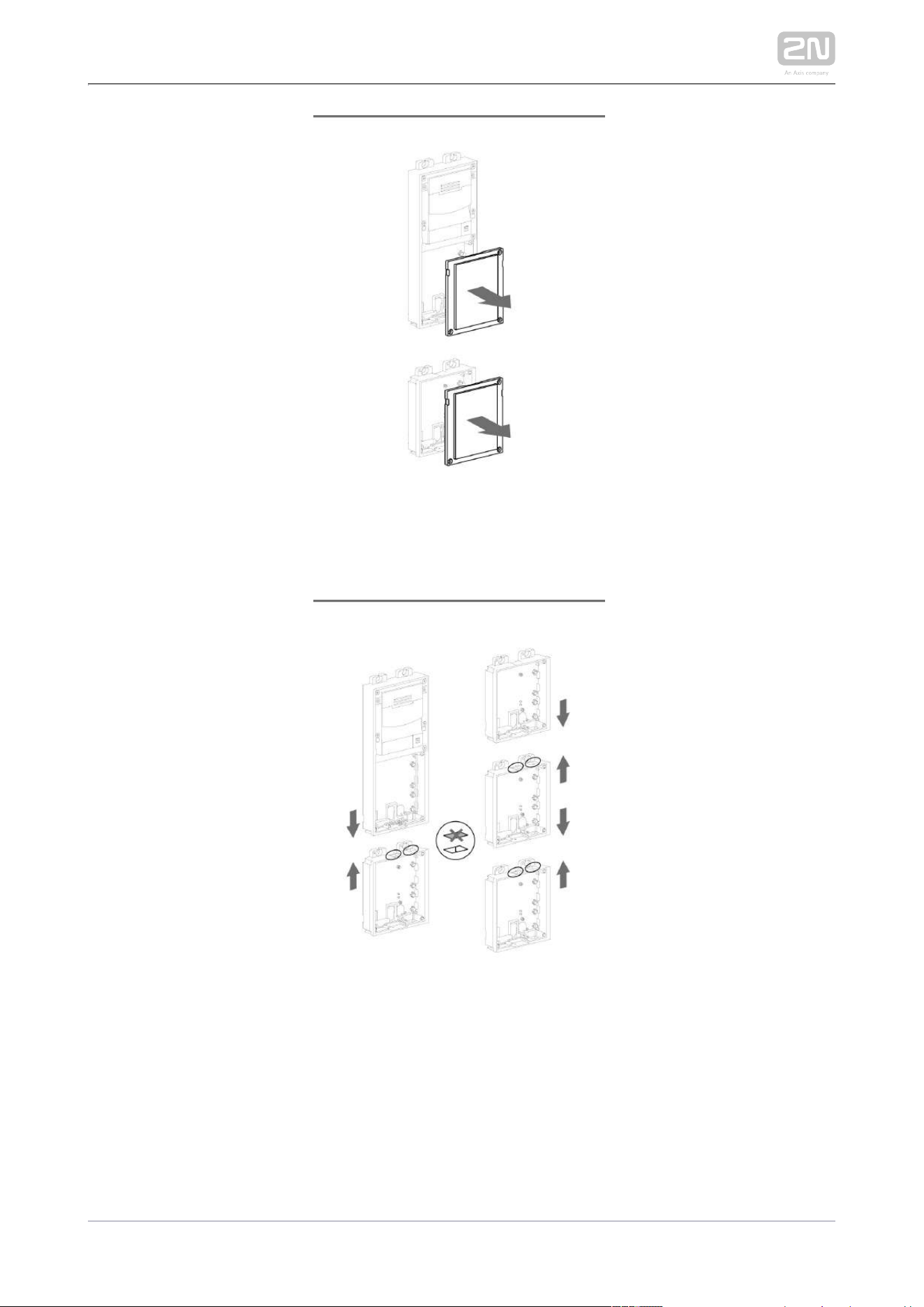
2N TELEKOMUNIKACE a.s., www.2n.cz 145/233

2N TELEKOMUNIKACE a.s., www.2n.cz 146/233

2N TELEKOMUNIKACE a.s., www.2n.cz 147/233
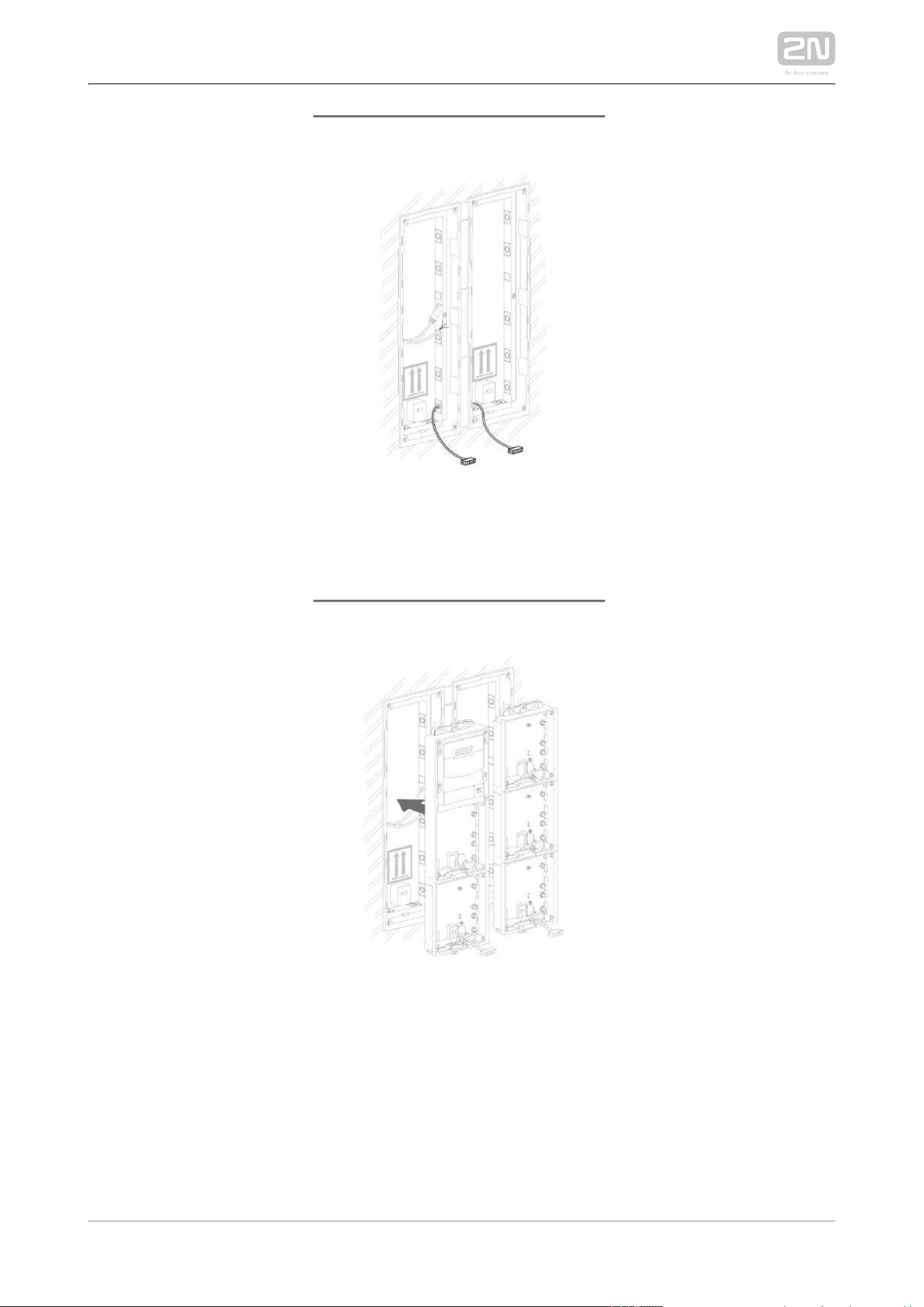
2N TELEKOMUNIKACE a.s., www.2n.cz 148/233
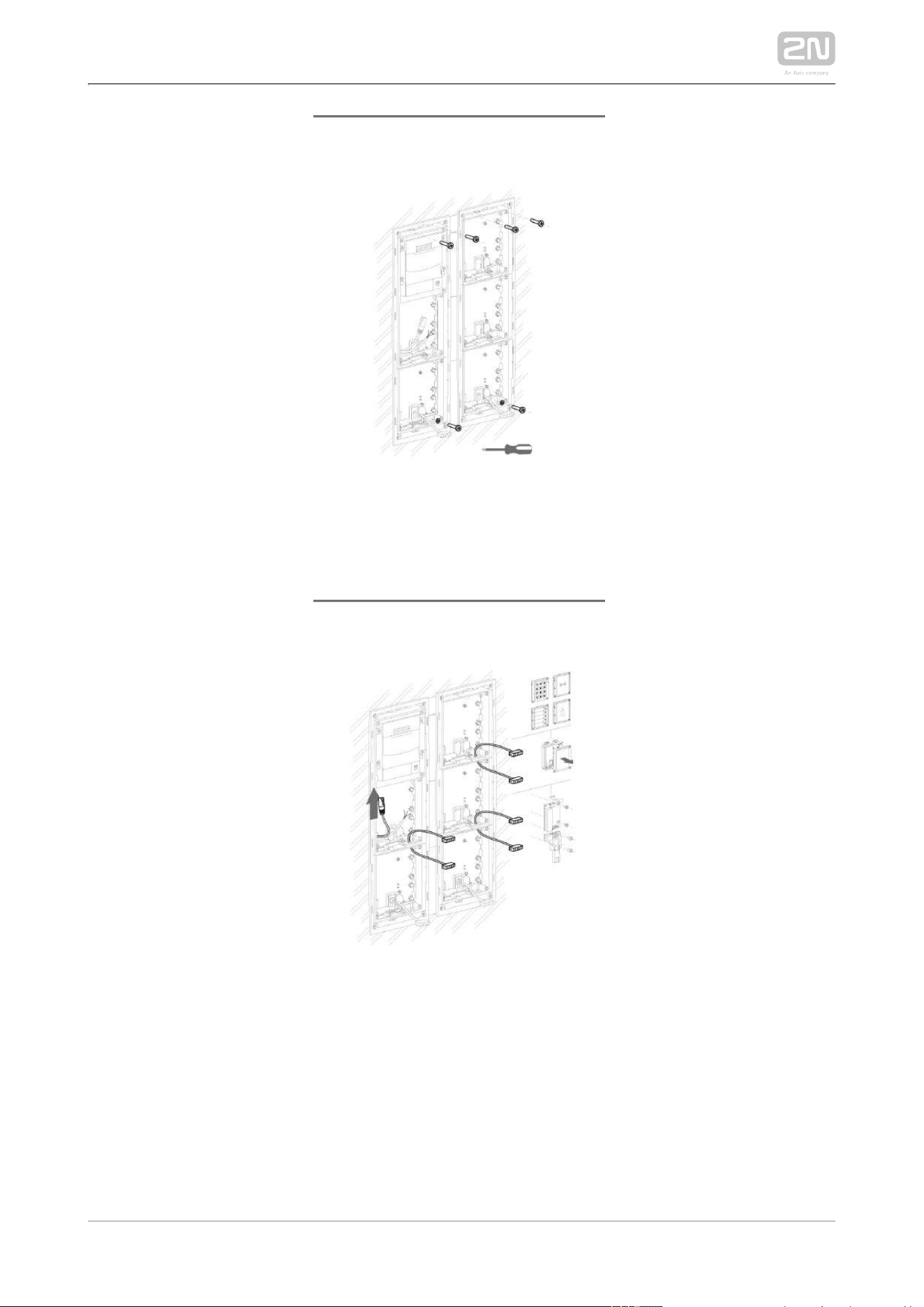
2N TELEKOMUNIKACE a.s., www.2n.cz 149/233

2N TELEKOMUNIKACE a.s., www.2n.cz 150/233

2N TELEKOMUNIKACE a.s., www.2n.cz 151/233

2N TELEKOMUNIKACE a.s., www.2n.cz 152/233
Surface module mounting

2N TELEKOMUNIKACE a.s., www.2n.cz 153/233

2N TELEKOMUNIKACE a.s., www.2n.cz 154/233

2N TELEKOMUNIKACE a.s., www.2n.cz 155/233

2N TELEKOMUNIKACE a.s., www.2n.cz 156/233
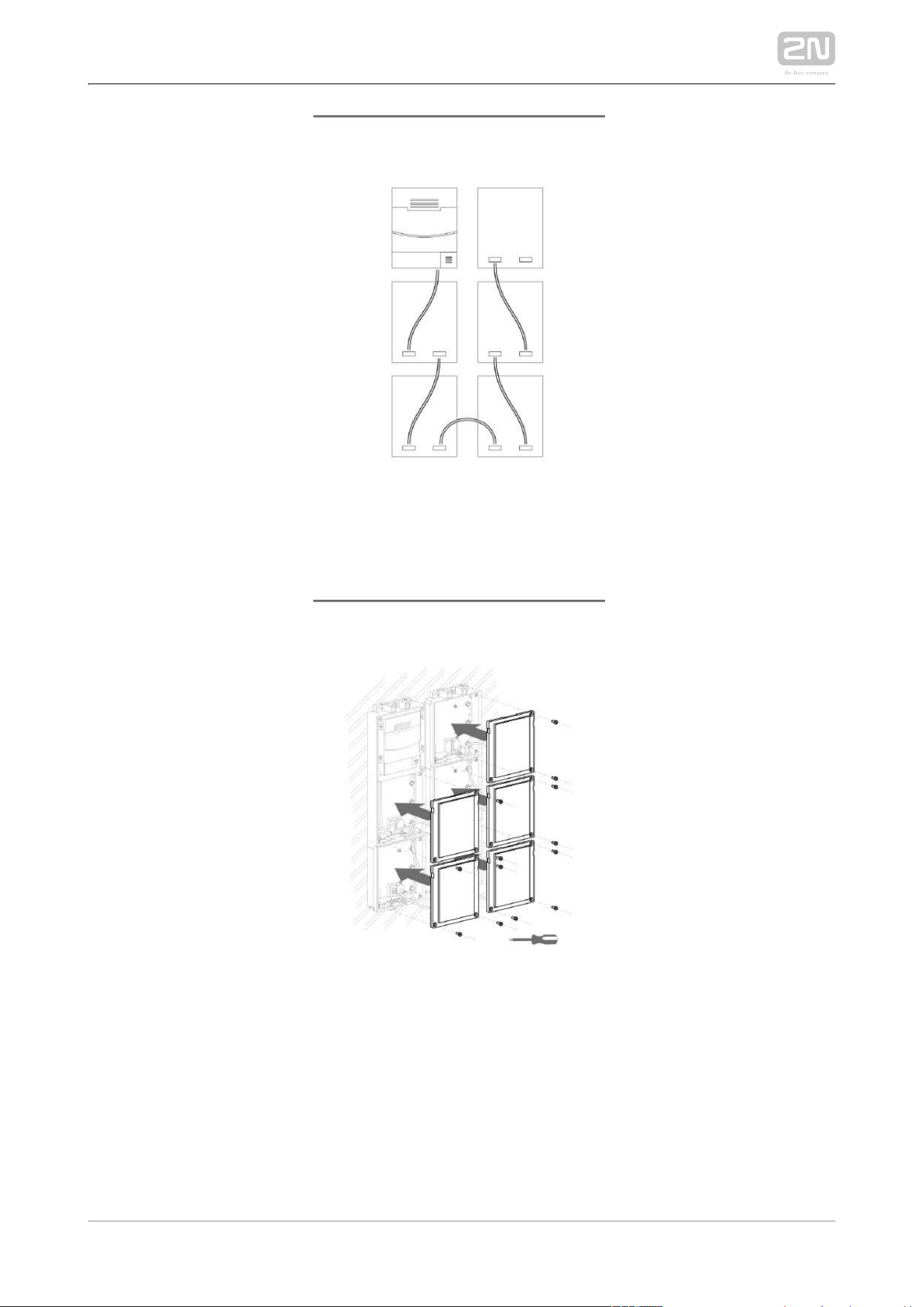
2N TELEKOMUNIKACE a.s., www.2n.cz 157/233

2N TELEKOMUNIKACE a.s., www.2n.cz 158/233

2N TELEKOMUNIKACE a.s., www.2n.cz 159/233
2.2.6 Tamper and I/O Module

2N TELEKOMUNIKACE a.s., www.2n.cz 160/233

2N TELEKOMUNIKACE a.s., www.2n.cz 161/233
2.2.7 Module dimensions
Frames
9155011 – Flush mounting frame, 1 module
9155012 – Flush mounting frame, 2 modules
9155013 – Flush mounting frame, 3 modules
9155021 – Surface mounting frame, 1 module
9155022 – Surface mounting frame, 2 modules
9155023 – Surface mounting frame, 3 modules
Backplates
9155061 – 1 module
9155062 – 2 modules
9155063 – 3 modules
9155064 – 2x2 modules
9155065 – 3x2 modules
9155065 – 2x3 modules
9155067 – 3x3 modules

2N TELEKOMUNIKACE a.s., www.2n.cz 162/233
2.2.8 Příklad instalace montážní desky
Instalace na zeď

2N TELEKOMUNIKACE a.s., www.2n.cz 163/233
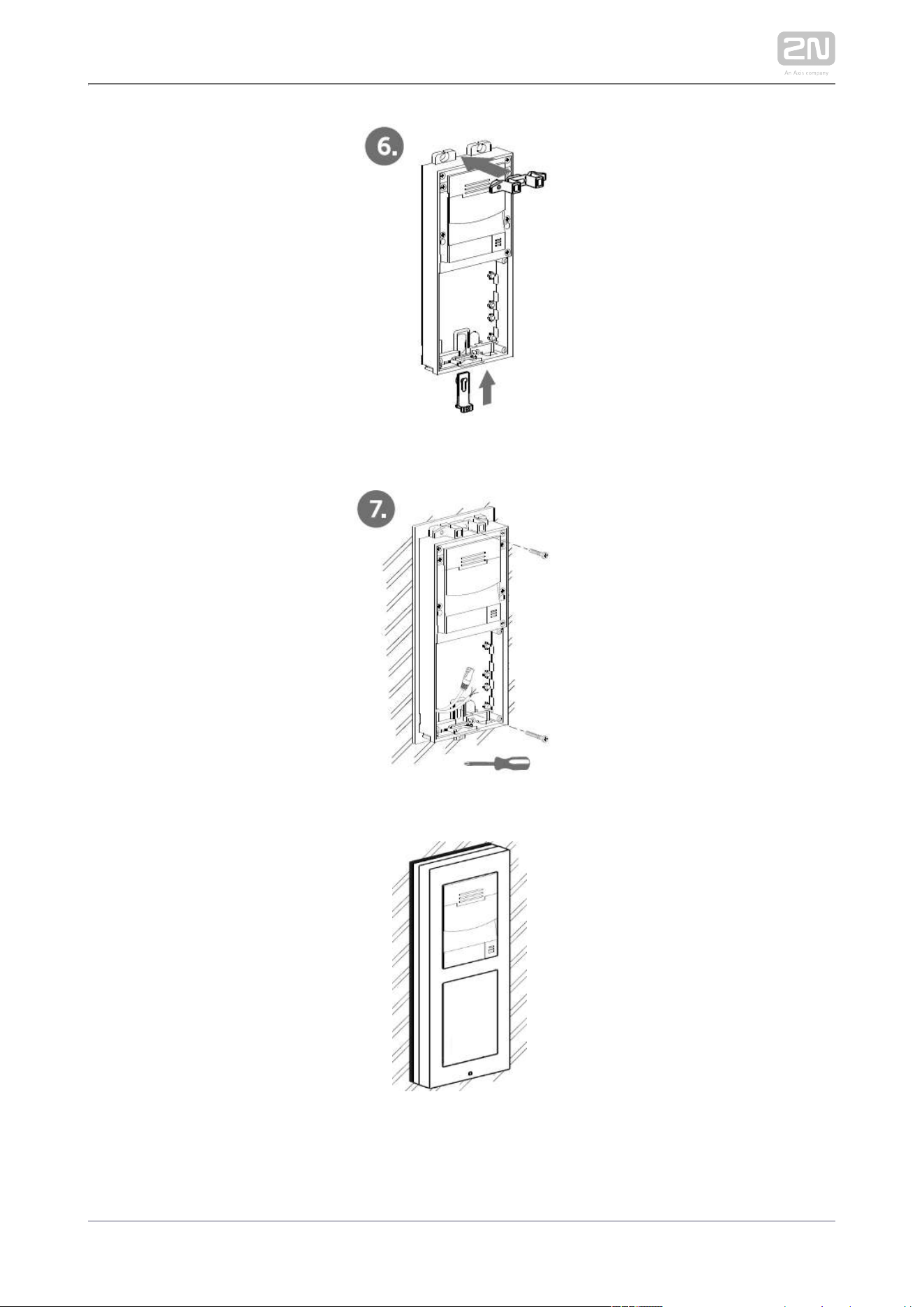
2N TELEKOMUNIKACE a.s., www.2n.cz 164/233
Instalace na sklo
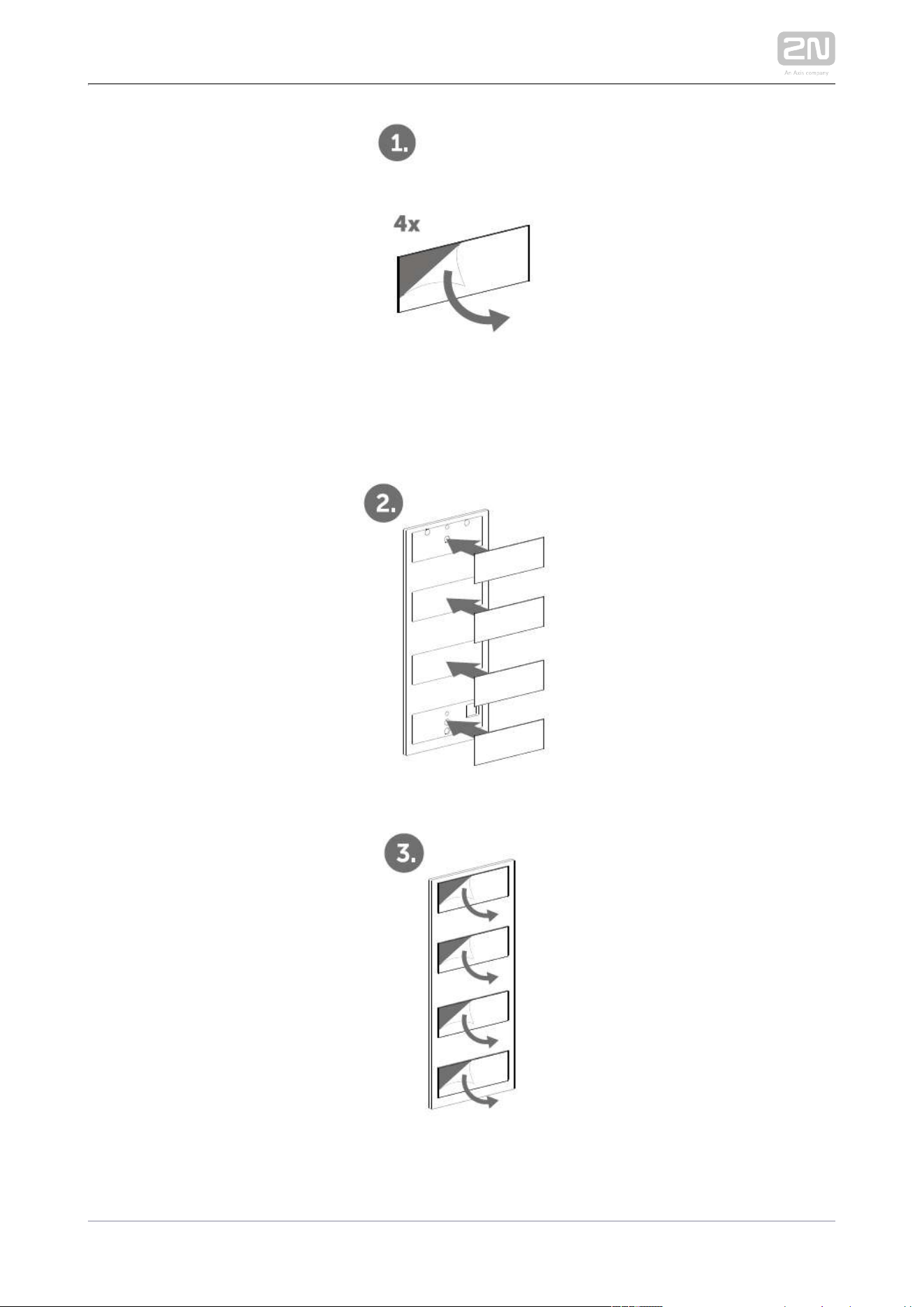
2N TELEKOMUNIKACE a.s., www.2n.cz 165/233
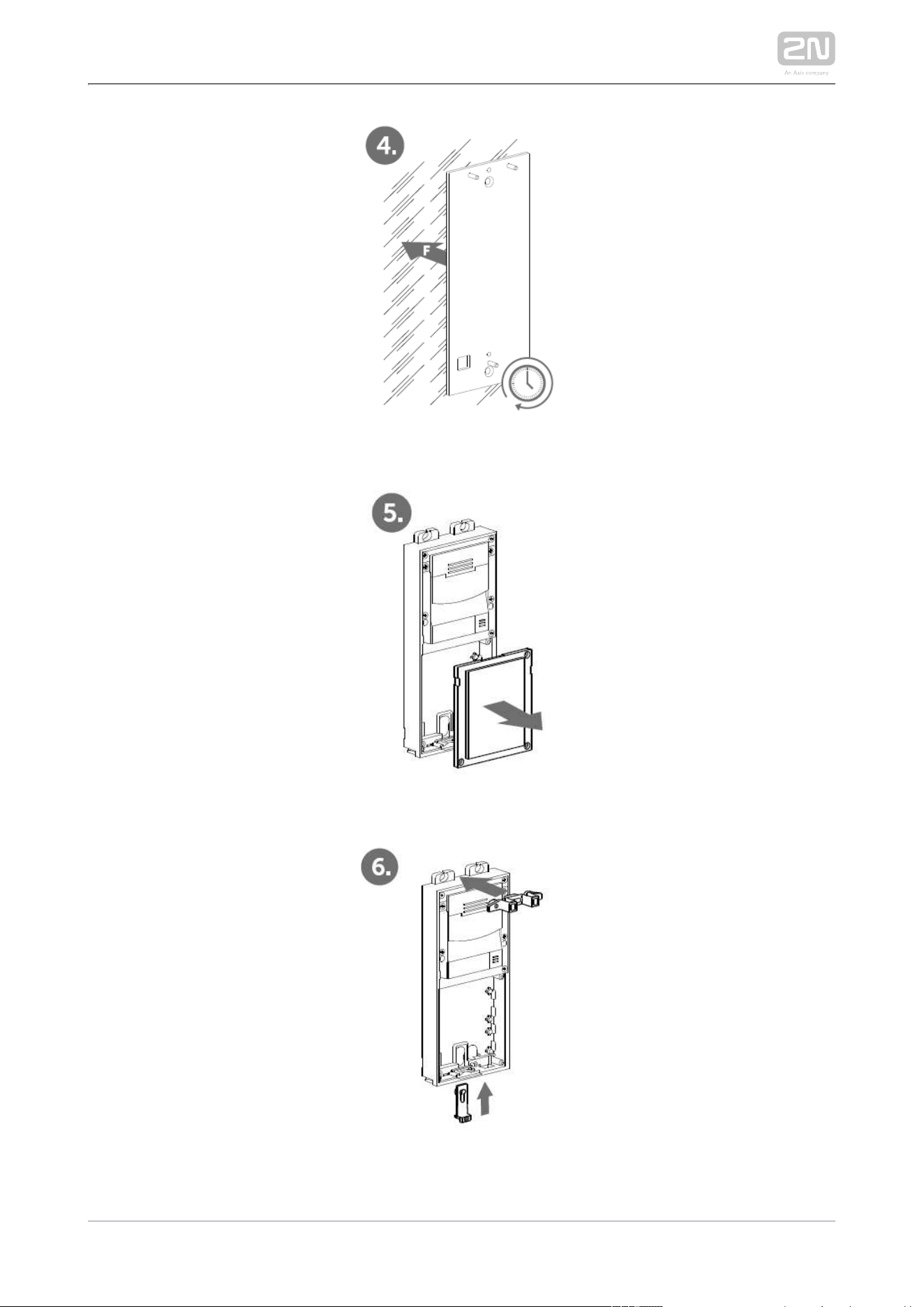
2N TELEKOMUNIKACE a.s., www.2n.cz 166/233

2N TELEKOMUNIKACE a.s., www.2n.cz 167/233

2N TELEKOMUNIKACE a.s., www.2n.cz 168/233
1.
2.
1.
2.
1.
2.
3.
4.
5.
6.
2.3 Electric Installation
This subsection describes how to install the modules, how to connect the 2N LTE
®
main unit to the power supply and how to connect other elements.Verso
Caution
The device must be part of the electrical system of the building.
Mounting Preparation
Unscrew the second module cover on the main unit base.
Use a flat screwdriver to take out the module cover.
Version A – 2-Module Base
Place the base on the flush mounting box / predrilled holes with dowels and pull
the cables through the bottom holes.
Insert the metal fitting elements up and down and screw the base plate tight.
You can level the base slightly if you are mounting just one base.
Version B – 3-Module Base
Unscrew the cover of the additional base.
Use a flat screwdriver to take out the cover.
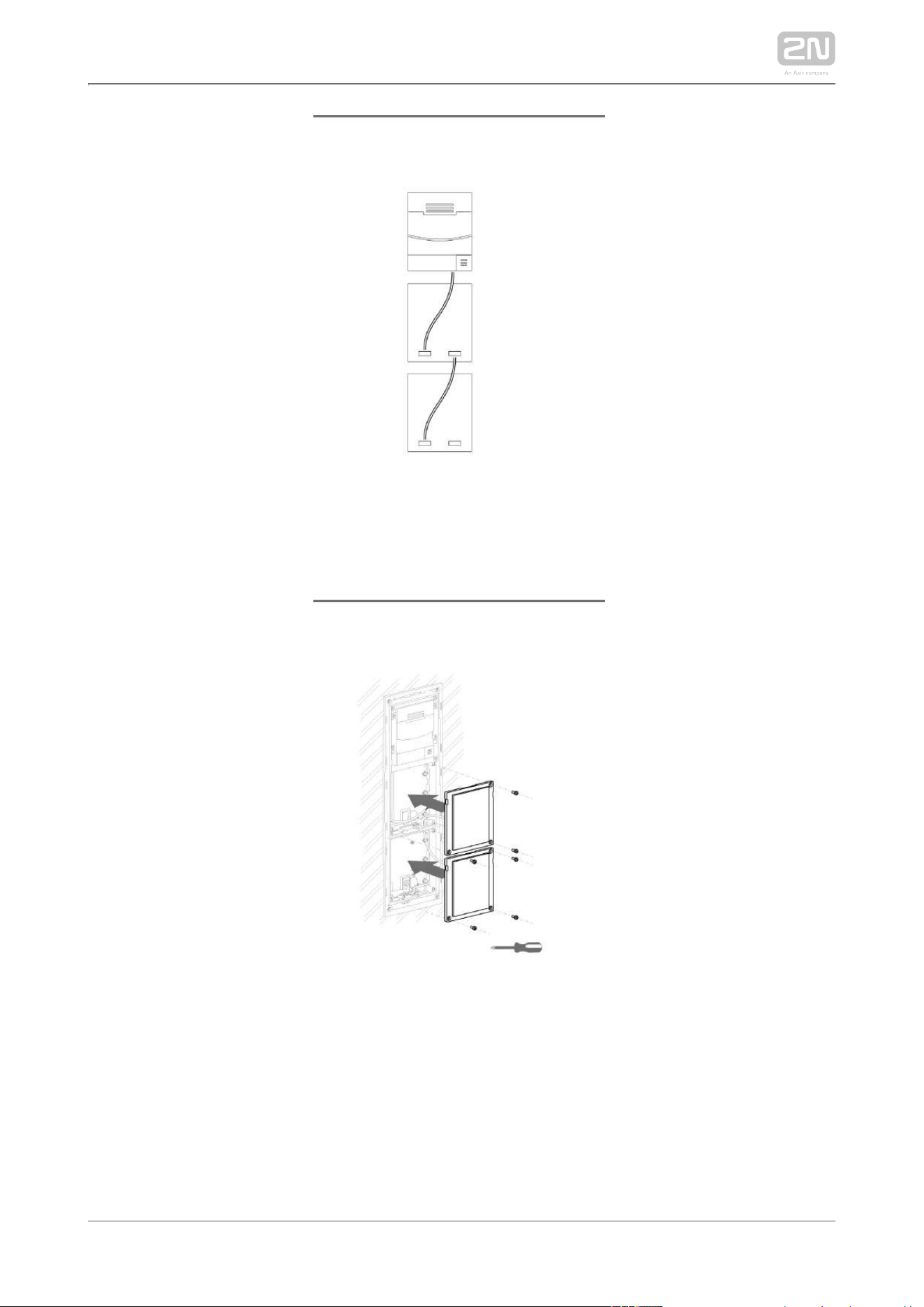
Slide the additional base to the main unit base and secure its position with the
small side wedges and screws.
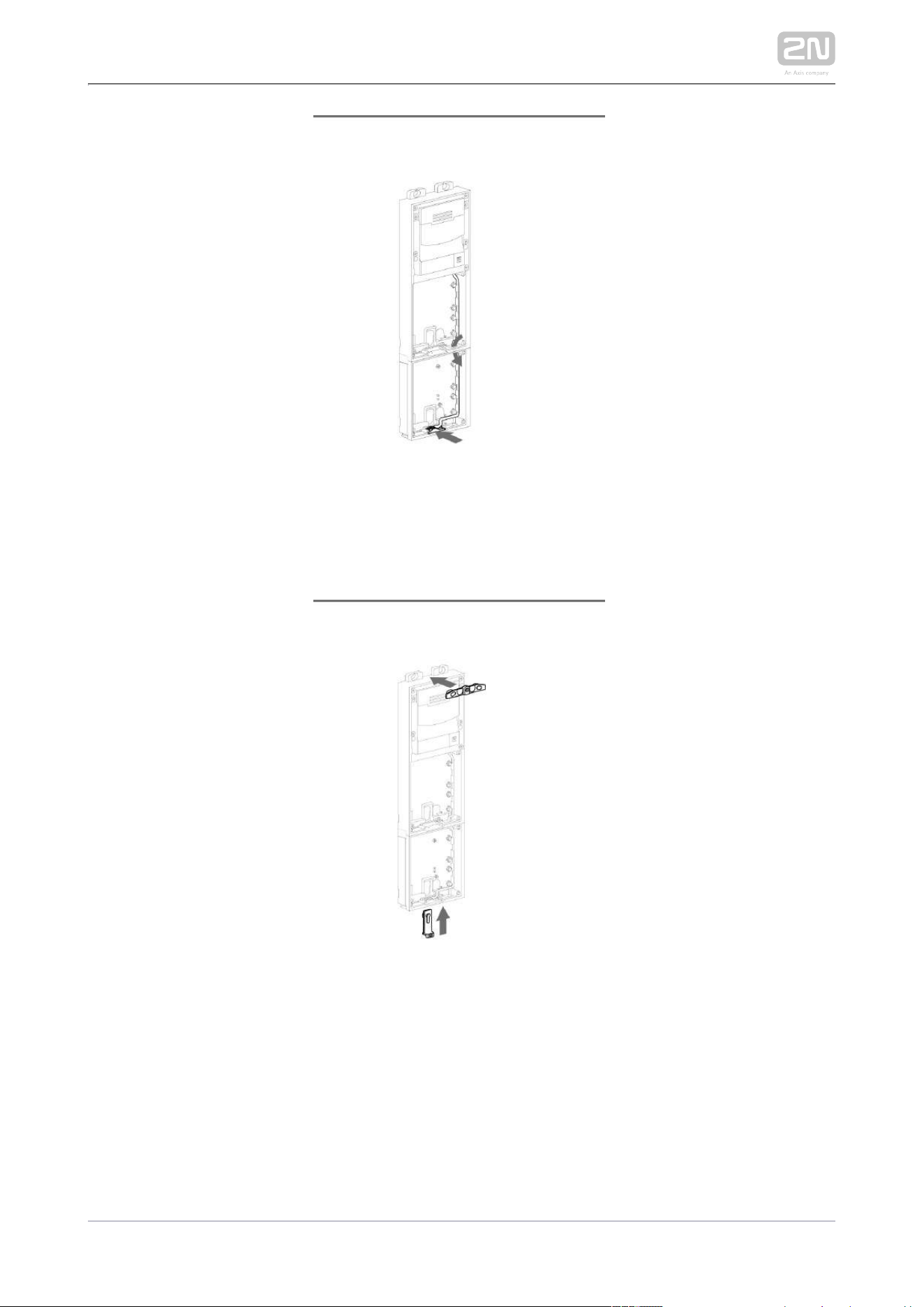
Remove the microphone from the main unit base and loosen the microphone
cable.
Lead the microphone to the third module base as shown in the figure.
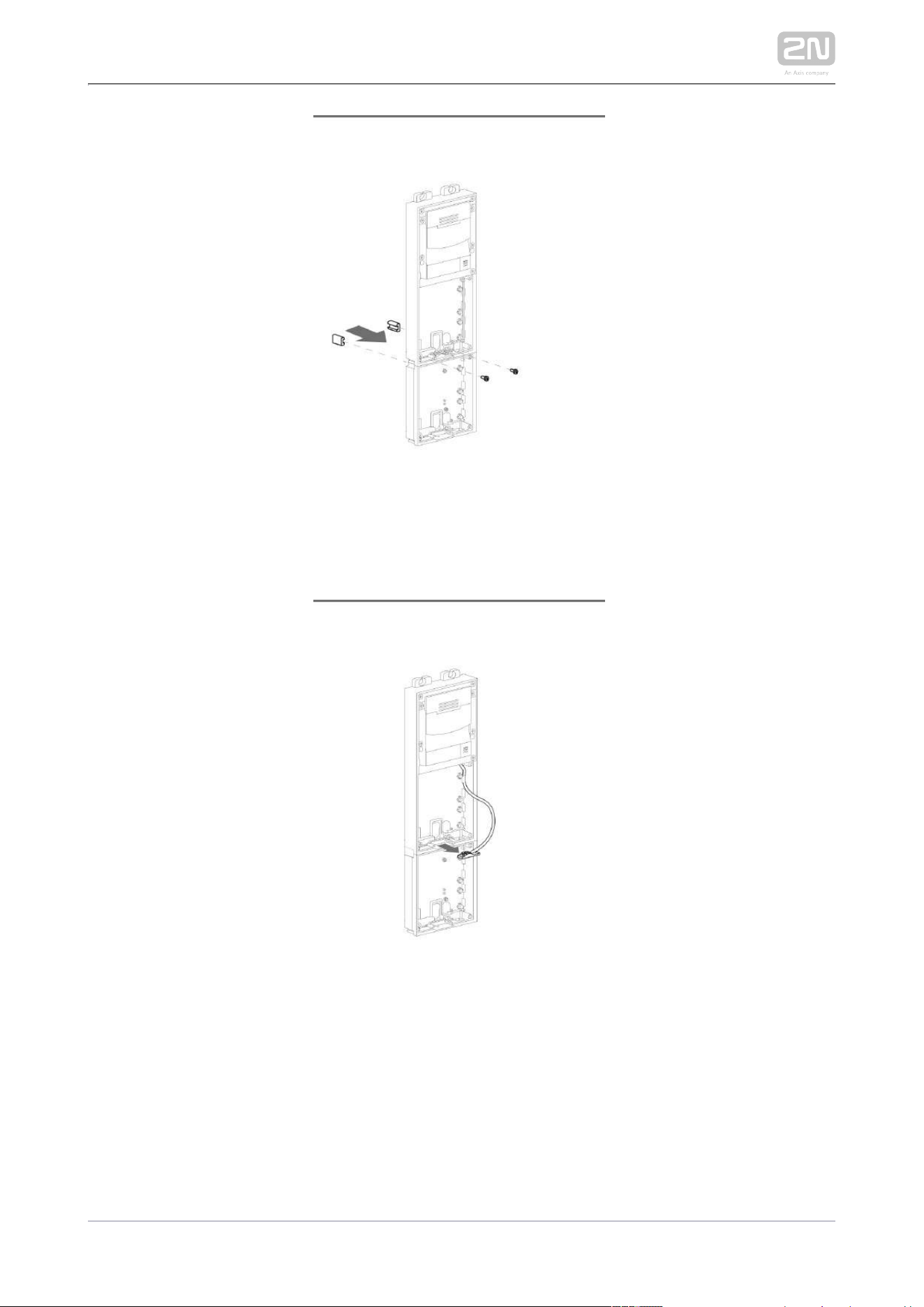
Place the joined bases on the flush mounting box / predrilled holes with dowels
and pull the cables through the bottom holes.
2N TELEKOMUNIKACE a.s., www.2n.cz 169/233
1.
2.
3.
4.
Version C – Additional Columns
Unscrew the cover of the additional bases and take it out with a flat screwdriver.
Insert the bases into each other as projected and secure their position with the
small side wedges and screws.
Place the cover on the flush mounting box / predrilled holes with dowels and pull
the cables if any through the bottom holes.
Pull the bus using the cable bushing available in the flush mounting box.
Main Unit
LTE Mobile Connection
Insert a PIN-less NanoSIM card (HW version 4 or higher) or MicroSIM (HW version 3
and lower) card with an active data service. The SIM card is not included in the
package, so use data services of your preferred LTE provider (the device requires the
4G/LTE technology and cannot be operated in 2G or 3G networks). Connect the
antenna provided stuck to the inner blind side. Use an external antenna when
mounting another module in the blind position (Part No. 9155048).
Vkládání SIM karty
How to insert a SIM card
HW version 4 and higher
Insert a NanoSIM card in the SIM slot and push it gently to fit it into
position. Repush the card gently to release and partially slide out
the card. Now remove the card.
HW version 3 and lower
Insert a MicroSIM card in the SIM slot. Remove the card in the same
way.
Power Supply Connection
2N LTE Verso
®
is powered from an external 12 V / 2 A DC source.

2N TELEKOMUNIKACE a.s., www.2n.cz 170/233
External Power Supply
Use a 12 V ±15 % SELV supply dimensioned to the minimum current consumption of 2
A (Part No. 91341481E) to make your system work reliably. This power supply provides
with 24 W for feeding of the main unit and connected modules.2N LTE Verso
®
Main Unit Connector Configuration
Caution
We recommend you to use a grounding cable of the cross-section of 1.5
mm2.
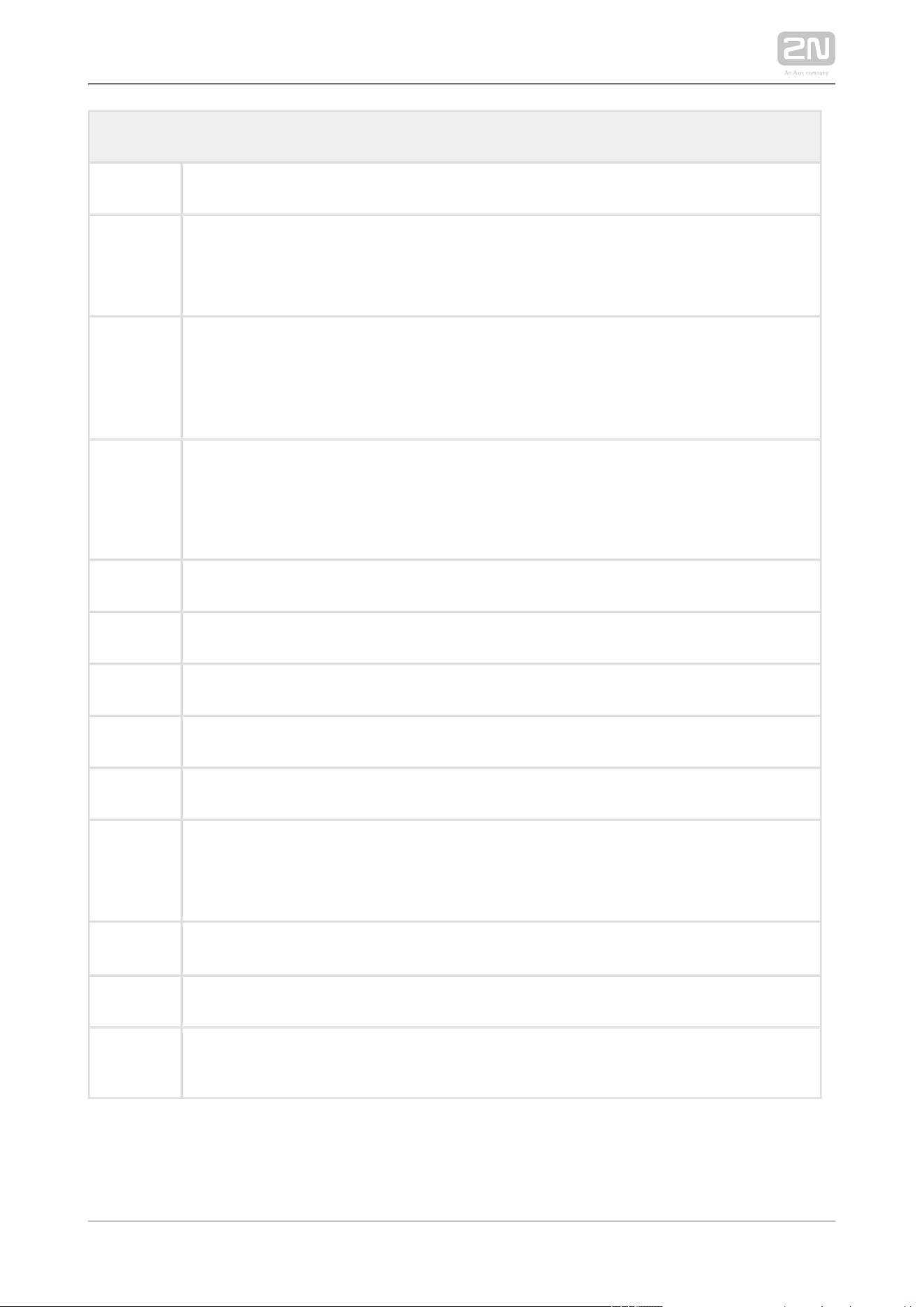
2N TELEKOMUNIKACE a.s., www.2n.cz 171/233
Legend
MicroSIM MicroSIM card slot
MMCX
antenna
connector
LTE mobile network antenna connector
IN1 IN1 terminals for input in passive/ active mode (−30 V to +30 V DC)
OFF = open OR U > 1.5 V
IN
ON = closed contact OR U < 1.5 V
IN
OUT1
OUT1 terminals of active input for or electric lock connection 8 2N Security Relay
®
up to 12 V DC depending on power supply (PoE: 10 V; adapter: power supply
voltage minus 2 V), max 400 mA
RELAY1 RELAY1 terminals with accessible 30 V / 1 A AC/DC NO/NC contact
12V/2A External 12 V / 2 A DC supply terminals
GND Grounding terminal
RESET RESET / FACTORY RESET button
RGY LED indicators (red/green/yellow)
R LED indicator on the upper board (red). Flashing indicates that the provider's
network is being searched for. Once the network is connected, the LED stops
shining.
LINE OUT LINE OUT connector (1 V ). Connector type JST SHR-02V-S.
RMS
MIC MIC connector for microphone connection
BUS
2N IP/LTE Verso
®
bus connector

2N TELEKOMUNIKACE a.s., www.2n.cz 172/233
Tip
Output wiring diagram for Relay terminals
The electric lock is opened by power supply connection.
The magnetic lock is opened by power supply disconnection.

2N TELEKOMUNIKACE a.s., www.2n.cz 173/233
Tip
Wiring diagram of IN1 connector in active mode
Wiring diagram of IN1 connector in passive mode
LTE Connection Verification
Having connected the power supply, make sure that has been 2N LTE Verso
®
connected to the LTE data network successfully. A red LED (R) located to the left of
the BUS connector on the upper board provides basic diagnostics: flashing means
connecting, if the LED goes off, the device is connected to the data network. If it is
illuminated for 5 seconds, there is a SIM card error (SIM not inserted, PIN request
When this 5s timeout is over, another connection enable or no active data service).
attempt is made and the LED starts flashing again, i.e. the LED does not shine
permanently if there is a problem. If it keeps flashing only, the LTE signal is insufficient.
In this case, check the area LTE signal coverage and antenna connection. If the LTE
signal is low, use an appropriately placed external antenna (optional accessory, Part
No. 9155048). Caution – do not stick the external antenna to a metal surface!
You can also use the diagnostic SMS commands described in for 3.1 Configuration
troubleshooting.
Reset Button
Located among the main unit connectors, the Reset button helps you reset the factory
default values and restart the device.
Factory Reset

2N TELEKOMUNIKACE a.s., www.2n.cz 174/233
Factory Reset
Follow the instructions below to :reset the factory default values
Press and hold the RESET button.
Wait until the red and green LEDs go on simultaneously and the acoustic signal
can be heard (approx. 15–35 s).
Wait until the red LED goes off and the acoustic signal can be heard
(approx. for another 3 s).
Wait until the green LED goes off and the red LED goes on again and the
acoustic signal can be heard (approx. for another 3 s).
Wait until the red LED goes off and the acoustic signal can be heard
(approx. for another 3 s).
Release the RESET button.
Note
The delay after pressing RESET till the first light and sound signalling is
set to 15–35 s depending on the 2N IP intercom/answering unit model
used.
Caution
In case of resetting the factory default settings on a device with a
version of firmware 2.18 or higher it is necessary to reprogram the 2N
®
using the instructions from section .Security Relay 2.4
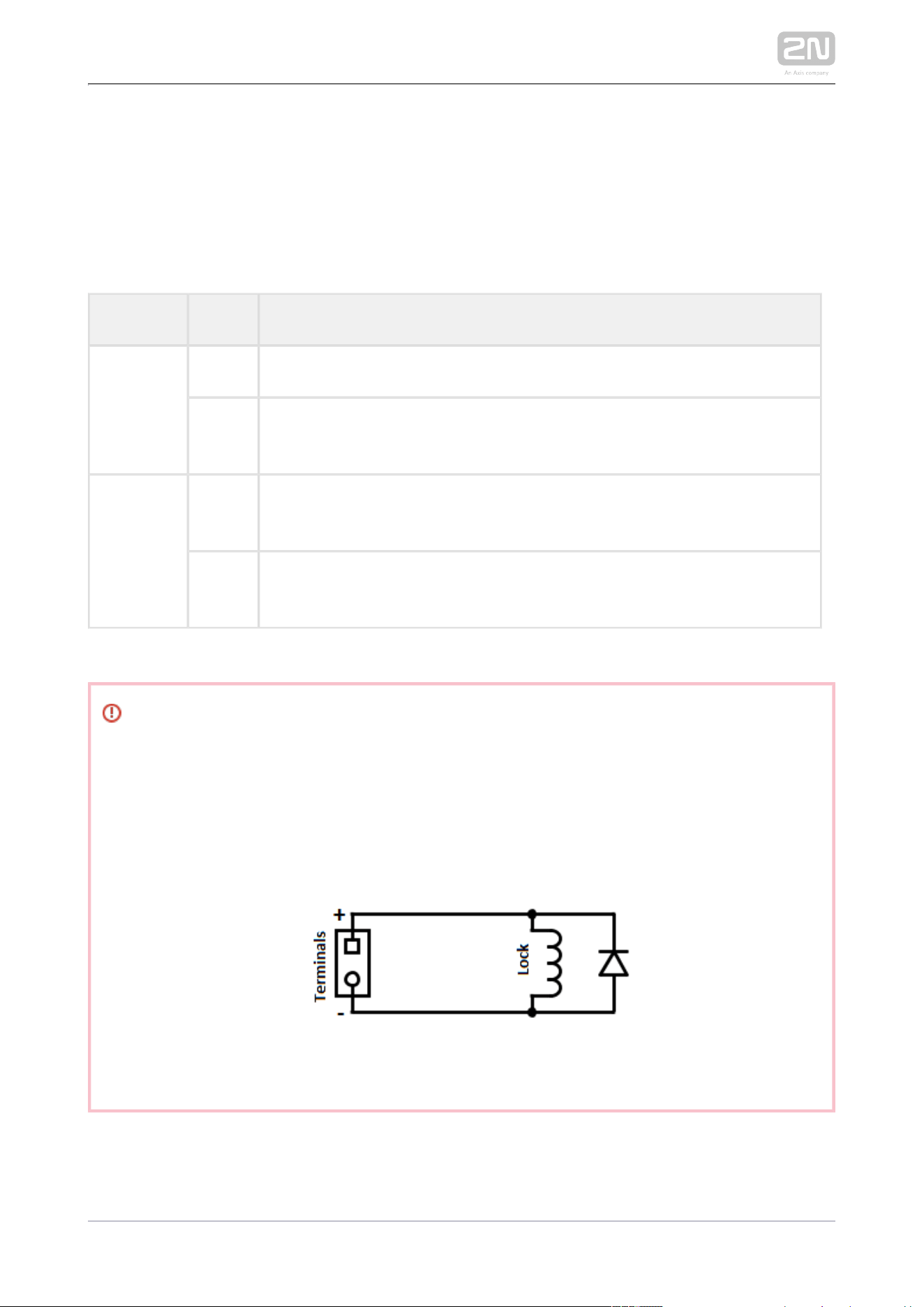
2N TELEKOMUNIKACE a.s., www.2n.cz 175/233
Device Restart
Press the RESET button shortly (< 1 s) to restart the system without changing
configuration.
Available Switches
Location Name Description
Main Unit Relay 1 Passive switch: NO/NC contact, up to 30 V / 1 A AC/DC
Output
1
Active switch output: 8 up to 12 V DC depending on power supply (power
supply voltage minus 2 V), max 400 mA
I/O
Module*
(Part No.
9155034)
ext.
relay1
Passive relay switch: NO and NC contacts, up to 30 V / 1 A AC/DC
ext.
relay2
Passive relay switch: NO and NC contacts, up to 30 V / 1 A AC/DC
More modules marked by * can be used.
Warning
When you connect a device containing a coil, such as a relay or an
electromagnetic lock, it is necessary to protect the intercom against voltage
peak while switching off the induction load. For this way of protection we
recommend a diode 1 A / 1000 V (e.g., 1N4007, 1N5407, 1N5408) connected
antiparallel to the device.

2N TELEKOMUNIKACE a.s., www.2n.cz 176/233
2.4 Extending Module Connection
2N IP/LTE Verso
®
allows to connect the following extending modules:
Infopanel
Keypad
Touch Keypad
RFID Card Reader 125 kHz
RFID Card Reader 13.56 MHz
RFID Card Reader 13.56 MHz NFC Support
Secured RFID Card Reader 13.56 MHz NFC Support
Bluetooth & RFID reader 125kHz, 13.56MHz, NFC
Bluetooth & RFID reader 125kHz, secured 13.56MHz, NFC
Touch keypad & RFID reader 125kHz, 13.56MHz, NFC
Touch keypad & RFID reader 125kHz, secured 13.56MHz, NFC
Bluetooth Reader
Touch Display
Induction Loop
Fingerprint Reader
I/O Module
5-Button
Wiegand Module
Tamper Switch
Blind Panel
Security Relay

2N TELEKOMUNIKACE a.s., www.2n.cz 177/233
Module Bus Interconnection
All the modules, except for the Tamper Switch, are interconnected 2N
®
IP/LTE Verso
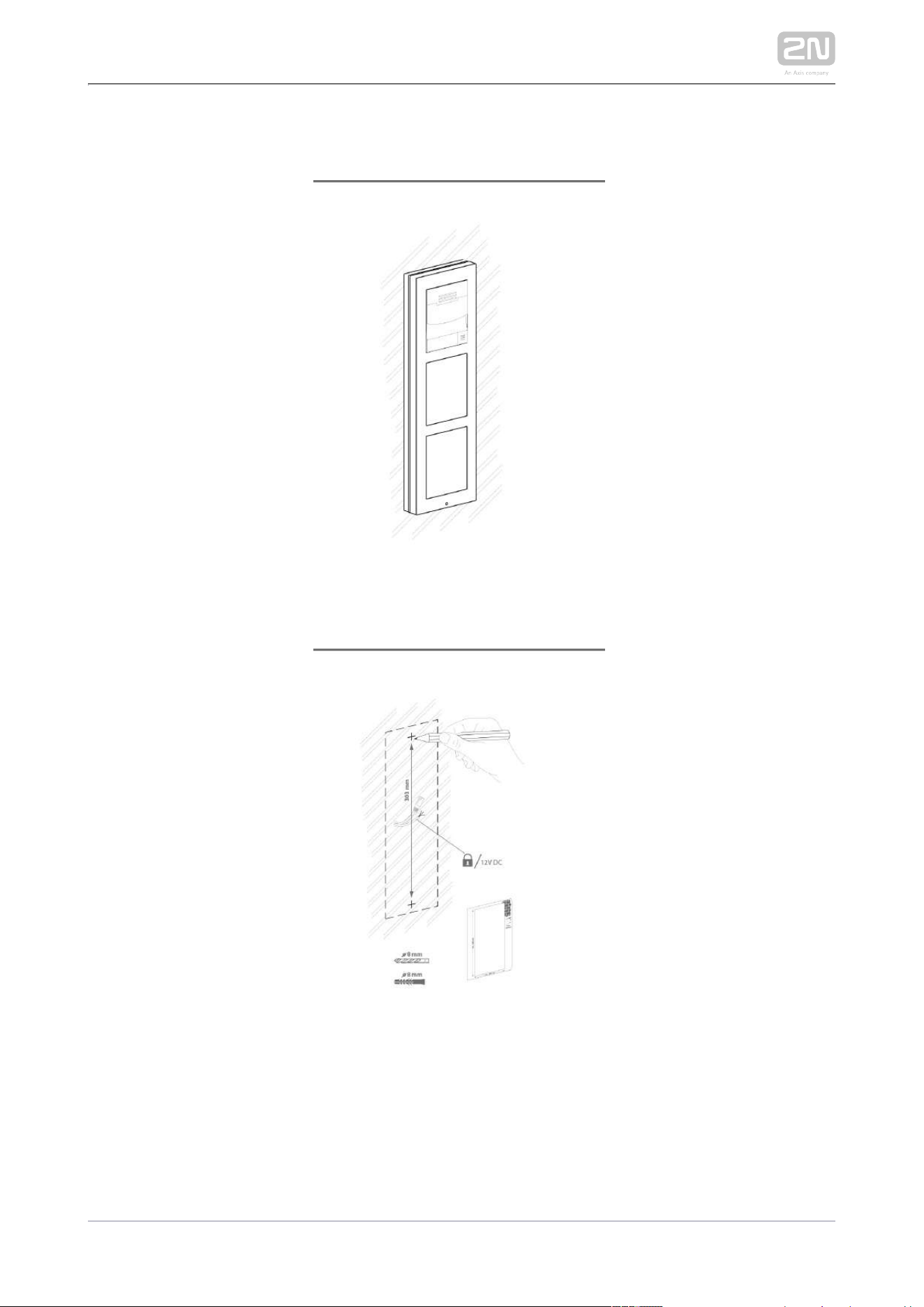
via a bus. The bus starts on the main unit and goes over all the modules. The order of
modules on the bus is irrelevant. And it also irrelevant which bus connector on the
module is used as the input and which is used as the output.
The modules include a 220 mm long interconnecting cable; the Wiegand (9155037)
and I/O modules (9155034) include an 80 mm long interconnecting cable.
You can order a separate 1 m long bus cable (9155050) for remote installation of the
modules. Typically, it helps install an RFID card reader on the 2N
®
IP/LTE Verso
opposite side of the wall on which the intercom is installed.2N
®
IP/LTE Verso
The modules can be combined in each base as follows:

2N TELEKOMUNIKACE a.s., www.2n.cz 178/233
Module Externally
mounted (visible
module)
Internally
mounted (invisible
module)
Internally mounted
on bottom base
edge
Infopanel X
Keypad X
Touch keypad X
RFID card reader 125 kHz X
RFID card reader 13.56 MHz X
RFID card reader 13.56 MHz
NFC support
X
Secured RFID card reader 13.56
MHz NFC
X
Bluetooth & RFID reader
125kHz, 13.56MHz, NFC
X
Bluetooth & RFID reader
125kHz, secured 13.56MHz, NFC
X
Touch keypad & RFID reader
125kHz, 13.56MHz, NFC
X
Touch keypad & RFID reader
125kHz, secured 13.56MHz, NFC
X
Bluetooth reader X
Touch display X
Induction loop X
Fingerprint reader X
I/O module X

2N TELEKOMUNIKACE a.s., www.2n.cz 179/233
Module Externally
mounted (visible
module)
Internally
mounted (invisible
module)
Internally mounted
on bottom base
edge
5-button X
Wiegand X
Tamper switch X
Blind X
Security Relay X
Module Power Supply
Except for the protection switch module, all the modules are 2N
®
IP/LTE Verso
powered from the bus. The available bus power output depends on the power supply
type. Main units 571v3 and higher can use a 3A power supply to increase the bus
power available for the modules connected.
Power supply Specification Available power
External supply 12 V ±15% / 2 A (3 A) 24 W (36 W)
PoE 802.3af (Class 0–12.95 W) 12 W
Combined External supply + PoE 30 W (42 W)
The count of modules on the bus is limited by the available power supply output. The
maximum count of the modules on the bus is 30.
Main unit
(571v3)
Consumption [W]
(Maximum value)
At relax 2.376
Infrared illumination 3.06
LED – call 0.072

2N TELEKOMUNIKACE a.s., www.2n.cz 180/233
Main unit
(571v3)
Consumption [W]
(Maximum value)
LED – ringing 0.072
LED – lock 0.072
LED – secured 0.096
Button backlight 0.072
Name tag backlight 0.072
Unit backlight 0.072
Relay 1 0.132
OUT 1 4.8
Audio 2.94
Total 13.84
Module Idle consumption
[W]
(Minimum value)
Full load [ ]W
(Maximum
value)
Special elements
[ ]W
Main unit with camera 2.36 11.57
Main unit without camera 2.12 11.57
Infopanel 0.17 0.35
Keypad 0.19 1.16
RFID card reader 125 kHz 0.52 1.31
RFID card reader 13.56 MHz 0.44 0.82

2N TELEKOMUNIKACE a.s., www.2n.cz 181/233
Module Idle consumption
[W]
(Minimum value)
Full load [ ]W
(Maximum
value)
Special elements
[ ]W
RFID card reader 13.56 MHz NFC 0.44 0.82
Secured RFID card reader 13.56 MHz
NFC
0.44 0.82
Bluetooth & RFID reader 125kHz, 13.56
MHz, NFC
1.34 2.74
Bluetooth & RFID reader 125kHz,
secured 13.56MHz, NFC
1.34 2.74
Touch keypad & RFID reader 125kHz,
13.56MHz, NFC
1.38 2.52
Touch keypad & RFID reader 125kHz,
secured 13.56MHz, NFC
1.38 2.52
Bluetooth reader 0.20 0.67
Touch display 0.19 1.70
Induction loop 0.18 0.84
Fingerprint reader 0.73 1.54
I/O 0.31 0.65 Closed relay 0.13
5-button 0.19 1.16
Wiegand 0.46 0.46
Tamper switch 0.31 0.65
Blind panel x x
Specimen configuration consumption computation
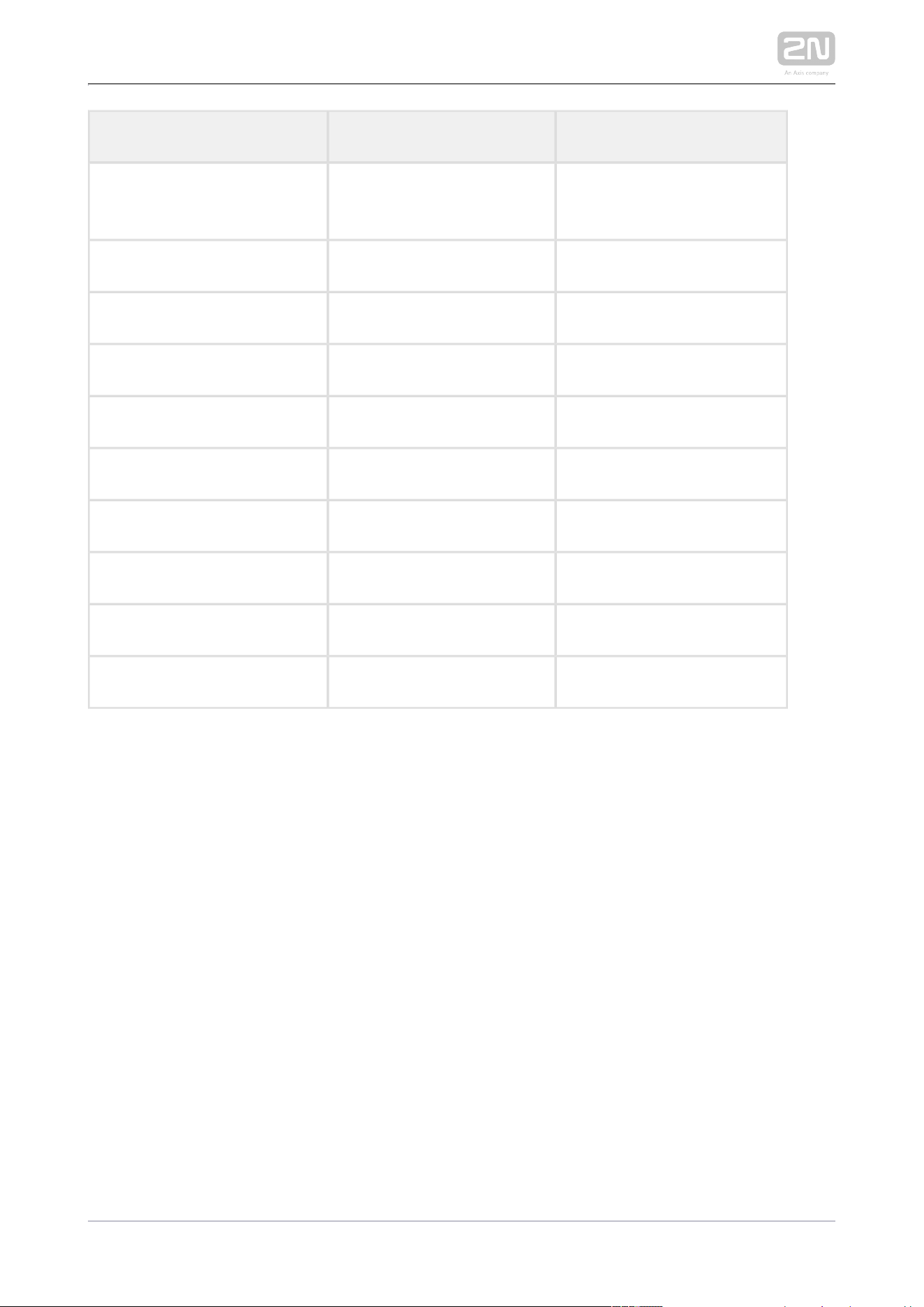
2N TELEKOMUNIKACE a.s., www.2n.cz 182/233
Module Minimum consumption [W] Maximum consumption [W]
Main unit with camera 2.36 11.57
RFID card reader 13.56 MHz 0.44 0.82
I/O 0.31 0.65
5-button 0.19 1.16
Touch display 0.19 1.70
I/O 0.31 0.65
Tamper switch 0.31 0.65
Wiegand 0.46 0.46
Bluetooth reader 0.20 0.67
Total 4.77 18.33
It is obvious from the specimen configuration that all the modules have sufficient
outputs when an external power supply is used. When a PoE supply is used, the power
output is insufficient for all the modules, which results in automatic decrease in
backlight level, active output current supply, volume and LED intensity. Some modules
need a specific power output for their specific activities: the I/O module, e.g., requires
0.13 W for relay closing (not calculated for minimum consumption).

2N TELEKOMUNIKACE a.s., www.2n.cz 183/233
Infopanel
The Infopanel ( ) is one of the intercom elements Part No. 9155030 2N
®
IP/LTE Verso
and is used for inserting and backlighting printed information.
The module contains two bus connectors.2N
®
IP/LTE Verso
These two connectors are fully interchangeable and can be used both as inputs
from the main unit and outputs to other modules.
If this module is the last one on the bus, one of the connectors remains
unconnected.
The module package includes a 220 mm long interconnecting cable.
Nametag dimensions: 69,2 (W) x 86,7 (H) mm (dimensional tolerance: +0; -0,5
mm).
Refer to for printing template.www.2n.cz
Keypad
The Keypad ( ) is one of the intercom elements and Part No. 9155031 2N
®
IP/LTE Verso
provides a numerical input in the system.
The module contains two bus connectors. 2N
®
IP/LTE Verso
These two connectors are fully interchangeable and can be used both as inputs
from the main unit and outputs to other modules.
If this module is the last one on the bus, one of the connectors remains
unconnected.
The module package includes a 220 mm long interconnecting cable.
Touch Keypad
The Touch keypad ( ) is one of the intercom Part No. 9155047 2N
®
IP/LTE Verso
elements and provides a numerical input in the system.
The module contains two bus connectors. 2N
®
IP/LTE Verso
These two connectors are fully interchangeable and can be used both as inputs
from the main unit and outputs to other modules.
If this module is the last one on the bus, one of the connectors remains
unconnected.
The module package includes a 220 mm long interconnecting cable.
RFID Card Reader Module 125 kHz
2N TELEKOMUNIKACE a.s., www.2n.cz 184/233
RFID Card Reader Module 125 kHz
The 125 kHz RFID card reader ( ) is one of the Part No. 9155032 2N
®
IP/LTE Verso
intercom elements and is used for reading RFID card Ids in the 125 kHz band.
The module contains two bus connectors.2N
®
IP/LTE Verso
These two connectors are fully interchangeable and can be used both as inputs
from the main unit and outputs to other modules.
If this module is the last one on the bus, one of the connectors remains
unconnected.
The module package includes a 220 mm long interconnecting cable.
The following RFID cards can be read:
EM4xxx
Caution
To increase the reader's reading distance in combination with a touch
display in a single installation, we recommend you to pull the M-Bus and
LAN cables through separate bushings to avoid their crossing.
RFID Card Reader 13.56 MHz NFC support
The 13.56 MHz RFID card reader ( ) is one of the Part No. 9155040 2N
®
IP/LTE Verso
intercom elements and is used for reading RFID card Ids in the 13.56 MHz band.
The module contains two bus connectors.2N
®
IP/LTE Verso
These two connectors are fully interchangeable and can be used both as inputs
from the main unit and outputs to other modules.
If this module is the last one on the bus, one of the connectors remains
unconnected.
The module package includes a 220 mm long interconnecting cable.
The following RFID cards can be read (only the card serial number is read):
ISO/IEC 14443A Mifare Classic 1k & 4k, DESFire EV1, Mini, Plus S&X, Ultralight,
Ultralight C
ISO/IEC 14443B CEPAS, HID iCLASS
JIS X 6319 Felica
ISO/IEC 18092 SmartPhone with NFC/HCE support, since Android version 4.3

2N TELEKOMUNIKACE a.s., www.2n.cz 185/233
Secured RFID Card Reader 13.56 MHz NFC support
The Secured RFID card reader 13.56 MHz NFC support ( ) is one of Part No. 9155086
the intercom elements and is used for reading RFID card Ids in the 2N
®
IP/LTE Verso
13.56 MHz band.
The module contains two bus connectors.2N
®
IP/LTE Verso
These two connectors are fully interchangeable and can be used both as inputs
from the main unit and outputs to other modules.
If this module is the last one on the bus, one of the connectors remains
unconnected.
The module package includes a 220 mm long interconnecting cable.
The following RFID cards can be read (optionally the card serial number or PAC ID is
read):
ISO14443A (Mifare, DESFire)
PicoPass (HID iClass)
FeliCa
ST SR(IX)
2N Mobile Key
®
HID SE (Seos, iClass SE, Mifare SE)

2N TELEKOMUNIKACE a.s., www.2n.cz 186/233
Bluetooth & RFID reader 125kHz, 13.56MHz, NFC
Bluetooth with a combined 125 kHz and 13.56 MHz card reader module (Part No.
) is one of the intercom elements and is used for 9155082 2N IP/LTE Verso
®
Smartphone/2N Mobile Key tablet/card access control, making user calls and/or
®
other functions.
NFC – a licensed function, for 2N Mobile Key for Android only.
®
The module contains two bus connectors.
These two connectors are fully interchangeable and can be used either as inputs
from the basic unit or outputs to other modules.
If this module is the last one on the bus, one of the connectors remains
unconnected.
The module package includes a 220 mm long interconnecting cable.
The following RFID cards can be read:
125 kHz
EM4xxx
13.56 MHz
ISO14443A (Mifare, DESFire)
PicoPass (HID iClass)
FeliCa
ST SR(IX)
2N Mobile Key
®
Tip
To accelerate card reading, you are recommended to select the card
types used by the user in the module settings.
2N TELEKOMUNIKACE a.s., www.2n.cz 187/233
Bluetooth & RFID reader 125kHz, secured 13.56MHz, NFC
Bluetooth with a combined 125 kHz and secured 13.56 MHz card reader (Part No.
) is one of the intercom elements and is used for 9155084 2N IP/LTE Verso
®
Smartphone/2N Mobile Key tablet/card access control, making user calls and/or
®
other functions.
NFC – a licensed function, for 2N Mobile Key for Android only.
®
The module contains two bus connectors.
These two connectors are fully interchangeable and can be used either as inputs
from the basic unit or outputs to other modules.
If this module is the last one on the bus, one of the connectors remains
unconnected.
The module package includes a 220 mm long interconnecting cable.
The following RFID cards can be read:
125 kHz
EM4xxx
13.56 MHz
ISO14443A (Mifare, DESFire)
PicoPass (HID iClass)
FeliCa
ST SR(IX)
2N Mobile Key
®
HID SE (Seos, iClass SE, Mifare SE)
Tip
To accelerate card reading, you are recommended to select the card
types used by the user in the module settings.
2N TELEKOMUNIKACE a.s., www.2n.cz 188/233
Touch keypad & RFID reader 125kHz, 13.56MHz, NFC
The touch keypad with a combined 125 kHz and 13.56 MHz card reader (Part No.
) is one of the intercom elements and is used for code/card 9155081 2N IP/LTE Verso
®
access control, making user calls and/or other functions. The keypad surface is very
sensitive yet weatherproof at the same time.
NFC – a licensed function, for 2N Mobile Key for Android only.
®
The module contains two bus connectors.
These two connectors are fully interchangeable and can be used either as inputs
from the basic unit or outputs to other modules.
If this module is the last one on the bus, one of the connectors remains
unconnected.
The module package includes a 220 mm long interconnecting cable.
The following RFID cards can be read:
125 kHz
EM4xxx
13.56 MHz
ISO14443A (Mifare, DESFire)
PicoPass (HID iClass)
FeliCa
ST SR(IX)
2N Mobile Key
®
Tip
To accelerate card reading, you are recommended to select the card
types used by the user in the module settings.

2N TELEKOMUNIKACE a.s., www.2n.cz 189/233
Touch keypad & RFID reader 125kHz, secured 13.56MHz, NFC
The touch keypad with a combined 125 kHz and secured 13.56 MHz card (Part No.
) reader is one of the intercom elements and is used for 9155083 2N IP/LTE Verso
®
code/card access control, making user calls and/or other functions. The keypad
surface is very sensitive yet weatherproof at the same time.
NFC – a licensed function, for 2N Mobile Key for Android only.
®
The module contains two bus connectors.
These two connectors are fully interchangeable and can be used either as inputs
from the basic unit or outputs to other modules.
If this module is the last one on the bus, one of the connectors remains
unconnected.
The module package includes a 220 mm long interconnecting cable.
The following RFID cards can be read:
125 kHz
EM4xxx
13.56 MHz
ISO14443A (Mifare, DESFire)
PicoPass (HID iClass)
FeliCa
ST SR(IX)
2N Mobile Key
®
HID SE (Seos, iClass SE, Mifare SE)
Tip
To accelerate card reading, you are recommended to select the card
types used by the user in the module settings.
Induction Loop
The is one of the intercom elements and is used to Induction loop 2N IP/LTE Verso
®
transmit an audio signal directly into a hearing aid via a magnetic field.
2N TELEKOMUNIKACE a.s., www.2n.cz 190/233
The module contains two bus connectors.2N IP/LTE Verso
®
These two connectors are fully interchangeable and can be used both as inputs
from the main unit and outputs to other modules.
If this module is the last one on the bus, one of the connectors remains
unconnected.
The module package includes a 220 mm long interconnecting cable.
Used mode: Telecoil (also referred to as t-switch or t-coil)
Maximum power: 2W
Frequency range: 100 Hz – 5 kHz / ± 3 dB
External antenna can be connected – Part No. 9155043
Short circuit resistance: without limitation
Fingerprint Reader
The is one of the intercom modules and is used Fingerprint reader 2N IP/LTE Verso
®
for automated verification of human fingers for access control and intercom control.
The module contains two bus connectors.2N IP/LTE Verso
®
These two connectors are fully interchangeable and can be used both as inputs
from the main unit and outputs to other modules.
If this module is the last one on the bus, one of the connectors remains
unconnected.
The module package includes a 220 mm long interconnecting cable.
Important module properties:
FBI PIV and Mobile ID certification – FAP20
Durable glass touch surface
Rejects spoof fingerprints
-20 to 55 ºC operating temperature range,
0–90% relative humidity, noncondensing
Note
A higher moisture may deteriorate finger papillary line scanning. You are
advised to dry your finger and the reader scanning surface for successful
authentication.

2N TELEKOMUNIKACE a.s., www.2n.cz 191/233
Bluetooth Reader
The Bluetooth reader ( ) is one of the Part No. 9155046 2N IP/LTE Verso
®
intercom elements and helps authenticate and subsequently open doors using
Android and iOS based smartphones via the Bluetooth protocol 4.0 as RFID card
replacement. Install the application from and 2N
®
Mobile Key Google Play
to make authentication work properly. The application requires phones Appstore
with Android OS 4.4 and higher and iOS 9 and higher.
The module contains two bus connectors.2N IP/LTE Verso
®
The two connectors are fully interchangeable and can be used both as inputs
from the main unit or outputs to other modules.
If this module is the last one on the bus, one of the connectors remains
unconnected.
The package includes a 220 mm long interconnecting cable.
The module uses the 2.4 GHz frequency.
IDs from the following smart phones can be read:
Android 4.4 and higher
iPhone 4S with iOS 8 and higher and higher
I/O
The I/O (Part No. 9155034) is one of the intercom elements and is 2N IP/LTE Verso
®
used for extending the number of inputs and outputs.
The module contains two bus connectors.2N
®
IP/LTE Verso
These two connectors are fully interchangeable and can be used both as inputs
from the main unit and outputs to other modules.
If this module is the last one on the bus, one of the connectors remains
unconnected.
The module package includes an 80 mm long interconnecting cable.
The inputs / outputs are addressed as follows: <module_name>.<input
, e.g. module5.relay1. The module name is configured in the /output_name>
Module name parameter in the Hardware / Extenders menu.

2N TELEKOMUNIKACE a.s., www.2n.cz 192/233
RELAY1 RELAY1 terminals with accessible 30 V / 1 A AC/DC NO/NC contact
RELAY2 RELAY2 terminals with accessible 30 V / 1 A AC/DC NO/NC contact
IN1 IN1 terminals for input in passive/ active mode (−30 V to +30 V DC)
OFF = open OR U > 1.5 V
IN
ON = closed contact OR U < 1.5 V
IN
IN2 IN2 terminals for input in passive/active mode (−30 V to +30 V DC)
OFF = open OR U > 1.5 V
IN
ON = closed contact OR U < 1.5 V
IN
TAMPER Tamper switch (9155038) input

2N TELEKOMUNIKACE a.s., www.2n.cz 193/233
5-Button
The 5-button (Part No. 9155035) is one of the intercom elements 2N
®
IP/LTE Verso
and is used for extending the number of buttons.
The module contains two bus connectors.2N IP/LTE Verso
®
These two connectors are fully interchangeable and can be used both as inputs
from the main unit and outputs to other modules.
If this module is the last one on the bus, one of the connectors remains
unconnected.
The module package includes a 220 mm long interconnecting cable.
Nametag dimensions:
1 button: 52,0 (W) x 15.2 (H) mm (dimensional tolerance: +0; -0.5 mm).
5 buttons: 57.5 (W) x 89.0 (H) mm (dimensional tolerance: +0; -0.5 mm).
Refer to for nametag printing template.www.2n.cz
Touch Display
The (Part No. 9155036) module is designed for the Touch display 2N IP/LTE Verso
®
communicator. This module can be used as:
Infopanel module – displays user defined image sequences
Keypad module – virtual touch keypad
Button module – virtual phone directory
Module connection options:
The module contains two bus connectors.2N IP/LTE Verso
®
These two connectors are fully interchangeable and can be used both as inputs
from the basic unit and outputs to other modules.
If this module is the last one on the bus, one of the connectors remains
unconnected.
The module package includes a 220 mm long interconnecting cable.
Technical specification:
Resolution: 320 px x 214 px H x V
Resolution slideshow: 214 px x 214 px
Contrast ratio: 400
Brightness: 350 cd/m2
Weight: 280 g

2N TELEKOMUNIKACE a.s., www.2n.cz 194/233
Weight: 280 g
Working temperature: -20 °C – 60 °C
Resistance level: IK07
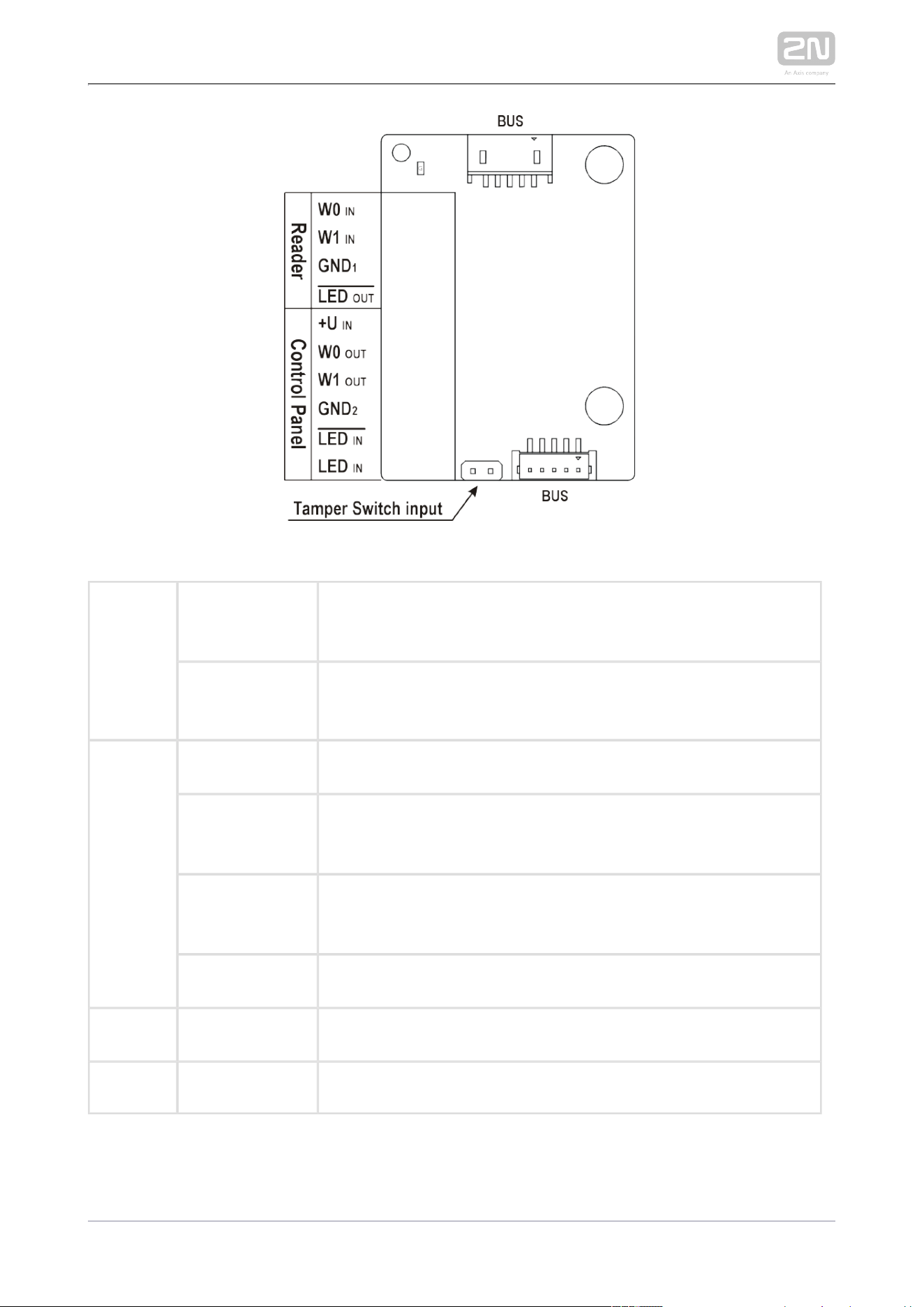
Wiegand
The Wiegand (Part No. 9155037) is one of the intercom elements 2N IP/LTE Verso
®
and is used for connecting an external Wiegand device (RFID card reader, fingerprint
or other biometric data reader) and/or connecting the system to an 2N
®
IP/LTE Verso
external security exchange. All the inputs and outputs are galvanically isolated from
the system with insulation strength of 500 V DC. It is necessary to 2N IP/LTE Verso
®
feed +U IN on Wiegand OUT from the Control Panel.
Reader – connects an external Wiegand-supporting reader. The reader sends
information on the intercom card number.
Control Panel – used for connection to the security PBX or access system to
which the intercom sends information on the intercom card number.
The module contains two bus connectors.2N IP/LTE Verso
®
These two connectors are fully interchangeable and can be used both as inputs
from the main unit and outputs to other modules.
If this module is the last one on the bus, one of the connectors remains
unconnected.
The module package includes an 80 mm long interconnecting cable.
The module name is configured in the Module name parameter in the Hardware /
Extenders menu.
The input LED IN is addressed as follows: , e.g. <module_name>.<input1>
module2.input1.
The input Tamper is addressed as follows: , e.g. <module_name>.<tamper>
module2.tamper.
The output LED OUT (negated) is addressed as follows: <module_name>.
, e.g. module2.output1.<output1>
2N TELEKOMUNIKACE a.s., www.2n.cz 195/233
Reader W0 W1IN,
GNDIN, 1
Isolated 2-wire WIEGAND IN
LED OUT Isolated open LED OUT switched against GND on WIEGAND IN 1
side (up to 24 V / 50 mA)
Control
Panel
+U IN +U (5 to 15 V DC) WIEGAND OUT power supply input
IN
W0 W1 OUT,
GNDOUT, 2
Isolated 2-wire WIEGAND OUT
LED IN
(negated)
Isolated input for open LED IN, input activated by GND2
LED IN Isolated input for open LED IN, input activated by +U
G +U WIEGAND OUT active supply LED indicator IN
TAMPER Tamper switch (Part No. ) input9155038

2N TELEKOMUNIKACE a.s., www.2n.cz 196/233
Tamper Switch
The (Part No. 9155038) is one of the intercom Tamper switch 2N
®
IP/LTE Verso
elements and helps secure the system against tampering.
The module contains two switches that open whenever the front frame is
removed:
One switch leads directly to the terminal board and is designed for
connection to an external security exchange (32 V DC / 50 mA max).
The other switch, together with the or I/O module (9155034) Wiegand
, can be used for alarm signalling via the Automation module (9155037)
interface in the configuration.2N
®
IP/LTE Verso
This module is not connected to the bus.
Tamper Switch Mounting
Blind Panel
The (Part No. 9155039) is used to cover an empty position.Blind panel

2N TELEKOMUNIKACE a.s., www.2n.cz 197/233
Security Relay
The (Part No. 9159010) is used for enhancing security between the 2N
®
Security Relay
intercom and the connected electric lock. The is designed for any 2N Security Relay
®
model with firmware versions 1.15 and higher. It significantly enhances 2N IP intercom
security of the connected electric lock as it prevents lock opening by forced intercom
tampering.
Function:
The is a device installed between an intercom (outside the 2N Security Relay
®
secured area) and the electric lock (inside the secured area). The 2N Security Relay
®
includes a relay that can only be activated if the valid opening code is received from
the intercom.
Specifications:
Passive switch: NO and NC contacts, up to 30 V / 1 A AC/DC
Switched output:
Where the security relay is fed from the intercom, 9 to 13 V DC is available on
the output depending on the power supply (PoE: 9 V; adapter: source voltage of
minus 1 V) / 400 mA DC.
Where the security relay is fed from an external power supply, 12 V / 700 mA DC
is available on the output.
Dimensions: (56 x 31 x 24) mm
Weight: 20 g
2N TELEKOMUNIKACE a.s., www.2n.cz 198/233
Installation:
Install the onto a two-wire cable between the intercom and the 2N Security Relay
®
electric lock inside the area to be secured (typically behind the door). The device is
powered and controlled via this two-wire cable and so can be added to an existing
installation. Thanks to its compact dimensions, the device can be installed into a
standard mounting box.
Connection:
Connect the to the intercom as follows:2N Security Relay
®
To the intercom active output (OUT1 or OUT2) , or
To the intercom relay output with a 12 V DC serial external power supply.
Connect the electric lock to the output as follows:2N Security Relay
®
To the switched output.
To the passive output in series with the external power supply.
The device also supports a Departure button connected between the ‘PB’ and ‘- Helios
IP / intercom’ terminals. Press the Departure button to activate the output for 5
seconds.
Status signalling:
Green LED Red LED Status
blinking off Operational mode
on off Activated output
blinking blinking Programming mode – waiting for initialisation
on blinking Error – wrong code received

2N TELEKOMUNIKACE a.s., www.2n.cz 199/233
Configuration:
Connect the to the properly set intercom switch output; 2N Security Relay
®
refer to the for . Make sure that one LED at Configuration Manual 2N IP intercoms
least on the is on or blinking.2N Security Relay
®
Press and hold the Reset button for 5 seconds to put the 2N Security Relay
®
device in the programming mode (both the red and green LEDs are blinking).
Activate the intercom switch using the keypad, telephone, etc. The first code
sent from the intercom will be stored in the memory and considered valid. After
code initialisation, the will pass into the operational mode 2N Security Relay
®
(the green LED is blinking).
Caution
In case of resetting the factory default settings on a device with a
version of firmware 2.18 or higher it is necessary to reprogram the
using the instructions above.2N Security Relay
®
Tip
FAQ: 2N Security Relay – what is it and how to use it with 2N IP
®
intercom?
Tip
Video Tutorial: Door intercoms 2N Security Relay
®

2N TELEKOMUNIKACE a.s., www.2n.cz 200/233
Connection:

2N TELEKOMUNIKACE a.s., www.2n.cz 201/233
2.5 Completion
Installation Completion
Check all the wire and antenna connectors on the board.
Caution
All unused connectors have to have tightened screws in order to avoid
vibration caused by sound.
Make sure before mounting that the black sealing ring is placed properly. We
recommend you to fit the microphone with the screw included in the delivery.
Nametag Placing
Every intercom package includes a piece of transparent foil, which can be laser
printed. Cut the printed foil and insert the nametags in the buttons.
We recommend you to use separate foil for every button in the 5-button module.
Refer to section download for the nametag printing template.
Nametag dimensions for 5-button module:
1 button: 52.0 (W) x 15.2 (H) mm (dimensional tolerance: +0; -0.5 mm)
5 buttons: 57.5 (W) x 89.0 (H) mm (dimensional tolerance: +0; -0.5 mm)
Infopanel nametag dimensions: 69.2 (W) x 86.7 (H) mm (dimensional tolerance: +0;
-0.5 mm).

2N TELEKOMUNIKACE a.s., www.2n.cz 202/233
1.
2.
3.
4.
5.
Caution
The area where nametags are placed is called a wet zone. After heavy
rain, water can penetrate to the nametag. Water in this area does not
affect the intercom functionality in any way and evaporates soon.
Always use waterproof foil (enclosed or other) for the nametags. Never
use paper or ink jet printing to avoid damage due to water leakage!
Nametag inserting/replacing:
Remove the frame.
Lift up the button door. The 5-button module buttons have just one door.
Remove the used nametag and insert a new one.
Close the button door.
Replace the frame.
2N TELEKOMUNIKACE a.s., www.2n.cz 203/233
Frame Replacement
Check the frame sealing before replacing the frame.
Version A
Screw the flush mounting frame in the upper and bottom parts.
Version B
Hang the surface mounting frame on the hook in the upper part and then screw
it tight in the bottom part.
Caution
Improper mounting may deteriorate the intercom waterproofness and
water may damage the electronic part.
Make sure that all holes are filled with some waterproof material – the
top part, around the cables and the screws.
Use silicone or some other sealant to seal the box against the wall if
uneven to avoid water leakage and wall damping..
Most Frequent Mounting Errors
At first, mount the metal bolts, level the bases on an even surface and tighten the
screws.
Caution
Make sure that the bases are levelled properly to avoid water leakage
and electronic damage.
The examples in the figures below show incorrectly assembled bases. This happens, in
particular, where the screws are tightened first.

2N TELEKOMUNIKACE a.s., www.2n.cz 204/233

2N TELEKOMUNIKACE a.s., www.2n.cz 205/233
3. Function and Use
This section describes the basic and extending functions of the the 2N LTE Verso
®
product.
Here is what you can find in this section:
3.1 Configuration
3.2 Intercom Control as Viewed by External User
3.3 Touch Display Intercom Control As Viewed by External User
3.4 Intercom Control as Viewed by Internal User
3.5 Maintenance
3.6 Downloads

2N TELEKOMUNIKACE a.s., www.2n.cz 206/233
3.1 Configuration
Configuration via SMS Commands
2N LTE Verso
®
includes a set of SMS commands that help you identify the device
state and configure the basic mobile data connection parameters. For example, you
can use an SMS command to set an APN other than that selected automatically after
the first power up. Make sure that all the SMS commands are admin authorised by
pwd=<password>. The password is always identical with the device web interface
login password. If the password is missing or wrong, the device ignores the command,
fails to process data and does not respond. Also make sure that the device is
registered with the LTE network (SMS commands, however, work without data
connection too).
STATE command – current device state info
SMS format: state pwd=<password>
The device sends the following response:
state – current device state: REGISTERED (registered without data connection),
DATA_CONNECTING (registered, trying to establish data connection),
DATA_CONNECTED (registered, data connection established)
operator – connected provider
network – current data network type (NONE, 2G, 3G, 4G)
signal – signal strength
ipaddr – device IP address
Example of SMS: state pwd=2n
GET command – parameter reading
SMS format: get pwd=<password> <parameter>
Available parameters:
name – device name
my2nid – My2N ID
serial – serial number
apn – APN, parameters ausr and apwd are returned in the response
ausr – APN authorisation name
2N TELEKOMUNIKACE a.s., www.2n.cz 207/233
apwd – APN authorisation password
iccid – SIM card ICCID
fwver – current firmware version
The device sends the following response: "ok <parameter>=<value>" or "error"
including error description.
Example of SMS: get pwd=2n fwver
SET command – parameter setting
SMS format: set pwd=<password> <parameter>=<value>
Available parameters:
name – device name
my2nid – My2N ID
http – HTTP server switch on/off
The device sends the following response: "ok" or "error" including error description.
Example of SMS: set pwd=2n name=Brana01
Example of SMS: set pwd=2n http=1
SET command – APN parameter setting
SMS format: set pwd=<password> apn=<apnName> ausr=<apnUser> apwd=<apnPwd>
apnName – mobile provider's APN
apnUser – APN user name
apnPwd – APN password
Examples of SMS:
set pwd=2n apn= ausr=wap apwd=wap internet.t-mobile.cz
set pwd=2n apn=internet ausr= apwd=
LOCATE command – device peeps and flashes after command
receipt
SMS format: locate pwd=<password>
The device sends the following response: "ok".
Access to Device Web Configuration Interface

2N TELEKOMUNIKACE a.s., www.2n.cz 208/233
Access to Device Web Configuration Interface
Once logged into the LTE mobile network, gets automatically 2N LTE Verso
®
connected to the My2N portal. Log in to My2N at and add the https://my2n.com
intercom to your account. The service helps you set basic 2N Mobile Video
®
parameters and make calls to mobile phones or 2N communicators. The 2N Remote
®
service makes the intercom web configuration interface accessible to Configuration
you.

2N TELEKOMUNIKACE a.s., www.2n.cz 209/233
3.2 Intercom Control as Viewed by External
User
Quick Dial Buttons
Press the quick dial button on the main unit to dial the first position in the phone
directory (Phone Book) depending on the model type. Use extending modules to
extend the number of quick dial buttons to up to 146.
By pressing the quick dial buttons you dial the phone numbers assigned to the
particular Phone Book position. Call setup is signalled by a long intermittent or any
other tone depending on the configuration of the PBX connected.
Repeated pressing of one and the same quick dial button during call setup may
initiate call hangup or call termination plus dialling the next phone number of the
called subscriber, or may be assigned no function; refer to the Intercom Configuration
/ Hardware / Keypad subsection of Configuration Manual.
You can also press the button anytime to hang up if enabled so in the Button
parameter; refer to the Intercom Configuration / Hardware / Function During Call
Keypad subsection of Configuration Manual.
Calling to Phone Book Position
The Phone Book can contain up to 1999 programmable positions. The 2N LTE Verso
®
quick dial buttons can only be used for positions 1 through 146, depending on the
number of actually installed buttons. You can dial the other positions using the
numeric keypad if the function is enabled; refer to the Dial by Numeric Keypad
Intercom Configuration / Hardware / Keypad subsection of Configuration Manual.
Procedure:
Enter the position number using the numeric keypad (05, 15, 200, e.g. – two
digits at least and four digits at most) and press the button for confirmation.
You can also press the button anytime to hang up if enabled so in the Button
parameter; refer to the Intercom Configuration / Hardware Function During Call
/ Keypad subsection of Configuration Manual.

2N TELEKOMUNIKACE a.s., www.2n.cz 210/233
1.
2.
3.
4.
Calling to User-Defined Phone Number
If the (refer to the Intercom Configuration / Hardware / Telephone function enabled
Keypad subsection of Configuration Manual) parameter is selected, you can dial a user-
defined phone number using the numeric keypad.2N LTE Verso
®
Procedure:
Press .
You will hear a continuous tone from the speaker.
Enter the phone number via the numeric keypad and press again to confirm
your dialling.
You can also press the button anytime to hang up if enabled so in the Button
parameter; refer to the Intercom Configuration / Hardware Function During Call
/ Keypad subsection of Configuration Manual.
Incoming Call Answering/Rejecting
If the automatic incoming call answering function is disabled (refer to the Intercom
Configuration / Services / Phone / Calls subsection of Configuration Manual), the
incoming call to is signalled with loud ringing. Press to answer the 2N LTE Verso
®
call and to reject the call.
Door Opening (Switch Activation) by Code
2N LTE Verso
®
is equipped with a door unlocking switch. Enter the valid code (refer
to the Intercom Configuration / Hardware / Switches subsection of Configuration
Manual) using the numeric keypad to activate this switch.
Procedure:
Enter the switch activating numerical code using the numeric keypad and press
for confirmation.
A valid code is notified visually and by a continuous switch activation tone or a
predefined unlocking user sound. An invalid code or interruption longer than as
defined in Timeout for Entering Numbers is signalled by the sound or a
user sound.
Door Opening (Switch Activation) by Biometric Reader
A biometric reader helps authenticate human fingerprints for control and management
of access and third party devices. Refer to Directory / Users for how to load a
fingerprint into a user profile.

2N TELEKOMUNIKACE a.s., www.2n.cz 211/233
Procedure:
Apply your finger to the reader scanning area.
Reader authentication light signalling:
Green – the fingerprint has been recognised successfully.
Green flashes to red – the fingerprint has been recognised but access is
denied. Check the user time profile setting state and multiple
authentication setting. Access can also be blocked by a previous tamper
switch blocking.
Red – the fingerprint has not been recognised .
Note
A higher moisture may deteriorate finger papillary line scanning. You are
advised to dry your finger and the reader scanning surface for successful
authentication.
Profile Activation/Deactivation
Activate/deactivate a profile using the numeric keypad in order to route calls directly
to the phone numbers tied with the profile; refer to the Intercom Configuration /
Directory / Time Profiles subsection of Configuration Manual subsection for details.
Procedure:
Enter the profile activating/deactivating numerical code using the numeric
keypad and press for confirmation.
A valid code is signalled by the or sound according to the code type.
An invalid code or interruption longer than as defined in Timeout for Entering
is signalled by the sound.Numbers

2N TELEKOMUNIKACE a.s., www.2n.cz 212/233
3.3 Touch Display Intercom Control As
Viewed by External User
The model can be equipped with a colour LCD display, which displays 2N LTE Verso
®
the device states (call progress, door opening, etc.) and can work in several modes.
Until the display configuration is loaded, displays no users to be called 2N LTE Verso
®
in the Directory menu. If configured properly, the starts displaying an 2N LTE Verso
®
Ad menu or the Directory/Keypad introductory menu or separate Directory or Keypad
menus. Control a display-equipped intercom by touching the display 2N LTE Verso
®
and browsing.
Presentation
In the Presentation mode, one or more images defined by the available display
configuration are displayed. The Presentation mode is started automatically when the
presentation delay timeout set in the 2N® LTE Verso web interface expires. The mode
can be terminated by a touch of the icon, which moves into the 2N LTE Verso
®
display introductory menu, or by an incoming call to .2N LTE Verso
®
2N TELEKOMUNIKACE a.s., www.2n.cz 213/233
Contacts
In the Contacts mode, a structured list of users defined by the available display
configuration is displayed. The user list can be divided into a practically arbitrary
count of groups. Browse through the Directory by touching the display. Click
to return to the superior group or the display introductory menu. Touch the user name
to make a call in the Contacts mode.
This mode helps you quick search contacts too. Touch the display icon to switch
the Contacts into the search mode and enter the string to be searched via the
touchpad. See the string in the status line in the upper part of the display. Touch the
display icon to delete the currently last character of the text to be searched. The
string is searched for in the current group and subgroup levels. See the count of found
users in the right-hand upper corner of the display. Touch the found contacts and
browse through the data.
The Contacts menu also includes a Help submenu in the right-hand bottom corner of
the display, which provides tips and basic display controls for the Contacts mode.

2N TELEKOMUNIKACE a.s., www.2n.cz 214/233
Call
Use the Call mode to make calls to the intercom Directory users.
To call a user, set Dialling via keypad in the intercom web interface and select one of
the following options: Disabled, User position number or User virtual number. If you
set User position number or User virtual number, just enter the number and click
for confirmation. Click to get back to the display introductory menu.
Entry
The Entry mode helps you enter the switch codes. Enter the switch digital code and
click
for confirmation. You can also enable Scramble keypad in the Keypad mode via the
web interface to scramble the numerical keypad buttons before every new display in
order to prevent third persons from seeing the code to be entered.

2N TELEKOMUNIKACE a.s., www.2n.cz 215/233
3.4 Intercom Control as Viewed by Internal
User
Call Answering
You can answer the incoming calls to the intercom using your phone 2N LTE
®
Verso
like any other calls. You can unlock the door, activate/deactivate a user/profile via
your phone keypad during the call. The calls, however, are time-limited to avoid
unintentional blocking of the line. Set the maximum call duration in the 2N
®
LTE Verso
(refer to the Intercom Configuration / Services / Phone / Calls Call time limit
subsection of Configuration Manual). Press # on your phone anytime to extend the call
time. The automatic call termination is signalled with a short beep 10 s before the call
end.
Calling to 2N ® LTE Verso
2N LTE
®
Verso allows you to answer incoming calls. Set the required parameters in
the Incoming calls group; refer to the Intercom Configuration / Services / Phone /
Calls subsection of Configuration Manual.
Door Opening (Switch Activation) by Code
2N LTE
®
Verso is equipped with a door unlocking switch. Enter the valid code (refer
to the Intercom Configuration / Hardware / Switches subsection of Configuration
Manual) using your phone keypad to activate this switch.
Procedure:
Enter the switch 1 or 2 activating code using your phone keypad and press for
confirmation. Confirmation is unnecessary if the Lock code without confirmation
is enabled, refer to the Intercom Configuration / Hardware / Switches /
Advanced subsection of Configuration Manual.
A valid code is signalled by the sound. An invalid code or interruption longer
than as defined in is signalled by the Timeout for Entering Numbers
sound.
Profile Activation/Deactivation
Activate/deactivate a profile using your phone in order to route calls directly to the
phone numbers tied with the profile, refer to the Intercom Configuration / Directory /
Time Profiles subsection of Configuration Manual for details.

2N TELEKOMUNIKACE a.s., www.2n.cz 216/233
Procedure:
Enter the profile activating/deactivating code using your phone keypad and
press for confirmation.
A valid code is signalled by the or sound according to the code type.
An invalid code or interruption longer than as defined in Timeout for Entering
is signalled by the sound.Numbers
2N TELEKOMUNIKACE a.s., www.2n.cz 217/233
3.5 Maintenance
Cleaning
If used frequenly, the device surface, the keypad in particular, gets dirty. To clean it,
use a piece of soft cloth moistened with clean water. We recommend you to follow
these principles while cleaning:
Never use aggressive detergents (such as abrasives or strong disinfectants).
Use suitable cleaning agents for glass lens cleaning (cleaners for glasses, optic
devices screens, etc.)
Clean the device in dry weather in order to make waste water evaporate quickly.
Warning
Prevent water from getting inside the intercom.
Do not use alcohol-based cleaners.
Avoid peroxide-based cleaners.


2N TELEKOMUNIKACE a.s., www.2n.cz 219/233
4. Technical Parameters
Signalling protocol
SIP (UDP, , TCP TLS)
Buttons
Button design: white-backlit transparent buttons with replaceable nametags
Button count: 1 and increments of 5
Button extenders: up to 29 modules, limited by power supply
Numeric keypad: optional
Audio
Microphone: 1 integrated microphone
Amplifier: 2 W (class D) amplifier
Speaker: 2 W / 8 Ω
Sound pressure level (SPL max): 78 dB (for 1 kHz, distance 1 m)
Output LINE OUT: 1 VRMS / 600 Ω
Volume control: adjustable with automatic adaptive mode
Full duplex: yes (AEC)
Speech transmission index (STI): 0.89
Audio stream
Protocols: RTP / RTSP
Codecs: G.711, G.729, G.722, L16/16 kHz
Camera
Sensor: 1/3'' colour CMOS
JPEG resolution: up to 1280 (H) x 960 (V)
Video resolution: 640 (H) x 480 (V)
Frame rate: up to 30 snapshots/s
Sensor sensitivity: 5.6 V/lux-sec (550 nm)
View angle: 128 ° (H), 95 ° (V), 134 ° (D)
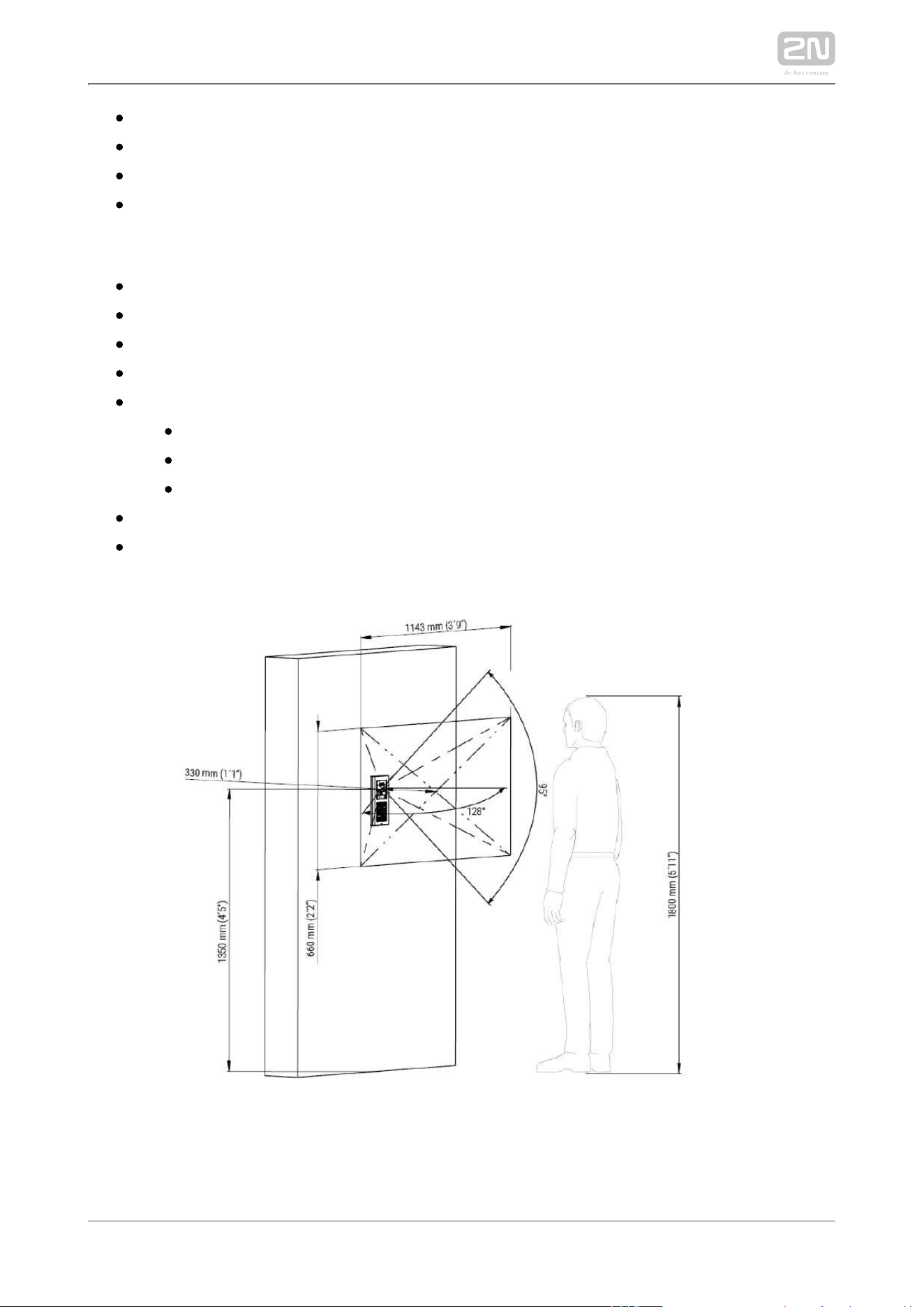
2N TELEKOMUNIKACE a.s., www.2n.cz 220/233
View angle: 128 ° (H), 95 ° (V), 134 ° (D)
Infrared light: yes
Sensor sensitivity without IR light: 0,1 Lux ± 20 %
Focal length: 2.25 mm
External LTE Antenna
Connector: MMCX
Gain: 4.1 dB
: 25 W Power handling
-40 °C to +85°COperating temperature:
Dimensions:
6 mmMax height:
14 mmMax width:
: 122 mmMax length
Adhesive MountMounting:
2 mCable length:

2N TELEKOMUNIKACE a.s., www.2n.cz 221/233
Video stream
Protocols: RTP / RTSP / HTTP
Codecs: H.263, H.263+, H.264, MPEG-4, M-JPEG
IP camera function: yes, ONVIF v2.4 profile S compatible
Bandwidth
Audio codecs
PCMA, PCMU – 64 kbps (with 85.6 kbps headers)
G.729 – 16 kbps (with 29.6 kbps headers)
G.722 – 64 kbps (with 85.6 kbps headers)
L16 / 16 kHz – 256 kbps (with 277.6 kbps headers)
V i d e o c o d e c s
Set the video codec data flows in the Services / Phone / Video menu for calls
and in the Services / Streaming / RTSP menu for streaming. The set bandwidth
represents the value that the codec has to approach on a long-time average. The
data flows can vary depending on the scene to be scanned.
The measued data flow values correspond to the test view of a person standing
in front of the intercom.
H.264
Low quality: QVGA (320 x 240), 10 fps, 256 kbps: 181 kbps (with 190 kbps
headers)
Medium quality: VGA (640 x 480), 15 fps, 768 kbps: 600 kbps (with 661
kbps headers)
High quality: VGA (640 x 480), 30 fps, 2048 kbps: 1319 kbps (with 1372
kbps headers)
MJPEG
Low quality: QVGA (320 x 240), 10 fps, quality 70: 435 kbps with headers
Medium quality: VGA (640 x 480), 15 fps, quality 85: 506 kbps
High quality: SXGA (1280 x 960), 15 fps, quality 95: 8 Mbps
2N TELEKOMUNIKACE a.s., www.2n.cz 222/233
Interface
Power supply: 12 V ±15 % / 2 A DC
LTE FDD Cat.1, 3GPP release 9 compliant
Supported protocols: SIP2.0, DHCP opt. 66, SMTP, 802.1x, RTSP, RTP, TFTP,
HTTP, HTTPS, Syslog, ONVIF
Passive switch: NO/NC contact, up to 30 V / 1 A AC/DC
Active switch output: 8 up to 12 V DC depending on power supply (power
supply voltage minus 2 V), up to 400 mA
EU LTE bands (9155401C-E a 9155401CB-E): B1(2100) B3(1800) B7(2600) B8
(900) B20(800)
Module Telit LE910-EU1
US LTE bands (9155401C-U1 a 9155401CB-U1) B2(1900) B4(AWS1700) B5(850) :
B12/B13(700)
UMTS bands: B2(1900) B5(850)
Module Telit LE910-NA1
Connection speed:
Uplink up to 5 Mbps
Downlink up to 10 Mbps
RFID card reader
Optionally 125 kHz or 13.56 MHz
Supported cards, 125 kHz, Part No. 9155032:
EM4100, EM4102
Supported cards, 13.56 MHz, Part No. 9155033 (only card serial number is read)
ISO/IEC 14443A
Mifare Classic 1k & 4k, DESFire EV1, Mini, Plus S&X, Ultralight,
Ultralight C
ISO/IEC 14443B
CEPAS, HID iCLASS
JIS X 6319
Felica

2N TELEKOMUNIKACE a.s., www.2n.cz 223/233
Supported cards on 13.56 MHz NFC version, Part No. 9155040 (only card serial
number is read)
ISO/IEC 14443A
Mifare Classic 1k & 4k, DESFire EV1, Mini, Plus S&X, Ultralight,
Ultralight C
ISO/IEC 14443B
CEPAS, HID iCLASS
JIS X 6319
Felica
ISO/IEC 18092
SmartPhone with NFC/HCE support, since Android version 4.3
Supported cards on secured 13.56 MHz NFC version, Part No. 9155042
(optionally card serial number or PAC ID is read)
ISO/IEC 14443A
Mifare Classic 1k & 4k, DESFire EV1, Mini, Plus S&X, Ultralight,
Ultralight C
ISO/IEC 14443B
CEPAS, HID iCLASS
JIS X 6319
Felica
ISO/IEC 18092
SmartPhone with NFC/HCE support, from Android version 4.3 up
Maximum H – field strength at 10 m for 125 kHz version: 66 dBµA/m
Maximum H – field strength at 10 m for 13.56 MHz version: 60 dBµA/m
2N IP Verso – Bluetooth module
®
Bluetooth 4.0 Compliant (Bluetooth Low Energy, BLE)
Security: asymmetric RSA-1024 and symmetric AES-128 encryption
RX sensitivity: up to -93 dBm
Range: adjustable (short ~ 0.5m, medium ~ 2m, long ~ up to 10m)
Power consumption: 20mA at 12V DC
Operational temperature range: -40°C ~ +60°C
Storage temperature range: -40°C ~ +70°C
Dimensions: 97x105x30mm
Compatible with 2N IP Verso, 2N LTE Verso and 2N Access Unit
® ® ®
Mobile app. support: Android 5.0 and higher, iOS 11.0 and higher

2N TELEKOMUNIKACE a.s., www.2n.cz 224/233
Touch display
Resolution: 320 px x 214 px H x V
Resolution slideshow: 214 px x 214 px
Contrast ratio: 400
Brightness: 350 cd/m2
Viewing angle: 80 ° from any direction
Weight: 280 g
Consumption min: 1.36 W
Consumption max: 2.40 W
Operating temperature: -20 °C – 60 °C
Resistance level: IK07
I/O module
Dimensions: 43 (W) x 31,5 (H) x 1,5 (D) mm
Wiegand module
: Dimensions 43 (W) x 31,5 (H) x 1,5 (D) mm
Mechanical properties
Cover: robust zinc casting with surface finish (minor surface shade nuances are
acceptable)
91554XXX – NICKEL
Material – Zamak 410 – Zn95Al4Cu1
Surface treatment – Zn/Cu20/Ni25b max. 80 µm
91554XXBXX – BLACK
Material – Zamak 410 – Zn95Al4Cu1
Surface treatment – Cataphoretic coating Black 30 µm, RAL 9004 –
Signalschwarz (colour is not guaranted – it is cataphoretic)
Working temperature: -40 °C – 60 °C
Working relative humidity: 10 % – 95 % (non-condensing)
Storing temperature: -40 °C – 70 °C

2N TELEKOMUNIKACE a.s., www.2n.cz 225/233
Dimensions
Surface mounting frame:
1 module: 107 (W) x 130 (H) x 28 (D) mm
2 modules: 107 (W) x 234 (H) x 28 (D) mm
3 modules: 107 (W) x 339 (H) x 28 (D) mm
Flush mounting frame:
1 module: 130 (W) x 153 (H) x 5 (D) mm
2 modules: 130 (W) x 257 (H) x 5 (D) mm
3 modules: 130 (W) x 361 (H) x 5 (D) mm
Flush mounting box (minimum hole dimensions):
1 module: 108 (W) x 131 (H) x 45 (D) mm
2 modules: 108 (W) x 238 (H) x 45 (D) mm
3 modules: 108 (W) x 343 (H) x 45 (D) mm
Module internal cutout: 72 (W) x 89.3 (H) mm / 2.83 (W) x 3.51 (H) inches
Weight: max net weight: 2 kg / max gross weight: 2.5 kg – based on
configuration
Covering level: IP54
Resistance level: IK08


2N TELEKOMUNIKACE a.s., www.2n.cz 228/233
1.
5.2 Directives, Laws and Regulations
2N LTE Verso
®
conforms to the following directives and regulations:
2011/65/EU on the restriction of the use of certain hazardous substances in electrical
and electronic equipment
2012/19/EU on waste electrical and electronic equipment
2014/53/EU on the harmonisation of the laws of the Member States relating to the
making available on the market of radio equipment
Industry Canada
This Class B digital apparatus complies with Canadian ICES-003. / Cet appareil
numérique de la classe B est conforme a la norme NMB-003 du Canada.
FCC
NOTE: This equipment has been tested and found to comply with the limits for a Class
B digital device, pursuant to part 15 of the FCC Rules. These limits are designed to
provide reasonable protection against harmful interference in a residential installation.
This equipment generates, uses and can radiate radio frequency energy and, if not
installed and used in accordance with the instructions, may cause harmful interference
to radio communications. However, there is no guarantee that interference will not
occur in a particular installation. If this equipment does cause harmful interference to
radio or television reception, which can be determined by turning the equipment off
and on, the user is encouraged to try to correct the interference by one or more of the
following measures:
Reorient or relocate the receiving antenna
Increase the separation between the equipment and receiver
Connect the equipment into an outlet on a circuit different from that to which
the receiver is connected
Consult the dealer or an experienced radio/TV technician for help.
Changes or modifications to this unit not expressly approved by the party responsible
for compliance could void the user's authority to operate this equipment.
DDA compliance:
2N TELEKOMUNIKACE intercoms comply with the Disability Discrimination Act 2005
(DDA) under the following conditions:
The intercoms are mounted so that their lower edge is between 100 and 120
centimeters above the floor.

2N TELEKOMUNIKACE a.s., www.2n.cz 229/233
2.
3.
The intercoms use a keyboard that has a mechanical protrusion on number 5.
The intercoms use electromagnetic loop as a hearing aid.

2N TELEKOMUNIKACE a.s., www.2n.cz 230/233
Intellectual Property Rights
Licensed U.S. Patent and Patent Application Nos:
8,139,098 7,193,644 8,144,183 8,144,184 8,154,581 8,164,614 9,432,638 9,414,030
9,485,478 9,516,284 9,635,323 9,706,178 9,648,290 9,554,090 9,924,141 9,866,802
10,097,797 10,097,796 11/929,449 11/929,457 11/929,460
Caution
In order to ensure the full functioning and guaranteed outputs we strongly
recommend a verification of the timeliness of version of product or facility
already during the installation process. The customer takes into consideration
that the product or facility can achieve the guaranteed outputs and be fully
operational pursuant to the producer’s instructions only by using the most
recent version of product or facility, which has been tested for full
interoperability and has not been determined by the producer as incompatible
with certain versions of other products, only in conformity with the producer’s
instructions, guidelines, manual or recommendation and only in conjunction
with suitable products and facilities of the other producers. The most recent
versions are available on the website https://www.2n.cz/cs_CZ/, or specific
facilities, depending on their technical capacity, allow updating in the
configuration interface. Should the customer use any other version of product
or facility than the most recent one, or the version that has been determined
by the producer as incompatible with certain versions of other producers’
products of facilities, or the product or facility in a way incompatible with the
producer’s instructions, guidelines, manual or recommendation or in
conjunction with unsuitable products or facilities of the other producers, he or
she is aware of all potential limitations of functionality of such a product or
facility and all relating consequences. Should the customer use any other than
the most recent version of the product or facility, or the version that has been
that has been determined by the producer as incompatible with certain
versions of other producers’ products of facilities, or the product or facility in
a way incompatible with the producer’s instructions, guidelines, manual or
recommendation or in conjunction with unsuitable products or facilities of the
other producers, he or she agrees that the company 2N TELEKOMUNIKACE a.
s. is not liable neither for any limitation of such a product’s functionality, nor
for any damage, loss or injury relating to such a potential limitation of
functionality.

2N TELEKOMUNIKACE a.s., www.2n.cz 231/233
5.3 General Instructions and Cautions
Please read this User Manual carefully before using the product. Follow all instructions
and recommendations included herein.
Any use of the product that is in contradiction with the instructions provided herein
may result in malfunction, damage or destruction of the product.
The manufacturer shall not be liable and responsible for any damage incurred as a
result of a use of the product other than that included herein, namely undue
application and disobedience of the recommendations and warnings in contradiction
herewith.
Any use or connection of the product other than those included herein shall be
considered undue and the manufacturer shall not be liable for any consequences
arisen as a result of such misconduct.
Moreover, the manufacturer shall not be liable for any damage or destruction of the
product incurred as a result of misplacement, incompetent installation and/or undue
operation and use of the product in contradiction herewith.
The manufacturer assumes no responsibility for any malfunction, damage or
destruction of the product caused by incompetent replacement of parts or due to the
use of reproduction parts or components.
The manufacturer shall not be liable and responsible for any loss or damage incurred
as a result of a natural disaster or any other unfavourable natural condition.
The manufacturer shall not be held liable for any damage of the product arising during
the shipping thereof.
The manufacturer shall not make any warrant with regard to data loss or damage.
The manufacturer shall not be liable and responsible for any direct or indirect damage
incurred as a result of a use of the product in contradiction herewith or a failure of the
product due to a use in contradiction herewith.
All applicable legal regulations concerning the product installation and use as well as
provisions of technical standards on electric installations have to be obeyed. The
manufacturer shall not be liable and responsible for damage or destruction of the
product or damage incurred by the consumer in case the product is used and handled
contrary to the said regulations and provisions.
The consumer shall, at its own expense, obtain software protection of the product.
The manufacturer shall not be held liable and responsible for any damage incurred as
a result of the use of deficient or substandard security software.

2N TELEKOMUNIKACE a.s., www.2n.cz 232/233
The consumer shall, without delay, change the access password for the product after
installation. The manufacturer shall not be held liable or responsible for any damage
incurred by the consumer in connection with the use of the original password.
The manufacturer also assumes no responsibility for additional costs incurred by the
consumer as a result of making calls using a line with an increased tariff.
Electric Waste and Used Battery Pack Handling
Do not place used electric devices and battery packs into municipal waste containers.
An undue disposal thereof might impair the environment!
Deliver your expired electric appliances and battery packs removed from them to
dedicated dumpsites or containers or give them back to the dealer or manufacturer
for environmental-friendly disposal. The dealer or manufacturer shall take the product
back free of charge and without requiring another purchase. Make sure that the
devices to be disposed of are complete.
Do not throw battery packs into fire. Battery packs may not be taken into parts or
short-circuited either.

2N TELEKOMUNIKACE a.s., www.2n.cz 233/233
2N TELEKOMUNIKACE a.s.
Modřanská 621, 143 01 Prague 4, Czech Republic
Phone: +420 261 301 500, Fax: +420 261 301 599
E-mail: [email protected]
Web: www.2n.cz
v1.4