User Manual
Built-In Dishwasher
DDW24G9000AP
DD68-00250L-00_IB_DACOR_DW8700B_EN.indd 1 2024-01-11 3:09:23
Contents
Safety information 4
What you need to know about the safety instructions 4
Important safety symbols 4
Before using your dishwasher 7
Regulatory notice 8
Installation 11
What’s included 11
Installation requirements 15
Dimensions and specications 17
Step-by-step installation 18
Before you start
35
Dishwasher at a glance 35
Basic use of racks 37
Loading precautions 41
Detergent compartment 48
Rinse aid reservoir 50
Salt storage 51
Operations 52
Touchpad responsiveness 52
Control panel 53
Cycle overview 56
Simple steps to start your dishwasher 58
Settings 59
SmartThings 62
Maintenance
64
Cleaning 64
Cleaning the drain pump 68
Long-term care 68
English2
Contents
DD68-00250L-00_IB_DACOR_DW8700B_EN.indd 2 2024-01-11 3:09:23
Safety information
Congratulations on your new Dacor dishwasher. This manual contains important
information on the installation, use and care of your appliance. Please take time to read
this manual to take full advantage of your dishwasher’s many benets and features.
What you need to know about the safety instructions
Warnings and Important Safety Instructions in this manual do not cover all possible
conditions and situations that may occur. It is your responsibility to use common sense,
caution, and care when installing, maintaining, and operating your dishwasher.
Important safety symbols
What the icons and signs in this user manual mean:
WARNING
Hazards or unsafe practices that may result in severe personal injury or death.
To reduce the risk of re, explosion, electric shock, or personal injury when using your
dishwasher, follow these basic safety precautions:
CAUTION
Hazards or unsafe practices that may result in minor personal injury or property damage.
These warning signs are here to prevent injury to you and others.
Please follow them explicitly.
After reading this section, keep it in a safe place for future reference.
English4
SAVE THESE INSTRUCTIONS
Safety information
DD68-00250L-00_IB_DACOR_DW8700B_EN.indd 4 2024-01-11 3:09:23
California Proposition 65 Warning
WARNING: Cancer and Reproductive Harm -
www.P65Warnings.ca.gov
WARNING
When using your dishwasher, follow basic precautions, including the following:
1. Read all instructions before using the dishwasher.
2. Use the dishwasher only for its intended function.
3. Use only detergents or wetting agents recommended for use in a dishwasher and keep
them out of the reach of children.
4. When loading items to be washed:
- locate sharp items so that they are not likely to damage the door seal, and
- load sharp knives with the handles up to reduce the risk of cut-type injuries.
5. Do not wash plastic items unless they are marked "dishwasher safe" or the equivalent.
For plastic items not so marked, check the manufacturer’s recommendations.
6. Do not touch the HEATING ELEMENT during or immediately after use.
7. Do not operate your dishwasher unless all ENCLOSURE panels are properly in place.
8. Do not tamper with controls.
9. Do not abuse, sit on, or stand on the door or dish rack of the dishwasher.
10. To reduce the risk of injury, do not allow children to play in or on a dishwasher.
11. Under certain conditions, hydrogen gas may be produced in a hot-water system that
has not been used for two weeks or more. HYDROGEN GAS IS EXPLOSIVE. If the hot-
water system has not been used for such a period, before using the dishwasher turn
on all hot-water faucets and let the water ow from each for several minutes. This will
release any accumulated hydrogen gas. As the gas is ammable, do not smoke or use
an open ame during this time.
12. Remove the door to the washing compartment when removing an old dishwasher from
service or discarding it.
English 5
SAVE THESE INSTRUCTIONS
Safety information
DD68-00250L-00_IB_DACOR_DW8700B_EN.indd 5 2024-01-11 3:09:23
CAUTION
• After unpacking the dishwasher, keep the packaging out of the reach of children.
• The dishwasher is extremely heavy. Do not attempt to move or carry the dishwasher
by yourself. Two or more people are needed to move a dishwasher and avoid potential
injuries.
• As with any equipment using electricity, water, and moving parts, potential hazards
exist.
• Do not install the dishwasher near electrical components. Keep the dishwasher away
from open ames.
• Install and level your dishwasher on an uncarpeted oor that can support its weight.
• Your dishwasher must be properly grounded. Never connect it to an ungrounded outlet.
See page 7 for more information on grounding your dishwasher.
• Connect the ground wire to the green ground connector in the terminal box.
• After the dishwasher is installed, check that the drain hose is properly connected and
that there is no leakage from the hose connectors. If the drain hose is loose, it may
cause property damage.
• The water supply line is susceptible to breakage. As time goes by, it becomes less
exible. Check the line periodically. If it is swollen, torn, cut, or there is a water leak,
replace it immediately.
• To safely operate this appliance, familiarize yourself with its operations and exercise
care when using it.
• Do not put gasoline, solvents, or other flammable materials inside the dishwasher. Do
not wash dishes exposed to these materials.
• Keep your dishwasher detergent out of the reach of children. Detergent has an adverse
effect on human organs. It contains elements for polishing and is corrosive. Avoid
letting the detergent come into contact with your skin and eyes.
• Do not push or place pressure on the door when it is open, as this may damage the
dishwasher or cause harm.
• Do not allow children to play in or on the dishwasher. They may harm themselves or
damage the dishwasher.
• Disconnect the power cable (or set the circuit breaker to off) before servicing your
dishwasher.
• Do not repair, replace, or service any part of your dishwasher yourself. Disassembly,
repairs, and modications are permitted by authorized service technicians only. Work
done by an unauthorized person may void your warranty.
English6
SAVE THESE INSTRUCTIONS
Safety information
Safety information
DD68-00250L-00_IB_DACOR_DW8700B_EN.indd 6 2024-01-11 3:09:23
• Before disposing of your dishwasher, remove the door of the washing compartment or
the door latch so that children or small animals cannot get trapped inside.
• If the dishwasher is left unused for an extended period of time, turn off the water
supply.
• This dishwasher is intended for residential use only.
Before using your dishwasher
WARNING
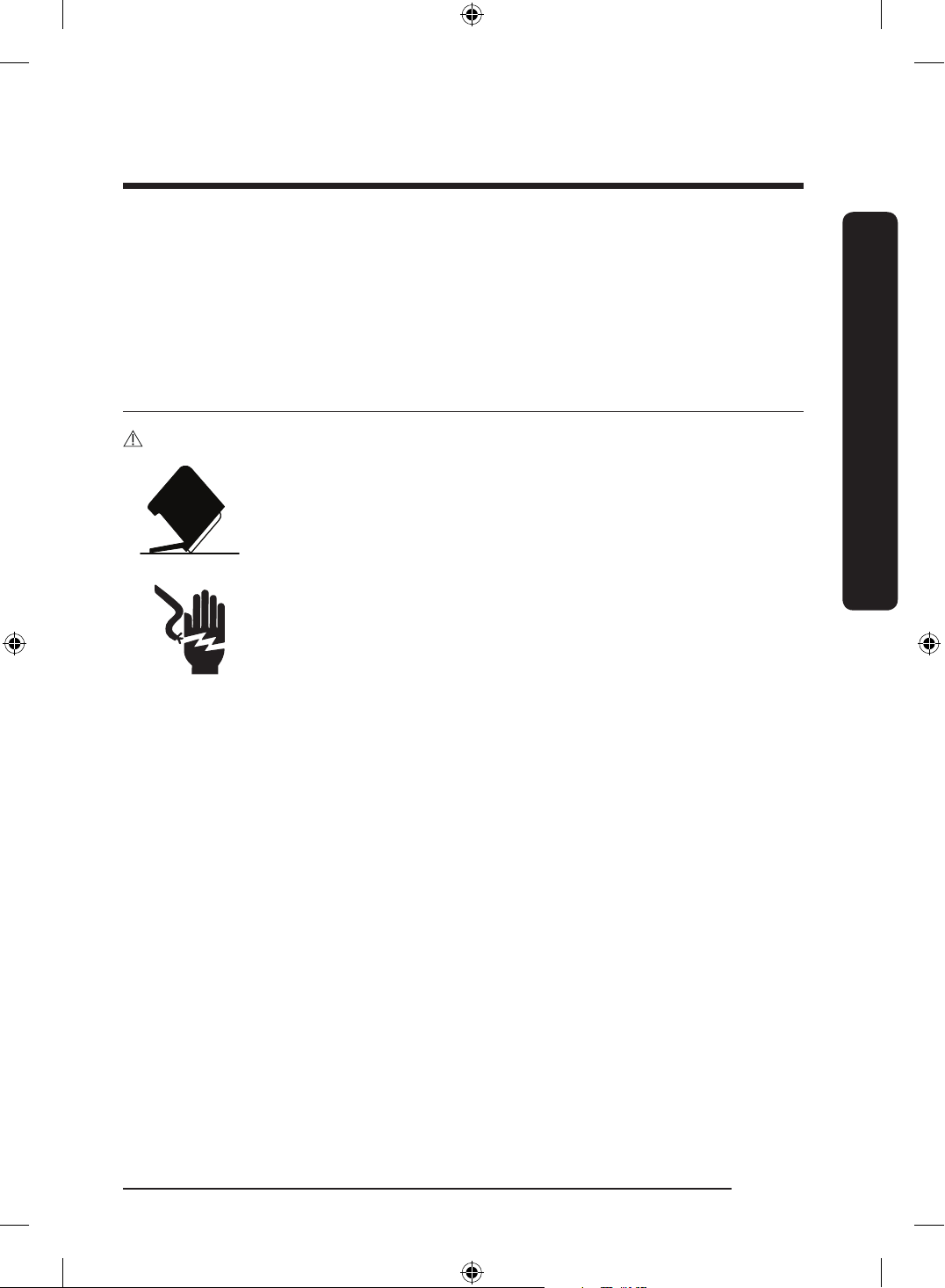
Tip-Over Hazard
• Do not use the dishwasher until it is correctly installed.
• Do not push down on an open door.
• Do not place excessive weight on the open door.
Electric Shock Hazard
Failure to follow these instructions can result in death, re, or electric
shock:
• Electrically ground the dishwasher
• Connect the ground wire to the green ground connector in the
junction box.
• Do not use an extension cord.
English 7
SAVE THESE INSTRUCTIONS
Safety information
DD68-00250L-00_IB_DACOR_DW8700B_EN.indd 7 2024-01-11 3:09:23
Regulatory notice
FCC Notice
FCC CAUTION:
Any changes or modications not expressly approved by the party responsible for
compliance could void the user’s authority to operate the equipment.
This device complies with Part 15 of FCC Rules. Operation is Subject to following two
conditions:
(1) This device may not cause harmful interference, and
(2) This device must accept any interference received including interference that cause
undesired operation.
For product available in the USA/Canada market, only channel 1~11 can be operated.
Selection of other channels is not possible.
FCC STATEMENT:
This equipment has been tested and found to comply within the limits for a Class B
digital device, pursuant to part 15 of the FCC Rules. These limits are designed to provide
reasonable protection against harmful interference in a residential installation.
This equipment generates, uses, and can radiate radio frequency energy and, if not
installed and used in accordance with the instructions, may cause harmful interference
to radio communications. However, there is no guarantee that interference will not occur
in a particular installation. If this equipment does cause harmful interference to radio
or television reception, which can be determined by turning the equipment off and on,
the user is encouraged to try to correct the interference by one or more of the following
measures:
• Reorienting or relocating the receiving antenna
• Increasing the separation between the equipment and receiver
• Connecting the equipment to an outlet that is on a different circuit than the radio or TV.
• Consulting the dealer or an experienced radio/TV technician for help.
English8
SAVE THESE INSTRUCTIONS
Safety information
Safety information
DD68-00250L-00_IB_DACOR_DW8700B_EN.indd 8 2024-01-11 3:09:23
FCC RADIATION EXPOSURE STATEMENT:
This equipment complies with FCC radiation exposure limits set forth for an uncontrolled
environment. This equipment should be installed and operated so there is at least 8 inches
(20 cm) between the radiator and your body. This device and its antenna(s) must not be co-
located or operated in conjunction with any other antenna or transmitter.
IC Notice
The term “IC” before the radio certication number only signies that Industry Canada
technical
specications were met. Operation is subject to the following two conditions: (1) this
device may not cause interference, and (2) this device must accept any interference,
including interference that may cause undesired operation of the device.
This Class B digital apparatus complies with Canadian ICES-003.
Cet appareil numérique de la classe B est conforme á la norme NMB-003 du Canada.
For product available in the USA/Canada market, only channel 1~11 can be operated.
Selection of other channels is not possible.
IC RADIATION EXPOSURE STATEMENT:
This equipment complies with IC RSS-102 radiation exposure limits set forth for an
uncontrolled environment. This equipment should be installed and operated so there is at
least 8 inches (20 cm) between the radiator and your body. This device and its antenna(s)
must not be co-located or operated in conjunction with any other antenna or transmitter.
English 9
SAVE THESE INSTRUCTIONS
Safety information
DD68-00250L-00_IB_DACOR_DW8700B_EN.indd 9 2024-01-11 3:09:23
Open Source Announcement
The software included in this product contains open source software.
The following URL http://opensource.samsung.com/opensource/SMART_TP1_0/seq/0 leads
to open source license information as related to this product.
English10
SAVE THESE INSTRUCTIONS
Safety information
Safety information
DD68-00250L-00_IB_DACOR_DW8700B_EN.indd 10 2024-01-11 3:09:23
Installation
Follow these instructions carefully to ensure proper installation of the dishwasher and to
prevent accidents when washing dishes.
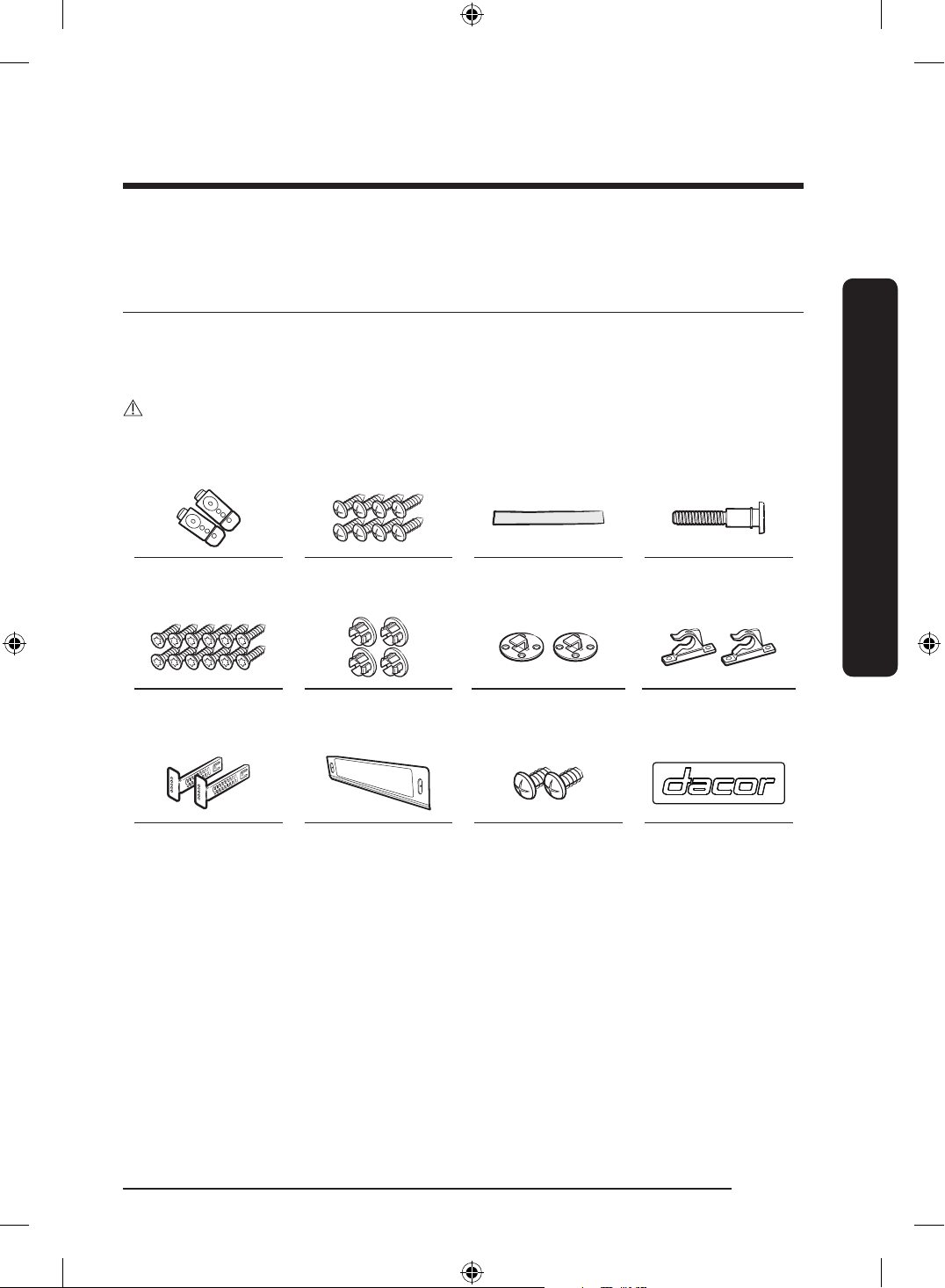
What’s included
Make sure all the parts are included in the product package. If you have a question about
the dishwasher or the parts, contact a local Dacor customer center or your retailer. The
actual appearance of the dishwasher may differ, depending on your model and country.
CAUTION
After unpacking the dishwasher, keep the packaging materials out of children’s reach to
ensure their safety.
Top brackets (2) Ø4 X 12 screws (8) Protective sticker Sub foot
Ø4 X 16 screws
(12)
Plastic caps (4) Custom panel xers-
Top (2)
Custom panel xers-
Bottom (2)
Kick plate brackets
(2)
Kick plate Ø4 X 8 screws (2) Badge
English 11
Installation
DD68-00250L-00_IB_DACOR_DW8700B_EN.indd 11 2024-01-11 3:09:24
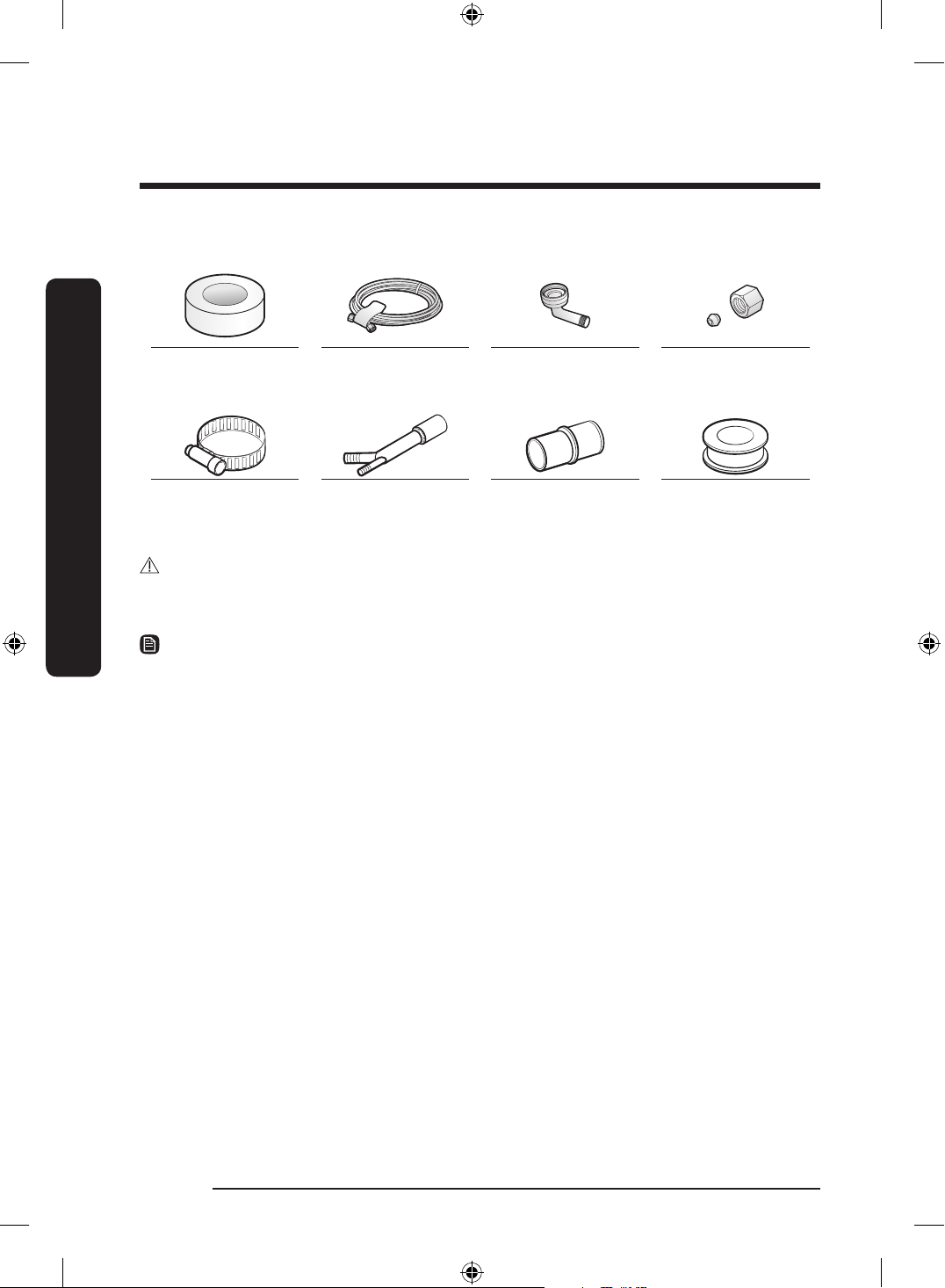
Installation kit (not provided)
Electrical tape &
Standard duct tape
Hot water line 90°Fitting (
3
/4") Tube ttings
Hose clamp Air gap Rubber connector Teon tape or
sealing compound
WARNING
Do not use plastic tubing. Plastic tubing can deteriorate over time and cause a leak inside
the tube tting.
NOTE
• For the hot water line, we strongly recommend using
3
/8" minimum O.D. copper tubing
with a compression tting or a exible stainless steel braided hot water supply line.
• You also need a 90°Fitting with
3
/4" N.P.T. external pipe threads on one end and a tting
sized to t your hot water line (copper tubing/compression tting or braided hose) on
the other.
• For the power cable, we recommend a jacketed grounded 12-2 cable. Note that some
local codes may require the cable to have a BX style metal jacket.
English12
Installation
Installation
DD68-00250L-00_IB_DACOR_DW8700B_EN.indd 12 2024-01-11 3:09:24
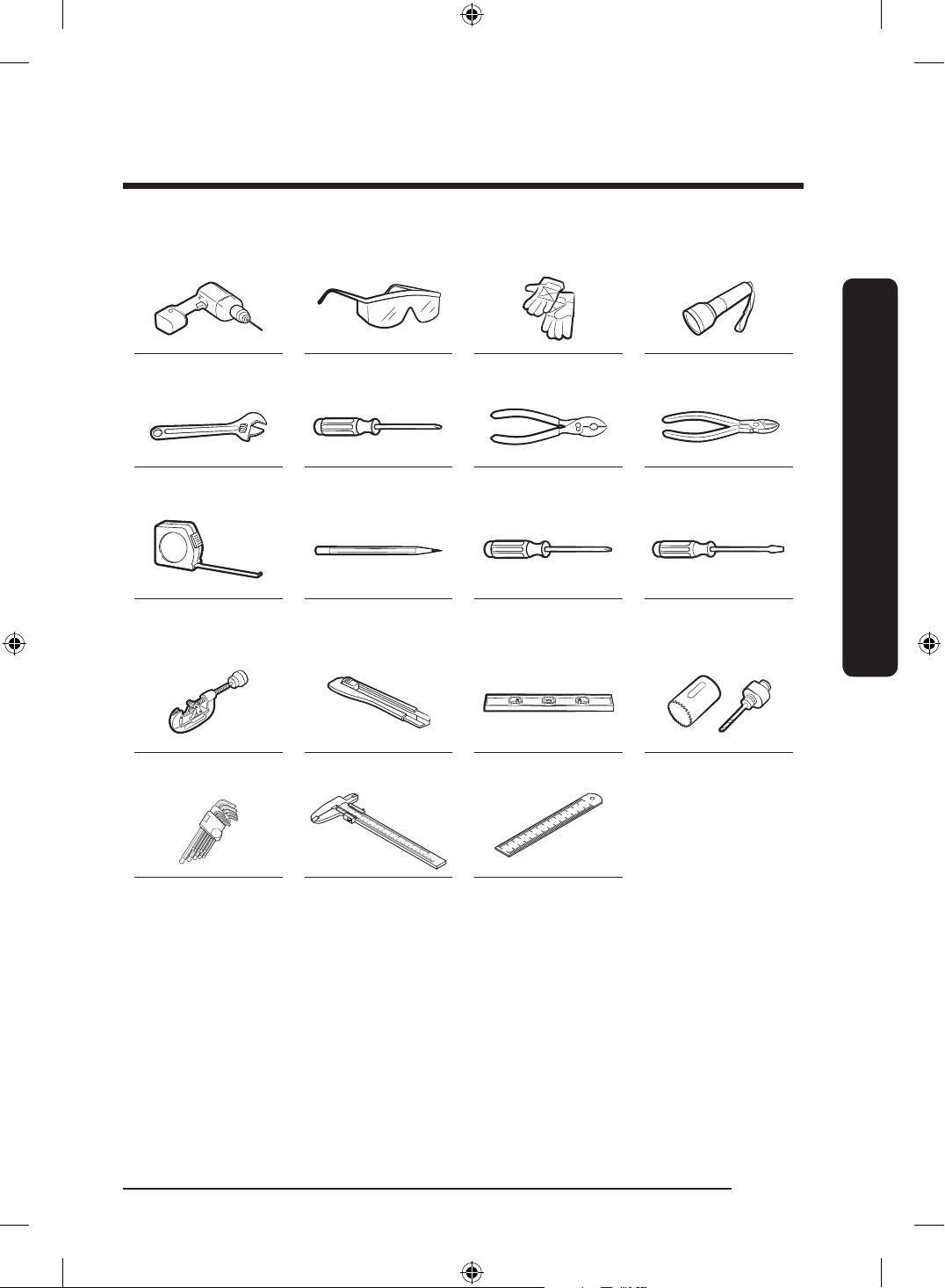
Tools required (not provided)
Electric drill Safety glasses Gloves Flashlight
Adjustable wrench Torx T20 Pliers Nipper
Tape measure Pencil Phillips screwdriver Flat head
screwdriver
Tubing cutter Cutting knife Level Hole saw
Hex L-wrench Vernier calipers Steel ruler
English 13
Installation
DD68-00250L-00_IB_DACOR_DW8700B_EN.indd 13 2024-01-11 3:09:26
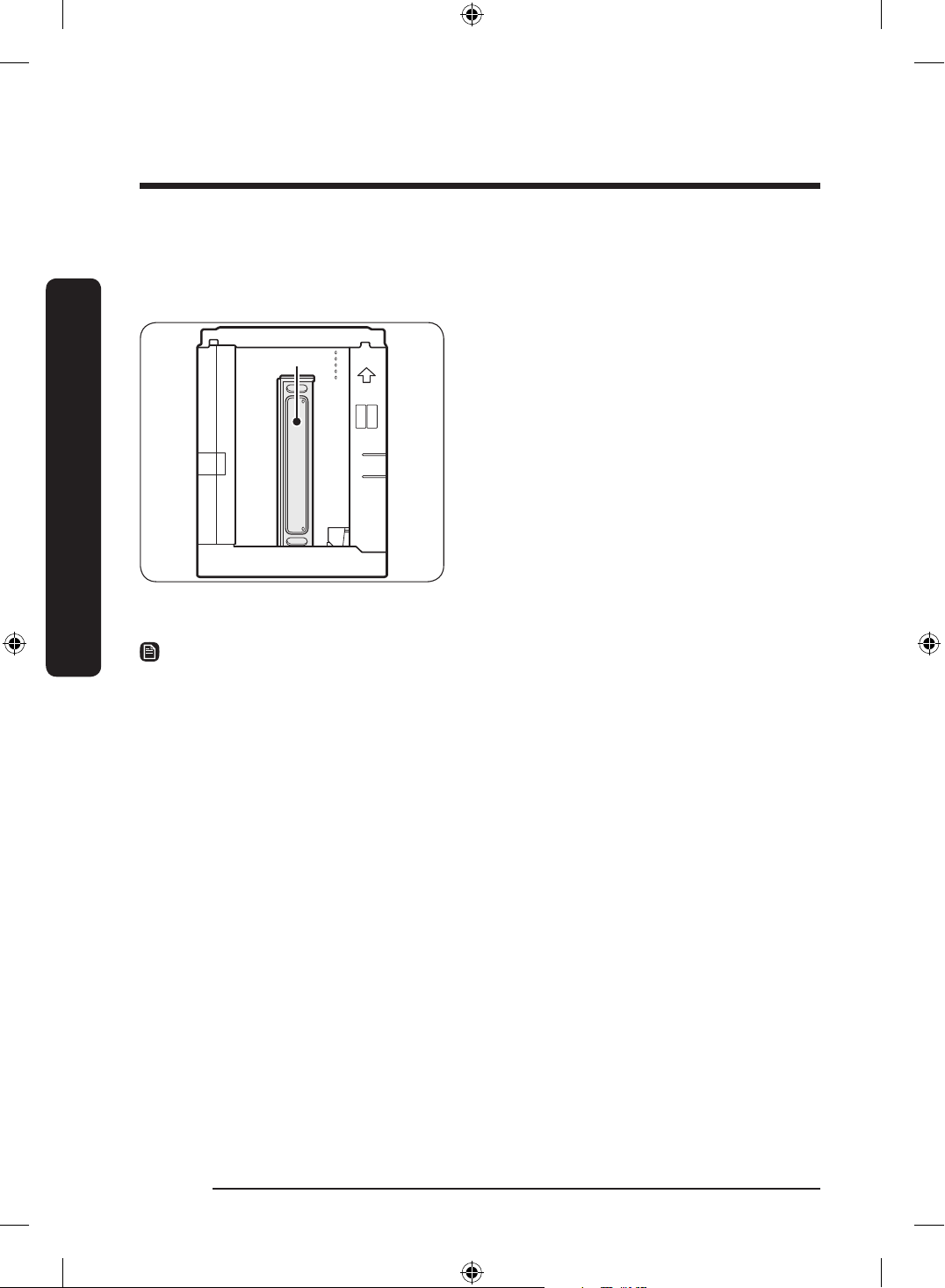
Unpacking
Unpack the dishwasher in an open area free of obstruction. We recommend keeping all the
packing materials until the dishwasher is completely installed.
Kick plate
1. Position the carton right-side-up with
the top arrows pointing upwards.
2. Unbuckle or cut the straps securing the
packaging.
3. Unpack the product packaging with
care.
4. Inspect every component for any signs
of damage.
5. Locate and set aside the dishwasher's
kick plate. The kick plate is attached
beside of the dishwasher.
6. Lift the dishwasher from the packing
material, and then place it on the oor.
NOTE
• There are also packing materials inside the dishwasher. Leave them in place until the
dishwasher is installed.
• Do not remove the sound-absorbent padding that surrounds the exterior of the
dishwasher.
English14
Installation
Installation
DD68-00250L-00_IB_DACOR_DW8700B_EN.indd 14 2024-01-11 3:09:26
Installation requirements
To prevent a risk of re, electric shock, or
personal injury, all wiring and grounding
must be done by a qualied technician.
Power supply
• To prevent the risk of re, electric
shock, or personal injury, all wiring
and grounding must be performed in
accordance with the National Electrical
Code ANSI/FNPA, No. 70 Latest Revision
and local codes and ordinances. It is the
personal responsibility of the appliance
owner to provide adequate electrical
service for this appliance.
• When preparing for installation, make
sure that your power supply provides
an individual 120 Volt, 60 Hz branch
circuit serving only your dishwasher
with a 15 AMP fuse or circuit breaker.
• Your dishwasher must be grounded. If
your dishwasher malfunctions or breaks
down, grounding will reduce the risk of
electric shock by providing a path of
least resistance for the electric current.
WARNING
• Do not use an extension cord.
• Use only the power plug that comes
with the dishwasher.
Grounding
For permanent grounding, the dishwasher
must be properly grounded to a grounded
metal or permanent wiring system. The
grounding conductor must be run with
the circuit conductors and then connected
to the grounding terminal or lead on the
dishwasher.
WARNING
• Do not connect the ground wire to
plastic plumbing, gas lines, or hot water
pipes. Improperly connected grounding
conductors may cause electric shock.
• Do not modify the power plug of the
dishwasher. If the power plug does
not t the outlet, have a proper outlet
installed by a qualied electrician.
English 15
Installation
DD68-00250L-00_IB_DACOR_DW8700B_EN.indd 15 2024-01-11 3:09:26
Water supply
• The hot water supply line must support
water pressures between 20 psi and
120 psi (140-830 kPa).
• Water temperatures must be between
120 °F (49 °C) and 149 °F (65 °C).
To reduce a risk of leaks:
• Make sure water taps are easily
accessible.
• Turn the water tap off when the
dishwasher is not in use.
• Check for any leaks at the water hose
ttings on a regular basis.
Flooring
For safety, the dishwasher must be
installed on a solidly constructed oor.
Wooden oors may need to be reinforced
to minimize vibrations. Avoid installing
on carpet or soft tile. Carpeting and soft
tile may cause vibrations and may cause
your dishwasher to move slightly while
operating.
WARNING
Do not install the dishwasher on a poorly
supported structure.
English16
Installation
Installation
DD68-00250L-00_IB_DACOR_DW8700B_EN.indd 16 2024-01-11 3:09:26
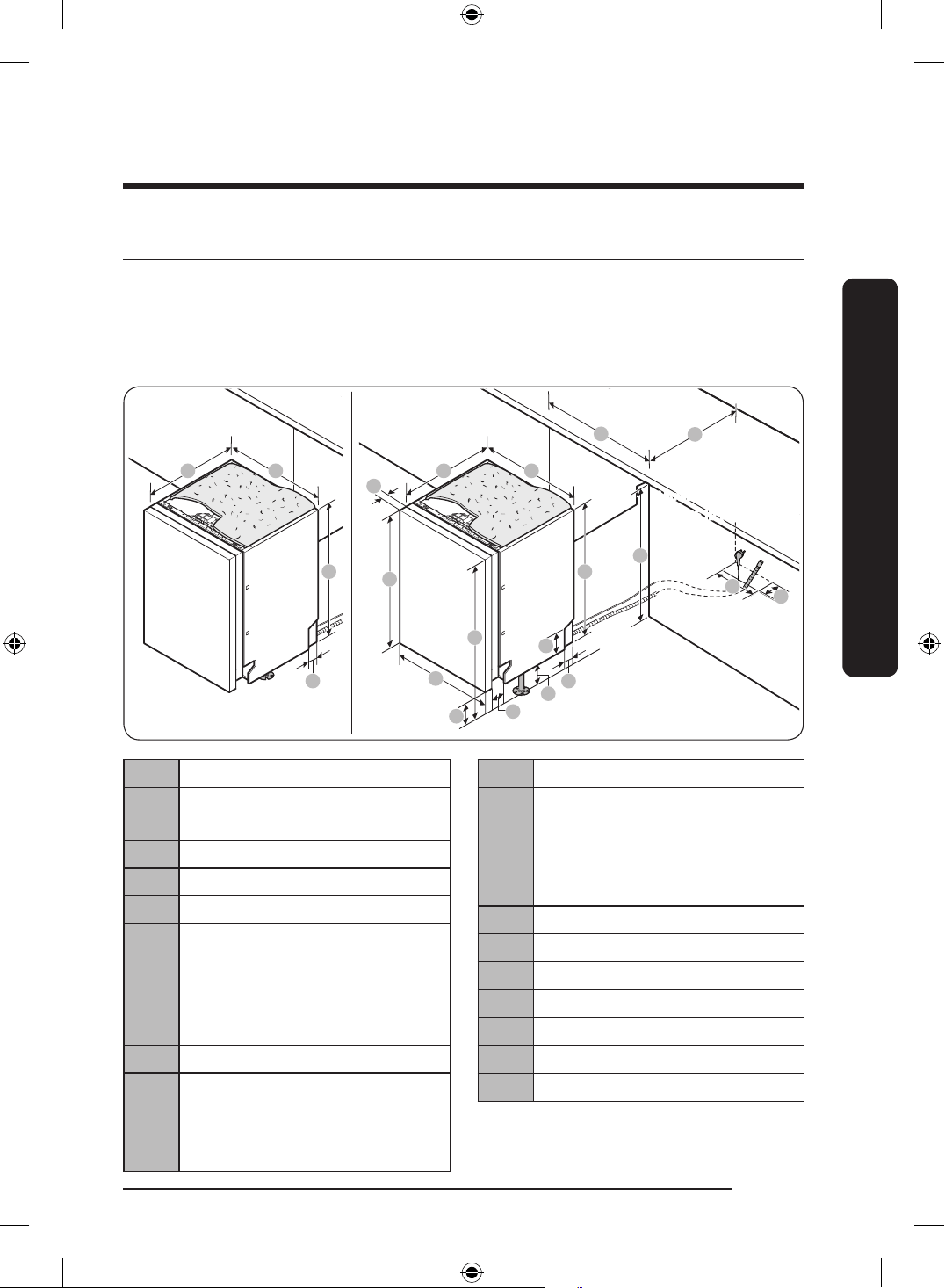
Dimensions and specications
• This dishwasher is designed to be enclosed on the top and on both sides by a standard,
residential kitchen cabinet.
• The installation enclosure must be clean and free of any obstructions.
Dishwasher
C D
E
L
O
M
N
P
Q
I
G
H
A
B
F
J
K
Recommended Panel
Thickness :
3
/4” (20 mm)
Allowable Panel weight :
10-26 Ib (4.5-12 kg)
C D
E
K
A 28
3
/4-29
7
/8" (730-760 mm)
B
11
/16-
7
/8" (18-22 mm)
Recommend
13
/16" (20 mm)
C 21
3
/4" (552 mm)
D 23
3
/8" (595 mm)
E 32
1
/8" (815 mm)
F Total Height
32
1
/8-33
7
/8" (815-860 mm)
(Without SUB FOOT)
33
7
/8-35
1
/4" (860-895 mm)
(With SUB FOOT)
G 23
3
/8" (594 mm)
H 2
1
/8-5
1
/8" (55-130 mm)
(Without SUB FOOT)
3
7
/8-6
1
/2" (100-165 mm)
(With SUB FOOT)
I 3
1
/2" (90 mm)
J Leg Height
0-1
3
/4 (0-45 mm)
(Without SUB FOOT)
1
3
/4-3
1
/8" (45-80 mm)
(With SUB FOOT)
K 2" (50 mm)
L 4
7
/8" (125 mm)
M 23
5
/8-23
7
/8" (600-608 mm)
N 22
5
/8" (575 mm)
O 32
1
/4-35
1
/4 (820-895 mm)
P 3
7
/8" (100 mm)
Q 2" (50 mm)
English 17
Installation
DD68-00250L-00_IB_DACOR_DW8700B_EN.indd 17 2024-01-11 3:09:26
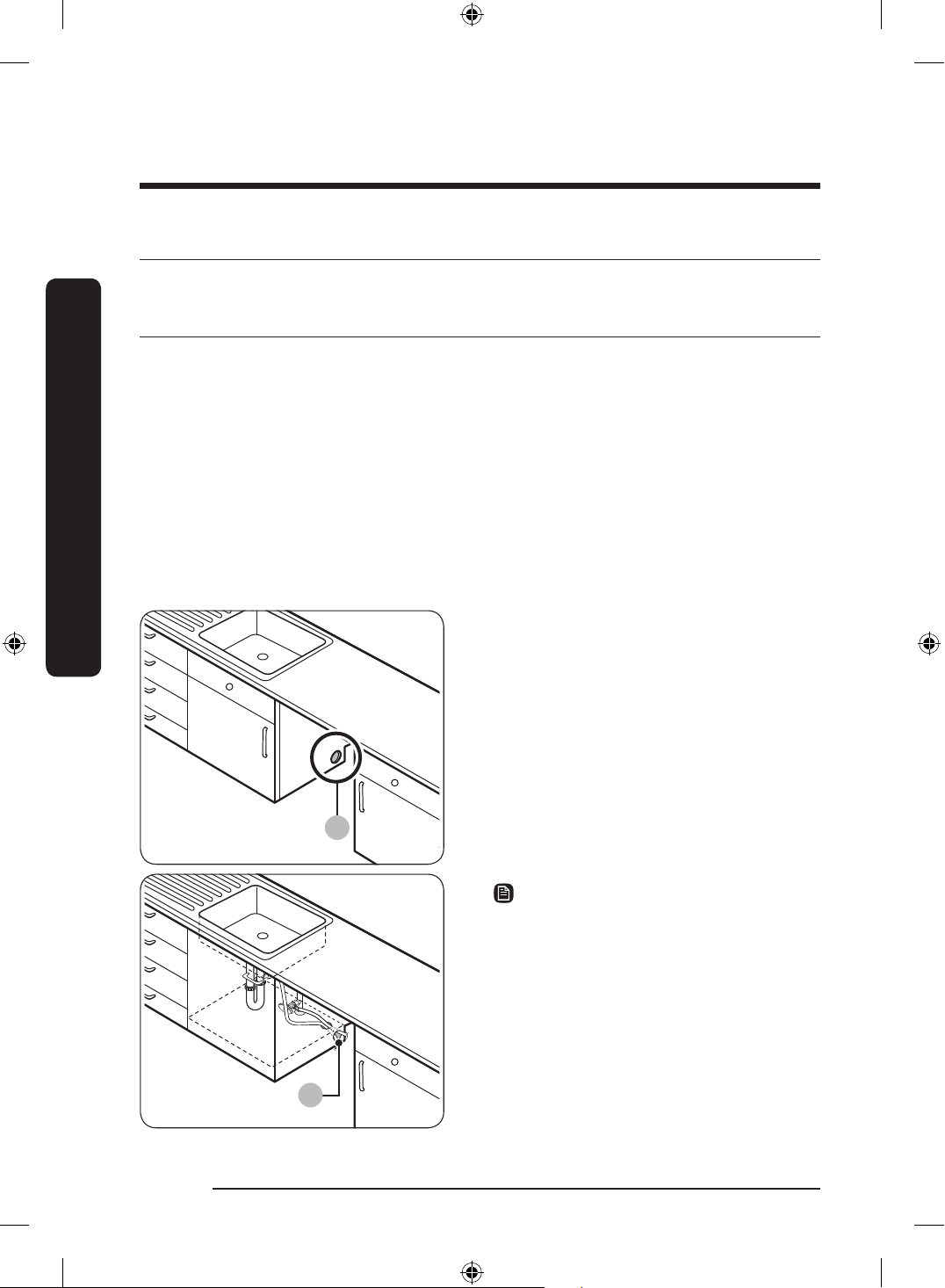
Step-by-step installation
The installation procedure may differ depending on the model.
STEP 1 Select a location
Select a location that meets the following conditions.
• The location must have a solid oor that can support the weight of the dishwasher.
• The location must be near a sink (9.8 ft/3 m) with easy access to the water supply,
drain system, and electrical outlet.
• The location must let you load dishes into the dishwasher easily.
• The location must have sufcient space for the dishwasher door to open easily
and provide enough space between the dishwasher and the cabinet sides (at least
0.1 inch/2 mm).
• The rear wall must be free of obstructions.
Installation in a new location
A
B
If you install the dishwasher in a new
location, follow these instructions before
installing the dishwasher.
1. Using a hole saw, cut a hole into the
side of the cabinet that holds the sink
(A).
2. If the base inside the sink cabinet is
raised above the kitchen oor and is
higher than the connections on the
dishwasher, make a hole in the base
inside the cabinet and in the cabinet
side (B).
NOTE
• If you are replacing an old dishwasher,
check the existing connections for
compatibility with the new dishwasher
and replace the connections as needed.
• You may need to cut a hole in the
opposite side of the cabinet according
to the location of the electrical outlet.
English18
Installation
Installation
DD68-00250L-00_IB_DACOR_DW8700B_EN.indd 18 2024-01-11 3:09:27
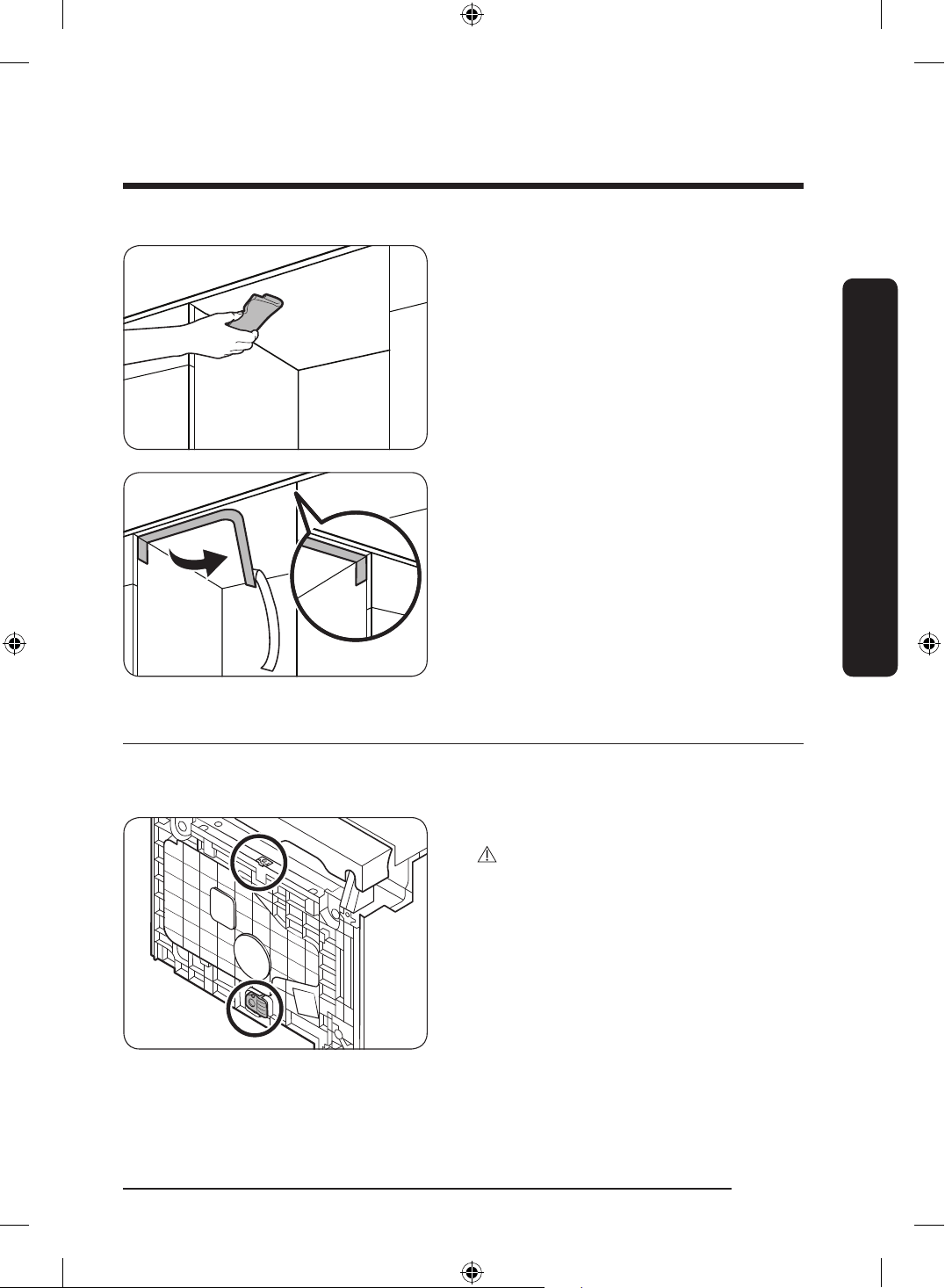
3. Clean the bottom of the countertop.
4. Attach the protective sticker as shown.
STEP 2 To replace the rear foot
If the distance between the oor and the bottom of the counter top is more than 33
7
/8
(860 mm), replace the rear foot with the sub foot provided before starting installation.
1. Lay the dishwasher on its back.
CAUTION
Do not lay down the dishwasher to a side.
Water may leak.
2. Locate the rear foot at the rear bottom
of the dishwasher.
English 19
Installation
DD68-00250L-00_IB_DACOR_DW8700B_EN.indd 19 2024-01-11 3:09:28
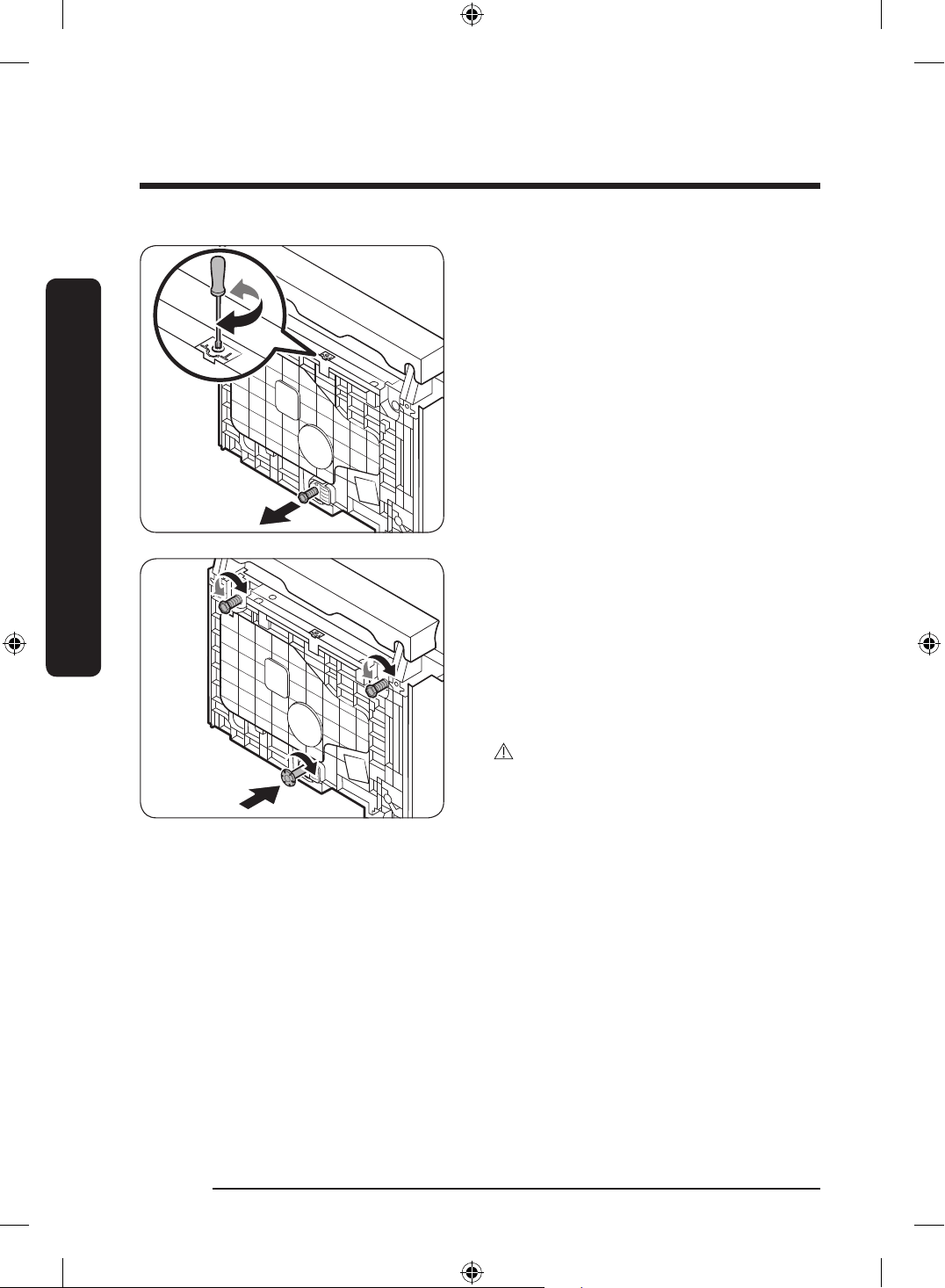
3. Turn the Torx T20 screwdriver counter
clockwise as shown to remove the rear
foot.
4. Find the sub foot in the installation
kit. Insert the sub foot into the hole of
the rear foot’s place, and then turn the
screwdriver clockwise to tighten the
sub foot.
5. When the sub foot is xed, turn the
front foot to align with the sub foot.
Fine-tuning will be done in STEP 8.
CAUTION
Use caution when moving the dishwasher.
Do not drag the dishwasher on the oor.
This can damage the front and sub foot.
English20
Installation
Installation
DD68-00250L-00_IB_DACOR_DW8700B_EN.indd 20 2024-01-11 3:09:28
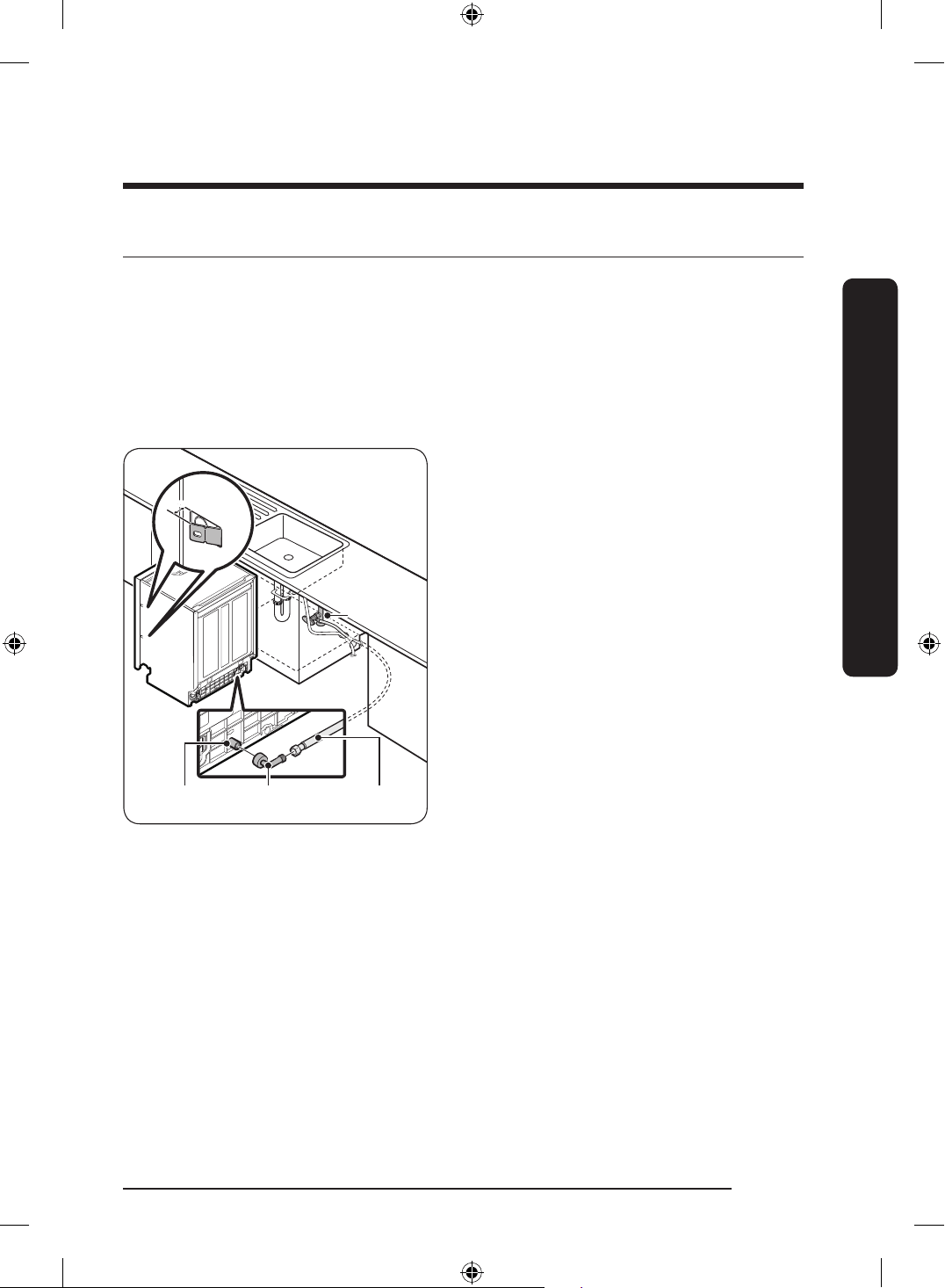
STEP 3 Connect the hot water line
• The water line pressure must be between 20 psi and 120 psi (140–830 kPa).
• Make sure that the water temperature is delivered between 120 °F and 149 °F
(49-60 °C). Exceeding this limit may cause the dishwasher to malfunction.
• Make sure that the circuit breaker and water valve is turned off before connecting the
water supply line to the dishwasher.
• Make sure the water line is properly connected. Wrap Teon tape around every
connection and joint to prevent water leaks.
Inlet valve 90° elbow
tting
Hot water line
3
/16" (5 mm)
Water valve
1. Insert the
3
/4" 90-degree tting into the
inlet valve. Tighten the tting until it
points towards the water-hose channel
in the base of the dishwasher. Do not
overtighten.
2. Connect the hot water line to the
tting.
3. If you want to secure the dishwasher
to the side wall for extra stability,
bend the brackets of the left and right
housings by referring to the gure.
English 21
Installation
DD68-00250L-00_IB_DACOR_DW8700B_EN.indd 21 2024-01-11 3:09:28
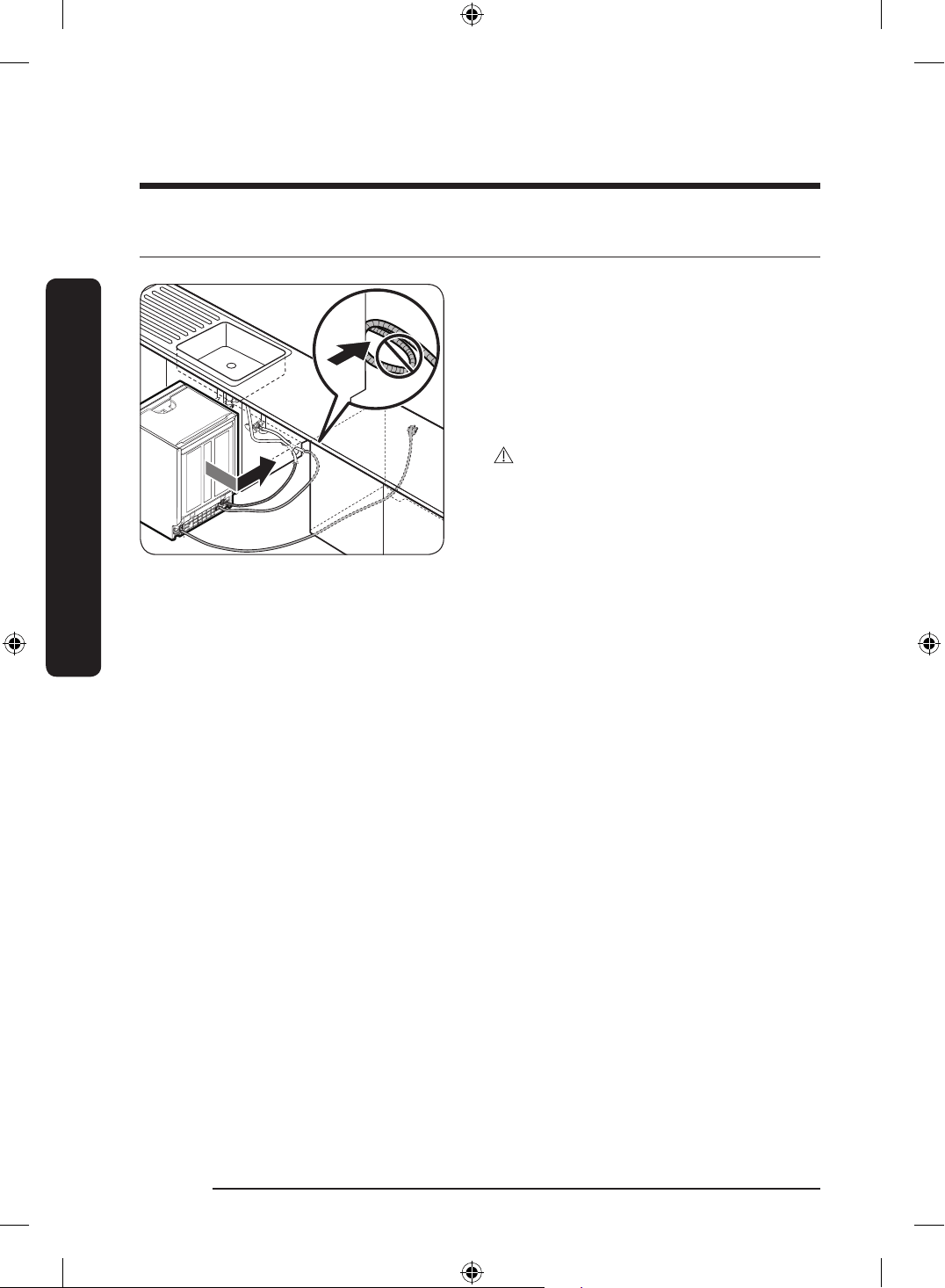
STEP 4 Arrange the hoses
1. Arrange the power cable and the drain
hose so that they move together.
2. Gently move the dishwasher to the
installation space under the sink. While
moving the dishwasher, pull any excess
portions of the water line, drain hose,
and power cable into the space.
CAUTION
• Use caution not to kink or step on the
power plug or the hoses.
• The drain hose can be extended up to
118
1
/8" (3 m).
English22
Installation
Installation
DD68-00250L-00_IB_DACOR_DW8700B_EN.indd 22 2024-01-11 3:09:28
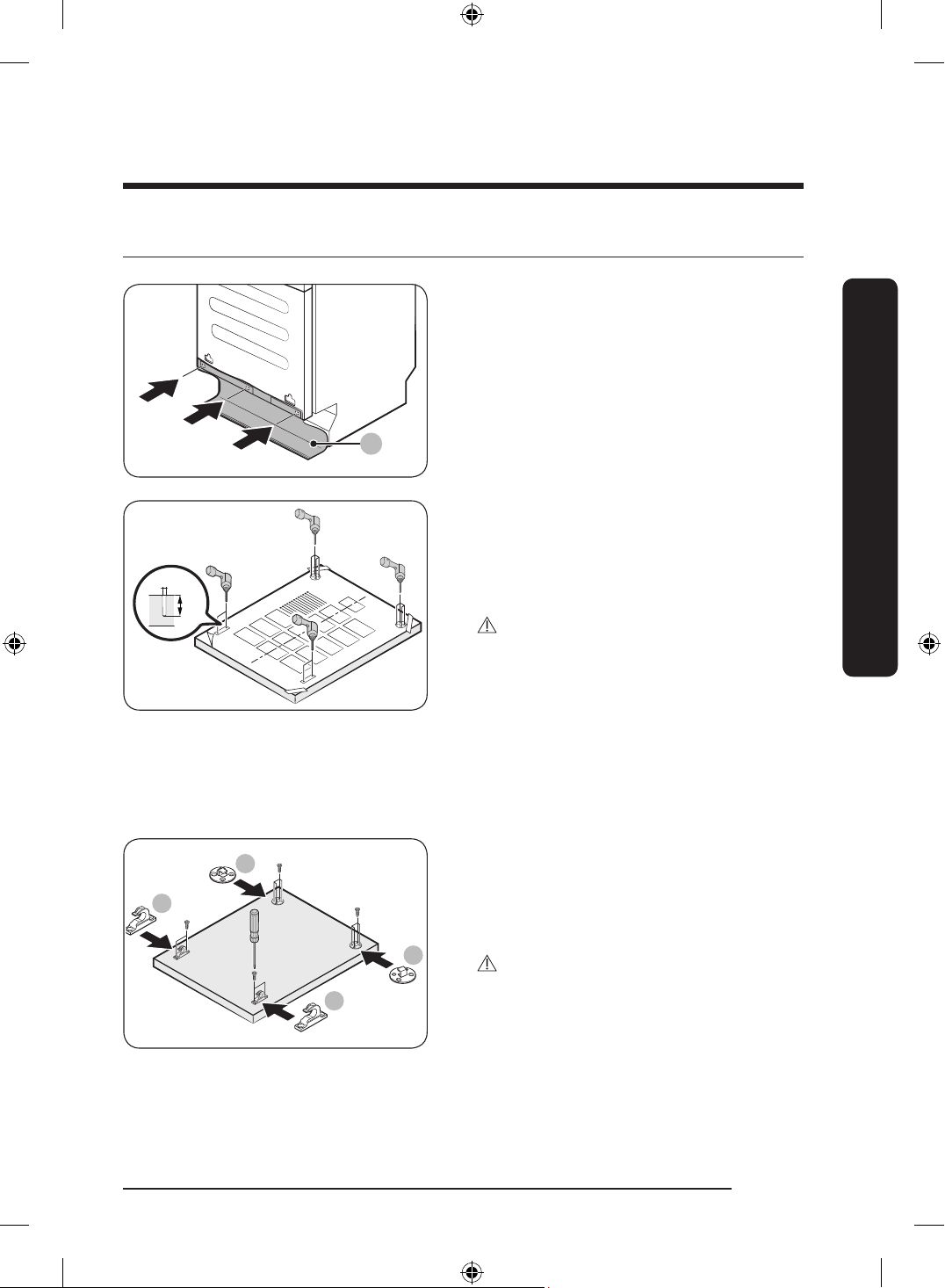
STEP 5 Install the custom panel
A
1. Insert the supplied rubber skirt (A) into
the 3 holes at the bottom of the door.
Ø 2
~12
2. Put the installation template on the
back of the custom panel and x it
temporarily using transparent tape.
Note that the rear of the custom panel
will be attached to the dishwasher door.
CAUTION
• The top end of the custom panel must
be aligned with the top end of the
installation template.
• Use a custom panel between 9-44 lbs.
3. Pre-drill the 12 points marked on the
installation template using a 2-pi drill
bit to a depth of
3
/8-
1
/2" (10-12 mm).
B
B
C
C
4. Remove the installation template and
tighten the Custom panel xers - Top
(B) / Custom panel xers - Bottom (C) at
the top with 12 screws (C, Ø4 X 16) as
shown.
CAUTION
Be sure to check the direction of the
Custom panel xers - Top (B) / Custom
panel xers - Bottom (C) before installing.
English 23
Installation
DD68-00250L-00_IB_DACOR_DW8700B_EN.indd 23 2024-01-11 3:09:29
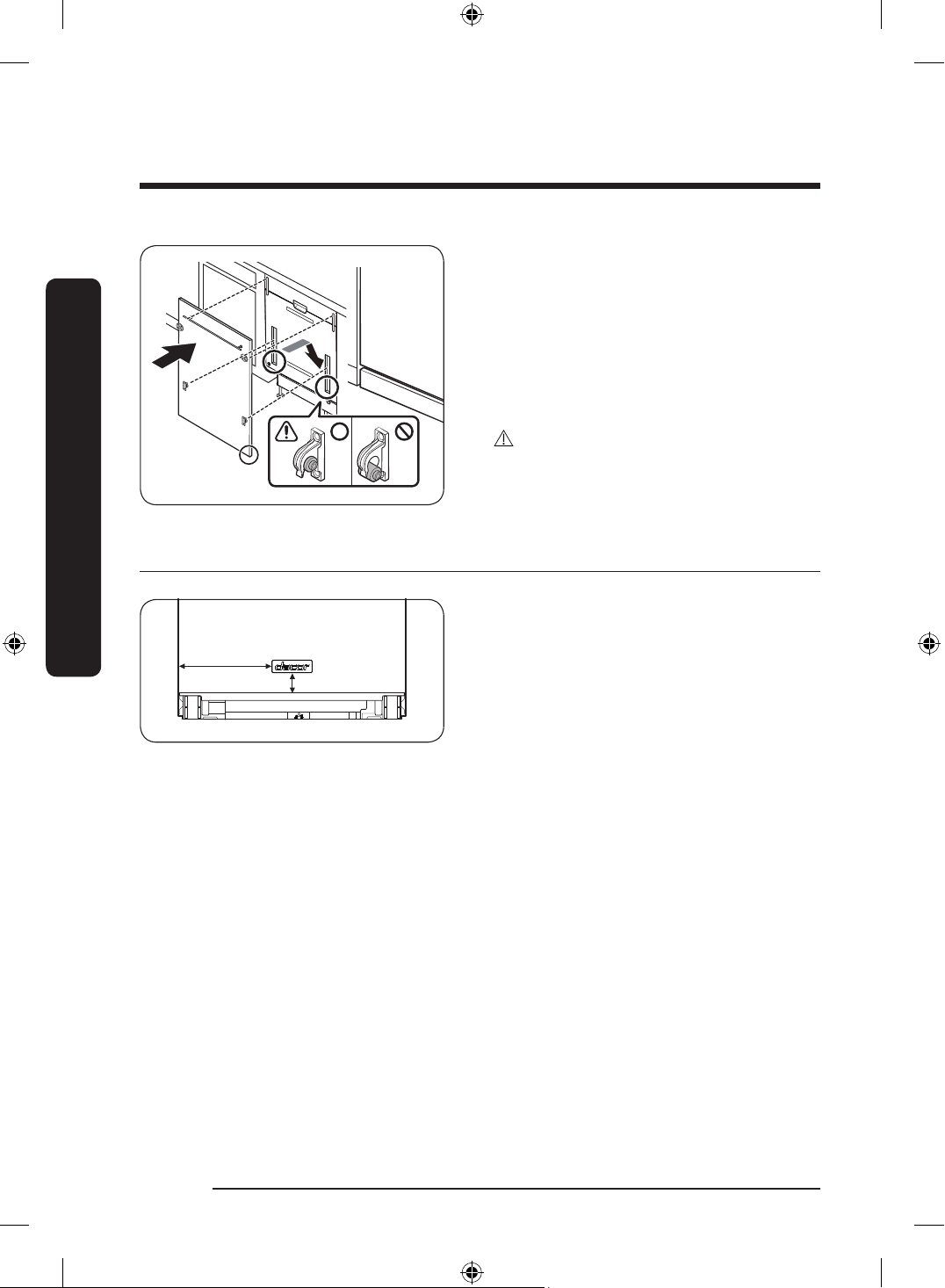
5. While holding the custom panel,
attach it to the door and insert the
Custom panel xers - Top (B) / Custom
panel xers - Bottom (C) into the
corresponding holes at the top of the
door as shown.
6. Push the custom panel downward to
x.
CAUTION
Open and close once or twice to check that
it is working correctly.
STEP 6 Attach the badge
9
1
/2" (242 mm)
2
3
/16" (54 mm)
Attach the badge to the dishwasher’s door
as shown.
English24
Installation
Installation
DD68-00250L-00_IB_DACOR_DW8700B_EN.indd 24 2024-01-11 3:09:29
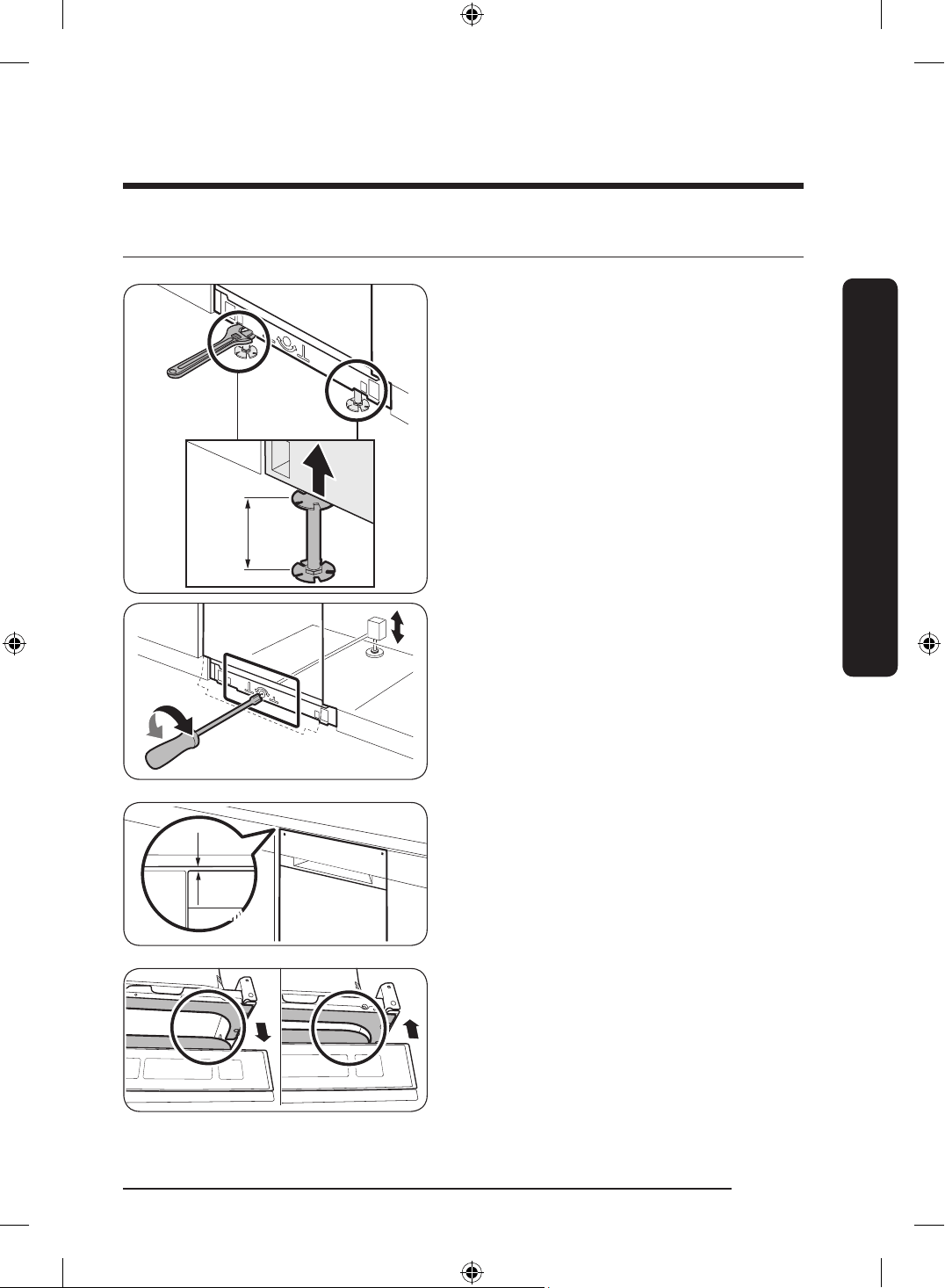
STEP 7 Level the dishwasher
1
7
/8-3" (47–77 mm)
You can adjust the height of the dishwasher
to level it. Note that in these steps, the
dishwasher is currently inserted halfway.
1. Use the level to check if the dishwasher
is level.
2. Before adjust the height, Must change
Rear Foot to Sub Foot.
And then adjust Front Foot between
1
7
/8" and 3".
• To lower the height, turn the foot
clockwise.
• To raise the height, turn the foot
counter clockwise.
3. To adjust the rear height, insert the
Torx T20 screwdriver in the bottom
center of the dishwasher.
• To lower the height, turn the
screwdriver clockwise.
• To raise the height, turn the
screwdriver counter clockwise.
Min.
3
/16"
(5 mm)
4. Leave at least a
3
/16" space between the
top of the dishwasher and the bottom
of the countertop.
5. When levelling is complete, check if the
door opens and closes properly.
English 25
Installation
DD68-00250L-00_IB_DACOR_DW8700B_EN.indd 25 2024-01-11 3:09:29
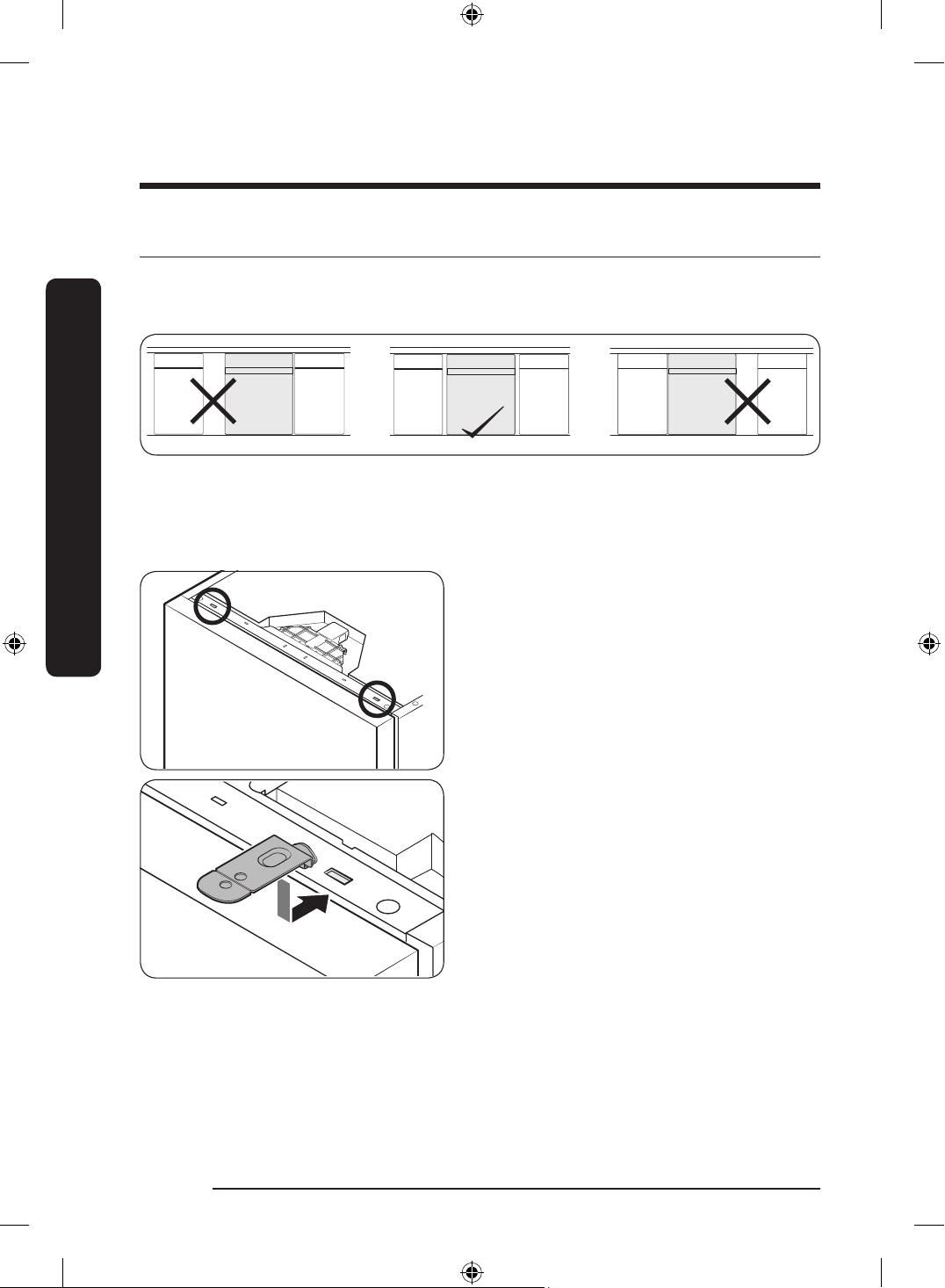
STEP 8 Secure the dishwasher
Correct positioning
Before securing the dishwasher, make sure the dishwasher is positioned in the center.
To the countertop
You can use the brackets to secure the dishwasher to the countertop. Alternatively, you
can drill the side holes to secure the dishwasher to the cabinet sides.
1. Put a large towel on the bottom of
the dishwasher (covering the sump) to
prevent wood shavings or screws from
falling into the dishwasher sump.
2. Insert the provided brackets into the
top front holes of the dishwasher as
shown.
3. Insert the dishwasher fully into place
under the countertop.
English26
Installation
Installation
DD68-00250L-00_IB_DACOR_DW8700B_EN.indd 26 2024-01-11 3:09:30
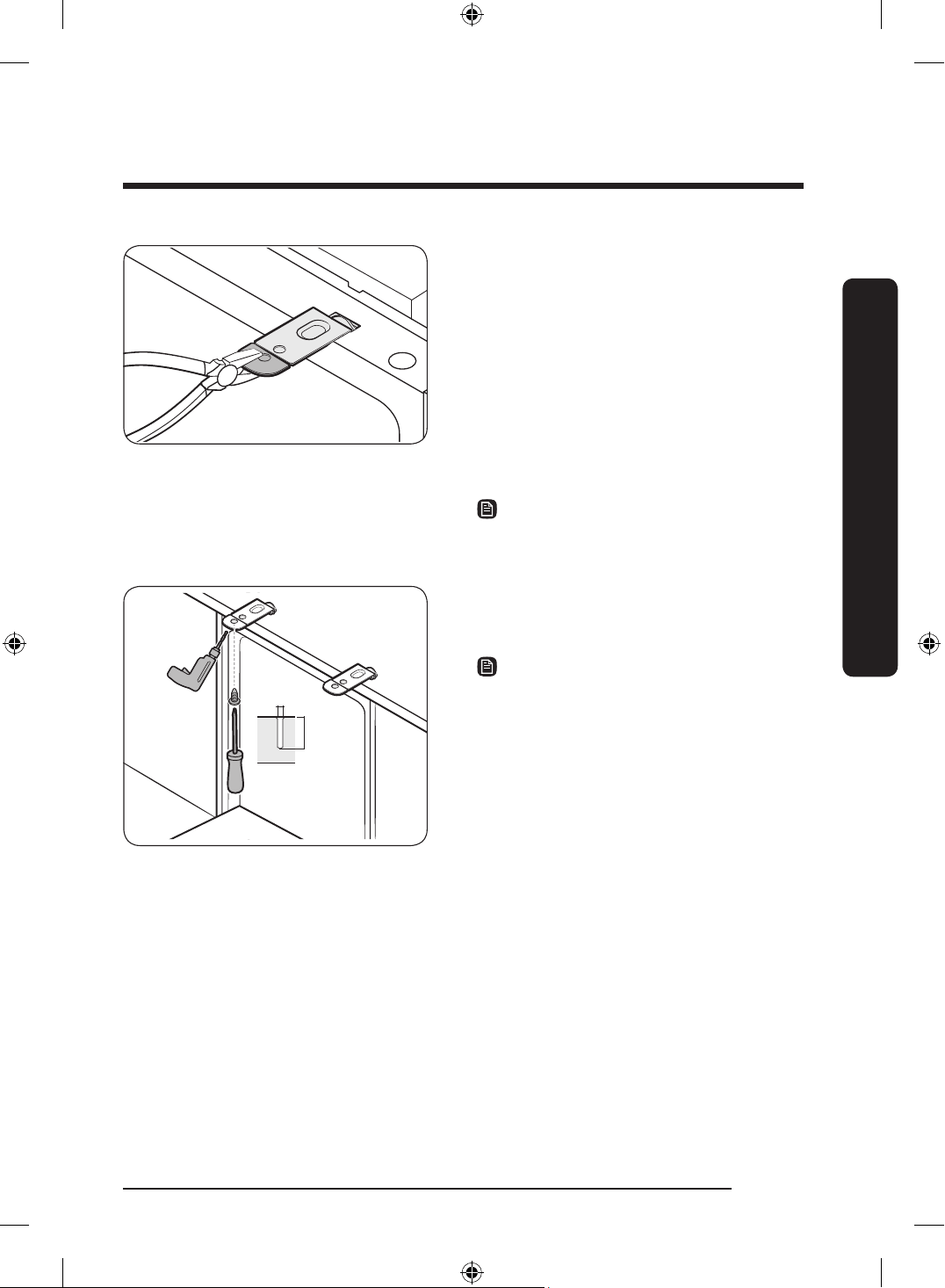
4. If the installation brackets on the front
of the dishwasher are too long cut them
down using a pliers.
5. Carefully drill 2 screw holes into the
bottom of the countertop from beneath,
one for each countertop bracket.
• Make sure the hole you drill is smaller
than the diameter of the screw.
6. Insert the provided screws into the hole
of brackets, and then tighten to secure
the dishwasher to the countertop.
NOTE
Use a magnetic screwdriver to help prevent
screws from falling into the dishwasher.
Ø
5
/64”
(2 mm)
1
/2”
(12 mm)
7. Insert the provided screws into the
brackets, and then tighten to secure the
dishwasher to the countertop.
NOTE
• If the provided brackets are too long,
cut them down using pliers.
• Use a magnetic screwdriver to help
prevent screws from falling into the
dishwasher.
8. Connect the water hose, but do not
open the water tap until installation is
complete.
English 27
Installation
DD68-00250L-00_IB_DACOR_DW8700B_EN.indd 27 2024-01-11 3:09:30
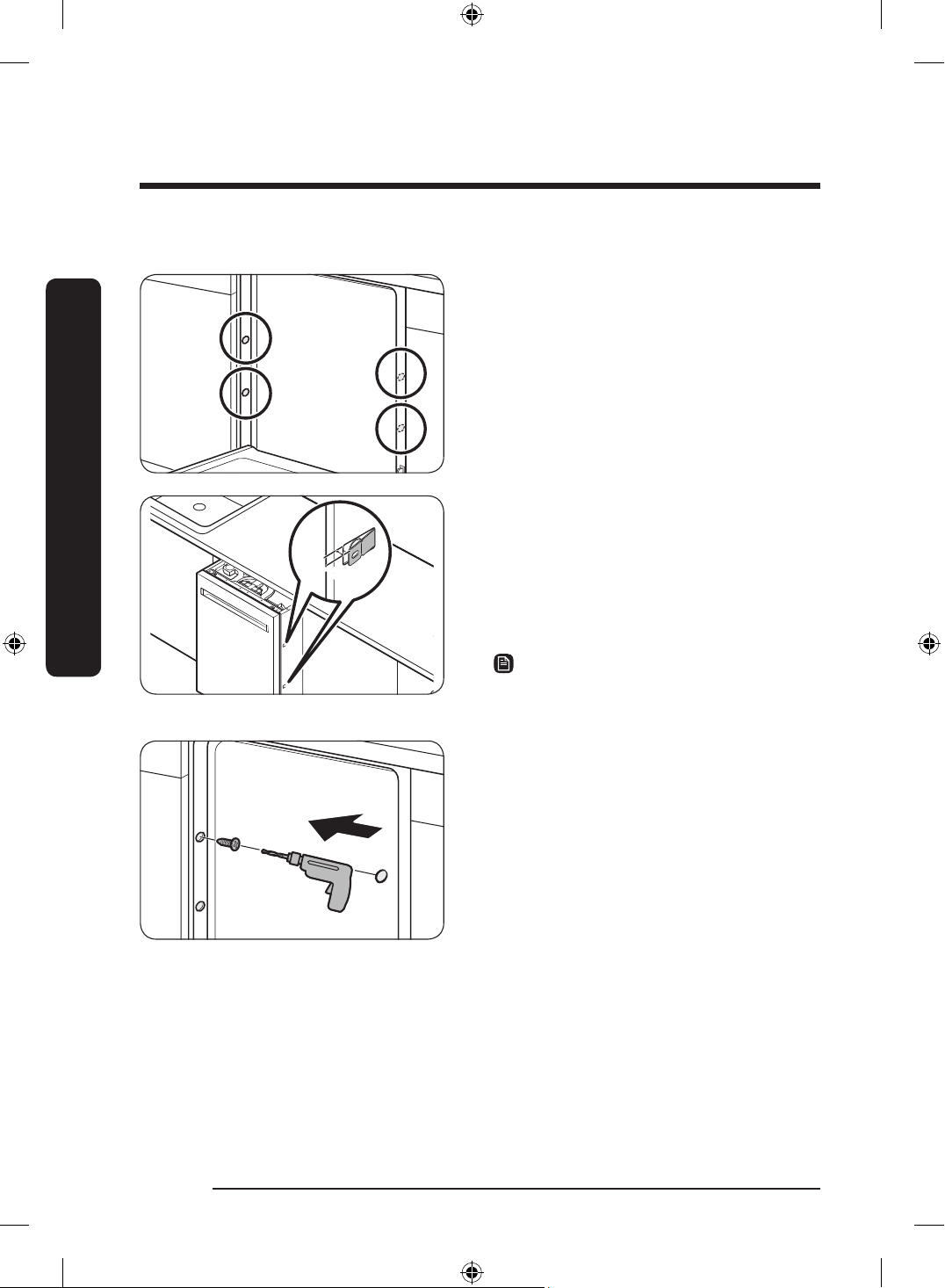
To the side walls
1. Put a large towel on the bottom of
the dishwasher (covering the sump) to
prevent wood shavings or screws from
falling into the dishwasher sump.
3
/16" (5 mm)
2. To prevent damage to the drain hose
through the water supply line, slightly
pull out the dishwasher and bend the
built-in ear brackets of the left and
right housings by
3
/16" (5 mm). When
done, reinsert the dishwasher with its
center aligned.
NOTE
Skip this process if you have performed it
in Step 2 above.
3. Drill one hole into both sides of the
kitchen cabinet, totaling 2 screw holes.
• Make sure the hole you drill is smaller
than the diameter of the screw.
• Make sure the drill bit does not strike
the sides of the spacer cap holes.
4. Tighten the provided screws into the
holes to secure the dishwasher to the
cabinet.
5. Insert the provided plastic caps to the
4 places where screws are fastened.
English28
Installation
Installation
DD68-00250L-00_IB_DACOR_DW8700B_EN.indd 28 2024-01-11 3:09:30
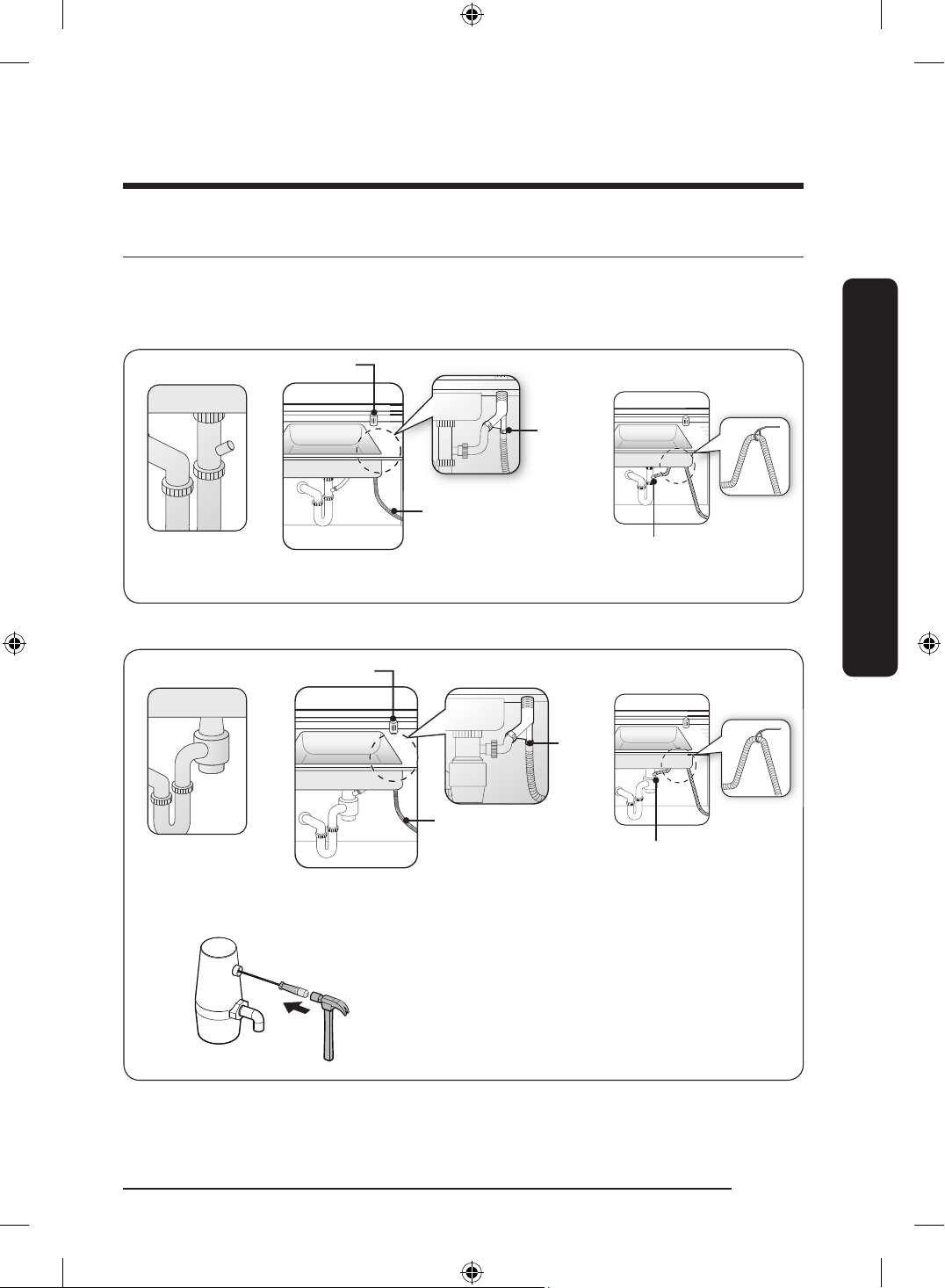
STEP 9 Connect the drain hose
There are several ways to insert the drain hose into the drain hose connector of the sink.
You must connect the drain hose in accordance with the water pipe installation regulations
in your region.
Without disposal Without an air gapWith an air gap/without disposal
Air gap
Drain hose
Hose
clamp
Hose clamp
Drain system with no waste-disposal
With disposal With an air gap/with disposal
Air gap
Drain hose
Hose
clamp
Knock out plug in garbage disposal before
connecting the drain hose.
Without an air gap
Hose clamp
Drain system with a waste-disposal
English 29
Installation
DD68-00250L-00_IB_DACOR_DW8700B_EN.indd 29 2024-01-11 3:09:31
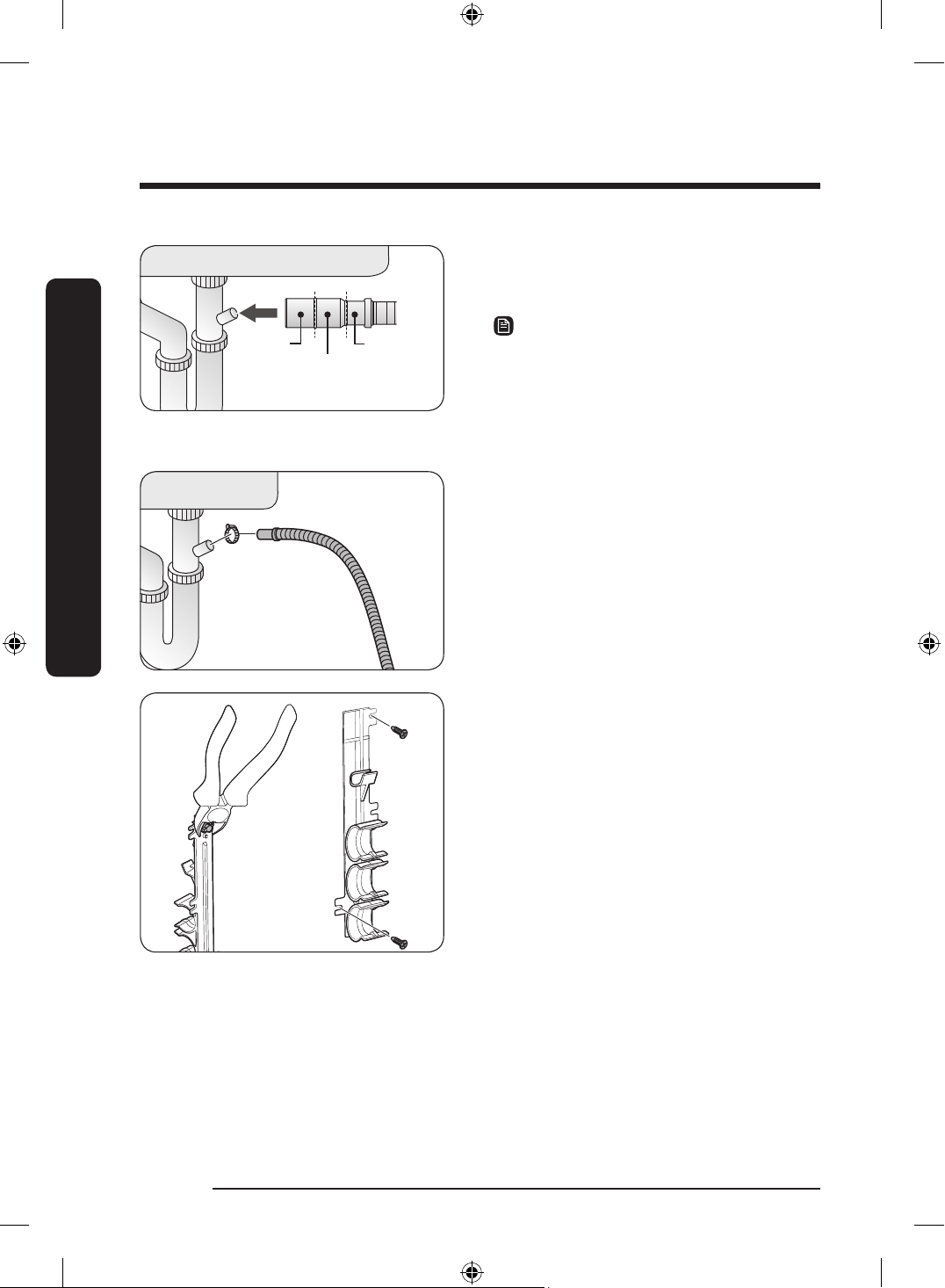
1 in.
(25 mm)
7
/8 in.
(22 mm)
5
/8 in.
(16 mm)
1. Check the size of the sink’s drain hose
connector. If needed, cut the drain hose
so its end ts into the sink connector.
NOTE
• If the drain hose does not t into the
sink connector, you can purchase an
adaptor at a plumbing/hardware store.
• The drain hose can be extended up to
118
1
/8" (3 m).
2. Insert the drain hose into the sink
connector, slide the hose clamp to the
end of the hose, and then tighten the
hose clamp.
3. If the sink does not have an air gap,
detach the hose holder from the
dishwasher, and then cut off the
protruding part from the holder as
shown.
English30
Installation
Installation
DD68-00250L-00_IB_DACOR_DW8700B_EN.indd 30 2024-01-11 3:09:32
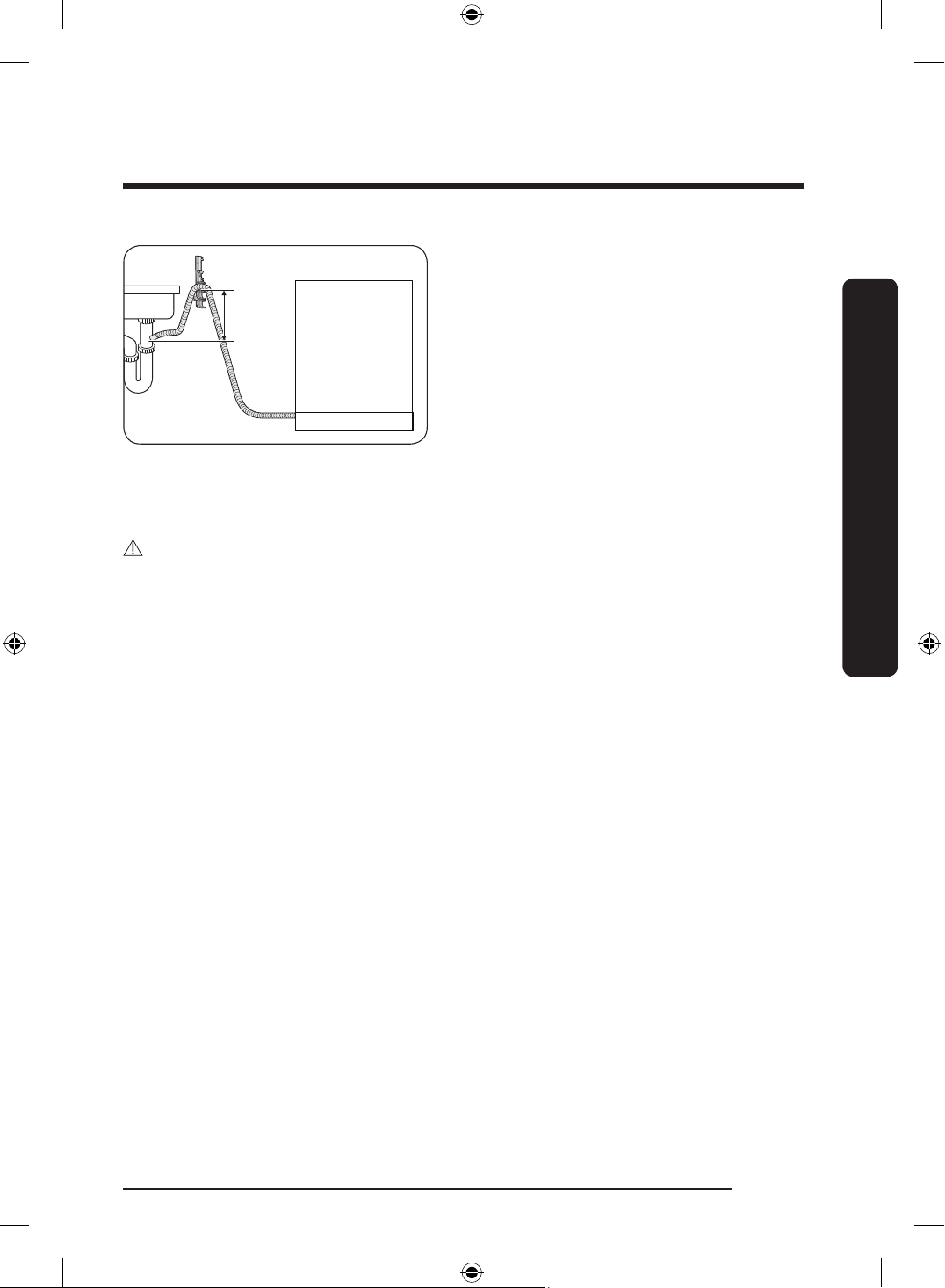
Sink
Dishwasher
Drain
hose
Min. 10 in.
(254 mm)
4. When drilling a hole for the drain hose
on the cabinet wall, use caution not to
damage the drain hose on the sharp
edges of the hole.
- On wooden walls, use sand paper
to soften the edges.
- On metal walls, use insulation tape
or duct tape to cover the sharp
edges around the hole.
5. Secure the drain hose to the sink wall
using cable ties or other fastening
materials.
CAUTION
• Use caution not to damage the drain hose when installing the dishwasher.
• Install the drain system properly so that the drain hose does not disconnect from the
drain outlet in the draining process.
• Make sure that the drain hose, supply hose, or power cord is not kinked or folded.
• Make sure to unplug the food disposal.
English 31
Installation
DD68-00250L-00_IB_DACOR_DW8700B_EN.indd 31 2024-01-11 3:09:32
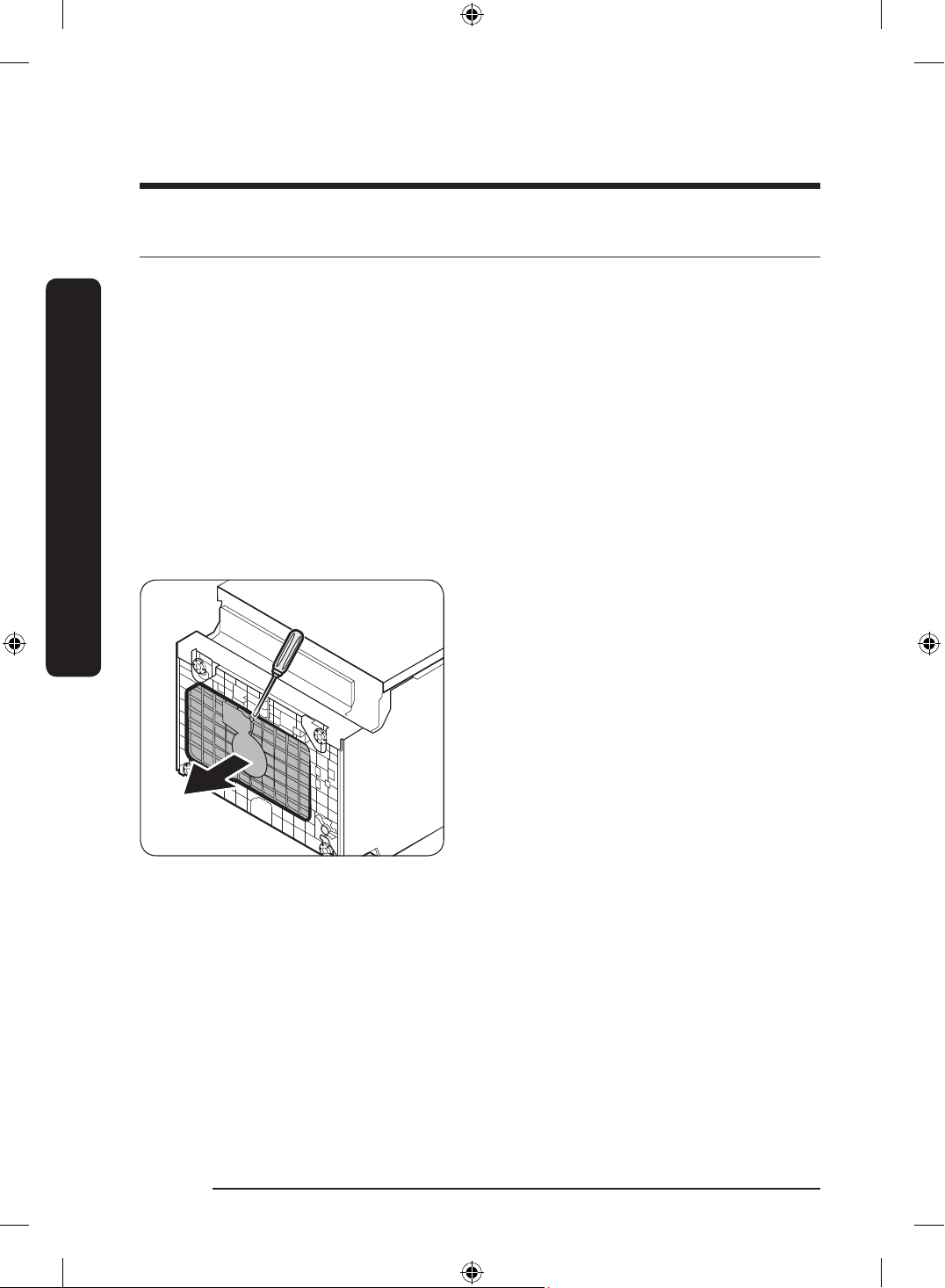
STEP 10 Final check
1. Remove all foam, paper packaging, and unnecessary parts from inside the dishwasher.
2. Turn the circuit breaker on.
3. Open the water valve to supply water to the dishwasher.
4. Plug in the dishwasher.
5. Turn the dishwasher on, and then select and run a cycle.
6. Check if the dishwasher turns on normally and if there are any water leaks while the
dishwasher is operating. Make sure to check for water leaks on both ends of the water
line and the drain hose connector.
7. Check if the kick plate gasket is attached to the bottom of the kick plate. To install the
kick plate, see the Kick plate section below.
To x leaks
You may encounter leaks during the nal check. If this is the case, follow these instructions.
1. If an information code of LC appears
on the control panel, press and hold
Start for more than 3 seconds to
start draining. When the draining is
complete, unplug the dishwasher and
close the water valve.
2. Check if the inlet valve leaks. If so,
reconnect the 90°Fitting with the hot
water line because they were not
properly connected.
English32
Installation
Installation
DD68-00250L-00_IB_DACOR_DW8700B_EN.indd 32 2024-01-11 3:09:32
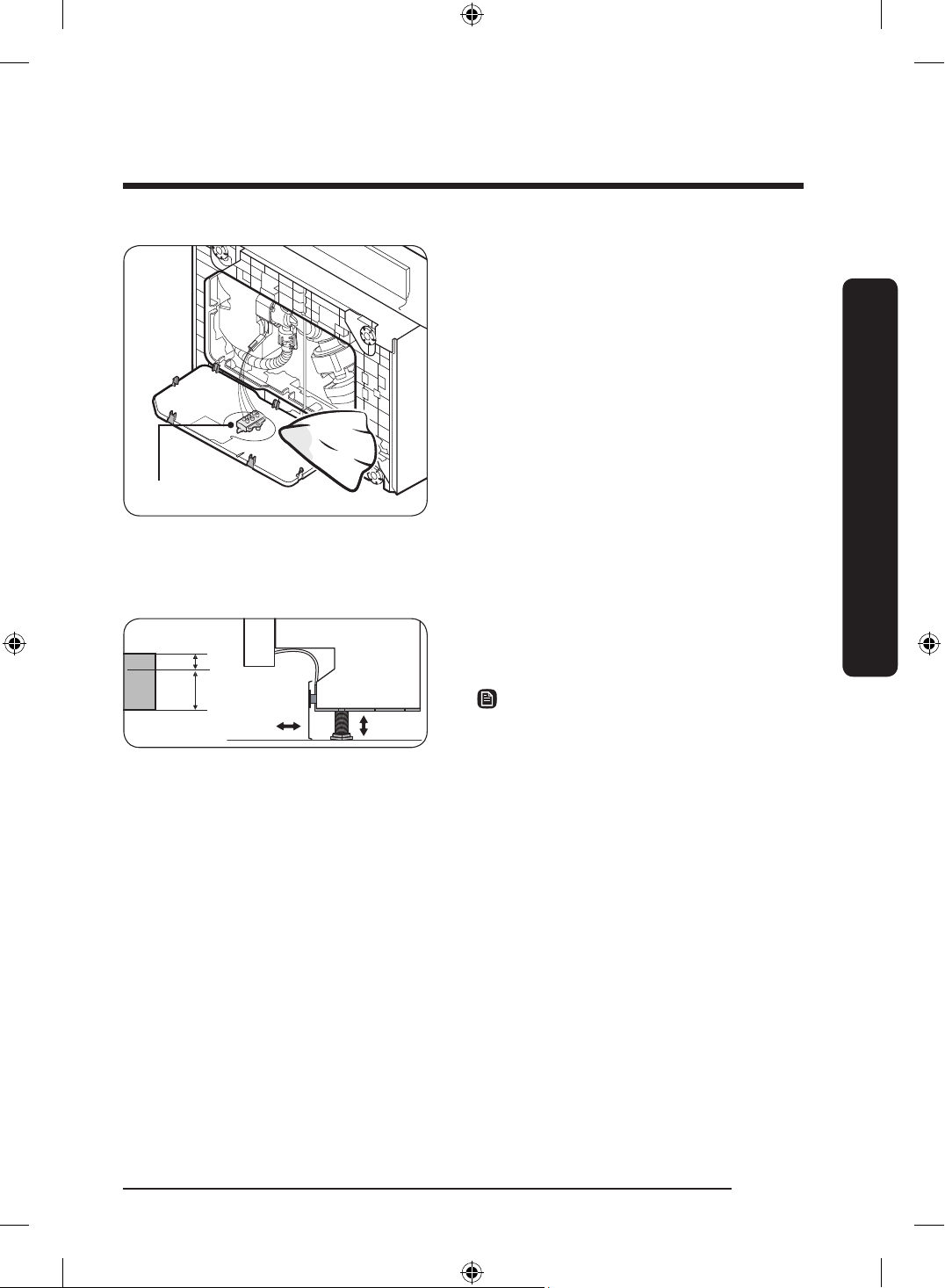
Water leakage sensor
3. Once the leak is stopped, lay down
the dishwasher as shown, and wipe
out moisture from the water leakage
sensor.
4. Plug in the dishwasher. Then, open the
water valve and start a cycle.
5. If the LC information code continues
to appear, contact a local Dacor service
center.
Kick plate
If you want to install the kickplate, follow these instructions.
Big
Small
1. Turn the front legs of the dishwasher to
adjust the height so that the kick plate
ts in.
NOTE
• For dishwasher models without the
adjustable legs, turn the kick plate
upside down so that the kick plate ts
in.
• Dishwashers whose height is under 34"
(864 mm) do not support installation of
the kick plate. Use the furniture plate
instead.
English 33
Installation
DD68-00250L-00_IB_DACOR_DW8700B_EN.indd 33 2024-01-11 3:09:32
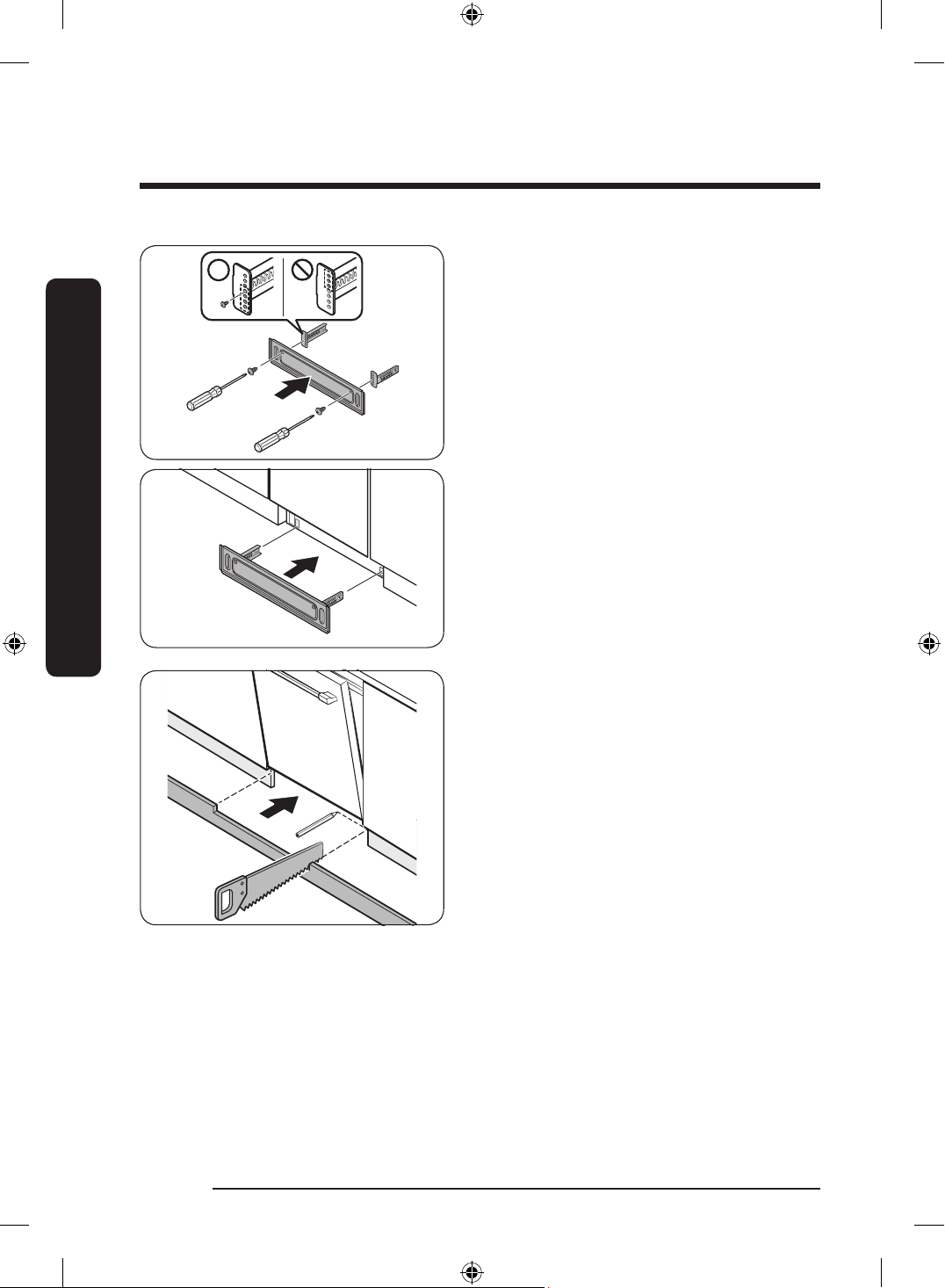
2. Attach the kickplate to the dishwasher
using the kickplate brackets. Make sure
the kickplate brackets are in the correct
direction. See the gure for details.
3. If you use the furniture plate instead
of the kickplate, cut out the portion of
the furniture plate that interrupts with
the door before attaching the furniture
plate to the dishwahser.
English34
Installation
Installation
DD68-00250L-00_IB_DACOR_DW8700B_EN.indd 34 2024-01-11 3:09:33
Before you start
Follow these instructions carefully to ensure proper installation of the dishwasher.
• Carefully unpack the product package and check for any damage. If the dishwasher
has been damaged, make note of it on the waybill and keep a copy. Do not install the
dishwasher, and contact a local Dacor customer center.
• If there is no damage to the product, you can proceed with the installation. If you are
going to install the dishwasher yourself, make sure to read the Installation section and
follow the instructions.
• Keep the packaging material out of children’s reach to ensure their safety.
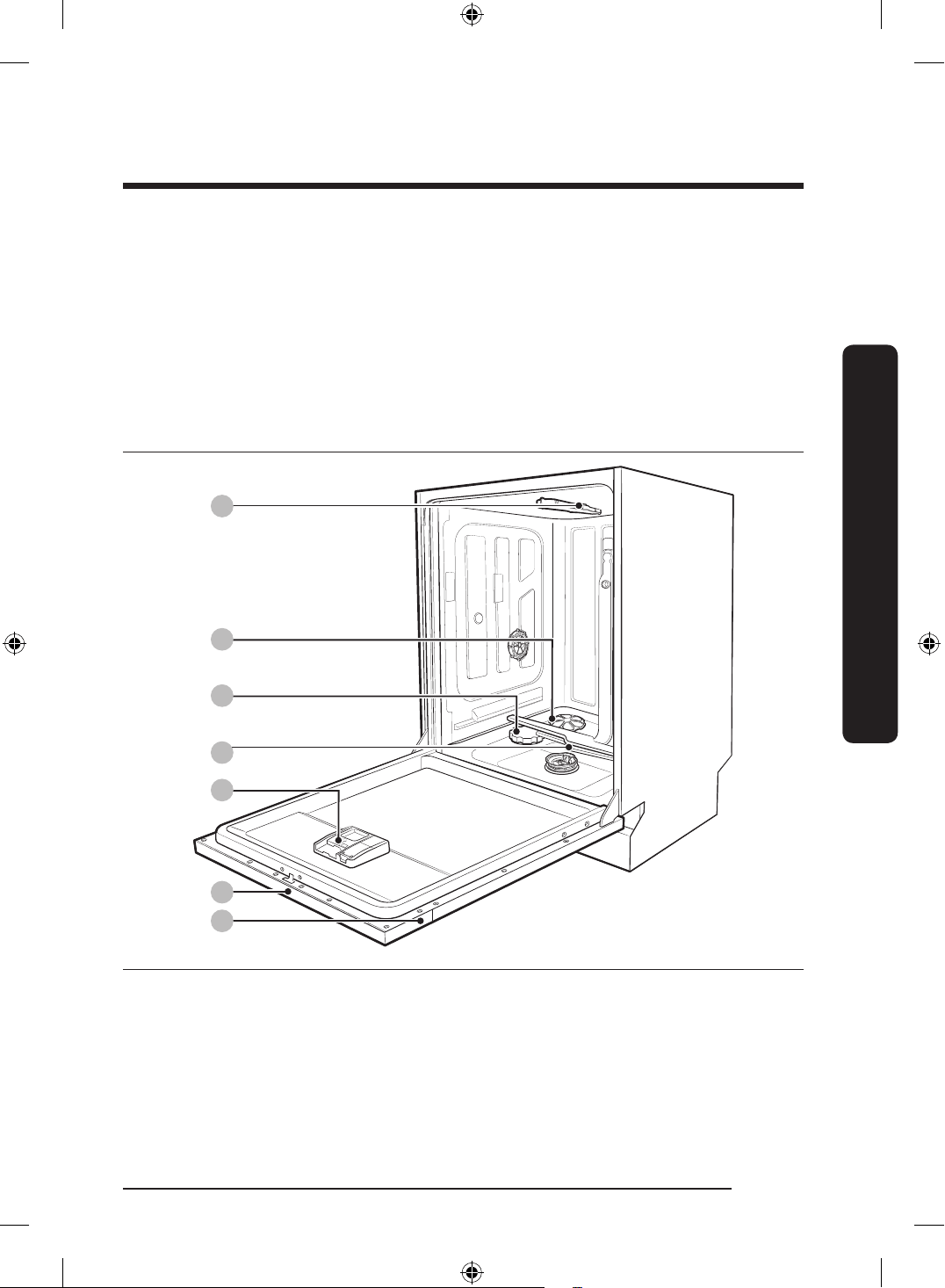
Dishwasher at a glance
04
06
07
03
02
05
01
01 Top nozzle 02 Storm Wash
+
03 Salt storage
04 Lower nozzle 05 Dispenser 06 Control panel
07 Door
English 35
Before you start
DD68-00250L-00_IB_DACOR_DW8700B_EN.indd 35 2024-01-11 3:09:33
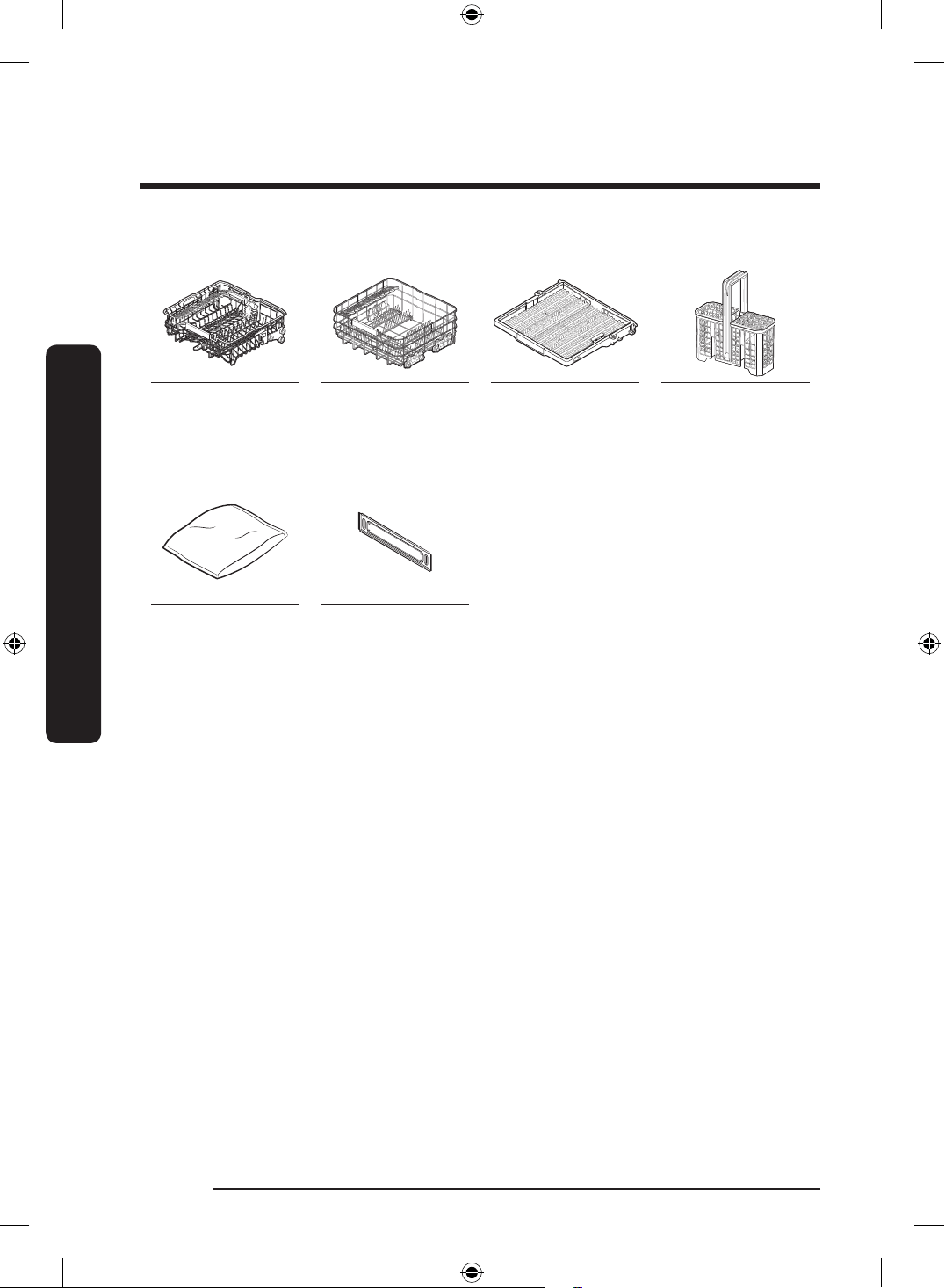
Accessories
Upper rack Lower rack 3
rd
rack Cutlery rack
Others
Installation kit
(User manual
included)
Kick plate
English36
Before you start
Before you start
DD68-00250L-00_IB_DACOR_DW8700B_EN.indd 36 2024-01-11 3:09:33
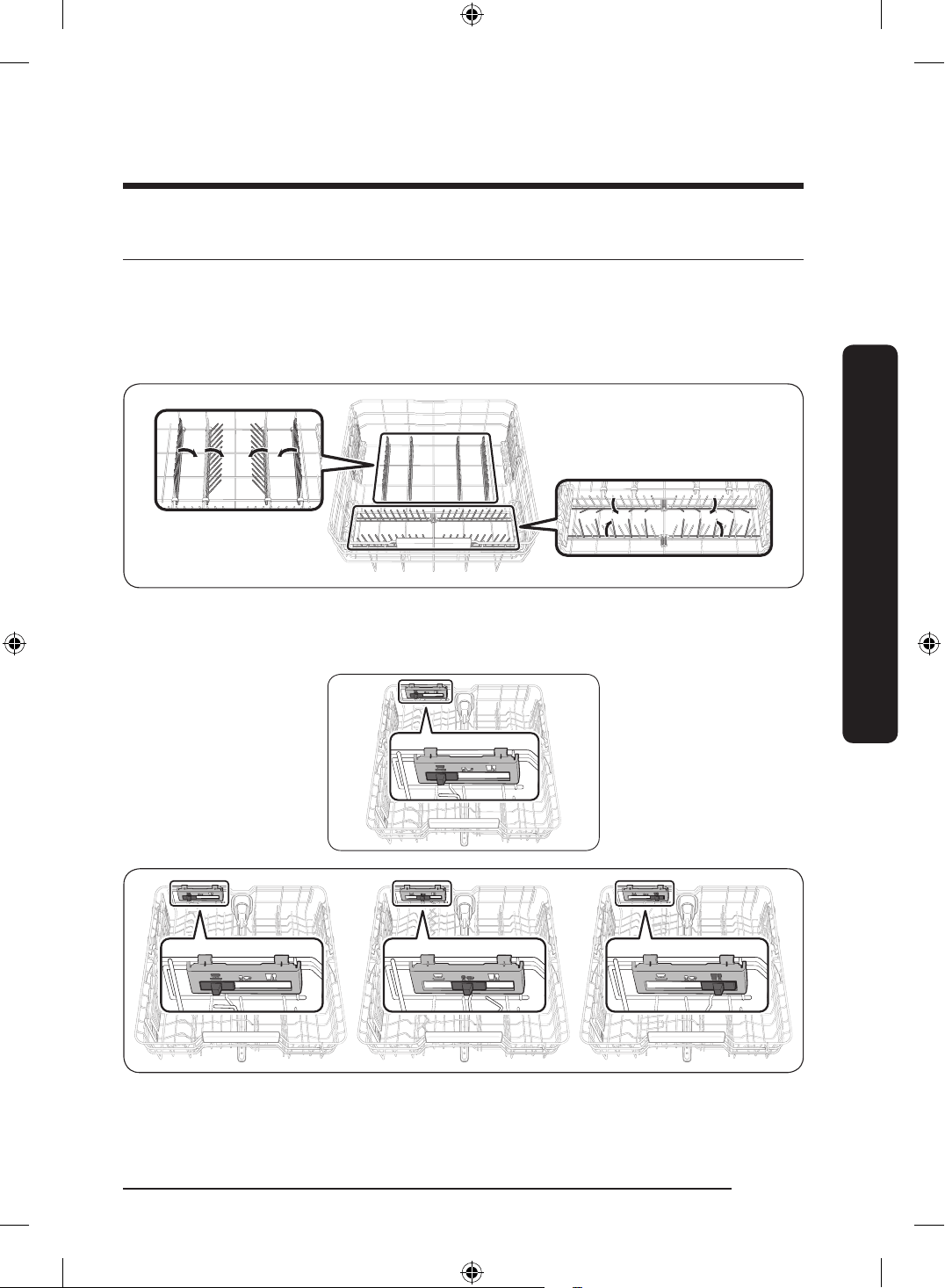
Basic use of racks
Angle of the plate supports
In the Lower rack, you can easily fold down the fold-down tines to make room for
large items such as pots and pans in the StormWash+ area. Remove the rack from the
dishwasher, and then fold down the tines one at a time. See the illustration below.
In the Upper rack, you can adjust the angle of the tines to two different positions to match
the size and shape of your dishes. To adjust the tines, grasp the handle at the front of the
rack, and then push it left or right. See the illustration below.
English 37
Before you start
DD68-00250L-00_IB_DACOR_DW8700B_EN.indd 37 2024-01-11 3:09:35
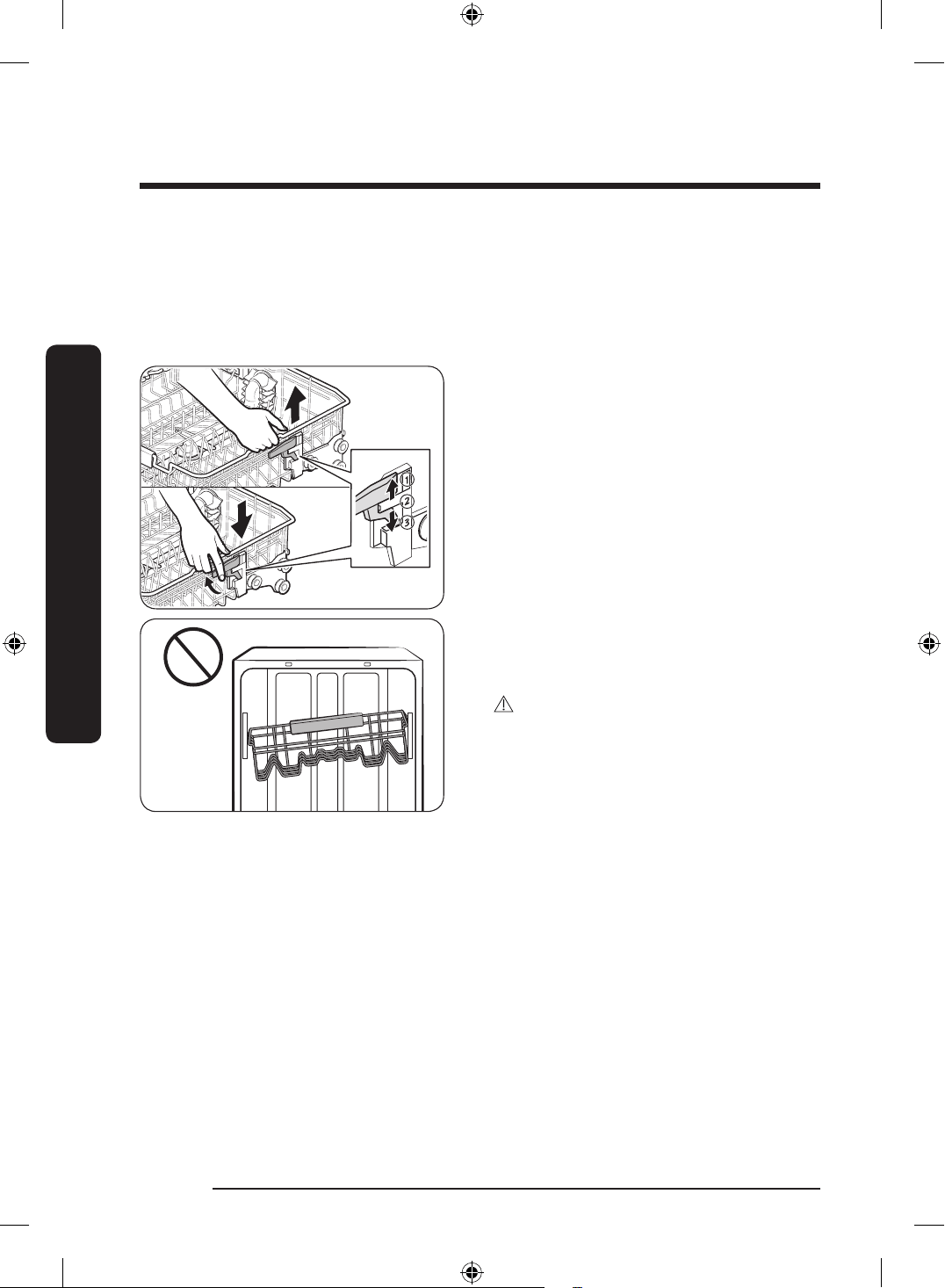
Height adjustment
You can adjust the height of the upper rack so that the lower rack can accommodate larger
sized dishes. Depending on the height of the upper rack, the lower rack can accommodate
plates up to 12 inches (30 cm) in diameter, and the upper rack can accommodate plates up
to 9 in. (22.5 cm) or 12 in. (30 cm, without 3rd rack) in diameter.
To raise the upper rack
Hold the upper rack's left and right frame
handles and pull upward. The adjustable
lever will latch, and the upper rack will
raise. You can set from Level 1 (low) to
Level 3 (high).
To lower the upper rack
Hold both the left and right frame handles
for the upper rack and raise the right lever
to lower that side. The upper rack may
suddenly fall if you pull the lever without
holding the left and right frame handles.
You can set from Level 1 (low) to Level 3
(high).
CAUTION
• Adjust the height of the upper rack
before loading dishes into the rack.
Adjusting the rack after loading the
dishes may damage the dishes.
• You must level the left and right
sides of the upper rack. Otherwise,
the dishwasher door may not close
properly or the dishwasher may not
wash properly.
English38
Before you start
Before you start
DD68-00250L-00_IB_DACOR_DW8700B_EN.indd 38 2024-01-11 3:09:36
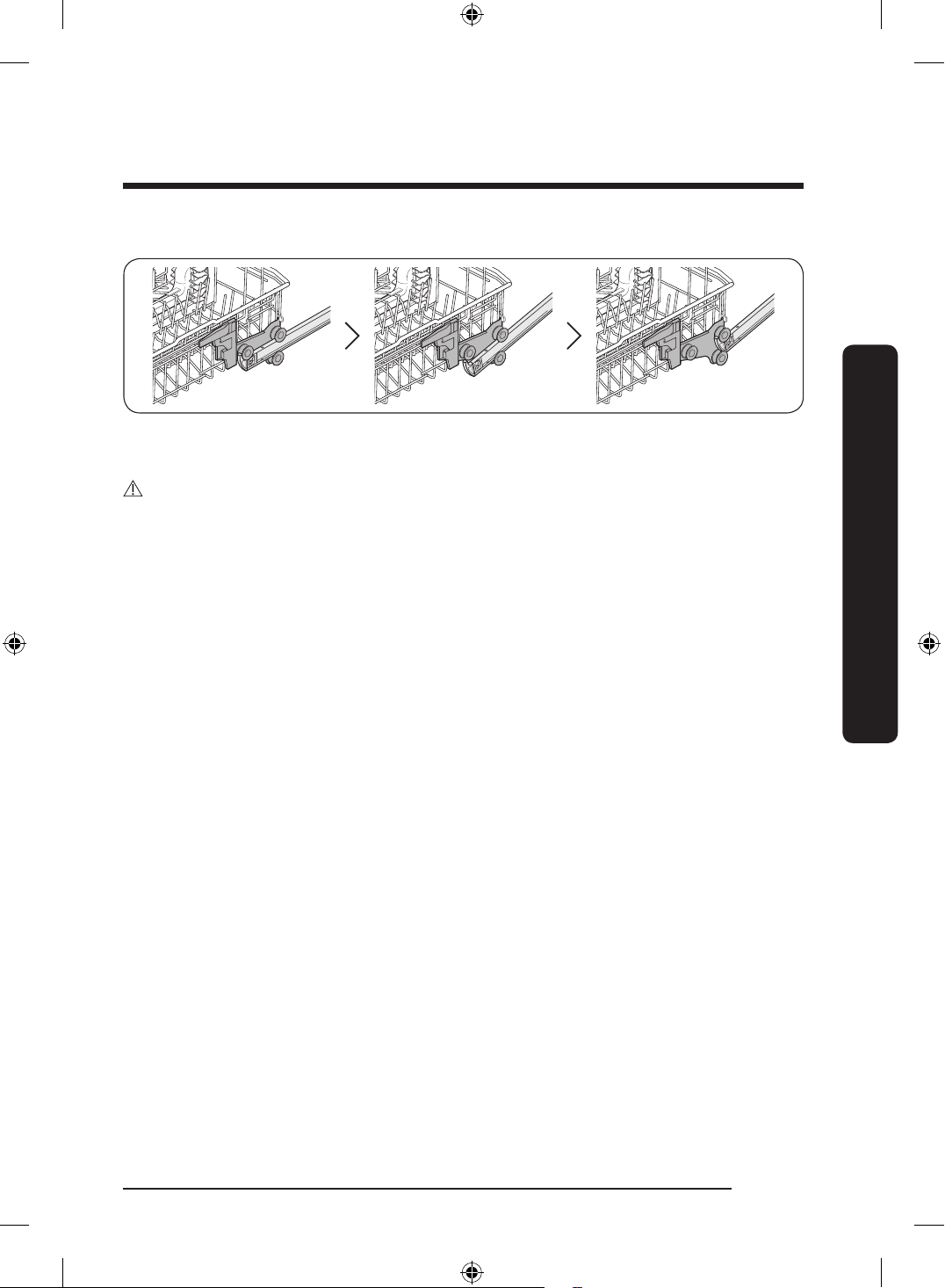
To remove the upper rack
To remove the upper rack, pull the upper rack to the front until it is fully extended, and
then lift it slightly to remove. See the gures above for the illustrated steps.
CAUTION
• Do not operate the dishwasher without the upper rack. Otherwise, noises occur and the
dishwasher does not operate properly.
• Since the upper rack is removable, insert the upper rack properly to ensure the
dishwasher operates normally.
English 39
Before you start
DD68-00250L-00_IB_DACOR_DW8700B_EN.indd 39 2024-01-11 3:09:36
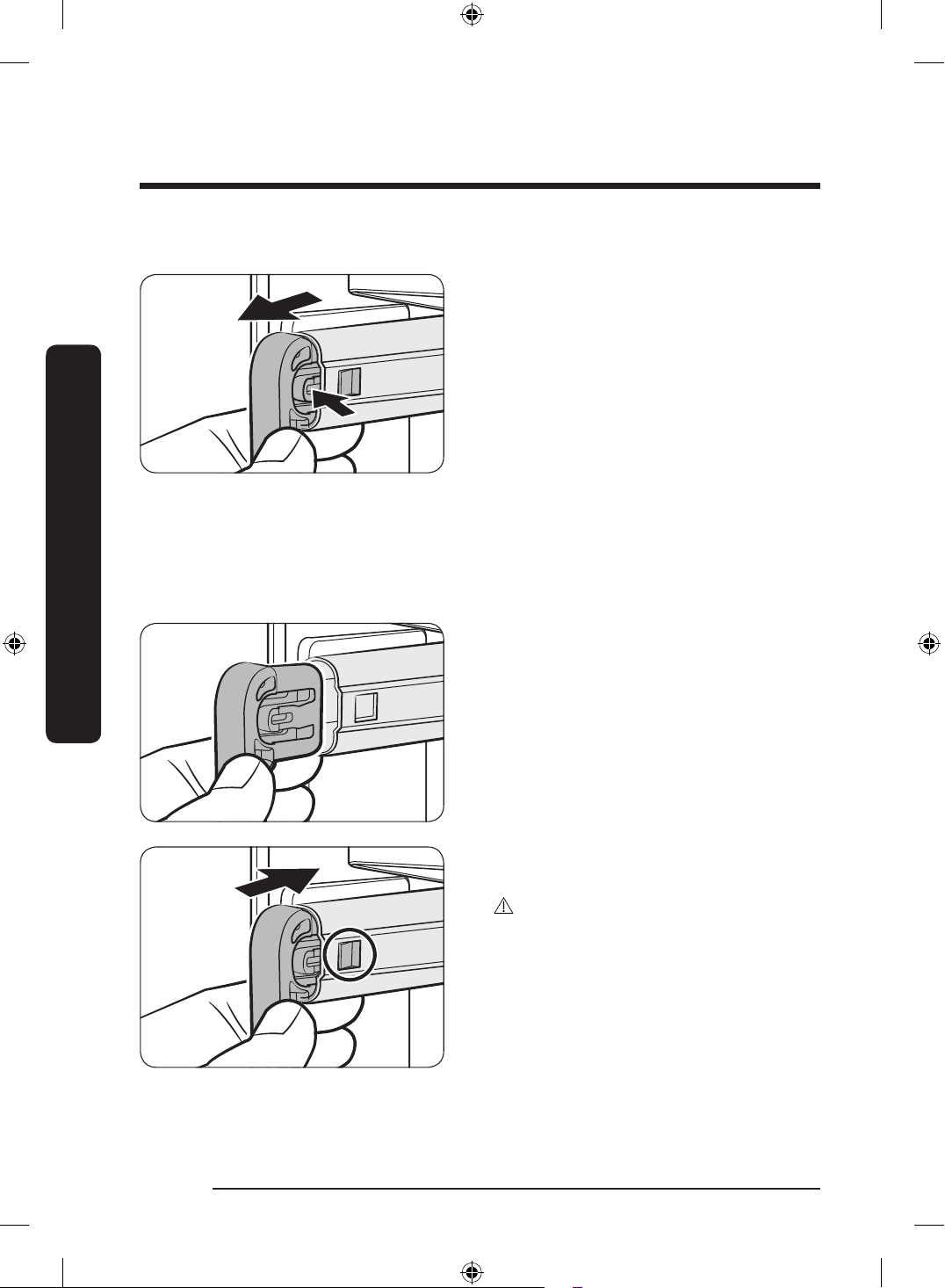
To remove the 3
rd
Rack
1. Stand facing the dishwasher, and then
pull the 3
rd
rack out so that the handles
at the ends of the rack supports (dark
grey in the illustration) are even with
the end of the rack.
2. With your right thumb, nd the small
indentation on the inside of the left
rack support that houses the tab for the
handle lock.
3. Push the handle lock tab in (i.e. to your
left) with the tip of your thumb, and
then pull the handle towards you until
it disengages from the support.
4. Repeat this process with the right
handle using your left thumb.
5. When the handles are removed, remove
the 3
rd
rack from the dishwasher.
6. Reverse the order of removal to
re-insert the 3
rd
rack.
CAUTION
Make sure the hook-shaped part of the
handle faces downward and the handle
lock (circled) re-engages when reinserting
the handle into the rail.
English40
Before you start
Before you start
DD68-00250L-00_IB_DACOR_DW8700B_EN.indd 40 2024-01-11 3:09:37
Loading precautions
Unsuitable items for the dishwasher
Wash only items such as glass, porcelain, and cutlery which the manufacturer declares as
dishwasher safe. Do not wash aluminium (e.g. grease lters). The dishwasher may damage
aluminium, or in extreme cases, it can cause a severe chemical reaction.
Do not wash the following items in the dishwasher.
• Acrylic or aluminum items: These can discolor dishes with printed gold-rim decoration
and mar other items.
• Dishes treated with adhesive: Treated plastics can come apart. Wood, ivory, copper, and
tin glued to dishes can come loose.
• Plastics with a temperature tolerance less than 194 °F (90 °C): Thin plastics wash and
dry poorly, and may be damaged due to elevated wash temperatures.
• Tin: Tin items must be washed by hand and dried immediately. Otherwise, it can rust.
• Wooden utensils: Wooden items can crack.
CAUTION
• Do not wash items that are covered with ash, sand, wax, lubricating grease or paint.
• These materials will damage the dishwasher. Ash does not dissolve and will spread
inside the dishwasher.
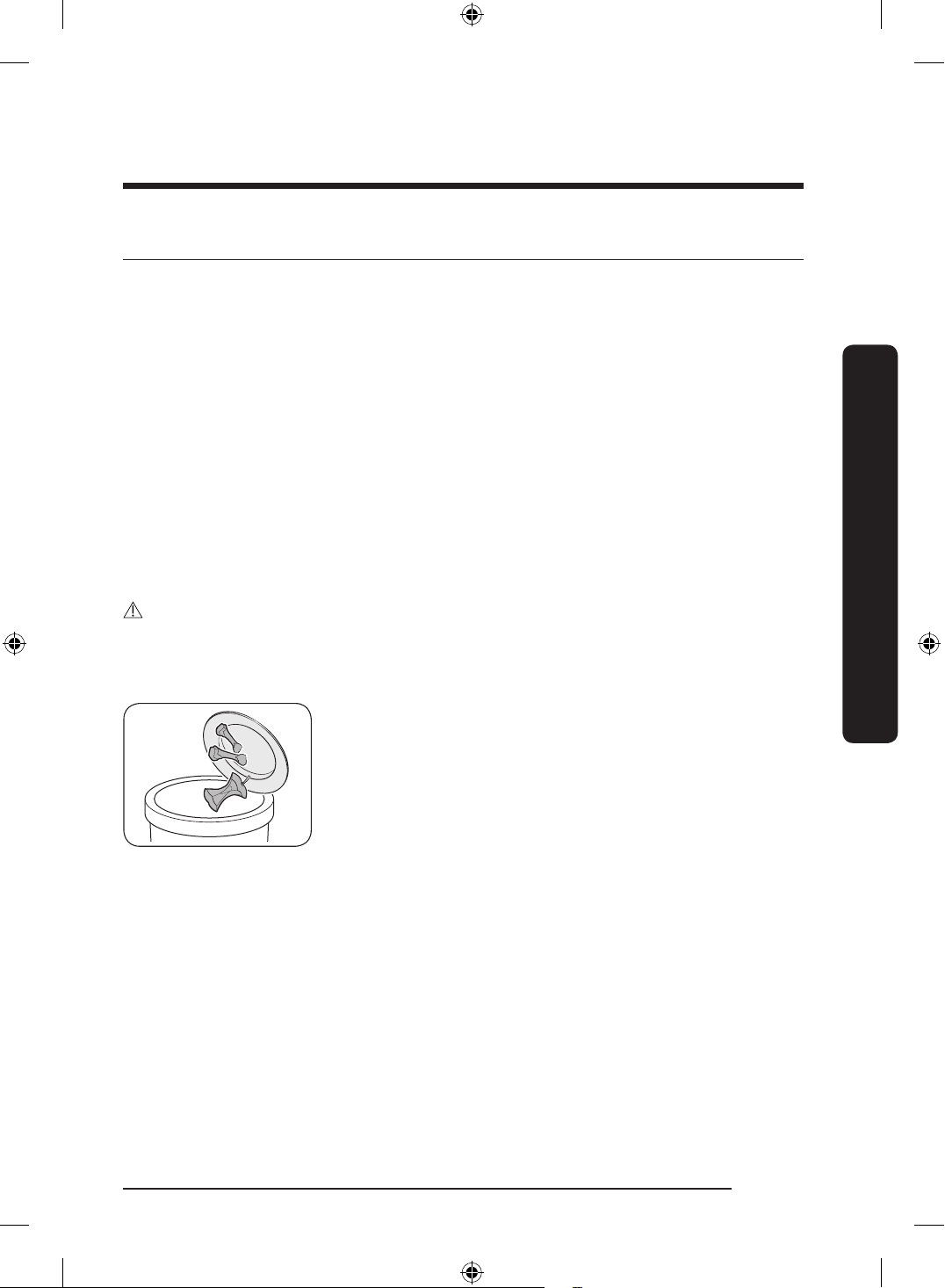
• Remove remaining food such as large bits of food, bones,
fruit seeds, etc. and waste such as toothpicks, paper napkins,
etc. from your dishes. Food remnants and waste can
interfere with washing, make noise, cause the dishwasher to
malfunction, and damage your dishes and dishwasher.
English 41
Before you start
DD68-00250L-00_IB_DACOR_DW8700B_EN.indd 41 2024-01-11 3:09:37
Loading dishes
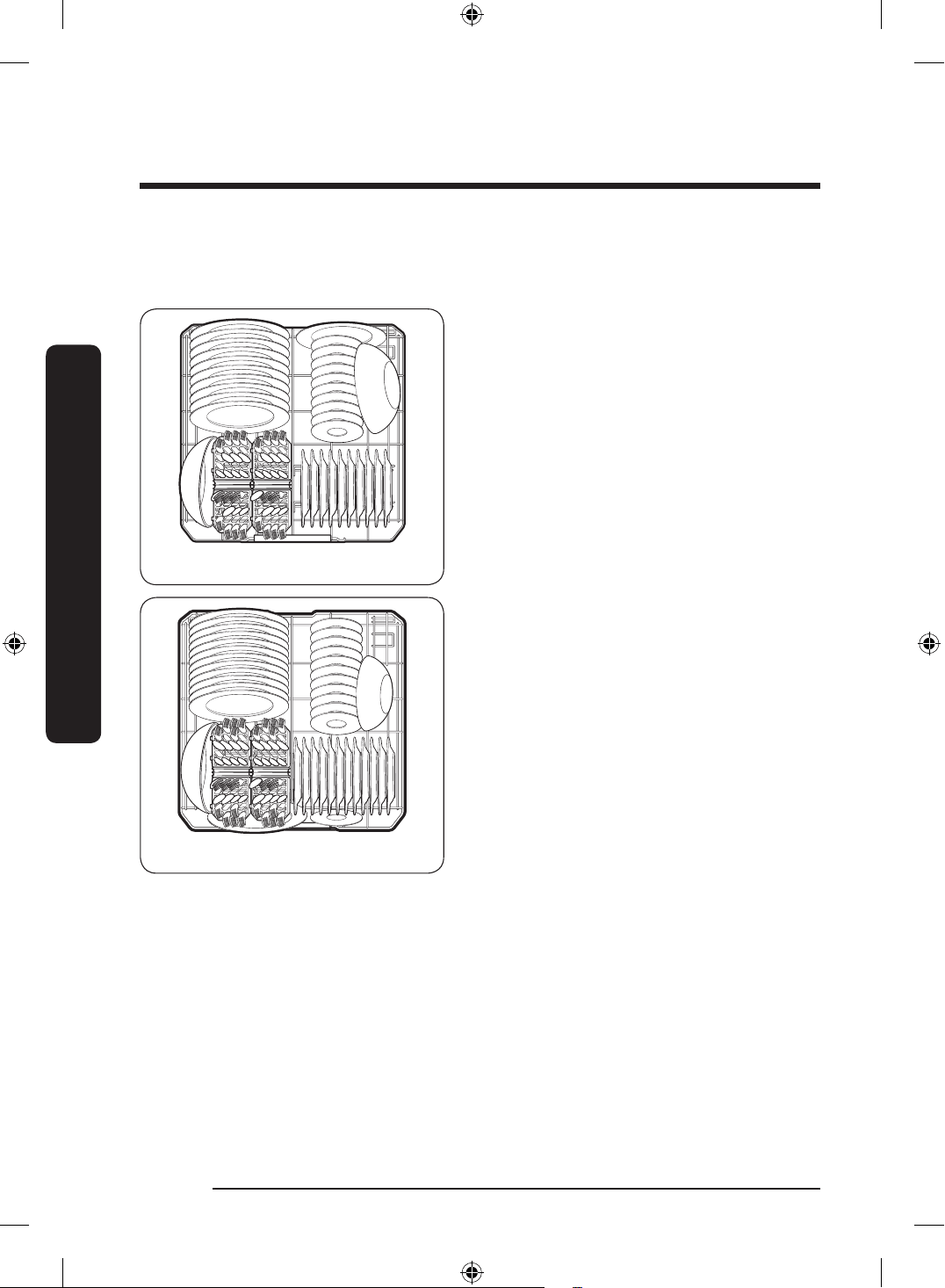
Into the lower rack
10 plate settings
12 plate settings
Load cookware (pots, pans, etc.) up to
12 inches (30 cm) in diameter into the
lower rack. The lower rack is specially
designed for dinner dishes, soup bowls,
plates, pots, lids, and casserole dishes.
Load plates into the centre column of the
rack so that the top of a plate faces the
bottom of the next plate. Load large items
such as pans and pots into the dishwasher
so their inner cavities face downwards. We
recommend loading cups, stemware, and
small plates into the upper rack. See the
recommended loading cases below.
English42
Before you start
Before you start
DD68-00250L-00_IB_DACOR_DW8700B_EN.indd 42 2024-01-11 3:09:37
Loading the Storm Wash
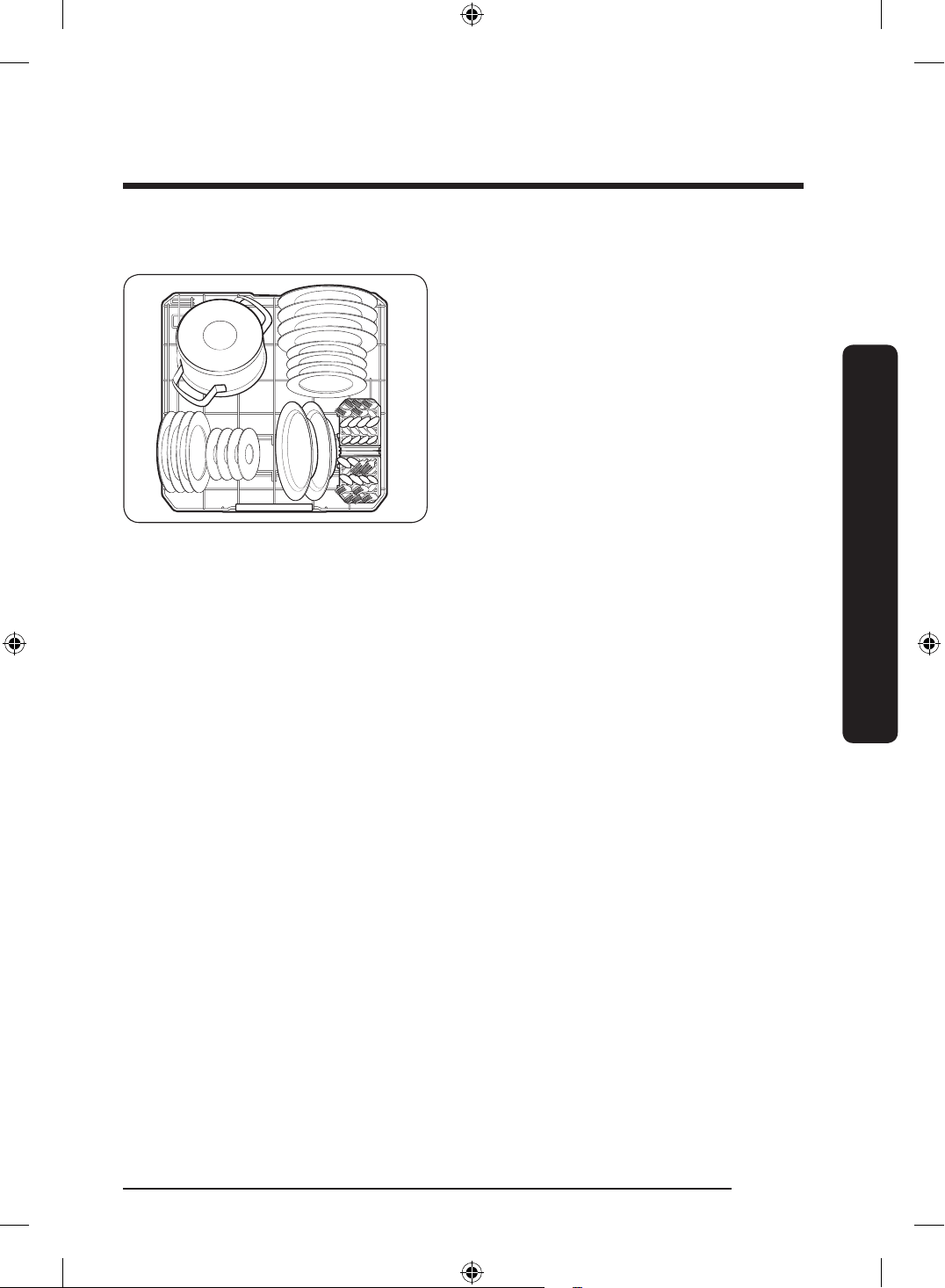
+
Area
For more effective cleaning, load large
items into the Storm Wash
+
area on the left
side of the lower rack.
When you select Storm Wash
+
, the
dishwasher supplies additional power to
reinforce the water jet in the Storm Wash
+
area.
Make sure pot handles and other items
do not interfere with the rotation of the
nozzles.
English 43
Before you start
DD68-00250L-00_IB_DACOR_DW8700B_EN.indd 43 2024-01-11 3:09:37
Into the upper rack
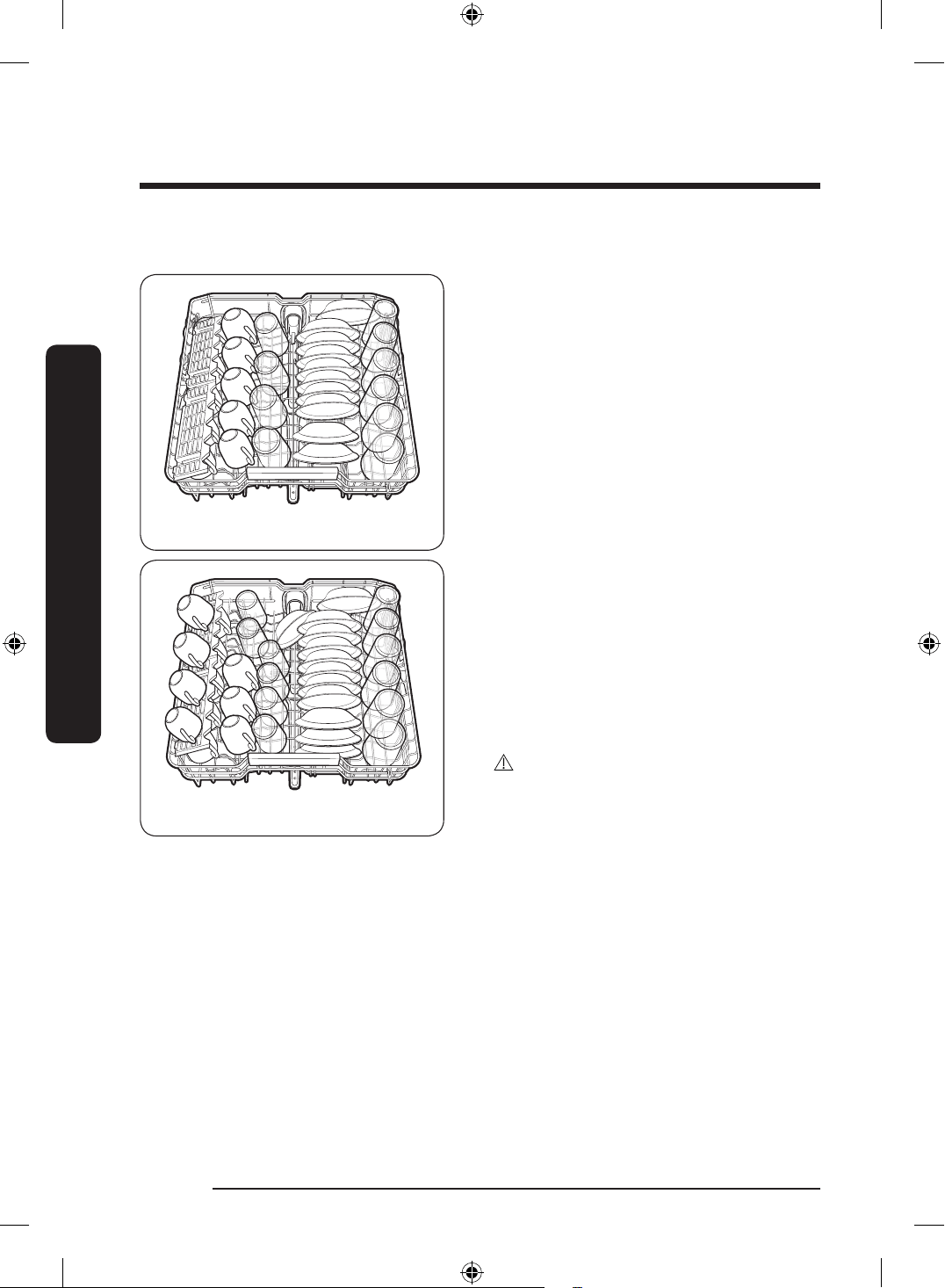
10 plate settings
12 plate settings
The upper rack is for small plates, mugs,
glasses, and plastic items. Make sure the
loaded dishes do not interfere with the
rotation of the nozzle which is located at
the bottom of the upper rack. (Check this
by rotating the nozzle by hand.)
When loading dishes, pull the upper rack
out so you can load it without striking the
counter above.
The upper rack release position is at Level
1 (low).
• Level 1 (low) is a suitable position
for loading tall cups and plates in the
middle.
• Level 2 (mid) is a suitable position for
typical dishes. The rack position must
also be set to Level 2 when measuring
energy.
• Level 3 (high) is a suitable position for
loading large bowls or long cooking
utensils on the bottom.
CAUTION
Ensure that there is no interference with
the operation of the central rotor before
starting the dishwasher.
English44
Before you start
Before you start
DD68-00250L-00_IB_DACOR_DW8700B_EN.indd 44 2024-01-11 3:09:38
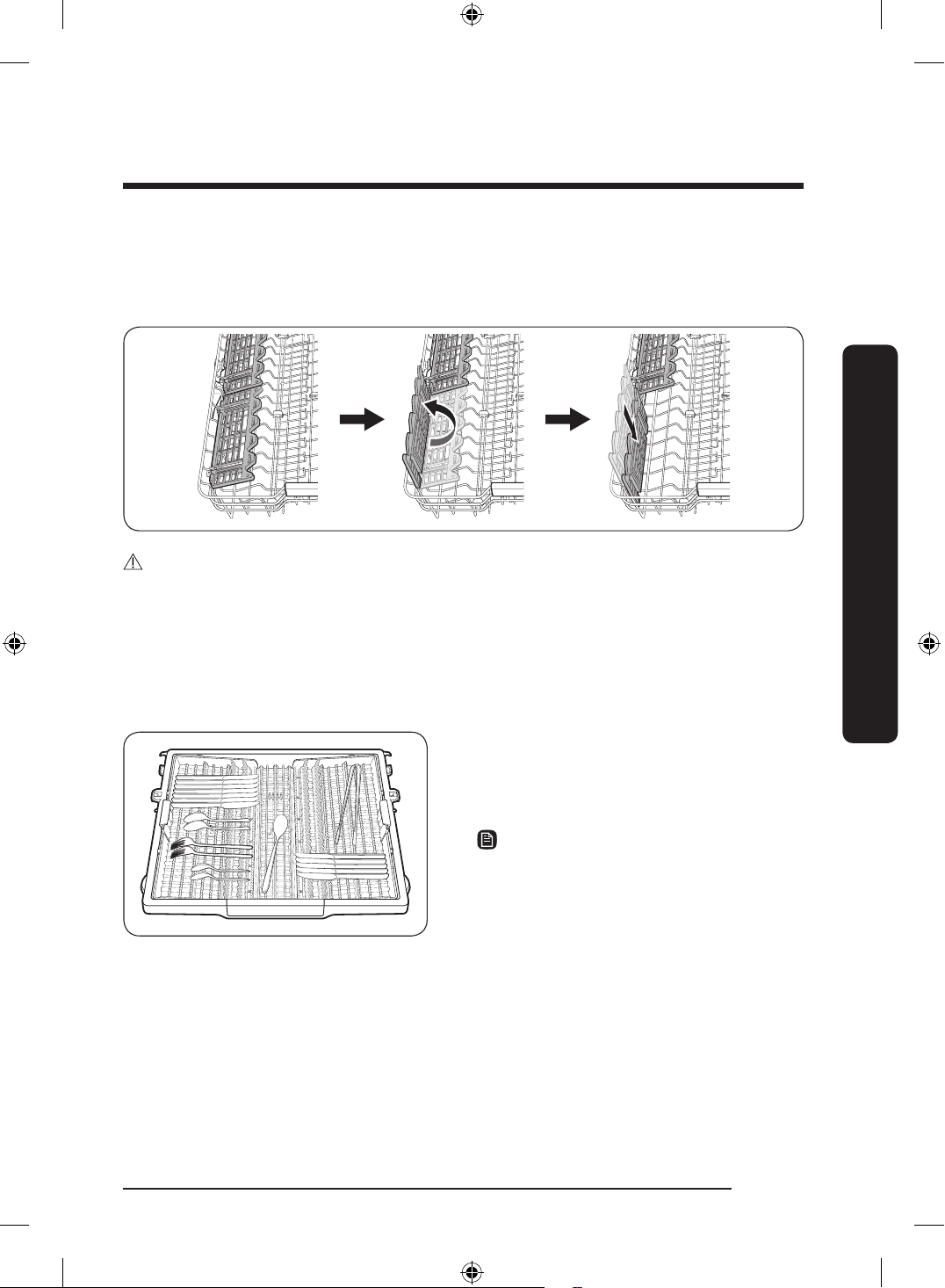
Using the glass support
The glass support is used for cups, small items, and long cookware, and especially suited
for wine glasses. Hang wine glasses onto the pegs of the cup shelves. Fold the glass
support back when it is not being used.
CAUTION
• Do not adjust the level of the upper rack with the glass support propped up. This will
make it impossible to push the glass support in the upper rack.
• Check whether cups are interfering with the 3rd rack when pushing in the upper rack
after loading cups onto the glass support. Cups may be damaged or displaced.
3rd rack
The 3rd rack is best for atware
and cooking or serving utensils. Use
the 3rd rack to organize atware or
utensils.
NOTE
• For best results, place heavily soiled
items in the standard 3rd rack.
• The 3rd rack can be removed if you
need more space on the upper rack to
clean larger items.
The rack will stand if items are placed as suggested above. Refer to the gures below and
match the numbers on the left with the numbers on the right.
English 45
Before you start
DD68-00250L-00_IB_DACOR_DW8700B_EN.indd 45 2024-01-11 3:09:38
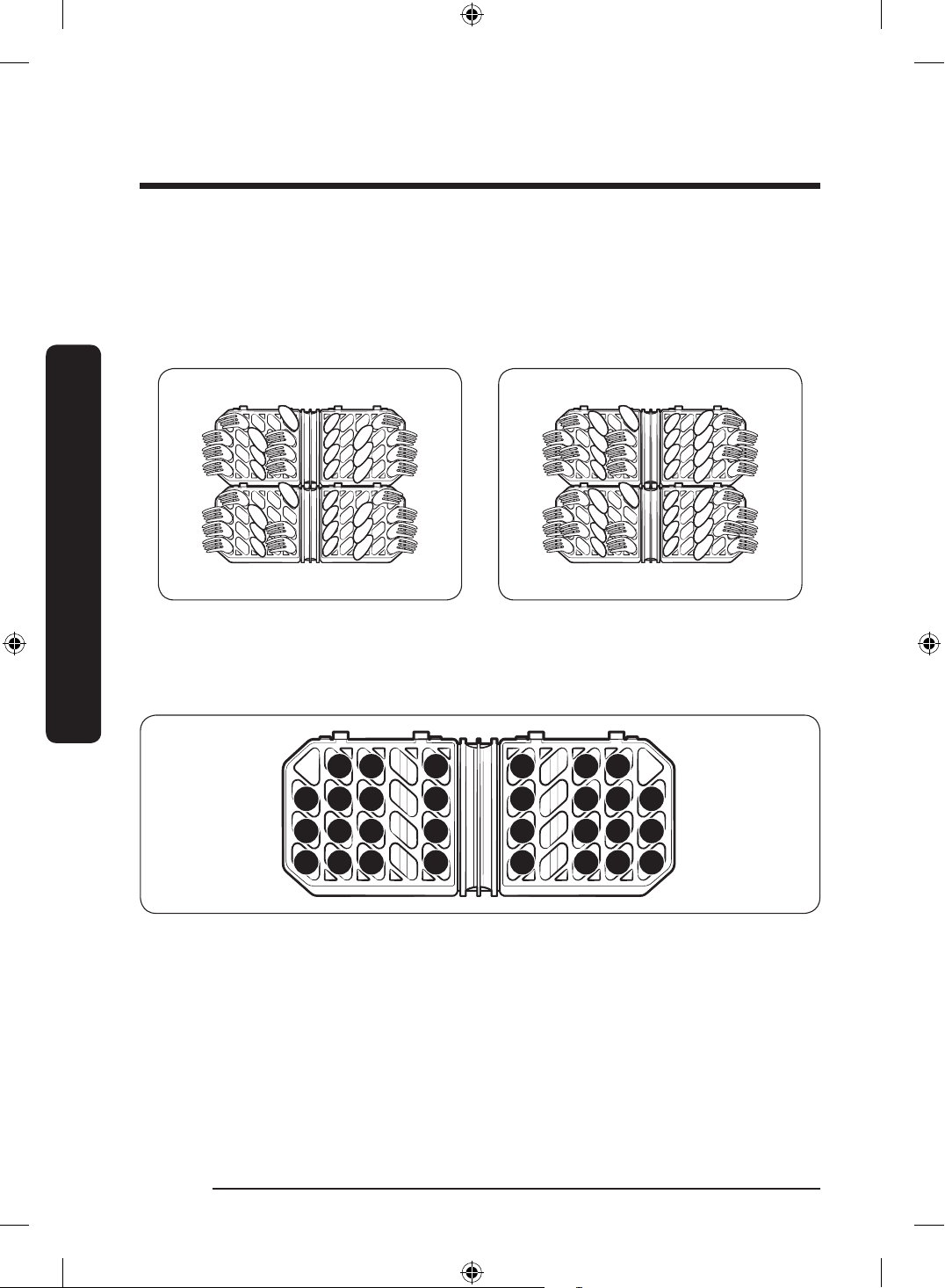
Loading the Cutlery rack
The cutlery rack consists of two compartments.
You can place each knife, spoon, or fork separately into the spoon stands in the basket’s
covers to prevent chipping and discoloration. See the illustrations below.
You can use the cutlery rack with the cover open.
10 plate settings 12 plate settings
The spoon stands as seen from above with the suggested placement of cutlery items.
Match the numbers in the diagram to the numbers in the list of cutlery items below.
2
2
2
2
1
6
1
6
3
3
3
3
1
1
1
5
5
1
1
3
3
2
2
1
6
6
1
1
1
1
English46
Before you start
Before you start
DD68-00250L-00_IB_DACOR_DW8700B_EN.indd 46 2024-01-11 3:09:39
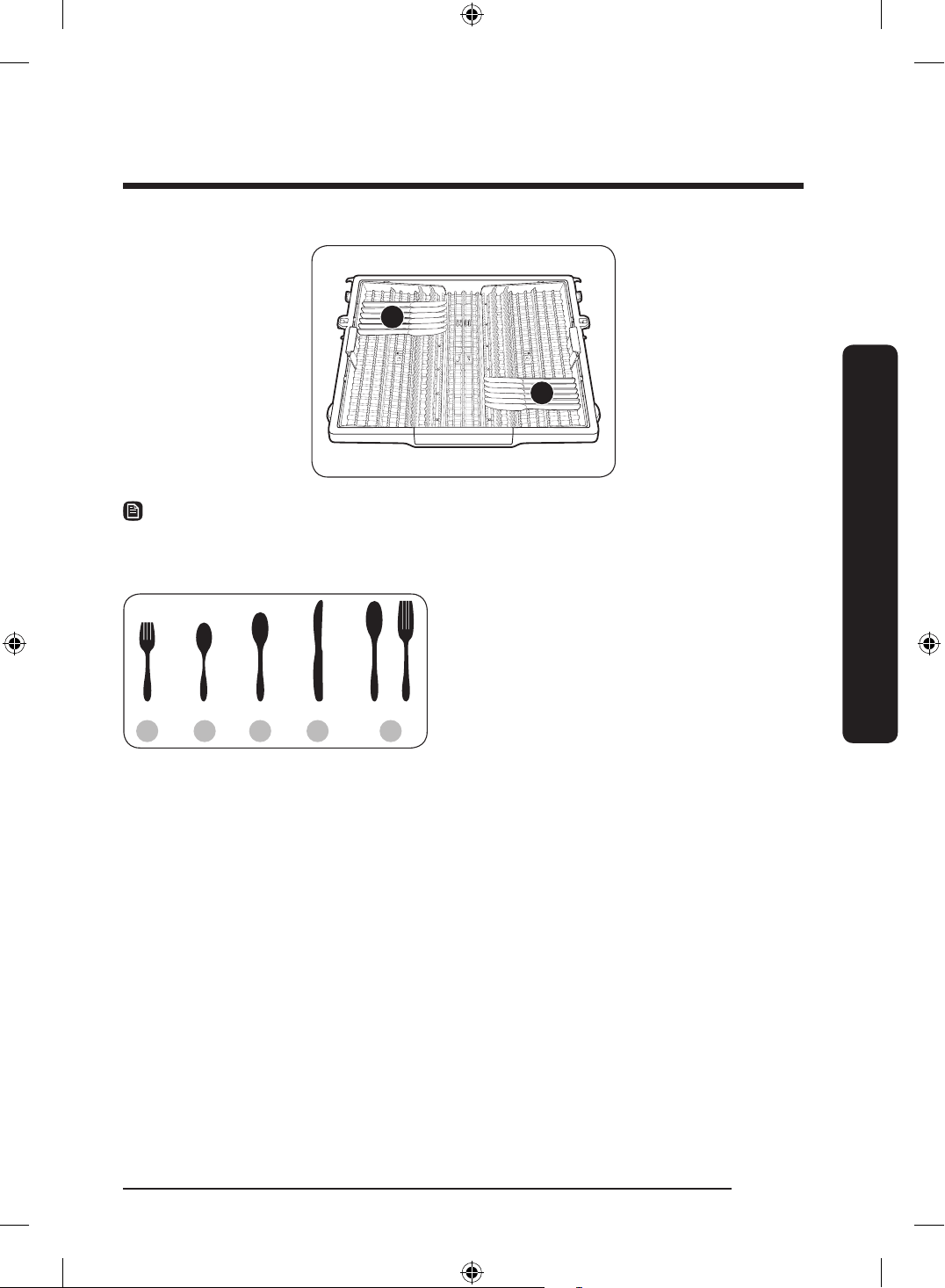
4
4
NOTE
Do NOT let any item extend through the bottom. Do not load chopsticks in this rack, which
should be loaded in the 3rd rack.
1 2 3 4 5
1. Forks
2. Tea spoons
3. Dinner spoons
4. Knives
5. Serving spoons and Serving forks
6. Remaining items
English 47
Before you start
DD68-00250L-00_IB_DACOR_DW8700B_EN.indd 47 2024-01-11 3:09:39
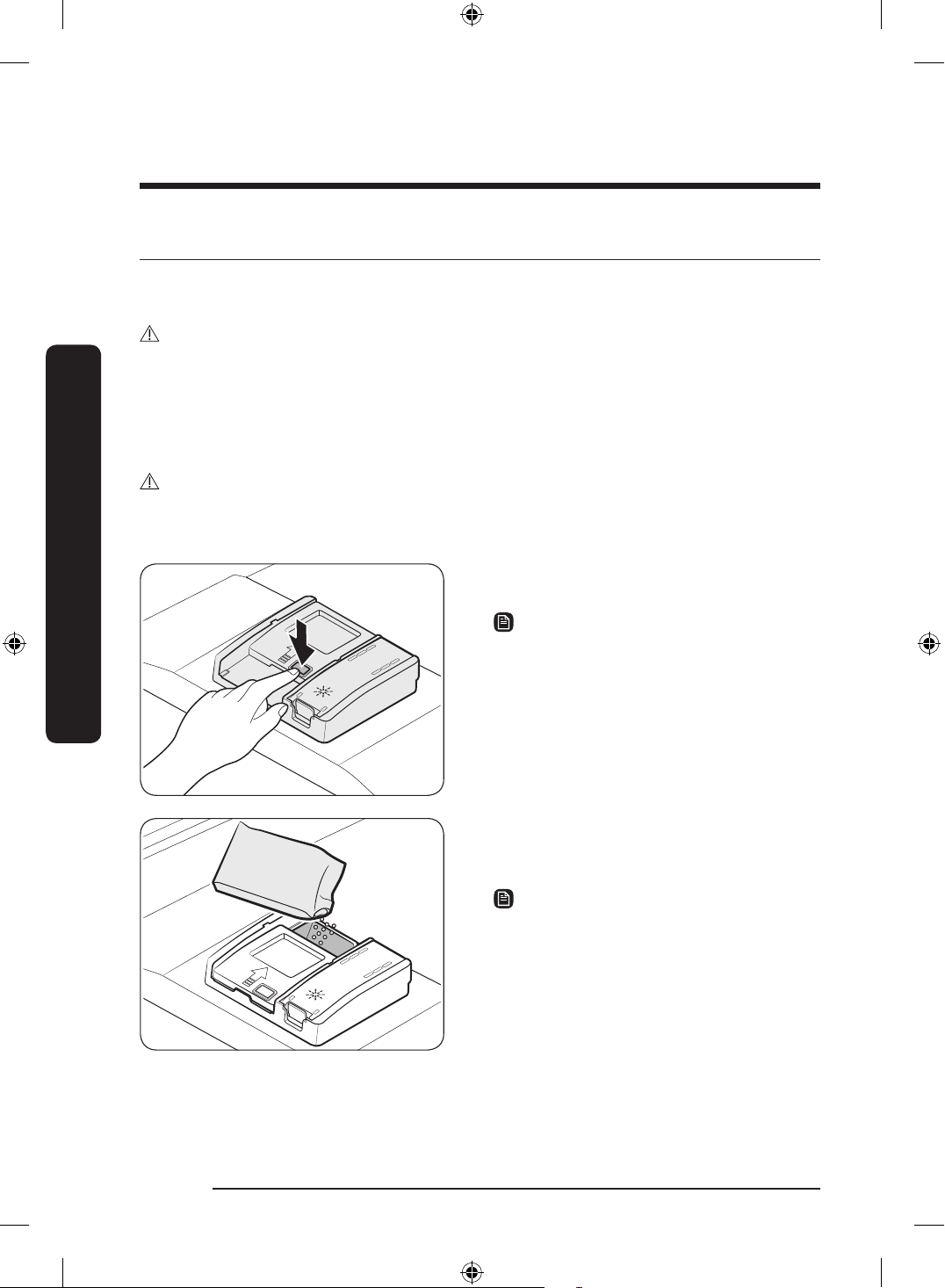
Detergent compartment
All dishwasher cycles require detergent in the detergent compartment. Apply detergent as
recommended for the selected cycle to ensure best performance.
WARNING
• Do not place dishwasher detergent in your mouth. Avoid breathing in detergent
fumes. Dishwasher detergent contains irritants and caustic chemicals that can induce
respiratory conditions. If you have consumed dishwasher detergent or inhaled
detergent fumes, seek medical attention immediately.
• Keep dishwasher detergent out of children’s reach.
CAUTION
Use dishwasher detergent only. Other types of detergent produce excessive foam, which
may decrease the dishwasher’s performance or cause it to malfunction.
1. Open the detergent dispenser cap by
pressing the detergent dispenser catch.
NOTE
The cap remains open at the end of a cycle.
2. Add the recommended amount of
detergent to the main wash detergent
compartment.
NOTE
There is no separate button that is specic
to using tablet detergents.
English48
Before you start
Before you start
DD68-00250L-00_IB_DACOR_DW8700B_EN.indd 48 2024-01-11 3:09:40
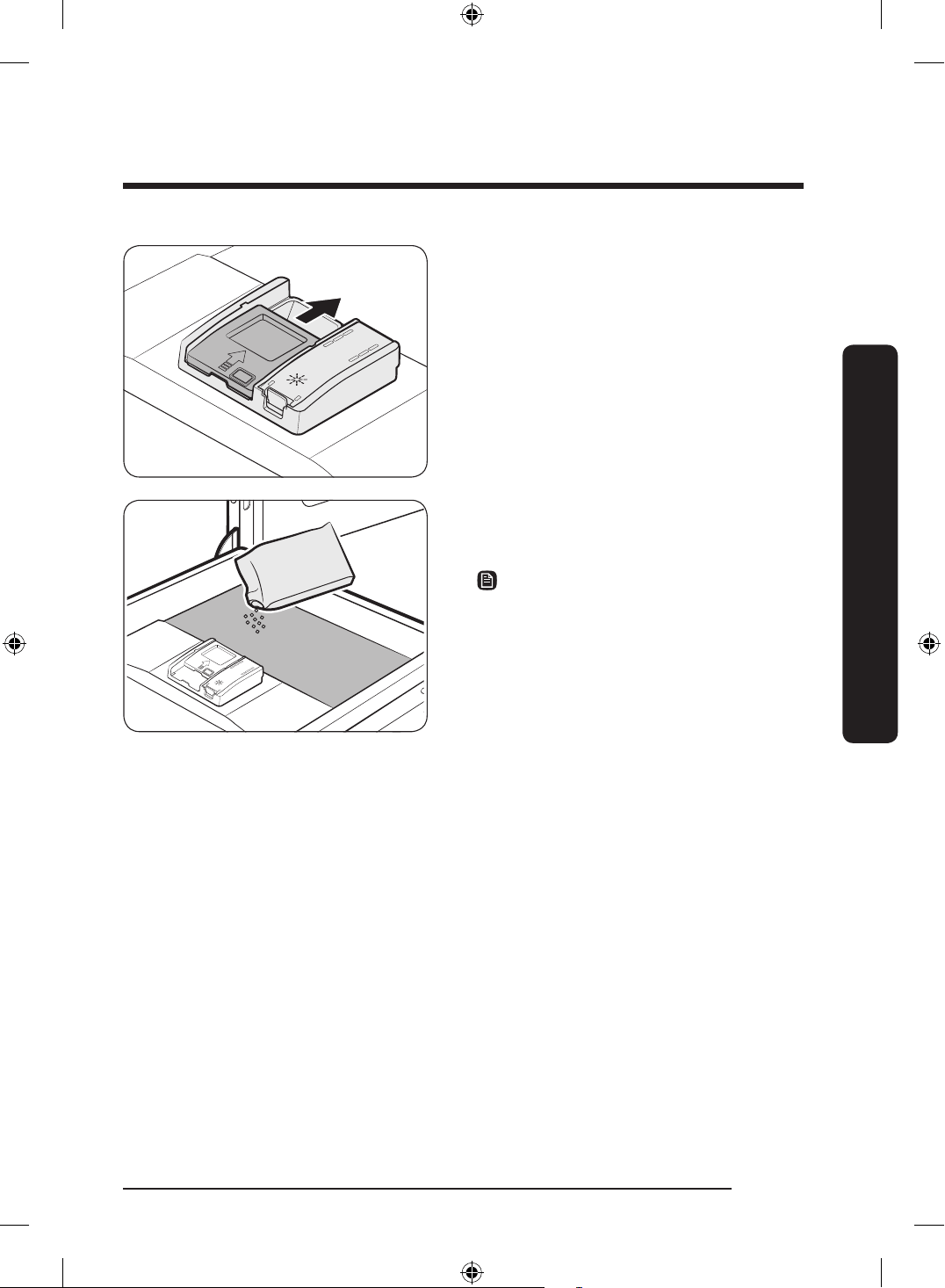
3. Close the lid by sliding it up.
4. If the items are heavily soiled, pour
a small amount of detergent onto the
door for better cleaning results.
NOTE
• The additional detergent will activate
during the pre-wash process.
• When testing for the energy label,
detergent was only used in the main
wash and not in the prewash.
The cover opens automatically to dispense the detergent during the wash.
English 49
Before you start
DD68-00250L-00_IB_DACOR_DW8700B_EN.indd 49 2024-01-11 3:09:40
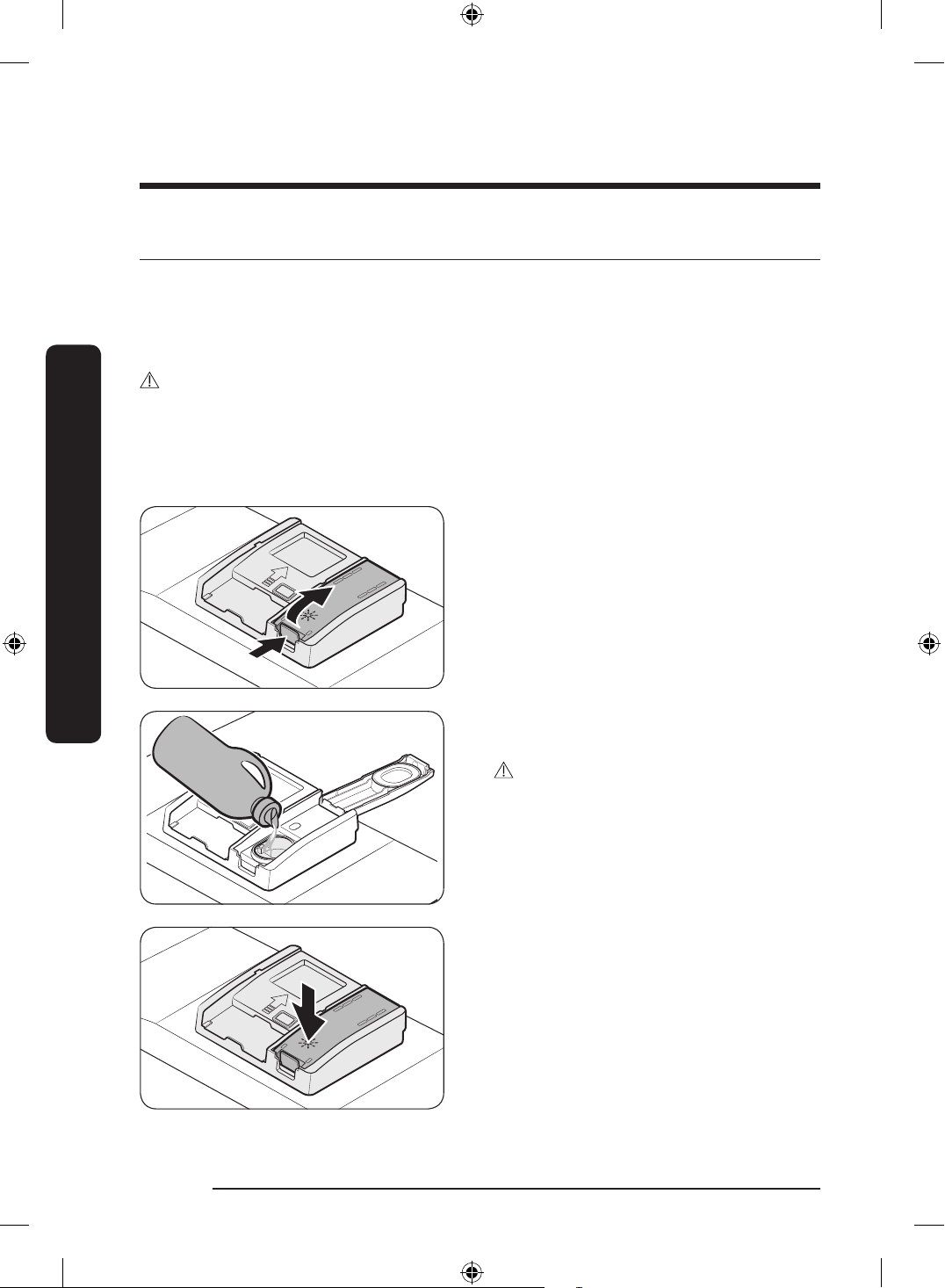
Rinse aid reservoir
Rinse aid improves the drying performance of the dishwasher. When the Rinse Rell
indicator lights up on the control panel, rell with rinse aid. Only use liquid rinse aid.
Powdered rinse aid will clog the reservoir opening and cause the dishwasher to
malfunction.
CAUTION
• Do not apply any type of detergent to the rinse aid reservoir.
• Do not excessively ll the reservoir. Excessive rinse aid may overow during a cycle.
Filling the rinse aid
1. Open the rinse aid reservoir cap.
2. Fill the rinse aid reservoir with rinse
aid.
CAUTION
Do not ll the reservoir above the full level
indicator. Excess rinse aid can overow
during the wash cycle.
3. Close the rinse aid reservoir cap.
English50
Before you start
Before you start
DD68-00250L-00_IB_DACOR_DW8700B_EN.indd 50 2024-01-11 3:09:40
English 51
Before you start
Salt storage
CAUTION
• Use dishwasher-specic salt only. Do not use any other type of salt or solvent. This
may damage the salt storage and the water softening system.
• To prevent corrosion due to an excessive amount of salt or salty water, always ll the
salt storage before a washing cycle gets started.
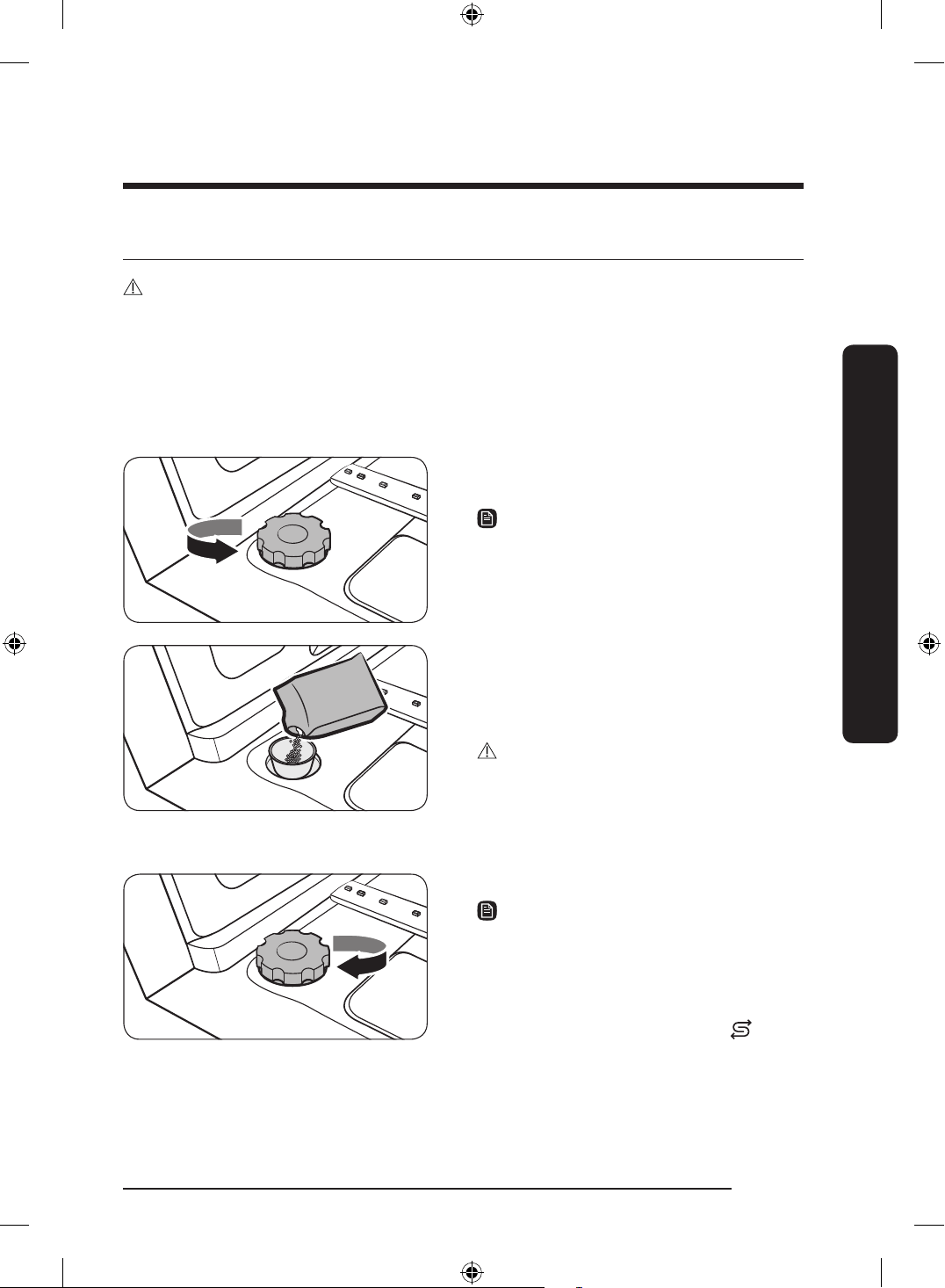
Filling the salt storage
1. Open the door.
2. Turn the cap counterclockwise to open.
NOTE
When you open the softener lid, clean
water stored for about one minute may run
out. Add salt to stop the water from leaking
out.
3. Fill the salt storage with water (only
required when using the dishwasher for
the rst time).
4. Apply dishwasher salt.
CAUTION
• The maximum capacity is about 1 kg.
Do not exceed the capacity.
• Exceeding the capacity may affect the
dishwasher performance.
5. Turn the cap clockwise to close.
NOTE
• To clean excess salt or salt water from
dishwasher, run the Express 60 cycle.
• Depending on the size of the salt
grains, it may take a while for the salt
to dissolve and the indicator (
) to
turn off.
Salt notice
The notice turns on if there is not enough salt for the next several cycles.
DD68-00250L-00_IB_DACOR_DW8700B_EN.indd 51 2024-01-11 3:09:40
Operations
Touchpad responsiveness
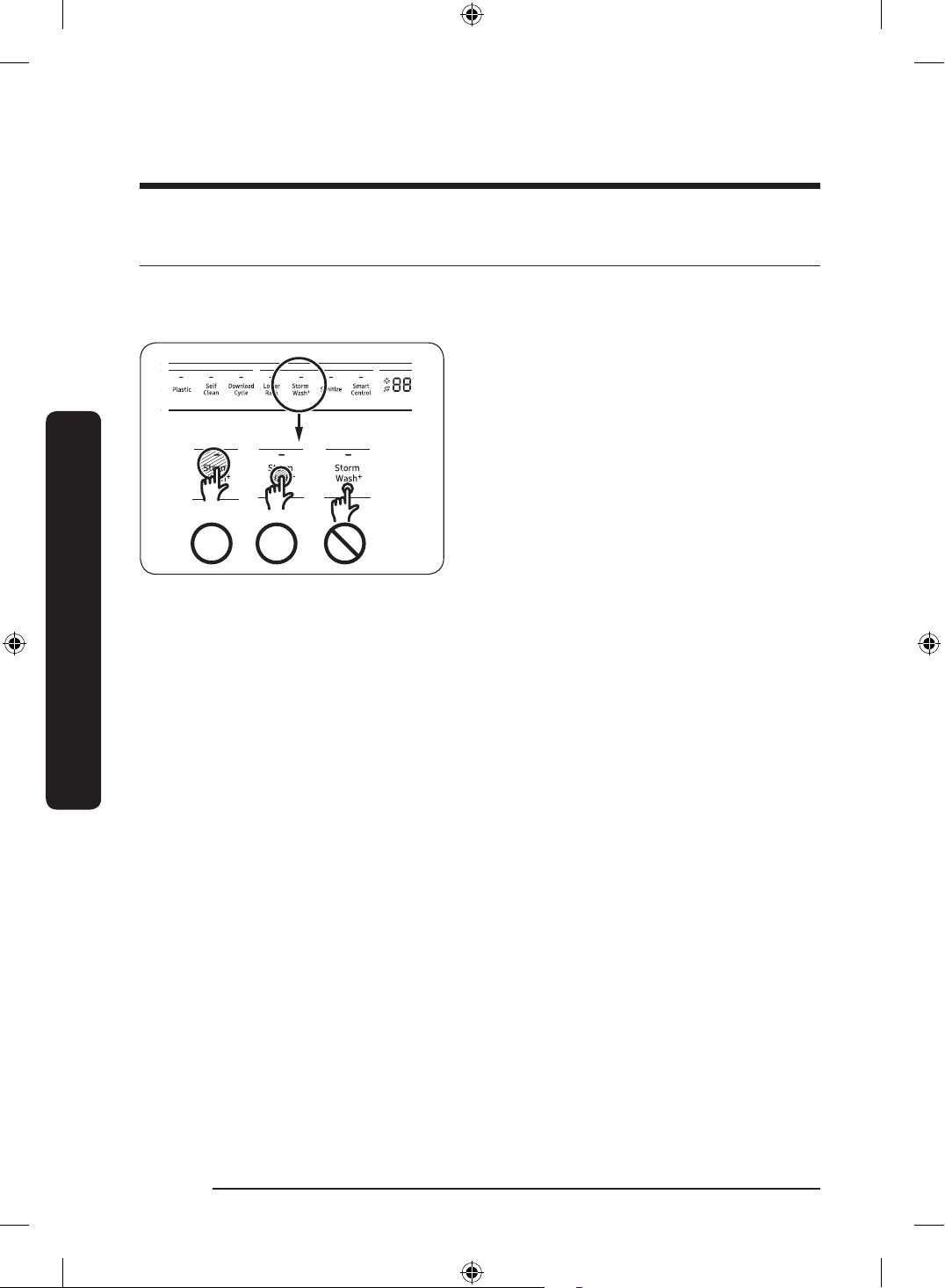
To prevent the touch-enabled controls from losing responsiveness, follow these
instructions.
• Touch the center of each button with
one nger.
• Do not touch more than one button at a
time, except as directed.
• Clean the surface of the control panel
regularly with a soft, damp cloth.
English52
Operations
DD68-00250L-00_IB_DACOR_DW8700B_EN.indd 52 2024-01-11 3:09:40
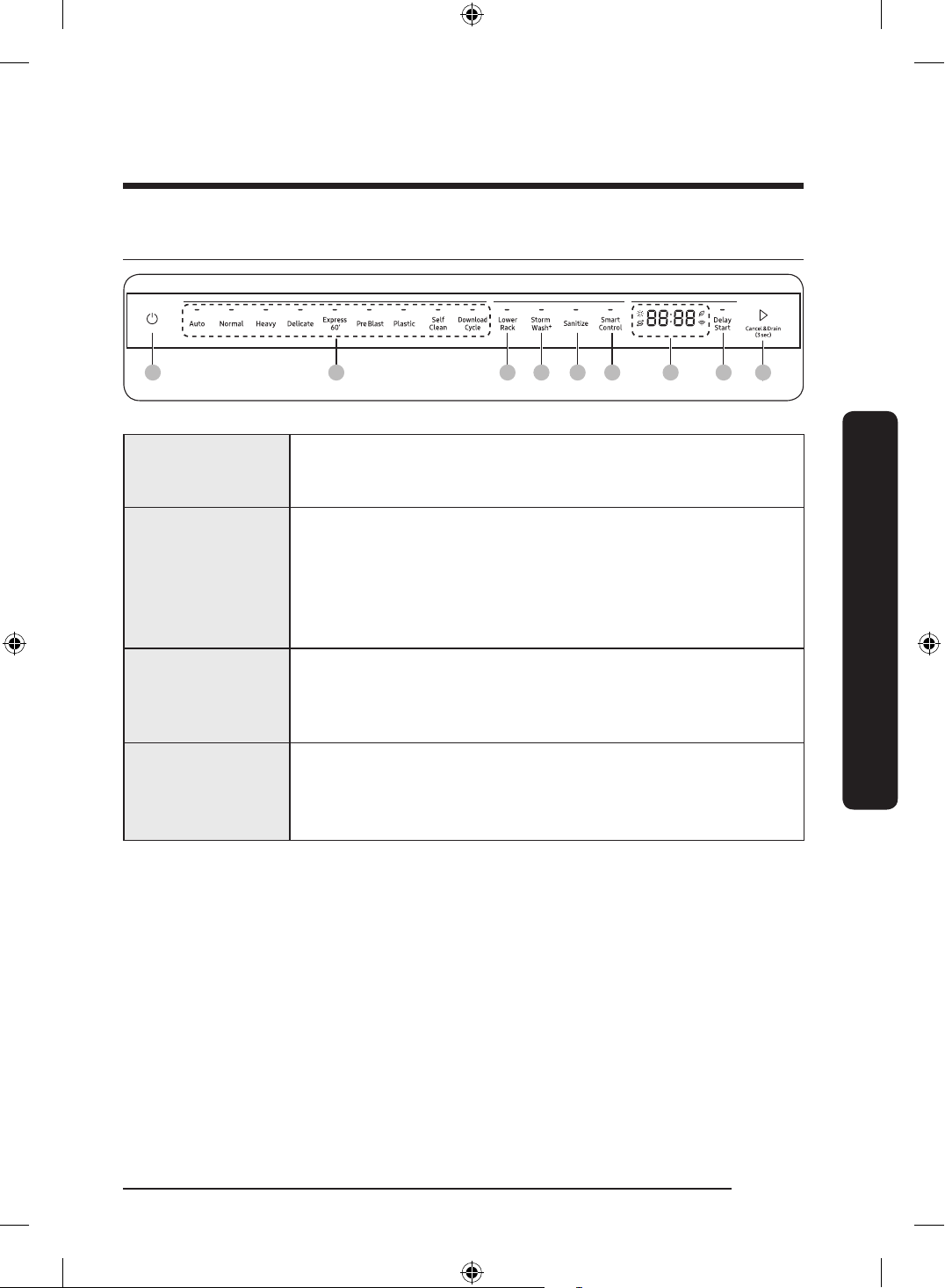
Control panel
01 02 03 04 07 090805 06
01 Power
When you press the Power button, the Cycle On light for the
most recently started cycle turns on. When the selected cycle is
complete, the dishwasher powers off automatically.
02 Cycle Selector
Select the appropriate wash cycle depending on the soil level of
your dishes. After you select a cycle, the Cycle On light for that
cycle lights.
If you want to change the cycle once it has started, press the
Power button. Then, turn on the dishwasher again and select a
new cycle.
03 Lower Rack
If selected, only the lower rack nozzle is activated to reduce both
the cycle time and power consumption. Use this cycle to wash a
small load of dishes or glasses in the lower rack. To wash heavily
soiled items, select the Storm Wash
+
option.
04 Storm Wash
+
Use this option when you want to wash pots and pans, durable
serving bowls, and other large, very dirty, hard to clean dishes.
To use Storm Wash
+
, place the dishes face down in the storm wash
nozzle up area in the lower basket.
English 53
Operations
DD68-00250L-00_IB_DACOR_DW8700B_EN.indd 53 2024-01-11 3:09:41
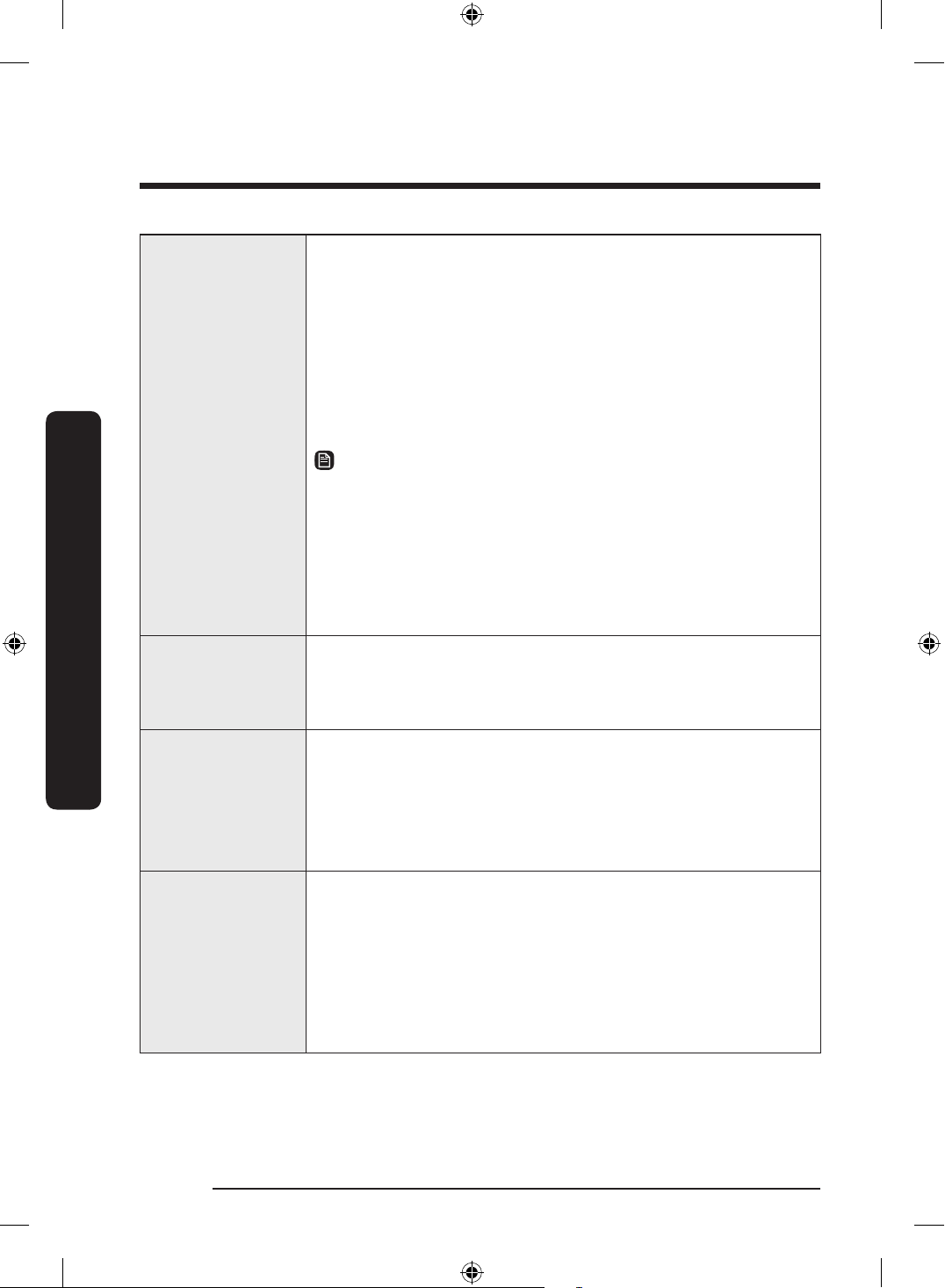
05 Sanitize
With the Sanitize option selected, the water temperature is
increased to 167 °F (75 °C) in the nal rinse cycle for high
temperature sanitization.
If you select the Sanitize option, the "Sanitize" lamp blinks
when the water temperature reaches the sanitary temperature
(over 155 °F (68 °C)), and then remains illuminated until the Sanitize
option ends.
When you open the door or press the
Power button, the "Sanitize"
lamp turns off.
NOTE
Only Normal cycle with the Sanitize option has been designed to
meet the requirements for soil removal and sanitization efcacy
in NSF 184. Certied residential dishwashers are not intended for
licensed food establishments.
For the Sanitize mode, the amount of detergent as
3
/4 oz (20 g) in
Main wash dispenser and
1
/3 oz (10 g) on the door for pre-wash is
used.
06 Smart Control
You can monitor and control the dishwasher remotely through
a Wi-Fi connection. To connect the dishwasher to your smart
phone for the rst time, press and hold Smart Control. For more
information, see the “SmartThings” section on page 62.
07 Display
Displays information about the current cycle including the cycle
time, remaining time, Delay Start settings, and other cycle-specic
information.
If a problem occurs during operation, an information code will
appear with a warning sound. Refer to the information codes on
page 74.
08 Delay Start
Delay a cycle for up to 24 hours in one-hour increments. To
increase the delay start time, press or hold the Delay Start button.
The hour displayed indicates the time at which the wash will start.
- After setting the delay time, press the Start button, and then
close the door to start the cycle.
- To change the delay time after the dishwasher has started,
rst turn the dishwasher off and turn it back on. Then, select a
new cycle and change the delay time settings.
English54
Operations
Operations
DD68-00250L-00_IB_DACOR_DW8700B_EN.indd 54 2024-01-11 3:09:41
09 Start
To start a cycle, press the
Start button before closing the door.
Cancel & Drain: To cancel a currently running cycle and drain the
dishwasher, press and hold the
Start button for three (3) seconds.
Once the dishwasher is reset, select a cycle and option, and then
press
Start to restart the dishwasher.
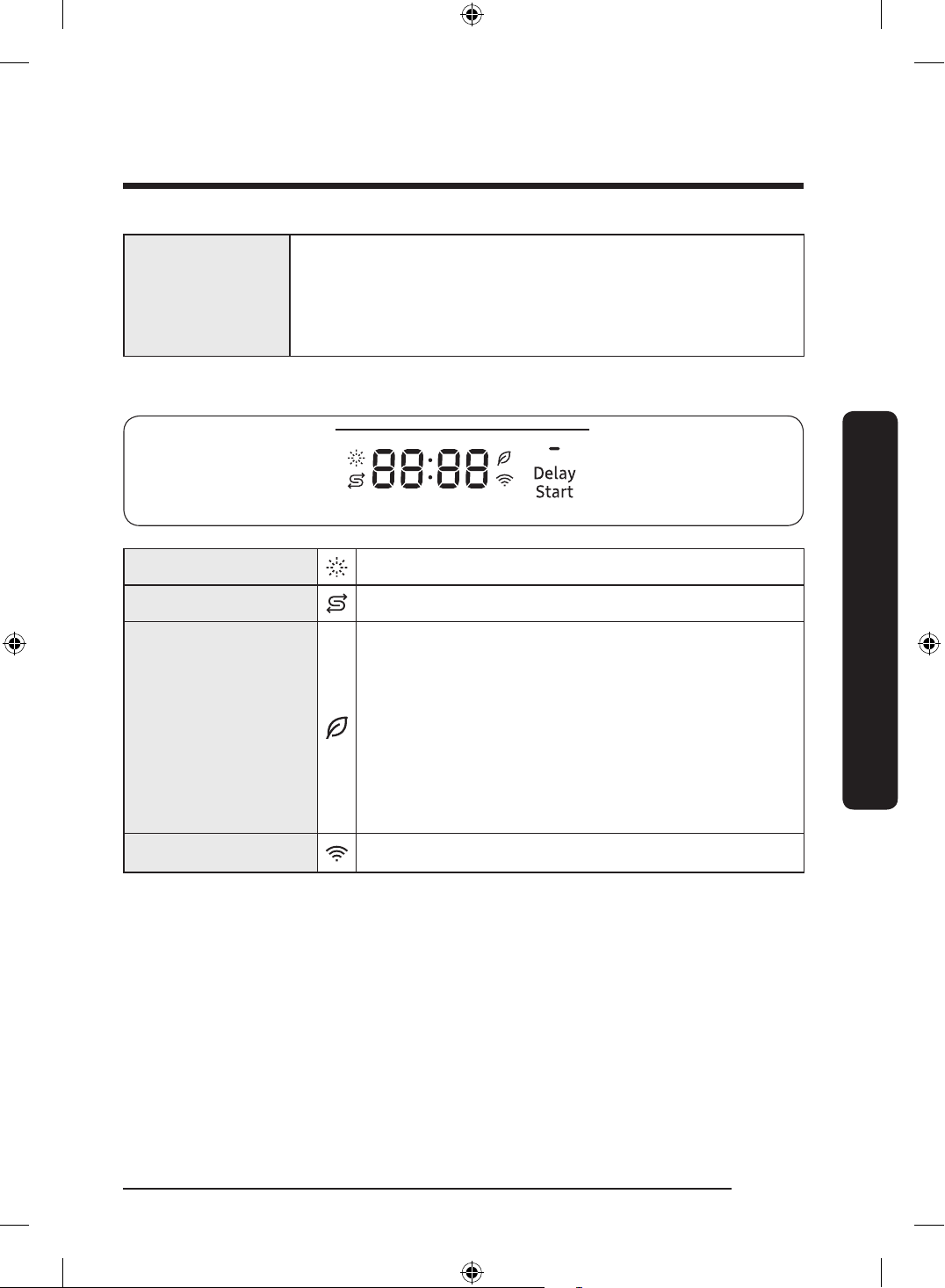
Indicators
Rinse Rell indicator Lights up if the dishwasher runs out of rinse aid.
Salt Rell Indicator
Lights up if Salt rell is activated.
AI Energy mode
indicator
• AI Energy mode becomes active when the
SmartThings app allows it to be enabled.
• With the AI Energy mode enabled, the indicator turns
on if an AI Energy mode compatible cycle is selected.
• Not all cycles are available with this mode.
The indicator turns off if an AI Energy mode
incompatible cycle is selected.
• AI Energy mode helps reduce power consumption.
However, it takes a longer cycle time.
Smart Control
Lights up if SmartThings is activated.
English 55
Operations
DD68-00250L-00_IB_DACOR_DW8700B_EN.indd 55 2024-01-11 3:09:41
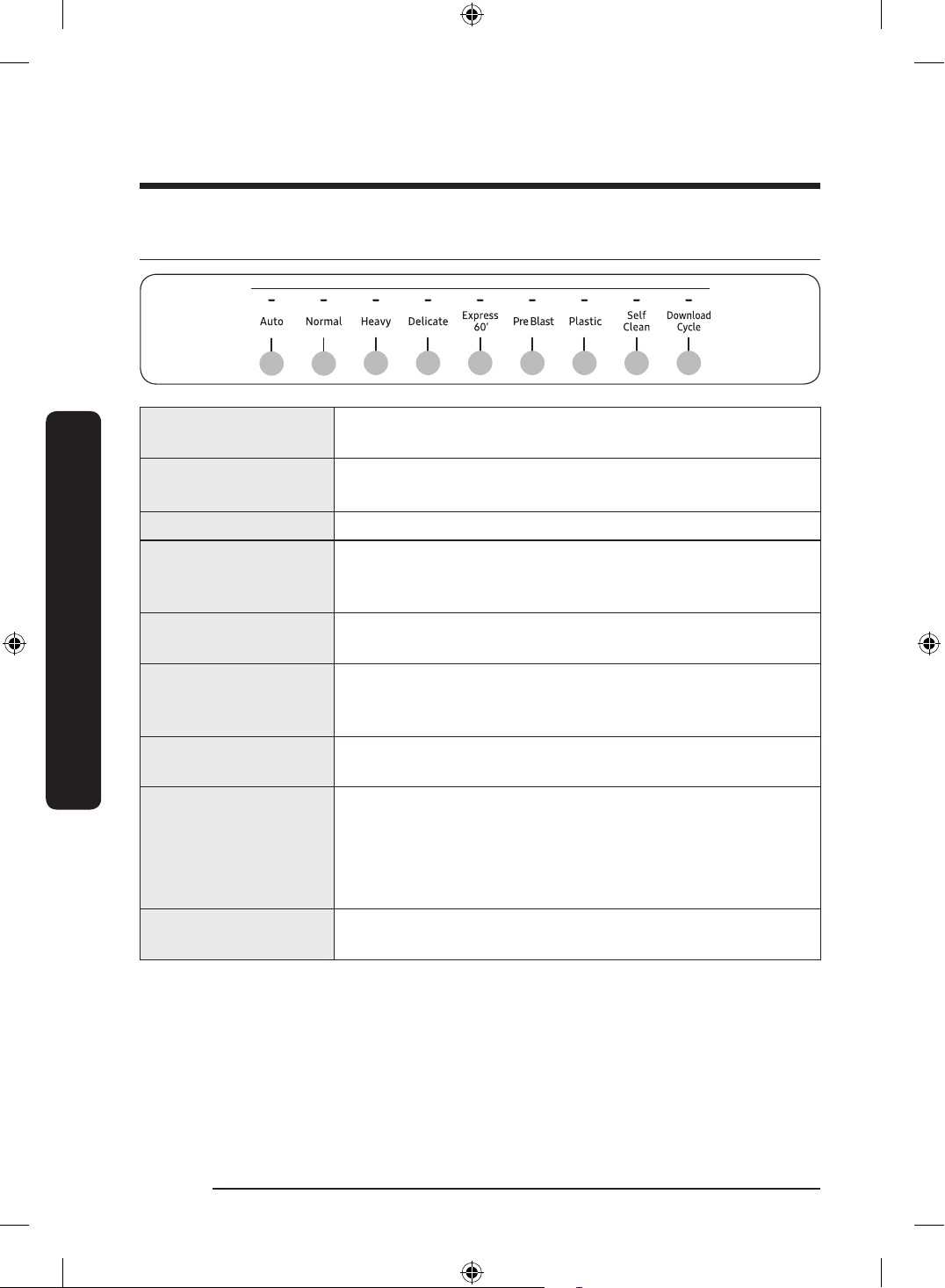
Cycle overview
0201
03 04 05 06 07 08 09
01 Auto
This cycle detects the level of soil and automatically initiates
the optimal cycle after a few minutes of operation.
02 Normal
Use this cycle for normally soiled dishes.
The energy-usage label is based on this cycle.
03 Heavy Use this cycle for heavily soiled dishes.
04 Delicate
Use this cycle for soiled, fragile items such as ne glassware
and crystal glass (wine glass). Do not use this cycle for other
glassware because clouding or etching may occur.
05 Express 60'
Use this cycle when you need to wash dishes quickly. It takes
about 1 hour.
06 Pre Blast
Use this cycle for dislodging large food debris roughly in a
quick time and preventing caking. No detergent or rinse is
applied.
07 Plastic
Appropriate for cleaning plastic dishes that are vulnerable to
heat and temperature.
08 Self Clean
Use this cycle to clean the dishwasher's tub.
• Be sure to run the Self Clean cycle with the dishwasher
empty, and never use it as a wash cycle to clean dishes.
• You can get notications through the SmartThings app
when self-cleaning is needed.
09 Download Cycle
Beside the default cycles, you can download and use additional
cycles on your phone.
English56
Operations
Operations
DD68-00250L-00_IB_DACOR_DW8700B_EN.indd 56 2024-01-11 3:09:41
Download Cycle
Beside the default cycles, you can download and use additional cycles on your phone.
1. Press Power button, and then select the Download Cycle.
2. Select a downloadable cycle on your phone app.
Cycles available: Pots Pans, Baby Care, Night.
- The default cycle is Pots Pans.
- You can save the downloaded cycle for future use.
3. Press Start button, and close the door of the dishwasher.
Pots Pans
Appropriate for cleaning cookware such as pans and pots
that are likely to be soiled heavily.
Baby Care
Use this cycle to rinse dishes with high-temperature water
before drying. No detergent is applied.
Night
Use this cycle for normal dishwashing after a meal. This
cycle takes longer time but makes less noise compare to
the Normal cycle
English 57
Operations
DD68-00250L-00_IB_DACOR_DW8700B_EN.indd 57 2024-01-11 3:09:41
Simple steps to start your dishwasher
1. Open the door, and then load the dishwasher. Make sure dishes are empty.
2. If applicable, put the dishes in the lower rack. If adding the Storm Wash
+
option, put the
dishes in the left side of the lower rack.
3. Add detergent to the detergent dispenser. For better results, add rinse aid to the rinse
aid compartment.
NOTE
You should use rinse aid for better drying performance. You can further improve drying
performance by also selecting the
Sanitize option.
4. Press Power, and then select a cycle with necessary options (Lower Rack, Storm Wash
+
,
Sanitize). If you change the cycle after selecting an option, the option is released.
5. Press Start, and then close the door within 3 seconds. The dishwasher starts the cycle
after draining for a few seconds.
NOTE
• To change the cycle after it has started, press and hold Start for 3 seconds to cancel the
cycle. Then, select a new cycle.
• To resume after you have opened the door to stop the dishwasher while operating,
simply press Start rst, then close the door.
English58
Operations
Operations
DD68-00250L-00_IB_DACOR_DW8700B_EN.indd 58 2024-01-11 3:09:41
Settings
You can change the Sound, Auto Release™ Dry alert, Rinse aid amount, Water Hardness,
Auto Release™ Dry settings and Sabbath mode to your preference. To change the settings,
press the Sanitize and Delay Start buttons simultaneously for 3 seconds. Press Sanitize to
navigate through the sub menus, and then press Delay Start to conrm your changes.
Sound
U1/U0
Auto Release™
Dry alert
J1/J0
Rinse aid
amount
F0~F6
Water
Hardness
L0~L5
Auto Release™
Dry
A1/A0
Sabbath Mode
H1/H0
After setting is nished, press Power button or Sanitize and Delay Start buttons.
Sound
Press
Sanitize until 'U0' or 'U1' is displayed. To mute the dishwasher, select 'U0', and then
press the Sanitize and Delay Start buttons at the same time or the Power button. To
unmute, select '
U1', and then press the Sanitize and Delay Start buttons at the same time or
the
Power button.
Auto Release™ Dry alert
You can enable or disable the setting that alerts you when the door opens to start the
Auto Release™ Dry function.
Press
Sanitize until 'J1' or 'J0' is displayed. To disable the Auto Release™ Dry alert,
select 'J0', and then press the Sanitize and Delay Start buttons at the same time or the
Power button. To enable, select 'J1', and then press the Sanitize and Delay Start buttons at
the same time or the Power button.
Rinse aid amount
Press
Sanitize until ‘F0~F6’ is displayed. The higher the number, the more rinse aid the
dishwasher uses. To improve drying performance, select a higher number.
If your dishes appear discolored after a wash, switch to a lower number.
The factory default level is
‘F4’.
Water Hardness
• Find the Water Hardness option.
• Select a water hardness level from Level 0 to Level 5 (default: Level 0)
NOTE
If the water hardness level in your area is 0, you do not need to use dishwasher-specic
salt. However, you must set the water hardness setting for the dishwasher to 0.
English 59
Operations
DD68-00250L-00_IB_DACOR_DW8700B_EN.indd 59 2024-01-11 3:09:41
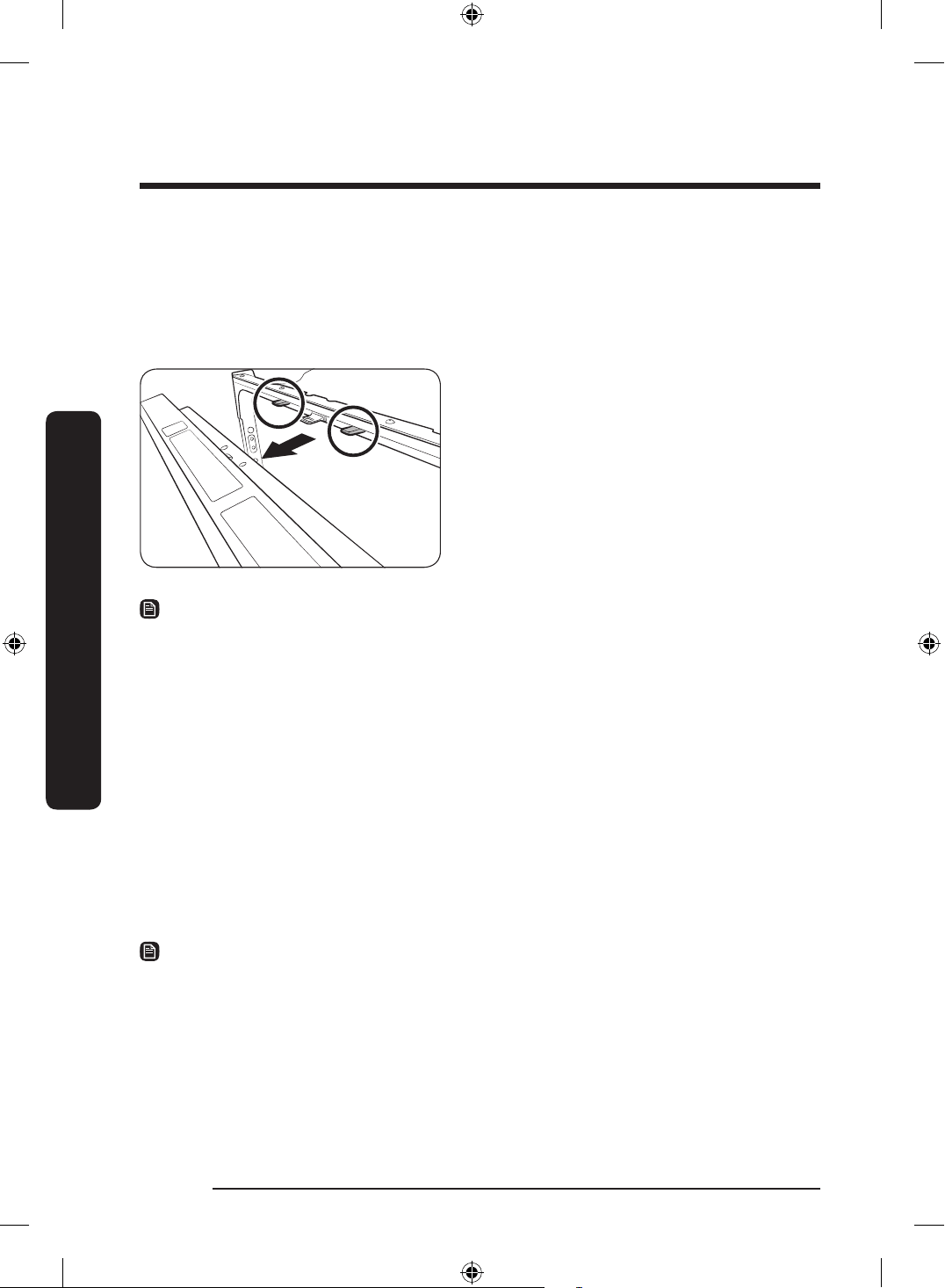
Auto Release™ Dry
The Auto Release™ Dry function, which is designed to improve drying performance,
automatically opens the dishwasher’s door 1 to 15 minutes before a cycle ends.
You can enable or disable Auto Release™ Dry in two ways: Using the Setting Mode or using
the switch keys. Both methods are described as shown below.
Press Sanitize until “A1” or “A0” is
displayed. Then, press Delay Start to enable
(A1) or disable (A0) Auto Release™ Dry.
Using the switch Keys :
Press the
Lower Rack + Sanitize button
for 3 second to enable (A1) or disable (A0)
Auto Release™ Dry.
NOTE
• Once the door opens on the Auto Release™ Dry mode, the door cannot be closed
manually for the next 2 minutes.
• Disabling (A0) “Auto Release™ Dry” can affect the drying results. Enable (A1)
“Auto Release™ Dry” for better drying result.
• After a cycle is complete, the door automatically opens to let steam out. This is normal
and not a product malfunction.
Sabbath mode
Press
Sanitize until ‘H0’ or ‘H1’ is displayed and turn off the dishwasher.
In Sabbath mode (H1), the dishwasher operates as follows:
• Interior lights and oor lights are off regardless of the door status.
• There is no sound regardless of sound settings.
Default level : H0 (Sabbath mode off)
NOTE
• Settings are saved even if the unit is turned off.
• Sabbath mode must therefore be turned off (H0) to activate light and sound.
English60
Operations
Operations
DD68-00250L-00_IB_DACOR_DW8700B_EN.indd 60 2024-01-11 3:09:42
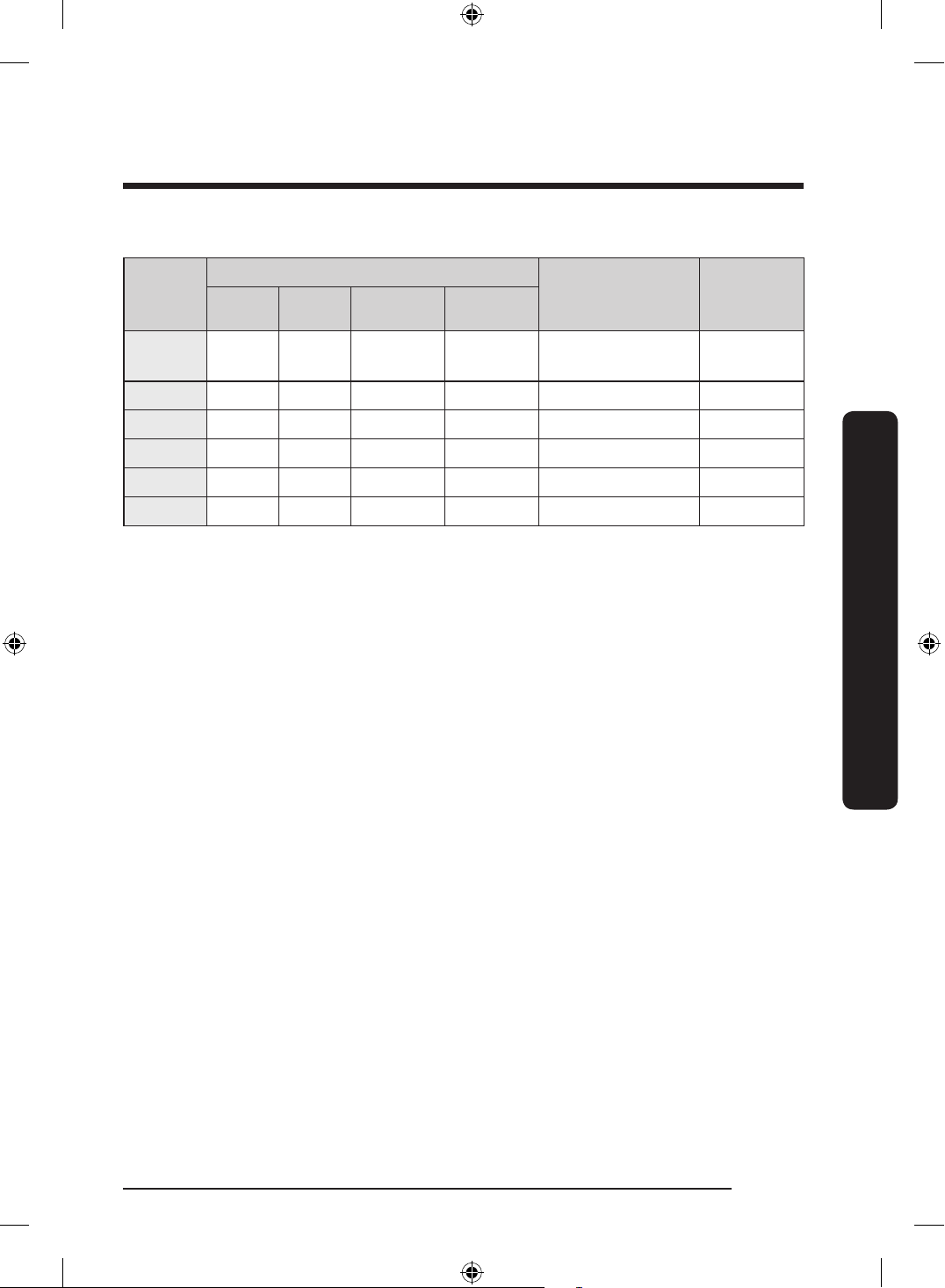
Water hardness level
Level
Water hardness Regeneration
softening/washing
cycle
Salt
injection
°dH °TH mmol/L Range
0 <6 <10 <1.0
No
recycle
No No
1 6-14 10-25 1-2.5 1/8 Yes Yes
2 14-23 25-40 2.5-4.0 1/5 Yes Yes
3 23-31 40-55 4.0-5.5 1/3 Yes Yes
4 31-40 55-70 5.5-7.0 1/2 Yes Yes
5 >40 >70 >7.0 1/1 Yes Yes
We recommend using soft water for better results. Hard water contains impurities that can
reduce the washing performance. You will need to soften the water if the supplied water is
harder than 1.0 mmol/L (6 °d – German scale).
• To soften the water, you need dishwasher-specic salt and conguration of the water
hardness level according to your area. For more information about the water hardness
level in your area, contact your local water department.
• If the hardness level of the supplied water supply is unsteady, set the dishwasher to
the highest measurement. For example, if the water hardness reading ranges from
6.7 mmol/L to 9.0 mmol/L, set the dishwasher to 9.0 mmol/L.
• The dishwasher’s default water hardness level is 4 (5.5-7.0 mmol/L). If this setting
matches the water hardness level in your area, you do not need to change it.
• Regeneration will be operated in dry phase with an additional 2.3-2.7 L of water being
used and 22-27 minutes taken for the cycle. The energy used may be increase however
this should be by an insignicant amount.
English 61
Operations
DD68-00250L-00_IB_DACOR_DW8700B_EN.indd 61 2024-01-11 3:09:42
English62
Operations
Operations
SmartThings
Wi-Fi connection
On your smartphone, go to
Settings, and then connect to your home Wi-Fi network.
Download
On an app market (Google Play Store, Apple App Store, Samsung Galaxy Apps), nd the
SmartThings app using “SmartThings” as the search term. Download and install the app on
your device.
NOTE
• The SmartThings app is designed for Android 6.0 (Marshmallow) or later, iOS 10.0
or later, iPhone 6 or later, and is optimized for Samsung smartphones (Galaxy S and
Galaxy Note series).
• For improved performance, the SmartThings app is subject to change without notice, or
discontinued support according to the manufacturer’s policy.
Log in
You must rst log into SmartThings using your Samsung account. To create a new Samsung
account, follow the instructions on the app. You don’t need a separate app to create your
account.
NOTE
If you have a Samsung account, use the account to log in. A registered Samsung
smartphone user automatically logs in.
DD68-00250L-00_IB_DACOR_DW8700B_EN.indd 62 2024-01-11 3:09:42
English 63
Operations
To register your device to SmartThings
1. Make sure your smartphone is connected to a wireless network.
2. Run SmartThings on your smartphone. iPhone users are required to provide the login
information each time they access the app.
3. When a message of “A new device is found.”, select Add.
4. If no message appears, select + and then select your dishwasher in a list of devices
available. If your dishwasher is not listed, select Device Type > Specic Device Model,
and then add your dishwasher manually.
5. Follow the on screen instructions to complete the connection process for your
dishwasher. Press and hold Smart Control for more than 5 seconds until the "AP"
message appears on the display. Your dishwasher will be registered with the app.
6. When the process is complete, your dishwasher will appear in the list of devices on
your SmartThings App.
7. Tap the dishwasher icon to open the dishwasher page.
8. When a network connection is established, the Wi-Fi icon lights up on your dishwasher.
DD68-00250L-00_IB_DACOR_DW8700B_EN.indd 63 2024-01-11 3:09:42
Maintenance
Cleaning
Keep the dishwasher clean to improve performance, reduce unnecessary repairs, and
lengthen the lifecycle.
Exterior
Clean spills on the surface of the dishwasher immediately. Use a soft, damp cloth on the
control panel to gently wipe away spills and dust.
CAUTION
• Do not use benzene, wax, thinner, chlorine bleach, alcohol, or other chemical
substances. These materials may discolour the surface of the dishwasher and cause
stains.
• The dishwasher has electric parts inside. Do not spray water directly onto the
dishwasher. Protect electrical components from water.
• For a stainless-steel door panel, use a stainless steel cleaner for home appliances and a
clean, soft cloth.
Interior
Clean the interior of the dishwasher on a regular basis to remove any dirt or food particles.
Wipe inside the dishwasher and inside the door with a wet dishcloth.
CAUTION
• Do not remove the front seal (the long rubber seal enclosing the opening of the
dishwasher). The seal keeps the inner side of the dishwasher sealed.
• Use a damp cloth to remove lime scale or grease deposits inside the dishwasher.
Alternatively, apply some detergent, and then run an empty cycle using the highest
rinse temperature.
English64
Maintenance
DD68-00250L-00_IB_DACOR_DW8700B_EN.indd 64 2024-01-11 3:09:42
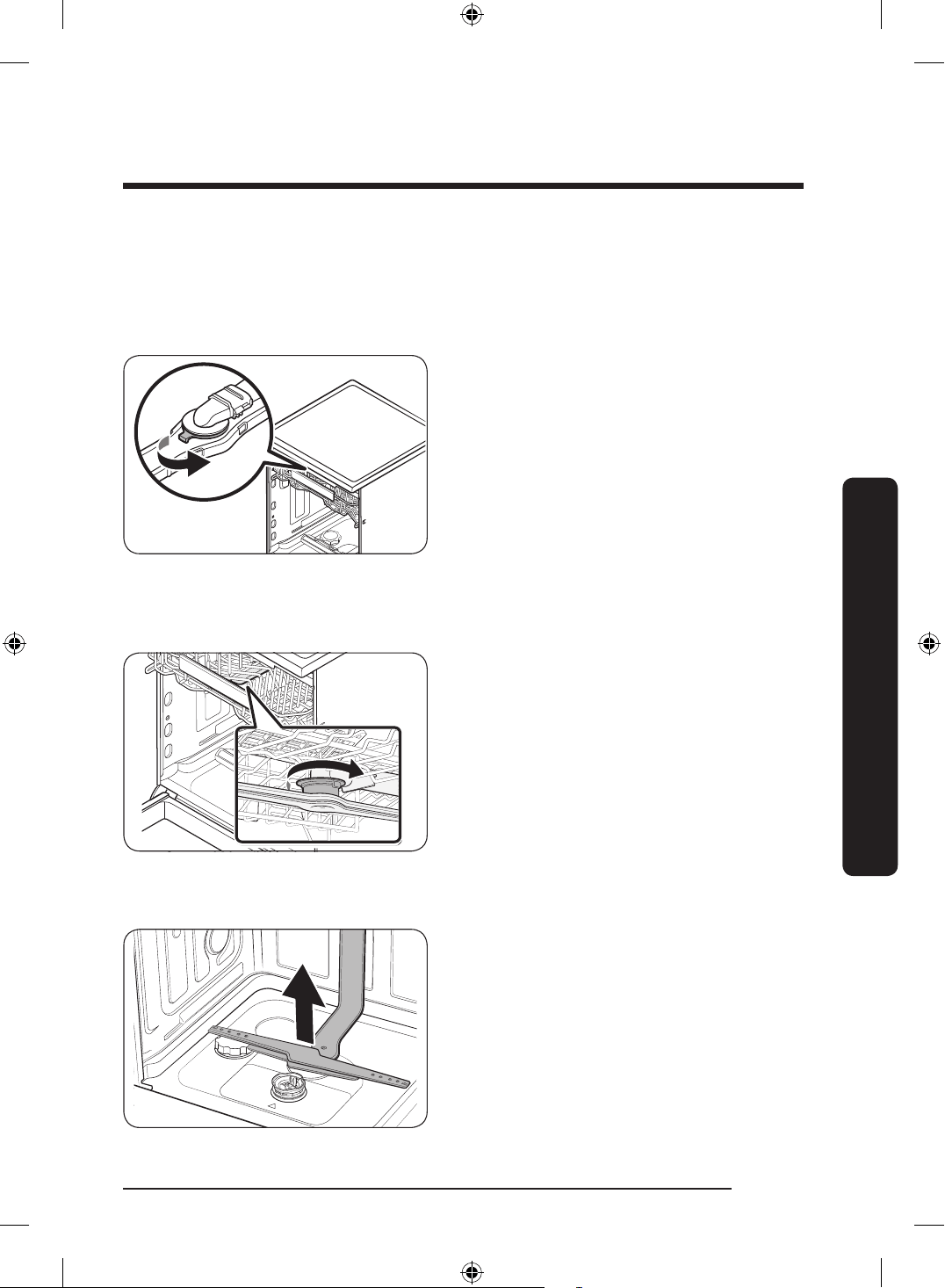
Nozzles
To prevent the nozzles from being clogged or if the nozzles are clogged, remove and clean
each nozzle. Use caution when removing the nozzles as they may break.
Top nozzle
1. Open the door, and then pull out the
upper rack. The top nozzle is visible on
the top.
2. Turn counter clockwise and remove the
nozzle cap, and then remove the nozzle.
3. Unclog and clean the nozzle.
4. Reinsert the nozzle, and then tighten
the cap clockwise.
5. Rotate the nozzle by hand to make sure
the nozzle is engaged correctly.
Upper nozzle
1. Open the door, and then pull out the
upper rack to reveal the upper nozzle.
2. Loosen and remove the nut, and then
remove the nozzle.
3. Unclog and clean the nozzle.
4. Reinsert the nozzle, and then tighten
the nut by hand.
5. Rotate the nozzle by hand to make sure
the nozzle is engaged correctly.
Lower nozzle
1. Open the door, and then pull out the
lower rack. The lower nozzle is visible
on the bottom.
2. Unclog and clean the nozzle.
3. Reinsert the nozzle.
4. Rotate the nozzle by hand to make sure
the nozzle is engaged correctly.
English 65
Maintenance
DD68-00250L-00_IB_DACOR_DW8700B_EN.indd 65 2024-01-11 3:09:42
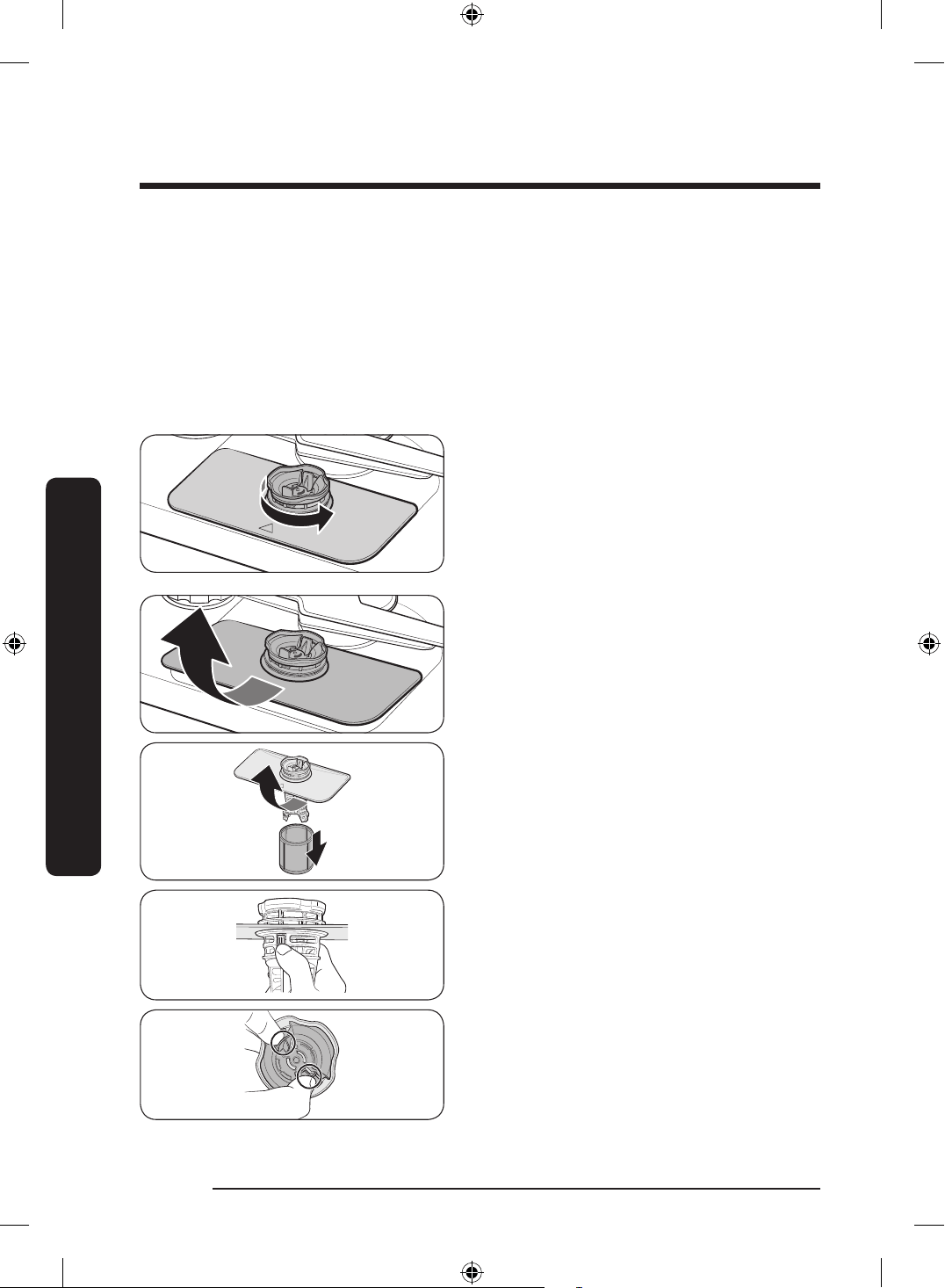
Internal Cleaning
We recommend internal cleaning every month. You can use the Self Clean cycle or the
Intensive cycle without putting in dishes.
If your tap water is hard, you can prevent limescale inside the dishwasher by adding citric
acid to the detergent when operating the dishwasher.
Filter
We recommend cleaning the lter every month.
1. Open the door, and then remove the
lower rack rst.
2. Turn the lter handle counterclockwise
to unlock the Coarse lter.
3. Remove the Coarse lter, and then the
cylindrical micro lter underneath.
English66
Maintenance
Maintenance
DD68-00250L-00_IB_DACOR_DW8700B_EN.indd 66 2024-01-11 3:09:43
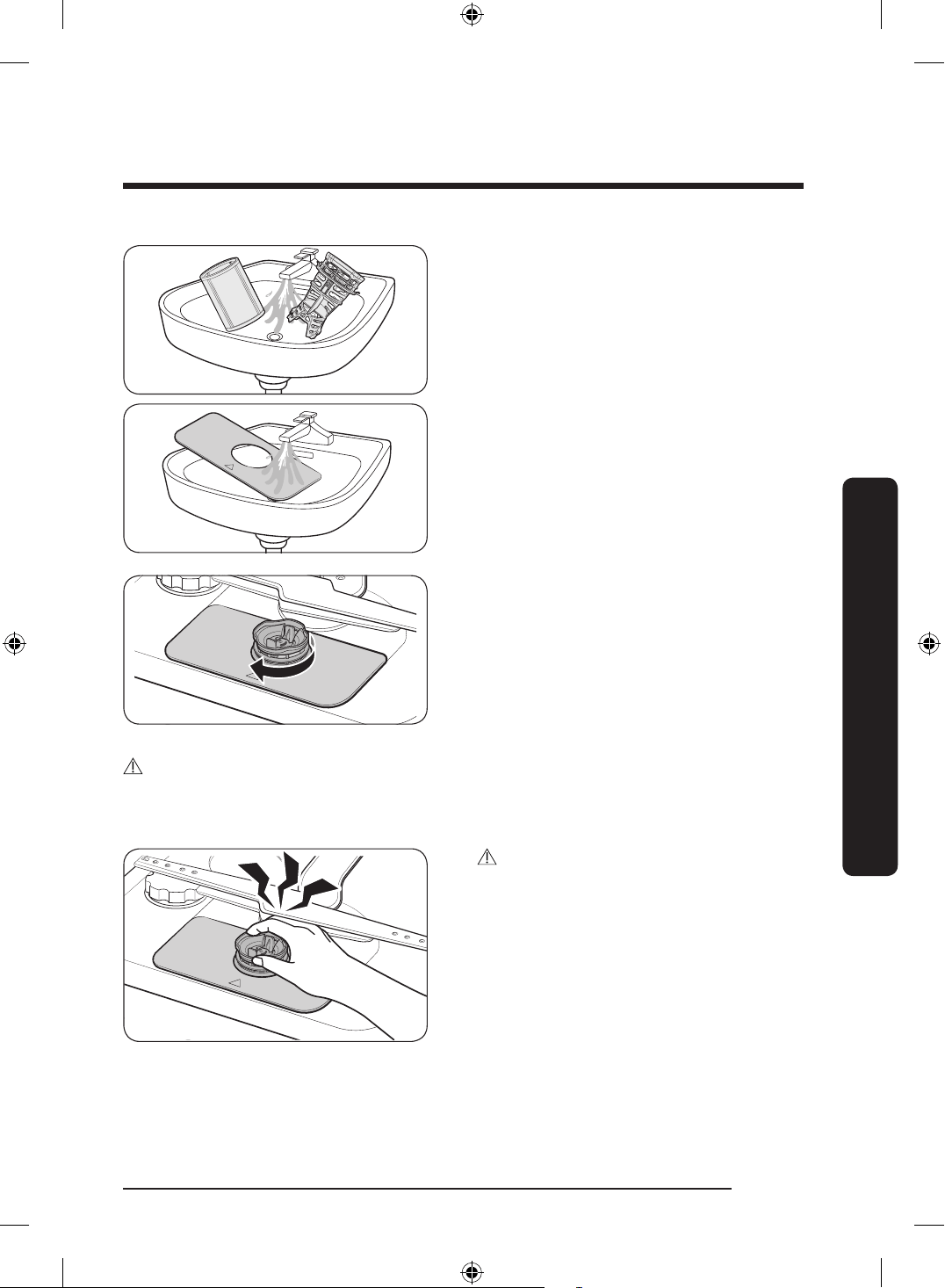
4. Remove any dirt and impurities from
the micro lter and the Coarse lter.
5. Rinse both lters with running water,
and then dry well.
6. Reinsert the lter, and then the Coarse
lter.
7. Turn the lter handle clockwise to lock.
CAUTION
Make sure the Coarse lter is closed properly. A loose cover can reduce the ltering
performance.
CAUTION
When removing the lter, the hand can
caught between the rotor and lter.
English 67
Maintenance
DD68-00250L-00_IB_DACOR_DW8700B_EN.indd 67 2024-01-11 3:09:43
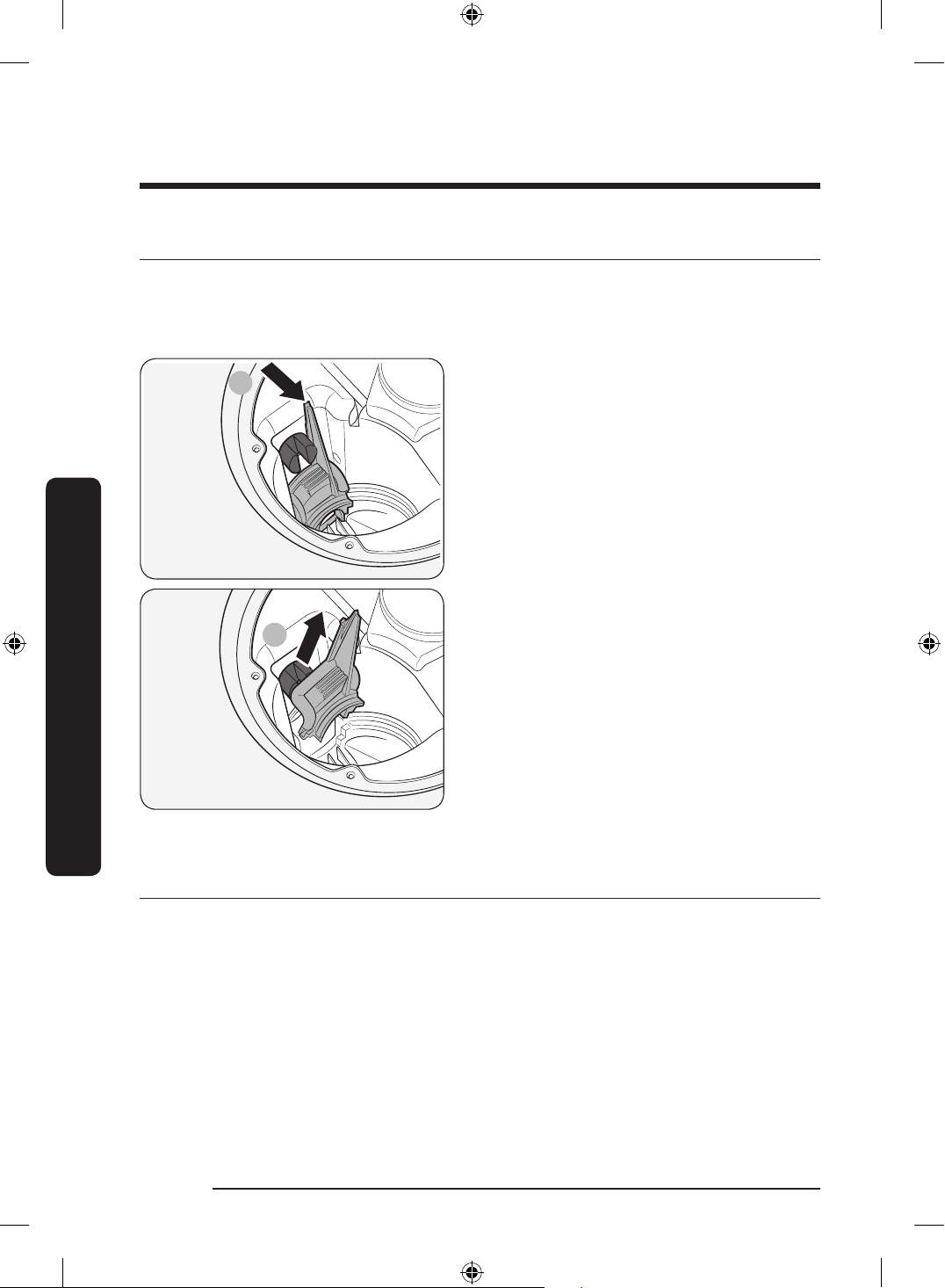
Cleaning the drain pump
If the dishwasher fails to drain (5C is displayed) because the drain pump is clogged with a
foreign matter or there is an abnormal noise coming from the drain pump, you must unclog
and clean the drain pump as instructed below.
1
2
1. Remove the lower rack.
2. See the “Filter” section to remove the
cylindrical micro lter.
3. Remove any moisture from the lter
using a sponge.
4. Remove the drain-pump cover by
pushing its handle in the direction of
the arrow (1), and then pulling up (2).
5. Check the impeller to see if it’s in good
condition. Then, remove any foreign
matter from the pump.
6. Reinsert the drain-pump cover and then
press down until you hear a click.
Long-term care
If you will not use the dishwasher for an extended period of time, rst drain the unit
completely, and then disconnect the water hose. Shut off the water supply valve and the
circuit breaker. Water remaining in the hoses or the internal components can damage the
dishwasher.
English68
Maintenance
Maintenance
DD68-00250L-00_IB_DACOR_DW8700B_EN.indd 68 2024-01-11 3:09:43
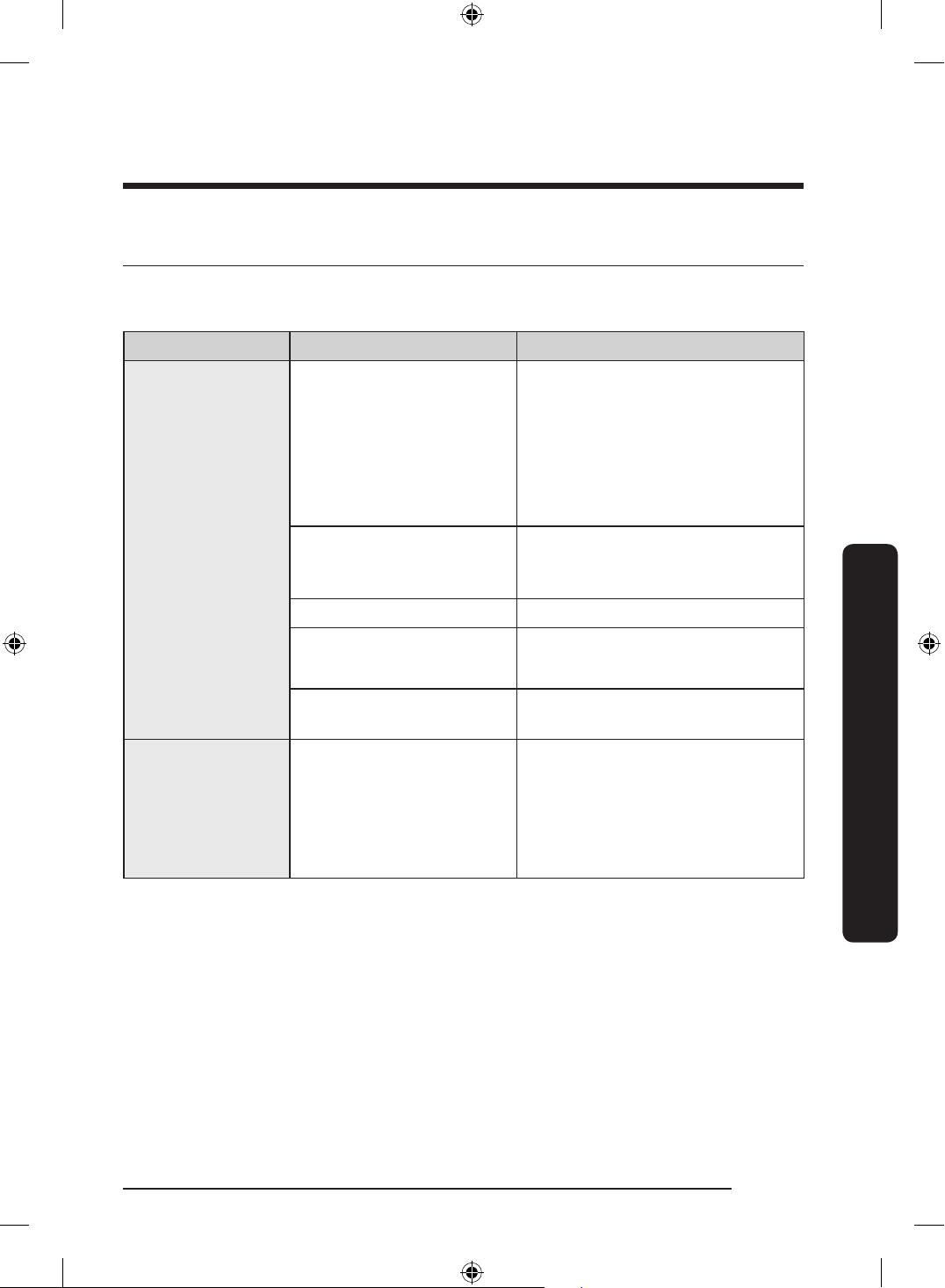
Troubleshooting
Checkpoints
If you encounter an issue to check with the dishwasher, rst check the table below and try
the suggestions.
Symptom Possible Cause Action
The dishwasher
does not start.
The door is not completely
closed.
• Make sure the door is latched
and completely closed.
• Make sure the upper rack is
properly joined with the duct
nozzle.
• Make sure the upper rack is
properly assembled.
The Start (Reset) Button is
not selected.
• Make sure the door is latched
and completely closed. Then,
press Start.
No cycle is selected. • Select a cycle.
The power cord is not
connected.
• Connect the power cord.
Water is not being supplied.
• Make sure the water supply
valve is open.
The dishwasher
takes too long to
start operation.
The dishwasher is
connected to a cold water
supply.
• To work properly, the
dishwasher must be connected
to a hot water supply. If
connected to a cold water
supply, additional time is
required to heat the cold water.
English 69
Troubleshooting
DD68-00250L-00_IB_DACOR_DW8700B_EN.indd 69 2024-01-11 3:09:44
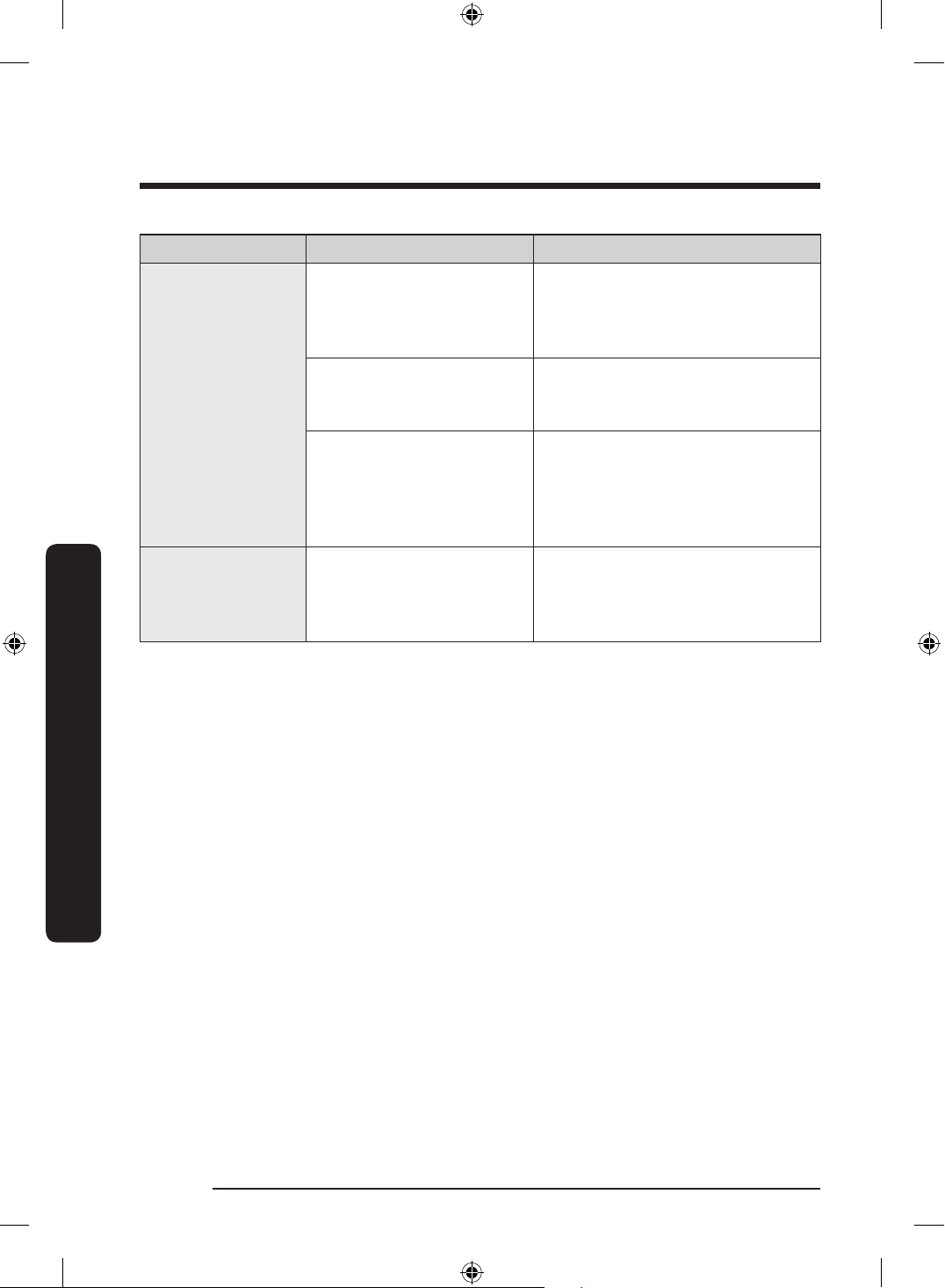
Symptom Possible Cause Action
The dishwasher has
bad odours.
Water remains from the
previous cycle.
• With the dishwasher empty,
add detergent, and then run
the Normal cycle to clean the
dishwasher.
The drain hose is
obstructed.
• Contact a qualied service
technician to remove any
obstruction from the drain hose.
The dishwasher is not used
daily or soiled dishes are
left in unit too long.
• With the dishwasher empty and
no detergent, place a glass with
8 ounces of vinegar upright into
the lower rack, and then run the
Normal cycle.
Water remains in
the dishwasher
after a cycle has
nished.
The drain hose is folded or
clogged.
• Straighten and unclog the hose.
English70
Troubleshooting
Troubleshooting
DD68-00250L-00_IB_DACOR_DW8700B_EN.indd 70 2024-01-11 3:09:44
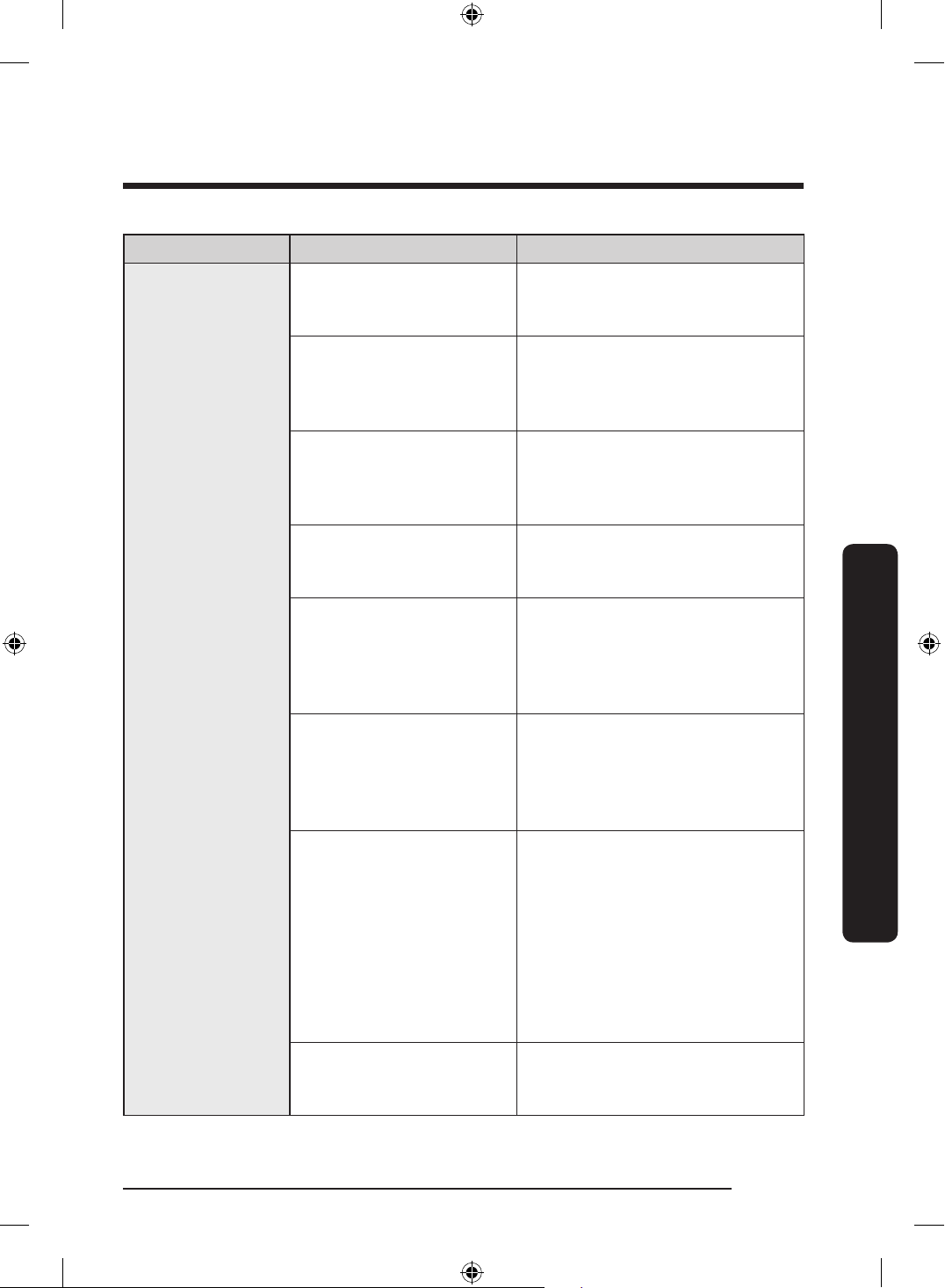
Symptom Possible Cause Action
Food remains on
dishes
An incorrect cycle was
selected.
• Select a cycle according to
the soil level of the dishes as
instructed in this manual.
The lters or nozzles are
clogged or not correctly
fastened.
• Clean the lters or nozzles.
Make sure the lters are
correctly fastened. See the
Cleaning section on page 64.
An insufcient amount of
detergent or no detergent
was used.
• Use the correct amount of
detergent for each load. We
recommend using a powdered
or gel type of detergent.
The water pressure is low.
• Make sure the pressure is
between 20 psi and 120 psi
(140-830 kPa).
The water temperature is
low.
• Connect the water supply line
to a hot water supply. For best
performance, the temperature of
the supplied water must reach
120 °F (49 °C).
Dishes improperly loaded
or overloaded.
• Arrange the dishes so they do
not interfere with the nozzles
and/or the detergent dispenser.
See the Loading dishes section
on page 42.
The water is too hard.
• Use a commercial dishwasher
cleaner.
• Use high-quality, fresh
detergent with rinse aid.
• Clean the lter at least once per
month.
• Use a water softener additive
designed for dishwashers
featuring the water softener.
Upper rack unbalanced.
• Level the left and right sides of
the upper rack. See the Height
adjustment section on page 38.
English 71
Troubleshooting
DD68-00250L-00_IB_DACOR_DW8700B_EN.indd 71 2024-01-11 3:09:44
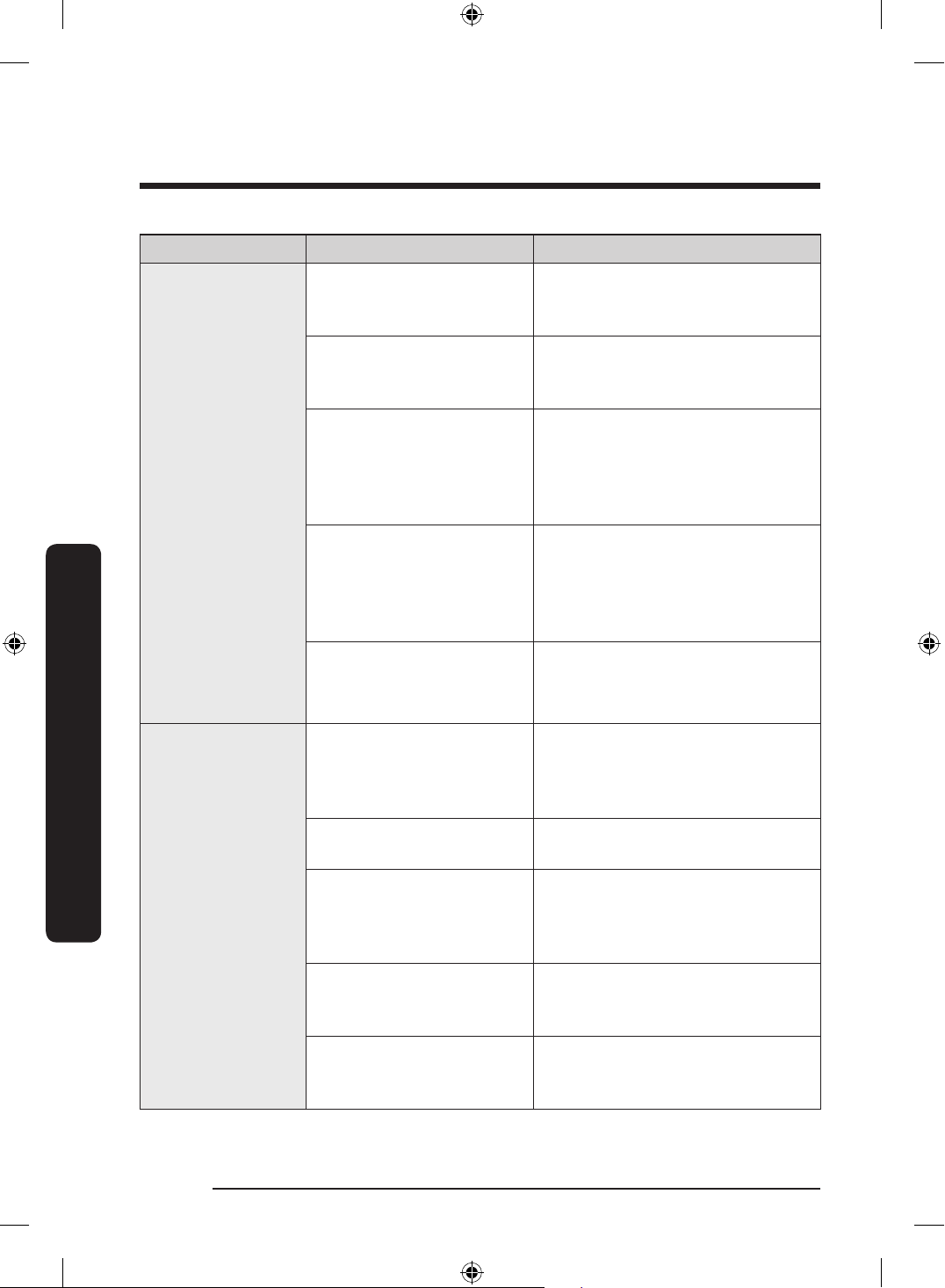
Symptom Possible Cause Action
Dishes are not
dried well.
There is no rinse aid in the
dispenser, or not enough
rinse aid was used.
• Add a liquid type of rinse aid.
Check the rinse aid settings.
The water temperature is
low when the dishwasher is
operating.
• Connect the water supply line to
a hot water source. Use rinse aid
with the Sanitize option.
Too many dishes have been
loaded.
• Proper loading of items can
affect drying performance. Load
your dishes as recommended.
See the Loading dishes section
on page 42.
Glasses and cups spilled
water onto other dishes
while being unloaded.
• Empty the lower rack rst, and
then the upper rack. This will
avoid water dripping from the
upper rack onto the dishes in
the lower rack.
Auto Release™ Dry is turned
off.
• Check if Auto Release™ Dry is
turned off in Settings mode. If
so, turn it on.
The dishwasher is
too noisy.
The dishwasher makes a
sound when the dispenser
cover is open and the drain
pump has just started.
• This is normal.
The dishwasher is not level.
• Make sure the dishwasher is
level.
Foreign material (screws,
plastic pieces) is in the
pump chamber.
• Contact a qualied service
technician to remove foreign
materials from the pump
chamber.
The nozzle bumps against
the dishes, creating a
chopping sound.
• Rearrange the dishes.
Upper rack unbalanced.
• Level the left and right sides of
the upper rack. See the Height
adjustment section on page 38.
English72
Troubleshooting
Troubleshooting
DD68-00250L-00_IB_DACOR_DW8700B_EN.indd 72 2024-01-11 3:09:44
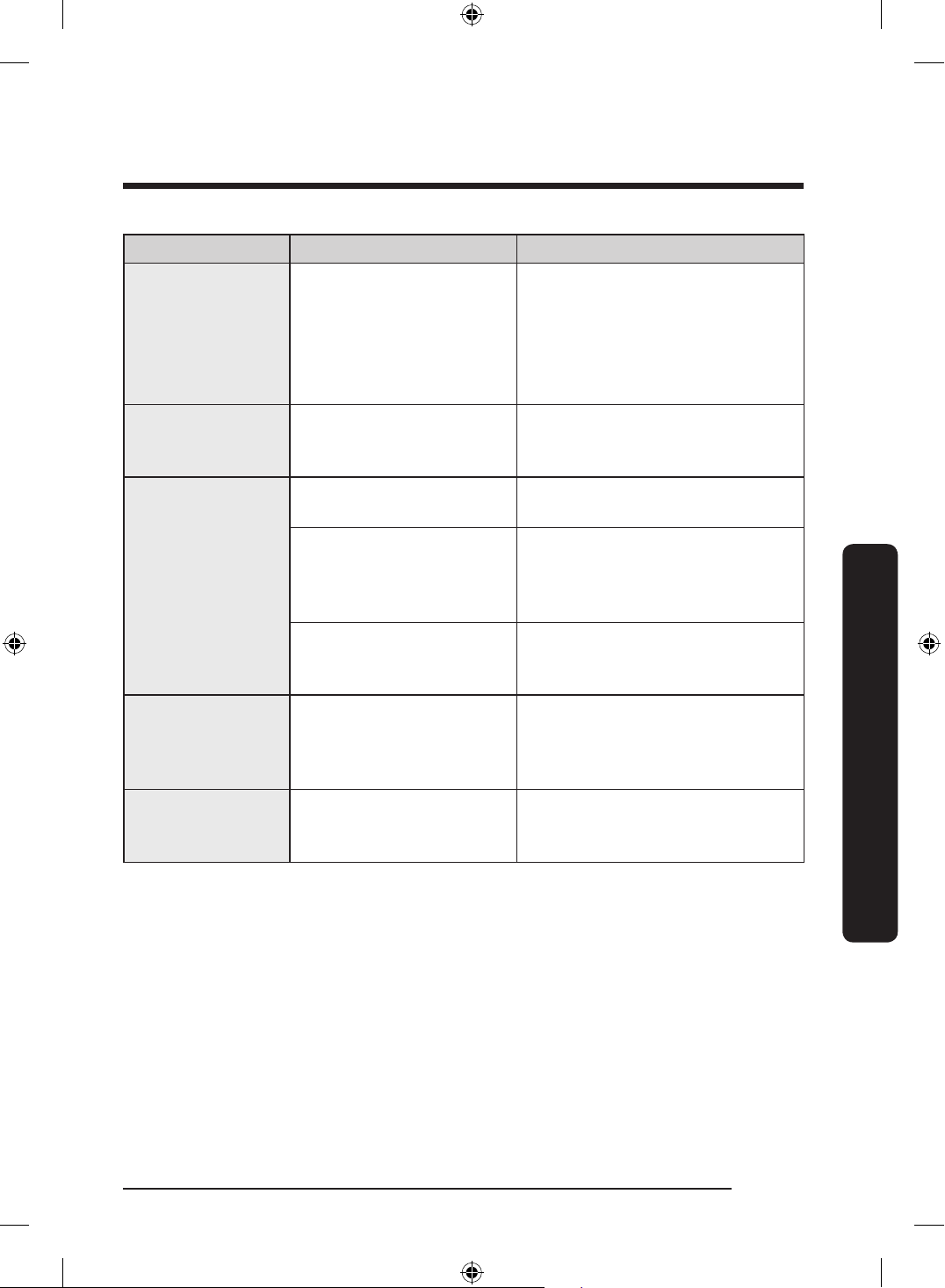
Symptom Possible Cause Action
Leaves glasses with
a light lm.
• The water supplied
is soft and too much
detergent was used.
• Aluminium dishes were
included in the wash
load.
• Underload the dishwasher and
use a rinse aid to reduce the
detergent.
• Remove the marks on the dishes
using a low sensitivity cleaner.
Yellow or brown
lm remains on
dishes.
Coffee and tea soils.
• Remove the soils using a spot
cleaner.
The nozzle does not
rotate smoothly.
The nozzle is clogged with
food particles.
• Clean the nozzle. See the
Cleaning section on page 64.
The nozzle is blocked by
a dish or pot and cannot
rotate.
• After placing the dishes into the
racks, rotate the nozzle by hand
to check whether any of the
dishes interfere with the nozzle.
Upper rack unbalanced.
• Level the left and right sides of
the upper rack. See the Height
adjustment section on page 38.
Water won’t
pump out of the
dishwasher.
The drain system is
clogged.
• Clean the drain pump by
removing the drain pump cover.
See the Drain pump section on
page 68.
The upper rack is
bent after dishes
are loaded.
The dishes are not loaded
properly.
• Arrange the dishes as
recommended. See the Loading
dishes section on page 42.
English 73
Troubleshooting
DD68-00250L-00_IB_DACOR_DW8700B_EN.indd 73 2024-01-11 3:09:44
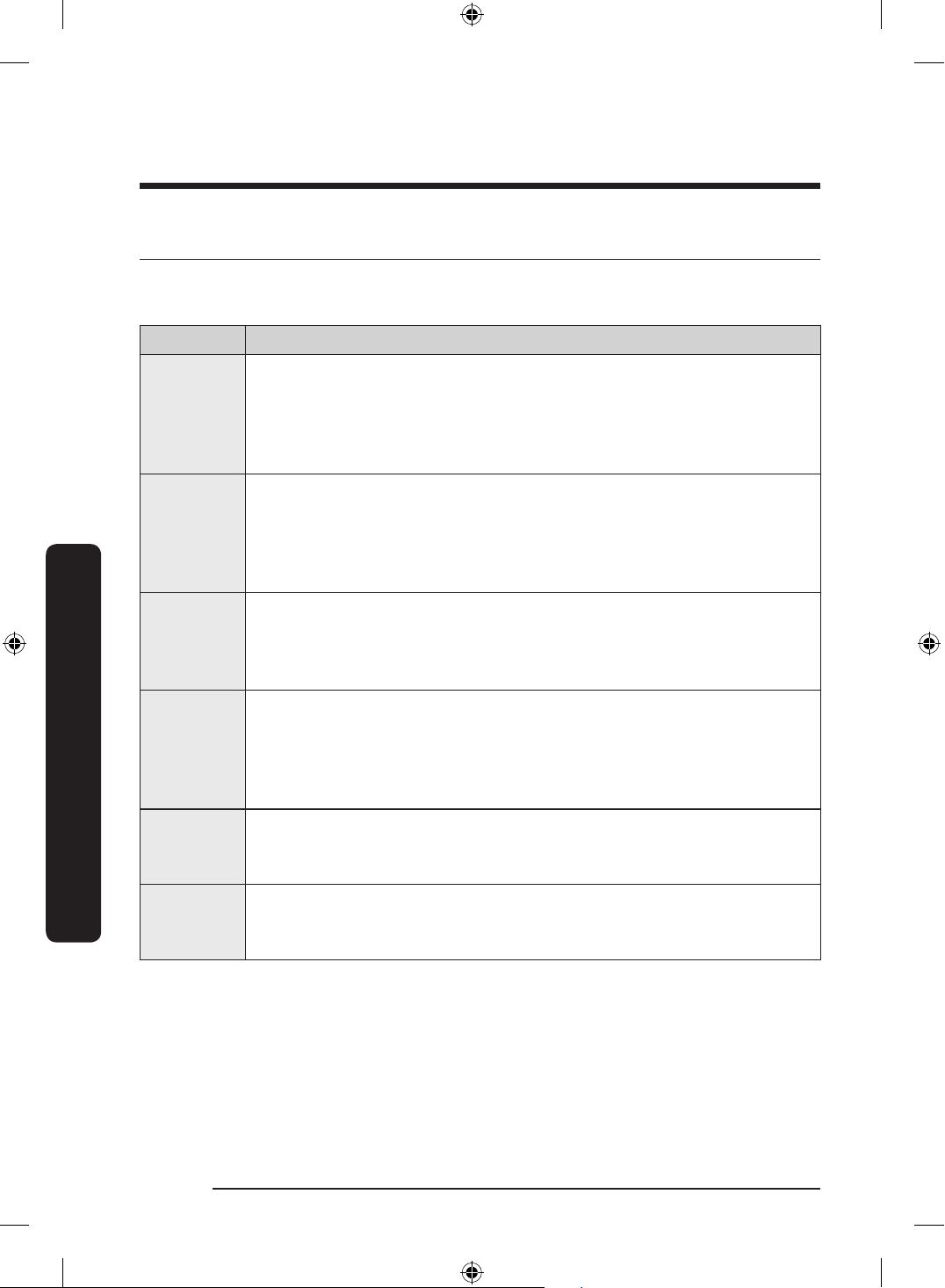
English74
Troubleshooting
Troubleshooting
Information codes
If the dishwasher fails to operate, you may see an information code on the display. Check
the table below and try the suggestions.
Code Action
LC
Leakage check
• Close the water supply valve. Go to your home’s circuit breaker panel,
and set the dishwasher’s circuit breaker switch to off. Then, contact the
installer to repair. If the issue continues, contact a local Dacor customer
center.
4C
Water supply check
• Check if the water supply valve is closed, if the water supply is
suspended, or if the water inlet valve or line is frozen or clogged by
foreign particles. If the issue continues, contact a local Dacor customer
center.
5C
Drain check
• Close the water supply valve. Check if the drain hose is clogged or
folded. Check if the drain hole inside the pump is clogged. If the issue
continues, contact a local Dacor customer center.
HC
High temperature heating check
• Functional check. With the dishwasher empty, add detergent, and then
run a cycle. If the issue continues, go to your home’s circuit breaker
panel, and set the dishwasher’s circuit breaker switch to off. Then,
contact a local Dacor customer center.
3C
Pump operation check
• Functional check. Turn off the dishwasher and restart. If the issue
continues, contact a local Dacor customer center.
AP
Connect with a smart phone.
• When the control panel displays ‘AP’, press and hold
Smart Control on
the control panel to connect your dishwasher with your smart phone.
DD68-00250L-00_IB_DACOR_DW8700B_EN.indd 74 2024-01-11 3:09:44
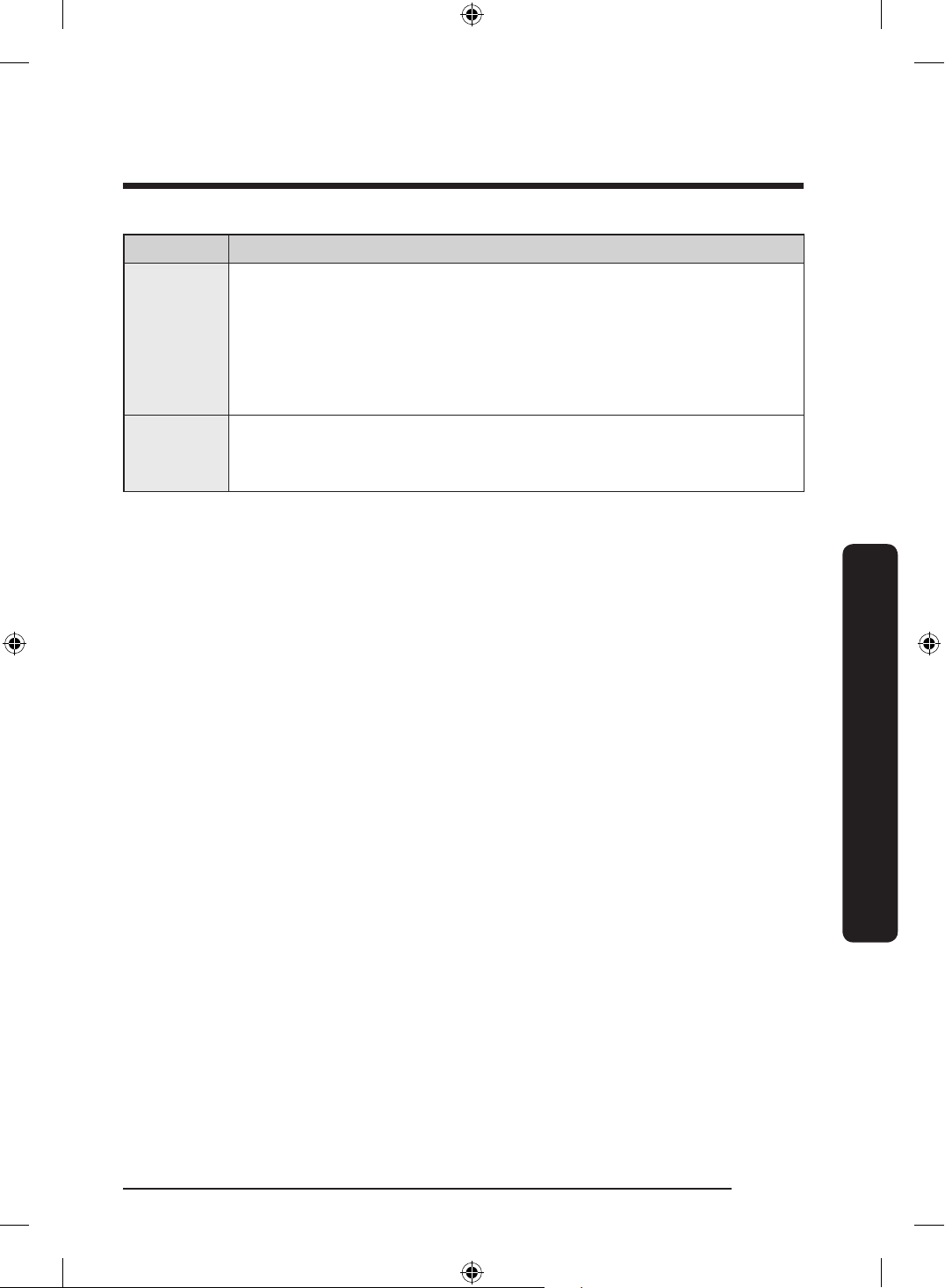
English 75
Troubleshooting
Code Action
1C
Low-water level check
• Check if the lter is clogged.
• Make sure to use dishwasher detergent.
• Make sure that the dishes are loaded evenly.
• Turn the dishwasher off and turn it on again. Then, try again.
• If the problem continues, contact a local Dacor service center.
9C9
The IPM is overheating
• Unplug the appliance and contact a Dacor customer center.
DD68-00250L-00_IB_DACOR_DW8700B_EN.indd 75 2024-01-11 3:09:44
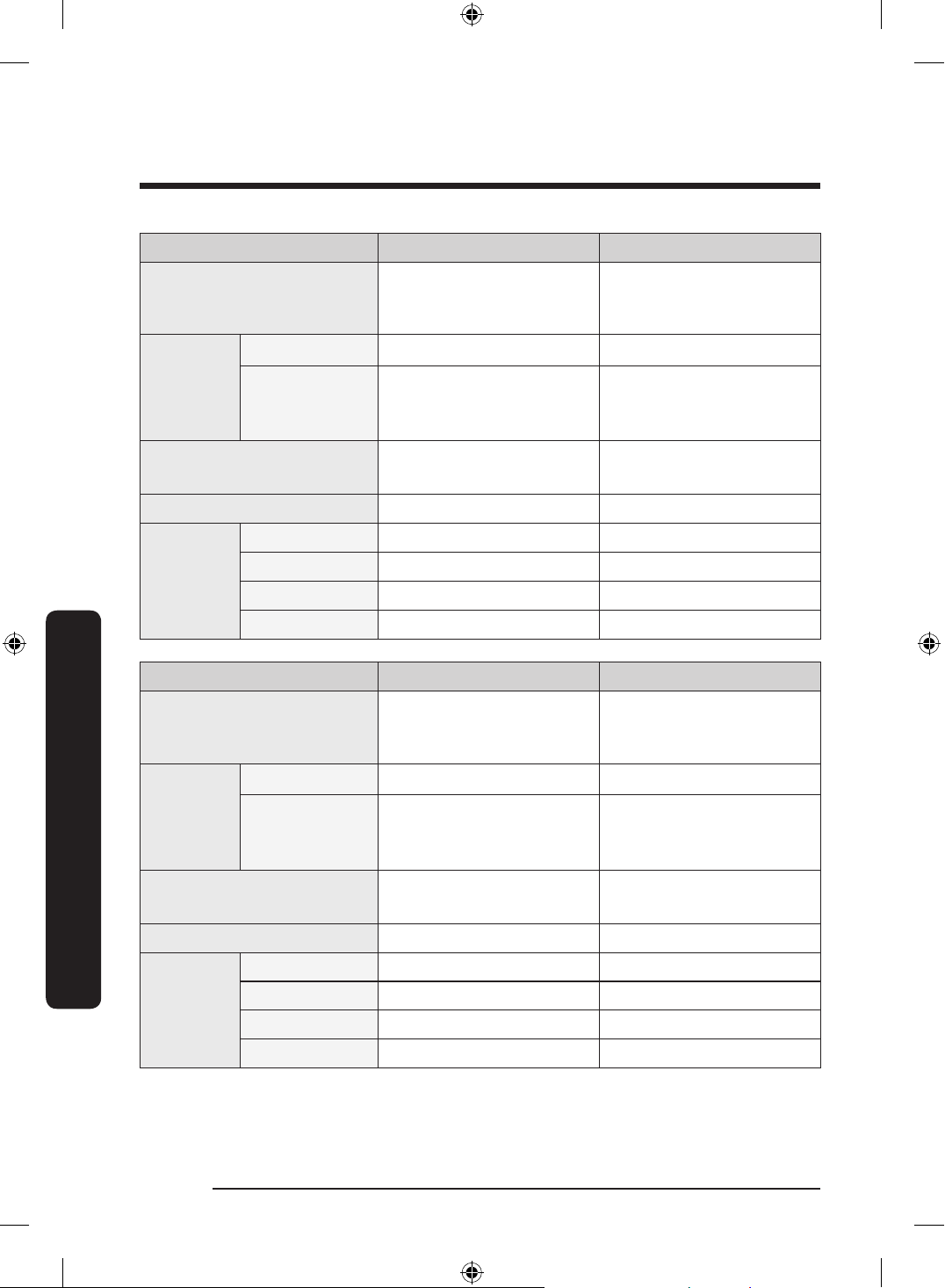
Cycle chart
Cycle Auto Normal
Cycle sequence
Prewash Mainwash
Rinse Hot Rinse Dry
End
Prewash Mainwash
Rinse Hot Rinse Dry
End
Temp
[°F (°C)]
Main wash 131–149 °F (55-65 °C) 113-145 °F (45-63 °C)
Hot Rinse
*Sanitize
167 °F (75 °C)
140-149 °F (60-65 °C) 129-144 °F (54-62 °C)
Water consumption
[gal(ℓ)]
4.08-5.34
(15.45-20.2 L)
2.64-5.26
(10.00-19.9 L)
Cycle time [min] 113-135 112-127
Available
Option
Lower rack
Storm Wash
+
Sanitize
Delay Start
Cycle Heavy Delicate
Cycle sequence
Prewash Mainwash
Rinse Hot Rinse Dry
End
Prewash Mainwash
Rinse Hot Rinse Dry
End
Temp
[°F (°C)]
Main wash 149 °F (65 °C) 122 °F (50 °C)
Hot Rinse
*Sanitize
167 °F (75 °C)
145 °F (63 °C) 131 °F (55 °C)
Water consumption
[gal(ℓ)]
5.49
(20.8 L)
4.33
(16.4 L)
Cycle time [min] 140 79
Available
Option
Lower rack
Storm Wash
+
Sanitize
Delay Start
English76
Cycle chart
DD68-00250L-00_IB_DACOR_DW8700B_EN.indd 76 2024-01-11 3:09:44
Cycle Express 60 Pre Blast
Cycle sequence
Mainwash Rinse
Hot Rinse Dry End
Prewash End
Temp
[°F (°C)]
Main wash 131 °F (55 °C) -
Hot Rinse
*Sanitize
167 °F (75 °C)
131 °F (55 °C) -
Water consumption
[gal(ℓ)]
2.93
(11.1 L)
1.03
(3.9 L)
Cycle time [min] 60 10
Available
Option
Lower rack
Storm Wash
+
Sanitize
Delay Start
Cycle Plastic Self Clean
Cycle sequence
Mainwash Rinse
Hot Rinse Dry End
Prewash Mainwash
Rinse Hot Rinse Dry
End
Temp
[°F (°C)]
Main wash 140 °F (60 °C) 163 °F (73 °C)
Hot Rinse
*Sanitize
167 °F (75 °C)
136 °F (58 °C) 149 °F (65 °C)
Water consumption
[gal(ℓ)]
3.45
(13.05 L)
4.49
(17 L)
Cycle time [min] 94 116
Available
Option
Lower rack
Storm Wash
+
Sanitize
Delay Start
English 77
Cycle chart
DD68-00250L-00_IB_DACOR_DW8700B_EN.indd 77 2024-01-11 3:09:44
Cycle Pots Pans Baby Care Night
Cycle sequence
Prewash
Mainwash
Rinse
Hot Rinse Dry
End
Rinse Dry
End
Prewash
Mainwash
Rinse
Hot Rinse Dry
End
Temp
[°F (°C)]
Main wash 158 °F (70 °C) - 140 °F (60 °C)
Hot Rinse
*Sanitize
167 °F (75 °C)
149 °F (65 °C) 163 °F (73 °C) 129 °F (54 °C)
Water consumption
[gal(ℓ)]
5.46
(20.65 L)
0.98
(3.7 L)
5.06
(19.15 L)
Cycle time [min] 148 89 154
Available
Option
Lower rack
Storm Wash
+
Sanitize
Delay Start
NOTE
• When you select the Auto or Normal cycle, you can eliminate optional steps depending
on the soil level of the dishes.
• The water consumption and cycle time varies depending on the steps or options you
add, and on the pressure and temperature of the supplied water.
• The cycle temperature in the SmartThings app indicates the highest temperature that
can reach during the cycle.
English78
Cycle chart
Cycle chart
DD68-00250L-00_IB_DACOR_DW8700B_EN.indd 78 2024-01-11 3:09:44
Appendix
Helping the environment
• Your dishwasher is manufactured from recyclable materials. If you decide to dispose of
it, please observe local waste disposal regulations. Cut off the power cable so that the
appliance cannot be connected to a power source.
• Remove the door so that animals and small children cannot get trapped inside the
appliance.
• Do not exceed the detergent quantities recommended in the detergent manufacturers’
instructions.
Specications
Specications are subject to change without notice for improved quality. The actual
appearance of the dishwasher may differ from the illustrations in this manual.
MODEL DDW24G9000AP
Power 120 V / 60 Hz AC only, 15 A circuit breaker
Water pressure
20-120 psi
(140-830 kPa)
Wash capacity 14 place settings
Rated power
Wash Motor: 60-100 W
Heater: 1200 W
Dimension
(Width x Depth x Height)
23
3
/8" X 21
3
/4" X 32
1
/8" (595 X 552 X 815 mm)
Weight (Unpacked) 95 lb (43 kg)
English 79
Appendix
DD68-00250L-00_IB_DACOR_DW8700B_EN.indd 79 2024-01-11 3:09:44
Warranty
Customer Service
Before you request help or schedule service:
1. Try the Solutions offered in the Problem—Solution table in the “Troubleshooting”
section.
2. Become familiar with the warranty terms and conditions of your product.
3. If none of these tips or suggestions resolves your problem, visit dacor.com or call our
Customer Service center at (833) 353-5483 (United States), (844) 509-4659 (Canada)
United States - Warranty
CERTIFICATE OF WARRANTY ON DACOR DISHWASHER - UNITED STATES:
FULL TWO-YEAR WARRANTY
This warranty covers any defects in materials or workmanship in the Dacor-branded new
appliance purchased from a Dacor Authorized Dealer or other seller authorized by Dacor.
This full warranty runs for two years starting from the date of delivery or closing date for
new construction, whichever period is longer. Dacor will repair or replace your product.
LIMITED WARRANTY
After the Full Warranty period has ended, this product is warranted against defects in
materials or workmanship reported to us during the applicable warranty periods as
follows:
Years 25 of your
ownership – Parts only on
rust-through of stainless
steel tank and door.
For the twenty-ve years of your ownership, we will pay
for factory-specied parts only to correct defects in rust-
through of stainless steel tank and door.
Cosmetic Defects. In addition, for 60 days from the date of delivery, your product is
warranted to be free from cosmetic defects in material and workmanship (such as
scratches of stainless steel, paint/porcelain blemishes, chip, dents, or other damage to
the nish). Color variations are excluded, and display, oor-model, “as-is” or refurbished
products are specically excluded.
COVERAGE LIMITATIONS
Service will be provided by a Dacor designated service company during regular business
hours. Please note service providers are independent entities and are not agents of Dacor.
The owner must provide proof of purchase, proof of delivery and/or a closing statement
for new construction upon request. All Dacor products must be accessible for service.
English80
Warranty
DD68-00250L-00_IB_DACOR_DW8700B_EN.indd 80 2024-01-11 3:09:44
Warranty will be null and void on product that has altered, defaced, or missing serial
numbers and tags.
Warranty is null and void if non-CSA approved product is transported from the U.S.A.
WHAT IS NOT COVERED
• Due to differences in painted parts,
kitchen lighting, product placement,
and other factors; this warranty does
not apply to color variation.
• Service calls to educate the customer
on proper use and care of the product.
• Service fees for travel to islands and
remote areas, which include but are not
limited to, ferries, toll roads, or other
travel expenses.
• Consequential or incidental damage,
including but not limited to: food or
medicine loss, time away from work, or
restaurant meals.
• Commercial, business, or rental use, or
any application other than residential
consumer use.
• Failure of the product caused by
improper product installation.
• Replacement of house fuses, fuse
boxes, or resetting of circuit breakers.
• Damage caused by accident, re, ood,
power interruption, power surges, or
acts of God.
• Liability or responsibility for damage
to surrounding property including
cabinetry, oors, ceilings and other
structures or objects.
• Breakage, discoloration or damage
to glass, metal surfaces, plastic
components, trim, paint, or other
cosmetic nish caused by improper
usage, care, abuse, or neglect.
• Except as noted above, consumable
parts such as lters and light bulbs are
not covered and are the responsibility
of the purchaser.
English 81
Warranty
DD68-00250L-00_IB_DACOR_DW8700B_EN.indd 81 2024-01-11 3:09:45
THE REMEDIES PROVIDED IN THE ABOVE EXPRESS WARRANTIES ARE THE SOLE
AND EXCLUSIVE REMEDIES. THEREFORE, NO OTHER EXPRESS WARRANTIES ARE
MADE, AND OUTSIDE THE FIFTY STATES OF THE UNITED STATES AND CANADA, ALL
IMPLIED WARRANTIES, INCLUDING BUT NOT LIMITED TO, ANY IMPLIED WARRANTY OF
MERCHANTABILITY OR FITNESS FOR A PARTICULAR USE OR PURPOSE, ARE LIMITED
IN DURATION TO ONE YEAR FROM THE DATE OF ORIGINAL PURCHASE. IN NO EVENT
SHALL DACOR BE LIABLE FOR INCIDENTAL EXPENSE OR CONSEQUENTIAL DAMAGES.
IN THE EVENT DACOR PREVAILS IN ANY LAWSUIT, DACOR SHALL BE ENTITLED TO
REIMBURSEMENT OF ALL COSTS AND EXPENSES, INCLUDING ATTORNEY’S FEES, FROM THE
DACOR CUSTOMER. NO WARRANTIES, EXPRESS OR IMPLIED, ARE MADE TO ANY BUYER
FOR RESALE.
Some states do not allow limitations on how long an implied warranty lasts, or do not
allow the exclusion or limitation of inconsequential damages, therefore the above
limitations or exclusions may not apply to you. This warranty gives you specic legal
rights, and you may also have other rights that vary from state-to-state.
Warrantor: Samsung Electronics America, Ridgeeld Park, NJ, 07660
English82
Warranty
Warranty
DD68-00250L-00_IB_DACOR_DW8700B_EN.indd 82 2024-01-11 3:09:45
CANADA – Warranty
CERTIFICATE OF WARRANTY ON DACOR DISHWASHER - CANADA:
This Limited Warranty covers only those Products supplied and distributed in Canada by us
and delivered new, in the original carton or packaging, to the original consumer purchaser
that are purchased from an authorized reseller or distributor, except as otherwise stated
herein. Except where prohibited by applicable provincial law, only the original consumer
purchaser of the Product has any rights under this Limited Warranty and this Limited
Warranty may not be transferred or assigned.
Any additional statements such as dealer advertising or presentation, whether oral or
written, that make additional warranties or modications to this Limited Warranty do not
constitute warranties by us and should not be relied upon.
1. WHAT IS COVERED AND FOR HOW LONG
We warrant to the original purchaser (“Purchaser”) that your Dacor Dishwasher purchased
from an authorized reseller or distributor in Canada (the “Products”) is free from defects in
material and workmanship encountered in normal use for the warranty period identied
below, effective as of the date of purchase or closing date for new construction, whichever
period is longer.
Dacor Product or Part Warranty Period and Warranty Coverage
Dishwasher rust-through of stainless
steel tank and door.
Twenty-ve (25) Years : Parts Only
Cosmetic Defects. For sixty (60) days from the date of purchase, the Product is warranted
to be free from cosmetic defects in material and workmanship (such as scratches of
stainless steel, paint/porcelain blemishes, chip, dents, or other damage to the nish).
Color variations are excluded, and display, oor-model, “as-is” or refurbished products are
specically excluded.
English 83
Warranty
DD68-00250L-00_IB_DACOR_DW8700B_EN.indd 83 2024-01-11 3:09:45
2. COVERAGE LIMITATIONS
If the Product fails to operate according to the Product’s specications during the
applicable warranty period and the failure is due to improper workmanship or defective
material, we will repair or replace, at our sole option, and without charge to the Purchaser,
the Product or any defective component part of the Product. We may, at our sole option,
use rebuilt, reconditioned, or new parts or components when repairing any Product. If the
same model Product or part is not available for replacement, we may, at our sole option,
replace the Product or part with any rebuilt, refurbished, reconditioned or new Product or
part of similar utility and value to the Product or part being replaced.
We expressly reserve the exclusive right, at our sole option, and in lieu of any service,
repair or replacement of a Product under this Limited Warranty, to offer the Purchaser
a partial refund of the original purchase price paid by the Purchaser for that Product (a
“Partial Refund”). The amount of any Partial Refund to be offered shall be determined in
our discretion based on the fair market value of the Product given its age and condition.
If Purchaser accepts that offer of a Partial Refund, the Purchaser shall be deemed to have
released us from any claim or liability whatsoever under this Limited Warranty or under
any other applicable express or implied warranty or condition in respect of that Product.
All repaired parts or replaced Products will be warranted for a period equal to the
remainder of the original Limited Warranty on the original Product or for 90 days,
whichever is longer.
3. WHAT IS NOT COVERED
The remedies provided for in this Limited Warranty are available only within Canada.
This Limited Warranty does not cover any defect, malfunction, failure or damage caused by
or resulting from any of the following:
(a) removal, installation, re-installation, maintenance, or service of the Product that was
not authorized by us; (b) accident, re, ood, power interruption, power surges, incorrect
line voltage or supply or electrical current, fuses, house wiring, circuit breakers, connectors
not supplied by us, unusual electrical or electromechanical stress, acts of God, or acts of
nature; (c) misuse, abuse, neglect, mishandling, misapplication, alteration or modication of
the Product or any part of the Product; (d) use of the Product in conjunction with products,
equipment, utilities, services, parts, supplies, accessories, applications, external wiring,
connectors, or ancillary or peripheral equipment not supplied or authorized by us; (e) uses
for which the Product was not intended.
English84
Warranty
Warranty
DD68-00250L-00_IB_DACOR_DW8700B_EN.indd 84 2024-01-11 3:09:45
Further, this Limited Warranty does not cover: (i) any Product or part from which the
serial number has been removed or on which the serial number has been made illegible.
Removing the serial number on any Product or rendering it illegible on any Product will
immediately void the Limited Warranty for that Product; (ii) any damage whatsoever
that occurs during shipment of the Product once the Product has been accepted by the
Purchaser; (iii) any damage whatsoever resulting from any failure to follow operating,
maintenance or environmental instructions contained in any instruction booklet or owner’s
manual available in connection with the Product; (iv) service fees for travel to islands
and remote areas, which include but are not limited to, ferries, toll roads, or other travel
expenses; (v) replacement of house fuses, fuse boxes, or resetting of circuit breakers; (vi)
liability or responsibility for damage to surrounding property including cabinetry, oors,
ceilings and other structures or objects; (vii) the cost of service calls for instructions, for the
correction of installation errors, for customer adjustments that are explained in the Product
owner’s manual, or where the Product operates according to the Product’s specications.
There may be a service charge for service calls made for issues not covered under this
Limited Warranty; (viii) breakage, discoloration or damage to glass, metal surfaces, plastic
components, trim, paint, or other cosmetic nish caused by improper usage, care, abuse,
or neglect; (ix) except as noted above, consumable parts such as lters and light bulbs are
not covered and are the responsibility of the Purchaser; (x) commercial, business, or rental
use, or any application other than residential consumer use; (xi) colour variation due to
differences in painted parts, kitchen lighting, product placement, and other factors;
We do not warrant or guarantee uninterrupted or error-free operation of the Product.
4. WHAT ARE THE LIMITATIONS ON IN-HOME WARRANTY SERVICE?
In-home service is subject to availability, and it is not available in all areas of Canada.
In-home service will only be provided if the Product is unobstructed and easily accessible
from oor level to service personnel. If repair cannot be completed during in-home
service or if in-home service is not available in your area, you may be directed to deliver
the Product to a Dacor Authorized Service Center for warranty service. The cost of
transportation of the Product to and from a Dacor Authorized Service Centre shall be paid
by the Purchaser unless we elect to provide that transportation at our discretion.
To receive in-home service, the Purchaser must rst contact Dacor Customer Care for
problem determination and service procedures. All in-home warranty repairs must
be performed by a Dacor Authorized Service Center. Valid proof of purchase must be
presented to us at the time that service is requested and before warranty services are
rendered.
When in-home service is not available, the Purchaser must return the Product to a Dacor
Authorized Service Center for analysis. Assistance on where to deliver the Product can be
obtained by contacting our Customer Service center. The cost of transporting the Product
to or from the Authorized Service Center must be paid by the Purchaser.
English 85
Warranty
DD68-00250L-00_IB_DACOR_DW8700B_EN.indd 85 2024-01-11 3:09:45
5. WHAT ARE THE LIMITS OF OUR LIABILITY?
EXCEPT AS EXPRESSLY SET FORTH IN THIS LIMITED WARRANTY, OUR LIABILITY IS SUBJECT
TO THE FOLLOWING LIMITATIONS:
(A) THE PURCHASER TAKES THE PRODUCT “AS IS” AND WE MAKE NO WARRANTY OR
REPRESENTATION OF ANY KIND WHATSOEVER WITH RESPECT TO THE PRODUCT.
(B) THERE ARE NO CONDITIONS, EXPRESS OR IMPLIED, STATUTORY OR OTHERWISE, WITH
RESPECT TO THE PRODUCT
(C) IN PARTICULAR, AND WITHOUT LIMITING THE GENERALITY OF THE FOREGOING
PARAGRAPHS (A) AND (B), WE MAKE NO WARRANTY, CONDITION OR REPRESENTATION AS
TO ANY OF THE FOLLOWING: (i) THE MERCHANTABILITY OF THE PRODUCT OR ITS FITNESS
FOR ANY PARTICULAR PURPOSE OR USE; (ii) TITLE OR NON-INFRINGEMENT; (iii) DESIGN,
CONDITION, QUALITY, OR PERFORMANCE OF THE PRODUCT; (iv) THE WORKMANSHIP OF
THE PRODUCT OR THE COMPONENTS CONTAINED THEREIN; (v) COMPLIANCE OF THE
PRODUCT WITH THE REQUIREMENTS OF ANY LAW, RULE, SPECIFICATION OR CONTRACT
PERTAINING TO THE PRODUCT.
(D) NOTHING CONTAINED IN ANY INSTRUCTION MANUAL OR OWNER’S MANUAL SHALL
BE CONSTRUED TO CREATE AN EXPRESS WARRANTY OF ANY KIND WHATSOEVER WITH
RESPECT TO THE PRODUCT.
THE PROVISIONS FOUND IN PARAGRAPHS (E) AND (F) BELOW DO NOT APPLY IN
CIRCUMSTANCES WHERE THIS LIMITED WARRANTY IS GOVERNED BY THE LAWS OF THE
PROVINCE OF QUEBEC.
(E) ALL IMPLIED WARRANTIES AND CONDITIONS THAT MAY ARISE BY OPERATION OF LAW,
INCLUDING ANY APPLICABLE IMPLIED WARRANTY OR CONDITION OF MERCHANTABILITY
OR FITNESS FOR A PARTICULAR PURPOSE, ARE HEREBY LIMITED TO THE SAME DURATION
OF TIME AS THIS LIMITED WARRANTY. SOME PROVINCES PROHIBIT LIMITATIONS ON
HOW LONG AN IMPLIED WARRANTY LASTS, AND THE LIMITATION ON THE DURATION
OF THE IMPLIED WARRANTY WILL NOT APPLY TO THE EXTENT THAT THE LIMITATION IS
PROHIBITED BY APPLICABLE PROVINCIAL LAW.
English86
Warranty
Warranty
DD68-00250L-00_IB_DACOR_DW8700B_EN.indd 86 2024-01-11 3:09:45
English 87
Warranty
(F) WE SHALL NOT BE LIABLE FOR DAMAGES OF ANY KIND (INCLUDING, WITHOUT
LIMITATION, ANY INCIDENTAL, SPECIAL, CONSEQUENTIAL OR SIMILAR DAMAGES) THAT
RESULT OR ARISE DIRECTLY OR INDIRECTLY FROM ANY OF THE FOLLOWING: (i) THE
PURCHASE, USE, OR MISUSE OF THE PRODUCT; (ii) ANY LOSS OF USE OF THE PRODUCT OR
INABILITY TO USE THE PRODUCT; (iii) ANY BREACH OF THE EXPRESS WARRANTY; (iv) ANY
LOSS OF ANTICIPATED PROFITS OR BENEFITS; (v) ANY LOSS OF FOOD OR CONSUMABLES;
(vi) ANY TORT (INCLUDING NEGLIGENCE OR GROSS NEGLIGENCE) OR FAULT COMMITTED
BY US, ITS AGENTS OR EMPLOYEES; (vii) ANY BREACH OF CONTRACT; (viii) ANY CLAIM
BROUGHT AGAINST THE PURCHASER BY ANY OTHER PARTY. SOME PROVINCES PROHIBIT
THE EXCLUSION OR LIMITATION OF INCIDENTAL OR CONSEQUENTIAL DAMAGES, AND THE
ABOVE EXCLUSION OF INCIDENTAL OR CONSEQUENTIAL DAMAGES WILL NOT APPLY TO
THE EXTENT THAT THE EXCLUSION IS PROHIBITED BY APPLICABLE PROVINCIAL LAW.
(G) THIS WARRANTY GIVES YOU SPECIFIC LEGAL RIGHTS, AND YOU MAY ALSO HAVE OTHER
RIGHTS, WHICH VARY FROM PROVINCE TO PROVINCE. THIS LIMITED WARRANTY STATES
THE PURCHASER’S EXCLUSIVE REMEDY. EXCEPT WHERE PROHIBITED BY APPLICABLE
PROVINCIAL LAW, THIS LIMITED WARRANTY IS NOT TRANSFERABLE WITHOUT OUR
EXPRESS CONSENT.
(H) IF ANY PORTION OF THIS LIMITED WARRANTY IS HELD ILLEGAL OR UNENFORCEABLE
BY REASON OF ANY LAW, SUCH PARTIAL ILLEGALITY OR UNENFORCEABILITY SHALL NOT
AFFECT THE ENFORCEABILITY FOR THE REMAINDER OF THIS LIMITED WARRANTY.
If the Product is purchased from a non-authorized reseller or distributor or purchased
outside of Canada, this Limited Warranty does not apply except that the above limitations
specied in Sections 5(A) through 5(I) shall apply.
Warrantor in Canada: Samsung Electronics Canada Inc., Mississauga, ON, L5N 0B9 Canada
OUTSIDE THE UNITED STATES AND CANADA:
TWO-YEAR LIMITED WARRANTY
If your Dacor product fails to function within two years of the original date of purchase
due to a defect in material or workmanship, Dacor will furnish a new part, F.O.B. factory to
replace the defective part.
All delivery, installation, labor costs, and other service fees are the responsibility of the
purchaser.
DD68-00250L-00_IB_DACOR_DW8700B_EN.indd 87 2024-01-11 3:09:45
DD68-00250L-00
DD68-00250L-00_IB_DACOR_DW8700B_EN.indd 88 2024-01-11 3:09:45