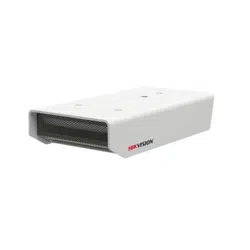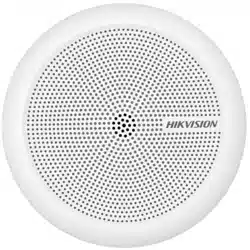

Indoor Security Microphone
User Manual

Indoor Security Microphone • User Manual
i
About this Document
● This Document includes instructions for using and managing the Product. Pictures, charts,
images and all other information hereinafter are for description and explanation only.
● The information contained in the Document is subject to change, without notice, due to
firmware updates or other reasons. Please find the latest version of the Document at the
Hikvision website (https://www.hikvision.com). Unless otherwise agreed, Hangzhou Hikvision
Digital Technology Co., Ltd. or its affiliates (hereinafter referred to as "Hikvision") makes no
warranties, express or implied.
● Please use the Document with the guidance and assistance of professionals trained in
supporting the Product.
About this Product
This product can only enjoy the after-sales service support in the country or region where the
purchase is made.
Acknowledgment of Intellectual Property Rights
● Hikvision owns the copyrights and/or patents related to the technology embodied in the
Products described in this Document, which may include licenses obtained from third parties.
● Any part of the Document, including text, pictures, graphics, etc., belongs to Hikvision. No part
of this Document may be excerpted, copied, translated, or modified in whole or in part by any
means without written permission.
● and other Hikvision’s trademarks and logos are the properties of Hikvision in
various jurisdictions.
● Other trademarks and logos mentioned are the properties of their respective owners.
LEGAL DISCLAIMER
● TO THE MAXIMUM EXTENT PERMITTED BY APPLICABLE LAW, THIS DOCUMENT AND THE
PRODUCT DESCRIBED, WITH ITS HARDWARE, SOFTWARE AND FIRMWARE, ARE PROVIDED "AS
IS" AND "WITH ALL FAULTS AND ERRORS". HIKVISION MAKES NO WARRANTIES, EXPRESS OR
IMPLIED, INCLUDING WITHOUT LIMITATION, MERCHANTABILITY, SATISFACTORY QUALITY, OR
FITNESS FOR A PARTICULAR PURPOSE. THE USE OF THE PRODUCT BY YOU IS AT YOUR OWN RISK.
IN NO EVENT WILL HIKVISION BE LIABLE TO YOU FOR ANY SPECIAL, CONSEQUENTIAL,
INCIDENTAL, OR INDIRECT DAMAGES, INCLUDING, AMONG OTHERS, DAMAGES FOR LOSS OF
BUSINESS PROFITS, BUSINESS INTERRUPTION, OR LOSS OF DATA, CORRUPTION OF SYSTEMS, OR
LOSS OF DOCUMENTATION, WHETHER BASED ON BREACH OF CONTRACT, TORT (INCLUDING
NEGLIGENCE), PRODUCT LIABILITY, OR OTHERWISE, IN CONNECTION WITH THE USE OF THE
PRODUCT, EVEN IF HIKVISION HAS BEEN ADVISED OF THE POSSIBILITY OF SUCH DAMAGES OR
LOSS.
● YOU ACKNOWLEDGE THAT THE NATURE OF THE INTERNET PROVIDES FOR INHERENT SECURITY
RISKS, AND HIKVISION SHALL NOT TAKE ANY RESPONSIBILITIES FOR ABNORMAL OPERATION,
PRIVACY LEAKAGE OR OTHER DAMAGES RESULTING FROM CYBER-ATTACK, HACKER ATTACK,
VIRUS INFECTION, OR OTHER INTERNET SECURITY RISKS; HOWEVER, HIKVISION WILL PROVIDE
TIMELY TECHNICAL SUPPORT IF REQUIRED.
● YOU AGREE TO USE THIS PRODUCT IN COMPLIANCE WITH ALL APPLICABLE LAWS, AND YOU ARE
SOLELY RESPONSIBLE FOR ENSURING THAT YOUR USE CONFORMS TO THE APPLICABLE LAW.
ESPECIALLY, YOU ARE RESPONSIBLE, FOR USING THIS PRODUCT IN A MANNER THAT DOES NOT

Indoor Security Microphone • User Manual
ii
INFRINGE ON THE RIGHTS OF THIRD PARTIES, INCLUDING WITHOUT LIMITATION, RIGHTS OF
PUBLICITY, INTELLECTUAL PROPERTY RIGHTS, OR DATA PROTECTION AND OTHER PRIVACY
RIGHTS. YOU SHALL NOT USE THIS PRODUCT FOR ANY PROHIBITED END-USES, INCLUDING THE
DEVELOPMENT OR PRODUCTION OF WEAPONS OF MASS DESTRUCTION, THE DEVELOPMENT
OR PRODUCTION OF CHEMICAL OR BIOLOGICAL WEAPONS, ANY ACTIVITIES IN THE CONTEXT
RELATED TO ANY NUCLEAR EXPLOSIVE OR UNSAFE NUCLEAR FUEL-CYCLE, OR IN SUPPORT OF
HUMAN RIGHTS ABUSES.
● IN THE EVENT OF ANY CONFLICTS BETWEEN THIS DOCUMENT AND THE APPLICABLE LAW, THE
LATTER PREVAILS.
© Hangzhou Hikvision Digital Technology Co., Ltd. All rights reserved.
Indoor Security Microphone • User Manual
iii
Safety Instruction
These instructions are intended to ensure that user can use the product correctly to avoid danger
or property loss.
The precaution measure is divided into “Warnings” and “Cautions”
Warnings: Serious injury or death may occur if any of the warnings are neglected.
Cautions: Injury or equipment damage may occur if any of the cautions are neglected.
Warnings
In the use of the product, you must be in strict compliance with the electrical safety
regulations of the nation and region.
For the permanently connected device without a disconnect equipment, a readily accessible
disconnect equipment shall be incorporated into the electrical installation of the connected
building. Refer to datasheet for details.
For the device powered on and off only by power plug and socket-outlet, the socket-outlet
shall be installed near the device and easily accessible.
Do not install devices for professional use in locations where children are likely to appear.
Risk of explosion if the battery is replaced by an incorrect type.
Improper replacement of the battery with an incorrect type may defeat a safeguard (for
example, in the case of some lithium battery types).
Do not dispose of the battery into fire or a hot oven, or mechanically crush or cut the battery,
which may result in an explosion.
Do not leave the battery in an extremely high temperature surrounding environment, which
may result in an explosion or the leakage of flammable liquid or gas.
Do not subject the battery to extremely low air pressure, which may result in an explosion or
the leakage of flammable liquid or gas.
Dispose of used batteries according to the instructions.
For the battery with + and - signs, + identifies the positive terminals of the device which is
used with or generates direct current, and - identifies the negative terminals of the device
which is used with or generates direct current.
For the device with sound playing function, to prevent possible hearing damage, do not listen
at high volume levels for long periods. Refer to the datasheet for details.
Cautions
Keep the device in original or similar packaging while transporting it.
Do not touch the sharp edges or corners.
DO NOT drop the product or subject it to physical shock.
Install the device according to the instructions in the Quick Start Guide.
Warnings Follow
these safeguards to
prevent serious injury
or death.
Cautions Follow these
precautions to prevent
potential injury or
material damage.

Indoor Security Microphone • User Manual
iv
If the device supports wall mounting, the mounting surface shall be able to withstand the
additional force of three times the weight of the device but not less than 50 N. The device and
its associated mounting means shall remain secure during the installation.
After the installation, the device, including any associated mounting plate, shall not be
damaged. Refer to Quick Start Guide for details.
If the device needs to be installed on the wall or ceiling,
Install the device according to the instructions in Quick Start Guide.
Attach the device properly to the floor/wall in accordance with the installation instructions to
prevent injury. Refer to the Quick Start Guide for details.
Never place the equipment in an unstable location. The equipment may fall, causing serious
personal injury or death.
To avoid heat accumulation, good ventilation is required for a proper operating environment.
If the device needs to be installed with a specific bracket of our company, use the
corresponding bracket only. Use others (such as carts, stands, and carriers) may result in
instability and cause injury. Refer to the device datasheet for bracket model details. Refer to
datasheet for details.
Please use a soft and dry cloth to clean the interior and exterior surfaces. Do not use alkaline
detergents.
Ensure correct wiring of the terminals, if it is required for the device, for connection to an AC
mains supply.
indicates hazardous live and the external wiring connected to the terminals requires
installation by an instructed person.
Refer to the device label for the standard power supply. Please make sure your power supply
matches with your device.
Use the power adapter that can work normally at an altitude over 2000 meters above sea
level.
This equipment shall be installed incorporated with UPS to avoid the risk of restart.
The equipment has been designed, when required, modified for connection to an IT power
distribution system.
Use a power adapter provided by qualified manufacturers. It is recommended to provide an
independent power adapter for each device as adapter overload may cause over-heating or a
fire hazard.
The equipment shall not be exposed to dripping or splashing and that no objects filled with
liquids, such as vases, shall be placed on the equipment. Refer to the datasheet for details.
DO NOT install indoor product where it may get wet by water or other liquid.
No naked flame sources, such as lighted candles, should be placed on the equipment.
To avoid fire hazard or electric shock, DO NOT expose the device to rain or extremely hot, cold,
dusty, corrosive, saline-alkali, or damp environments. For temperature and humidity
requirements, refer to the datasheet for details.
DO NOT expose the device to high electromagnetic radiation.
If the serial port of the device is used for debugging only, it is reserved only for professionals
or technical support for device maintenance. Refer to the Quick Start Guide for details.
identifies the battery holder itself and identifies the positioning of the cell(s) inside the battery
holder.
Indoor Security Microphone • User Manual
v
+ identifies the positive terminal(s) of equipment which is used with, or generates direct
current. - identifies the negative terminal(s) of equipment which is used with, or generates
direct current.
DO NOT touch the heat dissipation component to avoid burns.
Do not listen to the device, if it has the audio playing function, at a high volume level for a
long time to prevent possible hearing damage. Refer to datasheet for details.
If smoke, odor, or noise arises from the device, immediately turn off the power, unplug the
power cable, and contact the service center.
If the product does not work properly, please contact your dealer or the nearest service
center. We shall not assume any responsibility for problems caused by unauthorized repair or
maintenance.
If a power adapter is provided in the device package, use the provided adapter only. If no
power adapter is provided, ensure the power adapter or other power supply complies with
Limited Power Source. Refer to the product label for the power supply output parameters.
Symbol Conventions
The symbols that may be found in this document are defined as follows.
Symbol
Description
Danger
Indicates a hazardous situation which, if not avoided, will or could
result in death or serious injury.
Caution
Indicates a potentially hazardous situation which, if not avoided,
could result in equipment damage, data loss, performance
degradation, or unexpected results.
Note
Provides additional information to emphasize or supplement
important points of the main text.

Indoor Security Microphone • User Manual
vi
Contents
Chapter 1 Overview ........................................................................................................................ 1
Product Features............................................................................................................................................ 1
Packing List .................................................................................................................................................... 1
Appearance and Interfaces............................................................................................................................. 2
Connection .................................................................................................................................................... 3
Chapter 2 Installation and Application ........................................................................................... 4
Installation ..................................................................................................................................................... 4
Cable Routing................................................................................................................................................. 4
WEB Configuration ......................................................................................................................................... 5
Chapter 3 FAQ ................................................................................................................................ 5

Indoor Security Microphone • User Manual
1
Chapter 1 Overview
Product Features
The main features of the device are as follow:
With high sensitivity and high fidelity, this microphone can pick up sounds which come
from all directions, including a clear sound and high anti-disruption ability.
The built-in output driving circuit is able to directly drive earphones and other devices.
This device is suitable for pick up sounds within a close range. 3 meters or closer/less
will be the best range to pick up sounds.
Support volume adjustment knob, which are used for adjusting volume according to
surroundings.
It is suitable for some practical situations like counter, cash register, meeting,
negotiation, recording and so on.
There are built-in modules in the top of indoor pick-up, including power protection
module, modules for protecting itself from lightning stroke and polarity reversal.
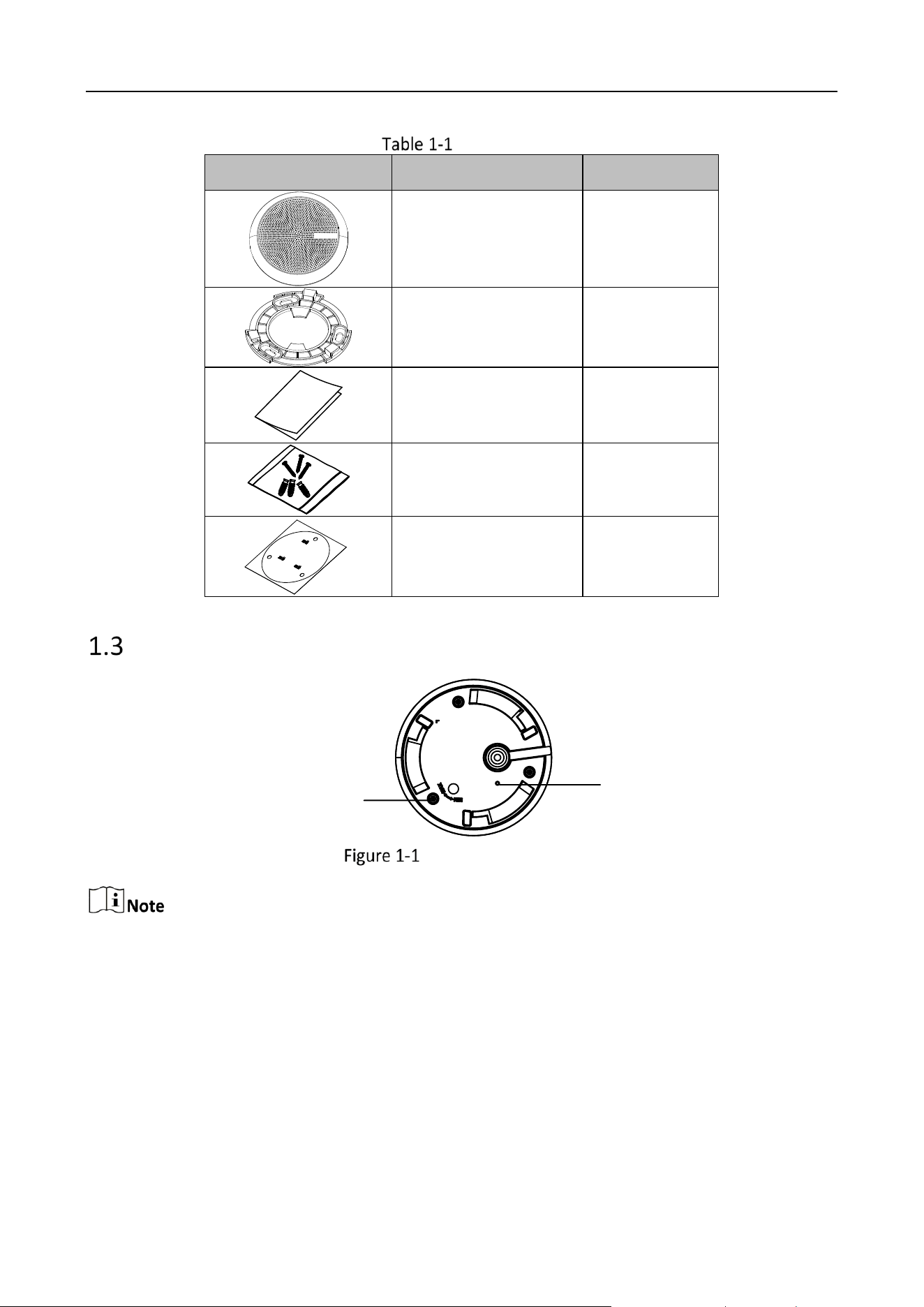
Packing List
Check the package contents and make sure that the device in the package is in good condition and
all the assembly parts are included.
Indoor Security Microphone • User Manual
2
Packing List
Item
Description
Amount
Microphone
1
Installation Plate
User Manual
1
Screws
1
Sticker
1
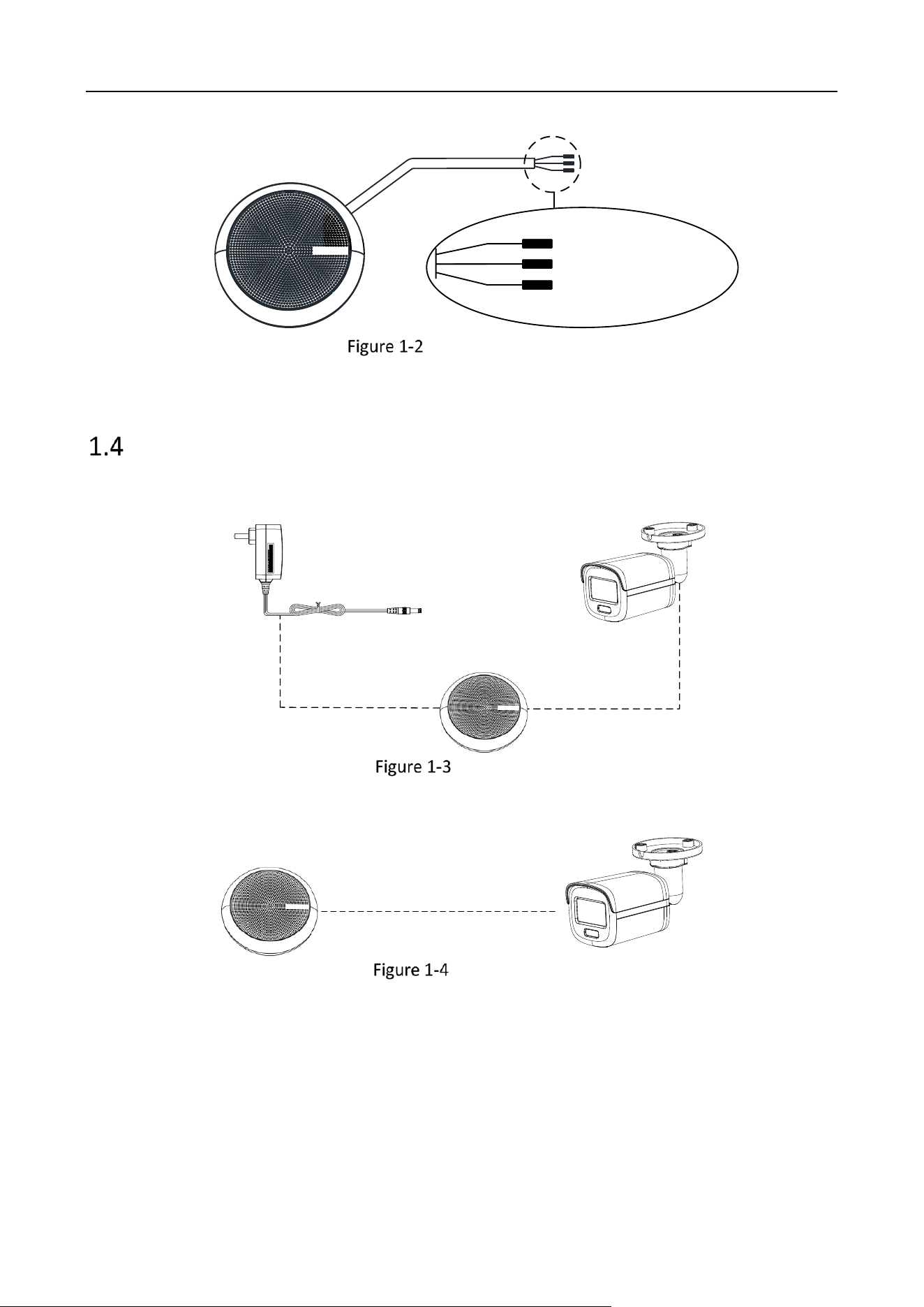
Appearance and Interfaces
Indicator
light
Volume
adjustment knob
Bottom of the Device
Light on: the device is normal working. Light off: the device is damaged or powered off.
Indoor Security Microphone • User Manual
3
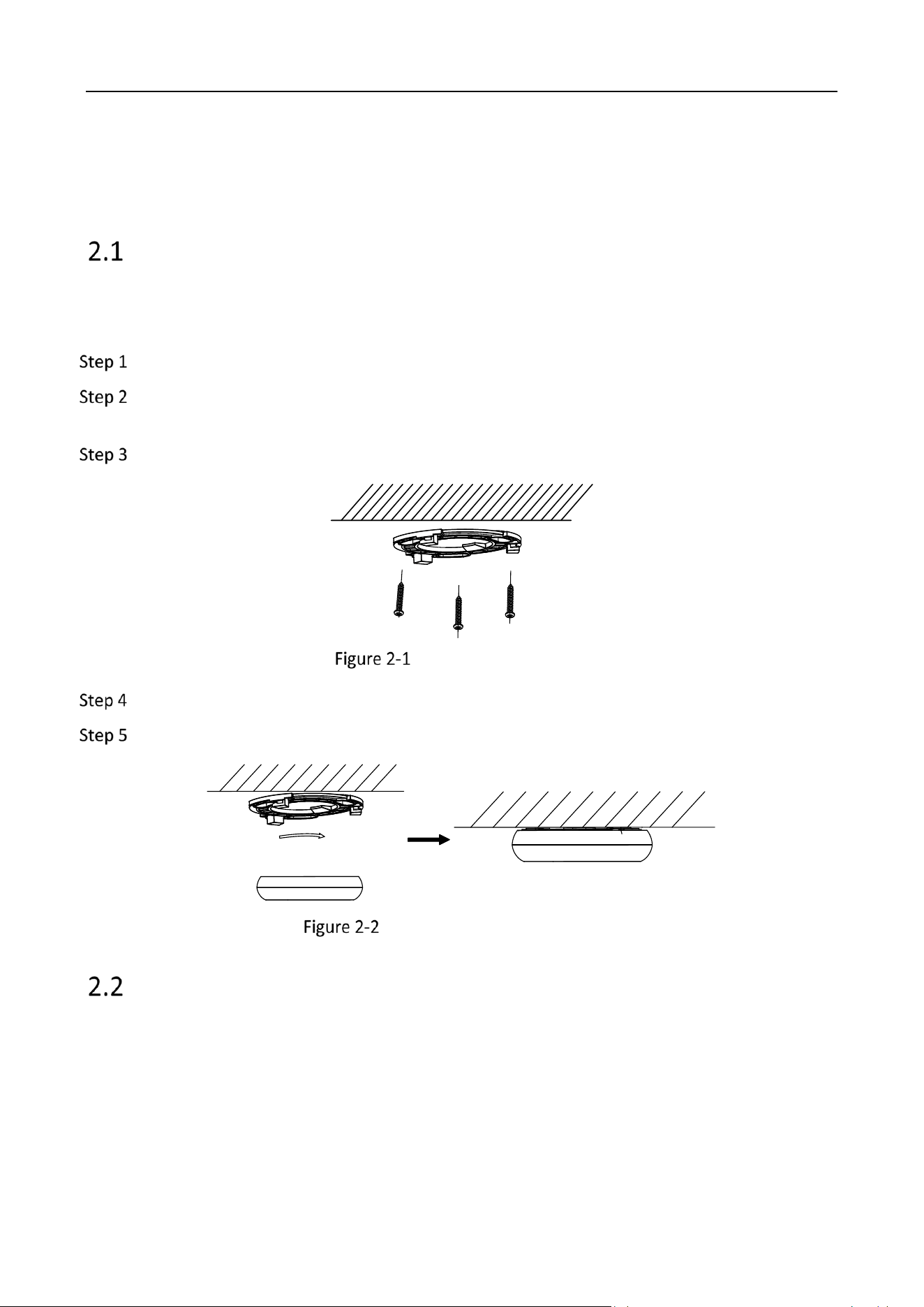
Power cord (red)
Ground cord (black)
LINE_OUT(white)
cable and connector
Connection
Power Adapter
Camera
Connection I
Camera
Connection II
Indoor Security Microphone • User Manual
4
Chapter 2 Installation and Application
Installation
Before you start
The device is suitable for ceiling mounting, and it can also be placed on the desktop for use.
Attach the installation sticker to the wall.
(Optional) For cement wall, drill the screw holes with a 5.5 mm drill and insert the supplied
wall plugs before installation.
Fix the installation plate to the ceiling with three PA4 × 25 screws.
Fix the Installation Plate
Fit the microphone onto the installation plate.
Turn the microphone as the figure below until it snaps into the installation plate.
Install the Microphone to Ceiling
Cable Routing
It is recommended to use RVVP 2 × 1.0 shielded cable.
DO NOT install the microphone near the power adapter, power transformer, or mains
electricity circuit.
It is recommended to use an external linear regulated power supply.
The audio cable length should be shorter than 30 meters.

Indoor Security Microphone • User Manual
5
WEB Configuration
When the camera connects to the network, you can configure the audio parameters of the camera
via web browser. Refer to the user manual of the camera for detailed description.
Go to ConfigurationVideo&AudioAudio to adjust the following parameters in order to
improve the audio quality.
Audio Encoding: It is recommended to select AAC or G.711.
Sampling Rate: It is recommended to select 32 kHz or above.
Audio Stream Bitrate: It is recommended to select 32 kbps or above.
Audio Input: It is recommended to select LineIn.
Input Volume: Set the volume according to the environment. Generally, it is
recommended to set below 50.
Environmental Noise Filter: Enable or disable the function according to the microphone
type. For digital microphone, it is recommended to disable the function. Meanwhile, you
can compare the effects according to the actual environment.
Chapter 3 FAQ
Question
The network camera does not record sound.
Answers
Check if the microphone is power-on, and the cable connection is normal.
Check if the volume button of the microphone is turned to the lowest level. Adjust the
volume button and try again.
Connect a mobile phone to the camera and play sound to check if the recording function
of the camera is normal.
Connect the microphone to another type of the camera to check if the microphone is
normal.
Check audio cable connection. For the camera with a 3.5 mm audio connector, it is
recommended to connect the front two sound channels of the 3.5 mm connector with the
positive pole of the microphone’s audio cable. For the camera with terminal blocks,
connect the audio in terminal with the positive pole of microphone’s audio cable.
Question
The sound picked up by the device is of poor quality, with high noise or rustling sound.

Indoor Security Microphone • User Manual
6
Answers
Check if the cables are connected correctly. Poor quality of the cable and the cable
connector may cause poor sound quality, such as low sound and high noise.
Solution: Connect the device shell to the ground by cable, and use the twisted pair cable
with good shielding performance.
Check if the power supply of the microphone is a linear regulated power supply. Using the
power of the network camera may cause ground loop and current sound.
Solution: Use an external linear regulated power to check the effect. If the noise
disappears, it is recommended to use an external linear power supply.
Check if the installation is not suitable for the device.
Solution: Keep the microphone far away from and back to the noise resource, and isolate
it from the vibration source. The pick-up holes should be faced to the sound source, and
keep them as close as possible.
Check if the parameters of the network camera are wrong.
Solution: Refer to the user manual of the network camera to set the web parameters. Set
the Video Type of the camera as Video&Audio and enable the audio function of the
camera. Test before using the audio function. If there is sound when testing, check if the
recording function is normal.
The microphone does not support noise suppression function.

UD37247B