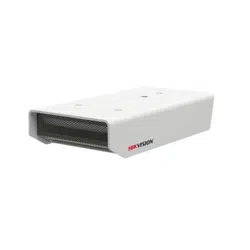


DS-2FP4121-OW_Hikvision Security Microphone_Quick Start Guide
1
Legal Notices
About this document
This document is only used as a guide for related products, and may be different from the
actual products, please refer to the actual product.
Hangzhou Hikvision Digital Technology Co., Ltd. or its affiliates (hereinafter referred to as
"Hikvision") may update this document due to product version upgrade or other needs, if
you need the latest version of the document, please log in to the official website of Hikvision
to view (www.hikvision.com). Unless otherwise agreed, Hikvision does not provide any
representations or warranties, express or implied, in this document.
Hikvision recommends that you use this document under the guidance of a professional.
About this product
The products described in this document are intended for sale and use in Chinese mainland only. This product can only
enjoy after-sales service and maintenance programs in the country or region where it was purchased.
Intellectual Property Rights Notice
Hikvision has relevant copyright and/or patent rights to the technology contained in the
products described in this document, which may include licenses obtained from third
parties.
The copyright of any part of this document, including text, pictures, graphics, etc., belongs to
Hikvision. Without written permission, no unit or individual may excerpt, copy, translate, or
modify all or part of this document in any way.
、etc. are registered trademarks of Hikvision.
Other trademarks mentioned in this document are owned by their respective owners.
Disclaimer
To the fullest extent permitted by law, this document and the products described (including its
hardware, software, firmware, etc.) are provided "as is" and may contain defects or errors.
Hikvision does not provide any form of express or implied warranty, including but not limited
to warranties of merchantability, satisfactory quality, fitness for a particular purpose, etc.; It
also does not compensate for any special, incidental, incidental or consequential damages
arising from the use of this document or the use of Hikvision products, including but not
limited to losses arising from loss of business profits, system failures, and loss of data or
documents.
You are aware of the open nature of the Internet, and there may be risks such as network
attacks, hacker attacks, virus infections, etc., when you connect your products to the
Internet, Hikvision will not be responsible for the abnormal working of the products,
information leakage and other problems caused thereby, but Hikvision will provide you with
product-related technical support in a timely manner.
When using this product, please strictly follow the applicable laws and regulations to avoid
infringing on the rights of third parties, including but not limited to intellectual property

DS-2FP4121-OW_Hikvision Security Microphone_Quick Start Guide
2
rights, data rights or other privacy rights. You may also not use this product for weapons of
mass destruction, chemical or biological weapons, nuclear explosions, or any unsafe use of
nuclear energy or for human rights violations.
In the event of a conflict between the content of this document and applicable law, the legal
provisions shall prevail.
© Hangzhou Hikvision Digital Technology Co., Ltd.All rights reserved
DS-2FP4121-OW_Hikvision Security Microphone_Quick Start Guide
3
Summary
HD Surveillance Microphone used for monitoring and recording in Finance, Judiciary, Public Security, Safe City,
Monitoring, Tollgate and Examination situations, which can be connected to the analog input interface of IP network
camera (or DVR), with built-in DSP digital signal processor, to make the recording of playback more realistic.
All metal structure, aluminum alloy shell, waterproof and dust proof.
All - directional capacitance microphone, high fidelity, high sensitivity and low noise;
Built-in DSP digital signal processor to ensure high-definition output.
Built-in polarity reversal of power supply and lightning strike protection.
With an integrated noise reduction chip to reduce environmental noise and ensure the output strength.
With mounting bracket, suitable for monitoring bar, wall, ceiling and others installation.
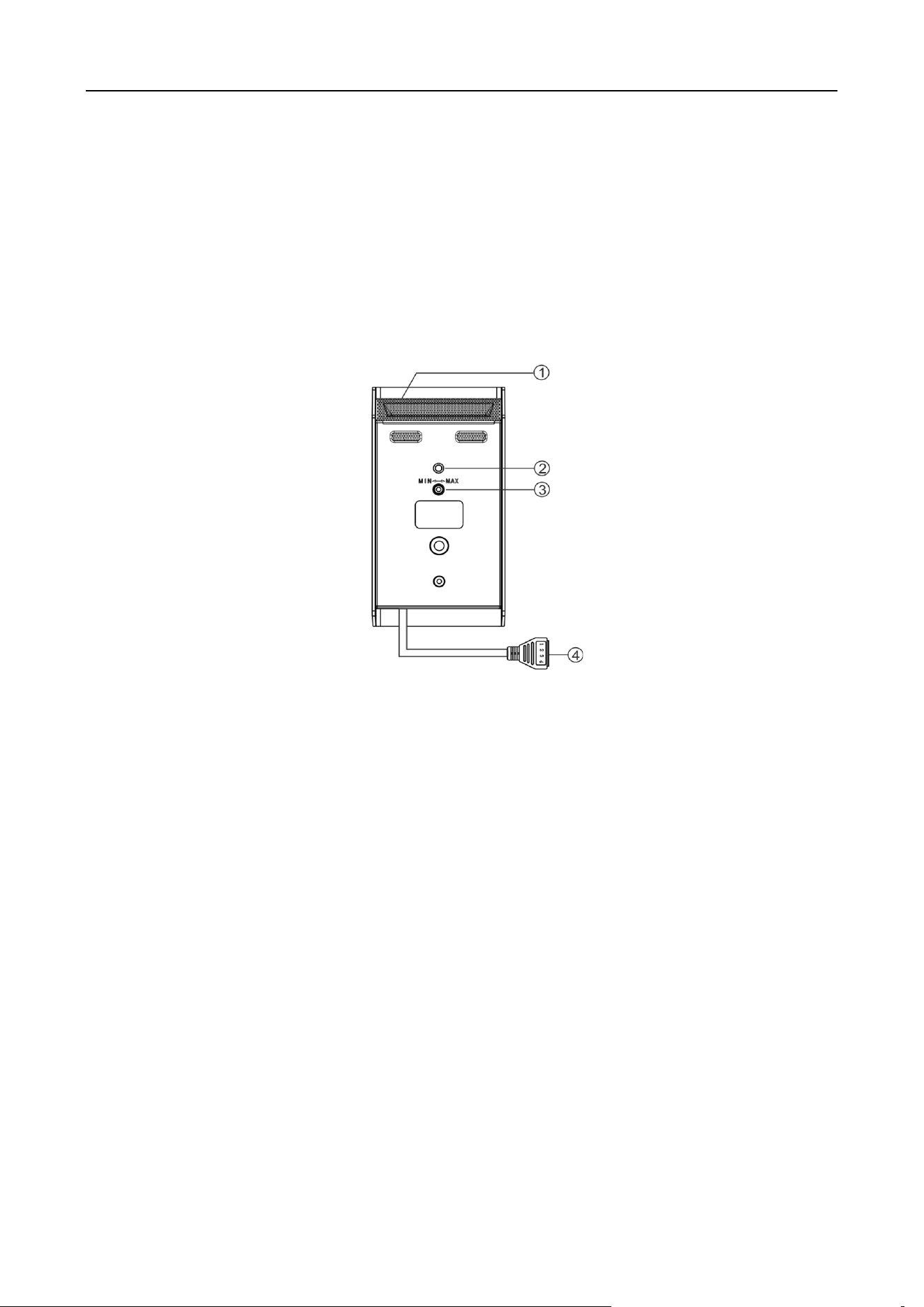
Interface Description
①Pickup microphone: pickup the local audio.
②Status indicator light: The green light will always being on during the equipment is in normal operation.( Indicator light
can be controlled by internal dial switch 1 on and off: Dial switch 1 to digital end, turn off indicator light. When it is turned
to the ON, the indicator is enabled. The default as on.)
③Volume adjustment knob: Increases the volume clockwise and decreases the volume counterclockwise.
④Power and analog audio output interface , definition as follow:
1: Power positive( For the details please refer to the specifications and parameters).
2: Public ground terminal, the ground terminal of power and signal.
3: Signal negative, output analog audio signal(negative).
4: Signal positive, output analog audio signal(positive), it can connect with IP camera( or DVR) analog recording input
interface.
Installation Diagram
Installation environment: Wall, ceiling, monitoring rod and metal column installation.
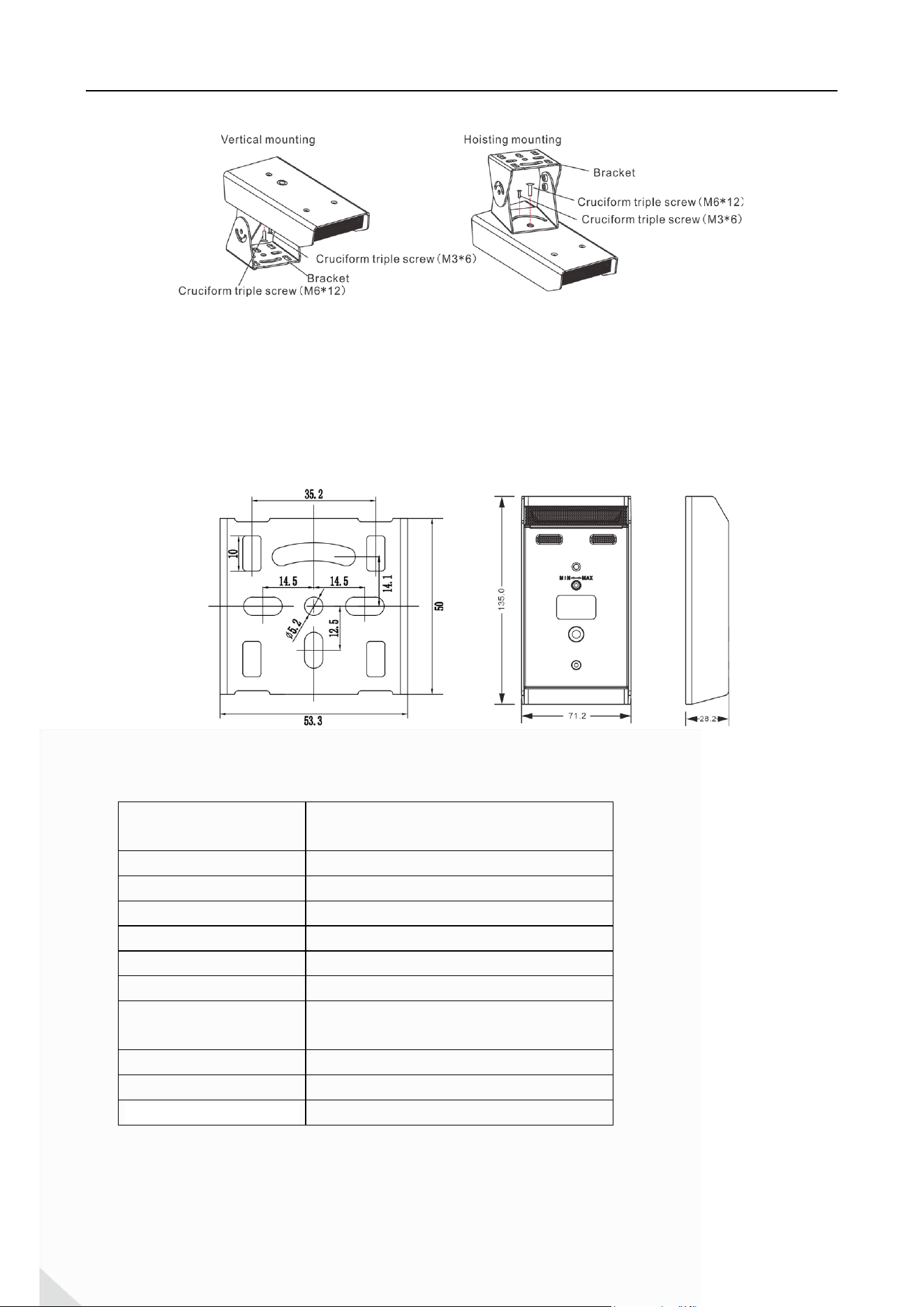
Installation instructions: It can be installed vertically or hoisted according to the environment. The bracket will be
installed at the bottom of the microphone when in vertical mounting ; For hoisting mounting, the bracket need to be
installed on the top of the microphone. Firstly, M6*12 cruciform triple screw was used to fix the microphone and support,
and then M3*6 cruciform triple screw was used to fix it, as shown in the below:
DS-2FP4121-OW_Hikvision Security Microphone_Quick Start Guide
4
Installation mode 1: First, adjust the angle of microphone, make 3 holes in the wall according to the bracket
position, then put the plastic expansion sleeve into the hole, and use 3pcs of half-round head cross screw (ST4*20) to fix
the microphone on the wall.
Installation mode 2: Adjust the angle of microphone, then install in the hole which is installed bracket, and fix the
microphone on the monitoring rod or metal pillar with 2pcs drilling screws.
Installation mode 3: Adjust the angle of microphone, and fix the microphone on the suitable place with the fixing
plate and screws.
Installation mode 4: Installing the equipment on the monitoring rod or others across bracker hole or groove.
Installation Diagram (unit: mm)
Specifications and Parameters
Power supply voltage
AC 10V-30V
DC 10V-30V
Polar Pattern
Directional
SNR
85dB
Frequency response
20Hz~20KHz
Sensitivity
-35dB
Sound Pickup Range
20m
Output Impedance
600~1000 Ω (unbalanced)
Protection Circuit
Polarity reversal / Misconnection protection/
lightning strike protection/ ESD protection
Working temperature
-20℃~60℃
Appearance dimension
135*71.2*28.2(mm)
Protection
IP67

DS-2FP4121-OW_Hikvision Security Microphone_Quick Start Guide
5
Packing List

0