70mai 4G Hardwire Kit User Manual
Scan the QR code and email
us at [email protected]
Compatible with AT&T Data-Only SIM cards only
Scan the QR code to watch
the installation video
01
Please read this manual carefully before using the product and keep it in a safe place.
Product overview
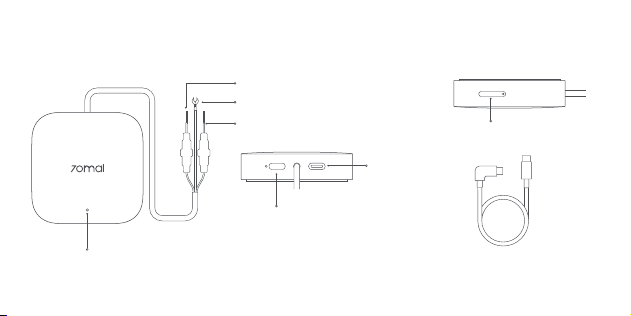
Power wire (red)
Ground wire (black)
ACC signal wire (yellow)
Indicator
Reset button
• If the product stops
responding, press and hold
the button to reset it.
Type-C port
SIM card slot
Type-C connecting cable

02
Packing list
70mai 4G Hardwire Kit × 1
Type-C connecting cable × 1
Pin × 1
User manual × 1
Product functions
As an accessory for 70mai in-car devices, this
product must be used with the 70mai dash
cams (hereinafter referred to as the main
device).
After correctly installed and bound in the
70mai app, this product provides the following
features:
•
Provide power source to the main device.
•
Provide internet service to the main device
(when installed with a SIM card)
•
Detect the ACC OFF signal when the car
engine is turned off, so that the main device
will enter parking surveillance mode (parking
surveillance function needs to be enabled in
the main device beforehand).
•
Provide low-voltage protection to prevent
over-discharging of the car battery due to the
continuous operation of the main device.

03
Installation
Step 1. Selecting the suitable fuse box
Select the car fuse box that contains the
following fuses:
•
Regular electric fuse with an output voltage of
12-30V.
•
ACC power fuse.
Paste the product on the side of the console
center which is close to the selected fuse box.
Step 2. Connecting wires
Connect the wires of the hardwire kit to the
fuses inside of the fuse box in the following way:
1. Connect the power wire (red) to the regular
electric fuse with an output voltage of 12-30V.
2. Connect the ACC signal wire (yellow) to the
ACC power fuse.
3. Connect the ground wire (black) to the
negative terminal or ground of the fuse box.
Note: Before installation and wiring, please turn off
the car engine and power to prevent short circuit.
Step 3. Testing circuit and ACC signal
Test circuit and ACC signal in the following way:
1. Insert the L-shape plug of the connecting
cable to the Type-C port of the hardwire kit,
and the other plug into the power port of the
main device. Start the car engine and wait for
the main device to turn on.
If the main device fails to power on, turn it
on manually. If the message "Connect to an

04
external power source" is shown, check if
the power wire of the hardwire kit is correctly
connected to the regular electric fuse.
2. After the main device is turned on, turn off
the engine and remove the key. Check if the
main device powers off or enters sleep mode.
For some cars, the ACC power off signal will
only be triggered when the driver seat door is
opened after the engine is turned off. Some
car models will only trigger the ACC power off
signal after the engine has been turned off for
a certain period of time. For such cars, check
if the main device powers off or enters sleep
mode after the ACC power is turned off.
3. After the main device powers off or enters
sleep mode, restart the engine and check if
Step 4. Managing cables
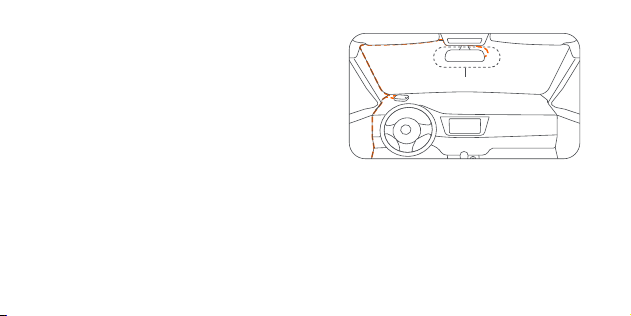
1. Managing the Type-C connecting cable
Route the Type-C connecting cable along the A
pillar, top of the windshield to the main device.
You can use the wiring crowbar to hide the
cable underneath the vehicle’s headliner and
the main device automatically turns on.
If the above steps can be proceed correctly, the
circuit and ACC signal test is passed.
If the test fails, please check the wiring of the
hardwire kit and ensure that the fuses and
ground are correctly connected with wires.
If the connection is correct, but the test fails,
contact after-sales service for assistance.
05
rubber seal along the A-pillar.
2. Managing the hardwire kit
Route the hardwire kit along the gap between
the console center and the A pillar to the fuse
box.
If the hardwire kit is too long, tie it up, but do
not cut it. Cutting the hardwire kit will affect the
power and ACC signal to the main device.
Note: The location of the fuse box and the
recommended mounting position of the main device
may vary from vehicle to vehicle. Please employ a
professional technician for mounting according to
the vehicle condition. The illustration provided is for
reference only.
Optimal position for main device

06
After the preparations, follow the steps below to
bind the hardwire kit.
1. Park the car in a place where your phone’s
internet signal is good. And then start the
engine to turn on the main device.
2. Add the main device in the 70mai app
following the user manual and user guide of
the main device.
3. Open the 70mai app, find the main device
card and tap Add 4G.
4. Bind the hardwire kit following the
instructions on the screen. The main device’s
network service will be available once the
hardwire kit is bound successfully.
Note: During the binding, keep your phone close to
the main device without obstacles in-between.
Binding the hardwire kit
This product needs to be bound in the 70mai
app so as to provide internet service to the
main device. Before binding, prepare the
followings:
1. Inserting the SIM card
When the engine is turned off, insert the SIM
card into the SIM card slot of the hardwire kit.
2. Connecting the hardwire kit and the main
device
Refer to the
Installation
chapter in this user
manual, correctly install the hardwire kit and
connect it to the main device through the
connecting cable.

07
Precautions
Before using the device, please read all the
precautions to ensure correct and safe use.
•
Please ask a professional technician to
perform the installation. Our company is not
liable for any short-circuiting of the car power
supply and damage to car battery or interior
due to improper installation.
•
Our company is not liable for any losses
resulting from the installation of the product
unless they are caused by product quality
issues.
•
The performance of this product is affected
by the reliability of the car power source, car
battery and main device. Our company is not
liable for any losses from the malfunction of
this product unless it is caused by product
quality issues.
•
Some cars cannot detect changes in ACC
signals when the engine is turned on or off.
For such cars, the hardwire kit is unable to
transmit ACC signals to the main device. This
may cause certain functions to be unavailable.
•
Please only use this product for legal
purposes.
Note: Illustrations of the product, accessories,
and user interface in the user manual are for
reference purposes only. The actual product
and functions may vary due to product
enhancements.

08
Specifications
Product: 70mai 4G Hardwire Kit
Model: Midrive UP05
Input: DC 12V to 30V
Output: 5V 2.4A
Negative car power outlet: GND (-)
Positive car power outlet: VCC (+)
Car power: ACC
FCC Caution.
§ 15.19 Labelling requirements.
This device complies with part 15 of the FCC Rules.
Operation is subject to the following two conditions:
(1) This device may not cause harmful interference,
and (2) this device must accept any interference
received, including interference that may cause
undesired operation.
§ 15.21 Information to user.
Any Changes or modifications not expressly
approved by the party responsible for compliance
could void the user’s authority to operate the
equipment.
§ 15.105 Information to the user.
Note: This equipment has been tested and found
to comply with the limits for a Class B digital device,
pursuant to part 15 of the FCC Rules. These limits are

09
designed to provide reasonable protection against
harmful interference in a residential installation. This
equipment generates uses and can radiate radio
frequency energy and, if not installed and used in
accordance with the instructions, may cause harmful
interference to radio communications. However,
there is no guarantee that interference will not occur
in a particular installation. If this equipment does
cause harmful interference to radio or television
reception, which can be determined by turning the
equipment off and on, the user is encouraged to try
to correct the interference by one or more of the
following measures:
-Reorient or relocate the receiving antenna.
-Increase the separation between the equipment
and receiver.
-Connect the equipment into an outlet on a
circuit different from that to which the receiver is
connected.
-Consult the dealer or an experienced radio/TV
technician for help.
*RF warning for Mobile device:
This equipment complies with FCC radiation
exposure limits set forth for an uncontrolled
environment. This equipment should be installed
and operated with minimum distance 20cm between
the radiator & your body.
FCC ID: 2AOK9-MDUP5

10
IC Caution.
This device complies with Industry Canada licence-
exempt RSS standard(s). Operation is subject to the
following two conditions:
(1) this device may not cause interference, and
(2) this device must accept any interference,
including interference that may cause undesired
operation of the device.
Le présent appareil est conforme aux CNR
d’Industrie Canada applicables aux appareils
radioexempts de licence. L’exploitation est autorisée
aux deux conditions suivantes :
(1) l’appareil ne doit pas produire de brouillage, et
(2) l’utilisateur de l’appareil doit accepter tout
brouillage radioélectrique subi, même si le
brouillage est susceptible d’en compromettre le
fonctionnement.
This equipment complies with IC RSS-102 radiation
exposure limits set forth for an uncontrolled
environment. This equipment should be installed
and operated with minimum distance 20cm between
the radiator & your body.
ce matériel est conforme aux limites de dose
d’exposition aux rayonnements, CNR-102 énoncée
dans un autre environnement. cette eqipment
devrait être installé et exploité avec distance
minimale de 20 entre le radiateur et votre corps.
IC: 28033-MDUP5 CAN ICES-003(B) / NMB-003(B)

V1.0-20240308
Service: [email protected]
For further information, please go to www.70mai.com
Manufacturer: 70mai Co., Ltd.
Address: Room 2220, Building 2, No. 588 Zixing Road,
Minhang District, Shanghai, China