DS-1350HMI Mobile Intercom
User Manual (V1.1)
UD.6L0202D2102A01

DS-1350HMI Mobile Intercom
1
TABLE OF CONTENTS
Chapter 1 Introduction ........................................................................................................................................ 5
1.1 Overview .................................................................................................................................................. 5
1.2 Component ............................................................................................................................................... 5
1.3 Pin Definition ........................................................................................................................................... 6
Chapter 2 Installation .......................................................................................................................................... 7
Chapter 3 Connecting Cables ............................................................................................................................. 8
Chapter 4 Operation ............................................................................................................................................ 9
Chapter 5 FAQ ................................................................................................................................................... 10

DS-1350HMI Mobile Intercom
2
User Manual
COPYRIGHT ©2015 Hangzhou Hikvision Digital Technology Co., Ltd.
ALL RIGHTS RESERVED.
Any and all information, including, among others, wordings, pictures, graphs are the properties of Hangzhou
Hikvision Digital Technology Co., Ltd. or its subsidiaries (hereinafter referred to be “Hikvision”). This user
manual (hereinafter referred to be “the Manual”) cannot be reproduced, changed, translated, or distributed,
partially or wholly, by any means, without the prior written permission of Hikvision. Unless otherwise stipulated,
Hikvision does not make any warranties, guarantees or representations, express or implied, regarding to the
Manual.
About this Manual
This Manual is applicable to DS-1350HMI Mobile Intercom.
The Manual includes instructions for using and managing the product. Pictures, charts, images and all other
information hereinafter are for description and explanation only. The information contained in the Manual is
subject to change, without notice, due to firmware updates or other reasons. Please find the latest version in the
company website (http://overseas.hikvision.com/en/).
Please use this user manual under the guidance of professionals.
Trademarks Acknowledgement
and other Hikvision’s trademarks and logos are the properties of Hikvision in various jurisdictions.
Other trademarks and logos mentioned below are the properties of their respective owners.
Legal Disclaimer
TO THE MAXIMUM EXTENT PERMITTED BY APPLICABLE LAW, THE PRODUCT DESCRIBED, WITH
ITS HARDWARE, SOFTWARE AND FIRMWARE, IS PROVIDED “AS IS”, WITH ALL FAULTS AND
ERRORS, AND HIKVISION MAKES NO WARRANTIES, EXPRESS OR IMPLIED, INCLUDING WITHOUT
LIMITATION, MERCHANTABILITY, SATISFACTORY QUALITY, FITNESS FOR A PARTICULAR
PURPOSE, AND NON-INFRINGEMENT OF THIRD PARTY. IN NO EVENT WILL HIKVISION, ITS
DIRECTORS, OFFICERS, EMPLOYEES, OR AGENTS BE LIABLE TO YOU FOR ANY SPECIAL,
CONSEQUENTIAL, INCIDENTAL, OR INDIRECT DAMAGES, INCLUDING, AMONG OTHERS,
DAMAGES FOR LOSS OF BUSINESS PROFITS, BUSINESS INTERRUPTION, OR LOSS OF DATA OR
DOCUMENTATION, IN CONNECTION WITH THE USE OF THIS PRODUCT, EVEN IF HIKVISION HAS
BEEN ADVISED OF THE POSSIBILITY OF SUCH DAMAGES.
REGARDING TO THE PRODUCT WITH INTERNET ACCESS, THE USE OF PRODUCT SHALL BE
WHOLLY AT YOUR OWN RISKS. HIKVISION SHALL NOT TAKE ANY RESPONSIBILITES FOR
ABNORMAL OPERATION, PRIVACY LEAKAGE OR OTHER DAMAGES RESULTING FROM CYBER
ATTACK, HACKER ATTACK, VIRUS INSPECTION, OR OTHER INTERNET SECURITY RISKS;
HOWEVER, HIKVISION WILL PROVIDE TIMELY TECHNICAL SUPPORT IF REQUIRED.
SURVEILLANCE LAWS VARY BY JURISDICTION. PLEASE CHECK ALL RELEVANT LAWS IN YOUR
JURISDICTION BEFORE USING THIS PRODUCT IN ORDER TO ENSURE THAT YOUR USE CONFORMS
THE APPLICABLE LAW. HIKVISION SHALL NOT BE LIABLE IN THE EVENT THAT THIS PRODUCT IS
USED WITH ILLEGITIMATE PURPOSES.
IN THE EVENT OF ANY CONFLICTS BETWEEN THIS MANUAL AND THE APPLICABLE LAW, THE
LATER PREVAILS.

DS-1350HMI Mobile Intercom
3
Regulatory Information
FCC Information
FCC compliance: This equipment has been tested and found to comply with the limits for a Class A digital device,
pursuant to part 15 of the FCC Rules. These limits are designed to provide reasonable protection against harmful
interference when the equipment is operated in a commercial environment. This equipment generates, uses, and
can radiate radio frequency energy and, if not installed and used in accordance with the instruction manual, may
cause harmful interference to radio communications. Operation of this equipment in a residential area is likely to
cause harmful interference in which case the user will be required to correct the interference at his own expense.
FCC Conditions
This device complies with part 15 of the FCC Rules. Operation is subject to the following two conditions:
1. This device may not cause harmful interference.
2. This device must accept any interference received, including interference that may cause undesired operation.
EU Conformity Statement
This product and - if applicable - the supplied accessories too are marked with "CE" and comply
therefore with the applicable harmonized European standards listed under the EMC Directive
2004/108/EC, the RoHS Directive 2011/65/EU.
2012/19/EU (WEEE directive): Products marked with this symbol cannot be disposed of as unsorted
municipal waste in the European Union. For proper recycling, return this product to your local
supplier upon the purchase of equivalent new equipment, or dispose of it at designated collection
points. For more information see: www.recyclethis.info
2006/66/EC (battery directive): This product contains a battery that cannot be disposed of as unsorted
municipal waste in the European Union. See the product documentation for specific battery
information. The battery is marked with this symbol, which may include lettering to indicate
cadmium (Cd), lead (Pb), or mercury (Hg). For proper recycling, return the battery to your supplier or to a
designated collection point. For more information see: www.recyclethis.info
Industry Canada ICES-003 Compliance
This device meets the CAN ICES-3 (A)/NMB-3(A) standards requirements.
DS-1350HMI Mobile Intercom
4
Safety Instruction
These instructions are intended to ensure that user can use the product correctly to avoid danger or property loss.
The precaution measure is divided into “Warnings” and “Cautions”
Warnings: Serious injury or death may occur if any of the warnings are neglected.
Cautions: Injury or equipment damage may occur if any of the cautions are neglected.
Warnings
● In the use of the product, you must be in strict compliance with the electrical safety regulations of the nation
and region. Please refer to technical specifications for detailed information.
● Input voltage should meet both the SELV (Safety Extra Low Voltage) and the Limited Power Source with
100~240 VAC or 12 VDC according to the IEC60950-1 standard. Please refer to technical specifications for
detailed information.
● Do not connect several devices to one power adapter as adapter overload may cause over-heating or a fire
hazard.
● If smoke, odor or noise rise from the device, turn off the power at once and unplug the power cable, and then
please contact the service center.
Preventive and Cautionary Tips
Before connecting and operating your device, please be advised of the following tips:
• Ensure unit is installed in a well-ventilated, dust-free environment.
• Unit is designed for indoor use only.
• Keep all liquids away from the device.
• Ensure environmental conditions meet factory specifications.
• Ensure unit is properly secured to a rack or shelf. Major shocks or jolts to the unit as a result of dropping it
may cause damage to the sensitive electronics within the unit.
• Power down the unit before connecting and disconnecting accessories and peripherals.
• Improper use or replacement of the battery may result in hazard of explosion. Replace with the same or
equivalent type only. Dispose of used batteries according to the instructions provided by the battery
manufacturer.
Warnings Follow these
safeguards to prevent serious
injury or death.
Cautions Follow these
precautions to prevent
potential injury or material
damage.
DS-1350HMI Mobile Intercom
5
Chapter 1 Introduction
1.1 Overview
Based on full-duplex mode, DS-1350HMI Mobile Intercom is able to realize two-way audio with clear sound
quality and low noise interference. In addition, it is featured in low power consumption and long transmission
distance.
1.2 Components
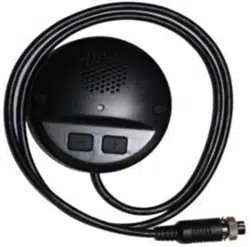
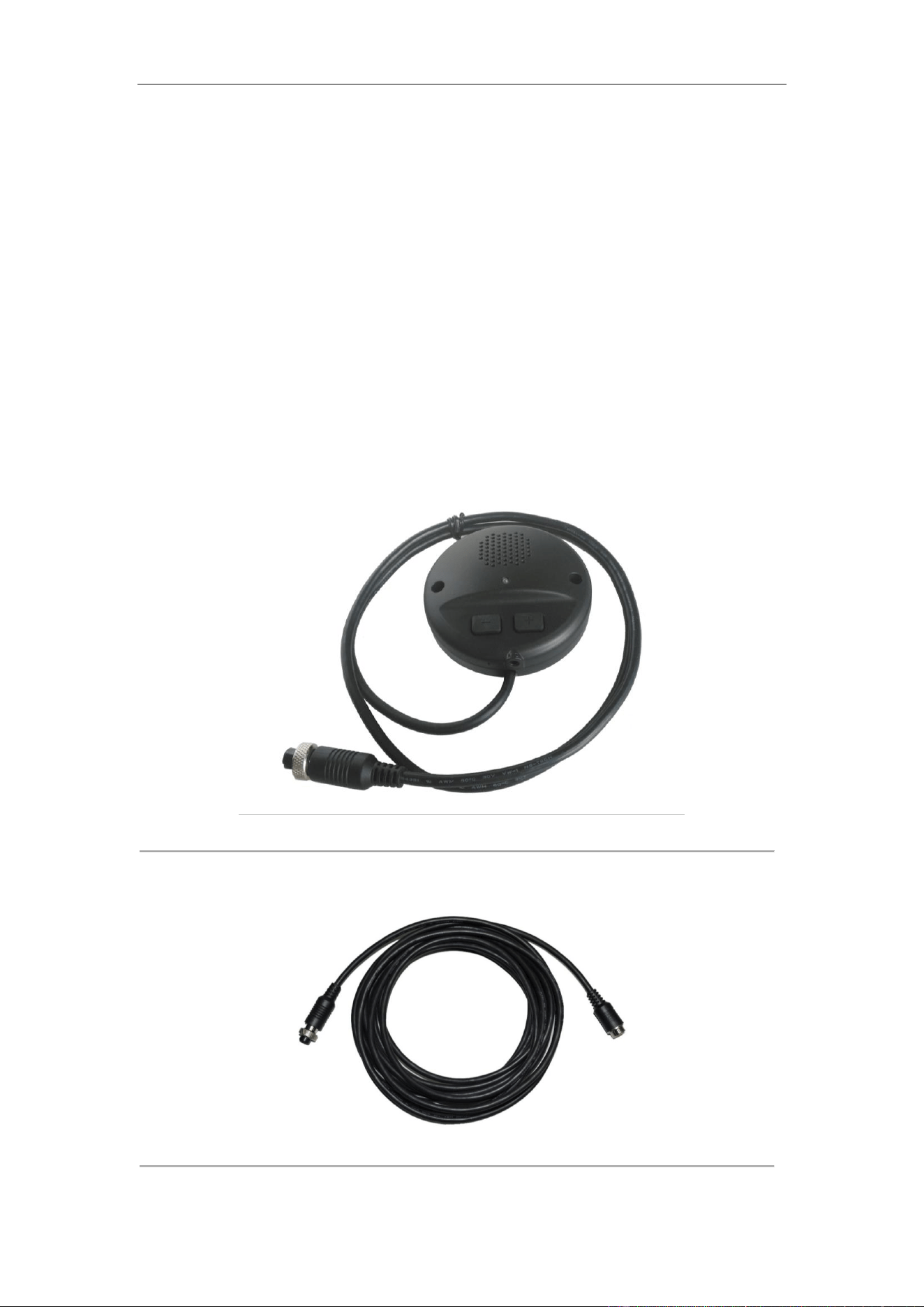
DS-1350HMI Mobile Intercom provides one-meter long cable with a six-pin female aviation plug on one side. The
physical interface is shown as below.
Figure 1. 1 Physical Interface
A six-meter long adapter cable is provided with one four-pin female aviation plug for connecting to Mobile DVR
and the other six-pin male aviation plug for connecting to intercom. The adapter cable is shown as below.
Figure 1. 2 Adapter Cable
DS-1350HMI Mobile Intercom
6
1.3 Pin Definition
Intercom’s Pin Definition
Intercom’s pin definition is shown in the following table.
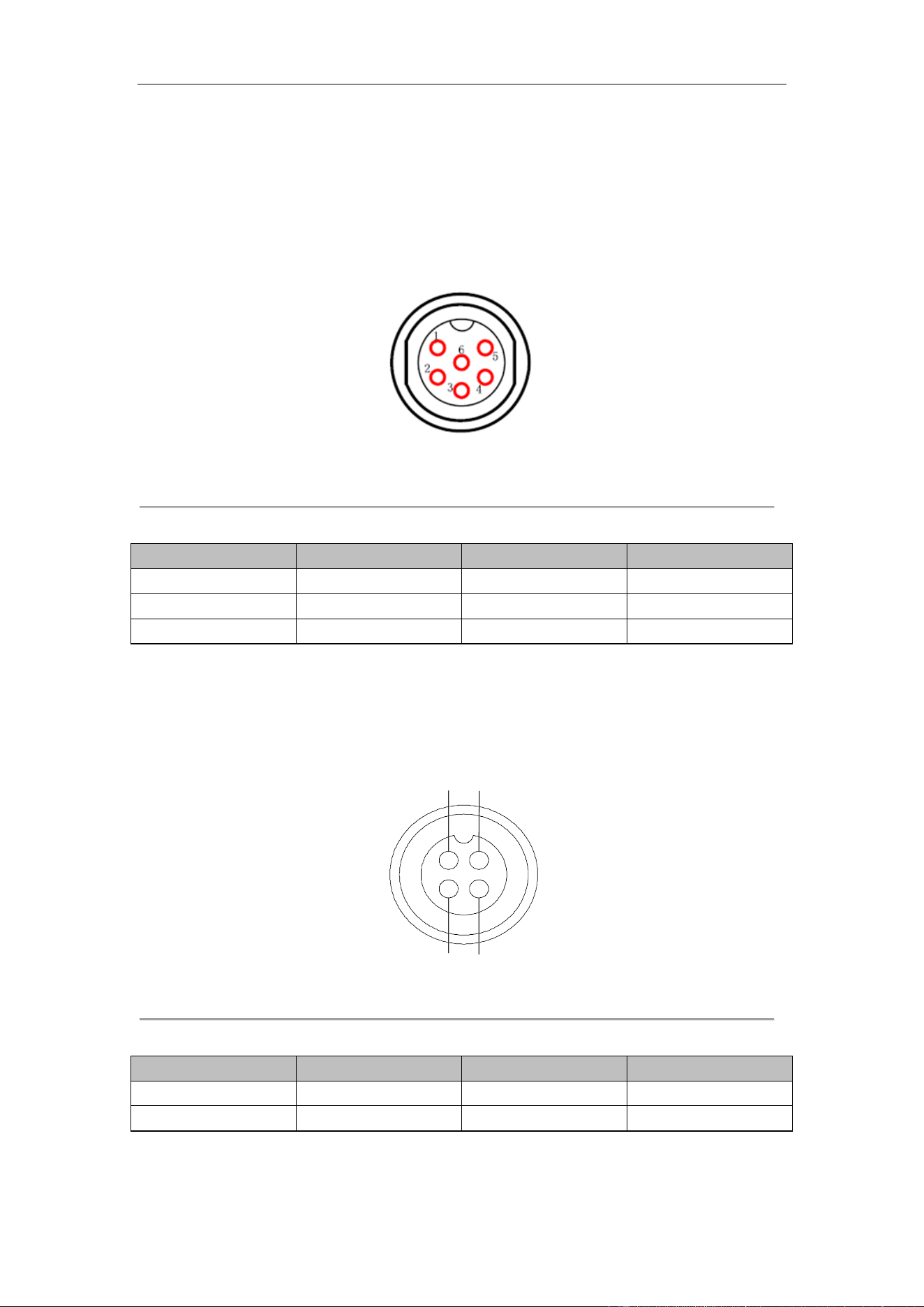
Figure 1. 3 Six-Pin Aviation Plug
Table 1. 1 Intercom’s Pin Definition
No.
Name
No.
Name
1
Line In
4
Power
2
GND
5
12 VDC
3
Line Out
6
NC
Adapter Cable’s Pin Definition
Adapter cable’s six-pin definition has the same meaning with the intercom’s pin definition. For detailed definition,
please refer to Figure 1. 3. The pin definition of four-pin female aviation plug connecting to Mobile DVR is shown
as the following table.
4
2 3
1
Figure 1. 4 Four-Pin Aviation Plug
Table 1. 2 Adapter Cable’s Pin Definition
No.
Name
No.
Name
1
Line Out
3
12 VDC
2
Line In
4
GND

DS-1350HMI Mobile Intercom
7
Chapter 2 Installation
Purpose:
Follow the steps listed below to optimize the intercom’s effects.
Steps:
1. Respectively, two screw holes are on intercom’s sides, and you can use screws to install it on instrument
panel.
2. When installing, make sure the mic is toward the voice source (that is driver).
3. To ensure the best effect, the installation distance is no more than 50 to 100 cm away from the driver.
You are not allowed to disassemble the intercom without the guidance of professionals.
DS-1350HMI Mobile Intercom
8
Connecting Cables
Purpose:
DS-1350HMI Intercom is able to cooperate with Mobile DVR, and mobile enforcement system. The connection
methods are different, when connecting intercom to these two devices.
2.1 Connecting to Mobile Enforcement System
The host of mobile enforcement system provides one four-pin male aviation plug. Therefore, when connecting
intercom with mobile enforcement system, use the adapter cable’s four-pin female aviation plug to connect to the
four-pin male aviation plug in the mobile enforcement system. The following figure shows the connection method.
Figure 2. 1 Connecting to Mobile Enforcement System
2.2 Connecting to Mobile DVR
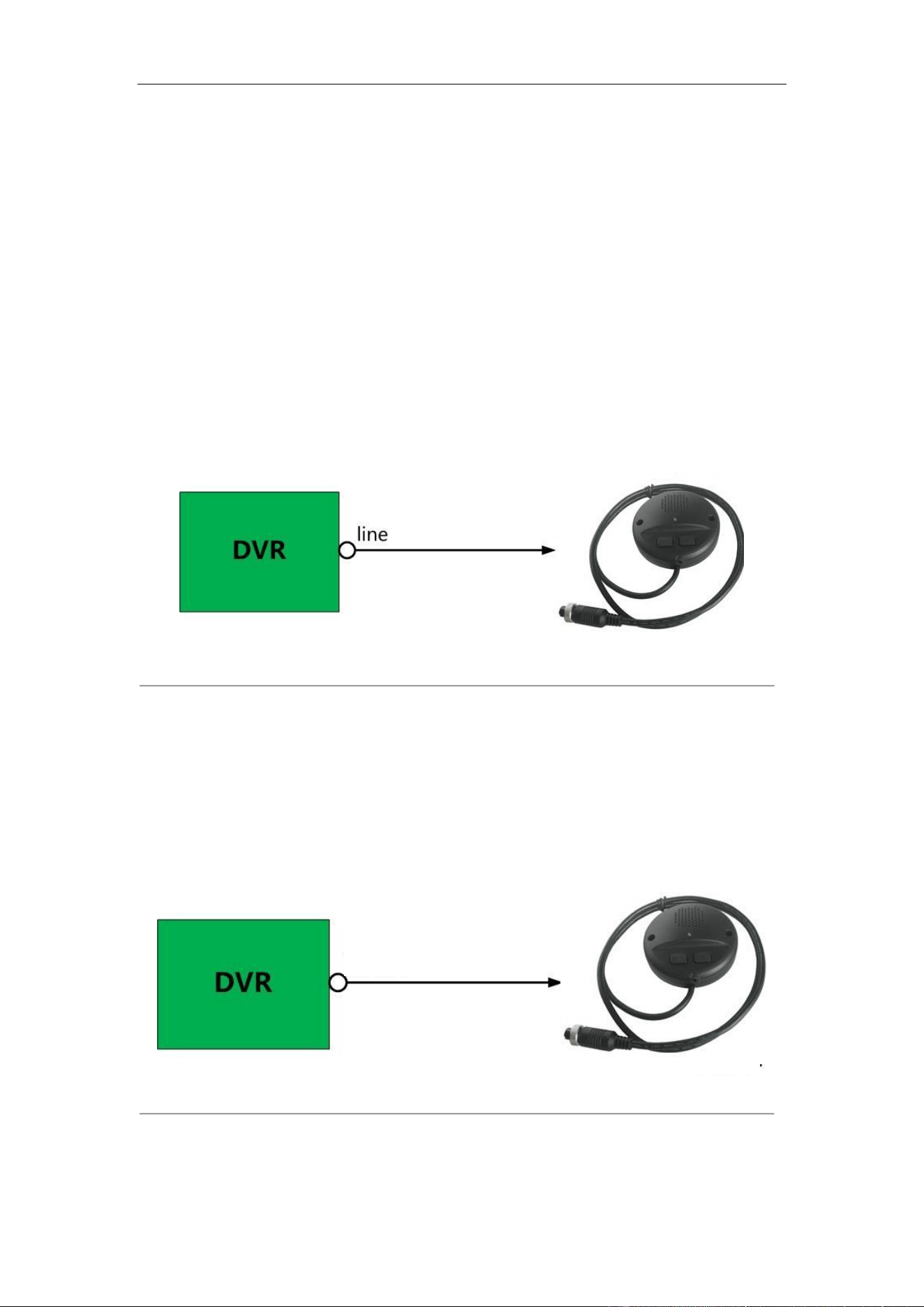
Since the Mobile DVR does not provide the four-pin aviation plug, an RS 422 interface is needed in connecting
intercom to mobile DVR. RS 422 is a ten-pin aviation plug. To conduct connection successfully, an extra adapter
cable with ten-pin aviation plug is needed and the adapter cable’s applying code is 101501250. The connection
method is shown as the following figure.
Figure 2. 2 Connecting to Mobile DVR
EXT.DEV

DS-1350HMI Mobile Intercom
9
Chapter 3 Operation
Purpose:
Adopting full-duplex mode, DS-1350HMI Mobile Intercom enables two-way audio after the connection with
mobile DVR or mobile enforcement system is done.
Steps:
1. Press buttons “+” and “-”to adjust the volume which is divided into 5 levels.
2. When pressing the volume button to adjust the volume, the LED indicator flashes for once. When pressing the
volume button with no other operation in 3s, the LED indicator continuously flashes for 3 times, which
indicates the current volume is saved.
3. Press the “+” button to the top level, and then the LED indicator does not flash when pressing “+” again, and
the volume remains at the top level, vice versa.
4. The volume remains at the third level by default, for the first time use. If the volume has been adjusted during
the last use, the volume remains the same with your last settings.

DS-1350HMI Mobile Intercom
10
Chapter 4 FAQ
1. Mobile intercom’s LED indicator is unlit after the wiring is done.
• Check whether the devices are started up normally.
• Check the wiring, if the startup is normal.
2. Failed to enable two-way audio.
• Make sure the intercom is successfully connected to the platform.
• Make sure the platform’s two-way audio is enabled.
3. The sound quality is poor.
• Adjust PC’s volume, or press the volume buttons to the ideal state.

DS-1350HMI Mobile Intercom
11