Before using your new product, please read these instructions to prevent any damage.
USER GUIDE
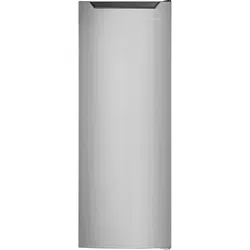
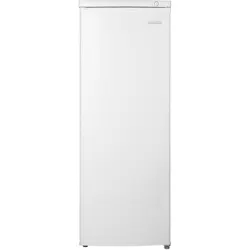
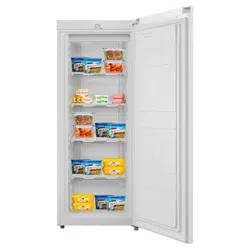
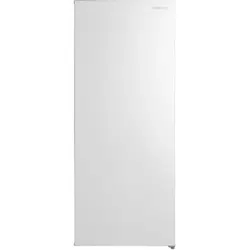
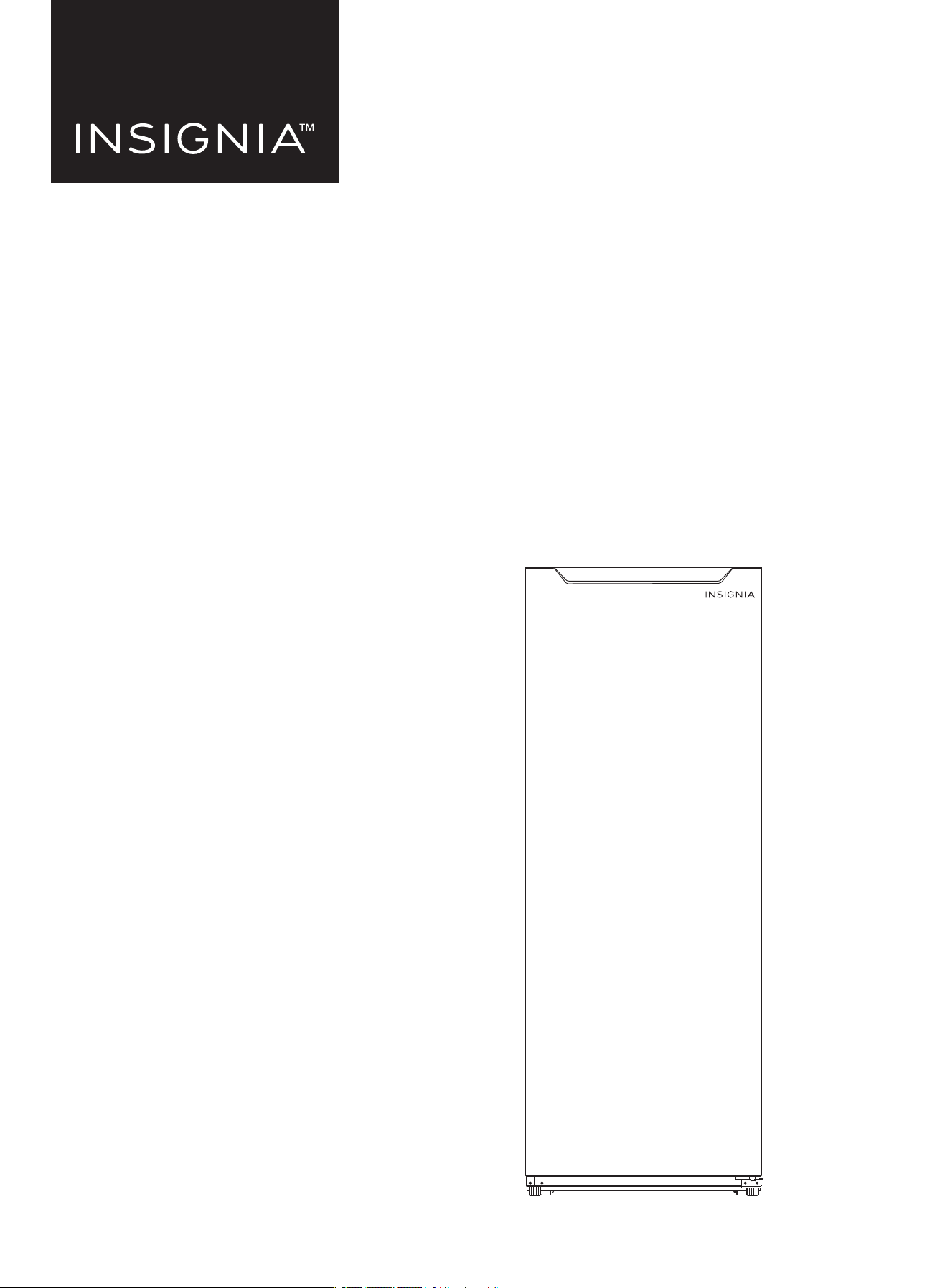
7 Cu. Ft. Convertible Upright
Freezer
NS-UZ70SS4/NS-UZ70WH4/NS-UZ70SS4-C/NS-UZ70WH4-C

www.insigniaproducts.com
2
Contents
Introduction . . . . . . . . . . . . . . . . . . . . . . . . . . . . . . . . . . . . . . . . . . . . . . . . . . . . . . . . . . . . . . . . . . . . . . . . . . . . . . . . . . . . . . . . . . 2
IMPORTANT SAFEGUARDS . .
. . . . . . . . . . . . . . . . . . . . . . . . . . . . . . . . . . . . . . . . . . . . . . . . . . . . . . . . . . . . . . . . . . . . . . . . . . 3
Grounding requirement . . . . . . . . . . . . . . . . . . . . . . . . . . . . . . . . . . . . . . . . . . . . . . . . . . . . . . . . . . . . . . . . . . . . . . . . . . . . . . . . . . . . . . . . . . 4
Features . . . . . . . . . . . . . . . . . . . . . . . . . . . . . . . . . . . . . . . . . . . . . . . . . . . . . . . . . . . . . . . . . . . . . . . . . . . . . . . . . . . . . . . . . . . . . . 5
Package contents. . . . . . . . . . . . . . . . . . . . . . . . . . . . . . . . . . . . . . . . . . . . . . . . . . . . . . . . . . . . . . . . . . . . . . . . . . . . . . . . . . . . . . . . . . . . . . . . . 5
Dimensions. . .
. . . . . . . . . . . . . . . . . . . . . . . . . . . . . . . . . . . . . . . . . . . . . . . . . . . . . . . . . . . . . . . . . . . . . . . . . . . . . . . . . . . . . . . . . . . . . . . . . . . . 5
Exterior. . . . . . . . . . . . . . . . . . . . . . . . . . . . . . . . . . . . . . . . . . . . . . . . . . . . . . . . . . . . . . . . . . . . . . . . . . . . . . . . . . . . . . . . . . . . . . . . . . . . . . . . . . . 6
Inte
rior . . . . . . . . . . . . . . . . . . . . . . . . . . . . . . . . . . . . . . . . . . . . . . . . . . . . . . . . . . . . . . . . . . . . . . . . . . . . . . . . . . . . . . . . . . . . . . . . . . . . . . . . . . . 7
Setting up your freezer. . . . . . . . . . . . . . . . . . . . . . . . . . . . . . . . . . . . . . . . . . . . . . . . . . . . . . . . . . . . . . . . . . . . . . . . . . . . . . . . 7
Before using your freezer . . . . . . . . . . . . . . . . . . . . . . . . . . . . . . . . . . . . . . . . . . . . . . . . . . . . . . . . . . . . . . . . . . . . . . . . . . . . . . . . . . . . . . . . . 7
Finding a suitable location . .
. . . . . . . . . . . . . . . . . . . . . . . . . . . . . . . . . . . . . . . . . . . . . . . . . . . . . . . . . . . . . . . . . . . . . . . . . . . . . . . . . . . . . . 7
Providing correct ventilation . . .
. . . . . . . . . . . . . . . . . . . . . . . . . . . . . . . . . . . . . . . . . . . . . . . . . . . . . . . . . . . . . . . . . . . . . . . . . . . . . . . . . . . 8
Providing the correct power source . .
. . . . . . . . . . . . . . . . . . . . . . . . . . . . . . . . . . . . . . . . . . . . . . . . . . . . . . . . . . . . . . . . . . . . . . . . . . . . . 9
Leveling your freezer . .
. . . . . . . . . . . . . . . . . . . . . . . . . . . . . . . . . . . . . . . . . . . . . . . . . . . . . . . . . . . . . . . . . . . . . . . . . . . . . . . . . . . . . . . . . . . 9
Reversing the freezer door . .
. . . . . . . . . . . . . . . . . . . . . . . . . . . . . . . . . . . . . . . . . . . . . . . . . . . . . . . . . . . . . . . . . . . . . . . . . . . . . . . . . . . . . 10
Using your freezer . . . . . . . . . . . . . . . . . . . . . . . . . . . . . . . . . . . . . . . . . . . . . . . . . . . . . . . . . . . . . . . . . . . . . . . . . . . . . . . . . . . 13
Adjusting the freezer shelves. . . . . . . . . . . . . . . . . . . . . . . . . . . . . . . . . . . . . . . . . . . . . . . . . . . . . . . . . . . . . . . . . . . . . . . . . . . . . . . . . . . . . 13
Maintaining your freezer . . . . . . . . . . . . . . . . . . . . . . . . . . . . . . . . . . . . . . . . . . . . . . . . . . . . . . . . . . . . . . . . . . . . . . . . . . . . . 14
Cleaning your freezer . . . . . . . . . . . . . . . . . . . . . . . . . . . . . . . . . . . . . . . . . . . . . . . . . . . . . . . . . . . . . . . . . . . . . . . . . . . . . . . . . . . . . . . . . . . . 14
Defrosting your freezer . .
. . . . . . . . . . . . . . . . . . . . . . . . . . . . . . . . . . . . . . . . . . . . . . . . . . . . . . . . . . . . . . . . . . . . . . . . . . . . . . . . . . . . . . . . 14
Shutting down your freezer for a long time (several months) . . . . . . . . . . . . . . . . . . . . . . . . . . . . . . . . . . . . . . . . . . 14
Moving your freezer . .
. . . . . . . . . . . . . . . . . . . . . . . . . . . . . . . . . . . . . . . . . . . . . . . . . . . . . . . . . . . . . . . . . . . . . . . . . . . . . . . 14
Disposing of your freezer . .
. . . . . . . . . . . . . . . . . . . . . . . . . . . . . . . . . . . . . . . . . . . . . . . . . . . . . . . . . . . . . . . . . . . . . . . . . . 14
Tips on saving energy. . .
. . . . . . . . . . . . . . . . . . . . . . . . . . . . . . . . . . . . . . . . . . . . . . . . . . . . . . . . . . . . . . . . . . . . . . . . . . . . . 15
Tips on storing food . .
. . . . . . . . . . . . . . . . . . . . . . . . . . . . . . . . . . . . . . . . . . . . . . . . . . . . . . . . . . . . . . . . . . . . . . . . . . . . . . . 15
Tips for shopping for frozen foods. . .
. . . . . . . . . . . . . . . . . . . . . . . . . . . . . . . . . . . . . . . . . . . . . . . . . . . . . . . . . . . . . . . . . 15
Troubleshooting. . .
. . . . . . . . . . . . . . . . . . . . . . . . . . . . . . . . . . . . . . . . . . . . . . . . . . . . . . . . . . . . . . . . . . . . . . . . . . . . . . . . . . 16
Specifications. . .
. . . . . . . . . . . . . . . . . . . . . . . . . . . . . . . . . . . . . . . . . . . . . . . . . . . . . . . . . . . . . . . . . . . . . . . . . . . . . . . . . . . . . 17
ONE-YEAR LIMITED WARRANTY . .
. . . . . . . . . . . . . . . . . . . . . . . . . . . . . . . . . . . . . . . . . . . . . . . . . . . . . . . . . . . . . . . . . . . . 18
Introduction
Congratulations on your purchase of a high-quality Insignia product. Your NS-UZ70SS4, NS-UZ70WH4, NS-UZ70SS4-C, or
NS-UZ70WH4-C represents the state of the art in upright freezer design and is designed for reliable and trouble-free
performance.
www.insigniaproducts.com
3
7 Cu. Ft. Convertible Upright Freezer
IMPORTANT SAFEGUARDS
WARNING
1 Read these instructions.
2 Keep these instructions.
3 Heed all warnings.
4 Follow all instructions.
5 Do not use your freezer near water.
6 Clean only with a damp cloth.
7 Do not block any ventilation openings. Install in accordance with the manufacturer’s instructions.
8 Do not install near any heat sources, such as radiators, heat registers, stoves, or other apparatus (including amplifiers)
that produce heat.
9 Do not defeat the safety purpose of the polarized or grounding-type plug. A polarized plug has two blades with one
wider than the other. A grounding type plug has two blades and a third grounding prong. The wide blade or the third
prong are provided for your safety. If the provided plug does not fit into your outlet, consult an electrician for
replacement of the obsolete outlet.
10 Protect the power cord from being walked on or pinched, particularly at plugs, convenience receptacles, and the point
where it exits from your freezer.
11 Do not attempt to modify or extend the power cord of your freezer.
12 Unplug your freezer during lightning storms or when it will not be used for long periods of time.
13 Make sure that the available AC power matches the voltage requirements of your freezer.
14 Do not handle the plug with wet hands. This could result in an electric shock.
15 Unplug the power cord by holding the plug, never by pulling the cord.
16 Turn off your freezer before unplugging it.
17 Refer all servicing to qualified service personnel. Servicing is required when your freezer has been damaged in any way,
such as the power-supply cord or plug is damaged, liquid has been spilled or objects have fallen into your freezer, your
freezer has been exposed to rain or moisture, does not operate normally, or has been dropped.
18 To reduce the risk of fire or electric shock, do not expose your freezer to rain, moisture, dripping, or splashing, and no
objects filled with liquids should be placed on top of it.
19 Do not use extension cords or ungrounded (two prong) adapters. If the power cord is too short, have a qualified
electrician install an outlet near your freezer. Use of an extension cord can negatively affect your freezer’s performance.
20 Your freezer is not intended for use by persons (including children) with reduced physical, sensory, or mental
capabilities, or lack of experience and knowledge, unless they have been given supervision or instruction concerning
use of your freezer by a person responsible for their safety.
21 Children should be supervised to ensure that they do not play with your freezer.
22 If the power cord is damaged, it must be replaced by the manufacturer, its service agent, or similarly qualified person, in
order to avoid a hazard.
CAUTION
RISK OF ELECTRIC SHOCK
DO NOT OPEN
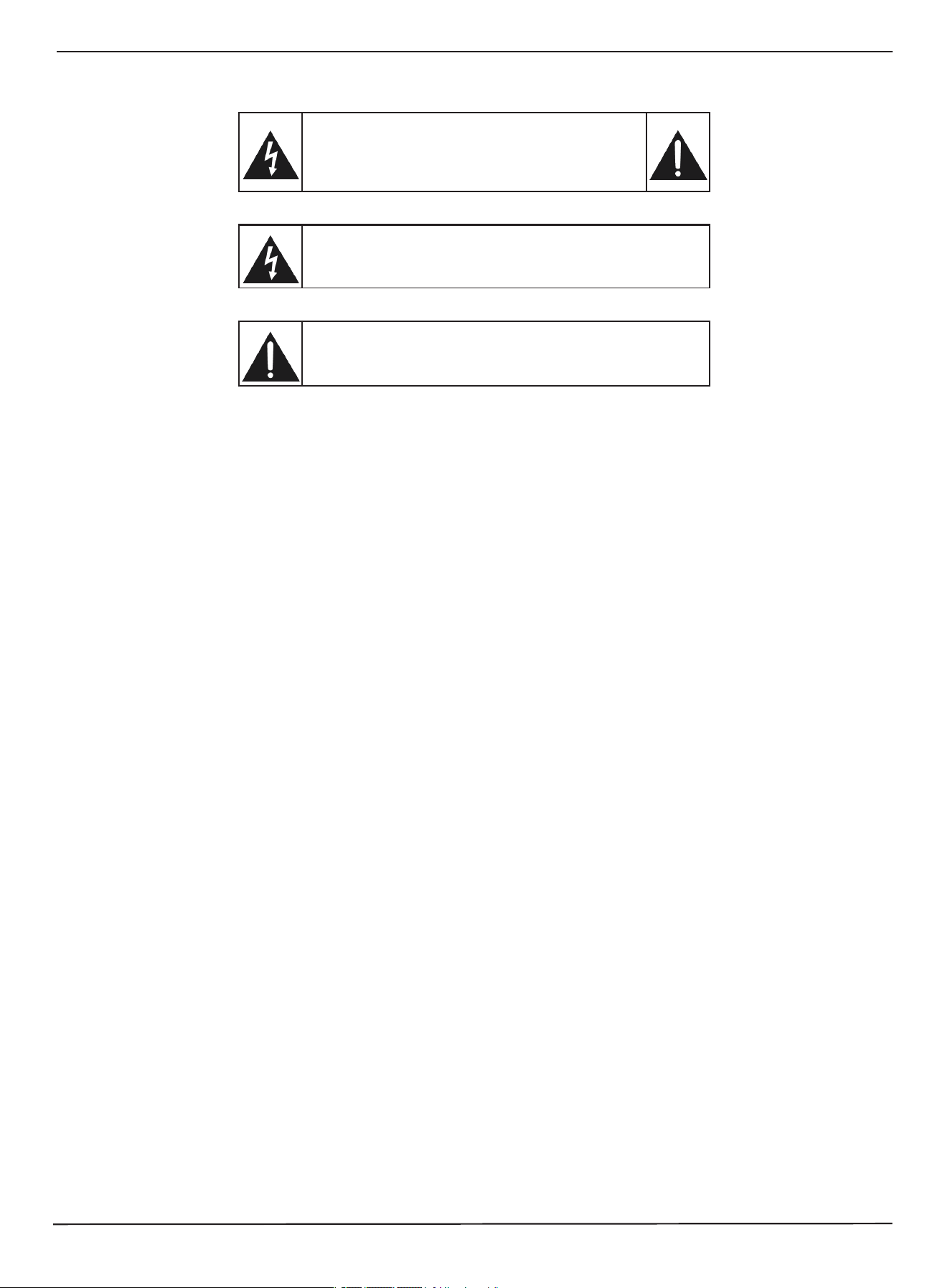
This symbol indicates that dangerous voltage constituting a risk of
electric shock is present within your freezer.
This symbol indicates that there are important operating and
maint
enance instructions in the literature accompanying your
freezer.
www.insigniaproducts.com
4
WARNING
Electric Shock Hazard
Failure to follow these instructions can result in electric shock, fire, or death.
1 WARNING–Keep ventilation openings, in both your freezer and the built-in structure, clear of
obstruction.
2 WARNING–Do not touch the interior of your freezer with wet hands. This could result in frostbite.
3 WARNING–Do not use mechanical devices or other means to accelerate the defrosting process,
other than those recommended by the manufacturer.
4 WARNING–Do not damage the refrigerant circuit.
5 WARNING–Do not damage the refrigerant tubing when handling, moving, or using your freezer.
6 WARNING–DANGER—Never allow children to play with, operate, or crawl inside your freezer.
Risk of child entrapment. Before you throw away your old freezer:
• Take off the door.
• Leave the shelves in place so that children may not easily climb inside.
7 WARNING-Do
not use electrical appliances inside the food storage compartments of the appliance unless they are of
the type recommended by the manufacturer.
8 Unplug your freezer before carrying out user maintenance on it.
9 If a component part is damaged, it must be replaced by the manufacturer, its service agent, or similar qualified persons
in order to avoid a hazard.
10 Follow local regulations regarding disposal of your freezer due to flammable refrigerant and gas. All refrigeration
products contain refrigerants, which under the guidelines of federal law must be removed before disposal. It is the
consumer's responsibility to comply with federal and local regulations when disposing of this product.
11 Do not store explosive substances such as aerosol cans with a flammable propellant in this appliance.
12 This appliance is intended to be used in household and similar applications such as
• Staff kitchen areas in shops, offices, and other working environments
• Farm houses and by clients in hotels, motels, and other residential type environments
• Bed and breakfast type environments
• Catering and similar non-retail applications
Grounding requirement
Your freezer must be grounded. Your freezer is equipped with a cord having a grounding wire with a grounding plug. The
plug must be inserted into an outlet that is correctly installed and grounded.
Incorrect use of the grounding plug can result in a risk of electric shock. Consult a qualified electrician or service person if
the g
rounding instructions are not completely understood, or if doubt exists as to whether your freezer is correctly
grounded.
SAVE THESE INSTRUCTIONS
www.insigniaproducts.com
5
7 Cu. Ft. Convertible Upright Freezer
Features
Package contents
• 7 Cu. Ft. Convertible Upright Freezer
• Left-Side Hinge Component (for reversing the door)
• User Guide
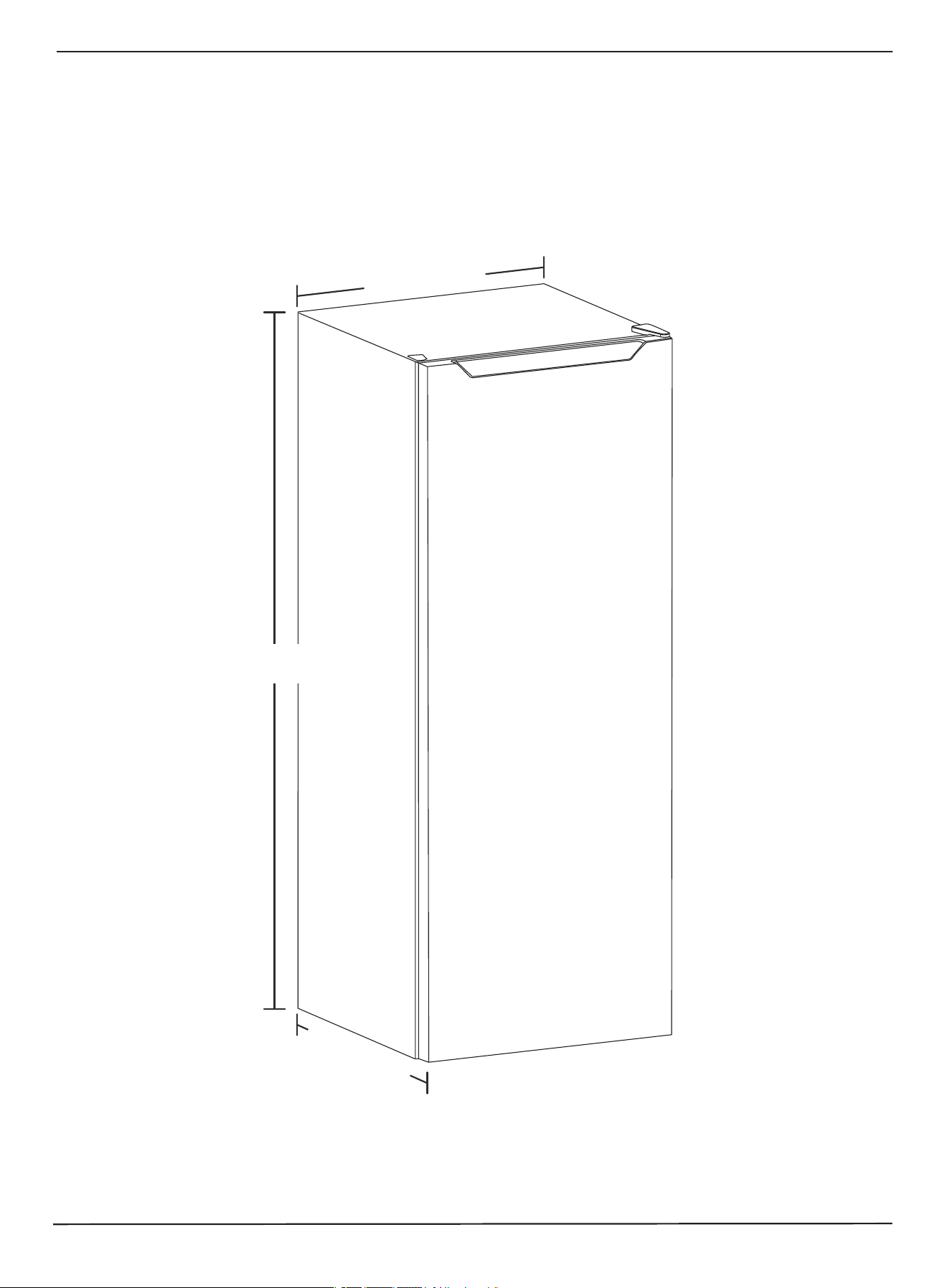
Dimensions
2
1
5
/
1
6
i
n
.
(
5
4
c
m
)
2
2
3
/
4
i
n
.
(
5
7
.
8
c
m
)
56 1/8 in. (142.5 cm)
www.insigniaproducts.com
6
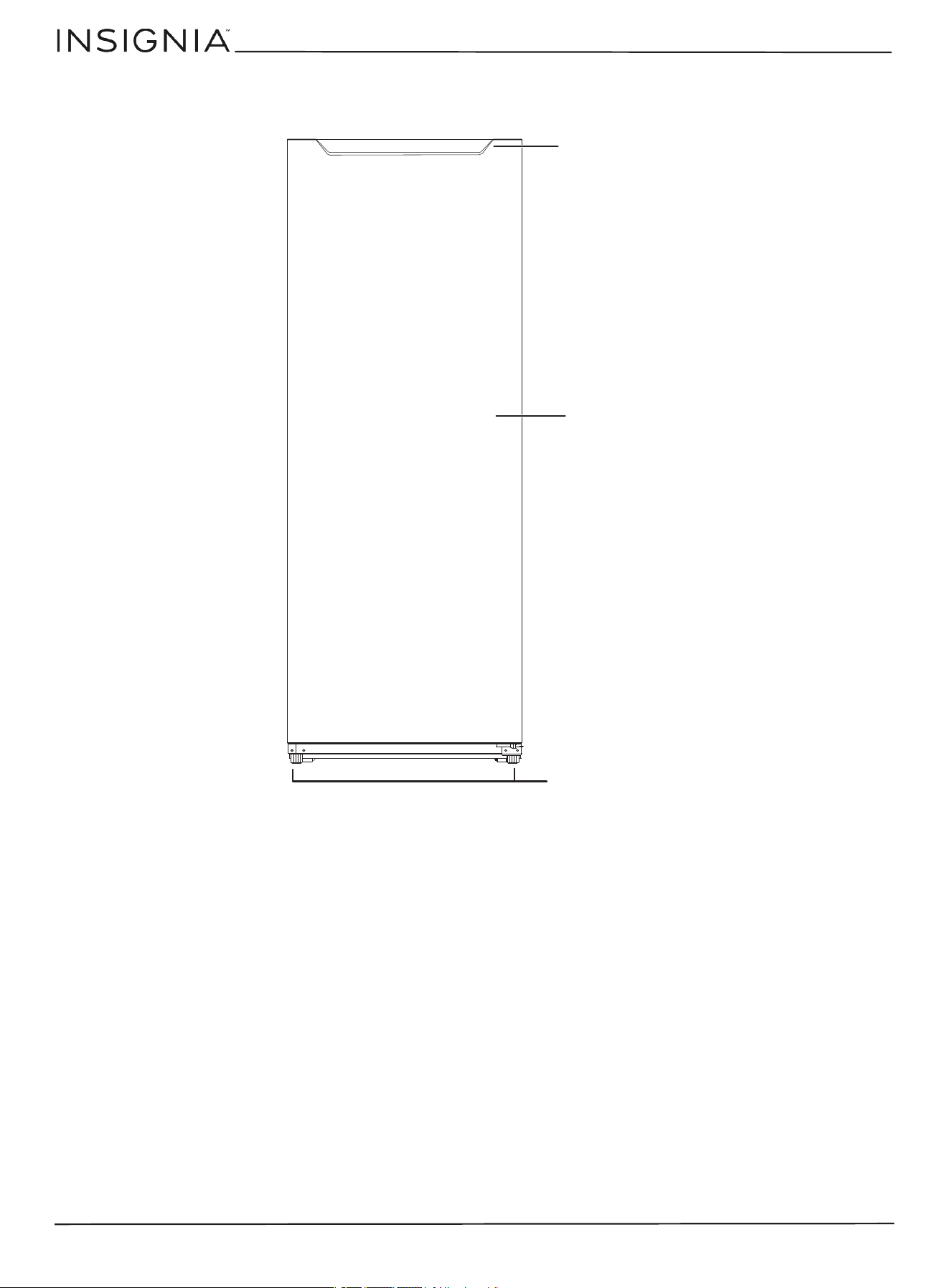
Exterior
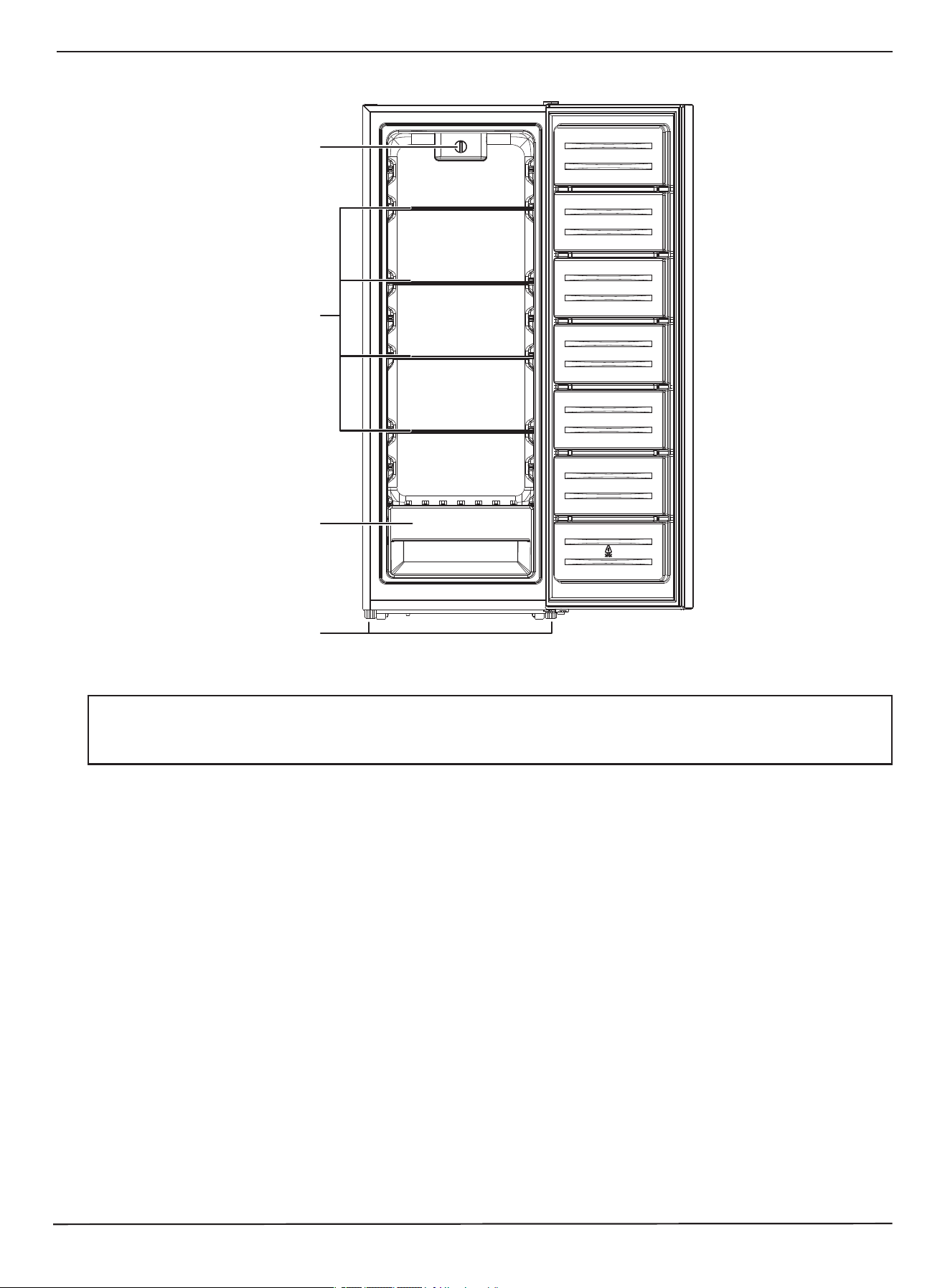
Freezer door handle
Freezer door
Leveling feet
www.insigniaproducts.com
7
7 Cu. Ft. Convertible Upright Freezer
Interior
Setting up your freezer
Before using your freezer
• Remove the exterior and interior packaging.
• Wash the inside with a damp, warm cloth and a baking soda solution (two tablespoons in a quart [.94 l] of water), then
wipe dry with a dry cloth. Do this periodically to keep your freezer looking new.
• Level your freezer using the leveling feet. If you do not level your freezer, the door may not close or seal correctly,
causing cooling, frost, and moisture problems. Turn the leveling feet clockwise to raise or counterclockwise to lower a
side.
Finding a suitable location
• Place your freezer on a floor that is strong enough to support it when fully loaded.
• Do not install your freezer on carpeting or a rug.
• Your freezer is designed to be free standing and should not be recessed or built-in.
• Your freezer is garage ready (only in Freezer mode), and is designed to operate in an ambient temperature range of 0° F
(-17.7° C) to 110° F (43.3° C).
• Adjust the feet to keep your freezer level.
• If you locate your freezer next to a fixed wall, allow sufficient space on the hinge side for the door to swing open.
• Position your freezer away from direct sunlight and sources of heat, such as a stove, heater, or radiator. Direct sunlight
may affect the acrylic coating and heat sources may increase electrical consumption. Extremely cold temperatures may
also prevent your freezer from performing correctly.
• Avoid locating your freezer in moist areas.
• Your freezer is intended for household use only. It is not designed for outside installation, including anywhere that is
not temperature controlled, such as a porch.
CAUTION:
• This freezer is heavy (94.8 lbs. (43 kg)). We recommend that two people be used to move it.
• Bef
ore connecting this freezer to a power source, let it stand for approximately six hours to reduce the possibility of a malfunction in
the
cooling system.
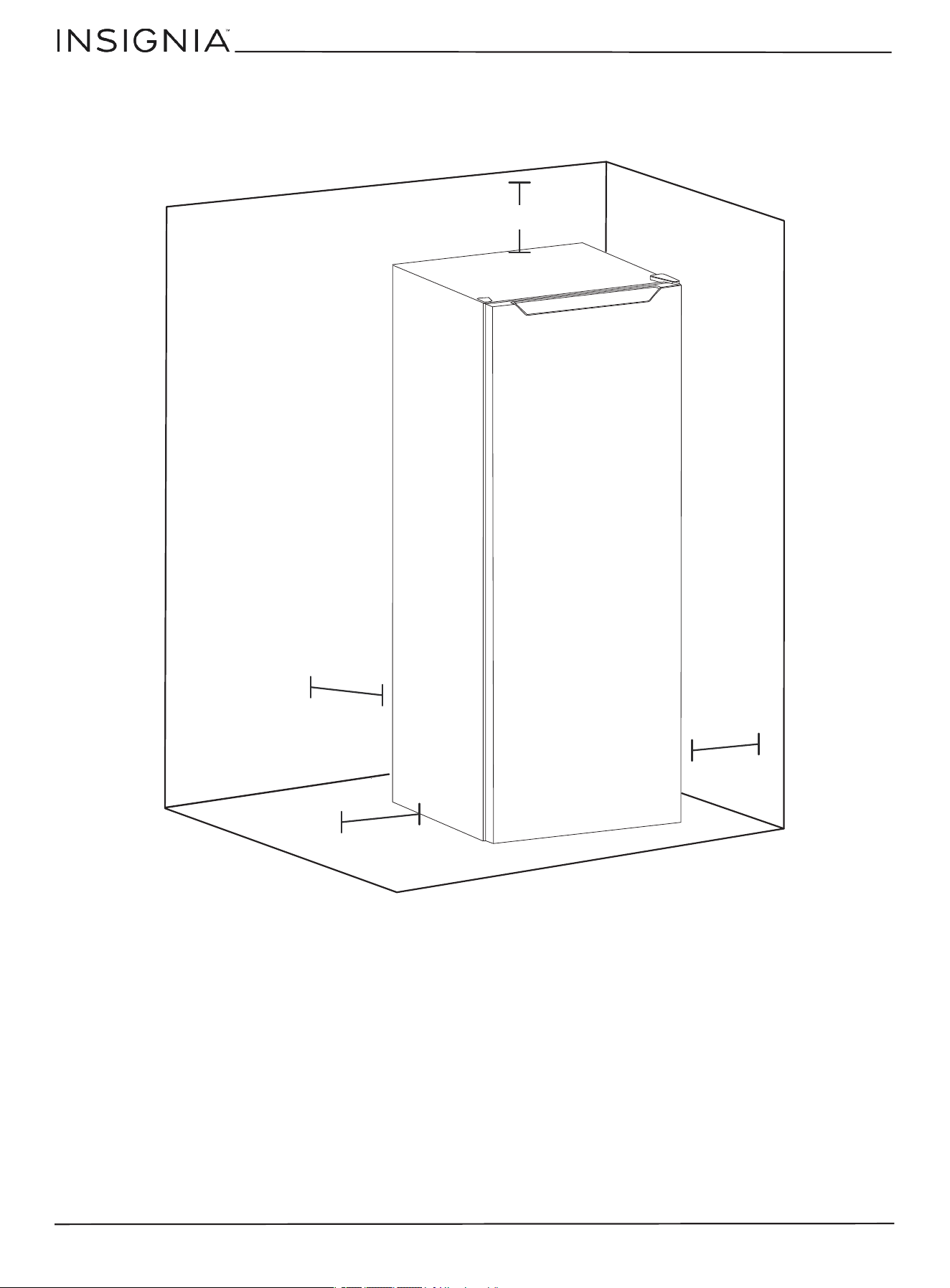
Crisper drawer
Temperature control
Glass shelves
Leveling feet
www.insigniaproducts.com
8
Providing correct ventilation
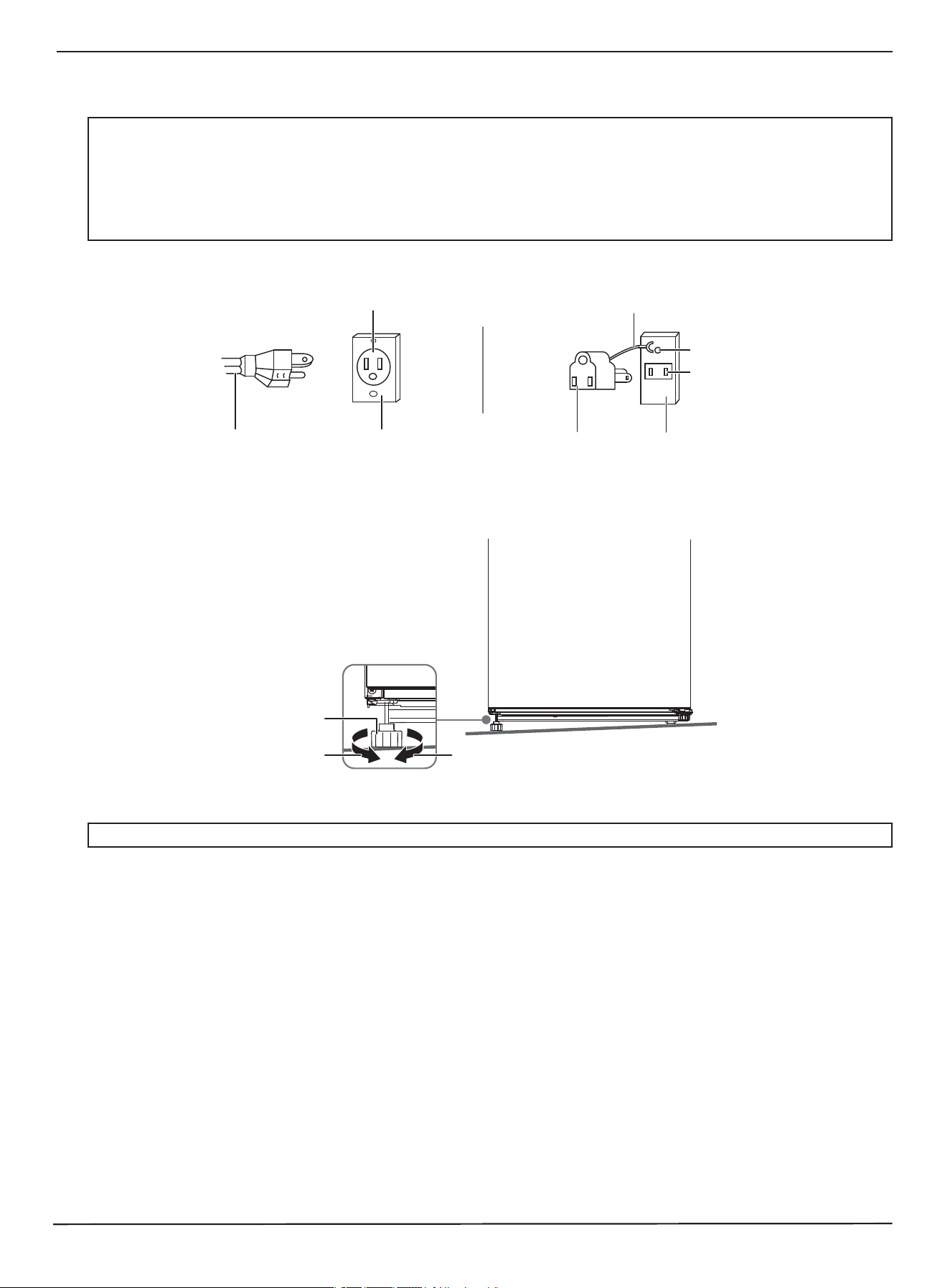
Allow at least 2 in. (5 cm) between the left and right sides and top of your freezer and surrounding walls and at least
5 in. (12.7 cm) between the back of your freezer and the back wall.
2
i
n
.
(
5
c
m
)
2 in. (5 cm)
2 in. (5 cm)
5
i
n
.
(
1
2
.
7
c
m
)
www.insigniaproducts.com
9
7 Cu. Ft. Convertible Upright Freezer
Providing the correct power source
Check your local power source. Your freezer requires a 115V, 60Hz power supply.
Leveling your freezer
Leveling your freezer is important. If you do not level your freezer during installation, the doors may not close or seal
correctly which can cause cooling, frost, or moisture problems.
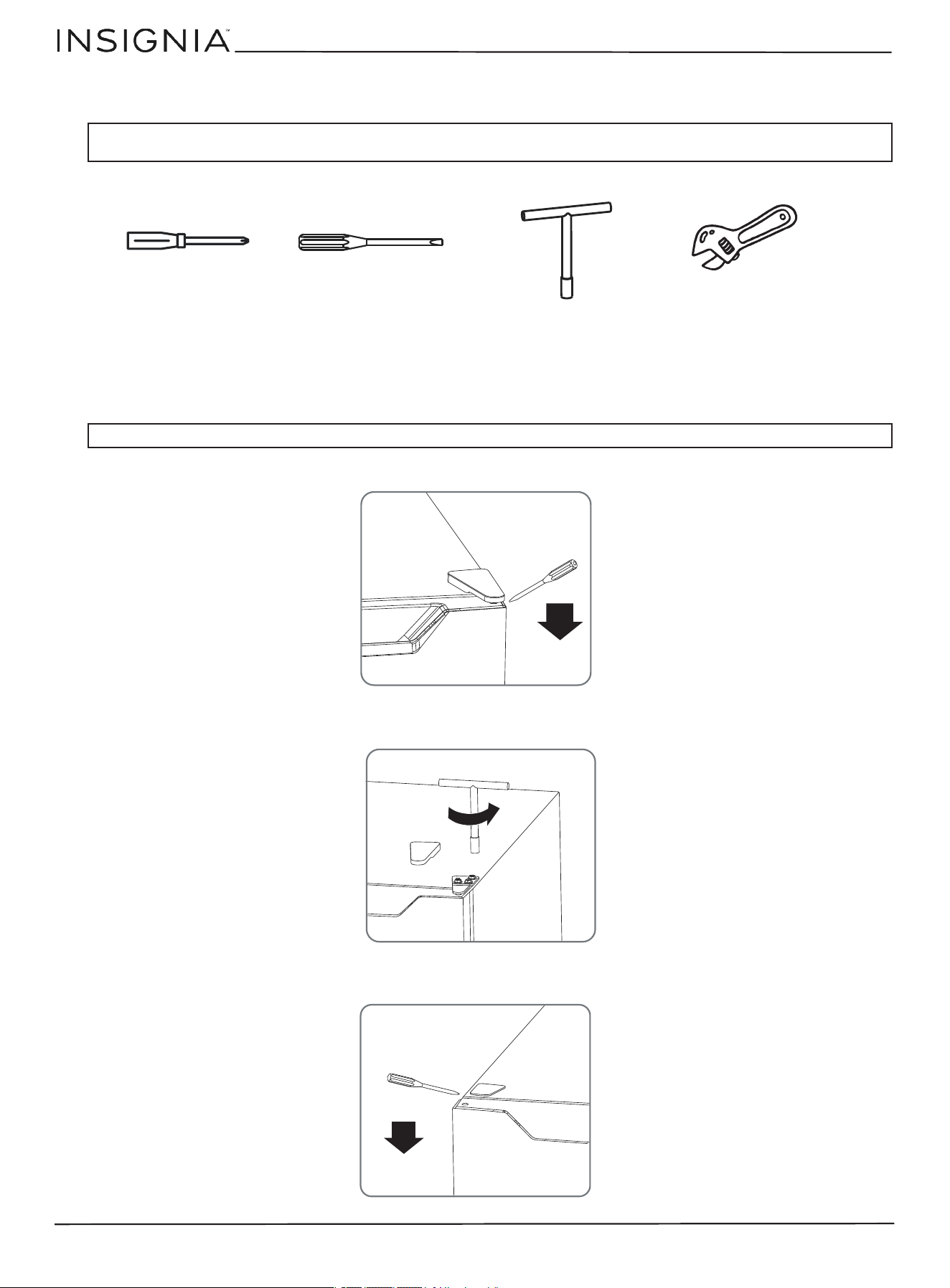
• Rotate the leveling feet clockwise (to raise) your freezer or counter-clockwise (to lower).
WARNINGS:
Make sure that:
• The power outlet accepts a 3-prong grounding plug. The third prong on the power cord plug grounds your freezer to minimize the
poss
ibility of electric shock. Do not modify the power plug.
• You do NOT plug anything else into the same power outlet as your freezer. You may overload the circuit which can cause a fire.
• You
do NOT use an extension cord. If your freezer is too far from the power outlet, move your freezer or have a electrician install a
plug
closer to your freezer.
• The power outlet cannot be turned off with a switch or pull string.
Note
: To make it easier to adjust the feet, have someone push against the top of your freezer to tilt it slightly.
3-prong outlet
3-prong plug
Grounding lead
Grounding adapter
Screw
Outlet
Using a 3-prong plug and outlet Using a grounding adapter
Outlet cover
Outlet cover
Leveling foot
Lower Raise
www.insigniaproducts.com
10
Reversing the freezer door
You will need the following tools to reverse the freezer door:
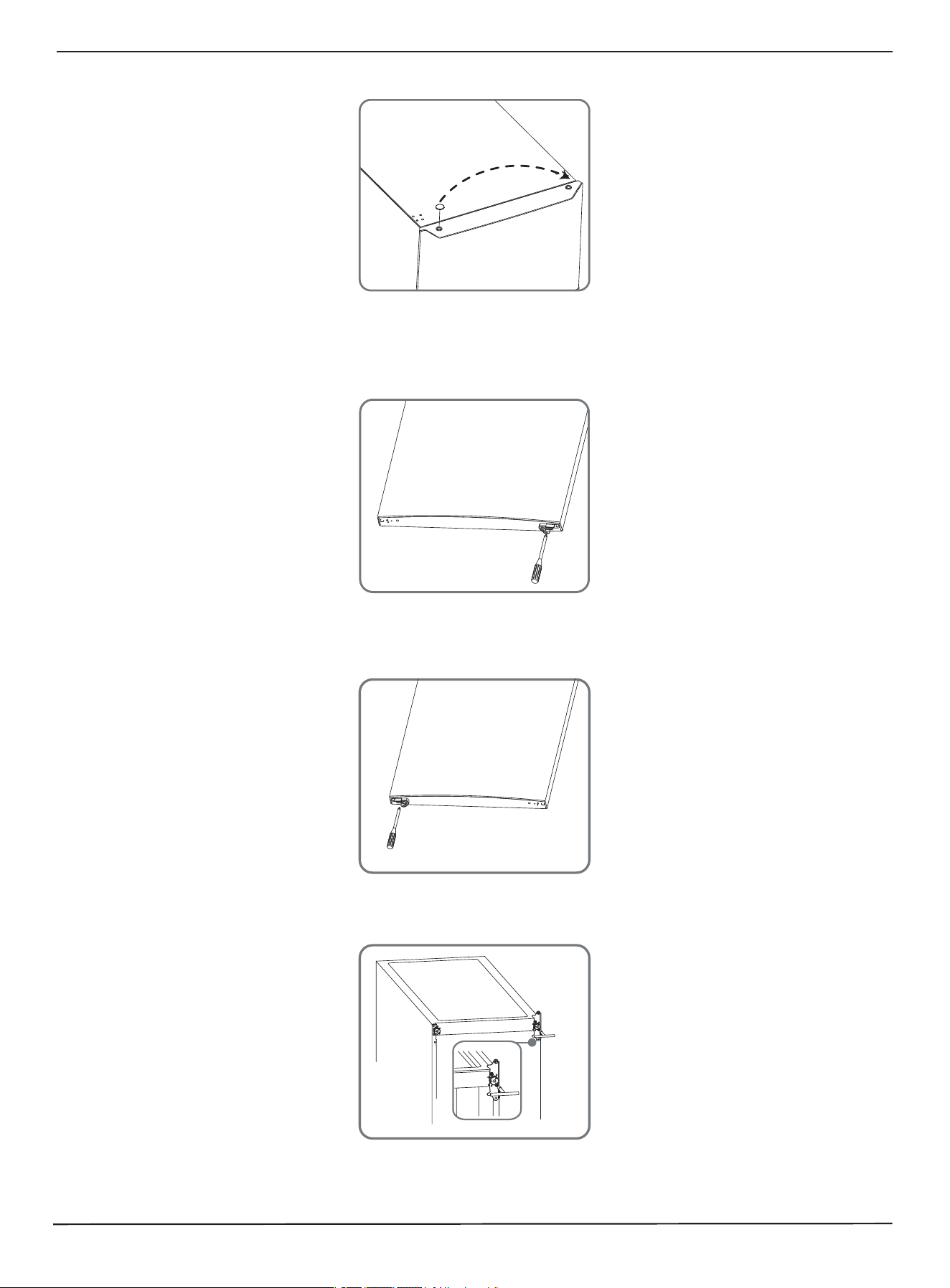
1 Make sure that your freezer is unplugged and empty.
2 Tilt your freezer back and rest the front base on something solid so that it won’t fall forward or back during the door
reversing process. It may help to have another person to assist you.
3 Remove the top hinge cover from the top right side of your freezer. (Tool needed: B)
4 Remove the screws that secure the top right hinge to the door, then remove the hinge. (Tool needed: C)
5 Remove the top left hinge cover. (Tool needed: B)
CAUTION: If you lay your freezer on its back or side for any length of time, wait for six hours after you stand it up again before you plug
it in. Otherwise, you may damage internal components.
CAUTION: Make sure that your freezer is stable when you tip it back.
Tool A: Phillips head screwdriver
Tool D: Adjustable wrench
Tool C: T-shaped socket wrench (8mm)
Tool B: Flat head screwdriver
www.insigniaproducts.com
11
7 Cu. Ft. Convertible Upright Freezer
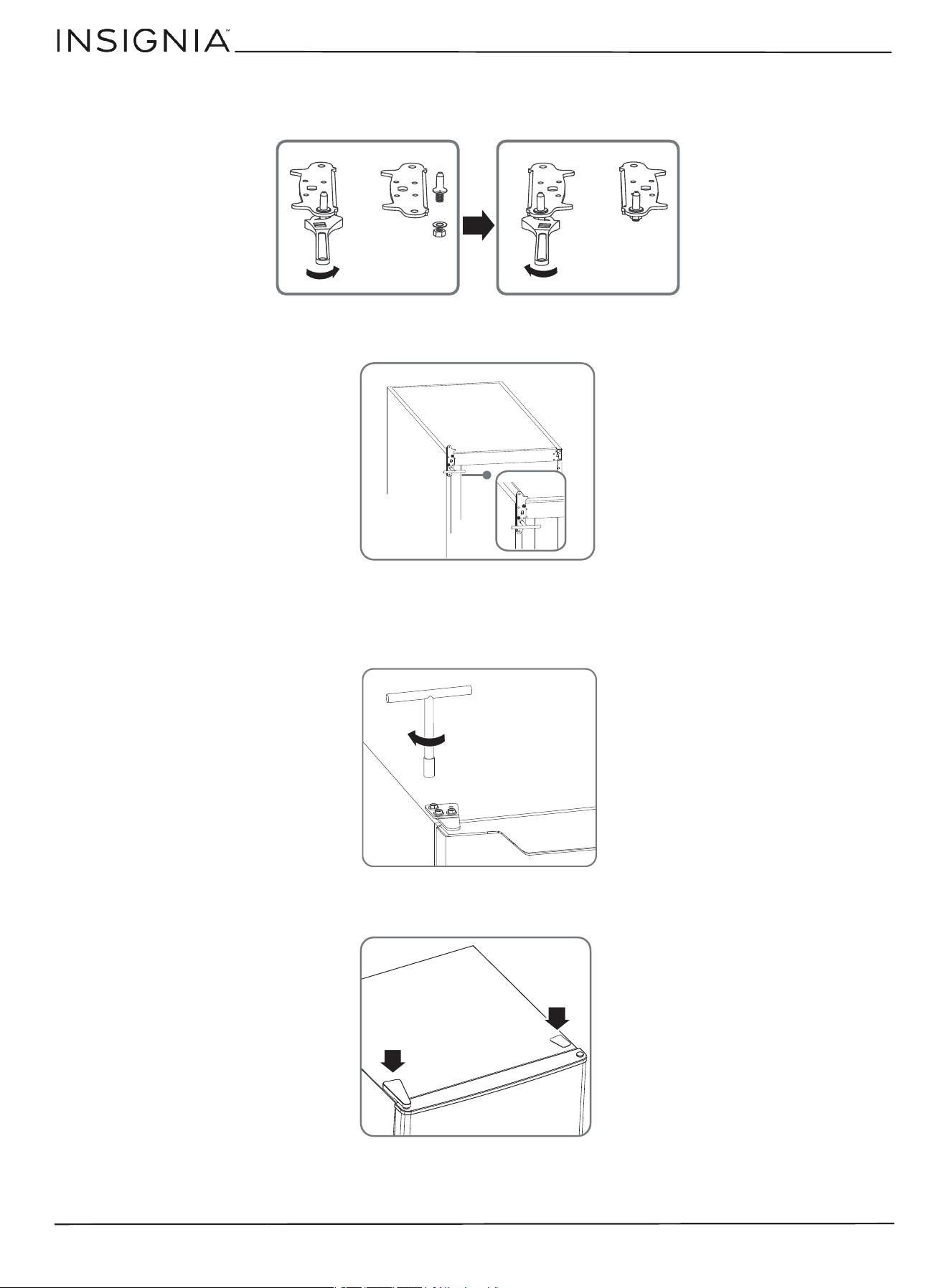
6 Move the hole cover from the top left side of the door to the top right side. (Tool needed: B)
7 Remove the freezer door from the freezer by lifting it off the bottom hinge pin, then rest it on a pad to prevent
scratching or damage.
8 Remove the right side hinge component from the bottom right side of the door. (Tool needed: A)
9 Take the left-side hinge component out of the accessory bag, then install it on the bottom left side of the door. (Tool
needed: A)
10 Remove both leveling feet and the bottom hinge bracket from the bottom of your freezer. (Tool needed: C)
www.insigniaproducts.com
12
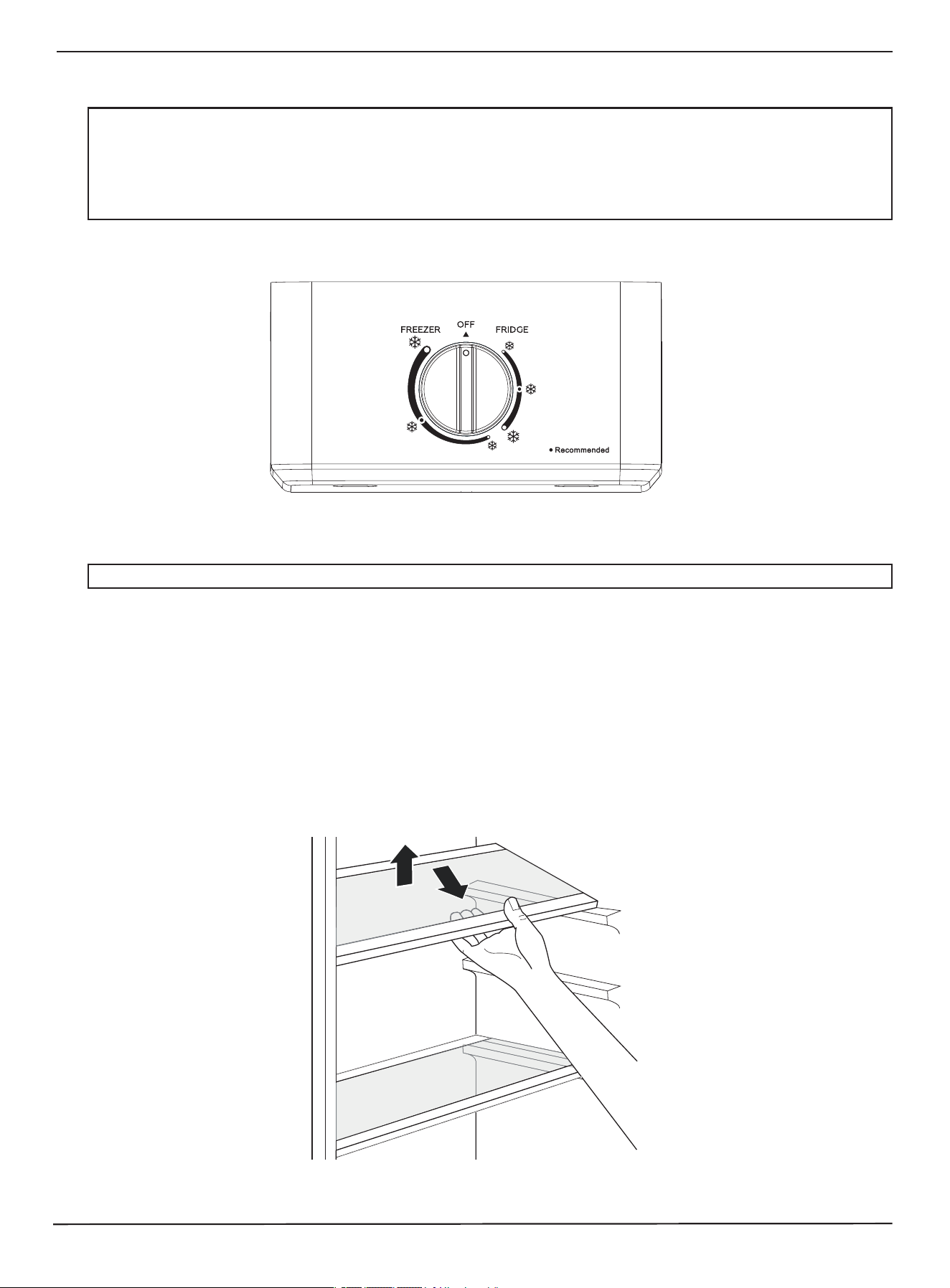
11 Remove the bottom hinge pin from the bottom hinge bracket, rotate the hinge bracket 180 degrees clockwise, and
replace the bottom hinge pin into the bottom hinge bracket. (Tool needed: D)
12 Install the bottom hinge bracket on the left bottom of your freezer, then replace both leveling feet. Do not fully tighten
the bottom hinge bracket at this time. (Tool needed: A or C)
13 Replace the freezer door onto the bottom hinge pin and align it vertically and horizontally so that the gaskets make a
good seal all around the door.
14 Install the upper hinge bracket with the upper hinge pin inserted into the hole in the top of the door. Tighten the
screws so that the door is secure. (Tool needed: C)
15 Replace the top hinge cover onto the left side of your freezer, then replace the top screw hole cover onto the top right
side.
16 With the door closed, make sure that door is aligned horizontally and vertically with the freezer cabinet and that the
gasket makes a good seal. When everything is in proper alignment, tighten the bottom hinge bracket.
17 Readjust the leveling feet as necessary.
www.insigniaproducts.com
13
7 Cu. Ft. Convertible Upright Freezer
Using your freezer
Before storing foods in your freezer, turn on the freezer and freezer compartments, then wait for 24 hours to make sure that
they are working correctly and to let both compartments reach the correct temperatures.
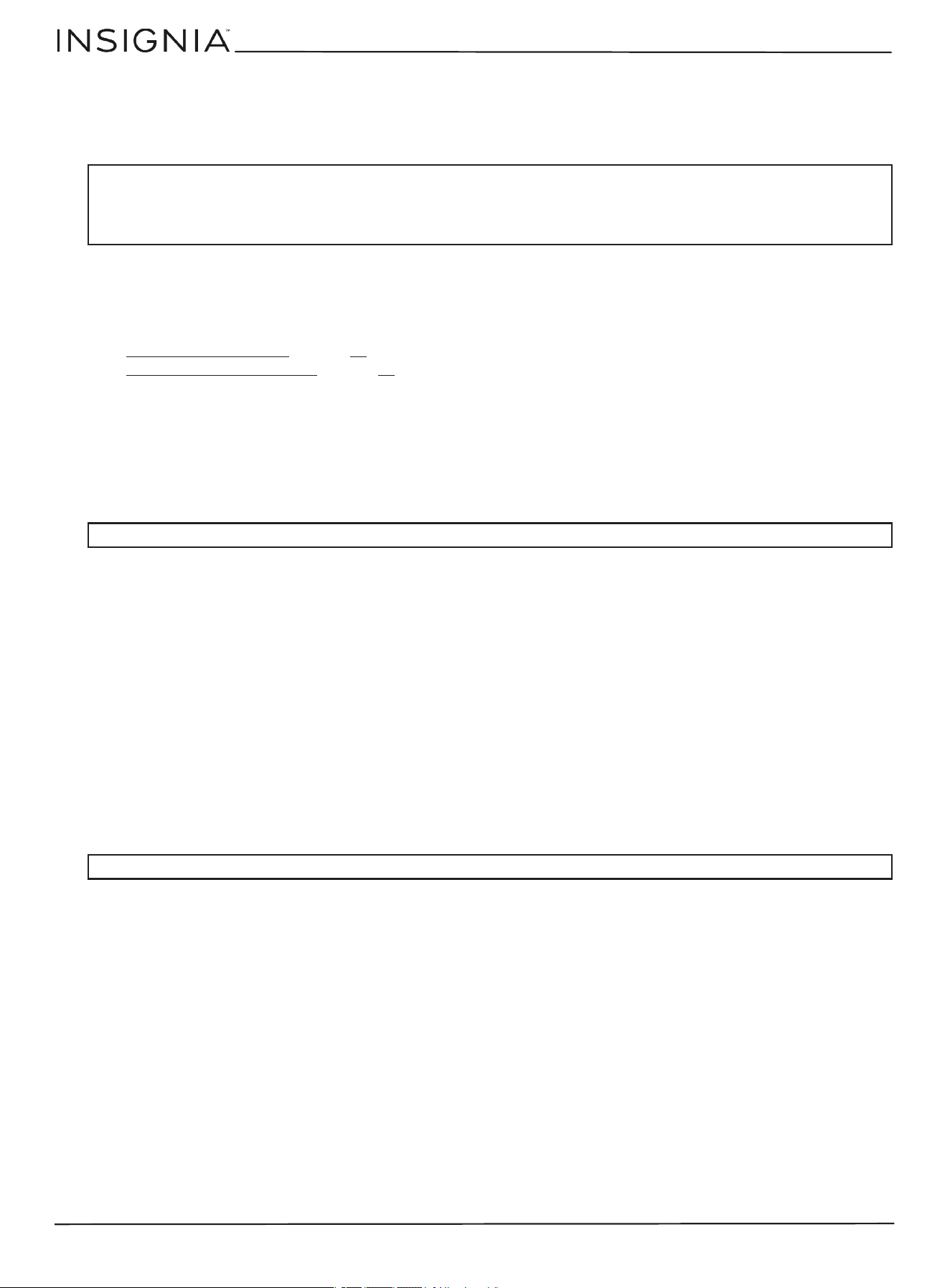
Plug your freezer into a power outlet, then adjust the interior temperature with the temperature control knob. The
follo
wing should be considered when you are making adjustments:
• Turn the knob clockwise to turn your freezer on (from OFF to FRIDGE mode).
• Continue turning the knob clockwise to go from FRIDGE mode to FREEZER mode.
• Expect a slight click as you change modes.
• The more clockwise you turn the knob, the colder your freezer gets.
• In the middle of each zone, there is a black dot with a snowflake, which indicates the recommended setting for that
mode.
• Turn the knob counterclockwise to go from FREEZER mode to FRIDGE mode and from FRIDGE mode to OFF.
Adjusting the freezer shelves
The shelves inside the freezer and freezer compartments are adjustable.
1 Open the freezer door all the way.
2 Lift a shelf, then pull it out.
3 To replace a shelf, slide it into the compartment, then lower it into position.
CAUTIONS:
• If you run your freezer in an ambient temperature below 50° F, it may not operate consistently, it may not operate consistently. For
exam
ple, the freezer temperature may become too warm and the contents may defrost.
• Internal temperatures can vary based on the location of your freezer, the ambient room temperature, and how often you open the
door
s.
• Do not store carbonated drinks in the freezer compartment. They may break and damage your freezer.
• Do
not exceed the storage times recommended by the food manufacturers for any kind of food.
CAUT
ION: The temperature control knob should not be turned clockwise past the FREEZER setting, or damage could result.
www.insigniaproducts.com
14
Maintaining your freezer
Cleaning your freezer
We recommend that you do the following every time you clean your freezer to keep it running odor-free and efficiently:
1 Unplug your freezer from the power outlet.
2 Remove all food.
3 If you want to remove the door racks, shelves, crisper, freezer shelf, or freezer door racks, see:
•
Maintaining your freezer on page 14
• Adjusting the freezer shelves on page 13
4 Clean the doors, handles, and cabinet surfaces with a mild detergent, then rinse with warm water using a wrung-out
sponge or cloth.
5 Wash the inside with a damp warm cloth soaked in a solution of one quart (.94 l) of lukewarm water to one tablespoon
of baking soda solution, then rinse with warm water using a wrung-out sponge or cloth.
6 Clean the shelves, and drawer with a mild detergent and soft cloth, then rinse with warm water.
7 Make sure that you keep the door gaskets (seals) clean so that the door seals tightly. This helps your freezer to run
efficiently.
8 Dry all surfaces and removable parts before putting them back into place.
9 Plug your freezer into the power outlet.
Defrosting your freezer
• For improved cooling performance, your refrigerator will need to be defrosted manually if interior frost gets too thick.
• To avoid water flowing out from under the your refrigerator, manually defrost is before switching from freezer mode to
refrigerator mode.
• If the drain hole at the bottom of the freezer liner is blocked by ice or dirt, clean it to ensure proper draining.
Shutting down your freezer for a long time (several months)
1 Turn off your freezer and unplug it from the wall outlet.
2 Remove all food.
3 Clean your freezer.
4 Leave the door open slightly to avoid possible formation of condensation, mold, or odor.
Moving your freezer
1 Turn off your freezer and unplug it from the power outlet.
2 Remove all food.
3 Securely tape down all loose items inside your freezer.
4 Tape the doors shut.
5 Protect the exterior with moving blankets or pads.
6 Make sure that your freezer stays in the upright position during transportation.
Disposing of your freezer
This appliance should not be treated as regular household waste. It should be taken to the appropriate waste collection
point for recycling of electrical components. For information on where to take it, contact your local waste removal agency
or government office.
CAUTIONS:
To prevent damage to the finish:
• Do not use gasoline, benzine, thinner, or other similar solvents.
• Do
not use abrasive cleaners.
• Do
not use sharp objects because they are likely to scratch the surface.
CAUT
ION: Make sure that the door gaskets are completely dry before you plug your freezer into the power outlet.
CAUTION: Use extreme caution with children. Do not let children play with your freezer.

www.insigniaproducts.com
15
7 Cu. Ft. Convertible Upright Freezer
Tips on saving energy
• Locate your freezer in the coolest area of the room, away from heat producing appliances or heating ducts and out of
direct sunlight.
• Let hot foods cool to room temperature before placing them in your freezer. Overloading your freezer forces the
compressor to run longer.
• Wrap foods correctly and wipe containers dry before placing them in your freezer. This cuts down on frost build-up
inside your freezer.
• Organize and label food to reduce door openings and extended searches.
• Do not use aluminum foil, wax paper, or paper toweling to line shelves. Liners interfere with cold air circulation and
make your freezer less efficient.
Tips on storing food
• Always store cooked meats on a freezer shelf above raw meats to avoid bacterial transfer. Keep raw meat on a plate
which is large enough to collect juices, and cover the plate with cling film or foil. Leave space around food. This allows
cold air to circulate around your freezer so that all parts of your freezer are kept cool.
• To prevent transfer of flavors and food drying out, wrap or cover each food item separately.
• Let hot food cool down before placing it in the freezer. Placing hot food in the freezer could spoil other food and lead to
higher temperatures.
• To prevent cold air from escaping, try to limit the number of times you open the doors. When retuning from shopping,
sort foods to be kept in the freezer before opening the door. Only open the door to put food in or take it out.
• Do not store food in your freezer which goes bad easily at low temperature, such as bananas and melons.
• When storing food in your freezer, use a container with a lid whenever possible. This prevents moisture from
evaporating, and helps food keep its taste and nutrients.
• When storing food in your freezer, wrap the food in polyethylene film, aluminum foil, or other types of freezer storage
products.
• Do not block air vents inside with food. Smooth circulation of cold air keeps freezer temperatures even.
• Do not open the door frequently. Opening the door lets warm air enter your freezer and can cause the temperature to
rise.
• To adjust the temperature control easily, do not store food near the temperature controls.
• Do not store bottles in your freezer. They may break when frozen.
• Do not refreeze food that has been thawed. This causes a loss of taste and nutrition.
• Leave a small amount of “air space” when freezing liquids to allow for expansion.
• To make the best use of freezer space, freeze liquids (or solids with liquids, such as stew) in square blocks. Pour the
liquid into a freezer bag placed inside a square-sided container and freeze it. When the liquid is frozen, remove the bag
from the container and seal the bag.
Tips for shopping for frozen foods
• When you are buying frozen food, look at the storage guidelines on the packaging. Check the “Best Before” date. Do
not use food that is past this date.
• Check the temperature of the frozen food cabinet in the shop where you buy your frozen foods.
• Make sure that the frozen food package is in perfect condition.
• Always buy frozen products last to avoid thawing while you shop.
• Keep frozen food together while shopping, and on the journey home to help to keep the food cooler.
• Don't buy frozen food unless you can freeze it quickly.
• When transporting frozen food, use special insulated bags that you can buy from most supermarkets and hardware
shops. These keep frozen food cold longer.
• Freeze food in small quantities. It freezes faster and takes less time to thaw.
• If you are freezing large amounts of fresh food, select a low temperature range. This will lower the temperature in the
freezer so your food freezes faster. When the food is frozen, adjust the temperature back to its normal mode.
Tips on defrosting
• For better performance, your freezer should be defrosted when the frost inside exceeds 1/4 in. thick.
• Your freezer should be defrosted prior to converting from Freezer mode to Refrigerator mode.
www.insigniaproducts.com
16
Troubleshooting
PROBLEM SOLUTION
My freezer does not work.
• Make sure that your freezer is securely plugged into a working outlet.
• Mak
e sure that your power source has the correct voltage. Your freezer’s voltage
rati
ng is on a label on the back of your freezer.
• Check the house fuse or circuit breaker box and replace the fuse or reset the
circ
uit breaker.
My freezer does not keep foods
froze
n.
• Make sure that your freezer is securely plugged into a working outlet.
• Mak
e sure that your freezer door is fully closed and that the gasket makes a
good
seal with the freezer cabinet.
• Make sure that the temperature control know is set to an appropriate setting.
Adju
st it to a colder temperature (clockwise), if necessary.
The freezer has a bad odor.
• Make sure that all food with a strong odor (like onions) is wrapped or stored in
airt
ight packaging.
• Certain containers and wrapping materials (such as paper, foil, or plastic) can
caus
e odors. If you think this might be the case, try using different containers or
a different brand of wrapping material.
• Check for spoiled food and remove it.
• Cle
an the inside of your freezer. See
Cleaning your freezer on page 14.
The freezer door does not close
completely.
• Make sure that no food packages are in the way.
• Mak
e sure that the door gasket (seal) are clean. See
Cleaning your freezer on
page 14.
• If the door gasket does not seal, try heating then cooling the seal. You can use an
electric hair dryer to heat the seal.
• Make sure that your freezer is level. See
Leveling your freezer on page 9.
The temperature is too warm.
• You may have left the door open too long or opened it too frequently.
• Mak
e sure that no obstacle is keeping the door from closing correctly.
• Adj
ust the freezer temperature. See
Adjusting the freezer shelves on page 13.
• Your freezer may not have enough clearance from walls or the ceiling. See
Providing correct ventilation on page 8.
The temperature is too cold. • Adjust the freezer temperature. See Adjusting the freezer shelves on page 13.
A layer of frost occurs in your
freezer.
• A layer of frost may occur on the freezer’s interior walls if the freezer is opened
freq
uently or kept open too long.
• Make sure that the air outlets are not blocked by food.
• Mak
e sure that the doors are fully closed.
The
freezer door is hard to open
or cl
ose.
• When you open the freezer door, warm air rushes inside. When you close the
door
, the warm air rushes to the condenser which causes a vacuum. This causes
the door to be hard to open for about 10 to 15 seconds after closing.
• If the door is hard to open at other times, try rubbing paraffin wax or petroleum
jell
y along the edges of the entire gasket. Paraffin wax is used for canning and is
safe for use around food.
• If the door is hard to close, try slightly loosening the tension on the door hinges.
www.insigniaproducts.com
17
7 Cu. Ft. Convertible Upright Freezer
Specifications
The compressor runs for a long
time or turns on and off
frequently.
The compressor runs longer if:
• The room temperature is high.
• You
just added a large amount of food. Wait for the food to freeze, then check
agai
n.
• You open and close the door frequently.
• The
door gasket is dirty. Clean the gasket. See
Cleaning your freezer on page 14.
• Your freezer has been disconnected for a period of time. Wait for your freezer to
cool (about four hours) before adding food.
• You have the temperature set too low.
The
freezer makes unusual noises
or vi
brations.
The following sounds are normal:
• Compressor running noises.
• Air
movement noise from the small fan motor in the freezer compartment or
othe
r compartments.
• Popping noise during automatic defrosting.
• Cli
cking noise before the compressor starts.
Othe
r unusual noises or vibrations may occur:
• If you have items on the top of your freezer. Remove the items.
• If
your freezer is not level. See
Leveling your freezer on page 9.
• If your freezer is touching walls. Move it away from the walls.
• If the shelves or drawers are installed incorrectly.
Exte
rnal dimensions
(H × W
× D)
56 1/8 x 21 5/16 × 22 3/4 in. (142.5 × 54 × 57.8 cm)
Inte
rnal dimensions
(H × W
× D)
Freezer compartment (H × W × D): 48 7/16 x 15 13/16 x 17 1/4 in. (123 x 40.3 x 43.6 cm)
Shelf (W × D): 15 3/4 x 15 7/16 in. (39.9 x 39 cm)
Crisper drawer (H x W x D): 7 3/4 x 15 3/4 x 10 1/8 in. (19.7 x 39.9 x 25.7 cm)
Weight
Gross Weight: 105.8 lbs. (48 kg)
Net Weight: 94.8 lbs. (43 kg)
Temperature ranges Refrigerator mode: 30° to 50° F (-1.1° to 10° C)
Freezer mode: -11.2° to 10.4° F (-24° to -12° C)
Ambient temperature
range
s
Refrigerator mode: 37° to 110° F (3° to 43° C)
Freezer mode: 0° to 110° F (-17.8° to 43.3° C)
Power requirements AC115V~60Hz
Current 1.5A
Power cord length 5.1 ft. (1.55 m)
Power consumption per
year
29
6 kWh
Certifications TUV and E-Star approved
Garage ready? Yes. Garage ready only in freezer mode in ambient temperatures of 0° to 110° F
(-17.8° to 43.3° C)
PROBLEM SOLUTION
www.insigniaproducts.com
18
ONE-YEAR LIMITED WARRANTY
Definitions:
The Distributor* of Insignia branded products warrants to you, the original purchaser of this new Insignia-branded product (“Product”), that the Product
shall be free of defects in the original manufacturer of the material or workmanship for a period of one (1) year from the date of your purchase of the
Product (“Warranty Period”).
For this warranty to apply, your Product must be purchased in the United States or Canada from a Best Buy branded retail store or online at
www.bestbuy.com or www.bestbuy.ca and is packaged with this warranty statement.
How long does the coverage last?
The Warranty Period lasts for 1 year (365 days) from the date you purchased the Product. Your purchase date is printed on the receipt you received with
the Product.
What does this warranty cover?
During the Warranty Period, if the original manufacture of the material or workmanship of the Product is determined to be defective by an authorized
Insignia repair center or store personnel, Insignia will (at its sole option): (1) repair the Product with new or rebuilt parts; or (2) replace the Product at no
charge with new or rebuilt comparable products or parts. Products and parts replaced under this warranty become the property of Insignia and are not
returned to you. If service of Products or parts are required after the Warranty Period expires, you must pay all labor and parts charges. This warranty lasts
as long as you own your Insignia Product during the Warranty Period. Warranty coverage terminates if you sell or otherwise transfer the Product.
How to obtain warranty service?
If you purchased the Product at a Best Buy retail store location or from a Best Buy online website (www.bestbuy.com or www.bestbuy.ca), please take your
original receipt and the Product to any Best Buy store. Make sure that you place the Product in its original packaging or packaging that provides the same
amount of protection as the original packaging.
To obtain warranty service, in the United States and Canada call 1-877-467-4289. Call agents may diagnose and correct the issue over the phone.
Where is the warranty valid?
This warranty is valid only in the United States and Canada at Best Buy branded retail stores or websites to the original purchaser of the product in the
country where the original purchase was made.
What does the warranty not cover?
This warranty does not cover:
• Food, beverage, and/or medicine loss/spoilage.
• Customer instruction/education
• Installation
• Set up adjustments
• Cosmetic damage
• Damage due to weather, lightning, and other acts of God, such as power surges
• Accidental damage
• Misuse
• Abuse
• Negligence
• Commercial purposes/use, including but not limited to use in a place of business or in communal areas of a multiple dwelling condominium or
apartment complex, or otherwise used in a place of other than a private home.
• Modification of any part of the Product, including the antenna
• Display panel damaged by static (non-moving) images applied for lengthy periods (burn-in).
• Damage due to incorrect operation or maintenance
• Connection to an incorrect voltage or power supply
• Products sold “as is” or “with all faults”
• Consumables, including but not limited to batteries (i.e. AA, AAA, C etc.)
• Products where the factory applied serial number has been altered or removed
• Loss or Theft of this product or any part of the product
• Display panels containing up to three (3) pixel failures (dots that are dark or incorrectly illuminated) grouped in an area smaller than one tenth (1/10)
of the display size or up to five (5) pixel failures throughout the display. (Pixel based displays may contain a limited number of pixels that may not
function normally.)
• Failures or Damage caused by any contact including but not limited to liquids, gels or pastes.
REPAIR REPLACEMENT AS PROVIDED UNDER THIS WARRANTY IS YOUR EXCLUSIVE REMEDY FOR BREACH OF WARRANTY. INSIGNIA SHALL NOT BE LIABLE
FOR AN
Y INCIDENTAL OR CONSEQUENTIAL DAMAGES FOR THE BREACH OF ANY EXPRESS OR IMPLIED WARRANTY ON THIS PRODUCT, INCLUDING, BUT
NOT LIMITED TO, LOST DATA, LOSS OF USE OF YOUR PRODUCT, LOST BUSINESS OR LOST PROFITS. INSIGNIA PRODUCTS MAKES NO OTHER EXPRESS
WARRANTIES WITH RESPECT TO THE PRODUCT, ALL EXPRESS AND IMPLIED WARRANTIES FOR THE PRODUCT, INCLUDING BUT NOT LIMITED TO ANY
IMPLIED WARRANTIES OF AND CONDITIONS OF MERCHANTABILITY AND FITNESS FOR A PARTICULAR PURPOSE, ARE LIMITED IN DURATION TO THE
WARRANTY PERIOD SET FORTH ABOVE AND NO WARRANTIES, WHETHER EXPRESS OR IMPLIED, WILL APPLY AFTER THE WARRANTY PERIOD. SOME STATES,
PROVINCES AND JURISDICTIONS DO NOT ALLOW LIMITATIONS ON HOW LONG AN IMPLIED WARRANTY LASTS, SO THE ABOVE LIMITATION MAY NOT
APPLY TO YOU. THIS WARRANTY GIVES YOU SPECIFIC LEGAL RIGHTS, AND YOU MAY ALSO HAVE OTHER RIGHTS, WHICH VARY FROM STATE TO STATE OR
PROVINCE TO PROVINCE.
Contact Insignia:
1-877-467-4289
www.insigniaproducts.com
INSIGNIA is a trademark of Best Buy and its affiliated companies.
*Distributed by Best Buy Purchasing, LLC
7601 Penn Ave South, Richfield, MN 55423 U.S.A
©2024 Best Buy. All rights reserved.
For product inquiries, please contact us with the information below:
1-877-467-4289
www.insigniaproducts.com
INSIGNIA is a trademark of Best Buy and its affiliated companies.
Distributed by Best Buy Purchasing, LLC
7601 Penn Ave South, Richfield, MN 55423 U.S.A.
©2024 Best Buy. All rights reserved.
V2 ENGLISH
24-0681