1
Installation and User Guide
For use with Wi-Safe 2 Smoke, Heat and Carbon Monoxide Alarms
WTSL-F Alarm Control Unit with Wi-Safe 2
®
Drawing No: GN5528
Revision: 1
Drawn By: D6
Tschaka RM, May 2019
FireAngel Safety Technology Limited Artwork Information
Ensure that you are printing / manufacturing from the original artwork file and not a preview
CONFIDENTIAL: The information provided in this document is proprietary to FireAngel Safety Technology Plc. and as
such should only be used/shared for the exclusive manufacture of those products specified.
Title/Description:
User Manual
Material:
Refer to MS0032
Used On / Used For:
WTSL-F
Size:
W - 135mm / H - 80mm
Supplier:
FLEX
Print Colours:
BLACK
Content Quality:
CCB
Product Information:
GA/GB
Certification:
IB
Messaging:
LS
APPROVAL:
Design:
CD

2
Features 4
Positioning 6
Installation 6
Wireless Interlink 8
Making the Alarm Control Unit
Tamper Proof 10
INSTALLATION GUIDE
FireAngel Safety Technology Limited
Vanguard Centre, Coventry CV4 7EZ UK
Technical Support Line: 0330 094 5830
Email: technicalsupport@fireangeltech.com
Web: www.fireangeltech.com
GN5528R1
PLEASE READ THIS GUIDE IN FULL BEFORE USING YOUR WSTL-F ALARM
CONTROL UNIT!
This user guide is also available in large text and other formats
Please call 0330 094 5830 for further information
Battery powered Alarm Control Unit with Test, Silence, Locate function Non-replaceable 3 V
DC battery
W2 module contained within WSTL-F independently tested to RF standard
EN 301 489-1, EN 301 489-3, EN 300 220-2
Max RF power: +10dBm
Frequency: 868MHz
Battery operated alarm control unit for testing, mute and localization Hereby, FireAngel Safety
Technology Limited declares that this WSTL-F is in compliance with the essential requirements and
other relevant provisions of Directive 2014/53/EU The Declaration of Conformity can be accessed on
the website: http://spru es/EC-WSTL-F

3
Features 4
Positioning 6
Installation 6
Wireless Interlink 8
Making the Alarm Control Unit
Tamper Proof 10
INSTALLATION GUIDE
Testing the Alarm System 12
Product Functionality 13
Reorganising a Network 16
When an Alarm Sounds 17
LED Indicators 18
Troubleshooting 20
Battery Replacement 22
Maintenance 23
Disposal 24
Warranty 24
USER GUIDE
FireAngel Safety Technology Limited
Vanguard Centre, Coventry CV4 7EZ UK
Technical Support Line: 0330 094 5830
Email: technicalsupport@fireangeltech.com
Web: www.fireangeltech.com
PLEASE READ THIS GUIDE IN FULL BEFORE USING YOUR WSTL-F ALARM
CONTROL UNIT!
This user guide is also available in large text and other formats
Please call 0330 094 5830 for further information
Battery powered Alarm Control Unit with Test, Silence, Locate function Non-replaceable 3 V
DC battery
W2 module contained within WSTL-F independently tested to RF standard
EN 301 489-1, EN 301 489-3, EN 300 220-2
Max RF power: +10dBm
Frequency: 868MHz
Battery operated alarm control unit for testing, mute and localization Hereby, FireAngel Safety
Technology Limited declares that this WSTL-F is in compliance with the essential requirements and
other relevant provisions of Directive 2014/53/EU The Declaration of Conformity can be accessed on
the website: http://spru es/EC-WSTL-F
4
FEATURES
• Wi-Safe 2
®
technology, enabling wireless interlinking between other Wi-Safe 2 products
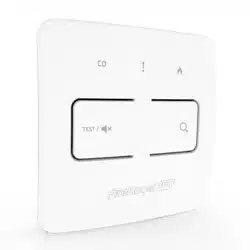
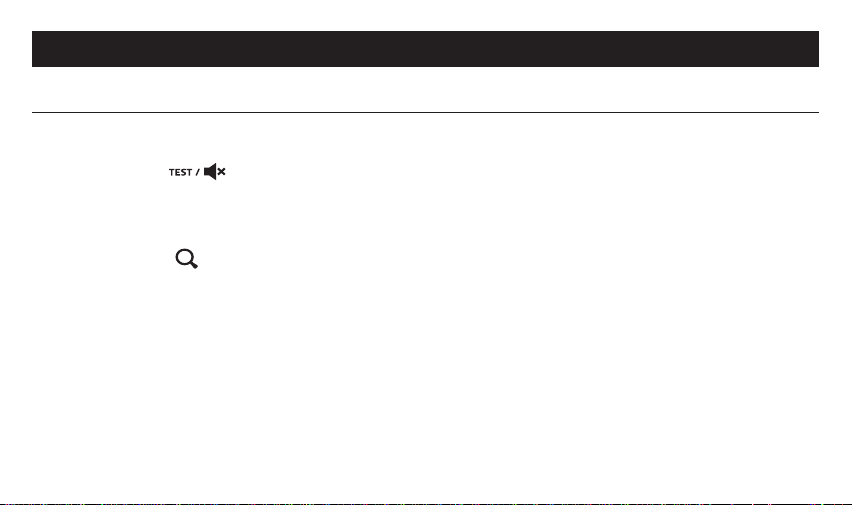
• Test / Silence ( ) button, allowing you to regularly test all wirelessly interlinked alarms on
a network Pressing the silence button will reduce the sensitivity of alarms for up to 10 minutes,
unless carbon monoxide has been detected, in which case you can use the 'Locate' function below
to find the source alarm
• Locate button ( ), allowing you to silence all alarms but the initiating alarm, during an alarm
condition During a fault condition, this feature will allow you to locate the alarm in fault, in a
similar way
• Alarm memory function - allows you to investigate previous alarm events
• 3 year replaceable battery
• 5 year warranty
INSTALLATION GUIDE
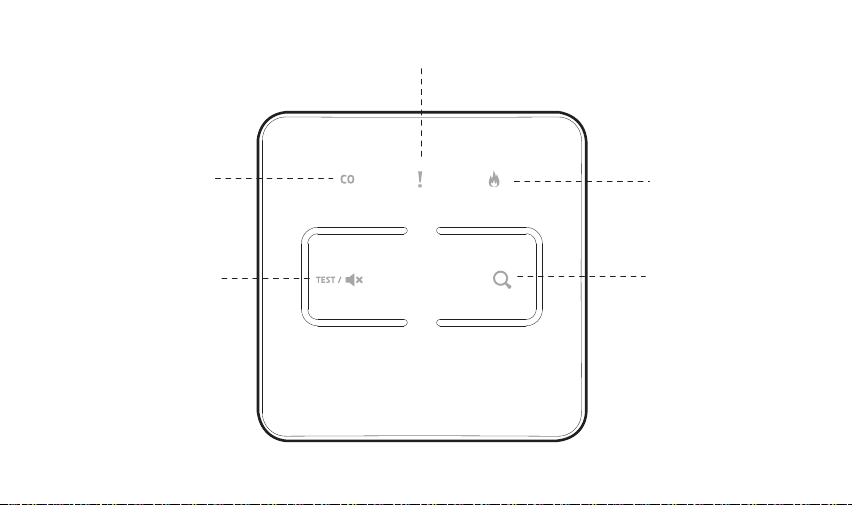
Test / Silence button
Locate button
Carbon monoxide
alarm indicator
Smoke / Heat
alarm indicator
Fault indicator
5
FEATURES
• Wi-Safe 2
®
technology, enabling wireless interlinking between other Wi-Safe 2 products
• Test / Silence ( ) button, allowing you to regularly test all wirelessly interlinked alarms on
a network Pressing the silence button will reduce the sensitivity of alarms for up to 10 minutes,
unless carbon monoxide has been detected, in which case you can use the 'Locate' function below
to find the source alarm
• Locate button ( ), allowing you to silence all alarms but the initiating alarm, during an alarm
condition During a fault condition, this feature will allow you to locate the alarm in fault, in a
similar way
• Alarm memory function - allows you to investigate previous alarm events
• 3 year replaceable battery
• 5 year warranty
INSTALLATION GUIDE
Test / Silence button
Locate button
Carbon monoxide
alarm indicator
Smoke / Heat
alarm indicator
Fault indicator

6
POSITIONING
This Alarm Control Unit is suitable for use in domestic premises only It should be installed at an
accessible point on the wall, in a location where it will not be accidentally operated or knocked The
Alarm Control Unit should be installed at a height of approximately 1 4 meters from the floor to be
fully accessible
INSTALLATION
• Ensure this Alarm Control Unit is installed by a competent person who feels able to install it
according to the instructions
• Read all installation instructions prior to installing this product
WARNING: To prevent injury, this Alarm Control Unit must be securely attached to the wall in
accordance with the installation instructions
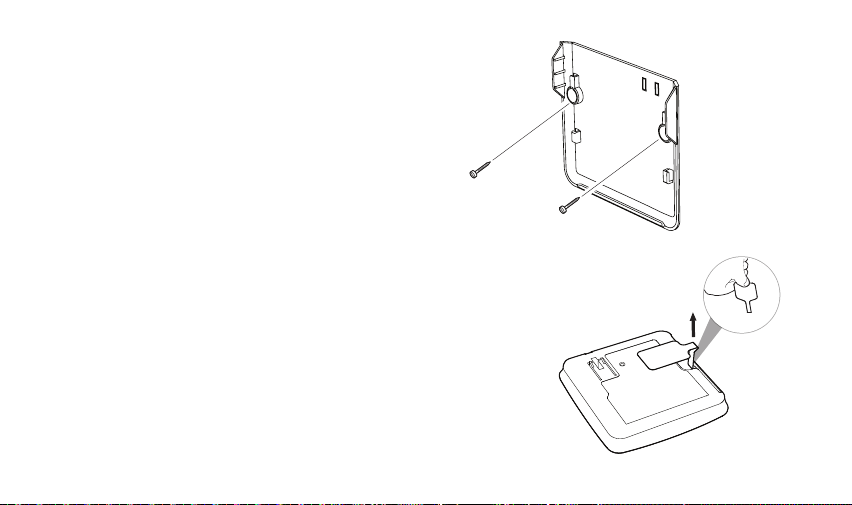
To mount the bracket onto a wall:
Please ensure that you use the screws provided, as they were chosen specifically for use with this
product Drill holes into the wall and insert supplied wall plugs Screw the bracket in place
ACTIVATING THE ALARM CONTROL UNIT
The Alarm Control Unit has a sealed-in non-
replaceable battery To activate the control unit
remove the disabling tab
Upon activating the control unit all three LED's
should simultaneously flash twice, to indicate
that they are working
Once the alarm is activated it can then be learnt
into a Wi-Safe 2 network, before securing to the
wall bracket
7
POSITIONING
This Alarm Control Unit is suitable for use in domestic premises only It should be installed at an
accessible point on the wall, in a location where it will not be accidentally operated or knocked The
Alarm Control Unit should be installed at a height of approximately 1 4 meters from the floor to be
fully accessible
INSTALLATION
• Ensure this Alarm Control Unit is installed by a competent person who feels able to install it
according to the instructions
• Read all installation instructions prior to installing this product
WARNING: To prevent injury, this Alarm Control Unit must be securely attached to the wall in
accordance with the installation instructions
To mount the bracket onto a wall:
Please ensure that you use the screws provided, as they were chosen specifically for use with this
product Drill holes into the wall and insert supplied wall plugs Screw the bracket in place
ACTIVATING THE ALARM CONTROL UNIT
The Alarm Control Unit has a sealed-in non-
replaceable battery To activate the control unit
remove the disabling tab
Upon activating the control unit all three LED's
should simultaneously flash twice, to indicate
that they are working
Once the alarm is activated it can then be learnt
into a Wi-Safe 2 network, before securing to the
wall bracket
8
WIRELESS INTERLINK
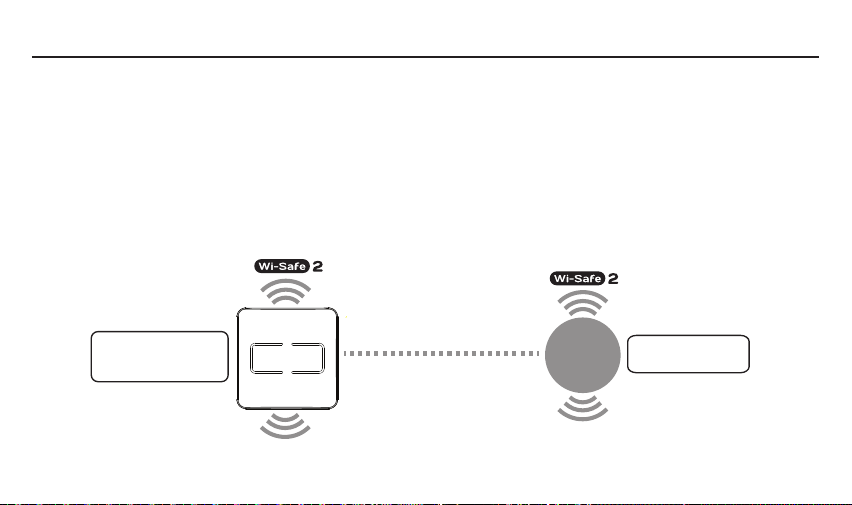
The Alarm Control Unit is designed to be used as a remote interface on a network of up to 49 products
within the Wi-Safe 2 range The Alarm Control Unit can be used to test, silence or locate any alarms
on the Wi-Safe 2
network It is not designed to communicate with wireless alarms from other ranges
or manufacturers The control unit needs to be ‘learned-in’ or interlinked, in order to communicate
within the network
Wi-Safe 2 enables wireless communication with any other product with Wi-Safe 2 technology inside
When one alarm detects smoke / heat / carbon monoxide, the wireless module inside sends a signal
to all the connected alarms, ensuring almost instantaneous reaction across the network
Wireless Interlink
Wi-Safe 2
enabled device
Wi-Safe 2
Alarm Control Unit
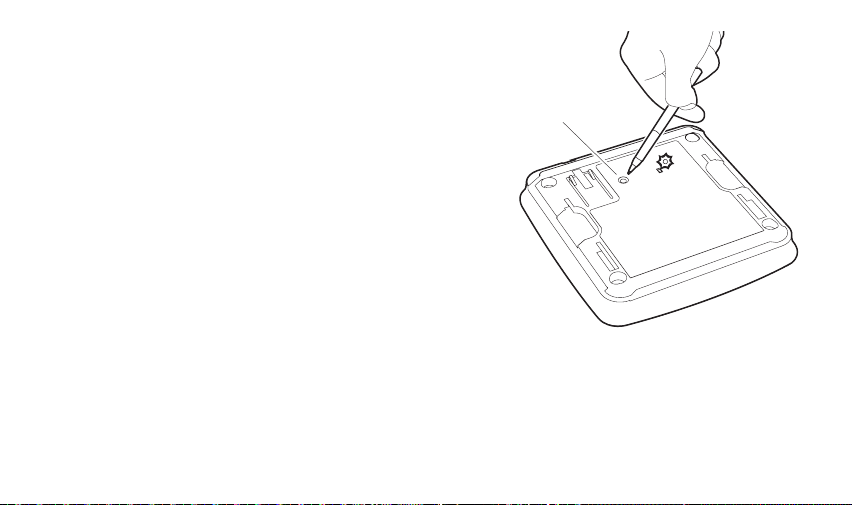
HOW TO ‘LEARN-IN’ THE ALARM CONTROL
UNIT TO A WI-SAFE 2 NETWORK:
1 Using a ballpoint pen, briefly push and
release the 'learn button' on the back of the
control unit The red LED next to the learn
button will flash briefly then light up for
approximately 5 seconds
2 During these 5 seconds you need to briefly
press the test button on an alarm already in
the network, to wirelessly interlink the two
The alarm will sound its audible test pattern
3 The red LED on the back of the control
unit will flash to indicate that it has been
‘learned-in’ successfully If the test button
is not pressed quickly enough, the ‘learn-
in’ process will fail If this happens, repeat
the process
Your Alarm Control Unit counts as one unit within
the network If it is installed retrospectively, then
the existing network cannot exceed 49 units in size
9
WIRELESS INTERLINK
The Alarm Control Unit is designed to be used as a remote interface on a network of up to 49 products
within the Wi-Safe 2 range The Alarm Control Unit can be used to test, silence or locate any alarms
on the Wi-Safe 2
network It is not designed to communicate with wireless alarms from other ranges
or manufacturers The control unit needs to be ‘learned-in’ or interlinked, in order to communicate
within the network
Wi-Safe 2 enables wireless communication with any other product with Wi-Safe 2 technology inside
When one alarm detects smoke / heat / carbon monoxide, the wireless module inside sends a signal
to all the connected alarms, ensuring almost instantaneous reaction across the network
Wireless Interlink
Wi-Safe 2
enabled device
Wi-Safe 2
Alarm Control Unit
Learn button
LED
HOW TO ‘LEARN-IN’ THE ALARM CONTROL
UNIT TO A WI-SAFE 2 NETWORK:
1 Using a ballpoint pen, briefly push and
release the 'learn button' on the back of the
control unit The red LED next to the learn
button will flash briefly then light up for
approximately 5 seconds
2 During these 5 seconds you need to briefly
press the test button on an alarm already in
the network, to wirelessly interlink the two
The alarm will sound its audible test pattern
3 The red LED on the back of the control
unit will flash to indicate that it has been
‘learned-in’ successfully If the test button
is not pressed quickly enough, the ‘learn-
in’ process will fail If this happens, repeat
the process
Your Alarm Control Unit counts as one unit within
the network If it is installed retrospectively, then
the existing network cannot exceed 49 units in size
10
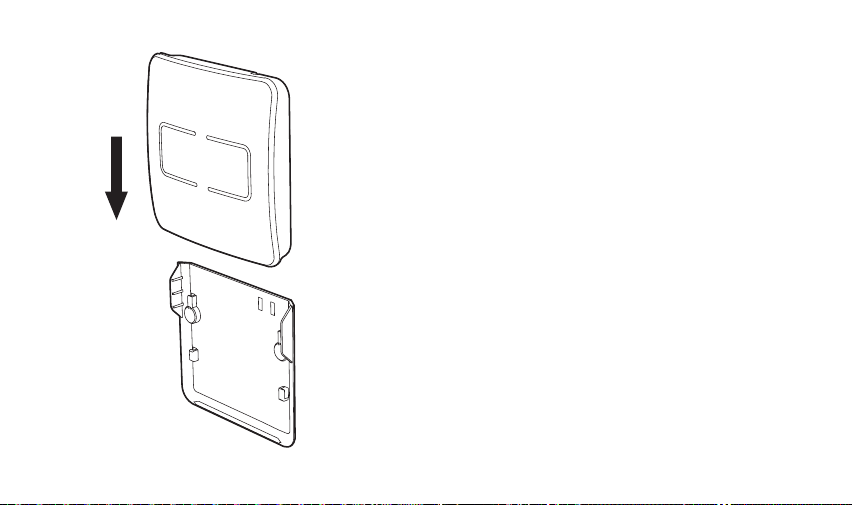
4 To complete the installation simply slide the
control unit onto the bracket The control unit
is now part of the whole network
The method above assumes you have already
installed your alarm network, prior to installing
your Alarm Control Unit If you want to install
your Alarm Control Unit first, you can learn your
smoke, heat and CO alarm into it by following
the instructions in your alarm manual, using the
Alarm Control Unit as alarm 1 and holding down
the test button on the Alarm Control Unit for at
least 2 seconds
MAKING THE ALARM
CONTROL UNIT
TAMPER PROOF
Do not complete this action until you have
wirelessly interlinked all of your alarms.
The Alarm Control Unit is provided with an anti-
tamper feature, ensuring, where needed, that it
cannot be removed from the wall
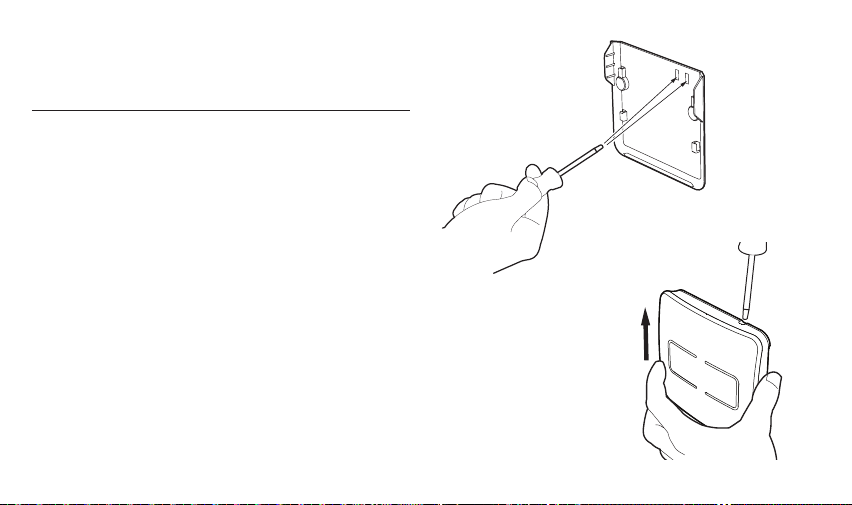
To make use of this feature you will need to push
out the two blanking plates on the top right-hand
side of the bracket, using a small screwdriver, being
careful to support the bracket fully whilst doing so
Once the rest of the installation is complete, and
the control unit is fixed to the bracket it can only
be removed using the following method:
Insert a small screwdriver into the hole on the top
right-hand corner of the control unit, until it stops,
this will disengage the lock, then gently ease the
control unit up to release it from the bracket
11
4 To complete the installation simply slide the
control unit onto the bracket The control unit
is now part of the whole network
The method above assumes you have already
installed your alarm network, prior to installing
your Alarm Control Unit If you want to install
your Alarm Control Unit first, you can learn your
smoke, heat and CO alarm into it by following
the instructions in your alarm manual, using the
Alarm Control Unit as alarm 1 and holding down
the test button on the Alarm Control Unit for at
least 2 seconds
MAKING THE ALARM
CONTROL UNIT
TAMPER PROOF
Do not complete this action until you have
wirelessly interlinked all of your alarms.
The Alarm Control Unit is provided with an anti-
tamper feature, ensuring, where needed, that it
cannot be removed from the wall
To make use of this feature you will need to push
out the two blanking plates on the top right-hand
side of the bracket, using a small screwdriver, being
careful to support the bracket fully whilst doing so
Once the rest of the installation is complete, and
the control unit is fixed to the bracket it can only
be removed using the following method:
Insert a small screwdriver into the hole on the top
right-hand corner of the control unit, until it stops,
this will disengage the lock, then gently ease the
control unit up to release it from the bracket
12
TESTING THE
ALARM SYSTEM
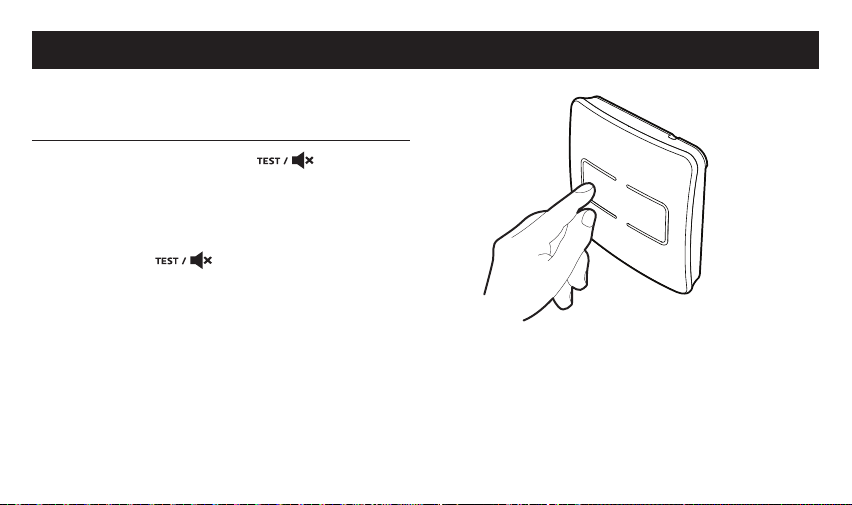
Press the Test / Silence ( ) button to
confirm that the control unit is operating
properly This will instigate a three minute test
All networked alarms should sound To stop the
test (earlier than 3 minutes), simply press the
Test / Silence ( ) button again This test
should be performed on a weekly basis
Pressing the Test button on the Alarm Control
Unit creates a lot of RF traffic If you need to use
the feature more than once, please wait for 5
minutes to let the network settle down
USER GUIDE
PRODUCT FUNCTIONALITY
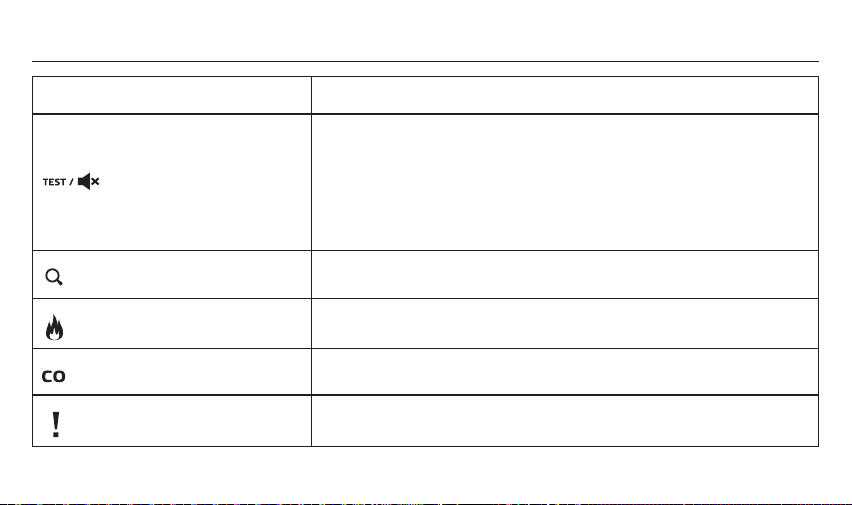
Function Description
Test / Silence button
Test button:
This allows you to test all wirelessly interlinked alarms from one
centralised location
Silence button:
This will silence all wirelessly interlinked smoke and heat alarms and
reduce the system sensitivity for up to 10 minutes
Locate button
In an alarm event this will silence all wirelessly interlinked alarms
except the initiating alarm which has sensed carbon monoxide / smoke
Smoke / heat alarm indicator
This indicates that a smoke / heat alarm has been activated
Carbon monoxide indicator
This indicates that a carbon monoxide alarm has been activated
Fault indicator
This indicates a fault with the control unit or one of the alarms within
the network
13
USER GUIDE
PRODUCT FUNCTIONALITY
Function Description
Test / Silence button
Test button:
This allows you to test all wirelessly interlinked alarms from one
centralised location
Silence button:
This will silence all wirelessly interlinked smoke and heat alarms and
reduce the system sensitivity for up to 10 minutes
Locate button
In an alarm event this will silence all wirelessly interlinked alarms
except the initiating alarm which has sensed carbon monoxide / smoke
Smoke / heat alarm indicator
This indicates that a smoke / heat alarm has been activated
Carbon monoxide indicator
This indicates that a carbon monoxide alarm has been activated
Fault indicator
This indicates a fault with the control unit or one of the alarms within
the network

14
LOCATE BUTTON
If the alarms are sounding and an alarm indicator is flashing, but there's no obvious hazard, pressing
the 'Locate' button ( ) will silence all wirelessly interlinked alarms except for the initiating alarm
which has sensed smoke / heat or carbon monoxide Within two minutes the system will return to
normal operation and the alarms will continue to sound if smoke / heat or carbon monoxide is still
present To make locating the alarm easier, the control unit can be removed from its bracket and
carried around the property (providing the tamper proof function has not been engaged), allowing
you to press the 'Locate' or 'Test' button whilst moving from room to room
SILENCE BUTTON
If the alarms are sounding and the smoke / heat alarm indicator is flashing, but there's no obvious
hazard, pressing the 'Silence' button ( ) will silence all wirelessly interlinked alarms and reduce the
system sensitivity for up to 10 minutes However if excessive smoke is sensed the silence function
will be overridden The indicator will continue to flash unless the smoke disappears Please Note:
An alarm cannot be silenced using the Alarm Control Unit if carbon monoxide has been detected,
however the 'Locate' function will allow you to find out which of the CO alarms is the initiating alarm
ALARM MEMORY
If one of the alarm indicators is flashing every 10 seconds this indicates that a smoke alarm,
heat alarm or carbon monoxide alarm has previously been activated Pressing the 'Locate'
button ( ) will clear the LEDs and sound the source alarm so you can investigate this further You
can press the 'Locate' button ( ) repeatedly until the source alarm is identified (fully compatible
with FireAngel 230V Wi-Safe 2 smoke*, heat and CO alarms) *Not compatible with version ST-630 with W2
radio module or WST-630
Please Note: Only the most recent alarm event will be visible If both a CO and smoke / heat alarm
have previously been activated, both LED's will show but the CO alarm will always take precedence,
and this is the alarm which will sound Never ignore an alarm If there is evidence of an alarm event,
be sure to investigate further
FAULT DETECTION
If the amber fault LED and a red alarm LED are flashing this indicates that an alarm on the network
has developed a fault To identify the faulty alarm press the 'Locate' button If the alarm in fault
sounds a unique ‘SOS’ sound pattern continue to 'A' below If no SOS sound pattern is heard proceed
to 'B' below
A In case you need to locate the unit again, please wait for 2 minutes before trying to locate for the
SOS pattern Take down the alarm which is sounding Unlearn the alarm from the network using
a ball point pen in the circular 'learn-in' hole in the back of the alarm Briefly push and release and
then push and hold the 'learn-in' button The red LED will remain illuminated during this process
When the red LED goes out, release the button, it will then flash twice, followed by three further flashes
to illustrate that the alarm has successfully been 'un-learnt' from the network Reorganise the network as
detailed on the next page The LEDs indicating a fault should now have stopped flashing and the faulty
alarm can now be replaced with a new alarm if required
B Check all alarms are on their base plate and activated If all alarms are activated, clear the fault by
pressing the locate button twice

15
LOCATE BUTTON
If the alarms are sounding and an alarm indicator is flashing, but there's no obvious hazard, pressing
the 'Locate' button ( ) will silence all wirelessly interlinked alarms except for the initiating alarm
which has sensed smoke / heat or carbon monoxide Within two minutes the system will return to
normal operation and the alarms will continue to sound if smoke / heat or carbon monoxide is still
present To make locating the alarm easier, the control unit can be removed from its bracket and
carried around the property (providing the tamper proof function has not been engaged), allowing
you to press the 'Locate' or 'Test' button whilst moving from room to room
SILENCE BUTTON
If the alarms are sounding and the smoke / heat alarm indicator is flashing, but there's no obvious
hazard, pressing the 'Silence' button ( ) will silence all wirelessly interlinked alarms and reduce the
system sensitivity for up to 10 minutes However if excessive smoke is sensed the silence function
will be overridden The indicator will continue to flash unless the smoke disappears Please Note:
An alarm cannot be silenced using the Alarm Control Unit if carbon monoxide has been detected,
however the 'Locate' function will allow you to find out which of the CO alarms is the initiating alarm
ALARM MEMORY
If one of the alarm indicators is flashing every 10 seconds this indicates that a smoke alarm,
heat alarm or carbon monoxide alarm has previously been activated Pressing the 'Locate'
button ( ) will clear the LEDs and sound the source alarm so you can investigate this further You
can press the 'Locate' button ( ) repeatedly until the source alarm is identified (fully compatible
with FireAngel 230V Wi-Safe 2 smoke*, heat and CO alarms) *Not compatible with version ST-630 with W2
radio module or WST-630
Please Note: Only the most recent alarm event will be visible If both a CO and smoke / heat alarm
have previously been activated, both LED's will show but the CO alarm will always take precedence,
and this is the alarm which will sound Never ignore an alarm If there is evidence of an alarm event,
be sure to investigate further
FAULT DETECTION
If the amber fault LED and a red alarm LED are flashing this indicates that an alarm on the network
has developed a fault To identify the faulty alarm press the 'Locate' button If the alarm in fault
sounds a unique ‘SOS’ sound pattern continue to 'A' below If no SOS sound pattern is heard proceed
to 'B' below
A In case you need to locate the unit again, please wait for 2 minutes before trying to locate for the
SOS pattern Take down the alarm which is sounding Unlearn the alarm from the network using
a ball point pen in the circular 'learn-in' hole in the back of the alarm Briefly push and release and
then push and hold the 'learn-in' button The red LED will remain illuminated during this process
When the red LED goes out, release the button, it will then flash twice, followed by three further flashes
to illustrate that the alarm has successfully been 'un-learnt' from the network Reorganise the network as
detailed on the next page The LEDs indicating a fault should now have stopped flashing and the faulty
alarm can now be replaced with a new alarm if required
B Check all alarms are on their base plate and activated If all alarms are activated, clear the fault by
pressing the locate button twice
16
REORGANISING A NETWORK
If you have un-learnt and replaced or removed any alarms, you can 'reorganise' in order to optimise
the network performance To do this you will need to press and hold the 'Locate' button for 5 seconds
The Alarm Control Unit will then enter 'Reorganisation Mode', during which time you will see a series
of flashes from the LEDs The time taken for this process to complete will depend on the number of
units in the network
If successful, once the reorganisation is complete, the Control Unit should return to standby mode,
with no LEDs flashing
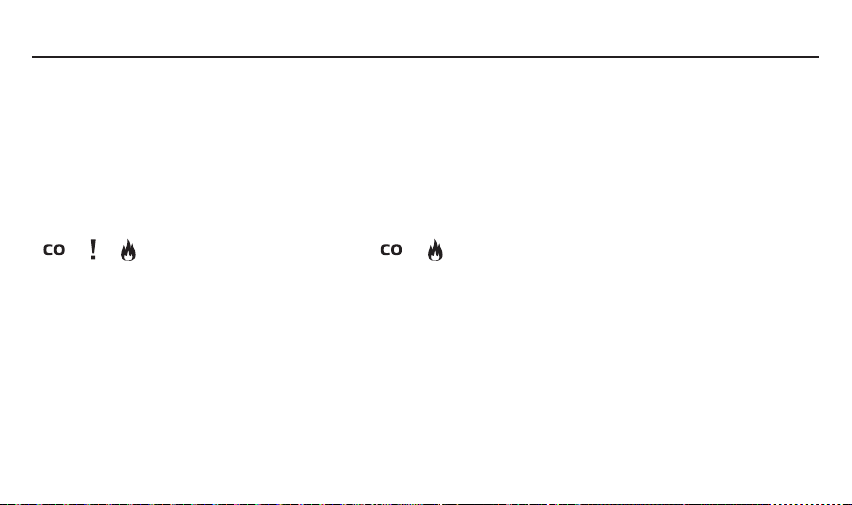
If the reorganisation is not successful, and LEDs are still flashing (all 3 LED's flash together
( + + ) 3 times, then a fourth flash ( + only) occurs, repeatedly), you will need to exit
'Reorganisation Mode' To do this hold the 'Locate' button for 5 seconds, wait for 5 minutes and then
repeat the process above
Prior to performing network reorganisation, test the network by pressing the test button on one of the
randomly selected units and ensure that all units chirp / flash in response This is essential to make
sure that all the units are communicating with each other and ensures network reorganisation does
not delete wanted units In case one of the working units is out of range for networking, please check
the installation position of the units and adjust / install an additional unit to help with the routing of
messages
WHEN AN ALARM SOUNDS
Never ignore an alarm
If there is a fire evacuate the premises and call the fire brigade If the source of the alarm is not
immediately apparent check which indicator is flashing on the control unit
If the CO indicator is flashing:
• Keep calm and open the doors and windows to ventilate the property
• Stop using all fuel-burning appliances and ensure, if possible, that they are
turned off
• Evacuate the property leaving the doors and windows open
• Ring your gas or other fuel supplier on their emergency number; keep the
number in a prominent place

17
REORGANISING A NETWORK
If you have un-learnt and replaced or removed any alarms, you can 'reorganise' in order to optimise
the network performance To do this you will need to press and hold the 'Locate' button for 5 seconds
The Alarm Control Unit will then enter 'Reorganisation Mode', during which time you will see a series
of flashes from the LEDs The time taken for this process to complete will depend on the number of
units in the network
If successful, once the reorganisation is complete, the Control Unit should return to standby mode,
with no LEDs flashing
If the reorganisation is not successful, and LEDs are still flashing (all 3 LED's flash together
( + + ) 3 times, then a fourth flash ( + only) occurs, repeatedly), you will need to exit
'Reorganisation Mode' To do this hold the 'Locate' button for 5 seconds, wait for 5 minutes and then
repeat the process above
Prior to performing network reorganisation, test the network by pressing the test button on one of the
randomly selected units and ensure that all units chirp / flash in response This is essential to make
sure that all the units are communicating with each other and ensures network reorganisation does
not delete wanted units In case one of the working units is out of range for networking, please check
the installation position of the units and adjust / install an additional unit to help with the routing of
messages
WHEN AN ALARM SOUNDS
Never ignore an alarm
If there is a fire evacuate the premises and call the fire brigade If the source of the alarm is not
immediately apparent check which indicator is flashing on the control unit
If the CO indicator is flashing:
• Keep calm and open the doors and windows to ventilate the property
• Stop using all fuel-burning appliances and ensure, if possible, that they are
turned off
• Evacuate the property leaving the doors and windows open
• Ring your gas or other fuel supplier on their emergency number; keep the
number in a prominent place

18
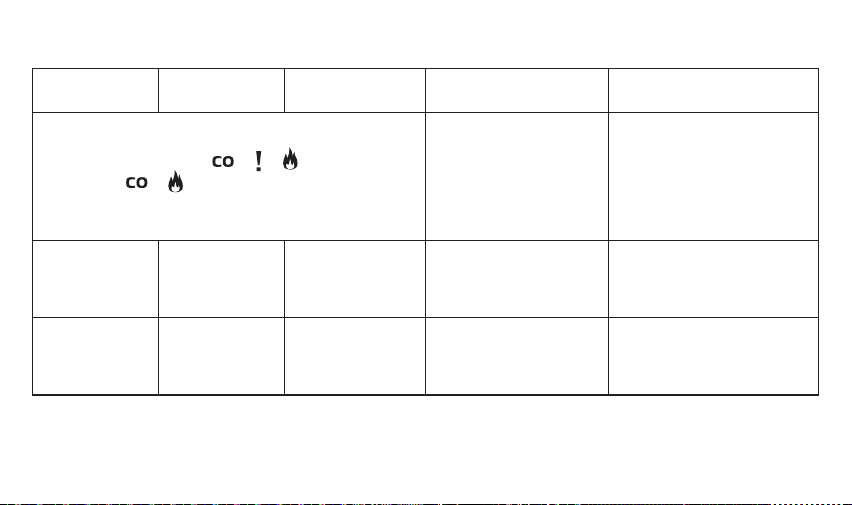
LED INDICATORS
Red CO LED
Red Smoke /
Heat LED
Amber Fault LED Status Action required
Flashing for 10
seconds, every
hour
Flashing for 10
seconds, every
hour
Flashing for 10
seconds, every
hour
The Alarm Control Unit is
not part of a network
Please refer to the 'Wireless
Interlink' section to 'learn-
in' the control unit to the
network
Flashing rapidly
every second
Alarm: A carbon
monoxide leak has been
detected
Keep calm and open the
doors and windows to
ventilate the property
Flashing rapidly
every second
Alarm: Smoke / heat has
been detected
Keep calm and evacuate the
property
Either the carbon monoxide
indicator or the smoke / heat
indicator or both, are flashing every
10 seconds
This indicates that one of
the alarms has previously
been activated
Please refer to the 'Locate'
section of this manual
Either the carbon monoxide
indicator or the smoke / heat
indicator or both, are flashing
Double flashing
every second
An alarm on the network
has developed a fault
Please refer to the 'Fault
Detection' section of this
manual
Red CO LED
Red Smoke /
Heat LED
Amber Fault LED Status Action required
All 3 LED's flash together ( + + ) 3 times, then a
fourth flash ( + only) occurs This flash pattern is
repeated
This indicates that the
'Reorganisation Mode'
has been unsuccessful
To exit 'Reorganisation
Mode' hold the 'Locate'
button for 5 seconds, wait a
couple of minutes and then
press and hold the 'Locate'
button for 5 seconds to start
'Reorganisation Mode' again
Flashing once
every 5 seconds
Low battery condition
Remove the existing batteries
and replace with new
batteries from the list of
recommended batteries
Flashing rapidly
This indicates an internal
fatal radio failure
Please contact Technical
Support on: 0330 094 5830
or technicalsupport@
fireangeltech.com
19
LED INDICATORS
Red CO LED
Red Smoke /
Heat LED
Amber Fault LED Status Action required
Flashing for 10
seconds, every
hour
Flashing for 10
seconds, every
hour
Flashing for 10
seconds, every
hour
The Alarm Control Unit is
not part of a network
Please refer to the 'Wireless
Interlink' section to 'learn-
in' the control unit to the
network
Flashing rapidly
every second
Alarm: A carbon
monoxide leak has been
detected
Keep calm and open the
doors and windows to
ventilate the property
Flashing rapidly
every second
Alarm: Smoke / heat has
been detected
Keep calm and evacuate the
property
Either the carbon monoxide
indicator or the smoke / heat
indicator or both, are flashing every
10 seconds
This indicates that one of
the alarms has previously
been activated
Please refer to the 'Locate'
section of this manual
Either the carbon monoxide
indicator or the smoke / heat
indicator or both, are flashing
Double flashing
every second
An alarm on the network
has developed a fault
Please refer to the 'Fault
Detection' section of this
manual
Red CO LED
Red Smoke /
Heat LED
Amber Fault LED Status Action required
All 3 LED's flash together ( + + ) 3 times, then a
fourth flash ( + only) occurs This flash pattern is
repeated
This indicates that the
'Reorganisation Mode'
has been unsuccessful
To exit 'Reorganisation
Mode' hold the 'Locate'
button for 5 seconds, wait a
couple of minutes and then
press and hold the 'Locate'
button for 5 seconds to start
'Reorganisation Mode' again
Flashing once
every 5 seconds
Low battery condition
Remove the existing batteries
and replace with new
batteries from the list of
recommended batteries
Flashing rapidly
This indicates an internal
fatal radio failure
Please contact Technical
Support on: 0330 094 5830
or technicalsupport@
fireangeltech.com

20
TROUBLESHOOTING
Issue Indication
No lights come on when I press any of
the buttons on the Alarm Control Unit
This may indicate that the control unit has not been successfully activated, see
section 'Activating the Alarm Control Unit' If the unit still fails to activate please
contact Technical Support via email: technicalsupport@fireangeltech.com
or by calling: 0330 094 5830
When pressing the test button nothing
is happening
This indicates that the control unit has not been successfully activated, see
section 'Activating the Alarm Control Unit'
Unable to remove the control unit
from its bracket
You need to disengage the locking pins Refer to the 'Making the Alarm Control
Unit Tamper proof' section
If you have any questions about the operation of your Alarm Control Unit, please visit the FireAngel website for FAQs:
www.fireangeltech.com alternatively contact Technical Support via email: technicalsupport@fireangeltech.com or
by calling: 0330 094 5830
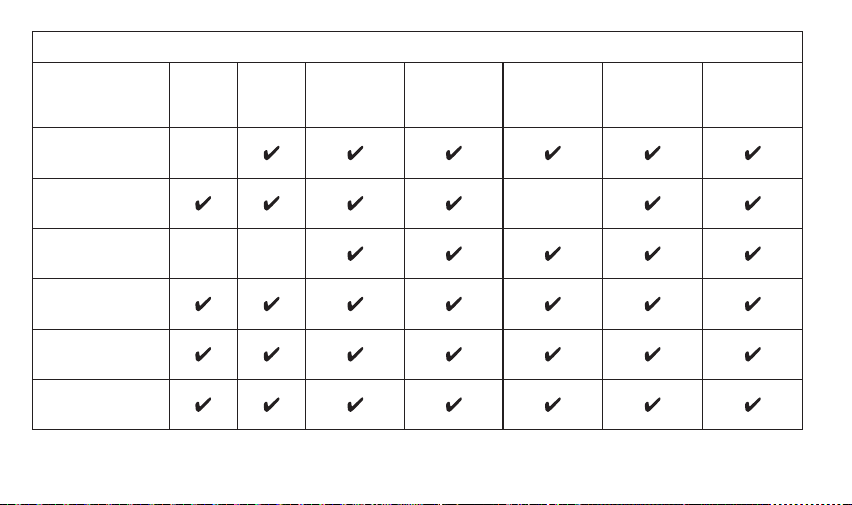
WSTL-F Compatibility Chart
Function
WST-630
(Prior
to 2014
Models)
WST-630
(2014
Model
onwards)
ST-632
(+W2-Module)
WHT-630 W2-CO-10X WST-230 WHT-230
Test
Silence
Alarm Memory
Locate
Locate (SOS
Fault Finding)
Re-organisation
21
TROUBLESHOOTING
Issue Indication
No lights come on when I press any of
the buttons on the Alarm Control Unit
This may indicate that the control unit has not been successfully activated, see
section 'Activating the Alarm Control Unit' If the unit still fails to activate please
contact Technical Support via email: technicalsupport@fireangeltech.com
or by calling: 0330 094 5830
When pressing the test button nothing
is happening
This indicates that the control unit has not been successfully activated, see
section 'Activating the Alarm Control Unit'
Unable to remove the control unit
from its bracket
You need to disengage the locking pins Refer to the 'Making the Alarm Control
Unit Tamper proof' section
If you have any questions about the operation of your Alarm Control Unit, please visit the FireAngel website for FAQs:
www.fireangeltech.com alternatively contact Technical Support via email: technicalsupport@fireangeltech.com or
by calling: 0330 094 5830
WSTL-F Compatibility Chart
Function
WST-630
(Prior
to 2014
Models)
WST-630
(2014
Model
onwards)
ST-632
(+W2-Module)
WHT-630 W2-CO-10X WST-230 WHT-230
Test
Silence
Alarm Memory
Locate
Locate (SOS
Fault Finding)
Re-organisation
22
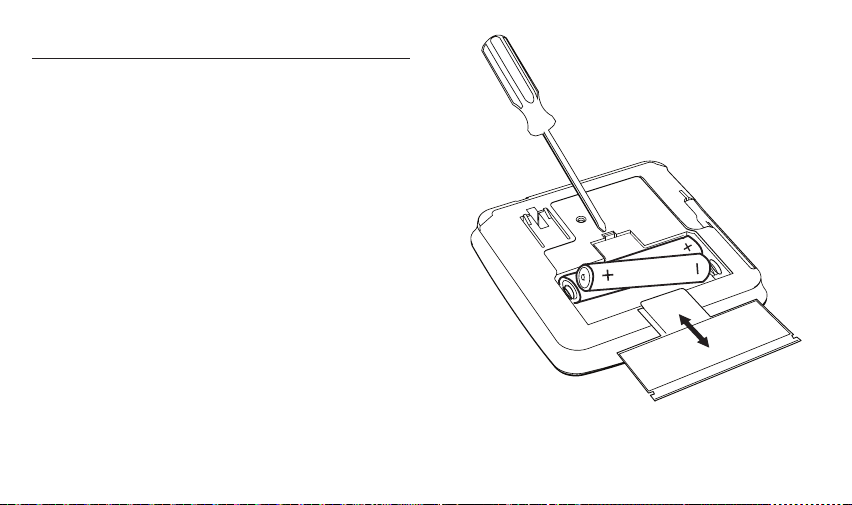
BATTERY REPLACEMENT
IMPORTANT: Only the following batteries can
be used for replacement Use of a battery other
than those recommended below may have a
detrimental effect on the alarm’s operation
Alkaline type:
Energizer E91
Duracell MN1500bB
Panasonic ProPower LR6
Use a screwdriver to remove the battery cover
Remove the existing batteries and replace with
new batteries from the list of recommended
batteries making sure that the positive and
negative connections are in the correct position
Replace the battery cover
After changing the batteries always test the
Alarm Control Unit
MAINTENANCE
Expected battery life: 3 years ± 6 months
Expected product life: 10 years
Warranty: 5 years
WARNING: Battery life stated above is subject
to normal usage In the event that any fault on a
network of Smoke/Heat or CO alarms is indicated on
the screen, we highly recommend that immediate
and appropriate action is taken in accordance with
guidance given in the user manual
This is a matter of personal safety and may
necessitate immediate action to prevent risk to
the occupants Also, if no action is taken, in such
cases the LEDs will continue to be activated/
flash on the control unit screen causing a drain
on battery life, resulting in a premature low
battery condition
This Alarm Control Unit will act as a remote
interface between the alarms in your home when

23
MAINTENANCE
Expected battery life: 3 years ± 6 months
Expected product life: 10 years
Warranty: 5 years
WARNING: Battery life stated above is subject
to normal usage In the event that any fault on a
network of Smoke/Heat or CO alarms is indicated on
the screen, we highly recommend that immediate
and appropriate action is taken in accordance with
guidance given in the user manual
This is a matter of personal safety and may
necessitate immediate action to prevent risk to
the occupants Also, if no action is taken, in such
cases the LEDs will continue to be activated/
flash on the control unit screen causing a drain
on battery life, resulting in a premature low
battery condition
This Alarm Control Unit will act as a remote
interface between the alarms in your home when
maintained properly To ensure the reliability of
the control unit:
• Keep the control unit free from dust by
gently vacuuming the case with a soft brush
attachment every 3 months
• Never use cleaning solutions on the control
unit Simply wipe with a damp cloth
• Do not paint the control unit
• Do not spray aerosols on or near the
control unit
• Do not use any solvent based products near
the control unit
• Do not attempt to repair the control unit
• Do not remove any screws or open the
main casing of the control unit Any attempt
to do so may cause malfunction and will
invalidate the warranty

24
DISPOSAL
Waste electrical products should not be disposed of with your other household waste The Alarm Control Unit is ideally suited
for disposal within the waste electronic and electrical equipment (WEEE) recycling scheme Please recycle where facilities
exist Check with your local authority, retailer or contact our Technical Support team for recycling / disposal advice, as regional
variations apply
The batteries should be removed before disposal of the detector Both the batteries and the detector should be disposed of in
line with current regulations
WARNING: Do not burn or dispose of in fire
WARNING: If your Alarm Control Unit is dropped or damaged, as a precaution, it should be removed from the building and
you should contact Technical Support on 0330 094 5830 or technicalsupport@fireangeltech.com
WARRANTY
FireAngel Safety Technology Limited warrants to the original purchaser that the enclosed WSTL-F Alarm Control Unit be free
from defects in materials and workmanship under normal residential use and service for a period of five years from the date
of purchase Provided product is sent back to FireAngel Safety Technology Limited with proof and date of purchase, FireAngel
Safety Technology Limited hereby warrants that during the five year period commencing from the date of purchase FireAngel
Safety Technology Limited, at its discretion, agrees to replace the unit free of charge (with the exception of replaceable
batteries) The warranty on any replacement WSTL-F Alarm Control Unit, will last for the remainder of the period of the original
warranty in respect of the unit originally purchased – that is from the date of original purchase and not from the date of
receipt of the replacement product FireAngel Safety Technology Limited reserves the right to offer an alternative product
similar to that being replaced if the original model is no longer available or in stock This warranty applies to the original retail
purchaser from the date of original retail purchase and is not transferable Proof of purchase is required This warranty does not
cover damage resulting from accident, misuse, disassembly, abuse or lack of reasonable care of the product, or applications
not in accordance with the user guide It does not cover events and conditions outside of FireAngel Safety Technology
Limited’s control, such as Acts of God (fire, severe weather etc ) It does not apply to retail stores, service centres or any
distributors or agents FireAngel Safety Technology Limited will not recognise any changes to this warranty by third parties
FireAngel Safety Technology Limited shall not be liable for any incidental or consequential damages caused by the breach of
any expressed or implied warranty Except to the extent prohibited by applicable law, any implied warranty of merchantability
or fitness for a particular purpose is limited in duration for five years This warranty does not affect your statutory rights
Except for death or personal injury, FireAngel Safety Technology Limited shall not be liable for any loss of use, damage, cost
or expense relating to this product or for any indirect or consequential loss, damages or costs incurred by you or any other
user of this product

25
DISPOSAL
Waste electrical products should not be disposed of with your other household waste The Alarm Control Unit is ideally suited
for disposal within the waste electronic and electrical equipment (WEEE) recycling scheme Please recycle where facilities
exist Check with your local authority, retailer or contact our Technical Support team for recycling / disposal advice, as regional
variations apply
The batteries should be removed before disposal of the detector Both the batteries and the detector should be disposed of in
line with current regulations
WARNING: Do not burn or dispose of in fire
WARNING: If your Alarm Control Unit is dropped or damaged, as a precaution, it should be removed from the building and
you should contact Technical Support on 0330 094 5830 or technicalsupport@fireangeltech.com
WARRANTY
FireAngel Safety Technology Limited warrants to the original purchaser that the enclosed WSTL-F Alarm Control Unit be free
from defects in materials and workmanship under normal residential use and service for a period of five years from the date
of purchase Provided product is sent back to FireAngel Safety Technology Limited with proof and date of purchase, FireAngel
Safety Technology Limited hereby warrants that during the five year period commencing from the date of purchase FireAngel
Safety Technology Limited, at its discretion, agrees to replace the unit free of charge (with the exception of replaceable
batteries) The warranty on any replacement WSTL-F Alarm Control Unit, will last for the remainder of the period of the original
warranty in respect of the unit originally purchased – that is from the date of original purchase and not from the date of
receipt of the replacement product FireAngel Safety Technology Limited reserves the right to offer an alternative product
similar to that being replaced if the original model is no longer available or in stock This warranty applies to the original retail
purchaser from the date of original retail purchase and is not transferable Proof of purchase is required This warranty does not
cover damage resulting from accident, misuse, disassembly, abuse or lack of reasonable care of the product, or applications
not in accordance with the user guide It does not cover events and conditions outside of FireAngel Safety Technology
Limited’s control, such as Acts of God (fire, severe weather etc ) It does not apply to retail stores, service centres or any
distributors or agents FireAngel Safety Technology Limited will not recognise any changes to this warranty by third parties
FireAngel Safety Technology Limited shall not be liable for any incidental or consequential damages caused by the breach of
any expressed or implied warranty Except to the extent prohibited by applicable law, any implied warranty of merchantability
or fitness for a particular purpose is limited in duration for five years This warranty does not affect your statutory rights
Except for death or personal injury, FireAngel Safety Technology Limited shall not be liable for any loss of use, damage, cost
or expense relating to this product or for any indirect or consequential loss, damages or costs incurred by you or any other
user of this product

26

27

(UK) technicalsupport@fireangeltech com
(DE) technik@fireangeltech com
(FR) supporttechnique@fireangeltech com
(NL) klantenservice@fireangeltech com
(INT) Internationalsupport@fireangeltech com