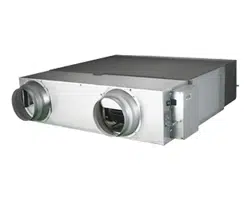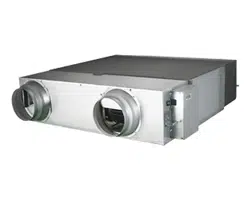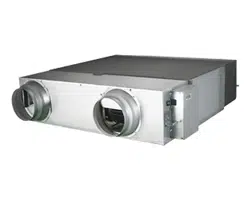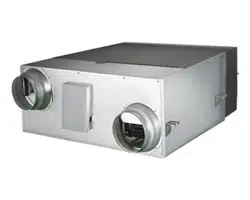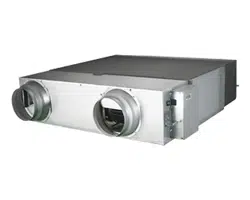
ERV (Energy Recovery Ventilator)
User manual
AN***JSKLKN Series
• Thank you for purchasing this Samsung Product.
• Before operating this unit, please read this manual carefully and retain it for future reference.
DB68-05251A-05_IB_ERV OEM_EU_EN_.indd 1 2024-01-16 오후 5:18:52
Contents
Correct Disposal of This Product
(Waste Electrical & Electronic Equipment)
(Applicable in countries with separate collection systems)
This marking on the product, accessories or literature indicates that the product and its electronic accessories (e.g. charger,
headset, USB cable) should not be disposed of with other household waste at the end of their working life. To prevent possible
harm to the environment or human health from uncontrolled waste disposal, please separate these items from other types of
waste and recycle them responsibly to promote the sustainable reuse of material resources.
Household users should contact either the retailer where they purchased this product, or their local government oce, for
details of where and how they can take these items for environmentally safe recycling.
Business users should contact their supplier and check the terms and conditions of the purchase contract. This product and its
electronic accessories should not be mixed with other commercial wastes for disposal.
Preparation
Safety precautions ..........................................................................................................3
Name of each part ........................................................................................................12
Recommendations for use
Cleaning the Dust Filter ...................................................................................................14
Cleaning the heat exchange element......................................................................................17
Final checks & user tips....................................................................................................20
Troubleshooting ..........................................................................................................21
Model specication (dimension and weight) ..............................................................................21
For information on Samsung’s environmental commitments and product regulatory obligations, e.g. REACH, visit our
sustainability page available via www.samsung.com
ENGLISH-2
DB68-05251A-05_IB_ERV OEM_EU_EN_.indd 2 2024-01-16 오후 5:18:52
PREPARATioN
Safety precautions
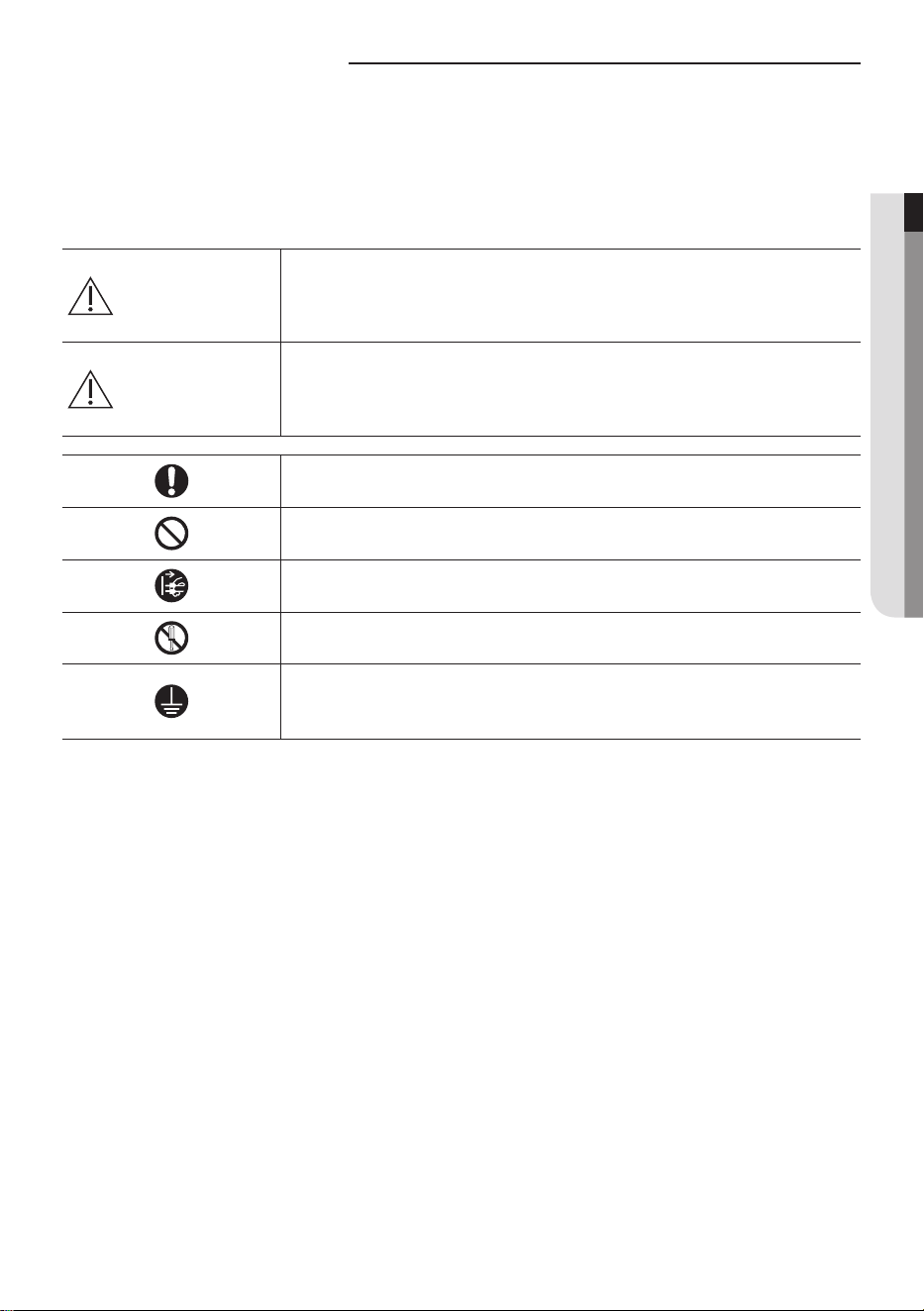
The following safety precautions are provided to protect the users’ safety
and prevent property damage.
Make sure to read the followings and use the ventilator properly.
WARNING
Hazards or unsafe practices that may result in
severe personal injury or death.
CAUTION
Hazards or unsafe practices that may result in
minor personal injury or property damage.
Follow directions.
Do NoT attempt.
Cut-o the power supply.
Do NoT disassemble.
Make sure the machine is grounded to prevent
electric shock.
ENGLISH-3
01 PREPARATION
DB68-05251A-05_IB_ERV OEM_EU_EN_.indd 3 2024-01-16 오후 5:18:53
FOR INSTALLATION WARNING
Use the power line with the power specications of the product
or higher and use the power line for this appliance only. In
addition, do not use an extension line.
XX Extending the power line may result in electric shock or re
XX Do not use an electric transformer. it may result in electric shock
or re.
XX if the voltage/frequency/rated current condition is dierent, it
may cause re.
The installation of this appliance must be performed by a
qualied technician or service company.
XX Failing to do so may result in electric shock, re, explosion,
problems with the product, or injury.
Install a switch and circuit breaker dedicated to the product.
XX Failing to do so may result in electric shock or re.
Use a rated cable for wiring. Make sure to connect and x the
cables rmly.
XX Failing to do so may result in electric shock or re.
Install the product rmly on the place that can withstand the
weight of the product.
XX Product may fall and get damaged.
Safety precautions
ENGLISH-4
DB68-05251A-05_IB_ERV OEM_EU_EN_.indd 4 2024-01-16 오후 5:18:53
Do not install this appliance near a heater, inammable material.
Do not install this appliance in a humid, oily or dusty location, in
a location exposed to direct sunlight and water (rain drops). Do
not install this appliance in a location where gas may leak.
XX This may result in electric shock or re.
Do not use this product to eliminate humidity in places with high
humidity such as basement, parking lot, bathroom etc.
XX When humid air gets inside the product, it may cause electrical
failure, re, electric shock or water leakage.
Do not install the product in places with high humidity and
temperature (such as swimming pool, sauna, bathroom) or in a
foggy or frosty regions, since condensation may occur within the
heat exchange element.
This appliance must be properly grounded. Do not ground the
appliance to a gas pipe, plastic water pipe, or telephone line.
XX Failure to do so may result in electric shock, re, an explosion, or
other problems with the product.
XX Make sure that it is in accordance with local and national codes.
ENGLISH-5
01 PREPARATION
DB68-05251A-05_IB_ERV OEM_EU_EN_.indd 5 2024-01-16 오후 5:18:53
FOR INSTALLATION CAUTION
Attach a bird screen or equivalent xture on the air inlet.
XX if a bird’s nest or other materials blocks air inlet, it may cause
oxygen shortage in indoor.
Use provided accessories and rated parts for an installation.
XX Failing to do so may result in electric shock or re.
Make sure discharged air does not re-enter indoor through the
air inlet.
XX This way, fresh air cannot be supplied so indoor air will become
polluted and may cause harmful eect.
Make sure there is no exhaust vent of a burner near air inlet of
the product.
XX if there’s exhaust vent of a burner near air inlet, it may cause
oxygen shortage in indoor.
Do not install the product in a place such as machinery or
chemical plants where harmful gases (such as alkaline solution,
organic solvent, paint and varnish) are generated.
XX if you install the product in such place, it may cause gas
poisoning or re.
Install the product inside of the adiabatic layer (where outdoor
air is isolated).
XX if the product is installed outside of the adiabatic layer (such as
machine rooms with louver), dew may form at internal part of
the product in winter and may cause electric shock or abnormal
operation.
Safety precautions
ENGLISH-6
DB68-05251A-05_IB_ERV OEM_EU_EN_.indd 6 2024-01-16 오후 5:18:53
FOR POWER
WARNING
When the circuit breaker is damaged, contact your nearest
service center.
Do not pull or excessively bend the power line. Do not twist or tie
the power line. Do not hook the power line over a metal object,
place a heavy object on the power line, insert the power line
between objects, or push the power line into the space behind
the appliance.
XX This may result in electric shock or re.
FOR POWER CAUTION
When not using the product for a long period of time or during a
thunder/lightning storm, cut the power at the circuit breaker.
XX Failing to do so may result in electric shock or re.
ENGLISH-7
01 PREPARATION
DB68-05251A-05_IB_ERV OEM_EU_EN_.indd 7 2024-01-16 오후 5:18:53
FOR USE
WARNING
If the appliance is ooded, please contact your nearest service
center.
XX Failing to do so may result in electric shock or re.
If the appliance generates a strange noise, a burning smell or
smoke, cut-o the power supply immediately and contact the
nearest service center.
XX Failing to do so may result in electric shock or re.
In the event of a gas leak (such as propane gas, LP gas, etc.),
ventilate immediately without touching the power cord. Do not
touch the appliance or power cord.
XX Do not use a ventilating fan.
XX A spark may result in an explosion or re.
To reinstall the product, please contact your nearest service
center.
XX Failing to do so may result in problems with the product, water
leakage, electric shock, or re.
XX A delivery service for the product is not provided. if you reinstall
the product in another location, additional construction expenses
and an installation fee will be charged.
XX Especially, when you wish to install the product in an unusual
location such as in an industrial area or near the seaside where
it is exposed to the salt in the air, please contact your nearest
service center.
Safety precautions
ENGLISH-8
DB68-05251A-05_IB_ERV OEM_EU_EN_.indd 8 2024-01-16 오후 5:18:53
Do not strike or pull the product with excessive force.
XX This may result in re, injury, or problems with the product.
Do not turn the product o with the circuit breaker while it is
operating.
XX Turning the product o and then on again with the circuit
breaker may cause a spark and result in electric shock or re.
After unpacking the product, keep all packaging materials well
out of the reach of children, as packaging materials can be
dangerous to children.
XX if a child places a bag over its head, it may result in suocation.
Do not insert your ngers or foreign substances into the air inlet/
outlet of the product.
XX Take special care that children do not injure themselves by
inserting their ngers into the product.
If any foreign substance such as water has entered the appliance,
cut-o the power supply and contact the nearest service center.
XX Failing to do so may result in electric shock or re.
Do not attempt to repair, disassemble, or modify the appliance
yourself.
XX Do not use any fuse (such as copper, steel wire, etc.)other than
the standard fuse.
XX Failing to do so may result in electric shock, re, problems with
the product, or injury.
ENGLISH-9
01 PREPARATION
DB68-05251A-05_IB_ERV OEM_EU_EN_.indd 9 2024-01-16 오후 5:18:53
Safety precautions
FOR USE
CAUTION
When combustible gas is leaked from a burner or other product,
open the window to ventilate the area.
XX Failing to do so may result in re or explosion.
Do not let the discharged air from the product to blow directly to
a burner.
XX This will cause incomplete combustion.
Do not operate the appliance with wet hands.
XX This may result in electric shock.
Do not spray volatile material such as insecticide onto the surface
of the appliance.
XX As well as being harmful to humans, it may also result in electric
shock, re or problems with the product.
Do not use this product to preserve precision equipment, food,
animals, plants or cosmetics, or for any other unusual purposes.
XX This may result in property damage.
Do not use the product as a main ventilation system of an opened
burning type xture.
XX When using a burner that uses gas or petroleum, additional
ventilation measure must be considered.
This appliance is not intended for use by persons (including
children) with reduced physical, sensory or mental capabilities, or
lack of experience and knowledge, unless they have been given
supervision or instruction concerning use of the appliance by a
person responsible for their safety. Children should be supervised
to ensure that they do not play with the appliance.
ENGLISH-10
DB68-05251A-05_IB_ERV OEM_EU_EN_.indd 10 2024-01-16 오후 5:18:53
For use in Europe: This appliance can be used by children aged
from 8 years and above and persons with reduced physical,
sensory or mental capabilities or lack of experience and
knowledge if they have been given supervision or instruction
concerning use of the appliance in a safe way and understand
the hazards involved. Children shall not play with the appliance.
Cleaning and user maintenance shall not be made by children
without supervision.
FOR CLEANING
WARNING
Do not clean the appliance by spraying water directly onto it.
Do not use benzene, thinner, alcohol or acetone to clean the
appliance.
XX This may result in discoloration, deformation, damage, electric
shock or re.
Before cleaning or performing maintenance, cut-o the power
supply and wait until the fan stops.
XX Failing to do so may result in electric shock or re.
ENGLISH-11
01 PREPARATION
DB68-05251A-05_IB_ERV OEM_EU_EN_.indd 11 2024-01-16 오후 5:18:53
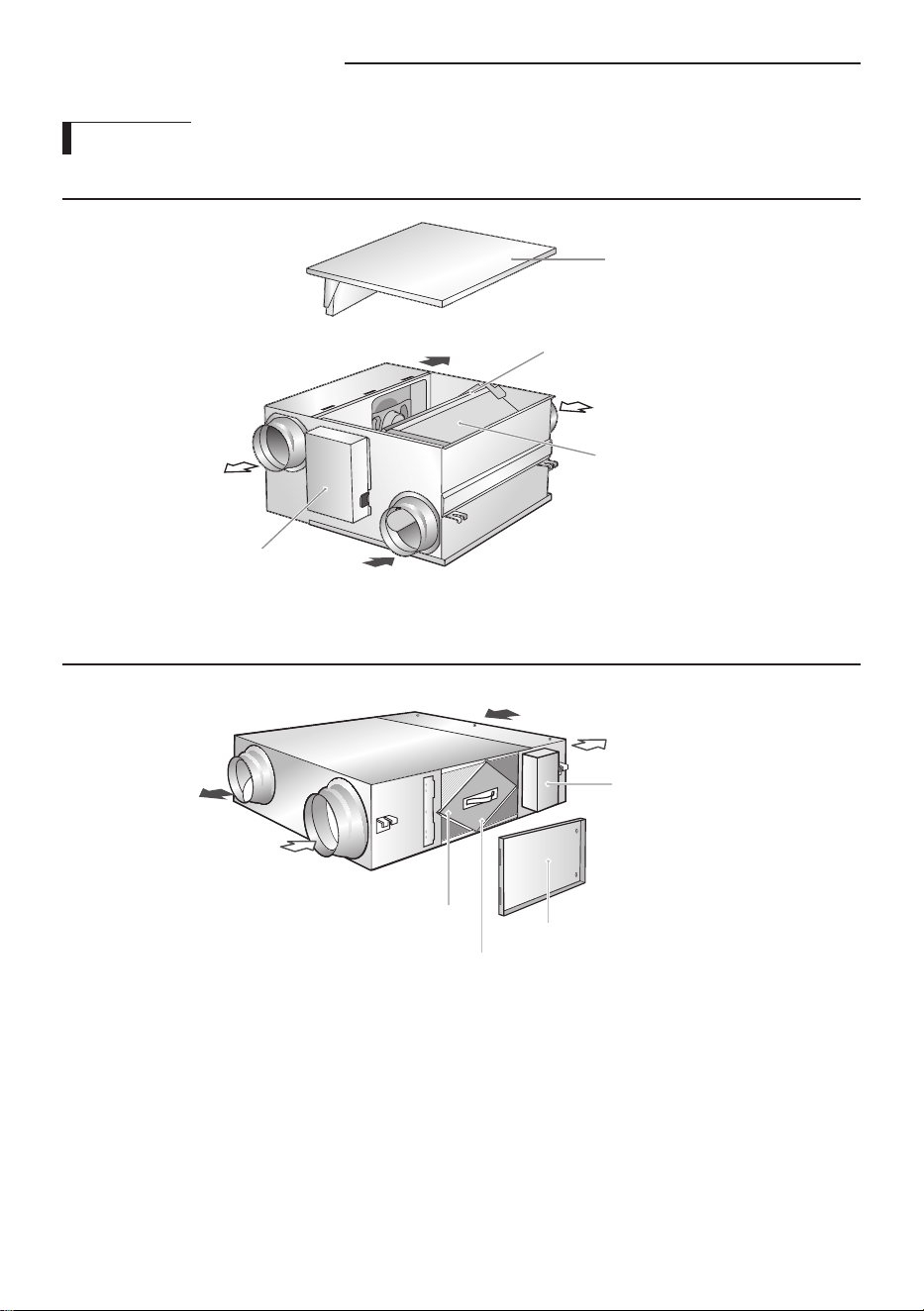
Name of each part
Main parts
AN026✴✴
outdoor Air
Maintenance cover
Electrical component box
Return Air
Heat exchange element
Supply Air
Exhaust Air
Dust lter
AN035/050/080/100✴✴
outdoor air
Supply air
Dust lter
Maintenance cover
Electrical component box
Return Air
Exhaust Air
Heat exchange element
ENGLISH-12
DB68-05251A-05_IB_ERV OEM_EU_EN_.indd 12 2024-01-16 오후 5:18:53
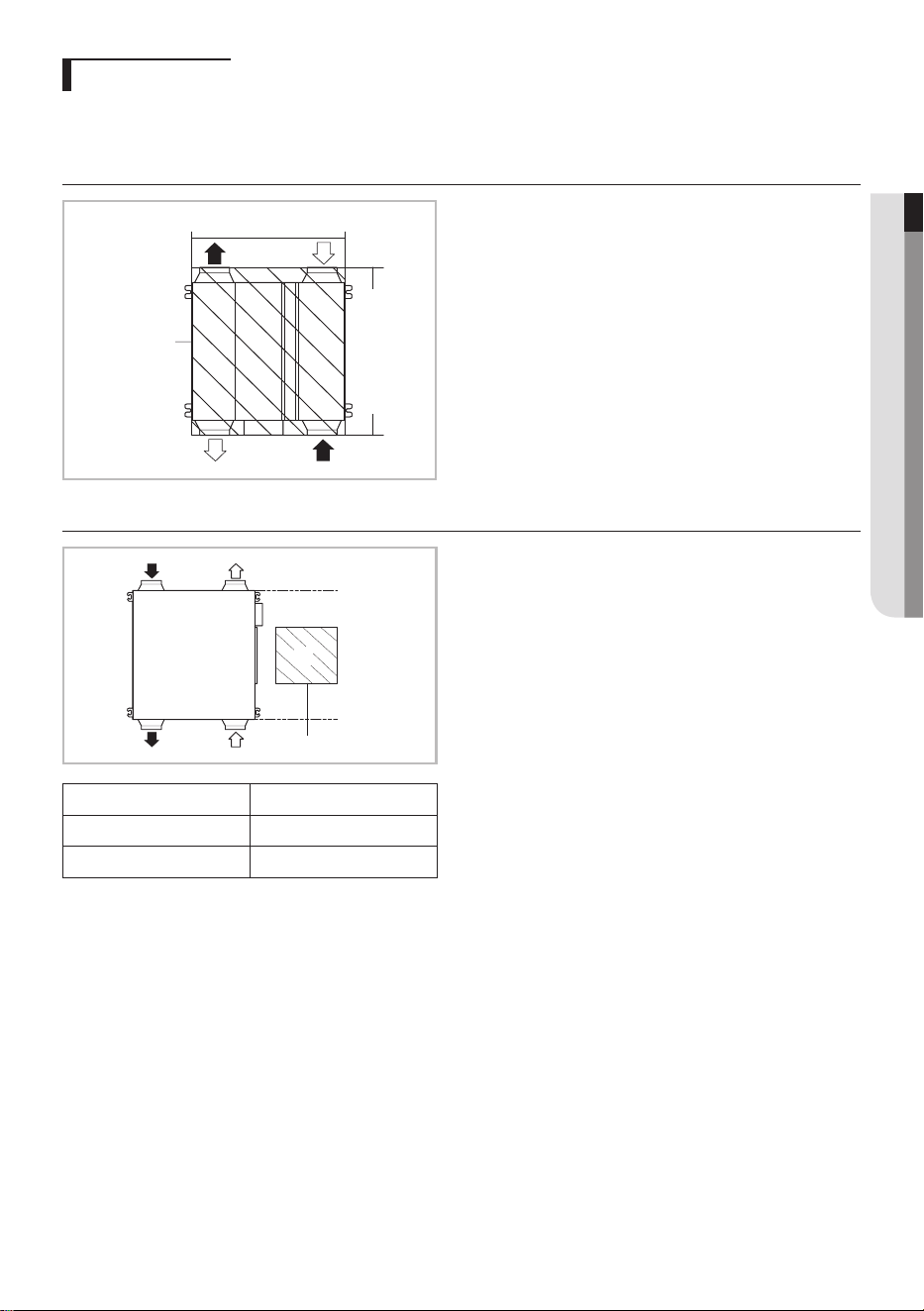
Inspection hole
Xf There is an inspection hole for cleaning and maintaining the dust lter and heat exchange element.
Xf Lack of installation and maintenance space may cause injury or malfunction.
AN026✴✴
inspection
hole
600mm
660mm
AN035/050/080/100✴✴
inspection hole
'A'
Model
'A' (mm)
AN035/050✴✴
450 X 450
AN080/100✴✴
550 X 550
ENGLISH-13
01 PREPARATION
DB68-05251A-05_IB_ERV OEM_EU_EN_.indd 13 2024-01-16 오후 5:18:53
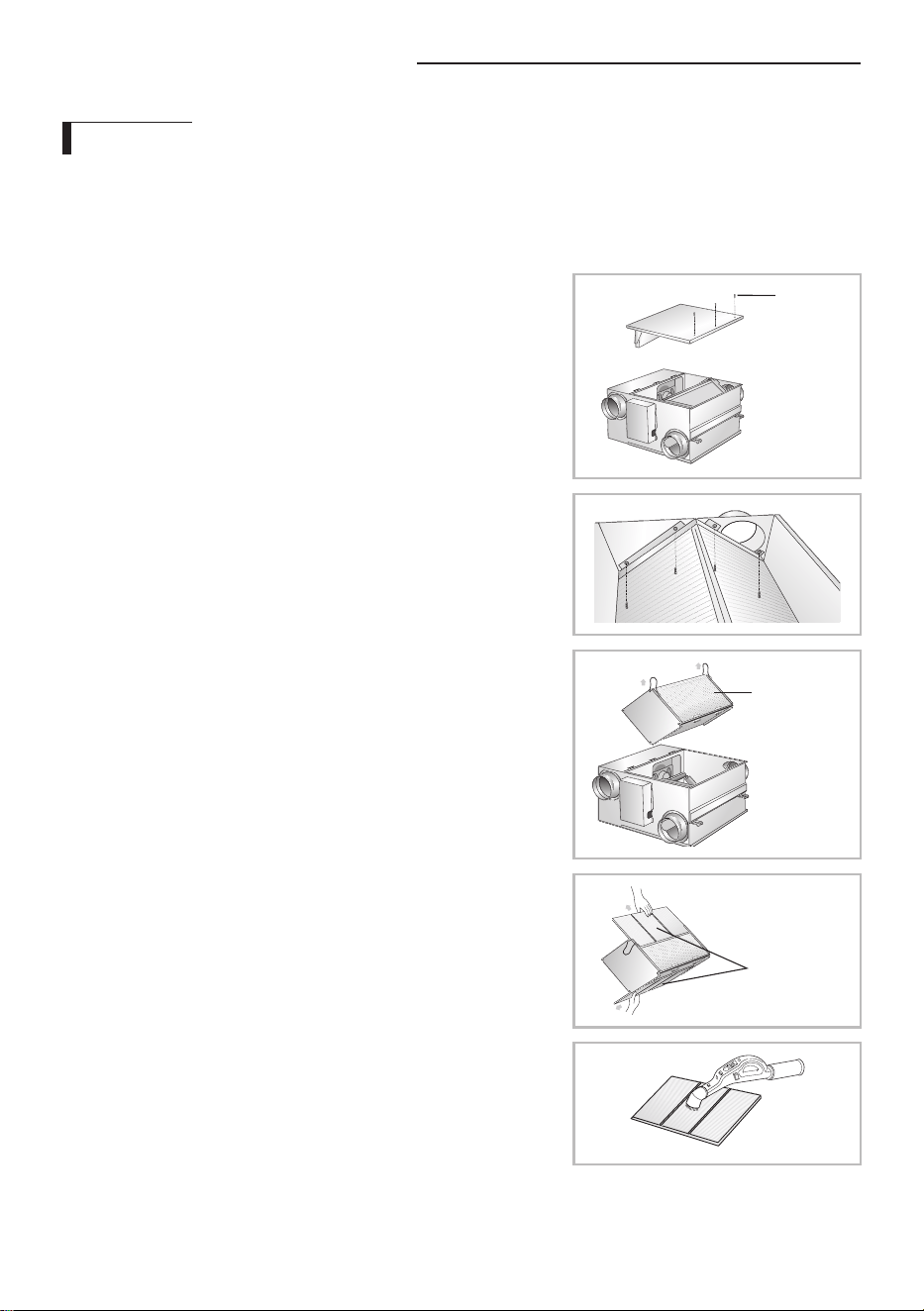
Cleaning the Dust Filter
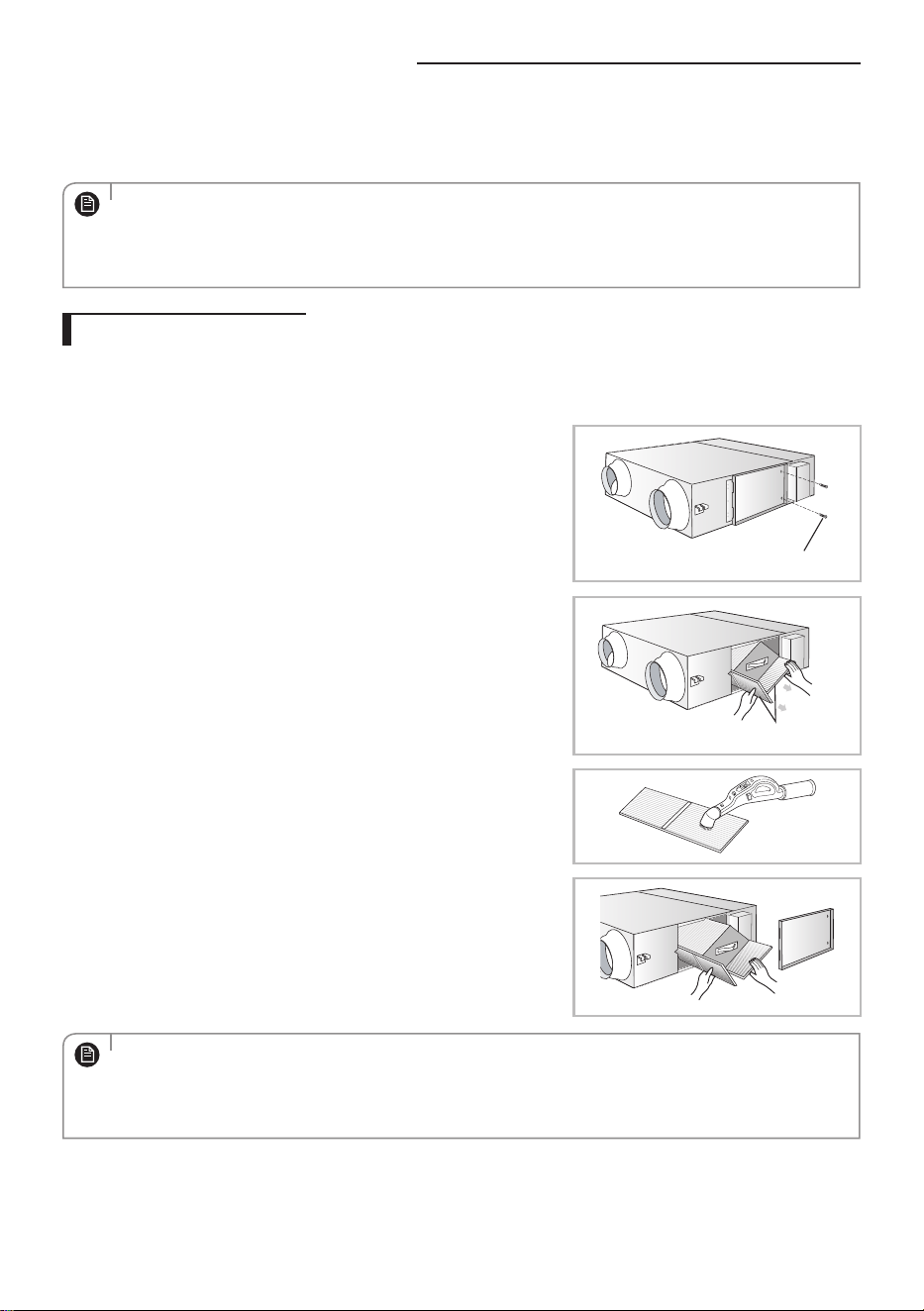
AN026✴✴
■ Before installation
Clean the dust lters at least twice a year. However, cleaning cycle may vary according to the period of use and condition of
the ventilator. Clean the dust lters more frequently in dusty place. Make sure that the power supply is disconnected before
cleaning the ventilator.
1. Remove 3 screws on the maintenance cover.
2. Take o the maintenance cover from the ventilator.
Screw
3. Remove 4 Screws and seperate the bracket body element.
4. Detach the heat exchange element by pulling it upward.
Heat exchange
element
5. Detach the dust lters by pulling them forward.
Xf There are totally 2 dust lters on both sides of the heat exchange element.
Dust lter
6. Remove all dust on the dust lters with a vacuum cleaner or a brush.
RECoMMENDATioNS FoR USE
ENGLISH-14
DB68-05251A-05_IB_ERV OEM_EU_EN_.indd 14 2024-01-16 오후 5:18:54
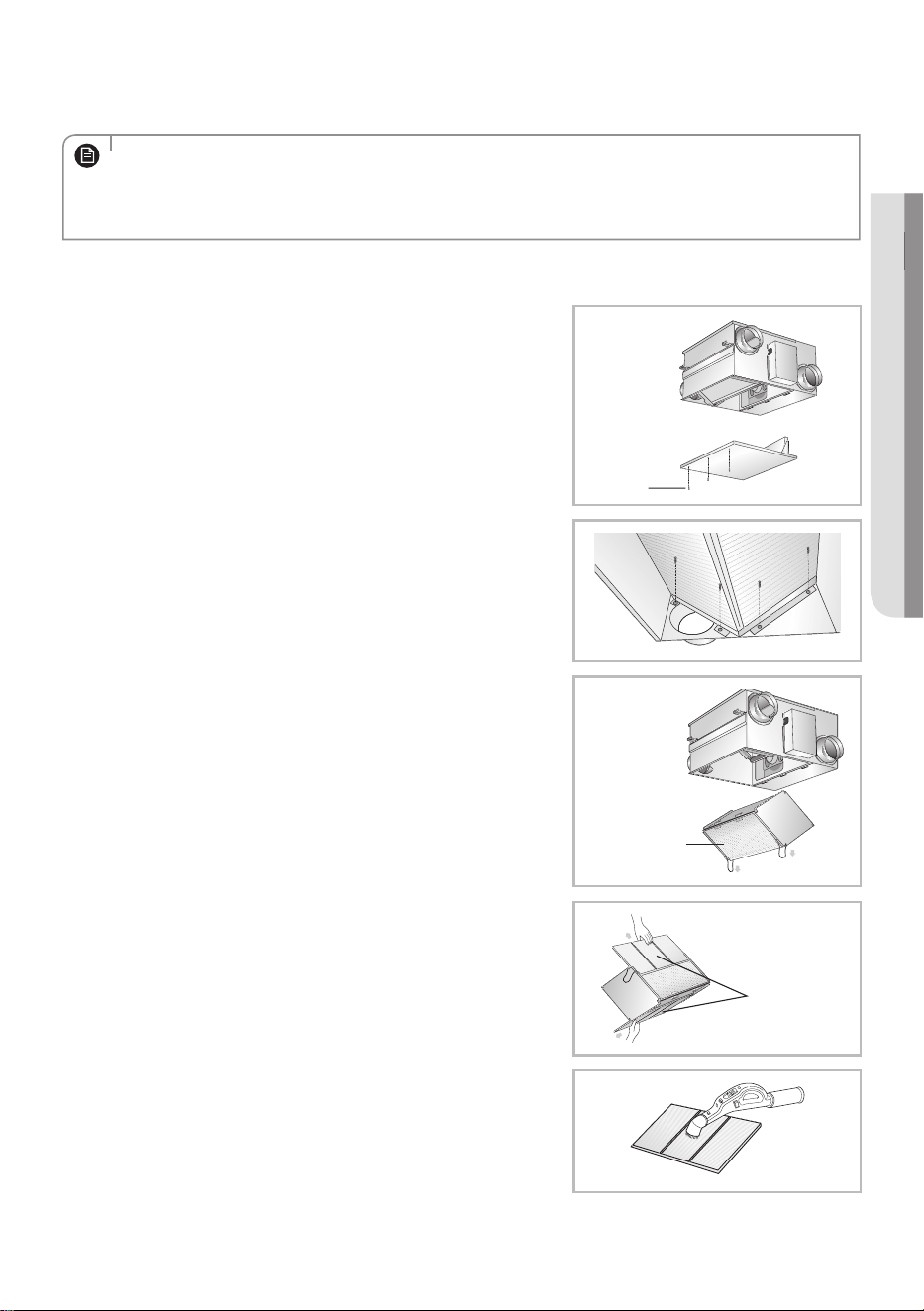
7. Reassemble the dust lters and the maintenance cover.
Xf Make sure to insert the dust lters correctly. The heat exchange element may be covered with dust decreasing the
eciency.
• Change the dust lters every two years. However, changing cycle may vary according to the used period and
condition.
• if the dust lter is damaged, you can buy a replacement from your supplying agent or customer care center.
• Make sure to turn o the sub power supply.
NOTE
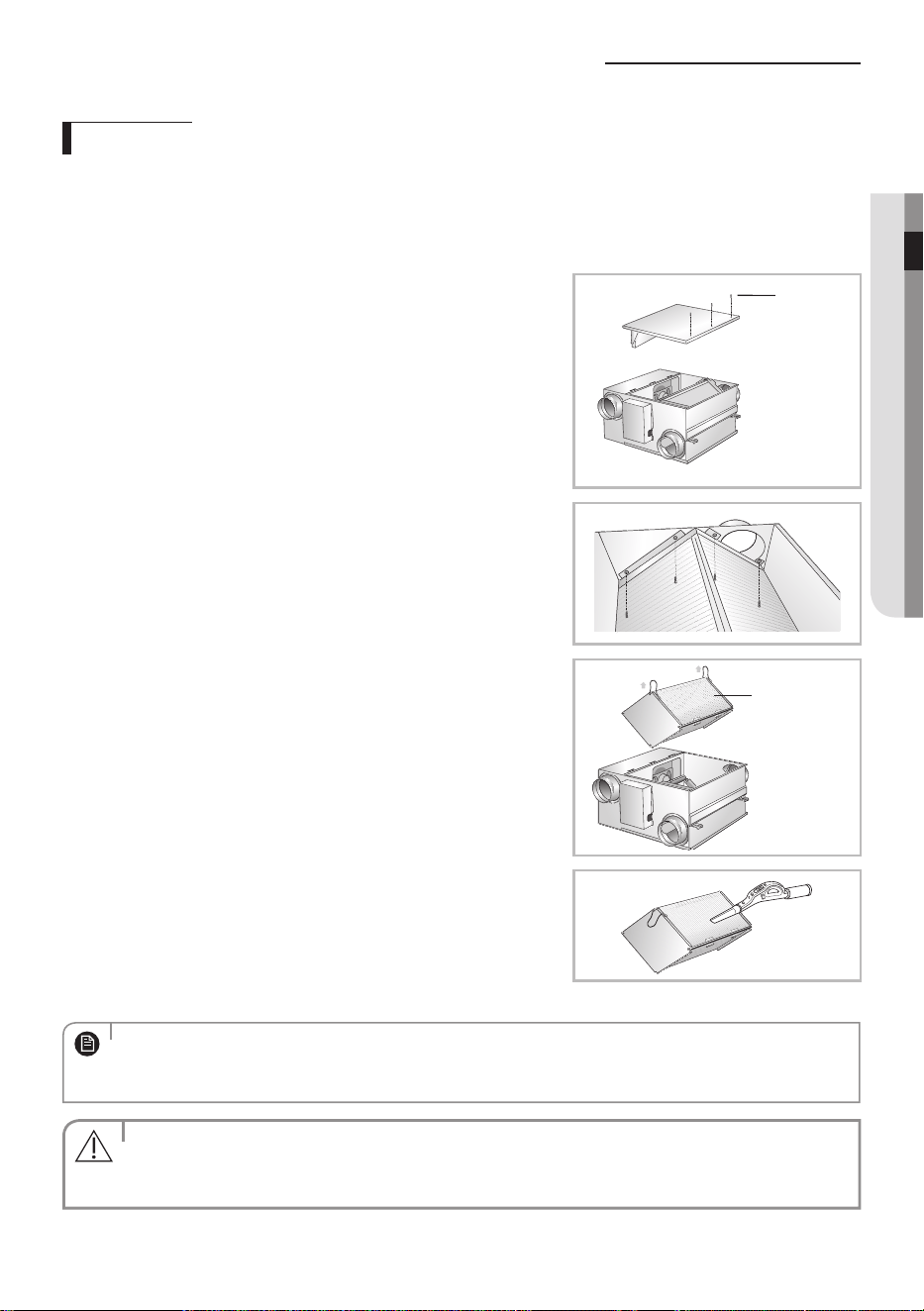
■ While still being installed
1. Remove 3 screws on the maintenance cover.
2. Take o the maintenance cover from the ventilator.
Screw
3. Remove 4 Screws and seperate the bracket body element.
4. Detach the heat exchange element by pulling it down.
Heat exchange
element
5. Detach the dust lters by pulling them forward.
Xf There are totally 2 dust lters on both sides of the heat exchange element.
Dust lter
6. Remove all dust on the dust lters with a vacuum cleaner or a brush.
ENGLISH-15
02 RECOMMENDATIONS FOR USE
DB68-05251A-05_IB_ERV OEM_EU_EN_.indd 15 2024-01-16 오후 5:18:55
Cleaning the Dust Filter
7. Reassemble the dust lters and the maintenance cover.
Xf Make sure to insert the dust lters correctly. The heat exchange element may be covered with dust decreasing the
eciency.
• Change the dust lters every two years. However, changing cycle may vary according to the used period and
condition.
• if the dust lter is damaged, you can buy a replacement from your supplying agent or customer care center.
• Make sure to turn o the sub power supply.
NOTE
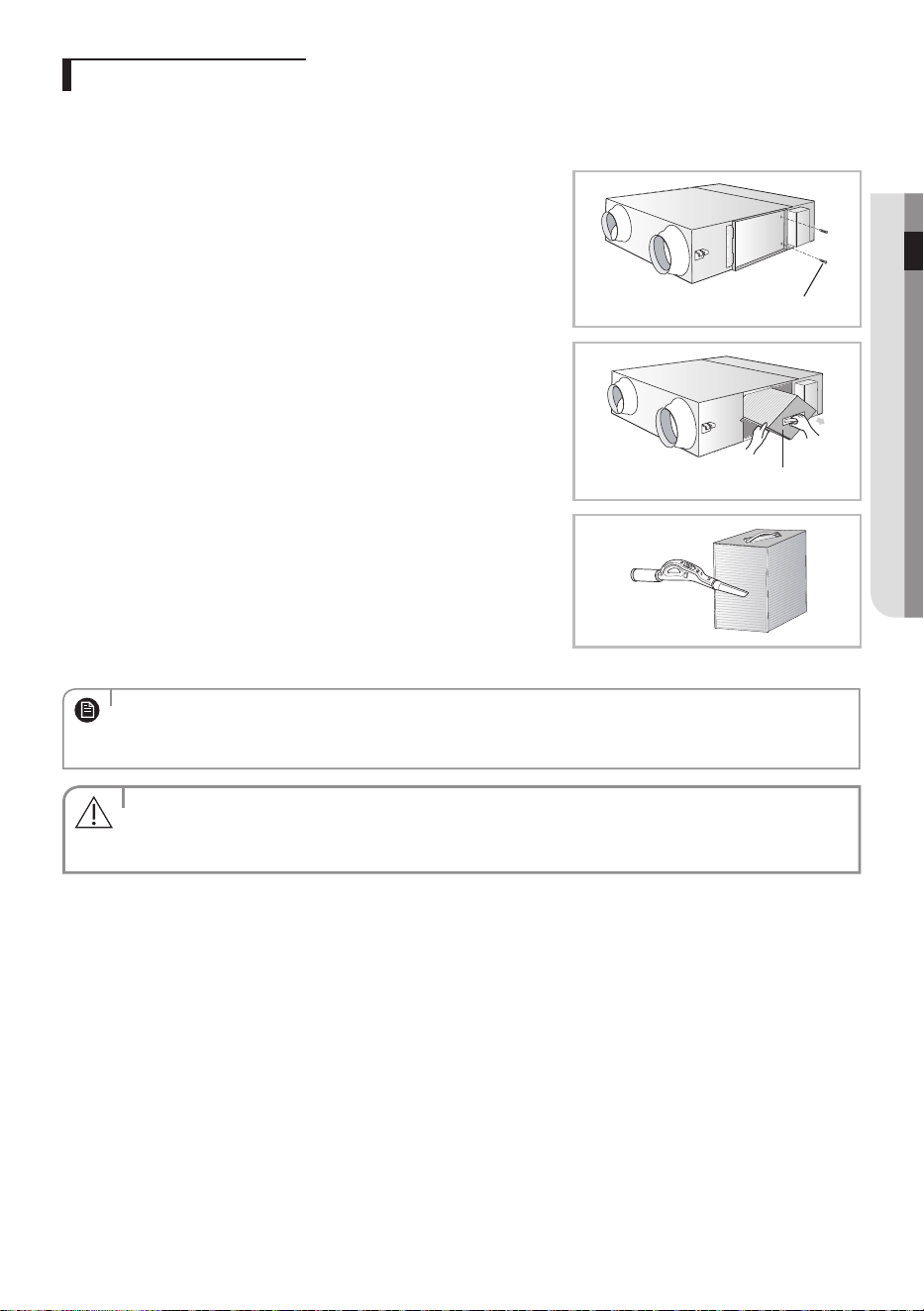
AN035/050/080/100✴✴
Clean the dust lters at least twice a year. However, cleaning cycle may vary according to the period of use and condition of
the ventilator. Clean the dust lters more frequently in dusty place. Make sure that the power supply is disconnected before
cleaning the ventilator.
1. Remove 2 screws on the maintenance cover.
2. Take o the maintenance cover from the ventilator.
Screw
3. Detach the dust lters by pulling them forward.
Xf There are totally 4 dust lters on both sides of the heat exchange
element.
Dust lter
4. Remove all dust on the dust lters with a vacuum cleaner or a brush.
5. Reassemble the dust lters and maintenance cover.
Xf Make sure to insert the dust lters correctly. The heat exchange element
may be covered with dust decreasing the eciency.
• Change the dust lters every two years. However, changing cycle may vary according to the used period and
condition.
• if the dust lter is damaged, you can buy a replacement from your supplying agent or customer care center.
• Make sure to turn o the sub power supply.
NOTE
ENGLISH-16
DB68-05251A-05_IB_ERV OEM_EU_EN_.indd 16 2024-01-16 오후 5:18:55
Cleaning the heat exchange element
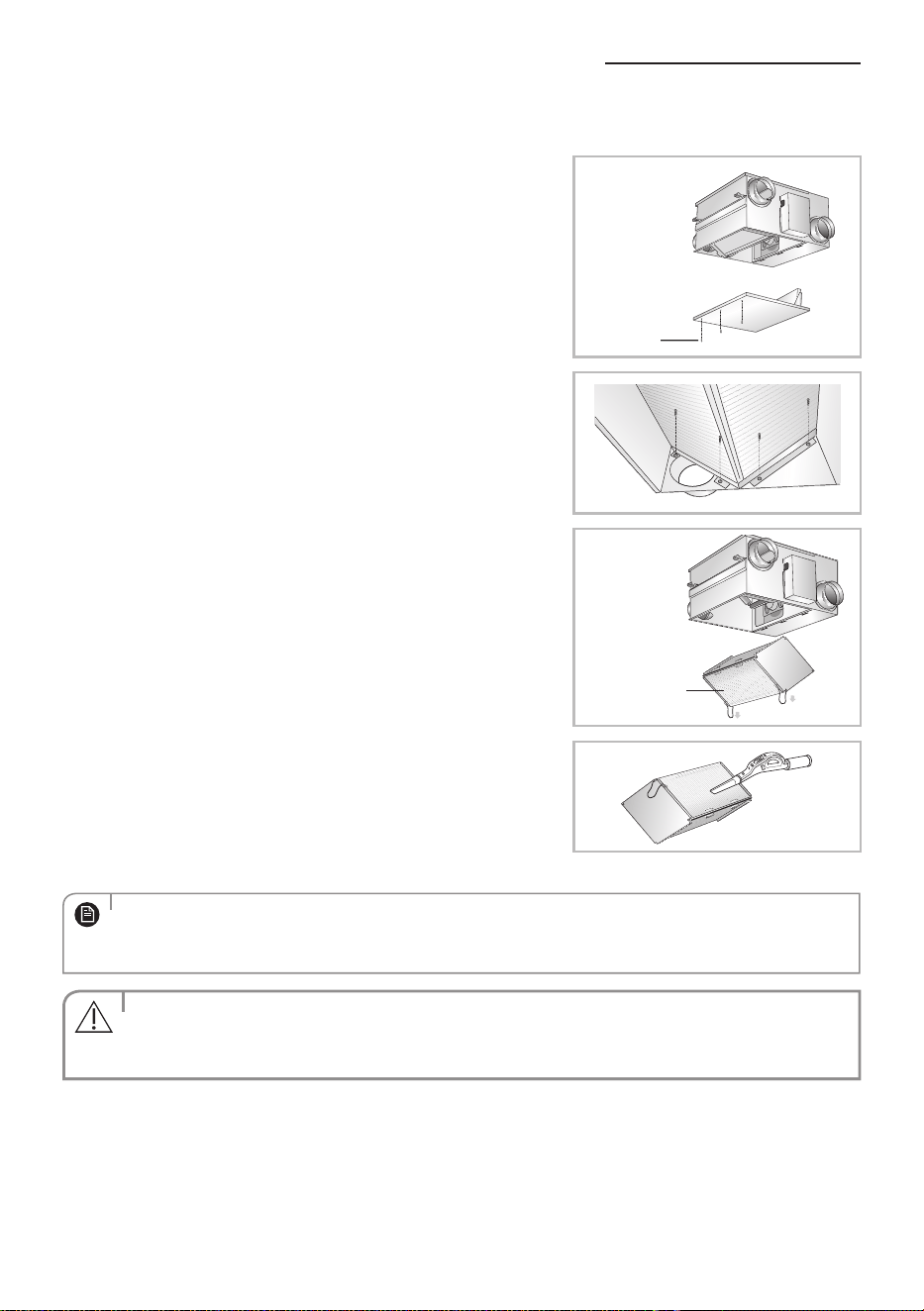
AN026✴✴
■ Before installation
Clean the heat exchange element at least twice a year. However, the cleaning cycle may vary according to the used period
and condition of the ventilator. Clean the heat exchange element more frequently in dusty place. Make sure that the power
supply is disconnected before cleaning the ventilator.
1. Remove 3 screws on the maintenance cover.
2. Take o the maintenance cover from the ventilator.
Screw
3. Remove 4 Screws and seperate the bracket body element.
4. Detach the heat exchange element by pulling it upward.
Heat exchange
element
5. Remove all dust and particles on the heat exchange element with a nozzle
of a vacuum cleaner.
Xf Take care not to attach the nozzle too close. it may damage the heat
exchange element.
6. Reassemble the heat exchange element and the maintenance cover.
• if the heat exchange element is damaged, purchase it individually in a customer care center or an agency that
you bought the product.
• Make sure to turn o the sub power supply.
NOTE
•Do not wash the heat exchange element. it may decrease its eciency.
•The heat exchange element is heavy. Take care not to drop it.
CAUTION
ENGLISH-17
02 RECOMMENDATIONS FOR USE
DB68-05251A-05_IB_ERV OEM_EU_EN_.indd 17 2024-01-16 오후 5:18:55
Cleaning the heat exchange element
■ While still being installed
1. Remove 3 screws on the maintenance cover.
2. Take o the maintenance cover from the ventilator.
Screw
3. Remove 4 Screws and seperate the bracket body element.
4. Detach the heat exchange element by pulling it down.
Heat exchange
element
5. Remove all dust and particles on the heat exchange element with a nozzle
of a vacuum cleaner.
Xf Take care not to attach the nozzle too close. it may damage the heat
exchange element.
6. Reassemble the heat exchange element and the maintenance cover.
• if the heat exchange element is damaged, purchase it individually in a customer care center or an agency that
you bought the product.
• Make sure to turn o the sub power supply.
NOTE
•Do not wash the heat exchange element. it may decrease its eciency.
•The heat exchange element is heavy. Take care not to drop it.
CAUTION
ENGLISH-18
DB68-05251A-05_IB_ERV OEM_EU_EN_.indd 18 2024-01-16 오후 5:18:56
AN035/050/080/100✴✴
Clean the heat exchange element at least twice a year. However, the cleaning cycle may vary according to the used period
and condition of the ventilator. Clean the heat exchange element more frequently in dusty place. Make sure that the power
supply is disconnected before cleaning the ventilator.
1. Remove 2 screws on the maintenance cover.
2. Take o the maintenance cover from the ventilator.
Screw
3. Detach the 2 heat exchange elements in order.
Xf There are 2 heat exchange elements in the ventilator. Make sure clean
them at once.
Heat exchange element
4. Remove all dust on the dust lters with a vacuum cleaner or a brush.
Xf Take care not to attach the nozzle too close.
it may damage the heat exchange element.
5. Reassemble the heat exchange elements and maintenance cover.
• if the heat exchange element is damaged, purchase it individually in a customer care center or an agency that
you bought the product.
• Make sure to turn o the sub power supply.
NOTE
•Do not wash the heat exchange element. it may decrease its eciency.
•The heat exchange element is heavy. Take care not to drop it.
CAUTION
ENGLISH-19
02 RECOMMENDATIONS FOR USE
DB68-05251A-05_IB_ERV OEM_EU_EN_.indd 19 2024-01-16 오후 5:18:56
Final checks & user tips
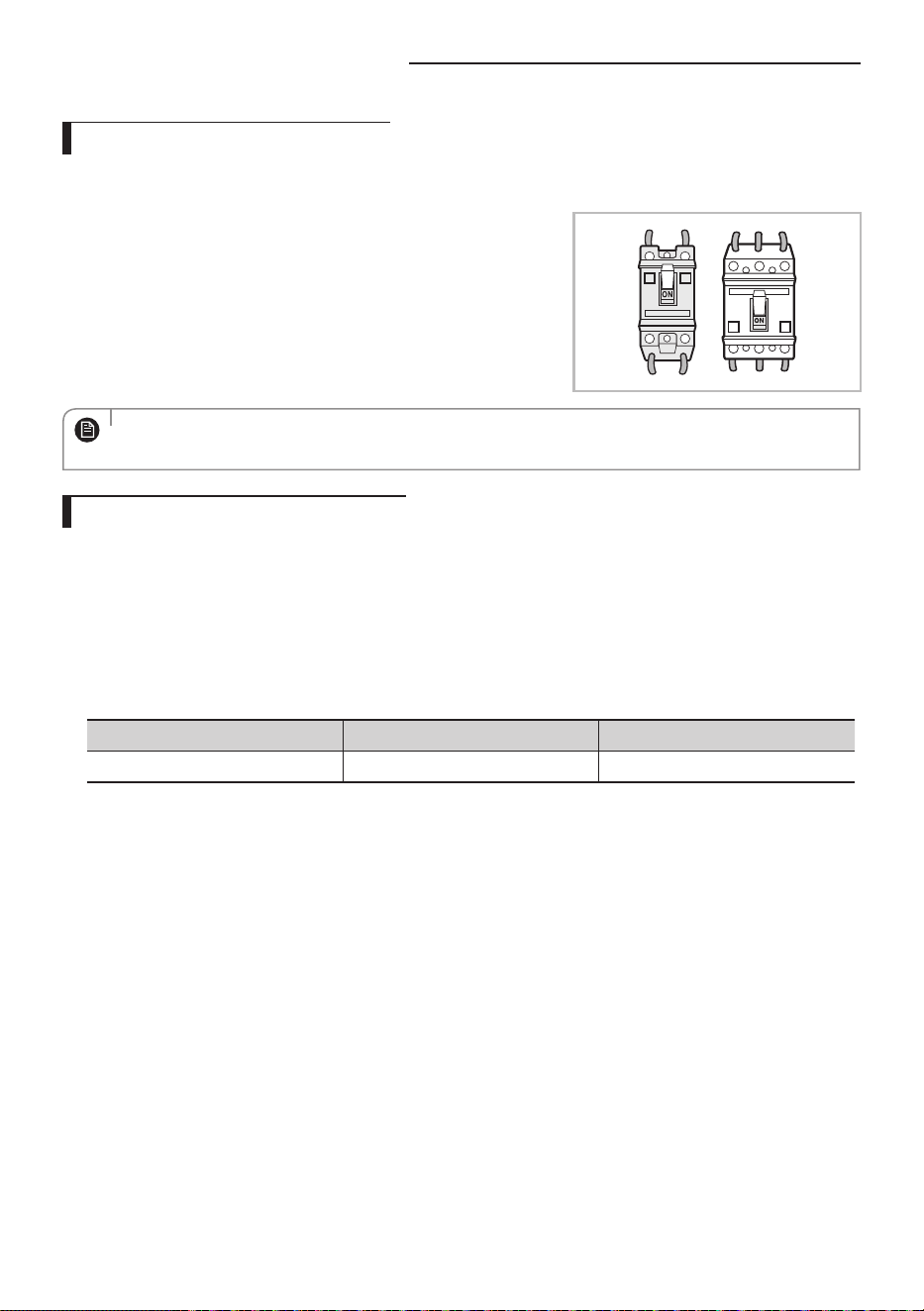
Checking up the sub power supply
The sub power supply is a device to prevent electric leakage due to the over current. install the sub power supply separately
near the ventilator and turn it o when you clean the ventilator or you do not use the ventilator for a long period of time.
Xf Turn on the sub power supply which is installed separately.
- The sub power supply is not supplied with the ventilator. Purchase the
sub power supply individually.
• if the circuit breaker (MCCB, ELB) is installed, the sub power supply does not need to be installed mandatorily.
• Power supplies should only checked by qualied specialists.
NOTE
Recommended Operation Condition
Xf For the installation and operating temperatures for the ventilator, refer to the table below. if the ventilator is operated
under the condition other than are indicated, it may not operate due to the protective device in the ventilator. Especially,
if outside temperature is under -15°C, the ventilator does not operate at all.
Xf Do not operate the ventilator when typhoon comes. Water may get in the room through the ventilator due to the rain
and heavy winds.
Xf Avoid operating the ventilator in indoor or outdoor with high temperature and humidity since dew may form on the
internal part of the product, including the heat exchanger. Especially avoid using it during the long rainy period in the
summer.
Install condition Outdoor air condition Indoor air condition
0~40°C, 80%RH below -15~50°C, 80%RH below 0~40°C, 80%RH below
ENGLISH-20
DB68-05251A-05_IB_ERV OEM_EU_EN_.indd 20 2024-01-16 오후 5:18:56
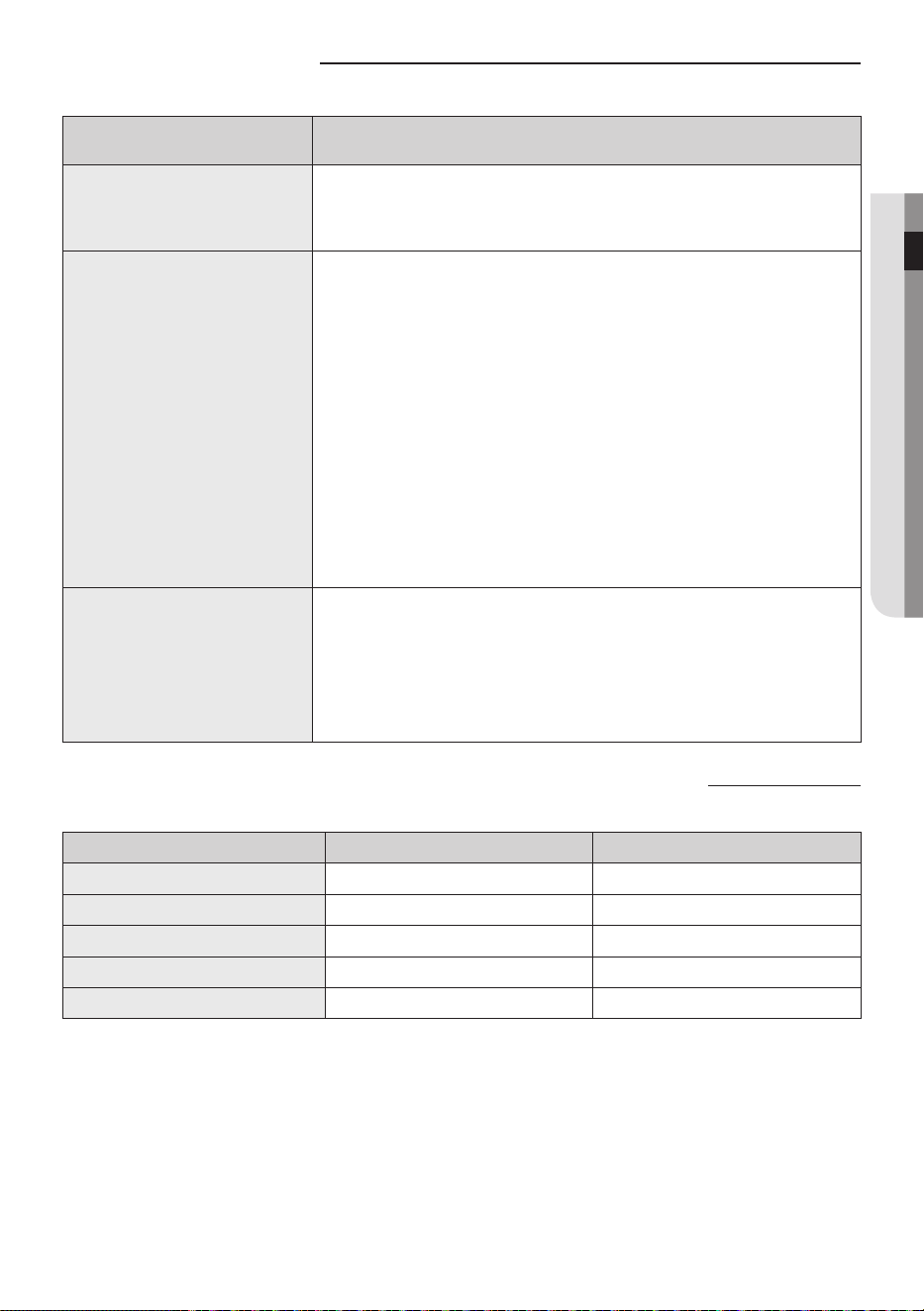
Troubleshooting
Problem Explanation/Solution
The ventilator does
not operat
•Check a power failure.
•Check the sub power supply is on.
The air does not
come out from the
air outlet
•Check whether dust lter or heat exchange
element is blocked by dust.
in case of dust accumulation, it may decrease
the eciency of the ventilator.
Clean the dust lter and the heat exchange
element frequently.
•Check whether the air intake or outlet is
blocked by dust.
Remove all dust in the air intake.
Water drops from
the air intake
•Check whether the ventilator is operated in
By-Pass mode during heating.
When heating, make sure to operate the
ventilator in Heat-EX mode.
Model specication (dimension and weight)
Model Net dimension (WxDxH, mm) Net weight (kg)
AN026JSKLKN/EU 660 x 600 x 350 28.5
AN035JSKLKN/EU 1012 x 1000 x 270 42.5
AN050JSKLKN/EU 1012 x 1000 x 270 42.5
AN080JSKLKN/EU 1220 x 1135 x 340 67.0
AN100JSKLKN/EU 1220 x 1135 x 340 67.0
ENGLISH-21
02 RECOMMENDATIONS FOR USE
DB68-05251A-05_IB_ERV OEM_EU_EN_.indd 21 2024-01-16 오후 5:18:56
Samsung, PO Box 12987, Blackrock, Co. Dublin. IE
or Euro QA Lab. Saxony Way, Yateley, Hampshire GU46 6GG, UK
COUNTRY CALL OR VISIT US ONLINE AT
UK 0333 000 0333
www.samsung.com/uk/
support
IRELAND(EIRE) 0818 717100
www.samsung.com/ie/
support
GERMANY 06196 77 555 77
www.samsung.com/de/
support
FRANCE 01 48 63 00 00
www.samsung.com/fr/
support
SPAIN 91 175 00 15
www.samsung.com/es/
support
PORTUGAL
210 608 098
Chamada para a rede fixa nacional
Dias úteis das 9h às 20h
www.samsung.com/pt/
support
LUXEMBURG 261 03 710
www.samsung.com/
be_fr/support
NETHERLANDS 088 90 90 100
www.samsung.com/nl/
support
BELGIUM 02-201-24-18
www.samsung.com/be/
support (Dutch)
www.samsung.com/
be_fr/support (French)
NORWAY 21629099
www.samsung.com/no/
support
DENMARK 707 019 70
www.samsung.com/dk/
support
FINLAND 030-6227 515
www.samsung.com/fi/
support
SWEDEN 0771-400 300
www.samsung.com/se/
support
AUSTRIA 0800 72 67 864 (0800-SAMSUNG)
www.samsung.com/at/
support
SWITZERLAND 0800 726 786
www.samsung.com/ch/
support (German)
www.samsung.com/
ch_fr/support (French)
HUNGARY 0680SAMSUNG (0680-726-7864)
www.samsung.com/hu/
support
CZECH
800 - SAMSUNG
(800-726786)
www.samsung.com/cz/
support
SLOVAKIA
0800 - SAMSUNG
(0800-726 786)
www.samsung.com/sk/
support
CROATIA 072 726 786
www.samsung.com/hr/
support
BOSNIA 055 233 999
www.samsung.com/ba/
support
COUNTRY CALL OR VISIT US ONLINE AT
NorthMacedonia
023 207 777
www.samsung.com/mk/
support
MONTENEGRO 020 405 888
www.samsung.com/
support
SLOVENIA 080 697 267 (brezplačna številka)
www.samsung.com/si/
support
SERBIA 011 321 6899
www.samsung.com/rs/
support
Kosovo 038 40 30 90
www.samsung.com/
support
ALBANIA 045 620 202
www.samsung.com/al/
support
BULGARIA
0800 111 31 - Безплатен за всички
оператори
*3000 - Цена на един градски разговор
или според тарифата на мобилният
оператор
09:00 до 18:00 - Понеделник до Петък
www.samsung.com/bg/
support
ROMANIA
0800872678 - Apel gratuit
*8000 - Apel tarifat în reţea
Program Call Center
Luni - Vineri: 9 AM - 6 PM
www.samsung.com/ro/
support
ITALIA 800-SAMSUNG (800.7267864)
www.samsung.com/it/
support
CYPRUS
8009 4000 only from landline,
toll free
www.samsung.com/gr/
support
GREECE
80111-SAMSUNG (80111 726 7864)
from mobile and land line
(+30) 210 6897691 from mobile
and land line
POLAND
801-172-678*
* (opłata według taryfy operatora)
http://www.samsung.
com/pl/support/
LITHUANIA 8-800-77777
www.samsung.com/lt/
support
LATVIA 8000-7267
www.samsung.com/lv/
support
ESTONIA 800-7267
www.samsung.com/ee/
support
UKRAINE 0-800-502-000
www.samsung.com/ua/
support
MOLDOVA +373-22-667-400
www.samsung.com/ua/
support/moldova
QUESTIONS OR COMMENTS?
DB68-05251A-05_IB_ERV OEM_EU_EN_.indd 22 2024-01-16 오후 5:18:57