

LegalConsiderations
Videoandaudiosurveillancecanberegulatedbylawsthat
varyfromcountrytocountry.Checkthelawsinyourlocal
regionbeforeusingthisproductforsurveillancepurposes.
Liability
Everycarehasbeentakeninthepreparationofthis
document.PleaseinformyourlocalAxisofceofany
inaccuraciesoromissions.AxisCommunicationsABcannot
beheldresponsibleforanytechnicalortypographicalerrors
andreservestherighttomakechangestotheproductand
manualswithoutpriornotice.AxisCommunicationsAB
makesnowarrantyofanykindwithregardtothematerial
containedwithinthisdocument,including,butnotlimited
to,theimpliedwarrantiesofmerchantabilityandtnessfor
aparticularpurpose.AxisCommunicationsABshallnot
beliablenorresponsibleforincidentalorconsequential
damagesinconnectionwiththefurnishing,performance
oruseofthismaterial.Thisproductisonlytobeusedfor
itsintendedpurpose.
IntellectualPropertyRights
AxisABhasintellectualpropertyrightsrelatingto
technologyembodiedintheproductdescribedinthis
document.Inparticular,andwithoutlimitation,these
intellectualpropertyrightsmayincludeoneormoreof
thepatentslistedatwww.axis.com/patent.htmandoneor
moreadditionalpatentsorpendingpatentapplicationsin
theUSandothercountries.
EquipmentModications
Thisequipmentmustbeinstalledandusedin
strictaccordancewiththeinstructionsgiveninthe
userdocumentation.Thisequipmentcontainsno
user-serviceablecomponents.Unauthorizedequipment
changesormodicationswillinvalidateallapplicable
regulatorycerticationsandapprovals.
TrademarkAcknowledgments
AXISCOMMUNICATIONS,AXIS,ETRAX,ARTPECandVAPIX
areregisteredtrademarksortrademarkapplicationsofAxis
ABinvariousjurisdictions.Allothercompanynamesand
productsaretrademarksorregisteredtrademarksoftheir
respectivecompanies.
RegulatoryInformation
EuropeThisproductcomplieswiththeapplicable
CEmarkingdirectivesandharmonizedstandards.
Acopyoftheoriginaldeclarationofconformitymaybe
obtainedfromAxisCommunicationsAB.SeeContact
Informationonpage3.
ElectromagneticCompatibility(EMC)
Thisequipmenthasbeendesignedandtestedtofulll
applicablestandardsfor:
•Radiofrequencyemissionwheninstalledaccordingto
theinstructionsandusedinitsintendedenvironment.
•Immunitytoelectricalandelectromagneticphenomena
wheninstalledaccordingtotheinstructionsandused
initsintendedenvironment.
USA
Thisequipmenthasbeentestedandfoundtocomplywith
thelimitsforaClassAdigitaldevice,pursuanttopart15
oftheFCCRules.Theselimitsaredesignedtoprovide
reasonableprotectionagainstharmfulinterferencewhen
theequipmentisoperatedinacommercialenvironment.
Thisequipmentgenerates,uses,andcanradiateradio
frequencyenergyand,ifnotinstalledandusedin
accordancewiththeinstructionmanual,maycauseharmful
interferencetoradiocommunications.Operationofthis
equipmentinaresidentialareaislikelytocauseharmful
interferenceinwhichcasetheuserwillberequiredto
correcttheinterferenceathisownexpense.Theproduct
shallbeproperlygrounded.
Canada
ThisdigitalapparatuscomplieswithCANICES-3(ClassA).
Theproductshallbeproperlygrounded.Cetappareil
numériqueestconformeàlanormeNMBICES-3(classeA).
Leproduitdoitêtrecorrectementmisàlaterre.
Europe
ThisdigitalequipmentfulllstherequirementsforRF
emissionaccordingtotheClassAlimitofEN55022.The
productshallbeproperlygrounded.Notice!ThisisaClassA
product.Inadomesticenvironmentthisproductmaycause
RFinterference,inwhichcasetheusermayberequired
totakeadequatemeasures.
Thisproductfulllstherequirementsforimmunity
accordingtoEN55024ofceandcommercialenvironments
Australia/NewZealand
ThisdigitalequipmentfulllstherequirementsforRF
emissionaccordingtotheClassAlimitofAS/NZSCISPR22.
Theproductshallbeproperlygrounded.Notice!Thisisa
ClassAproduct.Inadomesticenvironmentthisproduct
maycauseRFinterference,inwhichcasetheusermaybe
requiredtotakeadequatemeasures.
Japan
この装置は、クラスA情報技術装置です。この装
置を家庭環境で使⽤すると電波妨害を引き起こす
ことがあります。この場合には使⽤者が適切な対
策を講ずるよう要求されることがあります。本製
品は、適切に接地してください。
Korea
이기기는업무용(A급)전자파적합기기로서판매
자또는사용자는이점을주의하시기바라며,가
정외의지역에서사용하는것을목적으로합니다.
제품은적합하게접지되어야합니다.
Safety
ThisproductcomplieswithIEC/EN/UL60950-1,Safetyof
InformationTechnologyEquipment.
DisposalandRecycling
Whenthisproducthasreachedtheendofitsusefullife,
disposeofitaccordingtolocallawsandregulations.For
informationaboutyournearestdesignatedcollectionpoint,
contactyourlocalauthorityresponsibleforwastedisposal.
Inaccordancewithlocallegislation,penaltiesmaybe
applicableforincorrectdisposalofthiswaste.
Europe
Thissymbolmeansthattheproductshallnotbe
disposedoftogetherwithhouseholdorcommercialwaste.
Directive2012/19/EUonwasteelectricalandelectronic
equipment(WEEE)isapplicableintheEuropeanUnion
memberstates.Topreventpotentialharmtohumanhealth
andtheenvironment,theproductmustbedisposedofin
anapprovedandenvironmentallysaferecyclingprocess.
Forinformationaboutyournearestdesignatedcollection
point,contactyourlocalauthorityresponsibleforwaste
disposal.Businessesshouldcontacttheproductsupplierfor
informationabouthowtodisposeofthisproductcorrectly.
Thisproductcomplieswiththerequirementsof
Directive2011/65/EUontherestrictionoftheuseof
certainhazardoussubstancesinelectricalandelectronic
equipment(RoHS).

China
Thisproductcomplieswiththerequirementsofthe
legislativeactAdministrationontheControlofPollution
CausedbyElectronicInformationProducts(ACPEIP).
ContactInformation
AxisCommunicationsAB
Emdalavägen14
22369Lund
Sweden
Tel:+46462721800
Fax:+4646136130
www.axis.com
Support
Shouldyourequireanytechnicalassistance,pleasecontact
yourAxisreseller.Ifyourquestionscannotbeanswered
immediately,yourresellerwillforwardyourqueriesthrough
theappropriatechannelstoensurearapidresponse.Ifyou
areconnectedtotheInternet,youcan:
•ndanswerstoresolvedproblemsintheFAQdatabase.
Searchbyproduct,category,orphrase
•reportproblemstoAxissupportstaffbylogginginto
yourprivatesupportarea
•chatwithAxissupportstaff
•visitAxisSupportatwww.axis.com/techsup/
LearnMore!
VisitAxislearningcenterwww.axis.com/academy/for
usefultrainings,webinars,tutorialsandguides.

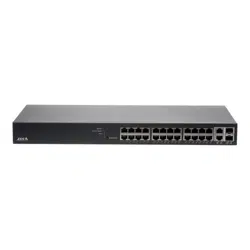
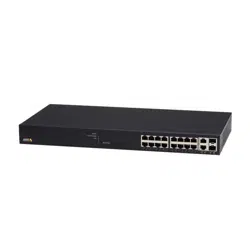
AXIST8516POE+NetworkSwitch
SafetyInformation
ReadthroughthisInstallationGuidecarefullybeforeinstallingtheproduct.KeeptheInstallation
Guideforfuturereference.
HazardLevels
DANGER
Indicatesahazardoussituationwhich,ifnotavoided,willresultindeathorseriousinjury.
WARNING
Indicatesahazardoussituationwhich,ifnotavoided,couldresultindeathorseriousinjury.
CAUTION
Indicatesahazardoussituationwhich,ifnotavoided,couldresultinminorormoderate
injury.
NO NO
NO
TICE TICE
TICE
Indicatesasituationwhich,ifnotavoided,couldresultindamagetoproperty.
OtherMessageLevels
Important
Indicatessignicantinformationwhichisessentialfortheproducttofunctioncorrectly.
Note
Indicatesusefulinformationwhichhelpsingettingthemostoutoftheproduct.
5

AXIST8516POE+NetworkSwitch
SafetyInstructions
NO NO
NO
TICE TICE
TICE
•TheAxisproductshallbeusedincompliancewithlocallawsandregulations.
•UseonlyapplicabletoolswheninstallingtheAxisproduct.Usingexcessiveforcewith
powertoolscouldcausedamagetotheproduct.
•Donotusechemicals,causticagents,oraerosolcleaners.
•Useacleanclothdampenedwithpurewaterforcleaning.
•Useonlyaccessoriesthatcomplywiththetechnicalspecicationoftheproduct.These
canbeprovidedbyAxisorathirdparty.
•UseonlysparepartsprovidedbyorrecommendedbyAxis.
•Donotattempttorepairtheproductyourself.ContactAxissupportoryourAxisreseller
forservicematters.
Transportation
NO NO
NO
TICE TICE
TICE
•WhentransportingtheAxisproduct,usetheoriginalpackagingorequivalenttoprevent
damagetotheproduct.
6
AXIST8516POE+NetworkSwitch
InstalltheHardware
PackageContents
•AXIST8516POE+NetworkSwitch
•Powercable
•Rubberfeet(4X)
•Rackmountingkit
•Installationguide
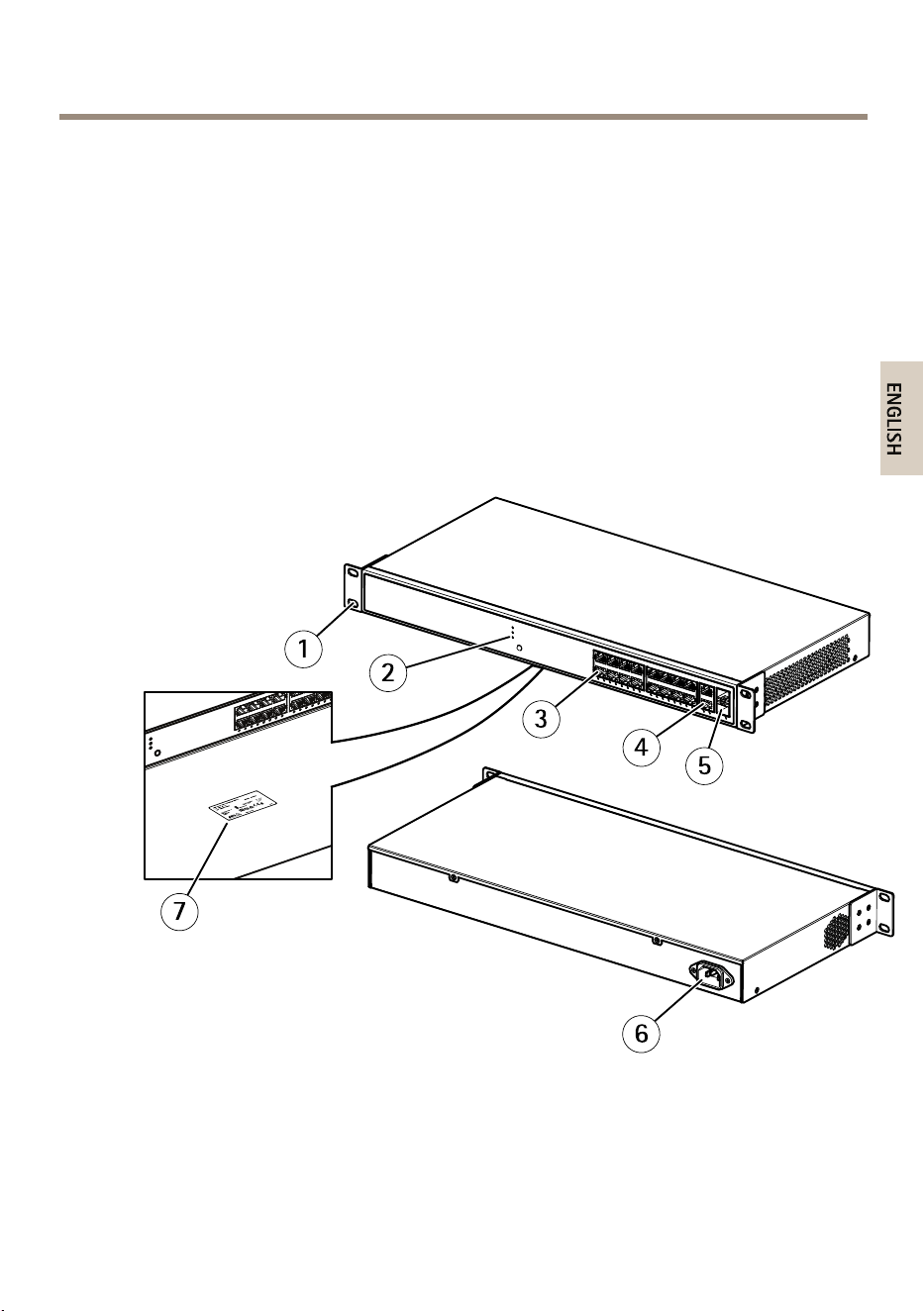
HardwareOverview
1
Bracket
2
LEDs(frontpanel)
3
RJ45PoEports1-16
4
RJ45port17-18
7
AXIST8516POE+NetworkSwitch
5
SFPslot17-18
6
Powerconnector
7
Productlabel
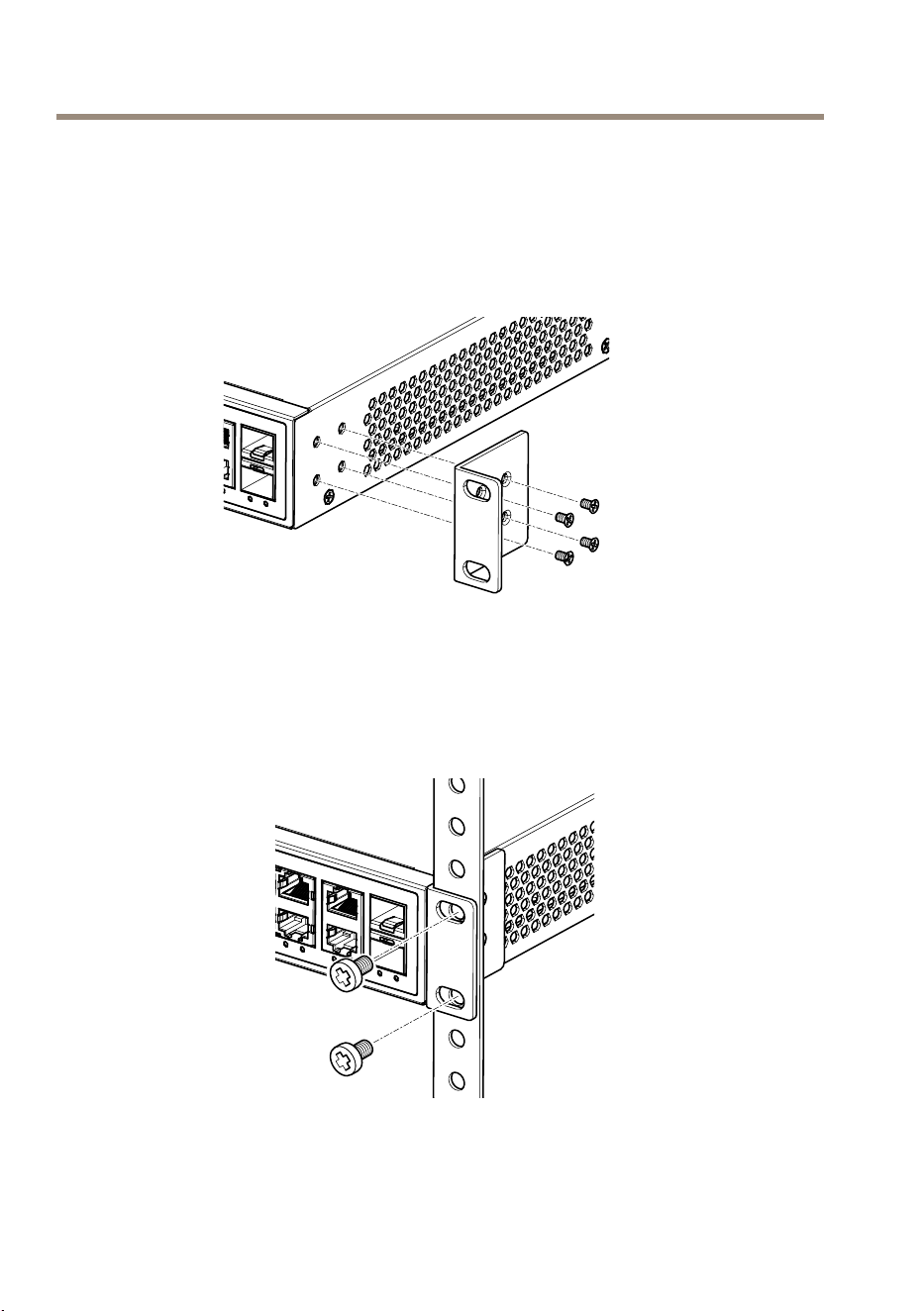
Mounttheproductinarack
1.Attachthemountingbracketstobothsidesofthechassi.Insertscrewsandtightenthen
withascrewdrivertosecurethebrackets.
2.Placetheproductonarackshelfintherack.Pushitinuntiltheovalholesinthe
bracketsalignwiththemountingholesintherackposts.
3.Attachthebracketstotheposts.Insertscrewsandtightenthem.
8
AXIST8516POE+NetworkSwitch
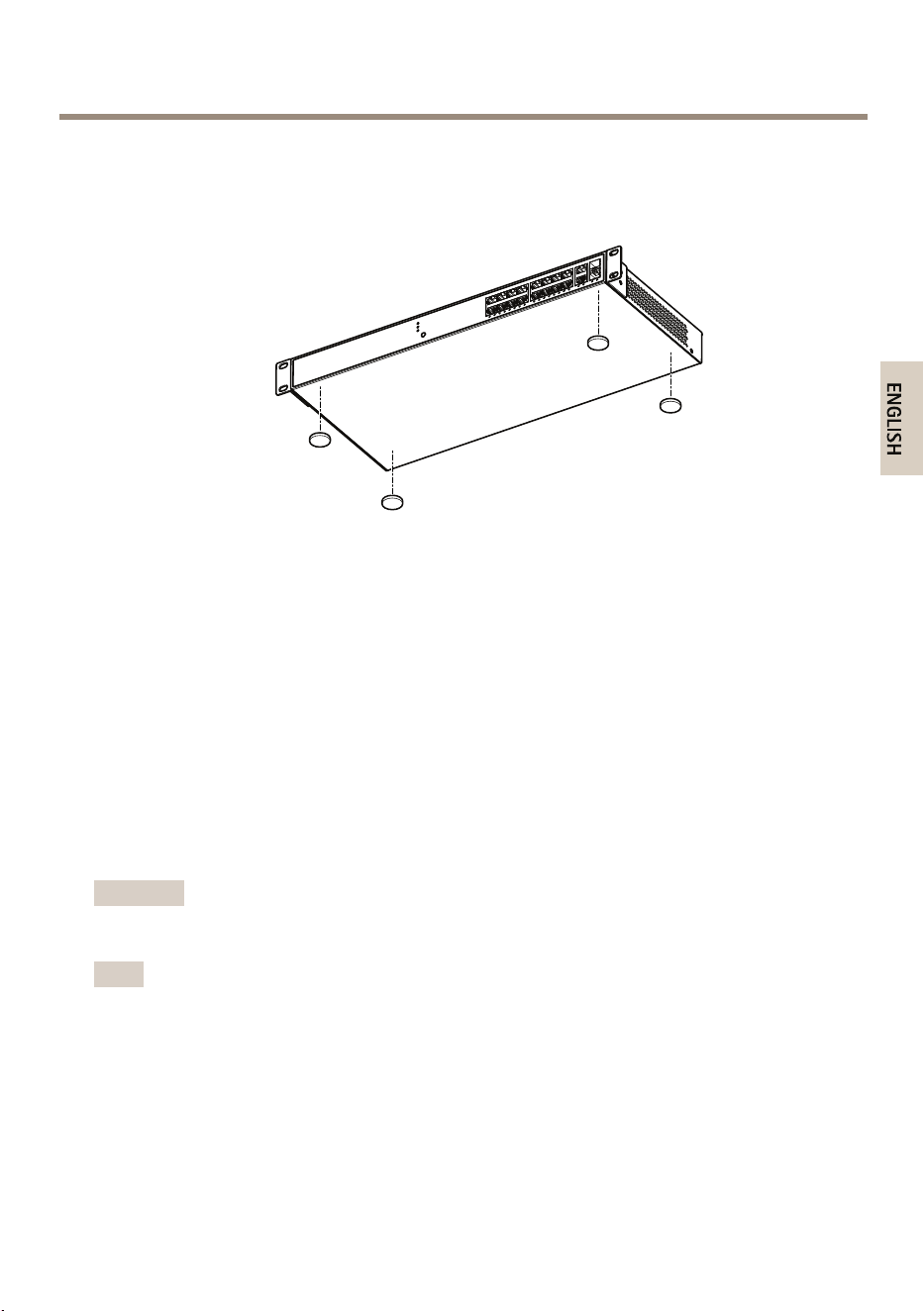
Mounttheproductonadeskorshelf
1.Verifythattheworkbenchissturdyandreliablygrounded.
2.Attachthefouradhesiverubberfeettothebottomoftheproduct.
Installationsteps
1.ConnectastandardnetworkcabletoRJ45port17or18ontheproduct.
2.Connecttheotherendofthecabletoacomputer.
3.Connectthepowercordtotheproduct.
4.ConnecttheotherendofthepowercordtoastandardACoutlet.TheSystemLEDlights
upandconrmsthatthedeviceispoweredupsuccessfully.
5.UseAXISIPUtilityorAXISCameraManagementtondtheproductonyournetwork.
6.Usetheusernameandpasswordontheproductlabeltoentertheproduct.
7.Followtheinstructionsonthescreen.
Important
Useonlythesuppliedpowercordtopowertheproduct.
Note
Forsecuritypurposes,itisrecommendedtochangethedefaultpassword.
InstallSFPModules
Youcaninstallorremoveamini-GBICSFPmodulefromaSFPslotwithouthavingtopoweroffthe
product.TheSFPslots17-18aresharedwiththeRJ-45ports17-18.
9

AXIST8516POE+NetworkSwitch
Important
Ifamini-GBICisinstalledinslot17-18,theassociatedRJ-45port17-18isdisabledand
cannotbeused.MakesurethenetworkcableisnotconnectedtoRJ-45port17-18when
youinstallorremoveamini-GBIC.
1.InsertthemoduleintotheSFPslot.
2.Pressrmlytoensurethatthemoduleseatsintotheconnector.
Powernotice
Theproductisapower-requireddevice,meaningitwillnotworkuntilitispowered.Considerusing
anUPS(UninteruptedPowerSupply)inordertoavoidnetworkdatalossornetworkdowntime.
Installingasurgesuppressiondevicemayalsohelptoprotecttheproductfrombeingdamagedby
unregulatedsurgeorcurrenttotheproductorthepowercord.
HowtousetheMode/Resetbutton
BypressingtheMode/Resetbuttonforcertainperiodoftime,userscanperformthefollowingtasks.
•ChangebetweenportstatusmodeLink/Act/SpeedandPoE.
•Resettheproducttothepreviouscongurationsettingssaved.
•Restoretheproducttotheoriginalfactorydefaultsettings.
Mode/Resetbutton
TasktobeperformedTimeperiodof
pressingbutton
LEDPortstatusLED
behavior
Changeportstatus
modebetween
Link/Act/Speedand
PoE
0-2seconds
Green(lit)
LEDstatuschanges
accordingtothe
selectedmode.
Resettheproduct2-7seconds
Green(blink)
ThelightsareOFFfor
allLEDs
Restoretotheoriginal
factorydefault
settings
7-12seconds
Green(blink)
ThelightsareONfor
allLEDs
10
AXIST8516POE+NetworkSwitch
ReferenceMaterial
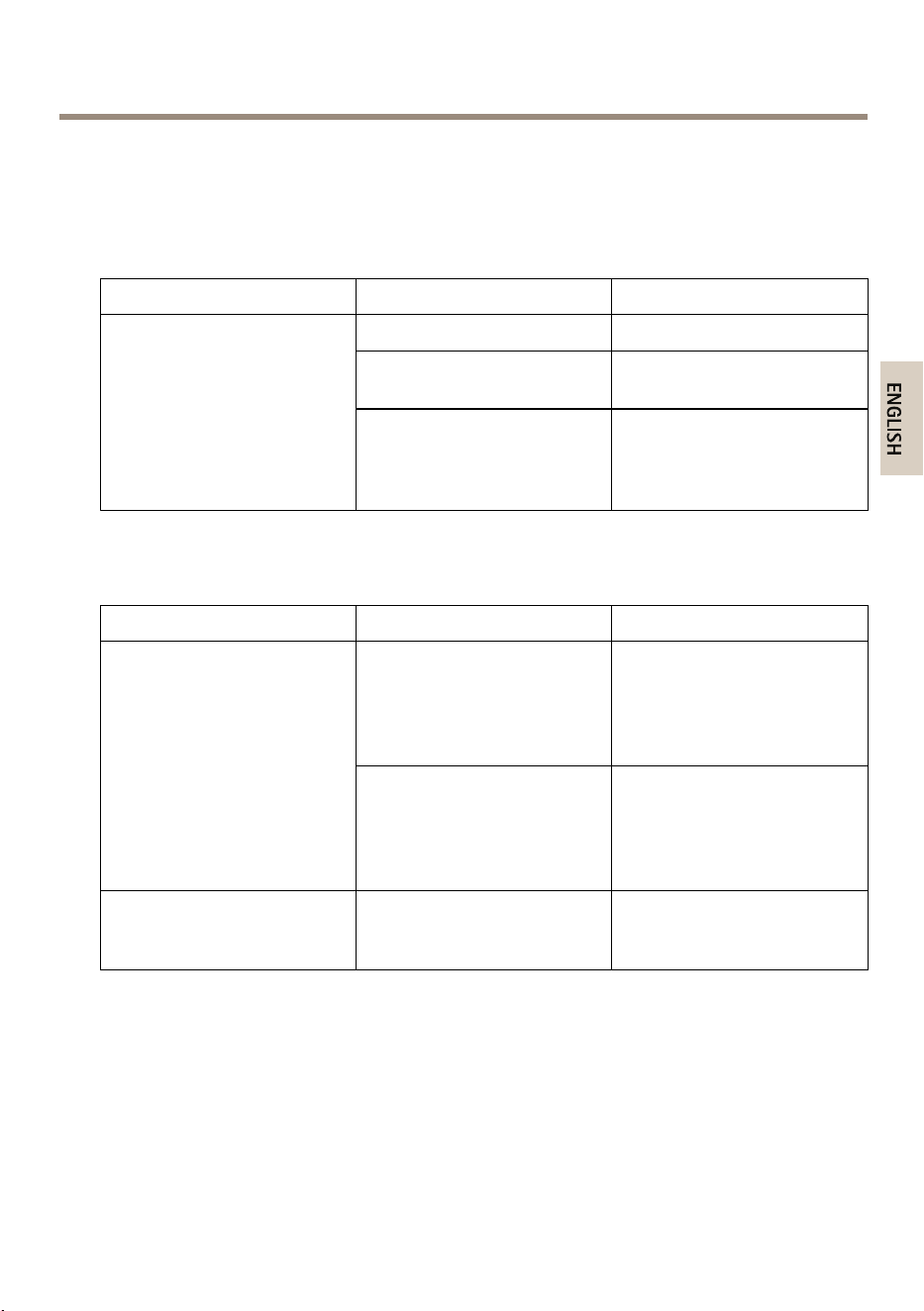
LEDIndicators
SystemLED
LED
Color
Indication
Green(lit)
TheswitchispoweredON.
N/A
Theswitchisnotreceiving
power.
System
Red(lit)
Anabnormalstate,such
asexceedingoperating
temperaturerange,hasbeen
detectedintheswitch.
ModeLED
LED
Color
Indication
Green(lit)
TheRJ45/SFPPortStatusLEDs
aredisplayinglinkstatusand
networkactivityofeachport,
withconnectionspeedof
1000Mbps.
Link/Act/Speed
Amber(lit)
TheRJ45/SFPPortStatusLEDs
aredisplayinglinkstatusand
networkactivityofeachport,
withconnectionspeedof
10/100Mbps.
PoE
Green(lit)
TheRJ45PortStatusLEDs
aredisplayingPoEpowering
statusofeachport.
BypressingtheMode/Resetbuttoninlessthan2secondstochangeLEDmodes(Link/Act/Speed
ModeorPoEMode),userscanchecktheportstatusbyreadingtheLEDbehaviorsinthetables
below.
Link/Act/SpeedModeLED
11

AXIST8516POE+NetworkSwitch
LED
Color
Indication
Green(lit)
Theportisenabledand
establishedalinktoconnected
device,andtheconnection
speedis1000Mbps.
Green(blink)
Theportis
transmitting/receiving
packets,andtheconnection
speedis1000Mbps.
Amber(lit)
Theportisenabledand
establishedalinktoconnected
device,andtheconnection
speedis10/100Mbps.
Amber(blink)
Theportis
transmitting/receiving
packets,andtheconnection
speedis10/100Mbps.
RJ45ports
N/A
Theporthasnoactivenetwork
cableconnected,oritisnot
establishedalinktoconnected
device.Otherwise,theport
mayhavebeendisabled
throughtheproductuser
interface.
Green(lit)
Theportisenabledand
establishedalinktoconnected
device,andtheconnection
speedis1000Mbps.
Green(blink)
Theportis
transmitting/receiving
packets,andtheconnection
speedis1000Mbps.
Amber(lit)
Theportisenabledand
establishedalinktoconnected
device,andtheconnection
speedis100Mbps.
Amber(blink)
Theportis
transmitting/receiving
packets,andtheconnection
speedis100Mbps.
SFPports
12
AXIST8516POE+NetworkSwitch
N/A
Theporthasnoactivenetwork
cableconnected,oritisnot
establishedalinktoconnected
device.Otherwise,theport
mayhavebeendisabled
throughtheproductuser
interface.
PoEModeLED
LED
Color
Indication
Green(lit)
Theportisenabledand
supplyingpowertoconnected
device.
Amber(lit)
Anabnormalstate,suchas
overloadstatus,hasbeen
detectedintheproduct.
RJ45ports
N/A
Theporthasnoactivenetwork
cableconnected,oritisnot
connectedaPoEPDdevice.
Otherwise,theportmayhave
beendisabledthroughthe
productuserinterface.
13

InstallationGuide
Ver.M1.11
AXIST8516POE+NetworkSwitch
Date:May2016
©AxisCommunicationsAB,2016
PartNo.1593082