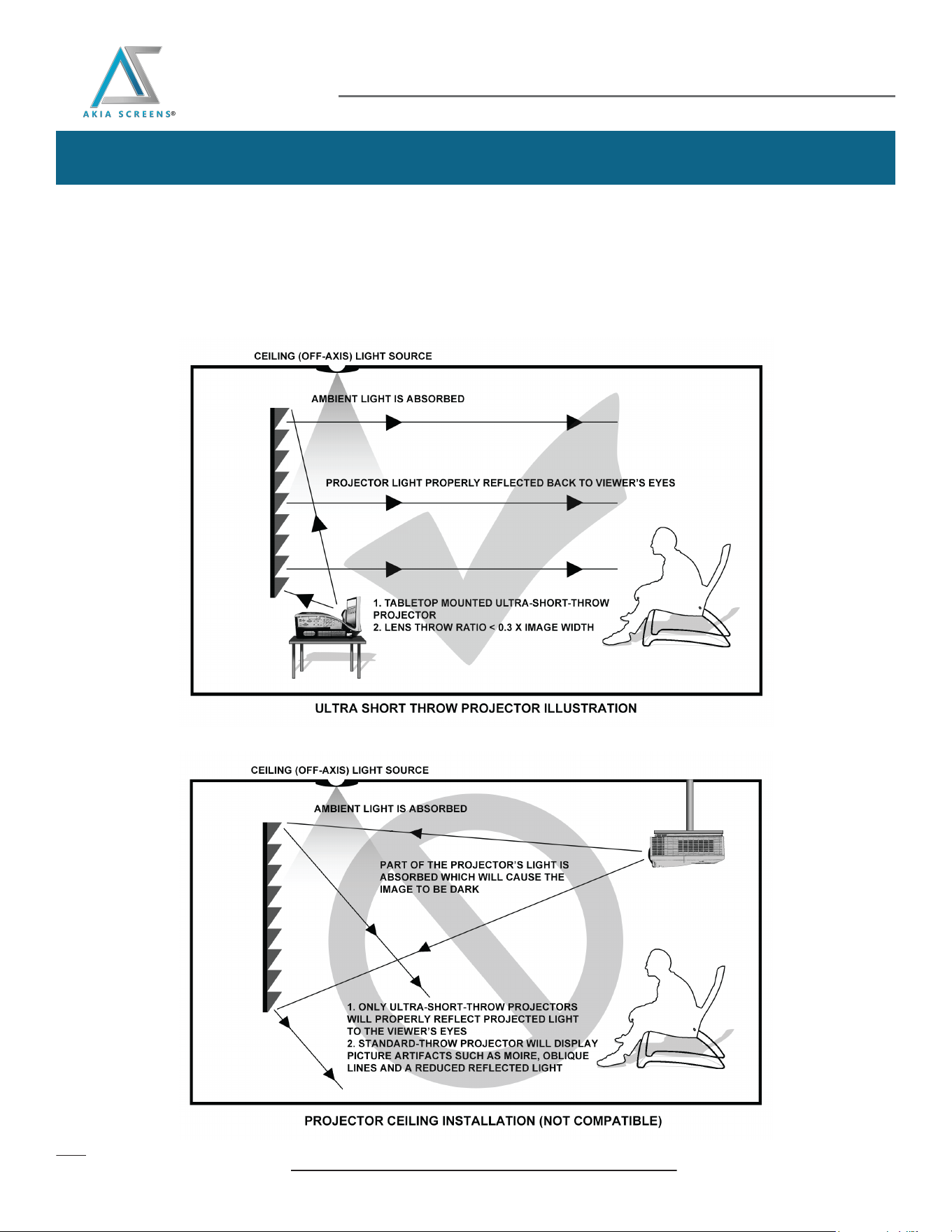
The CLR® 3 and CLR® 4 are exclusively for table-mounted ultra-short throw projectors as illustrated in the Example 1
diagram below. Overhead placement or a standard projector will make the image very dark, on account of the screen’s
absorbent layer deflecting light that is not aligned with its reflective angle.
Please use the following installation instructions to obtain superior optical performance from the
Retro-Reflective ALR (Ambient Light Rejecting) Screen.
Notice To Installer: Please use the following installation instructions to obtain superior optical performance from
Akia Screens innovative CLR® 3 and CLR®4 (Ceiling Light Rejecting) screen materials.
Note: Improper installation will result in light loss and produce a dark image. This is due to the projector’s light reflecting in the wrong direction.
Images are not up to scale and are for illustration purposes only.
Example: Proper Projector Installation
Example: Improper Projector/Type Installation
Retro-Reflective Material
Installation Tip
www.akiascreens.com