Quick Start Guide
CJB74S006AAA
Acve T-Pen
For more informaon and tutorials, visit
hps://go.tcl.com/acvetpen or scan the QR code
1
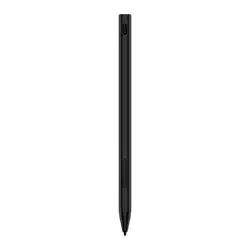
Write and draw with Active T-Pen on
compatible TCL tablets just like you would
on paper.
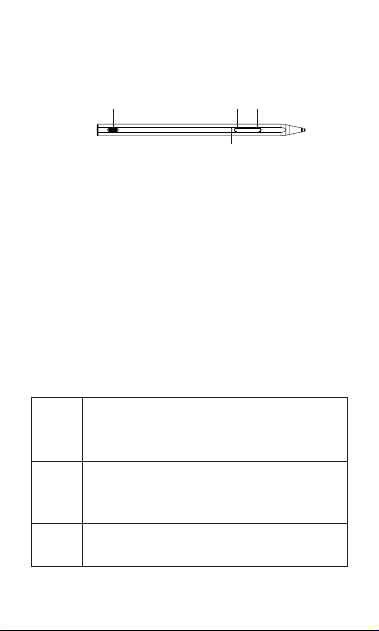
Up
Down
Type-C port
LED
Press on the Up or Down keys to wake up
Active T-Pen. If LED is blue, Active T-Pen is
charged and ready to use.
Active T-Pen will automatically enter Sleep
Mode after 30 minutes of inactivity. While
in Sleep Mode, press Up or Down keys to
wake up.
Charging and LED
Use the USB-C cable provided to charge
Active T-Pen.
Blue
If the Up or Down key is quick pressed
and LED turns blue, the Active T-Pen
is charged and ready to use.
Red
LED is solid red when the T-Pen is low
on power. While charging, the LED
flashes red.
Green
LED is solid green when charging is
complete.
2
Connect and Use
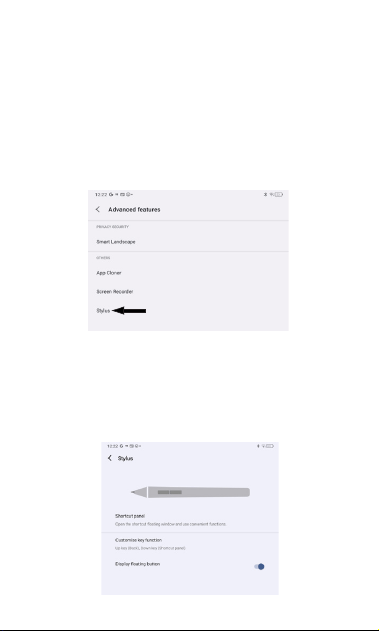
To enable the Active T-Pen on your compatible
TCL tablet, go to: Settings > Advanced
Features > Stylus
From the Stylus menu, program the Up and
Down shortcut keys and activate a shortcut to
the Stylus menu.
Shortcut Keys
To use Shortcut Keys, simultaneously tap the
Active T-Pen tip against the tablet screen and
press and hold the Up or Down key.
3
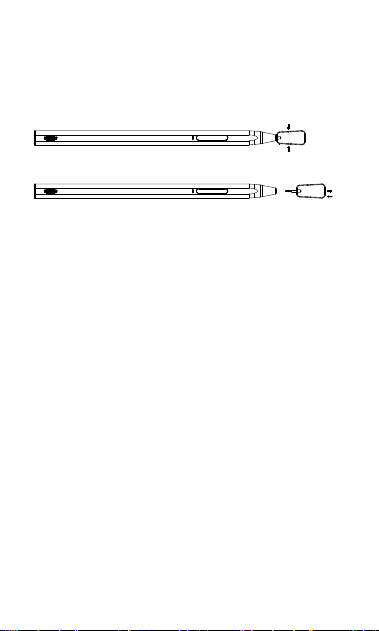
Replacing the p
One replacement tip and a tool for changing
it is included.
NOTE:
1.带 为
标 为
刮痕,油污等不良。
5.表面抛光,切口不能有批锋,毛刺等不良。
7
A
DESCRIPTION
B
5
6
4
0.20
0.30
DIMENSIONAL TOLERANCE
0.03
0.05
0.10
0.01
101~
C
DATE
DIM
31~100
21~30
6~20
0~5
0.40 0.50
ANGLE'S
D
0.05 0.10
E
3RD.
0.20
0.30
0.10
0.05
0.30
0.40
0.20
0.10
3
2
1
A B C D E
PART No.
DWG No.
MODEL
TITLE
UNITS MM
F G
APPROVED BY:
CHECKED BY:
DRAWN BY:
SCALE
H I
MATERIAL
QUANTITY
SURFACE
TREATMENT
J
VER.
7
5
6
4
F G H I
3
2
1
J
LEVEL 1 ENVIRONMENTAL RELATED SUBSTANCES TO BE CONTROLLED SHOULD NEVER BE USED
LIAO 20231121
Hold and press
Pull out/Push in
1. Use the small gaps on the metal tool to
clamp the tip.
2. Gently pull the tip to remove.
3. Place the new tip within the small gaps on
the metal tool.
4. Align the new tip with hole on T-Pen, then
push the new tip into the T-pen.
Safety and Use
WARNING: This product contains removable
parts. Keep away from small children.
Swallowing by children may cause suffocation
or other hazards.
- Do not throw the T-Pen into fire or expose
it to high temperature. Battery may explode if
thrown into fire.
4
- Do not throw or crush the T-Pen. Battery
may explode if severely impacted.
- Do not keep the device connected to the
charger with battery fully charged for a long
period of time.
- Keep the tip of the T-Pen clean and void of
debris, moisture, and other small particles.
- To clean the T-Pen exterior, use a lint-free
cloth the exterior. Do not use sprays, solvents,
or abrasives.
Specicaon
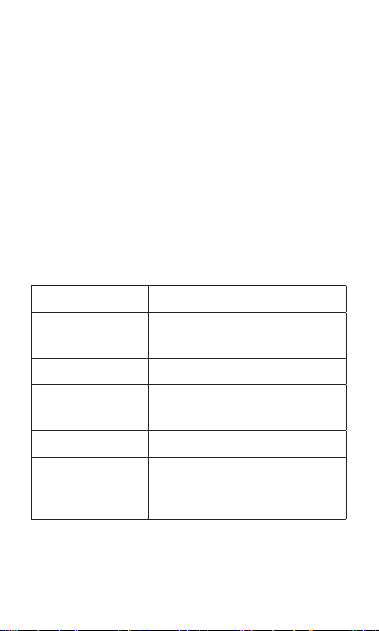
Item Descripon
Dimensions
Length: 159.5mm
Diameter: 9.0mm
Weight 14.0g
Pressure
sensivity levels
4096
Type-C port For charging
Contents
Active T-Pen, USB-C
cable, Quick Start Guide,
Replacement tip and tool

5
30-DAY LIMITED WARRANTY FOR
ACCESSORY
TCT Mobile (US) Inc. offers a 30-day limited
warranty on selected TCL accessories that
are found to be defective in materials or
workmanship upon submission of the
following items:
Proof of purchase – consisting of original
invoice or sales slip indicating the date of
purchase, dealer’s name, model, and serial
number of the product.
General Terms and Conditions
This warranty is confined to the first purchaser
of the product only and is not applicable to
cases other than defects in material, design,
and workmanship.
Items and Conditions Not Covered:
Periodic checks, maintenance, repair, and
replacement of parts due to normal wear
and tear.
Abuse or misuses, including but not solely
limited to the failure to use this product for its
normal purposes or in accordance with TCL’s
instructions on usage and maintenance.
Defects resulting from usage of the product
in conjunction with accessories that are not
approved by TCL for use with this product.

6
TCL will not be responsible for any repairs
caused by third party component parts, or
service that is found to be the cause for the
defect or damage of the product.
TCL will not be responsible for failure to use
the battery in accordance with the specific
instructions of core outlined in the product
user manual. For example, do not attempt
to open sealed devices, such as batteries.
Opening of sealed devices may result in bodily
injury and/or property damage.
Accidents, Acts of God, lightning, water, fire,
public disturbances, improper ventilation,
voltage fluctuations or any cause beyond the
control of TCL.
This warranty does not affect the consumers’
statutory rights nor the consumers’ rights
against the dealer related to their purchase/
sales agreement.
TCL’s 30-Day Limited Warranty will abide by
the following options regarding claims:
1. Repair the TCL product using new or
previously used parts that are equivalent to
new in performance and reliability.
2. Replace the TCL product with the same
model (or with a product that has similar
functionality) formed from new and/or
previously used parts that are equivalent to
new in performance and reliability, also.

7
a. When a TCL product or part is replaced
or provided, any replacement item becomes
the customer’s property, and the replaced or
refunded item becomes TCL’s property.
3. Repair or Replacement of any TCL product
under the terms of this warranty does not
provide the right to extension or renewal of
the warranty period.
4. Warranty repairs are available free of charge
at TCL authorized repair centers for products
that comply with the General Terms and
Conditions of this warranty. The shipping cost
of the defective product(s) to TCL authorized
repair center is to be paid by the customer.
The customer is responsible for any damage to
the defective product during shipment to the
authorized repair center.
5. This warranty is not transferrable. This
warranty will be the purchasers’ sole and
exclusive remedy and neither TCL nor its
service centers shall be liable for any incidental
or consequential damages or breach of any
express or implied warranty of this product.
6. This warranty extends to products
purchased and sold within the United States
and Canada. All products sold in United
States will be subject to their respective state
and federal laws. All products purchased in
Canada will be subject to Canadian laws.
Instrucvo de uso
T-Pen acvado
Para obtener más información y tutoriales, visite
hps://go.tcl.com/acvetpen o escanee el código QR
1
Escriba y dibuje con el T-Pen en tabletas TCL
compatibles de la misma forma que lo haría
en papel.
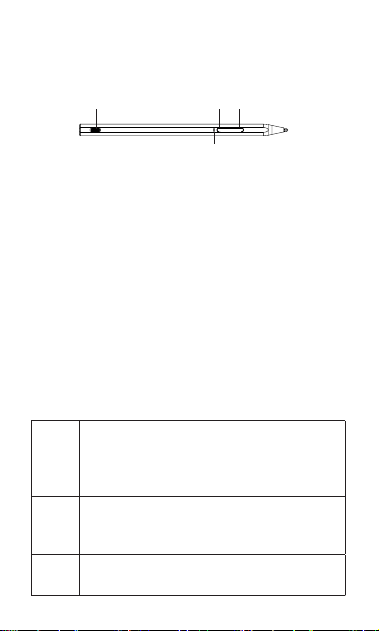
Arriba
Abajo
Puerto po C
LED
Pulse las teclas hacia arriba o hacia abajo para
encender el T-Pen. Si el LED se ilumina de
color azul, significa que el T-Pen está cargado
y listo para usar.
El accesorio ingresará en modo en suspensión
de forma automática después de 30 minutos
de inactividad. Cuando esté en modo en
suspensión, pulse las teclas hacia arriba o
hacia abajo para activarlo.
Carga y luces LED
Utilice el cable USB-C que se incluye para
cargar el T-Pen.
Azul
Si pulsa rápidamente la tecla hacia
arriba o hacia abajo y el LED se
ilumina de color azul, significa que el
T-Pen está cargado y listo para usar.
Rojo
El LED se ilumina de color rojo fijo
cuando el T-Pen tiene poca batería. Al
cargar, el LED parpadea en rojo.
Verde
El LED se ilumina de color verde fijo
cuando la carga está completa.
2
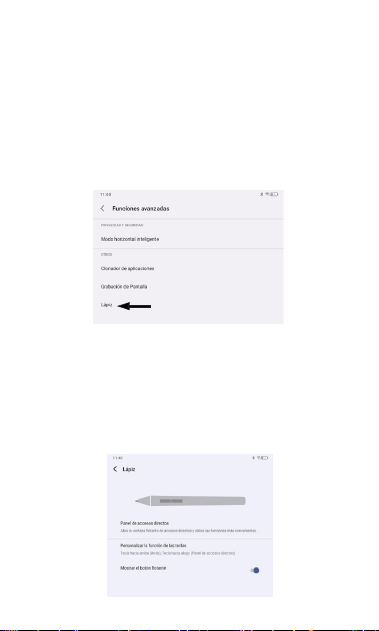
Conectar y usar
Para habilitar el T-Pen en su tableta TCL
compatible, ingrese a: Ajustes > Características
avanzadas > Lápiz
Desde el menú Lápiz, programe los atajos de
las teclas hacia arriba y hacia abajo y active un
atajo al menú Lápiz.
Atajos
Para utilizar los atajos con las teclas, presione
simultáneamente la punta del T-Pen contra la
pantalla de la tableta y mantenga pulsada la
tecla hacia arriba o hacia abajo.
3
Sustución de la punta
Se incluye una punta de sustitución y una
herramienta para cambiarla.
NOTE:
1.带 为
标
为
刮痕,油污等不良。
5.表面抛光,切口不能有批锋,毛刺等不良。
7
A
DESCRIPTION
B
5
6
4
0.20
0.30
DIMENSIONAL TOLERANCE
0.03
0.05
0.10
0.01
101~
C
DATE
DIM
31~100
21~30
6~20
0~5
0.40 0.50
ANGLE'S
D
0.05 0.10
E
3RD.
0.20
0.30
0.10
0.05
0.30
0.40
0.20
0.10
3
2
1
A B C D E
PART No.
DWG No.
MODEL
TITLE
UNITS MM
F G
APPROVED BY:
CHECKED BY:
DRAWN BY:
SCALE
H I
MATERIAL
QUANTITY
SURFACE
TREATMENT
J
VER.
7
5
6
4
F G H I
3
2
1
J
LEVEL 1 ENVIRONMENTAL RELATED SUBSTANCES TO BE CONTROLLED SHOULD NEVER BE USED
LIAO 20231121
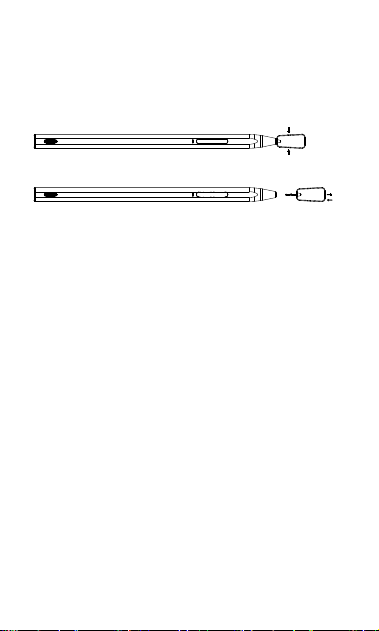
Mantener presionado
Extraer/Insertar
1. Utilice los pequeños huecos de la
herramienta metálica para sujetar la punta.
2. Después, tire suavemente de ella para
retirarla.
3. Coloque la nueva punta dentro de los
pequeños huecos de la herramienta
metálica.
4. Alinee la punta nueva con el hueco del
T-Pen y, a continuación, inserte la punta
nueva en el lápiz.

4
Seguridad y uso
ADVERTENCIA: Este producto contiene
piezas extraíbles. Manténgalo alejado de los
niños pequeños. Si un niño traga alguna de
estas piezas, podría sufrir asfixia u otros daños.
No arroje el T-Pen al fuego ni lo exponga a
temperaturas altas. La batería podría explotar
si se arroja al fuego.
- No tire ni aplaste el T-Pen. La batería podría
explotar si recibe un impacto fuerte.
- Cuando el dispositivo lleve rato
completamente cargado, desconecte el
cargador.
- Mantenga la punta del T-Pen limpia y libre
de residuos, humedad y otras partículas
pequeñas.
- Para limpiar el exterior del T-Pen, utilice
un paño que no suelte pelusa. No utilice
pulverizadores, disolventes ni abrasivos.
5
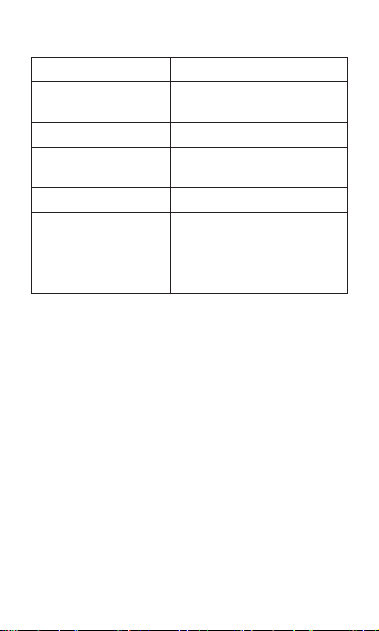
Especicaciones
Arculo Descripción
Dimensiones
Longitud: 159,5 mm
Diámetro: 9,0 mm
Peso 14.0g
Niveles de sensibilidad
a la presión
4096
Puerto po C Para cargar
Contenido
T-Pen, cable tipo USB-
C, guía de inicio rápido,
punta de repuesto y
herramienta
GARANTÍA LIMITADA DE 0 DÍAS PARA EL
ACCESORIO
TCT Mobile (US) Inc. ofrece una garantía
limitada a 30 días para accesorios TCL
seleccionados que se constate que tienen
defectos de material o de fabricación si se
presentan los elementos siguientes:
Prueba de compra: se trata de la factura
original o el albarán de compra que indique la
fecha de la compra, el nombre del distribuidor,
el modelo y el número de serie del producto.

6
Términos y condiciones generales
Esta garantía cubre sólo al primer comprador
del producto y no se aplica a otros casos
que no sean defectos de material, diseño o
fabricación.
Artículos y condiciones no cubiertos:
Comprobaciones periódicas, mantenimiento,
reparación y sustitución de piezas por desgaste
normal.
El uso indebido o incorrecto, entre otros,
el hecho de no utilizar este producto para
sus propósitos normales o de no seguir
las instrucciones de TCL sobre el uso y el
mantenimiento.
Los defectos resultantes del uso del producto
junto con accesorios no aprobados por TCL
para usar con este producto.
TCL no se responsabilizará de ninguna
reparación provocada por piezas de
componentes de terceros ni del servicio que
se detecte que es la causa del defecto o daño
del producto.

7
TCL no se responsabilizará de los daños si
la batería se usa sin seguir las instrucciones
específicas descritas en el instructivo de uso
del producto. Por ejemplo, no intente abrir
dispositivos sellados, como baterías. Si abre
dispositivos sellados, puede causar lesiones
personales y/o daños materiales.
Accidentes, inclemencias meteorológicas,
relámpagos, inundaciones, incendios,
disturbios, ventilación inadecuada,
fluctuaciones de voltaje o cualquier causa
fuera del control de TCL.
Esta garantía no afecta a los derechos legales
de los consumidores ni a los derechos de los
consumidores frente al distribuidor en relación
con el acuerdo de compra/venta.
La garantía limitada a 30 días de TCL se regirá
por las siguientes opciones con respecto a las
reclamaciones:
1. Reparar el producto TCL utilizando piezas
nuevas o usadas anteriormente que sean
equivalentes a las nuevas en rendimiento y
confiabilidad.

8
2. Reemplazar el producto TCL por el mismo
modelo (o por un producto que tenga una
funcionalidad similar) formado a partir de
piezas nuevas o usadas anteriormente que
sean equivalentes a las nuevas en rendimiento
y confiabilidad, además;
cuando se reemplaza o proporciona un
producto o pieza de TCL, cualquier artículo de
reemplazo pasa a ser propiedad del cliente y el
artículo reemplazado o reembolsado pasa a ser
propiedad de TCL.
3. La reparación o el reemplazo de cualquier
producto TCL de acuerdo con los términos
de esta garantía no otorga derecho a una
ampliación o renovación del período de
garantía.
4. Las reparaciones en garantía están
disponibles sin cargo en los centros de
reparación autorizados de TCL para productos
que cumplen con los Términos y condiciones
generales de esta garantía. Los costos de
envío de los productos defectuosos al centro
de reparación autorizado de TCL correrán a
cargo del cliente. El cliente es responsable
de cualquier daño que sufra el producto
defectuoso durante el envío al centro de
reparación autorizado.

9
5. Esta garantía no es transferible. Esta
garantía es el recurso único y exclusivo del
comprador y ni TCL ni sus centros de reparación
serán responsables de ningún daño imprevisto
o consecuente ni del incumplimiento de la
garantía implícita o explícita de este producto.
6. Esta garantía se extiende a los productos
comprados y vendidos dentro de los Estados
Unidos y Canadá. Todos los productos
vendidos en los Estados Unidos estarán sujetos
a sus respectivas leyes estatales y federales.
Todos los productos comprados en Canadá
estarán sujetos a las leyes canadienses.