USER’S MANUAL
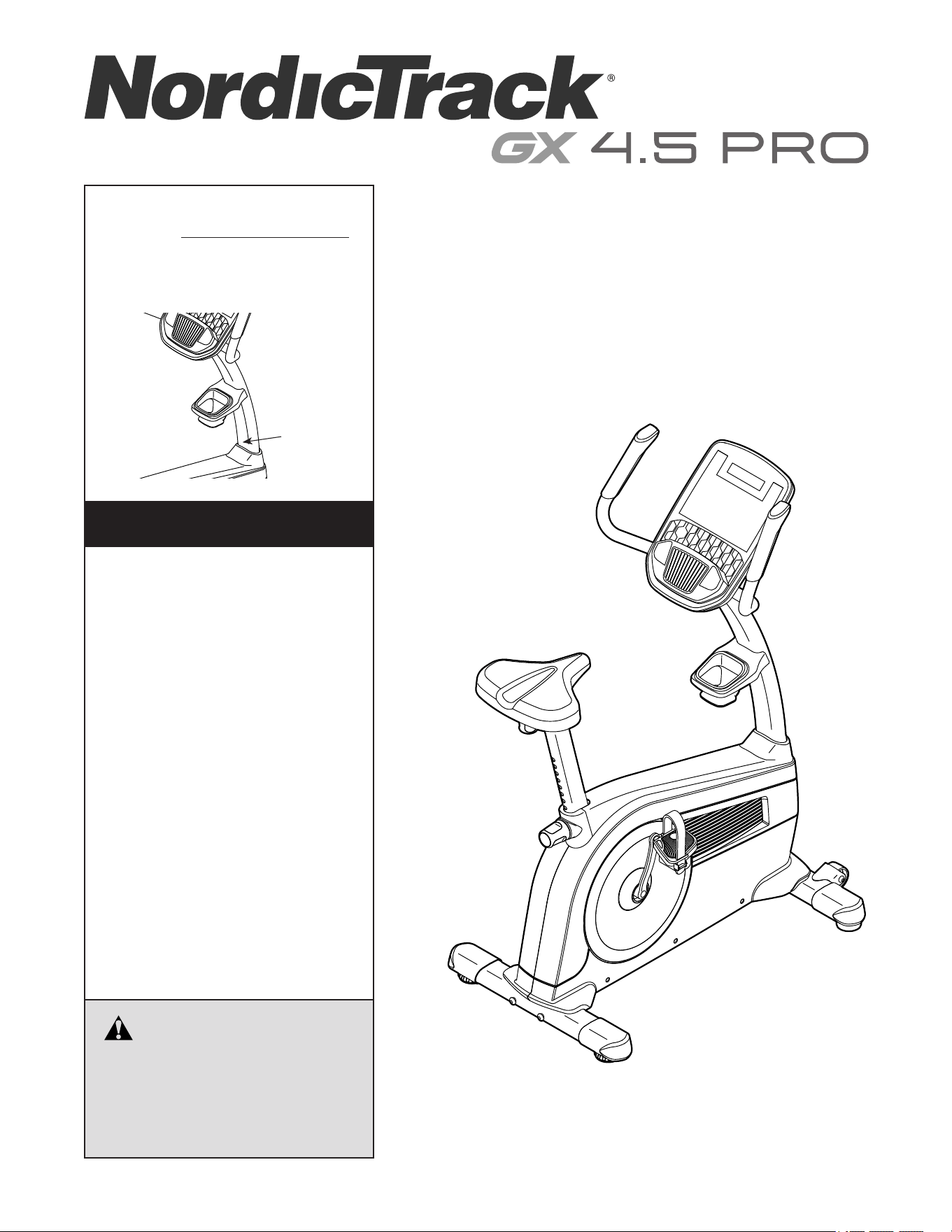
Serial
Number
Decal
Model No. NTEVEX77020.0
Serial No.
Write the serial number in the space
above for reference.
CAUTION
Read all precautions and
instructions in this manual before
using this equipment. Keep this
manual for future reference.
iconeurope.com
CUSTOMER SERVICE
UNITED KINGDOM
Call: 0330 123 1045
From Ireland: 053 92 36102
Website: iconsupport.eu
E-mail: [email protected]
Write:
ICON Health & Fitness, Ltd.
Unit 4, Westgate Court
Silkwood Park
OSSETT
WF5 9TT
UNITED KINGDOM
AUSTRALIA
Call: 1800 993 770
E-mail: [email protected]
Write:
ICON Health & Fitness
PO Box 635
WINSTON HILLS NSW 2153
AUSTRALIA
2
WARNING DECAL PLACEMENT
WARNING DECAL PLACEMENT . . . . . . . . . . . . . . . . . . . . . . . . . . . . . . . . . . . . . . . . . . . . . . . . . . . . . . . . . . . . . . .2
IMPORTANT PRECAUTIONS ..................................................................3
BEFORE YOU BEGIN. . . . . . . . . . . . . . . . . . . . . . . . . . . . . . . . . . . . . . . . . . . . . . . . . . . . . . . . . . . . . . . . . . . . . . . .4
PART IDENTIFICATION CHART. . . . . . . . . . . . . . . . . . . . . . . . . . . . . . . . . . . . . . . . . . . . . . . . . . . . . . . . . . . . . . . .5
ASSEMBLY . . . . . . . . . . . . . . . . . . . . . . . . . . . . . . . . . . . . . . . . . . . . . . . . . . . . . . . . . . . . . . . . . . . . . . . . . . . . . . . .6
HOW TO USE THE EXERCISE BIKE. . . . . . . . . . . . . . . . . . . . . . . . . . . . . . . . . . . . . . . . . . . . . . . . . . . . . . . . . . .14
HOW TO USE THE CONSOLE. . . . . . . . . . . . . . . . . . . . . . . . . . . . . . . . . . . . . . . . . . . . . . . . . . . . . . . . . . . . . . . .16
MAINTENANCE AND TROUBLESHOOTING .....................................................23
EXERCISE GUIDELINES ....................................................................25
PART LIST. . . . . . . . . . . . . . . . . . . . . . . . . . . . . . . . . . . . . . . . . . . . . . . . . . . . . . . . . . . . . . . . . . . . . . . . . . . . . . . .26
EXPLODED DRAWING. . . . . . . . . . . . . . . . . . . . . . . . . . . . . . . . . . . . . . . . . . . . . . . . . . . . . . . . . . . . . . . . . . . . . .27
ORDERING REPLACEMENT PARTS .................................................. Back Cover
RECYCLING INFORMATION ......................................................... Back Cover
TABLE OF CONTENTS
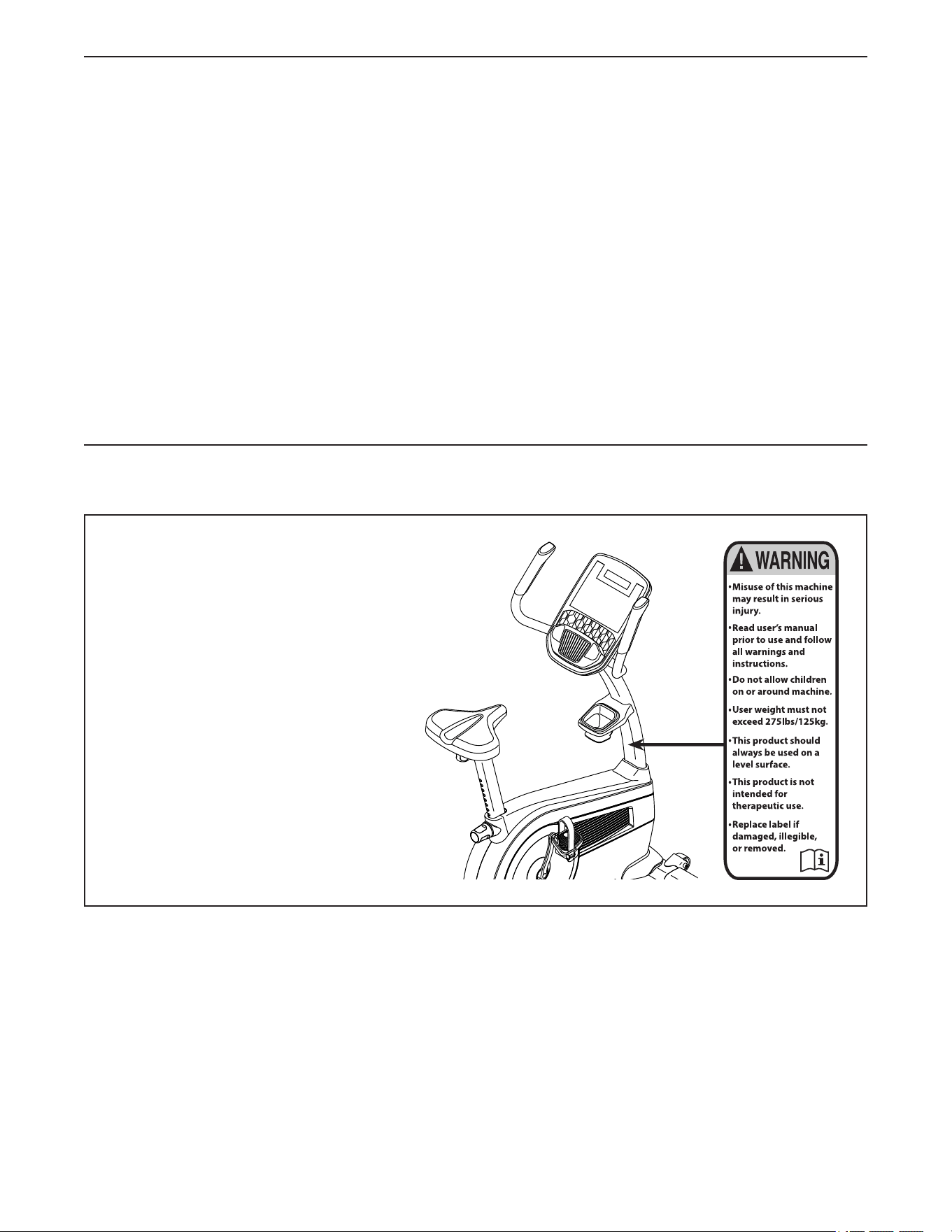
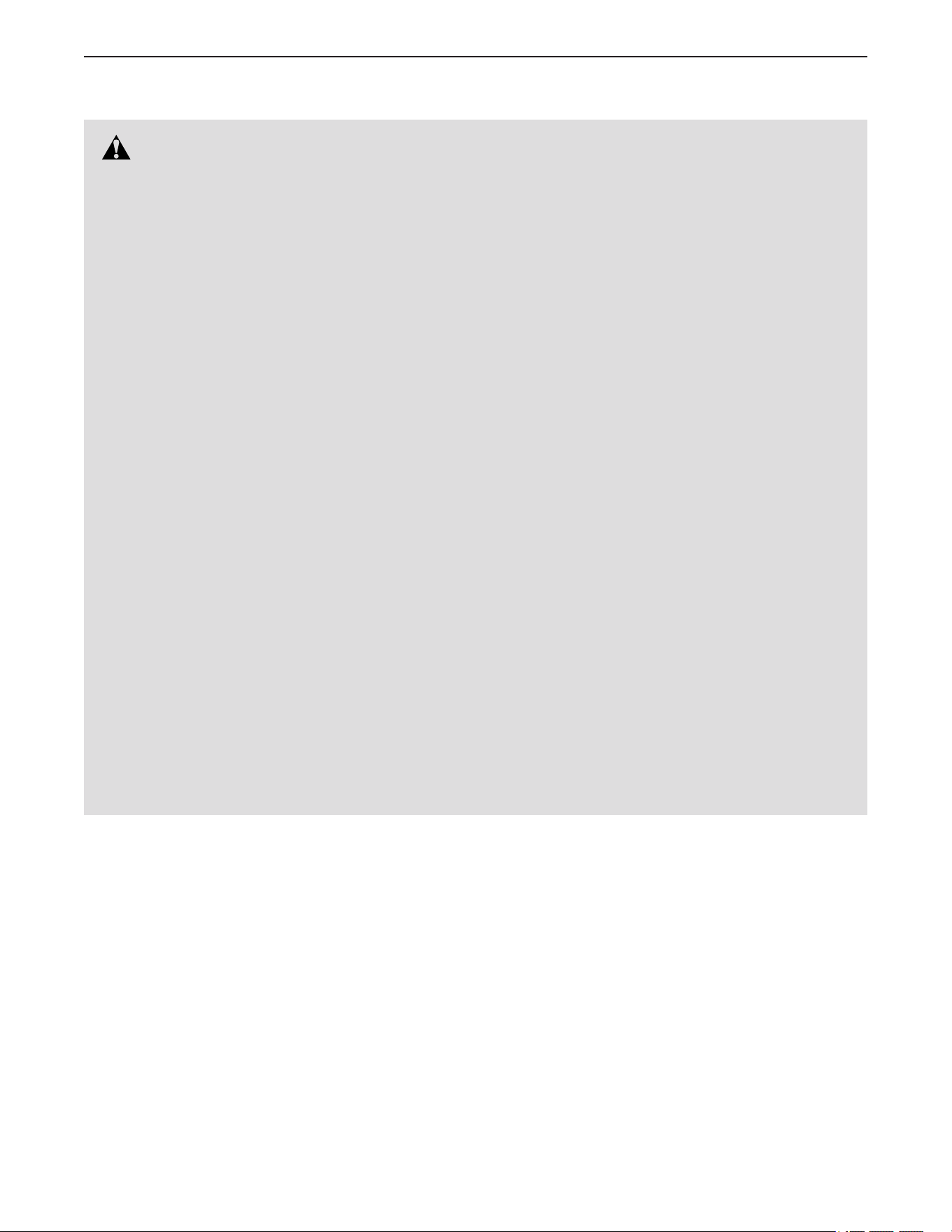
This drawing shows the location(s) of the warning
decal(s). If a decal is missing or illegible, see the
front cover of this manual and request a free
replacement decal. Apply the decal in the loca-
tion shown. Note: The decal(s) may not be shown
at actual size.
NORDICTRACK and IFIT are registered trademarks of ICON Health & Fitness, Inc. App Store is a trademark of
Apple Inc., registered in the U.S. and other countries. Android and Google Play are trademarks of Google LLC.
The Bluetooth
®
word mark and logos are registered trademarks of Bluetooth SIG, Inc. and are used under license.
IOS is a trademark or registered trademark of Cisco in the U.S. and other countries and is used under license.
3
IMPORTANT PRECAUTIONS
WARNING: To reduce the risk of serious injury, read all important precautions and
instructions in this manual and all warnings on your exercise bike before using your exercise bike.
ICON assumes no responsibility for personal injury or property damage sustained by or through the
use of this product.
1. It is the responsibility of the owner to ensure
that all users of the exercise bike are ade-
quately informed of all precautions.
2. Before beginning any exercise program,
consult your physician. This is especially
important for persons over age 35 or per-
sons with pre-existing health problems.
3. The exercise bike is not intended for use by
persons with reduced physical, sensory, or
mental capabilities or lack of experience and
knowledge, unless they are given supervi-
sion or instruction about use of the exercise
bike by someone responsible for their safety.
4. Use the exercise bike only as described in
this manual.
5. The exercise bike is intended for home use
only. Do not use the exercise bike in a com-
mercial, rental, or institutional setting.
6. Keep the exercise bike indoors, away from
moisture and dust. Do not put the exercise
bike in a garage or covered patio, or near
water.
7. Place the exercise bike on a level surface
with at least 2 ft. (0.6 m) of clearance around
the exercise bike. To protect the floor or
carpet from damage, place a mat under the
exercise bike.
8. Inspect and properly tighten all parts each
time the exercise bike is used. Replace any
worn parts immediately.
9. Keep children under age 16 and pets away
from the exercise bike at all times.
10. Wear appropriate clothes while exercising;
do not wear loose clothes that could become
caught on the exercise bike. Always wear
athletic shoes for foot protection.
11. The exercise bike should not be used
by persons weighing more than 275 lbs.
(125 kg).
12. Be careful when mounting and dismounting
the exercise bike.
13. Always keep your back straight while using
the exercise bike; do not arch your back.
14. Over exercising may result in serious injury
or death. If you feel faint, if you become short
of breath, or if you experience pain while
exercising, stop immediately and cool down.
4
Thank you for selecting the revolutionary
NORDICTRACK
®
GX 4.5 PRO exercise bike. Cycling
is one of the most effective exercises for increasing
cardiovascular fitness, building endurance, and ton-
ing the entire body. The GX 4.5 PRO exercise bike
provides an impressive selection of features designed
to make your workouts at home more effective and
enjoyable.
For your benefit, read this manual carefully before
you use the exercise bike. If you have questions after
reading this manual, please see the front cover of this
manual. To help us assist you, note the product model
number and serial number before contacting us. The
model number and the location of the serial number
decal are shown on the front cover of this manual.
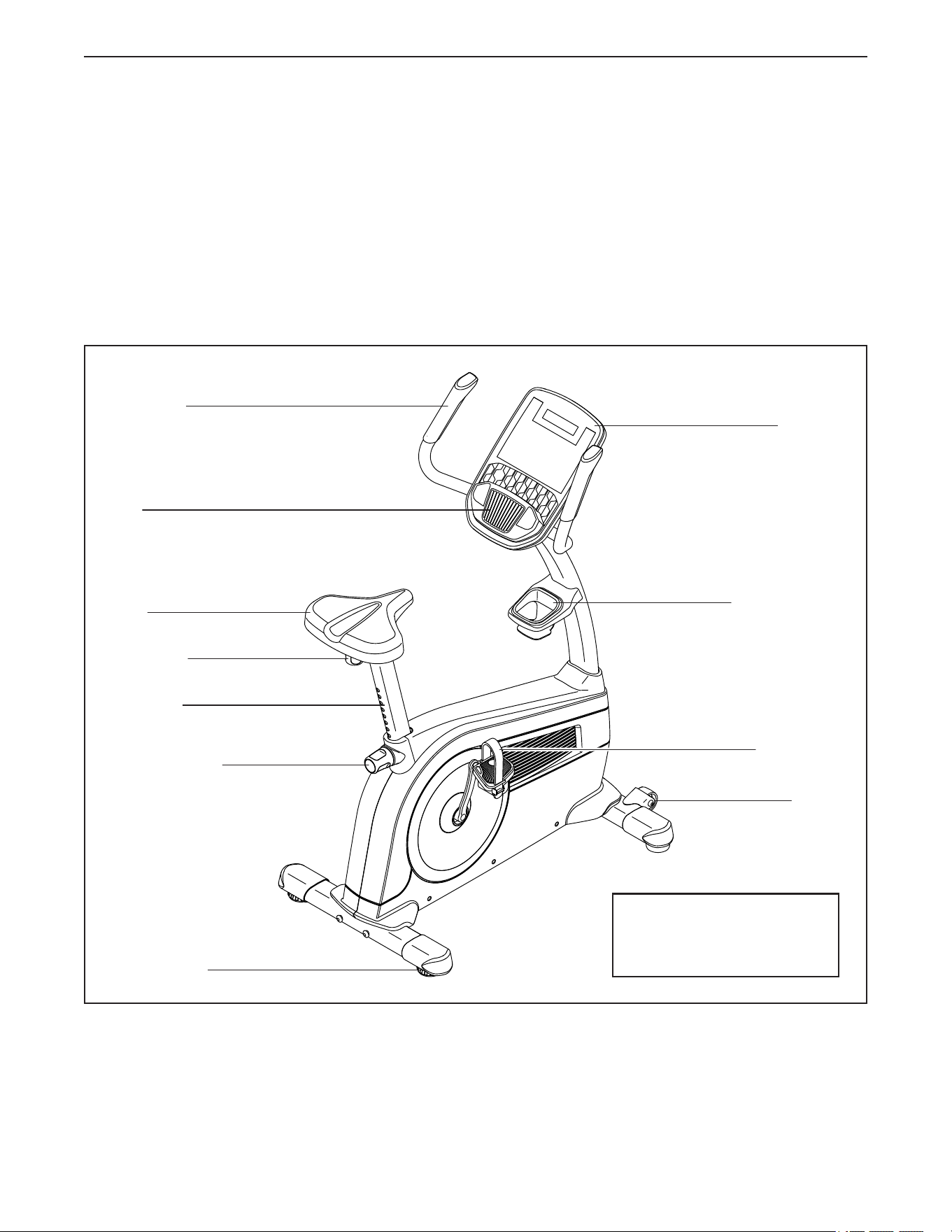
Before reading further, please familiarize yourself with
the parts that are labeled in the drawing below.
Seat
Seat Post
Seat Knob
Leveling Foot
Wheel
Pedal/Strap
Handlebar
Fan
Console
Seat Post Knob
Accessory Tray
BEFORE YOU BEGIN
Length: 3 ft. 10 in. (117 cm)
Width: 2 ft. 1 in. (63 cm)
Weight: 104 lbs. (47 kg)
5
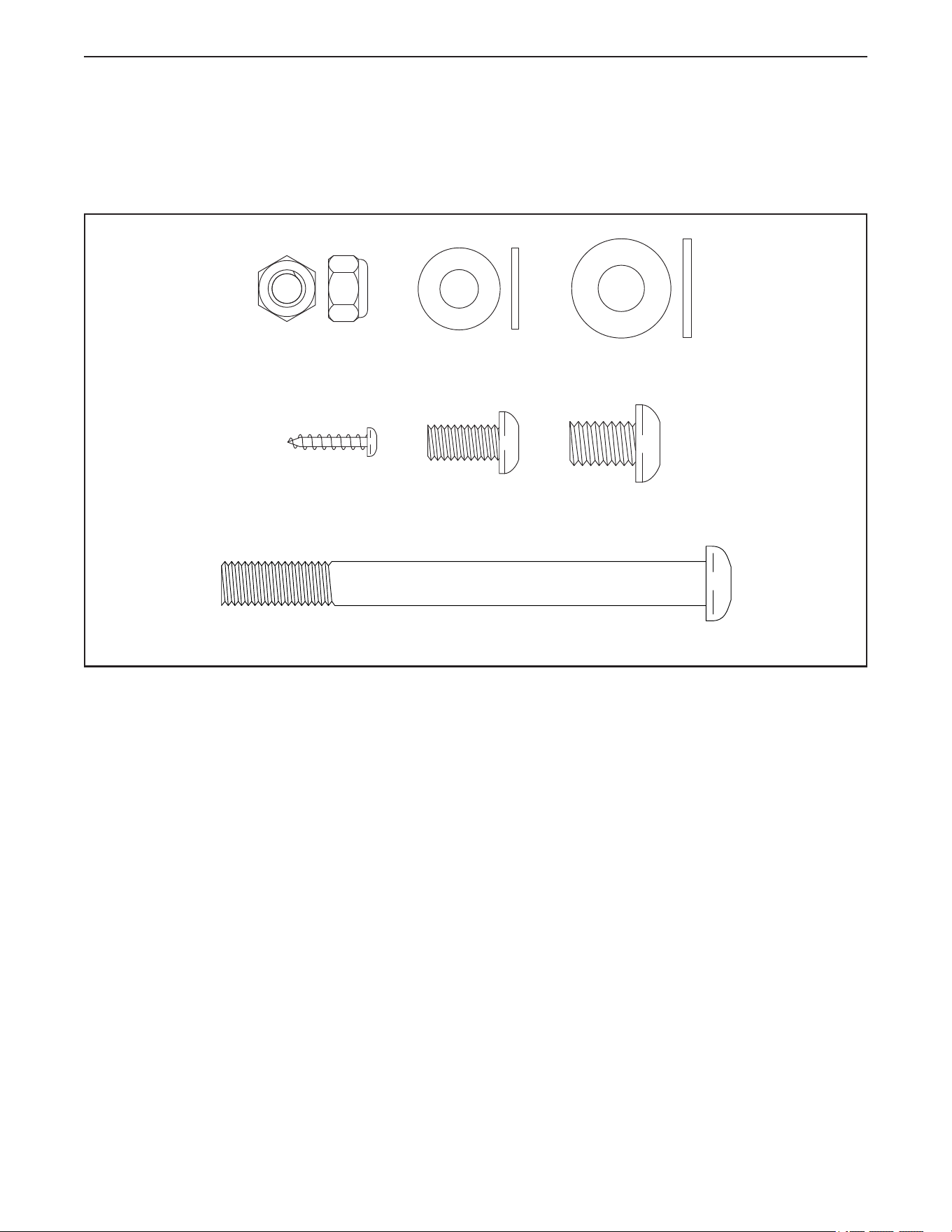
M10 x 110mm Screw (53)–4
M8 Locknut
(43)–4
M8 Washer
(64)–4
M8 x 16mm
Screw (63)–4
M10 x 15mm
Screw (65)–4
M10 Washer
(31)–4
M4 x 18mm
Truss Screw
(34)–8
PART IDENTIFICATION CHART
Use the drawings below to identify the small parts needed for assembly. The number in parentheses below each
drawing is the key number of the part, from the PART LIST near the end of this manual. The number following
the key number is the quantity needed for assembly. Note: If a part is not in the hardware kit, check to see
whether it has been preassembled. Extra parts may be included.
6
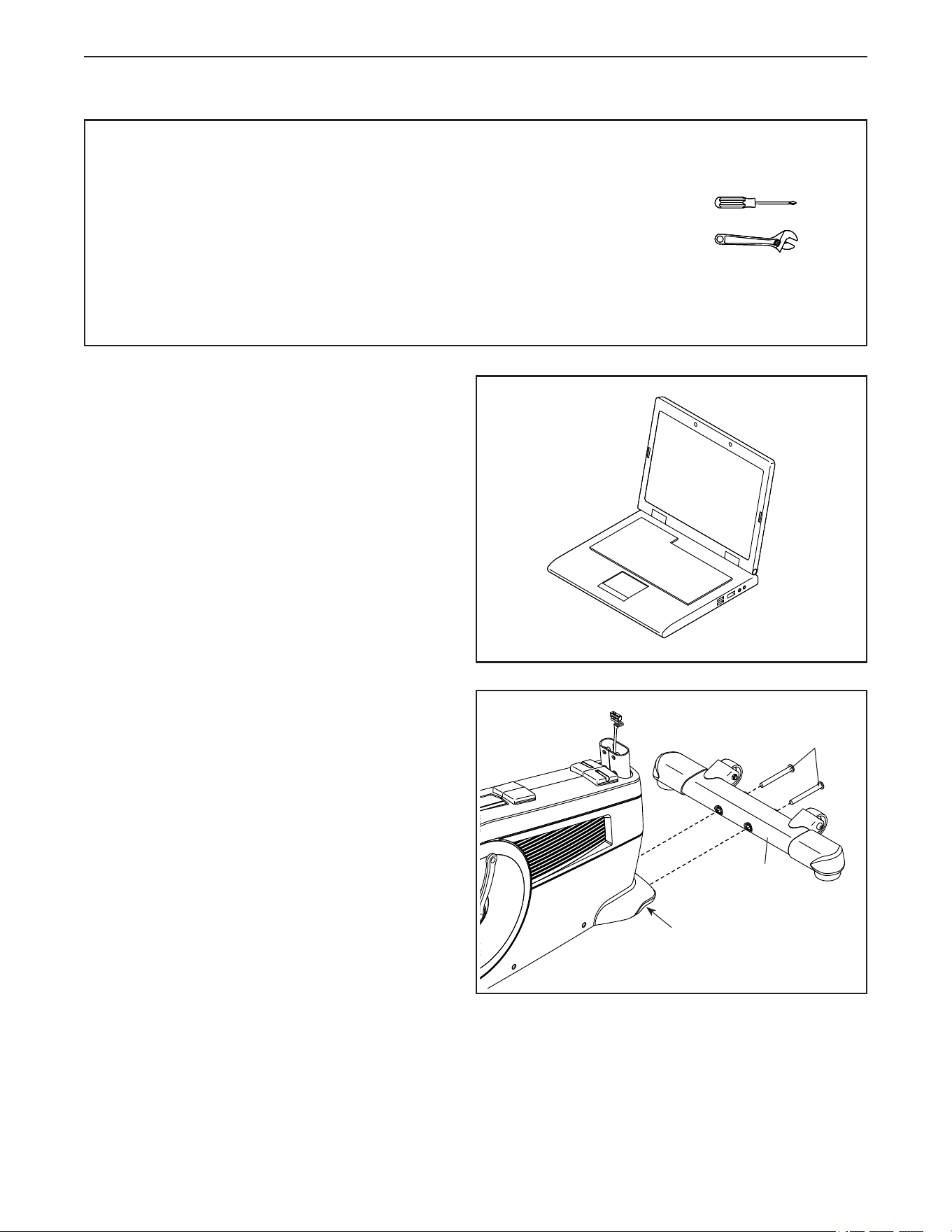
• Assembly requires two persons.
• Place all parts in a cleared area and remove the
packing materials. Do not dispose of the packing
materials until you nish all assembly steps.
• Left parts are marked “L” or “Left” and right parts
are marked “R” or “Right.”
• To identify small parts, see page 5.
• In addition to the included tool(s), assembly
requires the following tools:
one Phillips screwdriver
one adjustable wrench
Assembly may be easier if you have a set of
wrenches. To avoid damaging parts, do not use
power tools.
ASSEMBLY
1
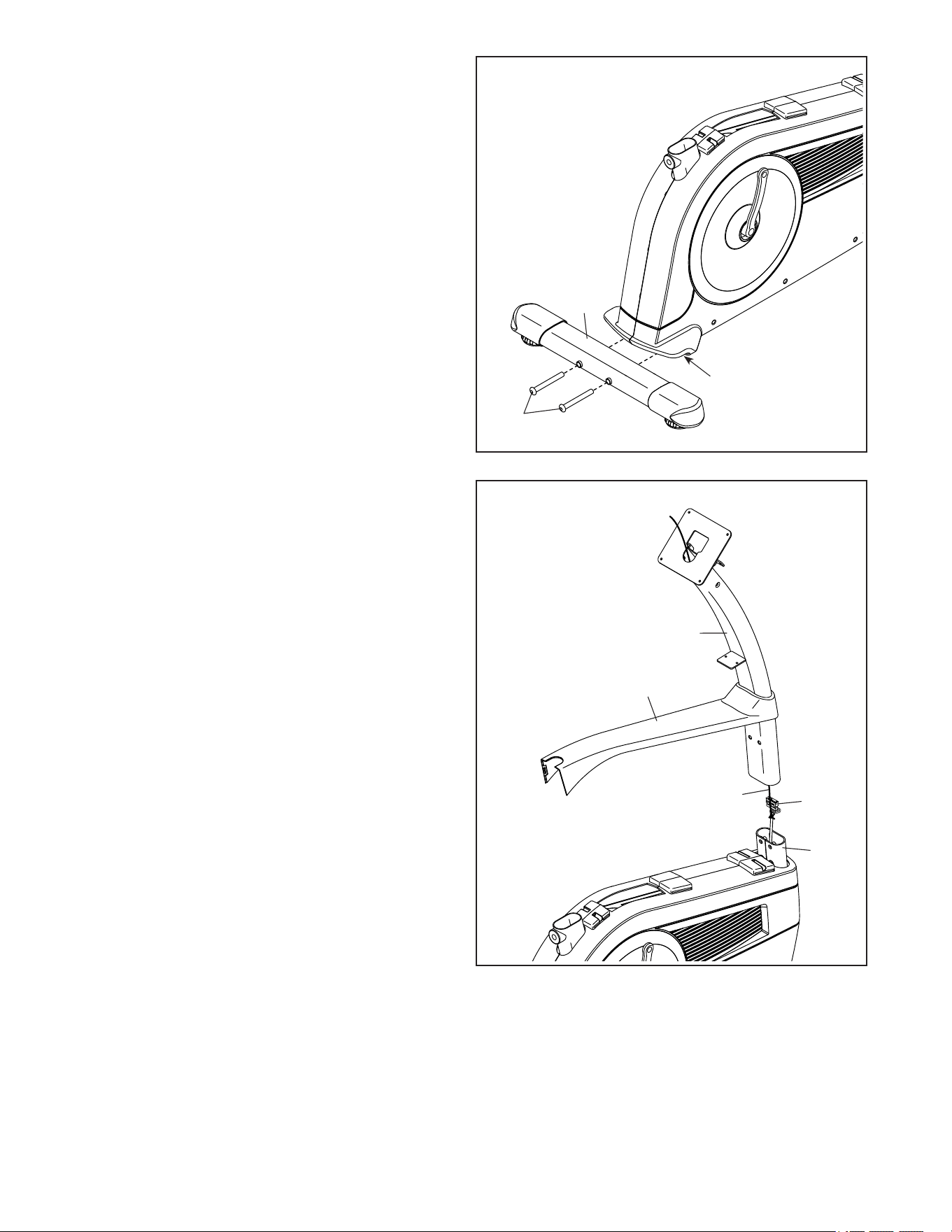
2. Identify the Front Stabilizer (2), and orient it as
shown.
Attach the Front Stabilizer (2) to the Frame (1)
with two M10 x 110mm Screws (53).
53
1
2
2
1. To register your product and activate your
warranty in the UK, go to iconsupport.eu. If
you do not have internet access, call Customer
Service (see the front cover of this manual).
To register your product and activate your
warranty in Australia, email or post the
following information to the email address or
postal address on the front cover of this manual.
• your receipt (make sure to keep a copy)
• your name, address, and telephone number
• the model number, serial number, and name
of your product (see the front cover of this
manual)
7
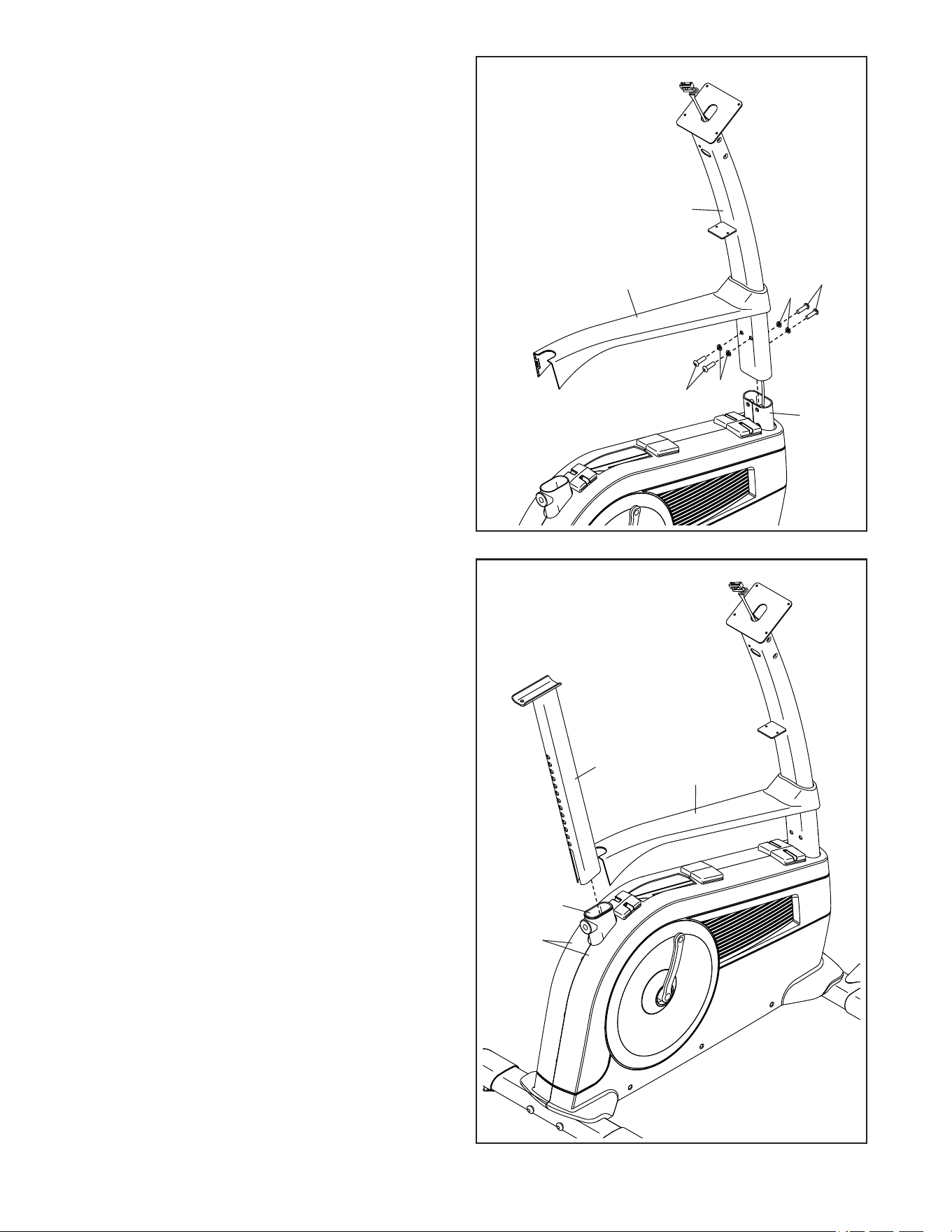
3. Attach the Rear Stabilizer (3) to the Frame (1)
with two M10 x 110mm Screws (53).
53
1
3
3
4. Orient the Upright (4) and the Shield Cover (7)
as shown. Slide the Shield Cover upward onto
the Upright.
Have a second person hold the Upright (4)
and the Shield Cover (7) near the front of the
Frame (1).
Next, locate the wire tie (A) inside the Upright
(4). Tie the lower end of the wire tie to the Main
Wire (58). Then, pull the upper end of the wire tie
upward until the Main Wire is routed through the
Upright.
4
4
7
58
1
A
8
5
4
1
7
65
65
31
31
Avoid pinching
the wires
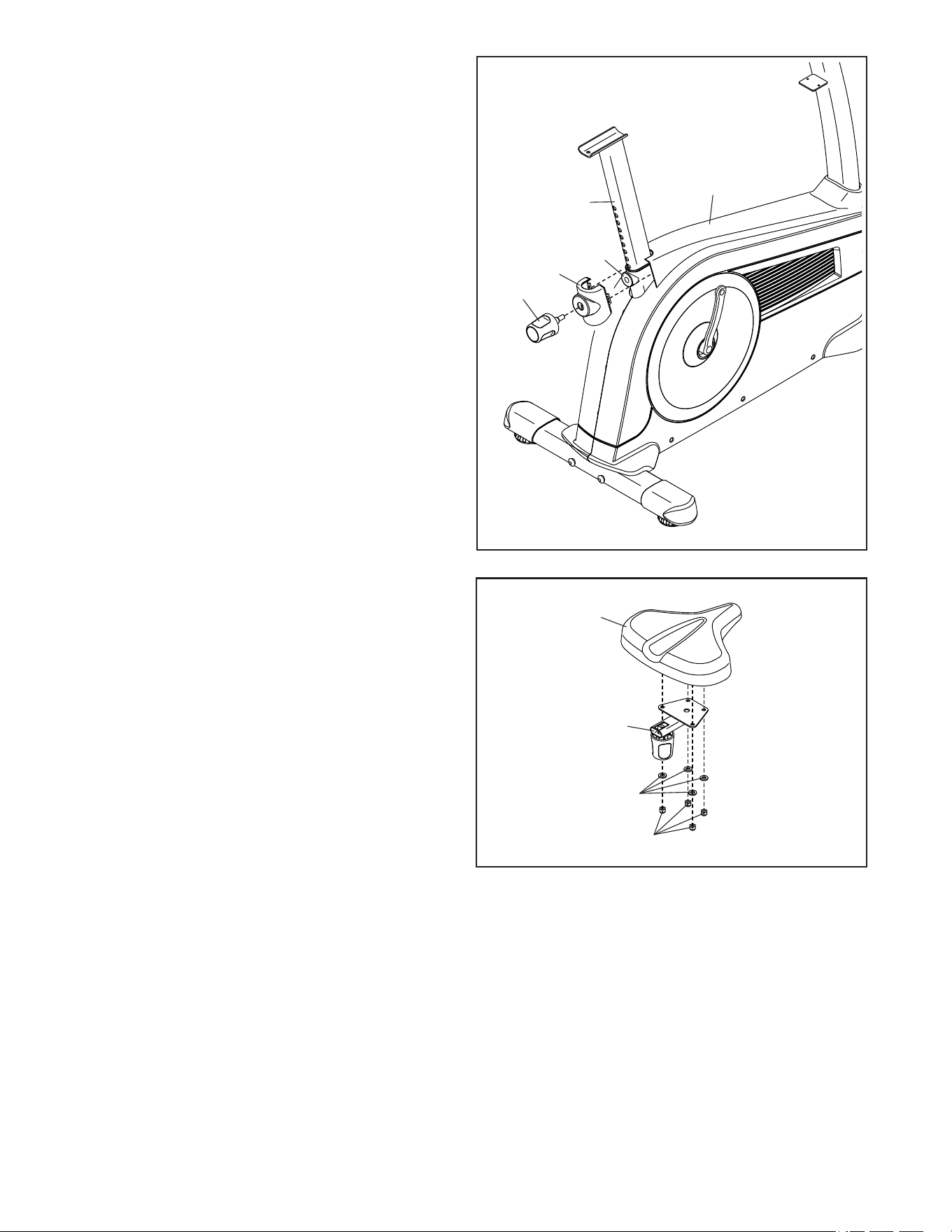
5. Tip: Avoid pinching the wires. Slide the
Upright (4) onto the Frame (1).
Attach the Upright (4) with four M10 x 15mm
Screws (65) and four M10 Washers (31); start
all the Screws, and then tighten them.
Do not press the Shield Cover (7) into
place yet.
6
6. Orient the Seat Post (6) as shown, and insert it
into the Frame (1).
Then, slide the Shield Cover (7) downward and
press it onto the Right and Left Shields (10, 11).
6
1
7
10, 11
9
7
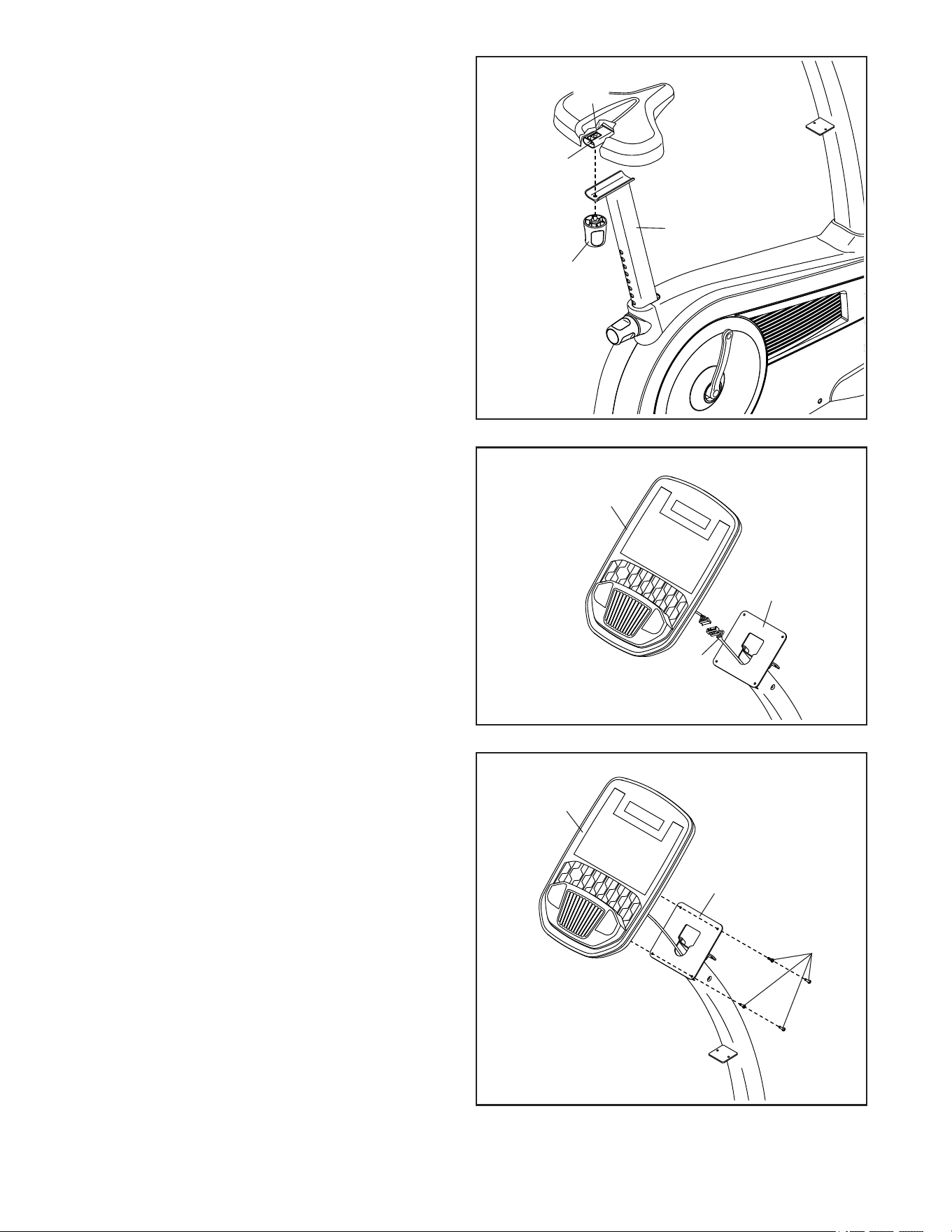
7. Orient the Knob Shield (9) as shown, and press
it onto the Shield Cover (7).
Then, tighten the Seat Post Knob (27) into the
Frame (1).
Next, loosen and pull the Seat Post Knob (27),
slide the Seat Post (6) upward or downward to
the desired position, and then release the Seat
Post Knob. Move the Seat Post upward or
downward slightly to make sure that the Seat
Post Knob is engaged in one of the adjust-
ment holes in the Seat Post. Then, tighten the
Seat Post Knob.
9
1
6
7
27
8
8. Attach the Seat (23) to the Seat Carriage (24)
with four M8 Locknuts (43) and four M8 Washers
(64). Note: The Locknuts and Washers may
be preattached to the Seat.
23
24
64
43
10
10
9. Remove the Seat Knob (26) from the Seat
Bracket (30) inside the Seat Carriage (24).
Next, set the Seat Carriage (24) on the Seat
Post (6). Then, insert the Seat Knob (26) upward
into the Seat Post, and tighten the Seat Knob
into the Seat Bracket (30) inside the Seat
Carriage.
9
26
24
6
13
30
4
10. While a second person holds the Console (13)
near the Upright (4), connect the Main Wire (58)
to the matching wire on the Console.
Insert the excess wire into the Upright (4).
58
34
13
4
Avoid pinching
the wire
11
11. Tip: Avoid pinching the wire. Attach the
Console (13) to the Upright (4) with four
M4 x 18mm Truss Screws (34); start all the
Truss Screws, and then tighten them.
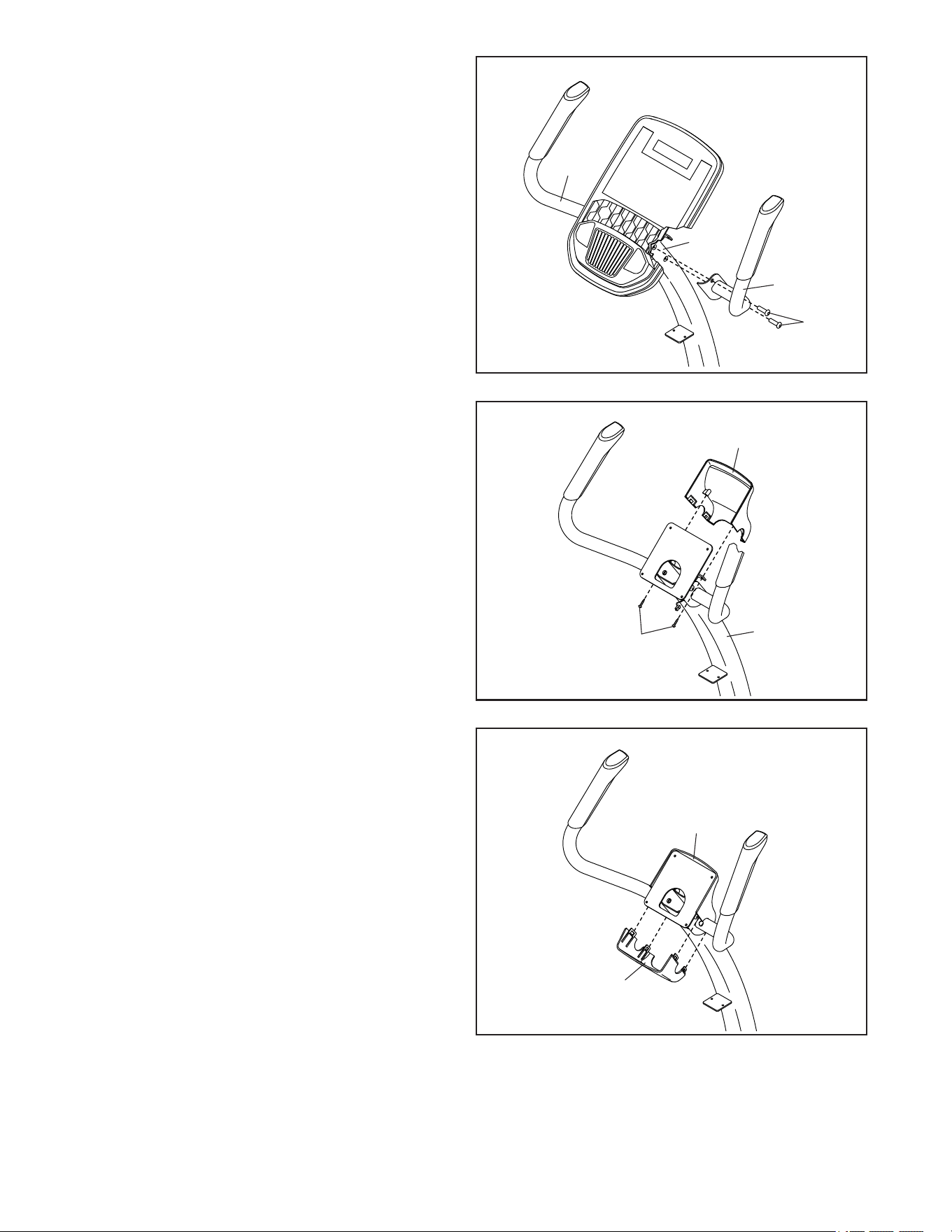
11
12. Have a second person hold the Right Handlebar
(5) near the Upright (4).
Attach the Right Handlebar (5) to the Upright (4)
with two M8 x 16mm Screws (63); start both
Screws, and then tighten them.
Repeat this step with the Left Handlebar (14).
12
63
14
5
4
13
12
4
34
13. Note: For clarity, the console is not shown in
this step.
Attach the Front Console Cover (12) to
the Upright (4) with two M4 x 18mm Truss
Screws (34).
14. Note: For clarity, the console is not shown in
this step.
Press the Rear Console Cover (15) onto the
Front Console Cover (12).
14
15
12
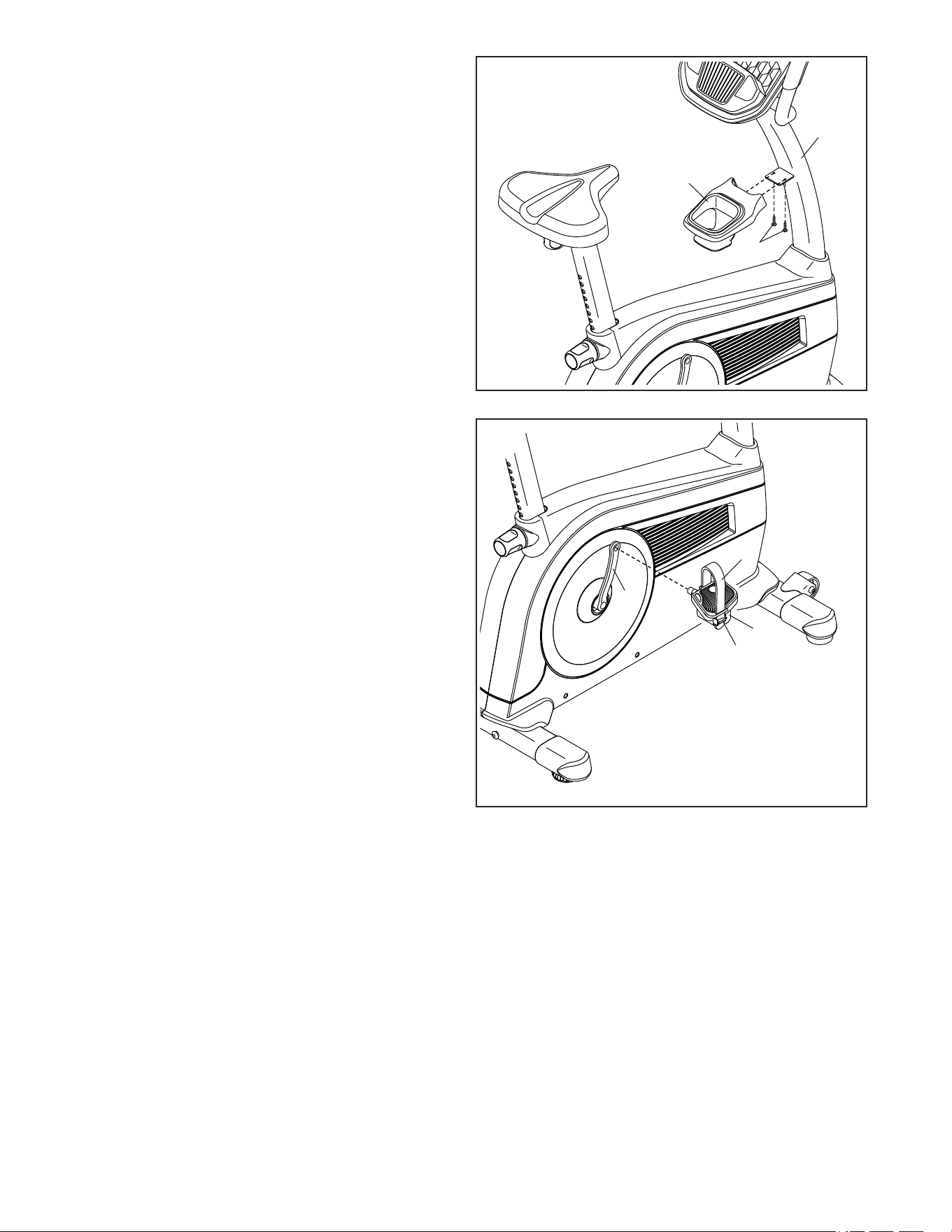
12
15
4
8
34
15. Attach the Accessory Tray (8) to the Upright (4)
with two M4 x 18mm Truss Screws (34).
19
D
21
C
16. Identify the Right Pedal (21). Using an adjust-
able wrench, firmly tighten the Right Pedal
clockwise into the Right Crank Arm (19).
Firmly tighten the Left Pedal (not shown)
counterclockwise into the Left Crank Arm
(not shown). IMPORTANT: You must turn the
Left Pedal counterclockwise to attach it.
To adjust the pedal straps (C), see HOW TO
ADJUST THE PEDAL STRAPS on page 14.
16
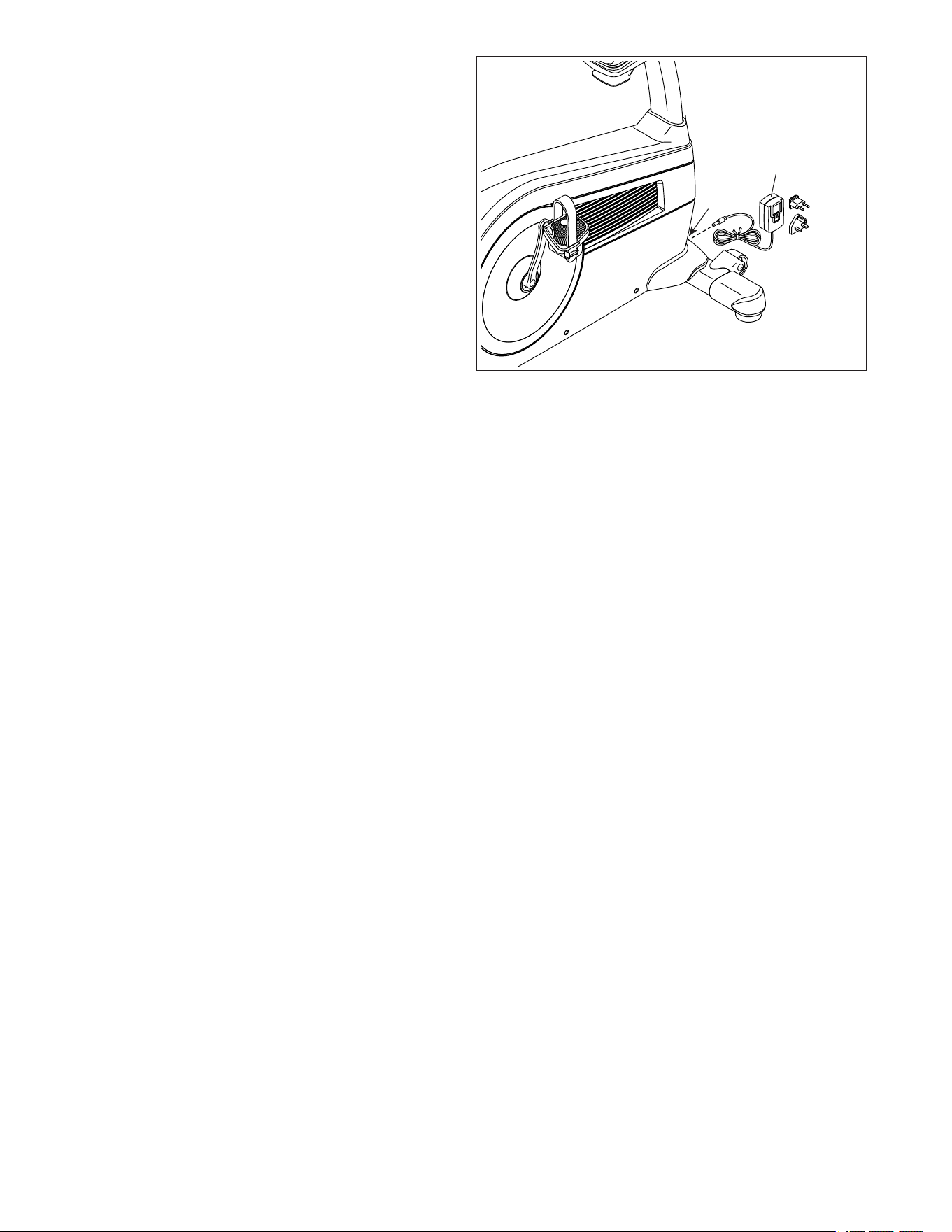
13
17. Plug the Power Adapter (61) into the Power
Receptacle (29) on the front of the exercise bike.
Note: To plug the Power Adapter (61) into an
outlet, see HOW TO PLUG IN THE POWER
ADAPTER on page 14.
29
61
17
18. After the exercise bike is assembled, inspect it to make sure that it is assembled correctly and that it
functions properly. Make sure that all parts are properly tightened before you use the exercise bike.
Extra parts may be included. Place a mat under the exercise bike to protect the floor or carpet.
14
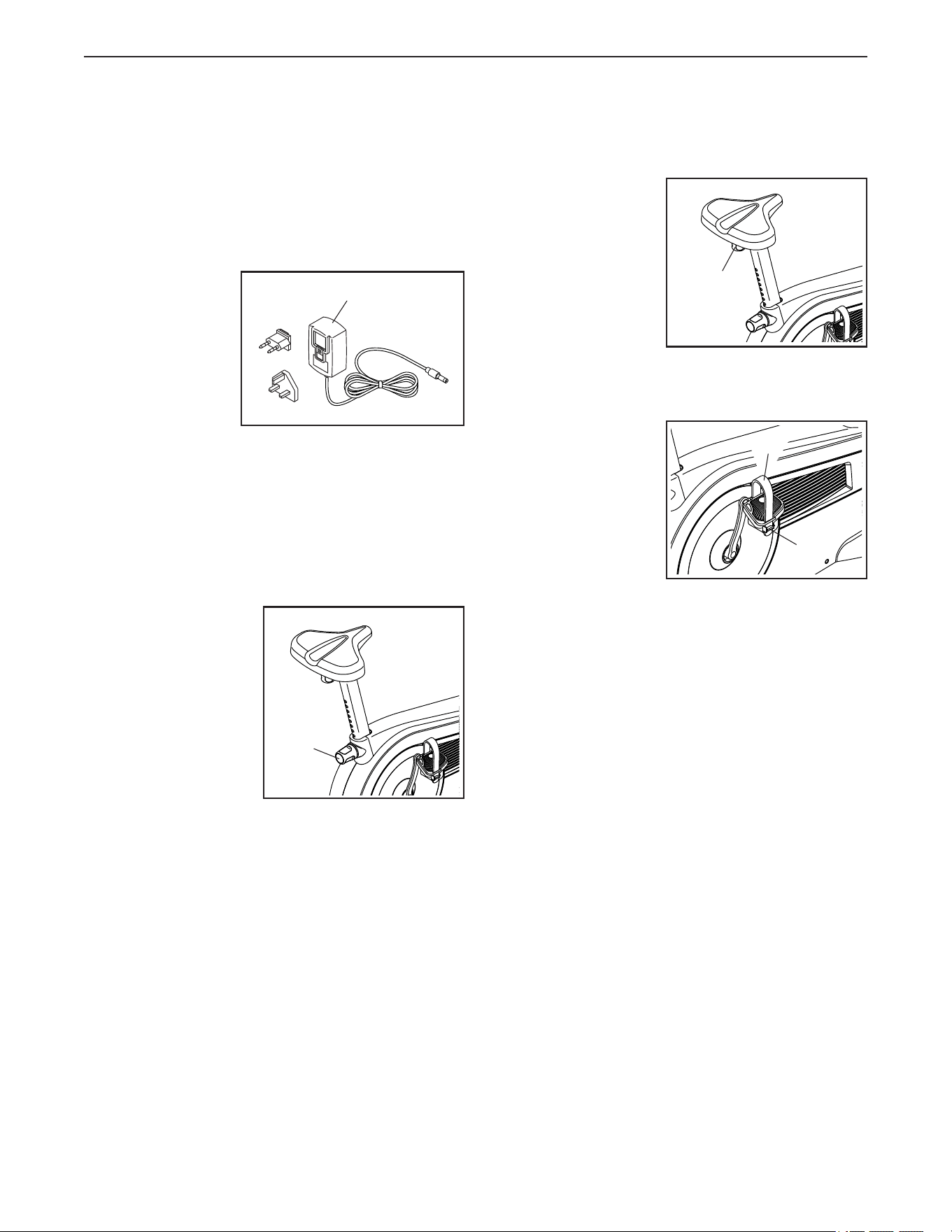
HOW TO PLUG IN THE POWER ADAPTER
IMPORTANT: If the exercise bike has been exposed
to cold temperatures, allow it to warm to room tem-
perature before you plug in the power adapter (A).
If you do not do this, you may damage the console
displays or other electronic components.
Plug the power
adapter (A) into
the receptacle
on the frame of
the exercise bike.
Then, plug the
power adapter
into an appropri-
ate outlet that is
properly installed
in accordance with all local codes and ordinances.
HOW TO ADJUST THE HEIGHT OF THE SEAT
For effective exercise, the seat should be at the proper
height. As you pedal, there should be a slight bend in
your knees when the pedals are in the lowest position.
To adjust the seat,
loosen the seat post
knob (B) a few turns,
pull the knob, slide
the seat post upward
or downward to the
desired position,
and then release
the knob. Move the
seat post upward or
downward slightly
to make sure that
the knob is engaged in one of the adjustment holes
in the seat post. Then, tighten the knob.
HOW TO ADJUST THE LATERAL POSITION OF THE
SEAT
To adjust the lateral
position of the seat,
first loosen the seat
knob (C) a few turns.
Then, move the seat
forward or backward
to the desired posi-
tion, and firmly tighten
the seat knob.
HOW TO ADJUST THE PEDAL STRAPS
To tighten a pedal
strap (D), pull down-
ward on the end of
the strap. To loosen
a strap, press the tab
(E) and pull upward
on the strap.
A
B
C
E
D
HOW TO USE THE EXERCISE BIKE
15
HOW TO LEVEL THE EXERCISE BIKE
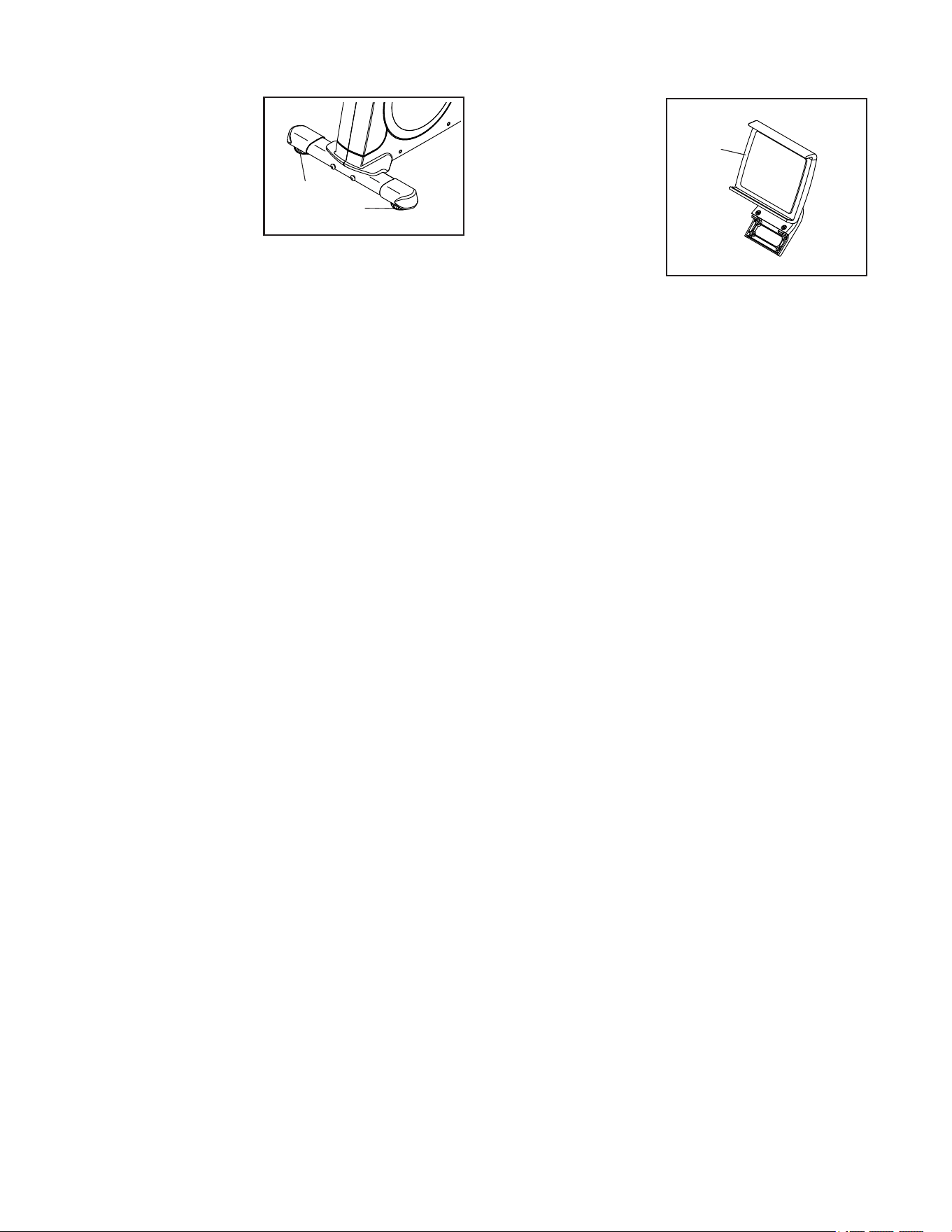
If the exercise bike
rocks slightly on your
floor during use, turn
one or both of the lev-
eling feet (F) beneath
the rear stabilizer
until the rocking
motion is eliminated.
THE OPTIONAL TABLET HOLDER
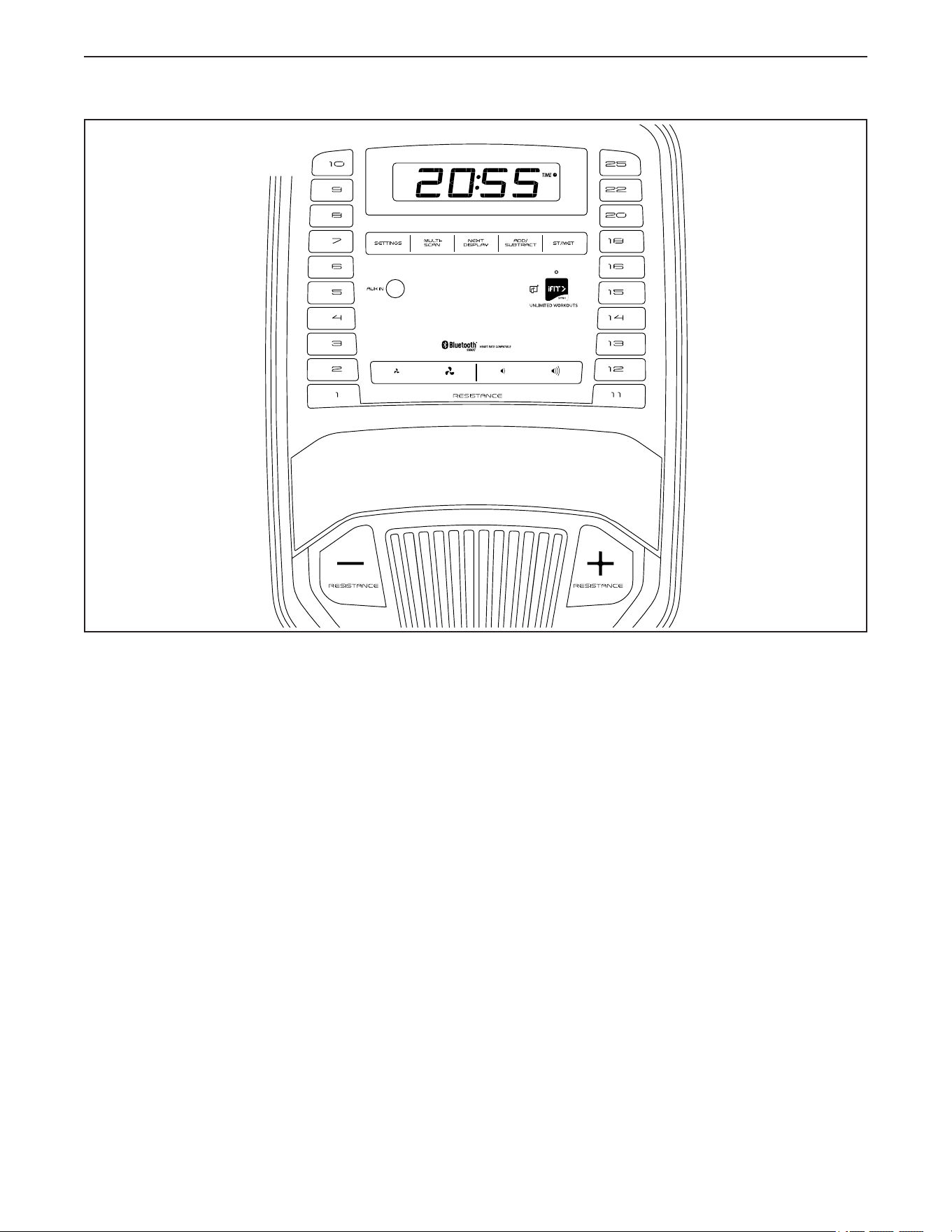
The optional tablet
holder (G) will hold
your tablet securely
in place and enable
you to use your tablet
while you exercise.
The optional tablet
holder is designed
for use with most
full-size tablets. To
purchase a tablet
holder, please see
the front cover of this manual.
F
F
G
16
HOW TO USE THE CONSOLE
FEATURES OF THE CONSOLE
The advanced console offers an array of features
designed to make your workouts more effective and
enjoyable.
When you use the manual mode of the console, you
can change the resistance of the pedals with the touch
of a button. As you exercise, the console will provide
continuous exercise feedback. You can even measure
your heart rate using a compatible heart rate monitor.
In addition, you can connect your personal audio
player to the console sound system and listen to your
favorite music or audio books while you exercise.
The console also offers unlimited iFit workouts when
you download the iFit app to your smart device and
connect it to the console.
With the iFit app, you can access a large and varied
library of iFit video workouts, create your own work-
outs, track your workout results, and access many
other features.
Each iFit workout automatically changes the resistance
of the pedals as an iFit coach guides you through an
immersive and effective video workout.
To use the manual mode, see page 17. To use the
sound system, see page 19.
To use an iFit workout, see page 19. To
connect your heart rate monitor to the console,
see page 21. To change console settings, see
page 21.
Note: If there is a sheet of plastic on the display,
remove the plastic.
Note: The console can display speed and distance in
either standard units or metric units. To change the unit
of measurement, press the St/Met button repeatedly.
For simplicity, all instructions in this section refer to
standard units.
Barney
EBNE77020
NTEVEX77020
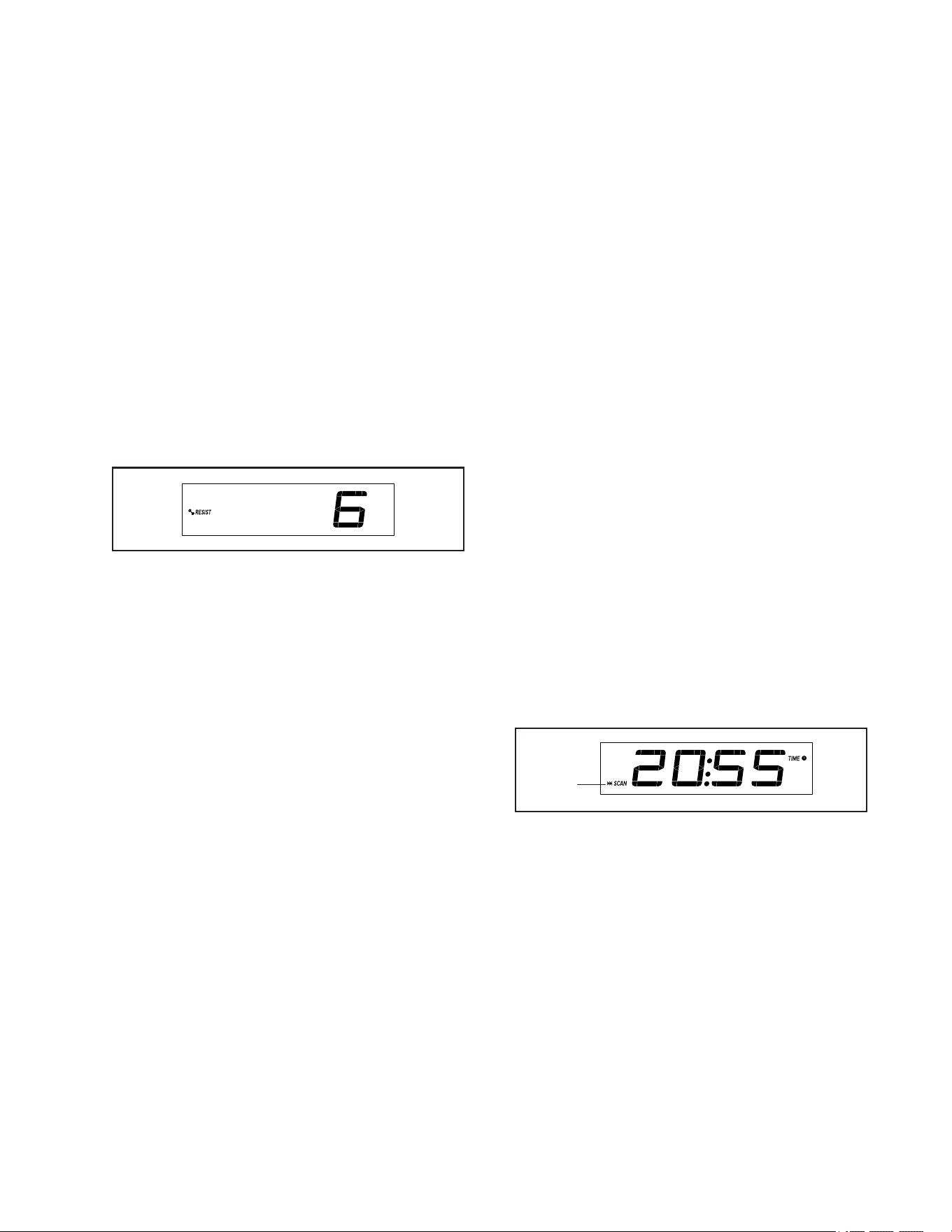
CONSOLE DIAGRAM
17
HOW TO USE THE MANUAL MODE
1. Begin pedaling or press any button on the
console to turn on the console.
When you turn on the console, the display will turn
on. The console will then be ready for use.
2. Select the manual mode.
When you turn on the console, the manual mode
will be selected automatically.
3. Change the resistance of the pedals as desired.
Begin pedaling to start the manual mode.
You can change the resistance of the pedals by
pressing one of the numbered Resistance but-
tons or by pressing the Resistance increase and
decrease buttons.
Note: After you press a button, it will take a
moment for the pedals to reach the selected
resistance level.
4. Follow your progress with the display.
The display can show the following workout
information:
Calories (CALS)—The approximate number of
calories you have burned.
Calories per Hour (CALS/HR)—The approximate
number of calories you are burning per hour.
Resistance (RESIST)—The resistance level of the
pedals.
RPM—Your pedaling speed in revolutions per
minute (RPM).
Time—The elapsed time.
Pace—Your pedaling speed in minutes per mile
or minutes per kilometer. To change the unit of
measurement, press the St/Met button.
Distance (MI or KM)—The distance that you have
pedaled in miles or kilometers. To change the unit
of measurement, press the St/Met button.
Speed (MPH or KPH)—Your pedaling speed in
miles per hour or kilometers per hour. To change
the unit of measurement, press the St/Met button.
Pulse (BPM and heart symbol)—Your heart rate
when you use a compatible heart rate monitor (see
step 5).
Press the Next Display button repeatedly to view
the desired workout information in the display.
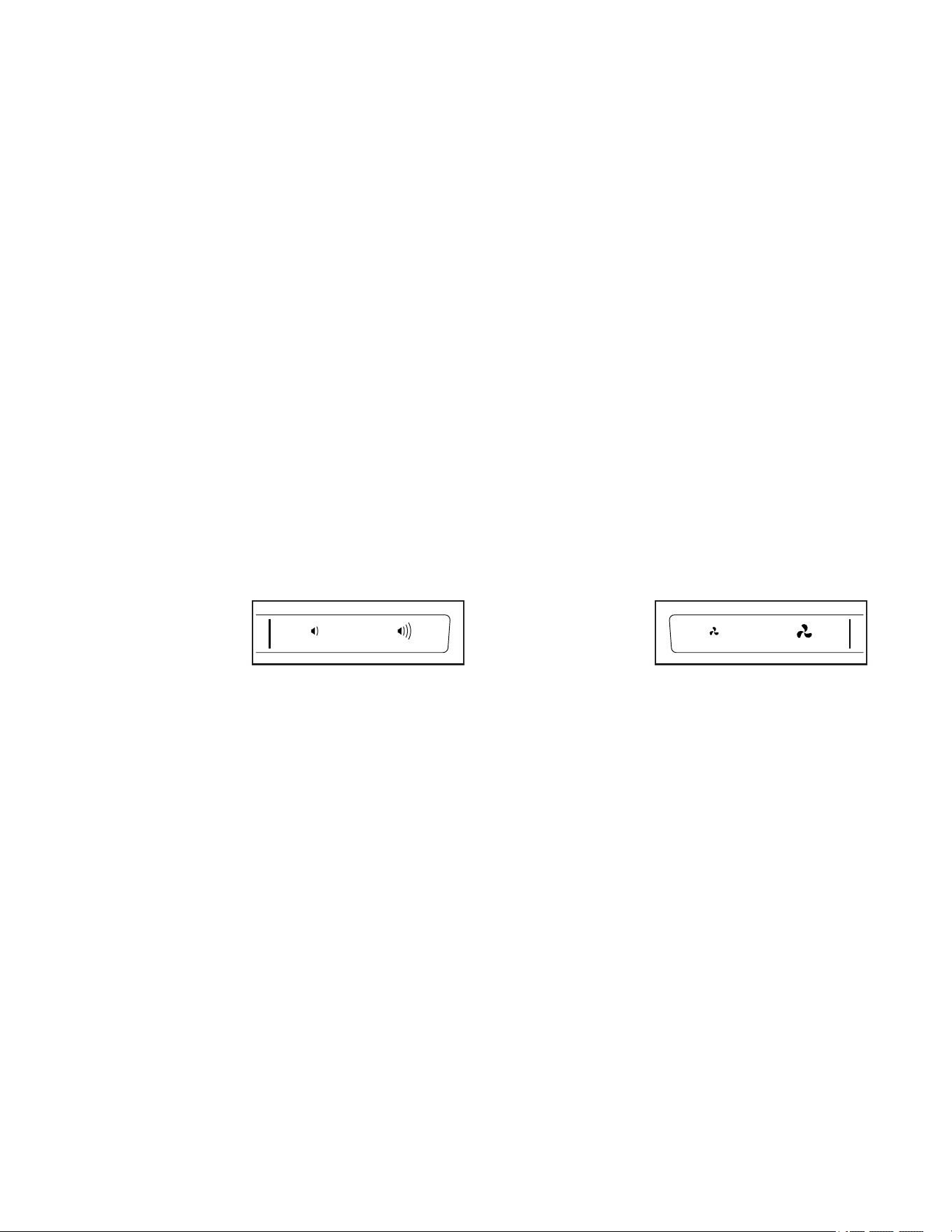
Scan mode—The console also has a scan mode
that will display workout information in a repeat-
ing cycle. To turn on the scan mode, press the
Multi-scan button; the scan indicator (A) and the
word SCAN will turn on in the display.
A
18
To manually advance the scan cycle, press the
Multi-scan button repeatedly.
To turn off the scan mode, press the Next Display
button; the scan indicator and the word SCAN will
turn off.
You can also customize the scan mode to display
only the desired workout information in the
repeating cycle.
To customize the scan mode, first press the
Next Display button repeatedly until the workout
information that you want to add to or remove from
the scan cycle appears in the display.
Next, press the Add/Subtract button to add or
remove that workout information from the scan
cycle. When workout information is added, its
indicator will turn on in the display. When workout
information is removed, its indicator will turn off.
Then, press the Multi-scan button to turn on the
scan mode.
Note: The console will show your heart rate in the
scan cycle automatically whenever it detects a
pulse from a heart rate monitor.
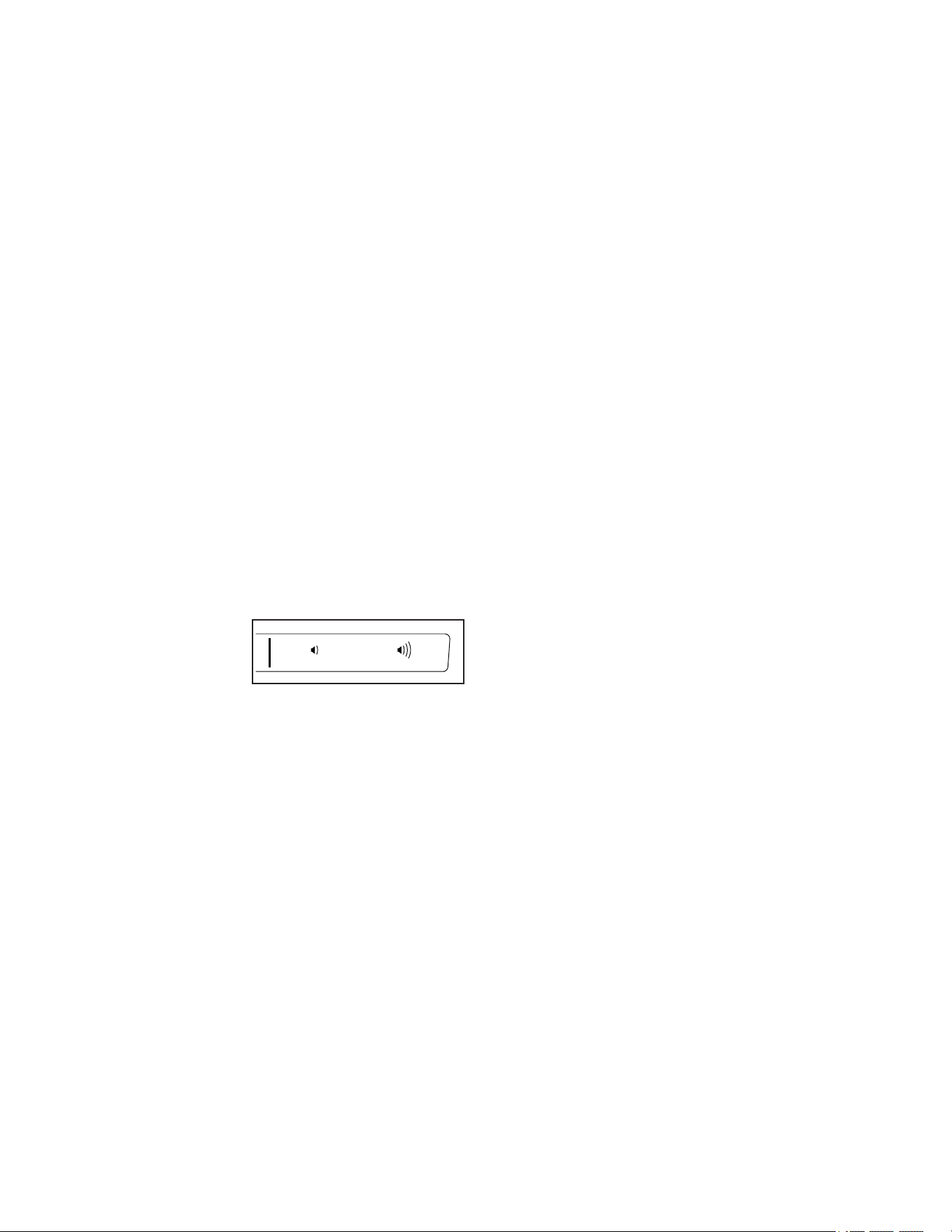
To change the
volume level
of the console,
press the
volume increase
and decrease buttons.
To pause the console, simply stop pedaling. When
the console is paused, the time will flash in the
display. To continue your workout, simply resume
pedaling.
5. Wear a compatible heart rate monitor and
measure your heart rate if desired.
You can wear a compatible heart rate monitor to
measure your heart rate. Note: The console is
compatible with all Bluetooth
®
Smart heart rate
monitors.
A compatible chest heart rate monitor is included
with some models. If a chest heart rate monitor
is included, see THE CHEST HEART RATE
MONITOR in this manual to learn how to use it.
If this model does not include a compatible
heart rate monitor, see page 21 for informa-
tion about ordering one.
To connect a compatible heart rate monitor to the
console, press the iFit Sync button on the console;
the console pairing number will appear in the dis-
play. When a connection is established, the LED on
the console will flash red twice. When your heart-
beat is detected, your heart rate will be shown.
See HOW TO CONNECT YOUR HEART RATE
MONITOR TO THE CONSOLE on page 21 for
more information.
6. Turn on the fan if desired.
The fan has
several speed
settings, includ-
ing an auto
mode. While
the auto mode is selected, the speed of the fan will
automatically increase or decrease as your pedal-
ing speed increases or decreases. Press the fan
increase and decrease buttons repeatedly to select
a fan speed or to turn off the fan.
Note: If the pedals are not moved for a while, the
fan will turn off automatically.
19
7. When you are finished exercising, the console
will turn off automatically.
If the pedals are not moved for a few seconds, the
console will pause and the time will flash in the
display. To resume your workout, simply resume
pedaling.
If the pedals do not move for several minutes and
the buttons are not pressed, the console will turn
off and the display will be reset.
Note: The console features a display demo mode,
designed to be used if the exercise bike is dis-
played in a store. When the demo mode is turned
on, the console will show a preset presentation. To
turn off the demo mode, see HOW TO CHANGE
CONSOLE SETTINGS on page 21.
HOW TO USE THE SOUND SYSTEM
To play music or audio books through the console
sound system while you exercise, plug a 3.5 mm male
to 3.5 mm male audio cable (not included) into the
jack on the console and into a jack on your personal
audio player; make sure that the audio cable is fully
plugged in. Note: To purchase an audio cable, see
your local electronics store.
Next, press the play
button on your per-
sonal audio player.
Adjust the volume
level using the vol-
ume increase and decrease buttons on the console or
the volume control on your personal audio player.
HOW TO USE AN IFIT WORKOUT
The console offers access to a large and varied library
of iFit workouts when you download the iFit app to your
smart device and connect it to the console.
Note: The console supports Bluetooth connections to
smart devices via the iFit app and to compatible heart
rate monitors. Other Bluetooth connections are not
supported.
1. Download and install the iFit app on your smart
device.
On your iOS
®
or Android™ smart device, open the
App Store℠ or the Google Play™ store, search
for the free iFit app, and then install the app on
your smart device. Make sure that the Bluetooth
option is enabled on your smart device.
Then, open the iFit app and follow the instructions
to set up an iFit account and customize settings.
Take time to explore the iFit app and learn about its
features and settings.
2. Connect your heart rate monitor to the console
if desired.
If you are connecting both your heart rate monitor
and your smart device to the console, you must
connect your heart rate monitor before you
connect your smart device. See HOW TO
CONNECT YOUR HEART RATE MONITOR TO
THE CONSOLE on page 21.
3. Connect your smart device to the console.
Press the iFit Sync button on the console; the
console pairing number will appear in the display.
Then, follow the instructions in the iFit app to con-
nect your smart device to the console.
When a connection is established, the LED on the
console will turn solid blue.

20
4. Select an iFit workout.
In the iFit app, touch the buttons at the bottom of
the screen to select either the main menu (Home
button) or the workout library (Browse button).
To select a workout from the main menu or the
workout library, simply touch the desired workout
button on the screen. Slide or flick the screen to
scroll upward or downward if necessary.
When you select a workout, the screen will show
an overview of the workout that includes details
such as the duration and distance of the workout
and the approximate number of calories you will
burn during the workout.
5. Start the workout.
Touch Start Workout to start the workout.
During some workouts, an iFit coach will guide you
through a video workout. Touch the sound button
(music notes symbol) to select music, trainer voice,
and volume options for the workout.
If the resistance setting for the current segment of
the workout is too high or too low, you can manu-
ally override the setting by pressing the Resistance
buttons on the console. IMPORTANT: When
the current segment ends, the resistance will
automatically adjust to the resistance setting
programmed for the next segment.
Note: The calorie goal shown in the workout
description is an estimate of the number of
calories that you will burn during the workout.
The actual number of calories that you burn
will depend on various factors, such as your
weight. In addition, if you manually change the
resistance level during the workout, the number
of calories you burn will be affected.
To pause the workout, simply touch the screen
or stop pedaling. To continue the workout, simply
resume pedaling.
To end the workout, touch the screen to pause the
workout, and then follow the prompts on the screen
to end the workout and return to the main menu.
When the workout ends, a workout summary will
appear on the screen. If desired, you can select
options such as adding the workout to your sched-
ule or adding the workout to your favorites list.
Then, touch Save Workout to return to the main
menu.
6. Disconnect your smart device from the
console.
To disconnect your smart device from the console,
first select the disconnect option in the iFit app.
Then, press and hold the iFit Sync button on the
console until the LED on the console turns solid
green.
Note: All Bluetooth connections between the
console and other devices (including any smart
devices, heart rate monitors, and so forth) will be
disconnected.
7. When you are finished exercising, the console
will turn off automatically.
If the pedals are not moved for a few seconds, the
console will pause and the time will flash in the
display. To resume your workout, simply resume
pedaling.
If the pedals do not move for several minutes and
the buttons are not pressed, the console will turn
off and the display will be reset.
Note: The console features a display demo mode,
designed to be used if the exercise bike is dis-
played in a store. When the demo mode is turned
on, the console will show a preset presentation. To
turn off the demo mode, see HOW TO CHANGE
CONSOLE SETTINGS on page 21.
21
HOW TO CONNECT YOUR HEART RATE MONITOR
TO THE CONSOLE
The console is compatible with all Bluetooth Smart
heart rate monitors.
To connect your Bluetooth Smart heart rate monitor to
the console, press the iFit Sync button on the console;
the console pairing number will appear in the display.
When a connection is established, the LED on the
console will flash red twice.
Note: If there is more than one compatible heart rate
monitor near the console, the console will connect to
the heart rate monitor with the strongest signal.
To disconnect your heart rate monitor from the console,
press and hold the iFit Sync button on the console until
the LED on the console turns solid green.
Note: All Bluetooth connections between the console
and other devices (including any smart devices, heart
rate monitors, and so forth) will be disconnected.
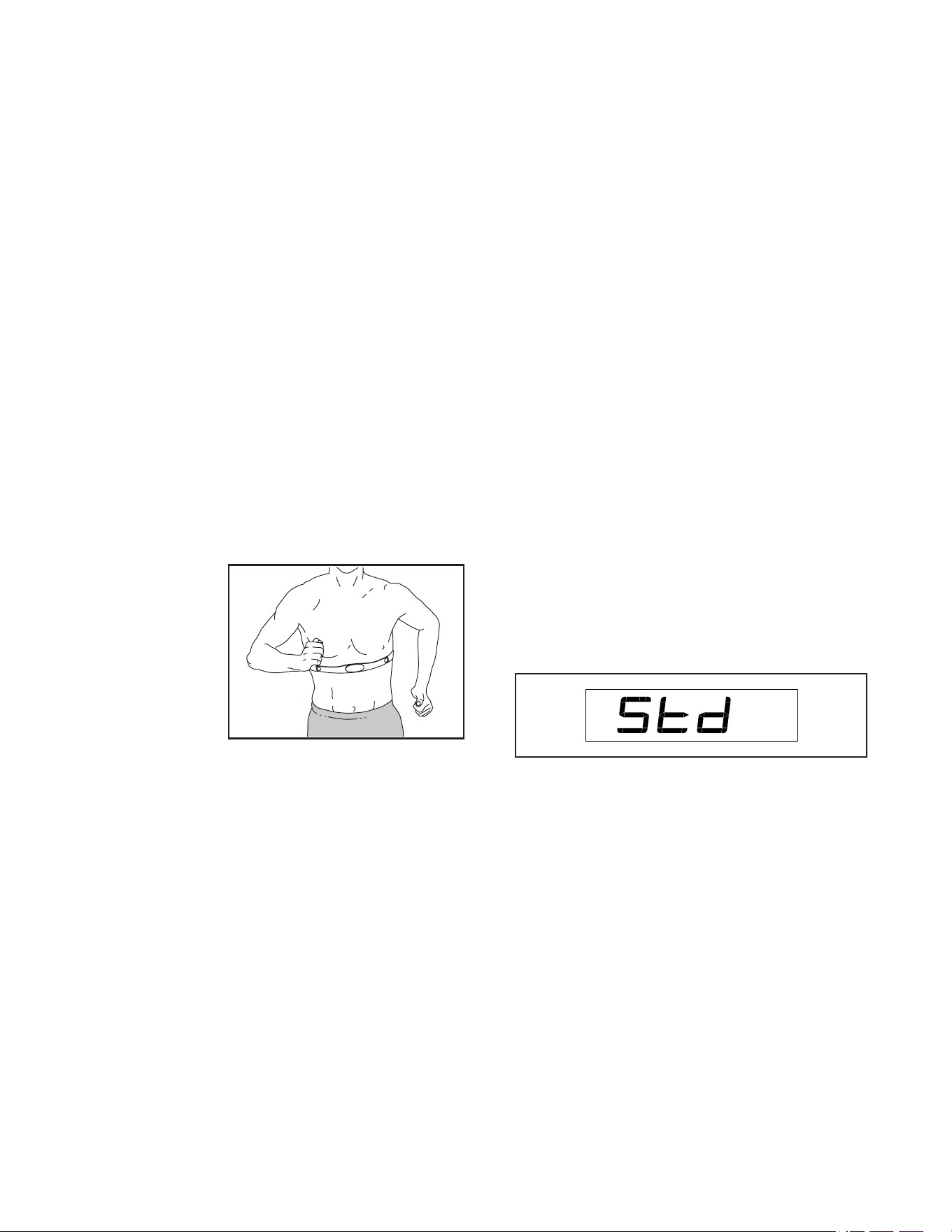
THE OPTIONAL CHEST HEART RATE MONITOR
Whether your
goal is to
burn fat or to
strengthen your
cardiovascular
system, the key
to achieving the
best results is
to maintain the
proper heart
rate during your
workouts. The optional chest heart rate monitor will
enable you to continuously monitor your heart rate
while you exercise, helping you to reach your personal
fitness goals. To purchase a chest heart rate moni-
tor, please see the front cover of this manual.
Note: The console is compatible with all Bluetooth
Smart heart rate monitors.
HOW TO CHANGE CONSOLE SETTINGS
1. Select the settings mode.
If you are using the manual mode, you must stop
pedaling and exit the workout before you can select
the settings mode.
To select the settings mode, press the Settings
button. The first settings screen will appear in the
display.
2. Navigate the settings mode.
While the settings mode is selected, you can
navigate through several settings screens. Press
the Next Display button repeatedly to select the
desired settings screen.
3. Change settings as desired.
Software Version Number—The software version
number will appear in the display.
Unit of Measurement—The currently selected
unit of measurement will appear in the display. The
console can show speed and distance in standard
or metric units of measurement. To change the unit
of measurement, press the St/Met button repeat-
edly. To view workout information in standard units,
select STD. To view workout information in metric
units, select MET.
22
Display Test—This screen is intended to be used
by service technicians to identify whether the
display is working correctly.
Button Test—This screen is intended to be used
by service technicians to identify whether a certain
button is working correctly.
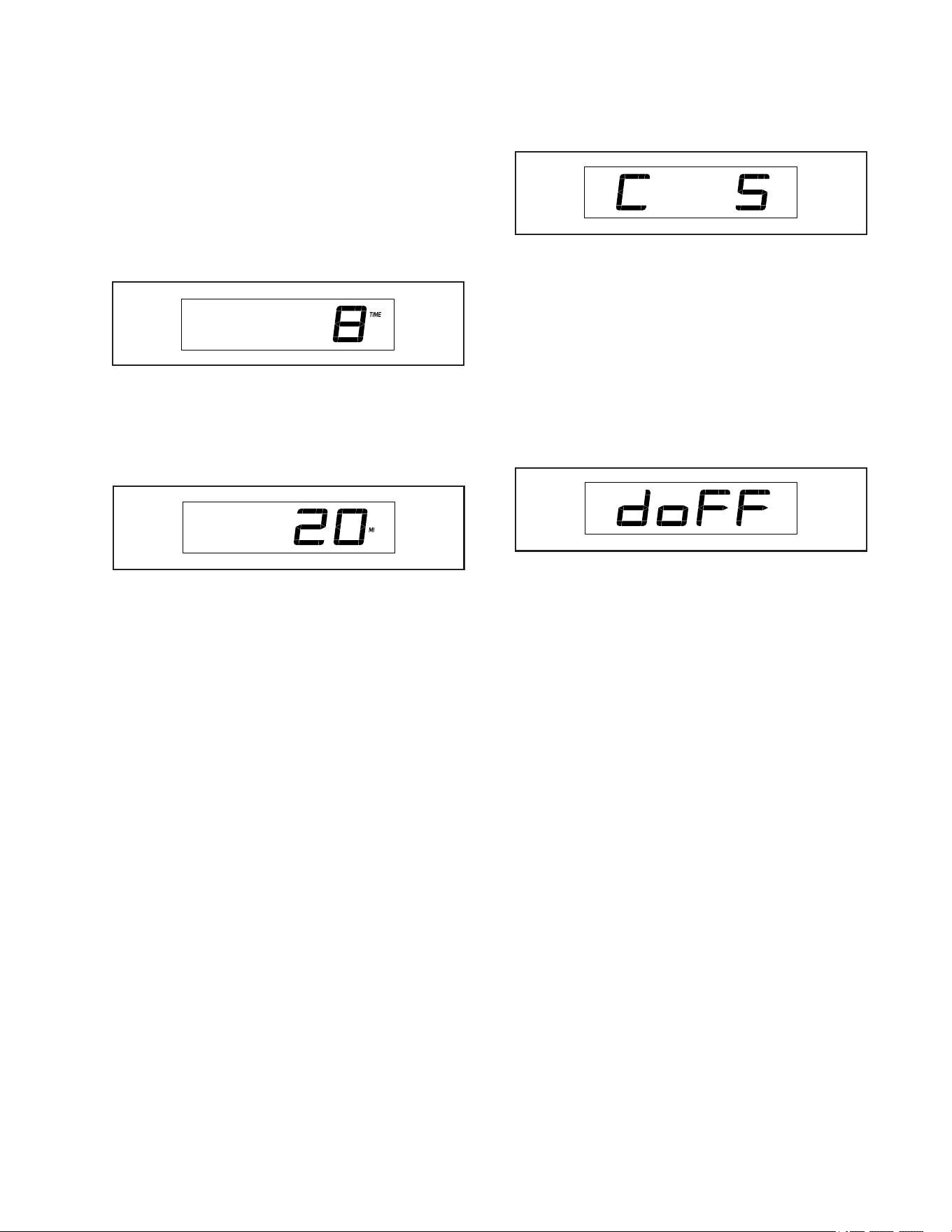
Total Time—The word TIME will appear in the
display. The display will show the total number of
hours that the exercise bike has been used.
Total Distance—The letters MI or KM will appear
in the display. The display will show the total
distance (in miles or kilometers) that the exercise
bike has been pedaled.
Contrast Level—The currently selected contrast
level will appear in the display. Press the
Resistance increase and decrease buttons to
adjust the contrast level.
Demo Mode—The currently selected demo mode
option will appear in the display. The console
features a demo mode, designed to be used if the
exercise bike is displayed in a store. If the demo
mode is turned on, the console will not turn off
and the display will not be reset when you nish
exercising. Press the Resistance increase button
repeatedly to select a demo mode option. To turn
on the demo mode, select DON. To turn off the
demo mode, select DOFF.
4. Exit the settings mode.
Press the Settings button to exit the settings mode.
23
MAINTENANCE
Regular maintenance is important for optimal
performance and to reduce wear. Inspect and properly
tighten all parts each time the exercise bike is used.
Replace any worn parts immediately.
To clean the exercise bike, use a damp cloth and a
small amount of mild soap. IMPORTANT: To avoid
damage to the console, keep liquids away from
the console and keep the console out of direct
sunlight.
CONSOLE TROUBLESHOOTING
If the console does not turn on, make sure that the
power adapter is fully plugged in.
If a replacement power adapter is needed, call the
telephone number on the cover of this manual.
IMPORTANT: To avoid damaging the console, use
only a manufacturer-supplied regulated power
adapter.
If lines appear in the console display, see step 3 on
page 21 and adjust the contrast level of the display.
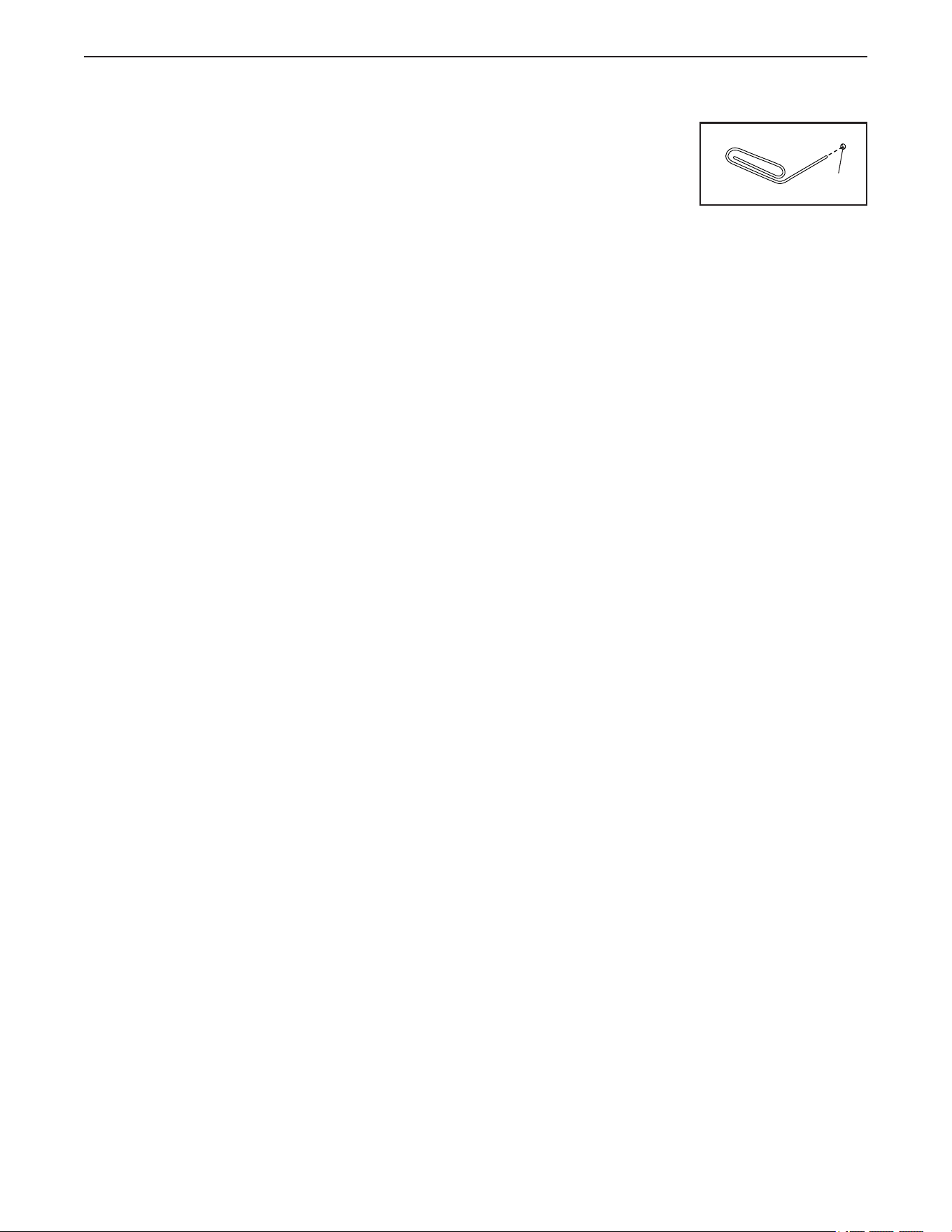
If the console does not boot
up properly, or if the con-
sole freezes and does not
respond, reset the console
to the factory default set-
tings. IMPORTANT: Doing
this will erase all custom settings you have made
to the console. Resetting the console requires two
people. First, unplug the power adapter. Next, locate
the small reset opening (A) on the side or the back of
the console. Using a bent paper clip, press and hold
the reset button inside the opening, and have a second
person plug in the power adapter. Continue holding the
reset button until the console turns on. When the reset
operation is complete, the console will turn off and then
turn back on. If it does not, unplug and then plug in the
power adapter. Once the console turns on, check for
rmware updates (see HOW TO CHANGE CONSOLE
SETTINGS on page 21). Note: It may take a few
minutes for the console to be ready for use.
MAINTENANCE AND TROUBLESHOOTING
A
24
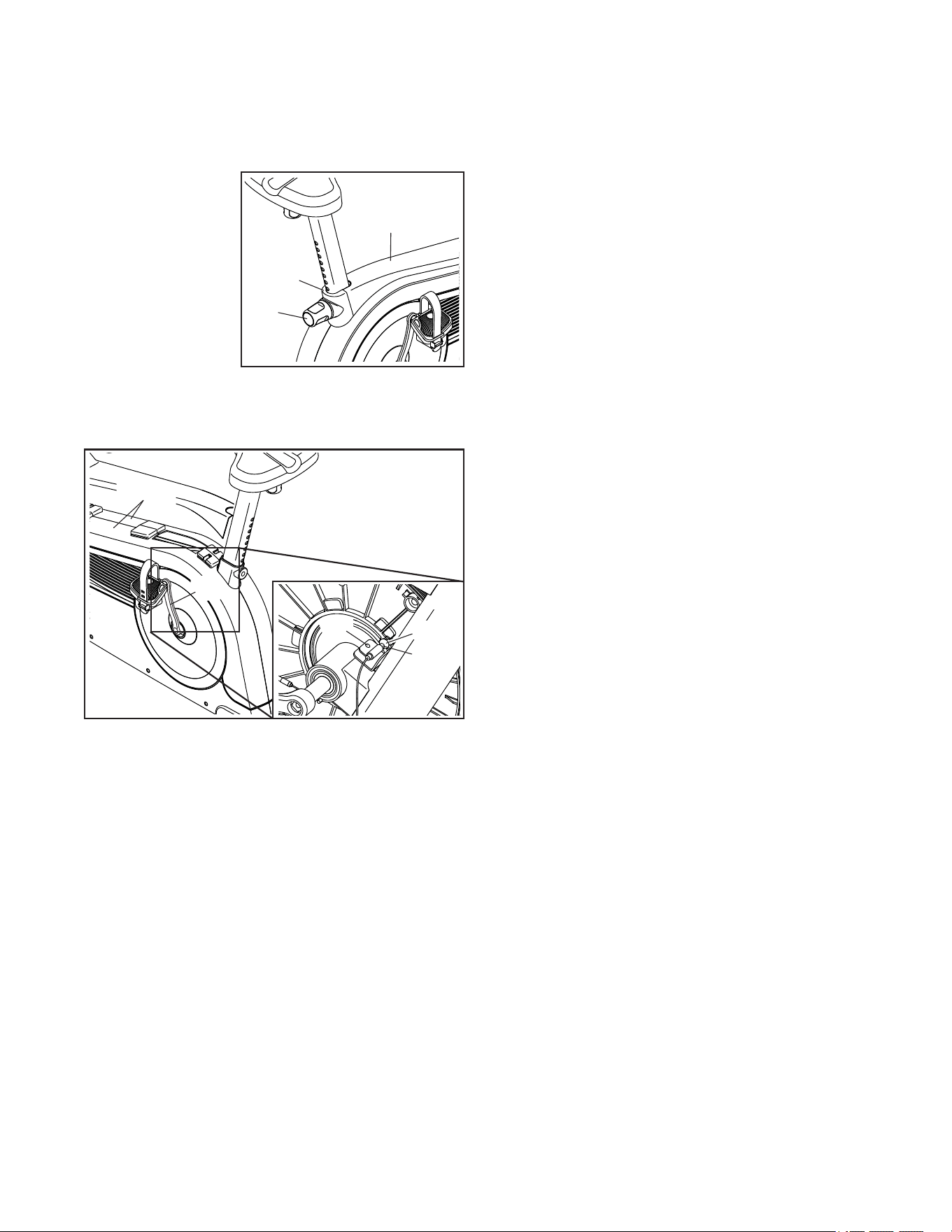
HOW TO ADJUST THE REED SWITCH
If the console does not display correct feedback, the
reed switch should be adjusted. Before adjusting the
reed switch, first unplug the power adapter.
Next, remove the
Seat Post Knob
(27), remove the
Knob Shield (9),
and slide the
Shield Cover (7)
upward.
Next, remove all of the Screws (not shown) from the
Right and Left Shields (10, 11).
See the lower drawing at the left. Carefully pull the
tops of the Shields (10, 11) apart and locate the Reed
Switch (57). Rotate the Left Crank Arm (20) until a
Magnet (55) is aligned with the Reed Switch. Then,
slightly loosen the M4 x 18mm Truss Screw (34), slide
the Reed Switch slightly toward or away from the
Magnet, and then retighten the Truss Screw.
Plug in the power adapter and rotate the Left Crank
Arm (20) for a moment. Repeat these actions until the
console displays correct feedback. When the reed
switch is correctly adjusted, reattach the parts that you
removed.
57
34
10, 11
55
20
7
9
27
25
EXERCISE GUIDELINES
These guidelines will help you to plan your exercise
program. For detailed exercise information, obtain a
reputable book or consult your physician. Remember,
proper nutrition and adequate rest are essential for
successful results.
EXERCISE INTENSITY
Whether your goal is to burn fat or to strengthen your
cardiovascular system, exercising at the proper inten-
sity is the key to achieving results. You can use your
heart rate as a guide to find the proper intensity level.
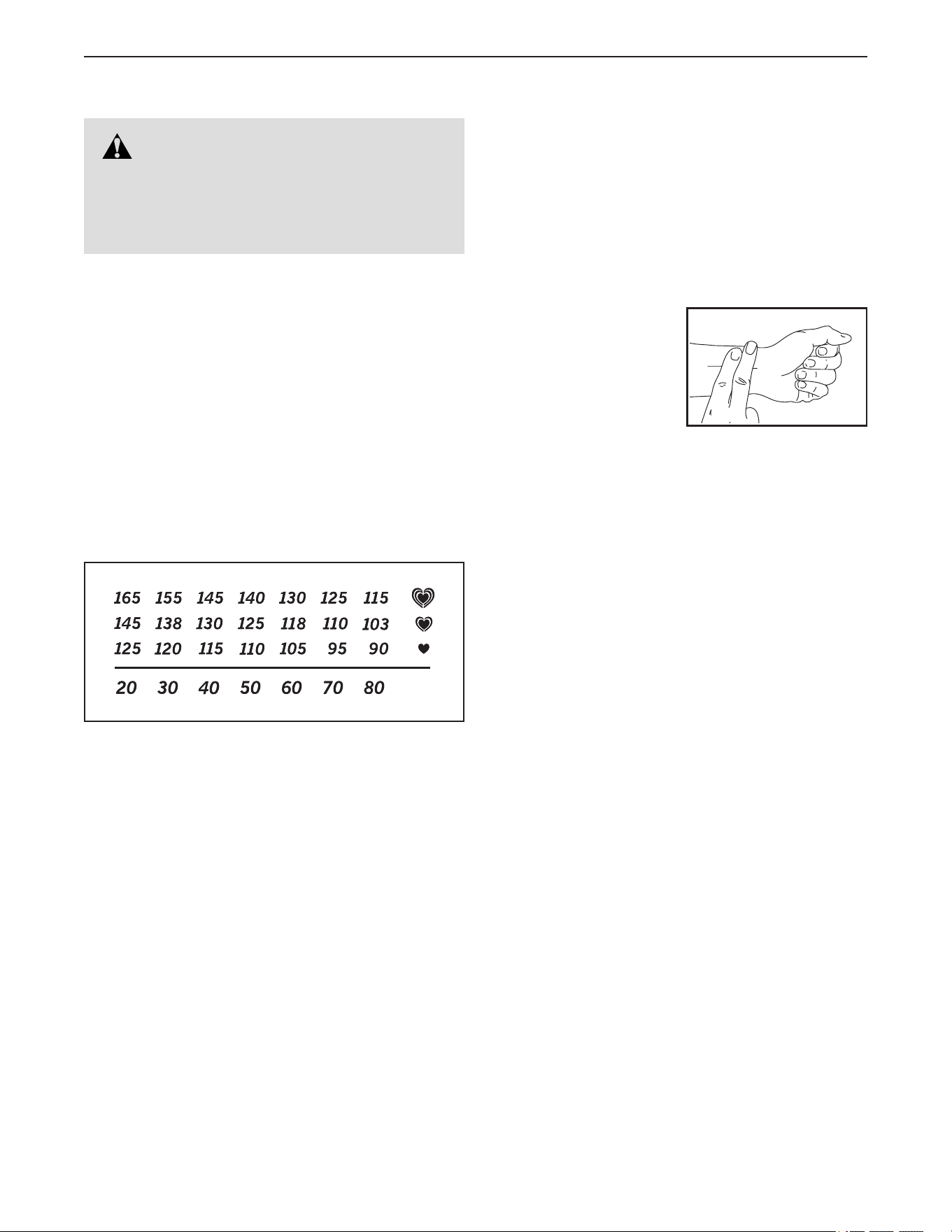
The chart below shows recommended heart rates for
fat burning and aerobic exercise.
To find the proper intensity level, find your age at the
bottom of the chart (ages are rounded off to the near-
est ten years). The three numbers listed above your
age define your “training zone.” The lowest number is
the heart rate for fat burning, the middle number is the
heart rate for maximum fat burning, and the highest
number is the heart rate for aerobic exercise.
Burning Fat—To burn fat effectively, you must exer-
cise at a low intensity level for a sustained period of
time. During the first few minutes of exercise, your
body uses carbohydrate calories for energy. Only
after the first few minutes of exercise does your body
begin to use stored fat calories for energy. If your
goal is to burn fat, adjust the intensity of your exer-
cise until your heart rate is near the lowest number in
your training zone. For maximum fat burning, exercise
with your heart rate near the middle number in your
training zone.
Aerobic Exercise—If your goal is to strengthen your
cardiovascular system, you must perform aerobic
exercise, which is activity that requires large amounts
of oxygen for prolonged periods of time. For aerobic
exercise, adjust the intensity of your exercise until
your heart rate is near the highest number in your
training zone.
HOW TO MEASURE YOUR HEART RATE
To measure your heart
rate, exercise for at least
four minutes. Then, stop
exercising and place
two fingers on your
wrist as shown. Take a
six-second heartbeat
count, and multiply the
result by 10 to find your heart rate. For example, if your
six-second heartbeat count is 14, your heart rate is 140
beats per minute.
WORKOUT GUIDELINES
Warming Up—Start with 5 to 10 minutes of stretch-
ing and light exercise. A warm-up increases your body
temperature, heart rate, and circulation in preparation
for exercise.
Training Zone Exercise—Exercise for 20 to 30 min-
utes with your heart rate in your training zone. (During
the first few weeks of your exercise program, do not
keep your heart rate in your training zone for longer
than 20 minutes.) Breathe regularly and deeply as you
exercise —never hold your breath.
Cooling Down—Finish with 5 to 10 minutes of stretch-
ing. Stretching increases the flexibility of your muscles
and helps to prevent post-exercise problems.
EXERCISE FREQUENCY
To maintain or improve your condition, complete
three workouts each week, with at least one day of
rest between workouts. After a few months of regular
exercise, you may complete up to five workouts each
week, if desired. Remember, the key to success is to
make exercise a regular and enjoyable part of your
everyday life.
WARNING: Before beginning this
or any exercise program, consult your physi-
cian. This is especially important for persons
over age 35 or persons with pre-existing
health problems.

26
1 1 Frame
2 1 Front Stabilizer
3 1 Rear Stabilizer
4 1 Upright
5 1 Right Handlebar
6 1 Seat Post
7 1 Shield Cover
8 1 Accessory Tray
9 1 Knob Shield
10 1 Right Shield
11 1 Left Shield
12 1 Front Console Cover
13 1 Console
14 1 Left Handlebar
15 1 Rear Console Cover
16 2 Crank Cap
17 2 Wheel
18 2 M10 x 62mm Bolt
19 1 Right Crank Arm
20 1 Left Crank Arm
21 1 Right Pedal/Strap
22 1 Left Pedal/Strap
23 1 Seat
24 1 Seat Carriage
25 2 Mechanism Spacer
26 1 Seat Knob
27 1 Seat Post Knob
28 1 Seat Post Sleeve
29 1 Power Receptacle/Wire
30 1 Seat Bracket
31 4 M10 Washer
32 2 Rear Stabilizer Cap
33 2 Front Stabilizer Cap
34 25 M4 x 18mm Truss Screw
35 1 M8 x 28mm Hex Screw
36 2 Leveling Foot
37 2 Handgrip
38 1 Pulley
39 1 Crank
40 2 Crank Bearing
41 2 Snap Ring
42 1 Eddy Mechanism
43 8 M8 Locknut
44 4 M8 x 18mm Bolt
45 1 Idler
46 2 M10 Jam Nut
47 1 Resistance Motor
48 1 M10 x 65mm Hex Screw
49 1 M6 x 20mm Hex Screw
50 1 M6 Washer
51 1 M6 x 20mm Screw
52 4 #10 x 15mm Screw
53 4 M10 x 110mm Screw
54 1 Drive Belt
55 2 Magnet
56 1 Clamp
57 1 Reed Switch/Wire
58 1 Main Wire
59 3 Tree Fastener
60 2 M10 Flange Nut
61 1 Power Adapter
62 2 M8 Flange Screw
63 4 M8 x 16mm Screw
64 4 M8 Washer
65 4 M10 x 15mm Screw
* – User’s Manual
* – Assembly Tool
Key No. Qty. Description Key No. Qty. Description
Note: Specifications are subject to change without notice. See the back cover of this manual for information about
ordering replacement parts. *These parts are not illustrated.
PART LIST
Model No. NTEVEX77020.0 R1020A
27
34
4
6
9
14
15
8
12
23
24
26
61
43
43
43
65
65
31
31
30
5
37
37
1
10
11
17
17
27
28
32
32
33
18
46
47
54
56
34
63
34
35
57
58
60
60
25
53
36
36
53
52
34
34
34
34
34
34
59
34
7
34
29
40
40
41
41
51
50
49
48
19
2
21
16
62
20
22
16
62
38
42
3
33
34
39
55
55
44
44
34
34
34
34
64
45
25
59
13
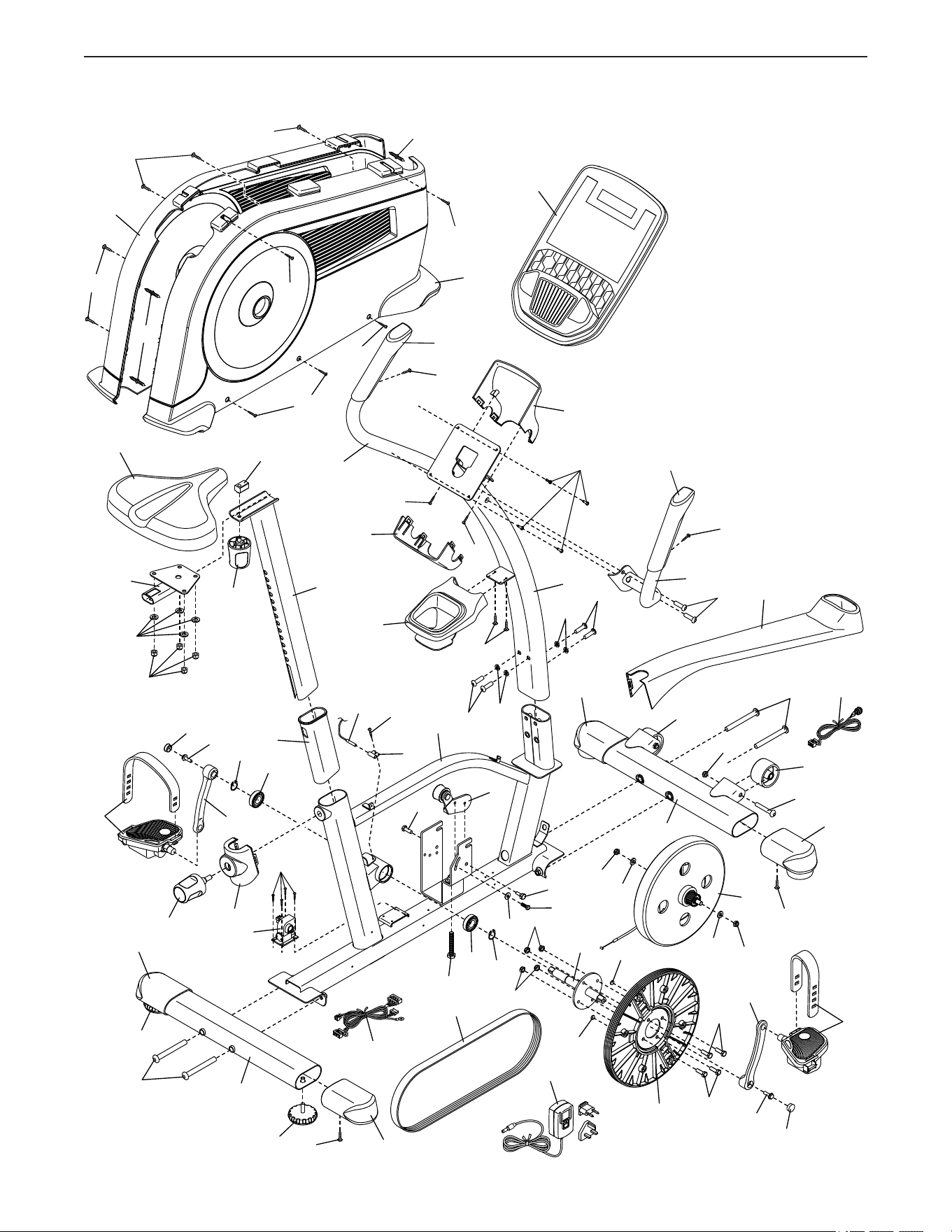
EXPLODED DRAWING
Model No. NTEVEX77020.0 R1020A
Part No. 425448 R1020A Printed in China © 2020 ICON Health & Fitness, Inc.
To order replacement parts, please see the front cover of this manual. To help us assist you, be prepared to
provide the following information when contacting us:
• the model number and serial number of the product (see the front cover of this manual)
• the name of the product (see the front cover of this manual)
• the key number and description of the replacement part(s) (see the PART LIST and the EXPLODED DRAWING
near the end of this manual)
ORDERING REPLACEMENT PARTS
This electronic product must not be disposed of in municipal waste. To
preserve the environment, this product must be recycled after its useful life
as required by law.
Please use recycling facilities that are authorized to collect this type of waste in
your area. In doing so, you will help to conserve natural resources and improve
European standards of environmental protection. If you require more information
about safe and correct disposal methods, please contact your local city office or the
establishment where you purchased this product.
RECYCLING INFORMATION